#multiplayer
1 messages · Page 351 of 1
 worthy wasp
if thats the case - save the struct out of the session your joined to - and you can access its members at any time.
if your looking for OTHER sessions - you'll have to do a ForEach loop - and break the struct
i forget the members that are in this struct - but i'm certain that an ID or a HOSTNAME is one of htem
Describes the different kinds of Online and Error Related Blueprint Nodes.
 wary wyvern
In blueprints I'm trying to get session name like this:
https://yadi.sk/i/5RpuQQ5l3PMj9U
 worthy wasp
is SESSION stored appropriately?
or is it nulled?
SESSION should be set AFTER joining the server
or....
it will need to be populated as an array from FindSessions() which returns an array
wary wyvern
It outputs something like
ServerPC_32345gb34tc345t36345
 thin stratus
@wary wyvern Cpp is the way to go
And it's not that much work to simply write yourself a proxy node
worthy wasp
curious - is that the MAC address of the PC you're connected to?
thin stratus
Then you can just call thaz inside of your widget
Similar to how you do it with the default nodes
Check ue4 Youtube channel for steam friends stufd
There i explain the proxy nodes
You can then look up the default create node and apply that to your own node
wary wyvern
Well, I can use CPP, no problem, but lack of docs 😦
thin stratus
Just gave you docs
wary wyvern
No, I mean setting and getting server name
thin stratus
Well that's actually kinda findable via google
I have a whole wiki page about the session stuff
Tiny bit outdated but the idea is the same
worthy wasp
 maiden atlas
error C2511: 'void UVitalixComponent::VitalixDamage(float,const UDamageType *,AController *,AActor *)': overloaded member function not found in 'UVitalixComponent'
UFUNCTION(BlueprintCallable, Server, Reliable, WithValidation, Category = "Vitalix_Damage")
virtual void VitalixDamage(float Damage, UDamageType* DamageType, AController* InstigatedBy, AActor* DamageCauser);
bool UVitalixComponent::VitalixDamage_Validate(float Damage, UDamageType * DamageType, AController * InstigatedBy, AActor * DamageCauser)
{
return true;
}
void UVitalixComponent::VitalixDamage_Implementation(float Damage, UDamageType * DamageType, AController * InstigatedBy, AActor * DamageCauser)
{}
Any ideas why this isn't compiling?
 brittle sinew
How are you trying to call this function?
It looks like you're trying to pass a const pointer as your second parameter when the function doesn't take one
maiden atlas
I'm not calling any of these functions yet.
I didn't declare the parameter type as const either
In short, no idea why the compiler is saying const in that error
 vital steeple
is there a way in BP to get the player controller from the player state? or do i need to place a reference to the controller in the player state?
 jolly siren
@vital steeple GetOwner and cast it
 stark dome
I wish the pawn was the owner of the playerstate
Then referencing it on other clients would be simpler
 fossil spoke
An Pawn is not an persistent object so it wouldnt make much sense.
stark dome
That's a good point
 wet lion
hi, quick question: I have some code that I originally meant for a listen server scenario, where I have a check for GetWorld()->GetNetMode() and if it is NM_Client I do not allow the code to execute. This was meant to prevent clients from invoking it and cheating. Thing is, I only have experience with the listen server approach and this code is controller / pawn related. I am now wondering if instead I should use HasAuthority to account for a dedicated server scenario? I basically don't know if there is a difference in terms of who has who's controller and pawn when there is a dedicated server.
 zenith yarrow
Hello, I am new to unreal and multiplayer programming in general, I have followed eXi's guide on the wiki to create a session, but when I try to spawn a pawn in the world using StartMach() in gameMode HandleMatchIsWaitingToStart(), I suppose I am not able to posses the pawn as it does not respond to input.
I have used the default PawnWithCamera -> https://docs.unrealengine.com/latest/INT/Programming/Tutorials/PlayerCamera/3/, that I converted to BP and am using it as default pawn in game-mode.
Also, I am goning through the, https://wiki.unrealengine.com/Spawn_Different_Pawns_For_Players_in_Multiplayer, but I fail to understand why he used txt file to choose pawns, and why the shooterExample used ShooterPersistentUser ?
So my question would be, if I am using the correct approach to spawn players here ? And, is there a guide or resource that explains the Shooter Example from unreal ?, it looks like a pretty solid implementation for multiplayer but I can't wrap my head around it completly.
 void canopy
Guys I wanted to get the instance of UNetDriver. I tried getting its instance in playercontroller class from GetNetDriver() method, but it failed, can anyone tell me why ?
 warm pagoda
Not off the top of my head, but you can, if you use the debugger. 😃
void canopy
@twin juniper Can you help ? I want to know how I can access UNetDriver instance
warm pagoda
Uh... the script that runs Unrealbot is certainly not going to parse your natural language question and give you an answer based on knowledge of an API....
Seriously though. Debug your code.
If GetNetDriver is returning nullptr, then step in and find out what it's doing.
void canopy
@warm pagoda well that's a good point.
zenith yarrow
@thin stratus How much time, would a dude who has shifted from unity to unreal, and is learning unreal while doing Network Programming in unreal using c++, would take to master it at intermidiate level ?
thin stratus
Hm
How good are you in Unity
aka c#
Generally, the programming itself is easy. There isn't that much to know, despite the 3 RPCs, variable replication and the conditions on them
The harder part is understanding what classes are available in UE4 that you need to utilize
And on which Actors you are allowed to actually call teh RPCs
if you are used to UNity, then you should know what RPCs are
Grab my compendium and read it.
I would say a skilled unity dev needs 1-3 months maybe. Really depends on you
Might be that you are so good in understanding code structure, that you need a week
- learning c++ if that's not yet done
zenith yarrow
Yup have to get my handle on c++ from c#, also woked with UNET and made a multiplayer game with horrible multiplayer code in unity. Because the I made the single player game in one month, and spent another 3 months making it multiplayer. Learned my lesson then that multiplayer games need to be designed ground up with multiplayer in mind.
thin stratus
Yus, never start a MP game as singleplayer
But yeah, grab my compendium, it will help you with the framework of ue4
and give you some examples
Rest is up to your skills
zenith yarrow
Already downloaded it a while ago, and have been coming across your posts and answers on ue4 answers, they have been quite helpful to be honest. Because the official docs for multiplayer in UE4 is pretty much useless for a beginner.
void canopy
@thin stratus I have a client which I want to use in single player mode, if I do not connect this client to any server, it keeps on shooting UnetDriver:Timeout error and it restarts the map, how can I by pass it ?
@thin stratus my situation is to use the same client which I use to connect to game server in single player mode, but after 60 sec it keeps on restarting the map and TimeOut log message comes, how can I stop this if I'm using same client for single player mode, so that I need not to create 2 separate exe for single player and multiplayer.
thin stratus
That shouldn't happen to begin with
There is not reason for a client to do that
You must have coded that somewhere
If you start a game, for example in PIE, with 1 Player
and not Dedicated Server ticked
it should just work
It's handled as Authority then
Singleplayer is basically a ListenServer that doesn't listen/accept connections
void canopy
@thin stratus ok. Looking into it
@thin stratus these are the parameters with which I start the game . -log -game -ResX=640 -ResY=480 -WINDOWED
 full axle
I was wondering how can I 'stream' from the audio captured by Media Player to other clients in the same server?
I tried replicating the audio directly but it gave me an error in the logs
FNetGUIDCache::SupportsObject: AudioComponent... NOT Supported
 sturdy surge
Guys good morning. I'm having a small technical question.
Lets say that we have a open world multiplayer game. To keep performance up we would use a culling distance for relevancy. Lets say its skyrim, people pickup items and equip weapons.
When one player comes into range of another I would like to run a setup and synch the weapons and armor that he is using.
Is there any method that is called when he is relevant?
I thought of using a bool with RepNotify to set to false when the actor is away and then switch it to true when he comes into range. Doing that the repnotify will ask everything he needs to know. Isn't this cheesy?
Is there a better way?
 cold sparrow
you should use RepNotify - it will be called if your actor is relevant
does any one know how to get a player controller or pawn being inside PlayerState on a server side? I have a function in PlayerState that I call on a server, BUT to get access to my player I have to pass it. I was wandering if there is another way.
if I call GetPlayerController(0) on a server, it gives me 1st player in the list, obviously
jolly siren
@cold sparrow GetOwner() and cast it
cold sparrow
ok, let me confirm it
awesome! GetOwner -> cast to my controller -> get controlled pawn
jolly siren
yep, looks good
vital steeple
@jolly siren oh the playerstate is owned by the controller?
jolly siren
yeah, i answered you yesterday on that
vital steeple
yeah i was just clarifying, i didnt know thats how the heirarchy works
thank you very much!
jolly siren
np
 twin juniper
Hi!
Event begin play is being called for all clients
so i have GUI pop up on clients that are not supposed to have them
how do i solve this problem?
jolly siren
no problem
twin juniper
When I package project with steam integration in defaultengine in config, I have a warning that says it can't find path to steam Api and retries every 10 seconds until it finally fails
jolly siren
windows or linux?
did you copy over the dll / so files?
Allar's Blog
This is the first step in a series of guides that will show you how to enable the OnlineSubsystemSteam module for your project. It does not cover session creation, session management, app id association, or anything specific to OnlineSubsystemSteam. These steps are the first part in enabling a Steam integration
twin juniper
Windows
jolly siren
twin juniper
Thanks will try tomorrow
jolly siren
np
 ripe cypress
anyone know right off what changed with online subsystem or steam form 4.16 to 4.17 cant see hosted game now ?
 heady epoch
What is cheaper, to replicate a transform across or to replicate both a vector and rotation
heady epoch
So would be cheaper to only rep across two seperate vectors (loc and rot)?
In addition
I am working on client side projectiles. I essentially spawn on the client and server
I have this macro in the projectile. I am not using epics movement replication. I am doing it myself on tick. My issue is that the object that is client controlled and has authority can not access anything from the server. Even a replicated variable such as transform.
The reason I need it accessed is so when the server destroys I can destroy the Client Controlled and Authority projectile but can not access it (I do it this way so projectile spawning is smooth as butter for client regardless of ping).
I will then do some lerping and/or update speed of projectile to match between the two, but the problem is that I can not even access the replicated transform of the server projectile
This is the tick of the projectile. I update manually the transform on the clients of what the server's is instead of using epics replicate movement. This way I can then in theory update the client controlled and authority projectile (The FireItem_Client from a screenshot above) to after being fired incremently slow it down to match where the server is so the laggy user doesn't have delay when firing for good visual feedback, but tweak them slightly to get back in line with the server
 faint fable
Is the BP set to replicate? not the movement replication option. @Osok#1354
but replicating a transform varible is as expensive as replicate movement ?
heady epoch
Yes the bp is set to replicate, but not the movement. In my case the client who fires does not see a replicated projectile since he will only see his on screen (I can destroy the actor on spawn effectively replacing it with their client executed projectile). In theory that should reduce the bandwidth for replication by one object.
The thing is that the CCA pin coming off that macro will return authority because the client controls it and there is no remote object of it. It is authority outside of the server which means it is only seen on the client. Gotta find a workaround to get it seen somehow so I can adjust its movement based on the server.
@faint fable
 dry cloud
Heya guys, I'm looking for a good game host service, do you guys know of some companies that provide good/cheap solutions for small/mid scale hosting (looking to compare with the big guys like AWS)
brittle sinew
I've had luck with both Linode and DigitalOcean personally
Linode's prices are better, but they don't have quite the same ecosystem as DO (the same could be said about either vs AWS as well though)
I can't quite comment on the game host side of it though—I've never really used VPSs for CPU-intensive tasks
I know DO has their high CPU plans if you end up needing that (not sure of the CPU footprint of UE4 servers in comparison to RAM), so that might be worth checking out
 next falcon
Guys I need your help
i created a project and made it for multiplayer and start it in editor and it works. it creates a session and i can join it too
But if i package it and start it there it failed to create a session...
(I am useing advanced sessions plugin) and sorry for my bad english i hope u understand everything..
brittle sinew
Have you checked your logs to see if anything obvious pops out?
next falcon
no it said just that createion failed
next falcon
should i send u the log file for more infos ?
thin stratus
Would help, yes
next falcon
Is this the right one ?
next falcon
what does that mean ?
and why it works than in editor ?
 dark kernel
I think I'm missing a piece of a puzzle here. I have this function on an actor:
{

    TArray<UStaticMeshComponent*> Components;
    this->GetComponents<UStaticMeshComponent>(Components);

    pPieceMaterial = Cast<UMaterialInstanceDynamic>(Components[0]->GetMaterial(0));
    pPieceMaterial->SetVectorParameterValue("Tint", R_PieceColor);

    UE_LOG(LogTemp, Warning, TEXT("Hit OnRep_ChangePieceColor."));
}```

I know that pPieceMaterial is set, but for some reason when I use this code in the OnRep function, it's being set to null and I'm not sure why. If i throw the same code into tick, it works fine@next falcon hard to say without seeing you code
@dark kernel when are you setting the piece variable on the server. Its possible that it's being replicated to the client before the components are setup properly
next falcon
ill have to go but if i am back i send u some screenshots that will maybe help you to help me
dark kernel
I do all that in the BeginPlay function. is there a better way?
stark dome
@dark kernel you could run your on rep code from begin play on the client. Check if the color is valid then
dark kernel
hmm i'll try that thanks
 quasi matrix
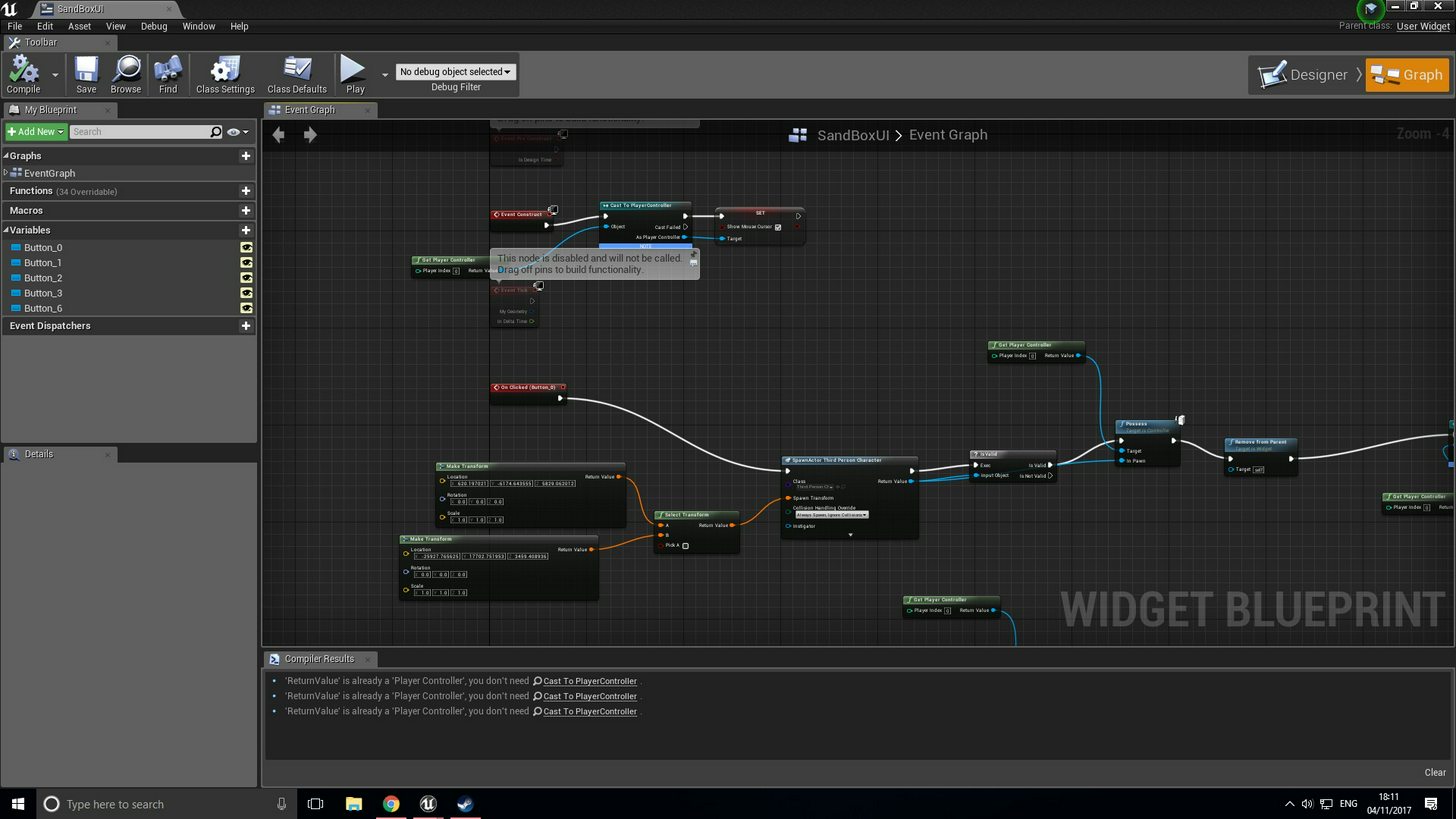
Player's cant spawn while the host can spawn fine with this BP. Any ideas why they cant spawn? https://imgur.com/a/xf2aY
 severe badger
your picture is too compressed, I can't read anything 😕
quasi matrix
Open the imgur link and zoom in
If you still cant see it i'll cop it and resend
I think its something to do with the index
The pawn target is set to getplayer controller
And that has a index
Im trying to do get netplayer index
Not sure if it will work tho
severe badger
I think it's your "getplayercontroller [0]". Try with "getowningplayer"
quasi matrix
Anything gotta come of that "getowningplayer"?
thin stratus
I answer him in BP
It's basically wrong what he does, to put it together
Well yes
you are throwing all multiplayer rules aboard
Read my compendium (pinned to the multiplayer channel)(edited)
Things you do wrong:

- Spawning a replicated Actor on the Client (needs to be on the Server)
- Calling possess on the Client (needs to be on the Server - icon tells it)
- Using "GetPlayerController0", which (on the Server) will always get the Server Controller

Move the code into the PlayerController and put a "SERVER RPC" in front of it.
Call the ServerRPC from the UI. Since you are in the PlayerController of the specific client (whoever on server side) you don't have to use GetPlayerController anymore.
Quote from #blueprint
quasi matrix
How do i spawn the actor on the server? Im new to UE4 so excuse my noobiness 😛
thin stratus
I wrote that too
Last paragraph
If that's too much for you, stop creating Multiplayer Games and focus on Singleplayer first until you understood the engine.
In the meantime, read my compendium
It answers most beginner questions for multiplayer (however expects you to understand how to use the engine)
It's pinned to this channel
next falcon
okay Back to my problem:
: Guys I need your help
i created a project and made it for multiplayer and start it in editor and it works. it creates a session and i can join it too
But if i package it and start it there it failed to create a session...
(I am useing advanced sessions plugin) and sorry for my bad english i hope u understand everything..
what do you need to know to help me ?
quasi matrix
@thin stratus So by code you mean blueprints? Im so confused. Atm i've opened player controller and added the server custom event and from there casted to sandbox ui?
quasi matrix
think i found a way
Just added a custom event which runs on server infront of the spawn actor
And when the buttons clicked it calls that event
thin stratus
That's what I meant
given the event is inside of the playercontroller
cause the widget itself has no Server version connected where the rpc can go to
@next falcon Are you using any Subsystem?
Are you packaging for Dev or Shipping?
next falcon
yes i quess the steam subsystem
and where i can see Dev or shipping?
next falcon
yes
thin stratus
Steam is not active in the Editor
You are basically hosting with Subsystem NULL in the Editor
You probably run into the same issue without packaging if you just run standalone
next falcon
and its Dev
thin stratus
Are you sure that steam is correctly setup?
When starting as standalone, are you seeing the SteamOverlay?
next falcon
how can i fix this ?
Yes it is correct
yes i can open it
and i can create a session in standalone game and its perfectly working
thin stratus
Okay, gimme a sec
next falcon
thx 😄
thin stratus
You have a few access none errors
[2017.11.04-13.54.12:011][536]LogScript: Warning: Accessed None
    MainMenu_C /Engine/Transient.GameEngine_0:MyGameInstance_C_0.MainMenu_C_0
    Function /Game/MyContent/Widgets/MainMenu.MainMenu_C:ExecuteUbergraph_MainMenu:0710
[2017.11.04-13.54.12:011][536]LogScript: Warning: Script call stack:
    Function /Game/MyContent/Widgets/MainMenu.MainMenu_C:BndEvt__Button_111_K2Node_ComponentBoundEvent_113_OnButtonClickedEvent__DelegateSignature
    Function /Game/MyContent/Widgets/MainMenu.MainMenu_C:ExecuteUbergraph_MainMenu

[2017.11.04-13.54.12:011][536]LogScript: Warning: Accessed None
    MainMenu_C /Engine/Transient.GameEngine_0:MyGameInstance_C_0.MainMenu_C_0
    Function /Game/MyContent/Widgets/MainMenu.MainMenu_C:ExecuteUbergraph_MainMenu:0794
You are accessing the MainMenu variable
which seems to be null
In addition:
[2017.11.04-13.54.03:132][  0]LogStreaming: Error: Couldn't find file for package /Script/AdvancedSessions requested by async loading code. NameToLoad: /Script/AdvancedSessions
[2017.11.04-13.54.03:132][  0]LogStreaming: Error: Found 1 dependent packages...
[2017.11.04-13.54.03:132][  0]LogStreaming: Error:   /Game/MyContent/Widgets/MainMenu
And LogModuleManager: Warning: ModuleManager: Module 'OnlineSubsystemSteam' not found - its StaticallyLinkedModuleInitializers function is null.
BP only or C++ project?
next falcon
BP only
thin stratus
You might want to check back on the creator of the plugin and ask him
Or check his thread for other people that encounter this
I don't use the plugin, so I don't know why it doesn't load
Steam Overlay, does that show up in packaged?
thin stratus
Yeah then steam already doesn't load
Your config files are properly setup for steam?`
Followed any tutorial?
next falcon
yes i did
he just said copy this and put it in there
thin stratus
Okay, if it shows the overlay in standalone then it's fine i guess
yeah you might want to check back on the plugin creator
Don't really have an answer for that atm sorry
next falcon
hmm okay thanks for help 😄
do you see anything there?
https://forums.unrealengine.com/community/community-content-tools-and-tutorials/41043-advanced-sessions-plugin
sry i am not very good in english
next falcon
both, in the engine it doesn't work
thin stratus
You might want to try the project/plugins folder
and then follow his steps
If installed at the project level you need to Create a C++ blank file in the editor to allow it to package out the plugin
quasi matrix
@thin stratus Im so sorry to keep bugging you 😛 must be annoying so sorry, but I've done the event run on server in the UI? so i've done it on button click run event and that just runs it on server within the UI? how'd i do it in the game controller? Do i just put a on click cast run event then cast to game controller?
Lemme post a pic
1 sec
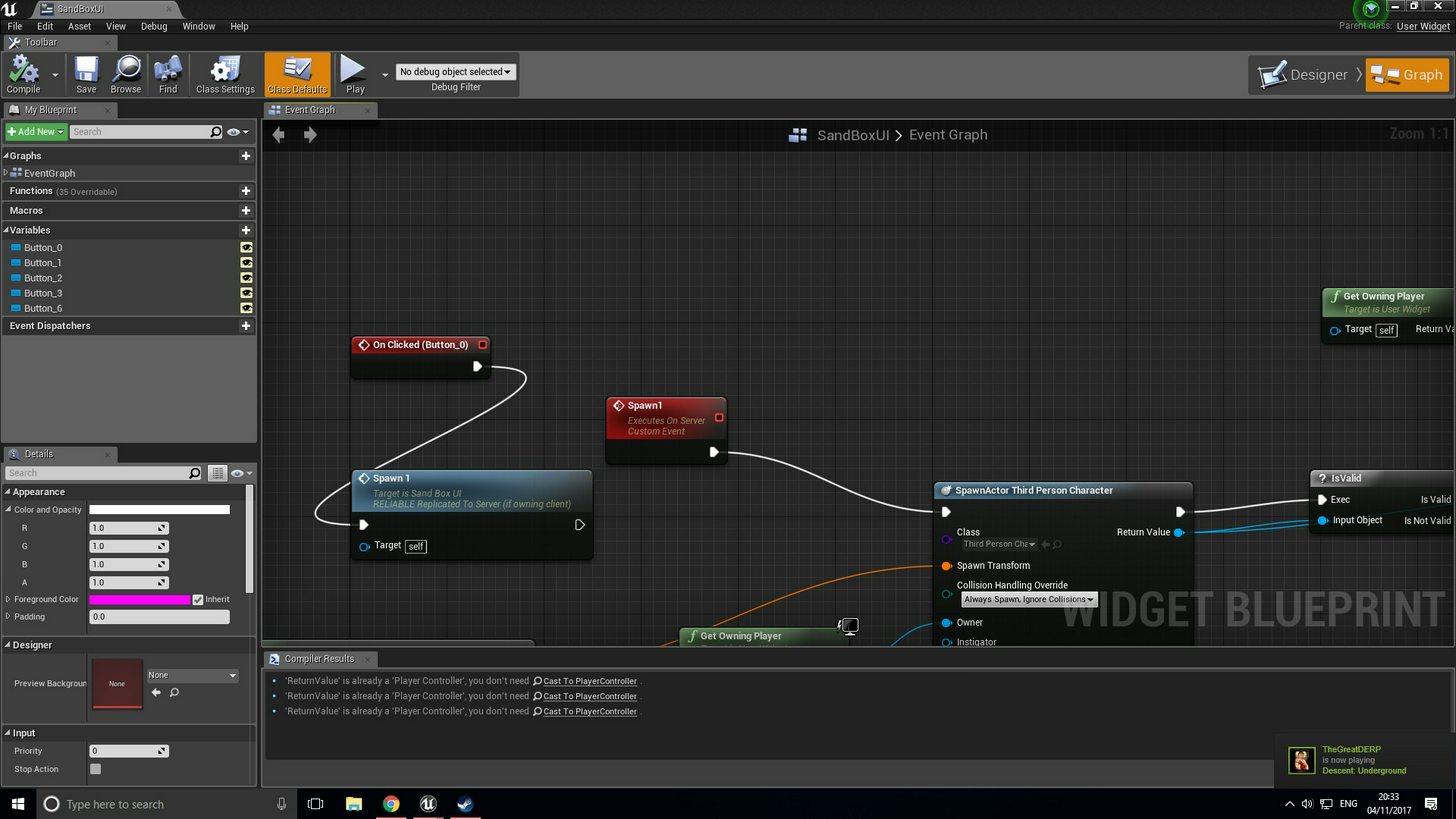 thin stratus
Not in the ui
In your own playercontroller class
Then on butto click you get the playercontroller 0, cast it to your custom class and call the rpc
next falcon
@thin stratus I put the folder inside the engine but it will not be shown in the plugins build-in tab..
next falcon
yes
quasi matrix
It should have binares,content and all that crap in there
next falcon
yes
next falcon
already done
next falcon
but i try to implement the plugin inside the engine
next falcon
yes
quasi matrix
I've tried it before, idk how to do it. Sorry ;/
Thought you meant just for 1 project
next falcon
for one project is easy but my problem is that it won't work in standalone if only in project..
quasi matrix
@thin stratus Should i set the server event to Reliable?
next falcon
@thin stratus Can u tell me how i can write this into C++ ?
If installed at the project level you need to Create a C++ blank file in the editor to allow it to package out the plugin
quasi matrix
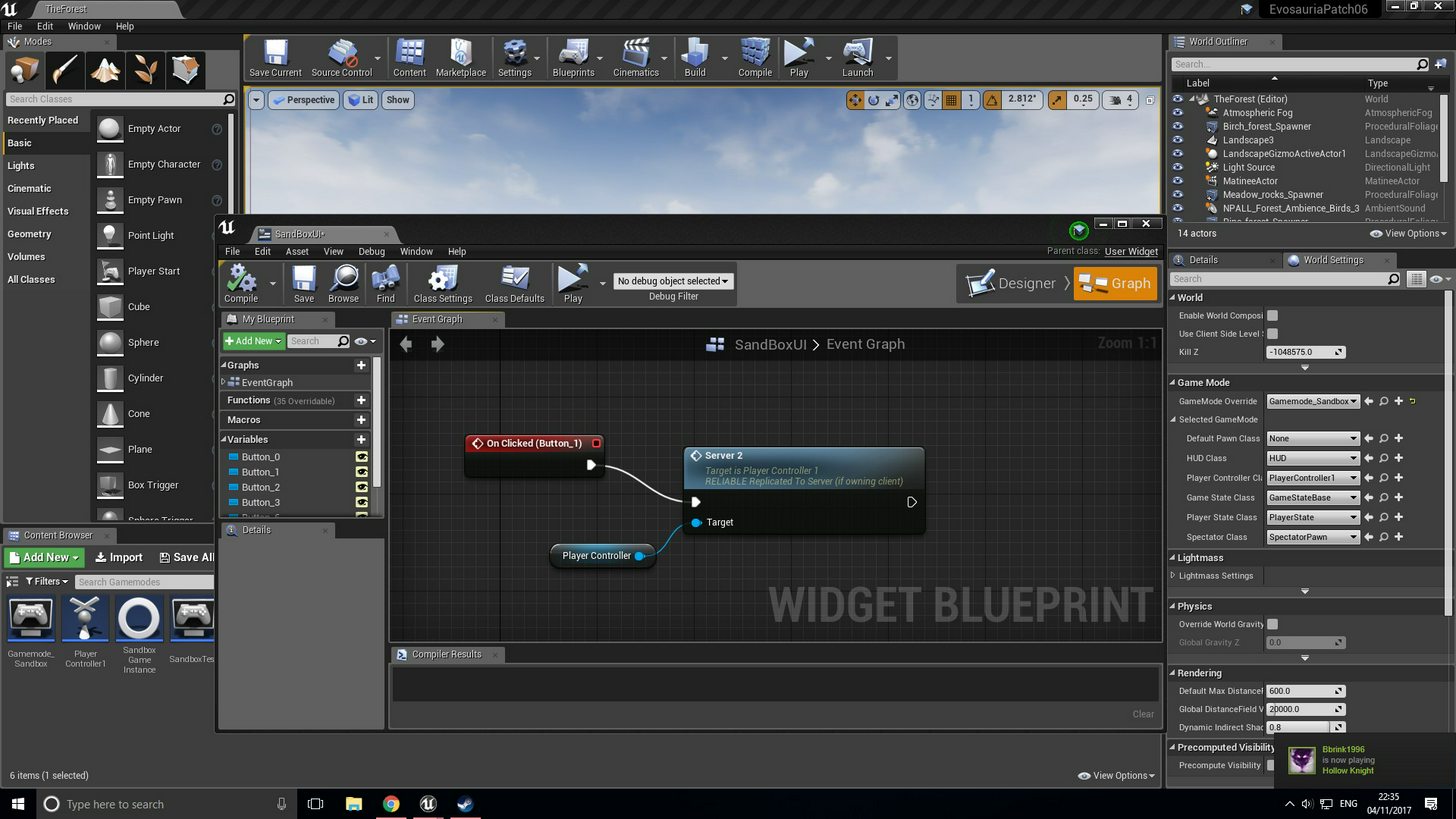
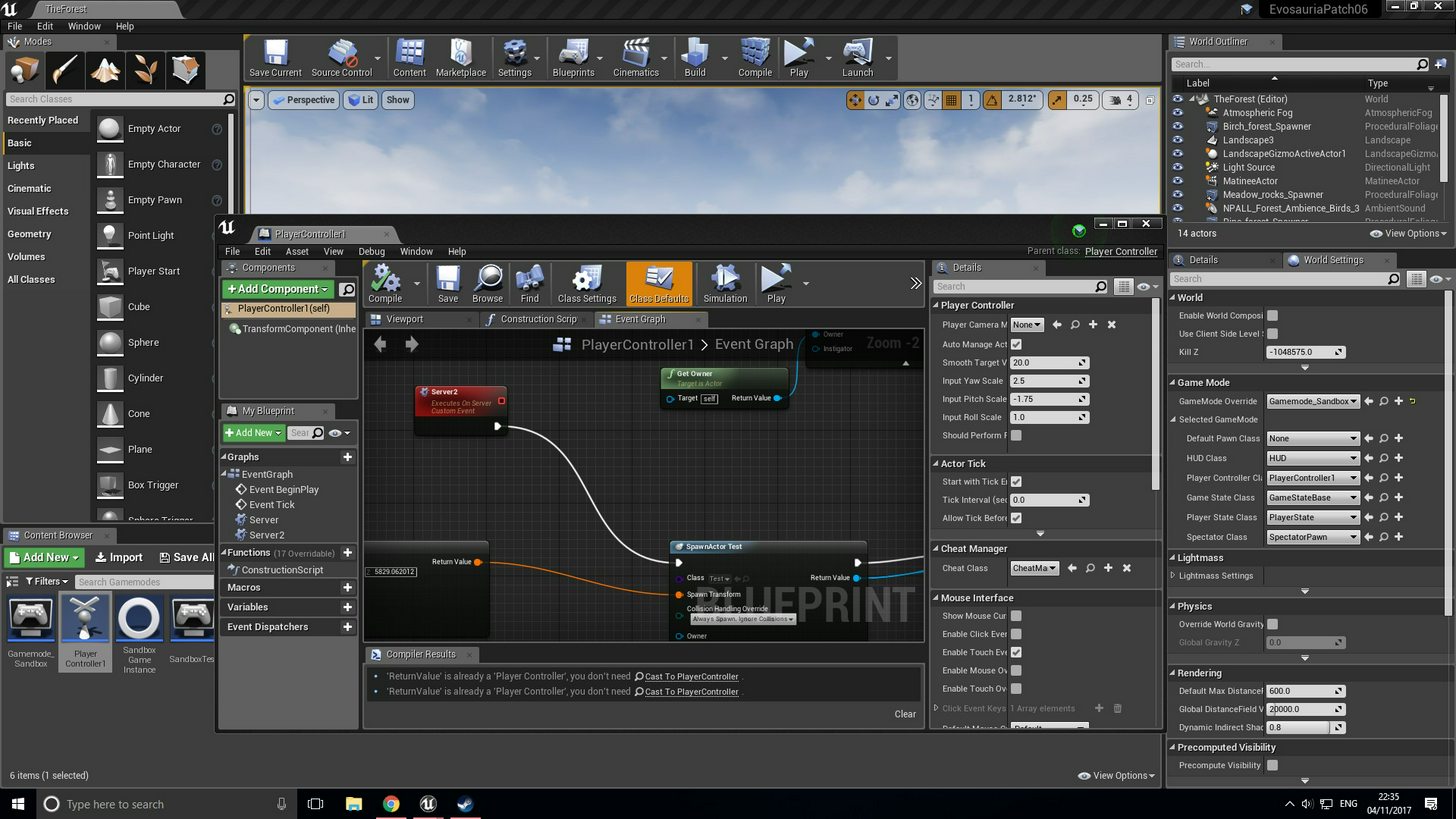
Can't call the function to make the server spawn the actor. tried making it so when event is called it will print a string just to test to see if it was the actor breaking it but nope. Anyone got any ideas whats wrong?
I think it might be the on clicked isnt actually reaching the event? Thanks https://imgur.com/a/ZsTqq https://imgur.com/a/m8aiC https://imgur.com/a/2C1zs https://imgur.com/a/0gWK3
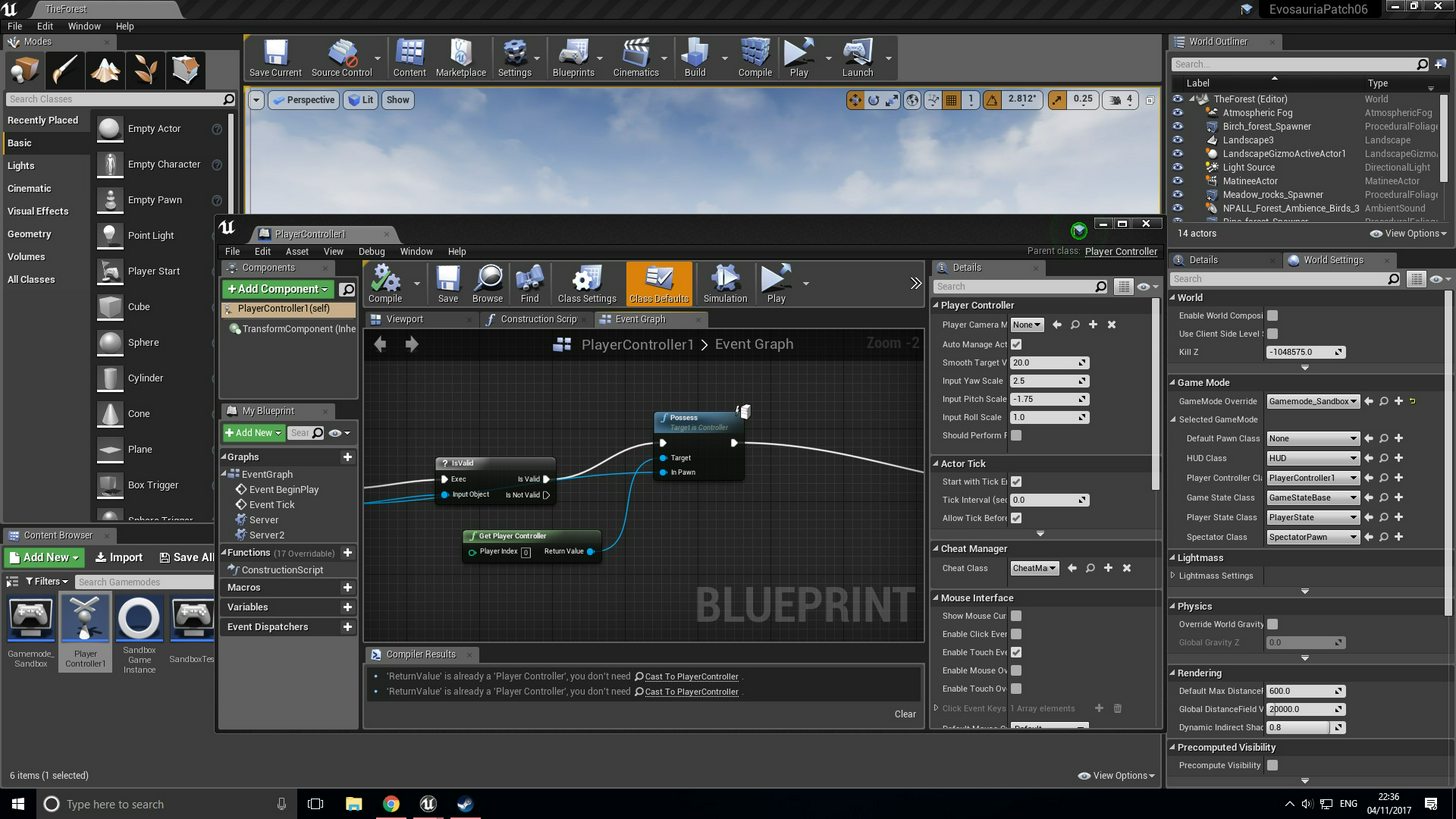
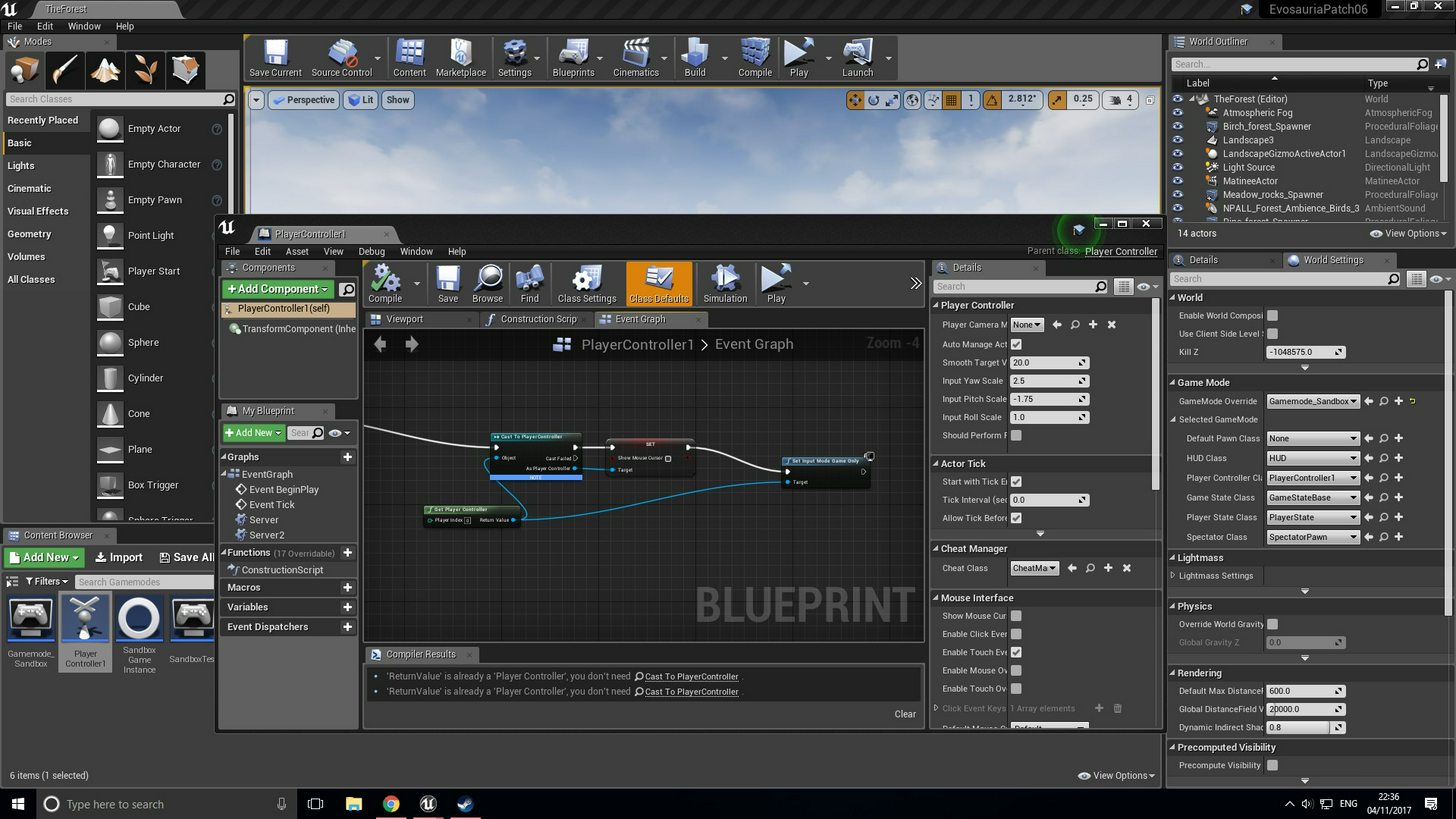 heady epoch
If I spawn a bullet on the server but also spawn it on the client to mitigate latency issues, how do I get it to destroy when the server bullet destroys?
How can I link the two
fossil spoke
RPC from the Server to the Client that owns that bullet to tell it to be destroyed?
heady epoch
I have two players with a dedicated server. When I spawn a projectile on the server and on the client firing there are actually 4 versions of that projectile.
So I fire the item on the server. immeadiately fire it on the client afterwards.
This results in the macro above that i wrote to find all versions. From top to bottom:
There is the client fired item as shown. There is the server fired item. The next one is the replicated server item that shows on the firing client. And the last one is the server replicated item that shows on the other client.
What the letters mean in above screenshot
The server doesn't know the CCA projectile even exists. So if I run an RPC on the owning client from the server it will return the CCNA projectile not the CCA projectile
thin stratus
There is a process of linking them afterwards but I'm quite sure that needs cpp
You would probably not load the client verisons of the server one and then link the spawned ones to the server
Then it gets destroyed when server calls it
Since i don't like battling with that, i simply spawn it on the server alone
And let replication do the rest
heady epoch
Thanks for the info, how do you mitigate the latency issues then when firing a weapon for example? @thin stratus
thin stratus
Well, everything despite the bullet can be emulated on the client
The lag when spawning the bullet can't be fixed like that
But then again, you are not building the game for people that lag
If your game is optimized enough to not cause any lags, it's basically the user's fault and I stopped caring about people that start a game with 200+ pings.
If you still want to fight that, you would need to go the way of spawning the bullet locally
that won't fix the other clients though
only the local one that shot
And if you don't want to or can't implement that "after spawning sync" for replication, then just don't replicate the bullet at all and let the client deal with its destruction
Simply filter in the hit/overlap event if it's the server or not
Let the clietn only do effects while the server deals damage
They don#t have to know about each other for that
quasi matrix
So i've been experimenting and when button clicked casting to the player controller wont work? anyone got any ideas? Player controller is where it spawns all my classes with Server custom events
heady epoch
I plan on trying to get the after spawning sync to happen because then all that is left is to to some interpolating to match it back up in sync with the server projectile.
Even with 50ms lag you don't really notice the input lag from that when firing for example?
Maybe I am being too critical or extra sensitive
thin stratus
@quasi matrix Casting the PlayerController0 to your own class works 100% if you actually set your own PlayerController Child Class inside of your GameMode class to be the default PlayerControllerClass
You should really step back from Multiplayer games for now. You seem to have trouble with the basics of coding and UE4.
Multiplayer adds a huge layer to it that even people with experience in UE4 have trouble with
Once you are more comfortable with coding and UE4, you can get back to it, but if you struggle to call a simple event in your PlayerController, then you aren't ready for Multiplayer yet
It's just a kindly meant advice. You will run into one wall after another like this otherwise
@heady epoch Didn't feel any lag, but then again, I haven't actually tested with 50ms.
Either my 20-40 or 200
@rough iron might know a bit about the syncing of spawned actors, but it's sunday, so might want to wait till tomorrow
heady epoch
Thanks, I will ping him a bit later
quasi matrix
@thin stratus Just got it to work lol. I forgot to assign the selected character...In too much of a rush xd! thanks for the help.
heady epoch
I saved the reference of the projectile into the pawn firing it which allows me to access it. Seems to be working now. A bit of a workaround, but it'll do.
 late sundial
hey, is there a one good way to begin do nat punch for unreal. this is a question wheres lot of info around net, some say RakNet plugin could do it, someone used gamesparks sfk stuff (i dont know any of c++ so..)
gamesparks sdk
im using steam systems atm it works only on lan, im looking for internet stuff would be cool to get it work
(advanced sessions used) so i need all server info because of serverlist
downloading gamesparks now.. if it has something what i need
thin stratus
You are throwing a few things together
Steam should do the nat punch for you afaik
GameSparks is a data backend service for PlayerData and matchmaking (no serverhosting) where you COULD abuse it for ServerLists.
But if you use Steam already you should have online sessions
If it only works on lan then you are missing something/doing something wrong
RakNet is, iirc, a server backend system that would replace ue4s system. For someone who doesn't use c++, you should just stick to AdvancedSession plugin + Steam
late sundial
aah
just cant get it work with steamsystem, ive been messaging with zyxel support about the router and lot of people around network about doing right settings in router
thin stratus
ListenServer don't need to do any port settings
and if at all, then 7777
But usually only dedicated server need that
- query port
late sundial
hmm ok, server are listen atm

heres setting in engine.ini
2 folders about advanced sessions in "plugins" folder
and basic nodes with the sessions
thin stratus
Never used that plugin myself
late sundial
ok, i think its same as the default ue version but you can add own settings there
everything should be ok, works like charm in lan play but over internet there is just no servers and connecting by ip on console doesnt work
closes console and nothing
with "open 36.8.528.754" example
tried also with port after ip like 673.623.6.3:7777
thin stratus
You need to use 480 app id and that can cause no server to show up
as there are a few thousand by all kinds of devs
late sundial
480 is on right now on the ini file
late sundial
theres actually a number how many servers it may find on the "find sessions" node, should i pump that up?
its now 1000
late sundial
default i think its 50 or 100
thin stratus
until you have your own
But it def works
Well given you launch the game standalone or packaged
As steam only starts outside of the editor
late sundial
aah ok ok sounds good
yea steam gives own, i just havent wanted to release anything before i see it work 😄
but this explains now i understand more
thin stratus
No need to release
You can use your own aquired ID without releasing
however you need to pay the fee
late sundial
oh
late sundial
oh yeah i know the fee, but i thought they give id = you must put game instantly on steam
thin stratus
No
twin juniper
Is there a reason
why charactermovement component's MaxWalkSpeed variable
is static
brittle sinew
...it's not?
/** The maximum ground speed when walking. Also determines maximum lateral speed when falling. */
UPROPERTY(Category="Character Movement: Walking", EditAnywhere, BlueprintReadWrite, meta=(ClampMin="0", UIMin="0"))
float MaxWalkSpeed;```Not sure what you're referring to
 unborn nimbus
I have a random function that executes on the client and the server but I need the same output on both. Best way to implement this?
brittle sinew
Use the same seed in both settings
Depending on what you're doing though, that might be somewhat of a risk, so you might also want to simply pass the output from the server
unborn nimbus
That's what I thought but maybe I did someone wrong because it's still not matching
I can't wait for the server because of the delay
Ah, it looks like it was a replication error.
 tulip flax
I'm trying to build an arcadey vehicle game, which renders the built-in vehicle implementation unusable. I've been warned that I'd have to implement my own network code. Does anyone have a good resource to check out so I can understand just how complex that would be?
I'm assuming the complexity comes from implementing rollback
But I can't find any resources covering the topic
 agile crane
Hey guys, can someone help me i got a package error unknown on my multiplayer game. This is the error, UATHelper: Packaging (Windows (64-bit)): Program.Main: ERROR: AutomationTool terminated with exception: AutomationTool.AutomationException: Command failed (Result:10001): C:\Program Files (x86)\Xoreax\IncrediBuild\xgConsole.exe "C:\Users\PC\AppData\Roaming\Unreal Engine\AutomationTool\Logs\C+Program+Files+(x86)+Epic+Games+UE_4.17\UAT_XGE.xml" /Rebuild /MaxCP
US=200 /no_watchdog_thread. See logfile for details: 'xgConsole-2017.11.05-22.52.45.txt'
If anyone can help me, thank you.
next falcon
Can someone explain to me how replication works?
i told the server with a custom event to remove a actor and than the custom event goes to a multicast event and than in destroy actor
but only the server can see if something is removed..
thin stratus
Actor needs to be set to replicate
And destroy only needs to happen on the server
Multicast isn't needed for that event
@next falcon
next falcon
ouh okay i forgot that Thanks a lot man
 brittle sinew
U wot
"Literally forward every single port to one IP, that will probably fix your network issues"
 viral mason
That's Nintendo for you
Wasn't me that forwarded every port to one ip
but hey
I got ue4 dedicated server working now
brittle sinew
No I get it haha, was just commenting on their advice 😄
I just find that pretty ridiculous coming from an official source
"Cant't figure out which ports you need to forward? Just do them all"
viral mason
If you were wondering the link 😛
i mean really
who plays nintendo & is good at networking
Kids would be the only thing
 agile lotus
Is it true that if I have things attached to my capsulecomponent they wont be smoothed over the network?
I'm having jittery movement coming from client while on the listen server but clientside everything looks great
agile lotus
I'm using a papercharacterthough
stark dome
Hmm not familiar with how that works. Maybe the sprite component is smoothed instead
@agile lotus
vital steeple
can playerstates not run RPCs or am i just doing something wrong?
i have a server RPC in my playerstate but it says it has no owning connection
i swear ive done RPCs in the playerstate before
fossil spoke
@vital steeple PlayerStates on the client side have no Owner, they are only replicated via the GameState. For RPCs to be called there needs to be an NetOwningConnection. If you want an PlayerState to RPC from the Client to Server you need to use an Proxy that has an NetOwningConnection.
 tawny parcel
I have some code that is pretty straight forward - pick a character template (click the UI option) and spawn that character and possess it. It replicates with no issues and works perfectly.
I have it setup so when ServerTravel runs it saves the character option locally and re-runs the spawn character and possess sequence - the same sequence that works perfectly. For some reason it feels like if it is activated off of PostLogin or EventHandleStartingNewPlayer it does not posses the character. The correct character spawns but controls are frozen - I can't move or do anything.
Any thoughts?
void canopy
@vital steeple you can make RPC in player controller and get the reference in player state and then can call those funtions which you are calling from playerstate. But its advised to change the values of playerstate on server calls only, not on clients.
tawny parcel
Figured out my issues - although an odd one - a disable input in the construction script of the character was getting fired on the saved spawn but not at the character select.
 dense citrus
i got an issue , when i´m plying multiplayer clients are laggy after couple minutes they cant even play anymore.
any idea i have only characters and a door replicated
😄
 past bear
erk, ChoosePlayerStart apparently happens before OnPostLogin - is there an event earlier than OnPostLogin I can use to set a var inside the player controller?
thin stratus
Login
C++
PreLogin - No PC - Allows Deny of login (kick)
Login - New PC - Allows Deny of login (kick)
PostLogin - New PC - When succesfully logged in
past bear
...and in blueprint I'm screwed, then I guess?
thin stratus
Of course
I mean, why would you expose Login and PreLogin when PostLogin exists.
That would give users control over their game, how barbaric
Na but for real, Login is probably the earliest event you can grab
past bear
yeah, I don't have access to that -_-
need to allocate a var when the player connects and pick an appropriate spawn point :/
past bear
tbh, choose player start should happen after login
thin stratus
It does, if you delay the game
GameMode settings "Delayed Start"
Override "ReadyToStartMatch"
past bear
yeah, it's not delayed, that isn't up to me
thin stratus
Well then tell whoever hired you that you need more freedom
:P No one gains something from limiting the programmer
past bear
we're entering match state via a custom matchmaking system, so I have no control over it
thin stratus
So the game starts before everyone is connected?
past bear
it's intentional because of how the game works
thin stratus
Well, then you access c++
past bear
it isn't strictly 'round based' like UT
thin stratus
Do people really deny you access to c++?
past bear
yep
thin stratus
It's just one event that you would put into the c++ baseclass
jesus
You wouldn't even put logic into that, just write your own exposed login function
past bear
I have visual studio, but I cannot access the internal system for making code submissions, it's driving me nuts
I keep asking for it, but don't get it
past bear
they expect me to work around the problem
thin stratus
80% of the engine is hidden in c++
Blueprint only in Multiplayer games is not a solution
.>
You can't work around that
Only by creating your own spawning logic
Remove the DefaultPawn Class from the GameMode
past bear
well, I might be able to allocate said var inside 'ChoosePlayerStart', but honestly that's just a bandaid
thin stratus
and onPostLogin you spawn it yourself
Then you can set a variable in the playercontroller before spawning
What is that var anyway?
brb coffee
past bear
it's a struct that ties the player to a specific group of other players and a specific objective
thin stratus
Why does that need to happen pre postlogin?
You could try to use the BeginPlay of the PlayerController
past bear
needs to happen before choosing player start, so I can allocate the start correctly
thin stratus
That might call before PostLogin but not sure
past bear
but the game mode controls allocating these roles, not the PC
thin stratus
Yeah and? Get the gameMode in the PC
Just to set the vars
Working around the problem...
Or as said, spawn the pawn yourself
thin stratus
Ah
Well, generic GameMode can have a function to "retrieve" the information
which the child gamemodes override
Then you generic PC just calls the generic function
¯_(ツ)_/¯
However, spawning the Pawn yourself is cleaner
OnPostLogin -> Allocate Var -> Choose spawn -> Spawn
thin stratus
I really doubt that you will find an event earlier to the native GameMode spawn
Despite Login
Or ChoosePlayerStart
But you said that's already not working
past bear
I'll try allocating inside ChoosePlayerStart, it seems cleaner than having logic going around in a circle from PC to GM to PC
thin stratus
True, not ideal but yeah
FindPlayerStart is also a thing
Can'T remember which is called when
past bear
argh, doing it in ChoosePlayerstart would of course fuck up if it's later modified to allow respawning
head-desk
Lord I want to scrap this awful game mode, it doesn't stick to any of the conventions of the other four, meaning that all the generic / preexisting mode logic has to be rewritten / fudged around -_-
yep, looks like I can allocate that data when choosing player start
thanks ^^
 rough iron
@heady epoch @thin stratus there is no magic syncing code, networking is slow, so if you need more precision you have to optimize and simulate in client-side.
thin stratus
You can't tell UE4 to link 2 non replicated objects to each other?
Spawning one on Server and one on Client and then linking them?
@rough iron
So basically generated the replicate state after they were spawned?
 jade patrol
guys, does steam subonline system still works for 4.18 ?
rough iron
sep, because the one you spawn in the clinet and in the server will have different ids
so it's better to simulate it
that's how Epic simulates projectiles in UT
you can then even have a pool of reusebale client-side projectiles
thin stratus
So you basically say, shoot one on server and one on client (as well as non local clients) and only perform damage on the server one?
And if they, for what ever reason, behave differently, you just live with it?
Let's check out UT code i guess
/** enables UT optimized movement replication; USE THIS INSTEAD OF bReplicateMovement */
    UPROPERTY(EditAnywhere, BlueprintReadWrite, Category = Replication)
    bool bReplicateUTMovement;
sigh
thin stratus
void AUTProjectile::BeginPlay()
{
    if (IsPendingKillPending())
    {
        // engine bug that we need to do this
        return;
    }
[...]
}
lol
Hmm
// Move projectile to match where it is on server now (to make up for replication time)
float CatchupTickDelta = MyPlayer->GetPredictionTime();
if (CatchupTickDelta > 0.f)
{
    CatchupTick(CatchupTickDelta);
}
@rough iron So they are just syncing it
Ah wait lol
They really have a fake projectile
They really iterate over all fake projectiles and find the one closest and matching
rough iron
Yep
thin stratus
They are syncing them, does the client see two projectiles then or is the server projectile invisible for the client?
rough iron
the client only sees the fake one
thin stratus
Is that simply done with OwnerOnlySee/OwnerNoSee?
rough iron
I think yes
thin stratus
Alright, hm
rough iron
might need some work to work properly for listen server though
UT is notmally designed for dedicated servers
thin stratus
Yeah, might need to add a similar system then
Wondering if it needs all of their code or if that can be shrunk a bit
Doesn't that only make up for the few ms that the client wouldn't see the projectile?
Well will just try it i guess
AUTProjectile* NewProjectile =
        ((Role == ROLE_Authority) || (CatchupTickDelta > 0.f))
        ? GetWorld()->SpawnActor<AUTProjectile>(ProjectileClass, SpawnLocation, SpawnRotation, Params)
        : NULL;
So either server or "CatchupTickDelta" on client spawns a projectile
float CatchupTickDelta =
        ((GetNetMode() != NM_Standalone) && OwningPlayer)
        ? OwningPlayer->GetPredictionTime()
        : 0.f;
float AUTPlayerController::GetPredictionTime()
{
    // exact ping is in msec, divide by 1000 to get time in seconds
    return (PlayerState && (GetNetMode() != NM_Standalone)) ? (0.0005f*FMath::Clamp(PlayerState->ExactPing - PredictionFudgeFactor, 0.f, MaxPredictionPing)) : 0.f;
}
Is there any documentation on what they base these numers?
They take the ping in ms and subtrack like 20 from it
And then divide it by 2000
:/
next falcon
I made a box which is a Item with ItemID an ItemAmount
if i pick it up with a client it will add to my inventory the Item with the right ItemID and the right Amount (i get the itemid and itemamount with Widget interface)
But if i do the same thing as Server it won't give me the id and amount..
what went wrong ??
 lean river
Im not sure but maybe exact ping is answer-respond latency so you need predict movement ping / 2
Dont know what fudgefactor does :D
lean river
Sry its not for you ^^
thin stratus
@Amph#1230 It's like set to 20 (the factor) and yeah, could be? idk
rough iron
@thin stratus the local client who fired the projectile get's it insantly, while the other will have an initial lag. It is also cheaper to reuse those projectiles and not to require to send spawned actors over the net.
the number are magic xD there was an artilcle some time ago (10 years) about those magic numbers taken from Halo xD
many use those xD
thin stratus
Good to know. Yeah, the other clients just get the main, replicated projectile, or?
Only the local client spawns a fake one
next falcon
guys i need you help..
in my editor i can create sessions with a name and max players and in my server list everything will show like name ping player etc.
but if i package it and create a session with name and max players and search for it than it show me a server with no name and 0/0 players..
what went wrong ?
and yes my steam overlay is active
jolly siren
@next falcon the 0/0 players thing is a known bug https://issues.unrealengine.com/issue/UE-45381
Feel free to add your vote. Currently it is targeted to be fixed in 4.19
next falcon
thanks buddy
jolly siren
sure, no problem
agile lotus
Does anyone know what would cause jittery movement from clients on server side
 acoustic yew
Do you use Character ?
agile lotus
PaperCharacter
acoustic yew
do you do some high speed movement ?
agile lotus
4.15.2
acoustic yew
oh
hmm
thiss issue kinda didnt affected that version
On no im sorry it affects 4.15 too
here is the issue
how ever its told its only on high speeds
agile lotus
I don't use dedicated servers
Only listen
And this is on a packaged build running through steam
thin stratus
Are you modifying MovementSpeed?
agile lotus
I do I switch between 2 speeds
Do you think that could have something to do with it? Maybe I'm not setting the speeds properly
thin stratus
Yeah, are you setting them on everyone?
Cause MaxWalkSpeed doesn't replicate
If you only set it on the Server, client and server will constantly fight over the position of the client
next falcon
I made a box which is a Item with ItemID an ItemAmount
if i pick it up with a client it will add to my inventory the Item with the right ItemID and the right Amount (i get the itemid and itemamount with Widget interface)
But if i do the same thing as Server it won't give me the id and amount..
what went wrong ??
acoustic yew
Cedric Im interested how you would approuch seeting maxwalkspeed if netculldistance is taken in account or new joining player? Is propper way would be to do some RepNotify Veriable and set it in it ? Becaue MultiCast would probobly dont work in this case ?
thin stratus
Yeah, repnotify
If it's only about Sprint/NotSprint, you can use a boolean
otherwise use a float and set it to what ever the speed is
acoustic yew
Yes its something like Sprint
thin stratus
and in the onrep you use that to set it
well then you use the boolean with onrep
@next falcon Buddy, no idea what went wrong. You have to post your code.
Otherwise we can only guess that you do something wrong.
acoustic yew
Ok grate thanks
agile lotus
@thin stratus You were right I was only changing MaxWalkSpeed on server
agile crane
Can anyone help me? i'm getting a package error when i turn on advanced sessions or online subsystem plugins on my multiplayer game. Here's the error, UATHelper: Packaging (Windows (64-bit)): Program.Main: ERROR: AutomationTool terminated with exception: AutomationTool.AutomationException: Command failed (Result:10001): C:\Program Files (x86)\Xoreax\IncrediBuild\xgConsole.exe "C:\Users\PC\AppData\Roaming\Unreal Engine\AutomationTool\Logs\C+Program+Files+(x86)+Epic+Games+UE_4.17\UAT_XGE.xml" /Rebuild /MaxCP
US=200 /no_watchdog_thread. See logfile for details: 'xgConsole-2017.11.07-00.58.31.txt'
If anyone can help me thanks so much, i really need to fix that error 😦
vital steeple
@fossil spoke thank you! by proxy do you just mean i need to pass it through some actor or controller that DOES have an owning connection? ie playercontroller or possessed pawn?
@void canopy thank you 😃
vital steeple
got it
just working on a chat system and trying to wrap my brain around a kill reporting system
fossil spoke
Id implement the killfeed callbacks on the GameState.
vital steeple
yeah i currently have an actor report its death to the gamestate before it destroys itself
i was trying to update replicated variables int eh playerstaet (one held all the chat notifications) using RPCs, which wasnt working
i can just use the controller instead
i think i can just as easily store that data in the controller and run everything from there
fossil spoke
Sure. Just dont forget that an Client only has their own Controller and not everyone elses.
vital steeple
yup, i was going to get the player list from the gamestate, then get the owner (to get the controller) then populate that data
the player controller persists throughout the entire multiplayer session, correct?
 nocturne copper
Anyone have any luck with useing differnt game modes for the same map?
I am still in the process of fully testing the restructure I did on my game mode parent that
I changed to use some C++ to change the game mode for the map that is being traveled to via. Seemless travel
I have also been reading around a bit with people mentioning trying to use multiple game modes for a single map so as not to waste resources on cloneing the same map for just a few changes
stark dome
@nocturne copper yup you can set the game mode when you load the map
@vital steeple are you running that code on the server? The only player controller that exists on clients is the local players controller.
On the server each player should have a player controller
fossil spoke
@vital steeple The PlayerController persists through that level. Once an new level is loaded an new PC is created for that Player when that Player finishes joining the new Level.
thin stratus
Unreal Engine
Recently, I had an email conversation with a Gears of War fan about the differences in networking quality between each of the three games in the series. One thing that we can point to in terms of increasing the quality of the networking experience is our use of the Unreal Engine’s built in network simulation features.
thin stratus

Anyone having information about these settings
Despite cull distance
Like what numbers affect it how
@chrome bay Maybe?
thin stratus
Want to give our pawn higher settings, but don't want to overshoot it
 chrome bay
From my findings:
Net Priority = in times of low bandwidth, how are we prioritised for replication over other objects
Update Frequency = how many times per second object is considered for replication
Min New Update Frequency = When Adaptive Replication is active what's the min frequency to check for updates
Take all that with a pinch of salt though...
thin stratus
Last one says it's a throttle
when things replicate infrequently
I'm a bit interested in what numbers I can enter
Like UpdateFrequency
Is 200 too much arleady or can you go to 500
etc
(throwing in random numbers)
void canopy
Hi everyone. I'm trying to build my dedicated server using this link. https://wiki.unrealengine.com/Standalone_Dedicated_Server . After finishing the compilation, when I tried running binaries of the game I saw this
thin stratus
How do I show netcorrections on clients again
void canopy
This is the error I got after building server with the configuration settings provided in this link. https://wiki.unrealengine.com/Standalone_Dedicated_Server
 sterile pebble
@thin stratus
void canopy
Hence I'm not able to build a exe of my dedicated server. Any helps UE4 Devs
thin stratus
Where do you enable the adaptive one?
Or is taht on by default
@void canopy You build via VS?
The Server?
Mäh, netcorrections only work for CharacterMovementComp
-.-
void canopy
@thin stratus Yes VS 2015
sterile pebble
weell, looks like its net frequency are measured in 1/sec ; so its how much you replicate data in seconds; and I suppose it wont get higher than you fps
thin stratus
I just deactivated ReplicateMovement on my pawn
Since I'm setting it by hand anyway
Everythings smooth with 150+ ping
-.-
@void canopy Have you then packacked your game?
And moved the exe into the packaged binaries folder next to the game exe?
void canopy
I checked my server.exe in binaries folder
And that's the error it gave me when I opened the exe in the binaries
@thin stratus
chrome bay
Folks where you do add options to the clients 'options' string again when they join a match
it's escaping me
thin stratus
@chrome bay on the client travel function
Playercontroller
Iirc
@void canopy so you did package your game?
Cause you didn't really answer my questions
void canopy
@thin stratus I built the game in VS by changing the configuration to development server 64bit from the UBT. After this now I will package the server from Unreal Editor as you have asked me to package the game
thin stratus
Yus and then you copy paste the server.exe INTO the binaries folder of your package game
PackagedGame/GameName/Binaries/Win64/ or so
@void canopy
thin stratus
When sending text via a multicast, what's the best type to use for that?
Thinking my Name variable isn't really optimimum
thin stratus
Hm nvm, name is the best thing to send actually
jolly siren
Yeah FName is the smallest, 8 bytes
thin stratus
Also, what do you peeps do for timer replication?
Currently trying to multicast the start and starting a fake timer by passing UTCNOW so I can sync it
However I can't really offset the timer easily
stark dome
I remember reading somewhere that FNames aren't compressed so there could be some overhead there
Some tips for optimizing the performance and bandwidth usage of Actor replication.
thin stratus
Well what is better than?
I only sent it once per ability used (which usually has ~10 seconds cooldown)
lean river
As i remember fnames converted to strings when replicated
thin stratus
Also, got a Struct that is replicated.
That struct has a datetime variable. Clients print something else than the server in its onrep
Guess DateTime can't be replicated?
Wäh, known bug
Whyyy
So I need to split it
¯_(ツ)_/¯
 merry hemlock
I have a simple demo with no gameplay to worry about, I just need to be able to have 1 spectator click buttons but until there is a native spectator interaction, multiplayer is probably the best option
My question is, what is the general process for a local multiplayer (non split screen) either both players VR or one is just using a mouse/screen
thin stratus
When using ReplicateMovement, the rotation is also replicated, right?
Is there a way to interpolate that number without replicating it myself?
lean river
in tick maybe if you save old rotation and if you got new ?
then just delete old one and set new as old one or something like that
thin stratus
Tick might call way more often though?
Looking at how often replicate movement calls in the net profiler, i doubt that replicating it myself is a good thing
Currently looking through the codebase to see if i can do something in c++
lean river
well tick is close enough for interpolate. running fast but you can controll interpolation time actually
so lets say if XX sec or ms or whatever needed between two replication you can calculate interpolation speed from that maybe
thin stratus
/** Update location and rotation from ReplicatedMovement. Not called for simulated physics! */
virtual void PostNetReceiveLocationAndRotation();
Wonder if that still sets it even if SimulatePhysics is true
Probably not
Only place where ReplicatedMovement.Rotation is used though
@chrome bay Did you perform any rotation interpolation with Pawns?
heady epoch
I have a team color assigned on spawn in the game mode. The player color changes. I also have a hud with a minimap showing player location. How can I assign the minimap icon color to be the same as the character's team? In the HUD blueprint I can not access server values. So I have no idea of how to get the team of the other connected clients
in the pawn onrepnot
Now on the remotw if the player is locally controlled i also assign the color in the client side of my pawn so I can access it in my HUD
dark kernel
Does anyone know what this warning is saying? I'm having no luck with google finding a solution. pretty sure it's replication-related though:
LogNetPackageMap: Warning: FNetGUIDCache::SupportsObject: MaterialInstanceDynamic /Game/Levels/UEDPIE_1_DemoLevel.DemoLevel:PersistentLevel.BlackPieceBishop2.MaterialInstanceDynamic_1 NOT Supported.
next falcon
This is the Server side Destroy actor
And this is the item pickup which include the destroy actor for all
if a client does it, it works Perfectly
but if the server does it, it destroys actor just for the server and not or all clients and give not the right item
also it destroys all actor not only items
the client can only destroy Items nothing else..
chrome bay
@thin stratus I think I do.. lemme check
Oh no i don't, I just set it
In this game anyway
thin stratus
Hm, having a higher ping makes the rotation snap on non-local clients
Don't want to set it via tick
.>
And I can't intercept rotation when bReplicateMovement is on
chrome bay
Yeh I hard-set it, and visual items (mesh etc.) intepolates over a few frames via smoothing
same way as CMC
I set rotation cus otherwise aiming starts getting really out of sync
thin stratus
I guess I can interp the weapon
However I set actorrotation
Well, I'll see what I do
It's just for visuals I guess
Just don't want it to snap
 merry elk
Hi guys! I am trying to find a C++ code that will run a player drops out or logs out of the current session (Kinda similar to PostLogin but for Logout). Would someone be able to point me in the right direction? I have had trouble finding it 😐
twin juniper
hello, does anyone know why am i getting this message?
LogNetPackageMap: Warning: FNetGUIDCache::SupportsObject: Texture2D /Engine/Transient.Texture2D_4 NOT Supported.
lemme rephrase
if i do a RPC from client to server, and pass a texture2d as an argument
this texture won't show up on server, right?
how do i solve this problem
 timid pendant
hello does anybody know why my server would bind to 0.0.0.0:7777 and not my ipv4:7777
I already port forwarded and checked firewall rules
 wild prawn
0.0.0.0 means 'default adapter' on Windows and 'all adapters' on Linux and BSD systems
should be fine
viral mason
God I haven't been able to get this multiplayer inventory system working
Mainly a weapons holding system
So every other player knows what weapons/stuff you have
stark dome
@viral mason what issues are you having
viral mason
Well in each player's ZombiePlayerState
they have an Weapon Base Array
Trying to figure out how to put inherited classes into it
(Bit more background info---
AssaultRifleBase is a child (inherit) of WeaponBase, while Ak47 is a child of AssaultRifleBase
stark dome
So are you asking how to add instantiated weapons to that array?
viral mason
yes
stark dome
Just call Add on the base array and pass in your created weapon actor
viral mason
How would i create the weapon actor
Oh wow, i think i did it
What server area has access over player state
stark dome
@viral mason do you mean what classes have access to it?
viral mason
Like where would an ideal place to put server logic to manage a users weapon array
stark dome
Depends on your inventory. Character makes sense
But if you want it to persist through death it doesn't
In that case a PlayerState or playercontroller
stark dome
@viral mason so the server has a copy of it just run the logic in there
twin juniper
hi, i want to send a texture2d (image) from client to a dedicated server, via a RPC... is this possible and how would i do that?
 shy nymph
Anyone any experience with Advanced sessions plugin and dedicated servers?
lean river
@twin juniper if texture is in your content just pass as pointer
twin juniper
it is not, it's received from steam
it's actually on client
steam image
i wan't to apss it to server somehow
@lean river
so to be more precise, client connects to steam, obtains steam avatar, and now i want to send this avatar to server so the server can save it
and i'm using dedicated server
twin juniper
@jolly siren i saw that thread but couldn't understand it... i tought that it shouldn't be so hard...
is this achievable if i have a blueprint project
jolly siren
If you use something like VaRest then yes it should be

Plugin that makes REST communications much easier.
twin juniper
ok, i understand, but i'm going to be bitchy and whiny nevertheless... this looks like a task that should have been possible out of the box 😄
lean river
Maybe this helps..
https://answers.unrealengine.com/questions/437212/steam-profile-image.html
As mentioned by erebel55
You can grab any image through backend, http request and im sure steam api maybe also provide solution ^^
But im sure no one click solution exist :)
shy nymph
Hey guys i'm trying to get a 6Degrees of freedom movement multi player going for my studies but been strugeling to get a smooth replicated motion going for two weeks... Anyone any experience who might be able to help? :(
lean river
Smoothing movement over the wire is not an easy task.
You need smooth client side prediction to achieve and compensate network latency
There is lot of good article to learn this:
http://www.gabrielgambetta.com/client-side-prediction-live-demo.html

KinematicSoup Technologies Inc.
When you’re developing an online server-authoritative game, you want your player movement to feel responsive for both low and high latency players. To achieve this, you’ll need to implement client-side prediction and smoothing.
This articles explain problems, solutions.. once you got it you will know what you need do ;)
Epics character movement comp also can help if you need code example, but i suggest to read articles before code
shy nymph
thanks i will check thoose links out, the epic char movement comp doesn't work for physics based movement right? so its out of the question
lean river
Well from point of networked movement and client side prediction no matter we talking about physics movement or simulated movement
I mean its matter but the core of prediction techniques will be same like smoothing, entity interpolation, server reconciliation etc
Just you need work more data when you try predict physic based movement for example angular forces, linear forces maybe :)
Instead of single velocity / location / rotation
Of course easier when you dont need to deal with physcs, but actually one of the article is about physcs based movement, other one just input and simulated movement based
shy nymph
sounds good, hopefully this can help me, thanks very much
thin stratus
"ChoosePlayerStart" calls before PostLogin calls?
o.o
@past bear That's something you said last time or?
past bear
yep
thin stratus
Alrighty, guess who will expose login and pre login to blueprints
past bear
haha
thin stratus
Same problem as you had
Assigning team in PostLogin is too late for spawn selection
gg
past bear
yep - seems like the default event ordering is wrong
makes no sense to allocate a player start to a player who hasn't logged in yet
thin stratus
Na, I assume LOGIN is what calls before spawn
PostLogin is only the notification that he logged in already
So basically "valid" to spawn
past bear
yeah, PostLogin says he's successfully logged in, ergo now he should be good to spawn
thin stratus
Will post here if I find the order
past bear
cheers!
thin stratus
In UWorld
Calls AGameModeBase::PreLogin(..) when a new players tries to join/login via a ControlMessage "NTM_Login".

In AGameModeBase
PreLogin is not implemented and would need to be overridden.

In UWorld
Calls SpawnPlayActor(..) when the ControlMessage is "NMT_Join".
SpawnPlayActor(..) calls AGameModeBase::Login(..).

In AGameModeBase
Login(..) calls InitNewPlayer(..).
InitNewPlayer(..) calls FindPlayerStart(..).
FindPlayerStart(..) calls ChoosePlayerStart(..) if player doesn't have a spawn already assigned.
ChoosePlayerStart as well as FindPlayerStart are BlueprintNativeEvents, so they can be overridden in Blueprints (as known).

In UWorld
SpawnPlayActor(..) then calls AGameModeBase::PostLogin(..)
@past bear
That's also the order top to bottom
So PostLogin gets called after the spawn point got found
The first SpawnPoint for the internal system gets searched inside of "Login"
PostLogin is labeled as "From here on it's save to call RPCs on the PlayerController."
Which is fair I guess. It's just sh*t that they don't expose Login and PreLogin.
thin stratus
I do think they don't expose that cause they still think BP users are a bit.. less good in programming
So they can't call an rpc on that playercontroller by mistake
...
past bear
tbh, I've seen the shit I do in BP and I wouldn't trust me with it either, haha
thin stratus
:D Yeah I just exposed it and left nearly all parameters out so I don't accidentally crash something
F*ck it. I can't add the K2 event atm, Super::Login is called too early in my older GameLift stuff.
Guess ChoosePlayerStart it is for assigning the Team -_-
jolly siren
I assign my teams in PostLogin before the super call
(and in InitSeamlessTravelPlayer but that is just for travel stuff)
nvm didn't read all that bp talk
 pallid mesa
hi there! Local player dependent information: https://cdn.discordapp.com/attachments/371769980796141570/377604468146962453/a03078c484122271efc95b0c1e87a638.png VS GetAllactorsOfClass Instead of postlogin actors In one side i have the information straight away in the client, and in the other side i have to mantain an array locally to keep track of connected actors, also have in mind that player array here is forbidden since its located in the gamestate on the server and i would get tons of nullptr errors! I would like to know if get all actors from class is a reliable way, i know in first hand this is not very friendly efficient but this function won't be runned too much, also it will be client side only (local player)
 thin stratus
forbidden since its located in the gamestate on the server and i would get tons of nullptr errors!
Wat
PlayerArray IS the proper way to access PlayerReferences on the Clients
GetAllActorsOfClass is def not the proper way, even if it's reliable
It's not located on the Server alone. PlayerArray is available on Server AND Client
it's not replicated cause PlayerStates on Client side add themselves to it
@vorixo#7101
Aaand I can't add. Ty discord -.-
thin stratus
Then you simply call that too early
pallid mesa
Well after 20 seconds delay on begin play
On pawn
With 4 clients
All of them being spawned
thin stratus
Then something else is broken.
The PlayerState 100% contains all Clients/ListenServer PlayerStates on each entity
And is the proper way to access these
eh
pallid mesa
Dc server
thin stratus
PlayerArray
Doesn't matter
I included ListenServer
Cause it's also a client
GetGameState->PlayerArray->ForEachLoop gives you all you need
pallid mesa
It didnt work i mean size in length was correct
But it failed checking the content of the object
pallid mesa
Yep player state to owner as controller
And from owner as controller to controlled pawn as my pawn
Chain is
PS -> owner -> cast to my controller -> get controlled pawn -> cast to my pawn -> execute arbitrary logic on my pawn
Which is said text
pallid mesa
PostLoginActors is supposed to be pawn array
Sorry that didnt came explained
:(
My bad
thin stratus
Your screenshot still only shows accessing the PlayerState
Which is possible with the PlayerArray
if you want the PlayerCharacter
then you just need to save a reference of it in the PlayerState
"Possessed" event
Gives you PlayerController
Get PlayerState -> Save Character ref to replicated var
Then you can access it via PlayerArray
pallid mesa
Well, the array is a char array so the image shows characters xD So... each PS should have a var of the controlled pawn refoed
I cant use get owner, makes sense
thin stratus
Yeah
But you should also check if that's even needed
Why does the Client need to call stuff on other clients Character?
Maybe the code should be inside the Character
as that has a PlayerState pointer too
pallid mesa
Its on tje characyer
thin stratus
And could access it and change based on PlayerState stuff
thin stratus
Character HAS a playerState variable by default
I just wonder why you need this long way to tell the Character something
pallid mesa
It is not my type, i need team num
I need to access a lot of times this player state variable
thin stratus
Doesn't matter that much as you can cast it
pallid mesa
So i cached it
pallid mesa
Just for the sake of optimisation
thin stratus
So the Character just listens to them
pallid mesa
Mh hold on im on phone
thin stratus
dinner now anyway. brb
pallid mesa
Yeah oki we'll talk afterwards if you can
Have a good one!
Well, I'll keep posting
This code is basically to modify a text component on Characters according to the local player team (got from cached (*PS).TeamNum)
So all the allies of the local player will have a text saying "Ally"
While all the enemies of local player will have a text saying "Enemy"
The code is located on character
And im looking for a reliable way to implement this without doing any crazy logic implying loops
A delegate is a good point i also though about but i didnt know where i could locate it since the team of a pawn can change in runtime and its something the local player has to get track of it
 hasty adder
Who knows if this is the rigt channel for it but, anyone ever look into making dedicated servers have the ability to download and update itself?
I mean I guess easiest night just be a separate utility to include with the package to check a text for version and goto a Ftp to download an update if it exists or something. Like server launcher program
twin juniper
idk if i should post this in blueprints or multiplayer, but how do i make like a lobby system (player makes a session, everyone joins and when he presses start, everyone opens a same level in same session)
well, i think i could just say how to make all players in session join into other session from host
acoustic yew
This might Help you https://www.youtube.com/watch?v=abmzWUWxy1U

In this video we take a look at the finished project and step through each of the features that will be covered in this series. We show our functional Main M...
He goes over how to make Seesion and how to Join to them
twin juniper
well, that i know
but how to transfer players
oh i just realized something
i can give info to all players from host of new session hes joining
and then all other players just join that session by a session info variable
acoustic yew
I think that tutorial coverst that you make lobby where players Join and then you all join the Map
acoustic yew
you must Do the multi cast on sever.
Add item to Server must be exacuted on Server .. so first you make Custom event and run on server and then add your Multicast
Clients cant Multicast as mutch as i know
next falcon
Like this?
the Clients still do it just for themself
Server do it also just for the server
brittle sinew
Widgets aren't replicated.
You can't have replicated variables or RPCs in a widget (well, I guess you can, but they have no effect)—you need to do this replication on a replicated actor or component
next falcon
so i need to cast this maybe to Character and do it there ?
brittle sinew
If that's where your inventory lives, sure, that sounds like a good idea.
Could you also drive this event on each client when the inventory changes, though?
You'll want to cut down on networked function calls as much as you can, especially if one function call can directly lead to another
 quasi quartz
Since the PlayerControllers exist on both the server and the owning client, is it possible to call a multicast rpc in a playercontroller? When I try it tells me that Function_Implementation is not a member of Class, but it will work fine if it's not an RPC
quasi quartz
I worked it out, it seems you can use server or client RPCs, but not multicast, which is fine for what I am doing
jolly siren
That's because PlayerControllers only exist on the server and the owning client as you said
so multicast doesn't make sense
twin juniper
i asked before, but i'll ask again since maybe someone knows an answer. Is it possible to pass an image from client to dedicated server without using some 3rd party tool?
twin juniper
Meh... kinda sad... but thanks for the answer
thin stratus
If the image is already in the project, then you can just reference it, but if it's a runtime created one, then not.
@twin juniper You might want to check if you can't just give server instructions how to recreate the image if it's runtime generated.
If it's however loaded by the client, then C++ is probably the way to go
quasi quartz
@jolly siren it makes sense in retrospect lol
quasi quartz
interesting lol
thin stratus
I had the problem when creating an inventory system.
The update UI function on the component needed to multicast due to also being placed on chests that multiple people can access.
Engine didn't really like my multicast on the component of the PC :D
thin stratus
Na, inheritance :D
Simply made a child class for the player or chest
In one I us a Client call, in the other the multicast
quasi quartz
the advantages of experience, I guess
thin stratus
Is there a way of disabling steam for a DedicatedServer?
Tried -nosteam but doesn't have any effect
Event changing the serverTarget to bUseSteam=false; makes the server load the files.
is that only affective if I build via Frontend?
 worn nymph
You tried removing it from the module dependency in the build file . Also disable the plug in inside the editor before packaging maybe ?
thin stratus
I want it to be active on the client
Just not on the Server
I once got a message from the SErver itself to use -nosteam
but that doesn't do anything


 wintry cove
Why is actors begin play calling when waiting to start is the one that's active?
I am 100% sure it's not going to InProgress
was this a bug in 4.15?
I know for a fact this works in 4.17
thin stratus
void AGameMode::HandleMatchIsWaitingToStart()
{
    if (GameSession != nullptr)
    {
        GameSession->HandleMatchIsWaitingToStart();
    }

    // Calls begin play on actors, unless we're about to transition to match start

    if (!ReadyToStartMatch())
    {
        GetWorldSettings()->NotifyBeginPlay();
    }
}
 warped hull
Is unreal server any good for large scale games?