#multiplayer
1 messages · Page 350 of 1
 lament kettle
oh, i guess you can do that
 gleaming vector
I realized I didn't have that much of a requirement for servers to be hosted by a trusted party
gleaming vector
I think if you stay under the AWS free tier you dont get charged
lament kettle
ah
gleaming vector
you dont pay for the service, you only pay for the servers
which is neat
but the service is super barebones
it's pretty much just a wrapper around game builds and server groups
lament kettle
i wonder if i can use amazons other service for data collection
instead of gamesparks
like nosql
or w.e.
lament kettle
and then create a masterserver script
gleaming vector
in a game context
lament kettle
yeah
cause what you said made sense
gamesparks charges too much
20k for 1 mill users
gleaming vector
well, they don't
lament kettle
is insane
gleaming vector
you'll probably be paying that amount at that level anyway
I think they only charge about a 15% premium on their own costs
which isn't that bad
gleaming vector
but like
if you are utilizing those resources yourself anyway
why bother paying it?
lament kettle
cause youll have to pay for it anyways prob
gleaming vector
yeah
lament kettle
datamanagement isnt free
gleaming vector
it's whether or not it's worth it for how much you work around them
I can't answer that question for you. It wasn't worth it for me
I still like gamesparks and want to use it
lament kettle
i just looked it up, its called amazon RDS
gleaming vector
if they add integration with Gamelift or some other dynamic server management
I'd use them in a heartbeat
gleaming vector
🤷🏽
gleaming vector
I don't work for 'em, I have no idea 😛
lament kettle
any idea why people use postgrel instead of mysql?
gleaming vector
dunno. I don't do database stuff
lament kettle
yeah... im having so much fun atm
 unkempt sundial
back in the day, postgresql had some features mysql didn't, such as transactional ddl (no longer the case now ofc)
gleaming vector
depends on your player count
if you are PUBG, you are probably saving hundreds of thousands of dollars
lament kettle
exactly.
tbh i dont expect a huge multi-million user game
so ill prob be using game sparks
gleaming vector
MAU is also scary in a free to play game
gleaming vector
as it's monthly active user... if someone plays your game for 5 minutes you are charged for them
gleaming vector
well, they are counted
lament kettle
i thought the charge was once
but if your f2p has less then 100k active users
you are fine..
gleaming vector
yeah
if you are doing the indie program
I haven't worked for a company that qualifies for that in years 😛
gleaming vector
well, this is why I am in favor of the CS:Go model, $15 game with some cosmetic microtransactions
not that big of a fan of loot boxes, but the math works better with that small upfront cost
lament kettle
ah, i was thinking of using Synty POLYGON models for the cosmetics, and charging people for ingame player apperance cosmetics and maybe gun upgrades, etc.
if i got a bit of dough, id prob hire modelers
and get them to make more cosmetics
gleaming vector
Gamesparks charges you at least your usage on AWS
lament kettle
AWS = usage
gleaming vector
because they are just a game-flavored wrapper around some AWS services
lament kettle
GS = doesnt matter if 5 minute user or 30 minute user
gleaming vector
also, this isn't related to hosting costs for game servers
like, what your unreal client connects to
that you still have to pay for seperatly from gamesparks
lament kettle
AWS is diff from GS.
gleaming vector
well, are you counting how much it costs you to develop those features using AWS?
if not, then yeah
lament kettle
Amazon has servers for gaming. And amazon has an RDS system.
gleaming vector
but if you do count it... depends on the math
lament kettle
GS is a match making service with RDS.
gleaming vector
gamesparks doesn't host game servers
lament kettle
GS doesnt host
gleaming vector
that's what spawned this discussion
gleaming vector
it can manage them
lament kettle
in the background
gleaming vector
and manage like stats and your players, and all that jazz
lament kettle
no...
i dont think so
are you talking about gamelift or something?
oh wait
hes right
that means Gamesparks is prob going to do AWS server integration soon
gleaming vector
hopefully
if they do, that would be awesome
I don't know anything about their future plans
all I do know is what I've looked at, which is the fact that GS does player accounts and matchmaking really well
lament kettle
i think for indie dev (like me)
gleaming vector
but it has no way to interact with a server management system (like Amazon Game Lift) to actually put those players into a game server
gleaming vector
I really hope they do
 thin stratus
REST calls
The GS cloudcode can simply perform the calls to GL via HTTP calls
Create gamesession, as well as playersessions and them telling the players the ip to join
gleaming vector
did they add GL http calls?
when I was messing with it, GameLift was not part of the AWS REST api
thin stratus
No, you do that by hand. GL has docs about that
gleaming vector
oh
thin stratus
And gamelift is part of it
The api i mean
Formatting the headers etc with signature is a bit annoying
gleaming vector
i'll have to play with it
thin stratus
But you only do that once
And if you google a bit you'll find my posts on their forums where they share some code
thin stratus
:D
 twin juniper
what's the best way to get a list of all players connected to server
 worn nymph
@gleaming vector it will hopefully be much easier soon amazon officially aquire gamesparks the other day
Amazon taking over the world lol
gleaming vector
I really hope they nail it
if gamesparks can do dynamic server hosting, I think it could actually take on steam for back end services
worn nymph
Another way you can do it is make your own server manager
gleaming vector
obviously not for market place
yeah
but making your own makes it questionable to even use gamesparks in the first place
since you aare hosting your own back end services
 eternal anchor
wasn't amazon bought GameSparks ?
thin stratus
Think so, yes
@gleaming vector GameLift added matchmaking thougj
Haven't tried it as gamesparks is doing it well enough but worth mentioning
@twin juniper GameState has the PlayerArray. That's all player's playerstates
Even AI if you allow them to have a playerstate
twin juniper
@thin stratus is there a way to get a character reference from the PlayerState which is in that array?
 pallid mesa
Looping through player array and get the playerstate matching with yours
@twin juniper
twin juniper
i actually want to get all character references, not only mine
thin stratus
The server can loop over the playerarray, do GetOwner, cast that to PlayerController and get the controlled pawn from that
Other clients don't have the controllers so the owner would be null
thin stratus
Yus
twin juniper
is there any significant difference if i used the method with loop over the playerarray vs the method with get all actors of class
which one is better
thin stratus
Yes. The PlayerArray would be one loop
GetAllActorsOfClass actually iterates over all actors filtering your class
Doing that once is kinda fine but it's not the best way
thin stratus
You're welcome
@twin juniper in addition to make it a bit easier, you could save the playercontrollers in a second list on the gamemode
OnPostLogin and OnLogout should help maintaining an array
Server only of course
twin juniper
i don't like that kind of redundancy ... OCD
thin stratus
@twin juniper once you see the chain of "ForLoop->GetOwner->CastToPlayerController->GetControlledPawn->CastToYourCharacter" you'll consider it :D
 rough iron
@pale turtle @twin juniper it's not only worth to cache these for ease of access but also for faster access. If you keep a ref to the instance you won't need to call all those functions and casts.
twin juniper
i dunno, those casts and functions shouldn't be that heavy on the cpu
 fossil spoke
How dare you question @rough iron the UE4 god
pallid mesa
Yeah store things that you will use a lot
fossil spoke
😃 😃
pallid mesa
Its handy and better
rough iron
1 millon drops ends up in a lake xD
fossil spoke
😛
pallid mesa
Or in a skrillex song
 neon mango
So it turns out in order to make the LocalPlayers pitch obtained from AimOffsets match (aka be one to one) with its simulated self on remote machines I had to multiply the pitch by 4 for its simulated version. Does anyone know why that is required?
since the max pitch and min pitch is around -90 to 90 multiply it by 4 would be -360 to 360
I guess that is to ensure we cover the full range on simulated proxies as the local player controlled already sees itself covering the full range?
 stark dome
@neon mango you shouldn't need to modify the aimoffset on simulated clients
how are you getting it
neon mango
@stark dome I think I know what my problem may be. Since I was getting the pitch as a float and adding it to the Z of the items location it would literally just move it up and down (correct) but I was neglecting the fact that the items can actually move closer the player via y (or x?).
so my calculation of aFinalLocation = FVector::FVector(FinalLocation.X, FinalLocation.Y, FinalLocation.Z + (GetAimOffsets().Pitch));
Is not accurate
But how can I adjust the finallocation based on the rotation of the player?
I think I need RotatevectorARoundAxis
 jade patrol
hey guys, quick question here, what should be the minimum spec for a linux dedicated server machine ? tried to make one but it fails at startup with No message system available error ...
 jolly siren
very very low, I don't tink it is a spec issue
jade patrol
is there any trubleshooting guide related to this ? i don't know what the error is or where to start to debug ... i have only the call stack
 civic belfry
If replnotify has a condition set to none - does that equate to always notify?
also, this would replicate down from the server to clients when its changed on the server right?
Seems like my BP is setting the variables on the server properly, but client copies of the BP remain at their default value
 merry elk
When using RepNotify on a variable, it should create in your blueprint a on_rep function for that variable. This function gets called everytime the variable has it's vaule changed. Replicate basically only updates the variable if it changes value from the last frame.
So it should replicate to the clients on the server.
(I could be very wrong, I'm very new at Networking in Multiplayer)
civic belfry
that makes sense for sure
killing me that its not working lol
runs on event begin play
3rd screenshot should be to the left of the 2nd screenshot
merry elk
Makes sense.
civic belfry
when I run the game, it works on the server, but the clients keep their default value and see no change in color
merry elk
What exactly is the problem you are having?
Ah okay
Is that code above suppose to update all connecting clients?
civic belfry
if i run it all on begin play, without the server setting the variables, each client saw its own randomly generated color. so I've done this to try to get the server to generate a random window color, then pass it to all of the clients
yeah
I've tried running a muticast from the server too
merry elk
Have you tried storing it in a function and see if it works that way? 🤔
civic belfry
hmmm, have not!
merry elk
Have a try, it may not work but its worth a shot
civic belfry
the other thing I've wondered, is taht this BP is on the level
and has no owner
would it need an owner to do this?
yeah I'll try a function for sure
ahhhh I wonder if doing it in the construction function would be better
merry elk
I do not think Level Blueprints are replicated.
civic belfry
if it would replicate down
crap
that would definitely be my problemo if that's the case
merry elk
Try putting it in a gamestate
Anyway, I need to dissappear for a bit, best of luck to you 🙂
civic belfry
thanks!
 quasi quartz
hi guys :) got a question. I'm working in in c++ and correct me if I'm barking up the wrong tree - but if I want to start my multiplayer game as spectators, then I will need to spawn a new Pawn for each PlayerController when the match begins. Is the best way to do that to use GetWorld()->GetPlayerControllerIterator() (on the server) and use that to spawn a new pawn for each controller? If yes, how do I use an iterator?
fossil spoke
There is an Option on the GameMode to start Players as Spectators instead of DefaultPawn
@quasi quartz
pallid mesa
travelling giving gc problems to a friend, told him its because he didn't destroy his actors from the previous map, am i right?
twin juniper
i have a variable in GameState which gets cleared after my dedicated server "servertravels" to another map
how would i preserve this variable*
fossil spoke
@twin juniper Set it in the GameInstance class before travelling.
twin juniper
all this logic i had in GameState, would it be better just to move it to gameinstance?
fossil spoke
Not necessarily.
GameInstance is not the same as GameState. It serves an different purpose. Its advantage is that it persists from Engine start to stop. So you can use it as an bridge through level changes.
 modern dome
you can send primitve variables also via the URL
I use this to travel to the same map with different destinations (for example going from a house to the Village Map infront of the House I am actually leaving)
quasi quartz
Thanks, @fossil spoke , But I should clarify, I meant to get back to a regular pawn after the players have spawned as a spectator. Unless there is a better way to have the game mode spawn them?
 inner iris
@Bukinnear#7238 I did something like that recently- had the players spawn in as a spectator actor which locked their view to a random spectator actor in the level, then had the GameMode check how many human players are in the game, spawn pawns for them, then fill remaining teams with AI players, set team colors / initialize pawns and finally have the players who are spectating possess the spawned pawns.
twin juniper
@fossil spoke I have a similar question about the character. I have a variable in character class that apparently gets destroyed after the server travel. how would i persist that variable?
 sterile pebble
@twin juniper how are you transfering them? seamless or non-seamless?
twin juniper
non-seamless
but i decided that i'll just
make a game without server travel
just to make things easier on me
it seems that server travel is full of traps, and i don't wanna deal with them if i really don't have to
sterile pebble
nothing to worry
seamless travel is good option in you case
otherwise you will need to write custom solution for saving you variables
When a client executes a non-seamless travel, the client will disconnect from the server and then re-connect to the same server, which will have the new map ready to load.
sterile pebble
you need some custom save-load mechanic for server with non-seamless travel
because it wont know who is who after disconnect-connect
twin juniper
yes, i noticed that
sterile pebble
and just setup everything to default values
twin juniper
i had a problem with how to reference characters after the travel and give them values they had before travel
sterile pebble
well, you need some id for them
somehow differentiate them from session to session
twin juniper
ok, another one. how to toggle all character visibility... i'd prefer to do that from server side (dedicated server)
i tried to set mesh visiblity on server, but seems it is not propagated to clients
stark dome
I don't think visibility is replicated at all
Do you know how to replicate a variable and setup a repnotify
@twin juniper
twin juniper
i will try to multicast to all clients and then set visiblity on client
but i don't understand what is the point of visiblity variable on server
stark dome
There isn't much reason to set visibility on the server
Unless the server is a player
twin juniper
so there is no harm if this variable is not the same on client and server?
i was just wondering if this could screw things up
how would i reference all characters on client?
sterile pebble
get all actors of class?
twin juniper
ah yes, but i was hoping there was some array on the client that keeps this info
stark dome
You could use the player controller iterator
twin juniper
i that exposed to BP?
sterile pebble
@stark dome nope, if he wants to get characters from client side than he will get only one player controller (himself)
stark dome
Oh right my bad I thought he was setting a replicated variable on the server
sterile pebble
I think there is better way of getting player characters from client side, but I need to dig into code to find it..and I cant do it right now.sorry)
twin juniper
@sterile pebble sure, ping me if you find anything useful
stark dome
@stark dome if you only use a multicast you may run into issues if you have players connect after the multicast
thin stratus
I can't remember any Character array
The only array for Player shared data is the Player Array
If you want to share data of players, put that data into your own PlayerState class
What you could do is, let the PlayerState or PlayerCharacter (maybe both, no idea what is initialized first) set a "Character" variable in the PlayerState on BeginPlay
Then you can access it from PlayerArray -> PlayerState
twin juniper
i got into another problem which can't solve 😦
so many
i want to kick a player from dedicated server, and have its client load an entry map which is used to choose a dedicated server
how do i kick a player from a dedicated server, and have it travel to another map?
nvm i think i found a solution
thin stratus
You basically use a CLIENT RPC on the PlayerController and let him travel back :P
thin stratus
There is also a build in kick function i think but that does basically the same
(c++)
twin juniper
thanks @thin stratus
thin stratus
Cheers
twin juniper
😄
 heady epoch
I spawn a missile on the client and a multicast to all others(including server) but skip the original locally controlled player who shot it. I do not replicate the server missile to clients but constantly lerp the client missile to match the server so it is a smooth experience for all clients. My trouble is trying to link that client missile to the server so when the server destroys I can destroy the client missiles as well. Anyone have an idea how I can do this?
I don't get any errors, but when I go to destroy the array is empty, from what I assume means the server missile has no idea of the clients even though I attempted to pass the references along
here are the threads I am going off of
twin juniper
is there a way to prevent players from connecting to a dedicated server... for example game has already begun
thin stratus
Yes, just check OnPostLogin and use a client rpc on the playercontroller to kick them again
@twin juniper
Or use login or prelogin in cpp to just let ue4 kick him with build in stuff
twin juniper
ok, i understand
there is no something like a convinent variable that would close a gate without having to process the kick again?
thin stratus
Don't think so. Only automatic thing is the player count
If you pass/setup the MaxPlayers variable it will kick on connect if full
twin juniper
all right, thank you
heady epoch
anyone know the vector math involed to compensate bullet speed and player ping firing
I want to speed up the server side bullet to help match the fake client side bullet
based on their latency
 wary path
Is it actually OK to have an "Executes On Server" event in a character class? I mean: One cannot trust the clients, and clients have instances of all characters, so they can call the server event for other player's characters?
 viral thunder
Can anyone help me out with a networking issue, It seems like a certain command runs twice and behaves weirdly when it's on a REMOTE and works properly on AUTH
this is how I call my function

well, macro, but you get the idea
wary path
@viral thunder on remote, you are calling hop once on the server and once on the client, is that on purpose?
viral thunder
Yes, othervise the change in velocity is not registered
it's bascially a bunny hopping script
if I run it on server only, the client seems to jitter but not jump, if I run it on client, it jumps but no Vel. gain
wary path
the server will probably also replicate the "hop" if you replicate movement
viral thunder
Hmmm, let me try that
wary path
if you have a CharacterMovement component it will usually also replicate "hops".
 brittle sinew
@wary path no, you can only call server RPCs on object for which you have an owning connection (your PlayerController owns it or something owned by your PlayerController owns it)
Well, yes it's okay. Haha
No to them being able to call RPCs on every instance
wary path
@brittle sinew that's great. thanks
twin juniper
Is there a way to set a priority on a specific RPC... other than setting it as "Reliable"
setting it as reliable doesnt let u decide what comes first
it only means "It will happen... eventually"
Its essentially putting it on a TCP channel i think
fossil spoke
Replication priority is set per Actor. Pretty sure priority can be changed on the Actors replication settings.
 wary willow
That's only for bandwidth consideration I thought
The number of updates
So, I guess yeah. If you want one actor to be more "relevant" than another, just increase the update rate
But there's nothing for RPC IIRC
twin juniper
yeah
but its weird...
the rpc goes through, removes server side collision
but then the client side collision isnt removed
until 4-5 secs later
twin juniper
well i would like it
to not be 4-5 seconds
lol
thats a lot of time
I was just wondering if theres a way to make it faster
fossil spoke
You shouldnt be waiting for the server to update the collision for the client. The client should just go ahead and do that
pallid mesa
Making an event reliable wont provide you speed, it will just provide you the warantee that event will get called
Variable replication on most recent ue4 versions is worse
In 4.15 was like 4 cycles, and in 4.16 in advance it gets worse up to even 40 cycles on some extreme situations
You can reduce this by reducing the quantity of information that you send out to the server, or just... Going client side and just verificate things afterwards in the server
pallid mesa
Are you sending FHit ?
pallid mesa
K lol
Yeah cause all you can do is trying to simplify stuff, i mean you can play around with those settings commented above to see if you get any improvement
But thats up to your setup and everything else
twin juniper
@fossil spoke if i try to just update it on the client... still delayed lol
fossil spoke
No idea then lol
twin juniper
its so strange xD
like... delete instance, it works now in 4.18... then i walk into it, and the collision is still there on the client side, but then 4-5 seconds later its gone
thin stratus
Debug your net stuff
Check if something is blocking it
Maybe you have a reliable rpc on tick somewhere
@twin juniper
twin juniper
@thin stratus figured it out
 heady delta
wait what variable replication got worse
I thought they made it way better in 4.15, did it get broken somehow

 cursive herald
@heady delta interesting
heady delta
@cursive herald Ya seems pretty crazy for that kind of regression to get through with fortnite and all. Though they are doing a lot of fixes for fortnite optimization in 4.19 so I'd presume it would get fixed then too
wary willow
hmm
Doesn't say 4.18 though
I thought they used to have "target fix version"
Oh, hmm interesting
I guess only it it's tagged as Fixed
cursive herald
I mean they probably don't use the latest with fortnight
or paragon
so their changes get pushed in
while they stay on a more stable verison of the engine (4.15 it seems)
stark dome
I'm pretty sure that they are on the latest for fortnite
cursive herald
With no changes to the engine?
I am sure they use at least their licensee perforce version, right?
quasi quartz
@inner iris What did you use to check how many players were in the game?
quasi quartz
nevermind, worked it out for myself, thanks
cursive herald
@quasi quartz find the gamemode function?
quasi quartz
yeah, I was having trouble figuring out how to use the iterator from GetWorld()->GetPlayerControllerIterator() but I got it eventually
unless there is a function in the GameMode that I don't know about?
quasi quartz
ah, I'm doing this in C++
cursive herald
All BP nodes exist in C++
you can even right click on them and go to code definition
I shouldn't say all but like... mostly all of them completely 99.99999999999%
quasi quartz
Found it. Thanks for that!
pallid mesa
I asked while ago about simulated timers for middle joiners, since if your game is planned to be MP with people joining in mid match you have to be careful with some of your timers your player needs or see. Can i have some examples of when not to use vanilla timers and use simulated timers? Vanilla Timer: https://docs.unrealengine.com/latest/INT/API/Runtime/Engine/FTimerManager/SetTimer/4/index.html . Simulated Timer: There is not documentation about it but would be a manual timer you'd need to set up with deltatime having in mind the UTC time to compensate net delay.
Version that takes a TFunction
Also would be cool a quick example about simulated timers and how to implement correctly with a practical example since there is nothing written about it out there, and it's pretty important
if i can understand it right i'd do it, but for that i'd need to know how to properly implement them to build like a template for people to use
 past bear
Have they fixed the awful replication problem where if you set a variable to the value it already had, the OnRep function still gets called (BP only)?
@pallid mesa - I've always used a normal timer server-side and a replicated integer for game time
I think Epic's own examples do this?
pallid mesa
i do that aswell but i'm more speaking about game dependent timers like long time capturing objectives
you want your middle joiners to know the progress of the capture point
Let's say you have a common objective in your gamemode that your team needs to be inside of it 1 minute to capture
if you are using a vanila timer for that minute of capture, if you'll have people joining in the meantime while the point its being captured they won't have a way to know what's the progress of the capture of said point
you can notify the start and finish of it but they won't know per say that progress is 30%
@past bear
that if you use a vanila timer for it
past bear
ah, I see what you mean
no need for a simulated timer
save capture start time as a var
if it's all tied to your main game timer, it's gravy
pallid mesa
that's the thing
i need to know as much info as posible
like, i can send the capture start time and get the current time
and make a lil function that will calculate percentage
 slim holly
I'm kinda curious, why does it have to be timer?
pallid mesa
and put everyone up to date
welp the term is timer anyways, because its a time dependent objective
like: you spend one minute inside, you capture it
slim holly
but you still need to show the capture percentage to players, right?
past bear
yeah, so you only need to know when it started being captured
pallid mesa
but they are not yet in game
slim holly
is there a condition where the time might stop?
pallid mesa
yeah
slim holly
so that throws out the start time out of the window
pallid mesa
like people going outside the point for example
past bear
that's fine, if people stop capturing, the objective's state changes
pallid mesa
yes thats fine its a repvariable not time dependent
but if you start a timer
and a person joins once the timer has started
he has no way to know what's the progress of the timer
that's what i ment
if its something client side its fine
but we are speaking about gamemode dependent stuff
slim holly
what if player joins while timer is paused?
he will not know how much the progress is
pallid mesa
yes! exactly
past bear
why are you not just replicating the progress?
pallid mesa
that's what i mean
past bear
it's controlled server-side
slim holly
^I mean year, just replicate the progress percentage with one byte
pallid mesa
because of net delay compensation aswell
slim holly
let client UI figure out the rest
pallid mesa
heard that this is solved sending out UTC time to compensate said delay
past bear
you don't need latency compensation?
pallid mesa
in order for your middle joiners to keep up to date correctly
that's at least what i got
and i got it here from a sourcetrusty source
past bear
I think you're way overthinking it, and fabricating problems for yourself that you don't need to solve
slim holly
I think so too
pallid mesa
yeah me too xD
slim holly
the time is irrelevant to clients, only progress
past bear
in terms of objectives, server is authorative, so the client only needs to be notified of the current state / progress of the objective
pallid mesa
either way using a vanila timer would not help anyways because we would need to have progress of it
past bear
I think I see the cusp of your problem
you're using timer incorrectly - you're thinking 'Set Timer to 60 seconds and capture when done'
pallid mesa
because vanila timers doesnt give you any information about progress
past bear
actually, vanilla timers can
but what you actually want to do, is have a 'capture progress' variable and update that at regular intervals
so you have a timer that runs every 1 second on the server, and updates the progress / state of the objective
pallid mesa
certainly for game dependent stuff accuracy is important
past bear
it's probably not as important as you think, hehe
pallid mesa
mh
inner iris
Is it about moving smooth or actually replicating a value at a consistent rate?
pallid mesa
hey thank you, that was all i think
past bear
no problem
pallid mesa
thing is this is hard to test haha i'll need to get something done soon
past bear
there used to be some functions to fake latency across a local network
not sure if they're still there, but worth a google
slim holly
net pk.lag I think
inner iris
What exactly is the value that needs to be accurate? A percentage captured var?
pallid mesa
and getting exactly the net delay between the sides
past bear
things like reliable RPCs will use a timestamp internally in order to ensure that updates arrive in order
but you don't need to worry too much about that from an implementation point of view
pallid mesa
indeed
past bear
most of that is obfuscated away by the core network code - even when I've been doing player movement simulation, I've not had to worry about it, hehe
pallid mesa
no, i was just curious because on a first test i did, my clients were seeing like different things on their ends
but yeah i didn't even care about middle joiners and that was the case
inner iris
The server wasn’t setting the same value for the clients?
inner iris
Well if you had a replicated int that represented the progress, middle joiners would get the latest update
Unless there’s something more complex about it that needs timers
pallid mesa
yeah i know
but i wanted to know a correct way to implement this kind of things
via timer, integer like... tick deltatime....
ect...
inner iris
Probably just timer setting an int on server at a fixed rate
pallid mesa
i have it already for match time so i can reuse stuff
inner iris
Deltatime could lead to inconsistencies if you are decrementing something
past bear
@pallid mesa - this is how I handle our game mode's timers:
https://snag.gy/ZP9sNM.jpg

everything is tied to the Game Mode's single timer
pallid mesa
and with that buddy you can make everything
since you have your gametime integer and calculating differences you can do match dependent timers
and your clients joining will get that
awesome ambershee, thanks! coo, thanks all
inner iris
All in sync! Great example
pallid mesa
worth a wikipage ? ~
past bear
Possibly, though I have to admit I never check the wiki pages much xD
pallid mesa
rama all over the place
and his code style is not very recommendable
but very helpful though
past bear
yeah - his stuff is often functional, but not necessarily the best example
still, if you want to get something working, it's always a starting point
pallid mesa
i'll redact something and send it here afterwards and you guys tell me what you think about :3
welp ill send it in lounge more concretely
past bear
fair enough ^^
jade patrol
is it normal for replicated objects to go back and forth when some force is applied to them, espacially the one that have physics enabled , any way to avoid this or improve ?
 chrome bay
Okay so, anybody having issues with FNamedOnlineSession having zero registered players when using Steam?
Seems to happen in both my projects. I'm creating a precense session
Feels like in some instances you have to do it manually :/
sigh looks like engine calls it in PlayerState, so I guess i have to hook this up manually
sterile pebble
@jade patrol do you mean they have "replication movement" enabled?
jade patrol
i think so, they are simple actors with static mesh replicate movement
sterile pebble
well, yeah, thats because movement replication works only in one way from server to client. And physx is not determine between clients and server, so when you client apply force and server apply force to the same object the result will differ. And that is the reason why you see how you mesh is teleporting all around
jade patrol
ok, but how do i stop it ? i just need disable replication movement and the server wil automaticaly replicate it and client no?
chrome bay
anybody know off-hand if TMap replication works yet?
 viral mason
I'm in need of someone who's familiar with dedicated server networking. I can't seem to get an external connection to get to my ue4 dedi. (From another location, like me trying to connect on ue4 from my home connection)
I'm using 4.16 from source
jolly siren
@chrome bay not yet, unless I missed it
jade patrol
@viral mason do you have port forward 7777/udp ?
viral mason
Yes
jade patrol
viral mason
It doesn't say it's open, but both my firewall & router has it open
I've been opening the world on 0.0.0.0 on the ue4 server itself
jade patrol
hm... but from your pc you can join your server right ?
viral mason
From the same machine, yes
jade patrol
I recently followed this tutorial with 4.16 and it worked for me https://wiki.unrealengine.com/Dedicated_Server_Guide_(Windows_%26_Linux)
do you have set the server default map the one you want ? does the client open the map with the right ip ? if yes ... it should work
worn nymph
U just reminded me i need to update that guide a few things have changed and i need to add the 4.18 engine stuff :-) wierd when i click the link in discord it says the page is empty but when i search in google its still there
inner iris
@R3KLESSS#6597 haven’t built with 4.18 yet but will hold off for now in that case! Thanks for keeping the guide up to date, it’s a lifesaver for someone who hasn’t ran through the process before
worn nymph
@eoinobroin#6833 no worries glad its still helping people . About the only usefull thing ive done lol. 4.18 works fine i tested it a few days ago the same server target files from 4.17 will work
@inner iris
inner iris
Oh cool thanks! Will give it a spin soon @worn nymph
viral mason
@jade patrol I followed that that's the thing, I'll make a new project to test it out
jade patrol
then it might be a problem of opening your port
worn nymph
@viral mason have you tried making a static ip address . Most ip providers recycle and change ip adresses
viral mason
I'm actually using a VM from a buddy of mine, his IP doesn't change
And his networking setup works with other port forward needed things
jade patrol
you don't know if that VM is behind other firewalls ? usually providers add extra layer of firewall for security which is configurable from their platform
viral mason
Not a provider. It's a dedi at his house, but he has other things port forwarded that work fine
jade patrol
this rize a good question, is it possible to change the ue4 port for server from 7777 to something else ?
also you should make sure you forward UDP 7777 not just TCP 7777
 azure tinsel
I believe you can specify -port=#### on the startup command line
viral mason
It's also a configuration value in one of the configs I'm pretty sure
thin stratus
No idea if relevant or not: https://www.epicgames.com/fortnite/en-US/news/fnbr-performance-update?lang=en-US

Epic Games' Fortnite
We are always working to improve performance, and we’re going to share details with you along the way.
Maybe these performance issues bring us better updates post 4.19
jolly siren
That would be awesome, always love seeing network performance updates 😃
"Hire more smart people that are passionate about these sorts of technical challenges."
lol
inner iris
I’m super happy that Fortnite is doing so well as it’ll really help everyone as Epic continue to improve things. Their own game having common issues is the best case scenario for us as they are prioritizing the fixes.
 fleet bear
anyone know a good way to network quadruped characters for an online multiplayer game? I need to add vr support too as per what my client wants
 grand kestrel
Player controlled? definitely use CMC for prediction
fleet bear
cmc doesn't support horizontal capsules so how do you suggest handling collsion
grand kestrel
Then your options are:
- Make do with inadequate collisions and use CMC
- Write your own predicted pawn
- Use client-authoratitive and leave it open to hackers
- Use replication and have unresponsive movement
UE4 has no solution for predicting anything that isn't using CMC
They're aware it's a big issue but resolving that is a big task so
fleet bear
So as a noobie it's a bigger task for me to go that route then huh
for someone who can use blueprint and can read c++ but never uses it what route do you suggest taking
grand kestrel
You're not going to get a satisfactory result either way in that case, I'd say just deal with having crap collisions and making the capsule a sphere by setting half height = radius
fleet bear
so writting my own pawn would be too hard then?
grand kestrel
Writing your own predicted pawn would be yeah
fleet bear
what makes it difficult?
fleet bear
so maybe I should convinve the client to use bipeds and cmc
it's cartoony tom and jerry kind of game
grand kestrel
Then they can stand on two legs anyway
You could have them sprint on 4 but just have them compress a lot
Should look fine
fleet bear
if i use a quadruped with cmc and the default capsule and add some ray trace in front of it to help with collision issues would that work? or would that be unoptimal for networking
the second the system of raytraces all hit something it could set absolute zero and allow the player to turn or back up but not move forward
kinda like this?
 river hazel
Is it really that hard to clone Epics capsule based movement component and replace the capsule with something else? Is it so complicated that almost every game uses the capsules then?
fleet bear
I won't cry if the cats butt can go through things ocaasionally
from every google I've seen it really is
there are no solutions on the web. *good market place content if you ask me 😉 *
river hazel
I think what I need to do is simple enough for me to do it myself (2d rect) but it kinda scares me that its such a common problem
fleet bear
it's been a problem since 2014 from what I gather
then again landscapes and foliage haven't been fixed since 4.15 so
river hazel
i know its offtopic, but whats broken about those? (i just started learning those two topics today)
fleet bear
4.14 worked totally fine and it was seen in the kite demo from then on it would lag to balls for no real reason. It f's up my vr zombies game completely
they did a fix for the kite demo but it didn't fix the underlying problem
river hazel
so you just mean frame rate hit?
fleet bear
i forget what the underlying problem was but yeah. without those elemetns my game got 120 fps and with them it dropped to under 45 fps
its really bad and no ammount of level stream fixed it
my game is low poly too with no dynamic light so there nothing left for me to optimize
river hazel
I haven't run into that yet, im hoping I don't. I'm lucky in the sense that im making a fighting game so I only have two main entities to render and sync
 vital steeple
you folks prefer a component for health or do you just place your health on your characters? they both seem to have advantages and disadvantages, but after finding out that components cant recieve BPIs or the built in damage events, im leaning towards putting it right on the characters/buildings
stark dome
Depends on how complicated your health system is
vital steeple
well i was hoping to keep the health itself relatively simple, though id probably at least plop it in its own graph
currently its in a component which is nice and tidy but not being able to use the damage event system just adds additional communication that im not in love with
worn nymph
@vital steeple
Yes you can use the damage event
A component by itself does not have the any damage event, because it isn't an actor. What the component does have is an owner, in this case the owner would be the actor you added the component to.
What you can do to access the any damage event:
Get the owner using the "Get Owner" node.
from the "Get Owner" node access the "Bind Event to OnTakeAnyDamage" node
You will see that the function will need an event( the red square input), drag this red square to any where on your event graph and click on "Add Custom Event", this makes sure the same variables will be set.
Now every time you let your actor take damage, this new event will trigger.
Depending on engine version initialize component is now called begin play
eternal anchor
@jade patrol if port 7777 is taken it will automatically get next port
idk how many increments is possible by default but you can change it config file
merry elk
I get this werid message when I launch 2 instances in the unreal editor when trying to travel between maps. (This is multiplayer).
LogGameMode:Warning: CanServerTravel: Seamless travel currently NOT supported in single process PIE.
I however do not get this issue when I launch the game outside the editor but I am unsure if the travel between them is Seamless or not.
Me and my collegues read into it and we found this but we are unsure if it will affect this:
chrome bay
Uncheck Use Single Process in the advanced PIE menu
the clue is in the log message 😉
Oh nevermind, just noticed they already do that in the bug. NVM
expect it to be backlogged forever most likely...
thin stratus
SeamlessTravel doesn't work in PIE yup
viral mason
^ wasted a solid day because of that
 golden cliff
I'm absolutely devastated. I've been trying to implement a login systems to my game via blueprint via several different methods but no success whatsoever.
 rare cloud
@golden cliff, seem complex with BP only
you can easily prototype one but far to be safe
golden cliff
@rare cloud what do you mean by "far to be safe"? would it not be safe if done via blueprints?
rare cloud
you can use execute command console "open 127.0.0.1?UserName="John"?Password="dozdkp59"" from client
and gamemode will receive this OptionStrings ("?UserName="John"?Password="dozdkp59")
the problem is actually is send as plain text
not the safer way to send username and password ^^
I know Unreal have some AES encryption lib but I don't know if it's accessible with BP @golden cliff
golden cliff
@rare cloud Makes sense! But what about other ways of doing it, such as using VaRest Plugin, or possibly other plugins?
@rare cloud I'm looking at this "simple" login system, but I can't manage to get it working
Maybe someone out there can take a look at it and give it a go?
worn nymph
@golden cliff making a login system isn't trivial . I built one myself using varest and php with a mysql backend just for learning and it took me a long time . If you are looking for a simple solution I recommend games parks with their plug in you can have a login system set up in minutes
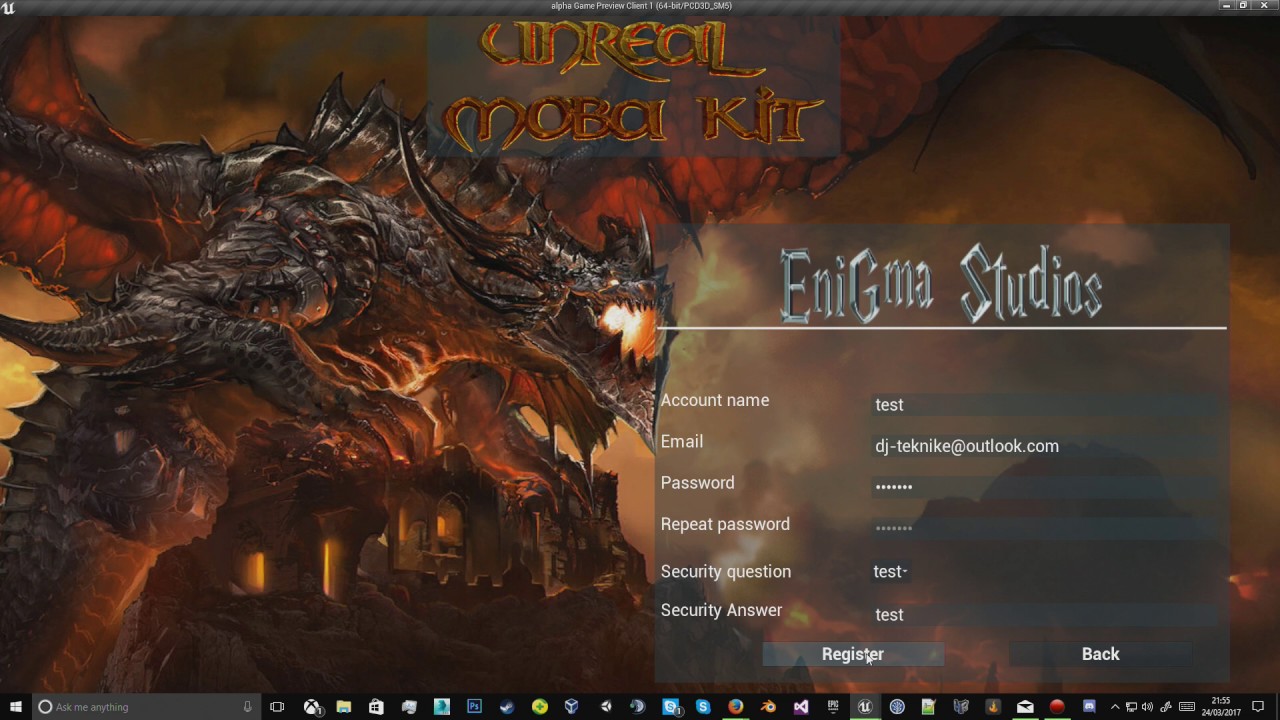
quick video demonstrating my moba kit login system
This was the one I did.
golden cliff
@worn nymph Did you make that login via GameSparks?
worn nymph
No that one was my own system
golden cliff
@worn nymph And did you do it mostly via C++ or Blueprints? How was the implementation? Did you use VaRest or your own code?
Let me know if I'm asking too many questions lol.
worn nymph
I told you in the first message . I used varest blueprints to call requests via php custom scripts that I wrote. this then queried the mysql database. I think i still have the project somewhere . I will check and zip it up and share. Or if you want I can talk you through/show you how to setup gamepsarks instead sometime
golden cliff
@worn nymph I'd love to see it! What I'm trying to implement in my game is something simpler. Having my own computer be the dedicated server, hold the database, and then a simple login/register system inside the game
vital steeple
@worn nymph thank you veyr much. didnt even think about that!
regarding the damage event
ugh that takes away 2 extra steps of communication and makes this scripting waaaaay cleaner
seriously, thank you
 uncut pivot
Hey boys and girls im currently having an amazingly annoying bug. Essentially when a client jumps the server tries to correct the movement and set their movement mode back to standing as they are going up because of the jump so then it corrects itself. It sometimes does this multiple times in a jump and i was wondering if anyone else has encountered an issue like this. I need to also note world origin shifting was implemented roughly a month a go and this is about when it showed up but I've tried so much to find the issue and all i can see is it is in client adjust position. Another note btw is that it only happens in builds
also if anyone has a reply please mention me ❤
 mild geyser
Is there still not a movement component with networking capabilities for pawns other than character? I want to use floating movement component but it has no movement replication
grand kestrel
@mild geyser prediction is only available for CMC , they're aware it needs to change but haven't said if they're even working on it
mild geyser
Yeah, I know it's available for CMC only. There's been discussion about making prediction available for other movement components too since 2014. There even was a Trello ticket about it with hundreds of votes but it seems they have ditched the ticket when migrating Trello boards...
sterile pebble
@mild geyser getting things done :d
golden cliff
I'm still trying to setup a login system, spent over 12 hours today, no success yet.
I think I'll call it a day for today. I can't stand watching tutorials on youtube anymore
brittle sinew
If you're looking for help, you're going to have to be a little bit more specific on what you'd like help with.
I saw your screenshot from earlier, but that really didn't give a ton of information as to what was actually happening and what parts are the problematic parts
Do you have a functioning backend, and you're having trouble with interacting with it from BP? @☆ Kombo ☆#1527
._.
It appears that way from the screenshot, but just making sure
@golden cliff
viral thunder
Hello everyone, quick question about cameras and aiming (wapons), I am using the default CharacterMovement component in a multiplayer game, but it seems I have an issue with aiming a weapon, the trace seems to change it's agnle if the player looks left or right, but not if the player looks up or down.
The client's trace seems allright but from the server's perspective the up and down movement in not registered
heady delta
you probably need to get remote view pitch
which should be a part of the players aim rotation
@viral thunder https://docs.unrealengine.com/latest/INT/BlueprintAPI/Pawn/GetBaseAimRotation/index.html
Get Base Aim Rotation
this has remote view pitch in it already afaik so if you use that to calculate your trace start it should all be the same across server and clients
viral thunder
how about Get Actor Eyes View Point, it returns both Location and Rotation
Location of viewpoint
twin juniper
is there some way for a dedicated server to restart itself.... for example all players left server, trigger restart yourself
from blueprint
worn nymph
@twin juniper why would you need it to restart ? Simpler just to reset all the game state and logic etc But yes it is possible but it's not easy to do currently
twin juniper
i just think it's easier and cleaner way to do it. match over, restart everything
kill the process and start again
 acoustic yew
If you will Restart server there will not be normal map Traval , but thats all depends on how you Use DC servers. Hard restart every time would be to long i think.
You can write some code what makes your Servers as Instances and every times players leav you Destroy Instance . and if needed you make new one.
worn nymph
Well the only ways I have done it so far. Is
-
varest plug in send http request to a third party program I wrote that had a switch statement to start and stop servers depending on the http request code
-
node.js server listening on a specified port that does the same as 1
3)similar to this code
https://youtu.be/L7h0nu8jsp8
And 4 ) the one I'm currently trying is using the c++ functions built into unreal using the FPlatformProcess classes

Link to code : https://docs.google.com/document/d/1DgSi5ru6DGuQgB5qKLO31p_WczHlOhtMB6Eax1M_OvI/edit?usp=sharing How to let a dedicated server correctly shut ...
worn nymph
Nope . Hopefully in the future it might be . If I ever crack it I'll probably release/share it to the ue4 community but best solution right now is to use third party solution like amazon gamelift or steam to host and manage your server instances.
merry elk
I've done some reading into the Game Instance and stuff like that but I am still a little confused on how it works. Is it more server side or client side?
thin stratus
GameInstance has nothing todo with Server or Client
It's a persistent Class (Singleton), that is created when you start the game and destroyed when closing it.
Aka, it survives Map Changes.
It only exists once on every player (including Servers) and is not replicated, so you can't access other peoples Instances
merry elk
Okay. That makes sense.
thin stratus
Have you read through my Compendium?
thin stratus
I think that's auto generated by Discord
From the contents of the link
Should be available on the page itself if you want to use it
merry elk
Ah I'm just sharing it to some other guys who are working on Multiplayer, I think it will be very handy for the,
twin juniper
erm
if i have dedicated server
and i set a variable to rep notify
will onRep function be excuted on both server and clients? or only on clients?
acoustic yew
you set OnRep On server and it is Multicasted to all Clients what is in NetCullDistance
thin stratus
@twin juniper @past bear @acoustic yew That's correct and also not.
In Blueprints, OnRep calls for Server and Clients.
In CPP, it only calls for the Clients. So if you want to have the Server execute it too, you need to manually call the function after setting the variable.
twin juniper
interesting... my understanding was that in BPs will only be called for clients, so i was perplexed by the fact it was called for servers too
acoustic yew
oh ok thanks for clearing this . ye i was talking more about Blueprint part.
twin juniper
but nothing a simple branch couldn't solve
golden cliff
@brittle sinew I'm actually just having trouble in general, because I'm not familiar with login systems, I'll try looking into another one that my friend gave me throughout the day, which seems to work but needs a lenghty setup. I'll post here if I run into a brick wall, but I will be focusing my afternoon and evening dedicating to making this work, once and for all.
acoustic yew
Question : Who Can tell me why Mesh what comes with Character Dont move Together with whole actor like Capsule Componenet and All other attached things..
Im Moving It Upwards by TimeLine and Set Actor Transform and im Moving it on Client and Server . You can see in Video that Capsule Moves , Ship Moves , but Mesh (BIG Guy) moves only On Client and not On other Client . This is Done with Dedicated server ticked , Tested In New Editor Window , Standalone, and Cooked Build same problem . UE4 4.18 https://streamable.com/b969l

 wary wyvern
Hey guys! Trying to update Steam SDK to build Dedicated server, but get an error
Unable to instantiate module 'Steamworks': steamworks SDK not found in ThirdParty/Steamworks/Steamv141/sdk
I've placed all the files in ThirdParty\Steamworks\Steamv141\sdk\redistributable_bin\win64 and ThirdParty\Steamworks\Steamv141\sdk\
Any ideas?
acoustic yew
Steamworks Version is 139 in 4.18
if you wann aupdate it you must update Source Engine too there are some files what references the Version
and if they dont match you will not run it
Just copying the new SDK will not be enough, as mutch as i know
Here is files you must Edit to change the version manualy
However i might be wrong as i did this back when it was still on v136 as you see in .txt
@wary wyvern
thin stratus
I think Dedicated Servers need the dlls next to the binaries
At least I needed to do that to make the Server start
acoustic yew
That depends how you Cook your Dedicated server i think , If you do it from Project Launcher it Places all that for you in folder
if you build server by just making server.exe and copy it to some folder .. it might bet that you need some additional .dlls copyed in there
thin stratus
Yus
acoustic yew
Hey Exi can you scrool bit up and see my Issue maybe you know why that deem Mesh dont move 😦
I just dont Understand What is happaning i took Out the Set Actor Transform and just Move the Ship with Add Movement Input just like i do it with Character Human But you can See in This new Video MESH is just stending there wile Capsule and other Elements is moving.. Animations are playing but it dont move with it .. https://streamable.com/mj1s2

The Only difference is that Ship is Standing in The World but characters are Spawned by Game Mode , would that Brake Character Parant Class like this ?
Unreal Engine 4 what is with u thees days 😦
thin stratus
Well, do you possess the Ship?
acoustic yew
Yes
acoustic yew
Everything yes Giant Character is just placed there as So i cansee what happans .. its the Mesh inside the Character parant Class
the Ship is just Static Mesh
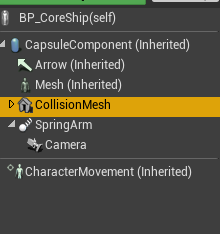 thin stratus
Okay so wait. The Character you run with, the ship and the big mesh
What are the connections
I assume Ship and Character you run with are !=
thin stratus
Alright, and the Big mesh is part of the Ship?
acoustic yew
Yes
thin stratus
How are you moving the Ship? (screenshot please)
 thin stratus
Are you doing anything with that mesh?
acoustic yew
Nop
its just there For visual purposes how ever in future i would like yo use the Mesh for the actual Ship when there will be animations
thin stratus
Is the ship replicating movement
And is the CharacterMesh component replicating or not?
acoustic yew
Yes Ship is replicating movement, and mesh is set to not Replicat componenet buti tried that allready it dont change anything.
This is ships https://i.imgur.com/UEewtSs.png
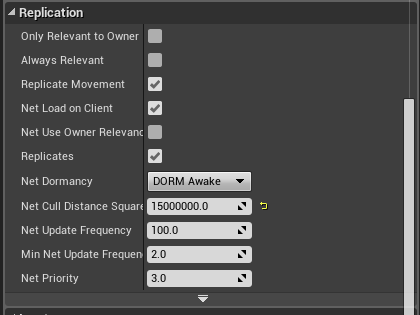 thin stratus
That is indeed weird
Might be something I'm not seeing right now
The ship model seems to properly move
can you check if an additional skeletalmesh comp will move with it
acoustic yew
Yes and Capsule moves properly too
ok
Yes
Added Skeletal mesh moves with Ship Like intended
Its the Inhereted mesh what stays on ground
acoustic yew
Capsule
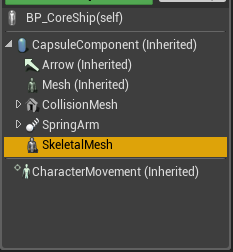
This looks like this https://streamable.com/e4065

I just Tested what i was thinking is doing this .. i made fast Spawn Actor from Class and Spawned Ship on runtime but it has same Issue so i have no Idea how my Character human is working and the Spawned Ship is not
wary wyvern
Weird. I built a server, but when I launch ProjectServer.exe, nothing happens. Even if I start it with -log parameter..
thin stratus
Check log files
wary wyvern
Hmm. Right.. 😄
viral mason
Anyone able to help me in an hour or so with networking? Can't seem to connect from other networks. Firewall should be unlocked for UDP 7777, port forwarding should also be setup. Same port forwarding is setup for another service which is working fine. (Not ue4 though, but a server I can select which IP/port it binds to.) Send me a PM if you can.
wary wyvern
Anybody tried to start session on dedicated server launch? How do I do that? Checked some manuals about GameSession's RegisterServer() function, but I cannot include OnlineSessionSettings.h in order to make a setup. Has dedicatedserver+session workflow changed some time ago?
thin stratus
You should be able to
You generally create the session similar to listen server
but without the presence = true
so presence false
Can't remember what files and modules you need
But just check where (path wise) the SessionSettings are located
@wary wyvern
wary wyvern
There is no manual on dedicated server + session, unfortunatelly. There is no way to include and make FOnlineSessionSettings inside sources, but you can inherit AGameSession and make it there instead of native GameSession class. I totally missed that gamemode has DefaultGameSession setting and I can make my own..
brittle sinew
@golden cliff ah, well if you need help with the UE4 side of things, don't hesitate to ask 😃
viral thunder
@heady delta https://i.imgur.com/aKJlES9.png This is how I ended up doing it after all, worked perfectly

 grizzled tide
hi
i have a problem trying to show a gameover screen on twoplayer game
when one of the two player has hp=0 the game mode gets notified. so i notify a enum with the round over to each playercontroller like this
' PlayerControllerList[_playerDamaged]->NotifyGameStateChanged(EGameStates::ROUND_OVER, _instigator);
PlayerControllerList[_instigator]->NotifyGameStateChanged(EGameStates::ROUND_OVER, _instigator);
Player Controller has defined the functions like this
'UFUNCTION(BlueprintCallable, NetMulticast, Reliable, Category = "Gameplay Player Controller | Touch Input")
void NotifyGameStateChanged(EGameStates _gamestate, int32 _value);
void NotifyGameStateChanged_Implementation(EGameStates _gamestate, int32 _value);
'
additionally i have a event on my player controller so it calls the update to the umg widget of each payer
UFUNCTION(BlueprintNativeEvent, Category = "Gameplay Player Controller | Game States")
void OnGameStateChange(EGameStates _gamestate, int32 _value);
void OnGameStateChange_Implementation(EGameStates _gamestate, int32 _value);
so together they are like this
`
void AGameplayPlayerController::NotifyGameStateChanged_Implementation(EGameStates _gamestate, int32 _value)
{
 OnGameStateChange(_gamestate, _value);
}
surround your code with 3 ` characters to get formatting
grizzled tide
( i have to do this because delegates are not replicated)
result: the gameover widget is called on server-client only
roundover sorry
https://pastebin.com/F2wJ56q6 this is playercontroller header


so i beliebe the main question is how can i pass the ROund over event from gamemode -> playercontrollers-> local UMG
stark dome
@grizzled tide so the issue is that it's only being called on the one client ?
stark dome
And you want it on server-clients?
grizzled tide
it is vs puzzle game. one player host, other connects . when the round is over every player should be notify (YOU LOSE, YOU WIN)
only the host is receiving the notification
stark dome
@grizzled tide the playercontroller only exists on owning client and server
You could run the net multicast on the game state
Realistically the game state should already know about that on all clients
Via match state
stark dome
Right but you are running the net multicast on the one player controller. That only exists on server and owning client. Not all clients
Just as that diagram shows
But as I said before the gamestate already has a match state that's replicated. You shouldn't need to have any multicast
fleet bear
question
I have a client that made a game that uses steam servers. Can they sell their game on another platform?
 twin vault
Im not sure what are 'steam servers', there is the steam API that let the game use steam features, and steam documentation says you are free to sell on whatever platforms you like (ofc steam features wont work if the game is not running through steam)
@fleet bear
fleet bear
so the online subsystem for multiplayer isn't steam servers
twin vault
well, it could be using steam matchmaking
fleet bear
that
twin vault
which wont work if its not runnign through steam yeah
so u have to implement another subsystem
fleet bear
say they have steam installed though
twin vault
only games activated on steam, with a key for example
fleet bear
hmm ok
twin vault
i think you can sell a game on other platform and give a steam key, so it would work as normal (humble bundle does that)
but if they are buying the game from another platform, maybe its because they dont use steam, and another subsystem could be a good deal
sterile pebble
is this true that I cannot call RPC from client widget?
thin stratus
Well, the RPC is not allowed to be IN the Widget
You can, however, get your PlayerController in the widget and call the RPC that is in it
sterile pebble
it starting to look bad from code side..I want to store widget stuff inside widget, not inside player controller or player pawn...
twin juniper
I have an animation of the player lying/falling down when they are logged out. Is there a way to also move the capsule collider to be in the same position as the player? When I hit the player mesh, it does nothing, but when we hit the invisible capsule which is still straight up, we get damage dealt.
jolly siren
You could rotate the capsule on it's side, change the capsule size, or just disable the capsule collision when they log out
twin juniper
@jolly siren Yeah but there is no automatic way of doing this right?
thin stratus
Well, you shouldn't handle damage through the capsule
The Mesh has a Physics Asset
Which has Collision primitives assigned to bones
Let the Capsule ignore the damage trace
and the mesh not
twin juniper
@thin stratus Yeah
jolly siren
Right damage with phat, capsule for world collision
twin juniper
I haven't touched it in a while
But at the same time i dont really need that much control
lol
jolly siren
Then do one of the things I recommended
twin juniper
i feel like the physics asset is incredibly useful for moba games lol
and just in general any type of game which wants to do dismemberment
xD
like fallout games
thin stratus
Not really dismemberment
Headshots alone are already reason to use it
Just put a big collision capsule in it if you don't need the control
Put it onto the best bone and simulate to check if it properly covers your body
(even though I don#t see why you don't just add the collision to it)
 undone crane
Hey guys, does anyone have a tried-and-true algorithm for replicated aim spaces? Or anything that the client needs to constantly update on the server but still feel responsive client-side? Right now, whenever the aim changes it, it updates it on the client, and if it's not ROLE_AUTHORITY, it calls the server function to update those values too. Perhaps it's the way UE4's replication works, but on the client player, I can still feel the lag even when run locally or on a LAN. I've tried reliable and unreliable, but neither feels great as the client. What's the right way to do this?
 dull jasper
ur usin a replicated variable?
wary wyvern
Any ideas on how to set Session Name? 😃
undone crane
@dull jasper Yes, it's replicating fine, but it could stand to feel more responsive on the client side.
wary wyvern
@thin stratus Any manual? I tried to change SessionName in AGameSession, but no result(
thin stratus
As said, don't touch the SessionName
It's not the ServerName
It's for internal use
You need to specify it when you create the Session inC++
Your game should always run on GameSessionName
(predefined variable)
and as Host Settings you define your own for a name
Which you later when querying
 unborn nimbus
Say I have an NPC and I want to type a console command to modify that NPC's health. How would I go about doing that?
 warm pagoda
Exec keyword in UFUNCTION
But it has to be on a UFUNCTION of an object owned by the player.
Likely, do it in the Cheat Manager
unborn nimbus
Well the NPC will never been owned by the player
warm pagoda
Aye, but the function will have to reside on something like the PC or their cheat manager.
Which means you'll have to specify which NPC to affect as a parameter.
unborn nimbus
The function is on their health component
warm pagoda
No. It isn't. Because it can't be. Because that won't work with Exec. But you can have your function marked with exec call that function.
wary wyvern
@thin stratus But where do I define this server name?
unborn nimbus
Sorry, that's not what I was talking about
I have the function defined in the level blueprint
"Set Health(float Amount)"
warm pagoda
Why would the level blueprint contain a function to heal an NPC?
warm pagoda
So what's your question? You originally asked how to go about making a console command to modify an NPC's health.
You seem to have done all of that already.
unborn nimbus
The Server RPC isn't being called which I think is because the NPC isn't owned by the player
warm pagoda
That's irrelevant, you said your RPC is on the level blueprint?
unborn nimbus
A function called "Set Health"
which gets the targeting NPC, and calls HealthComponent->SetHealth()
targeted*
warm pagoda
You'll want to use the cheat manager, most likely.
unborn nimbus
What would that change?
warm pagoda
You own your cheat manager.
It's automatically stripped out in shipping builds.
You'll be able to do the exec and the RPC properly.
unborn nimbus
but my cheat manager doesn't own the NPC?
isn't that the issue?
that the client I'm on doesn't own the NPC
warm pagoda
No
You need to own the object with the exec function in order to gets the exec function exposed to the console
unborn nimbus
ahhh ok
warm pagoda
You need to own the object whose RPC you call to even be able to send it to the server.
unborn nimbus
that makes sense
warm pagoda
Once it's on the server, the server can then do whatever it pleases.
unborn nimbus
thanks for the help
warm pagoda
You don't want to call a server RPC on the NPC, you want to call a server RPC on something you do own, and then have it, on the server, do what you want.
Cheat Manager will play nicely with that and will make sure you don't end up accidentally shipping said cheats.
thin stratus
SessionSettings = MakeShareable(new FOnlineSessionSettings());

SessionSettings->bIsLANMatch = bIsLAN;
SessionSettings->bUsesPresence = bIsPresence;
SessionSettings->NumPublicConnections = MaxNumPlayers;
SessionSettings->NumPrivateConnections = 0;
SessionSettings->bAllowInvites = true;
SessionSettings->bAllowJoinInProgress = true;
SessionSettings->bShouldAdvertise = true;
SessionSettings->bAllowJoinViaPresence = true;
SessionSettings->bAllowJoinViaPresenceFriendsOnly = false;

SessionSettings->Set(SETTING_MAPNAME, FString("NewMap"), EOnlineDataAdvertisementType::ViaOnlineService);
@wary wyvern
That's probably somewhere in your session creation code, right?
wary wyvern
Yep
thin stratus
So the last line
SessionSettings->Set(SETTING_SERVERNAME, FString("YOUR SERVER NAME"), EOnlineDataAdvertisementType::ViaOnlineService);
Something like that should do it
While SETTING_SERVERNAME, if not available, is a simple #define SETTING_SERVERNAME FName("ServerName")
wary wyvern
Thx, I'll try
viral thunder
Hello, another quick question.
I have a server spawned actor (Base_Pickup) which has some code to change it's appearence, I have some logic that runs whenever another actor starts overlaping with it
The logic works fine with the exception of the visuals, the change in appearence needs to be for the client that picks up the item (it's just like the weapons spawners in Unreal Tournament).
What would be the correct or most effective way to achieve this effect
So far I can only get it to change for everyone or not work at all
thin stratus
Only changing for one person can be done by assigning him as owner and then doing a client rpc
Or doing a client RPC on his character while passing the pickup and then doing the modifications
wary wyvern
@thin stratus Nope, search still gives me something like PCName_344634434142356
thin stratus
Are you actually retrieving the name proplerly?
wary wyvern
@thin stratus Well, I use SessionResult > Get Server Name ()
In blueprints, by the way
thin stratus
Yeah you would need to retrieve that on cpp
Blueprint nodes for sessions are pretty bad and limited
 worthy wasp
question all - i have an actor that i'm spawning in the world.... its a placeable building. when i place this building from my character class - the netculldistance is way less than if i have this same item statically placed in teh world.......
I've debug stringed the netculldistance of the blueprint actor - and both instances (Spawned and Statically placed) are th same NetCullDistance value.... but the one that is spawned dissapears at 22,500 units and the static placed one stays visible..... what gives?
jolly siren
Has anyone tried getting the avatar of someone who isn't your friend on steam?
wary wyvern
@thin stratus So there is no way to get session name in Blueprints? It inconvenient to use C++ when working with UMG.
worthy wasp
@wary wyvern have you tried using AdvancedSessions plugin?
wary wyvern
Nope, but I want to make everything from scratch. It not for real project anyway.
I tried to check it's sources, but did not find anything with server name..
worthy wasp
well