#multiplayer
1 messages · Page 347 of 1
 chrome bay
My plan was to use the Party session for a persistent party, and then use Game Session for lobby/game
 thin stratus
It's steam, it's basically joining a fixed address
You save the Session on the Client, just like any other variable
chrome bay
Oh save the URL you mean, not the actual session itself
thin stratus
When you leave the game with the host, he recreates and you give him a bit of time as client
Actually not sure
You could just save the FriendsID
chrome bay
yeh, guess so
thin stratus
SessionInterface has a "SearchFriendSession"
chrome bay
I'm just gunna have to test this when I get to it I guess
thin stratus
Didn't want to deal with that crap, so I just got the Party Plugin :P
chrome bay
Yeah I have the party plugin, does things differently to how I wanted though 😦
NVM
I will work this out eventually...
chrome bay
Yeah I've seen that, like saving between maps so you can restore the connection on the other side
chrome bay
This session / party task has been akin to running into brick walls repeatedly
 wary willow
@thin stratus PartyPlugin Good?
thin stratus
It does good things
Idk how UWorks does it
But it guess since both do it, uworks offers more now?
idk
wary willow
hmm, not sure if UWorks does it
chrome bay
It doesn't use beacons or anything, not that I've seen
chrome bay
Ah ok, probably that then
thin stratus
Maybe misunderstanding
wary willow
Lobbies and Beacons the same?
chrome bay
Nah
wary willow
Right, so, he does support Lobbies
chrome bay
Hell I'm not even sure what the difference is betweeen a steam lobby and a session now
chrome bay
I mean beacons as in engine beacons
wary willow
Since the whole SteamSDK is supported
chrome bay
yeah
wary willow
RIght
So then no
Steam Lobbies and Sessions are different only in terms of UE4 functionality
As far as I've done the research into both anyway over the past few months
But, it will be very smooth sailing once Uwork OSS is implemeted fully
wary willow
But right now, we can use Lobbies without port forwarding
chrome bay
RIP Steam OSS
wary willow
since he did some punchthrough using some google stuff
 night jay
Guys 2 questions, what is the size of a float in bytes? And does the size of an int increase with the amount of numbers you have(like say the number 1 vs 100)?
 brittle sinew
4, and if you're referring to a single type of int, no.
There are different sizes of ints, like int8, int16, int32, and int64, and the numbers describe how many bits the variable takes, but once you declare that variable, the number you store in it makes no difference as to the size of the variable
int16 can store a wider range of numbers than int8, int32 can store a wider range than int16, you get the point
wary willow
One day we'll have int64 in BP
night jay
wait so floats and ints are both 4 bytes?
brittle sinew
int32 is 4 bytes, yes
(which is the int you'll use in BP)
Floats can store a wider range of numbers, but they don't have exact precision
night jay
are int16 and int8s available in BPs?
 somber sage
is there an guide/tutorial (written or video) for DEDICATED servers for begginers?
like: requirements for setting it up. how the blueprints should look/act etc?
brittle sinew
Byte -> uint8
night jay
Hhhm
brittle sinew
I don't believe int16 is, though
night jay
Alright thanks
brittle sinew
@somber sage there's not a ton of differentiation that makes a dedicated server a dedicated server (especially in BP), it's mostly just how you build it
The server/client model still applies when you create a listen server, so it's not like dedicated servers are a whole different paradigm of design
somber sage
🤔 hmm. oki. i need to read me in. im searching for some guides.
brittle sinew
Here's a guide on how to build one: https://wiki.unrealengine.com/Dedicated_Server_Guide_(Windows_%26_Linux)
You'll need a source build of the engine and probably a tad bit of C++/C# (the latter for build files) knowledge
That tutorial steps through the process pretty slowly though, so it should be good for beginners
somber sage
c++/c# knowledge is here.
thanks for that link. i will annoy here again if i have an question.
brittle sinew
In theory, yes.
I'm not sure if BP adds any additional bloat to them with things like reflection or other stuff ¯_(ツ)_/¯
night jay
Hhmm
how bout quantized vectors
cuz I have 3 floats I'm going to replicate at the same time
thru a RPC
Want to optimize where I can cuz precision isn't of importance for this thing
night jay
Which would mean a normal vector would be bigger else that variable would have no usage no?
brittle sinew
Well, we established it should be 12 bytes above 😃
brittle sinew
Yup, you're not saving a ton of bandwith doing it this way, but if you can take the precision hit some is better than nothing
night jay
gonna need it
brittle sinew
Also keep in mind with any of the quantized containers you are also limited in terms of number range
night jay
Yeah
But we're never going above the million

This is our average packet size for 2 players
pretty sure this is client side too
 ruby epoch
Error: 'UNetConnection::Tick: Connection TIMED OUT. Closing connection.
What does that mean?
also, what is recommended setting for Character Movement(Network) ?
 obsidian kelp
erm where do I change the name of my game as it appears on steam when I have the steam subsystem enabled? the default seems to be "Spacewar"
brittle sinew
By getting a new App ID 😃
obsidian kelp
ahh I see I didn't know those 2 were linked
brittle sinew
Yep, Spacewar is 480
wary willow
$$$
obsidian kelp
100$ for dat new id
 verbal flame
Can i use https://www.youtube.com/watch?v=abmzWUWxy1U for mobile games? would it work similarly

In this video we take a look at the finished project and step through each of the features that will be covered in this series. We show our functional Main M...
 hasty adder
http://www.spacewars.com space wars looks good 😃

Space Wars
 vital steeple
when you test mp in pie does it share the same player controller?
vital steeple
i only see one controller being spoawned in the world outliner
and i see two player states
 young haven
Hi I'm trying to test steam multiplayer and when I transfer my project to another computer, it crashes when I try and run in standalone mode and the launch option is greyed out?? any ideas??
Ive built this system twice already and I've never ran into this
using UE4.15.3 BTW
actually its the one shown above
 grand kestrel
@vital steeple there is a player controller on the server for each player and one only on the owning client. One player state per player on all. Same for pie
 slender pollen
HTML5 games might actually be viable in 4.18. I've got a blank project down to 22mb gzip compressed. I think it might be possible to get down to at least 15mb though.
 pallid mesa
Imagine i have a gamemode in my shooter that every 20 seconds is calculating something. My shooter can have people joining in the meantime, meaning that they will enter when the match is in progress. What timers of my game should i consider faking/simulating? (By faking i mean using the GetGameTimeInSeconds or another method instead the timer from the time manager). I've heard here that middle joiners requiered faked timers but since this timer is on the gamemode and its located on the server it shouldnt have anything to do with middle joiners, or am i wrong? In conclusion, which timers should i consider faking?
 sterile pebble
@charred tulip there is no movement replication for physical asset (or rigidbody in case of skeletal mesh). You need to write you own solution to sync bone's position between clients and server.
thin stratus
@verbal flame That tutorial is bad in general.
@vital steeple World Outliner shows one players view. You can change what the outliner shows with some button next to it
@young haven you packaged the game?
@pallid mesa the timers that your players need or see
young haven
Ya I actually found the issue. Turns out 4.15 doesn't work with steam multiplayer anymore......so frustrating
@thin stratus
Quote unquote form Travis Vasques at epic
young haven
Everytime I take the build to a different cpu, the launch button inside the editor greys out and when I try and play in standalone mode it crashes instantly
young haven
I literally just build the same multiplayer system 2 months ago with no issues in 16 and it didnt require a packaged build to work
 agile lotus
well ive never gotten them to work
i used packaged build with zero errors
since 4.12
young haven
the multiplayer function?
young haven
I talked to Travis Vasquez at epic
agile lotus
doesnt matter
young haven
I work at a VR firm with him
young haven
he says you need to be working out 16 or over
young haven
ya i know that but he knows the technical side of things
agile lotus
i dont need standalone or launcher
i use packaged build
on 2 seperate PC
so I can test 2 seperate steam accounts
young haven
its all good dude im gonna just push to current unreal version anyways i know that it works that way
not a biggie
agile lotus
why are you using 4.15 if you're fine on 16 though
different project?
I'm scared to goto 4.16 and have my current netcode stop working
young haven
im finishing up school and its the software they have there...its super annoying but i can just get a couple big drives and run 16 from the school on those
i was just trying to stay with the software at school
shame on me lol
agile lotus
in 4.15 you have to make sure auto connect in editor is off
thats all I could think of
young haven
ahhh you know what i do remember that actually....
hmmmmm
i didnt think of that actually
ill try that too
cant hurt at this point
young haven
I just wonder how that would cause my entire editor to crash?
young haven
its check it out tho thanks for the second opinion @agile lotus
agile lotus
no probs
young haven
ill let you know how it goes for sure
agile lotus
now if anyone knows what would cause the client to have jittery movement on host/server screen
thats an issue I'm having
it just doesn't look as smooth as the host
and it baffles me
young haven
Internet Connection maybe?
agile lotus
If I use PlayInEditor it does it too though
agile lotus
I'm not currently RPCing the movement
young haven
not sure about that one good luck let me know how that gets resolved! best of luck
oh so your anims arent replicated yet?
agile lotus
they are
young haven
oh
agile lotus
as if the client is trying to force movement and the server is interping between the two rapidly
I have a network programmer I can ask but he;s offline for the night
young haven
hes probably asleep but he might get back to you in the AM he's a pretty solid Unreal guy
ahhh
lol our connections are asleep!!!
wth
agile lotus
I think I found the info to fix it
I'm calling AddMovementInput on both client and server and its trying to sync up rapidly
between the two
pallid mesa
Even the ones on the gamemode?
thin stratus
Ehm, starting in standalone is totally fine for steam
No need to package if you don't want to test the session stuff
Technically not even needed to package if you have UE4 on both pcs
 rain coral
I'm trying to get started with networking, but one of the windows always fail to possess the second pawn, or something. all I've done is set the default pawn and set clients to 2.
https://puu.sh/xUDeg/ebc8e2cb00.png

(same without dedicated server. Server window fails)
 jolly siren
@rain coral what is your Pawn::AutoPossessPlayer set to?
rain coral
I thought I needed that to be set, for the player controller to possess my pawn without BP/coding
thanks 👍
jolly siren
no problem
 charred tulip
@sterile pebble thank you, i figured as much unfortunately. I just wanted confirmation that I wasn't missing some magical easy fix.
 heady epoch
I have a sprint variable that I want to increase from 0 to 100% over about .25 seconds which is a bar in the player's umg.
The player walks over actor that gives 100% sprint. I call an RPC to increase the pawn's sprint to 100% but the umg is changing the sprint bar based on the replicated variable of sprintboost. As it fills in it isn't smooth kind of jumps from 0 to 25 to 6oish then 100.
Should I make a duplicate non replicated variable that I use for the UMG and call it on the client only as i set the server variable. This way I can have a smooth animation in of the progress bar?
I worry that this could make the player think they have sprint before the server knows it does but is in the process of adding
rain coral
@heady epoch is it possible you could make that duplicate variable and interpolate towards the current server value? that way the player won't believe they have 'more' than they actually have, at least
otherwise if it's the same timing and amount every time it fills up, you could just show it on the client and assume it would match what happened on the server
heady epoch
Thank you, that is what I was thinking. The more things I add the more and more I realize that stuff needs to be faked on the client so things are butter smooth, and then done properly on the server for authority to make sure nothing is out of alignment. Adds a lot of work, but it is probably worth it so the client experience feels buttery smooth
 past bear
I have a conundrum - I have a replicated var on an object that is set on the server, then immediately afterwards a client function is called, then the client uses that var in a UI
trouble is, when the client opens the UI, that replicated var does not appear to have been set
Any suggestions? I would expect it to be set by the time the function is called, but it isn't
I guess I could add a delay before opening the UI or something
hmm, could pass the data I need through the client function maybe, but that seems needlessly expensive, especially as the var should be being replicated
wary willow
@past bear Showing BP logic would be great than that wall of text 😉
But, if I am understanding you correctly
Are you getting the variable from inside the widget?
past bear
Update var -> Call client function -> Client uses var but it hasn't been set, basically
changed it to work on repnotify, still doesn't work
so I guess my problem is actually elsewhere
past bear
correct
wary willow
So you have to cast to whatever you want
sterile pebble
this is problem with time that it takes to variable replicate
it does not happen instantly
past bear
I don't need to cast to anything, the var has nothing to do with the player or game state
@sterile pebble - hence switching to repnotify
wary willow
But yes, there is a slight difference from Server to Client rep
It takes a bit of time, I've noticed this with my Time Systems
The fact that your repnotify is not working means you are doing something else wrong
Which is why knowing your exact logic would be helpful
past bear
I can't really give that out, it's quite large
sterile pebble
I would advice to avoid such situations, because with bigger ping you will run into more issues with variable replication delay
past bear
it's one variable, used in a much larger system
past bear
@sterile pebble - it's kind of unavoidable given it's a game important variable :p
sterile pebble
I dont know, fake it :d
wary willow
...
past bear
the client has to know the values, otherwise the client-side UI couldn't display it...
wary willow
There are times where you only want the server to control that variable
Many many times
I don't understand how you can avoid it
sterile pebble
Yeah, sorry, I went a little ahead of my head.
wary willow
As for @past bear are you pushing the variable thru gamestate?
wary willow
so it's unowned
past bear
it's owned by the world
sterile pebble
well, you can use custom client rpc method, or add custom delay to wait for replication. There is still several ways to deal with this.
past bear
in terms of authority, the server controls it
@sterile pebble - it's repnotify, it should work
the repnotify does happen
need to do some debuggery before going further
Okay, I think I can show some screenshots now so you can see what's happening
one sec
okay here we go:
https://snag.gy/nZxlJe.jpg

three functions; the repnotify, the client side function that is called (ignore the lack of validating whether it's the correct player or not), and the construction in the widget
and now the log to go with:
LogBlueprintUserMessages: [BP_Objective_Transmitter6] Server: OnRep Wave: X=13.000 Y=0.150 Z=0.040
LogBlueprintUserMessages: [BP_Objective_Transmitter6] Server: Desired wave: X=13.000 Y=0.150 Z=0.040
LogBlueprintUserMessages: [UI_TransmitterMinigame_C_4] Client 1: UI Wave: X=0.000 Y=0.000 Z=0.000
LogBlueprintUserMessages: [UI_TransmitterMinigame_C_4] Client 2: UI Wave: X=0.000 Y=0.000 Z=0.000
LogBlueprintUserMessages: [BP_Objective_Transmitter6] Client 1: OnRep Wave: X=13.000 Y=0.150 Z=0.040
LogBlueprintUserMessages: [BP_Objective_Transmitter6] Client 2: OnRep Wave: X=13.000 Y=0.150 Z=0.040
the UI is being reached before the OnRep
makes no sense, because the OnRep function is what calls the function to open the UI
past bear
it's a bit funky because it's being wedged into an existing system that didn't involve said UI before
(and that system is built on top of another, more generic system, heh)
wary willow
k, so what's the issue again?
my repnotify calls the ui up and closes it
Is that transmitter event in the object in the level?
jolly siren
@thin stratus did you ever have success getting steam avatars?
did all our pinned messages die?
hm nvm they are there again
past bear
the issue is that the repnotify opens the UI, but the value of the repnotfy var hasn't changed until afterwards - something is executing out-of-order
in any case, this is a problem for tomorrow me
thin stratus
@jolly siren Well yeah why?
The Stream Project I made has that in it
Should be in Epics official thread about it
jolly siren
ahh I see that you did a community training for friends stuff. I'll check that out
thin stratus
Yus (:
chrome bay
Holy crap. Finally got players connecting to each other with Listen Servers in Steam OSS 😮
Only took 9 days...
wary willow
@chrome bay Heh, you should write up a blog post if you get a chance to save others some heartache
thin stratus
Maybe he means something else than me
Cause host, search and join should work out of the box with listen servers :x
wary willow
So, whatever his workflow, even if strange or different than usual, others might try something similar and learn from his heartache
thin stratus
Yeah true
chrome bay
I'm doing reservations via beacons, it's mostly just been loosing my head in layers and layers of classes
Got parties merging together now.. Next is matchmaking -_-
rain coral
so, I'm just starting out networking. this works pretty well so far, but I'm wondering if I'm making this more convoluted than it needs to be.
https://puu.sh/xUNzu/d6b49d1e06.png
it's about moving a hand with IK on the server and syncing the position to each client.
 hasty adder
Where is this thread for steam avatars exi sir
rain coral
the reason I'm asking is because I have some issues with the multicast node. if I call a multicast function from the listen server, it executes on the other client too, but if I call it from the client, it only happens locally. isn't there a way to call something on server, then on every client? (in one node)
brittle sinew
No, and that multicast behavior you're describing is intended behavior
Multicasts must be called from the server to propagate to all clients; else they're just called locally
You need to call up to the server first (on an actor which you have authority), then multicast from there
rain coral
so my above picture is a fairly typical solution? it moves something on server, then multicasts the resulting position
sterile pebble
@rain coral it's the only way to sync positions between server and clients. But you should be aware that network delay can (and will) lead to notable delays for player, so usually clients simulate same movement and correct it according to server information
grand kestrel
The multicast might be suboptimal, instead just set a replicated var and set it on server, if not owning client then tick the ik using the var
I'm under the impression that replication is far cheaper than doing a multicast on tick but maybe I'm wrong
rain coral
@grand kestrel hmm yeah, maybe variable replication is enough in this case. same for player movement with smoothing, which I managed to get pretty well with multicasts now. however if someone can confirm that it's cheaper to do via variable replication, I shall change it at once ^^
verbal flame
@thin stratus any recommendations for mobile multiplayer tuts?
thin stratus
Not really. What exactly are you looking for?
Also I just quickly made my compendium more printer friendly.
It's missing the orange highlight though now
Not in the mood t orecolor that
@wary willow Didn't you ask for a printer friendly version?
wary willow
@thin stratus Hmm, I don't remember, but yeah, your black background kills my printer, so I never printed it out
I would suggest the getting rid of the blue background on code
Which would mean making the comments another color
wary willow
Are you going to add to it?
thin stratus
I want to
Just can't find the time
Here is the persistent link
Might just change my pin
Ah na, pin goes to website which has this version listed
agile lotus
I'm getting the tiniest amount of jitter when the client moves his pawn
on the host screen
Anyone have an idea as to what would cause that?
It happens with PIE and packaged
 subtle peak
Good evening everyone 😃 I was wondering if any of you have tried doing local coop with one player on the PC and the other in VR? And if there is any easy way of doing this? 😃
wary willow
@subtle peak short answer there used to not be
but yes you can do it
with spectator mode
But if you're coming from Unity, it's not the same workflow
or ease of use
Otherwise, you'll have to probably get source and hack something together
But AFAIK, Spectator mode is the only way to do it for now
subtle peak
Allright, I'll do some digging about spectator mode 😃 Thanks 😃
 trail bloom
Guys can an owner for a UObject changed dynamically? Also, can I replicate a hierarchy of UObjects as long as the outer most parent is an Actor?
 warm pagoda
I think renaming an object allows you to set a different Outer.
trail bloom
Yea I read that. Does it work with replication or is behaviour undefined?
warm pagoda
🤷
 snow cliff
anybody got any experience with seamless travel?
my game modeand the used player controllers are different in the first and the second level, but the client controllers persist?
so they don't update to the controller class in the new leve
vital steeple
@grand kestrel @thin stratus thank you both 😃
vital steeple
so on a level actor, doesnt everything run as the server?
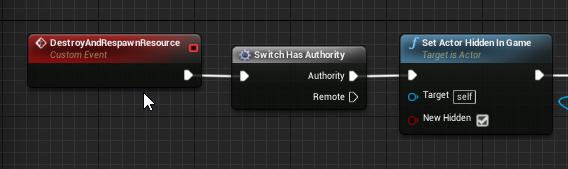
this DOESNT replicate to clients
but it DOES run and the server does see that the hidden status does change
and yeah, its replicated
snow cliff
level actor? level blueprint?
grand kestrel
Level blueprint is ALevelScriptActor, so...
agile lotus
So I managed to solve my jittery movement
by executing the console command p.NetEnableMoveCombining 0
Are there any potential drawbacks to this?
As in will it bite me in the ass later on
grand kestrel
@agile lotus probably just increase bandwidth usage which may or may not be a big deal for your game, packets that can be combined simply won't be
Looks like an ongoing bug going all the way back to 2014 (release year)
Evidently because server predicts only mesh location and not full prediction
Or something weird
agile lotus
@grand kestrel Thank you for the info!
 civic belfry
quick question for the multiplayer gurus - if I'm using set velocity for wall jumping and jetpacks in multiplayer - is it sufficient to do set the velocity with a server call, or do I need to do it both on the server and the owning client?
seems to be working with just setting it on the server only, but its a tad twitchy on the client side.
agile lotus
Anyone see anything wrong with this? It's not working properly on clients but it works on host
 zinc loom
Yup. Custom event executed on all, but then immediately branches into running nothing if the client running the code has no authority (eg is a client and not a host)
vital steeple
but if that actor is replicated wont everyone see?
agile lotus
I tried with and without
 twin juniper
your logic there is completely wrong
you're getting controller
so if there WASN'T an auth check, then it would fire on host (getting hosts controller) and each client (returning each clients local controller)
sry never mind you're getting pawns controller
however
controllers only exist on server and client that owns it
have a look at Exis network documentation
agile lotus
I use the same logic in the InputAxis MoveRight though
agile lotus
I use Set Control Rotation if their rotation needs changing before the addMovementInput
twin juniper
And I believe control rotation should also be set on client... correct me if I'm wrong
agile lotus
I'll try setting to to Run on Owning Client then first
twin juniper
well
I believe control rotation should be set BY client
Not server - > client
THis is a player pawn yes?
agile lotus
Yes
twin juniper
What fires the "TurnManually" event?
agile lotus
In my project I use it to turn my pawn when I do things like grab a ledge from behind the pawn or after a dodge/roll
So it's called during OnFinishedPlaying for a flipbook anim
twin juniper
So player input - > server - > TurnManually?
So that is probably fired on each instance of the pawn
twin juniper
And Multicast events can only be called from server
agile lotus
so should I RPC it with an Run on Server to a Multicast?
twin juniper
first you should check if your OnFinishedPlaying is fired on owning client, host, non owning clients or all of them
I believe it's fired on all of them...
agile lotus
im currently RPCing it
oh wait
so it goes OnFinishedPlaying -> AnimFinished(Multicast)
and all the logic is in the AnimFinished(Multicast)
Am I doing that wrong?
twin juniper
You have to figure out which instance(s) OnFinishedPlaying is firing
I don't know about animation events
I believe it's fired on each instance of the animation blueprint
And if the Pawn is replicated then each non owning client as well as server will have an instance of that actor
Which means that the OnFInishedPlaying event doesn't need to do a multicast
Your animations are properly replicated yes?
twin juniper
just make sure you know on which instances it's fired, that'll decide if you even need to RPC the TurnManually event
Just have onfinished print a string, and play as 3 clients
if the string fires on Server, Client, Client, then you don't need to rpc TurnManually
that is if you're simulating as one player acts as the host
agile lotus
So the first thing I did was get rid of the multicast on OnFinished
and the RPC on turn manual
and it fixed it
also sometimes it displays the string on Server and Client
sometimes just Server
not sure why
but its working
and thats good
Thank you @twin juniper
twin juniper
@agile lotus Does that change depending on which simulated player instatiates it?
civic belfry
Jetpack system
I get that I have to set the velocity on the client and server both, to prevent corrections from taking place constantly.... but corrections are taking place constantly lol
tried doing client then server, now trying with a sequence and getting the same corrections
once in a while they will sync up and act smooth, but 99% of the time its constant corrections
I feel like its because I'm rapid-firing the RPC to the server with my gate/timeline setup, but is there a well-known or "proper" way of doing this to where both get the set-velocity at the sameish time?
civic belfry
forgot to plug my pawn movement controller into the RPC, still didn't fix anything but it had my hopes up
civic belfry
update - incresing the smooth distance and setting it to linear seems to have helped a lot
not sure how bad of a practice that is though :/
Also switched the sequence to set the velocity locally, then tell the server - seemed to help a lot too
nevermind - reverted all network movement changes and added switch-has-authority to the server event and it smoothed everything out. I thin k it was running a second set-velocity on my owning client or something. seems to work now
past bear
is it possible that an OnRep function might only be affecting a single client?
For example if the actor is effectively unowned, and OnRep is not called on the server?
past bear
I'm not sure that's answering the question?
 slim holly
but I'm pretty certain someone always owns an actor
slim holly
excuse my morning slow, but doesn't replication rely on owner channel?
past bear
I have no idea what you mean by "owner channel" - I assume you're referring to the ownership hierarchy somehow
thin stratus
Placed in World is owned by Server
It should be at least
OnRep is called on everyone (BP includes Server), that meets the OnRep condition
C++ excludes Server from OnRep
past bear
cheers - but if an OnRep var is modified client side, it doesn't get replicated?
this seems to be what I'm seeing here, anyway
suggests it would need to be modified on the server, then OnRepped back to all clients?
past bear
cool, that's what I wanted to know, thanks
bit of a PITA to change the value of a var from the client, since I'll need to RPC it, then rep it back :/
thin stratus
Well, why is it replicated then?
You can change it locally on the client
And in addition tell the server to change it
to minimize the lag for the local client
Also make sure that you don't try to ServerRPC on an actor that is in the scene
Cause that's server owned and will drop the RPC
You have to ServerRPC ealier, right after your Input and process the rest on the Server
@past bear
past bear
no, I mean it's being changed on Client A -> who needs to notify the server -> who replicates it back to all clients
which is fine
I think it is a server owned actor though, so if it's just going to ignore the RPC :/
I really don't want to send it through the player because it has nothing to do with the player
I don't want code specific to this object in the player
thin stratus
It's not specific to that object
Idk how you interact with it
But your Character would just have a generic "Interact" function
That runs on local and server (via RPC on Input)
past bear
no, it's more complicated than that
this object has variables that can be changed via a UI
those vars need to come back to other players
I don't want to push those through the player itself, because they are totally irrelevant to the player
thin stratus
Sounds like a Crafting Table or Chest or so
past bear
it's a transmitter with a complex waveform
thin stratus
Generally, if you want to call an RPC, you have to do it through a client owned actor
You can set the Owner of that World placed actor when he overlaps (on server side)
But only one at a time can use it then
I'm doing it that way with the Ball in Protoball, to allow RPCs from everyone
past bear
one at a time is fine, it already works like that - so if I were to set the interacting actor to be the owner, the ownership hierarchy would work and allow me to RPC back to the server?
I'll give it a shot
thin stratus
Yus,
You will have to set that on the Server though
So at least the Overlap or so needs to be used then
past bear
there's an interaction component which gives me an event, which I believe is happening on the server 😃
if not, things are about to get more difficult....
thin stratus
Hm, got a weapon of which I'm the owner.
"OwnerOnlySee" on a particle of it hides it from me aswell -.-
rain coral
@thin stratus do you know if there's a performance difference between variable replication and multicast on Tick()?
rain coral
ok 👍
past bear
Repnotify currently actually always sends if the variable is set not if it's changed
it's a bug that's been around for a while :/
so if you have int X = 10, and then set X = 10 - it will replicate
 rare cloud
@past bear, even if you declare this on your GetLifetimeReplicatedProps ?
DOREPLIFETIME_CONDITION_NOTIFY(UMyClass, MyRepVariable, COND_None, REPNOTIFY_OnChanged);
I'm talking about BP specifically
rare cloud
oh ok
past bear
I think native code is unaffected
rain coral
adding UPROPERTY(Replicated) over my variable spits out this:
Error LNK2001 unresolved external symbol "public: virtual void __cdecl ABullet::GetLifetimeReplicatedProps(class TArray<class FLifetimeProperty,class FDefaultAllocator> &)const " (?GetLifetimeReplicatedProps@ABullet@@UEBAXAEAV?$TArray@VFLifetimeProperty@@VFDefaultAllocator@@@@@Z) GunAndBucklerUnreal D:\Git\Unreal Projects\GunAndBuckler\Intermediate\ProjectFiles\Bullet.cpp.obj 1

 drowsy badger
youre probably missing GetLifetimeReplicatedProps function
jolly siren
right, you need that and a DOREPLIFETIME for the property
rain coral
https://puu.sh/xVsfV/d924808b99.png
it warns me that there's nothing to override. also, what should I return from the function?
 chrome bay
Wrong return type and it's a const function @rain coral
virtual void GetLifetimeReplicatedProps(TArray<FLifetimeProperty>& OutLifetimeProps) const override;
rain coral
ok think I got it 👍
 severe widget
and then in your cpp make sure you don't miss const at the end
chrome bay
^ that too
rain coral
there was one for int as well when I started typing it ;d
chrome bay
Best way is to use VAX's 'Create Implementation' 😃
severe widget
^
chrome bay
Also @rain coral Don't know if you're aware, but there is actually a native ProjectileMovementComponent included with the engine 😉
rain coral
ah well, I enjoy doing my own logic and learning some networking tricks in the meantime
chrome bay
No worries 😃
rain coral
ah, think it was this that fooled me. it just assumed int because I just autocompleted the function signature and forgot to check the actual return type. https://puu.sh/xVsut/e7315e1294.png
 thin stratus
@chrome bay Usually, GetLifeTimeRepProps is declared by UE4
I can't recall the last time I had to add that to the header
chrome bay
Ah true, depends what version of GENERATED_BODY() you use!
thin stratus
(Which removes the ability to use VAX)
chrome bay
I use GENERATED_BODY() so I have to declare it manually, but GENERATED_UCLASS_BODY() you don't have to I think
thin stratus
Really? I think it happens if you declare a variable replicated
Hm, might be, but I'm rather unsure
chrome bay
Oh I've always had to declare it in my case, complained otherwise
thin stratus
Fair enough. SOMETHING adds it haha
chrome bay
haha yeah true
 night sand
im very new to unreal and i just wanted to ask, how does multiplayer work in this engine?
rain coral
can someone confirm the actual syntax for setting up a listen server and connecting to it via shortcut parameters? on a packaged project
rain coral
is "(...).exe" ?listen enough?
jolly siren
docs say ?listen -game
rain coral
isn't that only if you're starting through the editor though? to specify that it's not the editor to start
I'm using a built .exe
rain coral
and the connectee just types "(...)" ipaddress ?
jolly siren
mhm
jolly siren
if so, you should only be setting them on the server
i doubt you need all of that replicated to the client. just think about what the client actually needs
wary willow
@twin juniper I wasn't scolding you
I was just asking if this was your BP or not
Because it seemed like it wasn't
And you were just trying to replicate it
So bascially, if it wasn't, and you could provide us with the asset name, maybe someone who's done it before can help you
Even so, if you don't have experience with networking, may still be a challenge.
You could always also, contact the seller, and see if they are going to or have implemented MP already
Or they can provide you with tips on their end since it's their product
Gotcha
chrome bay
Guys, anybody know where I can grab a delegate for session connetions timing out?
Gr8 - the only location is the Game Instance. Great for modular design -.-
 rough iron
@chrome bay good opportunity for a PR?
chrome bay
Definitely I think!
twin juniper
So I'm trying to set the visibility of an Actor using a multicast but its not working.
My actor has a UStaticMeshComponent called InteractableMesh.
The multicast simply does InteractableMesh->SetVisibility(false);
I have SetReplicates(true) and SetReplicateMovement(true).
It goes like this:
.h
UFUNCTION(Server, Reliable, WithValidation)
void Server_ToggleVisibility();

UFUNCTION(NetMulticast, Reliable)
void Server_ToggleVisibilityForAllClient();```


.cpp


```void ANewActor::SendVisibilityRequestToServer()
{
    Server_ToggleVisibility();
}

void ANewActor::Server_ToggleVisibility_Implementation()
{
    MultiCast_ToggleVisibilityForAllClients();
}

bool ANewActor::Server_ToggleVisibility_Validate()
{
    return true;
}

void ANewActor::MultiCast_ToggleVisibilityForAllClients_Implementation()
{
    InteractableMesh->SetVisibility(false);
}```

What am I doing wrong?? I have no idea, sure looks like this should work.By just saying 'not working', you're not giving us a ton to work off of; you're going to have to isolate the issue.
Does the multicast not work (i.e. the RPC makes it to the server but the multicast doesn't work)?
Does the original server RPC never make it to the server?
Does the multicast work but the contents of it aren't having the effect you expect (therefore you think the multicast isn't working when it actually is)?
It's probably one of those three scenarios, but you're the only one who's able to test it 😃
Keep in mind ownership restrictions if it appears the issue is the server RPC never making it to the server.
(and I assume your third function in your header should have a MultiCast prefix instead of a Server prefix, and you just forgot to update it :p)
twin juniper
Yeah it does have the multicast prefix 😃 I just made a replica of my code in a txt document. As far as I can see It is not reaching the server whatsoever! (Via debugging with breakpoints)
Yeah its definitely not making it to the server, whats the cause? What are the ownership restrictions? What can I do to fix this?
I simply drag and dropped the actor into the game world, and the game world is running on a dedicated server.
@brittle sinew
brittle sinew
Well, that would be why. 😃
Take a look here: https://docs.unrealengine.com/latest/INT/Gameplay/Networking/Actors/RPCs/#requirementsandcaveats
Designating function replication across the network
The gist of it is that to call a server RPC on an actor, you must own that actor.
What that means is that the owner of the actor must be either your PlayerController or an object that's directly or indirectly owned by your PlayerController
(i.e. you can have a long ownership chain—your PlayerController could own A which owns B which owns C which owns D which owns your actor, and that's perfectly valid)
twin juniper
Alright thanks so much!!!!!
brittle sinew
If you look in your logs, you're probably seeing some mention of 'no owning connection', which is what is printed when you try to call a server RPC on an unowned actor
Yep, also take a look at Cedric's compendium up in the pinned messages if you're just starting off with MP 😃
 lost inlet
bit late for this but wouldn't a repnotify be better suited to a visibility toggle?
if a client joins after the multicast is broadcast, then they'll never see the newly reflected state
with a repnotify, they would
brittle sinew
Sure, that could be something to think about, I was just more focusing on the root cause of the issue they were having
twin juniper
How would I go by doing a repnotify?
lost inlet
ReplicatedUsing uproperty specifier
https://wiki.unrealengine.com/Network_Replication,_Using_ReplicatedUsing_/_RepNotify_vars wiki article on it, those naming conventions... woof
but you'll get the gist of it
might be worth noting that rep notifies will never be called by the authority (the server/host) automatically
brittle sinew
(in C++—in BP they are, which is really pretty stupid 🤦 )
I know you're doing it in C++ at the moment, but that's just a gotcha to know
twin juniper
Alright I see... to summarize what this is all actually for: Server spawns in an item that the player can pickup. I was testing functionality by setting the visibility to false when player would send the pickup request (by pressing E). I learned now that I am not able to send a Server RPC function from a non-owner, so how can I go by telling the server which Actor I'm picking up?
I have a traceline to the actor I'm picking up, so the client knows the actor, but I don't understand how I can tell the server which actor. @brittle sinew @lost inlet
lost inlet
send that via the pawn or player controller, not the object they're using
twin juniper
Yeah I've got that, but how do I send it
lost inlet
... make an RPC?
you can give it a pointer to the actor over the network
as long as it's a replicated actor
severe widget
Also
Another thing you can do is make sure the trace would hit something, and then send an RPC to the server to also conduct the trace server-side.
twin juniper
Good idea^^ 😃 But couldnt that cause some inconsistency?
severe widget
If you just have the server trust the client that they can pick something up, then that's potentially a cheat in your game.
twin juniper
I was going to just make a distance check, but as long as theres no inconsistency then it sounds like a great idea
lost inlet
i wouldn't really bother with a server side trace, more like proximity and maybe a dot product check
severe widget
Not saying there's no inconsistency
lost inlet
you may get too many gotchas with performing the trace again serverside
severe widget
There very well may be
Which is why I'm not saying you should do.
just that you can
You can also perform the trace some time "in the past" when the player would have hit E to pick up something
twin juniper
When I'm packaging my project, what exactly is the dedicated server getting from the packaged contents?
severe widget
And you can even have the player pick it up locally while the server validates it, and the correct that when the server notices an error
obviously I'm skimming over a bit here
twin juniper
Everytime I change code, Ive been packaging my project, its time consuming and also might be stupid but Im not sure
Yes I understand
lost inlet
you can test this in the editor
twin juniper
I appreciate it
lost inlet
PIE menu has a dedicated server mode
twin juniper
Oh alright, ill do that
How can I set the PIE dedicated server have one map, and the actual game have another?
Guys, all of your help has prevailed; I've got it working! You guys are the best! Thanks so much @brittle sinew @lost inlet and @severe widget
severe widget
Uh ok np :)
twin juniper
Now I've got the visibility working, which I dont actually want- I want to delete this object.
Actor = nullptr; forcegarbagecollection(true) ?
lost inlet
call Destroy on the actor
twin juniper
will it destroy instantly?
severe widget
it'll effectively be destroyed immediately, but will probably hang around technically in memory for a bit
lost inlet
^
it'll be completely destroyed when GC happens
unless you have a really strong reason to force GC, i wouldn't mess with it
trail bloom
I will drop same question as yesterday maybe today there is someone around that can help me out. Can a uobject's outer be changed dynamically and set to replicate with a different actor as parent? Also, can a uobject hierarchy be replicated as long as the outer most parent is an actor? Thanks!
hasty adder
Is there a non replicating notify function for blueprint? Maybe that's why it always replicated because it's tied into the drop down for conditions
lost inlet
BP setters in 4.17
agile lotus
I have a section in my event tick on my pawn that sets actor location while they are "air dodging". On the client however, when its called it seems to jitter a little bit once in a while or call twice
 glad sedge
is it running purely on the server?
agile lotus
I've tried running on server and client. only works when it goes on client
glad sedge
post ya bp
any physics involved or is it just the standard character pawn w/ movement component?
glad sedge
kk
agile lotus
agile lotus
glad sedge
Which I'm guessing doesn't happen because you're not running this from a server position, right?
agile lotus
it runs fine
glad sedge
So it is running on server?
agile lotus
must be, or both client and server
glad sedge
Well pawns tend to be replicated on both
There's a net update aspect that might be playing a part here
agile lotus
so it might be calling set actor location on server instance and client instance?
agile lotus
Oh
glad sedge
AFAIK what happens is the server updates, checks the client location, adjusts if necessary etc.
agile lotus
I also have p.NetEnableMoveCombining 0
glad sedge
You add the client stuff because it smooths out what you're seeing.
agile lotus
im just gonna double check to make sure that multicast is coming through
yeah its coming through
glad sedge
Look at tweaking your net priority settings and all that shit
In my experience, whenever I get jitter it's because i'm watching something happen on the server without the client updating alongside with it.
agile lotus
yeah thats what confuses me because sometimes the jitters there and sometimes its not
glad sedge
And if it's using some kind of prediction, then it's probably skipping various packets to maintain net movement or something, I dunno.
You ever read this?
agile lotus
Never thanks for the link
Okay so the jitter is not what i meant
I have zero jitter
i meant
very once ina while
the end of the interp
snaps
glad sedge
Yeah have a read of that. It's not directly related to UE, but it explains the underpinning system of how it works and why.
yeah, okay.
agile lotus
poor choice of words on my part
agile lotus
Nah, are you familiar with smash bros gameplay at all?
glad sedge
yeah a bit
glad sedge
yeah
agile lotus
on the client after they sweep, it snaps a little bit further
the server sees them snap too
they stop after the sweep on the server
agile lotus
the movement happens on the event tick in that collapsed graph I showed you, so wouldnt that be happening on server and client?
My current theory is maybe the variable I have set "AirDodgeTarget" isnt replicating properly
which is what they sweep too
agile lotus
Yeah
Under event tick the SetActorLocation is located, but the airdodgetarget is set on an InputAction
glad sedge
Do you determine if 'has authority' before this function?
glad sedge
Well, this seems to me that it's entirely running on the server.
The function I mean
So it's making these changes on the server then telling the client about it, but movement component has movement logic built into it and I'm wondering if that's messing with it.
You set 'actor location' on the server and the client just sees the location at a specific place and has to update their location to sync it.
It's entirely likely i'm wrong too.
agile lotus
that's okay bouncing the ideas off other people is what helps figure it out usually
I'm setting the AirDodgeTarget on the server
Just checked my InputAction
glad sedge
Yeah that's half the battle.
But I'd very much recommend reading that link I posted before. It's not an overly long or complex read but it explains so much about multi.
agile lotus
Sounds good, thanks for all the info and help though!
glad sedge
Let me know what it is that fixes it
agile lotus
@glad sedge Turns out it had nothing to do with the network
It happens in singleplayer as well
bug in my airdodge code
lmao
civic belfry
@Prazon#3357 when you air dodge in multiplayer do you see any kind of corrections from the server if you have p.NetShowCorrections enabled?
asking as I'm having issues with jetpack and corrections using set-velocity
chrome bay
Okay guys so. Steam Sessions with Precense - how the hell do you stop them from timing out constantly and disconnecting when they shouldn't?
I've found this, but it's an engine-level change. Pretty frustrating.
https://answers.unrealengine.com/questions/270868/steam-session-ping-9999.html
slim holly
afaik that was fixed
 void canopy
Is there is any way to connect to Lobby Server back from Game Server ?
agile lotus
@civic belfry Its not happening from corrections its a bug in my airdodge code that happens in singleplayer as well
seems to get an extra push of velocity after the setactorlocation finishes from my inputaxis
still trying to find the cause
 wind vale
Hello, i'm trying to do a simple multiplayer in blueprints with a chat system... basically my issue is: wanting to have the host of the server have an attached "host" to his message. Right now when i'm on the host i see all client messages with the host, while when on client i dont see any. (eg: of host view https://gyazo.com/e909c6016030d2d6fded500e0b087376 )... can anyone point me towards the right direction?
 sterile pebble
@wind vale how do you sent client message to server?
I suppose this happens because server does not replicate it back to all clients. You need to send message back to everyone with the help of multicast rpc
if you just send server rpc only the server will receive it.
wind vale
@sterile pebble clients are getting messages as well (https://gyazo.com/4b2fb79d02d62820957059f44f86e6be and https://gyazo.com/158add800d503e3e6ccb509db9fb12d8 )i wanted to have the host with the host type message appearing rather than only the host seing the host type message.


The way the messages are setup is on text commitment, sends the text to the game mode (as server) and for each player connect (as owning client) updates the chat window (also owning client)... at this point and this is where probably i'm doing things wrong , there's a check to see if "isServer" and depending on that removes the host text from the widget
vital steeple
in PIE, shouldnt each "player" have their own controller? one of my widgets is acting like its sharing references with all the cotnrollers
the references were stored on characters and it had the same effect
im super confused
brittle sinew
Are you using any form of "Get Player Controller/Pawn/Character/etc. index 0" in your logic?
Not sure if the controllers are shared between all players in all instances of the PIE, but it would seem like you may be doing something along those lines
vital steeple
hrm
i have on function that gets the controller from the pawn
thats what i use but i can double check
decent. yeah thats what it was. i was goign too fast when i created that fucntion and instead of getting ctonroller and then casting it as a player controller, i just got the player controller, which asks for an index
looks like its working for now
twin juniper
anyone here used gamesparks?
just curious... how does it differ from just default ue4 system with rpc's and such?
brittle sinew
@vital steeple cool...it's usually best to avoid those types of functions when working with multiplayer logic 😃
If you have the means of directly getting a reference to something rather than going to the world iterator, you should use it
(and if you don't, design it better! Hehe)
vital steeple
hrm how would i go about creating and grabbing a player controller reference without using "get player controller"? like snag it from the playerstate?
i always thought get controller was very specific
is it more like a "get all actors of class" sort of function where it has to iterate througha ton of stuff?
brittle sinew
By "get controller", do you mean the one that takes a pawn reference?
Or the one that takes an index?
brittle sinew
Well then, yeah, that's perfectly fine 😃
brittle sinew
You're getting the reference from another object you have a concrete reference to—that's what you should be doing.
vital steeple
i learned a while ago to avoid having to use the player index one
brittle sinew
When you just start using the get at index functions though, you have no tangible guarantee you're getting the right one
vital steeple
i just went too fast this time and started seeing red after days of it bugging me
yeah makes sense

what i had^



what i have now
i just cruised along when i cranked that out and got sloppy with htat get controller node
ruby epoch
my player stutter rotation on dedicated server
on local all looks fine
even with set 200 ping
any ideas?
thin stratus
@wind vale Well, there is a point a which you receive the message and display it
That needs to carry the information "Host or not"
And then you add the [Host]
civic belfry
does anyone know what the "View distance" setting is for rendering other players/pawns that are far away in a multiplayer game?
ah foun dit "Max Draw Distance" 😛
void canopy
@thin stratus I have a scenario where I want my game server to connect back to lobby server. What should be the procedure here ?
civic belfry
Jetpack Corrections
Is it nomral to see corrections like that while using a jetpack or set-velocity in multiplayer as long as it feel smooth to the player?
or do I need to be shooting for no corrections at all while using the jetpacks?
thin stratus
@void canopy When you say "Server" do you mean actually different Servers or just Maps?
@Koniferus#7766 Correction doesn't looks that off
@Koniferus#7766 Also, are you setting Velocity on everyone or just the Server Instance?
DISCORD -.-
I want to tag people -.-
wary willow
@thin stratus incredibly frustrating when you want to help people
civic belfry
@thin stratus sorry! Had to run home after work
@thin stratus basically, I'm not sure if corrections in general are bad, or if they're OK as long as everything's performing well and the corrections are close enough to not feel
jetpacks work and I'm setting them on the owning client and server at the same time, not multicast or anything
they were pretty twitchy before I realized that they need to be setting velocity on the server and client both. 😄
CLIENT
SERVER
rain coral
I have a bit of an issue. I want to avoid sending unnecessary info through the network. say I have an OnRep function that updates a variable for each client. in this OnRep, I can call a local function to recalculate how something looks on my peers, using that variable. but once this OnRep is no longer running, I have no way of running that function on the local instances of my peers. or do I?
so I guess my question is - can I (as a client) run a function on the local versions of the other clients, to get stuff to display correctly, on demand?
night jay
Is there a way to have conditional actor replication?
Like I have this one actor which I don't want to spawn for the owner but for everyone else
 inner iris
@night jay https://docs.unrealengine.com/latest/INT/Gameplay/Networking/Actors/Properties/Conditions/
Detailed information about how to conditionally replicate Actor properties.
night jay
that's properties no?
night jay
Yeah I need an actual actor to not replicate to a specific client at all
wary willow
@night jay Are they within the same network relevancy?
night jay
Could you elaborate more on that?
wary willow
As in, let's say, two guys are stealthed right in front of you, then you shine your special flash light on one of them, they unstealth because that's what you want, but only to you. The other guy can't see him
Or only for your team
night jay
What I'm trying to do here is
wary willow
RIght, always best with examples 😃
night jay
the reverse actually
wary willow
Spill it
night jay
uh
client shoots weapon
spawns his client version of the projectile
server version of that same weapon also spawns a projectile
which handles the damage etc.
that server projectile should replicate to all clients except the guy who fired the shot because he has his own client projectile already
wary willow
When you say replicate
Are you talking about a Multicast?
How exactly are you replicated this to all the clients?
night jay
No I mean the projectile class itself replicating
When you spawn an actor on the server that is set to replicate, it replicates to all clients automatically no?

 night jay
Yes
wary willow
ok
So, you don't do a "local" spawn ?
Because it was sounding like you were doing that, but maybe not.
night jay
No else I'd have to tell all clients to locally spawn their own projectile
which is bad
night jay
Yes
wary willow
Right, so I guess I am still confused by what you want
If you are not spawning a local projectile alongside the server one
Just the server, which is replicated to all
And it damages the player
Why don't you want the owner to know about it?
wary willow
So, you're trying to do client side prediction
night jay
but only for the client that's firing it
wary willow
Didn't I just ask if you were spawning a local projectile though?
night jay
I currently am not
wary willow
Okay, so what's the issue then?
night jay
I want to
but if I spawn a local projectile
the guy who fired it will see 2 projectiles
rain coral
do you intend to update the position of the shot some time after you spawned it locally, from the server? like, what if it hits someone on your end, but not on the server?
wary willow
TBH, i would use the conditional tags
night jay
I intend to blend the client projectile's position into the server position yes
inner iris
@night jay hitscan makes this problem much easier to deal with, I know UT has some projectile code that you might want to have a look at which does that blending you mentioned. As far as latency / prediction goes, the "is locally controlled" node is is great when running Multicast RPC's that you want only happening on other clients, and not on the client that already fired instantly, which prevents him seeing two projectiles / two sets of fire FX etc. Since you are dealing with the projectile actor itself which has travel time, that makes it harder to exclude unless you either run the projectile on client and server separately and compare the results or else only on the server but fake it with a dummy projectile actor on the local client and other clients
Either way there will either be a delay for the player firing, or some mismatch in terms of what all the players see
night jay
This is mostly for slower projectiles though?
inner iris
If you are doing fast projectiles then just fake it with a fast tracer particle
night jay
I mean the hitscan is for fast projectiles
inner iris
Yeah hitscan is
It's a lot harder to make a projectile feel responsive but also accurate unless you make some kind of tradeoff
Either let the client tell the server what he hit and have the server validate / check if it was possible
Or mask the latency somehow with an animation or whatever
Or fake the projectile on clients with particles / dud projectile and have the server do the sim
night jay
that last one is what I'm doing RN
or what I wanna do rather
But only for the owning client not for all
inner iris
May end up being easier to just have the local version of the firing player shoot a dud projectile on other screens depending on how fast it moves, or potentially have the server correct the dud projectile from its location value
Not too sure- projectiles seem pretty tough to get working nicely
twin juniper
@night jay I actually did that myself recently
I split it up into AWeapon and AWeaponAttachment
had AWeapon as the weapon that shoots a bullet on the owning client
and then the server increments a counter on the AWeaponAttachment
the counter is replicated and onrep spawns a dummy bullet on all non-owning clients (the AWeaponAttachment is owned by the client that owns the AWeapon)
inner iris
@twin juniper This spawns a dummy projectile on all clients but that bullet doesn't get corrected by the server, right?
twin juniper
yeah it's a dummy bullet that's completely handled by other clients
I mean, my system is more generic, so it's more like the server just tells clients via the OnRep to "do firing effect"
which includes spawning a dummy bullet on clients
it's really useful since it means I can then have those dummy bullets simulate behaviours of the bullet the weapon actually shoots
inner iris
Yeah this is a good technique but a possible drawback if the projectile isn't super fast is that with latency, a player that fired a projectile could be behind a wall on the other client's machine, so that simulates the projectile moving and blowing up around the wall, but in fact he had fired before he moved around the wall which leads to a death that could feel unfair since on his screen, the rocket completely missed but on the server it was fired in the open
I guess that is more of a specific situation with higher latency but it could happen often depending on the map layout
wary willow
Client-side prediction is OP
inner iris
It's OP but necessary most of the time
twin juniper
mhm, I don't think the system I have is reasonable for PvP
of course more slow firing weapons in my code can use a non-client prediction system
I believe my RPGs, grenade launchers, etc, use a "wait for server" thing
(I haven't checked it in a long time, program during the day for work now haha)
inner iris
Nice! Yeah, that's a good technique, have a pulling out grenade anim or whatever to hide the wait
Projectiles are awesome but hitscan is so much easier to get working nicely with less issues
For fast firing weapons at least
inner iris
Well more so that the projectile has travel time and the hitscan happens on one frame. Still can be async if the client fires instantly
Fortnite's sniper projectiles feel really good though, always seems to hit exactly on target
I actually have a question- I have heard that CSGO has serverside spread seeds to prevent hackers being able to invert the spread on the client, however there's still client side shooting with server validation. I wonder if the spread is just set differently after each shot, or if the client's shot is off and server decides if it really hit?
Probably can't answer that question without actually seeing their code, but possibly someone else here implemented something similar
night jay
grenades is a bit of a different story
inner iris
I have an array of floats for vertical and horizontal recoil, and also for spread, all per shot. Would it be enough to simply generate this array from the server at begin play I wonder?\
night jay
inner iris
Love that talk!
night jay
Gives some good insight indeed
grand kestrel
@inner iris when I did shooting code I used a random stream, when button is pressed shot count set to 0 on both client and server, used as seed, the button press is predicted in CMC
Didn't really test it though
wary willow
hmmm
grand kestrel
But I did it because I needed a way for server to validate accuracy
Bonus of everything drawn the same on server and clients
inner iris
@grand kestrel not sure how that works- wouldn't the client then have the spread seed / info and could then spoof the info to the server?
I did more research on how CSGO does it and it seems the client seed will just be different and the visual representation of the bullet may be off
grand kestrel
bPressedFire is predicted, in ::GetCompressedFlags I check the state before/after setting it and if they pressed fire then shot count is set to 0
Not sure how they'd spoof anything there
inner iris
Interesting! I still am not really sure how the seed can be protected without a round trip to the server, but if you are checking the state before and after like you said, it could be a good safeguard
Also how do you handle rapid tap firing with bPressedFire?
For a semi auto rifle for example?
Or is that not a necessary part of the game?
grand kestrel
No difference
It's not a safeguard either, it's just how the system functions
The point is it doesn't need a safeguard
inner iris
Well if someone tap fires twice before the first bPressedFire reaches the server, then it'd only fire off once, right?
grand kestrel
Yeah
inner iris
Gotta understand that better
grand kestrel
Well, not really a stack of commands
inner iris
So you have that implemented in the CMC?