#multiplayer
1 messages · Page 344 of 1
 merry haven
 violet sentinel
Hello. I'm new to Unreal Engine. I got a task to "introduce traffic encryption between Client and Dedicated Server" but can't find any documentation to it. Is there any support for it or the only solution will be to write custom networking from scratch?
 thin stratus
Has anyone managed to succesfully setup a VirtualBox for testing Steam Multiplayer?
Cause I doubt that the VBox can run a UE4 Game
thin stratus
I'm sick of packaging and sending the project to a second pc
 rare cloud
@thin stratus, depend of your game but some Mac user use virtual machine to play some Windows game
performance will be far from optimal but I guess you can make your tests
depend of your hardware too
thin stratus
I can't start the Project though

I doubt that the VBox supports that
As it's not directly using my 1080
Nope, can't get passed that error
 past totem
How do I set a variable for the server? When I set it it only sets to the client
It's on replicated
thin stratus
Use an RPC to set it on the Server Side
past totem
RPC?
past totem
Like this? http://prntscr.com/gpga0d
 thin stratus
Yes
past totem
Doesnt work
past totem
Okey, see ya in 2 years
thin stratus
Welcome to GameDev (:
past totem
So can anyone tell me how to make this work on the server pls lol
 pallid mesa
Yes, listen to cedric.
past totem
I know how replication works
I just dont understand why I cant this variable on the server
thin stratus
If a ServerRPC doesn't work, it's mainly cause of Ownership
ServerRPCs only work in Client owned Actors
Such as PlayerController
It's all written in my comp (:
 jolly siren
where are you calling the rpc from?
 old swift
Hey fellas , can anyone tell me how it is possible that i could create a multiplayer vr game and then test over steam. Well i did it already but so manny problems , for instance the first problem i encountered was when me and my friend logged into our different steam account and we tried to connect via steam , it did connect but when i tried to connect to my friend who lives in another country we were unable to connect. by the way i am using steam app id 480, (Spacewar). is there another way i could connect internationally to him, by the way i followed this tut https://www.youtube.com/watch?v=TPakLkxc6f0

Hey guys, I still cant make the volume louder .. Anyway this time I show you how you can: - add Steam to your project - Host a Game Steam/ LAN - Search for a...
thin stratus
You generally only need Steam if you really need to test Steam functionality
Using 480 has the issue of spamming search results with other people that use the app id
Resulting in SearchResults to be empty
Sometimes Precence searching also filters people that are not in your country
In general, if you just want to test VR Multiplayer, I would recommend hosting a Game without Sessions
Just with OpenLevel?listen
And then connecting via console direct IP
old swift
@thin stratus , right now i have increased the sessions to max search 1000
i have to make it 0?
thin stratus
No, the Max Results is fine
It should work, but sometimes Presence and 480 manage to swallow your results
old swift
yeah i know ! do you like have some other stable option i could use.?
my main focus is to connect with my buddy who is in some other part of the world
thin stratus
Like I said, connect via IP
old swift
Thanks buddy and there is only one little problem , i am not that of a networking guy but how? do you have like a tutorial
?
i could follow
i am new to unreal who bought HTC VIVE and want to have some fun
@thin stratus you there buddy?
thin stratus
You could check my Compendium
Pinned to this Channel
In general, you open a ListenServer on one PC
So "OpenLeveL" node with "listen" as an option
And then, either you use the Console onthe second pc
or use UI and forward the entered IP to a "Execute Console Command" node
Both need you to do "open IPADDRESS"
where IPADDRESS is the public ip of the ListenServer
 jagged knot
I need some help again... I set up the "advanced sessions" plugin together with "advanced steam sessions". Now; I used the default character blueprint wth a custom skeletal mesh; which works in all tutorials. For some reason, player 2 will spawn in player 1's running game, but movement will not be replicated
I did some testing and made an Event OnPostLogin that gives the joining playercontroller a white drone if it has network authority, and a black one if it doesn't. Now; Player 1 will see two white drones while Player 2 sees two black drones...?
Also; for some reason player 2 can hear player 1...? I didn't even make a voice chat
 short island
evening guys
just a quickie - my Event Begin Play isnt firing in a multiplayer game
there an alternative i should be using?
 wary willow
@old swift Are you and your friend connected to the same download region on Steam?
@short island Way too vague
My Event Begin Plays fire off just fine
@jagged knot ASS is the plugin?
Not sure why'd you use both.
short island
wary willow
Probably causing some issues there @jagged knot
short island
literally just that in a spawned player controller 😃 do i need an auth check?
short island
not in multiplayer, no
wary willow
K
jolly siren
lol
wary willow
Look at the top right
Of the create widget node
If you still need help, let me know.
Also, is this on dedicated server?
@jolly siren You laughing at my ASS pun?
short island
ohhh, these can only be executed on a client?
wary willow
BINGO
They are only for clients
Hm, I thought @thin stratus comp said something about that
BTW, hopefully we'll see another revision when he has time 😉
@short island https://gyazo.com/b9673dc0411e7044ec57a4252abf602f
 short island
thank you my mate
@wary willow so i added super::BeginPlay() to my c++ base, and now the BP event fires
that expected behaviour? was my understanding that Super called the parent function's method
wary willow
@short island 👍
Ummm, Super should called Parent Logic, and if you don't call Super, you are overwriting it essentially.
TBH, I never gave it much thought in Multiplayer though
short island
yea that's what i thought, curious how adding super let me call the BP side of stuff
wary willow
I don't see why it would behave any different.
short island
seems like its not a multiplayer thing
it wasnt being called even when i ran it single player
short island
exactly
adding Super fixed it :S
very odd
oh! the BP hookin must be deep in the parent classes
not putting super must of prevented the delegate from being called somewhere up the chain
wary willow
@short island So, I didn't know this, but if you check this out: https://github.com/EpicGames/UnrealEngine/blob/c9f4efe690de8b3b72a11223865c623ca0ee7086/Engine/Source/Runtime/Engine/Private/Actor.cpp#L2449
thin stratus
So, as I haven't touched Steam and Dedicated Servers yet.
I assume as soon as I have Steam in my Client, I can#t just "open IP" on a Dedicated Server anymore?
wary willow
@thin stratus Isn't that all it's doing in the backend anyway?
Is the Dedicated Server on the Master?
thin stratus
Na, it's just a normal Dedicated Server for now
It's also not meant to be found via Sessio nresults or so
Just a simple direct IP connection
Guess Steam doesn't like that?
wary willow
Probably not, since it's probably trying to get it off the Master Server list
Or something
thin stratus
Hm okay, so Register Server needs to use Steam
Guess I'm at the position where everyone is
that tried to use team and dedicated servers
wary willow
Hehe
Interesting
The Unreal C++ Multiplayer course just went live
Which is nice, because that's one area I've been dragging my feet on with learning
wary willow
Well
As long as they learned their lessons from Tanks
But the current outline is pretty standard
 inner iris
Got a link to the course?
wary willow

Udemy
Udemy is the world's largest destination for online courses. Discover an online course on Udemy.com and start learning a new skill today.
thin stratus
@jolly siren Did you fight with Steam Dedicated Server stuff?
inner iris
Ah I didn't go with the kickstarter so I'll have to wait to watch until later
thin stratus
Iirc you had Voice problems, so just a wild guess
wary willow
😉
inner iris
That's fine, still have LOTS of c++ to learn
Will be better to learn when there are comments anyway
Helps find common issues
jolly siren
@thin stratus yeah I've been using steam dedicated server for a long time. What's up?
thin stratus
I simply added Steam to the Project and that works fine so far.
We use a custom Master Server that lists our Dedicated Servers, and connecting is a simple "open IP"
However after adding Steam, it simply does nothing when tryting to connect
Turning steam off in the ini makes it work again
I assume I can't connect to a random Dedicated Server anymore when Steam is on.
Do you happen to know what I need to add to make that simply work?
I use "simply" too often
jolly siren
haha
thin stratus
Damn now I noticed it and it's gonna annoy me
jolly siren
so you don't want to simply use sessions?
thin stratus
[2017.09.25-20.15.02:552][516]LogGameMode: Display: Match State Changed from InProgress to LeavingMap
[2017.09.25-20.15.02:552][516]LogGameState: Match State Changed from InProgress to LeavingMap
[2017.09.25-20.15.02:552][516]LogNet: Browse: 13.59.233.23:7780//Game/Protoball/Maps/MainMenu_LockerRoom?PlayerSessionID=59b96537c243d0052115e6e9
[2017.09.25-20.15.02:552][516]LogTemp: Display: ParseSettings for GameNetDriver
[2017.09.25-20.15.02:552][516]LogTemp: Display: ParseSettings for SteamNetDriver_0
[2017.09.25-20.15.02:553][516]LogTemp: Display: ParseSettings for PendingNetDriver
[2017.09.25-20.15.02:553][516]LogInit: WinSock: Socket queue 32768 / 32768
[2017.09.25-20.15.02:556][516]LogInit: WinSock: I am DESKTOP-RSJA84F (192.168.0.185:0)
[2017.09.25-20.15.02:556][516]PacketHandlerLog: Loaded PacketHandler component: Engine.EngineHandlerComponentFactory (StatelessConnectHandlerComponent)
[2017.09.25-20.15.02:556][516]LogNet: Game client on port 7780, rate 10000```No, we just want to connect via IP
Above log is all that happens
No error, no warning, no failed connection
jolly siren
that is the server logs?
jolly siren
so you don't have a GameSession::RegisterServer at all?
I don't think you will be able to join without registering
but yeah I haven't done direct ip stuff with steam. I just use sessions
thin stratus
That's fine
would you mind telling me how you register the server?
I would rather see working code before try and error
Also does the Server need any specific things to run steam?
I assume I need to have dedicated servers unlocked in the steam app?
Kinda annoying given that the server isn't even using steam
jolly siren
windows or linux?
thin stratus
Windows
It's as simple as it gets. Packaged-+ Server Binaries
Put onto a Windows Server
Works like a charm without steam
jolly siren
haven't done windows in a while, but I think you have to copy the dll files from Engine/Binaries/ThirdParty/Steamworks/SteamvXXX/Win64 to your projects BInaries/Win64 folder
not sure what you mean by having dedicated servers unlocked in the steam app. I don't think there is anything you have to do on the steam app side. Don't even need it installed AFAIK
thin stratus
Weird enough thatI can't connect to them
I mean it's a direct IP connect
Could steam not be annoying sometimes?
If you answer, please ping from now on as I need to head off. The nI can find it later (or just pm me)
Thanks for you help!
Appreciated
jolly siren
void AFPSGameSession::RegisterServer()
{
    IOnlineSubsystem* const OnlineSub = IOnlineSubsystem::Get();
    if (OnlineSub)
    {
        IOnlineSessionPtr Sessions = OnlineSub->GetSessionInterface();
        if (Sessions.IsValid())
        {
            AFPSGameMode* GameMode = Cast<AFPSGameMode>(GetWorld()->GetAuthGameMode());
            if (GameMode)
            {
                MaxPlayers = AFPSGameSession::DEFAULT_NUM_PLAYERS;

                HostSettings = MakeShareable(new FOnlineSessionSettings());
                // Register the gamemode and map that were loaded on server startup
                HostSettings->Set(SETTING_GAMEMODE, FString(*GameMode->GetName()), EOnlineDataAdvertisementType::ViaOnlineService);
                HostSettings->Set(SETTING_MAPNAME, GetWorld()->GetMapName(), EOnlineDataAdvertisementType::ViaOnlineService);
                HostSettings->bUsesPresence = false;
                HostSettings->bIsLANMatch = false;
                HostSettings->bIsDedicated = true;
                HostSettings->bShouldAdvertise = true;
                HostSettings->bAllowJoinInProgress = true;
                HostSettings->NumPublicConnections = MaxPlayers;
                Sessions->CreateSession(0, GameSessionName, *HostSettings);
            }
        }
    }
}```There is my registerserver, but it is session based
thin stratus
Yeah but there is a difference
Sessions use presence
Dedicated servers don't
So that might just work fine for me
Thanks!
jolly siren
no problem 😃
inner iris
Is it possible to spawn in as a character at the beginning of a match / round but have the controller possess a fixed camera looking over the map while the character gets sent to the correct spawn location / gets initialized (team colors take a few seconds to take effect), then nicely repossess the character when he is ready? I have the actual possession of the spectator pawn working fine on begin play but then I can’t repossess the original character that I spawned in with as I guess I don’t have a reference to it (as getting a reference needs at least some time which snaps the player view from the uninitialised character to the spectator pawn and back again)
wary willow
@inner iris 😉
Now, this is just my opinion, but you are doing it all wrong!
Make it simple for yourself
When the player enters the match, have them possess a spectator pawn
(or your fixed cam, or pawn with fix cam, whatever)
If the player chose a specific character
Whenever that character/pawn is place in the right location
and the match starts, then just Unpossess Spectator and Possess Correct Character/Pawn
(the only thing that really matters is your PC, the body means nothing)
inner iris
That makes way more sense, I was originally thinking of something along those lines but completely blanked on the fact that I can simply replace the character with a spectator pawn in the game mode settings... however I’m still not sure how you’d pick the right character, since there could be 12 being spawned at once (AI controlled characters) Perhaps actually spawning the character through the controller to get the direct reference?
@wary willow Yeah definitely have to reinforce the fact that the characters are just temporary puppets- controller is everything!
wary willow
Hmmm, well, obviously I have no idea how your logic is flowing. But, I'd probably do something along the lines of this: On Game Join, take values, Server Spawn that character in world, assign it some PlayerID value. The player has a PlayerID also, match them up, ggwp. I'm not sure how I feel about the Character Spectator spawning it's body and then possessing it. I mean, if it works, it works.
Just remember you have a list of PlayerControllers
inner iris
Good idea with the IDs- to match them up would you have to use the GetAllActorsOfClass and run through a for loop until the IDs match? (I guess it’s fine to do since it’s only at the start of a match)
Alternatively I can just have 12 AI characters spawn and then unpossess one from the desired team of the player, then reposess it with the player controller.
Thanks for the help and ideas, will try them out 😃
 floral bison
when i change number of players under the play button is that supposed to simulate multiplayer?
 hasty adder
@inner iris that's the setup inuse, Cept bp
Default pawn class is spectator. And players choose team, which sets an enum in there ps and PC , they then update their defaultpawnclass and server restarts llayer
I do it in bp but have an example project in 4.15 if you want to look at it. I have it uploaded for peeps
 inner iris
@hasty adder Many thanks, downloaded! Will check it out in the morning
hasty adder
o/ for blueprints and this method use over overrides are great
Such as selecting team down points and such
Spawn
 tacit hazel
thank you @chrome bay
how can I have people join my server, I know I need to port forward, but what is port forwarding and how do I do it?
jolly siren
the internet
 brittle sinew
Each device/IP, both internal and external, has ports, though by default you can't access internal devices from the external network/internet
Port forwarding allows you to "forward" a port on your external router to a port on an internal device—allowing you to access a service externally
How to do it depends on your router model, but it'll be in your router control panel
tacit hazel
Service Name Source Target Port Range Local IP Local Port Protocol
are the things I need to fill out in my router
no idea what UE4 needs though
brittle sinew
I believe a server itself only needs 7777
tacit hazel
is that port range? or local port?
brittle sinew
(though you can manually open a server on any port)
Both, unless you want to forward a different external port to your internal 7777
tacit hazel
protocol tcp?
brittle sinew
You can forward any external port to an internal network IP+port, they don't have to match (but they usually do since services tend to use predictable ports)
I would forward both
tacit hazel
see I don't understand a whole lot about it
brittle sinew
Well, plenty of resources online about it 😃
This type of stuff is pretty out of the scope of this chat
tacit hazel
oh ok, im sorry
 neon mango
Anyone here famliar with the net code from CharacterMovementComponent? I ask because I think I'm begining to understand it and just want to make sure.
It seems like they take the input from the player, save it, and play it back, but is that all there is to it?
Then they use ClientPrediction some how but still hazy on what that does exactly
floral bison
Anyone know why i might be getting this error when trying to join a session: TravelFailure: LoadMapFailure, Reason for Failure: 'Failed to load package '/Game/Maps/UEDPIE_0_Arena_01''. Shutting down PIE.
could it be because im running it from 2 instances of the editor to test?
in instance 1 i am able to start a session and join the level but when the other tries to join it crashes with that
old swift
@thin stratus Thanks buddy for the solution , i have to try it though, @wary willow And Yes!
wary willow
@old swift huh?
old swift
@thin stratus Thanks buddy for the solution , i have to try it though, @wary willow And Yes!
 glad sedge
better than a kick in the nuts though..
wary willow
Hmm, that depends entirely on the person.
old swift
nah my internet is not doing well at the moment
actually you asked me yesterday "Are you and your friend connected to the same download region on Steam?" for that ques i replied Yes, you have to scroll up to see the chat
wary willow
Ah
old swift
i am gonna try that direct IP solution ,
@wary willow need to ask you what if i bought steam app id ? will it still cause error in connecting with my friend who is in some other country
old swift
Ohkay!
wary willow
The caveat to that is
old swift
@wary willow Sorry to bother you again i checked my download region well i have India and he has UK in his settings , Is this the problem?,
wary willow
@old swift Yes
Make sure both of you are in the same Region
Download Region
Now, there may be some issues with certain areas, that MAY prevent you from doing that, I don't know too much about other country's laws and wtf Steam does. I just know what I know 😉
And if you are on different regions, you won't be able to play together, at least in 480
old swift
thanks Buddy if this works i am gonna throw you a emoji party!
floral bison
Is there a place I can get more in on RCON? All I can find is this blurb https://wiki.unrealengine.com/Server_Administration
 warm pagoda
Just searching for RCON
Seems to be a generic protocol
Surprisingly having trouble finding anything on the protocol in general, rather than a specific implementation for a particular game...
Frustratingly, I have nothing to provide.
Not even this is helpful: https://en.wikipedia.org/wiki/Rcon
Rcon may refer to:
A computer remote control administration tool
In Rijndael key schedule is the exponentiation of 2 to a user-specified value
R-Con, in a Gasket seal, a type of joint
The first linked article seems relevant, but actually makes no mention of RCON.
Everything here suggests this is a proprietary version of RCON: https://developer.valvesoftware.com/wiki/Source_RCON_Protocol
But this link suggests that maybe "Source RCON" is the original: http://wiki.vg/RCON
 twin juniper
Does anyone know how I can (relatively) easily test Steam multiplayer without another machine?
thin stratus
had the same question
There is no answer to it depsite VMachine
And that doesn't work well either (if at all)
thin stratus
Correct, as Steam doesn't allow you to have 2 games on the same account
twin juniper
AFAIK you can't have two Steam instances/accounts on the same machine either
thin stratus
Thank you very much (:
So do Steam Dedicated Servers require an account or so?
As it seems like I have to register the Session so I can connect via IP to it
Weirdly enough
@rough iron Do you have any experience/information about a simple direct IP connection to a Dedicated Server when Steam is used?
It starts browsing the IP but nothing else.
I use Steam atm only for Avatar and Names
Gonna compile the Server with CreateSession in the RegisterServer function now, but wondering how that even works with Steam :/
 rough iron
using steam sockets should be fine
if not you can not just make a direct connection if the server is behind steams nat-neg
thin stratus
Yeah I would've guessed so, but the log only shows it's going to "LeavingMap" and browsing but never actually joins
rough iron
you get the right connection URL from a search result
thin stratus
I just do "Open IP" atm
rough iron
that wont work with steam
your dedicated server is hosted on a random port that is posted to steam
thin stratus
Hmpf, means I need to recode my masterserver to save something else than the IP?
rough iron
IP and the port
thin stratus
Well it all works without Steam, if that's worth to mention
rough iron
if the dedicated server is using steam sockets you need the steams sockets ip, which is not a real IP but a unique id that you use to create the connection and handle natneg
thin stratus
Okay so, atm, my Server doesn't use Steam. It actually uses the IP Net Driver as its an old build.
Now the Server reports his own public IP and Port to a Master Server.
I can upload the Server with Steam Net Driver again, however how exactly do I access that unique ID?
The Server does nothing with Steam atm. I added the code to regsiter the Dedicated Session, although I'm not even using sessions after all
twin juniper
@thin stratus @twin juniper You can hire me as a Networking Tester.
8.5 €/h
I am always there if you need a test. 😄
lol
rough iron
@thin stratus if the server is not using steam sockets the ip/port should be enough
if it do uses steam sockets you have to go through all the session stuff
then the client will search for it and from the result build the right joining url
thin stratus
@rough iron Na, the original Server does not use that.
But the Client does. The Client has Steam and SteamSockets (Party Sessions and ListenServer).
But the Dedicated Server should just be joinable via IP.
But I don't see that working. If I enable the Steam Driver and the Subsystem on my Client, it can't connect to the Server anymore.
I also assume, if I have Steam on the Client, the Server will also have it, right?
I mean I could set "bUsesSteam" in the Server target to false
rough iron
that's because your client expects to use steam sockets for everything once you use the steam netdriver
it's the SocketSubsystem that decides to use one or another
if you can make a small engine change you could force it to build a plain UDP socket for the dedicated server connection
 rich apex
Hello, is it a good idea to buffer the client's input before rpc-ing to the server or does unreal handle this automatically behind the scenes ?
I mean if unreal already has a buffer layer before rpc-ing, Ill not go through the trouble of implementing one myself
thin stratus
@rough iron I can make that change. Do you know where
rough iron
Would have to check where but it's the SocketSubsystem that you are using.
there should be something for datagram or dgram
which the UDP
thin stratus
Yeah there is a part where it creates the socket based on the SocketType
if (SocketType == FName("SteamClientSocket")) and else if (SocketType == FName("SteamServerSocket"))
@rough iron
I assume the "default" one would be SubsystemWindows?
That's a bit over my head right now :P
I might just use the Steam Master Server. It doesn't make much sense to keep my Master Server alive, now that we use Steam anyway
I'll see how hosting a session works. Thanks for the suggestion though (:
thin stratus
@jolly siren Stupid question, but what does the Server (the one the Dedicated Servers run onto) install to actually use Steam?
I doubt that I need to download steam itself and create an account, right?
jolly siren
correct
thin stratus
:D means?
jolly siren
You don't need steam on the deciated server.
you just need the libaries
so on windows the dlls and on linux the .so
thin stratus
Okay lemme check
thin stratus
Is that from UE4 docs?
jolly siren
no, it's allars blog
thin stratus
Gnah, good to know
jolly siren
which looks to currently be down, but I looked at the cached site lol
jolly siren
np
hasty adder
This is for registering steam dedicated server? This is good for what? Prevent non steam joins?
jolly siren
no
just for starting a steam dedicated server
registering doesn't prevent non steam joins. that would be steam authentication
hasty adder
Hm I'm in the same boat but being 99% bp I've run into trouble try and keep my plugins to a minimum :/
thin stratus
Well I always avoided that, even with my knowledge of MP and Steam
Cause I know it's full of undocumented trouble
 vital belfry
are there any resources for workflow when designing with MP/networking in mind?
wary willow
Yes
Plenty
Overview of the samples provided in the Network Features Content Example map.

Blueprint classes can replicate the same way as native C++ classes can. This is a crash course on getting started, though is not a full tutorial on networking gameplay code
Setting up networked games for multiplayer.
vital belfry
cool, thanks
 vital belfry
i'm actually reading that cedric one now
wary willow
Yeah, if you are a newb
Might not make the most sense
But it's still pretty clear cut
vital belfry
i watched a video series a couple weeks ago, that shed a lot of light on how networking is handled in UE
i'm more interested in coding approach over blueprints, though
wary willow
@vital belfry ?
Cedric has c++ example
so does ShooterGame
and pinned messages
and finally, https://www.udemy.com/unrealmultiplayer
Udemy
Udemy is the world's largest destination for online courses. Discover an online course on Udemy.com and start learning a new skill today.
vital belfry
word. much appreciated
 plain flume
hello! If Authority multicasts to clients. Does it matter how much stuff there is after the multicasting? Or will it take the same amount of network data and only the "I will now multicast call" is that matter?
wary willow
@plain flume ?
It doesn't matter
But, the more stuff you have, the more bandwidth it will take
jolly siren
Function name and parameters are what determines network usage for an rpc
wary willow
@jolly siren You're saying that the logic past the RPC call won't affect bandwidth?
wary willow
I'm looking at it differently. As in, it's better to have a lot of logic in the multicast, than calling several multicast events separately
But I get you
jolly siren
right, you always want to limit the number when possible
inner iris
@jolly siren any idea of the bandwidth cost difference of a multicast RPC with no inputs vs a repnotify variable- both trigger events on other clients, but it seems from what I've read that calling a multicast is more expensive than a repnotify call.
jolly siren
🦄
thin stratus
@jolly siren I need to annoy you a bit more. I'm sorry :D
plain flume
Aah. So If I have a thousand line if code behind the multicast without no params, it is safe to call without traffic overflow.
thin stratus
So the Server is running now and after a small engine change also showing up on the Steam Server Browser
jolly siren
no problem cedric
thin stratus

However there is like 3 things weird about it.
First the Name is the ID. Can I easily override that?
Second, game shows up as "Unreal Test!" instead of "Protoball"
jolly siren
third, player count?
thin stratus
and third, I can't find the session in my game itself.
However log prints it:
[2017.09.26-19.15.37:911][195]LogBlueprintUserMessages: [BP_GameInstance_C_0] [GameInstance] Switch from State MainMenu to State ServerList.
[2017.09.26-19.15.37:916][195]LogBlueprintUserMessages: [W_ServerList_C_0] SEARCHING
[2017.09.26-19.15.38:547][225]LogOnline: Warning: STEAM: Server response IP:35.159.19.217
[2017.09.26-19.15.38:547][225]LogNetVersion: Protoball 1.0.0.1, NetCL: 0, EngineNetVer: 2, GameNetVer: 0 (Checksum: 1438384760)
[2017.09.26-19.15.38:697][234]LogOnline: Warning: STEAM: Rules response OWNINGID 90111257544536065
[2017.09.26-19.15.38:697][234]LogOnline: Warning: STEAM: Rules response P2PADDR 90111257544536065
[2017.09.26-19.15.38:697][234]LogOnline: Warning: STEAM: Rules response P2PPORT 7777
[2017.09.26-19.15.38:697][234]LogOnline: Warning: STEAM: Rules response SESSIONFLAGS 523
[2017.09.26-19.15.38:697][234]LogOnline: Warning: STEAM: Rules refresh complete
[2017.09.26-19.15.38:712][234]LogBlueprintUserMessages: [W_ServerList_C_0] SUCCESS
[2017.09.26-19.15.38:712][234]LogBlueprintUserMessages: [W_ServerList_C_0] 0
what are you using for "Steam Server Browser" ?
thin stratus
That's just the Server thing of steam itself
jolly siren
it's a steam app? I've never seen that before
 thin stratus
Yeah
Currently without any extra settings
Oh wow
It's hardcoded
Of course it is
thin stratus
 jolly siren
the last section
jolly siren
I've never displayed the description, so I haven't seen that "Unreal Test!" before haha
the player count is bugged for dedicated servers too
always displays 0
in unreal at least, idk about that server browser
thin stratus
Sessions->GameServerName = FString("My Server!");
I don't really see how that part of the wiki is helpful
jolly siren
which is ugly, but hopefully that part isn't
and for 3, how are you searching for the server in game?
thin stratus
Find Session Node (my own) with Presence and Lan off
jolly siren
okay yeah you will want those off
thin stratus
Yeah, i will perform the engine changes and then check back
jolly siren
okay cool
 obsidian kelp
is there a guide for setting up your own online subsystem?
thin stratus
Depends on what you mean
You will have to follow the Subsystem Interfaces
Means your best bet is to look at already implemented subsystems
tacit hazel
for some reason when I tpye "open myip" into the console it just restarts the game
instead of connecting to the dedicated sevrer, and I have port forwarding enabled
 stark dome
Looks like you don't have the dedicated server running or you aren't connecting to the right ip
Could be abunch of issues
tacit hazel
im forwarding my port, adn connecting to my public ip
it works when I just use 127.0.0.1
and the dedicated server is running
hasty adder
Is the computer your connecting to on your own network?
tacit hazel
yes, my public ip
hasty adder
Ever try calling your own phone number? 😃
tacit hazel
it can't use the same port then I assume?
hasty adder
Sorta I forget the logistics of it but you usually can't connect to your own network from outside ip
If your port is showing as OK with somethings like canyouseeme.org it should be working
tacit hazel
would it wokr if I did it on another pc within the same network?
hasty adder
Well when I tested dedicated servers I had to use separate networks like public wifi connection
In the states my internet provider has some
Xfinity for example dunno if your located in a area that has something similar
tacit hazel
that webstie cant see me
I think I may have done something wrong with prot forwarding, i've never done it before
hasty adder
Looks ok
I dunno if unreal actually responds to canyouseeme.org.. Actually I recall not always seeing it. But can you connect to it with your local ip of 192.168 etc?
From another Comp on same network t should work
Because then it's only your local conouter firewall that would stop it
tacit hazel
if I use my public ip on another computer within the network it should work?
hasty adder
No local ip public your still going out on the same ip and connecting to yourself
But the 192.x would work from a ther since its lan
That would determine if local firewall in Windows is preventing it
Once you know that works then outside should be ok into it with the forwarding
tacit hazel
ok
it does nothihng when I do 129.168.1.1, or 192.168.1.171
and I tried my public ip
and the loop back 127.0.0.1
tacit hazel
yes 2 computers
hasty adder
Ok on the server computer. Turn off your computer firewall and try again
hasty adder
Then we'll know if it's a local inbound outbound rule stoppin it.
Just type in firewall in the search
hasty adder
Ok so we need to open the ports on the local firewall to allow traffic. Windows 7?
tacit hazel
windows 8.1
hasty adder
I'm not familiar with 8.1 that looks right tho
Then when you have the rule for the ports turn it back on and try again
tacit hazel
done, adn it works
hasty adder
So it should work from a computer outside your network now that the port is open. Wonder if can you see me works bow
Now LOL sorry big thumbs on this phone 😃
hasty adder
On server comp does cantouseeme.org work for the port?
I still dunno if it normally would but I'm curious
tacit hazel
unfoortunatly no
hasty adder
You'll need someone to download client to test then 😦
tacit hazel
now I just allowed the app through the firewall
because that guide is dated I believe
hasty adder
Probably lol
tacit hazel
I couldnt ifnd a way to actually open the port
hasty adder
If you want to pm me your ip I can try to connect with unreal you'd see it try to connect in the log if you ran the server with -log and disconnect me since its not your game
tacit hazel
sent it to uou
neon mango
Any good guides to help undestand p.NetShowCorrections 1 ?
twin juniper
What do you not understand? It's a console command that makes it so you can see if a network correction was received
by a client
neon mango
So its bad if you see any and realy bad if you see red ones I take it?
neon mango
I run it on the server, didn't know it worked for client? Does it do something different for client?
twin juniper
You can run it on the client.
neon mango
are the colors basically inverted? So red is server and green is client ?
tacit hazel
thank you so much @hasty adder
hasty adder
Np
twin juniper
No, was just thinking about a one-case scenario. If you are getting desyncs they are bad.
neon mango
What would client prediction look like? Would you get a red desync followed by a green? Would that be normal?
I'm just trying to understand if Desync is going to happen no matter what with lets say a ping of 500 a PktLoss of 15 ?
In which case you'd expect red to show but then if Prediction is working green to follow after?
Or if prediction is working you wouldn't see any red at all?
neon mango
C++ @twin juniper
twin juniper
What kind of project are you working on? FPS, moba, or what?
I asked for a couple of reasons because client side prediction solutions look differently depending on the type of game. As far as your question about desync is gonna happen, no matter what if you have players with 500 ping. First off you shouldn't have people with over 500 ping in the first place, but if you did they are going to desync. And that command wouldn't have green follow up if you have that prediction kicking in as you are talking about.
That's not really how most client side prediction is going to work
neon mango
@twin juniper FPS
the 500 ping is for testing
to see how smooth my movement is with it
 worn nymph
You won't get smooth movement with a ping of 500 the built in replication system and networking of the character movement component can at most comfortably handle the range of 150-200 which is the average bad ping of most games . After that the only solutions are to roll your own custom solution or use the gameplay ability plugin which is more optimised and tackles prediction in a different way . If your game runs good at the 150-200 mark you shouldn't really be worrying about the extremes of players because it will be a minor percentage that it effects and no matter what you do they will not have a good play experience .
Shooter game and unreal tournament uses the first method . Overriding the saved moves functionality in character movement component but for games like fortnight and paragon epic realised it wasn't fitting for the demands of the game so they created the gameplay ability system
thin stratus
Sooo, I did manage to get the Server show up on the Steam Browser. With correct Name and Game.
As well as being able to join via IP again.
However, my FindSession Node doesn't return him visibly.
It shows up in the Log Files, but the Results are empty
[2017.09.27-12.05.57:518][172]LogBlueprintUserMessages: [W_ServerList_C_0] SEARCHING
[2017.09.27-12.05.57:537][174]LogOnline: Verbose: STEAM:  "gamedir" "unrealtest"
[2017.09.27-12.05.58:037][204]LogOnline: Warning: STEAM: Server response IP:35.159.19.216
[2017.09.27-12.05.58:037][204]LogOnline: VeryVerbose: OSS: GetBuildUniqueId: Network CL 0 LocalNetworkVersion 1438384760 bUseBuildIdOverride 0 BuildIdOverride 0 BuildId 2101066868
[2017.09.27-12.05.58:038][204]LogOnline: Verbose: STEAM: Server query complete '0' eServerResponded (Server success)
[2017.09.27-12.05.58:137][210]LogOnline: Warning: STEAM: Rules response OWNINGID 90111265270483971
[2017.09.27-12.05.58:137][210]LogOnline: Warning: STEAM: Rules response P2PADDR 90111265270483971
[2017.09.27-12.05.58:137][210]LogOnline: Warning: STEAM: Rules response P2PPORT 7777
[2017.09.27-12.05.58:137][210]LogOnline: Warning: STEAM: Rules response SESSIONFLAGS 523
[2017.09.27-12.05.58:137][210]LogOnline: Warning: STEAM: Rules refresh complete
[2017.09.27-12.05.58:137][210]LogOnline: Verbose: Async task 'FOnlineAsyncTaskSteamFindServers bWasSuccessful: 1 Results: 0' succeeded in 0.605693 seconds
[2017.09.27-12.05.58:137][210]LogBlueprintUserMessages: [W_ServerList_C_0] SUCCESS
[2017.09.27-12.05.58:137][210]LogBlueprintUserMessages: [W_ServerList_C_0] 0
Does that have something to do with the gamedir?
jolly siren
                HostSettings = MakeShareable(new FOnlineSessionSettings());
                HostSettings->Set(SETTING_GAMEMODE, FString(*GameMode->GetName()), EOnlineDataAdvertisementType::ViaOnlineService);
                HostSettings->Set(SETTING_MAPNAME, GetWorld()->GetMapName(), EOnlineDataAdvertisementType::ViaOnlineService);

                HostSettings->bUsesPresence = false;
                HostSettings->bIsLANMatch = false;
                HostSettings->bIsDedicated = true;
                HostSettings->bShouldAdvertise = true;
                HostSettings->bAllowJoinInProgress = true;
                HostSettings->NumPublicConnections = MaxPlayers;
Sessions->CreateSession(0, GameSessionName, *HostSettings);```some of these settings are probably required
such as bShouldAdvertise
thin stratus
I got these
I went ahead and updated my Steamworks
and the GameDir etc
Let's see if that helps
I also wonder where Epic passes the Server Version

@jolly siren I wonder, the extra settings, such as GAMEMODe and MAPNAME. Aren't they also overflowing?
I set the OwnerName to empty, so it doesn't overflow
Or is that a different string
jolly siren
ahh yeah I think I get overflow warnings on startup. It doesn't hurt anything tho
thin stratus
If I get the warnings, the Server doesn't start up
aka I can't find it at all
Hm
[2017.09.27-13.01.16:028][558]LogOnline: Verbose: STEAM: Server query complete '2' eNoServersListedOnMasterServer (No servers match)
Well great
xD no it doesn't work anymore
Updated the GameDir. Guess the Server is not using it?
Think I hit a dead end
Changing the GameDir should not result in no servers match
It's the same in ue4 and steamworks page :/
jolly siren
Might need to summon Moss
thin stratus
sigh I hate annoying people
rough iron
xD
thin stratus
:/ Did you encounter this result?
rough iron
I would go to your previous step where you got atleast a response
and set a breakpoint
thin stratus
Yeah, might just do that, but I kinda need to use Steams Product Name
Fun fact. No one seems to EVER encoutner that
Couldn't find a single google result
Why me
rough iron
xD do you have UDN access?
rough iron
there might be some threads regarding your issue
thin stratus
Well great. Hide it behind a "paywall"
rough iron
xD
thin stratus
As a freelancer, how would I ever get access to that
thin stratus
Don't tell me there is an NDA that stops you from saying what a fix to an existing problem is
rough iron
right?
nop xD I can not give you a copy&paste answer
but I can give you the right lead
thin stratus
I am using Epics default stuff.
I added the PR from this one guy for Authentication (but even without it wasn't working, so no change here).
I changed 2 things: OWNINGUSERNAME (or what it's called) to an empty text, so it doesn't overflow
And the GAMEDIR and PRODUCTNAME
to match the ones in my Steamworks
RegsiterServer creates a Session with Presence and LAN off
rough iron
You can use two systems: lobbies or the older GameServer API
rough iron
thin stratus
I filled that in
thin stratus
 rough iron
#define STEAMPRODUCTNAME "<productNameHere>"
 #define STEAMGAMEDIR "<gameDir>"
 #define STEAMGAMEDESC "<description>"
and in your configs
[OnlineSubsystemSteam]
 GameVersion=1.0.0.0
and when searchig ensure you set the bIsPresnece to trye
*true
rough iron
GameSession->FindSessions(PlayerOwner->GetPreferredUniqueNetId(), GameSessionName, bFindLAN, bFindLAN ? false : true);
if you are not searching for a lan game set the presence to true
thin stratus
Okay well I can try that. I'm creating it like this:
void APBGameSession_Base::RegisterServer()
{
    Super::RegisterServer();

    IOnlineSubsystem* const OnlineSub = IOnlineSubsystem::Get();
    if (OnlineSub)
    {
        IOnlineSessionPtr Sessions = OnlineSub->GetSessionInterface();
        if (Sessions.IsValid())
        {

            MaxPlayers = 10;

            ServerSettings = MakeShareable(new FOnlineSessionSettings());
            ServerSettings->bUsesPresence = false;
            ServerSettings->bIsLANMatch = false;
            ServerSettings->bIsDedicated = true;
            ServerSettings->bShouldAdvertise = true;
            ServerSettings->bAllowJoinInProgress = true;
            ServerSettings->NumPublicConnections = MaxPlayers;

            OnCreateSessionCompleteDelegateHandle = Sessions->AddOnCreateSessionCompleteDelegate_Handle(OnCreateSessionCompleteDelegate);

            Sessions->GameServerName = ServerName != "" ? ServerName : "No ServerName specified.";
            Sessions->CreateSession(0, GameSessionName, *ServerSettings);
        }
    }
}
bUsesPresence might be set to true
thin stratus
I remember that if I do this, it crashes.
thin stratus
As Dedicated Server don't usually use presence
rough iron
odd
thin stratus
Are you sure your DediServers register with Presence true?
thin stratus
Well, okay, will try that. Worth a shot
rough iron
xD
thin stratus
(: thanks
I really need to write down all steps so no one has to go through that shit every time
Though the PR is kinda annoying
rich apex
Hello, is it possible to use unreal replay system to implement a lag compensation for shooting ?
I'm struggling to understand how I can simulate the state of the client in the server (when a shot happens)
wary willow
@thin stratus aye. Write it down. Add it to compo
rough iron
@thin stratus did it work?
wary willow
@rough iron review my book lol
rough iron
your book?
wary willow
Aye. Are you still a tech reviewer for UE4 for Packt?
wary willow
Bah
rough iron
^^ to many projects plus a lil devil xD
wary willow
Need someone smart and who will be honest and not just pass it
Anyway, this Steam Dedicated thing needs a wiki
rough iron
yep
thin stratus
Had to drive to the store
Gonna test changes in a few
Idk how wrong "GameVersions" show themselves
But I did have different version in Config and Steamworks
Let's see if that also adds to the fix
rough iron
ok
thin stratus
Okay, let's see if my Server crashs or not :D
Yus
Error: === Critical error: ===
[2017.09.27-14.59.29:504][ 13]LogWindows: Error:
[2017.09.27-14.59.29:504][ 13]LogWindows: Error: Assertion failed: SteamUtilsPtr
Presence for Dedicated Server is nono
rough iron
mhhh
hasty adder
Dejavu a year ago on answer hub
Hey again,
I got a reply from a engineer and they said a couple things. I am not sure if they are related specifically to what you are experiencing but I wanted to share just in case:
For your crash, it's because you have bUsesPresence set to true. FOnlineSessionSteam::CreateSession checks that value to decide whether to create a lobby session or a server session. If you set it to false, it should do the right thing hopefully.
It could also be a firewall setting preventing incoming connections. Make sure that you have port 7777 (Unreal default for listen servers) open.
Thanks for your patience.
That was a thread back on 4.13
thin stratus
Yeah I found that out back when I tried to solve the PR persons problems
Like 2 years ago or so
I'm at a loss here
2017.09.27-15.29.19:706][289]LogBlueprintUserMessages: [W_ServerList_C_0] SEARCHING
[2017.09.27-15.29.19:725][291]LogOnline: Verbose: STEAM:  "gamedir" "XXXXXXXX"
[2017.09.27-15.29.20:150][316]LogOnline: Warning: STEAM: Server response IP:35.159.19.216
[2017.09.27-15.29.20:150][316]LogOnline: VeryVerbose: OSS: GetBuildUniqueId: Network CL 0 LocalNetworkVersion 1438384760 bUseBuildIdOverride 0 BuildIdOverride 0 BuildId 2101066868
[2017.09.27-15.29.20:150][316]LogOnline: Verbose: STEAM: Server query complete '0' eServerResponded (Server success)
[2017.09.27-15.29.20:250][322]LogOnline: Warning: STEAM: Rules response OWNINGID 90111267517006857
[2017.09.27-15.29.20:250][322]LogOnline: Warning: STEAM: Rules response P2PADDR 90111267517006857
[2017.09.27-15.29.20:250][322]LogOnline: Warning: STEAM: Rules response P2PPORT 7777
[2017.09.27-15.29.20:250][322]LogOnline: Warning: STEAM: Rules response SESSIONFLAGS 523
[2017.09.27-15.29.20:250][322]LogOnline: Warning: STEAM: Rules refresh complete
[2017.09.27-15.29.20:250][322]LogOnline: Verbose: Async task 'FOnlineAsyncTaskSteamFindServers bWasSuccessful: 1 Results: 0' succeeded in 0.543482 seconds
[2017.09.27-15.29.20:256][322]LogBlueprintUserMessages: [W_ServerList_C_0] SUCCESS
[2017.09.27-15.29.20:256][322]LogBlueprintUserMessages: [W_ServerList_C_0] 0
Guess it's time to throw in breakpoints
Somewhere between the Verbose log of "Server Query Complete" and "Async Task" it throws away the obviously found server
thin stratus
Still haven't found the best breakpoint.
I can see all the Servers information, Players, Name, IP, Port etc, but somewhere it gets kicked out
Uff, I assume I know the issue
KeysFound == STEAMKEY_NUMREQUIREDSERVERKEYS
It finds 2 Keys. It wants 3
I set the OwningUserName to ""
Guess empty isn't counted.
hasty adder
Does that just mean true it was able to run the task and yielded no results?
thin stratus
Well it finds the Server and prints it into the Logs
Then, when getting the stuff from the session options, it wants 3 things
if (FCStringAnsi::Stricmp(TCHAR_TO_ANSI(*It.Key()), STEAMKEY_SESSIONFLAGS) == 0)
else if (FCStringAnsi::Stricmp(TCHAR_TO_ANSI(*It.Key()), STEAMKEY_OWNINGUSERID) == 0)
else if (FCStringAnsi::Stricmp(TCHAR_TO_ANSI(*It.Key()), STEAMKEY_OWNINGUSERNAME) == 0)
// Verify success with all required keys found
    if (bSuccess && KeysFound == STEAMKEY_NUMREQUIREDSERVERKEYS && (SteamAddrKeysFound == 2 || HostKeysFound == 2))
    {
        SessionInfo->HostAddr = RemoteHostAddr;

        if (HostKeysFound == 2)
        {
            SessionInfo->HostAddr = RemoteHostAddr;
        }

        if (SteamAddrKeysFound == 2)
        {
            SessionInfo->SteamP2PAddr = SteamP2PAddr;
        }

        Session->SessionInfo = SessionInfo;
        return true;
    }

    return false;
bSuccess is true. KeysFound was 2, as I set OwningUserName to empty
So it returns false
hasty adder
P2p
thin stratus
Back when I saw the fix for "Overflow" on the tags, I didn't get why people set it to "bob" etc
(the name)
So I set it to empty. Guess I shot my own leg
But let's see first if that solves it
hasty adder
Haha yeah
thin stratus
However testing the value on being empty when the key is there is kinda stupid
But Steam I guess...
thin stratus
Does someone know what SETTINGS are already existing?
Like "Only Empty" etc?
Can't find that atm
Found them in OnlineSessionSettings
/** Search only for dedicated servers (value is true/false) */
#define SEARCH_DEDICATED_ONLY FName(TEXT("DEDICATEDONLY"))
/** Search for empty servers only (value is true/false) */
#define SEARCH_EMPTY_SERVERS_ONLY FName(TEXT("EMPTYONLY"))
/** Search for non empty servers only (value is true/false) */
#define SEARCH_NONEMPTY_SERVERS_ONLY FName(TEXT("NONEMPTYONLY"))
/** Search for secure servers only (value is true/false) */
#define SEARCH_SECURE_SERVERS_ONLY FName(TEXT("SECUREONLY"))
/** Search for presence sessions only (value is true/false) */
#define SEARCH_PRESENCE FName(TEXT("PRESENCESEARCH"))
/** Search for a match with min player availability (value is int) */
#define SEARCH_MINSLOTSAVAILABLE FName(TEXT("MINSLOTSAVAILABLE"))```Does anyone know what client movement smoothing should like when debugging with p.NetShowCorrections 1
for like 500 ms
glad sedge
Ever realise something is broken in your game you just don't know how long it's been broken for?
jolly siren
lol
thin stratus
So, 4.20 coming nearer
warm pagoda
🤔 I think I see what you did there...
glad sedge
So I've got a question and I think I've fucked up here
        // Send to Server
        Server_GeneralActionPressed();
    }
GeneralActionPressed();```Is running inputs and their subsequent actions on the server and then deciding what to send to the client (i.e. HUD updates etc) a dumb way to approach multi
or should I run it like if (Role < ROLE_Authority) { // Send to Server Server_GeneralActionPressed(); }else{ GeneralActionPressed(); }
rough iron
@jolly siren there is a work around if you need it ASAP, it do needs some engine changes
I'll just post it xD
Add virtual void ResetRemoteVoiceBuffer() {} to IVoiceEngine.
Implement it as follows for steam for example:
void FVoiceEngineSteam::ResetRemoteVoiceBuffer() override
{
    for (FRemoteTalkerData::TIterator It(RemoteTalkerBuffers); It; ++It)
    {
        FRemoteTalkerDataSteam& RemoteData = It.Value();
        if (RemoteData.AudioComponent)
        {
            RemoteData.AudioComponent->Stop();
            RemoteData.AudioComponent = NULL;
        }

        It.RemoveCurrent();
    }
}
Call it where you need to, for example after a seamless travel in AGameModeBase::PostSeamlessTravel():
FOnlineSubsystemModule& SubsystemModule = FModuleManager.Get().GetModuleChecked<FOnlineSubsystemModule>("OnlineSubstem");
if (IOnlineSubsystem* Subsystem = SubsystemModule.GetOnlineSubsystem())
{
    IOnlineVoicePtr Voice = Subsystem->GetVoiceInterface();
    if (Voice.IsValid())
    {
        Voice->ResetRemoteVoiceBuffer();
    }
}
You could add it into the engine PostSeamlessTravel() if you like or to your own. Or even after a hard travel xD
thin stratus
 junior tree
Hi, I am experimenting with my own character class with prediction and stuff for a multiplayer games; I have to set a fixed number of updates per second.
How many should I have, realistically?
inner iris
@junior tree Depends on how many players in your game, how much bandwidth is available and if more or less than a certain amount actually has a visual difference. I don't think there's any magic number with update rates.
junior tree
10 players per match, fps game
I just need to set that so that I experiment on realistic values
inner iris
As far as I can tell, UE4 dynamically raises and lowers the update rates depending on what is happening, so keep it at default
junior tree
if I go with 200 updates per second and make code for prediction and stuff for that then the game will realistically update 10 times per second I'll have worked for nothing 😦
I am updating via events in this test environment, I decide how often I update. I can easily just set to the realistic minimum and go with it
inner iris
I'd say the dynamic update rates are configurable and probably more to do with distant / less relevant actors. Someone more knowledgeable might be able to help you there
jolly siren
yeah ue4 has adaptive net update, see net.UseAdaptiveNetUpdateFrequency
junior tree
but from your experience, would it be fair to test with 30 updates per second in a simple, small map fps game?
inner iris
Does 30 work fine, do you notice lag or issues? Yes / No? Increase/ Decrease from there
It's really hard to say otherwise
Probably best to find the sweet spot for most things anyway by testing like this
then you won't have overkill values that are wasting bandwidth
jolly siren
@rough iron are you familiar with this bug? https://issues.unrealengine.com/issue/UE-45681 When I upgraded to 4.16 I started getting weird network spikes while testing in editor (and not simulating lag). So I set net.UseAdaptiveNetUpdateFrequency=0 in my DefaultEngine.ini. I'm not sure if that is the correct workaround or not.
junior tree
I hear you, but I would also like some cases to take as reference before start, for instance the player average for update rate in popular fps games like Overwatch, paladins, counter strike
inner iris
@junior tree Have a look at this channel: https://www.youtube.com/user/xFPxAUTh0r1ty

YouTube
Hi, my name is Chris and I am the guy behind Battle(Non)Sense! On my channel I provide you with tests and easy to understand explanations of complex technolo...
He covers lots of info like that on popular games
jolly siren
that is cool, haven't seen that before
rough iron
@jolly siren no idea xD would have to look. Setting the frequency to 0 does work, while it's a bit rough xD
@thin stratus ^^ it should work atleast xD
jolly siren
yeah, I didn't want to cause other issues
jolly siren
until they fix the bug? yeah I guess. Although they backlogged it, and it doesn't have a target version.
rough iron
until you can debug it xD
jolly siren
ahh yeah this seems like a pretty big issue. I wish they would put a quick note on the issue saying why it was backlogged or something
rough iron
I guess for games that need quick responses using UseAdaptiveNetUpdateFrequency by default would be a bad idea
while for game where you do not need to update every frame it's good
jolly siren
okay, I see. In my case it's a first person shooter.
rough iron
So I guess you are not that adaptive
I would have to check the code but I guess it trains your your needs over time to adapt to it. While this is ok in most cases it is not when you game needs fast response all the time
rough iron
for me it shouldn't be enabled by default xD
while it should be mentioned in the net documentation as an optimization step
 eternal anchor
what are you doing then ?
in in fast paced shooter with good prediction it should benefit to have low update rate on server
(33-66ms)
rough iron
The thing is the preduction xD I would set a lower update rate when you are near players while making it higher when you are not
but that's per player which is a pain xD
by low I mean a small t between updates xD
high is a high t xD so we do not get into confusion here
so if the trained data decided to set you update high but you need it instantly sometimes it's a pain
jolly siren
That is really helpful, thank you Moss 😃
thin stratus
I got 2 Meshs, one with OwnerNoSee and one with OwnerOnlySee.
I got a Specator that just gets all Characters and iterates through their third person cameras for viewtarget
That works but for what ever reason, as soon as the viewtarget is set to one of hte characters, both meshs are hidden for hte speactator
Does setting ViewTarget trigger OwnerNoSee and that stuff?
thin stratus
No idea why this happens
Well forced it client sight on the spectator to be owner no see = false
Guess I'm the owner when viewing the target gg
inner iris
Any reason why a delay node in the Gamemode causes only one client to call out the logic after, even with the delay set to 0, but removing the node calls the logic from all clients as expected?
rare cloud
@inner iris , game mode only exist on server or authority client
inner iris
Right but does that mean delay can't be used?
It works completely as intended without the delay node in the chain, but with it, it only fires off on one client
thin stratus
Well where is the delay
inner iris
It's part of the respawn logic
thin stratus
Hm
inner iris
I can grab a screenshot one sec
brittle sinew
If you're using a delay in a loop, that's the problem 😃
The delay node isn't instanced—each time you call it, for example in a loop, resets the same node
inner iris
Oh that might be it @brittle sinew
The server is spawning characters for the controller array at the start of the match
Will try to confirm now, thanks!
thin stratus
Just try a Timer
It's basically one and the same delay I guess
as it's only one GameMode
But it should be reset when the next calls comes in
Given you don't call that function in < 0.2 seconds
inner iris
Ok I'll try that, thanks
I just need to offset the init character function so the UI can update correctly
jolly siren
Delays scare me 👻
inner iris
Thanks @brittle sinew @thin stratus
hasty adder
@thin stratus your spectator blend with is causing them both to go nosee?
thin stratus
Yop
hasty adder
Weird. You blending with the characters main camera?
thin stratus
Na, second one
But it's active
I fixed it by setting OwnerNoSee to false on the local spectator for that mesh
junior tree
anyone had any luck with charactermovement and jitter? I am testing replication and prediction on UE4's base character, and even at high latencies it seems fine, but when I add jitter (or play with a friend with jitter) the character blinks quite a bit!
hasty adder
Ah good to know never tried the built in spec class to see what it's doing. 😄
thin stratus
@jolly siren Hm nvm, had to increase ports and query ports by hand
inner iris
Definitely not the most elegant solution- it works fine, just checking to make sure it isn't insane to call 2 for loops in a row like this, since it's only happening once on begin play
The delay is just to avoid the UI popping in / Camera resetting / Weapon spawning etc
When player possesses, the character is ready to go and the transition is much smoother
 loud mountain
@inner iris u could also overwrite the default game mode functions here: http://img.gpu.yt/59cd37e67b41c.png
 inner iris
@loud mountain Oh Interesting! I'm using some simple actors as spawn points and not actual playerstarts- are there any big benefits to using them?
loud mountain
You could use a custom player start class by creating your own and assign teams via variables or just use actor tags
inner iris
I have the teams setup with the current actor ones, and a single playerstart just for the initial spectator position before being assigned a spawn point
jolly siren
@thin stratus sorry was afk, glad you got it working. yeah you need to specify the ports via cmd when you start the server
thin stratus
Weirdly enough
It has a different port at start
And then changes it when registering to steam
FString CustomServerName = ServerName + FString(" #") + FString::FromInt(GetWorld()->URL.Port - 7777 + 1);
Kills this idea
loud mountain
U don't really have to use a PlayerStart class for them to spawn, the "find player start" function returns a class of actor
so u could theoretically use ur current class
inner iris
@loud mountain I think I'm doing something similar with that function
inner iris
@loud mountain Will have a look at what the Find Player Start function does to compare, thanks 😃
thin stratus
@jolly siren Kinda random
I specified 7777 to 7786
And one or two started with 7789 and such
Guess getting the Port before starting the Server RegisterServer stuff is wrong
I pass it now via commandline
(the server number it is)
jolly siren
yeah you could just grab it from the commandline or set the name while registering i guess
have you fixed the number of players (NumPublicConnections/NumOpenPublicConnections) bug in your engine copy?
thin stratus
Will test in a sec
jolly siren
okay, cool
rough iron
are you having that bug?
check if FOnlineAsyncTaskSteamFindServerBase::ParseSearchResult is getting hit
if not you are using lobbies (if I recall correctly xD)
if it's lobbies put a breakpoint in OnlineSessionAsyncLobbySteam.cpp => FillSessionFromLobbyData
I would check those two places xD
jolly siren
yeah, I've had this bug for a long time, since like 4.6
rough iron
it's where you actually fill the data in that comes from steam
jolly siren
I'm not using lobbies yet. Let me check that
this is how I'm filling the session data that is shown in the ui
// Create a new session data struct
FFPSGameSessionData Data;
const FOnlineSessionSearchResult& SearchResult = SessionSearch->SearchResults[SearchIdx];
Data.SessionName = *(SearchResult.Session.OwningUserName);
Data.PingInMs = SearchResult.PingInMs;
Data.MaxPlayers = SearchResult.Session.SessionSettings.NumPublicConnections;
Data.CurrentPlayers = Data.MaxPlayers - SearchResult.Session.NumOpenPublicConnections;
Data.SearchResultsIndex = SearchIdx;

// Get the game type
SearchResult.Session.SessionSettings.Get(SETTING_GAMEMODE, Data.GameType);
// Get the map name
SearchResult.Session.SessionSettings.Get(SETTING_MAPNAME, Data.MapName);```and it always displays 0/10 players
so NumPublicConnections is working
but NumOpenPublicConnections isn't
m_nPlayers always returns 0 here
I wonder if it's because I'm using app id 480
rough iron
you shouldn't rely on an ID that is not yours xD
jolly siren
haha yeah I know, I need to finally get my own
I'm guessing that is probably the issue
rough iron
if you send the correct data to steam you should get the correct ones returned in the search
jolly siren
so it should be working with 480 then?
 twin vault
in a game with listen 1v1 quickmatch, should i decide the prefered host? is there any advantage if the player with better connection is hosting if the other one will lag anyway?
wary willow
Cool
Do you get it now?
Maybe not. But also. Think about ping.
How ping actually works.
twin vault
exactly, if the one with bad internet pings the one with good internet, it will be the same vice versa
thats what i assumed anyway
wary willow
So did I misunderstand your question?
jolly siren
all internet is good internet
wary willow
Or you are good?
jolly siren
lol
twin vault
maybe, i asked "is there any advantage", meaning like whatever right
wary willow
You asked about Listen Server 1v1
You said you knew what listen servers were
One hosts, one joins
You also understand what ping is
So, I guess I have a question for you.
How do you propose to switch hosts?
Even if there was an advantage (which there isn't)
twin vault
well, first it has to find whoever its gonna connect, not sure if im just gonna use the steam subsystem find session, then one hosts, and other connects
wary willow
The only advantage of a 1v1 mp game in regards to hosting would be a dedicated server.
twin vault
yep
wary willow
Something central to both
wary willow
@twin vault wasnt trying to be snarky btw..m only maybe a tad... because I wanted you to work it out on your own ;)
twin vault
but it shows i wasnt clear enough on my question
wary willow
@twin vault hm?
twin vault
im actually thinking on stuff like packet loss, download is usually higher than upload, so i guess chances of the net dropping stuff like non reliable RPCs are bigger on bad internet than good ones
but im not sure how that works
thats why i asked if "there is any advantage", beyond lag
wary willow
@twin vault think about what you are saying again
twin vault
xd
wary willow
Listen Server logic
Calls made
Calls received
How would a change of host change the fact that the same amount of data has to go up and down
Sent and received
The internet isn't going to change for them
They still have the same up/down speed. And can't change the others
twin vault
not sure if my logic with download and upload makes sense but:
A can send 10 of data and can recieve 100
B can send 5 of data and can recieve 50
A is server, have to send 8 of data, A executes, B executes
B is server, have to send 8 of data, B executes, A wont execute
srs it makes sense for me lol
wary willow
Dude. Sorry. I am not going to try to make sense out of that
twin vault
sure, i will take your word for that for now
wary willow
Let me see if I can find you something
twin vault
till i learn by myself and agree
wary willow
I mean, the Multiplayer book I have is pretty solid
definitely high recommend
@twin vault https://www.youtube.com/watch?v=4yzsVLhN4FQ

This is a general idea of what goes into online multiplayer games. Video on more advanced matchmaking algorithms coming soon! Let me know of any other reques...
twin vault
just got the ebook
twin vault
ye
wary willow
Ah, it's a good read
inner iris
@wary willow my copy came yesterday!
Got a lot of learning to do before reading it though
wary willow
Haha
inner iris
@gleaming vector any shortcomings to keep in mind before reading?
wary willow
@gleaming vector What, you didn't like it?
I thought it was pretty informative, espeically for someone who didn't get a CS degree
 gleaming vector
It was alright, but it covered lower level things
Which is useful, but I've already done all those things
It's great if you've never done multiplayer before
 grand kestrel
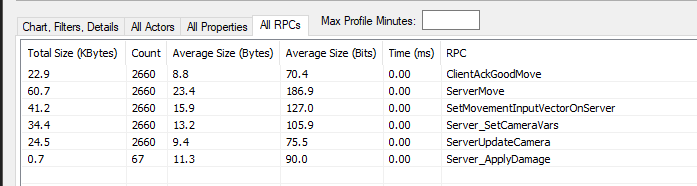
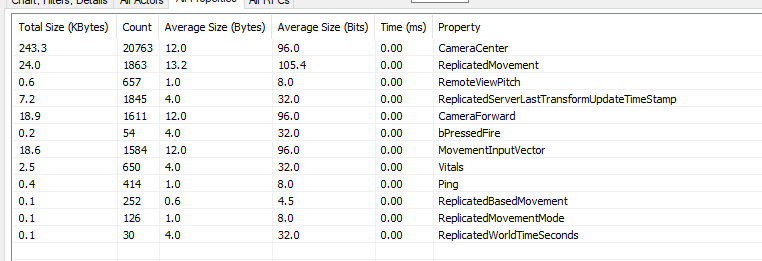
I was talking to @regal hazel elsewhere, had some desyncing with my game and I noticed UT don't replicate components (including CMC), everything that is replicated goes on ACharacter, I did the same and the desync went away, then I ran 10 clients and running around dodging, jumping, while firing a minigun (600RPM, rather inaccurate, had ~13FPS so missed a fair bit) that used a reliable server RPC every time it did damage. Simulating 150ms latency. This is what the profiler looks like:
https://i.imgur.com/IL0NafP.png
https://i.imgur.com/6zUrrFv.png
Interested to hear what others think about this


 regal hazel
I guess is my general question is there a reason to avoid using replicated components?
I know they come with some small overhead but they shouldn't be causing any desync issues right?
grand kestrel
I mean, I wouldn't be surprised if I did something wrong or stumbled onto some bug, but it fixed my issues
wary willow
@thin stratus ^^^ @rough iron @jolly siren
I don't replicate components on my character
personally, never had to
@grand kestrel Are you saying that you are not replicating CMC ?
grand kestrel
CMC replication is disabled by default @wary willow
I had enabled it to replicate some properties which was potentially causing desync
wary willow
ya it is
grand kestrel
Moving those replicated properties out of CMC and into ACharacter and disabling CMC replication seems to have helped a lot, I also did the same for my derived UActorComponent
wary willow
I had to check that
grand kestrel
@regal hazel is under the impression that the overhead for replicating a component is insignificant, and may be right, I mentioned this on another server and we're both curious about the verdict
wary willow
@grand kestrel and you tested them with them on and off?
grand kestrel
Not extensively
I'd have to go through and put everything back, not entirely keen on that with my limited time atm
jolly siren
The overhead for component replication is relatively low. Each component within an Actor that replicates will add an additional NetGUID (4 bytes) 'header' and an approximately 1 byte 'footer' along with its properties. CPU wise, there should be minimal difference between replicating a property on an Actor vs replicating on a component.
from the docs^
grand kestrel
Yeah
It's just confusing that UT does it that way, and by doing it the same way it fixed the desyncing
Meaning that if my suspicions are correct it would be a bug rather than overhead related
I noticed higher bandwidth from desyncs being corrected, but if you exclude that then it's roughly the same
regal hazel
Is this a CMC specific problem? Are you replicating values that are being bit flagged? Maybe that's causing a desync and resulting in more data to be sent to correct the clients
grand kestrel
Nah
I'm still replicating the same vars too, just not in CMC
One thing occurs to me though
If I have a bit flag that is predicted, that wont be replicated to other clients will it?
Only server and owning
Because one of them are being replicated with: ``` DOREPLIFETIME_CONDITION(AVDCharacter, bPressedFire, COND_SkipOwner);
However I was having desyncs when not firing
Oh crap I'm wrong, you're right I was replicating something I shouldn't
Hmm but that said, it still stopped my desyncing with dodging and running/jumping around
grand kestrel
Ahh yeah so ignore everything I just said, I derped and accidentally put in two DOREPLIFETIME (have a twice-derived ACharacter) for bPressedFire when I moved it out of CMC
So it was still being replicated, and it does need to be for other clients to see it
floral bison
So I found a small blurb on a video about it being a bug in things greater than 4.15 and I wanted to ask in here to verify. I havent been able to get a single walk through to work for multiplayer and I;m on 4.17.2
blueprint and multiplayer that is
i create a session fine but no one can seem to join it
regal hazel
Glad you worked it out @grand kestrel!
grand kestrel
Hmm well I didn't actually find an answer lol
I only worked out that we're back at the beginning
neon mango
Are clients ROLE_SimulatedProxy or ROLE_AutonomousProxy or both?
grand kestrel
@neon mango SimulatedProxy generally moves by using the last known velocity whereas AutonomousProxy is used for actors possessed by a player controller (and the movement can be based off inputs), if you want to know if you're running code on a client then use APawn::IsLocallyControlled()
 unborn nimbus
Why when I try to get an item out of a replicated array is the value always null even though the index has an item?