#multiplayer
1 messages · Page 341 of 1
 thin stratus
Another is:
Array of PlayerControllers in GameMode.
OnPostLogin: Add NewPlayer to Array
OnLogout: Remove LeavingPlayer from Array
Also OnPostLogin: Loop over the array (before adding the NewPlayer) and call a CLIENT RPC on the PlayerController
 rare cloud
there is an array of playerstate on GameState
 lilac egret
yes, but one player is the server, so I have to multicast a function right?
to reach the second player
lilac egret
by client rpc you mean a run on owning client function on the player controller?
 wary willow
@thin stratus you should create a new MP MP asset. What MPx2. Take all the common things people need/ask and make something very generic. Something like Content Examples. But just purely geared towards MP. I would say there's a market for it. $$$$$
A crapton of Multiplayer Content Examples. Charge $99. Win.
 undone crane
hey guys, I'm trying to replicate my bOrient RotationToMovement property for my character movement, but even though it's set in a server function, and even though the movement component is set to replicate, it doesn't seem to be happening. Any ideas what I might have missed?
 ruby epoch
best way to make hp and name over head?
undone crane
@ruby epoch If I wanted it to appear like a thing in the world, I would attach a widget to the character's head and update the direction in points on each client.
 brittle sinew
What's wrong with that approach?
ruby epoch
for each update I must collect all actors of class and update rotation, I dont like this way
brittle sinew
@undone crane that's not a replicated property (even though it's on a replicated component), so if you want to change it on all clients you'll need to multicast it
brittle sinew
@ruby epoch what? Just have each player update their own widget, or just put the widget into screen space
brittle sinew
I'm not really sure what you're thinking you're trying to do here
undone crane
@brittle sinew Weird that I can't find that sort of information here: https://docs.unrealengine.com/latest/INT/API/Runtime/Engine/GameFramework/UCharacterMovementComponent/index.html
ruby epoch
so each tick I have to collect all actors of player class and rotate their widgets locally
I dont like that way
brittle sinew
Why would you need to get all of the player class?
Why not have each pawn do it internally?
brittle sinew
No, I don't think you understand how encapsulation would work here 😃
You simply have each pawn update their widget on the client
Pawns tick on clients. The widget rotations don't have to be replicated
ruby epoch
....
brittle sinew
You could get all actors of class and set it each tick.
That would work.
But I agree, that's not a great way to do it.
If you have each pawn handle their widget within the class, that's much better
@undone crane yeah, replication status doesn't show on the doc pages :/
undone crane
@brittle sinew That's annoying...turns it into trial and error.
undone crane
ah
lilac egret
you were wrong
I had to call a function on the player state to send to game state, to traverse through the player array then call a Run on owning client function on the player's player state to notify of the newly joined ones
to allert
cedric
rare cloud
@lilac egret, why ?
I mean GameMode::PostLogin, and you get PlayerArray from AGameState
and call the RPC
on each PlayerController
rare cloud
void NotifyNewPlayerOnClient();```you mean a Run on owning client, multicast?
i dont understand just by "RPC" sorry
is that function the blueprint equivalent of Run On Owning Client?
rare cloud
@lilac egret, declare this on your AMyGameMode::PostLogin :
AGameState* GameState = GetWorld()->GetGameState();
    if (GameState != nullptr)
    {
        for (APlayerState* PlayerState : GameState->PlayerArray)
        {
            AMyPlayerController* MyController = Cast<AMyPlayerController>(PlayerState->GetOwner());
            if (MyController != nullptr)
            {
                MyController->NotifyNewPlayerOnClient();
            }
        }
    }
after go to your player controller
declare this UFUNCTION( Client ) void NotifyNewPlayerOnClient();
on your header
and this on your cpp
void AMyPlayerController::NotifyNewPlayerOnClient_Implementation()
{
    //Do what you want
}
thanks man
this "UFUNCTION( Client )" is the same as Run on owning client on blueprints?
rare cloud
yeah
lilac egret
there is one game instance created for each player and there is only one game state?
rare cloud
there is an object called UGameInstance, which exist for all client but it's not replicated
it's the instance of the game
there is only one game state
 twin juniper
how could i make a menu appear ( for character creation ) before you spawn into the map? And how would I save these things in a multiplayer scenario? As well as replicate changes of the character (hair color, size, etc)
Not sure how to do this
lol
 stark dome
Well first off do you know how to add a widget to the screen
Go step by step don't just jump into everything at once
 sweet spire
Yes u can, premake char offline after logged in
Then onfe char is done and u click accept
Json request to database
And if it is successful it send msg back saying yes oe no
Or
twin juniper
@stark dome of couhrse xD
@sweet spire not using postgres, im using sqlite like conan exiles uses
lilac egret
to replicate a Play anim montage
twin juniper
noit ostgres or any type of db like that
lilac egret
i make a run on server event that calls a multicast event that plays the anim montage?
stark dome
So you can spawn a custom pawn responsible for showing the UI for character creation
Just make that the default pawn instead of your actual pawn
 hasty adder
/dance
hasty adder
Hm from what I read I think there is a miss of understanding clients have there own copy of the world and actors. Including the logic being run on them locally. Just not all the values the other persons version might have. Meaning if you have a widget running a tick it's tick is running its own version local to each client with what it knows. So when you have a widget on a player in world or on screen tm your clients version of the logic it knows is running. Hence if it was just getting playerstate -> name with no logic saying get the owners player state your name would appear over everyone's head or your health etc. updating values to the server to then multicast are to update other people version of the world to match yours
What's your montage show happening? @lilac egret
hasty adder
I'm trying to get context to give an example. Is it a reload. Draw weapon. Dance? 😃
One way if it's just run an animation is key press E for example. E-> run on server ---> multicast. --> play montage
But your character is subject to the latency before you see it since tm your waiting for the server to feed back to you to run your montage. Where you can instead E-> switch authority --> authority --> play montage // remote run on server->multicast-> if controlled pawn != self play montage
lilac egret
Its an attack animation
Whats the difference of run on server -> multicast to switch has authority?
When do i use switch has authority
hasty adder
Authority is about ownership which is confusing but again in context of each persons own version of the world
Since in an even by key press your doing something local you are authority but your saying remote versions would run this. Since you can't directly tell them what your going to have server run it in a multicast event to tell everyone else to run the logic. It's confusing which I could explain it better
Wish*
It's not a replication though it might as well be a bool sorta like if locally controlled but it has more to it then that because it could be server as the authority who isn't locally controlled
Like I would play with print statement to get what's happening.. Say p = print hello
Use a switch authority and have hello on authority and hi on remote
Just know it's not replicating the print if it's hard coded. It's just running the same routine in the context of who is auth and who is remote
I've said to much 😷
stark dome
If it's an attack animation for an event triggered by the client you should most likely play it based on client input
If it's for an AI or another player you should either play it after an rpc or when the state is replicated
 sick stag
I am having an issue replicating an anim montage to all clients. It does not matter what combination i use for replication it just does not want to cooperate. I have successfully replicated every anim state pose blend etc. except this montage lol. (BP) AnimBP Event Graph Custom event for Run on server and run on client. Character BP Custom event (Multicast - is Server True - Client, False - Server and Client. Client and Server can see the animations owner, All clients can see server animation. Clients cannot see other client animation.(Single Montage)
thin stratus
@sick stag You have rpcs in your animBP?
sweet spire
Cedric question for you
do u actually need to replicate montages? or has everyone gone potato, i see people talking about animation replication all the time, and all i think is, why arent u driving it from important game states??
thin stratus
So you have to split that into 2 areas. Replicating Montages and replicating the AnimBP
AnimBP usually works like this: You set it up with Variables you create inside of the AnimBP (so local to the AnimBP), and make sure the whole Animation State Machine works with them.
Then you get the Pawn in the EventGraph and get all the variables from it a to fill the Local ones that drive the Anims
sweet spire
yeah thats what i do
thin stratus
The Pawns variables, that you get, should (if not already) be replicated
So everyone has the correct values
thin stratus
And VFX, Montages etc, are usually driven by either an OnRep variable or a Multicast
sweet spire
just been hearing alot of montage rep issues from people and was curious
i drive most of my stuff by using helper rep actors that recieve broadcast tags and stuff
thin stratus
Only special case you ahve is if you have, for example, effects that can be driven by things the clinet already knows, you do it that way
That includes, step sounds, cause the anim is already playing on the character
Shooting FX (muzzle) etc
sweet spire
yeah i drive everything from states of things actually happening
very rarely can i justify replicating just vfx
thin stratus
People that have trouble with AnimBP replication are simply doing things wrong OR (not to blame them for everything) having an engine bug :P
sweet spire
haha true
i find alot of people struggle to wrap there head around the idea of every replicated pawn has its own state on every client
like pawn 7's IsCrouching bool has nothing to do with pawn 5's
if u get me
thin stratus
Yes, they see one Character is one
sweet spire
Swear to god i need to write a guide about it, with breakdown on white board
thin stratus
And not as a construct of one local driven, one server driven and rest client puppets
sweet spire
iv explained it so many times to peope haha
but then when they see the light, feels good man
thin stratus
I might just add it to my compendium
sweet spire
that would be a 10/10 idea
buff it up with that & some more core examples on things would prob help alot of people
I think we see alot of questions about driving animation bp's & displaying things like health for the correct pawn
 fossil spoke
@thin stratus Making that exceptionally obvious would help alot of people. I find myself explaining it far to often.
Especially when its so fundamental to understand.
twin juniper
Please, my Dedicated server gives me this message.. What can I do?
[2017.09.03-11.59.07:388][ 2]LogOnline:Warning: Async task 'FOnlineAsyncTaskSteamCreateServer bWasSuccessful: 0' failed in 17.200534 seconds
thin stratus
Does your Server even have Steam properly setup?
twin juniper
It does
 jolly siren
Does anyone know if it is possible to write a secure radar? Characters exist on server and all clients. So I don't really see how you could stop someone from hacking the radar and plotting points for every character regardless of how far away they are, invisible state, etc.
brittle sinew
If you're sending the information to the clients, you have to assume they can use it
I know CS:GO implemented something where they only get sent info about other characters if the server decides they're about to see them or something to that effect
So, when they're on opposite sides of the map, the client literally doesn't know about the other character
thin stratus
You stop replicating the Characters if they are not in sight
brittle sinew
I'm sure that's not super easy to implement well, though
thin stratus
We had that a couple of days ago
jolly siren
Ahh actually I remember someone pasting code from shootergame about that
 inner iris
It's in Shootergame for sure
But how does the server then predict when a player would see an enemy?
For example with 200ms lag both ways
brittle sinew
Yeah...that's the hard part.
inner iris
Could cause some dodgey situations where the enemy just appears on the client?
brittle sinew
I remember when it first came out, it was a mess for anyone above 100ms
I think they had to end up loosening the calculations on it, else people were just popping into existence around corners
It's a balance for sure, you can't hide everything from the client and still have the game work super well in networked settings
jolly siren
ahh right it's AShooterCharacter::IsReplicationPausedForConnection
inner iris
Have an ultranoob question- since event begin play and event tick seems to run on both server and client, but a regular custom event just runs on a client, or an RPC has to be sent from client to server- is the server simply running the same code as the client, but replicating any changing values back down to the client, as opposed to the client sending RPC's on tick?
jolly siren
Thanks guys, this was helpful; appreciate it.
a regular custom event just runs on client? That's not true, it just runs wherever you call it at
it's just a function
inner iris
Well for example, on event begin play, the server and client both run whatever is connected to it
But I have a regular custom event hooked up to a keypress, it'll only run on the client unless I specify it should run on server
So do I assume that the tick and begin play events will run the logic both on client and server consistently?
jolly siren
right, because only clients cause input
jolly siren
right
inner iris
But tick and begin play happen not because of input
Gotcha
Ok thanks a lot
Stupid question but was trying to figure out why and where things are called
jolly siren
not stupid, takes a while to get it all
twin juniper
Please, I am dying from this...
So, I setup my dedicated server
And I have couple of mods... The ones that have small map t play on work just fine
the problem comes when I try to run a mode with map 20x20km. My test server has only 1 gb of ram and it shows this... [2017.09.03-11.59.07:388][ 2]LogOnline:Warning: Async task 'FOnlineAsyncTaskSteamCreateServer bWasSuccessful: 0' failed in 17.200534 seconds
It works perfectly fine on my personal PC which has 16gb of ram
But the people that are testing my game to see how powerful server I need get this message as well
and they have 128gb of ram
so I googled a little and I found that AsyncTaskTimeout=180 line in the DefaultEngine.ini should help. With this added, I get on my test server:
Steam connection failure
and on the test servers which are in the london data center I get the same message as previously
[2017.09.03-11.59.07:388][ 2]LogOnline:Warning: Async task 'FOnlineAsyncTaskSteamCreateServer bWasSuccessful: 0' failed in 17.200534 seconds
What should I do please
 sharp wasp
@twin juniper Only known fix is increasing the timeout
twin juniper
@sharp wasp I have set the timeout to 180 and it still failed after 17 seconds
sharp wasp
@twin juniper Must be something else failing then
thin stratus
So I use the same C++ Code for Session Creation and Finding in two Projects.
And the same custom AppID. One works, the other reports "0 results".
With the same test partner. How can that even be
Create Session Callback reports "true"
Start Session too
Works fine without steam
lilac egret
switch has authority is used to know whether the current player is the server right?
sharp wasp
@lilac egret yes
lilac egret
thanks
lets assume I want to make a cast to a class to call a function there, but the flow is currently on a Run on owning client setup, how do I "leave" this setup?
 viral mason
@lilac egret new event set to run on server
Can someone help me debugging my dedicated server? It crashes every time I start it..
lilac egret
why is a function on the game instance working if called from a widget, but doesnt work if called from anywhere else?
lilac egret
so I call on owning client?/
rare cloud
use a switch has authority
if you use BP
with cpp you can filter using the Role variable of the Actor
or with Actor->HasAuthority()
lilac egret
and after the switch has authority?
if it's remote, i call a run on server event?
I tried all ways, but it only works when called from widget
inner iris
Any ideas why this calls somewhat inconsistently on the client? 9 times out of 10 the first shot runs only on server, but clients don't see the FX. Then after the second or third shot, it runs on all clients as expected. Also when swapping through editor clients(different windows), the first shot usually doesn't work like before
So server will call the hello print string always but clients only after the first shot or two- even after running around for a few seconds after selecting a new client window, it happens
 lament kettle
Is there a way to get FollowCamera replicated, without doing an RPC?
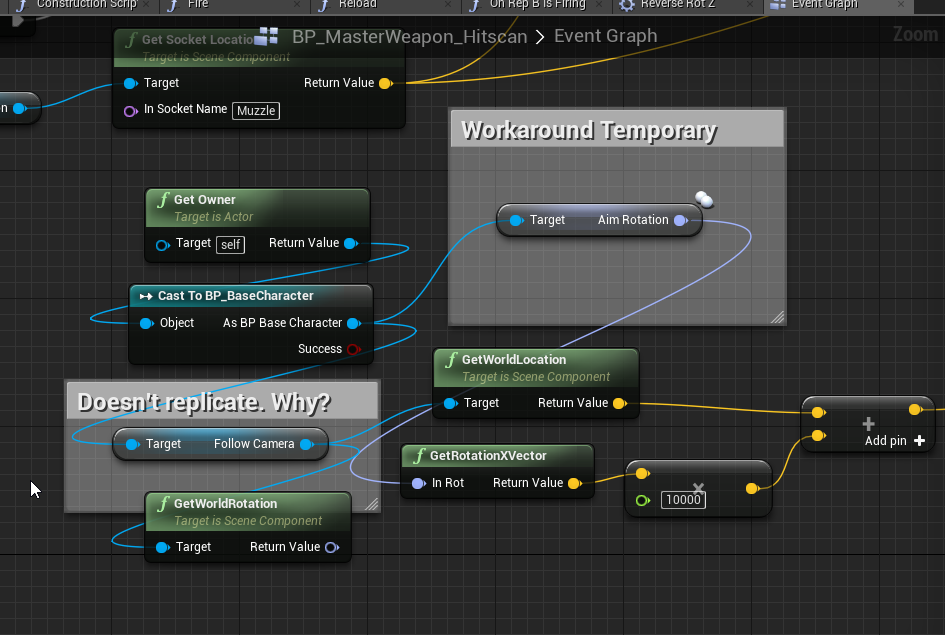
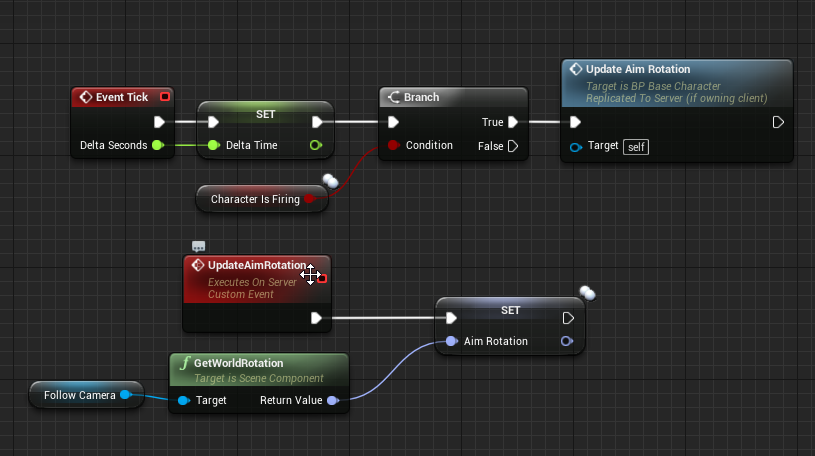
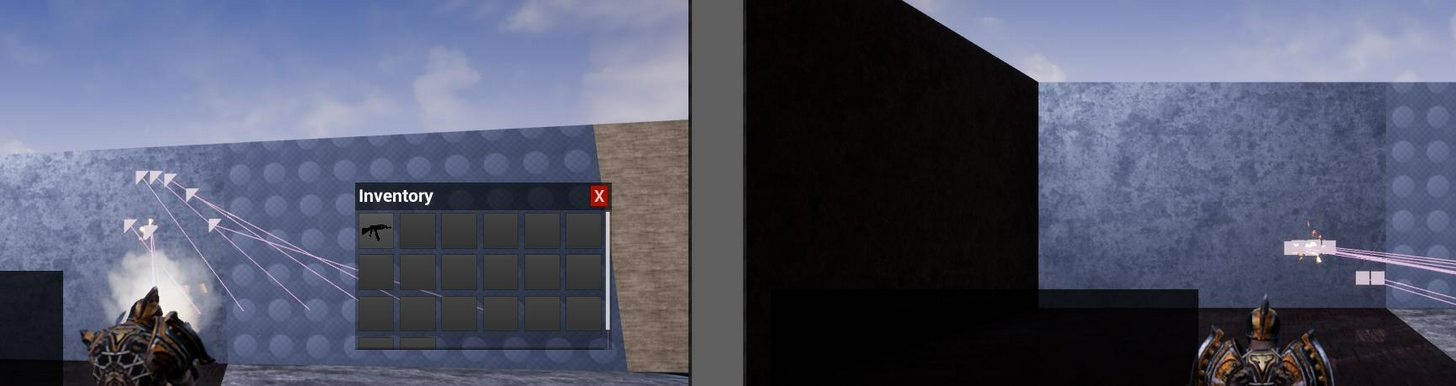
This is what happens if i use the non-rpc method:
 raven holly
@lament kettle if you go into the follow camera, there will be a "component replicates" option
 severe stirrup
can anyone explain what i'm doing wrong here? The first breakpoint runs both for clients and the server joining (on the server), but the second breakpoint only runs when the server joins. I would expect LoadProfile to be called on the connecting clients but I seem to be misunderstanding something?
err nvm worked when i reloaded the editor
twin juniper
Please can anyone help me with this?
[2017.09.03-11.59.07:388][ 2]LogOnline:Warning: Async task 'FOnlineAsyncTaskSteamCreateServer bWasSuccessful: 0' failed in
[2017.09.03-11.59.07:388][ 2]LogOnline:Warning: Async task 'FOnlineAsyncTaskSteamCreateServer bWasSuccessful: 0' failed in 17.200534 seconds
this message appears on a dedicated server
with steam enabled
without steam it works perfectly
thin stratus
No other error or message? Maybe share the whole log.
And if no one answers then maybe no one knows the answer :P
 rough iron
You might need to enable debug output for steam, it's a thing you can enable and set in the steamkworks SDK
@twin juniper with the info you just gave no one can do anything, first dig your problems down
 drowsy notch
So spawning a replicated actor on the server and destroying it on the same frame means the actor will never spawn on the client
But if you fire a reliable RPC as it spawns then the client does in fact get it... the first time after the begin play, but any times the actor is spawned after that the RPC hits the client before begin play... seems pretty weird
I guess actor spawn messages aren't reliable?
twin juniper
So I found out that the error shows on a machine with less than 3 ghz processor.. So the issue should be in timeout. How can I increase the timeout of asyncTask please?
 tacit hazel
ok so I have a replicated static mesh, but it only apears on the server
do static mesh's not replicate?
someone help pliz
 modern dome
@tacit hazel what do you mean with "Static Mesh" ? A StaticMesh Component or a StaticMesh Actor?
Or do you have a custom BP which uses a StaticMeshComponent?
tacit hazel
static meson component
StaticMeshComponent
I have it set to Replciated
but it never apears on clients screens, only on the server
@modern dome
modern dome
Make sure the actor itself is set to replicate
tacit hazel
it is
 maiden atlas
I haven't tried any online subsystems besides Steam. Do they all essentially work the same in engine?
@tacit hazel Make sure that the static mesh doesn't exist at all on the client. It might exit but not have the position replicated correctly.
With the null system you can't find sessions, but you can still host a listen server and join via ip address command, right?
thin stratus
You can find Sessions, but only LAN
And yes, for Internet you can join via IP
Make sure ports on the host are open
maiden atlas
I don't know anyone who was ever able to make port forwarding work
brittle sinew
🤔
It's pretty simple, I've never had any issues with it
Takes ~30 seconds in my router control panel
There are websites that show you exactly how to do it on certain popular routers/brands
ipconfig in cmd (ifconfig on Linux/Mac probably), get the local IP, then forward the port (I always just do TCP+UDP) to that IP
 wide valley
can anyone suggest tutorials that explain how to handle gamestate states ( Kills, Deaths, etc ) using blueprints in a multiplayer game?
thin stratus
That's pretty easy
Create a Custom PlayerState and add these variables to it
Mark the as Replicated
That's it
You can access the PlayerState via:
- PlayerCharacter if possessed
- PlayerController (local and server, not other clients)
- GameState PlayerArray
@maiden atlas Open Router, go to Forward Settings, enter Port Range, select UDP or TCP, select your local IP Address of your PC
That's it
Only thing that might still do bad stuff is the windows firewall
maiden atlas
Yeah, I tried that before. Never worked.
brittle sinew
Sites like http://canyouseeme.org can help debug that, finding out whether it's a problem with the router or not
I agree with Cedric, the Windows firewall might be the culprit there, as if you're forwarding the port in the router I find it unlikely it just wouldn't forward it
(if you get "connection refused" on that site, that's actually a good thing. That means you're actually getting through the router and the internal device is refusing it)
thin stratus
I often get "not visible" although I'm visible
Check 7777, not visible but I can easily host
:P
brittle sinew
Maybe that site checks TCP when UE4 uses UDP? Dunno
I always just forward both
Probably not the safest, but meh
Also, it only shows visible if there's a service currently running on that port, if you didn't know already
tacit hazel
how would I make sure it doesnt exist on the client?
Im 90% sure ity doesnt because I cant find it at the spawn point, or underground or way high or anything
maiden atlas
Client side debug messages checking if the reference is null?
tacit hazel
ok one sec
maiden atlas
Ok.. How is it being created exactly? Part of an actor that is placed, part of an actor that is spawned, created at runtime?
tacit hazel
part of an actor that is spawned via a playerstart
it is set during runtime when the player equips a gun
maiden atlas
spawned on server side?
tacit hazel
correct
maiden atlas
Actor exists, but its static mesh component does not?
maiden atlas
Well, Its really unusual for only parts of an actor to be replicated in its spawn
tacit hazel
maiden atlas
It wouldn't so weird if just the static mesh was null, but for the whole static mesh component to be null is really odd
tacit hazel
oh I checked that static mesh let me make sure the whole component isnt null
the component exists
on clients
but no the static mesh itself
@maiden atlas
maiden atlas
"initialize gun function" where is this exactly?
tacit hazel
in the character
maiden atlas
Where in the character? What function is it called from?
tacit hazel
maiden atlas
"UFUNCTION(Reliable, Server, WithValidation)
void InitializeGun();//spawns the gun "
Its null on the client because the function only runs on the server
tacit hazel
doesn't Replicated relicate it though?
tacit hazel
well since SM_Gun is set to be (Replicated) shouldn't it also apear on the cleints?
I am new to Unreal's Networking so I could be very wrong
maiden atlas
SM_Gun is the component, not the mesh asset, and it should not need to be replicated
tacit hazel
so what is Replicated then exactly?
maiden atlas
For replicating variables from server to clients
tacit hazel
soooooooo......... does that not include static mesh's? I assume
maiden atlas
UStaticMeshComponent* SM_Gun
That is a pointer to a UStaticMeshComponent
The only thing you are replicating by doing that, is that specific pointer
tacit hazel
ooooooooooooohhhhhhhhhhhhhhhhhhhhhh which means absolutly nothing for the client then because pointers arent shareable
right?
maiden atlas
What do you mean by "not shareable"?
tacit hazel
a pointer on one machine could point to something completly different on another
since its a memory address
maiden atlas
Its pointless because you already set the pointer in the constructor and there is no reason for it to have changed
tacit hazel
ok I see
maiden atlas
A replicated pointer will be converted to point to the "equivalent" object, if it exists
tacit hazel
thank you very much @maiden atlas
maiden atlas
you're welcome
tacit hazel
I set the function to NetMutlicast but its still only showing up for the server only unfortunatly
ok got it working
noice
thanks again blackfang
 weak pasture
Hey, first time testing our game offline in a while - can't create a session at all, getting LogOnline:Warning: Async task 'FOnlineAsyncTaskSteamCreateLobby bWasSuccessful: 0 LobbyId: 0 LobbyType: 2 Result: '3' k_EResultNoConnection (no connection)' failed in 10.044776 seconds , havent had any trouble creating an offline LAN session in the past, any direction i should look?
                TEXT("Map_MainMenu"), //Game
                TEXT("FFA"),
                TEXT("?listen"),
                TEXT("?bIsLanMatch=1"));```
the create stringshould mention this is a Steam lobby thing
wide valley
anyone have an example or know of a tutorial that shows the use of playerstats with playercontrollers in a multiplayer setting, keeping track of kills deather or whatever you want per player. I am still not getting my head around this whole flow. Something isn't replicating properly. I just want to make sure I am architecting this the right way from the get go here. ( sorry if its a noob question ive only been using unreal for a couple weeks ).
weak pasture
are you using a PlayerState?
player controllers arent a good thing to hold stats because other clients don't ever receive other players controllers, only the server sees all
weak pasture
do you have a GetLifetimeReplicatedProps?
with UPROPERTY(Replicated) on the variables you want to replicate
if you haven't taken a look, thats what kickstarted me on replication
wide valley
I was actually working in blueprints =/
I will read through this document though thank you for sharing it
If I was going to go the whole c++ route, Craig, what tutorial should I start with. To get where I am now I went through the whole blueprint multiplayer youtube series and it was really nice to see something happening at the end of it, however it didn't give me a good feeling of how everything worked.
weak pasture
yeah im not too sure about blueprints we used c++ from the word go on Sky Noon. i know theres some pretty hefty limitations with blueprint networking, our starting point was to download ShooterGame and look at how that did its networking, youll want to familiarise yourself with replication (that wiki page above) and RPCs, https://docs.unrealengine.com/latest/INT/Gameplay/Networking/Actors/RPCs/
Designating function replication across the network
if you aren't confident in c++ disregard what i said, its like jumping in the deep end with a concrete jacket on
theres probably some kind of decent blueprint multiplayer tutorials out there, just bear in mind the limitations youll hit (for example, at least in earlier versions of UE4, there was no seamless travel in BP)
wide valley
yeah i don't like limitations but I don't know c++ ( i know plenty of other languages )
yeah it feels a bit scary
weak pasture
sweet as, best work out the networking basics in BP if you can, eventually C++ will be a gold mine, and id highly recommend learning it eventually, but as always with unreal engine, baby steps is great
maiden atlas
That tutorial series was full of misinformation
Aside from just being a bad tutorial in general
The steam multiplayer series was rife with putting replicated functions and variables in classes that only exist on the server
It was also bad for "I'm not going to explain what this does or why I put it here, just copy these nodes"
weak pasture
which ones that, the replication one?
wide valley
Where do you think I should start BlackFang, i certainly don't want to learn dirty methods 😃
weak pasture
yeah that replication ones not gunna help much in Blueprint anyway
The various aspects of multiplayer applied to Blueprints.
this one looks good, skimming through.
maiden atlas
There was a thread about what that series got wrong that might be good to read through, if you can find it on the new forum
I tried to learn from it initially and honestly think it would have been better to completely start from scratch and just do trial and error on my own
severe stirrup
talking about this tutorial? https://docs.unrealengine.com/latest/INT/Videos/PLZlv_N0_O1gYqSlbGQVKsRg6fpxWndZqZ/abmzWUWxy1U/

In this video we take a look at the finished project and step through each of the features that will be covered in this series. We show our functional Main Menu and its options, a lobby where players can chat with one another and select their characters for the game, some server options such as changing the map or match time as well as the ability to kick players from the lobby, all of this working with Steam integration. So if you are wondering how to build a networked game through Blueprints with Steam, this is the series for you!
I sorta found the same thing with that.. the dude seemed to just replicate random things that didn't really make sense
as if the guy had just gone through setting replicate on stuff until it worked
wide valley
Happen to have the link to that thread Blackfang?
rough iron
@weak pasture you already said it, offline LAN and steam do not work together. You can not use SteamWorks and online sessions if you are offline xD. Right now I do not know what the OSS does internally but it should not call any online or sessions things. If that's not the case you (the caller) is responsible.
you might want to use OnlineSubsystemNull for the LAN case
weak pasture
hey moss, cheers, should have posted in here that i fixed it, using bIsLANMatch and LAN is true falls back to Null OSS i believe, was using default sockets and stuff anyway, i took in the wrong bool in the session settings creation which was why it wasnt working, which was stopping it from falling back to Null OSS. Cheers!
rough iron
nice ^^
twin juniper
why is onRep unreliable compared to multicast? i ran a test and about 10-15% of the time onRep does not trigger vs a reliable multicast always triggering 100% of the time... ???
rare cloud
@twin juniper, OnRep use standard replication, which is slower than RPC but better in term of performance
inner iris
@twin juniper having a similar inconsistencies with RepNotify- seems to only consistently run on the server and not on the client always and I can't find a clear reason why.
maiden atlas
The whole point of those is that they get dropped when there isn't enough bandwidth
inner iris
Just tested on a blank project- seems I had the server overriding the bool depending on a weapon's fire rate- @twin juniper do you have the bool being set back to false again at any point after it being called?
 timid pendant
Im trying to print a string on my dedicated server to test that I can successfully add my own code there. I tried "is dedicated server" but this doesnt work
hasty adder
Where is the print command?
 wintry cove
Anyone an idea why GetWorld()->GetNetDriver() would be null with steam properly connected(says spacewar in steam)?
maiden atlas
Did you define the net driver in the .ini?
 fleet sluice
NetDrivers are only created when you start a dedicated server, open a map with "?listen" or simply call GetWorld()->StartListen() (or something similar; not sure if it was GetWorld())
maiden atlas
"NetDrivers are only created when you start a dedicated server"
hasty adder
Took me forever to figure out how to get the port on my dedicated 😦
wintry cove
That's rather problematic, I need to get VoiceBytesSent and VoiceBytesRecv even in non dedictated
maiden atlas
So no net drivers on listen servers then?
fleet sluice
Let me rephrase: NetDrivers are created in 3 situations:
- When you start a dedicated server.
- When you open a map with "?listen".
- When you call GetWorld()->StartListen() (or something similar; not sure if it was GetWorld())
So yes, listen servers too
viral mason
Can someone assist me with my dedicated server? I start it out, says something about /Script/Engine not being found, then spams like 7 lines of red text & closes
sweet spire
Man i love epics FPrediction system but god
IS IT SO ANNOYING
apply game effect on client with prediction
confirm with server
overrides old prediction
mfw makes timer for them jump about on UI
hasty adder
Lathouth check the defaultgameengine.ini and look for bEnabled for steam true and change it to false and see if it goes away
timid pendant
@hasty adder The print command is in a gamemode blueprint class
hasty adder
Try it in gameinstance so if it's on begin play it might be happening before your client even is connecting
timid pendant
Okay thanks
hasty adder
What's the event do? I have a few of these events that work and recall print statements being tough to use to verify when I was setting them up.
timid pendant
Im just testing how i can put my own code onto the dedicated server. Im just testing printing a string to see if it works
timid pendant
Thanks its working on gameinstance
hasty adder
\O/
lament kettle
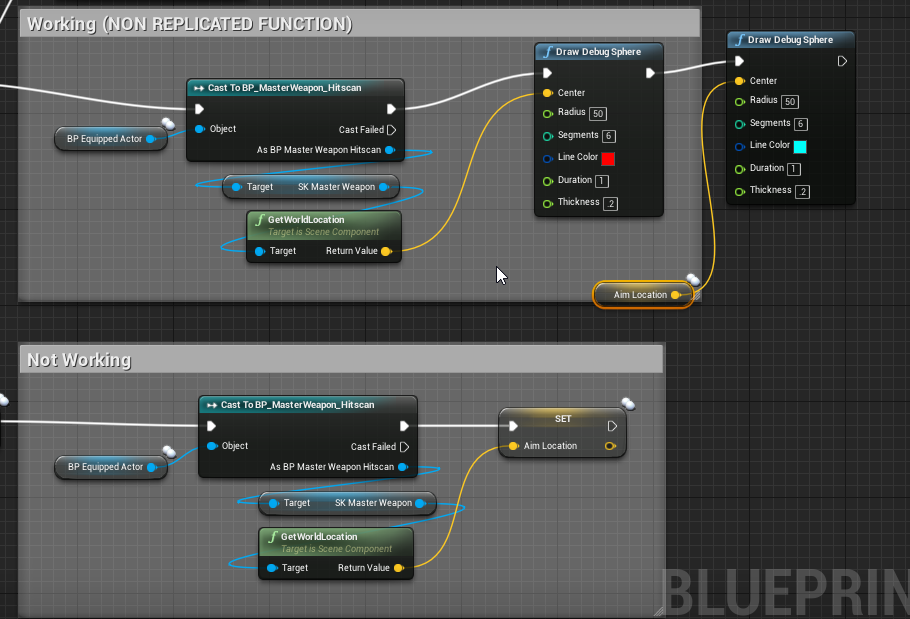
any idea what i'm doing wrong?
Red = correct
Teal = Bad
Even when i put the teal code within run on owning client, still doesnt work
viral mason
@hasty adder I don't see the defaultgameengine file?
lament kettle
nvm ill do another method...
viral mason
Can someone assist me with my dedicated server? I start it out, says something about /Script/Engine not being found, then spams like 7 lines of red text & closes
 shadow folio
Anything useful in the \saved\logs directory?
twin juniper
Where can i find all the "Dedicated Server" Arguements ?
wary willow
twin juniper
 lilac egret
How
wary willow
When
twin juniper
but this guide has no "Arguements" list
wary willow
@twin juniper What arguments do you want?
wary willow
pretty sure Google is dying
Collection of arguments that can be passed to the engine's executable to configure options controlling how it runs.
twin juniper
yea i have tried those but it only contains "-game" and "-server"
wary willow
Hmm, I think I need to kill my PXC
shadow folio
NOOBKing, replication and delegates are the way
lilac egret
yeah
shadow folio
Have you studied Cedric's doc?
shadow folio
I got bit by not paying attention if my code was executing on the client or the server. Took some time (still is) to wrap my head around my one code class was executing in two different environments.
lilac egret
i did
tacit hazel
when a variable is set to be replciated when exactly does it update the clients variable? is it as soon as it updates, or is it after the function that updates the variable? or something else?
shadow folio
Cedric's doc goes into the things that affect it being updated. It could never get updated if it is not relevant.
stark dome
Yeah there are a bunch of different conditions
tacit hazel
what page @shadow folio
shadow folio
@tacit hazel sorry, don't have it open. I have never found anything saying how quick will be. Probably due to all the network load issues, server load, etc.
tacit hazel
I cant seem to find it here either
ahh I seem to have found my issue
I had a function that updated the variable and then made then called a function for the cleints that used that variable, but the variable had not yet replciated over
I still don't know exactly when it happens, but I know I need to put some time here
brittle sinew
You can't really control when variables replicate; if you need that variable inside of another function, send it as a parameter.
tacit hazel
good idea
LethalClips, how long have you been programming? you always have the good ideas
@brittle sinew
twin juniper
how do i make a sound only play on the client, without using client rpcs?
 minor wedge
detect the event that triggers the sound on the client
twin juniper
@minor wedge so if the sound is triggered by overlap on another actor
is the other actor remote?
or authority
minor wedge
You can trigger overlaps on both
minor wedge
So see if it's local
local player controller
A client can be remote and a client can be authority, you want to see if it's locally controlled to determine if there's a player on the end you're checkin.
twin juniper
@twin juniper you can get just the owning client if you have access to pawn with if(Pawn && Pawn->IsLocallyControlled() { }
playercontroller access too the same way
inner iris
IsLocallyControlled applies to each separate window right- for example if you had 3 PIE windows, only the active window that is being played and calls the code will return true for IsLocallyControlled, correct?
Since in my mind, the other two windows are locally controlled in a literal sense, but I guess it more means: is being controlled by this pawns controller, therefore its local controller?
twin juniper
@eoinobroin#6833 that would make sense
inner iris
Well after a bit more looking around (on mobile atm) it would seem like it should return true on all PIE windows based on this:
However maybe checking "run dedicated server" treats all other PIE windows as separate clients and therefore network connections and not local connections, making is locally controlled only return true for the active window (client).
 hushed garnet
wondeing if anyone can help? I am hosting a session via steam using advanced sessions and always get this warning about a player state on my dedicated server. I know its not valid as its a dedicated server, but is there any way around making it look for one?
LogScriptCore:Warning: Script Msg: StartSessionCallback - Invalid player state
Thanks
lament kettle
How come that works when there is no replication, but not when it is being replicated?
twin juniper
@lament kettle check if the equipped actor is valid
its probably not set
to anything
 worthy wasp
hey all - is there any docs out there (i've looked - cant find much but a bunch of unanswered stuff on answerhub) for NON-LOCKING loading screens ..... I think it has to do with joining a session - or server travel that is NON-seamless (Client drops & reconnects - or initial connect to server).
i'm looking to accomplish an animated loading screen - something that doesnt freeze up
severe stirrup
i haven't done it, but i think the basic idea is to set a travel level in your project settings
worthy wasp
thats done - thats actually a requirement
but it still locks up when server transferring/connecting
 tall grove
how can server tells a specific client to perform a hud function?
hasty adder
Broadcast to all but identify it by does ps = ps?
Guess it depends what the hud is indicating as to a best way to implement
twin juniper
@tall grove how do you know which client you are looking for? if you have access to their pawn or playercontroller you can just simply call a client rpc on them.
tall grove
i have my player character reference replicated (pawn) , client interacts with something , so server performs the interaction and does this player character reference run hud function , but right now when client do this , hud function is running on server and when i do on server i dont know where is running
twin juniper
the client tells the server to start interaction? or is simulated?
ether way you can store the pawn reference like preforminteraction(mypawn) then when the server is done with its work it will simply do like mypawn->notifyInteractionComplete(float somedata) and notifyInteractionComplete is a client rpc which will talk to the hud at the end
twin juniper
Hello. What does it mean if something is network - replicated?
 vestal cobalt


When i search for a steam friend i briefly see him and then the whole list comes back up, why?
 cosmic apex
@vestal cobalt exi did a tutorial on steam friend integration yesterday https://www.twitch.tv/videos/172498838
 viral mason
@cosmic apex "Stream Integration" ?
rare cloud
Steam integration*
thin stratus
4.17 Steam Setup for empty Project + exposing Steam Friend List to UMG via C++ BPCallProxy
Just to be precise :D
viral mason
can someone help w/ my dedicated server? I can't even start it
thin stratus
Why not?
viral mason
it starts then just prints a block of red text & closes
thin stratus
Saved/Logs
thin stratus
Shipping Build?
viral mason
ye
thin stratus
Make a Dev Build if yes
thin stratus
Dev builds should create log files
thin stratus
hastebin the entire thing
thin stratus
It crashs on a Shared Pointer
Multiple questions:
Do you have any Plugins in your Server Build?
Do you have any code that calls instantly on bootup?
viral mason
I have two plugins
One of which is enabled (LowEntryExtStdLib)
Most of the things should have a delay
 rancid current
ah hey i would like to know if it would be okii for me to ask for advice here? xD
viral mason
There is a "Event OnPostLogin" in the game mode
Player Character blueprint runs stuff directly on "Event BeginPlay"
thin stratus
Hm, does it also crash if you start the Game from that Build?
viral mason
other than that, don't think so
viral mason
My game instance has just custom events I call from other things
So no
To be clear, I have a "Build folder"
So the files are at
W:\Unreal Projects\CODZombies\Build\Latest build\WindowsNoEditor
thin stratus
The only thing I can think of is that it might be cause there are dlls missing
From Plugins
That's when it does that for me
viral mason
hmm
viral mason
I packaged the project in editor
then i took the VStudio development server exe file and put it in the binaries folder w/ the game exe
thin stratus
Yeah, and the package folder is the Build folder?
thin stratus
was that default? I have a custom one so can'T remember haha
Yeah that's how we pack dev builds too
@rancid current Yes
rancid current
@thin stratus thanks here it comes xD
thin stratus
Does the game client also crash if you start it
rancid current
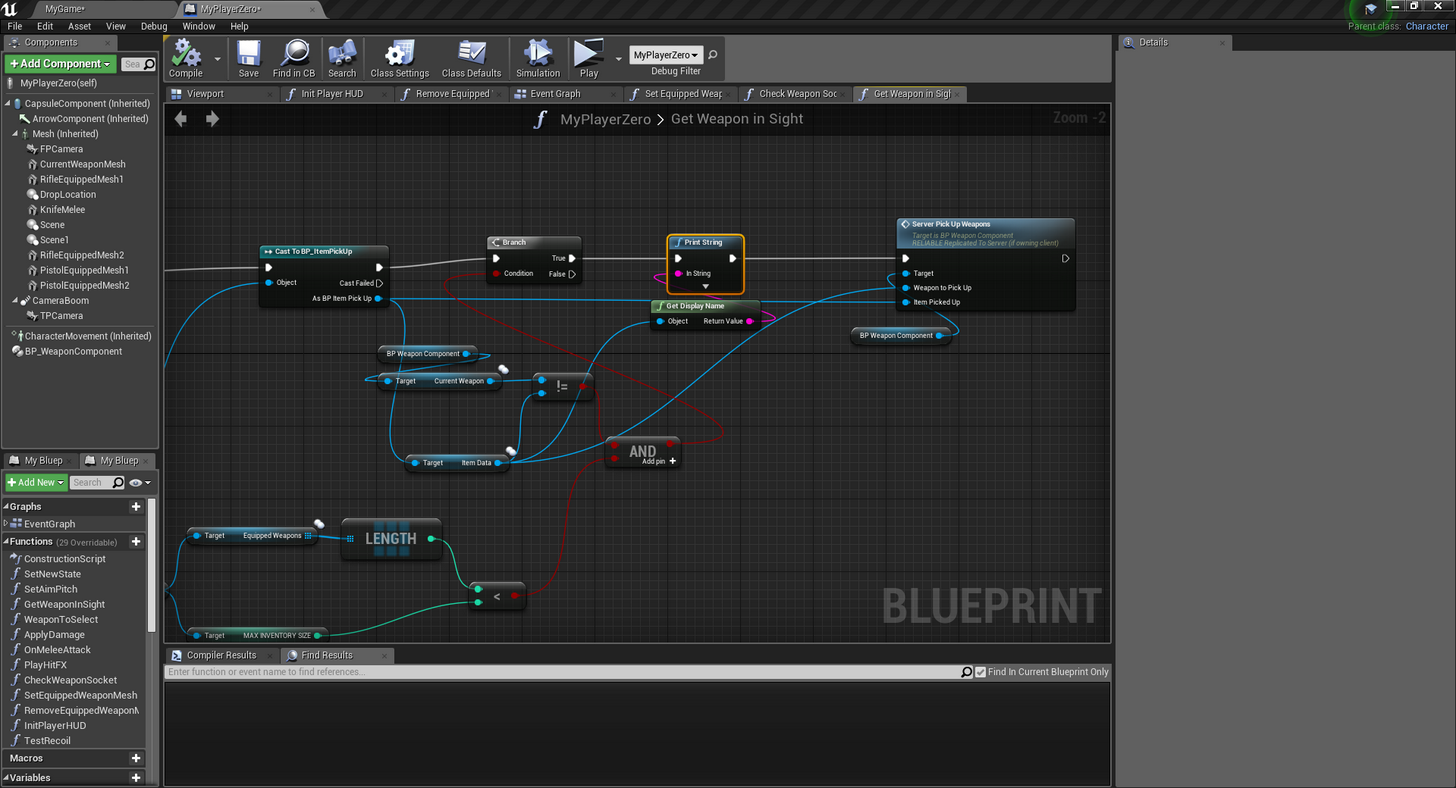
I'm having some trouble with replicating some stuff, (look at the screenshots bellow please) I'm trying to get the data from Item Data and pass it through Server Pick Up Weapons's Weapon to Pick Up But on the other side when I try to get Weapon To Pick Up from SERVER_PickUpWeapons when i try to get the data from Weapon To Pick Up node, the data comes empty, the data is not being sent over for some reason :/ Am I not replicating it well (if i set it as multi cast it works data is being sent through but then other problems happen and pretty sure that should be multi cast i guess) so simply put Data is not being transferred for some reason, am i missing a reference or not replicating it well or what xd sorry, please help really needing it 😦 if you need more info or screenshots please do ask! (in the in game screenshot you can see the first print getting the weapon but the second print getting an empty value)
https://imgur.com/a/TbWYl
 viral mason
so you throw the dev server.exe into ~BuildFolder/CODZombies/Binaries/Win64/CODZombiesServer.exe
No
In fact, there's nothing wrong with the client.
thin stratus
Hmmmm, let's see, can you start the Server via Editor?
I can give you a bat file for that
To see if it's also happening there
viral mason
The bp editor's dedicated server doesn't crash, but sure
viral mason
Alright
thin stratus
@rancid current What is "ItemData" exactly
viral mason
how do i start the server via editor?
thin stratus
I sent you something via DM
Put that into a text file, save it as "DediServer.bat"
With the " around it so it changes the type
and adjust the paths in ti
then execute it
viral mason
I have show file extensions on, 😄
I know how to make batch files 🤣
SET ProjectPath=D:\UE4\Perforce\Clients\Protoball\PB_Alpha
What would that be?
W:\Unreal Projects\CODZombies ?
rancid current
@thin stratus ItemData is connected to a line trace which gets all the items that the player tries to pick up, all items are stored in that item data
rancid current
Yes
thin stratus
Is it set to replicate?
If yes, do you make sure it's spawned on the Server?
Because for passing an actor, you need the actor to be replicated and available on the other side
rancid current
ah I have only replicated itself https://gyazo.com/65c33fba7956d84c637ab7b158c318f7 so yes it is
 thin stratus
ItemData is ItemPickup?
Your other screen says ItemData is iinside of ItemPickup
I only want to know about ItemData
rancid current

 rancid current
ItemToSpawn is replicated
twin juniper
Does anyone know about UnrealScript?
thin stratus
@rancid current No the Variable. the Actor CLASS you are spawning
You showed me that the PickUp thing is set to rpelicate
Is that Item Blueprint also replicated?
You are spawning it on BeginPlay, that calls on every Client and Server
rancid current
One thing that i dont understand tho is that when the server does something the CLIENTS can see it without problems at all anything the server does, but if the client does something, the server wont see it which brings up the error that that its not getting the item data
https://gyazo.com/4aaacdd3a8812a1eae36e1daf102e5f0 and yes it is
 thin stratus
You should set it to replicate and then only let the server spawn it
SpawnManager?
Okay, slowly. You have "ItemToSpawn", right?
That Blueprint that you spawn there, so the Blueprint that is "ItemToSpawn", is that thing set to replicate?
Not the Variable or any manager
Just that Item
Is the blueprint marked as replicate
You should be SpawnManager and Pickup. I still want to see the Item
twin juniper
@twin juniper yes but you're in the wrong discord for that 
rancid current
https://gyazo.com/ae00376da2192c841415647102c75f10 u mean this one? this is the item im picking up

which the pickup and spawnmanager spawn on the world
thin stratus
So this is the BP that you spawn in the ItemPickUp
rancid current
yep
thin stratus
Okay it's replicated, then please limit your BeginPlay call
To Server
As the Server spawning it will already spawn it on the Clients
rancid current
hm.. how do i do that? 😅
thin stratus
Use SwitchHasAuthority node
And since you don't know how to do that, grab my Compendium
rancid current
if i set switchhasauthority the items do not spawn for the clients anymore
thin stratus
If the Item is set to Replicate, it should though
rancid current
I will see more about it tomorow, where can i find your compendium again?
thin stratus
Pinned to this channel
rancid current
found it, thanks 😃
if i still cant solve it i will make sure to come back with proper info. 😃
thin stratus
So the UniqueNetID
What's the prefrerred way of getting that
I see that it's located in PlayerState
But also via "GetPreferredUniqueNetId" in the LocalPlayer
viral mason
[2017.09.06-21.56.43:399][ 0]LogWindows:Error: Assertion failed: IsValid() [File:W:\UnrealEngine-4.16\Engine\Source\Runtime\Core\Public\Templates/SharedPointer.h] [Line: 824]
Been an error pissing me off for the past week or so, I'm trying to start a dev build packaged dedicated server
viral mason
I don't use c++ for things, so i wouldn't have c++ calls
I'll try the first one
@lament kettle First one didn't work
lament kettle
😦
lilac egret
replicated FString paramethers must be set by const reference
 sweet horizon
Hello 😃 Does anyone have experience in trying to register their dedicated game servers to Steam's master server?
I've gotten as far as being able to register one, but the client exes can't find said servers via FindSessions
wary willow
@sweet horizon ports opened?
sweet horizon
I think so, yes. I can post the result of the webapi call "GetServersAtAddress", as well as the client-side response from FindSessions if needed
sweet horizon
Mm, using Unreal C++, does anyone know how to change the Steam server region as seen here?
{
"response": {
"success": true,
"servers": [
{
"addr": <redacted>,
"gmsindex": 65534,
"appid":<redacted>,
"gamedir": <redacted>,
"region": -1,
"secure": true,
"lan": false,
"gameport": 7777,
"specport": 0
}
]
this is the output from the GetServersAtAddress steam webapi call
Apparently, the defualt region = -1 means the server will not be listed in the master server. However I haven't seen anything on how to change it using Unreal C++
tall grove
does someone knos why sometimes a particle system on client works(on notify whith animation)and other times no?
 mental vortex
@thin stratus i watched your stream yesterday and have a few questions left 😃
- where can i find what functions are available using UE4's "high level" functions and which ones i have to call manually using the steamworks sdk (like fetching friend list vs getting the avatar)
thin stratus
UE4 handles all of that through its Interfaces. You could simply check the Interfaces and see what Steam implements

Engine\Plugins\Online\OnlineSubsystemSteam\Source\Private\OnlineSessionInterfaceSteam.h
mental vortex
thanks 😃
 young haven
does anyone know off the top of their heads how to set up multiple controllers so I can make 3 main character controllers and 1 mutant character controller....or if not a good resource to look at?
young haven
lol wait really?
twin juniper
ya
uhm
im kidding
Add New => PlayerController, ot AController
or
AAIController
there's three types of controllers
All which inhereit from AController
young haven
ok then how do i assign those controllers to the individual players? just in their details menu right?
young haven
right so i have a controller thatt functions differently from the main player controller and I want to assign that with another player mesh to a specific player does that make more sense?
thin stratus
Hm, I'm trying to Init a Beacon Host and get this error in the log:
LogNet:Warning: Failed to init net driver ListenURL: :7787//Game/Protoball/Maps/MainMenu: SteamSockets: binding to port 7787 failed (0)
DefaultEngine.ini has the NetDriver def for Beacons etc
twin juniper
@thin stratus use a program like cPorts for windows
to check if the port is being used
by a program?
twin juniper
yea
ive had an error like that
but it was still connecting fine
lol
it might be wrong
to be honest
thin stratus
Well, hm
My Beacon Init returns false
So i don't think i can ignore it :D
bool UPBGameInstance_Base::InitLobbyBeaconHost()
{
    if (BeaconHost)
    {
        GEngine->AddOnScreenDebugMessage(-1, 10.f, FColor::Red, TEXT("Beacon Host Valid - Destroying!"));
        BeaconHost->DestroyBeacon();
        BeaconHost = nullptr;
    }

    AOnlineBeaconHost* NewBeaconHost = GetWorld()->SpawnActor<AOnlineBeaconHost>(AOnlineBeaconHost::StaticClass());

    if (NewBeaconHost && NewBeaconHost->InitHost())
    {
        GEngine->AddOnScreenDebugMessage(-1, 10.f, FColor::Red, TEXT("NewBeaconHost Valid - And Init worked!"));

        APBLobbyBeaconHost* NewLobbyBeaconHost = GetWorld()->SpawnActor<APBLobbyBeaconHost>(APBLobbyBeaconHost::StaticClass());

        if (NewLobbyBeaconHost)
        {
            GEngine->AddOnScreenDebugMessage(-1, 10.f, FColor::Red, TEXT("NewLobbyBeaconHost Valid!"));

            NewBeaconHost->RegisterHost(NewLobbyBeaconHost);
            BeaconHost = NewBeaconHost;
            NewLobbyBeaconHost->SetupLobbyState(5);
            NewLobbyBeaconHost->DumpState();
            return NewLobbyBeaconHost->Init(PartySessionName);
        }
    }

    return false;
}
@clever peak Do you mind sharing your thoughts about this?
Don't know a lot of people who know beacons :/
Don't want to annoy Moss.
Maybe @chrome bay
twin juniper
@thin stratus what are beacons primarily for?
thin stratus
Communication via Unreal network (RPCs etc) without actually joining a level
Changed the Driver to also use the SteamNetDriver
Seems to work now
¯_(ツ)_/¯
Probably wrong and something else will now fail
 clever peak
+NetDriverDefinitions=(DefName="BeaconNetDriver",DriverClassName="/Script/OnlineSubsystemSteam.SteamNetDriver",DriverClassNameFallback="OnlineSubsystemUtils.IpNetDriver")
oh i guess you beat me 😛
thin stratus
Well yeah, it's try and error deving again
clever peak
All the inithost should do is extract the steam address correctly, beacons will be like that
[/Script/OnlineSubsystemUtils.OnlineBeaconHost]
ListenPort=7787
BeaconConnectionInitialTimeout=90.0
BeaconConnectionTimeout=90.0
some other useful ini settings. its good to match the beacontimeout with your steam p2p timeout
twin juniper
@thin stratus so you could use a beacon to send data to your server about how you want the character to look, before you spawn in
clever peak
slower machines need 90 seconds
thin stratus
Yeah, using them already.
I have more trouble getting everything properly in line.
Things like: Does my host need a client too?
Are slowing me down
twin juniper
what are soem potential use cases for a beacon
lol
im curious
i might learn these
thin stratus
A lobby in the main menu for example
Party that stays together to queue up
for matchmaking
and such things
the LobbyBeacon class has a GameState and PlayerState
But only the Client, so i guess my Host needs a client too
clever peak
yes, you'll need a dummy beaconclient for the host, besides the hostobject and listener
you'll get a few engine crashes once you do that, just a heads up
thin stratus
How does he actually connect to himself though
I currently connect via SessionResult
clever peak
yeah its a pain to be honest, if they unprivatized a little, could be more efficient.
clever peak
@twin juniper https://youtu.be/4hJZDjaNteI here is some implementation with the beacon system

Easily Create and manage Player Parties for your Steam game. With the Steam Beacons Plugin, parties can be made without loading into a lobby map and can be d...
@thin stratus You'll have to pull out of the base class some of the internal checks and rewrite it and skip through the super::class to the super's parent.
there's a couple hardcoded checks that will block you... hope that helps.
I had a real hard time doing it as a plugin, in abatron I just modified the engine which could be easier in your case.
thin stratus
Yeah I'm already disliking it haha
clever peak
hehe, I feel your pain
twin juniper
is there a way
to make ue4 plugins
work on ALL versions
and just ignore the version check
because i know it will compile
it just cant get past the check
wary willow
@viral mason Too much for you?
If you can make a plugin like that in less than 4 hours, let me know.
viral mason
😄
viral mason
well i mean
I wouldn't buy it considering I'm by myself & Having troubles packaging server currently 😭
clever peak
@twin juniper I believe since 4.17, plugins won't compile unless its uproject version is set the same as the compiling engine now
viral mason
That & I'm definitely not on steam 😛
jolly siren
and 
twin juniper
but
is it rewritten for performance?
or because someone has nothing to do at their job
so they rewrite functions?
jolly siren
lol
twin juniper
im being absolutely serious
some devs do that shit
intentionally have nothing to do so they just make up work
so they dont get fired
jolly siren
they aren't devs then
twin juniper
lul
like epic deprecated a function
about file paths
why?
makes no sense
File Paths functions
are soo simple
its literally
locate this file, by this string
whya re u deprecating a function like that
 heady merlin
likely because they consolidated it into a path library and didn't want people to use the old node
over time this way they can remove it entirely to avoid code and function bloat
if it wasn't done we would have 12 different legacy trace functions by now
brittle sinew
It's a fairly technical topic, I don't think I would be able to explain it well personally
I don't think I've used one personally in my code
viral mason
https://i.latouth.com/2017/XHU22hLj.png
Dedicated server crashing with this call stack, @ mention me if you respond
 clever peak
yeah that is an engine bug @viral mason
void FEngineSessionManager::Initialize()
{
// Register for crash and app state callbacks
FCoreDelegates::OnHandleSystemError.AddRaw(this, &FEngineSessionManager::OnCrashing);
FCoreDelegates::ApplicationHasReactivatedDelegate.AddRaw(this, &FEngineSessionManager::OnAppReactivate);
FCoreDelegates::ApplicationWillDeactivateDelegate.AddRaw(this, &FEngineSessionManager::OnAppDeactivate);
FCoreDelegates::ApplicationWillEnterBackgroundDelegate.AddRaw(this, &FEngineSessionManager::OnAppBackground);
FCoreDelegates::ApplicationHasEnteredForegroundDelegate.AddRaw(this, &FEngineSessionManager::OnAppForeground);
FUserActivityTracking::OnActivityChanged.AddRaw(this, &FEngineSessionManager::OnUserActivity);
FCoreDelegates::IsVanillaProductChanged.AddRaw(this, &FEngineSessionManager::OnVanillaStateChanged);
//Abatron Dedicated Server Fix
if (!IsRunningDedicatedServer())
{
FSlateApplication::Get().GetOnModalLoopTickEvent().AddRaw(this, &FEngineSessionManager::Tick);
}
const bool bFirstInitAttempt = true;
InitializeRecords(bFirstInitAttempt);
}
make that modification to the engine and it will fix that problem.
...and if you want to submit that PR, go for it 😛
clever peak
Engine\Source\Runtime\Engine\Private\EngineSessionManager.cpp
...back to soccer practice ⚽
twin juniper
why does my game
viral mason
Elaborate?
viral mason
Does anyone know how I can "pick" what IP a dedicated server listens on?
fossil spoke
An dedi server doesnt "listen" to an IP, an dedi server has an IP and listens on an Port. When it recieves an message it would reply to the owner (IP) of that message
viral mason
Well a lot of games you can pick the address the dedi listens to
like for example, if a dedi has 5 IPs available to it
you can pick if it uses IP 1, or IP 4
Let's say I throw it on a VM from my friends with ports exposed to the internet
Can any IP available to the dedi (so localhost, external, etc) go to it?
brittle sinew
Yeah, you can choose what IP the server listens on like they said, like listening to 127.0.0.1 for only accepting localhost connections or 0.0.0.0/* to listen on all interfaces, for example @fossil spoke
That said, I've got no idea how to implement that in UE4.
:p
viral mason
Fun
Literally exactly what I'm asking 😭
It's just that, when I start them it seems to bind to the DHCP IP of my computer
 brittle sinew
Does passing an IP as the URL when starting a server accomplish that?
Genuinely asking, I'm really not sure if that would work or not, haha
viral mason
Not sure what you mean
That's me just starting the developer server's binary with -log param
brittle sinew
Just looking at this page, under the "URL Parameters" section
Collection of arguments that can be passed to the engine's executable to configure options controlling how it runs.
viral mason
I was on that page 😛
brittle sinew
Oh, if you have a dedicated server binary that might not work
viral mason
 brittle sinew
Hmm, just glancing over the page you might have luck with the MULTIHOME switch, though I've never used it before
viral mason
Hmm
To be honest though
Kinda sad it doesn't have a -url 111.222.333.444 param
-url or like -ip
Even a config option
sweet spire
U can make custom urls for ue4 if u didnt know
For dedicated servers
For launching them that is
viral mason
but can i even set the listening IP anywhere?
thin stratus
I know that arc had problems with hosting dedi servers
They also used the multihome thing a few times cause i think you couldn't host the dedi serve ron your own pc if not modifying that
viral mason
@brittle sinew haha, I was searching how to add gamepad support for packaged games and a question from you came up from July of last year. https://answers.unrealengine.com/questions/451299/add-controller-input-not-working-in-packaged-game.html
I'm trying to setup so one open packaged game has gamepad support (I.E I can move around while my keyboard/mouse is set to the other game)
I'd probably need to do split screen tbh
 spark igloo
Hi guys, In my game the server is spawning all the players so it has authority over all clients but this causes me that the animation is not replicating to other clients but the animation works properly if I used any button/key press and use switch has authority node. I need the animation to work properly on all the clients with out any button press but based on the data given to the player walk from UI. Need quick help on this
thin stratus
@kodesu#4002 Spawning the Player Characters on the Server, while they are set to replicate, is correct.
You would then make sure that you specify an OWNER on the Spawn Actor node. This should be the PlayerController of the Player you are spawning it for.
Since you need that anyway for possessing, I assume you already have access to that.
For your Animations it could be that you are not properly replicating the required variables.
To replicate Animations inside of an Animation Blueprint, you have to make sure that the Variables that you get from your Character, are replicated.
NOT inside of the AnimBP, but already in the Character. Every local character has an AnimBP and pulls the data from the character. If you replicate the Data, you replicate the state machines.
Easy as that.
And I can't tag
@Latouth#3631 Split Screen is inside ONE packaged game on the same PC.
You are talking about 2 packaged games. What exactly are you trying?
ffs discord, let me tag poeple
spark igloo
@thin stratus it tried to get the animation to work properly on the server side but on the client side the animation of the server is not updating . I used the replicated variables properly by setting them on the server. Event the log show that the values are replicated but the animation is not working on the client side.
thin stratus
What exactly is not working on the client side?
Like what kind of animation
One that is inside a StateMachine, or a Montage?
spark igloo
I had various animations of the character and based on the character speed I am using layered blend poses by bool node to switch the animation of the character.
On the client side the server animation is not playing
 slim holly
 pallid mesa
hey @thin stratus you know how much i recommend your network compendium always! xD i've got a suggestion for you. Do you still have some room to expand it? Would be cool if you could note down the GetNetMode() since it is pretty relevant in certain cases
pallid mesa
thanks exi <3
thin stratus
(:
 smoky ore
Quick question: when using PIE, if you tell the server to set a replicated variable, is there sometimes a delay due to lag, even in PIE with dedicated server on?
pallid mesa
yes but you may review your code since it's pretty rare to have delayed behaviours on editor without simulating lag
twin juniper
@twin juniper gamesparks is free until you actually start earning
first 100k users free
smoky ore
Well our bug was pretty rare to begin with. Making a function not rely on a certain replicated variable to be true seemed to fixed the issue
thin stratus
@twin juniper GameSparks is a Website Service to save data of Players and maybe even manage some Matchmaking.
The Plugin allows you to communicate with it
It has nothing to do with Dedicated Servers
You could "abuse" it for that though
It would need you to add collections that keep track of your servers with sessions etc
Basically writing your own MasterServer
With GameSparks as Database
@smoky ore @vorixo#7101 You always have lags. Even in PIE. It's sending it after all.
It's really small, but it's there. If you set a Variable and instantly call a function that requries the variable to be replicated, you'll fail in PIE too
That's the point where you should pass the variable either via RPC
or use OnRep and call the code in the onrep function
smoky ore
Well. I was in the process of stream lining the code that requires it. To the point where it didn't need it anymore. But tis nice to know these things ahead of tine
viral mason
This is fun... dedicated server's...
I have my ue4 dedi on port 7777 with portforwarding setup
but i can't connect to it (windows btw)
brittle sinew
Windows firewall?
Try this site: http://canyouseeme.org
If 7777 gives "connection refused", that means your port forwarding is working.
That just means the request is getting denied by the device, but that the request did make it to the device
If the request times out, it's probably an issue with your port forwarding
twin juniper
its hard checking udp ports open on sites like that
brittle sinew
Yeah, that's fair, I usually just forward both protocols just so I can test it, even if I'm not using TCP
twin juniper
you would spend hours figuring out if the port is open but it actually is open all ya need is a fwend to connect
ya thats a good idea forwarding both
viral mason
@brittle sinew its a "Connection timed out"
brittle sinew
Okay, so that can occur in a couple of situations
viral mason
to be clear, it's a Windows VM hosted by my friend
and he says he port forwarded UDP/TCP.
the ue4 server binary is open aswell
brittle sinew
First possibility: you're simply not forwarding the port at the router. You can try any random port and it'll time out
Second possibility: the IP the port is forwarded to isn't accepting any connections. Try forwarding a port to some random IP, it'll time out
viral mason
Well, he said he did it the same way as he did another port forward (and that one actually works)
brittle sinew
I have a feeling the issue is more on the VM side than the port forwarding side.
Port forwarding itself is pretty hard to mess up...there are a lot more things that can get in the way
viral mason
& That's to another VM/port
brittle sinew
And well, I don't think I can help much if it's a "friend" doing it. Assuming that something is done correctly just because they said so and they "did it the same as before and it worked before" is dangerous
viral mason
Want me to add you to a group chat with him? He's away right now actually
but he said he'll be back in an hour.. half hour ago
brittle sinew
I think general networking issues is a little outside the scope of this area, but general debugging principles still apply in general
Isolate a problem area—is it only external connections that can get through? Can other computers on the same network access it? etc.
I'm going to bet it's an issue with the VM networking, and I haven't done a ton with Windows VMs
Also, make sure the port forward is pointing towards the right IP; bridged networking gives the VM its own network presence with its own IP (if it's using that)
A "timed out" error would suggest they're not pointing the port to the right IP (or not forwarding it at all).
sweet spire
Heres a question, weapons like Orises fusion drive from overwatch, spawns a ton of projectiles, how is that handled?
i imagine they must be way too much stuff to replicate spawn
they appear to be just vfx, but still travel and have impact
wary willow
Meh: if anyone has any comments about the state of networking UE4, probably more focused on BP, but you never know who may pop up: https://twitter.com/victorburgosG3/status/906303568508080129


@UnrealEngine @EpicGames Pls read attached. Leaning on the community is one thing, not doing anything about it in the meantime is no bueno.

 Twitter
 cloud ledge
@wary willow is there a problem with steam plugin?
wary willow
Quite a bit
cloud ledge
I was looking through voice support since we need some voice stuff and it seemed... kinda not quite done
cloud ledge
I didn't look at any other aspects of the plugin, but I'll be submitting PR's for the voice chat handling, since it's pretty dumb and we need way more
ASP?
wary willow
My tweet
cloud ledge
Oh, ASP thread on UE4 forums?
wary willow
aye
cloud ledge
Will do
We're definitely gonna be re-doing voice stuff since we need our players voices to come out of multiple sources with positional audio and a bit of waveform processing
raven holly
COND_InitialOnly
This property will only attempt to send on the initial bunch
Does this rep condition mean its only replicated once?
fossil spoke
Cant remember but it may also replicate everytime the Actor becomes relevant.
twin juniper
how to make dedicated AdvancedSession server show up in FindSession?
raven holly
@fossil spoke ok
raven holly
What condition would I use to make it so a variable is only replicated to the owning player
And not all other players
"COND_OwnerOnly This property will only send to the actor's owner" ?
wary willow
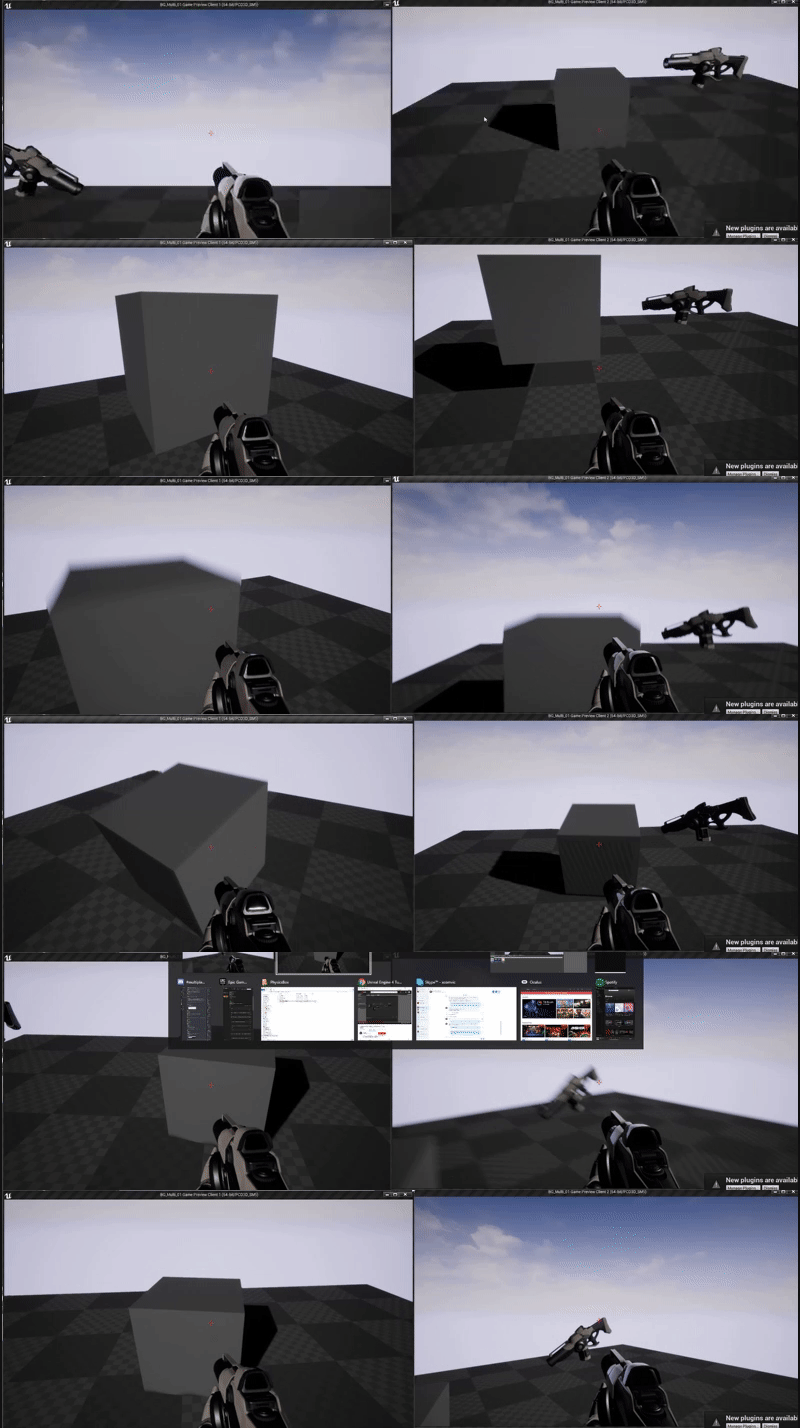
Networked Physics: such a pain in the ass https://i.gyazo.com/48c35d9aacf7c786674503589e50423d.gif
 glad sedge
👍🏼
 civic belfry
Has anyone ran into a tutorial or guide for a scenario where players can take over each others characters in a multiplayer setting?
wary willow
hmmm
civic belfry
looking to have dead players come back as robots in a second phase of the round. robots can take over hosts
seems like it should be doable, hoping someone has already explored it a bit lol
wary willow
Well, the characters are just bodies
that can be possessed/unpossessed
controllers are what matters the most
Have you tried it out yet?
civic belfry
nope, going to spend another night making things run a bit more smoothly before I tackle it. Just wondering if its been done or if there's a name for it to give me a jump start
civic belfry
yeah totally, I feel like I'm making it a bigger deal in my head than it will be in practice
wary willow
Aye
civic belfry
might just start tackling it tonight and see what happens lol
civic belfry
ahh ok, definitely will do!
the server/client crap is still trial/error for me half of the time. expecially with moving objects around and syncing the destructable meshes... pretty sure I just stopped trying new things once it started working haha
works though!
sweet spire
Anyone recommend a networking boom
heady merlin
@wary willow you using the client side setup I have for that networked box or are you actually running it server side?
I had thoughts about just making a correctly replicated movement base for all of the objects in the base project you are using
 jagged knot
I'm kinda frustrated. After watching a dozen tutorials on the advanced sessions plugin, I still don't see the other player's pawn moving. (Player 1 clicks host and switches to game-map; P2 clicks join and SHOULD be visible to P1. The game-map's gamemode should spawn one pawn for every new player, which it does, but movement is only visible locally. Also, P2 will always spawn tilted like it hit something.)
if anyone has an idea, I beg you to share it
heady merlin
are your pawns characters? or just "pawns"
jagged knot
spaceship-pawns controlled by the basic playercontroller
heady merlin
sooooo...they don't have a replicating movement component? Are you passing player input back to the server to replicate? If not...then no, no-one else will see their movement
jagged knot
I thought replicating the mesh itself would include world position, it seems to work in most tutorials
heady merlin
down from the server yes
up from the client...no
also its not predicted or corrected, so there is that too
jagged knot
so if I replicate the pawn itself, the mesh and replicate movement it should work?
heady merlin
not exactly
jagged knot
And I'm not using dedicated servers, just a session
heady merlin
you would be a lot better off trying to work off of a character if possible
otherwise you will end up having to do a lot of this yourself
if you are serious about working off of a pawn
you'd want to look at Uwheeledvehicle and WheeledVehicleMovementComponent
to see how they run the player input both locally, and replicate it to the server as well
if you pass input to the server then players actions will be delayed by the ping, which will feel terrible
jagged knot
ping doesn't affect my game a lot, up to 5 seconds delay would not be noticeable
heady merlin
5 second delay from input to action?
unless its turn based, that sounds intolerable
jagged knot
if P1 presses a button, then P1 should directly see it. P2 doesn't need that information too quickly.