#multiplayer
1 messages · Page 340 of 1
 sweet spire
Alright so what drives the float
sweet spire
Theres your issue
Instead of input
Why not try velocity
Axis input for other pawns does not replicate across
 lilac egret
oh yeah, I do get velocity of the pawn owner
sweet spire
I wouldnt replicate the float
Id let the pawns geg current velocity
And have it be driven by clients only
Get*
sweet spire
U can have it store a ref too its pawn and get the pawn vel that way
 thin stratus
For animBPs you usually hit replicate on all needed vars in the character and then get them in the animBP
One of the easiest things to replicate imo
 jagged goblet
so I'm trying to get name of each player to show above everyones head, what I've is spawning an actor that displays text above head and attach that to the player character then I tell it to update the name by referencing the actor that holds the text n updating the text w/ a name I have in the player bp
just doesn't seem to work
is there a standard way of handling this
sweet spire
Why would u spawn an actor
Just have it in the char
On posses add
On unposses or pawn removed from world, remove
On player do dmg to another player
If dmg = 0
0 hp left
Cast to dmg dealer
Killed target custom event
Event adds point to player state
If u didnt know game mode also has a on post login
And maybe a logout
Well my idea would be
On login
Cast to playerstate
Pass ref from pawn to it
To add to scoreboard arrray or we
Im pretty sure tho
Cant u grab a list of all connected players
Grab there id then
Then ur logic is setup wrong
All it is a case of
Right i dont know anything okay
Figure it out then
I think i do know how to use delgates and events
What? Who do u think your speaking too when im taking time out to try and help you
Dw
I screen shot it
All of it :)
With timestamps ofc
jagged goblet
@sweet spire well i just added textrender now to the player bp n tried running it that way having issues tho it's not working/updating the clients just the server host
sweet spire
Try like this
Rep notify
When text updates from server
Have it set the text renders text value
no need to replicate text component
 twin juniper
@jagged goblet im so tired
of seein people do that
Switch Has Authority
on a Server RPC
please stop
jagged goblet
I'm still learning, does it cause any issues to do that?
twin juniper
no
but its dumb
and its redundant
server rpcs are already authority
the Server is authority
 halcyon quail
seriously lighten up on him
sweet spire
We all do retarded shit
jagged goblet
is all good, he's teaching me something 😛
halcyon quail
you're probably stressed about other stuff, siper is just learing
we all ❤ eachother
the end
sweet spire
I once tried to rig a timeline in too a umg via event dispat her lmao
This is place for learning and sharing
halcyon quail
and messing up!
sweet spire
Last thing we want is for people to feel stupid and not ask
jagged goblet
@sweet spire so if i set name text variable to repnotify, do i still need to run the update on the server?
or do i just set the name text func to set the text component
jagged goblet
from game instance
sweet spire
And where does that get it from
jagged goblet
its a function in the player bp, that cast to game instance to get player name then set it to name/
game instance gets it from login i have set up
sweet spire
Okay so
Its orignally server side orgin right?
If u set it up so server sets it on there side
Then it work fine
Ie
Only server gets it from game instance
Meaning
sweet spire
Pawn switch authority runs grab name and sets it to text varisble
jagged goblet
think i just got it working need to package rl quick try on dedicated
 inner iris
Just to double check- the correct way to use a switch has authority node is if you are calling a function both on client and server and you want to specify something you only want the server to do (Authority), and if you wanted, have only the client do something else (Remote), correct?
Cleaning up a load of completely useless switch nodes in my project from when I was just starting to learn
For example this:
So you want both server and client to run the first part of the code, but only the client to run the local event which could be just shifting the client camera to suit the crouch
sweet spire
Incorrect
Authoritt
Authority
Is different to client server
Its who ever has autbority over it
inner iris
So it would mean the owner?
sweet spire
Yes
Kinda
This isent my area i knlw hpw it works but cant explain it :,)
@brittle sinew h e l p
inner iris
All good, thanks 😃
 stark dome
Your above code should do what you want I believe
Characters have authority on the server but not on clients
inner iris
I found that the server and client caused stuttering doing that @sweet spire, server was correcting the timeline position
inner iris
It would make sense to do it on both though for when you are firing, you are right
sweet spire
U can
Set it local & rpc to set server
Have server replicate it as well
Or just rpc and let server shift it
Is super simple way to do it
Theres others too
inner iris
I tried both of those and server update rate is juddering the shift, I have timeline set to be replicated too
sweet spire
But thats simplist
inner iris
Or maybe i should turn the replication off?
inner iris
It's just going between two hard coded positions anyway so it should be fine doing it like that
Trying now
inner iris
Works fine turning off replication in the timeline
sweet spire
Timeline is issue then
inner iris
Was in a bad habit of ticking replication everywhere when I started this haha
sweet spire
Ye lmao
I only replicate bare min
Actually id prob say i go to extreme limits to save cpu ans nandwoth
inner iris
Yeah as I finally am starting to get a better mental image of what is on the server and what is on the client, it's making a lot more sense to be pretty picky with what needs to actually be replicated back
sweet spire
Bandwith = $
inner iris
😄 Literally
sweet spire
Well i mean
I run my own dual cpu xeon rigs
And stuff
Fuck paying for servers lmao
inner iris
Also since that function was being called from an RPC already, will the server still always follow through and call non run on server custom events (like CrouchStart) properly? I guess it would, the only reason for the custom event is the latent action
Well I guess the reason you'd have to pay is for regions
So people can't get mad if they have a high ping
sweet spire
Vcpus on amazon are so crap its unreal
inner iris
You pretty much have to use a worldwide service at some point though right?
sweet spire
Well im bot targeting asia region now so
inner iris
Unless you manually fly around the world and set up servers
inner iris
As long as the players are happy- depends on how much the game relies on a low latency connection
sweet spire
If i targeted another region of the planet id rent or id buy building for it maybe
Depends if its worth
inner iris
Yeah!
inner iris
Ah yeah! every little helps
sweet spire
Every cpu cycle adds up lmao
jagged goblet
switched get player controller to get controller now i got diff names!
thin stratus
@jagged goblet You used "GetPlayerController0" before?
jagged goblet
yes 😳
sweet spire
Anyone need any help with anything today?
jagged goblet
um i have a question so if i want to change player name from player state whats best way to do it?
I see that i can run change name from game mode n set it to whatever but
can i only do that from server
sweet spire
U can rpc to server to change it ofc
sweet spire
no worries glad to help
 hasty adder
Bahaha so I guess for things I wanted to replicate more often I should have lowered net frequency update woops
 zinc loom
just submitted my first pull req -- to fix a bug that was stopping dedicated server binaries from running on headless machines
stark dome
@zinc loom good stuff
 ruby epoch
My custom variables in game state should be replicated?
like current round
blue team wins
etc
 brittle sinew
If you want the client to know that information, yes 😃
lilac egret
How do I replicate the first person template aim?
thin stratus
Someone here used Beacons before?
lilac egret
how is the camera aim replicated?
 willow finch
Hello again @thin stratus any tips on 'creating sessions'? I have a BP setup to create a session and it fails 100% of the time
 brittle epoch
do you mean it don't create them or people can't join?
willow finch
I am failing to create the session
I just made a reddit post here you can see for more details https://www.reddit.com/r/gamedev/comments/6wfj1z/failing_to_create_session_in_ue4_417_on_simple/

reddit
Hello world. I am working on a simple multiplayer project in the new 4.17 ue4 engine. However I am having a major roadblock on getting...
sweet spire
As far as im concerened
I really wouldnt touch new engine versions till its flushed out
Such a pain not knowing if u broke it or engine has broke ot
willow finch
^that is the easy way out. I think this is me breaking it, but I have no idea where
twin juniper
Hello all, I just completed Unreal's Multiplayer project and for a reason I've yet to comprehend, whenever players travel to a map, their pawns are floating and spawn in a distorted manner. Any movement input does not behave accordingly. Any pointers on where I should look would help a lot. Thanks 😃
sweet spire
Sounds like no player start pos for one
twin juniper
Thanks for the reply ! Unfortunately, I've got 4 spawns set up in both maps...
 fossil spoke
@twin juniper Make sure they arent spawning inside an collider
twin juniper
I'll look into both your suggestions right away 😃 thanks !
HA. @sweet spire was right. It was a player start thing. I'm not sure why exactly... The game didn't seem to treat the default "Network Player Start" (in the TPS example) the same way it treats a user-added "Player Start" object.
ruby epoch
My player shuttering then moves left right, I have temporary fix using Ignore Client Movement Error Checks and Correction
any good way to fix bug?
inner iris
@ruby epoch No, this means your character on the client and server will be out of sync. The reason it is stuttering is because you are trying to do something on the client that isn't also running on the server, so it's seen as an error by the server, which corrects it.
 raven viper
Hi peeps!
Got a kinda urgent problem, I hope someone can help me out.
Made a "game" in a dedicated-server way. Running in editor (Run Dedicated Server -> open 127.0.0.1) works perfectly. However building the server gives me a warning of:
"No game present to join for session (Game)"
Also on login constant ticking of accessing index 0 of an array (won't tell which array in which BP) with length of 0. Hence my "players" get a blank black screen. Running BPs only, and SubSystem NULL
 next falcon
Hey guys can someone helping me ?
i wanna make a projekt with my friend but i don't know how
brittle sinew
Your best bet is probably some type of source control system—something like Git or Perforce.
brittle sinew
Not only will this allow you to collaborate with others easily, it will also allow you to keep track of changes on the project
@wary willow I hear you like SVN?
 wary willow
@brittle sinew I actually was just using it on another project
I don't dislike it, but yeah... nah
Perforce trumps all
Although PlasticSCM is looking sexier every month
brittle sinew
For UE4, yeah, I like P4, but there really isn't any getting around how easy Git is to set up for beginners
Perforce was a PITA initially, at least for me
next falcon
okay but how can i create a server where my friend can join on? something is worng with the port.. its says that the port is wrong
brittle sinew
Well, that's a much more general question :p
With no error messages or anything I have no idea, did you forward the correct ports out?
next falcon
what does forwarding a port ?
wary willow
@next falcon https://portforward.com/
next falcon
thx but can u explain it to me like u would explain it to a kid ?
next falcon
what means visible ? everybody can download something from my pc ?
thin stratus
Ports are numbers that are mapped to services running behind your router
 wide valley
I am trying to specify a port my game runs on when i do the open command "open map?listen PORT=7733" is this not the right way?
thin stratus
Usually they are closed, means people can't communicate with you via your port/ip
So, let's say 123.234.232.23 is your public IP
All of the PCs of your home will run behind that.
Now if you host a Server, it will run on port 7777
If that port is closed, you can't find the Server via 123.234.232.23:7777
It will simply be blocked if trying to reach
Once you forwarded the port (usually inside of your router) to be open and mapped to your local PC
You will be able to host on that PC
No idea how to explain that simplier than that
wide valley
there are lots of port forwarding tutorials 😃
is the default port for ue4 stuff 7777? and is there a way to change that for my particular game? if so how?
thin stratus
-port=1234
If you don't change it and run multiple servers it will autoincrement
7777, 7778 etc
thin stratus
i think it doesn't matter
 modern dome
are you sure you can change the port with a Map Change? @thin stratus
 lament kettle
Is this a decent pickup item workflow?
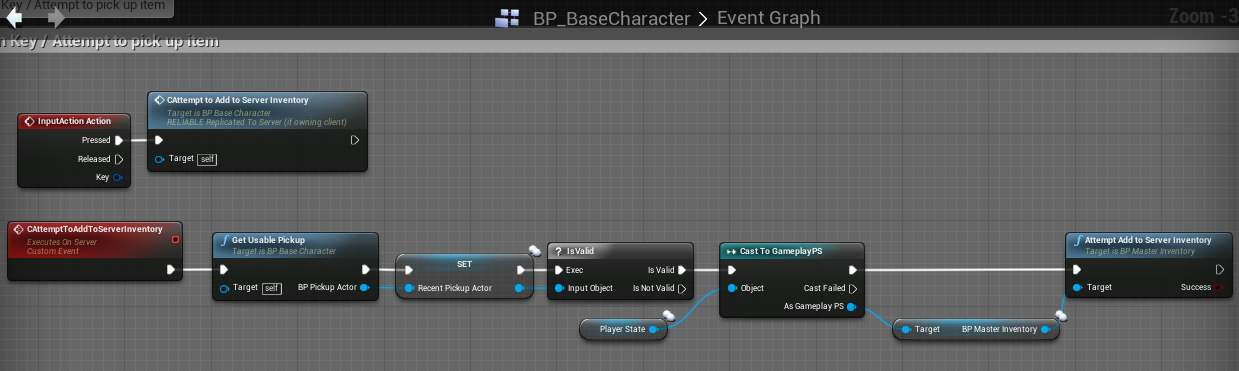
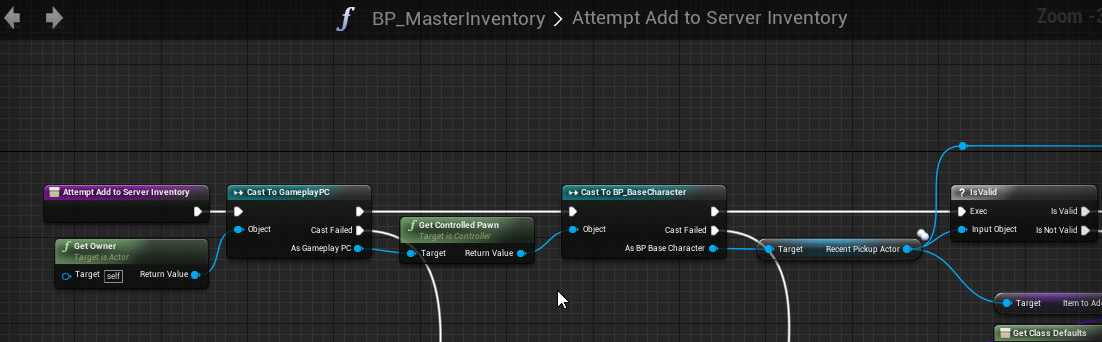
I'm not passing the actor via the function, so there shouldn't be any room for sending fake stuff.
twin juniper
?
 potent raven
Starting up a livestream in 5 min to demo in-game tournaments. I'll put the link in #share-your-stream
wide valley
I have a question, I am using a console command to host a private game currently. What is the best way to close that game and bump a user to the main menu, destroy session?
thin stratus
Travel to the MainMenu
And in the MainMenu, by default, always destroy the session
cause usually that's the place where you don't want a session anyway
wide valley
that makes sense thanks
 arctic hazel
im so confused
friend joins my game server, he gets my steam information in my server, and kicks me out of my own lol
lilac egret
how do I make a projectile deal damage to the other player?
wary willow
@lilac egret https://www.youtube.com/watch?v=htdI2dh-aek

In this video, you'll learn how to plan some basic networked features to add to the default 3rd person Blueprint template and then set up the character bluep...
man wtf Epic
Why are these videos unlisted now
Sure they are old, but man, they are still good and valid
 tall grove
@arctic hazel checks autoposses player on player character , this happen to me.
 winter sandal
@tall grove isn't that something to do with player ID's? Like each created actor needs to have their own ID or else it will autopossess the same ID over and over again booting out the last person to join lol
inner iris
@white spireBurgos#7534 that series is gold, the best set of tutorials from Epic I think
arctic hazel
i hate multiplayer speedometer 😦 keep seeing friends speed
 white spire
@inner iris u called? :^)
twin juniper
I have HUD Bars which go down from Game Tick
But for my splitscreen characters...it goes down at different rates
I'm using GetGameTimeInSeconds as well as GetWorldDeltaSeconds
is there any fix for this? ^
thin stratus
Your code would help
twin juniper
HUD_Bar value = WorldDeltaSeconds*FLOAT
^This produces different bar values after x seconds for two different splitscreen players
I'm setting the Bar's value as a local variable
thin stratus
Well, have you tried printing the seconds and the float
and see which one changes it?
If you need both similar, just set it once for both accessible
twin juniper
umm
it actually almost doubles based on how many other (+1) splitsscreen characters I have
.018 regular
0.022 for one more
0.03 for third/fourth
should I try not to use these vars? Instead just use 0.018
and see if it works?
3
Value += Speed * DeltaTime;
You scale varables that will change something by delta time, end that varable becames chnge per secound
and yes it's hwat I want, but it doesn't scale appropriately for multiplayer
I need to use Delta Time because when I pause I don't want the Bar value to go donw
inner iris
@white spire sorry the tag messed up, my bad 😃
wary willow
@inner iris fail
white spire
UNFORGIVEN
wary willow
Too many Victors
wary willow
Yes you are
 cold sparrow
does any one know: if I start a dedicated server via editor and a client at the same time, should this client find this server's session via Find Sessions function?
it always returns on failure
 onyx haven
nvm
 viral mason
When i host session... I have to suddenly hold left click to be able to move in the game preview standalone
So normally when i hit play in standalone, i dont have to hold left click to move around
but when i host session & join the new world
I suddenly have to
I put it in #multiplayer because it's due to host session causing the issue
viral mason
when i run command servertravel Indoors or Indoors_2 (I have two levels, one is Indoors, the other is Indoors_2) they don't seem to travel to the new level even if executed on server.
 sweet horizon
Hello 😃 I was wondering if there's anyone with experience on registering their dedicated servers with Steam's Master Server
I would like to inquire on what requirements you had to fulfill (outside of code, e.g. new Steam account, price, etc)
thin stratus
@cold sparrow you mean you press play inside the editor with dedicated server ticked?
@viral mason Sounds like you didn't setup code to handle input mode
lament kettle
@thin stratus I just want to tell you that I appreciate you helping out others but specifically, If I can be allowed to be selfish, for helping me out. You are seriously amazing.
thin stratus
Naaaw (: glad I'm able to help!
modern dome
I am using Non-seamless Travel and I need to transfer Data between GameInstance and GameMode/GameState when entering/exiting Maps.
Do you think using a SaveGameObject is a good solution here or should I simply create a Push/Pull Function in GameInstance which sets/gets the Data?
something like this
PushData is called when exiting, PullData when entering
sweet spire
This for multiplayer?
I really woudnt let clients carry any data apart from session key really
Maybe beacons could help idk tho
modern dome
Only the Server calls these functions
sweet spire
So its not shifting from 1 server to another
Same server right
If so that looks good to me
modern dome
Yeah, I am using Nonseamless travel and I need to store the data somewhere between MapChanges, so TimeOfDay doesn't get reset everytime for example.
sweet spire
prob be okay then
modern dome
Oh yeah. Works like a charm ❤
arctic hazel
if i want a characters information to pass to a controller from a posses actor, and one of the players is the server, would i go about making it so only the player who poses that specific actor gets the information and not the server aswell?
as of right now i've got the HUD on playercontroller, and the car's information passed to controller via a custom event.https://gyazo.com/432cf2fe23f2657424a933073b31cf5a and this is causing me to see my friends Car's information aswell or so said hes information adds onto mine.

and that is due to im not specificly telling it which controller, so it chooses the first one.. duh >.<
viral mason
@thin stratus i have to hold left click to be able to input
Which is an option in blueprint editor
But it's turned off
It appears when I join a new session
thin stratus
Your Input mode is set to Game?
viral mason
Yes
And when I host lobby (or join) I get the issue
I have a popup window to host lobby, join, etc
I have a popup window to host lobby, join, etc
So maybe it's when the widget goes away my input setting?
And when I host lobby (or join) I get the issue
I have a popup window to host lobby, join, etc
Pretty sure it's game & UI
thin stratus
Well I would simply set it again to game when you want it to be game
twin juniper
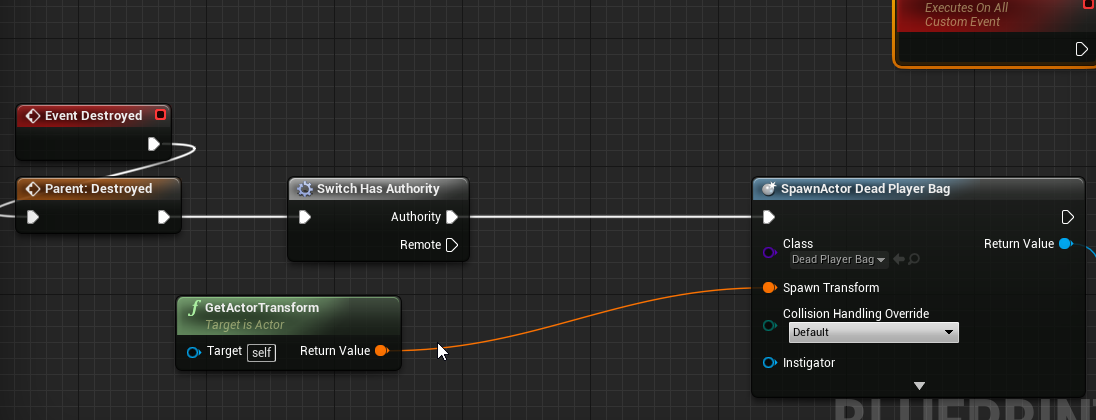
woulds omething like this work?
If server, spawn bag (its replicated), then call a multicast function
like would this work?
would it spawn the multicasted particle, and the replicated bag actor
im not sure if it can be done in Destroyed() and i dont know if it will multicast my particle
 spare owl
has anyone experienced issues with VoIP and the new audiomixer?
 alpine tangle
I have a pretty general question
If I run a function on server, and the function has local variables, then try to use that local variable as a return output can I do that
or do i have to replicate the variables
sweet spire
U can do that
Local var in a func has nothing to do with replication
They are only inside the func and thats it
alpine tangle
okay tight thank you! @sweet spire
sweet spire
Np
 opaque tinsel
Hey guys, im currently developing a tps multiplayer, but im having an issue with the aiming up or down. When my server aims and look up or down, my client doesnt see my server character looking up or down but it works on my client. When my client looks up or down, my server sees it. Any idea what might be causing this?
 sterile pebble
I suppose you should replicate pitch value
viral mason
Calibur, I have a Spine Rotation (Rotator variable) replicated for my clients
Which seems to work fine for looking up/down
 restive walrus
nice explanation of how hit registration is handles in BF1
https://www.youtube.com/watch?v=hiHP0N-jMx8

In this video you will learn about basic computer networking, update rates, tick rates and a lot more which affects your online experience. I also tell you t...
inner iris
@restive walrus Super interesting, thanks 😃
I'm assuming the serverside check from the client confirmed hit would likely be using a rewind/snapshot approach on the server?
Very good way to deal with the issue of being shot around corners by high ping players assuming that they know to lead if they see the symbol
restive walrus
he might have vidoe on BF4 and getting shot around corner was an issue there
 vital steeple
maybe this is a weird question...
i know how to run a server RPC from a client
but is it possible (or necessary/sensible) to run a server RPC from a non client owned object
like if you had a world object, how do you get those to mess with replicated values
arctic hazel
if a car feels laggy during gameplay on multiplayer what is it to change in replication
as in it desyncs backwards
 void canopy
Hi Devs! I've got a situation in my replay system I made in my multiplayer game, one of the client has power to start the replay on server and stop it. Its triggering this command from a UI widget. So here is the call map I made. Character UIWidget (Attached as a 3d widget component) -> Character.StartReplayFunction()->Playercontroller.StartReplayFunctionOnServer()->GameMode.StartReplayFunctionOnServer(). This call is working correctly , however when I start recording my character which triggered the recording looses its focus on the pawn it should focus, and captures other client pawn and focus them, however when I press movement controls, my default pawn is only moving. Its the camera that started focusing on other character for no reason, when I trigger recording on my client. Any solution to the approach ?
opaque tinsel
Hey guys, if i were to do a very simple 5 vs 5 multiplayer on a small map, can i have one of the players be the server while other players are the client?
thin stratus
Yes, the Server is a ListenServer then
You should read my compendium
That answers most beginner questions
it's pinned to this channel @opaque tinsel
opaque tinsel
terribly sry about that
lilac egret
when exactly should I use Switch has authority?
sweet spire
Idk @balmy gazelle iv never had that issue and worked in listen before with aChar
Unless im missing something
sweet spire
Blank project
 balmy gazelle
but you played with people ?
balmy gazelle
in local even with simulations is not visible
balmy gazelle
well no idea then me and others have have seen that aswell in the video of Tom is visible
sweet spire
Seams like for such a thing it happeb alot more erm
balmy gazelle
its hard to see in some cases tbh
sweet spire
@brittle sinew u seen this before? Check post above
balmy gazelle
note some people that don't play usually multiplayer games can think it looks normal, but that don't happen in normal online games should all be total smooth the ping problems cause other kind of problems but no this
sweet spire
It sounds like network movement is unsynced or fighting
balmy gazelle
probabyl can even be a problem with the OS or something who knows
probably you can share what you have done in your project
sweet spire
Can u show sample of your movement setup?
balmy gazelle
but if you take content from the marketplace
or
Shooter Game etc you can see it
take Generic Shooter or Shooter Game or Survival Template
sweet spire
U in 4.17
sweet spire
4.16.3 here
balmy gazelle
just do that
compile the shooter game and tst it
with someone
or feel free to share your setup
sweet spire
Dont have access to engine right now
balmy gazelle
oh okay+
sweet spire
I use typical setup pretty much
balmy gazelle
for me even using the UT4 references can't manage to fix it
as you can see its reported in the UE4 reports and UDN so
well I have togo now but if you can take an screenshot or something tomorrow of your setup then can see
this happen even moving the character without do anymore
balmy gazelle
when you can : )
twin juniper
Ded ch@t
wary willow
That's a good sign, means people know wtf they are doing and working instead of chatting all day long
wide valley
I am trying to test my multiplayer game on steam, so i installed the steam plugin etc. But it doesn't seem like my other computer is able to see any hosted game sessions. I did a lot of googling but didn't find anything definitive, is there anything in particular I should look for? any gotchas to watch out for?
wide valley
yes
wary willow
Same Download servers
wide valley
good old space wars
wary willow
NOT the same steam account
wary willow
then you failed
wide valley
😦
wide valley
how can I do that
wide valley
ok
yeah i was focusing on the joining, i guess it makes sense that the session isn't even being created and that the join logic is actually fine
wide valley
It looks like something is wrong with my laptop actually
the game like doesn't run right
i try to host on my laptop
and it just breaks
nothing happens
Thanks for the help
 solar flower
Well...thought i had it figured out...maybe not.
Wouldn't the Clients have authority over their Playercontrollers?
I'm trying to only have the Owning client do things in my PlayerController, so i'm checking if HasAuthority()
It's returning false in my Client PlayerControllers
Expected behavior?
Seems like there's a better way to do this
wary willow
Yeah, probably not calling it on tick for one
modern dome
wouldn't it be better to check "IsLocalPlayerController" instead of using RPCs?
@solar flower
solar flower
@modern dome Ahhh, forgot about that one, thanks.
But does the server have authority over all playercontrollers?
I was under the assumption clients owned their own PCs
solar flower
I have it
wary willow
look at it
solar flower
The level owns the PCs
But, the client PCs own the Pawns
If you own $20 but live in a communist society, wouldn't the government be the actual owners of your $20
Because they own you
solar flower
Or should I stop using political analogies to remember system architecture?
 nocturne token

 night jay
Anyone had issues with characters desyncing and suddenly jumping/teleporting thru walls?
lilac egret
is there a way to make a session still available even after all players disconnect to it, so they can join it again?
lilac egret
each player is running a version on their computers
thin stratus
And?
lilac egret
same thing?
thin stratus
I just told you, for a persistent session, you need a Dedicated Server
PIE and Standalone have nothing to do with that
lilac egret
there's the default dedicated server on UE4 you can use when running the game as PIE
wary willow
@lilac egret heh, I think he gave up
But, basically, his word is God in here.
And that "dedicated server" checkbox in PIE...is just for testing purposes
I mean..
TECHNICALLY
If you wanted a session to persist and didn't want to do a dedi
You could just leave the Server PC on all the time
(Player/Server/Host)
But, then we're drifting into, why not just make it a dedi server in the first place 😉
lilac egret
all players are clients here
this dedicated server is something external
?
Sorry but i never did that
thin stratus
Yes, Dedicated Servers are Servers that are not actual Clients. You put that onto some external Server, or your own home PC if you want to pay a lot for energy.
That thing runs with and without client sconnect to it
PIE Checkbox is for testing
if you want a real one, compiled based on your game, you need to download the source engine from github
and compile the binaries through that
There are tutorials that explain you step by step how to do that
 scenic bronze
If I have a replicated struct with 100 different variables, and I only change one of those variables, does the entire struct get sent over the network to update the change (or does only that single variable get sent over)?
wary willow
@scenic bronze Structs only replicate the members that have changed
scenic bronze
@wary willow thanks 😄 thats good to hear
lilac egret
thanks
 vale mauve
So I'm trying to do a simple firing function
// Client input
void AMPGameCharacter::OnFire()
{
    if(Role < ROLE_Authority)
    {
        ServerOnFire();
    }

    Shoot();
}

void AMPGameCharacter::Shoot()
{
    // Play client side SFX if we are not a dedicated server
    if(GetNetMode() != NM_DedicatedServer)
    {
        //Play sound and sfx
    }

    // Fire the projectile if we are the server
    if(Role == ROLE_Authority)
    {
        // Spawn projectile
    }
}

// Server call
void AMPGameCharacter::ServerOnFire_Implementation()
{
    Shoot();
}
Is this the right idea?
 rough iron
yes and no xD
it does work but you are missing the client side simulation
you client will play the sound and sfx while the actual projectile will come in later
UT solves this by spawning a client side projectile in the client, simulating it locally and syncing it when the real projectile comes replicated.
it's the same you do for movement
thin stratus
@rough iron May I ask how do they sync it once the replicated spawns?
rough iron
I guess they just swap the data and replace the fake one with the real one
it could pop but it shouldnt be noticeable
 signal lance
or maybe they start replicating the position when the real projectile spawns
rough iron
yeah there quite some ways you can implement it
they are just adjusting it to match the server one
so they just adjust their fake client versions
BeginFakeProjectileSynch
should give you a good starting point
thin stratus
Thanks, mate!
rough iron
^^
 cyan bane
Is PktLag limited on how high you can go? I can't get my ping to go above the 160's
 jolly siren
160 seems low. I've tested up to like 500
signal lance
it is not, I got it up to 10k and it crashed the engine
cyan bane
Hmm, I must be calculating ping wrong. Thanks!
 river hazel
calculating ping? UE doesn't expose latency values?
lilac egret
I call a function on the game instance from the GameMode's OnPostLogin function, to alert all players whenever someone enters the session, but the game instance function is only called on the first player, not on the second. Why is that?
brittle sinew
The GameInstance isn't replicated—you're only calling the function locally
If the first player is the server, they'll see it
Otherwise, you need to move that function to a replicated object like the GameState
lilac egret
even in GameState it does the same thing
is there a way to have the first player not be the server and make all players treated as clients?
brittle sinew
Could you show your function?
And not really, unless you run a dedicated server—a listen server still has all of the components of a client but the server component is there as well
lilac egret
it's a simple function on the gamestate where I a make a AddOnScreenDebugMessage to check if it was called on the players
I also made it multicast to see if it could work
but didnt
lilac egret
this part I am making in blueprints, because I am prototyping it and want to avoid long compile times
it's a simple custom event
lilac egret
lilac egret
thin stratus
GameMode is on Server. OnPostLogin calls on Server. The Event in your GameState is not an RPC, hence, we stay on the Server.
So you always call that Event on the Server
Turn "CallTest" into a Multicast
And you should have your "Notify Everyone" bevahior
thin stratus
Make the call Reliable
It should call on everyone
Only reason it wouldn't, would be that the GameState doesn't exist on the new player yet
but all others should get the call
You need to have that event in the GameState, not GameInstance
 rancid current
Heyho! Sorry to disturb guys D: ah im new here so firstly nice to meet ya! hope ya all doing well 😄 I wanted to know if replicating like this is fine XD https://gyazo.com/6ad06db9ac7429cadbb398be75060acc https://gyazo.com/2a044b3add8077fa73c41b1f9e3ec966 im new to replication and with not much info about it im trying my luck lel

 thin stratus
@lilac egret Because not every class is instantly spawned at the same time
Class A can be spawned before class B and already called BeginPlay for example
@rancid current Nearly. Client RPCs are to actually move the Client from Server to OwningClient
You don't want that there
Other way round, the Server RPC is for going from OwningClient to Server
so that is also placed wrong
SwitchHasAuthority splits the Call into Server or Client (any client)
So Remote would need to call the ServerRPC
lilac egret
I made the OnPostLogin call a multicast function and put a 0.5 delay before calling the GameState function(also multicast) and it worked
thin stratus
What you want to do is the following:
Create an Event called "StartSprint". Just a normal event.
When you press your SprintKey, you check if Server or Client pressed it.
In both cases, you want to call that custom Event "StartSprint"
In addition, when REMOTE is hit, you want to call ServerStartSprint, another event you want to create
this time, a ServerRPC, because you want to tell the Server that you are sprinting
lilac egret
thanks
thin stratus
Inside of the normal "StartSprint" event, you may want to place another SwitchHasAuthority node
@lilac egret I'm talking to @rancid current
lilac egret
im thanking for the help from before
thin stratus
Actually, let me think about that setup for a second
Before I put unneccessary calls into it
Ah right. You need 3 Events. "StartSprint", which sets the MovementSpeed.
"ServerStartSprint" and "MulticastStartSprint".
You call ServerStartSprint like I already explained.
ServerStartSprint calls the MulticastStartSprint.
And the Multicast calls teh StartSprint again, so everyone updates the movement speed correctly
You can filter the "OwningClient" from the Multicast, as he should directly set the speed in the Key event
@lilac egret That is not a good solution
A lag, internet or FPS wise, could break it again if they take longer than .5 seconds
rancid current
but where do i connect that StartSprint to tho? o.o
thin stratus
I'll show you, gimme a sec. THings like these sound more complidated than they are
rancid current
https://gyazo.com/60e007061adad797ccb2e1f3dab8e718 this is what i got xd okii haha thanks lots i will wait!
 lilac egret
so what do you recommend
thin stratus
@rancid current https://puu.sh/xp5HJ/754220bde6.png
 rancid current
well that shows it much better! Thanks I will give it a try 😄
thin stratus
Should work
If not, ping me
Also, if your game allows InMatch joining, then you should think about doing this via OnRep functions
RPCs are only called for the Players that are on the Server
If someone joins afterwards, he won't get the speed update and see a weirdly lagging Character
OnRep Functions call when the Variable gets updated on the Client. So if he joins late, he will get the latest update on that variable (here a boolean "bIsSprinting") and execute the OnRep function
making him change the speed to sprint
To change my screenshot to the OnRep version, make a new boolean, set it to OnRep.
Remove the Multicast and let ServerStartSprint set the boolean to true.
In the new (automatically generated) OnRep function, execute the code that currently is at the bottom, called by the multicast
rancid current
oooh i see o.o! i didn't know that sht XD okii I will make sure to do that! Noted everything thanks lots!
thin stratus
@lilac egret Probably putting it into the BeginPlay of the PlayerState
The new Player will get one and Server+All Clients will get the replicated version
So BeginPlay calls on everyone
easy way to notify
@rancid current Read my compendium
Helps :P
(pinned to the channel)
rancid current
@thin stratus will make sure to do 😄 one thing about my blueprint i cannot add either self or get player character haha
thin stratus
What Blueprint are you working in?
You should be able to get Character everywhere
same as self
rancid current
welp thats on the actual character blueprint xD
thin stratus
Should work though
lilac egret
I call the multicast after the OnPostLogin?
rancid current
ops my fault i took the wrong not equal lel sorry
https://gyazo.com/80d9d13fb0402c870e1474d60bec285f @thin stratus

@thin stratus aaaand its not working ;-; on the owning client the animaiton its twitching,speed not changing, and for the other clients he is simply just walking still even if i press shift
thin stratus
@lilac egret As I said, I would use PlayerState beginplay
@rancid current No idea about the Animation. That var is replicated, you could set it on the server directly, before/after the Mutlicast call
It will replicated anyway
But the MovementSpeed should work
Put a print string behind it
behind the set movement speed
and print the new speed
and see if it calls on everyone
rancid current
well yeah it seems on both clients it shows that the speed changes but no actual visual change like move faster or anything change of animation
but the values do change
lilac egret
The only way to create a session is by puttin the tag "listen" on load map?
thin stratus
If the values change it should be faster :D
Session != Listen
Listen just means it's listening for incoming connections
lilac egret
Open level **
thin stratus
Session is some kind of information state that you use to list the Server, for example in a ServerList
lilac egret
the default way would be: Create session -> open level (options: "listen")
but the one who created the session is treated as the Server right?
thin stratus
The one who opens via Listen is the server
They all create sessions
Clients do it when Joining
lilac egret
yes
rancid current
@thin stratus Hey thnaks lots for the help! I gtg for now I will be back tomorrow 😃 I will see what else can be done and come back with an update 😄
lilac egret
the only way to make all players clients is by using a dedicated server?
thin stratus
Technically yes
You can also limit the ListenServer from playing.
The diff between Dedicated and Listen Server is that the Dedicated Server has no actualy 3D screen/UI etc.
Cause he's not meant to be used to play the game
lilac egret
when a player plays the replay system on a session, the other player on the session disconnects
thin stratus
Yes, and?
thin stratus
If someone disconnects, he disconnects
Replay system plays the recoded data
So shouldn't be a problem
lilac egret
but it is
i dont know whats going on, the begin play on Player State s being called 3 times on the second player once he joins the session. ??
thin stratus
Should be called 2 times
Once for the Server's PlayerState (if he is a ListenServer)
and once for the new player's playerstate
The first player would have 3 calls
etc
Every older client gets 1 call for the new player that joins
lilac egret
that's how it should be
I thought it would work by calling a print string on the function that sets names, but it doesn't, despite the fact that in this same function the names are set correctly for all players
it may be something related to different spawn times, which can be controlled by adding a delay, but im not sure
what could solve
rancid current
@thin stratus Ey Im back for a bit! After I removed the branch which was in between Multi and Normal event sprint, it started working now o.O
thin stratus
Could be that I did a small mistake there
rancid current
so it's fine without it I guess then yeah without works real nice
lilac egret
I put a print string on the begin play of player state, and it's being called normally for the first player, once when he first enters the session and when the second player enters, but it's being shown twice to the second player when he joins the session. Why is that?
brittle sinew
The second player sees the BeginPlay of both PlayerStates
All PlayerStates are replicated to all clients, and BeginPlays happen locally when an object either first replicates or becomes relevant again
lilac egret
so what's the best way to handle this alert to players?
I tried through game instance and game state
 glad sedge
NetMultiCast?
viral mason
When you join a session, do you HAVE to have a map loaded? Like can i make a "Lobby" menu without a map loaded? Or should i make a blank map then throw up some widgets that will load as a main menu?
fossil spoke
@viral mason PartyBeacon system supports passing info to other clients without actually creating an formal connection to an server.
fossil spoke
There is an plugin someone made that exposes PartyBeacons to BP i think
viral mason
Well
Probably wouldn't be useful for me
As I'm joining a dedicated server (no online subsystem)
Then doing details on that dedicated server
so
fossil spoke
Well then to answer your question, there must AWAYS be an Level loaded in the World
viral mason
always.. ok
Any idea why servertravel doesn't work?
Ran on server or client.
Note, this is after i do a "Host Session" then both clients join it. (One client is the hoster)
fossil spoke
Well they are the ones that have to call servertravel
viral mason
Who?
fossil spoke
The host
viral mason
I've tried running servertravel Indoors on my map called "Indoors_2"
and nothing happens
fossil spoke
Oh
viral mason
Indoors_2 is a duplicate of Indoors for testing server travel.
If i'm on Indoors_2, and i run servertravel Indoors
Nothing happens
fossil spoke
Did you check to make sure that the console isnt spitting out an error saying something like Indoors isnt an valid level name or Couldnt find level Indoors
viral mason
I don't see why it would as open Indoors works
fossil spoke
Ok are you using PIE?
viral mason
Yes.
fossil spoke
Ok try it in an packaged game
Theres lots of issues testing multiplayer stuff in PIE
ServerTravel being one of them
As far as im aware.
viral mason
That would make sense
lilac egret
@brittle sinew whats the best way to handle this?
twin juniper
please why do I get this in dedicated server log?
NullRHI preferably does not allocate memory on the server. Try to change the caller to avoid doing allocs in when FApp::ShouldUseNullRHI() is true
zinc loom
Hi all... If I'm spawning a particle system (explosion) client side and then server RPC/multicast so everybody gets one - what's the best way to use the radius of that for applying radial damage?
Do I need to attach a collision volume at all?
 bitter radish
@rancid current https://youtu.be/DUSQxiGJEd8

Join Me On Patreon : https://www.patreon.com/iamjohngalt75 Or_ Email Me : millsapss75@gmail.com
rancid current
@bitter radish Thanks 😄
bitter radish
@rancid current You're welcome 😇
 cedar galleon
How can replicate CapsuleCollision on Server, how I can change size Capsule when I crouch....
cedar galleon
@bitter radish can replicate CapsuleCollision and change size when is crouch state
@bitter radish can help me?
cedar galleon
@bitter radish I want resize capsule collision when I crouch me character and want replicate also the new size Capsule collision on server for all client
 rare cloud
@cedar galleon, look at your character movement component, there is a CrouchedHalfHeight float variable
when the player crouch (you call crouch function from player) the collision is changed to this value
cedar galleon
@rare cloud not work link
rare cloud
you didn't link your github account to your Epic account
@cedar galleon, https://www.unrealengine.com/en-US/ue4-on-github?prox=1
inner iris
I thought this was solved before, my aim offset appears to not be replicating correctly to other players. Fixed by calling a multicast RPC on tick where I'm calculating player pitch and yaw, however this doesn't seem like a very efficient solution. Is this how it's normally handled?
Client still does all the calculations, just passes on the results. Not sure having the RPC firing off on tick is ideal though
Also the pitch and yaw vars probably don't need to be set to replicated in this case
sweet spire
Having an rpc fire on tick is insane
inner iris
That's what I was thinking
So how can I send the current aim offset data to all other clients? Have it calculated on server and replicate?
sweet spire
On multi cast is even craziet
Crazier
First question why do u need to send aim offset
inner iris
So that other players are looking where they are meant to be looking
Otherwise it looks like they are staring in the opposite direction while shooting you
sweet spire
Im not shooter expert but
This falls in too similar situstion of movement rep
Its never gonna be perfect
But if its thst bad
inner iris
Ok, so get them looking roughly where they should be by disabling yaw offset maybe?
sweet spire
Sounds like rotation is not replicating correctly
inner iris
Ideally though, if a player is aiming straight upwards, it'd look really wrong if he is aiming normally to other players
sweet spire
If thats happening then ur rotation sounds fucked
My ships always replicate there aim direction correctly
And imcusing standard char comp
inner iris
I'm pretty sure I had it working fine before without any multicast functions but recently it's just been very wrong on clients- defaulting to looking hard left with incorrect rotation
The multicast thing fixes it but it's super expensive and not ideal
inner iris
Yeah gotta see what I've done
Might be some stupid controller setting
Was fiddling with them for AI stuff
sweet spire
Figure out the issue
Ai controllers have nothing to do with player controller just so u know
inner iris
There are some controller controls on tharacter
Orient movement to rotation etc
But even still- the server would have to set the rotations and replicate the values right?
sweet spire
Like there two total dif controllers
Should do
U are using add pitch yaw etc
Right
inner iris
Yep
sweet spire
Hmm unusual
inner iris
Actually no I'm not
inner iris
using rinterp to
inner iris
I think I followed an example that wasn't intended for multiplayer use when setting it up, will start from scratch and figure it out, thanks a lot!
Felt very wrong calling a Multicast RPC on tick 😄
Also one quick question for you
sweet spire
Show me your rinterp setup
inner iris
Honestly haven't touched this in quite a while, most definitely should be reworked I think
sweet spire
There is your issues
Right there
Your setting a valur
Value
And not sending input
And doing god knows what else on tick
inner iris
It's just for animation though
Input is handled elsewhere
I just want the two floats to be replicated correctly
So the animation looks correct
The other stuff on tick is checking velocity and if is falling 😄
Hopefully those aren't too expensive to run on tick
sweet spire
Ye thats a no
U need to derive animation state from something else
There might be another way but ugh
Idk
That dosent look good to me
inner iris
Aim offsets need pitch and yaw floats to drive them, right?
So without them being replicated, I don't know how else it'd work
sweet spire
But i dont normally do people so cant say
signal lance
replicate them but at 10 Hz rate for example and lerp between them
inner iris
Good idea
sweet spire
Not sure i dont use aim offsets
inner iris
I'll do that @signal lance thanks!
Also @sweet spire, doing velocity and falling checks on tick is a no?
sweet spire
Depends what your doing
inner iris
Well the animations need to know the state of a player at all times
sweet spire
Why u doing velocity on tick
inner iris
To drive animation (speed of blendspace)
sweet spire
There is blend spaces and conditions
Iv never had to do on tick vel check for blendspace
inner iris
Oh actually, the velocity check is to update an "IsMoving" bool
So when aiming while moving I can have a less accurate spread
sweet spire
U can update that from char input down or up
Fsir enough
Prob dosent matter
I just personally save everything i can
inner iris
In that case I'm not sure I could save any more as the is moving check has to be constantly called
Maybe on a timer with lower frequency
Also had a quick question about your repnotify FX method
It fires on all clients when a shot is fired- how do I simply only run the FX event from the client that shot?
sweet spire
Not sure what u mean
inner iris
So the client shoots, he does a server RPC, it sets the isfiring bool to true, that runs the repnotify event which prints a string and runs the FX logic. Currently all clients print the string and no FX are seen (no fx probably due to my setup)
How can only the client that fired print the string and fire the FX?
inner iris
I'm just doing semi auto shots for now
So it'll go false after .25 seconds or whatever
hasty adder
in order to always have the forward and right axis input available on server... bad idea to replicate on key press the float value? max is 10 players
thats a lot of inputs
sweet spire
Why would u need to do that it should doit automatically
Well i mean that might ne incorrect
Depending on your setup
hasty adder
where do i axis the current key press is what i need
because i know i can get its velocity but i want to be able to adjust based on te input not the velocity
sweet spire
Can u show me the setup
hasty adder
so if flying forward and i hit a button and am pressing back i can reflect a sudden launch in that direction
inner iris
sweet spire
Is master weapon bp replicated and if it is it needs to know who its pawn owner is
inner iris
Yep it is and the owner is set on spawn
All clients print that string when firing
Not just the client that shot
inner iris
See if it goes off for all?
sweet spire
See if the master wep bp is doing anything at all
hasty adder
inner iris
So the string only goes off for the client that shot as expected, but I just noticed that it is spawning the FX twice, so the repnotify is spawning the FX just for the client that shot, on his own screen but not doing what's intended which is fire on other client screens
signal lance
if you call run on client from the server it will run on the owning client
sweet spire
There u go
Issue is ur master bp
Replicating wrong information
By sounds of it
Or wrong pawn ref
Brb 5 mins driving
inner iris
Yeah it looks like the way the weapon BP calculates the trace is specific to the current owner and isn't returning anything for the other clients
Looks like this method will work great if I make a simplified version of the fire just for cosmetic stuff
Thanks!
By wrong pawn ref, how could you get the correct pawn ref of the client that shot?
I'm assuming if I made a generic spawn cosmetic fx function, all clients would fire it
So how could I only fire from the specific client that is firing at that moment?
sweet spire
Back


 sweet spire
They just need correct pawn reference inside them
viral mason
?
sweet spire
Not u
inner iris
So in this instance, this logic is called on the weapon BP, which has a reference to the owner character
sweet spire
I dont want owner ref
U want correct player pawn ref
Id say
Just to avoid any fuckery as idk if something elee could be fucking with it
inner iris
How do we get this without passing through more than a bool? I know you said every player has its own copy of the other players but how do you access it?
Like right now it seems like it's working as intended- the server fires the repnotify event on all as it's just a bool
Not sure how to fire for a specific client on all
sweet spire
They should know anyway
The master bp should knoe the correct pawn ref
How are u setting pawn ref on it
inner iris
Yeah I have a character pawn ref on the master weapon bp
sweet spire
Know*
inner iris
This is being set when spawned for all clients
sweet spire
Can u show me
inner iris
Sure
sweet spire
Also at what point is wep bp spawned
inner iris
This is called from the character
When spawning the weapon
Right now the weapon is spawed at begin play
After a short delay
inner iris
Yep I do
sweet spire
And what calls set camera origin
Can u show me full stream to it
Exc stream that is
viral mason
Can someone help me with this dedicated server issues?
inner iris
I gotta run but I'll be back later, thanks for the help
sweet spire
U not tot debug symbols attached
Np
There is nothing useful i can see in that crash log
viral mason
i have 2 plugins that's it
one is extended library (so i can sort arrays by a variable on the array..)
and the other I don't actually use currently but I plan to (which is called Input Buffer)
viral mason
ill try after this pubg
sweet spire
But if u dont know what your doing i cant help u
I dont have the exp
And its not good for blind to lead hahs
lilac egret
How do I handle an alert to all players?
When one players joins, it allerts to all players. Cant get it to work
viral mason
@lilac egret My advice: On player join (game mode event, pretty sure) you can do a foreachloop & loop through all players, then run an event on the client that tells them the player state that joined. (from that you can do whatever you want knowing the reference)
@sweet spire What debugger though?
sweet spire
noobking use OnPosses in the pawn
You attach VS debugging to whatever it is
then u can read callstacks
and find out what caused it
viral mason
?
sweet spire
yeah if u dont know what i mean then u cant really do it
viral mason
so
lilac egret
@viral mason you mean OnPostLogin?
viral mason
ye
thin stratus
There are multiple Solutions