#multiplayer
1 messages · Page 338 of 1
 thin stratus
You mean Pitch is not replicated?
 ruby epoch
Maybe
but if i set "Use Controller Pitch Input"
all seems fine
maybe I should multicast input event?
InputAxis LookUp
 lone iron
just trying to work out basic projectile prediction, how do I test for client? I get you can use Role < ROLE_Authority for server, but what's the client equivalent?
 pallid mesa
gona give you a little example
void AShooterWeapon::StartFire()
{
    if (Role < ROLE_Authority)
    {
        ServerStartFire();
    }

    if (!bWantsToFire)
    {
        bWantsToFire = true;
        DetermineWeaponState();
    }
}
void AShooterWeapon::ServerStartFire_Implementation()
{
    StartFire();
}
here you wanna call the server implementation when the Role < ROLE_Authority
lone iron
ok
pallid mesa
remember that the replication is always from server to clients
NEVER from clients to servers
if you want smt to update on the server gotta use a RPC
lone iron
mk
that won't have a delay between user input and projectile being shot as affected by lag..?
i assume not
..wait a sec, what? what's going on there? that looks like it should be an infinite loop?
wouldn't StartFire inside the implementation being called then call ServerStartFire and continue like that?
pallid mesa
no it is not an infinite loop because of networking context
if you wanna know more about networking i recommend you taking a read to the @thin stratus networking conpemdium, it is available here http://cedric-neukirchen.net/2017/02/14/multiplayer-network-compendium/
 lone iron
alright, wil do
pallid mesa
and no, currently unreal doesnt implement lag compensation
thats something you may want to do by yourself
lone iron
well, that was sorta the point, i guess I can have a client authoratitive version instead
cheating shouldn't be an issue here
pallid mesa
i wouldn't recommend you trust on your clients
lone iron
oh yeah- it's really not smart to do in general
pallid mesa
also unreal per definition is server authorative
lone iron
but if it's the only way to have lag compensated projectiles it seems that'll have to do
pallid mesa
you can check out last battlefield 1 patch notes to know more about lag compensation in triple A games
they are doing something above certain ping value
to avoid client side produced lag
lone iron
sounds a bit above my skill level that
 inner iris
Yeah in BF1 it seems as though shots past a certain ping value are ran on server only. Still for normal pings, trusting the client with at least taking the shot and sending the info for the server to verify / compare seems to be standard in many games.
I currently have a solution to prevent very laggy players hitting unfair shots by having a "error tolerance" sphere collision around each player so if the client gets a player hit, the server also shoots a trace and if it hits anywhere on the error tolerance sphere, the hit is counted. This works great for me and seems to have solved most of my client hitting but server not registering issues with fast moving targets.
It's most likely not very optimal and error prone in some cases but it has been working like a charm so far.
My setup uses traces and not projectiles however, they are more complex since they have travel time.
 vital steeple
@fossil spoke sorry for the late response. yeah right now i pass everythign to gamestate, then it determines which playerstate should recieve which messaged (based on message type and player team) then creates a small widget that has color coded messages and puts it into a chat box widget that can hold a max of 50 of those minor text widgets. as each new widget gets created, it removes the 50th one and scrolls to the newest message. this system allows for a really flexible notification system that will make it possible to create multiple message types (death notifications, chat, game updates, messages etc) that are scrollable but hopefully dont get too bloated
it appears to work ok with multiple clients and a dedicated server as a test
 compact gulch
has anyone worked closely with creating a custom OnlineSubsystem before?
I'm wondering if it's possible for your game to run steam overlay and all its feature but NOT use SteamOnlineSession to join/host game
 timid pendant
Hello how can I get the number of players in each dedicated server that appears in my server browser. I am using a node.js master server and varest to send and recieve requests
 brittle sinew
Are you asking how to pull players from a UE4 server or send them via a web request?
(or both/neither? :p)
timid pendant
Yeah pull number of players and post it with a web request.
It kinda sounds simple but i dont know how to get players for each server in my db list
brittle sinew
Okay, AFAIK the beacon system is only available for use within UE4 internally, so that presents either a setback or a separate path
You could have custom code on the servers available to send players to the central server, or you could give enough info to the clients to find the servers and use beacons to fetch the rest on each client locally
If you're fine with not having all info available outside of UE4, the latter might work
timid pendant
I want to do send the custom code on the servers to the central server but im just confused how it will know which server in my central server to send the num of players too since there is alot.
I could do a foreachloop since each server is in a list and get num players for each and post it? < Could this work
brittle sinew
Not quite sure what you mean by that, is that where you're displaying the info?
timid pendant
The info will be displayed in a server browser
So for each server field it has its own players text to show how much players are on that server
brittle sinew
Yeah, so you get that JSON is object-based, where you can have arrays of 'server' objects with all relevent fields
You can have a global ID system that gets delegated to servers if you'd like, where a server contacts the central server and gets an ID for the game or something like that
And relate each server object to its ID
timid pendant
The mongodb database has a _id for every server object so i think that might work
 twin juniper
can a system like that be tampered with? how do other game services keep their server lists from getting clogged up with bogus entries?
pallid mesa
hi heyoooo idk if this is a question for #cpp or multiplayer because it has mambo
AShooterWeapon* AShooterCharacter::GetWeapon() const
{
    return CurrentWeapon;
}
im doing this on the animgraph and it succeed, its a function from ShooterCharacter on ShooterGame
i defined this function on the anim ShooterWeapon
float AShooterWeapon::GetADSAmount() const
{
    return ADSAmount;
}
and its all fine networking wise, it works and updates the camera correctly
but somehow
on the animinstance which is on BP
when i do
Character->GetWeapon()->GetADSAmount()

this happens
Blueprint Runtime Error: Accessed None trying to read property CallFunc_GetWeapon_ReturnValue from function: 'ExecuteUbergraph_HeroFPP_AnimationBlueprint' from node: Set ADSAmount in graph: EventGraph in object: HeroFPP_AnimationBlueprint with description: Accessed None trying to read property CallFunc_GetWeapon_ReturnValue
why it doesnt work in the anim instance
but everywhere else
i guessed it coulde be because of the weapon->adsamount
conection
but im not sure
 jolly siren
is it always None or just at the beginning?
could just be hitting it before get weapon is valid
 trail dragon
If a user is hosting a multiplayer session, should I load the map first and then create the session?
It seems a little easier except you have to send the intent across the map load
 wary willow
Why not just join the session?
trail dragon
They're hosting, they create, no?
wary willow
Your question was stating something else
Are you asking if the player that's wanting to host, should load the map first then create session?
If so, then no.
Create session, then load map.
wary willow
@trail dragon Why hard?
trail dragon
Have to wait on the latent action and keep them from doing anything evil while it happens :p
trail dragon
So the built in "Create Session" blueprint nodes in Unreal seem to hard-code the session name to always be GameSessionName from CoreOnline.h which is simply "Game".
However, when I write my own session code and use the same thing, whenever I try to test (via two instances of New Editor Window (PIE) I always get:
LogOnline: Warning: OSS: Cannot create session 'Game': session already exists.
When trying to create a session, and then it fails to create. Is that just because of how I'm testing? If so, what is the correct way to test session stuff, make dedicated builds and run them on different computers?
pallid mesa
@jolly siren just at the begining maybe? But it doednt make sense because wether begining or not, it doesnt retract the current value
But it does work for the camera
trail dragon
Does Find Sessions not work if you're using two New Window instances not auto-connected to each other?
I can't decide if I should just assume this stuff will work and only test in builds or what
wary willow
@trail dragon What are you talking about
trail dragon
@wary willow I can't figure out if my session code doesn't work or if I just can't test it the way I am testing
wary willow
Are you on Dedicated or just Listen Server?
Well, first thing is to look at the basic networking tutorial stuff
trail dragon
Listen Server with one process
Yes I know how the flow works, but when Create Session returns true and then Find Sessions reports zero sessions, I don't know if it's how I'm testing or if there's an issue.
wary willow
Even the 2014 will teach you how to do it
 fossil spoke
@trail dragon Pretty sure PIE just uses OSSNULL, so you cant test it in PIE
trail dragon
OSSNULL can't do sessions? I thought it did for lan
Since Create Session returns true
wary willow
Well, you can set it up
fossil spoke
Its kinda an special case for PIE
fossil spoke
I wouldnt test any Multiplayer session creation stuff in PIE since it literally builds and connects all clients for you automatically.
wary willow
What he can't do is Steam from PIE
trail dragon
Yeah I know Steam doesn't work in-editor at all
There.
If you have "Use Single Process" checked in the Advanced Options it will fail
vital steeple
you can join your own local game in PIE yeah. i think if you want to test steam you have to build it out and test on two different computers
trail dragon
If you uncheck it, load two clients, do a hard "Open <map>" to disconnect them
trail dragon
then you can Create sessions and Find Sessions will work
If you have Single Process (even if you have them not auto-connect) FindSessions reports no sessions, presumably because it's ignoring itself
That was the bit of documentation I was missing is under what specific conditions can you actually test code :p
 solar flower
It's on by default
wary willow
what's on?
trail dragon
Auto-Connect Clients to each other
I know it's on by default, but it makes it hard to test creating and joining sessions if they're already playing together 😉
wary willow
What's on by default?
solar flower
"Use Single Process"
wary willow
ah
trail dragon
If you uncheck Single Process you can no longer force them to not auto-connect which is weird
solar flower
@trail dragon You try disabling Auto Connect to Server?
trail dragon
@solar flower I have it working now. You can test Host/Find/Join sessions under the following conditions:
Single Process is UNCHECKED
Launch two New Editor Window (PIE) instances.
Manually disconnect the clients from each other.
wary willow
hmm
solar flower
It just seems like the other option would fit what you want more closely without side effects
trail dragon
@solar flower If I wanted to test actual netcode I would enable single process yes since they auto-connect
But I want to test my menus for finding and joining sessions so
In addition, if you do not destroy your Session at the end of play, it appears to continue to consume the session by that name until you do destroy it. I assume this is not an issue if multiple separate clients are using the same session name (since that's what BP does), but if you are trying to host and haven't destroyed the last created session (even though you stopped play in the editor) it will fail
trail dragon
Is a Travel URL supposed to contain the map of the destination server? I call SessionInterface->GetResolvedConnectString(SessionName, TravelURL); PlayerController->ClientTravel(TravelURL, ETravelType::TRAVEL_Absolute); which gives me a TravelURL of "192.168.1.244:0", but the client doesn't change maps...? It says it joined the session successfully
trail dragon
^ don't forget to add ?listen to the map you open on the server :<
 sterile pebble
anyonde made any edits to unreal replay system? Netdriver?
twin juniper
Anyone know how to .sav an INT so it can't be opened in WordPad and changed? Not something simple like binary or hexadecimal lol...people can just convert. Like maybe make the .sav hidden?
jolly siren
waaat
 signal lance
you can't it is saved in a binary format
 tribal elk
Maybe someone can help me here ^^' I have kinda an odd issue (like till 2 hours ago it all worked fine... and I just want to understand what went wrong) I have a singleplayer game ... and suddenly my BeginPlay get's called twice in non-dedicated mode (in dedicated mode too). Branching using IsLocallyControlled works like before. But, I don't want to clutter my code with that so ... as it is single-player. So this should mean i somehow enabled multiplayer ? But as I have no experience with multiplayer iam baffled where that couldve happen.
I know this is pretty much guess work - but Iam out of ideas..
wary willow
@tribal elk So, you really haven't given us the right info yet. Where is it calling it twice at?
jolly siren
you are testing with one player?
tribal elk
In my characters pawn
wary willow
Pawn or Character?
tribal elk
Character
wary willow
Version?
tribal elk
4.16.3
wary willow
Do you have a custom GameMode? GameState?
tribal elk
Custom GameMode yeah
wary willow
Base or Regular?
tribal elk
?
jolly siren
are you inheriting from GameModeBase or GameMode?
tribal elk
GameModeBase
wary willow
@tribal elk can't reproduce
tribal elk
me neither
like it just started to happen
i have no idea :/
and i just discovered it because it spawned two WidgetBlueprints
wary willow
Show BP?
tribal elk
Plus maybe that helps
It only happens AFTER i open the same level
like reload
Maybe shouldve said that earlier ..
@wary willow
And adding a branch with IsLocallyControlled it works like before - but I don't get why it needs it now ...
From the Character - btw
or did you mean GameMode @wary willow ?
wary willow
@tribal elk Let's move this out of multiplayer and into #blueprint
tribal elk
ok
 pliant cypress
could it cause problems if I close a multiplayer map but not destroy the session?
twin juniper
@signal lance The .sav can be edited with as basic as WordPad, it prints the saved value in there near the bottom
trail dragon
@modern dome Join session indicates you should use Client Travel to connect to said session?
 topaz gazelle
I have a map with level streaming that works totally fine in single player, can somebody help me out with making it work for multiplayer? (Listen and DC servers)
 modern dome
LogNet: Warning: UIpNetDriver::ProcesRemoteFunction: No owning connection for actor ARPG_TravelActor_1. Function ServerInitiateTravel will not be processed.
The Actor is placed on the Map, shouldn't the Server be the Owner then?
brittle sinew
Ownership isn't the "client" or "server"—it's an actor, and no actors have to have an owner
The server does have authority over that object. I do find it somewhat odd that it would throw that warning either way since you're already on the server, but ¯_(ツ)_/¯
The docs do make things a tad more confusing since they refer to a "client-owned" or "server-owned" actor, but what those terms refer to is the owning connection to the PlayerController and whose PlayerController owns the object.
If a client's PlayerController (or something it owns) owns an object, that's a "client-owned" object, but its owner is still simply that PlayerController
modern dome
Hm, I see
twin juniper
you can only call an actor's server RPCs on the client that owns the actor @modern dome
twin juniper
Placing an actor on the map doesn't mean the actor is owned by the client.
modern dome
twin juniper
where are you setting the owner?
twin juniper
ok well then if the actor's owner is null, then it's not owned by the client
modern dome
but why the client? the client has nothing to do with it?
modern dome
OnComponentBeginOverlap is run on the Server, isn't it?
twin juniper
also, if this only occurs on the server, then that is a pointless RPC in the first place
did you mean to use a client RPC?
thin stratus
yes
twin juniper
yep!
modern dome
Is there a mechanism to set the Owner automatically to the client?
modern dome
Yeah, there's the problem, the Object isn't spawned.
And changing the owner at runtime... is that really the only way?
twin juniper
you can only call an actor's server RPCs on the client that owns the actor @Raildex(edited)```pretty much! honestly though it sounds like you don't need the RPC in the first place
modern dome
How's that?
thin stratus
Actors placed in the level are ServerOwned
twin juniper
that event OnOverlap could be bound on the server, occur on the server, etc
and you wouldn't ever need to call the RPC in the first place
thin stratus
Every event that the Server also interacts with is called on him too
Like Tick, BeginPlay, Hit, Overlap etc
You could, if wanted, OnOverlap perform action limited to the server.
Either your stuff or setting the owner to the client who overlapped
modern dome
But if it's owned by the Server, why do I get this warning?
thin stratus
For Input I usually already go onto the server in the Controller/Character
twin juniper
because the client is trying to call the RPC without ownership!
thin stratus
And perform Trace to use something spawned in the map on the server then
modern dome
@twin juniper but it is owned by the server?
twin juniper
mhm, and not the client
modern dome
ay lmao. now I got it.
twin juniper

trail dragon
Ownership != Authority
twin juniper
shameless, non-chalant, self-plug 
trail dragon
It's a pinned message in this channel 😉
modern dome
I always get these things mixed up
twin juniper
@modern dome everyone does at the start, don't worry bud 
How do i replicate AI movement
i noticed the collider is sitting in place
so thats how i know its not being replicated.
Sometimes, the ai is just flying in the air, and other times it goes through the ground. Im using navigation invokers.
I come from UE2 Unrealscript replication, so you should be glad things are easier now!
trail dragon
I think it's also confusing with the concept of "if your role is less than x"
modern dome
So, I just need to make sure the Server Version executes BeginOverlap?
thin stratus
It does anyway
Character or whatever you overlap with the other actor
and the actor itself both exist on the Server
trail dragon
Well both will potentially execute BeginOverlap, you need to make sure the server version (the one with authority) is the only one who actually triest o call ServerTravel
twin juniper
^^^
thin stratus
@twin juniper Hm, usually AI should be replicated if the Character of that AI is replicated
AIController is ServerOnly though
twin juniper
yeah, make sure you're using the proper means (character movement component for example) to propagate movement stuff
@thin stratus https://pastebin.com/kCaU5cZ3

Check this out?
trail dragon
Is your navigation component set to replicated
modern dome
Like this? @twin juniper
twin juniper
that would ensure that the authority is the one calling it
at that point, there's no point for the RPC
since the server is already doing the logic
modern dome
movePawn() isn't executed when a client touches the Actor
twin juniper
@trail dragon no, should it be?
thin stratus
@Raildex#6923 Well no, it's executed on the Server Only
What is it doing though?
Aaaand can't tag offline person again
DISCORD
modern dome
I am offline by default 😄
thin stratus
Yeah it's random
trail dragon
@twin juniper Well it looks like you execute on the server where to tell it to move, but if that's not replicated I don't know if the changes that it makes will filter down to the clients
thin stratus
Needs to reach the client again of course
modern dome
thin stratus
Yeah that can be executed on Client and Server, but only LocalClient
If you call it only on the Server, then the LocalClient has to wait for the Server to move it
twin juniper
ok, just to clarify, your code will move the teleport object forward
thin stratus
Ping-wise that can cause a delay
modern dome
@thin stratus but the pawn won't move when I do it like the way it was before
twin juniper
and @thin stratus if you scroll up a lil he puts a Role == ROLE_Authority around this
thin stratus
He wants to move the Pawn to the passed actor
I guess
I know, I explained him the delay
thin stratus
I guess you should limit it to LocalClient and Server
twin juniper
you'd hope the pawn he's controlling is owned by the controller haha
otherwise I'd have a lot more questions haha
thin stratus
Okay, what
If he is controlled by the PlayerController
Why did the ServerRPC fail
Or is that a different problem now?
modern dome
TravelActor (Placed on map)
Pawn touches it -> Move Pawn automatically into some void
thin stratus
Got it
trail dragon
Is that actor going to persist across the level transition
Otherwise ServerTravel would unload it all immediately anyways ?
modern dome
ServerTravel has nothing to do with it. What I am struggling with is just cosmetic
twin juniper
@twin juniper collision technically isn't replicated
the server does it
and the clients simulate it
thin stratus
Yeah, if hte Client has no collision, it might lag a bit
Cause he will fall the whole time and the ngetting corrected :P
twin juniper
^^^
twin juniper
@twin juniper @thin stratus yeah but how do i fix that
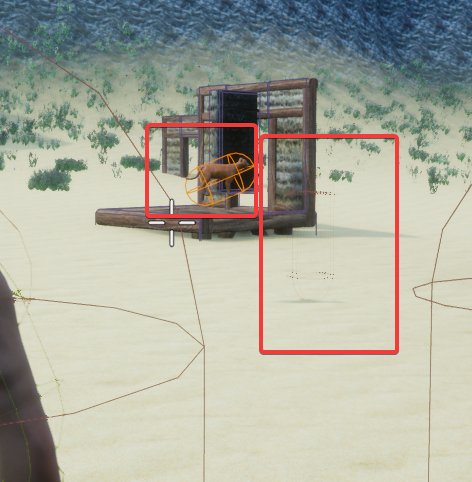
Red box on the right, its hard to see but its the collider
and the cat is floating
i dont get it...
twin juniper
is this really
a 2 hour and 22 mins concept?
i think not.
paid by the hour
im assuming
 tall grove
Hi , im noob on multiplayer things , how can client replicate things? I saw tutorial videos but , here the client never interact first :https://www.youtube.com/watch?v=wutqpyDKnCQ&index=3&list=PLZlv_N0_O1gYwhBTjNLSFPRiBpwe5sTwc

This video shows you when to use function replication versus variable replication and discusses the concept of reliable versus unreliable function calls in B...
tall grove
Thanks , so for things like doors ,chest . What is the best strategy RPC or Onrep variable?
trail dragon
Can anyone explain how seamless travel works
Do you just have to enable it on the game mode and then it'll just work (tm)?
I know that it loads a loading-map between the two.
twin juniper
@tall grove i would tell the client to ask the server if this door can be opened (rpc), and then have a bDoorOpened (onrep) so all other clients know the door has opened
there is actually a content example that describes the problems and solutions for this exact problem, they use a chest for example
Content Examples under the Learn button in the epic games launcher
then just check out the Network_Features map in there
tall grove
@twin juniper Thanks i just attached that video , i will try to do again
Downloading Content examples , thanks
twin juniper
Does bUseNetOwnerRelevancy also mean that the owners NetUpdateFrequency and MinNetUpdateFrequency will be used?
no
it means it will use the owners relevancy
Yeah I'm just making sure the NetUpdateRate stays the same, thanks
 sharp wasp
Are there any good examples on how to handle Multiplayer inventories properly?
 civic belfry
anyone ever run into a bug where a BP's root static mesh will spawn, but nothing under it in the BP? It shows all of the elements fine when dedicated server is disabled. when I enable dedicated server, only the root componant shows up
frustrating!
thinking I might have to make a video to demonstrate
twin juniper
hey uh
 atomic holly
im having an issue, im running my game in the editor with 1-2 players and with run as dedicated server checked and everything works fine but when i build the game and the dedicated server i get warnings "access none" in the server log. Any ideas why this is happening, im thinking its a bug with 4.17?
civic belfry
I see accessed none when I PIE with dedicated server on 4.16 too. haven't tried building and playing yet though
you using the shooter game template?
see it in my output log I mean
atomic holly
yeah the issue is i dont get any errors or warning in the editor and the game works, but when built the dedicated server throws warnings
i started with the shooter game template yes
civic belfry
if you search your output log when you PIE, I feel like you're going to see it buried in their somewhare
not sure though, still getting a grip on the project
civic belfry
hmm, not sure. I'm going to try to build this evening just to see what I'm in for. I haven't modified anything that should prevent it from working so I'll let you know what happens!
atomic holly
just dont update to 4.17
civic belfry
lol
ahh I see something, our issues might be different. mine's referencing something I've added to the template
PIE:Error: Error Blueprint Runtime Error: Accessed None trying to read property K2Node_Event_DamageCauser from function: 'ExecuteUbergraph_BP_DENT_MASTER' from node: DENT DM Server Generic Damage in graph: EventGraph in object: BP_DENT_MASTER with description: Accessed None trying to read property K2Node_Event_DamageCauser
LogScript:Warning: Accessed None trying to read property K2Node_Event_DamageCauser
DENT destruction system
I'll still build though, just for curiosity
atomic holly
you understand what that error means yeah?
civic belfry
yeah, means I need to do more than just install the plugin and run it lol
I just added it last night
civic belfry
ouch, definitely going to hold off on upgrading then. I'm restricted to whatever nvidia gets working with their volumetric lighting build for now anyway
always itching to upgrade though lol
atomic holly
so was i, updated worked on the project for over a week, then built the game, but when i try and run it the game crashes on launch....
cant revernt to 4.16 now and cant build my game
civic belfry
if you run it from visual studio does it give you any log info?
I'm guessing wild shit lol
inner iris
Damn just updated to source 4.17 a few days ago... will test a build today on the server, hopefully won't get any errors
modern dome
void AARPG_GameStateBase::GetLifetimeReplicatedProps(TArray<FLifetimeProperty> &OutLifetimeProps) const
{
    Super::GetLifetimeReplicatedProps(OutLifetimeProps);
    DOREPLIFETIME(AARPG_GameStateBase, partyPawns);
}```

I get these errors:

```cpp(12) : error C2275: 'AARPG_GameStateBase': illegal use of this type as an expression
cpp(12) : error C3861: 'DOREPLIFETIME': identifier not found
Are the docs not up to date again?
thin stratus
Seems like you didn't include everything
 tropic moat
for DOREPLIFETIME you need UnrealNetwork.h
modern dome
Ah, thanks. Good to know it isn't mentioned anywhere 😄
modern dome
When is the GameState Object spawned?
I thought it is spawned within AGameModeBase::InitGame(), but it is null within the InitGame of my class (Super:: call at the beginning tho)
if(state) is not executed, too.
tropic moat
AGameModeBase::PreInitializeComponents()
you have GameState = GetWorld()->SpawnActor<AGameStateBase>(GameStateClass, SpawnInfo)
modern dome
to initialize parameters and spawn its helper classes.
no definition of "helper class" of course
But thanks nonetheless.
modern dome
@brittle sinew No one said GameState gets spawned in PreInitializeComponents
not to mention that GameState is not a Component
brittle sinew
Well, @tropic moat just did
modern dome
yeah, but it's not in the Docs
brittle sinew
The source is your best resource 😃
modern dome
I don't wanna look up the source everytime I want to do something.
jolly siren
lol
tropic moat
what
brittle sinew
Would you rather read the source than run into issues like this? Hehe
I agree you probably shouldn't have to look at the source for everything, but me agreeing doesn't change anything 😄
tropic moat
like @brittle sinew said, source is your best resource, you should read it
brittle sinew
The docs are the way they are, that's just the reality
tropic moat
or at least learn how to look up things quickly, i didn't know where the game state is spawned
just looked it up
modern dome
A cleaner API + Docs would help aswell 😛
brittle sinew
Sure, I agree
But again, so what? :p
I'm not saying it's ideal, I'm just saying it's your best bet of understanding how things work in the current UE4 ecosystem
Even if the docs are perfect though, seeing exactly what a function does is a totally different realm of seeing what's going on
Not just what the function does, but how it does it
modern dome
@brittle sinew Of course you are right.
But when InitGame says it "spawns it's helper classes", what would you expect?
It's the same problem I encounter way too often with UE:
The Order of Initialization / Spawning is unpredictable when you first touch the classes.
brittle sinew
Well, personally I wouldn't leave it to expecting or predicting, going to the source of a function is one shortcut...I'm not trying to argue the docs are great and can't be improved, I'm just being realistic
The source is available for you right there, and I think if you learn to take advantage of that you'll be more productive
If you look at something like Unity or the win SDK the docs are really good, but you don't have the source, so they kinda really have to be 😄
modern dome
Uhm, guys? Related to my problem from yesterday (Pawns not moving when touching a special actor):
It looks like the NavMesh disappears after a ServerTravel
Before ServerTravel (Started with PIE here)
After ServerTravel
Ok, it looks like PIE doesn't like travelling at all. It works in Standalone
 mossy saddle
I've got a basic LAN session multiplayer working in the 3rd person template. How do I get it to work over the internet? Should I use the Steam online subsystem for this?
timid pendant
@mossy saddle You can either use the steam subsystem or the NULL subsystem to customize yourself.
mossy saddle
Customize the NULL subsystem?
And is the Steam subsystem freely available for anyone?
tall grove
Steam is freely
trail dragon
You must be on Steam to use the Steam subsystem
If you aren't there, you will need to modify the NULL subsystem to work across the internet or you will need to write your own Subsystem
mossy saddle
Alright, thanks for the help!
tall grove
How can i do for clients replicate thing like open doors ? i tried with Onrep function but server dont noticed about this
 rare cloud
@tall grove, if you want to send information from client (client -> server) you must use RPC
standard replication and so OnRep, is design to replicate only from server to client
tall grove
@rare cloud DOC says " If it's invoked from a client, with a target that the client owns, it will be replicated to and run on the server. "Run on Server" events are the primary method for clients to send data to the server." but my client doesnt own door or server map stuff
rare cloud
depend of your game
but the easiest integration will be to use an Interface that you call IInteractableActorInterface
 cloud ledge
In our game, doors are synced by their position & target position
So the door component just has those two replicating variables, plus a custom logic that syncs visible position based on server reported position & target position
Since the doors have some physics
rare cloud
when character input the key, you call an RPC to server, server make a raycast, if an actor is hitted, get it and check if it's a IInteractableActorInterface, if yes call your interact function
and don't forget to use an RPC
to update the change to all connected clients
or
use a bool for the state of your door inside your actor
replicate it to all
and simply set it on server side
the idea is to be more generic and work for more than door
tall grove
sorry i missunderstanded . I have a interface Interact , the problem is that RPC client to server doesnt work cause client dont have ownership about stuff map
maybe , are you saying to have interact rpc on player character instead map stuff.... i gona try
fossil spoke
@tall grove Whats the problem mate?
tall grove
I dont understand how to do clients notice other clients that door is opening or things like that
fossil spoke
Have you checked out Epics tutorials on Replication?
tall grove
yes
fossil spoke
What part are you not understanding?
tall grove
This video shows you when to use function replication versus variable replication and discusses the concept of reliable versus unreliable function calls in B...
why RPC on server doesnt fire
if client interact with door , and door summon rpc on server , this flow doesnt fire
fossil spoke
So the general idea is that Clients tell the Server when they want to do something (such as "Open Door") and then the Server performs that operation and then tells every other Client about it.
tall grove
soo all RPCs should be on Player controller or derivated classes?
fossil spoke
Not necessarily. You can only call an RPC from an Actor that has an NetOwningConnection, the PlayerController and PlayerCharacter are examples of Actors that have an NetOwningConnection
I would put the RPC on the PlayerController though, like you suggested.
Your Door also needs to be marked for Replication
tall grove
Thanks , its marked
fossil spoke
tall grove
i will try again
fossil spoke
bReplicateMovement should also be checked if your attempting to move the Door as well.
tall grove
is not marked
oh MY GOD !!!!!!! WORKS
Thanks a lot @fossil spoke @rare cloud @cloud ledge
PD: actors reference can change form servers and clients?
 worthy wasp
I'm activating/deactivating a UParticleComponent on my character class properly - as with any functional replication means.... i'm trying to get the particle that i'm using on this guy replicated to network clients.... by means of Local->Server->Multicast. I cannot see the particle effect on networked clients - i've set the component to replicate... still nothing. I DO have an array variable, that i'm switching out the components particle system its using - do you think i need to have that replicated too?
Local-Activates/Deactivates the Component, runs server
Server-Runs Multicast
Multicast - Activates/Deactivates the Component
ok i didnt notice this till now - i'm getting a "No Owning Connection" warning preceding this chain - this chain is firing off an AnimNotify in my ABP.....
fossil spoke
You probably need to send the RPC through an proxy that has an net owning connection, such as the PlayerCharacter, i explained this above earlier.
Let me clarify, on the Client side you can only RPC to the Server with an Actor that has an NetOwningConnection.
IE: PlayerController, PlayerCharacter
@worthy wasp
worthy wasp
ok to clarify this Devils - i'm using an animnotify - which is coming from the player character's ABP class..... ownership shouldnt even be an issue at this point
TryGetPawnOwner->Cast(CharacterCLass)->StoreAsVariable (this is in ANIMBP)
OnAnimNotify()->CharVariable->RunFunction
fossil spoke
Is RunFunction the RPC to the Server?
worthy wasp
RunFunction is a local function in the character class - described above
i've passed appropriate args through the RPC chain - everything LOOKS to be good (passing args wise)
i cant get hte VFX to display 😦
on NETWORKED clients that is
fossil spoke
The netowningconnection issue is the problem
fossil spoke
I said that you need to call the RPC that its complaining about on an Actor that has an NetOwningConnection.
Im not 100% sure but i doubt that an AnimBP has NetOwnership
What Actor does the RPC to the Server exist on?


 fossil spoke
Can you paste the actual NetOwningConnection error, it should tell you which RPC is not being fired.
worthy wasp


the class that is havivn the AnimNotify call the TurnOnQDevice() - is the same class that is spawning the NETOWNERSHIP error
the blue arrows indicate the RPC that will be ignored
now....
i couldnt post this before because i was answering your question
when i interject IsLocallyControlled->Branch().....
i dont get ht error
it flies through all the code
HOWEVER
it still doesnt produce the VFX
the TurnOnQBeam is a C++ function that simply Activates/Deactivates on the boolean arg passed
it is a local function - without RPC - and due to the fact that i'm running this from RPC - it should be ran as server/not approppriately
fossil spoke
LogNet:Warning: UIpNetDriver::ProcesRemoteFunction: No owning connection for actor BP_AK47_HS_C_0. Function Test will not be processed.
Thats the error you get yes?
worthy wasp
yes
fossil spoke
I find it hard to believe that your Character is actually throwing that error.
Can you post yours please.
worthy wasp
LogNet:Warning: UIpNetDriver::ProcesRemoteFunction: No owning connection for actor BONUS_3PCharacter_Child_C_1. Function Server_TurnOnQDevice will not be processed.
brittle sinew
Are you spawning your pawn manually?
fossil spoke
Was about to ask that.
brittle sinew
Yeah, if they're spawning their pawn manually they'd need to set the owner to the correct controller
I didn't actually look back through the whole log closely...you know that the AnimBP notifies fire on all clients, right? @worthy wasp
I see you're using the "Is locally controlled" which would get around that, but if you're still getting that warning it's most likely a basic ownership issue
 lament kettle
Do i do stuff within the character or the controller?
ex. pressing the action key to pick up the item.
does the item get attempted to picked up in the character or controller?
fossil spoke
@lament kettle You can handle it however you like.
lament kettle
But pawns/characters are rep'd to other clients
so more buffer
but controllers are not...
so wouldn't that mean less data being sent to players?
fossil spoke
You need to be smart about what you want other Clients to know for sure. If for example you were picking up an Weapon, thats kind of something you want other Clients to know about.
Eitherway, if you press an button to pick something up, you still need to tell the Server about it.
For example if it was something like Selling an item in your Inventory for Gold.
Other players dont really want to or need to know what you sold or what you got for it.
But the Server needs to know that.
So however you manage it, there is still information that needs to be passed around.
Being smart about what gets passed around and when is the important part.
lament kettle
Hmmm, I think.. I'll leave things in the character/pawn unless it becomes necessary for the controller.
fossil spoke
It might even come down to an design issue for you. Perhaps you can change Characters during the game, maybe only one type of Character can pickup Items, so it wouldnt make sense for that type of functionality to be inside the PlayerController where it would be wasted. Keeping that functionality on the Character that can pickup items would make more sense.
But again, there is nothing stopping you doing it how you please.
lament kettle
I may have classes...
So i think it would make more sense to keep things within the character...
I'll probably clean up the inputs into the PC later...
when the game needs polishing
trail dragon
How do I check if a player controller is the host?
Have a UI menu where I want to only show an option if the player is the host (ie: a settings menu)
 warm pagoda
That might do coupled with checking if you're on the server.
ENetMode::NM_ListenServer
If it's UI though, you could just check for running on a listen server and be done with it, no?
trail dragon
I guess, but Has Authority is already in BP and Net Mode is not :p
There's "Is Server" too, "Returns whether the world this object is in is the host"
Sounds uh, like what I want
trail dragon
@warm pagoda you're right btw, the IsServer node just returns World->GetNetMode() != NM_Client
warm pagoda
👍
Yay, more mixing terminology between BP and C++
What could go wrong...
Well, not so much terminology, but BP API equivalents not being obviously related to C++ API
trail dragon
Yeah, thank goodness for "Find in Code" orw hatever
 grizzled summit
Is here someone experienced with the usage of beacons?
grizzled summit
Only need a few small hints to make it work, maybe he contacts me next time hes online or maybe answers here 🙂
pallid mesa
question, if im in a UActorComponent, for replication i would use this, right? void UShooterWeapon_FiringComponent::StartFire() { if (GetOwnerRole() < ROLE_Authority) { ServerStartFire(); } ... }
GetOwnerRole()
sterile pebble
@pallid mesa, yep. I'm not sure if GetOwnerRole() exists, but you are on the right way
pallid mesa
it does
pallid mesa
if you are not sure if it exists why would you tell me that im right? xD @sterile pebble
i want to know the good way about uactorcomponents replication
sterile pebble
this is right way to do it
you check component network role and in case of non-authority you send server RPC
in other case you do what you want
pallid mesa
well if there is something better than do this every time i want to check role i'm up to it ENetRole UActorComponent::GetOwnerRole() const { AActor* MyOwner = GetOwner(); return (MyOwner ? MyOwner->Role.GetValue() : ROLE_None); }
yeah i know networking on actors, but im virgin on uactorcomponent replication
sterile pebble
its same, basically
pallid mesa
maybe there is a better standarised way
sterile pebble
I have made weapon system with components in released game, where I used simillar approach. It worked without any problems in terms of performance or player feelings.
pallid mesa
well im all ears
 calm zenith
anybody knows if there's c++ steam integration tutorials apart from https://wiki.unrealengine.com/4_13%2B_Network_Guide#Steam ?
brittle sinew
There's this if you haven't seen it, it shows how to link the SDK https://wiki.unrealengine.com/Steam,_Using_the_Steam_SDK_During_Development
If that's not what you're going for, what's the issue?
calm zenith
well main resources with full on steam integration I found were mainly blueprint oriented, including all menus and so forth
having something to gnaw on based on c++ would make a bit more sense
at least how it integrates with unreal
sharp wasp
Is there any good example for listing dedicated servers via steam?
calm zenith
@brittle sinew I seem to have found some leads I might be able to grab onto, thanks
tropic moat
i just realized i didn't read the comment for a Ping variable and was using it wrong for days ...
/** Replicated compressed ping for this player (holds ping in msec divided by 4) */
: (
there is ExactPing, that stores correct value
trail dragon
I'm having a brain fart, by default the Player Controller is the only time a client can call a function on a server (correctly) yeah? So if I want to do something I have an object tell my PC to run a function (which is "Runs on Server") and then that will get run on the server and thus changes can be propegated to other clients?
tropic moat
Server RPC should work on any actor that is 'owned' by PlayerController
but you can just use a PlayerController
how do you want to propagate changes to all clients ? replication ?
trail dragon
@tropic moat short version: Player presses a key to swap between which pawn he controlls. GameMode created both pawns and keeps track of which PC they belong to.
So PC (client) -> PC (run on server) -> GetAuthGameMode()->RunSwapFunction
I marked the swap function as Server/Reliable/WithValidation, but realized that there's no where for it to... replicate to hah
tropic moat
you should be able to call RPC on a character possessed by a PC
is that swap function NetMulticast ?
trail dragon
@tropic moat it doesn't matter, the GameMode only exists on the server... so there's no where for the function to be replicated to.
The function just calls Posess anyways and that is already replicated so
tropic moat
ah
 dark kernel
heya. so i'm 100% new to multiplayer stuff and I'm looking for where in the Third Person demo project the blueprint info is that spawns the player that connects as simply dragging a second playerstart into the level doesn't seem to do it.
tropic moat
right, i often forget that : D
dark kernel
the ThirdPersonGameMode BP is empty. maybe I need to look in the C++ project instead?
trail dragon
It's probably in the default C++ class yes
dark kernel
ah ok. thanks
trail dragon
What exactly is your problem/goal here
dark kernel
Rigth now, I'm just trying to get it so I can spawn in a second player into my own project.
trail dragon
local multiplayer or online/lan
dark kernel
lan
trail dragon
If you just want to test with two clients connected to each other, hit the dropdown arrow next to "Play" and at the bottom set it to two
When you play it'll start two instances of your game and connect them to each other
dark kernel
right. the second client isn't spawning a pawn which is where i got confused. and went digging in the TP demo proejct
trail dragon
What do you see on the second instance's screen?
dark kernel
looks like a basic default pawn. No controls or anything. The first instance spawns a player fine
trail dragon
The game, by default, should spawn everyone who connects as the default pawn class set in the game mode unless you've changed code
dark kernel
maybe i have something goofy there then. i'll check
huh it actually is spawning in the pawn, but no controller. I think I know where the problem is now. Thank you 😃
trail dragon
It should spawn controllers too...
The server should have all player controllers, clients only have their own player controller
dark kernel
not if i don't have one set >.>
i made a dumb and put my input in the pawn BP, not a player controller bp
trail dragon
You can put input in the pawn BPs as long as you use Axis and Actions from the Input Manager and not hardcoded keyboard/button values (iirc?)
dark kernel
hm
the second pawn definite;ly appears as if it isn't being possessed
yeah only one player controller is being spawned
trail dragon
on the server or the client @dark kernel
dark kernel
Which will be the server? The one in the editor, and the extra window the client?
assuming i set my clients to 2 under the play button
trail dragon
It depends on your advanced settings, by default I think the editor is "listen server" (which is server and client together)
dark kernel
yeah then it'd be the second window, the non-server
trail dragon
Clients will only ever have one PlayerController on their machine (in multiplayer, in what you're doing)
PC's are not replicated to other clients, just to the server
trail dragon
Can you post a picture of your second instance + your editor view with the World Outliner showing as much as possible?
trail dragon
Well it does look like they are connected, there are two players spawned and two cameras which make me think it is working as expected
Are you sure you're not just moving both of them at the same rate at the same time so they stay ontop of each other?
dark kernel
if you look in the first picture, the other one is spawned directlty in front of it. it definitely doesn't move when i move the editor version
I can move around it just fine with the editor version
trail dragon
Is your pawn set to replicate movement
dark kernel
yeah
trail dragon
🤔 Are you suuuure
dark kernel
i mean, the editor could be lying to me, lol but it's checked
trail dragon
So you have both Replicates and Replicates Movement checked? Because that should make at least the server's movements show up on the client...
dark kernel
yeah. I genuinely don't think the pawn is being possessed on the client.
trail dragon
If you move around your server pawn, do you see those changes on your client copy
dark kernel
so i messed around. the client is spawning the view at exactly 0,0,0 in the world, which is nowhere near the player start point. It's spawning the second ship (the one you can see from the editor) at the player start point.
trail dragon
Did you mess with how cameras work for your pawns
dark kernel
i have a simple static camera on the pawn
trail dragon
I assume your PlayerController has "Find Camera Component when View Target" checked
As well as "Auto Manage Active Camera Target"
dark kernel
i'll look
 sweet spire
just because replicate movement is checked does not mean its gonna replicate
just to clarify
dark kernel
think i'm in over my head here. x.x lol thanks for the help though. gonna have to do more reading
trail dragon
@sweet spire If you move the actor on the server, that should...?
sweet spire
well
trail dragon
Assuming it's relevant/in view
sweet spire
no
If u have the char movement component then yes it will
otherwise no it wont
it depends on setup
u gotta make sure your sending the info too the server
trail dragon
Like I said, if the pawn moves on the server the position will be replicated to the client if that is checked.
sweet spire
the only thing that has pre full network setup is the char movement component
yeah
but if hes not telling the server to move
its not gonna replicate
been here done that with spaceships around 6 months ago
been there(
there*
dark kernel
TIL: Networking/mp is hard man, lol
dark kernel
but then i owuldn't learn anything 😉
sweet spire
your in over your head too start with replicating physics movement too start with
tldr you moving around will not move the ship on the server
You need too actually send the server your movement data
dark kernel
I'm going to mess around with my third person demo instead I think as that seems simpler
trail dragon
In my (VR) game the player is represented by their head's physical location. Their pawn technically has the VR origin as the position of the pawn, however I want it so that when you spawn your head ends up over your spawn point and not your VR origin
Obviously the HMD data is client-side only about its position, so I need to send that to the server, ie: via the PlayerController. However, when the first player is spawned they haven't sent the data back to the server yet so it thinks their head is at 0,0,0... is there a smart way to resolve this, or do I have to make everyone a spectator until they send the data the first time?
 cyan bane
When you guys test what would you consider to be reasonable pktlag/pktloss/pktwhatever to use? I've been pktlag=75 with pktloss=1
Like in almost any game a player with a ping of 200 wouldn't expect the game to be playable. But 75 should be just fine.
tropic moat
i'm not sure about correct values myself, but i'm targeting ~120ms ping, to get this i'm using PktLag=50, PktLagVariance=20 on both client and server
cyan bane
Wait, so if you have PktLag set as 50 on both the clients ping is really 100?
Because I thought if you only set PktLag only one then nothing happens
tropic moat
i just set values for PktLag and observed how the ping is changing, looks like it's more or less sum of PktLag
but i'm no expert so don't quote me on this
 solemn moat
For multiplayer on Android, should I write here, or at the mobile category?
sweet spire
here
lone iron
what's a sane way to do client authoritative networking? I get the feeling doing GetNetMode() == ENetMode::NM_Client and sending server events isn't the best idea
but i'm a little unsure what other test you could use
trail dragon
@lone iron I don't think you want that, I think the client on a listen server wouldn't be able to move then 😃
I did IsLocallyControlled() in my pawn, though maybe it's better to use ROLE?
 hasty adder
Hm
So is it true you should try and lower the character net update frequency. And it will keep the location or what
Wish there was a video example of how it works. Trying to get fast moving characters to rubber band smooth instead of glitch when they take a random direction change.
 rough iron
@grizzled summit @thin stratus what's up? In short a beacon is just a simple socket for data interaction without creating a real game connection. I got a small guide in the wiki about it. @clever peak published a beacon lobby system on the marketplace following the idea in the wiki.
fossil spoke
@rough iron Can really put together an good party 😉
solemn moat
Is there a video tutorial for a working Android multiplayer blueprint?
I'm new to unreal and I want to make a game where everyone can host or join a game in one of my maps
sweet spire
@solemn moat id start by actually learning basics of networking and ue4 multiplayer, theres not just a video thats going to explain it all too you
and hosting on a mobile device? im not sure if thats such a good idea
just so you know its not a case of enable multiplayer and thats it, replication is not so basic
rough iron
@fossil spoke yeah!
rough iron
Hosting on a mobile device is a very bad idea though, mobile internet is extremely intermittent. What you want to do is to build a backend
sweet spire
im not saying its impossible to host on a mobile device
rough iron
and communicate with that one
sweet spire
^
rough iron
You can of course host on a mobile device but your players will suffer it
sweet spire
and i cant stress
if your new to unreal engine 4, and dont know the basics of game networking
rough iron
even for the simplest of interactions
sweet spire
You cant just pick this up from a video
rough iron
@solemn moat arrow.io might seam easy to build but their developer is not a small one => http://www.cmcm.com/en-us/

Cheetah Mobile, the world’s leading mobile tools provider, is dedicated to provide a faster, safer and easier mobile experience for its global users.
so the effort to build a high-scale mobile game is actually very hard, not to mention to aim to such a thing as your first MP experience
solemn moat
So where do you think I need to start? I'm interested in Android games with unreal engine
sweet spire
well you need to learn how to use the engine first
then uv got asset production
networking understanding
multiplayer,
if your planning to sell it you need to setup a legal entity, aka a ltd company
theres tons too it
so take it one step at a time
solemn moat
So many things I didn't even know 😛
 supple bloom
So many things you'll wish you never had to learn 😛
sweet spire
its not an easy process lmao
solemn moat
But I want to learn them! Just don't know where to start
If it's an offline Android game, is it easier?
supple bloom
An offline game is a good milestone I think
sweet spire
well start by making a single player course
supple bloom
Get the mechanics down and what makes the game fun
sweet spire
obstacle course or something
solemn moat
I have followed some YouTube tutorials
I made a survival horror game
Third person, first person
One sidescroller
sweet spire
just keep practicing then
solemn moat
K I'll do that
If I make something for pc, can I just pack it for Android and it will work?
sweet spire
yes and no
yes u can
but i doubt its gonna work off the bat
you gotta test your stuff across multi devices
find issues
and fix em
solemn moat
And u test them with emulators on pc, right?
solemn moat
Ok thank you for the info. I think I'll keep practicing offline for now
I'll let you know how it went 👍
modern dome
So, I successfully implemented a TimeOfDayUpdater and a TimeOfDayActor.
The Updater is spawned from the GameState and the Actor searches for the Updater before BeginPlay.
My Question is:
Should the Updater and the Actors be local (They are only cosmetic) only instead of replicated?
Maybe the TimeOfDay should be synced periodically. Can I do something like this?
inner iris
Is there a way to play a packaged build locally with bots without having to connect to a dedicated server, but keep the logic the same? Right now my game works online and when connecting to another client's listen server but when launching locally, only the client movement works and nothing that involves the server is working (pickups/firing etc). Is there a startup command that'd launch the game / map with the player as a client, as if connecting to a real server online?
lone iron
@Matt "@LordNed" Hoffman#3445 as far as I know it's the only way to do lag comp in ue4
 clever peak
Online beacons are pretty handy thanks to @rough iron for his wiki, very helpful.
rough iron
yep that's @clever peak s pack ^^
jolly siren
awesome 😃
clever peak
thx
grizzled summit
@rough iron Thanks for your reply. I was reading here https://docs.unrealengine.com/latest/INT/Gameplay/Networking/OnlineBeacons/ about the beacons. They talk about the TestBeacons (Host + Client). And I was wondering if there is any short guide on how to do first steps with (test)beacons, without having to do it like trial and error
Would appreciate any help 🙂
Overview of the Online Beacon system
sweet spire
dam @rough iron thats really nice write up, think of adding some examples?
tall grove
How can i see why player is kicked from server? im testing and when i connect it sends me to main menu
sweet spire
Your not connecting then
if i remember correctly
but i might be wrong
things like that happen if you try and load an invalid map
or the server connection is lost, u load up default map i think?
havent had that issue in months so cant remember off the top of my head
tall grove
server starts on main menu map , create session on steam and load new map , client equal
rough iron
@sweet spire yeah that would be nice, time though xD
tall grove
i think is cause event begin play of blueprint level is not syncronized between both
sweet spire
@rough iron i can imagine your super busy haha, everyone packed with knowledge is, beacons really intrest me, can u only request server information with them? or can you send it or do anything super fancy like server too server communcation just curious*
rough iron
It's just a socket, in the wiki I go through the merging of parties which is kind'a server to server
sweet spire
ooo oki, ima take a proper read i skimmed through it quickly hah
rough iron
While if you aim to a more backend based mmo game you might want to add a good distributed messaging queue systwm
Systwm*
Arrrr system
sweet spire
ahh
rough iron
Yep
sweet spire
something im going too have to take a look in too
iv always been wearly of using outside things, and plugins incase they ever go out of date or break and i cant get them back up and running 😂
rough iron
Yeah but sometimes it just takes too long to make it all in-house
sweet spire
Yeah your right thats true
tall grove
Can someone bring me the strategy to manage when a player character triggers something to interact? Collision should managed only on server or all sides? Reference to pawn on server and clients are the same?
sweet spire
anything major should be server
vfx and non important
client
thats a decent basis for it i guess?
trail dragon
@tall grove how familiar with multiplayer concepts are you
tall grove
this is my second day in multiplayer stuff 😂
trail dragon
Okay I've got 15 minutes before a meeting, I'll do my best to crash course you
I assume you're talking about generic multiplayer fps like games, yeah @tall grove? (like counter strike, not like an mmo)
tall grove
yes
trail dragon
Okay so, multiplayer. The first thing to understand about multiplayer is that is that it is not actually a shared world. Everyone is in their own isolated world and your goal is to give it the apperance of a shared world between all players. What happens on one machine doesn't have to happen on another in exactly the same way (non-important vfx), etc.
tall grove
Yes
trail dragon
Unreal uses a "server client" model. This is fairly typical, which in practice here means that you have a server (who is the "authority") and clients. The clients are all connected to the server, and clients don't connect to each other. (People will argue about what exactly server/client means so I'm just outlining my understanding of Unreal's)
Clients don't replicate any data to other clients on their own - and everything you change in your game only happens on your client unless you (or the engine) specifically sees that change and propegates it to the other clients.
So if your character overlaps a trigger that marks them as winning and you tell your finish flag to play an animation, by default, that's only going to happen on the local client - no one else will see that you've won or see that animation.
That being said - only UObject-derived classes (thus Actors) can be replicated across the network. If an actor is replicated then it means it has the same identifiers on the server and the client. The actor must be spawned on the server for it to be replicated though, so if you spawn an actor on the client (which you can totally do for client-side only effects that other people don't need to see) that won't show up for anyone else.
So your server spawns an actor, a message is sent to clients and it shows up on their machines. They touch a trigger on the client and the server - they technically point to different instances of the object (again, illusion of shared world, a reference is just a pointer to local memory) but Unreal has made it so that RPC calls will match up with the correct copy on the other end (because the UObject is set to Replicated)
So yes, a Pawn touches a trigger on the client - you can play effects like particles and sound on touch, but those by default won't necessairly get replicated down to other clients. If the server-side copy of the actor moves into a trigger, the server will send the position to the clients, so they should enter on all client's machines as well, but there's no gurantee that this will happen as the positions might be off - again, illusion of a shared world, not actually the same world.
I need to run to my meeting, but hopefully that gives you a general idea of what multiplayer actually means, you should probably ask your question again now that you (hopefully) have a better idea
tall grove
Thanks a lot for your Knowledge , you are nice person
trail dragon
"Collision should managed only on server or all sides" <- all sides, but server should be final call in critical situations. The CharacterMovementComponent handles this for you (it's like 10k lines of code...) so hope you're making a game that can use this.
"Reference to pawn on server and clients are the same?" <- effectively, RPC's you call on the reference will match up to the same conceptual one on the other end.
tall grove
Thanks a lot , i will work with this . Good luck on meeting 😃
trail dragon
@tall grove https://docs.unrealengine.com/latest/INT/Gameplay/Networking/ this is for the C++ side, but 90% of it applies to Blueprints as well.
Setting up networked games for multiplayer.
tall grove
i Saw exis compendium online and videotutorial of Unreal engine YT.
are there any usefull stuff about networking?
trail dragon
The networking compendium is a good quick-start, and the one I linked is a good technical version of it, but I don't think either of them teach the concepts of multiplayer/what things actually get sync'd
So you'll probably have to ask in here about what goal you're trying to accomplish at any given time and we can help advise on the best way to try to make that happen.
tall grove
Thanks a lot again . im really happy about your reply
twin juniper
Hey how do I name splitscreen players the same name as player 1, only with a (1) or a (2) or a (3) after it?
trail dragon
@twin juniper each one should get a PlayerState right? I think you'll have a PlayerController for each , do both of those emit OnPostLogin events?
twin juniper
All have a PlayerState, all have a PlayerController, all print the correct instance number
They all spawn using OnPostLogin
trail dragon
You might need to map PlayerController -> underlying network connection to see which number they are, but there's no gurantee that they'll connect in the same order so the second local player may not be without the (1)
twin juniper
I am using AdvancedSessions too
I'm not too concerned about the (1) .. (2) .. (3) being out of order
😃
So how do I go about mapping PlayerController and such?
Some splitscreen games can have multiple splitscreen hosts
trail dragon
Do you know C++
twin juniper
so there could be 2 main players, each having 1-3 splitscreen players too
I'm doing this just in BP ):
trail dragon
It looks like PlayerState has both UniqueId and PlayerId
You could see if any of those match for the PC's that come from the same machine.
trail dragon
And they end up with the same exact name yeah?
twin juniper
no, one is my correct name, the other is a few numbers
I am connected to Steam
^It's how I want it to be setup though, thru using Steam
trail dragon
So the Steam Subsystem automatically sets the name to your local steam account, you could look up the C++ code for that and modify how that works, but that will require C++ code again
And probably building the engine :<
twin juniper
😮
I'm setting the PlayerState's PlayerName to a visible text called "UserName"
is there anyway before I set it to that "UserName" variable
I can loop thru some id or name variable...
which might return "it's the same"
however many times it returns "the same name" I just add a new INT inside a string of "()"
trail dragon
I mean that's what I was suggesting earlier is possible ways to find which PlayerController/PlayerStates come from the same physical computer
twin juniper
not too sure about all the ID and Name variables I can pull out of Steam stuff and regular
right
well, I know they all have different controllers
GetInstigator of PlayerState?
trail dragon
Instigator is for damage stuff, it'll probalby just report their (differing) PlayerControllers
twin juniper
right oops I read the tooltip lol!
trail dragon
Hmmn here's a different idea. In your GameInstance (since there's only one of those per client), you send a message after you get connected to the server that contains your names
I bet GetPlayerController(0) returns the one with the proper steam name. Then you can get that name and add (int) after it and send a message from client to server that goes "Hey, these should be our names for these player controllers". Then on the server you set the PlayerState->PlayerName of those PlayerControllers. That should get replicated down to other clients.
You won't be able to send a message from client->server until OnPostLogin has happened (which only happens on the server) heh
twin juniper
ForLoop the PlayerStates, GetUniqueID from AdvancedSessions plugin, if valid and the one before is valid, -- from the for index and get that player name, just set it
if not valid, -- one more
you'll get the base player's name eventually
I'm sure splitscreen characters spawn all at the same time
trail dragon
GetUniqueID should always be valid and should always be different
Key word there "Unique" - how are you going to tell that two unique things came from the same computer
twin juniper
it's not for splitscreen unfortunately
it has an IsValid node, if you test with splitscreen it will always return ..
uh
No NetSession ID !!!
all caps or something similar
it's from AdvancedSessions plugin
BPUnique Net Id Structure "type"
trail dragon
Interesting. There's no gurantee of order for PlayerStates, but maybe in practice it is ordered?
twin juniper
the Net Id Structure type can be taken direct from a PlayerState, or on its own from a controller. Both return invalid if it is duplicate
no Steam user should be in a match twice, Steam is strict about that lol
well, it prints totally correct
"ordered PlayerStates"
no mix-match of (1), (2), (3), etc.
I think in multiplayer games...too...it forces all players of one machine to join at the same time somehow
or order them as they come, I think even if another player joins with their own splitscreen, it orders it up just fine with no splitscreen player joining until its host machine joins in with the rest of its players
something along the lines, I will test juuust a little later
trail dragon
@twin juniper what if two players try to join at the same time
I'm just saying there's probably not specific code that gurantees that they will always be perfectly in order. Realistically yes you can probably get away with it, but it's not likely guranteed. This means it will probably work, but if you start getting bug reports of people having the wrong names, you'll know what to suspect
twin juniper
well it doesn't actually assign the wrong names. It will assign a new name, the few lengths of digits, in case of any mishap in spawn order
 balmy gazelle
Someone knows why the Shooter Game crash if you open 2 instances and try to connect from one to other in local ?
 elder ravine
hey guys anyone know why my game is giving me this error when i'm trying to package it?:
PackagingResults:Error: Error Unknown Error
What could this be. I don't find any erros in my game file. Everything compiles just fine.
fossil spoke
Check the Output Log, there will be an Error there somewhere @elder ravine
sharp wasp
Is there anyone here with experience of dedicated servers?
 past bear
Minimal
what's up?
also, I'm following this through to get to grips with networked movement components:
https://wiki.unrealengine.com/Authoritative_Networked_Character_Movement
All of a sudden, the examples start using 'ExtendedMovement' and I have no idea what's going on - can anyone clarify?
sharp wasp
How would i for instance handle having a master server that pings other servers and if they are up at em to a list
past bear
that's actually an entirely unrelated question, lol
but also, shouldn't your dedicated servers contact the master server?
past bear
so your dedicated servers should reach out to the master to let the master know they exist
then the master should periodically check all listed servers to see if they are still online and get an update to their status
sharp wasp
Is this blueprintable or do i need to native code it?
past bear
alternatively (and this is probably better actually), the dedicated servers should just keep pinging every so often with updates
this is native code work
when a dedicated server misses say two pings, remove it from the list until it pings again
seems pretty simple
past bear
you need to build a dedicated server build
which may change your non-server builds as I recall
been a while since I've needed to do it
but it's a different binary
sharp wasp
Ah
I see you need to make a source build
After making one can i import it into ue4 editor and use bp?
fossil spoke
You only need the Source to build the server target, once you compile the Source you dont ever need to touch it again if you dont want to
sharp wasp
@fossil spoke But what if you create a new server event?
or does it automatically take that over
fossil spoke
You will need to compile the Server alot yes, but the actual Engine Source should only need to be compiled once.
past bear
yup
twin juniper
Hi friends how can I fix 2 bullets instead of 1 bullet while shooting a gun in my project
past bear
call spawn twice (also, this is a #blueprint question)
fossil spoke
There is all kinds of wrong in that pic haha
past bear
yeah, it's a bit confused
client left mouse and server left mouse?
server doesn't have a left mouse
twin juniper
I do not know exactly what it might have been
fossil spoke
@twin juniper So when you tell the Server to spawn an Actor, all Clients will also spawn that Actor automatically, so there is no need for you to tell the Clients to do that manually.
Take out the ClientLeftMouse event and you will be fine.
past bear
ah, now I understand the question
fossil spoke
That HasAuthority node is redundant as well since your calling an RPC to the server so its already Authority
 eternal anchor
@sharp wasp ? Question. Do you plan to allow players to host their own dedicated server and then just connect them to our backend, or do you plan to host everything and have something akn to match making ?
if the first I would let dedicated servers, register with your backend (say some database with their IP, name), when they run for first time
and then let backend ping servers every so often to check if they are still online
if not remove them from list
sharp wasp
@eternal anchor Allow users to host a server but let the master server control what servers show up
so servers can be blacklisted etc
eternal anchor
actually it shouldn't really matter who ping who, I think backed maight be better place because it keeps responsibility of checking servers in one place, but servers can just as well send updateds to your backend
twin juniper
hi
sharp wasp
@twin juniper Hello
 cold sparrow
guys, can some one help me to understand what is going on:
I have a character on a server that is controled by keyboard on a client side. I use AddMovementInput function to move the character. Everything works, BUT I see that at the end of move my character is like moving back a little bit. I printed actor's location, and I do see this (look at Y):
LogTemp: X=510.000 Y=1153.795 Z=190.150
LogTemp: X=510.000 Y=1159.226 Z=190.150
LogTemp: X=510.000 Y=1167.106 Z=190.150
LogTemp: X=510.000 Y=1174.199 Z=190.150<---------- stopped moving
LogTemp: X=510.000 Y=1171.250 Z=190.150< ---------why did it go back ?
LogTemp: X=510.000 Y=1174.188 Z=190.150
LogTemp: X=510.000 Y=1172.179 Z=190.150
LogTemp: X=510.000 Y=1172.057 Z=190.150
LogTemp: X=510.000 Y=1172.531 Z=190.150
LogTemp: X=510.000 Y=1171.610 Z=190.150 <---------- final position
LogTemp: X=510.000 Y=1171.610 Z=190.150
LogTemp: X=510.000 Y=1171.610 Z=190.150
any ideas/remedies/solutions?
oh, I printed the same log from the server side: postions do not match exactly, looks like on the client side it tries to adjust to what it should be. So in my case client moves a little bit faster than the server. And the end of move is adjustment happening. Any ideas if there is a way to sync positions better?
modern dome
@cold sparrow You can't do much about it. The Hitching is caused by the Prediction of the Client and the correction of the Server
This is happening because of the CharacterMovementComponent.
cold sparrow
hm... but let's say in Foxhole game (UE4) I did not see such lag, and this is over Internet, while mine is all local PC. I wander, is there alternative solutions?
modern dome
Local? Do you use NetworkSimulation?
cold sparrow
I run it thru the editor: 1 client, 1 dedicated server
basically, I move server character via client's pawn
tall grove
I think you can disable Movement component prediction , but im dont know what will happen
modern dome
You don't have to manually move the character on the server
Your Character Movement Component will do this automatically @cold sparrow
cold sparrow
@modern dome what do you mean by manually move the character on the server? I give commands from the client to move it on the server, but I want to visually minimize snapping
modern dome
Simply move the Character without a RunOnServer event
modern dome
what speaks against doing this?
thin stratus
If you want to constantly walk towards x axis. Nothing.
cold sparrow
My character exists on the server, I have just a like an empty pawn that has a camera on it and I track server character. But, let's say I change it, so player will own a character, how will other player know that I moved?