#multiplayer
1 messages · Page 336 of 1
 onyx haven
 twin juniper
Yes. So this will force the server to update the variable
Since they're all clients, they only know about their own movement. This should replicate it
I used it on my other projects. Hopefully it works for you
twin juniper
Hopefully this explains it better
Setup a switch and an event on both forward and side to side
Then you add the movement input and everything else of course
onyx haven
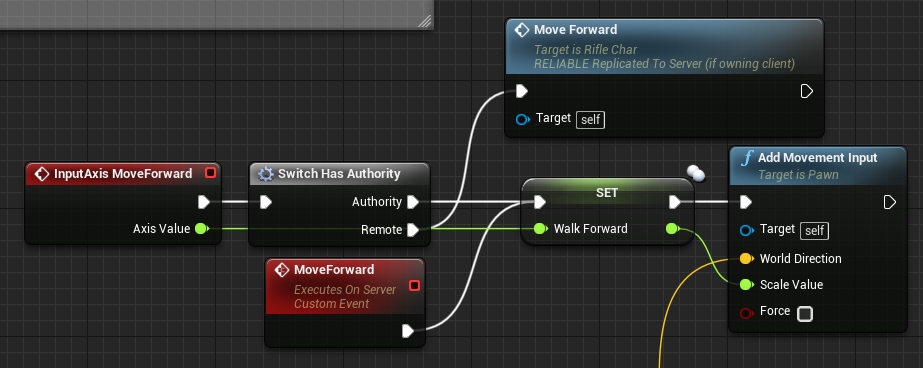 twin juniper
Do you have your animbp setup correctly? Have a string in your animbp printing the walkforward value. If it changes on both clients it's your animbp
If not, idk. That's always worked for me
 trail dragon
How do I get a FUniqueNetId from a APlayerController?
I see PlayerState::UniqueID which is of type FUniqueNetIdRepl, can I just cast between the two or is that bad
Though ironically it's irrelevant because Steam Sessions don't even use the FUniqueNetId lol
Oh. GetUniqueNetId from the UniqueId
 viral mason
I need to call an event (inside a widget) from a game mode event
This might not seem like multiplayer, but I have it working for server side (listen-server)
But if its a client, the event dispatcher runs on the server & not the client
trail dragon
Widgets are clientside only, I don't think anything about them can be replicated?
viral mason
So i was thinking of doing a event with a sequence
Well
I need to refresh the widget
when something in game mode happens
game mode has control over player state variables
and when i change a players health... I need to call this event to update a widget.
trail dragon
Use OnRepNotify and in that notify function tell your UI to update
viral mason
OnRepNotify for the variable?
trail dragon
Yes
viral mason
I need a reference to the health layers widget
Do i do that in playerstate?
Cuz that's where my player values are stored
trail dragon
you can't network widgets to my knowledge
whoever created or owns the widget on the client needs to store the reference and be the one to tell the widget to update
trail dragon
The server has no knowledge of widgets, widgets are not replicated
So the server cannot call a function inside of a widget
You can have the server call a function on the client blueprint and the blueprint can call that widget function
viral mason
the widget reference is stored in "playerhud" widget class
that controls the widgets
(Creating/Removing)
so
I get the server (game mode) to call a playerChar event
which then tells playerHUD to update the health layers widget
which then in health layers it updates?
trail dragon
You should probably look at some of the blueprint multiplayer resources available
But yes I think that is the gist.
viral mason
that seems like its going through way too many hoops
trail dragon
well I don't know why your gamemode is doing anything
viral mason
Game Mode has access over player state variables
So i have my "Modify Player _______" functions there
trail dragon
I... I'm not sure that's the best way to do it but okay
viral mason
The server needs to have access over adding/removing variables.
Player state is owned by the player, and values are "owned" by the server.
So the player has no control over values
then game mode can edit those values
trail dragon
Hosts should count towards the number of players in a session right, they just call Host and they don't have to join right? Cause it's reporting 0/<max> in a session when the host is hosting
Also where on earth do I turn off auto-connect in UE4's multiplayr testing stuff.
 lost inlet
If you're using Steam it always shows 0 players because the Steam OSS doesn't authenticate players
If it did, that would work
 lean river
Hey. Is tmap replication is supported with 4.16?
twin juniper
I'm trying to figure out the best way to handle player scores - currently I have an array in playerstate but it seems each client that's running playerstate is overwritting my variables - I think - what's the best way to track score only serverside?
Playerstate runs on every client and on the server right?
 tropic moat
Playerstate for each player is available both on server and clients, but data flows only from server to clients
tropic moat
if you want it to replicate then yes
replication is never enabled by default on your properties
twin juniper
Well tell me if this looks ok
tropic moat
i'll do my best but i'm no expert
twin juniper
ok it's a mess I know but everything before that give wave money event seems to work correctly
if I disable it and check the length of the array it has the correct values
I even tried to setup logic for if the array is being modified to wait until its done
tropic moat
is this blueprint running on server and clients ?
twin juniper
It's in playerstate
tropic moat
do that only on host, use SwitchHasAuthority
twin juniper
Or maybe I'm not adding the array correctly since if it's only running through once I'd have to somehow get it to define all characters
hm ok whats the best way to grab all connected player ids
also I'm currently using casting for passing variables because setting variables to visable and expose at spawn I don't seem to be able to do a get on them from another bp what am I doing wrong?
tropic moat
PlayerState has PlayerId, you can access player state for every player through GameState
never did that with blueprints
twin juniper
hm
twin juniper
oh sweet yeah found it player array
oh you beat me to it
that's super helpful
as for the visibility thing can you please teach me
i must be retarded
google isnt helping
twin juniper
Then how do I get it
twin juniper
and that's it? I can go anywhere and just have to do self get?
tropic moat
sorry that was probably was confusing example, that was just example how to access any public variable
i will prepare something better
twin juniper
❤
tropic moat
let's say blueprint A has variable EnableStealth
in blueprint B you create a variable
make sure it's public and the type is correct
and then
is it helpful ?
instead of StealthCamera in 'Type' it should be 'A' ; )
twin juniper
very useful
❤
Ty for all of your help I feel like I can actually make progress again! 😄
 inner iris
Have a quick networking 101 question- will the ServerFireWeapon RPC in this case wait for the client's bool to come through before firing, or would it just run through the branch even if the client had confirmed a hit or not? Might be a good place for a RepNotify bool in this case if so.
 brittle sinew
Well, how would the server function be called if the client RPC isn't?
Parameters of an RPC are available immediately, there's no waiting for replication
inner iris
"ServerFireWeapon" is a run on server RPC, it wouldn't be able to be called from the client like this? (Still wrapping my head around where and when you can call run on server RPCs).
So by that do you mean the correct bool will always go through, or it'll fire through immediately and not wait for the result?
brittle sinew
The function waits for its return to continue executing.
And I don't see why you wouldn't be able to call it here
You need one major thing to call a server RPC: an owning connection
brittle sinew
Which means the PlayerController owns the actor or indirectly owns the owner of this actor
It literally just goes up the chain looking at each actor's owner to see if it's the PlayerController
inner iris
Yeah so running on controller or character would work, but not on the weapon itself, right?
brittle sinew
If the character owns the weapon, you're fine.
inner iris
The main problem I am running into is that the fire function fires off a bunch of nested functions that ends with a custom event to make use of delay nodes so there's no one return I can pass through
So maybe using RepNotify bools would work better?
brittle sinew
(own in a literal sense—not just that it's on the BP or something)
brittle sinew
I'm not really sure why you're looking to use a variable here
inner iris
I'll quickly run through an overview of how the logic is set up now
 modern dome
Man, ServerTravel() still disconnects my clients 😦
inner iris
Player Controller- when input fire button is pressed on the client -> runs fire custom event on Player Character (Input is handled in player controller since I have AI controllers also controlling the Character so it made sense to make the Character generic without input).
Player Character- Custom event runs fire logic (on equipped weapon) on client first and checks if a player was hit. If a player WAS hit, I'd then like the server to also run a trace to verify if that hit was in any way possible, and if so, apply damage.
The problem is, the "Client Hit Player" variable is way down in a nested function in the Weapon BP with no clear return possibility
brittle sinew
See, making a class-level variable for something that just affects flow within an event just doesn't really make sense to me
What do you mean by that last message?
modern dome
@inner iris Wouldn't it make sense to do the whole hit detection on the server?
inner iris
I mean that if I call the "Client Fire" event from the Character to the equipped weapon, it can't return a variable as it runs a function to check what kind of weapon it is, and then from there it runs a regular custom event to allow for delays which doesn't have a return node
So I can't see a clean way of directly passing back a variable to the character to tell it to then fire on server
@modern dome nope it's not consistent for players- higher ping players have to lead more and there is input delay then.
brittle sinew
Why not just put all of the logic in the weapon at that point?
inner iris
@brittle sinew That makes sense, so just fire the weapon on the client from the character, and then let it call the server fire if it succeeds on the weapon?
I tried something similar last night but the server RPCs weren't being called
I thought it was an ownership issue
brittle sinew
Did you set the character as the owner when you spawned it?
inner iris
Nope just spawned and attached on the character- that's probably the issue, thanks a lot!
brittle sinew
It's on the spawn actor node, it might be in the drop-down arrow section
inner iris
I for some reason thought you could only run RPCs from Controller/Character
Ok checking now
Ah wow the one input pin that the arrow hides is that 😄
So should I be piping in the character (self) here or the controller?
Or does it matter since it'll go up the chain?
brittle sinew
To me, it makes most sense being the character since that's the thing that actually owns the weapon
They would both work for ownership though.
inner iris
Perfect thanks so much
This removes a lot of back and forth between the character and weapon
Have the weapon stuff in the weapon
Makes sense 😄
brittle sinew
If you're interested, this is how it determines ownership
UNetConnection* AActor::GetNetConnection() const
{
    return Owner ? Owner->GetNetConnection() : NULL;
}```It's pretty much just a recursive function that keeps calling up to its owner (not technically recursive, but meh)
And APlayerController overrides it to finally return the correct connection
inner iris
So weapon would return character, character would return controller?
brittle sinew
Yep 😃
modern dome
I really start to hate UE
Use Single Process is Off,
I use Play as Standalone
I have a GameMode which spawns a Widget.
But for no apparent reason both Players load the same map when one client loads a map
Auto Connect To Server is off aswell
They are not connected or something.

Notice how the widget also only exist on one Client
 signal lance
pie is broken when it comes to multiplayer, launch the game in standalone to properly test it
modern dome
Yeah, I am using Stand Alone
lost inlet
@lean river TMap replication is not supported unfortunately
Old question but no one answered
 pallid mesa
^^^^^ why that btw
modern dome
Does Find Session (BP ) have a Timeout?
Because after 5 minutes it does not failure, but doesn't success,too.
pallid mesa
go to code definition, maybe you are able to see something around
 harsh turtle
Is there an example somewhere of setting up a hud for multiplayer that shows the health of your teammates? (Like Left 4 Dead https://www.technobuffalo.com/wp-content/uploads/2016/03/Left-4-Dead-2-2.jpg)
modern dome
Maybe I should not spread my DNA around 😄
pallid mesa
@modern dome on 4.16 +- dedicated servers without people inside do requiere this work around in order to travel to the next level
modern dome
I wanted to point out my failure on this graph. If you look closely you can see why I am dumb 😄
Now I got my sessions working, but the Clients still get disconnected on ServerTravel() T_T
 eternal anchor
how do I call function from client to server ?
UFUN?CTION(Client) only calls on client
 solar flower
@modern dome I believe you need to feed OpenLevel() with the 'listen' parameter since i assume you're trying to make a Listen Server
brittle sinew
@eternal anchor you picked the wrong word 😉
Client is for client RPCs, Server is for server RPCs
eternal anchor
right
modern dome
@solar flower but they get disconnected when a serverTravel occurs
eternal anchor
Server is to call from client to server
brittle sinew
Yeah, what's the issue?
solar flower
@modern dome You also need to call it for every playercontroller
modern dome
@solar flower ServerTravel notifies all clients
solar flower
Ah, yea i forgot. You're using the command 'servertravel /Game/ProjectName/Maps/MyLevel' ?
modern dome
@solar flower yeah
inner iris
Client side hit detection properly working with server authentication that has an error margin for moving targets! Success 😃
Thanks to everyone here for the awesome help when trying to figure things out
Especially @brittle sinew
 sterile pebble
@inner iris now you mind will never think like before
network in games] make you think in both dimensions..
inner iris
I now can't stop noticing the illusion of networking 😄
sterile pebble
it ruines magic
inner iris
Any multiplayer game I'm in, just seeing the small things that give it away
Yeah!
But makes it more fun to see areas where games break the illusion and try to find ways to hide it
sterile pebble
that's price for walking that road
inner iris
Yeah!
Worth it!
Added an artificial delay from my client's gunshot sound/fx to the impact sound/FX to help hide the time it takes for the server to respond, works nicely as it makes you get used to the timing of the delay and helps the extra time it takes for a server to return a hitmarker be a lot less noticeable.
 modern dome
when doing a Travel/ Open Level, we have the option to use Relative URL or Absolute URL.
What it does is replacing the URL(Absolute) or appending (Relative).
What happens with Parameters that are reused with different values?
trail dragon
@lost inlet Steam was the one in question. Does that mean getting the numOpenPublicConnections from a session isn't supported and I need to write my own using UpdateSession and checking the number of players currently connected tot he game?
@modern dome Relative preserves the arguments after the map name... first result on google for "absolute vs relative travel ue4" https://answers.unrealengine.com/questions/101284/what-the-different-between-absolute-travel-and-rel.html
modern dome
@trail dragon . That's what I just said myself. But that wasn't my question.
trail dragon
"Reused with different values" - I would imagine they tack themselves onto the end
modern dome
OpenLevel A Option (absolute) : ?Parameter=A
Open Level B Option (relative) : ?Parameter=B
will it be A or B?
or maybe ?Parameter=A?Parameter=B ?
trail dragon
I will go look at the source code for you
Pretty sure it just jams them together. You can put a breakpoint inside URL.cpp on line 163 or so and step through
It's a surprisingly long function so I can't give you a defininitive answer without debugging it.
modern dome
Okay, Thanks a lot!
solar flower
@trail dragon Yea i was looking through too, and it looks like they're only checking for the "Listen" option?
trail dragon
It looks like a straightforward string operation so I doubt it can handle overwriting existing values.
solar flower
In UnrealEngine.cpp line 9446
trail dragon
@solar flower They're looking for "Restart" in some places, they're looking for []/:?# characters too
@solar flower I was looking at the server travel stuff only, I followed that one because the server is authority on tstuff
The only reason they look for listen there is // Prevent crashing the game by attempting to connect to own listen server lol
solar flower
yea...
trail dragon
Follow the Server Travel logic, it just ends up constructing a FUrl which seems to "copy base" if you have travel type of relative and then relative isn't mentioned after that, thus the suspicion that it's just jamming it together.
Also I feel like in the time it took us to discuss this it could have just been tested and discovered :p
solar flower
do they use other values for the TravelType enum beyond Absolute and Relative?
trail dragon
They use Partial too. bbl meeting
 glossy wasp
Has anyone tried attaching players to a moving platform? I have a replicated gunnership and attach both players on the server to the ship, the client player is jittering and eventually detaches from the ship. Do I need to manually set his position instead of attaching?
twin juniper
Anyone know how player array is structured?
Or how to break an element in it?
I'm trying to get all connected player Ids
I think I got it
Anyone know how playerarray is handled?
hm
brittle sinew
What do you mean by that? It's simply an array of the connected PlayerStates
I don't believe there's any special order to it or anything of that nature
twin juniper
I'm trying to make an array that contains all player ids - I'm trying to pull it from player array but it's saying the length of the array is 0 even with two players connected
brittle sinew
When are you querying the array?
PlayerStates aren't constructed absolutely immediately
twin juniper
I have a delay of a few seconds just for testing
brittle sinew
Sure, what event is it on?
brittle sinew
Ah, what was the issue?
twin juniper
The way I was pulling the array wasn't correct
trail dragon
So when you call FindSessions and it returns sessions... do they actually contain the session name you need to use in JoinSession? 🤔
 ruby epoch
HI!
I have a problem
It servet event Shoot
I call multicast event
for play montage
and spawn emitter
how to set for emitters only owner see?
brittle sinew
Server = Physical Box
AWS = Virtual Physical Box
Antsle = Physical Virtual Physical Box
 wary willow
lol
wary willow
Aye
But, if it is marketed to Backend newbs like me
And the software is easy to use
they win
brittle sinew
Yeah, I mean you're really paying for the software
Guess I can't judge it without using it
trail dragon
Am I supposed to be using unique session names? It looks like the built in Blueprint examples actually just use "Game" as their session name... always?
wary willow
Aye, I am sure these are linux VMs
brittle sinew
Not really sure, I believe it's hardcoded in C++ too somewhere @trail dragon
I mean yeah, setting up VMs is a PITA, I guess if you could spin up quick droplets that'd be nice @wary willow
trail dragon
@brittle sinew I found Answers post from a long time ago saying that it used to be hardcoded, and now you can set it
But I don't think you need it since the Blueprint nodes always use "Game" so I guess I can just use Game as well.
brittle sinew
But an atom CPU with 8 GB and 240 GB SSD for $760 is a bit much for my liking 😄
Ooh I can get it in red for an extra $25
wary willow
@brittle sinew Yup, might see if the moneyman will take bite. Would solve some of the crazy $$$ issues with using AWS/Gamelift
Red is my favorite color, so they get some extra $$
brittle sinew
I wonder if the hardware is made to be locked down
You can get an extra 4TB HDD for the cheap price of $300 
What is this like 2009
brittle sinew
The website kinda rubs me the wrong way too, just seems like one of those "hey look we're on a bunch of tech websites" kinda things
trail dragon
And the characteristically slow upload rates of personal connections?
wary willow
I'm more worried about DDoS
I guess CloudFlare could help with that
Wonder if it's easily configurable though
brittle sinew
Yeah, you don't really have any hope of legit load balancing or anything with a home solution
If you're really looking to use it as a game server though that Atom CPU would really concern me
It could probably take a couple instances fine, but that's not the point of buying that type of system, you buy it so you can instance a ton of stuff
wary willow
Well, I wouldn't mind it for something else either... setting up multiple Perforce depots
Since, 5/free, I don't have to worry about the license issue on one server, instead just run multiple p4 server instances
brittle sinew
Yeah, but at that point I don't really see the point of having multiple VMs for something you could just put into a Docker container and have the hardware for way cheaper
wary willow
true
brittle sinew
Dunno, I don't see a huge use-case for it, but maybe I'm not the target audience, haha
I guess simplicity is probably their main selling point, and I don't really see anything wrong with that
Just not for me :p
trail dragon
How do I turn off Auto Connect for editor multiplayer testing
Ah the option only shows up if I hit "Use Single Process" 🤔
 ebon siren
Ayy ppl. I need a suggestion/help? I am trying to do a dynamic material instance replication. I currently have a setup like this: GameInstance -> variable CharacterCosmetics [it's a struct which holds material and color for it] same varibale is in my characters BP, but with repNotify. In my widget on button press a function is called to update CharacterCosmetics varibale both in GameInstance & PlayerCharacter BP's. So I was fuffing arround doing this to replicate over all clients (When one player changes his color others can see it). I did alot of mess and still havne't figure it out. What I've got working tho is that Client can see Servers color and His, but Server can't see Clients color. So I would need a suggestion on how to do it in a best/appropiate way. Thanks for any help
wary willow
That was some wall of text
Are you saying you are trying to replicate things on Game Instance?
If so, that's not possible
As for your Character BPs
It would be nice to see some BP screenshots
To see your exact implementation
@ebon siren ^
ebon siren
1s Going to my desktop PC where the project is located
Wall of screenshots incoming
Construction script / Player bp
This is called every 1s for testing
Player State
solar flower
Am literally doing the exact same thing
ebon siren
solar flower
@brittle sinew helped me get it working yesterday
solar flower
You just trying to replicate dynamic material changes?
ebon siren
yes
solar flower
Hold on, in the middle of a commit
ebon siren
This is what I've got tho
solar flower
Okay, sorry it took so long. Migrating 4.16 repo to 4.17.
Basically what you need to do is create a local material instance variable in your character and change it through a multicast function.
solar flower
My character BP. The RPC is called from my controller on the server
Yea, because using the material instance to set the mesh doesn't actually replicate even if it's defined as a replicating variable.
Actually it complicates things.
Lemme know if it works for you.
solar flower
Yea, was just about to tell you that since both the client and server are calling Test, they'd both call the RPC with different params
Your remote doesn't need to do anything off that has authority
You need to create the material instance first
ebon siren
rly
I done this thing like 25 hours ago
In construction script
And yeah, I haven't slept yet 😄
So I need that Remote call. Without it, it stops working
solar flower
Because you're creating your local dynamic material instance in the test discord function
I create mine on Beginplay and just hold the MaterialInstance variable locally
If you just create the dynamic material instance locally and have a multicast RPC set the param value you should be fine
solar flower
Anyone here done anything with Behaviour Tree replication?
 void canopy
Guys , after adding some more features in my character blueprint, I'm not able to get reference of object (pawn) in player controller class. AVizCharacter* myPawn = Cast<AVizCharacter>(GetPawn()); is coming null
any leads where I can re check why my playercontroller not able to get default pawn ? I checked world settings already and the reference of default pawn class is already set there
modern dome
@solar flower Aren't Behaviour Trees on the AI Controller? AI Controllers only exist on the Server (except for local PlayerController)
solar flower
Yea, so I can still use a lot of the BT Task code, but i have to store the values in the AI controller instead of the blackboard?
Or maybe if the Blackboard exists server only then i guess I can just use it and anything outside of movement will need to be manually replicated
modern dome
that's exactly how to do it. You do not replicate the AI itself, but more what the AI does.
It could be fatal to replicate AI.
solar flower
Gotcha
 pliant cypress
Is there an example project ANYWHERE which you can download and join 2 players online in a multiplayer session, using Steam, without C++? I have spent the last couple months finding a working solution, but so far no luck and I thought one of you might know if it is even possible to do it? Even the one Epic made as a tutorial have some issues, like some poeple cannot host. I got a game ready but can't seem to find a way to make it work online.
 twin vault
its possible, i did it once
pliant cypress
I followed the Epic made youtube tutorial step by step and it works but not for everyone, some poeple cannot host. Is there a fix for that?
twin vault
are those people from the same region as you
solar flower
You using the steam SDK?
pliant cypress
some
solar flower
Steam is region locked
twin vault
i know you cant find depending on the region
find sessions*
if they are too far away
but that may not be the problem
pliant cypress
all testers are from the same country so that is not an issue
twin vault
ok
pliant cypress
I'm not sure if the Epic made tutorial uses Steam SDK or not
twin vault
you got your own Appid
pliant cypress
yes
pliant cypress
do you have that project somewhere? can I take a look at it?
twin vault
unfortunatelly i converted everything to c++ once it was working
i didnt need to open ports to get it working, but maybe https://support.steampowered.com/kb_article.php?ref=8571-GLVN-8711 is worth trying
pliant cypress
the problem is that obviously I cannot ask all players to open ports if they want to play
twin vault
yeah
inner iris
I currently have all of my character input on the playercontroller, but does it matter/make any difference if this character specific input is placed in the character instead, keeping the non character specific input in the controller (spectating/menu/unpossessed input)?
Seems like I'm doing an extra unnecessary step currently as I have to get the playercharacter and run an event from the controller every time there is input
I do have AI controllers using the same character which was the reason I initially separated the input logic out, but they won't touch it so it won't matter I guess
 slim holly
I suggest putting input to directly to character
otherwise you need to do valid check on every input
inner iris
@slim holly yep had been doing that- moved it all now and it is a lot tidier!
Now the tedious task of splitting each input into server and client functions for responsiveness..
modern dome
Anyone have an idea why UWorld->ServerTravel disconnects all clients?
I am having this problem since three days now and I already tried it with a new project but nothing helps 😦
The Server travels fine, but not the clients
sterile pebble
@modern dome did you setup it correct in project settings?
modern dome
@sterile pebble There's a setting in the Project?
I am using the OnlineSubSystemNull.
Sessions work fine
only UWorld->ServerTravel causes problems
sterile pebble
I remember there was a checkbox for seamless travel in project settings
modern dome
Seamless Travel has nothing to do with it
you can use ServerTravel with and without SeamlessTravel.
I tried with SeamlessTravel though. Didn't work either
sterile pebble
do you test it in packaged version (build) of game or in PIE?
modern dome
stand alone atm
I know how to operate google myself 😂
It's just that no solution worked
sterile pebble
dedicated or listen server?
modern dome
Listen.
sterile pebble
well, dont know how to help you, last time when I try to use servertravel it worked out without any problems
did you try to call it from console, not from code\blueprints?
modern dome
you mean servertravel mapname?
sterile pebble
yep
modern dome
Console does not work in Standalone
sterile pebble
yep, only in debug or development package =\
modern dome
UE crashed. wait a sec 😂
sterile pebble

modern dome
console does nothing
omg
it works
it just took some time
wtf
i want to marry you
sterile pebble
well, if you woman..it can work out
 uncut kiln
Anyone here?
modern dome
but why does console work and not UWorld->Servertravel?
sterile pebble
good luck you with the next brickwall in such funny thing as game development..
uncut kiln
Have a problem
 severe widget
literally nobody is here
uncut kiln
😄
Have Server, Reliable function in code, which calls BlueprintImplementableEvent
Aaaaaand, it doesn;t work
modern dome
make sure an owning client calls the function
sterile pebble
@modern dome im not exactly sure why, but there is answer in google, I cant find that page right now
there was discussion about that...
modern dome
@sterile pebble Ok, I'll take a look.
Many many thanks!
uncut kiln
What I want to achieve, is calling server function from client (works), server function works, but BlueprintImplementableEvent, which also should run on server is not called, even if it is.
@modern dome Are you sure, this could be an issue?
"make sure an owning client calls the function"
uncut kiln
BP of APolygonCamera inheriter
"Activate" (do not mismatch with "Activated") is called from other BP class from client
 oak sluice
Hi guys, what's the correct way of loading a new map in MultiPlayer?
I'm trying to move players from lobby to the main game map.
Tried using open and ServerTravel, none of these seem to work.
Currently getting this error: LogWorld:Warning: SetActiveLevelCollection attempted to use an out of date NetDriver: GameNetDriver
modern dome
@uncut kiln Does the Blueprint Function get executed at all?
uncut kiln
@modern dome only if I call from host/server
modern dome
But that's the purpose of AuthorityOnly 😄
uncut kiln
I mean
Not that
Server function always gets executed
And only it does call that BIE functions
AuthorityOnly, if I'm not mistaken, only makes sure, that they're executed on server
And for more I added that flag after finding out, that "Activated" doesn't work, hoping, that it will somehow help me
But you've given me a workaround idea of solwing it
Still, if you have any more ideas, please, tell
@modern dome You were totally right
But I still don't understand why it worked half way
Here's the chain before
[Client/BP]ClassA->Call Server Function of Class B
[Server/Code]ClassB->Execute that server function of mine
[Server/Code]ClassB->Call BlueprintImplenetableEvent
[Server/BP]ClassB->Die in agony
Call chain now
[Client/BP]ClassA->Call Server Function of Class A
[Server/BP]ClassA->Call ordinary function of class B
modern dome
Magic
oak sluice
@modern dome I execute the console command from my server: ServerTravel Prototype where Prototype is the name of my map
oak sluice
PacketHandlerLog: Loaded PacketHandler component: Engine.EngineHandlerComponentFactory (StatelessConnectHandlerComponent) LogNet: Game client on port 7777, rate 10000 LogNet: UPendingNetGame::InitNetDriver: Sending hello. [UNetConnection] RemoteAddr: 127.0.0.1:7777, Name: IpConnection_40, Driver: PendingNetDriver IpNetDriver_43, IsServer: NO, PC: NULL, Owner: NULL LogWorld:Warning: SetActiveLevelCollection attempted to use an out of date NetDriver: GameNetDriver LogNet: UChannel::ReceivedSequencedBunch: Bunch.bClose == true. ChIndex == 0. Calling ConditionalCleanUp. LogNet: UChannel::CleanUp: ChIndex == 0. Closing connection. [UChannel] ChIndex: 0, Closing: 0 [UNetConnection] RemoteAddr: 127.0.0.1:54135, Name: IpConnection_39, Driver: GameNetDriver IpNetDriver_41, IsServer: YES, PC: NPPlayerController_C_0, Owner: NPPlayerController_C_0 LogNet: UNetConnection::Close: [UNetConnection] RemoteAddr: 127.0.0.1:54135, Name: IpConnection_39, Driver: GameNetDriver IpNetDriver_41, IsServer: YES, PC: NPPlayerController_C_0, Owner: NPPlayerController_C_0, Channels: 8, Time: 2017.08.08-21.38.48 LogNet: UChannel::Close: Sending CloseBunch. ChIndex == 0. Name: [UChannel] ChIndex: 0, Closing: 0 [UNetConnection] RemoteAddr: 127.0.0.1:54135, Name: IpConnection_39, Driver: GameNetDriver IpNetDriver_41, IsServer: YES, PC: NPPlayerController_C_0, Owner: NPPlayerController_C_0 LogNet: NotifyAcceptingConnection: Server Lobby refused LogWorld:Warning: SetActiveLevelCollection attempted to use an out of date NetDriver: GameNetDriver LogWorld:Warning: SetActiveLevelCollection attempted to use an out of date NetDriver: GameNetDriver LogWorld:Warning: SetActiveLevelCollection attempted to use an out of date NetDriver: GameNetDriver LogWorld:Warning: SetActiveLevelCollection attempted to use an out of date NetDriver: GameNetDriver LogWorld:Warning: SetActiveLevelCollection attempted to use an out of date NetDriver: GameNetDriver
This is when running a dedicated server in the editor with one client
modern dome
use the AGameModeBase::ProcessServerTravel() function
I had the same problem a few minutes ago and it drove me crazy for 3 days 😄
modern dome
simply call this function
oak sluice
when?
modern dome
when you want to travel
oak sluice
Instead of using the console command?
modern dome
yes
brittle sinew
Just curious @modern dome, could you show how you were trying to use ServerTravel?
modern dome
which version of the hundred ones? 😄
brittle sinew
Not sure why calling ProcessServerTravel directly would work but this wouldn't
modern dome
I tried GetWorld()->Exec(getWorld(),*travelCommand);
brittle sinew
To be completely honest, just wanting to make sure you weren't passing true as the last parameter :p
modern dome
I also tried UWorld->ServerTravel()
uh, why is that?
afaik the last parameter notifes world and client
brittle sinew
It skips notifying the clients if it's true
oak sluice
BTW, @modern dome your solution doesn't seem to work
brittle sinew
// Skip notifying clients if requested
if (!bShouldSkipGameNotify)
{
    GameMode->ProcessServerTravel(FURL, bAbsolute);
}```It only calls ProcessServerTravel if the last parameter is false
modern dome
lolololololol
i only read "whether to notify the clients/game or not" when filling in the parameters
so i put it to true
brittle sinew
Hehe, I actually only asked because the parameter comment seemed ambiguous
Well, problem solved I guess 😄
modern dome
couldn't you have said that 3 days earlier? it could have saved me a lot of desperation xD
oak sluice
Any leads?
modern dome
This is a really bad parameter description though. According to the Description I expect to notify with true and not with false. but it's the other way round @brittle sinew
brittle sinew
@oak sluice I'm trying to find where that message gets thrown, for some reason GitHub seems to think it doesn't exist in the engine 🙃
And yeah @modern dome, I agree
oak sluice
Thanks @brittle sinew !!
brittle sinew
I'm looking at the source, and it doesn't look like that would cause anything catostrophic.
It's just a warning, and if it fails it falls back to the correct driver
oak sluice
The thing is it repeats this warning indefinitely once I initiate the ServerTravel @brittle sinew
brittle sinew
Hmm, okay.
The code that throws this warning was only recently introduced specifically to fix UE-42508 (it says so in the code haha)
So it might be an unintended consequence of it?
Not sure, looking around on that issue
oak sluice
Great, thanks!
brittle sinew
I'm more interested in the "Server Lobby refused" part of the log, to be honest
Looks like the warning might just be a symptom of that rather than a cause
oak sluice
yes, I think you're right
Lobby is the previous map
The one I traveled from
@brittle sinew
brittle sinew
I'm gonna be completely honest with you, I'm not really sure what this is being caused by
oak sluice
Seemless travel is off BTW
brittle sinew
I only see two places in the entire engine that function is called, and they both have to do with FScopedLevelCollectionContextSwitch which I've never heard of
modern dome
The Server Lobby refused thing... i had it for a short period of time when i tried to call APlayerController->Exec() with a servertravel command in it
brittle sinew
I would suggest going in and setting a breakpoint on it to see what's calling it if you've done that before
Other than that, not super sure :/
It doesn't appear you're the only one with the issue however.
Are you using Steam?
oak sluice
No steam
brittle sinew
Hmm. That was the one lead I found on it 😦
oak sluice
Maybe it has to do with a disabled plugin?
brittle sinew
I wouldn't think so, but I'm not going to rule anything out haha
oak sluice
Which online subsytem should I be using?
brittle sinew
Any of them should work, I was just looking at a post where it looked like people were setting up Steam specifically wrong
oak sluice
I feel like 90% of my time working on this game is working around engine bugs or understanding engine specifics, so frustrating
Thanks anyways @brittle sinew
wary willow
Aim: Teach the basic client server model and get multiple instances connected.
Project: Collaborative platform game
Teaching Points
Client-Server concept
Basics of authority and replication
Testing with multiple instances
Running instances
Making server connections
Verbose logging in instances
Creating a GameInstance
Building a simple UI
Travel and maps
Custom GameMode logic
Building for Itch.io
Setting up a VPN

2. Steaming Ahead - Game Sessions and the Online Subsystem
Aim: Teach session discovery, hosting and connection.
Project: FPS?
Teaching Points
What is an OSS?
What does Steam provide?
The NULL subsystem
Creating a session
Finding sessions
Setting up Steamworks
Making an internet connection with Steamworks example project.
Understand a lobby vs server mechanic
Configuring the steam plugin
“Presence” in steam and Unreal
Joining Sessions
Travelling online

3. Getting in Sync - Replication and RPC
Aim: Teach property replication, RPC and the impact on movement
Project: Kinematic Racer
Teaching Points
Authority and owning connections
RPC
Property synchronisation
Component synchronisation
Creating a basic movement component
Interpolation for smooth movement
Velocity based prediction
Simulating lag + packet loss
Player movement prediction
Ugly formatting, but that's the Unreal Networking Course in C++ coming out
 undone crane
The audio channel here is dead, so...does anyone here know why my sound cue wouldn't work on the server? Even when the server player is the instigator of the sound? I'm using the military weapon pack silver handgun.
There's also a problem where the sound plays twice if you move the camera fast enough, like it's playing two different WAVs as the camera is moved. (In fact, I'm pretty sure that's what it's doing, but I don't know why.)
brittle sinew
First one—could you describe the issue a little more?
Are you playing it on the server and it's not playing there?
undone crane
client player fires the gun, sound works; server player fires the gun, no sound
while the server window is still selected
brittle sinew
Okay, could you show how you're creating the sound?
brittle sinew
Hmm, I haven't really worked with AnimNotifies before
undone crane
so I figure from a networking perspective, I probably need to make this a multicast to appear on all clients, but it's weird that the server player doesn't even get his own sound
the weirder part is that it used to get sound, but only when I got the spring arm to zoom in closer to the gun so that the source of the sound was way closer...now I can't even make it do that
okay, I just switched it to dedicated server, and client 1 still has the same problem, while client 2 does not...now I'm really confused
yeah, player 1 is always silent in the editor...but the sound comes out in the packaged project
undone crane
I don't know why it was muted, but reverting to my previous commit made it go away. All hail git
solar flower
Do you actually do a git revert with lfs? I feel like the last time i tried that it broke my lfs pointers
undone crane
I'm not going to claim to be an expert, but here's what I know:
- I use GitLab, which supports LFS.
- I upload everything except for binaries, build, intermediate, and saved to my repository.
- I use GitKraken as my git client, and when I said "revert" just now, I mean that I actually discarded my changes that I hadn't committed yet.
solar flower
ohhhh, yea discarding is much simpler than actually reverting
You might enjoy my post on the subject https://forums.unrealengine.com/showthread.php?148056-VERSION-CONTROL-Git-LFS-vs-Perforce-vs-SVN
undone crane
are you the OP in that thread?
also, do you think it's git LFS that's the problem? or Unreal's source control hooks? The source control hooks seem completely broken in the Linux editor, so I just handle my commits through GitKraken
solar flower
Yea, i'm the OP and you could argue that git lfs is the best VCS available, and that it's the worst. I would advise you not to commit through the Git UE4 plugin for anything outside of minor pre-existing files. A lot of it has to do with your needs as developer as well. If your game doesn't use a lot of large textures or high-poly models you shouldn't need a ton of LFS space, or if it's a hobbyist project a public repo might work for you (GitHub)
Assuming you're not using the Git plugin, it's definitely an LFS issue
undone crane
it's a hobbyist project until I try to pitch it to a publisher, hopefully in a year and change
solar flower
If you have a system that works and you don't mind losing your version history later on, then it's not a pressing issue for you
undone crane
I suppose I could make backups to an external every sprint
I appreciate the word of caution
solar flower
Perforce was much superior for game dev before 2015. And yea, if you're not collaborating it's less of a concern. GitLab is great if you can stay under 10GB, though i see them increasing that cap soon.
undone crane
I sure hope so. And there's a 50/50 shot my team expands from 1 to 2 in the next month, so I planned ahead and made sure I'm using all cross-platform tools and that I know how to get an artist set up with them.
 worthy wasp
Question - i'm doing a mounted class in my project - and i'm possessing it as server.... the class is an ACharacterbase class - and all input works fine. when i want to UNMOUNT this class, i cant seem to run server RPCS from this possessed clas s- i keep getting the below error..... bReplicates is set to true .... what am I doing wrong here?
LogNet:Warning: UIpNetDriver::ProcesRemoteFunction: No owning connection for actor BP_HoverBike_C_0. Function RecaptureCharacter will not be processed.
brittle sinew
Are you setting the pawn's owner to the PlayerController?
If it's being spawned by the engine, that should be done automatically
And wait, I'm confused
You say "this class is an ACharacterbase class"
worthy wasp
ok i'm NOT settin gthe pawns owner
because i'm spawning it as server FROM the original playercharacter class
so - it should be owned by this class anyways right?
brittle sinew
It doesn't matter what class it's spawned by.
That has no effect on ownership
It doesn't even matter where you're calling the RPC from
The ownership of the object you're calling it on is what matters.
worthy wasp
ok - so i have to set owner - and the owner IS the controller?
worthy wasp
ok
actually
SetOwner() requires an AActor*
so yah - character class works
also something was brought to my attention
i was doing the following to POSSESS this new mounted class:
PController->Possess(HoverBikeRef);```someone told me that GetPlayerController(0) isnt useable by server auth RPCs
brittle sinew
It really shouldn't be used, no
worthy wasp
so i should do the following:
AsCharacter->GetController()->Possess(HoverBikeRef);
AsCharacter = a cast to my character class
the one that is the humanoid originally possessed class
brittle sinew
Where is this code that you're showing now?
worthy wasp
well - i've taken & made a Comonent class
as i'll be having quite a few mounts
so the component class talks from teh character (attached/owned) and manages any mounts you would have
brittle sinew
Okay yeah, that makes sense
If you're getting the PC at index 0, you have no idea whose controller that is
worthy wasp
as server yes?
brittle sinew
No, you don't
worthy wasp
if it were local it would be MINE
no i'm aggreeing with you
sorry
😉
so therefore - GetController() should return the appropriate controller
for the original character class (humanoid)
brittle sinew
I see a lot of people talk about how PC 0 is the local one, even on server, but it's not true. It'll be true most of the time since it's the first one spawned, but there's nothing in place that guarantees it's the local one
Yeah, if you have a direct reference you should use it
worthy wasp
understood - compiling now
solar flower
Sets and Maps still don't support out-of-the-box replication, do they?
 fossil spoke
No
worthy wasp
@brittle sinew - still same error - No Owning Connection
AsCharacter->GetController()->Possess(HoverBikeRef);
AsCharacter - is a cast reference to my player class
brittle sinew
Okay, well either way the issue is that you're not owning the hover bike
I think I might've led you astray there though
worthy wasp
HoverBikeRef->SetOwner(AsCharacter);
brittle sinew
And what is a controller?
worthy wasp
hold on while i smakc my face hard
please hold on
it'll only take a second 😃
lol
brittle sinew
Since you're possessing the bike, it unpossesses your character.
When you unpossess a pawn, it loses its owner
In ordinary circumstances, setting an actor's owner to your pawn would be fine
Here, I didn't think it through 😃
solar flower
Do you not have to manually unpossess the last character to possess a new one?
brittle sinew
Nope, it unpossesses the old one if there is one
solar flower
Oh man, it's cuttin' time
In the playercontroller class is there any big difference between using IsLocalPlayerController and !HasAuthority to do things on the client's controller?
worthy wasp
thinking ahead - if i already owned the previous HUMANOID character class - would i still own it
or does that drop with UNPOSSESS?
worthy wasp
jesus - i'm sorry
brittle sinew
Hehe, you're fine
brittle sinew
@solar flower not quite sure what you mean by that question.
Authority doesn't have to do with client or server
It has to do with the ownership of the object it's being called on
Yes, the server will have authority on all objects, but clients have authority on their own PlayerController
(and so does the server on their PC)
solar flower
So, a player controller will never return false for HasAuthority()?
brittle sinew
Pretty much, because they only exist on the server and the owning client
(well, 'owning client' is a weird term when talking about the PC, because the PC determines what client is the owning client)
solar flower
That's somewhat what i thought before, so i'm trying to figure out why i keep getting 'accessed none' (null) errors from trying to access client's HUDs
PlayerController
I assumed these should be 'Owning Client' RPCs
Spawnpoint Actor
solar flower
Errors
solar flower
Well figured the errors out, they were because i didn't remove the output pin from 'Create Widget' to the input for 'StartSpawnpointUpdates'
solar flower
Still getting that 'already added to the screen' warning though, which bothers me because i'm checking to see if it's valid before i add it
brittle sinew
Well, there's your culprit
You're adding both the result of the variable and the create widget
solar flower
And these are the only 2 places I reference it. The second screenshot is called on beginplay
brittle sinew
You really like connecting wires up everywhere, don't you?
😄
You can connect multiple things to a target node and that function will run on all of them...it's kinda like a varargs system
solar flower
The switch from code to visual code has been a bit heartbreaking.
brittle sinew
Hehe, I was just messing with you
Just be aware: if multiple things are going into a target node and you don't intend to execute that function on multiple objects, you're probably going to have an issue
brittle sinew
Well, nothing against you but I might not've if it didn't happen with the other error :p
It can be a pretty easy error to make
 pale vapor
Is it possible to set the port to listen on via the servertravel url?
Just added it myself to UEngine::TickWorldTravel
solar flower
OnPossess runs on the server.
In my OnPossess i call a Multicast RPC and give it the new controller.
Why would the client see the controller as null in the RPC?
(Server sees a valid controller)
modern dome
Controllers only exist on the client
Sending a controller reference will result in null if it's not the own controller @solar flower
solar flower
Ah, didn't realize that they couldn't even be passed the controller reference from the server
modern dome
You can only send references to a client if the reference also exist on the client.
solar flower
makes sense, good tip!
@modern dome Following that logic, i'm storing all the player controllers in my game mode. If i need to bind all the AI controllers to a dispatch event in my player controllers, is there anyway for the AI controllers to access the game mode instance for the controller array?
modern dome
AIControllers only exist on Server.
solar flower
Man i am overthinking this way too much.
@modern dome Wait, doesn't the Server have a copy of each player controller as well?
modern dome
@solar flower Yeah, and that's no problem at all
because you should do your logic on the server
the client only does prediction+applying server logic+fancy effects
solar flower
But if i wanted my AI controllers to constantly follow a client player controller no matter what pawn it's possessing, i can pass a client player controller reference to the AI controller
Because the AI controllers exist on the server and would be able to receive a client controller
modern dome
There's no such thing as a client controller or Server Controller.
They are both the same.
It's just that on the client, the own controller exist.
on the client you cannot access a different player's controller
On the Server however, you have access to all controllers
eternal anchor
does anyone tried to deploy unreal servers as containers in Azure ?
 sweet spire
is this the correct way to do something like breaking? break on server and client
 thin stratus
Technically yes
But for a "if/else" button press, you should just use the InputActions instead of Input Axis
Then you have "Pressed" and "Released" events
sweet spire
having things held is a pain with out axis
thin stratus
And in addition it might be needed to multicast the FlySpeed change from the Server Event
So that every other client also knows it
cause I don't know if FlySpeed is actually replicated. The Variable seems not to be
What do you mean with it being a pain?
Since you have a Spacebar branch there, I assume the controls are on a Keyboard
sweet spire
be cheaper to replicate a IsBreaking bool?
thin stratus
Yes
thin stratus
OnRep
wary willow
@sweet spire You can use the Key from the InputAction for that IsHeldDown
thin stratus
Then you can update everything in the Function
Yeah, checking an axis for == 1
Is kinda mäh
If you have 0.9999999999, you are already f*cked :D
thin stratus
If you just want to know if the button is pressed or not, use Action instead of axis
wary willow
Aye, I also know that I could have promoted it.
So not the best/most organized example, but I haven't worked/refactored in that project in over two months 😉
sweet spire
wary willow
Ya, like I said, not the greatest example
thin stratus
Move the "SetFlySpeed" in front of the Blue RPC call
Remove it from the Server RPC chain, only let him set the Boolean
Make the boolean OnRep
And set the Fly Speed inside of the OnRepFunction
wary willow
Welcome back #multiplayer master @thin stratus
thin stratus
Ha, thanks
wary willow
If you have the time, update Your comp!
wary willow
Oh, I lied
sweet spire
@thin stratus wait so what am i ment to be doing in the RPC then?
thin stratus
Just setting the boolean
The image looks fine
I nthe OnRep you would then set the Fly Speed again
as that calls on Server and other Clients
sweet spire
nvm sorted
thin stratus
Alrighty
thin stratus
Most of the stuff in the movement system, such as movement speed, is not replicated afaik
So if you don't update it properly, it will result in people seeing characters jitter cause they want to move with a diff speed than the server
sweet spire
This is my movement system
It just makes you rotate towards your mouse cursor
Any advice on smoothing it out for replication
as im sure its why im jittry turning
thin stratus
ControlRotation should be replicated iirc
sweet spire
hmmm
sweet spire
Hmmm there is deffo jittery when flying about and rotating
Could it be this
I think its this
thin stratus
Try to simply add the Axis Value instead of your lerp stuff
And see if that still jitters
If it does, then there is something else off. If not, then your lerp stuff is broken
sweet spire
I use this for consant forward movement
yeah iv only just noticed all flying and rotating is jittery
so something is out of sync
thin stratus
Should be fine, can be done differently but sohuldn't cause issues
Print the velocity on tick
and see if it's different
mabye you didn't set a variable properly
hard to debug from a far
sweet spire
True il give it a go one moment
You where right
something is off
well all 3 of them are off
thin stratus
Minor differences are fine though
thin stratus
Setting Actor Location somewhere?
sweet spire
There is a set control rotation?
Its hooked up too that movement to mouse system
nope broke it off
still jottery af
jittery*
thin stratus
You can only go into your movement code and check part by part what could cause it
sweet spire
yeah im looking around hmm
do i need some sort of rotator limit settings on
or interp
to make it smooth?
actually
how can i clamp my rotation
too check if it is smooth or not
sweet spire
anyone got any idea's why this would cause rotation jitter?
I dont have to RPC for add controller pitch input right?
I feel like the interp value is going to be dif on the server too the client and its causing it
slim holly
jittering is usually caused by something fighting over similar location/rotation
like say, character using control yaw rotation, while simultaneously setting actor rotation trough code
and miss-match of the values comes from quantizing(?) values
sweet spire
Im getting miss match
any advise to fix this?
through my move too mouse system
the value im passing on is dif than the server one
obviously the server has no screen size too work with
so the finterp is fucking up
any advice
slim holly
Im kinda curious about the setup, using Axis input but not the axis values?
aaand you're adding+setting control rotation on same frame
no wonder it's jittering
sweet spire
Im not using any setting
It adds controller input for rotation based on mouse position
slim holly
...followed by SetControlRotation node
slim holly
interp speed of 0 does nothing
sweet spire
Oh
Wwll srill same thing
Server is getting different input than client
Due too server not having mouse posil
Pos*
slim holly
well, best you can probably do is send Control Rotation value to Server with non-reliable RPC after you've set it on client
that should transfer the jittering to remote end
but it also exposes the control over the rotation to client
sweet spire
its fine i can clamp it server side i guess#
twin juniper
How can I go about feeding input from a player to a non possessed Character? I want to use the built in movement replication. To have the Character move at all I needed to possess it using an AI controller, but this only works for the host. I have owner for the character set to the players controller, but the server RPC's I'm calling doesn't fire, which makes me believe that the AI Controller overrides Owning Client?
Ok it was just a bad bool, owning client works. So the question now is how I can get the client to be authoritive over "AddMovementInput" such as it is in a player controlled pawn
thin stratus
On an AI? @twin juniper
Probably not possible. You have to go through the Player's PlayerController to reach the Server and then touch the AI
twin juniper
No this is a pawn controlled by a player, but not possessed
thin stratus
Hm
Why not possessed?
You might be able to let the Server set the Owner by hand
Then your RPCs should work again
twin juniper
Because I need another pawn as the real player representation
I was able to set owner
So server rpcs from client worka
Works
But the magic that is client authoritive movement input doesnt
So doing Player Input -> Puppet -> Server -> Add movement input works
But the step through server needs to go, and should be handled as normal where client has auth over movement
solar flower
So I understand that the AI controllers only exist on the server. (and that i probably don't need to setup RPCs in it because they all run on the server anyway)
But any idea why my client gets 'Dispatching Rally' and 'Team Color Replicated' but not 'About to validate TeamLeader'?
PlayerController
AI Controller
thin stratus
@solar flower You bound the event
But where are you calling it?
Also the AI controller only exists on the server. RPC make no sense i general
There is no client version
solar flower
^Right, i think it was just helping me to understand when i started the migration to multiplayer
I'm calling it from the Server RPC on the PlayerController
I'm expecting to see "Dispatching Rally" immediately followed by "About to validate TeamLeader"
thin stratus
😰
solar flower
I kinda need the Event or i'll need to change the entire architecture. What if i bind the event to a local function that calls 'HandleRallyCall"?
Not sure if that's any different....
thin stratus
Just make it a non rpc
A normal event
There is no need to have the events in the ai controller be an rpc
 wintry cove
Aicont only exists on the server :)
solar flower
Oops, didn't even see I left it like that. Unreal doesn't let you declare bound events as Replicated, i kinda hacked it to be an RPC because it wasn't working as a normal event
thin stratus
Also did you actually call the set team data event? So that the dispatcher bound the event?
Yeah that's probably why it's not calling it
solar flower
I had it non-rpc before
thin stratus
Just remove the rpc option from the ai controller events and try again
Can help more tomorrow. Now bed time
o7
(2:30am)
solar flower
Ah, well 'Team Color Replicated' is verifying that SetTeamData was called, and TeamLeader is valid in the function.
Thanks for your help
solar flower
Well i think i found the problem. My anim bp was using GetPlayerController(0)
This always returns the server's player controller, right?
brittle sinew
No.
It always returns the player controller at index 0—that's all you know :p
On clients, it'll be the local PC, yes
But on a server, all bets are off
Usually when you're on a server it'll return the server's PC. But that's only because it's the first one spawned when the game starts
You have no guarantee it'll persist in that spot
Especially in MP, you'll want to stray far away from that function
solar flower
@brittle sinew Thanks! Avoidance is what i keep hearing when it comes to that function. doing a Find References now
worthy wasp
question - i thought CharacterMovementComponent was a replicated-by-default component if you set the component to bReplicates and bReplicatesMovement to true.... which i have in this mounted class i'm doing (ACharacter parent to use MoveComponent)..... while lateral movement is obviously replicated - the player turning (rotations) is not on this mount..... its facing hte same direction at all times on network clients. I'm simply using AddControllerYawInput(axis value) just like i do in my character class - which DOES NOT have this behavior. Am I missing something?
 twin juniper
is there a way to delete all client side copies of an object (but not replicated ones which exist on other clients and the server?)
worthy wasp
@twin juniper - i would probably try doing a client RPC function with the object as an arg...... object->SetVisibility(false) & object->SetCollisionEnabled(false); then you can worry about when you want to actually Object->Destroy() on serverauth
that way the local client will not see the object, and not collide with it... but it will still exist in the world for other clients
cuz according to these variables - it doesnt look like you can ignore its replication... and iw ouldnt know whhy you'd want to.
http://puu.sh/x6imZ/efa0dac720.png

 hasty adder
Uhg gotta track down why some stuff makes player go outa sync at high frame rates. Though gonna test it on a real master server and not pie later. Could just be simulated physics slowing down while client frames are higher then it? Hmm
worthy wasp
@hasty adder - i equally had some problems with physics replication looking smooth in high velocity movements in an earlier project.... i never did figure it out 😦 Do share when /if you do!
slim holly
to be fair, you should probably test it first with simulated latency
hasty adder
seems my multiplayer replication issue is really only in pie and local. tested on a dedicated server after a dev bake, seems to run without much of a hitch
 lone iron
there any reason why auto possess doesn't seem to work on dedicated server mode and instead it just spawns the default pawn
 past pawn
hi everyone, I'm trying to create a party system, but I just can't find that much information with my google skills... Apparently it's just impossible to do it with blueprints, so C++ is the way to go. can someone point me in the right direction? I've looked at IOnlinePartySystem and Beacon, but there's a lack of information on how to get started.
modern dome
A Party is just a bunch of characters which share an inventory 😂
hasty adder
@twin juniper just a FYI it's tough to interpret physics as being smooth or not in pie when your computer is doing both the physics and the rendering for a multiplayer game. I also found that I would see not so smooth on a dedicated server but then I make my window smaller game runs smoother and no more replication funk. I dunno 😃
 charred crane
Anyone know of a solution to Simple Move To not working as intended on clients? It jitters about 5-10 units in the direction it needs to go every second or so as opposed to the server who executes normally.
Lord Google has been ineffective this morning.
hasty adder
His majesty! Lord Google!
severe widget
If you're just running the logic on the server, then the pawn has to rely on movement updates. You could run the movement logic on all clients instead, while having the server issue the command anyway.
hasty adder
Won't that cause a sync problem when one client has more latency then the other?
 red ledge
I have an UsableItem that I call Use() on always from the server which does some actor functionality then I call a client function to play a sound at the location of the item but for some reason it only runs on server any itea why? this is in 4.15
void APickUpActor::OnUsed(APawn* User)
{
    Super::OnUsed(User);
    GEngine->AddOnScreenDebugMessage(-1, 5.0f, FColor::Blue, TEXT("Overlapped Pawn"));
    Client_PlaySound();
}
void APickUpActor::Client_PlaySound_Implementation()
{
    if (PickupSound)
        UGameplayStatics::PlaySoundAtLocation(GetWorld(), PickupSound, GetActorLocation());
}
Is your pickup actor owned by the client's PlayerController?
red ledge
I play it in editor btw
@brittle sinew nah it spawns randomly on server
but it's replicated to all clients
brittle sinew
Then how do you expect it to pick an owning client?
That's how owning client is determined—ownership of the actor
Do you want it to play on all clients?
red ledge
no I just want it to play on the local one
I thought running a client function would solve this
the pick up works and everything, just the sound is not playing
brittle sinew
A client function needs context.
It can't just pick the client you want it to play on by itself
The PickUpActor needs to be owned by the client you want the sound to play on's PlayerController
red ledge
so what would be the ideal way to make this work?
I want the game mode to spawn pick ups in an arena randomly
that the players can pick up by walking on
and it plays the sound to local client only
brittle sinew
You could call the client RPC on the pawn (or its controller) itself.
Since that already has an ownership relationship
Client RPCs are all about ownership though.
Like I said, you can't just say "call a client RPC on the client I want" with no way to differentiate that client
red ledge
okay got it thank you I'll try it
brittle sinew
If you didn't know, APlayerController::ClientPlaySound exists pretty much exactly for this purpose.
And that's a built-in function you can use
charred crane
@severe widget I had it set to multicast but it didnt change anything
red ledge
@brittle sinew it worked thank you I used the ClientPlaySound one
brittle sinew
👍
Just keep in mind it's an unreliable RPC
So out of the box, it might not always occur
You might want to keep the sound part of it out of networking altogether and just do it on the client
red ledge
Nah it's okay it's just for some effects nothing important
I would prefer that but it would be a lot of extra work
since I have to call the use function on the server
twin juniper
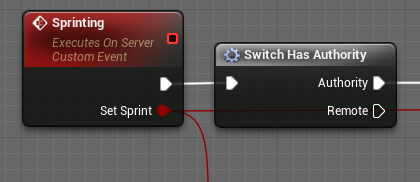
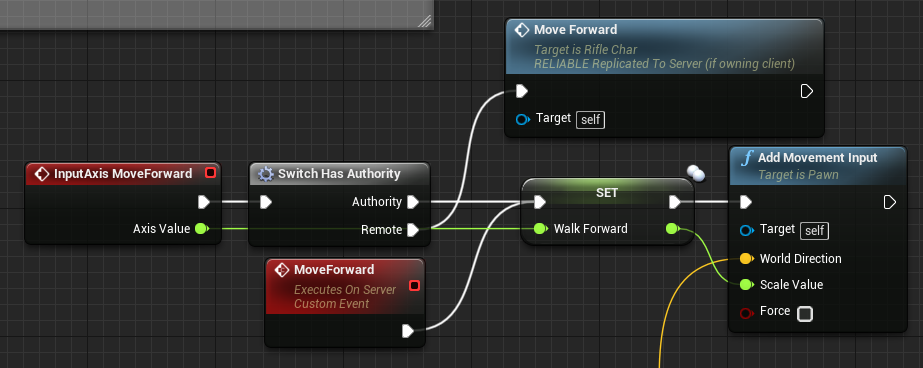


please laugh at this
i was looking at someone's stuff
that code right there
makes no fucking sense
LOL
IT ALREADY IS AUTHORITY BECAUSE ITS A SERVER RPC, WHY ARE YOU DOING A CHECK?
thin stratus
To make sure that someone doesn't call it from the client
 granite jolt
Im reading conflicting info on google searches so would anyone be able to tell me for sure if TMap replication is supported?
severe widget
Nope, not at all
 rare cloud
Sadly nope
granite jolt
that is odd
severe widget
There's one funny one where somebody says it should be trivial, and then Tim Sweeny congratulates him on figuring it out and says he's been trying to find the on switch or something.
granite jolt
I can see why people may think it's trivial. It sounds like something that should work similar to other types but I guess a type that considers all other registered types as properties might have some complications. Did he mention what the issue was?