#multiplayer
1 messages · Page 335 of 1
 arctic hazel
 wary willow
Get it under control before it's too late
wary willow

GitHub
ue4-style-guide - An attempt to make Unreal Engine 4 projects more consistent
arctic hazel
well their BP
wary willow
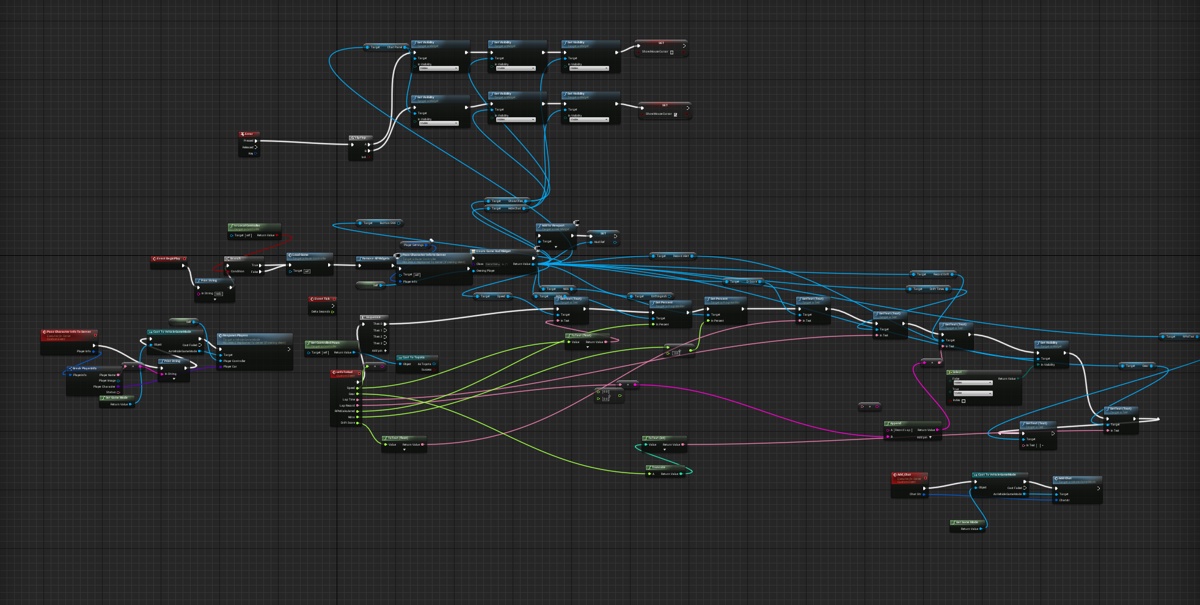
YOu really need to learn how to organize your BPs.
It will save you a lot of trouble when debugging
arctic hazel
That is true, i useally go back and do it at the very end, eventho thats when its more complex to do
 arctic hazel
wut, thats in RacerPC?
wary willow
no idea, trying to find what I needed to look at
arctic hazel
VehicleGameMode, RacerController, those 2 don't pass save data to them when map starts
wary willow
eh
I thought I asked you if you have playersavegame class after create save game
nvm
 wary willow
Dude, I don't even know if I could that on a bad day
 cloud ledge
I like the nodes which are just sitting in middle of the wires, but aren't connected to anything
arctic hazel
haha, Well i should of collapse the hud part once it was done
arctic hazel
true, i could of made way less annoying aswell by using a structure
i just don't know where the heck the player saved data goes, it vanishes
wary willow
@arctic hazel Use Debugger
I don't have all the plugins, but you did your own save system in LobbyPC
rather than following the tutorial
So, I am assuming that's the issue (I can't play the game, too many errors from no plugins)
Pause execution using Breakpoints to inspect graphs and the values of variables.
Set up a breakpoint and follow the trace
arctic hazel
hmm, strange part is tho it says it successfully loads and saves
wary willow
?
Just because it executes properly, does not mean anything is actually being saved
You used a set on a struct instead of a set members
Like I said, run a breakpoint
make sure you are getting what you think you are
arctic hazel
aight, also gonna tyr re-look entire thing if i missed something somewhere
ty for helping aswell man :p
arctic hazel
still no success rip
arctic hazel
ayy got it working for server least :p
 dull yoke
Just a tip for C++ devs, when prefixing Server to their RPC method, use ServerAction and not Server_Action. While latter may work at first, bugs will occur (i.e., sped up animation on client, animation not being replicated, etc...). I have no explanation as to why this happen.
 tiny coyote
Very strange
 zinc loom
gremlins no doubt
 oak sluice
Hi guys, where would you go to read about the network implementation? What exactly happens when you specify 'Reliable' for an RPC?
oak sluice
Thanks @tiny coyote !
tiny coyote
you welcome
oak sluice
Another question, I have a really strange issue where my multiplayer game won't start (BeginPlay events don't fire) unless I drag the client window. Has anyone seen this issue before? I have no idea what I'm doing wrong
It seems like GameState is not being created until I drag the window
 hasty barn
Hey, guys. Does somebody has worked with subobject replication?
oak sluice
Hmm.. it seems that this doesn't happen if I don't send a specific RPC
Are you not supposed to send RPCs until the client's GameState has been created?
 modern dome
Daily Reminder that SeamlessTravel is crap in BP
oak sluice
Anyone have any idea why this would happen?
hasty barn
Do you have any native code in your project, @oak sluice ?
hasty barn
In C++ does something is regarding to networking mechanics or/and multithreading?
oak sluice
It's not all the time
I never create my own threads
I do some RPCs and property replication in both C++ and BP
hasty barn
in mean of waiting for thread, not even creating
oak sluice
nope
hasty barn
well, in fact you have BeginPlay event does not occur until you pressed button?
oak sluice
It only happens if I drag the window
Seems like GameState is NULL in the client until I drag
hasty barn
When you dragging does anything in your game window freezes?
oak sluice
Let me check
hasty barn
I'm wondering about literall frame freeze
hasty barn
All the situation is when you dragging window just right after game start, right?
oak sluice
I see the client logging in the background complaining that it can't find GameState
The game won't start unless I drag and release the window
Which means I can't play in the editor viewport
And is really annoying
I think it also effects the dedicated server + packaged client build
hasty barn
As far as i know GameState may not be replicated yet when player pawn already is.
But i cant get why draw/release even interacts with replication
I suppose it may be some variable that updated in GameState repliicating it.And variable in some way is in touch with input or mosue move...
Something like this
oak sluice
Dunno.. I guess I'll have to send the RPC after GameState has been verified on the client
I just wonder what else will be fucked up and what the root of the issue is
hasty barn
This question may take too much time for solving as it need more information from you to research. I dont think i can help you know...
hasty barn
Its nothing, @oak sluice. I have not helped you.
oak sluice
@hasty barn you spent time, and that's appreciated
hasty barn
😃
 past pawn
hi everyone, in Left 4 Dead 2 (for example) when you pick up a medical kit, it's like it doesn't take any time at all... I'm trying to pick up something, but since it still needs to go to the server to be verified, it takes to long too be considered instantly. how do they do in games like L4D?
hasty barn
What is your lifecycle of objects picking?
past pawn
you mean what are the pickable objects?
sorry, didn't really understand, what do you mean by lifecycle?
hasty barn
i'm about function logic flow
oak sluice
@hasty barn BTW I solved the issue by delaying sending RPCs to the client until GameState has been initialized
hasty barn
past pawn
I think there is a major problem here... like, when I use a repnotify variable, every time I change it, it takes roughtly 0.5 (sometimes more) seconds for the change to be replicated. is this usual?
hasty barn
As i can see yes.
past pawn
you're saying there's a problem or that's usual?
oak sluice
Hi, do you guys know if LineTraceByChannel should work on dedicated server build?
It works for me in editor but doesn't detect hit on linux GUIless dedicated server
 inner iris
@past pawn maybe have the client do local checks to see if he can pick it up, and if so pick it up instantly but verify it on the server after before being allowed to use? You can use a pickup animation to hide the verification step before use also if it's a twitch based usage (has to be picked up and ready to use fast). Otherwise you have to just wait for the server to come back- games like PUBG wait for the sever to allow you to open doors and pick up items.
hasty barn
i said the problem is when i'm calling rpc right after object construction on remote i receive nullptr
because object is not yet replicated
so i'm looking for a way to instantly replicate an object
inner iris
@oak sluice have you been running in editor with the dedicated server checkbox ticked to ensure you are shooting the trace on the client? I use traces all the time and they work fine on dedicated server builds
oak sluice
@inner iris yes, I tried running all modes in the editor and they all work, it's only on my linux dedicated server build that it doesn't work
inner iris
Strange! My dedicated server build is windows but I don't think that would matter much in terms of traces not working
oak sluice
Strange indeed 😃
I'm switching to chipmunk raycast, that's the physics engine that runs my game anyways
 onyx haven
How do I replicate things using a variable, without the need to create custom events all the time?
 sterile pebble
replicated setting?
 sweet spire
I dont even know what ur asking man
wary willow
I am sure he means RepNotify
 obtuse zinc
Hey everyone, trying to call a server function from my weapon actor to draw a particle system, but getting this:
Client is absorbing remote function ServerNotifyShot on actor BP_RailGun_C_0 because RemoteRole is ROLE_None
Guessing it has to do with the fact that the weapon is owned by the client so it can't call server functions?
When game starts, It spawns a player, and then the player spawns the weapon
 brittle sinew
When you spawn the weapon, do you set its owner to the PlayerController?
A client needs an owning connection on an object to call server RPCs on it, which means it needs to be owned by its local PlayerController (directly or indirectly)
brittle sinew
Okay, that should work then, I believe it recursively checks each owner
obtuse zinc
ah ok
brittle sinew
That error isn't the one usually thrown when you don't have an owning connection, however
obtuse zinc
https://forums.unrealengine.com/showthread.php?113515-Server-Error-Client-is-absorbing-remote-function-(anyone-able-to-explain-please-) this is the only real forum post i could find about this error in particular
And I don't feel like im doing anything wrong
brittle sinew
The weapon is a replicated actor?
obtuse zinc
Yeah, in my player character i put it in the lifetimerepprops function
inner iris
@brittle sinew does spawning and attaching a BP in the character make the character (controller of that character) the owner, or do you need to explicitly set the BP's owner in another way?
brittle sinew
@obtuse zinc do you set bReplicates to true in the weapon? I believe you need to do both
@inner iris no, you can set it on the spawn actor node
@obtuse zinc ROLE_None The object has no networking role and isn't replicated
That leads me to believe the weapon isn't replicated
dull yoke
Tip: Making a client authoritative with his position (ref: https://answers.unrealengine.com/questions/26116/able-to-replicate-movement-when-using-addmovement.html)
On your DefaultGame.ini:
[/Script/Engine.GameNetworkManager]
MAXPOSITIONERRORSQUARED=625
ClientAuthorativePosition=True
Note: While this will not completely prevent the server from correcting the client, this solves my issue where delayed AnimMontage on server would mess up my client's movement on a high ping (800ms) scenario.
Useful for 3rd person view games where a character performs AnimMontages. Not much on FPS games.
Tip #2: Implementing a new ability on CharacterMovementComponent (involves creating subclass of CMC)
https://wiki.unrealengine.com/4_13%2B_Network_Guide
I suggest these gems to be saved in bookmark or something as they are quite hard to find in the web. The first tip took me a day or two to find out. Second tip which I found accidentally while searching for an answer to a different issue.
 plush wave
Is it possible to make a lobby that's not a seperate level? All the online tutorials I can find make them a different level.
 ripe cypress
Can anyone help me over screen share finish this chat system up I have it all working just the replication not sure how to do it ?
 fossil spoke
Should be fairly simple. Client RPC to the server with their message, server Multicast RPC to send the message to everyone.
zinc loom
hey guys... is DateTime high resolution enough to use for interp/extrap ?
 rose blade
Hi there!
I have a client that is possessing this pawn, and I want other clients to be able to see the "SM_Face". I have "Replicated" and Replicate Movement" checked, and all the parent components (including SM_Face) are with the "Component Replicate" checkbox enabled, but I still can't see the mesh on each client.
Do I need to set it's position to the server manually, or is there a better way?
oak sluice
@inner iris I fixed the line trace, was my stupidity. Thanks!
Hey everyone, new question.
What's the best way to discover a player controller has disconnected?
 worn nymph
Not sure the best way but I normally just use player array in the player state and get its length if it goes up you know a new player had joined . If it goes down a player has left .
If your talking about knowing exactly when and getting a specific controller best bet is probably using the onlogout function in the gamemode . There is also the endplay events but I have never been able to get any code to execute when using them .
oak sluice
Will OnLogout be called when a client closes the window and doesn't perform a clean logout?
I have a feeling it's not being called
I need to double check though
@worn nymph seems like it is being called
 hasty adder
I use unpossess in character to perform character based logout stuff dunno if it's useable in your case
@oak sluice
This catches a sudden window close
oak sluice
Thanks @hasty adder but it seems that OnLogout does that trick
hasty adder
@EniGma#6597 dunno if you saw last week was able to code a minor gamemmode routine to expose the null online subsystem port to use with master server scripts like we use in the event of multiple servers on same box
To "get port"
@EniGma#6597 UFUNCTION(BlueprintCallable, Category = "Server", meta = (WorldContext = "WorldContextObject")) FString GetPort() const { return GetWorld()->GetAddressURL(); };. You'll need to parse the : out probably
ripe cypress
Where do I put or start replicating this chat widget stuck on this
oak sluice
@ripe cypress what exactly do you want to replicate?
Connected users?
Online status?
hasty adder
Chat widget isn't replicated. Chat is usually handed in a playerstate array event to call a interface of sorts so if a player has the inter face do something with the function
Like spawn a umg for themselves with the data
That widget would need to send to the interface
So it can be multicast out to all player states if that setup is working like I think itnis
inner iris
Trying to wrap my head around something- I'm calling gunshots on client locally for cosmetic instant feedback and on server for the actual shot. Since I initialise my weapon on server (set the owning player character camera for the trace), my client doesn't seem to set it for his local shots. Does this mean that I should be splitting the initialise weapon weapon functionality into two separate parts (one part a run on server RPC for server only logic and one part run through the switch has authority node, setting the player camera variable on both server and client (both outputs of the macro)? I guess the bigger question is, for anything that is set on the server, I should assume that the local client hasn't set anything also unless it's a replicated variable?
Sorry if it doesn't make much sense, just trying to understand the server / client separation when doing certain events locally for cosmetic/response reasons.
I have it working right now using that method (RPC for server logic and then a function after a switch has authority node that sets the camera var on both client and server). Before, if it was set only on the server, my server fired shots would go through but my client camera variable would be invalid
brittle sinew
"for anything that is set on the server, I should assume that the local client hasn't set anything also unless it's a replicated variable?"
Precisely, because if it's not replicated a variable doesn't change on client instances
Why not make the camera variable replicated? I'm not trying to push this as an obvious solution, I just want to hear what your angle is on it as it might help you understand something deeper @inner iris
inner iris
Thank you for clarifying @brittle sinew 😃
Making it replicated makes total sense
I guess I was being overly cautious with what I'm replicating
Since the other clients wouldn't really need to know about it, just the owner of the weapon
But if it's not a large cost and keeps the actual code cleaner (having the weapon initialised on server once instead of splitting things up to server + client) then it's definitely the way to go
modern dome
Do i have to validate every Server RPC?
The compiler forces me to use the WithValidation Flag
nvm. it stands on the very last paragraph
dull yoke
@inner iris , "Since the other clients wouldn't really need to know about it, just the owner of the weapon"
You can take advantage of DOREPLIFETIME_CONDITION + COND_OwnerOnly which will save you bandwidth for other clients as you wanted.
@modern dome, yes. Epic made it mandatory now.
inner iris
Thanks @dull yoke 😃
 vital steeple
traces for weapons fire should be server RPCs right?
brittle sinew
Theoretically yes, but you have to make some decisions when balancing client authority and accuracy of traces
If you only trace on the server, chances are nobody will be able to hit anything moving when ping is anything above LAN
Usually it'll be some sort of combination between client checking if they hit anything, and if so, call to the server and perform the trace with some sort of lag compensation
It's tough making stuff feel good networked.
vital steeple
hrm ok, sounds like something i should probably look up and plan to spend some time on
vital steeple
weird, having trouble getting my server rpc trace to get the camera forward vector. its like the camera direction isnt being replicated (the component IS being replicated) but if you look up or down the end of the trace always ends up in the same place
inner iris
@brittle sinew "Usually it'll be some sort of combination between client checking if they hit anything, and if so, call to the server and perform the trace with some sort of lag compensation"
Right now I'm calling a trace on the client and also calling it on the server right after, seems to register as expected on the server on moving targets even at high simulated pings. I understand that the client and server will have different ideas of who is where, so is calling it this way going to lead to inaccurate traces especially for laggy players?
I heard there is no in built lag comp so if it'll lead to inaccurate traces is there any native way to reduce it?
vital steeple
well you have four potential situations (client hits/server hits (hit), client misses/server hits (miss?), client hit/server miss (the tricky one?), client miss/server miss (miss))
so what do you do? client trace, if hit yes then server trace, if hit no than?????
then*
lol i probably should just work on figuring out why my server trace doesnt even work
dull yoke
Just ask yourself why do you do traces in client and server? When do you do client and server traces? Does it benefit to do it only on client or just server?
Normally, you only do server trace when client trace hits. So server doesn't perform unneeded traces specially if there are a lot of players requesting server trace.
inner iris
@dull yoke Yeah makes sense to only run on the server when a bullet hits a player. I guess to relay the impact locations for other surfaces could be passed directly from the client to the multicast impact FX event?
@wary willow I've seen GameSparks used together with GameLift quite a bit, so possibly a combined product coming in the future?
wary willow
Trying to figure out realistic budget for hosting, I don't know... 100+ instances of a game
I was looking at the GameLift stuff, saw their example... 10,000 players. $25k/month.
inner iris
Yeah it seems pretty reasonable per instance
wary willow
Right, but I'm trying to figure out how other Indie Devs are doing it.
Or maybe they just can't afford it 😉
vital steeple
so how do you guys run server traces? maybe its my function library thats fudging it up
but without RPC it runs 100% ok
wth server RPC it detects horizontal changes but not vertical
fossil spoke
Are you using an 3rd person perspective?
 bitter epoch
How would I go about spawning a widget for only the people in the session?
zinc loom
@wary willow the aws gamelift stuff uses autoscale groups that launch/terminate instances on demand - you can do that stuff yourself on AWS by pushing session info to cloudwatch metrics and setting some nice scale rules
and believe me, if you tried to spin up 250 instances right off the bat you'd hit an account limit first.
best to put in a support ticket well before launch day to let them know your expectations so they won't dissapoint 😉
hasty adder
@vital steeple sounds like whatever you are using for a start location isn't replicated to server such as camera
@vital steeple for instance, if your character has Use Pawn Control rotation and inherit pitch and yaw selected
typical fps stuff
the yaw (horizontal) movment would be seen on server because of replicate movment if i'm not mistaken
but the pitch would not
because your character isn't rotating, the camera is
in my case to handle it by settings a replicated pitch float which is set on input if input axis lookup is !=0
 tough gyro
how would I replicate a value only once?
 glad sedge
what sort of value?
glad sedge
I'd just pass it via the usual method to the server?
tough gyro
actually, I wonder if the World's TimeSeconds is different on clients or is it the same as what Authority has?
glad sedge
I think the GameState keeps all the info incheck
tough gyro
good, then I don't have to do any replication at all 😄
 lost inlet
COND_InitialOnly
dull yoke
@inner iris, "I guess to relay the impact locations for other surfaces could be passed directly from the client to the multicast impact FX event?"
Yeah, but multicast still needs to be called in Server but can be "unreliable" since its only for aesthetics purposes .
inner iris
I'm setting "Impact Point" and "Impact Normal" variables right after calling shooting traces on client and server to avoid having to send hit results and break them on all the FX functions (just plug in the variables to the locations instead). However it seems they are being set correctly about 50% of the time (random, no patterns) and set to (0,0,0) the rest of the time. Usually they are correct on the server but the client shows 0,0,0. The trace is called on both client and server in sequence so there'd be a small delay for the server to set the verified value but the client will have already played the FX locally using its impact point / normal vars. Been in the logs for hours trying to debug what is causing this, any ideas?
brittle sinew
If you need a variable in a networked function, send it as a parameter.
You have no guarantee as to when that variable will be replicated
inner iris
Ah interesting, so it's not set instantly even with the set nodes?
And by parameter you mean sending the result as an output directly that can be fed in to other functions?
It was working perfectly before doing that with hit results but I thought this way would be more streamlined if it's just in a var.
brittle sinew
Yes, there's no guarantee of order when mixing RPCs and replicated variables
inner iris
Thanks a lot for clearing that up- had it visualised in my head to be strictly sequential
I guess I'll make sure to send everything directly and explicitly
brittle sinew
To me, it just makes more sense as a parameter as well. The point of the function is to spawn one specific FX (I think?), so it should know the information for the spawn right there
inner iris
I just had a few nested levels (call trace, pass location info to return, call FX multicast event with location info input, call Impact FX function with nested functions all needing location inputs etc) I guess I thought the variable might be cleaner
Most likely just poor organisation on my part- getting cleaner and thinking with abstraction in mind more and more every day 😃
modern dome
Keep Variables as local as possible.
If possible, use parameters
inner iris
In the case of interface messages, there's no way to return a var through parameters right?
I'm calling the "get shooting target location" interface message for players and AI using an interface call as they both calculate their trace end point differently (human players get the centre of their camera traced forward and AI get a position of their enemy character). Trying to keep the character and weapon logic generic and just returning the location in this case from both AI and Players by setting a variable and piping that in before the trace fires, but this is likely causing issues as mentioned before.
brittle sinew
Personally, I try to stay away from interface messages
They are convenient to use, but they give you no real indication of what your flow is actually doing, as sometimes you might have interface methods depending on each other
I usually go the "traditional" route of using interfaces—casting the object to the interface and using it like any other class.
That'll give you confirmation that the object either does or doesn't implement the interface, and allows you to set up your flow to work with that much more easily
inner iris
Thanks @brittle sinew
So in this case I would do separate casts to both the player and AI controllers (if player cast fails, cast to AI)? I could then call a function that directly returns the correct shooting target location
brittle sinew
No.
You would still use and cast to the interface, you would just use direct function calls on the interface rather than using an interface message on some object and hoping it succeeds.
inner iris
Got it, thanks 😃
modern dome
Why does that only work on the Listen Server and not on the client?
I.e. the client does not have the viewtarget of the camera
hasty adder
Begin play is weird it runs on server first since its spawned by server
modern dome
it works for 0,5 seconds, after that the viewtarget becomes the default one (0,0,0 of Pawn)
 fleet sluice
The client has the view target, but he's not allowed to change it. Imagine a client could spawn a random camera in his local version of the level on which the gameplay occurs and start seeing through that camera. Not fair.
You need to use an RPC and have that run on the server for the change to occur.
modern dome
Why do I have to use RPCs for every shit -.-
fleet sluice
#security
Why would you expect to program network behaviour without heavy use of RPC's?
modern dome
Imagine having a really really really bad connection (That's what I test with).
fleet sluice
Mark events as 'Reliable'
modern dome
For a simple Task as changing the View Target. it does not make sense
fleet sluice
That guarantees they get sent across the network
modern dome
I want to have a very fluent View even on bad connections.
RPCs do not allow this
Because the RPC has to be from Server to Client first before switching the View Target
this is really bad.
@fleet sluice Doesnt work tho
fleet sluice
It's only bad in your case because BPs don't give you the flexibility you need. I used the system exactly as it was to create a "Last Team Standing" game mode in UT, where dead players would spectate their teammates and it was exactly what I needed in terms of security
Not sure why it wouldn't work, looks ok from here. If you still need help with this in like 2h, you can tag me and I'll look up some of my old BPs
hasty adder
How come your doing this in player controller? Just curious. Might explain why my spec class doesn't blend with a camera till after an event retrigger a it and mine is a camera that is already in the world.
modern dome
LOL
Works now
*even without RPC
makes sense.
The Controller is spawned -> Begin Play -> Set View Target (mine) -> Pawn is Spawned -> Auto Manage View Target
@hasty adder Why not PC?
hasty adder
Ah I was curious how your game was working because normally spec starts with its own camera etc and you have figured out why 😃
Lol. Was trying to check for that in my spec controller haha came across a debug item that's been in there for months
Glad I just saw it.. Self destruct button haha
inner iris
@brittle sinew Have been trying to figure out what is causing the inconsistent impact point returns from the trace- have removed all of my previous variable references and fixed the interface call as you suggested, so now everything is being passed around directly, however the impact point coming out of the trace hit is randomly coming back 0,0,0 on either the client or server, or both.
Have been logging all of the other vectors going in to the trace and they always consistently return a correct value
Ignore the "complex collision" comment, v old comment box 😄
The second image is just to show the returning info passed out from the broken trace that'd also need to be correct for the shot to work.
Strange as usually something either works or it doesn't, not sure why this is sometimes working and sometimes not
brittle sinew
Are you sure the trace is actually succeeding when that occurs?
The boolean output of the trace shows whether it did or not
inner iris
Will check now!
There's a quick shot of the log- green are client fails and red is server fails
the strange thing is I'm usually testing by shooting at basically the exact same position, so it succeeds but another shot might fail without moving
brittle sinew
Well, not sure what would cause something like that at this point, but finding out if the trace is actually "failing" or not could help troubleshoot it
inner iris
Ok yeah seems the trace is failing at random
This could be because I'm running another trace before this one to determine the center of the screen but it always returns a value
Checking now to see if that returns true always.
Right it never seems to fail at the initial trace
Only on the trace in the screenshot
brittle sinew
Are you determining where the trace hits in your first trace?
If so, you might be within the margin of error where due to floating point inaccuracy, the trace might actually come up like .000001 units short of what you're hitting
inner iris
Yeah that's EXACTLY it haha just tested without the first trace and just the forward direction and it worked
So it was being inconsistent because of that error
brittle sinew
Yeah, I would just extend the end point like 5 units or something
inner iris
Yep, should work great
Thanks a lot for the help. Did not cross my mind that this would be happening
Day well spent though, finally got comfortable with the log and debugging!
brittle sinew
Hehe, never a bad thing 😄
inner iris
Plus passing all values much more directly and using interfaces in a safer way thanks to your help
So definitely a good thing that all of those potential issues were fixed
 obtuse zinc
I have a server function calling a multicast function and sometimes it calls, sometimes it doesnt and i have no idea why lol
brittle sinew
No, that's good actually
obtuse zinc
ah ok, thought so
brittle sinew
Reliable means the RPC must be called and can't be dropped due to network traffic
So they're reliable, we've got that out of the way.
obtuse zinc
ok cool
brittle sinew
Is the server RPC always succeeding and it's the multicast that is failing, or is the server RPC failing as well?
obtuse zinc
when it stops it's actually that the client is never calling the server function
either the client doesn't call the server function, or it does and everything works
brittle sinew
Okay, that's good to know
Are you sure you're always calling that server RPC in a setting where you have ownership on the object? The log should talk about "no owning connection" if you don't
I don't really see any other good reasons for an RPC not calling like that.
obtuse zinc
Yeah so when it doesn't call i don't get an error or warning or anything, it just doesn't call it. I have FireRail() -> ServerFireRail() -> DrawRail(). (Client -> Server -> Multicast).
i put a log in just before it calls the server function (
LogTemp:Warning: About to call notify shot) and that's where it ends
brittle sinew
Hmm.
obtuse zinc
the weird thing is that it works sometimes
brittle sinew
Seems like if something is failing you would see it in the log at least...do you see any logs on the server?
obtuse zinc
so when i run in the editor with 1 client, it never works, when i run with 2 clients, it sometimes works on the second client only
then i ran with 3 clients and it worked with all 3 lol
obtuse zinc
yes one sec
UFUNCTION(Server, Reliable, WithValidation)
void ServerNotifyShot(FVector Start, FVector End, FHitResult HitResult);
UFUNCTION(NetMulticast, Reliable, WithValidation)
void DrawRailParticle(FVector Start, FVector End);
brittle sinew
Alright, that's all well and good, was just confirming it
This is odd to say the least, haha
obtuse zinc
yeah lol. i mean it could have to do with timings i guess? In my actor's BeginPlay I spawn a weapon, set owner to "this" and attach it to the character. Then when i press fire, my character calls currentWeapon->Fire() which works
Fire() is supposed to call the server functoin and it doesn't always
so could it have to do with how im spawning the weapon?
brittle sinew
I don't think I could rule it out at this point, but I'm not sure of any specific things that would do that
You're spawning the replicated weapon on the server and setting its owner there?
obtuse zinc
im spawning a replicated weapon on the client (As long as BeginPlay() is on a client, which im pretty sure it is right?) and setting it's owner to this, which i guess would be that client
should i call the spawn function on the server and set it's owner to the client there?
brittle sinew
You can't spawn replicated actors on the client, or at least it won't be replicated if you do
That might be part of it.
I would only spawn it on the server, yes
And you wouldn't set the owner to 'the client', you would still set it to this as long as you're in the same actor
brittle sinew
That's how replication works in UE, you can refer to the same objects across the network as the same objects
obtuse zinc
ahhhh okay
makes sense
Okay I will give that a shot then, could be it
either way it's a good change to make
brittle sinew
When you say "it sometimes works", do you mean in the context of you're on a client and each time you click you have no idea what will happen?
Or do you mean some clients can't, and they can't for the whole time
obtuse zinc
some clients can, some clients can
brittle sinew
Ohhhh, so once your client doesn't work it's consistent?
That's better than the alternative from a debug perspective at least, lol.
obtuse zinc
Yeah lol if a client doesn't work then that client just can't do it
which is better than it randomly working and not lol
brittle sinew
Hmm, okay. Well, spawning a replicated actor on a client and trying to call a server RPC on it does sound quite suspect
obtuse zinc
yeah that was the problem
now it works when i spawn it with the server
ok so always spawn recpliated things on the server. got it. Thanks lol
how do i set an owner to the server? in my beginplay function this is happening:
No owning connection for actor BP_FPSCharacter_C_1. Function SpawnWeapon will not be processed.
brittle sinew
You don't set the owner to the 'client' or 'server'—ownership is an actor. To call a server RPC, the object needs to be owned by the client's PlayerController, or its owner is owned by the PlayerController, or its owner is owned by an actor that's owner is the PlayerController, you get the point
About to get on a flight, I'll be back to check in in a few hours, sorry, but good luck 👍
obtuse zinc
ahh i see. okay! thanks for the help. have a safe fligh!
modern dome
I absolutely do not understand the Execution Order in Seamless Travel.
GameMode::PostSeamlessTravel gets executed afterPlayerController::PostSeamlessTravel.
How does that make any sense?
hasty adder
Pie can be acting differently. But I'm not at all sure. Wouldn't Gamemode need to send the players off before itself does anything to make sure all players got notified?
Captain goes down with the ship
modern dome
Doesn't the Server(GameMode) need to be there before anyone can travel?
That's my line of thought
I give up on that Seamless Travel thing. Way to complicated to implement custom behaviour. Even in C++.
hasty adder
There would be a handoff if I'm not mistaken.
Like Gamemode --> travel map -> Gamemode
There is a phase where connection fails a bunch while it reloads its world and runs routines again least from what I could tell. What's not working in seedless travel?
Lol seamless
modern dome
everything works fine, but the things around the seamless Travel (currently the fade in of the clients) does not work.
I want the Server to wait until everyone travelled successfully before the map starts to tick.
My line of thought was that GameMode::PostSeamlessTravel gets called before PlayerController::PostSeamlessTravel.
This is why I set the World to not tick in GameMode::PST, while PC::PST notifies the Server it travelled sucessfully.
but of course it doesn't work, because the execution is the other way round
The Players Array (filled with PostLogin's PC) is empty after Seamless Travel, too.
hasty adder
Fade in? Like a cosmetic thing?
zinc loom
i'm tearing my hair out over projectile movement component 😦
zinc loom
I have it working perfectly using a function that calculates values from whats passed into the project on spawn - initial speed / max speed - works great single player. got it working kind of by replicating position from server to client, but extremely choppy
so now i'm trying to have it spawn multi-cast, not replicate movement but just start the actor the same way on both... but it isn't honoring the speed.
 rare cloud
yeah the built-in client prediction of the Projectile movement component can make some weird rendering on client side if you don't update stuff on client
because you only set variables at spawn time, and didn't update it after ?
zinc loom
is there even any? by the looks the only prediction code I can find is in charactermovementcomponent
modern dome
@hasty adder yeah
hasty adder
Ahh I leave my world above 0,0,0 and leave the initial player start in a black box lol. And on the spec class ppl down in the pawn has a begin play to change its camera post process levels from 0 to 1 so it fades in.
zinc loom
cheers @rare cloud - talking it out as helped. Initial Speed is trash, I just adjusted velocity in local space instead and now it seems to be working well!
and did that in begin play instead of on construction
modern dome
@hasty adder That's really dirty xD
rare cloud
@zinc loom, Cool 😄
modern dome
@hasty adder Do you have some footage? 😄
hasty adder
Lol umm maybe
https://youtu.be/Pfs1nvkrRk8 @Raildex#6923 best I can shot from work. 😃

GPU: GeForce GTX 660 CPU: Intel(R) Core(TM) i5-4690K CPU @ 3.50GHz Memory: 16 GB RAM (15.91 GB RAM usable) Current resolution: 1920 x 1080, 60Hz Operating sy...
modern dome
Looking Good. Although I don't know how to handle that with seamless travel. BeginPlay isn't fired with Seamless Travel 😦
hasty adder
I believe that fires when the controller is brought into the new world. But if haft double check something. But I do know anytime it does enter the world it starts at 0,0,0 which you can put a black box and a pp volume in to ensure the screen is black so you don't get the flicker
modern dome
I am trying to solve this seamless Travel Thing 2 weeks already and no solution in sight 😦
*A solution I am happy with
hasty adder
Lol 😃
modern dome
not so many LOL for me tho 😂
hasty adder
Challenges are fun. You'll learn all sorts of things you don't need now but may prove useful later
The problem is the flicker in seem less travel though right? I'd probably understand it better if I saw a capture of it
modern dome
Having a list what functions gets when fired with a proper documentation would greatly increase the productivity. But pretty much nothing is documented in regards of Seamless Travel
There's only this single ST page of what you can call.
I managed the first half of the cake (fade out, Server wait and travelling)
but since my player Controller Array within GameMode gets emptied on the travel, it is impossible to keep track who was on the server before
There are no customizable behaviours except for instant cleanups (see PreClientTravel for example)
and it's driving me crazy
hasty adder
Ah
 lean cedar
have someone used photon networking system with unreal engine?
 dawn flame
@lean cedar No, but I've used it with Unity. I'm not sure why you'd want to use it in UE4, Unreal has most of the same functionality but not hosted for you.
Photon abstracts away Unity's lower level networking system, but Unreal's is already abstracted to the same level
lean cedar
@dawn flame Not exactly, unreal engine networking cannot be used like photon networking in unity. You have to follow unreal's networking architecture (server-auth). I'm making a VR project, I don't want to use server auth, I'd like to have the same model as have in unity
 daring arch
i think what he means is, he'd like to have a networking model where any connection can take ownership of any entity
dawn flame
Why would you want to do that?
daring arch
idk, take me for instance
i'm working on a multiplayer VR application
and i don't need to worry about server authority or cheating or anything like that.
I dont need to worry about any of that: i just want to replicate my transforms.
brittle sinew
"i don't need to worry about server authority or cheating or anything like that."
Why do you assume that?
daring arch
because its a serious game using virtual reality.
it's not even a game at this point.
brittle sinew
Plus, a thing with relying on client-authoritative code is if you have a client, not even maliciously but just because of a bug do something they weren't meant to, that change could propagate everywhere
daring arch
i already have a networking model that works pefectly in Unity.
I just want to port it over to Unreal because it looks better.
My model already is functional; i literally just want to ditch Unreal's networking architecture and use my own model.
Is that really so hard to do?
daring arch
well bollocks.
looks like i'm going to have to write my own solution from scratch then.
in that case, I've got another question for you lot: FSocket->HasPendingData always returns false.
I've written a TCP Listener/Sender and i'm trying to make it send messages over to UE4, but UE4's FSocket's HasPendingData always returns false.
What gives?
dawn flame
So is there no easy way to do peer-to-peer with Unreal's built-in networking system? I already kinda assumed so since all the examples I've seen are client-server
Also, what would be a good hosting solution for UE4 servers? EC2 instance on AWS?
daring arch
Exactly, there is no way to make peer to peer.
If you want peer to peer, start reading up on sockets!
brittle sinew
It kinda depends on what you mean by P2P, to be honest.
If you mean in a sense like a BitTorrent-type protocol where everybody's sending data to everybody, no
But games like COD are "P2P" in the sense that people host the servers—not that every client sends data to every client—it's still a basic client-server architecture.
You can have people host game sessions within your game and have others connect to them, yes
daring arch
COD isn't p2p lol
COD is client-server
in a p2p model, you have full authority over your entities
which is not true in cod
brittle sinew
Well, that was my point by what you mean by P2P
daring arch
yeah, UE4 has no support for P2P game entities
brittle sinew
A lot of people refer to the general matchmaking and session system in COD as P2P
daring arch
but that's wrong
brittle sinew
Since at least before the past few years, there weren't dedicated servers
daring arch
having a dedicated server =/= client-server model
you can host a listen server for a game that uses a client-server model
brittle sinew
I know, that was my point, haha
I wasn't sure what they were meaning by P2P
Since they were asking about hosting dedicated servers
 twin juniper
btw can u summarize the difference between the ipnetdriver and steamnetdriver?
fleet sluice
@daring arch Not sure what CoDs you were talking about, but any form of host migration done right is essentially a hybrid of client-server and peer-to-peer architecture (i.e. MW2).
You can't say they're full "server-client" because that would mean the current host can cheat the hell out of it (sure, technically possible, but it's simply too dumb of a solution to assume this is what they chose). Therefore the peer-to-peer part of the model must come into place and allow other clients to also partly maintain the state of the network (i.e. if I, the client, know you, the server, have authority over me, how far am I willing to let you go with that? I should verify some stuff locally as well).
On the other hand, it's obvious they aren't full "peer-to-peer" since the entire match freezes mid-game when the host drops. Full peer-to-peer would assume each client knows everything and they can go on by themselves, which is definitely not the case.
brittle sinew
The thing with older CODs is the host could cheat the hell out of it 😛
They mostly relied on consoles being pretty locked down and other AC measures to prevent that (as well as time, since 2 years past release the games are pretty much all but dead anyways), but when people cheated, they definitely cheated
I'm not aware of any P2P measures like you were talking about to protect against that being used in COD specifically
Plus, host migration only happened when hosts soft-quit the game, so it's not like the clients resumed the game with their local data
fleet sluice
Then it would seem I put too much trust in them heh
I think I had about 150h or so in MW2 until I switched to RepZ and then AlterIW (or the other way around, can't remember)
They just felt like they were ahead of the "official" developers
brittle sinew
For sure, I still miss 4D1 😢
COD has always been pretty laughable on PC, not sure how the support has been lately
fleet sluice
I own literally all CoDs except the "Infinite Warfare" one. To me, it just seems they screwed up the entire balance of MP games, while increasing the time spent watching cutscenes in SP with every single new game.
Remember when there was actually a difference between killing someone with a sniper and killing him with some assault rifle or worse, pistol? Now it just takes 1-2 bullets each, almost as the only difference remaining between different weapon types is their looks. And recently I bought BF1 and played its SP. By far the most cutscenes I ever witnessed in a game. And after that, I realized how close to that CoD is getting heh.
It just seems like instead of focusing on the fun/entertainment aspect of a game, they keep trying to improve the graphics and story as if those alone would suffice.
inner iris
The problem for me with COD is the venture into increasingly uninspiring future / jet pack / robot settings. Seems like either just busy maps full of rubble or generic sci fi panels these days. We will see how WW2 turns out- my favourite COD is WAW. Speaking of netcode though MW2 feels super crisp on PC after playing recently, they nailed the satisfaction of the shooting in that game.
dawn flame
So if I were to go with a client-server model for my game, what would be a good setup for hosting these servers? AWS? Custom hardware?
brittle sinew
Well like we were talking about above, client-server isn't the same thing as where your game is hosted
COD still uses a client-server model.
It's just that people host the servers rather than the company itself
(they still need matchmaking servers, but you can use Steam for that if you want)
If you do want to go with dedicated servers though, I'm not really sure what's best to be honest, I've heard AWS works alright, but it might not be your best cost-effective option
hasty adder
If your server supports Linux you might find a solution in a smaller pool like digital ocean?
dawn flame
yeah, i'd have to find out how much that would cost
i'd like to use something like steamworks, but it doesn't have support for stuff like storing time of day or a player run marketplace on their servers
Are there any good examples or guides you guys know of on how to do the Call of Duty approach, i.e. having the client also spin up a server and host the session?
vital steeple
anyone ever had a problem with a camera location and forward vector not fully replicating to the server correctly? when i run a trace it seems to recieve the camera horizontal direction but not the vertical (whether looking down or crouching the trace doesnt vertically move). as soon as i run it on client again it works fine.
camera component IS replicated as is the owning actor
weird, if i check use controller rotation pitch it works...
vital steeple
but that messes with the character movement a bunch
 solar flower
AI Controllers are automatically replicated by the Server right?
For instance, if I swap controllers on an AI player mid game will that replicate to the clients?
vital steeple
grabbing rotation from controller seems to work, though it seems weird.
solar flower
That's over my head
brittle sinew
AI controllers don't exist on the client, so no, they aren't replicated
The effects of the controllers on the pawns are what you want to replicate
solar flower
Yea, makes sense. I'm having issues with replicating a material instance on my character blueprint. The changes replicate fine on the server, but nothing happens on the client.
Character Blueprint
Messy AIC Blueprint because of debugging
Oh wait, since they don't exist on the client can they not even call multicast functions to run on the clients?
They'd have to call the same RPC located in the character BP
solar flower
And it'd probably work fine as a run on server only RPC? Since the color would replicate?
brittle sinew
I don't believe a material instance change like that is replicated automatically
I could be wrong though
solar flower
I'll let you know
Also, while i've got you, will i be able to use my BehaviourTrees with networked characters if they'll need to have replicated content?
brittle sinew
I've worked very little with that side of AI, not sure I can give you an answer either way :/
solar flower
Still haven't got it working with both RPC methods. The client is getting a nullptr for 'MaterialInst' in the SetMaterialColor function. (I did connect the authority exec pin back to 'CreateDynamicMaterialInstance'
From what i've learned so far i shouldn't be setting any replicated variables on the clients ever...so this is kinda a unique case for me
brittle sinew
You can't send non-replicated objects over the network like that, it doesn't work that way
dull yoke
Anyone here doing melee attack hit detection (i.e., sword swings) I could learn from?
brittle sinew
You can send the info to the client needed to create and update the material instance, I would say that's your best course of action
And yes, you shouldn't be setting replicated variables on clients, they'll have no effect on the server version @solar flower
dull yoke
@solar flower, if you want a client to set a variable to replicated variable, you have to ask the Server to do it for you so the data is replicated properly.
solar flower
Right i understand that part at least, which is why i'm a bit confused that the color doesn't replicate in my example. It's initializing and setting the parameter on the server.
brittle sinew
It's a UObject, which doesn't have support for networking out of the box
solar flower
Ah, just like the anim instance
brittle sinew
When you send a pointer to an actor or something over the network, it doesn't get there by magic, it matches the object on the client with its GUID
Something like a material instance wouldn't be replicated though, no
Have each client update their own instance with data passed to them through the RPC
solar flower
So, a non-replicated (can't be replicated) Material Inst initialized locally, and then set through RPCs
brittle sinew
Not quite sure what you mean by "initialized locally, and then set through RPCs"
By initialized locally, you mean on each client, correct?
solar flower
Yea, the "CreateDynamicMaterialInstance" part in BeginPlay
IT WORKS!
Character Blueprint
brittle sinew
👍
wary willow
So, totally trying to utilize all my resources here.
Alright, let's say I wanted to make a MOBA. What resources should I be looking at in creating the backend side. Don't care about the frontend/gameplay stuff. That I can handle. What I can't handle, is all this backend stuff since it's all very new to me. Dedicated servers, dynamically spawning game instances when needed...the fun!
Basically, after doing some research, I also found out about Party Beacons, which seem pretty handy, especially since most players will probably be teaming up with friends to play. I can then fill in the gaps with Randoms.
This game will be on Steam only at launch.
Basically, I have a general idea of what I need to do, but need just a bit more information before attempting to implement.
Players either just click on Search for Games (Matchmaker does its thing, in this instance, probably Gamesparks), or create Parties, and then the Party Leader will click on Search for Games.
And this is pretty much, where I am stuck on. They have already spun up one instance of the game right. They are either solo or in party, in search mode. Where am I keeping all of these "parties" at?
Obviously, once I get all the parties I want in one "lobby", I can then "server travel" with them all....
To the "Game Lobby" where they choose their characters.
 granite oar
alright, so i'm wanting to store data on a multiplayer game, such as attributes and skill points
should i use gamestates or gamesaves?
inner iris
@wary willow also curious about this!
wary willow
@inner iris Heh, yeah, it's pretty advanced stuff
I just want to be able to wrap my head around it conceptually first.
I mean, I know it's being done in Paragon right
And I guess PUBG has something similar
So it's not like it is a new concept, just something not very well documented.
inner iris
Yeah exactly
The info is out there, just not compiled in a nice easy to understand / specific to UE4 way.
Even compiling dedicated servers is a bit of a dead zone in terms of up to date docs (the best doc is made by a user- not Epic)
wary willow
It's not even that the info is out there...it's just that I have no idea where I should be looking at in the first place
inner iris
Would love a bit more love in that area for sure in terms of docs- backend stuff and common practices
Yeah I'd love to know the same thing too honestly
wary willow
It's just completely different from the typical Listen Server multiplayer stuff I've always done
inner iris
Yeah! It seems if there are any docs it just covers that kind of setup and not the details going into more advanced dedicated setups
I guess it makes sense since it's not a trivial topic
Which is why I want to try and get my game working with a barebones dedicated server list to start
And then if that all works, move on to more advanced setups.
wary willow
Aye, but, I just can't believe out of all these devs, no one's done it before.
And/or blogged about their experiences
Moss has this up
inner iris
@wary willow oh interesting, hadn't seen that before. Will check it out 😃
Had a quick question regarding lag compensation: so I have spent the last 2 weeks working whenever possible on properly implementing a responsive networked basic shooting mechanic. Client presses fire and instantly shoots on his monitor (all cosmetic fx- gunshot, trail, impact(no blood impact- that's server only). Server calls this same logic right after but applies damage/decrements ammo/sends out multicast RPC for all clients EXCEPT the local player to play the FX needed (since the local player already played them ).
Testing this on a dedicated EC2 instance in the US (connecting from EU), the results feel super nice and responsive compared to my previous attempt which was all server authoritative, so the actual shot didn't happen until the server responded which resulted in a noticeable amount of delay from the client's input until he saw anything happen.
However the old method was much more consistent, what it lost in speed, it gained in accuracy. My new version works great for stationary targets or targets running toward or away from the player, but as soon as side to side movement comes into play, accurate shots from the client's perspective miss frequently and they have to lead their shot depending on how much latency they have to the server (using traces and not projectiles so usually they wouldn't have to lead). I'm assuming this comes down to the server and the client both having a different idea of where the target and enemy player is at any given time when moving quickly like that.
The answer here of course is "implement lag compensation so the server can rewind to check if the player could have made that shot".
A: I've no idea how to code a lag compensation system since it seems UE4 doesn't have one built in.
B: Is there any way to improve this natively? The only way I could see things being accurate is if the client sends his locally verified hit data directly to the server to apply damage to, but of course this isn't ideal for cheating etc.
wary willow
heh
@inner iris https://www.reddit.com/r/unrealengine/comments/5v3u0m/is_lag_compensation_possible_with_unreal_engine_4/

reddit
Lag compensation is run on the server side. When the action of firing reaches the server, the server rewinds time to see where your opponents were...
UT has some, you might be able to steal
inner iris
@wary willow thanks! Saw this when having a look around but not sure if that's wise due to the licensing terms. Might just have a look to see if I understand how it works and if it seems feasible to write a system.
wary willow
Well, by "steal", i meant reference
and use in your own way
They don't own the rights to lag compensation logic
inner iris
Do basically all client side hit detection UE4 games have their own custom lag compensation methods (PUBG for example), or are some allowing the latency error that'd mean people have to lead based on their ping? Obviously that info isn't just handed out but would be interesting to see
@wary willow very true! Thanks for the recommendation 😃
wary willow
I mean, you could simply just ask them?
Ping them on twitter or email them
If they don't answer, oh wells
But, you would be surprised
inner iris
Yeah that's a good call, I'll do that. Just wanted to see here if there's a general way of working with this problem similar to the backend question you had- it's done and in games but the info isn't really there
All examples and tutorials stop at basic stuff but not the more advanced implementations that fix problems related to latency
wary willow
Probably mostly due because it's very game dependent
It's not a one size fits all type of solution
inner iris
Well I figured since most shooters use client hit detection for instant response, they'd have to deal with this problem
And especially with an engine like UE4 which was essentially built with shooters in mind, was wondering if there are any native tricks to improve this
wary willow
It's funny they don't have this natively
Because of the exact reason you stated
But again maybe they just don't want to together the reigns too much.
Which is nice what they did with GameMode/StateBase
Not everyone is building shooters.
inner iris
Yeah! It definitely makes sense to not have tunnel vision with the engine
wary willow
I mean...I should probably think about this though for the MOBA....but really... probably last thing I need to worry about
inner iris
However a nice little lag comp feature that's optional would go a long way
Haha yeah different games different problems
wary willow
If I can get different groups of people in a 5v5...I will call that a win for me.
I need to look into Steam Lobbies too
inner iris
Well the more I use UE4, the more I believe anything is possible with it!
My mindset 1 year ago was that no one could build a networked game without a huge team
wary willow
It is, just takes some patience.
inner iris
Exactly
hasty adder
Wearing all the hats it's tough.
inner iris
Tough but doable
Had a possible solution to the lag compensation problem I mentioned- is passing the hit result directly from the client's trace to the server considered horribly bad for cheating or would it be in any way acceptable? (Since it would solve the issue of the client and server always having different traces and would favour what the client sees- which in this case is what I want). So the server would break the hit result and check what was hit etc but would get that info from the client's trace directly.
I realise that probably is a complete nightmare for cheating, but if it's in any way acceptable, would simplify things a lot
inner iris
Or another possible solution- send the location that the client confirmed the hit at to the server and also run the trace on the server, compare the two locations and if they are within a reasonable distance from one another, allow the hit and apply damage. Does this make sense/seem like a logical solution without having to do any custom lag compensation code?
 ruby epoch
What the correct way to implement weapon pickup? The way I do that:
- Client send input, that he want to pickup, and send to the server own location and forward vector
- Server make linettrace and check weapon, if all Ok, hes save weapon in variable
- Client check is server found weapon
- Multicast function of attaching weapon to socket
Is that correct?
 pallid mesa
i recommend you having a collision trigger around the weapon so you dont need to linetrace
on this interface you can have a pickup function and there you can decide if you should swap weapon for the one you have or just add it to your inventory
obviously server needs to know that you swapped/grabbed a weapon
 fierce birch
@inner iris @wary willow shootergame doesn't do that?
lag compensation for bullets that is
I've never been interested on shooters so I haven't looked at the code
CMC itself has clientside prediction
but I dunno about the shooting mechanics as engine itself doesn't ship with such feat
I'd still check shootergame first
inner iris
Gotta learn C++ properly, so much to learn! I'll have a look there and see how they do it, thanks 😃
Do you think my last solution seemed reasonable though? (Comparing server and client traces?)
Seeing as cheaters would fail this test since they wouldn't be able to match the server's trace
fierce birch
ah, I didn't read all messages, just saw the thread 😄
there's plenty of info online how to do these things though
that's a nice article that explains the logic behind it
inner iris
Great article thanks so much
Will read through it
There are also some great talks from COD developers and Halo developers on this topic but they both ended with "use lag compensation"
fierce birch
the part you are interested is in part 4
CMC already does some of the earlier steps
you mainly need to take care of the shooting aspect
let the CMC do the movement
inner iris
Just finished the article- I've already addressed the input lag side of things, the client shoots locally in a purely cosmetic way but the server fires another trace to cause damage and verify what it thought you hit. The problem is with movement, the server's trace is different to the client's trace which often causes you to miss. That's why I thought perhaps it would be a good idea to compare the client's and server's trace impact points and allow the hit if they are within a certain tolerance range.
This way you get both instant shots from the client but also much more consistent hit feedback that favours what the client sees on his screen (to a certain degree), and also prevents cheating as the sever still has to run a trace from the client's position to compare
In my mind that works and doesn't require any custom compensation code or "rewinding" to snapshots as is done in COD
I'll try it tonight when I'm back home, excited to see if it works 😃
twin juniper
@fierce birch Thanks for the article, it's great
The concept of timestamps is what I was missing
hasty adder
Weird. What's your line trace problem?
Either of you mentioning it. Pickup context of item pickup is something in world can all be handled on server. Ie input pickup button run on server line trace to object. Hit. Cast to player where your storing the weapons. Is player state or on the character (assuming it's dropped if they die) to add the variable. Since server is setting the variable it should be a replicated value and will filter back down to client. Another words you don't need the client to set the variable
Then server destroys the actor you picked up
It being in world and a replicated actor it being destroyed will be seen by those relevant to it.
Keep in mind however if it wasn't spawned at runtime to begin with. Exists in the level . Additional hoops will exists because someone joining later will have it in there version of the level and never received the replicated message that it was destroyed
As for line trace shooting. Server should always be in charge of the line trace to hit. Press fire, run on server line trace -> hit results do damage. Locally if you want to do the same function for cosmetics sure but can expect to have "glitches" for instance if your line trace succeeds locally and would cause a blood splat on the character. Local might see t but if server failed no damage is delt
I think some games handle this by not showing the impact effect from clients shot but might show the bullet trail locally. Making it appear to have passed through the target
twin juniper
I'm trying to replicate my characters aim offset, been at this for a few hours with no luck... could I get some assistance?
rare cloud
@twin juniper, I don't remember if there is built-in variable to aim offset or did you use your own ?
inner iris
@twin juniper you have to update the pitch and yaw on tick and make sure they are replicated variables. Should work great.
twin juniper
I have pitch and yaw as a variable in my characters animation blueprint. They get updated on the event blueprint update animation. They're replicated variables.
inner iris
I think I fixed that problem by updating those variables in my controller and not the animation Blueprint
(Or character if you handle input there)
twin juniper
Well what if I'm strictly using C++ for the controller?
inner iris
Then the animation Blueprint could read those values in like any other bools.
I'm not sure there, sorry!
rare cloud
you can declare variable with c++ and use it inside blueprint
twin juniper
well what good would that do? If I declare it in c++, what difference will it make? It will still be in the animation blueprint, i dont understand
And thanks for the responses guys.
rare cloud
UPROPERTY(EditAnywhere, BlueprintReadWrite, Category=AimOffset)
float Pitch;
UPROPERTY(EditAnywhere, BlueprintReadWrite, Category=AimOffset)
float Yaw;
that way you can change it using C++
and BP if you want
instead of BlueprintReadWrite you can use BlueprintReadOnly if you only want to read it with Blueprint
twin juniper
Okay, what can I use to properly get the pitch and yaw of the controller on both the client and the server? @rare cloud
twin juniper
No I mean, GetControlRotation() or something else
rare cloud
hmm
@twin juniper, GetControlRotation() return ControlRotation and this rotator isn't replicated
twin juniper
So is there a rotator that is replicated I can use?
rare cloud
I don't think so
or hmm
you can override this function from controller:
UFUNCTION(BlueprintCallable, Category="Pawn", meta=(Tooltip="Set the control rotation."))
    virtual void SetControlRotation(const FRotator& NewRotation);
and inside you can call an RPC who send the variable from client to server
and simply call this function on your axis input
twin juniper
Okay.. trickier than I thought I'll see what I can do...
rare cloud
but you can declare your own implementation
ShooterGame can be an interesting ressource for this
or Unreal Tournament source code
from github
twin juniper
Are you available to possibly speak over voice to further assist me?
rare cloud
you can find ShooterGame on the Learn tab of the Epic launcher
no sorry I don't make personal support ^^
twin juniper
Okay no problem, thanks for the help. What do you mean by declare my own implementation?
rare cloud
declare your own variable
make two RPC functions
SetPitchOnServer(float NewPitch);
SetYawOnServer(float NewYaw);
with the UFUNCTION(Server,WithValidation) maccro
and also declare :
UPROPERTY(EditAnywhere, BlueprintReadWrite, Category=AimOffset)
float Pitch;
UPROPERTY(EditAnywhere, BlueprintReadWrite, Category=AimOffset)
float Yaw;
{
    Pitch = NewPitch;
}```hmm
I guess you need a multicast
 signal lance
from server he needs a multicast to set it on all the clients
rare cloud
yup
but I don't remember the behavior if the client call a multicast RPC
IIRC it send to server
and server give informations to all
signal lance
nothing happens I think, it needs to be called from server side
also before you call SetPitch/YawOnServer() check if your pawn is locally controlled
and only proceed if true
twin juniper
Okay thanks guys, I'll let you know how it goes.
rare cloud
If the RPC is being called from client to be executed on the server, the client must own the Actor that the RPC is being called on.
this sentence confuse me it's for LAN game
well yeah
SetPitchOnServer and SetPitchOnAll
@twin juniper, don't forget to take a look at those links:
https://docs.unrealengine.com/latest/INT/Gameplay/Networking/Actors/RPCs/index.html
http://cedric-neukirchen.net/2017/02/14/multiplayer-network-compendium/
Designating function replication across the network
 signal lance
I burnt myself a few times by not checking if it is locally controlled, I sometimes got server randomly setting values on clients that didn't call the server function
rare cloud
make mistake is the best way to learn @signal lance 😛
signal lance
that is for sure 😇
 bold cedar
How can I make sure a variable is replicated "reliably"? I need a variable change to reach the client as soon as possible. I can also make this work with a replicated MULTISCAST function, but from what I've seen, the only way to do that is make the function reliable, which executes even if the actor is not relevant to the player
brittle sinew
"Reliable" != when the variable updates
Reliable just means it will happen, which variables are by default
If you want to try speeding up replication, you can use "force net update"
Though I've had mixed results with that function
Sometimes, it just seems to do nothing and the engine takes its time to replicate things anyways ¯_(ツ)_/¯
bold cedar
I pretty much have a variable that changes ever 1.0 seconds, and I need the clients to receive that change every 1.0 seconds as well
My results are wild
brittle sinew
You don't really have absolute control over when that variable replication happens, no
bold cedar
Well it works good with multicast reliable functions, but those execute even if the object is not relevant
Woprks good as in timings are exact
If I can get multicast to only execute on clients when object is relevant, that would be perfect
*relevant, not reliable
twin juniper
Hey so, I'm going off of ShooterGame, I'm trying to make it so you see the Aim Offset of other players. Its working, for the pitch only. Not for yaw. I'm using "GetAimOffsets" from ShooterGame. Help?
@rare cloud @signal lance
@everyone
hasty adder
Can't you just set a yaw float if input != 0
And get that value in the anim bluepribt
Similar to how I'm replicating pitch
 trail dragon
When I run and launch my game with the OnlineSubsystem set to Steam and call FindSessions it immediately fails without trying. I can open the Steam Overlay in my game.
hasty adder
Your not trying to run a dedicated server or anything on the same box right? And the game coming up as space wars?
trail dragon
@hasty adder It comes up as my game, have my AppID in the [OnlineSubsystemSteam] section of DefaultEngine.ini
hasty adder
I've heard some problems with using your own app id see if 480 works first
trail dragon
That's fair. Trying that now.
Ah
Do I need "steam_appid.txt" next to the executable for dev purposes?
hasty adder
Not sure not on steam 😦 just sharing what I read 😃
trail dragon
Hmmn supposedly this is created by Unreal at launch and deleted on its own.
FindSessions - Invalid player state is what shows up in the log, the only post I can find about it is this: https://answers.unrealengine.com/questions/146854/create-session-game-46.html
hasty adder
Ah
trail dragon
I think I got it @hasty adder - didn't plug in a PlayerController to the FindSession node...
hasty adder
Oh hah
trail dragon
That being said, no sessions are returned when FindSession is called 😭
And now I changed something and it works but I don't know what I changed....
Food for Thought: If you turn off "Use Single Process" on Multiplayer Options and set the number of options to 2, it uh actually seems to work with sessions. I'm not sure if the rest of Steam works, but you can create and see and join sessions with the two clients
Maybe it automatically falls back to OnlineSubsystem=null.
I swear I unchecked a setting somewhere that said "Auto Connect Clients" but I can't find it now.
hasty adder
One client / account per pc. And finding steam sessions . I've had trouble connecting to another pc on the same network too
Firewall routing I guess. Kinda like dialing your own phone number
trail dragon
I tried having a friend on a different network be the other person
Also having gotten this all 'working' uh... I need to do this in C++ don't I, because it doesn't look like anything other than the fact a session exists is exposed to BPs?
 viral mason
A server event called "Up/Down Lever" is being called from a LineTrace in my player characters class.
https://i.latouth.com/2017/PQX9MQ0Y.png

The "Lever Transition" event is this:
https://i.latouth.com/2017/Fl43ymQ7.png

It's only running on the server
The line trace that's calling it is being ran on the server.
hasty adder
whats the line trace code?

 hasty adder
ok and the problem is what that the lever only moves on the server?
viral mason
yep
It moves just fine (for server) if the client OR server runs it...
But doesn't move if client runs it for client.
hasty adder
yeah, to be expected, i mean you are right to call it the way you are, however, the server version only is running the event its not telling the client what happened, so it happens in his world, just indicated that the acter affected isnt replicating its state
viral mason
If server moves it.. it doesnt either
hasty adder
whats the lever bp look like?
run on server is like telling a friend on the phone to stand on one leg, but you don't know if he does untill he tells you
hasty adder
ok
viral mason
that checks if they have enough money, or the trap is already active
If they do.. then it moves a lever down
then it enables a particle effect
That lever & particle effect isn't being seen on client.
hasty adder
yeah a particle effect should be activated through a Multicast so it tells all clients to run the particle effect
trail dragon
Is OnUse being called on the server from a client?
trail dragon
The server owns everything in the map and if clients call functions on them the server will ignore the call.
hasty adder
or it be a part of the lever and activate - but the actor the lever should be replicated
viral mason
Client says "I want to interact" (aka it hits the Interact key)
Then the server does a line trace
If it hits something.. it checks if it has a UsableComponent on the Actor
If true.. calls the "On Use" event for it.
trail dragon
How does the client communicate the desire to interact to the server?
viral mason

Scroll up for the "Line trace forward on server"
The interact itself isn't the issue.
My issue is replicating a particle effect & a lever moving
trail dragon
Print the calls out and test, Unreal will show whether the client or the sever is the one printing the log messag.e
viral mason
The client can interact just fine.
hasty adder
yeah the problem you have is the lever isn't replicating to clients its change
viral mason
If client hits the lever.. it still works for the server
trail dragon
Are the functions that play the Timeline and the Particle System Multicast
hasty adder
So we need to know the properties of the lever replication
trail dragon
Hang on let me go look in my blueprints. I have a flag that when you interact with makes particle effects for all people.


 trail dragon
Pasting more images isn't that helpful, it's easier if you answer questions back with words instead of making us try to understand your code out of context.
viral mason
Inphidel asked earlier
trail dragon
I apologize.
viral mason
The lever mesh itself?
hasty adder
i assume the lever must is an actor?
viral mason
The Lever is apart of the "FireTrap" actor class
hasty adder
trying to follow what you don't "see" on the client becides the particle effect.
trail dragon
You definitely want Reliable. Okay so on my flag I have a Multicast/Reliable function which plays sound and particle system. It's called by the server and it works. Can you attach print statements and see if the functions are getting called as expected
ie: Which part of the chain breaks down for which party and doesn't show what you want
hasty adder
also keep an eye on the text (if owning client) and (if server) for instance Purchase Trap (in red) is run on server, the next two events are set to run, if its being exectured by a client, not the server
viral mason
Hmm
Lever Transition is only being called on the server, even tho it's set to Multicast/Reliable
And lever transition gets called from a server event.
hasty adder
switch authority in the context before the particle system is saying only the authority which is server in this case sohuld play the particle system
viral mason
?
viral mason
Everything happens server side.. then calls a multicasted event for movement (lever & particle) on the client
hasty adder
trapstate enum is not replicated variable
viral mason
Shouldn't need to be
viral mason
The clients never need to know TrapState
The server does the trap state stuff
then if it changes, it calls something for the client to change
Without using the trap state
Only things running client is "Set Particle State" & Lever Transition
hasty adder
ah so i'm missing something then, i still am not sure whats not working
viral mason
Ok
So
Client hits a Interact key
Saying to the server "I want to interact with what's infront of me"
Server does a line trace.. if it hits something, checks if theres a UsableComponent on it.. if there is, calls the "On Use" event for it.
Which then checks "Can User Purchase Trap" which is a function with a boolean return of "True/False"
Checks trap state... if they have money.. if the trap state is Inactive (I.E Not in use or not in cooldown state) then return True
if it's false.. it just cancels execution (goes no where)
If its true.... it sets the "Fire Trap variables" which sets the player state reference (who used it) & game mode (for modifying player points needs a game mode ref)
Then "Purchases" trap, which deducts the users points.. then calls an "Activate Trap" which sets trap state to active, moves the lever (to up/down position) then activates particles
After a delay, move the lever up & set the state to Cooldown (also killing particles)
Then after the cooldown, set state to Inactive (can be purchased)
hasty adder
thats the expected behavior, what is actually happening on the client, they go interact with the button. then:
viral mason
?
hasty adder
you told me what its upposed to do, i assume its happening on the server, when happens on the client - what do they see happening
not whats supposed to
what is actually happening
click to interact and nothing?
viral mason
The client sees nothing.
Literally nothing
Only the widget for his/her points "change"
(Becuz points were deducted)
hasty adder
ok so we're missing the lever moving, and the particle spawns - but good we know its running the logic for the points.
viral mason
the particles/lever work for the server.
Even if client interacts with the lever
And it takes money from the client


The fire one is the server
the other one is client
On the image with fire.. you can see the Lever is "down"
hasty adder
Its for sure only the replication thats wrong somewhere
fossil spoke
Whats the issue?
viral mason
Ok
Quick summary:
Lever moves on server & particle is spawned
Not replicated to client
The "Lever Transition" event is happening on the SERVER Only even tho it's set to "Multicast/Reliable"
Client says "I want to interact with whats infront of me" and server makes sure its looking at an object.. then takes money, and does the Lever Transition & spawn particle
hasty adder
it sounds like the actor itself is not set to replicate
viral mason
If client calls it, its shown on server.
If server calls it, its shown on server.
hasty adder
the object exists in the world already before the client joins, so both client and server have their own copy
fossil spoke
So the issue being that you cant see anything happening on the Client?
 hasty adder
😄
fossil spoke
Should be the first thing you check dude.
hasty adder
it happens
hasty adder
the run on server etc stuff just means its going to call an event replicated, not that anything will happen if its not set to do it 😃
fossil spoke
If an Actor hasnt got bReplicates set to true than any Replicated variables you define will not be replicated at all.
viral mason
Inphidel - Today at 3:17 AM
it sounds like the actor itself is not set to replicate
Couldn't you of said that like ~3 hours ago?
3 hours wasted for a checkbox 🤣
hasty adder
welcome to game dev
viral mason
lmfao
time to remove debug prints
Is there not a way to always have that box ticked?
hasty adder
you wouldnt want that
viral mason
Why so?
hasty adder
if a server is trying to replicate everything
it would be such massive data
for instance you character replicating movment with camera using control yaw, lets now replicate ever child in that blueprint send duplicate values
so rather then let it inherit it because it knows on both sides, if the character controller is facing this way, then the mesh must be facing that way
etc etc
if i turn my head i don't need to replicate ever strand of hair's new transform 😃
trail dragon
Where does everyone stick their online session code, just shove it into the game instance, or put it into actors that only exist when you can interact with the sessions (join/leave, etc.)
hasty adder
gameinstance
you end up casting back to game instance for most things or the error checking is done there
trail dragon
There's also the AGameSession class which doesn't seem to have a lot of documentation about
Though it's not exposed to BP's at all
modern dome
When I say APlayerController::ClientTravel() from the Server to let Clients Travel to a new Map,
Can I keep References to PlayerControllers in the GameInstance?
 slim holly
afaik no, new controller is created and assigned
I think
Does OnLogout trigger if player disconnects?
fossil spoke
Yes thats generally the idea
fossil spoke
It should. The Server still manages the net connection so if it detects that the client isnt responding anymore it should just eject it.
modern dome
Hm, any suggestions to identify the players after ClientTravel?
The Players possess the Party Members, and after Client Travel, the Party Members should be possessed by the same players again
 vocal dagger
when a new player logs in I assign a playerID to keep track of it, you could do something similar to store all players that belong to that party
modern dome
@vocal dagger How is it guaranteed that the same player has the same ID after login?
I am using non-seamless travel, so this is kind of confusing right now
 topaz sleet
hey, anyone with dedicated server knowledge on? 🙃
vocal dagger
hmm not sure about the non seamless travel, but you can keep track off those players in the game instance, since it's persistant across maps
vocal dagger
@topaz sleet I would also love to ask some questions about dedicated servers, have you implemented anything?
trail dragon
@modern dome There's HandleSeamlessTravelPlayer in AGameModeBase Handles reinitializing players that remained through a seamless level transition called from C++ for players that finished loading after the server to look into.
trail dragon
So... once I get players connected to a server, what is the actual flow for seamlessly traveling them to another map? I noticed there's a checkbox in the gamemode, but what should the server have to call to travel clients? And when you create a session and load a map, do you need extra arguments like ?listen
modern dome
@trail dragon I am using non-seamless Travel though
trail dragon
You may not be able to match up their PlayerControllers then, unless they keep the same UniqueNetId?
modern dome
Hm, I see...
Another Question:
void AARPG_MapGameModeBase::travel()
{
    for (APlayerController* playercontroller : players)
    {
        FString travelURL = travelTarget.targetMap;
        travelURL.Append("?targetid=");
        travelURL.Append(FString::FromInt(travelTarget.targetID));
        travelURL.Append("?type=");
        travelURL.Append(travelTarget.type);
        UE_LOG(LogTemp,Warning,TEXT("%s"),*travelURL);
        playercontroller->ClientTravel(travelURL, ETravelType::TRAVEL_Absolute);
    }
}
any reason why only the Server travels?
LogNet: Warning: Network Failure: GameNetDriver[FailureReceived]: Host closed the connection. LogNet: Warning: Network Failure: GameNetDriver[FailureReceived]: Host closed the connection. LogNet: NetworkFailure: FailureReceived, Error: 'Host closed the connection.'
which is exactly what should not happen though
trail dragon
Are you calling World->ServerTravel?
modern dome
Ah, wait. Am I supposed to call UWorld->ServerTravel?
trail dragon
That should handle making the clients travel automatically according to the docs
Sorry I didn't manage to hit enter on the alst message and theN is tepped away
An overview of how travelling works in multiplayer.
modern dome
yeah, i already read that
void AARPG_MapGameModeBase::travel()
{
    FString travelURL = travelTarget.targetMap;
    travelURL.Append("?listen");
    travelURL.Append("?targetid=");
    travelURL.Append(FString::FromInt(travelTarget.targetID));
    travelURL.Append("?type=");
    travelURL.Append(travelTarget.type);
    UE_LOG(LogTemp, Warning, TEXT("%s"), *travelURL);
    GetWorld()->ServerTravel(travelURL,false,true);
}```I am now calling ServerTravel, but the result is the same
trail dragon
UWorld::ServerTravel says "all connected clients will follow" - are you sure you actually have clients connected :p
modern dome
yeah
trail dragon
Are you running multiple standalone tests
modern dome
It still says LogNet: Warning: Network Failure: GameNetDriver[FailureReceived]: Host closed the connection.
trail dragon
It doesn't work in PIE
Either launch multiple builds or uncheck "Use Single Process" and make sure the Editor is "Play as Client"
modern dome
are you sure? I know SeamlessTravel doesn't work with PIE
but since I am not using SeamlessTravel...
I'll give it a try
Wait a second
wtf
trail dragon
Found a Answers post that simply says "ServerTravel doesn't take clients" but doesn't specify they're using seamless travel or not.
modern dome
The Server travels to the specified map
but the client seems to travel to /Engine/Entry
wtf
trail dragon
Are you catching travel errors on the client and printing them
modern dome
Currently not, but the Log says this:
oh wait
nah it's just a side effect of the closed Host problem
twin juniper
Set the values in the character, then get them from the character in the animbp
onyx haven
replicated variables?
twin juniper
Yes
onyx haven
thanks
onyx haven
@twin juniper i did that and didnt work

the variables are replicated on the character bp
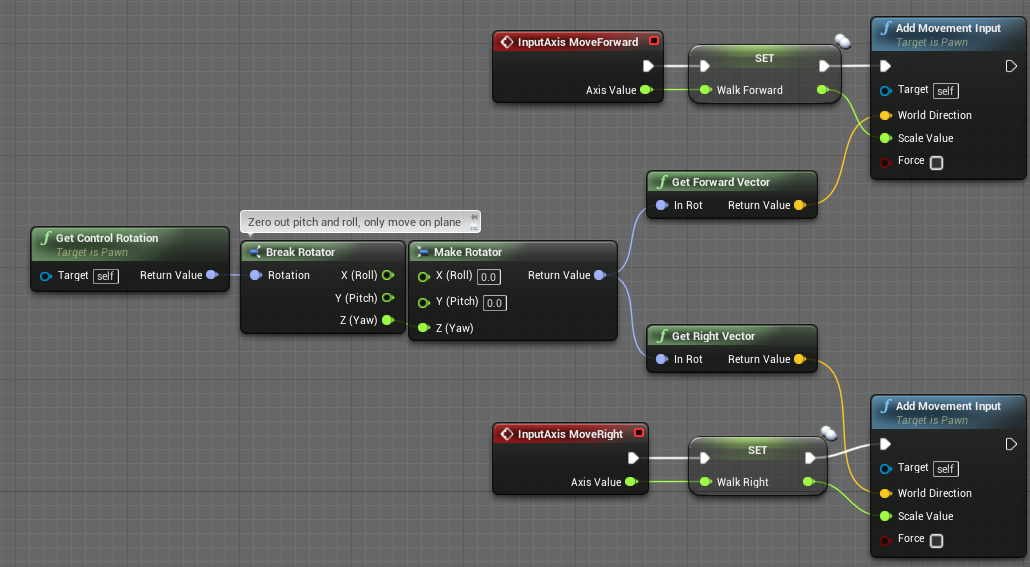 twin juniper
@onyx haven That looks good. Then how do you set them in the animbp