@glad sedge Generally i try and keep win conditions to be evaluated on an event of some kind. For example if the win condition is first to 10 kills for example i would usually forward an kill event from the Pawn that was killed to the GameState which would then apply score to the required player. That is where the win condition would be evaluated. If the new score of the player that just got an kill is now the same as the win condition then we end the game.
#multiplayer
1 messages · Page 334 of 1
 fossil spoke
I treat PlayerState as an DataOnly class
With very minimal code that does any calculations.
This way if you need other clients to know about an kill event it is already accessable via the GameState and it can be easily multicast.
Obviously score handling and win condition evaluation would all be managed by the Servers version of the GameState (ensure HasAuthority)
To answer your question specifically "is it safe on the PlayerState" yes as long as you manage where you are in relation to network Authority you should be fine.
 glad sedge
@fossil spoke Yeah that makes sense too. I guess I feel more comfortable with it being on the Gamestate, with the Playerstate holding information about that player's non-esssential info - i.e. kills, score, etc.
fossil spoke
Yep. Its an important class, even more abstract things like maybe if you can change Hats ingame you may want to hold what type of Hat your wearing on the PlayerState so that when an Client changes what Hat they are wearing they can tell the Server about it and then the Server will have it automatically replicated to all Clients since they all have access to all other Clients PlayerStates they can then go ahead and update the actual Hat model that Player is wearing on their version of the Players Character Actor.
glad sedge
yeah that makes sense.
I treat GameState as God when it comes to the win / loss / essential stuff.
Would you also put in stuff about the map in there too? Like whether a health pack respawns at a certain location and when etc.
fossil spoke
If you need to know that sort of information sure.
Usually id have an component manager for something like that and actually attach it to the GameState that way i can abstract the code away from the GameState itself and just expose functions/variables/delegates specifically for that manager to be able to talk to the outside world.
glad sedge
You can add components to the GameState?
fossil spoke
Sure, it is an AActor after all
Same with GameMode, PlayerState etc etc
They are all Actors
fossil spoke
Yes they are handy for containing only relevant code where it needs to be.
glad sedge
Not to mention just easier to manage.
Hey can I compile source on MacOS if I don't have a paid-for dev account?
glad sedge
Yeah Mac can GTFO tbh, but my co-workers use mac and I wanted to test stuff out there.
glad sedge
Good point.
 zinc loom
Does anybody here have a good resource for implimenting interpolation/extrapolation for replicated movement components (using just movement component or projectile movement component, not the character movement stuff?)
glad sedge
I think @fierce birch is your man @zinc loom
zinc loom
sweet cheers, stalking his github now 😉
glad sedge
heh
I think he (or a few people) did something with networked physics. Might be something there
 granite badge
hey guys, im having a problem where the player clicks on an actor to destroy it. This runs fine when the server clicks on it but when the client does, all the code for the click runs but the destroy doesn't happen, everything else in the line does though. how do I fix it so that the client and the server can delete the actors?
zinc loom
kill the actor with a server RPC, have the client call the RPC
granite badge
this is what I have right now
by rpc do you mean something other than the custom event?
@zinc loom
zinc loom
is the actor that you are killing, itself ?
granite badge
the client clicks the enemy, the enemy percieves EventClicked and attempts to kill itself
zinc loom
and is Itemdropactor just an explosion or something ?
granite badge
its the item drop from the enemy being killed. it spawns just fine if the client clicks the enemy but the destroy doesnt work
zinc loom
and those items being spawned - are they client side only ?
granite badge
no theyre replicated perfectly fine
oh wait
no theyre not, i hadnt checked for that until now
zinc loom
yeah they won't be replicating - as the client spawn them
the server itself needs to do that
so you can either set it up like you have set up your kill event
or do a multicast event and use an switch has authority
granite badge
even if I put the customevent for the server at the front of the eventclicked it doesnt work
zinc loom
but thats part one of the problem
granite badge
ill try taht
with this, if the client clicks, nothing happens at all
even if I throw a print string in there, it isnt printed
zinc loom
im not really used to bypassing the damage system
and usually do all my actor killings by using Event AnyDamage which runs on the server
granite badge
Ill try that
zinc loom
yeah have the onclick do an ApplyDamage, and then the AnyDamage event call the runonserver event you've set up
granite badge
ill let you know in just a second if it works
@zinc loom its still not working, ill upload pictures
still only the server can kill them
glad sedge
On DestoryActor can you do a NetMultiCast?
Oh wait, it's the event of destroy that isn't running on client, not necessarily that the actor isn't being destroyed via the clients?
granite badge
@glad sedge if the server clicks on the enemy, he is destroyed and all of the code runs fine. if the client does it, nothing happens
Ok I solved it, thank you guys for your help. I just moved all of the code for the destruction out of the enemy's code and ran it straight from the player controller causing the damage
 tiny coyote
Hi all. Is it possible to increase radius of vision of spectator pawn and leave characters vision as it is? As I know we set replication radius only to actors, meaning that player will get their data from this radius. How can I inverse this dependency and decide radius regarding pawn I'm possesed in?
 fierce birch
@zinc loom my github has custom ue4 physics branch which implements interpolation but it does it in the engine core where physics is updated
I do have custom physics movement component and manager that does that as well but that's not shared publicly nor will be
Anyways, I was doing fixed timesteps for the custom movement component too, so some centralized place was in order, there is no point to do the same operations in every movement component instance separately (talking of stepping mainly)
zinc loom
yeah am reading thru it now, my games a bit wierd so im trying to figure out what the best way to do this is going to be.... the actors are tanks that don't actually move for the most part, but they shoot a projectile which has a camera.... heh
found this as well, codes a bit of a mess on the webpage but tidied up it looks interesting - works at the player controller level* to keep the last 20 pos / vel / rot values in an array and then just push another one in each tick and uses the client and servers epoch to do the interp / extrap
GameDev.net
[color=rgb(128,0,0)]The Issue[/color]I'm developing an online soccer game for UE4 which you can get from http://github.com/Gamieon/UBattleSoccerPrototype for...
- but he mentions it could work at an actor level and he was doing it at the PC level because the body in his case was something that could be posessed by any of the players
glad sedge
When does GameState's PlayerArray get populated? Anyone know?
zinc loom
"The PlayerArray is not directly replicated, but every PlayerState is and they add themselves to the PlayerArray
on Construction. Also the GameState collects them once, when it is created."
glad sedge
oh nice
glad sedge
yep
zinc loom
id say the relevancy / priority would be hella important to do that many
 slim holly
probably need a custom replication logic for those
it's just gonna saturate itself and stop working alltogether
 raven holly
I dont know where the 16k is coming from 😐
Is there a way to see what the actors are?
I have a lot of replicated actors, but not 16k.
 arctic hazel
Uhm, Is there a common issue for cars suddently taking 5-10 seconds for a client to go forward on dedicated server PIE?
 sweet spire
Cars? you might need to give a bit more information
 past pawn
hello people! :)
I have near 50 actor replicating their movement in a 4 player game, but it has so much lag!
regarding the bandwidth default value, is this normal? it's a little unplayable as it is...
tiny coyote
is it dedicated server?
past pawn
no, it's not
 undone crane
hey guys, I've got a strange problem where the server is only aware of a bullet projectile if the actor that spawns it is in view of the server player's camera...all of my logic for this bullet is run on the server from what I can tell, so needless to say, this is strange
although I guess I already said "strange" above. Still, it's weird. Can't find mention of a similar problem with my Google skills.
past pawn
@tiny coyote some are 45 and the others are 50, that's why I find it strange. with so few replicated actors, I think it shouldn't be this laggy
 dull yoke
Multicast vs OnRepNotify, which one you guys prefer?
In terms of replicating states to clients
tiny coyote
@past pawn yeah, it's strange
@dull yoke if it's part of persistant state - OnRepNotify, if some temporal behaviour - Multicast
with Multicast you have to be careful because players that have connected right after multicast would not get info from it
so, for example, if your character is crouching you better use onrepnotify with boolean iscrouching and not multicast that character has to crouch
undone crane
Any ideas as to why the server only does its trace/kill when two characters are close together? The net culling distance is at default, and my map isn't very big. I've got a reddit link here https://www.reddit.com/r/unrealengine/comments/6op67q/network_replication_issues_are_driving_me_crazy/?st=j5jnvery&sh=ee4d79e4

reddit
I'm working on the bare bones of a third person shooter (intended to be co-op) before I get on to the meat of my game, but network replication is...
past pawn
@tiny coyote thank you nevertheless 😃
dull yoke
@tiny coyote, thanks for the input. That's what I've read as well.
tiny coyote
@past pawn you can try to reduce rates event more - actors are interpolating positions, so you can have like 20-25. also you can check your components replication rates, maybe they are to high. most of problems we had were due to low server fps. if server is lagging because of game logic - all the clients will have small update rates and game will lag for them
in your case - fps of your authoritive client
because logic and replication are both bounded to game fps
dull yoke
@undone crane, hard to tell without looking in your code/bp. I have a bit of the same issue as well. I was able to replicate the damage and death to on 1 server, 2 clients. But when I increased my clients up to 5 (6 if with server) then 1-2 characters out of 6 will be left standing where it should go ragdoll. The server will always see everyone dies, but for clients, they may all but 2 dies.
undone crane
In my case, if a server detects a kill, it DEFINITELY replicates, but sometimes a kill will happen only on one client, and from what I've seen, it has to do with line of sight from the other character
I've got links to my BPs and cpp file in that reddit thread, but I can paste them here if that helps
 ripe cypress
Anyone know why when you leave a mtach with a client you cant rejoin ?
 modern dome
When An Actor is set to NetLoadOnClient, are the references on Client and Server the Same?
undone crane
bullet BP: http://i.imgur.com/18jLiUp.png
handgun BP: http://i.imgur.com/ZTOrMCz.png
character cpp file: https://paste.ofcode.org/vis373U9u4a3vMdQnWMKu7
only change is that the handgun FireBullet event is now replicated and runs on server; problem remains
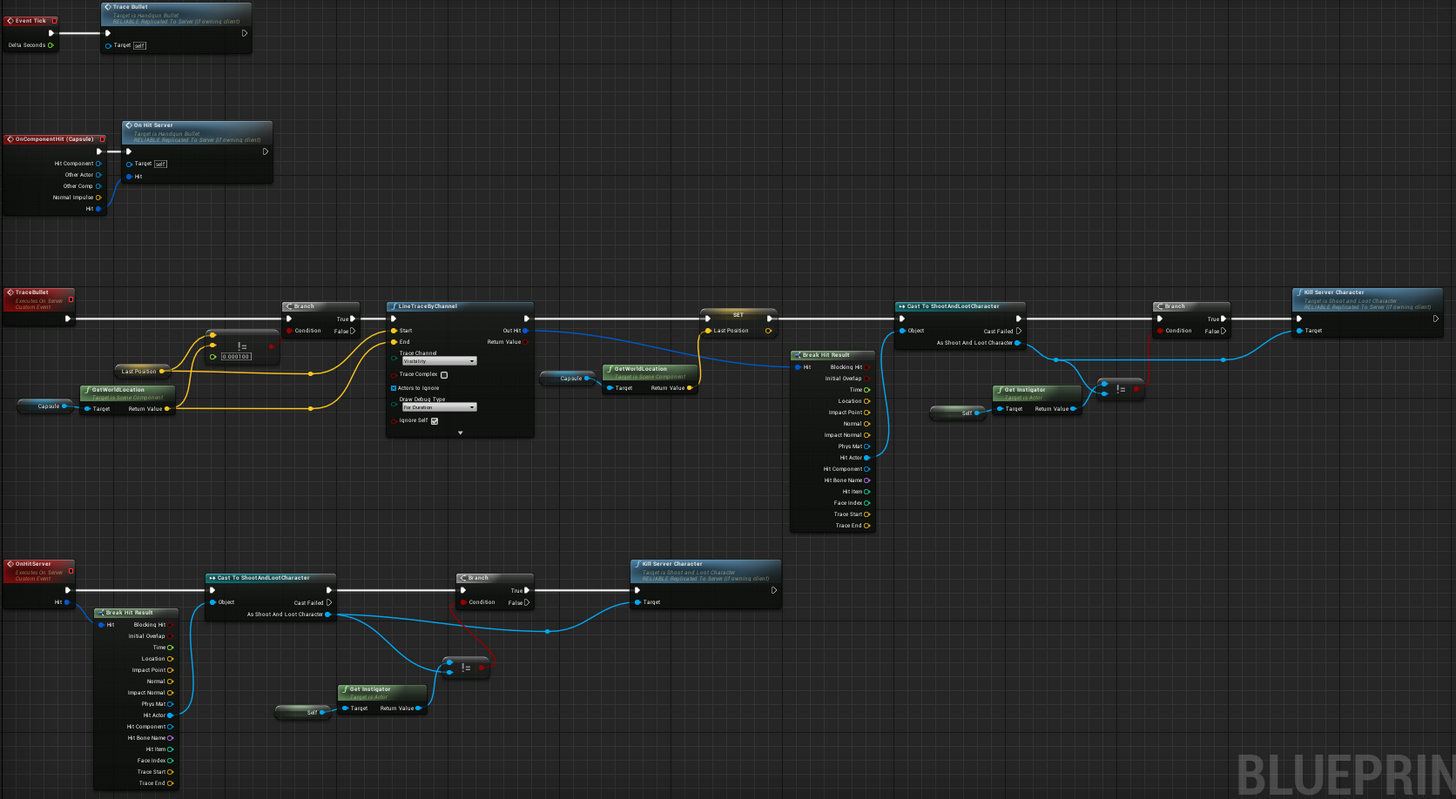
 dull yoke
@undone crane, I can suggest instead of just setting IsCharacterDying on server, you can try to call Server_KillCharacter that call NetMulticast_KillCharacter which then contains settings ragdoll effect on the character.
You can replace NetMulticast with ReplicatedUsing as needed.
undone crane
The weird thing is that even before the kill happens, the server won't be aware of the bullet. I know, because I trace it with Draw Debug, and it won't appear on other players' screens.
Unless the character that fired the bullet is visible on their cameras.
dull yoke
Is your custom event FireBullet being called from the Server? I don't read "Run on server" on it
undone crane
I mentioned above that ought to be the only thing that's different now since that reddit thread. It now runs on server, and the problem persists.
dull yoke
i can't see the line that connects IsFiringWeapon to custom event FireBullet in BP
I might be blind though
undone crane
some logic is kicked off by the anim BP
past pawn
@tiny coyote I will try to lower the rates of everything, but the server can handle the game pretty well, it doesn't have fps drops.
modern dome
triggerBox->OnComponentBeginOverlap.AddDynamic(FComponentBeginOverlapSignature(this, ATravelActor::OnBeginOverlap));
what am I doing wrong here? AddDynamic is actually not in my suggestions
undone crane
@dull yoke This is the gun's anim BP: http://i.imgur.com/qQNDU9n.png
 dull yoke
Ah, so it was only for animation purposes. I thought it was the one that initiates the firing to spawn a projectile or something.
undone crane
so after the explosion effect has definitely happened, it calls that FireBullet event from the anim BP
dull yoke
Do you have an image or cpp code that calls the custom event FireBullet?
undone crane
it's two messages before this one
dull yoke
Ah I knew it I'm blind. 😃
Anyway, the FireBullet seems running on client only
Have you tried changing it to Run On Server?
undone crane
thought I did that yesterday...trying again
dull yoke
If that didn't work I suggest to leave it Run On Server for now as spawning needs to happen on the server
undone crane
right; I changed it and still get the same behavior, except that of course the line trace doesn't appear on the client at all. It still only traces the bullet when the character is in view of the server character
dull yoke
Yeah that's on the right direction. Now you need the server to tell the clients that it happened
Can you make another custom event named NetMulticast_FireBullet?
undone crane
right...but I'm still concerned that the server doesn't see the bullet until it's in camera
dull yoke
Disconnect the FireBullet(server) to the logic and connect that instead to the NetMulticast_FireBullet
then make FireBullet(server) call NetMulticast_FireBullet
undone crane
roger that. trying it now
no change
problem seems to be that the server isn't aware of the bullet in the first place
dull yoke
Its similar to this except its not spawning anything and pressing C should always call "Couch on Server"
Can you post the updated image again?
undone crane
dull yoke
Can you disconnect FireBullet from AnimNotify and instead connect it to a C key or something for now?
This is to rule out that AnimNotify is not the issue
undone crane
I like your thought process
dull yoke
thank you
Replication is really hard to digest specially to a beginner like me. I still have the issue that my death logic isn't being replicated to all: https://www.youtube.com/watch?v=hbZ51yFznKE&feature=youtu.be
 undone crane
the key input event isn't working at all; tested it with a print in my handgun BP
oh, probably because the gun isn't the thing I'm possessing; this will take a few more minutes
dull yoke
I thought as well, try to spawn a simple actor for now that doesn't have much dependencies
undone crane
actually, I've got a meeting in 15 minutes, and then I need to grab some lunch, so I might be away for a while
thanks for your help so far. I'll see if it's the anim BP that's the cause, check out this tutorial on networked shooters, and then if all that fails, I'll be back in this channel with a $ bounty for anyone who can fix this bug and explain to me why the fix works
undone crane
without a multicast, I spawned a handgun on server that all clients see
dull yoke
same, probably because the actor is replicated which doesn't need multicast
undone crane
good point
dull yoke
So here's what I've found out so far:
- If the Actor being spawned in server has Replicated=true, then you don't need Multicast for other clients to know about it
- If the Actor being spawned in the server has Replicated=false, then you need Multicast to tell all clients about it
- Some things are just not replicated such as SpawnEmitter, so Multicast is need to tell the clients
undone crane
what's a SpawnEmitter?
dull yoke
the particleFX such as explosion, etc..
undone crane
gotcha
 hasty adder
Anyone able to help me get on a dedicated server it's ping? I've been unsuccessful in creating a routine in Gamemode to get it. Using GetWorld()->URL.Port and GetPOrtFromNetDriver()
I'm simply trying to make the system set a string or int to the port to be able to send out to a master server rather then require a admin to change the ini if they are running multiple server sessions
 plain flume
If somebody could help me out with this one, i would be so happy. This is my code for this specific part of game.
https://www.youtube.com/watch?v=1kSTXLcOx3U&feature=youtu.be this is what is happening.

First you can see that when client crosses the line and dies, the overlapping works correctly. If the client that crosses the line doesn't die, the Goal post...
Basically, that goal post should start following the player that overlaps it. Everything works, if the previous overlapping character dies. If he doesn't die, then the goal post ain't following anybody
I have been trying to lot of changes to code, but the problem seems to persist. The original code is above
Basically, server should handle everything but the ticking, that client handles. He uses the Overlapping character that servers sets in gamestate
Here is code if player dies. I cannot see what makes this thing work, like it does. So i am clueless now.
plain flume
Anybody :(/
undone crane
@dull yoke In case you were curious, a key press triggering the bullet spawn didn't solve the problem.
 twin juniper
WHy is it that when i pass my struct to my multicast
its sending nothing
but when i call on the server a print function to see what it is
it knows what it is
.<
 brittle sinew
Where is the RPC?
 jolly siren
are the properties inside uproperties?
jolly siren
ah
twin juniper
so like here
this is inside of the server function
when i print RIghtHandEquipmentSlot
and get the name of it
the server says "Hatchet"
but then inside of "Set Equipped Mesh"
which is a multicast
i try ot print it there nad it prints "None"
which is the default btw
:l
brittle sinew
I only asked where the RPC is because I've run into this type of issue calling an RPC on an object that wasn't relevant, in that case specifically it was the PlayerController when I was being stupid
If it's on your character, not super sure
twin juniper
@brittle sinew well i just decided to set my struct to be replicated
and now it works
but u shouldnt have to set it as replicated...
because its being passed into it
from the server
and honestly i would like to keep that data on the server
but w.e
because ive been able to store entire arrays of data on the server, and just query for that data using a function like GetUserData(UID, TheTypeOfDataToReturn, MyDataOut&)
something like that
its stupid
like so much of my stuff is just set to Replicated instead of being queried
i mean its not as if this is bad ... i just dont like it
 vital steeple
anyone have problems with replication taking a little too long to look right? i use onrep to refresh equipment slots and it doesnt look natural
takes about one full second to trigger
seems like there should be a way to force a replication on demand for important things
vital steeple
seems like there should be SOMETHING you can do about it
i dont need it to be instant, but it just feels sloppy as is
 obtuse zinc
nobody can save you now
twin juniper
shouldn't take a whole second to refresh "equipment slots" locally
dull yoke
@undone crane, so far we want to make sure that spawning work both on client and server. If that's the case then we can move on to slowly bringing it back to the way you want it to work: spawn bullet, do a line trace, hurt/kill target.
undone crane
funny thing is the logic there seems fine, but there's this line of sight thing causing problems
found a paid tutor who thinks she can solve it in a half hour, so I'll see what the problem was tomorrow...this issue is completely undocumented online, so I need to know and move on with my life, haha
dull yoke
Good for you, hoping you found and solve your issue. This replication stuff is quite a blocker.
@vital steeple, not sure if it can help you but in ShooterGame, there's FTakeHitInfo.EnsureReplication(). It's a custom method that increments a byte var by 1 to make sure the struct is dirty and will replicate. You could try something like that if you haven't yet.
 cosmic apex
Hey we're looking for 5-10 devs to help break our game.Alpha testing now. Message me if you would like to help break the game. I'll send you server / download info.
 viral mason
Hey, Need a little bit of help with replication.
I can get it to run on client.. or server.. but can't get it on both
 regal hazel
@vital steeple
https://docs.unrealengine.com/latest/INT/Gameplay/Networking/Actors/ReplicationPerformance/
https://docs.unrealengine.com/latest/INT/Gameplay/Networking/Actors/Relevancy/index.html
Some tips for optimizing the performance and bandwidth usage of Actor replication.
Information about Actor relevancy and priority
viral mason
I have timeline.. when the timeline is finished it calls "Chance To Move Box" (Run on server)
Then the server chooses a random integer.. if it's 0 (1 in 3 chance) then it calls "Pick Box Location"
That then picks a location for the box to move to... then moves the box.
I tried splitting the "pick location for box" and "move the box" into 2 seperate events
pick location on server.. then after pick location it Multicast's a seperate event to move the box (so it should be replicated to client)
Doesn't seem to be working, any help?
viral mason
Ok... I fixed that issue :)
But now the original box flickers then the value gets turned off.. time to fix 😛
 trail dragon
So I know Online Subsystem Steam only supports not-in-editor builds
And I also know that session browsing stuff, with Steam, only works on separate computers
Does everyone just build workarounds for this, or does integrating Steam generally mean the death of testing in editor for features like this? I guess multiplayer IP direct connect would still work from two clients on the same computer
ripe cypress
I have a free for all game mode and if players dont reach the kill limit to win how would i get the highest kill number to show winner
ripe cypress
yeh I am keeping track of them I am just missing a way to get the highest one
glad sedge
How are you storing them?
modern dome
You probably want to store tthe Kill count in your PlayerState.
The GameState has access to all of them and then you can obtain the winner by comparing their kills
fossil spoke
@ripe cypress Just iterate over all of the Scores and whatever is the highest at the end of the iterator is the Winner?
granite badge
hey guys im having a problem, Im creating a paper2d sprite and trying to change the appearance of it to a random building (for backdrop purposes) but the clients and servers always see it as different buildings even though they are replicated. anyone have any ideas to make sure the client and server see the same thing?

 woeful garden
Does the client and server call randomify? I think it would be the best that server calls it and passes data to all clients
 fierce jetty
PULLING HAIR OUT OF HEAD https://answers.unrealengine.com/questions/675928/movement-twice-as-fast-on-online-server.html
modern dome
The Transition Map for Seamless Travel, can it be something more complex like a automatic sequence?
For example Map A -> Visualization of Travelling with Ship on the Miniature World Map -> Map B
 dapper galleon
@fierce jetty are you including DeltaTime?
maybe your game runs slower in the PIE context
fierce jetty
@dapper galleon Shouldn't be a need for DeltaTime with AddForce. It should with AddImpulse but I'm not using that
AddForce already has DeltaTime implemented somewhere
dapper galleon
Hum, I guess you're right
dull yoke
@fierce jetty, was the movement itself is doubled or just the animation?
fierce jetty
@dull yoke its pure movement, there is no animation, so movement 😄
dull yoke
Ah, thought it is the same issue I had
 deep hedge
Sup guys.
I'm trying to create instant object destroy on client side
Current logic:
I'm having an AActor (bReplicates=true) (For ex. named "act")
Client(SomeMethod): S_Destroy(act); // Reliable, Server
Server(S_Destroy): act->Destroy(); // Actor is destroyed on client after (latency*2) amount of time (Client->Server then Server->Client)
So if client has valuable latency it take huge delay on client side to see that actor is destroyed.
If there is a solution to simulate replicated Actor destroy only on client side to make things looks laggless?
Like that one:
Client(SomeMethod): S_Destroy(act); LocalDestroySimulation(act);
I have tried TearOff and Deastroy on client side and had no results
 oak sluice
Hi guys, I'm new here. I'm working on a multiplayer game which works fine in the editor but I'm having trouble packaging. The main issue right now is that I'm trying to start a client and connect to my dedicated server but the client thinks it's also a server unless I pass the server address as a command line argument. Even if I do that I still see the GameMode class being created on the client which according to the docs isn't possible. What am I missing? I've been trying to get this to work for almost 4 days now so any help would be much appreciated.
 prisma shadow
how do i cast to the player state of the hit actor?
zinc loom
That's because for all intents and purposes, it is a server to itself until it's connected to another server bergundy
Mp mostly seems about divying up what code needs to run on the server and what needs to run on all clients
And then working out thier orders and balances
sweet spire
So who has authority on the player controller?
as i was thinking of spawning my HUD from there, so its not created on the server
 iron turtle
@sweet spire Server has it. I create some widgets in there as well, and I do them after checking if it's "locally controlled", which would mean the player's version.
sweet spire
gotcha thanks
oak sluice
@zinc loom thanks!
From all my searches online seems like UE4 does not support physics based multiplayer movement, and if I want to achieve this I'd have to write my own movement code and take care of prediction and lag compensation myself. Am I wrong?
 wary willow
@oak sluice nope
oak sluice
@wary willow Thanks, that's what I thought, I have a project in which I replaced UE4 physics with Chipmunk2D and I have a good start, some rough edges but seems like it will work. I just joined this server and figured I might get some new insights here..
fierce jetty
Is the dedicated server tick 30?? Why 😮 This explains some weird movement on my clients I think, that have a framerate of 60
twin juniper
is there a real way to block player input for multiplayer? to keep them from moving around without having to set their speed to 0 ???
 inner iris
@Hoverloop#6054 did changing that var increase the tick rate?
zinc loom
hahah I swear, Hoverloop, bergundy and I seem to be up against the same issue in different ways - there is just no inbuilt client side prediction for actor movement in the base engine, save for the stuff in charactermovementcomponent
arctic hazel
i'm so deeply confused, got a project blueprints only with steam setup to it, but soon as running a "Create session" > "Open level" with ?listen, it kicks the client back to the mainmenu, but if i run a destroy session after that, and try again it launches the map fully,
https://gyazo.com/3b4e9bbf0cd48f15a6cdb31761c3e857 image of BP aswell
 dull yoke
Actors and their Owning Connections
fossil spoke
@arctic hazel Steam requires seamless travel.
fossil spoke
👍
arctic hazel
Now my second issue is that players cannot find session that ain't on LAN, Despite join session etc is called from Hud > Playercontroller > GameInstance
it just returns with no result at all
fossil spoke
Make sure your ports are forwarded.
arctic hazel
I do not run a firewall, and which ports would it be? typical steam ports?
fossil spoke
7777 i think but dont quote me on that im very forgetful lol
arctic hazel
aight, also let me make a image of the session joining BP's, incase something wrong ^^


 fossil spoke
You shouldnt need to RPC like that.
Eitherway the result is the same anyway so meh.
arctic hazel
so i made it more complex then i had too, Great! :p
fossil spoke
Also keep in mind, by default Steam servers are region locked so if your trying to have someone seaech for servers that are outside their set region they wont be able to even see them.
fossil spoke
No you manage that on your Steam dashboard
arctic hazel
Dashboard?
fossil spoke
When you actually own an game on steam you have access to alot of steam related functionality. Which includes discovery type stuff.
arctic hazel
Ah i see, yeah not going into the greenlight process Yet least
fossil spoke
Testing with SpaceWars is enough 😃
arctic hazel
and i assume spacewars is region locked yah?
as thats the defualt refference point of testing :p
fossil spoke
Yes.
arctic hazel
Aight, Thanks for being helping out and explaining despite my unwareness of some areas :p
arctic hazel
Thanks, Do you mind if i send you Pm if i get stuck somewhere else for tiny bumps in the road ? :p
(if i can find it on google or forum ofc)
cant*
fossil spoke
No not at all. Always happy to help.
arctic hazel
Great
fierce jetty
Anyone here has a good idea how to spawn pawns after a seamless servertravel?

 brittle sinew
Just curious, what did you do in order to expose it? I don't see any reason why that wouldn't work
fierce jetty
Well, added the lines in the code in the images 😛
brittle sinew
And that's it?
brittle sinew
Oh, I thought you were in a position where you hadn't rebuilt the engine
That's actually a pretty common mistake I see, haha
fierce jetty
Haha alas thats not the problem x)
raven holly
Anyone here use linux for their dedis? What distro do you use?
jolly siren
yes, ubuntu server
 tame ivy
Anybody familiar with CharacterMovementComponent? Trying to implement some custom movements like in https://wiki.unrealengine.com/Authoritative_Networked_Character_Movement It's working but I'm seeing this warning: LogNetPlayerMovement:Warning: CreateSavedMove: Hit limit of 96 saved moves (timing out or very bad ping?). Which makes me think bad things are happening.
arctic hazel
When u test a game with spacewars, Would session searcher bring up all people's test games, or only same client as yours?
hasty adder
Oh replication you heartless bastard
twin juniper
my favorite is when you forget to put property in GetLifetimeReplicatedProps and you spend hours trying to figure out why something isnt working properly
hasty adder
Haha
I have this mechanic of catching and throwing a ball so to speak and one part is deflecting it
If you don't have the ball you can hit a button to deflect it. Of course if you have the ball the button does something else
So somehow I've confused my replication
Where if I try to deflect it right when I catch it
My next action acts as if both I have t and don't have it off the same replicated bool
What's got me crazy are both actions are checked on server only with the same bool
But il@not home I have theories I'll check later 😃
ripe cypress
so how do you get a networked player start instead of the player start ?
arctic hazel
Grrr, my finding session cant find anything, (using space wars) and i was expecting finding a shit ton :p
Oh seems my mate sees my session but cant get into it
hasty adder
He's not on the same network right?
dapper galleon
Check your log
If I remember right, when you try to find sessions it prints the IPs it found and why it wasn't returned (session params, other issues...)
plain flume
I asked this few days ago, but didn't get help back then. Let's try again.
Basically, that goal post should start following the player that overlaps it. Everything works, if the previous overlapping character dies. If he doesn't die, then the goal post ain't following anybody
I have been trying to lot of changes to code, but the problem seems to persist. The original code is above
Basically, server should handle everything but the ticking, that client handles. He uses the Overlapping character that servers sets in gamestate
https://www.youtube.com/watch?v=1kSTXLcOx3U&feature=youtu.be here is the video about the situation
First you can see that when client crosses the line and dies, the overlapping works correctly. If the client that crosses the line doesn't die, the Goal post...
Here is if the player dies. If death happens, the leading actor is updated properly
dapper galleon
@plain flume I would make a forums thread first, then post it here, maybe.
arctic hazel
Thats alot of details
and far as we saw in the logs [2017.07.27-15.49.16:232][479]LogOnline:Warning: STEAM: Server response IP:87.239.63.180
[2017.07.27-15.49.16:232][479]LogOnline:Warning: STEAM: Removed incompatible build: ServerBuildUniqueId = 0x56b2008a, GetBuildUniqueId() = 0x64fa4e1f
[2017.07.27-15.49.16:298][483]LogOnline:Warning: STEAM: Server response IP:37.187.25.155
[2017.07.27-15.49.16:298][483]LogOnline:Warning: STEAM: Removed incompatible build: ServerBuildUniqueId = 0x155590d2, GetBuildUniqueId() = 0x64fa4e1f
[2017.07.27-15.49.16:442][492]LogOnline:Warning: STEAM: Server response IP:192.241.198.104
[2017.07.27-15.49.16:442][492]LogOnline:Warning: STEAM: Removed incompatible build: ServerBuildUniqueId = 0x4ccfaa28, GetBuildUniqueId() = 0x64fa4e1f
dapper galleon
would any of these IPs be of your friend pc?
arctic hazel
nop
dapper galleon
Port forwarding? Firewall?
arctic hazel
No firewalls
at all on either of us
Also when creating the session & change map [2017.07.27-16.25.49:780][389]LogTemp:Display: ParseSettings for GameNetDriver
[2017.07.27-16.25.49:780][389]LogTemp:Display: ParseSettings for SteamNetDriver_0
[2017.07.27-16.25.49:780][389]LogTemp:Display: ParseSettings for GameNetDriver
[2017.07.27-16.25.49:780][389]LogNet:Display: SteamNetDriver_0 bound to port 7777
[2017.07.27-16.25.49:780][389]PacketHandlerLog: Loaded PacketHandler component: Engine.EngineHandlerComponentFactory (StatelessConnectHandlerComponent)
[2017.07.27-16.25.49:780][389]LogNet: GameNetDriver SteamNetDriver_0 IpNetDriver listening on port 7777
[2017.07.27-16.25.49:929][389]PIE:Warning: Warning Attempting to move a fully simulated skeletal mesh VehicleMesh. Please use the Teleport flag
[2017.07.27-16.25.49:931][389]LogWorld: Bringing World /Game/VehicleBP/Maps/Map1.Map1 up for play (max tick rate 0) at 2017.07.27-18.25.49
[2017.07.27-16.25.49:932][389]LogWorld: Bringing up level for play took: 0.148309
[2017.07.27-16.25.49:933][389]LogSpawn:Warning: SpawnActor failed because no class was specified
[2017.07.27-16.25.49:935][389]LogLoad: Took 0.847628 seconds to LoadMap(/Game/VehicleBP/Maps/Map1)
which looks correct in my eyes?
exept tick rate
dapper galleon
I guess, is port forwading set?
arctic hazel
Yah ports seems to go thru fully
dapper galleon
I would just set the router to DMZ to test it
arctic hazel
but if ports was blocking it, i shoulden't be able to get others ips in return. right ? :p
or ah.. if hes blocked he wouldent show up hm
but hes 100% sure they're open on hes side
dapper galleon
That's just for the host, yes
arctic hazel
I hate being stuck at small things like this when everything else runs smooth 😄
[2017.07.27-16.51.41:621][305]LogOnline:Warning: STEAM: Failed to parse setting from key currentmembers value 1
[2017.07.27-16.51.41:621][305]LogOnline:Warning: Unknown or unsupported data type from Steam key data guid d0e7d0b7-609e-49e7-a0cd-77ad1e2dd89a
[2017.07.27-16.51.41:621][305]LogOnline:Warning: STEAM: Failed to parse setting from key guid value d0e7d0b7-609e-49e7-a0cd-77ad1e2dd89a
[2017.07.27-16.51.41:621][305]LogOnline:Warning: Unknown or unsupported data type from Steam key data name VS (vicxz08)
[2017.07.27-16.51.41:621][305]LogOnline:Warning: STEAM: Failed to parse setting from key name value VS (vicxz08)
[2017.07.27-16.51.41:621][305]LogOnline:Warning: Unknown or unsupported data type from Steam key data __gameserverIP 0
[2017.07.27-16.51.41:621][305]LogOnline:Warning: STEAM: Failed to parse setting from key __gameserverIP value 0
[2017.07.27-16.51.41:621][305]LogOnline:Warning: Unknown or unsupported data type from Steam key data __gameserverPort 0
[2017.07.27-16.51.41:621][305]LogOnline:Warning: STEAM: Failed to parse setting from key __gameserverPort value 0
[2017.07.27-16.51.41:621][305]LogOnline:Warning: Unknown or unsupported data type from Steam key data __gameserverSteamID 90110195826600963
[2017.07.27-16.51.41:621][305]LogOnline:Warning: STEAM: Failed to parse setting from key __gameserverSteamID value 90110195826600963
[2017.07.27-16.51.41:621][305]LogOnline:Warning: STEAM: Unable to parse search result for lobby 'Lobby [0x1860000C8432806]'
in our test now
plain flume
But are you sure others can connect to your computer?
I would install minishare and try to host server and check if that works
Like Matheus said, you need to set DMZ if you are behind adsl/ router
arctic hazel
im not behind anything im fairly sure, its more about hes side
but also, if the search result max is 1.. if that 1 find, has the wrong client etc
does it end the search?
or does it wait for 1 fitting result
dapper galleon
I think it depends on how the subsystem uses it, increase just to be sure
arctic hazel
aight
dapper galleon
do you have Steam open?
dapper galleon
Well, sometimes my friend tells me it can't find and I'm always like "Is Steam open?"
and it wasn't
arctic hazel
i've always had bad luck setting up steam
workt on a game 8 month ago (different one) and this stage got me to give up
also 1k seems to work fine for a number
dapper galleon
you could run nmap
never really used for this, but you could see if he's in reach
arctic hazel
hes like 10 min car away from me :p
so should be unless the routing is really.. off
dapper galleon
you can even ping the server port
arctic hazel
one thing i could believe thats wrong could be my engine.ini tho but he did see my server info once
for a split second and then it faded
k 1k search, still not found, how does one go for pinging server ip with port
unless something wrong in the .ini (https://gyazo.com/dbd46aeecc6c5126f99cb2c9154b1122) but i don't think so
dapper galleon
you can use nmap
arctic hazel
How does one use that ? :p
dapper galleon

Just a quick sanity check here.
Can you ping a specific port of a machine, and if so, can you provide an example?
I'm looking for something like ping ip address portNum.
you could also use https://chocolatey.org/ to install nmap

Chocolatey
Chocolatey is software management automation for Windows that wraps installers, executables, zips, and scripts into compiled packages. Chocolatey integrates w/SCCM, Puppet, Chef, etc. Chocolatey is trusted by businesses to manage software deployments.
If you use Windows
choco install nmap
viral mason
Trying to sort all players in game in order they join
So player 1 has value of "Player ID" 1
player 2 has value of Player ID 2
and so on
So that I can make a widget per person, in order of ID
so
Player 1's widget
Player 2's widget
Player 3's widget
I'm currently using ForEachLoop with Game State > Player Array
 fleet sluice
@arctic hazel Using UE dedicated servers or listen?
480 is region locked and UE's OSS uses Steam lobbies (Steam terminology) which are affected by region lock, as far as I know. Might be a cause for your trouble
wary willow
@fleet sluice Do you implement Master Server in your plugin?
fleet sluice
@wary willow Can you be more specific? What Master Server? It allows communication with Steam's Master Server, it is not in itself a Master Server
wary willow
@fleet sluice Ah, I am guessing, pretty much what this does. https://forums.unrealengine.com/showthread.php?73739-Master-Server-with-Unreal-Engine-4-Plugin
fleet sluice
That's definitely out of the scope of UWorks
wary willow
Maybe in UWorksSubsystem one day 😉
jolly siren
Why would this have been backlogged? https://issues.unrealengine.com/issue/UE-45681
is anyone with a decent sized project on 4.16?
@nocturne token I know you were having a replication issues when moving to 4.16. Did you ever get those sorted?
wary willow
@jolly siren tbh... Because they probably have no idea how to fix it
Where it even starts
jolly siren
it's a pretty horrible bug
wary willow
And probably can't do a hotfix for 4.16
I know. I have two client MP projects on 4.16
jolly siren
they should have an idea..it's their codebase lol
wary willow
Well... Let's be honest...
They have a shitton of engineers, most it seems are contractors
It could have come from any one of them
jolly siren
still...I would except gurus per section of the engine
wary willow
I totally agree
I expect also...they probably don't want to do another 4.16 hotfix
They lost a lot of manpower
So, their focus is probably on 4.18+
Since I doubt this is going to get fixed for 4.17
But who knows.
I haven't tested it on 4.17 yet
jolly siren
yeah I'm waiting on voip to be fixed in "4.18" too. But I am expecting them to push that out even more. But this is more important.
Does anyone know if it's only an issue in editor? (45681)
damn it was created on my birthday 🍰
wary willow
@jolly siren UseAdaptiveNetUpdateFrequency supposedly is a cause
Try to disable it and see
ripe cypress
where do you disable or enable the adaptive net frequency ?
 nocturne token
wary willow
nocturne token
wary willow
@nocturne token 😭
fossil spoke
Wow, thats interesting
I literally been spending all day today trying to figure out this exact issue
....
past pawn
hello people! :)
I'm currently analysing a network profiler file, but trying to understand everything on that software is tricky, so I want to know if the KB/s tab is the average amount of data sent in the whole experience (per second). Am I right?
Also, is there any kind of documentation for it?
 solar flower
For a basic animation replication, why wouldn't just setting the boolean variable on the animation blueprint make everything work correctly? It would be set by all connections locally, and the server would take it and replicate it to all clients....
jolly siren
you would want to set on server only then if you are replicating
not "all connections locally"
solar flower
hey @jolly siren I understand it's not efficient. I'm just curious why it isn't working
jolly siren
it's not about efficiency. if you are replicating a variable you only want to set it on the server in most cases. setting it on clients will mess things up
solar flower
I have it marked to replicate
Oh, it's not overwritten on the clients?
I can provide a more specific case. Say i have bShouldThrow on my animation blueprint for my character. It's set from a BTTask to true and has an anim_notify to set it to false. Just setting the variable on the animation blueprint to replicate doesn't work. What is the typical/efficient way to replicate anim states or booleans?
jolly siren
put the replicated variable on your pawn (character)
not in your anim bp
and then access it from the anim bp
solar flower
I thought anim blueprints are owned by the Character, which is owned by the player controller? Wouldn't that allow it to replicate from the anim bp?
jolly siren
Anim bps are UAnimInstance which is a UObject and isn't setup for replication
solar flower
Whoa, opening up VS to look into it...you're blowing my mind. I did get some other anim functionality working by using repnotify in the Character bp. But having a repnotify function for every setter seems inefficient.
Though not as bad as the (4?) functions needed for C++ implemented properties
jolly siren
why do you need a repnotify? just access the character variables in the anim bp
solar flower
So only AActor derived classes are setup for replicated variables even if they're owned by the PlayerController?
jolly siren
yes
you can get uobjects to replicate, but you shouldn't in this case
normal method is to store replicated variables on character
solar flower
I know you're not responsible for this or anything, but that's messy af and prevents proper scoping of variables.
jolly siren
nah it's not messy
solar flower
What about custom events that change local variables on the anim bp?
solar flower
Once again though, that's really not a performant way to do things. I'm needlessly checking every anim update for the status of a variable
I'd rather have event-driven setters
jolly siren
it's how it's been done from the beginning of epic time
lol
feel free to do it however you want
gl
solar flower
I'm not saying you're wrong, and i really appreciate the help you're providing. I'm just a bit lost now
solar flower
Do you think a multicast setter in the character bp for local variables in the anim bp would work?
jolly siren
talk about inefficient lol
solar flower
Yea, i've heard that i'm never supposed to multicast
jolly siren
not true, but not to avoid checking a variable locally lol which takes no time at all
anyways i'm going to get back to my stuff
solar flower
Alright, thanks man!
jolly siren
sure np
solar flower
Put bShouldThrow on the character bp and a setter every update on the anim bp and it's working perfectly
And the anim notify is setting bShouldThrow back off after execution
 wary wyvern
Hey guys! Who can tell me about RPC events performance.. Right now I got RepNotify bool wich indicates, when character starts to attack. I enable it and after some time turn it off. But sometimes bool do not replicates, as state switches off to quikly and server do not send state. I decided to send RPC event when char starts to attack. But we got like 100 mobs wich can attack like every second.. Is it okay to handle 100 RPC events per sec?
Without parameters ofcource
 jolly siren
the preview?
wary willow
4.18, with 4.19 getting released prior to Xmas break
TBH, I think 4.17 is gonig to launch here in the next week or two
They already did the preview stream
jolly siren
ahh okay cool, I hope so. Need to get to 4.18 ❤
need to check out that stream, hopefully something useful in there
inner iris
Voted!! 😃
wary willow
But, this sucker has a lot of updates to framework
But we're in P3 already
I doubt it'll go past 4/5
Which will mean that 4.18P1 will be around Oct if current trends are kept
Late Sept/Early Oct
jolly siren
awesome, not too long. should come pretty fast. End of summer always goes by too fast
solar flower
voted
jolly siren
thank you
solar flower
Is it necessary to mark "component replicates" for all children components in a replicating character?
For example: If i have a replicating character BP with a particle system component (for shooting) i need to replicate, do i need to mark every other component down the chain to replicate (Capsule Component, Mesh, SpringArm)? Is there a better standard practice for this?
jolly siren
no
@quartz imp you shouldn't need to replicate the particle system component
it will be created on clients without being replicated. replication is for when you want changes to send over the network
solar flower
Okay, that was what i ended up doing. Just triggering it from the anim notify locally before calling the server event.
jolly siren
right, that is correct
solar flower
I think i'm starting to get the gist, thanks!
jolly siren
np 😃
solar flower
Just curious, are there typical components that you'll normally need to set manually to replicate? I know CharacterMovement replicates by default
jolly siren
you most likely won't need to set it for any of the ootb components like that if it already isn't
in most cases it will just be custom component types you create
solar flower
Custom as in custom created classes? The typical things i add are mesh components, physics constraints, text renderers, spring arms, camera, Particle sys.... I shouldn't need to set the 'component replicates' property on them and should instead just call server functions on them to use them?
jolly siren
yes, custom created classes
solar flower
Unless like the particle sys, i can avoid network traffic
jolly siren
and no you shouldn't need to replicate any of those
ripe cypress
Ok I need to check is self equal to the player controller being used inside the player controller blueprint so self would be == to what ? Like I have here in the player character BP but need one for my player controller and get player controller doesnt work bc everyone is using that controller
jolly siren
no
self would be the character in that case
if you are trying to check for the local player then use is locally controlled
ripe cypress
thank you
jolly siren
no problem
solar flower
Can i set variables on a widget blueprint to be replicated? My WBP_HealthBar is a widget component on my character class. AI and Server/Client players use the same character class and all need a health bar to display.
jolly siren
doesn't make sense for a widget to be involved in networking
the widget should access the replicated variable from the character
just like animation did
solar flower
@jolly siren The issue i'm having with that is the 'Get Owning Player' function is client only. It's making it so that only the owning client is able to see the UI updates. I tried setting a pawn variable in the widget from the character, is this the standard way to do it?
jolly siren
character is replicated to everyone, so yes that would work
solar flower
Hmm, pawn is not valid on all AI instances on both server and client
I wonder if it's a constructor vs beginplay issue (timing)
solar flower
If I call a Execute on Owning Client RPC, it executes on all clients including the listen-server?
brittle sinew
No, it only executes on the owning client—the client whose PlayerController owns the object
If you want it to execute on all clients, that's multicast.
dull yoke
Hmmm, I thought my movement logic is good by just calling Server_MoveForward until I used the console command "Net PktLag=400". The game becomes unplayable to the client side due to delayed movement reaction.
Was able to fix the client lag by Calling MoveForward/Right that performs movement logic on client side and then have a branch "If not HasAuthority, call Server_MoveFoward/Right" which then calls MoveForward again to perform movement logic both on client and server side. Instead of perform logic first to Server then replicate it to local.
inner iris
@dull yoke I had this exact problem before- now I default to playing on dedicated server in editor with simulated not ideal ping scenarios (Net PktLag=400 is really high- I found 200 to be around the mark you'd find from a player connecting to NA from EU for example)
It becomes instantly obvious if the client is waiting on the server for anything- it'll always feel super smooth without simulated packet lag playing in the editor but a lot of issues show up when you start simulating
Also I would recommend setting up an Amazon EC2 instance (free) and testing your dedicated server builds with it frequently to test the response of a real world server and see if there are any other problems
dull yoke
Yup, 400 ping is too high but that's exactly my intentions are. To check how "playable" my game under bad network conditions. 400 ms is a normal latency I'd get usually in a game playing on US region from an Asia region. Had to use a tunneling service to bring it down to 90-150ms.
How good is UE4's simulated latency ping? Does it have give a weird sideeffects compared to actually playing the shipped game with the same latency ping?
inner iris
It seems fairly good- I can't notice much difference when playing on my EC2 instance vs simulated latency in editor. Still definitely worth testing on both and especially with friends on the dedicated server to see if things feel good and work as you'd expect in a normal gameplay situation
And yeah it's a good idea to play on those super high values too, to really see what high ping players will experience
I had the actual gunshot happening on client but the impact trail FX happening on server- becomes instantly obvious that this isn't the right way forward when you simulate with high ping
So made all shooting stuff happen on the client and then run on server for damage checks and then run the cosmetic stuff on all other clients
I wouldn't have realised how bad it felt without testing on high ping settings
dull yoke
I'll give EC2 instance a chance later. Good to know we can use this for UE4 dedicated server. EC2 are linux-based right?
How do you handle running cosmetic stuffs on your client then replicating it to other client without the cosmetic stuff playing the logic twice (pre-server call and post-server call) ?
inner iris
I am using the windows based EC2 instance but it also supports Linux!
I handle not calling it twice by checking "is local player" after the multicast
dull yoke
Wow, didn't know there's windows based EC2.
inner iris
So it calls it for everyone but the local player who already played them
Or "is locally controlled" sorry not at the comp
dull yoke
That's what I tried but it still run the logic twice. The original call returns true on this->IsLocallyControlled(). And then on replicated event, it still returns true on this->IsLocallyControlled()
It's not apparent at first until I increased the packet lag simulation.
I had to use another boolean isRep together with IsLocallyControlled() so the first call would return false and run the logic once on local, and the replicated call would return false (because of onRep which was set to false when called by server)
dull yoke
Has anyone experienced where if the client is delayed about 400 ms, where client plays attack montage (root motion enabled) and freely move afterwards, then when the server plays the same attack montage later the client's current rotation and location get messed up as the server seems overwriting the client's state? Is there a way to disable this on anim montages?
jolly siren
interesting, for some reason in 4.16 after travelling OnRep_Pawn is being called even though the Pawn is null (wasn't happening in 4.15)
🤔
inner iris
@dull yoke This is how I did the local player exclusion, worked for me :)
jolly siren
yes that is the correct way
dull yoke
@inner iris, ah, the "instigator" part is what I'm missing and my IsLocallyControlled was referring to self. Thanks for that!
inner iris
@dull yoke Happy I could help 😃
dull yoke
Did you have use any attack animation that has root motion enabled and it drives your character movement and rotation during anim?
inner iris
I never use root motion- have heard things about it being harder to get working networked!
dull yoke
It is working fine with my game until you introduce a lag.
I made the animation client-side to remove any perception of lag. Though damage are still server side.
When you have 400 ms lag and the client performs an attack, the client will perform the sword slash anim with foot stepping forward (root motion enabled). Then right after that, run to the opposite direction.
While client is running to the opposite position, once the server receives the attack request, it performs the attack on the server-side. I didn't replicate the attack on the instigator so the client that performed it won't play the attack anim twice.
However, once the server starts playing it, the client's movement and rotation gets messed up as if the server is overwriting the client's location and rotation where it should not as the client is ahead of time and server should continue polling the queued movement and not overwriting client's movement and rotation with an old data.
inner iris
Yeah seems like the server isn't in sync with whatever root motion data is currently being played. I'm not sure how to solve this, sorry man! Mabye someone with experience using root motion will be able to help 😃
twin juniper
What class would be the best location to store a players inventory in multiplayer? I'm trying to think about the network replication, and not wanting every player connected to have replication of the inv
fossil spoke
PlayerController would be my first choice.
hasty adder
ok lets see if this disable of pmg or whatever it is helps the network rep
hasty adder
@muted sigil you may want to watch the epic videos on replication where you make bombs
its a tough subject. but let me give one example,
- You have a player character spawn
- It has in begin play - print "hello"
- Both Client and Server print hello. because both client and server spawned their own version of the character.
- Change it to do on begin play -> switch Authority -> Auth Print Hi, -> Remote print Hello
- The Host or Server will print Hi and the client who is connected will print Hello
You have to think of in terms of which copy of the game is doing what.
now this gets slightly deeper. Say you want to change your players name and it has a text box over there head. - you need to accomplish telling the server your name has changed, and then have the server (or authority) replicate it to everyone that your name has changed.
So if you press H to change your name from Bob to Sam.. H-> (your key press, you are authority of your character in your version, your world.) so we instead use a function "Run on server" that then runs the command to change your name.. which is great the server knows, but no one else will, till inside this run on server you run a muli-cast (run on all) and because it is server, it can execute this function, which tells everyone elses version of the world to execute the code, which can simply be settign your players name to the new name.
so you could do H->(run on server)->(Multi-Cast)->Set Name "Sam"
if you did H:->(Multi-Cast)->Set Name "Sam" it wouldn't run unless you where the host or server.
what blueprint is that? is that the level?
ok lol, since they live in the world they belong to the server/host, or atleast the way they execute fyi
no its how your accessing the player that will matter, the controller, and player controller are a little different, i wish it was that easy to get the player controller 😃
the character blueprint will spawn and then be posessed by a player controller.. you might want to find the override for on possess it will have a pin for new controller. - this might need a delay because replication, but you can then make a reference to the player controller. like set thisPCRef and set the value to replicated
i have a feeling if you put a pritn statement on the cast to player controller failed -> print Failed it would print it
yeah one second
pinned to this channel might be exi's guide
and i'm looking for the video series
that i mentioned
man its like they got rid of the tutorial

it has russion subs but its the one they used to have up
 bitter epoch
Anyone know any great tutorials or documentations for inviting steam friends to a lobby? Not necessarily having a server list.
If someone has any info on it, go ahead and @ me. Thanks!
dull yoke
@muted sigil, you are right that you need multicast to replicate the update down to all clients. But the multicast can only be called by the server. So what you can do to your last BP graph is:
- Create custom event NetMulticast_SetBal(set it to Multicast) and connect it to the logic where your Set_Bal custom event is connected.
- Disconnect Set_Bal custom event
- From Set_Bal custom event, call NetMulticast_SetBal
@inner iris, it's alright. Its quite hard to find ARPG replication that does the same thing as I was doing since most of the tutorials are FPS.
And its even rarer for those who use 'Net PktLag='
plain flume
Any idewa what might cause this: I have a multiplayer game and the Leading character is stored in GameState. If i try to callthe GetLeadingCharacterNotEmpty() function anywhere else but inside the character, it will return empty string. If i call is anytime inside character code, it will return the stored variable
for example: UE_LOG(LogTemp, Warning, TEXT("%s"), *CurrentGameState->GetLeadingCharacterNotEmpty()); gives me value
I meant this
That c++ gives correct value. Blueprint gives empty string.
I tried to call it directly and through the function in blueprints too
dull yoke
Is there an easy way to disable ClientAdjustPosition in CharacterMovementComponent?
glad sedge
Just checking - GameState runs on every client, doesn't it ?
jolly siren
it is replicated to all clients, just like PlayerState
glad sedge
Replicated, yeah sorry
okay - heh. I was running a function to finalise game data and couldn't figure out why it was printing x 3
jolly siren
ahh
glad sedge
rookie error
jolly siren
yeah super useful
glad sedge
So I've utilised Role == role_authority and it's sorted me out.
That's 4 hours I won't get back.
jolly siren
awesome
lol
I don't think I can pin, but it should probably be. not super pretty but it is useful still
 inner iris

Really good talk on a bunch of design + networking choices Bungie made for Halo Reach. Lots of the info could apply to UE4
This is one slide that I thought was particularly cool- timing the client animation with the server to activate the mechanic at roughly the same time on the client as with the server and have it line up nicely with the animation.
What's the most reliable way of getting the round trip time? Ping*4 or Exact Ping from gamestate?
 signal lance
I did it by sending a request to the server from the client and marking the current time and then the server returns the request and when it arrives on the client mark the time again, subtract the time with the old stored one and you got the round trip time
inner iris
@signal lance Ah cool, so the standard variables from gamestate are unreliable?
signal lance
I think those variables are not update every tick, don't quote me on that 😃
inner iris
Good to know, thanks 😃
twin juniper
so from the above imagine if i understand, for a smoother experience the server would activate the invulnerability sooner?
so a player with 200ping would immediately start some animation that takes 1 second to complete, upon completing he receives invulnerability... normally there is a 0.2 second window where he is vulnerable.
but since the server has before hand knowledge of the players ping, when the request to activate invulnerability comes threw... accelerate the timer by 200ms (0.2s)?
or did not understand proper
inner iris
Yeah I think so: the server activates the invulnerability sooner since there's a trip back to the client before he knows about it, the event seems to be consistent and in sync. At least that's how I understood it.
I think the delay before the client activates it is exactly the time it takes the server to send the activated message back to the players (half the round trip time)
Since players perceived feedback (he sees the shield active so he would expect no damage to take place) is more important than being 100% correct, which was a key takeaway from the talk.
What a player perceives as "lag" seems to be often fixed with game play tweaks like this
twin juniper
this is great info! i never thought lag compensation this way
inner iris
Me neither! This kind of stuff along with the great insight to avoiding multicast functions by @sweet spire and @brittle sinew makes it seem like really good and optimized networking requires an extra layer of thought that the standard tutorials and practices don't really mention.
You don't need to be a network engineer to solve a lot of the problems, just have to set your game mechanics up in such a way that the perceived lag is minimal to the client, whether it actually is or not, and be super careful with what you spend bandwidth on (reducing cosmetic functions down to repnotify bools, being smart with priority, net relevancy and update rates etc.)
sweet spire
i am here
inner iris
Ooops was just mentioning how your super helpful explanation of the rep notify stuff opened up my mind to the kind of networking that goes a bit further than the standard examples / tutorials- sorry to tag!
dull yoke
@inner iris , there's also Ping rep var on PlayerState. But since it is in byte*0.25, any actual ping that is >= 1020 will show as 1020 (255*4). It is only updated when the client replicates data though so it gets outdated fast when its not sending any rep data.
inner iris
@dull yoke Thanks! Will probably go with the method Blue Man outlined as it seems the most reliable.
dull yoke
Yeah, that would be better as you'll get the actual Ping during Rep. The Ping/ExactPing is less accurate as they are averaged.
 upbeat hornet
Hi guys, i've been reading about multiplayer replication (the docs) and i came across the part about the teleporting ability that requires to create a child of CharacterMovement to define the new movement abilities, so that the server and client both know what's going on and handle that properly (approach 4. in https://docs.unrealengine.com/latest/INT/Gameplay/Networking/CharacterMovementComponent/index.html)
Unfortunately i can not create a BP child of CharacterMovement. I was wondering, if i wanted to do that, do i have to go c++ route or is there a way how to do it in blueprints?
In the coop game i'm creating there's going to be all sorts of dashes forward, teleporting short distances and other stuff like that, so i think i'm going to need to create my own CharacterMovement
and after googling, i couldn't find anything relevant
 dense tree
Hey Guys, I have a BP placed in the level. It has some child actor components. The child actor components do not appear when I play the game in multiplayer. What might be my mistake? I have [ ✓ ] replicated
tame ivy
@dense tree Are the child actor components set to replicate too? (Just a guess)
dense tree
Yes! I have replicated them too!
jolly siren
@upbeat hornet you don't have to create a custom CharacterMovement to do that. But it is one way. UCharacterMovementComponent is not blueprintable, so yes you will need to use c++ if that is the route you want to take.
upbeat hornet
@jolly siren thanks, but what is the alternative?
jolly siren
Teleport, MoveComponenTo, or just use a timeline with SetActorLocation
plenty of options
depending on the effect you are looking for
dense tree
Is there any other way to group actors. My aim is to have a single blueprint with attached actors. I don't want to make them child actor components. Any suggestions?
tame ivy
@upbeat hornet To get the teleport to be responsive you'll need to make a custom component. I'm doing the exact same thing now actually. Using this doc as a guide https://wiki.unrealengine.com/Authoritative_Networked_Character_Movement
jolly siren
to be responsive?
@dense tree not multiplayer related but https://docs.unrealengine.com/latest/INT/Engine/Actors/Grouping/
Guide to creating and working with groups of actors within Unreal Editor.
upbeat hornet
@jolly siren it needs to be multiplayer friendly...that's the problem, there are many easy ways how to move a character around without multiplayer in mind
@tame ivy thanks, i wanted to avoid c++, but well, looks like there's no helping it 😃
the tutorial looks exactly what i needed
jolly siren
yeah you can make it multiplayer friendly without a custom character movement, but have fun
either way will work
upbeat hornet
@jolly siren do you have any docs on your method how to make it MP friendly?
jolly siren
nope, just my brain. just go with what you know
tame ivy
@upbeat hornet Try Starting with calling a server-side event from the client, and have the server teleport the character.
upbeat hornet
Well, but the responsivity is bad
it's nicely described in the doc i posted in my original message
tame ivy
@upbeat hornet Yup. C++ is the proper way to go.
I'm currently battling with the exact problem. Need the characters to be able to instantly snap to a specific rotation. Got it working on owning client & server, but simulated clients are lerping the mesh rotation to smooth it out.
upbeat hornet
@tame ivy and i guess i'll have to create my own Character blueprint with the custom Movement Component
Hmm...now i'm a bit confused.. how do i add my own charactermovementcomponent to the blueprint?
tame ivy
You'll need to make an ACharacter subclass too, and do this magic in the constructor
AMyCharacter::AMyCharacter(const FObjectInitializer& ObjectInitializer)
    :Super(ObjectInitializer.SetDefaultSubobjectClass<UMyCharacterMovement>(ACharacter::CharacterMovementComponentName))
{
//Do normal stuff in constructor...
}
It's in the link I sent
upbeat hornet
yeah.. i see it now
unfortunately for some reason i can't build the project
error code 5
in build.bat
well
there had to be significantchanges in the ACharacter class, because
UMyCharacterMovement* CharMov = Cast<UMyCharacterMovement>(Character->GetCharacterMovement());
doesn't work
brittle sinew
AFAIK there hasn't been significant changes to the class in that realm, no
upbeat hornet
it is copy pasted code from the tutorial as a base
brittle sinew
Well, from 4.15 you need to include types manually if you want to use IWYU
upbeat hornet
brittle sinew
I'll give you that :p
upbeat hornet
so i have to #include ACharacter.h ?
brittle sinew
If it's not included indirectly (in another header you're already including), yes
It's just Character.h
Header is at the bottom of doc pages
#include "GameFramework/Character.h"
If you don't want to use the system, you can just go #include "Engine.h" or #include "EngineMinimal.h" in your project header
Your compile times will most likely suffer, however
Especially when you get into a larger project
upbeat hornet
thanks
that helps
Yeah.. it is built 😄
thanks a lot
i wonder what do i do with the parameterless constructor of MyCharacter
twin juniper
maxhealth=100 one day
modern dome
@upbeat hornet Initialize your character?
twin juniper
maybe components too
upbeat hornet
well...
i'm trying to follow the tutorial
and
AMyCharacter::AMyCharacter(const FObjectInitializer& ObjectInitializer)
but after i createnew cpp class
from Character as a parent
i get a default parameterless constructor
brittle sinew
The ObjectInitializer isn't needed anymore
Damn, that must be a really old tutorial
That hasn't been necessary in the engine since like 4.6 or 4.7
modern dome
Has anyone worked with Seamless Travel before?
brittle sinew
AFAIK just do it on the implied this
upbeat hornet
:Super(ObjectInitializer.SetDefaultSubobjectClass<UMyCharacterMovement>(ACharacter::CharacterMovementComponentName))
{
Just do that part minus the ObjectInitializer within the constructor
brittle sinew
AMyCharacter::AMyCharacter()
{
    SetDefaultSubobjectClass<UMyCharacterMovement>(ACharacter::CharacterMovementComponentName);
}
Should work
upbeat hornet
identifier undefined
modern dome
When an object is within a controllers SeamlessTravelActorList, are the references still valid after the travel when the referenced object is also in that list?
brittle sinew
Okay, maybe I was wrong there, I know things like CreateDefaultSubobject don't need the initializer @upbeat hornet
If you declare a constructor with the ObjectInitializer constructor and use it, it should work fine
brittle sinew
Could you show your header and implementation?
upbeat hornet
well
one
#include "CoreMinimal.h"
#include "GameFramework/Character.h"
#include "RogueCharacter.generated.h"

UCLASS()
class ROGUEMOVEMENT_API ARogueCharacter : public ACharacter
{
    GENERATED_BODY()

public:
    // Sets default values for this character's properties
    ARogueCharacter(const FObjectInitializer& ObjectInitializer);

protected:
    // Called when the game starts or when spawned
    virtual void BeginPlay() override;

public:
    // Called every frame
    virtual void Tick(float DeltaTime) override;

    // Called to bind functionality to input
    virtual void SetupPlayerInputComponent(class UInputComponent* PlayerInputComponent) override;


};```GENERATED_BODY gives me an error
that constructor undefined
oak sluice
Hi guys, I have a replicated function which I'd like to be called more than once per tick.
See this simplified example:
UMyComponent::TickComponent(...)
{
  ReplicatedFunction(1);
  ReplicatedFunction(2);
}
Where ReplicatedFunction runs on client and is unreliable.
When I log the parameter in the client I only see 2 being printed.
What's the best way to get around this?
modern dome
make it reliable
reliable preserves order and guarantees execution
unreliable takes what it gets and afaik uses the newest
oak sluice
But reliable also means it'll keep being sent until the client acks, correct?
modern dome
Dunno how UE handles package loss
oak sluice
I see, I'll try to make it reliable and see what happens.
Thanks @modern dome
Making it reliable causes my level to not load properly. I have no idea what I did wrong
I think the best solution would be to call the function once with an array of params accumulated during the tick
brittle sinew
If you need the functions to be called, they need to be reliable.
You don't really have any control over what unreliable RPCs are called and what ones aren't, it's kinda just like "well, it's alright if these aren't called, just try"
oak sluice
@brittle sinew I tried, it completely broke my project. And I don't need this to be reliable, I just need the server to try and send all of the rpcs, which it doesn't ATM
jolly siren
replication is throttled, I would look at that
what are you doing that you need to rep things on tick?
oak sluice
@jolly siren I have my own custom physics simulation with fixed timestep, I want all of the physics frames to be synced
Is there any way to disable the throttling?
 sterile pebble
Unreliable - means if this stuff was lost across network, than it was lost. It wont get another attempt.
bitter epoch
Hi all,
I'm trying to create a server browser but for some reason it loads 4 servers when i just create 1..
https://gyazo.com/a398f3896d443a3e4aa99e14f64c0995
Creation of server: https://gyazo.com/30344214b78afd9b2abbbcba5314fbe6
Finding servers: https://gyazo.com/bf1c9b328a90ce6c0b12f015a667251e


 bitter epoch
I'm using advanced sessions btw.
undone crane
Hey guys; a weird issue with replicating my PlayerState. I update a value on the server called IsPlayerAlive. If the client kills the server, it works fine. If the server kills the client, both PlayerState objects set IsPlayerAlive to false instead of just one of them. Any ideas?
arctic hazel
Hmm, Why does LoadGameSlot Reset when doing seamless travel, wutface
or returns defualt values correctly said
brittle sinew
@undone crane you'd have to show how you're doing your logic
undone crane
sure, one sec
the SetServerPlayerDead function is called from a blueprint on a HasAuthority branch, so when the server registers a hit, it should update the custom PlayerState and set that player to be dead...the problem is that sometimes it sets all players to be dead, and I don't understand that
undone crane
the part that calls it?
brittle sinew
You don't usually just see something called on multiple objects without something being wrong in the logic, so it's just important to see all of the possible points of introduction
Anything relevant to it really
brittle sinew
What BP is this on?
undone crane
that's the bullet BP
brittle sinew
Okay, could you explain to me why you're using the bullet's instigator as the object to set as dead? I might be missing something, but first you check if the thing you hit isn't the instigator to kill
undone crane
the instigator is the character that fired the bullet
oh wait...for real?! hold on...
undone crane
motherfu....
actually, I had a different problem before I had that "brilliant idea", so let's see if it comes up again
@brittle sinew yeah, for whatever reason, when I use the actually correct character instance, it doesn't cast the PlayerState as my custom PlayerState class; the cast fails
brittle sinew
Hmm, okay.
You're sure it's the PlayerState cast failing and not one earlier in the chain? Just to confirm
undone crane
yeah, put a print statement there
undone crane
tried hours ago earlier today; it's blank
brittle sinew
Alright, so it's null, that's at least a starting point
undone crane
but when the game is running in real time, if I Shift+F1 out of the game window, I see one ShootAndLootPlayerState for each player
brittle sinew
If you're doing this at the very beginning of the game, the PlayerState usually takes a few ticks to spawn
Not sure if that's the situation here
brittle sinew
Just to confirm, you're printing the name of the object pre-cast, not using the output of the cast?
undone crane
let me double-check
brittle sinew
It's fine if you print after it fails, I just mean you're printing the name of the object that is going into the cast
Not the one coming out
Because if it fails, the output will be null no matter what
A PlayerState being null that far into the game does strike me as pretty odd
undone crane
so yeah, pre-cast, comes out as blank
get class->get display name
but when I use the totally wrong character instance, I get the player state just fine
undone crane
interesting...
so I guess I should store this stuff in the GameState?
just associate them to players by index or something?
brittle sinew
I would just put them in the other order :p
undone crane
heh, good call, thanks man
brittle sinew
This attribute does make sense being on the PlayerState
undone crane
so what's your story, man? just about any time zone you're in, this would be after hours. This is my personal project. Are you in a studio?
brittle sinew
Nah, US Eastern time, it's only 10:20, not that bad 😄
Just like hanging around here
undone crane
yeah, same here, NYC; but if you're on the clock right now, you need to talk to your boss, hehe
wary willow
EAST COAST
brittle sinew
(western eastern time  )
)
arctic hazel
My issue with save game feels soo strange, Lobby Controller has : https://gyazo.com/0580efaaa1aeeeec5845a398eca8a398 and then after seamless servertravel new controller has https://gyazo.com/f2978dd52a1f46a86f707a22d2b06b2f , but it returns defualt values of the save structor and prints the defualt values in-game https://gyazo.com/8b6307fc10377aad66a8b0b726ea90f7


 wary willow
Well fix it before you ask for help?
Kinda messed up that you want others to try to untangle that in their mind
undone crane
@brittle sinew Well, re-ordering that stuff totally solved the invalid cast problem, but I still have the probelm where every player state is being set to dead for some reason...maybe the proper solution is to just sleep on it
arctic hazel
True, give me a sec, if i can fit in 1 screenshot
brittle sinew
@undone crane to be honest, the only way I see that happening is if it occurs on two separate traces. Not exactly sure how that would happen, but I don't see every PS being set off of one execution of it
And by every PlayerState, does that still happen if you have more than the killer and die-er in the game? Does it set completely unrelated PlayerStates to dead?
But yeah, I get your point haha, sometimes is better to just give it time 😄
arctic hazel
@white spire https://gyazo.com/aaae5be47754fe5c5f6a945f5fa27e3b Better ? ^^
 undone crane
@brittle sinew Yes, killing the server player sets all PlayerStates to dead whether there are 2 or 3 players. I have a print statement in the C++ code that only gets called once, so it's not calling that function multiple times. I'll just have to look at it tomorrow.
brittle sinew
Could also be something within the multicast, not sure, tag me tomorrow if something comes through 😃
undone crane
will do; thanks for your help thus far
glad sedge
Is there any way to measure the size of a packet via debugging?
I want to compare the payload of my multicast with a FHitTrace vs a Vector.
Vector will obviously be smaller, but I'd like to see what factor I'm dealing with.
wary willow
Network Profiler?
glad sedge
oh, coolio I'll check it out
And another question. if a client calls a function on gamestate, is that automatically performed on the server?
Or do I have to explicitly call it?
wary willow
I assume you will want it replicated to all ?
glad sedge
Yeah, in most cases it would be.
wary willow
Do you think anything should be replicated to others without the Server giving authorization?
glad sedge
That's not what I'm asking.
wary willow
What are you asking then?
glad sedge
actually nevermind.
arctic hazel
how do you actually send a PlayerSave over Seamless travel, Do you need to have it PC > new PC or PC > Instance > New PC?
wary willow
Event CopyProperties is usually used
arctic hazel
Never tried that one, Thanks, old PC and new PC uses it?
wary willow
Or, using a MySQL/JSON server backend
I'm sure you could do a SaveGame
Though, not sure about it
GameInstance
¯_(ツ)_/¯
arctic hazel
hmm, its just strange how the Save game removes all data once map is up
arctic hazel
Steam name, Car, Status, Car image
in a struct 'playerinfo'
They select the car during lobby, and steam name gets picked up in that check of saved game
arctic hazel
Yup, thats what i'm following
arctic hazel
I've followed it up untill they got into servertravel, and it workt for them but not for me
wich is what confused me enough to ask here.
wary willow
@arctic hazel Lesson #?


 wary willow
@arctic hazel Change Player Controller class to GamePlayPC in GameplayGM
arctic hazel
Yup, thats correct
wary willow
zip that up and upload it
arctic hazel
its like 3gb
wary willow
about 15 secs DL for me
arctic hazel
aight
sec ^^
Whelp, its a bit bigger, may take a bit to pack it
Are you located within EU victor? If so i'll pull it up on PHP server rather then google drive
wary willow
Nah, `murica
arctic hazel
aight nearly uploaded
pm'd
Wait.. Does server itself actually feel a "Swap" node? or does it just get event beginplay in the new map
or hm.. it does print the string so nvm
arctic hazel
What your speed at ? im stuck at 1gb/500mb
wary willow
wtf
wait
How did you upload it so fast then?
wait
I am dumb
I am only 300Mbps/30 U/D
arctic hazel
No i am the dumb one :p cus im asking for help
wary willow
Anytime I think of 1GB, I think storage size
arctic hazel
Oh
wary willow
Your content folder file organization is poop 😭