#multiplayer
1 messages · Page 327 of 1
 wary willow
I use Authority after Overlaps to prevent duplication
Otherwise it would run not only on server actor, but client ones as well
I just need it to run once
 modern dome
you can do the same with RPC
 sterile pebble
Let us clarify - SwitchHasAuthority helps us to understand in which world we are currently (client world or server world); RunOnServer is totally different stuff -> because you can call this event when you are server and when you are client and client will run RPC to server
they purpose are different
wary willow
Also, I use SwitchHasAuthority to prevent "cheating" right before some functions that are not directly connected to the RPC
Just a safety checks mostly
 thin stratus
Okay, usecase for SwitchHasAuthority
#1 You want to Spawn Replicated weapons in the Character. You do that on BeginPlay. Only the Server should call it -> SwitchHasAuthority to filter the Clients
#2 Overlap/Hit event, The Server should do the damage logic, the client should play the effects -> you split the logic with SwitchHasAuthority
wary willow
@thin stratus btw..why aren't you nvm..you stealth
thin stratus
Yop
wary willow
I was like wtf
thin stratus
Magic
wary willow
poof
thin stratus
#3 You call a Multicast, that calls on Server and Client, to spawn some Sound/FX. The Server is a dedicated Server and you don't want to play it on the server -> Switch has Authority to limit it to the clients
(or "IsDedicatedServer" with branch)
I will update the compendium with examples then. Sorry (:
wary willow
lol
@thin stratus Oh, another good one for the comp would be how/why you should simulate fx or other non-gameplay essential stuff on clients vice just doing a multicast.
thin stratus
Yeah, I thought about such things. Problem is to find a good and non complex example (at least for some of them)
The main points I could tell is just that it uses up time (ping) and resources (network traffic)
But to be honest, most of the time, if oyu program something in multiplayer, you probably write all the server logic and then come to the point where the clients should perform an effect or so, so you just replicated it
If you then run later into a situation where you are like "damn, this eats performance, bandwith etc"
you will see yourself refactoring it
thin stratus
Nearly no one will write a system he never wrote directly fully working and optimized
That might be more useful to put into a general "network optimization" tutorial
modern dome
I see. Thank you for the answer, exi.
I guess all my Server and Multicast are unnecessary then xD
wary willow
hmmm
thin stratus
In general you can always diff between Server and Client like that.
You have to remember that in most cases, the Actor exists on Server and Clients and Events, (like overlap) will call on Server and Clients.
BeginPlay and Tick, EndPlay, and what not.
Only things where you probably don't need it is if you spawn a non replicated actor runtime, or a replicated actor runtime from a client (which makes no sense but /shrug).
Or if you place an actor in the scene preruntime and set it to NOT load on clients
wary willow
You haven't run into any strange things in 4.16 @thin stratus ?
thin stratus
Not yet using 4.16
wary willow
oh
It's like my project keeps breaking on its own
Random stuff that was working an hour ago, doesn't work now, lol.
thin stratus
e.g.?
wary willow
well I am using the FPS template, and Apply Damage in Projectile
Once the player dies, the player who killed him gets one point, simple enough
Then it stopped working, instigator became null
I had to add Get Instigator Controller to Event Instigator in Projectile to get it working again
Before that, a simple function I had working in 4.14, didn't work in 4.16
thin stratus
can you show me the difference you added?
I have a bit of headache atm, so lack concentration
Then I can see if something changed in the source
wary willow

All I did was add that apply damage, without that Get Instigator Controller
it was working for hours, until it stopped. lol
thin stratus
So now you need that node?
thin stratus
can I see where you spawn the projectile and also where you apply damage?
And what exactly stopped working? The Apply Damage node at all
Or the result in the actor you are applying it to
wary willow
nope, Instigator went null
thin stratus
So "GetInstigator" even though you provide one when Spawning the projectile, is null?
Sorry if I have a hard time following :D
thin stratus
Hm?
wary willow
Well, the Character BP was calling an RPC to the Server to Spawn the Projectile, I was using Self for the instigator reference.
Get Instigator inside the projectile BP works
Once it's spawned
 stone lintel
@thin stratus any chance compendium update for AOnlineBeacon ?
thin stratus
@stone lintel At the moment not .I haven't worked with the beacons yet
Need to learn more about them from Moss first
 elder ravine
does anyone here know how i can replicate my Mage Attack Animation? it is now replicated on the server, so the client wont see any animations atm
Making a MOBA style game here
stone lintel
@elder ravine Play the animation as montage is a starting place, and u can use Multicast or OnRep()
elder ravine
will multicast make sure everyone sees the anim?
Can i show you my game on Skype screenshare?
i really cant get over this, and need this to work in order to be able to progress
stone lintel
Multicast will be called on server and all clients automatically perform the action if they are network relevant
so yeah it will play on each client
elder ravine
I'm at a point now where the Server sees all the animations, but the client can only see his own animation, and not the server;s
and i've used multicast
sterile pebble
can you share screenshots of you blueprint?
stone lintel
that means you're only perform the action in client not through RPC or such
sterile pebble
you should call multicast from server side (even in the blueprints)
elder ravine
mhh ok
give me a sec ill try
when i try to multicast the blueprints, the second player's camera moves to the edge of the map everytime
then when i untick Reliable it works again
i'll make some screenshots
of my blueprints
sterile pebble
In my game I made several things for animation replication: run server RPC from client to play animation montage -> server will run multicast event -> in multicast event I'm actually playing specified animation
 brittle sinew
@elder ravine are you trying to call this multicast on the PlayerController
Oh, there are ss
Yeah, the issue with calling a multicast on your PlayerController is that the PC doesn't exist on all clients—it only exists on the server and the owning client. That's why your camera moves to the (0,0,0) spot...when you try to call a multicast on an object that doesn't exist on all clients UE freaks out
elder ravine
So The player himself is actually an invisible box, which follows a Player spawned by the server. So the player actually send commands to the server, which then send commands to the Playercharacter controlling him
Im working from the MPTopdownNetworkController
With this i send commands to the AI which is the players character in game
brittle sinew
Where is your actual multicast function?
Currently you're only playing the animation on the server
elder ravine
ye i've set it back to run on server
sterile pebble
you should another custom event after Server_CastSpell -> Multicast_CastSpell with Multicast property check
elder ravine
The final screenshot, is the custom event which should me Multicast
brittle sinew
Okay, but do you understand why it doesn't work given what I said above?
sterile pebble
So, Server_CastSpell should call new event Multicast_CastSpell which will do what the current Server_CastSpell is doing
and then everything should work
brittle sinew
Not if he's still trying to do it on the PlayerController, no
elder ravine
ah i see what you said lethalclips
sterile pebble
where did you found player controller?
elder ravine
But then how do i fix that?
brittle sinew
You need to call the function on some object that exists on all clients
The pawn is one of those, and you could put it on there
elder ravine
ye
sterile pebble
LethalClips is totaly right )
elder ravine
ok let me read it and try to understand what you said Lethalclips,
im still a beginner so give me a sec
brittle sinew
Yeah, you're fine 😃
The thing with Multicast is that it doesn't just broadcast a method to all clients magically...it broadcasts the message onto the object that it's called on on all clients
If the object doesn't exist on all clients, a Multicast won't work on that object (well, I guess it "works" as in it doesn't break, but it doesn't run as expected)
elder ravine
So you are saying if i put that last piece of code, ''server cast fireballspell'' on the actual BaseCharacter of the PlayerCharacter, and then multicast it, that it then works?
Do i understand that correctly?
So move that code from MPTopwdownPlayerController over to BaseCharacter or PlayerCharacter?
brittle sinew
Yes, as long as you call the multicast from the server, it will work
elder ravine
ahh okay
brittle sinew
I would say that's a good place for it, sure
elder ravine
okay then i will try that
elder ravine
i've tried a lot right now, but with whatever i tried, i wasnt even able to shoot anymore at all
this is a bit too advanced for me
But thanks a lot for the help, i will keep trying it in different ways
 hasty adder
It comes down to a client doesn't call a multicSt
Multicast
Unless its authority (is the server)
The node should say "if server" or something on it
This is why you call run on server to then run the multicast.
Back in my hole I go!
elder ravine
can someone skype with me, so i can share it over screenshare?
and then we can quickly fix it?
I'll give the person a present if they succesfully help me?
thin stratus
Events get executed where you call them
 jolly siren
yeah there is no magic
modern dome
@thin stratus I'm even more confused. Didn't you say Switch has Authority is used to determine different behaviour of Server/Client?
When a client calls an event, it will only execute on the client.
If the Server calls an event, it will only execute on the server.
According to your statement now
jolly siren
the switch lets you control whether or not to call an event on the server or client.
thin stratus
Events of the Actor class, like Tick or BeginPlay are also nothing magically replicated
It's just that each instance on each PC (server/client) will call them
If the actor is replicated or not
modern dome
But doesn't it make the Switch has Authority node useless for custom events then?
thin stratus
Yaaa and no
modern dome
Because a Custom Event can only called from Server OR client, not both
thin stratus
You can make sure that events aren't called from client side
If the Function, code-wise, exists in the Actor
then a client and server can call it, hack wise
You might want to use the Switch to limit it to Server
But yeah, in general, for event where you are sure that only server or client will call it
the switch is meaningless
but you might also have events that you, by hand, call from server or client
sterile pebble
Custom event could run on server and client in case when you will call it in Tick function, for example
thin stratus
e.g. A Client/ListenServer can both fire a weapon
"FireWeapon" is a CustomEvent of yours
It makes it different if Server or client pressed their left mouse button to shoot
as the server can directly process what ever shooting does
The client needs to call an RPC though
modern dome
Now it makes sense. Thank you
 reef berry
Hey guys, so if I get this right, GameState is loaded in the memory for every client, right? So if my game mode doesn't tell who are the good guys and who are the bad, I wouldn't want to put that in the GameState since people could read the memory and then see who's bad, correct? I feel that's where it should be (as it's part of the state of the game) but could be used to cheat
sterile pebble
I suppose than you should save this only on server-side (like game mode 😃 )
I'm really not sure if you shoudl be on such level of paranoia
reef berry
there is a game whos biggest downfall is this exact scenario, just want to make sure it can't happen to mine too 😛
Is it ok to have it in game-mode though? Is there a way to create a seperate object that is only on the server?
well, I guess any class you only instantiate in gamemode would be, nevermind
modern dome
don't you just have to set the Team assignet to not replicate?
modern dome
@reef berry What exactly are you trying to do tho?
 regal junco
Yeah stuff like teams should be on the server, that's atleast a good approach.
reef berry
@modern dome basically like TTT on Garry's Mod if you've ever played it
When you spawn into the game, you're either an innocent or traitor, you get assigned anonymously, traitors know who the other traitors are, innocents don't know who's a traitor who's not
so server assigns teams, but i dont want you to be able to read memory and just see who gets put on the traitor team
 fossil spoke
@reef berry If you get the Server to assign the clients version of an Non-Replicated variable that tells that client what they are then there should be no issues.
RPC to the client saying, "hey your an traitor, set your local non replicated variable to traitor so you know who you are"
The server should also manage a list of who is an traitor or not so that you can manage any events that may need to be determined by that
reef berry
I thought everything was always replicated on gamestate
fossil spoke
Only variables that are marked replicated...
reef berry
ah, I thought it was automatic for gamestate, I guess I just miss-understood when it says it's replicated on client and server, so I assume that's just the object, not its properties then.
fossil spoke
Non replicated variables you could consider as local state to that machine
No the difference is where its replicated to
If an replicated variable is changed on the gamestate, EVERYONE gets that change.
If an replicated variable on an PlayerController is cahnged, only the owner of that PC gets the update.
Of course this is under the assumption that the server is setting these variables
reef berry
well player controllers aren't even replicated to the other users at all, correct?
fossil spoke
Because only the owner and the server know about that clients PCs
modern dome
@reef berry
The GameState (not GameStateBase) has functions when the Match starts. You can easily do the Team assignments there.
For game based messages (like XYZ's body got inspected by a detective)
you should also use GameState , because the messages are replicated to others.
The replication who is your traitor partner should be handled in the GameState, simply search for Traitors and send them the other traitor's information.
I use the GameMode to provide functions that are more like "rules" like the time for a single round or to check if someone wins.
The Gamestate handles the actual game (reducing time, doing hit detection)
 native moth
Man.. I am breaking my back trying to get a proper weapon spread system up and running that has smooth client scaling. The issue I am having is that calculating the weapon spread(that is based on pawn movement per frame like CoD/Counter-strike) on the server, makes the crosshair on local machines very laggy. I was wondering if you guys just to help me draw out the basic concept on how to go about getting this working properly
So at the moment I am doing the following with a fully automatic weapon:
On button pressed:
- start timer on server that calls "FireBullet" with looping enabled
- start timer on local client to calculate shooting spread for local crosshair, not used in any important calculations
On button released, invalidate timer on server and local client
FireBullet(server): calculates current spread based on how long you have been shooting and fires out linetraces
CalculateSpread(client): calculates current spread on how long you have been shooting, locally
 slim holly
well, common value between client and server is velocity
it should be pretty accurate on both ends, so use that to scale your spread
native moth
Got that part working just fine. I am however very confused on how to go about doing this stuff for the shooting spread. Do I create two exec paths(one for server, one for client) with all the needed events
or is there a better or smarter way
slim holly
well you probably need to fork the execution where client does visuals, and server does the bullet thing + visual if it's listen server
weapons are surprisingly complex in this matter, you gotta do SFX in client end and actual work on server end
mind you, there is a time delay between those events
native moth
yeah
next thing is charging up the spread is no problmem, but when not shooting it will have to cooldown. Everyone has told me I shouldnt use tick, especially not on multiplayer stuff
so I guess when I finish shooting, it will start a new timer on both server and client that cools down the spread
slim holly
I'd say it's probably ok to use tick on server end, since weapon firing is pretty important event in a shooter game
and should always be handled
as for re-fire delay or cooldown, just let both client and server do the check
native moth
Did it with a timer, works pretty good now on the server.. Now to try and do it all on my client 😛
hasty adder
Is there a visual track to the bullets spread like tracers?
As in its firing a orojectile and not just a line trace spread?
slim holly
for tracer visuals on hitscan weapon you would need preset recoil patterns
 robust wind
Hey i followed the ue4 blueprint multiplayer series from epic and now when I launch the game in standalone I can't find any sessions any ideas why ?
 raven viper
Anyone here who has experience with Dedicated server builds can help a little bit? There are only 2 warnings in the log, yet the dedicated server starts up and then exits immediately.
jolly siren
and the warnings are?
raven viper
[2017.06.18-16.07.29:660][ 0]LogUObjectArray: CloseDisregardForGC: 0/0 objects in disregard for GC pool
[2017.06.18-16.07.29:660][ 0]LogModuleManager:Warning: ModuleManager: Module 'XAudio2' not found - its StaticallyLinkedModuleInitializers function is null.
[2017.06.18-16.07.29:714][ 0]LogModuleManager:Warning: ModuleManager: Module 'VaRestPlugin' not found - its StaticallyLinkedModuleInitializers function is null.
[2017.06.18-16.07.33:815][ 0]LogExit: Preparing to exit.
VaRest is removed and disabled completely
robust wind
Open the .uproject with notepad
Maybe there is still a reference to it
@raven viper
raven viper
Checked, nothing in it reffing. That was the first I checked :/
robust wind
Oh ok
Delete the save and intermediate folder
Also if it's c++ The build and .vs folder
And rebuild the visual studio field
*files
And if there is another plugin delete the intermediate (and build folder) there too
Then rebuild the vs files
raven viper
Will do, thanks for the tip ^^
raven viper
Did, still same problem. I'll repackage again, and we will see
 trail dragon
Is the host always the owner of all pawns? I know the client owns the PlayerController (which exists on both client and host) but it's a little fuzzy when you spawn a new pawn - you have to specify the owner, which is presumably the player controller
And if you do that on the server, then the server version of the player controller is the owner, but the client owns the player controller?
native moth
if you specify a clients playercontroller, then that playercontroller is now the owner on all instances
if I understand your question correctly
trail dragon
@native moth I'm just confused as to who actually owns pawns (and how you make sure the right person owns a pawn when respawing their pawn)
Though I think Posessing a pawn actually changes the owner and Posession can only be done on the server, so maybe I don't have to worry about it?
native moth
I dont think possesing changes ownership
the way I handle respawn and possesing is like this:
Pawn dies, calls a RPC(run on owning client) inside the playercontroller called "PawnDied"(run on owning client), that playercontroller then adds a new call to the gamemode "RequestRespawn"(run on server) and passes on a reference to it self(playercontroller). Then the gamemode handles the spawning of a new pawn actor, passes the playercontroller reference to the owner slot and the calls the "posses" function
hope that makes sense
I am pretty new to networking in UE4, so there might be a smarter way to do this, but atleast this works for me at the moment 😃
trail dragon
Looking at @thin stratus 's Networking Compendium, it has this page: http://i.imgur.com/6nE3Oqx.png My confusiong comes from: If the client owns the playercontroller, and the playercontroller owns the pawn, why can only the server set variables on the pawn to be replicated?
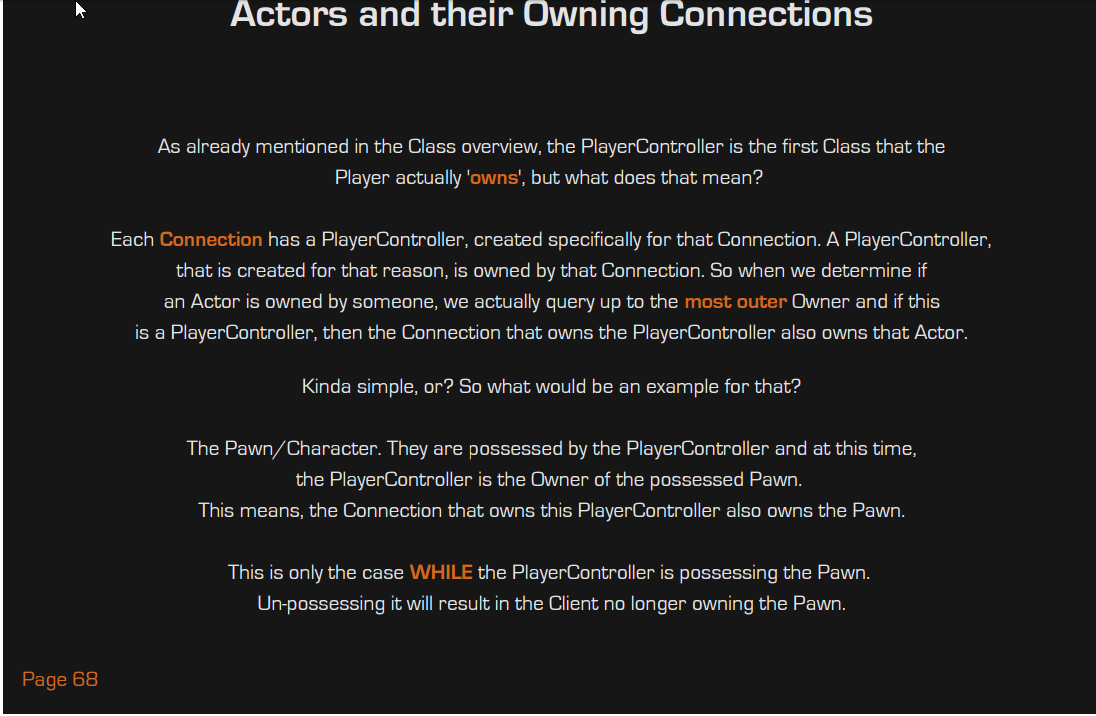
I understand why from a authoritative connection, I'm just not understanding how that relationship ends up working out in this particular case.
native moth
Because clients cant communicate to other clients versions of the same pawn
thin stratus
Ownership and Authority are 2 different things
Ownership is for RPCs. Authority is for the actual replication
Like, in simple words, only the Server can replicate vars
Doesn't matter who owns what
native moth
Ownership is important when you want certain functions to run ONLY on that instance of the actor
or when you need to reference non replicated stuff(like casting to a widget etc.)
trail dragon
@thin stratus (hi from Twitter btw) - so the server owns the pawn, but the client is the authority? Or other way around
native moth
otherway
your client and server can own the pawn. Authority is used to determine wether the function/event is run on a server or a client
trail dragon
Ah, okay. This makes more sense now.
So the client is the Owner, but the Server has Authority, so Client can make RPC calls to the server, who sets the values, and then b/c Server is Authority those get replicated to all clients
trail dragon
How does implementing client side prediction work with events? I have a flag in my game, you overlap it, you win. Obviously in multiplayer the server needs to be the one who triggers the actual end game when the server detects the overlap, but can I detect the overlap on the client and call the other functions (sound effect, particle, etc.) anyways and just not execute the gamemode->win part?
native moth
Yeah sure
So lets say you want all players to see a particle system when a player touches the flag. I would do it like this:
OnBeginOverlap -> Call Event PlayerTouchedFlag
PlayerTouchedFlag(Run on server) -> Call Event SpawnParticles
SpawnParticles(Multicast) -> spawn particles at location
so the reason why you need to do the round trip to the server(PlayerTouchedFlag) is because a client CANNOT fire events on other clients, only the server can do that
using the Multicast runs the event on ALL clients(and server!) regardless of ownership
trail dragon
Won't that cause a round trip delay before you see your particles though
native moth
yeah, but thats the way it goes if you want those particles to spawn on all clients
to signal a win
if you just run "OnBeginOverlap-> spawn particles on location" the particles will ONLY happen on your client(unless you're the server)
Rountripping to the server is always neccesarry if you want to sync the clients on events
trail dragon
Hmmn. I was going to say "have the client ignore the multicast" (that way you could call particles OnBeginOverlap and then call the Multicast but ignore the Multicast when it plays locally)...but there's no way to know when to ignore the Multicast since you're not the authority or the owner of the flag pole
native moth
also remember, if your RPC event is important for the game(like signalling a win), you can tick the "Reliable" checkbox and it will get priority in the network stream
Depending on how network heavy your game is, I dont think there will be a very noticeable delay(if the player has like 50ms, then it will take 100ms for it to fire on their own client)
trail dragon
Sure, just trying to think ahead. Easy enough test scenario to talk about 😃
native moth
if its important for you to have instant feedback on the client, what you can do is cast an event from the flagpole to the pawn that overlapped, run an event (call on owning client) that spawns the particles.. That is all done locally
so instantly
and then after fire the RPC to the gamemode
trail dragon
That sounds hacky though hah
native moth
well, I am working on a third person shooter
and I have some weapon spread/accuracy that depends on how long you've been firing etc. Using replicated values for this makes the feedback on the client very sluggish
trail dragon
Shouldn't in that case the client set the values (which don't get replicated anywhere) and then the server just overwrites those values when the logic comes through? They should run the same logic and stay mostly in sync, no?
native moth
so what I do instead is that I do two calculations. One on the owning client which causes it to be smooth, but only for visuals, and then one on the server that is using for linetracing(important stuff only happens on the server)
yeah, but if you have stuff that runs on timers/tick, you will need to do the calculations on two instances
So the local calculations are just for show and is smooth, but they are NEVER used for anything important
while the server runs it own that is used for important stuff
and I just never replicate the result of the servers calcuation down the client(no reason too, its only for visuals)
its really only important for the server to know the correct result
Anyways, gotta hit the bed!
trail dragon
The next hiccup is that it's VR and you have to use the controllers and trigger to grab the flagpole (via an interface) so now I have to figure out how to send that heh, though I think the Compendium covers that
trail dragon
So... on that note... Can you not implement a C++ UFUNCTION(Server, Reliable, WithValidation) call that takes an interface as argument? As soon as I add the argument to my function, it doesn't compile and complains about missing functions.
(I assume interfaces can't go through RPCs because it needs the network id of the remote object to call functions on and that can only be retrieved through uobject/aactor)
 thorn merlin
i upgraded to 4.16 and my dedicated server crashes on load, does anyone else have problem with this?
also, if anyone who has successfully built and launched servers on 4.16 would share their target.cs and build.cs i'd be grateful as i havnt updated mine in years and i think that might be my issue (Beyond the interface changes, i think there are things im doing i need to update
 rough iron
@trail dragon only UObjects can go throught an RPC/Replication becasue they need a netindex
regal junco
this is a stupid question, but to use the steam online sub system, does your game then have to be on steam?
like, do you need your own AppId?
@thorn merlin did you package the maps in project settings?
thorn merlin
@regal junco I've been building this since like 4.6, so something has changed, but yea maybe the maps are different, im reverifying, the shooter sample has build targets and all that so im double checking everything atm
regal junco
yeah when I upgraded the sessions didn't work for me, as the standalone could not find any maps. A new change is that you have to define which maps should be packaged
thorn merlin
i think you are right, but it looks to be a regression error - https://github.com/EpicGames/UnrealEngine/commit/b891dcd4e208b911a4887bcda2b48f35a845b05b
thanks for the help @regal junco
also I hope you don't mind but I mentioned our conversation here to this person having issues - https://answers.unrealengine.com/questions/604823/416-dedicated-server-game-runs-in-editor-window-bu.html#answer-669173
ok - i figured out my issue, in updating my build targets etc i missed this
[SupportedPlatforms(UnrealPlatformClass.Server)]
rough iron
@regal junco yes your game needs to be on steam, for testing purpose you can reuse an existing id (the steam works sample comes with one) or the id used in ShooterGamer. If you reuse an app id from any other game you might get issues xD
regal junco
yeah alright, thanks @rough iron, so like if I'm not sure I wanna release on Steam first, I won't bother haha
rough iron
you should atleast ensure that the integration works xD
so you wont get in trouble with your deadlines if you release on steam
regal junco
yeah true
native moth
@thin stratus you ever had any trouble with actor references not being in sync on clients/servers? I have made changes to my item system so the client finds nearby actors passes them on to the hud, when the hud item is clicked, that actor reference is then passed back to the server, adds the item to inventory and then sets the actor to be destroyed. The actor is removed perfectly on the client/server, but never on both at the same time
so my guess is that the actor ref is not the same, and therefore(even with multicast) the actor is not destroyed on all instances
thin stratus
Hm no, usually if the actor is set to replicate, it should be enough to call destroy on the server
 dapper galleon
How would guys manage a local scene for a multiplayer game? Like if there was a racing game with a repair station, when a client enters the station, the cars starts repairing (repair is server authority) and the entering client sees a scene with the vehicle being repaired and some mechanics-guys meshes that only the client can see. The scene would happen client-side and the repair (values and timers) would be server-side. Where in the map would that scene happen?
wary willow
@dapper galleon have a location for the map specific to the scene outside playing area
Then switch cameras to that scene for that specific client only
I had to do something similar for my MP VR game
Then after scene is done. Switch cameras back to wherever.
dapper galleon
@wary willow Thanks for sharing your solution. Was just wondering if there was a better way of doing this, without having to set it outside of playing area, but I guess it's fine.
wary willow
@dapper galleon I mean, it would be the most performant
You can cull/deactivate it when not in use
native moth
@thin stratus haha... what a rookie mistake. My actor wasnt set to replicate ^_^
 austere veldt
Is there a way to dinamically adjust NetUpdateFrequency based on the distance from the synced actor or any other condition? Sorry if that's a newbie question, but I couldn't find the answer anywhere on the forums.
thin stratus
Might be, but also wouldn't know why not
native moth
all replication fields get grayed out
ohh well, a struct will have to do for now 😛
@thin stratus you were talking about not replicating inventory variables, how was that? I guess just the server needs to know what the pawn has in their inventory
thin stratus
The Server has all the information in an array of struct
But the client doesn't need everything
Only the data that you need to display the item in the inventory should be replicated
Like Name, Icon, StackSize
native moth
well, thats like my total inventory 😛 Ammo type and ammo ammount
wary willow
@native moth I haven't messed with maps yet in BP. Is it fully implemented?
Other than replication
 wintry flower
@thin stratus your network compendium is amazing. Thx a lot 😍 lol. You must get thanks all the time 😅
trail dragon
I have a Reliable Multicast function being called on the server which doesn't execute on clients, any idea what gives? I see it being called on the server since a print statement within it gets printed with "Server: <my print statement>" but no corresponding Client messag.e
The MultiCast function.
The calling function. This is expected to only be called on the server (thus the lack of replication, the client never calls OnLevelCompleted.)
OnLevelCompleted calls the Multicast function. I see the effects and messages happening on the server, but no effects on the client.
native moth
@wary willow map variables seems to work fine as long as you dont try to replicate them 😛
Also had issues with passing them through RPCs without it causing a crash. So I guess the current situation is to stay away from them to transfer information over the network
@trail dragon inside which blueprint class is that event called?
trail dragon
@native moth both functions exist on the same blueprint (which is created in the world)
Though it just occured to me that I dont' have this blueprint set to Replicate
I need Replicate to be true for RPC calls to work don't I? ._.
native moth
yep, or else the clients wont register it
I had the same issue yesterday trying to delete and actor that wasnt replicated
trail dragon
Yup that fixed it.
Now to figure out why my scoreboard accidentally registers the first player in multiplayer as having completed the game immediately heh
Step 1) Make sure the relevant variable sin my PlayerState are actually marked for replication ;_;
Step 2) Remove the BeginPlay code that was used for testing earlier hah
trail dragon
What is the best way to implement this? I have a scoreboard that has lists of players (let's say two teams), and when players cross the finish line they change teams. The UI is attached to the Finish Line blueprint. My initial idea was when you crossed the finish line, the server would update the Player's PlayerStates and then multicast to all clients "Hey you should update", and then the clients would examine the replicated PlayerStates and rebuild the scoreboard. Issue: It appears the multicast update often goes through before the PlayerState is replicated, so it does rebuild the scoreboard but with out of date information. Is there a better design pattern to do this?
thin stratus
You have 2 ways: Either you put the changes into a RepNotify Variable and update the Widgets in the OnRep function
Or you pass the data through the Multicast
@trail dragon
 past bear
it's been a while since I've done any networking, so I could do with a hand knowing what I'm doing wrong here:
I have a client side interaction event that calls a 'reliable run on server' event, which in turn alters the value of a repnotify variable
OnRepNotify calls a non-replicated function - shouldn't that non-replicated function be working on all clients?
thin stratus
It depends on the Actor you are calling it in
In Blueprints, RepNotify will call on all instances of the Actor (if replicated of course). That also includes the Server
past bear
it's a regular actor placed in the level
thin stratus
Ah, you are calling the ServerRPC directly in it?
Then you probably forgot about Ownership
Actors placed in level are owned by the Server
Clients can't perfom a ServerRPC on them
You would need to already move onto the ServerSide inside of the Character/Controller or whatever is owned by the Client and processes your interaction
past bear
ah, that's outside of my control, the event is coming from native code
perhaps the interaction event is already supposed to be replicated
time to have a look at the source
thin stratus
Other way is "rerouting" the event
Means if you call the Event in your placed Actor, you can then check if the Client calls it (SwitchHasAuthority) and then call a ServerRPC inside of the Clients PlayerController.
That one would get a Parameter of the placed actors type
So you can pass the Actor with it
And in the ServerRPC you then call the original event on the passed reference
that's a dirty workaround though, but maybe you need to
native moth
quick question. Enabling steam subsystems is just the adding the engine stuff to DefaultEngine.ini right? Or is the whole "copy over DLLs from steamworks sdk" still relevant?
past bear
thanks for that - annoyingly the person to ask about all this stuff isn't here today -_-
not sure if the interaction event is replicated since it's wrapped up in a macro somewhere
thin stratus
@native moth Depending on th eEngine version, the thing is now a Plugin
So you would also need to make sure to activate that
But I don't have all the steps in my head. I activate steam every few months and then don't touch it anymore
native moth
arhh, missed the whole plugin thingy
thin stratus
@past bear Hm, then you gotta wait I guess. If you run into other issues, feel free to ask (:
past bear
well, I can't really just sit here and do nothing all day (or longer whilst they're off sick)
just gotta work out how this interaction component is supposed to work, I guess, heh
thin stratus
Well, you can print the Function that the interaction component calls
If it only calls on the client, then you can be sure that it's not replicated
I assume it works with some kind of interface?
Maybe that gives a hint about possible Server calls
past bear
logging may well be the way forwards
I'm currently digging through existing blueprints to see if something else uses this
thin stratus
Sounds like the programmer isn't commenting enough :D
past bear
hmm, okay, so the interaction event is happening on the server, so I don't think I need to call a 'reliable run on server' event.
OnRep for the repnotify however is also only happening on the server
I assume this is the ownership problem, perhaps?
pahaha, got it
need to tick a box to say the actor replicates
cheers @thin stratus xD
it's the simple things you forget when you haven't touched networked stuff in yonks
thin stratus
Ah, actor not replicated. Classic. :P
native moth
@thin stratus is it possible to test out steam session creation/joining with 2 instances on the same machine? For some reason I cant find any sessions running 2 stand-alone instances on my own machine
thin stratus
Steam shouldn't allow you to open an application twice
The second one should say that it can't activate the subsystem or so due to it already being up
native moth
hmm, didnt see that error anywhere
wary willow
You need two PCs to test OSSteam
thin stratus
Or at least a virtual machine inside of your os
wary willow
Aye
native moth
quick question @thin stratus (sorry for disturbing you) - doing a packaged builds warns me that the Steam API is disabled:
LogOnline:Display: STEAM: Loading Steam SDK 1.39
LogOnline:Warning: STEAM: Steam API disabled!
LogOnline:Display: STEAM: OnlineSubsystemSteam::Shutdown()
So I went online, downloaded steamworks 1.40, made a new folder called Steamv140 and followed this guide:
https://wiki.unrealengine.com/Steam,_Using_the_Steam_SDK_During_Development#Engine.2FBinaries.2FThirdParty.2FSteamworks to copy all the DLLs needed. Do i delete the old Steamv139 folder? Packaging at the moment still throws the same error
wary willow
@native moth you don't have to ping him everytime
And that warning is common
If you are having issues not being able to play your game on Steam. Try 480 to test that everything works in standalone mode.
You should be able to bring up Spacewar stuff up and see Steam popup bottom right corner
native moth
Yeah that is what I am doin at the moment(the 480 ID). My session stuff doesnt work, so I assumed that the API disable was the culprint
wary willow
@native moth or you did something wrong somewhere else ;)
native moth
Yep, that is what I am trying to figure out now
Aha got it! Works now - that is pretty cool!
wary willow
@native moth ggwp
native moth
I am really amazed how easy sessions are in UE4
wary willow
Session creation is not the issue for Multiplayer
trail dragon
@thin stratus hmmn... I think I'll set up a event dispatcher on the GameState and a RepNotify, and when the RepNotify is called it invokes the dispatcher so that my GameState isn't directly tied to the finish line, though technically I'm changing two variables at once (if finished and finish time), hopefully they don't get updated in two different network messages 👀
 sweet spire
Do servers haave cameras for controlled pawns? like can u line scan on server side from camera to center screen
is that a thing
modern dome
@sweet spire The Player Controller has a camera, but not the server itself. You may need to get the Local Player Controller of the Server to do this
sweet spire
is line tracing from the camera of the player controller at server
is that camera linked to the pawn
or?
never knew player controllers had cameras
 vital steeple
how do you guys handle spawning weapons for a mp game. like im trying to spawn a weapon from a class reference in a struct but its just not running. IIRC spawning actors is soemthing only the server can do, so i made in an RPC, but it still doesnt work. 😦
@sweet spire i think you can trace from any two points, as long as the pawn has the camera (or any other point of reference) regardless of who controls the pawn.
sweet spire
alright thank you very much ^^
vital steeple
yup, PM me if you have any issue with it 😃
 frank portal
do you guys allow the clients to change the aim offset? Because of latency it wont be good to do it on the server (like multiplayer shootout does) or?
 limpid aurora
multiplayer server packaging, have issue with it
native moth
@vital steeple the class reference struct, is that variable replicated or passed through the RPC? If no the, the server will use a "None" class and spawn nothing
(and remember, the blueprint from which you spawn actors should also be replicated)
limpid aurora
if a server is hosted and i try to join it from editor (not standalone) the editor crashes saying WorldSettings is NULL
stand alone client works fine
problem is with the editor only
hasty adder
check your project settings defaults and map world defaults
should have a gamemode pawn etc etc
limpid aurora
from persistent level it does not get world settings, if connection is done from editor
if (PersistentLevel)
{
WorldSettings = PersistentLevel->GetWorldSettings(bChecked);
@hasty adder will check
I have game mode, pawn player controller all in place
stone lintel
hai guys, anyone knows the difference between IOnlineSessionPtr::EndSession() and IOnlineSessionPtr::DestroySession() ?
jolly siren
one ends the session and the other destroys it lol
you can start a session back up that has been ended
stone lintel
is there any exact reason why should we keep the session if it's been ended
for example in default AGameSession there's a virtual method HandleMatchHasEnded and call EndSession for each client,, but since it's not destroyed the client can't create or join another session
jolly siren
if you still want the session lol there are use cases for ending a session and then starting the same one again
you can't create or join a new session while you are still connected to an existing one even if it has ended
so destroy it if that is what you want to do
stone lintel
okey i see,, i guess in my case, i just have to call destroy,, thanks man
jolly siren
right, sure np
stone lintel
btw, i'll assume the ended session is not published through OSS, am i right?
so if client searching the session they won't find the ended session
just in case if i want to keep the session and not destroy it
limpid aurora
@hasty adder it helped thanks the default settings
hasty adder
\o/
wintry flower
so for RPCS, in the docs it says they should be used mainly for "unreliable gameplay events that are transient or cosmetic in nature." so i feel like i"m using them too much. Let's say I want to spawn a bunch of actors over time. Should I use RPCs for that, or use replicated variables containing an array of the actors being spawned or something
 twin juniper
I'm going to just lay this right here
Does anyone know how I could setup UnrealFrontEnd r to do more than just one build
For example
Inside of OnlineSessionAsyncServerSteam.cpp there is a macro called "STEAMGAMEDESC" which is literally the name of your server as it shows in steam master server
However, what if i want to build 100 servers
Server1, Server2, Server3
Would I have to modify the engine code of UnrealFrontend to do this?(edited)
There has got to be a way to set up the server name outside of that file
it seems incredibly inefficient
brittle sinew
@wintry flower if you're spawning replicated actors, there's no need for an RPC
Just spawn them on the server and they'll propagate down to the clients
I'm surprised what you quoted was said about RPCs in general though, not just unreliable ones
(and yes I see it haha, just kinda surprised as they're definitely necessary for gameplay mechanics often)
wintry flower
well for a simple example, let's say I want a player to be able to spawn a cube when they press a button. that requires an RPC to the server
brittle sinew
Yeah, sure
wintry flower
but that doesn't seem like it's an "unreliable gameplay event"
lol
i guess you're right to be surprised about what the docs say because I am too
brittle sinew
I agree, like I said I'm not really in full agreement with that
Unreliable RPCs definitely do have their place for cosmetics and things like that, but to say that's RPCs' primary purpose seems a little incorrect
I think it might be more since unreliable is the default state of an RPC
And reliablility is an option rather than a given
wintry flower
yeah true
brittle sinew
@twin juniper I see the server name gets set using that, why not just override the method that sets it and use your own name?
twin juniper
@brittle sinew Well I would still need to be able to edit it either during runtime, or during package time.
If that makes sense?
brittle sinew
Correct, but you wouldn't need to override the macro if you just set it again with your own value after that...?
Or even if you don't override that specific method, set the name anywhere else you have the server pointer
wintry flower
i'm actually still a little confused about RPCs. If the function to spawn the cube is in the player controller and is something like this
UFUNCTION(Server, Unreliable, WithValidation)
void SpawnCube();
Since the client owns the player controller, it is allowed to make that RPC to the server. So if the cube is set to replicate, it will show on all clients?
twin juniper
@brittle sinew Well that still wouldn't help me with packaging so that i can have different server names
brittle sinew
Yes, when you spawn a replicated actor it puts itself on all clients where relevant
twin juniper
@wintry flower If it is replicated, it will be shown to all players
brittle sinew
Though currently you have an unreliable method, which doesn't guarantee its execution
wintry flower
i started with a thing where you can hover over a cube (placed in level at start) and the material will change, and for that, it's the same way. the function to set the material on the cube is RPC to server from player controller, which then calls a multicast function on the cube to actually set the material for all clients. would it be better to use a replicated variable for the material?
brittle sinew
You could, and use RepNotify-s to update it on the clients when received
wintry flower
hmm
brittle sinew
@twin juniper why tie it in at packaging? Why not just load it from a config file or something? Seems a lot more versatile
twin juniper
@brittle sinew Oh, I guess that could work.
wintry flower
ok thx @brittle sinew i will play around with it more. currently at work but really wish I wasn't because I want to keep learning this stuff lol
twin juniper
@brittle sinew Have you worked with the HLOD system
brittle sinew
No, sorry
twin juniper
ok
 pliant cypress
Hello guys, here is a stupid question.
If my project working perfectly in editor, if I build it, should it work exactly the same way?
I thought this should be the point of UE4, but I do not find it so, and Im not sure if Im missing something or not.
brittle sinew
Where did you gather that's the "point of UE4"? :p
There are differences between editor and packaged builds, and they can sometimes have major effects on functionality, yes
 main sentinel
Hey guys, I'm working on a dedicated server game while using Steam subsystem. Yesterday I figured that I needed to make two separate GameModes. One for the server and the other will be the default client GM. Is that right?
Also, if I do that... Can I do the server and client in the same project?
 timid pendant
Wouldnt it be Game Instance for the client?
main sentinel
Yea, I mean. I won't be doing anything on GameMode. It's just to set the default classes like: gameInstance, PlayerController, Playerstate, GameState and etc
twin juniper
@pliant cypress The editor and the packager are not the same
its very stupid
but its just how it is
what u see in editor is not what u get in a packaged build
pliant cypress
But it should be right? I mean that supposed to be the point.
pliant cypress
That really sucks when you build a game and it runs in the editor but not a built version
pliant cypress
What is the point then to build a game in UE4 if it wont ever run on any PC?
twin juniper
it will run
u just need to read logs
it makes u have to work for it
its a bitch but its worth it once u figure it out u get this feels good feeling
pliant cypress
I love to fix bugs do not get me wrong. But this is way over my head
I do not even know what to look for
twin juniper
then you dont really know xD
Go to your saved folder
and open up your logs
I had this problem when I originally started with unreal
but the real problem i had was just ifguring out the framework (where logs are saved, where each error is saved, where profiling info is saved...etc)
pliant cypress
I might be wrong - probably I am - but if the game works in editor, there should be no errors in log?
brittle sinew
Well there's a reason it's not working in a packaged version, no? :p
You won't necessarily get a log out of something not working, and even though there are differences between editor and packaged versions, those differences aren't magic
brittle sinew
For example, there are things like WITH_EDITOR in C++ that exist specifically for creating differences between packaged and editor versions of the game
twin juniper
like, for someone coming from a unity background... when u built a project it would pop up with errors
in unreal
it doesnt pop up lol
u have to go to Window => Output Log
to get errors
i think thats the problem a lot of people have
is finding where to find the errors
 nova wasp
Isn't there a setting to have said error output window appear on top when an error occurs?
pliant cypress
In the log I have 0 errors
twin juniper
That's not possible.
If your project isn't packaging
It will say
"ERROR"
and make an annoying sound
lolol
brittle sinew
@twin juniper it certainly is possible, lol
pliant cypress
It just wont work the same way as it works in editor
pliant cypress
Its opening
brittle sinew
🤦
 severe widget
You should check where the package project is staged, there's a similar logs folder there
pliant cypress
but there is a problem where players cannot click on/play cards (it is a card game)
severe widget
This something new in your project?
pliant cypress
not really
severe widget
Ok, because I seem to remember you around for a while working on a card game
twin juniper
Lol.
pliant cypress
yeah its been 6 years now :)
severe widget
How are you doing your card interaction?
pliant cypress
not sure what you mean
Google Docs
this is the project
if you wanna have a look
severe widget
Wow, that's unusually open
severe widget
I might take a look at it, didn't really plan on looking through a full project
brittle sinew
If it's an interaction system I would just go down the list and see where things break
pliant cypress
its all right, I really appreciate if you take a look at it
brittle sinew
Things like do the inputs themselves work? If so, does the communication to the other actor work? If so, etc.
severe widget
Anyway, try combing the project settings to see if something is getting cooked out or otherwise excluded in the package
And if you're going to do what lethal suggests, copy things to a new project and tear it down there (be prepared to draw/print a lot of text)
brittle sinew
Yeah, I just suggest that because narrowing down things like this in absence of errors can be difficult
pliant cypress
"try combing the project settings" what do you mean by that?
brittle sinew
The one major one I've seen get a few people is arrow components don't exist in packaged builds
Other than that, I don't know of any specific differences other than things marked WITH_EDITOR
twin juniper
@brittle sinew WITH_SERVER is also another one
i use it
Actually, its #if WITH_SERVER_CODE
pliant cypress
I have no C++
I found on the log that Steam Subsystem is not enabled, but in editr it is, could it be?
an issue?
pliant cypress
k
trail dragon
I have a variable that was working fine, and then I set it to RepNotify (instead of just Replicated)
And now it doesn't seem to call the RepNotify function on the client - the text I ask it to print out prints out but says "SERVER:" and doesn't actually seem to run on the Client. http://i.imgur.com/oZSoHrh.png
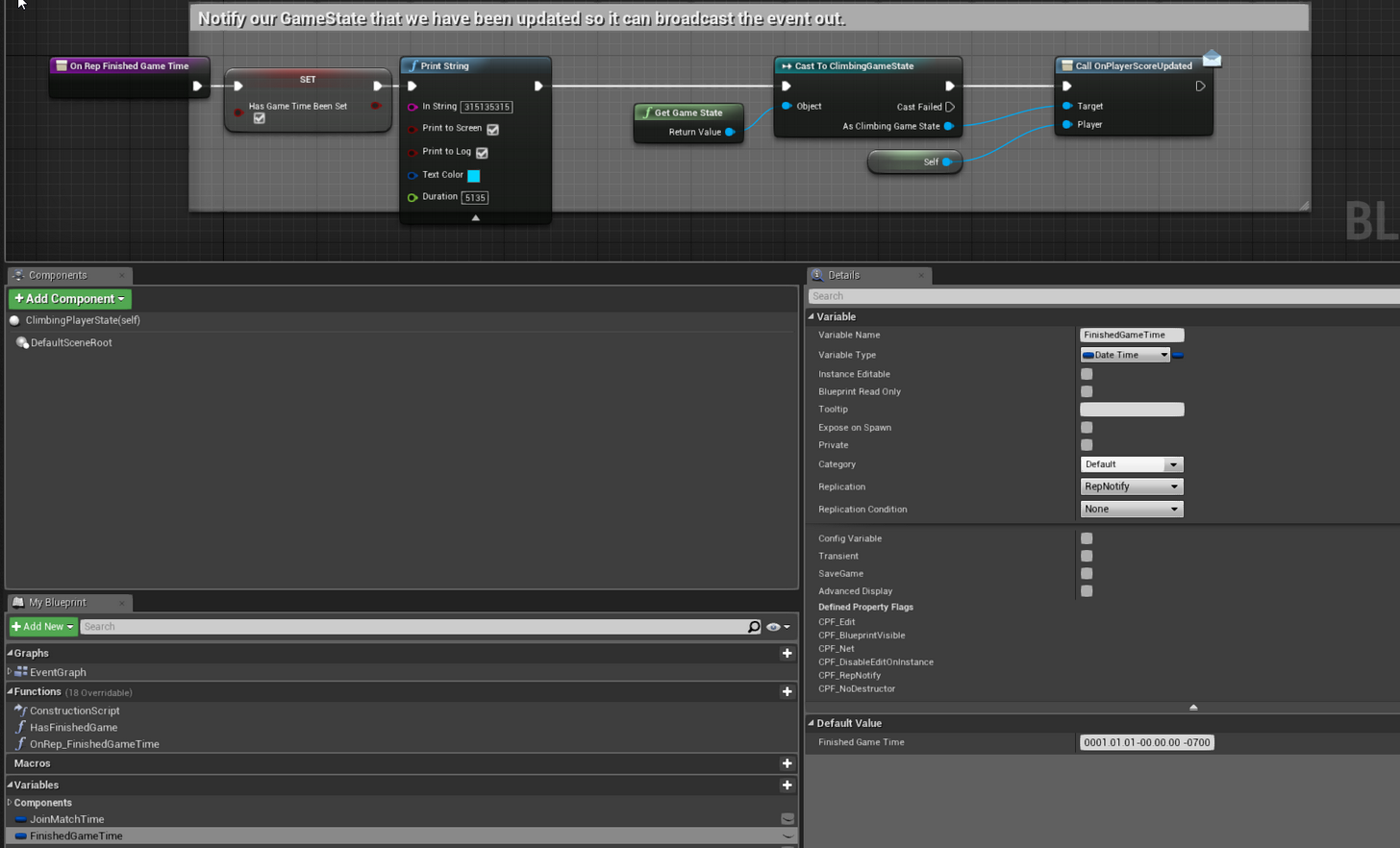
These variables are in a class derived from PlayerState too btw
And the thing that sets the variable is the GameMode so it has to be on the server.
trail dragon
Jun 16 2017, Backlogged issue: Date and Time variable does not appear to replicate across clients. Oops
trail dragon
How do I know when a newly connecting client is actually ready to use the PlayerArray in GameState? The OnPlayerArrayUpdated binding never fires on the client when they connect (presumably a third client would trigger it on the first client)
fossil spoke
When BeginPlay is called for the clients PlayerState it is ready.
trail dragon
@fossil spoke As it currently stands, when BeginPlay is called on my object in the world for the client, the PlayerState array is empty.
fossil spoke
Also i believe there is an function or delegate that is called when an PlayerState has just been replicated to clients. You might want to check that out as well.
trail dragon
@fossil spoke There does not appear to be af unction or delegate for PlayerState.
In the GameStateBase.h, they simply declare it as: /** Array of all PlayerStates, maintained on both server and clients (PlayerStates are always relevant) */ UPROPERTY(Transient, BlueprintReadOnly, Category=GameState) TArray<APlayerState*> PlayerArray;
So... I don't even know how that gets replicated in the first place tbh
fossil spoke
Check the gamemode. Its been a while since ive messed around looking for that shit haha
trail dragon
The GameMode only exists on the server, how is it going to know when a client has finished recieving the latest copy of the PlayerArray?
The GameMode does have OnPostLogin/OnLogout, but does that mean the GameState has been replicated?
fossil spoke
Backtrack and follow the playerstate creation process. You may find what your looking for.
trail dragon
Man, I can't get the GameState to run a Multicast event on the clients either.
http://i.imgur.com/i4a6ug6.png When called by the GameMode (in OnPostLogin) it only runs on the server.
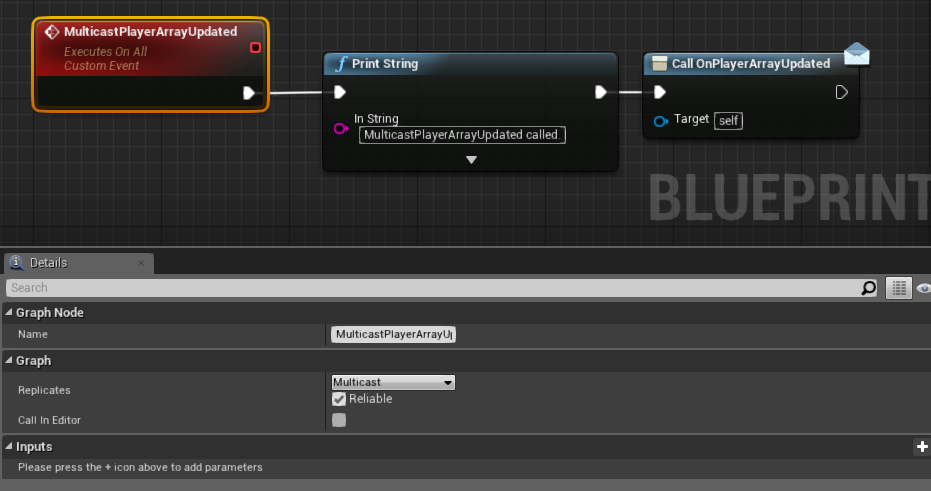 brittle sinew
PostLogin occurs pretty early in the GM flow, IIRC before the pawn
It's really most likely just too early at that point
Even if the GameState exists on the server, it has to replicate down to the clients first
trail dragon
PostLogin is the soonest point you can call a Multicast function on the PlayerController (from Documentation) and yes it is before the pawn.
That's really what I'm trying to get at @brittle sinew - how do I know when that replication has finished so my client can do a bunch of "join in-progress session" type logic
brittle sinew
I can't seem to find one for the GameState, I know there is one for the PlayerState
Why not just call functions onto the PC at that point then, since you know it's safe to call functions on it?
trail dragon
Do we know that the PlayerState array is replicated by then?
brittle sinew
No, I believe the callback is for the specific PlayerState assigned to the local pawn
trail dragon
Also, at least in Blueprint, there appears to be nothign on the PlayerState that lets you know when it's replicated.
brittle sinew
I know OnRep_PlayerState exists, I don't know if it's exposed to BP though
If you don't have a C++ parent of your pawn, not much you can do about that :/
trail dragon
Eh I can rearrange things if needed
Wading my way through the three or four hour long Blueprint tutorial, since they have a lobby and they show the settings of the players when they connect
The player controller sends a message to the server when their settings change and then the server multicasts it back down to everyone else, hah
trail dragon
If I have "Use Seamless Travel" checked on the GameMode, do I have to do anything else? Right now the server moves to the next level and the client gets disconnected and ends back up at my entry map. In my GameMode I call Open Level with Absolute unchecked.
trail dragon
...I have to use ExecuteConsoleCommand SeamlessTravel <map path> don't I? That should probably be in the documentation somewhere.
hasty adder
Has anyone tried using a non movement replicated actor but using a tick to interpolate it's location to all to maintain a smoother to hide hiccups? Curious in blueprint how this might be done. I suppose the object on tick records it's location to a vector and in rep of its change do somthing to mc to clients to use its current position and interpolate to the new
regal junco
Is there some way I can check if "open ipadresshere" fails?
 stoic maple
Has anyone gotten replays to work in UE4? I have the UI and related elements created and working, but nothing is being replicated even though it is set as such. (Asking here since it should work the same way as multiplayer replication)
regal junco
@twin juniper , this works for me bool AMPTestGameMode::EnoughPlayersToStartGame() { if (GetNumPlayers() + GetNumSpectators() < 2) { return false; } else if (GetNumPlayers() + GetNumSpectators() >= 2) { return true; } else { UE_LOG(LogTemp, Warning, TEXT("EnoughPlayersToStartGame: Should not be here")); return false; } }
hasty adder
That bug sounds related to steam?
twin juniper
@regal junco what does this do
where are u calling getnumplayers() from
what class?
regal junco
Wait what? haha, GetNumPlayers() is from gamemode which only exists on the server
twin juniper
No its from another file
OnlineAsyncServerSteam
i need the users to see if a server is full or not
regal junco
ahh, I missed the steam part, my bad
twin juniper
any ideas?
regal junco
Sadly I'm not using steam
twin juniper
yeah i looked at vlad's stuff
it looks really nice
but im not really interested in buying a $300 solution at this time.
Also, according to his gumroad page
 rare cloud
85$*
twin juniper
its not for sale anymore
lol

Gumroad
UWorks is a plugin for Unreal Engine 4 which provides complete Steamworks integration for both C++ and BP. For more information follow the link below. -------------------------------------------------- Unreal Engine Thread. -------------------------------------------------- Your feedback will always be appreciated!
see
rare cloud
oh
take time but you can create your own Online Subsystem ?
or wait 4.18
but yeah I guess Steam access it's really important
twin juniper
i only really need
to validate current player count
the rest of the subsyststem is fine
rare cloud
you build engine from source ?
twin juniper
yea
rare cloud
oh maybe you can fix this by yourself if the steam third party isn't the problem
if the steamworks lib need to be update it will be really more complex x)
twin juniper
connecting to the server is fine
its just
its saying there are 0 players
when you call from the master server
rare cloud
@twin juniper, int32 UFindSessionsCallbackProxy::GetCurrentPlayers(const FBlueprintSessionResult& Result) { return Result.OnlineResult.Session.SessionSettings.NumPublicConnections - Result.OnlineResult.Session.NumOpenPublicConnections; }
rare cloud
ok can you run it as DebugMode ?
twin juniper
it always returns 0
rare cloud
and check values
regal junco
Wait is the default steam sub system depreciated?
twin juniper
No
It's just bugged in some situations
Like GetCurrentPlayers() always returns 0
xD
also, the server name isn't very easy to set
it should be modified to read from a config file imo
instead of from a macro
regal junco
Are you just using that test appid or is your game accepted for steam?
twin juniper
im using test app id for now
steam direct is out now though
which is great
but u need a business bank account
which i setup last week
regal junco
Oh you do? Where can I find more information about that?
rare cloud
@twin juniper, https://allarsblog.com/2016/02/28/updatingsteamsdk/
Allar's Blog
May 24, 2017 Update: Epic's 4.16 version of UE4 has had its Steam SDK upgraded to v1.39. This is still one version short of the latest SDK (v1.40) at the time of this writing but its significantly more recent. They even added SteamController fixes. I'm not sure
you can maybe try to update the steam sdk to 1.40
if the source of the problem is the steam sdk itself
or it's an unreal issue
twin juniper
im not sure
i mean would there be a way to check that
before doing sometihng drastic like that?
it sounds like they updated it
to steamworks 1.39 lol
which i doubt would be the root of my issue
twin juniper
i think its a unreal issue
i mean i doubt they would make a bug report
if it wasnt
hasty adder
Workaround could be making an array in gamestate of current players and add post login and remove on logout?
regal junco
how about that you kick the player joining a full server? @twin juniper
also does the SteamAPI have a natpunch that we can use?
twin juniper
@regal junco the problem is, the client cant actually get the number of players
so for example
i have a server list that says "ServerName, Ping, PlayerCount/MaxPlayerCount"
but PlayerCount always returns 0
max playercount is fine
regal junco
but you can store it on the server, eg in gamemode, and then when clients connects, it checks if he should be kicked or not @twin juniper
twin juniper
yea
i mean i could just setup a REST API
but
this stuff is supposed to all be built in
if get max players works
why wouldnt getcurrent
hasty adder
@thin stratus https://www.gamedev.net/blogs/entry/2260592-how-i-synchronized-a-simple-rigidbody-across-network-players-with-ue4/ if you skimmed this. This sound feasible in blueprints to use for same. A ball that gets kicked around in mp?
GameDev.net
[color=rgb(128,0,0)]The Issue[/color]I'm developing an online soccer game for UE4 which you can get from http://github.com/Gamieon/UBattleSoccerPrototype for...
I have an issue where the ball has matrix like updates.. Skips rather then moves to new position in a rubber-band fashion (which i would prefer) local multiplayer or lan ping it would move like ----------- where as higher ping, hiccups represent like ------- ---------- ---
thin stratus
Yeah it's missing the interpolation on the client side
but if we replicate the location with UE4s default thingy it should do that
We could also disable the movement replication and just give the client a rotation and location via replicating
And then interp between current and new one
that should stop the hickup
hasty adder
Ok would you remove movment rep and say tick in the ball repnotifys a transform. Then to remote update the transform and have the client interopt between?
I saw a post on this but was unsure of the method it sorta died out
thin stratus
I would try that at least
hasty adder
Ok will do appreciate the input 😃
 lament kettle
Is getting networking to work properly, supposed to be difficult and frustrating and time consuming?
Im doing this tutorial series a second time now, (for the sake of understanding) https://www.youtube.com/watch?v=u-fnrC3OB5E&
and it feels like theres so much missing

In this video we begin working on our Player Controller setup for our Lobby Menu which handles the process of setting up the Lobby Menu display for the ownin...
-no server browser tutorial provided by ue4 dev team...
-no steam functionality support via bp...
brittle sinew
Networking seems to be one of the areas where BP is a little lacking, yes
You'll at least need to dabble in C++ a little bit if you want to build a dedicated server—a source version of the engine is required for it
There are plugins online that help with exposing some of the flow to BP, but I wouldn't expect to be able to get away with not using C++ at all when pushing a multiplayer game via Steam, it's just not feasible at this point
lament kettle
Yes, I understand that. I've already created the project via C++ and am exposing functiosn to BP.
I want to keep this project BP oriented, while trying to make sure I don't use ticks or polling (polling in events in UMG client side only).
I do hope that sometime within the next two or three major versions, that BP will have more steam exposed functions.
Luckily there is "Advanced Sessions"
Until then though...
brittle sinew
I wouldn't really hold your breath on that, haha
I don't really think it's the goal of the dev team to expose everything to BP, nor should it be really
lament kettle
Why not though?
Also, I was having a small bug yesterday and fixed it.
The freaking yt video skipped over this...
brittle sinew
Exposing things is a tradeoff, it's not free in terms of build time and editor performance
lament kettle



I understand that, but having it being exposed would help half the people using UE4 BP's.
Everyone usually sells on Steam.
Just went back to the video.
I missed it.
brittle sinew
There are probably a lot more people than you think that never touch selling and just use it for fun, and I don't think there's a ton wrong with that, but IMO most people seriously shipping games would be using C++ already
lament kettle
Damn, I'm an idiot.
I was like wtf is happening.
Had to trace it back and figure out what was happening.
The thing is, you can easily convert the project to C++ once you have a prototype going.
I think you can get 50% to 80% of the project done via bp in about 3 months.
If you have the assets.
I'm talking about a multiplayer game btw.
I guess I'm still new to this whole "shipping games" thing, so I guess when I finish this game and publish it... I'll find out.
brittle sinew
Yeah, I get your point, I just see it as in a setting where there isn't unlimited dev power, I don't really count things not being exposed to BP against the team
lament kettle
Here's the bottom line though.
Does it do what you want it to?
Is there any performance impact?
If you like those two answers, a yes and a no, then you don't need to rewrite it in C++.
I would just convert anything too heavily used into C++.
And honestly, I have 6+ years in C++, so understanding object oriented code and using that via BP shouldn't be an issue.
At least for me...
severe widget
Having never seen a skybox or a tree or a wall, I'd like to preorder your game!
Do I get to pick my game logo from these, or will a graphic designer do a final draft?
 merry pawn
@deep orbit keep at it man. Don't let the haters and skeptic drag you down.
 deep orbit
K thank you

Hey guys I hope you like and subscribe if you guys want to know more about Dusk survival join this Discord!https://discord.gg/XersGtX
@everyone could u sub to my channel it would help out alot:)
slim holly
ok lets not use @ everyone cuz it doesn't work, and especially for advertising
 orchid cairn
i know you can set DefaultOnlineSubsystem in DefaultEngine.ini, is there something along the lines of "SecondaryOnlineSubsystem"? for example, if i have steam as default, can i get it to drop back to null if steam isn't running on the system? or will it do that anyway?
slim holly
I think there's a fallback defined there somewhere
hasty adder
so weird
i had replicate movement and replicate on for a physics object.
was about to test turning off replicate movement and doing somthing else
and when i turned it off. the movment is still working.
maybe this was causing my problem...
so buildand upload to server i go.
 chrome bay
Is anybody managing to successfully use 'CancelFindingSessions' using the Steam subsystem?
Because it crashes like fuck for me
Everytime, no matter what
hasty adder
ok so its working but not working ah ha, least i know where i stand
chrome bay
Turns out if you cancel searching with a LAN session, steam subsystem crashes - because LAN sessions aren't a valid thing and the subsystem doesn't guard against nullptrs
Line 786 in OnlineSessionInterfaceSteam.cpp
ugh.. why let me create LAN sessions in the first fucking place. Why is the Steam system STILL shit...
/rage
chrome bay
Interestingly when you cancel a search, the 'FindSessionsComplete' delegate fires afterwards. Ugh
fossil spoke
Curiouser and curiouser
sweet spire
How well do dedicated servers take advantage of xeon's and there multithreading?
chrome bay
They'll only do what you program them to. They won't multithread your code automatically.
sweet spire
sorry i mean, does UE4 not multithread automatically to help handle load?
chrome bay
The engine already does some stuff in different threads, but not a great deal. The main game loop runs on it's own thread, audio on it's own thread, particles on their own thread etc.
 wary wyvern
Hey guys! Did anyone run into this bug??
https://answers.unrealengine.com/questions/669599/replication-break-characters-mesh-on-begin.html
chrome bay
But a dedicated server won't run anything different to how the game runs
sweet spire
I was looking more towards dedicated servers
Ahh
Hmmm
that seams like an issue for anything with heavy load
chrome bay
The only thing they really do differnet is, they don't render anything, so you can save processing time there
sweet spire
I current have my test server hooked up with Two xeon 2670 seams like a waste
gotcha
then again
chrome bay
Yeah unless your game code is heavily multithreaded, it probably wouldn't be that useful
No more so than a core processor etc.
sweet spire
u could split ur map or w/e up in to 8 different dedicated servers on the same machine
and assign them a thread each
sweet spire
u could just client travel right?
leave one join another
im just thinking instances i guess
chrome bay
Possibly, but clients in one game won't affect the other, you'll have to find a way to transfer data between servers yourself too
sweet spire
true true man
SQL database i would say then
also thank you for your insight
set entrance location
client travel
get entrance location
etc
chrome bay
@wary wyvern no, but that definitely looks like a bug to me. Seems as though network smoothing is busted in 4.16
sweet spire
rip networks
wary wyvern
We found a workaround, but must disable network smoothing mode. Some animations became glitchy(
chrome bay
Are you using root motion?
wary wyvern
Nope
chrome bay
Because that changed a LOT in 4.16
ok
Try diffing the character movement component on github, see what was changed
If you find out I'd be interested to know
wary wyvern
Good idea)
chrome bay
Hitting so many bugs today with core engine stuff. Driving me crazy
sweet spire
If it makes you feel any better, i spent 5 hours once not be able to figure out why my engine would not compile
my friend put
"lol"
in one of the cpp files for a laugh
chrome bay
lol nice...
hasty adder
So nope that wasntnit
So here's a wuestion
If I turn off all replication of the actor to control it myself and say server spawns the real actor and then tells clients to spawn there own version that will update to follow servers transform around
What about client that joins after the event that told clients to spawn it
chrome bay
They won't spawn anything, unless it's replicated
Also I'm not sure why you'd want to do that, seems like it could cause all manner of issues
hasty adder
Hmm brings me back to how to lerp a replicated physics object smoothly. I'm doing a sports game of sorts with a ball that's knocked around by clients much like rocket league
I have using normal ue4 replication and movment replication where it will jitter to catchup instead of interpt to where it should be
Maybe it's that I am allowing client side to influence it rather then only server side just trying to catch the lag when a client hits the ball allowing client side to see there simulation catchup with server smoother
I use a distance to ball check on key press and if in distance and in a angle in front of player cast to the ball to change its velocity
chrome bay
You'd be better off just writing your own movement component and not using Physics
Ball physics are super easy to create
Projectile Movement Component also contains a lot of the required code for bounding off of and sliding along surfaces too
hasty adder
I'd need help I'm no c+ rog rammer
chrome bay
Never too late to start learning :p
Replicated Physics is one of the hardest problems there is for Multiplayer, it's not something that will be solved in BP unfortunately
But you can probably write a movement component in Blueprint, but smoothing and prediction etc. is going to be required
Anyone getting super slow download speed in Steam right now?
hasty adder
Hm I'll keep researching away. I can understand code just getting it written and in a confident manner is another story 😃
chrome bay
Right so, registering a game session on Steam - has this always never worked?
Just calling CreateSession in C++, non-lan
And another PC can't find that session
deep orbit
Hey guys I hope you like and subscribe if you guys want to know more about Dusk survival join this Discord!https://discord.gg/XersGtX
@everyone. Please sub to my channel
hasty adder
Oh boy this subject it rough 😃
Is
I believe presence causes a problem for starters
I've never gotten it to work. Just used instead my own MySQL on a website to put and get master server info through php
Oh eait
Wait your not saying dedicated.
hasty adder
So if I go down the rabbit hole of a projectile that should bounce. I run into an interesting hurdle.
I have an ability to draw the ball in like a magnet. That should bounce of a shield as well. So I have to figure the velocity I guess to have it go torward the player which is easy enough then on overlap of shield push it away. End result should be much like a ball on a string on a paddle
I can see how to accomplish this but another feat is also while jn this, another player should be able to attempt to knock it away. Get complicated eh.. Tho maybe I could make it if the player has it in this juggle so to speak the action of hitting it away disables the magnet before hitting it away. Hmm
hasty adder
Thoughts?
hasty adder
Maybe if I'm rep notify the transform of the object I should also update the objects velocity from server eh
sterile pebble
@hasty adder I sence python
hasty adder
Hmm? Is that a format for Python?
 ripe cypress
Can someone tell me why I am not traveling to map ? Level1
it is in editor but not built game
deep orbit
@everyone. Can anyone help me with my game called Dusk survival on unreal engine 4 I really need some help
orchid cairn
@deep orbit - probably dont use the everyone tag for stuff like that, and if you're after help, possibly post what your actual question is?
also, this probably isn't the right channel to be spamming your youtube trailer, then asking for help...
@chrome bay - out of curiousity, did you ever investigate using projectile movement component as a base for "physics" movement?
rare cloud
@Jovanni5848#2951, promote your project on the #work-in-progress channel also it's hard to follow a project without any idea of the gameplay and the content.
sweet spire
Quick wierd question, just to point me in the right direction, but how do u go about packaging dedicated servers? i know u can compile for dedicated in vs but, how do u go about packing the rest?
chrome bay
You need to use a Source Engine build if you want to create dedicated servers too
@orchid cairn I've written a networked movement component for this, which is based mostly on character movement but also uses some elements of Projectile Movement. The movement for the game is pretty simple (hovering pawns with sphere collision and bouncing off of surfaces)
hasty adder
Jam, you ever use a dedicated server on Linux say aws and know what stuff is needed on the box to run?
chrome bay
Nah I've not built one before, let alone a linux one :p
hasty adder
Haha oh ok
I get it built but when I run it it needed dependency after dependency inatalled
So I'm like wtf no one ever made instruction 😃
orchid cairn
@chrome bay are they using actual physics motion, or just faking it? if you're happy to share how you've done it i'd be incredibly apreciative 😃 especially since movement replication in 4.16 seems broken AF
chrome bay
Faking it, same way Character Movement does it 😃
hasty adder
That's my take away too
chrome bay
Physics / PhysX replication is way too effing hard
chrome bay
And I needed control over the simulation too
hasty adder
Hover tank?
orchid cairn
linux ded shouldn't be that much more work than a win32 one, having said that, i have absolutely no experience in that regard... although i've built/deployed win32 dedicated servers to an EC2 instance, that was fun 😃
orchid cairn
just VM it
chrome bay
Hover Tank game uses the same approach atm, custom movement component faking physics like char movement. The problem is collision rejection for an object like that is hard, and it doesn't work so well for other vehicles (tracked, walkers etc.) - so I'm also trying to solve the online PhysX problem like a few others. I uploaded an early version but it's not finished: https://github.com/TheJamsh/UE4-Networked-PhysX-Component
orchid cairn
i've got that forked, but honestly my PhysX and back end ue4 code knowledge isn't that great
hasty adder
Don't use physics collision. Use on overlap and cast to other actor to do the impulse
chrome bay
That's what the non-physics simulation does (it has to), but it's complicated when an object uses a complex collision and also has 6 DOF
sweet spire
thank you for the answer
chrome bay
But the way you do it is you move the component with a sweep, check for penetration, first move out of the penetration then calculate rejection. PhyX does a lot more than that, like sliding along surfaces, using Physical Material properties etc.
orchid cairn
cylinder works fine for characters, but once you get funky shapes (tanks, spaceships) it gets alot tougher
sweet spire
You know how each additional dedicated server on the same machine listens on port 7777 then 7778, 7779 etc can u connect to them via like 127.0.0.1:7778 for example? does that work on LAN?
 noble meadow
you called, @hasty adder ? 😁
orchid cairn
sure does, just make sure you're specifying what ports when you spin up each server
noble meadow

 chrome bay
I've managed to copy what PhysX does for my orb movement component, which is sphere collision (so it's nice an easy), and since I have control I can do a few other things like spraying decals / particles along surfaces we're sliding along etc, and handling special weapons that move it through objects. - but complex shapes are hard.
sweet spire
Intresting fact each additional one incriments its self up 1 port
sweet spire
so i guess that makes management alot easier haha
noble meadow
😄
chrome bay
That should work I think @sweet spire
sweet spire
Okay thank you ^^ hope u guys are all having a good day!
chrome bay
I should just do a start-to-stop walkthrough of making a movement component.. but man it would take ages
orchid cairn
you seem to be the one who has the best grasp of it (if we ignore rama's non authorative solution)
chrome bay
Yeah Rama's version is super easy to do.. but server-auth is tough. There's still a few bits of character movmenet I don't fully understand (the timestamp verification stuff), so I need to go over that more first. I haven't even bothered with root motion haha
orchid cairn
if anyone was able to build a "Physics Movement Component" and put it on the marketplace, you'd make a goddamn killing off it, it's the one big thing UE4 seems to lack if they want to be considered a true "out of box" multiplayer engine
hasty adder
Is the Rama version the super excited about platforming balls?
orchid cairn
i know rocket league went with bullet over PhysX, i'm assuming there are various reasons, but the main one i can see if bullet is fixed timestep
hasty adder
You and me both alc
chrome bay
Yeah, Blue Man has been working on one too and has very promising results - but we're yet to see a finished version. The hardest part is making it work for all situations
sweet spire
is there a command attribute to enable cmd windows for servers?
chrome bay
The hardest part I found was actually creating a new PhysX scene for replay. Once I've done that, my version would be finished. I just need to find time to get back to it
And fix a few of the timing errors, there's one very big timing flaw in there atm
hasty adder
Gameserver -log or do you mean you can actually type in it?
orchid cairn
i saw something when i was looking through 4.16 talking about PhysX scenes, epic might have exposed something that might help you there (cant remember where it was tho)
sweet spire
Both would be nice
hasty adder
Log shows you what's happened but can't type in it
orchid cairn
@sweet spire release servers wont have a command line or console generally? you pretty much control everything through command line params when you spin it up and let it go from there
sweet spire
It was more for being able too output information as when your run dedicated server nothing tends too pop up
i tried -log but nothing is coming up or im missing something obvious
hasty adder
sweet spire
i might just spawn one via c++
orchid cairn
yeah you can use Server.exe -LOG if you need a visible log
hasty adder
Lol
orchid cairn
but again, dedicated servers shouldn't need that
hasty adder
Fire n forget
Pew pew
Oh this reminds me I decided to build a server client build with my ball net uodates to something stupid large
Like 1000 ps
I wanna see how funk it is
sweet spire