#multiplayer
1 messages · Page 326 of 1
 thin stratus
A contract?
thin stratus
Well then stick to deving alone
 twin juniper
XD
I dont see that as a resolution though
There should be a viable system for a setup like this.
Why would a level designer need access to blueprints?
Couldn't they just use the default spectator pawn
thats in the base game mode
i dont think they would actually need access
thin stratus
Then you need to setup multiple maps
That only use default parts of the engine to create their stuff
But maybe you have an FX artist who needs to gets access to the character so he can make some jump particles or so
twin juniper
yeah
that's a very specific situation though
But giving root access to ALL co-workers is not a good solution in my opinion.
thin stratus
Not at all. Every little thing might need models, animations, sounds, particles etc
Well maybe, idk. I haven't had a single client who wasn't giving me full access.
I sign a contract that restricts me from taking the code
twin juniper
Yeah.
 hasty adder
How is it to implement non ue4 physics and does it cost monies? 😃
twin juniper
No
but why would u not want to use ue4 physics
its like why even use the engine
@hasty adder
thin stratus
Well, maybe UE4 physics aren't good :P
twin juniper
Maybe I just don't know enough, but they seem good enough to me for any game you might want to make.
Unless... you want to make a world where physics is backwards? Down is up, and up is down? lol
I don't think you would need to modify the physics engine for that though.
thin stratus
Well, it's probably also about how to properly simulate the stuff on the clients
Moss and James talked about that earlier, scrolling upwards might solve some questions
hasty adder
Yeah that's what I was reading.
I've never made a game before so other engines are a bit of a mystery to me. I've only made maps 😉
 tribal agate
player controller: https://gyazo.com/597ef68b7c5ac6c9d9f65ee3e31ce92b
floor: https://gyazo.com/b07bcb6b511911989858e7365cbaeb4c
anyone know why the floor doesn't update the ISMC to the clients, but when the client shoots it updates for the server. This works if the projectile is set to replicate but I unchecked it and want to spawn the projectiles locally and only update the static mesh through server.

 thin stratus
The Projectile is set to not replicate
and you try to call an rpc inside of it?
Wait no, you try to pass it via an RPC
That might not work. If an Actor is NOT replicated, there is no ID shared between them and you can't just pass them via RPCs
tribal agate
@thin stratus yeah originally I had the projectile replicate and it got sent to the server, but there was too much lag for the physics to continually update and I concluded the only thing that mattered was the initial shot to replicate and the resulting destruction on the ISMC to replicate. Only the server is set to update the ISMC, and it recieves both the client and server shots
thin stratus
Either replicate the projectile or let the hit also call on the clients
tribal agate
the hit should be sending to the clients, I don't understand why it's not... the serverupdate_floor is multicast
thin stratus
It is, but you are passing the projectile
And the projectile actor will not be connected to the server one that you pass
If the actors is set to replicate, the Actor will have a netID, that gets passed via the RPC
so that the client knows which actors is meant
If you don't have that, it shouldn't pass a reference
tribal agate
ohhh I see. yeah when I check replicate it spawns two projectiles though is the issue
thin stratus
Or what exactly are you talking about
tribal agate
I need it to replicate without sending anything
like any movement or position information
thin stratus
Well if you set it to replicate you need to make sure that it only gets spawned on the server
What I don#t get it, why don't you let the Clients deal with the hit event directly
Why limiting the hit event to the Server and then multicasting?
tribal agate
because it's important to the game, and the client/server are sometimes out of sync for the physics
thin stratus
Remove the multicast and the switch node and let the clients deal with it themselves
tribal agate
it used to be that they were hitting different parts of the floor
thin stratus
Hm
tribal agate
so the ISMC was different for the client/server
thin stratus
The floor is set to replicate?
thin stratus
Yeah the RPC should get through then as long as it's a Multicast
tribal agate
so the projectile needs to replicate still?
tribal agate
is there any way to replicate without actually sending any position information
just so this little function works
thin stratus
Well, Replicate and don't ReplicateMovement I assume
tribal agate
I believe that still spawns two, let me check again
thin stratus
You are not allowed to spawn them on server and client
Replicate -> only spawn via server
If you also spawn them on the client then yeah, it will be 2
Skip the multicast to spawn the projectile then
tribal agate
yup it spawns two and they're BOTH out of sync with the server lol
when server shoots client sees 2 projectiles and they're not at all where the server sends them
I just want the floor to update the same and the projectile to spawn locally
thin stratus
Well there should be no problem to multicast the elementID to change the ISMC
Just passing the reference of the projectile won't work if not replicated
Guess you could only share the information that identifies the part of the ISMC you need
Which is the HitElement or what ever the interger is called
HitItem or so
tribal agate
right, it's the hititem for the server projectile
thin stratus
You code is probably not calling because you are casting a nullptr
Multicast passes a non replicated server
which will probably be null
casting that will result in a failed cast
so your code after that (the ISMC) won't execute
tribal agate
you're right, when I plug failed cast it works perfectly
lol
so is there any way to reference the server projectile without replicating the projectile
thin stratus
Don't think so :x
tribal agate
damn
thin stratus
Only if both are spawned and put into an array
and both 100% having the same index
You could add them to an array and save the index of the array entry they are in inside of the Projectile
Then, when the hit occures, instead of passing the actor, you get its saved id and pass that
And then use the ID to acces teh local version in the local array
tribal agate
the local version would be the server one?
thin stratus
But again, only works if you can assure that the array has the same elements
local = client for me
tribal agate
I kinda get what you're saying
thin stratus
Everyone spawns the actor and saves it into an array
They all need to put it into the same slot
And the server can also save the index into the projectile itself
some int variable
when hit, you get that on the server and pass it via the multicast
so the clients can fetch it back from the array
Can't guarantee that this works on high ping or too fast hit after spawning
If the Server calls the HitMulticast before the client got the first one to spawn the object, you will not get the correct array element
tribal agate
yeah I thought this method would be better because of less information being passed lol
thin stratus
Both set to reliable might help but ideal is something else :P
tribal agate
just needed the initial and last destination hit
I mean this works if s erver is just spawning the replicated object but there's too much jitter from the physics
thanks for the help though, I"ll try to see if I can get your method to work
 native moth
Hmm, quick question. Can anyone shed some light on why when my "own" pawn change a variable(that my anim bp uses to determine a state change), that variable change is mirrored on another players pawns anim bp?
but its not running the event that is associated with that variable change(inside the pawns bp)
example: when I reload, my oponents pawn also plays the reload animation state, but doesnt run the associated event inside the pawn bp
 raven holly
@fleet sluice yo does your plugin do steam stats?
native moth
okay, found it! The problem is using a cast inside the animbp to reference the pawn. By setting that reference from the PawnBP fixed it instead
 fleet sluice
@raven holly Yes
raven holly
👍
fleet sluice
Everything from the SDK, except the HTML and HTTP stuff, which is obsolete or useless
raven holly
kk
 twin vault
what would be the best place to learn multiplayer right now
looks like there is some wrong stuff on the official videos
thin stratus
My compendium i guess
And then starting with small examples like replicating health or letting the client call an rpc and such things
 rough iron
And after the pain just thow your questions in here xD
thin stratus
Yeah, I'm friends with multiplayer now. Pretty awesome person
thin stratus
Wait, isn't that usually the phase where you get away from the addictions?
Noooo multiplayer, don't leave me!
 timid pendant
Has anyone here ever created a master server to work with a server browser in ue4 using http requests and a database to store servers?
rough iron
Using smartfox and node yes but not alone xD the team is quite big
now we are using soemthing build using tomcat and nginx
 sweet spire
If your running a hitbox system, whats the best way to set the ownership of projectiles you fire for multiplayer? while being able to ignore the instigator
thin stratus
Öhm, when spawning the Projectile you pass the PlayerController of the Owner to the Spawn node?
Or what are you up to?
@timid pendant Well no, you would be better off asking specific questions when you run into problems
That are easier answered
sweet spire
so yeah owner is set to get player controller(target pawn)
when using ignore actor when moving
should i use the owner or insigator?
thin stratus
Instigator is also a controller or?
You could also set the Pawn itself as the Owner
And use the owner
Or you pass the character to the Projectile and use that directly
sweet spire
omfg
i had target and actor
back to front
my god
i think
oh no nvm
Im going to delete what i done, and start again
Your controller should own the projectile right?
and the pawn is the insigator
thin stratus
Well the Controller is the base owning thing that identifies the player
You can use the PlayerCharacter too
But if that one gets destroys in the meantime, it might be that the owner swaps to the server
I would make the PlayerController (s othe controller of the pawn) the owner
And then for ignoring I would simply do "GetOwner->CastToPlayerController->GetPawn"
thin stratus
I do what I can (: thanks!
sweet spire
Static mesh is set to no collison
I just use a simple hitblock
Wait
does ignore actor when moving effect overlap and hit? or just hit?
thin stratus
I actually don#t know. I never used that
sweet spire
or maybe its because the sphere is not the root
thin stratus
That could be the thing
Some of UE4s things need the actualy collision to be the root
Question is
Does your projectile actually need to HIT
Or would overlap be enough
thin stratus
What keeps you from using the Overlap only if the Ovelapping actor is the owners pawn?
So if the overlap happens, check if the actor you overlap with is NOT the owners pawn
only then you exectue what ever should happen
sweet spire
Good point
thought this node would be more peformance friendly
but its not even working lmao
btw do you have too cast too too get the owner?
can u not just like
thin stratus
Well that's wrong though
Component is inside of the Actor
Getting the Component gets the actor
In this case the Character
So you are comparing the Character with the Controller
use "OtherActor"
sweet spire
ops
thank you
😂
my god
still not working
What is wrong with me, i bet you im missing something super simple.
sweet spire
Getting the same controller for both
omg i fixed it
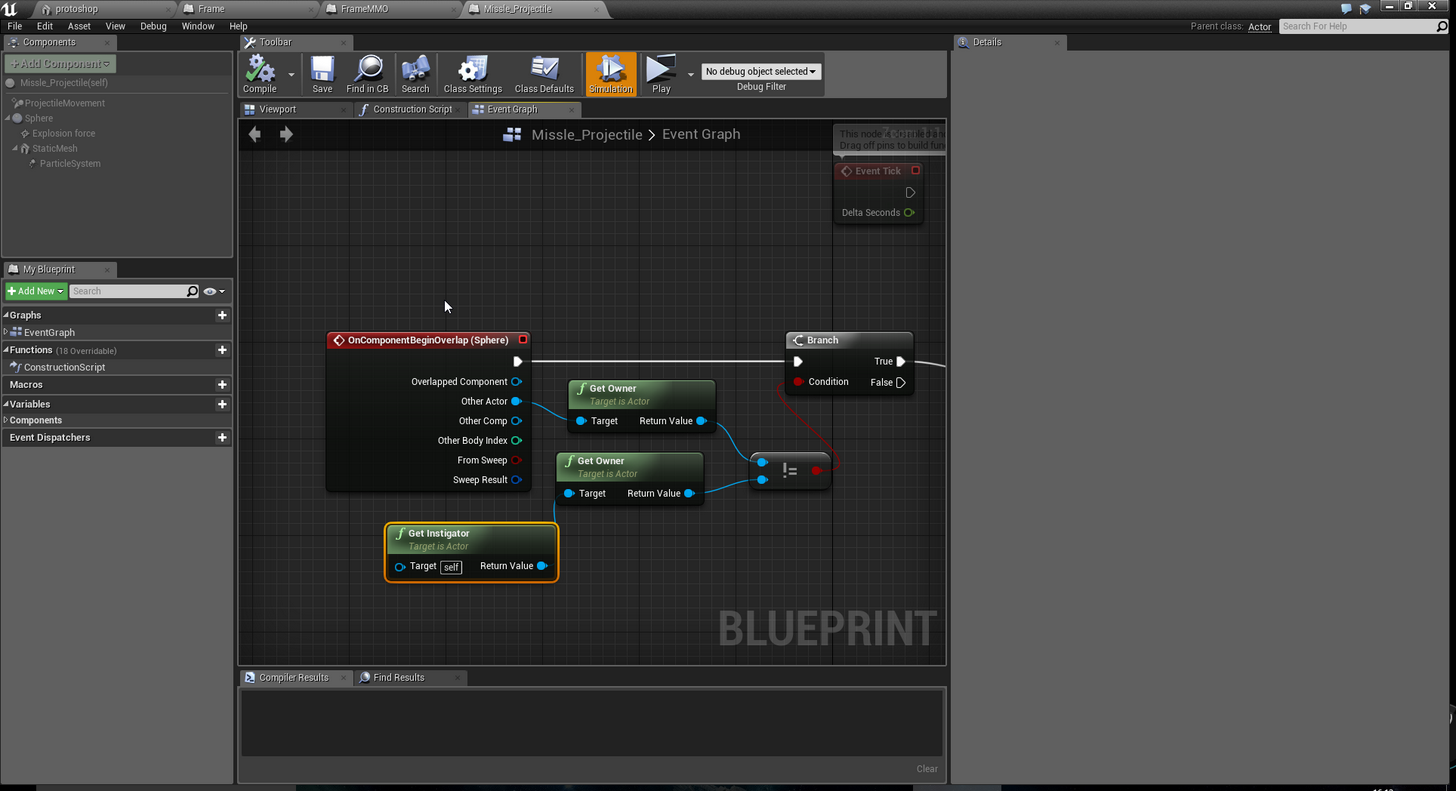
litrally
1 thing missing
jesus
 wary willow
@sweet spire making an MMO are you?
sweet spire
nah not really haha
Multiplayer yeah
MMO tho no
Just naming convention for multiplayer iv been using since i read abunch of other peoples open source projects to learn
okay i fucked up lmao the projectiles are passing through everyone now rip
sweet spire
Okay i got it all to work
Using team system
the projectiles team gets set on spawn by team of who ever spawned it
good or bad way to do it?
thin stratus
Good way if it solves your problem
sweet spire
Cedric oh mighty book of info
are cast to's
peformance heavy at all?
Im still trying to get a way better grip on whats peformance heavy for a server and whats peformance heavy for a network.
thin stratus
If done often, then yes
So if you cast on tick the whole time, then maybe
Then it might be better to just cast once and save the result
timid pendant
@thin stratus What would be an alternative to dedicated servers in UE4? I saw you mentioned this in a forum
thin stratus
You mean an alternative to non-listen servers that are not the ue4 dedicated servers?
timid pendant
Yeah
raven holly
Has anyone here implemented VOIP before?
With advanced sessions
[0418.33][ 24]LogVoiceEncode:Error: StartLocalVoiceProcessing(): Device is currently owned by another user
I get this^
 eternal swallow
Basic question here: When a character spawns, I want to get some info from the player state (character gear and customization). I only want to do that on the server. the issue is, when the characters spawn, the server doesn't have any player states yet. They exist locally on the clients when they are spawned, but it takes a while for them to be replicated to the server (or so it seems). How can I wait for the player states to exist on the server and then do something?
thin stratus
Well, you could execute your logic in the PlayerState BeginPlay
wary willow
@raven holly try @twin juniper
But, that error seems simple enough, make sure that your microphone isn't being used by another program?
No idea if that's it. But I would try that first.
Seems Skype or something else may actually affect that
There is a workaround by editing some source
Or Call Starttalking from playercontroller
eternal swallow
Hmm, yeah, ok, I guess that would be the easiest solution @thin stratus. Thanks.
Still wondering how you would handle a situation where you have to wait for something to replicate.
wary willow
I've run into a few situations like that
And had to put a silly 0.1 or soemthign delay
Not elegant, but it works
@eternal swallow How are you spawning them?
eternal swallow
Spawn what exactly?
Waiting doesn't seem safe at all. How can you be sure it's replicated in .1 seconds?
wary willow
@eternal swallow Waiting is a bad idea, just telling you what's worked for me in a pinch when event-based wasn't viable due to silliness.
You know when they are spawning though
You can also just check from the server, if they have spawned
When they spawn, you can do your logic
raven holly
@wary willow slowly figuring it out
wary willow
@raven holly what was it?
raven holly
a number of things, but i think its related to me not registering a game session
trying to get it working in a blank project
also.. doesnt seem to work in-editor
wary willow
Well, ifyou're doing Steam, nothing works
raven holly
lmao
wary willow
(in editor)
raven holly
hmm?
wary willow
?
twin juniper
@candid comet I always see that error when I'm playing in editor, but VOIP does work when over steam
raven holly
Ahh ok
Know what this could mean?
Trying to set some settings for the session
@fleet sluice is the limit still 128 ? or is this just outdated unreal
        {
            GameTagsString += NewKey;
        }
        else
        {
            UE_LOG_ONLINE(Warning, TEXT("Server setting %s overflows Steam SetGameTags call"), *NewKey);
}```@raven holly Can't find it in the SDK on my mobile. Will check the solution tomorrow. But yes, I think it's still 128. I doubt they'll go even lower
raven holly
Also does your plugin support VOIP ?
fleet sluice
Yes. The raw VOIP from Steam
Need to add a UAudioComponent output though. I left it out originally and only implemented the buffers because of the new audio engine, but adding it soon
Literally the last bit needed
raven holly
Nice can you do attentuation/spacialisation too??
 pallid mesa
Any particular reason why IsRunningDedicatedServer() does not return true when simulating in the editor and the "Run Dedicated Server" option is checked?
pallid mesa
AActor ~ i also saw this on a ue4 forums thread
raven holly
is the event running on the server or the client?
fleet sluice
@pallid mesa Because PIE is not a proper dedicated server. That function is meant to return "true" when running a standalone server process. PIE is intended to verify replication code and that's about it
raven holly
@fleet sluice pie does support isDedicatedServer
His event wasnt running on it, it seems
pallid mesa
it does, indeed it works
i think i believe i tried but i really didnt i probably messed up with my playtests and the compiling button
fleet sluice
@raven holly With UAudioComponent as output, yes, it is possible, but that depends on the end-users' choice. I can't provide a generic solution. Components are the most versatile thing there is
fleet sluice
PIE is screwed for networking. I encountered many things that didn't work properly in there
fleet sluice
Well that's what I'm saying - UAudioComponent is the base for spatialization. Where you place/attach that component in the world is your choice. I can't just spawn one at 0,0,0
raven holly
Scroll down to krises fix
Oh ok
So on each voice, it would spawn a new component?
Idealy you could spawn the component onto the players
fleet sluice
Essentially, yea. Or maybe I can figure out the procedural sound generation stuff
Haven't gotten that far yet
raven holly
Ok
fleet sluice
I won't spawn it on players. That's the end-users' choice. What if someone wants it on an NPC or in an object intended to act as a speaker?
You can't predict that sort of stuff
If you do, you just end up with a hard-coded mess. Best I can is offer 100% flexibility with 0% compromises
raven holly
you could maybe have an actor to attach it to
and with option to add attentuation settings or not
fleet sluice
But that's already in the UAudioComponent code
raven holly
true
So you could expose it to bp ?
right now im going to just do a sphere trace every so often and mute those outside of the radius
fleet sluice
And there's an "AttachComponentToActor" node as well so why would I hard-code that in my backend?
fleet sluice
Isn't it already exposed?
I remember seeing a large part of the audio system exposed
raven holly
not voip attentuation
fleet sluice
Ah ok
raven holly
you can add a voip sound class
fleet sluice
Maybe I can make some utilities to access it then
raven holly
that would be great
fleet sluice
I just hate the idea of hard-coding stuff
I'd much rather make things modular, in general, like adding well-defined libraries instead
raven holly
yes understand that
does your steam master server registration work with dedicated servers?
fleet sluice
Yes
@mystic pilot Got full server functionality working on his own. Far more advanced stuff than I showcased in my video
I'm working hard on delivering on the promises I made so far and then make more vids and showcase more cool stuff
raven holly
alright ill give your plugin a go 😄
fleet sluice
Thanks!:) join the Discord server!
A lot of people still tend to PM, which I don't mind, but I can overlook them very easily compared to tags and entire discussions in organized channels
Still planning one more major overhaul when I finish the next major additions
 mellow cipher
I prefer bugging you with tags
fleet sluice
Lmao
They're easier to keep track of
And for some reason, I don't seem to receive all PM notifications on mobile, which is where I lurk from, usually
 mystic pilot
 mystic pilot
Yes.
mystic pilot
Its just gives you access to sound component used for what ever VOIP you're using.
After that, you can do what you like to the sound attenuation.
May require to call Stop(), apply changes, then call Play(),
raven holly
Do I need to do it in c++ ?
Or can it be done with BP
(with your changes to the engine aside)
mystic pilot
If you exposed it to BP, sure.
raven holly
Would it be hard?
raven holly
🤔
mystic pilot
Just something I didn't need at the time.
raven holly
so you basically catch the play event of someone talking
and stop it, apply attenutation then replay it ?
mystic pilot
I should really try to reroute it through the player controller or something BEFORE letting Play() be called.
raven holly
That or learn
mystic pilot
Do you already have a C++ based player controller?
raven holly
Wouldnt be hard to make one
mellow cipher
I can help you withe the blueprint implementable shit later @raven holly
raven holly
😄
@mystic pilot i could just make a c++ player controller and then reparent my existing BP based one right?
mellow cipher
Whats what I do
mystic pilot
@raven holly That'd work fine.
mystic pilot
MyPlayerController.h:

//~ Begin APlayerController Interface
virtual void ModifyVoiceAudioComponent(const FUniqueNetId& RemoteTalkerId, class UAudioComponent* AudioComponent) override;
//~ End APlayerController Interface

UFUNCTION(Category = "PlayerController", BlueprintImplementableEvent, Meta = (DisplayName = "ModifyVoiceAudioComponent"))
void ModifyVoiceAudioComponentEvent(const FString RemoteTalkerId, class UAudioComponent* AudioComponent);

MyPlayerController.cpp

void AMyPlayerController::ModifyVoiceAudioComponent(const FUniqueNetId& RemoteTalkerId, class UAudioComponent* AudioComponent)
{
    ModifyVoiceAudioComponentEvent(RemoteTalkerId.ToString(), AudioComponent);
}
Should do it.
mystic pilot
If you've got the modified engine, yes.
mystic pilot
Then RemoteTalkerId and the VOIP audio component is exposed to BP.
raven holly
Awesome 😃
mystic pilot
Yep, still using them.
raven holly
Thanks ill give it a go
mystic pilot
Well, they compiled 😛
We're in the middle of going from the OSSteam to OSNull with UWorks.
So...
raven holly
same 😄
well not same
moving to uworks
Can unreal just hire vlad to rewrite OSS 😄
I wouldnt be suprised if they bought uWorks out and just made it available alongside the others
😄
"error : A Private function cannot be a BlueprintImplementableEvent!"
🤔
mystic pilot
Make it public or possible protected.
You should see that in the header (public:, protected:, private: )
Make sure its NOT under private: 😛
mystic pilot
Good luck 😃
raven holly
2>G:\CharAnim 4.16\Intermediate\Build\Win64\UE4Editor\Inc\CharAnim\CharAnim.generated.cpp(28): error C2511: 'void ACXeraPlayerController::ModifyVoiceAudioComponentEvent(const FString &,UAudioComponent *)': overloaded member function not found in 'ACXeraPlayerController'
🤔
@mystic pilot any ideas?
mystic pilot
Hmm...
raven holly
2>  G:\CharAnim 4.16\Source\CharAnim\CXeraPlayerController.h(13): note: see declaration of 'ACXeraPlayerController'
2>G:\CharAnim 4.16\Intermediate\Build\Win64\UE4Editor\Inc\CharAnim\CharAnim.generated.cpp(32): error C2352: 'UObject::FindFunctionChecked': illegal call of non-static member function
2>  g:\unrealsourcebuilt\unrealengine-4.16.1-release\engine\source\runtime\coreuobject\public\UObject/Object.h(824): note: see declaration of 'UObject::FindFunctionChecked'
2>ERROR : UBT error : Failed to produce item: G:\CharAnim 4.16\Binaries\Win64\UE4Editor-CharAnim.pdb
2>  Total build time: 3.74 seconds (Local executor: 0.00 seconds)
2>C:\Program Files (x86)\MSBuild\Microsoft.Cpp\v4.0\V140\Microsoft.MakeFile.Targets(37,5): error MSB3075: The command "G:\UnrealSourceBuilt\UnrealEngine-4.16.1-release\Engine\Build\BatchFiles\Build.bat CharAnimEditor Win64 Development "G:\CharAnim 4.16\CharAnim.uproject" -waitmutex" exited with code 5. Please verify that you have sufficient rights to run this command.
========== Build: 1 succeeded, 1 failed, 2 up-to-date, 0 skipped ==========
full error
Was i meant to add this to the source ?
engine source*
mystic pilot
Yeah, you need to modify your engine source.
raven holly
yep done all that
raven holly
what does overload mean
"overloaded member function not found in 'ACXeraPlayerController'"
This is my cpp
mystic pilot
Surprised its not complaining about not knowing what FUniqueNetId & UAudioComponent are.
raven holly
lol
"That error typically means that the function you are implementing in your .cpp file has a different signature than the function you declared in your class. For instance, if your declaration was "
🤔
raven holly
kk 😃
mystic pilot
Caught me trying to make a basic trello plugin to replace my crappy game instance based bug reporter.
raven holly
haha
got it!
void ModifyVoiceAudioComponentEvent(const FString& RemoteTalkerId, class UAudioComponent* AudioComponent);
FString needed &
mystic pilot
lol
Was about to post just that 😛
UFUNCTION(Category = "PlayerController", BlueprintImplementableEvent, Meta = (DisplayName = "ModifyVoiceAudioComponent"))
    void ModifyVoiceAudioComponentEvent(const FString& RemoteTalkerId, class UAudioComponent* AudioComponent);
There we go
Hmm... can you get net ids in BP? 😛
Or, string version there of I should say 😃
raven holly
the net id yeah
raven holly
should i change it to uniquenetid ?
also do i stop it and then replay
or can i just set the attenuation settings
FBPUniqueNetId would that work?
oh wait i think thats only for this lib
mystic pilot
Could always update the event to output a FBPUniqueNetId if you have that lib access in C++.
raven holly
i think its a bp thing
mystic pilot
Otherwise, just get it in string format.
raven holly
@mystic pilot how do you set the location of the sound? do you get actor somehow? 😃
or is that automatically attached to the speaker
mystic pilot
I use the player state to find the appropriate character.
In my case, I rigged up our custom player state to find get a reference for itself.
You could just get the player states owning controller, then get pawn etc.
What ever works 😃
raven holly
do you foreach all the states until one matches then get the location?
🤔
Something like this?
mystic pilot
C++ equivalent, yeah.
hasty adder
If your expecting a large array might want to use a loop w break because I'm pretty sure that will complete the array insteadn of stopping
But if your talking low pop no biggie 😃
raven holly
oh a return doesnt do that?
hasty adder
I don't think so it'll only return the == but still completes the whole array
As false
raven holly
in usual programming a return will stop a foreach
so i dont see why it would be different
🤔
 severe widget
BP
raven holly
xD
severe widget
Not saying the loop would keep going
hasty adder
Yar kinda curious
raven holly
@mystic pilot hmm after everything i call stop and it doesnt stop the component 😮 idk what i did wrong
I looked over the engine changes and its all the same as yours
mystic pilot
I tell it to stop.
If I'm using spatialisation, I attach it to the character.
I set UI sound to false.
I set allow spatialisation to true.
I apply attenuation settings.
I tell it to play.
raven holly
yeah the first thing though, even if I stop it it still plays so Im not sure if the event is working correctly
or - will it just play anyway if its stopped?
i'm just testing the stopping
mystic pilot
Turn on LogAudio to Verbose.
See if you get a log entry about it being stopped.
Looking at the UAudioComponent source, it should leave one behind.
raven holly
kk
raven holly
oh ok
mystic pilot
Still call Stop() though, in case it was already going.
raven holly
haha alright
mystic pilot
Otherwise it won't override the sound.
mystic pilot
Looks messy AF compared to the C++ for it 😛
raven holly
Actual very simple 😄 if it works
Alright i think i got it, now to get it attaching to the right character etc
Who owns a player state ?
The player actor ?
raven holly
its harder than i thought to get a player pawn from a state
hasty adder
This is crazy @raven holly but ever think of storing the pawn ref to the playerstate on possess
hasty adder
😃
Let me read the rest of this backlog and get caught up lol
Oh trying to do some kinda voice in range thing?
hasty adder
Cool so that's why your trying to find the pawn
raven holly
yep
hasty adder
Ok. Hmmm
raven holly
haha
hasty adder
Gg phone
raven holly
thats like my print strings right now
hasty adder
There is an override in the pawn itself for possess
hasty adder
Bought your attaching it to the players pawn
hasty adder
😃
You can get player state from the controller
And pass itself to the ps
Store it see if this chicanery works
hasty adder
Remember that's being run by server I think
hasty adder
Kk
raven holly
reference
so it should be same for everyone
states are only readable to clients
and modifyable by server
hasty adder
No fingers crossed emoji 😦
raven holly
haha i think its working
hasty adder
✌*-1
Well not sure how to test it alone Cept maybe trying to print the world location of the sound compost from another player maybe? Shot in the dark
Component
hasty adder
So you've literally lost it's your probably sitting there talking to yourself 😉
raven holly
yeah my brother was like wtf you doing
raven holly
haha
it works
BUT
sounds are cached when you are out of range
and will play when back in range
🤔
raven holly
@mystic pilot we are go!
But ran into a bug i think you have experienced too,
the caching of sounds until heard
hasty adder
Like it needs to get destroyed as soon as it's compelted
raven holly
@hasty adder will be a little scary if someone is running around screaming for 10 mins then you suddenly go in range 😄
hasty adder
Hahahahah
raven holly
or hear a conversation from 10 mins ago
mystic pilot
Get creative.
hasty adder
Is fixing but leave it in for next test that's being streamed by ppl haha
mystic pilot
e.g. check their distance, mute/unmute them based on said distance.
raven holly
true, but did you code a fix for this outside of muting ?
when i was reading up someone said voip is cached if volume is 0
oh i know
on that catch, if volume = 0 destroy
mystic pilot
I just muted them.
Seemed pointless sending voip data to a client who can't possibly hear someone.
hasty adder
This audio like a constant mic open?
raven holly
it just stops networked voice
hasty adder
Ah
raven holly
but the remote player doesnt control the attenuation
i mean the local
wait
fuck
you control other peoples voice attenutation
hasty adder
Neat
hasty adder
Definitely lol
mystic pilot
😃
raven holly
i realised i hate my own voice
hasty adder
So if 3 players are near eachother and player a is talking b and c walks in and walks away everyone attenuation suddenly drops out?
raven holly
imagine in-game voice changing with new synth system

no
each voice instance has it's own attenutation
and attached to player
my attachment isnt working though
hasty adder
Ahh . Brainstorming.. What's the symptoms? What's happening
hasty adder
Anything an authority call might be needed to make sure it's the player?
Oh the attach? Cast is failing?
raven holly
cast doesnt fail
it puts the sound at the location of the player
but... when i move while holding voip it doesnt update location
hasty adder
Ohh so the component set to replicate when it's made before attaching?
hasty adder
Still the component is being made dynamically might not carry over I think when to create the component you can check if its replicating
hasty adder
The sound audio
raven holly
oh its local
hasty adder
Let me see if I follow, your in range it spawns for the llayer the audio to hear attached to players version of the other llayer that llayer moves the sound stays where they were standing when it started?
raven holly
yes
hasty adder
Ok hmm
hasty adder
I just wonder if it's location is updated since the stuff I've seen with other components. Example rotation on say a sphere attached to mesh doesn't replicate to another so we end up using a rellicated rotation var to update other players if they need to see it rotate.
Well it's got the return for true or false
raven holly
yes thats next
hasty adder
😄
raven holly
kk will try that
hasty adder
I've been watching the weather channel for last 20 minute I just realized
raven holly
O.o
hasty adder
Don't judge me! ♿️
hasty adder
If you printouts location so all connected print it. See if it's vector is changing
hasty adder
Oh jeeze big bp?
raven holly
because voip doesnt work in PIE
hasty adder
Ohhh
hasty adder
Lord let's queue up some tests then
Ummm
This sounds strange but after younattachbthe sound attach something visible to the sound .. Does audio component have options like a mesh "moveable"that's not set tontrue
Umm
hasty adder
Intermission for snack
raven holly
well i had to disable UIsound for it to recieve attenuation
its just a normal audiocomponent i think
mystic pilot
Disable ui sound and attach it.
raven holly
oh attach at end
mystic pilot
I don't think it matters about the order.
But if its not attached, it'll attentuate from a fixed location.
raven holly
ok the order might matter 😄
ill try it
sorry for the spoonfeed, this is new territory for me
hasty adder
This is good stuff mate
raven holly
ill be sure to help anyone else who needs 😄
it might have a static mobility
ONLINESUBSYSTEMUTILS_API class UAudioComponent* CreateVoiceAudioComponent(uint32 SampleRate);
Found the code to it
oo here i can disable ui sound
->SetMobility(EComponentMobility::Movable);
going to try this
¯_(ツ)_/¯
raven holly
Going to try this last thing, then we know why it doesnt move
if mobility is static then we will need to set its mobility on creation
hasty adder
Good call
raven holly
it would make sense that if its UI sound it will be set to static in the code somewhere
its movable 😢
hasty adder
Hmm
raven holly
going to try attach it to the root of the player not the mesh
hasty adder
Is there a get world location pull from the component?
hasty adder
Promote that to a var
hasty adder
☕️
raven holly
it moves
but the sound doesnt
O.O
the location is moving
But.. the component stays attached to the player.. even when they are not talking
it's kinda like theres multiple components
hasty adder
Makes me wonder how it plays the audio. Strange.. It being voip puts a strange kink in it. So are you able to move and start a new sound and it plays at new
raven holly
so it IS attaching
hasty adder
Like hello world at location a players there goto b and hi! And it plays there
raven holly
yep it does that
idk what its doing lol
i think krises method overwrites a component
or duplicates it
idk
hasty adder
Maybe it should just be spawned locally in the world like a blueprint all itself set to tick and follow it's referenced owner hahah
lol lost voice
Lil
hasty adder
Player drops an audio log they don't talk
Just spit balling here cuz I've never done this stuff either but if you did have a separate bo. Expose a audio component at spawn. Add an exposed pawn reference node var. use your code to spawn the blueprint at the ref pawn location. In event tick it interopt it's vector to the players pawn location. It's begin play starts the audio. Again super hacky just a thought.
So you have control over the bp. You could even add a billboard to see if it's moving spawning etc
hasty adder
Lol
hasty adder
Sever is still spawning it perhapses. I mean it has to go through the server for the player to even know
hasty adder
Hmms for kicks I'd see if you can drag a ping from it when it's created to see if there is a set is replicated see what happens .
raven holly
there is a set replicates
it seems like, once "play" is played
it cant be moved
and i cant attach after play either
raven holly
yep
So after 5 seconds, it deletes the component
Only then it will be able to go to a new location
So while data is being streamed the component isnt moving
hasty adder
Hmm might require some magic probably need check with answer hub for some reasons why
Bed time for me. Hope this gets sorted out 😉 I'll keep looking at work need something to pass the time I'm sure people have tried this other work arounds might include playing as 2d and dynamically based on location actor you adjust the volume and left right speaker to give illusion of depth etc but of course how multiple sounds would be handled is a tough one
Like they'd have to be their own instanced added to your character and removed as they complete tis crazy talk
raven holly
O.O
raven holly
@mystic pilot you sure you didnt need to do anything else to attach it to an actor and have it stay attached? 😮
i have everything working except snapping to actor
mystic pilot
            if (AGBCharacter* GBCharacter = GetCharacter())
            {
                static FName NAME_HeadMask(TEXT("HEAD_Mask"));
                AudioComp->AttachToComponent(GBCharacter->GetMesh(), FAttachmentTransformRules::SnapToTargetIncludingScale, NAME_HeadMask);
                AudioComp->SetUISound(false);
                AudioComp->bAllowSpatialization = true;
                AudioComp->AdjustAttenuation(VoIPAttenuationSettings);
                // FIXME - The CreateVoiceAudioComponent() sets this to 1.5f by default. Keep that?
                // AudioComp->SetVolumeMultiplier(1.0f);
            }
ive check mobility, etc, the component is moving on the actor as the location changes
and it works when they move around while holding on VOIP ?
mystic pilot
It did.
I haven't test it under 4.16 without OSS.
But I expect it to be fine.
As long as the sound is handled by the UE4 engines sound engine, you can manipulate it like any other.
raven holly
Ok
ill try replicate your method as close as i can with BP
There has been a lot of changes to the audio system in 4.16 so it could be related
raven holly
Haha
Well if it happens to you too we know its an engine issue
and not just me being a retard
hasty adder
Well good to see twas confirmed
 past totem
How would I go about replicating a procedural mesh? @ me pls
I think I cant replicate it so I have to make an instance of it for every client but I dunno how to do it and update it everytime it updates for one client..
thin stratus
Well you have to replicate the stuff that the client needs to recreate the mesh on his end @past totem
If you have something that the player does to get the data for the mesh then just replicate whatever that player did
Depends on what you are exactly doing there
Can't help much more right how as I'm not home. Try to explain your current task a bit more then we can easier help (:
 stoic maple
How can I get events in BP to replicate to a server? (This way I can have a working replay system)
twin juniper
Is there a way
I could call RPCs on a actor placed into the scene
like
i placed a volume into my scene that is customly coded
but i want to set a timer on it
is there a way of like
SetOwner(SERVER)
lol
twin juniper
@hasty adder its in the world
its not spawned in
its literally saved into the map
twin juniper
what is the max replicated array size?
rough iron
@raven holly The steamworks docs feature that info
raven holly
time to start digging
twin juniper
how would i set the owner of an actor
to be the server
could i just do
SetOwner(AGameMode);
lol
thin stratus
Setting the Owner to nothing should already do the job
But why? An actor that is placed in the world is already owned by the server
twin juniper
@thin stratus If that were true then my timer i setup on BeginPlay() should be being called
but its not
thin stratus
What does the Owner have to do with a Timer?
twin juniper
Uhm i want the timer to be on the server
lol
and in order to call it on the server
u have to be able to call it from authority
and i dont think it has authority by default
just being palced into the scene
thin stratus
Use a switch has authority?
twin juniper
doesnt give it authority
 jolly siren
lol
jolly siren
🤣
twin juniper
but the thing is, being placed into a scene
doesnt even network the object
it only exists
on the client
lol
twin juniper
yea
jolly siren
but the authority check will still work fine for checking if you are on the server for that object
thin stratus
If in doubt, use "IsServer" and a branch
twin juniper
yeah
but the point is
it will always return false
becasue it doesnt exist on the server like u say it does
go ahead and try it
lol
create empty project, and call if (Role == ROLE_Authority) in a base AVolume, in begin play
it will never be called
jolly siren
lol
twin juniper
even a simple debug log
wont be called
this is reproducible
Actors Placed in the world, do not have BeginPlay() called on the server
thin stratus
LogBlueprintUserMessages: [BP_Test_58] Server: BP_Test
LogBlueprintUserMessages: [BP_Test_58] Client 1: BP_Test
Does call perfectly
Both on Listen and Dedicated Server
@twin juniper
jolly siren
of course it does
thin stratus
Well, just words didn't seem to convince him
jolly siren
haha 🙃
@twin juniper did you forget to call Super::BeginPlay ?
or maybe you didn't override beginplay properly
 fringe dove
will a reliable RPC on a newly spawned actor make it to all clients, even if the actor hasn't been replicated to all of them yet?
(does it get delayed and queued)
twin juniper
@jolly siren I got it now.
jolly siren
awesome 👍
twin juniper
@thin stratus Hey, do you think you could take a look at this network profile log
I can't seem to understand but it literally just dropped packets
for a good 30+ seconds
._.
 frank portal
then dont allow them to create a lobby
its always client-server ... so what do you want? use the client also as server or create a dedicated server? and why should others not be able to create a lobby?
frank portal
then search which subsystem and server hosting fits you best and yeah just the common multiplayer stuff (replicating, ...) ... dont know what else to say ^^ gn8
wary willow

Download links : Scoreboard Project https://drive.google.com/file/d/0B45Kp15-PhyOdTdid3lKdmtWNkU/view?usp=sharing Server.Target https://drive.google.co...
native moth
Hey guys, I have a question regarding how to deal with update expentency. So I have a third person shooter that has a ammo counter. So when you fire your weapon, that goes the server and the server updates your current ammo count, that gets fed into a widget and display that info. Thats all fine, but when I use a fully automatic weapon, the time it takes the server to update the ammo count and feed that back to the widget really seems sluggish, you would expect it to count nicely down, but instead it takes huge jumps(like 30->25->15->5->0) - how would you guys go about making the client side of things seems smoother?
 sterile pebble
update value locally on client
you could use DOREPLIFETIME_CONDITIONwith COND_SkipOwne @native moth
native moth
Would this require me to make a local current ammo variable and a replicated ammo variable, or would that be the same thing?
native moth
Arhh okay, and the server consume ammo would still just update the Ammo variable, causing them to become synced every once in a while
sterile pebble
It will update Ammo variable on client and then it will send server rpc (ServerConsumeAmmo) to update ammo variable on server, but because it is marked with COND_SkipOwner it wont overwrite client value again. So, this is one way to do what you want. I suppose you could experiment withCOND_SkipOwner (remove it for example and check behaviour) to avoid cheating
ServerConsumeAmmo just call same ConsumeAmmo method
native moth
Well, as long as all important logic is handled with servers instance of that variable and not the local
to prevent any meaningfull cheating
Anyways, awesome! I will try and give it a go. I have the same issue with calculating spread on my weapon. On the server, everything works nice and my crosshair is updated realtime, client.. not so much
sterile pebble
well, this is very common problem in network replication. The most popular way is to fake visual side on client, but handle the actual damage event and similar stuff on server.
Like for the crosshair you could just share same random number for crosshair spread and play effect locally on client, while server is waiting for rpc, calculating and sending data back to the client
there is many ways to do this 😃
native moth
Yeah, I think I will change the crosshair calc to be purely cosmetic on client, the real spread calculation will happen on the server
wary willow
Hmm
wary willow
Did something change in 4.16 that affected getting PlayerState or maybe Function Libs? I had this simple function that worked in 4.14 but doesn't in 4.16. Returns null. But if I just redo the function in gamemode, works fine. https://gyazo.com/7260dcdc1c90df96c123498fcae6ee9b

I guess I should try to repro it with something else later, but lost some time trying to debug this 😭
 slim holly
check is the controller valid
(while assuming this happens on server, since clients are not aware of other controllers)
 rare cloud
@wary willow, where did you call it ?
wary willow
Yeah I did

The player's controller IS VALID
the function was not
I literally just CP'd the inside of my function there, and it works. Like I said, this worked just fine in 4.14
I skipped 4.15
slim holly
is the function input controller, or playercontroller?
slim holly
hmm
wary willow

I'll try it out on a blank project later
or now I guess
@rare cloud it's called in gamemode
or rather, from the player character


I'm not worried about it right now, probably something silly I did somewhere, I'll check it out later when I've gotten some sleep 😉
rare cloud
@wary willow, ok well normally the player controller and playerstate is already replicated
you can try to get playerstate from Character
to check if it is really null or there is a bug with controller
 modern dome
Can someone explain to me when to use Switch Has Authority and when to use RunOnServer Events?
thin stratus
I could, but haven't you read the compendium already?
The reason it exists is to not have to explain this over and over again
wary willow
Rahahahah
thin stratus
Can you tell me what exactly you're not understanding about RPCs and SwitchHasAuthority?
Maybe I overlooked something in my compendium and can improve it
@Raildex#6923
And I can't tag him gg
wary willow
Actually
You don't go over SwitchHasAuthority
;0
And its usecases
Just once does it appear on Page 22
But, you don't really explain it
modern dome
Exactly.
wary willow
😉
modern dome
I know what it does: Checking/Executing Code only on Client/Server, but I can't think of an use case to do so
wary willow
I'll be doing that in my tutorials, once I figure out this stupid bug
@Raildex Well, I use it after every Overlap event
sterile pebble
there is plenty of reasons why you should split you code between server and client
this is not even connected with unreal replication it is all about multiplayer at all
modern dome
@wary willow what abotu Overlap -> Event Run on Server?
modern dome
Delegating your Overlap Logic to a RoS Event