#multiplayer
1 messages · Page 325 of 1
 rain rampart
 mental vortex
how can i do RPC without actors? or: how else to solve the problem, i want to call a function on the server and send a response back
 hasty adder
Like?
Server need only multicast or execute a run on client specifying which client.
hasty adder
Guess when you say without actors I'm kinda trying to figure out how it would initiate and to do what. Haha
mental vortex
idk
hasty adder
Http is still a client request to a server to respond back which is essentially a client initiated event of run on server which then multicasts back or runs on client back to the client.
If the server is doing anything be it a in world object it's owned by server, it would just be doing a multicast if the clients are to know about it.
mental vortex
i cant use multicast, the response should only be sent to one client :c
hasty adder
That's where run on owning client comes into play it's an event the server can only call for a specified client
You can set this to have an input on the event for character for a example
And use logic like if if client side client == that input client -> so action
Do
They explain it a bit on the docs using a overlap box
mental vortex
hmmm i cant really follow you right now
the thing is, i dont have an actor
or i dont want to have an actor spawned in game
i thought i can kinda handle this in gamemode/hud but i dont really know
hasty adder
See I'd need more context to explain replication is basically... Server is the real world. It is anything that counts really.. Clients have there own copy of the world but not always everything. If you want another player to know you exists or have changed etc the server needs to know. So client replicates this means the server knows you did something and to adjust its world
Now this doesn't mean the other client will know unless it's set for the server to then replicate to the other client
Or if the client is asking the server to update something for instance a value the server knows such as score which would be a value updated to server by something
Umg can then say hey game mode give me the score so I can update my widget
Client side
mental vortex
im sorry
- for not responding, 2. this isnt gameplay code, its not like a door that the client opens
@hasty adder
i'm doing a discord integration, that means i run, for example when joining a game, i want to join a certain voice channel. or when loggin in, i connect. all that, locally on the client is no problem at all, but how do i connect the game client with the game server?
 potent raven
@mental vortex You've seen this right? https://discordapp.com/gamebridge
Discord
Step up your game with a modern voice & text chat app. Crystal clear voice, multiple server and channel support, mobile apps, and more. Get your free server now!
potent raven
ok just making sure you're not duplicating effort there
mental vortex
ehm i coudlnt really work without such a thing
but this gamebridge is basicalyl just a mini discord client as you might see here: https://discordapp.com/developers/docs/topics/gamebridge
Discord
Step up your game with a modern voice & text chat app. Crystal clear voice, multiple server and channel support, mobile apps, and more. Get your free server now!
so i need to work with the discord api nevertheless, thats not the issue, i already got that covered
hasty adder
You would want client side logic for connecting to the discord server . I'm not sure how the api works but you would use game mode likely onpostlogin which contains the controller node to cast tothe players controller to run the event to connect I'd assume
So make the logic in player controller just as if you were doing it locally. But as custom event run on client.. You can use inputs on this event if any variables should be given to the player to use from the aerver
So post login executes the code and passes the variables for the run on client
mental vortex
no idea what you are talking about 😃 but playercontroller. ill read into that
mental vortex
thats for the server, yeah
but for the client?
or nvm, it will be seperated from that anyway
hasty adder
That's likely where you'd want the event that gamemode will cast to
mental vortex
are there gamemode blueprints?
hasty adder
Post login has the incoming player controller reference.
hasty adder
::nods::
 granite badge
can someone please explain how to fix rotation not updating to other clients/the server if a client updates their rotation? This is my current rotation code
right now no matter what the client players are aiming at the world origin for the other players, only the host can be seen rotating
 fossil spoke
Is your Pawn set to Replicate?
granite badge
@fossil spoke I found a solution online
and it was but rotation isnt replicated natively, only location
 wise depot
have any of you guys used SteamUtils()->GetServerRealTime() for anything?
is that a universal time or local?
like, does it change depending on location?
 tough gyro
what does it return?
based on a quick search in the ue4 repo, it returns an uint32
so it's probably a timestamp
wise depot
yeah its just a uint32 i think
i'll just run it and see i guess
any steam dev's on here outside of the UK that wouldn't mind running that function and letting me know what it returns for them?
 raven holly
Question regarding multicast... does it cast to ALL actors or actors within the replication distance?
 rare cloud
@raven holly, replicate to all actor that are network relevant.
raven holly
So inside replication distance?
rare cloud
yes, or if you set an actor to always relevant
raven holly
hmm
Because when I do a multicast on something it will spawn the actor in, just to do that thing
like play a sound
for example, if a player shoots on one end of the map and a player is on the other, it'll spawn in the actor that shot just to play the sound then it despawns
🤔
rare cloud
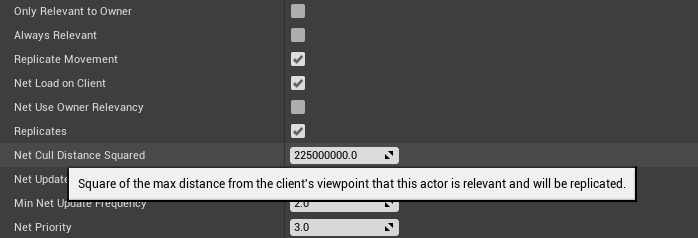
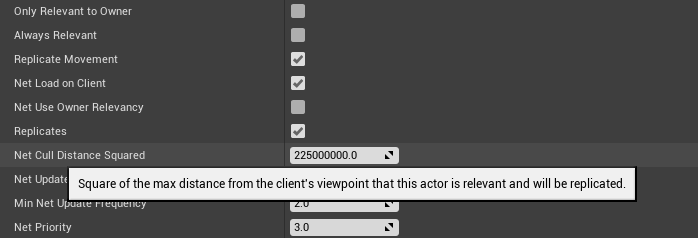
@raven holly, you can change this value:
https://i.gyazo.com/3aee1f50ba455d0b8766beedb2086461.png
on your actor
to set the distance
raven holly
yep i do
"However, to demonstrate relevancy issues, this chest has been modified to become network irrelevant at a very short distance"
it's meant to
An overview of the Network Features example level, example 2.2: Network Relevancy (Part 2 - Function Replication Solution Attempt).
the distance makes no sense (not related) but still lol

You can see what I mean here
I shoot on top left
bottom right spawns in character just to play the particle
raven holly
idk ill have to figure out why this is happening
 plain flume
What does the Request->SetContentAsString() means when using the IHttpRequest+
Header says
/**
* Sets the content of the request as a string encoded as UTF8.
*
* @formal meadowm ContentString - payload to set.
*/
but that doesn't tell me much
 dapper galleon
@plain flume It's the information it could be carrying, json data, an image ...
What should happen when you issue simultaneous calls to a subsystem? I mean, they use a delegate in which you usually add a function reference to be called and then the subsystem broadcasts it when finished. But what if there's multiple functions subscribed to that delegate? I'm trying to accept multiple calls, but the broadcast calls all of them when the first request finishes. If I could call only the first subscriber it should work, but I can't change the subsystem interface (working with Facebook).
hasty adder
I'll start here since it's multiplayer related:
Shared camera that follows a primary object. Pans based on its movement since last world location gets set which is based one two layer blending. If it's only reached layer 1 the inner most the camera lag would be greater if the second less to better stay centered.
Next distance of furthest most players should control the clamped distance of up close and furthest away.
Curious if anyone has experience with this
Doodle
 modern dome
Set Game Pause does not work on the Client.
When the Server pauses, the Server pauses but the Client can still move, but then Client gets teleported back to the paused Location.
*This also happens when the Client pauses
but the Client still can move
 hasty adder
The pause being called on server and server telling client to pause? My concern would be how does the world react to this if say an ai is roaming about
modern dome
what do you mean?
hasty adder
Is the actual game being paused like if the level had a object moving up and down and paused do you see it stop on both.
hasty adder
https://forums.unrealengine.com/showthread.php?144749-Multiplayer-FPS-Sample-with-Server-browser-Chat-Main-Menu-and-Basic-Character-Movements , found this thread wonder if it has helpful code
States pause menu lol
Tho I wonder if that's just Ingame menu named wrong
^.^
Yeah that's what it looks like never-mind that link
There was an old big for pause in multiplayer https://issues.unrealengine.com/issue/UE-34407 I'll keep an eye out in my research as I'll need this too sometime in thenfuture
Workaround might be just bispaused block on movment and attach inputs so you can replicate out the ability to move or not
So all inputs go through the branch under false. And server replicated out to change this to true or false
hasty adder
But I'll let you knowing I find something because in my game sometimes server owners might want to pause a game for FairPlay if a client disconnects
😃 so a good option for me to research!
As for world pause one could use time dilation though I've seen even at zero some movement will continue super slow . But uncoils have not been doing it right
modern dome
Pause should definitively work on both client and servers. I wonder why this isn't fixed yet
 twin juniper
Is there any blank subsystem
which can use more than just LAN
onlinesubsystem null is only LAN
 blazing siren
I'm pretty sure you can connect over internet too
twin juniper
Kind of curious
because if it can i might drop steam if i can figure out how to implement my own "UniqueID"
hasty adder
Null works over the Internet just you can't find sessions unless its lab
twin juniper
Because the only reason why im using steam is for the UniqueID lol
hasty adder
Master server workarounds can be done with a MySQL server and varest to post and get the info
hasty adder
I can give you how I do it you just need a web server w MySQL to act as the master
twin juniper
GetCurrentPlayers() always returns 0, no servers are authenticated, everything is p2p, steam voice is laggy and muffled...etc
Sure, could you DM me it?
hasty adder
I'm at work but I'll put stuff togeather tonight on it
twin juniper
😛
Honestly too
Steam takes 30% and half the stuff isn't even properly implemented in UE4
so why would i even publish on their platform
 jolly siren
everything isn't p2p on ue4 steam
twin juniper
ya
But still, taking 30% and what do I get in exchange?
The only big thing about steam
is their community base is massive
blazing siren
you get to be on their store page
twin juniper
but... league of legends was once on steam, then they left it... look at them now
Yeah, exactly. That's it
Being on their store page for 30% of all your profits
seems like a ripoff to me
when i could selfpublish
If i sell my game for like $30 that's like $10 each copy
they get absolutely free
for doing nothing
blazing siren
ofc you could always start off that way, like Factorio did for instance
and then release on Steam once it's out of early access
twin juniper
ya
I mean my stuff is implemented on steam already
its just, i think being able to self publish on my own platform would be way cooler
i could create my own web site which integrates stats into the site from the game
blazing siren
30% is a lot yes, but as an idie dev you just have to take it like a good boy I suppose
twin juniper
xd
blazing siren
I have no stats to back it up, but I'm assuming you might actually make more money on steam, even with the 30%
just from having a storepage on there
idunno
twin juniper
ya
but thats only because gabe newell has everyone convinced that steam is the only way
lol
Hes an evil genius
twin juniper
lol
 frank portal
if it is only for pc go for steam :v
hasty adder
I'm making a free game and want on steam just for a place ppl trust a download
twin juniper
lol
@hasty adder exactly my point
people trust steam
that dont trust us
simply because of gabe newell
hes convinced people that steam is the one and only way to buy pc games
blazing siren
no convincing needed when you have that market share
twin juniper
idk it just makes me sick
people think viruses can be gained by clicking links
which they can be....
but.... not really...
idk its a lot less likely compared to back in y2k
when AOL was still a thing, and people used dialup
modern dome
@hasty adder I set the Time Dilation now to 0.0 on every client. I hope it works reliable 😛
twin juniper
Can someone explain to me why, OverlapSphere returns my instancedstaticmeshcomponent, also returns the hit index which is the instance id of the instance that it hit. HOwever, when I call a server into a multicast function t o remove the instance, it doesnt remove the instance.
Really need help.
this makes no sense -.-
sometimes it works, sometimes it doenst
so inconsistent
its literally every other play
"Play first time in PIE" => No removal of instance
Stop PIE
"PLay again" => Instance Removed
Stop PIE again
"PLay again" => Instance Not Removed
Stop PIE again
"Play again" => Instance Removed
MAKES NO SENSE
dapper galleon
It makes sense, you just have to find out ( ͡° ͜ʖ ͡°)
granite badge
Im having a problem where I've gotten the client's rotation to show correctly to each other and the servers rotation to show correctly to itself, but for some reason the server's rotation doesnt show correctly to the clients. Does anyone see why this won't work in my code: below.
hasty adder
How's rotation changed on client? Like mouse pointer?
granite badge
yea, in the comment box it gets the rotation value from the direction to the mouse
@hasty adder even if I get rid of the part generating the rotator and just throw in say 90 degrees yaw, it still doesnt replicate from the server properly
modern dome
I'm thinking about moving my Player related stuff from the PlayerState to the actual Pawn.
What If I have UObject Variables ina Component? Do they get replicated if the Component is replicated?
twin juniper
hey there, ok i am trying to learn about netowrking in unreal. How do you start up online beacons? how do you tell unreal to connect to online beacons?
 brittle sinew
@modern dome you have to manually implement a function or two and the object must be attached to a replicated object (sounds like you're good there), but AFAIK there is a way
twin juniper
well ok
modern dome
what do you mean with manually implementing function?
twin juniper
but how to connect
brittle sinew
modern dome
Oh, so no BP again
brittle sinew
Oh 😢
Yeah, sounds like you'll at least need a C++ base for this one
It also seems it might need to be attached to an actor rather than any replicated object (components)
hasty adder
@granite badge are you setting controller rotation?
If you set controller rotation you can use the controller rotation replication to true and it will replicate correctly
granite badge
@hasty adder Im not at my computer right now but I'll try it when I get home, thank you!
twin juniper
@brittle sinew can i grab a hold of u for a sec
granite badge
@hasty adder I tried it and its the exact same result
jolly siren
I have some code I wrote to work from a Character. However, I now want it to also work from just a plain Actor. The issue is that my COND_OwnerOnly replication isn't working with the actor since it doesn't have an owner. I tried using SetOwner in the Actors BeginPlay but the replication still isn't happening for it. Does anyone know how to handle this?
I know I could change it to COND_Custom and check to see if we have an owner and if not then replicate to everyone. But I was hoping for a more standard approach.
 rugged lichen
I'm new to doing networking in UE4 and was wonderinf if anyone knows where I'm going wrong.. I have a variable for my player's health
    UPROPERTY(EditAnywhere, BlueprintReadWrite, ReplicatedUsing = OnRep_UpdateHealth, Category = Health)
    float Health;
But for some reason my function OnRep_UpdateHealth never gets called when Health changes
in the cpp I have:
void ATestMPCharacter::OnRep_UpdateHealth_Implementation()
{
      GEngine->AddOnScreenDebugMessage(-1, 2.0f, FColor::Red, "UPDATE HEALTH STUFF");
}
thanks 😃
 fierce birch
is that the squared one?
raven holly
yeah
fierce birch
there was some squared one
raven holly
that squared replication distance
fierce birch
they square it to save on doing square root at runtime
fierce birch
ummm, that squaredrooted?
fierce birch
no
fierce birch
well, it would be but you don't need that for anything
your value is already squared
fierce birch
225000000.0^0.5 = 15000cm
0.5 pow is just same as square root
so, 150m
15000 * 15000 = 225000000
fierce birch
1:29 PM] 0lento: 0.5 pow is just same as square root
raven holly
so square root is like it removed
fierce birch
raven holly
haha i hate math ><
fierce birch
the whole point is that you don't have to do square root in real time
although, I'd just do the math when the game starts...
I hate it when they make settings more complicated than they have to be
raven holly
yeah thanks ! i understand kinda now
so if i wanted it to be say 500m
it'll be 50000 x 50000
fierce birch
yup
raven holly
2500000000
ooh i slightly remember now
power of 2 is just itself x 2
squared = power of 2
fierce birch
yes
fierce birch
np
 regal junco
After updating to 4.16.x, my game fails to create a session, but only in the packaged/released build? Anyone has a clue why?
Everything works perfectly in the editor, which makes it kinda hard to debug it
LogPackageName: SearchForPackageOnDisk took 0.075s, but failed to resolve Level1.umap. Hmm, very wierd
jolly siren
you have confirmed Level1.umap is getting packaged?
regal junco
yeah that was the issue. Very wierd it worked before that
I'm guessing I have to add the umap from the project itself right?
regal junco
Ah yes, seems like it! Thanks @jolly siren
jolly siren
sure np
 raven viper
Hey peeps!
Anyone has an idea how to deal with dying internet connection in a game? There is the Network Error node, but we keep playing, one of us kills the internet completely, yet the node is not called, and the server acts like the client is still there and still connected. It would be VERY important for us to be able to handle network errors in the game. Any iidea?
raven holly
there is a timeout value
before that node is called
@raven viper
[/Script/OnlineSubsystemUtils.IpNetDriver]
InitialConnectTimeout=120.0
ConnectionTimeout=20.0
DefaultEngine.ini
The second value is what you're after
@raven viper
raven viper
Thank you ❤
jolly siren
what happened to the really old networking tutorial series by epic? Went over replication/rpc and had the ghost model and the button you stepped on?
nvm found it
 plain flume
How exactly the Dedicated server works if i have a scenario where server runs a lobby map that should always be there. If there is people who want to go play some game, they should be spawned to some other level. How can the server handle that kind of scenario?
If we use something like servertravel, would the main lobby be destroyed then. So how do the people get spawned to other level that is run by serveer also?
fossil spoke
@plain flume An Dedicated Server (the physical hardware) can run multiple different instances of an Server that can all be on different levels. The Server instance that hosts the Lobby would always be persistent, all it would do is be kind of like an router, when an person wants to travel to the new level from the lobby, they would be infact traveling to an different Server instance that is running that level.
hasty adder
anyone know the right way to add force on ticket with delta time so server and clients can accellerate at the same rate?
 sterile drum
Someone here familiar with advanced seassions plugin?
 slim holly
somewhat yes
 sterile pebble
can someone tell me am I right or wrong - IsLocallyControlled() will return true on server side and client side for same pawn if it is player pawn?
sterile pebble
The problem is I cant understand why in one case it return true and false in other 😦
slim holly
server will report true on it's own , clients only return true in remote end
and on dedicated server, nothing in remote end would return true
sterile pebble
I'm still really confused with that node
slim holly
it only separates local from proxy
sterile pebble
For example: I have a listen server and 2 other clients. Server run multicast event which checks for 'IsLocallyControlled' and I suppose it should return true for every client?
slim holly
it would only run on host
assuming it does the check before running the multicast
I dunno really, don't use multicasts all that much
sterile pebble
No, I mean, not about how multicast event is going through network, but what happens if I put this check inside multicast_implementation
I'm trying to understand is there any possibility that my method could work 2 times instead of one, because this check can return true for the client and he will call server rpc do to stuff, and the server will also run this check (because multicast) and run stuff for the client again
because the client world have only one local (which is client), but the server have all of them as local
As far as I understand that system
raven holly
🤔
Something change with 4.16.1 ?
steam is running new version ?
apparently only does it when steam is running
never used to do this
 fleet sluice
@raven holly Are you loading the .dll's explicitly somewhere else? (The OSS plugin also loads them)
raven holly
Nope I mostly use BP
fleet sluice
Did you change anything at all in the OSSteam module?
raven holly
nope
raven holly
even with -nosteam it comes up
fleet sluice
That's not what I mean. With the OnlineSubsystemSteam plugin disabled
raven holly
oh
fleet sluice
This is usually the symptom of loading a library twice
raven holly

Log file
I use advancedsessions and advancedsteamsessions
plugin
ill try disable them
I'll be buying your plugin soon 😄
jolly siren
yeah it's 64 bit
jolly siren
yeah I haven't upgraded yet either
fleet sluice
Also - Joshua, thanks!:)
fleet sluice
But UWorks and OSSteam still shouldn't be used at the same time because they both load the libraries and UWorks works on a slightly newer version
Or at the very least - OSSteam loading code should be removed
raven holly
Yeah how this got into 4.16 idk
What's funny is theres probably more 64bit dedicated servers than 32
Vlad you should get hired by epic to rewrite their OSSteam 😄
4.15 transition to 4.16 was probably the worst one
jolly siren
You should log that on answers so they create a bug report for it
I don't see it in issues yet
I would like to see it fixed before I upgrade
When I call AActor::SetOwner on server I'm finding that COND_OwnerOnly and RPCs aren't working for that owner. I have to start the actor with replication disabled and then call AActor::SetReplicates(true) AFTER I call SetOwner to get the rep/rpcs working.
Does anyone know why this would be?
Is there something else I have to do after changing the owner to get it working again?
fossil spoke
Isnt it just SteamAppId?
jolly siren
what is that id?
jolly siren
thanks 🕺
raven holly
Is it just steamappid ?
raven holly
" I found that SteamDevAppId actually had no effect for me"
so there is steamappid too
😄
ill try that
jolly siren
ahh ok
raven holly
All these little things with steam annoy me
@fleet sluice how do you cope with working with this hahaha
fleet sluice
@raven holly Well, I didn't. That's why I came up with my own plugin haha. I don't want to touch OSSteam ever again
raven holly
Steam
fleet sluice
Maybe only for inspiration here and there for my own subsystem
raven holly
🤔
raven holly
kk 😄
fleet sluice
+1
raven holly
lmao
jolly siren
anyone have any ideas on my actor ownership transfer question?
raven holly
Is steam overlay meant to work in standalone ?
If i recall it was working in 4.15
I guess this is why?
restarted steam
and it worked?
ffs
this is what I mean hahaha
Random little things like this
fleet sluice
No clue about the actor ownership question
I also remember Steam working fine in 4.15. No clue in 4.16, didn't bother. Those interfaces aren't valid because the library isn't loaded, because Steam is not running or because the steam_appid.txt file wasn't found
raven holly
i got it all working now 😄
raven holly
haha i dont have deep steam integration at the moment
I literally only use the get avatar and get ID
that's it
jolly siren
if I change the owner of an actor shouldn't it's COND_OwnerOnly replication start replicating at that point?
@rough iron you around?
raven holly
What would be the cost of replicating movement of an actor?
Seems like the only way im going to fix my gun flying in the air glitch
sterile pebble
what glitch?
raven holly
Atttaching a gun to a player
Will sometimes spawn in the air
^_^
and get stuck in the air
even when snapped to actor
so i assume a location mismatch
sterile pebble
does it move with the actor?
raven holly
yep
sterile pebble
lol I have the same problem
raven holly
😄
sterile pebble
different case, but still
raven holly
do you have replicate movement on your weapon?
seems like that fixed it for me
Also do you attach on server or client?
sterile pebble
On server
raven holly
kk try replicate movement and let me know if it fixes it for you
sterile pebble
Oh wait, no, actually I'm using OnRep event to send information about new weapon actor, so it attaches both on server and client
raven holly
hmm
seems like my replicate movement "fix" doesnt work
🤔
ive even tried to attach to the player on the weapons begin play
hasty adder
I have a blueprint : multiplayer question I posted in blueprint if anyone wants to peek
sterile pebble
It is very strange bug, cause my gun attachment system is almost fully copy-pasted from epic games shooter example where everything worked well.
raven holly
LUL
my cheat detection doesnt allow it to even shoot
I've been battling this bug for ages >< it's annoying as fuck
It's like I need to attach on server & client
At different times
hasty adder
What kinda routine arms the weapon? How's it called?
raven holly
spawns the weapon > sets current weapon var
weapon sends to owner to attach it
¯_(ツ)_/¯
dapper galleon
did you set the weapon's owner?
hasty adder
That client side it's not attaching?
raven holly
yes ownership is all correct
it attaches to the actor like when i move around the gun flies around with the char
with a weird af offset
But it only works witrh these delays
i took them out as i need to figure the root cause of this
so something is happening inbetween that time which screws its positioning up
<
hasty adder
Is valid after return?
raven holly
yep
all is valid
I wonder if i could call re-attach on server when a player loads the gun
nah idk
😦
think i figured it out
some components were replicating within the replicating actor
disabled that, getting good stuff now
need to test on live server now
hasty adder
\o/
hasty adder
/o\
sterile pebble
@raven holly I owe you :d
raven holly
Ayy it helped me too
hasty adder
Me too 😉
sterile pebble
That is really a very strange thing
sterile pebble
yes
raven holly
I cant be bothered reproducing it in a blank project 😦
if all 3 of us had this issue im sure it exists
hasty adder
Know if somethings acting funny to check if a component is replicated 😃 was it a sub component of ? Child?
raven holly
it was the main parent
sterile pebble
My was a root component
hasty adder
If the weapon is replicating it goes nuts?
raven holly
yeah root comp
hasty adder
So when it's created by server it's replicating its location i imagine
Giving with its new location which isn't being rebroadcast?
Sync prob
sterile pebble
I suppose they should remove component replication check
raven holly
yeah i assume its doubling a vector unintentionally
sterile pebble
it is useless
raven holly
Double replication maybe
hasty adder
Sounds like when you move locally and don't tell the server but backwards
Cept you have the item in your hand and are moving and the server keeps wanting to move it back
Ahh I love replication. It's just the matrix in a nutshell
hasty adder
\o/
raven holly
If you guys want a steam key for my game, i'm doing a test tomorrow 😄
I'll pm yous it
hasty adder
I'm in NA east coast that a prob?
hasty adder
Oh lol
raven holly
¯_(ツ)_/¯
 rough iron
@jolly siren ok changing the owner and starting replication ASAP needs a small trick, once I'm on a PC I'll post a snippet. I got that code in my twin stick shooter code (it should be pinned)
jolly siren
really? i searched that and didn't find it
I'll look again
I assume you mean with the inventory stuff
void ATBInventory::GiveTo(ATBCharacter* NewOwner)
{
    if (Role == ROLE_Authority)
    {
        // Client will handle pickup logic and govern inventory
        //ClientGiveTo(NewOwner);
        DoGiveTo(NewOwner);

        // Replicate to client id it's not the local client
        if (!NewOwner->IsLocallyControlled())
        {
            ClientGiveTo(NewOwner);
        }
    }
}

void ATBInventory::ClientGiveTo_Implementation(ATBCharacter* NewOwner)
{
    DoGiveTo(NewOwner);
}

void ATBInventory::DoGiveTo(ATBCharacter* NewOwner)
{
    // Remove tick dependency
    if (MyOwner && !NewOwner)
    {
        PrimaryActorTick.RemovePrerequisite(MyOwner, MyOwner->PrimaryActorTick);
    }

    Instigator = NewOwner;
    MyOwner = NewOwner;
    SetOwner(NewOwner);

    // Our owner has to tick before us
    if (NewOwner)
    {
        PrimaryActorTick.AddPrerequisite(NewOwner, NewOwner->PrimaryActorTick);
    }

    OnGivenTo();
}```@rough iron is it the Tick stuff or the ClientGiveTo?
rough iron
The tick stuff is just so the inventory ticks after the pawn ^^ it's the DoGiveTo
I think UT does something alike
jolly siren
Hm okay, so you are doing a client rpc that calls SetOwner
owner is replicated tho
So you are setting the owner on the server and simulated clients
jolly siren
Owner is replicated to all clients tho
so why is this necessary?
and tick is synced in your code I pasted? that is related to the replication?
rough iron
The tick is just so that I update the inventory item after the pawn that holds it, just for organization. Owner indeed is replicated but it' done using variable replication and the rpc works always (think about a scenario where a pawn is not relevant for example)
Btw, it's just a hack xD changing the owner should always work out of the box
But knowing that the workaround is that simple I guess it's low prio to add a proper fix
rough iron
Np ^^ nice that the sample is usefull xD
 gaunt kestrel
I keep running into this same problem;
I package my MP game
I can find my server in my server browser
but my client join and reloads my server browser map
not the map that the server is hosting
It works fine in editor
gaunt kestrel
Im using my steam appID
so no lan
It even prints out JoinedSrv
I am finding my server in the server browser
its just when I try to join it, it doesnt load the map the server is currently in.
BUT only after I package it. It works exactly how I want it in editor
hasty adder
You have your own app id and include the file it needs?
I think package steam id is slightly different if I recall
Oh wait the map isn't being passed hmm
gaunt kestrel
"LogOnline:Warning: STEAM: Steam API disabled!" Dont know if this is helpful but this warning displayes when I open my project
Which is weird cause I have Steam online subsystem enabled in my DefaultEngine.ini
 wary willow
@gaunt kestrel that's fine
As long as you are not playing in editor, you are good
If you use Standalone and see the Steam Window pop-up, you are good.
gaunt kestrel
Huh im not seeing it in my packaged build
And I see now that in the packaging of the game the same warning pops up
wary willow
@gaunt kestrel Like I said, do not worry about that message
As long as you can see the Steam Popup Window
in Standalone or Packaged.
If you cannot see that, then you have configured your game incorrectly.
hasty adder
Packaging w/ Steam for Shipping Builds
For shipping builds you must manually create a file called:
steam_appid.txt
and in that file put just your app id with no extra whitespaces (spaces or returns or anything like that)
gaunt kestrel
Yeah it runs fine in engine
gaunt kestrel
Oh the overlay?
wary willow
Yes the overlay
You should be able to see the overlay popup in Standalone
and shift/alt-tab or whatever to Spacewar
Only in packaged game, do you need to worry about the steam_appid.txt file
But if you can't even get it working in engine, then there's no point in trying to "fix it" in packaged
wary willow
Did you test this with 480?
gaunt kestrel
Some.
My server browser was showing servers when I used my app id
so I went straight to using that
wary willow
Are these dedicated servers?
gaunt kestrel
no they are P2p
gaunt kestrel
Yeah
I was missing some things from this: https://answers.unrealengine.com/questions/368203/steam-overlay-not-working.html
Specifically: [/Script/Engine.GameEngine] and [/Script/OnlineSubsystemSteam.SteamNetDriver]
would that have affected that?
gaunt kestrel
Thank you! I'll see if this works now
hasty adder
Lik victor says make sure you have steam loaded... Load the game standalone.. And shift tab
If that isn't coming up all bets are off
gaunt kestrel
Hmm okay I'll get that first before asking anything else
hasty adder
Remember you cannot use the same computer to test over steam or accounts
gaunt kestrel
Yeah I have my partners computer on the other side of the room
imma just try to get the overlay working first
Ok for some reason my appID isnt working?
let me check again because 480 works
yeah okay my AppID isnt working
probably I just havent set it up in Steams thing yet
hasty adder
Don't have my own to know how it's done , my assistance ends here lol 😉
gaunt kestrel
Well thank you!
Progress is progresss
I'll probably call Steam later tonight and bug em
hasty adder
hmmm fSpeed 30,000 *f delta time * fAxis 0-1 * Forward Vector into Add Force still makes server go faster then client when on ticket tho the numbers say its adding the same, i think the server is just ticking more often
brittle sinew
@hasty adder well it's a bit more complicated with forces, as they're changes in acceleration rather than changes in velocity
hasty adder
yeah its about 2x as fast
brittle sinew
For example, adding 1 newton 100 times might not do anything to an object, while adding 100 newtons once might make it move a lot
hasty adder
i'd hate to use set linear velocity since that would uh mean they hit eachother different right
well might as well see what happens lol..
haha all sync is lost for replication
 loud sage
Is this chat only for ue4's built in networking or can I ask general multiplayer game stuff too? (I'm playing around with UDP packets etc, and not quite sure how to do a few things on the ue4 side)
hasty adder
@brittle sinew I think i fixed it, see WIP chan
fossil spoke
@loud sage ask whatever you like mate.
loud sage
woohoo! So is the built-in character lag compensation available for you just feeding in location packets whenever you get? (so I can DIY around with datagram packets etc)
And if not, what would be the best way to go by doing it yourself? (most seem to work by doing some smart velocity math, but wouldn't that break the characters' location permanently when you drop a few packets?)
(Just for the record, I did a ton of googling, and all I really got to work with where a few theoretical pages (mainly source engine stuff) + no real results for the ue4 built in stuff)
raven viper
Hello people!
Anyone has an idea how to check if the mobile device is running on WiFi or mobile internet? Would be important in the game logic :/ Sadly we cannot find anything related to the topic. Any help would be greatly appreciated ^^
 worthy wasp
I cant get this OnRep function to fire .... i've set the variable to ReplicatedUsing= and i've included Core.h & UnrealNetworking.h in the appropriate files... all other replicated variables work but this is my first time trying to use ReplicatedUsing= functionality..... see anything wrong?
.h
        AContainer* CurrentContainer;
    UFUNCTION()
        void OnRep_CurrentContainer();
.cpp
Try adding virtual infront of your void OnRep_CurrentContianer(); @worthy wasp 😃 (this'll cause it to override a function, and a wiki page I quickly looked at seemed to use it, so it's worth trying rioght? 😃 )
worthy wasp
Doesnt say that here - but i'll give it a try
FWIW - i AM settin gthis as server (debug stringed)
ok....
"The server has to call the OnRep function manually because it does not participate in replication updates since it is the one sending them."
https://wiki.unrealengine.com/Network_Replication,_Using_ReplicatedUsing_/_RepNotify_vars
@loud sage
loud sage
Hm your right, my bad ^^
 viral olive
Guys, help please
Simulated characters are restoring their default relative rotation on any movement
We tried tons of different stuff but still no result
 mossy hearth
dumb but easy question when i test a dedicated server all clients should see the basic movement or? In my case the client that "host" the game is not be replicated on the other clients. Normally this should only happen when I dont have a dedicated server or?
modern dome
What am I doing wrong here?
The Execute Function Call only works on the Server
Update: Works now. The Parameter was a spawned Actor, but it was not set to Replicate
 delicate canopy
Is their away to connect UE4 to a node.js server?
loud sage
If your prepared to manually do the replication, socket.io could do the job @delicate canopy 😃
https://socket.io/ (server-side) / https://github.com/getnamo/socketio-client-ue4 (ue4-side)
 sterile drum
So I'm in dead-end situation here. My game needs patch, but I can't fix an issue. The game is for 2 people. And it's hosted one of them. The issue is that if the person with slower computer host, the client times out. Or weird things happen. Like changing characters or have same characters, .etc...
Some logical troubleshooting is required here, anyone with clues?
 thin stratus
@Raildex#6923 That reference comes from the client, is that a replicated actor? Otherwise you can't pass it.
 lost inlet
you could send its UClass though, providing the class is loaded on the server
regal junco
How can I buffer my RPC's so that newly connected clients will see the changes made before they joined?
sterile drum
No one? :/
regal junco
is it persistent? We need more information, are you certain that it's because of computer speeds? And what speeds are you referring to, like if the host is loading slower or something? @sterile drum
sterile drum
Yeah it's persistent.
Host(Slow PC, hardware) Hosting a game
Fast PC joins. And he can ghost around the map and when host start it restarts the level. I'm looking for some trick around that so both players start at same itme
regal junco
I'm still not sure, when did the timeout happen?
Oh, I think I understand, you are restarting the level as in reloading it?
and then the fast player reloads before the server @sterile drum
sterile drum
Yeah. Like Slow host, hosts. And client loads too fast he can ghost around and when host is ready the event starts
regal junco
yeah, and then it repeats, as you are reloading the map, correct? @sterile drum
sterile drum
Just once. then everything starts normal
But if fast PC is hosting then there's no issues
Sometimes even characters swap, it's a mess
regal junco
what I did in my game, is that I add all players to a tarray in the PostLogin method in the gamemode. Then still in post Login I check if there are enough players to start the game, if there are, I start a timer that resets the map after 10 secs
sterile drum
Awh, my project is blueprint, would there be an alternative?
hasty adder
You set it up in game state
sterile drum
I see.. I think will have more headache because steam and advanced seassions can't retunr player count easy
I'll just blow my brain out 😄
hasty adder
What's your desired out come, this is p2p? Like host starts waits for players.. Player joins then?
sterile drum
Yeah it's P2P. Just for 2 people
I want them to start the game at same time
to avoid that, I've made a lobby inside the same map
that teleports the 2 players when secodn connect
so can't be teleported with only 1 player
but... even at the lobby there's issues
or when they die :/
hasty adder
So you want players to both join lobby and when nth are ready goto map and when. Fully loaded start the round?
hasty adder
I believe you can in gamestate or game mode check the overrides for readytostart
You can use the # of the player classes "pawns" in level to be 2 then start
Or if you want to ensure they're both possessed and ready have on possess in the pwn call back to players player state to set a bool to ready
And use that playerstate bool when all players are ready. I'd show you something but I'm on the road away from computer
sterile drum
Appreciate it.
regal junco
Also, when you integrate steam, just make your own player list
thin stratus
@regal junco RepNotify variables
If people connect, the variable will get replicated and the RepNotify function executes the needed code
regal junco
ah yes, ofc! however, will "old" RepNotify values get called when a new client joins?
won't it only be for all the currently connected clients? @thin stratus
thin stratus
No, RPCs are for current clients
raven viper
Hello people! Anyone has an idea how to check if the mobile device is running on WiFi or mobile internet? Would be important in the game logic :/ Sadly we cannot find anything related to the topic. Any help would be greatly appreciated ^^
Okay I seem to be retarded... There is a "Has WiFi connection" node. I need to test it if it's returning the correct values
 turbid stratus
Hmm.. for spectating clients, the other connected player's pawn is disappearing a few secs after spawn.. if they are playing and not spectating, then it appears fine. If I tell the player pawn to be AlwaysRelevant, then it doesn't disappear on spectating clients...
any ideas why it's being marked as not relevant for a spectator?
AlwaysRelevant is probably OK to use since there's only ever going to be two players, but I have a feeling the same thing will happen for AI pawns, and AlwaysRelevant probably won't be a good idea there..
actually I think I might have found something suspicious
gah, nope, still a problem
turbid stratus
found it, the spectator pawn's location was only being set on the client - on the server it was miles away and out of relevant distance
hasty adder
Anyone ever do a homing missile for mp? I'd like to spawn homing missiles like 4-5 that randomly choose a target in a angle of the forward vector.. I imagine spawn on server, replicate movement and run through an actors class getting its dot at angle and adding adding to array then for each missile random in that arrays to set target? Wondering if there's any caviot to the movment part in mp
rough iron
@hasty adder the difficult part is to simulate the missile path on every client smoothly, check the rocket class that is in UT, it has client side predictions for projectiles.
hasty adder
Ok thanks
hasty adder
Anyone know if spawning a physics volume in mp is feasible if it's spawned on server and mc spwned for players . The volume would increase drag to objects inside of it
It'll need to destroy itself after a few seconds and replicate that back as a mc that it's gone?
rough iron
same here, ensure to simulate it correctly, if you change the default gravity for example you have to make that change everywhere, if not the server will correct your positions and you will see hikes
and jitter xD
hasty adder
Lol those are the best
Bethesda Jank (tm)
This will give me a chance to make a slow cloud n test this volumetric fog out for it 😃
 safe ember
Hey guys, I don't know if this is a simple question or not but when testing multiplayer, my HUD buttons won't register anything (not even hovered) for neither client or server but works perfectly in single player. Any ideas of something simple I'm missing?
safe ember
No I don't think so, and I would think that would cause problems for single player if it was the case, no?
hasty adder
When is HUD added and is it added in controller or pawn/character?
hasty adder
Hmm you may want to do this instead make an event in player controller "inithud" or something
And use the override possess in the third person bp
safe ember
Is player controller different than character bp?
hasty adder
If you hover over top of functions you'll see overrides
Yeah the bp is just the car so to speak
The driver is the controller
safe ember
How do I access the controller?
hasty adder
So when you use possess it has a pin for incoming controller
Use that to cast to your controller class and call the inithud event
safe ember
ah
hasty adder
In the controller in that event make sure you check if his is visible efc if you player ever is destroyed you don't keep adding into screen everytime you possess a new bp lol
safe ember
Where do I find the player controller class, or do I have to create one?
hasty adder
I can't take a better screen I'm using my phone to remote to my computer lol
safe ember
np I appreciate the help
but I'm not understanding how to get the player controller other than the function 'get player controller'
hasty adder
That's in my character bp
I cast to@my@twin juniperler class and call Th show HUD
safe ember
oh ok i gotcha
hasty adder
May or may not be the problem but you should have HUD elements on controller
safe ember
but i have to create a player controller blueprint?
hasty adder
If you haven't already might want to just for this purpose
Because then it's easier to control the HUD elements because if you add them on the character then it's harder to remove or change them
safe ember
I'm hesitant to because I bought the marketplace asset survival inventory and it works without the player controller class but I have no idea how
hasty adder
For instance say you respawn and the HUD is. It removed from the blueprint when that character is destroyed you don't have access to it so it's stuck on screen
safe ember
ok good point
modern dome
How can I ensure that the selected Variable is NEVER Null on remote machines?
As soon as the Network lags or has Package Loss, the Variable "Cast To Execute" is sometimes Null, sometimes not.
brittle sinew
Why don't you send it as a parameter then?
If the actor is replicated, the parameter will resolve to the correct actor on all clients
 proven jungle
hey guys o/ does anyone has expirience with exis multiplayer system and making steam functional with it?
hasty adder
Peer to peer should be ok
proven jungle
you made it work with p2p?
hasty adder
No but it uses sessions with the steam stuff enabled if you get the overlay to work t should work over steam
 visual remnant
Hey does anyone have strong experience in multiplayer programming here? I have a few questions..
wary willow
@visual remnant just ask your question and we will be able to help.
visual remnant
right so im coding in c++ obviously , and I need to implement a multiplayer system at some point
is it easier to implement it on the go or after finishing the core functionality?
and is it preferable to do in blueprints over c++
hasty adder
Ini you should have the system planned but code for replication from the start. Either bp or c++
things get messy real fast going single player minded to multiplayer
visual remnant
@hasty adder alright, so say I was looking at multiplayer from the get go, is there like some general rules i need to stick to because i come from unity background and im not really used to this model
hasty adder
Well I'm mostly a blue print person. So I couldn't say in c++. Exi has a great resource though I don't have the link off hand
@thin stratus !compendium!
Lol..
brittle sinew
It's pinned
turbid stratus
@visual remnant if you're not used to unreal i would even go as far as trying to make a very small multiplayer greybox game first tbh. The whole replication thing really changes the way you think when programming (whether it's c++ or blueprint)
visual remnant
ok yeah I see, i'll take a look at the pinned posts first
turbid stratus
imo multiplayer is at least 5x as difficult and time consuming as single player... and even more if you want to do it in a nice, smooth lag-compensated manner
visual remnant
yeah I'm also looking to implement that for vehicles/other physics
so definitely something i need to look into early on
lag-compensation shouldn't be much problematic since we have the budget for servers
turbid stratus
i'm just dealing with making player vs AI melee encounters feeling responsive over a laggy connection atm
harder than I thought, since the melee combat is kinda a timing & counter-hit thing
twin juniper
lol
I should make a tutorial
on multiplayer
coz i think i got the hang of it now 😛
turbid stratus
you know what's missing? a good replication article with examples of security exploits i.e. if you try to do X on the client it can open you up to X
a lot of articles make a mention it, but never any real examples. something in-depth on that would be a good read
visual remnant
tbf you could focus on singleplayer first and then replicate on server, but then again security
tbf looking at unreal their documentation could use an improvement overall
turbid stratus
thankfully the game I'm working on is only co-op and not pvp so security not quite as much of an issue (so I am doing some things client side which I probably wouldn't normally)
anyone who cheats in co-op is a weirdo
sterile drum
In my game there's 2 flashlights, one host and one client. Sometimes the client flashlight stops working randomly. Any ideas?
hasty adder
Is this when they're slightly out of view or at a distance? Could be bounds?
 shadow hornet
@turbid stratus Im working on something similiar, I'll be sure to share any good infos as I delve in to multiplayer melee.
twin juniper
figuring out why this stupid variable isnt replicated and its because i forgot to put it in DOREPLIFETIME... why are Replicated variables allowed to exist with no compile error if not in doreplifetime ???
 worn nymph
@modern dome should really avoid using so many delays especially in multiplayer game as different clients will actually get different times of delays depending on their frame rates. causing problems or inconsistent behaviour . So for example in your screenshot 2 clients can cast a spell at same time but because of the delays and frame rate differences they could fire at a different time effectively making it unfair if it was a player vs player scenario . Better of using timers syncs with delta time or finding other ways to not have to use them .
sterile pebble
@raven holly hey, did you find why component replicates check box affected attachment?
I dont even get if this check box affects anything
Cause all of my custom components does not have this check, but supports replication
modern dome
@EniGma#6597 Can I sync Server and Clients? So for example the Server waits until the Clients catched up?
loud sage
Is there a way to only package some blueprint code for the dedicated server executable? I want to stuff some confidential stuff like api keys & database creds into rpc calls (so I know the stuff is valid, and don't have to have the dedicated server talk to a PHP/socket server), I just don't want the chance of the game's exe being decompiled and my credentials being exposed
I'm pretty sure c++ has some ifdef for this, but not sure about BP
loud sage
Yeah, but that seems to be c++ right?
(I have no issues using c++, but I'm working on a tutorial for a BP plugin I've been working on)
 timid pendant
Maybe put the blueprint code in basegamemode which is for the server side only
loud sage
Hm, I could try that, thanks for the suggestion 😃
Does it package the code for the client tho? (as gamemodes could be included for cases where the client hosts, or is there a way to disable that?)
timid pendant
Here is the gamemode description from unreal docs:The Game Mode is not replicated to any remote clients that join in a multiplayer game; it exists only on the server, so local clients can see the stock Game Mode class (or Blueprint) that was used, but cannot access the actual instance and check its variables to see what has changed as the game progresses. If players do need updated information relating to the current Game Mode, that information is easily kept in sync by being stored on an AGameStateBase Actor, one of which will be created along with the Game Mode and then replicated out to all remote clients.
loud sage
True, but they can see the defaults, which'd house the API keys
(that pretty much tells you that a client can't see the variables the server has, but it has access to the default values)
hasty adder
Yeah that would be nice to be able to indicate files NOT to package
For instance configuration ini that would be used to set things like server name and port >.<
tho can these be overrides by its near existence in the structure sub folders?
Like a packaged product but you make a config folder and put an ini in there? Meh
loud sage
Hm, I guess I could expose a few functions that allow me to get at config files (so I can manually add something like a json/sqlite/ini file to my dedicated server so I can make sure clients can't decompile the code and get access to my login details)
 tribal agate
hey guys I have a question: I made a game where you shoot big bouncy balls that interact with the environment but when I replicated it it works seemingly well but there are very minor discrepencies ... like the ball will move slightly in the other direction between server/client and this causes different things to change in the environemtn... right now I havethe "shoot" event get sent to the server, which spawns the replicated balls. replicate movement , net load, and always relevant are checked... any help would be appreciated, thanks!
 native moth
Hey guys, got a problem that makes no sense to me. I have extended the ThirdPerson blueprint template and now for some reason when I run two PIE windows, inputs doesnt work(except left mouse). If I go back to running 1 PIE, everything works.
My PlayerController:
From my pawn:
hasty adder
@tribal agate physics replication. Events need to be fired for both Client and server or they will fallout of sync. You can make sure the object is replicate movement but you will see corrections if client isn't updating correctly or is latency
tribal agate
@hasty adder I don't exactly understand, the event fires for both client and server - the server just handles the initial shot. How would I go about replicating the physics in blueprints? Is there a checkbox for this or a specific function? Thanks for the reply
hasty adder
So a player shoots the ball right?
tribal agate
yeah, players shoot the ball and the ball interacts with the environment. the shot event is handled by the server not client, so when the client shoots it tells the server to spawn the ball for it. THe issue is the physcis isn't 100% the same for both client/server
hasty adder
Button press. -> function run on server -> spawn ball right?
tribal agate
yup. I had it earlier on multicast for server and run on server --> multicast for client but the same problem happened
hasty adder
Does the ball bounce against other moving players or physics objects?
tribal agate
it bounces against a instanced static mesh
which is affected by the bounce
so the instanced static mesh is slightly different on both ends which means the balls aren't replicating exactly the same
the instanced static mesh stands still, when it gets hit parts of it get destroyed by the ball but different parts look destroyed on the server/client
I'm not replicating the instaced static mesh because it shouldn't need to be updated if the balls hit it exactly the same on different clients
but maybe that's what I need to do
hasty adder
Anything else effect the balls movment. See small things can make one side look different esp when physics objects interact everything touched should replicate it's movment if it's movable in the level
Or it not showing what the server calls true will throw off the simulation somewhere for a client
So if the instanced static mesh is getting moved by the impact it should also replicate it's movement. There is a check box for replicate movement.
native moth
Just to clarify my earlier post... I can for a veeeery short time between the two PIEs opening, control the server window, but as soon as the client is started up - all inputs sieze to responds
sterile pebble
@native moth did you select proper window? I mean, in windows.
native moth
yep
sterile pebble
sometimes it get you mouse, but not the actual keyboard controls, so you should shift+f1 from window and click again on that window
tribal agate
thanks @hasty adder
native moth
man.. I dont know... I have changed nothing except clossing a session and opening again. Now as soon as I open a PIE, the moves my camera to 0,0,0 world
Unreal is acting crazily strange
---- and now all inputs, even in single player stops working
hasty adder
Do you have a controller plugged in?
native moth
Nop. Have Oculus installed, but the headset is not connected at the moment
funny thing, is everything is falling apart with me having done nothing except open/close a PIE session
My PlayerController has stopped even recieving Axis inputs
sterile pebble
I still suppose you in the wrong window, you blueprints are perfectly fine
native moth
Well, the inputs not working is not the strangest thing anymore. 2 secs ago when I checked my playercontroller during play, you could see the InputAxis firing very tick as you would expect.. Now they dont fire anymore
Guess I will try and restart my PC and see if that helps
Nah, still broken.. No idea how it got so bad, but anyways - back to basics before trying to make this run on network
hasty adder
I got an idea
Is that when this all started?
Do you have dedicated server checked or not?
tribal agate
@hasty adder does replication / replicate movement basically send the actor transform to all client? or is it just the initial velocities or whatever
hasty adder
Not sure but it will correct the location of objects don't know if the rotation is replicated
fossil spoke
Pretty sure the CharacterMovementComponent replicates velocity and then the client adjusts to that value.
 languid harness
@native moth check to make sure your pawn is set to auto posess player 0, that got me a few times when I first started
Should be under the details panel
tribal agate
@hasty adder https://www.youtube.com/watch?v=NMZVkevhytU ... apparently physics in UE4 doesn't even exist in regards to replication lol... unfortunate

Client corrections now working, but they're delayed by ping / 2, so need to work out how to get around that, and make sure the blending is smooth too... Simu...
atleast not in the aspect that I need it to work
fierce birch
it's not really a feat that most game engines implement
also, physics in ue4 are a whole another deal
you can't even run the same sim on the same computer twice 😃
sterile pebble
it is possible to replicate physics, but you must go with you own idea of how to do this, there is no ready solution in ue4 from box
rough iron
as @sterile pebble said, tyou have to go your own way. Replicating physics is very game specific due to the optmizations you have to implement. A car game replicates totally different things to sync the world oposed to an FPS.
fierce birch
yeah, although you could make some generic system that's subpar for all possible uses 😄
rough iron
of course xD but those users would even than complain about the system not being a perfect fit for their game xD
if you make a phsysics based MP game you should have very good knowledge about the topic xD
fierce birch
yeah, I agree 100%, as a guy who's doing a racing game, there are just so many things you want to optimise on netcode specific to the vehicles themselves, or well, at least I want
you can also see even in the physics replication threads on the forums that almost everyone has some different goal for the system
basic rewind & replay works the same still but there are so much more than just that to it
I mean the principle at least
rough iron
yep
sterile pebble
@fierce birch did you find any good articles about physics replication in ue4?
fierce birch
@sterile pebble not UE4 but explains the basics: http://www.gabrielgambetta.com/fast_paced_multiplayer.html
it doesn't cover physics specifically but it doesn't matter
sterile pebble
well, I already read those
fierce birch
sterile pebble
btw, as far as I understand, ue4 does not send snapshot of the game world state between server-client?
fierce birch
but yeah, there's no ready made tutorial set on how to implement the system
not sure what you mean now, you can replicate just the actor locations already
it's just, it'll lag
what kind of game you need the multiplayer physics for?
sterile pebble
fps. Some of the physics objects on the map starts to lag when they got hit by big impulse
fierce birch
do you really need interactable physics on your fps?
fierce birch
you've probably seen the jamsh's wip project on this?
I mean, there isn't nothing ready for this purpose around
and with ue4 physics, variable timesteps brings in additional challenges
since you are doing fps, I wouldn't really get bothered small differences there, just try to sync the physics objects somewhat
sterile pebble
jamsh project?
fierce birch
page 2, first post on that thread I linked
hasty adder
I do replicated physics ok
regal junco
Can't seem to replicate a TArray of ints, are there anything special I need to do about that?
jolly siren
nope
jolly siren
post code
regal junco
Well, I worked my way around it by client RPC'ing it up. But I was just having it like this
TArray<int> MyArray;```and only touching it from the server side
regal junco
Yeah, I did, ah yeah sorry, int32 right? 😛
jolly siren
yeah
regal junco
I'll try again later today then, very wierd
 chrome bay
yeah, need to use int32
rough iron
@sterile pebble you want to dicth PhysX for perfect MP syncronization, Bullet or havok would suit your needs better
and you should use a fixed step update on a dedicated server so your phsy calculation is predictable
not easy to achieve => https://www.youtube.com/watch?v=OSHH7wdXg60
 fierce birch
physx is not the issue
at least, bullet or havoc will not make things better automatically
neither of them are fully deterministic either
btw, what was funny at E3 was that Crackdown trailer didn't show any of that fancy destruction
in fact their explosions just looked like really outdated billboards
rough iron
of course xD nothing is out of the box but both are better suited for deterministic physics
again xD all in expert hands xD
thin stratus
@rough iron i think i need to annoy you a bit the upcoming days for some refactor on some physics and movement stuff. Only if you have the time if course. That includes mister @chrome bay
Not to get me wrong, only to answer stupid questions
chrome bay
abandon physx movement is my semi-serious answer :p
thin stratus
Is that the 42 of networked physics?
chrome bay
pretty much haha
thin stratus
Daaaaamn. But let's see first. Maybe my issue isn't that big then. Will text you two at some point and if you have time just share some wisdom with me XD
chrome bay
Is this a Protoball thingy?
rough iron
Ok no problem dude ^^
chrome bay
np's
twin juniper
Man I'm trying to figure out
how to pinpoint network issues
like lag
and the profiler doesnt help much
thin stratus
Too big packages?
thin stratus
Yeah, what else would cause lags? Despite shitty internet
thin stratus
Idk, I can't see your network profiler stuff
It usually tells you how big the packages are and how long it took
twin juniper
yeah
@thin stratus do u know if its possible to restrict certain files to a ue4 project
like for working in teams?
if for example, i may want a level designer to have access to art assets but not to blueprint code or c++ code
is that psosible? lol
thin stratus
Sure, use source control
And roles
Perforce for example allows you to specify path that users are allowed to see
You could remove the code folders for them, but it doesn't really make that much sense
Especially with blueprints as they might need to open one or another file
And you can't remove the content folder for them if they want to use your project
I actually don't know if you could remove the source files as long as you have the binaries
So you could hide the source folder, but content might need to stay anyway
twin juniper
@thin stratus yeah, I would like to allow my artists to have access to art assets like trees, rocks, etc but not to bps or code
thin stratus
Doubt that directly works
You can remove their write rights i guess
But they need to read them at least
So they can download the project
And that might need you to have a very strict folder hierarchy so you can exclude folders in which they can write again to upload and change the art assets
I don't see why you would want to remove rights like that at all.
Usually no one touches stuff that they don't need anyway
twin juniper
@thin stratus yeah, but what would stop someone from just cunt pasteing the entire project and saying it was made by them