#multiplayer
1 messages · Page 324 of 1
 thin stratus
Well but that's not the OSS that handles that
thin stratus
SteamOS might have Matchmaking, but you still need the Server part of it
 hasty adder
Yeah. I'm super dated using a in game server browser but I'm making a free game. People will want to host there own servers hah so I hope
 fleet sluice
Otherwise you end up with more networking problems than you'd expect
thin stratus
Depends on your game. If you allow players to host their own servers (ARK etc), then it's fine
If not, that you need a way to start sessions etc on demand
 lost inlet
only thing i need from the steam OSS now is authentication but it seems like i'll have to modify a bunch of interfaces
thin stratus
And Steam doesn't offer that afaik
lost inlet
and then be prepared for the 40 minute compile times
fleet sluice
Actually Steam's backend handles the matchmaking-related data storage. Yuu just need to code what to do with it and how to match players
thin stratus
Didn't the time improve since 4.15?
To compile the engne?
It took 40min for me before the improvement
lost inlet
it still takes a long time because of unity builds
thin stratus
Ah I think I deactivated that
lost inlet
well i have on the project level but not the engine
hasty adder
Guys. Real question here. What's best option for updating a charge meter over mp. Should I have the same thing run client side but use server side value so it's updates look smoother? I'm using a timeline press start release stop and use value
Currently just doing it server side updating a replicated value but you clearly can see it jitter as it filla
Fills
 proven meteor
@hasty adder
have it running on client side and use this value to display on HUD. I've stumbled upon this same issue last week and I had to manually synch from client to server in a separated tick.
In my case, I had to manage energy consuming, so I had a Current Energy variable and a PendingConsumingEnergy variable as a buffer. Everytime the server synchs, it empties the buffer and update the Current Energy by decreasing from the buffer value.
Everytime I check if I had enough energy to consume, basically I compare with CurrentEnergy - PendingEnergyToConsume as the final value. (To display the final value on HUD, on client-side, you would use this as a final value)
the synch with the server is the moment you would check for potential exploits from client-side. If you have every move that uses charge registered in a buffer, you would use it to compare with the incoming pedingconsumption value
this "server check" model was my homemade solution from a suggestion in the forums, It's not inspired in any reliable solution btw
Another solution would be to trigger a continuous consumption from server side...
hasty adder
@proven meteor thanks I'll go over this and see what I come up with. The potential end value for me is at a max it's just timing and client would only be found to be cheating by trying to reach max Val before the end of the time. Like a golf swing that's full power right away. Then waiting to 1.2 seconds 😃
 dapper galleon
Has anyone implemented facebook open graph?
 regal junco
@rare coral news on the replicating bug?
 rare coral
@regal junco Nope. Hasn't been acknowledged yet
regal junco
saw you made a thread on it somewhere, and a fella responded that it wa only when the player prefab was in the level
were you able to confirm this?
@rare coral
rare coral
Yes, it works without the prefab
regal junco
I see I see, I'll upgrade then
hasty adder
I've noticed lately in my game.. Replicated ball spawns from server first time it's interacted with a add impulse. It sputters a little then from then on seems ok. It's weird like imaging a ball is flying jip and away it will move up and away like a quick staircase and proceed as normal
rare coral
Discord thinks I'm blind
 fresh ginkgo
I'm having an issue where in my blueprints, Apply Radial Damage is not applying to my pawns. Why is this, and how can I get around this?
hasty adder
How's the radial damage spawned and apply damage?
fresh ginkgo
There are 3 events that cause the damage to be applied: If my pawn hits ground (these are airplanes), enters water, or a line trace causes a collision.
This only happens on clients to a server. The host performs as expected
 brittle sinew
Well that might give a little hint as to the root of the issue :p
Are you trying to apply the damage from the clients? You need to call up to the server to actually apply the damage
fresh ginkgo
My pawn actors are attempting to call this function. If I need the damage to be called on the server, how do I do that?
brittle sinew
You need to use what's called an RPC—it can still be on the pawn itself, but the pawn exists on both the client and the server, and a server RPC will allow you to execute code on the server version of that pawn
Be aware letting clients call authoritative (server) code without any sort of checking can be dangerous, just keep that in mind
 keen bear
i've been working with steam perfectly fine in standalone play mode but when i go to package out the project it says steam is disabled http://puu.sh/w5XMX/098d46a5bb.png. is anyone able to help out.

 wary willow
@keen bear SteamPopUp happens or no in packaged?
Also, text file in binaries?
steam_appid.txt
keen bear
no popup in package only in standalone
lost inlet
you can't test steam in PIE
keen bear
got the text file what folder does it go in
lost inlet
this is an editor log
"steam API disabled" means nothing in an editor log, it only means something when you run your actual packaged game
keen bear
@wary willow thanks i just copied the txt into every bin folder and it eventually worked
wary willow
lol
I told you it was the binaries folder
@lost inlet He said packaged game, so I was assuming we were past his editor log thing
wait bin folders
 keen bear
i was using the one in the engine folder and put it next to steamworks dll
wary willow
Ah, you're doing it that way
Not sure what version you're on or if you actually need the newest SDK or not
But from 4.13+ (maybe 4.12 or 4.11, don't remember), you can just use the plugin
thin stratus
Don't you thin kI should write a guide about how to setup Steam and Dedicated Servers with Steam properly
I think I should
Also @wary willow how are you doing?
(move to #lounge if possible)
wary willow
@thin stratus Doing good. Trying to get more hotness from my VR Multiplayer Game entry: http://www.therookies.co/game-of-the-year/goty-virtual-reality/centauri/
 wary willow
Both
fresh ginkgo
@brittle sinew I built an RPC called InvokeDamage. I set the replication to "Run on Server" and checked "Reliable." I then replaced my Apply Radial Damage functions with a call to the InvokeDamage event. The damage now correctly applies. However, the "death" of the pawn behaves differently. For the Client, death causes the plane to shoot up into the air, with no noise at all. However, the Host explodes with noise and scatters bits around, as was intended.
In addition, my Respawn script does not work correctly for clients.
brittle sinew
Well, you're into a completely different mindset here now, you're most likely not broadcasting that sound to be played back down on the client 😃
I don't have your code to look at, that's just what I imagine is the case
And if your pawns are replicated, I don't imagine you'd be trying to spawn them on the clients anyways?
fresh ginkgo
The pawns are replicating.
brittle sinew
I'm not quite sure what you mean by the respawn script not working on the clients then
fresh ginkgo
This is my respawning script. As a client, attempting to respawn causes the Actor to become invalid. The Pawn that died is Destroyed before this call.
brittle sinew
You shouldn't be attempting to respawn pawns from the client...is this trying to respawn a different pawn (i.e. the one I just killed) from the current client?
If so, you don't have access to their PlayerController, and a lot of stuff could go wrong here :p
I would simply do the health check after applying the damage on the server, and since you're already on the server you won't have to worry about respawning from the client
fresh ginkgo
Here's my entire Destruction Script. This is handled by the Pawn.
Are you asking me to move this to the Gamemode?
brittle sinew
No, you're currently executing that function on the server, which is fine
You had originally said you were attempting to respawn the actor as a client, which doesn't appear to be what you're trying in this screenshot
That said, the actor spawn could be failing for a number of reasons, many of them having nothing to do with the networking setup
It could be colliding with something and since you have it on default collision handling, it won't spawn when presented with a collision in the spawn position provided
And just a little hint if it helps your knowledge at all...server RPCs on the GameMode aren't really necessary, as the GameMode only exists on the server, so if you're calling methods on it you're already there 😃
You don't have to keep calling server RPCs to stay on the server...if the call is executed from a server instance and it's not an RPC, it'll stay there
fresh ginkgo
After tampering with my gamemode, I got the respawn to work correctly. All I did was change the Collision Handling Override to "Try to Adjust Location, but Always Spawn." I'm still getting the weird death effects however...
brittle sinew
Well, like I said it was probably something like the collision rather than your logic, haha. How are you doing the death effects? Are you multicasting them out on death?
fresh ginkgo
The AnyDamage Event details what should be happening. This does work as the host.
brittle sinew
So, no.
Currently the damage event only executes on the server—as well as any of the code within it, including sound effects played
To have that effect happen on all clients, you have to use what is called a multicast RPC, which executes the RPC on all instances of the object across all clients
fresh ginkgo
So the effects are still activating, but the client is simply not seeing it?
brittle sinew
Correct, because they aren't being called on clients
The sound and emitter are only spawned on the server
fresh ginkgo
I have attempted to make my InvokeDamage event multicast, but that has not worked for me... I'm going to try it now.
brittle sinew
I wouldn't make the InvokeDamage event multicast, no, that has to be called on the server
Once on the server however, you can then call a multicast
fresh ginkgo
So I would make a custom damage event and set it to multicast?
brittle sinew
No, you'd only want to play the effects on all clients, the handling of the damage should stay on the server
You'd just be calling it from within the damage function.
hasty adder
i'm so confused
fresh ginkgo
@brittle sinew I got the explosion to work now. I think now the issue is that my DestructibleMesh, which is attached to the Actor, is not breaking up, causing the strange behaviour.
hasty adder
.the collision on the destructible mesh.. No doubt
Those usually do not explode the same per cliebt
So per client collision can be different and different from the server walking on it may make characters act jittery etc
 wary cedar
Will a function that set as ReplicatedUsing be automatically called only on clients? Or somehow it can be called on server too?
an example
class AFMWeapon* CurrentWeapon;```I think, iirc, in BP it's called on server and client, but in c++ you have to call it on the server yourself
 fossil spoke
If the var is set on the server i call the RepUsing function immediately after the var assignment.
wary cedar
Yes, it looks like it guaranteed that in C++ that function will not be automatically called on server.
Also it mentioned here https://wiki.unrealengine.com/Network_Replication,_Using_ReplicatedUsing_/_RepNotify_vars
 sweet spire
Just to get a second opinion, say you have a game and you want players to be able to join and leave a persistant map, and u want to store there say level, items, etc where would u say the best place to store it is
brittle sinew
Like, a central server? Or do you mean in a singleplayer manner?
Either way, you would want to store that info in some type of database, which one to choose would depend on the situation
If it's a central server, you would probably want to use some sort of MySQL (please no kill) or Mongo depending on your preferences, if it's on each client you can use an embedded DB like SQLite
lost inlet
even though mysql is not the best RDBMS it's fine as long as you're not connecting to it directly
preferably you'd do that with some REST API
sweet spire
any idea why this is not working?
 twin juniper
Has anyone gotten the instances on a InstancedStaticMesh component to properly replicate
fresh ginkgo
My destructible mesh is not breaking apart over the client (only the server). I followed this guy's tutorial with no luck: https://www.youtube.com/watch?v=6u0DhJO0YeE&feature=youtu.be

My first tutorial. You can find code here (little nicer than in video): https://github.com/dzarafata/netReplicatedDestructibleMesh UE4 version 4.9.1 - 4.12 I...
Both my Actor and Destructible Mesh are set to replicate.
sweet spire
btw anyone got any tips for mutliplayer peformance for smoothing movement?
hasty adder
@fresh ginkgo is the mesh only breaking on server?
fresh ginkgo
Precisely
hasty adder
Can you show me how damage is given to mesh to cause it to break?
fresh ginkgo
I have an InvokeDamage custom event set to "Run On Server." It runs an Apply Radial Damage function. In addition, I have an ExplodePlayer event set to Multicast. It spawns fire particles on each bit of the Destructible Mesh (Which it does correctly), and then runs an Apply Radius Damage function. The damage is taken from the AnyDamage event and the Location is the WorldLocation of the Actor.
hasty adder
Ok is your destructible mesh a player representation?
I might have a workaround for you. I explode my players 😃
fresh ginkgo
Yes. Here is the architecture of my Player. All objects are replicated save for the camera.
Here is my destruction script.
hasty adder
But trying not to follow your games logic to see the break down. Usually when only server is seeing the destructible mesh explode it's because the damage is only happening to the servers version of the mesh
Example you have the mesh as a component in the character. So each client has their own version that needs. To have the damage applies to.
So the server would want to multicast the same damage to the singular player so everyone n owe the destructible mesh has been damaged to see the logic execute of it being destroyed
I get around over complicating things on my game by actually spawning a bp for the destruction of a player. And not even use a destructible mesh. I have a fragmented skeletal mesh with no constraints and it's collision boxes overlap a little. By default they push away from eachother
This is an old old video when I first experimented with it. https://youtu.be/1g8qsAODMIU

Initial tests of making a player body explode, this was titled gibball at first for a reason!
fresh ginkgo
My pawns are Static Meshes though. How would this apply?
hasty adder
A pre fractured mesh can have collision per peice of the collisions overlaps they will push off Eachother at spawn
This model was important as skeleton so each peice had its own bone. So I could apply its own collision per bone. Probably not the best thing to explain over texting on my phone haha just food for thought
hasty adder
I'll try working out your logic though. 😃
 frank portal
anyone here tried to make a dedicated server with the advanced session plugin? After many hours of finding out why my find session stopped working I found out that when by create advanced session I disable the "should advertise" boolean it stops working ... I am the only one that faced this problem? really strange
 agile lotus
I have a shared camera in my game and for some reason when I host a game and have another client join the host machine gets this weird first person view from their pawn. This looks all kinds of messed up because the game is a 2D side scroller.
Is there anyone who can point me towards a solution?
@frank portal Why would you disable should advertise if you're trying to find your session?
fresh ginkgo
After some testing, I found that my players cannot see each other at all, despite almost every variable being set to replicate across the server. Why is this happening?
agile lotus
@fresh ginkgo What are your players made out of? Sprites, models and how are you setting their animations?
frank portal
@agile lotus why shouldnt I disable it? it is just a boolean used by the subsystem for advertising if i understand it right mhh
 regal hazel
Does anybody have some experience replicating Level Sequences? Getting really weird issues where the level sequence doesn't play in editor, or only plays on clients or doesn't fire events (the latter was supposedly fixed in 4.16 but alas it appears not)
hasty adder
@fresh ginkgo when something is marked as relocated it means replicated to server. Clients do not interact directly to eachother and server does not automatically replicate to a client
Replicated*
@fresh ginkgo https://forums.unrealengine.com/showthread.php?2107-Come-Learn-Blueprint-Multiplayer-with-me!-(aka-Tom-s-a-Glutton-for-Punishment) this might be a good thread for you to look over
 chrome bay
@regal hazel I'm playing one for the intro to my levels when players first login, but I have to fire off an RPC to make the clients play it
regal hazel
Yeah I have made a NetLevelSequenceActor, and that is working well. We have a lot of moving objects in our game that are driven via Sequencer. So it was easiest just to make a class that auto handles it.
Worked out my problem and it was because the object wasn't set to spawnable, having it use a pre-existing object was causing it to do really funky things
 normal ingot
Is GetUniqueID networked?
As in same object on server and client, they will have the same ID?
lost inlet
it's on the playerstate, yes
 lean cedar
Hi, I'm trying to build a dedicated server in unreal engine but I'm getting this compile error when trying to build "C:\Program Files\Epic Games\UE_4.15\Engine\Source\Runtime\InputCore\Classes\InputCoreTypes.h(10): fatal error C1083: Cannot open include file: 'InputCoreTypes.generated.h': No such file or directory"
 forest snow
Have you added "InputCore" in your public Dependencies ?
 rough iron
@lean cedar thats because UBT failed to generate those, you must have more errors in the output window
 raven viper
Hi everyone! A bit of programming and a bit of networking related issue we have here. When we updated our project to 4.16 every single for each loop died, having problems with the get and length nodes in them
Ever since this happened the sessions we create, cannot be joined to. All working perfectly in 4.15
lean cedar
@rough iron This is my full stack trace
"Error C1083 Cannot open include file: 'InputCoreTypes.generated.h': No such file or directory MyProject C:\Program Files\Epic Severity Code Deion Project File Line Suppression State
"Games\UE_4.15\Engine\Source\Runtime\InputCore\Classes\InputCoreTypes.h 10
Error Failed to produce item: C:\Users\IV-STATION\Documents\Unreal Projects\MyProject\Binaries\Win64\MyProjectServer-Win64-DebugGame.exe MyProject C:\Users\IV-STATION\Documents\Unreal Projects\MyProject\Intermediate\ProjectFiles\ERROR 1
Error MSB3075 The command ""C:\Program Files\Epic Games\UE_4.15\Engine\Build\BatchFiles\Build.bat" MyProjectServer Win64 DebugGame "C:\Users\IV-STATION\Documents\Unreal Projects\MyProject\MyProject.uproject" -waitmutex" exited with code 5. Please verify that you have sufficient rights to run this command. MyProject C:\Program Files (x86)\Microsoft Visual Studio\2017\Community\Common7\IDE\VC\VCTargets\Microsoft.MakeFile.Targets 44"
lean cedar
@rough iron What do you mean by UBT?
raven viper
Just re-checked, session join works fine, session find is what dies
hasty adder
Hmm.. If it's steam or non-lan that I know ue4 stops being supported. And online sub systems come into play. Which get complicated one which and how.
rough iron
UnrealBuildTool ^^ (its actually the header tool that generates those)
 pallid mesa
hi, doing something similar to this in multiplayer with +30 clients wouldn't be a bit crazy replication stress wise? https://www.youtube.com/watch?v=N4eA68BEpak
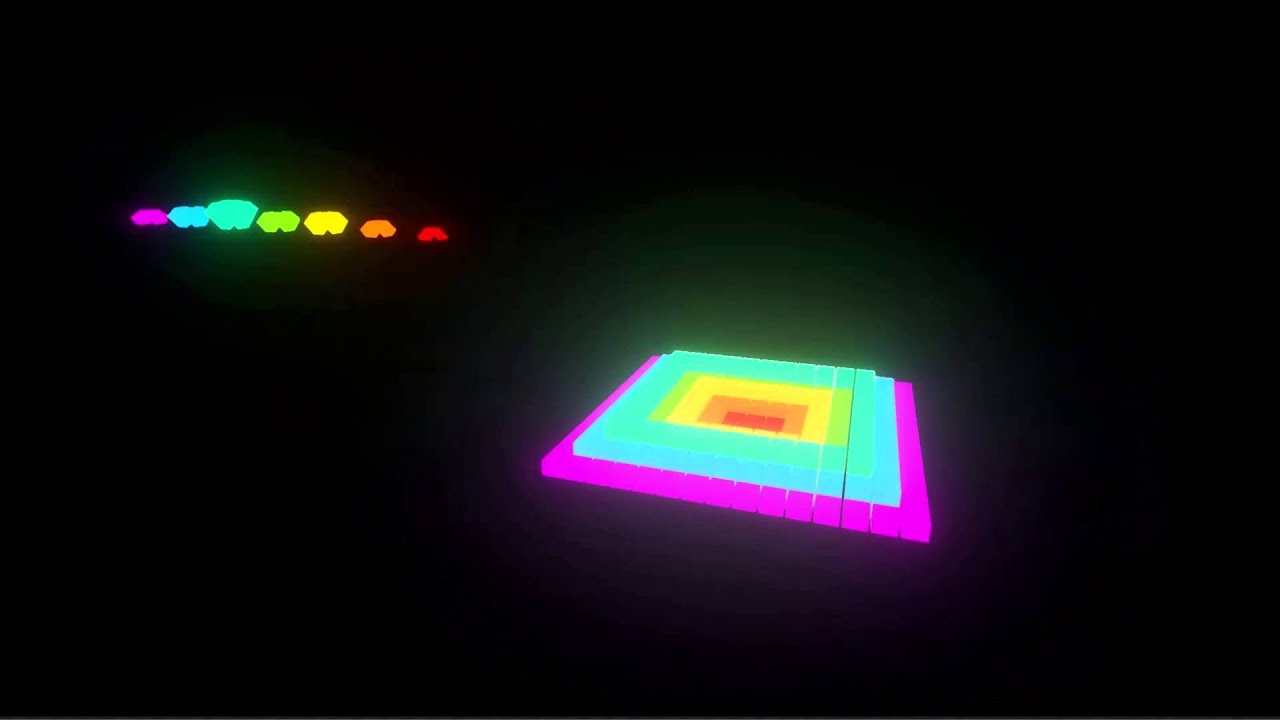
This is an example usage of the Sound Visualization Plugin i coded for the Unreal Engine 4. For more information, visit the Forum thread: goo.gl/Va8HoS
btw s/o to eXi for that wonderful plugin
thing is, i need syncronisation between clients... so all of them will see the same spectrum while listening the same music @ me if something pls ❤
 past totem
Any ideas about how I would go about replicating a procedural mesh? Because it cant be replicated, I assume the only way is to spawn it for every client and when it gets a change update it for every client, I cant figure out how to update it for every client when one client makes a change tho.. @ me pls
 modern dome
Any ideas to on how to check wheter an Actor is not visible on all Screens in Multiplayer?
https://forums.unrealengine.com/showthread.php?146514-Check-whether-an-Actor-isn-t-on-the-screen-from-anyone-online
 slim holly
are you trying to get viewport size from networked controller?
also gamemode is server only
so, connect your cast fail pins
slim holly
probably not
as I would see it as "visual only" information
but if it's only server relevant information, you could do traces
from pawn to pawn, and flag as visible if there is no trace hit
 loud sage
So I'm playing around with manual replication (sending stuff to a custom UDP server) of data and was wondering what y'all consider the best class for showing other players' movements? Should I use an ai controller and constantly update the target or is there a more elegant solution?
(I think this is the most appropriate channel + I'm doing this to learn about low-level networking ^^ I'd probably use the built-in replication system etc for " real" projects)
slim holly
I don't think you need to go for AI since you're using UDP anyway
loud sage
It's a waste of bandwith if you are constantly spamming your movement every frame tho
slim holly
you can just gate it tho with input axis values
loud sage
(I'm essentially wondering if there is some built-in latency compensation stuff_
slim holly
character movement component has
afaik
and even that is very specific what it compensates
loud sage
Read so, but is it compatible with replication through other means than a multiplayer subsystem?
slim holly
umm
loud sage
(could I for example make it grab variables from the game state)
slim holly
gamestate is replicated by default tho
loud sage
I want to use something outside of ue4 tho, essentially have players be in a singleplayer game and then add/control actors in the scene by traffic it recieves from my udp server
Or is that impossible?
slim holly
sure
you just need to set up the actor spawning for remote control data
which is bit of re-invention of wheel
loud sage
Yup, but I'm hoping to learn a lot doing it 😃
slim holly
- you need a custom system for reliable actions
loud sage
That's the "easy" part tho
 formal meadow
i can'f find any good info / docs on multiplayer world origin shifting
official documentation even states it's not possible but since 4.14 theres a new feature for that
formal meadow
..anyone did worlds bigger then 8x8 km in multiplayer?
rough iron
@pallid mesa doing that in MP? ensure you play the same and just simulate on each side
pallid mesa
@rough iron more worried on the performance side, not the implementation, cause each freq point (the group of actors representing said frequency) is meant to be "solid" and being moved frame by frame by a song. And ofc everything will need to be synced
im just considering wether or not discard the mechanic
rough iron
But you can resync every once in a while, for example a common approach for synced health bars in an MMO (a large scale one) is to sync only 4 times (or even only 2).
so you know the speed the bar changes over time and only once in a while you sync and set the correct value
same for the cubes, if you know the track move them on your side and just sync every X seconds/steps/whatever xD
pallid mesa
so you say everything client side except certain sync moments
pallid mesa
i see
rough iron
when something is too much just fake it xD
pallid mesa
i have trouble on another mechanic networking wise which is similar to that regarding update every frame
a hard lock setup
which is basically locking your actor and the camera to another actor and rotate it if this one runs around you
now in that system the refresh ratio would need to be certainly higher (lower number) but not every delta time, right?
rough iron
mhhh so your camera is dependent on another player
 rough iron
if the others movement would be predictable it might be easy, if not when the server corrects the players movement you might get some jiggereish movement
also I would not actually lock it directly
pallid mesa
certainly if red target moves, right and left
rough iron
make it interpTo to it
pallid mesa
blue target rotates
think of dark souls or this new wii u zelda
is not predictable, in terms of, it is an actual player
rough iron
you have to play with the update rate and smooth it out as much as you can
never make a hard lock
pallid mesa
thing is that hard lock is the name of the mechanic about rotate controller and actor depending on other actor
rough iron
yeah but visually you just follow it's rotation/location
pallid mesa
i have a little project with both ~ soft lock and hard lock setted up, i also noticed that hard lock is not something used that much in massive MP games.
soft lock can be totally client side, cause you dont need to rotate anything
but according hard lock... is just
atgh
rough iron
yeah XD
pallid mesa
some gifs of hard lock https://gyazo.com/e0cb82e7c3604b1d7b8ab412fc7bd52d

and soft lock https://gyazo.com/7a46220dee99e63989a6732920b45d83
 rough iron
I mean even your hard lock should InterpTo
so when you get corrections the mobvement will be smooth
pallid mesa
lets say sync every 0.5
and doing the sync interpt'd
thats what you saying, right?
rough iron
yep, try it out
pallid mesa
yepyep will do, i mean is the first time i had to deal with NON triggered events to be replicated, its a great idea having a syncing event every N seconds
thank you so much moss<3
 full bane
Anyone here that knows a thing or two about NAT UPnP or NAT-punchthroughs?
rough iron
np ^^
if you use Steam use Steamsockets, they got nat neg integrated
if not you can go the p2p route (like on t thge ps3/4)
full bane
Yeah, I am working on a peer2peer thing
but can't get it to work without port forwarding
and steam is not an option at the moment
it should be multi-platform
 sudden niche
Anyone here using the Network profiler? i.e. /DotNET/NetworkProfiler.exe
I'm trying to use ut but can only get basic info out of it. Actors list etc are empty. Anyone that knows why this might be?
rough iron
@full bane ok, so you might want to use UDP (never done it through TCP xD) and a master server (your backend).
full bane
Yeah, we use GameSparks as backend, custom UDP-holepunching might be the best way to go
rough iron
You only have to know which port your router uses to send packets to the backend and viceversa.
The first couple of packages might be blocked but they will go through
This is a nice guide about the trick: https://keithjohnston.wordpress.com/2014/02/17/nat-punch-through-for-multiplayer-games/
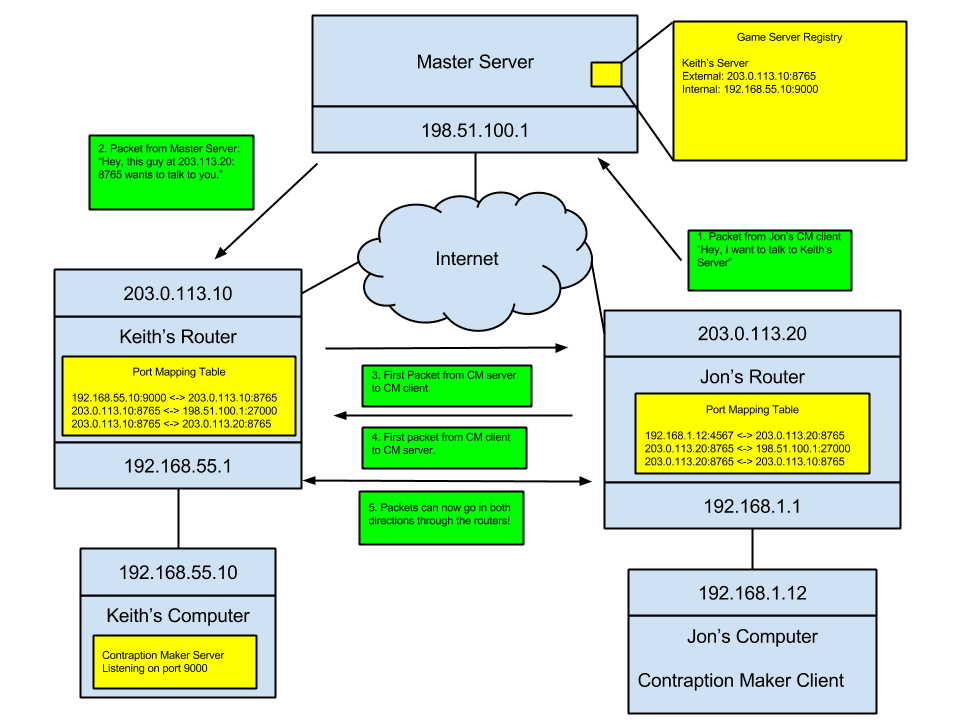
Keith Johnston
In Spotkin’s Game, Contraption Maker, we wanted to add multiplayer support so that people could build cool contraptions together online. Some indie games that have multiplayer support simply …
On my phone so writing it all down is harder then just posting a link xD
full bane
😃
rough iron
But its actually very simple ^^
full bane
Yeah, I know
I just started using UPnP
which I thought would be easier to implement
or had more support
but somehow nobody cares about UPnP
and all the frameworks I found suck big time
rough iron
Using UPD and P2P is just simple and effective
And nearly all network hardware supports that trick
So why adding an extra layer of complexity and incompatibility
@sudden niche no idea, I think there is a tutorial in the wiki
modern dome
Is there a possibility to let my Pawn only move on the Server and the Client predicts/corrects the Location?
lost inlet
isn't that what the character movement component does already?
 blazing siren
pretty sure, yes
modern dome
@lost inlet To me it looks like the Client is moving, not the server
lost inlet
well that's what PREDICTION is
the moves are then replicated on the server
if they get out of sync, the client teleports to the server authoritive location
modern dome
Wait, so the Client Moves and the Server moves. If they get out of sync the client corrects?
lost inlet
yes
sudden niche
@rough iron Yeah, there is some info but I cant get it to work. Was curious if it was a known bug or something.
rough iron
you could check issues.unrealengine.com
sweet spire
Question for good practice for when ur not using the char movement component
When is it a good time to multi cast to update a players movement to everyone if say you have flying ships, so u have to do it manually
rough iron
The comp comes with a lot of work out of the box, multicasting that movement to others depends entirely on a concept called relevancy
an actor can be unrekevant because it's out of sight for example, or far away
so nothing would be replicated
that's up to you to handle or to tweak if you are in need
sweet spire
Gotcha makes sense man
Thank you.
Does player state replicate to everyone
or is it unique to the player
sweet spire
so i just found out
u can lose alot of data and replication
doing things on event begin playu
begin play
 vague zenith
hi! Is that possible to replicate skeletal mesh component created at runtime? I have many cloth categories for character so I don't want to put all N skeletal mesh components to character class it is easier to create them on runtime. Usually this can be solved though RunOnServer + Multicast...
However, this approach does not work - skeletal mesh component created at runtime = None on all clients
hasty adder
What are you trying to replicate @vague zenith cloth? Like explain the context
vague zenith
*clothes, my bad
I have a modular character. To show different clothes I need multiple skeletal mesh components but I don't want to put all of them to character at compile time (because of their number) - I want to create skeletal mesh components at runtime
hasty adder
Hah I wasn't corrective of spelling just curious why the cloths would be replicated. Unless you mean the existence of a different cloths being replicated. The cloth simulation should be handled in client. For instance. If Laura crafts hair falls across her face a certain way doesn't need to be replicated. Just that it has a simulation for each to render on there own or your looking at a lot of data for something not so gameplay specific
So if we're talking skeletal mesh at runtime replication, then just bones sure I could see that getting replicated.
I think someone was showing that jn work in progress with some fancy spell casting lol arms out like a football player
vague zenith
Hm, interesting. Unreal engine forum has several threads about how to do this but I can't get to work it. Will try again and again
modern dome
What speaks agains Skeletal Mesh Components at compile-time?
vague zenith
My character will then have ~10 Skeletal Mesh Components, which are empty and as I understand that also will increase number of draw calls if not mistaken
modern dome
If a Skeletal Mesh is empty it's not rendered thus no Draw Call
vague zenith
Hm
modern dome
In Empty, I mean a None Asset Refernce
vague zenith
Somehow stat scenerendering counted those emptry skeletal mesh components. Probably I will double check this again
I mean when I deleted them - stat scenerendering shown reduced # of draw calls
modern dome
I'll double check this, too
vague zenith
Anyway, thank you. I know where to dig now 😃
modern dome
apart from that, what is the problem at all?
you can attach Skeletal Meshes at runtime.
vague zenith
Well, I can't get replication to work for spawned skeletal mesh components. Clients have None in variable of type "skeletal mesh component reference"
Maybe problem is that I am not using RepNotify. I am using Replicated for variable that contains ref to created skeletatl mesh component
modern dome
Where do you spawn the Components?
I have 76.02 Mesh Draw Calls with my default Setup.
I have 76.02 Mesh Draw Calls with additional 6 empty Skeletal Meshes
vague zenith
I spawn In Character class and the code is executed on the server
I mean marked as RunOnServer
Okay, I will then probably try to play a bit more with runtime SK components and then switch to compile time since it is much easier to work with
modern dome
I actually rendered the SK two times, because I was in multiplayer. 21 Mesh DrawCalls with a single Character
vague zenith
Why two times?
vague zenith
Ok, thanks. Seems I need to rewrite some code without adding bugs 
sweet spire
Just to clarify some stuff, PlayerController is good to store things that other people dont need to know about say, Your inventory, bank, set stats, etc
Then your pawn would hold the values other people would need to know about
Say
HP, etc
Player state is where we could hold things like Name, party id, ping, score
etc
(just clarifying for good practice)
modern dome
I hold my HP and the Stats (RPG) in the PlayerState. In Combat, The Character gets the playerState and polls the necessary Stats from the PS
sweet spire
ah gotcha
makes sense
Whats correct way to pass information from the Controller to the pawn it has
modern dome
Interfaces or simply casting
sweet spire
gotcha so casting should cause no issues in multiplayer right?
my worry was bp actors are replicated so wont it replicate the cast for every one of them type of actors on someones client?
modern dome
I have a weird issue where the Client's Character Movement is stuttering and the Animation is played slower than the Server's Version

Did I miss something?
The AnimBP.
The Condition Idle->Walk Run gets the Pawn Velocity Length and checks if it's greater 0. Equals 0 the other way
sweet spire
Can someone help me to understand networking a little bit better
Set hp value on the server to say between 1-100 stored on player state
then how do i get the clients to update there textrender with there corisponding playerstate
thin stratus
Character has a Pointer to the PlayerState
You should be able to work up from there
Exchange references. Make the health variable repnotify
And on the repnotify function you update the textrenderer
If you have trouble understanding that, you should read my compendium which is linked in the pinned messages in this channel
sweet spire
ah thank you
I actually have it open right now
Some reason i got it in my head i had to use RPC's for everything
I just realised they only work with actors
i am melon
one thing i had an issue with was sending information from the playerstate to the actor
as someone might be using a dif actor so
casting wont work
chrome bay
When multiplayer programming works, it is THE most satisfying thing ever.
https://www.youtube.com/watch?v=pov1irlMCXM
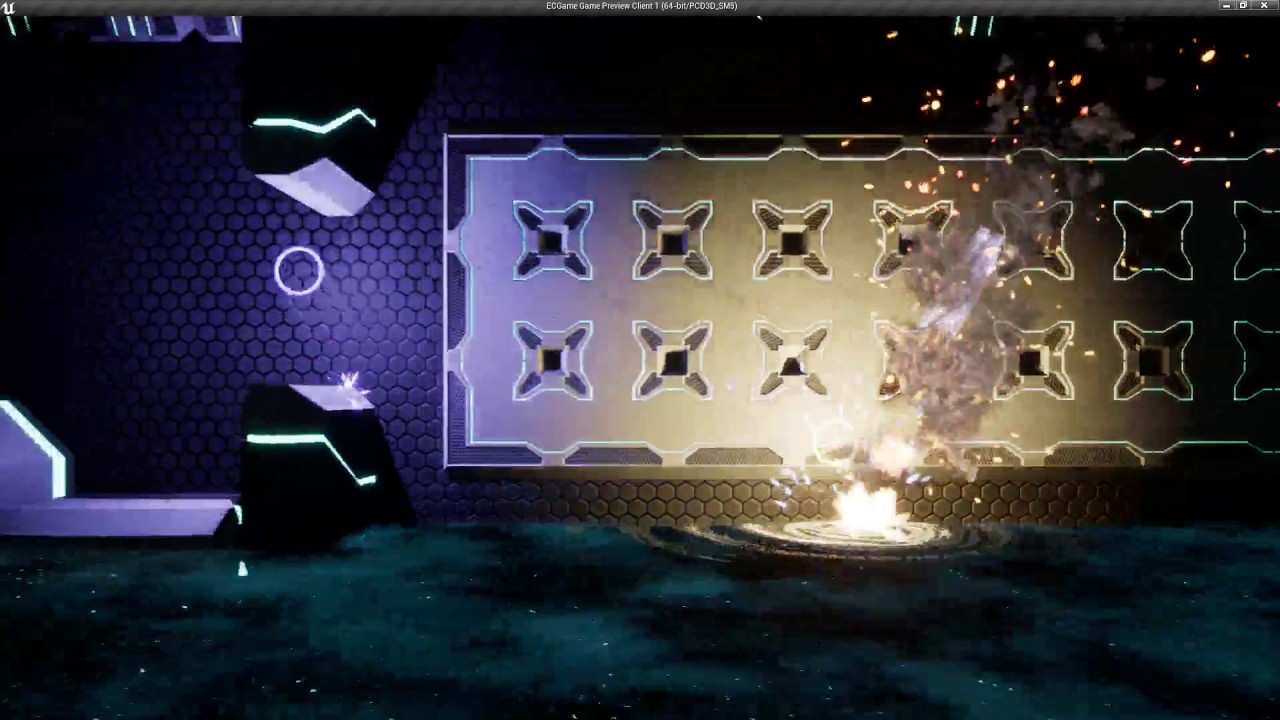
Coming soon from @StormtideGames :) http://stormtide.co.uk/eclipse/
sweet spire
no idea
what im watching
but looks cool
Is there any basic networking hp tutorials anywhere?
chrome bay
hp?
chrome bay
Oh
sweet spire
iv just come over to networking after like 8 months of ue4
chrome bay
Well what I do is set the max on the object itself, i.e. the Pawn
sweet spire
and im getting rekt by it
yeah thats easy
say u want to get preloaded stats
and playerslate obtains them
playerstate*
u want to load it in to the corisponding pawn
chrome bay
So, the player defines the max health for their pawn?
chrome bay
Seems like a really odd way to do it :p
chrome bay
But I guess you would send an RPC to the client asking them to 'load' their stats, Client then sends stats back to server - server sets the 'Max Health' variable
Depends what you mean by persistent data
chrome bay
Well if you want other players to know what a players' max health is, then it has to be player state
sweet spire
player joins game > player loads there last save up with there stuff > pawn loads there stats in
cant they just get the max hp from the pawn
since its getting pushed there
chrome bay
Not unless you also set it as a var on the pawn, then replicate that var as well
at which point it's wasteful
So you may as well set it only on the pawn
However, you're saying "Max Health", but do you mean "Current Health"?
sweet spire
Say you have some equipment on
with stats
and u load ur char when you join the server
u would then want to get ur stats data and apply it to your pawn
right?
chrome bay
Yeah, but you want to apply it on the server
Also, you have another issue
Clients can hack their save file, and tell the server they have things they don't
chrome bay
So does the Server store the save file or the client?
sweet spire
The server
chrome bay
So all you would do, is load on the server, and set the inventory and stats on the pawn
Then make sure it all replicates
sweet spire
Server loads your say equipment in to your playerstate when you join, then you pass on from your playerstate to your pawn
yeah thats what i mean
i cant get it to work though
sweet spire
if u die
and your pawn is destroyed
then u have to reload it from a save file on the server
why not keep your equipment persistant
while you are conected
chrome bay
It's doable I guess
sweet spire
like if you had an inventory
i guess its be better to store it in player controller
since only you and the server
need to know about it
and when you die
u wouldnt want to keep reloading the save
so it makes sense to pass your equipment stats over to your pawn
right?
chrome bay
No but you would store the current inventory of each player on the Server anyway
sweet spire
(just saying player controller cus its prob better place)
i know
i didnt say
pass it to the client
chrome bay
It also depends what the inventory is
chrome bay
If it's weapons / components, then you need to spawn them on the server as part of the pawn
Otherwise you're just adding a really difficult step between the pawn and the inventory
There's also the issue of AI
sweet spire
lets say armour, and that armour is loaded from the SQL database
chrome bay
I would still do it on the pawn personally
sweet spire
why thats bit stupid?
every time ur pawn dies
u need to reload from database
and that could cause dataloss issues
say you gain new equipment
your pawn dies
u have to upload your current inventory
chrome bay
It wouldn't, because you would respawn the pawn with all the equipment that the last pawn had
sweet spire
before it dies
then redownload it
what if u swap pawns, or dc or anything
It make sense to load it from your session data
chrome bay
The issue with your approach atm, is that when you want to do something as simple as apply damage to a player - you now have to modify the health on the player state and not the pawn, so you have to go through the pawn, to the player state - it adds a layer of complexity
I would suggest looking at how ShooterGame handles inventory
and health etc
sweet spire
no
chrome bay
Surely if you swap pawns, that pawn would have a different inventory anyway?
chrome bay
But why duplicate it?
sweet spire
so its persistant
and your not destroying
uploading
downloading
constantly
they u can run a server ride command too
Every X mins
Upload all playerstates to the SQLdatabase
chrome bay
It wouldn't be constant, it would only be when you respawn - and spawning a bunch of inventory once isn't a huge deal
It really depends what you're trying to do tbh
sweet spire
You would keep your stats, equipment, level etc
chrome bay
But let's say, one item in your inventory is a weapon
chrome bay
The server HAS to spawn that weapon one way or the other
sweet spire
well yeah>
i t wouldnt make a difference
u can spawn a weapon inside a player state
U would pass on weapon reference with your stats
chrome bay
On the Server yeah, not the client
You can't spawn the actor on the client
From the clients copy of the inventory
sweet spire
you cant*
i know
i never said
u would spawn actors on the client
its all handled on server then replicated to the clients
chrome bay
Exactly, so when you respawn, you're copying all the inventory again anyway
sweet spire
You pass on the data from your controller or state
what ever is holding it
that why you can save the data constantly
and easily
on the state
and when ever u spawn actor
or change gear
you just upldate your pawn
chrome bay
Ok well this is what I would do:
1 - Client Connects, Server loads their data, spawns a Pawn and gives that pawn it's inventory. The pawn and inventory is replicated to the Client.
2 - Client can interact with inventory and stats via the Pawn, which makes more sense logically.
3 - Client dies, go to step 1
You don't neccesarily have to reload the data from the database when a player is respawned
you just cache it on the server somewhere
and update / edit it as neccesary
chrome bay
Just copy the values somewhere
sweet spire
first thing that comes to my mind
is
the playercontroller
and we are back where we started lmao
chrome bay
Storing it in Controller or State is fine (State is probably best), but I wouldn't Replicate it - there's no point
sweet spire
since the player controller is only relevent to the owner
Player controller would be the best id say
but like u said
chrome bay
Depends, players can swap controllers
sweet spire
no splitscreen
not using controller ref
the controller would be specific the login id?
chrome bay
Think of the Controller as the Brain, and the State as it's 'Memory'
No, Player State stores the Unique Net ID
Controller does too, but that ID can change if a player is assigned to a different controller
sweet spire
i didnt realise controllers could be passed around
i throught they where unqiue to unique net iD
chrome bay
Most of the time I think they are
sweet spire
im pretty sure that could only happen in split screen
as control ref 0 is used for online
chrome bay
You could just have a TMap on the Server of UniqueNetID's and Inventory
Player State / Controller is probs fine though
sweet spire
ud want to store hard player data in mysql database for security reasons
and backups
and all that crap
i would think
chrome bay
Yeah but you can cache it as a TMap or whatever to avoid having to lookup the database all the time
sweet spire
btw this all just hypothetical, im trying to expand my skillset
chrome bay
Then when a player logs out / logs in / dies or whatever, you can write back to the database
sweet spire
gotcha
well if u where handled by login server
for example
the login server would push you and your playerslate to the right session right?
is playerslate that persistant?
chrome bay
kind of, you can keep and transfer player state between different maps with seamless travel
There is btw an MMO project on the forums somewhere
which has all this kind of stuff IIRC
sweet spire
oh really? il have to look for it
do u know if non seamless travel can push you from 1 server to another
say in a cluster
sweet spire
ahh thank you!
u could prob do it with non seamless travel
maybe
APlayerController::ClientTravel
Lets u travel to a new server
aparently
chrome bay
Not a new server, just a new world with the same server
The Server travels to that map too
sweet spire
ahh gotcha
chrome bay
The Server opens the map, then brings all the clients with it
You might be able to setup a server 'hub' of some kind, but that's pretty advanced stuff
Unreal Tournament does it
sweet spire
ah right gotcha
was just all theortical
Gotta expand my understanding of networking in ue4
btw how do u you about say sending data from
Controller to a corisonding pawn
cast to from pawn
and grab the data right?
modern dome
Protip: Debug with Dedicated Server. If it runs with Dedicated Server, it will run with a Listen Server.
 glad knot
Having a strange issue I wonder if anyone has seen before. When I possess some Pawns on the server in a multiplayer game the network role is ROLE_AutonomousProxy and I can move the Pawns, but other Pawns that I posses the role is ROLE_SimulatedProxy and they won't move. The Pawns are the exact same type, the only different is that it appears pawns placed in the level earlier work and ones that were dropped later don't.
glad knot
So I narrowed it down. It fails because I am changing the spawnlocation in GameMode::SpawnDefaultPawnFor_Implementation
I wonder if some kind of anti-cheat mechanic is firing
brittle sinew
@glad knot just to confirm, you're calling the super method when overriding that function?
That'll screw things up if you don't
glad knot
No I am not calling Super::SpawnDefaultPawnFor_Implementation(NewPlayer, StartSpot);
As I want to override that behavior
It looks like the solution is to spawn my own APlayerStart
trying that now
brittle sinew
Okay, I'm just not sure if there's something up the tree that needs to be called internally
glad knot
Yeah, I was thinking the same
but I have it working without calling the super
as long as I pick an existing APlayerStart
it is when I just try to pick an arbitrary spawn point that it works really well, until I try to spawn a character on a multiplayer client beyond the first one
so it is a really strange issue
I am going to try dynamically spawnning APlayerStart's whever I need a player to load up from the database
I will let you know if it works
Hmmm, the posses still fails. I wonder if it has to do with two player spawning in on top of each other and so one doesn't get spawned.
So that was it
it had nothing to do with my code for setting the start location
Here is the issue
If two players try to spawn at the same point at the same time. They both appear to work fine. However, any clients beyond the first one will get set as ROLE_SimulatedProxy when they try to possess a Pawn and the Pawn will not move (RPC calls fail).
A strange error, but I guess it kind of makes sense
 versed socket
Quick question -- I know that you can connect to a server in an Unreal Engine 4 game by using +connect IP.goes.here but what about the port? Because including the port there doesn't seem to have any affect if it's not on a standard port number. Is there a +port option or something? Where can I find a list of these? Because I've been searching the docs and answerhub but can't find anything.
glad knot
There is a port option. Here is a bat file I use to connect:
"C:\Program Files (x86)\Epic Games\4.16\Engine\Binaries\Win64\UE4Editor.exe" "%CD%\OpenWorldStarter.uproject" 127.0.0.1:7777 -game -ResX=1280 -ResY=600 -WinX=20 -WinY=20 -nosteam -WINDOWED
This can be used to use the editor with a project and connect to localhost
if you have a packaged client, then you can remove the project option
The port in this is 7777
and the IP is 127.0.0.1
What I do is load one server instance per port
and then chain all the server instances together
to create a huge map
versed socket
@glad knot Right, the ip:port pattern is what I had imagined would work, but if a computer is running more than one server on different ports, I notice that the :port thing doesn't work properly because I connect to the wrong instance of the server... which makes me think that there must be some kind of special +port or whatever command.
glad knot
I run dozens of servers on mutliple ports and have never had an issue
with it connecting to the wrong one
as long as the port is specified when I connect
There is no +port
The format is 127.0.0.1:7777
You use the same format for ClientTransfer as well
I would double check that you are specifying the correct port
and also make sure you don't have two servers running on the same port as that always makes it mad
And if you are connecting from outside, then check your port forwarding rules on your firewall
modern dome
Is it possible to have an Actor (which is responsible for spawning enemies) only existing on the server?
The Actor is placed on the Map tho
fossil spoke
You can limit the scope of the Actors network roll by using the SwitchHasAuthority node. Using Authority will ensure that the code is only called by the Server
modern dome
I know that. But still the Actor exists on Clients 😛
thin stratus
Don't set it to replicate and spawn it from the server?
modern dome
Lol ok. that's easy. Thank you :)=
thin stratus
@modern dome you might want to use an actorcomponent on the gamemode
If it's only needed for spawning stuff and you don't need a 3D position for it
modern dome
@thin stratus I need a 3D Position tho 😃
A separate Actor is perfeclty fine
thanks nonetheless
thin stratus
So you need a spawn position?
modern dome
Exactly
However, I need mutliple Spawn Positions. It's better to have a separate Actor for that for better customization
Also it's different per Map
thin stratus
Yeah so you gonna place them in the level i assume
I just don't get why it matters if the client has them or not
modern dome
@thin stratus Why waste precious memory? 😛
sweet spire
Sorry to interupt haha
So my pawn is a flying ship, so i cant use the normal movement component
I feel like this is not the best way to replicate the movement
would someone mind giving me some feed back
modern dome
Actors have an option to replicate Movement. You don't have to replicate it manually.
However, it appears laggy, because there's no prediction logic
sweet spire
Yeah i had it turned on
It it dosent work unless i multicast
oh wait nvm wtf
it does
oh wait no
its not working with out the multi cast on
You can see server move
But not other people
So i need to Execute on server setting the actor transform
Should i just run it on any rotation and movement
thin stratus
@modern dome But if you spawn them instead of placing them, you need to have the locations when spawning
And then you don't really need the actors anymore
You could destroy them on the clients
modern dome
Oh, I guess you don't understand what I want to do:
I have a SpawnActor, which are placed on the map.
These Actors are responsible for spawning Enemies.'
Since the Spawn Logic gets executed on the Server only, I don't see any reason to have these Actors on the client at all.
@thin stratus
thin stratus
Yeah but if you place them in the level, they are existent on the client
Even if not replicated
modern dome
They are not
thin stratus
They should Though
modern dome
Net Load on Clients is set to false for them
thin stratus
Is that having an effect when replication is off?
modern dome
The World Outliner doesn't show them on the clients, only on the Server
thin stratus
Well then nvm. Good (:
modern dome
I know this is premature optimization but still xD
thin stratus
Na it's a good thing
sweet spire
Is it possible to get the char movement comp on a pawn? say if u wanted to do multiplayer with flying ships, so you get network smoothing? i feel like the capsual component might cause issues if u where to use char bp for it instead of pawn
slim holly
depends on scale
chat movement component probably isn't designed for pawns that move above running speed
sweet spire
alright thanks
il bare that in mind
Kinda stupid question but, handling line traces for gun fire in multiplayer
You do the line trace on the server right?
not the client
or do u say line trace on client and if hit ask server to dmg?
brittle sinew
You can do both really (or a fairly complicated combination of both, possibly)—both have disadvantages, as doing it on the server may not point exactly where the client is pointing and does the trace one travel time after the client requests it, but doing it solely on client has possibility for abuse
lost inlet
clientside hit registration is easily cheated
brittle sinew
I wouldn't really say there's one "right answer" here, most big games implement some sort of lag compensation
lost inlet
ideally you do it on the server with lag compensation
UE4 has nothing built in for lag compensation so you're kind of on your own on that one. i made a lag compensation component for handling it
the game state contains a networked server time so that's helpful for implementing lag compensation, you might want to increase the update frequency on it though
sweet spire
Right gotcha thank you
i shall note that down
I just need to find away to make a team system first, easy way to tag people
twin juniper
why does the onlinesteamsubsystem
have stuff thats just commented out
loll
like on GitHub
they have cmommented out code
it just seems really unprofessional
like this
thin stratus
Because in such a big codebase it can always happen that you only have so and so muvh resources for specific tasks and when you stop working at something but don't want to forgetwhat you already did/tried, you gotta comment it out
twin juniper
@thin stratus Well yeah, but usually you remove it before pushing personal comments to a public repo.
Also, its not like just some of it is commented out
Literally every method in this one class has commented out code
and it doesnt even say anything
lol
twin juniper
@thin stratus So for some reason in 4.16 whenever I compile my dedi server... it just creates MyGameName.Target in the binaries folder
but no .exe of the server
is this normal behavior in 4.16
not sure, maybe something was changed
thin stratus
Might be that something changed. You gotta read the change list anf maybe look into ramas thread
twin juniper
Idk
its just kind of annoying
the only way i can get it to give me a server executable
is via project launcher @thin stratus
thin stratus
You mean the frontend?
twin juniper
yeah
That's the ONLY way I can get a server executable
I use to be able to get it just by compiling "development server" in visual studio
this guy has a problem just like mine lol
@thin stratus Well I found out all of my binaries are being put inside of D:\Epic Games\UnrealEngine\Engine\Binaries\Win64
O_o
thin stratus
Weird. I get the server binaries by just compiling. But haven't checked 16 yet so can't help
twin juniper
Yeah
I don't know why it would put it inside of the engine's binaries folder
instead of the local project folder
u know?
thin stratus
Nope. It shouldn't i assume. You are building with 4.16 source and you created and setup the server target correctly?
thin stratus
Then no idea atm
twin juniper
    Property = ObjectProperty /Game/Blueprints/HUD/EquipmentMenu.EquipmentMenu_C:RightHandEquipmentSlot
    Item = LinkerPlaceholderExportObject /Game/Blueprints/HUD/InventoryHUD.PLACEHOLDER-INST_of_PLACEHOLDER-CLASS__EquipmentSlot_C_10```
Anyone know what I can do about this? lol
its causing issues where the HUD just wont close
its just OPEN ALWAYSI think I figured it out! Thanks everyone!
sweet spire
So for good practice(my fav saying recently) I feel the best way if you have something that displays hp to update it is, when hp is changes, event notify rep to set the display right?
brittle sinew
That could work yes, or if your display is a UMG widget, you can simply bind the property
sweet spire
gotcha thanks
Does this not work if u have a listen server?
Say you want to debug and u want ur server to have a view for you
but u also want it to display the UMG
brittle sinew
enum ENetMode
{
    /** Standalone: a game without networking, with one or more local players. Still considered a server because it has all server functionality. */
    NM_Standalone,

    /** Dedicated server: server with no local players. */
    NM_DedicatedServer,

    /** Listen server: a server that also has a local player who is hosting the game, available to other players on the network. */
    NM_ListenServer,

    /**
     * Network client: client connected to a remote server.
     * Note that every mode less than this value is a kind of server, so checking NetMode < NM_Client is always some variety of server.
     */
    NM_Client,

    NM_MAX,
};```Essentially: yes, the engine does draw a difference between dedicated and listen servers in net mode
modern dome
Is it possible to test multiplayer with latency?
Like, have a artifical latency to test how the game behaves in real networking conditions?
Got it
thin stratus
Yeah
In addition to what you see there
You can create a text file, called "netsettings"
and put it into the \Engine\Binaries folder of your engine
(not project)
then you can do "exec netsettings.txt" iirc
to load them
So you don't have to change them in the configs everytime
I simply load them on "init" of the GameInstance so my server also gets the settings
twin juniper
I'm having a problem where my character won't move his spine and arms on the client's side, but will via network. So player 2 can see player 1's rotation, but they can't see their own rotations. This is a video to my problem: https://www.youtube.com/watch?v=_mtTN_YQsFg I don't know what is causing this to happen and would appreciate it if someone could help me out.
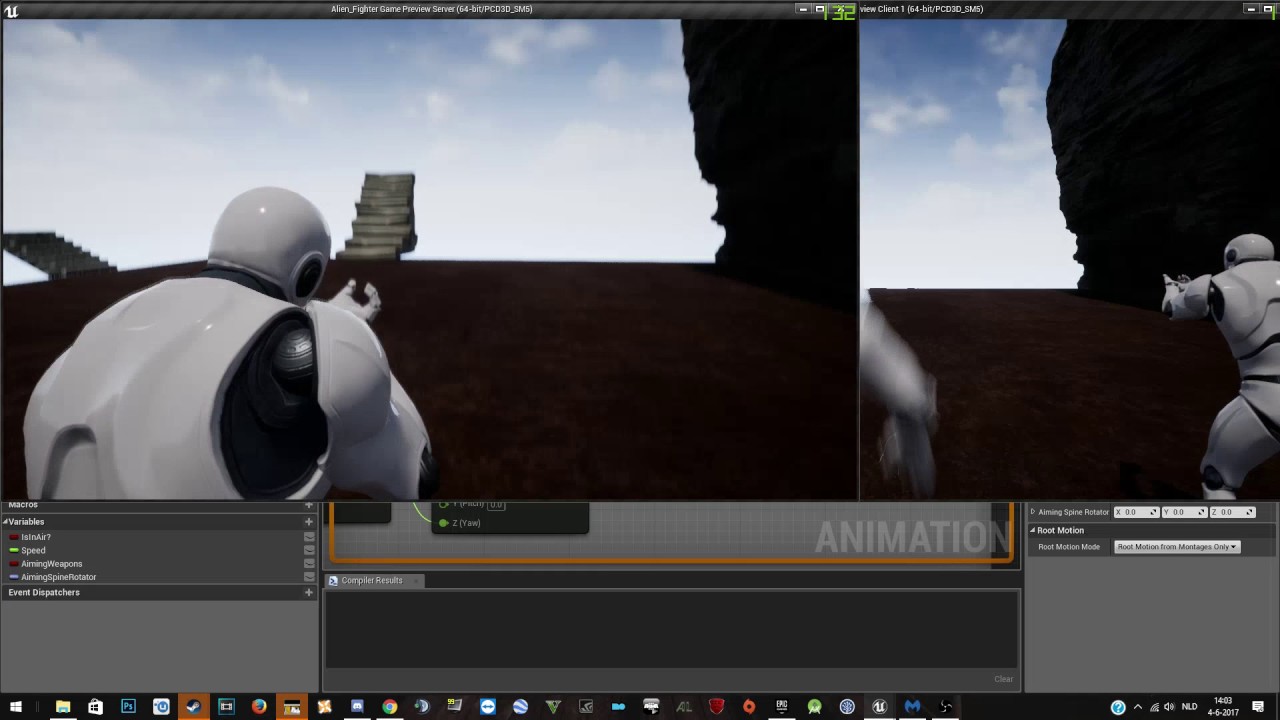
Hardware: GPU: MSI GeForce GTX 970 4GD5T CPU: Intel Core i7 5930k 3.5 GHz 6-core CPU Motherboard: MSI X99 SLI Plus Memory: Crucial 16GB DDR4 2133MHz Drives: ...
modern dome
when having lags and pressing the movement buttons very fast/chaotic, the rotation of Server and Client get out of sync and are not corrected...
Any way to fix this?
 thin stratus
You have package drop on?
Cause it looks like this is more than lag
The rotation replication is not reaching the client always
thin stratus
Nothing I assume
You can't fight shit internet that much
The client gets no information
Only thing what you could do is based on the radial velocity that got sent last and the last known rotation keep letting him rotate
but then he just rotates
Not really solving it. People need to fix their internet after all
modern dome
I see. I thought that the CMC gets replicated permanently
thin stratus
I assume it's non reliable
What ever happens there
If the rotation doesn't reach the client, then /shrug
In most cases, no one stands still for long
And if he/she stands still, then what does it matter
And if you do anything that relies on the rotation, make sure that the client gets thecorrect rotation again when doing whatever you wanna do
 nocturne copper
What would be better suited to be used with a main menu in terms of game mode, Game Mode Base or just game mode?
The player will be able to find games and other players from the main menu as that is the intention. I just wanted to get some additional information on this
modern dome
You should use GameModeBase. GameMode already implements Match-Based Gameplay related things (Unreal Tournament matches for example). This stuff isn't needed for searching games etc.
nocturne copper
@modern dome That was what I was assuming based on the decription that was provided in the editor, thanks for the additional info. I was only wanting to make sure that useing a game mode base would not negate allowing the player to do any networking related things
twin juniper
Well, does the base have "OnPlayerLogin" etc?
twin juniper
Okok
nocturne copper
and the nice thing is that its easy enough to change from game mode base to game mode it if need be
modern dome
I'm glad Epic introduced the Base Classes for GameMode and GameState.
I'm always in for removing Game-specific code
 mortal shore
I am currently testing MP, within the editor. Nr. of players = 2 , not running on dedicated. What reason can there be when the player replicates fine on the client window, but not on the server window ?
modern dome
that do you mean with "replicates fine on the client"?
*what
When a function is meant to be reliable, is it executed 100%?
no matter what the network condition is?
brittle sinew
I would phrase it more as "this call won't be dropped and we'll keep trying to get it through"
If you get really bad connections, it might not get called in a timeframe where the call is still relevant; it makes no guarantees as to timing
modern dome
I see. Thank you
mortal shore
Raildex, i could see the other player on the client side, but on server side i was alone. But i guess there is more going on here, i should check out some more basics in MP i think.
modern dome
@mortal shore Make sure both players have enough space to spawn and your GameMode has the classes set up correctly.
mortal shore
Thank you , now they see each other.
Well, still behaveing strange, now they just vanish after a few meters. I guess my Project is messed up somewhere
 atomic mortar
Hey all, i am new here, cool to have found a place like this. I have this multiplayer shootout project that i downloaded from epic, i need to test if the code works over the internet properly, i already have the package shipped and zipped up, 76MB download, can anyone help me test it ? Should only take a few minutes, would be awesome if it works properly over the internet and not just LAN 😃
mortal shore
@atomic mortar I can help you test-
atomic mortar
@mortal shore Thank you very much, i will private message you
 sterile drum
Someone here has a good idea how I can add "Admin connection" into a game, where only I can connect?
For an example server 2/2 hosted from one of the players. I can connect as admin?
 turbid stratus


My day today, and many days before it #UE4 https://t.co/FYSsmn9YrI
 Twitter
just when i get cocky and think i have replication well sussed... it will bite me with some other gotcha
slim holly
admin login would probably need a way to identify the connecting player
like, steamID
or password
 random sage
Not to state the obvious, but I just started learning multiplayer, and well, it's kind of difficult;) Many, many thanks to @thin stratus for his massively helpful compendium. This was a great find, and you have my gratitude. If you're ever in the NYC area, beers on me!
The very first thing I did to attempt to learn multiplayer was to follow the Epic Training series by Wes Bunn. Not to knock it, but by the end for me, it didn't work, and the lack of explanation of why anything was done left me with no ability to troubleshoot.
thin stratus
Glad it helps you (:
 narrow steppe
Guys I Have a bit of a problem now i am rotating my character using Set actor rotation and i tried everything to replicate this i made events to work on server check replicates and movement replication but no thing is working
random sage
Having trouble getting music track to play for clients. works for the server-listen client, but no-one else.
Where should I trigger music? Should I make it part of the pawn, or the level?
modern dome
Is there absolutely NO way to replicate Widgets? 😦
random sage
It seems that way, yes.
sweet spire
@narrow steppe Make sure your not running it on the client only or server only, if your using anything else but char class, u need to self replicate the movement
@random sage Make sure you execute it only on client, and its running from somewhere that is replicated too the client and then test see if it helps.
@modern dome You would only replicate the values not the widgets, rep notify can be super useful for things like that
modern dome
But I want to replicate the widget y'know xD
sweet spire
Why would u do that?
Store the values inside something thats replicated too all players
and sync it up
modern dome
when I open the inventory on one client, it should open on the other client aswell
sweet spire
u would still send the widget information to them and get them to update theres
modern dome
Anychance to have the values in the widget replicated?
So I don't have to save everything in my GameState or something like that
hasty adder
Anyone know what's up with physics objects tending to studder over multiplayer since 4.16 even when it's local dedicated? I use overlap events to add velocity to it and torq and I can see it correcting itself
I'm using simple character action which calls on server to cast to the object to apply the velocity change. Movment is replicated and ccd is on
thin stratus
@modern dome No
Widgets are UI
UI is clientside only
You don't and never will replicate values inside of them or themselves
Place the Inventory, if shared between all, onto the actor you have
Or, if it's a general thing, inside the gamestate
And if one client should open all inventories, then ServerRPC->Multicast
modern dome
I see. Basically I need to multicast everything I do in my inventory.
Thanks for the advice
hasty adder
What are you doing where our envisioning a shared ui? I'm curious mate
modern dome
An Action RPG with a shared view like in the 90s
hasty adder
Like diablo?
modern dome
nah, more like in the SNES Era
thin stratus
You might only want to replicate the stuff that one really needs to see
Not all information
modern dome
That's probably what I will do
Although having everything exactly the same would be neat
hasty adder
Well not sure where the ui would be shared. Like even the type of client hosted lobby I wouldn't called it shared more so events tell clients to refresh
modern dome
@hasty adder that's actually a good idea. Simply call "Refresh" every few seconds and the other clients get the current information
Since only the Inventory-opener can control it. This should be no problem
hasty adder
Like you could mailbox send the event of someone changes something to refresh.. Chat boxes kinda do this
 patent jackal
what's the best way to handle characters who are attached as passengers in a vehicle? They jitter to their owner
 sterile pebble
How does "Is locally controlled" method works? For example if one of the players sending rpc to the server about some interaction and after that server sends multicast about that event. And now I want to simulate that action in multicast_implementation for other players and do actual stuff for that local player. The problem is - is locally controlled returns false for me...
I suppose it should return true for everyone in multicast implementation?
that network stuff is so mind twisted, sometimes I think I understand everything, but sometimes it just like first time dating..
@patent jackal I dont how vehicle replication is made by default, but I suppose you should look into server reconciliation stuff
patent jackal
the driver is fine, the vehicle is fine, just any attached passenger, so thinking I need to guess/interpolate somehow between the vehicle updates for that passenger client, e.g. don't attach, just use a velocity and location between updates
hasty adder
From what I can tell other games fake passengers
Like a mesh for a player that can take on properties and become visible if player is there. Then have limited movement like there head turns or arms move to janky aim . Camera possible blending view where you will feel the latency of asking the server to move its view your blended with. - talking outa my butt here but the way replication is passing back n forth I'd expect some jitters unless the movement is slow and interpolated.
proven meteor
Is there any significant improvement in UT's projectile movement replication over Engine's standard projectile movement replication? As I've been studying past days:
- The "Fake Projectile" is just a visual compensation for laggy players that gives a fast visual response to their shootings spawning a fake one, and it has nothing to do with a supposed performance improvement over the network.
- What is supposed to be the real improvement here is how they manage to update UTProjectileMovement, but, so far, I didn't get exactly the real point in using their own UTProjMovement...
Anyone here that came out with a solid conclusion on how they manage to handle optimized projectile movement replication over the network?
this post (https://www.epicgames.com/unrealtournament/forums/unreal-tournament-development/ut-development-programming/6403-about-the-optimized-projectile-replication) got me into some guidelines, but still I didn't get the real improvement in their projectile movement replication...
Or anyone to share some experience on how to manage multiple projectiles having their movement being replicated at once smoothly?
chrome bay
They send less data, and clients see less jerkiness. That's it really
Clients fire a fake projectile locally as soon as they fire the weapon, this represents the visual projectile that they actually see. They don't render the authority projectile AFAIK
That projectile is 'synced up' to the Server projectile when they recieve it, I believe.
As far as replication goes, they just removed some items from the FRepMovment struct, since they know many parameters will always stay the same. It's not much more efficient.
Weapons that fire often or in bursts only send the initial replication data too, I believe
I'm actually writing my own deterministic projectile simulation / projectile builder module for the editor now - since I need to simulate 100's - 1000's at a time
And replication just won't cut it for an RTS
I also need ballistics, so hit-scan won't cut it either
hasty adder
Wonder if this is why since update I see some janky replicated movement.
chrome bay
This is only implemented in Unreal Tournament, not the engine itself
UT also stores some prediction variables (server time etc) in the player controller, so projectiles can try to match the server as closely as possible
proven meteor
I see... that was my first conclusion reading UTProjectile, but I was suspecting there was something missing here... but its really just less data being sent
(And the client dont render visually the auth projectile, I've checked it myself) thanks for the clarification : ]
in your case, just pooling is not enough I believe
cause you'll need to handle movement replication
chrome bay
Yeah Pooling was fine, but replication was still too costly in my tests - so I'm writing my own sim now
The idea behind my solution is a weapon just tells the server when mouse is pressed and when it isn't, and providing I make sure that weapons and projectiles are simulated deterministically, that's all I'll need
As close as possible anyway. Small errors can probably be allowed even in the competive FPS-side of it
twin juniper
Is it possible to change a landscape material from one to another during runtime and then replicate it?
or is that stuff baked
chrome bay
Can probably change it, though unless you're using GI it won't change lightmaps
turbid stratus
man.. spectating without c++ is broken.. going to have to ignore the built-in spectating stuff
GameMode -> StartPlayersAsSpecators = true, run game, obj list class=pawn confirms there is only a spectator pawn so I am spectating, yet PlayerState.bIsSpectating = false
lost inlet
for COND_OwnerOnly and COND_SkipOwner replicated values on a pawn, is there way to resend these values if the owner of the pawn changes?
it doesn't seem to happen automatically and i've tried ForceNetUpdate()
 tough gyro
are you far away from the world origin?
shit
goddamn why doesn't discord auto scroll!
I was looking many many pages up
 mental vortex
im a networking beginner, which blueprint code is executed on clients and which on server?
or is it all executed on both and i can check with a branch if this is the server and this is the client
oh i got this. if i just create an actor, it runs everywhere
random sage
When I servertravel to a new level with all clients, I would like all the pawns to change. What's the better way to do that. respawn all players and reposess, or make a pawn that has the options to change, and trigger them?
random sage
never mind. Turns out spawning new pawns on travel works fine.
 green cedar
When spawning something like a projectile from the client, how do you handle significant (300+Ms) delay?
I can't think of a way that wouldn't result in the client seeing the projectile spawn behind them or having a significant input delay.
And I'm leaning towards the significant input delay option (though I don't like it)
green cedar
Man if everyone had 0ms latency networking would be so easy.
hasty adder
Truthfully you can handle client spawns a visual only projectile that only they see.. Server as it should spawns the real projectile that replicates it's position to everyone.
green cedar
1Gbps in every home. Korea must be the best online game Dev market.
I've tried that, kinda. Do you hide the replicated projectile from the calling client?
dapper galleon
It's called fake projectile, take a look at UTs implementation
tho I'm not sure if there's anything to be done with 300+ ping clients
😛
green cedar
Oh, that'd be helpful. Is that in the mod area?
I don't care much about them, but I want to do what I can. :-)
dapper galleon
I think you can grab the source at github
 stoic maple
How can I replicate a BlueprintImplementableEvent? I'd like for the function to run on the client and on the server as I need them for replay functionality.
green cedar
I'll take a look. Thanks matheus and inphidel
dapper galleon
@stoic maple Do a multicast and then call the event locally?
 rain rampart
Is there a way to cast variables from the gamemode to clients? I'm trying to show a shared score to all clients and the server
stoic maple
@dapper galleon You can't have BlueprintImplementableEvent and NetMulticast on the same function... 😦
Thanks though.
dapper galleon
@stoic maple Separate into two
I mean, first do the multicast, then call the event
brittle sinew
@rain rampart if you're asking if the clients have access to the GameMode, they don't.
For shared variables like this, usually it's best to put it on the GameState, which all clients have access to
stoic maple
I would, but I've got ~90 different blueprintImplementableEvents on this plugin and I need to replicate them all. It'd mean doubling, at least, the number of functions.
hasty adder
Welcome aboard!
dapper galleon
Well, make one multicast method for all of them, make some logic to switch between the event
Just switch the context
 wise depot
hey have any of you guys had issues with steam lobbies hanging around well after the host has closed a game?
brittle sinew
@rain rampart like I said, the GameMode is inaccessible to clients
I would have a gander at the compendium linked in the pinned messages if you're new to MP...I know it's recommended a lot but I do think it has merit
brittle sinew
Well you're still trying to get the GameMode from within that chain
Is this score value one for the entire game? Or is it unique to each player
rain rampart
for the entire game
brittle sinew
Why would it be on the PlayerState then? The PlayerState is usually suited for things unique to a single player
rain rampart
hm, should i put the variable instead in the player character instead?
brittle sinew
No, if it's for the entire game I would put it on the GameState like I originally mentioned
Only one exists, and it's used as a state of the game rather than an individual player, like the name suggests
It's replicated to all clients, which allows you to put things like score on it and have clients read that
You're still trying to access the GameMode on clients via the Add Score function above though, which won't work
You would want to set the value on the server, and consequently it will replicate to all clients via the GameState
rain rampart
@brittle sinew So would I add the score in the game base?
brittle sinew
GameState
rain rampart
yeah, gamestate
brittle sinew
You would probably do the actual addition in the GameMode as the result of some action, but you would be setting the (replicated) variable that exists on the GameState
rain rampart
So this would go in the gamemode?
the addition as a result of an action is in my enemy blueprint
brittle sinew
Yes, if you're doing damage on the server or something like that, you can directly access the GameMode and call functions on it
You wouldn't be setting a variable internally however, you would be setting the GameState's score variable
rain rampart
I can't cast to the gamemode, how would i get the variable?
brittle sinew
You can cast to the gamemode if you're on the server. It sounds like you're not wherever you're calling this
At this point I'm really confused towards your architecture—you're trying to change the score variable via a multicast
You should only be doing this setting on the server, which will propagate down to clients automatically using replicated variables
hasty adder
If your curious about a scoreboard logic I have a demo ctf blueprint project out there in forums