#multiplayer
1 messages · Page 322 of 1
 twin juniper
like, you say it sets the viewtarget... the viewtarget is just what the camera is looking at
so in order to actually get the camera from my mount, i would have to call it from the original character?
 thin stratus
I think I don't get what you want
twin juniper
ok so like
thin stratus
Why not just using a spring arm
and setting the length of it
based on the mount size
twin juniper
because i dont actually have access to the camera
lol
when u possess what im asking is
where does the camera go
if i want to access the camera forward vector for example, would i have to basically say MyCharacter->FollowCamera
from the mount
MyCharacter would be a pointer to the character
thin stratus
The Camera goes to the mount
twin juniper
but
the mount class
doesnt have a CameraComponent
lol
Lol maybe im not understanding it
class UCameraComponent* FollowCamera;
Whenever i usually need to access camera information
i could use that, but thats in my VeritexCharacter class, not in my BaseMountPawn class
so when I possess, do i just lose acces to the FollowCamera camera component
When I'm possessing the MC (main character):
http://i.imgur.com/FXLgo4q.png
When Possessing the mount character:
http://i.imgur.com/Z27TaEQ.png
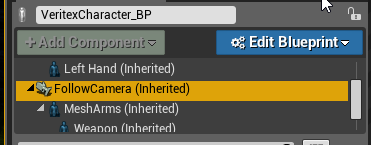
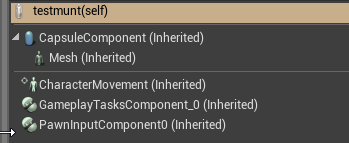
Question is, how do I access the FollowCamera from my mount character? Would I have to pass it as a reference? I lol
thin stratus
Camera component is not needed
Camera is just a scene location
It's not actually a camera
The viewtarget is an actor
it will take a camera component when one is on it though
twin juniper
ok
thin stratus
And yeah of course
thin stratus
No, the auto activate camera gets picked i guess
twin juniper
ok
thin stratus
It doesn't matter if your character has it
If you possess the mount you would, i nthe same process, make sure that you set the viewtarget back to the character
I would rather add a camera to the mount
 jolly siren
So it looks like for my client limbo issue that HandleSeamlessTravelPlayer is being called before ServerNotifyLoadedWorld 😦
Has anyone else seen where clients can be stuck after doing a seamless travel?
get a bunch of these on the server
[2017.05.13-16.28.01:616][684]LogNet: Server connection received: ActorChannelFailure
[2017.05.13-16.28.01:616][684]LogNet: Server connection received: ActorChannelFailure
[2017.05.13-16.28.01:616][684]LogNet: Server connection received: ActorChannelFailure
[2017.05.13-16.28.01:616][684]LogNet: Server connection received: ActorChannelFailure
[2017.05.13-16.28.01:616][684]LogNet: Server connection received: ActorChannelFailure
[2017.05.13-16.28.01:616][684]LogNet: Server connection received: ActorChannelFailure
[2017.05.13-16.28.01:616][684]LogNet: Server connection received: ActorChannelFailure
[2017.05.13-16.28.01:650][685]LogNet: Server connection received: ActorChannelFailure
[2017.05.13-16.28.01:650][685]LogNet: Server connection received: ActorChannelFailure
[2017.05.13-16.28.01:685][686]LogNet: Server connection received: ActorChannelFailure```And these on the client
[2017.05.13-16.28.11:059][947]LogNet:Warning: UActorChannel::ProcessBunch: SerializeNewActor failed to find/spawn actor. Actor: NULL, Channel: 3
[2017.05.13-16.28.11:059][947]LogNetPackageMap:Warning: SerializeNewActor: Static actor failed to load: FullNetGuidPath: [4657]/Game/Maps/Foo.[4655]Foo.[4653]PersistentLevel.[4659]BP_Barrel3, Channel: 4
[2017.05.13-16.28.11:060][947]LogNet:Warning: UActorChannel::ProcessBunch: SerializeNewActor failed to find/spawn actor. Actor: NULL, Channel: 4
[2017.05.13-16.28.11:060][947]LogNetPackageMap:Warning: SerializeNewActor: Static actor failed to load: FullNetGuidPath: [4657]/Game/Maps/Foo.[4655]Foo.[4653]PersistentLevel.[4661]WorldSettings_1, Channel: 5
[2017.05.13-16.28.11:060][947]LogNet:Warning: UActorChannel::ProcessBunch: SerializeNewActor failed to find/spawn actor. Actor: NULL, Channel: 5
[2017.05.13-16.28.11:060][947]LogNetPackageMap:Warning: SerializeNewActor: Static actor failed to load: FullNetGuidPath: [4657]/Game/Maps/Foo.[4655]Foo.[4653]PersistentLevel.[4663]BP_Barrel4, Channel: 6
[2017.05.13-16.28.11:060][947]LogNet:Warning: UActorChannel::ProcessBunch: SerializeNewActor failed to find/spawn actor. Actor: NULL, Channel: 6
[2017.05.13-16.28.11:088][948]LogNetPackageMap:Warning: SerializeNewActor: Static actor failed to load: FullNetGuidPath: [4657]/Game/Maps/Foo.[4655]Foo.[4653]PersistentLevel.[4673]Foo_C_0, Channel: 11
[2017.05.13-16.28.11:088][948]LogNet:Warning: UActorChannel::ProcessBunch: SerializeNewActor failed to find/spawn actor. Actor: NULL, Channel: 11```Also, I am traveling to the same map via RestartGame
 hasty adder
Why is it failing to find a spawn
Is the spawn location set somewhere else before travel?
Wait read that wrong
In a bumpy car nvm
jolly siren
HandleSeamlessTravelPlayer is sometimes called before ServerNotifyLoadedWorld and that is when it breaks. But the rest of the time it's called after and things work.
jolly siren
Seems like this bit is causing issues
Seems like it is causing the player to get handled too early sometimes via HandleSeamlessTravelPlayer
HasClientLoadedCurrentWorld might be bugged
 lament hearth
Hey, I hope somebody can push me in the right direction on the Server Setup for my Game.
I want to create a Lobby/Multiplayer System similar to the “Monster Hunter” Games.
Dedicated Server for the Lobby.
Player 1 Join the Lobby, goes to a NPC, Selects a Quest and will be the QuestHost.
Player 2/3/4 Joins the Lobby, Checks the QuestBoard for Avialable Posted Quests, Joins a Quest an waits for the Host to Start
Player 1 Starts the Quest(Creates Session and Loads QuestMap)
Player 2/3/4 Joins the HostedQuest
Solution so far but not reliable.
(A StructVariable where the IP/Port inside the QuestInfo, that’s get Set with the QuestHost Details on Creation.
Player1 Sends an RPC to the Server, and the Server is Sending and RPC to the other Clients, Player1 Loads Immediately to the New Map.
Player 2/3/4 wait x Seconds before joining the IP/Port posted inside the QuestInfo)
Well I already got it working with a small Custom MasterServer, but I wanted to explore the Possibility to use the SteamMaster Server.
My current Goal
Player1 Selects and posts a Quest and Starts some kind of Party.
Player 2/3/4 Selects the posted Quest and Joins the Party.
Player 1 Starts the Selected Quests and Loads the Map with a new Created Session.
Player 2/3/4 immediately Joins the new Session.
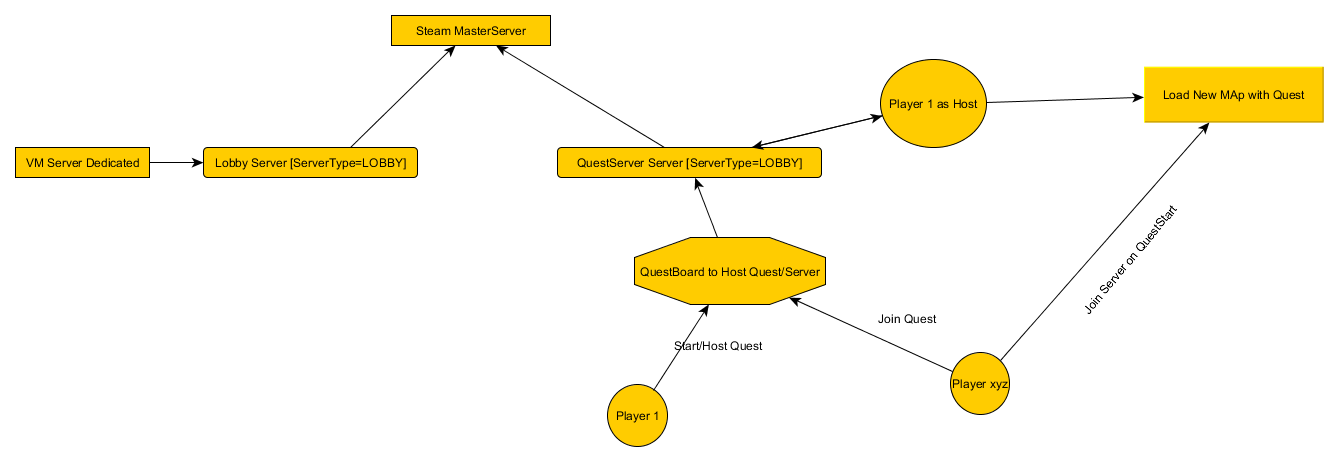
Ah and my c++ skills are very limited :/
Another idea would be, when a player posts a new quest, the server starts up a new dedicated server instance with the new Level and the Quest?!
 slim holly
IP based joining is really bad at the moment
since we are living in the old world of ipv4 and everything is behind NAT
from what I've seen most games do is having dedicated low bandwidth hub world servers hosted by the company, which keeps list of player hosted sessions
(instances)
 pseudo iris
@cedric_exi Hi, I saw your posts on AWS. I think we might be trying to tackle similar problems integrating with Gamelift. Were you able to get the GameLift C++ client working in UE4? I've been trying to integrate it but I get a crash when attempting to create the GameLiftClient object.
@thin stratus
thin stratus
I'm not using any gamelift on the client
I only have GameLift on the Server
GameSparks does the "Client" side
pseudo iris
I thought about going that route but was trying to avoid the effort of implementing the SDK in Gamesparks cloud code. Did you ever solve your issue with Gamesparks credentials?
thin stratus
You can't implement the SDK into gamesparks
CloudCode is "closed up"
I use their HTTP Request classes to communicate with GameLift
You will want to post the crashlog to your crash
No one knows why it crashs if you only say "it crashs"
pseudo iris
k, thx
twin juniper
@thin stratus Do you know how GetWorld()->GetDefaultPhysicsVolume()->FluidFriction works with multiplayer
Like if i set this in the game mode
would it be replicated to all clients (including players who login late)
or would i need to do that manually
 nocturne copper
Anyone else running into an issue of the editor crashing when trying to do a on rep notify if the editor is set to play dedicated server?
also this is on version 4.15, I recently switched
nocturne copper
@thin stratus You do not have any debugging symbols required to display the callstack for this crash.
thin stratus
Welp, always install debugging symbols
thin stratus
Otherwise i can only guess that the onrep calls something that should only run on clients
And you are not filtering it
nocturne copper
yeah everything gets filtered from the server > client process and all that. Its worked before and was able to narrow it down to when that start to run it crashes
its just a weird crash and I am assuming that it would not have much to do with the code this time around, just something else
thin stratus
As long as there is no crash log, it's hard to help
Just tag me once you have one. Then I'll have a look
nocturne copper
I am looking into that now, I just wanted to check with anyone else to see if they had exspierence this as well
but not haveing the debugging tools installed, simple fix and just need to put those in and see what else comes up
most important part of fixing issues was not installed, just overlooked it
I had recently done a factory reset on my machine and was trying to get maya and the ART toolkit back up and running agian
nocturne copper
@thin stratus Ok so this is the error comming up, I am looking into this as well ATM
did not become loaded after FlushAsyncLoading
nocturne copper
Continueing to look into this issue and reaching out to the person that posted the answerHUB as this is the exact same issue I am havieng
https://answers.unrealengine.com/questions/572212/crash-when-pressing-play-in-editor-assertion-faile.html
Will come back with an update if there is any progress that is made on this weird crash
twin juniper
Can any of you help me out with this? The players spawn like this on a Dedicated Server but not in Singleplayer/Player hosted server. I have been trying to figure out all day why this is not working 😦
Also...if I play in the editor with 2 clients and "Run on dedicated server" checked it works just fine
 signal lance
does anyone know if open steam.id command actually works, I want to store created sessions on my server and do my own session search so it is not region locked (and I want to do more stuff with it)
 cyan bane
Anyone see this GDC talk? http://www.gdcvault.com/play/1022195/Physics-for-Game-Programmers-Networking

Game physics engines are used to create games like Portal, Titanfall, Smash Hit, and Diablo 3. Games would be far less compelling without the realistic physics simulation that engages the player's intuition and stimulates their motion awareness....
I know the deterministic approach for networked physics isn't doable, but what about the other 2?
 mild zodiac
I can't get VoIP with dedicated server using null online subsystem to work. Is it impossible or I am doing something wrong?
it works on listen server, for example in shooter game
 chrome bay
@cyan bane that's what we do already. Character Movement does the same thing also
cyan bane
Which of the other 2 do you do?
I've got a half working interpolation implementation, was looking for guidance on it.
twin juniper
hey im curious aout something
If I own two characters, an I take on of them and attach it to the other as a child, then possess the parent, and use that to move around, will the movement of the attached one be replicated? or will it just fuck up after i detatch it?
 lament kettle
Is it possible to do weapon progression with users hosting their own dedicated servers?
I'm assuming with GameSparks I can do this but at the same time, what happens if I give people access to create their own dedicated servers.
twin juniper
@signal lance I've been able to play with both china and europe, at the same time. I remember reading something about region lock but I believe you can turn that on/off yourself
 lost inlet
@lament kettle ofc it is but just don't use gamesparks ever
when i look at gamesparks it just reminds of demonware
and they got bought out by activision
lament kettle
Really, your saying not to use it?
I guess I can setup my own database and API but that takes a lot of effort to make sure it's secure
lament kettle
@lost inlet
lost inlet
if your dedicated server is public then you still need to put in effort to secure it
because you're not going to be putting your gamesparks API key in your dedicated server distribution
lament kettle
I see.
So if I implement a sort of virtual currency or account authentication, I need to host my own servers.
lost inlet
well you could distribute an unranked dedicated server if you want the community to be able to host their own servers
or have some authentication for third party servers where they would have to sign up
lost inlet
probably how gamesparks makes their money, but i don't trust gaming IaaS companies that much
because they get bought out
then what happens to your data
 void canopy
Pro Dev's I got a situation. My client is editing a level. And then he host this level on the server. I want to load this level on another client and join to it.
thin stratus
So what's the question? @void canopy
You want to know how to join a server?
Easiest way: Use the Node "Execute Console Command" and use "open IPADDRESS" where IPADDRESS is the address of the Server to join
void canopy
@thin stratus Let me rephrase it. I want clients to download a level and then play it, currently which levels are there in content folder , client only loads that. What if I make a level, and I want them to download this latest level into there pc and then connect to server and play
thin stratus
Ah that's worth a question
It might be that there is already something in place for that, but obviously C++ only
void canopy
Slowly slowly my understanding is also increaing thanks for the pointers you give me @thin stratus
thin stratus
You may want to check the UT Code i assume
void canopy
Okay,
void canopy
Okay, but this fucntionality is there in UT Code for sure ? I will download UT project then
 urban salmon
I'd think the easier way would just be to serialize some data about the actors in the level, and pass that around.
It is definitely in UT
void canopy
But @urban salmon I've created a new level here. Which I want other clients to download. Its not the same level where I can send gameplay parameters to clients
I have to make them download this level first .umap file and then the gameplay parameters
urban salmon
Yea. Well, just transferring the data and getting the server and other clients to load it shouldn't be all that difficult. You just need to make sure that all the assets are included as well.
thin stratus
So you want clients to be able to create their own levels?
Or is it the dev in the end who adds new levels?
Because if the dev does it, an update would be easier
void canopy
yep, there is a level editor I'm giving them
void canopy
They can create there own level from the level editor we are providing in the game
thin stratus
Yeah then you can't get around looking into the UT code i assume
void canopy
Nope we are creating a level editor as well which is included in the game
And in this level editor you can create your own levels, which if you host I want others to download it and join
and then play
This is my use case.
urban salmon
Yea so, it's essentially just transferring some data and loading levels
void canopy
true
But this level is not in the content folder of the clients, they have to download it first
urban salmon
Yea that shouldn't be too difficult
void canopy
Okay, that's gives me a relief.
But where are the pointers From where should I start ?
urban salmon
First step is coming up with a way to get the data to the clients.
You can use TCP sockets I guess. Maybe there is something built into UE4 but I doubt it.
 worn nymph
Just make it like a game patcher
So new map files are hosted on a ftp server when they login and connect let them download from the ftp server
 urban salmon
You probably don't want to use UE4s patch system for this
Implementing a very simple file server using TCP sockets will probably be the most elegant solution, and it doesn't require any kind of separate launcher.
lost inlet
@urban salmon reinventing the wheel much? you can use HTTP for downloading files
in fact that's what UT4 does for custom maps
urban salmon
Right, it still needs some server implementation in UE unless you want to run a webserver as a separate process.
Unless a webserver is included in UE
Dunno how it is reinventing the wheel if it isn't part of UE. If you want to embed a third party HTTP server that's fine too.
lost inlet
but for patch data you'll probably have some kind of central server anyway
lost inlet
for custom content, you'd probably have some kind of CDN set up for that anyway
unless that specific game server is generating files that clients need
urban salmon
That's not even applicable to what he's talking about lol
lost inlet
for UGC it is
urban salmon
He's talking about end-user hosted servers, transferring assets to clients. You can't just use a CDN for that unless you are letting all end-users upload to it, which sounds ridiculous.
lost inlet
what is steam workshop again?
i don't see how inventing your own file transfer protocol is a remotely productive thing to do
urban salmon
You act as if transferring files over TCP requires some in-depth protocol. It doesn't.
and I also said that embedding an HTTP server would work fine.
but there is no need for all that just to transfer data between end-users.
This is end-user to end-user, not dedicated server to end-user.
If this was for a central, dedicated server, then my suggestions would be vastly different.
If he wants to set up an external CDN and host all of his end-users content, then yea the solution is simple. Just use HTTP gets to the CDN. But if that was the case, I'm sure he wouldn't be asking in the first place.
@void canopy Do you plan on hosting all of your end-users content on your own CDN?
thin stratus
Why even reinventing anything here?
UT has custom map tranfering
iirc
So just check their code
UE4 is after all a shooter engine for UT
And downloading custom maps of users is a thing that exists for ages
It's just not exposed to Blueprints
twin juniper
@thin stratus If I use AttachToComponent() and attach one actor to another actor and socket it together. If both are replicated, how does this work? Like, assume I socket my character to my horse. Now I control the horse, but does the character move with it? Or does it just move on client, but the network doesn't replicate it for all clients?
thin stratus
If you attach it and wield them it should move with it
Might help to just simulate that though
Means there is no real reason to really put the player onto the mount
but rather just have a skeletal mesh on it
that you update
And in the meantime you hide the actual player
slim holly
so, about that character launch we talked about the other day
the issue looks something like this: https://youtu.be/AmZDvn0wV3Y

YouTube
the debug value following the character is actorlocation replicated from server, and the value is ping
like, this makes no sense, server clearly sees the launch, yet cancels it
this is set jump input from client->server->launch multicast
if I only do the launch without multicast, it works but client sees the movement correction, not the launch
and any launch done at client end is ignored
 worn shell
anyone ever have isues with steam immediately disconencting a player as soon as they join?
jolly siren
@worn shell most of the time when I see that it is because the client is on an old version of the build
worn shell
well I just figured out the first issue, once I set vac enabled to false it was fine...looks like valve thought I was cheating at my own game 😛
just working on server travel now
jolly siren
ahh
void canopy
Sorry for the delay, I had to leave from office. I will see UT code to see how they are steaming new maps to all the clients.
Will revert back.
 hollow pond
@void canopy Please tell me what you get from that, I'm about to take a look into that as well, so any info would be great 😄
lament kettle
Are there any tutorials for advanced multiplayer methods?
I've already watched all of UE's videos regarding multiplayer.
 supple musk
Hi guys,
Quick question, do you know how to open a listen server without having to change map ?
I'd like to have a simple button "Start Host", which would then allow players to connect to this map, but without having to reload it
@lament kettle http://cedric-neukirchen.net/Downloads/Compendium/UE4_Network_Compendium_by_Cedric_eXi_Neukirchen.pdf one of the best resource on network
lament kettle
Yeah I've seen that, is that the most advanced one?
Also, you need to add ?Listen to make the map as listener
So, technically, in the main menu, everyone can be a local listener
supple musk
Yeah i figured that everyone could be a listen server on main menu but it looks a bit dirty, looking for something neater
lament kettle
Launch Game --> Map?Listen (has main menu overlay)
supple musk
I'll end up doing it like that if i can't find something cleaner tho
lament kettle
Maybe someone with more experience can respond.
supple musk
Yeah, and tutorials on advanced networking are available on youtube, but it is more of case by case videos for particular problems
lament kettle
Yeah I saw several other videos.
supple musk
The most advanced example is probably the Epic Shooter Game
lament kettle
Yeah, I still need to look thru that but I decided not to unless I needed something.
I'll probably look at it when I need to implement lag compensation.
I just wish someone did a proper steam dedicated server type tutorial. The one by UE isn't that great and doesn't work all the way.
You need to modify it and I'm kind of sad that they haven't done an update for the plebs.
supple musk
Yeah i'll be implementing an online system in my LAN game next month, gonna be interesting if I can't find proper resources
Probably gonna end up digging in Shooter Game as always
signal lance
Quick question, would one web server be enough to handle 1k players per day, mainly database communication
 warm moss
what's the difference between "handle new starting players" and PostLogIn in GameMode?
slim holly
well, the velocity issue has been fixed
I had to override the default jump function
why does that work, no idea
 dusty sleet
@slim holly does it show none?
slim holly
empty print
until I manually set the owner during beginplay
to controller, so it has controller but no owner
dusty sleet
where are you spawning the character actor? are you setting the owner on spawn?
dusty sleet
maybe thats why?
slim holly
why wwhat
slim holly
Im pretty sure possess=ownership
dusty sleet
i possess it right after.. but it still prints empty to me
if i dont ahve the self in there
dusty sleet
ya.. ive never really noticed it before sincec I've always spawned fromt he controller
andd set it to self
dusty sleet
hmm...
and you're sure the controller you're setting as owner on spawn is valid? put a break on the spawn node and hover over the controller just before it to be sure
slim holly
I'm fairly certain post-login can't trigger on invalid controller
dusty sleet
yea i guess if the player is playable and you're piping the controller from post login directly into the owner .. id imagine that would work
it does print for me though. and prints empty if i take the owner out
slim holly
right, so currently Im setting the owner during spawn and reports are following: Client local&remote are null, Host remote is null but host local reports owner
 young tulip
Hello!!! I am working on saving the data that is generated from my game. I can save it in my local folder that is being generated by the unreal engine and it is saving in the format .sav. I want to send the data to my cloud online from unreal engine when ever it is generated. Is there any feasible way to do that?? Thanks in advance.
dusty sleet
@slim holly my client prints the servers controller for that player and nothing for itself i guess.. and the server prints both
slim holly
mine is total opposite, remote doesn't print anything under any circumstance
 undone moss
hey everybody, I have a weird question: A friend of mine wants to do a hubworld with Unity, but he wants me to help out with making other parts of the world accessible through the hub, but the parts I make would be with UE4. Is this possible?
slim holly
Cross engine compatibility?
wut
bloody hell
somehow client gets to spawn projectiles too past auth check
phew, it was only a visual glitch
intresting tho, by not setting the projectile movement replication, it was actually gettin 2 impact positions
undone moss
he wants it to be an online thing, so I would think exporting via HTML 5 would theoretically allow something like that or no?
thin stratus
Well if you use your own socket based networking
Then go for it ¯_(ツ)_/¯
Only thing might not work is using Unitys or UE4s server
 raven viper
Hey peeps!
Anyone has an idea how to bind a session to a specific port on creation? So not like changing the default port in the config, but rather at creating the session itself.
chrome bay
The Default Port is probably a config variable, so you can set it at runtime I imagine
Just need to find out where it's stored, and set it prior to creating the session
However, noone else will be able to find that game session unless they are searching on that port too
So not much point exposing it probably
Saying that, might still work
raven viper
It won't be local, and the find session node won't even be used at all, so that's fine
 rugged patrol
How can I log something on a dedicated server's log output from the Blueprint? Trying to debug something that only reproduces on a Linux dedicated server...
LogText seems to not output the text to the log.
So basically I'm inside the AnyDamage event (which is a server RPC) and I want to write to the server log (since I am already in the server).
 fleet sluice
@rugged patrol PrintString should also output to console.
twin juniper
@slim holly possess sets ownership. In order to have ownership of an actor hwoever, all you have to do is call SetOwner() on an actor and give the playercontroller as the parameter
I'm pretty sure SetOwner() has to be called on te server
rugged patrol
Thanks @fleet sluice, going to try it.
signal lance
@fleet sluice Do you maybe know if it is possible to join a session with steam id. I plan to store created session on my server and do my own find session function
slim holly
I did setowner on server tho
fleet sluice
@signal lance Not sure what you mean. Can you please send a snippet or screenshot? I know OSSteam wraps SteamID's in their own FNetID objects (or something similar), but I'm not sure what you mean by joining with SteamID
signal lance
I was reading something on answerhub and found "open Steam.Id:port" command, I also saw some reports that it doesn't work...
signal lance
lol 🤔
fleet sluice
The "open X" command is a UE-specific command and as far as I know, it only expects "IP:Port" after it
So I don't really understand why people would try "open SteamID:Port". Was that supposed to be the 64-bit representation of a SteamID?
signal lance
I know that part but from what I was able to find if you use steam subsystem it expects a Steam id
it doesn't work with ip when you use steam (tested)
fleet sluice
Maybe I didn't look into OSS enough to find that. I gave up trying to understand the OSS module and move on to UWorks relatively fast. I'm sorry, I have to search a bit, got no good answer for you out of the top of my head
signal lance
ok, thanks for keeping up with my nonsense lol
fleet sluice
Np dude, anytime
Did you come across this? https://answers.unrealengine.com/questions/3156/how-to-join-a-steam-game-via-steam-sockets-getting.html
signal lance
that is it, I think
rugged patrol
I'm having problems with the Hit Event, but only in dedicated server builds. In PIE (dedicated server, 2 player windows), I can shoot projectiles and the HitEvent gets triggered just fine. In dedicated server builds (both Win64 and Linux), the projectile just goes through my character (but registers a hit with the wall behind). Note: I started from 3rd person template (C++) so the Character is pretty much the ThirdPersonCharacter blueprint.
Also, event hit seems to not trigger on the server at all - just on clients.
Actually it only happens sometimes. It's almost as if the character has some holes in it.
 bleak cloud
Quick question if anyone can point me in the right direction. When I so a server travel, it doesn't appear to be switching the player controller. Do I need to manually set the playercontroller, instead of just the defaults on the map?
 brittle sinew
Do you mean it's using the same instance of the PC or the same class?
If you're using seamless travel, using the same PC is intended behavior
bleak cloud
If I'm using seamless travel, is there any way for me to switch the PC? Or should I merge the functionality into one PC?
brittle sinew
I'm sure you could, but that goes against some of the point of it
I'm not too versed in MP code either way, I'm not exactly sure at what point you would need to perform that switch
twin juniper
@brittle sinew do you know how to setup global sounds for multiplayer
i think its to do with attenuation?
bleak cloud
I figured it did. I'll give it a shot for now, moving logic into one controller and see how it goes
twin juniper
Is it possible to turn light components on and off during runtime
bleak cloud
I'm actually unsure whats happening. When I migrate server, I'm not able to control the spawned character. It appears that it has the correct controller
If I start on that map in PIE though, it's working properly
 vagrant abyss
does PrintString always replicate, or can you have it just do it on the server/client
bleak cloud
I believe you can have it on just the server/client
vagrant abyss
any thoughts on how? I tried a "IsLocallyControlled" or "HasAuthority"
but that mostly seems for the execute, once it executes, it does so on both
(also, being called from a PlayerController, so shouldn't matter)
 worthy wasp
😦 Pulling my hair out tonight lmfao....
I have a StaticMeshComponent on an actor. The actor is replicated (this is a MP game). I'm turning visibility off on the SMeshComponent on an event - the event is done AS SERVER into a NetMulticast RPC..... i've done print strings to verify its going to every client.
The server's able to see the staticmesh visibility go false.... however any client is seeing it stay true. The component IS REPLICATED (I've print string tested that). . .. however this function is not happening how I need it to.
I've also tried SetHiddenInGame() - and even went as high up the chain as the SceneComponent->SetVisibility(false)..... none of which is working.
What am I doing wrong?
slim holly
you could just set a replicated visibility boolean as RepNotify, then set the visibility in OnRep function
no need to replicate components
 topaz flame
@bleak cloud I ran into that too, and onPostLogin isn't called after server travel... i loop through connected players and spawn a pawn and posses it for each player after the new map loads
chrome bay
Okay quick question
Runnign Dedicated Server in the editor
Any reason why GetNetMode would return "Standalone" instead of "Dedicated Server"?
fleet sluice
@chrome bay Inside PIE networking and various other parts don't work as expected because it's not creating an independent process. It's using the already-running engine, initialized by the editor. If you want to work on networking stuff, you need to always run in a separate process and then you should be able to get the results you expect.
chrome bay
It's alright that wasn't the issue
The editor initializes the client first, then starts the dedicated server, then makes the client join it
rather than initailizing the dedicated server first
That's why I was having issues
fleet sluice
Ah ok, I see
 wise depot
how do we parse the options string in c++?
for a specific option, i know there's contains which just returns a bool
vagrant abyss
@wise depot the compendium has a link to that I think
I remember reading about that literally last night
wise depot
yeah i found it thanks
 fluid glacier
My team recieved some feedback yesterday, which has been an on going issue throughout the project, yet we haven't been able to nail it down to get fixed. Hosting was very hard to get everyone together at the same time
Trying to host multiple games one after the other eventually and inevitably failed
We are using the Steam API and Advanced Sessions Nodes. And it is all blueprints.
hasty adder
How so? Dedicated/listen?
fluid glacier
Listen Server
Sometimes players will have to actually delete their save data in order to join or host a joinable lobby.
fluid glacier
It will stay on the travel screen for several minutes and then kick back to the main menu. In edge cases the game actually crashes.
That was playtest done by Instructors, we unfortunatly are never present for those. We have started holding our own playtesting sessions to help provide some better feedback, as what players are experiencing via twitch and youtube streams.
hasty adder
Oh your using travel how about seem less?
Steam has issues with travel I believe you need to use seem less travel
Where is @thin stratus when you need him 😃
thin stratus
Well, are you ever destroying the sessions properly?
hasty adder
Yeah I once made a dumb mistake of connecting both remote and authority on error to destroy session
If your network guy is new might have did that
thin stratus
Well in general if you don't destroy the session
when leaving as client
or when leaving as server
or when you get kicked from the server as client due to what ever reason
then you can't host/join again
That's why I just fail save destroy it when the mainmenu loads
¯_(ツ)_/¯
fluid glacier
We are using seemless travel
Looking for sessions bp where they get destroyed to check how they are being done
chrome bay
Hey who wants some advice
fluid glacier
Our network guy followed training tutorials Unreal did in this video series Blueprint Multiplayer: Project Overview | 01 | v4.11 Tutorial Series | Unreal Engine
fluid glacier
Um, our game is called Poravity, lol. So not just portals, but gravity manipulation and inversion
chrome bay
What should have taken me a couple of days has turned into a minefield of fuckery
All because of portals
Nightmare fuel
I'm just ranting tbh
fluid glacier
The portals were the easy part for us.
chrome bay
Problem I'm having is the game is a responsive twin-stick, so teleport needs to be instant
So client needs to simulate it, and server verifies it worked
fluid glacier
it was getting the players to flip their gravity alignment, without having to dig into the engine code.
chrome bay
Then replaying old moves on the client comes into play and suddenly fuuuuuuuuuuu
They're just great, until you need to spawn them from a 'weapon' dynamically and have it be responsive
FML
anyway...
hasty adder
Oh that's the tutorial with 4 different characters tight
Right
Select jn lobby and then all joins a map
fluid glacier
Yeah, we didn't do the character selection part.
hasty adder
Using a lobby or just follow the server browser/match making stuff?
fluid glacier
we use a lobby, but after doing a server search? (client) or Creating the lobby (host) https://www.youtube.com/watch?v=WYWLbKVMECc

Video was recorded in tandem as a client while the host view was recorded on the laptop Host video: https://youtu.be/GIA0ZWHhPds
hasty adder
Hm but sometimes works?
fluid glacier
it works most of the time, unitl you start playing game after game, then we get the problems of people not being join a hosted game or players are hosting lobbies that no one else can join
hasty adder
Sessions for sure
fluid glacier
the more games you play the less chance you will connect to anyone
hasty adder
I'd try to trouble shoot exactly what exi said. On main menu destroy session
To free it up see if your able to always join after going to main menu
fluid glacier
So i Should probably looking the in menus, I can't find session anwhere. Our "Networking Guy" doesn't get up until after 3 on days we don't have class
hasty adder
Could probably in the player controller make a test button to call destroy session and put some prints on each case
fluid glacier
yep i just found it
hasty adder
If you played a game and goto main menu and press it and it's successful session was stil active
fluid glacier
The only for destroy sessions I could find. In the Lobby Player Controller.
fluid glacier
Yeah, tbh I have no idea, we don't even have an enum for that.
hasty adder
Well if the lobby destroys it's session it needs to make a new one
So if it's called at end play that might be called when map ends
Closing the server so to speak
fluid glacier
I don't a destroy session call in the game play player controller
hasty adder
Now if lobby ends its session.. And controllers don't ever client side end there session they are in limbo id imagine
Meaning if you all restarted your game it's work again. Because that's one way to end session without having it in the game 😉
fluid glacier
which is what the players are having to do
hasty adder
Sounds like we've narrowed it down to the session in limbo.
hasty adder
If you go into game instance bp. And look for network error
Your going to be the new network guy 😉
hasty adder
:0
I'm removing to my comp on my phone to bring up mine to grab a low quality screen shot lol
fluid glacier
Destroy session caller (PContr Refer output and exe node) Destroy Session Node (PContr Refer input and exe node) ---> On Failure ->> Displayer ErrorMessage (Error Found Exe node))
All of the Netwrok Errors in the game info instance
hasty adder
There it is
True and false are connected
Meaning a client connects then disconnects it's called on server as well
So server kills itself
Same mistake I made many moons ago
Disconnect that and try it
fluid glacier
I can't try it by myself, lol
even running in new editor mode, as ded server with 2 players
hasty adder
Well we know that's wrong so I think you'll be good 😃
fluid glacier
yeah,you know I think asked about that along time ago, when we first setting up the networking
there are a few things like scattered around the project where true and false doing the same thing.
Sign, I just want make maps, lol
hasty adder
Yeah the thing with these events are to keep in mind is server will run same stuff as client but you don't always want to treat them the same
If you make maps like rocket league let me know 😉 my game is rl like
fluid glacier
my maps are more Halo Like
hasty adder

Player (Ai) view of them in action -- Watch live at https://www.twitch.tv/inph1del
hasty adder
Tough to say usually you run some profiling commands to see what's taking the longest to run
But if you mean network specific unsure. Just good to make sure things are not running if they don't need to be
Like tick calls to a server functions
Fraid I won't be too@much help there I'm still figuring out that stuff myself 😃
fluid glacier
Okay so one of my teammates was up and i sent them a message on what i did.
He said It's supposed to
The reason it's not working is because the clients still think they're in a session, so they can't join another one. If you leave a game by hitting "return to main menu", you can re-enter all day long. But they aren't being fed the same information when a host cuts a server off. The host knows it's not connected, but the clients don't.
hasty adder
If it's supposed to then how the session destroy is called is wrong because the server will get a network error on an unexpected loss of client and run that macro which I bet leads to destroy session meaning a client leaves server ends its session this cannot be joined or found
fluid glacier
What's inside the Display error Macro
hasty adder
Keep following it. Think I used the same code on mine which ends up going to destroy session
Destroy sess caller
So ask yourself this why would you want a server to display a widget. What if this was a dedicated server?
No ui
fluid glacier
That is the entirety of the display error macro, it doesn't call the destroy sessions event. I can't even find where that is being called at all.
hasty adder
4tf item on top
fluid glacier
Because that's exactly it was done in the UE Tutorial
fluid glacier
I'm learning all of the wrong way we did things today, lol.
hasty adder
Actually work backwards find references to end session caller
Here's why I'm curious my symptoms were very much the same
Say you have 4 players one of them is server
Client 1 joins wait client 2 can join wait client 2 leaves
Client 3 can't join or anyone ever again
fluid glacier
close, but were getting Client 1 joins wait client 2 can join wait client 2 leaves client 3 joins wait
client 1 now sees 2 of client 2 and client 3 only sees 1 version of clients 1 and 2, the server was seeing all of them
that was fixed a while back
hasty adder
Hmm
fluid glacier
I think i did myself a disservice by trying to stay out of the networking stuff for the game, because I would point something out or ask why it was being done such and such way, I would get a response similar to the one i got earlier. Kind of like we are using round in one of our game modes, they are killing the players then respawning them. We were having issues on the new rounds where as the red team, becomse the blue team. In round one the red team attacks. In round two, the Blue team attack. So one team was always attacking. I asked why weren't just using reset level. I got blank stares all around.
hasty adder
You know i got an example blueprint project I started for teams somewhere online
Actually I wasn't using steam sessions tho
fluid glacier
oh, dude we less than two weeks from the final milestone. I made one change to the player info. to fix the team switching issue. I had to update over 67 other files and blueprints
hasty adder
I need dedicated servers so was toying with a fake spec to team
fluid glacier
See, I tried to get them add that, so you didnt HAVE to have "friends" to play with.
hasty adder
Using override on player class and start location
fluid glacier
shrug. I even made a pretty kick-butt Ai System for us
I don't know dedicated servers, but i want to. I'm less interested in Multiplayer PVP, than I am Coop Mulitplayer. That's where my love is
hasty adder
There much trouble with steam and dedicated server. Getting a dedicated server running ain't to bad designing a way to find them is rough
fluid glacier
I recently got my Xbox creator approved. I don't have enough stuff yet to submit for ID@xbox.
Tried talking my into subitting our game, release it for free, just have it out there. I haven't seen a PVP mulitplayer game yet that does what our s does with gravity.
meh was the respponse
hasty adder
Well Xbox would end up costing you since doesn't it have a submission fee etc
fluid glacier
yeah, i tried getting them to submit on steam
hasty adder
So back to your problem soin understand. The client leaves but original client/server still sees them there?
fluid glacier
not anymore, but that's how it started. I'm pretty that doesn't happen more. After we fixed that we started seeing more issues with not being able join new games after finishing one
hasty adder
Hmm you we have a difference from what happens in that macro and followed the same thing
That's my destroy session caller bode
Node
Was that how it was fixed for the other problem I wonder
fluid glacier
I don't know. I know that I can't find anywhere the destroysession caller is actually called.
hasty adder
I believe that's where it exists in that tutorial
fluid glacier
I looked in player controllers for both lobby and gameplay, game instance, the game modes
I'll be honest, I don't think he finished the tutorials
hasty adder
If you right click on it and find references and then uncheck search only that blueprint it'll give you results if any
hasty adder
Yeah and the drop down is there find references?
Actually if not you can search by name in the search bar on the bottom. Sorry to be vague using memory
fluid glacier
lol its okay, the best ive gotten in 4 months
fluid glacier
yea right clicking wasn't doing anything for some reason
fluid glacier
Sorry took so long, my mom called, 😃
mine looks very similiar to yours. a few exceptions
So these are places I need to check right?
hasty adder
Error dialog where is that called
Error dialog wb
Is called in that macro
Which again means server is executing that widget which closes the session unless the widget doesn't call it on server or authority
fluid glacier
not being called on server authority.
hasty adder
Authority also is another way of saying owner of the bp
fluid glacier
it gets called then show main menu is called
hasty adder
Widget belongs to controller usually. Toss a print in thendestroynsession caller and see if it prints when disconnecting maybe see if it's even called
If others get a print the server is calling it
Should just be then client leaving that prints
fluid glacier
using a "Get owning Player funtion as the player controller
which on hover says it is client only
hasty adder
Yeah so should be working technically
But Never tried to end a session in a wisget
Is it get owning controller Castro then execute the end session by chance?
Is controller different in menu then in game?
fluid glacier
yes
hasty adder
Cast could be failing
fluid glacier
controller in menu is different than controller in game, get owning player is referencing the player that controlls that widget
i just realized we had to add a second "main menu" we now have a main game menu the initial menu to select single player (tutorials) and multiplayer which takes you to host/join sesssions menu
destroy sessions caller is not being called on main game menu at all
This is where is is called as a widget
I added a print string to cast failed.
hasty adder
That does not look roght
Owning player to that
The cast would be ok there I imagine. Is there a print on the section before it calls session caller and then in the session caller in game instance
fluid glacier
I'm not seeing one
hasty adder
ER sorry. Add them to see if it prints something we want to confirm its running the nodes.
fluid glacier
to the error dialog?
hasty adder
We want to see in gsme instance if destroy session caller prints ever. Throw a print in there first thing
fluid glacier
so should i see it on both the server and client?
hasty adder
Unsure really but judging by the rest of it only client
fluid glacier
I can't find a match at all
0 sessions found on the client
my oldest came home so i have a second computer to test with
hasty adder
Hold on I mean a print node in the blueprint on the session caller so the game debug prints hello and see if you see the text when joining menues or leaving a game
fluid glacier
i quit the game never seen a message
twin juniper
@brittle sinew do you know how to do a loading screen
for a large map
because my map takes a good 20+ seconds to load
and my friends keep thinking its frozen
but its not
hasty adder
Add a umg spinner to viewport 😉
fluid glacier
Maybe I am not understanding. I added the print statement to join session node.
i connected it to the exe output instead of the success output
still cant find any matches
fluid glacier
ok
hasty adder
This will let you know everytime it's called success or fail just so you know when it tries
I still think now that the true false thing is a problem.
Would be worth disconnecting true when you have two ppl to test
fluid glacier
true was still disconneect. I never reconnected it
hasty adder
Oh and problem persists ok
fluid glacier
only now, i cant connect at all
i can test with one player though
So if i start a game with just me, then quit. the destroy sessions is getting called. Since i am the only player, i am also the host
hasty adder
Yeah you are authority
fluid glacier
but the destroy sessions isn't called when i leave the lobby into the game, only when the game itself ends
hasty adder
Right lobby to gane should be same session.
fluid glacier
im going to reconnect the true node, to see if i can join a game a client.
still cant find a session. 😦 now i really broken it
hasty adder
Hard to follow what's happening. Theoretically it'd be everyone is there own entry no session when in menu.. Then somone starts a lobby which is a host session. Others instead of host search for it and find it
Your using two computers right?
Different steam accoujts
fluid glacier
i'm force get latest from perforce, maybe the files aren't updated evenly
yes two computers, two account
oh for the love of god
steam's not even running on the laptop, Facepalm
twin juniper
So no one knows how to make a proper loading screen
when u call JoinSessions()
lol
i thought thats what the Transition Map was for
 severe widget
bet you google does tbh
twin juniper
@severe widget get out
severe widget
u first bby <3
twin juniper
@severe widget lord cunt is here
severe widget
Nah he's offline
severe widget
Haha
fluid glacier
Well, that got savage really fast.
severe widget
u so funny
btw I'm not trying to be polite because you were a cunt first
this is like the third time m8
severe widget
nah
twin juniper
"google could help"
severe widget
I really didn't
severe widget
I really didn't
twin juniper
ur lying to yourself
severe widget
this is the first time I've told you to google
fluid glacier
What the hell just happened?
severe widget
@ancient pebble knows what's happening here
Stop asking people to solve your problems
esp. when you've told me to fuck off while I was typing an answer for you
twin juniper
@ancient pebble he literally knows telling me to google stuff triggers me so he does it on purpose just to get me to react
 ancient pebble
Both of you need to chill out.
severe widget
you can search if you like, this is the first time
ancient pebble
@twin juniper Name-calling isn't tolerated for any reason.
severe widget
He's got some weird association between everyone who has ever been rude to him, and me
So at this point I see no reason not to open like it
ancient pebble
Guys, stop arguing. You're clogging up a support channel.


 ancient pebble
@severe widget Stop it. Right now.
You're sharing private conversations in a public channel.
Not cool, and certainly not helping anything.
twin juniper
I just blocked him. It's done now.
severe widget
my own words, plus publically searchable convo.
But OK
lol who was that is too far.
got it
hasty adder
@fluid glacier so... Does connect with steam on now?
fluid glacier
my server pull just finished, i had force gotten latest before i realiezd steam wasn't running. i am loading it up now
ancient pebble
@severe widget I just want you to get in the habit of not sharing screenshots from private conversations. No exceptions, even if it seems innocent to you.
Anyways, I'm going to stop because this is stupid. @severe widget @twin juniper If you have problems here, please don't argue in public channels. PM me or a moderator. Thanks.
Sorry for the disruption, folks.
twin juniper
OK
fluid glacier
@hasty adder I FOUND A SESSION
hasty adder
Awesome. This with true ? Since I wonder if we tested without it for real lol
fluid glacier
its amazing what happens when you have everyting runnine. True is disconnected
hasty adder
Ok so if you join session and leave and search do we see it again
fluid glacier
took a few seconds to update the client, but left immediately on server, no print statement for client, searched and found same session (didn't close it on the server side)
twin juniper
@hasty adder I've had the same problem for a long time. Still haven't managed to figure it out. Same with if the server crashes, then clients are unable to reconnect using the same client, they have to reboot it. Have you guys found a solution? It sounds like you are discussing the same issue.
fluid glacier
trying to
hasty adder
Usually session for steam is still open
fluid glacier
able to rejoin previous session as client
hasty adder
So run the match and let it end and see if you can start sgain
fluid glacier
see you 8 mins, lol
hasty adder
Haha ok
 lean cedar
yo, quick question for you guys.
i'm making a simple multiplayer VR application with Unreal. I'm going for a P2P approach with this one: Clients send their HMD's transforms via custom events to the server and the server relays the transforms to everybody else via multicast.
This works, however we're having a weird issue: Even though the SERVER can see the client's HMD just fine and smooth, the CLIENTS see networked objects with lots of stuttering. The SERVER sees everything smoothly, while the CLIENT sees everything with some stuttering.
What am I doing wrong? Am I lacking something? Interpolation, maybe? Why does it only happen for clients and not for the server?
hasty adder
@twin juniper I had an instance of this where my network error handling in game instance would destroy session on server/host causing this
Turned out it was because I connected it for both server and client to run it
lean cedar
I'm going apeshit over this thing, no solution so far.
fluid glacier
@lean cedar @hasty adder Could that be a reliablity issue?
twin juniper
@hasty adder oh im not having that issue, my issue is the fact that if the server crashes... you cant reconnect without re-opening your client xd
lean cedar
Nope, my RPCs are all set to unreliable
hasty adder
In my game following same tut angry network guy followed I connected true where it asks on error is server?
And this was telling server if a client quits an error is generated so it destroyed its own session
lean cedar
I'm sending unreliable RPCs because they're faster so I shouldn't expect any sort of stuttering. I'm also sending 100 packets per second AND we're testing on LAN, so it should be butter smooth, shouldn't it?
hasty adder
This
I had both true and false connected derp
Derp
So why have the node?
Because server shouldn't end its session anytime there is an error
brittle sinew
@lean cedar unreliable RPCs aren't necessarily faster, it's just that they get dropped in the case of overload
100 updates a second seems quite excessive, though
lean cedar
it's the default
brittle sinew
I believe there's also a default rate limit in UE4, where LAN won't help much
What do you mean it's the default?
brittle sinew
That's not the same thing as calling 100 RPCs per second, if that's what you're doing
Unless I misunderstood here
lean cedar
how do I define rpcs update frequency?
brittle sinew
Yeah, when sending transforms you usually want to do them in replicated variables which are cheaper than RPCs, and can be quantized
(though I'm not sure they can in BP)
hasty adder
Isn't that umm totalnetbandwidth or some other ini settig
lean cedar
I'm not using blueprints
brittle sinew
Ah, perfect then
:p
Unless you're changing scale I would strip that and just send vector+rotator, and quantize them to your liking
lean cedar
How do I send a variable from client to server?
brittle sinew
Constant network updates aren't super easy to pull off, the CMC is something like 10000 lines haha, I don't believe there's a simple way to pull this off in the most efficient manner
twin juniper
The charactermovement component isnt even updating every second
its updating based on input
brittle sinew
Why would that be the only solution?
Sure it may be the easiest
But definitely not most optimized
lean cedar
Well, what's the best solution then?
hasty adder
Even still with a lan connection. Data still needs to be packaged up and made for TCP/IP and then sent then unpacked and read. Constantly
Update at a sane speed and lerp maybe?
brittle sinew
I'm not in a position to give you everything you need for a best solution, I have no idea what would be best in this situation, especially with VR
A custom write similar to the CMC might be in order
Though it's not a simple task to do
But yeah, I agree with the first step being not running 100 updates per second
:p
lean cedar
Maybe I should use some kind of interpolation
I don't know what's going on. In Unity it is so simple
fluid glacier
okay, that was interesting, after the game end, the print statement was displayed.
was not*
hasty adder
Well where does into at end of game?
fluid glacier
I cannot host a new lobby from the server pc, and cannot join from the same pc as client.
the main game menu
hasty adder
Sessions still running
fluid glacier
not the multiplayer menu
hasty adder
So still have them both open in the problem state?
Because if see if either can host
If session is still open. It will likely fail I believe
hasty adder
So server side session is still busy even tho your not in the map.
Steam subsystem is active
I wonder if there is a console command to destroy session
fluid glacier
im seeing some really disturbing things here. Why would you ever destroy the character movement component
hasty adder
Haha weird way to disable input?
fluid glacier
but that's bug #15324, we are currently on bug #435
okay, so looking at where the rounds end, it does a check in the gameplay player controller, to the game state to see if the game over bool has been set to true. On false it sets up the new round. On true, it does nothing. I am wondering if that's not where the destroy sessions should be called.
hasty adder
Well depend what your looking to do if game over your going back to main menu maybe
fluid glacier
Oh, we have a create win screen for each player after the game ends.
on the win/lose screen there is button to return to the main menu
hasty adder
We should look backwards from when you are supposed to see the menu again and see if server destroys session it must be missing
fluid glacier
Only server can return main menu from the win/lose screen. Clients can click it but it doesn't do anything until the server actually clicks it.
In the pause menu, there is an option to return to main menu.
hasty adder
Strange logic going on here 😃
So host can only click end game. Which would then goto main menu? What's the alternative for host? Sit in game over screen forever?
fluid glacier
As one one of my course directors from the early months of this project said, "That is some ghetto, damn code!" On the side, he said I might want to try to convice my teammates to rethink some of it. I tried. This is why is have just turned a blind eye to what they have been doing, a lot of it doesn't make sense me to, because of the way it is coded
hasty adder
Just as you see tough to debug. But that's how you learn best I think make bad errors so you don't do it again haha
hasty adder
Well serious trying to follow the intent here game ends what's the desired result server can hangout till they decide to goto main menu and clients can leave trough ESC menu for example?
fluid glacier
yes they can leave through esc menu
hasty adder
I just want to make sure there isn't s rematch or something option server has efc
severe widget
just from a user flow standpoint, have y'all thought about that being the same button but working differently for host/clients?
hasty adder
Because you could then make it when server quits he calls to destroy his session
Haha that'd be the nice way to do it 😉
Is server is a nice node
severe widget
you'd have to do more than is server, I think
Well, maybe not
If you run all the logic server-side you'd need a more sophisticated check, but if you check before sending an RPC, then is Server might just do it
fluid glacier
Ideally, we'd like to return to the lobby with everyone that was playing, if the server does it. If the clients do it, they are returned to the main menu.
hasty adder
So try this angry fallen. In the quit button for host... Get call destroy session before it goes to menu and rest again see if post game you can host again
Btw good practice keep a little lot of things you change and where written down or take screens of it originally
fluid glacier
what is rest, you mean rest of the logic?
hasty adder
Log
fluid glacier
Lots of screenshots. Usually streaming when i do this
hasty adder
Yeah so when host clicks it. It calls destroy session before returning to main menu.
This is a temp check
fluid glacier
oh that's weird.
They removed the event from the logic for when host accepts. and just have it set do the thing.
hasty adder
Not sure of the context for that. 😃
fluid glacier
hang on what's the difference between useing end session, then calling destroy sessions caller
hasty adder
End session sounds like a custom node?
That might be advanced plugin?
There's join, find, destroy by default
hasty adder
I'm curious why the node after is fixed and used as a ref
fluid glacier
that end session node, doesn't do anything on success or failure
hasty adder
Which means doesn't care continue
But see after it its not plugged into@ancast
A cast
fluid glacier
that was my next question
hasty adder
Means it's not casting so a null ref must be passed here to that
fluid glacier
plug on success into set game paused and on failure to the cast and destroy sessions,
hasty adder
Wonder if this would be easier... For testing
On host
Before starting your session. Destroy session success or fail doesn't matter
fluid glacier
i'm the only one on team that actually tests with two computers
hasty adder
Then start
Without needing to dig deep into this chaotic code
We can establish if the game ends when server goes to host again if it runs that destroy node first can it host agakn
Thus proving the Frankenstein monster is not destroying its session
Till now
My theory is you mentioned someone said they need that true in that error call because that's how they intend to destroy the session which sounds wrong to me
fluid glacier
yeah, i agree with that.
yay, so when a client clicks on return menu, that end session node fails. I hooked it into the destroy sessions caller and then the print popped on the client screen and they left.
but i didn't get same print screen when the server clicked return after the client left.
when trying to host again as the same server, the client can no longer join. but server can host a lobby
hasty adder
Client session is still open I'm guessing?
fluid glacier
server session is still open, client session destroy sessions caller, print you had me add showed up on the client
client cannot host a lobby
isn't there a command line to find out what sessions are open?
hasty adder
Let me get this straight so server can now quit and start a new session right?
fluid glacier
yes
hasty adder
Ok what happens if thenclientnis connected and this happens they still sit at the screen right?
Like they're still joined
Or do they drop to menu
fluid glacier
on the win screen. i had the client disconnet first. The server stay there until disconnect themselves.
hasty adder
But if you had the server quit first what would happen
I'm trying to see if there's a difference in how client would close there session in these situations
fluid glacier
ok testing
hasty adder
See when a server destroys its session it's not purging the connection. So to speak. It can exists and ppl can run around still
fluid glacier
do i need to actually end the game, or can i quit as the server
hasty adder
It's when the map changes or something that there is no session to rejoin
If the server quits while client is connected
fluid glacier
let the game end*
hasty adder
The fact it's changing to main menu should disconnect clients
But if there error handling is not destroying there session they'll drop to main menu and not be able to join a new one
I'm bout to head to car and drive home lol work is over I'll keep an eye on my phone. Right noemi think we got a good grasp on the server closing its session now it's a matter of making sure when a client closes or is forced out it ends its session
Btw why not change clock value so match is short 😉
To test logic
fluid glacier
it did earlier, there is something wrong with the timer to end and how many rounds before it ends. I have no idea. I haven't even looked at it. It's supposed to 2 rounds of 3 mintes.
hasty adder
To debug that later list lol
fluid glacier
yeah pretty much
hasty adder
Home at last
He you making out kiddo, wish I could spend this much time deving. More then an hour and wifey get Agro ll
Lol*
fluid glacier
lol. well, i now get two destroyed sessions message on the server when the server quits, and then also kicks the client back to menu, but they don't get a destroyed sessions message. still no re hosting or changing roles of client and server without restarting the game. I added the destroy sessions caller to the error message like what you had in the screenshot you showed me earlier, going to check that change now
i mean check that now
hasty adder
Well the message is a print before the actual destroy? Doesn't mean it's destroying it persay right
fluid glacier
right
hasty adder
Wonder if calling the destroy session in a widget actually works or not. In the tutorial it happens in that macro
Which is part of gameinstance where the session lives info recall
If i
fluid glacier
That's what i testing is adding it to the macro
hasty adder
fluid glacier
oh god, so many things
hang on i need to look so i can prioritize
Hmm. which is more important. On round switches the host won't respawn until the client kill them or a replication issue preventing the client from scoring in their attack round.
hasty adder
At store lol
Most important is normal mechanics
I'd say tackle host spawn problem
How's death work is it one death and done?
Till next round
fluid glacier
no, unlimited lives as long you stay alive, lol
hasty adder
Wait what lol
fluid glacier
most people are killed by the death bound (out of bounds) than other players.
you have a 10 second respawn timer, then you come back in
not sure if it that's a level design issue or they just suck and shooters,
our team based respawn system is an even bigger nightmare, I'm gonna go cook dinner before tackling that madness
hasty adder
Installing an ac id need to some blueprints on death and respawn general idea of how end of round is determined
 turbid stratus
Is "Get Owner" meant to be always null on a pawn (character)
I was under the impression when a pawn is possessed, it's owner is then the PlayerController that possessed it (as per @thin stratus 's compendium), but printing out the Get Owner several seconds after spawning it's just Null, even though I can control the pawn fine
worthy wasp
Going out of my mind tonight lol.
I have an actor in the world - i interract with this actor at client level.
Inside the actors script (Interract_Implementation) - I run a server RPC to add this item to my inventory (Character class) as well Destroy the actor.
I'm trying to replicate said functionality to a new actor base - however this actor is spawned FROM the playercharacter class.
I interract with the newly spawned actor as client. I run Server RPC inside the new actor script that runs a timer. When timer has lapsed, i want to SetActorHiddenInGame(true)
This for the life of me wont work. I can do the same funcitonality on a static placed actor (from editor developer) but not from a spawned actor.
At first i thought this was an ownership problem, but when i spawn this actor into the world, i cannot change ownership to itself... i get errors doing so (Ownership loop).
Suggestions?
mild zodiac
does AGameMode instance persist through seamless travel?
thin stratus
@mild zodiac Not 100% sure but i would say yes if the new map has the same gamemode
Buuut i could be wrong here. I'm still avoiding to learn about it
lost inlet
to do what exactly?
mild zodiac
What's the best way to persist game data across server travel? UGameInstance? Save games?
warm moss
@lost inlet i was wondering for implementing fps spectator
lost inlet
there's a bit more to it than those 2 functions
but your question has no context at all
calling that function will set the player's view target to the next available player
lament hearth
"quick" question, i'm running my onlinelobby where player can form a party etc. on a dedicated server, but i want the party leader be the host when the party starts a quest and loads a new level.
right now im replicating a ip/port variable to everyone in the party and the members will join with a small delay after quest start via ip
would the partybeacon system works for this kind of serversetup`? i can't find a guide on how to use the partybeacon sytem :/
(i want to recreate the system from the Monster Hunter games)
hasty adder
Good morning world of devs
fluid glacier
good morning!
hasty adder
Another day in paradise here lets set what corporate America IT has in store
Angry how'd the team go about with fixing the rejoin/session jazz?
fluid glacier
They never commented.. From look of the perforce log, they never did anywork yesterday.
hasty adder
Oy no worries you got more drive, it's a good thing to have
thin stratus
Is there a way to stop an Actor from updating its location when set by the Server without actually setting the Actor to not replicate?
Cause "ReplicateMovement" doesn't seem to have any effect on an regular Actor. The Location is still replicated
hasty adder
Replicate movment efc taking presidency?
thin stratus
Sorry?
hasty adder
Is replicate movment in character on ? You know
thin stratus
Yeah it is, but I made sure to not actually Attach the pickedup Actor
I simply, on tick, set its location to a SceneComponent of the Character
If I do that with a random other actor, it's fine
twin juniper
Im not entirely sure where to put this, but the collision on my horse doesnt move in multiplayer when I possess/ride it around.
hasty adder
I couldn't say for sure tbh but I'd think replicate movment may give the server world location
twin juniper
its strange because its only the collision
other players can see the mesh and me moving around on top
lol.
thin stratus
@hasty adder Directed at me?
hasty adder
Yeah sorry
thin stratus
Yeah idk it's really weird. I just set the RootComponent (SkeletalMesh) of the actor to not replicate
Now it's not replicating the movement at all.
When picking it up, it doesn't update if I don't let the client set it on his end
Which is what I want, BUT
The movement when looking around is still lagging
The Actor is in front of the camera.
If I set the location of another actor to the same SceneComponent, it doesn't "lag"
Lag in the sense of moving a bit slower as if the spring arm would have lag on (it doesn#t)
hasty adder
Hmm lag as in jitter type stuff exi?
thin stratus
Yeah kinda. If I move the camera slowly it#s not so visible, but when moving it faster, the actor seems to have some kind of delay before properly following the position
I really think of just faking it completely and just showing a fixed SkeletalMesh and hiding the Actor
But it's still annyoing
hasty adder
What is this a type of blink leaving a body behind?
thin stratus
Gonna pass you a small gif via dm
You should be able to see that the actor does not stay centered
And it seems like to only happen when moving up down
hasty adder
Ahh indee
See almost looks like input lag
This is a dumb question as is in my line of work a habit to ask @thin stratus I imagine the first person skeletal mesh etc is different then the 3rd is there any type of settings not looked at there?
I lot you more concerned with the held object
thin stratus
Yes they are but both are not connected to the actual SpringArm and SceneComponent that the Actor is set to
The Spring arm is actually on the same hierarchy level as the meshes and not a child of them
So it seems to be because of the springarm though
hasty adder
Makes me think of physics handle lag like hl
thin stratus
I just used a different new test actor that is not even replicating and even that lags behind
The Spring arm is using ControlRotation
hasty adder
#that project has come along way. Looks cool btw
Is the lag ever so extreme like a 360 it moves really far off?
thin stratus
It can only look 180° up and down.
Left and right movement is not affecting it it seems


These are the current SpringArm Settings
hasty adder
Well let's see. Left and right would be tied to the overal capsule
thin stratus
Enabling the Inherit Pitch is not changing it
hasty adder
Oh ok
Something to think deeper on why only up and down..
I'd be inclined to open a blank project to test code separating it from the rest of the project and see how it compares
thin stratus
Yeah, so the Test Actor is not Replicated. The Server is not setting the Location (just to be sure, but yeah).
The SetActorLocationAndRotation is not doing it via Sweep or Teleport, but both options don't seem to fix it
I'm actually at a point where I would open a Singleplayer project and see if it's the same behavior
hasty adder
Imo tho the jiggle gives it character 😉
thin stratus
I would rather be in control of that xD
thin stratus
Welp, let's open a test project
hasty adder
I have somthing Like that in my game but it's totally out of control. Using physics to hold a ball through the change of its velocity bouncing off an opposite velocity like a shield
@wanton gorge boo
thin stratus
Wow
It's a general issue
Singleplayer Setup in a fresh empty project does the same
fml
Could this be some sort of "Frame" lag?
That the Position of the SceneComponent is set AFTER the location of the actor is set to the SceneComp?
So that the Actor still moves to the old location?