#multiplayer
1 messages · Page 319 of 1
 wise bridge
 rocky meadow
can anyone explain to my why this happens?
https://cdn.discordapp.com/attachments/298863440787800065/301099035404533790/example.gif

the replicated player always returns to its initial rotation, even if i overwrite it via RPC
 twin juniper
@rocky meadow How are you driving the rotation?
rocky meadow
i got the lookpos to the mouse and rotate the skeletal mesh
i fixed it using another skeletal mesh, not the inherited one
but if you know why this is happening, i would be glad so i can use the defaukt
i think its the AddMovmentInput Node from UE itself
which overwrites the skeletal mesh rotation
twin juniper
Well, when it comes to character and replication it's always best to use the "Add Controller Rotation" and lock character to it
rocky meadow
if i do that my camera rotates to
twin juniper
Yeah I haven't done much top down stuff, but if you fixed it then all is good? 😃
rocky meadow
well dont know if i run into any issues because i dont use the inherited mesh
hope not 😉
rocky meadow
15 i guess
twin juniper
Kk, should be fine then
 fossil silo
Hey, can anyone break down the top level steps to spawn and replicate a particle emitter for me? I've been thru the google results and cant seem to get this working
twin juniper
@fossil silo I just have the server do a multicast RPC -> Spawn Emitter
If it's in response to an event from a client it needs to go Client -> Server -> Multicast - > Spawn emitter
In some scenarios you don't want it to be a reliable event but if you're having issues it might be worth checking the box
fossil silo
ok thank u! trying that now..was having client run on server event, and replicating the emitter but onlyu server was seeing
 slim holly
wwhy isn't my variable replicating from gamestate
 gaunt kestrel
@slim holly try doing a repnotify?
if that doesnt work who knows
maybe you dont have the right gamestate selected in your preferences
slim holly
regular rep or notify, it's connected to widget
server sees the right values, client does not
gaunt kestrel
Widget- everything set to rep?
slim holly
doesn't really matter is is on rep or regular replication, its not replicating
since I dont use the onrep function for anything
on top, the widget is set to update itself once per sec
slim holly
well, its not using default values either
gaunt kestrel
Are you sure your gamestate is set to your custom gamestate?
sometimes I forget to do that in the settings
slim holly
yes I'm pretty sure Im using correct gamestate because it handles creating the UI that isn't showing the proper values
and according to my testing, this is the only variable that doesn't replicate
no idea why
 worn nymph
@ctzn_07 ( ・ ؎ ۧ )ᕤ no it is known bug no date time variables replicate https://answers.unrealengine.com/questions/585179/problem-correctly-displaying-utc-datetime.html#answer-586424 . It's in the unreal tracker list but I doubt it's a high priority so don't expect them to fix it anytime soon . so you can either edit the source code and fix it yourself or use blueprints and find a way to do it manually which is easier for some things but difficult for others Also i believe there is a plugin that extends the blueprint library on the marketplace and it has fixes for problems with timespan and date time variables . Found here https://www.unrealengine.com/marketplace/low-entry-extended-standard-library
@slim holly
worn nymph
Yes it is the same bug for timespan
slim holly
it was a generic structure with map name, timelimit scorelimit etc
floats, ints and strings
wouldn't replicate at all
worn nymph
@slim holly oh thought you meant you was using the actual timespan nodes . Hmm strange my structure replicates fine . Can you post the blueprints
slim holly
I already replaced it with regular individual variables
it's menu values anyway, has no gameplay effect
worn nymph
Oh ok np :-p
slim holly
I wonder is this normal in large scale projects
I'm getting latent loading of 2-3 seconds when connecting to server
 opal sentinel
I have a board game where you control units on the board. When i destroy them i seem to be having an odd issue.
If im client 1 and i destroy my unit it all works fine. The unit is destroyed from both client 1 and client 2 and a message is displayed to both. Exactly how i want it.
Now if im client 2 and i destroy my unit, client 1 works fine, the unit destroys and the message appears. But client 2 for some reason changes its camera/view even though i am not using the pawns camera. (The message still appears on client 2.)
It doesnt seem to be related to replication..
I dont understand....
 soft inlet
Is there a list of variables and such that should and need to always be replicated?
opal sentinel
like is there an array of replicated variables the pawn is a part of?
soft inlet
@opal sentinel if im correct, you need to run check if the function should only run on the server or if it should run on both the 2nd client and the server
For example if youre on the 2nd client it runs SRVSetDeath, and if youre the host it just runs set death.
 opal sentinel
thanks for the help, still workin with it
i guess my question would be, why would that affect the client 2 camera? If it were an issue like that, wouldnt it not be destroying it on the client 2 screen and destroying it on client 1? Ive tried running it with all different replication settings, on server, client, multi.. it all does the same stuff.... if the camera just stayed put it would all be perfect
gaunt kestrel
Anyone know a good reason why apply radial damage doesnt work in networking?
Apply damage works fine
but radial doesnt work
Ahahahahaha
you know what it was?
my origin was set to the floor height.
i added 5 to the z and it works
ffs xD
 jolly berry
anyway to get the server to pause the game for all players?
like on a game over
everyone slows down for a bit
then pause and displays scoreboard?
 raven holly
I'm trying to replicate ultra dynamic sky, but i can't seem to figure it out
Anyone managed to do it?
Got it 😄
 fossil spoke
@jolly berry You would most likely need the Server to change the time dilation, the let it tell all clients to display the scoreboard, not sure if time dilation is replicated or not
jolly berry
will changing time dilation to 0 pause the game?
jolly berry
alright gimme a sec, I noticed if u do one of those time nodes
it doesn't actually fully stop
but ill try setting it to 0 and seeing what happens
yeah it doesn't get replicated that's all
perfect thanks!
it like pseudo gets replicated?
i had to set it to 0 on the client side
but the slowdown works fine through server
weird
worn nymph
Should I be using object pooling for fast fireing weapons ? I used to use it a lot in unity but havnt seen much mention of it in unreal. For example if I have a assault rifle holding 300 round mag and can fire very quickly is it better to only spawn say 100 bullets and just keep pooling them ?
 rare cloud
I never understand why PlayerState is null on Character when it begin play (on server side)
 mellow snow
Does Multiplayer require Steam to connect from Host - Client via IP addresses?
 chrome bay
 weak meteor
nope, just use
[OnlineSubsystem]
DefaultPlatformService=Null
mellow snow
Sweet, thanks guys.
 thin stratus
@rare cloud Well, maybe because BeginPlay of an Actor is independent from what ever other references it has?
That means the PlayerState is not yet created/set when the BeginPlay calls
rare cloud
yeah is already created but I guess it isn't set :/
timer seem the only solution to solve the problem
but seem a bit tricky
rare cloud
ok to solve the issue simply use PossessedBy instead of BeginPlay 😉
worn nymph
anyone know how to use the onPostLogin and On Logout functions on the game mode. i am trying to display a message in a widget whenever a player logs in or out eg "player1 logged in" but everything i try fails ,
gaunt kestrel
@worn nymph make suer your variables are replicating
use Print String to help debug
and use breakpoints to see if something is working
worn nymph
im not replicaating aa variable im caalling a custom event
worn nymph
on post login cast to playercontroller caall player haas login event send message
worn nymph
login works but i cant get logout message to work and there is no way to debug becaause no breakpoints are hit when you close the game
thin stratus
@gaunt kestrel Probably getting the Replicated Version and the Client version
I assume your sword is replicated
Consturction Script runs on Client and Server
Put the Spawning and Attaching of the Swords into BeginPlay and limit it to the Server (switch has authority)
gaunt kestrel
Uhhh now my players arent connecting to each other anymore
Making it the sword "Only Relevant to owner" looks like it works
worn nymph
@thin stratus please save me i been trying this for days lol
thin stratus
Logout and Login are both called inside the GameMode
they are already there
And that happens on the Server
So what are you doing to show the Message?
worn nymph
yes i know i haave login messages working i just cant get logout to work
thin stratus
Why not
worn nymph
i tried using logout aand end play node
but i fear by the time those two nodes get caalled the widget is aalreaady destroyed and so i can send the message
cant*
thin stratus
You want to open a Widget on the leaving player?
worn nymph
no in my player controller i have a chat widget
thaat laayers use to send messaages to eaach other
and it also sends system messages from the server
so when i log in i send system message and all plaayer controllers listening to ths event dispach
will get the system message aand diplay user has logged in
but when i do the same for logout no message ever arrives
in theory the message should try to send twice once to the player still log in aand once to the player logging out
the player logging out it will obv drop
thin stratus
Why would it
worn nymph
but the player still left should get the message but it never works
thin stratus
On Logout -> Get all PlayerControllers (either that shitty node or save them in an array)
And on each of them you call a Client RPC that sends the message
twin juniper
so
twin juniper
i still dont know why steam doesnt show the correct usercount
on my server
it shows the correct max users
but not current
thin stratus
For exmaple, yes @worn nymph Or just the generic "ReceiveMessage" function
fossil silo
hey guys, on a clients character, when hitting a "Run on Server" event from a character, when i pass a reference to the clients character thru a parameter, can i just make changes to replicated variables on that reference, and they replicate down?
also, when calling a server event, should I pass anything to the target? i.e. the reference to the character? does that mean "use your instances of this this character" for this event?
thin stratus
I usually have a Client RPC that tells the PlayerController to display a message i pass
worn nymph
when i try that i get accessed none in my server log
thin stratus
Well then just put "Is Valid" on the call
It's probably that one player that leaves that's still i nthe array but flagged to die
@fossil silo If you call the RPC on the Character
Why would you pass the reference of it
After that call you are INSIDE of the Character on the server side
fossil silo
actually i was thinking on a multicast sent after a server call
ok, then that would be the same for the multicast then
thin stratus
Do you have an example screen of what you mean?
fossil silo
its weird, i am spawning particle systems on the character, but doing it on a server event, and only the server is seeing it
yea one sec
sorta complex so ill try to get the juicy bit
thin stratus
@fossil silo Well Particles aren'T replicated
So if you that inside of the ServerRPC only the server spawns it
fossil silo
hrmm
thin stratus
You would need to do that inside of a Multicast
fossil silo
even on multicast?
so the client hits a server event, which hits a multicast event, and that multicast will execute on the clients instance of the client that started it all?
fossil silo
clientrpc being the multicast?
worn nymph
ok with the isvalid i get no aaccessed none errors but i also get no message sent
thin stratus
Multicast (needs to be called on the Server) moves to everyone
No Multicast is a third thing
fossil silo
ohh u meant run on owning client
thin stratus
@worn nymph Then your system is not working :P
worn nymph
i know thqat i just dont get why
thin stratus
Print a message on the client RPC @worn nymph And see if it calls
worn nymph
login works fine
fossil silo
I am actually spawning a blueprint that contains a particle system...both set to replicate
thin stratus
@fossil silo You wanna read my compendium if basic RPCs are not yet fully understood
fossil silo
ive read it like 10 times 😛
thin stratus
Badum
fossil silo
i can pull off most of this stuff in a fresh project with ease, but for some reason our system is getting a bit complex to do what we need to, so its getting confusing a little
thin stratus
idk how Particles replicate
I usually do ServerRPC->Multicast->Spawn Particles/Sounds
thin stratus
You can spawn the Particles directly on the calling client
to minimize the lag
Otherwise the calling client needs to wait for the Multicast
fossil silo
so passing around a reference to the actor calling server events is unecessary
thin stratus
You then would need to filter the owning client in the Multicast
fossil silo
wait, if im passing a reference to the one calling, then multicasting that down, the clients dont have that guy do they?
i need to use the 'self' of that multicast instead
fossil silo
i guess i thought that they needed the reference to the calling actor...
but self already is in there
that may actually be what is in the way of this working
im doing everything from a passed character, grabbing variables off of it and doing things to it
that passed character will not be the actual clients reference when it gets down to all the other clients will it?
thatll be the initiating clients reference
thin stratus

The well drawn character is all the same. Just the Client and Server instances
If you call the RPCs you are moving to the correct instances anyway
No need to do any passing of references
fossil silo
ok, but to clarify, the reference i pass would not == the clients reference?
fossil silo
clients 'instance' i mean
thin stratus
That points to a location in your memory
worn nymph
ok some sucess the message fginaally sent but its missing the plaayer name lol
fossil silo
ahh
thin stratus
obviously that's not the same on all clients/server
but the character that you pass gets passed as a net ID
that links him to the other copies of him
After all, only the server has the actual character
the other ones are copies that are moving through the data tha the server sends
fossil silo
got it
ok, thanks cedric, im gonna try to refactor this a bit and see if this might solve the issues
appreciate all the insights 😃
ohh snap, one last thing i forgot i wanted to ask
actually, nvm i think u answered it for me earlier with a comment
worn nymph
@thin stratus ok its finaaally working except one bug. its printing the last person to log in name instead of the person that logs out, how do i get the right name from the playerstate?
thin stratus
Get the PlayerState from the leaving player?
worn nymph
yeah
i need to set the player leaving name variable to be the player thats leaving name
worn nymph
i have the naame saved in playerstate?
so just drag off the leaving controller cast to player state get name?
thin stratus
:D Stop asking me and do it
Get the PlayerState from the PlayerController of the leaving player
And get the name from it
twin juniper
sooooooooooooooooooooooo
on my server
it shows the correct max users
but not current```i even posted this as a bug report
and epic ignores it
fossil silo
hey @thin stratus , if I am on a Run on Server event, and I hit another custom event (that is not run on server, just normal) does that trigger from the server? or from the original calling client?
thin stratus
Uff
If you call an RPC you are moving over
Everything you call in that RPC is called on that side
ServerRPC moves to the Server version
As long as you don't call a CLientRPC or multicast again, everything is on the server from that second on
fossil silo
Sweet ty
raven holly
Ping is * 4 right? from player state
 tiny obsidian
Yeh
worn nymph
@raven holly Does that value work for non steam dedicated servers or is it a steam thing ?
worn nymph
Oh cool so I just get ping from playerstate *4 = actual ping
raven holly
yep
worn nymph
I love this group pick up so many new things . Thanks man I have a server list and been wondering how to do that for ages
raven holly
😄
 vocal ingot
How to implement hit detection/shooting mechanics in UE4?
All I know is Server has to rewind positions and check if it actually hit the enemy
 torpid nymph
Hi everyone
I'm trying to setup steam for online multiplayer, but I can only make it work in LAN
I have on my uproject:
"Enabled": true
"Name": "OnlineSubsystemSteam",
"Enabled": true```target.cs
bUsesSteam = true;
and build.cs :
        DynamicallyLoadedModuleNames.Add("OnlineSubsystemSteam");
        PrivateDependencyModuleNames.AddRange(new string[] {  });

        // Uncomment if you are using Slate UI
        // PrivateDependencyModuleNames.AddRange(new string[] { "Slate", "SlateCore" });

        // Uncomment if you are using online features
PrivateDependencyModuleNames.Add("OnlineSubsystem");```on default engine I have this:
!NetDriverDefinitions=ClearArray
+NetDriverDefinitions=(DefName="GameNetDriver",DriverClassName="OnlineSubsystemSteam.SteamNetDriver",DriverClassNameFallback="OnlineSubsystemUtils.IpNetDriver")

[Voice]
bEnabled=true

[OnlineSubSystem]
DefaultPlatformService=Steam
bHasVoiceEnabled=true
PollingIntervalInMs=20

[OnlineSubsystemSteam]
bEnabled=true
SteamDevAppId=480
GameServerQueryPort=27015
bRelaunchInSteam=false
GameVersion=1.0.0.0
bVACEnabled=1
bAllowP2PPacketRelay=true
P2PConnectionTimeout=90

[/Script/OnlineSubsystemSteam.SteamNetDriver]
NetConnectionClassName="/Script/OnlineSubsystemSteam.SteamNetConnection"
AllowDownloads=false

[/Script/OnlineSubsystemUtils.IpNetDriver]
InitialConnectTimeout=120.0```do I need to have the steamsdk installed?
torpid nymph
vocal ingot
What's not working?]
torpid nymph
yes
vocal ingot
You cannot find each other's matches?
Make sure you both set your steam region to be same
if you're using valve's test id (=480)
torpid nymph
I find 0 sessions, I can only find a session if I create one locally (another pc on my lan)
torpid nymph
yes
vocal ingot
you both need to have same steam region for appid=480
torpid nymph
where can I find that?
torpid nymph
will test it out 😃 , thank you
 green topaz
Anyone have issues with a Standalone (launced via editor) not creating steam_appid.txt? its deletinmg steam_appid.txt if there is one present but its never generating a new one. It works on one PC, but not on another dev's machine.
torpid nymph
just tested, @vocal ingot , same region, 0 sessions
vocal ingot
@torpid nymph make sure LAN is not checked while finding/creating session
do you see Steam pop up when you start the game?
torpid nymph
yes
vocal ingot
Are you running stadalone?
torpid nymph
yes
vocal ingot
that's weird, make sure you both have same region exactly! For example make sure you both have "India - Mumbai" instead of "India - Delhi" and "India - Bangalore"
torpid nymph
yea, it's exactly the same region "spain and portugal" 😃
vocal ingot
Make sure it's not a LAN session
torpid nymph
vocal ingot
and make sure Max Results in "FInd Session" is greater than 0
torpid nymph
vocal ingot
can you try searching again
vocal ingot
Nice 😃
torpid nymph
my god, thank you so much
already lost almost a full day trying to understand this thing 😃
 drowsy zodiac
@torpid nymph i have this same issue with people I test with. Out of 4 people only two can host. We run into the scenario where others and myself cant find the session. I think I have heard something about it having to do with the steam heartbeat?? I really don't know and haven't looked into it
torpid nymph
maybe that explains why the first time I tried it, it didn't work, these things probably go away if you have your own appid I would assume
vocal ingot
Maybe your friend didn't destroy session correctly when hosting again.
make sure you always destroy session before finding match and before hosting a match
twin juniper
@torpid nymph Can confirm, 480 cause inconsistencies. I recommend comparing the results to your unique build ID and filter thatway
I'm trying to decide between using Gamesparks or Playfab for leaderboards/matchmaking etc. I'm wondering if anyone has experience with both or could tell me why they picked one over the other. Currently Playfab seems to provide more features, but I would like to get some information on the topic
 lost inlet
using a third party service like that terrifies me
especially if you're storing data on their service
most platforms have stuff already available for leaderboards and matchmaking
 dawn ember
Hey guys, is there any reference to how the game mode, game state and player state work in detail?
I want to let players pick a character from a list after they connect to the server and persist that information across disconnects and map changes
dawn ember
What can i use to map the player to the character in the game instance?. Is there any ID or something that is assigned by the game and it doesnt change irrespective of disconnects?
dawn ember
@twin juniper Thanks that helps a LOT!
twin juniper
Your welcome
dawn ember
for the future is there a reference or something that I can use to get better at finding these things?
twin juniper
uhm
its pretty useless tho, a lot of stuff isnt documented
basically
u have to sit there
and read
for hours on end
until u find what u need
Nice book to read before bedtime
dawn ember
Im really interested in how the entire thing works under the hood.
haha
alright ! thanks again
twin juniper
😄
twin juniper
hey so
if u spawn a Actor on the server
and the player isnt near by it
does it just not spawn unless u have bAlwaysRelavant set to true?
nvm i got it lel
twin juniper
@lost inlet Data would only be game play relevant, but I'm guessing you're afraid if you store users CC information?
I don't have that on the timeline, and it'd mostly be statistics gathering/experience etc
lost inlet
no, i don't want to rely on someone else's backend infrastructure
these online service companies tend to get acquired after not too long, and what happens to your data?
they could withdraw their services at any time
for basic mm/leaderboards, that's best left to the platform (steam/xbl/psn/etc)
 void canopy
UE4 devs, I have a doubt. If I do not create sessions, would I be able to use voice chat commands ?
sessions means online sessions*
I need to know :/ ¯_(ツ)_/¯
Devs
any guidance ?
thin stratus
That depends on the service you are using
If you connect via IP to a Server
you should technically still be able to send voice data
 desert breach
So that means i can use online::voiceservice functions of unreal, in the clients where i connect via ip @thin stratus
I have got connected my clients to server via ip. Now can i use these functions to trigger voice communication?
I read in some forums that i need to initiate session service first. But its not written officially anywhere
<@&276089159905705985> please some anwers here. I request.
desert breach
Provided my session service is not initiated. I haven't created any sessions
 wintry cove
Epic stream team @ is accidentally?
desert breach
Hey , i have a doubt regarding voice chat services. I haven't created any sessions, but im connected wity my server via ip. Can i use onlinesubsystem methods to enable voice chat?
I'm sorry for that @wintry cove
If that question is not for you
I want to ask epic devs.
wintry cove
No biggie :p a lot of people seem to wrongfully @ us
desert breach
Got epic stream team accidentally
wintry cove
We aren't with epic, just created by them. We oversee hosting by the unreal engine twitch account :)
 supple musk
Hey guys,
I have a slight interrogation. Replicated player pawns on the server, do they have a reference to their player controller ?
I think i read that the player controller is present on the client side, and has a replicated version on the server
lost inlet
on a dedicated server, you only know about your own player controller
supple musk
on a listen server*
lost inlet
?
supple musk
there's a client that acts as server
lost inlet
i know what a listen server is
but the hosting client on a listen server knows about every player controller
any CLIENT to a server only knows about their own player controller
supple musk
oh ok
thing is, i got a trigger box that calls a method if it has authority
so only on the server
But the characters return nullptr as a controller
only the local player has a controller reference
lost inlet
post the code/BP?
supple musk
void APlayerAreaTracker::NotifyActorBeginOverlap(AActor* OtherActor)
{
if (!HasAuthority())
return;
APFECharacter* character = Cast<APFECharacter>(OtherActor);
if (!character)
    return;

manager->RegisterPlayerArea(this, character);
}
This is the triggerbox code
I get a "RegisterplayerArea" for every character that triggers
lost inlet
so where does controller come from in the RegisterPlayerArea function?
really you'd be calling character->GetController() somewhere
supple musk
mb on the copy pasta
void ADynamicAISpawnerManager::RegisterPlayerArea(APlayerAreaTracker* area, APFECharacter* character)
{
GEngine->AddOnScreenDebugMessage(-1, 5.0f, FColor::Green, FString("RegisterPlayerArea!"));
AController* controller = character->GetController();
if (!controller)
    return;

GEngine->AddOnScreenDebugMessage(-1, 5.0f, FColor::Green, FString("controller"));

APFEPlayerController* playerController = Cast<APFEPlayerController>(controller);
if (!playerController)
    return;

GEngine->AddOnScreenDebugMessage(-1, 5.0f, FColor::Green, FString("playercontroller"));

APFEPlayerState* playerState = Cast<APFEPlayerState>(playerController->PlayerState);
if (!playerState)
    return;

GEngine->AddOnScreenDebugMessage(-1, 5.0f, FColor::Green, FString("playerstate"));
}
lost inlet
is controller nullptr or just playerController?
lost inlet
that really doesn't make much sense on a server, you can add a breakpoint and inspect the actor that's triggering it
 junior tree
what is the net cheapest & most reliable way to replicate input?
I was thinking blueprint reliable event but that's probably not the case is it
 hybrid raft
can anyone tell me if the pointer indexes for menu interaction on vive controllers need to be unique to a player or across all players?
i.e if i have 2 players with 2 vive controllers, each controller has a widget interaction component, do i need 0,1 on both players or 0,1 on player 1 and 2,3 on player 2 ?
twin juniper
How do I setup voice chat using steam?
 proper olive
How do you do, fellow multiplayer programmers http://i2.kym-cdn.com/entries/icons/original/000/018/666/fellowkids.jpg

Today's lesson I learned: make sure you test everything in multiplayer every time you change stuff, cause you never know when some random variable not being set on server will cause an engine crash when you go to use some other part of the program in multiplayer for the first time cause you just assumed that other part would work
vocal ingot
Difference between GameMode and GameModeBase?
 brittle sinew
GameMode is a subclass of GameModeBase and has all of the features that GameMode had before the refactoring (4.13? 4.14?)
GameModeBase is more bare, but allows more customization of flow, especially for non-FPS games
 marsh gate
Unreal Engine was made originally for and mainly used for FPS games (Unreal Tournament). Because Epic's base game mode class before 4.14 had FPS specific features that certain game modes wouldn't really make use of and would in turn cause unneccessary performance hits, they made the more rudimentary GameModeBase.
All UE4 projects made after 4.14 by default use GameModeBase
@vocal ingot
twin juniper
So question
anything u dont want the client to be able to edit
should just be replicated right?
so like if i have a timer, where a number decreases by another variable "decrementalAmount" should decementalamount be replicated
vocal ingot
How does AGameMode::Broadcast work?
brittle sinew
Just looking at the source will be your best resource here
It uses APlayerController::ClientTeamMessage, if you want to see what that does just go down the rabbit hole 😛
 summer nova
is there some way to call server functions from a client ignoring the owner chain?
apart from just going to the controller or similar
im doing some reverse clientside detection, where its the enemy who hits the client. If the enemy hits you in "your" screen, you get hit for real
of course, the client doesnt have the enemy bot in the owner chain, so i got to go through the controller to avoid it
(yes, im fully aware its hacky as fucking hell)
but im not worried about cheating, im doing PvE VR swordfighting, and i need the player to be able to block stuff and riposte and other fancy stuff, without any kind of delay or lag
also, becouse im doing fancy stuff with physics on the enemy sword, so dedicated server gets a bit bugged from the lower tick rate.
summer nova
Works as this right now: Server tells enemy to perform an attack, this goes to a multicast. Client sees the enemy doing the attack animation, and tries to block or whatever. While in the animation, the enemy sword does precise traces (lots of them) on its path. If it hits you but not the shield, it damages you(clientside). Any ideas?
you sure its not a virtual function?
i remember it was split or something
brittle sinew
Because you can't have a BlueprintNativeEvent be virtual
I think you can still override the _Implementation function though
@summer nova each client should have a controller they can call server events onto, I know you mentioned you wanted something else but it might just be the easiest route...it really shouldn't even matter what PC you call it on as long as you pass a reference of the enemy along
I'm not aware what part of the engine doesn't allow you to call server RPCs on unowned actors...you might be able to edit that out in your own build, but I'm not sure how easy that would be
summer nova
its what im doing right now @brittle sinew
im calling a client function that "forwards" the damage event to the victim
given that i have my own DamageComponent, its all handled properly
but it kind of has to pingpong from server to client or do hacky stuff, so i wondered if there is a better way
now i have an OK melee combat system for my dungeoning VR game im prototyping
as its PvE i dont have to care about one player vs other desyncing
they can desync slightly, but not much. Only the animation itself might desync
vocal ingot
@brittle sinew I did look at source. There's no definition for ClientTeamMessage, only declaration.
brittle sinew
Umm
{
    FString SMod = S;
    static FName NAME_Say = FName(TEXT("Say"));
    if( (Type == NAME_Say) && ( SenderPlayerState != NULL ) )
    {
        SMod = FString::Printf(TEXT("%s: %s"), *SenderPlayerState->PlayerName, *SMod);
    }

    // since this is on the client, we can assume that if Player exists, it is a LocalPlayer
    if (Player != NULL)
    {
        UGameViewportClient *ViewportClient = CastChecked<ULocalPlayer>(Player)->ViewportClient;
        if ( ViewportClient && ViewportClient->ViewportConsole )
        {
            CastChecked<ULocalPlayer>(Player)->ViewportClient->ViewportConsole->OutputText(SMod);
        }
    }
}```Oh, but it does not have a BlueprintImplementable or BlueprintNativeEvent specifier?
twin juniper
Has anyone gotten voice chat on steam working?
 ivory parcel
I have an odd problem with steam that I am hoping someone can help with
We just started to release our game to a small number of testers on steam and while all the developers have no problems every single tester cannot get the steam SDK to load
For developers (using the same steam branch and depots) the game loads fine, however for the testers they ultimately fail to load the SDK with the following message
LogOnline: Unable to create OnlineSubsystem module Steam
 nocturne copper
Has anyone here had any luck with being able to control opacity on a client skeletal mesh?
I can do all the other functions with dynamic material paramers but controller opacity with a scaler value is giveing me some trouble for some reason
I am useing RepNotfiys to handle the materail changes for when the characters are built when they join a game
twin juniper
@twin juniper Using steams API or built in VOIP?
The built in VOIP works with SteamSubsystem
slim holly
Question: I have actor reference on Host that needs to be updated to all controllers, what's the most reasonable way to do this?
asyncronously
ie new controller joins the game, it will get the same reference
thin stratus
@slim holly OnPostLogin
slim holly
not gonna work, reference changes during gameplay
thin stratus
@ivory parcel Sounds like the plugin is not packaged?
slim holly
I'm just gonna go with onrep foreach loop
thin stratus
@slim holly You want to give a new controller the same ref
To give someone a ref you need to have the tef
Ref*
If you have it, pass it on postlogin
I don't see the issue
slim holly
host creates and destroys particular actor during gameplay
so new players need the ref, and existing players need the new ref
as onrep
since it's partitially replicated actor
thin stratus
You can't pass the ref if the client doesn't have a rep version of it
slim holly
the actor is replicated, so ref would be valid
but the actor content has to be manually replicated due to data size
thin stratus
Yeah but wouldn't the actor already replicate when spawned or destroyed
Ah okay
Why not letting the actor handle that
slim holly
it will timeout
too much data
wait
that might actually work, when host spawns it, the actor does multicast to update refs
triggering onrep function, and clients can get the data content
ivory parcel
@thin stratus It was odd, all the users had todo was restart steam
but it makes no sense why only they had problems
twin juniper
@twin juniper either? What's the difference?
twin juniper
@twin juniper Steam has their own voip "Steam calling" which you can do through their chat client. I believe you can use their api for VOIP specific to your games. Unreals voip works over all platforms and only requires you to change a config var
^
Supposedly, it's a little harder than that and I'm not getting the best quality
i want to be able to chat in game
like in ark
Have a look at @heady merlin's Advanced Sessions Plugin unless you want to write it yourself in C++
I can't say the built in voip as is, is production ready though
vocal ingot
    /** Returns whether this Controller is a locally controlled PlayerController.  */
    UFUNCTION(BlueprintCallable, Category="Pawn")
    bool IsLocalPlayerController() const;

    /** Returns whether this Controller is a local controller.     */
    UFUNCTION(BlueprintCallable, Category="Pawn")
    virtual bool IsLocalController() const;
Difference between these two?
 sterile plaza
afternoon
I'm working through a lobby tutorial and I have it so that my server can switch to another level and the client can connect to that. But when my server switches to it's other level, the client loads my main menu and I can't figure out why.
The client should do nothing.
Server calls OpenLevel with "listen".
It seems very simple.
twin juniper
@sterile plaza You need to use the "servertravel" command to bring all the clients
sterile plaza
I worked through this tutorial more and it goes over servetravel there.
twin juniper
The session is already open, so you don't need to open another listen session
sterile plaza
Yeah, I think it's a bit awkward playing in PIE because it's already connected.
twin juniper
Yeah servertravel doesn't really work over PIE, you need to play it either as packaged or right click the .uproject and choose "Launch game"
Sorry, seamless servertravel doesn't work
sterile plaza
packaging now to test
what does uproject launch game do?
run it with -game instead of -debug?
it works!
so question...
the client was able to find the server session when running on my computer
How does it know what to connect to? Is this going to work across different machines? How does it resolve IP?
fossil spoke
@sterile plaza Yes
sterile plaza
badass
fossil spoke
If you want to release however you must submit it to Steam on their GreenLight program
sterile plaza
what does release mean in this context?
What if I give it to people and don't sell it?
 ripe forge
Can anyone point me to any thread where I can read up on making a ue game entirely online?
What Im aiming for is: Player boots up game Game verifies if he has a connection or not Game loads main menu with realtime info such as in game item sales or new content
I pulled it off with a peer to peer model, but this requires a dedicated server for the scale.
 tawny raven
Well, with what you're wanting you can always use the "check online subsystem" and it can verify if a certain subsystem is live/online and you can then use branches to then allow different widgets and UI's
ripe forge
So itll try and join the main server and have the ui force loaded from the server?
fossil spoke
@ripe forge You would most likely need an MasterServer or hook into an Database backend service that would hold that information, if you manage to verify an connection then the client would request that new updated information
tawny raven
^Like that. Since I'm using Steam in mine, I check and see if Steam is running
If True, it'll load up the main menu with the "Play" Button, Options, Credit, and more.
If False, it'll display a Widget which tells the user that the Subsystem Steam is not running and they must either start with Steam or restart the game.
I see I see now I understand that part, now if Id like the store and such to be constantly updated in real time how would I go about that
tawny raven
Depends on how you'd get it/hook it. If you're using a website, you may be able to hook it in C++(I only use Blueprints, so I wouldn't know!)
ripe forge
Shit.... then if I was to use a website, itll load the elements from there when the game starts up
Or ill be constantly hitting the server with pull requests on new content from the store which wouldnt be good...
@tawny raven @fossil spoke Thanks for the help though guys, I'm gonna edit my design doc with this new information and maybe budget for a server.
fossil spoke
@ripe forge "Realtime" can be a relative term somewhat. You dont have to poll an Server every frame to get constant updates.
You could request updates once every second or every 2 seconds
Would still count as "realtime" updates
But less stress
ripe forge
Tempted to add 3 instances where they recieve updates.
- Game Start
- Refresh Button (with a 5 second lock per click)
- After every session ends
fossil spoke
An refresh with an cooldown is an good option
 spark igloo
Hey guys while building a Multiplayer game the listen server is always spawning the character at origin instead of picking the player start location while other players are spawning at their playerstart location how can we solve this?
fossil spoke
Make sure there isnt an Pawn Actor in the level at that location that is being auto possessed by the server
spark igloo
Hey in my level i didn't have any pawn actor at origin. i just created an empty new level and placed my player starts but it didn't worked out. Here is the screenshot of the oce i am using
in the above screenshot index value is given to the get of playerstart array
twin juniper
Does anyone know how to send a large, one time data transfer to clients? Basically at map load. Any useful resources you can point me to?
 red ledge
I'm struggling with widgets in multiplayer
whenever I try to get an item of an array through the widget the server has, it always gives an out of bounds error and crushes
I set the number of a replicated array to 50 on Beginplay (C++) but the widget that I create after this with a refrence to the actor component detects it's like there's 0 items in the array on the server
the client can normally get the 50 items
twin juniper
@red ledge servers dont have widgets
im confused
ur trying to replicate an array?
red ledge
listen server
twin juniper
hm?
red ledge
I have a replicated array
I set the size of it to 50 on ther server at begin play
and I have a widget that has a refrence to the actor componenet that has the inventory
when I access it from a client, it shows that it was set to 50 items correctly
but on the listen server (authority) it crashes because it shows that there's no items there
I'm sure in both cases that the array has 50 items on the component, I print it to ake sure
but accessing it from the widget gives weird restults
twin juniper
im not sure if listen servers can have UI
sorry i dont use listen servers
so i dont want to feed u the wrong information
lol sorry
red ledge
nvm, it worked without change anything, I think it might have been a problem in the editor
but now it doesn't detect the widget on the client for some reason sigh
red ledge
I mean it gives null
it's fucking up in weird ways
when I play with 2 clients it goes grazy
when I play with 4 it works???
summer nova
do you know how to check if a controller is truly the local controller?
Is Local Controller returns true for the controllers on the server
red ledge
I check for local controller as well
I'm sure the code is correct, the OnScreenDebugMessage works
but the widget doesn't work well for some reason
rebuilt it and it worked
restarted the engine it didn't work
lost inlet
is it possible to test the steam OSS in PIE?
raven holly
What steam version is UE using atm?
 fierce birch
 spice glen
Hey guys, maybe someone will be able to help me. I had a line trace in character blueprint. It was working fine on both ends client and server. But once I moved that line trace to weapon blueprint, server stopped seeing clients trace. The weapon blueprint is replicated, inside it calls to server and multi casts to everyone.
lost inlet
prepare to fix a lot of stuff yourself
i'm trying to disable the peer to peer sockets for dedicated right now
need to get working user auth too
thin stratus
@spice glen Is the ServerRPC reaching the server?
If not, how do you spawn the weapon? You need to make sure to set the owner on the weapon
That's usually done by plugging the controller reference of the client into the spawn actor nodes Owner parameter
I usually spawn my weapons in the character on beginplay (switch has authority to limit it to the server)
And the use "GetController" for the owner
Or just self
Self might be better here as beginplay calls before the pawn is possessed
slim holly
🤔
My OnRep is getting significantly delayed
I mean, like 10 seconds
and the weird thing, it's not even saturated
server can totally see clients character input
but client is still not aware that match has started
because the status update OnRep is not triggering
slim holly
LogBlueprintUserMessages: [RecoilController_C_0] Server: Updating UI to: ScoreBoard_C
LogBlueprintUserMessages: [RecoilGameState_C_0] Server: [11:7:34.157] - MatchOn
LogBlueprintUserMessages: [RecoilGameState_C_0] Server: MatchOn
LogBlueprintUserMessages: [RecoilController_C_0] Client 0: Updating UI to: ScoreBoard_C
LogBlueprintUserMessages: [RecoilGameState_C_0] Client 0: [11:7:56.807] - MatchOn
that's a very long OnRep Delay
lost inlet
took a bunch of changes but i finally got our modified steam OSS to not use p2p sockets
for dedicated
 obtuse zinc
So I have all sorts of network stuff and replication set up, and im working on game mode/game state/ player state stuff. For some reason, when I launch PIE with 2 or more players, and I fire, my print statement always says that PlayerController_0 is firing, even though it's a different actor thats firing
And on load it is also saying that all characters except for my first character dont have controllers
obtuse zinc
hm no, but my print statement looks like this:
TEXT("%s possessing: %s"), *GetName(), *ControlledPlayer->GetName());
and thats in my playercontroller class
and this is the result:
LogTemp:Warning: MyPlayerController_0 possessing: BP_FPSCharacter_C_0
LogTemp:Warning: MyPlayerController_0 possessing: BP_FPSCharacter_C_0
 pale vapor
sounds right?
obtuse zinc
Each client thinks it's own pawn is the same name?
And each client thinks it's own player controller is PC 0?
pale vapor
Each client only has the one PC
obtuse zinc
yeah
pale vapor
so it'll be PC 0
obtuse zinc
right, but those prints above are from 2 different clients, so would one of them know their pawn is BP_FPSCharacter_C_1?
pale vapor
don't think so
obtuse zinc
hm
pale vapor
but not sure
twin juniper
GetSimulationTimeStep() - Max iteration 8 hit while remainint time 0.410193 > MaxSimulationTimeStep (0.050) for Character_BP movement 'walking'
what is this
 hot veldt
How does player hosted multiplayer without port-forwarding work in games like Civilization 5 and Gta Online?
hot veldt
How did you guys implement multiplayer in your games? What do you think is the most seamless way to allow players to host their own servers for about 4 people? I really like the idea of integrating it all into the game. I don't have a need for dedicated server because every session is basically just a match without persistence on the level
brittle sinew
Isn't UPnP LAN only?
I would look into NAT punchthrough—I've seen it used for this purpose before
Figuring out the whole flow, however, is a much bigger issue
 jolly berry
hey is it possible a variable doesn't reliable replicate?
I ask because I have a ServerRevealFirstObjective that changes a int that's replicated to all clients
however sometimes the int is replicated, and sometimes it's not
and I can't figure out why, it almost seems abritrary
slim holly
saturation maybe?
I had solid 29sec replication delay on single enum yesterday
and still do
trying to fix it
void canopy
Hey guys ! I'm in Host Session function. I'm trying to create session right now. My " OnCreateSessionCompleteDelegateHandle = Sessions->AddOnCreateSessionCompleteDelegate_Handle(OnCreateSessionCompleteDelegate);" is making the game crash. What possibily be the reason ? I've initialized the delegate in constructor as " OnCreateSessionCompleteDelegate = FOnCreateSessionCompleteDelegate::CreateUObject(this, &AVizGameSession::OnCreateSessionComplete); "
/help
lost inlet
RTS games usually work peer 2 peer
GTA Online is also an example on how to never design your multiplayer
the client can cheat ANYTHING in GTAO
slim holly
so ,anyone have ideas how to get around this replication delay when using bunch of reliable rpc's
I just did Steam online test, behavior is exactly the same as in PIE
RPCs transfer at desired speed, but nothing replicates for solid 15 seconds after it stops
I might add, If I set it to unreliable every other call will fail
which is not ideal situation
slim holly
This is from server host start to start match
that's a pretty big gap where nothing happens
waiting for 1 enum replication
lost inlet
can you debug when a player fails an RPC validation?
rare cloud
I search a way to get all relevant pawns for a client
 odd atlas
Is it possible to have multiple people in a game without cooking it? (Is it possible to test the game in editor with multiple people in the editor?)
twin juniper
you mean other person has files just to run editor uncooked? or multiple editor on same computer?
lost inlet
LogNetTraffic:Error: ReadContentBlockHeader: Stably named sub-object not found with a child actor component
not sure what would cause this
 full bane
lost inlet
full bane
lost inlet
turns out it was a BP adding an actor, just switched it over to use a child actor component instead
and everything is fine
 wise depot
hey guys, anyone know why End Play or Destroyed don't get called on game modes in seamless travels?
jolly berry
What's the common approach to adding fire rate to a server/client game? Usually on the client I have the projectile spawn immediately but now that I wanna add a fire rate I'm not too sure how to do that properly. I would normally think of adding a delay to the client and then the same delay on the server side but my assumption is if there's discrepencies in ping then the client could end up firing a rocket when the server isn't yet allowing it to fire one
The way I setup my projectiles is to spawn locally on the client first right away, then ping the server to multicast to every other client to spawn their own local versions of the projectile
if I just added a delay to the local client side that's prone to hacking?
I figure u also have to have the server have the delay as well, but then let's say I delay it on the client and then delay it on the server. If it took 80ms to ping to the server that there's a delay in effect, but then I suddenly improved my connection to 40ms and tried firing at the exact moment my fire rate is available again locally, isn't it possible I'd ping the server and still be 40ms behind when the delay would complete server side?
Should I be using ping as a factor here or am I overthinking this?
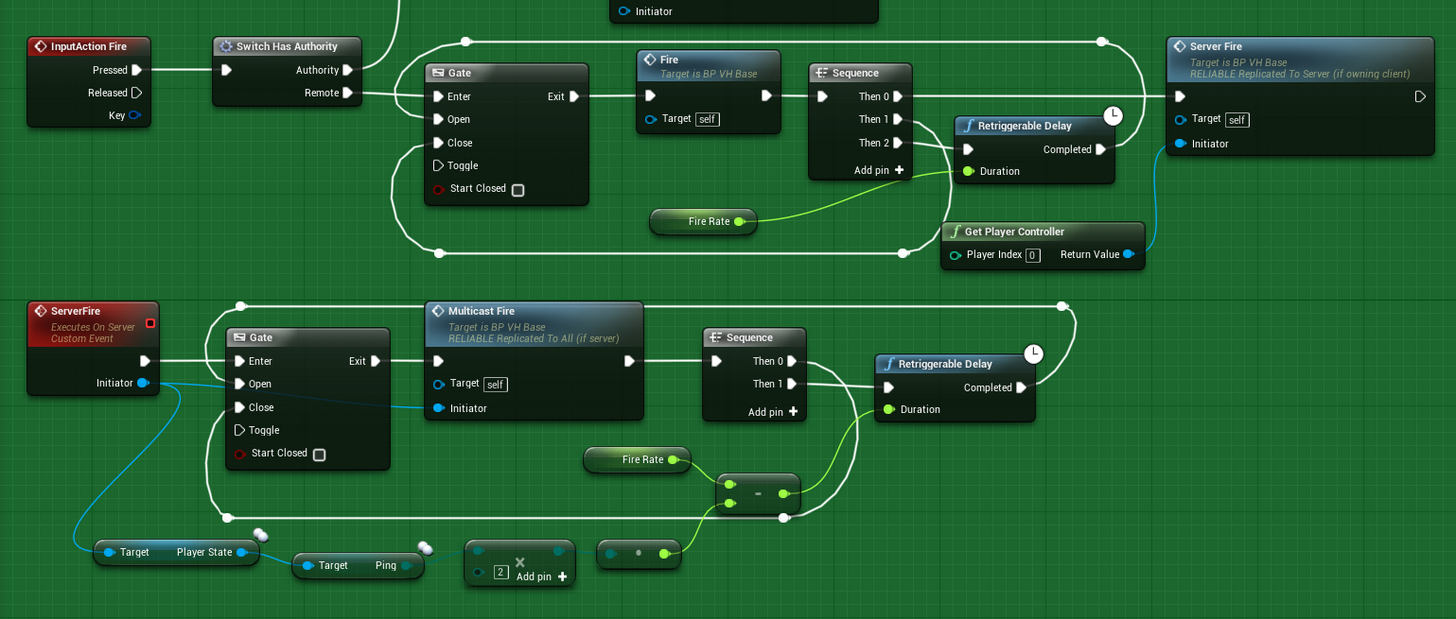 slim holly
server should do the logic
simple boolean IsTriggerDown is the best approach
client should not have power over how and when it fires
 wary willow
Has anyone gotten Slice Procedural Mesh to work in MP?
jolly berry
would anyone have a clue why when I server travel from my lobby to my main map it loads for like a second and then the listen server player crashes
and then every other client returns to main menu
[2017.04.22-04.47.52:464][757]LogGameMode: >> GameMode::HandleSeamlessTravelPlayer: LobbyPC_C_0 [2017.04.22-04.47.52:466][757]LogGameMode: << GameMode::HandleSeamlessTravelPlayer: GameplayPC_C_0 [2017.04.22-04.47.52:466][757]LogGameMode:Display: Match State Changed from EnteringMap to WaitingToStart [2017.04.22-04.47.52:469][757]LogGameState: Match State Changed from EnteringMap to WaitingToStart [2017.04.22-04.47.52:473][757]LogSlate: Took 0.000170 seconds to synchronously load lazily loaded font '../../../Engine/Content/EngineFonts/Faces/RobotoRegular.ufont' (155K) [2017.04.22-04.47.52:531][760]LogGameMode: >> GameMode::HandleSeamlessTravelPlayer: LobbyPC_C_1 [2017.04.22-04.47.52:532][760]LogGameMode: << GameMode::HandleSeamlessTravelPlayer: GameplayPC_C_1 [2017.04.22-04.47.52:563][762]LogScriptCore:Warning: Script Msg: DestroySession - Invalid player state
weak meteor
There is no error there, try running your listen server from visual studio so you can break where it crashes
weak meteor
Follow the programming setup guide in UE4 docs, the unrealvs plugin is useful too. Then just run with MAPNAME?listen from vs and connect from your client build and vs will break when the server crashes
jolly berry
how do i test a standalone built version?
i tried attaching but
it can't find source for it
since i guess its cooked
I need to test server travel
weak meteor
You can just hit debug from vs and run it straight from vs, don't need to attach
jolly berry
yo thanks for that advice
ended up finding the error and fixed everything
I was able to actually play the game I've been building for months with a couple friends. That was pretty cool haha
Not sure what I did exactly but I got it to debug through source code even when attached to a standalone exe
so yeah, thanks man! @weak meteor
weak meteor
What was the error out of curiosity? :)
spark igloo
how do we intiate login using facebook and give permission to app to give access to user's info(friends etc..) ?
I am now using Loginwith facebook(playfab block and with access token) in ue4 , its working . but what if the access token is exprired or not available ?
jolly berry
@weak meteor I was having my world objects manually ping my HUD when to update. They all had a reference to the HUD
on the Server (even though it was a listen server) I believe either HUD or something within the methods being called was acting on nullptrs
I basically just removed all references of HUD from the world objects and had the HUD manually check the objects for the data it needs
better encapsulation this way anyway
but yeah the error pointed to one of my HUD-> calls
I commented it out and then another HUD-> call from a different world object crashed it
so I learned there just to have the HUD handle things by itself and not have world objects worry about it. Makes sense too cause the HUD should be able to decide how it wants to render information, the objects shouldn't force the HUD to
pale vapor
Anyone here have any idea why my character movement is jittery, only for the character's player's client? I'm calling AddMovementInput from the client to do movement.
I've also tried calling it from the server, but then clients couldn't move.
I tried calling it from Server who then tells the client to call it but that had the same effect as just calling it from the client directly.
This only happens with listen server too
twin juniper
is your AddMovementInput fed from an inputcomponent ?
 balmy pike
C:\Program Files (x86)\Microsoft Visual Studio\2017\Community\Common7\IDE\VC\VCTargets\Microsoft.MakeFile.Targets(44,5): error MSB3075: The command "....\Build\BatchFiles\Build.bat UE4Server Win64 Development -waitmutex" exited with code 5. Please verify that you have sufficient rights to run this command.
Has anyone encountered such a problem? When building a server.
 robust wind
Is the file editable?
balmy pike
It seems that yes
lost inlet
the build output might give more information
 glossy hound
Anyone know why a dev server build would be a success but no server.exe would be created?
 cedar galleon
Hey guys i have question
When i replicate destruction mesh, the debris all client see the different location, but is correct?
worn nymph
@balmy pike yep had same issue just clean out the project folder by deleting all the not needed derived folders . Delete the visual studio files including the database file then regenerate them by right clicking on the project . Then rebuild server . Worked for me
weak meteor
@cedar galleon that sounds correct, replicating physics objects is not going to work over a network game without some significant work and having little else in your network traffic. Destructible mesh should be cosmetic-only in a multiplayer game, so will look different on everybody's machine
cedar galleon
@weak meteor tk man
slim holly
does anyone know how to increase client net speed cap
anything I found with google is outdated
wise depot
so apparantly, there is absolutely zero gaurantee that player controller zero is the local player on a p2p host
after a couple of games bouncing between maps/gamemodes etc, my host's GetPlayerController(0) returns one of the connected players
brittle sinew
Is it ever said that there is one? I avoid those types of index find functions for chiefly that reason
wise depot
well if you look through the answer hub/forums etc of how to get the local player controller on servers they pretty much all hint at zero should always be the local
also @raven holly UE4 limits player names to 20 characters
raven holly
:c
wise depot
do you use engine source?
@raven holly if you use the engine source, GameModeBase.cpp:705
FString InName = UGameplayStatics::ParseOption(Options, TEXT("Name")).Left(20);
change that 20 to whatever you want it to be
brittle sinew
@wise depot I think those people either A. see it experimentally be index 0 once and extrapolate off of that or B. just hear it from others and repeat it
I've seen nothing official to support that, so yeah, I wouldn't trust it
wise depot
yeah probably the latter
either way if anybody else is having this issue:
world->GetFirstLocalPlayerFromController()->GetPlayerController(world)
that should return the first local player controller.
Which does not gaurantee it is the primary player in splitscreen
there is a check for primary player somewhere I just can't remember where
 jagged coral
Hi, could someone please explain to me how Vehicle System (Main Pawn is ThirdPersonCharacter and players can possess vehicles) on Server-listener should be build? My system works but my vehicles on Client and Server side shake uncontrollably for some reason. 😦
 sterile pebble
what is good place to store reference of managers, that every actor in player world can get without server calls? I dont care about cheating, its only FX stuff.
slim holly
Gamestate is common ground between clients and server
 topaz flame
Hello, I've been working on a multiplayer game for a bit, purely in the editor, and everything has been going okay, but now I'm trying to understand how to implement standalone dedicated servers properly. Do I need to/can I maintain separate projects for client/server? How does that affect replication when it comes to things like packaged content/plugins etc? If anyone has any resources they could suggest it would be much appreciated 😄
thin stratus
No, it's the same project
Download the Source, build it and then change the Engine Version of your project to it
Then you can open Visual Studio and build a Dedicated Server of your project
There are tons of wiki articles etc about this
In addtion
to split client from server code
That might be interesting
topaz flame
Yeah I found the wiki(s) for building dedicated servers and I know if can be done this way but I wondered if real games used separate projects, stripping graphics and things the server might not need or want for security like secret keys for connecting to platforms like playfab/gamesparks. After building my server (which works normally in the editor), it crashes with an OSVR error and I wondered if the server should even be running OSVR...
ty for that link
twin juniper
@thin stratus does that link you posted above actually split all of the code?
whats inside of FortniteServerClasses.h
lol
thin stratus
@twin juniper No idea, didn't read it
 regal hazel
Is there a unique net ID / GUID for actors that is available on both Client and server?
lost inlet
yes, the one on the playerstate
regal hazel
I'm talking about on a per actor basis
 pallid mesa
is the sha-256 available in unreal 4.15+ vanila? If negative, do you know about any decent plugin?
 raven viper
Hey peeps. Anyone knows why the Find/Create session it not working on iOS? We are trying using "NULL" subsystem. Works perfectly on PC and on Android, but on iOS it's literally nothing.
twin juniper
@raven viper NULL subsystem
is only lan i believe
i think iOS has its own subsystem doesn't it?



It does lol
raven viper
iOS has it's own subsystem, but it is not working for packaging. Weird as hell
It is actually not solved, they just marked it immediately.
And yes, for NULL, we are trying LAN here.
 summer rivet
super stupid question I hope but if I have an actor in the world on the map in a dedicated server, say an NPC Character, and I join with my client do I end up with 2 unique characters or is the character on the server the same as the one on my client just replicated? I only ask as that stuff is present in the game world when I load it in the client so I don't know if it's checking with the server and just connecting them or if its a completely unique character on client and server
raven viper
Depends on whether you are replicating the given actor or not. It can be either.
 hollow pond
Has anyone used Amazon's GameLift with dedicated servers?
twin juniper
If a variable isnt replicated
does that mean that someone can edit the variable
using Cheat Engine
lol
brittle sinew
I'm not aware of safeguards against it (if any), but I'd assume if the client has complete control over a local variable they could.
If you let them use that value in an authoritative way though, that's just asking for trouble 😛
In the end, however, that's mostly the job of an anti-cheat
brittle sinew
And I completely disagree. :p
Just because it has garnered a reputation of being lackluster, which I don't think is completely fair, doesn't mean it's a useless AC
twin juniper
i mean
conan got so many hackers
ARK has tons of hackers
cs;go has hackers even
it doesnt seem to do much tbh
 heady delta
server admin is best anti hack imo
jolly berry
How do I guarantee my editor will test multiplayer replication stuff like standalone will? The reason I ask is because I have a aiming system that happens on Tick for my rocket launcher. It was replicating beautifully in the Editor but when I tested on a shipped product it wasn't replicating at all.
It leads me to believe it's NOT actually replicating and the editor is just doing it on its own somehow
If I say have a component called Rocket Launcher attached to my Actor, and for my Aiming Component's on Tick it raycasts from the camera to the ground and then tells the rocket launcher to rotate towards that point, how could I replicate that to server/clients?
On server do you have access to every camera for each pawn?
twin juniper
@jolly berry You can't guarantee it, which is why you need to test and set up some debugging tools that you can use in a packaged game as well
The "always" works for replication on tick is Has Authority - > Multicast to all
But that can be expensive, so think about how you want to use it and how important it is
You can also just do it every tick client side, and send the multicast at a different rate
slim holly
there's no guarantee other than knowing how it actually should work
and general rule of "no tick" applies to it aswell
hollow pond
Hey guys, when building Dedicated servers, do the clients also need to be built from the source? Or could I use the standard version to do it?
weak meteor
you should build from the same source to guarantee no differences
hollow pond
Thanks, @weak meteor
 celest falcon
Hey, I'm trying some multiplayer things for the first time, and trying to change a material from a blueprint. The material changes, but only on the client where the BP function is called. How would I also change it on the other clients and server? As I said, first time doing multiplayer, so very much a noob at this...
weak meteor
there are quite a lot of concepts behind networking and getting multiplayer working which are good to know first, have you gone through any of the tutorials and docs?
twin juniper
@brittle sinew so they have their game on steam, yet they intentionally opted out of VAC?
brittle sinew
I'm not sure how VAC integration works tbh, I don't think it's a simple opt out though
I'm guessing it's more of an opt in in discussions with Valve directly
brittle sinew
As in, you don't automatically get VAC by publishing a game on Steam?
According to the Steam page, there are 482 Steam games using VAC
There are currently ≈ 14000 total games on Steam
You do the math
😉
brittle sinew
Well when you say "intentionally opt out" that sounds a bit different, I'm guessing it's a lot of work to integrate VAC in with a game
But correct, either way Conan does not run VAC
twin juniper
;l
 jolly siren
lol
twin juniper
i was under the impression you get vac out of the box, wasnt ue3 like that with udk ?
brittle sinew
Yeah, what I said earlier about talking with Valve about it isn't completely accurate
But it still needs to be implemented in the game well, and that takes time+resources
jolly siren
So if you unpossess an autonomous proxy character it becomes an simulated proxy character
interesting
jolly siren
Is there anyway to check if a controllerless character is local?
jolly siren
Unpossessing a character causes it's role to change from AutonomousProxy to SimulatedProxy? I can work around that. However, it looks like it stops COND_OwnerOnly replication too...😵
Has anyone dealt with that?
@rough iron ^ ❤
twin juniper
@jolly siren why would u want to check that
jolly siren
Code that relies on Role and COND_OwnerOnly breaks when Character is unpossessed
twin juniper
@jolly siren overwrite UnPossess()?
 rough iron
When you unposses it posses it with another controller that handles your custom logic
An AI one for example, there is no repliction anymore through it though (you can still replicate through it's pawb which does exist on the clients)
 past totem
Replication is totally not working in my game?
Nothing is replicating, and it's on always replicate
@ me pls if you know something
 dusty sleet
@past totem You won't get help with a question like that. Start small... pick one thing you want to replicate in the game and make it work at a very basic level. if it doesnt work, post your code for that simple thing and someone will help you fix it. it will let you better understand how to make it work for all the other aspects of the game. takes some trial and error to get used to it. "nothing works in my game, let me know if you know why" ... isn't helpful to get help
past totem
Hmm yea I guess xD sec
When one player spawns an actor, any other player doesnt see this actor and can walk in it and stuff
 gleaming vector
is player 2 in the server?
start with the obvious
- are you running in multiplayer?
past totem
http://prntscr.com/f1rv1a Yep autojoining too
 gleaming vector
k
past totem
The players see each other moving and stuff
gleaming vector
is the actor set to replicate?
past totem
Yep
gleaming vector
blueprint or C++?
past totem
BP
gleaming vector
if C++, did you implement GetLifetimeReplicatedProps?
uhm
you mentioned spawning an actor
are you spawning the actor on the server or the client
past totem
Well I have 2 different actors, one of them is with C++ but also have a child BP
Hmm I'm just spawning it regularly lol
No idea what that means
past totem
 gleaming vector
use the "Has Authority" node
past totem
Yep keypress
gleaming vector
ok
past totem
ok sec
gleaming vector
you aren't spawning it on Authority
gleaming vector
are you sending an RPC to the server to tell it to spawn the actor?
gleaming vector
Setting up networked games for multiplayer.
past totem
Like this? http://prntscr.com/f1rw6n
 past totem
I can also change the custom event to run on a sever tho right?
past totem
ok I will try that first then
gleaming vector
The various aspects of multiplayer applied to Blueprints.
read that
basically, if you spawn an actor on the client, it only exists on the client
if you spawn an actor on the server, it exists for all clients (baring some exceptions that you wont hit in BP)
so, it's likely you are spawning the actor on the client, thus you must send an event to the server to tell it to spawn that actor for everyone
past totem
It doesnt go to the first exec, only to the remote one
made a custom event that run on the server and now it does work :P
Thanks :P

Whats that for?
It seems like calculations are changing in a server, wtf?
Server:
http://prntscr.com/f1s3n2
Not Server:
http://prntscr.com/f1s3yn


#Broken xD
What could cause that?
 ocean mango
I'm having a really strange problem with setting up multiplayer
I finally dealt with a strange problem that was causing my actors to respawn when someone joined in "had absolutely nothing to do with logic stupidly enough"
And now I'm dealing with trying to figure out what the hell is going on.
When a server is on it's own I can destroy the actor and respawn it, and repocess it
however, the moment another player joins and someone dies, the game crashes
with the only message saying that there was an infinite loop assertion at Collisionhit
Or rather character death event
Another thing is that for some stupid reason, the other players are able to see the server move around just fine
But the server can't see them moving around
I'm not seeing anything that would trigger an infinite loop
Oh what the fuck
I found the error, but I'm not sure what's actually happening
Oh I see
No that wasn't it...
sigh unreal makes this unnecessairly difficult
jolly siren
@rough iron I can replicate through an AI's pawn, but not with COND_OwnerOnly right?
Is there some way to force replicated properties to resync once it's repossessed?
thin stratus
@ocean mango lemme guarantee you that it's not difficult at all
At this point you are probably doing something wrong
And we would need to see your code to help you
 mild zodiac
is it possible to create a dedicated server and then somehow execute functions on it, create a gui maybe?
ocean mango
I just trashed the online code, and swapped to Split screen, I've spent a week on this and made no substantial progress
Turns out that "Replication" doesn't quite mean what it says
If you have a component that is not a product of "CharacterComponent" then you need to provide the implementation details yourself
Also, yes. Yes it is possible FTriangle
mild zodiac
@ocean mango do I need to create external app for that or it can be done with ue4?
ocean mango
You can create an external app.
But doing it in UE, I wouldn't know.
UE lets you make a dedicated server, as far as I am aware, but I know very little about the details