#multiplayer
1 messages · Page 317 of 1
 slim holly
 south flare
Whats the netpriority set to? Is the actor relevant at this time?
 tranquil yoke
Ok, does reliable also drop or only unreliable?
slim holly
either way I'll just set to reliable, that's least of my worries when the whole project is exploding
tranquil yoke
You should verify with Wireshark like someone said, to make sure if the package is being sent or not and then see if it's arriving or not
It could just be a port-forwarding issue if you're not using steam
south flare
Yeah I used wireshark to verify that a whopping 45000 packets were sent because of one replicated array....
tranquil yoke
yea I mean, sounds odd it's dropping
south flare
No suprise
tranquil yoke
but yea it coudl be dorpped due to being too large
that's possible
Have you tried sending something smaller?
tranquil yoke
Oh okay
Ok so I am also having a problem which I've had for quite some time (2-4 weeks), I am in need of some fresh eyes. Is anyone interested in working with me on this problem for a bit? I have a screenshare setup.
I am trying to replicate my (VR) pawn but it is behaving weirdly .. It is .. almost replicating properly.
slim holly
crap
LogBlueprintUserMessages: [LevelActor_C_0] Server: Worker Queue finished, 3750 added, 0 replaced or rotated, 0 removed
LogBlueprintUserMessages: [LevelActor_C_0] Client 1: Worker Queue finished, 2961 added, 0 replaced or rotated, 0 removed
so, 800 datas short?
and these are all reliable, why is there a bunch still missing
I have a question about VR replication
what makes it so hard?
tranquil yoke
What about VR replication? My problem is also VR replication-related
ah
My problem is hard because - My pawn is complicated. It is computing the body joints based on where the HMD and motion controllers are located. That's what makes it difficult
I didn't create the pawn, that makes it even more difficult, and the worst part is .. I can't do it either (I mean theoretically I can but it would take too long time)
I can replicate the movements of the motion controller and all, but it is reconstructing the pawn incorrectly, and I need help to debug this, I'm out of ideas
😦
 jolly siren
Does anyone know what these are? For some reason it intermittenly happens to one of my clients when travelling and then they don't get GenericPlayerInitialization called for them and they eventually crash.
LogNetPackageMap:Warning: GetObjectFromNetGUID: Attempt to reassign read-only guid.
jolly siren
@rough iron 😇
 rare cloud
I made some new test I absolutely don't know why when I set actor rotation it work sometimes and don't some other
and I can reproduce this with Third person template
 cursive herald
@balmy plaza Ahh I would not use that 10 year old SSL to protect payment info XD
 balmy plaza
Of course not 😂
jolly siren
@rough iron why would my level be timing out on a client? 😬
 rough iron
Mhhh it's too big and you are loading it in blocking fashion on statup?
if thats the case you have to stream it in in non blocking fashion
jolly siren
hmm this map that I'm testing isn't that huge
the umap is under 9 meg
it only happens sometimes during seamless travel
triggered from RestartGame
I feel like I'm missing some tidbit that will allow me to have a seamless travel without dropping anyone
void AFPSPlayerState::UnregisterPlayerWithSession()
{
    // Don't unregister players who were in the level before seamless travel (i.e. don't unregister players on restartgame)
    if (!bFromPreviousLevel)
    {
        UE_LOG(LogTemp, Warning, TEXT("UnregisterPlayerWithSession"));
        Super::UnregisterPlayerWithSession();
    }
}```I just recently added this
and I feel like I'm missing something else with the session travelling
I'm now calling StartSession in GenericPlayerInitialization so that it gets started after a travel again (for restartgame)
But when this GetObjectFromNetGUID: Attempt to reassign read-only guid issue occurs it doesn't make it to GenericPlayerInitialization
The level loaded very quickly on the client according to this
[2017.03.29-17.40.43:882][725]LogWorld: Bringing up level for play took: 0.044425
[2017.03.29-17.40.43:882][725]LogNet:Verbose: NotifyLoadedWorld Begin
The travel happened quickly too
[2017.03.29-17.40.43:883][725]LogWorld: ----SeamlessTravel finished in 1.82 seconds ------
and then I get the read-only guid warnings
I am starting the session on the server in GameSession::PostSeamlessTravel
void AFPSGameSession::PostSeamlessTravel()
{
    Super::PostSeamlessTravel();

    IOnlineSubsystem* OnlineSub = IOnlineSubsystem::Get();
    if (OnlineSub)
    {
        IOnlineSessionPtr Sessions = OnlineSub->GetSessionInterface();
        if (Sessions.IsValid())
        {
            UE_LOG(LogOnlineGame, Log, TEXT("Starting session %s on server"), *GameSessionName.ToString());
            Sessions->StartSession(GameSessionName);
        }
    }
}```Yeah the map is def loading fine on the client. Line 5 is the client telling the server that it has finished loading hte map
also from epic's comments it looks like they prefer levels that don't stream when using seamless travel
 * This codepath is designed for worlds that use little or no level streaming and GameModes where the game state
* is reset/reloaded when transitioning. (like UT)```Ahh I missed these warnings too
jolly siren
those warnings happen first, so probably the real issue
[2017.03.29-17.40.42:492][699]LogNet:Warning: UActorChannel::ProcessBunch: SerializeNewActor failed to find/spawn actor. Actor: NULL, Channel: 10``` summer rivet
ok I've been trying but I really don't understand how maps and networking work together. Lets say I have a Login Map that the client just has some HUD stuff, it connects to a non UE4 server for info, and then returns back some info. Once it's good to go I want it to connect to the UE4 dedicated server I have running the game world on. I assumed it would work by executing the console command for open IPADDRESS but that ends up loading the world map with the character stuck and unable to move (assuming something funky with the PC). If I manually execute a open level command to the map the server has and then open IPADDRESS to connect to the server then it seems to work fine.
so whats the actual process of having clients change to the correct servers for the maps they want to go to
or is it a case I should be handling the open IPADDRESS part differently on the server itself
jolly siren
sounds like you want sessions
System for setting up advertisement of matches and handling matchmaking of players
rare cloud
it's crazy that it's so complicated to simply change the rotation of a character x)
AController::ClientSetRotation(FRotator NewRotation, bool bResetCamera = false) didn't work for me
also the control rotation affect the camera for me not the character
summer rivet
well I don't really want sessions. I literally want to know how to change maps on the client side and have them end up in the server I want
jolly siren
still sounds like sessions
Matchmaking is the process of matching players with sessions. A session is basically an instance of the game running on the server with a given set of properties which is either advertised so that it can be found and joined by players wanting to play the game or private so only players who are invited or notified of it in some way can join.
but yeah i guess you can do it without them
rare cloud
@summer rivet, look at this doc : https://docs.unrealengine.com/latest/INT/Gameplay/Networking/Travelling/
An overview of how travelling works in multiplayer.
summer rivet
well its not match making, its a server that runs a map and I can't get people to go to that map from another map =/
rare cloud
it can be an open world with some instance
also if you want to keep some data persistant you can override the CopyProperties function from APlayerState
or if your MasterServer already manage this you don't need it
summer rivet
yeah not even caring about data transfer or anything
just literally going from one map to another lol
rare cloud
ok well APlayerController::ClientTravel is the way to go 😄
summer rivet
but how do you do that in BP's
wait no not server travel
server travel would cause anyone connected to have issues
jolly siren
issues?
summer rivet
im not changing the map on the server, im changing the map on the client only
one map, one server. never changing
rare cloud
yeah I edited my message my bad
jolly siren
ah
summer rivet
and yeah how would I use Client Travel with just BP is the issue
rare cloud
hmm :/
summer rivet
it seems so weird I can't just get this working normally. I know I am missing something
rare cloud
I will check if VictoryPlugin haven't a node like this
summer rivet
like imagine you had a screen that was offline, you could set up options and such or connect to the game online. This is all in MapA. When you hit connect you want to connect to the server which has MapB loaded.
just simply calling open IPADDRESS causes the game to basically not be playable which is the issue I can't get my head around
rare cloud
erf VictoryPlugin has ServerTravel but no ClientTravel
summer rivet
yeah I think I am doing something wrong on my actual connect stuff lol
 opal sentinel
got my game starting to work for multiplayer. I just finally got my spawning working multiplayer style (you spawn guys in and controll them) . I got it to spawn fine for both players, but my server/player 1 doesnt see player 2's characters. player 2 see's all characters. Tried to change owner on the spawn pawn but that didnt seem to do it. Anyone have any ideas that could save me some runnin/lookin around?
meshes arnt hidden, or set to owner only or anything
 wary willow
@summer rivet Did you fix your issue? How are you connecting to the server in the first place?
summer rivet
Left the house and gave up for now. Just doing an open ipaddress console command in blueprints in a umg widget.
I think I'm missing how networking , blueprints, map travel, dedicated servers all work together properly. Plan on making a new empty project and trying to figure it out.
wary willow
@summer rivet Have you read this yet? https://wiki.unrealengine.com/Dedicated_Server_Guide_(Windows_%26_Linux)
summer rivet
yep. I've got a dedicated server so that's not an issue here. I just can't seem to get travel from one map to another working properly on the client
summer rivet
blah finally figured it out. some issues with the game modes and with input mode but /rude UE4 networking lol
 mellow cipher
Is the client changing maps while they are conmected to the server?
summer rivet
yeah I finally got that working here. My main issue was input mode was not being reset on map change and then I had some weird delay issues with spawning in players on the map change.
the dedicated server kept giving me the notice that I was still in the first login map even when I was in the server world map was a big issue
 jolly berry
Yo i have pawns spawning on the same location even though there are 4 spawn locations, is that a bug atm?
it happens every once in awhile
wary willow
@jolly berry Do they spawn at 0,0,0?
Or just one of your spawn points? What spawn point system are you using?
jolly berry


I just have 4 player spawns on my map, above the ground, and the game mode is auto spawning them
I have a hunch though that the game mode isn't accounting for where one client is getting spawned, so there's a chance the second client will spawn in the same spot
but this is just at start, nothing with respawning

 unborn rock
can't you use the GameState for this ?
 wise depot
hey, any of you guys used the replay system?
rare cloud
@jolly siren, I reply to the answerhub
 fossil silo
is there a trick to getting the default pawn to auto-possess? The server will auto-possess, but any clients that join will not. I set the default option to possess player 0
 thin stratus
Autoposses is a local thing
If you want auto possession you would need to set the pawn class in the gamemode
Other than that you need to take care of possession yourself with, for example, the OnPostLogin event
@fossil silo
fossil silo
i have the pawn set in gamemode
the server will spawn and possess fine
but the client doesnt seem to want to
only trying to use ue framework to do it because i was having issues w/ doing it in onpostlogin
may just be dillusional because i been pulling 15 hour days till the sun comes up lol and missing something obvious
see, onpossessed event fires on server, but not clients
thin stratus
Well you have two ways:
Either you let the GameMode spawn the Character, which will take care of possessing it.
OR
You set the DefaultPawn to NONE, and spawn + possess the Character yourself
fossil silo
when u say let gamemode spawn, do u mean just set a default pawn?
thin stratus
Yes
fossil silo
ok, i was doing that, but my on possessed event set the 'possessed' bool, and thats what I was checking for, so maybe it was possessing, and the issue was somewhere else
it was seeming like the server could see both characters and controllers (doing vr) but the client couldnt see anything
thin stratus
Well you should notice if it worked by just trying to run around with the client :P
Ah, VR Multiplayer
thin stratus
You are replicating them by hand?
fossil silo
using the third person template i can get it all working quick
thin stratus
(Controller positions)
fossil silo
but we have so much going on its starting to seem confusing lol
yea
one sec, ill show u
thin stratus
Na, I know how that looks like. You are not the first one :P
fossil silo
on character, i have this serverupdatehmdposition() running pretty often
should I be multicasting?
or am i supposed to just do it on server and let it replicate?
it seemed like it wouldnt replicate properly after a lot of experimentation, and i sorta got this working this way
but something was happening w/ possessing the character so i havent been able to see if this was working
hey credic, i gotta hit the sack...thank u for the insights. 😃
jolly siren
@rare cloud thank you jack, I'll try that out
thin stratus
@fossil silo One thing is, you don#t want to make the multicast reliable
That's not directly solving your errors, but if you call it that often, probably on tick, then having ALL multicasts on reliable is killing it.
Things like this shouldn't need to ALWAYS reach the client
jolly siren
hm so seamless travel player's can be handled before gamemode calls PostSeamlessTravel that is annoying
 twin juniper
@thin stratus hey you think u could help me out with some stuff
thin stratus
No idea what stuff
twin juniper
xD
Ill show u in a sec

There u go
btw just so you know "Temp_object_variable" does not exist
and it never existed
at any point in time
Also for some reason my Camera is culling out the player mesh
@thin stratus
thin stratus
Well I don't know. I guess you access an empty reference aka nullptr
jolly siren
sounds like a corrupted bp if it's complaining about variables that don't actually exist
 blissful badger
I have a UActorComponent called UBaseStats that holds various float values for my character (like score, runspeed, set). This then has a delegate that is called whenever a value is updated. One place that delegate is bound to is a UUserWidget subclass which binds a BlueprintImplementableEvent to this delegate in it's NativeConstruct method. All of this works fine in single player and I can see my widget getting it's BlueprintImplementableEvent called. However when I switch to a dedicated server the delegate does not fire. I can see the round trip for the change happen on the client, then server, then back to the client (as in my OnRep callback is being called) however the multicast delegate shows no bindings. Can anybody help me out with this?
sry for the wall of text 😃
 vital steeple
i pretty much have the same problem^
or at least the solution might help me resolve my issue 😃
blissful badger
i'm still investigating it myself so if i come up with anything i'll post it here
blissful badger
@vital steeple just found that binding the event directly in the BP seems to work
kinda seems like some threading issue
vital steeple
hrm
i have some replicated BP's that just hold some info and are generated at the start of the match
as the server, i can update and read them just fine, but the values dont replicate as they are changed, despite the variables being replicated (and the command to change them is being run on the server)
however, im new, so w/e. maybe i just need to spend more time doing this stuff and wrapping my brain around it
blissful badger
well i'll say i've spent 3 months with unreal so far, just started multiplayer a week ago and i'm still trying to get solid replicaiton going. doesn't seem to be as easy as the docs imply
who owns those BPs?
like, who are they attached to?
and how are you updating them?
vital steeple
same thing for me, four months, starting MP stuff this week
well they are created by the gamestate
i guess the server owns them?
blissful badger
ok so shouldn't be an ownership issue then
vital steeple
each one is a "technology" that gets researched then unlocks the next tier
it was easier to use this than a struct array, since working with struct arrays in BP is buggy
im pretty sure i just need to sit down and redo everything on the communication side
blissful badger
i'm not sure on this, but i think also if you update a single item in an array it'll send the entire array, not sure there though
i noticed some weird stuff when i had a TArray of structs
how are you doing the unlock? server RPC?
vital steeple
the BP itself has some scripting
just a loop that ticks every second for X seconds, then triggers an event that finds the other BP that it is supposed to unlock
i guess whats weird to me is
if something is created by gamestate, does the server automatically own it?
or do you need to establish ownership
blissful badger
server owns gamestate, and all clients should receive replication
so yea, i would expect that setup to work as well
on your gamestate object did you set the component to replicate?
like Component->SetIsReplicated(true); along with bReplicates = true; in the component constructor
or equiv flags if they're pure BP
vital steeple
oh so the gamestate spawns the BPs as actors in the world
they arent components of the gamestate
blissful badger
gotcha
vital steeple
but those BPs ARE replicated
thanks fo rthe help! this stuff is a bit wonky IMO
seems like it will be a constant struggle to remember what needs to be replicated, what needs to be sent to the server and what to the client etc
jolly siren
[2017.03.30-20.06.17:344][250]LogVoice:Verbose: Unknown remote talker (erebel55 [0x110000104F771D1]) specified to UnmuteRemoteTalker() has anyone seen these with voip?
blissful badger
@vital steeple yea sorry i couldn't be more help. and i totally agree, it does get complicated. if i can think of anything else and you're on i'll ping you but that's all i can think of for now
vital steeple
no worries man, i think i just need to be more structured with replicated stuff
blissful badger
might not be a bad idea, keep it more simple at first. i just rewrote my component last night to remove an array and just put static member variables for all the various entries. it's ugly but it's working for now
twin juniper
Is there a way to add a delay on a component
Like i have an Actor Component
but i want to know if i can call a delay node
for multiplayer purposes lol
i need a delay to stop the player from doing stuff before other stuff is initialized by the server
 brittle sinew
Don't use a delay node for MP, that is really dangerous, try to keep everything event-based
Because if something takes 0.01s too long for your delay, welp, there goes your flow
twin juniper
hm
wary willow
@twin juniper ...
You need something to stop the player from doing stuff before other stuff is initialized by the server. Just like @brittle sinew said...this is a simple Event Based approach
You might need/want an event queue
And that will probably help you out
 dusty sleet
in something like the flying template where they're using addactorlocaloffset and addactorlocalrotation.... is there a way to replicate that type of movement to other players? As its its too choppy and hinders the movement, and tick seems like it wont replicate that well.. esp for something important like movement.
 robust zephyr
any way to get netprofile to work? my editor crashes every time I try to profile networking
robust zephyr
ok, next question
I want to rotate player character's child object and I want to replicate it's rotation. how do I achieve that. for whatever reason Unreal's replication stuff doesn't seem to make sense to me
 red ledge
so, I'm trying to make a drone by using an actor then making it follow a specific socket on the player lerping the actor location to it on the server, it works fine on the server, but I get rubber-banding on the the client even when playing in editor. the drone just keeps going in the dircetion it should go then getting back etc. is it a prediction problem? and is there an easy way to fix it?
 vocal ingot
Why is there "ClientPlayCameraShake"?
why is it replicated?
what if I only want to play camera shake locally
without having server telling me to do it
jolly siren
then don't use ClientPlayCameraShake lol
just use PlayerCameraShake
I still can't figure out why my voip stops working after seamless travel 😦
[2017.03.31-03.29.35:310][493]LogVoice: StartRemoteVoiceProcessing(ethornburg [0x110000111832965]) returned 0x00000000
[2017.03.31-03.29.35:316][494]LogVoice: Trigger Local 0 NOTTALKING
[2017.03.31-03.29.35:359][494]LogAudio:Warning: Waited 41.452251ms for audio thread.
[2017.03.31-03.29.35:359][495]LogVoice: Trigger Local 0 TALKING
[2017.03.31-03.29.35:360][495]LogVoice: Unmuting remote talker (ethornburg [0x110000111832965])
[2017.03.31-03.29.35:360][495]LogVoice: Unmuting remote talker (ethornburg [0x110000111832965])```it all seems fine from the logs
jolly siren
hmm I do see one of these in one of the client logs
[2017.03.31-03.29.36:399][825]LogVoiceDecode:Warning: SubmitRemoteVoiceData: DecompressVoice failure: VoiceResult: '1' k_EVoiceResultNotInitialized (Voice Not Initialized)
robust zephyr
So, question about replication. I can use this to make a static mesh component rotation visible for other players but something makes it spasm like hell if its owner can see it. How should I fix it?
jolly siren
oop cool looks like someone else is having this issue as well, I'm not alone
https://answers.unrealengine.com/questions/580964/steam-voice-chat-stops-working-after-server-travel.html
@robust zephyr that looks awful, why are you calling RPCs from tick?
think about what that would do to a network
sending an RPC 60 fps
robust zephyr
temporary solution, meaning to put it in a 20-60tick loop with calculations to skip when no changes occur
jolly siren
yeah that is still crazy overkill
redesign it in a way that replicates the least amount of data over the network as possible
robust zephyr
doing that once I start to understand this whole replication stuff
jolly siren
Anyone else using steam voip in 4.15?
twin juniper
Is there a way for the server to detect client overlaps?
like, i have a structure on the server i made yet on the server it isnt detecting client overlaps of the server actor
im spawning a dummy object and trying to find snap points on the client
before spawning it on the server
yet the server is saying there is no collision
hi guys
please
My steam integration works perfectly fine until I package a shipping build
I found that you should add a steam_appid.txt with 480 in it to the games core but it does not help
@twin juniper go to the DefaultEngine.ini file
and set your app id there
@twin juniper [OnlineSubsystemSteam]
bEnabled=true
SteamDevAppId=480
SteamAppId=480
so I guess it is set
So there is no way for the server to detect client collision
@twin juniper what?
jolly siren
@thin stratus yeah I still see all of these on both clients after travel
[2017.03.31-18.16.22:754][212]LogVoiceDecode:VeryVerbose: SubmitRemoteVoiceData(ethornburg [0x110000111832965]) Size: 15 received!
twin juniper
Is it possible to spawn an actor on the server and make it only visible to a specific client until an event (ie. left click) @thin stratus
twin juniper
I'm not sure because I'm trying to spawn my dummy on client and then use the dummy position to do something. However, the one doing the collision detection is a server actor
Lol
twin juniper
@thin stratus i need to be able to turn on visibiltiy only for client, and then be able to turn it on for everyone on the fly
twin juniper
does anyone know?
thin stratus
What about the OwnerOnly visibility setting
That's usually used for 3rd and 1st Person meshs
"OwnerOnlySee" and "OnwerNoSee" or so
jolly siren
yeah it would be the same as a first person mesh
twin juniper
hmm

So this is what i have
if its overlapping, snap to a point on client
and if its not snapping and its not placed, just follow the camera around
jolly siren
set OwnerOnlySee to true before it's placed. And then to false once you place it
twin juniper
Okay
So i cant spawn the object on client first?
im going to have to spawn it on server?
jolly siren
you could spawn it on client and then once it's placed destroy that on client and spawn it on server with rep
or you could just spawn on server with the OwnerOnlySee stuff I outlined above
twin juniper
yea
robust zephyr
so, would 10 rpcs/s be acceptable?
jolly siren
@robust zephyr what are you rotating? what are you really trying to accomplish?
robust zephyr
I'm rotating a turret currently
jolly siren
what's wrong with 2 rpcs, startrotate and stoprotate?
robust zephyr
do you mean like 2 calls to server per second?
jolly siren
no, I meant server tells client to start rotating. and client rotates until server tells it to stop. so 2 rpcs. nothing per second.
anyways gl, gotta get back to my stuff
robust zephyr
I'm really confused right now
I guess I need someone to explain me how to pass info to server without RPC
so
do you mean I would restart the rotation stuff evertime the rotation direction starts to differ from what it was at the start?
because that would just end up as few rpcs per sec, something you told to avoid
 thorn merlin
the real question is, do you wanna flood your network up just for turrets
i have my turrets replicate their aim direction only when they fire
thin stratus
@robust zephyr There is no way to communicate with the Server as a Client without using a ServerRPC on a ClientOwned Actor
I mean, despite some socket stuff, but let's not start with that
Setting it on tick is not really a problem as long as you don't set it to RELIABLE.
The things that I can see so far are:
- Authority (Server) is only calling a ClientRPC and not a Multicast. This Data only lands on the OwningClient and others won't see it
- Remote (Client) should be fine if he only tells the Server to set the Rotation. The Server is Multicasting it anyway, so the next tick should have the updated Rotation from the Client.
The problem that might occure is, that Server/Client Rotation differ. So the Server and Client try to send info at the same time.
What you can do is limiting the TICK call to the OwningPlayer. The Server only needs to multicast on tick if he owns the Actor.
Otherwise he would constantly override the Clients RPC. Try to use "IsLocallyControlled" or so.
slim holly
question about destruction replication: client joins midway to multiplayer match, and has local copy undamaged map. What would be the most reasonable way to store damage on server?
I was thinking saving the environment radial damages as separate actor that are replicated, but that would probably end up being really high number very fast
so should I go for Vec + 2 floats to save location, radius and damage value - array
but that array is gonna be huge too
thin stratus
Actors handle that themselves
You would have either a normal Replicated Variable or a RepNotify one if you need some events to appear
e.g. Health variable that replicates when the Player joins and then destroys itself with some explosions if health <= 0
slim holly
yes, but the visual wont be matching
which is kinda important
for partially damaged meshes
I should look into heatmaps
its gonna be a similar system, maybe that helps
robust zephyr
Thanks @thin stratus , got some spasms fixed with that IsLocallyControlled node.
I currently have this kind of setup currently. http://i.imgur.com/ZbnSFZ0.png

updates target rotation 10 times per second
though non-listen client sees its own version spasm between zero'd and target rotation
robust zephyr
oh, so that's why it helped, I forgot to turn it back to owningclient
so, all spams happened because I forgot to make sure only owning client starts the update loop
 limpid meadow
Hi, I need some help with dynamic level streaming and multiplayer. Can someone help me there?
twin juniper
hey so
@thin stratus hey so Set_Only_Owner_See(true); doesn't seem to do anything
does it need to be multicasted?
hm
doesnt seem to work either
lolol
It only seems to work in the begin play function of that component
twin juniper
Anyone else know?
thin stratus
I don't know if that can be set during runtime
rare cloud
@twin juniper, what do you want to achieve ?
twin juniper
I want to be able
to have a mesh be visible only for the player
until he places it
then it should be visible for everyone
@rare cloud
thin stratus
Then only tell that perticular client to spawn the mesh
twin juniper
thats what i had originally
i had it spawning on client
but then the server cant detect a client collision
(For my snapping)
thin stratus
Then also spawn it on the Server
The Server and the Client don't need a replicated version for this
Server spawns one ,Client spawns one
Both can check collision on it
Client maybe changes some visuals, like a red outline if it overlaps or so
And server decides if placing is allowed
twin juniper
hmmm
thin stratus
It works like this:
- Client presses button (or similar) to start placing a mesh. This Mesh should be an Actor that is only responsible for exactly this. (e.g. BP_PlaceholderMesh)
- Client checks if he can actually start the placing process (e.g. has the Item or what ever is needed for this)
- If he can, he will spawn the Placeholder and do collision checks for visuals (and only for visuals!)
- Client will also send a ServerRPC to tell the Server that he wants to start placing
- Server checks if he's allowed, if yes, he also spawns the Placeholder (still not replicated!)
- When the client thinks it's a cool place to put the mesh, he tells the Server to actually place the Mesh
- This is another ServerRPC. The Server will check the collision now with his version and will then remove the Placeholder mesh if placing is allowed
- He can now also tell the Client (ClientRPC) that placing was successful
8.1. Though to remove the feeling of lag, you could at least remove the placeholder actor on client sight when the client things he can place the actor. Otherwise the ClientRPC would result in the removing of the placeholder mesh on the client
twin juniper
@thin stratus curious, would this work?
void AStructure::SetOnlyOwnerSee(bool SetOnlyOwnerSee)
{
    Structure->bOnlyOwnerSee = SetOnlyOwnerSee;
    Structure->MarkRenderStateDirty();
}```havent tried it yet lol
its a multicast function
i wanted to try
if not ill try your method
thin stratus
Why not just doing it as I just told you
twin juniper
i would have to delete what i have
which i guess im ok with
its just... if it doesnt work
then im going to have to rollback lol
rare cloud
@twin juniper, use PreReplication ?
twin juniper
hey wait
i just did it!
my method seems to have worked
void AStructure::SetOnlyOwnerSee_Implementation(bool SetOnlyOwnerSee)
{
    Structure->bOnlyOwnerSee = SetOnlyOwnerSee;
    Structure->MarkRenderStateDirty();
}
MarkRenderStateDirty()
forces the renderer to re-render
lol
i call that own spawn to set it to only be visible to owner
then i call it again once its placed
and it spawns it in for everyone
that might be very useful to someone in the future actually
lol
also I highly reccomend anyone using networking in 4.15 to include "UnrealNetwork.h" in their project header... seems like thats where all the DOREP functions are now, maybe im just dumb but it seems like they were moved
twin juniper
@thin stratus hey so for your method wouldnt this mean i have two actors? one is a placeholder, and then the other is the real thing
just want to make sure
 fossil spoke
DOREP was always in UnrealNetwork.h @twin juniper
 reef yarrow
Anyone here ever setup a dedicated server ?
south flare
wow, i have no idea why these arrays just will not replicate to save my life!
@reef yarrow you need to build it from source
 frank portal
yep https://wiki.unrealengine.com/Dedicated_Server_Guide_(Windows_%26_Linux) this could be useful for you @reef yarrow
twin juniper
only thing about onrep functions is i wish they gave u a old value
so like if its a float you can have it like:
void OnRep_UpdateHP(float oldHP){
  doHUDSTUFF(oldHP, newHP);
}
@south flare @frank portal I've already set it up, Have the exe. Have you ever set it up with steam?
reef yarrow
If you register it with the steam OSS (Which i assume you do in visual studio) Can other players see your sessions?
south flare
they should
frank portal
no sry i never set it up for steam ^^
reef yarrow
@Jaden Dude I need help Cause I Registered my sessions, and, I Tryed Connecting To my own dedicated server from my computer and couldn't see them.
@Jaden With the arrays your replicating> What is in the aray?
@mild veldt Cause I Found that certain variable like, Arrays of Widgets don't Replicate properly but i was able to replicate arrays of booleans.
brittle sinew
That's because widgets are local only 😛
reef yarrow
Well Yeah they are local, But sometimes you gotta network that info so that other players know you've done something in a ui
brittle sinew
Well that's when you use RPCs through other routes, not on the widget itself
reef yarrow
Damn straight.
twin juniper
i think i broke the engine
whats wrong with this flow
Spawn Dummy Actor (Follows mouse around), assign the dummy actor a reference to my player -> have it set a FTransform on my character to the dummy's transform every frame -> on character, if player left clicks, spawn actor with the FTransform that was set in the dummy
i dont get how that flow is wrong
it looks perfectly fine to me
brittle sinew
What about it isn't working?
twin juniper

Look at this
@brittle sinew I made a video of it
am i not doing it right or wtf
twin juniper
@brittle sinew its up now lol
brittle sinew
Where your platform actually spawned...is that the 0,0,0 point?
twin juniper
yea
brittle sinew
So wait...current structure is the actor spawned on the client, correct?
twin juniper
yea
brittle sinew
So how would the server get its transform?
brittle sinew
Just because the structure is replicated in its constructor doesn't mean one spawned on the client will replicate
You'll probably be better off just passing the transform through the RPC, getting the transform on the client
twin juniper
yea
which i tried
ill try it again
wait so
if u spawn an actor on the client
it wont be able to send ANYTHING
to the server?
like i cant make a Server RPC
and send it the FTransform?
brittle sinew
Not on that object itself, no
brittle sinew
If you get its transform where you call the current server RPC and just pass that along, it should work
Local actors are local actors—they don't exist on the server, no way around it
brittle sinew
That's how I would do it
I wouldn't send the full transform if you don't change scale though
Save those 12 bytes
😛
twin juniper
well
I mean i need rotation and location obviously
because the object may be rotated
..etc
brittle sinew
Well yeah, obviously, it's just if you're not changing scale you can still send location + rotation
brittle sinew
Honestly, it's probably not that big of a deal on a function that doesn't get called constantly, but it was just me looking for something, haha
twin juniper
xD

So basically
because that was inside of my Server RPC
the server didnt know wtf was going on
with the transform?
just want to make sure so i know for the future
And basically, anything that isnt replicated won't be able to be accessible by the server?
brittle sinew
Yeah, the structure was null on the server, so it just returned a 0 transform
twin juniper
eyyyyyy, it worked!
twin juniper
good to know tho
anything that u need from the client
needs to be passed from the client
makes sense... lol
Unless its replicated
brittle sinew
Yeah, passing pointers to another function will only work if that object exists in the other context as well
Passing data structures, however, is just numbers
brittle sinew
Correct
twin juniper
Okay
Yeah it honestly makes a lot of sense
lol
i should just start thinking of server functions being on another plane of existance
like imagining it as a separate world helps, coz then u can be like "what does this world have"
lol
brittle sinew
Yeah, pretty much
twin juniper
@brittle sinew thanks btw
brittle sinew
👍
twin juniper
@brittle sinew hey so if an actor is on the server, how does OnComponentBeginOverlap() work for client spawned actors
would i have to do any collision tests on the client
then validate them on the server?
brittle sinew
What do you mean for client spawned actors?
If it's spawned by a client, it's not on the server
twin juniper
@brittle sinew yeah but could I do a collision test on the client? and (just for my snapping instance) or would the client not even know there is a collider in that zone?
 boreal merlin
The online leaderboard subsystem has a function for "GetLeaderboardsForFriends" what I want is to display leaderboards for all players who turn on my game not just display leaderboards for my friends. Is this possible using the built-in functionality or would I need to write my own c++ functions.
 bold cedar
Does someone have dedicated servers working with Steam? I have a few questions about setting it up
I have dedicated servers on the null subsystem working fine, and just a normal listen server working fine over steam, but trying to use a dedicated server with steam doesn't seem to work. I can't seem to join the server, and there is no acknowledgement whatsoever in the server log that I am trying to join (Can't find session, and joining with IP does nothing)
Other than that, everything looks fine in the log when using steam. No steam errors or anything
I am testing with our app ID, though I haven't touched anything in the Steam dev portal
twin juniper
My steam integration works perfectly fine until I package a shipping build
I found that you should add a steam_appid.txt with 480 in it to the games core but it does not help
please anzone can help<
?
anyone*
dusty sleet
Is there a proper way to replicate rotation on tick that works ? i have it "working" but the clients rotate at almost have the speed of the server.... which is unusable.
dusty sleet
opened a question on answerhub with a video of what it looks like. https://answers.unrealengine.com/questions/583723/rotation-replication-doesnt-work-right.html
 proud hemlock
Should there be one player state object for every client? If I run PIE with 2 clients, it shows player state only for the first player and not the second
Printing PlayerCount from GameState shows that only 1 player is present
dusty sleet
@proud hemlock ya there should be one for each client.
brittle sinew
@twin juniper AFAIK collusion should work fine on the client if it's not replicated
twin juniper
@brittle sinew lol so dude, my snapping is finally working as i intended... however its locking the player to that position... it snaps but u cant unsnap by moving back
its basically because of this
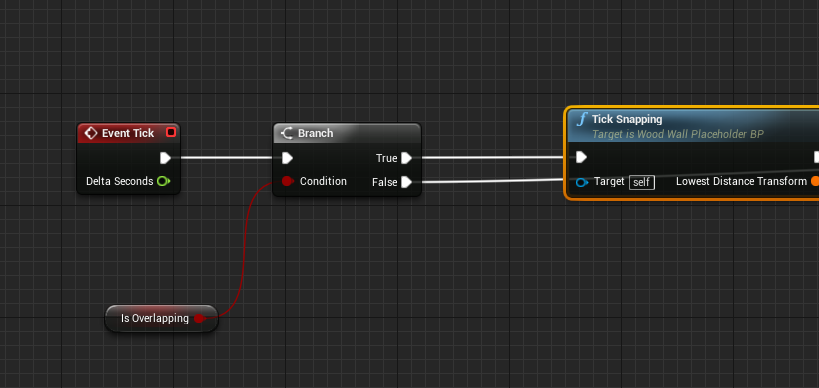
I have no way of detecting if the player moved out... if they move away it should set Is Overlapping to false
It's set to true when it overlaps with another component (OnComponentBeginOverlap()) and set to false when OnComponentendOverlap() is claled
twin juniper
 bold cedar
What do I have to do on Steam's end to be able to connect to a dedicated server? Do I have to actually upload a game demo to Steam?
reef yarrow
@bold cedar Hey there bud I ran into this same problem i think. Have you compiled your dedicated server?
bold cedar
Yes, I have a dedicated server build, and a normal game build.
The problem is that we can't connect to the server via server browser or IP @reef yarrow
twin juniper
open steam.ServerSteamID(long number):PORT Does this do anything
bold cedar
Where do I get the ServerSteamID from?
reef yarrow
@bold cedar I don't know how to do it. But i know a guy who does it,
dusty sleet
@vivid siren agreed somewhat. but is there something in particular you're struggling with?
 vivid siren
just the "Simple Move To" being a pain in the ass for multiplayer
As much as I would like to ask for help and try to learn a solution, I know for a fact that this problem will repeat in some other way immediately after
fossil spoke
SimpleMoveTo modifies velocity of the Pawn, the Pawns position is replicated automatically (you must set the Actor to replicate). What exactly isnt working for you?
vivid siren
The issue is easy to recreate
I start from Top Down template, remove all the unnecessary HMD stuff and add a second player
It doesnt work out of the box obviously so I create a custom event to be called on server which passes through the hit and calls for the move to hit location
the client moves but it stutters like mad and takes about 10x longer than it should to complete the distance
dusty sleet
ive not used that function.. only behavior tress for moving ai so
vivid siren
@fossil spoke this is it
I read somewhere that I should use the AI navigation?
I have a lot of motivation issues when working on projects as it is, this nonsense just makes it worse
dusty sleet
so when you run that it suttters like crazy? does it stutter like crazy on the server too or just the client?
vivid siren
Yeah stutters for both
Kind of
It stutters and slowly moves on the client
but it just slowly moves on the server
like a very slow walk animation
on client the player is always looking down as well, never rotates
dusty sleet
not sure how that move to function works... sounds like either its trying to move to multiple places.. like being set a location from one place and told to move to another... or its being called too many times
vivid siren
well i give up
i do game dev to relax and enjoy myself but this garbage replication system ruins it for me, i'll just stick to netflix
 worn nymph
Hi guys what is the best way to identify different players in multiplayer game ? For instance I'm trying to make an in game scoreboard umg widget . Do You have to do something like get all actors node and put all the player controllers into an array and then iterate through each player controller and get the information like name , team etc . Something like that ?
fossil spoke
@worn nymph Since UI is client side only, you wont have access to other clients PlayerControllers. This is where the PlayerState class comes into play. Instead of iterating through PlayerControllers (which wont exist anyway), use the GameStates Players array, this array contains all PlayerStates for every client.
You can then access replicated properties on the PlayerState, i would hope that you are holding things like Kills, Deaths, Score etc etc on the PlayerState, if you arent you will need to start doing so as this is the more appriopriate method of access for those types of information for use with things like an Scoreboard.
worn nymph
Ah so there is an array in game state you can already use . And does this array populate automatically for example when a player joins my server it adds itself to the game state player array ? When it disconnects it removes itself ?
I haven't got that far yet in just hypothetically thinking through my next problem .
So far player logs in and I load all his username stats etc from external database and then I save this in game state as I need it to persist rather than having to keep loading it. So I should use playerstate instead ? Thanks
fossil spoke
Yes when a PlayerController is created for a client that joins an PlayerState is automatically added to the GameState Player array and replicated accordingly. Same goes for when an client leaves, its PlayerState will be removed.
PlayerState is for information you want to share between clients about that player during that session
GameState is for information about the state of the game that you want to share between the server and all client for example.
wise depot
is there a callback for once an actor has been replicated?
server side
dusty sleet
worn nymph
So let's say I have two players logged in I cast to gamestate->get playerArray->get playerstate1->get player name .
fossil spoke
@wise depot An Actor doesnt get "replicated" its properties are replicated as needed.
wise depot
well yeah but its not one at a time its an entire state
is it not?
'cause that's certainly the way the editor behaves for me, the problem is I have no callback server side for once all of this happens to know when its safe to flush some data
fossil spoke
Properties on an Actor are only replicated when they change, the entire Actor is not replicated itself, only the properties that have changed are replicated at that time.
Do you mean to ask that you want to know when an replicated property actually arrives at the destination client?
wise depot
no, i need to know exactly when a server has finished building a state and sends that out so i can flush some data for the next replicated state
so the point where hte server goes "Okay, all of this has changed, send this to everyone" once its sent it, i need to clear out some stuff
worn nymph
Use rep notify functions
worn nymph
Oh I thought you meant for normal stuff lol
wise depot
that's the problem, this is for the replay mode nto the actual multiplayer. there's a certain handful of events i need stored somewhere for the replays to trigger a visual event
with timestamps etc
hence needed a callback server side so i can clear out a bunch of stuff and still have the replay client trigger them at the right times
fossil spoke
Check out UChannel::ReplicateActor this is where most replication is managed
wise depot
thank you
fossil spoke
@worn nymph What you asked before is correct, that is how you access Players Names
wise depot
was that added in 4.15? I can't seem to find it in 4.14
fossil spoke
It might have been refactored
wise depot
yeah zero references found
fossil spoke
Ah yep
worn nymph
@fossil spoke @wise depot awesome it makes sense now I'll try tonight . Thanks for the help
fossil spoke
👍
brittle sinew
wise depot
@brittle sinew Thanks yeah I found the same thing after a while 😃
i've resorted to the following to make a callback project side so I don't have to roll out an engine modification in the office:
Actor->GetWorld()->DemoNetDriver->ClientConnections[0]->ActorChannels.FindRef(Actor)->LastUpdateTime;
that gets updated whenever the state is refreshed (even if nothing changed) however for something that changes every single tick that I need recording for replays its safe for me to abuse
checking against LastUpdateTime basically
vivid siren
Does anyone know how to implement multiplayer in the Top Down template?
vivid siren
Or rather, does anyone know how to use something like Simple Move To on client?
I've read that I need to use an AI controller to control the pawn and use the AI Move To for it to work on client and server and that I need my normal Player Controller to reference the AI Controller but that just seems absolutely ridiculous imo
brittle sinew
Not sure where you would hear something like that...AIControllers are server-only
You won't use them on the client at all, you'll just have the server network position changes
vivid siren
@brittle sinew So what should I do if I want to properly make multiplayer top-down?
I've seen methods where people use the click location to drive the movement component into moving in that direction and since that autoreplicates perfectly it seemed fine but that method has no pathfinding whatsoever
And I'd like to keep the pathfinding for when the player clicks behind obstacles
 thorn arrow
Hey, i have an issue, i don't know how change pawn in multiplayer, i have tried to unposses and destroy actor, but i don"t know what should be the target, i have tried get player controller and get controller but it didn"t work, in the ue-blueprint someone told me to use get controlled pawn but i don"t know who should be the target, if not self.
robust zephyr
If I were to populate a struct in mainmenu, how can I make sure the server the client connects to gets the the client owns, not some duplicates of host's own or some empty version?
twin juniper
so i got actors dotted around the map from editor. when the player pushes E on it, a UMG menu pops up for the player.
the UMG has access to both pawn and the useable actor in the world. also on the UMG i can read data from the pawn and the actor and show it in the UMG.
my problem comes when i want the UMG to affect the actor based on player input. I want the player when they push a button on the UMG to ask the server to run a function on behave of the useable actor, eg. pick it up, or special gamemode functions. this does not work because these actors have NO NET OWNER. so i cant run SERVER rpcs on it..... the pawn has no "owning connection" to it .
how do i get the pawn to beable to run server RPCs on actors that have no netowner eg. editor placed actors???
i suppose i can be messy and put all the RPC's inside of the pawn? or maybe thats how its supposed to be done???
brittle sinew
Yeah, that's not exactly messy, that's kind of how it's intended
Usually you would put it on the controller rather than the pawn since the controller leans more towards input, but either works
twin juniper
Question that probably few has come across: Pointer events called on a 3dwidget blueprint works as intended in PIE/Offline standalone and packaged. But once online, only the clients pointer events gets called, but not for the host... I'm setting a unique virtual user index for each pawn that has the widget interaction component. AFAIK Pointer Indexes should only matter for each interaction component within the class, and not server wide
vital steeple
i have an array of tech tree information (struct array), should I store it in gamestate or gamemode (or should i just replicate it to the server?) which way is most secure
ugh im so frustrated with this. i just cant seem to store data in a centralized place and have it properly replicate
ah to clarify, i can store and read initial data fine. i cant update it and hten have all the clients see it, despite multicasting or running on server and having clients read the gamestate which holds the struct array
twin juniper
@vital steeple Is it only the struct or all vars? How large is the struct? BP or C++?
dusty sleet
@vital steeple if you store anything in game mode it will only be writeable and readable by the server so if you want clients to know about it you cant put it there really. If the variable is replicated in Gamestate and you're setting it with the server, all clients should get the updates. They can cast to your gamestate and read the updated variable, but they wont be able to set it if they aren't the server.
tranquil yoke
I am trying to attach an actor to my pawn and replicate this attachement.
I am calling "Request attach item to hand" in the pawn then I click on the actor.
"Request attach item to hand" is set to "Run on server" and calls "Attach actor to scene component" which is also set to "Run on server" but is called in the game mode.
The "Attach actor to scene component" just attaches the actor to my pawn.
It works if I am playing as the server but not if I am the client. Why?
The events inside my Game Mode
Does anyone have any idea why this is failing?
Should it be on multicast ?
tranquil yoke
cries out for help
tranquil yoke
Is my problem because the mesh is not owned by my pawn?
Is that why I cannot attach it to my pawn?
 wintry cove
Hey, Any idea why Playerstate is invalid on Seamless travel?
tranquil yoke
Yea although, I called RPC "run on server" in my pawn and then had the server call the game mode
 uncut pivot
Hmmm
tranquil yoke
But I'm starting to think it's because of the ownership
wintry cove
4.12 worked fine, just moved it to 4.15(which is a big update) and this is the only issue
uncut pivot
Yeah but the game mode isnt on clients to attach the socket
wintry cove
Happens after I come from the lobby
vital steeple
@twin juniper small, struct is 8 members, array will be 100ish, maybe 200. BP
@dusty sleet sounds like gamestate is the right choice, thank you!
tranquil yoke
yea okay, well I also did try to just "run on server" inside the pawn. didn't work either 😦
uncut pivot
Is the actor youre attaching
Replicated
I have an easy time doing such hard shit but this easy stuff man
vital steeple
ikr. some stuff is really easy but some of the simple stuff can get weird
tranquil yoke
Yes the actor is set to replicate.
It is easy stuff indeed but I don't know why it is failing
I am going to test this in a sec
with the switch connected of course
uncut pivot
You should never have to do a multicast to attach it
That leads to join in progress issues and such
The actor youre attaching should be repliacted
tranquil yoke
So I should only do "Run on server"?
uncut pivot
Yes
 void canopy
Hey guys, I have a scenario. I have 2 clients connected to a dedicated server. I want to send a id from client 1 to client 2. The only difference I have between these two clients is one bool check which I'm setting in Game Instance class. Based on this I'm able to if from client 1 to client 2. Here is the follow of information. Client 1 get the ID. Client 1 call On Server Function to send ID to Server. Server calls multicast and send this id to both of the clients. On executing this multicast function I've added a check to see wether it is client 2 or not (with the use of bool check ). Client 2 receives the information and I'm able to debug it on his side. Here is the issue I'm getting on client 2 side. I'm losing my camera focus on client2. I checked the fucntion call, nowhere I'm setting player controller or character position or possesion funciton call back
wintry cove
So, when you have this issue(above written), and you change the lobby player state to the default one it seems to work
tranquil yoke
I will compile this and give it a try and get back here with the results once I've tested it
uncut pivot
Kk and hmm weird @wintry cove
wintry cove
yeah that's rather weird
uncut pivot
And this happens everytime?
It might not be the sending data
If youre alt tabbing between game instances
void canopy
Here I'm calling function to server and sending id value
wintry cove
The bool and integer need to be set AFTER the RunOnServer
not before
Now you're setting it on a client(if it was a client), and that won't replicate to the other clietns
Also you don't need to do Multicast there anymore
void canopy
This is a multicast function, where I'm checking a bool on game instance and based on that calling the function on the character of second client.
All the functions are called in Playercontroller
wintry cove
you can do a RepNotify on the Integer or bool and go from there
uncut pivot
^
Maybe not everyone follows this advice
But i try to use as little multicast as possible
void canopy
@uncut pivot I have this variable in playercontroller. And it doesn't get replicated in all the clients. So I thought of doing a multi cast.
void canopy
The variables I'm setting are local only. They aren't changing . Main value which I want to send is the Index Number. Which is getting called on server
Yeah this variable is on pc and not replicated. What possible solution you can think of ?
I need to send this id from one client to another .
uncut pivot
Well yeah then you might have to
void canopy
In a fast prototyping manner.
uncut pivot
Or you could do a client rpc call
If you dont care about bandwidth
You could replicated with rep notify
And rep to owner only
void canopy
@uncut pivot I can do replication, can you guide me where I should put this variable in ?
void canopy
Also one more thing, the method which I'm using is actually sending the data. But my bug is coming after that
brittle sinew
This wouldn't work in the PlayerController either way...client 1 doesn't have client 2's PlayerController
void canopy
My bug is I'm "Losing" player camera focus of the client 2.
My pawn is still sitting at the same place in client 2.
but my camera isn't focusing as I made that call. Although I'm getting all the values in my client system correct. But as I make this call, it seems I losses controll over pawn
brittle sinew
Yeah, it's trying to call a multicast on an object that doesn't exist clientside, that usually results in depossession
void canopy
Ohky. That could be a issue. @brittle sinew how can i work around ? I have a id which is to be send from client 1 to client 2.
brittle sinew
You would have to get client 2's PC on the server and send a client RPC to it if you still want to go the PlayerController route
worn nymph
Why are you using player controller for the I'd why not use playerstate ?
void canopy
And its not a continous change in the variable. It changes once and that time only I have to send notification to client 2 about this and call some fucntion on his side. Both are clients. Client 1 and client 2
wintry cove
brittle sinew
And yeah, I agree the PlayerController probably isn't the best place for this type of thing
void canopy
@brittle sinew How to call a particular PC from Server in blueprint. Some pointers where to see.
brittle sinew
Well, you would need some type of system that ties your function call into a certain PlayerController
You can't just choose a particular object with absolutely no info
worn nymph
I would do this put the ID into playerstate . Set it to replicated . Then from the client you wish to do something with just cast to playerstate->get ID->do something
void canopy
@worn nymph Can I access client 1 player state in client 2 ? In that way I can still update the value from client 1 and get it in client 2
@worn nymph how will I know playercontroller ID of client 1 in client 2 where I need to access player state of client 1.
I'
I'm looking into it @worn nymph , @brittle sinew and @uncut pivot will revert you guys as I find something.
tranquil yoke
@uncut pivot It didn't work for me although, I may have found the issue and it may have been totally irrelevant to the RPC itself.
worn nymph
@void canopy sorry I'm at work . Inside game state is an array of all the logged in players player states . So if you have two players logged in and want to get player 1 player state you cast to gamestate->getPlayerStateArray->getPlayerStateOne->get ID value
tranquil yoke
Hmm I really don't know how to go about and debug this
vital steeple
just in case anyone else runs into this: you cant update server variables through an RPC on a widget. you need to do it from a character. just spent two weeks wrestling with this. 😦
tranquil yoke
Awesome sounds like a wonderful 2 weeks, if it's any comfort, I spend 3-4 weeks on a problem which in the end, I solved by removing a branch.
So throughout those 3-4 weeks I probably had countless of working solutions already
robust zephyr
what would cause clients not getting a menu when running multiple clients through PIE?
vital steeple
lol too much fun, eh simple? its a good feeling when you get it fixed though. these are lessons we will remember. post it to answer hub if you think itd save someone esle time! 😃
tranquil yoke
Yea but I don't think my problem will help anyone. The was very specialised and none else got that code except for 1 person ;P
But I have a diff. problem now which I am having problems solving =(
I simply want to attach an actor to my pawn but it's not working
It works PERFECT IFFFF I am the server. But if I'm the client then it's not working
yea so I have identified WHAT the problem is but not where or why
Actually no I was wrong, doesn't seem to be that either -.-
Ok so I now know it is being attached properly, it is something else that's messed up
tranquil yoke
For everyone who is interested in what my problem was, I have it solved now.
The thing is a bit complicated and I don't think you guys will encounter this problem.
I have a VR pawn with motion controllers.
I was trying to attach the actor to my motion controller, but the problem was, the motion controller's transform wasn't being replicated, therefor I couldn't see the actor moving either when I moved my hand. But the reason to why this was a bit difficult to debug is because my VR pawn which I have, does replicate the movements of the hands, but they are computed client-side so I am only sending the transforms of the motion controllers.
I did attempt to update the transform of the motion controllers but that resulted in a laggy motion.
My solution was:
Create 2 dummy spheres to represent left-hand and right-hand and in the RPC call for where I send the transforms of the motion controllers, I update the dummy spheres to respective transform.
And instead of attaching the actor to my motion controller, I attach it to my dummy sphere.
I also hide the dummy spheres so they are not visible ingame.
 bitter veldt
has anyone ever gotten steam multiplayer to work in their game?
jolly siren
hmm this is really strange but for some reason OnRep_PlayerState is not hit for late joiners sometimes. So Player1 joins, chooses character, spawns character. Player2 joins. At this point sometimes OnRep_PlayerState isn't hit for the second client joining.
Player1's character should exist as a simulated client on the late joining client
so I don't understand why it wouldn't get called sometimes
void AFPSCharacter::OnRep_PlayerState()
{
    Super::OnRep_PlayerState();

    UE_LOG(LogTemp, Error, TEXT("OnRep_PlayerState"));

    // [client] Call the BP implemented event to set the player's nametag
    PlayerStateReady();
}```@slim holly I mean like sending someone a zip of my game
and them trying to connect to my server

 drowsy zodiac
Is there a network profiling tool in UE4?
drowsy zodiac
found it
Tool for displaying network traffic and performance information captured at runtime.
very cool
twin juniper
do i have to use FindSession() lol
twin juniper

someone explain this english?
Lmfao
"should really be define in this class, but need to address replication issues"
wtf does that mean
 sterile plaza
hello
 lost inlet
ah you made the mistake of using the steam online subsystem
which by default uses steam p2p sockets
and i didn't see an obvious way of disabling them last time i looked, i would rather use normal sockets for dedicated servers
thin stratus
@Bdoom#1259 It means that the SessionName should be defined in the Class you are currently having open.
But it's currently defined in the PlayerState and just passed to this class.
lost inlet
though i took a look, you can modify SteamNetDriver so it always pass throughs to UIpNetDriver instead, right now it only does that for LAN games
lost inlet
though it would be a good idea to modify it so you can still use steam sockets when it makes sense, might be good for local servers so people don't have to forward their ports to play with their friends
thin stratus
Wouldn't it be possible to change that through config?
The used NetDriver is defined there
Wouldn't it work to just stick to the default one instead of changing it to steam?
But then again, why would you? It should work even with the SteamNetDriver
lost inlet
there's an array of NetDriverDefinitions which is actuall an array
so not sure how you pick an explicit one to use
thin stratus
Well you remove the others
lost inlet
and i'm pretty sure you would have to modify OnlineSessionInterfaceSteam.cpp so it can advertise online sessions by IP address
thin stratus
Probably yeah
but why again would you need/want that?
The DedicatedServer should work without that
lost inlet
because maybe if your game is multiplayer you want the master list to actually work
thin stratus
haha
Good point
But that's kinda "advanced" for most users
The base line wants to get the Server running by default
And it should be listed even without that change
lost inlet
we started modifying the steam oss for various things already so not a big deal for us
since the default implementation is so incomplete
thin stratus
It certainly is
twin juniper
@thin stratus yeah well... why do all my servers show up as "Unreal Test!"

Found it
lol
i want to change this shit tho
Is there another way of replacing that without having to edit the engine code?
ideally i'd like to be able to just name it "MyServer1", "MyServer2"...etc
lost inlet
i'd recommend copying it and making it your own plugin
the default steamworks oss is in no state to be shipping in games
it doesn't even authenticate players
https://github.com/EpicGames/UnrealEngine/pull/2135 still pending
thin stratus
Just redefine it
jolly siren
In my game, when a player joins they are sent to a character selection screen. So a character isn't spawned for the player until they pick one. I have a nametag widget that displays the name of the player over his character's head. I hide those for enemy characters. However, sometimes late joiners aren't correctly hiding the nametag of enemies. The scenario is when an enemy character spawns before the second player joins. So then the second player joins and is replicated the first player's character and playerstate. I am calling the following from Character::OnRep_PlayerState. However, sometimes this is called BEFORE the second players PlayerController has a PlayerState. Therefore, the second player's playerstate is null (the one circled in red)
A PlayerState is created for a PlayerController within PlayerController::InitializeComponents()
So I need a way to call my logic after that is called for my player but also after OnRep_PlayerState for the existing plyaer
hmm
jolly siren
yeah it's been broken for a long time
twin juniper
and there is no way to fix it?
jolly siren
Over a year since that PR was created lol
jolly siren
is your fork on github?
twin juniper
.-.
that is by far the most retarded thing
ive heard of
basically that fork ive seen it b4
its been broken for months?
i think it was posted in like 2016
jolly siren
epic doesn't have a steam game so they don't care very much
lost inlet
our changes to the steam oss are proprietary, would have to ask my boss if we could ever release it. the steam oss in UE4 shipped broken
since 4.0
jolly siren
ahh okay
 granite jolt
broken? I mean it had issues over the time between 4.0 release and now, but we use it fine.
twin juniper
yea
but isnt your stuff in house changes
does the current vanilla version of 4.15 work?
jolly siren
it works. but it isn't really production ready
twin juniper
what do u mean
jolly siren
steam auth and things aren't working
twin juniper
But, does that work for dedi's
like, right now im registering my server in RegisterServer() in game session
but thats in C++
and that plugin looks mostly to be made for BPs
nvm
 wise bridge
Hey guys, could anyone shed any light on why my custom player controller is not passing the connecting client's information to the server? is a networking n00b 😃
lost inlet
what information exactly?
jolly siren
@lost inlet have you experienced NumOpenPublicConnections not working?
it doesn't seem to be updating for me in 4.15
it used to work
wise bridge
what HMD the user is using @lost inlet 😃
lost inlet
not familar @jolly siren is it to do with servers showing 0 players even though players are on it?
jolly siren
yes
it is used to show how many people are in the current session
Data.CurrentPlayers = Data.MaxPlayers - SearchResult.Session.NumOpenPublicConnections;
that is always giving me 0
lost inlet
not got round to fixing that yet
 chrome bay
Slight OT: These are my fave kinda questions: https://forums.unrealengine.com/showthread.php?141591-Networking-Huge-packet-loss-and-replication-loop-(TArray-replication)
vital steeple
is it possible to have a non player owned actor update the server gamestate?
chrome bay
no
If the actor you're trying to call an RPC on is replicated, you can call an RPC from a Player-owned actor and pass a pointer to that actor in
vital steeple
yeah so thats the only thing ive been able to get to work
chrome bay
But that object has to be replicated from the Server initially
vital steeple
but it seems liek you'd end up wiht a massive player character bp
so for instance, if i have a lab taht researches a technology and i want to store those values in the server gamestate, i have to cram all that functionality into the player character
chrome bay
Ah well, in that case you'd do something differently
vital steeple
instead of going from lab actor -> server gamestate
chrome bay
IIRC, you can call RPC's from the GameState
GameState, PlayerState, Player Controller and Player Pawn
But what you would do is have a generic function in the player controller or wherever fits best saying "ResearchItem" - and the Server goes and researches that item, the clients update via replication.
vital steeple
so an event that calls the RPC that resides in the gamestate itself
an event in the actor* that calls the rpc in the gamestate
chrome bay
In my case, where possible I try to run things in parrallel on a server and client. So for example if I want to open a chest when the player gets within a trigger box - I ONLY run the trigger box on the Server, and the chest is opened by the server. The chest updates it's "open" state via replication.
Client may have to wait a few extra milliseconds, but it means the server had authority the whole time.
Obviously that's not always possible ofc
vital steeple
yeah i mean thats what im trying to do with these "technologies" to make sure that none of it is really pulled from the player
chrome bay
So what i would do is
Still keep all the research data etc in the GameState or wherever it belongs (The Server somehow needs to tell clients what they have / haven't researched etc.)
Then have a Server RPC in the GameState that takes in the "type" of item you want to research, like an Enum or something
The client could check locally if they're allowed to research that item before they send the RPC
Then when the Server recieves that RPC, they run the check as well, then either do or don't research the item.
Then through the magic of replication, update the client as to what happened
vital steeple
ok cool, i'll give that a shot 😃
thank you for your help
still wrapping my brain around replication, i think it'll be like that for a while
chrome bay
Yeah it takes some thought process for sure
vital steeple
yeah so it looks like there's no way of getting around having that building actor trigger from the player
even putting the RPC in the gamestate, and a normal event in the building actor
and having the building call the RPC in that gamestate, it still says no owning connection
i guess im just confused as to why if no one owns it, the server doesnt
chrome bay
Oh that's interesting, I thought clients owned their gamestates
Oh wait... actually that makes sense
Split-Screen
In fact it totally makes sense because Game States aren't created with an Owner, I think they're owned by the World
So yeah, routing via the Player Controller or Pawn is the way to go
vital steeple
yeah the problem with that
if the player disconnects, i assume that would stop anything that is looping
so id have to put even more functionality in the gamestate, like the entire research process
and JUST have hte player initiate (or cancel) the process
chrome bay
If they disconnect, then whatever is happening on the Server will still happen
I.e. the Game State still exists server-side and will do whatever it was doing
chrome bay
So if a player reconnects, they will get the gamestate back still
vital steeple
yeah, but it just means i have to put more functionality in the gamestate so that if a player disconnects, the building doesnt just stop researching (if the research process exists on the building actor)
chrome bay
You could still have all the research logic in the Lab Actor, but it would just only run on the Server. Then the Lab Actor updates the game state with it's state.
vital steeple
becuase youd be breaking that link (the player)
lost inlet
@twin juniper bug #57874512578 with the steam oss: heartbeating doesn't work properly and sometimes your server will drop off the master list
vital steeple
hrm i thought we established that we cant run it on the actor because no matter what, you have to run the RPC through the player character
so say for instance if you have a 1 second loop on the lab
twin juniper
Im using this
vital steeple
and it nudges the player once a second saying "run this RPC"
chrome bay
Whatever happens, you still have to route the RPC via the player controller / character. If the Lab Actor is replicated (i.e, spawned by the server and therefore copied down to clients) - you can pass in the lab actors and say "do this with this actor"
Obviously depends how your research system works ofc
vital steeple
hrm
chrome bay
@twin juniper download engine source and try to fix it :p AFAIK, nobody has tackled that one yet
twin juniper
.-.
they should just disable steam then
until they fix it
epic should not have it in the engine
iff it doesnt work
should be disabled
chrome bay
They can't disable because most of it works, but they should definitely fix it. Unfortunately until they make a game via steam, that'll take an eternity
Not a priority for them unfortunately.
However, Steam OSS is a plugin technically - so you could just write a plugin and figure out what the problem is, then replace the Steam one
Lot's of people complain about steam but never provide a repro case to Epic, so stuff goes unfixed. There's been a post on the forums about dedicated servers not working for ages now, but nobody provides any resources.
twin juniper
the purpose of a game engine
vital steeple
lol
chrome bay
Unfortunately that's more of a theory than reality :p
vital steeple
i feel like thats probably pretty hard to do in real life
chrome bay
Even MORE annoyingly, people do fix it and don't provide their code
That drives me insane
They usually post on the forums too, "hey I fixed it in our studio". Then are never seen again. Presumably (hopefully) they have died a horrible death
Revealing some hidden irritations here
vital steeple
thats just irritating in general
as someone who works in IT, it's super frustrating when someone comes up with a solution to a problem but neglect to post it, yet still find time to post "i fixed it"
yeah @chrome bay it works perfectly fine through character BP, i'll just need to build the research process into the gamestate anyway. its probably for the best, to cut down on network activity spam. the gamestate was going to do all the logic behind the tech tree system anyway. it doesnt hurt to add a few more comment boxes <_<
 fierce birch
@chrome bay they have their priorities in studios, if they make a quick'n'dirty fix, it would cost them time and money to clean it up to be able to share it with others
which usually just means it'll not happen
but what's actually broken with advanced sessions?
I thought the whole idea of the plugin was to expose things not exposed in the engine by default
surely the guy actively maintaining it wouldn't maintain it if it were completely broken...
I mean, what would be the point in that?
 hushed garnet
has anyone got dedicated servers working with steam? if i install the client it will host fine, but without the client running it fails to initialize steam. I have googled my butt off to try and find a solution but really unable too. Im using BP to create the sessions and with the steam client installed all is good. If anyone has any insight or knows the fix please PM me.....been on this for 2 weeks now 😦
slim holly
did you check the steam api gets included?
that has been an issue in past engine versions
hushed garnet
tbh with you im not very experienced with the c++ side, my game is more or less 100% bp.....would you mind pointing me in the right direction?
slim holly
Michael Allar's Blog
Unreal Engine 4 Specialized Engineer that does Other Things too
at the bottom
or, halfway
hushed garnet
oh yeah all that is done
im using advanced sessions to create the session too
it hosts without any issues if i boot the steam client up as well, it just wont find the api without the client running
twin juniper
steam cannot create session game already exists
 raven holly
Game states playerarray - does it remove actors when one leaves the game? I cant seem to get it working
It shows them all, even if they left the game
Sorted it. Just added another var which disables that player state when they leave
 gaunt kestrel
Hey everyone I'm having this replication "bug"
Here's the video of what happening and my blueprint for it. https://youtu.be/NnWCKQwgJgg
The attacks don't work
but the movement seems fine?


 slim holly
you're talking about replicating animations
you need to do multicast events that trigger montage
or something that tranfers "hey, need to play this animation"
allthou you have it set up with boolean, which should be sufficient in theory, but depending how fast the bool switches back it might never get replicated