#multiplayer
1 messages · Page 315 of 1
 dusty sleet
 twin juniper
check plugin path in project maybe?
dusty sleet
i know its the latest version i downloaded because hes split the plugin into two now and its the first time its been done like that so its the only one like it for 4.15
hmm plugin path...
is that set in a file somewhere?
dusty sleet
oh. well id imagine if its showing the plugin in the plugins list. its finding it.
twin juniper
maybe you're not seeing enough information?
dusty sleet
ill open the project..(just takes a full 8 or so mins to open
twin juniper
welp
dusty sleet
the previous plugin was called "advanced sessions" this one has advancedsessions AND advancedsteamsessions....
twin juniper
well, there you go
dusty sleet
maybe what i was previously using was in advancedsessions and is now in the advancedsteamsessions... but the project doesnt know how to rereference?
both plugins are enabled in the plugins section
 thin stratus
Idk about that plugin so much as i do that in cpp myself. The big question is, do both plugins correctly load
dusty sleet
i guess i could try a fresh project and see if they work there. I migrated some of the stuff from the main project to a fresh 4.15 project to see that
(it only finished packaging like 4 mins ago) havent tried it yet
thin stratus
Okay so first things first
For VerboseLogging (to get more LogOnline data) do this:
In the DefaultEngine.ini of your project, enter this:

 [Core.Log]
 LogOnline=VeryVerbose
(Got that from an AnswerHUB post, hope it's still valid)
And that's the bat file
Rightclick -> Edit
And change the paths/uprojet file name in it
dusty sleet
done... gimme one sec.. let me just try this minimal build. I need to copy it to other pc and run them both see if i can see the others session or not
kk
twin juniper
you can do that on the same computer
thin stratus
afaik steam requires 1 unique account per game
And Doesn't allow 2 steam instances on one PC
Despite VM
dusty sleet
yeah .. maybe in a vm you could run a second steam instance.. anyway. that test was a fail
i edited the bat. but i have the editor open already.. should i check anything there while its open?
dusty sleet
@thin stratus it seems to be starting up with the script.. (i was using uegame.exe earlier.. not editor..)
looks like it created a session in the logs.. but maybe this highlighted part is a problem?
twin juniper
likely
dusty sleet
@thin stratus the session creates and opens the lobby map. im moving the project to the other PC and putting 415 on there and will run it on there with that steam account and see if i can connect to the session on this one... not sure why it says the IP is invalid though, so it probably wont work for that reason
twin juniper
@dusty sleet p2p uses 0.0.0.1 "hacks"
p2p id binds to that ip
standard ip wont work
@dusty sleet the problem there is that you are failing to create the lobby in steam
actually
the p2p session is failing to register with steam or something
dusty sleet
should it go to the "failed" output then. not the success
dusty sleet
139?
twin juniper
sure, whatever it is
dusty sleet
can I just replace the sdk folder with the latest and change the version reference? or do i have to recompile the engine with or something
twin juniper
dont know
dusty sleet
@twin juniper 139 didnt seem to make a difference. though it gave the same output as in the screenshot.. it didnt open the lobby map this time
twin juniper
anyone know when this guy is going to update this
for 4.15
i tried to use it just now but now its saying my project cannot run because the engine is 4.14 and my project is 4.15
All i want is to be able to give my server a name
Lol
and with that pr, I can
 teal jungle
Hi guys, I'm currently build a Dodge movement with a timer so the movement is taking a certain amount of time
it's work great in single player but in multiplayer only working on the server side
I already replicate the movement direction
But should I replicate something about the timer itself ?
the content of my movementupdate look like this : Super::OnMovementUpdated(DeltaTime, OldLocation, OldVelocity);
if (!CharacterOwner)
{
    return;
}

//Store movement vector
if (PawnOwner->IsLocallyControlled())
{
    MoveDirection = PawnOwner->GetLastMovementInputVector();
}
//Send movement vector to server
if (PawnOwner->Role < ROLE_Authority)
{
    ServerSetMoveDirection(MoveDirection);
}

//Update dodge movement
if (bDodgeIsInProgress)
{
    MoveDirection.Normalize();
    FVector DodgeVel = MoveDirection*DodgeStrength;
    DodgeVel.Z = 0.0f;

    //Launch(DodgeVel);
    MoveSmooth(DodgeVel, DeltaTime);

    DodgeTimer -= DeltaTime;
    if (DodgeTimer <= 0.f)
    {
        bDodgeIsInProgress = false;
    }
}
Btw I've also try following this wiki : https://wiki.unrealengine.com/Authoritative_Networked_Character_Movement#Cooldown_Timers
But When I start it with at least 2 player I got the assert at : check(PawnOwner->Role < ROLE_Authority);
It is possible that this is a mistake and the check should be chec(PawnOwenr->Role != ROLE_Authority) instead?
teal jungle
@severe widget But isn't it suppose to work in both dedicated or not ?
And yes it doesn't crash like this
 severe widget
well you could maybe fix it
check(PawnOwner->Role < ROLE_Authority || GetNetMode() == NM_ListenServer);
but that only makes it not assert in that use case, it doesn't address why that check is there
teal jungle
Not sure to following you @severe widget
severe widget
try that line of code I put
see if it doesn't crash
but that doesn't mean it'll work
it MAY
but I'm not gonna go test it
teal jungle
Hey Guys I realy need some explanation about PrepMoveFor SetMoveFor and Compressed Flags
I don't understand why I need to restore the flag into SetMoveFor and not into prepmovefor
Why there is certain information that need to go through compress flags and other into prepmovefor etc
I can't find any doc on this
 sterile pebble
@thin stratus before I again forget that : a big thanks for you help with network stuff, after some more work I became much more confident in ue4 replication stuff, it would take me much more time without you tips :d
thin stratus
(: no problem
twin juniper
@thin stratus hey so I attempted to unpossess my pawn and then i used ClientTravel() to disconnect from the server
and it still deletes the pawn
i want my pawn to stay on the map (as a lootable actor, think of rust)
also, if anyone else knows how to do this... feel free to chime in
void APlayerController::PawnLeavingGame()
{
    if (GetPawn() != NULL)
    {
        GetPawn()->Destroy();
        SetPawn(NULL);
    }
}
i tihnk i figured it out, i found that on a forum thread... evidently its a virtual function so i can just override this
 fringe dove
@teal jungle there is no doc for it, it sucks because it is super complex
teal jungle
@muchcharles#2724 you are godamn right ! I'm actually doing a single player game but I was thinking doing the whole multiplayer thing anyway to be ready in case . But I'm not sure anymore..
 wise depot
ok, i can't recall that code off hand and don't have it handy where i am
paste the section in here so I can see @teal jungle ?
teal jungle
@wise depot I was curious why there was different way to pass the replication data like by flags and with reliable function and why I should put the flags also into setMoveFor
teal jungle
I wanted to have some explanation of what is the difference between flags and other data
Oh what about this tuto :Btw I've also try following this wiki : https://wiki.unrealengine.com/Authoritative_Networked_Character_Movement#Cooldown_Timers
They use it to pass the movementdirection
Also I was wondering if I should use the cancombinewith method to prevent jump + dodge
wise depot
okay so first off
SetMoveFor, is setting your local move ready to be sent to the server
PrepMoveFor is for networked clients to apply a move before calculating prediction data
so for instance, client 1 jumps. slient 1 tells server it jumps. server tells client 2 that client 1 jumped. Client 2 PrepsMoveFor(client1) then runs prediction code after
to smooth it all out
as for flags. they are a 1 byte variable. 1 byte = 8bits, so you can have 8 flags.
its a way of compressing digital (0 or 1/on or off) input into a move set
but trust me, you shouldn't have a single RPC marked as reliable for movement.
anything that fires on tick or close to tick should not be reliable
teal jungle
Okay I understand
wise depot
you'll flood the buffer and the host will kick you
teal jungle
So I should see PrepsMoveFor only with at least 2 clients for example
But how should I replicate such information then ?
hO
When I trigger the ability for example ?
wise depot
depends, i haven't looked too much into what calls it, but you should only see it for autonomous proxies yes
errr
teal jungle
I sould call that on my DoDodge method
for example
instead of constantly sending it to the server and use it when Dodging
I was also wondering when to check the possibility of the move itself
if I check it in the DoJump/DoJump/DoWhatever move, the server will actually not check it right ?
Because it is executed only on clientside?
So Should I check it in my OnMovementUpdated so both client and server check it ?
wise depot
what is it you're trying to make? multiplayer stuff gets really confusing if you're trying to add it to a project that's already been made
teal jungle
I'm starting from the ThirdPerson template, I'm implementing a dodge that once you choose a direction will move you character for a specific time at a specific speed the player in that direction using MoveSmooth
teal jungle
But this tutorial doesn't check anything for if the dodge is available
and it does sens MoveDirection at each Movementupdate
So fare it look like that :
void UMAGACharacterMovementComponent::DoDodge()
{
if (!bDodgeIsInProgress && IsMovingOnGround())
{
bPressedDodge = true;
}
}
void UMAGACharacterMovementComponent::OnMovementUpdated(float DeltaTime, const FVector& OldLocation, const FVector& OldVelocity)
{
Super::OnMovementUpdated(DeltaTime, OldLocation, OldVelocity);
if (!CharacterOwner)
{
    return;
}

//Store movement vector
if (PawnOwner->IsLocallyControlled())
{
    MoveDirection = PawnOwner->GetLastMovementInputVector();
}
//Send movement vector to server (because it doesn't know it)
if (PawnOwner->Role < ROLE_Authority)
{
    ServerSetMoveDirection(MoveDirection);
}

if (bPressedDodge) {
    bPressedDodge = false;
    DodgeDirection = MoveDirection;
    DodgeDirection.Normalize();
    bDodgeIsInProgress = true;
    DisableMoveInput();
}

//Update dodge movement
if (bDodgeIsInProgress)
{
    FVector DodgeVel = DodgeDirection*DodgeStrength;
    DodgeVel.Z = 0.0f;

    //Launch(DodgeVel);
    MoveSmooth(DodgeVel, DeltaTime);

    DodgeTimer -= DeltaTime;
    if (DodgeTimer <= 0.f)
    {
        EnableMoveInput();
        DodgeTimer = DodgeDuration;
        bDodgeIsInProgress = false;
    }
}
}
(sorry for big paste 😒
wise depot
yeah moveDirection should not be reliable, thats ridiculous
i'd change that to unreliable if i were you
teal jungle
I can also call it in DoDodge no ?
wise depot
    if (bPressedDodge) {
        bPressedDodge = false;
        DodgeDirection = MoveDirection;
        DodgeDirection.Normalize();
        bDodgeIsInProgress = true;
        DisableMoveInput();
    }
you would do any checking in here
teal jungle
Okay instead of doing them in DoDodge?
wise depot
well, you can do
if(bPressedDodge){
    DoDodge()
}
hu ?
wise depot
how new to C++ are you? 😛
teal jungle
I'm an experience C++ programmer
But DoDodge is actually the function call by the character on key event
wise depot
yeah, so instead of on the key event
on the key event you set bPressedDodge= true;
when you're setMoreFor() make sure you somehow pass the dodge boolean though so the server knows what you're trying to do.
then in your loop where that has
if(bPressedDodge){
   DoDodge();
}
Oh to put all dodge mecanism into the DoDodge I understand that
And is it clean to ask the Controller inside my CharacterMovementComponent to IgnoreMoveInput while dodging /.
?
wise depot
its not safe to ask a controller to do anything that other clients need to also be able to do
teal jungle
Hump then I should prevent that directly on getting input in my Character extending class ?
wise depot
In multiplayer you have the following:
GameMode - Only server can see
GameState - All can see
Player Controller - Server can see all. Clients can only see their own.
Player States - All can see
teal jungle
Like in MoveForward I should add a check if he can move because of the Dodge being active?
hum don't know how to use that States
Does ACharacter and UCharacterMovementComponent use them?
wise depot
no, they are Pawns and component on pawn
they're just replicated
@thin stratus do you have a link for that multiplayer pdf you made?
@teal jungle i'm pretty sure it was exi anyway that made a good pdf
wise depot
although, there's nothing in there (in the contents anyway) about movement, it will get you familiar with the entire framework the engine is build around for multiplayer. You need to be able to understand that to make anything stable
teal jungle
Yeah I understand that
But if it give me base it should help a lot
I'm currently also using UT source code to help myself
but it's a lot of code
Thank you @wise depot I might ask you more questions later once I read the PDF and apply what you say on the code
I can't do it now unfortunately but thanks
wise depot
yeah man that's fine with me, if I dont' reply I probably just haven't noticed the notification. I usually leave my machine on when I leave the office
wise depot
guys for real though, has anyone here had the network profiler working over steam p2p?
twin juniper
what functions would i need to override
in order to control the saving of player data
so like... right when the server ends
or if i want to setup a save timer
also, what would i override for when the server loads up the map and i want to populate it with separate actors
 vocal ingot
How to get old value of replicated variable when a new one is received? Like for example:
OnReceiveNetworkUpdateForSomeVariable(float OldValueofThatVariable)
{
}
for blueprints
I know it works with OnRep for C++
I want to smooth out the aimoffsets of other players when I receive "AimPitch"
 rare cloud
@vocal ingot, you can set the replication to RepNotify on your BP variable
and a function will be created
create a variable OldMyVariable
OldMyVariable = CurrentVariable;
CurrentVariable = ReceiveVariable;
on your RepNotify function
vocal ingot
Afaik the CurrentVariable has already received the new update on OnRep Function
Not maybe, I am sure of it
 worthy wasp
Anyone know the technicalities between these two nodes? I picked up a Marketplace asset (AdvancedSocialSystem) on the team i'm with and they're using OnRestartPlayer() - i've only used OnPostLogin for MP stuff.... UE4 Docs say pretty close to the same thing for both nodes.... Anyone with experience on the differences?

OnPostLogin() has to do with the playercontroller specifically (when its been assigned to the logged in player) but the onRestartPlayer() output is also a PController.... so i'm a bit lost as to the difference between the 2?
 brittle sinew
OnRestartPlayer is called when you call RestartPlayer onto a PlayerController, OnPostLogin deals with connection @worthy wasp
Though PostLogin does eventually call RestartPlayer, so RestartPlayer is just more of a generic handler for a player spawn
I would just look at the GameMode flow if you're confused, it's not that hard to follow
You'll see what's called when
worthy wasp
thanks - summs it up nicely
twin juniper
@rare cloud planning on saving it inside of a USaveGame class
rare cloud
@twin juniper, ok take a look to FArchive too
I guess you simply need to override the BeginDestroy function from your PlayerState and done your serialization stuff
and I guess it's not a good idea to serialize from the GameMode (LogOut function) since you can delay the player state destruction
twin juniper
@rare cloud well i have actors (structures the player places with their own hitpoints on them) that i want to be saved
think about rust and how u can build structures..etc
rare cloud
@twin juniper, if you want to save as binary : https://wiki.unrealengine.com/Save_System,_Read_%26_Write_Any_Data_to_Compressed_Binary_Files
twin juniper
@rare cloud yeah i know this, but what functions should i override
like, for when the server loads
can i do it inside of beignPlay() on the game mode?
for loading
and then when the sever ends... idk what i do there
rare cloud
@twin juniper, IIRC EndPlay() from GameMode
twin juniper
So i can use beginplay() for loading and endplay() for unloading the server? @rare cloud
rare cloud
depend of your game, have you multiple server instance ?
twin juniper
@rare cloud I want it to be robust enough to add more servers later on, but for now im going to be only working with one server
 waxen bobcat
Why the custom depth not working for mobile?
 wary willow
?
waxen bobcat
@wary willow it is working in the editor but not in the build
wary willow
Why are you asking here though? @waxen bobcat ?
Isn't that more of a #graphics question?
or #mobile
Ah, you probably, misclicked mobile
twin juniper
open steam.ServerSteamID(long number):PORT <-- do you have to include "serverSteamID" because this seems to not work
 fossil silo
Hey guys, been having some issues w/ multiplater in my game...each player has a set of settings that change as they switch weapons, etc...they update on the server & multicast, and will work, as long as everyone is connected before I spawn their characters...but if I have a game going and make changes to the characters settings, then join with another player, it doesnt have their new settings set up. Is there some secret to giving new players all the settings from each character already there?
 sudden niche
@fossil silo what we do is that the character has "replicates" on and that makes sure that for example current_weapon will be replicated if it it set to "Replicated" on the variable. And to trigger animations etc we set the variable to have RepNotify.
fossil silo
@sudden niche problem is I am using VR MotionControllers, and they dont just replicate as you would expect. I need to pass the current position multicast to all clients, but it seems only the 'server' has any data, keep getting 0,0,0 for the clients position
 tranquil yoke
Maybe you need to perform these operations in the game mode ?
sudden niche
Are the VR MotionControllers regular Actors in the game?
If they are, maybe bReplicateMovement is set to false per default on them?
 hybrid raft
I'm trying to set/change the 'Virtual User Index' on an existing WidgetInteractionComponent attached to a VRMotionController in a blueprint but even when I call set, it doesnt change in the instance. Can anyone tell me why?
 drowsy zodiac
Has anyone networked melee combat? How do you battle the latency?
Fiber optics, FTW!
wary willow
@drowsy zodiac You don't, you get a better ping server
@fossil silo Yo yo yo, Motion Controllers are bugged
drowsy zodiac
Woops was editing lol
wary willow
@fossil silo need to manually replicate, or just use the overvr expansion plugin
drowsy zodiac
But honestly is there a solution or any magic I can do so all clients see a connected swing?
wary willow
@drowsy zodiac Um, you can do client side calculations?
and then try to match it up with server calculations?
I mean, if you're gaming at 200ms
You know you have latency issues
drowsy zodiac
I would have to de sync the clients positions on other other clients to make it match?
wary willow
And will probably suck balls
drowsy zodiac
Ya, for sure. I wouldnt play in that scenario
But people do, so its kinda a worst case scenario thing
wary willow
You just do it like you would do it for anything else
This isn't a "melee" issue
Using a predetermined set of algorithms to extrapolate entity behavior, you can hide some of the effects that latency has on fast-action games.
drowsy zodiac
Sweet, thanks. Ill read through those.
twin juniper
hello guys, i think i have a problem with VOIP when i create a session
thin stratus
You think you have a problem? Could you specify that?
wary willow
@twin juniper Using Advanced Sessions?
fossil silo
hey everyone, if I am spawning a character for each player, should I be doing a run on server method that then runs a multicast that actually does the spawning?
I have it setup this way, but am having issues getting it to spawn across all server/clients, wanna make sure I am doing it right in theory before debugging too far
wary willow
@fossil silo Spawn Character from Server only
fossil silo
and all clients will see it?
wary willow
Aye, since server has a version to itself anyway
fossil silo
ok thank u, i will have to experiment a lil bit. what is the point of multicast then?
wary willow
Hmmm
You should read comp
And official docs

Setting up networked games for multiplayer.
The various aspects of multiplayer applied to Blueprints.
^ this has the info you want specifically
All RPCs serve a purpose, it just depends on the scenario and end result wanted.
If you are super lazy
Overview of the samples provided in the Network Features Content Example map.
Go to context examples
and/or: this series is old as hell, but still pretty good to get newbies started: https://www.unrealengine.com/blog/blueprint-networking-tutorials
fossil silo
thanks buddy! i read all of these months ago but i should probably go thru them again and make sure it all makes sense 😃
so when the server spawns something, it is spawned on all clients...and if a client spawns it, its just local to that client
drowsy zodiac
@wary willow , didnt quite see a potential solution per se in the links but gaffer has some good reads regardless.
@fossil silo multicast is usually used from the server to have everyone else see it. So run an event to the server, then multicast. If your spawning an object and it is marked "replicated" in its defaults and called by the server everyone else will see it. Double check the character is marked as replicated
fossil silo
thanks @drowsy zodiac
drowsy zodiac
NP
 heady merlin
Anyone aware of a Pull request already out there opening up the audio components from VoiceEngines?
can't find one in initial search
worthy wasp
I want to have a replicated TIME variable across my entire game (Dedicated Server) - my thoughts are to do this in the GAME MODE - but my question is should i SET a variable in my GAME STATE class (so others have the replicated TIME and are in sync) or should I make a function in my GameState to GET() this variable from the gamemode as a SERVER RPC obviously?
Is there a difference/prefferred way to do it?
wary willow
@worthy wasp Yo, what type of game are you working on (if not under NDA)? Just curious. I am also opening up a project to show you we had done in the past.
Should be exactly what you need, we even got it optimized
worthy wasp
well - i got hired on to do a MP Dedicated Server FPS survival game
while i thought that the day/night system was extremelly easy to setup....
i fail to get it synced + replicated properly
GameState is ONLY local client specific.... its nto server wide
and i cant seem to pull this variable FROM the GameMode - which is where i thought it SHOULD be derived from anyways
worthy wasp
This look famililar/similar to yours in GAME MODE?
 wary willow
not quite
worthy wasp
but for some reason i'm having a bitch of a time retrieving this variabel from GameState class
I cant SET a gamestate var from GMODE - nor can i seem to GET this var FROM Gmode
(inside of GState)
wary willow
one sec
;0
So
We do use tick in GM to update

So this is going to be a bit messy, but it works

We use timers

Now, to the Gamestate, which was in that UpdateTimersFunction(2ndpic)
 worthy wasp
What is node GetGameStateActual() ?
wary willow
simple global function

oops that's GM, but just switch out node, you get the point
worthy wasp
oh i see
wary willow
saves a few nodes
worthy wasp
you just shortcut the cast
wary willow
a few seconds each time
worthy wasp
i getchya
wary willow
😉
wary willow
shame on you
worthy wasp
ikr
wary willow
Yeah, and that time will go to everyone
Replication/Networking has been a fun experience
worthy wasp
your preaching the choir there lol
wary willow
lol
worthy wasp
its not that difficult at times - but theres other times where its like WTF how do i pull this off?
wary willow
Let me know if that doesn't work and we can troubleshoot some more
worthy wasp
implementing now
wary willow
But, if your time stuff is good, and you just couldn't get it to clients, that was probably it
 vital steeple
wait whoa, i thought gamestate was on the server
wary willow
😉
vital steeple
im using gamestate to store a bunch of information that i want to be server side (that tech tree you were helping me with)
wary willow

Wonder where I just stole that from
Read up @thin stratus comp
lots of good little tidbits
vital steeple
hrm ok, so do you think i need to migrate any important info that shouldn't be tampered with on game mode? the epic documentation makes it sound like gamemode should be limited to mostly session type stuff
vital steeple
hence using gamestate for more complex game rules
vital steeple
sorry not rules but data
wary willow
Anything that you only want the server to have authority over
And no one else
Ah
Depends on the data
I put some stuff in GS, some in Playerstate
vital steeple
yeah so playerstate i havent implemented much yet, but thats for keepign track of data that should persist with the player throughout the match right?
wary willow
Hmm, he didn't do anything for GameInstance
But I suppose technically, it's not MP related
Even though a lot of people use it for the MP games
And yes for PS
vital steeple
so my logic was to use game state for stuff that servers and clients will interact over and also progresses through the match
but isnt necessarily a win condition or session related (max players, team players, joining teams etc)
wary willow
Yeah, that's what GS should be used for
vital steeple
baller
vital steeple
yeah i was reading that a bit
wary willow
It can be used for anything of that sort
vital steeple
i still dont really understand the networking/replication side of unreal
vital steeple
yeah i figure itll just take a long time
wary willow
But that's why this community exists
vital steeple
yeah its good stuff
when i first started with BP, it was really rare to not find help somewhere
thin stratus
Nothing really changed for 4.15. At least not for the basics
wary willow
@thin stratus you going to do another version for "intermediate/advanced" users?
You should just add to it 😉
thin stratus
I could only add things that explain replication process in the engine itself
But that's not what the compendium is there for
thin stratus
Yeah, more example would be a thing
wary willow
Or something like a "tips and tricks" section
thin stratus
But then I would honestly just love to make a BP and C++ little multiplayer game tutorial
wary willow
Haha
thin stratus
That gives more insight on the process
wary willow
I was thinking about it
thin stratus
But it takes too much time to make a proper one
thin stratus
And I want to wait on what Epic does with the existing one
wary willow
Yeah, but you know them...
Good chance they might "forget"
Even with the pestering going on in that thread
thin stratus
Maybe :/
 fierce birch

Accurate peer-to-peer replication of game objects in a highly chaotic physical simulation is essentially an unsolvable problem. This session will explore the techniques used in 'Watch Dogs 2' to replicate vehicle trajectories, compensate for...
(just slides)
 pallid mesa
does anyone of you know if there is something planned for this https://docs.unrealengine.com/latest/INT/Engine/Replay/Streamers/index.html
Overview of the Replay system for recording and playback of gameplay
 desert breach
guys I'm not able to get my playerstate instance from my playercontroller class in code. Can you tell me what could be the reason ?
brittle sinew
Could you give a little more information on the issue?
If you're trying to do it on BeginPlay, that's probably too early, there's an OnRep for the PlayerState you should use if you need it as soon as it arrives
 regal current
what is the best multiplayer FPS kit?
that is up to date. and still has support?
sterile pebble
@regal current epic shooter example :d
@regal current actually, its not so stupid advice. 1) FPS\TPS characters with replications and ready-to-go animations. 2) Several levels 3) Matchmaking system 4) Even some AI driven bots.
- Weapon inventory system with replication too.
 summer nova
do you know if there is a way to completely tell the CharacterMovementComponent to not replicate from the server back to the local player?
i want it to be replicated to others, but NOT to the local player
becouse its overriding my movement, in VR, and in VR i need instant movement, no latency allowed
summer nova
nevermind i just turned the built in replication off and did my own
 jolly siren
does anyone know how to change the default server map dynamically? I'm assuming RegisterServer doesn't travel after, it just creates the session within the map that was already loaded doesn't it?
 reef finch


If i call a event on a client, and that client has theevent binded also in another blueprint
shouldnt that event fire for that client
or am i doing something wrong
 frank portal
Need a quick help pls ^^ i can join a session but when i try to search it with my other player it do not find anything and idk why (advanced session plugin with dedicated server and all i added in the defaultengine.ini is this: [OnlineSubsystem]
DefaultPlatformService=Null) ... joining work but why didnt it find anything ?
twin juniper
@乃υιι#2123 Dedicated or listen? How are you creating the session? Be aware that if your client has already connected to a session, you can't search for other sessions (this applies to OnlineSubsystemSteam, not sure about null)
 red ledge
assume I have some sort of a turret or something that fires on anyone in range, should I check the traces and overlaps etc on the server or is it just enough to do the firing and timer stuff on the server since the location of all objects is replicated from server?
frank portal
@Fantasifall i am not at home atm and so i searched for someone who made it almost the same like me (i had more extra settings but the rest is the same) ... he reported the same issue like me and said it worked fine for him in 4.14 but not in 4.15 https://forums.unrealengine.com/showthread.php?69901-Advanced-Sessions-Plugin/page25 i will take a look at it later and hope that he was able to solve it
rare cloud
@red ledge, It's better to done all server side since it has the authority ^^
red ledge
thanks, just didn't want to spam server calls to get in the habit of saving packets
rare cloud
simply set a collision box, if player enter make a timer and spawn projectile each n seconds
red ledge
yeah that's what I do but I also trace to the player to make sure he's not hiding behind something
it should alway attack anyone in range till they hide behind something
and rotates towards them to attack them
tranquil yoke
Can anyone please help me with my problem? I am trying to replicate my pawn but it's not working.
tranquil yoke
https://wiki.unrealengine.com/Blueprint_Multiplayer_Respawn
That guide to spawn pawns doesn't seem to work for me. When I spawn my pawn in the gamemode, it cannot be seen if the issuer is the client. But if the server is issuing the spawn, then it can be seen by the clients.
Must I call the spawning from the player controller? The game state? Or what do I do?
brittle sinew
@tranquil yoke when you say you're spawning it on the GameMode but it's from the client, do you mean you're using an RPC to call upto the server?
The GameMode is unavailable to the client, it only exists on the server
tranquil yoke
This is called from the player controller to spawn a new pawn. The request is directed to an event in my custom game mode which is replicated on the server
brittle sinew
You can't directly call a GameMode function from the client, even from an RPC
Since you don't own the GameMode
You would have to call a server RPC on your PlayerController, which then accesses the GameMode
tranquil yoke
Oh okay, I will try that and I'll get back very soon. Thank you. I wish this kind of information were documented somewhere. Such key things required to develop an application, I don't get it how I been trying for so long and still haven't found any info about this
brittle sinew
In that wiki guide you linked, do you see how the line that calls the GameMode function is a server RPC?
That's what you'll want to be doing
Well, there is the RPC page, which gives you a table of what you can and can't call server RPCs on
Designating function replication across the network
tranquil yoke
So basically, the client sends RPC to the server PC which in turn sends it to the game mode?
brittle sinew
Yep, you're required to call up to the server first before interacting with the GameMode at all
brittle sinew
That looks like it should work, yeah
tranquil yoke
Okay, I will give it a try. Thank you very much for replying. I have been working on this issue for a long time, asked for help on the answerhub and the forum with no replies
brittle sinew
I'm actually somewhat surprised you wouldn't have gotten an error for the null cast on the client
Might have to do with it being an RPC, not sure
tranquil yoke
Yea, I also think I should've gotten an error by it.
I was thinking the problem was something like that though, I was thinking I might be unable to spawn it from the game mode, I thought the wiki tutorial may have been outdated
brittle sinew
Well it's actually not, look at how it's spawning it
It first calls a server RPC, then gets the GameMode
It's not trying to access the GameMode from the client directly, it looks like it's doing it the right way
tranquil yoke
yeah
it works amazing now, finally it spawns. Now, I think this explains why I had it working with a different pawn last week.
I changed pawn and modified the code so much and got clueless why it didn't work anymore
This probably explains why the movement replication isn't working either.
One question though, I am using a quite advanced pawn with my VR motion controllers. Do you know how to do the replication properly? As for right now, I am basically just trying to send all transforms I find which could be relevant
And should the RPC updates for the movement of the pawn be done in the game mode, the game state or the pawn itself? what would be considered best practise?
brittle sinew
If you're moving the pawn, just keep it in the pawn
Call up a server RPC if the pawn is locally controlled with the info, then multicast the transforms on the pawn
As for optimizing all of the traffic involved with replicating all of that, I'm less sure 😄
If you don't plan on changing scale, don't send a transform, just send a position and rotation
tranquil yoke
yea alright
brittle sinew
I'm sure you could do some fancy stuff with net quantizing in C++, but in BP you're much more limited, and I don't really know how to implement that type of stuff anyways
tranquil yoke
I am not really bothered about the performance as for right now, I am mainly trying to get it to work and then I might attempt to optimise it a bit
brittle sinew
I get that attitude usually (it's funny when someone asks about bit fields in their custom classes, like congrats for saving 7 bits twice), but with networking it is a bit more limited, where performance can easily become an actual problem if you are multicasting a lot of pawns at once
tranquil yoke
Yea exactly..
But in my case, it's an educational project and I'm doing a proof of concept so performance is not my biggest issue as for right now 😄
Pawn replication - Is remote
Pawn replication - The authority part 1
twin juniper
I guess you have to check if the pawn is locally controlled
tranquil yoke
Pawn replication - Has Authority Part 2
This is how I set it up now, does it seem correct?
twin juniper
You want to update everyones transform information to the other clients i think, so they can all see each other?
twin juniper
I had something similar with VR pawn replication lately and I needed "is locally controlled" to get it to work correctly
I make a screenshot of how i managed it
tranquil yoke
Okay, sounds wieird but worth a try
twin juniper
https://i.gyazo.com/d9da1e9111d0a977215863d6ba51867e.png this happens every tick
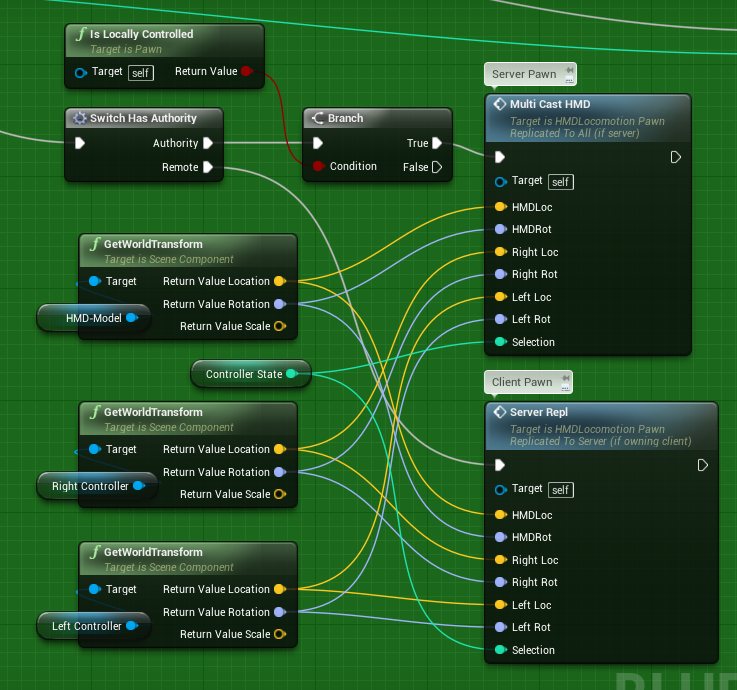

https://i.gyazo.com/8e35f6fd38304d10cea2f74a84b70bde.png This is the replication process on the authority path
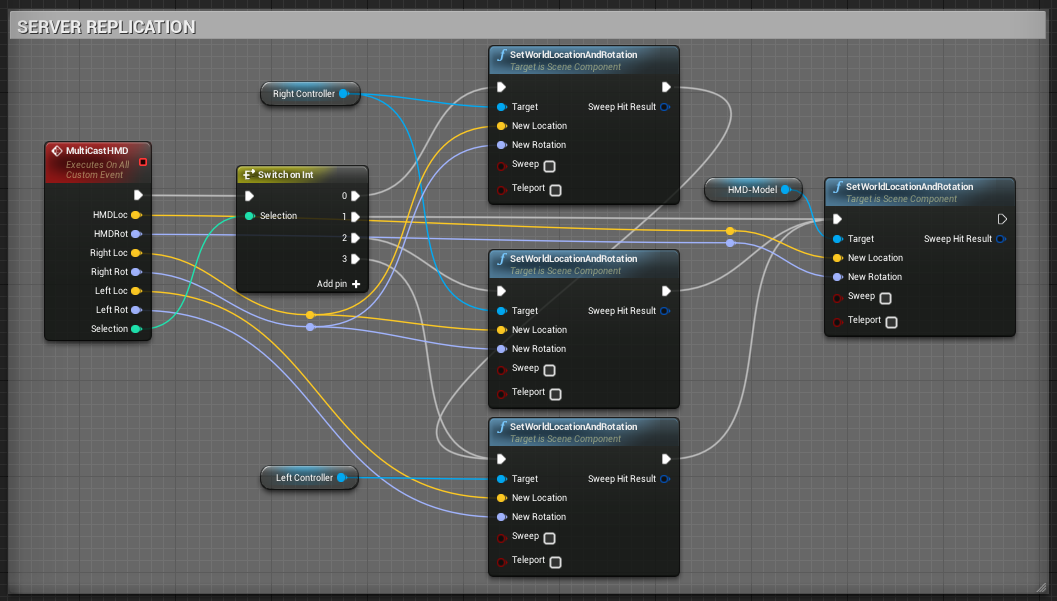
https://i.gyazo.com/4c2b2deb395765e6639e169599c47e65.png And this is the remote replication path
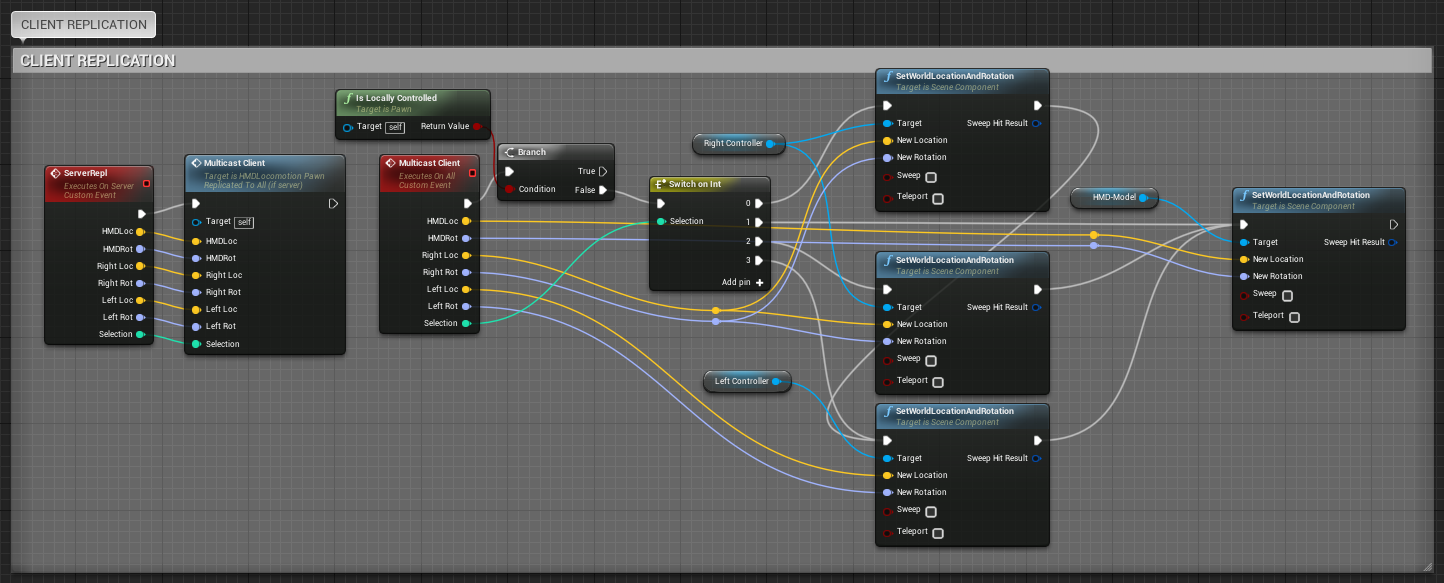
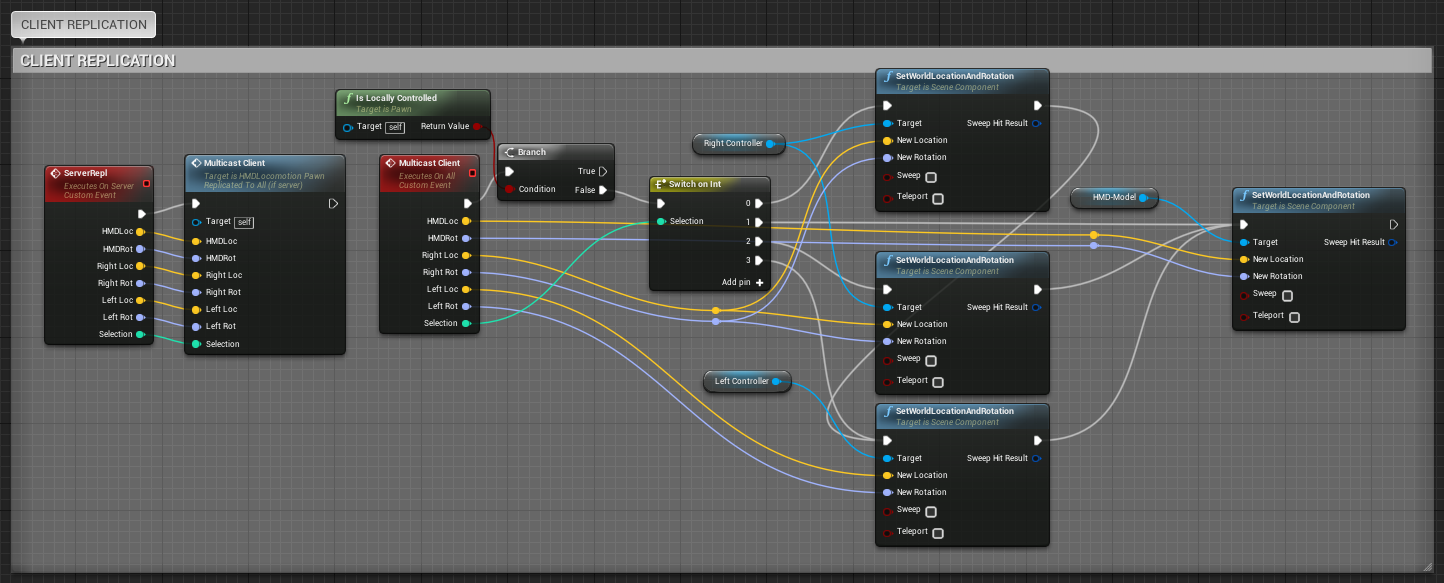
Don't mind the spagetti ^^ but it's more about the position of the "is locally controlled" branch
tranquil yoke
You're using the variable "Right Controller" in your server replication, how do you know it's setting the correct one? What if you have 3 players who is using VR?
twin juniper
This happens inside of my pawn and therefore every player has controll over his very own "right controller"
when you spawn a pawn you can set the owner and I set the owner to the new player, so every player has his own pawn with every components belonging to them
tranquil yoke
But when you're sending the RPC to the server, it's the server that runs the code right?
Or does the server also have a copy of all players pawns?
I know the server has a copy of all player controllers so if a client were to send its own network ID as a RPC to the playercontroller on the server, then the getNetworkId would be the same as the one sent as a parameter.
But is it the same for pawns?
twin juniper
The server controlls his own pawn in my listen server setup, so the server always runs. The clients replicate their movement every tick to the server as an rpc and then the server runs the code but not reliable
tranquil yoke
If you look at my screenshots, I sent the scene components as a parameter togethre with the Transforms because I thought that's the only way?
LOL I just realised, you're vizualTek, the only one who actually replied to my question on the answerhub :D
https://answers.unrealengine.com/questions/569987/toggle-vrpc-mode.html
twin juniper
When you are still inside of your pawn then it is always about this current pawn. So when a client has a pawn and is therefore on the remote path, then everything will be executed on that path for THAT client pawn. Run it on server, because the client owns it and then multicast the transformation to every other client, including the server
😄 nice, yeah I didn't realize this as well until you told me ^^ funny
tranquil yoke
So in other words, I don't need to send the scene components along with the transforms, I can just use the direct reference?
yeah it's very funny ;D
twin juniper
Like I said, you are already in the pawn you want to affect I guess. So you only need the transforms and then multicast them to every other client
twin juniper
yeah, at first it was also quite weird and some parts still are ^^ (just got motion controller replication to work the day before yesterday xD)
twin juniper
You really need to wrap your head around that whole replication thing ^^ Because it's way different then your singleplayer logic, because the server is the one who tells everyone ^^
Currently I'm working on an VR-Multiplayer Arch-Viz experience where you can modify the enviroment (materials, meshes, lights, fx)
tranquil yoke
Yea, I mean .. I thought I knew it all already. I normally don't have issues with networking stuff. But when the magic is behind the scenes and it's not properly explained, then I get confused.
Ooh, that sounds amazing, what kind of modifications?
Are you planning on selling it or just doing it for fun?
twin juniper
I worked for several months on that project knowing it will be singleplayer... but last month my boss told me to make it multiplayer xD yeah, great idea xD
tranquil yoke
Oh haha so you had to set yourself into a whole new area then with replication and all
twin juniper
I'm working for my boss solo on this project and he is going to sell it. It's my job right now (I'm currently also at work, but my boss is traveling elsewhere)
tranquil yoke
I'm also at work .. sort of. I'm doing my master's thesis at a company called Xlent, they provided me with PC, laptop and a set of HTC Vive
twin juniper
Yes, but not only that, if you want to change from singleplayer to multiplayer you have to check and change so many things because you didn't schedule it for multiplayer ^^ And there starts the confusion
twin juniper
The modifications in my projects are according to the things I wrote in parentheses. Modify the materials of a floor or the mesh of a table or the fire fx of a fireplace or the light of a lamp (color or fx as well) or everything together
tranquil yoke
yeah
twin juniper
My project also features several menus and the possibility to add jpg/png pictures later in a folder so they can be used in the packaged version as well
tranquil yoke
Have you created any system for spawning meshes or so? Or drawing/painting in VR?
Like .. spawning meshes from an inventory or something
Shouldn't be too dificult, but I might need something similar. I am creating a system where I want to be able to interact with the environment quite a lot
twin juniper
spawning meshes would be quite easy I guess. When you do it in VR you either have gaze based line trace or line traces from your controllers so you can point to the location you want to spawn something
I didn't use a inventory yet, but some changes that my boss wants would be easy to create when you have an inventory. But yeah, you would then just set the mesh you want to spawn inside of your inventory
tranquil yoke
yeah
twin juniper
Or maybe inside of the pawn if the pawn makes the spawn, which might be better
tranquil yoke
yea that might be better. Would be easier to clean things up I guess, if the pawn gets destroyed it can destroy its creations along with it if necessary
twin juniper
Or for multiplayer, inside of your game mode, so it belongs to the server and not to the client who owns the pawn (don't know if that could become an issue)
tranquil yoke
yeah
By the way..
My pawn is quite complex as said. Do you think it would be sufficient for me to replicate the HMD/Motion controller's transforms and then the pawn would update itself?
I'm not really sure how it works, but the guy who lent me the pawn for my thesis, said I should be replicating the effectors he has on it. But it doesn't seem to be working fully either ;D
twin juniper
I didn't optimize my approach but it works fine so far. When you do the transform replication on every tick you will only need to send the transforms you need. But maybe you don't need the whole transform, because you never change the scale so you don't have to send the scale parameters
what are those "effectors"?
tranquil yoke
Yea that's true, but I'll keep sending the whole transforms as for right now (goes faster to test).
I assume the effectors are components of the pawn which helps to calculate how the pawn is supposed to look like (for example if it's standing, stretching, bending etc) ..
Using that one
A educational only licensing ;D
twin juniper
I started off with the HMD Locomotion pawn and modified it the way I needed it to be, so I pretty much know everything about my pawn and so should you, especially if something about your pawn is unclear
watching the videos now
tranquil yoke
Well thing is, the pawn is pretty complex, it's using inverse kinematics to animate the character
twin juniper
If it's complex and you want to change stuff, then you have a reason more why you should understand your pawn ^^ If you want to hit a switch, you don't need to know how it works. If you want to modify the switch you sure need to ^^ The video tells "multiplayer support", so isn't there something build in?
tranquil yoke
He said this to me in his email
"You would need to replicate the effector transforms for the plugin to replicate. We plan to support replicate in the future."
twin juniper
Hmm I guess that you would also be fine when you send the transform on every tick, because if you move a hand or joint then every other bodypart moves accordingly. So if you replicate those values, the other values would follow on their own without you needing to replicate them (because when you are multicasting then you are inside of the pawn and then this pawn will change for everyone the same)
tranquil yoke
Yea that's what I was hoping for ;D
I am curious about your code, why do you have a separate event "MulticastHMD" which is multicasting, and also one that is "Multicast Client" which is also multicasting
and they both do the same?
except for the "IsLocallycontrolled"
twin juniper
yeah, that's the catch I guess xD I didn't try to fire the same event yet. Like I said, I didn't optimize it yet.
tranquil yoke
Ah okay, so that part is unintenional ;D
Was just thinking I might have missed something
twin juniper
I will test it
tranquil yoke
You're also sending the "Controller state" as an int, is that specific to your project?
twin juniper
yes, because my vr pawns have the option to choose if they want to use the gaze based + remote controlls or if they want to use the right, left or both motion controllers
twin juniper
Apparently you can do both, the server and the client replication with the same "IsLocallyControlled" exec path
which is nice, at least it works for 2 players
tranquil yoke
yea nice
tranquil yoke
Still having some issues with the pawn movement replication ;D any ideas?
rare cloud
@tranquil yoke, have you check replicate movement ?
tranquil yoke
Yea I have, it's ticked on. But I've read "Replicate movement" requires the movement component, which this pawn doesn't have.
So the movement needs to be replicated through RPC calls somehow
I have been able to get my pawn to rotate the torso, but limited to that. I can't move the arms or legs (the legs should move accordingly to the head and arms)
If anyone want to help me get this working, I could share my screen through join me if that helps
twin juniper
So your torso moves because you move your hmd with your head?
tranquil yoke
Yes exactly
twin juniper
Why should your arms and legs move accordingly? they are most distant to the head according to your skeleton
tranquil yoke
Well, basically the legs and the torso rotation and location is computed based on the rotation and location of the head and the arms
twin juniper
When you move your head you only replicate the head's transform or which information?
tranquil yoke
I was replicating something called Pelvis effector, so it wasn't directly the hmd. I'm not sure how I can retrieve the HMD and set that value through rpc
But I've just noticed something extremely weird
Code which isn't connected to anything
twin juniper
In the video they use "BHeadTarget" for the Head Movement
tranquil yoke
In the first FigureI have some code existing, but it's not connected thereby not being executed.
In Figure 2, the code is deleted.
This should be the same results am I right?
Apprently, in the first case, the character just stands upright and doesn't move.
In the second case, the character works as it should (although not replicated obviously)
twin juniper
If you never connect these things or the events never get fired it is basicly the same as if they were deleted, because they are never used, but normally ue4 does not delete stuff on it's own
tranquil yoke
Yes, that's what I thought too. But apparently there is some essential difference. cause it affects the results
Must be a bug, no ?
twin juniper
You are in some child blueprint, because it inherites some sort of parent
tranquil yoke
Yes I am
twin juniper
If the additional events get fired in the parent and are being overriden by the child, than this might have an effect
But I did never override stuff in ue4, so i don't know if that's the cause
tranquil yoke
The events are definitely not fired in the parent, I have created the events myself so it shouldn't be possible.
I created a child BP because I did not want to modify the default behaviour of the pawn
This behaviour is so weird, I am left confused once again
sometimes when I compile the pawn, the unreal engine crashes as well. Quite often actually. It feels like it's because the pawn is too complex for UE4 to handle. But that feels just so wrong and shouldn't be possible
twin juniper
well, how complex is it then?
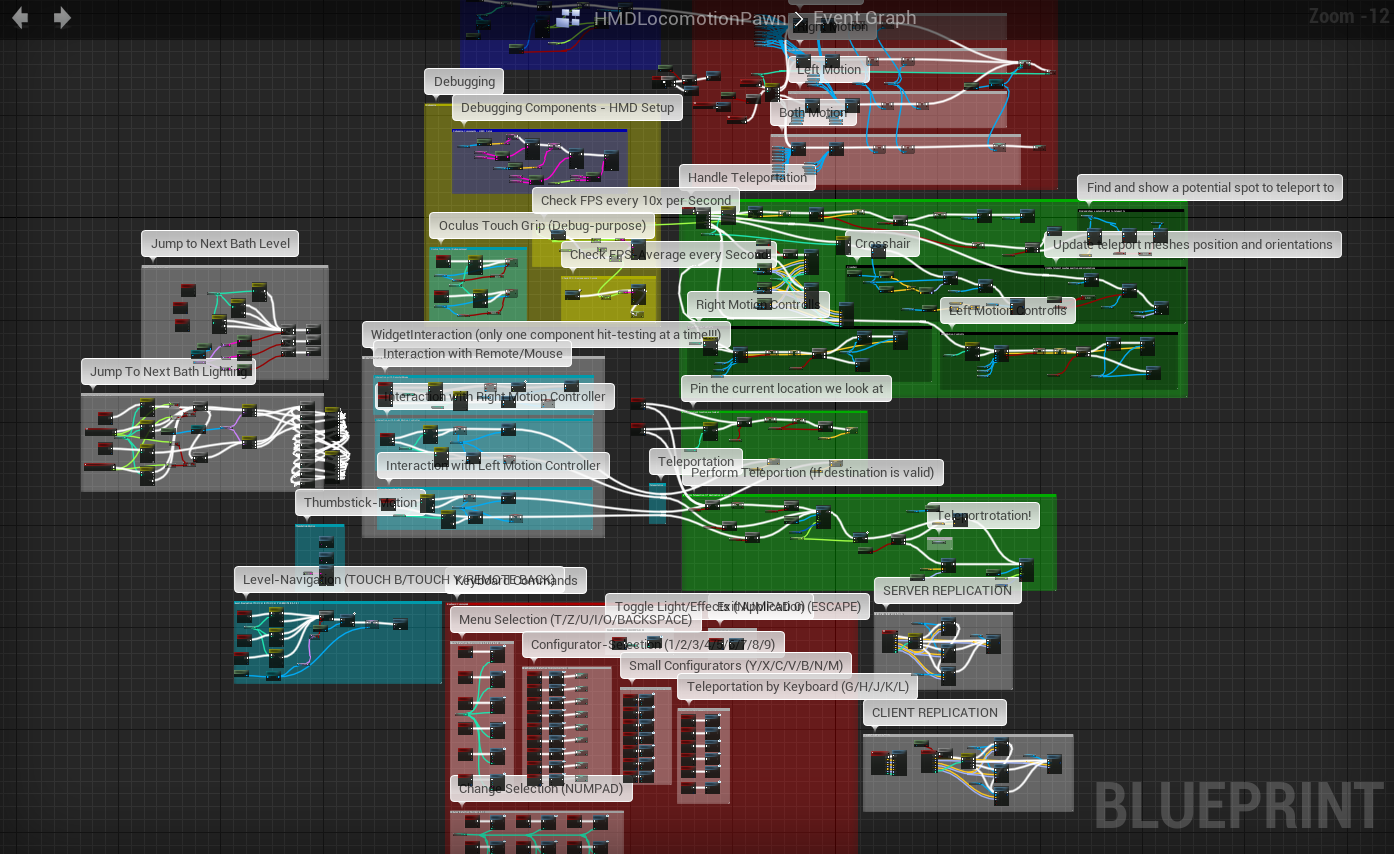
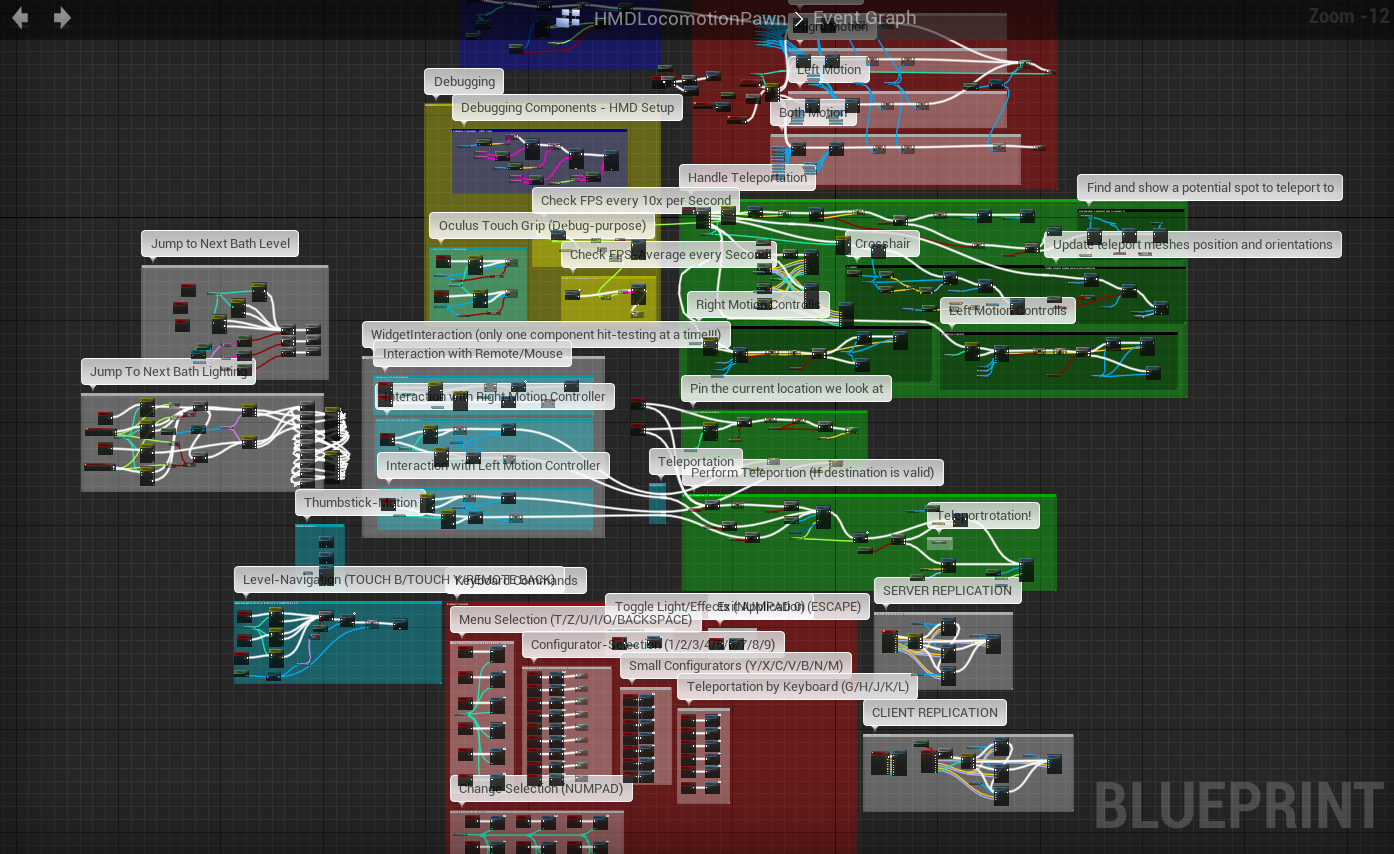
https://i.gyazo.com/c42ddfb596bd472e2bb3b259c065c4f7.png This is the unoptimized complexity (including some macros and functions) of my own pawn and it never crashed when compiling
 tranquil yoke
The cpp files seems to be in total more than 8000 lines of code
So I would say this pawn is far more complex than yours 😄
twin juniper
I don't think that 8000 lines of code would crash your stuff
tranquil yoke
It's more than 8000 lines.
But yea I agree I don't think it should, it's weird. And it only crashes sometimes when I compile it (no errors give, works fine to compile if I restart UE4). . and it's only this pawn giving me the problem
But I've send a few reports when it crashed so hopefully it'll give the devs something to look for
twin juniper
Did you look up the logs after the crash? you can find useful informations there
tranquil yoke
Do you know where they get saved?
twin juniper
.../Projectname/Saved/Logs I guess
I had a migrated project crash every 1-2 minutes after starting with no message and found out, that it was the texture streaming that created the crash, so have a read and maybe you find something, maybe it is not about the pawn at all
tranquil yoke
[2017.03.17-15.26.01:379][977]LogUObjectBase:Error: 'this' pointer is misaligned.
That seems to be the biggest issue, although I don't know which object that is
twin juniper
According to your movement replication issue, did you read this? https://forums.unrealengine.com/showthread.php?3646-Full-Body-IK-Setup&p=680344&viewfull=1#post680344 It appears that the dev is currently working on that "whole body movement"
tranquil yoke
Well the thing is, the pawn works fine if I'm running it locally
It's just replicating this effect that's the problem
twin juniper
in the video on the first page (starting at 0:40) you can see that the movement of the head is only affecting the torso and a bit of the arms as well, which is different from the post I just showed you
twin juniper
I think the devil is in the detail/code, but without seeing the code/bp it's kinda hard to judge about that
You can always speculate, but without the knowledge of structure or logic you may drive blind ^^
tranquil yoke
yeah
Thing is, if I were to look in the code of the pawn it would take quite some time as it is so large ;D
twin juniper
All C++, No BP?
tranquil yoke
There are some BP but not a lot
twin juniper
Hmm then contact the dev of the pawn if you don't know that much about c++. But I don't think that the issue is connected to the c++ code, because if you pay for something like that it should work and you will not be the only one who is using this pawn for replication purposes
But nevertheless, maybe the dev can give you a hint to that
tranquil yoke
Yea I don't think there's any problems with the pawn itself either. It just doesn't support replication yet so I have do implement this part myself. The dev told me I should be replicating the effectors transform which I have been trying to do
twin juniper
He started the post nearly 3 years ago, so he should have way more knowledge on that than I do ^^ I'm employed for maybe 6 months now and I also have much to learn about UE4, GameDev and stuff
tranquil yoke
yeah
 hollow hatch
I'm trying to figure out a pretty basic networking problem
inside my GameMode::initnewplayer im setting a property on the new player controller
however, the second connected client never has that property set
assuming there's only one gamemode on the server, i dont know how this happens?
rare cloud
@hollow hatch, can you post your code ?
and have you try to run your editor with debug vs configuration ?
with a breakpoint to see what happen
hollow hatch
the code is super simple
i'll extract the relvant bit
(
    APlayerController * NewPlayerController,
    const FUniqueNetIdRepl & UniqueId,
    const FString & Options,
    const FString & Portal
)
{
    FString ParentString = Super::InitNewPlayer(NewPlayerController, UniqueId, Options, Portal);
    NumberOfPlayers++;
    ADyingIsGoodPlayerController* Controller = Cast<ADyingIsGoodPlayerController>(NewPlayerController);
    if (Controller)
    {
        Controller->TeamId = NumberOfPlayers;
    }
    return ParentString;
}```pretty simple, just assigning a teamid based on the number of players connected
and im not sure what you mean by 'debug vs configuration'?
rare cloud
inside visual studio set your configuration as DebugGame Editor and add a breakpoint
compile your project
and run
and what the output values ?
hollow hatch
oh yeh, i have
well the code is run on the server and eevrything looks fine
but that code is run twice
but the playercontroller is constructed 3 times and the 3rd time that property is never set
rare cloud
I guess you need to move your variable to PlayerState
because Controller is replicated only to the owning client
maybe that's why when you debug the variable isn't set to other than your current player
hollow hatch
mmm, that statment confuses me; "Controller is replicated only to the owning client"
rare cloud
yeah the player controller is only replicated between the server and the owning client
Player state is replicate to everybody
I guess it's time to take a cool picture from the @thin stratus compendum:
hollow hatch
yeh but the problem im seeing is that player2's controller doesn't have it's own property set
rare cloud
did you check it from server side ?
thin stratus
The function should run once per connecting client, similar to PostLogin
 untold cipher
For an open world pvp game should I have projectiles be an actual object, or, should I just do a trace and apply damage? Is there a reason I should do one vs the other?
thin stratus
Yes, do you want your projectile to be a slow moving object or an instant hit?
untold cipher
It will be coming out of a gun, so, it would be fairly instant.
thin stratus
Up to you to decide
untold cipher
I would have to do something different for a bow and arrow I assume unless I applied delay.
untold cipher
Having a lot of bullets spawn in the world. Would it cause a possible frame drop?
severe widget
I'd go trace unless your distances / travel time are worth it
thin stratus
Yes, you would use object pooling
untold cipher
I started out with spawning bullets, but, am looking to redo the blueprints to use traces for performance reasons and simplicity.
thin stratus
Which means instead of spawning and removing objects (actors), you would spawn them once and deactivate/activate them
rare cloud
@hollow hatch, well the problem appear when you check the variable from client side ?
but how you check it ?
thin stratus
@hollow hatch Simply printing a log message in the function should tell you if it's getting called
Other than that, I think GameMode already has a NumPlayer variable
so you don't need to use your own
hollow hatch
@rare cloud im checking in beginplay of the controller
yeh im aware @thin stratus , just simplied my example for sanity sake
rare cloud
@hollow hatch, I guess it's too early
add a small delay
0.2
to be sure the variable is received by the client
hollow hatch
heh, i suspected that too so i added another check in tick
i think i may have found the problem
i changed the custom object i was using to a simple int and it seems to be setting that fine
so maybe it's an issue with replicating my object
sterile pebble
@thin stratus didnot want to bother you, but I suspect you know answer - where I should start or in what direction go if I want to dig into source code for network replication in ue4? I took a look into unrealnetwork.h and similar files, but found only socket stuff, not actual replication tick or something like this..
brittle sinew
Have you seen this page? It seems to be pretty detailed, and provides method names @sterile pebble
A detailed description of low-level Actor replication.
sterile pebble
@brittle sinew oh god, why I missed this, thank you!
brittle sinew
It's marked 4.9 so I'm not sure how up-to-date it is, but hopefully it can at least point you in the right direction 😄
thin stratus
@sterile pebble Epic has a network relication stream scheduled
You might want to check that out and drop your questions there
teal jungle
Hey, I have read the network compendium and it's great but I need to learn more about how the FSavedMove_Character does work ?
I wasn't able to find good documentation on that unfortunately...
I like to understand the thing I use !
 warm pagoda
UE4 code
teal jungle
UCharacterComponent is 10k line ...
warm pagoda
Yep
 fossil spoke
The awesome thing about UE4 is that the Code is open source, you can learn about it first hand right in the code.
warm pagoda
Not technically open source, but yes.
teal jungle
UCharacterMovementComponent*
fossil spoke
Well the source is open to anyone, so open source
teal jungle
Urg
warm pagoda
I find I often have to say this: UE4 is extremely open and accessible, but it is none the less an engine that was made for big, enterprise-grade, professional studios with considerable resources behind them.
It is what it is, and that means a lot is left to the user to be comfortable effectively reverse-engineering just to understand.
teal jungle
At least we do have the code and it's look well commented
warm pagoda
Aye. And being well commented is generally rare for some of the more fundamental and complex code that gets made by some great expert and isn't generally expected to be looked at or touched by anyone else.
fossil spoke
Epics internal code documentation is the best ive seen anywhere
warm pagoda
I guess I don't have much room to tallk - the UE3 and UE4 codebases are basically the only professional grade codebases I've ever really been exposed to like this.
(Or things built on them)
That said, there's plenty of hot garbage to beware, too. :X
teal jungle
I work a lot in Android source code and Linux Kernel
And what I can say is that it is pretty rare to have good comment
And actually Linus Torvald doesn't want the code to be well commented
(And it is unfortunate) Most of the time the commit message is the best documentation
So git blame is pretty welcome
fierce birch
twin juniper
Anyone from here mind checking out my question in #blueprint
Shouldbe simple enough
teal jungle
Wow can't wait for this livestream!
Do you know guys how I can replicate a FVector inside the FSavedMove extended class ? I have try to use it but it doesn't get replicate since prepmovefor is not called on the server ( I guess)
I can still use an RPC to set the vector on the server from client
But I was thinking that only something in the FSavedMove would be sufficient...
 low elm
I really wanted this. But only few variables of FSavedMove replicated to server and with some flags.
I ended up extra Unrealible RPC .
And submitting to server every frame.
teal jungle
@low elm Oh everyframe might be a little to excessive
I do it only when I see that my activation flag is set to true
Work greats this way but still not sure if I use the better solution for that
low elm
Yes I always looking for another solution but for now not bad. Unreliable RPC is cheap operation. Hopefully will find solution without editing source code of UE4 :D
Also The Fey ❤ 😄
teal jungle
@low elm Yeah I started to diverstify myself tho ahah (other Paragon hero), at least my feature doesn't need to constantly update the vector
 midnight nova
If I have an event which starts an animation and doing other stuff which replication mode should this be so the client can call this and it get replicated to all other clients?
fossil spoke
@midnight nova The server should trigger an Multicast on the clients behalf to get all clients to see the animation
midnight nova
Okay I think my problem is with who is owing the actor.
In this case I have a BP in the level (so the owner is the server right?)
Now if a player walks over this I set a variable in the player bp to hold a reference to this BP and attach it to a socket. Then i have an input action which calls an event on the BP.
@fossil spoke
fossil spoke
The Server (Authority) should call the Multicast Event that plays the animation
midnight nova
But how should I run an event on the server from the client if the client is not the owning client of the actor? Because "Run on Server" will get me "No owning connection for actor"
Maybe I miss something in the docs xD
 supple thicket
Had a question about potential cheating:
If I have an inventory component added to a player pawn, and I do all the 'management' e.g adding items, removing them, etc inside of said componenet.. Would the player technically have access to these functions and abuse them? I have a basic addItem function, which is them ran thru a custom event set to Run on Server
I suppose the player would in fact have access, and could add items and such, but it would ultimately be client side only, so long as equiping items, using items, etc etc.. is handled thru a function that is server only. Am I getting this?
warm pagoda
@supple thicket Assume, always, the anything present on the client is 100% hacked, abused, and violated.
The server should always, always, always doubt the client. Whatever logic the client used to choose to tell the server to do something, the server should verify.
Client asked the server to fire their weapon? That's nice. Do they have ammo? Are this in some state that would stop them from being able to fire, like being dead?
This is actually part of how movement works - clients are telling the server where they are, the server looks at it and says "Huh. You sure? Could you have traveled that distance in that time? Yeah, I guess so. I'll allow it."
Make it so that the worst case scenario is that a hacker can only give them selves a marginal advantage in the worst case scenario - in the movement case, it means the most they can do is hack to make sure they're always moving the maximum distance in a period of time, more or less.
 orchid cairn
evening all! has anyone else had an issue building a dedicated server with 4.15?
sudden niche
@orchid cairn Morning! Nope, my builds run just file. Why are you asking? 😃
orchid cairn
@sudden niche - i'm getting this error when i try to run a ded server build (the build compiles correctly) https://answers.unrealengine.com/questions/565174/dedicated-server-assertion-failed-bcheckadded-node.html
its earmarked for a fix in 4.16, but since my normal servers work fine, kinda would like to get the dedicated servers back up for testing
sudden niche
Hm, never gotten that one I'm afraid. 😦
twin juniper
I have a construction script that randomly generates buildings placed in the level (I don't spawn them, they're placed). The clients runs the script as well and they see different meshes than on the server. It doesn't occur when playing in editor, only when playing on separate machines. What would be the proper way to deal with this?
orchid cairn
@twin juniper - server is king, so run the script there, set your buildings to replicate and let UE4 handle the rest 😃 PIE has a different code execution path than standalone or actual builds, but you should be fine for testing to just use the has authority node before you run your script
hollow hatch
I have a weapon component that spawns a bunch of projectiles and I need all connected client to see these projectiles. It seems there's 3 ways to solve the problem:
a. Mark that method as a server method
b. Have the component instead dispatch an event upwards to a server-authoritative object (like GameMode) and have that object do the spawning instead
c. Store the spawned projectile in a replicated property (not sure if this is enough to get it to work)
brittle sinew
Are you asking which way would be preferred?
In my opinion, a is the simplest and most straightforward, no reason to have a GameMode spawn it
As long as you setup your ownership properly, you'll be able to call server methods on the weapon
hollow hatch
yeh I'm just trying to get a feel for the ideal approach
twin juniper
anyone know how to defend against this cancer?
in a multiplayer game
that game was made with unreal
obviously they somehow turned off the mesh visibility lol
@orchid cairn Thanks it's just like normal then. Wasn't sure if construction scripts somehow loaded on client and stayed that way
orchid cairn
they fire on object construction, so that will trigger on both the server, and on client replication (i think there's a net load replicate flag you can set and it wont)... but yeah, generally speaking fire it on the server, let it set up everything, and let the replication handle the rest (again, in your construction script you can run a has auth, or just check the isServer bool)
 tawny parcel
Anyone here?
I'm trying to understand the best process for managing client and server versions for multiplayer games. When I try to connect separate projects built with the same source I get invalid version errors. I have plugins meant for client side only and sever side only - so I need two separate projects. What is the best way to accommodate this?
rare cloud
@tawny parcel, you don't need two projects
but two modules
like Fornite or many games build with UE did
tawny parcel
Are there any tuts on setting up modules anywhere?
tawny parcel
I'm a blueprint user so I'm still wrapping my head around 'module'. Is that like adding a C++ class? Or is there an option through in editor GUi.
rare cloud
oh you use BP only
@tawny parcel, I have no idea what is the best way to manage a BP only project with multiplayer
tawny parcel
Can you point me in the direction to enable "ProjectVersion" located in this documentation? At the bottom:
https://docs.unrealengine.com/latest/INT/API/Runtime/Core/Misc/FNetworkVersion/index.html
I know its hacky, but I'm just testing a few things.
Its in NetworkVersion.h but I don't know which lines to swap out to activate it.
rare cloud
@tawny parcel, you want to change the ProjectVersion ? I don't think you need C++ to do that
I will check the header
tawny parcel
I just need to control version number verification. So I don't get "Client connecting with invalid version" with two separate projects.
rare cloud
oh ok
tawny parcel
I have a client project and a dedicated server project. But they can't connect to each other
rare cloud
but normally inside your DefaultGame.ini
you can set this ProjectVersion=1.0.0.0
if you didn't set already
seem strange because UE generate it
tawny parcel
It is set by default, I can see that setting in UE4 project settings, but they match each project
In NetworkVersion.h
"Generates a version number, that by default, is based on a checksum of the engine version + project name + project version string
* Game/project code can completely override what this value returns through the GetLocalNetworkVersionOverride delegate"
Than at the bottom....
" /**
* Used to allow BP only projects to override network versions
*/
static FString ProjectVersion;
static bool        bHasCachedNetworkChecksum;
static uint32    CachedNetworkChecksum;

static uint32    EngineNetworkProtocolVersion;
static uint32    GameNetworkProtocolVersion;

static uint32    EngineCompatibleNetworkProtocolVersion;
static uint32    GameCompatibleNetworkProtocolVersion;
};
So I think this is what I need for now I just don't know how to activate it
twin juniper
https://youtu.be/VH4yDlZRvpo
anyone know how to defend against this cancer?
in a multiplayer game(edited)
that game was made with unreal
obviously they somehow turned off the mesh visibility lol
bump
rare cloud
yeah but I don't think you can access this delegate from BP, only C++
tawny parcel
Yea, what about a C++ class?
It would seem strange that code intended for to help BP only projects cant be utilized by BP only projects
rare cloud
yup
but if you search this specific delegate:
https://github.com/EpicGames/UnrealEngine/search?utf8=✓&q=FGetLocalNetworkVersionOverride&type=Code
normally a delegate which can be access from BP
have an UPROPERTY(BlueprintAssignable)
tawny parcel
What does that mean exactly?
Oh i see now
Shouldn't I atleast be able to enter a C++ Class some how?
Thanks for all the help btw
summer nova
anyone here has been able to use steam voice interface for in-game VOIP?
twin juniper
@summer nova im going to be looking into that in the future most likely, if i remember ill tell u
jolly siren
anyone have experience hosting multiple instances of a dedicated server on the same box? I set it up to use a different port via the -port command line arg. And I'm forwarding that port in my router. It works if I only run one instance of the server exe. But running two isn't working. It's not the ports/firewall because they work by themselves using different ports. Just not together. Am I supposed to be using two different versions of the same exe? i.e. should I clone the LinuxServer directory for the second instance?
This is steam btw
twin juniper
@jolly siren I believe you need to setup multiple IPs
like if you have a hosting provider
just purchase new IPs from them
I think there is another way of setting up a sort of virtual host
but im not sure how to do it anymore
twin juniper
You could do different ports
but, personally ive never liked that setup
usually when u buy a server you get 2 IPs for free with it
at least from my experience
jolly siren
Yeah I prefer ports for now. There must be something I'm missing tho. They work fine on their own using different ports. But when they are both running I can only see one session.
twin juniper
It might be an issue with steam
But i could be wrong
You are using a dedicated server right?
jolly siren
lol yeah
twin juniper
Check your search settings
jolly siren
yeah I'm looking those over
jolly siren
c++
worthy wasp
@jolly siren - i MISTAKENLY came across this back in 4.10 - but i had 2 different .exe instances of the same dedicated server build running simultaneously on my machine.... i saw that 7777 and 7778 were open in Netstat -an command.....
what ARENT you getting happening?
worthy wasp
specifically - the dedicated server map that is being loaded has a CREATE SESSION in use correct?
jolly siren
yes, they work fine on their own. I just don't see the second session when they are both running at the same time
worthy wasp
ok i've not used dedicated servers with SESSIONS so i'm a bit unexperienced in this... but thats not to be said it cant be done
twin juniper
@jolly siren you mean in your server browser?
worthy wasp
in your PORT FORWARDING - you're doing 7777 - 7778 ?
twin juniper
like when you call FindSessions() how many sessions is it returning?
jolly siren
1
twin juniper
you should try and do a debug log of it
jolly siren
I am
jolly siren
wut
twin juniper
try running the server on a different machine
severe widget
"Here, let me actively ignore this server"
worthy wasp
i'm sorry i misread that
severe widget
"Why is my server not working?"
worthy wasp
your FIND SESSIONS - the search settings is set to MORE THAN ONE right?
jolly siren
MaxSearchResults is set to 20
twin juniper
[OnlineSubsystemSteam]
bEnabled=true
SteamDevAppId=480
SteamAppId=480
GameServerQueryPort=27015
bRelaunchInSteam=false
GameVersion=1.0.0.0
bVACEnabled=1
bAllowP2PPacketRelay=true
P2PConnectionTimeout=90
; This is to prevent subsystem from reading other achievements that may be defined in parent .ini
Achievement_0_Id=""
go to your ROUTER CONFIG - you have port forwarding RANGE of 7777-7778 (or greater) right?
twin juniper
Are you registering the second server in RegisterServer() with the same information?
jolly siren
yes of course I'm forwarding 7777 to 7888
severe widget
p sure he said either port works but not when they're both on
Either read or do something else
twin juniper
^
jolly siren
right
worthy wasp
wow kork - fuck it i'll just stfu then...
jolly siren
and yes RegisterServer is called the same for each. it's the same exe
worthy wasp
good luck
twin juniper
HAve u tried running the two servers
on separate machines?
because i really do think its steam being a btch
jolly siren
no, need to spin another up. I can do that as a test.
twin juniper
You should
Tell me when you try it out
if it works or not
Might be able to test it in a VM?
jolly siren
okay, will do 😃
twin juniper
😄
jolly siren
yeah my server is a linux vm. I'll need to setup another one real quick
jolly siren
still getting setup
tranquil yoke
Can someone help me with my problem?
I am trying to do 2 things.
-
I am trying to switch between 2 pawns (spawn, possess and destroy) but my problem is, when I switch pawn as a "client", the server becomes frozen and cannot do anything, as if he lost his pawn/player controller
-
I am trying to replicate my pawn, but the problem is, The feet isn't moving (I don't know what to replicate), and when playing as client, the body is just spinning like crazy.
I can give a live demo at https://join.me/446-865-643

join.me
Free screen sharing, online meetings and team collaboration are all fast and easy at join.me - no registration required. Show work who’s boss.
twin juniper
@jolly siren uhh
jolly siren
vm setup, exe transfered, iptables modified, server sh ran. not finding session from that machine, so trying to figure out what I missed
twin juniper
what did u have to change?
jolly siren
had to forward the game server query port to my new vm
so idk how to test with multiple vms now
severe widget
You could maybe try having the game server query port be different for each instance along with the main port, but that's just a guess.
jolly siren
one
right
that's what I'm trying to figure out how to do
but really this is just for the test. because really i want these running on the same vm
doesn't look like there is a command line arg for GameServerQueryPort
okay so I got both sessions to show up, so my code is definitely good around that
I had to add the following to the Engine.ini on my second vm
[OnlineSubsystemSteam]
GameServerQueryPort=27016
and forward that port
jolly siren
but that doesn't answer how to host multiple instances on the same vm
@rough iron I summon the wizard
😇
@rough iron Summary: I can't find multiple steam sessions when running multiple instances of my dedicated server on the same vm. I have tested with hosting on multiple vms and it works when I change the port and GameServerQueryPort. Would I have to use different GameServerQueryPort's when hosting multiple instances on the same vm? And if so how can I change that? I don't see a command line arg. Would I have to have multiple versions of the LinuxServer directory?
or maybe there is a way to point the sh to a different Engine.ini config file via command line arg
It looks like there is
Collection of arguments that can be passed to the engine's executable to configure options controlling how it runs.
I'll try that
twin juniper
So you got it?
 rough iron
@jolly siren ^^ noice xD
But multiple instances on the same box could lead to congestions
Or failures in steams natneg
jolly siren
yeah that is true, not sure how else to do it without a huge server farm or listen servers
rough iron
Just stress test it ^^
jolly siren
Will do. I read that gears has dozens of instances on theirs
jolly siren
Right, that's true. I guess Ark might be a better use case to look at
twin juniper
@jolly siren what are you making?
tawny parcel
Can anyone tell me how to activate this in a C++ Class in a BP Project? Or if I need to modify NetworkVersion.h some how.
The part at the bottom... "Project Version".
tawny parcel
I'm running a build with "bool FNetworkVersion::bHasCachedNetworkChecksum = true;" default is false to see if this is the correct change. Within NetworkVersion.cpp
 jolly berry
hey I have an objective manager that's responsible for storing a list of objectives set in the world outliner and selects a random one everytime the player reaches the objective. I'm now trying to set this up for networking. My manager is setup in C++ but I was wondering if I should be exposing that code to the Gamemode so that it runs on the server only or if I should be modifying my Manager class to replicate properly?
I just want the objective to be updated and for every client to see the same one
but obviously I don't need every client telling the server to select a new random objective when one collides with one
I just need the server to run the method once and select a new one, and then replicate it to clients
would I be looking to interface my manager through my gamemode or something else?
fierce birch
what's the reason for shootergame not allowing to host game in PIE?
I know it works on standalone
 eternal anchor
does anyone have thoughts on handling recoil in multiplayer ?
I mean to keep it synced between server and client
and I don't mean random spread with seed, but actually recoil where camera moves
 granite jolt
why?
I mean thats a bad question... I should ask, why? Do you think it would be worth it overall?
eternal anchor
yes
nothing gets me more mad than random spread used as recoil
and I don't really want to do it client side (for obvious reasons)
granite jolt
yeah recoil is never random. its always influenced. I hate random spread in shooting games all together. What is the point of a game where you test your aim but the engine constantly tells you that you shot in a random place. If you want realism, then lets first start with the industry wide stance of "we need to make everyone a bullet sponge or the noobs will leave the game".
tawny parcel
Anyone able to weigh in how I just turn off NetworkVersion check via this documentation?
https://docs.unrealengine.com/latest/INT/API/Runtime/Core/Misc/FNetworkVersion/index.html
See the bottom const "ProjectVersion" - Used to allow BP only projects to override network versions. I am mostly a BP user and confused how to turn off this check.
brittle sinew
@tawny parcel to set the project version, it's in your project settings.
To override the project version check you need to bind to FNetworkVersion::IsNetworkCompatibleOverride, which I don't believe is available in BP
fierce birch
just a reminder, this will be live in 6h 20m: https://forums.unrealengine.com/showthread.php?139935-Training-Livestream-Understanding-Replication-in-UE4-March-21-Live-from-Epic-HQ
granite jolt
perfect timing. Just spent the weekend browsing over multiplayer stuff and installed a fresh project to prototype with 😄
eternal anchor
hah I hope it will more advanced topic than basics ;d
granite jolt
"you remember that game 'Chinese Whispers'? Yeah. That's replication. This message was brought to you by the server". stream ends
fierce birch
I'm playing with advanced sessions plugin atm
anyone use the voice functionality ?
like, it actually works properly?
twin juniper
Hey guys
tawny parcel
@brittle sinew Yea, I am trying to set by going in to the NetworkVersion.h or .cpp than rebuilding. Not through a node.
brittle sinew
@tawny parcel yeah sure, my point is if you're trying to actually change the network check function, you can't do it in BP
You can change the project version in your project settings, but that's about it, you don't actually set it in the code
The ProjectVersion variable in the struct will be set internally in the engine from the project settings, you don't have to change the header at all
fierce birch
hmmm
if using socketsubsystem with steam, how does one get all players IP addresses from the same session?
I'm probably mixing terms, I get how you get to the session and understand the sockets, totally missing the link between 😄
tawny parcel
But according to the documentation there is a way to enable an ovverride for BP only projects? Or am I wrong with this?
hollow hatch
I've got an actor that's setup to be autopossed by an aicontroller, but when that actor is replicated on a client im noticing that it doesn't have a controller
appears the controller is being created once on the server but never on the connected clients
not sure what im missing here?
brittle sinew
@tawny parcel where do you see that?
The ProjectVersion is simply a string, and it's there so you can enter the version into the project settings
It doesn't implement any sort of version handling in either C++ or BP, that's IsNetworkCompatibleOverride
Which isn't available in BP either way
You might be able to just use the project version and let it work, I honestly have no idea how the default handling works
fierce birch
to my earlier question, you get the IP + port from playercontrollers for ip connections and steamID for steam connections
brittle sinew
@hollow hatch you're not really missing anything, except AIControllers are server only
They should drive the movement on the server to be replicated to the clients, not each client doing something different
"In networked games, they only exist on the server."
hollow hatch
Oh, okay. in that case I have an aicontroller changing a property on it's possesed pawn
but the pawn is only updated on the server and not connected clients
fierce birch
 tawny parcel
Is it possible to comment out the version verification process to disable it all together?
hollow hatch
nice @fierce birch extremely relevant to what im doing right now =p
brittle sinew
@tawny parcel you're not going to be able to do it in BP, but like I said, just bind your function to IsNetworkCompatibleOverride if you want to do a custom check (I wouldn't disable it all together)
Unfortunately there's really just no way around some BP things (or the lack thereof)
Barring a source build of course, but that doesn't really help with BP only when you have to edit engine code 😛