#multiplayer
1 messages · Page 312 of 1
 night jay
 last depot
I've packaged it before but didn't know where to put the steam_appid.txt file
last depot
ini? @night jay
How do I find this in VS?
I'm getting these errors with steam when packaging.
https://hastebin.com/wuzaxasume
Then it fails
Looks like that's my issue with everything. But I don't know what it means
 twin juniper
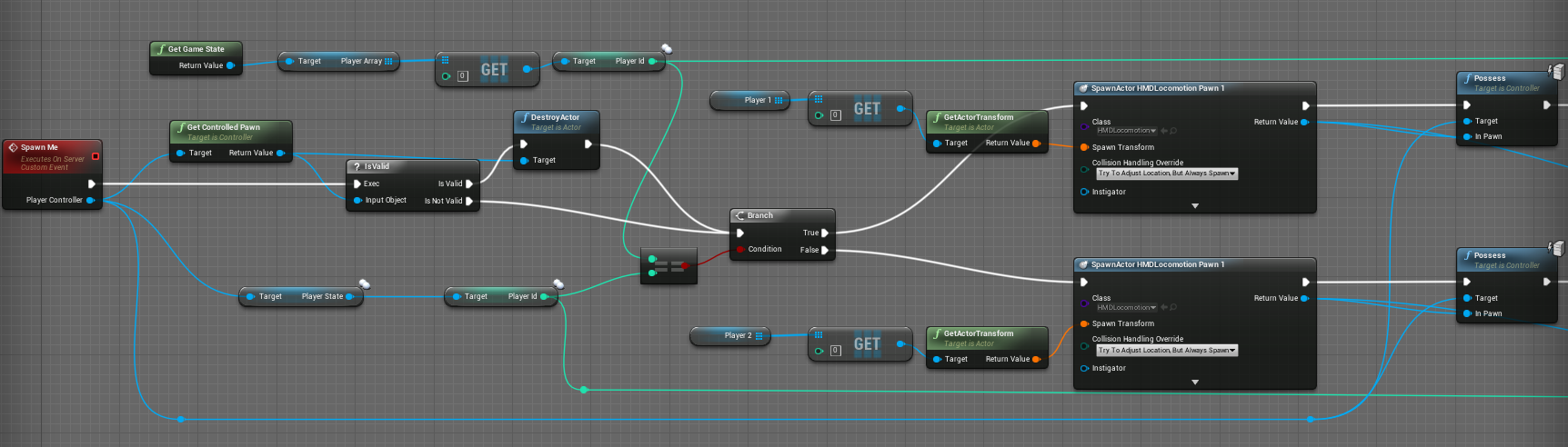
https://i.gyazo.com/f07f33e91bfcfd58e28a3d7e89e61409.png I'm currently struggling with the correct assigning of the player pawns to the player controllers. Can someone look over this screenshot and tell me if I'm missing something there? It's just for 2 VR Player right now
 night jay
@last depot Defaultengine.ini
[/Script/Engine.GameEngine]
!NetDriverDefinitions=ClearArray
+NetDriverDefinitions=(DefName="GameNetDriver",DriverClassName="/Script/OnlineSubsystemSteam.SteamNetDriver",DriverClassNameFallback="/Script/OnlineSubsystemUtils.IpNetDriver")
[OnlineSubsystem]
DefaultPlatformService=Steam
PollingIntervalInMs=20
[OnlineSubsystemSteam]
bEnabled=true
SteamDevAppId=480
GameServerQueryPort=27015
bRelaunchInSteam=false
GameVersion=1.0.0.0
bVACEnabled=1
bAllowP2PPacketRelay=true
P2PConnectionTimeout=90
[/Script/OnlineSubsystemSteam.SteamNetDriver]
NetConnectionClassName="/Script/OnlineSubsystemSteam.SteamNetConnection"
 icy pier
Hello
I've a problem, i have a fully functionnal multiplayer game on Windows but i can't make it works on macOS, does anyone know if there is some issues with macOS ?
last depot
@night jay Mine is exactly that
night jay
You'll have to make a mock project for others to check out then
 somber lava
would this be a working spawn event?
especially the red circled part is the part i am unsure about
 thin stratus
Depends on where you call that
somber lava
gamemode --> OnPostLogin
i just debugged it and realized onPostLogin + HandleStartingNewPlayer are called before the Playerstate BeginPlay
meh
 oblique garden
Super quick question, does split-screen discussion belong here?
oblique garden
Awesome, good to know 😄
That's my current project, so might ask about it here more often
 sterile pebble
I need a little help with understanding ue4 network
what is a proper way to replicate weapon fire from client to all other clients? Implement ServerFire function which will spawn effect, do damage and multicast to all other clients this info? Or not? After looking at shooter game example from epic, I saw that they did something other...
 thin stratus
@sterile pebble They basically do this:
Client presses FireWeapon->Client does his own stuff to prevent the feeling of lag
Client also tells Server "Hey I want to shoot!"
Server then does the shooting and multicasts (here with OnRep variable) that the Player is shooting
Server only deals dmg
Effects are client side
 polar bridge
anyone running 4.15 dedicated server yet? i was able to launch it fine before now i'm getting [2017.02.17-20.11.06:916][ 0]LogWindows:Error: Assertion failed: !bCheckAdded || NodeRef.bAddedToGraph [File:C:\UnrealEngine\Engine\Source\Runtime\CoreUObject\Public\Serialization/AsyncLoading.h] [Line: 248]
followed by a bunch of hex addresses and it crashes...it also throws a lot of warning before hand about different things such as [2017.02.17-20.11.06:810][ 0]LogStreaming:Warning: Export 368 (LandscapeComponent_88) in ../../../TDS/Content/Maps/TwinPeaks.umap was not created. [2017.02.17-20.11.06:780][ 0]LogStreaming:Warning: Export 5 (MaterialExpressionScalarParameter_23) in ../../../Engine/Content/EngineSky/M_Sky_Panning_Clouds2.uasset was not created.
almost seems like it's not picking up on the content properly, but i would also expect to see a lot more errors if that was the case
 upper current
hi guys, can someone help me? i did a basic fps, in a basic map, now,, the next step i wanna do, is to makke it multy-playeable online... like, i join a game vs another player, and shoot each other... but... i really dont know from where to start with multiplayer and online stuff
 slim holly
Multiplayer is not basic or beginner stuff
upper current
but where can i read or learn about it ?
slim holly
 upper current
ty
 granite jolt
I was just looking for that link but I have the old one and it's 404 now 😃
slim holly
it was in in pinned messages 🤔
granite jolt
it should be on my hdd. It will be in a moment. 😃
slim holly
afaik there's a new version
thin stratus
cedric-neukirchen.net is the new url
Old server is offline (wasn't mine)
The pinned one is the correct one
 dark edge
Does anyone here know if it's possible to use OnlineSubsystemNull and somehow add a static IP to the search list? I basically want to be able to work with sessions without implementing a backend at this time BUT need to be able to find my test dedicated server. It is always at a static IP and a domain name.
sterile pebble
Im still a little lost with network
If I spawn something inside server function and Im sure that currently actor Role == Role_Authority all other clienst should see spawned thing?
 spring oxide
it doesn't matter if you're in a server rpc function or not. the spawn has to be done by the server period. the actor you spawn also has to be replicated
either through setting it in it's properties, c++ constructor, or just using spawnedactor->SetReplicates(true);
 red ledge
can you use the steam cloud to store something like an online player inventory or is it better to use a separate SQL database?
 fluid hearth
This is my first time of doing something in multiplayer so I would need some help if possible. The virtual joysticks always control the first player(the server) because the get player character is set to 0. How to get all players to set them seperately?
 brittle sinew
I'm not entirely sure if something is different due to using virtual joysticks, but usually you would just put that logic on your PlayerController and use Get (Controlled?) Pawn
 lost inlet
steam cloud is not for that purpose, it's for storing files that sync with the game on steam's servers. using the steam API you could extract these files and modify them, ie. cheat
plus for that to work the client would have to be authoritive over their own inventory
fluid hearth
@brittle sinew tried that but not working..
brittle sinew
I would have to see your setup, and how the joysticks interact with input
fluid hearth
It's just the basic Virtual Joystick which is integrated inside ue4
but that does not have a replication property
sterile pebble
Cant get my mind arount ue4 network
@thin stratus but how in such setup clients can see effects on them? I spent whole day on shooter game code and successfully adopted it in my project, but now first player (server, different pawn) cant see fire effects on clients
sterile pebble
Now Im even more confused. Anyway, thanks for the answer, Im going to double check everything after some rest. But I still cant understand how I should think about all of this from the code perspective. Just for example, if I have a code file which describes player character and I click a Play button with 2 players setting. what happens when one of the player push button that launch function in that file to spawn particle effect? As I understand it will only get spawned in his world, the other player wont see this and the server wont see this?
thin stratus

There
Can't explain it more straight forward
Flow diagram from top to bottom
Starts at left top
sterile pebble
So, if I want to display this effect for other player I should replicate this event
And implement server version of this function via UPROPERTY(Server...)
or not
thin stratus
UFUNCTION()
UPROPERTY is for variables
May I ask how much experience to you have with UE4?
Time-wise
sterile pebble
Sorry, I misspelled.
I dont have much experience with ue4; Almost all experience with singleplayer, something around half of the year. What I cant understand is how Other Clients knows on which character in the world they should play FX effect, after they received multicast from server?
 manic hare
If youre simply just talking about spawning particles or effects for all to see, then when you spawn them you're spawning at a location. By doing it in a multicast event, it will spawn at the specified location in all player worlds.
sterile pebble
yep
thin stratus
Now imaging that each of these, (other client count is variable of course) has a copy of that local player's character
Otherwise they wouldn'T see him, right?
sterile pebble
yep
thin stratus
So while the local player controls his own, everyone else sees a puppet that mimics the movement based on the data the server shares
These are connected through a netID intern.
When the local player does a ServerRPC, it will move the call to the Server's version of that local player's character
And if the server then multicasts, it will be called on these puppet instances
OwningClient, ServerRPC and Multicast are all happening in the replicated versions of the actor you are in
"What I cant understand is how Other Clients knows on which character in the world they should play FX effect"
On the character that the Multicast got called on
sterile pebble
I think I finally got it
thin stratus
This is really a fundamental thing you need to understand
Replicated Actors exist on each instance.
Every client and every server has a copy of them
They can have ONE owner, which for the PlayerController, Character, PlayerState etc is the Player who is linked to them
ServerRPCs only work on these "client owned" actors
If you place a replicated actor into the scene, the server will own it
And these RPCs just move the call to the other instance of that very Actor
Two clients in front of each other. See their own Character and the one of their opponent
ClientA and ClientB.
If ClientA calls a ServerRPC in CharacterA, the call goes to CharacterA on the Server. If the Server calls a Multicast then (still on CharacterA), the call goes to all Clients and the Server (c++ might exclude the server) and is still executed on CharacterA
So for ClientB that would be the puppet of ClientA's Character, that he sees in front of him
:P I think I can't make that clearer
 sand juniper
Multiplayer is hard to understand 😛
thin stratus
I think it just needs good explanation
sand juniper
True
sterile pebble
does if (Role == ROLE_Authority) used to check if it is Server version of CharacterA, for example?
and if this check fails Im on the pupet version or on the ClientA version?
thin stratus
Yes
Role == ROLE_Authority would be true on the Server version
And to check if you are on the ClientA version or on the Puppet you might be able to use "IsLocallyControlled" or so
thin stratus
Or these "Autonomous" checks, no idea right now
thin stratus
np
sterile pebble
But there is also ReplicatedUsing = function_name for variables. From c++ side such function will be called when OwningClient will change variable or the server will change the variable? As I understand this function will be called on all clients (pupet version) and owning client, like multicast?
thin stratus
@sterile pebble Okay so first and all : Server has authority
Only he can set variables
Did you read my compendium? :P
It's like the first big page of it
And yes, they work similar to multicast, although it might be that they only call the function on the clients and not on the server
At least in c++
Onrep gets called when the variable got replicated correctly
Remember that some people might have a higher ping or a lag so replication is not instant
The difference between this and the multicast is that a mutlicast is called once for all instances. If someone new connects to the server after that he won't get that call anymore (though he still gets every multicast call from then on)
OnRep on the other hand will get called because the new player will get the replicated variable values to be uptodate and that triggers the onrep function
An example would be having a health bar which you only want to set when the health changes. Now if you would multicast when the server sets the health variable, all connected players would get the healthbar update. A new player would only get the replicated health variable but no call to update his ui.
Until the health changes again and he is part of the next multicast.
Onrep on the other side would also get called for the new player
As it is linked to the variable being replicated
In c++ you can even pass the old variable as a parameter of the onrep function
Blueprints don't allow accessing them
Might be worth a pr
There are probably more interesting facts about multicast vs onrep but you would be better up just googling it
last depot
@night jay @fierce birch I got steam to integrate! Just had to reinstall Windows like a thought.
 fierce birch
@last depot that sounds super odd
did you reinstall steam with that process?
because that could have been the cause instead
 true peak
how do you reference the player controller from the player state class in code?
sterile pebble
@thin stratus yep, I know that only the server replicates variables to the clients. There is just inconsistent information about OnRep in c++ in the internet, so I used my chance to ask you :d Thank you for explanation, this help me a lot.
last depot
@fierce birch Reinstalled steam before. I think it was just something wrong with my system, either bad VS install, wrong system variables...whatever it was it's fixed now 😛
 stiff salmon
Why doesn't "delay" nodes replicate?
slim holly
it can "replicate" depending on where you trigger it
however, I'm not certainly sure does tick frequency affect the accuracy of delay timer
slim holly
that's not really a mp issue
polar bridge
if i get [2017.02.19-20.49.57:832][ 33]LogOnline:Verbose: Async task 'FOnlineAsyncTaskSteamCreateServer bWasSuccessful: 1' succeeded in 1.103308 seconds [2017.02.19-20.49.57:832][ 33]LogOnline:Verbose: STEAM: Server SteamP2P IP: 90106992901989381:7777 does that mean the steam server registered properly? can't seem to find the session on the LAN, but i'm guessing that might just be because i'm on the same network
 desert breach
hey, i need help in making a quick multiplayer match gui. A match stats. Where i can show which player killed how many times
I'm able to get player id from player state bp.
 turbid stratus
Just thinking about how I deal with tracer fire in multiplayer - I want the tracer to appear immediately on the firing client weapon, then on the server / other clients... If I execute it on the client weapon and then tell the server to multicast it, it will happen twice on the firing client yeah? Should I pass through a reference to the weapon's owning client, so that when the multicast happens, I can check against the owner and "don't do it the second time" on the firing client?
 fossil spoke
Sounds like a plan! Give it a go and see what you can achieve.
turbid stratus
ok right idea but turns out passing things isn't needed - Is Locally Controlled is my friend there
so when the multicast "fire tracer" event happens, I only execute it if NOT locally controlled (since the local tracer has already fired)
 supple musk
The IsLocallyControlled check is how I do it too
turbid stratus
I took the liberty of explaining it to some poor sod who asked the same question on answerhub over a year ago with no reply
 south flare
Any opinions on how to have many level instances streamed in at once over multiplayer, without needing to make multiple map files for the instances to relplicate? If I cant do this i think my only option is to have many dedicated servers and port players over
 fringe dove
I need to do some initialization on a USceneComponent that is not safe to do in the constructor; one of my OnRep functions for a property relies on this initialization having been done. I can't do the initialiaztion in BeginPlay because the OnRep could be called first. Where should I do the initialization? I can't find in the documentation which ones happen before OnRep is allowed to happen.
I thought for sure overriding PreReplication and putting it there would work.. nope my OnRep was called first
I guess prereplication is called before replication out to others from the server happens
not before replication is received by the client
 raw wing
Wait a minute...
I think I found out an issue -- can a client NOT call destroy() on an actor, even if the actor is bReplicates = false?
(C++ of course)
raw wing
Hmm... that might be because the actor was placed in the level in the editor?
 cobalt vapor
Does anyone know if Unreal has client prediction for physics enabled players? I've done some Googling but most of the results are a year old or more.
Most say to just go client authoritative for vehicles
I know Rocket League pulled this off in UE3 but it sounds like they heavily modified the engine source which is a bit outside my ability
fierce birch
@cobalt vapor UE4 nor Unity does this
RL used bullet physics with their own netcode
you could read some thought on the topic here: https://forums.unrealengine.com/showthread.php?135955-Networked-Physics-with-PhysX/
there's no ready solution available
so don't bug TheJamsh about his project not being ready, his project is still very WIP
technically, all the needed info is out there but it'll still require a lot of work to put it together
I have my own fixed timestepped physics fork (still not public, trying to figure some phantom bug still) that will help slightly on networked physics due to better determinism but will introduce other things that are not optimal, due to how ue4 has been designed
here's one reason why physics in UE4 are bad: https://www.dropbox.com/s/3oo6pvlu92ln5bf/fixed_demo.gif?raw=1
default is how ue4 physics work out of the box, substepping is how substepping works out of the box and fixed timestepping is my own engine mod
that gif is just a determinism test on single computer
on default ue4 physics, your whole physics sim also slows down when you go below 30fps
also, in case someone wonders, that gif just resets same level all over again, you can just see how different the sim results are on diffirent runs if you run the physics on Tick or using regular substepping
cobalt vapor
So really the most time efficient solution is to just run vehicle physics on the client and everything else in the server?
fierce birch
unless you can do better and afford to spend the time, you don't really have options atm
but ue4 vehicle networking isn't IMHO ready to be used on commerical multiplayr game as is
if you have low standards, then maybe
cobalt vapor
I might just do the physics on the client then and everything else on the server. Unreal seems to have that stuff covered at least. Would be different if I wasn't the sole developer doing this in my free time
 verbal slate
Could anyone help me out little bit with spawning in multiplayer? I have following scenario:
Single level with multiple courses (golf) and I would like to start at some predetermined point on each course but as player starts to shoot, spawn will move to last position where the ball came to full stop
How should I do it? Programatically generate spawns for each player on map load and then move them or is there any other solution?
 summer rivet
ok so there are 2 overrideable functions in Game Mode that deal with Player Start. Anyone have a good breakdown on when to use which one? Thru trial and error I found that overriding "Find Player Start" would cause crashes if I forgot to hook up a return input or even just plain fail for listen servers lol. It would also be called more than once randomly for each player controller which was super annoying. The "Choose Player Start" function ran fine and only ran once for each controller like expected.
fossil spoke
I generally avoid PlayerStarts and roll my own spawning solution.
I use PlayerStarts for Spectators and thats it.
I build my own Spawning Actors for clients that are actually playing.
summer rivet
Let's say for the sake of learning what they do I need to figure out what they are supposed to do so rolling my own won't help
twin juniper
hey so
how do i replicate chat text
ive tried firing a multicast event whenever a player sends a message
yet it doesnt fire it on all clients
brittle sinew
Where are you multicasting it?
brittle sinew
And you're sure the RPC itself isn't firing? Or are you doing something like trying to use the server's widget reference on all clients?
Because when you do this, you would have to make sure to get each client's individual widget in the body of the multicast
brittle sinew
That would be the issue 😛
brittle sinew
Widgets aren't replicated
You create a copy of each one on every client
They're not the same widget
twin juniper
then what should i be sending?
just the string?
because if i just send the string then i cant access the widget
lol
because i cant access a local widget from gamestate
brittle sinew
Why not?
If it's specifically for running on clients, you could probably just use the get PC node with index 0
Though I would be really careful using that in MP, especially on the server
twin juniper
APlayerController* GetLocalPlayerController()
    {
        for (FConstPlayerControllerIterator Iterator = GetWorld()->GetPlayerControllerIterator(); Iterator; ++Iterator)
        {
            APlayerController* LPC = Iterator->Get();
            if (LPC->IsLocalPlayerController())
            {
                return LPC;
            }
        }
        return nullptr;
    }
i recently made that lol
but idk if it would work on server
brittle sinew
Well there's always just UGameplayStatics::GetPlayerController for clients
Index 0 will always be the only one available
thin stratus
Sending Chat is done by only sending the text
UI only lives on clients and is locally
twin juniper
ya i realize that
thin stratus
The correct way to go is: Client Sends Messages - >ServerRPC-> Server works with the text, modifies it if needed (world filter) - > Multicast message that tells the players to add a new text line to their chat widget
twin juniper
@thin stratus yes but the multicast function would need to know WHICH WIDGET it is to be accessing
and u cant send a widget as a parameter
thin stratus
No it doesn't
Multicast on the Gamestate
Calls on all clients
Each client can then handle it himself
twin juniper
hmm
thin stratus
The client knowd where his chat widget etc is
He only needs the text
If you have mutiple chats then send a unique identifier with it
Such as an enum or so
And to send only at a given group of players, you can simply have an array of their playercontrollers on the server, loop over it and use a client rpc
That then results in adding the message again
twin juniper
Do I have to call it on gamestate? Or could I do it on gamemode or playercontroller?
oh no wait i think i got it anyways
summer rivet
this is why I found the HUD class super useful for multiplayer. HUD is unique to the client and you can get it from anywhere on the client so I had all the stuff to manage hud in the hud class itself lol
then its easy enough to get player controller 0, get the hud, and do whatever
fringe dove
any recommendations for iterating on game feel stuff (fire rate, spread, movement speed, jump height, etc.) live in multiplayer?
twin juniper
@thin stratus i realized my problem now, the client isnt getting the game state for some reason... u know anything about this?
lol

 twin juniper

Im trying to simply just loop through my array of messages
i know its replicating the array properly
but im unable to access the gamestate from a client
lol
brittle sinew
When are you trying to access it? @twin juniper
twin juniper
 brittle sinew
It's not available until it gets replicated to the clients
twin juniper
that is the function that is being called every time a message is sent
problems with this too tho
it onlt shows the messages in the array list
its as if my Server_SendMessageAndAddtoChatLogs() function
is delayed
and the message isnt displayed until i try to send a second message
wait i fixed that
i just cant get it to replicate
brittle sinew
So are you able to get the GameState now? What issue do you have at the moment?
twin juniper
yea i can get the game state
but i cant actually replicate the function lol
i mean the text
chatlogs?
whatever u wanna call it lol
brittle sinew
I would try to figure out what the actual issue is...I don't mean to come off harsh but you often jump to A not working when it's just because B won't 😛
What point are you at right now? Is the multicast not working?
twin juniper
Ok so
one sec

im not sure what to do though
because i dont understand how im supposed to access a "local" widget
right now i moved everything to my Player controller
brittle sinew
Where do you create the widget on the client?
twin juniper
in my level blueprint i create a widget called "main hud"
then in my main hud i have sub widgets for chat box, inventory, score..etc
the chatbox is a c++ widget but i made a blueprint which inhereits the cpp version
and then i added the chatbox to my mainhud bp
brittle sinew
If you're creating it in the level BP, that'll be tough
There is UWidgetBlueprintLibrary::GetAllWidgetsOfClass, but it would most likely be easier to move stuff into the HUD and access it from the local PlayerController
Or just put it on the PlayerController, either way
brittle sinew
That should work, barring any dependencies you have from it being in the level BP
twin juniper
yea
wait so u can actually take
UserWidgets
?
i thought HUD was only UWidget
lol
idk i dont know much about it
brittle sinew
The HUD is simply a class that's created and controlled by the PlayerController, and it's not replicated
It has a few more tie-ins with engine functions I believe, but it's mostly to put UI on
It's not a widget itself
twin juniper
hm
only problem is
one of my widgets (the inventory)
is still in BPs
and its completely in bps
no c++ equivlant because i havent made it yet
brittle sinew
Well, that's a much bigger issue
You could tie everything in with BP subclasses and BlueprintImplementableEvents, but IMO it's really just easier to refactor it into C++
Save the spaghetti architecture later on
twin juniper
hm
UWidgetBlueprintLibrary::GetAllWidgetsOfClass
could i use this
to just access my UChatBox
o_o
brittle sinew
Yeah, that's what I mentioned up there
Though that's up to you if you want that type of architecture, it feels weird to me 😛
 versed socket
@twin juniper I thought of an alternative way to write that code picture you posted in case you care:
probably put auto T or whatever idk
fossil spoke
The use of 'auto' is accepted in only a few specific use cases in Epics coding standard. In the case above it would not be acceptable, you should be explicite about the type.
 eternal anchor
did anyone tried to run UE server in docker ?
 wintry cove
Wondering what would be the cheapest, passing a struct of 2 vectors in a function with server RPC or 2 vectors as seperate inputs?
thin stratus
@chrome bay You know anything about @wintry cove s question?
wintry cove
I could also just run the network analysis on it
thin stratus
Ya, knowing why it makes a difference is still good info
fierce birch
does ue4 quantizate vectors always?
or is that additional optimization that you can do
I'd expect it to do that for actor replication but what about any other vector you pass with RPC for example
I'm also curious how ue4 packs all this data from various RPCs
like, if it stuffs them together (like I'd expect it to) or does it really send a new packet per each function you pass along with it
docs, like usual, just talk about these at higher level
leaving out the details that you'd really need to know to make the right decisions
wintry cove
Yeah, would be useful if we'd know that
Hmm I could send an e-mail to someone at epic for that and ask, unless someone here knows that?
thin stratus
I'm pretty sure people here know that
@rough iron For example, but he's probably at the beach again 
fierce birch
it shouldn't take too long to test it
 rough iron
whats up xD
thin stratus
@rough iron People ask how the replication of variables is optimized
Such as Struct of 2 Vectors VS 2 Vectors alone in an RPC
Just read 2 messages above
 native axle
@thin stratus Hey exi have you played around with the Gameplay Ability system?
native axle
Yea I've been following that
not sure how their replication works exactly though, need to look through the source code
 chrome bay
UE4 doesn't quantize them by default, you have to override the NetSerialize function of a struct and tell it what to do with the vectors. Most likely efficienct to send as one struct btw 😃
Actually saying that, probably doesn't make a difference whether the vectors are in a struct or separate. Quantizing them is the way to save bandwidth though if you can
If it's input, you can usually force the vectors to be normalized, and send each component as a byte
 heady merlin
Also booleans serialize as a bit field if they are sequential UProperties in a struct
so property order in UStructs matters
with that :1 specifier that is
thin stratus
Is anything of this possible without C++?
I mean the overriding of the NetSerialize function is C++ only
What things are there to improve in BP only projects?
fierce birch
BPs aren't really focusing on lower level optimizations at all
people are happy when things just do something with them
heady merlin
mmm, actually I think bit fields are still manually netserialized
fierce birch
to get this even more messed up, there are three versions of NetQuantize, regular, 10 and 100 https://docs.unrealengine.com/latest/INT/API/Runtime/Engine/Engine/FVector_NetQuantize100/index.html
regular is just 0 decimal place of precision, 10 is 1 and 100 is 2
which is fine if your base units are in cm like they are by default
I'll see if I can deal with 1cm accuracy myself
heady merlin
Nothing keeps you from defining a NetQuantize1000 yourself though
fierce birch
as I only have NetQuantize100 on my use when I have my values in metres (or I need to multiply them prior quantization myself)
yeah I know
it's not a complex code
actually
as my vectors are in doubles, I could just roll my own variant with the same effort
although float vs double precision doesn't really play any role when you crunch numbers this small
cobalt vapor
Apparently my Google-fu was weak. Just found this: https://forums.unrealengine.com/showthread.php?135955-Networked-Physics-with-PhysX/page2
Going to see about testing it after college today.
 fresh saddle
its super cool @cobalt vapor
cobalt vapor
If this works I'm going to throw a party lol
fresh saddle
Oh it works, and its beautiful to watch :p
cobalt vapor
I'm so glad the source is on GitHub
fierce birch
@cobalt vapor I literally linked you that same thread the other day
cobalt vapor
I must have been slow that day I'm sorry xD
cobalt vapor
I just need an example really and I'll put the effort into improving it
WIP is better than no progress
My game isn't even close to alpha yet anyway so I have awhile.
fierce birch
sure, it has lots of valuable information
cobalt vapor
That's really all I was looking for was some kind of example implementation on the most basic level. Usually how I learn the best is seeing how it's done and then building on that.
I'll probably have to summon my C++ book from the depths of this room though. I'm pretty rusty.
fierce birch
I started to convert that into fixed timestepped physics but that's nowhere finished either, the original project from @chrome bay is designed so that physics are run on Tick only and it would require a lot of changes to take everything from different physics stepping into account
my current fork actually works worse on fixed timesteps than the original due to the issues I haven't had time to fix (and it requires a custom engine build)
chrome bay
it still needs a lot of love that project :p
cobalt vapor
Well I'll see what sort of progress I can make of anything. It's something that any modern engine really needs
fierce birch
I doubt I'll even have time to restructure my fork as I'd like to implement a lot of things differently and I'm not even using physx sim myself
cobalt vapor
Nobody even tried this on Unity or if they did they kept the source private.
fierce birch
core issue IMO is still that physics can tick at any rate on UE4
you can't play the game same way on different machines
cobalt vapor
Well let's see if my computer ejects itself from the window later this afternoon.
fierce birch
well, in unity, you can't simulate physx manually without source
you'd need to wrap physics libs manually or bring some other physics engine there to be able to do that
cobalt vapor
Yeah that was the biggest issue. I got as far as storing the deltas from each frame and reapplying those but had sync issues
I also had constant motion jitter in Unity for some reason on my player. Roughly equivalent code in Unreal does not have this problem
fierce birch
unity uses fixed timesteps for physics
if you didn't enable the interpolation, it would jitter slightly
I've basically implemented the unity kind of physics stepping for unreal during past few weeks
cobalt vapor
I'm just glad to hear people are working on this. Makes me happier to have joined the Unreal crowd. I'll just do my best to contribute
spring oxide
anyone have any wisdom for replicating lots of static actors in an area. let's say if rust was on ue4. how would you replicate buildings efficiently? i know a super low update rate is not scalable if there was like 1000 pieces on a server
or is it
because i think the relevancy checking alone would be horrible
one thing im thinking of doing is having the pieces not replicated. but having one "antenna" replicated actor that acts as a chunk for its local area. auto created when none exist nearby and auto destroyed if there's no pieces left.
then doing multicast rpcs like "add piece of type x at transform t" or "piece at index i health is now x". either that or a replicated tarray of structs with a super low update rate. have the client compare differences in a rep function
heady merlin
Tarrays already don't send the entire array over, just the changes
spring oxide
ya i know but they still need to track changes
heady merlin
you can get the previous array state during the rep notify if you really want it
but depending on how large that array is it might get unweildy
spring oxide
that's what i was suggesting
but internally if it has to keep track of the differences between 2 tarrays that might have a hundred structs
i might as well handle updating myself
 restive sparrow
is there any CCD debug logs or something?
heady merlin
if it was fully rust like I would do it foundation based for housing components, like a foundation or group of foundations act as your "antennae"
spring oxide
well buildings are an example
if i used like ARK and its harvesting nodes
those nodes are for sure not just replicated actors
heady merlin
I mean, its pretty dependant on gameplay, the more you can pack together with fewer replicated actors the better. If you can get a "house" or "structure" into a single actor that manages its sub components that is obviously best.
spring oxide
ya i was thinking like for buildings maybe the antenna itself would hold instanced static meshes and cube colliders
heady merlin
Conan treats each wall section as its own actor, I really don't like that approach
it also is likely one of the main reasons loading into that game takes a year
heady merlin
mmm, pretty sure that isn't true
they convert foliage instances to actors on hit
its in the foliage actors themselves in their mod kit
heady merlin
last I checked ark is all blueprint on the mod kit
doubt they changed that, but dunno
spring oxide
hmm well then i think what i said before is probably the best idea. single actor replicating with events that also holds instanced meshes and colliders
if something's a bit more complex like a door or something it can be its own actor
heady merlin
Doors can be components too, just not instanced
I wouldn't over engineer batching things with an antennae, keeping it a little more locality based would probably end up lighter in the end
spring oxide
but what if there's 2000 walls on the server
heady merlin
I mean more like, an antennae that tries to handle multiple bases and foliage and mining spots ect ect
spring oxide
oh ya im not doing that
heady merlin
then you have to deal with overlaps between sections and it will probably be more painful to distance check
spring oxide
what you mean?
heady merlin
if an antennae controls space, not collections for replication, then you need multiple "antennae's", and where they overlap on the edges may be problematic
spring oxide
hmm how so
heady merlin
one has half a base, the other has the other half, you need to sync loading the base in at once
spring oxide
oh well that is fixed with view diatance
spring oxide
huh?
heady merlin
its likely cleaner to just batch locally is all I am saying
spring oxide
not really sure i get what you're saying the problem is. if soneone spaens in nearby they're going to get the entire batch aren't they?
each actor is going to cover maybe 1000 units but will be relevant to like 10000
numbers are just made up
heady merlin
1000 units isn't much
spring oxide
ya i know. just saying the relevancy radius would be like ten times the coverage range
heady merlin
meh, anything that isn't an actor per component is going to be better than half the survival games out there
spring oxide
hah. it's a sad day when technical methodsmake a game better than others
heady merlin
just go with an Octree of component IDs with data structures, and make sure that its extendable
rough iron
@thin stratus failrly simple, strings are compresses, there is also delta compression, rotators and float points values use dfifferent packing (bools are packed if possible). There is a setting in the project settings to choose which float point compression you want (each one has tradeoffs of course)
you only send what is changed and differ the default values etc
a lot more to be done but all rather more complex solution are CPU intensive
cobalt vapor
Can't seem to build that project from source :/
fierce birch
@cobalt vapor you need to give little more info if you want help
cobalt vapor
My bad been trying to figure it out. Let me grab the log file.

Using Visual Studio Community 2015 with the standard Windows SDK and C++ tools.
fierce birch
Oh right
You are on 4.15
Oh right
You are on 4.15
Oh crap, discord mobile app is going nuts again
cobalt vapor
Message^2 ftw
fierce birch
You need to add that missing template to the header
It will not compile otherwise
They changed that between 4.15 p3 and p4
And that project hasnt been updated for it
@cobalt vapor template<> struct TStructOpsTypeTraits<FPawnMovementPostPhysicsTickFunction> : public TStructOpsTypeTraitsBase { enum { WithCopy = false }; }; put that in top of the movement components header, before the class declaration
cobalt vapor
Looks like that did it. Thanks again
fierce birch
Np, that is actually not that easy to figure out unless you know about it
@chrome bay ^
I could make a pr for that I guess
cobalt vapor
Yeah I sat there for a good while trying to figure out what it wanted
I need to learn Unreal's C++ before I touch anything. I'll see if I can't port some of my stuff to C++ and then tackle this later on. Haven't coded in C++ for a long time.
twin juniper
Hey guys
so i got this chat box finally semi working
every time u send a message on server it updates on clients
but the problem is
if i send a message on client, the server chatbox wont update, and if i send one on the server, it sends it to all clients but not to the server chat box

see this
the left is the server, the right is the client
where it says Server message; test 3, that is just the message box, not the chatbox itself
fossil spoke
The server needs to also run the chatbox update code as well if it isnt dedicated.
twin juniper
yeah but i have it running in an OnRep function now
would i need to also make a server function inside of it
and call basically the same thing twice
but on the server
as well as in the onrep function
@fossil spoke are onrep functions server or client?
lol
fossil spoke
OnRep is called by each client if an replicated variable is changed by the server. Do a test function with a printstring and see who calls it to find out
twin juniper
thats what i thought
so the question is
how do i get the servers version to also update
because im doing matchmaking
so the player host will need to be able to type asw ell
u know what i mean?
would i need to make a server rpc
be called
in my onrep function
that does the same thing
fossil spoke
If your using variable replication the server will already have the updated value when you set the variable however the server wont know thats its state has changed so when you set the variable you would also need to make sure that any code you need to run to update the message for the server is also called. Usually wrapping the var change in a function will help you do this because that way you can also call server update code in that function while your at it
Have somrthing like an AddChatMessage function with an string param whigh would be the message, perform the var update so that clients also get the onrep function call and then update the servers chatbox as well.
Thats just an example im not exactly sure how your dealing with your updating and such 😃
twin juniper
yea
@fossil spoke so basically make a server function version of my onrep function
right?
fossil spoke
Pretty much
twin juniper
seems so redundant lol
its ltierally the same code just cunt pasted
for the server to use
fossil spoke
Or you just call OnRep manually
fossil spoke
If you call OnRep manually you dont need to copy paste
Straight after you set the variable
'MyVar = "whatever"
MyVarOnRep()'
fossil spoke
Not if you provide a wrapper function which has the same scope. Id give you example code but im not at a PC right now. Hard to type out on a phone lol
twin juniper
@fossil spoke only problem is that the server duplicates messages now
o_o
clients are fine tho
@fossil spoke also is there a way to make it so that i can press enter to focus and select the messagebox text and clear it (press enter to type message...0
fossil spoke
Not entirely sure. Ask @outer birch
 outer birch
Detect Enter, focus textbox, set text to ""
twin juniper
ya i tried that
it doesnt do anything lul
it wont detect keyboard input
until i call setkeyboardfocus
outer birch
You're probably not giving it a player controller to use
twin juniper
FReply UChatBox::NativeOnKeyDown(const FGeometry& MyGeometry, const FKeyEvent& InKeyboardEvent)
{

    if (InKeyboardEvent.GetKey() == EKeys::Home)
    {
        ScrollBox->ScrollToStart();

        return FReply::Handled();
    }
    else if (InKeyboardEvent.GetKey() == EKeys::End)
    {
        ScrollBox->ScrollToEnd();
        return FReply::Handled();
    }
    else if (InKeyboardEvent.GetKey() == EKeys::Enter)
    {
        ChatBox->SetUserFocus(GetWorld()->GetFirstPlayerController());
    }
    else
    {
        return Super::NativeOnKeyDown(MyGeometry, InKeyboardEvent);
    }
}
@outer birch
thats what i have lol
outer birch
is GetFirstPlayerController the local player?
twin juniper
ya
thats called on the client anyways
lol
so yea
the client can only access their own PC
outer birch
there are still replicated player controllers in the world
twin juniper
no
your client cant access other clients player controllers
only the server can do that
twin juniper
    APlayerController* GetLocalPlayerController()
    {
        for (FConstPlayerControllerIterator Iterator = GetWorld()->GetPlayerControllerIterator(); Iterator; ++Iterator)
        {
            APlayerController* LPC = Iterator->Get();
            if (LPC->IsLocalPlayerController())
            {
                return LPC;
            }
        }
        return nullptr;
    }
```i also tried doing that
so...
that doesnt work either
outer birch
What is ChatBox? Is that code getting hit?
outer birch
Shouldn't you be focusing TheMessageBox ...?
outer birch
btw, you should look at this post, on connecting native UObject stuff to designer objects, it's a muuuuuchhh better workflow then constructing widgets like you're doing.
twin juniper
@outer birch evidently it only sets focus
if u are directly hovering over the chatbox lol
outer birch
twin juniper

basically unless u are within that green box
if u press enter
it wont focus the chatbox
outer birch
Right, because that's how events bubble up
if you need to capture enter from any location, then you've got to handle the Enter, in your root most widget, or do it by capturing player input and sending it to the UI
or the Action listenter stuff on widgets
twin juniper
i want it to globally get input
like if ur playing a game like dota 2, csgo, league of legends, sc2
do u have to hover the chatbox
outer birch
yes
twin juniper
to send a message?
outer birch
no
you need to capture the enter key in a more root widget
input bubbles up in UI systems
so if you're not focused along the widget chain, you don't get to look at the input
So the code looking for enter, needs to be the viewport (aka the player input system (action system))
if you want to make sure no matter who has focus, if enter is pressed, eventually it gets to someone who knows how to handle it
twin juniper
so
can i add some sort of delegate to the viewport?
to check for player input
is there a OnKeyDown event on the player viewport?
twin juniper
GEngine->GameViewport->InputKey()
is that what u mean? lol
seems like the only way i could use that though
is in a tick function
where its like if (GEngine->GameViewport->InputKey(thekey)) {
dothis();
}
@outer birch wait i can just access the inputcomponent from UUserWidget?
wtf
outer birch
You can access 'an' input component. It spawns one and injects it onto the player controller, so it can sniff at the input
outer birch
yup
twin juniper
in the construct function
lol
ok ok
this is making sense now
time to test it out
@outer birch so evidently u cant access the input component in NativeConstruct() or PostLoad() so where am i supposed to add my input binding
lol
im assuming its because the inputcomponent hasnt been created yet
lol
oh wow i didnt realize u can use setupplayerinputcomponent in a userwidget
i thought that was only in playercontroller
twin juniper
@outer birch http://pastebin.com/sqWTpvSy
when i try to add the input binding it just gives me an error
fossil spoke
You should ask in UI or Programming this isnt really an Multiplayer question anymore.
thin stratus
@outer birch Just a small thing in all of that.
A client only has his own PlayerController.
PlayerControllers are only replicated between Server and owning Client.
thin stratus
So there are no other replicated PlayerControllers on a Client
And even doing that on the Server would result in getting the Servers PlayerController
As the Number you pass for "GetPlayerController" is for local playercontrollers in couch coop game
thin stratus
Same goes for ListenServers though
Dedicated Server might not be able to use that "GetFirstPlayerController" thing, that's true, but he's on the client anyway, as he handles UI.
@twin juniper InputComponents exist in the PlayerController
You should read the docs on how Input is handled
If you want to handle input in the UI, you would override the NativeOnKeyDown function iirc
If you want to listen to a button in general, you need to bind the key in the PlayerController
The PlayerController function that handles this is called
SetupInputComponent()
iirc
twin juniper
i wish there was some sort of diagram of how everything is organized
thin stratus
Google will help you there
thin stratus
UE4 has it too
thin stratus
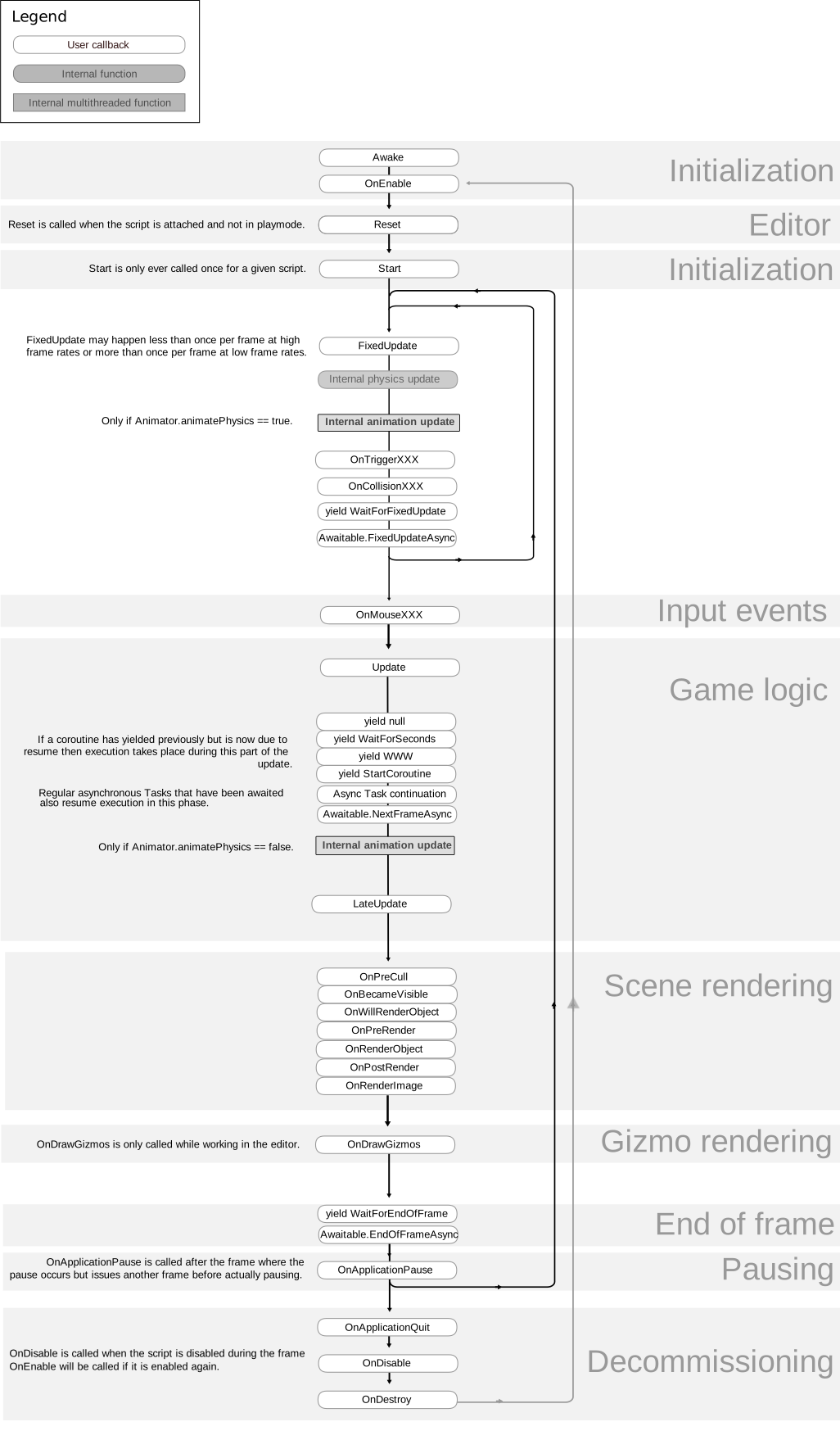
The Input object is responsible for converting input from the player into data in a form Actors can understand and make use of.
Scroll down
Nick would need to tell you though where in that chart UI is placed
twin juniper
Also, i already overode the NativeOnKeyDown function but it only registers if you have your mouse hovered over the ui widget 😛
outer birch
that's a nice flow chart
twin juniper
Thats why i needed to have some sort of global solution
@outer birch which flowchart?
outer birch
the unity one
twin juniper
ikr?
its so helpful
ok so the only way i got it to work... which albeit is the dumbest way to get it to work is like so
void UChatBox::NativeTick(const FGeometry& MyGeometry, float deltaTime)
{
    Super::NativeTick(MyGeometry, deltaTime);

    if (!InputComponent)
    {
        InitializeInputComponent();
    }
    if (InputComponent && !MessageBindingSetup)
    {
        InputComponent->BindAction("EnterPressed", IE_Pressed, this, &UChatBox::FocusOnMessageBox);
        MessageBindingSetup = true;
    }
}
its dumb obviously because it has to use the tick function lol
i tried PostLoad() and InitializeinputComponent() (overridng it) and I tried NativeConstruct() none of which worked
thin stratus
Why are you not listening to the key in the PlayerController
and then simply forwarding it to the UI
twin juniper
Well i tried to setup an input binding in my pc but it wouldnt let me call a function from another class
my "focus on messagebox" function is in my widget class
thin stratus
InputComponent->BindAction("EnterPressed", IE_Pressed, WidgetReference, &UChatBox::FocusOnMessageBox); didn't work?
Then you can also just bind a PlayerController function and in that function you call your Chat function
twin juniper
KoreChar.cpp
C:\Users\pbssu\Desktop\KoreShanty_Master\Source\KoreShanty\Private\KoreChar.cpp(246): error C2664: 'FInputActionBinding &UInputComponent::BindAction<UClass>(const FName,const EInputEvent,UserClass *,void (__cdecl UClass::* )(FKey))': cannot convert argument 4 from 'void (__cdecl UChatBox::* )(void)' to 'void (__cdecl UClass::* )(void)'
        with
        [
            UserClass=UClass
        ]
thats the output log
one sec
inComp->BindAction("EnterPressed", IE_Pressed, UChatBox::StaticClass(), &UChatBox::FocusOnMessageBox);
thats how im doing it
inside of
SetupplayerInputComponent
for my player
brittle sinew
The third parameter there is the instance you're binding the input action function call to, not the class, so you'd want to feed in the actual reference to the widget, like Cedric had in his example above
Or if it's not available at bind-time, make the input binding call a local function that finds the widget dynamically for you
brittle sinew
I don't believe so, where do you see that?
twin juniper
template<class UserClass>
FInputActionBinding& BindAction( const FName ActionName, const EInputEvent KeyEvent, UserClass* Object, typename FInputActionHandlerSignature::TUObjectMethodDelegate< UserClass >::FMethodPtr Func )
{
FInputActionBinding AB( ActionName, KeyEvent );
AB.ActionDelegate.BindDelegate(Object, Func);
return AddActionBinding(AB);
}
of wait its "UserClass"
lol
brittle sinew
Yeah...that's the template type...
If you look at local PlayerController bindings like in the example projects, the third parameter is usually this, which is the instance it's binding to for a local function
twin juniper
yea
ive never had to bind for another class
so im not exactly sure what to put there lol
brittle sinew
Just the widget instance, just like how this is an instance of a class that holds a function in the same class you're doing the binding in
Hahaha that last part is really confusing, I'm just saying that when you're binding to a local function this is just the instance
thin stratus
A pointer to the Spawned Widget
You are giving it the plain class
You spawned you widget somewhere
And saved it to a variable
And that variable you need to use
UChatBox* MyChatBoxPointer = CreateWidget<UChatBox>(....);
So MyChatBoxPointer is the thing you want to put there
obivously the variable should be created in the PlayerControllers header
So you can actually access it and it persists during the lifetime of the PlayerController
twin juniper
yea
yea
i think i got an idea for how to do it now
maybe..
Alright! Looks like it worked
ya sry btw, only been working on unreal for like 2-3 mnonths now i believe... havent really kept track of the time actually... maybe its only been like a month? lol
i think ive made pretty good progress so far tho
fringe dove
do child actor's communicate their reliable replication stuff through the parent actor's channel? e.g. if you call reliable rpc A() on the owning actor, and then B() on the child actor, are the calls guaranteed to be received in order on the server?
thin stratus
Is reliable even checking for order?
Wasn't it only that it makes sure the call arrives
fossil spoke
Order is not guaranteed
 crude trellis
Running into a similar issue as has been talked before here, but I haven't found a solution yet. Seamless Traveling from Lobby to Map and changing the GameMode
The info I've gathered tells me that I need to have Seamless on for Steam (although I've heard conflicting reports, but turning it off kicks the connected clients)
I've tried calling ServerTravel on the gameMode, on World and through console
also tried passing ?game= on the ServerTravel command to no luck
wondering if anyone has this working reliably



 raven holly
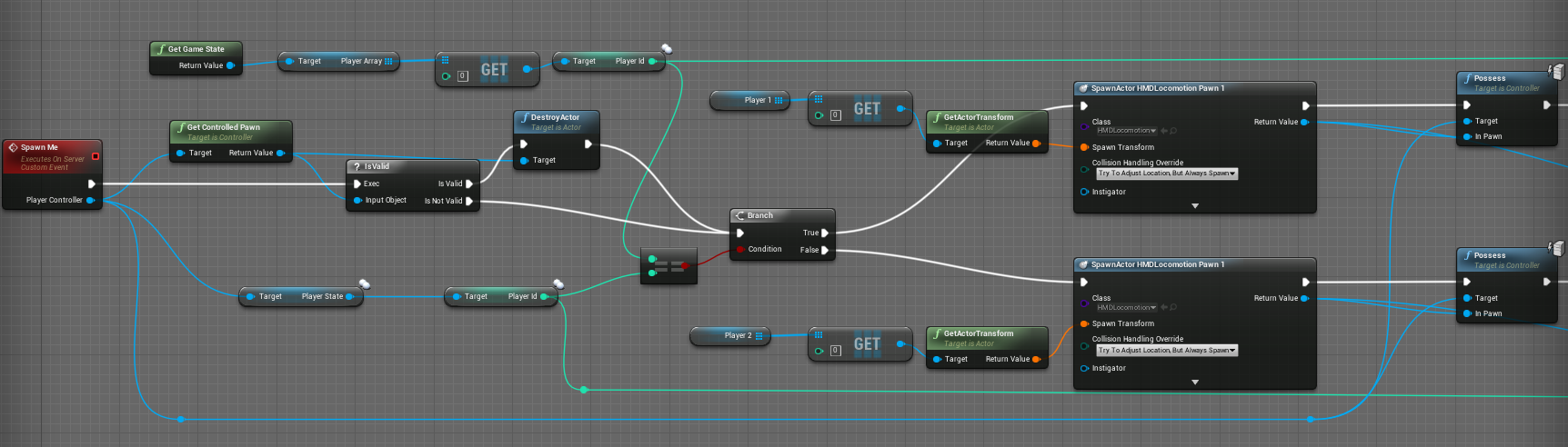
Why are delays needed to change an actors transform based off an attachtocomponent
Like so, the delay of 0.2. If i dont have this, the gun will be in africa somewhere.
Or even having it on 0.1 doesnt work.
Got it down to 0.1 by disabling weld body
thin stratus
@raven holly where are you calling this
raven holly
Nope, it just moves it to a strange location on the map, possibly 0,0,0
I will double check though
I should be doing more valid checking though I guess on mesh, actors etc I assume
thin stratus
Yeah, but here I can't really see why it would hurt to execute it instantly
Maybe you should create a Character variable, expose that on spawn and use the PlayerController as the owner
And then use that exposed variable to get the mesh and attach it
Or you attach it already in the Character
As I assume that you spawn the Weapon in there
raven holly
I spawn the weapon in character class, i was doing attachment there but i was experimenting with various ways and tried the owner implementation
Doing the attachment on the begin play of the gun fixed a few issues, but the delay issue still lies
But I assume, something somewhere isnt ready
I do set the skeletal mesh on begin play of the weapon also
I could possibly move this to construct
That could be the issue
thin stratus
I don't see any issue on the actual Character
As this one should be instantiated correctly.
BeginPlay calls on Server and Clients when the instances are spawned, so the owner should also be valid everywhere.
Which is also reflecting in you not getting any errors.
You delay before you get the Mesh. But that is usually inherited from ACharacter, so it should be valid anyway.
Even if the Character has no Mesh, or?
I assume the SkeletalMesh you set is from the Weapon?
Should also not really have an impact as you set the actor itself to attach
I can't really see the issue, sorry ):
I mean you could try setting the Meshs in Construction or even by default
just to debug if that fixes the delay
 raven viper
Anyone has ever seen something like this? We create a session and setting the possible number of connections to 2. However if we start 3 games, host on one, and then click on connect, on both, one after one, it still lets the 3rd player join, even though the session should be limited to 2, and and the 2nd player is connected already. (using listen servers, not dedicated)
We tried adding a branch before the Join Session node, that gets the number of connected players and if it differs from 1, it is not firing the join session event, however it's still failing...
Okay we printed the "online players" value, and even if 2 players are in the same session it says that there's only 1 person there
thin stratus
Hm
For automated kicking when lobby is full you need to make sure to pass the max players
Via the option string
iirc
raven viper
We don't want automatic kick, a "You can't join" is fine already
thin stratus
That's what I mean though
raven viper
but somehow the game session is returning 1 player even tho there are 2 online 😮
thin stratus
Blueprints?
raven viper
Sec, trying the same thing in an empty project
Okay it's working perfectly in an empty project
Same stuf... 😄
*stuff
I'll delete everything and copy from the new proj
Copied over, now it's okay.... Weird. Thanks for the assistance tho 😃
@thin stratus It's not working again. Sometime it's okay, sometimes it's not. I'll get screens in a second
So we are populating a horizontal box with button child widgets in a forloop, for each of the found sessions, and these buttons have a "Current Server" var in these buttons, these are exposed on spawn, so we are passing the session array element to the button. On button press we are casting to game instance and setting a Current Server variable there, and then check the player count in that one as you can see on the image here (delay is for just debugging purposes)
Sometimes it works and rejects the 3rd player, sometimes it just lets them in
thin stratus
Yeah well, you don't do this on the Client side
First of all, the NumConnections you get there might be off
Imagine someone got the Variable while the Server is empty
now 10 people did this
and they all have the Server with 0 players
What do you think happens if they all join
raven viper
the session is hosted as listen server, so there should be 1 player every time
 orchid cairn
as a very rough rule of thumb... in a network enviroment, you shouldn't be using GetPlayerController(0)
thin stratus
For "Server is full", the Server already has a functionality
@orchid cairn This is searching sessions on a non connected client
orchid cairn
ah right
thin stratus
@raven viper If you host the Server with an option of "MaxPlayers" or so (would need to check again), the server would make sure that the Player can't join by itself
As soon as the game is full
There is no need to handle that clientside
orchid cairn
MaxPlayers is correct 😃 been working on that for the past 2 days
raven viper
We are hosting with he max player option set to 2, but it still lets in the 3rd player
thin stratus
Dude, if you ship that game, it would take 2 minutes for someone to pack a server full with 100 players
This is not secure
Let the Server handle this
It's already build into ue4 anyway
raven viper
We tried, but as I said, it still lets in the 3rd player, even tho the maxplayers is set to 2, and 2 players are already connected
orchid cairn
@thin stratus - have you played around with seamless travel between maps much? having a weird bug which i'm pretty sure is being caused by the GameMode not calling BeginPlay before the PlayerControllers are, but not sure how to track it down
thin stratus
void AGameSession::InitOptions( const FString& Options )
{
[...]
    MaxPlayers = UGameplayStatics::GetIntOption( Options, TEXT("MaxPlayers"), MaxPlayers );
    MaxSpectators = UGameplayStatics::GetIntOption( Options, TEXT("MaxSpectators"), MaxSpectators );
[...]
}
@raven viper are you inheriting from GameMode, or GameModeBase?
if he's using GameModeBase it doesn't have that functionality built in anymore, you have to DIY it
raven viper
it's from GameMode, but in BP
orchid cairn
BP is fine, i'm all BP over here as well
thin stratus
FString AGameSession::ApproveLogin(const FString& Options)
{
[...]
    int32 SpectatorOnly = 0;
    SpectatorOnly = UGameplayStatics::GetIntOption(Options, TEXT("SpectatorOnly"), SpectatorOnly);

    if (AtCapacity(SpectatorOnly == 1))
    {
        return TEXT( "Server full." );
    }
[...]
}
I'd actually prefer C++ but I'm not alone in this 😄
thin stratus
bool AGameSession::AtCapacity(bool bSpectator)
{
[...]
    if ( bSpectator )
    {
           [...]
    }
    else
    {
       [...]
        return ( (MaxPlayersToUse>0) && (GameMode->GetNumPlayers() >= MaxPlayersToUse) );
    }
}
So shortened code shows exactly that the "MaxPlayers" variable is filled from the Option you pass
Then, on ApproveLogin it checks "AtCapacity"
that returns false or true based on MaxPlayers and "GetNumPlayers" of the GameMode
I haven't had a situation in which this would still allow a third player
as long as you pass "MaxPlayers=YourNumber" to the OpenLevel node
orchid cairn
got a screenshot of your create session node?
raven viper
It's Just
Create a Widget -» Create Session (public connections 2) -» Open Level
thin stratus
Show the OpenLevel node
thin stratus
might wanna remove the space
raven viper
oh geez
😄
Okay now it's working
If it fails loading the level it loads back into the main menu
thin stratus
Yeah that's how it's meant to be
raven viper
Thanks a lot 😃
Quick question tho.
We go with 3 clients:
1: Menu -» Multiplayer -» Host
2: Menu -» Multiplayer -» Join (works good)
3: Menu -» Multiplayer -» Join (drops to menu)
Doing 3rd again won't do anything, and wont drop back to menu
orchid cairn
on the 3rd, you might need to destroy session
thin stratus
Yap
Always Destroy the session when you go back to the MainMenu or any other NON-multiplayer map
raven viper
Oh alright!
orchid cairn
we just have a destroy session on our main menu load... probably not the best way, but it works lol
thin stratus
One of the first things I do when my MainMenu opens is trying to destroy the session
orchid cairn
ah lol, it's not just me then
thin stratus
:P
orchid cairn
always love when you think something you do is a hack, then you find out it's what everyone else does lol
thin stratus
xD doesn't mean it's less hacky though
orchid cairn
"If it works..." -AlCaTrAzz 2017
thin stratus
"Should work." - Every Dev, ever
orchid cairn
"It's not a bug, it's a feature" - Every game jam at 3pm on the sunday 😉
raven viper
You guys know how to display a widget instead of just dropping back to the menu? 😄
orchid cairn
in your game instance, check out Event NetworkError and Event TravelError
pretty sure in your case networkerror would be getting called, it has an enum for what the error is, so you can handle it correctly
thin stratus
Ah, AHHHH,
It's TravelError
As this is an act of Traveling
Network error would be Timing out
orchid cairn
raven viper
It was a network error, yes 😄
orchid cairn
only reason i got that was i've been dealing with them all week lol
thin stratus
But the actual "Is Full" message is not listed in any of them
orchid cairn
not sure what one it will actually throw then
raven viper
@thin stratus did you ever do p2p connection on phone with stuff like natpmp or upnp?
thin stratus
Nope
twin juniper
hello again ^^ This appears to be a simple question but I struggle with this one. My client joins a server on a map which is fine. My client should use a widget, just like the server can. When the server uses the widget a mesh changes for the server and the client, but when the client uses the widget only on the client these changes apply. So the basic question: How can the client tell the server that it has to change the mesh for everyone?
twin juniper
I guess I did this, but what setting for replication should I use? none seem to help
raven viper
Cedric here has a really good networking guide, you can see a table there with different RPC events executed from different owned actors with their results
twin juniper
I see the table but the table says that you can only make a RPC to the server if the client is owning the widget, but it's a 3D widget in world space, so I don't think that the client owns it because it is created when the map is created so I guess it belongs to the server
raven viper
You might have to make multiple RPCs in that case
Like hitting the event should call an event on your player controller (which is actually owned by you) so you can call a server event from the controller and actually have it execute the way you want
twin juniper
Hmm so the problem is that I try to fire the event inside of my blueprint actor which contains the 3d widget because it is owned by the server? So when I send the event chain to the player controller the player who is calling it (like the client) can make an RPC to the server because THEN the client is owning that actor?
raven viper
Yes, basically you are making an RPC from the server owned actor, so you actually end up in a client owned BP (like a player controller) which will be able to call a server side event
twin juniper
and by the way: Why does it work with a collision box, but not with a widget interaction which calles an event of an interface?
@raven viper thank you very much. I redirected the RPC and used the PlayerController and it finally works. But the thing with the collision box is still confusing me
raven viper
You are very welcome. As for the collision, I don't have a slight idea, as I never did something like that before :/
That question might be better suited for BP or Programming room
twin juniper
Hmm maybe I will ask somewhere else, but currently it's no concern for me. Have to work on that multiplayer part and not theory 😄 But as inexperienced as I am, I would guess that the client kind of "owns" the collision that happens, so the ownership is no problem with a collision box (which is still weird, because you could kind of say the same about the widget interaction)
raven viper
Well I'm a noob myself, don't worry
Doing tons of RPCs will make it a lot easier to use them. Actually at first I was like looking at them and scratching my head thinking "DAFUQ"
twin juniper
yeah, indeed ^^ I rebuild everything from the multiplayer tutorial so I can have a good basis on how to wrap my head around all this stuff
raven viper
You'll get to it as well 😄
Anybody can help me a bit with Component replication?
We got a "destroyable" map and when the bullet hits it, the chunks removed on server and client are different.
Even though the component replication is ticked :d
Since it's a component, not a variable, I can't just set it to repnotify and have some events run. Any ideas where I'm screwing it up?
thin stratus
Well, how do you identify the chunk
raven viper
Paper grouped sprite child's
fresh saddle
Can you send textures to clients via replication?
rough iron
if that client has the asset just send the path to it, if the asset is completely new send the data and recreate the texture
fresh saddle
Oh, so I can just send the raw image data?
rough iron
an image is just a set of pixels right ^^
there is no magic built-in functionality for it, so it's on your shoulders
fresh saddle
Yeah, but i want to update the image at 30fps
And that works out to be 8.6 megabytes per frame..
fresh saddle
Not if i can work out an alternative haha
rough iron
use a streaming lib
then render it in a tecture
there are plenty of open source ones out there
fresh saddle
Hmmm thats actually a pretty good alternative
rough iron
you can also use just an external service
rough iron
would be an option, while it has little to nothing to do with unreal
fresh saddle
Yeah I'm fine with it going external haha
rough iron
unreal would just be a dummy render client
fresh saddle
Essentially, thanks for the help!
crude trellis
Sorry for the bump, but now that people are online, does anyone have any tips on Steam+SeamlessServerTravel+GameModes
Can't get the Game Mode to change on servertravel to a new map
chrome bay
@rough iron You don't have an example project for a simple party system done via Sessions do you? And more importantly... does it work with PS4 / Xbone?
fresh saddle
@chrome bay look up Beacons
chrome bay
I have but there's the square root of zero documentation
chrome bay
Problem with UT is that it uses UParty, the implementation of which is all provided by Epic and their backend
And hidden away 😦
rough iron
@chrome bay nop sorry mate. It does work on PS4/XBox one and all thorugh beacons
rough iron
I wrote a small article on the wiki about it (keep in mind that it was late night and came just out of my head xD)
chrome bay
I'll check that out. Cheers dude
rough iron
np mate
chrome bay
The only bit I'm confused about... you can have multiple game sessions at once right? In order to have a Party and game session?
rough iron
yes, that's the whole poin of the system
you hold a session to your original mates
while the game session is the merged one
so when you end the game you go back to your party
using two sets of client/host beacons
which are listening/hosting on different ports
fringe dove
does UE4 do any kind of network compression, huffman tree or anything? or is the only way the paid oodle plugin?
raven holly
It uses it's own built in compression
fringe dove
@raven holly any idea where that is in the code? I know positions are quantized and stuff but haven't been able to find any whole-packet level compression in the code other than some hooks for oodle and other plugins
raven holly
Not sure sorry.
I know that in 4.14 there was like a 40% network improvement
So check somewhere in there?
fossil spoke
Nope. Watch out for those infinite loops 😃
raven holly
It needs it because ue is being stupid.
thin stratus
@raven holly That looks just wrong
raven holly
I know.
thin stratus
If there is really a delay due to some reason, then you are gambling
I would rework that :P
raven holly
Yes thats what the loop is for.
😄
Because If it's not valid, it'll try until it is valid
¯_(ツ)_/¯
Idk it doesn't work 100% yet 😐
It's a game where you can logout and in. And weapons are spawned in and out
So not all players are in the world, or within the replication distance
Beginplay is ran by other clients too right?
 supple thicket
it's ran wherever you run it 😶
raven holly
I think I got it.
thin stratus
Yea it runs for clients too
BeginPlay is nothing really multiplayer bound
It calls on the clients because the replication creates a copy on them that lives on its own
raven holly
Yeah
Just figuring out the best places to attach etc
So I have auth > remote > attach gun
Remote == anything not the server
And then I have is locally controlled for UI and other stuff
Sometimes the gun isnt valid to attach on begin play
So I will call it twice, on char begin play itll try attach, and then when weapon beginplay itll call same function on the char
MP is so derp sometimes
Ok cool that seems to have fixed it.