#multiplayer
1 messages · Page 300 of 1

 modern fable
that's weird now
so, the host can see the client moving but not the other way around?
 proud wren
they both can't see each other
which is why I thought they were joining different sessions
modern fable
are you creating their characters manually
proud wren
not sure what you mean
modern fable
like, are you spawning players' characters and possessing them manually?
proud wren
What do you think might be the problem?
proud wren
Yes I did @thin stratus
proud wren
Okay, so I did some deeper testing and it turns out they are NOT joining the same session
I figured this out by using the Post Login node and printing the new player's name and then getting the GetNumNetworkPlayers
proud wren
OMG! Finally got it working thanks to @stiff wasp I was doing it soooo wrong. Thanks again to @modern fable and @thin stratus but big thanks to @stiff wasp 😃 😇 😀 😂
 stiff wasp
lol
 wise depot
@proud wren if you're using sessions via steam, I recommend using the Advanced Sessions Plugin from the forums, its way better than the default stuff
 jolly siren
has anyone implemented steam parties? so if you join the game it will put you on the same team as the other people in your party?
 vernal wave
So I'm working on a game where you'd be logging in and pulling all your data about your inventory and whatnot from the server, So far in terms of plugins that are going to be beneficial we've been looking at Advanced Sessions Plugin and VaRest.
Any other recommendations on plugins / resources for learning?
modern fable
is VaRest any good in BPs? or does it turn into a mess / has poorly named nodes
vernal wave
I'll have to find out
I haven't started working with VaRest yet, i'm mainly the designer so i've been working a lot on the game rules and systems lately
I can understand BP, and have an understanding of the logic behind code as well as knowing a bit of C++/C#/Java, so anything that we can get me involved with efficiently in programming by using blueprints will be something we look into
Offloading work from our C++ programmer is useful, especially iterative balance work, so i'm hoping VaRest has good BP implementation
If i can just pop into the database and change how an effect on an item functions and hotfix it without needing 2 people, will be great
 golden granite
@wise depot I'm working with the advanced session but the GAMENAME option doesn't seem to be working. It's always random letters and numbers. Might be because I haven't tested outside the editor yet, but not sure.
 dim portal
anyone here use root motion in multiplayer?
 topaz oxide
I have a question in a multiplayer game do every player have they own unique game instance?
 fossil spoke
Yes, think of the GameInstance as the actual process that is running on the Machine
It is created when you open the game and is destroyed when you close it
There is only ever 1
For a single machine
topaz oxide
Because I did an object ( PlayerProfile ) for my online subsystem and it get's set as the player logs in. In a multiplayer session the player should access the game instance and uses the profile object to update his statistics
sound this right?
or should the player profile stored somewhere else?
fossil spoke
Yeah that sounds fine
topaz oxide
The problem I would store it in the playerstate but the playerstate is ingame different that in the menu where the player logs in
good
Yeah need to package and test it
that's why I'm asking just hope it's right
First I thought game instances are not unique like if the host creates a session every other players have the same variables like the host in the instance
😛
Giving me self clusterfuck in my head
fossil spoke
GameState acts that way
topaz oxide
Yeah that's what I thought and also gamemodes
fossil spoke
GameState is replicated from the Host to all clients
GameMode is not replicated at all
topaz oxide
good to know tho
topaz oxide
yeah but It can sent data to clients?
fossil spoke
The Server can, but clients cannot access the GameMode
topaz oxide
Allright thank you very much... never knew that stuff but it's important! I write this to my knowledge list ... Thank you ! 😃
fossil spoke
If you need a client to talk to the GameMode, route it through the GameState
topaz oxide
yeah makes sense
 turbid stratus
What's the proper way to "kick" someone? For some reason, a third player is able to join my games (I set max connections on the session to 2), so when a player joins I'm just checking to see how many playercontrollers there are, and if there are more than 2 I make the new player load the menu map. But when that player gets kicked it also seems to make the HOST of the original game load the menu map too..
I have just found the "Logout" node.. maybe that will do the trick
 brittle sinew
I don't think that the host counts as a connection in terms of sessions, though I could be wrong
modern fable
are you testing with 3 clients? I doubt the third one, the one joining after max slots are occupied, is able to connect even
anyhow, sounds like you are loading/changing client's map server-side and so it changes server's too?
plus I wouldn't do that, you just really want to kill the connection and so use that logout node instead - having an open connection with a non-relevant player is a bad thing
 civic vessel
Trying to make some multiplayer in my game, does Steam works well with dedicated servers ?
 prime horizon
Does bAllowJoinInProgress work with the Null Subsystem? I have a hosted sessions that is in the InProgress session state yet other clients can still join the game
 keen frigate
@civic vessel yes it does. What you're essentially doing is registering sessions using the steam sdk (all under the hood of the online sub system interfaces). You will have to do some extra work though, to let your clients know about the server. The AGameSession class is your friend for that.
 potent steppe
During seamless travel I know you can override the PlayerState CopyProperties function, is there something similar for GameState?
civic vessel
@keen frigate Thanks for your answer, I'll try to do that :)
keen frigate
@civic vessel no problem 😃
@potent steppe I haven't tried that yet. What kind of data would require that in your game's architexture though?
potent steppe
@keen frigate I am wanting to simply have replicated gamestate variable. So all clients remain in sync as to whetehr they are in a lobby or playing
keen frigate
hmm ok,I'm not really sure about how to do that sry. In my game I have a SessionStart->InLooby->InGame->SessionEnd loop without the ability to go back into the Lobby
but if you figure it out I'd be interested in the solution 😉 I will maybe try something out later. Kinda sounds to me like a custom GameSession class could do the trick
potent steppe
I actually think I just figured it out
I already havea custom GameSession.
THere is no equivalent CopyProperties for a GameState, only PlayerState
So in my GameMode I implemented void GetSeamlessTravelActorList(bool bToTransition, TArray<AActor*>& ActorList) and added the gamestate to the actor list
So, when using seamless travel it now saves the gamestate
Or so it seems so far
modern fable
is that an overridable gamemode function
potent steppe
Yes
virtual void GetSeamlessTravelActorList(bool bToTransition, TArray<AActor*>& ActorList) override;
modern fable
sweet 😛
potent steppe
I am doing more testing and stuff atm. If it turns out to not be doing what I think it is I will comment here.
civic vessel
Does someone here achieve to get Steam and dedicated server working with current version of UE ? I saw an entry on the wiki about it, but it requires to download a pull-request version of UnrealEngine that is stuck at 4.11
 final arrow
Hey is anyone here able to help me out with somethin? lol
fossil spoke
@final arrow Go ahead mate
final arrow
thanks man, i have a simple system where a player fires a line trace -> line trace hits the other player -> player takes damage. the server can damage the client all day but the client won't damage the server. everything (from what i know) is replicated properly and such. if you feel like helpin me out i could throw some screenshots in here haha
fossil spoke
BP or C++?
final arrow
BP
I'd rather not get in to C++ til i start my programming classes in my next semester of college
fossil spoke
Thats fine just wanted to know what we are dealing with first
final arrow
For sure
fossil spoke
How are you handling telling the server to do damage?
final arrow
ill send a couple screenshots, it'll be easier than explaining
fossil spoke
Sure
fossil spoke
Ok
So first up
By the looks of it your not performing the Linetrace on the Server?
Correct
final arrow
as in, a custom event ran on server to do a line trace?
(sorry i'm pretty new still lol)
fossil spoke
Yep
final arrow
You're right im not
fossil spoke
Ok
So with a multiplayer environment you want to limit important events like that to just the Server
final arrow
gotcha
fossil spoke
That way clients have no control over how they determine what was hit etc etc.
Shooting a bullet is pretty important to get right
And we always consider the Servers version of the GameState to be the absolute correct version
So game critical events like that should be performed on the Server
final arrow
for sure, so should i do a custom event for the line trace similar to how i made the custom event for Apply Damage?
fossil spoke
You should yes but we will get to that, ill run you through the Theory then show you an example via a screenshot ill put together
final arrow
Alright awesome thanks a lot
fossil spoke
No worries
So 1. game critical events should be performed on the Server
The client only needs to perform cosmetic stuff, like playing sounds or effects
final arrow
Makes sense, i didnt really understand what was critical enough for the server to run it (such as the line trace)
fossil spoke
The Server is absolute truth so if you performed critical stuff on the client which is simulating seperately to the Server it may have bad information on an Actors position or something like that
final arrow
gotcha
fossil spoke
So the client needs to tell the server that they want to fire a bullet, this is done via an replicated event (RPC) like you have above with CustomApplyDamage
Since the Server is itself it will run the Event locally anyways, thats why the Server can damage the client but not the other way around.
final arrow
ahhh yes
fossil spoke
So basically all you need to do is perform the Linetrace on the Server
and you should be fine
Note that we pass along the Vectors for the Start and End locations that the Client wishes the Server to attempt to Fire a Bullet to
final arrow
Yesyes, makes sense
fossil spoke
So basically the Client is saying, Here is where i want to Fire a Bullet, please do that for me and whatever happens the Server handles applying any damage that may need to occur
As far as the Client is concerned its a Fire and Forget method
final arrow
so is my current problem that: the client does the line trace and everything, but the server has no idea about the line trace so the server can't apply damage since the server doesnt know what the client hit?
fossil spoke
Pretty much
final arrow
gotcha, thank you very very very much man. I appreciate it a lot
fossil spoke
No worries, any other issues just ask.
final arrow
For sure!
Hm... rather odd situation now. The client doesn't want to do the line trace at all
Itll get up to the point of the custom fire bullet event, but won't move on to the line trace
fossil spoke
If your debugging the Client it wont because you have sent that request to the Server
final arrow
True, but it doesn't seem to damage the server (at least the print string doesnt activate when the client shoots the server)
fossil spoke
Did you remove the CustomApplyDamage event?
final arrow
Yeah, just the fire bullet event is there now
1
2
is there something i'm completely missing? haha
Acctually i think there might be something i missed, you see in the 2nd picture there is no longer a vector on the A input? that used to come out of the end of the line trace. is there a way to have an output from the custom event from the "Location" output of the line trace?
fossil spoke
By the looks of it you had the OutHit location of the LineTrace affecting that Aim Vector
CustomEvents cannot return
final arrow
Hm... do you think there's a way to fix it?
fossil spoke
What are you trying to achieve with it?
final arrow
i have an emitter at the vector location to spawn an explosion, so it wouldnt be all that bad to remove it for now
final arrow
true that's an easy fix
Could the reason the client isn't damaging the server be the fact that the Firebullet and such are not in the character blueprint?
fossil spoke
Where are you performing it
final arrow
it's in a blueprint set up for weapon things (i followed a tutorial when i was first starting UE4 and i'm trying to continue the project)
the input action on the character blueprint goes to a custom event that runs off the other blueprint
(i can send more screenshots to explain)
fossil spoke
That should be fine, is that custom event replicated at all?
final arrow
it's set to run on server
in the pic i sent of the new FireBullet custom event, the events for firing are below it
fossil spoke
The firing events should run locally and then you send the request to the server to perform the firing action
final arrow
well it's actually kinda messy, in the character blueprint it executes "StartFire" (which is the blue event after Server_StartFire), then the event StartFire has this
1
so if it's remote, it executes Server_StartFire
this is what i have in the character BP
final arrow
Any ideas?
fossil spoke
Sorry mate a bit distracted atm
final arrow
Gotcha, sorry haha feel free to chat when you aren't busy
prime horizon
@final arrow These RPCs are in a Weapon BP?
Try setting the owner of the weapon to the player character or controller when equipping
with SetOwner node
prime horizon
Ah alright so you got that covered 😃
final arrow
haha yes, it's not a weaponBP for a specific weapon, it just does most of the functions for the weapons
final arrow
oh my god i got it to work
three days. THREE DAYS of trying to figure it out. finally. I'm so happy. While it wasnt an applydamage or line trace issue, thank you so much DevilsD for the help you gave me for the other stuff!
fossil spoke
No worries mate, what was the problem?
final arrow
i had no idea this was the issue, but after searching google for hours i copied what another guy did to fix it and this is the final result
so for some reason it was about spawning the weapon apparently
fossil spoke
So you never actually spawned the weapon?
final arrow
i think it had to do with getting the owner of the weapon since the server was fine and client wasn't
quick quesiton though, is there a way to quickly make a new chracter with a different appearance but keep all of the anims, BS, etc etc? or is that too far fetched? haha
fossil spoke
Create a child class and just change the Skeletal Mesh?
final arrow
When i do that it doesn't like to use the animations that the parent uses
Would i need to retarget or do something in that general scheme of things?
fossil spoke
Not sure man im not an animator
final arrow
no prob i'll stop throwing questions at ya haha
fossil spoke
Only questions i can answer are fine 😉
final arrow
haha deal!
final arrow
im back! haha. was just wondering if you have any idea how to make the gun shoot in the middle of the screen instead of like this
fossil spoke
Is it First Person or over the shoulder?
final arrow
over the shoulder
i moved my crosshair to the middle of the shot instead of the middle of the screen but that's just kinda a ghetto way of fixing it lol
fossil spoke
You will need to do some Vector Math to figure out how to direct your Linetrace
final arrow
gotcha. if it's not a quick fix i can save it for later, right now i'm working on getting the weapon to fire on automatic mode
fossil spoke
You could probably just use the ConvertScreenLocationToWorldSpace node on the center of your viewport and use that as the End of the Trace. The start of the Trace would be your Muzzle
final arrow
im not sure how i would go about doing that, could you make an example (if you aren't busy of course!) for me?
One more question if you dont mind lol, sorry that im asking you so much, it just saves me hours of googling trying to figure stuff out. for my automatic fire system, its basically a retriggerable delay. so hold button down -> start fire -> delay -> start fire again, but i only get a line trace for the first bullet. any ideas?
fossil spoke
Without looking at your code i really couldnt help you
final arrow
Whoops nevermind i figured out the full auto, my apologies haha
This is probably very inefficient but i did it all on my own and im proud of myself LOL
fossil spoke
Well done mate
final arrow
Thank you! next obstacle: Bullet spread
Regarding the ConvertScreenLocationToWorldSpace, What should i put in to the X and Y?
fossil spoke
The viewport X and Y divided by 2 gives you the center of the screen
final arrow
alright, and then do i plug in location or direction?
fossil spoke
Location is the worldspace vector and direction is a unit vector
So try location to start off
final arrow
sounds good. how do i get the viewport X and Y in order to divide them? since i can't work backwards in the node
fossil spoke
PlayerControllers have access to the ViewportSize
final arrow
You sir, Are a legend. The line trace stops almost immediately stops right in front of me. i tried multiplying World Location by a float and then plugging it in, but it extends the line trace backwards instead of forwards. any ideas?
fossil spoke
Multiply WorldDirection by a float (like say 10000) and then add that to WorldLocation
final arrow
you are an absolute beast thank you!!!
fossil spoke
No worries
final arrow
Hm... the server will happily deal damage far away, but the client will only deal damage up close (as if the world direction was not multiplied), even though the line trace goes through the enemy
Actually, if this runs on server, it actually only uses the server's viewport. so if the client stands in front of the server, and the client fires, the client will die. could it be a playercontroller issue maybe?
fossil spoke
The issue is right there infront of you
final arrow
you're right, i fixed it
my bad
Out of personal curiosity, have you made any games personally?
fossil spoke
Not by myself no
final arrow
gotcha. was just curious since you're so knowledgeable with ue4
fossil spoke
Ive been freelance developing for a few years now on UE4
final arrow
oh, thats pretty awesome
fossil spoke
If you wanna chat PM me, its a bit off topic for this channel.
final arrow
for sure
 spiral hare
Hello everyone.
I wanted to share something I am working on with you guys.

Here is a video of a game project I am working on. I am the main artist on the team.
I am looking to recruit a blueprinter who knows multiplayer replication
as we have moved from single player in to multiplayer
My blueprinter is a little stuck at the moment as he is learning it at the moment
I was hoping someone might be willing to work with us as a team mate or just an adviser to help guide my blueprinter when he is stuck. So I am looking for a friend who might be willing to lend a hand by seeing my blueprinters screen to help advise and my will do the work.
Hoping to find a friend
 sterile pebble
@final arrow https://answers.unrealengine.com/questions/85030/shooting-straight.html here is good answer about why you shooting not in the middle
@final arrow you will need to use camera trace to "fix" weapon projectile velocity vector so it will align with camera view. The problem is - at close distance this look unrealistic. A close example is how Zarya weapon is shooting in overwatch lol.
@spiral hare looks very cool, by the way 😃
spiral hare
thanks
does anyone here know server/clientside replication and multicasting blueprints?
final arrow
@sterile pebble, could you possibly check out my question in #blueprint ?
spiral hare
thanks
 magic gazelle
hello guys, does anybody knows if it's easy to extend the default dedicated server to have custom commands like listing players, messaging them and if it's easy to implement a config file to be used to run it?
 chrome bay
Hey all, I've written a big-ass post on how I think Epic can improve UE4's netcode and make it more diverse. Here if anybody is interested!
https://forums.unrealengine.com/showthread.php?128589-Suggestions-for-a-refactor-of-Character-Movement-s-Netcode-for-better-diversity&p=622467#post622467
So recently I wrote my own version of a networked movement component, based heavily on the CMC for my vehicles. See here.
Something I noticed while going through CMC and trying to learn how it worked, was how convoluted the netcode is for Character Movement. Netcode is split between the Player Controller, Pawn and Movement Component itself - and trying to disect how it works was extremely difficult. It took me a solid couple of weeks of programming on that task alone non-stop, and slow study
modern fable
sorted it out? @spiral hare
do you mean like having an external console? @magic gazelle
 loud sage
Liked @chrome bay 😄
civic vessel
Can someone explain me how SessionSettings work ?
I tried to set some values with the Set method
It doesnt compile if I put a FName as value but it works with FString
brittle sinew
That's odd, how are you defining your FName? I believe FStrings will get converted to FNames anyways, so that's why that would work
@civic vessel
civic vessel
Like this : Settings.Set(TEXT("ServerName"), FName(TEXT("Dedicated server")), EOnlineDataAdvertisementType::ViaOnlineService);
brittle sinew
I wonder if it has to do with the fact that FNames are immutable according to the docs, and the method wants a reference
Not really sure though
magic gazelle
@modern fable yes something like that
sterile pebble
guys, is there any special ports I should forward for steam online subsystem?
magic gazelle
i don't think you should port forward anything for steam
that's the point of the steam subsystem
 drowsy zodiac
I posted this in the programming section, perhaps it better suited here?
Hello, I have a question about trying to get my dedicated server to create a session. There is a lot of information on the matter but the part I am missing is how to extend the function "Create Session" from OnlineSessionSettings.h
 grand kestrel
@chrome bay the netcode is truly horrible where cmc is concerned, i'm behind you 2000%, i made a 'network' component for my pawn that separates the prediction entirely too -- but i only started, i didn't feel i had the expertise to make it as good as i needed it to be
civic vessel
Hi guys, I am trying to code my gameplay in a multiplayer game but I don't know where to put what.
I want to make a checkpoint system where all players see other's progress in the map, so I know that I need to keep track of checkpoint progress in the GameState.
I dont know from what class i need to fire the checkpoint overlap with the player, from the character class or the player controller ?
And I dont know exactly what should happend between the moment when the player goes trough the checkpoint and when the player state is update, should I verify this in the GameMode or what ?
 rare cloud
@civic vessel, simply create a trigger actor which change the value on the gamestate, no ?
 rancid orchid
anyone could help me with mutliplayer (i use c++ but could be nothing related to the code_
)
slight problem with client->server->client messaging
 ocean dust
Hey all. I have a an Array with an Interface type (IRadarSignature) that I have marked to replicate. But when the Array<IRadarSignature> is replicated to the client, the array reports the object as None. I'm guessing this is a weakness of using Interfaces as the array type? Is there an easy way around this issue? Thanks!
rancid orchid
anyone can help with why my server returns 2 function calls to my local client for no reason ?
golden granite
@rancid orchid I do mostly blueprints but it actually could be related to the code. If a function is pure and has say two variable outputs, pulling those outputs into separate nodes will actually call the function twice. This can be resolved by not having a pure function. Is that the case?
rancid orchid
I don't think so. don't really understand pure functions yet but my functions don't return anything they just send some data over and assign the local variable to the received data
golden granite
In that case pure or not shouldn't matter.
But if there's no output using a function might be overkill, unless you're using local function variables(outside your actors local variables).
My guess is you're simply calling the function from server and client.
But afaik you can't specify function replication (least not in blueprints). You would have to create a routine (custom event in blueprints) to Run On Server and have that routine call the function to ensure it only runs once.
And I assume the variable it changes is replicated.
rancid orchid
I call the function from server to client and do some work inside the function like role checking to determine what to do with the data sent over. variables that are changed are not replicated
I'm basically doing client side prediction and so on
I wrote in more detail in ue4 programming channel, bit weird xD
golden granite
I'm not sure. If I saw it in blueprints I could probably help but I never got very deep with UE4 and CPP. Not enough documentation for me to want to learn that aspect 😦
But if you're certain the function is calling twice you need to find out if it's being called twice from the server, or once from server and once from client. You can do this by adding a 'is server' check in there to determine if it's being run on client or server.
I have to head back to work. GL.
rancid orchid
Haha thanks xD
potent steppe
Anyone have any experiences using the OnlineFriendsInterface?
It seems every time I call ReadFriendsList it will add more users to the list. For example, if I have only one firend and I call it once I see that one friend. I call it again and get the list that friend is in the list twice. I create a BRAND NEW array for the list each time it is called to eliminate the chances the array was not being emptied properly.
Is it newcessary to call DeleteFriendsList and I can't assume that the list is cleared each time I try to refresh it?
 night jay
Question regarding joining sessions
How would one do lobbies?
In most games a lobby is a seamless join
Aslong as the game hasn't started yet
Mainly because you already loaded the main menu so the game doesn't see a reason to load it again
But what I'm concerned with is pretty sure you can't have seamless travel when joining a session
Any ideas?
 unique patio
Hello People 😃 Im using servertravel to move all players to a map, it works great when im using 3rd person characters.. but i created a new pawn for VR and added some replication into it and now aslong as im using that pawn, all clients connecting gets stuck on loading screen. (doesnt matter if it's client or listenserver that is using the VR pawn).
Using 2 3rd person character works great, but as soon as i use the VR pawn.. it gets stuck.
Here is the blueprint for the VR pawn (Im guessing something is broken here, because my other characters work).
https://gyazo.com/e7a418d44185c4e257288964b064dcc3

 slim holly
question: I need to select which UI elements to show based on is the player hosting the session or not
where should I store the boolean to prevent tampering
unique patio
Okey i got it working.. i used "reliable" on the multicast messed everything up..
Is there anyway to drive the update faster? right now we're just getting a really laggy update between the VR pawns
I tried using replicated variables and a server driven event to force all clients to update the variables. but it doesn't replicate :/
unique patio
Does anyone know why im getting really slow updates TO the server (I.e all clients looks like they are moving once every 10 second) but the clients all sees the server smoothly.
Im using rep.Notify right now on 3 transforms (head, left/right Motioncontroller)
In the notify function i am setting the world transform.
 golden granite
Your screen shot is way too small to make anything out.
Make sure the event is run as Reliable. Is it not possible to mark the transforms youre modifying as replicated so you don't need to use RepNotify?
unique patio
If you click the link you can zoom twice to get original size (it's almost 5000x1440 pixels large)
@golden granite it doesn't seem to replicate as it's supposed to though. Just using a replicate and serverside set world transform isn't working at all.
It's just so strange that I'm getting replication sporadicly on the server.. I mean if it replicates it should replicate at least on framtick or not at all.
golden granite
Yes I did that, still very small some reason. Check if the method changing the variable is ticked as reliable
golden granite
It sounds like not all updates are being pushed through, which occurs if the network can't handle the traffic. Seems unusual this would happen locally but it's still worth checking if the updates are marked as reliable or not. You might want to just replicate the actor/transform itself instead of repNotify. There's a chance that if the variables are updating very frequently then there are some updates being skipped.
unique patio
Hmm I'll try to switch out our switch tomorrow and see if that help. The transforms are not reliable.
I've tried just a simple replicate on the actor and replicate on the components aswell but it's not replicating. :/
I'll see when I get back on it tomorrow. Brain is mushy after 12 hours straight ;)
Or rather the method switching them aren't reliable
 hybrid igloo
Question: when I set a variable on a player controller in the login functions in the game mode. Is there any sort of guarantee that that variable will be set on the client by the time beginplay gets called?
golden granite
it probably wont especially if its replicated
 thin stratus
@hybrid igloo Just to give a "second" answer: There is NO guarantee.
RepNotify is the better way.
 snow cliff
do you guys know right away if FloatingPawnMovementComponent works with Multiplayer?
I didn't find an answer yet
And I didn't really get into how the c++ codes work besides staring at them lol
 sturdy tulip
Ok I have a serious issue cause I'm dumb and can't figure it out lol I followed Epic's tutorial to make the frontend for the steam network multiplayer game. My issue is how do I property set up my player's HUD widgets once the game has started. Right now it's on my BasePlayerBP on begin play. This duplicates my HUD widget when I switch players. When I switch the spawn widget to the PC and say on begin play my server doesn't get the widget but my client does and my health bar is empty and my weapon selector doesn't trigger. On another project I can just spawn the widget and both client and server work but with that project I'm using the default PC. Any ideas what I'm doing wrong?
sturdy tulip
Problem solved
drowsy zodiac
What does Net CheckSum Mismatch mean?
 twin juniper
@slim holly Check "Is Server" on construct and set visibility on buttons etc based on the result
slim holly
Yea, it was more of an issue with fetching the "Is Server" value from place user can't fake. Currently GameMode sets the boolean for playerstate, but local copy of the playerstate could still be modified enabling UI elements
so I need to make failsafe in GameMode that keeps checking and kick anyone who tries to execute UI commands without proper authority
unique patio
yey it's working! problem solved
@golden granite you were right with reliable replication. i changed it to reliable and now it's working awesomely!
thin stratus
OY
New: Replication condition property flags are now exposed to Blueprints. This can be set in the Properties Details panel. 4.14
golden granite
What kind of replication conditions?
wise depot
i have a really strange problem going on with steam and the Advanced sessions plugin. When the server (p2p) closes unexpectedly the client returns to the main menu as it should. but when trying to join another session i get the error "unable to join game session, can't join twice" even if i call end session before attempting to join, the only way i can join is if i restart the client.
Anybody else had this issue or know of any work-around?
4.11.2 for the record
thin stratus
@golden granite The ones that were only available in C++
Aka: Owner Only etc
Or Skip Owner
And a bunch more
Owner Only would, for example, be useful for ammunation of a weapon
only server and the owner of the weapon need to know that
golden granite
@thin stratus Ah. So it's a per variable instance?
thin stratus
Yo
golden granite
I'm assuming that's yes, which is cool.
thin stratus
Anyone having a problem in PIE where Server Travel would result in
LogPackageName: SearchForPackageOnDisk took   0.065s to resolve GamePlayLevel2.
LogGameMode: Not traveling because of network error```I have 0 idea where this comes from
It's happening in 4.14 after updating
With only one player (server) it worked just now
.>
It's caused by this line in the GameMode
    if (GetMatchState() == MatchState::Aborted)
    {
        UE_LOG(LogGameMode, Log, TEXT("Not traveling because of network error"));
        return false;
}```PIE or standalone?
i've never known seamless travels to work in PIE, they work fine in standalone for me though 4.11.2
wise depot
play in standalone window* that is
oh...
yeah i've no idea then
maybe its because its not seamless? online travel may be bugged in non-seamless travels?
thin stratus
I just tried to Launch two instances of the Game
with the uproject file
there it works fine
(No changes made)
I would like to know why, in PIE, it sets the MatchState to Aborted, although there is no single reason
and I can't find any Logs about it
Now it's just endlessly loading and the message from the gamemode log doesn't appear
¯_(ツ)_/¯
drowsy zodiac
Does a dedicated server run with a player controller or game state?
Does it generate any of these for itself*
golden granite
@thin stratus Seamless travel usually only works in stand alone, not PIE
 steady topaz
Hi peoples. New to Discord and this Unreal group thing so forgive me if I'm doing this wrong: could someone help me with an issue I'm having in setting up my first multiplayer game?
brittle sinew
Generally we just say it's better to throw your question out there, will get the most eyes on it quickly 😄
steady topaz
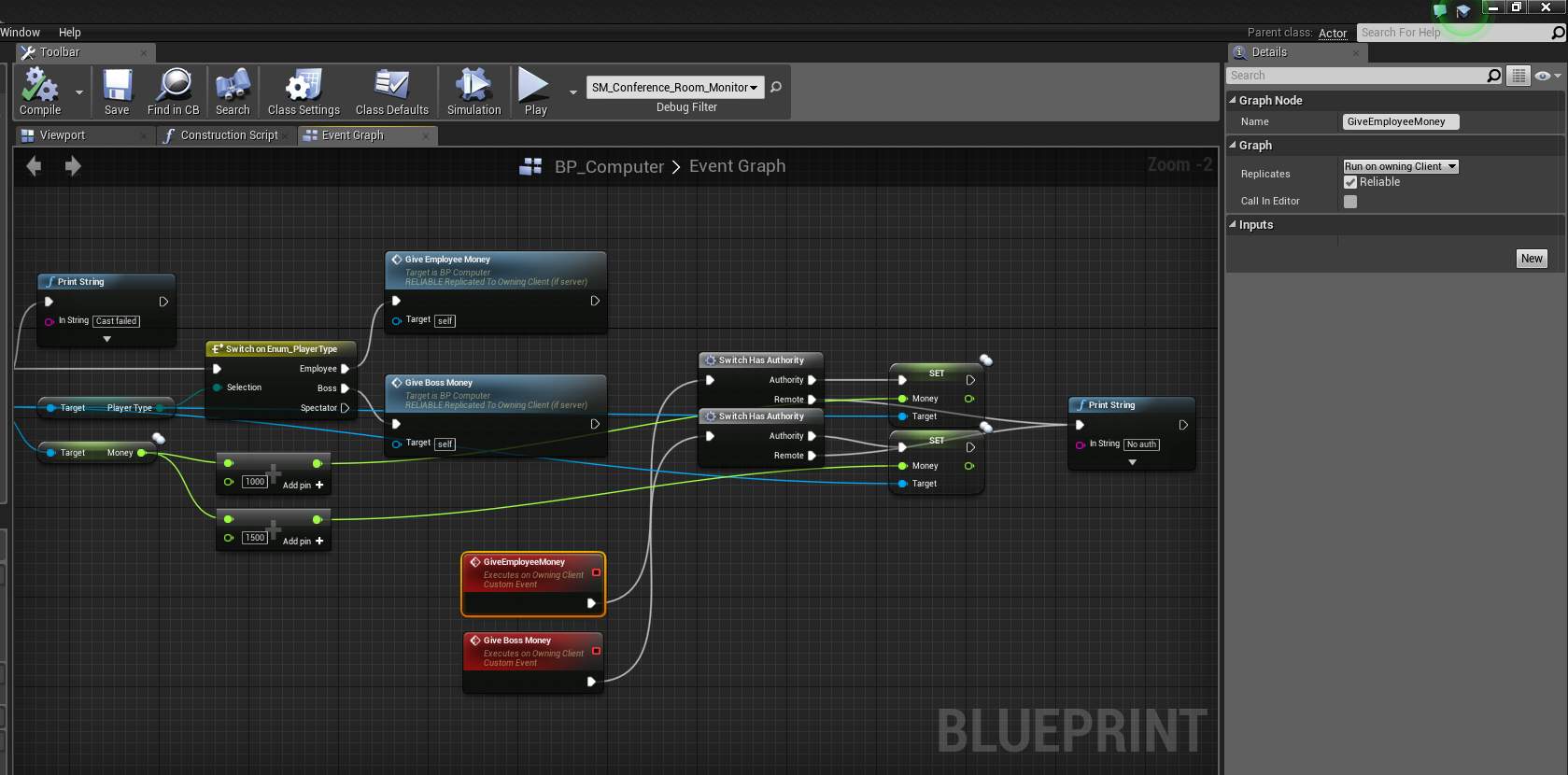
Oh alright. Well, long-story short I've got a blueprint interface set up for interaction (press E for line trace, checks if hit actor implements interface, if so call function) and an actor blueprint that gives the player money when interacted. Works in singleplayer but it only works for the server player person thing (new to Unreal multiplayer, bear with me) in multiplayer. Screenshots: https://forums.unrealengine.com/attachment.php?attachmentid=117606&d=1479248303 (Actor being interacted with, giving money to the player) https://forums.unrealengine.com/attachment.php?attachmentid=117607&d=1479248337 (Displaying the player's money as well as a randomly generated name and ID above their head. Name and ID works, money doesn't).


When I test it in game, for one of the players it prints No auth.
Not sure how to get around that.
brittle sinew
So when your client calls the function locally, it'll get run on the "remote" path of your switch, since it's not the server.
To remedy this, you have to use something called an RPC
This allows you to call functions from the client to be executed on the server, and vice versa (also one called multicast, where the server calls a function to be executed on all clients)
steady topaz
Oh alright, brb, let me try that
brittle sinew
One big thing to take into consideration though is how much power you give the client in deciding what happens. If you let the client specify the amount of money for example, they could theoretically set it to anything they want
But that's just the territory of MP programming 😄
steady topaz
https://i.gyazo.com/43c4a7f2264244863928be0ab859c730.png Does this look right? It doesn't print out No auth anymore but now it just doesn't do anything at all for the other player.

Both events are set up with the same settings, BTW.
brittle sinew
You need to run the RPC in the opposite direction, "run on server"
Since you'll be calling it from the client to be executed on the server
steady topaz
Oh whoops, thought I had that selected.
Set to Run on Server now, still doesn't do anything. https://gyazo.com/3ebf56da344b2039de3a003bf6fb8c74
 brittle sinew
Hmm, can you check if the event is being executed? There might be some issues with using a reference you casted to on the client in a server event
steady topaz
Sure, one second
https://gyazo.com/bd10fa96935ebf251ad9642902f947b5 For the first player it works (sets the money and prints out Doop doop, employee here), but still does absolutely nothing for the second player.
 brittle sinew
If you don't mind me asking, what type of blueprint is this being called from? I learned the hard way, you can only call RPCs from objects that you directly own, which can sometimes be both a curse and a blessing
I only ask because of the cast node
steady topaz
This blueprint itself is an actor blueprint. The one that's calling this one is a character blueprint.
brittle sinew
So these nodes are on a third party to the character, correct? If so, you won't be able to call RPCs from it on a client :/
Which is why if it's something on a level, usually you'll want to only have the server handle these things
(But I could be wrong about your situation)
steady topaz
Yeah, they are :/ Any way around that?
brittle sinew
You really just have to let the server do all of the handling in that situation
steady topaz
Hm, sorry for the stupid question, new to multiplayer stuff 😛 How would I "let the server do all of the handling"?
brittle sinew
So this object is on the level, correct? Just want to make sure we're both on the same page 😃
steady topaz
It's placed in the level if that's what you're asking
brittle sinew
Yeah, sounds good, was just making sure. So there are really only a few places you can make client RPC calls from, one of them being the PlayerController. So when you make that call to interact with the computer, you will want to call the RPC on the server at that point, which will then run all of the code on the server
And you'll want to make sure you use an authority switch, since you want the computers on clients to effectively just be dummies to allow them to interact with the server version
steady topaz
Hmm I'm a little confused. What am I doing with the PlayerController?
brittle sinew
How are you getting that interface call onto the computer? There's a lot of ways to do it, just want to know what route you're taking
steady topaz
Sorry, had to go for a second
https://gyazo.com/8f71c8c3d9066d8cebb0cc157e2a2411 Rather messy setup but that's how I'm calling it.

(from the character blueprint)
brittle sinew
So the character is also a place where you can call client to server RPC. So you can make it a server call just fine there
steady topaz
Should I do it right before the On Interacted node?
brittle sinew
You would make a new server RPC that simply calls the OnInteracted, and one of the parameters to the RPC would be the computer reference
Now that does give some leeway to let the client decide what computer is being called, but as long as you're aware of the issues, you should be fine in knowing when it's actually a problem in the context of your game
steady topaz
https://gyazo.com/aaf70fee0a1e5cafa862fdcf3b2ce8f9 Is this correct?
 brittle sinew
I would run the target in as a parameter, simply because the line trace is probably only happening on the client, not the server
(Gets confusing since an RPC parameter is default called target 😄 )
steady topaz
Oh god it works, thanks so much! Been banging my head against my desk all day trying to figure this out haha
brittle sinew
Good to hear (not the desk part) 😄
steady topaz
Worse on the desk than it is on me ;P Lol anyhow, have to go now. Thanks again for the help 😄
rare cloud
I'm currently looking for a back-end server framework to develope an mmo
I would like to know if somebody already try photon server, gamespark, or whatever
 odd nimbus
Is photon a good choice for back end server framework compared to the basic stuff we have in UE4?
And using the basic UE4 networking is it possible to get the lowest possible latency and network efficiency for multiplayer games?
Anyone has any screenshot for ping ms of their own game while playing on LAN and got low latency? which should be <1ms or 0ms
rare cloud
@odd nimbus It depends of your game, Unreal Engine server focus on a competitive game
I guess the max number of players you can have with correct performance is around 200
odd nimbus
hmm but I was wondering while testing if 5 people play an FPS LAN game and the data usage is less how much latency it should give?
most multiplayer games in LAN gives <1ms or 0ms ping as the latency is negligible
but I was wondering if UE4 counts the latency in the same way or have some overhead
golden granite
@thin stratus Pretty sure the issue was with server travel with seamless enabled. It may now be with seamless disabled as well.
modern fable
you should be able to do that just fine with game states and so on
golden granite
I have a pre-game lobby in a project I'm working on
 bitter veldt
@night jay check out the blueprint multiplayer tutorial from unreal engine on youtube
he makes a pre game lobby
thin stratus
@night jay I have one on the Marketplace
 charred crane
Hey folks, I'm having an issue where my GetOwner node isnt returning a valid owner, when I know that the owner is valid. The owner is a player controller and this is a networked project. Any thoughts?
thin stratus
Where are you calling GetOwner
charred crane
its being called on a component begin overlap of a projectile
its checking the owner of the "other actor"
modern fable
are you trying to get other actor's owner from the player who shot the projectile's end?
so that you are trying to get a character's owner from another client?
@charred crane
charred crane
when the projectile overlaps with another player, im trying to get the owner of that player. so yes to your first question?
thin stratus
Ok two questions:
Are you 100% sure the other actor is the PlayerCharacter Actor?
And, are you sure you call this on the Server?
Cause the Client most-likely will not get an Owner, due to the PlayerController of others not being a thing
charred crane
right, so i guess i need to make a server call after the overlap.
I have a cast to the playercharacter actor, so the only time it would try to get owner is if that succeeds, and it does when it needs to.
modern fable
that's what I was referring to yea, there's no way a client can access a character's owner
cause that would be a player controller and they ain't replicated to all machines - they're owner-relevant
modern fable
projectiles should rely on server-side checks only though @charred crane
charred crane
i assumed that an overlap event was server side.
modern fable
rite, thought you were calling a server event on client overlap 😛
charred crane
im also working on the "experimental(since 4.9)" 3d health bar widgets, but they only seem to show MY hp over the enemies heads, even though the widget belongs to the character itself.
night jay
@bitter veldt @thin stratus do either of these have any hiccups when joining a lobby?
thin stratus
Hiccups of what sort?
charred crane
are you trying to travel with PIE?
night jay
standalone
It's a common issue
You can't start a session without opening a level afterward
You can't join a session without traveling to the host
and that travel is what's causing freezes and hiccups
There's seamless traveling but that's only applicable once you've joined the server and the host performs a servertravel
thin stratus
You need to open a level due to the ?listen command
And clients need to join the level due to the restriction of one level per world
In c++ you might be able to call join session without the travel
But no idea right now what that results in
I don't have Hiccups when creating the lobby and joining it
Seamless travel keeps the GameMode class or?
That's not really useful for lobby to gameplay level or?
night jay
yup, hence why I'm not using seamles travel
You sure you have no hiccups?
If you do open level it freezes depending on your level complexity
If you have nothing it's almost instant
But if you have an actual main menu like triple A titles do it takes a while to load the map
As for joining session without travel
Doesn't work
gamemodes don't sync
You're having multiple instances of the same server that way
As in host can't see client and vice versa
thin stratus
It loads a really short while, yes, but that's normal and it still works
Can also cover it with a loading screen if wanted
drowsy zodiac
Anyone have a US dedicated server rental service to recommend for game server hosting?
odd nimbus
Reliability, availability, performance. So you Start, dedicated server rentals for developing your business. From $42/month.
$42.00 USD /month.
night jay
I don't think the traveling UE4 is really ideal for lobbies. Especially how games have been seamlessly joining lobbies for more than 10 years already.
rare cloud
I would like to know why my player state is valid on player 1 but not on player 2
but sometimes it works correctly
 civic jasper
thin stratus
civic jasper
thin stratus
@rare cloud When exactly is it not working
odd nimbus
Yap they got DDoS protections also..so I think perfect and cost efficient choice for game servers in USA and Europe
rare cloud
@thin stratus, PlayerState isn't valid
For the player 2 most of the time, and I run dedicated server
thin stratus
So he connects, can run around, sees the other player, etc etc but the Player State isn't valid?
How do you retrieve the PlayerState?
rare cloud
I get it from my character
I simply set an input event get my PlayerState and print if it is valid
And yeah it is correctly connect
rare cloud
From the controller it work but a problem happen when you need PlayerState from other player
Controller is not replicated to all clients ?
thin stratus
Is the Character constantly possessed?
rare cloud
Yeah
thin stratus
For what do you need the PlayerState of another Player through his Character?
All PlayerStates are available in the PlayerArray of the GameState
thin stratus
There, it's a bug and fixed in future engine releases
Might wanna post below the answer
So it gets new wind
night jay
I had the same issue but it's only in PIE
rare cloud
Well that's funny on my 'blank' project using Third person template
the playerstate of the player 2 is valid
but not the first
 normal ingot
In C++ trying to make a VR pawn. For the time being we have all of its components replicating (ie DOREPLIFETIME ). This works, in the sense that the clients can see the server pawn and its movements, but the server cannot see clients and clients can't see other clients. Any time comes mind that we might be missing? We cannot get this to work. All help welcome
wise depot
Sounds like you have no form of input recreation if they aren't seeing them moving
if they aren't seeing them at all then perhaps your pawn isn't marked for replication, it also needs to be spawned by the server
charred crane
can an actor destroy itself over a network or does its owner need to destroy it?
wise depot
@normal ingot presuming its the player pawn and you're leaving the engine to spawn that, replication settings i have ticked on mine are:
Always Relevant
Replicate Movement
Net Load on Client
Replicates
NetCullDistanceSquared: 225000000.0
Net Update Frequency: 30.0
Net priority: 3.0
as for actually spawning it, if its the player and you're not doing that manually anywhere then the server should be handling that by default. But if you do have any replicated actors that you want visible over the entire game/all connected clients then the server must be the one to spawn that actor into the world
@charred crane if its a replicated actor then the server/host should be the one destroying it. Although I think its ok for clients to destroy replicated actors, you probably shouldn't be doing that. test it and see what happens?
normal ingot
thanks mine ill give it ago
charred crane
I've been testing and I believe the problem is that I didn't have a good understanding of who should spawn objects. I (now) use a hasAuthority node to spawn some projectiles. I've got an overlap event for the projectile that checks authority and calls a server event to destroy the overlapping projectile(self) if its the remote. If its the authority it executes that same event but doesnt use the event call since it's already on the server. The event never fires but a print that i have right before it does. Any idea?
 fossil silo
Morning! Wanted to ask a quick question about Network replication...Anyone know the best route to go about this: I have many players, each of which need to have a particle spawned and attached to. In the Characters begin play I want to spawn and attach it, but not sure how to get the RPC's setup to work so every other character see's them. Do I call a method that runs on server, then have that call a multicast that then spawns and attaches?
thanks in advance 😃
brittle sinew
Yeah, if you want everyone in the game to see a change on a certain character/actor, you'll have to call it multicast @fossil silo
fossil silo
thanks @brittle sinew , I have it so it calls a run on server event,then that calls a multicast, but I think extra emitters are being spawned
brittle sinew
Could you screenshot your setup for me? If you think duplicates are occurring
turbid stratus
So is the general consensus, to replicate movement of something without it being jumpy, you need to do the move on the server AND the clients? (and let it sync any differences/inaccuracies)
It's funny, technically I just shipped a multiplayer game but it was so basic I didn't really have to deal with proper movement
Moving it on the server and just letting the movement replicate to clients is hella jumpy even with the client on the same machine
golden granite
Anyone else having issues with widget items not responding to clicks on multiplayer?
I'm opening two PIE clients and when I interact with widget on one, other widget stops working.
and other times it seems to just not work no matter what.
Looks like calls to server aren't working from client, even if they own the object
nvm that atm. just realized Im working from an old source so previous data was lost. might be in relation
slim holly
yea PIE is really bad at capturing mouse properly
in UI
@turbid stratus having stutter issues on same machine can be caused by excessive data transfers
Unreal has bad habit of prioritizing bit wrong things
usually happens when you run multicasts in repeating updates
golden granite
There's something else doing on. Also, it seems clients no longer have authority over player controller.
slim holly
are you sure you are not referencing server side copy of the controller?
golden granite
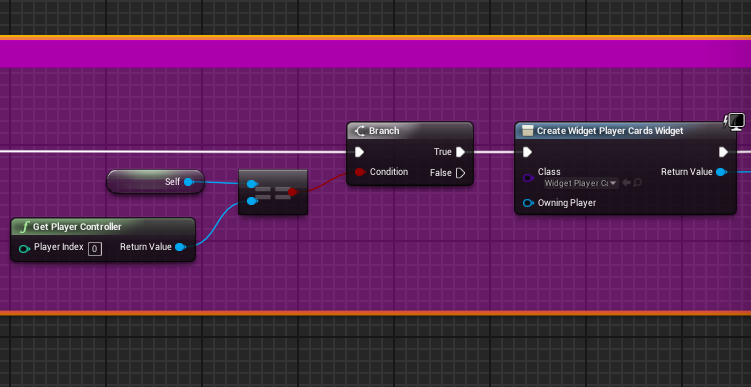
I'm sure. I use this to confirm controller is client side. https://i.gyazo.com/7fa653a96ca3842074df78d7f1274e44.png
 golden granite
index 0 should always be owners controller, at least it was in 4.13
golden granite
yes exactly
so by comparing self to player index 0, I know its always owners controller
Then when I interact with an item within the widget I use https://i.gyazo.com/e5fb6dfbe1915da2859b998b48191a1a.png
 slim holly
it might be true, or false
really random
use IsLocalController to see if it's remote
that is a sure way to test it
golden granite
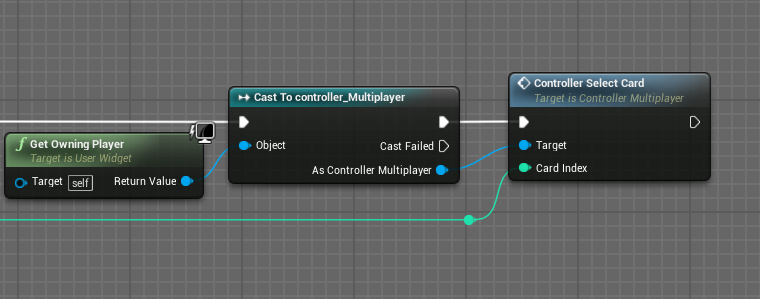
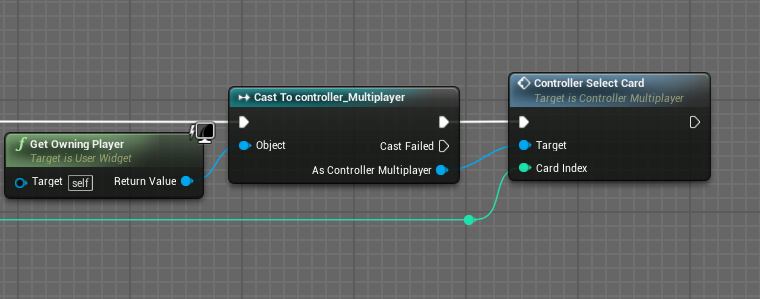
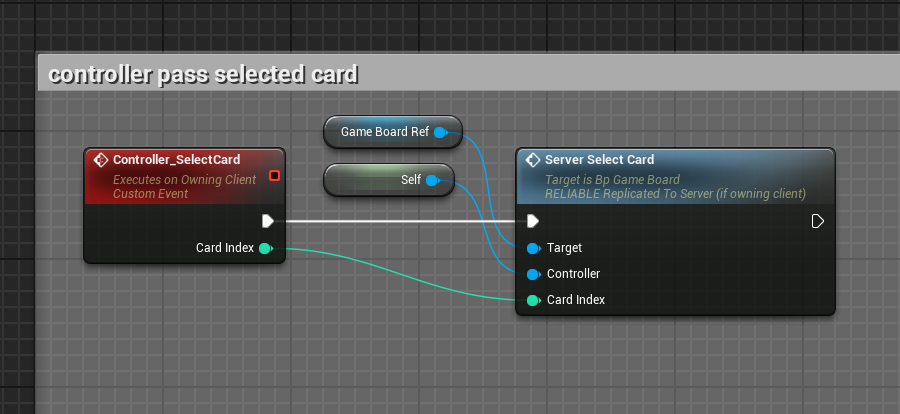
Which then calls https://i.gyazo.com/56f654f8817b0d5b47197392e3822cd3.png

but since the controller isnt authority some reason, server select card is never called
slim holly
select card is triggered from ui?
golden granite
controller_selectCard is
golden granite
but its still not calling Server_SelectCard
which you think it would, but there's no authority some reason. This was literally working fine in 4.13.
slim holly
I know they refactored networking in 4.14
golden granite
refactored broke
slim holly
anyway
try print string "hello" in between those events
it could be that your reference is just broken
golden granite
I did, controller_selectCard is being called
it's not running Server_SelectCard because it doesn't have authority. But I don't know how that's possible if I'm grabbing player controller through GetOwner of a widget.
slim holly
uh
I wouldn't use owner
had issues with that
pass the controller into direct reference variable to the UI on create widget
slim holly
I had random null owners back in 4.10 and 4.12
for no reason
- you can call events directly from that variable without casting
and then expose the variable on spawn, set editable
and I assume you're spawning the UI from controller, so use self reference to fill that variable
slim holly
game board ref should probably be rep_notify too
since server spawns it
or, I assume server is spawning it
nothing stopping from clients doing that too
golden granite
its placed in level but all functions related to it are called on server
maybe thats the broken reference
but to set it to replicate properly id have to assign it through the server sides pc
slim holly
repnotify should update it once server has it figured out
golden granite
But if we don't need to take actions is repNotify really needed
slim holly
afaik repnotify doesn't update on every network tick
golden granite
Also, let's say I'm replicating it to the servers copy of GameBoardRef, wouldn't it be a null ref if I'm calling it from client pc since the reference doesn't exist on their end.
ah
slim holly
in theory yes, but if everything you need is set to replicate, it will be mirror image of what server has
including references
golden granite
Let me set that up and give it a shot.
golden granite
Yeah, I have that. Read over MOST of it.
golden granite
Yeah, it says accessed none
probably because the reference is server side and I'm accessing it from client.
slim holly
more like accessing local copy of it
which might be different from remote
and probably is
golden granite
probably
So does referencing a local copy of an actor no longer work with Run On Server, even if the actor exist locally?
because that's a huge crapshoot if so.
slim holly
you could try sending the event from UI -> local controller -> remote controller -> remote gameboard
golden granite
yes, I thought of that. it will probably work but also requires redoing a lot of work
slim holly
not really, add few events
it looks really dumb
but lemme take a screencap of my current project controlller
golden granite
It would work, but some reason client doesn't have ownership of it's own PC
that's the real problem
slim holly

Super simple and lightning fast image sharing. Upload clipboard images with Copy & Paste and image files with Drag & Drop
this is how I always do controller
raw input feed directly to remote controller
golden granite
But you have authority so you can do that.
RunOnServer won't work without authority.
So back to the real problem, why doesn't client have authority on it's own PC
slim holly
like switch auth node?
golden granite
When checking IsServer and HasAuthority both return false.
slim holly
yea those are only for listen and dedicated servers
golden granite
Right, but if you're a client it would return False
slim holly
yes
golden granite
and if you're client HasAuthority on your own PC should return true.
golden granite
I thought you had authority on anything spawned locally.
And servers should get their own copy of PC as well clients
slim holly
client can spawn what ever, but it will never show up on other clients
when server spawns it, it shows on everybody
slim holly
technically you only have authority over your controller
in your figure of speech
server does everything else
golden granite
Something doesn't make sense...like uh
slim holly
as and example: Variable X is replicated
if client tries to change variable x, it changes but it will be overwritten by networkupdate
but, if client sends an event to remote containing the variable value
then it changes on both ends
golden granite
I think I just realized my issue.
And I feel like a dumbass because I'm just now remembering I ran into this awhile back when I first started working with replication.
slim holly
rule of thumb, everything exist on server only and if you want something done, tell server to do it
unless it's visual effect
golden granite
So I know why it's not working lol
It's basically what you said earlier, about using servers copy of PC.
Local PC was calling it's own event fine, but when I tried to reference GameBoard's RunOnServer event it wasn't firing.
Likely because the reference was invalid.
So the solution is to pass local event to RunOnServer event in same blueprint, which actually runs it on servers copy.

was all i had to do
and I can remove the 'owning client' part
Doesn't explain why the UI inputs randomly stop working though. That's definitely new.
slim holly
well that's the easiest way in my opinion to do it
as long as you grasp the idea that same variables have different content depending on which side of the event chain they are
Self ref is probably the only one that works where-ever
right, im hitting bed
golden granite
night, thanks for the input lol
golden granite
Something is broken with the UI and in a weird way. Can't figure out why inputs aren't being detected after issuing networking events.
Setting Input Mode Game and UI seemed to have fixed it. Not sure why it's losing input though.
thin stratus
@golden granite did you use UI only before?
golden granite
It was game + ui before. But I never had to specify it each time I switched windows.
It's working now, just weird issue.
drowsy zodiac
@golden granite the two nodes I would recommend to use to separate stuff is "Is Locally Controlled" and the "switch has authority" nodes. Locally controlled will separate it to only the person controlling the pawn and the switch has authority can be used to separate the server and remote.
I briefly scanned over your convo, hope this is relevant enough
golden granite
I didn't know that node existed so I'll probably look into it in the future. That wasn't the problem though.
I was trying to call RunOnServer across blueprints when I didn't have authority. The issue was figuring out why I didn't have authority. I completely forgot that to have authority on PC you have to first call a RunOnServer event from and to the same PC, then you can jump between blueprint calls that use RunOnServer.
kind of like a delegate
The unresponsive UI thing was just... unusual. It worked in 4.13 but I had to make some changes in 4.14 to fix it.
brittle sinew
Yep, it came out a few days ago


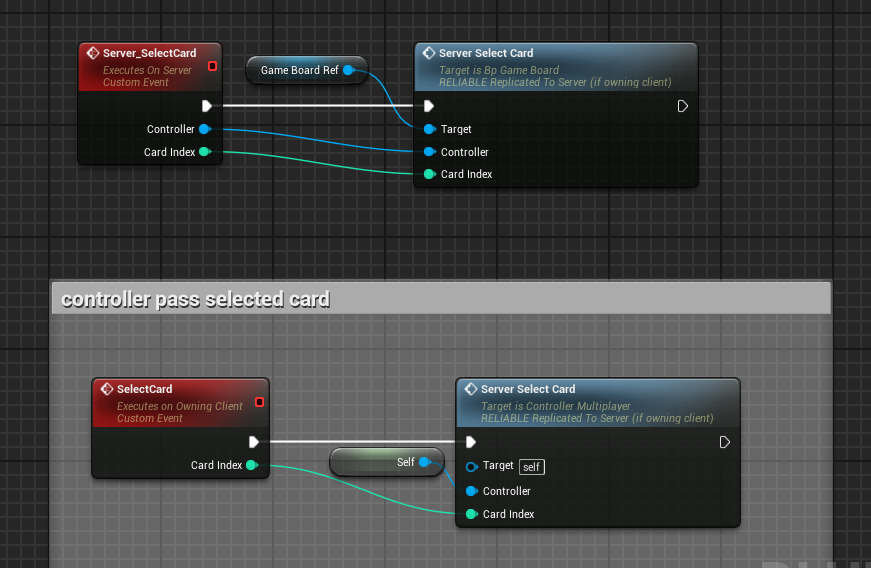
 pure oyster
Hi guys, i've posted in the UE forum but no one answered me. I would ask if someone know how i can "save a world state". Practically when the dedicated server is turned off all actors should be registered and when turned on should be respawned. How i can achieve this? Thanks
golden granite
My guess is you would have to dump to a database. Bit over my head though.
You probably wouldn't save instanced worlds either. Just last locations if in actual world(assuming mmo), and maybe health or mana but I wouldn't even bother with that
pure oyster
Thanks for your answer @golden granite , but actors can spawn actors. So almost everything should be saved
fossil silo
Anyone know why EventBeginPlay may not be firing on clients connecting to a dedicated server? (not in editor)
fossil silo
character @thin stratus
also the tick isnt firing, thats why im looking at beginplay
heard that if it doesnt trigger the tick may not go on server
on a dedicated* server
fossil silo
Hey guys, also wondering, if I have a replicated character, and I spawn some particle effects into the character (from server), will that be replicated too?
 thorn merlin
@fossil silo nope, you gotta trigger them manually, besides you dont want fx running on your server wasting cpu cycles
fossil silo
thansk @thorn merlin if I needed to replicate a particle system to every client, would I multicast it from server and add it to the same pawn on each client?
thorn merlin
multi cast is a way to do it yes
fossil silo
thanks 😃
thorn merlin
it depends on the effect but you can also wrap it in a replicated blueprint, spawn it on the server, but set it only to activate if its NOT dedicated
golden granite
Could someone please link me the PDF on multi-player stuff. I'm at work on mobile and need reading material.
golden granite
Nvm got it
pure oyster
Can someone help me please? https://forums.unrealengine.com/showthread.php?129134-How-to-save-world-state
My goal is to achieve something like RUST, DAYZ and H1Z1, where you have a persistent open world run on server.
I know that i can create a save game but this method could become hard to handle several actors.
How i can save a "world state" and everything that a world can contain like actors transforms and client's spawned actors?
rare cloud
@fossil silo, when did you need to spawn a particle ?
thorn merlin
the pdf is pinned to this channel, see the pin icon in the top right of this screen @golden granite
thin stratus
Yo, updated my 4.13 Network projec to 4.14.
When joining the Lobby, the Server instantly goes from Waiting to Start to either Playing and then Aborted or from Waiting to Start instantly to Aborted if I check "Delayed Start".
I don't even do something and it worked in 4.13. What could cause my MatchState to go to Aborted? (Cause this stops me from Server Traveling).
(Note: This only happens in PIE with more than 1 Player)
So it seems like, this is due the initial connection that you have in PIE
If I start with 2+ Players, they are already connected in the MainMenu.
Start a Server(LobbyMap) with the original Server will result in the Client loosing connection, that's totally fine.
But for what ever reason, it tells the Server to Abort the Match of the New server
thin stratus
I think this screws me over, although it's weirdly called, as the game already reopened
void AGameMode::HandleDisconnect(UWorld* InWorld, UNetDriver* NetDriver)
{
    AbortMatch();
}
OH WOW
Since when is this boolean a thing:


That didn't exist in 4.13
Oh it did
But grayed out, hm
Hm nvm me
Guess I need to update my Compendium soon
This boolean existed even in 4.12 and probably before. How did I not find this ealier. I lived with the knowledge that you can't stop this initial connection
thin stratus
Ok, updated my conpendium a bit
Mostly the same though, as the changes weren't that big in terms of information
golden granite
what's the auto connect boolean do?
thorn merlin
i think you can only do auto connect if you do the launch in own thread thing
i thiink that was 4.12 or 4.13
@golden granite i think if you dont have it checked, your clients will boot to your entry point,w ehre as your dedicated will boot to the server map
golden granite
ah
thorn merlin
i've noticed 4.14 has changed its build process, gotta update my dedicated server build scripts
 regal hazel
@thorn merlin Ohh really, what changes were made? I just finished doing an overhaul on my build servers this week and I haven't updated to 4.14 yet
potent steppe
So, what does "starting" a game session actually do? I mean, if I create on and not start it everyone can still join and play.
thin stratus
@golden granite @thorn merlin
See it like this:
You want to test your GamePlay map in Multiplayer, but you don't have a Menu to actually host and join.
Hit the boolean and they auto connect.
Otherway round, you want to test your MainMenu and the connection process etc, but with the boolean ticked,
they are already connected IN the main menu.
So you untick it. With that, they all start as "Clients". Though the Server is still a Server, but the Clietns don't connect to him
Before this bool was a thing, you always started connected
@potent steppe This is mostly things for SubSystems afaik
Steam for example might do stuff when "Start" is getting called
SubSystemNull might work without
potent steppe
I use steams sub system now
and i am not using start at the moment
hmm i will test some more and see
modern fable
Microdose
Hey guys, if I am doing a Multicast (from server) and I have a pawn reference I pass (self from a clients pawn), how do I get each clients version of that pawn to spawn something on? Does that pawn automatically point to each clients version of the pawn? it seems that only the triggering clients pawn gets the spawn on it
@fossil silo
what do you mean exactly, do you want all clients to spawn something on a given pawn or an actor to replicate to all clients
 brittle slate
anybody have the xbox developer license thing that people pay $20 for and then can test games on console? if so do they give the xbox live online subsystem? please let me know.
fossil silo
@modern fable Yes that is correct
modern fable
is the actor meant to be the same on all clients
@fossil silo
if so, rather than a multicast
you should create it server-side and make sure it's replicated
fossil silo
Thanks @modern fable , i will experiment with that
I am having some trouble spawning & possessing characters for my networking setup. I try to spawn a character in OnPostLogin, then possess it with the player controller passed, but its not working
tried every which way I can imagine to spawn & possess, but don't seem to be doing it right. anyone have any advice on the best method for handling players joining and giving them a character?
jolly siren
does anyone know how to do reconnects?
nvm just found this

Maide's Blog
How to restore a player's PlayerState after they reconnect having left for a short time.
sexy blog post
worth a pin
golden granite
This is actually covered in the already pinned multi-player compendium already pinned
brittle sinew
@fossil silo why not just use the default GameMode functionality? Even if you need to change it, I would just look at how everything works together and build off that
 sly kernel
@thin stratus is multiplayer on Android covered in the Compendium?
thin stratus
Nope.
I have no experience with Android Multiplayer
But if the Subsystem that Android uses supports sessions, then it should work
If not, then connect via IP should still work
But don't quote me on that
golden granite
There are a few networked Android tutorials out there. None which I have on hand, but they exist. Blueprints too.
sly kernel
I see
If you have links to those Android MP tutorials handy, could you please post them here ? (I'd like to try having MP between several Gear VR users; probably dedicated server on PC and Android clients connecting to it; or only 2 players, both on Android, one is listen server and one is client connecting to it)
jolly siren
@golden granite ahh okay thanks, I didn't realize it covered that
turbid stratus
I always watch or read some comprehensive replication learning material without practicing it straight away, and then when I go to actually make something I've forgotten it all
twin juniper
Can someone please point me into the right direction in regards to Proximity VOIP?
fossil silo
Anyone know how to resolve the issue of a multicast method needing to call a run on server event (which does not fire because the client is not the owner)
golden granite
@fossil silo You could have the mutlicast in the player controller, and have that method call a Run On Server. That should work.
fossil silo
thanks @distul u helped me figure out next steps 😃
 valid fiber
Hey everyone! Please tell me, is Unreal have multiplayer user limit at 64 users?
brittle sinew
I don't believe so, where did you find that number?
 high lotus
Squad is 50v50
network limits are really just server limits at this point. if you want a lot of players, you're going to have to run with localized servers in popular regions
valid fiber
If i want to make multiplayer MMO game, will i have player limits, except for servers load?
high lotus
depends how well your server backend is built
valid fiber
Ok. IE its not depends by Unreal, yes?
high lotus
right
it depends on how many people you can employ to make it
and how good your servers are
and your server locations
valid fiber
Ok. Thanks so much!
high lotus
@valid fiber there's a good talk about it from steam dev days 2016
you can find it on youtube
 hollow sandal
Does anyone have experience with SVN?
 trail vapor
I have, not for a few years though
 wary willow
@hollow sandal Perforce4life
 dire dawn
@hollow sandal been a while since I used SVN, but ask away. chances are someone knows what you want to know
thin stratus
@valid fiber @high lotus Let's just say: If you want to make an MMO with UE4, you need to code your own Servers.
The Server System of UE4 is not made for that. They are designed for smaller purposes, like Unreal Tournament etc.
And coding such servers is a LOT of work. That's one of the things why you need a big team for an MMO
sly kernel
how many concurrent users UE4 server is designed to handle comfortably ? 64 ?
Is it possible, with stock UE4, to travel from server to server without having to go back to the menu and manually connect to another server? (for example, being in-game you step into a portal, and appear on another server with all your stats transferred)
if so, one can have a big world split between servers and each section of the world can contain only so many players at a time.
trail vapor
sure you could code that, use various tricks to hide the transition
like Destiny, have transition areas with no actors in that hide the matchmaking and connection that goes on
I don't know how well UE4's multiplayer scales out of the box though. I would guess it's still deathmatch-style game oriented to keep all players in sync at the same resolution at all times, regardless of position in the level
sly kernel
well, I don't want to code anything. The idea is to use stock UE4, from launcher. In the events of getting a huge dump of cash, sure, full scale MMO can be developed. However, until then the best bet is to use stock UE4 without any custom code.
(unless you have a skilled team, it's probably better to stay away from modding engine's code)
trail vapor
you can certainly start out making a multiplayer game in UE. But think like UT style multiplayer.
a single server running a single level that people can connect to....you got that out of the box
sly kernel
right, that's where I would start (but with coop, not competitive MP)
but I am asking about this server to server transition our of curiosity, for future references so to speak 😃
@hollow sandal I have experience with SVN, just not with UE4 and SVN
(and the way I did it with Unity and other engines as simply adding respective files to repo and committing it; then when I'd update from the repo, only these files would be updated; I never used built-in functionality in Unity to mess with version control)
Tortoise SVN is the client I've been using
wary willow

In this post we're going to re-create the Blueprint project from the official Networking Tutorials of Unreal Engine 4 into a C++ project. I highly advise you to
In C++
thin stratus
hollow sandal
Thanks guys. I ended up getting my problem fixed with the help of a friend 😃
 vernal depot
Hey folks. New here. I'm hoping I have a really stupid question. I'm trying to get steam working with my linux dedicated server (4.13.1). The server builds fine. I fire up steamcmd on my linux test box and can log in fine (and download stuff like the SDK redistributable). When I then run my ue4 dedicated server I get:
LogOnline:Display: STEAM: Loading Steam SDK 1.32
../common/pipes.cpp (769) : Assertion Failed: fatal stalled cross-thread pipe
../common/pipes.cpp (769) : Fatal assert failed: ../common/pipes.cpp, line 769. Application exiting.
An strace of ue4 just shows line after line of futex timeouts. I'm thinking the problem is ue4 isn't able to talk to my running steamcmd but that's just a guess. I don't have any firewall running at this point. My server is publicly available on the internet. Any helpful hints? Subtle (or not so subtle) slaps upside my head?
 fierce birch
@wary willow heh, people requested Epic to do c++ counterpart too (I also did request it), it's again up to the community to do that it appears
I do appreciate that guys attempt to do everything in c++, it is really rare on this community
Almost all tutorials are for BPs
 fresh saddle
Surely there are c++ tutorials available?
fierce birch
besides battery collector?
there are training stream projects sure
but I mean the basic BP tutorials where they just focus on individual things on the engine
there's never a direct c++ counterpart from them
when I started with unreal, I would have been happy to just have c++ counterpart, like just the code version of the BP tutorial
just to see how same things were done in c++ (also do note that I already knew c++ before ue4, just wanted to see the ue4 way of doing those things in code)
instead I had to do tons of searching around to figure some basic things
but yeah, this is getting bit offtopic, sorrry about that 😃
 rough iron
@fierce birch check out the Twin Stick MP template that is inthe sticky postlist, it's mainly all C++ plus BP for gameplay stuff and customization. But all the networking is done in C++.
fierce birch
@rough iron ah nice
my rant was about epic not doing these officially though 😃
also, I don't really need those basic tutorials on c++ side anymore myself, but would have loved them when starting out with the engine
yours is multiplayer related though so I'll probably have a look at it still 😃
jolly siren
I never heard that they were done reworking it
fierce birch
Thanks for the pull request. We are in the middle of a large refactor of OSS in our dev branch, I will add this there when the dust settles. It shouldn't take too long.
they added that though
jolly siren
yeah back in june
fierce birch
did you see the answer there when someone asked the same epic dev about that 2135?
TheZoc: slonopotamus is right, at least at first glance, we have to maintain a cross platform solution that does its best to behave correctly with the same code on all platforms. If a developer has to #if STEAM anywhere then we are failing. That being said we do have someone that is assigned to Steam tasks, we've just been very busy with other priorities. There is a JIRA for authentication.
jolly siren
Isn't the engine supposed to be "open sourced". Replying to pull requests with a mysterious under the covers refactor doesn't feel very open source. Especially not when it's been taking a long ass time.
that's fine. but epic should still fix the code that 2135 was fixing...
it's been a long time
seems like steam would be a pretty high priority
fierce birch
yeah, it seems odd
fierce birch
epic doesn't do multiplayer games with ue4 that would use steam so that's probably why
if they did, it would have been fixed immeatidly
jolly siren
right :/
somone really needs to take that pull over
I don't even see any #if STEAM in the pull
fierce birch
heh
wary willow
@jolly siren other than my little tutorial on how to get that into a BP (via C++), you can get it now via Advanced Sessions Plugin, after I asked them why they didn't have it...
sly kernel
is local MP much easier to setup and work with than normal online MP ?
sly kernel
split-screen / shared screen
sly kernel
aye, cool
jolly siren
I have the pull working just fine. I just don't want to maintain it every upgrade...especially when it's something that epic should be handling
sly kernel
"local" is shorter than "split-screen" 😛
sly kernel
well, yeah
wary willow
Which is technically Local MP
sly kernel
yep
wary willow
Couch/Shared screen is totally different
sly kernel
btw, will fps drop significantly when playing split-screen ?
jolly siren
two cameras, double the rendering
jolly siren
it will obviously impact performance lol
it's still two cameras, double the rendering. i didn't say anything about res
sly kernel
the key word in my question was significantly
jolly siren
it's significant yes
jolly siren
test it
sly kernel
I am not even sure how they manage to run split screen MP on XB1 / PS4
jolly siren
so is there a new way to include steam in 4.14?
DynamicallyLoadedModuleNames.Add("OnlineSubsystemSteam");
that is what I used to do
fierce birch
@jolly siren it's not that significant
do note that unreal renders things really fast when resolution drops
also splitscreen disables bunch of PP effects too
jolly siren
Right fps wise probably not.
sturdy tulip
Hey everyone. I'm having a slight issue. I have a 4 player co-op multiplayer shooter i'm making. I'm having issues with clients 2 and 3 are not causing damage to anything but the server player and client 1 are. I'm using LineTrace and Apply Damage. Any ideas what's going on?
@brittle sinew @native moth
😁
brittle sinew
Would probably have to see at least your basic setup to see anything wrong
fossil spoke
Make sure your replicating your events to the server correctly.
sturdy tulip
lemme take some screen shots
run on server when trigger is pressed to spawn action
spawns handgun actor
use linetrace to apply damage to hit actor
brittle sinew
Where is the "bullet trace zoomed" getting called from?
sturdy tulip
look at the 3rd pic
brittle sinew
Oh, I missed it because of the collapsed graph D:
Just skipped over it with my eyes haha
sturdy tulip
👍
It's jus weird since server and client 1 both work but client 2 and 3 don't. Shouldn't client 2 and 3 be following the same instructions as client 1?
brittle sinew
Yeah it seems like it would be that way 😄
Could you try seeing where the calling stops when Client 2/3 do their call?
Versus where client 1 goes
sturdy tulip
I did a simple print screen on the enemy to see if damage was being applied and it does with client 1 but it's not registering with 2 and 3 but the line trace is hitting like it should. Let me try it with breaks and see what happen
*preakpoints
*breakpoints
brittle sinew
Yeah I'm just wondering where along the path it fails. If you figure that part out, it will definitely help
sturdy tulip
yea so when I apply the break to the anamy actor on his Event AnyDamage, Client 1 triggers the break, when I shoot the enemy with Client 2, the break doesn't happen
and the break doesn't trigger at all when I place it on the Handgun actor's ApplyDaname node
*Damage
brittle sinew
Well, I think we got that the damage isn't working 😄
If you can find exactly what call fails, that's where it's really useful
sturdy tulip
Yea, everything before ApplyDamage is being called properly, but soon as it hits ApplyDamage, it doesn't do anything
brittle sinew
Does the authority node get called?
sturdy tulip
yup. I've even tried it without it too
brittle sinew
(after it)
sturdy tulip
it stops on the authory node
brittle sinew
And it doesn't when client 1 calls it?
sturdy tulip
sorry, it doesn't stop on the authory node. I forgot I had it break there on one test.
so it randomly registers with client 2 or if I actually get right up on the enemy actor so that the handgun actor is forced to collide with it, it also registers @brittle sinew
brittle sinew
So... are you sure that the traces are getting a result on client 2/3?
That's the only other thing I might think of
sturdy tulip
They are under those 2 circumstances that i described
I've got a print screen after linetrace to see A) what the player is hitting and B) what client is doing the line trace
brittle sinew
Traces running on the server don't really work... sure it prevents the client feeding random data in but it's probably not a great representation of what the client is looking at
Since it calls the line trace once it gets the call, not when the client called it
sturdy tulip
hmm but that still wouldn't answer why when the handgun actor overlaps my enemy it applies damage. I can still be just right outside of the threshold of the handgun actory not over lapping my enemy and it not register as damage. This would rule out accuracy of what the server preceives as a trace hit since there is no room for errors
brittle sinew
And the trace is null when damage isn't applied? Or does it return some scenery or something
sturdy tulip
No the trace says it's hitting my enemy, just the ApplyDamage component does nothing
brittle sinew
Hmm. If plugging in the instigator doesn't work, make sure your damage is what it's supposed to be when the call occurs, since it's not replicated
That's about all I can see there
sturdy tulip
yea, enemy has 6 health, gun does 1 and player had 48 rounds of ammo lol I've unloaded all my ammo dozens of times.
I'll keep putzing around with it tho, thanks for trying
sturdy tulip
@brittle sinew solved it. I assigned my Player as the instigator for the spawned Handgun BP. I used Get Instigator and plugged that as my object when I casted to my Player.
instead of useing Get Player Character
 surreal prism
Hi, after update to 4.14 my Dedicated Linux Server wan't compile. Has many errors "undefined reference" with PhysX ? Someone has same issues?
surreal prism
found problem, i'm use old LinuxToolchain
 cyan bane
I'm reading a replication article by Rama and in it he gives 2 cases in how to use OnRep.
One case is to have OnRep_SomeValue, and execute when that value changes.
The other case is to have OnRep_SomeBool, and set SomeValue to UFUNCTION(Replicate). And update SomeBool so it calls OnRep_SomeBool when SomeValue changes.
He says the first case is a bit risky, and i don't understand why
golden granite
I don't understand why a regular repNotify would be worse than using yet another repNotify, just to call the first repNotify. That makes no sense to me, unless I misunderstood you?
Or are you saying use a repNotify on a bool to know when to update a variable? Which still, makes little sense. RepNotify exist so clients know exactly when a replicated variable updates. AFAIK there's nothing wrong with it.
cyan bane
That's the source of my confusion as well
In the "Two Approaches" section, which talks about RepNotify
In one case I rely on the value itself to always be dirtied and updated properly, a bit risky sometimes, depending on your situation.

In the other case I am flipping a bool that serves to guarantee replication will occur, and sending along the actual relevant data at the same time.

I'd recommend you try this latter approach first! "```I would probably disregard that
Oooh
I know what he's implying now.
Basically if you have variables that all need to update at once or in a specific order, hes saying don't set those to RepNotify, but rather set a bool to RepNotify and flip it once all changes are complete, then request the other information
thin stratus
Wouldn't it be way better to just pass the data via RPC in a struct?
They can be net serialized afaik
Flipping the bool would still need to actually pass the data
So you need the RPC anyway
Replication the Data and flipping the bool after they are set doesn't work, cause teh boolean could be replicated faster so the repnotify calls before the changes are at the client
golden granite
@thin stratus Yes, I agree. So the document really doesn't make much sense.
cyan bane
I thought so... alright it's not just me.
 winged raft
Hey all, I've been following the Blueprint multiplayer playlist and I'm at video 16 but have been having some difficulty getting my players name to appear and also for some reason the lobby widget appears as soon the game starts, any have any ideas?