#blueprint
402296 messages · Page 557 of 403
 unkempt musk
 trim matrix
TLDR connect the SaveGameRippyInstance variable to the SaveGameToSlot's SaveGameObject. @maiden wadi so that would fix it
?
And thats on the Binding right?
 maiden wadi
Your very last screenshot. On the binding, you shouldn't need to save the game back to slot. Just open it up and get that variable. You're not modifying it, so it's pointless to save it back to slot with the same value.
 sudden anvil
@unkempt musk
Yeah yeah, ive got all that set up already :P
Well the key is a physical object which you pick up in the world so I guess it has to be an Actor (is there another way?)
So when the door check for overlap, it needs to compare the "doorType" to the "keyType" but keyType is a private variable in Key class and I cannot read it by casting to the Key blueprint ://
So basically I dont know how to do the [key==red] thing
maiden wadi
That looks fine. But go back to your SoulOrb_BP Event graph where you're setting it. And connect this part.
trim matrix
yeah i did before hand
but this still didnt make a difference
But the thing is still not updating the value, it becomes 1 when picking up though\
it just doesnt read that value. is it because i load somewhere?
maiden wadi
My guess is that it's being overwritten somewhere else.
trim matrix
i remade the code in the main char and than did the value check and it works perfectly
but will not save on data now i guess :S
i just made the simpler version . just the if overlapping update value plus 1 and than in the binding cast to mainchar, get value put in to return value to read
and that works
maiden wadi
Generally, you'd just modify a value in memory, and read that value in your widgets for displaying, and the only time you'd modify a savegame would be for stuff like level transitions or manual saving from the player like save points or checkpoints sort of thing.
sudden anvil
I should add that the keyType and doorType are set in the world editor not in blueprints (I manually set them for each door and key)
trim matrix
i guess i need to dive deeper in the save game thing to get a understanding of it
maiden wadi
@trim matrix In general, it's a hardware thing. HardDrives are slow, even SSDs. Reading that value from a HDD will take an incredible amount more time than just keeping it somewhere like your MainChar class instance which resides in Memory. Thus, you only want to use the HDD when it's absolutely necessary. In Unreal's case, this is usually level transitions since everything is destroyed on level change. Of course you can also do it like a lot of games do where you have checkpoints and such. You'd save at these, but only ever actually read the data on a level load or some form of 'reset'. As for the saving stuff itself, it's incredibly simple. All those are doing, is basically writing out text files to a hard drive when they save based on the format of the object class they were saved from. On load, they create a small object in memory and write the data from that text file into that object's variables.
trim matrix
is it better to make a button save game, get all values at that moment and store them in the save game?
i got the saving mechanism on when i reach end point of a level working.
but atm it just gets current level completed and gets met to next level and next i press load it sets me in the next level
maiden wadi
It doesn't necessarily need to be a button, but the idea is the same. Your end level is perfectly fine for that.
unkempt musk
@sudden anvil I use a generic Pickup_BP for spawning items. I can change it spawn keys, ammo, loot box, etc. On actor overlap it does a thing to change a variable somewhere. I would manage keys through variables. Have an int for Red Keys. When you overlap the key spawn it check if you have a Red Key variable, if it does, it adds +1. Then on door overlap it checks if you have RedKey > 0, if so, it takes one away. You don't really need the key spawn and door to talk to each other, just the player.
Now, if you want the player to physically drag a key over to the door to unlock; on the door_bp on begin overlap (for the key actor), have it cast to the Key_BP class to check what it's keytype variable is set to. Is [KeyType == Red] Have the door do the verification and open if allowed.
trim matrix
Something like this @maiden wadi ?
its getting the values now from the main character so thats where blue line is going
 floral raptor
Hello,
I'm trying to make a button that activates a countdown, I created a collision box on an BP and when I should activate the widget, the variable I count don't change but the string you touch starter button is print in the screen
Someone can help me?
sudden anvil
@unkempt musk Thanks so much:))
Youre right, the door and the key dont need to communicate, I just didnt realize that before xD
I'll fix it and see if it works.
Edit: It does:)
maiden wadi
@trim matrix Where is the SoulsAmount Target coming from. You probably want to set that in the savegame object if you're saving there.
trim matrix
the variable is inside the character
oke
yeah not working for me i guess ill just watch a bunch of save game tutorials to get a better understanding of how it works, youve been generous with your time @maiden wadi Thanks a lot for that
btw. that variable should it be exposed on spawn ?
i mean Instance Editable
unkempt musk
@sudden anvil Another option: make a Actor Component for keys. Add a redkey int, blue key int, etc. Then on begin overlap you can use the "Get Component by class" to add/remove keys.
sudden anvil
Do you mean the child actor component?
unkempt musk
Create new BP class, it should be the 6th one down on the list. Then under your player bp you can "Add Component"
 carmine prawn
@carmine prawn Did you ever figure out that socket transform location pivot?
@maiden wadi Not yet, although I haven't looked at in depth. From a few brief tests with graph paper, breaking location/rotation and subtracting this from that sort of affair might do it. It's a shame they didn't expose this to editor scripting seeing as it can be done in the editors viewport.
ETA: Actually there is a node to do this Pivot Translation, but I haven't played with it yet.
sudden anvil
I see, probably going to experiment with that. Thanks again for the help:)
maiden wadi
@carmine prawn Which way were you trying to rotate it though? Just around a single rotator axis, or something more complex? Cause if it's just a single axis, the math for that is very easy. If it's something like.. rotate around this point towards this velocity, then it's still doable, but a lot more complex.
carmine prawn
In my case they are 'rooms' of varying shape with the exits at various locations and rotations. So not so simple as you correctly guessed. I'm hopeful that "Pivot Translation" will provide the solution. All of this is done in editor, not runtime not that that makes any real difference. For use in an Editor Widget I'm making 🙂
maiden wadi
But if they're rooms, they would likely all be rotated around only the Yaw axis though, right?
Unless it's for space. You wouldn't want the room pitching or rolling.
carmine prawn
Probably, there is a chance (slim one mind you) that other axis maybe considered.
If it's just the yaw, it's a matter of translating the transform of the scene root to place the desired exit at the desired point, as you say above it's a little matter of maths.
Ugh. Pivot Translation applies to Characters only. Dagnabit.
unkempt musk
@sudden anvil Quick demo
 vernal wind
I added a widget via Create Widget and then Add to Viewport and now want to access it through the player controller. Is there a way to reference it or the viewport content? I want to update some values after loading but the only thing I find is a reference to widget geometry.
trim matrix
@maiden wadi I done it different and now my data saves and load correctly i also set up a struct to hold all my data 😄 wasnt as hard aas i thought. good thing for tutorials 😛
 fossil thistle
Creating an endless runner that utilizes the navmesh. I've gotten the navmesh to move with the player but it seems to be leaving behind mesh even after the bounds of the box have moved on. Is there a way to delete the unneeded navmesh?
unkempt musk
@vernal wind I don't think the widget stores variables. At least i haven't seen that before. The widgets only Get info from other places through bindings (functions). You could store variables in the controller, then have the widget "GetPlayerController" then cast to the BP to get the value. Or create an actor component with the variables, attach it to the controller, then under the widget binding you can use GetPlayerController => Get Component by Class => get variable value.
vernal wind
@unkempt musk Okay, so I didn't miss the spot but thanks for reminding me of the bindings. Was too deep in programming mode and forgot the intended way is the other way around. Just bind the displayed value to a variable and no need to manually update the GUI value. Thanks 😅 👍
unkempt musk
No worries, glad i could help
 mellow lava
Is there any way to do abstract function in BP? like i have an abstract base BP, and i want to force subclasses to implement it
currently just doing this
vernal wind
@mellow lava the blueprint system supports interfaces and class inheritance
 teal burrow
Function/macro libraries exist too
 warm parcel
I'm a rare case of a programmer who sucks at math. How would I go about calculating the force of a collision between two objects?
This is what I've got right now but it returns some strange values. A falling cube returns about 4000 force, if that same cube hits me when the submarine is moving forward slightly it returns about 12000 force.
mellow lava
@vernal wind i'm aware of that, the BP is marked abstract, but i dont see a way to define a BP function as such
 earnest tangle
majority of programmers that I know are not exactly math geniuses lol
most of them have learned just enough that they can do stuff because most of the time unless it's gamedev, you really don't need any :P
 shadow saddle
can u create the default mannequin from thid person template again?
 flat raft
Whew! Just reduced my casts from 9 to 1. Happy!
unkempt musk
I'll crack a beer to that!
flat raft
There were a lot that were hidden
I forgot that 1 cast node, doesn't always equal 1 cast.
I'm another function I had 23 casts happening 😂
unkempt musk
What?! Was this your project? Or are you cleaning up someone else's work?
unkempt musk
Oh wow. If it works, it works.
 wide ginkgo
hey eveyone im working on a particle system and it all looks good in the editor but when i drop it into the world to see how its looking i cant see it. any suggestions on why it might not be visible?
warm parcel
@wide ginkgo Make sure the viewport is playing in realtime, make sure if its GPU particles that they have bounds added
wide ginkgo
@warm parcel thanks ill check it out
shadow saddle
can u import animation u bought from unity store
into unreal engine
wide ginkgo
@warm parcel that was the problem. thanks for the help
 torn garnet
Anyone have any ideas why the destroy component node would stop working?
 steel raven
Anyone know how I can fade an AmbientSound in and out without having the AmbientSound restart?
 plush ridge
I'm using a line trace for a gun shooting, but I have it set up like this:
- On shoot = find start and end points, and store them, then use them for a line trace
- Use distance traveled to calculate an airtime delay
- After delay, re-fire the same start/end trace and this time use the HitResult
Basically to simulate airtime, but with line traces instead of projectile. The only downside is that if the weapon is an automatic one, and it fires while the airtime delay is still in effect, the system breaks. Though we're dealing with very short timeframes here, I'm still wondering if there's a way to do this efficiently without that technically potential problem.
One solution I can think of is to spawn a dummy actor with each shot, and have that actor run its own line traces and delay, that way they can never overlap. But I'm trying to avoid spawning things repeatedly like this.
Any ideas on how I could contain this in a single BP without the overlap?
earnest tangle
If you need to simulate bullet travel speed (what it sounds like), why not just fire actual projectiles?
plush ridge
It's a VR multiplayer game, and projectiles are usually okay but I figured it'll be safer to use line traces (more predicable, less data, lower performance impact)
Would rather opt in for 0-delay line trace shots, but the airtime would be a nice touch if there's a clean way to do it
earnest tangle
It feels like kind of complicated to do tbh... if you're firing rapidly you'd need to keep track of possibly multiple shots that have been fired, and their "timers" so to speak
so using a projectile, or using a dummy actor that doesn't move but just handles the "pretend projectile", those could be some methods that make it easier to do
unkempt musk
There is a Predict Projectile Path by trace node. Not sure about the performance drain
Dropping the sim frequency from 15 to 5ish might lower the cost
 glossy gulch
Helllooo ^^,
ive encountert an problem and would like to ask if some of u could help me 0.o
i am moving a Plate in a direction while it moves i am "stuck" to it while standing and while jumping. ( i did nothing it was out of the box working kinda )
but if i rotate the Plate i do not seem to stuck on it while jumping, everything else works.
does someone have a clue or an idea for an work around or an simple fix that i dont see ?
first time trying "big" multicrew vehicles... not much informations on that topic online :/
earnest tangle
I've tried doing some of this stuff myself as well, unfortunately it seems to be a bit of a complex beast
the character movement component already contains some logic that's "sticking" you to the moving object that you last touched
you might need to dive into how that works to figure it out unless someone can offer any better advice
glossy gulch
I hope someone can :/
shadow saddle
can u import animation u bought from unity store
into unreal engine
earnest tangle
You probably need to check the terms and conditions of the Unity store assets
If the T&C allow it, then you can
(assuming it's in a supported format)
 visual granite
Does anyone know a way to dont call the animation the second time but just use the same or atleast get the time it was player to set the another one start pos?
 vast lion
Where in GameMode should we setup level stuff?
 white crypt
inside the event graph
vast lion
So not in a specific function override?
 zenith scarab
@visual granite look into animation sync groups maybe that's what you are looking for
 alpine flare
Hi, i stuck with situation where i have moving object based on runtime array and need to bind camera to follow and track the object, but can't figure out how to do that . Could some one help me?
 short coral
Has anyone here tried nativizing? I searched for a bit and people are mentioning how its not optimized and stuff of the sort but most of those post and threads are almost 3 years old so should i go for it?
I have blueprints that utilize loops and was wondering if i can squeeze some more performance out of it all
 vale seal
So basically I copied a blueprint online that mirrors exactly the movement that I want on my player character. The issue is that the blueprint comes with a lot of useless things I don't need i.e. health, chests, and worst of all, a SPAWN POINT! This is super hard because I'm struggling to BP the player :(
 river seal
hello! i am looking for war to set texture coordinates via material instances. I created a material function with switches and multiple texture coordinate nodes, but the number of nodes for materials is limited to 8. is there way to work around that with c++?
 swift sphinx
when i set something in a Structure variable and then press compile and save the damn thing Collapse everytime and i have to re-expand to the area i was working in -.- can i turn this off?
 red bough
hi, I'm stuck with this error, and I don't know how to fix it, could someone help me out?
maiden wadi
@red bough You're making a really big assumption that the execution line going into SpawnSoundAttached is playing before your sequence. Is this for the mouse movable door thing?
red bough
yes
maiden wadi
When exactly do you want the door to make a noise? Like hinges creaking as it's opening? Or?
red bough
yeah when hinges are creaking
maiden wadi
Okay. Instead of all of this complicated stuff, what you could do is base it off of the door's opening delta. How does your door open? Is it just rotated open based on input, physics based, or animation based?
 dense mica
I was using these nodes on widget blueprint first, later on I moved the code to my pawn but this node started to return NONE with no reason, any ideas?
maiden wadi
@dense mica Either your new Class input is invalid or wrong, or that object doesn't exist in the level at the time you're calling the code.
dense mica
they doesnt exist at all in the world actually, but i was surprised when GetAllActorsOfClass worked on UI..
only reason I am using it to convert class to an object
so i can access variables
red bough
everything is working well, but there is an error, and it's just annoying, but it's working
dense mica
but there is an "isValid" check here, if it was not valid function wouldnt execute
carmine prawn
Is there anything in available upgrades at the point?
dense mica
yes, there are 2 indexes in that array
i added them in editor not runtime, so it shouldnt be empty
maiden wadi
@dense mica If you're looking for a class's default variables, use GetClassDefaults. Otherwise you have to get variables from a created object. All that node does is loops over every actor in the level and finds the first one in it's list that matches your class type.
red bough
Okay. Instead of all of this complicated stuff, what you could do is base it off of the door's opening delta. How does your door open? Is it just rotated open based on input, physics based, or animation based?
@maiden wadi well if I'd do door sound based of the door's delta, how would I do that?
I'm total newbie
dense mica
@maiden wadi its worked like magic lol, thanks
maiden wadi
@red bough Sec, setting up a quick test case to show.
red bough
alright 
 delicate scroll
Hey, I am so glad I found this Discord.
I just have a minor thing that I am having issues with, and I can't understand why it's not working. It's very basic and the solution is probably very simple, help would be appreciated:
I am trying to set up a widget menu that can switch whether AI Enemies will spawn or not. I have it so if 'ON' is selected, nothing will happen (because the Enemy_Spawner is running by default). And when 'OFF' is selected to set the rate that the enemies spawn to '0'. But I can't actually get 'OFF' to work. (I have some images of my blueprints as well).
maiden wadi
@red bough More or less this. It'll simplify your execution lines since there's only two, and they drive themselves independently based on their own needed variables.
@delicate scroll Can I see your Off functionality first?
delicate scroll
This is pretty much it. Just this and the game mode it's cast to
maiden wadi
@delicate scroll Does the visibility toggle off? Indicating that the cast worked correctly?
delicate scroll
@maiden wadi Yeah the visibility of the widget turns off. But the Enemies still spawn like normal.
maiden wadi
Kay. Seems to all be working correctly here. How are you using that float value in your game mode?
delicate scroll
Wow. I believe I figured it out.
I added a delay just after the 'Event Begin Play' and now it works as it should I believe.
carmine prawn
I was about to ask if dividing by zero returns zero or null, but the above answers that 🙂
maiden wadi
I believe I checked on that at one point. I'm pretty sure Unreal just returns a 0.0f for safety on anything regarding a divide by zero.
carmine prawn
Yeah it makes sense to do that.
maiden wadi
@delicate scroll Is your EnemySpawner placed in level, or spawned?
I don't see how changing that value in a Widget would change it here on the GameMode's beginplay though. That's odd.
delicate scroll
@carmine prawn I hadn't even thought of that before trying it lol.
@maiden wadi It is placed in the level. But I added the delay to the Game Mode.
*The EnemySpawner is placed in the level
maiden wadi
Oh. I think I see what's going on. So you clicked on the widget before the delay finished.
Okay. So, what you actually need to do is save that timerhandle from the SetTimerByFunctionName and use it to handle your timer in this. What I would do is make an event that you can call from places. That way you can actually clear and invalidate it to turn it off or set it to whatever speed you want whenever with a single call.
red bough
@maiden wadi okay, I'll try it out and let you know, thanks man!
and one question is there max rotation for example, I can rotate it max. 90 degrees?
so it doesn't rotate 360
maiden wadi
@red bough Nah, that's what the ClampAngle was for in mine. It clamps the value of that float before outputting it to the set rotation node.
delicate scroll
@maiden wadi So, I'm working on my project, but I can't get my character select set up working properly for local multiplayer, but I want some of my friends to test what I have so far. So I am heavily modifying what I have now, to allow it to be playable with or without the AI.
What I've done was "On Event BeginPlay" in the level, create the widget that asks the ON or OFF, and the delay is in the Game Mode after that "Event BeginPlay". Haha I know there is probably a better way to do it. But I want to send it off to everyone sometime tomorrow
What I was originally thinking of doing, was having duplicates of each level (one with AI and one without). But what you are describing, and thinking about it more, that sounds like a much better way of doing things. And I think that as I get further along, adding more enemy types and what not, that sounds much more organized as well.
Sorry, kind of rambling on there. I tried to break it up but it didn't add line breaks lol
maiden wadi
Try something like this. It's safe as long as you don't call the SetSpawnTimer before the GameMode's beginplay. Which is very unlikely from a widget.
carmine prawn
I would ask why you want/need to have this option?
maiden wadi
If you copy mine, it'll only rotate from 0 to 60 degrees.
carmine prawn
Your math skills and knowing which nodes to use, makes me a little envious @maiden wadi 😄
red bough
@maiden wadi okay, thank you very much man
carmine prawn
Last time I had to do anything particularly involved with maths was some 32 years ago. Use it or lose it, as they say 🙂
 opaque blade
How come HealVFX is not valid? It was created from the return value of a Spawn Emitter Attached node
@swift pewter it may be on auto-destroy
delicate scroll
@maiden wadi I'll have to try that out later tonight, or tomorrow. (I'm at work right now and I have a lot of time between patrols to work on my project (I work overnight security))
Also, was that in the Widget then?
maiden wadi
@delicate scroll In the GameMode. In the Widget you'd just call SetSpawnTimer with your desired timer from GetGameMode->Cast->SetSpawnTimer
@swift pewter Generally you don't replicate emitters. They should usually be client only. You should just replicate that something is changed from one state to another, and let the client do it's own visuals with no extra network code besides the replication
Hard to say without seeing how you're creating it and understanding your execution line.
red bough
@maiden wadi how do I make this one?
okay nevermind I got it
right click and convert to Validated Get
maiden wadi
It's the same thing as an IsValid node, but it's slightly quicker in execution.
 stray wagon
Hello is here a good way to throttle events in BP
maiden wadi
@swift pewter Your logic flow is a little hard to follow. First you're calling Heal, which I'm not sure if that's from a client or server machine. That's multicasting and then calling a server function. Which is odd, multicast shouldn't be called on anything but the server, and if you're already on the server, you don't have to tell the server to set the health. Past that. Your Multicast is telling all clients to spawn your emitter. This is happening on your clients, but then you're using a server rpc function to destroy it, which means it would only destroy the one on the server and the clients would still have their emitters. In short, your best bet is the dramatically simplify this. For example, if you simply replicated a bool or an enum with the healing status, you could use that variable's OnRep to change your emitter per machine with no extra server code resides the variable being replicated. It would be as easy as setting it on the server alone and letting each machine handle it their own way when it replicates to them. This leads you to max one server RPC to tell the server that you want to do something that'll make this actor heal, and then the server replicating back the changed state in the value.
Well, three, the health change as well.
Both.
For example. What is your use case? How does your player start healing themselves?
So this is a regen timer?
That simplifies it even more, you don't even need a state change, you can drive it all off of the replicated health.
red bough
@maiden wadi I implemented this and when I move my mouse nothing happens :/
oh man
I didn't set the clamp value lol
maiden wadi
@swift pewter How often, and how much do you want your players to heal for?
red bough
okay it's working!!!!!
maiden wadi
How often do you want their health to go up? 200 every one second, or like 20 ten times a second?
red bough
Authaer u are the best man
ur fckin the best
u solved my 3 days problem in 30 minutes
❤️
maiden wadi
@swift pewter I kept with the way you were doing things pretty closely, so it shouldn't need too much of a change, but this should work in your case.
More or less just repnotify the health. You're already replicating the IsHealing bool. Then in the RepNotify function, check if the replicated health is greater than the client's last health to avoid a few small edge case problems. Check that IsHealing is true, if so, spawn the particle emitter and update the client's local check variable.
Probably. It's unnecessary since you're already on the server when you call that. It's mostly just setting it twice on the server.
Is it a really long effect that you want to turn off when the player enters combat?
Cause normally it'll destroy itself after it's completed.
Gotcha. In that case, I'd switch the Repnotify to the IsHealing instead of the health. Still set health the same way since that's solid. But do..
red bough
nevermind, sorry, forgot to pin something
 trim coyote
is it possible to have a delegate as a parameter in a BP interface function?
trim coyote
only way I found to make a delegate a function parameter is this:
maiden wadi
@swift pewter Note I switched the bool to Notify and the health back to normal replicated.
Can I see what you have at the moment? Mine is running fine by toggling the IsHealing bool.
@swift pewter Ah. Ditch that function. You can delete the HealthOnRep function. Use the OnRep_IsHealing. The last screenshot I posted.
You can delete the serverUpdateHealth too. It's just setting the health value twice in a row.
It would have been called on all clients from a multicast too.
maiden wadi
With what I posted above, It should only ever spawn it when you set the IsHealingfrom false to true. And it should destroy it when you set it from true to false.
 ashen relic
hey, can anyone help me? I am trying to make a npc that asks the player a question to customize their character, such as their gender that will then be saved to the player for whatever map they join next
maiden wadi
No. But you could make the function call an event that has the delay.
How did you set it up?
 gusty shuttle
Question: How would you go about causing a interruption. Say, in Metal Gear Solid, if a enemy sees you, they get alerted, but you can hide and the alert goes away. Say if you stayed in their vision and they were about to raise the big alarm, but you shoot them and interrupt them, what is a good way to do that in blueprints?
Im having trouble in the part where the enemy starts his audio cue to raise the alarm, but if I interrupt it still goes to the alarm
maiden wadi
@gusty shuttle It really depends on your setup. Initially without seeing anything, I'd probably just say only call the alarm function at a certain point. For example. If you set a timer as the enemy saw the player, and that timer was based on their audio length. At the end of this timer, call the alarm function. However, anywhere from the time that alarm timer is started to the time it's called, you could clear and invalidate the timer handle. So for example, if you shoot the enemy before that timer finishes, you might check that timer handle where ever you're handling health or death. If it's active at the time you want it to stop, clear it. Now the alarm is never called.
maiden wadi
@swift pewter You're just telling the event to play from inside of the function and then spawning the emitter right after starting that delay timer. You need to move the SpawnEmitter and SetHealVFX to the event you created that has the delay.
@gusty shuttle So you only want them to not call the alarm when they're hurt?
gusty shuttle
@maiden wadi I want them to call the alarm if they are not getting hurt for 5 seconds. IF they get hurt anytime within that 5 seconds it resets the delay
maiden wadi
I would Just handle the logic based on the timer itself. Less floating variables that way. Basically, start the timer when they first see the player, or when they first get hurt, where ever you want the timer to start. And on getting hurt, clear and invalidate that timer, and set a new one for 5.0 seconds. Then you can get rid of all of the checks for whether they're hurt or not in the alarm call and simply call the alarm.
gusty shuttle
Hummm, I will experiment with that, might be best. For some reason, I didn't think about starting the timer off the health EventAnydamage
@maiden wadi Thanks for rubber ducking man
maiden wadi
@gusty shuttle Kinda just this stuff. Then you can call the SetAlarmTimer where ever you want. You could even add in a float input to vary the alarm timing based on different events.
 novel birch
Hey all, I'm probably being extremely dumb here, but I'm encountering a problem; long story short, I've created a model which I've assigned to a blueprint class, I've set its collision preset to OverlapAll, and in the event graph, I have it so it attaches the object to the actors socket (which doesn't seem to work, blueprint: https://cdn.thurston.pw/media/j696f.png).
Additionally, I have no clue how to cast to the item BP from my player class, in order to manipulate it.
Thanks!
The prints on the above are all firing as they should, but the problem seems to be that it isn't attaching. I'm unsure on the attaching also, should the object that gets attached be a child of the player actor?
gusty shuttle
@maiden wadi lol "SawPlayer", I dig it.
@novel birch Looks like you're destroying the actor you're trying to attach the light to
Thus it not working because it self deletes
novel birch
Yup... you're right, I just realized that I'm destroying the actor, hold on hahaha
gusty shuttle
Easy thing to overlook man haha, we've all been there
novel birch
And it works, I hate my life sometimes.
gusty shuttle
We all do my dude, keep on kicking ass man!
novel birch
Appreciate it buddy!
 remote obsidian
Hi all, is there a reason my blueprint function won't work when called during play mode when called remotely?
The changes only apply when I leave play mode / when I trigger them remotely in editor mode
If I have a standard tick event with delay triggering my function it works as expected in play mode, any ideas?
Trying to use the remote control plugin to use REST
 gritty plover
Anyone know how to fix this? It's not letting me navigate to where it's referenced, nor do I know where the reference even is. Any ideas?
trim matrix
When I try calling PlayAnimation with a delay, then stop. It then prevents any other animations from being played. Is there a way to essentially end my current animation sequence so future animations can be played again?
 minor folio
This is probably a bad way to explain it but here it goes: I have an actor (Actor 1) that's facing a certain direction, then I have another actor (Actor 2) that is in any random location. How would I get the angle needed for Actor 1 to turn to be facing Actor 2?
trim matrix
This is my PlayAnimation BP
 neon tundra
What's the difference between "On Pressed" and "On Clicked" in blueprint events?
trim matrix
one is probably touch events
neon tundra
Like on a mobile?
trim matrix
yes
neon tundra
k thanks
earnest tangle
iirc the "on pressed" is the opposite of "on released"
so basically when you hold the mouse button down it triggers on pressed
on clicked triggers after both a press and a release event have fired from what I understand
 fathom slate
is anyone here
i have an issue
thats probal an easy fix
the mesh doesnt rotate on the character
 neat frost
@fathom slate make sure UsePawnControlRotation is set to true
neat frost
@fathom slate search it up in the details panel
neat frost
The details panel is on the right
In the search bar search up UsePawnControlRotation and make sure it has a check mark @fathom slate
white crypt
as far as I remember thats the setting for movement component
oh nope mb
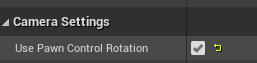
he told you to change this
fathom slate
yeah thats not my problem
thats already checked
the mesh on the character doesnt rotae so the visible character is looking 90 left of the actual character
white crypt
rotate the mesh then, by default its already rotated by 270
fathom slate
when i rotate the mesh it doesnt actually move in the preview
white crypt
are you overwriting anything on construct?
unkempt musk
Is your mesh rotated -90 on the Z axis?
fathom slate
270 on the z axis
white crypt
strange, just tried playing around with some settings and it always displays correctly
doesnt matter if rotation is ticked or not
one suggestion would be to get a fresh 3rd person template and try it again
fathom slate
i did it with the first person template and then added the 3rd person mesh so that if i make multiplay then people can see
unkempt musk
Anything in the construction script?
white crypt
oh, get used to that 😄
fathom slate
thanks for all your help
novel birch
Hey all, I've got a weird problem here, does anyone know why a Spotlight won't be toggled on/off via blueprints?
It's attached to my player via AttachActorToActor, and its set to have no collision, and when I attempt to toggle it off via the Toggle Visibility node, it has 0 effect. Any ideas?
fathom slate
wait actually yall mind if i ask one more question
white crypt
at one point while testing now i had the same issue, but i replaced the char and it was fine. i saw your two images and they were different so i thought you did that already
asking a question if you can ask is just pointless, just do it 😄
fathom slate
im try to make a ingame ui that lets you change the link that plays on the media player
is that possible
unkempt musk
@novel birch I've had issues with the toggling visibility as well. With lights, I just set intensity to 0. It's been more reliable.
novel birch
@unkempt musk it's weird because I can toggle it from my player blueprint class, but I can't toggle it from, well, its own class.
I tried toggling it from the player class, but it didn't work either. The tl;dr of what I'm doing is basically battery drain, when the battery % is 0, turn it off. The prints even fire, it's just not physically turning off.
 weary jackal
Actors don't have inputs enabled on begin
white crypt
@fathom slate media player uses video files that you have imported to your project. you can play what ever you want. if you want to play videos from net, you will have to use built-in browser
weary jackal
You have to enable input for that actor
novel birch
Oh really? Lemme quickly test
fathom slate
@white crypt how do i use the built in browser and connect it to the media player
novel birch
Nope, still doesn't want to work @weary jackal
This is how I'm doing it: https://cdn.thurston.pw/media/mouxn.png
 white crypt
@fathom slate i dont think you can use media player with it, havent tested but i doubt it works that way. https://docs.unrealengine.com/en-US/Engine/UMG/UserGuide/WidgetTypeReference/WebBrowser/index.html
Overview of using the Web Browser widget to create in-game web browsing functionality.
fathom slate
would there be an alterative solution to it then or it just impossible
white crypt
maybe there are some plugins, i havent looked into it but just go with web browser if you want to play links
fathom slate
but then how would i get that to play on say a plane is there like a material i can use or somthing
white crypt
you can use widget component and set it to be in world space
make an actor bp and inside add a a widget component. do some research, there should be plenty of videos
fathom slate
ok will do thanks
weary jackal
@novel birch does the intensity high enough that you can see the light?
novel birch
Yeah, I can still see the light
I can toggle it on/off already via an action mapping I have setup, but trying to do it automatically when the battery depletes doesn't seem to work.
weary jackal
I think you have to check it on tick
novel birch
I am already

It's in its early phases at the moment, but this is what I currently have
And I just realized I'm checking if the flashlight is on twice :p but that isn't the problem
weary jackal
Is this your player bp?
novel birch
No, the flashlight BP
weary jackal
And for the toggling part you're setting the bool true
novel birch
Yeah

Ah, well, ignore the double true bool, was testing whether it'd turn on regardless of whether it was on/off
This is inside of my player bp
 mossy abyss
Hi, I'm a student looking for some HW help. I'm having issues getting a function to make variables visible.
novel birch
@weary jackal I take it you're as stumped as me?
maiden wadi
@mossy abyss What do you mean by having a function make variables visible?
mossy abyss
so, I think that I've got things inputting correctly(again, I'm in a beginners course) and I need the function to have access to the variable of the BP_Item to it will display when hitting the '1' key.
sorry for the spaghetti...
novel birch
If I'm understanding you correctly, you need to get a reference of your class by casting to it, then with the class return value, you can access your variable from there
@mossy abyss ^
mossy abyss
hmm... ok, I will play with that for a bit.@novel birch
maiden wadi
@novel birch Does "FlashlightTurnedOff" ever print?
 maiden wadi
You should make those framerate independent, but that's another topic in a minute. So the spotlight isn't turning off when the battery is 0?
novel birch
Correct
maiden wadi
@novel birch Hmm. Despite that the logic should only 'toggle' it once, and that it should definitely turn off, I would change that ToggleVisibility to SetVisibility with a false in the NewVisibility argument. Past that, I'd assume that you have to be toggling visibility elsewhere. That or you somehow have more than one flashlight and are only turning one off maybe.
novel birch
Already tried SetVisibility
Still doesn't work
I thought I had multiple running at once, but I am unsure on how to properly test.
maiden wadi
You could print the Display names somewhere. Each instance will have a slightly different display name. For a better test, what you could do is brute force a test by making a keybind that gets all flashlight actors in the whole level and set their battery to -1.0 and sets the spotlight visibility to off.
fathom slate
hello again
how do make an object appear really bright dispite being in a dark area
maiden wadi
@novel birch Just a quick something like this in the player character or controller for brute force testing.
If that doesn't turn the light off, I'd assume you're either toggling the light on somewhere else, or that light is from a different source than the flashlight's BP.
maiden wadi
@fathom slate That's more of a #graphics question, but in short, you need to use a light source, or an emissive material I think.
fathom slate
oh ok sorry il swithc channel
maiden wadi
No worry. Just saying the people there will know a lot better.
novel birch
@maiden wadi would that be in the players class, or the flashlights class?
vale seal
So basically I copied a blueprint online that mirrors exactly the movement that I want on my player character. The issue is that the blueprint comes with a lot of useless things I don't need i.e. health, chests, and worst of all, a SPAWN POINT! This is super hard because I'm struggling to BP the player :(
I need help either removing the spawn point or a way to get my char targetted in bp
unkempt musk
Can you post a pic of the BP?
 boreal sapphire
Hey guys, im trying to make a blueprint for the ai to walk forward after i press a forward button from widget but i seem to be struggling
maiden wadi
@novel birch You can do it anywhere. Probably just in the playercontroller or playercharacter where you have input by default.
vale seal
Can you post a pic of the BP?
@unkempt musk
I don't know what to use in place of "cast To TD_Player"
unkempt musk
Are you trying to teleport a cube to where the player is?
boreal sapphire
im receiving an "accessed none -" error from the tick on the boolean
one is on the widget on is on the ai Event graph
may i ask is there something i am doing wrong?
 rough wing
One of your variables have no value
maiden wadi
@boreal sapphire Can you show the error?
rough wing
They are empty/null
boreal sapphire
vale seal
Are you trying to teleport a cube to where the player is?
@unkempt musk yes
boreal sapphire
May i ask by what you mean it has no value/which?
rough wing
Like it doesn't reference any widget, where do you set the widget variable?
maiden wadi
Which is empty.
rough wing
No that's more like an empty class reference, you need an actual object that was created and set that variable to that object
maiden wadi
Blue variables like that are called Pointers. They are very small in size a few bytes. They only hold a memory address. They're like business cards. They point to a location in memory that holds a value of that type. All you have done is create a blank business card. You haven't created a business to place on that card.
boreal sapphire
Ah, so would i be correct in saying making a variable on the widget itself would work?
maiden wadi
No, you need to actually create a widget and populate that variable with that widget's address.
Have you created that widget anywhere? is it on screen?
boreal sapphire
Yeah
maiden wadi
Where are you creating it and adding it to viewport?
unkempt musk
@vale seal Try something like this.
novel birch
@maiden wadi I've done that, and it still didn't turn off
vale seal
Ok let me try !
maiden wadi
@boreal sapphire See the blue pin coming off of the right side of CreateWidget? That is a memory pointer like the one you made called Widget. You're using it to access the memory address of that widget to tell it to add itself to the viewport. You need to get a hold of that somehow and populate the Widget variable you've created with that blue pin. Which is going to be very hard from the level blueprint since things cannot directly access the level blueprint. So your level blueprint needs a way to access the class that has your Widget Variable to set it for that class. Or you need to move that create widget somewhere more easily accessable like the HUD or PlayerController class.
maiden wadi
@novel birch If that's not killing your light, I can't imagine what else it could be. Like I said before, I'd wager that you're either somehow turning it back on somewhere, somehow. Or that light isn't actually the flashlight's spotlight. Because that function should turn off every single flashlight in your level and nullify your tick by making the battery dead. Unless you left the toggle node there. It might still turn it off from the brute force function and then toggle it back on from the battery being dead.
rough wing
@boreal sapphire Or just get a reference to the AI inside the widget and call a custom event when you press the button
You can learn how gamemode and gameinstance work, they are very useful in communicating from blueprint to bluepritn
maiden wadi
True. If you have the AI thing in an easy to reach place, your Widget could access that directly instead of something else setting a pointer to use.
But yeah. Level blueprint is a pain to use sometimes. It's secluded from other classes by default because other classes aren't supposed to directly access individual levels so as to keep programming encapsulated enough to be used on multiple levels.
boreal sapphire
tried out the widget, don't know if im still being stupid or not lol
With gameinstance does it allow for variables to be easily passed?
vale seal
@vale seal Try something like this.
@unkempt musk having a few issues with that...
maiden wadi
@boreal sapphire Your SwatAI, is it spawned from something else, or is it placed in the level?
vale seal
I can't seem to find "set" and a big issue is, because i copied movement bps from online, the player spawns on start and it's in the level while im editing. so I don't know how to reference the player actor in the BP
maiden wadi
Okay. In that case, you can do it in your level blueprint.
Target Actor is also placed in the level?
maiden wadi
Make both of those ExposeOnSpawn and InstanceEditable in the Widget blueprint.
maiden wadi
Compile the Widget blueprint. Now in BeginPlay on your Level Blueprint, CreateWidget with that widget class. The node should change and you should see both of those as inputs. Right?
maiden wadi
Plug those in from your level, like you've done on the Tick thing.
boreal sapphire
Ok
maiden wadi
Disconnect your Tick stuff, you shouldn't need it here.
Back in the Widget Blueprint. On button click, take those two variables you've made expose on spawn, and use it to call the AI Move To.
 odd ember
people really out here wildin with stuff on event tick
maiden wadi
Yep. That should work as long as your AI has a movement component, and you have a nav mesh in your level.
boreal sapphire
I managed to get him to follow the player without a button then disabled, so the navmesh works, but the button still seems to not work
maiden wadi
Does it give you any errors when you close out the PIE?
maiden wadi
Put prints on the AIMoveTo. Both on Success and Fail. See which one prints.
unkempt musk
@vale seal From the GetPlayerCharacter i promoted to variable to get the blue Set. This just saves a reference to the character. Drop the reference on the BP and drag off to get the list of set actor functions.
boreal sapphire
Strangely enough neither appears
The button is there but clicking it doesn't show the print
maiden wadi
How about the default > pin above Success? Does anything print from that?
maiden wadi
@boreal sapphire Try printin the AIController from the pawn like this. Does that print a non blank print?
maiden wadi
Ah. What was it?
boreal sapphire
I think there was accidentally a double print of the widget
and the overlaying one wasn't using the new double input
rough wing
Also the AI move node should work without tick
rough wing
Oh, okay
boreal sapphire
gotta say it was a huge help
rough wing
Np
odd ember
@boreal sapphire generally it's good to make sure that only one instance of a widget exists and can be enabled at a time. although I'm not sure whether BP actually takes care of this or not
boreal sapphire
Ah yeah, it was a widget i accidentally kept enabled while experimenting to see if i could get it to function
maiden wadi
@boreal sapphire So, the reason that this works, is because things placed in the level are spawned before BeginPlay is called. Basically the level loads up all of it's assets and at some point after that GameMode calls BeginPlay on all actors. So because your two objects were in level, we could use their pointers straight out of the level. However, if you ever plan on using anything more dynamic, you'll need to save your references somewhere for use as the ai or such is spawned. Learning how pointers work can be daunting at first, but spend some time with it. Validity is a huge thing. I'd spend a couple days learning how to populate and use those pointers correctly. Just remember what I said earlier, those blue variables are not actually the objects themselves, they're just little pointers that point to an actual object of the type.
vale seal
@vale seal From the GetPlayerCharacter i promoted to variable to get the blue Set. This just saves a reference to the character. Drop the reference on the BP and drag off to get the list of set actor functions.
@unkempt musk And what've I done wrong with this small bit?
odd ember
you need to do that over time
boreal sapphire
@maiden wadi Gotta say, thank you very much for you detailed help it honestly is very encouraging, i appreciate the help and will definitely look over the variables while i try to make a mini game to practice it all
unkempt musk
@vale seal Right click the "Return Value" pin and click "split struct pin"
vale seal
ty!
unkempt musk
No worries, glad i could help!
vale seal
Actually, when I press the button it simply teleports nowhere to be seen... 🤔
I'm probably testing your patience aren't I 😂
vale seal
I would've seen it if it were because my camera's set like this:
odd ember
it might have collision then that causes it to spawn somewhere else
vale seal
hm let me dick around with it rq
odd ember
can you free your camera from your character?
vale seal
I found where it spawns; at where the spawner was originally placed.
odd ember
is that at 0,0,0?
odd ember
probably
anyway consider that you don't want the box to be spawned where the player is
probably in front of the player
or to the side of the player or whatever
which requires a little more math than just the position of the player
or well, you can do it in a few different ways
vale seal
All I have rn
unkempt musk
@vale seal This will move the location 100 units in front of you. If it's not teleporting due to collisions, this might help.
vale seal
How do I get these lil yellow things
earnest tangle
"lil yellow things"?
unkempt musk
drag off a yellow pin and type * or +.
odd ember
@vale seal but before you do anything, what are you expecting it to do?
because I got the feeling you're missing something here
vale seal
Legit just want it to teleport above my head
vale seal
The cube
odd ember
which one?
odd ember
cool
 unkempt musk
Does the cube need to already exist in the world, or can you just spawn when you need it?
odd ember
if you want to actually be able to lift any cube above your head though you'll have to script some code for how to select an arbitrary cube
(which is what I was getting at)
 tough ore
Anyone know a work around for the Input left mouse button not working with a quick tap?
It only triggers when fully pressed down
odd ember
is it hooked up to an action binding, in the project settings?
tough ore
Yeah
odd ember
check that it isn't accidentally an axis binding instead of an action binding
alternatively if it is an action binding try using it with an axis binding and a higher scale value
maiden wadi
If it's an action mapping and the pressed part doesn't fire at all even on a quick tap, it's likely a hardware issue.
 upper linden
i have 1 to equip rifle and 2 to equip pistol
i wanna disable one while doing the other
how do i do it ?
unkempt musk
Booleans. and branches
upper linden
im already doing those to swap betwwen them
it will just mess up the swap feature
i need to disable the inputs, while still being able to move
maiden wadi
What exactly are you trying to do? Not allow them to press 2 after 1 has been pressed for a short time?
upper linden
ya
unkempt musk
what are you disabling? the gun fire? or the switching?
tough ore
Could someone check that does an action mapping on mouse 1 work with a quick tap?
upper linden
the switching
when i equip one of the weapons, if i press 1-2(or 2-1) quikly both weapons are on the hand
maiden wadi
Timer. Start a timer and use it for each key. Use the same handle. If timer is active, don't allow anything else. If it's not active, allow the switch and start a new timer.
To be fair. That sounds like programmer error.
upper linden
how do i allow, that's the question
rough wing
Are you using different references?
upper linden
ya
odd ember
Could someone check that does an action mapping on mouse 1 work with a quick tap?
@tough ore just to clarify, what do you mean by quick tap? just a single quick click?
rough wing
Make it so only one variable is related to your hold item
tough ore
@odd ember Yep!
unkempt musk
I do something like this for firing
odd ember
if it isn't working with either that or the axis workaround then it might be a hardware issue
in that the click doesn't register in the first place
maiden wadi
@upper linden Can you show us your one and two key inputs?
upper linden
ok 1 sec
tough ore
@odd ember It is really weird that it works on everywhere else than on ue 😦
odd ember
try turning up the scale value to something obnoxiously high
like 10.0 or something
and see if it works
and check that it works in other applications consistently
odd ember
if it is a hardware issue it isn't a given that it that it is uniformly or binarily broken
as in, it could depend on where on the mouse button you hit
maiden wadi
@upper linden Where are you even telling it to put the other one away?
maiden wadi
@upper linden Use your bools then. Where ever you're doing that, make sure that your booleans are correct before you actually equip it to hand.
That'll stop it from equipping both at the same time.
novel birch
@maiden wadi Yeah, I have no idea what could be causing it, if you want, we can quickly hop in voice and I can show you the entire blueprint?
upper linden
tough ore
I found a better workaround, I can just set the "Tapfire" to the Released on the actionmapping!
maiden wadi
On the Top two. For example, in the SnapSecondaryToHand thing. Make sure that PistolCombat is true before actually attaching it.
upper linden
i thougt maybe there was a function to enable/disable the buttons
gotcha
i will try to block the whole animation
thanks for the suggestion @maiden wadi and others
odd ember
@tough ore hmm this sounds like you have other things set up on that button? if that's the case it might be a case of your other logic taking precedence. but good that you found a solution
unkempt musk
@upper linden simplest solution I've got.
odd ember
I haven't followed the convo but I guess a flipflop could work as well
odd ember
conflict how?
upper linden
when you equip one wpn, and switch to the other, the first flipflop doesnt change
odd ember
ah yeah okay
upper linden
when it has to
odd ember
I'd suggest a switch
however you'll still have to account for that case you just mentioned almost regardless of how you set it up
tough ore
Okay now it got really interesting, I put a printstring right after the Inputaction and it prints it everytime 😄
upper linden
@odd ember switch ?
odd ember
@tough ore wanna share your logic
@upper linden a switch is like a branch but allows for more options. it requires some extra setup, like an enumerator
or an int, worst case
tough ore
I think no one is going to understand this 😄
maiden wadi
🇫🇮
upper linden
@odd ember Switch on Int ? this one
tough ore
I think it is not working becouse there is a timer for the full auto fire 🤔
odd ember
switch on int will work
tough ore
🇫🇮
odd ember
but it's better to use enumerators
@tough ore makes sense
you will want to make the timer work conditionally based on hold time
or actually
you can use a multiplier on delta time
to roughly calculate how many frames to hold down for before you want the timer to start
that's fairly elegant
upper linden
but the animations will still trigger
tough ore
Sounds cool! Don't have any idea on how to execute that tho 😄
upper linden
but explain me how multiplier on delta time works ? if it's not much trouble
odd ember
@tough ore
this will give you the time
you might need to check that in a, well, separate timer.
but that's the idea
tough ore
Thanks! 👍
maiden wadi
Is this for like, tapping the left mouse button to fire a single bullet vs holding the mouse down to start full auto?
odd ember
I'd assume so
tough ore
Yeah!
odd ember
@upper linden the deltatime was for the dude shooting
tough ore
I bet there would be much better way of doing this, but it is what it is 😄
upper linden
it's fine, i wanted to learn it too
odd ember
for you it's just using switch on int with an int variable you store
ah
delta time
is how long the last frame took
upper linden
thank you
for the animations i will put notifies at start/end of montages, to enable/disable a boolean, until i find a better solution
odd ember
so generally unless the game is horribly broken in terms of performance it's a good indicator of how long the current frame is going to take
hence why you can use a multiplier on it to convert seconds into frames
tough ore
This was all it took, now I have a fully working Tap/Spray system 🙂
It might not be the best one, but it sure does the trick
odd ember
delay on tick isn't exactly smart, definitely recommend using a timer over that
upper linden
i would rather trigger it from the anim_event, instead of event-tick
tough ore
I was happy for like a minute
upper linden
but you found a solution on your own that's good
tough ore
I hope I find a better one 😄
Becouse I have the bulletspread thing already done, and I would like to use that.
maiden wadi
@tough ore
tough ore
I would need to make a system that distinguish tap from a hold
tough ore
"Do the pew pew." love it!
 spark steppe
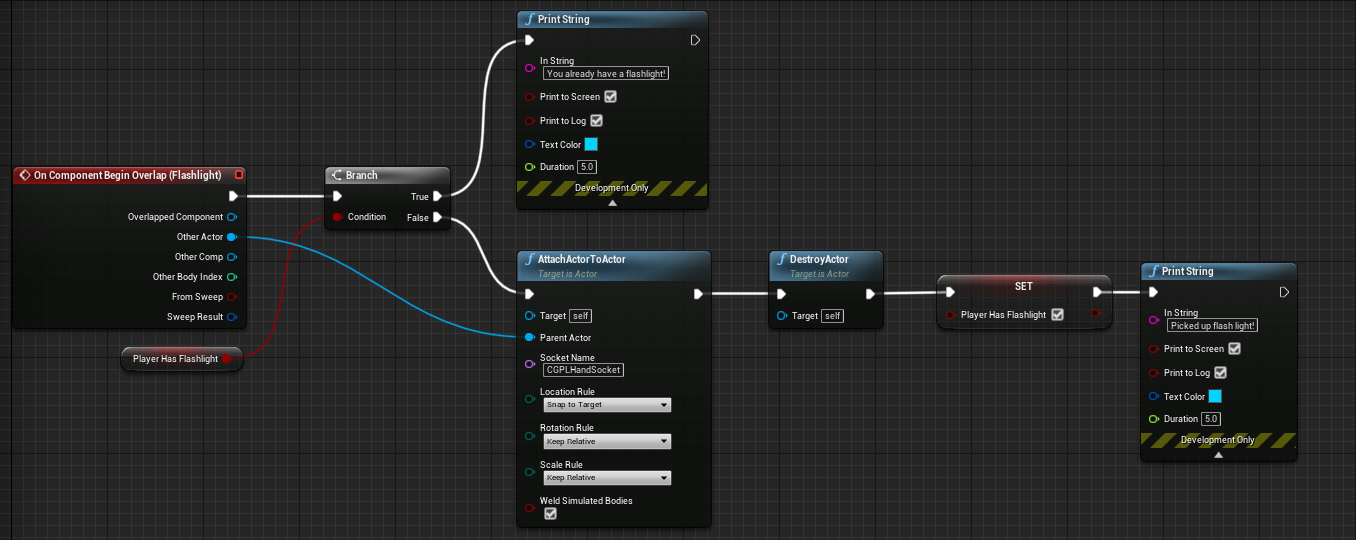
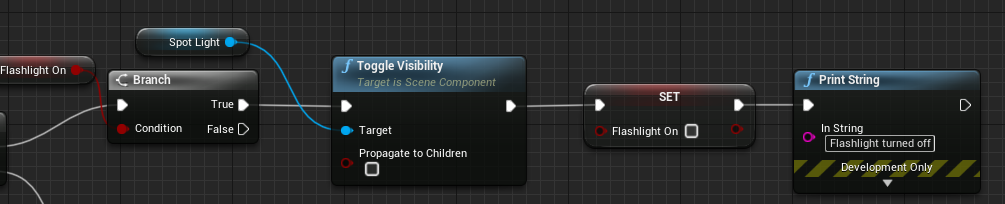
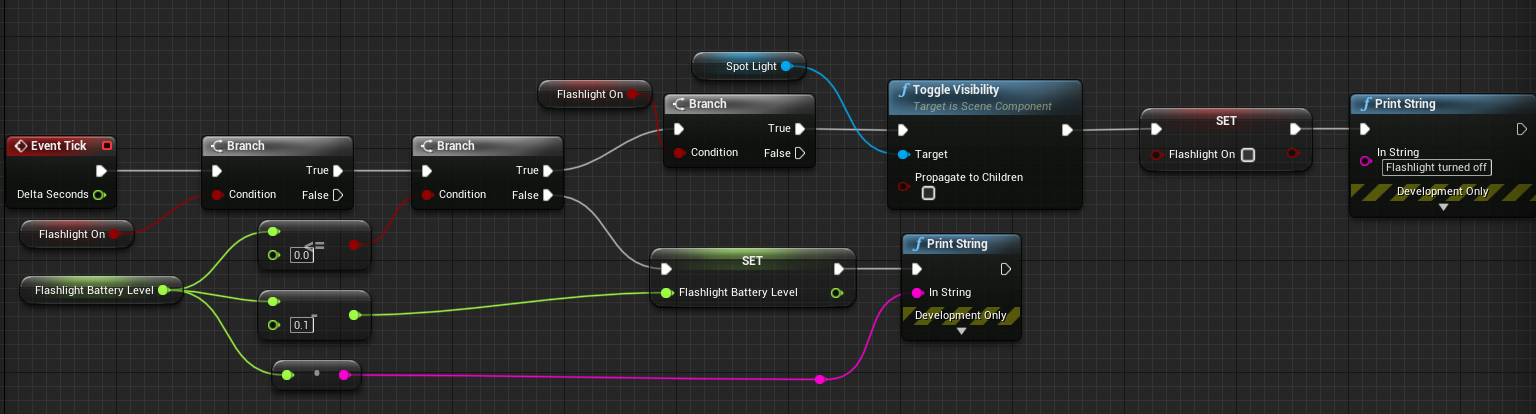
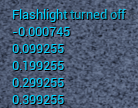 maiden wadi
That solves the issues of pulling triggers too soon or anything like that, resets it for use on first click, etc. And it takes it off of tick, and makes it more performant.
novel birch
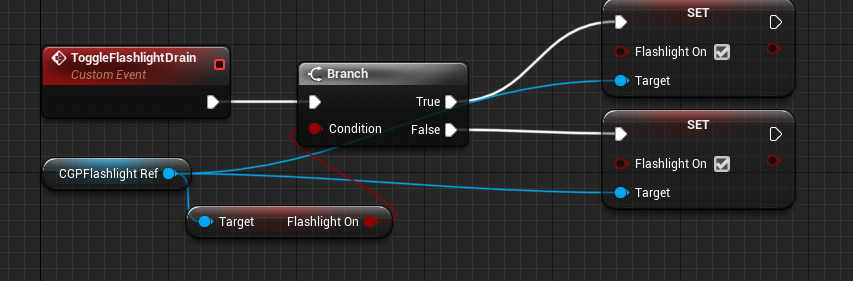
But yeah @maiden wadi, - https://cdn.thurston.pw/media/we0ce.png with this blueprint: https://cdn.thurston.pw/media/n32c5.png
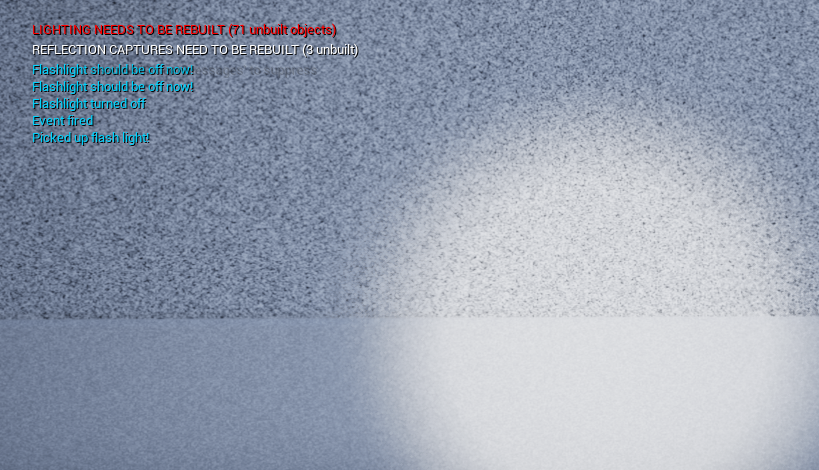


 maiden wadi
@novel birch What happens if you use that same loop to change the light's color? Does it actually change?
novel birch
Lemme test, hold on!
Nope
In fact, the print doesn't even fire, hold on a sec, I may have broken something!
maiden wadi
@upper linden It asks if the Timer handle has been assigned timer and if it's currently being used.
novel birch
Yeah, no - doesn't change. I've come up with a hacky fix at best. From my flashlight BP, I'm calling a custom event inside of my player BP to basically turn the light off. It works, but it isn't really as I want it to. Is it possible that since the class is now a child of my player BP, it can only be controlled via the player BP?
maiden wadi
@novel birch If the spotlight doesn't change color in that loop, it's unlikely that light is from the spotlight in your flashlight. Do you have any other forms of light it could be?
novel birch
Nope, none
If you want, you can just quickly give it the once over just to confirm for me, but I'm 99.9% sure that there are no other light sources.
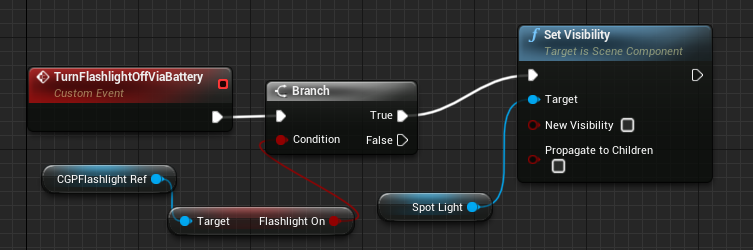

This is what I'm doing to toggle it off
This is inside of my player BP, and I'm calling it from the Flashlight BP
upper linden
what about that SetTimerByEvent ? how does is it work ?
maiden wadi
@upper linden The world actor, or main actor responsible for spawning everything has a thing called a TimerManager. It's basically a place where you can register functions or delegates to fire after a certain time. In this case it's by delegate, which is the red line going to the other event. It's just a fancy way of saying, call this event after this amount of time. If it's not looped, it'll remove itself from the timer manager after it's fired the event. If it's looping, it'll just restart it's timer.
upper linden
thanks a lot man, i'm off for tonight
i solved my problem by the way, i blocked the animation montages
tough ore
@maiden wadi How could I add a system that lets you fire at a rate with just clicking. Like a max firerate when not holding but rather clicking?
I tried it and if you set the actionmapping to mouse wheel down, It will shoot really fast
maiden wadi
@novel birch Do you have anything anywhere turning those on by tick, or anything like that?
novel birch
I do not, but I have just figured out the issue. That 0.01% of me being unsure was correct. I was doing previous testing earlier and had a flashlight (with a spotlight) in my player blueprint, so the toggles were working, just not as I had intended. I wasn't reading my variables correct, and long story short, in the player BP, I was referencing that spotlight, but in my flashlight BP, I was referencing the actual spotlight. What's weird is that only 1 was showing, and neither colour was still changing.
But, it all works now, and I really do appreciate your help, and patience on this. Just one very, very last thing, I saw you mentioned earlier making the battery drain rate framerate independent, how would I go about this?
maiden wadi
@tough ore What do you mean? Like single shot per click, with an enforced time in between clicks, or like click once and fire a burst of shots?
tough ore
Time between clicks, would a horrible delay system be reliable? 😄
maiden wadi
That system would be incredibly easily actually. Just save a float of the current game time when firing a shot, and check it on next click.
tough ore
Oh, okay!
tough ore
Thanks! ❤️
visual granite
So basically if in state machine I add a condition that Current State Anim Relevant Time Remaining < 0.2f or add a notify that changes a boolean at the end of the animation and depending on this boolean I want to change state how can I actually do that so it works well?
Sometimes my animation loops
and this makes no sense to me
For example the notify should instantly change boolean and just make the state machine go to next state
but it doesnt and I see a beginning of another animation
(sword attacks from random sequence)
While I just want one attack -> go back to idle
trim matrix
How can I call a specific animation asset to be played? When I try calling Play Animation, it then prevents other animations from being played later on.
 fierce birch
wdym
weary jackal
How can I call a specific animation asset to be played? When I try calling Play Animation, it then prevents other animations from being played later on.
@trim matrix play montage instead, or make a anim state.
fierce birch
i thought she meant animations from components like widgets, if that doesnt work, check transition rules
trim matrix
Not just animations.
When I call Play Animation it would suspend all other animations and prevent them from being played later.
How do I play a montage in bp?
fierce birch
in the anim bp
flat raft
Is there a bug for the GET in the ARRAY when you choose the GET by Reference ?
The GET node had the word REF in it, not it doesn't.
 grizzled garden
guys why the balls are falling and ignoring the terrain?
fierce birch
@grizzled garden look in collision settings for ball
grizzled garden
where is that located?
fierce birch
open up the ball
fierce birch
does it have a collision?
fierce birch
you cant see if it has a collision component with it
fierce birch
take a screenshot
odd ember
a very philosophical question
fierce birch
nvm i see you have it
grizzled garden
yeah i felt something wrong
fierce birch
its a capsule component?
fierce birch
select it
grizzled garden
i did, what now?
fierce birch
in details type in collision
grizzled garden
the ball or its capsule?
fierce birch
is generate overlap events selected
grizzled garden
what?
fierce birch
select the capsule collision
fierce birch
in the detail pannel
grizzled garden
yes?
fierce birch
is generate overlap events checked
fierce birch
i just said it
grizzled garden
mulity body collison?
fierce birch
it says collision presets
fierce birch
everything is correct
grizzled garden
yes
fierce birch
ok
grizzled garden
what now?
fierce birch
so its not the actor
grizzled garden
my terrain is 2dpaper
fierce birch
can your character stand on the ground
fierce birch
click on the terrain
grizzled garden
ok
fierce birch
check for collision
fierce birch
send screenshot
fierce birch
can character step on try no
grizzled garden
btw, after i set it no, i click play
i dont have to make some extra changes to apply the set right?
fierce birch
no
grizzled garden
no what
fierce birch
show me the actor components
grizzled garden
u mean the ball?
fierce birch
the ground
grizzled garden
the green terrain?
fierce birch
so you randomly generated it
grizzled garden
what do u mean?
i made a terrain
from paper2D
it is called new paper tile map
fierce birch
is you game 2d
grizzled garden
it is 3d
but the view will be from above
so it is 3D but in real it is 2D viewed
fierce birch
why dont you just generate a terrain instead
your static mesh prob has no collision
grizzled garden
if i generate a terrain, can i edit its tiles
so they become green
like the current one?
i mean is it possibile to edit the gerneated terrain style/desgin ( whatever it is called )
fierce birch
its a texture im assuming
fierce birch
why are you concerned about tiles
fierce birch
like what
grizzled garden
like my current terrain
fierce birch
scroll down in details
grizzled garden
.
like this
how do i make one like this with out using paper2D? why would not i use paper2D?
isnt this 2D?
odd ember
if you're talking about being functionally identical then just put a camera at the top of the level
fierce birch
yea
grizzled garden
i just want to make a terrain like this. and what u mean by faked?
fierce birch
you just use photoshop
grizzled garden
pls tell me what is that
odd ember
like you say terrain but you probably don't want terrain
grizzled garden
ahhh i get it
odd ember
you just want a flat surface that looks like terrain yeah?
grizzled garden
i make a pciture terrain
odd ember
yes
odd ember
uh probably
odd ember
idk what you want but yes it's a good start
fierce birch
@grizzled garden use a plane
fierce birch
then add the texture
grizzled garden
what is that?
fierce birch
and also touch up on the basics a little
 exotic warren
sounds like a silly thing, anyone know how I lock the aspect ratio of an image in UMG? It seems that you can only manually input a size, but seems annoying if you want the content to dynamically stretch with the image
fierce birch
@exotic warren idk if you can
exotic warren

It seems like a non-trivial thing to have
I just want the parent element to size to the image width D:
there has to be a way to do it surely
flat raft
@exotic warren I don't understand the question. You image is not scaling?
exotic warren
@flat raft Yeah so essentially, I have this
If I stick a gun image in there with a bigger width
 proud hull
@exotic warren You want to change the image size during runtime?
exotic warren
the image is just going to squish
@proud hull Yea I just found the same myself but was kind of hoping UE4 had a better solution than that lol
exotic warren
tried it, only good for defining a specific size
the issue isn't that the image is squished (as in not filling the size of the box) @flat raft
it's that it doesn't stretch the parent border box based on the width of the containing image
flat raft
Is there a Size to Content checkbox?
exotic warren
so if I swap out this 1024x1024 texture for a 2048x1024 one
I just get horrible tiny squished image in 1024 box lol
There's size auto / fill
it's on fill atm
but no dice
flat raft
Hmm.. gimme a sec... I'll make one. I still maybe don't understand, but lemme try it on my end
proud hull
@exotic warren can you show your current hierarchy?
exotic warren
that size box containing weapon has width override disabled btw
I think i'm just going to have to do it on set brush
Wait actually I managed to fix it, the height of the image had to be exactly that of the canvas pixel size
Doesn't like it if the image is bigger apparently
ty for help guys 🙂
 grave nebula
Does Per Bone Motion Blur still working?
 surreal peak
@slender venture is this called on tick?
You might want to bring deltaseconds into play.
Also you are only performing launch on z. The slowdown can come from the in air movement settings
 robust cliff
anyone have an idea on why my weapon is dealing extra damage. I am using a weapon actor and triggering the collision volume on an anim notify. Sometimes it deals extra damage? Cannot figure out why
surreal peak
@robust cliff your overlap happens more than once
Maybe?
@slender venture could be already handled by the character movement component but usually wenn you accumulate something on tick you want to multiply the value with deltaseconds.
Cause otherwise you would accumulate a smaller number on lower framerates
And higher number on higher framerates
Not sure if the cmc utilizing deltaseconds saves you here
 pale blade
What do you guys think about straight line connections?
 tight schooner
It's against god
Nah I'm just kidding w/e
I've always stuck with the default spaghetti lines but I get why people go with the circuitboard mods
I just use a lot of reroute nodes to keep the flow legible
surreal peak
The only thing I like that I never enable cause I forget are the arrows on them for flow direction
trim matrix
can some one help me about save game object/game instances i want my player remeber when he pick up the weapon in level 1 and when go to level 2 the weapon still in the inventory
 late cave
wait what... a function library in Unreal can have local variables??

Unreal Engine
Improve the wire style of Blueprints and materials editors.
surreal peak
wait what... a function library in Unreal can have local variables??
@late cave Why wouldn't they? Local Variables only exist in the function scope, so that's the same for c++.
late cave
@surreal peak damnit... you're right... I was thinking that the library itself had a scope, but no...
urg... I made it up in my mind because I currently need it 😛
opaque blade
urg... I made it up in my mind because I currently need it 😛
@late cave that is kinda possible with c++ though
we have some shared events/delegates for components
carmine prawn
I'm in 4.24, looking for "Get Vector" [from a YT video dated April this year] which seems to get the forward vector but not seeing it, would "Get Forward Vector" essentially be the same thing?
Additionally I am wanting to get the forward vector of a socket on a Static Mesh, but not sure how to get that so I can compare the two with a DOT then I will use ACOsd to work out the degrees difference.
 rough sinew
@carmine prawn There are many functions to calculate vectors: get forward/up/right vector... depends on your needs really.
Regarding the socket I think you should probably get the rotation and then calculate the vector from it.
carmine prawn
@carmine prawn There are many functions to calculate vectors: get forward/up/right vector... depends on your needs really.
Regarding the socket I think you should probably get the rotation and then calculate the vector from it.
@rough sinew Thanks man, appreciated 🙂
Essentially I'm wanting to be able to rotate the root of actor 2, based on the difference between the forward vectors of the root of actor 1 and of a socket on actor 2. I had thought to get that as degrees but that may not be the best way forward.
rough sinew
@carmine prawn Hum... did we talk about something similar a few days ago? Is is the same problem?
carmine prawn
Yeah, it's the same issue- I've been trying to solve it myself but coming up with more questions than answers.
If there is a way to change rotation based on degrees I can do that, as I can work out the degree difference using that above.
But I may be over thinking it
rough sinew
@carmine prawn If you use break rotator the answer is in degrees I think.
 barren salmon
i've set the viewmode to use viewmode unlit in runtime it works in editor but not in buid
in a non blank scene my assets look like this him
carmine prawn
@rough sinew Yup, that seems to be it. No idea why I was over thinking it. I now will probably have nightmares with vectors attacking me in my sleep or something. Thanks a lot, I really do appreciate the guidance. I'll ask this now, as my brain is a little frazzled and I really don't want to confuse myself or over think this, now that I have the actor spawned in with the correct rotation, I need to off set it's location. I think I'm now chasing my tail, I know it's simple but can't see the wood for the trees. A picture says a thousand words so:
I simply need to move the top actor so exit 1 is at the current root 2.
I get the socket location, and subtract it from the root, or the other way around and neither give that result, even changing the transform space world/actor doesn't. Or probably I'm simply doing it wrong.
rough sinew
@carmine prawn I think if it is attached to the socket you just add relative rotations and locations, isn't it?
carmine prawn
relative... ah that may be the obvious thing I've missed. I'll give it a go and see. 🙂
rough sinew
@carmine prawn Hope it works out! 😀
trim matrix
I want the player to invinsible in a set amount of time. How should I do it?
proud hull
@trim matrix all depends on how you are initially triggering the invisibility. For instance, let's say it is a spell being cast and you need to wait for part of the cast animation to play before actually setting the player invisible. In this case you could use animation notifications. Another method is to use an event timer. Still multiple other ways to accomplish this too.
@barren salmon set your materials to unlit?
trim matrix
@proud hull I will have it start by calling a custom event but I am new to unreal so I really dont know how to set up timers and such. Could you help me?
proud hull
@trim matrix what is the overall context of the use of invisibility? Like does it rely on an animation like the example I mentioned? I'll open up my editor to give you a screenshot of a simple event timer.
Context in terms of the player playing your game. Like player walks into shadows and turns invisible, casts a spell, turns invisible, etc.
trim matrix
The player jumps on a spike and turn invincible and cant get damage for a set amount of time
proud hull
Gotcha, so a simple timed event will be perfect then.
Oh, invincible, hehe. I was thinking invisible. Either way, still a timer for this.
So when you take damage, you will most likely want to set some boolean to true (bIsInvincible or something similar). Then you can run a simple timer like this to reset it to false.
@trim matrix
trim matrix
So when the event gets called does the set timer by event also happen?
proud hull
Yes, hook up the timer node to your event that is setting your player invincible. In this case, taking damage would be your trigger.
I should have included the boolean set to true as well.
trim matrix
Ok so my take damage event should be plugged into set invincible?
proud hull
@trim matrix You can make what I sent a custom event of its own so it can be used at any point you need it. You will then need to use the boolean variable to prevent damage being taken while it is true.
trim matrix
ye thx
 pearl onyx
Hello!
Coming from LUA, I have some ideas for optimizing the following UMG Menu Blueprint. How would you guys do this?
https://blueprintue.com/blueprint/iegwmg34/
BlueprintUE
I would use an Array or Table. Would an Enum for each resolution work?
Are the Main Menu and Option Variables local in scope to each event? What can be done to further optimize this? Maybe caching the variables when MainMenu is opened and calling the cached variables?
trim matrix
can anyone help me to spectate after I complete my level
proud hull
@pearl onyx Why not get the actual resolutions available to your player?
maiden wadi
@pearl onyx You'd probably be better off just making a drop down menu that's populated with the supported resolutions and a button that takes the currently selected on and applies that to the size.
proud hull
@pearl onyx Here is a bit of what I do to populate my resolution choices. This will get you the list of resolution options stored in a text array for displaying in UI.
This part gets the current resolution so the UI can show what is already selected.
This is where I set the new resolution based on the selected index.
trim matrix
I'm calling Play Animation Montage in my BP but the animation isn't playing. I print the return and it gives 0.6 seconds which is the correct duration of the animation. The animation itself just doesn't seem to play.
pearl onyx
@proud hull I was actually going to work on that later, but I guess I can learn now. Thanks for sharing this!
Are you using a ComboBox?
white crypt
@trim matrix for montages to work you need to use the same anim slot as for your montage
trim matrix
I don't understand @white crypt what do you mean by animation slot?
white crypt
all montages are using these so called slots, and for them to work your animbp needs to have that as well. sec gonna show an example
trim matrix
okay
white crypt
dont do anything with montage, it already uses the default one
so you just need to add it to your animbp as well
if that doesnt work then try a different montage node, but you still need to have that slot inside your animbp https://prnt.sc/vf6un3
pearl onyx
Is Resolution a local variable of the widget or in an interface or something?
maiden wadi
@pearl onyx How do you mean?
trim matrix
@white crypt That worked..But I'm confused why that works.
I don't quite understand what that default thing does or why it needs to be added to the animbp?
white crypt
so for example you wanted the montage only to use the upper body, then you make a slot for that body part
maybe you just want legs to play an anim, etc
trim matrix
If I understand it correctly. Default is a group/category and adding that group/category to the animbp state allows it to be played?
white crypt
then you would have to blend those slots per bone inside anim bp
yes, if you made a new slot then for it to work you would also have to add it inside animbp
trim matrix
So can a bunch of montages go into the default group or do I have to add a new slot for each montage?
white crypt
basically it gives you more freedom over how the montage should act
yes they can be under the same group
you start adding more when you need a different functionality
for example you have a reload anim, but if you played that montage then your legs would stop working
so you need to make a slot for upper body, so you still can play reload montage but legs continue to work
trim matrix
So it allows for multiple animations to be played simultaneously. For instance walking while reloading, your walk animation plays but your upper body is reloading instead of swaing the rifle back and fourth.
I get that part. I just don't understand the whole group/slot thing..
but I think the more I work with it.
proud hull
@pearl onyx Resolution variable is a widget reference. You'd replace that logic with however you plan to display the resolutions. The more important part is the text array logic. My personal options menu is arrow buttons left/right and it shows the current selection in the middle with text, but you can use the text array however you like.
trim matrix
I'll begin to figure it out naturally.
white crypt
its pretty basic actually, im just not that good at explaining
trim matrix
you helped a lot though, thank you!
white crypt
you can bother Authaer, hes good with words 😄
trim matrix
When I play an animation do I also need to change the character's z axis during the animation?
If a character is kneeling it looks really weird to see them kneel above the ground.
 worthy frost
that sounds like bad animation
my crouch animations work fine without doing anything specia
special*
white crypt
you can reimport that anim with some adjustments
trim matrix
Yes then it must be something wrong with the animation..