#animation
1 messages · Page 144 of 1
 nimble hatch
 unreal pollen
Anyone here got any experience with blender? The reason why I am asking is because a bone is deformed in animation upon exporting to Unreal. I went into the blender file and unticked the "Deform" box in bone properties and it fixed itself in blender, but when exporting into Unreal it returns to the same deformed state as earlier. I tried to allow it staying deformed and used the "Envelope Multiply" box if you expand the Deform tab in bone properties and tried exporting it from blender and import to Unreal, but same result regardless.
 mellow zenith
@unreal pollen I've been messing about with Blender a bit recently and I've been trying to figure out the new UE tools, but I'm mainly a programmer
However, my guess would be that the vertex weights for that bone are still exported even if you untick deform in Blender
So you might try clearing the vertex weights instead?
unreal pollen
Will try 🙂 Thanks
 tranquil drum
Hey everyone! I was wondering if there was a way to simply reset a skeleton's default pose in the editor (from A pose to T pose for example). I realize you can modify the pose used for retargeting, but I'm curious if it's possible to modify the actual skelton's pose itself without having to go out to 3d software. Any help or pointers in the right direction would be greatly appreciated! =)
 gritty palm
Hi guys, I have a big question about clothes for character animation, do I need to weight paint the cloth before importing to unreal and then master pose component it to the character mesh? Or I can just import fbx of the cloth and do it inside unreal? I can't seem to make the clothing tool work for this.
Would really appreciate if someone can give me a good hint on the work flow for this. Its been troubling me for over a few weeks now.
@tranquil drum you can do it in the skeleton editor, just manually change the pose and under retargeting manager there is a small button where you can save current pose, then that will become the retargeting pose. You can also create pose assets I think
tranquil drum
But that doesn't alter the actual base mesh, though...does it? (the retargeting option, I mean) That seems to just create a kind of fake pose used only for retargeting, at least from what I understand
gritty palm
Maybe I misunderstood you, I think you can try to create a pose assets, and everytime you can just apply that as animation then you have the pose.
When you don't need you just remove it and your character goes back to default pose
@tranquil drum
tranquil drum
From what I understand a pose asset is just a fast way to get other models into the same (fake) poses. This doesn't alter the actual base mesh itself. Someone correct me if I'm wrong, here
gritty palm
Ohhh I see what you mean now. Have you tried to save inside unreal with the new pose as default pose then export it as fbx? See if it keeps the new pose?
tranquil drum
I have, and it does not
gritty palm
Then I believe you need to do it in external program, that's my opinion. Might be wrong. I am quite new
Hi guys, I have a big question about clothes for character animation, do I need to weight paint the cloth before importing to unreal and then master pose component it to the character mesh? Or I can just import fbx of the cloth and do it inside unreal? I can't seem to make the clothing tool work for this.
 topaz cypress
Having an issue with some animations. The first frame of all animations imported from blender has a bizarre issue where the head will twitch.
It seems almost like the last frame of the animation sequence looks like it is the wrong keyframe. It does not appear in the fbx either.
mellow zenith
@topaz cypress are you using the new Blender to Unreal tools or the default FBX exporter?
Also, out of curiosity are you using auto keyframing in Blender?
I was using the Mr. Mannequin's Tools in Blender and had some issues where keyframes would glitch if I left on autokeyframing before exporting
 static falcon
I have a new issue, has anyone encounter this? When trying to re-target the mannequin, instead of getting broken animation (which I know how to fix), I am not getting anything at all, just an empty T-Pose animation clip. I've set up the skeleton profiles for both characters.
 misty dagger
can someone make here a tutorial from ?
those are animations bud i want it to be a free roaming AI
😄
 delicate junco
You can probably set a simple behavior tree and make them move to random locations from time to time using a navmesh + moveTo node
Better ask in #gameplay-ai for more info
 mint granite
guys, my animation got stuck in transition phase
is there anyway i can view the animation state at run time
something like in Unity where u can see the flows of animation real time
delicate junco
sure, just need to go to the anim BP after hitting play
mint granite
@delicate junco what should I look for in anim BP ?
I look at event graph and doesnt see any flow after playing
delicate junco
@mint granite you need to press play and then change the "debug instance" in your animBP
(the last one, your name will be different)
mint granite
👍 thanks @delicate junco
mellow zenith
Has anyone had the chance to play around with the new Blender Unreal Tools? I've been trying to get something working with the default rig, but for some reason I can't get IK poles to work properly
delicate junco
@solar salmon The first one as you can see is pretty much feeding a montage and then do another action
The other one is an asynchronous task, with some various callbaks that you can use to execute logic based on the pins. It's often used in the #gameplay-ability-system
 fringe nexus
Hi guys, my first post here. Have you guys idea how to make a FPS hand rotation that will follow weapon sway? Because right now, my weapon is rolling right and left but left hand is staying still because its attached straight forward to gun socket. Any thoughts? ❤️
misty dagger
Hey
I generated a model with Character Creator 3
Though, it has some issues with the facial animation. You can see the gum within the skin :

How I'm supposed to do when this kind of issue appear ?
Can I modify the shape keys into blender or some 3D modeling app ?
Should I avoid modifications, keep the model like i's generated and use only the shape keys which work ?
Maybe the easiest way should be to step back a bit the mesh inside the head (the denture) in blender ?
 jolly osprey
wondering if anyone's using the HTC Vive for motion capture and want to share the bare minimum required to get going? looking at this plugin https://www.unrealengine.com/marketplace/en-US/product/vive-mocap-kit

Using SteamVR for real-time motion capture
 dark axle
Is there a good guide on using blender to make avatars?
 urban gate
hey anybody know how to get attribute curve track names from an animation?
there are functions for getting the bone animation tracks, the notify tracks etc.
but i cant seem to find a way to get the attribute curves
(morph targets, material curves etc)
using bp/python that is
 tame swallow
this might be a little out of place in an ue4 discord but does anyone know how to properly delete parts of a skinned mesh in 3ds max? every time a try the mesh forgets its skinning. here's my modifier list. If i add an "edit poly" above it works but then removes it on export. i've tried turning off the skin modifier and "always deform" but same results
 surreal light
Heya everyone. I'm new to character animation and I undertand now how it can be a huge task (depending on the project of course). I was wondering, if I want to add a weapon, or several weapons to my character, from what I understand, I have to redo every single animation for each items, right ? Is there techniques or things that I don't know yet that address this issue ?
 icy saffron
I need some help with my blendspace for Rifle aiming. I downloaded animations from Mixamo and retargeted them to UE. They display fine on their own, but when put into to BS, they behave weirdly
Here is the video, the legs are twitchy and go through each other and move weirdly
Here is the blendspace
Here is how I am setting Direction variable
Here is how I am setting Speed variable
pls can someone help?
 soft helm
Are special custom movement mechanics like sliding, wall-running, etc. best handled with root motion or just physics?
 azure roost
this might be a little out of place in an ue4 discord but does anyone know how to properly delete parts of a skinned mesh in 3ds max? every time a try the mesh forgets its skinning. here's my modifier list. If i add an "edit poly" above it works but then removes it on export. i've tried turning off the skin modifier and "always deform" but same results
@tame swallow You´re a bit out of luck here. For skinning to work, it needs the same vertex count, which it won´t have if you delete part of the mesh. You could put the edit poly above the skin and export as alembic. Other than that, there is no simple workaround, you´d have to reskin.
 green python
hi i have a problem:
I have a animated door that works fine, but sometimes it go more down than that it programmed. I'm attaching videos:
Fine first
don't work
blueprint (second movement for the door lock)
Solved! Just replace GetActorLocation with exact cordinates :3
 ashen warren
maybe the better place to ask. I have a variable in my animation blueprint. I want too set this variable in my actor blueprint
icy saffron
can anyone tell me a solution for my problem?
misty dagger
any tutorials for motion matching a/o environment detection?
i don't want my character to float on slopes
neither to allow his arms to clip through some objects
 remote needle
I need to change from the standard mannequin to the mobile version since it has 30,000 less tri's
but My current skel has a ton of very important sockets...
how can I transfer this mesh without messing it up ?
I have had several bad experiences retargeting so I would be very grateful for some help...
 wet sage
hey everyone, ive got a weird problem which i cant real find a solution for on the internet or by myself.
its that my character is switching between -180 and 180 on the directions when going back. ive read through alot of threads but none really solved the problem. ive watched a video that solved it but introduced a new bug where my characters strafing animations are not playing. thanks for any help in advance
 coral valley
So i made an animation in maya for my character, it looks normal to me but when i import it to ue4 and play it. it looks weird and broken
is there any fix for that?
misty dagger
Could you specify what it looks like @coral valley
misty dagger
And what is it supposed to do?
coral valley
its supposed to be an idle animation
but you see those breaking?
at the left the cloth is broken
and on the right, the leg is broken
misty dagger
I see, lemme try finding possible solutions
1- export only the Full joints animation by selecting its ROOT and select its hierarchy then export the selection.. uncheck all the inclusion of FBX exportion except the Animation and turn on the "bake animation"
2- import it as usual in animation Section.. then got to the skeleton of your character .. select the ROOT and rightclick: "Recursively Set Translation to Selected Animation"
Try this
misty dagger
Yay google buddies XD
coral valley
I googled a lot of solutions
cant find anything matching my problem
or maybe im just too bad at putting the correct keywords
coral valley
alright thanks a lot
misty dagger
Did it work?
coral valley
im importing it
misty dagger
🤞
coral valley
well shit
i think
it has to do something with the rig
it says it has 'missing bones' now when i import it
misty dagger
Yes missing bones can be a problem, I once missed my arm bones, writing was a pain
misty dagger
Well if it throws more errors feel free to ask me more( though I know almost nothing of value)
 fading ermine
Moving this to graphics*
 remote elm
has anyone ever switched unit scales for animations in blender? for example i exported a 1911 and have a bunch of animations and such made with first person arms and the unit scale was at 1 in blender when everything was exported (the arms/skeleton and 1911/skeleton). for my third person character the character and the gun were made using .01 scale in blender and imported into UE4. everything works fine except for the 1911 animations that were exported with the .01 scale from blender (the third person pistol animations). i tried changing the unit scale to 1 and rescaling the skeleton and such and nothing has worked as the animations are flat out broken for the gun which results in this https://gyazo.com/9013cce32c53fef8e728603ba8471732 and i really do not want to have to redo each animation for the arms and weapons
 primal schooner
Hello guys! I have a little problem while importing character from Adobe Fuse + Mixamo.
So this is my model i have attached bones like in lots of tutorials
But in the end i have encountered this bug in hand section i guess. Cant find a reason.
Im kinda new in animation and dont know where to look.
This a basic Idle animation from default 3d person character.
primal schooner
Another screenshot that shows problematic area
 warm zinc
Hey people I wanted to ask, how relevant is the Animation playlist from Unreal 4.8 that is on youtube to learn about UE4 animation system?
 woeful echo
Can someone tell me what can be responsible for the hair movement in this video? I bought this mesh, it has no animation and no cloth settings ( as far as i can tell ) and yet it moves, what am i missing ?
woeful echo
Ah, right. Angular Limits on a physics assets.
 deft prawn
Hey, has anyone been experiencing issues with Animation Blueprints in 4.25.1? Trying to modify the location of a bone via Transform (Modify) Bone - reference claims I should be using Parent Bone Space (for moving a wheel up and done along Z axis) - but if I use that translation space, the wheel will disappear and end up like 1.7km away.
If I use component space however, it works - but that in turn leads to other stuff breaking.
I've compared my work to that of the reference several times, my skeletal mesh is set up properly and BP seems fine. Only this weird Anim BP behaviour for some reason 🤔
Edit: Solved, in 3ds Max 1 Unit was set to equal 10.0cm for some reason.
misty dagger
hi !
i am soo bad at animations, can someone please educate me for an houre or so? pllleeaassseee
 slate stag
Hi, i got a strange problem, i don't know how to fix: I use a custom skeleton for my Character that has twist bones. I added Virtual Bones to be able to do IK. While in skeleton editor, the Virtual Bones are at the correct location and rotation. But when starting an Animation they become offset. I figured that it only happens on animations i did retarget before. Does anyone have an idea what is happening?
misty dagger
character creator how to import the whole texture stuff good?
 frigid knot
How do i set the rotation of this preview asset inside the animation editor?
 warm island
when creating anim notifies, it is supposed to create an event based on the unreal documentation.
where is that?
Notifies are a system for setting up and receiving events in Animation Sequences to perform external actions.
@frigid knot inside the skeleton, hopefully you have a socket and you change the rotation of the socket; otherwise, you can change the local transform in the pawn
frigid knot
@warm island Thank you!
warm island
np
delicate junco
@warm island Are you referring to the one in animBP ?
If so you'll find it in your animBP's event graph
warm island
@delicate junco so it works if you right click the notify band and add a new one. However, there is an inconsistency when you need repeating AN. My other option was to create the anim notify BP and add it in however there is no reference to it anywhere in the animbp or actor... so what is there to do after creating the AN?
 spring moth
yo, anybody have issues with importing morph targets from blender into UE4? using version 4.24 of UE (i know, i need to update) and i can't seem to get any of my morph targets imported 😦
Import Morph Targets is checked and modifiers are not applied when exporting the FBX from Blender.
 bronze osprey
they are not there or not working?
spring moth
They are there in the blend file, and not there in the imported file in UE4.
spring moth
Oh yeah, I shouldve mentioned that. Yes. its a skeletal mesh.
bronze osprey
well they should be there, but they wont work unless u checkbox use with morph targets in material
if they dont show in skel thats not the problem tho
spring moth
i'm not seeing this checkbox however
spring moth
oh you mean in the master material?
bronze osprey
ehh yea
if u use the master on a lot of other things that dont have morphs u might wunna dupe it tho
dunno how expensive it is
spring moth
hmm, i set the materials to use morph targets, but its still not showing up on my mesh (right side panel)
bronze osprey
you have to set the value of the morph in skel window
spring moth
nope... that still doesn't do anything
bronze osprey
hmm, i dunno
spring moth
Well thanks for trying dood. I'll try updating UE.
spring moth
yeah, i had them working in a previous version. 🙂 I'm not sure what changed.
bronze osprey
i doubnt its broken in 4.24
spring moth
I'll try importing a super basic mesh and see if its my blend file.
Aha, it's my blender file...Not sure what's up as it's set up exactly the same way as my super basic morph mesh.
bronze osprey
dunno, mayB u did forget the import checkbox
spring moth
Nah, I exported it exactly the same way as I was doing before.
bronze osprey
2 times?
well it shows up in the skel so i really dont know if the material is set for morphs
not a problem i ever had
spring moth
nah, it has nothing to do with the material, something's wrong in the blend file, which I will try and debug. Thanks for your help dude!
AHA
I had to uncheck "Baked animation" in the FBX export in Blender.
static falcon
I'm trying to make a physics driven prop on my character. I can't get this to work however, the object just falls to the ground even with a constraint and limitations set. How can I get (for example) a sword to hook to a belt but receive some bounce from the animations?
ashen warren
I have the following problem. I have an object in my scene that is rotating, when my skeletal mesh spawns i want this mesh to adapt this rotationg on one bone. How can i achieve this?
slate stag
GetSocketRotation can also take a bone name. So you can read the Rotation with it and set it on your object.
ashen warren
@slate stag i want it the reverse way^^
slate stag
So you want to rotate the bone to the rotation of the object?
ashen warren
exact
slate stag
You could use the "Transform (Modify) Bone" Node inside the Anim Blueprint
ashen warren
hm can i set it as long my refernce object exists?
i want a player to spin a wheel to activate a mechanism, so after some spins the refernce object is destroyed and is blend in a animation
slate stag
I don't know a way to edit Bone-Rotations outside the Anim Blueprint. You can use the "Alpha" input to Enable/Disable the Transform node.
 small arch
Did you guys see the non-linear animation stuff coming to UE4.26?
static falcon
Anyone an expert with the cloth physics? They're bugging out hard and it's driving me crazy
For some reason they're lifting off the surface and I can't for the life of me figure out why too... it's not the collision capsule because there isn't one overlapping this area
misty dagger
Do you know why I can't create any variables in Control Rig ? I want to set some positions from outside, but I can find how to do it 😕 In youtube tutorial there is for example "Event Graph", but in my ControlRig I have only RigGraph
Hello
I have a character from CC3 and want retarget to it the animations of the ALS system
I followed the tutorial of The Hermit Collective which is awesome and works good with a simple CC3 character
Though, i want try again but this time with a CC3 character that I've import into Blender to retarget it then reimport in CC3 to finally import it into UE4 with the iClone Auto Setup
Now I have this skeleton... It is bad : https://gyazo.com/7acb7ad22f7db4da98b3c43f71b99659
I want to have this skeleton instead (which is the skeleton which worked good in my previous trying with a simple CC3 character, not modified in Blender) :
Is it possible ?
surreal light
@misty dagger did you add the bones yourself ? (in the blender exported version)
Anyone could tell me which is more heavy data wise, between : 2 characters with the same set of animations, one done with keyframes, and one done entirely in procedural ? (I am beginner in animations)
 snow scarab
using the new 4.25 render manger, how can i set a frame delay like i can with the basic sequencer?
 pastel chasm
So I just saw this on epic's trello. Does anyone have any info on this? https://trello.com/c/vptCV3g8/573-fbik-solver
I mean it could be a pretty BIG deal, yet I can't find literally anything
 cinder ether
I tried looking into that as well but couldn't find much of anything beyond the Trello. Even the Reddit post just includes a link and that's it. I don't know if it's anything too important given the lack of information about it.
pastel chasm
@cinder ether
I really wish it was something big :(
Ue4 really needs a better ik solution, even that poor ccdik node is still EXPERIMENTAL after 3 years.
 simple shuttle
@misty dagger hope this theread help you https://forums.unrealengine.com/development-discussion/animation/1639091-how-to-access-control-rig-from-anim-bp
Unreal Engine Forums
Does somebody know how to access Control Rig Plugin controls from the anim blueprint? I see there is an "Animation Input" checkbox which says
 flat sluice
I have a car with a turret on it - it is a single mesh. I can rotate the turret via the skeleton. How can I rotate the turret via blueprint or code?
I suppose I am asking for what APIs should I be looking into?
 devout dagger
Is there a way to attach a mesh (static or skeletal) to a socket on the skeletal mesh in the Animation Editor ? (I need to make sure socket is where it needs to be to match attached mesh to the parent animated mesh)
devout dagger
thanks
flat sluice
Is it possible to pose a SkeletalMeshComponent? I have a Wheeled Vehicle which inherits a SkeletalMeshComponent.
misty dagger
@misty dagger did you add the bones yourself ? (in the blender exported version)
@surreal light Nope. The character was generated in Character Creator. I just did some little modifications and added some shape keys. I didn't touch the skeleton.
flat sluice
Why isn't Transform (Modify) Bone applying during run time? It applies before I hit play.
bronze osprey
@static falcon collision is not with the mesh but with the physics asset?
 flat agate
is there a way to use the Layered Blend Per Bone node specifically for overriding curves? i.e. I want the curves from my blend pose to override the curves from my base pose, and the node doesn't seem to gvie that option
frigid knot
Has anyone learned animating from a course/YouTube series that could recommend me some?
I want to animate my own but I rely on ue4 animation editor because I don't understand how blender works.
Other animation programs are too expensive for me
static falcon
Check out 11secondclub.com
Read the resources, look at the forums, watch the critiques
It's all on there!
frigid knot
Looks interesting thank you
 lethal comet
if I have a slight delay when using anim notifies, could it be due to blend in times?
flat sluice
Hey folks, does anyone know why the animation graph will run during editor but won't run when I hit "play"? Its a super simple operation - a float being updated by 1 every tick and its applied to a transform (modify) bone
I am even doing a print string and confirmed that the value is updating in the animation BP's event graph.
flat sluice
after..all...day....I now have a skeletal mesh rotating its bone (turret) so that it aims towards the player
flat sluice
dunno if thisll impact performance with unnecessary computation, but I might use a PID for AI aiming to add a bit of human-like aiming errors
woops wrong server
 barren zenith
Hey guys, I had kind of a basic question, so maybe someone would be able to help
I am making some arms for my First Person game, and I have rigged them to the UE4 skeleton and they looked great, the skin works perfeclt
However, the arms have slightly differe proportions/positioning to the default UE4 skeleton
When I reset the rotations on the modified skeleton, to allow retargeting, the mesh looks kinda dumb
My question is, how do you create arms for the epic skeleton with different finger positions?
rotations set to default
misty dagger
Anyone know if morph targets/shape keys i.e. for character creator, are they additive? Like say I have face 1 with certain morph targets, maybe I make the face fatter, it adds on to those existing morph targets, and if I make a face animation with morph targets, then it also adds to it?
 nimble cliff
Hi friends, every time I render a video from sequencer and the animation loops the character quickly teleports to another point in space creating this motionblur effect for 1 frame. How can I remove that motion blur? Thank you for your time.
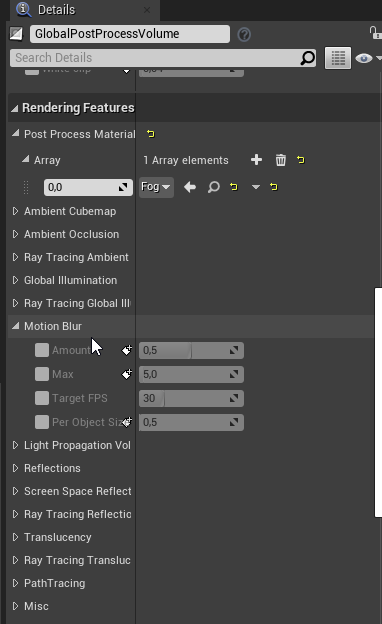
seems to be off
ok I turn that option On and place the settings at 0. Worked 🙂
 blazing mica
Hi guys, I have a question about CameraAnims. There is a function in Camera Manager to play camera anims using CameraAnims assets. Those assets are based on Matinee editor. There is a warning at the bottom saying Matinee will be deleted in an upcoming upgrades of Unreal Engine. I was trying to find an alternative for CameraAnim but Sequencer isn't really this unless there are some tricks to achieve same thing which is animating actual gameplay camera in local space. Or maybe Matinee will get removed for general purpose cinematics but will remain for CameraAnims? Does anyone have idea about its future or alternatives to it?
misty dagger
what is basepose animation for?
delicate junco
Never dealt with that but since I see the mention of additive anim I guess it's the anim needed to be added to
misty dagger
well its from the aim offset tutorial
i was just curious why i need a base pose animation reference
i guess its for like sampling the animations for the aim offset blend space? not sure just a guess tutorial doesn't really say.
misty dagger
i’m having trouble with my animations, it only plays my idle anim, i’m not using the default skeleton, in using the cc3 skeleton which i retargeted to get my animBP
 lime oar
Sort of a rookie question but how do I group up a set of animations and bind them to the playable character?
 smoky bridge
hi guys, I want to learn how to animate my custom character in unreal engine, where do I start?
 bronze parcel
Can I rotate an animation to match a character's pitch value and blend that result with an Aim offset?
barren zenith
@misty dagger yes they are additive
misty dagger
so i made this capsule interp i dunno if there are other methods
jolly osprey
any reason why these sequences aren't fast path?
even my custom anim node is
they're okay inside another state machine node
solved it - apparently you have to toggle a ping like StartPosition on, compile, turn it off, compile again and bam the fast path icon suddenly shows up
hoping this is just a visual glitch :P
 simple karma
Question I'm pretty new to more then just a simple arm movement animation, I'm doing a face that can have expressions, its already a custom rig for arms head and torso. this head will be interchangeable ... should i still model around a single skeleton and have the different skeletal meshes for the eye lids, eye balls, mouth, eyebrows. ?
 real hound
How can i fix this skeleton issue?
when i use master pose of the char below on greystone(above) the chest piece and 2 leg pieces go up a little bit
because bones are at different places
misty dagger
not printing at all
all the code i've added seems to not do anything aswell
restarted engine still doesn't work
misty dagger
had to restart my machine
 timber star
hello,
anyone know how to use a custom armature with ue blender tool,
i m using the base armature of the mannequin plus two bones but after convertion it s impossible to retrieve custom bones
so ho can i put my curent armature as a metarig?
 faint grotto
hi, any idea on why do I get the following deformations while retargeting a simple running animation? (in blender with Rigify it doesn't happen, I can move everythin fine without deformations)
faint grotto
more close shot and specific reference:
 upbeat raptor
 remote nacelle
hey guys, im looking to perform an IK solve with constraints. IE only performing it on some axis of each bone. has anyone set something like that up in UE before?
im a bit surprised this isnt one of those set and forget things in the engine
 trim vigil
anyone in here can fix the horse. (multiple root bone error) is why the horse won't import into the engine.
simple shuttle
anyone in here can fix the horse. (multiple root bone error) is why the horse won't import into the engine.
what 3d software you use ??
it's because root hierarchy have more than one bone
trim vigil
Its a blender rig I got from opengame art. org. . I'm not a rigger.
simple shuttle
you cant have multiple bone at the top of hierarchy
but you can rename armature object as root, Unreal Engine will ignore armature object that name is "Armature"
or you can uncheck deform attribute on bone
and check only deform bone when you export
trim vigil
Here's the hireachy of the horse in Blender... I didn't make ths model. There should be be just one root hireachy tree. But it looks like the three Bones 003 down at the bottom of the tree are out of place with the rest of the tree.
Doesn't look right..
simple shuttle
try to pose bone and move or rotate, is deforming some park of mesh ?? if not just remove or uncheck deform and export with only deform bones
 solar salmon
Is it possible to apply root motion on a actor or pawn?
Specifically without CharacterMovementComponent
 floral sky
It seems like the logical thing to do is to have an anim BP pull data from the object is assigned to from it's tick. I remember seeing somewhere that epic recommends this. This way the anim BP is independent of the actor and the actor does not have to program anything to send info to the anim BP
But then the anim BP is using tick to say up to date on info. Is this not bad for performance?
 vivid surge
Why can't I get any colliders in the physics asset to impact clothing movement? I've compared with a demo and settings seem to be the same as far as i can tell. The 0 spheres figure here really worries me, in the demo I tested the number matched the amount of colliders in the other skeleton
icy saffron
I know this is a dumb question but, how do you loop a montage in the 4.25 persona?
earlier it was easy, but I cannot find how to do it
solve the prob, just found the Montage Sections tab
 dusky urchin
hi, any idea on why do I get the following deformations while retargeting a simple running animation? (in blender with Rigify it doesn't happen, I can move everythin fine without deformations)
@faint grotto You have to set all Bones without the root and pelvis Bone toSkeleton
simple karma
I dunno crap about cost in ue4 for animation, but i got 13 bones for the face alone, i think in total 31 any thing i should worry about? face animation i think is going to be important in this game.
faint grotto
@faint grotto You have to set all Bones without the root and pelvis Bone to
Skeleton
@dusky urchin checking
dusky urchin
 fading surge
Hello guys, Im new here and needs a little help... Im trying to import a liquid simulation from C4d realflow in alembic format. It has vertex maps for age, velocity, speed etc. but Unreal can't seems to import them... How can I do that... Please help
faint grotto
Here. (https://docs.unrealengine.com/en-US/Engine/Animation/AnimationRetargeting/index.html)
@dusky urchin yes I was experimenting with that, it worked like a charm! really million thanks man look:
💯 😄
 nova ivy
why is my animations not working as supposed to? In the editor viewport (Blendspaces are set up fine and working) and I also made sure they are applied in animation blueprint correctly, but when I test the animations in game, characters legs just run forward and if I go to side it just strafes forward with legs moving forward direction
timber star
anyone could make ue4 blender tool working with a mixamo character for exemple
i don t know if i m doing something bad or if tool is broken
 bleak storm
@lyric willow meaning in transition..
real hound
I got hit sound effects play when i hit an enemy but if I hit multiple enemies in a short time, the sound effects get really loud. How can I prevent that?
 mint wind
Is there a way to instance an anim bp?
They all have the same parent class, and therefore share the same anim bp
bronze osprey
@simple karma looks fun, 30+ bones is no problem at all , also i think its relative to the amounts of verts they push not 100% sure on that tho
so low poly is prolly more easy on the anim
simple karma
Ah ok cool. Thanks!
bronze osprey
also u wunna put a limit on how many bones a vert can get pushed by
there is a max in unreal so it wil remove the smallest
better set it in ur dcc
i think blender defaults to 4 so that should be fine
 fringe moss
in my anim bp how would i make an animation state play if there is no input for x seconds and as soon as there is input change to a new state
fringe moss
also trying to get a melee animation in and all it does is play once when i press melee and after that it will just play after the reload animation
 vernal panther
Has anyone had problems making Control Rig datatypes appear in the blueprint editor for a Control Rig?
When I create a new project and enable the control rig plugin, I'm not able to follow along with the Control Rig documentation. There's a part where they want me to add a Rig Hierarchy Ref in the Rig Graph and it doesn't appear as a potential type in the blueprint.
misty dagger
Anyone that knows about a pack or somewhere to acquire sliding animations? 😄
@red cosmos
Some thing like this? https://youtu.be/DimZmTd5H44

Unreal Engine Courses
https://www.awesometuts.com/ultimate-game-dev-academy-dis?utm_medium=youtube&utm_source=tutorial_video&utm_campaign=unreal_mixamo_tut
If You Are A Complete Beginner And Want To Learn How To Make Games Click On The Link Below And Start Learning By Creatin...
you could use the website, and choose a character with animations. or you just download the animation for you're character
bronze osprey
@vernal panther that doc is outdated, look at the epic example on the marketplace
 slow valley
Every animation I import ends up looking like this. Definitely not an expert so maybe it's some import settings I'm using or not using. I'm using all the default settings. The skeletal mesh/animation came from mixamo.
misty dagger
lool
 exotic wagon
is there a way to override animgraph behaviour in derived animation bp
or do a layered blend per bone with different bone names in derived one?
basically we just have 2 different types of enemies and their animation system is basically the same, but the bones have different names on the skeletons
is there a way to do that or should I tell our animator to change the skeleton bone names
 sullen aurora
https://helpx.adobe.com/africa/creative-cloud/faq/mixamo-faq.html states "You can use both characters and animations royalty free for personal, commercial, and non-profit projects including:" and also "Mixamo is not available for Enterprise and Federated IDs." here they (Adobe) are referring to 'Enterprise ID' so Mixamo is not available to use if you have an Adobe Enterprise ID, not a company, or business enterprise or game studio, or animation studio per se. "Adobe IDs are used by individual, team, and enterprise customers. They are personal IDs that have a subscription associated with them. An Enterprise can have an Enterprise ID or an Adobe ID association".. So they dont want the big studios who already have Enterprise ID's to use Mixamo..
 teal violet
Hello. I am trying to learn animation montage. In tutorial I can see this interface
But in editor I see this
What am I doing wrong?
sullen aurora
@teal violet Hi, I dont think you are doing anything wrong, looks like the tutorial is for an older version of the engine that you are using.
teal violet
Oh, I see. Thanks.
solar salmon
I got 2 montage section very close to each other
I cant select end now
how do I select end without moving the sections?
nova ivy
Can someone please help me with the movement/rotation, my character is not turning sideways, but everything in my AnimBP is set correctly and my Blend Spaces are also set up correctly and they work fine, but in the game preview blend spaces doesn't work.
vernal panther
When using the control rig, what are Controls and Spaces? Are they meant to be created manually? If so, what's the logic behind how to create them and where to position them?
gritty palm
hi, anyone can give me a hand on the gear animation issue?
the skirt is suppose to be with a rigid material, so it keeps that shape, but i tried on clothing tool, with cloth config, to change collision thickness but it didnt help
the moment i brush paint a bit even just 0.5 value to the skirt, it becomes totally lose fabric kind of material
any guidance would be helpful, have been stuck on this over a week now, i tried to weight paint the skirt, right now everything is on pelvis. i dont know if it makes sense to assign weight on each thigh bones...i tried but didnt find a good solution to it.
would really appreciate if someone can help me out with this, i am having problem with all the gears that has a bit volume on it
gritty palm
this is the screenshot of my bp set up on clothing and physics, but i just cant find a way to make the leg physics to collide with the skirt
can anyone point out my mistakes ?
gritty palm
i brought in the skirt from 3ds max, it was made in MD, and in 3ds max i attached it to the skeleton of the character so that i can use master pose component on it. but i seems to have collision issues
smoky bridge
hi guys, I've made an animation on blender, when I export it as fbx and import it in unreal engine 4, the character is rotated 90 degrees
how to fix that?
gritty palm
there is an export option, select -Y axis and Z up, then problem solved
 dense turtle
Hi, guys! I'm not sure how to handle different idle/walk/run animations based on the character's stance (idling/walking/running with a bow, sword, sword and shield etc.)
The first thing that came to my mind is to use one BlendSpace for each idle/walk/run animation pairs (because blend spaces don't have animation poses input), which will be blended by an enum in the Animation Blueprint.
This approach will result in more than 5 duplicated blend spaces only to change the animations.
How would you handle this?
mellow zenith
I had the same question as @dense turtle !
 blissful linden
im trying to implement leg ik and I have the leg IK node in my animation blueprint yet my foot is twisting weirdly when I set the alpha
I want the foot to remain level with the ground
 untold vigil
hey guys, I’m trying to update an animnode blueprint with more advanced features, but I keep getting hit into strange problems. For one thing, I cannot dynamically alter an exposed array of float values while in the game. The changes simply don’t even register for some reason, leading to nothing happening. But if I edit the float array in a non-exposed mode directly within the animnode solver, the changes are registered. But I need to be able to dynamically modify the contents of an array. Does anyone who has in-depth experience on this topic clarify me ?
I think the solution should be quite simple, but unreal docs are fuckin useless 99% of the time for advanced in-depth information.
mellow zenith
@blissful linden when you set the IK target's location for the foot, do you change the rotation at all?
dense turtle
@mellow zenith you said that you 'had' the same question. Do you still have it or it got answered?
blissful linden
I dont change rotation, The only value I change is the left Leg foot alpha which is a float value @mellow zenith
that determines how high the foot goes
mellow zenith
@blissful linden I can't find any official documentation, but I believe the Leg IK node requires that you set up a target bone, and that controls the desired location (at least, that's how I have it set up for my project)
i.e., the FKFoot Bone tracks to the IKFoot Bone in the Legs Definition array
blissful linden
oh I've set it to my normal foot_L bone
I dont have a IK bone
my IKFoot Bone is set to the shin
and the FKFoot Bone is set to Foot
mellow zenith
So this is how I set it up
blissful linden
hmm I don't have any IK specific bones in my rig
mellow zenith
I move the location of the ik_foot_l bone relative to its initial location (the calculations are all done in the EventGraph)
You could try moving the ik bone relative to the original foot position maybe?
blissful linden
oh the way I was planning on doing it was using the alpha to set the foot height above the ground
gritty palm
there are all the people asking questions and so little to answer them...this is like the 8th time i have asked a question and none replied..is getting really fraustrating
blissful linden
My rig is a custom rig, do I need to create any special IK Bones to do it that way?
mellow zenith
@blissful linden I'm not sure - I think you might be able to get by without adding an extra bone in the rig
You could try adding a virtual bone to the skeleton from Unreal
Like make the virtual bone a child of the foot bone, then use the transform bone node with translation set to "Add to existing" to adjust the bone upwards, and use that in your leg IK node
?
blissful linden
ill try doing that and see
untold vigil
What’s the difference between the legIK and the twoboneIK ?
mellow zenith
The main things is that LegIK uses a bone for a target, attempts to maintain leg rotation, and can do multiple feet in one node
With two bone IK you have to specify a pole/joint target for the IK chain, and explicitly specify a position
AFAIK
@dense turtle still have the same question unfortunately 😕
Right now my state machine is simple enough that I only really need one blend space for the arms moving while running, so that I can just switch out different blend spaces as needed
Of course as soon as I add on to that...
dense turtle
I made 6 different blendspaces after all
I'm not really happy about this because if I decide to change the max or min speed I'll have to update all of them
mellow zenith
Hmmm
At least in my case I could separate out upper and lower body animation
And use sync markers to align the upper body animations to the lower body ones
dense turtle
That's good! I couldn't separate them because they are different in each pose (idle/walk/run). Or at least I don't know how to do it.
mellow zenith
I guess another option could be to use a sub anim blueprint and swap those somehow
dense turtle
Oh well, it's the first time I hear about sub anim blueprints 😮
delicate junco
it's called sub anim instance iirc
mellow zenith
Yes, that is the correct name
mint wind
Is there a way to instance an anim bp?
They all have the same parent class, and therefore share the same anim bp
Like if I'm making a goblin class and I want them to share animations, but not to all do them at once
 mystic junco
Hello I'm in the stages of rigging into Unreal Engine, I'm using Blender for the animation. I know Unreal likes a certain scale of the model so I imported the MrMannequin Addon tool and was wondering if I should scale my Original mesh to the size of the mannequin and if I should keep the Apply Scale on when importing the mannequin Mesh?
mellow zenith
@mystic junco if you're using the MrMannequin addon it should handle scaling for you, such that the model scale relative to the mannequin is correct
So I think you should scale your original mesh to the size of the mannequin
mystic junco
@mellow zenith Ok thank you will do that
mellow zenith
Np!
For reference, when I was using MrMannequin's Tools I scaled a separate mesh that I had made to the scale of the mannequin, and used the standard FBX export on the mesh (with the axes modified and face normals enabled) and it was imported at the right scale
 leaden relic
Hey guys, so I was trying to edit a skeletal mesh in maya. When I was done editing and re-importing it to UE4, it said "FAILED TO MERGE BONES" and gave me some options. I accidentally pressed regenerate skeleton and now my skeleton is broken and my character is stuck in A pose. Does anyone have any ideas as to how to undo my mistake?
 north herald
Hello, i am having trouble with Anim Notify, My panel seems to be missing, how do i add Anim Notify to a track without the track there to put it on?
leaden relic
@north herald what type of asset are you trying to add a notify to?
leaden relic
expand those options under notifies and what do you see?
leaden relic
what version of ue4 are you in?
north herald
Latest 4.25
i think it just had another up date too maybe 4.25.1
4.25.2-13908680+++UE4+Release-4.25
is what version i am using
leaden relic
right click in that grid and do you see option to add notify?
leaden relic
keep expanding the notifies area
see whats in there, they probably moved things around in 4.25
north herald
expanding how? the drop down menu offers so little
north herald
found it
it was never explained in the change logs but you have to line up with the nitfy
notify
in case anyone comes across this
 steel tree
hi everyone i would like to ask..anyone here have successfully retarget the animation from any of the paragon character to epic skeleton ?
i wanna use some of the animation for testing and prototyping
please ping me if anyone can help
🙂
 strong python
Is it normal that When I try to import animations from Mixamo, it doesn't work anymore (I'm in the 4.25) please ?
 patent ember
I suggest you import first the model, and later the animations and link them to the skeletal mesh...otherwise try to upload the model to mixamo and from there download again the model and incorporate into the game...
gritty palm
Anyone familiar with character garment animation issues here?
 midnight thorn
So i am new to animation. I have some characters with root motion and when I enable specific ones it causes the character to shirt/rotate up after they have performed a certain number of montage animations. But when I disable root motion on the animation causes it, the rotations stops. But without root motion enabled it looks silly because the model with attack and then slide back to the start position.
trim vigil
I had a multiple root bone error with two models I downloaded from turbosquid, both blender made models, the alien guy, and the Horse as I wanted to put a rigged horse in my game, well the horse is rigged but can't be imported into the engine..... Unrael Engine won't import them until their root hireachy is fixed. I saw the problem with the horse having three sets of bones at the root downt he bottom of its tree... But I don't know how to fix it.
There's the problem
Three bones sets found under the root.... Unreal Engine Treats them as multiple roots bones....
misty dagger
@trim vigil best bet create a new bone and parent all the other bones to it
 idle scaffold
Can I put physical animation in here?
If so how can I stop the third person characters feet getting stuck on the floor? I suck at unreal engine and I just started out and this is annoying me
 ember spade
hey guys i dont know what to look up for this but how do i do something like just as a example having a "block" following a path in the map and mooving like that
like a train

A fairly basic tutorial showing you how to make an automated train (tracktrain for the sort you could control in Half Life 1, perhaps I'll cover it at a later date).
0:04 - Making the train itself
0:13 - Making the path for it to follow
PROBLEMS
0:52 - Train goes through gro...
 edgy ivy
i retarget a skeltal, now i want to assign this skeletal to retarget skeletal, but how to solve this error?
faint grotto
i retarget a skeltal, now i want to assign this skeletal to retarget skeletal, but how to solve this error?
@edgy ivy Hi, you can retarget bone by bone here:
bronze osprey
i dont see an error
@edgy ivy do the thing he is doin in the picture below ur post 😛
root retargets to root seems right to me
ahh lol thats an answer not a question 😛
bronze osprey
yea its better to just stick to unreal naming
if after character 1 comes character 2.... 😛
 wintry tartan
Running into issue in my FPS game where myself and other players are getting motion sickness while playing what are some things i can do to negate the player's chance of getting motion sickness?
solar salmon
Is there anyway to intercept rootmotion change its properties such as scale and rotation and then reapply it to the animation instance?
static falcon
do animnotifies have to be received in animBP's? Can you get them in normal BP'S?
fringe moss
how do i use animation states in an animation blueprint to make an afk animation (plays on loop after 5 seconds until input is detected)
slow valley
You could make a variable that records when the last user input was.
Such as, "MillisecondsSinceLastInput", make a transition state for when it is above 5000.
mint wind
Trying to do something decently complex
I'm trying to cause a sword to get stuck in a shield.
My current idea is to use ik to stop the sword from swinging, but I've got no idea how to approach this
any guidance would be appreciated
slow valley
Is the sword not a separate actor attached dynamically?
If it were, you could just check for a collision between the sword and shield, upon collision, you could attach the sword to the shield's mesh component
mint wind
2 issues with that: The animation would still continue playing, the sword wouldn;t know when to return
@slow valley
misty dagger
I've generated a rig with rigify on my character
The rig is so complex. There is so many bones I don't even know what they are made for...

But anyway... I've noticed that when it's imported into UE4, many of these bones have disappear
like if UE4 keep only the "main bones"... or something like that...
mint wind
Unreal Engine Forums
Uefy is a python script made for Blender 2.8 Beta or above that enables rigify addon to export an Epic Skeleton compatible bone hierarchy. Allowing creation of
misty dagger
@mint wind In fact, I used Auto-Rig, not UEFY. But I guess it's kind the same 🤔
I was just wondering how UE4 import the skeleton... Does it really keep only some bones and delete another ? Is it normal if I have a feeling that I've got less bones in UE4 than in blender, after importing my model ?
misty dagger
Ok, nevermind ! I'm stupid ! 😆
It's just the preset which config the bones in order to suit for UE4
so it's normal if I have not the same bones in UE...
topaz cypress
@mellow zenith Sorry for the delayed answer. The issue has been resolved now by setting all of the frames to keyframes, I believe.
misty dagger
Where is this "Hips" bone ???
It's weird. I can see his name but can see the bones neither click on it...
It seems be right in the middle, between the bones, on the joint, but...
I dunno... o_O
( It's from a mocap BVH file... I need to find this bone to try a retargeting... )
mellow zenith
@misty dagger if you select the bone in the scene outliner and look at the bone transform (press N and select the "item" tab if you don't know), where does it say the bone tail is located?
Alternatively, check under armature properties and make sure you have all the layers with bones selected
misty dagger
I can't select the tail of the Hips bone... I can only select the bones around. I don't know if it helps but you can see their location here :

And I don't have layers... 🙄
What is this sorcery ??
mellow zenith
Does the bone show in the scene outliner at all?
misty dagger
Ah the outliner
my bad !
I can see here :
So it should be here
just in the middle of the scene
but it's not... 🤔
or...
Would be the joint bone be named "Hips" in the viewport and is also the "RHipJoint" or "LHipJoint ? ...
When I click on it, it's displaying "RHipJoint" and "LHipJoint" alternatively, on the left corner :
 simple shuttle
it's over lap bone, you can turn on x-ray mode to see (Alt+Z)
simple shuttle
test some retarget in blender
 tall crown
How correct export trees with animation in blender to ue4? not exporting animations, or they simply stuck at0-1 frames..
What i not clicked- armature , mesh , experimental- ue says not bind pose..
In blender all works fine
trim vigil
don't know how to reparent a bone in blender, got multiple root bone problem in horse mesh.
I don't know how to fix this up because I don't know what the blender shortcut operations are to move the bones to put them into the root.
remote elm
@trim vigil click the child bone (such as Bone_L.003/Bone_R.003/Bone.003), then select the root bone, press CTRL P, click keep offset
trim vigil
keep offsst what does that exactly mean? because I don't know all the terminology of blender, this is why its confusing.
Its the wording in blender that throws people off. Who don't have a modeling background.
No, only Keep Object shows up. The Problem is they are not Child bones, they are root bones.
That's why there's a multiple root problem.
remote elm
@trim vigil your turning them into child bones with CTRL P. when you press CTRL P your parenting the select bones to your very last selected bone (so you select Bone_L.003 and then select Root and press CTRL P and select keep offset and Bone_L.003 will be a child of Root). keep offset does as the name says, it keeps its offset so it doesnt teleport to the root bone and attach itself directly to it
trim vigil
Whe I look at the armature, these three bones down below that I circled are in the wrong place. They are directly under the Main Root Bone.... Unreal Engine is saying they are root bones. They need to be changed to child bones.
remote elm
thats what im literally telling you to do by parenting them to the root so they become child bones dude
trim vigil
whosoever made the model put them in the wrong place.
This is what comes up in the menu when I follow your instruction.
remote elm
your in object mode, go to edit mode
trim vigil
Keep offset is not listed.
remote elm
read what i said above, go to edit mode
trim vigil
now I need to know how to stretch a mesh in blender not just scale its size.
trim vigil
I got the horse imported in.
edgy ivy
what is the best way to create lipsync for character?
simple shuttle
Describes the method in which you can share facial animation using Pose Assets, Animation Blueprints, and Anim Curves.
static falcon
I was curious what a more gender neutral mannequin would look like so I took the Xbot and the Ybot from mixamo and mixed them 50%
Here's ZBot if anyone wants shim
 zealous bone
Guys i have an skeleton.But i want to share this skeleton so other skeletal meshes can use it also. Is it possible ?
zealous bone
nvm i got it
slow valley
I'm working on a script for Maya to help with root motion from Mixamo to UE4. Would anyone mind testing it out to see if it works for them? Just trying to get some free QA. 😛
 atomic latch
Guys, there is a way to paint clothes weights using paint on uv or using a tesxture color channel as mask?
paint directly to the model is hard if the clothe piece is attached to another body part
timber star
Does anyone could make work mixamo character skeleton and ue4 blender tool?
I can t make it work for mixamo character
misty dagger
@timber star the simplest answer appears to be 1 of three things
sorry
either you make a freash skeleton based on the ue4 mannequin
https://forums.unrealengine.com/development-discussion/animation/100864-tutorial-how-to-make-ue4-mannequin-in-blender
Unreal Engine Forums
Animation discussion, including Animation Blueprint, Persona, Skeletal Meshes, and more.
there is a paid tool called uefy(rigify??)
this tool is free https://www.blendernation.com/2019/09/17/ue4-mannequin-compatible-animations-and-meshes-mr-mannequins-tools-1-0/

Jim Kroovy writes: I've been working on this for some time now, and i'm proud to finally share this add-on for Blender 2.8 that should enable exporting both animations and weighted meshes directly compatible with the UE4 mannequin without re-targeting anything. It can be as si...
I also saw a post somewhere on a forum where somebody had made a mannequin that's blender compatible, I have not refound it yet
timber star
that s not what i m looking for sry
i already get the ue4 tool for blender that s work for some models but can t make it work for mixamo char
don t know if there is a bug or if i m doing something bad
misty dagger
@timber star which tool?
timber star
ue4 to rigify
from epic git
@misty dagger
Like when i m changing tab that s destroy my armature that s not doing this with other model
and i can plug node and other things like that
misty dagger
@timber star I have no experience with this tool yet
edgy ivy
how to blend two animation fully, right now if i set alpha to 0.5, it blend 50%/50% both animations, but i want to blend 100% both animations
 silver jasper
Anyone know of any sword animation sets that contain diredtional blocking animations?
sullen aurora
@silver jasper you could use upper body blend ( layered blend per bone ), and then provide the animbp with an 'aim' rotation for the spine and then use transform bone in the anim graph.
we restrict the block along an axis ( so body block can tilt up | down ) but you can pretty much do any direction ( with some threshold )
silver jasper
@sullen aurora that sounds like a really good idea
I was hoping to emulate sekiro style of blocking, but that does seem like a really good idea for a shield! (which I'm adding also)
 snow orchid
Uefy Script is now free for everyone. You can use it to rig mixamo characters. The paid version is Uefy 2.0
misty dagger
@snow orchid thank you
 grave forge
What's the accepted consensus on how to have characters turn while moving to a new location?
Unreal Engine Forums
Hello so im real bad at AI and its taking me forever to get them right but so far its going somewhat alright.
The one thing i cant figure out is why the AI
I tried this, but my characters end up sliding
As if it moves before it finishes rotating
Hardcore moonwalk right there by the end.
simple shuttle
hey check new update blender addon for unreal engine
https://www.youtube.com/watch?v=NCFlxVgbJdU

showcase some feature on Blender add-on for Unreal Engine 4 v1.3.0
DOWNLOAD
Gumroad : https://gumroad.com/l/BlenderUnrealEngineWorkspace
Github : https://github.com/anasrar/Blender-UE4-Workspace/releases
TIMESTAMP
00:00 - Socket System
11:10 - Face Rig
18:26 - Retar...
mint wind
Is anyone here particularly knowledgeable about IK
I'm attempting to do sword collision ik
 reef agate
Hey all. Does anyone know how i can slow down or speed up the flipbook speed in this node?
This technique https://docs.unrealengine.com/en-US/Engine/Animation/Tools/VertexAnimationTool/VAT_KF_Meshes/index.html
User guide for the 3Ds Max Vertex Animation tool set.
 alpine bloom
I've never really imported animation before so would anyone know why Maya might be killing my animation when i export my fbx to bring into ue4?
sullen aurora
@alpine bloom are you baking them on export to the skeleton?
 lunar gorge
Hi everyone. So I'm not sure if this is the right area to post this but I was wondering if anyone new the proper way to set up a 3d sidescroller character animations and key bindings correctly? I've seen on youtube a lot of tutorials for 3rd person character animatons and key bindings set ups as well as FPS style character animations and key bindings setup. I also made the animations in blender 2.8😕
edgy ivy
how to get name of current playing animation of active blendspace?
 finite bloom
So I retargated Default Third person character skeleton to Paragon Gideon character and this happened how can I fix this?
both his hands are streched
edgy ivy
how to create animation asset variable or promote to variable
 sly pagoda
Hey, anyone worked with AdvancedLocomtion V4?
 sullen perch
Does anybody have a minecraft default character model with all the animations :&
I got the character model and made a retarget skeleton to use animations but it became a 2 headed demon
 rotund forum
hello .. hope everyone had a good day .... i have a problem with my animation not showing the changes i made when importing them to a 1D blend space .... for example ... (just a sec ill show you)
so this is my idle animation working fine .. normal and cute .. etc .
so ... i started modifying the bones to fix few deforms of few bones ,, added keyframe and apply them then saved the idle animation ...(excuse the ugly deform in the arm for the sake of the example) ...
so far no problems right ?? .... just a sec
so ... when i import the (ugly deformed idle animation that i made) ... it doesnt show the changes i made .. it just imports them ...
so .... how can i fix this ... what is happening here ... why the 1d blend space doesnt recognize my changes on the animation ?? ... and thank you
it just doesnt import them *
mint wind
Sorrowed by it's creator's bad ik, it decides that honor is most important
 dark pawn
hey guys, i need to move my IK of the right hand to this world location at the pink dot, but i got the coordinates in world space and the IK effector Vector is in component space, how do i convert the world location to know where to move my component space effector?
im trying to move the gun in front of the camera based on a socket transform in the gun skeletal mesh
i think this but i cant get it to work
mint wind
You can always try getting the upnormal in bone space, but idk past that, learning ik myself and you already seem more advanced
@dark pawn
dark pawn
Dunno that you have a reference maybe? Thank you :)
jolly osprey

You can now get your hands on an open beta of Cascadeur.
dark pawn
@mint wind i got it, you need to take the world location and use "inverse transform location" and as reference transform you use the skeletal mesh world transform
 stark needle
My animgraph is set up to trigger a gliding animation and all that jazz, when using the anim preview editor it works perfectly, however in game it does not. It is set to trigger when "is gliding" is true. However in game, when gliding (with movement mode set to flying), the character proceeds to just run animation instead. If i stop gliding and go into a falling state, it goes into the falling animation (which is desired). Is there something else I need to do to make the gliding animation work while in movement mode flying so that this animation will work instead of running on air?
`
oh, i think i see the problem lol, i think it's because when flying mode, you're considered grounded, not falling, hmm
 little abyss
Hi everyone, quick question (just starting out in UE, come from a background in animation):
I'm trying to move keyframes along a timeline, but constrain them to only one axis as I drag. In other programs, like AE or Cinema4D, this is usually done by holding shift while dragging. Is there a key combination would enable this? Please @ me with replies, thanks!
 opal jackal
I'm working on a 4 legged animal character and need advice on how to add turn animations or rotations. For example lets say my character is running straight but then turns 45 degrees to the right. How do I blend in a turn rotation so that they front part of the animal rotates towards the direction hes turning towards, but the back is delayed and has to catch up. If someone can point me in the right direction that would be awesome. I'm thinking I'll need to somehow calculate that direction and rotation value but even then I dont know how to apply the rotation to make it look right.
static falcon
@opal jackal honestly haven't done this myself but I would recommend downloading the Shinbi free character because it is set up to do this
silver jasper
In my animgraph I have a AnimSequence variable however when I drag it into the anim-graph it does not convert into a "Play<AnimSequenceName>" node, however directly copying the anim-seq to th graph works.
Is there anyway to parameterize anim-sequences in an animgraph?
IE
I want "StanceOverlay" to convert into the node below
static falcon
You can definitely parameterize Anim Montages so I'd guess so
misty dagger
I have an amination question that I have been wondering about.
So lets say I have 2 individual rigged objects. The character and the gun. So would I export both objects with animations individually and then play them at the same time or how would you go about this?
static falcon
That's how it's been done in Epic's examples, yeah
I guess the only reason not to do that is if the character 100% of the time has the weapon
mellow zenith
@jolly osprey did you try out that new animation tool? It looks neat, but I am skeptical
 mental ridge
Dumb question but can't find the option they are describing in the root motion docs here
misty dagger
Hi guys
I'd like some explications 🤔
I've imported a character and given him another skeleton in order to animate him. The given skeleton is the Advanced Locomotion System Mannequin skeleton :
I made very short arms to my character just to see what UE gonna do
I was pretty sure that my character would be stretched because the arms mesh will follow the skeleton that I assigned to the character (which is longer), since I didn't retarget the skeleton neither the animations. I was pretty sure that the arms will follow the arms' bones of the ALS_mannequin.
Though, it's like UE did a retarget while I DIDN'T retarget ANYTHING ! I just selected the ALS_Mannequin_Skeleton then click on ALS_AnimBP in the Mesh BP > Skeletal Mesh > Post Process Anim Blueprint, then finally selected my character's mesh in the viewport of the ALS_Mannequin BP class...
Here is the result once I did this :
You can see the arms (and the entire character, I presume...) have been like automatically retargeted... But I repeat : I didn't retarget anything ! 😆
misty dagger
How the hell is it possible ? I just don't understand ! ...
 brave cypress
Hey guys does anyone know how to keyframe the "sunsky" longitude and latitude in the sequencer. I dont see it as an option, I only get day, month, etc..
 obsidian mountain
Why do my physics bodies ignore collisions between themselves for actor? It works fine in ragdoll simulation, everything has collision response and there's collision enabled between bodies. Please ping me if you have a solution or a suggestion: https://i.imgur.com/9JmlYwi.png https://i.imgur.com/2ZbWZWd.jpeg
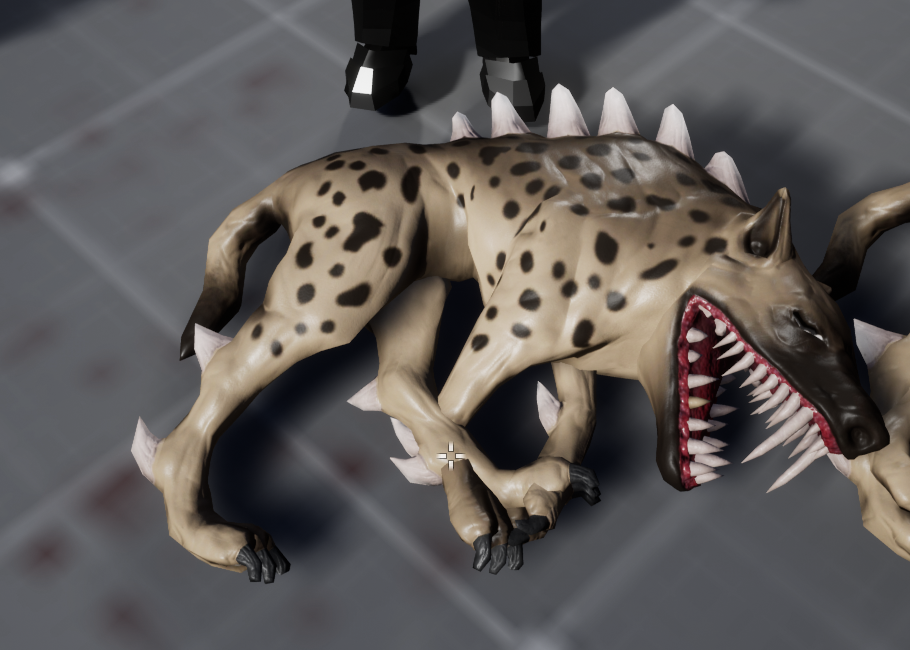
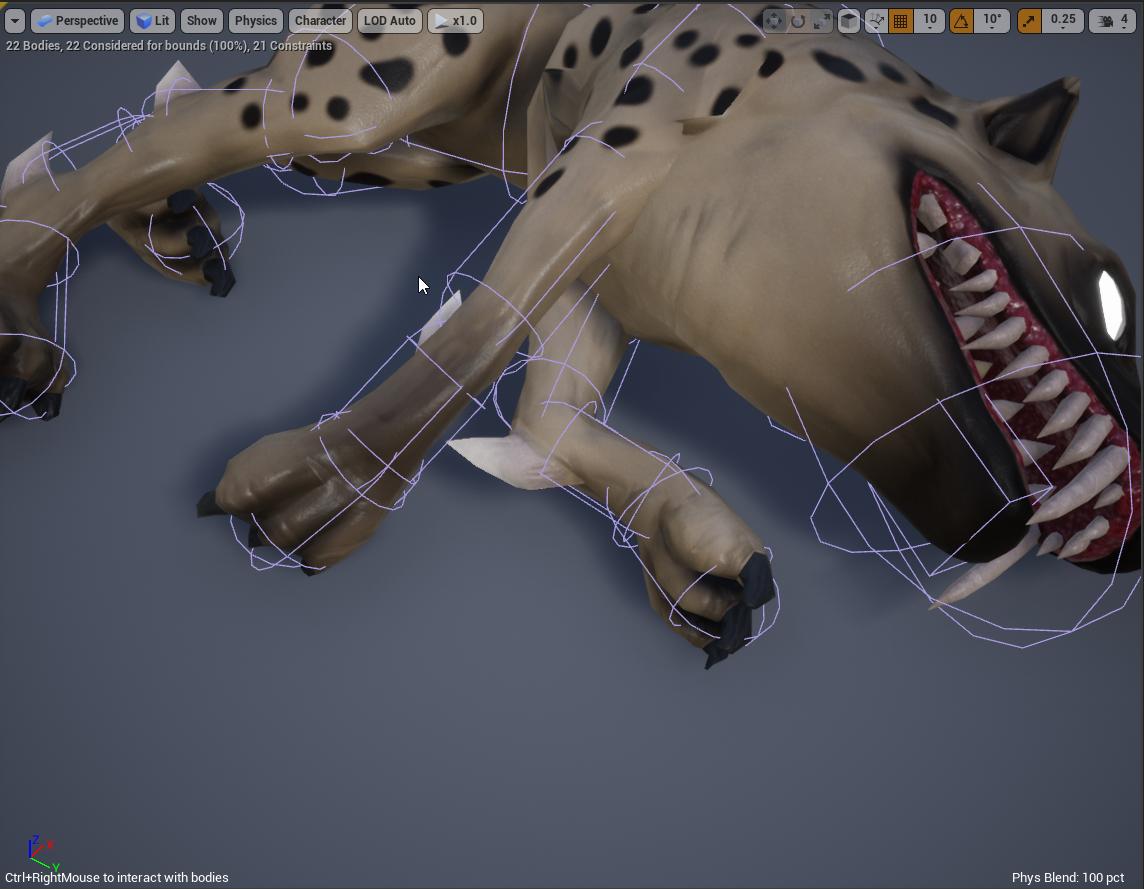 static falcon
If anyone wants the default mannequin in a TPose I ripped it from a UE4 Rigged version. It's useful for Retargeting characters from things like Mixamo
Why do my physics bodies ignore collisions between themselves for actor? It works fine in ragdoll simulation, everything has collision response and there's collision enabled between bodies. Please ping me if you have a solution or a suggestion: https://i.imgur.com/9JmlYwi.png https://i.imgur.com/2ZbWZWd.jpeg
@obsidian mountain Have you set the collision mode in the blueprint for the mesh? Try setting it to Ragdoll
obsidian mountain
If that worked I wouldn't have posted here
static falcon
Lol what a mean response, figure it out yourself then
obsidian mountain
Boo-hoo
strong python
Does anyone know how can fix this when I try to go left then right then left then right , ... it goes so fast https://gyazo.com/75e7a457e8d179a1743a53dcd59e09a3
 vagrant shard
Anyone know of any animation software to animate characters with
strong python
blender
 timber idol
hey, im trying to recreate this effect from blender in ue4. its a simple mesh with a material thats transparent except for the shirt. When i make it in unreal, it doesnt show the texture on the backside of the mesh. so you can only see the arms from 1 side and so on. Any ideas on how to solve this?
little abyss
Bumping my question from yesterday since it didn't seem like anyone saw it:
I'm trying to move keyframes along a timeline, but constrain them to only one axis as I drag. In other programs, like AE or Cinema4D, this is usually done by holding shift while dragging. Is there a key combination would enable this? Please @ me with replies, thanks!
 cosmic flame
Can someone help me? I retarget the animtion I bought on unreal and apply it to my own origninal character.. But when I edit or modfy the animation that I applied to my oc... The change dose not save or complying !! Anyone can help
 distant breach
If I'm making a game where hundreds of units could be on screen at the same time, and I'm using a skeleton with 50~ bones, but most of them aren't deform bones so they don't actually weight anything, is it going to cause more performance loss? Should I try to make a less complex skeleton?
 quick compass
anyone using the iphone x facial capture live link plugin? I'm trying to get my phone connected to my unreal session, but don't know what the port number should be. I grabbed the ip address using ipconfig (windows)
 junior geyser
@vagrant shard try cascadeur. I have only used it slightly but so far it seems very good. Also has ue4 manni built in. https://cascadeur.com/

Cascadeur - the physics-based animation software. A breakthrough in character animation
 wheat egret
When i try to retarget a mannequin animation to phase it looks a bit weird because her arms/knees are fucked up. But on other characters it works. Is there a solution how I can fix that
wheat egret
anyone?
vagrant shard
Thanks @junior geyser
 leaden wind
Hi, how do you normally animate character hand grabbing arrow when prepare to shoot bow?
 frail eagle
Hi, basically brand new to animation here. The animations I'm working with have 8 separate loops for strafing in cardinal directions which I'm using a 2d blendspace for and that's all working great. However, each of those 8 animations also has a blend to idle that I want to use when the player stops moving. Anyone have any suggestions for a) the best way to detect the transition into not moving and b) how to link match the blends for the strafe loop with their corresponding idle transitions
 severe oasis
if i wanted to have different animations for different items/weapons in a game would i have to make a blendspace for that item and then somehow change the blendspace based on whats equipped?
 candid kite
anyone here familiar with Motion Matching?
 umbral bison
Building a control rig for UE4 in blender
junior geyser
@umbral bison Why? There are many already. Will it do something the others wont? Or just doing it for fun?
misty dagger
when working with blender is it better to just work with x axis as forwards?
junior geyser
@misty dagger have you tried epics unreal to blender tools? Im pretty sure they handle it automatically for you now
i would always just check the box in unreal to force front axis when importing though
junior geyser
no problem
umbral bison
@junior geyser Learning blenders rigging tools
 round shale
So.. velocity isn't impacting my loco until I make a small change to my animation state at runtime (something like hitting 'retry on entry') and it'll fix the issue.
oop. It was my montage playing at the same time
 sonic roost
Just found out about this program, it's free right now.
TLDR; AI-powered animation software built to simplify and improve animation workflows for more realistic animation.
 heady ice
Anyone here using Reallusion character creator?
 gilded depot
Hey guys, can FBX animation be played in editor?
 worn marlin
May I know how to morph/animate one 3d object to another form seamlessly? I remembered element 3d doing a transformation seamlessly from one object to another.
https://www.youtube.com/watch?v=YoRDhBXuoss
May I know also how I can transfer such animation/transformation of textures and mesh to unreal engine? I am currently using blender 3d. Thank you

More info: http://www.creativedojo.net/element-3d-first-impressions-animation-experiment/
Just a quick 5 second experiment using the new Element 3D plugin by Video Copilot. Click the more info link to view some of my first impressions on the plugin!
heady ice
@worn marlin Idk about blender but in 3DS, you can overlap animations to get smooth transition between them
 kind bolt
My montage isn't playing?
So I'm calling my montage like this, same way as the other ones in my game that work just fine:
And the animBP for the weapon looks like this:
The montage is basically just default no changes
What's going wrong here?
Nevermind, I fixed it ^^
There was a line in the class i used for a quick and dirty solution earlier that I forgot was there so it was getting stuck on a regular anim sequence
 valid venture
Hello everyone, I was wondering if anyone knows how to fix the issue i'm having with my character animation when he die, he falls in the floor, and the animation keeps looping over and over?
 south lotus
@timber idol I know either in unreal import options, or the blender export options, there are settings to render the backside of the mesh, I'm pretty sure unreal has an import option for "2 sided" or something like that IIRC, it's a feature, say you were sculpting a floor you wouldn't want the backside of that mesh being rendered for performance
remote elm
@timber idol two sided normals
lunar gorge
Austrian you might have to reimport the characters skeletal meshes
timber idol
@remote elm @south lotus thanks guys. Worked perfectly❤️
except now i dont have control over with side it shows in front of the others. i had hoped the closest one would be in front. Any ideas?
originally there ware three transparent meshes with a texture each. One for each arm and one for the body. would it help if it was 3 seperate meshes?
 molten stump
trying a bit of animation, got the core done, just wondering how i get the mesh to do its own animation at the same time?
 autumn plank
Hey guys, I'm new to Blender - can someone ELI5 how one would rig a sculpted character so that it matches the UE4 skeleton? Do I need to do it from scratch? Does the new tool that Epic created do that? What exactly does their tool do?
molten stump
get mr mannequin tools for blender
simple shuttle
@autumn plank you can try my addon
https://youtu.be/CiA2VvHBdvU?t=777
showcase some feature on Blender add-on for Unreal Engine 4 v1.2.1
DOWNLOAD
Gumroad : https://gumroad.com/l/BlenderUnrealEngineWorkspace
Github : https://github.com/anasrar/Blender-UE4-Workspace/releases
TIMESTAMP
00:00 - Static Mesh
01:21 - Character
03:13 - Animat...
this is how I do
https://youtu.be/mBTbSlWbTNM

example my blender addon how to rigging and export directly to unreal engine
TIMESTAMP
00:00 - Rigging
06:35 - Check Deform
07:38 - Vertex Weight
10:44 - Export to Unreal Engine
11:11 - Check Animation
CREDIT
Model
Gamedev character with a handgun Free low-poly 3D ...
heady ice
what's the best way to animate the hands of an fps character?
 vernal rain
Are there any particular gotchas with animation custom blueprint events?
I have a custom event for entering one of my animation states, but it seems to only fire in the animation blueprint. I can add events for it in my character BP as well, but they never fire there.
Is this intentional behavior and I should handle this in some other way?
 limber venture
Which is better Maya or 3dsmax for skinning and rigging a robot with 1752 pieces
I have modeled this for the final career project
But i'm not good at all rigging and skinning, so if I can find a way to do it right the prurpose is to put it in UE4
Any advice and help are welcome
For the skinning I think is relatively easy because almost everything is rigid pieces except the tubes
But I don't know :/
autumn plank
@simple shuttle thanks for the link, I will check it out.
 naive willow
Hello, everything i'm doing in blender is not working well in ue4, even simple animation with 3 keyframes and 1 bone is in a wrong rotation or wrong scale in ue4, can someone help me setting it up ?
I tried to use "send to unreal" new addon but still not working as well as FBX export
 steady ether
Wonder if anyone can answer this definitively, since I've been having a lot of trouble simulating thin / light cloth that needs to collide with a skeletal mesh
Is it actually possible to create non-clipping thin cloth simulation that collides accurately? So collides well without ramping the collision thickness way up, and using only very slow animations on the character
Wondering if I'm doing something wrong or if there's an inherent issue with cloth sim and it can't do precise things like this
opal jackal
Does anyone know if there is a special settings when retargeting that will fix wrists and fingers? Everything looks ok except my wrist and fingers https://i.gyazo.com/aa63faf350f9601b84bbd83b51c5d61c.png

 fleet willow
Hey guys, i got there a question.
I got there a spell called Tornado. If this Tornado hits an enemy it will throw him up.
I wanna combine this throwing up with setting the enemy as ragdoll.
The problem here is that i don't know how i should let the enemy stand up again out of any possible position the enemy will land on since it could land on the back or on the front.
The thing is also that i don't even have a stand up animation.
Any recommendation for my problem ?
 rough spruce
is there anyone who can tell me what is happening? i exported an animation from Mixamo and it shows up like this.
Here is the process i did:
1- Export Mannequin model to Mixamo
2- Download without skin and uniform
3- Use a software called Mixamo converter
4- Export it to UE4
 somber briar
How do I make animations loop forever in a montage?
setting loop count to 0 doesnt work
they seemed to have made a bunch of chnages to this editor in 4.25 or 4.24
 cursive echo
Anybody know how i would go about making an animation play in either direction based on an analog button?
 stray holly
Blender to Unreal question----- In blender i can parent an empty toa vertex, and then track parts of a skeleton to that.
lets say you have a baloon in a charecters hand, and you want the hands to always track the outside of that baloon as it inflates. And need that to be done in run time, and not be a baked animation.
I can do this sort of thing fairly easy in blender, but im not sure the best way to handle that in engine.
 hybrid loom
Is there a way to make my own animations of a skeletal mesh I have in my ue4 project in ue4 exclusively or would it be easier to use another program
frail eagle
you can use ControlRig to animate in-engine but it's still very new and other programs are probably superior for anything non-trivial
hybrid loom
Is it possible to use the animation starter pack for the mannequin for a different mesh
 vernal estuary
hi its normal i read always 0 on my print string?
vernal estuary
i have to make something in my BP character?
its work but not when actor moving
someone have issue?
it cause i use aimoveto?
 errant condor
You're gonna have to wait for help, until somebody who has better knowledge comes around. You shouldn't spam
 cunning locust
Does someone know how to make it work that a char has a physical ring Accessoir around His wrist? I know that i can make clothing Work, but what about Solid objects, with physics?
@fleet willow did you try to use Event in landed? Or make a custom Event with reverting the sim and collisions
misty dagger
using send to unreal, is there a way to send multiple meshes into the same skeletal mesh file?
*with blender
misty dagger
I got a question about control rig: Can it be used at runtime? Is it possible to drive specific control objects via blueprint in the game?
simple shuttle
for run time i think use with AnimBP
steady ether
@misty dagger Yeah you "can" but currently there's a bug with exposing params for use at runtime, target fix is 4.26. And also control rig has package errors in 4.25, I don't think you can package with it currently, at least not with the exposed parameters.
misty dagger
ok that kind of overlaps with my insights in the past few hours of playing around with it
its frustratingly buggy and limited still
steady ether
You can currently test with it, any params you expose for runtime editing, you gotta re-plug them in on editor restart
Yeah it's annoying, I'm hoping to switch a lot of my anim bp functionality to CR
But it's definitely not anywhere near shippable
misty dagger
lets see what the future brings, definitely an intersting system I want to include when it becomes actually useable beyond "animate a few controls for sequencer or make little automated behaviour for small components"
steady ether
I have very high hopes for it, once it becomes more stable. Many of its nodes seem to have more functionality / options than ABP nodes so it's possible to do "more with less" rather than stacking a few ABP nodes to do a single thing. Did a quick test in it to recreate my realtime posable rig made in ABP, and got some nice results, I actually can't wait to be able to use CR at runtime
 deep charm
Looking for a advanced-ish animation course. I went through and did the virtus one but I’m just not feeling confident I know what I’m doing quite yet. Any recommendations? Paid or free doesn’t matter.
 delicate horizon
I need help, when I import skeleton to unreal engine 4, I get incorrect results.
steel tree
@vernal estuary for directione use calculate direction and plug get velocity to the direction pin and from try get pawn owner get control rotation and plug it in the rotation pin and hook it up to the dirction variable
delicate horizon
@vernal estuary can you give a few examples, as you mean
 fringe trellis
am i doing something wrong here? I want the anim blend to be like a third person shooter where you walk forward backwards and side to side. However it seems that the animation direction is tied to the world direction or something and not based on actor rotation and movement.
misty dagger
Hi, I'm not sure if this is the right question to be asking about Animation BPs, but I'll ask here anyway.
I've been following these tutorials:
https://youtu.be/yP4ygKHwlS0
https://karllewisdesign.com/unreal-immersive-fps-part1/
I'm trying to create a turn in place animation system for my character, but I'm having a problem where my turn in place animations are playing consistently when my Root Yaw Offset goes past 90. My character doesn't appear to be turning correctly either.
I know I'm being vague but I don't want to spam this chat with a crap ton of pictures of my code and more, is there anyone that I can message directly to help me solve this problem? Sorry if I'm asking for much, I've just been losing sleep on this last final issue and I'm looking for anyone that is willing to help me with this.
I believe the problem is fairly small, I am just not understanding what's going wrong and therefor not seeing the underlying issue at hand.
Thanks 🙂
This week, Jay will demonstrate the coveted turn-in-place! He will also cover methods an animator or designer can use to take a seemingly daunting feature like 'turning in place' and breaking it down into smaller pieces to get the results you're looking for.
During this strea...

KARL LEWIS
One of the things I’ve always loved about video games when compared to other creative mediums like film, music, and writing is how they can pull their audience directly into an experience and give them the ability to influence it in some way. Well, maybe not entirely “directly...
Here's a gif of the problem I'm facing ^
It just keeps repeating
 cobalt zealot
Why does my run right animation look like this
 sharp cedar
The UE4 Mannequin Skeleton is a de facto standard for humanoid skeleton in the Unreal Engine ecosystem, being the most popular on the marketplace, etc.
However it lacks bones for more complex animation - such as facial expression.
I have seen few skeletons that expand on the Mannequin and add those bones, but is there any that could be considered "standard"? Something that is most popular?
silver jasper
Hey guys, i got there a question.
I got there a spell calledTornado. If this Tornado hits an enemy it will throw him up.
I wanna combine this throwing up with setting the enemy as ragdoll.
The problem here is that i don't know how i should let the enemy stand up again out of any possible position the enemy will land on since it could land on the back or on the front.
The thing is also that i don't even have a stand up animation.
Any recommendation for my problem ?
@fleet willow ALS4 handles standing up from a liedown position (stomach and back) you could look into how its implemented there.
(Also because its free now you can also just use their standup anims)
 strong flame
Hi, I'm trying to create turn in place animations, but for some reason when the turn in place animation triggers the Root Yaw Offset doesn't update along with it, causing the turn in place animation to get stuck in this endless loop. Any help on this would be great, if I'm not including enough information let me know please 🙂
https://gyazo.com/7856ae75cddcd1feea66a7dece7d9d55

 sudden sedge
@delicate horizon for import settings try using "use t0 as ref pose"
or something like that forgot what it's called
 nocturne ocean
Hello, I'm a very new creator trying to work out animations, I am having a hard time getting my turn animations to work. I have used a Blend Space to blend the forward, left and right animations.
Animation Event Graph:
Character Event Graph:
steel tree
@nocturne ocean for the more right fucntion(i assume u you use A/D for turning) use add controller yaw pitch just liek the camera one and i think you need to enable use controller yaw pitch for the pawn
i ahvent get it working yet in my project for my mount as im working toward getting turning anim right just liek you and thats the advice people have gave me to achieve it
hope this helps
🙂
nocturne ocean
Thank you Khai! I will give it a go
 drowsy monolith
Dynamic blendspace keyframe editing is possible.
It's been done before by him and he uploaded the code.
Trouble is, I can't...I don't know how to replicate what he did. I've never tampered with the source code before.
Anyone know how to do that? Critical for what I've got in mind.
 trim verge
guys any cloth expert here
 simple star
any idea how to add tween easing to a sequencer animation ?
any libraries available for the curve editor filter ?
 small escarp
I have no idea why my control rig looks like this in ue4 to rigify, can anyone hazard a guess?
vernal estuary
hi i want to fix my animation on my Ai character
this is my animation blueprint
and my blend
this pawn always see my player character
but when he go back of my player character the animation back does work cause i don't know how calaculate it
i think it with something with "get forward vector" and "get velocity"
someone know how do this?
 quaint raft
Hi, anyone experienced with exporting fbx files from unreal around?
I have like 30-50 animations attached to an armature skeleton
Is there any way I could export a single fbx file with all those actions attached to it?
 cinder trail
Has anyone come across any rocket launcher or over the shoulder weapon animations anywhere? I don’t see any on the marketplace.
 sand berry
Hey Guys,
I'm attempting to set up a third person shooter character. I've created two aim offsets and have set them up like this. I can't help but feel this isn't the most optimal way to do it.
What I'd like to know is if there is a better way, how can I improve this?
One is for when I'm not aiming the other is for when I am
 prisma shadow
Two days worth of animation/skeleton retargeting. Always F'd up animations. Solution? Import Skeletal Mesh and select the Manequen skeleton. 😫
fringe trellis
Yo what was that blender to ue4 trick with scaling a charecter rig?
small escarp
0.01
when you open blender preferences then addons send to unreal, there is a box that says always use ue4 scale. check that also. but you could go to units and change the scale anytime.
Scene properties, units 0.01 not 0.001, sorry.
send to unreal
nocturne ocean
Hello, I'm a very new creator trying to work out animations, I am having a hard time getting my turn animations to work. I have used a Blend Space to blend the forward, left and right animations.
Animation Event Graph:
Character Event Graph:
 graceful marsh
When would you want to use Play Anim Montage and in what situation might you want to use Play Animation blocks in blueprint?
As shown
 soft trench
Can I have 2 animations in different slots in a montage playing? For instance I have 1 in slot Lower Body, and one in slot Upper Body. In my animbp I have layered blend per bone between the 2 slots. Will this work how I'm expecting it to?
 winter sluice
anyone got any tips for skeletal mesh optimisations? ive removed the finger bones added lods etc
wheat egret
Is it possible to simulate clothing physics inside the sequencer?
 pliant yoke
Help, I have a weapon socket that placed perfectly to match the animation and now whenever I hit play the socket won't match with the original position of weapon as seen the left but the preview for animation sequence is correct. How do I fix this?
 young urchin
@vernal estuary do you know how to debug the ABP?
vernal estuary
yes
young urchin
good, what does Blend Space value shows when enemy rotates?
vernal estuary
you mean my variable "direction" ?
vernal estuary
ok no sorry i don't know how debug ABP
its in the window of animation editor ?
is thats?
young urchin
open your abp, start the game
when game started go to abp and on the top in the drodown select your spawned enemy
young urchin
yes you do, it's behind that arrow
go to editor settings and type "small"
then tick this checkbox
but, you have no behavior tree nodes, means you have no actual animation
ABP made of EventGraph and AnimGraph
event is for events, but actual animations are inside AnimGraph
vernal estuary
young urchin
oh, you do have it
vernal estuary
yep
young urchin
well once you hit play, and select your enemy in the debug dropdows you'll see the window under blend space node
vernal estuary
4.23.1
young urchin
oh...okay
then you need to click on your blend space node green input circles and select "watch this value"
the looking glass will appear
then when you run you'll see the blend inputs
young urchin
well, as you can see the angle of your enemy jumps from -90 to 100 and back...so it's not animation issue


 young urchin
yes
but your YAW in the actual BP changes randomly at some conditions
vernal estuary
yes but met variable speed never go in negatif
so the animation back never never done
young urchin
Vector Length cant be negative...it's Length
vernal estuary
yes so what calcul i have to do for i can have it
the velocity X and Y regardless direction i guess?
young urchin
in your case speed is just a velocity in any direction, if you want to have speed relative to something or in different coordinate system, or a projection to some direction, you can do that
if you want speed "from/to player" you need to dot product the velocity to forward vector
as soon as forward vector is always pointing to player
 viral moss
I'm trying to use some mixamo animations. After retargeting, the character floats about 13-20 cm above the ground.
Usually, you would change the import settings, but you can't reimport mixamo after retargeting because it throws this error:
Import failed.
how do I fix this without having to learn blender?
also, what is the cause - I assume its that the mixamo pelvis is the root, with a fixed offset, and my characters are taller or something?
young urchin
@viral moss try tis
go to animation, set the preview mesh
select animation, export it, and in export settings make sure mesh included
when importing disable the mesh import ofc
viral moss
that might have worked!
thanks so much, that works
less important question: is there a way to pin an anim montage to stay open when i open a child animation?
it just adds a lot of clicks to have the tab taken over
 heady olive
Hey so I've made an animBP function that makes my AI's head follow the character's location as long as it is within a certain yaw range. In red I've circled where I was planning to use a timeline and a lerp to make it smoothly look back to its original position but timelines are disabled. Any suggestion on how to do that?
Please @ me if you have a suggestion, thank you!
heady olive
What would I use to drive the alpha of the lerp?
viral moss
lerptime = 5.f; lerptimeelapsed = 0; lerptimeelapsed += deltatime (each tick) could work
interpto just taks deltatime and a speed, it sort of gives a logarithmic-like curve
heady olive
Could you maybe call and talk me through this? I have it set up like this now but it's just freezing when I get out of range
viral moss
your target is zero?
heady olive
🤦♂️ one second
viral moss
stop the interpto after you detect that math.Abs(current - target) < (some value like 0.1 or 0.01)
heady olive
I have it finterp from the last yaw it had when it was in range to the original yaw which is where I want it to move to
It still just freezes when I get out of range and stays at the lastRotation
viral moss
are you updating the value of last rotation?
viral moss
interpto doesnt know about time
you have to update your current value yourself
or it will always return the same value
well, it knows about deltatime but it doesnt keep track of time
after setting the head's yaw, update a variable that tracks the current value; or feed the head yaw into the interp node
heady olive
got it, okay now the head spins constantly when I fall out of range but I do need to add the part that
stop the interpto after you detect that math.Abs(current - target) < (some value like 0.1 or 0.01)
viral moss
for rotations, there is one type of interp node that works a bit better. eg, going from 5 degrees to 360. i forget its name
heady olive
RinterpTo
viral moss
could be it
heady olive
I think, but for this I only need to interp one axis so fInterpTo works great
Okay I'm tweaking it but I think this is it 😄
viral moss
if it works, great; if your head does a full rotation to go from 355 to 5 degrees though, keep it in mind 🙂
you're probably right, if you are clamping your values it might not come up
heady olive
Okay the head spinning was an issue so I went over to RInterpTo but the head spinning is still occuring
Only when I get out of range on one side
heady olive
Sorry which node?
viral moss
in range?
heady olive
Oh yeah sorry so the inRange node is just telling the function to just go ahead and set the rotation to 0,0,0 once within an absolute range of around 10 degrees
or -5 to 5
This is what it looks like without that code
viral moss
not sure. could be you are using rinterpto with full rotators, but only updating the yaw, so there is always a difference
heady olive
I just checked with using all three rotators, the entire head spun hahaha
viral moss
does it work with the float interpto?
heady olive
You're good man, I'll ask #blueprint and see what they have to say 👍
Thank you Nate for all your help, I know it'll just be a dumb node I'm forgetting that will fix this 👍
heady olive
@viral moss I fixed it by just sending the rotators to the pawn blueprint and lerping them there 🙂
graceful marsh
When would you want to use Play Anim Montage and in what situation might you want to use Play Animation blocks in blueprint?
@graceful marsh Yo how about showing this question some love?
 thorn tendon
Animation question: I have a character, he has a face, on his face I have mat channels for eyes and mouth. How should I go about animating eye blinks and mouth syncing? Flipbooks? How can I control the flipbooks or mat instances properly or on the fly. Just use a bunch of level sequences? Think Wind Waker for Links facial expression changes
nocturne ocean
Is there a Maximo type program that will do Quadrupedal models?
 grave hawk
what are good resources for explaining animation performance?
 exotic shoal
hi, a few maya rig to unreal questions: 1. Is it possible to convert an after skinCluster lattice to Unreal? 2. Any tips on converting lattices, wraps etc to joint skinCluster? 3. Any tips on sticky lips and sticky eyes setups that can transfer to Unreal?
 kind chasm
Hey yall! Currently trying to just get a rigged bird (already animated) to move from one point to another (literally just a one axis movement). What would be the best way to do it? Nothing fancy really. Just for the really far distance
delicate junco
@thorn tendon This may give you a few ideas https://www.youtube.com/watch?v=pvLG4rmkB8A
thorn tendon
@delicate junco I already watched that. I think I'm gonna use the sequencers material switcher
delicate junco
I'm actually curious about it as well since I'm planning to use a similar approach that the one they used in Twilight Princess, which is close to the WW one I think
I was planning to do that using a UV slide on a spritesheet (with the UV coord controlled by a bone) to change the shape and UV slide on the texture for the pupil using some other bone
Someone made an article about it btw https://www.benjones.us/twilight-princess-eyes-breakdown/
 scarlet spade
Anyone know any good documentation on retargeting? I've tried using the UE4 one but it's shockingly bad imo
 vestal girder
LiveLink Help:
Hello group! I've been trying out Live Link with the new dedicated app in 4.25. It works fine, and my model responds except for certain blend shapes that have a different naming. I know there is the Live Link Remap asset but from the documentation I really do not understand how to use it. It would be very helpful, since renaming the blendshapes of each imported model would be too time consuming. Didn't find a solution when looking online, did anybody solve this?
 noble swan
Has anyone been playing with control rig? How you finding it so far?
 copper sigil
Just bought the Movement Pro asset from the marketplace and retargeted the anims onto my skeleton (both were default mannequins).
Noticed on some of the animations from that pack it appears the arms are bugged out. Anyone experienced something similar? Can't see what I could have done wrong with the retarget to cause this.
Almost as if the arm positions are swapped? Strange.
Going to try retargeting these again from scratch, but very odd
copper sigil
Hmm yeah, same results 😦