#animation
1 messages · Page 135 of 1
 nimble hatch
 restive yew
Second. Naming
restive yew
A min max variable that’s nearly identical in spelling 
 quaint fjord
Does anyone know any great tutorials for creating a root motion movement controller?
 misty dagger
Hey, guys my animations are not blending very well someone a idea why?
restive yew
Adjust interpolation time and type
Increasing number of grid divisions will help too but you have more than enough in there
misty dagger
yeah i increase the interpolation time and the type but without result. With my other enemy it works very fine no idea why it doesnt work with this one
 jolly osprey

Announcement Post: https://forums.unrealengine.com/showthread.php?97151
Laurent Delayen and Ray Arnett came on the stream to show how they are implementing character animations into Paragon. They pulled back the curtain and opened up their Anim Blueprints to show the details ...
(timecoded)
at the timecode they're reviewing a full-featured paragon rig, not the stripped down version we're getting w/ the free paragon assets - the whole thing
I think it's pure gold
also the animator/programmer dude (Laurent) seems pretty responsive on twitter
nimble hatch
@jolly osprey awesome. I don't think I ever watched that one so 🙂
jolly osprey
might actually be worth a pin
nimble hatch
like right after I said montages are great now I can't get them to do what I want lol. It's like game dev is work or something
so like if you play a montage you get a completed and blend out wire. the blend out triggers when the montage is over and the blend out starts. the completed fires when the blend is finished. ok sure... but if I dont want the blend the completed never fires
jolly osprey
to do what
nimble hatch
was trying to fix a weird thingy where if I was walking, hit attack (stops walking, fires montage), didnt do a combo move, waited for the attack montage to end and start blending out, THEN hit attack again it would'nt trigger as the attack was between the blend out and the completed and I didnt allow it to fire again until completed
got it logically fixed. removed the notifies and just moved the events into the blend out and completed wires from the play montage and allowed attacking when its blending out
im sure there is a better logical way of structuring this in the end, still learning best practice lol
jolly osprey
wouldn't that ideally be a state machine?
attack <--> attack blend out <--> w/e else
or a sub-state machine or w/e it's called
nimble hatch
yeah.... it would have been and I had it like that but
epic doesnt do that
so I have a version like that as well
jolly osprey
what's wrong w/ that version?
nimble hatch
got like state machines, and sub graphs, and layer versions and etc.
nothing was "wrong" per se it's just you don't have montages which seems to be what epic uses for their examples
so basically just trying to recreate the same "goal" different ways right now for learning purposes
jolly osprey
honestly epic's examples seem like what the most basic of games would do, in general
for instance variable speed which is pretty neat and I'm sure lots of ppl want it has not been mentioned until the paragon asset drop
nimble hatch
doing it with montages has been nice as I can set up the combos on the weapons inside the weapon itself and simply swapping the weapon determines the animations now
no need for separate graphs for each weapon type it's all contained in the item
jolly osprey
then I saw one of the paragon anim vids and "oh actually we're using distance curves for that"
ah so what you have right now is a montage per weapon
nimble hatch
technically it's an array of montages, each montage contains 1 animation clip and any notifies that are needed (FX, callbacks, etc.), and the player cycles thru the montage array during the combo attack
each weapon also contains it's own code for the damage event so right now just making a new child of bp_weapon, setting up the mesh and collider, adding the montages I want to use, then setting damage info and it can be swapped in and out and it's all self contained
very similar to the way epic does it in the action rpg example, which I did not agree or understand, but they had it hidden in the gameplay abilities so it was harder to use
jolly osprey
too much framework! :D
sorry whenever someone mentions gameplay abilities I'm reminded of the god awful hibernate database framework
nimble hatch
yeah the gameplay abilties is good but man it's got some engineering to make it work
jolly osprey
my usual argument against frameworks like that is that you can write them yourself and avoid the learning curve
except for real complex stuff
like I don't know... lock step multiplayer
nimble hatch
it's a good argument and I can see for and against. For if it's a ton of engineering into a usable package but... fuck me the GA system is not easy to grok and if you dont need it all you can roll you own in less time
nimble hatch
well it handles like all the interactions in a hierarchial way if you set it up but again a ton of prep work
great for a large project
https://i.gyazo.com/3bc841e6708640caaa3e6937fbf30bfd.gif yay smooth animation and target lock
jolly osprey
next step: anim dynamics on the backpack :)
nimble hatch
I bet I could do it, it's a static mesh on a socket
I mean I don't know how but there are videos out there lol
dangly bits
jolly osprey
I just saw this great anim dynamics video a couple hours ago and now I want to apply it to everything
nimble hatch
yep this was mainly just a learning project for animation but jesus there are 10 ways to do animation in UE4 and none is right
jolly osprey
problem is I'm working on a mech right now and they're not known for carrying backpacks...
hm could make it a wizard mech though and bam, dangling magic powder pouch
nimble hatch
yeppers or like a bag of bolts
 orchid sparrow
is there anyway from within the animation blueprint to get the currently playing animation sequence? Only montages are exposed in BP so I would appreciate it if someone could tell me how to access currently playing animation sequence in c++
 young urchin
Any Maya users that have Locator On Curve mel script? (highend3d.com seems ded)
 tiny mirage
aight so it's 4.24 now, has anyone got the animation sharing plugin working yet?
 opaque stirrup
So..
Does UE4 only import the delta of the shape key?
Because when I'm seeing a bunch of imported shape keys with a small number of verts listed
So I ask because I Was under the impression that each shape key basically duplicates the entire mesh and adds a lot of memory load to the character.
If it's the case that it only stores the vert delta info then it's not as bad as I thought?
For example
So does this mean it's only storing that many verts for the entire morph? Or is it still storing the entire mesh but only saying how many verts it's moving around or what?
 opal jackal
So I'm trying to export my animation from UE4 as .fbx then import it into Blender and tweak the anim, then export it back into UE4. It says it cannot create a valid skeleton form the import data. I'm reading online that blender has this issue but the topics are several years old. Is it possible now in 2020? lol I hope so because I don't know what else I can animate in for free
restive yew
You most likely forgot to turn off Add leaf bones upon exporting from blender
quaint fjord
Any ways to make movement more smoother and cleaner other than IK?
 steep heron
Anyone ever run into an issue where blend per bone is shrinking everything above the specified bone? There's no scaling going on anywhere so not sure why it's scaling everything to 0... :l
Trying to blend these the base movement system with these aim offsets above the spine
Seems like something is off with the aim assets being blended in, as other blends work fine. Thinking it could be that maybe the default variables the project is calling have been changed to something else, so it's doing something weird with the aim offset when it comes in?
opal jackal
@restive yew I unchecked that box. When I exported the animation from ue4 to fbx, only the bones showed up in blender. Idk if that makes any difference. I've heard there are plugins or something that can help with all this but I'm not sure.
young urchin
@steep heron look at all bones prior to blend one, and see if any of parents has scale on it (in animation)
ue4 propagates scale through hierarchy, if you remove bone that gave skeleton its scale all the descendants will lose it too, or vice versa
jolly osprey
I have uncovered one of the hidden secrets of the universe
this makes any animations inside a state machine start from the beginning - great for repeating the same animation with a start position that's driven by game code
BAM I'm a technical animator
young urchin
cool feature...i'm not fluent with ABP, but it has some nice tricks
most annoying imo is Slots
it's so hard to debug those
i have a question about State machine...
if i have a simple transition animation from state A to state B, but A and B are static, how it should be made?
Cause i know there are poses in ue4, but, i have no clue if it's possible to make blend space from those or to use them as is (for me plugging pose in ABP graph does nothing)
 sonic roost
I have an animation pack from the marketplace and when I transition between Idle and Walk, this happens -- how come?
(It happens to all of my blendspaces even though each one uses its own anim pack from the marketplace)
young urchin
that may happen, as the chain transform is propagating from hip
to solve that ik chain be a good way
it was called 2 bones ik before

Project Files : https://www.patreon.com/CodeLikeMe/posts?tag=source code
Support my work on Patreon : https://www.patreon.com/CodeLikeMe
In this episode, I am going to add IK foot placement features to my melee character using Leg IK node in unreal engine animation blueprints.
jolly osprey
@young urchin make a 1 frame animation out of your pose
young urchin
@jolly osprey yeap, but that's so weird imo
jolly osprey
it's better than bad it's good
 opal galleon
Could anyone explain to me how to retarget a mixamo anim to a ue4 mq without changing the ue4 mq pose?
Like simply there are a few land loco animations I want to use from mixamo for now and obviously they work perfectly on a mixamo skele https://www.youtube.com/watch?v=-KhjhHbejfw

But I want to use these on ue4 mannequin instead and the results I've gotten so far have been unfavorable. I want to do this without changing the mq pose. I was thinking load mq into mixamo and then dl the anims, then import those, but then it has some obvious problems(frozen pelvis for example). How would you go about getting the anim in and not changing the original pose?
PS: I'm not an animator at all, mostly a programmer, but I want to get this ground loco to work on ue4mq because.....because I want to 😛
 silent ingot
hello, so i have a problem where when i move, the weapon keeps shaking, how would i fix that?
misty dagger
Whats a metadata curve in comparision to a float curve?
How can i save float curves at animations for other anims?
 neon zenith
I've got a skeletal mesh with one animation on it, and I want to control which frame of the animation the mesh is at from BP, what's the best way to do this?
i.e I want to give a function a float [0..1] and have it go to the relevant frame and stop there
neon zenith
Aight
I try again
I got this ship
It's got ONE animation
In animation, first door shuts, then gear goes up
I want to make a button you can press, and it opens the door (by playing from frame 100 to frame 0)
You press another button inside and the door closes (by playing from frame 0 to 100)
Then when you take off, the gear goes up (by playing from frame 100 to frame 300)
but for the life of me if I can't figure out how to set the frame of the animation
Do I really have to do 10 different animation assets just to tell it to go to frame X?
 frigid drum
you cant really, that would cause some problems, duplicate the anim, delete from 0-100, other one delete 100-300, create a montage, add both cut anims, create sections for them, from code you can play section at 1 or -1 scale for reversing
frigid drum
in case it gets more complex, like having combinations of open doors and landing gears that u cant know the order, needs to be done with additive layers and slots
 heavy needle
you can do this with a state machine. Your opened/closed state is just a one frame long animation. you can reverse play your animation there as well.
neon zenith
I just found convert to single frame animation... could that do what it sounds like I think it will?
frigid drum
it messes with TAA but it works
neon zenith
what's TAA?
heavy needle
I dont know but you can just duplicate the animation and delete all the frames not needed.
frigid drum
anti aliasing, when you set next anim time, it shakes a bit
heavy needle
in case you dont know, right click on the timeline and remove x to y.
neon zenith
I'll give it a go
I've realised tonight that animation in UE4 is a much deeper hole than I realised : \
frigid drum
i think youre trying to reinvent what should be simple
heavy needle
there is so much stuff. but for your ship, use a state machine. it will look way better.
neon zenith
ok, I'll google state machines
 steady ether
How big is too big when it comes to AnimBPs? Maybes the question is too general to talk about, but hopefully some peeps have some insight
I'm developing a character creator which utilizes the AnimBP a lot, to modify bone scales, positions etc, it seems like it could easily become very excessive
If I'm sticking to using "fast path" Anim nodes as much as possible, and not calling external variables, how optimized are the Transform Bone nodes etc, and is there any documentation or video for more advanced AnimBP optimization?
 bronze osprey
its all super cheap
gotta watch the math thats hooked up to update animation
if you have only 1 of it in the map you can do whatever u like, its multithreaded
if u have 100s u gotta be more carefull
ok, so im doin a custom 2 bone IK setup, on the paragon rig
this is gunna take some pictyures btw 😛
so im setting an IK target, its not a bone its outside the rig
the foot goes to the target and it bends just fine
but the twist bone is parented to the tigh but it can move freely
so it goes too the target aswell and doesnt keeep offset to the foot
so the ankle gets pressed into the foot
i can delete the twisbone in unreal that fixes this probelm or i can lock em in blender would also fix this
but i rather not change the skel
its also not about this skeleton but more of an overlay for all bipeds
just adding another point also works but gets a tad messy
it would basically defeat the purpose of goin IK
i just feel i am missing a keep offset checkbox somewhere 😛
hmm might be able to fix with a virtual bone
young urchin
Any Maya users here?
Is there a way to export "takes" from time editor w/o manually baking the keys to bones?
young urchin
I'm using GameExporter atm, and the issue with it, it's not baking position keys to the "root".
i.e. it remains in original position
young urchin
yep, it is baking but not the root position (it even bakes the rotation of the root)
jolly osprey
what's the root look like
jolly osprey
and manually baking it works?
jolly osprey
does the root joint have a lockInfluenceWeights input connected to its lock influence weights node
jolly osprey
ok
basically
what you're missing
is this:
hold up
trying to take a screenshot that doesn't look like spaghetti on a crime scene
trying to take a screenshot that doesn't look like spaghetti on a crime scene
follow the red lines to glory
anim source -> anim clip -> evaluator -> interpolator -> translate XYZ of your joint
that's what tells it to be using data from a clip
not sure about the lockInfluenceWeights though - I have animations on diff anim layers and it did give me a warning when creating a clip saying blah blah no clips for anim layers
so you might just need stuff going into its translateXYZ as in the screenshot
these should've been created automatically though
if not it's either a bug... or a feature :P
young urchin
@jolly osprey um...i don;t have all those spaghetti
jolly osprey
what about the other joints
the clip editor should have made its mark on them
are you displaying all the in/out connections?
jolly osprey
check the controls controlling those joints
you might've added them instead
in which case the timeline connections should be listed on them
nimble hatch
why did no one tell me I could set the blend space that is used in the blendspace player in an anim bp state machine at runtime... why was I missing this information before now!
jolly osprey
@young urchin okay so why am I not seeing your controls connected to the root bone in the node editor?
jolly osprey
okay so there's your problem probably
whatever's controlling the root bone needs to have been added to the timeline
if nothing's controlling it then you need to add it itself
young urchin
why the root is different?
young urchin
it's just a bare spline ik
jolly osprey
k so add the spline ik to the timeline
young urchin
the simplest one
jolly osprey
I mean time editor
young urchin
i've tried...it does not adding any stuff that has no keys on them
jolly osprey
k so add the root joint instead
young urchin
root is added
jolly osprey
does it work now in ue4
jolly osprey
ah
is Root Object the same as root though?
hm it probably is
well - I still believe your problem is that something's missing input connections from the timeline
either the root joint or whatever's driving it
you can also check what connections are made once bake it
young urchin
hmm...i'm not sure...it may be the locator's group, i've tried to rename it but this "Root" still labeled as root...
how to add new objects to existing "takes" ?
jolly osprey
it might give you a hint as to what's missing from where in the unbaked version
young urchin
this bake...ok
nope, that one didn't change anything
i think that bake is to merge groups in time editor only
jolly osprey
bake to scene means that the keys you've set in the time editor itself are transferred over to the graph editor
flatten merges layers
 fresh tangle
I'm trying to record the transforms of a component inside my recorded class but it won't allow me to do anything...?
So if I have a staticMesh inside my pawn that I want to record the transform of then I can't do it? That 'choose properties to be recorded' doesn't show translations, and I can't add anything.
misty dagger
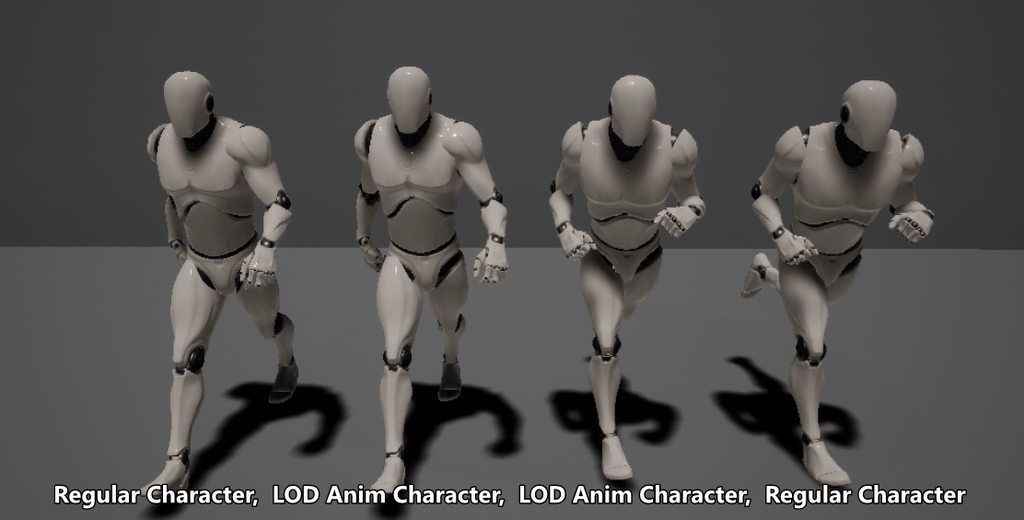
Just figured out Animation LOD. Pretty sick stuff, here's my exaggerated example.
https://imgur.com/a/7SAqeBu
 jolly osprey
there's uro and shared anim groups and all that
young urchin
@jolly osprey i've tried to bake to scene and it's the same...no root animation on export
it bake only the controller keys to scene
jolly osprey
out if ideas
young urchin
@misty dagger 3rd one looks wonky...
misty dagger
It's skipping anywhere from 0-8 frames, probably loses allot of the intended feeling
Actually I think its due to LOD Popping, and the overtly exaggerated-ness. You'd never see this much LOD popping hopefully.
 odd thistle
Why doesn't my animation montage save the end time?
I want my montage to end after 3 seconds
after i close the project and reopen
it resets back to 0.3 which is too short
any ideass?
nevermind
just set the animation to loop 100 times
: d
 forest idol
Does anyone know how I can adjust the direction of the SimpleGrassWind ? I am applying it to a plane, but want the wind to hit the other axis
young urchin
@forest idol it does not have particular direction...this wind is just orbiting the verts, you can double click and see the logic inside
as well as you free to change it, or make new based on it
 tender flicker
hi, does anyone know a better way to do character animations for weapons?
currently I have a weapon with multiple attachments (for now its just 2 different grips and extended mag which has a different model.
and the way I'm doing the animations right now is that I have seperate animation montages for idle and reload and when you attach a different grip for example, that will override the idle animations
but the problem is that sometimes when blending between idle and reload, the hands go through the grips or the weapon
since the idle is just the character holding the weapon and the reload animation starts from when the character is holding the magazine. does anyone know a good way on how to do animations for weapons with multiple attachments? or how other games do it?
young urchin
i'm afraid modularity can only work with some rig or at least ik
neon zenith
Aight
I got the hang of state machines last night
Tonight I learned how to do a button in VR
Now I want to know how to set a variable in an animation blueprint from a normal blueprint
Mr google is not much help
 hoary knot
hello, I'm trying to use blend poses by enum but I can't figure out how to add new pose slots to plug in for the enums 😕
neon zenith
this is my animation blueprint, doorGearPosition is an int
it makes the states change via the transition rules
I need to change that int from the actors blueprint...
ahk
got it
neon zenith
ok, so I'm in the physics asset editor... and I got this box primitive on the entry ramp of my ship...
I'm trying to walk up it in VR but I can't figure out how to turn on collision 😦
Use CCD doesn't do anything... (far as I can tell)
 hallow gazelle
Hello guys. Anybody using 3ds max here? I have rig issue
I have a simple orientation constraint
after some limit initial point has rotation clipping
maybe anyone know a fix for this one?
 molten jewel
It’s a skeletal mesh @neon zenith ?
Collision profile should be the thing to change on the primitive
jolly osprey
how would I pass a custom animation sequence from my anim instance in c++ to the anim bp to play?
I've tried FPoseLink but that's just an output pin w/ no animation
molten jewel
as in pick a animsequencebase?
jolly osprey
yes
so basically I'm looking for an anim sequence picker
I'm already using the blend poses by int node but I want something that won't blend
have looked at blend poses by enum too but it's essentially the same
I might have to subclass UAnimGraphNode_SequencePlayer won't I
molten jewel
it would be a good idea
you know you can expose the animation on the player to a pin right?
if you need to decide the sequence based on something you can't get in the event graph, you'd still need a anim node.. but otherwise yeah you could assign animation to a pin
molten jewel
applepah
jolly osprey
easy as pah ermahgerd
this would only suck up resources for at most 2 animations (blend in and blend out), yiss?
 oblique vortex
any ideas how to mirror a skeltal mesh without fudging components attached to the mesh
i have vr hands and the way that it's done normally by scaling 1 1 -1
it udges the scene components i use as an improptu sockets
 frigid knot
i want my body to float up and down, how can i make a simple animation in ue4?
restive yew
Timeline node, set transform current location + bobbing offset
neon zenith
@molten jewel yah, it's a skeletal mesh...
molten jewel
use a physics asset then to define the door's collision
can't really think why a box collision wouldn't work there though
jolly osprey
how do I make a montage play only once from c++?
jolly osprey
bound a delegate to FOnMontageEnded and calling Montage_Stop() in it for now but if there's a better way feel free to share
 shut kraken
Anyone here have some blender fbx export settings that can send an armature to UE4 with minimal axis and unit bullshit? I know i had it nailed down once but that was like a year ago.
neon zenith
aight
so I need to figure out how to animate this:
It's part of the skeletal mesh, and has the necessary bones to do the movement I need
And I'm looking here: https://docs.unrealengine.com/en-US/Engine/Animation/NodeReference/SkeletalControls/index.html
Animation nodes that enable direct manipulation and applying solvers to the bones of the target Skelet
Don't suppose anyone has done anything like this before
Or even better if there's an example project with something like this in it?
 scarlet spade
Don't know if this is an animation problem but any help would be greatly appreciated
Does anyone know how I can get my player's anim to line up more to the wall? My wall slide function is set up to play on collision with the player's capsule component which can be seen above
 tough herald
Anyone knows how can i set bone locations from an array?transform bone node has pre-selected bone and its not dynamic (i cannot set location by bone name from my array).
@neon zenith Im using skeletal controls too!
tender flicker
Hey, does anyone know how to do proper third person reload with IK or blending?
I have a reload animation but when I use it with the aimoffset, if the player is looking up then the character doesn't reach toward his chest since it only goes half way or if it's looking down then the arm goes through the body
 plush blaze
importet a mannequin from blender, all looks finde, but if i apply a animation this happens, does someone know why? https://cdn.discordapp.com/attachments/485408595052199936/680866449631477760/unknown.png
 molten jewel
@plush blaze turn off fix orientation in import settings
mannequin bones should look like they are pointing in all kinds of strange directions
plush blaze
cant find this in ue4 import
without animation it looks alright, I can also select bones and rotate them without errors
@molten jewel Do you mean the fbx import in blender? I have not importet the mesh in blender, I used the blender file from the ue4 wiki
molten jewel
Yeah I do mean the fbx import
zoom in close on the elbow and look at the colors of the axes
compare them to a mannequin you didn't import
plush blaze
yes, looks like the orientation is wrong, but how to fix this?
Ue4
mine
looked a tutorial video, but the bone orientation in blender seams right
 dusky axle
Im tryin got import a model with animations with only keyframes set. But when i import into UE4 i get a blank animation preview. All the bones ive keyframed are there, anyone have any idea what im doing wrong?
plush blaze
@dusky axle Did you select "bake animation" on export?
dusky axle
Ive never had to do that before either. i have other models with full animation and they work fine. Just when i try to export animations with only a single keyframe
jolly osprey
try 2 frames
I'm working w/ maya and I can't export a single frame animation from there either
dusky axle
hmm ok ill try
plush blaze
are you exporting only the bones without mesh?
dusky axle
No mesh and all.
Im not sure whats going on..
i tried with 2 keyframes and that should have worked..
These are the only errors im getting on import
jolly osprey
try deleting the skel + mesh and reimport everything
dusky axle
Thats what ive been doing..
dusky axle
Hmm not sure, had alot of problem but i got it.. I think my rig was off i just remade it and a single keyframe animation imported just fine.
 limber pulsar
https://i.gyazo.com/2a6ec35151aea7d73566b7a5982782d8.mp4 is there a way to blend between end of attack and idle pose, or do I have to have a separate animation ending it?
limber pulsar
so blend space can transition smoothly, but I can't use blend space in a montage.. Any ideas?
dusky axle
hmm ok guys im back again.. So ive got my keyframed animations inside my editor. I got a timeline inside my Character BP setup to set a blend variable that the AnimBP picks up. But it doesnt look like it is actually. Doesnt look like my AnimBP is running at all. Ive even dropped it right into the map and nothing.. When manually changing the alpha value on the blend node it looks like its doing what i want but i dont think the AnimBP is picking up the timeline float during gameplay.. Any ideas as to why? Or better approach to this maybe?
dusky axle
I have no idea why this is failing but its whats stopping me: /
jolly osprey
sorry my project is not compiling rn but no, Idpon't believe that's it
there should be a setting on the skel mesh
where you can choose btwn asset, bp or none or something like that
pp anim bp is something entirely different
dusky axle
Oh yeah ive had that set to use animation BP.
I didnt even change anything and now its working.. im not sure whats going on, time for sleep lol
 obtuse basin
I imported a skeletal mesh with 266 bones. The engine did not warned me. It imported success.
Is "maximum bones per mesh = 256" just a myth ?
tender flicker
anyone know how to make IK node enabled only when playing a montage?
bronze osprey
do any really good animators ever hang here?
they all got scared away by all the pics of horribly deformed rigs 😛
why u no work??!
molten jewel
@obtuse basin I’ve seen code that refers to bones as bytes index, but if you have imported something with more bones, ensured that the bone count on import is greater than what a byte index can hold, it may be possible they patched it. Otherwise that limit may be entirely deformation bones, hard to say. Mobile does have a much smaller than 256 bone deformation limit
 reef agate
I’m struggling to understand FAnimInstanceProxy. I currently have a struct of floats in a custom anim instance that I expose and read in my anim graph. Is that something I should move to the proxy struct?
@jolly osprey I saw you were digging into this Proxy some days ago. Did you make heads or tails?
 undone river
can anybody help me when i shoot in my scene the trigger boxes for the next level or the automatic doors sounds will trigger or i will load the next level
my projectiles are over lapping them how do i fix this
 terse lagoon
hello, i'm trying to create a head bob animation, it works as long as i move forwards or right. but when i move backwards or left it doesn't activate. how can i fix this. or even better. reverse the animation whilst moving left or backwards.
jolly osprey
@reef agate I think for passing variables straight on to your anim bp like that it doesn't really matter - proxies are for when you're calculating stuff per frame
since they get multithreaded and all, whereas your anim instance is bound to the GT
but then you'd have to 1. copy to proxy 2. process in proxy 3. copy back to anim instance 4. read anim instance in your anim bp
so you'd be doing two copies for nothing if you're just reading some pre-processed data
misty dagger
I want rig character in blender and animate idle, walk and run then export it as fbx and import it in UE4. Any one know good tutorial for the right rig and animation?
tender flicker
could someone tell me what the difference is between 2 bone IK and FABRIK?
reef agate
@jolly osprey In my case I have a server that I create in anim instance which receives data and fires a delegate everytime it updates. It updates the floats every frame at run-time
i'm also smoothing that data with FMath:WeightedMovingAverage
does this qualify for an FAnimInstanceProxy use?
I'm so lost w that proxy
jolly osprey
just shove anything into the proxy that's getting modified per-frame for animation
and make sure you copy it back to the anim instance
in the proxy's... postevaluate/postupdate function? forget which
the idea is that the anim instance never does anything w/ the proxy since it kinda doesn't know about it
so you declare it a friend in your anim instance class
and each frame, the proxy pulls data in from the anim instance in [the proxy's] preupdate/preevaluate
then does Evaluate()
then copies everything your anim instance / anim BP is going to need back to the anim instance
so your bp'
so your bp's only interacting w/ your anim instance
pre/postupdate or w/e they're called are running on the GT vs. the proxy's Evaluate() function which is multithreaded
reef agate
hmm i will try, i don't really get the difference yet among all the per frame methods: pre, post, evaluate, update etc etc
jolly osprey
evaluate is MT the rest are GT
reef agate
So i'd always want to use MT when possible right?
reef agate
Ok, I have a feeling this is still gonna take some time to stick, but hopefully i'll get there
i've never done such elaborate stuff w structs
Where should i copy the per frame data back to the anim instance? in what method?
jolly osprey
postupdate
reef agate
k so my struct contains a struct of 50 some odd floats that update in a function I bind to the server which I created in that anim instance. I don't know how to do all that in a struct but i will try. Then I will create a duplicate struct in the anim instance and copy the data into it in postupdate
that's in my nativebeginplay in anim instance right now
jolly osprey
there's also postevaluate and preevaluate so w/e I've said about preupdate and postupdate might actually have to go into preevaluate and postevaluate - don't blame me though it gets confusing just figure out which methods work
🤓
reef agate
OnOSCMessageReceived fires on its own without running in animinstance tick
jolly osprey
unfortunately I've deleted the only class where I'd been using this anim proxy crap b/c I've refactored everything into my game code module so can't really pull any examples up
I also know jack about ue4 multiplayer
reef agate
I've been trying for two weeks to understand why averaging FRotator samples with WeightedMovingAverage() and other smoothing algorithms is causing this kind of flipping
if anyone could help. I'm desperate at this point and could offer a token compensation if fixed
molten jewel
you'd be better off averaging quat then normalizing
but that could also be problematic
since most orientations can be reprenented in two different quaternion values, you have to makes sure when your blending two quats that your using the version nearest between the two
you can't just interpolate euler angles like your doing there either way
for some bones you may want to consider even converting the quats to separate swing twist for interpolation
reef agate
p@t the thing is, I've already converted the quats to FRotators and these FRotators work perfectly. I'll take a vid now
so i'm feeling really dumb for not understanding
Here is mocap of the quats converted to FRotators with no glitching
You can see it's not smooth but at least it isn't spinning/glitching because i removed the weighted moving average algorithm
So why is it that when I take those FRotators and put them through a Weighted Moving Average algorithm, I get that spinning/glitching. Looking at the debug values, it looks like it happens whenever the values cross from negative to positive or vice versa
molten jewel
so eulers,
imagine if you point a cannon from front
to up, to behind
an euler rotation works in a predefined order to achieve the orientation
because something like pitch in a euler could be done first, when the cannon faces up, its gonna be +90 (or wahtever) pitch
and when its forward up, it'll be +89
as well as when its rear up
you can't interpolate these values by axis/component because of it
so having proper rotators doesn't help you blend them together such as you might need with the algorithm
they may point identically in relationship to their source quaternion, but the numeric values are a product of rotations around 3 axes in an order where the blending makes no sense on a component level
quaternions are a rotation around a single axis
and they're encoded in a way that they can be blended
axisnormal * sin(angle/2.f) = quat.xyz
cos(angle/2.f) = quat.w
so for any orientation except for no-rotation at all,there are two different quats for any one rotation because the angle / 2.f part
quat(1,0,0,0) is the same as quat(-1,0,0,0)
both of these are 180 degrees around X
sind(180/2) = 1
cosd(180/2) = 0
reef agate
if i can understand everything you are saying one day i will feel like a wizard : )
question
At this point, I have an FRotator (32 of them) and as you've seen, they work perfectly. p@t is there any way for me to smooth those FRotators while keeping them as FRotators?
trying to boil this down : )
molten jewel
do you define how the rotators are blended?
reef agate
I wish I understood what you mean by blended
molten jewel
Weighted Moving Average algorithm
reef agate
{
    FRotator OutRotator;
    OutRotator.Yaw = FMath::Clamp(FMath::WeightedMovingAverage(CurrentSample.Yaw, PreviousSample.Yaw, Weight), -180.f, 180.f);
    OutRotator.Pitch = FMath::Clamp(FMath::WeightedMovingAverage(CurrentSample.Pitch, PreviousSample.Pitch, Weight), -180.f, 180.f);
    OutRotator.Roll = FMath::Clamp(FMath::WeightedMovingAverage(CurrentSample.Roll, PreviousSample.Roll, Weight), -180.f, 180.f);
    return OutRotator;
}```That's what that method does. It breaks out the three floats and smooths them
Is there something I need to further define with respect to the blending you're speaking of.
as I mentioned, if I take what I'm putting into the Current Sample param and connect it to a joint, everything is perfect. But as soon as I put it through this algorithm I get the spinning/glitching
(p@t i forgot but i think you do the c++ stuff, if not I can switch to BP language hehe)
This is probably (hopefully) irrelevant but code is converting the native quaternion orientation system to ue4 like so /** * Convert the Orientation from Kinect co-ordinate system to Unreal co-ordinate system. * We negate the x, y components of the JointQuaternion since we are converting from * Kinect's Right Hand orientation to Unreal's Left Hand orientation. */ FQuat JointQuaternion = FQuat( -NativeJoint.orientation.wxyz.z, -NativeJoint.orientation.wxyz.x, NativeJoint.orientation.wxyz.y, NativeJoint.orientation.wxyz.w);
then I do some FRotationMatrix stuff to get an FRotator called Orientation for each joint like Orientation = FRotationMatrix::MakeFromXZ(JointQuaternion.GetAxisY(), -JointQuaternion.GetAxisX()) .Rotator();
jolly osprey
I'm in no way an expert but what if you tried doing the wgtd avg on the quats instead
and skipped using frotators
molten jewel
FRotator WeightedMovingAverage_FRotator(FRotator CurrentSample, FRotator PreviousSample, float Weight) {
    FQuat QCurrent{ CurrentSample };
    FQuat QPrevious{ PreviousSample };

    QCurrent.EnforceShortestArcWith(QPrevious);

    FQuat QDelta{ QPrevious.Inverse() * QCurrent };
    FVector Axis{ QDelta.X,QDelta.Y,QDelta.Z };

    if (!Axis.Normalize()) {
        return CurrentSample;
    }else{

        float AngleTo{ FMath::Acos(QDelta.W) * 2.f };

        if (AngleTo >= PI) {
            AngleTo = -(AngleTo - (2 * PI));
            Axis = -Axis;
        }

        AngleTo = FMath::WeightedMovingAverage(AngleTo, 0.f, Weight);

        if (AngleTo < 0.f) {
            AngleTo = (2 * PI) - FMath::Fmod(-AngleTo, 2 * PI);
        }
        else {
            AngleTo = FMath::Fmod(AngleTo, 2 * PI);
        }

        if (AngleTo >= PI) {
            AngleTo = -(AngleTo - (2 * PI));
            Axis = -Axis;
        }

        FMath::SinCos(&QDelta.Z, &QDelta.W, AngleTo / 2.f);
        QDelta.X = QDelta.Z*Axis.X;
        QDelta.Y = QDelta.Z*Axis.Y;
        QDelta.Z *= Axis.Z;

        QPrevious *= QDelta;
        return FRotator{QPrevious};
    }
}```GlassBeaver yes! that will be my last ditch effort, but in the end, I believe I HAVE to convert to FRotators at some point, because i'm plugging these into the Transform Bone Anim Graph node which does not accept quarternians
molten jewel
that boils it down to axis of rotation between orientations
only weighing the angle between current and prev
its in radians for what its worth
reef agate
If this works, plz provide your patreon link lol
molten jewel
i dunno what FMath:: WeightedMovingAverage is
er
it might work, but its a weird way to smooth things
reef agate
It's goofy that i'm converting from Quats to FRotators then back to Quats
so if anything it would be some kind of temp solution
Your code is absurdly over my head also
jolly osprey
use this anim node for when you want to rotate bones via quats
(4.22 but it'll probably work 4.22+)
reef agate
GlassBeaver does that node work in Component Space?
reef agate
ugh omg, that'd be amazing if that works
Do I just drop that in the engine folder with all the other nodes or?
jolly osprey
probably just anywhere you want
reef agate
Can be in my project source?
reef agate
project source had errors hehe
trying this C:\Program Files\Epic Games\UE_4.24\Engine\Source\Runtime\AnimGraphRuntime\Private\BoneControllers
jolly osprey
Animation\AnimGraph folder I think
bc of the include
mine's like this:
Source\HoruEditor\Private\Animation\AnimGraph\AnimNode_RotateBoneQuat.cpp
Source\HoruEditor\Public\Animation\AnimGraph\AnimNode_RotateBoneQuat.h
what is HoruEditor?
reef agate
C:\Users\lagauche\Desktop\AzureKinect\Source
jolly osprey
ok so what you can do is just copy both files under AzureKinect/Source/AzureKinect
reef agate
I also am using a plugin i'd happily add it to C:\Users\lagauche\Desktop\AzureKinect\Plugins\AzureKinectUnreal\Source\AzureKinectUnreal\Public
but either way
jolly osprey
go into the .cpp and change #include "Animation/AnimGraph/AnimNode_RotateBoneQuat.h" to #include "AnimNode_RotateBoneQuat.h"
reef agate
workin on it
jolly osprey
btw the node should do exactly what the Transform (modify) bone does in stock ue4 but it uses quats instead of rotators
(and it doesn't do location of course)
(or scale)
reef agate
ya
jolly osprey
(well you get the idea)
reef agate
that would be ideal! curious if you can still record with it? using take recorder or sequencer or whatever tools?
jolly osprey
I don't see why you couldn't
don't think the original transform bone node has anything special wrt recording
reef agate
  Running UnrealHeaderTool "C:\Users\lagauche\Desktop\AzureKinect\AzureKinect.uproject" "C:\Users\lagauche\Desktop\AzureKinect\Intermediate\Build\Win64\AzureKinectEditor\Development\AzureKinectEditor.uhtmanifest" -LogCmds="loginit
warning, logexit warning, logdatabase error" -Unattended -WarningsAsErrors -installed
C:/Program Files/Epic Games/UE_4.24/Engine/Source/Runtime/AnimGraphRuntime/Public/BoneControllers/AnimNode_RotateBoneQuat.h(1): Error: UnrealHeaderTool was unable to load source file 'C:/Program Files/Epic Games/UE_4.24/Engine/Source/Runtime/AnimGraphRuntime/Public/BoneControllers/AnimNode_RotateBoneQuat.h'
The terminal process terminated with exit code: 1```sorry i'm struggling
In cpp #include "AnimNode_RotateBoneQuat.h" #include "AnimationRuntime.h" #include "Animation/AnimInstanceProxy.h"
jolly osprey
I'd remove it from engine source
reef agate
i did already
but still gettin that error hmm
  [1/6] AnimNode_RotateBoneQuat.cpp
  C:\Users\lagauche\Desktop\AzureKinect\Source\AzureKinect\AnimNode_RotateBoneQuat.h(9): fatal error C1083: Cannot open include file: 'BoneControllers/AnimNode_SkeletalControlBase.h': No such file or directory
  [2/6] AnimNode_RotateBoneQuat.gen.cpp
  C:\Users\lagauche\Desktop\AzureKinect\Source\AzureKinect/AnimNode_RotateBoneQuat.h(9): fatal error C1083: Cannot open include file: 'BoneControllers/AnimNode_SkeletalControlBase.h': No such file or directory
  [3/6] AzureKinect.init.gen.cpp
The terminal process terminated with exit code: 1```this is promising
just gotta fix that include
i give up for now : / i should be able to get this in my anim graph. gotta decompress hehe
thnx Glass and p@t for all the help so far
reef agate
@jolly osprey Got the node to build by removing HORUEDITOR_API here struct HORUEDITOR_API FAnimNode_RotateBoneQuat : public FAnimNode_SkeletalControlBase and then adding AnimGraphRunTime to my publicdependencymodules in Build.cs
I can't find the node in my anim graph though
reef agate
nada unfortunately. just recompiled again checking...
jolly osprey
AH!
hold up
them nodes come in pairs :P
this is animGraphNode, the other one is just animNode
you need all 4 files
reef agate
ooh ok, all in the same folder ya?
jolly osprey
yiss
logic being that you could invoke the plain animNode from c++ w/o any animGraphNodes
I think.
it's convoluted anyway
reef agate
cool. What was that _API thing I deleted? That is just the name of your module and unnecessary? I read that by including AnimGraphRunTime as a module dependency i was doing something goofy and can't package
working on new errors now fatal error C1083: Cannot open include file: 'Animation/AnimGraph/AnimNode_RotateBoneQuat.h': No such file or directory
gonna change that folder structure
jolly osprey
yeah it's the same include business as before
the api thing is your game project's name
in your case probably AZUREKINECT_API
reef agate
stuck w C:\Users\lagauche\Desktop\AzureKinect\Source\AzureKinect\AnimGraphNode_RotateBoneQuat.h(9): fatal error C1083: Cannot open include file: 'AnimGraphNode_SkeletalControlBase.h': No such file or directory [2/8] AnimGraphNode_RotateBoneQuat.gen.cpp C:\Users\lagauche\Desktop\AzureKinect\Source\AzureKinect/AnimGraphNode_RotateBoneQuat.h(9): fatal error C1083: Cannot open include file: 'AnimGraphNode_SkeletalControlBase.h': No such file or directory
#include "BoneControllers/AnimGraphNode_SkeletalControlBase.h" tried this
jolly osprey
in your build.cs
"AnimationCore", "AnimGraph", "AnimGraphRuntime"
one or all of these
@reef agate
reef agate
cool ya put them all in public modules and got a crazy list of errors AnimGraphNode_RotateBoneQuat.cpp.obj : error LNK2019: unresolved external symbol "__declspec(dllimport) public: __cdecl FBlueprintNodeSignature::FBlueprintNodeSignature(class TSubclassOf<class UEdGraphNode>)" (__imp_??0FBlueprintNodeSignature@@QEAA@V?$TSubclassOf@VUEdGraphNode@@@@@Z) referenced in function "public: virtual struct FBlueprintNodeSignature __cdecl UK2Node::GetSignature(void)const " (?GetSignature@UK2Node@@UEBA?AUFBlueprintNodeSignature@@XZ) AnimGraphNode_RotateBoneQuat.gen.cpp.obj : error LNK2001: unresolved external symbol "__declspec(dllimport) public: __cdecl FBlueprintNodeSignature::FBlueprintNodeSignature(class TSubclassOf<class UEdGraphNode>)" (__imp_??0FBl
it's all LNK errors
jolly osprey
        PrivateDependencyModuleNames.AddRange(new string[] {
            "Core", "CoreUObject", "Engine",
            "UnrealEd", "PropertyEditor", "EditorStyle", "Slate", "SlateCore", "Blutility",
            "AnimationCore", "AnimGraph", "AnimGraphRuntime", "BlueprintGraph"
        });
try these
:D
one of them is it.
reef agate
will try now. newb question but i notice yours are in Private. Does it matter?
jolly osprey
don't think so
reef agate
it built : )
jolly osprey
whee
reef agate
jolly osprey
double whee
reef agate
can this use fast path?
would i see the lightning bolt? don't even have a quat to test w yet
oh ya it can
!
hey that's so cool! This helps me to understand a bit about making a custom anim graph node also
i've been wanting to learn
jolly osprey
whee on the three
reef agate
this question is just out of curiosity at this point, but is it at all (with whatever ideal configuration) possible to package when using this node?
and why doesn't Epic have a quat rotate node like this?
jolly osprey
you should be able to package w/ it, yes
no clue why they don't have it by default
the thing w/ anim graph nodes is they don't get used outside the editor
which a packaged game is
so that's why you should either put it in an editor-only module of yours or enclose everything in #if WITH_EDITOR #endif
otherwise it'll croak
reef agate
doh @jolly osprey ```LoginId:36c4b739453c5a677fa720b71f019068
EpicAccountId:77e06f97f9dc4fc2915301676d8aa37c
Assertion failed: ResultString.Num() == 3 [File:D:/Build/++UE4/Sync/Engine/Source/Editor/AnimGraph/Private/AnimGraphNode_SkeletalControlBase.cpp] [Line: 313]
UE4Editor_Core
UE4Editor_Core
UE4Editor_AnimGraph
UE4Editor_AnimGraph
UE4Editor_AzureKinect!UAnimGraphNode_RotateBoneQuat::CopyPinDefaultsToNodeData() [C:\Users\lagauche\Desktop\AzureKinect\Source\AzureKinect\AnimGraphNode_RotateBoneQuat.cpp:99]```
crashed when i tried to connect a quat to the node pin
jolly osprey
what's the error
reef agate
where do i find that again : /
jolly osprey
line 99 should be a carbon copy of what the engine had for their transform bone node
maybe you're naming something RotationQuat and it's not liking it?..
reef agate
log [2020.02.24-07.09.15:311][516]LogWindows: Windows GetLastError: The operation completed successfully. (0) [2020.02.24-07.09.16:793][516]LogWindows: Error: === Critical error: === [2020.02.24-07.09.16:793][516]LogWindows: Error: [2020.02.24-07.09.16:793][516]LogWindows: Error: Assertion failed: ResultString.Num() == 3 [File:D:/Build/++UE4/Sync/Engine/Source/Editor/AnimGraph/Private/AnimGraphNode_SkeletalControlBase.cpp] [Line: 313] [2020.02.24-07.09.16:793][516]LogWindows: Error: [2020.02.24-07.09.16:793][516]LogWindows: Error: [2020.02.24-07.09.16:793][516]LogWindows: Error: [2020.02.24-07.09.16:793][516]LogWindows: Error: [Callstack] 0x00007ff8451c9159 KERNELBASE.dll!UnknownFunction [] [2020.02.24-07.09.16:793][516]LogWindows: Error: [Callstack] 0x00007ffffe25a9a6 UE4Editor-Core.dll!UnknownFunction []
lemme try a bp quat
jolly osprey
[Line: 313] --> the file's only supposed to be 104 lines long
reef agate
hmm still crashing
jolly osprey
wait
reef agate
lemme look at mine
jolly osprey
wrong file sorry
did you rename the class?
UAnimGraphNode_RotateBoneQuat
or the file
jolly osprey
hm
beats me then, sorry
what I'd do is run an engine debug and check the values there
reef agate
class is UCLASS(meta=(Keywords = "Rotate Bone Quat")) class UAnimGraphNode_RotateBoneQuat : public UAnimGraphNode_SkeletalControlBase
jolly osprey
did you give it a quat?
reef agate
it crashes as soon as I let go of the wire from a quat to the quat input on the node
tried a BP made quat in the anim bp and a c++ exposed FQuat
i'm on 4.24.2 if that could make any diff
i can't go back in versions on this project
jolly osprey
run an engine debug
or maybe a simple debuggame editor, you might get lucky and it'll give you the variables
reef agate
f5 in vs community right?
jolly osprey
I think you need debug symbols installed for that
reef agate
ya i have them installed
jus fyi even if i drag off quat pin and hit make quat it crashes
jolly osprey
reef agate
cool ya will switch over to VS community in a sec, just seeing if that is in vs code by chance
breakpoint hereNode.RotationQuat = tempOut.Quaternion();
in ```void UAnimGraphNode_RotateBoneQuat::CopyPinDefaultsToNodeData(UEdGraphPin* InPin)
{
if (InPin->GetName() == GET_MEMBER_NAME_STRING_CHECKED(FAnimNode_RotateBoneQuat, RotationQuat))
{
FRotator tempOut;
GetDefaultValue(GET_MEMBER_NAME_STRING_CHECKED(FAnimNode_RotateBoneQuat, RotationQuat), tempOut);
Node.RotationQuat = tempOut.Quaternion();
}
}
computer is all frozen, can't even screenshot hehe
jolly osprey
you could try making a variable out of w/e is returned by get_member_name_string to check its value
reef agate
a hair over my head what that function is even doing.
jolly osprey
some bp crap
reef agate
i would imagine if i'm crashing you would also in 4.24
don't think i'm doin anything weird here
reef agate
k
no more crash when i comment it out like this:
but some super weird crash when compiling the bp after connecting input and output pin hehe
oh wells : ) I gotta rest. Hopefully some gods will shine down on me tomorrow haha
jolly osprey
good luck
you can also check AnimGraphNode_ModifyBone.cpp for clues on what might be different in 4.24
\Engine\Source\Editor\AnimGraph\Private\AnimGraphNode_ModifyBone.cpp
 grave forge
I'm a bit stumped on handling animation blueprints and associated state machines across multiple skeletons. I initially thought best practice was to have 1 skeleton across all your characters, and create child blueprints for all the different characters, basing it on a parent ABP and state machine. I've been watching some devstreams though, and I noticed that the game I am following has all kinds of different characters with their own skeletons. I realise it's a bit vague, but is there anyone well versed enough in the black magic of Unreal's animation tools that can explain how they are probably tackling this workflow?
In my reasoning, it would mean that they have to maintain all the different animation blueprints and state machines for each of the characters, as you cannot make an child blueprint of something that has a different skeleton, right? (+the maintenance nightmare that comes with that) Entirely possible (and I am hoping) that I'm wrong though, and that I could learn something from this.
reef agate
Has anyone here using FInterpTo to smooth rotations and vectors (especially from hardware sensor data) instead of using Averages? I'm curious if they are a viable option and what the pros and cons are
jolly osprey
void FPoseLinkBase::Initialize(const FAnimationInitializeContext& Context)
{
#if DO_CHECK
    checkf(!bProcessed, TEXT("Initialize already in progress, circular link for AnimInstance [%s] Blueprint [%s]"), \
        *Context.AnimInstanceProxy->GetAnimInstanceName(), *GetFullNameSafe(IAnimClassInterface::GetActualAnimClass(Context.AnimInstanceProxy->GetAnimClassInterface())));
    TGuardValue<bool> CircularGuard(bProcessed, true);
#endif
I keep failing this check in my packaged game
everything works fine in editor runs
has anyone come across it
 winged violet
In most animation blueprint examples, the character is casted to on tick
Would it not be cheaper to just cache it once and use the reference?
jolly osprey
it would
winged violet
Thanks I'll do that from now on
jolly osprey
it would also be a lot cheaper to not use the event graph part of your anim bps at all and do it all in c++ instead
casting won't make a major difference if you're using bps to begin with I don't think
@reef agate I've used qinterpconstantto w/ quats to get consistent speed
but I'm using that for simulating turning rates of spaceships
basically these are your options:
        case EAlphaBlendOption::Sinusoidal:        return FMath::Clamp<float>((FMath::Sin(InAlpha * PI - HALF_PI) + 1.f) / 2.f, 0.f, 1.f);
        case EAlphaBlendOption::Cubic:            return FMath::Clamp<float>(FMath::CubicInterp<float>(0.f, 0.f, 1.f, 0.f, InAlpha), 0.f, 1.f);
        case EAlphaBlendOption::QuadraticInOut: return FMath::Clamp<float>(FMath::InterpEaseInOut<float>(0.f, 1.f, InAlpha, 2), 0.f, 1.f);
        case EAlphaBlendOption::CubicInOut:        return FMath::Clamp<float>(FMath::InterpEaseInOut<float>(0.f, 1.f, InAlpha, 3), 0.f, 1.f);
        case EAlphaBlendOption::HermiteCubic:    return FMath::Clamp<float>(FMath::SmoothStep(0.0f, 1.0f, InAlpha), 0.0f, 1.0f);
        case EAlphaBlendOption::QuarticInOut:    return FMath::Clamp<float>(FMath::InterpEaseInOut<float>(0.f, 1.f, InAlpha, 4), 0.f, 1.f);
        case EAlphaBlendOption::QuinticInOut:    return FMath::Clamp<float>(FMath::InterpEaseInOut<float>(0.f, 1.f, InAlpha, 5), 0.f, 1.f);
        case EAlphaBlendOption::CircularIn:        return FMath::Clamp<float>(FMath::InterpCircularIn<float>(0.0f, 1.0f, InAlpha), 0.0f, 1.0f);
        case EAlphaBlendOption::CircularOut:    return FMath::Clamp<float>(FMath::InterpCircularOut<float>(0.0f, 1.0f, InAlpha), 0.0f, 1.0f);
        case EAlphaBlendOption::CircularInOut:    return FMath::Clamp<float>(FMath::InterpCircularInOut<float>(0.0f, 1.0f, InAlpha), 0.0f, 1.0f);
        case EAlphaBlendOption::ExpIn:            return FMath::Clamp<float>(FMath::InterpExpoIn<float>(0.0f, 1.0f, InAlpha), 0.0f, 1.0f);
        case EAlphaBlendOption::ExpOut:            return FMath::Clamp<float>(FMath::InterpExpoOut<float>(0.0f, 1.0f, InAlpha), 0.0f, 1.0f);
        case EAlphaBlendOption::ExpInOut:        return FMath::Clamp<float>(FMath::InterpExpoInOut<float>(0.0f, 1.0f, InAlpha), 0.0f, 1.0f);
I love the new auto temporary IK in Blender, but does anyone know if there's a way to exclude a certain bone from being moved by it?
young urchin
New UE4 features...
reef agate
@jolly osprey trying to compare the quat rotate custom node code to modify bone but the code that is causing the crash lives in AnimGraphNode_RotateBoneQuat.cpp. In the UE4 engine source I can't find the equivalent ModifyBone cpp. I only found AnimNode_ModifyBone not AnimGraphNode
any pointer?
@young urchin have you made headway with the 4.24 control rig setup?
I found the docs outdated now that they changed control unit setup
jolly osprey
so I've spent time today w/ the rot quat node and turns out the check that's failing is coming from its parent node
the skeletal something something node
b/c of the default value it's getting
I've moved the node's cpp and h files (so 4 files in total) back to engine source
I haven't yet gotten rid of the check bug but this makes it run in a packaged game at least
(because turns out it wouldn't)
young urchin
@reef agate i have not used control rig setup heavily...if you write down the issue, i may look in to it...the screenshot is from 4.26 tho
jolly osprey
here's the new files
slight modification only iirc wrt includes
they live there now
remove the ones you've had in your project and you'll also have to re-add the node in the anim bp
reef agate
Cool Alexey i really tried with the new control rig in 4.24 but it's harder to setup than the >=4.23 setup
cool Glass, I'm on it right now. So you commented out that block line that was crashing still? (that Temp.out default thingy)
jolly osprey
nope
um you can
the advice I was giving earlier about needing an editor module for nodes is null & void
🤓
turns out you do need them in a packaged game
dunno what I was thinking
jolly osprey
comment it out?
if that works
basically it should only show up if you're connecting or disconnecting an input pin to the quat node
no biggie for me for now
 umbral radish
Had some trouble with mixamo animations and took me quite some time to figure out that there is a difference when downlaoding with or without skin when using an own rig
https://twitter.com/AndiDev_/status/1232081434158018561?s=19


Problem with root animation finally fixed. Problem was: Mixamo makes a difference when downloading animation with or without skin. Took much to long to figure out where the error was. Thanks @Dennsen_86 for your raid! https://t.co/1KXDaJ8fDW https://t.co/5BtUqQNWcI
 Twitter
reef agate
Twitter
reef agate
Looking for a bit of help on basics. I'm trying to smooth some data inside a struct and I'm wondering how I can use WeightedMovingAverage. My real question is a super basic c++ one. When I declare FQuat JointQuaternion at the top, when this runs again, what happens to its value at that point? does it get overwritten or copied or? FQuat JointQuaternion; FQuat PreviousQuaternion = JointQuaternion; JointQuaternion.Z = FMath::WeightedMovingAverage(-NativeJoint.orientation.wxyz.z, PreviousQuaternion.Z, 0.5f);
Usually I declare the previous sample in my header so i don't run into this problem of declaration order inside a function
 fiery gust
Hello. Would someone maybe explain the Master Pose Component to me. It might be a language barrier. Documentation: https://docs.unrealengine.com/en-US/Engine/Animation/WorkingwithModularCharacters/index.html It says: "The Master Pose Component is a Blueprint callable function that enables you to set a Skinned Mesh Component Object (or Skinned Mesh Component Objects) as children to another Skinned Mesh Component Object considered to be the master. For example, you can define the Torso as the Master Pose Component, assign an animation to the Torso, then add Feet, Legs, Hands and a Head as children which will follow the animation assigned to the Torso.
Behind the scenes, the children do not use any Bone Transform Buffer and won't run any animations even if you set them on the child, it only uses the Torso's Bone Transform Buffer when rendered which makes it a very lightweight attachment system. The only Component that has to run animation is the Torso, and all attached Components will use the Torso's Bone Transform. Below is an example setup where we have assigned an animation to the Torso. We use the Construction Script inside a Blueprint to set the Torso Skeletal Mesh as the Master Bone Component and the other aspects of our modular character as children. " What exactly does it mean that it uses only the animations from the torso? ... isnt a animation always driven from the Skeletal mesh and meshes needs to be weightpainted to said bones to move with the skeletal mesh? 🤔
Describes the different methods you can use to create modular characters comprised of multiple Skeletal Meshes.
fiery gust
or did they mean use the skeleton of the torso to drive the animation?
even tho the skeleton should be the same anyway 🤷♂️ 😕
 short glade
do people typically use blender for animations or unreal? say I created my character model in blender already. if this is a stupid question feel free to let me know also.
 ruby dove
So i have almost no experience in animation but is there a way i can animate the hand seperate from the walking animation e.g. holding an sword without creating a complete new animation
 mossy wasp
Yo
Does anyone know any really good resources for learning inverse kinematics with Unreal?
 split oar
Wayhoo. I'm making a character for a FPS/TPS game, I'm using a custom skeleton that's kinda similar to the UE4 one. However, I'm going to keep the face/head and body skeletons separate so I'm able to have their animations play separately. There's however one thing I'm uncertain how I'm gonna solve. I want the character to have a steady breath toggled, regardless of the body skeletons other animations. What would be the best solution? Adding a bone that controls breathing? I'm kinda new to everything here, so I'm not sure what options I have to solve it. Any help would be greatly appreciated!
Currently, I'm just using an idle animation, following some youtube tutorial where I scale the spine bones. It really isn't what I'm looking for.
shut kraken
@ruby dove Layered blend by bone
ruby dove
So i make an animation for my hand for example and then i use layer belend to apply it for example on my idle ?!
Will the idle affect the hand too? @shut kraken
shut kraken
You typically use layered blend per bone and do the crossover somewhere in the spine to do upper and lower body animations seperatly. To do just a hand on top of other animations, like different grip poses or whatever, you want to look into ADDITIVE animation. It'll be a right bastard to learn tho, I'd just split your anims between upper and lower body.
bronze osprey
that breathing also scales connected children
split oar
@bronze osprey Yeh, and it's a full-skeleton animation. What I'm looking for, is a way to separate the normal full-skeleton animations from the breathing. So the character's always breathing regardless of other animations being played. I really don't want to have the animations collide, or have to implement the breathing in some way for every single animation I import.
Is there a way to do this? Maybe in the way Spring controllers work in the Animation Blueprint? Add function without interfiering with the other animations?
split oar
Is what I'm asking too hard, or too easy to answer? ._.
misty dagger
How can I time dialogue with animations?
shut kraken
@split oar You need to do the breathing as additive then.
Anyone here know a way to avoid the long-ass convoluted animation names when going from Blender to UE4?
split oar
@shut kraken So I can add some breathing-bones to the skeleton, animate them, export animation, set it to ''additive'' and add it with priority in my animation blueprint?
This thing?
shut kraken
You could do it with special bones if you wanted as well.
The additive approach would make a breathing animation that is basically a MODIFIER over the top of other animations. so the end result would be MainAnimation + deltas in position and angle due to the BreathingAnimation.
 vapid breach
@split oar why don't you just make a breathing animation
Simple and less breaking your head
split oar
@vapid breach Thing is, I want the breathing animation isolated from all other animation/systems. I'm making a base-character with all kinds of physics/simulations, character creation sliders and armor-system for cosmetics n' sh*t. I'm sure there's gonna be enough complications as it is. I might try both approached though, but the ''Additive Animation'' seems to be exactly what I'm looking for. Thanks again @shut kraken ! Second time in a few hours you've helped me tremendously! ^^
 spiral sequoia
so for stuff that just bumps around with movement, like pieces of armor dangling or something... AnimDynamics seems like a good choice. however, it requires the bone to be part of the skeleton. if im trying to make something modular, i dont really want to have potentially hundreds of bones, mostly not used, just for dangly bits. is there a better/efficient way?
 random aurora
a few months ago I tried animation retargeting after watching some tutorials and reading documentation and failed miserably
I was trying to retarget animations from the human characters to humanoid characters with different proportions and couldn't get it to work
was ending up with monstrosities like this
has anyone had success with the retargeting system with weird proportioned humanoid characters? Or does anyone have any tutorials that really worked for them they can point me to? I am struggling a lot with expanding my animations beyond what came with the characters I bought from the marketplace, I tried exporting one using blender also but found it really unintuitive and hard to learn--so if you have any recommendations for an easier animation workflow please let me know also
 full plank
Hello there. guys i have a simple question
im using some anim notify states
but for example i wanna go from montage 1 - > montage 2 -> montage 1
but when i do this continously
for some reason some anim notify states (begin play specially) call 2 times
anyone know how to fix?
it seems that the blend in time is affecting it
when i put it to 0
it fixes everything
orchid sparrow
Does anyone know how Paragon did their melee twist? The tutorial video Epic did on it doesn't do it properly (seems like spine IK is missing). If anyone could do it, I'd very much like it. Willing to pay as well.
 cloud lodge
orchid sparrow
cloud lodge
orchid sparrow
that's the tutorial method where they take melee twist anim curve to rotate root bone and I did it but there's definitely some spine ik going on
when compared to actual paragon gameplay
doesn't look right 😕
 rancid sonnet
i followed a tutorial to rig a character for the ue skeleton but when i try an animation some parts look a bit twisted, should i start over or is this a common thing with a specific mistake?
 jaunty dew
is it possible to set an AnimGraph variable from the BP that owns the mesh which is following the AnimClass?
 queen sail
Does anyone know how to put some type of euphoria in unreal? I don’t need to do it atm, but I was wondering how rockstargames puts their euphoria in.
 analog rose
Probably a noob question but what is the quickest way for someone who has very little art knowledge to rig a character mesh to the Unreal Mannequin skeleton? The character mesh is created in Adobe Fuse CC.
grave forge
Is anyone using any tools to separate out state machines/make easier to follow? This is becoming a bit unmanagable.
 next lichen
@grave forge you can look into conduits and adding sub state machines
IS there any animation pack for weapons except for the the Mocap+ packs?
Esp looking for single hand pistol animations for the character
grave forge
I tried looking for sub state machines @next lichen, but am unable to find something. Would you happen to have some reference for it?
 inland oyster
I dont know why but I cant see tracks so I can add a addictive layer
 cinder linden
Hi guys how do animators go about fixing clipping issues such as this, myself I would add keyframes to the sequence but there has to be a cleaner way right? https://gyazo.com/48a4b41f7d860a896f8caf5aec7fe688
 formal tree
Hello unreal fellas. Could you please advice a animation blending tutorial (like from walking to running and back) for a beginner. Please!
 velvet geyser
https://youtu.be/t-yISgMYcDQ anyone know why **RigidBody node **isn't working for me? I can't see any physics and my physical asset is setup properly. Am I missing something here?
 cinder linden
@formal tree https://www.youtube.com/watch?v=7b9WM8TVdpA&list=PLfQ3pODBwOcaV1TdnqNWLTJ4wiUzEvXis&index=7

(00:05) - Intro to Blend Spaces
(02:02) - Blending between different animations
(04:30) - Creating a Blend Space
(07:00) - Apply Parameter Settings
(08:25) - Adding Third Person Run animation and wrap up
jaunty dew
@inland oyster nothing if you press the sideways arrow next to the word?
inland oyster
@jaunty dew Fixed it already
 livid spruce
Would mixamo animations work with either of these rigged characters?
shut kraken
@cinder linden Either author the animations in such a way that the hand doesn't clip or use a bit of IK
cinder linden
@shut kraken thanks I'll try the IK since this is a retarget
molten jewel
@livid spruce yeah probably
formal tree
@cinder linden tnx
 odd sapphire
hey anynoe know what the physical asset collider color represents? some are red, some are green, no idea why
 lunar iron
I have a keypad where the buttons are separate objects and are animated, what would be the best way to import an asset like that without causing a mess like this?
when i combine the meshes the animations no longer work
 granite lava
Does anyone know if this product is good for creating first person shooter gun animations? https://stretchsense.com/product/multi-knuckle-splay-glove-pair/

We make soft and squishy stretchable sensors for motion capture applications. We sell discovery kits including smart gloves for you to experiment with and become familiar with our technology. Our reference designs will help you easily integrate our technology into your products.
or is there other cheaper alterantives
 analog crown
I'm retargeting animations using different skeletons (mannequin to custom skl) and I've almost got it except the left leg any ideas on how to fix that rotation?
I tried using the translations but none of them worked out
analog crown
looks like I've fixed it just don't know how
molten jewel
don't really see anything wrong with those poses
maybe a slight outward point on the toes would help the thing understand it better, but if you've figured it out great
 spring moth
hi! how come my walk cycle loops perfectly in blender, but seems to pause at the end in UE4? can anybody give me any ideas how to fix this?
jaunty dew
does anyone know why morph targets wouldn't import to Unreal? I am ticking skeletal mesh, import morph targets, and not ticking the one about delete morphs with zero curves
got it. I think because there was a shrinkwrap mod I randomly added at some point and "apply modifiers" was checked in Blender it erased the morph targets. have a great weekend everyone
scarlet spade
@analog crown What's that model?
analog crown
just a Thing model I'm playing with
scarlet spade
ahh ok, what are your plans with it?
analog crown
just messing around making a hack and slash of sorts
scarlet spade
@analog crown any vids of the hack and slash?
analog crown
nothing for this version it's still early days
 delicate junco
@grave forge A japanese guy who presented a few tricks about it https://www.slideshare.net/EpicGamesJapan/ue4animation-blueprint
Check from slide 77 to the end in particular
It's in jp but the screenshots are quite understandable

Also there's this trick that you could use for substate machines https://discordapp.com/channels/187217643009212416/221798806713401345/624202779925151764
grave forge
Awesome @delicate junco, thank you so much! The japanese slides are a bit tricky, but the example you made yourself made it click in my head. Merci! 😄
 meager plank
how come when im using the same animation but sped up its not doing the whole animation...??
misty dagger
@meager plank possibly Blend In / Blend Out
on the anim montage or whatever animbp node you might use it
meager plank
@misty dagger i will try that : D
misty dagger
i mean it might be what causes it
misty dagger
so on the anim montage maybe try to bring them to 0 or 0,02 or something, they should be on 0,25 by default i think
meager plank
meager plank
in anim montage
misty dagger
yea
misty dagger
i guess so
misty dagger
👍
meager plank
it looks a little stiff but i can just change the value until im satisfied
meager plank
yeah i have added pistol aim animations
from mixamo
so after drawing the gun he will enter aim animaitons
misty dagger
alright
misty dagger
no problemo
@meager plank 2 good tutorials about animation in ue4 https://www.youtube.com/watch?v=YVC-DL9Ibf0

In this stream, Wes Bunn takes a look at the quickest way to get a humanoid character up and playable from a Skeletal Mesh and a series of animations. We’ll talk about different workflow tips for the various types of animation assets (Anim Blueprints, Blend Spaces, and State M...

Wes Bunn walks through how to set up and use Animation Pose Snapshot to create more natural looking ragdoll-to-standing animations. Ragdolls are fun, but snapping back to an animation can look really out of place, so Wes has the solution for you.
 scenic dagger
Hey all. I was trying to make a TurnInPlace. i tried to manually set the rotation but what I got was kinda ugly.
Then i tried root motion but it's only fixed to 90 and 180. Any idea how I can scale root motion rotation?
 crimson vortex
Hey anyone tried to add custom animations such as gathering to advanced locomotion 4?
 simple swift
Is it possible to load blendshape animation from custom attributes on a joint so we don't need to export actual blendshape data in all our fbxs?
molten jewel
@oak badger could talk here too
 oak badger
Yeah lets talk here
Okay so just to double triple check im on the same page
If I spawn in my gun, dont socket it to the hands, I literally just place it under the arms in the hierarchy, and set its position and location to 0,0,0 this is what it looks like
perfect, thats how its supposed to be, and all the animations work
but obviously the animation can get kinda out of sync during a full auto
molten jewel
how are you offsetting the two arms
molten jewel
how come they are off?
oak badger
How'd you mean
molten jewel
what do you mean yb out of sync
oak badger
Oh
During full auto, even though both parts are animated, you can tell that the gun is sort of floating in the hands a bit
I assume because its not parented to the hands at all
so when the hands 'rattle' during the fire
the gun dosent
if that makes sense
so the gun animates still, such as the bolt moving back and forth, and the gun shakes
and the arms shake
but they dont shake 'together'
molten jewel
your gun is animated separate from the hands?
oak badger
the sequences are seperate yeah
So if I parent the gun to the hand socket, I end up with this right
Im trying to get the gun back down in the correct position
dynamically
Obviously I could spend a bunch of time just lining it up with the other one but that isnt really a good solution
molten jewel
the animations the gun does on it's own are?
oak badger
I want to just use code that sockets the gun to the hand, then gets its rotation, sets it back to 0 relative to the arms, and same with the location, so its all back to normal
molten jewel
does the gun animate its own recoil or something?
oak badger
In my components list I have arms, which are using FPArms_AnimBP, and then I spawn in a weapon actor which uses in this case AK74_Animbp, and they both animate
and it works, but they just arent connected together right
yeah the gun has its own recoil
let me gyazo a gif
So heres the arms for fire_1


Heres the gun for the same anim
It works, it works great, EXCEPT I need to parent the gun to the hand bone
molten jewel
eh yeah I don't see this working tbh. You could very technically align the two animations but there is a lot of waste and potential for misalignment.
if you really want to address it and are positive that they are timed 1:1: you woulnd't need the parent to the hand
like each bone to the weapon's parent is a place where you can account for imprecision from interpolation
more places it can be visually off
since its literally a pair of hands alone, would really recommend having hands be part of the viewmodel weapon, old school style
or using masterpose for example
molten jewel
this is not modular.
oak badger
How is it not modular?
molten jewel
you have 2 animations for 1 type of weapon that you can't change. you can swap out meshes of a hand and variations of a weapon on the skeleton it uses
your doing it extra hard when you could get the exact same modularity with masterpose
unless there is something beyond swapping arms out
oak badger
But thats why im doing it, so that I can easily swap out the variation of weapon or hand mesh
I dont really understand why you would want the arms fixed onto the gun in the animation
Every single UE4 example ive seen has them this way
and call of duty to my knowledge also do it this way, where they have a seperate pair of FP arms?
What ive done thus far is really simple to setup, I dont understand how it could actually be easier right
molten jewel
Usually you animate the gun with the arms, you have them animated as one thing entirely
They don't have to be the same geometry
you can animate the gun with a hand mesh on it, then export the gun without the hands in it
then use master pose to assign any arms to the bones of the animated weapon
oak badger
Yeah thats what Ive had done
molten jewel
Wouldn't call that modular weapons though still. but the way your doing it is beyond complicated
oak badger
and when you import them, you import them to a skeletal mesh?
And it assigns the animation to that mesh right?
molten jewel
are you familiar iwth set master pose component?
oak badger
No, I dont animate or anything like that myself
molten jewel
if you have a shared skeleton for all your view models, and you have hands that use the same skeleton, you can meld the hands to the animated weapon's bones that aren't visible otherwise
so you don't have two seperate things animating
but you do have two seperate skeletal mesh components
oak badger
view models as in weapons?
molten jewel
yeah
oak badger
How could you possibly have shared skeletons for every single weapon
molten jewel
so you have your whole arm rig in your weapon animations with the wepaon skinned to it, but no geometry for the arms
the skeleton rule with unreal is forgiving
the mesh determins which bones are in use
so i mean you have the standard arm bones
then any levers, buttons, eject, slides etc you make a bone for these that you share between weapons
weapons that don't have clip eject bone don't have clip eject bone, weapons that do have a clip eject, do have teh bone
the skeletons are compatible still
only thing that makes them incompatible is a different bone parent name
such as if you put a bone between the wrist and hand specific for one gun
that wouldn't be sharable
for what your doing, its many times less headache
and way less stress on timing
oak badger
Ill take a look into it, its pretty poor that this stuff isnt documented anywhere
or any examples given
Every single example ive ever seen shows different skeletons for each weapon being made
molten jewel
can assure you that even just including the arm in the gun mesh is way more standard than you might believe. but using master pose gets past that
oak badger
Because I understand what you're saying, but I quite simply dont know how to do it because afaik theres literally 0 info out there on this
molten jewel
what your trying to do is unheard of from my perspective
i believe that there could be guides out there telling you to do it this way though
i've worked on many fps games though and gun parented to hand is a never
there is way too much jitter from the few rotations up the arm
oak badger
I simply dont see how I can do this though without any documentation or informationj
oak badger
Plus how do weapons with very unique animations work
molten jewel
have your arm rig include bones needed by weapons, share them
oak badger
For example if you look at a game like apex where guns have very specific bones and animations
molten jewel
again
you can have a bone for a clip in the skeleton for a revolver that doesn't use the bone but is the same skeleton
oak badger
Yes but im talking about far more complex things
molten jewel
think of the skelton file as literally name and parent info. this is all it is. has no transformational data
oak badger
like chains of bones that control a scope and a barrel being pushed in and out of a rifle for example
molten jewel
thats completely doable
for things that don't have such scope, you don't include such bones
but they live in the skeleton still
just not assigned with that particular mesh
all you have to do is try to conserve bones by using similar naming schemes between the slides and releases, and charging rods etc
it has nothing to do with where they are positioned
animations aren't animated from ref pose
they contain all the translations, rotations and scale
oak badger
Unfortunately I feel 100x more lost now than before, I really appreciate your help but without any documentation or examples out there that ive clearly not come across, I just dont see how I can learn this
Every single animation guide ive ever seen shows them setting up unique skeletons for every weapon
All the animation packs ive delved through for UE4 are in the same format
molten jewel
if its confusing, have your animator make one gun as if the hands are included in it
then when they export the fbx for the geometry, don't include the arms in the export. keep the bones, not the triangles
repeat this for every gun, selecting the same skeleton on import
bones that didn't live in the skeleton file, will be merged into it. preferablly you have a naming scheme for it all so there aren't a ton of bone names in the skeleton for the same concept
I think your over estimating how difficult this is
oak badger
Okay but then what happens if tomorrow he makes a gun with bones that done exist in the current skeleton
then what
How can it import
molten jewel
at the import screen you choose your old skeleton
it'll then ask if you want to add these new bones to your skeleton
again, meshes that don't use the new bones, wont use the new bones
oak badger
Okay so you're saying every gun will have the bones of the arms in them
molten jewel
they are allowed to not fill every single bone in the skeleton file
oak badger
but why exactly is that useful
because the bones of the arms will move the gun for you?
the ones in the gun that is
and then the arms can do their normal thing, and it will appear synced?
molten jewel
your still thinking about the problems between two animations
i'm saying, one animation
i'd still recommend against having the gun be a child of the hand bone
but it doesn't matter because it'll be as authored
i mean it does matter ofc in terms of quality
but it wont be seperate animations that desync
oak badger
Okay I think im starting to get what you mean