#animation
1 messages · Page 130 of 1
 molten jewel
 radiant herald
Nope also snaps in the preview....I gotta look into that to a later point more, it intrigues me now xD
Thanks for the Help though, @molten jewel! I gotta go for now.
 stark heron
Hmm, having some issues with blendspaces. The left/right/backwards of an animation set play just fine in the BS, but when hooking it up to blueprints, the forward walk runs just fine, but none of the left/right/backward turns play out. Thoughts?
https://www.youtube.com/watch?v=nPoI0T9DaLw&list=PL4wXBehVu_5-SlRrhdvpd7RlczgJkfftG&index=5 Been following this tutorial, which was my most successful attempt until now.

In this video we continue on with our tutorial as we start to animate our character. We will cover setting up an AnimBP, animation graph states, and creating our first blend space.
Like me on facebook: https://www.facebook.com/evileyegaming/
 sudden lance
In that tutorial they calculate the speed that drives the blendspace as the pawn velocity's vector length. Vector length is always positive so the blendspace never gets a negative value to walk backward.
sudden lance
Would anyone know how to do this? I copied a weapon's skeleton+skeletal mesh in the past, but now I also want to copy an animation over so that it's usable on the new skeleton. With humanoids you can use retarget manager, but I can't find how to do it for other types of skeletons.
 opaque stirrup
Is there a way to apply a bone transform to the mirror bone?
or do I need to run two transforms for both left and right side? I'm trying to scale body parts for character customizing
 eternal blaze
Does anyone know how to export fps arms and weapon animations properly to unreal engine?
radiant herald
Well, I do it via an Export Skeleton. Just select the bones(just the bones), export as fbx and if you want to go save, bake the animation in the export settings(If you work in Maya) That is the way I do it for my animations.
You only have to export the mesh the first time as well and tell unreal to create the skeletal mesh from that file(usally T-Pose or sth like that). After that you just have to assign that skeletal mesh to the other animations, when you import them.
@eternal blaze
eternal blaze
oh okay thanks
if i wanted to match the scale of the arms in blender to the correct size would i scale the skeleton?
root
radiant herald
Which scale do you want to match? In Blender I would work in the usual Metric Units and scale as needed, when exporting
eternal blaze
i already sorted the scale
its 0.01
since its meters
but would i have to scale the actual mesh?
since its rather small
radiant herald
I dont think so...
eternal blaze
the root?
radiant herald
Not not, the mesh, definetly. If you have to, then you should scale the root, yes. But that isnt good either. As i said do this via the export settings or set the unit scale in blender to sth fitting.
radiant herald
You're welcome
Does anyone here know, how to get the difference between 2 poses in unreal?
I want to Add a tilt to a weapon in a FPS and got a blendspace for that. But I cand blend that in additivly bc that just sends everything to the end of the world xD
So I want to just add the difference to the other pose, but I don't know how. I tried additive blend with an alpha of -1 but that didnt work...
eternal blaze
why dont you try tilt with a camera rotation unless its for multiplayer fps
radiant herald
The camera is seperate and will probably get that too, but I want to have it on the weapon as well, as a movement feedback
 slate olive
How important is IK for animation in UE4?
I’m getting ready to start animating my first game character and I want to know how to crank out animations productively
stark heron
@sudden lance Still having trouble with that. :T
sudden lance
Is is the case in your blueprint that you're taking the vector length as input for the blendspace?
stark heron
sudden lance
Ah yeah, you will want to replace the speed calculation with the dot product of Velocity and the pawn's Forward Vector, which gives you a value like between -300 and 300ish representing forward or backward movement speed
stark heron
Hmm!
 crude moat
Could someone help me figure out an anim montage "twitch" that I am experiencing. I am trying to figure out the source of the problem, and I'm having difficulty doing that
opaque stirrup
I got a weird quesiton
I notice transform bone node has the lightening bolt ONLY if you're only modifying the alpha and not the transform values.
if I have a transform I need to go negative and positive, would it be better to first reduce the scale of a bone, then do a second node to increase it to get the range I want?
like double the nodes, but operating in fast path vs not?
molten jewel
are you breaking a transform?
opaque stirrup
I did orignally but then decided against it
So TLDR, I'm trying to modify some body part scales to change the character appearance.
The issue is sometimes I want to make a body part smaller.
So my options are (without changing the base mesh in Blender I suppose) are to either make the float value modify the scale vector (which breaks fast path), or to make two nodes, one which shrinks the bone to it's minimum amount with no controls on it, and a second node which expands it to the largest amount and run a alpha on that one to control the scale
option 2 gives me fast path, option 1 gives me one node vs two nodes.
molten jewel
You can't break a transform struct and get fast path
molten jewel
I May be misunderstanding
opaque stirrup
Okay
molten jewel
Why do you think you can’t get fast path?
opaque stirrup
Because it's making the icon disappear when I modify the vector?
let me show you what I mean
opaque stirrup
wot?
so it appears the only thing I can modify as a variable without losing fast path is the alpha
molten jewel
If you make a vector var and set it in event graph like you do tailsize
opaque stirrup
Right now I'm trying to throw a bunch of transform nodes into my animation blueprint to randomize character appearances 😉
opaque stirrup
Okay
So the issue isn't that it's not alpha
it's the math is animation graph side?
Okay that's an easy fix.
opaque stirrup
yeah.
But the issue is if I don't do math I can't shrink and expand a bone
only one or othe other
like for my ears I can shrink them to 0.625 scale
or about 1.5 scale
molten jewel
All the math you could ever do can fit in event graph
You just need to make variables
opaque stirrup
Okay so I can feed it a negative float on the scale vector and it'll still fast path?
ok
Let me try that, thanks a lot!
opaque stirrup
Only reason I was doing it animation graph side is because someone said that was a good way to do it (to preview the results)
molten jewel
You can just put all your required math after the normal routine
It’s a good way to preview maybe but it breaks fast path yeah
opaque stirrup
Okay yeah
molten jewel
And fast path is everything
opaque stirrup
Yeah so I hear, is there a list somewhere of nodes that are fast path available?
I might be breaking it without even knowing it
I kind of wish they had a 'broken fast path' icon
like a 'fast path possible'
molten jewel
Assume no nodes are fast path except for those that work in transitions
opaque stirrup
Ok.
molten jewel
I agree broken fast path would be better
opaque stirrup
So I need to move my calculations to my animation blueprint event graph then?
vs the animation graph
molten jewel
Yes inject a sequence node right after the update node
molten jewel
Yea pull off white pin there and type sequence
opaque stirrup
ok will do!
molten jewel
Then then 2
Sequence runs the first line then when that is done, the next
So doing the required math there will be guaranteed
 warm sparrow
how would i go about making my character turn to face an object(not snap to)?
this is what i have so far
molten jewel
Subtract top from bottom and plug to In Vec
(Delete division node)
Target-Pointee == direction from pointee to target
warm sparrow
like so?
molten jewel
Yus
warm sparrow
cool, works. now for making the character actually rotate towards the object...
i would probably want to use an animation?
molten jewel
Up to you really
warm sparrow
not sure how else, if i just incrimentaly change rotation it will look like he is floating lol
OH
would making him move in that direction work? ima try that i think
molten jewel
Yeah just find what plays best and people will most enjoy
 sacred thorn
I have 2 dog assets with different skeletons and want to retarget animations. The skeletons are mostly similar, but the new one has more details like toes etc. I made a rig from the old skeleton and used it for retargeting on a copy of the new skeleton. So a lot of bones are unassigned since the old model does not have them, but all the important ones match. When i retarget the animation i need to uncheck "show only compatible" otherwise the list is empty. The retargeting seems successful and creates a new animation asset, however the animation does not have any effect, the model just stands still. Im not sure im doing this process correctly, first try..
tried the same on the Doe -> Deer which have exactly the same bone structure. Animation is created but there is no movement
 misty dagger
@sacred thorn Double check your animation blueprint and states
sacred thorn
its a basic animation sequence
misty dagger
I used animation retargeting successfully for various skeletons and meshes
sacred thorn
got it to work, the issue was with the rig
sudden lance
how do you use a sub anim bp in an anim bp? I can't for the life of me find the node to do it in 4.24. I remember doing it in 4.18
... struggle for 15min and then after typing it out, I find it. >< It's renamed from Sub Anim Graph to Linked Anim Graph
 scarlet spade
What's the easiest way to have a random anim play for an anim state
So, just a random example
If I wanted one out of two reload animations to play
How would I go about that
 bleak flume
anyone knows how to change the socket length during runtime or just replace the sockets in animtrails in runtime?
 frigid goblet
hey wondering if i could get some help in regards to getting this animation from 3ds max to unreal engine im a newbie so have mercy :3
molten jewel
hm ben chaud
hopefully someone knows a better pipeline
but skeletal animations require a skeleton
you could either skin that object to a bone
or make a empty skeleton
and parent the static mesh to it
frigid goblet
its just a small 10 cm x 10 cm button that and i want the animation of it being pressed down so that in blueprint i can have the animation trigger when the player interacts with it
molten jewel
yeah I understand
frigid goblet
would it be easier to do that animation in blueprint as a timeline instead?
molten jewel
but I honestly don't know if fbx can do anything but skeletal animation
it would be
sequencer or timeline or whatever would be easier for sure
frigid goblet
i see
molten jewel
i mean, unless i don't know something which is likely and frequent lol
frigid goblet
lmao all good thank you i'll do it in blueprint and all should be fine
 gray magnet
i'm a really big noob, i've tried following people's advice but i can't really understand because i'm a noob/newb. I've imported a custom model and rig but how do i give it custom idle/walk animations? right now it's just t-posing
please explain to me in newb language thank you
bleak flume
Animation Blueprint
Do you have custom animations for the rig or do you want to use unreal engines character's animation if so check out "Animation retargeting"
warm sparrow
what do i need to change here so that the object falls to gravity but cant be acted upon by the player?
molten jewel
@gray magnet look on youtube for recent animation blueprint tutorials. watch them without following along once then again
animation blueprints are how you send animation to the skeletal mesh
@warm sparrow set the thing you don't want to interact with the player to IgnorePawn
also
turn on simulate physics for the thing you want to be affected by gravity
warm sparrow
it is set to simulate physics
molten jewel
does it respond to gravity?
molten jewel
the movability is moveable?
warm sparrow
where is that setting?
oh
ya
this?
ah
it was the child actors that were the issue
molten jewel
all good?
molten jewel
floor would be world static or world dynamic ideally
opaque stirrup
I need to axe a question
I have a animation node to increase the size of body parts and it works fine but when going out and into ragdoll state the body part increases in size for a frame or two then returns to normal
wierd
warm sparrow
im sorry, didnt realize i was in animations
how do i blend these two animations together?
slate olive
are there any good tutorials for making from scratch animations?
I'm currently working on a skeletal mesh with no animations to edit
 idle delta
Hey guys, I’m looking for someone talented to animate some weapons for me. If you’re interested please give me a shout. Thank you!
 reef agate
Anyone rig in maya? Need help with a local rotation orientation issue on joints
molten jewel
@opaque stirrup Yeah unfortunately physics sim provides little control over stuff
Might be a way to do it, but when fully simulated the anim graph basically doesn't run
even post process blueprints
opaque stirrup
Well it's like it's becoming larger, so it almost seems like a bone animation issue vs physics
molten jewel
you mentioned it returns to 1 1 1 after a frame though yeah?
opaque stirrup
However I was super excited to see I could edit animations in editor to fix up some of the foot placement issues I had
Well the character is larger because I inflated their bones in the animation graph
I'm trying out different methods of changing how a character looks
Still working out the bugs
I wish I wasn't scared of C++, I saw there was a way to add setting or getting parameters by name but recompiling the engine sound too scary to me
 fervent acorn
anyone know why the gun doesn't follow the hand perfectly and then do a 360? https://gyazo.com/46d0ca15ab9db54b8bb27fbea8ba2dbb

also if I'm just animating the arms is it ok to delete the bones that I'm not using? https://gyazo.com/d6491b6de011f195026b17d6abdf8600

they can get in the way but I don't want the anims to be screwed up when I move them into unreal
fervent acorn
yeah
figured i'd download it and see if it was any easier
was able to just hop right into animating
molten jewel
I don’t know maya either but looks like your using eulers maybe
There is a quaternion mode for bones or something?
Btw
ART
molten jewel
Jeremy Ernst
fervent acorn
ill look into the euler/quaternion stuff
oh thought you were talking about the anim
molten jewel
It’s the maya thing for ue characters
Makes an animatable rig or something
This is the end of my knowledge
fervent acorn
ill check it out
opaque stirrup
@molten jewel it was the transform bone node
but I am using ALS as my base but I don't see anything particular about it's ragdoll sstem
molten jewel
Yeah problem is when full ragdoll the anim bp doesn’t even run
opaque stirrup
Well if it didn't run why would the character not revert?
it stays the same size
also i'm running the same system all the time with animation dynamics or whatever it's called
it's just a momentary glitch it seems, not sure what triggers it,
also I had a weird thing where I could set part of the ragdoll to limited weight but there was no collision, even though collision was enabled, I dunno
molten jewel
Ah if your using a node for ragdoll that is different
opaque stirrup
Yeah, sorry if that was unclear
 pallid granite
Hello! When rigging a character in Blender for UE4, is it better to use the weight paint tools or to create vertex groups with the same names as each bone and assign parts of the mesh to each vertex group?
crude moat
Hey guys! So below is a link to the twitch issue I have been referring to. The twitch happens during an anim montage and after the character changes direction. If the character stays in the same direction or transitions to idle then back to moving, the twitch doesn't happen.
https://www.youtube.com/watch?v=8kpdrwkcEso&feature=youtu.be

I would greatly appreciate your help! 🙂
 devout dagger
What are the most affordable mocap services for indie devs?
 unkempt torrent
hi, does anyone know where I can find the biped rig project mentioned in this video? https://www.youtube.com/watch?v=TYSdxW2WHcI (starting at 19:25)
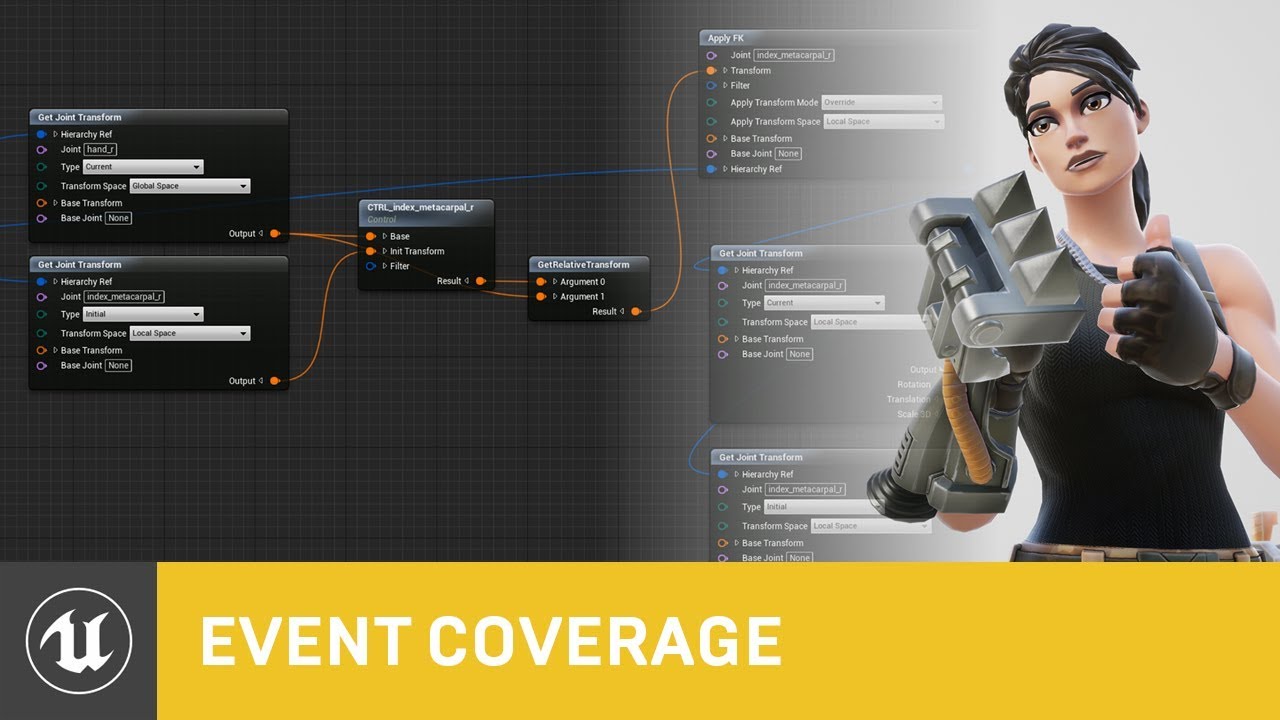
Control Rig is a highly flexible tool based on Blueprint that can be used to drive animation inside UE4. In this Unreal Engine Learning Theater session by Epic’s Wes Bunn during GDC 2019, you will get a look at the Control Rig system and learn how to set up a Control Rig Bl...
 untold glade
Greetings, someone Knows how i can make a Animation First Before doing a gamepause?
gray magnet
hey guys! whenever i import an animaation it's faced into the floor and laying down? can anyone help? thanks :)
i'm a noob sorry
/newb
actually noob and newb but anyways
misty dagger
@gray magnet This is the Z-Up vs Y-Up issue. Anyways, when you import your animation in UE, in the wizard menu you can tinker with rotations, I think. Some trial and error may happen until it's right 🙂
or just rotate the root components of your character , it's unlikely your character in T or A pose will actually be visible in the final version, only your character plus animations will ...
gray magnet
thank you! :)
misty dagger
@unkempt torrent he uses the phrases 'sneak peak' and 'hope to release.' try looking there😋
unkempt torrent
google and the market place didn't yield anything yet, so I wondered if anyone here got any info about it
 copper vine
Hey I'm trying to create an enemy animation blueprint and I want it to be effected by my VR characters grabs and such
how can i achieve this?
like blade and sorcery
 prime hemlock
Hey guys!
Maybe I can record the movement of the root bone of my animation in a curve? I want to use curves in my animations.
How to do it? Any ideas?
 lethal pollen
Hey there, please can someone tell me how to make a child AnimGraph?
I need to override an animation state machine
scarlet spade
Yo, anyone know how to implement a sort of
Skidding animation
where if a player is running fast and then stops
suddenly
it plays a smooth anim
I've got no clue, so any help would be greatly appreciated
 undone river
CAN SOMEBODY PLEASE TELL ME WHERE I CAN FIND TUTORIAL DOCS OR ANYTHING FOR THAT MATTER THAT EXPLAINS HOW I CAN ADD MULTI WEAPONS AND ANIMATIONS TO MY DEV GAME AND ATTACH MY WEAPONS ,CHARACTER AND ANIMATIONS TO THIS SYSTEM sorry about the caps didnt see caps was highlighted
scarlet spade
Yo, is it possible to make a one frame anim in UE4 based off of another one frame anim?
Like, move a one frame anim around and then use that as a new anim?
 tender flicker
does anyone use livelink with maya?
I'm trying to use it but when try to play the animation in ue4 through livelink, the characters rotations are messed up
the bones that I changed are fine but the rest of body looks like its lying down on the floor and upperbody is side ways
misty dagger
i am making a skeleton in Blender for a character that will only be used in UE4. is there an ideal number and layout of bones for this or does it not matter? anyone know a good resource for comparing the UE4 skeleton to a Blender one?
 torn tendon
@misty dagger check out the free Blender plugin mr. Mannequin. It gives you the rig.
 smoky shell
How do you get the correct pole vector for TwoBoneIK
It shouldn't modify my animation at all if its correct
Alternatively how do you compute it mathematically (say, to feed to transform (modify) bone)
misty dagger
@torn tendon that looks like a good tool. but i still have my same questions. do i need to have my blender skeleton have identical bone layout as the UE4 skeleton if I decide to not use that plugin tool?
torn tendon
You can have any skeleton you want. More you deviate (e.g. layout) more broken will be assets made for the Mannequin.
If you want to use such assets (e.g. animations) you can only add bones, not remove or reorder.
misty dagger
ah ok, so i should try to make it exactly the same
smoky shell
So does everyone using hand IK just suffer it breaking their animations 😐
molten jewel
the way two bone ik does the auto pole
it takes the entrant position of the elbow
forms a normal by triangulating shoulder (upper arm location), elbow (lower arm location), hand
uses that as a cross for the forward to build and orientation, then finds smallest possible rotation to the ik target from the entrant forward direction of locations
then rotates everything by that smallest rotation
rather
before it rotates everything it bends the elbow and upper arm to reach the distance of the target before hand
on the actual triangulated axis
when you have a pole target
it does this work then finds the nearest cross to the pole effector's location
smoky shell
I didn't know two bone IK did an auto pole? how do you get it to just apply that?
molten jewel
by not specifying a pole target
smoky shell
So set it to component space?
Ahh
Maybe I've been overthinking it all along
Hmm it still gets it very very wrong
Its expecting me to move the joint target
But I can only eyeball that, I want it to be true to the animation
smoky shell
I guess its expected, any time you're using IK, you're setting the pole vector to somewhere representative of what you want
molten jewel
the more it has to rotate to reach the less likely that elbow is going to look okay
smoky shell
Alright, need to rethink this altogether 😄
Suppose thats why they include a gun ik bone?
molten jewel
Like you could generate a better pole position in code (with relevant bones pose) before calling AnimationRuntime::TwoBoneIK or whatever
smoky shell
Been trying to
molten jewel
well
what i've done in the past is just strip out the little code in the actual function there
smoky shell
Ah they're doing similar to what I was trying to do
molten jewel
and instead of trying to guess a better pole target, just use the local already present for the axis and unrotate things that are obviously wrong
like if you think of the torso being a bounds that the elbow can't enter into, you could un rotate around the axis to the hand from the upper arm pivot to escape it.
though
wouldn't go with that for a solution, but you want to solve the same problem
smoky shell
TwoBoneIK never actually solves what JointTargetLocation should be
(That I can see)
Simply because its taken as input
Its a little sad that it can't give me an oriented gizmo here and just allow me to push it along the plane (ignore yellow cubes)
But thats the problem, I need the plane
And it does get a plane, but when everything is zero its a bit confusing
Or is it meant to be bonespace targetting the elbow virtual bone (or IK bone)
OK yeah
I'll give it a go
molten jewel
so if you think of the upper arm to the ik target direction
this is the direction the arm MUST point
the elbow is always positioned by a rotation around that exact direction/axis
so joint target location just infers that direction by eliminating that axis
ie
normal_to_target | (target-shoulder) == the distance to the ik target for hand
(pole_target-shoulder) - ( (normal_to_target | (pole_target-shoulder)) * normal_to_target) == the cross vector that the elbow must face
smoky shell
I think I got it 😮
I actually just copied the TwoBoneIK.cpp::SolveTwoBoneIK function like you said
Then moving it along the resulting plane
molten jewel
nice
smoky shell
The arms barely move so it must be accurate
Yesss it works
Thanks as always 😄
Well now I'm a bit confused @molten jewel ...if it has this functionality, why can't we move the pole vector along this plane in the node itself 🤔
Would be so much nicer
molten jewel
for accuracy
sometimes the pole is important enough enough to where you'd use a bone to define it in animations
but the default behavior doesn't make assumptions on if its a arm, leg or antenna
so it's pole handling is to just rotate it as little as it can
smoky shell
True
If I were them I would make a "Two Bone Arm IK" node specifically for this
But yeah 🤷♂️
I basically gave my copy bones node the ability to copy pole vectors separately with an offset
It does mean during blending it'll only get run once but it'll be accurate enough
And if its not I'll move it
molten jewel
yea i mean for legs, thing to do would be to take animated foot yaw into consideration with the ik target and blend the knee in difference by some fraction. like if the foot was told to twist
reef agate
Hey peeps can we have multiple bind poses in our dcc that we can import fine into ue4 or has to be one bind pose only?
molten jewel
ref pose yeah?
ref pose is always the pose the mesh file was imported at
so only way to have multiple would be to have actual individual versions of the mesh. a single frame animation is the closest you could get to multiple ref poses
 grave drift
Hey. I'm working on mounting a horse. I've setup the functionality to mount the horse and also control various gaits, but mounting is an issue for me. Character enters a mountable collision box at either side of the horse and triggers the mounting animation. However, the animation is off, and instead of interacting with the horse the player does the animation at a bad angle. Whats the best approach here? I based it off the mountable horses pack, but Im customizing it with a new set of animations and horse mesh.
I guess I want to trigger the animation and connect horse and player by some bone magic, but Im not too well versed in animation coding, especially when theres two meshes in the picture (as the horse would react to the player mounting aswell)
misty dagger
are you possessing the horse to mount?
grave drift
Yeah, possessing the horse after the animation comes through.
@misty dagger
@molten jewel The horse only has the MountingPoint, which is the point the mounting animation should end at (although I struggle to understand how to make the animation run towards one point). I did just come across a youtube tutorial on how to setup a car and driver with animations involved, so I'll check that out, it's pretty much the same 🙂
molten jewel
believe the answer will be more entry animations for more placement options but yeah sounds like you got it
misty dagger
i have want to understand how to make the animation run towards one point as well. i think with cars and horses i have heard they put a box in the car or horse and set the character in it. you need to make the character look good in the box. or am i way off?
grave drift
This is what I currently have; here you see the animation triggers at a strange angle, and is nowhere near the horse, even though the player is lerping towards the mountable location (a box collission spot right next to the saddly)
(dont mind the character thats getting decapicated, he tends to do that) xD
@misty dagger https://www.youtube.com/watch?v=HdiKVcoS6q8 walks you through it really neatly.

Hi guys!
I bring the third part of the Car System!
In this tutorial we will make this things:
00:06 - Teleport character to the start point of "Enter" animation
02:15 - Enter animation
05:12 - Attach the body to the car
06:16 - Drive animation
07:50 - Exit animation and fix a...
misty dagger
i like @molten jewel's idea of having rider bones on the horse. not sure if the bone magic idea of having 2 skeletons connect and disconnect is possible. the box method looks proven though. it looked like your mounting point is 180 off and you animation end is 90 off, and the head is all the way off in a nearly headless nick kind of way.
grave drift
Yeah, I tried rotating the mounting point to no effect. Not exactly sure how to solve the issue; it could be something code-based within the system I bought from MP that I dont understand yet, but the actor should end up staring at the saddle with its rotation turned towards it, and then the animation should play fine, but its not. When I play the animation as a standalone montage play it plays fine, no rotations etc.
The head is just me setting up a modular movement of the equipment pieces over to the horse, as Im hiding the ground character while mounted and possessed. Looks rather silly 😉
misty dagger
rotate box 90 on the horse, then you need to find another 90 in the beginning.
it seems like the horse from your animation and the horse from your scene are 90 off.
maybe rotate the collision box 90
 delicate junco
@grave drift I remember that Green wanted to do the same kind of stuff, he had another problem though but he probably solved it by then. Maybe you could ask him when he comes back https://discordapp.com/channels/187217643009212416/221798806713401345/623451323245002763
grave drift
Oh! I need to rotate the actor by 90* when mounting I guess. Maybe a lerp... hmm...
Rotating the collision box doesnt do much :3
misty dagger
i was thinking that too but i deleted that part
grave drift
OK, sorted the mounting rotation, but now I gotta tackle how to make the actor actually get on the saddle. whoo!
delicate junco
@grave drift I'd recommend using root motion for that
Provided your horses are all the same height and width
grave drift
@delicate junco Yeah, issue is that Im using a marketplace asset with no root motions for its mounting. I know Green made it work as its the same setup
misty dagger
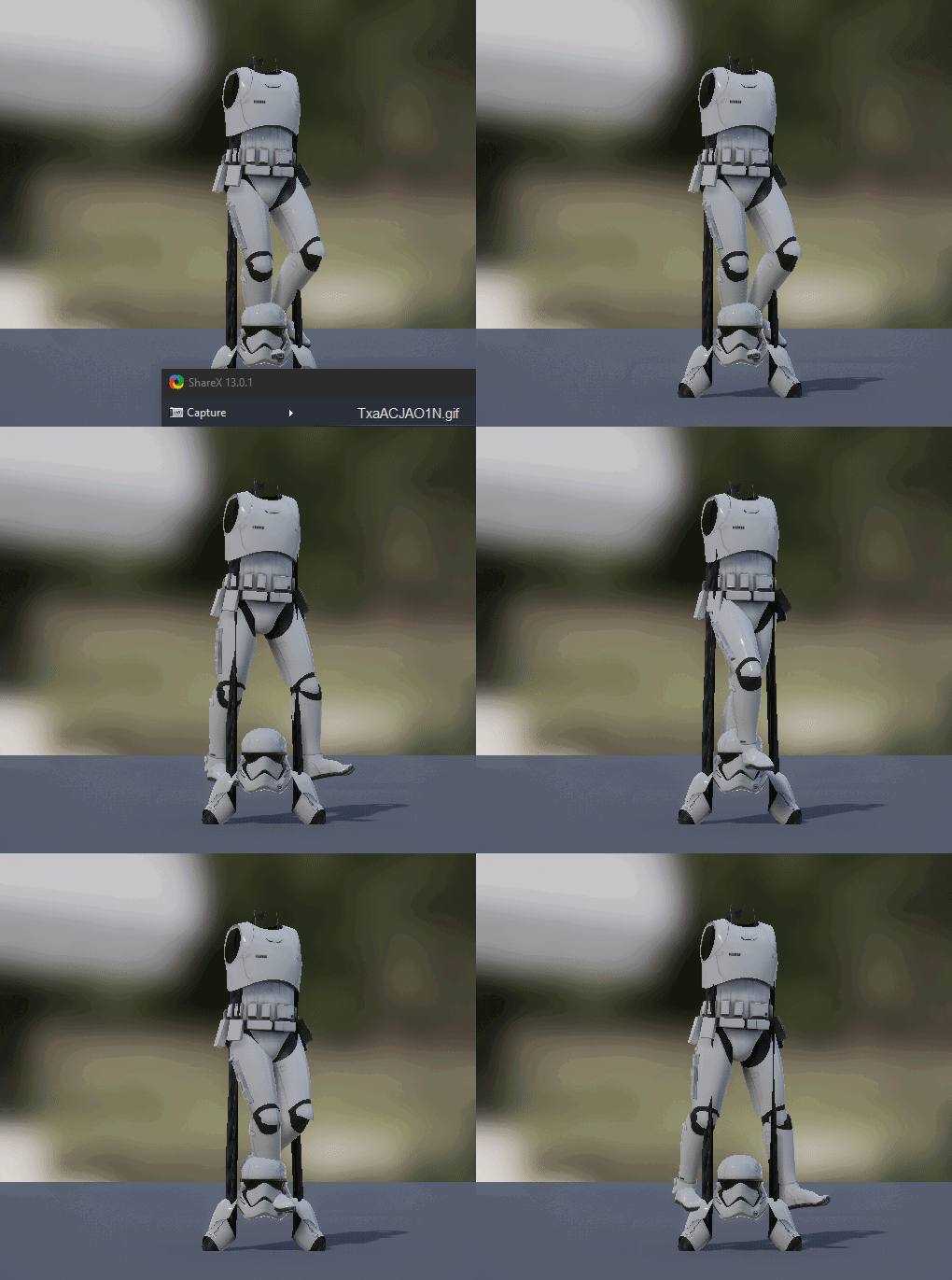
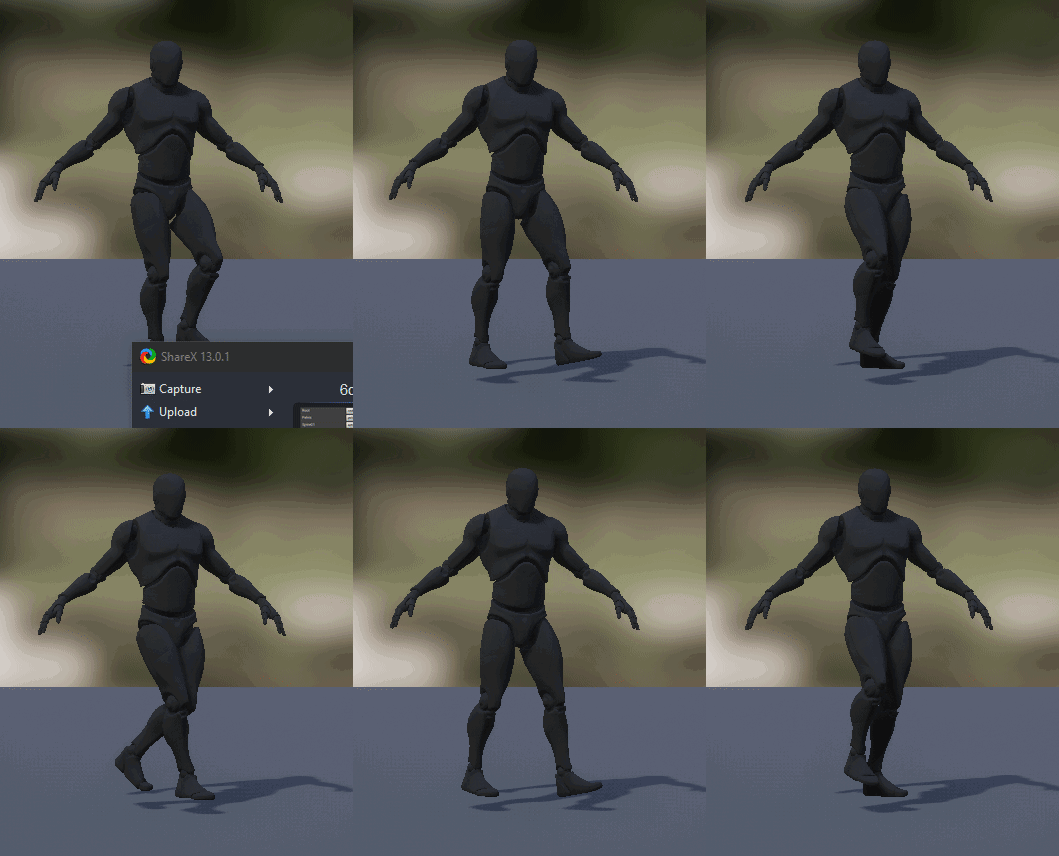
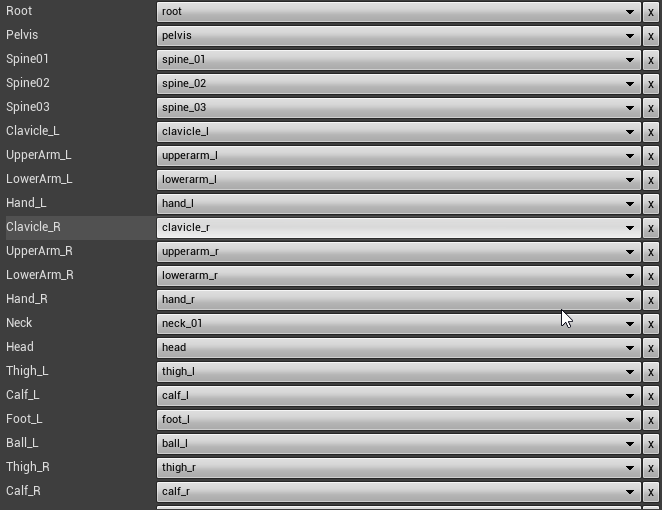
Hey guys. Anyone have any idea what went wrong here when retargeting? Both of these screenshots are taken from almost exactly the same angle.
https://i.imgur.com/hiG5Nn9.gifv
https://i.imgur.com/Fi5XILT.gifv
https://i.imgur.com/yaqQnir.png
 torn tendon
Looks fun
misty dagger
Yeah...
@misty dagger two Possibilities come to mind: bad skin modifiers and/or Bad bone mapping... There may be other reasons
It all works fine in Blender, so I'm pretty sure this is strictly a retargeting issue. Not the first time, either...


I had similar problems before, mostly bone mapping was screwy, in the sense that what I thought is the right bone map, Unreal disagreed 😄
Hmm
Those clips are showing that the weighting is fine, if you were wondering why I shared them
Just take your time, and trial and error...
torn tendon
Check the advanced retargets also seek thro your skeleton retargetting opts (anim vs skeleton vs anim scaled)
misty dagger
What is the difference between the three? Right now everything is set to "animation".
torn tendon
Describes how retargeted animations can be used with multiple Skeletal Meshes, allowing you to share animations.
misty dagger
Usually this one does the trick for me
torn tendon
Mostly you want skeleton
misty dagger
So most of the bones are set to skeleton, in my case
except root, and the immediate one in the hierarchy
animation scaled basically means that if your meshes are of different size, like dwarf versus elf versus human, I think
Thanks
Give it a try and let us know if it worked, I'm curious too 🙂
https://i.imgur.com/NuCOM0i.gifv
Holy fucking shit, it worked! Thanks a lot, you have no idea how many projects I've given up on because the retargeting wouldn't work right and Google wasn't much of a help.
I learned my fair share of retargeting by working on this 😄
Heh
 patent cargo
Hey, How would you accomplish having different animations for different weapons? Do you define them all in the AnimationBP or do you guys know a better solution for this? (Like defining the asset as UPROPERTY on the weapon or smth)
 grave forge
Anyone out there using different skeletons with the same animation state machine somehow or handle this limitation? It seems impossible to re-use the anim state machines across different skeletons. Which presents a severe maintainability issue, wondering how you guys solve that problem.
Usecase: same "type" of character with the same transition logic and such within the state machine (which is why I want to share it), but with a different anatomy that calls for a different skeleton.
 proven quarry
hey, I'm struggling with Animation Budget Allocator plugin, it works, but crashes when unregistering a component (e.g. when a character is destroyed). any experience with it? thanks.
(I get an array item out of bounds crash)
 tardy stag
Hey everyone, how (where) do I get access to AnimationMontage notify events? The ones in the animation appear in AnimBP, but the ones in the Montage are nowhere to be found. Thanks!
delicate junco
@tardy stag You can create some animNotify Blueprint and put the logic you want to be executed directly in these
Then you'll just have to place instances of these notifies on your timelines
tardy stag
@delicate junco Thanks, I figured they don't register as events in AnimBP (for some reason)
delicate junco
Ah ok that's funny. Never put some montage notifies logic in the animBP so I never noticed that
Here's a complete workflow https://discordapp.com/channels/187217643009212416/221798806713401345/654360628106100746
(replace notify state by notify if you want a simple notify)
tardy stag
Either way, I've got two (for now): 1. Impact moment of the anim (it's an attack) named "Hit". The 2nd is particle effects (which will play on the target, not attached). So, I'm trying now to see how to implemment both...
The third is a sound which will play attached since it's top down, close-quarters so localization isn't a problem. Just wished I could trigger everything from the montage, would have been cleaner/easier in some way
delicate junco
-impact moment should be classic notify on the timeline, it's all linked to the character so no problem for that imo
-2nd particle effect would be like a blow particle representing the hit I suppose ? I'd handle that in the target's function which handles the damage. You could for example retrieve the hit location and spawn the particle effect there
tardy stag
It's way simpler than that - JRPG, The particle spawns on the target since most times, melee attacks won't even get near the target, it's just a "convention" - you know...
delicate junco
Oh ok, didn't know that was an rpg lol
tardy stag
Yea, for some reason, Disciples 2 (turn based/no movement for units) is called "JRPG" xD
I'm doing the same type of combat system
So, long story-short. Would something like this work?
Will it switch based on notify name or I got the whole thing wrong?
delicate junco
Yeah that should work, try to do some print statements to make sure
tardy stag
Aham, thx 🙂
delicate junco
I do something similar for my abilities
But I use events and event tags, I plan to switch to notifies by name like you though
Since my notifies send a gameplay event so it's pointless to go through events lol
tardy stag
Pfff...wtf
1st is HIT, 2nd is Effect
The code always returns 2nd first... -.-
Nvm, it doesn't... Print was too slow lol 😛
@delicate junco Thanks for the hlp and ur time 🙂
grave drift
Hey guys. So I want to sync the animation between my horse and the rider, and to do so I figured I had to make one blendspace for the horse animations and one blendspace for the rider animations, with the same values, both for direction and speed.
Then I made a variable in the rider anim BP to call the horse's anim BP in order to call it's speed and direction, so the values match. I'm blending my character's animations by a blend by bool to determine if he's mounted and should use mounted animations or not. It's not really working.
Here I'm setting the bool: https://gyazo.com/e9f30954564a4f3c69b8c9fe2e1ad9b3

Here I'm blending the animations with that bool

https://gyazo.com/8411c8bf072b4920c71d42b0b0fd3441 calling the horse anim BP's speed & direction

But I'm getting an error that it accessed none when trying to read the variables Horseman and Horse.
I think the issue is that Im not refering the boolean correctly. Would love some pointers 🙂
grave drift
How would I call the horse's speed & direction and sync it with the player's speed & direction to sync the two animated meshes? I'm possessing the horse when mounted, so I can't gather direction & speed for the anim BP of the player, or is that no the case?
tardy stag
@grave drift You should try getting the speed and direction from the Horses' Char/Pawn BP and its movement component, not from its animBP
 shy citrus
Hello! I have a little Problem
how can I fix it?
tardy stag
@grave drift like this:
When you mount, create a ref to the horse. Then, ontick or something, get those values and plug them into ur animbp
@shy citrus Check physics asset first. It may be some collision problem
@shy citrus I remember I had a similar problem a long time ago, but I can't remember what it was 😐
shy citrus
thanks for the fast respons! the physiks asset has no collisions
tardy stag
@shy citrus Hm...did you make the anim urself? are you sure there isn't any bone scale transform happening there too?
grave drift
@tardy stag Thanks a bunch! Its been a long time since I worked on my project and Im feeling out of bliss haha :) How do I convert the vectors to my float speed and directions?
tardy stag
break vector >> make vector 😛
grave drift
😄 whew, its getting warm in here
tardy stag
But then again, the "direction" can't really be a "float"
it needs to be a ...vector 😛
grave drift
Hmmm... it's a float in my horse BS, which was based on a marketplace BS of a similar system
tardy stag
oh, in a blendspace...
the blendspace only "blends" between 2 anims based on a float...yea. Well, I'm not sure, and while my BP expertise is decent, anims aren't really my cup of tea, that's why I'm here, been looking for hlp myself 😄
however, you could debug the game while it's running and see what the vector output is, and try plugging axis in there, see what happens. That's where i'd start
grave drift
Haha yeah, appreciate the help a lot 🙂
tardy stag
No prob. Sry couldn't help more.
grave drift
Eeeh, so I got this logic in the Event Blueprint Update Animation, which is where im collecting the variables you mentioned and trying to store them for referance in use of the blendspace (using vectorlength as im at a lack of figuring out what exact methods to get the right values; i'll play around with break vector tho! 🙂 )
 tardy stag
That should work...I'm not sure what the "vector length" translates to in "direction"
Now, here I go: Any idea on where to start in order to synchronize two anim montages? [Attacker] AM_Attacks (AnimNotify_HitMoment); [Defender] AM_Blocks (AnimNotify_BlockMoment). I can't just manually "adjust" them, since I'll have many units with various animations - that won't do...
shy citrus
its no animation i´m just turning the bone in the editor
tardy stag
I could only think of a function which calculates how much time has passed since the animation began on the attacker until the notify; then stretch/compress the other animation according to the attackers. Would that work?! ...somehow 😐
@shy citrus I meant Skeletal Mesh 😛 sry. But yea, ur right...that's weird. As I said, I had a similar problem, but I can't remember what it was. That tank should be skinned flawlessly, so...idk
shy citrus
it worked today but then i reimportet it ☹️
 amber flicker
I have an animation of a baseball bat swing, when it plays the bat comes back to it's starting point
can I flip it so after every click it swings in a diffirent direction?
delicate junco
@amber flicker You have an anim per diferent swing ?
amber flicker
Yeah, one anim for left another for right
delicate junco
Just to make sure, you want to play one random anim between the two every click ?
amber flicker
Basically when one anim finished I want to play the opposite one
delicate junco
I don't know an elegant solution to that (weird that it doesn't exist) but I may have a working setup, just a sec
amber flicker
alright
delicate junco
Ok so basically, create a bool named rightswing which will transit from idle to right if true, or from idle to left if false
Click on the double arrow representing the transition from rightswing to idle
On the right parameters' pannel, set an event and give it a name
Compile, the event will now be called when making the transition
Go to the event graph, add the event and make it change the bool's value
That should work hopefully
amber flicker
What is that in the 1st pic?
Do I create a separate blueprint?
 potent wolf
Hello, just looking for a guide on how to setup a fully working animation BP for a character and any blendspaces aswell. Fairly new to UE4 and could use a guide as i've never dipped into this section of UE4. Youtube isn't cutting it really. Any written guides out there? Thank you in return 😉
delicate junco
You could also do a montage with the two anims, with a play montage node that'd take a number to choose between which sections to play
Best way to get started imo
amber flicker
@delicate junco I got up to the 3rd pic, how do I get the Anim notify nodes in?
delicate junco
Create the transition events, compile
Then go to the event graph
And right click, start typing your event name
It'll appear
tardy stag
Any idea on my question about synching attack and block anims? 😦 They look off... How would I synchronize two notifies from two different AMs on two different chars? 😆
C'mon @delicate junco you helped before 😛
delicate junco
Do you have a link to your question ? I missed it lol
tardy stag
Any idea on where to start in order to synchronize two anim montages? [Attacker] AM_Attacks (AnimNotify_HitMoment); [Defender] AM_Blocks (AnimNotify_BlockMoment). I can't just manually "adjust" them, since I'll have many units with various animations - that won't do...
dunno how to "link" in discord xD
amber flicker
I can't see my anim blueprint?
tardy stag
@amber flicker https://www.youtube.com/watch?v=fkbftFEEmx8 - Follow this series, it's what you want
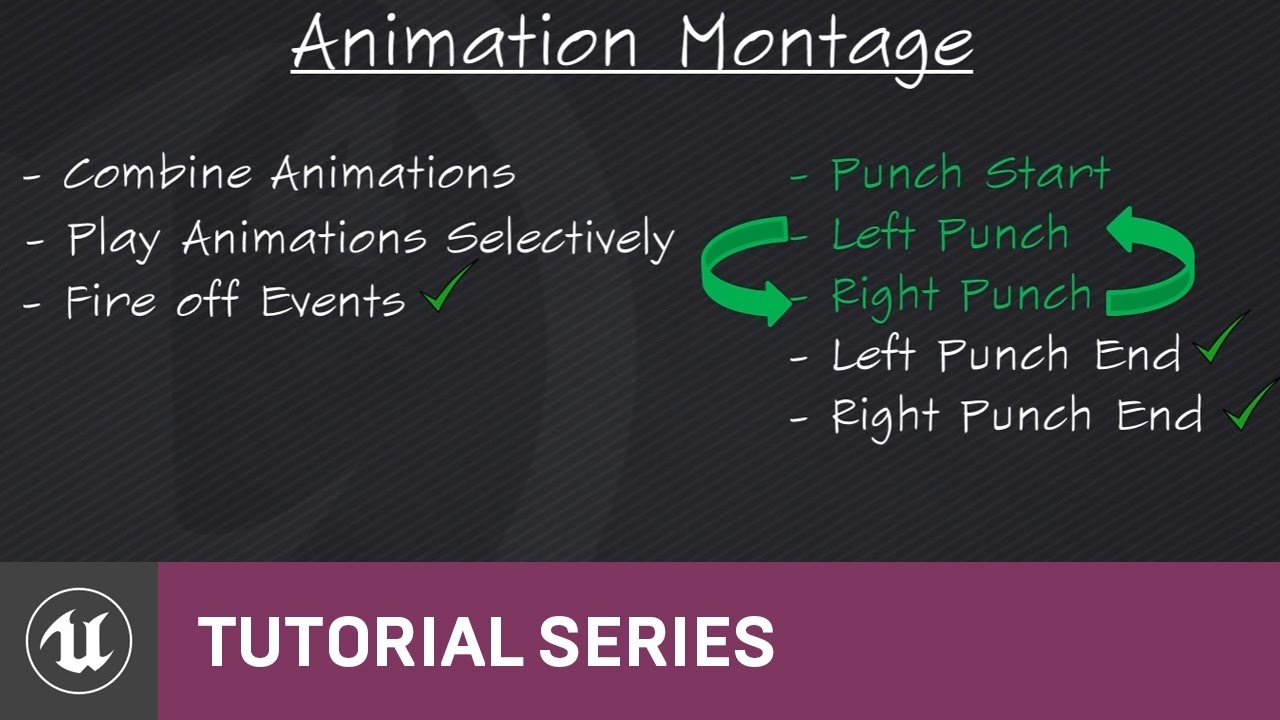
(00:05) - Intro to Animation Montage
(02:34) - Setting up the punching system
(04:35) - Recap and wrap up
There are many other videos in there, in this tut, they make an anim bp from scratch which does what you want + punches, everything. Watch that series, it's the basics of animation in UE4
delicate junco
Yeah that's the montage approach I talked about, it'll probably be better
You should have the event if you added it in the transition event and compiled, that's weird
Thinking about your question claudius lol, just a sec
delicate junco
i'd use something like this https://docs.unrealengine.com/en-US/BlueprintAPI/Ability/SendGameplayEventtoActor/index.html
Send Gameplay Event to Actor
amber flicker
ty for the help
delicate junco
basically you'd send the guy which has been hit some event tag "bit hit, small hit, etc" and then retrieve this info from the actor who has been hit and play an animation according to that
Payload may be used to give additionnal info like damage etc
tardy stag
Ye, not using Epic's Ability System...But the problem is not communication, it's animation really. The "block" moment occurs a little too late, so you don't get that "impact" feel you should
Should I just adjust manually and basically "cut" the animation so it comes closer to the attacker's?
delicate junco
Hum you could use a notify to specify when the enemy's anim should start maybe but it'd need to have some reference about the target already
delicate junco
Ah lol, well that's a good approach I think. So yeah I guess you'll need to adjust the notify manually for each anim to make it feel good
I don't really see a way around it
Ask pat when he'll be around though, he's way better than me lol
tardy stag

This is what I mean
Anyway 😛 thank you very much for ur time & hlp @delicate junco 🙂
delicate junco
Oh ok I see ! Np, didn't help that much sorry lol
Good luck for your game, looking nice already ! 😁
grave drift
Hmmm... anyone got any suggestions on what to do to my problem some posts above? Stuck 🙂
 potent gazelle
anim dynamics node makes my bone chain very thin. is there a way to fix that? i cant find any scaling options for it
potent gazelle
plugging in an idle pose to the component pose input in the anim dynamics node doesnt fix the problem
smoky shell
I never got good results from anim dynamics, haven't looked at a tutorial and the settings are seriously involved
But.. I think you'll need a tutorial 😄
potent gazelle
I was using a tutorial....
slate olive
Hey when I’m make an aim offset should each rotation start at the same bone?
For a human I’d say yes, but I’m not sure about an animal with a long neck
grave drift
Guys, does anyone have any suggestions on how I can sync my horse and it's rider's animations? I've made a blendspace for both with the same values, referencing float speed and direction. I'm blending by bool in the rider's anim BP if he's riding or not, and then running the blendspace. However, I'm not collecting the horse's float values correctly and I'm struggling to get them correctly.
I think I'm struggling to get the values of the horse to the anim BP simply because I don't possess the rider when he mounts the horse, and therefore don't reference the anim BP anymore, since then I am referencing the horse anim BP? Hmm...
grave drift
Oh yeah, that's exactly what's happening. I'm not running the anim BP anymore when mounting the horse... eeeh, how do I work around this?
 balmy plaza
I'd be tempted to have the horse set a new anim BP for the character model while they're riding
One that is specialised for horse riding things
I'm a little confused as to why the original anim BP stops working though
It should still run even when the Character isn't possessed
 dawn salmon
in terms of humanoid IK, what is everyone using to make it work? I made my own system but I'm curious if I could optimize it
 mighty roost
hey guys, sup? I'm facing a problem with my state machine. Right now animations have the Idle->StartMove->Walk/Jog/Sprint->StopMove->Idle logic on the state machine. The anim sequences and blendspaces are switched according to the equipped weapon. For the unarmed one, it's (almost) everyting working fine, however it looks like the StopMove blendspace it's not playing for a specific weapon and it doesn't look like the problem is on the blendspace(I double checked it).
misty dagger
@mighty roost Perhaps you can double check your transition rule. I have a similar goal, somewhat, and my state machine works fine
mighty roost
oh you used different state machines for everyone of them
I created a class to hold all the animations and I'm switching variables inside the animBP
misty dagger
@mighty roost My approach may not be the best approach, is just one way to do it 🙂
you can also take a look at the latest linked animation blueprints in 4.24+ https://docs.unrealengine.com/en-US/Engine/Animation/AnimHowTo/LinkedAnimBP/index.html
Illustrates how you can dynamically switch between subsections of an Animation Graph.
It appears to be a more modular approach using the linking, and it cleans up the clutter visually 🙂 @mighty roost
mighty roost
thanks for the tip adlum
mighty roost
I still don't know if the problem is on the transition, cuz I'm seeing now that the state is being played, but not properly
 warm zinc
but I don't know how to make it happen in like small pieces
warm zinc
anyone can help me with a bit of animation BP?
 winged mulch
Blender to UE4 Setup Question - Hello everyone! so currently I'm playing around with a character rig that primarily uses 3 bones to connect a separate weapon armature with:
- Right Wrist IK that the weapon's grip IK constrains to
- Left Wrist IK that IK constrains to the barrel of the weapon
- Weapon bone that the base weapon becomes an object child of
Is this something I can recreate in UE4?
grave drift
I made it work btw 🙂 It works just fine
https://gyazo.com/ea2d6d0f8627bdf53207b5b6a3e078ff @misty dagger

 delicate junco
@grave drift Awesome, looking great !
dawn salmon
anyone good with IK here?
grave drift
@delicate junco Thank you! @misty dagger 🙂
 obsidian current
Can someone explain to me how to fix that bug? Stop goes to 100% but it doesn't play until i press another input key, them get kinda broken
@delicate junco Any clue man?
 halcyon haven
so I'm not very skilled with animations, and I just got the hang on blendspaces. I've got a blendspace for my characters normal movement which works flawlessly, but when I imported new crouching animations and created a blendspace with them, my character just flat out disappears
and the character only disappears when I use any of the crouching animations
delicate junco
@obsidian current Nice progress on the cloth, looks really nice ! All with rigidbodies ?
Uh that looks really weird, never saw something like that, maybe some weird blend values ? Did you put the blend time to 0 for the transition ?
obsidian current
@delicate junco Thanks! I'm using a standalone plugin called KawaiiPhysics to make it work
Didn't managed to get rigid bodies working on her (even tho i tried lol), but the plugin use pretty much does the very same thing
 torn relic
Hello guys, I have a question about Navigation Volumes.
For what I've understood, you can control where AI and player can move by means of NavMeshBoundsVolume + NavModifierVolume, thats fine.
But if you place any object, like a box, onto the NavMeshBoundsVolume it automatically creates a "navigation hole", so why you still need NavModifierVolumes?
halcyon haven
nvm I figured out my issue, I got confused when making my blendspace and made my animations additive
delicate junco
@obsidian current Ah nice ! I checked this plugin, it has colliders too ?
 low hawk
Can anyone tell my why only half of my animgraph is working?
grave drift
Do you guys see what I'm doing wrong here? https://gyazo.com/5ec1dd6da0b20381e60fa2e7381721be

https://gyazo.com/662065a0d2e83b837104676644e8daa5 Getting accessed none errors

https://gyazo.com/7fe454478e1a569c3133f17426e0ee20 Calling the variables from the actor in Blueprint Update Animation

 manic whale
Hi. Is any one experienced with procedural physical animations. Im in a studio and we're trying to figure out if its worth to switch to physically based animations.
 copper dawn

I'd like to formally announce Animation Sherpa, opening January 20th! For more information on the school and to download the free #BaqirRig, visit https://t.co/ITHOnV7SUO
Retweets
160
Likes
615

 Twitter
halcyon haven
Twitter
halcyon haven
I'm not sure how to put it really, but essentially what I don't know how to do is blend my shooting, reloading, and grenade tossing animations with both my walking and crouch walking blendspaces. is there a way to do this?
reef agate
are there any docs on control rig changes in 4.24
it seems VERY different
no more hierarchy reference and control unit nodes are renamed or something
 fickle yoke
where does a newb like me start in animation? I just want to try basics, like character.
 turbid vapor
id check youtube
also anyone else having problems with importing blender animations to ue4? i'm using blender 2.8
like my animations arnt effecting the model at all
 astral heath
When exporting an anim sequence from UE4 to Maya, is there a reason why Export Animation Data would produce a different (wrong) result than Export Preview Mesh?
In the case with Export Animation Data, the right shoulder is very low and dislocated.
low hawk
also anyone else having problems with importing blender animations to ue4? i'm using blender 2.8
@turbid vapor
Been having trouble with this too. Ended up fixing it by scaling the skeleton by 100, applying the scale, scaling by .01.
This way the skeleton doesn't change size, only the measurement is changed. This is a requirement for exporting from blender to UE4 because of the difference in unit sizes.
 cinder linden
hey guys is this error related to weight paint? https://gyazo.com/46490dee9a2494d51f873bb2e6fd171d

 silent finch
Hey is anyone available to help me out for 2 minutes with an animation problem pleaseeee 🙏😞
cinder linden
Hey guys I' m trying to add the running animation only to the legs what am I doing wrong here https://gyazo.com/13de21b9ff87c7ee7084009458f9b60a

when the locomotion is on the base pose he only moves the arms but when I change it to the run he move the whole body
turbid vapor
well my problem was my animation would show up as either invisible or it wouldnt effect the model at all
funny thing is I figured out a way to fix it which was to rename the armature to something other than armature...........
and so far everything seems to work great
 lilac depot
@cinder linden looks like you are trying to blend from spine_01 up in your blend per bone. Try blending by thigh_l and Thigh_r
cinder linden
@lilac depot yeah I ended up doing by thigh and adding the extra node thanks
lilac depot
@cinder linden Sorry I couldnt have responded earlirer and saved you the time. Glad you sorted it though
 rustic swallow
Hi, Is it possible to export a non-skinned animation in FBX format
I am using 3dsmax, and want to export a rigid body anim (bend animation), Can I only do that with ABC frame cache?
 tulip slate
anyone know if you can get back the old destructible mesh features on 4.23 not the new chaos system
misty dagger
does anyone know of any videos or know how to take a custom mesh that u made, and combine it with the UE4 mannequin skeleton?
cinder linden
@lilac depot no worries man I appreciated it anyways 🙂
 outer garden
There's nothing on google on how to create a rig such as the Humanoid Rig for retargetting purposes. I want to create one that is greatly expanded for our custom models. Does anyone know how this is created?
 spare otter
Would you guys say that having left/right aimoffset animations are 'not useful' if you have Use Pawn Controller Rotation Yaw set to true? [because every time your yaw changes your char instantly rotates to face direciton as opposed to it just aiming off to the side]
 zenith oyster
Is it possible to somehow create aim offsets without having poses that points up and down, and instead somehow modify the existing pose ?
Thing is, i got a bunch of first person animation for a full body character, but theres no aim offset poses with them.
 heavy needle
@zenith oyster you can set keyframes in the editor. just duplicate your animation and set your pose. its the button with the plus sign in the top row. @spare otter Im not using it in my current true fps project and I dont see why I should use them but you might need it for a shooting AI for example and for a third person player. it looks better with it.
zenith oyster
@heavy needle Thanks man, will give it a shot, and most likely end up here again asking for advice ;p
heavy needle
@zenith oyster I think so as well lol because its a bit tricky. so no problem.
 winged violet
Is it best practice to only use montages for one off (not looping) animations like a jump and use blend by bool + layered blend in the anim bp for anything indefinite (looping)?
For example having a characters right arm waving while having the left fire a weapon
smoky shell
Anyone know if you can interpolate between the frames on an animation node, anyone ever done this?
slate olive
Has anyone used the Allright Rig plugin? If so what are your thoughts?
spare otter
@heavy needle thanks for the info! It's true it does look better
 lean tiger
Hey all, I have an issue I just can't get my head around maybe someone can help.
I have all the characters of my game on the UE4 Mannequin skeleton. However one of these characters have high heels. Now characters with high heels have issues with their feet but it can be fixed by setting the retarteting options of the foot to Anim Relative, which does the trick (as shown in this tutorial https://www.youtube.com/watch?v=CzbzRevmOhc). Issue is when I fix my character with high heels, it breaks the animations on the feet of all my other characters who don't have high heels because their feet are then also set to anim relative as it's the same skeleton. Is there some kind of sorcery to have different retargeting options for different meshes on the same skeleton ? I couldn't find anything online.
 opaque meadow
anyone able to see where im going wrong with this, the animation seems to be playing correctly as im using animation notifies for the linetrace from the gun, yet the animation doesnt seem to be visibly playing at all...
(Trying to use layered animation blending to be able to play my firing animation on the upper body while allowing the lower body to still play the walk/run/ect animation)
 past tusk
Hey should be obvious, but once a mesh, skeleton is imported with an animation, from blender, How can I import a second animation?
lean tiger
@past tusk just drag a new fbx animation file in UE4, you will be able to choose which skeleton to assign to it and choose your skeleton
past tusk
Ah you can save as just the animation? I'll look into it thanks
heavy needle
@opaque meadow there is a "blend in" option in your anim montage. its set by default to 0.25 which is barely noticeable if the duration is short. change it to 0.1 or 0.01. that should work.
 signal otter
anyone have any good example projects or otherwise that implement root motion on paragon models?
and if i import 3rd party animations should i retarget paragon anims to ue4 skeleton or retarget 3rd party stuff to paragon skeleton
tried implementing the paragon anim bps from scratch (and it kind of works) but i feel like my solution feels janky and wrong
 steel tree
hey guys anyone can help me so im trying to create mount and ive done when player overlap with horse it will attach to the socket for rider and thats work but the anim for that state wont play
anyone know how to fix this
signal otter
your forest scene looks really good
anyone know why stat anim shows 20ms+ executing the animgraph when im using a standalone client but like 0.1 ms when im playing in editor
 tranquil willow
could anyone help me with an aim offset issue? My aim offset becomes empty when I add certain animations . The skeleton and mesh are there before an animation is added and is still present when I put in the preview base pose. But when I put an animation into the blend the mesh disappears.
I can put the animations into a blend space just fine if I change the animations back to being non additive.
 mellow urchin
anyone got information on how to use corrective shapekeys in ue4?
 naive ferry
would anyone know what could be causing this? https://i.imgur.com/MeV0FMd.png
 frozen pecan
is there any way to loop an animation montage?
 restive yew
Sure. From On Complete > Play montage
I'd at least do a branch so you can set a looping boolean
frozen pecan
face palm why didnt i think of that I could just play montage then have an int var add 1 to it and loop the montage until the int becomes the number i wanted hmm 🤔
restive yew
If you want it to loop a set number of time, that's definitely the way to go. The node you'll want is called DoN
restive yew
heh
Nodes that allow for controlling the flow of execution based on conditions.
Just make sure you're using the right ani montage node. There's a similar one with less pins and far less useful
molten jewel
Every time someone has questions about montages i'm lost lol. Sounds pretty cool and straight forward though
misty dagger
Hello all! I have a system set up in Blender involving the animation of a wasp. The root bone is detached from the mesh and I have a 'body' bone controlling the thorax. When the player moves up or down, I want the thorax to tilt up or down, so I want the up/down input to be a parameter controlling the tilt. However, in my flying animation I also want some occasional thorax movement which I would want to be additive with the parameter driven tilt. How would I achieve this?
steel tree
anyone can help with my problem above
scarlet spade
Yo can I get some advice on how to improve this please
In terms of animating
I'm thinking of putting in swing exit animations so it isn't as jarring
heavy needle
@steel tree what do you mean by "animation for that state wont play"? the state machine does not switch? it looks to me that you say after the cast to mmoplayer node, set mounted to false due to that other "PCMounted is not" thing. you should get rid of that "not" its confusing.
steel tree
i already did that multiples times but when i remove it it will fix it and it wont go to mount state but when i overlap and go to mount state it wont play the anim
heavy needle
what do you do with that PCMounted in your player bp?
 delicate geyser
I made facial animation using Shape keys in Blender. How do I export my skeletal mesh with it's skeletal and shape keys (facial) animation?
 simple star
Hey all, I'm having some trouble with feet IK looking odd... they are fine when pointing down :
but they look wonky when pointing down
I've tried rigging it so the foot is a gradient but the result is even worse
manic whale
Hi. any of you experienced with physical animations?
simple star
tips ? Am I looking too deep into it ?
 wraith sky
I've just started on Unreal, and I'm taking a slow approach with it all to understand what I'm doing. I'm working on with a female character, but when I apply an animation from the "Shields and Swords animation pack" she looks like this; https://i.gyazo.com/8032416c7e08afe74fc859951f68fc33.png
When I use Magic Animations on her, her body works just fine and there is no issues. Could someone point me in the right direction? Thanks!
 molten jewel
@wraith sky animations in ue4 are stored independent of ref pose
so the actual biometrics of the character (translations in bones) is something that is inside the animation
however, you can set certain bones to wholly ignore translation, from animations
you enable the skeleton settings on the heirarchy view, and set these kinds of bones to 'Skeleton' on their retargeting mode column thing.
that will make your female proportions stick better. but keep in mind that bone orientations are the same thing.. so any slight variance in roll of the bind pose to the bone and vertices will show up
legs for example. if the ratio of thigh to calf length isn't the same on the character, foot height, etc.. This may result in the feet not touching the ground.
wraith sky
ah, thanks!
I managed to fix it @molten jewel thanks for that btw.
However I now have another issue lol.
I setup a new SHIFT sprinting/running toggle however when I press shift my character runs but after I release shift she goes to a slower running animation and she doesn't return to the normal walking one
molten jewel
are you using root motion @wraith sky ?
slate olive
So I’m setting up my rig with Allright Rig and it’s telling me that spine 4 is not a child of spine 1?
molten jewel
@wraith sky is it only the animations that are slow? or is it the actual movement
wraith sky
The movement is fine, it's just when he's at 300 speed which is the walk speed, he continues with the running animation
even though the running animation is set 600
molten jewel
then its something wrong with your transitions
you'll want to look at the criteria for re-entering the spring and find out why its not being met.
wraith sky
how would i view that
molten jewel
While playing in PIE
you set the debug target inside the animation blueprint editor to your player
then watch the state machine lines
the lines its not going throuhg that you expect it to should then be observed for their transition rules. Then check the values of the criteria and see what is not allowing it.
 dapper trench
Anyone know of a decent summary on how to sync 2 skeletal meshes together with separate animations? I'm starting to add animations to my zombie grabbing the player, and currently I'm planning to do it by having both skeletal meshes snap to the same position, then use root motion to offset the zombie infront of the player. Anyone know of any possible issues with this approach?
In theory the root motion will keep the capsules in sync, and since both animations are stemming from the same place, it should avoid any separation issues
wraith sky
@molten jewel managed to fix it. I just needed to change VectorLengthSquared to VectorLength when converting the velocity into speed
molten jewel
if any moderator wants to pin the above message, it would do a service to the community haha. That one video tutorial tells everyone to use squared
wraith sky
yeah ^
molten jewel
"I can't find the blue version of this node i need"
search youtube
it tells me to definition just use the green version of this node, and to definitely use length squared instead of length lol (where one of these pieces of advice are wrong)
for what its worth @wraith sky i do think the intention was to use VectorLengthXY or something
which would not account for falling
 fair estuary


I'm using mixamo animations and model, do you know how can i prevent the sliding effect when walking ?
 tight raft
why isnt my skeleton showing up when i want to retarget an animation?
molten jewel
@fair estuary you'll want to figure out how much distance is being covered in any directional walk first https://youtu.be/RQAASp1mJXo?t=37 you can use something like a tredmill or just try moving an actor at some rate per second (:37 to 1:30)
Once you know the distance covered, you then use that to find proper timing/timescale parameters so the foot looks planted properly.
Blend spaces scale things together by percent kind of when you use sync points. So you want to make sure all the things in the blend space are the same number of steps. Use sync points like further in that video, Then you position the point value on the blend space by how much distance is being traveled divided by the duration of the animation (speed). Its pretty important you at least match a ratio of an animation. such as if the fastest strafe is 300 and slowest is 100, the fastest should be 3 times as far away from zero as the slowest.
Also, your diagonal strafing looks reversed
dapper trench
@tight raft there is an additional step that needs to be done before your skeleton can be ready for retargetting.
tight raft
nah man i got it figured out
dapper trench
awesome! I was just searching for the button
slate olive
So I’m going to animate my models using FK. Is it possible to overload my animation with keys if I take it one segment at a time?
dawn salmon
hey guys, would there be any reason why a skeleton doesn't show up for retargeting?
or when retargeted it doesn't show up in the content browser for the anim graph?
slate olive
can I pull up a graph similar to this one for game character animations? The video is from the allright rig YT channel
 rapid sable
has any of u guys had that problem that rig imported to unreal is divided from the mesh ? Maybe im doing something wrong? maybe my presets are bad
this model and rig belongs to milos cerny - i downloaded it and i wanted to figure out proper workflow for 3ds max - unreal animation and rig .
But looks like unreal divides them into two pieces, not one.
misty dagger
its fbx?
rapid sable
yes
misty dagger
what the configs ure using to import
rapid sable
@misty dagger one moment, my unreal crashed
rapid sable
@misty dagger my import settings are on the first screenshot
which i posted
but i will reopen and try them again
@misty dagger my settings
and my error. Unreal sees the rig as mesh. He wants the uv's for them
misty dagger
and how the mesh looks now?
misty dagger
try in the import select the skeleton
that has the bones
your fbx file isnt properly setup
rapid sable
@misty dagger u mean like this? i deleted my meshes
so i have nothing to choose from
rapid sable
this is my export from 3ds max
misty dagger
you need export the rig and mesh in a single object
if ure getting rig separated from mesh
it mean them arent binded into a single one
rapid sable
@misty dagger i select everything, except platforms. Cuz i was told in tutorials that they should not be selected, when exporting rig. So wolf is selected and the rig.
misty dagger
yes
rapid sable
Would you like to merge all SkeletalMeshes using this skeleton to ensure all bones are merged? This will require to load those SkeletalMeshes.
again yes ?
misty dagger
yes to all
rapid sable
i have errors all the time now
silent finch
Hey does anyone know why my animation is going into a normal walking animation after attacking? instead of the zombie walk animation ( arms raised )
 frosty peak
@silent finch If your zombie walk is in a separate state in a state machine, and your montage comes after that state. It could be resetting the state machine because it is "irrelevant" when the montage is at full opacity.
but if you always want it to have a zombie walk, perhaps a child animation blueprint is the way to go. Where you can just set that state to be overridden with the zombie walk
silent finch
@frosty peak Awesome thanks I’ll look into it
 young patio
Are sounds inside animation montages meant to not play at the same rate as the montage?
If i tell a montage to play at a rate of 2, the sounds inside that montage still only play at a rate of 1.
Mind you im initiating the Montage in C++
If that makes a difference.
WeaponAnimationInstance->Montage_Play(WeaponAnimation, Scale);
If Scale is 2 for example. Any sound notifies on the WeaponAnimation still play as if it was 1, instead of playing at double the speed.
dawn salmon
does anyone know how to edit variable names on blendspaces?
frosty peak
@young patio Notifies are not dependent on the playrate of the clip. Perhaps a new notify for sound could have a parameter for the play rate of the sound.
Because an animation could play at different rates when they are in a sync group.
young patio
How would i access a notify in C++ do you know?
frosty peak
you can author a notify in c++
young patio
Ah right of course. I dont do Animation work so this is relatively new ground for me right now 😛
frosty peak
It's all good
the sound notify is just a child class of "AnimNotify"
so you could subclass that and add more functionality
dawn salmon
anyone know of the blendspace thing? you can't really click on anything in the blendspace, so it's difficult adjust values and stuff
young patio
Im guessing notifies have direct access to the Montage they are attached to?
frosty peak
they have access to the animation sequence that calls them
since notifies can go on animations as well as montages
@dawn salmon tell me more, what do you mean you cannot click on anything?
dawn salmon
I can put in animations into the blendspace fine, but I can't adjust the values of the blendspace
it's a blendspace 1D
and I can't rename the value
frosty peak
well a blendspace has divisions
molten jewel
I've looked into notifies briefly and IIRC its more that the anim instance invokes upon them devilsd
frosty peak
and those divisions are in a range, say -100 to 200
so you can't freely set the position of a point to any value like in unity
dawn salmon
yeah it's blank
dawn salmon
ah yeah, damn that's well hidden
I was looking at the regular details pane and I couldn't find anything
frosty peak
hah, ya that details pane is pretty silly as far as a blendspace
I guess its there for the notifies on a regular animation sequence
signal otter
are there any good resources for learning how to properly set up an animbp for paragon characters?
ive seen the presentations from a few years ago (and those are good!) but would like a more detailed setup in either an example project or videos or something like that
i wired up some examples with a recompiled version of the speed / orientation warping plugin but my code feels like its pretty bad / inefficient and im not really sure what good looks like
im checking out the metroidvania walkthrough thing on udemy that uses paragon countess but it seems like its only handling a few basic cases
frosty peak
@signal otter Not specific to paragon assets, but if you check out the Advanced Locomotion System, it demonstrates some really good organization. Thought sometimes a little overkill.
signal otter
ah
frosty peak
its all very dependent on what you are making
Though, I think the Advanced Locomotion System relies too much on the game thread to read curves, where I prefer to have curves drive blending purely in the animation graph
signal otter
im pretty good at coding so like the estimated stop location and other stuff like that i can hack together very quickly, but i get lost when im trying to figure out how to use curves properly and keep the anim bp performant (it even seems to have a pretty big leak of some sort if i leave the game open)
ah
frosty peak
have you dabbled with "single frame" sequences?
signal otter
i have not
frosty peak
as opposed to the normal sequence player
so on any given clip you can right click on it and convert it to a single frame animation
signal otter
i spent about a week just working on anim bps but i felt like i wasnt being productive
frosty peak
it lets you control the frame that is used via a float that you can control via the game thread
signal otter
hmm
frosty peak
this is cool because it lets you scrub thru the animation arbitrarily, you can go slower, backwards, jump around
BUT, it only updates when the game thread updates
which can be a draw back in some cases
but it could give you cool control, like
signal otter
so like ur mapping animation to ontick deltatime ?
frosty peak
If your stopping animation is 2 seconds long, you can scrub thru that animation as you get closer to your projected stopping location
more like you can use locations and rotations to control animation time
signal otter
ah
frosty peak
say you have a 360 frame animation
signal otter
how does that work with blending to keep it smooth ?
frosty peak
you could make the world rotation of the component drive the animation time
signal otter
ah
yeah one of the things i had trouble with was the start/stop animations
and the pivot
frosty peak
you simply blend into that with state machines
it's a pretty good technique to know about
signal otter
and i suppose you just map the frame to the place on the curve for start/stop
frosty peak
there is also "Play Dynamic Montage In Slot"
which lets you take any animation and fire it off as if it were a montage
good for reducing the amount of montage assets
signal otter
ah that sounds pretty handy
frosty peak
so your start animation could be a dynamic montage
and your state machine can be much simpler
signal otter
yeah that sounds smart
do you stick all those related nodes in the anim bp event graph?
frosty peak
ya
there are countless ways to organize it
but I would not adopt a pattern where your character dictates the exact functions to the animation blueprint
signal otter
another Q: do you think i should retarget the countess animations to ue4 mannequin if im going to have other playable characters so they can share some of these assets or no? is there a reasonable templating strategy so you dont have to repeat yourself a lot
frosty peak
let me think
signal otter
yeah so i have some gameplay abilities that trigger montages and what not
so it does make sense to have those be triggered on the character itself
and to not have those depend on the anim bp
makes sense
frosty peak
are you using the gameplay ability system?
frosty peak
and is this multiplayer?
signal otter
and my lil game is on steam (but not a whole lot of content except some simple AI and a few character skills)
yeah
ive been setting everything up as multiplayer from square 1
frosty peak
ok, you should know that gameplay abilities themselves only exist on the local player and the server
signal otter
yeah but the server replicates the montages
frosty peak
yes, and thats fine
signal otter
yeah
frosty peak
but if you have some special data on the ability like "ChargeAmount"
and you want to access that from the animation graph
signal otter
yeah that would need to replicate
frosty peak
it won't be available on non-local pawns
signal otter
yeah
frosty peak
you would need to store that on the character, and let it replicate
or drive it with gameplay tags
signal otter
i guess this is something i probably should know but dont: to what extent does the server execute the anim graph? or does it just not (would make the most sense for the server not to at all)
ah
frosty peak
anyway, as far as retargeting
You can set the server to not evaluate the skeletal mesh
signal otter
yeah tags or effects might be a good way to handle some of those thigns
signal otter
action rpg type
frosty peak
is there melee attacks?
frosty peak
ok, then the server likely needs to run the animation graph
signal otter
yeah it would have to keep track of the montages
frosty peak
if your damage timing does not rely on animation, and you don't need the skeletal mesh for collision, then you dont need to evaluate the skeleton on server
this is good for performance if you have a lot of characters
frosty peak
there should be a setting on the skeletal mesh component
just type in server
in the search
signal otter
i saw there was a nice physx system by rama for weapon swings but i dont think that makes sense in a faster paced game if its multiplayer
k
frosty peak
anyway, retargeting
I think it's good to retarget everything onto the mannequin skeleton
signal otter
ah its simulate skeleton on dedicated server
frosty peak
ya that one
signal otter
yeah ill go ahead and disable that and fix what i need to
frosty peak
in an ideal setup, your game should function the same without any assets
but, I must go for now
signal otter
ah ok thanks a lot for all the help
frosty peak
glad to help!
signal otter
i have the linux dedicated server on google via agones with fleet management and all that other stuff figured out if you ever need help with that stuff i can send u a clean set of working configuration files and scripts
great that was very helpful
 oblique jasper
Is there a performance benefit for shared transitions or is it just a convenience feature for declaring transitions?
molten jewel
Likely convenience
I’ll take a look tomorrow at the code but I think it’s just an organizational tool
oblique jasper
Awesome thanks
 tame swallow
small possibly dumb question, when adding skeletal mesh components at runtime to a modular character, what're the benefits of using the "Set Master Pose Component" node instead of just setting the same anim instance class?
molten jewel
huge
All the work done in anim graph is doubled when not using master pose
rather its done for every component
so 3 would be tripple etc
set master pose component makes only the one component run the logic, and all the non masters copy the bones afterwards
tame swallow
gotcha
so follow up question
is there a way to stop the "Set Master Pose Component" from affecting certain bones? In my project I'm using the same skeleton for characters with a lot of different shaped heads, and when I use "Set Master Pose Component" it causes the faces and heads to take the form of the default skeleton, which is no good
molten jewel
Short answer is no
long answer is https://youtu.be/tWVZ6KO4lRs

In this talk from GDC 2019, Epic’s James Golding, Laurent Delayen providet a roundup of all the latest animation features built for Unreal Engine over the past year, including those created for Fortnite that have made their way back into the tools.
Learn how new features a...
see how fortnite does it
tame swallow
would I have to go in and rename each character's facial features to a unique name?
oo
molten jewel
I personally couldn't help you with control rig
but you'll see how they use it
iirc they have different meshes for faces
with different skeletons, and just use control rig with a blank non rendering skeletal driver of sorts
the master pose stuff literally makes whatever is not a master completely oblivious to anim graph
If bones don't exist on the master that exist on the non masters, these bones do nothing and can't really be made to do anything either.
So yeah control rig would be the answer if you need the variety
tame swallow
thank you so much
you seem to be very knowledgeable with this stuff, guess I came to the right place
thanks again
molten jewel
np
tame swallow
think i found a simplish fix
basically i made an anim bp for the heads (and really any other body parts)
i think this shouldnt be too bad
and i can use the same anim bp since the heads all have the same skeleton
and for non-head body parts i can just use the set master pose component node
molten jewel
that would work
but
Local Space Ref Pose
use this instead. You skip an unfortunate / expensive conversion
I've not used that copy pose node before. unsure of the overhead in it.
But i assume it requires teh mesh your pulling from have its animations calculated before hand
so its a bit of overhead in that reliance at least but don't see a way around it
tame swallow
another small problem, I found a way to rely solely on the set master pose component, but now the body part being added doesn't simulate physics
molten jewel
yeah, nothing at all runs with master pose
molten jewel
idk what your trying to do really, but if you put the simulation on the master pose sk it will transfer down
warm zinc
People 🙂
wondering is there any way to make a change of direction animation
procedural?
like when your character is running
and you change of direction
the animation that takes places in that spot
can be procedural or must be done in the classic animation way
 radiant phoenix
anyone here currently trying out ArtV2?
 ripe yew
I separated the hat from the body in Blender. Then imported in UE4. Everything works beside the right arm. If I play the idle animation only, it appears fine. This right hand issue only occurs during gameplay. Anybody knows how to fix that?
oblique jasper
@warm zinc you can transform bones in blueprint, so should be possible, not sure it's recommended or how viable it would be.
ripe yew
Found the fix. I had to change the lowerarm and hand to anim relative
radiant phoenix
Can anyone who rigs & skins please @ me if you have an answer: What's the correct way to add/remove weight (maya)? If I add weights to one bone, it removes from another, and vice versa. Driving me absolutely nuts. I can' find any tutorials that talk about this
 upper ermine
My first ever reload animation
 indigo swift
Hello everyone!
I'm new here, but I was told this was a good place to come and talk about DCC pipelines related to UE4.
I'm currently using Blender, working on some characters with Auto-Rig Pro, but fighting a bit trying to get the UE4 IK bones working properly. Anyone have any experience with this plugin or issue?
 small leaf
@indigo swift If you have issues with IK bones in UE4, then it's strictly UE4 issue, not with Auto-Rig Pro plugin. So far this plugin's been working for me just fine.
indigo swift
@small leaf Hey! Thanks! My issue is mainly this, if I can share a screenshot
small leaf
Yeah, send a screenshot, tho I'm not much of a help when it comes to coding.
indigo swift
It's not a coding thing, I think.
When I export the FBX from Blender (using Auto Rig, but also happened when exporting with Blender for Unreal Engine plugin), the UE4 IK bones get added (for feet and legs), but they don't move along with the hands and feet, they stay disconnected in the FBX.
For proper Two Bone IK setups, I would need those bones to follow whatever the feet and legs are doing.
small leaf
Yup, that's because you need to set these up via blueprints in UE4 itself.
Or wait
Yeah sorry my bad, I get what you mean
indigo swift
Yup
small leaf
As far as I know Auto Rig adds these joints upon exporting, right?
indigo swift
Like, here's the Shinbi asset from the Marketplace, and it looks like both things are connected in the DCC software itself (Maya probably)
Yup, Auto Rig adds the joints on export, but I see no way of transferring the information to those joints. I tried baking FK to IK to see if that would do the trick, but the result was the same.
small leaf
Yeah, in Maya you'd already have a skeleton ready for export. While in Blender with this plugin you can't really see a defined skeleton when animating.
indigo swift
I'm at a loss really. The only thing I can think of is setting up virtual bones in the character skeleton in UE4, following both the FK hands and FK feet, like trying to imitate what the default UE IK bones would be doing? And maybe call those from Blueprint? But I'm not a programmer at all, I get lost in BPs easily.
small leaf
You could theoretically try to manually connect these joints in UE4, there are constrain nodes as well.
Or the worst case
Import animations in Blender, constrain joints there and export back
But that's so much additional work
indigo swift
Yeah, I have 400 animations to go through
That's not realistic
(I'm on a game dev pipeline, btw, so this is for actual work, haha)
How would you go about connecting those joints with UE constraints?
Something done in the character's BP/EventGraph on Play?
small leaf
Not sure if these nodes are already in UE4, but there was a talk from Fortine dev where they explained these "constrain nodes" which they used to attach objects/bones n stuff.
indigo swift
I somehow still think that Virtual Bones should work for this... don't know why, but I feel like they should be able to kinda do the same thing?