#animation
1 messages · Page 117 of 1
 balmy oar
 misty dagger
Sorry, I'm not sure if it's because I'm really tired or not, but I'm not entirely sure how to use this to keep my character from being able to run or jump while in the slide 🤣
misty dagger
But I think I'm on the right track maybe?
 restive yew
The real question though. Are you using Play Montage or the shit version of Play Montage node? 😜
 fickle yarrow
I am unable to respond to that picture. I just can't. I want to believe you're making a joke.
@misty dagger So the notify would be to tell you something like "slide has started", "slide has ended". That's probably why it's called a notify, it's notifying you something has happened. When you respond to those notifies you could set a bool that is used to determine if Input can be used to effect movement.
 hasty hornet
Looking for someone proficient in rigging and animation for some paid work, dm me if interested 😀
 gentle pagoda
Anyone here can explain why montages are overriding my blend space, even though the blend space is applied last? https://forums.unrealengine.com/development-discussion/animation/1595978-blend-space-ignored-when-montage-is-playing
Unreal Engine Forums
I'm having issues with my AnimBP. The character has montage slots for the whole body and the upper body, and a blendspace for the head for looking at stuff.
 autumn phoenix
oy i have some issues importing my maya animation :
https://i.imgur.com/irJpwRv.gif
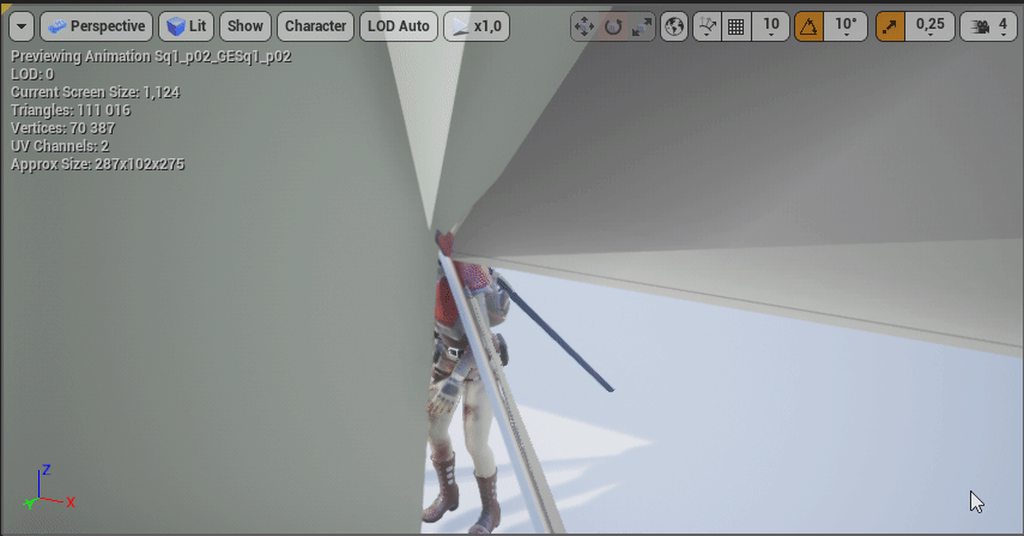
it seems that some corrective morphers values are completely messed up once imported: https://i.imgur.com/5KUxzjl.png

if i put all those messed up values to zero, everything is fine
any idea where that could be fixed once for all ?
 winter notch
@autumn phoenix I'm going to guess that those morphers are not supported in UE4. It only handles vertex animation driven by bones.
autumn phoenix
he does handles them, my character is covered of morphers everywhere
 tough reef
Hey everyone, I've been tasked with creating some animations of a character pointing and looking at something. I'm experienced programming gameplay with unreal but my animation skills and knowledge is lacking. Is there anything you guys might recommend? Or how would I go and start that?
I've looked online for resources but I don't seem to be able to grasp it 🤔
gentle pagoda
There's also a sample on aim offsets in the Content Samples project
the documentation should get you there, though
 clever shore
 odd summit
Dumb question, Does moving a socket location in a Animation Sequence affect the entire Skeleton? as well as the location for all other Animations? Asking because when importing new animations, the Preview Mesh for the Gun my character is holding is now aimed toward the sky and no longer properly in his hands as it is for all other animations
 drowsy jacinth
Does anyone know of a free asset pack with throwing animations or a method a novice could use to make their own. I have throwing knives created but I want a wind up animation so the player knows their power depends on how long they hold the button down.
 hoary kindle
how can i influence my spine when my head hits a wall? (in unreal ofc, in real life it works out of the box)
my head just cranks backwards
misty dagger
@fickle yarrow @restive yew Oh don't worry I got it now! I used a cast to characterblueprint to use a disable input node, and then I used another notify at the end and connected it to an Enable Input.
 visual eagle
Hi there... I have an X-File.... I broadcast an event in server and client in the OnRep method of a variable.... and in the AnimBP I use that event to play an Animation Montage. Server plays it OK, but Client doesn't..... but the weirdest thing is that Animation Montage return != 0 in both cases!! is there any known issue about replication+multicast+animation montage??
fickle yarrow
@visual eagle Ask in Multiplayer, you're more likely to get a response that will be helpful.
visual eagle
@fickle yarrow Yep i already got an answer there and I'm gonna tried that....I tried in both channels just in case...thank you mate!! 😃
gentle pagoda
Can anyone help me out with this? https://forums.unrealengine.com/development-discussion/animation/1595978-aim-offset-ignored-when-montage-is-playing
Unreal Engine Forums
I'm having issues with my AnimBP. The character has montage slots for the whole body and the upper body, and an aim offset for the head for looking at stuff.
 vestal lynx
Is there a way I can make a child bone ignore parent bone scale? I need to modify bone scales at runtime, but the child bone scale gets messed up because of the parent bone scale.
 sinful smelt
Retarget test
https://youtu.be/4jNIY_AKNm8

Jedi Sith Mandalorian Animation test UE4 Desktop 2019 03 20 00 54 49 01
 nova kestrel
Hey, so I have a skeletal mesh and it is facing X+ and my root bone has a rotation of 0,0,0 in Maya. But when I import the mesh, while the mesh orientation is correct, the root bone has a rotation of -90,0,90 which messes up my code that is making use of socket transform. I've made sure I've exported with Z-up
misty dagger
Hey Everyone! So right now I'm using an animmontage for my slide animation, and everything is working for the most part, but for some reason whenever I press shift to go into the slide animation
(my slide animation is connected to an input action that's attached to the Shift key) my character slowly transitions into the slide animation, then finishes the animation. It takes up about 1/4 of the slide animation to get into the slide animation, when from the start it should be in the slide animation right when I press shift. Is there a way to get rid of this transition into the AnimMontage or to at least speed it up? Because in the animation in the AnimMontage, that transition isn't suppose to happen.
 opal jackal
@misty dagger I'm having the same problem I thought adjusting the blend time on the transition node in my animBP would fix it but It didn't. Somebody please help.
restive yew
delete the unneeded frames
opal jackal
@restive yew In my case I don't have any extra frames. I just want to transition from running to sprinting faster. As of now it takes a few seconds to start playing the sprint animation. I wish i played faster
restive yew
You can either adjust the play rate or take the animation into a 3D software of your choice and scale down the key frames
misty dagger
But @restive yew it has nothing to do with the animation itself for me. The sliding animation starts already in the slide, and tat's the animation in the animation montage, it starts in the slide, but whenever I use my slide (The anim montage is just attacked to a branch connected to an input action attached to shift), lets say if i'm in idle, it slowly turns on it's side (Using some of the time that the animation should be playing) and then it's in the sliding position. It's slowly transitioning from idle to the slide, but I don't know how to make it quicker or just get rid of it as a whole.
the animation doesn't have that transition.
 smoky quest
Is it common in state machine graphs to have 2 or more conduits with the same transition rules for legibility
restive yew
🤷♀️ never seen that. Would use blendspace personally
opal jackal
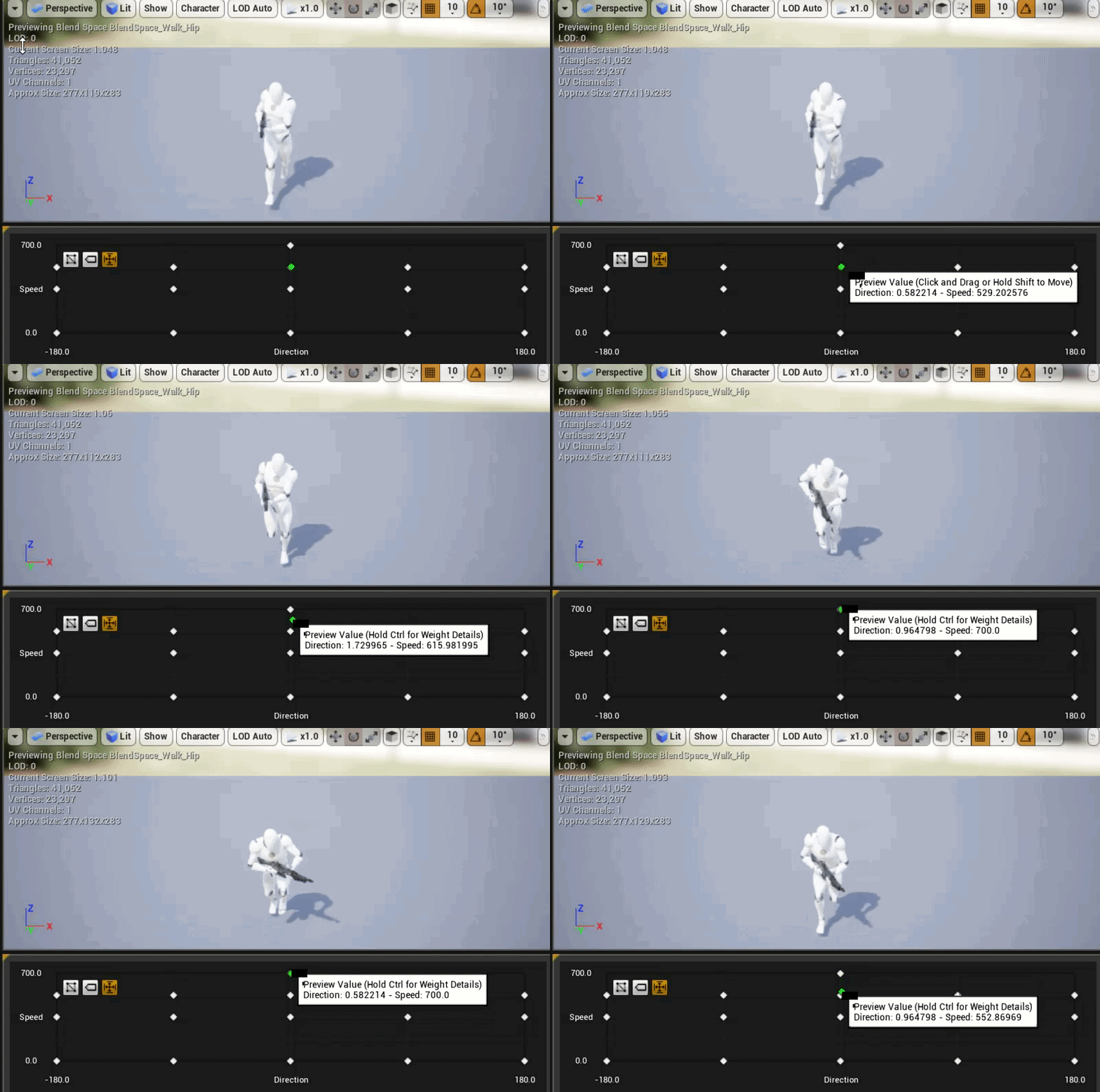
It's just such a long blend between my run and sprint. How can I fix this? https://i.gyazo.com/600fdf4482d0d16e9ca080e85755bcd3.gif
 opal jackal
It works now lol. 😐 I feel dumb. I changed one earlier and it didn't work. I didn't change both. wow
odd summit
Gotchu man, That effect could be useful for certain blendspaces/situations but def can throw you off if you don't even know about it lmao
misty dagger
So here's a video of what's going on. I show you what's happening to my character, I show you the anim montage to show you that from the very beginning of the montage it should already be in the sliding position, ad I show you the character blueprint where the AnimMontage is connected to an input action and stuff.
Whenever my character slides, it takes him a little bit to get into the sliding position, when it should be instantanious, or at least quicker. How do I make...
And the problem is that the transition from going into the sliding position is taking up time that my character should be in the sliding position already, and it takes a bit too much time. I'd either like to cut that transition out entirely or make it a lot faster, and I don't think a blendspace will work with the AnimMontage and how everything is set up in the video i showed you.
restive yew
Use obs next time you record 😜
 karmic cypress
Open Broadcaster Software is free and open source software for video recording and live streaming. Stream to Twitch, YouTube and many other providers or record your own videos with high quality H264 / AAC encoding.
yep.
misty dagger
Oh I have it, but my computer can't handle running OBS and Unreal Engine at the same time, the record lags.
So, do you know how to fix it @restive yew ?
restive yew
Nope. Can’t see the issue in the first place.
misty dagger
Hmm, well the part I don't like is that I want it to be in the sliding position immediately, or at least almost immediately right when I press shift, but instead it's slowly going into the sliding position, and it throws off the more faster paced movement and animations and the feel of everything, so I want to either get rid of it completely, the it slowly lowering into the sliding position, or speed it up a lot.
Kind of like the Megaman slide in a way
restive yew
Change the play rate. It looks like all the transitions are in one animation. That or it’s just lerping between poses.
 novel viper
Hello my dears, how would I be able to use the lookat animation node but only apply the lookat rotation to the pitch of the bone. Basically I have a character that already rotates to face the direction camera looks at, but when the look at also rotates bone over same yaw it creates a jitter. So I want to disable the yaw and only apply the pitch to the bone. Pls help this noob
novel viper
nvm found it. For anyone with same issue: inside of your animation blueprint grab your animation output convert local pose to component and then look for transform (modify) bone. This allows you to manually set a bone's rotation, location and scale 😃
 simple star
I'm trying to retarget a purchased model to the ue4 mannequin, do this IK positions look correct ?
the other two are hands
where should they be placed exactly ?
does the engine move them or should I ?
 turbid knoll
Hi peeps!
Quick question
I'm trying to set up a VR IK for the hand movement
I'm grabbing the world position of the left controller, and then using a simple Transform(Modify) Bone and replace existing world position of the hand_l with this variable. However, the position is wrong
I'm printing the world location of the motion controller, as well as the world location of the hand_l socket on the skeletal mesh, and even the print tells me that they are different. How is this even possible?
restive yew
I don’t quite understand your question. Unless the socket is 0 out in the local space, it will always have a different value.
Don’t you dare ping me josh 😜
misty dagger
But I don't have an animation that transitions from the run or idle animation to the slide animation, literally the whole slide animation is him already on the ground from start, though he does rise up at the end. Unless there's some sort of blending going on somewhere, which there shouldn't be as far as I know, there's no reason why it should be slowly going down into the sliding position like that. Besides I tried changing the play rate before, all it does is make the slide animation itself longer or shorter, but it doesn't lessen or increase the transition time.
I'm not, don't worry hahaha
And the transition time seems to be taking up the time from the actual slide animation, it isn't just tacked on to the beginning. When I have my slide animation playing at 1 play speed or 0, it doesn't even get to the actual slide position, it uses up the time that it should be in the slide position going down into the slide position, which is odd.
restive yew
There isn’t a transition animation of them going into sliding position correct?
misty dagger
Correct, there is not one.
misty dagger
Mhm
restive yew
You have a bool for sliding yes?
misty dagger
Not really, I'll show you a picture of what it looks like
restive yew
Make a quick bool. Toggle it on keypress
Get the bool in the ani bp
And make a quick test slide in your state machine
Don’t worry about function. We’re just going to test toggle the animation
misty dagger
Alright, so you don't think this works then?
There's also this, but this just makes it where upon going into the slide it disables input so that you are committed to the animation, and then re-enables it after the animation is done.
restive yew
I just want to see how your animation interpolates normally
And you’re using the shit version of Play Montage. For shame!
Don’t care about function right now. Fixing the animation first
misty dagger
Oh, I didn't know I was hahaha
Alright, let me set up the bool
And how exactly do you want me to set it up again?
Oh wait no I got it
misty dagger
My favorite tea is currently Orange Blossom tea
Well, is this all I'm suppose to do? Because when I press shift nothing happens.
restive yew
If you sent an image. Discord is being silly
misty dagger
Oh sorry, I'll send it hahaha
restive yew
In ani event. Cast to your character >>> get slide bool >>> right click on (slide bool) output pin>>> promote to variable
misty dagger
Oh okay, hold on
restive yew
Uses that new var for transition rule
misty dagger
How do I Get Slide bool? I'd have to draw it out from the cast to CharacterBP but the GET nodes don't have an executable extension
Oh no wait
I got it from the blue one
XD
restive yew
It doesn’t need executable. You’re just refing it🍿
misty dagger
Hmm, stll nothing happens. Should the executive pin in Cast To CharacterBP be attached to a sequencer; the sequencer is attached to an "IsValid "which is attached to an "Event Bluerint Update Animation" node.
restive yew
yes
restive yew
make print strings
check if its valid, whether it's getting the bool, what ani is playing, etc
misty dagger
Hm, how do I do that? I've never used print string nodes before
restive yew
put whatever var you want to be printed
misty dagger
So, Would I create a new variable or put Sliding in there?
restive yew
check if its valid, whether it's getting the bool, what ani is playing, etc
Alright mate, I gotta work. If the animation is still acting odd. Check it's interpolation and make sure it isn't an additive in the ani sequence.
misty dagger
I just created a new float and connected it to the bottom pin
And alright!
And no, it doesn't seem like it's getting the bool
But I may have set it up wrong, so I have no idea.
Anyways, good luck on your work!
novel viper
Ive noticed something weird with transform modify bone node. When you split the rotation struct in the node itself and plug in a float value for any of the axis (pitch yaw roll) the node doesnt work. But when you recombine the struct and plug in a make rotator in which you then insert a float in any of the axis it works. A bug I guess?
 robust condor
Hello guys,
I have a problem with Animation Retargeting. Can I retarget an animation of only part of a SkeletalMesh ?
For example : I have a full character with an arm and an open/closed fist. If i have a detached arm on the floor, I want the open/close animation of the fist to still be playable.
Any tips ?
 fresh rapids
I'm currently having an issue with animation retargeting. I'm trying to use the Paragon Asset animations on other characters which requires modifying the Paragon pose from A to T. When saving with the new pose the engine crashes. This happens every time, with every Paragon asset in UE4.21.2, anyone else experiencing this or having found a work-around?
 broken adder
HI all
question on blueprint thread safe
how do we use use ThreadSafe on AnimInstance when using GetRelevantAnimTime() ?
engine dont consider that thread safe
 tranquil heron
@misty dagger if you change your blend in time to 0, it will play without trying to blend
on your montage that is
 short panther
Hi is anybody here using unreal 4.21? im wondering if the save cached pose node is still in the engine
vestal lynx
Hello. I am trying to implement a way to, at runtime, animate a walk cycle. Basically it's just a two-bone IK where the target follows a spline. The spline and leg shape can both be changed at runtime. I don't really know anything about animation so I'm asking you animators out there, if you think that there can be an intuitive way to -for the user - adjust the speed of the target at various parts of the cycle, since now it's always a constant.
 lofty aurora
im having trouble with my jump, once the player jumps and land, the player continues playing the jump loop animation until its finish and then plays the jump end animation even though the player had already landed
odd summit
Google isn't pullin through, Does anyone have / know if there's a reference for the Default Mannequins Vertex Groups Weight Paint? As in, For each Vertex Group where the Weight Paint should be?
Also, If I should just remove the thigh twists/calf twists altogether or not
odd summit
Never mind, Good ol trial n error got me a decent result
 untold cosmos
Hey, guys. One of my state from anim BP never gets played, it quits immediately because of RelevantTimeRemaining condition. From cpp debugging I figured out that it evaluates aimoffset's time remaining (tiny) instead of animation asset linked to it.
In an almost identical state, with the same setup (anim asset -> aim offset -> result pose), it evaluates the anim asset's time and works correctly.
Does anyone know why this can happen?
misty dagger
@tranquil heron Thank you so much! I didn't see that, i should have looked better hahaha. But thank you!
tranquil heron
Awesome 😄
 short saddle
does anyone know if you can access the AnimNotify_PlayMontageNotifyWindow ticking event?
It's pretty easy to access the begin and end events, but I can't seem to find info on how to access the ticking
I suppose I could just launch my own timer once I begin that notify, but it seems crappy that I have to do that 😦
 visual star
Hi all. Are there any experienced character rigging/UE4 pros here that could please help with a couple of questions I have regarding best practices?
winter notch
I have been looking for an Epic video that covered paragon jump arc/landing prediction. I recall seeing it a while back during the paragon animation demos but scrubbing through those videos isn't turning up the bit about jumping specifically. Lots of start stop / movement stuff. Anyone here recall this video?
visual star
Hi all. I'm creating a rig for a custom character. I read bone orientations should remain identical (to mannequin) for good retargeting. Would moving the clavicle position like in the image cause any retargeting problems?
 frosty peak
@visual star translation should retarget pretty well. You can have different bone rotations as long as your retarget poses between skeletons is very similar.
@untold cosmos if your aim offset time is still being an issue, you could try setting the animation sequence to be in a sync group of its own. Or check the aim offset node for any relevancy flags, if you can make it not relevant that should leave the sequence in charge of time.
Make the animation transition leader.
misty dagger
I have at least three different locomotion blendspaces that I need to be able to swap between based on the value of an int. I could always just pop a new state into the state machine for each of those cycles but that will make my anim graph look very messy. Instead, can I just contain all of the base walk cycles inside of one node? My current assumption is that I'll have to make a bracket system of blend nodes. A B C D, and have all of their values except for one be 0 in the alpha. Is that correct or is there a more efficient way?
visual star
@frosty peak Thanks for the info! 😃
 cloud lodge

i have this setup
but none of my montages are working the slots
they are set to the correct slot
now i know this setup worked on 4.21
i want to play both them slots on lower body
misty dagger
Hey everyone! So it seems I've got a little problem with an AnimMontage I might need some help fixing. I'm using the AnimMontage for the slide animation stuff, and so for the actual slide part, the character is moving in the actual animation, and it's no problem because I can just enable the root motion, but the animation that plays after the sliding animation, the getting up animation, it just goes back to the original centered position instead of playing the the getting up animation where the slide animation ended in the AnimMontage. Does anyone know how I can get the getting up animation to stay where the sliding positions stops instead of it teleporting back to center?
untold cosmos
@frosty peak Thank you, I have already solved it by ticking Ignore Relevancy Test flag, tracing it back from C++ condition. I just wonder why aim offsets are prioritized in this state, but not others, and where else this might hit me.
misty dagger
Question, how would i rotate and move an actor to fit properly in your characters hand? (when spawned) All the documentation on sockets just have them magically fit perfectly in their hand without explaining how they do it. https://gyazo.com/17ea7450a8b90422b7a2766c77c57222

 silver stone
Hello, new to the animation channel. I am using Auto-Rig Pro in Blender to rig my models, I have had success with the primary skeleton but I am getting into facial animations. I am looking for someone experienced with these tools. The documentation is a bit unclaer on setting up the (UI CAM) in order to manipulate the facial bones.
 frosty peak
@misty dagger you could use blend by INT outside of the graph and save a cache pose of the result that you place inside your. State machine.
@misty dagger that sounds like the root motion is not being applied correctly. Do you see the red root bone in the sequence? In your animation blueprint, in the class settings or defaults, have you set it to get root motion from montages only or everything?
@misty dagger when you add a socket on a skeleton you can add a preview mesh to that socket to help you setup correct alignment. You can also preview an animation at the same time. You can also adjust socket placement at runtime
misty dagger
Oh so i adjust the socket rotation/placement to fit my mesh? thanks!
frosty peak
Yep!
misty dagger
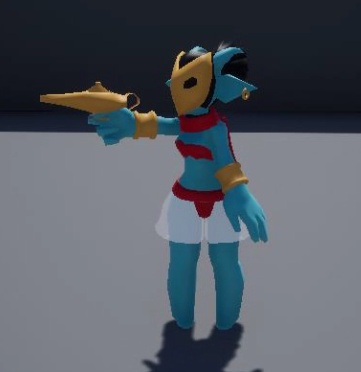
just wanted to ask real quick if it is possible to have some controllers to better control to make animation inside unreal engine ? like this
@frosty peak I don't think I understand?
frosty peak
@misty dagger in the animation viewer, do you see any red bones as the character animates forward?
misty dagger
No t doesn't seem like it?
frosty peak
@misty dagger there is the Allright rig on the marketplace which gives you that kind of thing.
@JoshTheBrawler ok, if you disable root motion. Do you see red bones then? I'm trying to determine if it's a data problem or a blueprint problem
misty dagger
ok so as I feared... this is indeed the only resssource like you have, if you want to rig correctly in unreal... thanks
frosty peak
Epic is working on control rigs in unreal, not ulsure. If they are ready yet
misty dagger
If uncheck EnableRootMotion in the Animation Sequence window? No, I don't see any red bones
Okay it is definitely an improvement as it is currently doing this https://gyazo.com/7f92f8e196cbe5a14c23b70969631092 while the preview is doing https://gyazo.com/2a959a8e027edec28bd8f2833f0446da

@frosty peak thank you! I will check it out
So what do I do?
frosty peak
Ok, if there is no red bone
Then that means the root bone of the animation is likely not animating forward
That root bone is what needs key frames to generate the root motion
misty dagger
Oh wait, I'm using blender for my animations and in my rig I'm using a custom sjape oject thing for my mastercontroller, and I used that master controller in Blender to move the character, but the Master Controller is a custom shape/object for the root bone I think.
silver stone
Anyone familiar with facial rigging using Auto-rig pro in blender? plase PM me if you can help I dont want to spam here in chat, thank you.
frosty peak
I don't know blender, so I'm not sure how that is setup, but in unreal you should see yoir parent bone animate forward with a red bone visible when root motion is disabled
And if you do have root motion enabled, you should see the character animate in place.
misty dagger
Is that what "root component" does?
restive yew
My goodness. There’s a lot of questions today.
misty dagger
Indeed. It's a warzone out here
Okay, looking at a video i see that other people are able to attach their weapon variable directly to "AttachToComponent" but he is using attach actor to component which i cannot find.
And, well, I have no idea what to do about my problem XD
silver stone
Thanks @frosty peak I believe I need to animate in 3rd party software (in this case blender) and import the animations into UE correct?
I cant actually animate the expressions in UE, correct?
Also would anyone suggest a "mo-cap" or similar software that could be used to make UE facial animations?
I looked into FaceRig on steam but its not setup to work with UE or custom characters I dont think.
All of the big name software is to expensive
restive yew
@misty dagger turn off Context Sensitive when searching for node.
frosty peak
@silver stone you could animate stuff in unreal, but it would not be a great time.
silver stone
We have animations for the player models, I am specifically talking about facial animations, since I am using Blender with Auto-Rig I Thought I would try to stay with it.
What are some workflows people in here ues for facial animations in UE?
I am learning so I would interested to know
frosty peak
You animate in a DCC and then import those clips into unreal. Give those animations montages or state machines that you layer in on the face bones.
It really depends on what you need
Like are two characters talking to each other?
Is it Ambient facial animation?
silver stone
I want to use the skeletal facial animations instead of morph so I can use 1 animation lets say laughing, on multiple models
All characters will have the same skeleton essentially
frosty peak
Ok, so you need a pose node
You make a pose asset which contains all the phoneme or facial poses that you want
They need to be named clearly
And your skeleton cM drive those poses with anim Curve names
Can drive*
There is a fortnite facial animation article on this
silver stone
Is that a typical workflow? Yeah I saw the fortnite face example on You tube
thats the idea, 1 animation across multiple characters
frosty peak
So say you have an animation that drives "smile" up and down as an anim Curve, if you plug that into a pose node, it will animate the visibility of that pose.
It's typical, yea
If you have a lot of varied characteristics
silver stone
perhaps I am to green in this process to understand it, I will continue to explore the Auto-rig path as I am so far down it already.
frosty peak
Characters*
They do that to drive lots of different blends
But you could avoid that with retargeting
Since you are doing bones
silver stone
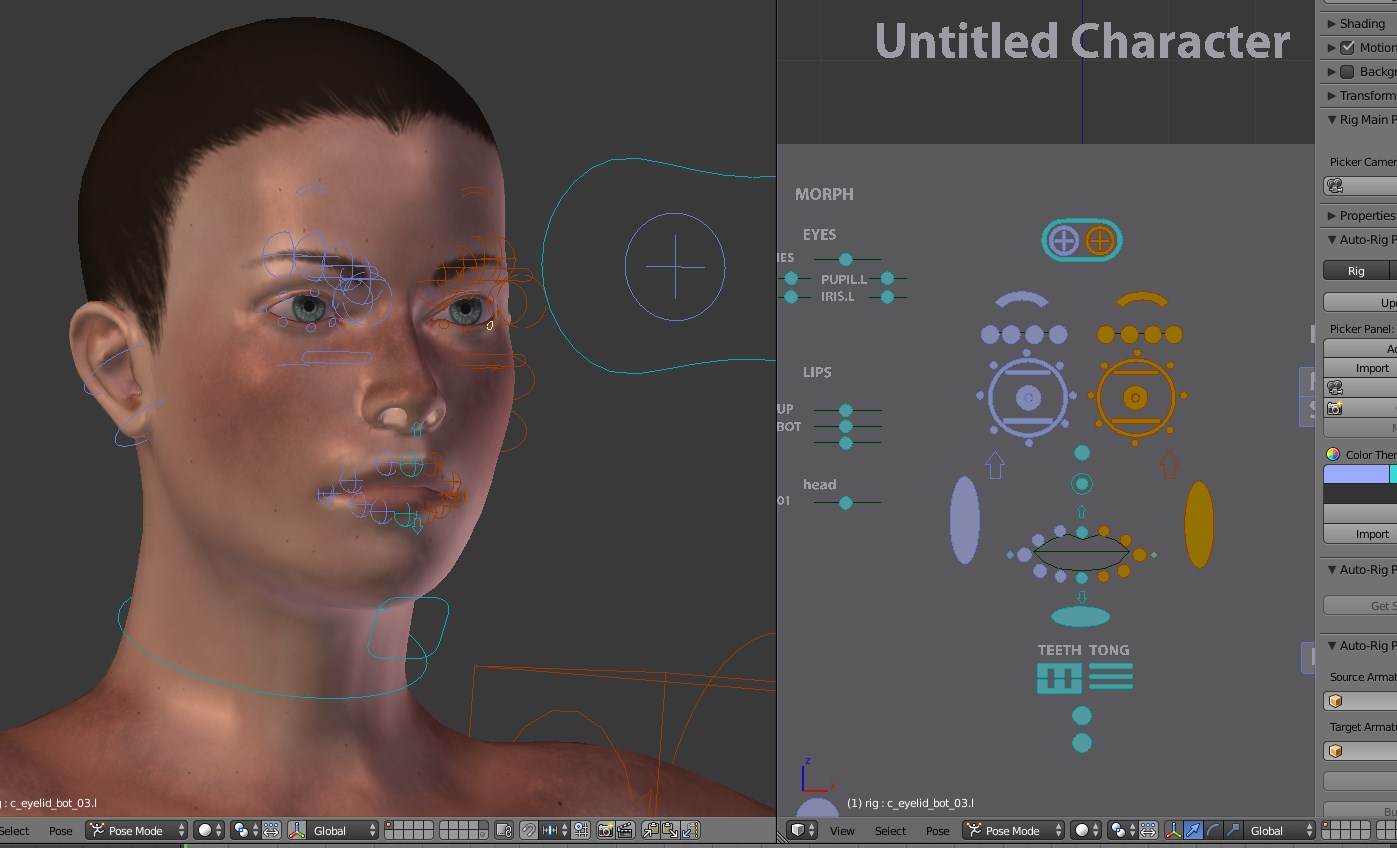
This is what I am working with but I cant seem to get it to respond correctly. Thank you for your help
restive yew
Not an inappropriate place to ask. But post it in #multiplayer too
 deft turret
thanks will do
misty dagger
https://i.imgur.com/MfnRONP.png
I have a system set up where grip automatically changes based on a value stored on the item being held. It works really well, unless I'm not holding anything. When the alpha is 0 the blend pose is being pulled from the lower body input. Is there a way to set this up so that the default hand anim is being blended from the upper body input? As far as I know the lower body needs to be the primary pose since it influences the lowest spine bone, so I can't just swap the positions of the upper and lower body graphs
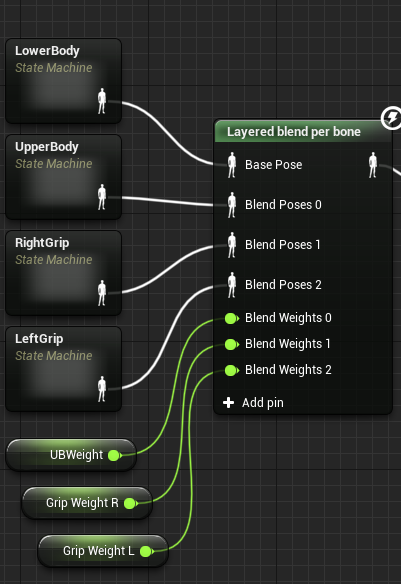
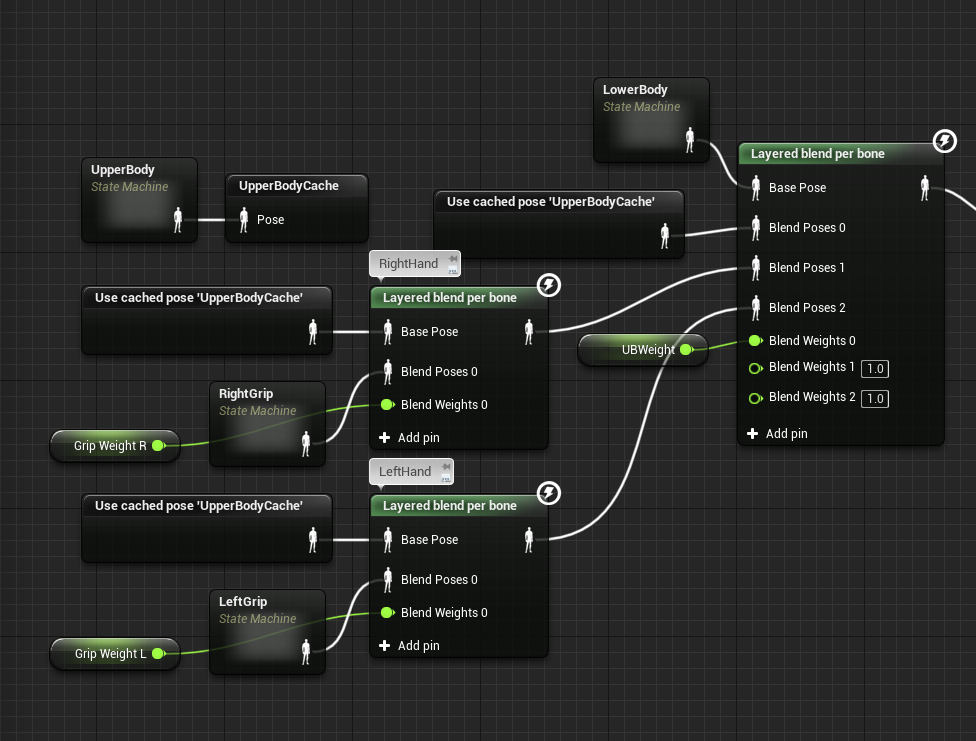
I guess I could set up right grip and left grip to be on their own layered blend per bone node in relation to upper body, and then I could plug those into the main layered blend per bone node but is that going to be really heavy?
https://i.imgur.com/8sQVMIn.png
This works, if this is grossly wasteful or something lmk
 reef agate
ugh, i have a super basic question. Just trying to figure out how to transition from one state to another in a state machine. I setup a simple unique bool for each transition. Keyboard press sets bool to true. Shouldn't that trigger a state transition?
shouldn't that trigger a state transition? : /
 fallen warren

We’re fortunate to have Lead Animator Jay Hosfelt return to the livestream to share even more animation techniques! Jay will demonstrate how to add turns and...
@reef agate
reef agate
@fallen warren thnx yo. i did figure it out. it was so dumb. I wasn't setting the bool to false when an animation other than the one playing should be. I now switched to enumerations anyhoo and all is working
reef agate
now struggling to find a way to repeat the same animation in a state machine when spamming the same input. been reading forum threads, but most say just use montages
fallen warren
Glad you got one thing fixed. I think your on the right track with montages. I changed jump over to a montage cause i spammed it a lot and it worked much faster when spammed but i know vary little on the subject and had help but i wish you luck hope you find the info you need 😃
 round shale
Can someone help me out here - where should I Start if I wanna blend walking / running with some upper body action, like a punch?
restive yew
Make your usual blendspace, plug that in a state machine, make your ani montage, cache it, then use Layered blend by bones in the AnimGraph.
restive yew
Switch the punches to additive. Be careful doing this mind you
round shale
lol
whoa
My character ZOOMs into my camera
actually it's just scale that's increasing
restive yew
Oh geez. It wasn’t supposed to be that scary 😜
round shale
hrmm I wonder what's happening
restive yew
Most likely there’s a scale difference in the bones
round shale
bugger.
Well, blend does kinda work but I'm guessing I might need some other in-between animation to make it work
Using alpha is kinda not great between the two
visual star
Hi, I bought an animation pack from the store and the character's in a T-pose. Anyone know of a way to get the T-pose out of UE4 as a .fbx? When I export he reverts to an A-pose..
silver stone
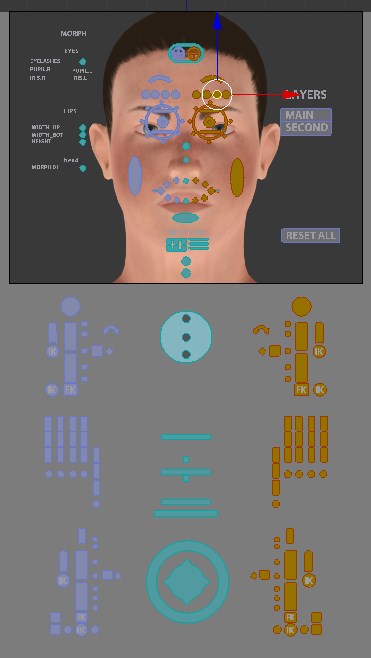
Hello is anyone familiar with Auto-Rig Pro? I cannot find a picker edit button that should be there. Has anyone else experienced this issue?
Documentations version
https://i.imgur.com/1CgNPW5.jpg
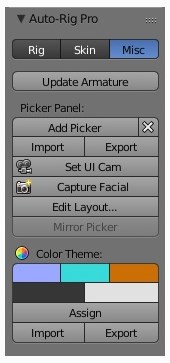
My version
https://i.imgur.com/5P2N8H5.jpg
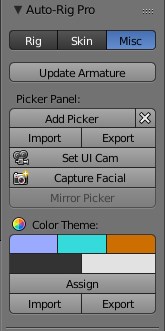
edit layout just isnt there, I looked through the version change notes to see if it was replaced with something but cant find anything. The intent of this is to help layout the picker better for easy of facial animating.
 round shale
er can you have multiple state machines?
silver stone
Will do, I am taking the animations into unreal as soon as I can get them out of here. I will take it to the blender community, thanks for the suggestion.
frosty peak
@visual star for the tpose. If you create an animation asset from the tpose. You can export that animation with preview mesh to get an fbx of the model in that tpose.
visual star
@frosty peak Thanks so much for your help! I'll look into it.. 👍
 real atlas
how can I simply have an enemy playing run animation whilst moving and idle whilst not
my players anim bp works fine but the enemy? completely screwed up
ok so yeah I can't set it
"Is moving on ground" does nothing
"Is walking" does nothing
restive yew
Use velocity check
restive yew
Try Get Pawn Owner>><Get velocity >>> vector length >>> Set [local float]
misty dagger
Hey guys?
I have a slight problem.
So right now I'm using the slide animation for the movement, so the animation itself is moving forward. But whenever I press shift to slide, the anmation plays out, but the camera doesn't go with him, and he just snaps back to place.
I tried enabling and disabling EnableRootmotion, but it doesn't do anything.
If I can't get my character's camera and capsule and stuff to move with the sliding animation, I also have a version of the slide animation where my character isn't moving, if someone could teach me how to make my character moves whenever he slides.
misty dagger
I'm not sure the root motion thing is working for me for some reason, I may have to go with the 2nd option.
frosty peak
@misty dagger did you check for the red bone in your assets?
If for some reason you can't get your Root motion animations working. You could just add movement input in the character blueprint
misty dagger
Oh okay, how do I do that @frosty peak ? Right now I want the character to have a slight boost of speed for about a third of the slide animation, then the rest of the animation I want it to e slower than the normal run speed. How would I do that? Here's a picture of how I have it sent up right now.
frosty peak
@misty dagger well the most direct way to do that is to use a time line, where you can directly define the speed values over time
Look for a node called add movement input. It takes a vector in world space direction. Simply get your actor forward direction and multiply that by the value you animate on the time line.
 tiny mirage
anyone figure out a decent VR ik system that doesn't cost my soul and first born child like ikinema or BIK?
frosty peak
@tiny mirage https://www.unrealengine.com/marketplace/en-US/vr-ik-body Have looked into this?
tiny mirage
@frosty peak I have looked at it, the only thing my current set up doesn't do from that is the walking animation when you move in local space.
i can make a quick and dirty IK that works, but I would like a decent one with a solver. Friend of mine happened to find a free solver plugin that I'm trying to stitch together here, but I for what I'm doing it's not as simple as just walk around and crouch
I want to do things like wall running
so I'm struggling with blending between anims and IK
all this set up so far in order to crouch, arm and head IK, and a solver that rotates your torso based on those three positions
plus optional leg ik if you have the trackers
probably going to junk that part since I totally can't use it in combo with my other thing
what I'm considering doing now is making cached poses for Torso pre IK, torso post IK, and then legs
then blending them
however this set up seems to start from a cached pose in the first place so I'm already confused
seems like not the right way to do this
frosty peak
@tiny mirage so what are the requirements? Continuous locomotion? Teleport with room scale movement?
tiny mirage
i don't support teleport so thats out the window. I want to be able to walk in my chaperone bounds and have the characters feet show it is walking but also when I push on the joystick to walk. I want to be able to crouch and go prone and have that blend with movement. Ik arms and head. When I bend forward I want the avatar to bend forward, not instantly walk ( though I will sacrifice this if I have to ) and lastly I want to switch animations based on movement mode. Meaning, anims for falling, swinging, wallsliding/wallrunning, running, crouched running, etc
@frosty peak
in my head I have this figured out I think
frosty peak
is it full body meshes?
tiny mirage
fine tuning the thought though I'm not sure if I should make state machines for separate parts of the body or not
yes
frosty peak
is it multiplayer?
tiny mirage
not this project, but it will be recycled into multiplayer later
frosty peak
ok well I've made something similar to what you've described
the first thing to figure out is how the pawn movement is driven
everything in the skeletal mesh will depend on how the base capsule movement is configured
something I've done before, to enable lean is to have a deadzone
which is a radius around the HMD or any body tracking device
where you won't apply movement
imagine your center of mass is like a thumbstick
as your tracked object moves away from the pawn, you start to add movement input to get it under the center of mass
that will give you velocity, which you can drive your traditional locomotion off of
from their, I would configure your main stances
when the HMD is low, bring the character into a crouch, and into prone.
have those be cached poses with their own state machines or even sub anim instances
you'll need to do very different things as far as IK depending on stance
tiny mirage
seems my thoughts are in the right path then, i've been assuming as much for most of this
tiny mirage
how about rotating in place? when the head rotates like 60 degrees or so I want the character to rotate to match
frosty peak
this is 3 point tracking?
tiny mirage
yes, vive
frosty peak
I would likely take the average yaw of all 3 controllers
and use that to drive your pawn rotation
let me see if I can find Gwen's video on a solid turn in place technique
frosty peak
it'd be pretty sweet to be spiderman in vr

In this 2018 GDC micro-talk session, animators Gwen Frey, Joe Han, Almudena Soria, Jalil Sadool, Kyle Chittenden & James Benson rapidly deliver their best an...
Gwen's techinque for turn in place animations is pretty great
basically using the world yaw rotation of your pawn or component to scrub thru a single frame animation.
misty dagger
@frosty peak By the way, just so I know, how do I use a timeline? You said I could define the speed values over time or something so I could change the speeds as the slide goes on? How do I do that?
frosty peak
@misty dagger ^ just make a float track with some keyframes of the speed that you'd like to have over time.
misty dagger
So how would you recommend I set it up? Because if I'm going to be honest, I've never used timelines or floats before, so I don't know how they work or how to set them up properly XD
frosty peak
well there are some tutorials on that link
misty dagger
And how would I use the float to mark the changes of speed happen over time?
frosty peak
I would take a few minutes to learn how to use them
they are pretty straightforward and very handy
misty dagger
From the things I've experienced using floats they don't seem very easy or straight forward XD
frosty peak
they are just numbers
misty dagger
At least, I wouldn't know how to make it where the float marks the change in speed over time so that I can set it up how I'm wanting to, where there's a boost of speed, then it slows down a bit. Is there a tutorial on the page you sent me on how to do that?
tiny mirage
@frosty peak what game is that from? the art style is beautiful
but also thank you, data driven is my favorite approach to stuff so I love finding more suggestions like that
misty dagger
I'm still not completely sure on how I'd use this for the sliding movement, but alright! XD
deft turret
I'm troubleshooting some animation times and was wondering if anyone knew what could cause the same static mech/animation combination to have such different times in the AnimGameThread
Both Buck and Buck 3 are just 2 static meshes standing still using an idling animation asset, the red is like .059 ms and the greens are ~.25
they use the same actor blueprint, and hence the same mesh/animation settings
tiny mirage
@frosty peak also this is the extended version
This is an extended cut version of my 5-minute GDC talk on Alternative Biped Locomotion. I go over how I blend locomotion without using transition animations...
frosty peak
@tiny mirage ah yes! Great find!
misty dagger
So, @frosty peak , mind if I show you what I've got?
So first of all, this is basically me trying to make it where whenever the bool is used, set the max walk speed to X (faster than my run speed, the boost of speed for the movement), wait for a little bit, then set the max walk speed to X (Below normal run speed)
frosty peak
@misty dagger It'll have to be a bit. tis dinner time
misty dagger
And this is basically the timeline attached to a sequencer, so that right when the anim montage for my slide animation starts, the timeline starts. Then it adds the movement input, and the float determines the speed of which the movement should be played out (set up in the first picture)
And then upon the timeline being finished, return the max walk speed to normal
And alright! Let me know what you think when you're done! Also it isn't working XD
frosty peak
@misty dagger your timeline doesnt have a float track. you should add one, set some values for what you want the speed to be.
i'll make an example
misty dagger
Alright, thank you! Because I just realized you can open the timeline XD
misty dagger
What's the X node thing? Is it just a multiplier node?
misty dagger
Alright, just making sure! Thank you so much for your help by the way!
frosty peak
1,0,0 * 5000 = 5000,0,0
happy to help
anyway, timelines are like little animations that can animate blueprint pins.
misty dagger
As far as the value number, should it just be the movement speed that I want it to be?
Like say if I wanted the max movement speed to change to 1400 or so?
frosty peak
well max movement speed is a clamp on speed, not the actual speed you are moving at the moment
but you could put anything you want there
just experiment
you could animate the max speed, as well as adding movement input
you can have as many tracks as you want on a timeline
misty dagger
Well I have my character moving when he slides now, but no matter how high I make the value, he doesn't get faster when he slides.
He's just staying at the normal movement speed.
Wait, I may have fixed it
Well I think it's good or now. Thank you so much! I don't think he's changing in speed from his normal movement speed much, if it all though. I tried setting it up like this but I don't think I see much change?
deft turret
is there a way to stop a skeletal mesh in a blueprint stop sending animation updates to the server? I tried removing from tick, no go
frosty peak
@deft turret Could you clarify. Do you mean that the skeletal mesh is ticking on the server? Or that the animation blueprint is calling functions that are replicated? Or is the animation blueprint itself replicated?
deft turret
what I meant was in the profiler I see these items every tick in the pre physics area even though I disable the actor Blueprint's tick:
so if I disable that buck every way possible or clear the animations it still shows up
frosty peak
and this is the server?
frosty peak
well there are a number of things
this might be the component copying back the bone transforms from the animThread to the game thread
have you tried click "Skeleton No Update"
deft turret
not yet
frosty peak
its on the skeletal mesh component
that will stop the animgraph from running while set
frosty peak
the animBP event graph may still run
frosty peak
have you enabled update rate optimization?
and do you have it set to "Only Update when visible" ?
is that 8 ms on the main thread or the animation thread?
also, could you move the ticking of the skeletal mesh to during physics?
deft turret
main game thread
I'll look at that list
have profiler loading for the first one
i will have to probably copy those suggestions to onenote
I have to stop soon 😄
but thanks for the replies
deft turret
I know nothing about those yet 😉
I its all under the FFParallelAnimationCompletionTasks
btw, the ms I am looking at
frosty peak
that sounds like that would be animation thread
in which case, you would have a lot of room at 8 ms
but game thread woes are real
deft turret
yeah
I need game thread really optimized, because my main actor dynamically propagates throughout the map
and it has particles in it
so imagine 80-100 particle emitter involved actor blueprints spawning every tick
frosty peak
that sounds pretty bad
deft turret
The idea behind it is great 😃
frosty peak
is this like some katamari thing?
frosty peak
hmmm
deft turret
so it needs to burn over a 2 mile map
frosty peak
some of those things sound like they may need hand crafted solutions
not just native components
like instance mesh batching
deft turret
this is my first game and I probably don't have things like that
and once my tick time is down I can keep it up 24/7
the functionality works
frosty peak
are these 200 skeletal meshes always visible?
or need to be visible at the same time?
frosty peak
well, definitely start with 2 settings
Enable Update Rate Optimization
Only Tick Pose when Visible
I bet those two settings will be your biggest gains
frosty peak
good luck!
deft turret
Yeah thanks, I've had people join my server and test it out with me and everything
I just need to make it playable
for 20-25 minutes of round time that is
it is playable until the fire bogs it down
the chopper is fun
frosty peak
sounds cool. Have you asked the Visual-Fx channel for tips on the fire?
Perhaps they would know how to optimize something like that
deft turret
not yet
I have not seen a warning or flag on my particles yet
as a major time consumer
but will if it becomes an issue
I've spent 10 months on the thing and the last 2 working a lot of kinks out
but its my first ever game
frosty peak
thats awesome
deft turret
which would be obviously looking at code 😆
frosty peak
it's impressive when individuals have enough focus to follow thru on an entire game
and especially impressive to not succumb to feature-creep
as far as Perf, are you Naitivizing blueprints?
deft turret
Thanks, I'm ready to have people playing it. Not sure would have to check settings
no
frosty peak
you should test it out, it can get quite a lot of performance out of blueprints
deft turret
Sure, I need all the performance I can get. Looks like I need exclusive
I'm looking at it the first time but will set it up after making a snack. The Mrs. is watching game of thrones atm
frosty peak
👍
deft turret
2>UnrealBuildTool : warning : FBST is configured for nativization, but is missing the generated code plugin at "C:....\NativizedAssets.uplugin". Make sure to cook Server data before attempting to build the Win64 target. If data was cooked with nativization enabled, this can also mean there were no Blueprint assets that required conversion, in which case this warning can be safely ignored.
I highly doubt my blueprints don't need optimization, though they are not complex
forgive the double negative
I bet I just need to fix an error
lol
it didn't save when I added the 1
the most complex one
hold on
huh
frosty peak
@deft turret it's possible that all the blueprint classes that are being referenced by a naitivized class will also need to be naitivized.
it basically cooks the blueprint class into a C++ class
and you can't reference a blueprint class from C++
you basically have to reference other C++ classes
but if its a hassle, then dont worry about it. It's kind of a gamble
deft turret
I could try inclusive
but I don't know why I got that error yet
I followed the guide first path
looking at that now
the bp shows up in the array
under exclusive items
in project settings
frosty peak
no dice?
deft turret
I get the warning even though it shows up for nativization
but the checkbox for skeleton updates removed my actor from that animgamethread list
thanks!
deft turret
aw yeah stoppin those animations has my game starting at 50 fps not 30-35
round shale
Should animation montages focus only on looping animations?
Like running, hopping etc?
restive yew
It can be for looping or single instances animation.
misty dagger
So, i'm using an aim offset for my character to shoot things, but its blended in it's idle and the "gun" sways a bit too much left and right according to its idle, is tehre a way to make it blend less with the idle animation for the right arm only so i have more accuracy?example: https://gyazo.com/06c757748e3e9923e34b39e9a321c14c

and my current anim graph https://gyazo.com/db06975db0509096feff207234f7ab9f

 clever abyss
 lament bane
[QUESTION] How does everyone generally handle multiple weapons? Some of which are very different like ak47 and shotgun for instance. Do we create different animsets for handling different weapons?
 gray totem
Hey, is there anyway to Lock Local rotation of a bone in ue4 ? so if i want to rotate it it will rotate it's parent instead ?
frosty peak
@misty dagger typically you'd have a separate aim offset for an aiming stance. also, you usually follow a montage with a layered blend by bone (not a blend) to mix locomotion and montages together (the blend will just override the entire pose) .
@lament bane yes and no. aim offsets are just a. set of various rotations. a shotgun & a rifle might be able to leverage the same aim offsets of you are correcting the drift with IK. Which you probably want to do anyway because of in between poses can drift. But yes, generally you will have multiple aim offsets.
misty dagger
@frosty peak thanks for the advice! i do have 2 aim offsets, my aiming one seems to blend too much with my idle though so its accuracy is way off. Should i just rework my idle or add a more stable idle while aiming?
frosty peak
@misty dagger It looks like you need a specific Aiming animation that you need to layer on before connecting it to the aim offset.
In the setup you have, the aim offset is doing a lot more than it should, which will lead to funky posing later.
You should have an aiming idle animation that is layered over your locomotion, then you pass that pose into the aim offset.
AimOffsets are adjustments to a main pose, like the aim offset should not get your arm to point forward, that should happen before the aim offset.
The goal is that if your Pitch & Yaw were both zero, the pose does not change.
lament bane
@frosty peak Its not just aim offsets. General Movement blendspace with the gun will need to have different sets. One for each Gun. Is that what you're suggesting?
frosty peak
If thats how detailed you want to be
misty dagger
@frosty peak, oh i see. Thanks, thats usefull! il get to it.
 velvet ember
can someone explain how to properly make strafe animations + aiming while strafing, because making animation for every direction + walking is painful
gray totem
why we add a virtual bone the Animation jitter right away ?
misty dagger
Hey @frosty peak Is there a way to speed up the actor forward vector thing so the slide moves faster and farther, for the speed boost and stuff? I tried setting up the timeline to a max movement speed and tried using it without it, but no matter how high I make the value's in the timeline, my character doesn't seem to move any faster. How do I make the slide faster?
frosty peak
@misty dagger well, you could try setting Velocity instead of adding Movement input
misty dagger
Alright, let me try that!
Well, I think I found a way around it, so it's all good. Everything works for the slide, thank you so much!
misty dagger
Ahh, wait if you saw my last message, never mind I forgot to do one thing, my bad XD
 visual smelt
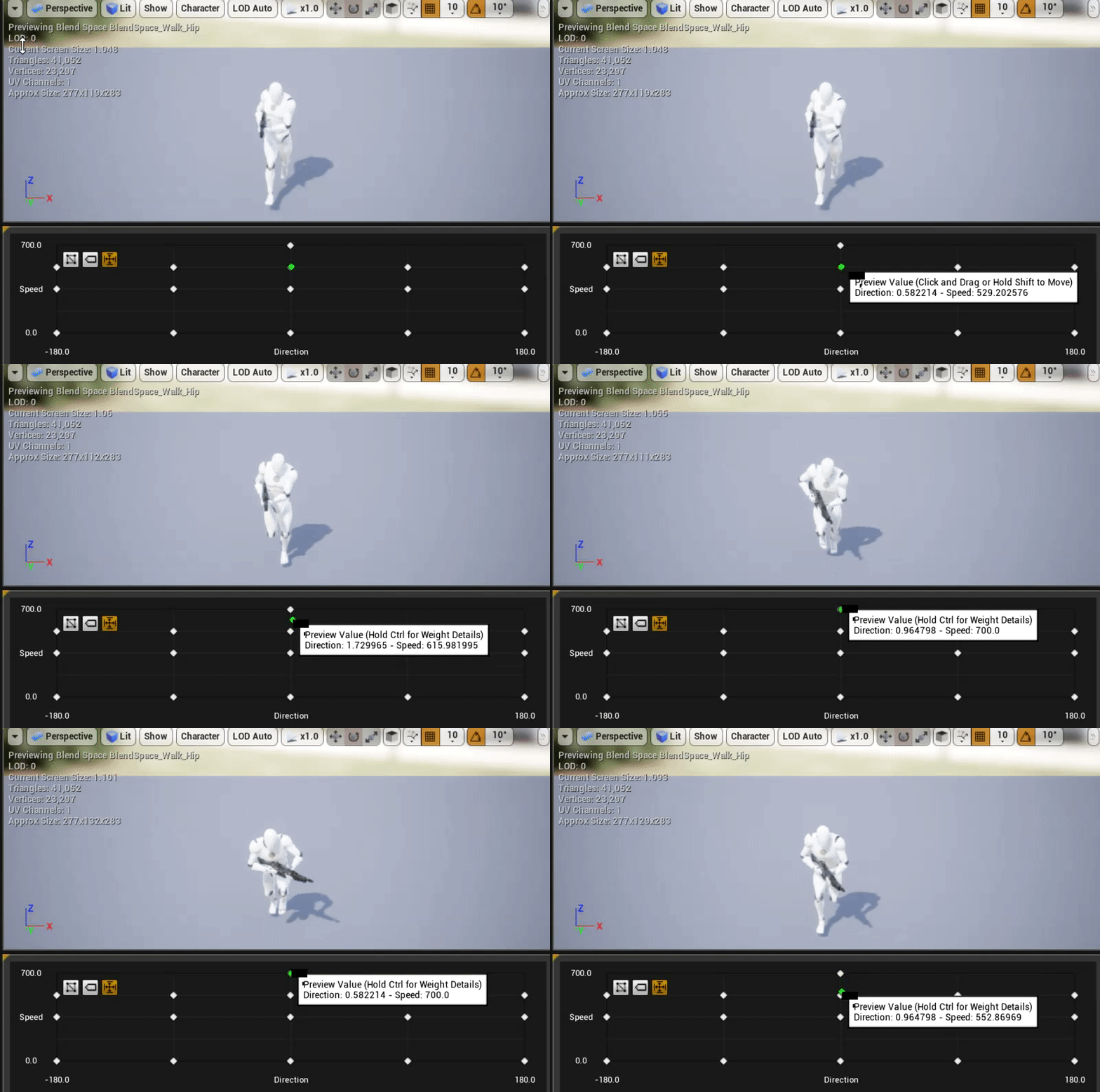
https://gyazo.com/1384bb740f7649f2332f59befcf3222c does anyone know how to fix this problem




 restive yew
It exactly any information to go off of. Check your key frames first thing first. If you have an ik system, disable it. If you’ve retargeted the skeletal, is could have a unassigned or rouge bone. Check if you have any additive curves. The lists goes on 😜
round shale
hey @restive yew dumb newb question
Are anim. montages used as a way to string together a series of animations and then you chop them into slots. Those slots are then called upon in the anim. graph where relevant?
That's instead playing specific, individual animations?
What I don't get is why you'd initiate an anim. montage, but then use state machines? Can you only access slots whilst an anim montage is playing?
restive yew
Ani montages are primarily utilized if you need to expose animation controls through the character's bp or script. State machines and ani montages don't mingle well. You need to have the montage grab from a cached state machine then cache the montage itself. As such, ani montages lack versatility compare to the state machine but makes up for in greater (direct) control.
 bold cloak
guys quick question what does true blend time do
oh wait
you guys might be able to help me with things other than that one question
i do need to know that but i have a problem that i think is linked to animations
so basically there is a delay between aiming and and the camera with this free asset ive been using.
visual smelt
@restive yew i made no adjustments ue4 wise that's just on import
bold cloak
so i look in the left direction then my character moves him and his gun there
like a few seconds later
its not exactly seconds
but its enough delay for it to be an unplayable shooter
restive yew
Is it an aim offset?
frosty peak
@round shale I want to add some clarification. Montage slots are locations that an animation can dynamically run in an animation graph. You can have multiple animations in a montage playing in multiple slots at a time. For instance, you may have a slot for animations to play while crouched, and you may want a different animation while standing. You simply put both clips into the same montage with different slots. That is different than a section, which is where you slice up parts of the animations in a montage. Montages & state machines work perfectly together.
bold cloak
idk where would i find it
@restive yew
i think it is
it doesnt say aim offest
but it says left hand offset
 vast trellis
couldn't quite hear wes during the video, did he say they released a sample project for this? (biped rig with controlrig):
anyone know where they released that?
frosty peak
@vast trellis did they post the control rig video yet?
vast trellis
Control Rig is a highly flexible tool based on Blueprint that can be used to drive animation inside UE4. In this Unreal Engine Learning Theater session by Ep...
just a little while ago
restive yew
nice
vast trellis
it has been in the engine the last few versions, but they removed the human rig from it
but from the sound of it they created it (biped rig) now as an example project instead of a built in rig
restive yew
"We have yet to release this project as a sample project for you guys to download and pick apart "
vast trellis
I guess it may come to learning content as part of 4.22 or something
hopefully that so it stays updated over time and not a forum sample project as part of a livestream or something
fickle yarrow
@frosty peak Oh!, that opens up some possibilities. It never even crossed my mind that you could have multiple animations in the same montage using different slots. I see it now that you mentioned it, you can right click and add another slot.
round shale
hey @frosty peak thanks for that. Would I be wrong in saying that many people tend to rely on Montages instead of simple playing a single animation?
For efficiency and additional flexibility - i.e. anim notify
frosty peak
I would say that a montage is better than firing off a single animation
it all just depends on what you are trying to build
montages are great for attack animations, like shooting a gun
things that can be fired off at any moment
fickle yarrow
I use montages mostly when I need to call a specific animation from a BP outside of the animBP. Attacks, dodges, etc....
frosty peak
Personally, I tend to do a lot of work in the animation blueprint
and rely on interfaces to call functions in animBPs
round shale
Some tuts I'm seeing seems to rely on playing the montage via a custom event from the anim BP
So I'm unsure where the state machine comes into play - or is it a one or the other sort of affair?
frosty peak
sometimes a problem is better solved by an animation graph, and not calling montages from a character blueprint lets change implementations without affecting the designer
fickle yarrow
@frosty peak Are you saying you would play an attack montage in the animBP rather than on say the character BP?
restive yew
It’s kinda ruins the point of montage if it’s governed by the ani bp 😜
frosty peak
not at all
I like for the character blueprint to call delegate
and let the animation blueprint catch that delegate and either drive variables, call a montage, gate the functionality
Designers like Montages because its easy for them
but when you are dealing with complex states where you need to blend many different elements together, you tend to need more nuance that just a montage
but thats all just my preference
fickle yarrow
I've been using layered state machines for most things. basicly one state uses the previous cache, then caches and goes to the next. I'm still relatively new to the engine and had to take a lot in the last year so not sure if that's the best way to go.
frosty peak
I use that pattern for some things
fickle yarrow
Montages, I've only used for attacks, dodges, spells, basicly one off animations.
frosty peak
I tend to avoid putting state machines in side of states, because I find that gets messy quick
fickle yarrow
I saw it done in one of the BPs from an Epic project, I think, and borrowed heavily.
frosty peak
same
Ive also begun using the anim curve alpha to drive a lot of nodes
say for example, which AimOffset should this animation use
just meta data curve the aimOffset name
use that curve string as the opacity string on an AimOffset node
fickle yarrow
I saw that in a BP too, I used a curve to help decide which blend to switch to in the AnimBP, but I don't really have much knowledge in that area to understand why it works.
frosty peak
even better trick
that is ticking in the event graph
you can do it on the anim graph side
if you have an animation curve going into a node that is using that curve name
it will get the value of the alpha from the animation being fed into it
doesn't require the event graph to calculate anything
this is useful for when you want to tell an animation to use certain nodes and not others
could be used as a handoff between two aim offsets in one animation
frosty peak
you set the alpha to anim curve
Whats also nice is that you can save a lot of perf by doing the interpolation and remapping in these settings
less game thread blueprint execution
fickle yarrow
nice, thanks. I have a couple of things to look at tomorrow now.
frosty peak
you can
I'd guess most of the time montages are coming from characterBP
since its likely tied closely to input actions
round shale
Is there something I can read that explains the architecture around animation BPs, Graphs and Montages?
Finding it hard to know what to use and when.
could also just be an experience thing. I'm more use to CPP than the anim. stuff
frosty peak
its the same public function
you can just call it from basically anywhere
I'd say that it largely depend on the size of the project & team
if you have a lot of pawns sharing the same base class, but with different skeletons, then you may want to push more of the logic down to the animBP
where as if you have 1 main character, you can leave it in the characterBP
round shale
So I've got my character. He's swinging a sword left and right and runs in all directions.
The animations I've got are swing, swing reverse, movement L,R,F & B.
round shale
Right now, how it works is that I take the velocity from my character BP and pipe that into a blend with two axis - ForwardBack and LeftRight.
And a single animation for swing left and another for swing right.
frosty peak
mhmm
round shale
Taking @restive yew advice, I've put the swing animation into a montage, cached the state machine which features my "idle / movement" state. and then on 'bSwing' it uses a layer blend via bone and the slot montage of me swinging.
not sure if that makes sense in text, but I don't have visuals in front of me : \
round shale
Okay
frosty peak
I dont think you need to cache the montage if its that simple though
round shale
No?
frosty peak
let me make an example
round shale
Does what I've described above solely take place in the state machine graph thing?
or should that really be part of animBP or even character BP?
frosty peak
structure it however it is most easy for you to manage it
round shale
lol cheers
I'm just new and I'm very much outside my depth.
(when it comes to animations, not so much the engine)
frosty peak
restive yew
There are many solutions and many approaches to the same problem. None of them are wrong. Just slightly right 😜
round shale
Silly question, but does that live on the AnimBP or is that part of the state graph?
Guessing state graph?
frosty peak
its in the animation graph
but this is not a state machine
there is a state machine on the second pic, thats making the locomotion pose
round shale
Sorry, getting my labels mixed up
frosty peak
its all good
round shale
oooooooooooh
locomotion
Does the montage have to be playing to access the Slot 'UpperBody' ?
frosty peak
the montage can be set to play in the UpperBody Slot
a slot is either empty, in which case the cache passes thru
round shale
Oh that's what that's doing? It's shorthand for 'Play montage and that specific slot.' ?
round shale
I think I'm starting to see
frosty peak
say your montage looks like this
its going to play both of those animations into both of those slots at the same time
round shale
Can you have different types of anim graph - like one for running, one for jumping into the air etc? or should they be all part of the same 'locomotion' graph, so to speak?
restive yew
It’s basically a folder and the Sections are the “files”
frosty peak
yes, you can
frosty peak
on the second image?
frosty peak
they are nearly the same
in both
I am passing in a cached pose into the slot
so when there is nothing in that slot, the cached pose is used
when something is playing in a slot, it will block all the inputs before it
you can see this happen if you watch the animation graph while playing
but that detail is not important for you yet
round shale
Sorry, I did mean that second one. I just saw the wrong image
frosty peak
its the same either way
frosty peak
so if you wanted to play all fullbody animation, say a taunt
round shale
You're tell it to use the Layered Blend, but if that's empty as a source, use the full body?
frosty peak
from the beginning
round shale
yeah
round shale
yep
round shale
Yep
frosty peak
So LocoPose, layered with LocoPose = LocoPose
BUT
if a montage is playing in the UpperBody Slot
the pose from the montage will layer
and so that Layered Blend Per Bone makes a Pose
and passes to the FullBody Slot
which will do nothing, UNLESS you choose to play a full body animation
in which case the full body montage will run over everything
I like to order my graphs top to bottom
because everything is evaluating in linear order
imagine that its a fat stack of photoshop layers
restive yew
I think he comes from a purely programming background Crow 😜
frosty peak
it's good. It's just a matter of understanding execution order
round shale
heh nah I've used photoshop many-a-times
@frosty peak first, thanks for helping me with this.
which will do nothing, UNLESS you choose to play a full body animation```To clarify on that section
When you say 'it will do nothing', do you mean it won't play or it won't be overridden with a full-body animation?
Unless i'm playing a full body animation
frosty peak
a slot that is not playing anthing will just return the input pose to the output pose
round shale
second question - which I think you answered before - does the decision to play the full body animation happen outside of the graph?
frosty peak
if it is playing something, it will ignore the input, and return the montage pose
round shale
So I have to explicitly play a montage for the slot to return something that's.. playing?
frosty peak
on the second question
the montage asset defines what sequences to play into which slots
so if you fire off montage A and Montage B
the montage assets will pick where they want to go
maybe you have a 3 hit combo
left jab, right jab, roundhouse kick
those can all be separate montages
round shale
yep
frosty peak
each of them knows where they belong in the graph
from the event graph, you are just calling the montage without caring where its supposed to go
on your third question
A slot node passes along the in pose, to the out pose, if there are no montages playing on that slot name
frosty peak
thats how you call the montage, ya
frosty peak
nawp, the slot is just the location for that animation to enter the graph
round shale
heh
Okay, a lot of stuff just clicked
Even why the animgraph stuff kept being called 'locomotion'
frosty peak
😃
round shale
Thank you so much.
frosty peak
glad I could help!
round shale
er.. anything you wanna know about CPP?
frosty peak
I feel like thats going to be the answer for all of the questions
round shale
Ohhhhh yeah
frosty peak
nah man, go make some cool shit
round shale
👍
frosty peak
hit me up when you want to learn about the power of Mesh Space Rotations
round shale
I'm more of an absolute man myself.
frosty peak
eww
round shale
(I don't know what either of those things mean.)
I don't think I'm ready for that just yet.
frosty peak
in time
round shale
I did play around with IK stuff
That's kinda fun. The whole procedural animation stuff
lol I love that this is a legit sentence. "How`s Mesh Space Rotation Blend option in Layered Blend Per Bone"
frosty peak
I use that check box like every day
its like a hack for not having Aim Offsets
oh, btw
layered blend per bone
bone depth
do you understand that setting?
round shale
Yeah, except I had the blend layer backwards I think
I was going from the variable up, not variable down.
Actually, in terms of that
The int that is associated with it .
I'm assuming it's like a branch thing?
frosty peak
that means that from spine_1 and below, the pose is layered on at 100% opacity
if its spine_1, and a value of 1
the spine_01 will have 50% opacity
and spine_2 will have 100% opacity
frosty peak
the number basically says how many bones it takes to get to 100%
frosty peak
the number is how many children down the hierarchy to get to full opacity on the blend
round shale
What's the use case to have the opacity diluted like that?
frosty peak
it makes it look more natural
like, instead of a black white mask
you get a greyscale mask
makes for a more natural blend between poses
also this is really important
-1 will stop this bone and its children from getting that pose
so say you want to layer on the spine and arms, but you dont want to layer on the face
spine_1, 3
head, -1
round shale
so if I'm doing a layered bones blend and I'm separating out the locomotion for feet and a slot for hand movement - would I make hands the base ?
ow my head.
frosty peak
locomotion should be your base
round shale
Yeah.
frosty peak
always start with your main pose
round shale
And I'm saying 'hey from hips with depth of 3' don't be impacted by the layered pose' ?
frosty peak
are you using mannequin?
frosty peak
you would likely just define the spine bone
you only need to exclude bones if they are within the children that will get layered in
round shale
Yeah I think the top layers are Spine, Left Leg, Right leg.
frosty peak
like if you start with the chest, you dont need to subtract the hips
because the hips would not be layered in anyway
round shale
Can I ever pass in multiple bones as params?
frosty peak
but you may want to subtract the hands
round shale
"Spine_01, Left_Hand" etc ?
frosty peak
the layered blend per bone takes an array, ya
round shale
oh, nice.
So, in short, you're passing in bones that are to NOT be blended with whatever the other asset is?
frosty peak
noooo
you are passing the bones that you want to layer onto
so in this pic, the spine_01 and all children will get the pose
except for the neck & head
frosty peak
mesh space rotation is like world space rotations, but just relative to the component
so whats special about it
is that if you rotated 1 pose by 90 degrees, and layered it on. You would get those bone rotations in that mesh/world space rotation
as opposed to a local to parent rotation
this means that you could have a run animation that dramatically leans the character forward
and if you layered on a shooting animation, that animation would layer in at its normal rotation
where as if you did not use mesh space rotation, the pose would be slanted by the lean
round shale
Reminds me of key frames, in a way
round shale
dumb q but why wouldn't you setup your blended pose to be adjusted accordingly?
frosty peak
if your character did a flip or roll
you would not want mesh space rotations to be layered in
there are valid reasons for both
round shale
What is the ideal way to handle things that aren't suited for root locking?
Like do I root lock but translate the character x places in the world?
frosty peak
and rotating the animations leads to weird blends without mesh space rotations
uhhh
I do not follow
what do you mean by rootlock
round shale
So like for a flip
frosty peak
like root motion?
frosty peak
still unsure
round shale
lemme try again
frosty peak
I almost never use Force Root Lock
round shale
if your animation is a big leap
frosty peak
I would expect you are going to do root motion
when you enable root motion, it'll extract that data for you
however, with the Mixamo rigs
that might not work well
normal game rigs have a root or Main_root bone that sits at the origin
thats the bone that unreal reads to get root motion animation
when your root bone is in the hip, with no parent bone. Unreal has a sad
round shale
Can I add a virtual bone called 'Root' ?
frosty peak
nope
round shale
dang.
I think I read an alternative is to bring that FBX into blender or maya and just add a bone called 'root'
frosty peak
ya, that would work
definitely back up your project before doing so
or use version control
Unreal does not like big hierarchy changes on skeletons
inserting a parent bone should work
but ya never know
restive yew
You’d have to be careful doing that. You’ll get bone discrepancy
round shale
Ah I'll probably do something specific if / when it's warranted.
restive yew
naming a bone root used to cause blender to unreal import issue
Haven’t tested it recently to confirm it. I remember it’d claim that it couldn’t find root track if you did 😜
round shale
<
round shale
Anyone ever have a situation where a montage playing prevents movement of your character?
I can confirm there's a value coming from input, but it looks to not be added to MovementInput (to CharacterMovementComponent)
round shale
Aha - "Root Motion - Root Motion Mode: Ignore Root Motion" - probably an issue with using Mixamo.
 glossy moss
what steps do I have to do (roughly) if I want to import an animated custom character into unreal and have simulated clothes. I was thinking of using nCloth for the last part, and I use blender
bold cloak
Sorry for the late response I got tired. If no one remembers what I need help with I'll explain. So I've been using a pre made asset that has horrible aiming controls. It might be something wrong with the animation. When I look left with the camera there is a delay before the character moves his gun into that direction
I dont know what's causing this but I have a few ideas
Offset stuff is done wrong or this real blend time.
I dont know what real blend Time does
Or the offset
But I would really like to get this fixed
restive yew
Make sure the interpolation time is at 0
bold cloak
I think I saw that stuff and it wasnt
Where would that be in an animation BP
or what
fickle yarrow
@round shale The way root motion works in Unreal is a root bone/joint/transform is used and any translation and/or rotation to that joint is given to the capsule in characterMovement. So if you have a root motion animation playing then it would override movement input. Honestly, root motion tends to look a lot better once setup well. I fake it with scalars and speed. Mixamo animations, when not in place, have translation on the hip bone. Some other engines approach root motion differently and can work with that, but in Unreal it causes the mesh to move outside the capsule from character movement. So to get root motion from Mixamo animations in Unreal you add a root bone and move the translation keys from the hips to the root. It's actually not that difficult using Maya, Blender, Modo and others.
When you do add the root bone, as far as I know how to do it, Unreal will treat it as a new skeleton so any previous animations will have to be retargeted.
But, I've never had any issues with it and have used Modo, Maya, and Blender to do it in the past. In my opinion Modo is the easiest to use right away and has the smallest learning curve.
restive yew
In the aim offset
bold cloak
ok interploation time is at zero
it was always at zero
so it could be that
what about axis value
what should it be
@restive yew
what about orbit pitch and yaw
misty dagger
Hey, so I've been noticing a problem that I can't really figure out how to fix.So whenever my character jumps it registers that my character is falling, so it plays the jump animation. However, when my character walks off of a ledge or after using the air boost, it plays the jump animation again. I want it to go straight back into the falling animation. Is there a way to fix this?
misty dagger
Well if you have logic saying 'play jump animation when you fall' then obviously, when you fall', jump animation plays
Well I could never find any other way to make the jump animation play when my character jumped, all the other ways didn't work at all, so that was the only way people would tell me that worked in any way.
How about when you press jump
Or just on jump
I think I tried using a pressed jump node and it either didn't work or I couldn't find a way to connect it properly, And as far as I know there isn't an "on jump" node
Are you using character movement como
Component
Am I using a character movement component? I was when I looked for pressed jump and on jump
I just can't really seem to find a way to fi x it.
 next pine
OK, this may be a silly question, but can an animation bp reference anything other than a Pawn? I want an animated actor, but "Try Get Pawn Owner" only refers to Pawns. How do I "Get Actor Owner"
Ah, I just use "Get Owning Actor".
I feel silly.
misty dagger
Hey everyone! So I decided to use an AnimMontage for my jumping and falling and landing and stuff. I'm planning on putting a sequencer after the input actionand then attach the AnimMontage to it along with the jump node, but there is one problem.
To get the falling to work how it's suppose to< I made the falling section loop by making it blue, but I'm not entirely sure how to make it get out of the falling section and onto the landing section once you hit the ground. How do I set up some logic for the section basically saying "Is falling is not true, then change from falling section and go into the landing section"?
I've never really used loops in the sections, so that's why I'm asking hahaha
restive yew
It’s the same logic as the state machine version. Plug the output back into the input to loop
misty dagger
Well I know how to get the falling section to loop in the AnimMontage, just click the falling section, then click it again under the sections tab, it'll turn blue and that's how you know it's looping. What I'm more worried about is trying to get it out of that falling section and into the landing section.
restive yew
Again, it’s the same logic 😜 use Is Falling from the movement component or make a line trace to calculate height.
misty dagger
oooh okay, hahaha. Just wanted to make sure 😃
How do I get the sections from the AnimMontage into the characterBp, or the AnimBP, whichever one I need to use to set up the landing logic.
misty dagger
I'm still not completely sure on how I do this, sorry XD
Hold on, I'll see if I can figure it out myself.
restive yew
I don’t know what to tell you. It’s plug and chug with the usual If condition.
misty dagger
Well I don't understand how to get the montage out of the falling condition and into the anding condition, I guess.
It isn't exactly clear.
I know what I want to do, I know I have to basically put If Falling, connect it to a NOT bool, then connect it to the Landing section, but I don't know how to connect it to the landing secton, or how to make sure that it knows to only go into the landing section from the falling section.
restive yew
misty dagger
Doesn't the on completed only work if the whole montage is finished? I thought it wouldn't work with the falling section looping.
I think I may have figured it out though
restive yew
Only if the section ends. You can use notify end regardless
misty dagger
Nope, don't think I can figure it out XD
So, this is what I have so far. I thought that whenever i jumped it would play the jump animation, but instead it plays it every time I press space, which isn't what I want because then it plays the jump animation even when my character doesn't have any jumps left
I also tried this, but the landing animation plays right when you press start, then it stays in idle as you just skate along the ground, when you jump it plays the landing animation again, but when you use the double jump it plays the jump animation and then goes into falling animation. Then once you touch the ground it stays in the falling animation as you skate along the ground again.
You know, I find it really hilarious how hard it is just to get the jump animation stuff to work properly, this is taking too long for something that should be relatively simple 🤣
restive yew
There’s a reason everyone uses state machine for jumping 😜
round shale
Where do you draw the line between using state vs montage?
misty dagger
True XD