#animation
1 messages · Page 99 of 1
 pastel spindle
You just need it with the idle animations
So 9 animation for a single AimOffset, and you are fine
 real atlas
so what happens when you run?
pastel spindle
You want to apply it when you run?
real atlas
it uses the head from idle animation?
pastel spindle
Well you can use the
real atlas
it needs to be everywhere!!!
real atlas
im so lost
pastel spindle
Uh
I am 99% sure
even with run
its should be fine
with a normal AimOffset
(my animations looks really smooth with it)
real atlas
can I really not just have the arms and head point where your looking
pastel spindle
Hmmmmm I am kinda sure you could but not sure if that would looks nice
And that would be alot more work if ya dont know how to do it
Like
You need to know the bone transform, the animation space, component space,layered bone, weights
In UE4's animation there are 5-6 nodes, and functions you really want to know
real atlas
damn
pastel spindle
Additive animations, Layered Bone Animations, Blend Animations, Sync Animations, Sync Groups
Slot Animations, State Machine, Notify, State Notify
And setting up your blend spaces properly
(Like on the Movement Blendspace do not leave the Interpolation Weight on 0)
(Or its wont be smooth on sharp turns)
But in your case
I think he easiest would be to just do the 9 animation
I mean they are just basicly a pose
And make the AimOffset
real atlas
ok, so each one is just idle and looking in that direction right?
pastel spindle
yep
real atlas
ok...
real atlas
...
pastel spindle
Like wait
real atlas
well I need two lots in that case then one for idle with head following one for aiming
pastel spindle
Well you can just check the LayeredBone node its really not that hard just sounds hard 😄
And 1 would be enough
real atlas
wait a minute, surely if my player looks in the same direction at all times I would only need up and down???
instead of the others
pastel spindle
Yep
real atlas
cool
wait I don't need to do it for running do I?
uuhh well I'll have to do the whole damn body too
IHDFEJIOUH"DUIOUUUHHH this is SO CONFUSING
pastel spindle
You just need the idle
Its may be confussing but after you start using it
You will see its not that bad xd
real atlas
but I need to move the arms and body too!!!
and idle needs to be idle holding weapon surely?
real atlas
but
oh
so I could also have no weapon equipped and just move the head using the same anim?
real atlas
ok...
pastel spindle
will look smth like this
This here means
If the "Enable Aim Offsets" are enabled, then use it, if nope then do not use it
and this node will be your survivor so you dont need to do that many animations
real atlas
so it could really look at any angle just from 3 positions?
pastel spindle
UUUUUUMMMM, didnt you said before you want to look up and down? 😄
I am really confused xd
If ya want to look left and right as well
Then its will be 9
If just up and down them 3
pastel spindle
For any angle up down you need 9
3 for every angle
so:
center, left, right, up, down,
left up, left down, right up, right down
From this 9 you can make any angle
Because UE4 can blend between them smoothly
will be back in 20 minutes
real atlas
ok
but as the character automatically always has its back to you I don't need turning
pastel spindle
well still need the same amout of animation 😄
real atlas
...
but he won't be able to twist...
he won't be able to look left or right on the spot
real atlas
yeah
pastel spindle
if yes then 3 animatino xD
real atlas
the whole capsule component follows camera
real atlas
yeah made them
pastel spindle
Import them after that
real atlas
yeah theyre imported now...
real atlas
lol
real atlas
ok
pastel spindle
Select them go to the AdditiveSettings and set the Additive Anim ype to mesh Space
real atlas
?
all I got is skeleton reference pose and
selected animation scaled and selected animation frame
I assume its reference pose??? -_-
real atlas
ok
real atlas
what!? I swear you just said two different things
pastel spindle
Sorry if I confuse u
😄
If you got them then go to the editor right click, animation, AimOffset 1D
real atlas
would base pose animation be where I choose idle centre?
pastel spindle
yep
pastel spindle
set the axis setting like you can see it on left side
For -90 select the down, for 0 select the center, for 90 select the up
real atlas
ok
pastel spindle
if you got them, press shift to check and drag the aim offset to check if its looks fine
real atlas
what
pastel spindle
just press Shift on the
BlendSpace editor
and check if its looks fine
Fuu I am sure I would not be a good teacher xd
real atlas
idk thanks for trying
pastel spindle
😅
real atlas
oooooohhhh my god
the default view camera has now BROKEN cuz I tried to remove something that didnt work earlier
is there a way I can even reset an asset
please ffs there better be a way
pastel spindle
umm
auto save assets?
In your project folder
there is smth called auto save
you always can get them
real atlas
oh thank phuk I fixed it don't worry
 spare nebula
https://streamable.com/k9r9b Anyone help me please

I don't know why this mesh is going down
@pastel spindle ?
 quartz cove
Any 6+ month anim gurus with AI knowledge around here and want some $$$, check out #looking-for-talent
spare nebula
Can you help me with this issue?
spare nebula
Which 2 animations? Idle and running?
pastel spindle
Yep
spare nebula
Okay hold on tight
pastel spindle
OH
Wiat
Wait
You run has RootMotion,
?
If yes, most likely that will be the problem
Your run*
@quartz cove Its such a pity I didnt do alot AI stuff in UE4 😦
But GL for the project man! 😃
spare nebula
Yeah It has root motion @pastel spindle
What's the solution here?
I'm using Mixamo but I've added root to every animation and mesh as well
spare nebula
Yes
pastel spindle
And migrated the animation keys from hips to the root bone?
spare nebula
Yes
i tried all keys from hips to root as well as just "translate z"
both ways didn't work
pastel spindle
Is the idle a root motion as well?
spare nebula
Yes
pastel spindle
Give me a sec to check smth
(can you copy your animations [idle, run] and make them inplace to check if they will work like that?
pastel spindle
Wait
Did you checked the RootAnimation tick in the animation editor?
@spare nebula
spare nebula
Yes, I did.
pastel spindle
Just copy the animations, and disable it
Uh wait
Even if ya do that
Its wont work
Hmmm
real atlas
im really confused should I use a blendspace or aim offset
spare nebula
One thing I noticed, I don't remember why
pastel spindle
Aim Offset
real atlas
aim offset yeah
spare nebula
The keys from "Translate Y" of hips are pasted in "Translate Z" of root and "Translate Y" keys are all to 0.
My all imported animations are like that
real atlas
but how do I even put in the animations it says invalid
pastel spindle
Hmm
If you can send me
that 2 animation
I can check it
Or the mixamo link
to that 2 animation
is fine as well
its invalid
if you do not set them to mesh space additive
spare nebula
I'll send you both animations with root bone added. Good enough?
real atlas
how do I put in the animations to the aim offset
pastel spindle
Open the animation
-Additive Anim Type -> Mesh Space
-Base Pose Type -> Seleced Animation
-Base Pose Type -> Selected Animation Frame*
spare nebula
Cool
real atlas
ok
well I did what you said it still refuses to put the anims in
UUUUAARRGH
HEYULP
UUUUHHHH 😩
 obtuse yoke
Anyone knows how to make rootmotion for animation in level sequence?(已編輯)
It seems in level sequence/matinee ,animations with root offset can not be played with rootmotion
Solution in official tutorial video is quite dumb,which is to set the character's position at the first frame of the next animation
It needs you to scale the time bar very very much to hit a precise time,and still not accurate,which is very very not elegant and time costing and stupid and inaccurate.
real atlas
lol
 burnt rivet
Is there anyone here good with rigging in 3ds max?
real atlas
I've got the hang of it in blender
real atlas
o fuk im really confused AGAIN
sooooo
I just make the 9 poses using the aiming pose
I'm using 9 now
 nova hemlock
using the aim offset, when i look upwards, the camera jumps around. when i look down it's fine. I'm parented to the handr instead of the head though, want a more rigid aim
real atlas
please don't tell me that stuff now lol
I cant remember how I access variables from the animation blueprint in the third person blueprint
wait I swear you need a cast thingey
fuk idk
 misty dagger
Hi, I heard about free plugin or other program for retargeting animation from Mixamo. Or maybe all stuff is paid? Can someone send me a link for free plugin or eventually tutorial how to retarget animations manualy?
nova hemlock
There's a way using Maya there is a link somewhere
No idea why mine is jittering around
real atlas
lol I made a funny thing by accident
when your ragdoll it still tries to play running animation if you press w a s or d and the only thing that moves is like the head, tail and one arm and it looks like hes trying to get up
real atlas
ok so I set up the nine poses and in the preview it all works fine, but I just need to apply it now but im stuck with the blueprint
well any help???
nova hemlock
stuck with what blueprint
check this out, it's what i'm using
In this step, we add the Aim Offset to our Animation Blueprint and hook it up to our existing Anim Graph.
there are 4 pages or steps
real atlas
thanks - wait thats what I'm using and I got stuck
all I need to know is how to get the pitch and yaw variables into the thirdperson blueprint
UUUUHH
basically nothing on that page even works
real atlas
yeah but what the animation blueprint doesnt have anything in the event graph and I tried to recreate what that picture showed but half the stuff wasnt available
nova hemlock
using 4.18.2 ?
real atlas
yeah
its a blueprint I made
well I looked at the default animblueprint and it has some stuff but not much
 frosty peak
Does anyone have experience using "Baking Pose when Removing Bones" ?
From https://docs.unrealengine.com/latest/INT/Support/Builds/ReleaseNotes/4_17/index.html
Release Notes for Unreal Engine 4.17
 modern kite
So....this is a little odd. So I'm setting up what's usually called a "Taunt" animation set, where an enemy will perform a taunt animation if they've successfully hit the player. The function itself works perfectly fine, but there's a bit of a weird animation bug I'm encountering with this. At the end of his taunt cycle in his blueprint, sometimes he'll linger on his taunting animations for alot longer than he should, instead of transitioning back to his normal running animation. Like, he'll resume his normal "Chase the Player" script, while still doing his taunting animations, resulting in him gliding on the floor for a second or two, before he transitions back to his normal run animation. It's very strange to me, as none of the other animations I've implemented have this transition problem. Here's video footage of the issue. I'll also post screenshots of the animation blueprint for the transition in a second.

https://gyazo.com/03415dc3cb8672972b6e0528e2f57169
The transition event from Taunt to Running.

 spring steeple
as long as taunt is active(true) you cant transition, so either remove that or make sure that the AI waits until the taunt is done before chasing you again
modern kite
That's what I thought I did. And I can't remove the Taunt variable, cause then he won't do the animation at all.
https://gyazo.com/25fa06ad7aa1b43e4a936ade845354c2
https://gyazo.com/429012618ea20a9faccf8299928c7b55
The blueprint for the taunt.


The top is just to make sure his rotation is in order. (Had some rootmotion difficulties.) And the bottom is related to the actual animation.
quartz cove
Any good animation folks looking for some 💰 check out #looking-for-talent
spring steeple
you should look into anim notifys, they trigger a event based on where in the animation you are, so near the end you could add taunt end and based on that set Taunt to false
and start running
nova hemlock
odd, when i move to the upper dots/left/right upper, it plays through the aim animation as well as moving, so it appears to be jittering
when i move down/left/right/center, it aims with no problem
what did i do
nova hemlock
nm didn't delete the frames from one of the anim offsets
the other issue is, the camera is parented under the head. when i look around, the gun doesn't move in step with your looking. so it's not like a traditional FPS and kind of gives me motion sickness.. not expected result
when i'm looking straight up, the muzzle isn't pointing to the center of the screen
how can i fix that or reign it in
nova hemlock
where is setting so camera isn't showing the hollowed out portion of the head? want to see the lower body/arms/legs but when looking down i can see inside the torso
real atlas
I don't know anything about this but couldn't you keep editing the position in whatever you use to animate and keep moving it slightly till you get roughly the same offset in each of the nine positions?
 dire fable
Who is the best animiator in the ue4 community who also understands the ue4 workflow to get them in there and hooked up?
 tender sigil
Hello Dear All, Im super stuck and struggling since long time i need your ideas please ! As you can see i have small rope animation with line as anable in renderable, i need that as line because im attaching another object to it for sliding and following on the line, i cant bake animation line is vanishing. There should be some way to bring that line as mesh with own animation ! I already tried IK solves with bones but its horrible to use for such a accurite movements ! Any idea ?
 craggy glen
Add more bones
Making parents
For a fluid Animation
Or if you have to import it in any Graphic Engine you could make it as flex rope
nova hemlock
can you create an animation from scratch in ue without having to go into blender or maya
misty dagger
Maybe someone use Mixamo Converter from Github? https://github.com/enziop/mixamo_converter
GitHub
mixamo_converter - Blender addon for converting mixamo animations to Unreal 4 rootmotion
I have weird errors when I'm trying to convert animation
misty dagger
"AttributeError: 'NoneType' object has no attribute 'action'"
Maybe someone has the same problem?
real atlas
man how do you even put in a minus node
like minus health by
oops wrong server I guess
 echo drum
Hi everyone. Anyone here good at animation blueprints with a blendspace? I have been having trouble getting animations to work the last few days. I am trying to get something similiar to the game Dreadnought. For instance, when you strafe up the ship should do a slight pitch animation. Strafe down would be a pitch down animation. I've tried setting it up but it never works. I don't know what I am doing. Here is what I have so far. https://www.youtube.com/watch?v=Ie_WHQhxSRg

Second day making a 3rd person space flight model. Control are the following: W Key = Forward Thrust S Key = Come to a Stop Shift + S Key = Reverse (Let off ...
 raw dew
Can anyone please recommend me some good material to learn MotionBuilder (for retargeting, merging some sequences, etc)?
misty dagger
Hi, I have moving animations, but is it a way to rework these animations to animations in place?
raw dew
@misty dagger You can disable the EnableRootMotion checkbox from your Animation Sequences (under "Root Motion" category)
raw dew
@misty dagger Cool! 😃 Alternativelly, you can also disable root motion in your Animation Blueprint as well. In your properties panel, you can set "Root Motion Mode" to "Ignore Root Motion" or even "No Root Motion Extraction".
misty dagger
@raw dew -Thx for help 😃
 rustic tide
"SOLVED I deleted all the stock walk/run anim and reimported and this solved the issue !!! I tried this already but for some reason it fixed the issue this time." Hello All! I am newish to UE4 and stuck. Basically I have 2 posses here the top being the TPS anims and the bot being the stock TPS run animation Blendspace. I am trying to blend posses by enum and the actual transition will fire and transition but when it transitions to the bottom Node "None" my character will not move through the level he will just animate running in place . My TPS "Rifle" enum moves through the level just fine. Can anyone think of anything I am doing wrong? I can post some BP's let me know which ones. Thank you!
 carmine cove
Has anyone submitted characters/animations on the marketplace?
I'm looking for a standardization on Skeleton creation...whether the bones need to be rotated a certain way, characters need to be scaled before creating the animations, etc...
 vast trellis
I have a grip socket on a right hand, how can I get the coords for a mirror of it on the left hand? there doesn't seem to be a simple 180 flip of one of the euler rotation coordinates or anything
 earnest adder
hey Im probably in the wrong area but I just wanted to ask. I have a character with a working anim blueprint. I been having issues where I needed to create a player controller which I did. Now my character moves but the anim doesn't work. ny ideas?
spring steeple
is your AnimBP set on the Mesh in your CharacterBP?
earnest adder
yes
spring steeple
you are stuck in Tpose?
earnest adder
no the pose is fine just not triggering the walking animation
spring steeple
the node where you set the speed in Anim BP, try setting a breakpoint or use print string node to see if its working correct
earnest adder
ok ill try
Inside the anim i have a climb animation which works. I think it may have something to do with the scripting
spring steeple
you have a whole AnimBP for idle or is that only a bad name?
maybe have a look at the third person template animBP its a good base
earnest adder
its just a bad name. it includes walk
 vast garnet
do you actually set your speed/velocity value in AnimBP's EventGraph? And use such value in AnimBP's Anim Graph with BlendSpace node (do you have one for your Idle-To-Walk blending?) ?
misty dagger
Hi, my character can walk/run and crounch. I want to add animation where he's reloading. I don't know how to add animation of reloading so that this animation can't be break when my character crounching/rising? I didn't find any tutoiral how to make it, but I'm trying to find something helpful.
vast garnet
@misty dagger , check this https://docs.unrealengine.com/latest/INT/Engine/Animation/AnimHowTo/AdditiveAnimations/index.html
Demonstrates how to blend animations together, in this case, a character that can move and fire a weapon at the same time.
misty dagger
@vast garnet Thx, i'll check it.
misty dagger
@vast garnet Hmm, It doesn't work. Maybe, I broke something. Is somewhere a video tutorial how to do it?
vast garnet
I dont know about video tutorials, but this one should help you for sure. Double check everything.
misty dagger
Ok, but are you sure that it's possible to create Animation Montage where my character reloading while rising from crounch to standing position?
vast garnet
Yes, you can choose bones which will be affected by your Anim Montage, so it will only affect hands in your case, rest bones continue playing underlying animation
misty dagger
Ok, great. So, I'm going to work 😃
misty dagger
Is a way to preview Montage Animation?
vast garnet
if you open AnimMontage asset it should play animation itself. Not sure if you can preview possible blending results. If you can see your reload animation after double click on AnimMontage, rest should depend on your blending setup: in Animation Blueprint you can play/stop Montages in Event Graph and in Anim Graph you should use "Layered blend per bone" node to blend base animation (idle/walk or something) with AnimMontage animation.
affected bones should be set in "Layered blend per bone" node properties
misty dagger
Yeah, I tried bones Spine1 or LeftArm and RightArm. But still it doesn't work. My reload animation isn't played.
vast garnet
you play your AnimMontage in Event Graph (in character's AnimBlueprint)?
misty dagger
hey
i added an animation on a object, when fbx export i did click on animation and bake all frames.
now when i import it to UE4.. it shows no animation
It's a part of my event graph
I don't play Montage in my character BP. It's anim BP
vast garnet
@misty dagger i usually import skeleton with rest pose + mesh as singe fbx and animations (export skeleton with frames only) as separated fbx files and it works for me.
vast garnet
@misty dagger try to preview your AnimBlueprint execution while play-in-editor (eject from actor and choose it in "Preview Instance" list in Blueprint editor). Is MontagePlay actually executed?
 stiff thunder
not sure if UE4 supports vertex anims
vast garnet
@misty dagger you should use MorphTarget animations then
misty dagger
why not?
i saw many baked water simulations..
and this is only idle animation
im not talking about character
its a floating stone
stiff thunder
i'd animate that with bp's
vast garnet
@misty dagger its possible by using MorphTargets for sure, here is an option to import them when you import your fbx file. Not sure how to make them and export in your modelling software tho.
misty dagger
i want to hold this small and clean
ok i will look for that
@vast garnet Montage isn't executed...
*MontagePlay
vast garnet
@misty dagger but now you can see your execution flow and know where its stuck?
misty dagger
Second branch always return false
Yeah, but this BP is probably correct. I think that my anim graph or sth is broken
vast garnet
you checking if your montage is already playing before play it first time?
sure it wont play at all 😃
(regarding to your screenshot you trying to play reload montage only if its already playing)
misty dagger
My montage is playing in Animation, but isn't playing in Anim Preview or in Game
vast garnet
you can try to change last branch and trigger Montage Play from False output instead of True
vast garnet
before you blueprint was like "my reload animations is playing already? if yes (true) when play it again!"
why its reloading twice is another question, must be something with your "Is Reloading" variable
rework your blueprint logic to be sure that you will trigger reload animation only once
misty dagger
Ok, I analyse my BP. But I have another question. How can I add now e.g. throwing grenade with Anim Montage?
misty dagger
Ok, but how to link it with reloading in ANim Graph?
vast garnet
they both can use same so called "Slot", in that case you wont even need to change your Anim Graph, just be sure that you wont Play reload and throw montages at the same time
actually its all covered in tutorial
misty dagger
what is wong with animation export haha
it just detached every edge and vertex
and normals are broken too
how can this happen?
@vast garnet You are great. Thanks for help 😃
vast garnet
@misty dagger not sure, i only exported my MorphTargets from Blender and they worked fine. But I never really dig into it yet, just made few tests.
vast garnet
yeah, i just made another test mesh to check it in 4.18.2, seems like its still working fine 🐢
just need to import as skeletal mesh without any skeleton and check import morph targets. Then all morph target "keys" should appear on "mesh" tab in persona window.
vast trellis
Anyone know the right twist corrective node settings for the standard mannequin?
I'm doing some hand IK stuff and want to keep the twists working
 wise spoke
hi guys, how would you go to launch a character onto the player like in this short video?
Actually not exactly like in the video, because in it, it just look at the player then trigger an animation that jumps forward. What i would like, is to have a target Location and launch the character towards it.
https://www.youtube.com/watch?v=35Dtpbl2cls
YouTube

The video demonstrates the AI of the giant beast , having various locomotion sequences + attacks based on player direction and distance relative to the monst...
vast garnet
you can rotate actor to target and apply velocity (blueprints or c++) to it and play some attack animation at the same time. Or try to use root motion animation for your leap strike instead of applying velocity by code. In general your question is more about game mechanics than animations.
carmine cove
What are the ik_* bones used for on the Unreal Mannequin?
I don't see them being referenced in the default ThirdPersonCharacter class
vast garnet
in general they should be used to prevent foot-floor intersections, but im not sure if its setup this way by default
carmine cove
We're looking to set-up an 'interaction' bone for including items in animations... is there a best practice for this?
vast garnet
you can add "socket" to any bone and attach other actors to it
carmine cove
The problem is this won't allow precise item manipulation throughout the animation
Socket would be great for something like a grenade pouch or back holster
We're looking to do things like screw in lightbulbs
Where the item would shift around the hand throughout the animation
 hasty pivot
Hello unreal community ive got a expensive problem. Ive buyed a animation pack which is called oriental sword animation set and a combat system. When i retarget the animations to my skeleton they all are wrapped up but when i retarget them to my standart skeleton its all right anyone have suggestions and can give assistance?
wise spoke
@vast garnet thank you for responding, I asked on blueprint they sent me to physics, I decided to ask on Ai, I've been sent here, and now I'm sent to Game mechanics, it's like the administration 😆
I'm joking, thanks, I'll look at root motion, don't know much about it, I've heard it a lot but I don't have any idea of what it is
carmine cove
Root motion is moving the collider of the mesh along with the mesh
As opposed to the mesh being translated without the collider
You can toggle it on/off in the animation sequence
vast garnet
@carmine cove uhm, im not really sure what is the best way for you, i guess it depends on real use case, maybe its easier to separate animations, one is for hand and another is for lightbulb-like object and play they at the same time to make an illusion
carmine cove
But then i'll have to make a skeletal mesh out of every interactable item in the game
hasty pivot
@carmine cove any suggestiom to my problem?
carmine cove
You need to provide more info
hasty pivot
Which info?
vast garnet
@hasty pivot , it seems like your Base Pose is different from standart skeleton, you should fix it in Retarget Manager for your skeleton to be closer to default one.
@carmine cove you can try to workaround with actor-object rotations and translations or in some cases you can use morph targets (but in that case UE will generate "empty" skeletons for your meshes and treat them as skeletal meshes)
hasty pivot
@vast garnet how can i fix it?
carmine cove
Make sure they look the same when you retarget @hasty pivot
^retargeting like this will cause problems
hasty pivot
Oh can say for sure that they are the same..
Maybe it is because my skeleton has some extra bones?
carmine cove
Usually doesn't cause problems. Why don't you take another look at your Humanoid rig settings in your retarget manager
wise spoke
@carmine cove when I add an input offset to my character, the collider isn't supposed to move along with it by default? Or maybe I have a wrong Idea of what a collider is. Is it the capsule component or the collision shapes? Or none of them?
hasty pivot
@carmine cove wait a moment i will provide some info soon (screenshots)
carmine cove
The capsule collider that defines your character's actual collision in the world. The mesh is centered in it usually. If you have an animation where the pelvis is translated far away from the root, then the mesh will leave the collision volume by default
Enabling root motion allows the animation to translate the Actor's transform
Look at the Animation level in Content Examples
vast garnet
@wise spoke , well your questions is really about everything at once. Attack process is moving actor object (monster) towards another actor object (player?), which can be done by rotating actor and applying velocity to make it jump forward. How long it will fly depends on gravity and initial force you apply. But it will only move object with default animation. Playing animation is another story and you should play it at time of applying force to object. To actually deal some damage you need to do some physics part, check collisions of those objects and reduce hit points of one of them. Video you linked showed how to use inverse kinematics technic to keep monster's legs above ground (its more about procedural animations than anything else). To make it all actually happen you need some AI for monster. :D
Soooo thats why everyone sent you to another channel to ask your question.
carmine cove
@vast garnet Have you ever seen an interaction implementation with grip bones as children of the hand bone?
The the animator can just create the animation using the mesh needed, and we can unattach the mesh at a specific time in the animation using a notify
hasty pivot
well i think i found the issue...the neck was already wrapped up..
what a fantastic pack
wise spoke
@vast garnet ahaha! such a complete anwer here, thanks 👍 I'll dig into it. For the moment, I have the actual animation, the Ai stuff, it was just the launching stuff that I was stuck on. I think the launch vector with some maths behid to calculate the force to reach the distance is the way to go. Thanks again guys!
hasty pivot
@carmine cove
carmine cove
The sarcasm runs deep
vast garnet
@carmine cove if its really just lightbulbs maybe you still can attach them to sockets and make blueprint-driven animation for attached actor 🤔 you can change transform (location rotation scale) of actor after you attach it to socket without changing socket's transform. But its sounds tricky if you need many different animations i guess. If its just few animations with many similar "items" you can think in that direction tho.
@hasty pivot it seems like mannequins neck screwed too 😐 if so its not about base pose
or at least you need base pose they was used, not ue mannequin's one
hasty pivot
@vast garnet yeah so it means that my pack is completly broken
i will contanct the creator
carmine cove
Or you can manually unscrew the neck in the retargeting base pose
hasty pivot
ok sorry for asking this over and over but how can i do this?@carmine cove
vast trellis
back to my question on twist bones, I was able to at least find some info on how much twist should be applied:
https://answers.unrealengine.com/questions/111599/art-trouble-testing-the-forearm-roll.html
I tried using the constraint animation node copying only X rotation for the hand onto the wrist bone
and it looks ok, but at some point the rotation seems to fall over a 360threhold and things suddenly twist the opposite way into a sausage shape. Is X rotation the last euler angle to be applied ? =/
 tacit pilot
I have added a Cine camera into my level and I'm wondering how I can capture all the BP functionaly, animations, lights effects, etc without having to add each object into the sequencer and configuring all the anims, etc. Any advice?
vast trellis
actually the constraint node isn't enough, it copys 100% of X rotation and I need something that only copies 50%
vast trellis
the only way I can figure out to do it is maybe: virtual bone in same space as forearm twist bone, constrain node to X only (will do a 100% constraint), copy delta bone from that virtual bone to forearm twist, alpha pin .5
is there an easier way? otherwise I may just make an anim node in c++ that does the same as copy bone delta but allows masking by axis
ah just found "bone driven controller", will experiment with that
that worked, bone driven controller, source component set to rotation x, destination rotation set to x only, alpha .5, modification mode replace component
carmine cove
@hasty pivot Change the pose, then you can view it and modify it at the bottom here
misty dagger
@vast garnet Now, I'm trying to remove reapeting animation of throwing a grenade, but it's weird. My animation lasts 3.3s. If i give animation 3s then bot executes animation once, if i give him 3.1-3.3s then he executes animation twice. Why? 😃
vast trellis
I think I need to change the replace component to be maybe add to ref pose, because animations are going to have some twist baked in and my IK applies on top of that
carmine cove
@misty dagger Make sure that you uncheck Loop Animation
vast trellis
replace component with alpha .5 would blend with that animation baked value
misty dagger
@carmine cove But, I didn't add this animations to anim graph. They're Montage Animations.
So I don't see this property.
carmine cove
Then screenshot how you're playing them
hasty pivot
@carmine cove can you give me values for the bind pose? so that i know how i correct this crazy neck
carmine cove
@hasty pivot Try rotating it 360 degrees
@misty dagger If bReloading is always false it'll continually loop the reloading animation
carmine cove
This is not a good way to implement this
misty dagger
So i decrease to 3, but i think that the end of animation is cropped
Ok, so what is a good way? 😃
carmine cove
You should use Notifies instead
Or the Anim Graph with a state-diagram
For instance, this could be a notify like "Reloaded"
Then you do everything you need to do here
carmine cove
Yea, the StateMachine
misty dagger
Ok, but I can't add reloading to this graph, becaouse I want to reloading while rising/crounching
so Mao said me that Montage Animations is the best way to do it
carmine cove
You can do it however you like, but you should still be using Notifies to perform events based off where they happen in the animation, not arbitrary delays
misty dagger
Ok, thanks for help. Now, I'm trying to implement animations with notifyes. This notifies should be places in animation not in Montage Animation
yes?
carmine cove
I don't have a ton of experience with montages, but i imagine they'll still be triggered in the montage
misty dagger
Ok, I can add notify to animation (it works), but I don't know how to add notify to Animation Montage
Ok, I found it 😃
It's late for me XD
@kindred urchin Thx for help. You're great 😃
misty dagger
Eh... I have still this problem in Animation Montage. When I add notify on the end, it never fire... So now, I set this notify on 3s, not 3.3s
carmine cove
How are you testing to see if it fired
misty dagger
I launch my game, and I'm trying reload. So, my character reloading endless if it's set more than 3s
If is's set on 3s it works perfect
But, You can see that animation lasts 3.3s, not 3s.
carmine cove
hook up a print message to the notify to see if it fires
misty dagger
If i set to 3.3s it never fires
hasty pivot
Dont get me wrong guys but ue4's saving is a real shit with animations..i repaired a animation saved it opened it 1 sec after closing it and all was how it was before i modified it wtf
@carmine cove
 fresh tangle
Hey, does anyone know what to do with problems like this (not my video, same problem):
https://www.youtube.com/watch?time_continue=44&v=o4qO-PLwjd8

My actor is set to rotate around its own axis, when it hits -90 or 90 it will freak out and start snapping..
seems like I hit gimbal lock or something, just not sure if there's an easy fix or not
 hot crescent
Hi i was going through this livestream: https://youtu.be/N1tDjbFXeOo but the UI in 4.18 is so different and confusing and i would like some help.

Announce Post: https://forums.unrealengine.com/showthread.php?121376 The "Physical Animation Component" is a new feature in UE4 with a lot of applications. I...
where can i find this:
vast garnet
@misty dagger , try to play AnimMontage from your game logic. You can play it from character blueprint or c++ based on some events like "ran out of ammo and tried to shoot" or "reload button pressed and ammo isnt full". AnimMontage is just a tool to easily blend few animations together, but you are not forced to play them from AnimBP.
@Iby#3980 its in Physics Asset. You should open it (usually created by UE once you import skeletal mesh, but you can create new one by right click on skeletal mesh asset), select one of capsules and assign it to Profile (create new one if needed), then Physical Animation settings show up in Details panel.
vast garnet
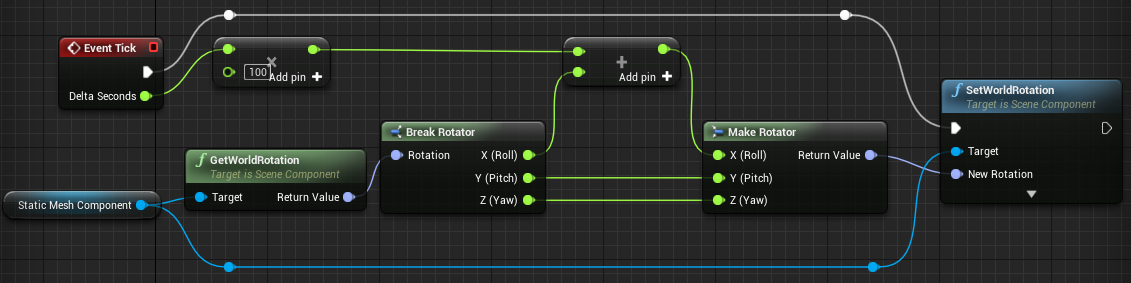
@fresh tangle not sure about video you gave, but i just tried to rotate default cube from its Event Tick and it seems fine 😐 https://i.imgur.com/7C5WWrh.png (in my case it jumps from +180 to -180 and loop continues smoothly)
 misty dagger
@vast garnet Thx for answer, maybe later I'll try it. But now I have more serious problem 😃 I want to implement a parkour animation for my characters. But this animation is from Mixamo and is not in place. How should I implement this kind of jumping? Should I disable player input and try implement script which fluently transform the capsule of my character with animation? Or it's better way to do it? Now, my capsule is staying before the obstacle and animation is going out of capsule. Later mesh character is returning to the capsule so, it looks very weird and unrealistic.
vast garnet
not sure what is "this kind of jumping", but it sounds like you need to use so called root motion animation.
misty dagger

I know that I'm not disable animation and it's looping, but problem is with correct jumpong.
vast garnet
i never used root motion animations myself, but try to open this animation asset and enable Force Root Lock option.
or try to enable "EnableRootMotion" (then it will apply movement to capsule purely based on played animation, so you should not manually apply force to make jump in that case)
if you decide to enable root motion, it might be harder to control things like "how high i should jump to pass over particular obstacle"
but again i didnt use root motion animations myself, and your looks like such animation for sure. So if enabling/disabling those options wont help you should read documentation about root motion.
misty dagger
But should I use function jump and stop jumping in my player BP?
vast garnet
depends on how you wanna control your jumping, if you are fine when its fully controlled by animation itself, you should just play animation, not apply force to actor by yourself. But its actually depends on how root bone animated in your case, to pass over obstacle it should move not only forward but also UP (on Z axis) to actually simulate jump.
its possible that your root bone animated only to move forward and not moving along Z axis, in that case you should apply some force to increase Speed along Z manually 🤔
misty dagger
Ok, I understand it. Thx, again for help 😃
I have animations from Mixamo and they have no root bones. Maybe it's the source of the problem.
vast garnet
but somehow its moved your mesh out of capsule, so here must be some kind of "root bone" (it may have different name)
misty dagger
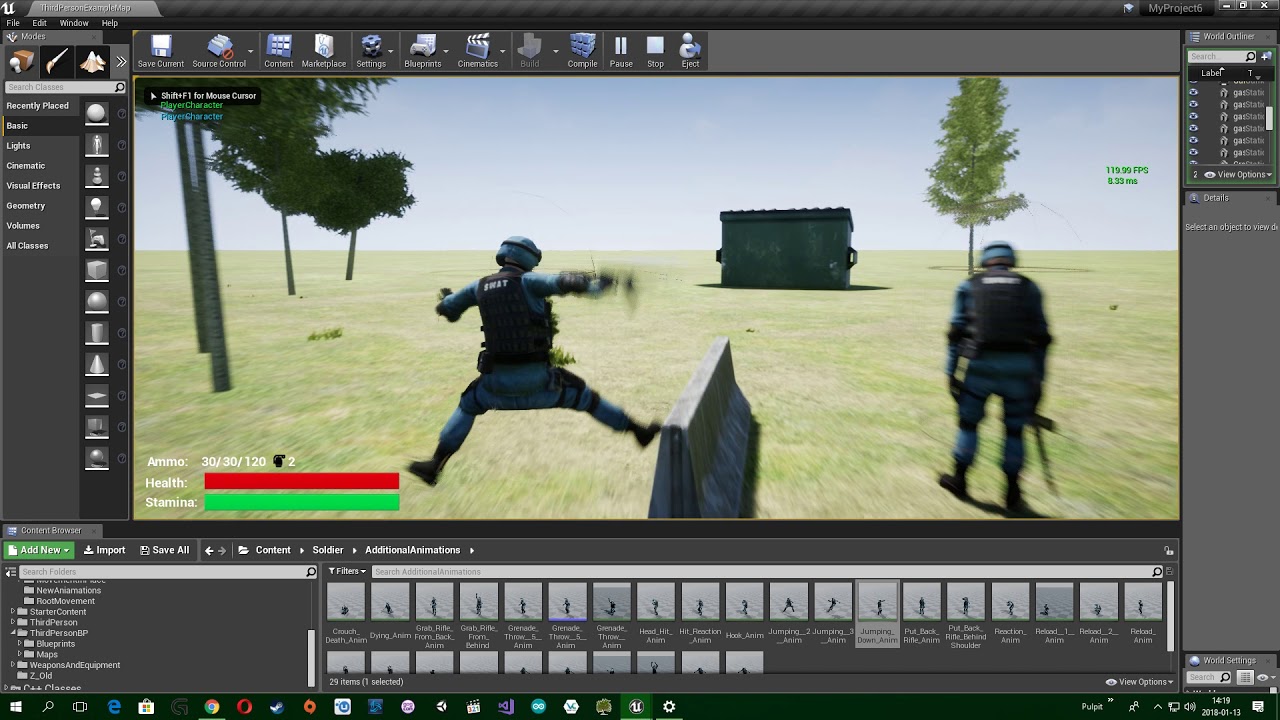
In this video I'm trying to set diffrent option and it never works 😦
I think , it's the same problem
Ok, mixamo animations have no root bone and it never works without retargeting 😦
wise spoke
Hello guys, what's the best way to play multiple Idle animation randomly? Is the solution here the best one? https://forums.unrealengine.com/development-discussion/animation/38593-multiple-idle-animations-animblueprint-issues
misty dagger
I think it's good. It works in my game very well 😃
 dark vortex
I've imported an FBX animation, it works fine, but I'd like to be able to play just a range of the timeline/frames - do I need to make a new asset for this or do I need to just play the animation to a certain range?
vast garnet
@dark vortex you can import only range you need. If you planning to use both full and cut versions maybe you should play around notifications to stop animation before it ends. You also can start playing animation from desired point of time.
dark vortex
@vast garnet Thanks, I had tried doing that but is there a way to END the animation at a range too...it lets you add a pin for the start time but not end
I guess it's time I learned about notifies
vast garnet
have you tried to add Notify for your animation and stop playing on it?
vast garnet
depends on what you wanna achieve, notifies will trigger Event on your character AnimBlueprint and you can do whatever you need once it triggered
right now you already can go to Event Graph and add node with your new EndOf... event
and stop playing animation or do something else
dark vortex
I think it's just a matter of making an Event based on the Stop Notify? and that event calls play the animation?
I'm assuming that's not right
particularly because itstill plays the whole thing
vast garnet
you trying to stop all animations at all? or just particular one
dark vortex
just this one
spring steeple
since it will be easier copy the animation and remove everything you dont need
dark vortex
It's an FBX that has a few animations, I want to separate them
spring steeple
than either in import option set animation length to set Range and set frame import range to the start/end of the animation you want
dark vortex
doesn't that overwrite the entiire animation?
I want to have a copy of it but I don't want to lose the import totally
spring steeple
or make a copy of the animation you have already imported and remove the frames before after
you can rename it
vast garnet
yeah you can just make different unreal assets with some cuts of initial packed animation fbx, both ways should work, just pick that fits better
but if you decide to go with notifications you should change state of your AnimBlueprint on notify event or you can play/stop your animation as AnimMontage
dark vortex
Yeah, I ended up making copies of the animation asset and reinmporting it with a different setrange
I imagine to make it appear in the game, would swap out the animation assets at the same world transfer?
vast garnet
depends on your goals, but i think you better to overview unreal animation system in general at this point to understand your possibilities
because here is many of them 😄
dark vortex
recommendations on what is best viewing? some livestreams assume too much
vast garnet
Overview of the system for deforming Skeletal Meshes based on animation data using Animation Blueprints, Blendspaces, and Animation Sequences.
as starting point, and then dig into sections that you more interested in at this point
misty dagger
What is it better? Using Play Animation Task in Behavior Tree or creating task with setting variable and changing state in animation graph.
carmine cove
The majority of the time you want your animations centralized in the animation blueprint
 ashen warren
hi
my problem is, that i have dozens of fbx files, recorded with Ikenema Orion
now i should find a solution to compare these files with each other to find patterns and similarities in these animations, that i recorded
Does someone knows a software, where i can insert a setfile, that looks for similarities?
vast garnet
@ashen warren not sure about comparing one file to another, if you have a full loop in single fbx file you can try blender and motion capture addon (here is an overview tutorial series: https://www.youtube.com/watch?v=_VhbSrau-0c). I didnt use this particular addon but it seems capable of making loops from mocap data (in my case i used some simple addon to work with bvh format and looped with my own blender scripts and it took some time to make everything working). Oh and ye mocap tools usually made to work with bvh format, not fbx.

The Motion Capture Addon brings retargeting and motion editing to Blender! Developed as part of Google Summer of Code 2011. This tutorial covers basic hierar...
 stoic remnant
Anyone on with good understanding of blending multi animation?
vast garnet
@stoic remnant check AnimMontage
or blendspace if its about something like "blend few movement animations" or aiming
 uneven sparrow
hey guys! I have a problem that I can't figure out how to solve. I'm trying to create a fighting character in 3rd person. I have mapped a punch and kick to two buttons, now what I can't seem to figure out is how to not let another button press interrupt the first animation while it is being played. And second, how to create combos, like in Mortal Kombat/Street Fighter where giving an input of punch-punch-kick will play a completely different animation as compared to the base kick or punch animation.
vast garnet
@uneven sparrow its more about your game logic. Think about to centralize all input processing in place like player controller. In the end your logic should be like "player pressed some button, we should start playing punch/kick animation and prevent any further input in next 0.5 second", if its about making combos it might be reasonable not just ignore all input while playing animation, but remember last "punch/kick request" and perform it right after current animation (so it will be smooth from player's perspective).
ashen warren
@vast garnet the toll that im using to record is giving me fbx files, maybe i can convert them to bvh
vast garnet
@ashen warren maybe 🤔 anyway i cant give you more suggestions, i only played with public mocap animations and did everything in blender. It was possible to made everything work in ue4 but process was tricky.
ashen warren
Wirh ikenema orion its possible to capture fbx real time in unreal
uneven sparrow
@vast garnet Exactly, which is what I'm trying to figure out; how to get the game logic to prevent playing an animation before the currently playing animation finishes
vast garnet
@uneven sparrow since you know how long your animation lasts, you can remember time when it started and prevent new animations during that time in next input processing iterations. Well you can check if some particular animation is playing right now, but in that case you may end up with huuge list of checks.
stoic remnant
no im after blending anim layers over each other, controlls X sections of object
vast garnet
@ashen warren ok whatever, i just tried to use plugin that i mention above and it seems bugged (at least loop detection part, which is not even documented) 😦
pastel spindle
Guys
How can I make the Layered Blend Per Node
So they will just blend the hands of the blend pose and maintain the hips of the base pose?
What I using momently
BUT the problem is that its not just blending the hands but everything up to the hips
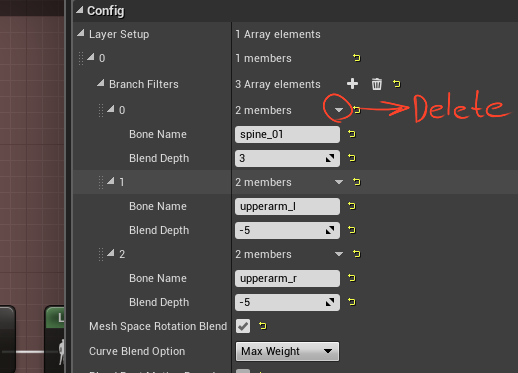
I want to maintain the pose of the hips etc, I just want to blend the hands (upperarm_l, upperarm_r)
vast garnet
@pastel spindle try to delete spine_01 from branch filters. And im not sure about your -5 Blend Depth for both upperams (should work as expected with default value).
https://i.imgur.com/b6eply4.png
 pastel spindle
I tried it but then the arms wont move at all
I use -5 so I will recive the blend pose value alot nicer
buuuut will try it
 zenith lily
hi, when i edit animation within the editor. the "pelvis" keeps on moving up. if i kept it that way, will there be any problem in future?
 copper dawn
https://i.gyazo.com/0b8cada6d30bef046c7fbc5b30f06916.png how do I make this thing show all the frames instead of the first 88, even if I span it along three monitors it never passes 88 of em
 spring steeple
mouse wheel?
 wise knoll
Hey, anyone know how to change animation speed of 2 same animations within a blendspace?|
Like If I have walk animation two times in a single blendspace and want their speeds to be different
vast garnet
@wise knoll not sure about blendspace, but you can just make a copy of animation and increase Rate Scale of copy 🤔
@wise knoll oh wait it seems like you can just right click in blendspace on animation point and change rate there
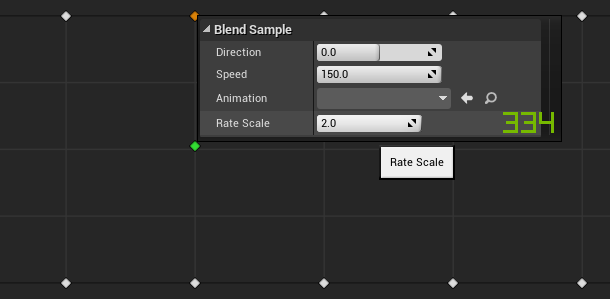 wise knoll
@vast garnet Hey thanks xD. Got it. It was in front of me and I didn't notice it before 😮
wise knoll
Hey is there any way I can start an animation from any state like in unity ? Like I want to play swim animation when it is in water without caring about what the previous animation was.
misty dagger
is it preferred to use the ART toolset or is it just as good to make your own rig to animate?
also is it a good workflow to take the Epic skeleton and create a new rig from that?
vast garnet
@wise knoll you can setup state machine and switch from Idle/Run Blendspace to Swimming Blendspace based on current character state (add some boolean to represent swimming state and set it to True when character is in water, then check it in your state machine rule).
@misty dagger its up to you really, engine not tied to default skeleton. But if you plan to buy animations or character meshes you may expect them to be prepared for default skeleton (still can retarget animations in-engine if general bone-set is equivalent).
misty dagger
thank you @vast garnet
I don't plan on buying other animations
would prefer to make my own. in this case it looks like a self made rig would be ok
vast garnet
yeah you should be completely fine with your own assets
misty dagger
I see a lot of skeletons for UE4 with a bone at the origin, is this essential?
I know UE uses the origin as the root when importing, so does a bone have to be there also?
vast garnet
such bone might be useful for root motion animations (so you have a root bone which only changing its location and engine can catch that location changes and try to apply the same movement to actual character)
i never used it in practice but still keep root bone at origin just in case 😅
misty dagger
thanks! I wont be using root motion but I will try to keep a bone at the root regardless
 sinful smelt
Hello ! Any one know how to use animset animations in blender with IK to easely modify it please ? If yes please contact me, thanks
IK like these ones i mean
copper dawn
I really need to practice animation (3dsmax), mainly animating objects (vfx) along splines.
been looking/googling for some good tutorials for it but most only handle the basic teapot along a spline. anybody know of a better tutorial for it? would be really appreciated. even more appreciated if someone could tutor me for a few hours but thats a longshot.
 sudden sedge
spline deform?
@copper dawn just use path deform
there's also animation->constraints->path constraint
if you want to deviate from the path, you can then set up an animation layer
bah
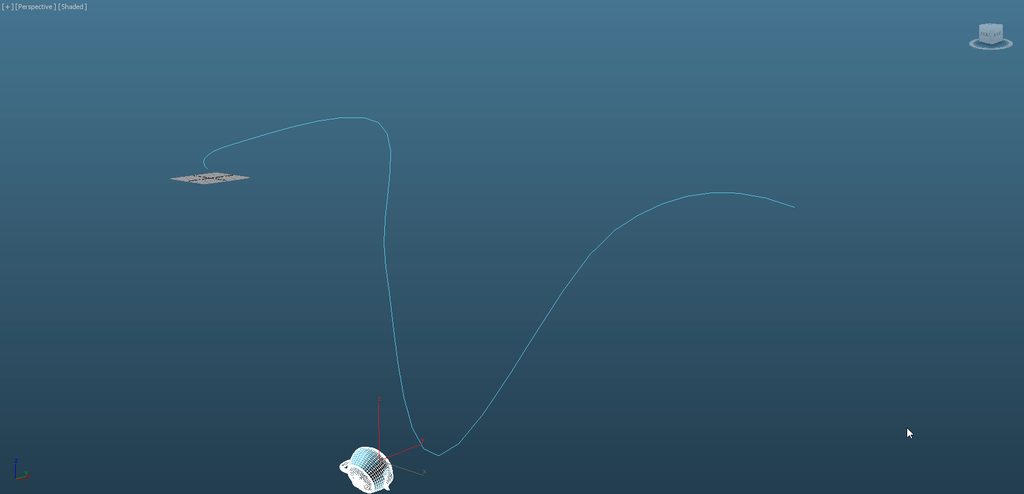
you can even animate entire characters with splines
you just need to set up helpers and have those follow the splines
sudden sedge
pm me if you have any more questions and I'll see if I can answer them
copper dawn
thats all stuff I know, I am mainly looking for advanced features and ways that make implementing the principles of animation easier.
wise knoll
@vast garnet the problem is that I have multiple states like Simple motions with IDle, Crouch state, Jump state, Magic Casting state, Bow equip state etc. That's Why I am asking if there's any way my player can use swim animation moving from any animation above when in water without pointing all of them to swim animation.
vast garnet
@wise knoll but how its possible that you will be in (for example) crouch and swim state at the same time? 🤔 If you disable crouch state and anable swim state it should be fine i guess? So you disable crouch -> it will transite to idle or something, then it notice that swimming state is active and switch from idle to swim.
@misty dagger blender.org
wise knoll
@vast garnet I meant I want to move from crouch state to swimming state and from Idle to swimming and from fighting state to swimming state and .......... 😅
There is one feature in unity where you can move to the animation from any state if the condition is true
vast garnet
i got you but didnt it happen if you just set your crouch or whatever boolean to false and swimming one to true?
and link everything to idle
not everything to everything
wise knoll
But I have multiple IDLE states :/
vast garnet
you can change idle animations in single state
wise knoll
Well I guess I got you . Before moving to swimming animation I should Move to default IDle animation
spring steeple
you could also put your state machine into a state machine and switch on the outer to swiming
wise knoll
I can have multiple state machines?
spring steeple
yeah
vast garnet
@wise knoll someone linked there a thread about changing idle animations one after another, take a look:
https://forums.unrealengine.com/development-discussion/animation/38593-multiple-idle-animations-animblueprint-issues?p=400435#post400435
You can do this in single idle state in your state machine.
 sly isle
hello
wise knoll
My system is like this 😅 . Am I going right?
vast garnet
@wise knoll also about your "bow equip" (and similar) animation, im not sure if you wanna have additional state in state machine for them, take a look on anim montages. They can help you to combine your current animation (idle or something) with bow equipment or spell casting or something, blenging different animations together per-bone.
wise knoll
Simple motions, Casting Motions, Bow Motions and crouch thing all contains a blendspace
vast garnet
bruteforce 😄
wise knoll
bruteforce? 😮
vast garnet
i think you really might be interesting in anim montages to avoid such state machine cobweb
well your way should work too, but it seems overly complicated
wise knoll
Actually i started unreal from new year only 😅
It seems I need to learn a lot than I expected
vast garnet
@sly isle hello
sly isle
@vast garnet thanks bro
spring steeple
you can keep a simpler state machine when on state handles more sub states that are mostly the same, like a idle/run blendspace for bow/noBow you could simple replace the blendspace inside the idle/run state
misty dagger
I see a lot of tutorials using nice lowpoly perfect quad models to rig but how the hell do you take a model with loads of cloth from Marvelous designer that has been decimated, and rig that?
Are decimated triangles fine for rigging and animating?
Or is it essential to do a full retopo over whatever decimated cloth model you have?
vast garnet
@misty dagger you can rig and animate triangles just as quads.
triangles cause problems when you need to use some subdivision surface modifiers. Its easier to work with quads in general in modelling tools. But thats it, when it comes to low level its all triangles anyway.
misty dagger
thanks @vast garnet
sudden sedge
state machines seems like a lot of unnecessary extra work
I suppose there's a lot more features
aim matrixes are super annoying to set up
 potent current
anyone have insight what's the best way to deal with IK bones when retargeting animation?
my IK bones were animated to follow another bone, but after retarget, they no longer match the bone they are suppose to follow
 gritty jay
A Neural Network is evolving with a Genetic Algorithm for physically controlling the right arm of the Mannequin and place it above his head.
The mannequin learns how to counter the force of the shots so he can keep the balance of his right arm.

A Neural Network is evolving with a Genetic Algorithm for physically controlling the right arm of the Mannequin and place it above his head. The mannequin le...
 solid nova
What would be the best method for making cars drive pass a street on a loop?
 hollow summit
I want to use multiple characters using the same skeleton without replicating assets to fix this issue ( skeleton retarget ). Is there a way to fix this in Maya or something?
misty dagger
Is it a common thing to export the UE mannequin and then delete the mesh and skin your own model to the skeleton left behind if you want to be consistent with other UE animations?
Also how do games deal with many different character skins like Fortnite? do they all have to be individually skinned one by one? that sounds like a nightmare
 tiny mirage
So I'm having an issue where I want to retarget the animation blueprint from the AI behavior tool kit to some low poly meshes from synty studios. What I did was take all of the meshes and assign them to one skeleton which has all the same bone groups that the synty models need. Then I went to the ai behavior toolkit anim bp and clicked duplicate and retarget and selected the skeleton for the synty mesh. It worked for the most part, but now the character meshes get really skinny and deform in weird ways. Did i miss a step? I vaguely remember having to make some sort of skeleton map for retargetting in the other times I've done similar things.
sudden sedge
@solid nova just an animation
 swift widget
Hi, I was wondering if somebody knows how to archive this tipe of face animation in Unreal Engine?

I want to archive a sort of improved but PS1 looking game....
I know how to archive that in blender by bones as a "Driver" but in Unreal Engine 4 how?
I'd appreciate any help cheers
vast garnet
@swift widget morph targets. Called Shape Keys in Blender ("Data" tab). During import into UE you should enable Morph Targets checkbox. Works only with skeletal meshes, after import can be found in Persona window at right side.
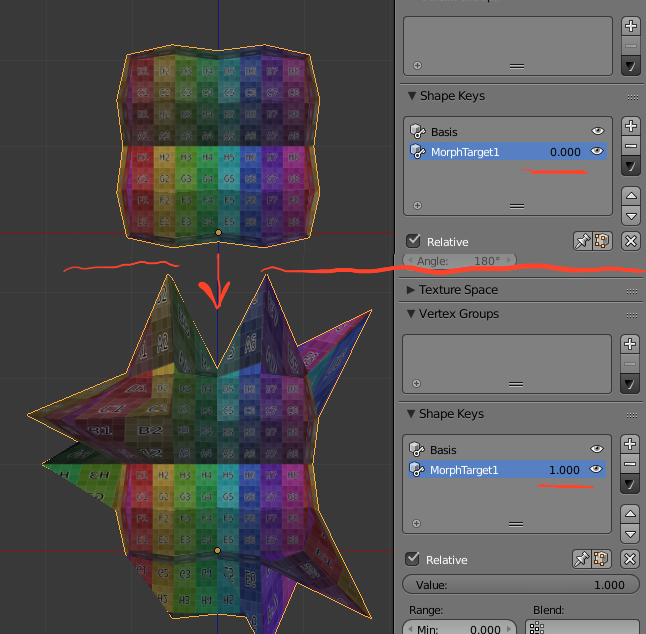
you can combine different keys at the same time to get desired shape of character face. For example one key will affect only left eyebrow and nothing else. Easily can have bunch of keys for different mouth shapes and so on.
 dusk dove
It's actually a combination of Morph Targets and multiple textures. For example the Model only knows "Mouth open" and "Mouth closed", but the textures have multiple variations of these
 merry rampart
Hey mon amis. Anyone know a method to slow down time (time dilate) for only specific physics objects? ie. NOT global time dilation?
I have been trying to use Custom Time Dilation with specific targets but to no avail
wise knoll
@spring steeple Hey, I just saw your technique and it worked out pretty well. Thanks
tiny mirage
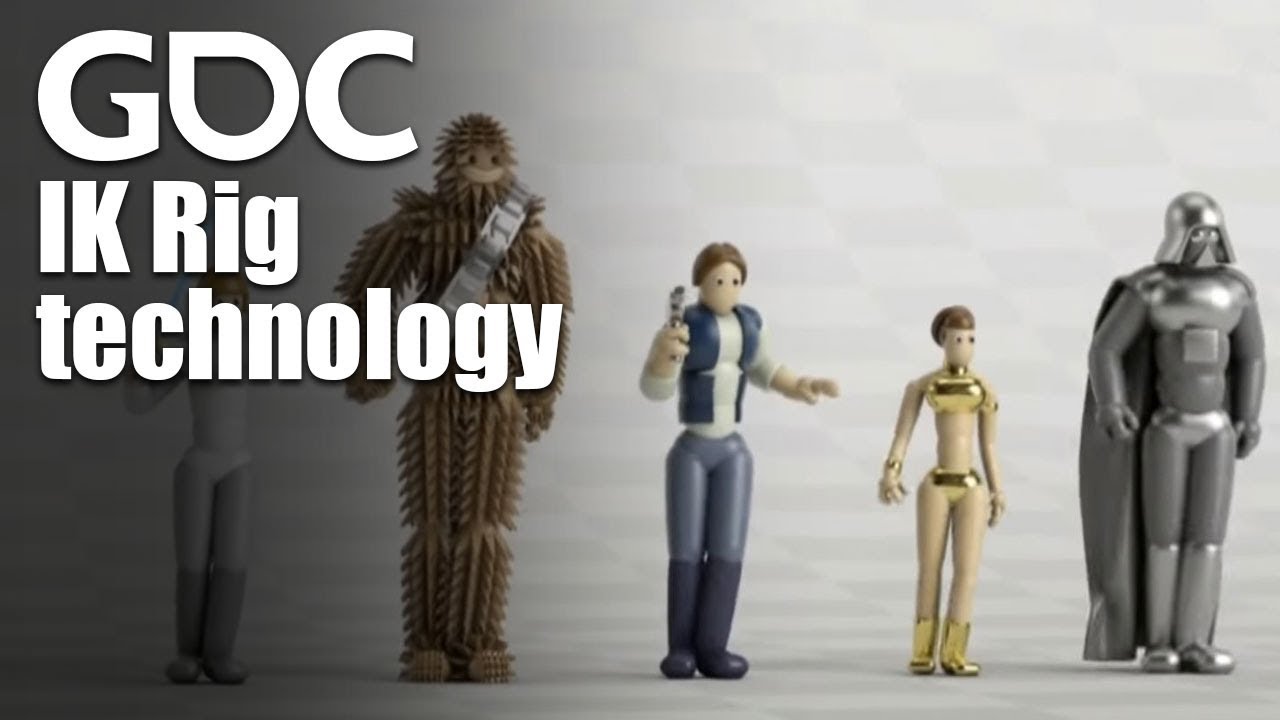
In this 2016 GDC talk, Ubisoft's Alexander Bereznyak breaks down the basics of IK Rig technology for animators, and explains how it can be used for everythin...
sudden sedge
UE4 animation blueprints kind of suck :X
can't reuse existing ones on characters with a different skeleton
or create children for different skeletons
swift widget
I know about the morph targets, but its not a mesh what I want to animate, is chage from a series of different mouths and eyes froom a single texture, here a tuto aboout how to do it in Blender (wich I believe its not posible in Unreal)

Thanks for watching! Please don't forget to subscribe to this channel for more Blender & technology tutorials like this one! :) LINK to PART 1: https://youtu...
I know there should be a way to archive that in Unreal engine, Ps1 and Nintendo 64 games featured that posibility agter all
 dapper trench
@swift widget you can create a Texture Atlas, or a TileSet. Having all your mouths in one single texture file like he has and then adjust the UV coordinates on a "mouth plane" or even add the mouth ontop of the regular texture
But it might be easier to just create a bunch of "mouth" planes, and swap between them by hiding/unhiding the other ones
There is also a TetureCropping function, but not sure if it's the same thing
A wide variety of functions designed to aid in working with textures, such as reprojecting UVs, cropping, and many more.
swift widget
Wow! NICE!
now i just have to figure out how to animate that (wish there were a tutorial somewhere)
Thank you so much @dapper trench
I'll try my best to solve with that 😃
dapper trench
@swift widget Yeah, not sure how best to do it in UE4. I would say probably say look into Morpha Target animation a bit. Probably somethign to give you an idea, as Morph Targets are the same thing just for 3D, so keying them to different shapes constantly is probably the same idea
swift widget
i know, but you can't morph target a UV layout
or can we? 🤔
looking at Texture Atlas right now, and is usefull for texturing several objects with the same material but different textures stacked in the same texture
Wich is what i'm doing here by making a different UV layout for each rock...
Texture Atlas would be usefull to populate several ground textures in one texture to avoid having different images for grounds, in short One texture for several grounds
Basic explanation and example of what a texture atlas is and how it applies to game engines such as unity3d game engine. Using 3d studio max, I will attempt ...
dapper trench
it should be pretty versatile for both. If you set it up to your mouth pieces, and then convert your tiling to parameters, you could then use code/blueprints to change the UV space dynamically
swift widget
but can't say it would be animated for constant blinking in an Animation Blueprint or sequence controled for a cinematic 🤔
Is it possible to use a 2D flipbook in 3D, so I'd do a flipbook animation per expresion and swap the material on demand (Like showing and hiding meshes as sugested before but with materials)

I outline the process of creating 2D Flipbook animation using Unreal Engine 4. This video was created as part of my teaching degree. We cover: Importing a sp...
dapper trench
No clue to be honest, never used FlipBooks
tiny mirage
@sudden sedge retargetting takes care of that pretty easily. As long as their is a similar bone hierarchy you can use the retarget manager to make sort of like a map of each skeleton for unreal to interpret when retargetting. Then you just play with the skeleton hierarchy itself after the retarget and in most cases setting the root to animation scaled and hips to animation instead of skeleton will apply the animation pretty well. Might have to do some minor key frame things if you do something like I did where I went from a 5 finger hand to a 3 finger hand, but honestly thats not even that big of a deal.
Theres some pretty nifty youtube tuts out there, though not many recents ones to cover the newer layout and features. Pipeline has improved a lot. Excited for 4.19
sudden sedge
some of the models have radically different skeletons
as they're creatures
@tiny mirage
Can't really retarget a deer to a bunny rabbit
tiny mirage
well what would those two things have in common that you would want to use?
vast trellis
@swift widget you can use animation notifies to set different values to swap to the different face flipbooks
the learning tab couch knight projects has some face flip book examples in the characters, though I don't know if any are driven with animations or if they use just blueprints manually
swift widget
learning tab? wich one? 🤔
gritty jay
Imagine that each mannequin has a fly on top of his head and is trying to get rid of it.
All animations are procedurally generated using Neural Networks.

Imagine that each mannequin has a fly on top of his head and is trying to get rid of it. All animations are procedurally generated using Neural Networks.
carmine cove
I've watched all the videos on how to use Animation Montages, but i still don't see a good use case for them. Why wouldn't you just use a Layered Blend per Bone with a looping animation?
 delicate locust
Montages can be triggered without extra variables, that's the biggest advantage I see. If your event graph is event driven, you can use montages as one-shot animations.
You could also be better off using the Play slot animation node in many cases, but you can only have one of those at a time. Montages let you play on several slots at a time
 stoic parcel
hi
gritty jay
These Mannequins were evolved to reach the black spot above their heads.
Each Character has a Neural Network to control the virtual muscles of his right arm. All the calulations are done in real time.
These Mannequins were evolved to reach the black spot above their heads. Each Character has a Neural Network to control the virtual muscles of his right arm....
misty dagger
Anyone know a good tutorial on rigging a gun in Max? Watched 4 tutorials but they all do it differently
hot crescent
does UE4 accept 60 FPS animations? or is it capped at 30?
swift widget
It actually works as fast as you go
look at Doom for example, it goes as fast as 120fps in some machines
sudden sedge
@hot crescent you can use any fps animation, just set the rate scale accorindgly
1.0 = 30 fps, 2.0 = 60fps
swift widget
That is true if the source is 30 fps, if your source is 60 fps then 1.0 = 60 fps and 2.0 would be 120 fps
again, Unreal Engine acomodates your animation in timing, it goes as fast as he can, engine reads the source fps and acomodate it in time so you can have sources from different fps and i believe it should still work ^_^
 timid summit
Hey, is there any way I can reverse an animation and apply it after itself
so I can loop it
within unreal
swift widget
there are several ways you can reverse a 3D anim. in Blender, Maya, 3Ds.... but not sure if UE4 could... its an engine that holds animation tools its no animation tool after all...
I would go back to the editing program, save a copy and reverse it
timid summit
😦
I am not familliar with any of those
Ok the reverse option doesnt play well as the character is clearly going backwards and its wired
I need to be able to have control over this animations, meaning I want to split it to have part of the animation played when I enter a wall, then a looping one which is when I run on the wall, and then the end part
any pointers as how I can achieve this
spring steeple
so you want your current animation split in 3 parts?
timid summit
yeah, but I cant seem to be able to find a good middle segment to loop
spring steeple
copy it 2 times and than delete the frames you dont need
timid summit
yeah, i did that and then put it in a montage, reversing the second animation but it looks wired
swift widget
looks weird because every animation played backwards looks weird
you need a "walk-backwards animation"? make one or get one 😉
for refference; in Prince of Persia (Sands of Time Trilogy)
whenever you loop back in time, character didn't walk backwards... as time was beign reversed, animation was played backwards, look and feels odd at the begining but you get use to it
timid summit
I edited the running animation with keyframes
and made it into a wall run one
thanks for the help tho
swift widget
good to know 😃
 bleak flume
Hi how do i make 2d texture eye blink?
I made this but it isn't smooth
I drew 3 pics and made a gif is it the best way ?
bleak flume
I think 4 pictures may do the job
 noble swan
Hey guys, is there a way to do procedural squash / stretch animation on a static meshe inside a material?
 maiden totem
I think you can get something like that with material tessellation and normals
pastel spindle
Guzys
How do I rig a wep properly in Maya?
I tried in Maya by Interact Skin Bindind
Binding*
But smhow dosnt feel right
:/
AHH
Nvm I am stupid to use interaction bind
misty dagger
if I have a full body +face animation, (everything in the skeleton) and I want to mute the face part. How would be a smart way to go about it?
I was thinking to use a layered blend per bone that blends back to a mesh-space static pose of a neutral face, and then specify all facial bones in the blend target list for the node.
would that be legit?
I have 92 bones directly under the head bone for the face. Would I need to then make 92 branch filter entries in the layered blend per bone node?
 lilac plank
Hi! How do you typically make animations communicate with gameplay code? Say I want to make Overwatch's Doomfist's Seismic Slam ability, where he jumps off the ground, flies in the air, and then lands. What tells the animation when to do which of those things? I have so far used anim montages, and made the blueprint starting the montage send and get information from the animation blueprint and anim notifies. I seek other solutions since this has grown messy.
raw dew
@lilac plank I believe you could get some nice results with a mix of notifies (which you are using) and curves built into your animation sequences. They could tell you things like the pinnacle of the jump or the lowest part of it (hit the ground), acceleration, etc. Not sure if you need some sort of prediction (ie. "when/where the character will land"). Curves can help you with that too (with some kinematic equations).
sudden sedge
I'd say get the code done, then tell the animation when to transition
start -> peak -> fall -> land
lilac plank
Thank you @raw dew ! 😃
misty dagger
hey guys! i've got a bit of a dumb question -- if you animate a texture in blender (ie. an eye blinking), would that texture animation translate to unreal when you export it? or would it be better to do the animation within unreal itself?
i'm talking about literally uploading a couple of facial expression textures, and then changing the texture on the keyframe
 inner zephyr
all tutorials online use the the "is falling" to make the jump animation trigger.... but i want to use "is falling" for the falling animation!!! is there another way to trigger the jump animation?
 vestal thunder
cant you link the jump to the jump button
misty dagger
if i remember correctly you would begin the jump animation when the character is falling, and then have the falling animation play when the jump animation is almost finished. or are you trying to do something different?
 main ferry
Good morning. I'm searching for a solution and I'm trying to find what is possible with current systems in UE4. I need to make a system similar to humans fall flat where you can move your arms to grab walls. When you grab with one arm the rest of your body would ragdoll from that point and swing. If you wanted to raise your other arm awhile swinging you could and that limb would wake up from the ragdoll or be influenced on top of it.
I picture using a constrinat to attach the hand to a location in world, then setting all the bones to ragoll. I've found a node called something like -set all bones to ragdoll below this bone. This seems like it would work down the heirarchy - but a limb hand is already at the bottom
inner zephyr
@vestal thunder can i?
@misty dagger yea that's how the Epic team does it with the mannequin but as i am working with the Mixamo character i only have a complete jump animation so i need to make jump(space) only trigger the jump animation and if you are falling then trigger the "falling" animation
solid nova
yo
im trying to retarget an animation on a new skeleton

but this just happens
when i apply the animation
the new animation
The pose of the two skeletons are as similar as i could get it
Does scale matter?
Cause hte new skeleton i have is waaay bigger
But on the retarget screen it doesnt show the scale really
misty dagger
i think scale does matter.. i'm no expert, but i would imagine that any change in the skeleton itself (ie. addition of joints, length of bones) would cause incompatibility issues. have you tried scaling it down to the original size and then applying the animation to see if it works?
solid nova
Thing is it is at the original size right now
I imported it from blender
Maybe i can scale it down in blender before i import it
But idk exactly how much i need to scale it down
misty dagger
do the two skeletons have their joints in the same places?
solid nova
Yeah
All the joints are matched up
When i say big
i mean its REALLY big
like a thousand times bigger then a chair
misty dagger
i feel like that could be the issue, because the screenshot you posted shows it being squeezed down
i would try scaling it down before importing just to see if it makes a difference
misty dagger
well if it works on the original skeleton, then presumably you would want it scaled down until it matches the dimensions of that skeleton?
solid nova
Yeah but i mean like
In blender
it says 0.0.0
u know
cause its the original
so i dont have numbers to go after really
Same thing in unreal on the other skeleton
it says 0.0.0 on the axes
Since thats the default size

okay got it much
closer now
misty dagger
i'm just trying to look up questions with similar issues.. some people are saying you're meant to reposition the scale to 1,1,1 before importing it, but i'm not sure why
honestly if it was me i would just keep making it smaller until the animation looks right, because i don't know any better
solid nova
Yeah im doing that right now
If exaclty the same thing happens
then ill know at least
its not the scale thats the problem
misty dagger
yeah true. though you said the bones were in the correct place right? it seems like most people have an issue with the bones being in the wrong place when they import
and if that's not the case with your model, i can't see what else it could be
 misty dagger
fingers crossed
solid nova

well fuck
its not even showing up now
omg
it worked tho!
Haha

Lets fuckin goooo
Finally
This has like halted my work for a few days
misty dagger
nice! i'm glad it worked out
misty dagger
no problem, you did most of the work haha
at least now we both know that scale matters
solid nova
yo @misty dagger


Which one do u think is the Root?
Nothing is actually called root here
misty dagger
is it not the one at the top of the chain?
solid nova
i think so
i just tried
auto mapping on it
and i choose that one
yo im trying to imprt animations from unity store
in to unreal
and for some reason the animation is not with it
They are fbx so
LIke its only skeleton, physics and meshes
misty dagger
hm i'm not sure if i can help there, i've never bought anything off the unity store. are you sure it was bundled with an animation? can you contact the seller?
have you tried importing the assets into a different program ie. blender?
solid nova
Oh ye
ive not
i can try it
weird
doesnt seem to work
it doesnt import anything in to blender
oh wait isnt there a walking animation
in unreal for free?
merry rampart
anyone have any tips for reducing alembic file sizes in blender???
main ferry
Does anyone know how to exclude certain bones during ragdoll? It seem,s that I can set bones beneath a certain parent to ragdoll. But what if I wanted to only ragdoll the legs of a character
merry rampart
Tyrant - I believe that would be in the physics assets
removing collision on certain collision volumes - or altering physics simulation from Kinematic to Simulation
stuff like that
there's also like a physics weight setting
main ferry
yeah IO'm trying to find the physics weight setting but I don't see it
merry rampart
so each collision volume can have individually contributed physics sim amounts
main ferry
You would set this per part on the physics asset right?
merry rampart
ya
main ferry
Hmm I can't find the physics weight parameter
merry rampart
I forget exac where. click on an individual collision thingy
k one sec ima check
just went thru this meself
main ferry
I think I found it
merry rampart
oh ok good
main ferry
So basically this works by setting a threshhold number right? So if I use the set all physics objects blend to 0.5 then anything with a higher threshhold doesn't simulate right?
merry rampart
umm
dont think so
may be wrong
in my experiments - it would mean that physics sim would take over an animation by .5 "weight"
main ferry
Ahh So setting it to 0 disbales the physics on it
merry rampart
so if character was walking say, then the animation would still be visible, but the head and stuff would bounce around a bit cause just 50% of physics is being acted upon
I think so
solid nova
Anyone know why some fbx dont have any animation with them?
Im download like free animations
and its just a mesh skeletal and physics assets
merry rampart
where did you download from
solid nova

MoCap Online
Download our Free "Uni-Pack", containing animation files in Unreal, Unity, Cry, FBX, BIP and iClone formats. Includes several animations from our Mobility Pack.
got them from here
had exact same problem
with some animations from Unity store
Any idea why?
 sudden sedge
did you bake animation on export?
hot crescent
I know this is a UE4 server but is it ok to talk about Maya here? i have an issue with maya but not sure how to fix it.
main ferry
Anyone know how to set physics weight on each physics asset body (each bone)?
hot crescent
This is the issue i'm having with maya 2018: http://g.recordit.co/6sMQdi7fYo.gif

is there a way to fix it?
 ocean ermine
When you retarget an animation, is that new animation "attached" to the original one? i.e. if i migrate just the new animation, will it bring the original with it?
maiden totem
I don't think so? When I retarget an animation the option I'm given is "Retarget and duplicate"
hollow summit
Is having multiple skeletons (4-6) with similar animations weird or strange (retargeting)? or should I spent the extra mile to figure out how to unify all the skeletons together?
hollow summit
Side note: does anyone here know how to import a current skeleton/mesh and merge it with unreal engines mannequin?
 whole blaze
that node is not working properly with morphs , i guess thats normal?
solid nova
Hey
I have these 2 models
in C4D
one has an animation
and the other one dont
they are the exact same skeleton
I move the animation from one to the other
and then exproted it as an FBX
In c4d the nimation and model is fine
But in Unreal the model is kinda fucked
The arm is in his back
and his feet are weird
Anyonw know why this would happen? Since its completely fine in c4D
 lavish plover
@hollow summit It takes about 15 minutes to learn how to use the same skeleton on multiple characters (even ones with wildly different proportions, as long as the have the same bone heirarchy and names). Retargeting is sloppy and limiting.
Describes how retargeted animations can be used with multiple Skeletal Meshes, allowing you to share animations.





