#animation
1 messages · Page 98 of 1
 late kiln
I actually highly recommend the Advanced Locomotion pack on the marketplace if you're trying to learn about animation blueprints (steer clear of Character Interaction). The Advanced Loco guy does an AWESOME job at keeping his blueprints nice and clean and easy to understand while accomplishing what would otherwise be considered a relatively AAA task animation-wise. Anyways, you can actually call Anim Montages from virtually anywhere as long as you have a reference to your Skeletal Mesh. Note that some of the Montage Play nodes take different reference inputs, so check out which ones you plan on using so you know ahead of time what you need to reference (they take either character references, skeletal mesh references, or anim instance references, I cant remember which requires which). You can call them via event/event dispatchers directly within your animation blueprint, or anywhere else that suits whatever it is youre doing
late kiln
I have that one as well haha, those animations are beautiful, but don't come with blueprint setup. Advanced Locomotion comes with a solid blueprint setup, I've been using it as a base template for all of my animation blueprints for almost a year now.
 terse bone
I'm really interested in Root motion animations too
can be awkward for first person stuff, but it can create some cool effects
like you're sprinting and if you suddenly stop (like hit back)
the animation goes into some abrupt stop slide
and you kinda get that feel then while in First Person
late kiln
Yeah I've found that true first person is basically not possible if you're going for true smooth :*( and man have I spent a lot of time trying
terse bone
Yeah i ran up against that wall myself for a good while
it ends up looking too jerky in first person
or weapon is in wrong spot
late kiln
The best bet I've found is to just manually switch between two completely different states
terse bone
or perspective makes your weaponlook like a toy
late kiln
Look into IK, it has totally saved my ass dude
terse bone
I plan on building a Spring system for my weapon some how
basically you can "apply force" and the spring tries to bring it back to it's origin
and some how I want to IK my left and right hand to the weapon
so I can procedurally animate the weapon through code
weapon sway, aim shaking, movement on a curve, procedural idle animation
that kind of stuff
late kiln
Haha you are talking to the right guy right now
I've been doing the exact same work to a tee for the past month
terse bone
haha awesome
yeah really looking for this sort of weapon handling: https://www.youtube.com/watch?v=vkV521iQgkY&t=0s

Support me on Patreon https://www.patreon.com/DevilDogGamer Klean's Twitch https://www.twitch.tv/klean_uppguy Flight Sim Channel https://www.youtube.com/chan...
less arcadish..more weighty
weapon stats would drive lots of this behavior
late kiln
I've built an animation editor system to compensate for unreal's god awful one. Lmfaooo and I've been playing tarkov for the past week drooling
terse bone
yeah
so i guess the gun and the arms are just parented to the Camera
but not attached to eachother
and then you IK the hands to the right sockets
then in theory you could move the gun with offsets however you want
late kiln
I think actually that they are using true first person believe it or not, but the IK positions are attached directly to the camera
late kiln
Exactly ^
terse bone
to get this perspective, yo'd have to stick the camera in the chest
dunno...i guess you could go look at the wrist on another player
and see if they also have a ticking watch
late kiln
I dont know if you own the game, but if you ever play you can use their free look key and look around independent from the arms
terse bone
I have EOD but haven't used free look
late kiln
Its cool to see what methods they use, unfortunately though they've still bitten off more than they could chew. Opening doors/interactions with their IK is god awful buggy
And more camera clipping with guns than I can stomach haha
terse bone
lol yeah especially opening doors on an elevation
like opening a truck door from the ground
late kiln
Yeah lmao its actually hilarious
terse bone
i'd still prefer to do the Battlefield 1 approach
and not actually use TFPS
just seems easier to get things right in isolation
ie I don't need nice full body mocaps to have a good first person experience
late kiln
I've built up a little system to record multiple keyframe-type transform positions, assign them a time, and play them back accordingly- the goal being to record these positions in-editor, during runtime, and then play them back appropriately as if they were animations on their own, applied on top of other authentic animations if need be. At the same time, I've built up a 3d blendspace that allows you to assign transforms to specific vector values, and then play back the appropriate blended transforms based on a 3d vectors input- which allows for a self-correcting elbow joint target system when using IK. Otherwise, I've built up a little system to work alongside my IK that allows for your player's hands to move appropriately so that the weapon's muzzle aims directly at a target
terse bone
damn
I've only done Lissajous curve procedural idle and movement animations
very elementary approach w/o IK basically just moving the entire rig like they did in oldschool quake
and doing offset movement and "lag"
so it trails the mouse look
late kiln
I don't mind hooking you up with my IK system, its simple as hell and gives you easy control over positioning blueprint controllable
yeah that is kind of a bitch sometimes ^ Dont try spring arms fyi lmao
I'm working on that specifically right now
terse bone
yeah u gotta offset the weapon transform in relation to the base position
while always trying to lerp/interp it to that position
and also change the point you are rotation around at times
and also all of this stuff needs to be additive
gun swaying, trailing, .. it's difficult
late kiln
I found through way too much trial and error that it actually ends up being more stable and more controllable/tweakable to predefine 5 sway positions, center, left right up down, and interpolate between them based on your mouse input, adjusting them with a lerp to have control over strength
terse bone
I want to programmatically make some weapons more snappy than others
like longer weapons are less responsive but more accurate
so an AKS-74U (tiny AK) would be quite snappy, but have a great deal of recoil in all directions
so that can be done by decreasing the time it takes for the weapon to interp to the base position
late kiln
Exactly, so you can have a float slider 0-1 attached to your weapon data that lerps the blend between full and 0, or just simply lerps your mouse input. Youd also need to interp the mouse input for obvious reasons, so you can have another float slider to control the interp speed, so you can control the snappyness
terse bone
Escape from Tarkov has some stats like "Ergonomics" that they use to drive these behaviors it hink
late kiln
I'm working on building a little lagger component with a soft spring clamp that I can just drag and drop into these guns
Yeah and they do a really good job with it
Ergonomics is a solid FPS mechanic
terse bone
so the spring setup
is to do things like apply force to the gun when you land from a jump
which pushes the gun or even the whole rig down allowing it to spring back up?
stuff like that?
or say your character gets shot, and you want to apply a force to the gun to throw it off target
late kiln
Yeah exactly, you can also get a really cool effect from doing multiple rotation lags at different positions
So if you do some rotation lag at the muzzle, and some at the grip, and make them lag at different speeds, you can get some seriously sick fluid effects
The only issue being you need to start loading up these blueprints with scene components, and if you haven't come across this already, UE does NOT like when you have too many scene components attached to one another on moving objects
Which is a huge reason why I've decided to go with predefined transforms/blendspacing them over direct controlling scene components
terse bone
using Scene Components as pivot points?
there is some vector math you can do to rotate an object around an arbitrary point
late kiln
Yeah exactly
terse bone
i almost got it to work before, but it didn't work quite right
so you could set a rotational offset vector from the origin
and the sway and such would rotate the object as if that point was the origin instead
late kiln
Yeah it is some raunchy math, 'Rotate Vector' / 'Rotate Vector around Axis'
A lot of what I've found is that it is really really difficult to set up a system that will look right in all scenarios, versatile enough with enough variables and controls that will allow you to adjust things to taste
When you get one gun that is an abnormality, or when scenario that doesn't fit, you're needing to dishevel tons of reliant work in order to make it function alongside everything prexisting without issue
For instance, like when I turn my character on the Z axis, and I want my gun to fluidly point in that direction before resettling back down to its origin, I may want it to add some roll input on some guns, like a tilt into that direction. Rotation naturally will usually avoid that, but with manual predefined blends I can specify exactly the position i want it to be blending towards
terse bone
blends are way easier to control but harder or impossible to tweak through code
like make a weapon tilt 10% less than another
late kiln
An RPG is going to need to feel so much vastly different from a pistol or a knife, that making a blanket system would require so many variables that in actuality the act of incorporating a new weapon becomes overcomplicated and slow
terse bone
i suppose you could have a blend space
and the variable you feed in
is just 10% less than the max
late kiln
You can totally tweak the piss out of them through code haha
terse bone
so it won't blend to the extreme
late kiln
If its kind of like an additive thing, where you're never actually getting to the full 100%
terse bone
yeah
but lots of guns sway/rotate around different points
like a rifle up against your shoulder would rotate around that point
a pistol sways around the handle
an RPG would be even different
late kiln
For each gun I mean you would predefine an assortment of points specifically for that weapon
terse bone
i see
I'll likely have to create some sort of "SwayComponent"
that drives all of this stuff
late kiln
I use scene components, and have a developer system that lets me preview each of point during runtime, so I can set these points during runtime. Then I record the points into a map, delete the components on beginplay
terse bone
sounds complicated lol
I'll be in for some fun when I get to work on this stuff
I just got weapon setting working last night though...now I need to get some core animations functioning
late kiln
This whole world is very fucking complicated lmao, unfortunately for us
terse bone
and sweapon swapping
I need to add some code for Delays and such
like "bIsReloading" bools
late kiln
Anim notifies are magic
terse bone
mine just works instantly atm
late kiln
Delays suck unfortunately because if you ever want to change the speed of the swap, reload, etc, you have to adjust those delay timers as well which sucks =/
terse bone
I thought about using these, but I don't want cross dependency between my Animation BPs and my Components
can use Timers
and then in the AnimBP
change playrate based on the Timer (i think)
late kiln
How about dispatchers off the notifies?
terse bone
but it can look weird for certain things like Deploy
late kiln
I admire your awareness of the importance of creating isolated systems haha
terse bone
essentially, I don't mind the AnimBP being dependent on the Weapon components
I kind of see it like the UI, which quite frankly is fit for purpose
and can't usually be pulled straight out of one project for another
but the coded mechanics..all my components...i want to be decoupled and functional in a way they can be easily dropped into any project
I wouldn't want to say call "Fire" function on my WeaponComponent directly on the AnimBP
late kiln
Thats been my philosophy for a bit now, its extremely important. It takes twice as long to make something that is drag and droppable, but nothing beats having something that is said and done
terse bone
when all that does is "Play Montage"
harder to design, easier to expand and maintain imo
late kiln
And easier to modify, and get back into after being separated from it for a few months
terse bone
yep
like my UI is obviously dependent on my Inventory bc it's built for purpose
but the Inventory has nothing to do with the UI
I don't mind that sort of dependency
late kiln
Lol. Ironically everything I'm doing now I did about six months ago for another project. Dirty, reliant. Not usable here
terse bone
so AnimationBP's relationship with the programmed Components and mechanics would follow that same philosophy i would think
because thinking from the perspective of a Team, different people would be working with these different pieces
programmer would say: I made a Weapon component. Any Actor with a Weapon component is a Weapon. This component will tell you if the weapon is reloading or deploying or whatever
animation programmer or w/e they're called: Ok cool...I use this stuff to tell my Animation BP when to do certain things
so you had to re-do work you already did? I hate that
late kiln
Well basically everything were talking about now is exactly the reason why, its my own fault haha. Its what happens when you rush I guess. Though, each time I come back into something I've already tried to tackle before, its kind of awesome seeing how much more easily I can tackle problems now than I did then. The actual progression here is nice. And with UE its extra satisfying. I don't really think many people have gotten a grasp on how UE can be used for almost anything, and this blueprinting system makes debugging so fucking fast, and the workflow just flies
terse bone
progression for a lot of people with UE4 is like
late kiln
And UE is supposed to be adding full Python support soon, 4.2 I think. Thats also huge. Plus that new AR shit
terse bone
at first avoid C++ at all costs..blueprint only....I'll do C++ if I absolutely have to
but at this point I do nearly everything in cpp and just use blueprints for prototpying/designing things that I don't quite understand how I want to function
or for quick intermediate things that I don't want to hold up another more important piece
and as "prefabs"
also it's important to know BP as well because UMG and AnimBP naturally use BP
late kiln
You use C++ over blueprints? What for exactly? I've never understood it to be honest, I've been meaning to get my head wrapped around it. I guess if its your native it makes sense, but can you actually bang things out faster in C++ than through blueprint scripting?
Not bashing, just trying to understand the reasons
late kiln
How so?
terse bone
and when you have a solid foundation in c++ it feels easier to me to build and add to it
late kiln
I do know that there are serious limitations in BP
terse bone
Blueprints just get messy the more complicated it gets
and you can spent a lot of time straightening wires, moving nodes around, and commenting
organizing
terse bone
but BP to me is easier to prototype in
because you can rearrange nodes and wires and stuff really quickly
late kiln
I don't get to talk to many C++ natives anymore lmao
terse bone
easy to test your code too
since u can just throw some quick nodes together to force something to happen that isn't coded in your cpp stuff
like lets say you were making an inventory system
and u just wanted to test addition to inventory
you could just spawn an actor in and call AddItem() to make sure it work
without having to go and code an interaction system
without touching your core systems
and so far BP has been perfect for UMG work because most of the functionality of the UI itself is very simple...like binding things
setting formatting conditionally
and for that...feels easier to me to use BP since it's more visual
what was your random question?
I was mostly alluding to how someones use of an application like UE4 would change as they progress....design philosophies and stuff also changes...like composition over inheritance
late kiln
That makes sense, for me it’s really the fundamental architecture of the language that really keeps me clear of it. It’s not intuitive in my opinion, and almost seemingly purposefully so? Like the math teacher that gets a high off of making sure nobody knows what the fuck he’s talking about. I love python’s architecture in comparison. It just seems to make more sense to me.
terse bone
there are of course "easier" languages like C#
python
but C++ does give you the ability to do cool things that those others really don't
like pointers and references confuse people
headers and cpp structure confuse people
but they're not that complicated in the scope of Unreal API in my opinion
just like C# is less complicated than actual C# when just coding in Unity
but if i showed you UE4 c++ code snippets next to Unity c# snippets that do the same thing....they're really not all that different
choosing to not use c++ is like only using the editor
c++ works nicely with blueprints
and like Epic says...BPs are great to do things quickly where you would otherwise have to wait for a programmer
late kiln
My question was about a math/logics problem I’ve been toying with for a few months which luckily is non-essential to my current project. It might be difficult to phrase correctly actually, but maybe your c++ knowledge might give me some insight about it. How exactly can I cost effectively determine whether or not any point of a collision body would be visible from a specific point of view?
terse bone
and there are some cpp functions that are simply not exposed by default to Blueprint
like GetDefaultobject
my ContextActions are UObjects, but they never need to be instantiated to be used
because the function call goes through the DefaultObject that exists for all the UCLASS's ( i think that's how it works)
it just creates a clean way of selecting "options" in a drop down to create a list of possible context actions in editor
and regarding your question...I don't actually know how that would be done typically
you could potentially get actor bounds
and check against the 8 verticies on that bounding box
instead of checking againsta ll the verts on the mesh
there is also "WasRecentlyRendered" i believe that might work
this is actually an interesting issue for me because I would like to do some AI coding at some point
and perhaps have some of their behavior based on how much of the player is visible
like how likely they are to hit you or even see you
late kiln
Escape from Tarkov actually does it incredibly well, the second you engage an AI they know EXACTLY where to go in order to not be seen by you whatsoever, and the maps are too big for manual point placements. The issue with the operation is runtime performance cost, and simply accuracy. Also, it would need to work AI -> AI as well, which removes the possibility of using was recently rendered. Plus you'd have to project the location and run the test anyway, which I believe would require a frame delay. Dynamic cover detection is a very difficult math problem that I know has a somewhat simple solution
The issue I think mostly is the limitation of traces exposed to blueprints
terse bone
hmm yeah that's a tough one
late kiln
If you could box trace for example, and one, set a start scale and an end scale, so the box with lerp between the two defined scales as it pathed along the trace, that would be nice. But most importantly, if there was a trace that could trace as a simple collision body (as they have already with spheres, capsules, and boxes) but basically would get cut apart based on what collisions it hit along the way, where the parts that did hit something, stopped, but the remaining geometry that did not collide would continue
terse bone
do they have cone trace?
late kiln
Like that would do it. And no they dont
late kiln
And even if they did unfortunately wouldn't help to much, unless it acted in the way a specified above
terse bone
hmm nvm that won't check for occlusion
late kiln
Multi-traces dont work in the way that this would need them to unfortunately, they just get all hits enountered and dont necessarily get anything that was obstructed completely
terse bone
yeah
late kiln
If you plan on making a shooter with AI and larger maps, you'll have ball with this little issue
terse bone
yeah cover detection
 bitter pendant
Here's a mocap animation I made for fun - thinking of making a cartoony game with tons of mocap

Google Drive
terse bone
lol cool. u have your own mocap studio?
 limpid patrol
anyone know of a way to get the ARTv1 rig sample to line up with the mannequinn A-pose instead of T-pose?
 clever shore
does anyone have issue with cloth asset not working ?
it looks good while painting, and then it is stretech and/or stiched toagther ;s
late kiln
@limpid patrol You should be able to change the retarget pose inside the skeleton’s retarget editor
limpid patrol
in maya?
@late kiln sorry let me rephrase question. is there a way to switch the sample mannequinn rig in maya from T-pose to the A-pose that matches the mannequinn fbx from ue4, which is in A-pose.
late kiln
@limpid patrol Ah sorry I misunderstood your question, I don't use maya so I wouldn't know 😦 Theoretically couldn't you export the A pose from UE, import to maya and copy the pose over?
Im really just shooting into the dark though haha, im sorry man
 fathom owl
Has anyone had an issue in 4.16 where importing a skeletal mesh deletes the uvs?
bitter pendant
@terse bone sort of! I have a nice empty room and mocap equipment
I need a nice mat for stunts though
 wise spoke
Hi there! there is a small chance anybody has experienced the same issue than me here but I'll ask still.
My FPS drops under 40 when I'm in the Blueprint animation editor with an IKinema node (given with the plugin). The weirdest thing is that my FPS drops under 70 when I'm in the PhAT editor, even it has nothing to do with Ikinema. I thought it was the plugin but in that case I wouldn't have an FPS drop into the PhAT editor am I right?
 misty dagger
I had a question bout animation and locomotion - I've seen how there are animations that make the character seem to move but their collision/position remains in the same place. Can animations be used to move the actual position of the character? Like if I were to animate a character running and jumping up a wall, after the animation finished the character would be standing on the wall?
@misty dagger Root motion
yeah that's definitely what I want, thanks @misty dagger
 merry rampart
anyone have an idea why my Camera transform track in Sequencer is offset from the actual track
the yellow dot is the camera
it just suddenly went offset
 neon bolt
cant find proper documentation on how to use the Blendspace start position settings. Anyone used it before ?
misty dagger
hey does anybody know how i can make my character lean when he turns left or right?
misty dagger
Get "wish" velocity from direction and max acceleration and then get dot product from your actual velocity and your wish velocity
then use that to determine how much you want your character to lean
there's some math to be done there, but tweak it
thats the basic principle as far as I'm aware
 pastel spindle
Guys, not sure what I posting now is blueprint or animation related so...
Could someone help me how to design it better?
The problem with its is
If I start the crouch (and not moving) its will flow toward the CrouchMovement->CrouchEndMovement
So basically what would happen
I standing in one place -> Starting to crouch -> Stop crouch movement (so the impulse when you stop moving animation)
And cant figure out how should I design it :/
Ah sorry, solved
I am stupid :(, I just had to check if it moving, and if no just go to crouchidle
By the way
Is it a better option to use more Locomotion if there are more move state?
so
JumpingStateMachine, NormalStateMachine, CrouchingStateMachine?
and would just blend between them by a boolean?
Or is it better to do them on 1 single graph?
misty dagger
You generally want to move from state to state using an enum, but transition between smoothly in the state itself
I for example have my blend alpha set to my capsule's height
pastel spindle
Hmm that a good idea
pastel spindle
Yeah I thought about
misty dagger
lol
pastel spindle
Uaing an enum
An doing the state handling
Myself
But I like to just : if not moving and not ctouching to to xy
Xd
But ofc with enum would be nicer
misty dagger
Use booleans where booleans are applicable
This isn't an appropriate use of booleans in my opinion
you want to handle multiple states of a single object
thats what enums are for
pastel spindle
Hmm that true
Btw
What do you think what is better?
Using a single graph (state machine)
Or more with enum?
I mean its would be alot easier to use more, but ita might has some backfire
misty dagger
Elaborate what you mean
pastel spindle
So
Ita quite hard to do everything in 1 StateMachine(like StandMovement, CrouchingMovement,etc..)
So is it fine to use 1 state machine for all of them?
1 state machine for standmovement
1 state machine for crouchmovement
1 state machine for swimingmovement etc
misty dagger
Generally speaking you can blend them together for various purposes
You just gotta look at your particular situation and see how you want to handle it
a lot of it is also preference
theres a lot of ways to do one thing
pastel spindle
That true
misty dagger
I personally like to break things down into basic parts but not too much
things that make sense to put together, you put together
but otherwise break it down
I've got a locomotion enum in my game, for example
within that I handle movement states
which means stance (idle, crouch, prone) and movement
transitions I handle by using capsule height as blend alpha
everything else I handle in a different state machine
blending is your friend - the more you blend things together, the more organic it all looks in the end
misty dagger
You're welcome!
 zenith lily
hi!, my animations are not saving when i edit an available animation. what is happening?
 whole blaze
My morph targets work when i using animBP , but how do i make them work when im using just "play animation" , i guess its not supposed to work that way huh?
 spare nebula
@everyone Is it possible to completely dump UE4 skeleton and use mixamo skeleton if we are using mixamo's animations completely? Or it's important to retarget to UE4 skeleton?
 eager arrow
Using UE4 Skeleton would be more ideal as the root is on the floor.
spare nebula
Hmm, I see
pastel spindle
What you guys think, which are the better idea to use for better results?
RootMotionCobtroller
Or a normal InPlaceController?
 vast trellis
anyone experimented with the GLTF importer in 4.19?
 gritty jay
Playing with ragodll and physics: Tim Plate is trying to lift his right hand by himself.
Just physics. No animations at all.
https://www.youtube.com/watch?v=puKWLchAsEI&feature=youtu.be

Manny Quinn trying to lift his own arm by himself. Just physics. No animations.
 lilac plank
What is the slot name? This function always returns false, even if the montage is playing (as if it cannot find the montage)
//changed W to w in "WholeBodySlot" no difference
 weary pine
@lilac plank Feel like SlotAnimation is different to Montage
IsMontagePlaying is probably what you want
lilac plank
@weary pine That was it! Thank you very much 😄 Now I can perform a much more elegant solution to my animation cancelling system
pastel spindle
Is there a way to Blend by Enum?
I mean instand of Blend by Bool
Blend by Enum? 😄
pastel spindle
Uh guys, can I make a BS with a single parameter (yaw rotation)?
Well nvm, just converted it to a vector instand
pastel spindle
Guys
Is there a way to mirror an animation?
I want the strafle right be mirrored
So would have a strafle left animation x )
 woven meadow
@preko#4732 I think no way without plugins
pastel spindle
:(
 pseudo flame
should I make/edit my animations at UE4? or do you guys recommend me to use an external program?
 broken isle
Hey, is someone there who can help me with an animation problem?
pastel spindle
External
pseudo flame
@pastel spindle thought so. any recommendations?
pastel spindle
@pseudo flame
Sorry wasnt at home :/
Well I usually using Maya
Its really easy to edit animtions with maya
But you can use blender (somehow I dont like it) as its free
pseudo flame
hmmmm. I'll try it, thank you :)
both of them make use of skeltons, right?
that can be imported to UE easily
sorry, complete noob here
 steep berry
Heyo, does anyone know if I can IK the hands to the fixed aiming down sight gun?
Basicly the gun is static in the middle of the screen and the hand bones are socketed to it and the animation adjusts?
steep berry
Just figuring out the best way to make a proper Firstperson feel
Because when you aim down sight you dont want to manually adjust all the offsets because of different weapons
you just want to have the gun in the middle
I will try though thank you @pseudo flame 😃
pseudo flame
hmmm... in this case, I don't know. I didn't use multiple weapons it with different sizes etc. you'll probably need to set the alignments through a blueprint upon calling that specific weapon to reajust it
 trim fossil
did the broke in 4.18 the fbx animation import?
 celest parcel
If I wanted to modify the default UE4 animations in blender, what would i do? In the asset browser, i right clicked and exported to FBX, but it looked screwed up when i imported into blender.
I got this monstrosity.
trim fossil
my animations are just fine with asci export... binary is totaly broken/missplaced?
but yeah with asci you can scale up everything ;/
pseudo flame
I want to add a Layared blend per bone for both walk/running BS + Melee Attack and jump BS + Melee Attack.
should I do it at the same State inside the State Machine? or should I create 2 State nodes (Walk/Run Attack and Jump Attack) for them?
thank you!
 drifting oyster
Any idea why these points get displaced on my animation? Even though the weight paint is correct?
Topology issue?
Cloth issue?
 frigid drum
move individual bones, maybe some random bone have weights in there
drifting oyster
Okay, went through them all
The buttons are weighted only to their respective spine bones
It got better after removing cloth physics on that part:
Eh, I'll just do the buttons as normalmap, or get rid of them altogether. Nobody will notice, and the added vertices only cause problems.
 faint flicker
Anyone here have much experience doing your own realtime IK using non-humanoid rigs?
I have... frustrations
 warm umbra
Alright, i need to sync 2 anims on different characters. Anyone have any idea how to do it?
pseudo flame
@warm umbra for example a handshake? the timing itself can be trigger through a event dispatcher to the other character. for example, the player character BP could dispatch a message to the npc BP. so in the player character BP you would continue and then play the animation and in the NPC BP you'd use the dispatched message as an event to start the anim
about the rest... I have no idea :P
 hushed agate
Anyone here use Maya for animations - and is a bit educated in animation/rigging?
I like to think i'm above par - but i have a very weird constraint problem that i cant grasp whats actually happening....
 misty egret
If I have an attack action with a variable duration how can I play the corresponding animation within that timeframe? I think I can access the play rate but not the actual length
pseudo flame
you can either hardcode the animation duration or use an event call at the end of the animation @misty egret there may be some other ways tho
misty egret
well ideally I can just set a duration for each unit type and it plays its own unique animation within that time frame
So I never have to change the asset if I want to change attack speeds
pseudo flame
hmmmm. I don't know how, but probably you'll have to make a variable (attack speed) that multiplies the animation duration. I have no idea to how to do it tho :(
so it speeds up or slows down the animation
sorry, gonna let someone else help you
misty egret
Thanks anyway, I'll continue looking for it. I can't seem to change the rate of the current animation yet either though
 modern kite
https://gyazo.com/b4a174a7c8bedab73c2a60c5643b85fe
Let's say I wanted my enemy to have multiple idle animations. How would I go about properly setting that up?

I got one of his idles working, but not the other.
frigid drum
maybe you want to put all animations inside Wait and BlendPosesByInt?
modern kite
Alright. Well it's a start, but it's still only playing one of the animations.
frigid drum
oh right, then on the index which chooses which animation it will play you have to put some logic
eighter random, or by something else
does it depend on the location? on the character? on the terrain? you set up the logic on the graph
with a variable MyPoseIndex
and plug it on the
modern kite
https://gyazo.com/439a07bcb98f2001918cff39b068ebed
OH LORD! HE'S HAVING A SEIZURE!!!!! XD
 frigid drum
lol
modern kite
Sorry. I'm still SUPER new to this, so I don't know what's what yet. XD
So I know what an integer is, but how do I get it to randomly pick a value, so that it chooses an animation?
modern kite
Ello?
spare nebula
I need some help here, I got mixamo character, mixamo rig and everything and I'm using that one for my character. But the issue here is that, there are a few animations that does not offer in place option which means, I'll have to use root motion for that (for e.g for sliding animation) and since mixamo animations don't have root, I'm confused what to do? anyhelp?
modern kite
And I still don't know how to get it to cycle through multiple idle animations. 😛
 coral sun
How do I make Blender export all animations? I only get 2 out of 3
coral sun
nvm figured it out
 sharp cedar
alright gents im at my wits end. i'm trying to import animations from blender into ue4 and i'm getting this error thats driving me up the walls. this has caused me to re-rig my character 3 times now, completely reworked the skeleton and even tried importing a seperate character with animations that have previously worked without issue. the error i am getting is "Imported bone transform is different from original. Please check Output Log to see detail of error. " anybody have any idea what the isssue is? ive checked around the net and some people mentioned positive and negative roll, roll in general etc but i cant figure it out. if i import the animation at a 100 scale it seems to be okay but i still get the error. i'd like to get it right and avoid issues later if possible.
drifting oyster
How would I go about adding a weapon to a character, and having it follow the character's animation?
This setup doesn't quite work:
pseudo flame
@drifting oyster https://www.youtube.com/watch?v=SPvxi95p984
In today's video we take a look at how we can create a blueprint class for our sword and spawn it into the player's hand. We go over everything we need to do...
basically you have to spawn it first and adjust coordinates
drifting oyster
I looked into the first person example project, and in there the weapon is in player's hands from the get go
I'm failry certain it's also the case when it comes to third person example
pseudo flame
check the video. it's the same case for both
drifting oyster
Ah, okay, it's working now
drifting oyster
I attached the socket to an IK bone I wasn't using, hence why it wasn't moving
pseudo flame
lol I see
modern kite
So I seem to be having some trouble getting my custom character's anim blueprint to work right. (Used the Third Person AnimBlueprint as a reference) I got his normal walk and run movements working right, but for some reason when I jump, he infinitly does his jump start animation. Anyone know what I could be doing wrong?
 pseudo flame
@modern kite I'm not sure if this is the right way, but I only have a back and forth transition to jump. idle > jump is the same as you did, then I put this at the jump > idle.
you'd use an animation montage to assemble all 3 animations tho
modern kite
I don't know how to do those yet, so I'm going with this. 😛
pseudo flame
animation montage is really simple, really. you just have to put the animations one after another and the magic happens
modern kite
So which transition do I put this particular node into?
pseudo flame
jump > idle
when falling is false, transition. basically this
in the event graph you are getting character movement > is falling and setting it, right?
just to make sure
 pseudo flame
yeah, sounds good
yours is more generic, mine is specific
so yeah, try it with only the jump start attached
modern kite
Well, he doesn't infinitly jump anymore, and does stop the animation upon landing.
pseudo flame
nice
modern kite
.......So now what? XD
pseudo flame
create an animation montage and put all 3 together
and then use the montage in the Jump State
instead of the first animation
modern kite
Kay, well um...I just started a few days ago, and never knew that feature even existed until now, soooo..... 😛
pseudo flame
np, I learned it earlier because I bumped into a climb system tutorial and it had a montage
that's how a montage timeline works. if you ever edited videos or sounds, it's the same
and you preserve the original animations
 pseudo flame
yup. you can check the preview
you can ajust if needed
if it's perfect, just save it and use in the Jump State at the animation BP
modern kite
How will it know when to play spesific parts of the animation though?
pseudo flame
if the jump animation is finishing too early or too late (and looping), adjust the montage Rate Scale
modern kite
Like, how will it know when to play the landing part of the animation, when the character lands?
pseudo flame
well, it doesn't
modern kite
Thaaaaaat doesn't really work for this kinda feature then.
pseudo flame
hmmmmmmmmm. rip
modern kite
Cause they could be jumping from any kind of height, and any distance.
pseudo flame
well, yeah. if jumping is a big feature of the game, then you need to do something else
modern kite
Well it IS a 3D platformer. 😛
pseudo flame
unfortunately I don't know much of animations, someone with the knowledge can help you better :( good luck
then yeah
maybe the way you were doing is the right way, but needs different setup/tweaks
you basically did a manual montage
modern kite
I'll repost my thingy madoogy then, and see if someone else has an answer. 😛
Thanks for the help anyway. I may have a use for the montage feature for another mechanic I have in mind.
pseudo flame
definitely :P good luck
modern kite
Yeah, that's what "In Air" is on mine.
pseudo flame
ohhh
modern kite
Neeeeevermind again! NOW he's infinitly stuck in his LANDING animation. XD
Neeeeeeeevermind once more! I was using the wrong node again! 😛
What a journey that was. 😛
pseudo flame
lol
modern kite
I guess the only other thing is that the transition between animations is pretty jerky.

Anyone know why that is?
misty dagger
I dont know if this could help you but after your character lands, it appears that his feet arent colliding with the ground. When the idle animation ques then you can see the feet properly pop up to the plane
misty egret
Is it possible to set the rate of a specific animation within an animation blueprint?
modern kite
@misty dagger What about the "In Air" animation though? Notice how after he jumps up, his arms randomly shoot down for a split second, before going into the next animation?
misty dagger
Like I said man I could be wrong, haven’t animated 😦
modern kite
The land animation does something simular, although admitidly I had to make some changes to that one to get it to import into UE4 properly. (Using Blender.) So it's location isn't exactly 1 to 1 with the Idle animation.
@misty egret I feel like there was a way to do that. It's been ages since I last used UE4 before this, so I don't quite remember.
misty egret
I can set the global animation rate on that skeletal mesh during that state each time it enters it for now. Though changing it only when it changes would be cleaner.
modern kite
I feel like there's GOTTA be a way to adjust the transition times between animations in the blueprint, right?
Cause it really looks like a transition issue. Like it's not cycling to the next animation fast enough or something.

Alright! All fixed!
Now for another problem. XD
My double jump animation ain't working.
https://gyazo.com/e5aba21c44a042e05b0bd421498b9a31
I was following a tutorial on YouTube on how to get a Double Jump animation working. I feel like I followed it pretty much exactly.

This is my event graph for it...

https://gyazo.com/16ca68729f31bb5c45d8d0fcb4728155
And here's the transition from Double Jump to In Air.

While everything works as intended in the animblueprint, he doesn't do the Double Jump in-game.
spare nebula
anyone with MAYA experience help. I'm trying to paste the Translate Y channel from hips to root bone, but I can't. Simple Copy paste doesnt work
 mellow kelp
guys, if i want to animate the camera that comes with the first person character with a matinee, how should i add the reference?
 remote summit
Okay, I am 100% confused here....
I purchased the animation Locomotion package, and am reviewing things
they somehow, have the IK working in persona
i cant figure out, for the life of me, if they are using morph targets...
the picture doesnt show morph targets
they have curves, but those are not linked to anything as far as I can tell
im asking beacsue.... i want to know if i am doing my skeletons wrong
in my project i dont have a IK bone, attached to the root, taht is then attached to the foot bone
but for them, they did
and somehow they have the IK working in UE4 persona, not just in maya or 3d max
and this is what happens when I grab my bones, the IK isnt imported over... never knew it could be
so any ideas on how this is done, woudl be greatly appreciated
 junior berry
Hello, can you help me. Im still learning, i was do animation idle and breakdown for this Idle
but dont know how to connect breakdown in blueprint
Can you help me with this ?
wrong chat, sorry
 magic iris
can anyone help me rig a hand? im trying to retarget my old model hand onto a new one, never done much like this before
magic iris
update: got it rigged, can anyone help with retarget?
pastel spindle
Guys do anyone know how to cache a state inside a state machine?
So would like to save this
pastel spindle
nvm
sharp cedar
evening all, happy new year and all that jazz. question regarding root motion. trying to get a slide animation together for my character. first time using root motion. when i set up the animation does the root bone have to remain at 0,0,0 xyz or does it follow underneath the character?
magic iris
bumping my question, i really need this hand animated, I have it rigged and weighted. just need alot of help animating/retargeting to a skeleton tha has anims
 solar lava
Hello everyone ,I'm new to unreal! Nice to meet you all
 worldly ocean
Hola.
 cerulean arch
I'm trying to get a mixamo animation to my mannequin, last time I tried it ruined my character. Could anyone help me?
cerulean arch
Yeah, I can retarget
But I don't know how to import it so I can use it.
So it's a usable animation just like the running animation
solar lava
Oh what file format is it?
Is that a FBX?
If that's FBX you can create a folder in the contents and unreal will auto detect to ask you do you want to import the file
cerulean arch
I don't know, let me check.
FBX and DAE
https://www.mixamo.com/#/?page=1&query=backflip The third one 'swing to land'
@solar lava
sharp cedar
hey gents was trying to follow up on my slide animation i mentioned. so i made an animation that has the root bone at 0x,0y,0z throughout the animation as well as one where the root bone follows along the animation. ive tested it with both and end up with similar results. root motion seems to work in the anim montage however when i press the input for the slide the animation happens, but the character remains in place. the other extreme is the character mesh executing the animation and seperating from the collision capsule. i've looked at several tutorials to see about pinpointing my error but to no avail. curious if anybody here could provide some insight or a helping hand?
 quasi geode
hi guys, please help :(. Anyone know why physics doesn't work in cinematic mode with animation track?
I have a skeletal mesh with animation track in Cinematic, but when I enable physic simulation, the animation track stop working
pseudo flame
happy new year! my blendspace seems to be ignoring (or getting scaled) with my Max Walk Speed when I change it. is there any smart way to change the speed or make the BS detect the actual moving speed and play the right animation? right now I have a walking, run and sprint states/animations. the game is meant to be played on keyboard as well as the controller so you can't adjust the move speed like you do with analogic sticks (which I think BS uses)
 celest umbra
Hello, quick question, what animations i should use in a multiplayer game (shooter), in place or root motion? what is best practice? what are the pitfalls? any avantages of using one over the other?
 west furnace
Hey, what is a software you guys recommend to start animating? And rigging and that kind of stuff
misty dagger
any good resources for learning how to make IK anmation rigs
modern kite
I'm seeing alot of people in here asking questions, but no one giving answers. 😛
 silent escarp
where the heck is autokey for sequencer in 4.18.2 ??
 finite trail
Does anyone know why animations "jitter" on laggy clients over the network? it's as if when they skip updates or packets, the animation literally freezes while it waits for the next move. This makes a laggier client look even laggier and is really silly. Is this an option I can turn off somewhere? (please @ me if you reply, I may not see it otherwise!)
 fossil bough
@finite trail listen server, right?
finite trail
@fossil bough Yes. If a client or even host sees a laggy client player, their animations literally freeze as they're lagging about. Shouldn't it just keep playing their run animation at least? etc.
fossil bough
Fyi there is a thread open till 2014 about this issue
Hevedy brought it back at the end of 2017 and they are now investigating it
Since then epic wasnt able to replicate said bug
 cinder ocean
Happy new year
 reef agate
Hey all, is it possible to update the root location when blending from one animation to another? I'm using the Anim Graph node "Blend Pose By Int" to switch between dance animations, but each dance moves in a different direction so my mesh/skeleton is being pulled to each animation. I want to play animation 1, for example then switch to animation 2 and have animation 2 begin (from whereever it is in the animation loop as usual) from the current mesh/skeleton location. I'm hoping this is easy because it's so crucial for me : ) (I just realized there is an animation channel so posting this here (also in Blueprints))
misty dagger
In my image here, you can see that I'm working with a finger. I think I have correctly arranged my edge topology around the joint, but I simply do not understand the theory of how to paint the weights on the vertices to avoid collapsing.
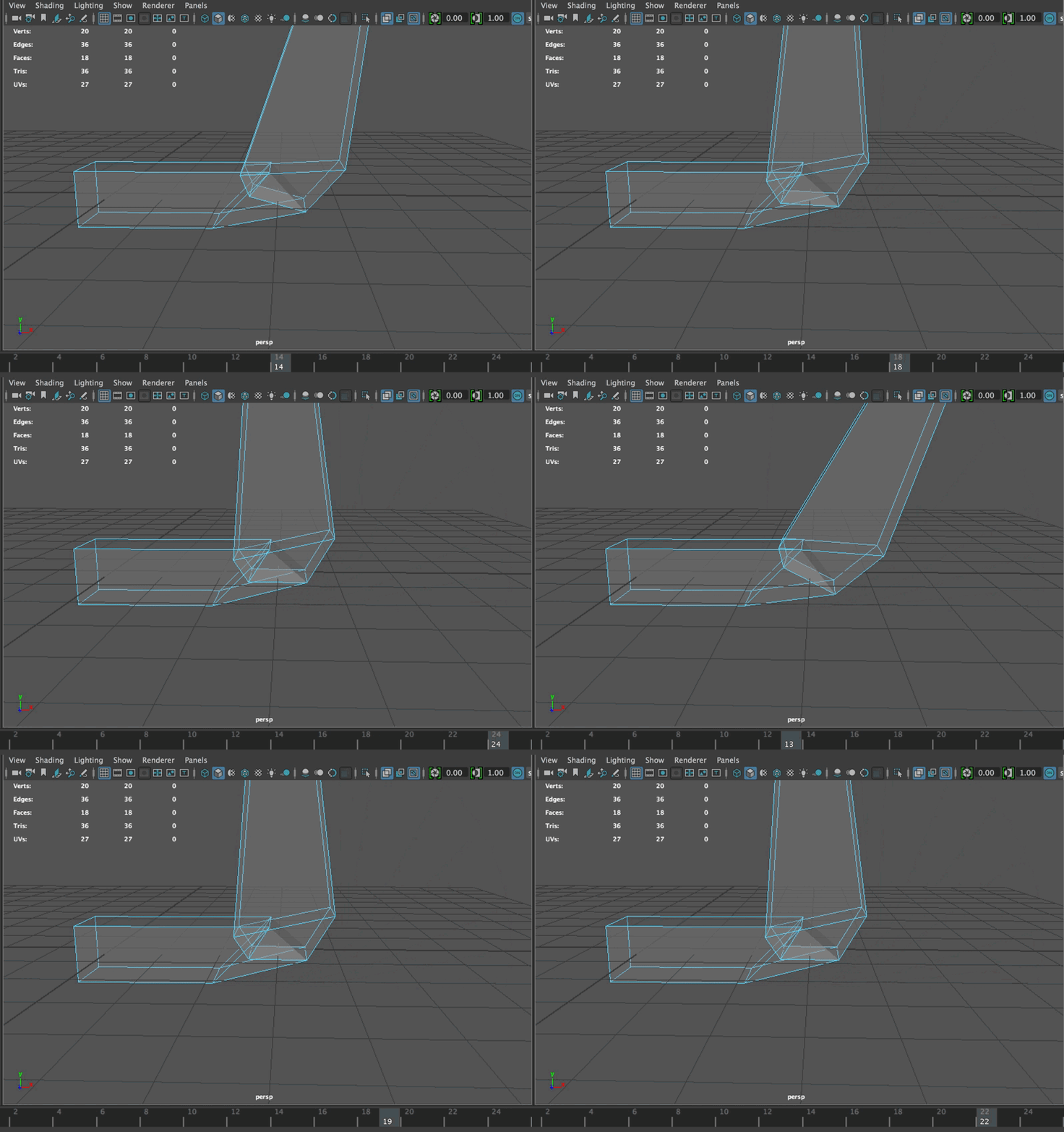
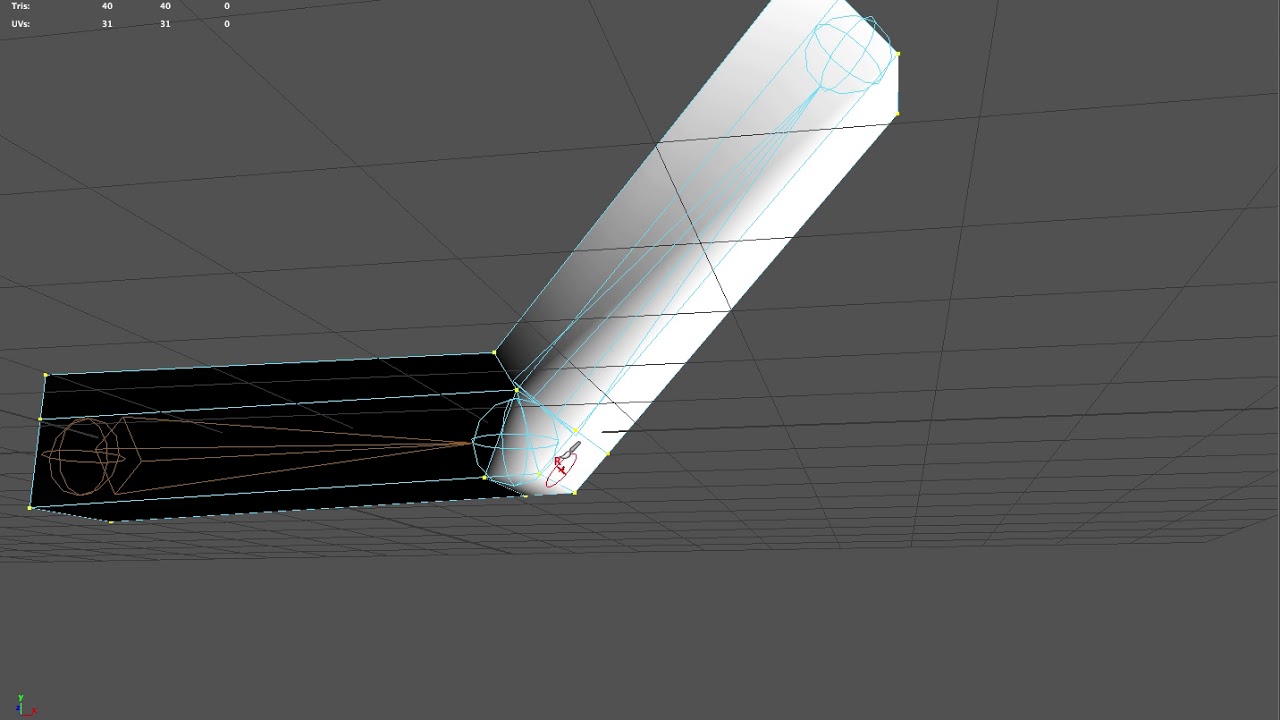 celest umbra
question: why 2 identical blendspaces (one imported from marketplace, the second created by hand, same anims) are triangulated differently? does it matter?
 atomic bear
hey, can someone give me some tips on how to make character animations in blender
pastel spindle
Guys do anyone have any experience with the Advanced Locomotion content?
The creator do not really want to reply :/
So wondering if might someone have it, and could get some advices
 simple karma
Anyone got any workflow videos for making simple animations by key framing in editor? Seems like messing with the skeleton ends up editing the skeleton for every animation lol
 violet palm
Hi are there any technical Riggers On here?
For Maya
I have a technical question in relation to a rig I am currently working on with my animator.
 versed prawn
Hi, does anyone know a good way of getting rag doll functionality to work for an FPS game? I've tried looking for tutorials online but I haven't found any that are close enough to what I'm trying to do.
 zenith pebble
Hello, I'm willing to pay a bit for brief tutoring on how to do some basic AnimBP. I need some advice on how to best set up a relatively simple character that can dynamically look at you and then switch to playing a different animation on their face, and then back to their idle face animation. I've spent some time on this and keep encountering different issues. I'm given all of the materials I need, my main issue is blending back to the idle face - it's just not shaping up good. I don't know if I'm doing this very well in general, I'm not really an animator but I get the basics.
simple karma
@misty dagger yeah, lots of questions few answers 🙊
misty dagger
haha, guess animation is difficult
simple karma
From what I gather it’s largely out side of ue4 so I imagine a lot less support to find here unless it’s the implementation of logic to fire off and blend the animations 😃
 muted agate

Hmm... Haha Not sure what's going on with this one.
I tried disabling collision between all the bones
surprised UE4 didn't make bone capsule for every bone
but anyways that's irrelevant
misty dagger
I am currently traveling and my next project involves animating a human character. As it seems I don't have to create those animations but use them properly. Can someone of you recommend a good tutorial with which I can start off?
misty dagger
I guess the UE4 Skeletons and Animation series does the job?
reef agate
@misty dagger it's pretty easy! check out animation blending in particular and download some animations. Just make sure they're compatible with your Skeleton. If the skeletal mesh you're using for your human is different than the one used for the animations you're importing you will have to retarget. Ideally they're the same and when you import your animations just select your skeletal mesh on import
misty dagger
👍
vast trellis
can anyone explain exactly what this enables (from 4.18 changelog):
Two Bone IK and FABRIK uses FBoneSocketTarget that supports bone and socket

Created new detail customizaton for FBoneSocketTarget that can display bone and socket together.```what I would like to do is given a hand with a socket, move the hand into place to a world space location specifying where the socket should end up
using two bone IK
misty dagger
Heyo! any possible way to have an upper body animaton begin playing whilst a lower body animation is activated?
I need some seperate hand movement to play seperately from any running or walking animation ;?
misty dagger
Ahh nvm, found answer. Slot time 😃
fossil bough
Yes
coral sun
I know unreal can handle animations that are moved by the root bone. But the same wouldn't work if the whole rig is moved, in lets say a walk animation, but not by the root bone. This would be wrong, no?
( I ask due to some mocap animations )
 craggy glen
When I import an .fbx (with animation) from Blender, the animation becomes really really tiny
I tried with everything but the animations (no only for the bow, any animation) is imported like that
So, I don't know if you had the same problem an I don't know if the problem is on the importing of the fbx or on the exporting (from Blender 2.79)
pastel spindle
Hmm cant you just import them with an uniform scale?
craggy glen
The Skeletal and Physics assets are scaled in the right way
The problem happens only with the animations
pastel spindle
Isnt it possible
The animation itself is scaling down the object?
I mean animations are just transform data
So if you scale a mesh in UE4
the animation's transform data will still stay 1
And will transform the mesh transform to 1 from the uniform 100
Or that what I think
But Its kinda possible I wrong
 pastel dirge
Ever done mocap with a single webcam ? Have software ?
 stiff thunder
pretty sure you can't mocap with a single cam
pastel dirge
Not in 3D Offcurse
But Maybe with 3 - 4 Smartphone filming the same scene, And post process ?
- it works with a simple kinect
Even if result isn't best
craggy glen
 low bone
I know this is a stretch, but could someone help me with a retargeting error i am getting? the skeletons are both slightly different versions of the mannequin
@pastel spindle I'm also working with the Locomotion system. what are you trying to do overall?
pastel spindle
Well its fine already.
I just didnt knew there was an option like
target weight interpolation
With this my blendspaces are smooth
Before was hella bad ^^'
With this my blendspaces are smooth
With this my blendspaces are smooth
low bone
do virtual bones mess with animation retargeting?
 hot crescent
Hi in games, are the animations designed at 30fps or 60fps. I'm just curious what is usually recommended to design at in a game and on UE4.
pastel spindle
Uhh
Wait I check them
I have quite alot animations
@hot crescent
Those are Kubold's Mocap animation
s
They are quite HQ
And as you can see quite frequently they are above 100 Frames
/ sec
But I can check a hand keyes animations as well
Hmm
I would go with the 30 / frame
They are really smooth as well
Kubolds 100 frame / sec are a lil bit alot
But 30 will be really smooth
btw guys
Is it possible to tag animations?
coral sun
@craggy glen make sure you applied scaling to both armature and mesh (ctrl+a)
Otherwise in the fbx exporter set the scale.
craggy glen
@coral sun The scaling in Blender? Because ctrl+a is the exit shortcut
coral sun
Im in bed i can take a look when I wake up. Doing a lot f blender> unreal myself lately
Gn
gritty jay
Playing around in UE4 using Neural Networks and Genetic Algorithms to evolve physics based animations.
First attempt: waving animation. Check! ;-)
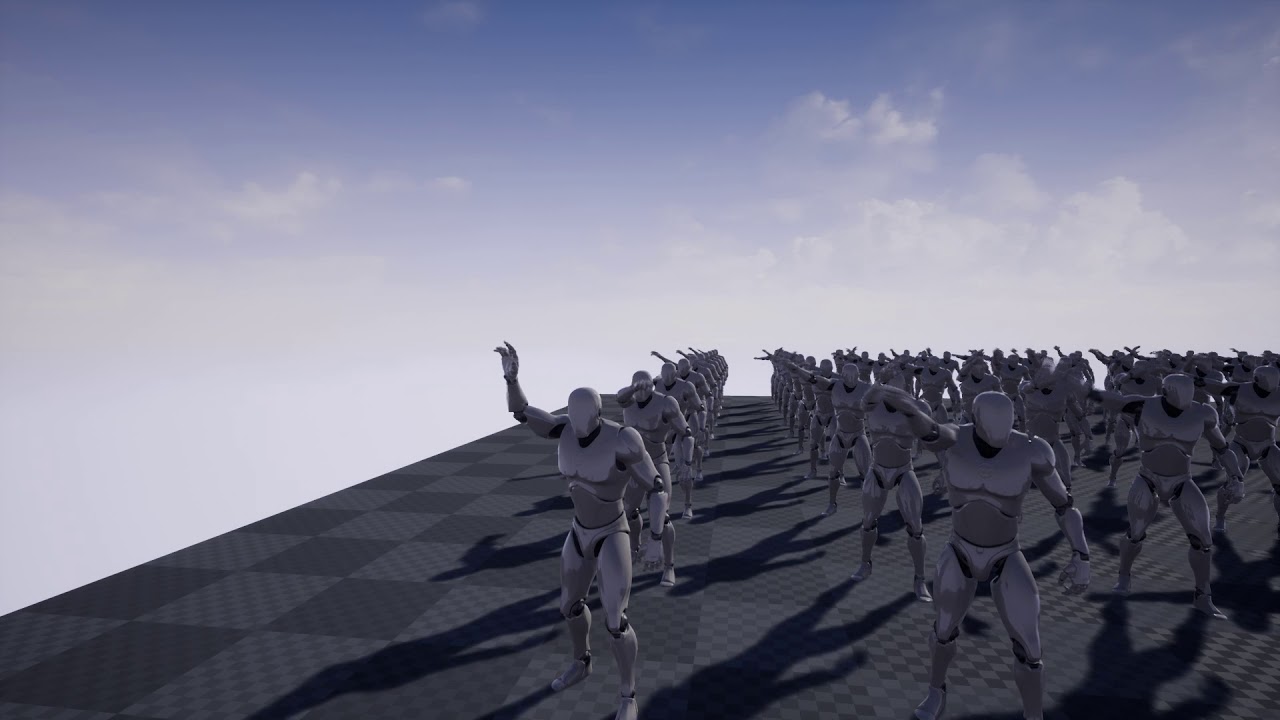
A Neural Network is evolved trhough a Genetic Algorithm to control the right arm of the mannequin.
modern kite
https://gyazo.com/bed22b55b6ecb62821835c9aeaf59c73
Sooooo I'm having a root motion problem. 😛

Ello?
west furnace
Can i make animations on cinema4d? Like for a person to jump and whatnot?
simple karma
So anyone know how to make new animations in persona where you move a bone it doesn’t modify the skeleton for everything
I feel I’m missing a key or buttob
simple karma
I usually end up framing some stuff and then undo undo undo after saving new asset
Well if no one answers I’ll dig deep.. and make a toot what I’ve found is poo 😦
modern kite
@simple karma https://www.youtube.com/watch?v=w-OHLjcNpcs

This video is a workflow of creating new animations in UE4 by editing animation layers.However there is limitation to this. I will upload new videos of creat...
This video has no sound, but I believe it shows what you're trying to accomplish.
Just did it myself. Works perfectly. 😄
Though I still haven't gotten root motion to work with my character this way, which is bothering me.
coral sun
@craggy glen your bow looks fine here?
@craggy glen
So it appear you have to name your armature anything else other than "armature". I don't know why this problem exist. But if you change it the animations will be at proper scale in Unreal.
There seem to be a thing that if you name your armature "armature" it doesn't include an extra root bone ( where the actual root bone is parented to that ).
So after some reading it seems like because Blender adds an extra root, I'm assuming the scaling also relies on that. So when you use armature as name and the additional bone isn't added in unreal the scaling is lost. But I can't be too sure of this.
There is a UE addon for blender that does some exporting for you.
coral sun
another solution seems to be setting the proper unit scales.
the UE addon doesnt fix the problem.
pastel spindle
Guys
Do anyone know how can I make smooth stop/start animation graph?
I have the animations
But the blend between them isnt smooth 😦
Really cant find a way to sync them propelly 😦
coral sun
@pastel spindle did you animate at 30fps or higher?
 nova hemlock
using the animation starter kit
coral sun
I noticed my animation looked off when i was doing it on 24fps
@nova hemlock for any possible transition with a logical step, yeah that's how messy it will look
is there anything specific that seems off for you
nova hemlock
when i hit reload and walk forward, i seem to glide until animation finishes
coral sun
you mean the legs aren't seperate from the arms?
like you want him to keep reloading but also do the walking cycle?
nova hemlock
yes, reload and walk at same time if possible
coral sun
look into blend animation nodes
Animation nodes that blend multiple animations together based on a set of criteria.
nova hemlock
ty
or there isn't a crouching/reload animation, so i want to crouch and reload instead of it standing up to reload
coral sun
In your reloading state I think you can control with which clip you want to blend
i think you could branch which clip to blend with depending on whether you are standing or crouching
https://answers.unrealengine.com/storage/temp/202647-layered.png this is probably the node you're looking for

but im assuming you want an addtional layer blend based on whether you are crouching or not. Not too sure about that
ah if you click the add pinn you get additional inputs
https://docs.unrealengine.com/latest/INT/Engine/Animation/NodeReference/Blend/#layeredblendperbone
Within a Montage, a Slot is just a single track that can hold any number of animations. you can pick any name for a Slot and then use that name to blend to those specific animations. A great example is having a character with a weapon reload animation. You may have different versions of the reload for when the player is standing, crouching, and lying prone. As long as all 3 of the animations use the same timing, you could place each one within a separate Slot in your Montage; the Slots could be named Standing, Crouching, and Prone. In your Animation Blueprint's AnimGraph, you can use the Slot node to determine which one you want to play, based on your character's current state. When they are standing, you can use the result of the animation in the Standing Slot. When they are prone, you can see the result of the Prone Slot.
Animation nodes that blend multiple animations together based on a set of criteria.
craggy glen
@coral sun Thank you bro ❤
And about the Plugin for Blender, I already tried it but it's not for the last version
coral sun
np. yeah the addon is nice if you want to create multiple props and want to export with resetting the location to 0,0,0 without needing it to be there
low bone
Does anyone know of good tutorials on retargeting animations to an IK Skeleton? If this is at all possible. I'm running into an issue with my skeleton's feet not moving and i think it's the IK system not retargeting
coral sun
@rocky pecan did you map all the bones correctly ( in advance view )
remote summit
Any reason a virtual bone wouldnt keep the transform i set? even if i hit save, close skeleton, reopen, transform is gone...
coral sun
you mean a non deforming bone?
remote summit
eh
virtual bone
you right click a bone in skeletal mesh
and say, create virtual bone
it makes a special bone with no weight to it
coral sun
gah thought I was in blender discord nvm
remote summit
😛
low bone
@coral sun I should have all the bones mapped correctly
nova hemlock
blueprint animation starter kit - how do i get the head to track with the mouse?
low bone
both skeletons are the UE4 Mannequin, but one had virtual bones, does that affect the retarget?
low bone
Using an Aim Offset, a character aims a weapon in the direction of your mouse or controller.
nova hemlock
thanks
nova hemlock
Seems like a bit of work.. you would think the head could follow the mouse automatically.
 spring steeple
the head is just another bone, how should the engine know that its something that should follow your mouse and how you want it?
nova hemlock
True
 sudden sedge
you'd need to define it in blueprint or soemthing
aimoffset is literally just a blend matrix afaik
 real atlas
can anyone show me an ordinary script for custom animations? I have the separate anim blueprint set up, I just can't get it to play movement anim but it does play idle
when I'm not moving
the worrying thing is I copied exactly from a tutorial
is this right???
I can switch it so it plays running in the place of idle but of course that doesnt help
spring steeple
try looking at the animation bp of the Third Person template has the basic setup
real atlas
ok thanks I'll try
WAIT where even is it???
found
how tf will I apply that to the current stuff
and I cant even FIND the running script
modern kite
Alright. That's..........better? XD

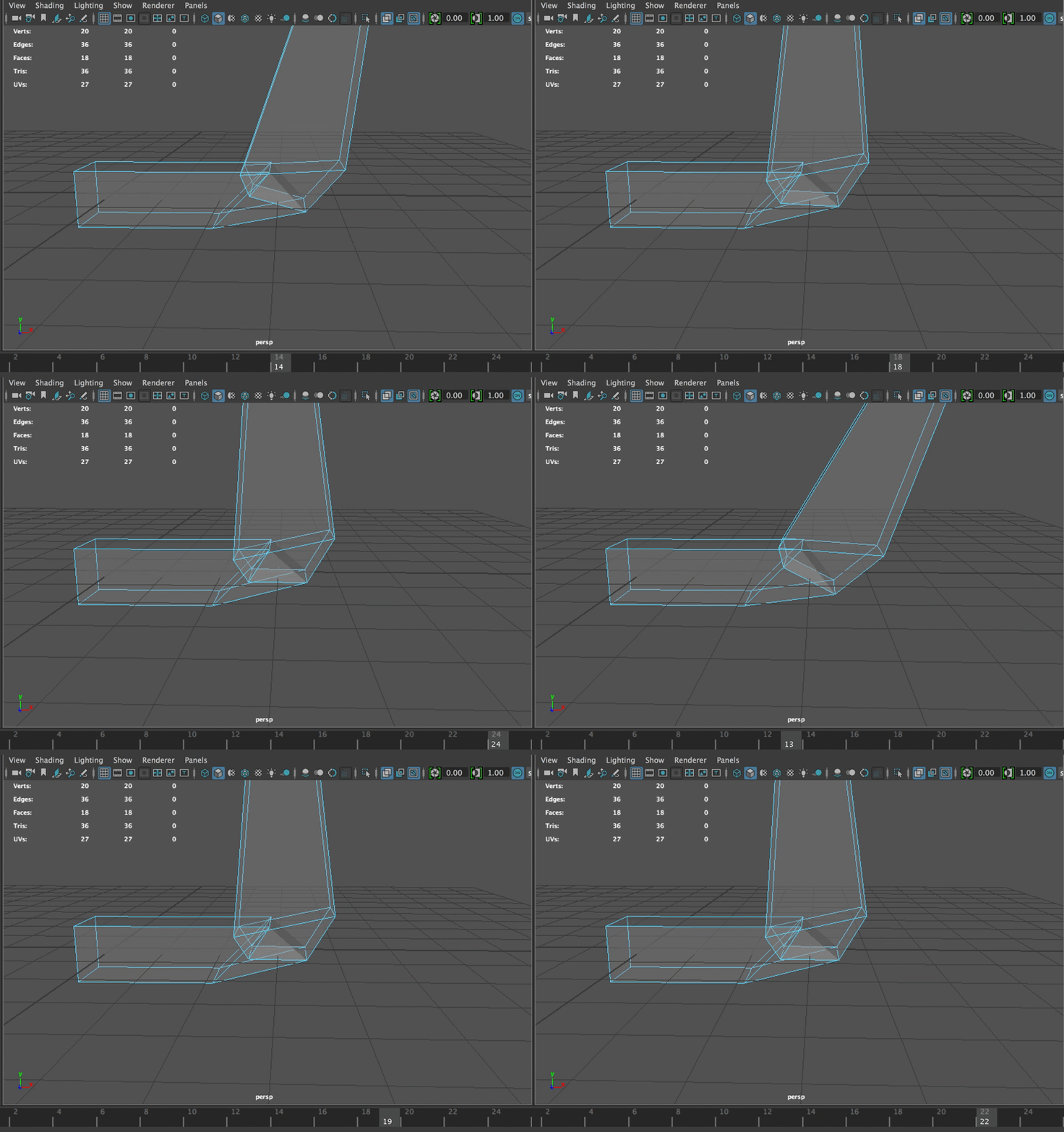
 spring steeple
@modern kite do you have a root bone?
real atlas
yeah idk if he was talking to me or you
modern kite
The root is usually seperate from everything else.
real atlas
probably you
spring steeple
@real atlas the Thirdperson template has, the BP that gets the current state of the Character for each animation update and based on that updates the running animation in a state machine
real atlas
ik ik I tried to set that up so would that script that I showed work?
modern kite
Maybe I can reset the character's rotation using Blueprint at the end of the animation? If that's possible, cool. If not, it's whatever. I'm looking to replace this character model soon anyway, with a new rig and everything. 😛
spring steeple
@modern kite yeah its best to have a root bone on the ground that moves and rotates the capsule how its supposed to move
modern kite
Gotcha. I'll keep that in mind for when I have someone make a new model for this character.
real atlas
right well I need to go stand in a corner with a dunce hat right now
spring steeple
that script that you showed gets input, you want to at least take the movement speed, but if you use that to switch the animations it should work
modern kite
Well, if there's no way to reset the capsule's rotation, then I'll just call this feature done for now, until I replace the model. 😛
real atlas
I literally found some random thing I put in for no apparent reason ages ago that all it did was break it
well at the moment whilst you hold a movement key it glitches between animations but if you stop it just loops the running
modern kite
What does your anim blueprint for the character look like?
modern kite
Noice!
real atlas
thanks, I recorded my current progress I'll post a video soon
pastel spindle
Guys
Can someone help me with this?
What I want is to blend the bones
So upper body, lower body BUT
I do not want to blend the arms
I have 2 states:
DefaultLocomotion
And transition
I want the transition go in the UpperBody (but not in the Arms)
How can I achive it?
nvm was able to solve it on my own
Just used 2 layered bone node
 pearl kindle
Anyone know what the best way is to let the player's torso (3rd person) rotate towards the aim location? Right now my player rotates on the Z axis, but as a whole and not at the torso like a human would
spring steeple
rotate a spine bone?
pearl kindle
how does one do that?
I've never tried
I think i've found it. Thanks for the tip!
 robust harbor
Does anybody know of any other resources regarding Sync Groups other than the UE4 doc page? I'm trying to look into how to correctly blend between a "start" animation and "walk/run" blendspace in my state machine. It seems that basing it on remaining time ratio isn't the best way for sync groups.
 glossy spade
first time working with animations; managed to attach a gun to the mannequin's hand. How do I correctly align the other hand? It's currently clipping through the barrel.
vast trellis
@glossy spade content examples has some IK examples of different scaled characters all gripping a gun like that correctly with both hands
glossy spade
alright, I'll check them out
glossy spade
I found the IK example, but cant quite figure out how stuff works. Also, is this guy the constructor from Fortnite? I suspected that, and then the blueprint attachment point pretty much confirmed it
solar lava
i think i have the same issue of @modern kite , the root bone is not working.
real atlas
Is that tf2 heavy lol
I'll need to do a gun holding soon
And swords ugh
Wish me luck
Would I be able to attach a weapon model to any animation like parent it to the hand
I guess that's the only way ain't it?
 delicate locust
I notice that using transform bone nodes with rotation and an alpha value like 0.5 or 0.25 etc leaves strange snappy results often.
https://puu.sh/yWOlY/799f5f6731.png

@winged valley are you familiar with this happening? I'm using Quaternion slerp for overriding rotations, and when lerping the alpha or even just keeping it at a consistent inbetween level, the rotations start to snap and jump around in an ugly way in various cases

 fresh tangle
Heya - I'm trying to use Alembics in sequencer (to drive anim out of Maya), and it's a bit useless for that at this point. I'm instead using the 'skeletal' option when importing my .abc that will convert it to morphs. Now my question is - do I need to do this for each animation or is there a way I can get all my morph animations applied to the same skeletal setup somehow?
..or just really any feedback on what the best approach to get animations into UE for sequence purposes only. Seems like reworking the skeleton would be the best approach, my current rig is not UE friendly though. Was hoping for another solution.
@Maldonacho#8679 Hey, where did you get that IK example from? Thanks.
nova hemlock
as long as the bones are named the same, is it easy to 'plug and play' to put my own mesh in place of the animation blueprint one.. or will i have to recreate anim offsets and other things all over again?
vast trellis
what's the right way to get a bone transform from a desired transform of a socket on the bone?
for instance, motion controller attached to socket, I want to move the socket in place and need the right transform for the bone that would do it
can just subtract for the location, for the rotation does it need quaternion conjugate or something?
nova hemlock
created an aim offset following UE website, when i look around the attached weapons eems to slie up/down and across the arm. did i miss something?
vast trellis
@nova hemlock can you post a vid? maybe you have bAbsoluteRotation or something on the gun
nova hemlock
or wondering if the gun needs the base armature moved to where it should be pivoting at
when i'm aiming it does that. if i'm not aiming then it moves along with the gun
vast trellis
@nova hemlock post a video, with show bones on
real atlas
looks like you're making progress
nova hemlock
still kind of weird, gun doesn't move entirely with head/upper body. i can look to the right but the gun has moved out of view
like it is left behind
real atlas
I've just been setting up my gun anims, but I have a problem, everything works fine, with you being able to switch from empty hand to gun with idle and whilst running, but if you stop running and start again with gun held then it just stays in idle holding gun
if that makes sense
I can probably fix it
Oh I think I got it
no transition
real atlas
yeah that worke yay
nova hemlock
so is it how i set up the aim offset as to why the gun is lagging the head
nova hemlock
why does this pink bone stick out/look wrong?
looking down, the gun looks good. when i look horizontal and upwards,t he gun doesn't follow and disappears out of the view
 tender sigil
hello guys, I have a question, struggling since couple days ! How can i import 3ds max animated line ?
i know it has to be a mesh but then how can i animate it ? i need this vertex points so badly it`s gonna be rope animation in ue4
delicate locust
are you sure you cannot achieve the same animation using bones?
tender sigil
you know typical human being, this is the lazy way and very short way also i have tons of induvidual ropes around !
delicate locust
if you want to animate the bones like a bezier line, you could setup something like this perhaps: https://youtu.be/Q2PvP4Q-Bhw?t=146

This tutorial is an overview of using HI Solvers and Bones in 3ds max to give you a little more control when creating a bone rig. Hopefully some find it help...
tender sigil
thank you @delicate locust
nova hemlock
how both hands move, it seems the gun needs to have two bones attached, one to each hand?
real atlas
can anyone show me how to make the arms follow the camera or link me a good tutorial?
nova hemlock
@real atlas i'm a total noob, but wouldn't you just parent the arms under the camera?
pastel spindle
Guys
Is there a way to copy the bone transitions?
I have 2 anim packs and they have 2 diff skeletal meshes
(2 unreal mannuqien)
The problem when I used the same ref pose (almost the same lol) they retarget didnt went very well
The hands were a little bit off and because of that my animations didnt look fine at the hands
spring steeple
you can modify your pose for retargeting, at the bottom of the tool
pastel spindle
Yes I know that but I cant find a way to make the 2 looks alike :/
I mean when I try to rotate the hand
the rest values are changes
So
on the left side there is the values I want to set the bone
But when I type them
The rotation are changing them self
Because if the 2 pose do not looks like the absolute same, they wont looks that nice after retarget
😦
This is the hand A
And this B
I want them to have the same transform
But I cant really achive that 😦
@spring steeple
spring steeple
try world rotation
pastel spindle
Tried it :(, OH nvm I noticed the Hand A bone's vectors are connected
So I can just rotate them by hand
yey
nova hemlock
guess i'm expecting the gun site to stay in the same frame as your view when you're looking around, but even though there is turnage of the weapon, it still falls out of your view area as you look left/right/up
pastel spindle
Uh
Wait skull
I check what you wrote before
I may can help
AH
Well usually the animators want to attach it to the ik_gun bone
But isnt there a README textnote?
Usually they always tell you where you should attach it :/
nova hemlock
it'it's from the animation starter blueprint.. no idea
nova hemlock
animation starter blueprint has more anims than the third or first person template i think
pastel spindle
I mean dont you have some animation
real atlas
what kind
pastel spindle
To mkae a AimOffset
Like
Wait I show you
Like in AImStartPack's AimOffset animation
I mean AnimStartPack's AimOffset
real atlas
I havent seen that but I just made like basic running and idle animations
pastel spindle
AO offset usually
Animation where you usaully have 4-8 animation
Like when you arm is in front
left
right
up
down
etc
And your animation data going thought this AimOffset and apply an additive animation by it
wait
real atlas
Im confused
pastel spindle
Using an Aim Offset, a character aims a weapon in the direction of your mouse or controller.
Its easier then its sounds
nova hemlock
yep i did that following teh tutorial.. but weapon doesn't follow hands tightly
nova hemlock
or maybe it does, but head moves too fast
pastel spindle
you may didnt snap it to the target?
nova hemlock
attached to handr_socket
real atlas
does that tut include head?
pastel spindle
I think yes
You will understand what aim offsets are means
They are really usuful for
things like those
To rotate the head where you looking, et
real atlas
its probably gonna be hella hard with a non human guy
pastel spindle
c
real atlas
with a l a r g e head
pastel spindle
Its wont, you just need the right animations
Need an animation where you head is turned left
an animation where is turned right
1 where turned up, down etc...
And you can make an AimOffset
nova hemlock
if it wouldn't take 5 minutes to move around in the editor i could get you a screenshot
pastel spindle
haha xd
real atlas
wait so for every animation make a new one except with head in different position?!
real atlas
ok
pastel spindle
AO look center
Look left
right
Up
etc
for the smoothest result you should have 9 animation
center, left, right, up, down
leftup, rightup, leftdown, rightdown
real atlas
really?
pastel spindle
yep
pastel spindle
you can do it anywhere 😄
real atlas
how tf could I do that for EVERY single animation