#animation
1 messages · Page 89 of 1
 red prawn
😦
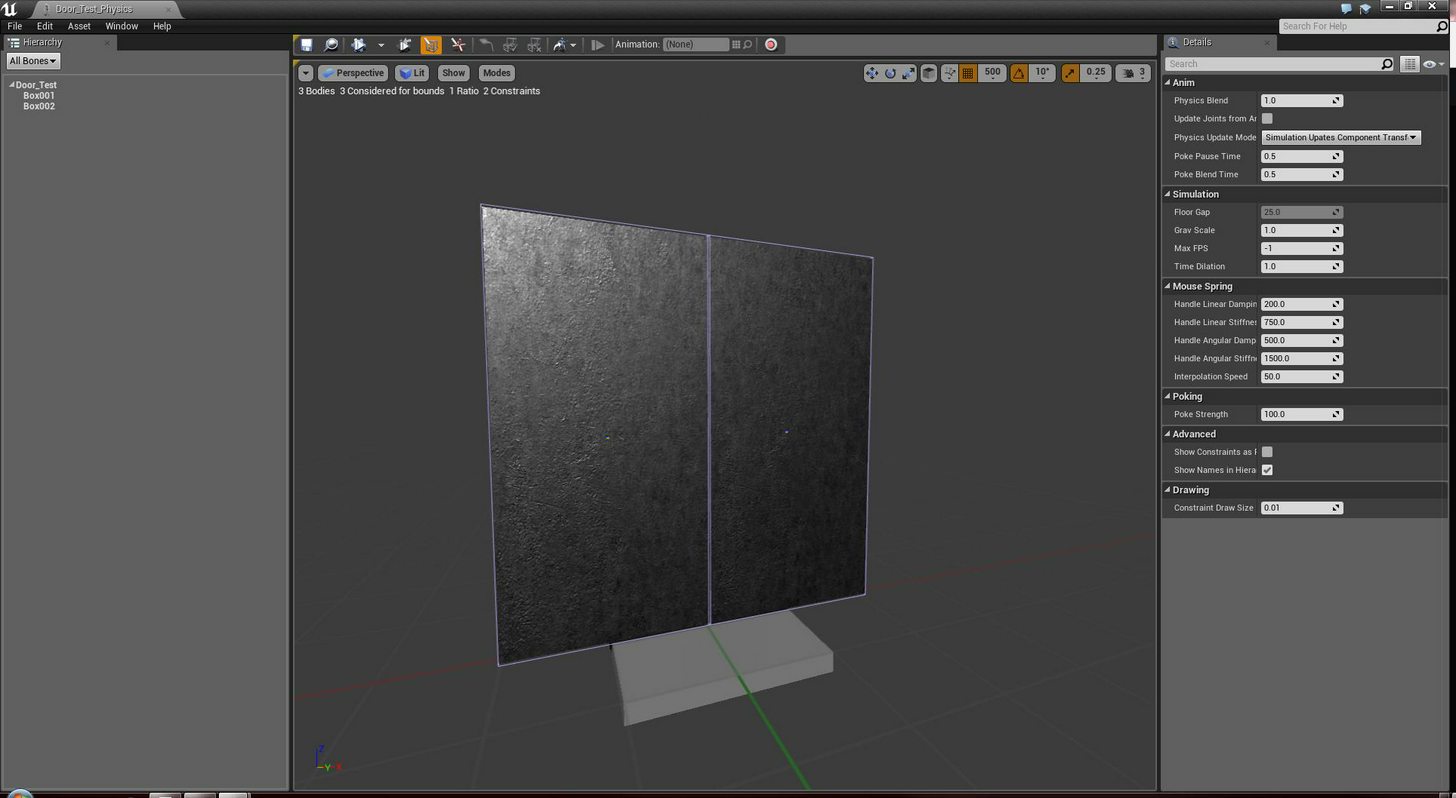
My physics asset is nothing special: https://imgur.com/SEX78uL
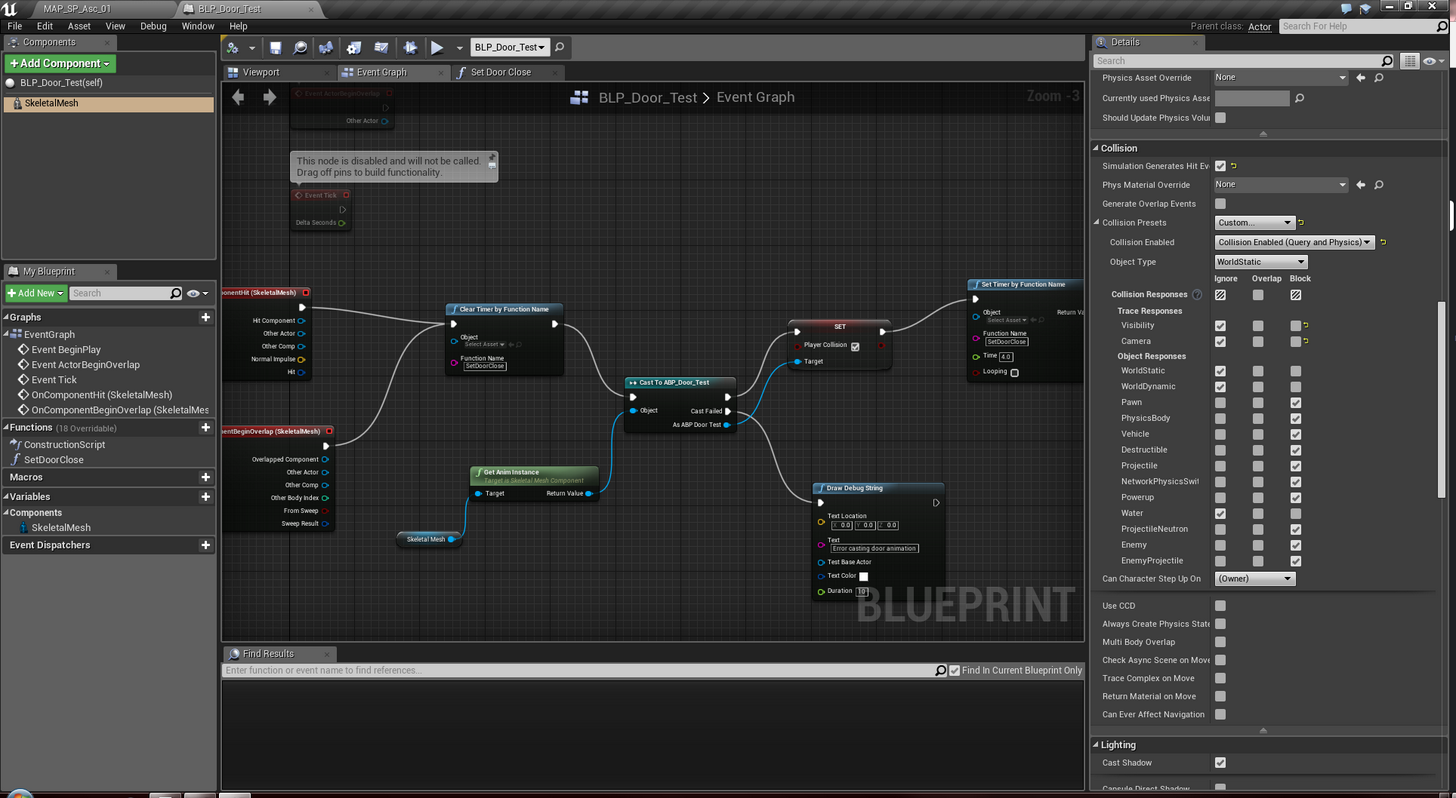
Nor the BP either: https://imgur.com/8lupvFI
The animation itself was done using this tutorial: https://www.youtube.com/watch?v=E6_tHhGvfMg
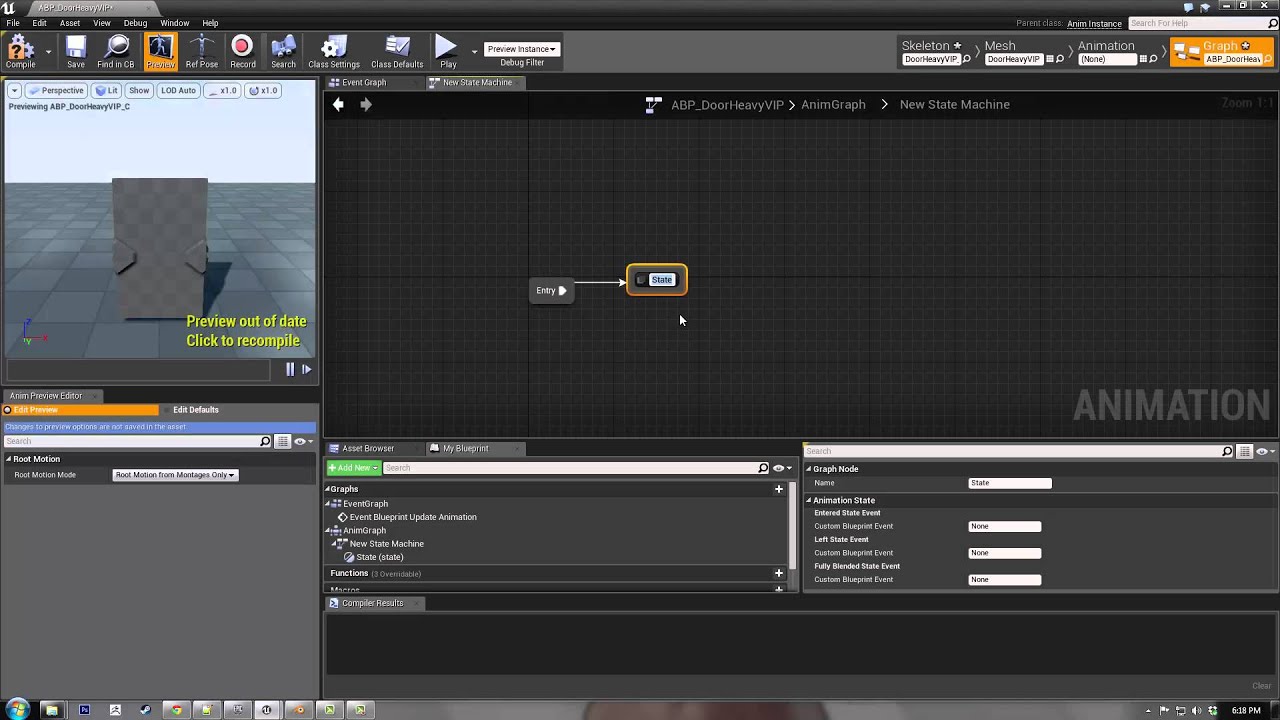
A tutorial showing the process for creating a simple, animated, articulated door in Unreal Engine 4. The technique could be applied to any animated mesh cont...
But he does not cover collisions, he uses overlaps.
I do not want to use proximity overlaps to trigger door opening / closing for my game.
red prawn
"Enable Per Poly Collision" on the SKM does not appear to work. Collision no longer works when setting this.
Okay! There is something in the very center of the door opening blocking. I can hit it with my projectiles now. It's like some tiny invisible thing. I don't see it anywhere in the editor or 3dsmax, though.
Is it a root bone or something??
Okay.
Yep.
It was the root bone.
I moved it out of the way. It works now.
Sheesh.


 fallen otter
is there any easy way to get my characters blendspace to stop whenever i jump? my dude just runs in the air and doesnt play the jump animation
gonna watch this hour long tut vid maybe itll help out
fallen otter
is blend spaces even the right way to go for this? i want to be able to strafe and jump with 180 degree turns and such
 misty dagger
a bit mroe info, do you have a video of what you want to achieve?
what animations do you have so far
fallen otter
just for movement
in the blendspace it seems like it should work fine when i strafe and stuff but it only plays the run forward animation
misty dagger
do you have a proper jump state?
misty dagger
show the state machine
fallen otter
how do i open the state machine
wait
i found it
i already know its not right, i just dont know where to start to set it up the way i need it
misty dagger
do you have jump start and end animations? or just a jump?
misty dagger
you could simplify those 3 jump states into 1 then
fallen otter
everything but the warriorbs is default
misty dagger
then make sure to have the proper transition rule so you can enter jump state reliably
fallen otter
so i should add a state for everything i want my class to do?
like strafe left/right turn180 left/right
or just jump
misty dagger
nooooo
just merge the jump states into one
you dont have start and end jump anims so those two states are redundant
the turn 180 stuff, is it inplace or while moving?
fallen otter
like while running forward if you hit S the guy does the 180 animation
and runs backward, is what im aiming for
misty dagger
k, thats quite tricky to set up man
fallen otter
its always a lot more complicated than i think
maybe ill skip the extra movements and stick to the basics and add those in later
i do want strafe and run backwards though
misty dagger
yes, thats healthy
fallen otter
like backpedal
misty dagger
that should be easier
fallen otter
the states are in the third person bp is that ok
or should i make my own
for each class
misty dagger
if it uses the same skeleton it should also use the same animbp
fallen otter
ok they all use same skeleton
misty dagger
then no need to make a new one
fallen otter
but each skeleton has different animations
misty dagger
ah
fallen otter
like 1 skeleton 4 classes
misty dagger
hm, not sure whats best practice here
it can be done using just one animBP and having all anims connected to a blend by int driven by classID
might be the best as you dont have to do multiple times the same logic
fallen otter
i have it setup to switch states with which character you selected
booleans
isthis isthat false true go to this state if true
im just trying to set one class up so far so that im only changing 1 classes animations until its right then once i knoow how to do it ill set the other 3 up
wait i did it
kind of
hell yea its like 70% working thanks for the info
there we go good enough i say
 raw stirrup
Guys does anyone know how to make my root motion work?
I have a test animation in which I move my root bone forward
When root motion is disabled, the animation works and goes forward but then goes back to its original position which is an expected result
But when I turn enable root motion on, nothing seems to happen anymore
The translation that occured earlier is totally gone
fallen otter
gonna need some help on this one lol
followed a guide to get my character to turn left and right with the camera
but now my mouse controls are inverted and my guy like skippy turns?
uh oh i got it all fucked up
its not all bad though i mean my guy can strafe and back pedal now, but the main objective of the vid was to make him do a turn animation to match my camera, but now the mouse control is inverted and the turning is all glitchy, like he will start the animation then snap back into place
ok got the mouse controls back but now he tries to turn to match the camera when i look up and down instead of left and right
fallen otter
if anyone knows where i went wrong let me know i cant find it
raw stirrup
Why do you add Yaw input and then read off of your pitch value?
Shouldn't you read off of your yaw value or add pitch input instead?
fallen otter
in the second pic?
raw stirrup
Yeah
I may be wrong but it just doesn't make sense to me
Turning is yaw
Looking up and down is pitch
fallen otter
i really couldnt tell you exactly why it was some voiceless tutorial by a german
his worked at the end though
raw stirrup
I don't think you should care about pitch in a root motion controlelr
fallen otter
so i should get rid of that whole section?
adding or removing it doesnt make any difference it seems
yea it didnt change anything
i think the problem is somewhere in the first pic
i wish i could send little video clips
raw stirrup
Ok then it should be connected to InputAxis Turn
Not LookUp
You're not turning left/right according to if you look up or down
And it should be AddControllerYawInput
At least I see it that way
I have no idea if it would work but that's my logic
fallen otter
im trying it now
raw stirrup
Turning has nothing to do with looking up and down so it shouldn't be driven by it
fallen otter
heyyy
you fixed it
i tried that before but i didnt move the controller inputs so all i did was reverse my controls
raw stirrup
😄
fallen otter
but i moved the axis and controller input now its working right
now i need to add a blend to make these animations smoother
raw stirrup
Good luck 😄
fallen otter
hex yea i got it all working on first try
with only 1 small problem, when i use my attack animation, if it hits more than 1 object it plays the hit sound that many times
so 5 things is 5x as loud, do you know how to stop that?
oh forgot to pm
 winged valley
@raw stirrup You need to enable Process Root Motion in the viewport settings.
raw stirrup
Nah man, figured it out
Root motion can't be done with animations. It needs anim montages
Animations don't apply it
winged valley
They can if you use "Root motion from everything".
raw stirrup
Oh good to know
But I was using an animation asset to test it
Not an anim blueprint
There is no way to set root motion from everything with just an asset right?
winged valley
I tested it right now and you don't even need to set anything, it works anyway.
In Persona that is. Probably won't work in the level without an anim BP.
The only things you need to do is tick EnableRootMotion in the Asset Details and enable Process Root Motion in the Persona Show settings. If that doesn't make your character move your animation is messed up.
raw stirrup
Doesn't work in a level. Tested 😛
Okay lemme test that
I dunno where that is .-.
Can't find Process Root Motion anywhere
winged valley
 elder wadi
hey guys, any idea what's causing this problem where my character warps around while he starts moving?
https://www.youtube.com/watch?v=oUZ3h6LhmXg&feature=youtu.be

 worldly orchid
the "snap" when he moves to stop moves? @elder wadi
 proper aurora
Yo slackers! What is the best workflow for animated equippable armor?
The look I'm after: https://www.youtube.com/watch?v=GhwlCiEfSG4
The characters in the video will never change gear, therefore I assume that their gear and character share the same skeleton. I want to be able to change gear.
 elder wadi
@worldly orchid The snap happens when he switches from stopped to moving or moving to stopped. I managed to blend the movement between one and the other, but I'm not sure why he's offeset while moving in the first place.
elder wadi
yes, that part works. When I rotate aim, he rotates fine.
 vast trellis
@proper aurora one approach is master pose component
all your armor pieces share the same skeleton as the character, but are separate skeletal meshes that get the same animation fed to them through the master pose component (main mesh)
as long as they only add to the hierarchy you can add jiggle bones, chain bones, etc. to the individual armor pieces
proper aurora
@vast trellis , thank you so much, I'll follow a tutorial tomorrow
 terse forge
If you had two states for hand
open / shut
would you just swap models
or would you use animation
it's VR
if that makes any sense :p
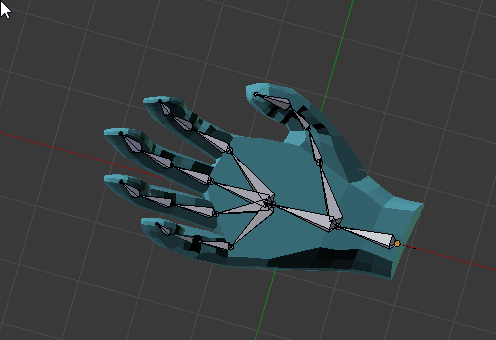
Still learning blender haha
I wish I knew what I was doing
 wicked belfry
Oh
It depends on your needs
If you're snapping from Open/Empty to Closed/Holding Item, then swapping the pose/idle state would work
If you want to transition from open to closed in real-time when the user presses the grip, for example
Without grabbing anything
Then I would use an animation blueprint with a blendspace to smoothly transition between the two
@terse forge
Alternatively, you can use both of these methods for their respective circumstance.
terse forge
Ah fair enough
I think I'll just try animating
for the sake of learning animating
@wicked belfry thanks 😛
What do you folks use for animation?
I wasn't really suer how animation works. When I export with blender it tries to export FBX and I know that the mesh is FBX but I don't know exactly what that means, do I export the same fbx type but with an animation inside it? Are animations handled separately by ue4?
hahaha this looks awful!

better than nothing I guess 😛
wicked belfry
@terse forge Yeah, you can animate it in Blender and export the FBX (with animations). Then import it into UE4 (with animations). I haven't used Blender so I'm not sure how their rigging/bone system is set up. It's definitely compatible with UE4. You can also do the animating inside of UE4 so long as you have a properly rigged skeletal mesh and then use those in your game.
wicked belfry
I'm not sure, I think when you're importing it'll give you the option to import with animation. If that's not the case, then yes - do it twice, the first time the mesh itself (with bones) and the second time just the bones and their animations (that would be your animation sequence that you can pair up to your skeletal mesh)
So 1. Skeletal Mesh and 2. Animation Sequence (for that skeletal mesh)
Alternatively, you can import it without animations and inside of your skeletal mesh that you imported, click the record button to create an animation sequence. You can then go inside of that sequence and animate the hand inside of UE4.
terse forge
Hmm I see
alright so I have one version with anims and one with out
launching UE4 now haha to see
@wicked belfry when I try to import them it just says import animation
and requires me to select a skeleton
...Huh, well it looks like it's inside out haha
Looks good now
Which of these is the one you use in your scene?
I'm assuming the Skeletal Mesh
fallen otter
how would i go about disabling the A, S, and D buttons and forcing W to be pressed when i use a skill?
i cant find any "disable specific input"
terse forge
add a bool
that gets set to true when using said skill
and check if that bool is true or not
and if the skill ends set it to false
fallen otter
but when does it disable the keys and make the character charge forward for the duration
something that goes in between there
terse forge
Input action skill 3 -> Set bool to true -> Use Skill 3
and wherever you're handling input
add a branch that checks if that bool is true or false before continuing the branch
wicked belfry
Any1 here?
terse forge
sup
wicked belfry
I have a double barrel shotgun, here's a sneak peak inside of its barrel where the shells are held
When I reload, the barrel pops open and the shells are animated
To come out, then go back in
terse forge
cool stuff
wicked belfry
But,
When I do it
They move to the side and occupy the same space, then go back into the barrel (still occupying the same space)
They are also a little stretched
Once the animation is triggered
They are rotated 90 degrees on top of all of that
When I animated them, I made them go backwards based on their orientation
terse forge
Sounds like a big mess haha
wicked belfry
They are attached to a socket, could that be rotating their default orientation? Because they are 1) attached to a socket but then 2) rotated themselves whilst attached, positioned into place inside the shotgun
Actually yeah I think I just answered my own questions haha
I guess I need 2 sockets and they need to be rotated
terse forge
glad I could help 🤔
wicked belfry
10/10 would inquire again
terse forge
rubber duck debugging
wicked belfry
err
nothing changed e_e
how can I keep the animation relative? I feel like it may be defaulting to its initial values which is causing them to merge into one (having the same default values)
terse forge
I'm still new to blender myself
If that's what you are using
I honestrly wouldn't be much help 😦
vast trellis
why does the mannequin have two spine bones weighted to the rigid chest/ribs area, but only one spine bone in the flexible lower torso area
I would think it would be the opposite
 violet carbon
How do i get this fixed for my enemy? http://prntscr.com/ggh2ba
 winged valley
@vast trellis Because it's a simplification of a human skeleton.
@violet carbon You need a reference, try Get Pawn Owner in the event graph and save that as a reference.
violet carbon
but rn its not switching between animations
winged valley
That's a different problem.
violet carbon
whats wrong with this with switching?
its for a enemy (other character not the player)
winged valley
No idea. Are the values changing?
winged valley
Well are you printing the values so you're sure they're changing?
winged valley
Is this anim BP used by the enemy character?
violet carbon
yes
winged valley
Try putting the cast in Initialize Animation, then promote the As Enemy to a variable and use that in Update Animation.
winged valley
What I typed. 😛
winged valley
Well you can write initialize in the right click menu and add an Initialize Animation event.
Then move the cast there and right click the As Enemy and use the created variable in the Update Animation event.
winged valley
Print the values of the floats at the end.
And you should use a Get node at the top.
And plug it in to the GetVelocity etc nodes.
winged valley
Use a Get node instead of Set at the top...
Drag it out from the variable list and choose Get.
winged valley
No, for the As Enemy reference.
violet carbon
where does it need to go
winged valley
GetActorRotation and GetVelocity.
violet carbon
This
winged valley
You should learn BP basics before even attempting animation.
You should remove the Set As Enemy node at the top, it's doing nothing.
winged valley
Actually I guess it's setting the reference to None.
violet carbon
?
it will not look at the speed velocity etc. and that does not change that is all i know why it does not work
winged valley
Can you show the character BP for your enemy?
winged valley
No, I mean the BP by double clicking the BP in the content browser.
violet carbon
Do you mean the animBP The BS Or the character BP
winged valley
Character type BP.
terse forge
For some reason when I export my animations with my FBX
the animations are completely off
and they rotate upwards
winged valley
@violet carbon Please open the Enemy character BP.
violet carbon
@terse forge did you first inport your charecter and choosen the Character Rig for the charecter you want the animys
terse forge
 violet carbon
This is my enemy BP
violet carbon
m2
winged valley
@violet carbon If it's called Enemy2 you can't cast to Enemy and expect it to work.
terse forge
it rotates and gets small
winged valley
@terse forge What software are you using to animate?
terse forge
Blender.
The model / Skeleton exports excellent
but any animation breaks it
haha
winged valley
Can you show the Transform settings in the N panel?
terse forge
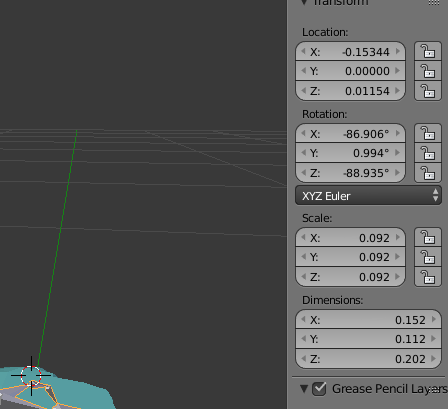 winged valley
Well, there's your problem. 😛
All of those should say 0 except scale which should say 1.
violet carbon
god it it works
winged valley
You can select the rig and do Apply Object Transform, ticking all boxes.
Then do the same for the mesh.
terse forge
dimensions change because of animation
im not sure why though
since the rig size is the same
outside of the animations
the exported FBX is regular size and the animation rig is exact same
inside blender at least
winged valley
Dimensions is the value for the bounding box basically, it will change if the hand stretches out.
Actually you're not using the correct scene settings either.
winged valley
Yes, change it to this:
terse forge
Unit scale to .01 doesn't make sense anymore
I have a sword I exported at 1.0 and it was perfect
inside UE4
they fixed that
afaik
winged valley
Then (assuming you reset the stuff like I said above), resize the rig 100 times and apply transforms for the rig and mesh.
No.
You're just not seeing the messed up results because you've got an extra root bone.
terse forge
Seirously I exported a sword with 1.0 and it was perfect scale
terse forge
no it's just a static mesh
winged valley
Well, non 0.01 metric scale only breaks animations.
terse forge
Interesting
I'll use that to export anims :p
should I only export the anims
and not the mesh?
winged valley
You should just have it as a Blender default setting.
terse forge
If the mesh imports fine at 1.0?
winged valley
No, change both.
terse forge
But why would I mess with the mesh?
winged valley
Because it is linked to the rig.
terse forge
see my dilemma stems from this: if I change unit scale to .01 and it was importing fine at 1.0
then my model will be 100x smaller
if I resize by 100x
then the anim will be 100x bigger and the model will be normal size
so how does that make sense to do that
winged valley
You have wrong assumptions.
If you change the unit scale to 0.01 and then make it 100 times bigger it will be the same size.
The only thing that changes is the rig size.
Well, scene size. It's cm instead of m.
winged valley
Did you do anything I told you to do before changing the scene unit settings? 😛
terse forge
Haha apologies I've been holding in a bathroom break
and it's making me antsy, I'll be back in a moment.
winged valley
You can select the rig and do Apply Object Transform, ticking all boxes.
Then do the same for the mesh.
Result should look like this:
Then change scene unit settings to 0.01, resize the rig only by 100 times (mesh will also scale 100 times automatically), then repeat the above thing.
It may mess up animations because of location keyframes turning really small, if that happens, go into the graph editor, type "loc" into the search field, change the pivot point to 2D Cursor in the dropdown to the right, then select everything and scale by 100 times pressing Y to constrain the changes to the Y axis (not changing the animation length).
terse forge
Alright just a sec @winged valley ended up grabbing a shower
sorry haha
reading now
Where is the APply Object Transform at
ah I got it
i was selecting the mesh not the rig
@winged valley animations look fine still
Should I export with scale 1.0 now
Unit Scale is still .01 in project settings
winged valley
Unit scale should be 0.01, not 1.
terse forge
what about export settings though
winged valley
Scale 1.
winged valley
But you need to set the unit scale to 0.01 and apply object transforms again.
terse forge
that's still true correct?
winged valley
Yes, you don't need leaf bones.
terse forge
I applied transform
and unit scale is .01
Well, I applied transform, everything was 1.0 or 0 (xyz)
then I changed unit scale to .01
then I made everything 100x bigger
well, the rig
winged valley
In your screenshot it says the unit scale is 1. 😛
terse forge
oh

this is what it looks like now
the hand is 100x size it was anyways at .01
I feel bad for the people who came up with this solution
because it sounds like it was awful before knowing what to do
well it was awful like 20 minutes ago but I mean without any hope in sight I'm sure it was worse
winged valley
You need to apply transforms again, first the rig and then the mesh.
terse forge
I did though
nothing else is changing now
everytime I apply nothing happens
i selected both by themselves and together and hit it nothing happens /shrug
Jesus christ this is complicated
for no reason
like fuck blender
with a rake
winged valley
You're applying visual transorm, not object transforms.
It's easy if you do what you're supposed to do. 😛
terse forge
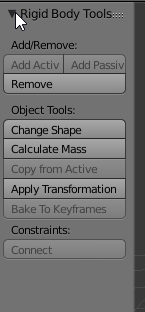
I'm in there
trying to apply transform
it worked for the rig i think
but not for the mesh?
winged valley
Press spacebar and type apply object transform.
terse forge
I looked all over the UI for another one
can't seem to find it
okay should I reset unit scale to 1
before I do this
and set my scales all back to 1
before
winged valley
No, Apply Object Transforms does that.
terse forge
when I did it to just my mesh
it fell off the rig
okay anyways
I'm gonna have to start again
I'm here, I've pressed space, applied object transform.
My understanding is you want me to also select the mesh and apply?
winged valley
Yeah, for both. But you need to change the scene units to 0.01 again.
Well, not select both at once, first the rig and then the mesh.
terse forge
alright, location, rotation, and scale were selected.
for the rig.
Do I need to press enter or anything or is it already finished
as soon as I do something else
winged valley
It's finished when you pressed enter in the spacebar menu.
terse forge
Alright both are done and the unit scale is .01
so now I scale the RIG up by 100, correct?
winged valley
Yeah.
terse forge
Getting some graphical artifacts

Any ideas?
Ah, it was my clip.
Whatever that is. I know setting first param to .01mm works charms though
winged valley
Yes, you will need to readjust the camera clipping.
terse forge
Alright, so now I'll rotate the rig into position
and export like normal, correct?
with anim / mesh?
winged valley
Why rotate the rig?
terse forge
because it exports standing up
I like having the rig laying down and to the right
also blender front view
isn't UE4 front view
winged valley
Then rotate the rig and apply transforms again. You shouldn't export with any transforms on the armature object.
terse forge
I think it's -Y
Do I need to reapply the transforms to the rig and the mesh
or just the rig now
winged valley
I have characters facing forward normally and change the orientation in UE4 in the BP.
terse forge
and also am I supposed to be reapplying the transforms after I scale?
winged valley
Yes, that's what supposed to happen. 😛
terse forge
This makes 100x more sense 😉
shit
what
my hand is like 100x the size it's supposed to be
:O
@winged valley how did I manage this now
unit scale was .01 in the scene
winged valley
Those are pretty huge hands. 😛
terse forge
should I shift the decimal?
winged valley
Just resize them again to some nice value and apply object transforms again.
winged valley
No, the dimensions are correct.
terse forge
so it exports 2.2m in 2.2 UE4 units?
I'm pretty sure that's how it's supposed to work
winged valley
UE4 units are cm, so 220 UE4 units, but yes, real size.
terse forge
ah okay
Now for some reason my VR pawn wont show his hands :<
They are no longer attached to the HMD
winged valley
You should probably check how it looks in the character(?) BP.
terse forge
I actually have it setup correctly but i keep getting different behaviour
sometimes they are not responsive
sometimes they are attached to the HMD wrong (like attached to the wrong side of the HMD as if it were the front)
winged valley
How does it look in the viewport in the BP compared to the template version?
terse forge
@winged valley I legit have their exact layout aside from the camera (Which isn't needed anymore due to how UE4 handles hmds)
Root -> Controller -> Mesh
hmm replacing the Player Start
might have fixed it
sec
yup
Looks like you need to replace that whenever you make significant changes to the player pawn i guess
@winged valley thank you for your help tonight
winged valley
np
terse forge
Tomorrow I'll try using my Grab / Release animations and setting those up 😄

If you're wondering what it looks like when it works
terse forge
Just to clarify, are you having trouble importing shape keys or a skeletal animation, or both? Also, make sure you have import morph targets checked when importing the fbx file into ue4 (in ue4 shape keys are called morph targets).
Yeah you can.
 clever abyss
Supa, I'm 200% sure I selected "Import Morph data"
winged valley
You will need to export the mesh too though.
clever abyss
But the problem is when I want to export JUST shapekeys with mesh
terse forge
Just trying to understand your export process. When you export the animation from blender, are you exporting just the Skeletal rig alone? From my experience, when I needed to bring in any animated blendshapes on the face, I had to export the Head mesh along with the skeletal mesh. The keyshape animation data is baked into the actual head mesh during export and not the bones that drive it. So try selecting the rig and the head mesh and export selected.
You also need to make sure you're not applying modifiers on export.
clever abyss
oh
terse forge
Solution apparently:
Yeah I figured that out not too long after I posted the question. I exported the mesh with the rig and manually switched it to the skeleton in the import settings since it automatically defaults to skeletal mesh import settings. Thank you for confirming. I appreciate the insight.
The tooltip even says: Warning: prevents exporting shape keys
clever abyss
Where
winged valley
Hovering Apply Modifiers in Geometries in the FBX exporter.
clever abyss
ah
terse forge
Someguy once referred to the individual buttons in photoshop as tooltips and I was severely confused when he kept asking for my help when he clicked on all the different tooltips
@winged valley thanks again, off to bed this time haha I'm toast
10AM and still havent slept
jeez
clever abyss
I'm still doing something wrong
UE4 does not import shapekey animation.
Like, I created a separate Action Channel in Blender for SHapekeys
and THAT is not being exported at all.

Unreal Engine does not import shapekeys animation as a standalone thing.
It needs to be merged with "main animation"
Still not working
winged valley
Works for me. 😛
winged valley
You will still need to set a keyframe on the first frame of your rig. After that just select both the mesh and rig and export without Apply Modifiers.
winged valley
No thanks. 😛
Just solve it here instead.
But I haven't used the NLA, not sure how that will affect things.
clever abyss
exactly... you dont know.
winged valley
So why use it?
clever abyss
Because I want to create lipsync and NLA helps?
Thought I could easily export-import shapkeys animation from Blender to UE4... so I can adjust it in UE4 easily.
winged valley
I don't see how it helps, would probably be easier to have an animation per line.
clever abyss
NLA = Non Linear Animation
It's like UE4 animation composite
Gotta do this manually....
winged valley
I know what it is, but it's not usually used for games.
winged valley
Doesn't really matter if it's in UE4.
What exactly happens when you try to import it in UE4?
clever abyss
It exports armature animation, but no shapekeys
winged valley
Do you have the shapekeys in the Mesh view in Persona?
clever abyss
Yes.
winged valley
Just no curves from the animation?
clever abyss
When I import the file with animation... shapekeys are untouched.
You cannot export shapekey separately.... that's the thing with UE4.
If you want to export you shapekeys... you need to keyframe the skeleton attached to the mesh.
I already figured this out.
Just do some extra steps
winged valley
Yeah, a keyframe with the rest pose.
 simple aspen
I just remade an aimoffset from RifleAnimsetPro, a simple pitch only aimoffset, but it's going backwards up and down, so instead of facing forwards moving up, the wrists bend 180 degrees and move along the back instead of the front. Any idea how to fix this?
It was working fine before with yaw included (that one also goes backwards now)
Tried inverting all max/min numbers but no joy
clever abyss
You could fix it in animation
Like UE4, animation , select bone adjust parameters , save change
and It should work.
simple aspen
The actual poses are fine though, it's only going backwards in the blendspace itself which seems odd
Maybe because there is no center pose, it doesn't know which way to go?
Seems strange that it worked for months before
Ah fixed it
For whatever reason, the center pose was in local space and not mesh space, so it couldn't be dragged into the aim offset
Thanks 😃
 lofty marlin
Hey, is there a trick to make the State Events call while a Montage is playing?
I used my Idle State Entered and Left Events to start a Timer and Stop it.
That Timer plays a random idle animation every x seconds.
Now when you start running, I want that to stop, but if a Montage is already playing, the event doesn't fire
 stoic agate
Hey guys I'm looking for a programmer and a 2D artist for a game project, am I in the right place? (was sent server link by a friend)
stoic agate
Found some progrmmers just need an animator
 lofty aurora
Hey guys, i'm trying to set up a directional movement for my character but im having troubles with it. is there any tuts for it or if anyone can help me, that wuld be great
stoic agate
@Calibur#9286 what program?
wait
unreal
I am such a potato
anyways I had a site for tuts but I don't seem to have it bookmarked, if I find it again I will link you it
 ashen shard
Are there any blendspace examples for flyers?
I am trying to create a blendspace file that would allow up/down forward animations, backward animations and normal forward/backward animations
but I am not quite sure how to do with without 3 variables
To give the idea this is the pack I am using
so the dragon has different animations for different angles
winged valley
@lofty marlin You could make a notify that checks some value and starts/stops a timer.
lofty marlin
I'm currently checking on tick if speed is > 0 and if we are playing a Montage
Not the best solution but yeah
 broken adder
4.16 seems to be crashign when importing skeletal mesh LOD with different amount of bones
seems to work with 4.15 anyone encountered this?
 tame whale
Hi there
clever abyss
I still don't understand what you're trying to say :f
lofty marlin
@tame whale Example might help people to understand
tame whale
sorry for the delay guys.
ok let me explain.
This is my character, fully rigged and ready to animate.
i want to rig his weapon in order to interact with meelee animations
here are concept we're going to animate for some of our animations
my question is how can i build a nice system to have compeling animations while the character will fight
stoic agate
what is a good program to use to make 2D characters?
I need to find one that works and to find someone experienced in it
plz and ty
tame whale
@stoic agate what do you really want to do?
do you want to make 2D character for animated movie or for game?
stoic agate
game
same main character only 2 options, male or female and both are basic
the rest of them are a bit more complex
the monsters you will encounter I mean
tame whale
ok, for creation i suggest you to use photoshop or illustrator. you'll use layers to easily create parts of your characters.
You'll use these separate layers later to animte them using third party tools, like spine 2D (http://fr.esotericsoftware.com/spine-in-depth) or Spriter (https://brashmonkey.com/spriter-features/) or Creature (http://creature.kestrelmoon.com/index.html)
 weak beacon
@tame whale there is no easy way to say what a nice system with compelling animations is. It would be the equivalent of a level designer asking where to put the rocks.
What you could do is use ARTv1 from marketplace to rig the weapon, create animations, import them into unreal, set them up with montages or whatever would fit your need, start doing some Animation programming and boom (1 month later your done)
The only really good advice I can give is use c++ classes for some of the Anim notifys and few others
stoic agate
@weak beacon do you know a server or site where I can look for animators etc.?
weak beacon
If you want free animations the only site that comes to mind is Mixamo
Have to add, the marketplace Animations is up and beyond in quality, if you ain't an animator I would suggest them since they would save you ten times the value in hours spent trying to do them yourself.
stoic agate
bad news is the monsters i designed are rather unorthodox and unlikely to be found there
but ty
weak beacon
Ohh, first now i read you are looking for animaTORS not animatIONS
I would suggest #career-chat
stoic agate
I did
I am still waiting
unless you know some one / people
brb bathroom
type out your remaining concerns
weak beacon
Sorry to say animators isn't as easy to find as the rest. I personally don't know a single animator.
winged valley
When rendering a Sequencer movie the last frame is not the camera but the game view. Is this a bug?
Also the Play mode gets set to New Editor Window even if you had something else before.
clever abyss
@tame whale That looks far more advanced than I was expecting.
Swapping weapon from one hand to another is actually tricky to pull it off.
winged valley
I just noticed I can't import one frame animations made in Blender by setting the scene render start and end to the same frame. Can you do that in other software? I can see the keyframe when importing the .fbx back into Blender so I don't see why I should get an error in UE4.
clever abyss
something something, Blender.
 ebon portal
quick question ... I'm using maya for rigging, but as soon as I use the IK handle tool on the UE4 mannequin, all the bones stretch out and won't bend
can somebody help me?
clever abyss
@ebon portal Are you using Control Rig PLUGIN ?
ebon portal
nvm I just forgot to set the preferred angle @clever abyss
 twilit marlin
Im having an issue where I cannot "split" the animation exec node in my anim blueprint so I can have an optional hit state on the top half of my pawn's body - anybody know why I cannot do this?
clever abyss
Ok. I totally don't understand why is this happening.

Here's a simple animation.
In Blender, everything works fine.
But in UE4, there is this weird foot spasm.
I have no idea why its like that.
terse forge

Anyone have any ideas regarding how I grip the sword animation wise?
I want the sword to follow the controller (which it currently does)
However
I want to almost... add the socket as a parent to the hand rather than the hand as the parent
is that possible?
so when I move around the bones and stuff the socket never moves and is always consistent with the controller
 granite hawk
Can someone help me with the Sequencer? Curious if I can make the character animate when moving using it's animation blueprint. Currently having to set up the animations separately from the transform and not very happy about that.
winged valley
@granite hawk For me it started doing that from 4.17.
@clever abyss Try disabling Simplify when exporting the animation.
granite hawk
@winged valley thanks. That's a fairly strong incentive to upgrade.
winged valley
Yeah. Sequencer is way more powerful when you can use an anim BP instead of just dragging animations into the tracks (which doesn't even work when you use stuff like Copy Pose from Mesh anyway).
granite hawk
@winged valley hmm the upgrade itself went flawlessly but they still don't animate in my case. Did you have to do anything special to make it work?
winged valley
Not really, but it doesn't show up in the viewport, only in renders.
For me all I had to do was add the BPs by right clicking and choosing Actor to Sequencer or whatever and not add any animation sequence.
terse forge
Anyone here know how to stop blender from distorting the hell out of my mesh? https://www.dropbox.com/s/477p50pew3r7g4f/2017-09-05_11-08-06.mp4?dl=0

looks like the bones end up scaling
granite hawk
@winged valley doesn't seem to work with my setup, not in PIE at least 😦
winged valley
Even when rendering?
Works for me.
But as I said it won't work in the viewport because anim BPs only play in "game" (or when rendering).
granite hawk
Trying to render gives me a black screen for whatever reason
winged valley
At least until the experimental debug anim BP in viewport thing is expanded to Sequencer.
A black screen? That doesn't sound right. 😛
granite hawk
But they definitely don't animate in-game at least
winged valley
They don't animate just playing in game either?
The playing back anim BP in Sequencer thing kind of assumes you've got animations playing without user input, or feeding input from events in the Sequencer event track.
granite hawk
yeah
winged valley
If you don't have an anim BP that does things automatically you'll have to use the Sequence Recorder which is super broken.
granite hawk
hmm so I guess its the problem with how animation controller is set up then. They definitely require input from user or AI to move
winged valley
But you've got an anim BP that does something on user input right? What exactly are you trying to do in Sequencer?
granite hawk
Just get them to move from A to B while playing a walk animation
For starters
Basically trying to make a little cutscene in-game using the sequencer
winged valley
You can trigger events from Sequencer with the event track, just add your character BP to the listening thing in properties by right clicking on the track, add an event in your character BP that does something to trigger your anim BP, then add a keyframe in the event track and right click the key and type your event.
And in that event you could set the speed or whatever in the anim BP to make the character move.
Not sure if you can send pure key input from Sequencer though, that would be easier and something I requested before.
Or you can make a branch in the anim graph itself and do a blend on bool or something, and that bool is only set from your event.
granite hawk
Hmm, I could just pass over coordinates and speed I guess. Not sure if that'd make it any easier to use than just setting walk animations by hand
winged valley
Not really, but using the anim BP directly you can do stuff that would be impossible to do by setting a bunch of animations in the animation tracks, but it requires you to set up things that makes that possible (basically triggering things on events/variables instead of user input).
And it works with stuff like Copy Pose from Mesh, anim dynamics.
The main benefit is that you wouldn't have to redo animation if you wanted to change timing of things, you could just move the event instead. And set up complicated layering of things using the anim graph. But this realtime anim BP in Sequencer is a pretty new way of doing things, maybe not useful for everything.
clever abyss
@winged valley Thanks.
winged valley
Did it help? 😛
winged valley
Does it look the same in UE4 now?
clever abyss
99.5% the same
winged valley
If not maybe you need IK to have it perfect.
clever abyss
Perhaps I need to adjust something in Import settings
winged valley
You could try animating at 30 fps and respampling to 30 fps on import.
clever abyss
Had to enable one option. Now It works perfectly 👌
winged valley
What option was that?
granite hawk
@winged valley might really be easier to just tell them to follow a spline via sequencer events, then the actual movement is performed by the characters on their own. I mean it was really supposed to be a simple thing, walk from a to b in a given time while a dialogue is playing
winged valley
If your animation is in place you could use a spline path for the character.
granite hawk
It is, yep. Timing their movement becomes the only problem in that case
clever abyss
@winged valley In Animation section, I had to enable [Preserve Local Transform]
winged valley
Okay, cool. Not sure why it's not a default if it makes things look better.
lofty marlin
Yooo, so I have a Blender Skeletal Mesh with Anims.
Imported to UE4, everything is awesome.
Now I added new Anims to the Blender Skeleton.
Exported, but how do I import the new Anims?
Reimport does nothing useful
Nvm, found it, just import it into a diff folder than the existing skeletal and untick the impert mesh boolean
terse forge
@cyaoeu#1358 Hey, thanks for your help again from the other night. Went through our chat again because I ended up remaking the hand 😃 https://i.imgur.com/4lqQQUL.png
Hopefully not too bad for my second hand model ever 😛
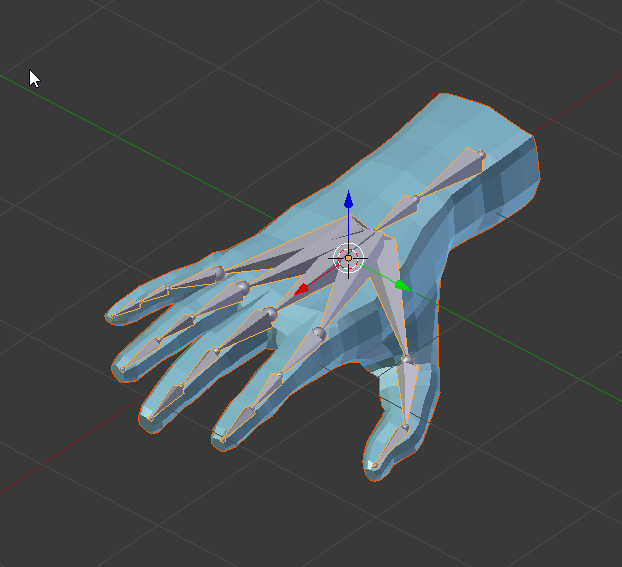 winged valley
Because of stuff like this it can be a good thing to have animations in separate files.
@terse forge Yeah, it looks nice. 👍
 winged valley
Blender livestream tomorrow btw: https://forums.unrealengine.com/unreal-engine/events/1349168-unreal-engine-livestream-blender-to-ue4-sept-7-live-from-epic-hq
Not sure why they use that rigify method, it's a mess.
winged valley
Some reasons why you would not want to use it:
-
Blender scene units not correctly set, so you have to run a script before exporting every animation to create a new rig with the fixed settings (instead of changing the scene unit settings once and be done with it).
-
Unapplied 0.01 scale on the mesh because of the above workaround, which could make newbies think that having unapplied transforms on meshes isn't a bad thing, which could screw them over later.
-
When running the script the armature is replaced by the "fixed" armature, so when you want to animate again you'll have to delete the "fixed" armature (and the empty) and add the normal armature back in the armature modifier because it is empty after deleting the fixed rig (after exporting an animation the mesh will stop responding to the rig every time).
-
Because of having to run a script before exporting every animation you can't run other script like normal animation batch exporting scripts for exporting every action in the file to a separate .fbx file.
-
The bones do not even have the right names, so if you want to retarget you'll have to select the right mapping in the retarget manager which is a bit strange for a custom rig, it should just autodetect the bone names (by using the correct names in the rig).
Conclusion: nod while watching the stream, then use UE4Tools instead. 😛
terse forge

tried doing materials
was mostly just pluggin in constant values haha and seeing what happened
winged valley
Is the flat shading intentional?
terse forge
yeah
I figured it was easier on the VR stuff
I have no idea why the sword isn't reflective though
The preview is very reflective haha
winged valley
You could try smooth shading in Blender and adding a subsurf modifier to see how it would look.
winged valley
I meant the faceted look on the hands, but if that's the look you want it's not a problem. 😛
If it's not something intended you can select the verts and make them smooth here (smooth faces).
winged valley
Man, Sequencer is so broken for rendering at least.
Warm up frames/warm up delay messes with event timing, no AA because you need multiple frames (could be solved by per frame delay feature), widgets show when rendering, the last frame rendered has the wrong camera view, you need to right click events instead of having a dropdown menu at the left where the tracks are... and more. 😛
misty dagger
Hey guys looking to get a better understanding, I've gotten good at animating in bllender, should I just import my animations from blender to UE4 or just animate everything in UE4? There's so much out there that I'm not sure which way to go about all this.
winged valley
Animate in Blender, you can't really animate in UE4 yet.
 pliant karma
Hey folks, got a animation issue now , its not playing the full animation in preview, but in the animation editor it plays it in full ,, the range is set to the correct amount as well.... ?
nvm..........mistoook how far my animation went and was triggering its own event......and its not even late here flops head
misty dagger
@winged valley Thank you
 sour elm
How do I enable IK for characters?
Is this something I need to do with the graph?
I just want something simple that will make my characters not "float" http://prntscr.com/ghx0oc

so just change their rotation
@ me pls
 ripe raven
Having a problem with the transition from idle to walking for Ai character. The character pops from one pose to the other, is there a way to smooth the transition?
 sudden sedge
 clever latch
is it normal that blendspace direction calculator sets character to rotation 90 degree when standing still?
 soft swan
so i have a problem, my player character and AI character use the same mesh and the same animation blueprint, AI has blocked input and its own controller but for some reason whenever i jump with my player character or use attack, the AI character does the same
 light atlas
@cyaoeu you mentioned something about a script that exports each action in the blendfile to a seperate fbx. I did a bit of googling but couldn't find anything. Where do I find said script?
winged valley
Well it's my script so probably pretty hard to find. 😛

Select a rig and change singleanim to False if you don't want a single animation, then run the script.
Also by default it uses every action in the .blend file.
light atlas
Haha that explains it then. Cheers, this will be so useful 👍
winged valley
If you want a certain action "type" or whatever you can do something like this if action.name.startswith("FNH"):
and have a prefix for the animations.
or suffix .endswith("") and so on.
light atlas
I've never done python but it seems simple enough c:
winged valley
Yeah, pretty simple. 😛
But you can do some more crazy stuff if you want to, my own export scripts are pretty unreadable to anyone except me.
light atlas
Haha yes I can imagine 😄
Where does it take the framerange from?
Isn't that what NLA tracks are usually for?
winged valley
The last keyframe of the action.
ripe raven
Having a problem with the transition from idle to walking for Ai character. The character pops from one pose to the other, is there a way to smooth the transition? @me please
 neat plover
so i'm trying to use sequencer to make a "fly-over" of a level, now i have texture streaming disabled, its set to cinematic mode, 1080p, no compression, but the rendered video from it all my textures/objects look terrible as if they're at (or close to) their lowest mip/lod
any ideas?
winged valley
Maybe someone else is interested, animations from UE4 into Blender (UE4Tools) https://www.youtube.com/watch?v=Iy-CXoIkr8k&feature=youtu.be

Using constraints and action baking it's possible to bake a UE4/marketplace animation to a Blender control rig (here UE4Tools). Only fixes needed was a 1 fra...
 simple karma
Anyone know if there is a way to access vector parmeter of a notify in a animation blueprint at run time as to say for instance change a initial color value of something that fires in an animation?
vast trellis
@winged valley will that let you use marketplace assets with a rig and export back with the real epic skeleton?
winged valley
@vast trellis Yeah, as long as you can retarget the marketplace animation to your skeleton first.
That way you can also add root motion and stuff if you want that.
tame whale
Hi UE4Slackers
i have a little issue with my project
i'm using UE4.17
i retargeted my character with humanoid rig.
here is the look i have now
winged valley
That happens when the retarget base pose doesn't match the UE4 mannequin skeleton.
tame whale
thanks @winged valley how can i fix that?
winged valley
You can change the pose in Persona to more resemble the mannequin skeleton, then go to the retarget manager and click Modify Pose, then set the pose.
But it's better if you set the rig up to look like the mannequin skeleton when creating the rig, that way you won't have to do it in the editor.
tame whale
thanks bro @winged valley
 devout dagger
How do I setup IK for vehicle suspension in UE4? (I simply want to move my vehicle actor from A to B over the terrain and have vehicle react to the terrain more or less in a believable manner)
 worthy walrus
Is there a way to get the length of an animation being played if it's not a montage?
I'm playing animations with the animation BP but I need to know how long an animation is so I can stop the player from moving until it's completed
winged valley
The regular functions should work even if it's not a montage.
worthy walrus
get play length?
winged valley
Get Length, Get Play Length, something like that.
devout dagger
So, no one worked with vehicles and IK in UE4 ?
worthy walrus
that node takes a sequence base but how can I get a reference the the current animation playing
@devout dagger I haven't sorry
ive been looking for about an hour now and all im finding is forums where people get the length of a montage, my animations arent a montage
devout dagger
what are they ?
worthy walrus
whatever it is when I import an animation and use that
from an fbx

I need to somehow get the play length of that animation in blueprint
devout dagger
you might be going backward on how to use anims in UE4..
it's not really that simple and straightforward
took me a while to grasp the anim system and I only scratched the surface (only used it with montages )
worthy walrus
hmm, So I shouldnt be using the tree? because i cant plug montages into that
winged valley
You can't?
worthy walrus
i cant even put a montage on that canvas
winged valley
But yeah, it's probably impossible to get the playing animation in the anim graph, that's more for animations triggered from the event graph.
You use a slot node in the anim graph and the play montage node in the event graph.
But what you want is probably a state machine instead.
worthy walrus
yeah I am using a state machine for my whole character so far

and the attack state has its own state machine https://puu.sh/xuBYW/6552b1d83f.png
 devout dagger
I haven't worked with states yet, so I just assume you need to get state first, then final pose, then anim and then anim length
in the anim BP graph that is
I might be totally wrong 😊
winged valley
You can use the enter/left state events to set up your input disable thing.
worthy walrus
i cant get the state at all by the looks of it
and @winged valley I need to wait a portion of the length to open the attack que window for the player to attack again
winged valley
That doesn't sound like an animation thing then, solve that on the input check.
 winged valley
Then set a float value on each attack and use that instead.
worthy walrus
was hoping to avoid that 😦
winged valley
Why? 😛
worthy walrus
I would need to seach for the attack im up to
winged valley
Yes? Aren't you doing that now anyway?
worthy walrus
no
i was hoping ther'd be a way to determine how long the current animation that is playing is
because then id just use that time instead of manually looking and setting a time for each animation
gonna look into montages now
winged valley
That sounds like something you would do if you're using montages, but you're using state machines instead.
worthy walrus
I just liked the tree for the combos :(
made it nice to visualise
winged valley
You can do something similar with enums.
worthy walrus
yeah thats most likely what ill end up doing
winged valley
It's way easier to do gameplay stuff using montages, especially the new play montage node.
worthy walrus
thanks 😃
 raw dew
@worthy walrus Not sure if I fully understood what you need. But if you want to know about a specific moment in any animation, regardless of being a Sequence or Montage (for instance, the precise moment your attack has enough momentum to generate damage), you could use an AnimNotify.
But Montages - as mentioned before - might be good for attacks and other actions, and just know when they are done playing.
winged valley
https://youtu.be/l0GF98jA3Fk WIP script for importing UE4 animations to a Blender UE4Tools control (IK) rig. You only need to fix the pole targets. 🐍

WIP script for retareting UE4 animations to UE4Tools control rig.
One click too.
 winged valley
A bit sticky. 😛
terse forge
The cloth?
I don't know what's going on with it glitching out
it looks like all cloth simulates at the same time if you add an impulse or something
winged valley
I thought it was some skinning glitch at first, but if it's cloth, cool!
terse forge
yeah it's cloth @winged valley
Trying to figure out why FPS is dropped significantly
probably.. the cloth
lol
Disabled lighting on all my daggers and their strings
still getting reprojection
how can I see what's causing issues?
 split vale

 zenith fog
Guys, does mixamo dead now?
the animation packs are gone
are there any alternatives ?
worthy walrus
@raw dew that's part of it, but I also need to open a window of opportunity before it finishes to allow the player to chain attacks together before the animation ends. Also animation notifies seem like a hacky way around the issue
If you look at one of the images above where I was delaying for 80% of the full animation duration before opening that window and then delaying again for the remaining duration before processing any attacks that were qued up during that open time, otherwise the combo chain will be lost
 round shale
ugh, is there any tutorial for unreal 4 that doesn't simply rely on importing from maximo?
zenith fog
mixamo is not what it used to be. only basic characters and animations
i think they all relied on it
i tried one tutorial that used makehuman, but even that used animations from mixamo
round shale
lol
round shale
newbie question - can you activate animations via events?
 tawny dome
hmm
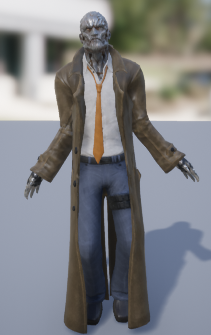
Not quite what I want
But I'm happy I've got IK working for legs and mostly arms
tawny dome
So I'm having a problem and at this point I'm not sure what is wrong
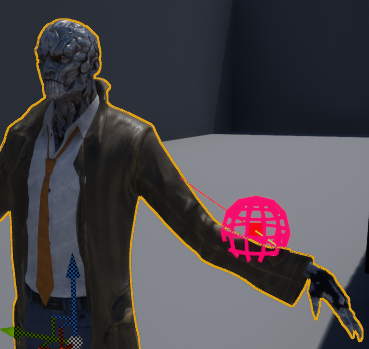
I'm using a two bone IK and giving it the center of that sphere
well
the center of the sphere is the point I'm giving it + the hand_l bone location

this is the properties window for the two bone node
so I'm not sure why it isn't moving the hand to the center of that sphere
What it seems to do is put it in line with the line trace from the shoulder to the hand
So I'm thinking I'm misunderstanding something about the properties
but I'm not sure what
(stretch is there just because it gives me a better idea of what it is actually doing, the problem is the same with or without that on.)
 dim cloak
are you giving it that point in bone space?
tawny dome
If by bonespace you mean a vector that is an offset from the location of the bone, then yes.
dim cloak
it needs to be offset using the bones rotation too
ie 0,0,1 would be 1 unit along the bone's up vector
tawny dome
derp
dim cloak
you can just choose world space for the effector location and use that too.. might be easier depending on what you're doing
tawny dome
yeah
but I had it as bonespace without the rotation
hmm
closer
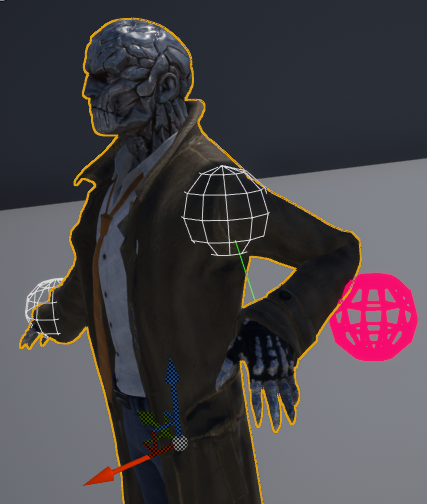
But still not quite right
welp world space works
or not
the collision is fine
but when it moves the desired position doesn't change correctly
hmm
welp I can figure it out from here
Thanks
 urban spear
Hey guys, when i export from blender to fbx then to ue4 it tells me i have multiple roots
how do i rectifythis
winged valley
Only export with deform bones.
 bronze osprey
whats the diff with anim dynamics in anim bp and physical anim component in bp?
is dynamics better?
vast trellis
why do the ik bones in the mannequin have a separate root?
weak beacon
Someone guide me in the right direction here please, I'm trying to rig skeletal mesh armor pieces to the regular ue4 mannequin, but it fails every time. I'm skinning them separately, together, with different bones etc but nothing changes.
https://gyazo.com/9aaeac41841f29b68dd9365679db26e4

First time doing armor, hence the rookie question
https://gyazo.com/44c8fd90cbddbbb99ac1cc50e4c81369
This is what I get

 reef viper
It's possible use Animation from Unity to unreal engine skeleton???
 knotty sandal
Hi Unreal peeps, I have just started to learn root motion and anim montages. One thing I noticed is that some animations make my character "float". The animation basically doesn't keep my character's feet planted on the ground. Does anyone have any idea how I can do that?
https://gfycat.com/gifs/detail/WelloffEnchantedCrossbill

It is worth noting that I am using Mixamo, and used Blender to add root bones
round shale
Maybe look into physic animation component?
urban spear
Hey guys, i'm trying to export a first person rig animation that i made in blender. I tried importing to UE4 and it says that multiple root bones were found
 deft dust
Hey bois hows it going? Anybody got a couple seconds to answer a quick question?
round shale
Anyone use C++ for their animations
?
Also for my animation I have an attack animation - if I don't have it transition back to idle it plays but then doesn't transition back to idle. I think I need to make it transition back after the attack is finished using Current Animation Ratio < 0.1 but it's not working - any ideas?
winged valley
@knotty sandal You could check the physics asset and see if the bodies are below the feet, in that case move them up. If that doesn't fix it you can export the animation and import it again with an offset in Z.
winged valley
I don't see how that would work, what would the output be? Even in multiple event graphs you can only have one event of each type (engine defined events).
But you can have several anim BPs and switch them at runtime.
round shale
yeah ok
winged valley
Or blend in the anim graph.
round shale
one other question - I'm using the C++ of animation notify, however this may get very tedious. Is there a more abstract way of approaching it? Maybe with notify callbacks or something like that?
devout dagger
maybe use notifies in BP ?
 ashen elbow
Is using "GetAnimInstance" on a character a great way to change variables in your Animation Blueprint, for example if your character punches, you use "GetAnimInstance", cast to your Animation and use the Punch bool in your Animation Blueprint?
I always wondered why even in the Epic tutorials, people would make 2 same variables in the character and in the Animation Blueprint
Can "GetAnimInstance" cast fail at some point or do people lack knowledge of this?
winged valley
You can do that, yes.
 lime bramble
A character should be able to have as many blendspaces as it would need, correct? For some reason as I inserted a second blendspace the character stopped animating and just plays the idle loop.
Is there a way to debug this?
Althrough, in the preview things work fine
winged valley
How exactly are you inserting a second blendspace?
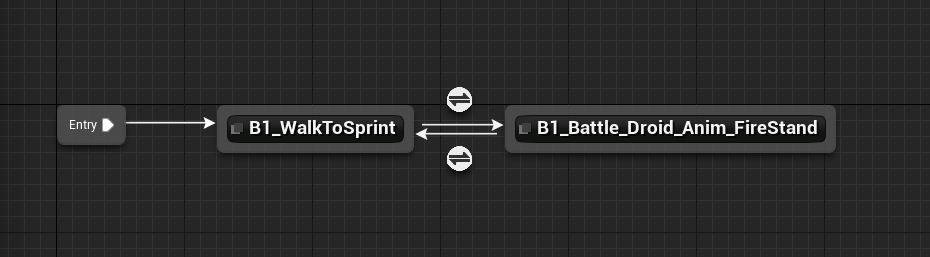
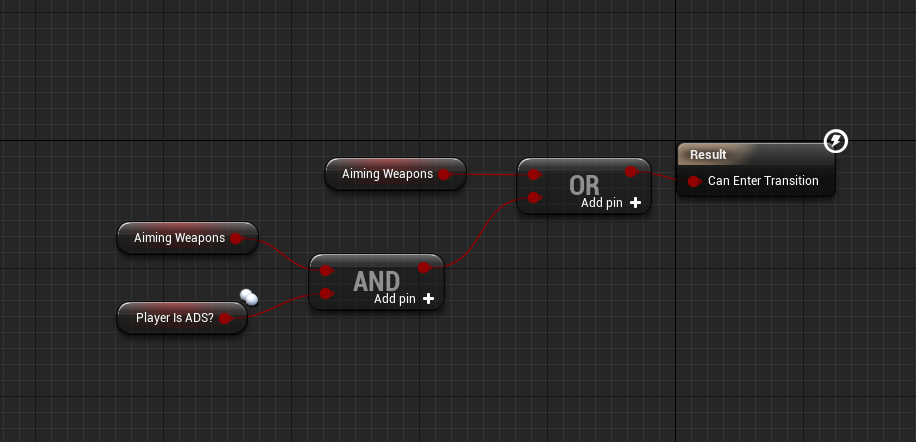 winged valley
And inside the state?
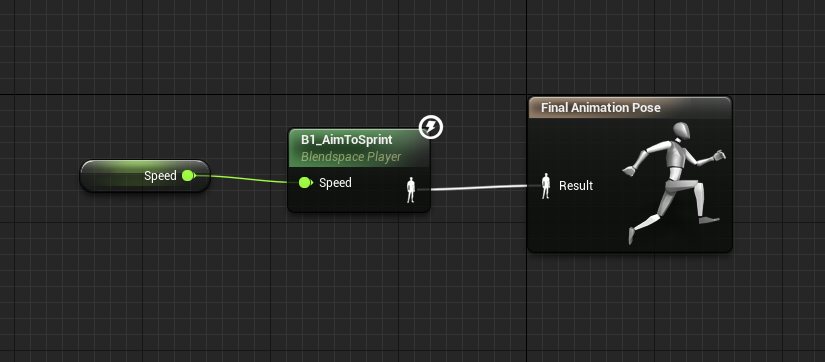
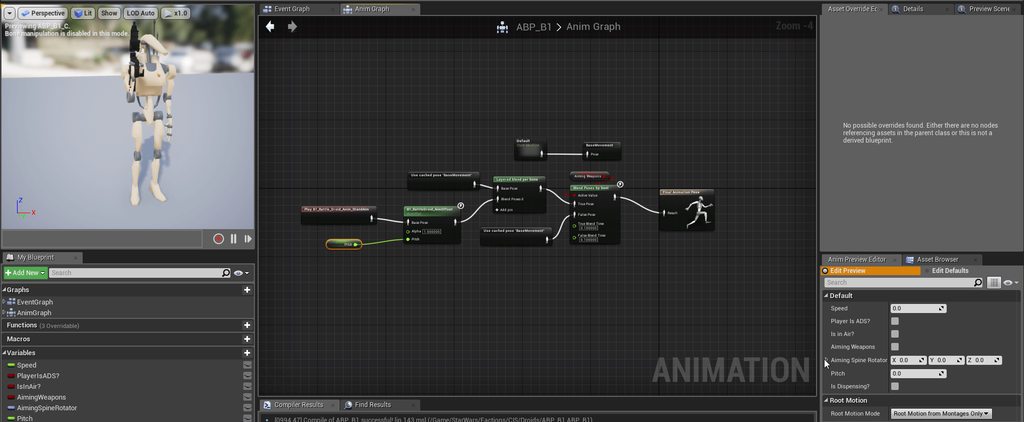 winged valley
Then you're not setting the values correctly in the game play nodes.
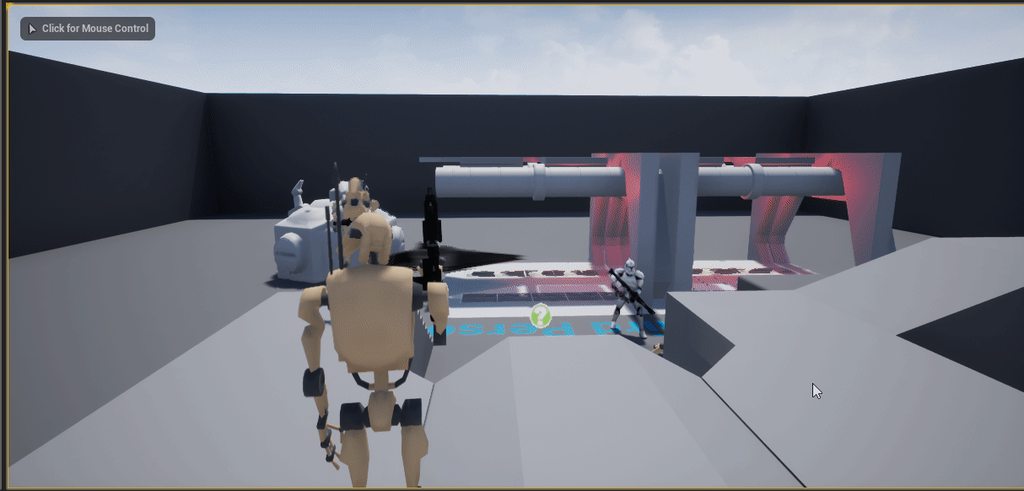


 clever abyss
Imports animation from Blender to UE4
winged valley
You should print Speed and the result of the boolean on tick.
clever abyss
Shoulders are fucked up
winged valley
Claives?
clever abyss
Shoulders
winged valley
What kind of rig?
winged valley
@lime bramble You can also open the anim BP while in the game and pick it in the debugger thing, it will show you the states/values.
lime bramble
ah right