#animation
1 messages · Page 86 of 1
 ebon portal
ebon portal
ebon portal
what do you want to happen when the manager is invalid?
ebon portal
ugh, I'm not sure whether this is possible ... that might even be the reason why you normally do that in animBP only
? how?
 buoyant raptor
I added a state in the state machine that i just called IsValid
there's nothing in the state and it just has a 1 way transition
and check the value there
ebon portal
ah so UE doesn't check for all the states
buoyant raptor
no it just executes the current one
ebon portal
oh, yeah then it should work now right?
buoyant raptor
yea it looks like it's working correctly. And no erroring
ebon portal
awesome!
 misty dagger
@ebon portal hey i got my blendspace to work
buoyant raptor
 misty dagger
however, it seems to be interfering with my aim position
buoyant raptor

then the transition is just this
then of course it complains about thread safe calls
ebon portal
ye but looks good to me
buoyant raptor
which I don't know why IsValid would be considered not thread safe
ebon portal
@misty dagger how exactly does it look like?
misty dagger
@ebon portal with aim offsets, the one arm iss off, but without aim offsets the arm looks fine
its only one hand thats not on the gun
d_d
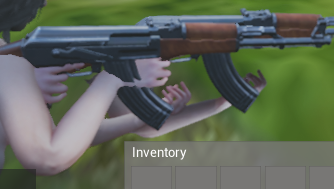
With aim offsets ^
ebon portal
and I suppose the hand should be on the mag right?
misty dagger
@ebon portal http://i.imgur.com/nuwh5rz.png
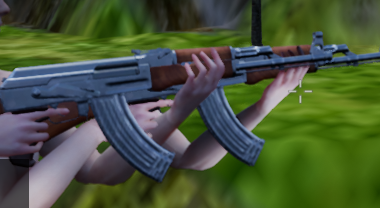
without aim offsets
see the diffs?
its huge!
ebon portal
ah yeah
ebon portal
show me how you applied the AO within the AnimBP

 ebon portal
or does that even look like that in the preview of the AO?
misty dagger
ok so the way our aim space is setup
is we are only rotating the spine up, down, left and right
so the arms ar eleft in A Pose
because we then use the layer per bone blend node
to get the arms to use our gun pose (for aiming, holding)
and then i want to use the aimspace to move the body around
does that make any sense? @ebon portal
ebon portal
yes, while I might add that it might be a bit inefficient. Show me the details of both of the blend nodes you use for moving the spine and applying your arm pose
misty dagger
@ebon portal http://i.imgur.com/eV20UbO.png
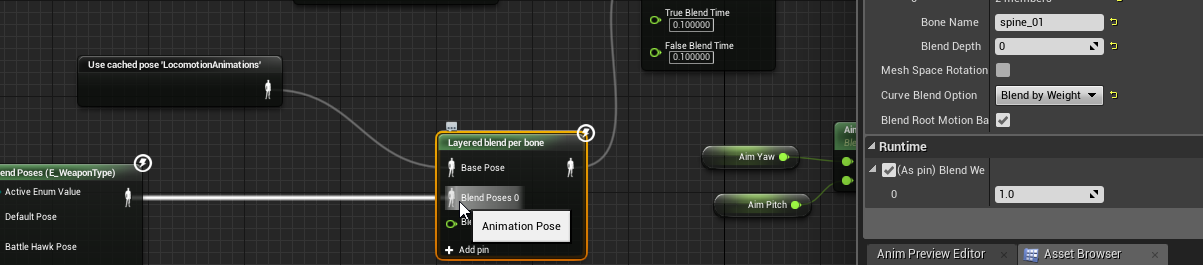
u have to realize im trying to make a robust system which can use tons of different weapons
like, hammers, axes, guns...etc
is that what u wanted?
ebon portal
okay, yeah. So I suppose you do the yaw and pitch within the cached animation called LocomotionAnimations right?
@misty dagger
oh I'm sorry idk why it spammed it
ebon portal
no sry I meant where's the AO applied?
misty dagger
oh

At the end
so my flow is, use enum to pick gun pose, blend it by spine_01, if the bool "holding gun" is true, play that blended pose, then blend it by the aim offset
if the bool is false, just use default locomotion
because we arent holding a weapon... u know?
i just dont get why its moving one of the arms
i left the arms in A pose in the aim offset, so that they would get blended by the per bone node
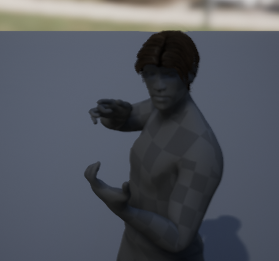
@ebon portal http://i.imgur.com/bMVcQyq.png With aim offset with pitch/yaw at 0,0
Without aim offset:
http://i.imgur.com/Mrbx0z5.png
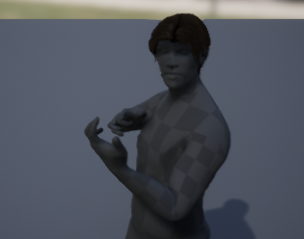 ebon portal
hmm open up your AO animations and make sure that their type is set to additive
I'm currently not on my pc, so I need to rethink of it, but I'll try my best :P
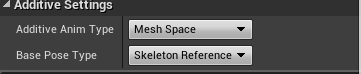 misty dagger
@ebon portal I fixed it
changed my layer per bone node
from spine_01
to clavicle_l and clavicle_r
lemme test it fully tho
misty dagger
looks good so far
misty dagger
@glacial night this isn't the blueprints section
 glacial night
Ah, sorry. I thought it'd work out here. I can just repost this to the blueprint section. Thanks
 frozen nova
Supposedly ARTv2 comes out t oday 😛
 karmic briar
I have 60 fps animation and my game locked to 60 fps
but in the editor animation frames down to 30 fps
is there anu chance to swotch view to 60 fps frames and timings
 subtle relic
after a character executes a root motion animation where he leaves his initial position, he quickly teleports back to it and the capsule component and the camera don't follow the character, why is that?
 rugged imp
I'm doing something wrong? Sometimes animations gonna stops early
 serene perch
'ello there, non-animator here
I really only do coding, but Im at a point where I kinda needa be able to create my own placeholder assets
Any recommendations on which software would be best suited for that?
Is blender enough?
 stiff thunder
Yup. You can use Blender even for the final assets.
serene perch
mhmm k, I'll be looking for tutorials for that then I suppose
Any tips along the lines of "I wish I'd known this before I started this whole thing"?
misty dagger
Anyone think they might have an idea
how to fix these animation issues
o_o
how its shrinking and shit
lol
also, when i move left and right, that's not fps drop, that's the animation blendspace constantly playing for some reason
._.
misty dagger
whelp i fixed some of it, my blend spaces weren't setup right for the shrinking issue
lol
rugged imp
is there anybody knows sometimes animations cuts off early
 tired heath
Hello! How can I get local bone position of skeletal mesh in BP?
subtle relic
Can someone who understands about Root Motion animations help me?
karmic briar
@subtle relic I can
 vivid steppe
Hello guys,
I'm new here and my question is as follows. I want each level of my game (prototype side scroller to learn), to have a closed door and after collecting a key and reaching a certain distance from the door, play an animation for the door to open.
Now, all that I was able to achieve with a blueprint with static meshes, box collision, but my issue is with the animation, how do I create an animation for the door to open?
and have that modular (inside the blueprint) as for example a function
 cedar sigil
if i have a one-off animation that i want to play on a character, always simply play till the end, no slots, what's a good way to do that? character wont be moving during that animation. should i put it into the animBP's state machine as its own state, or can i simply play it on its own somehow? how would you do that, and where?
 green ether
Anyone has experience with Rigify and UE4 Animation Layers ? "Layered blend per bone" in animation blueprints
I have a Leg and an Arm animation I'm trying to mix, and the arms are flipped the wrong way
It's like some forearm joint in the rigify skeleton can't twist properly inside UE4
green ether
I'm currently thinking it'd work if i'd remove keys from the FK joints when I don't use them
rugged imp
hey, how do I set up turn movement based on FPS C++ template?
 steel knot
@subtle relic What's your question about root motion?
 magic whale
lets say I have an attack animation that moves the mesh, I wanna make sure that the mesh stays in the same position when it starts the attack.
How does one achieve this?
green ether
@magic whale maybe disable root motion ?
also, when you say "attack animation that moves the mesh" does it means there's root controller motion in your animation, or that your character actor blueprint moves ?
magic whale
Sorry for the late answer. the animations target the ue4 mannequin
and so the root bone moves
green ether
@magic whale okay sorry just a sec
Apparently UE4 crashes every time I select a bone in an animation blueprint
- if the skeleton is made with blender rigify
- if there's a "layered blend per bone" animation node
it crahses at SKismetInspector.cpp line 520
@magic whale I would indeed untick root motion and remove any animation from the root bone
and if you need to make the character move during the anim, you could make that happen in blueprints
magic whale
Roger that.
green ether
Does anyone uses Blender as a rigging tool, and if so what rigging tools would anyone recommend ?
Apparently there's bugs with Rigify when using the "Layered blend per bone" node on animation blueprints
That's why I'm asking, Any opinions welcome
 plain jolt
someone please tell me why the mesh ain't showing in the source panel ?? 😦
i retargeted the bones ,
i think i got the solution :/
but they are already done, yet it ain't showing :/
woahhh !! somehow they got worked,, dunno how but is there any possibility that UE4 sometimes stops its functionalty without any warnings ?
 frigid drum
what are the alternatives to root motion when moving the capsule with an animation
steel knot
Nibir you need to set a preview pose
 pearl swift
Any pro animators around? What do you look for when you're looking at someone's animation reel? Other than generic "it looks gud"
 wooden juniper
Do any of you have experience importing rig/mesh from Maya where the bind pose is met only after blendshapes are weighted? I tried making an animation that starts with a basic one-dimensional translate of a group, then a one-dimensional scaling of a mesh inside that group, then finally a one-dimensional translate of the ikhandle of the joints binded to a mesh. Every time I bring this into Unreal, there is crazy stretching and skewing of meshes from the blendshapes
ebon portal
@pearl swift sense of balance, weight and "bouncyness" (when you move your hand quickly your fingers follow not immediately), it's always nice to see how the character interacts with other models, I often tend to tell people to do a quick animation of someone picking up a really heavy box and carrying it a few meters
you basically need to show that you're not only able to show that you know how the character would move, but how to add the weight of an armor, sword, ... to the character
like even if your character can lift a heavy weight with one arm, you'd see that it's heavy from the position of his hips, shoulders, ...
pearl swift
Thanks! That makes a lot of sense
 hollow summit
Is there a way to use only one animation bp for multiple characters? (they had diff skeletons, so I had to retarget to get it working)
frigid drum
@ebon portal you told me to not use root motion in multiplayer, but im in trouble finding how to move smoothly the capsule with an animation, how should i be adding movement...
specially in cases where the animation is like a step forward then one backwards
if its only forward i can get something decent with add movement input
ebon portal
the magic word is: curves @frigid drum
ebon portal
you can create a curve for each animation in the character blueprint
ebon portal
add movement input node
frigid drum
lets see if i get it, when the animation starts, every tick i add movement depending on the curve and stop when the animation stops
will try that asap
ebon portal
good luck :D
frigid drum
worked
thanks dude
now i just need to animate better
the sword slash looks like its opening a door angrily
subtle relic
help
I have a walking and an attacking animation, how do I blend them ie making the character attack while he moves?
frigid drum

(00:05) - Intro and final Montage setup (02:50) - Blend per bone (04:22) - Cached poses (05:41) - Specifying bones to blend (07:31) - Wrap up
i think that series explain it
not sure its that exact episode tho
@subtle relic
 magic whale
Is it possible to import a pre-rigged and skinned character into the UE4 ART system?
subtle relic
why does root motion stops movement and input?
*doesnt allow the player to move the character
 reef bone
This probably goes either here or in programming but just in case:
Has anyone succesfully gotten the bone / socket position from within an animation at an arbitrary time?
wooden juniper
I can't figure out how to make a mesh in Maya with a skeleton that has a bind pose based on a weighted blendshape. For example, the cylinder in the pictures needs to be enlarged before being bound to its joints. The goal is to show how a sword can become a bow, but the skeleton only matches the bow state of the mesh. Does anyone have experience with state-based bind poses that can be parameterized easily in Unreal?
misty dagger
can you describe this issue a bit deeper?
so you have a bow that needs to transform into a sword?
does the bow already have a sharp edge? where do you hold it and what happens to that part when it becomes sword
what is the models base shape, sowrd or bow?
 plain berry
I add my question in the middle of your discussion: is there any IK-hands rigged UE4 mannequin available somewhere? Working on Maya atm.
maybe i can smash a humanIK on top of the rigged mannequin and it'll do the trick
wooden juniper
@misty dagger Sure! The base shape is a sword, and it becomes a bow after the small rectangle is pulled out a bit, and the cylinder is enlarged. You hold the bow from the middle, with your other hand holding the small rectangle and pulling it backwards. The skeleton is based on the bow state, so my initial idea was to use blendshapes (morph targets in unreal speak) to translate the small rectangle + cylinder, and scale the cylinder, before using an ikhandle made from the binded bow skeleton to bring it further back and bend the bow. However, when I keyframe it, or just import it to unreal without keyframed animations, there is some serious mesh stretching/deformation when I change the values of the morph targets.
magic whale
Question: I have a skeletal mesh that has its weapon attached to the gun socket of the ue4 mannequin but it's considered a preview mesh. How can I change it so that the weapon appears into the BP I'm using the skeletal mesh?
misty dagger
Hey, If I wanted to make a spinning turbine fan attached to a car, would it be on a seperate animation layer to the car, and then I just attach the two via a blendspace?
not sure how to do this!
subtle relic
How do I make my character attack while walking? (executing two animations at the same time)
misty dagger
nto sure what you mean lol.
can't I just.. without having it as an attachment animate a seperate part?
subtle relic
no, the turbine would have to be a separate BP class that will be attached to the Car BP
misty dagger
what If I have some part attached to the car which I want to animate
i.e, a compartment opens up
but its vert welded to the car
and weighted properly and everything.
subtle relic
it would be treated as a bone and you could simply rotate it to give the open up animation
misty dagger
then why not the engine/
subtle relic
like an arm
misty dagger
oh, I've already done all the animations in blender
subtle relic
you can also do it this way
misty dagger
so teh engine doesnt need to be a seperate part after all
that's just for if i want to animate it within the engine
subtle relic
its much easier to import the turbine separately and use it as a BP class, so you could control the
*so you could have more control over the other animations in the car, like door opening
subtle relic
yes but then you would have to use Layered blend per bone in the anim graph
but its harder and less functional
misty dagger
alrighty
so the turbine is an engine casing and then the fan, would I export the fan seperately
and just keep the engine casings attached to the main mesh.
misty dagger
so, with the compartment opening, I just make an animation blueprint and call it in my main blueprint so it happens when I press G or something.
so two actions happen.
compartment opens, and engines come out
subtle relic
you mean the turbine comes out?
subtle relic
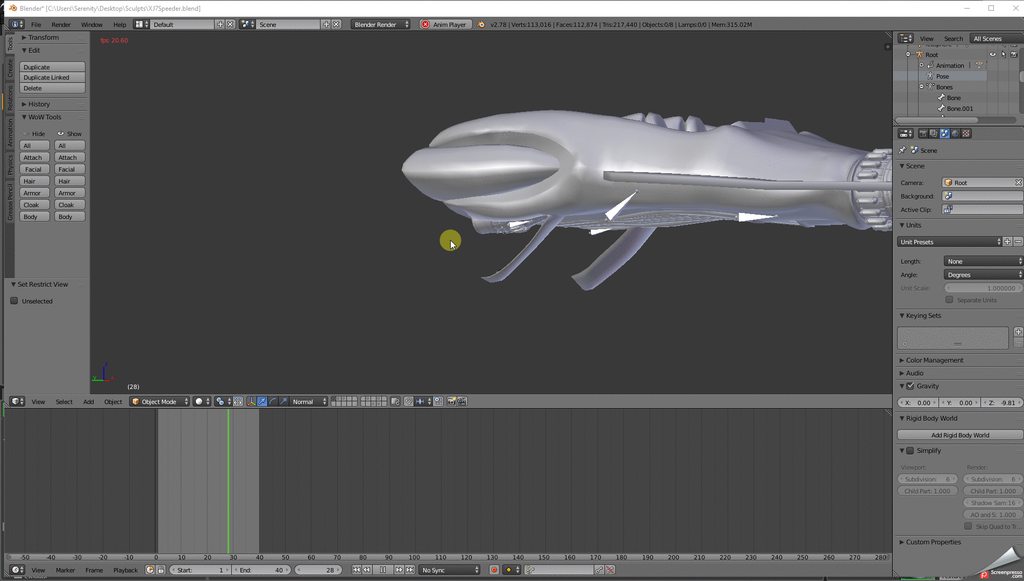 subtle relic
what are those things opening up?
misty dagger
oh
they're compartments that hold some back thrust engines
two metal plates that are on hinges
subtle relic
and that circular thing on the front is the turbine?
misty dagger
two more engines
subtle relic
which one rotates?
subtle relic
oh ok. the fans are BP classes that have a Rotating movement component on them, and the fans will be atached to the bones where the engine are
misty dagger
i gave the fans their own bones already
and the engiens are just attached to the main root
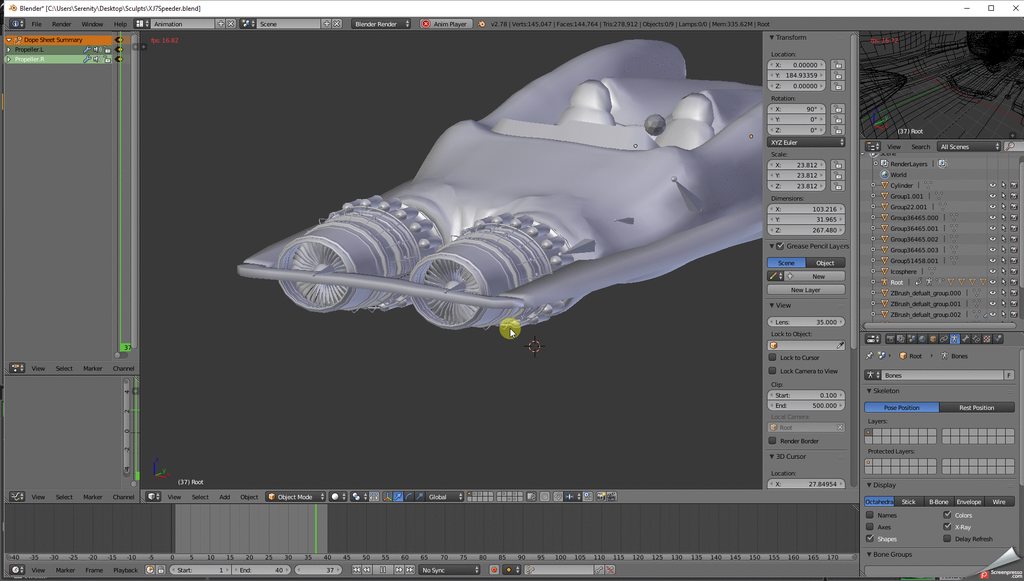
here shows the fans rotating
and then there's two more on the back that will rotate the same
subtle relic
you will have to import the fans separately because their properties do not match the car's root
you only create one fan, which is the fan mesh, and add a rotating movement component to it so it rotates just like in the animation. So you attach them in the car where they should be
you have to import the car without the fans
misty dagger
what I did earlier ; import car and fans and engines all attached, seperate animation for just fan movement and animation for compartment opening
is that not correct?
the bones for the fans are attached to the root btw
here's a gif of it in ue4
the gif software cant record ue4 lol..
but it moves just fine in ue4
subtle relic
and how will you execute the fan animation and the other animations at the same time?
misty dagger
the fans
although i think you're right about the fans
if i make them seperate then I can turn them off independantly from the other stuff.
subtle relic
exactly
misty dagger
my set up was going to be like this, I press button for ignition, fans start to spin and the car lifts off the ground
i pres button for boost and the compartments open up
and particle fires off
i think the engiens back to front anyway.
subtle relic
you would have to use layered blend per bone and set up slots to make them animate on their own at the same time
misty dagger
hm, i was thinking it was a lot less complicated then that
I can't just have it called on a key press?
subtle relic
then you wouldnt be able to control their animations
subtle relic
they wouldnt be able to play their animations on their own if you dont use layer blend per bone
misty dagger
they're the only thing that's animated right now.
misty dagger
but if I wanted to add more animations like doors opening and stuff, i can't?
i think i understand
subtle relic
yes
but you cant play the door opening animation and the rotating fans animation at the same time
if they belong to the same mesh
unless you use layer blend per bone as i said
if the fans will be rotating at the same time that another animation is playing on the car (ie compartment opening), it is better to just import the fan separetely and have it execute it's animation separately
misty dagger
@subtle relic what about mesh morphs can I import thsoe?
and how do I turn them off and on?
 young patio
Anyone around to give me an quick hand with an Anim Montage not playing?
Basically im calling an function i created in the AnimationBlueprint from my Character.
This function calls an MontagePlay node which i pass all of the required parameters from the function
However the Montage doesnt seem to play at all
It returns an non zero value for montage length so im assuming that is correct as the Node describes that it will return 0.f if the montage couldnt be played.
That is the simple setup i have going right now
The function is in the bottom left of the middle image
And im calling it in the final image
However nothing happens
I have BlendSpaces playing in the first image to control walking and pitching of the Character.
Does this effect how Montages are played?
The function is called as it does print the string, however the montage doesnt seem to play.
 deft cliff
normally you would play a firing animation that was looping in from a state machine with a boolen so anim bp casts to character gets isfiring variable then in your statemachine have a branch the has the onfiring variable condition...i think if you want to play a montage out of the state machine maybe you need to use an anim notify im not entirely sure about that but if you havent tried the state machine method then thats where I would start, if there is already a stat machine running its probably over riding anthing else
young patio
The entire AnimBP is in those few images, there is no StateMachine at all.
So your saying i need to Blend it with the FinalAnimPose?
deft cliff
yeah i would say so and you may need to use a slot as in it only plays upper body while the other blends are playing you should be able to fit it in with your first graph which is prob what is over riding it from playing
young patio
Ok ill mess around with the AnimGraph and see what i can work out.
Cheers
Ok i got the montage to play now but its not blending with the walking/pitch anim
deft cliff
thats where you need to play it in a slot for upper body prob there is some youtube vids, one is the epic one with the punching anim
young patio
Ive got so far as i can play the montage and have it still pitch correctly but the walking anim is now fucked
LocomotionBase is where im using an StateMachine to play an simple Walking Blendspace.
Then i blend with the Pitch BS and the Slot thing
With the LocomotionBase
As you can see
deft cliff
looks like you nearly have it set up correctly probably just one simple thing you havent done with the slot
deft cliff
i would watch the epic video where he blends the puching anim with the walking one, that might be the easiest way to find the step thats missing
deft cliff
thats how I originally got it to work its an older video but still valid, I was pulling my hair out as to why it wouldnt blend properly until I kept going through it step by step...I think he does it over about 20 -30 mins of vid time, its that zak parish guy so its easy to watch
young patio
Which video is it?
I cant find the one your referencing?
I can only find the TwinStick shooter stuff but thats only doing an simple walking BS
deft cliff
young patio
Ah k nice thanks
Forgot to setup the Layer Branch Filters on the LayeredBlendPerBone node....
Works like an charm now.
Thanks for your help @deft cliff
deft cliff
thats alright man always keen to help a fellow australian
young patio
Bloody oath
 junior basin

Why does it say that I am missing all these bones when they are already in the skelton?

Oh shit. I have to run, but just notify me and I will read it later. Sorryt
subtle relic
Do anyone know how to separate limbs of a skeleton on 3ds max for dismemberment purposes?
wooden juniper
I can't figure out how to make a mesh in Maya with a skeleton that has a bind pose based on a weighted blendshape. For example, the cylinder in the pictures needs to be enlarged before being bound to its joints. The goal is to show how a sword can become a bow, but the skeleton only matches the bow state of the mesh. Does anyone have experience with state-based bind poses that can be parameterized easily in Unreal?
 noble pelican
does anyone know if there was ever a fix for morph targets not having smoothing imported?
rugged imp
why my character being vibrate when I get back? any possibilities?
 river isle
Does somebody now any sit to chair animation tutorial? ??
river isle
Is it possible to change animation rotation in UE4?
ok I found it is it possible. If someone has some problem you can find here https://answers.unrealengine.com/questions/375984/import-animation-and-its-rotated-90-degrees-resolv.html
 dusk hatch

any idea why the face crumples up when blending animations in ue4?
it doesn't happen if i blend them in maya.
subtle relic
@dusk hatch where did you get that dragon model?
 limpid kindle
How do I freeze a ai and freeze his animations? Because at the moment I am using "set custom time dilation" and I set it to 0 on the ai Blueprint but the character does some weird things like changing his posture and turning towards the player.
dusk hatch
@subtle relic i made it.
misty dagger
@dusk hatch we would need to know how exactly the skeleton for the face looks like, and the animations you are blending
rugged imp
My character goes to vibration when walking backside. Any possibilities?
river isle
Does anyone know how to create animation sit to chair ? and stand up? I mean state machine. I couldnt do it and couldnt find any tutorial
 tight warren
I know how
@river isle you need to have 3 States
And for the transition it's pretty much gonna be like the jump in the third person anim np
*bp
Idle to sit down is a bool that is true
Then play the sit down animation in that state
The transition to the idle sit state is gonna be if the remaining time ration is smaller then 0.1
Then you have the idle animation in that state
And to the stand up state you have the NOT bool as required
And then play the animation
Back to idle is the requirement that the remianing time ratio is smaller then 0.1
@river isle
And off if a button press you use a flip flop at the pressed state
Then you cast to the animation blueprint and set the bool to true at a
And to false at b
river isle
I've almost done it . I did it before you say 😄 but I got one more problem about chair . I've seen somewhere about socket
tight warren
Show me how you do it
river isle
oh 😄 I didnt anything about attach yet 😄
river isle
tight warren
And the capsule component of your character needs to be overlap all
river isle
Its already done 😄
tight warren
Ok
river isle
but the character not on chair exactly
tight warren
And attaching is just attach actor to actor
river isle
ahh yeah I think this point
river isle
ok let me try it 😃
tight warren
But you can also use attach to comment
*component
The component is the chair mesh
With the socket
And the target is the player character
river isle
this event should be in charBP right?
tight warren
In the chair
You can have a custom event in there
That gets called when you overlap a box in there and press the button so air
*sit
Then you cast to the chair and call that event
river isle
ok I tried it . after call socket my character flying with chair 😄
tight warren
Lol
Yeah then you maybe swapped it
Use the component one
And then disable the movement of your character
Otherwise you drive around with the chair😂
 south sonnet
Does somebody use motion builder?
 dusk dove
@south sonnet yes
south sonnet
I have issue with root motion because it uses Y-up world coordinates, but unreal uses Z-up, so I have wrong root bone movement direction
dusk dove
I don't have problems with Root Motion
Have you tried the "Convert Scene" and "ForceX Front Axis" settings in the Import in UE?
south sonnet
no, I will try
seems it doesn't help
it only changes relative bones rotation to root bone
subtle relic
@dusk hatch in which software?
 toxic sail
I am trying to use Iron-belly animations in generic shooter, for some reason after re-targeting skeleton , my players left arm is always wrong, Any suggestions ?
subtle relic
in dark souls games, some enemies when they are not facing the player and detect he is close, execute a turning animation to face the player while correctly positioning their feet. How is it done?
river isle
How can I do loop a specific animation in matinee?
dusk dove
@Kreator#0298 Use a threshold to determine whether you need to realign the feet.
(Use the Delta(Rotator) node and it's resulting Yaw).
In Init Anim, save the current Actor Rotation.
In Update, check if Delta(Rotator) with current Rotation and saved Rotation is > threshold.
if it is, set the variable to the new actor rotaiton and fire your realign feet event.
If it isn't don't do anything
 undone flax
Is there a better way to implement a Facial Action Coding System than doing each pose as an additive animation? I looked into doing a pose asset, but I couldn't get it to allow me to change each value on the fly.
Right now I have a bunch of things that look like this:
magic whale
Krestchum for all you fine folks: Is there a way to easily loop a montage?
 visual blade
Anyone know how to keep current velocity while playing a root motion montage? Seems the montage overrides player input/velocity :(
stiff thunder
: anyone knows a way of copying variables, macros and functions from one animBP to another?
maybe its just that i need a coffee, but i can't find an quick and slick way of doing it.
dusk dove
You can create a Macro/Function Library if it is used by multiple instances
 polar cliff
Hello
Good afternoon
Please can anyone help me on explaining how to rig a robot for ue4 in blender. I know how to rig but i don't know how to create the controls for the rig. if there is any info on this I will be glad to have it. thank you
my main problem is getting the controls into ue4 and another issue i face is, when exporting an animation into ue4 is imports every frame as an object.
 sick brook
You don't import the controls into UE, you do your animation in Blender and export geometry + bones only
@polar cliff
polar cliff
what?
okay then how do i import the animation into ue4, or that is baked into the bone?
sick brook
The animation is baked into the bones
 native moss

is there a way to enter and exit state machine with different animation?
i have different state machines for different movementTypes (locomotion, idle etc) and then in these state machines we have an animState enum that drives all animStates
blending between the idle and locomotion is tough if i have to use the same animation going in and going out, but i can't work out how this would work
 misty dagger
I have an animation where the charcater is moving sideways... how do I reset it so it stays in place?
nevermind, found it lol
river isle
hi there
I did retargeting between two mixamo animation
this is my only issue about animation . how can I solve it
river isle
ok I solve it . I just did once again 😄
 rotund needle
is there a way to create a custom morph target animation in the ue4 editor? i already imported morph targets as anim curves and succesfully tested them by moving the slider and setting up a test level bluprint
but i need an animation asset that i can play in the anim BP
oh looks like i can add them to the animations that use them
or are supposed to anyway
 fiery copper
@burnt pike I hear you love rigging?
 burnt pike
 native moss
hey i want to get the length of an animation playing on a character
at run time, i don't know what that animation will be
i know get play length will do it, but can't seem to work out how i'd get from my skeletal mesh -> get play length
for the current animation
sick brook
@native moss you probably need to access the animation blueprint
That is where you find functions for length of current animation etc
steel knot
does anyone know the best way to line weapons up so they attach to a particular socket at the same point on the weapon? Weapons from various creators all seem to attach in different spots, does anyone have a trick or know the best way to move the attach point position on the weapon itself.. (or do I have to have different sockets then switch via enum?)
 frail bone
can anyone help me finish rigging my model in blender?
misty dagger
Hey. So I'm working on animations for a personal project of mine and I was wondering if any of you could tell me the best way to animate mag swaps in a system where the weapon and the arms are both separate skeletal meshes. Do I have to have the weapon and the arms both in the same file? If anyone can help me out with this, send me a private message so the public chat doesn't get crowded lol
misty dagger
Sorry, by in the same file I mean the same file in Blender
visual blade
@native moss get anim instance will give you the functions you desire
native moss
i see
misty dagger
Is it possible to have animations play on a skeletal mesh while paused? I've tried setting "Tick while paused" on the actor but the animations dont happen
 opaque plaza
I don't think so since it freezes everything, maybe if you slowed everything else to .00001 it might do the trick.
misty dagger
Anyone know how to have a matinee only play the first time that level is loaded not everytime
 uneven wigeon
can someone help me with blending animation from walking to running?
Although my character gains speed over time
 shut kraken
Does anybody here know how to calculate additive on the fly? Basically to find the difference between 2 poses? The closest I can get is to use pose snapshots and break/make them with math in between but I haven't found any way to use the pose snapshot structure in the animbp.
 young sail
Hey all, just wondering whether anyone knows what the Unreal equivalent of Unity's "Any State" transition is?
Basically want to cancel out of any animation state to go into my 'blocking' state, but don't really want to create transitions from every possible state
dusk dove
@young sail You could either use a BlendByBool with your Movement (false) and Blocking (true) and use your "isBlocking" variable for it.
You may also use an Animation Montage
or
Encapsulate your Movement in a separate State Machine and transition from on State Machine to the Blocking State Machine.
misty dagger
"Encapsulate your Movement in a separate State Machine and transition from on State Machine to the Blocking State Machine."
Thats what I use for combat related override from locomotion, the combat stuff is a completely separate state machine
young sail
Thanks @dusk dove + @misty dagger , as suggested I have seperated the two, moving blocking state machine a layer up
dusk dove
@misty dagger Exactly, I have one State Machine for every Locomotion state:
Walking/Running ; InAir/Jump/Falling ; Climbing ; Swimming
misty dagger
wow, I dont go that far... but maybe I should. Seems like a stable system
dusk dove
It took some time until I realized you can have a State Machine in a State Machine, before I had one State Machine for everything
For proper Transitions, I use Anim Montages.
misty dagger
sounds intruiging, could you share a few screenshots of that?
stiff thunder
That sounds really nice. Didn't know you could have state machine in state machines.
misty dagger
i knew that, but didnt really manage to figure out how to use them well, and with transitions and all that
especially since you cant use the timeRemaining stuff when transitioning
to me that made things unnessecarily complicated
but maybe Raildex' screenshots clarify things and Ill give it an other shot
stiff thunder
Yup
 stoic compass
Great source of references for animation walk cycles https://youtu.be/HEoUhlesN9E

Highly recommend you follow him on Twitter https://twitter.com/kevinbparry
He worked on Kubo and the Two Strings which is reason enough to follow him 💯

Stop-motion animator at Laika (Boxtrolls, Kubo and the Two Strings) Contact kevinparrytv@gmail.com
Tweets
4616
Followers
8869
 Twitter
Btw if any of you haven't seen Kubo I'd highly recommend watching it https://youtu.be/p4-6qJzeb3A
I still cannot believe it's stop motion, even the ocean is as silk laid out on a metal frame wave machine with a sprinkler above

Kubo and the Two Strings is an epic action-adventure from acclaimed animation studio LAIKA. Clever, kindhearted Kubo (voiced by Art Parkinson of Game of Thro...

SUBSCRIBE HERE: http://goo.gl/SrrTlT SUBSCRIBE MOVIE TRAILERS: http://goo.gl/8WxGeD Making of Kubo and the Two Strings [stop-motion production & Voice Sessio...
dusk dove
@misty dagger
LedgeGrabSlot is an AnimationMontage whcih is played when you gro From "InAir" to "OnLedge" (Climbing Ledge System)
 icy valley
What would be the best way to move this gun to the hand
I have experimented with some IK stuff, but it clips through the character and looks really bad
The guns socket is rotated to fit the aiming animation
so im thinking i need to move the right hands rotation so that the gun would sit in the left hand
 supple axle
does the gun have a socket too?
I'd basically attack a socket to a socket
gun handle socket to the hand socket
icy valley
yes i put a 'grip' socket on
icy valley
might be onto something with new 'look at' node!
Little bit of polishing but seems to be what i was after
icy valley
wooden juniper
When bringing rigged meshes into Unreal from Unity, are you forced to bind every single mesh to the joints? Every time I import in Unreal, the only meshes that appear are the ones bound to the skin
 idle plinth
Hey guys. For my new job I'll now have to work a bit with animations. Or rather Anim Montages and Anim BP's. I already figured out how to set up the state machine for one of our characters, but now I have to add - I assume - an Anim Montage for an Attack, that consits out of a charge, loop in, dash forward and dash out animations
Now I setup the AnimMontage
but now my question is... What now?
I get the feeling one Anim BP can only have one Anim Montage - is that right?
so do I need to do the attack animation inside the same anim montage that handels movement?
So basically what I have is a default state machine in my anim BP that is used for movement related things. How would I go about adding a new montage that should be able to be triggered from code, that plays an attack montage
ebon portal
hey guys how can I attach a particle emitter to follow a root bone, within a bp?
ebon portal
nvm found it I'm a dumb dumb
 soft crown
How can I set the animation to false once I set it to true?
I set it to true on Event Any Damage hit animation state is set to play and then?
I see no way to set it back to false
once the hit animation is done
 final mulch
@soft crown why not do this https://docs.unrealengine.com/latest/INT/Engine/Animation/Sequences/Notifies/ and when you call the notifie you can set it back to been false again
Notifies are a system for setting up and receiving events in Animation Sequences to perform external actions.
 ruby sapphire
I believe slots are what you're looking for.
 broken urchin
Hello, I want to know if it is possible to add a new mesh on top of the Third Person example character and make it follow the animation. Thanks
 rugged cedar
Is it possible to work with a reference actor in Sequencer? Like If I were to mix the gameplay with cinematics and have the game character inside the cinematic.
 icy cove
Hello everyone! Can anyone help with using BlendSpace to sync my melee attack animation with attack rate?
Mostly it's working but only for attack rate > 1/sec. If I'm using attack rate < 1/sec (and set rate scale to the lowest value – 0.01) it still plays animation with 1 rate scale
Am I missing something? How can I use Rate Scale <1 ?
icy cove
Ok, I'm just using wrong tool. No need for blendspace, it's enough just to use animation and add pin for rate scale
 floral sky
Ok so I'm confused on how to handle this. Let's say I have a rigged character, and I want to give him a removable vest. I simply skin the vest mesh to his skeleton, import it into Unreal and use "Use Master Pose Component" and wala it works and moves correctly with the character. But what if I want this vest to have parts that dangle or animate? Something that requires more bones. How do I handle that case then?
misty dagger
that is a quite complicated procedure @floral sky .. you can just add the bones in your 3d program and export them. But the shitty thing is that once you import that in the engine, the skeleton will update all animations (not a problem really, just takes a while if you have hundreds of anims). But the real problem is that that wont be picked up by the master pose component
altho.. let me just test something
floral sky
@misty dagger sooo the parts of the vest that I want to be "dangly" have to be a separate mesh entirely then added in engine? Seems like a lot of work...
misty dagger
it is, but wait a sec, im just testing it myself with one of my characters, what I have done for now is to just have all bones in the main skeleton to begin with, but that is crap because if you add new costumes with new bones, you have to update ALL anims to include those bones from your 3d programm, but I havent tested if thats also the case if you update the skeleton on mesh import
floral sky
"[...] but that is crap because if you add new costumes with new bones, you have to update ALL anims to include those bones from your 3d program" <- Exactly! There HAS to be a better solution here.
misty dagger
man I thought there was, to be honest I think this is a foul working inside the masterPoseComponent node
it sets bones that arent in the master pose to 0 0 0 instead of just leaving them alone
it just strikes me how that is in any way useful and why it was done that way
floral sky
Well and also why is no one else talking about this? Surely this is something people want to do with characters.
So would it possible to modify that function and let the extra bones be?
misty dagger
I know there is a different node that Lina told me about, I forgot what its called, let me lookup that thread
the node this is about is the : copyPoseFromMesh
tho i never really dug much further so I still dont know how to use it :/
floral sky
"The new CopyPoseFromMesh, on the other hand, works with child mesh components that have additional bones."
Hmm
Interesting
So you still export the Vest with the character rig "skinnings" but can have additional bones to play with?
misty dagger
it seems, I would give it some tests.. im quite interested myself so Ill spend a bit of time looking into it now
k i got it to work.. somewhat, but now it still has the issue that when I dont do the masterPoseComponent thing the costume mesh lags behind slightly
if I add the masterPoseComponent: the extrabones go to 0 0 0 therefore the mesh breaks
floral sky
So CopyPoseFromMesh seems to lag?
There is also a CopyPoseFromSkeletalComponent that you can call in BP
misty dagger
hangon
now it works, wait I need to verify
yeah this works
still a bit wired cos that means that the costume mesh requires a dedicated animBP
it cant just be taken care of in the main characterBp
but I suppose thats also good because if you have lots of different costumes with lots of different types of dangly bits that you setup in the animBP you would clutter the animBP if you set them up using animDynamics
also, I cant seem to find that CopyPoseFromSkeletalComponent in the blueprint
floral sky
I couldn't get CopyPoseFromSkeletalComponent to work but it looks like it's designed to be used in the main character blueprint.
misty dagger
but it doesnt even show up on my end
floral sky
Try unclicking Context Sensitive
misty dagger
ah but that is in context of poseable mesh
nothing relevant for us
but the copyPoseFromMesh seems to work now on my end
I just had the phat set to kinematic, setting that to default worked
floral sky
Hmm I'm Gonna try it on my end. So just give the "vest" it's own Animation blueprint?
misty dagger
yep, sec Ill show you:
oh wait, its already explained in that link you sent
so yeah do that
and then make sure to set that animBP as the animInstance for the costume mesh in your characterBP
altho, I think I did find a bug now
its quite buggy I wont use it :/
my engine crashed when I switched costumes
and when any bone in phat is set to simulate, the thing lags behind
floral sky
Hmm
Question though. With UseMasterPoseComponent I had the "vest" exported with the entire character skeleton, even the fingers and toes, which most definitely do not affect the vest. With CopyPoseFromMesh can I export the vest with just the bones that are relevant?
misty dagger
yes, altho I think it doesnt matter as bones that arent affecting a mesh wont be taken into account
floral sky
Ok, just didn't know how I should export the vest properly. If I should delete unused bones or if I needed to recenter the mesh and skeleton to 0,0,0 after bones were deleted (before exporting from Maya).
Thanks for your help @misty dagger
 iron dove
@misty dagger hey dude do u know how I can stop the character from moving in editor?
iron dove
no say im editing the character
and i want to pause all the animations that are happening on it
misty dagger
editing in what editor?
misty dagger
you can clear the animInstance and edit
iron dove
but i need the idle state there right now
misty dagger
then when you are done, set the animInstance back to the animBP or whatever
 spice path
select the mesh and over in the details there's a "Pause Anims" check box
iron dove
yeah probably
my mouse is a bit wonky
sometimes it doesnt click
so i might've missed it
misty dagger
cool, yeah I knew there was something like that
 stoic remnant
Anyone got a clue why importing something with basic blend shape with smoothing groups on breaks the morpg targets inside the engine?
misty dagger
i had that issue just the other day, gtg now but ill write what happend for me in 30min or so
stoic remnant
thanks
 smoky sail
 misty dagger
crazy..
misty dagger
ok im back: so what happened to me is that I had a character with a few morph targets for costume based skin deformation and also 2 temp targets that I had for testing some muscle flex system.
Once I extracted the morph sets for the full character muscle flexing I deleted the two temp targets in maya, then re-exported, reimported in the engine.
But the targets that I had deleted were still there in ue4, just very broken, all targets applied after that were completely shifted, was very strange.
I found no way to fix it. I had to import the new mesh as a completely different skeletalMesh, delete the old one and make sure all references were replaced with the new one.
Also one thing is that the new mesh imported without morph targets (even with the checkbox on) and what I had to do to get the morphs was to reimport the mesh after the initial import, that then also included the morphs and everything worked. But it was a scary thing
 abstract wagon
hello there!
I need a bit of help with a lil thing over here
anyone familiar with non-uniform bone scaling?
I have a character with eyes I want to be able to point at stuff, but the eyes need to be oblong shaped instead of spherical. So I made them as spheres, skinned to a bone that rotates them, and the parent of this rotation bone applies the scale to keep them oblong, like this:
I've used this before, works in max, works in unity, but it's breaking in unreal and I can't yet tell why
I'm importing the rigged mesh with the scale already applied, and it seems to collapse the scale as I import it, so instead of rotating like the example above, the eyes rotate like spinning plates
and the axes seem all switched so the eyes are squished in the wrong direction
this is how it looks in ue4
any clues?
in max it looks like this, the left eye is rotated but it retains the shape
I'll keep trying but if anyone has a clue, I'd greatly appreciate that!
soft crown
Would the Death Animation be in the state machine or as a blended montage?
 vernal crystal
@soft crown you can probably play it as a montage. If you had multiple death animations that you wanted to play, you could probably have a custom event or function that pulls from an array or enum of your death animations and plays one
@abstract wagon this may sound stupid, but did you make sure that your animation is done facing Y-? UE4 wants everything to be facing that direction.
If you didnt, you probably have the "Force face front axis" checked off here
being the case, either have your animation in Y- OR make sure that checkbox is opposite of what it is presently, could help
I've had that happen to me a few times with FP animations, and it's rotated my bones locally to face Y-, it's a little weird
Also while i'm at this, let me share an issue im having, hopefully somebody here can give me a solution

I'm looking through Epic's guides for setting up IK, but i've run into a small issue here
i got up to this above picture, but when i try to do it myself i run into this problem
The node is completely different and the tutorial doesnt tell me anything about the other variable it creates
Tutorial in question: https://docs.unrealengine.com/latest/INT/Engine/Animation/IKSetups/
Inverse Kinematic systems allow for reactive animation, such as foot placement on non-planar terrain.
The documentation for the node is also out of date
if anyone can help me out with this weird occurance, that'd be greatly appreciated
Small Edit: found out why i was getting that. There's two different "Two Bone IK" Nodes, found the correct one
However, that still doesnt tell me how i'm to grab the other variable as the tut asks for
abstract wagon
@vernal crystal I've tried all the checkboxes and didn't work, but I'll try the Y- thing. Thanks!
vernal crystal
👍
undone flax
What is the best way to go about blending a number of animations together in the same anim graph? I know about Layered Blend Per Bone, but I was wondering if there was a better way to do it.
misty dagger
@undone flax you need those blends to happen like.. how? blend more than 2 animations with individual alpha weight for the whole character?
 subtle matrix
Question: How would I go about using custom animation set when certain character movement criteria are met?
like example, character is wearing a jetpack
when it takes off it switches to flight animation instance
but the thing is. char might not be wearing jetpack always
so the animations would be tied to the equipment player is wearing
 vapid socket
hey guys, any sequencer-fans here? i've a little problem 😃
when you add an object to the sequencer and add a location-transform-track then you can move the object around in the level but as soon as you open the sequencer, the object will move back to the position set in the sequencer (as soon as you open it) . that's ok.
but i've the problem, that i have several sequencers. only in ONE is a transform-position-track and there (and in the real level) I've set a NEW position.
BUT when i play the game and it accesses one of the sequencers WITHOUT any transform-track related to this object, still the old position is used an not the new one 😦
 weak mortar
gosh
i export from blender my animated model , and import it
what it imports is a T pose model of that , then a posed model for each animation
but IT DOESNT WORK , like when i play the animations , it doesnt move its stuck in the posed position.. :/
when i check the animation sheet ,it has all the curves and all , they just don't do nothing to the model..
vapid socket
can you post a screenshot of the animation editor where the model + animation can be seen?
misty dagger
@subtle matrix just make it an attribute in your characterBP probably an enum attr (integer associating with different movement altering gear) 0=normal, 1=jetpack, 2=wingsuit, 3=mechsuit, etc. etc.
Then in your animBP you make individual state machines for each of those movement types and blend them using the blend poses by int node
subtle matrix
that sounds really not modular
 proud fossil
Hey Guys. I'm having a problem which i dont know how to fix.
I have an Anim Blueprint with an Anim Dynamics ( for a pony tail) . works fine with Animations bound to this BP. But it does not work with Animations played by an anim montage. so my question: Is there a possibility to tell the anim montage to use those anim dynamics from the blueprint?
subtle matrix
@misty dagger I kinda already worked my way to see if letting the equipment actor to override/set the animinstance class
misty dagger
wut, whats your understanding of modular, maybe thatll help tailor erplies better to what you expect
subtle matrix
-> each equipment that has custom animations for its purpose, has own anim bp aswell
misty dagger
does it also have its own skeleton?
subtle matrix
no
proud fossil
im using this type of modular setup for my action RPG @misty dagger
misty dagger
then my method is about as good as it gets, if someone has a better solution im all ears (or eyes 😉
proud fossil
i have a model splitted in 5 meshes which all use one skeleton. i can swap them at any point by using set skeletal mesh and the master pose component
subtle matrix
from technical perspective, both are absolutely similar solutions
one switches states, one changes the whole animgraph
misty dagger
i have a similar thing going in my own game: a character that is normal walking around, but if you run->jump->hit a certain key she spawns wings and starts to fly
i solved it all inside a single statemachine tho with just a few states dedicated to flying
proud fossil
i guess switching states is way less performance impact then swapping whole animgraph
subtle matrix
but
consider this, if you have 20 different sets of equipment
that's a big checklist to go trough
it kinda makes more sense to me to have as an example, one handed weapon animBP and 2 handed weapon animbp separate
instead of switching with statemachines
misty dagger
not at all
switching animInstance is like switching the entire house, even tho you just want to go to a different room.. probably a bad analogy, but I hope you get the point
misty dagger
do you have skype?
I can show you how I mean, its really easy
no giant state machine web neede
needed
proud fossil
anyone got an idea for my problem with anim dynamics not running in anim montages?
looks like this is not possible
misty dagger
what version are you on?
hm, i had the issue that it wouldnt run once phat was active, but it got sorted at some point between 4.15 and 4.16
when using the worldSpace method
proud fossil
using 4.16 . i think i will move those montages to anim bp then
just curious if i can use switch on int in states
dammit ... cant do it that way... got some notifications inside the montages
proud fossil
gonna try it now
nope still freezing the pony tail. afterwards the whole anim dynamics seem to be broken. model gets streched totally weired
misty dagger
oh wow.. crazy
proud fossil
hmm maybe i have to take a look if the behaviour is not collision related. looks like this stretching things happens when the ponytail collides with the physics asset
misty dagger
oh that would be interesting if animDynamics can collide directly with an active kinematic physics asset
i might be able to use that for some breast stuff I was looking into
proud fossil
i actually dont know if it collides, but it looks like its doing
misty dagger
ill do some tests with it
as for you: I would definitely file a bug on answersHub
cos that doesnt sound right
proud fossil
hmm maybe im gonna try something with planar limits
or spherical limits
ok i found the issue i guess... i have a dodge animation (sitting inside a anim montage). when i play the anim montage the pony tail clips into the character. afterwards the anim bp starts playing again with the pony tail being still clipped into the character. yeah and then it starts to stretch the pony tail
fiery copper
Man, I really, really hate UE4s animation system
proud fossil
i dont have a solution for this yet but at least i know where this is coming from
fiery copper
I export an animation from max, I export from frames 360-380
UE4 imports all 550 frames, but only from 360-380 are they not broken
When I try and import in range from 360-380, ue4 tells me there is no animation data
proud fossil
i would delete all unneeded frames and save it as an new animation. because if the animation has 550 frames after export its not UEs fault i guess
fiery copper
Its a full anim set
proud fossil
you export as fbx?
fiery copper
yes
proud fossil
fbx always takes all frames afaik
fiery copper
What else can I export it as?
proud fossil
nothing. i guess you will actuall have to save every animation as a single file and then export
fiery copper
Thats dumb
proud fossil
yes it is, but its the way how the fbx exporters work
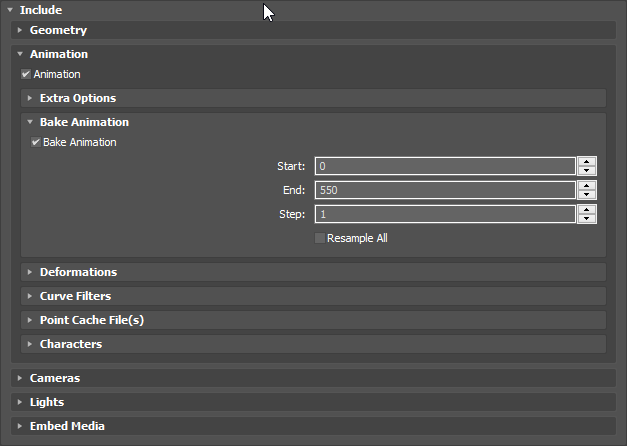 proud fossil
are you sure it is not an UI for all export functions?
proud fossil
hmm try to export all frames and then only import the frames you need
fiery copper
Ive tried that
But UE4 either doesnt import all the 550 frames, or it doesnt recognize anything
proud fossil
The FBX export takes only the frames that are showing on your time slider in 3ds Max. So if for example you have 10 to 45 shown on the slider, then those are the only frames that the FBX file will have. << what i've found. did you try this?
ahh wait
try this. sounds good: I finally figured out how to export the frames of animation I wanted. I just tell the FBX exporter to bake the whole animation, then I import the FBX file I just made right back into 3ds Max. Once it's imported, I can delete the keyframes I don't need, shift the remaining keyframes to the beginning of the timeline, and export the result to another FBX file. As an alternative, I could choose a range of frames to bake on initial export, so when I reimport the FBX, the baked keyframes are easy to spot among the other unbaked animations. It's kind of cumbersome, but works better for me than trying to trim the animations inside of UDK.
fiery copper
Thats such a shitty work around
proud fossil
yeah but at least it sounds like it could work
but seems to be an issue with the fbx exporter itself
not even max or ue related
oh wait what...
i found the real issue for my problem ... i have some dodge animations running. while the animation is running i set collision to no collision (so the character can not be hit by any weapons or projectiles at all) after it finishes the animation montage i reset collision to the initial state which causes the pony tail bones to glitch beneath the character... wow @misty dagger
 young urchin
Greetings!
Is anyone knows by any chance, how to reimport FBX with different settings?
ruby sapphire
Might be able to do that from the actual mesh/animation editor for the individual asset.
I think there's the right click option in the content browser, but I don't know if that option lets you change the settings.
young urchin
1st time i've imported FBX w/o animations, now i need them
but skel mesh refuses to add ones now
ruby sapphire
What happens if you drag/drop the FBX in to the content browser, where the original one was imported?
young urchin
@ruby sapphire it imports it like new one
ruby sapphire
Can you just not import the mesh/skeleton and only import the animations there?
I'm just offering up potential avenues of finding a solution in the absence of someone who knows better actually having answer for you right now. :X
young urchin
@ruby sapphire is it possible? i thought animations bound to skel
ruby sapphire
They are, but I think you can tell it which skel it's for? Maybe?
I'm vaguely recalling from importing stuff like a year ago...
 narrow knoll
you want to just import anims?
young urchin
@ruby sapphire You were right!
@narrow knoll yep
ue4 asks which skel they are for
ruby sapphire
Cool. Again, working from vague recollection over a year ago now.
 misty dagger
HELLOOOOOOOOOOOOOO
 mighty ore
Is there any way to make cloth materials (as in: with cloth physics) with blender + ue4?
I've searched for a bit and there's nvidia apex thingy for 3ds max but i was wondering if there's a way to do this using blender
I'm quite new to both, it just randomly interested me.
misty dagger
I dont think so, but check this out, 4.16 should have you covered: https://forums.unrealengine.com/showthread.php?143302-Is-there-a-documentation-tutorial-for-the-4-16-Built-in-cloth-system
mighty ore
I managed to figure out most of this, apparently you export a properly set up .fbx file and apply the clothing physics in nvidia's external program, THEN you import it to ue4
so it all works fine with blender
the problem I'm having now is how to make my flag wave on the wind, lol
you can apply wind in preview in persona but it doesn't affect it as much as I'd like to, and I have no clue how to make actual wind inside of game
..yet
@misty dagger thanks for the link tho'
supple axle
yea that's a weird niche class
mighty ore
uh, one more tiny thing - the flag is weirdly stretched when the wind is stronger
as if it was made of some easily-stretched material
but looks fine in the nvidia apex preview
 low elbow
hey i have a blend space and im trying to access parameters how do i that?
 whole rain
What is the best way to do an implementation of FACS in an animation blueprint?
 wraith pecan
Hi, I need a program to rig a character to my unreal project. We can tell me a simple program to make it? Thanks
mighty ore
@wraith pecan Why not blender? Seems simple enough to me. Even though started learning it few days ago, I can rig a character quite easily. BornCG's youtube channel has a bunch of tutorials, including 3 episodes of rigging
vernal crystal
@low elbow the parameters for the blend space are in the window on the left. For implementation, just drag it into an animBP and it'll show what you entered
 devout dagger
how can I add anims from starter pack to Infinity Blade characters ?
river isle
hi there

In this video I will show you my blueprint creation wich allows the player to sit to whatever mesh and regenerate his stamina. SONG: Song: Elektronomia - Sky...
Is there anyway to do sit animation like this video?I mean any tutorial
I've did something but not correctly
low elbow

the two blueprint bits that are circled are causing problems (you can see those in the compiler results) any ideas on how to fix those
low elbow
fixed it nvm
 drowsy flame
Hi! For rigging humans, is ART v2 ready to be used or I should use v1 instead?
stoic remnant
For peformance wise? is it bad to have an idle state thats just 1 frame that would loop?
or should u pause on the 1 frame loop
 waxen agate
misty dagger
waxen agate
misty dagger
hey, how do I make it so my animation isn't playing at the start of the level?
I have it set to play on a key press, but it plays regardless, pretty annoying
nevermind, it was due to not referencing the anim variable at the start of the level, and then the opposite variable again on the key press
Is there some sort of BP function to initiate a particle effect after a certain amount of time?
or after an animation finishes?
 naive terrace
I’ve set up my blue print with Just three anims idle walk and run but when I play the character moves with the idle pose and doesn’t play the run anim or walk
green ether
Hello, anyone knows what is the stantard workflow for animating characters with props ?
Currently I'm planning to animate my chars inside blender, with a dummy prop
delete the prop before exporting the fbx
and then attach the final prop to a socket in UE4
is it the correct thing or are there other methods ?
doing that by default, any ideas appreciated
having to delete a prop at every animation export seems a bit much
 small spoke
What would be a good way to make a procedural animation of something vibrating at runtime. Ideally with code
just violently shaking around. But ideally not affecting physics, only visual if possible
misty dagger
@small spoke do you want just random movement or like an actual up down up down motion?
small spoke
just random, violent shaking. random and procedural
misty dagger
if you want up down up down, you can use a counter and plug in Sin or Cos and that generates a wave
if you do like (sin * counter) for x and (sin * (2 * counter)) for y it will kinda wave around
if you want totally random, maybe just use the component, save an offset vector, and every frame add a random AddLocalPosition to it
so like
Tick() {
myComponent.position.localPosition = 0 (or subtract offset if there isnt this functionality)
offset = vec3(randomfloat, randomfloat, randomfloat);
myComponent.position.addLocalPosition(offset)
}
add local position add local offset im not sure what the term is
 river helm
Im trying to pick up objects with a combination of animations and IK on the wrist to be able to pick up items from all hiegths using a single animation but I cannot understand how to smoothly change alpha from 0 to 1
green ether
is probably going to keep asking questions about animation too from time to time
green ether
Anyone knows why some imported blender fbx animations are scaled down ?
the imported skeleton & mesh are at the right size
yet the imported animation applied to this skeleton, results in a very very tiny skeleton
mapping the animation to the skeleton causes it to be at 0.01 sale or something
green ether
Also, checking "Convert Scene" or "Convert Scene Unit" on the rig, the anims or both.... doesn't seems to change anything
 teal mulch
Ok so im having a problem with an animation i made in ue4
https://gyazo.com/9bde29c0d7c235abf4dffe20e5fe4cbe

heres the animation working
in the editor
https://gyazo.com/3f339eb26741efe0719618ac06f5fefc

then it being a little bitch in play
misty dagger
it looks like the animation is set to only the top half
have you tried using the script like "play anim from asset" ? the rest is anim bp magic which i dont really understand well
teal mulch
"play anim from asset"
is this in a blueprint or anim bp?
i only animated the top half for hte purpose of testing melee
and made it in ue4
 sullen raven
Hey bois and grills. I'm gonna rig my character right now, I'm super new to rigging and I want to throw the character into unreal when finished. My question, are there any dos or donts when making a rig thats aimed for unreal? Maybe specific naming conventions or a specific bone hierarchy? Cheers!
green ether
@sullen raven If you're using blender, I'd avoid using rigify because blending two animations won't work
while rigging, keeping bone hierarchies to a minimum is best
and perhaps you could make animation blending work with rigify, but it'd need a lot of tweaking/searching
so it's best to learn rigging ( or wait for the UE4 embedded rigging plugin)
sullen raven
Should have mentioned I'm using Maya :)
Something I noticed in the past, correct me if I'm wrong but all my bones should be connected to each other right? Like if I have chains dangling or some long fur, I should somehow connect their bones to my character bones right?
green ether
because rigging in blender is relatively easy, and you can control precisely what you want
@sullen raven you can use parent constraints instead of connecting them if you bake the animations at exporting
because then maya will convert the constraint into keyframes
most likely, baking is done automatically via fbx export ( there's a checkbox somewhere, I don't recall)
so, parent constraints instead of connecting bones can work, if it's what you're asking
sullen raven
Gotcha, that makes sense :) what if o want to use the physics asset it generates to make my chains dangle in real-time? I think that way I shouldn't bake the animation
Yeah gotcha, that's very informative
green ether
ah I don't know about that part sadly, but there's gotta be lots of tutorials
in this case, you'd need to connect the hairs via a joint hierarchy
constraints wouldn't work because there's no animation to bake
I don't know if you can add constraints directly in UE4, or how to implement bone physics, however
sullen raven
Gotcha, I'll avoid contrains then and make everything one skeleton 😃 Cheers mate!
green ether
@sullen raven Cheers Dan 😊 I don't know much, but it's always great to help
sullen raven
That's so kind of you, appreciate it ^^ It's unknown waters for me so every piece of info helps~
I've been looking into this.
https://docs.unrealengine.com/latest/INT/Engine/Content/Tools/MayaRiggingTool/
It looks pretty darn good, also has features that adds extra joints for chains and what not. has anybody here used it? Do you like it?
Overview of the Maya Animation Rigging Toolset.
green ether
@sullen raven I don't do it for kindness tbh 😊 it's because it's fun and I often need help too 😄 and yeah there's the rigging tool
sullen raven
Haha, I respect that then :P
That tool looks pretty neat, i'm gonna watch the tutorials on the YT channel. Would love some insight if someone here has used it.
@green ether If I may ask, what do you do? Animating?
green ether
@sullen raven making a game and learning UE4
and i have nothing against kindness, it's just that the vast majority of ppls are selfish pricks
so being nice with them has 99% chance of being a waste of time
sullen raven
That's cool~
To be honest most people I've talk to haven't been selfish, so maybe you're talking to the wrong people? :P
I think kindness always comes around, karma and all that shrug
green ether
@sullen raven Sure It's 100% from personal experience , I did definitely engage the wrong ppls
@sullen raven Yes I'm currently too mentally used to believe in karma
hopping to be able to be "nicer" after some time
sullen raven
Understandable ^_^
misty dagger
Hi, I am downloading animations from mixamo, but there is no harm in setting up, but when you squeeze the gun it moves with your left hand independently
native moss
anyone wanna give me their thoughts on the best way to setup a movement system for AI that uses anim notifies on left foot and right foot to determine entrance animations but also angle of entry to the point of interest?
eg AI walks up to a chair and sits down
could be coming from any direction
it seems like the state machines get super messy immediately
second issue and similar, i have completely separated out various tasks animations into state machines
animations for cutting wood, animations for playing catch, etc
each of these state machines is easy to access from idle position
but once i want to go between locomotion mode and the various state machines i now have an issue where it explodes in complexity
or i have to always go through idle, even if its from walking->cutting wood
woudl have to be walking->idle -> cutting wood
mighty ore
anyone around who did some animations for ue4 in blender?
vapid socket
hi guys. do you know ANY possibility in the animation-preview to jump to a specific frame (like in the sequencer with CTRL+G). Even jumping to a notify (in my example "test") could be a good workaround:
mighty ore
here's an animation I did
That's the first frame of it. Blender on the left side, ue4 on the right side
for some reason ue4 rotates the bones controlling feet rotation on the first frame of the animation
Anyone has any idea?
mighty ore
welp, deleting the first frame solved it. Now it works as intended. I still want to know what heppened there. Is unreal doing/expecting anything specific on frame 0? I'm new to animating stuff
naive terrace
can someone help with my blueprint and anims
small spoke
is there a way to animate an object visually only, without moving its collision shapes
dusk dove
@small spoke Disable root motion, which is the default
 errant scaffold
how can i delete single frames in my animation?
 mellow rose
having import issues on custom weapon import saying same weapon name needs unique one
?
rotund needle
so i managed to export a character with morph targets from blender to ue4 and they show up as curves that i can set up.. workflow for this is pretty tedious.... is it possible to animate them in blender and import animations with the curves already set?
theres like 50 morph targets for the face and having to manually add a curve everytime you wanna change one seems like a daunting task
 finite trail
Question... This might belong in #blueprint but I dunno.
I have a Skeletal Mesh that needs to play a montage. Correct skeleton. Correct mesh. All that... But Montage Play is simply not doing anything.
It's a SkelMesh component on a character (his FP gun, in this case) with no animation blueprint. Is there any particular reason this wouldn't work?
Montages use Default slot.
errant scaffold
@finite trail you need a animation for creating a montage
finite trail
I have one. 😃
errant scaffold
and the animation is playing fine? you created the montage from this animation?
 tepid reef
Hey Devs, I thought ARTv2 was going to include a facial rig. Am I mistaken or is it hidden/coming?
soft crown
Hey guys I'm having a tough time deciding how to properly setup up my Enemies Bow Animiations. I don't know if I should use a montage or state machine or blendspace. ITS OVERWHELMING lol.
I basically have a bow idle, charging, aiming and shooting.
I started off making a state machine to transition between them like a flow chart but then decided to look into montages. But after looking into montages they don't exactly seem like they fit the bill ethier and from what I could tell neither would a blend space.
Any pointers? Which path should I take?
mighty ore
I was literally watching that part of epic gamess ue4 tutorial playlist today
seems to me like you should go with state machine
blend space is supposed to be used at one of the states (like idle/walk/run blend space would be "moving" state)
so if I understood everything correctly I think you should have a state of "attacking" and you use all the animations accordingly inside that state
but hey, i'm no expert on that, I just set up my freshly made character so he can move around and that's as far as got
well I just realized I didn't look into montages all that much since I didn't have punching animation made for my character. So idk if montages would do the job in your case
 spiral panther
I'm getting errors in logs about an animation blueprint with divide by zero result, anyone got tips on how to track something like that down?
it just points to ubergraph
soft crown
Look at where you divide and make a check to not divide if it's 0
Should tell you the bp
finite trail
@errant scaffold Yeah, it's all playing fine in the preview etc. Just doesn't trigger.
It's the Skel animation of a skeletal mesh (a handgun) in the FP arms (also a skel mesh.) THe FP arms have an anim blueprint, that plays montages fine. But the gun itself won't play any.
 stray pewter
My first time animating went something like this https://www.youtube.com/watch?v=iRZ2Sh5-XuM
normal guy normal walk. http://www.goingtothe.store directed by David Lewandowski http://twitter.com/badmocap Music is Jean Jacques Perrey's "Little Ships" v...
errant scaffold
why is it red? 😯 😁
 tepid brook
Hello just to be sure
sometimes SimpleParallel node doesn't run second child for you ?
because it is hapenning to me 😢
misty dagger
Guys, Steve needs help with an animation question :O
I have a bunch of animations and some of them need the animDynamics on the character to have different alphas or other values
right now I made a struct, with the alpha values for the nodes and the anim. But now I need to find a way to tell it which anim is playing and use the corresponding values from within its array
oh i think I got it.. hang on
tepid brook
this is what i get ><
 potent current
question about Retarget Source, I read the docs on what it's suppose to do, but not sure what difference it's making? I have 2 different proportion meshes sharing the same skeleton and different animations that were created using each of the rig, I set up retargeting options on the skeleton so animations looks fine when mix and matching, however, changing retarget source doesn't seem like it's doing anything.
 atomic stirrup
Can anyone give me some advice on how to set up a rigged character? I set up the skeleton but i cant seem to apply any animations to it. Moving the bones works right so im lost. I am coming from Unity.
misty dagger
generally you want to build a control rig, that is an additional set of control objecets that drive the skeleton via iks and constraints and direct attribute connections and such, that control-rigged skeleton you can then animate in your program
when you want to transfer it to the engine you have to make sure to bake the animation to your skeleton and export ONLY the animated skeleton as .fbx for use in the engine
undone flax
How can I do a "Look at" but still allow the animation to allow the head to move around?
misty dagger
Friends Autodesk Maya I was going to ask you something I do not know how to fix the weapon while doing the animation thank you in advance for your help
 lyric abyss
anyone know how to use sync markers?
 warm hearth
hello
I bought Kubold's rifle animset pro on the marketplace and am making a third person shooter and want to mix the aim offset
with the regular blendspace
how do i do that?
 next python
4.17: "Two Bone IK improvements including a ‘NoTwist’ option and an ‘Enable Debug Draw’ option."
dope!!
next python
Especially excited to use this in conjunction with the live editing thing
 dark whale
is there a way to stop the anim editor from auto-playing the anim when you open it?
if i stop it (and turn looping off), next time it just assumes i want to see it playing and looping again
devout dagger


How Roach the horse 🐴 in #TheWitcher3 comes to life... https://t.co/C8jkKCGIP6
Retweets
153
Likes
335
Twitter
Is that a joke or ... ?
 vast sierra
@motorsep#8292 the question is... does it look like it ?
 winter mica
So I exported a skeletal mesh from ue4 into maya, added 2 extra bones on the pelvis, reimported it to ue4
now i dont see the 2 extra bones
inside ue4
what am I doing wrong here?
 copper dawn
@devout dagger yea it was a joke from the dev's side. they enjoyed some of the crazy bugs and thought, lets act like its a feature and not a bug thing
devout dagger
Aye ;)
 hushed rain
Has anyone ever seen a problem where certain sections of a montage won't play when you do a .pak build, but work fine when you run through the editor?
winter mica
I have a socket for holstered weapons. I just want to add something like PHAT system to it, so they'll jiggle when moving/running.
Is it possible?
misty dagger
not sure if you can add phat bodies to sockets not bones
winter mica
i knw that, but are there other ways to add jiggle, and physics
winter mica
Also is there a way to add new joints (from a 3d app) and bring back and update the skeletal mesh in 4.13?
 feral gale
anyone have any suggestions what could be going on - after my character dies and goes into ragdoll, the feet tips are still wagling and making noise (footsteps from my running anim)
Only the foot tips. Pretty hilarious actually
in my anim blueprint I branched off "if dead" even - no help
misty dagger
can you show that branch?
 split stump
Anyone here have any experience with akeytsu to unreal?
 vital pelican
Hello, does anyone already use the Noitom plugin for unreal version 4.12? I have a problem with a character that seems to float and I do not know why if someone can help me, thanks