#animation
1 messages · Page 84 of 1
 devout dagger
devout dagger
devout dagger
how so ? Go to your montage and see timing for the section you want to start in. Plug it into the node and it should play from that moment on.
 buoyant raptor
yea that's not user friendly when you have 1000 different montages
The "Play Anim Montage" is user friendly
devout dagger
Depends on what you use montage for. The way I use it, I have my first section looped, so when I start playing, it loops in the anim I need for it to loop on start. Then when I need to play something else, I use jump.
buoyant raptor
devout dagger
then use it
buoyant raptor
it's not working is what i'm saying
devout dagger
then report this bug on AnswerHub or re-arrange your workflow to work around what engine offers
 molten stump
mixamo animations wont import to ue4
 green ether
@molten stump are there any errors messages ? things like there's several roots in the fbx and it's not supported ?
molten stump
Error Import failed.
Warning Get Import Data has failed.
Error There is no geometry information in mesh
Warning Could not find the bind pose. It will use time 0 as bind pose.
Warning No smoothing group information was found in this FBX scene. Please make sure to enable the 'Export Smoothing Groups' option in the FBX Exporter plug-in before exporting the file. Even for tools that don't support smoothing groups, the FBX Exporter will generate appropriate smoothing data at export-time so that correct vertex normals can be inferred while importing.
@green ether
green ether
@molten stump found that on Google, Maybe it's a start https://answers.unrealengine.com/questions/485871/mixamo-animation-import-issue.html
molten stump
didnt really help just some guy same problem not resolved
green ether
@molten stump maybe it's because there's an empty object in the scene, something with just a transform no geometry
Also, I don't know what format is using Mixamo, maybe you could import it in blender, And then export it in UE4
You may find more answers if it's about a specific file format
molten stump
I will still have that problem of the image
 candid kiln
Why is my character playing the walk animation by default? http://prntscr.com/ekwl2r http://prntscr.com/ekwlca http://prntscr.com/ekwldw


 devout dagger
what do you have in Idle/Walk ?
candid kiln
I'll check real quick 1s
@devout dagger http://prntscr.com/ekwwfy

If you could message me, please do so. I'll head to bed now
Good night! Thanks in advance
devout dagger
hmm.. can't really tell offhand, sorry
from the entry state kicks in right away. I can only assume Speed is already set to some value that blend into walk right away
do you cast to your player from animBP event graph to update speed value every frame?
candid kiln
@devout dagger http://prntscr.com/ekz98n

 misty dagger
why do you have an idle/walk AND a walk/run state? whats the point of having walk in two different states?
also check your transition rules, ive seen screenshots for two different transition rules and BOTH contain a query for speed<160
candid kiln
@misty dagger I realized both ad speed < 160. Fixed the run one to > 160
What do I cast the CharacterMovement from? Getting pawn owner doesn'tseem to work http://prntscr.com/el1svg http://prntscr.com/el1sy4

 devout dagger
because you need to get pawn owner then get component then plug it into cast node (afaik)
candid kiln
@devout dagger Parent component?
devout dagger
at work right now, so I can't check
but think about it in terms of hierarchy
and follow the chain
I am guessing Pawn < Root < movement component is the hierarchy
candid kiln
I'll check
devout dagger
👍
 reef bone
Ok this is far more complex than it needs to be
I got a JumpStart animation and I whenever I jump I want the animation to play from the start
But when I leave the state the ANimBP remembers where it was in the jump start animation
so every second jump I don't have a JumpStart transition
How can I restart from 0 every time I run into this state?
 dusk dove
Do you recommend having IK Effectors as bones in the Skeleton?
Are there any advantages?
 rancid charm
do I ask about UI animation here?
 vernal crystal
that would be in the UE-UI channel i'd imagine @rancid charm
misty dagger
Does anyone have any info on where to start learning about animation programming in c++? Like how does one become an animation programmer? I already know quite a bit about c++ but am new to the field of animation programming.
candid kiln
Idk C++, sorry. However, I got a question myself :c : How to make it so animations actually fade, rather than playing immideately?
misty dagger
can i get a hand with matinee's?
 valid trout
can anyone suggest the best introductory video/resource for learning sequencer?
misty dagger
idk if this is any good @valid trout https://www.youtube.com/watch?v=O3zeklh9mSg

 boreal forum
Hi there, i'm trying to export the FPS rigg from unreal so that i can animate my own fps animatino with that rigg. but can't figure out how to do it with the controller and the mesh. So i'm wondering if any of you have done this or know the pipe line for it.
Also curious if there is a way to get the fps rigg and the gun rigg as the same animation when exporting from maya to Ue4?
Thank you for any answeres 😃
valid trout
Hi, still poking around with Sequencer. I noticed audio tracks don't play when you play or scrub a clip in the sequence editor .. which seems very odd to me as you'd often want to line up things based on the prerecorded sound track. Is there some way to enable audio playback?
(Found out why a few mintues later ...)
Turns out "Real Time Audio" was to zero on the "Settings" menu. (Not sure if i did that or if that's the default. seems like all my builds of UE4 are set that way so it may be default) http://i.imgur.com/cwmFGhO.jpg
 dusk dove
Do you recommend havin AnimNotifyStates that change the Actor's Location directly? Is this reliable in Multiplayer?
 kindred geyser
why my AI repeating his walk animation.. please help me i dont know what im going to do
i set him to roam with 2 points.. then the animation walk is like lag.. lol
 quasi geode
hi guys, is there any way to mask out the overlapped parent mesh component in a skeletal mesh? I have a character with clothes animations done in Marvelous Designer -> Alembic -> Skeletal Mesh, then put it as child of my base character, the problem with that is there will be slight overlapping of mesh between the two, I know this sounds quite dumb but I hope someone has stumbled on the same problem and would like to share their experience. Cheers!
 undone flax
I'm having issues with my LookAt nodes in my animation graph. I'm able to get it to rotate a bone to look at something left and right. When I go to set the LookUp axis, which is correctly set due to the skeleton bone, it looks up and down but no longer looks left or right.
Anyone know of a fix?
 half orbit
Is there any way to make a bone rotate instead of move around in Spring controller?
 naive ferry
ok no idea where to ask this but it is slightly sound related, i have animation notifies set up for my footprint sounds, working fine, except when the player changes direction, say from forward to backward it plays both footstep sounds at the same time for the first footstep of the new direction, aany idea how to fix that?
 copper crane
Could you use fullbody IK rigg with VR and use that to "record" animations to later use, like a cheap mocap solution?
 nova hemlock
i did a set skeletal mesh to a 2nd gun, then i tried playing bb2_reload_MTG created from teh anim file, but it doesn't play. i can only play the first gun reload animation when selected. what am i doing wrong?
the bb2_shoot_MTG (for montage) works fine
Here's the animation playing, if 1 then play the sw_gg_MTG, if 2 then play the bb2_reload_MTG
and here's it's own separate montage..
err cant post images here?
dusk dove
Does Root Motion disable Input/ Movement?
nova hemlock
where could i find that @dusk dove
i clicked 'enable root motion', stil doesn't play
dusk dove
This was my own question and not an answer to your's 😛
nova hemlock
doh lol
 haughty linden
anyone have any succeess in using morph target with sequencer?
 placid igloo
Hey everyone, so this is probably a frequently asked question, but I haven't really found a definitive answer. What exactly are the pros and cons to using Root Motion vs not using it.
Is it better to let the animations define the movement of the character? or would it be better to apply movement to the capsule, and play the animations ontop of that. Thanks for the help!
also

Heres something i've made using Root motion, hence why i raise the quesiton before i get any further into it
misty dagger
anyone here used apex?
quasi geode
you mean clothing?
placid igloo
get rid of the duplicate upper body slot?
nova hemlock
how do i play two or more different animation montages in a blueprint? i can change the skeleton via set skeleton, but the play animation (or play animation montage) doesnt appear to work out of the box.
 true sparrow
anyone know why my root motion might not be working, it sometimes works and when I migrate it over to a new project and make all the same edits it won't work anymore. Curious if its an issue with 3DS Max or something
half orbit
Anyone who actually succeeded with making good jiggle bones? I have tried both Spring and PHAT but none works well.
Spring just looks horrible as it moves the bone around instead of rotating it.
And for some reason PHAT don't want to work as they do in the editor when actually playing.
dusk dove
@nova hemlock you can't play multiple Animation Montages /Animations on a single Skeleton. You have to blend them in your AnimBP.
nova hemlock
thanks @dusk dove guess i have to learn about AnimBP's next ~:P it's confusing to me a little when i have a skeletal mesh, then the animated mesh of it, i open up either one and it points to the same thing kind of, giving me a tab for skeletal, mesh, and animation
like how does it know 😮
dusk dove
Because A SkeletalMESH can only use one Skeleton. And Animations are bound to a skeleton, too
 slim anchor
hi guys
i need help with my blueprint and sequencer
so basically, my blueprint looks like this https://gyazo.com/5f948701dfd9d5b6826fe2f43109e0de

the idea is to play 1 animation across 3 different meshes (same skeleton ofcourse)
now, if i put the animation in the slot
when i simulate the game it will work

but if i clear the animation slot and add it to the sequencer, only one mesh is affected

 sharp idol
https://www.youtube.com/watch?v=b1zVYTowfQ8 Does somebody know why this happens with the default AnimStarterPack?
 misty dagger
@placid igloo for general locomotion it is a design decision to use it or not. The downside for using root motion is lower responsive control of the character, something most players don't like. For climbing and vaulting I would stick to root motion as it is easier to handle. This works great if your game has an own "measurement unit" whichs defines exactly how high the characters are allowed to climb. In Left 4 Dead the zombies could climb a variable height, thus root motion was not chosen. You could bypass this problem by creating multiple root motions, but you have to decide if the increased authoring cost is okay.
placid igloo
Awesome! thanks so much for this, really enlightening.
misty dagger
can i get some advice over animating a cloth cloak
 wraith lion
Hey guys quick question
does anyone know if the skeleton rig can be used for a commercial game?
the one that comes with UE4
if retargeted onto your own mesh
or do you have to make your own mesh from scratch?
This might be a question for @ionic mango (Epic Staff)
sharp idol
Normally every starter content asset can be used in commercial games if i'm not wrong
 spiral raven
Anyone know a good workflow to export skeletal meshes and/or animation from Blender or I am destined to learn, pay and use Maya?
nova hemlock
@spiral raven export to FBX, import into ue ?
spiral raven
Yup. That's the idea. Then.. the model scale is wrong, root bones added from nowhere, mesh is fine but bones aren't. Things like that.
I solved most of the problems by surfing the UE forum, but I still have a problem I can't solve. The mesh is imported fine, with the correct size. The skeleton also imports fine. However there's something wrong because if I delete all the bodies from the PHAT and recreate them, the default weight is in the range of ~20k-40k kilograms.
 frozen nova
Can someone explain if you can use the new sequencer in 4.15 to animate your characters in a game? Or is it just a matinee style feature?
 ionic mango
Hey @wraith lion, the epic skeleton that comes with the sample project templates can be used in any unreal engine title. You can find more information about what can and cannot be done with the free content here: https://www.unrealengine.com/faq
wraith lion
Cheers Adam theres some really nice stuff there id like to use thats going to same me a tonne of time
so was just checking
wraith lion
Also anyone, I noticed that the character model in UE4 is entirely pink when i look at the weighting
is there no weighting on this model?
my bad found it now
 stray jasper
Can I use simple (non rigged) animation in UE4 (exported from 3D programs). For example: simple movement of object. Can't find any info about that. Do I really need to use rigging every time?
 dusky arrow
you can take an animation and retarget it onto a skeleton manually
undone flax
Is there a way for me to get the number of bones that an animation/montage changes during runtime? (This may be more apt for #cpp, but I figured those here would know animation inside and out)
misty dagger
@tepid brook In the animation sequence editor you can select the root bone and add an 'Bone Transform to Additive Layer Tracks'. You find this button in the toolbar. This way you can nullify the root motion.
dusk dove
Anyone using MotionBuilder? Is it possible to mirror animations?
misty dagger
@undone flax I think an animation is not able to change the number of bones a skeleton has.
 tepid brook
@misty dagger i dont understant you
i dont find the Bone Transform to Addtive Layer Tracks
misty dagger
An idle animation is edited to create a new reload animation through Animation Layer Editing.
undone flax
@MrRabbit#9507 Sorry about the late response. I wasn't looking for a way to change the number bones, but a way to find how many bones are being moved/rotated/scaled in certain animations.
 lone wadi
Can anyone help with a bone controller?
I want to make a controlled arm. To control it using the keys.
 dark vortex
So, I want to get into some basic animation for my simulator - I found this https://www.youtube.com/watch?v=knbZ_g8Hgvk&list=PL7OpsBgBjeGIj3fkukvFB5n1gDd1kqkwP but it shows Autodesk Maya. The video is two years old and is basically an overview (which I need too). Is there a better tutorial/primer for animation? Also, can I rig a skeleton in Unreal or do I need an external program?
 misty dagger
@undone flax I'm not sure, but in the SkeletalMeshComponent.h you find a varaible which could help you: /** Temporary array of bone indices required this frame. Filled in by UpdateSkelPose. */
TArray<FBoneIndexType> RequiredBones;
undone flax
@misty dagger Thanks! I'll look into that as that is pretty close to what I need!
 subtle matrix
animation folks, would you recommend getting kinect to get into motioncapture?
or just diy webcam rig
dusk dove
i would like to know this aswell. Are there any free/budget tools for facial mocap with Morph Targets/ Blendshapes?
subtle matrix
there's that one webcam software that morphs you into 3D character
FaceRig
you might wanna look into that
not sure can it export
allthou it has shady-at-best looking license agreements
 frail basin
they have restriction for game use
they have some expensive DLC for that I think
FaceRig Pro is part of this humble bundle atm: https://www.humblebundle.com/streaming-software-bundle

Humble Bundle
Score a bundle of streaming software and games and support charity!
ok, they don't seem to have a DLC for that 😄
I think they were planning to but maybe they got greedy
ok, their studio licenses allow fbx animation export
but those prices start from 277€ per seat
dusk dove
lets wait for a Humble Bundle with FaceRig Studio xD
dark vortex
Here is a question - Can I add a static mesh as a reference in the skeleton shaping tool? Would help with position of limbs...
wraith lion
Anyone a blender pro here?
subtle matrix
I know some blender-fu
misty dagger
i have a question, with my characters eyes is there a way to move then to look at different things
 fading cosmos
What do people typically use for skeletal animations in 2d for unreal
can you just make a 3d model that's a 2d plane, rig it and animate it in something like blender, and then import it the same way you would import a 3d model
 distant valley
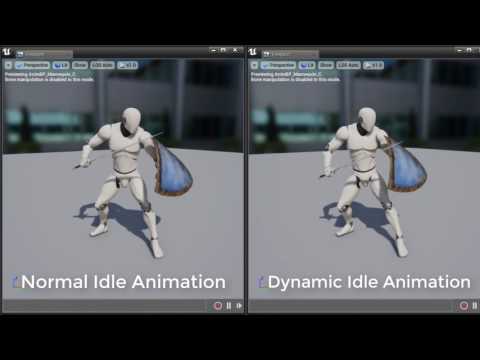
@everyone Quick tip on how to make dynamic idle animation:
https://unrealxeditor.wordpress.com/2017/03/25/tip-dynamic-idle-animation/

In this quick tip I’ll show you how to make dynamic idle animation that feels more alive. I’ll be using Sword Animset Pro by Kubold for this tutorial but you can use any animation set (…
^^End result: https://www.youtube.com/watch?v=k0LucBt5Ugs
 misty dagger
@dark vortex Yes, right click on a bone and select 'Add Preview Asset'.
@misty dagger Skin the eyes to an eye bone and move this bone with the animation node 'Look At'.
 plucky nebula
anyone know if its safe to delete the IK bones in the ue4 mannequin if i brought it in to maya for animation?
misty dagger
@plucky nebula i wouldnt recommend it but you can always back it up and try it
also any idea how i can make this fold properly like a book?
 plucky nebula
make ther pivot higher where the page gose into a V
 plucky nebula
the pivot of the bone

 plucky nebula
might have to manually tweak weights
suprised u cant find a book rigged on turbosquid
 ember crescent
Spines don't bend when a book folds, so maybe less weight near the spine?
 plucky nebula
took me awhile toi see the arm
plucky nebula
after a retarget?
 cyan frost
yea
plucky nebula
try exporting the orginal animation and retarget in another app. thats one reason i stopped using the one in engine
floating feet. body crinkles etc
cyan frost
been getting better results? I've never retargeted in another app before, just been using UE4 mannequin anims in engine
plucky nebula
im using maya LT.
cyan frost
i have access to that
plucky nebula
setting up the manniquin for animation setup as a master skel now for animations then using the control rig to bake animations from one skeleton to the other control rig
cyan frost
do you have a link that goes into this?
fading cosmos
gonna ask again, anyone know of a skeletal animation software that works with unreal?
or what the standard for that is
that is 2d i mean
dusky arrow
you mean like MayaLT? Blender? 3dsMax?
plucky nebula
@cyan frost im looking a a meet the exports that have a comprehensible tutorial on mayalt google: Meet the experts: learn about mayalt, 3d for indie game makers
ember crescent
@fading cosmos Like Creature?
cyan frost
thanks @plucky nebula
fading cosmos
Yesss @ember crescent that's exactly the kind of software im looking for
Does it let me import vector art
Or can skeletal characters be imported into unreal from flash
ember crescent
flash...
that's more like Spine
But you work in spine, not flash. No experience going from flash to unreal
 sudden sedge
Can I cache a pose and get positions in it then apply them via ik later down the chain?
like I want to make an aim pose, then apply an idle animation, but iklock the legs in the positions they are in the aim pose
plucky nebula
as in depth as maya is i thought u could make takes for animations with out having to export and import constantly ...
sudden sedge
UE4's animations kind of suck in a way
kindred geyser
hi guys anoyne can help me with my animation looping
copper crane
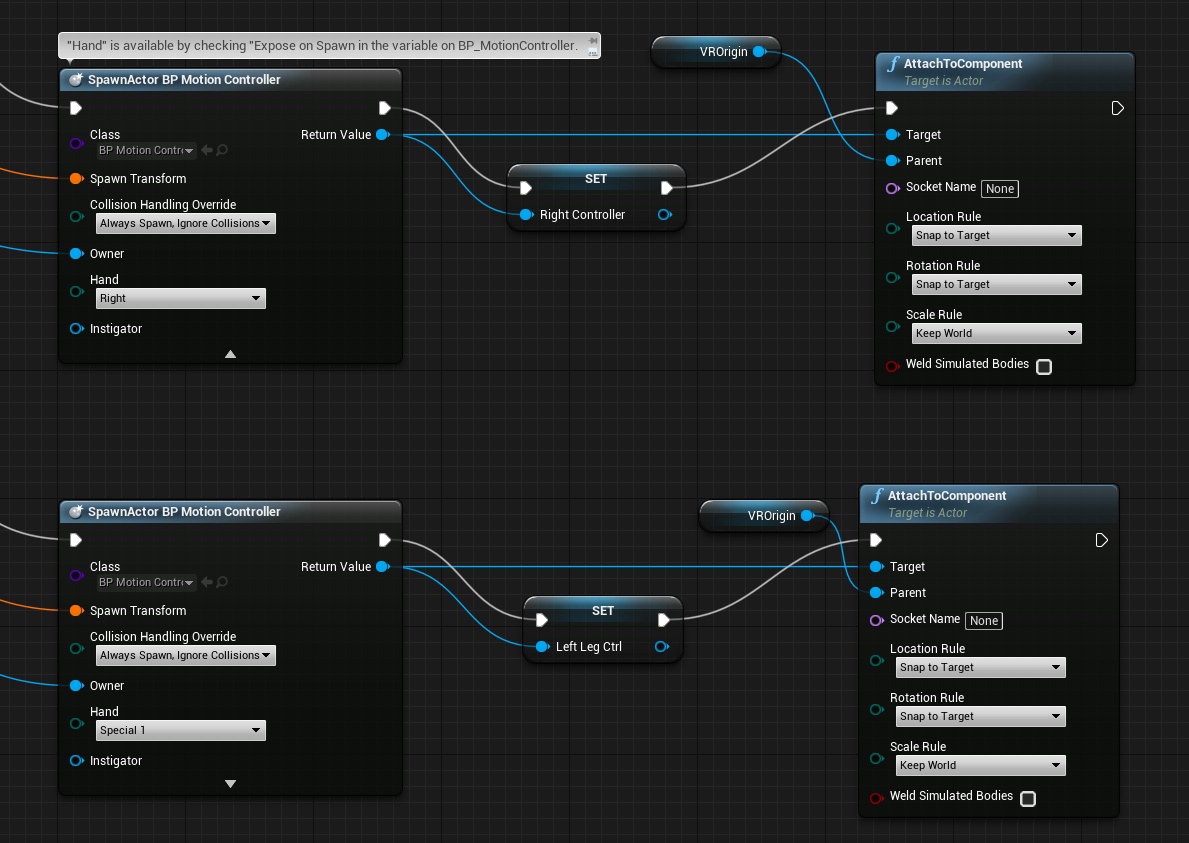
Does anyone here have any experience with attaching additional motion controllers to a character?
Trying to attach 2 controllers to the characters feet, but while spawning it needs an enum selection (The hand enum) which has the options for left/right/pad/External camera and special 1-9. Seem to be having trouble finding said enum class and/or where attachment is based on the enum.
https://gyazo.com/e90ea73cc0535a824f3b946b5abe07c8
 frozen stag
I think I found a bug. maybe you guys have seen this before.
Im trying to import a skeletal mesh with morph targets into my project using blender. The morph targets unfourtanetly do not show up. But when I create a new project using the same version of the engine, and the same file the morph targets do show up
Im kinda at a loss for what to try here, since I do not get any errors and the file is the same, so I am not sure what to try here
 nova kestrel
Hello, is there a way to assign the same animation instance to 2 different skeletal meshes?
So I don't have 2 of the same animation blueprints loaded
subtle matrix
you mean one skeletal mesh to copy pose from another?
there's a set master pose component - node
assuming the skeletons match, it copies the pose data without using another copy of animbp
but in any case, each anim instance must have owner
nova kestrel
Thx
misty dagger
If I want to setup different animations based on what weapon my player has (axe, saw, chainsaw, guns, etc) would it be inappropriate to just use this https://docs.unrealengine.com/latest/INT/BlueprintAPI/UserInterface/Animation/PlayAnimation/index.html I'm not very well versed in animations in UE4 yet. I know there is a state machine but I don't think that would be robust enough for 20+ different combat animations I may need.
subtle matrix
Question: Is there a way to lock physics body in Physics asset?
like last bone in the chain
everything in between simulates
nova kestrel
@misty dagger I have each of my weapon to be a child actor the player holds, that child actor contains a variable which holds the animation class. Upon switching/picking up weapons I set the animation of my character to the variable of the weapon I'm holding
misty dagger
hmm
misty dagger
@nova kestrel that makes sense, but what about reload animations? it would be easy to play an axe swinging animation but a complex reload is more complicated
lol
because if (ammo == 0) {playReloadAnimation();} else { PlayFiringANimation(); }
wraith lion
Hey all
does anyone know how to export the skelinton from UE4 to Blender?
the one thats on the stock model
misty dagger
@wraith lion Right click the skeletal mesh => Asset Actions => Export
misty dagger
then you didn't select the skeletal mesh
you selected the Skeleton Asset
not the skeletal mesh
wraith lion
oooooooo
ok 2 secs
the UE4_Mannequin_Skeleton is the skeleton asset?
I thought that was the Skeletal Mesh @misty dagger
misty dagger
yea
one is a skeletal asset, then you have a physics asset, and last is the skeletal mesh
but the mesh has the skeleton
so you can export it as an fbx
wraith lion
its litterally a picture of the skeleton and is called skeleton lol
so i assumed it was that
Yeah ok so i see now
So i have skeletal mesh, skeleton asset and physics asset
"In terms of its place in the animation system, it is probably best to think of a Skeleton asset as an intermediary between Skeletal Meshes and animations. Multiple Skeletal Meshes can use the same Skeleton asset, and any Skeletal Meshes using the same Skeleton asset will be able to share animations."
i see now
nova kestrel
@misty dagger you use states for that, if character is reloading, play reloading animation, if character is firing, play fire animation. Your character logic should make sure you can't fire during reload
misty dagger
hm
kindred geyser
guys.. my walk animation always loop
i set him to roam.. then the animation looping back to 1 point
i can show you the video please help me
misty dagger
hey so for some reason when I import my skeletal mesh with skin weights
it says "could not find the bind pose. It will use time 0 as bind pose."
slim anchor
man is it me or is sequencer way too buggy in 4.15
half orbit
Hello.
I am trying to use the same mesh and skeleton for both male and female characters. Right now I have morphed the mesh and that all works fine. Problem is that as male and female as different proportions the skeleton joins position gets a bit funky. How I solved it this far is by making both genders same proportions and then scale the bones in AnimBP to get the right proportions.
So the question is:
Is scaling bones all the time a great waste of computer resources and I should find a better way?
Or is the impact of doing bone scaling in AnimBP insignificant?
In either case, got any idea on how it could be done differently?
 iron stone
How to blend the end of an animation to the next animation? Anyone ?
half orbit
@iron stone where? In State Machine or Anim Graph
iron stone
In state machine. I have couple of animations for jump i-e jump and land jump. but the last frame of jump and land jump doesnt match exactly so i need to blend them a bit
half orbit
Start the transition before the animation is done should automatically blende them.
And you can change the blend setting on the transition
 tepid inlet
But be sure between the play rate and remaining time, there is enough of the animation left or it might have a skip during the blend
 vast ivy
hey guys
 kind flint
hello there!
We want to create animation of opening slide door, but using custom animation in 3dsmax (not animating this in UE4).
How do we play imported animation in reverse?
 smoky sail
can someone explain why or how doesnt my anim montage play immediatly as soon as i called it
wraith lion
Quick question guys
ive watched all the videos on animation retargeting but need to clear something up
all models still have to be rigged
prior to going into UE4?
but if the bones and names are the same they will work
basically
in the video it says you dont have to have a seperate animation set etc for every model
but every model must still have a skeleton put into it and weighted prior to going into UE4?
you cant just apply a skeleton in ue4?
is that correct?
misty dagger
@jakub.pulka#3111 set the playrate to a negative value and the start position to 1.
@Richyro0#1166 Yes, in your modeling software you need to skin your 3d model to a rig so that each bone can influcence a set of vertices.
 mellow turret
Hi,people, I came with a question, how can I import the SK_Mannequin.FBX into maya, and load it with some animation from the starter animation pack.
 spring belfry
hi guys, how do you just use the arms for the ue4 mannequin?
reef bone
Hye guys, anyone seen an issue with root motion where it does move your character, but seemingly much less than the animation would suggest?
 tired ibex
just thought id put this in here for anyone who wants to do mocap but dosent have a few grand

Engadget
When Microsoft started selling a basic Xbox One package without a Kinect V2 for $100 less, the result was unequivocal: Sales took off. Most gamers can take or...
you can also do it with a 360 kinect which is like 15$ on ebay
misty dagger
what software would work well with that? @tired ibex
tired ibex
@tawdry snow#0766 i know iclone has a plugin for it spicificaly besides that just google it
heres a few i found https://www.onysus.com/motion-capture/

Onysus Software Ltd
Motion capture is widely used in big productions, but it’s expensive and inaccessible to animators. Well the Kinect Revolution has come to change just that.
copper crane
Hey guys, We've currently got our fullbody rigg for VR up and running and will spend the majority of this week to record and process all animations. Now all of this will fall flat unless we have an expressive face to go with it.
Our student steam have very little experence with facial animation and our deadline with everything else going on is in 30 days. What pipleline would you guys suggest for us?
We have a very stylizstic style, think Disney. Big expressive eyes etc.
Fully rigg the face and keyframe it?
Fully rigg it and use software to drive it?
Fully rigg and use 3rd party software to drive it via our VO ?
Use morphtargets and blend it in engine?
Anything else I might not know of?
Anything is really appreciated here!
 stoic remnant
anyone good with max?
 river helm
I have two projects which are the same If one of my freind make a sequence animation on can it be migrated to my project without any issues?
on one of them *
 jovial imp
Character modeling, rigging, and animating is my biggest weakness that is holding me back from making this game jam entry a much stronger contender. I wish I could just hunker down and go through some books, but I procrastinate too much with this category of UE4 work.
vast ivy
Hey guys! Do you have or know some good 3D model references for sculpting? I'm gonna practice sculpting in Maya and Zbrush. 😃 Thank you in advance.
misty dagger
@vast ivy depends on what you want to make
also anyone got a minute to look at my animation it wont work on root
nova hemlock
using play animation of a mesh, how do i change from walk to run, or to idle.. i could set a delay but if something changes i have to wait for that delay to end before starting the next animation right?
dusk dove
How do I "sync" Walking and Running in a Blendspace when both animations have a different Length?
 ruby sapphire
Don't remember in UE4, but I'm pretty sure there's a UE4 version of UE3s Anim "Sync Groups"
Which make it so that all animations in the same sync group will be at the same percentage through their respective lengths when played.
misty dagger
hey anyone here know much about skinning in maya or 3ds max?
nova hemlock
i want a zombie to swipe left and swipe right when he's a certain distance away. how is good way to accomplish, trying it with delays but the animation is jumpy and unpredictable.
nova hemlock
o ris way to detect end of animation.. even this looks like he is walking like a penguin and i need to detect the end of the animation to loop it smoothly..
nova hemlock
think i'm mkaing progress with this, but how do i find out what the target is to cast to..
nova hemlock
after googling a bit more.. why can't it be more intuitive? or is in front of my face?
is there a way to set the flag in the animation blueprint and have the animation play based on the set value, rather than manage it in the character blueprint?
nova hemlock
can i put this in series so one plays, then the next one plays? or do i have t ocheck for the end of each animation?
quasi geode
hi guys, I have a in-place walking animation clip, can I creat a blue-print of it with position tweening as well?
I want to create a blueprint of a NPC walking at the background
animation + character downloaded from Mixamo
 errant ermine
Hey! Anybody knows any companies that are doing animations for UE for a price?
dusk dove
I have a Blendspace. There are two animations used: Walk and Run.
Both animations have a different length.
When the blendspaces averages them, the character starts stepping
How can I avoid this?

 cedar rain
Sync Groups allow you to maintain the synchronization of animations of different lengths.
half orbit
Anyone interested in collaborating on a Parkour Locomotion system(Character BP and Anim BP). I have already started but it would be nice to have someone to bounce ideas and thoughts with.
dusk dove
@cedar rain sync groubs don't exist within blendspaces
misty dagger
@dusk dove Do both animations start with the same feet ?
@nova hemlock create two states (Swipe Left, Swipe Right) in one single statemachine. Connect one state to another by creating a transition. When selecting the transition icon you find in the details tab something like "Automatic rule based on ..." and activate that. This way your second animation will play after the first has finished.
 ebon portal
@wraith lion what do you need exactly? creating facial animations, do facial mocap, get them onto your character or using them in UE?
wraith lion
I am looking into morph targets atm
doing the animations for this dude
but basically i need him to have some facial expression
facial mocap isnt exactly to hand for me lol
@ebon portal
also i need the faces to do animations during run idle etc
so they need to be indipendant anim sets
ebon portal
that's both possible with morph targets and bones, while I prefer bones since the handling is easier imo
and that it's only meant for the face doesn't matter
you can play different animations on different bones
and blend/mix them as you want
@wraith lion
wraith lion
Oh ok cool so even if I use bones I can have different anim sets play
Didn't know that
 maiden crown
 stiff thunder
Rokoko looks really nice. But not sure how it compares to Perception Neuron which is only 1.500€
half orbit
What is the exact function of the IK bones in the base rig?
half orbit
Is there any way to edit or change the Physics Constraint on a a SkM durring runtime?
 tepid brook
looks like you
misty dagger
@misty dagger looks cool but something is odd with his left shoulder. Is he hiding a shoulder pad?
no ignore that its a dynamic cloth
 gilded magnet
Anyone here with experience in rigging/animation could spare me some mins of your attention, please?
misty dagger
im a maya rigger, so i can help if its a maya question
valid trout
can anyone explain what preroll/postroll is for in sequencer there are checkboxes on tracks for "evalueate for pre/postroll" and timing values on clip for "pre/postroll time". (also confused about pre/post infinity options)
misty dagger
pre and postroll are used in animation and fx to allow for a simulated effect to settle in and out of a specific shot.
For example when you have something with cloth sim, you start the simulation 20 frames earlier than the shot to allow the simulation to reach a natural looking state that matches the scene.
 copper dawn
^ also why there is a warmup time in particles. so candles/torches etc dont just... magically combust when you get in the room.
misty dagger
@misty dagger hey adept you have experience with maya animations correct?
yes
any chance you can take a look at my character im trying to do a running animation but things arent going how they should
how so?
well the feet are moving right
but im trying to get a bounce
but i cant seem to get it to bounch using the graph editor
ok, let me know how I can help
true sparrow
hey guys quick question but Ive got my little goat running around and physics spring animations on his ears and tail which is nice but next is the eyes
do you bring the eyes in as a seperate skeletal mesh to have it llook at things
and use a socket or something
misty dagger
@true sparrow reference the bone to lock onto a specific object in range
true sparrow
👍
frozen nova
when I export from UE4 the sk_mannequin and import into 3ds max, then export immediately from 3ds max to save it as fbx again I get this error - The FBX file format cannot represent the transformation of some nodes in the scene due to the limitation of FBX SDK. To avoid this, adjust Bone binding matrices of the problematic Skins.
The following Bones will have incorrect Bone binding matrices under the associated Skins:
-upperarm_twist_01_r
-hand_r
and so on bunch of other parts below. How do I fix this?
frozen nova
Nevermind, found the issue. You need to import as centimeters instead of meters. https://community.mixamo.com/hc/en-us/community/posts/213622468-Errors-Exporting-Auto-Bipeded-Models-from-3DS-Max-Error-once-uploaded-to-Mixamo

Mixamo
I have downloaded my model made in Adobe Fuse from Mixamo(No animations applied, Default T pose) and imported it into 3Ds Max, ran the Mixamo Auto-Biped Script with no problems. But when I try to ...
undone flax
Are there any good resources to look at to improve the character's eye movement to seem more natural? Looking around more than blinking as I have that aspect working pretty well.
misty dagger
make a long animation for that where just the eye regoin moves around randomly looking in directions and play it constantly as additional and layeredblend.
 obsidian kayak
I'm trying to implement dodge mechanic to my top down shooter and currently using launch character to actually move character but I have problems animating it. Is launch character good approach or not?
 ashen sphinx
For anyone that uses MakeHuman and has to retarget animations @.@

Gist
This is a Fix for Makehuman to UE4 Skeleton Reassignment When you import a avatar from Makehuman, normally you`ll retarget the UE4 Skeleton to Match. When you do that, as you import animations from...
half orbit
How do you prevent physics bodies from stretching from each other?
 sage dawn
anyone ever had a chance to work with sequencer
do you guys know if its possible to recreate "blend per bone" node like feature in a seqeuncer animation?
 verbal sleet
@sage dawn you should post that question on AnswerHub. I believe we've had discussions about this in the past, but I have been out of the loop for a while, and I'm not sure if it's implemented yet or when it is coming.
sudden sedge
Anyone know if I can export an fbx per frame?
misty dagger
why would you wanna do that
if its for some sort of facial frame by frame poses workout or something like that, just import it as a pose-asset, that will break your animated fbx into individual frame poses you can turn on/off
 fickle rapids
Hey guys! Anyone here is using VLC player plugin?
misty dagger
is anyone free to do some animations (payment will be provided)
 proven osprey
Cast to animation instance failing for no reason in 4.15
sudden sedge
I can't access a pose asset as an animation
which means I can't use it in blend spaces
which means I can't use it for actually posing my character
misty dagger
pose asset inside a blendspace? why would you need that for?
sudden sedge
To blend it using variables? Like Aim X Aim Y
 nocturne vapor
why not use the AimOffset ?
 unreal cosmos
im aware its terrible, but how would you improve on this idle animation?

hands are not moving the fingers due to the current weights of the skeleton, they arent properly rigged yet
 muted fossil
can someone with 3ds max experience help me out with this please ? https://youtu.be/-MQFb7WQ0fk

while editing and playing around with the bones (i'm new to the process but still made some other riggs that worked almost perfect) i encounter this kind of problem, how can i reset the axis for the bones please ? reset x-form does not seem friendly and if i collapse the modifier it becomes Editable Poly and it's not a 'bone' anymore ?!
so far Martinez from this blames it on improper transforms applied to the bone but that bone from the video was created with the bone tools 'connect bones' and still it misbehaves 😢 http://forums.cgsociety.org/archive/index.php?t-495669.html
CGSociety Forums
CGSociety's Forums archive bring you the worlds LARGEST, most EXTENSIVE and COMPLETE archive of information from CG Experts.
muted fossil
Found the fix and made a video for it: https://youtu.be/0M-FWyfobQs

any other tips are welcomed
misty dagger
@unreal cosmos It doesn't look like that he is floating, I would let his feet move up and down,too. Maybe position one feet higher than the other one. Furthermore, think about a strong pose which resembles the character. Is he proud or conceited? Maybe let his chest stick out and cross his arms. Or is he a devious stalker? Maybe try a rounded back position with open arms ready to leap at the player. Just some thoughts.
reef bone
I am running into a strange issue with sequencer
namely, I animate my camera, all is well, but if I restart the eitor (maybe only the level?) the whole animation is offset a few thousand units away.
unreal cosmos
he is a magician, runs around and throws fireballs
has a scepter
thx for the tip tho, ill see if i can find a pose with a bit more personality than just "floating there"
 finite trail
Does anyone know why my IK is laggy like this? See how the hand takes a moment to catch up?
I need them to move at the same time (or at least 1 tick after the weapon moves?) Is this a setting somewhere?
 past tree
How would ya'll go about animating a tripwire in Maya? Motion path animation, or simulation?
 potent current
Anyone know in this video how would they create the Locomotion Additive animations? It seems these animation needs to have localized motion that does not include the sway and bounce coming from from the lower body locomotion already. Are there Maya tricks to help create these additives? https://youtu.be/3NK97psTA8g?list=PLZlv_N0_O1gbggHiwNP2JBXGeD2h12tbB&t=1011
 half orbit
Is there any way of preserving volume of a twisting SkM? Or is the only solution to have a Morph that counters it?
 compact lake
ohh man, this is sooooo annoying
I don't seam to be able to sync rotation of the bone of skeletal mesh with non skeletal animation
there is always one frame lag
dispite me replacing bone rotation
misty dagger
@half orbit you can also use helper bones for the twisting mesh, thats what I do instead of morphs
 next comet
Whats the best way to attach a skeletal mesh to another skeletal mesh with the same underlying skeleton?
Say I have a skeletal mesh for pants, and a shirt, both sharing a "human" skeleton. And in blueprint I have a setup for a pants/shirt/hat/head skeletal mesh. I want to be able to swap these.
Creating 2 seperate skeletal meshes and running the same animations on them is possible but is inefficent. Would using sockets be the solution here?
misty dagger
is there any up to date tutorials
on how to setup a character with animations
using the Animation Starter pack that unreal gives u
lol
everything im finding is out dated
sudden sedge
Hey, anyone know how I actually apply the velocity from a root motion extracted animation to a montage?
I set it up to accept root motion from montages but it doesn't move
half orbit
@Swanton007#6089 Check out "Set Master Pose Component" That will sync any target to the SkM with a master SkM.
 dire fable
Maya. Import animation with bone scaling. So we want some parts of a skeleton hidden so the bone scale is set to zero and then when we want it to appear we set the scale to 1. In ue4 the bone never scales back to 1 in the animation.
How do you guys animate in parts of a skeletal mesh to go from not visible to visible
misty dagger
@next comet i made a tutorial for managing costumes like that:
check out from around 13:00 in the time, thats when I bring things to ue4 and show a way to swap things and so on.
 iron stone
is there a way to speed up my blend pose in a state ? i dont want the animations individually to be acelerated.
 mortal fox
Hey guys, anyone here got any experience with the TwoBone IK node?
having trouble finding a way to constrain it's rotation
i'm ending up with this -
mellow turret
Hi, guys, i am stuck with something. I uploade the mannequin form the ThirdPerson of UE to Mixamo, then it was rigged, but the IK bones were removed. I am stuck into tying to attatch a rife, if I use a socked in the right hand, when the character is in differents positions prone, crouch, aiming, the left hand can't grab nice the rifle if all of them. Any approach to follow, Thank you.
misty dagger
Hey so why do I need animation montages?
why cant i just play an animation
using "Play Animation" node
is there a benefit?
slim anchor
hey guys
can anyone explain to me what does right clicking the skeletal mesh and clicking create>rig do?
misty dagger
What do I need to do / use to smooth out a looping animation ( made in an animation tool ) at the end to start position in the Editor ?
misty dagger
Where do I set this ? Which tool / editor in UE4 ?
undone flax
Anyone know what the "Interpolation Trigger Threshold" is in the "LookAt" nodes in an Animation Graph? Is it time or distance or some sort of alpha?
I can't find any documentation about it nor could I find the node in the C++ code.
naive ferry
ok this may be an odd question, but any of you guys know a source for animal animations? elephant, tiger that kinda thing ?
 ashen shard
I think I saw some one the unreal marketplace
@naive ferry
I am pretty new to unreal engine/animations, I am trying to time a dance animation to some music. Got the animation from mixamo. The problem is the animation does to match the beat of the music. Applying a global play rate/rate scale to slow down/speed up does not work. I need to some how apply a different play rate throughout the animation lifecycle
How would I accomplish this?
ashen shard
I'd actually be willing to pay someone to match up with mixamo dance animation to the song I have if anyone is interested
muted fossil
@ashen shard you said you are new in unreal animations, so i'm gonna ask you if you know what animation blueprints and state machines are
It sounds as if you have one single chunk of animation, one file, and are trying to mach that to the music but i'm thinking have an idle dance anim for starters and then blend into the special anims for when the music beat and rithm asks for it
So break apart your anim into many small pieces that specialize on a part of the music like in real life, you would as a professional have many small 'moves' you've learned but wouldn't apply soft music moves for a more up beat one
ashen shard
I do have a state machine in an animation blueprint yes. That makes sense.
How do I break apart the big animation into small animations? Does unreal have some kind of cutting tool for that?
@muted fossil
nvm, figured it out. Thank you very much I am trying that method now
muted fossil
@ashen shard sorry i wasn't here to respond earlier also yes Unreal can help you cut your animations, what i do is i clone my master animation file multiple times in content browser as to have one per sub-animation for example: idle-stand, walk, run, jump, strafe-left etc and then i like to keep at least one copy instact of the master file with all the animation packed togheter as they are by default
also have a look at these, i haven't got to use them yet but they seem powerful anyway https://docs.unrealengine.com/latest/INT/Engine/Animation/Sequences/Notifies/
Notifies are a system for setting up and receiving events in Animation Sequences to perform external actions.
dusk dove
What is the correct Axis Setup when exporting a model from 3Ds Max?
UE4 says it needs X+ as Forward.
But in 3Ds Max Y- is Forward.
Do I need to check "Convert Scene" at FBX import or not?
Because If I check it and Convert the axis, the Character faces to the Right and not towards the Camera
copper dawn
might be a maya thing mainly though
dusk dove
it says it's the FBX Coordinate System
Should the Character face to the Camera or to the Right?
This is really confusing
Because in a Character BP, I always needed to rotate my Skeletal Mesh to face into the Direction of the Arrow Component.
Now If I convert the Axis I do not have to do that
 hot crescent
I have a weight painting problem i set the value to 0 and flood them and then i flood other joints to zero but when i get back to that original joint it somehow gets painted again. i have no overlapping UVs but it still somehow gets painted.
misty dagger
what software
hot crescent
Maya
 oblique urchin
anyone know how to get the simulated bodies to follow the kinematic bodies in a physics skeleton? When I play my animation the simulated body doesn't quite follow the kenimatic bodies too well
muted fossil
can you ease in the LookAt bone animation in a Animation BP ?
instead of snapping instantly to the target position
nevermind found it
reef bone
Anyone know of a way how to skip sequences while still firing events in them?
muted fossil
hi guys, how can i conditionally blend the animation pls ?
i think i can play with the Blend Weight float value, i'll experiment and see if it's sufficient
 sharp cedar
anybody have any good tutorials for rigging a character to the ue4 skeleton?
misty dagger
can u play an animation using the same skeleton if the root is named differently
ruby sapphire
@muted fossil Future Cop LAPD! 😄
hot crescent
Hi what does this mean and how can i fix this?
ruby sapphire
You have an animation that you're trying to import.
It doesn't seem to contain any track for a particular bone, the root bone, in the mesh that it's animating,
That bone is called l_hand_model_skel.
I know nothing whatosever about any of this. I just broke down exactly what you posted.
muted fossil
@ruby sapphire @ruby sapphire
He he, yeah i'm trying to make the basics 1st like the controls and that auto aim it had for whatever enemy it had in front, all going kinda smooth
hot crescent
I have managed to fix the problem it seemed that i made a group at the root and it somehow managed to convert into a joint in UE4. so got rid of that and matched the skeleton hierarchy with the animation skeleton.
 sterile venture
Guys, Why when iam animating using Sequencer, when i move camera and add keys, it lose its original position.
And i should every time Ctrl+R and move it back to place
reef bone
So... I need to double check something
if I play a montage on a group / slot, and then play another montage in that same group / slot, the previous one gets stopped or does the new one just not play?
additionally - if a montage has sound, does stopping it stop the sound?
reef bone
crap
muted fossil
who can help? in 3ds max, i'm trying to prelong a state for a bone in the animation timeframe by copying the same key 10 frames after the initial position in time BUT even looking at the graph there are no visible changes in between yet the bone misbehaves with some weird movement
those values are changing and they shouldn't
for example it should stay fixed at 0.016 but it dips a little bellow 0 and thus causing visible movement that i don't want
how do i delete these keys ? they don't show up in the animation graph ?
misty dagger
how do i blend my "swinging" animation with the base ue4 walking/idle animation
i want the player to be able to walk while swinging
muted fossil
in animation blueprint, use the blend per bone node
muted fossil
just what u want, legs use one animation and the upper body another, and when u use that node u mention the bone that would mask one animation from another like one bone from the spinal cord
nah
reef bone
Technically, yes, you want an anim montage for this set to blend only upper-body nodes.
misty dagger
like my pipeline is checkEquippedItem => if melee => Play Swinging animation => If Ranged => IsAK47? Do x else, do xy
like thats kind of my pipeline lol
how do i setup an animation montage
muted fossil
i didn't use montages yet but have played quite some time with animation blueprints and that's what i would use and communicate with to use the proper blending (ie. set the weight float to 1 to use the blending otherwise 0 to skip it) i'll look into montages as well in the future if u guys are saying its possible with it as well
misty dagger
hmm
so u think it should be done in an anim montage
?
lol
i mean i need to be able to play the animation
on the fly
ie. player left clicks => instant animation
muted fossil
for that i would still use State Machines from Animation Blueprints and the rest i've described
misty dagger
but how would u set it between idle and chopping
like can i set a variable
from another script?
muted fossil
in 3ds max, the TCB rotation is not visible in curve editor ? but Euler is ?
@misty dagger in state machines (once u look them up and a few tutorials) u'll learn that u can transition from one state to another via some bools that you set on mouse click
misty dagger
wait
muted fossil
i really need to look into anim montages and see what's up with that maybe i've been doing it the hard way but still i get my results
misty dagger
TryGetPawnOwner()
is this like
the character?
could i cast it to my own character
and have the character have its own "LeftClick" input
where OnPressed => SetFiring = true
like would that work? could i access that variable from my character blueprint in the anim bp
muted fossil
yes, in your Character blueprint, u reference the skeletal mesh and say 'get anim instance' then cast it to the precise blueprint (the animation blueprint you'll create) then off of that you'll be able to access variables defined on that animation bp like blend weight float variables
and set them to 1 or 0 to blend or not the animation, or the variable (bools) to transition between the states you define in the State Machine in the Anim BP
really look it up on that subject 'state machines' you'll find them interesting
misty dagger
@muted fossil could u explain how this works? https://cdn.discordapp.com/attachments/221798806713401345/303185203801620482/unknown.png
 muted fossil
so let's start from the interior of the state machine
here i have a Portal sentry turret
and i have for it a few states as you can see, i animate from idle to opening based on a bool that i set when the player is in front of it
and it transitions to that opening animation, this is one example of moving through states
muted fossil
misty dagger
like can i blend walking + my swinging anim
muted fossil
then for the last state you can see in the 1st image the Following Player one, i BLEND the little arms it has on a certain bone name near the top right of the image, now sorta blend here cuz its more of a bone manipulation
but the principle is the same, you have your base animation, and on top of it, you add modifiers to the bones or other animations
like in my very 1st image i sent to you
misty dagger
"layed blend per bone?"
muted fossil
but you have to pick a bone within the skeleton to know from where to start the merging of the two animations into one
yeah
Layer blend per bone which takes two animations as inputs
and merges them into one final output animation on the fly
 muted fossil
inside idle/run
 muted fossil
yeah, but the node right before the end
hookin that animation in it and then right click search the swing animation and hook it into the 2nd input
this just for testing leave the weight float to value 1
and it will always swing
but within the character blueprint you can manipulate that float if you promote it to a visible variable
click the small EYE icon next to it when you are promoting it
so it will be visible from outside this anim bp
 muted fossil
yes
promote the variable Blend Weight
don't forget to hook back into the final Result input
in your image you forgot to do so
muted fossil
yes
misty dagger
and if its 1 it will play both? blended?
misty dagger
where do i set the bone
muted fossil
and pick a bone within the skeleton like the spine or pelvis
it has a propery when u click the node just look to the upper right of your screen
i've drawn an arrow in my image
muted fossil
yeah
misty dagger
thats all i have in details panel
lol
i dont see anything for setting a bone
o.o
muted fossil
click the plus on Branch filters
misty dagger
ohhh
i thought it might be that
i just saw it say "branch filters" so i didnt know what that meant
muted fossil
yeah kinda criptic but whatever 😃
misty dagger
i basically want everytihng above the pelvis to play the swinging animation
and then i want the bottom half to use the run animation
muted fossil
does 'pelvis' exist in your skeleton ?
misty dagger
yea
muted fossil
ok
misty dagger
Nope lol
muted fossil
if instead of the idle run animation you hook up the swing animation does it work ?
maybe the animation is bad or retargeting part of it
by the way, don't preview in skeletal view, but in anim bp view after u hit compile
misty dagger
yeah
the animation isnt playing lol
but...
when i go into the animation itself
it looks fine
its just not playing in the state machine
it stays in frame 0
muted fossil
dude, your animation for swing doesn't have a slider to it
like mine
i think you hooked up something else
i think you blended with a pose and not an animation
muted fossil
check the name of the animation
u blended with 'balck...' and you working animation is named 'black...'
muted fossil
does work now ?
misty dagger
nope 😦
muted fossil
mm it should, theres nothing more to blending on this particular case
try another animation instead of swing
muted fossil
are there more options when you're search for the animation ? maybe u keep picking the pose instead of the entire animation file
muted fossil
not sure here, since i didn't work with poses yet
muted fossil
😦
muted fossil
ah nice
misty dagger
and everything
muted fossil
aha
good that it now works, you still have to manipulate the float for Weight Blend via blueprint of your character
when you are clicking
muted fossil
but can you confirm that running and swinging are working togheter ?
i haven't found a work around for making it bool, i've asked on this discord earlier regarding it but no one answered
i guess you can make a macro for it or a function, but why bother its not that much of a diference to set a bool or float
you wouldn't gain too much space via encapsulating it in a function in my opinion
misty dagger
yeah
thanks a lot by the way
@muted fossil how does it work with the bone btw? and multiple bones?
muted fossil
mm what do you mean? i haven't had the need yet to blend on multiple bones, and proberly you wouldn't need it either
and you're welcome
muted fossil
well not sure to be honest, you can experiment 😄
maybe you can define a start bone and an end bone
but haven't tested that yet
as to blend an animation in a mid section of your skeleton
but dunno really
misty dagger
@muted fossil the only problem is that after it plays the swing
the arms are just floating lol
muted fossil
after the swing set the float to 0
use a Delay as long as the swing animation then set the float to 0
misty dagger
anyone know why its doing this? lol
the first image is how it looks
when i open the skeletal mesh
sterile venture
@misty dagger Wrong Pivot point
misty dagger

how do i fix this?
master pose component is doing that shit
anyone know how to get a skeletal mesh to use the right pose
it should be holding the muzzle of the gun in my left hand and the right hand using the gun
in front of ur face lol..
dusk dove
Is it somehow possible to get the amount of time I spent in an animation before it left the state?
I have a "Prepare Jump" Animation. The longer I press the Jump button the higher the character should jump.
dusk dove
not good :/
I guess a Anim Montage is the best for this, where I poll whether Jump is Pressed
 golden pier
Not sure
misty dagger
do i need a seperate "aim offsets 2D" for each weapon thats held differently? or is there something i can do to adjust the pose pistol vs rifle ?
misty dagger
yea looks like it, this approach should be ok right??
just multiple different aimoffsets for the unlinked poses
naive ferry
anyone know if you can have camera shake as an anim notify, so it's in sync with the footsteps ?
misty dagger
In this step, we update our default playable character and create all the poses that will be needed for the Aim Offset.
is this necessary to have aims? lmao
ya but for simplicity you can just use 3 anims, aimup/down/center then you just interp between the 3
heh
im still new to this whole animation pipeline
Do you know anything about anim montages?
not too much, their great for adding in sound on any animation
hmmm
would u use them for reload animations?
and shooting anims?
OnLeftMouseBtnDown => Play Shooting only if Ammo > 0 else => Play ReloadMontage
something like that?
ye thats how shooter example does it
run anims via playanimmontage so you can sync sounds in them super easy and all idle/looping stuff should be done in the anim state machine bp
yeah i tried to look at the shooter example
my problem is that like
im gonna need different animation poses
melee (swords, hatchets..etc), and then i need different holding poses for each weapon
because every gun is a different size
lol
thats the same boat im in
and it seems like aimoffset
tries to be a one size fits all thing
but it doesnt really work
lol
ye exactly!
you see my solution above?
no?
whats that
so in the anim graph where all the gunk is for the saved cache poses
i have a enum that i read from pawns "currently held weapon"
and i feed this into the saved cache poses
what is "use cached pose"
and "SavedPose_Aimed"
so holding a watergun use watergun aimoffsets, holding a bucket use bucket aimoffsets etc
its how shooter example blends in their aimoffsets, i expanded upon it
heh
so is the enum just a regular enum
or is it some sort of animation enum
lol
ye jus a normal byte enum inside the weapon
in the weapons ++ i just set it in constructor enum:bucket and obviously all buckets that are child to that class will also have it set
lol
so u made a weapon class
ye and the pawn has variable "currently held weapon"
exposed to ANIM bp you can just do getCurrentWeapon->weaponenum then run the pose switch like above
for the characters anim bp
i built upon stuff from shooter example, but its weapon system will need some cleanup before it can be used proper online
i dont recommend using it as base project, just grab what you need and mold it you know?
yea
i dont understand a lot of their stuff
like when dealing damage
they replicate the FHitResult
lol
ya hitresult and damagetypes still a mystery to me
same
LOL
FTakeHitInfo.cpp biggest mystery yet...
it seems like they were trying to make a robust damage system
and never completed it
misty dagger
@misty dagger when i tried to make an aimoffset
it just says "invalid additive animaiton type"
when i try to drag an animation in lol
single frame ?
its supposed to be a single frame
right?
try this
ok yea
that worked lul
thx
@misty dagger so like, once u make an aim offset... how exactly do I set it into motion LOL
like how do i make my player use it
u got anim bp for character?
simplest way is to just stick it in the graph like in https://docs.unrealengine.com/latest/INT/Engine/Animation/AnimHowTo/AimOffset/03_ImplementingAimOffset/index.html
In this step, we add the Aim Offset to our Animation Blueprint and hook it up to our existing Anim Graph.
so the aim offset pitch and yaw
is just the cameras control rotation (im doing first person in this instance)
it makes sense tho
misty dagger
ye just from camera you feed in for turning
if you dont need left/right yaw you can just make 1D aimoffset instead of 2D
since yaw in first person is mostly just turning the character by controller
😂
misty dagger
@misty dagger difference between 1d though?
how many poses would i need
center, left, and right?
misty dagger
1d lets you just aim up and down
since yaw would be fed to the pawn from controller like in the gif above
up down center for 1D
although come to think of it making normal 2D offset with just one axis filled out is prob better practice. because if you ever do plan on fledgling out ur character animations (leaning maybe?) its already there ready to be used
vernal crystal
If i may
I've been trying to figure out how to do implementation with aimoffsets and the like for a little while now
i've got a pretty simple setup done overall using the layered blend per pose thing
but the issue is, when i play animations like firing montages, it always plays the animation straight ahead rather than using the aim offset
i've seen a few things on the answerhub concerning that, and the two options were to either plug in as a blendspace in the final animation pose or to use cached poses
however using cached poses doesnt exactly work it seems
i cant play or store montages in state machines (or i have no idea how, whichever the case may be) and thus that doesnt work
and blendspaces seem a bit odd/arbitrary when this is the reason an aimspace exists
do you happen to know of a way to implement this?
For reference: here's what my animation Blueprint looks like presently
(Arms are seperate so i can handle akimbo weapons doing their own thing)
here's the upperbody Area
(its the only state there right now since the actual animations are handled by montages)
And here's the Lower Body
The arms are basically copies of the upperbody
Any assistance?
valid trout
If any of you use Sequencer i just found out how you can call into custom bp setter events for your actors (to do calculations or whatever you want) instead of just directly setting variables. This can be a big time saver! check out alexgeek's answer here and my expansion of it. https://answers.unrealengine.com/questions/499990/scrubbing-sequencer-does-not-update-blueprint-vari.html (note: i'm not talking about the event tracks this is something different.)
 lyric pelican
Hey! How would I go about adding a Aim Offset during montages for reloading animations? So far I have it set up with the aim offsets and two bone IK for weapon hand placement for diffrent weapons... 😦 Also for some reason the TwoBone IK wont stay attached to the weapon. Is their a way for me to take the return value of the TwoBone IK and have a Fabrik IK to ensure that the hand stays at the location?
misty dagger
this how i solved my aimoffset problems, it allows montages to be "aimoffset"ed by default, but it also allows montages in upperbodyLock slot to ignore aimoffset while still keeping the legs moving, and finally Defaultslot overrides them all. (useful for death animations etc)
idk if this might help you check it out 
so my montages have 3 separate anim slots used in this setup
misty dagger
hey
undone flax
What is the best way to play a transition animation when changing states in a state machine?
 fossil bough
one way is doing the "On last tick" procedure
you register the values of the variables on auxiliar variables named xOnLastTick (so you know those variables are the ones registered on the previous tick to the actual one)
so imagine this situation
you want a transition when your pawn stops sprinting
so you will do the transition
when bIsSprinting is false
and bIsSprintingOnLastTick is true
@undone flax
another way would be creating a pushdown automaton, and everytime something pops out of your stack, do the transition if it proceeds
 tawny viper
Hello devs, noob here!
I am making a simple tank game, and i got considerable things done: the wheels are moving, turret is moving and firing, but, the one thing i cant get is the treads.
I searched online, but there arent much noob friendly tutorials explaining the same.
I would really appreciate if someone could just tell me how i can create a tread using spline and move it by pressing W. No physics/suspension is needed.
Thank you in advance!
sharp cedar
@tawny viper im no expert by any means but i know other games handle it by simply moving the texture instead of the object itself. the texture on the tracks rotate in a certain direction dependant on speed. you might be able to try that?
tawny viper
Yes, even that sounds interesting. Do you have have video explaining the same?
 scenic imp
do you have foot IK plugin for ue4?
misty dagger
is there a way to increase the playback speed of an animation?
if i set the rate scale in the animation asset higher, it's still the same ingame
 undone ether
Did you set it for the animation itself or the Montage>?
I set my rate scale on the animation file, Put that into a Blendspace, and using the blendspace in the Anim BP. I was able to scale the speed just fine.
misty dagger
its working if i change the rate scale in class
but not if i change it in the asset
oh i'm freaking stupid
alright found my mistake, did change the movement values, and so the blend space values were messed up :>
undone ether
it happens to the best of us 😃
undone flax
Is there a way to get multiple animations/poses in a single pose asset? I'm trying to create a FACS-based facial animation and the pose asset seems to be the way to do it. I can't find a way to import multiple animation sequences into a single one. :/
undone flax
Turns out you have to put all of the animations together and separated by keyframes. That allows you to get all of them into a single pose asset.
misty dagger
is this the right place to ask questions about the sequencer?
misty dagger
anyway i this is a basic question.
so i have a level sequence with autoplay on in my scene. but it doesn't play when the game starts
misty dagger
I need to learn animation.
Can anyone help me?
DM Me of you will help me learn it in Unreal.
Thanks!
 smoky shell
I'm looking into cheap mocap solutions, is using a single kinect 2 sensor likely to give adequate results for refining? Want some idea of the issues before I spent the money
misty dagger
hi there all
nocturne vapor
@smoky shell I can only share my experience from a week ago where I gave it a try with 4 PS Eye cams with iPiSoft. Was very cheap, got everything I needed for $80 CAD. Had perfect setup, good clean white background, colorful contrasting tight clothes, and good lighting, recorded at max resolution with 50fps, 4 cams in square setup with various heights.
It gave very disappointing results and in the end wasn't a good alternative to animating by hand as the whole mocap process would take as much or more time. I'm fairly sure I gave iPiSoft the best data I could so it really should've had the easiest job doing the tracking, read the whole documentation so everything would go smoothly. I expected the software to do at least or near half the work... but it barely delivers 10% of it; which isn't worth the trouble.
I rather spend my time making a clean animation than spend it cleaning the mess the mocap makes both in the tracking and the anim curves after you export (because it exports with keys on every frames of every bones). So you can't go in your 3d software to make some edit to the anim without cleaning all the curves and basically redoing the animation yourself.
But yea... that's just my opinion, my experience on cheap mocap, with iPiSoft, using 4 PS eye cams. I thought I'd share anyway.
smoky shell
Guess I should just record video as reference as I've always done
Was hoping it could save some time for making cutscene and attack animations
nocturne vapor
Maybe Kinect works better, but idk..
smoky shell
Doesn't seem like it from what I've read
I only opted for it because I don't have the 4x4m space requirement
nocturne vapor
I wish there was a cheap alternative to mocap with markers.. I haven't found any.
I think the cheapest is OptiTrack, which is minimum 5k
There's Perception Neuron, but I've read that it's very fragile and not reliable.
frail basin
@smoky shell I have experience on ipisoft too
it's not perfect, ps3 eyes are cheap but their sw is subscription only nowadays
this does look way more interesting now though

IKinema is developing a novel technology for low-cost, full body mocap from HTC Vive hardware. Full body animation is delivered with the help of 3 standard c...
that sw is also $500/year (which is bit overpriced IMO as it's basically just a fancy IK solver)
but that could be a really accurate solution
most camera based ones have two issues that Vive trackers don't
cheap cameras have slower refresh rates and way crappier resolution
so you get more jitter
meaning you need to clean up / filter the results more aggressively
nocturne vapor
apparently 100$ per tracker puck.
she got 4 of them
400$ of pucks
plus 2 controllers, 130$ each (260$)
The cube things I guess there's 2 of them at least 135$ each (270$)
Probably need a Link Box with that, 30$
Then the software is 500$/year
so a rough total of **1460$ US**
 half plinth
He guys Im feeling lazy right now. Has anyone implimented a decent idle break into their animBPs? If so how?
half plinth
Came up with this quickly.
 hollow mesa
Morning folks, anyone able to assist? I'm trying to find the UE4 Mannequin Skeleton for Maya or trying to figure out how to export it from the project examples
Many thanks.
smoky shell
My friend offered to give me his Kinect 2 for free, doesn't use it. So I'll at least give it a go. I'm sure I can get some nice key frames to start from with it. @frail basin @nocturne vapor
frail basin
@smoky shell there are some free mocap things for first gen kinect, not sure if there's for the second
I think both brekel and ipisoft have paid solutions for kinect 2 though
smoky shell
They do
@half plinth you mean like where the player provides no input for x second the character reacts impatiently? I love those, always do them
I'd just set a last input time variable that's set to get world -> get game time seconds whenever the player uses relevant input. Then check if current time >= last input time + idle wait duration. Sorry can't type things well on phone
half plinth
@smoky shell I decided to do something similar, basically using a state machine that is fired off when the characters speed is <= 0 for a random time between 30-60 seconds. If its all the anim BP its more contained so I did it that way. They are a great way to add personality to your character 😄
smoky shell
Absolutely, and that's a great way to handle it
Definitely make 5 of those anims and random them ;)
 weary hill
Hi.
I have a blending problem, that gives me a headache for a while now and I have no idea what causes it.
I added a attack animation through layered bone blending and even tried adding all bones to it, but the foot still gets deformed like this
https://gyazo.com/bb526f1e82fa5393e8d120464abd6229
When I look at the animation itself this deformation doesn't happen, so it seems to be a blending issue https://gyazo.com/8b564b7f590df4cdfdfd742f6e11e04d
The BP setup looks like this
https://gyazo.com/66a83547ebe3177fc1b8538aeba26dd4
The second blend animation is a call, which only affects neck and head
Even if the attack animation is set up without the call animation, the foot gets deformed like this.
Does anyone have any clue what could cause that deformation?


 slim anchor
hey guys does anyone know if this control rig from gdc presentation is in the master branch from github?
lyric pelican
hey, any reason or a way to fix the aim offset skewing that happens to the char, Im using a two bone ik rn and it doesnt seem to be doing the trick :/
like i was wondering if their was a way to add a FABRIK after the Two Bone IK to lock the value in but cant seem to get it to work D:
undone flax
Is there a way to blend animations/poses together where both are 100% and don't result in 50% of each? (ie. Layered, but not by bone)
I'm trying to make a real time FACS rig wherein I have a number of poses in a pose asset and want to be able to change the values on the fly.
copper crane
Got this working today

Some progress are being made in the animation department today! #gamedev #VR #UE4 #indiedev https://t.co/KgZciAvDsX
 Twitter
 grim summit
Question: what are animation profiles used for and what's the difference between changing the animation profile settings instead?
 valid dome
Anyone know of available golf swing animations for the UE skeleton?
misty dagger
@undone flax you can set that up in the pose asset
@undone flax here thats what you need to do
you need a pose thats neutral as the reference, thats all
then all you need is a bone rig that allows for detailed or semidetailed facs shapes, and a workout anim where you hit each facs shape one per frame, then you need to do the tedious bit of using the facs to name the hundreds of poses correctly
and also a system that then manages all that in the engine on the fly
 icy valley
Do you guys use 2 different sockets for Aiming and idle?
sudden sedge
I just use additive layers
occasionally blend space
Also, is there an easier way to do aim offsets?
like, I have a 14 frame animation with the poses
but there seems to be no easy way to import them as individual frames
sudden sedge
not sure, make the montage additive?
or something
I just add everything
even reloading
misty dagger
Making the montage additive didnt work for me, i created a reloading animation http://imgur.com/a/jmf3e but the hand wasnt correctly placed so i fixed it with additive layer track http://imgur.com/a/jvzAY but when i convert it to a montage it doent work

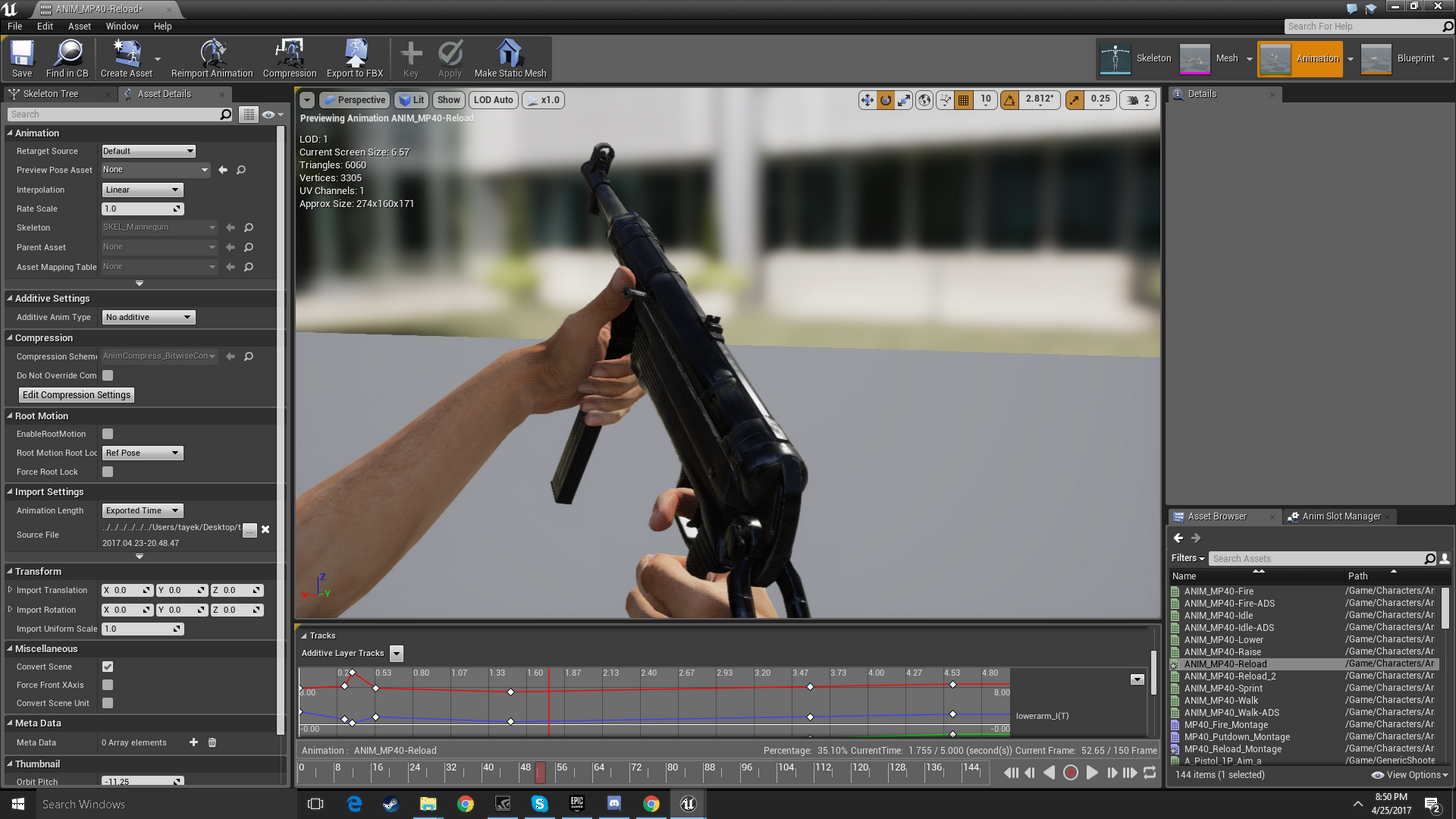


 misty dagger
how do u do that 😛
sudden sedge
not sure
misty dagger
lol
sudden sedge
I've only done it in other engines
misty dagger
oh
sudden sedge
still messing with UE4
sudden sedge
like, ik
misty dagger
in blueprints?
sudden sedge
or something
sudden sedge
make a chain of the left hand and set the target location to be parented to your right hand
misty dagger
i dont know how to do that
frail basin
looking at 4.16 preview notes, saw this: A Spline IK node has been added to Animation Blueprints; useful for character spines.
misty dagger
reaaaaaaaaaaaaaaaaally? how is that gonna work?
undone flax
@misty dagger I did that, but it caused the poses to go farther than before. Even with all of the other ones off and simply comparing 1.0 w/o additive to 1.0 w/ additive.
Here's an example: http://imgur.com/a/fAln7
Its an album, not just a single image.