#animation
1 messages · Page 81 of 1
 compact lake
 waxen agate
I can have tick on post-physics
Since this specific actor doesn't do anything
Lemme try
compact lake
ahh ok, try it there then, I have suspicion that Anim BP uses transforms from before the PhysicsTick
I've just tryed setting bones in world space on PostPhysics and I don't see any lag
but! position pf the bones is calculated on sub-stepping with proper transforms
 wicked belfry
compact lake
wicked belfry
compact lake
ultimate test - falling from the skies
wicked belfry
Can anyone quickly tell me how to set a keyframe
On those frames, based on the positioning of the skeleton
I know it's basic but for some reason I can't find anything online on it
compact lake
@waxen agate no lag!
and this is really cool because I can save some performance on not doing world/local transform
waxen agate
@compact lake nope, no effect
compact lake
hmm
waxen agate
I've just moved calculations involving transforms into a post-physics tick
I've verified that it's called in post-physics
Still wobbly
compact lake
weird
do you run sub-stepping?
is it possible that you components can be lagging behind the root
like root is moved a bit because of physics but components are still at old positions
waxen agate
I'm only operating with root components
I know that the suspension is mounted to Train at coordinates "RestVector", specified in Train's coordinates
So I find coordinates of RestVector in bogeys coordinates, move the suspension there
compact lake
so your skeletal mesh is in the separate actor than one where you want animation to be aligned with?
waxen agate
Yes
Being located within the same actor doesn't change the situation
But I need to align one skeletal mesh with a static mesh that is physically separated
I have a dumbass idea, I'm gonna try to do position = position + velocity*dt xD
Maybe it will compensate for some of the laggy behavior
compact lake
that's fine, I'm looking at your graph and I think issue can be in fact that you trasform vector into world space first and then into local
if those transforms are not in sync you might have a problem
can you make it completely in local space?
waxen agate
Getting a transform is sadly the base way to get any semblance of a transformation between coordinate systems
I need to know relative positions of two objects!
I can't find out relative positions etc without transforms
compact lake
you can do it in local coordinate system
I'm just suggesting to use transform only of one object, not two different
it would mean that they have to align a bit
waxen agate
I don't understand
I cannot find position of mount in local space of the train without knowing transform of the train relative to bogey
For relative transform I need to know both transforms
The bogey is physically disconnected from the train
Btw
compact lake
I understand that
waxen agate
I can do this entirely through transforms with no going through world coordinates, the effect is the same; using "getactorlocation" and so on gives the same effect as well
So I don't see any way to find the relative positioning between the two objects if all of the ways to get coordinates are lagging by 1 frame
compact lake
I can upload latest version that I have, maybe you can spot some difference
I might be not having this issue because local space of the skeletal mesh is the same as local space of the pawn
so if all math is done in local space then everything is always aligned
but it freaking works in world space too 😄
I don't know why - it shoudn't
compact lake
yes I've seen that
waxen agate
In this case the guys uses IK to align to another actor
compact lake
if you want to try:
https://github.com/BoredEngineer/MMT_Content
 waxen agate
Have a fixed base (static to world)
Have a moving simulated physics weight
Have a skeletal mesh parented to weight
Weight constrained to fixed base softly
Skeletal mesh stretches the bone to fixed base
Result: the skeletal mesh is lagging by 1 frame and the spring jitters around in its socket in fixed base
compact lake
Yes as most likely there is issue in the order of Transform updates
I was calling SetTransform from within the physics sub-steps and obviously got ton of bugs with it
But after I set them on the level of BodyInstance and then in PostPhysics get their world space location - it just works, no lag
@waxen agate maybe try updating those transforms that you are using in PostPhysics too
waxen agate
Won't do anything
I've accepted the fact that this animation will be jittery until I can fix this properly
It's an issue of when blueprint is evaluated
I think animbp is being evaluated in some weird way or at a weird time so it gets wrong transforms for all the objects
compact lake
most likely
waxen agate
LogScript:Warning: Runaway loop detected (over 1,000,000 iterations) - see log for stack trace also this is getting annoying
It's some sorta weird thing in AnimBP
compact lake
hmm, I thought I get them from doing BP on sub-stepping
waxen agate
Oh no, you will get these if you have a complex animation blueprint
They happen randomly with no apparent trigger
Because I think it doesn't reset some stupid counter internally 😂
 copper dawn
"hey Yoeri, do you know any animators knowledgeable in UE4 I am having interpolation issues with my animation. And for some reason the rig is deforming in some wird way that is not visible in the fbx."
- My animator buddy
anybody know what might be up?
 misty dagger
Would need to see that rig deforming in Maya vs ue4 could be several things. Bones not being set up correctly, skinweights violating ue4 restrictions..
copper dawn
passing it onto the guy, but might be too nda
copper dawn
he actually made a video: https://www.youtube.com/watch?v=zwQx0F5JiSQ
 misty dagger
Can't view the video on my phone. Strangley any other video works.
copper dawn
thats odd
misty dagger
Can you pm me a text link?
copper dawn
sure
compact lake
@copper dawn I'm not an animator but scaling of the bones can lead to issues when you interpolate between keyframes
You need to have a separate process for when bones are scaled and when they are not. Have you seen Epic doing something like that before?
"separate process" as in code wise, when you write this stuff on low level yourself. But I would expect that Epic deals with this.
misty dagger
I have had no issue with bone scaling. One thing I found tho was that If bones didn't have their segment scale compensating setup correctly it would bug out in ue4
compact lake
segment scale compensating setup?
misty dagger
Which is something that normally happens automatically in Maya. Tho on few rare occasions Maya doesn't do it for you
Basically Maya connects the parent bone scale into child bones inverse scale which allows for bone scaling without affecting downstream hierarchy
copper dawn
thanks for helping btw
compact lake
ahhh, makes sense. So UE4 interprets this properly?
misty dagger
Yes, but only if it's been set up properly in maya. Ue4 bone system is less flexible there.
 bronze osprey
i cant really see whats really goin on 😛
there was something new added for making new animations from 2 poses with curvs
might be able to use that to fix it perhaps
you R mouse the anim seq and create > pose asset
I only did a few animations with it tho, im no expert 😛
bronze osprey
i never had weird interpolations in my animations tho, now sequencer camera, thts another story 😛
but in a pose asset u can see the interpolated frames
 nimble helm
hey y'all. I'm moving the last bone in a sequence of bones via an anim graph, and I can see that its parent bone, the second-to-last bone is following it correctly in the anim graph preview, but the actual skinned mesh isn't updating, and the second-to-last bone isn't actually rotating
really what I want to do is change the length of the last bone in a sequence of bones without scaling it
so I figured I'd move the tip of the last bone
but it seems that the tip of the last bone doesn't actually do anything
 quick shore
Newb question but Im having a hard to finding the answer. If I want to just adjust the arms of a static mesh's default pose, how do I save it? Its not taking effect in the level.
skeletalmesh*
misty dagger
@nimble helm sounds like you haven't bound the last bone in the chain. Now normally you don't bind last bones anyway. If you want to change the length, you need to change the translation value of the bones in their respective axis or scale that respective axis
misty dagger
@quick shore why do you need to change the base pose? I think the default way is to rebind the character in Maya /blender using the new pose you want. Then importing that skeletal mesh back in
misty dagger
Say I have two skeletons, both humanoid and with same joint names.
Say skeleton A has a bunch of animations, and skeleton B has none.
What am I to do, to allow skeleton B to use all animations intended for skeleton A?
Should I retarget skeleton A to B, or B to A? And I tried doing both, and neither did the job.
Can't preview animations on different meshes now in 4.14? Here I have a different mesh selected for preview, yet it plays animation on the mannequin: https://i.gyazo.com/3d28a511794937a8e42746e4336d393f.png
 nimble helm
so I see that setting physics blend weight of bones is a blend between the current animation and straight physics animation. Is there a way for the physics to be additive?
like blending to physics causes my bones to go back to their reference pose
while also doing the normal physics stuff
seems like i'm missing some obvious thing
well actually, the current animation IS the reference pose, and I'm using some modify bone nodes to move some bones around
and the physics weight blends out those modify bone nodes
and I want them to still be applied
 soft crown
So odd that the Unreal animation starter pack has no walk/run
only anims related to holding a gun...
nimble helm
well, it has walking and running, while holding a gun 😛
 robust geode
XD
nimble helm
anybody have any idea about my previous question?
 autumn lava
@misty dagger You will re-target animations, not skeletons. First you care about both skeletons having matching re-target bones using retarget manager then you will be retargeting animations, blends or whatever. Animations are being retargeted from working one to new. Check this video for seeing the flow https://youtu.be/wyg9ctrnKvo?t=12m37s
 misty dagger
@autumn lava thanks, I'll check it out. I actually retargeted one animation yesterday and it looked very deformed in a certain place.. I then decided to try assigning the other skeleton (the one with animations) to the mesh and it worked much better. The same animation didn't have those problems anymore.
But I guess doing that is incorrect?
autumn lava
Having bones aligned and properly assigned in re-target manager is must have, otherwise you cant expect valid results. Just watch this video, then it will become clear.
 full herald
This plugin enables live-streaming of character animation from the Shadow motion capture system directly into UE4.
 wild furnace
Hi guys, I'm wondering if there's a way to make an adjustment to an animation in the unreal editor and have it "stick" or translate over to ingame
 quartz cove
@wild furnace record?
wild furnace
Well, speaking about a character. For example, he is sitting in a "Driving" pose, and I need to alter his spine so his hands are on the wheel
how can I adjust that existing anim and have it stick?
I can't do it in max because I don't have the source.
wild furnace
Thanks Victor, I'll give it a shot.
wild furnace
is it possible to load other meshes into the viewport when you're laying animations so you can use them as reference ?
quartz cove
Ummmmm, hmmmm, good question. If not, there should be, but I swear I just saw something, but I think it was for sequencer
Where you can take all actors and save all their poses as a single static mesh
quartz cove
@wild furnace Awesome! Not sure if you were being sarcastic or not;) Was I of any help?
wild furnace
Sure thing mate.
Used this: https://docs.unrealengine.com/latest/INT/Engine/Animation/AnimHowTo/LayerEditing/index.html
An idle animation is edited to create a new reload animation through Animation Layer Editing.
 fair crater

 long rover
Can you create game character animations through keyframes in UE4 or should I use a different software program?
copper dawn
if you want to stay sane, use another piece of software
long rover
@copper dawn any suggestions? I'll check if Blender has it.
copper dawn
maya is prolly the better one for animations, but ive seen loads of people use blender.
thing is, im not an animator, so my word is only from seeing what others use
I do know that character animations within ue4 are between limited and non-existent
bronze osprey
if u do stick to unreal for anims u get mad persona skillz 😛
misty dagger
https://cdn.discordapp.com/attachments/221796616653373441/249672877559775233/unknown.png
Is this triangle in a bad sport for deformation. its the only 'triangle' in the mesh
 misty dagger
seems alright, based on the overall poly resolution I dont really think it matters.
misty dagger
You can't preview animations on different meshes since 4.14? https://gyazo.com/1507e651cb532abb029ccde7369f06d5

When I select a different mesh in the top right corner, the editor leaves the animation preview screen.
misty dagger
You guys are talented i have no experience in modeling or animations lol
misty dagger
So I'm trying to retarget animations from one of Kubold's packs to my own character.
Most bones look ok. Some don't, making everything unusable. Example (it's the same animation frame): https://i.gyazo.com/81ea6a8b4bc83a74070e948b9ac6eb82.jpg
I'm not extremely familiar with the entire pipeline, so here's what I do, just in case:
- Import character with default options
- Select humanoid rig, making sure all bones correspond
- Change the bind pose to correspond more or less with the mannequin's. It's not an exact match (no tools available in the editor to achieve an exact match), but visually it's similar.
- Retarget animation with default options
Any ideas what's causing the problem?

 karmic sigil
Is there a place where I can get a good base education on Animation?
quartz cove
@karmic sigil Like school?
karmic sigil
Just tutorials or a in depth "fundamentals" of animation.
I get how bones and rigging works, but doing animations themselves is enigmatic. Tutorials I find are usually lacking a very clear "how to / what to avoid doing"
misty dagger
digitaltutors.com has paid video tutorials
 dim cedar
you can try youtube
there are so many tutorials these days
and you can also watch movies, 2d and 3d cartoons
in the end it will come down to "mileage" - the more you animate stuff the better you will become
same as with anything else
you will start to "understand" and "feel" things more and more and at some point you will develop your own unique style 😃
 rocky brook
does anyone know why doing a uv transfer in maya would have deleted my skin weights?

I created this tutorial for the users that don't know how to copy a UV map from one object to another in Maya. So if you want to copy UV's you will need to follow
That is how I did the transfer^
misty dagger
Did you delete history after the transfer?
Make sure to delete non-deformer history or else yes, you'll lose your deformer
rocky brook
on the mesh I'm transfering to?
the mesh I am transfering from doesn't have the skin weight. The mesh I'm transfering to does have the skin weights
@misty dagger ^
misty dagger
Yeah don't care about the from mesh. The to mesh is important as that holds the skinning according to your description
rocky brook
okay, I will try that. Thank you 😃
 coral carbon
anyone good with blender anims?
and can help me explaining some stuff I need to ask
misty dagger
Just ask a about m8. Someone will know. You are unnecessarily stretching the time between questions and answers.
 unreal cosmos
do you know about using the Replay system to record cinematics?
the normal recording system has completely insane amounts of overhead in my game
becouse it catches every single projectile that is thrown
 mellow rose
 long stone
is there a reason why all variables are read only in an anim notify state?
 frail basin
@round moss you are NOT allowed to share those animations
Not beyond your team anyway
Sharing those publicly is breach of their terms
 river meteor
Hello, I don't know if this is the right place to ask this question, but I am trying to rig the Infiltrator demo character up with mixamo auto-rigger, but it fails everytime and I can't seem to get the manual mapping to work correctly. I opened up the character in Blender to remove a lot of the bones I don't want and managed to reduce the skeleton done to what should be compatable with Mixamo Auto-Rigger, but it still fails everytime. I think the issue is with this odd bone placement as seen here: https://gyazo.com/822027b0ed273a00eca7c152c35bda13 I've never worked with bones before, but from what I've seen this isn't right, is it?

If not, what should I do to repair the skeleton?
bronze osprey
benn testin out a few skeleton setups, i cleared parent but kept offset in blender. now i get this error on it
Warning Constraint attempting to create a joint between two actors in different scenes No joint created.
it does look like the bones are constrained tho, it all works fine
 drowsy flame
Hi! Is anything wrong with that montage setup? Because the HeavyPunchEnd notify is not triggered
is triggered only if I put it in front of HeavyPunchReady one
I just added another section, "End", and put it at the end of the animation clip and now HeavyPunchEnd notify is triggered
but someone can please explain to me why is that necessary?
unreal cosmos
@river meteor you cant
if you modify ANYTHING on the blender side skeleton, it will break when you export it back to UE4
your only chance is to not use blender for that
and i say that as a blender fanboy, FBX import is completely broken for rigs
and export barely works
river meteor
@unreal cosmos Hmm ok, could I open up the model in Maya? Could I then remove the extra bones in there then export it into Mixamo to rig?
unreal cosmos
the extra bones are actually from the import
but yes, use maya
blender for this stuff is finnicky as hell and doesnt work 99% of the time
until you get the exact correct settings that happen to work
biggest blender downside for me
i would like to write a .blend importer for ue4 or at least help with one
river meteor
Alright, thanks for the advice man @unreal cosmos
 faint flicker
hmm, got a weird issue
bones that are set to Simulated in the PhysicsAsset don't simulate.
if I add the skeletal mesh into the level as its own actor, it works. As a component on a blueprint that has the mesh as its component, it doesn't.
The mesh asset there is swapped out (it's a character selection screen), but still not sure what could be causing this
or how I could work around it
any ideas?
Hmm, not even manually calling SetPhysicsAsset seems to fix it. Still showing this:
faint flicker
turns out that was just a distraction
I figured it out
Turns out if you set a skeletal mesh component's collision to No Collision, simulated bones don't simulate
frail basin
@faint flicker you cant simulate physx physics on unreal unless things can at least in theory collide with something
frail basin
Same thing happens if you just put a cube in scene, set it to no collision and set simulate on
faint flicker
I figure it would be possible to disable every collision channel, and only set physics collision to true
so it would collide with itself and simulate, but still not collide with the world
I figure it's the Physics Collision Enabled setting
faint flicker
Spent at least two hours trying various things to get that to work, and then it was that
frail basin
But you did figure it out still :)
river meteor
Hey does anyone know how to remove bad geometry in Maya that the Cleanup tool refuses to remove? I have a bunch of random vertices and I want to remove the entire thing because it's one big mess. https://gyazo.com/16ba043af8eaae60087db89aaaafce60

I was taking the Clip off the Infiltrator demo character and I couldn't figure out how to select vertices by group like you can in Blender, so I manually dragged the vertices away to remove them, I got rid of the majority, but there are some stubborn scraps left over.
river meteor
Nevermind, I managed to remove that mess through face selection and deletion.
 hard inlet
Has anyone used these? I'm interesting in buying them, but not sure if I buy now they won't be cheaper on Monday. According to their site the sale is just for Black Friday. https://www.unrealengine.com/marketplace/profile/Motion Capture Online
Build an epic game! Browse our always-growing curated selection of environments, characters, weapons, audio, and more, all built for Unreal Engine 4.
unreal cosmos
currently having a ton of problems with different meshes on 1 skeleton
every single mesh gives the "skeleton not matching, needs resave"
and breaks the others
if you do it in a very straight order, it works on all, but its extremelly finnicky
the meshes are well exported
this
but the fact is, that they match
and i was running anims from skeleton A in mesh B before
that thing just broke half of my characters, when i imported a new one
An overview of the Skeleton asset and how it applies to animation in UE4.
this part of the documentation is being kind of complete bullshit on my case, it just plain doesnt work
any idea? i might be doing something wrong
this on 4.14, but the exact same thing happened in 4.12 and 4.13
hard inlet
Following up on the animation deal, I emailed them and they said the same prices will be used again on Monday for anyone who cares.
 smoky shell
if my character has some SkeletalMeshComponents with morph targets that have the same name as the character's mesh, and the components are attached to the character's mesh i should be able to set a morph target on the mesh and have the components update also, but it doesn't work and i can't find a solution in google as it's diluted with results from a 4.9 bug, does anyone know how it's done now?
really dislike how most of the persona related stuff doesn't have any means of debugging, all i get is the fact that the morph target isn't being applied, no errors etc
still just looks like the same bug reported in 4.9 and apparently fixed in 4.11
it's working now, the bug was a completely different one 😐 my morph targets got deleted without touching the asset, just hit reimport and they came back
the morph target workflow seems very umm, backwards - especially when you have multiple skeletal mesh components on one actor
 hard glade
Hey all. Is it possible to move bones of a skeletal mesh via blueprint? I have a mesh for my player and I want them to be able to move their arm around and all, sort of like how you can animate with an IK rig, but by clicking and dragging the mouse around. Can that be done?
smoky shell
well.. yeah, with IK 😛 just google it, it uses the two-bone IK node in animation instance
there are a fair few resources out there so you shouldn't have any trouble if you know what to look for
smoky shell
which version of the engine did post-process animation bp's come from? iirc it was just now in 4.14, which means if i make an MP asset using it i'd rule out anyone stuck on previous engines buying it
 small heron
Hey guys, does anyone knows which animation set on the UE4 Market has a barrel roll?
misty dagger
I don't think there is any
I used one from mixamo that I then modified with a custom rig in maya
 native sorrel
Ik is a beautiful thing
small heron
I'm gonna go for that then, I'll modify a crouch animation or something.
 twin mica
why this is happen when i try record an animation?
misty dagger
only when recording an animation? alos, what does that mean? Is that a new thing in 4.14..
Also, are you using ue4 skeleton? or mixamo or something else?
twin mica
mixamo, ye recording to take new animation from this record
misty dagger
cos that seems like its putting the pelvis bone down to origin thinking its the root. The problem with mixamo skeleton is that it doesnt have a proper root bone, so theres a lot of things that go wrong with it in ue4
 raw quail
Yeah same issue with 3dsmax's Cat-rigs
 cedar bloom
Has anyone used ikenima webanimate? Im looking for a motionbuilder alternative and I think this could be great for clean up.
I dont want a 100 dollar lemon
cedar bloom
Bump
cedar bloom
oh it has a trial nvm i'll see for myself
 devout yarrow
Hello 😄 just wanna ask something. How can i properly export an animation in maya? i tried selecting the joints then exporting it then after importing it to UE4 an error pops up.
misty dagger
What's the error?
cedar bloom
fbx?
 pearl blaze

 scarlet seal
hard inlet
scarlet seal
hard inlet
https://docs.unrealengine.com/latest/images/Engine/Animation/RetargetingDifferentSkeletons/Retarget14.jpg Did this option get moved? I did this a few months back and it worked but trying it tonight and I cannot find that menu. This is to fix messed up hands my model has when retargetting animations

Hands look similiar to the ones in the documentation https://docs.unrealengine.com/latest/images/Engine/Animation/RetargetingDifferentSkeletons/Retarget13.jpg

Retargeting animations for use between different skeletons.
Oh I think I found my issue. I am mixing A pose and T poses
hard inlet
Finally found where the retargeting options are, just burried in that menu that I didn't see mentioned in the docs 😦
 karmic briar
sup guys!
I have one question
How can i create custom notify state without using c++
native sorrel
Ik is beautiful
 woeful spade
I remember a long while ago it was added as a feature to the engine that anim graph stuff was more multithreaded, is that automatically enabled or do I need to tick a checkbox somewhere?
 sage dawn
hmm is it me, or ability to table turn rotate the model in the animation persona is gone in 4.14
 mossy lichen
Anyone really good at Maya's peculiarities? I got a little problem.
And I'd welcome advice. I run Maya 2014. Got a character. It's all nice and rigged. The guy who did it polished everything off all perfectly and passed me the animrig and export file as .mb files. In Maya 2017.
I have a friend with 2017, I can open it, but I can't convert it to a .ma because it keeps complaining about unknown modules.
sage dawn
if a file was at least once opened in never version of maya chances are you won't be able to run it on a previous build
in fact, it often breaks other way around too. (you open a rig that works fine in lets say maya 2012, but its a complete mess and full of errors on 2017
rocky brook
is there blending between sections of an animation montage?
or does blending only happen at the beginning and end of a montage?
just want to make sure blend in and blend out time aren't going to cause my anim notify to get missed sometimes
because my anim notify is really close to a section line
misty dagger
there was a huge update to several core nodes in maya 2015 from 2014. So many things might not work as expected from 2012 files to 2017 files
mostly a problem of .mb files as they have a different internal read in maya. Always save as .ma
if you want to save a file to .ma from .mb and it complains about unknown nodes, run an optimize scene size removing unknown nodes
for info: unknown nodes are nodes from plugins that arent installed in your current session
cedar bloom
so when i export a mesh with a morph target in blender at value 0.0 the morph wont work in unreal but if i put the morph at 0.001 it works from 0.001-1 and if I put 0.5 then export the range is -0.5 to 0.5 in unreal can anyone tell me wassup wit dat?
And by doesn't work I mean it does this weird shadow shifty thing.
rocky brook
@misty dagger do you know if it's possible to copy keyframes from an fbx export of an animation? My animator lost some of his animations in the mb file but we still have the fbx exports of them. (maya)
misty dagger
you can bake them back on to the animation rig yes
but it wouldnt be an exact replica of the original anim keys
it would be a 1key per frame bake
so what you do is constrain your anim controls to the corresponding bones in the fbx. then run the bake animation tool
rocky brook
I haven't done baking before. This stuff?

You can bake animation from layers just as you bake other keyframe animation. Using the Bake Simulation Options, you can choose whether you want to preserve your original animation layers after baking. To bake animation from layers Select the objects in your scene whose layered animation curves you want to bake. From the main menu bar, select Key > Bake Animation > . In the Bake Simulation Options window, select the bake options you want to use
misty dagger
yes that should be it
rocky brook
okay sweet, thank you 😃
 feral heron
Anyone by chance interested in doing some work.?
cedar bloom
2D or 3D?
Still working on 3d animations but if you need a flipp book or an animated texture I can do that
 limpid robin
Any of the free UE4 content contain a third person crouching animation?
Ah nvm, the Animation Starter Pack does.
 inner zephyr
how do i spawn an actor and make it walk automaticaly by itself?
 stoic remnant
Anyone know how to reset the transforms on groups in autodesk max?
misty dagger
Can someone help me please with backwards movement used by a bot? how do you actually change the velocity and not just the animation?
stoic remnant
change velos direction
 jade lance

 timid basin
anybody know why replicating anim montages arent working
mossy lichen
This channel is just full of misery, innit?
Anyone have Maya 2014, good ART riggin' skills, and about an hour to kill?
I got a problem involving 'thank you, you did everything I need - in 2017 which nobody else has and now we can't open the project'
I think I have everything I need to fix it - except the talent/skill.
 weary pine
That seems like it could be relevant for almost anything. 😉
mossy lichen
What, the full of misery part or the maya part?
Yeah, I know, I just wander in and I see people going 'oh god nothing works'. Which is honestly how I feel too.
Having one, or possibly several, of those days.
weary pine
I do not envy you
mossy lichen
All I need to do, really, is try to figure out why a ik script isn't working in 2014.
select -r -sym foot_l ;
select -add ik_foot_l ;
doCreateParentConstraintArgList 1 {
"1","0","0","0","0","0","0","1","","0" };
parentConstraint -mo -weight 1;
// Result: ik_foot_l_parentConstraint1 //
Darn thing errors about '-sym'
// Error: line 1: Invalid flag '-sym' //
mossy lichen
Some days it's not worth chewing through the leather straps
waxen agate
Hmm
Lets say I would want facial animation for UE4, but I don't have a budget to do it properly (full-studio scale kind of properly)
Is there anything to aspire to
mossy lichen
Sure. Allright Rig is doing some of it. OR you could do blendshapes
waxen agate
Hmm
Well, that is only half of the work
But we talked around and decided on something that might be feasable
Assuming that half of work is already done and there's a model which can reproduce phonemes, we might do a very very simple analysis of the audio to determine weights for a couple basic phonemes
It will be pretty basic, but a basic convolution will distinguish some sounds from others with weights
mossy lichen
Oh, you want to automate it off the incoming audio?
waxen agate
Yeah, that is the other half that has to be done
misty dagger
@mossy lichen did you fix your script thingy?
Haven't got a pc here. But I think the -sym flag doesn't work like that. Why is it in there to begin with?
It's supposed to be for symmetry on component selection for meshes
Not transforms
mossy lichen
According to the guy who did it 'it's a record of'.. .wait, gimmie a sec, I logged it
The script I sent you is a literal copy/paste of Maya log
so I'm confused. 😃
misty dagger
Maya log doesn't help for raw code review (or script review) post what you actually executed
mossy lichen
So he sent me the log, not the script.
sighs.
(I am, perhaps, not as fluent in IK as I should be'
misty dagger
Probably not. Reason to learn ;)
mossy lichen
Hammer time!
misty dagger
@stoic remnant how do you change the velocity direction
misty dagger
Velocity vector will have a direction. You need to calculate that against the actor forward vector. Using dotproduct you can then get a direction measure.
 devout dagger
I haven't done much of animated stuff in UE4, so I'd like to start slow. I am using top down shooter template (with that little thing that flies and does pew pew pew) and I'd like to make it where when I move forward, the ship tilts forward, when I move left, it tilts left (and stays tilted while moving), and when I stop, it goes from tilted to idle. Assuming I got those anims (idle, from-idle-to-forward, from-idle-to-left, etc.), where do I go from that point ?
 clever shore
is anyone using apex cloth tools with 3ds max 2017 ? as soon as, i try to add cloth modifier max hangs out..
limpid robin
Any idea why my characters feet slide when i do turn around?
They don't slide when running forward, so is it a rate thing?
 pallid tartan
New to Unreal Engine, but is it possible to animate sockets?

 quick geode
anyone here using modo?
my skeletal mesh bones get offseted by a few degrees when I export from MODO
its like it messes up the skin bind
misty dagger
I can give feedback here owl if you want. Better place for that than twitter
 misty dagger
Upper leg bones seem a bit too far out. upper arm should go down a bit. Hip bone too. Could go in much more detail but would need better pics.
 radiant matrix
i will make better pics tomorrow
problem is
skeletons are skeletons XD
if i change the arms height...
the hands and fingers come up with
its worse with iks
and clusters
its all connected
i will need to train that alot
misty dagger
What did you build the rig with? Is it art?
misty dagger
Cos what I do is layout the skeleton. That should be ideally positioned where the real bones would be positioned and hinging from
Then I run the code that builds the control rig around it
misty dagger
Oh. Yeah then It would be much harder to do the changes I mentioned. Next time then ;)
limpid robin
Any tips for getting animation retargeting to work? The articles haven't been helpful :/
I'm just trying to retarget the free animation pack found in the marketplace to the ShooterGames default character. Though in the end the arms look weird, and feet hover for crouch animations.
hard glade
Is it possible to use 2 bone IK to make it so that the player can click and drag to move a third person skeletal mesh's arm/hand around? Player has a phone and needs to be able to point it at stuff, while an animation is already playing. So basically it has this passive idle animation where the arms move slightly, and on top of that I need the player to be able to move the arm around to point their phone at stuff. If that makes any sense. if it is possible, could someone tell me how or link me to a guide to get started? All I could find was tutorials on foot placement 😃
 distant axle
does anyone have a suggestion on where I shouold start for animation in unreal
misty dagger
Check out the 3rd person tutorial on the website
 glacial night
Is it possible to make a title screen but has an animating sky that kind of flows around? I can't find any tutorial that does it. Very old example here: https://youtu.be/0cP-Mmq3chM?t=1s

I should probably post this in blueprint actually haha
karmic briar
Sup!
I have a problem
manage notify don't opens in 4.14
Do you have similar problem?
quick geode
is there a way to transform bones outside of the anim blueprint?
 coarse igloo
Anyone familar with doing aniamtinos in seqencer?
smoky shell
how are animations being ticked in ue4? for gameplay being driven by animation attributes how do you compensate for fps
hard glade
Could someone help me with using 2-bone IK for allowing a first person character to move their arms/hands around?
 jovial imp
Hey guys. I've gotten to the point from doing tutorials that I feel as if this animation, modeling, and skeleton creation are some of my weakest points. Does anyone know of maybe an informative blog post or video that has a pretty good summary of these things? I've done a couple tutorials that involved rigging and animation blueprints, but they were so long ago that I figure a summary video/araticle would be good for me right now. tia
soft crown
is it not possible to have animations target more than one skeleton? Aparently my retarget broke one sekeleton to make another
pallid tartan
Does anyone know how to reset the axis on Maya's tumble tool after ART changes it to Z-Up?
 narrow forge
Anyone know how I can play an animation from a specific frame in blueprints?
Say I want my charater to start playing an idle animation when I press a key. How could I start that animation from a specific frame?
 rotund bone
Has anyone had a hip errors in the mixamo rig in maya? jk I am bad at scripts
soft crown
Hey guys should have an easy one for yall! How can I enable root motion? Or have it so my characters doesn't move when it animates but stays in one place (Think that is what root motion is?)
 sage canopy
Hello, I am facing a problem where UE crashes when I try opening my project file which has an alembic geometry cache reference in the level, Could some one help me out with the same?
 stray jasper
Are blendspaces broken in 4.13? I'm placing animations and it is swapping them randomly -> I place idle on 0,0 and walk on 0,250 but for some reason it gets swapped. When i place third anim it's complete chaos. I should add that 1d blendspaces work just fine. Anims stay wherever I place them. Does anybody else encountered this behavior?
stray jasper
never mind, solved it. My stupid mistake
 fading snow
👍
worth a try, but for the first look, it seems a bipedial option only. Would it rig a Dragon or a cintiped ?
but good thing, they share their tools with us 😃
smoky shell
I've been using ART for years now, it's intended for bipeds but if you know your way around rigging you can add to it easily enough
ART v2 will be out soon, that will have far more flexibility
at the very least it will support creatures with multiple arms/legs
it's a lot more modular
(also.. it's been freely available to the public since UE4 released.. they just finally put it on the MP instead of releasing it with the engine)
@soft crown root motion takes the forward/vertical motion from an animation and applies it to the character allowing the animation to move the character
@sage canopy alembic in 4.13 has a bug with UVs (you can't texture the models) and also can't be packaged, I don't know if either are fixed in 4.14 but it's an experimental feature and very unwise to use it this early
@soft crown you want to duplicate & retarget animations if you want the existing skeleton's support to remain
 alpine cypress
is anyone seeing issues with making 2d aim offsets and blendspaces in 14.1? when I drop the animations onto the graph area it seems to keep swapping them with other ones I already placed. Like if I place my Center animation in the middle, then drop the Upper Animation above it on the graph it moved the center animation to the upper and the upper in the middle. It's making it really frustrating to create a 2D Blend.
 timid jolt
I want to use 5 textures to make up animated character. How would I best go about this with ue4?
alpine cypress
@stray jasper that is happening to me in 4.14.1 also
stray jasper
@alpine cypress You have to place anims both on X an Y axis and then it's going to work 😃
I placed idle in the middle and then random anims abohe, below, left and right and then it's going to work. You can obviously replace those anims as you go.
smoky shell
yeah i had the same thing, place the rest of your animations and they'll be fine
 swift remnant
hey all, question:
I'd want to play different animations of hand skeletal mesh (basically 1 frame anims) with different grabs based on which actor in the game I trace for grab. I currently have all of the logic for grabbing and objects set up. As of now for just one specific object (bottle) I'm using blendspace 1D with idle and grab animations, blendspace is obviosly setup in anim bp. However when a second object gets in, which has different shape thus different animation needs to be played/set, there comes a problem with using 1D blendspace
mossy lichen
Hey, Shin.
Wish I could help - I'm having weird problems with base retargeting
Following this procedure on Retarget Manager:
https://docs.unrealengine.com/latest/INT/Engine/Animation/Persona/BasePoseManager/index.html
This is my bind pose:
http://i.imgur.com/uhrkFDh.png
This is my adjusted Retarget Base Pose (see the Hide Pose button in Retarget Manager?)
jovial imp
Just in case anyone here is learning how to do this animation and modeling stuff like me, I was browsing the books on Packt for $5 and they have one specifically about Blender and UE4: https://www.packtpub.com/game-development/3d-game-design-unreal-engine-4-and-blender
Combine the powerful UE4 with Blender to create visually appealing and comprehensive game environments
 potent current
has anyone ever encounter an issue where setting an animation to be additive, using ref pose as base, results in a bone being rotated even in the preview window?
 wise sundial
How can I get my character to use the physics asset for collision with other actors which simualte physics? By default, the character just uses the phyiscs capsule. The physics asset seems to have no collsion. I want the character to be able to block simulated cubes with his arms, not just with his capsule. Surely I'm just missing a checkbox somewhere?
wise sundial
Nevermind, that's apparently controlled by the mesh collision settings in the character BP.
 cursive hollow
Hi all, Dose anyone in here use mixamo to create a model's for UE4? Do I want Facial Blendshapes Enables or Disabled?? Skeleton LOD Standard Skeleton 65 or 3 fingers or 2 findgers no fingers
Will it matter what I choose when I import it to ue4
stray jasper
@cursive hollow If you are not planning to animate facial expressions, or you are going to do your own solution, disable facial blendspaces. For complete rig with individual fingers, use 65. If you are doing for instance top down, rts or even a sidescroller, you might be ok with less complex rigs (and I guess they could be used as lod). I would recommend exporting for UE4 since you get root bone with it. Now you can't really do root motion with it (you will have to adjust it manually), but it's already there and it works nicely. But if you export standard fbx, it'll work ok too. Difference is just in bone hierarchy (one bone) so there should be no problem retargeting standard fbx to ue4 fbx.
narrow forge
Does anyone use the ART rigging toolkit? I just started using it and the camera rotation in maya sucks after the toolkit changes the Z axis to be the up axis. Is there a solution?
By "sucks" I mean the camera doesn't rotate like it used to, you can no longer rotate around your model
narrow forge
Oh nevermind, I didn't realize I had to rotate my chracter afterwards. Camera works just fine now.
cursive hollow
@stray jasper Thanks for the information. I am working on Fps to 3rd person doesn't need facial expressions. I did not see an export to Unreal.fbx when I follow so of the documentation I tried to get the mesh to use the default third person skeleton but when I play it is always in t pose for some reason
cursive hollow
It was?
stray jasper
I can't see it anymore. Only fbx and Unity fbx
cursive hollow
Yeah that's what I saw
 tepid inlet
I got a question about workflow when trying to use modular skeletal meshes
At the moment we are trying to get a character mesh to be segmented so we swap out parts on the character, like different hands/feet/head. We have the character broken up into a few different skeletal meshes. Is this a common workflow? The issue I am running into now is trying to play an animation without having to play call it on 5 different skeletal meshes
tepid inlet
The solution I needed was the node, "Set Master Pose Component"
 barren wing
Hello :D
I have an issue with the 'Manage Notifies..' button on the AnimMontage Editor, it won't open :/
anyone has a similar issue recently ?
swift remnant
not exactly the same issue as above although it does refer to montages as well. So, I'm trying to play anim montage from different bp which has skeletal mesh as root

problem is, it doesn't play at all, looking at the screen ^ it does return object name and even when I add breakpoint on montage play it does stop the game (in other words it is bein g called)
however the animation doesn't run
here's my anim bp for that particular hand

I've created separate group for the slot
 half orbit
Any Blender Riggers who knows how to setup twist bones with IK?
swift remnant
Nevermind the issue of mine
misty dagger
Anybody here exporting animations from blender into unreal? I never get a correct animation from the frame limits set in blender.
misty dagger
i have two actors inside my empty matinee group, but it will only let me select the animations for the first actor i added.
stray jasper
@misty dagger I think there is an option for that
misty dagger
@stray jasper hey thanks man, yeah theres select actor option but it does not change the animation to pick from.
@stray jasper i seperated them in 2 groups now. but now it just wont play when i activate it in my level editor BP. going nutts here lol
@stray jasper it works fine when i press play in matinee. then i close matinee and start my game. and the're frozen again. i have play matinee in level editor
stray jasper
Oh, I don't know anything about matinee
misty dagger
@stray jasper ah ok thanks for help though! ^^ what are you working on? 😃
 grim nova
Good evening, has anyone here ever used Maximo's jumping animations?
cursive hollow
#jman Is this somthing you use if you want players to have different characters to choose from say at a log in screen.
misty dagger
It's not possible to bake a montage into an animation is it?
 ivory bear
Sorry for my ignorance, but is there a way to animate the same mesh to use different weapons and animations in ue4?
in an FPS context
 grim crest
Would anyone know a proper way of rigging/importing a rubick's cube mesh? I'm thinking of weighting each cube to a bone and locking the bones to a specific axis. Is this the proper way? Any ideas?
 split cobalt
Thats exactly how i would have done it @grim crest
Going to be an interesting rig but it should work great in theory...
 unreal cairn
hello, i'am kinda new on sequencer, but if anyone can help me, i am aware that it might have been a bug... when i spawn 3d model with sequencer, it works ok, when i want to spawn particle, nothing happens... any ideas?
 eager arrow
Hey all, so I was having an issue with retargetting animations.. My list is empty. I have another skeleton I want to apply animations to, but the list shows I have none available. Is this normal? I can't find anthing on google.
 paper quarry
New to animation, I need to play an animation (a grasp animation) that will automatically stop when it collides with the mesh it is trying to grab. Is there an easy way to do this?
eager arrow
So quiet.
faint flicker
anyone know how to properly get additive animations to work?
I've got this quadruped mech, and I have walk cycles for it and turn cycles
I'd prefer not to have to bake out individual sequences for each possible combination of those and just blend them in engine
but it's doing weird things
instead of adding the lateral rotation to the leg bones, it scales them down
I'm confused AF
ah, okay... apparently you can't use a blend space as an additive animation
oh well, manual blends it is
tepid inlet
I just messed around with additive animations
that was part of the question I had early but I think I understand them alright since it worked
 faint flicker
alright...
who can tell me what I need to know about state machine transition interrupts?
faint flicker
mmh nevermind, solving it by reducing states
fading snow
not a good option though buddy 😦
sometime you need too much animations to make it look sweet
I would say playing with the blend time (increasing or decreasing it) is a good choice
also, the blend type. There is quite a few options...well, too much options, you can try between them. I usualy do Linear, but this is effective when you do fast blends, and my game type requires fast blend between actions
faint flicker
I'll make a new video in a bit
the problem to solve in this case is blending of 4-directional walking/strafing with left/right turning
I have a 1D blend space for walk/strafe that takes the angle of movement relative to the forward direction as input parameter
and for turning, I have two additive animations for left/right that combine with the walk/strafe blend space
for turning while stationary, I do a bool-blend between the idle pose and a stationary walk-in-place anim (just the vertical lifting of legs, with the horizontal movement supplied by the additive turning blend)
the last remaining issue before I'll probably be somewhat happy with this now is that the stationary walk cycle doesn't play its anim notify sounds for some reason
ok, interesting
apparently the notifies don't fire if the additive animations are 100% blended over it
seems to override the notify track
so might just have to add it to those
fading snow
ummm,..well
there is a trick
I know what you mean
I hit this several times
and I don't know if it is a bug or feature!
whenever the notifies let me down, and just don't fire
I do it in another way
rather than a notify
I do a statemachiene event
which is fired on start, mid, or on end of a state machine
which emans entering it or exiting it would be good
 fading snow
super accurate 😍
faint flicker
wish the transitions were better
cursive hollow
Hi all is there anyone here that would be willing to meet me in a chat room one day that is able to chat with me on importing models to ue4. I have ran out of time today and have to go to work. For the last 3 days i have been trying to get this to work all i can manage is to get the character head to break off his shoulders and bounce. I have followed several tutorials and read the documentation about retargeting skeletons. Thanks
faint flicker
@cursive hollow your best bet is to just explain your issues here - that way more eyes are on your problem and you're more likely to get useful help!
cursive hollow
@faint flicker thanks Jan for your reply Merry Christmas
faint flicker
same to you 😃
cursive hollow
@faint flicker by the way you're mech looks AWSOME
cursive hollow
What is it for ? Main character ?
faint flicker
yeah
this is just a side project though, while we're dealing with legal stuff and paperwork on the main one
so there's no big plan or ambition behind it other than learning shit 😉
cursive hollow
Well if that's learning stuff then I have along way to go lololol
fading snow
WOW..I would say this is a Fuse/Mixamo character. They usually do that 😦
they are very different skeletons, so I would say check this out
 cedar bloom
so I have a mesh with multiple mesh groups and each group has a morph target, every time I import my skeletal mesh to unreal the mesh groups get created as single files making it so that my object is all split up, also the edge faces of the letters are gone when morphed.
Should I export with morph target a max value?
but then all my mesh's elements get split up 😦
I'll be starting with maya soon enough
radiant matrix
are you doing face animation?
cedar bloom
yeah
no
I mean mesh flat face
this is just extruded svg text
I want it to be able to pulsate
morph works just mesh is seperated from one another and no edge faces
cedar bloom
LOL im in blender rn
ima get the educational maya today cause I started school
yes visible content
 plucky nebula
yea i only know max 😦
radiant matrix
still the process is the same at the end
it should be a slider
and fbx export
creating a duplicate mesh
changing that
then have 2 states
copy values as blend
remove duplicate
name slider
export blends
it does not even need bones
its mesh thing
radiant matrix
that is a thing i recognize
i instantly see that you imported every bone as a single
you have some srs issues with blender
you need to talk to blender
cause this does not happen if the mesh is one
and the bones are connected
cedar bloom
Going to maya dl page tutorialpocalypse here I come!
radiant matrix
first make sure to export your meshes
as obj
to have a clean start but not doing them again
cedar bloom
got it, the obj exported well
Nope extrude is now duplicating thing AHH going back to bluprints for now.
cedar bloom
lmao I dunno
cedar bloom
See I added the morph keys so I could get something like this in UE4 and bluprint animate it and have em pulsating n crap buuuuut technical difficulties, I'll just have to render out an image in blender and make blender mats
its for a DJ friend of mine, he'll just have to be okay with a static logo
cedar bloom
so I'm trying to pulsate the letters like a sin wave from left to right, can you do that with materials? thats why i made the morph keys for individual controll of the letters
in the z direction
radiant matrix
we dont need z
first you need a heightmap

Imgur: The most awesome images on the Internet.
like that
then we need to just pan
cedar bloom
ok cool i can use mesh tools to make one
radiant matrix
and apply that to displacement as height values
clamped 1 to 0
with parameters
you need verts alot
so make divisions on your letters
 hasty oar
how can I render a sequence with audio? I added an audio track and it plays when I hit the play button but when I output to a movie file, it doesn't have the audio. am I doing it wrong?
hasty oar
ohhh ok I figured animation was close enough to the sequencer
cursive hollow
Hi All
 strange acorn
Can you use the Unreal A.R.T with your own characters?
grim crest
Speaking of A.R.T is there any plans to port it to blender?
 radiant matrix
 misty dagger
slightly creepy
bronze osprey
@cedar bloom you could make the letters seperate and rig them too 😛
 stiff thunder
@grim crest Nope. Why would Epic even think about porting it to Blender anyway? 😛
grim crest
because python is python?
Blender uses python for frontend scripting just like maya
Blender is a powerful resource many developers use around the world?
Blender is open source just like UE4?
I can list many more reasons...
@stiff thunder were you being cheeky?
stiff thunder
no. Epic uses Maya in their pipeline. And it makes not a lot sense to support Tools you dont use right?
grim crest
People developing for UE4 use a myrad of tools...
well if it's not happening it's not happening
but it seems like they use python for the ART
would be nice
stiff thunder
sure. i know quite some people using Blender. But that doesnt change the fact Epic uses Maya.
frail basin
well, if anyone does it, it'll be some community member, not epic
epic has no reason do dev tools for blender
they don't use blender in house
if you haven't noticed it yet, even engine changes are driven by epics own games needs
grim crest
I watch the pull requests 😛
 frail bone
Where do i make Animation Sequences? (not long woke up and google doesnt want to answer me properly >.<)
frail bone
can anyone walk me through making an animation sequence through Layer Tracks?
 misty dagger
did you make that with hik? art? or completely by hand?
frail basin
was this linked here already?
Introduction
Since Mixamo has just removed the option for UE4 download, I want to make a quick tutorial on how to get any in-place Mixamo animation working on Epic Skeleton.
Compiled Project Files
First off here is a compiled project showing off one of the issue with Mixamo animation and what it look like when you fixed it.
https://www.dropbox.com/s/uvbxf4r5ub0lvun/MixamoRetarget.zip?dl=0
Videos
Short Intro. Tried making a full tutorial video but took too long to edit.
I actually tried similar approach before but couldn't get modo to export modified UE4 mannequin in form that mixamos autorigger would have still worked
I didn't change the skeleton back to default ue4 skeleton in the end though
 minor hearth
Does anybody know how to adjust full body first-person animations, so that the upper body animations follow where the player is looking? (E.g. a punching animation). I have upper/lower body animations working, but i need upper body to follow where player is looking
 outer mantle
don't you have to rotate the whole character to that direction? or do you want the legs to faace movement and upper body to face look direction? that will need to be set up with rules
anim tree
but its going to be custom
radiant matrix
im actually doing all my stuff by hand
naming it cleaning it positioning it liniking it
i made that all from training wothout looking up :3
radiant matrix

 tiny flicker
Hey guys. Can someone explain, how can I replicate montage, wich I call with Play Animation? I need to sync the animation by the time character starts to replicate. For example server starts playing montage in 5th second for himself and others (multicast), but player has entered the game at second 8, so he ain't got any multicast events and character with animation just stand still.
radiant matrix
i just rigged finger
omg
i hate human animation
its annoying cause of all da rulezzz
 rustic gull
in the ART tool, does parenting a leaf joint to another leaf joint not work for anyone else? the main leaf joint is created but there is no child
minor hearth
@outer mantle Thanks for the reply. I should've been more specific. Horizontal rotation is fine, but I'm looking for a way for the upper body to rotate vertically. (E.g. you look at the floor, you punch towards the floor). Right now, my punch animation punches straight ahead, no matter if you're looking up, down, or center
outer mantle
but it will need to be in the anim tree of the character
and control 1 or more joints
I have to relook that up everytime I do it
that being the whole process, not just the look at
frail basin
Introduction
Since Mixamo has just removed the option for UE4 download, I want to make a quick tutorial on how to get any in-place Mixamo animation working on Epic Skeleton.
Compiled Project Files
First off here is a compiled project showing off one of the issue with Mixamo animation and what it look like when you fixed it.
https://www.dropbox.com/s/uvbxf4r5ub0lvun/MixamoRetarget.zip?dl=0
Epic Skeleton Without Root
will need to do some further testing but so far so good
 young urchin
: Render Movie out of sequencer, what "video codec" field for?
misty dagger
@minor hearth
Using an Aim Offset, a character aims a weapon in the direction of your mouse or controller.
 next python
Are Anim notifies reliabe enough to use for core game logic?
radiant matrix
why is playrate effecting both speed and length of an animation?
if i set it to 1 the animation stops after 10%
if i set it to 0.1 the entire animation is there but ultra slow
if i set it to 0.6
it stops after 40%...
cursive hollow
Cool animation #Owl Thanks for sharing I would rather hear about the model like how it was made then hear music
radiant matrix
it was made in maya
its just a crappy female puppet
i pulled that from mixamo XD
its no compete to my selfmade characters.
soft crown
Are there any other steps I have to take to ensure my Sound Notifies trigger?
I've added them but I don't hear them when my animation plays
 tame trellis
Hi guys, can anyone help me out with animation blending/interpolation? Here is the problem I am experiencing, and I am somewhat at a loss as to how to tackle it:
https://www.youtube.com/watch?v=uQ82pbt_l28
 zinc flume
Does anybody know if you have an animation with baked-in translation and rotation, is there any way to "freeze" the translation but keep the rotation going?
 slender bough
Hey Guys, someone else here who normally uses Mixamo and is now (lets say) a bit "fucked up", cause of mixamo dropped support for ue?
bronze osprey
@tame trellis in anim blueprint same way as jump start is done i think
 sacred estuary
hey
I got a question. I have a spider like creature and I am making it's atack animation. It's size of a dog. Atack is he jumps at he face of the enemy. He have to jump up and forward.
My question is: Should I make the root moving forward or move the character forward in UE4?
 stray pond
Hey guys, I'm trying to export an animation from blender to UE and every time it loads in the skeletal mesh is parallel to the floor. The animation doesn't show up at all. Any advice?
misty dagger
what do i have to do to make ue4.14 make thumbnails for my animations?
tame trellis
@bronze osprey Can you be a little more specific please? Perhaps include a screenshot?
bronze osprey
for ingame or cinematic?
@tame trellis https://www.youtube.com/watch?v=C16vlfe3pXc

but u might want so start a few parts back
tame trellis
@bronze osprey - I am using slots for something else, but it doesn't seem to be the answer for this problem. If I understand the purpose of slots correctly, it seem to be used to "isolate" animation to apply to specific parts of the skeleton (like the upper body in that example). In my case, it's actually the upper. Key that's causing the problem. I could slot to apply just to the swinging arm, but then I would lose 90% of the animation and it looks horrible. I miss the swinging gut, the counter balance of the other arm, etc. What I am really trying to find, is if there is some way to smoothly go from the end of one animation to the beginning of another without an instant change. Is there someway to do that over a couple of frames ? In effect, interpolate bone location rather than teleport it?
bronze osprey
yea i think there are a few ways, i only did that with physics anims tho
usually i make my anims myself and i have some sort of base pose i go back too 😛
 kindred quarry
quick question: Is it possible save a skeleton after modifying it's bones in UE4?
stray pond
@grim crest @grim crest
stray pond
Yeah sorry, still new to discord. Meant to send you a message.
rustic gull
How do you delete a Rig Module in the ART tool?
frail basin
@slender bough did you figure out the mixamo issue?
you can still get mixamo animations into ue4 skeleton that mostly work with rather simple workflow
misty dagger
Can anyone help me with something? Why wouldn't a physics asset created for a rigged mesh have no contraints?
 ashen elbow
What is "skilled"?
sacred estuary
someone who know shieet, r u?
misty dagger
NSFW gifs? Can't think of any other reason you just don't go for it and post here
sacred estuary
Ok I will try, but it's hard to explain for me even in my native language
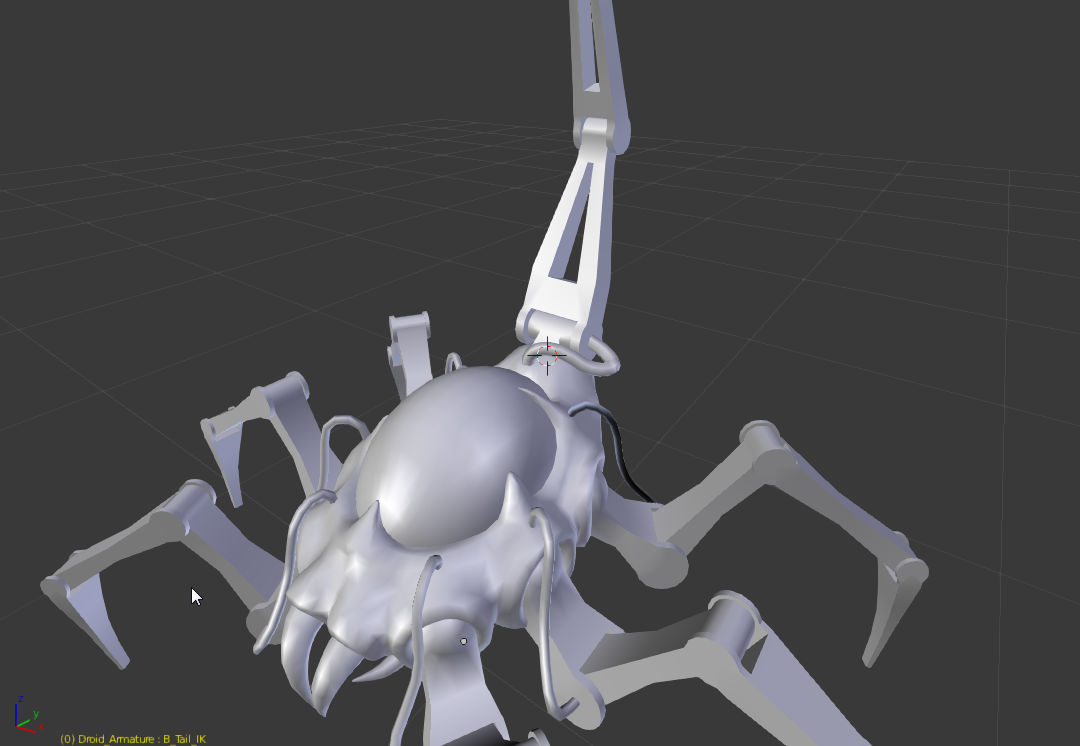
I got this spiderlike character
his 50/50 organic mechanic

He has a tail with a sting like scorpion
tail is mechanic so it has hinge
but this hing works only in one axis
but I want to be able to move his tail in two axis (forward backword and side to side)
as u can see this hinge can't let side rotation
I want to his organic part to be responsible for side rotation
My question is how do rig that
I already got an IK for tail which is restrict to rotates in one axis only
well
anyone?
 ashen elbow
Probably didn't understand the problem, but why not just rigging it like usual and lock up the rotation?
I assume you just need the Rig for animation and don't want to implement a feature where you can move the tail with your mouse in Unreal?
sacred estuary
Well, you didn't understand a problem if I could "just rig it like usual and lock up the rotation" I would
That's why I asked for a "skilled" rigger at first place
ashen elbow
Then excuse me sir for wasting your time ❤
sacred estuary
You have been forgiven 😃
bronze osprey
@misty dagger does it have a skeleton?
oops a rigged mesh, does it give an error on import?
misty dagger
@sacred estuary blender ik solvers, do they have a polevector rotate plane feature?
sacred estuary
@misty dagger Sorry I don't know what you are talking about, soemone else made a rig and I need to fix this one thing
sacred estuary
yes
misty dagger
How many hinges are there? I count two from here. Base, one up,.. Is there any more offscreen?
sacred estuary
There are 3 of them
I am uploading gif

 misty dagger
Does blender have something like an aim constrain?
Where you can aim an object to some other object and have up vector feature?
sacred estuary
yes it does
misty dagger
OK, you need a joint for that organic base bit. It has to be a parent of the tail chain
Then you aim that to an object directly down its main axis. As up vector object you specify the tail end handle
Then the entire twist rotation will come from that and the hinge should stay more or less intact
sacred estuary
the problem is that I had it setup that way
but the hing was also rotating a bit in wrong axes
*hinge
misty dagger
I just made a test in maya and it works fine. Hinge has about 2 degrees full freedom in flip poses, but that's acceptable I think
The whole ik and aim constrain maths should be the same in blender like Maya so that shouldn't be an issue
sacred estuary
hmmm I will try, but I need to go now, can I catch you later in couple hours?
sacred estuary
that would be great, thanks 😃
devout dagger
I got UE4 Mobile Mannequin and UE4 animation starter pack into my project, but when I try using anim asset for mobile mannequin, I can't seem to find any anims.
 vapid socket
Is there any way to see which frame-rate an imported animation has? i can't find any location where the anim fps are shown..
devout dagger
All I need is for mobile mannequin model to play a single looping idle anim from that starter pack.
What do I need to do?
misty dagger
Could it be that mobile mannequin has a different skeleton? Else it might be that the animations aren't referencing the correct skeleton. You might need to reimport the animation to the correct skeleton that your mobile mannequin is using
devout dagger
How would I reimport the anims to reference new skeleton?
(Or rather mobile skeleton)
misty dagger
Export them as fbx. Manually import back in. In the import dialog specify the correct skeleton
devout dagger
aye, that didn't work. Still see no anims for Mobile mannequin
maybe standard mannequin and mobile mannequin have different skeletons ? (mobile would have less bones I assume)
sacred estuary
@misty dagger hey I am back will you find a time to help me?
sacred estuary
great 😃
devout dagger
I'll record a video when I get home from work showing what I do with UE4 mobile mannequin. Maybe I am doing something wrong.
misty dagger
Aye
misty dagger
@bronze osprey Sorry I fell alseep HARD, well I'm awake now, yeah it gave no error or anyhting like that
bronze osprey
hmm never had that, i had all my constraints dumped on the root bone once
after exportin out of the engine and reimport em
if the bones are not connected there wont be any constraints, other than that i dunno
misty dagger
They are connected
:/
Well screw it for now, I jsut wanted to do a physics blend on the door animation, but constrain it so it wouldn't spin unrealistically
but jsut the animation works also
 sharp cedar
so here is a situation: I have a character with anim bp that controls idle / walking / running. What would be a good way to adding attacking animations? Using play anim (and ignoring the whole animation BP, or putting this stuff in anim BP)?
if the second option, what would be a good way of running a single animation from anim bp?
as in: event attack, one sword swing, back to normal
I need to also inform the pawn when the swing ends.
I can add an event in the animation for that
but I have few animation with different lengths for attacks
so ideal would be I call en event "attack", attack anim plays and event "attack ended" is called and anim bp resumes as normal
misty dagger
anyone know himself with animDynamics node for chian? tryin to make a pony tail with it, but it just goes monkeynuts
 torn cape
Is there a way to show less details in the asset browser in the animation screen
tame trellis
Any animation experts can help? Skeleton Mesh deforms after Animation Retargeting: https://answers.unrealengine.com/questions/545464/skeleton-mesh-deforms-after-animation-retargeting.html
@sharp cedar - Yep, you're on the right track. Do you have an actual question? Everything you've asked you seem to have followed up with an answer yourself.
sharp cedar
@tame trellis my question is: how to actualy do that? Lets say I go with event that ingnores anim bp and runs the animation. Can I somehow bind another event to the end of than animation to get back to playing anim bp, and do other things?
tame trellis
Don't do that. Create "Attacking?" boolean in your character, and set that to true when you want to atack
Poll that variable inside your Anim BP - and transfer that to a local variable there
Then use that to transition into Attacking state
Setup an Anim Notify when attack is complete - drive that back to Character BP to "complete" the attack animation and reset the "Attacking?" boolean
@sharp cedar
tame trellis
Nps, ping me if you want screenshots from the way I've implemented that in my game
 tacit meadow
Hi all... I'm trying to change animation speeds from an anim blueprint at runtime. Basically implement a "fast forward" button that will speed up any currently playing animation for a character. Any ideas?
tacit meadow
ah cool, just found out about the Actor variable for CustomTimeDillation and this'll work nicely
 noble olive
you can also change the animation playrate
karmic briar
@misty dagger Yeah just mannequin with sceleton and rig. Export from ue4 assets ruining rig and bone structure so im searching for ue4 mannequin for max\maya
 finite trail
Hey guys, need some help with something...
My aim offset is ... doing this?
But everything is fine. This started happening since 4.11 or so (I turned off aim offsets for awhile, but players want them back, and so do I). on 4.14 now.
Did some setting change? I can't find anything that would cause such weird results.
Vid of what this looks like in game. https://video.twimg.com/tweet_video/C1hlGhDUkAAAz2x.mp4
This is all fine here too.
 proven osprey
Hey everyone! I have a blend space with death animations; Forward, left, and right
How can I get the location of where the damage is applied and play the correct animation?
finite trail
@proven osprey
Just assign a number to the direction
back 0 left 1 right 2 forward 3
and so on.
As for the direction, that's more of a blueprint question regarding raytraces and stuff.
proven osprey
Would I get like the hit bone name or something?
finite trail
Break the hit result, get the ... normal I think? That will give you a very precise impact direction
Something like that. Can't help much more on that, but that should get your started.
finite trail
Good luck. 😃
If anyone knows how to fix my earlier ^ above issue, please do @ me. 😃
proven osprey
Also It looks like my blendspaces aren't syncing up with my pawn's movement?
it only works at max speed
if I set it to 50% it moves, then snaps back a little, then moves
devout dagger
can someone please recommend good tutorial about setting up anims inside UE4 for FPS weapon/hands ?
 sudden scarab
beginner question: I have a state machine where I enter an attack move graph on "doAttach=true". is there a way to set this variable to false once the animation is complete from within a transition or a animation state?
doAttack.. not doAttach
Ah got it .. i can trigger events in the transition
THX anyway
misty dagger
Anyone here has experience with IK in UE4?
 neat jungle
Hey I tried importing an animation for a character I made but it created like a dozen anim skeletons
Any idea what that's about?
and... it also didn't export properly, crud
Does blender not export FBX files properly?
misty dagger
i heard bad things on blender fbx export
as for the dozen anim skeleton, thats probably the way you want it, unless you didnt specify a character target skeleton when importing those animations
rustic gull
Anyone familiar with the ART tool?
 violet dew
is there a way to rotate a bone but not what it's controlling? to redefine its neutral orientation
My bone is actually like this
but i want it to be like this
violet dew
nvm, i exported it back applying transforms, it worked
 keen garnet
@violet dew just a side not, this car looks amazing!
violet dew
yeah thanks, i didn't made it, but i applied the materials and fixed the original mesh
misty dagger
I dont think so no, youll have to reorient in your 3d modeling software and rebind the skinCluster
violet dew
i had to apply the rotation in blender to fix it yeah
misty dagger
Hey im new to animation and i got a jedi starfighter, im trying to get the wings opening like this https://youtu.be/2WeX41WfOsY?t=33s but again im extremely new, so maybe someone can teach me 😄
 eager arrow
@neat jungle blender's fbx export is rather silly. Try using ascii, and make sure your files are metric scale. Besides that, if I get on my pc, I could link you some stuff that helped me.
 covert stratus
So just before christmas, mixamo dropped their UE4 export support. We lose root motion, but with a -90 x rotation we can still cop some smooth, free moves
http://i.imgur.com/n6Fx8A8.gifv
also there's two different skeletons - one if you export from Fuse and upload, and one if you download characters directly from the mixamo store. Are you all mainly using epic-template-based skeletons or mixamo-based skeletons?
frail basin
@covert stratus seen this? https://forums.unrealengine.com/showthread.php?132268-Retargeting-Mixamo-In-Place-Animation-To-Epic-Skeleton
Introduction
Since Mixamo has just removed the option for UE4 download, I want to make a quick tutorial on how to get any in-place Mixamo animation working on Epic Skeleton.
Compiled Project Files
First off here is a compiled project showing off one of the issue with Mixamo animation and what it look like when you fixed it.
https://www.dropbox.com/s/uvbxf4r5ub0lvun/MixamoRetarget.zip?dl=0
Epic Skeleton Without Root
TLDR: you can just upload the provided skeleton without root and ik bones to mixamo, use it for animation export there and then retarget the animations using ue4 back to the ue4 skeleton
UE4 retargeting doesn't need extra bone matching etc as it's the same skeleton without few bones so it's really quick way to do it
I think I retargeted 2400+ anims in few minutes
covert stratus
Oooh, fantastic! I'm now using a similar method except using a fuse skeleton because that's the final type for all my characters. I'll need the above process for my next game when I base things properly on the epic skeleton. Thanks @frail basin!
Retargeting is great
frail basin
it worked fine on my attemts
it's still not 1:1 as mixamo treats root bit differently
there are few animations where the character sits somewhere but moves up and down as the root is not in right place
but for most anims that works pretty good
neat jungle
@eager arrow that would be very helpful, thanks!
devout dagger
folks, can you upvote this one please https://trello.com/c/s4NwIMNY ?
Organize anything, together. Trello is a collaboration tool that organizes your projects into boards. In one glance, know what's being worked on, who's working on what, and where something is in a process.
half orbit
Is there any other why than Morph targets to customize a character(well, except swaping body parts)? You can scale bones, but unless you put multiple bone for every part of the body that shouldn't be worth the time.
eager arrow
@neat jungle I sent you a private message! Hope those help!
torn cape
how can you make a transition rule take effect when an animation finishes?
misty dagger
you use the timeRemaining or timeReminaingFraction nodes in combination with the <
torn cape
@misty dagger so doing timeRemaining == 0.0 wouldn't be right?
@misty dagger https://drive.google.com/file/d/0BxfRs2FjbvJaWW1uWGNWSGdsam8/view?usp=drivesdk
I have this, and i tried both. And neither work.

Google Docs
misty dagger
hm thats wired, would need to know more about the context, the rest of the state machine and how the animations are used. Generally that stuff simply works. Check out the 3rd person tutorials on the epic website
torn cape
I was able to get it figured out, had to do what you said, something else was stopping it
 obtuse gorge
Is it possible to make a level sequence take any parameters?, like I create an animation on a single actor, and would like it to play on runtime spawned actors on demand. Or is that the wrong way to go about it
 sudden sedge
hey, anyone active here?
frail basin
that question never works here
just ask and people will reply if they know / when they are online again
sudden sedge
oh dear
alright, anyone know how the layered blend per bone node works?

this thing
It's exactly what I want, but the documentation on it is not that great
copper dawn
20 second google search though: https://answers.unrealengine.com/questions/151362/how-to-use-the-layered-blend-per-bone-animation-no.html
sudden sedge
I looked at that
didn't really help
also what he does, is just make the upper torso do it
I kind of wanted that, but I wanted half values
so it would gradually go up through the torso
so you get significantly cleaner aim poses
 gusty hedge
In the details of the layered blend per bone you can specify how much you want to blend the animation into the bone.
you will need to specify the bone name but try to take the blend depth values from a 0 to 1 range.
0 = no animation applyed to bone
1 = full animation applied to bone
 fiery copper
Dont see why not
sudden sedge
I tried, but it rounded to 1
gusty hedge
yeah like for instance like:
bone_01 / blend .25
bone_01 / blend .50
bone_01 / blend 1
sorry***
bone_01 / blend .25
bone_02 / blend .50
bone_03 / blend 1
gusty hedge
also the blend weights float pin will take more authority over the value than the bone blend weight
gusty hedge
you can disable this by un-checking the pin in the details panel
it does, you would need to have some sort of float value drive it if you want that seemless blend to happen in the animation graph
i do this for my characters rifle animation but ill have to hit you back up on that when i get home form work and send some images of it
sudden sedge
hmm
there is a uh
blend depth
which does a gradient
issue is
I can't affect the legs either
oh I can
ish
hmm
this is such a wierd node
I just want weightlists ;_;
w/e I guess it's good enough
wonder if I can apply aimlayers differently for walk cycles
err idle
and have full body aiming
 chilly pelican
I know there is a default huminoid rig, but is there a default qudraped rig for UE4? I'm working on animal sculpting and I'm going to rig a few.
 hushed agate
I have a blank project that I imported the UE4 skeleton into, and an animation that I did in maya. In maya the animation looks/reacts as expected (when baked & exported to .fbx)..... however inside of UE4 it is doing unexpected behavior, the joints are crossing over eachother and not following their data as the joints are in Maya..... I remember having this before, but dont remember how I fixed it. I looked up some research and found answerhub posts on Animation Retargettign settings, which i've done (Recursively Skeleton from the root down + Animation Scaled on the pelvis)... but its still reacting this way - suggestions?
VIDEO OF PROBLEM - Arms crossing when they shouldnt... theory: Animation curves in UE4 are auto-tangenting for one of hte arms rotations... this DOESNT look the same in maya on the same .fbx.