#animation
1 messages · Page 80 of 1
 jovial night
"Joint Target Location"
does anyone know? I really dont see the purpose of it
seems like just setting it to 0,0,0 works fine
except elbows are moving the wrong way, probably because of my inexperience with rigging 😦
jovial night
ah okay, i figured it out, thats what the joint target location is for, tells which way to bend
 craggy coral
so
this mixamo thing
is it good with UE?
I'm looking around their page now
but good info on pricing etc. seems to be a bit absent... 😉
they seem to have merged with Adobe
so maybe they don't know what their pricing situation will be atm or something
very strange
craggy coral
@foggy night but how much does it cost?
and what things cost money at all?
right now it says that the applications are free, but I suppose the actual animations still cost money if you want to download them? But I can't seem to find any price listings just browsing around on the public side
I guess I have to create an account, and get all the way to some checkout screen to see an actual quote? that seems very roundabout to me..
craggy coral
yes, but are all the animations free as well?
that doesn't seem like a good businessmodel
😉
 foggy night
There is probably some profit going on somehow
Anyway, I use it for a lot of my models and animations. Good for prototyping games. 😃
 misty dagger
Everything around mixamo is free (atm). They say they might change that in the future but I don't see that coming.
misty dagger
Don't think about it. Just enjoy the free goodies
 rocky brook
so I have an anim notify that triggers the following function
The anim notify that calls that function^ happens close to the end of the Grab section
In the function I am doing a Montage Jump To Section. I tried Montage Set Next Section first but that wasn't working. I think it wasn't working because sometimes the GetCurrentMontage bp node returns null because the animation can finish before it gets called.
I set the animation montage's blend out time to 0 and it seems to be working. However, now if he grabs and doesn't hit something (i.e. the animation doesn't jump to Success) then it looks really bad because the animation needs to blend out.
I guess I might want to set the blend out time dynamically. So if you succeed with the grab then I would set the Blend Out Time to 0 dynamically
Or I should make the actual animation go back to idle so I don't have to rely on blending
anyone have any other suggestions on this?
 ashen solar
Can you not add a 'Fail' section with a related animation that follows 'Grab' by default? That way when you don't hit the jump to section call, your animation still exits nicely?
rocky brook
Yeah that was one of the options I was thinking of
I think that would probably be the cleanest
ashen solar
Yeah, your blueprint functionality stays the same.
Montage takes care of it otherwise.
Will look better than just blending out anyway.
rocky brook
Cool, yeah that helps. I was really looking for a sanity check 😃
ashen solar
👍
rocky brook
Thank you 😈
 sacred estuary
hey
there is new animation plugin
I forgot name...
where basicly you can make animation from the scratch in engine
anyone can tell me its name?
misty dagger
Uhm,you mean Allright rig?
sacred estuary
Yes, Thank you @misty dagger 😗
 glossy flicker
i think i am just super stupid, but how do I rotate a character?
so that it faces always the other direction it walks or something
 waxen maple
@coral sleet Probably just as mistake, also remember to set blend space anim notify setting to make calls only from the animation with the heighest weight.
 finite trail
Does anyone know how to turn off animation for a character? (For optimization)
Animation simulation is very CPU heavy it turns out, when in large numbers. I want to turn it off on distant NPCs, can't figure out which node is supposed to do that.
This pauses anims (doesn't 'tick' them) but Bones still refresh
Oh, "No Skeleton Update"
waxen maple
@finite trail It's my understanding there is a way to lod animations like what your talking about. I don't know anything about such a system other than I hear someone mention it.
finite trail
@waxen maple thanks, looking into more solutions like that. Not finding a lot, but my cutoff can be pretty harsh too.
So anything helps :)
 winter bronze
any blender users here?
anyone knows how can I fix the index finger to make it swivel correctly to down instead of to the side?
The thumb finger works correctly, but it seems all of the bones follow the same movement as the thumb moves, how can I manually tell it to move down?
misty dagger
That should be the joint orientation you need to match between all fingers
winter bronze
I tried rotating them but nothing changes
ashen solar
Trying to use IK on the fingers?
 dense bough
@finite trail Paragon uses an animation LOD system, minions have choppy movement in the distance iirc
 dusky arrow
cool
winter bronze
@ashen solar I am using IK
ashen solar
Are the joints in a perfectly straight line or is there some bend that follows the natural bend of the fingers?
Not familiar with Blender, but in Max / Maya if you apply IK to a joint chain, it will bend along the default curve built in the chain. If there is no curve and the chain is straight, you have to define a "preferred angle" to specify which way the joints bend.
misty dagger
Joint orient is also important. It's an internal second channel for joint rotation. That exists to align joints without affecting their rotation channel. Ik solvers use those values for preferred angle calculations. And it helps to make sure joints have 0 rotations while still having an arbitrary orientation
winter bronze
so, anyone knows where those options are? I only see one option for orientation and that just rotates the bones
misty dagger
Don't know for blender, sry
finite trail
@dense bough Any idea how?
 nova iron
Ah, help. I just tried to add a Mixamo skeletal mesh, and it went horribly wrong. I'm back to the default SK_Mannequin, but I had saved some changes to the skeleton, and now the Idle animation is the only thing that works. Everything now moves around in T-Pose. Can someone point me towards a solution?
dense bough
@finite trail sorry no clue, but I assume it would be done in the animation blueprint
ashen solar
@finite trail On your SkeletalMesh component under the 'Optimization' category there's a checkbox for 'Enable Update Rate Optimizations'
dense bough
^ there we go, someone with more experience than me :P
ashen solar
Have to pull off your SkeletalMesh component in your blueprint.
Just look for that same property.
Don't know that there's really any reason to set it dynamically though. It's based on range / visibility.
So if the character is visible and close, it will be evaluating every frame.
finite trail
Oh, so it does it anyway? Cool, thanks @ashen solar
ashen solar
Yup, the further away the mesh is, the more it optimizes.
There should be a debug checkbox right below it if you want to visualize the points at which it's switching.
finite trail
Awesome, thank you
ashen solar
Sure thing!
 inner zephyr
that mixamo pack that's free on marketplace has some realy SHIT animations 😦 and it's not possible to retarget animations from mannequin to the mixamo characters :/
 covert moth
Hey all, i would like to know if the mixamo animations downloaded as FBX for unity will work in ue?
inner zephyr
animation people!
uhm
i've added a punch animation
works great and looks good
but
i have a traceline on (left mouse button aka punch) when i press the mouse button the traceline comes up befor the animation has even started
how to fix?!
ashen solar
Well, how are you implementing the line trace? On button click? On animation start? On an animation event?
inner zephyr
rather, i want the whole punch animation to be run and not interrupted if the player only presses the mouse button once
on button click
ashen solar
Guess I'm confused, are you using the result of the line trace as a condition to whether or not the animation is played?
inner zephyr
no
that's to see if i hit another player
so if im close to player i can press left mouse button quick and i'll still hit him and deal damage and the animation never ran at all
i have to hold the left mouse button in for the entire duration of the animation
ashen solar
So how are you handling the punch animation? Is it a montage or a state in the animation graph?
inner zephyr
state
ashen solar
Gotcha, so one way to handle it would be to remove it from the state machine / graph and use a montage instead. That way on your button press you can start the montage THEN the line trace.
The montage will play the full animation then go back to the graph's behavior.
inner zephyr
i tried with the montage
didnt work for some reason :S
i printed string and i said that it ran the montage
but the character didn't do anything :S
ashen solar
So in the montage, you specify a 'Slot' that the montage plays on. Somewhere in your animation graph, you'll need to place a Slot Node that uses the same slot specified in your montage.
That way when any montage is played on that slot, that's where the animation gets inserted into the graph.
ashen solar
No problem. You could still handle it in a state, but rather than relying on whether or not your button is up / down, you would need to set a value to true on the initial button press, and then back to false when the animation is finished, through an anim event or something.
inner zephyr
just getting into animation! hehe, been training for 3 months on coding, materials and shit and just started today on learning basic animation stuff
ashen solar
But, montage is a bit more straight forward, once you get the graph set up to used them properly 😃
inner zephyr
@ashen solar it says that the node "play anim montage" (self) is not a character? :S
i have that play montage node inside the animBP graph :S
ashen solar
What blueprint are you doing the line trace from?
inner zephyr
i got it to work, was a bit confused about the "Slot node" i didn't know i just had to place it out there and connect it 😛 thought i had to specify slot
but apparently not
i hit a problem now :S
why doesn't this work?
i can move arround and jump and stuff
but not punch
in my head that should work :S
@ashen solar you gone? 😮
ashen solar
Nope, around. Just at work, so I may or may not respond in a timely fashion ;p
Your default state machine needs to pass through the slot node
inner zephyr
didn't work either :/
scratch that
i named the "BoneName" in the "Layer setup" wrong :p
ashen solar
Was just about to say, could be something in your layer node 😃
inner zephyr
it's fun to learn UE4 ^^
question
now that they blend, they ALWAYS blend, say if the character stays still how can i make the punch animation run full (without blend)?
covert moth
Hey all, i would like to know if the mixamo animations downloaded as FBX for unity will work in ue?
inner zephyr
i dunno, personaly i hate unity so i've never used it neither do i know anything about it
ashen solar
@inner zephyr Can't recall for sure, but I thought there was something similar in this video... https://www.youtube.com/watch?v=3NK97psTA8g&list=PLZlv_N0_O1gbggHiwNP2JBXGeD2h12tbB&index=54

Either way, worth watching.
There's a few other animation blueprint twitch broadcasts they've done, just have to search for them.
inner zephyr
@ashen solar still here? ^^
you now when you retarget animation and select a rig, is it possible to make my own rig so i dont have to manualy select each bone each fucking time? -.-
know*
-.-
ashen solar
Yeah... I know you can. Been a while since I've done it.
Would have to look back to refresh my memory.
ashen solar
Ah, have to do it off of the skeleton uasset.
Right click your skeleton, then create, then create rig
 near raft
Anyone know how I can set up wheel collisions that actually work? And have them animated? I'm trying to make some retractible landing gear, but absolutely nothing I try works
I can get my landing gear to retract and deploy, but all collision is ignored except for my main body
 normal bramble
how do you set/get a bind pose? I need to use the anim graph but don't have any/otherwise need any animations
hrm. I've done all this before but can't for the life of me remember how. To the content examples!
normal bramble
well, I think I have it set up right. I'm trying to use IK to position the hand and elbow correctly. I targeted hand_r with Two Bone IK but it just moves the elbow. the hand stays where it is.
got it, transform bone
normal bramble
world space isn't world space for this skeleton apparently
inner zephyr
i thought it would be easy to retarget animation on that mixamo pack but hell no
that GanFault character is fucking hard
 drowsy flame
Hello everyone!
Is it possible to make a state machine restarts the animation from the beginning? What I'm trying to do is having a character react to a punch hit. The thing is that he could receive a second punch before the first "punched" animation is over and in that case I want the "punched" animation to start from the beginning.
I have that in my anim graph
since the punches are fast, the "Is punched" variable doesn't change to a new state between punches, it is continously true
and the punched animation is continously playing after it finishes, but I want it to start from the beginning on every punch
any idea?
misty dagger
In the state where the punched anim is played. There should be an option to not play as loop.
drowsy flame
@misty dagger if I disable looping, the punched animation only plays once
misty dagger
You need to set a variable system. Ispunched. When you are punched, play anim once. When you reach the end. Set is punched back to 0. If you get punched again while punched is playing. Set a second variable on ispunchedagain. Play a second punched anim. You can chain puncheds like that I think.
drowsy flame
@misty dagger thanks... I'll give it a try...it sounds like it could work, thank you!
drowsy flame
@misty dagger I've tried your idea and it works, but it doesn't seem to play as fast as possible, here:

and that's the result
if I play the punched animation directly from event graph liek this:
the result is this:

as you can see the punched animation plays faster, as expected, when played directly from event graph
drowsy flame
@misty dagger Thanks again! Your idea works perfectly! What I had to do was to also set the blend duration of the transition to 0 (from 0.2) to make it change state instantly!
misty dagger
Awesome, good job mate
 final cliff
Hi guys, I'm trying to animate a machine with a lot of different parts. What is the best approach for animating it? I've tried vertex animation (no bones), and also using the sequencer, but it's getting too heavy to run, is there a better way?
they are all separate parts, I'm thinking that having them joined might improve performance
misty dagger
Not quite sure what it is. But I'd rig it up with bones. That'll give you most detailed animations with least amount of work
waxen maple
@final cliff use bones
ashen solar
Don't think you even have to use bones. Should be able to set up the objects in a hierarchy and import it as a skeletal mesh.
waxen maple
Never tried that before
Just tried it, would not recomend it, lol
it does work which is cool, tho
 faint flicker
lookit here, showing off some of UE's animation features used in prototyping Psychonauts 2: https://www.youtube.com/watch?v=99JNA0x0EJY

 sharp cedar
If I have a normal anim blueprint (like from the template), how can I play a single animation and get back to executing animation blueprint once the animation that I called ends?
If I just call "Play animation" it doesn't return to executing anim. blueprint and just stops
foggy night
You need to return to use animation blueprint for your mesh
normal bramble
I'm having a bone transform problem. I'm trying to get a wrist bone to match up with a vive controller, but setting the location in world space is giving me odd results, like it's not actually in world space. the wrist moves the wrong way, etc.
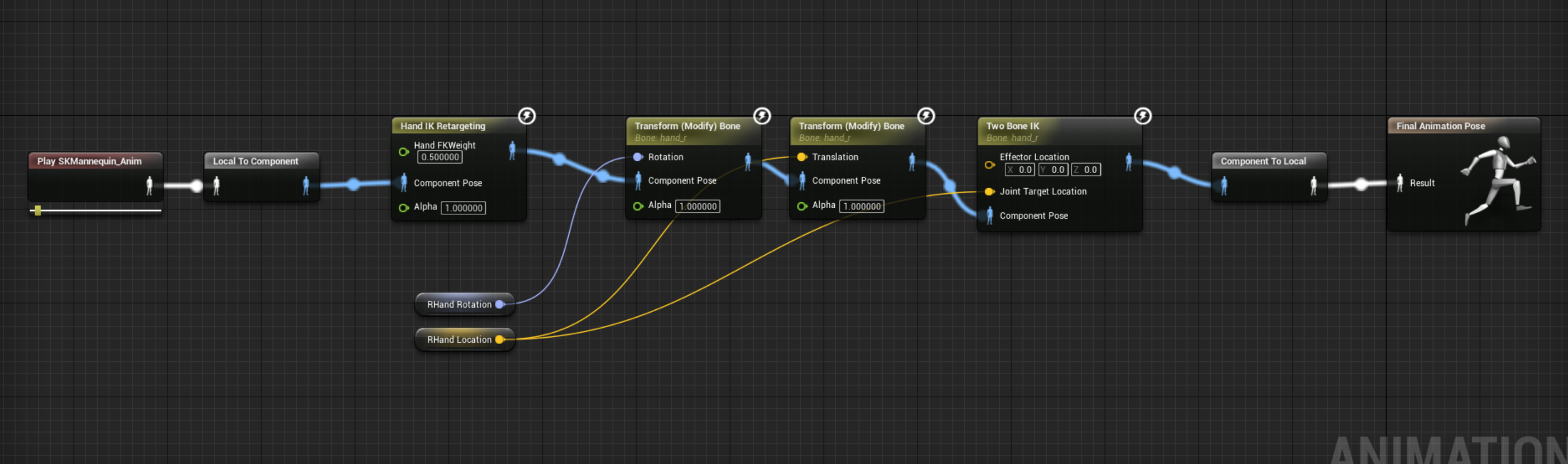
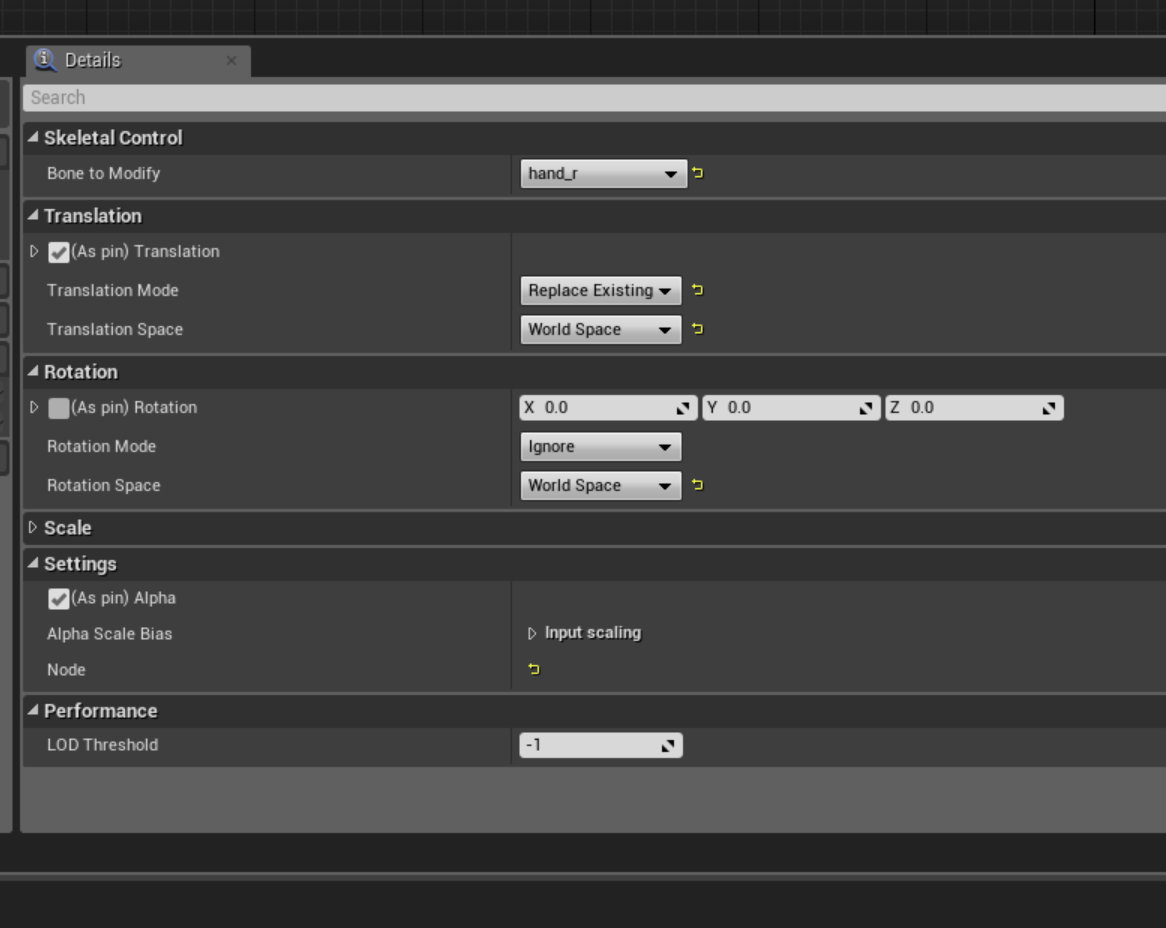
what am I probably doing wrong here? I know that my skeleton is a bit.. strange
like it has funny orientation due to coming from C4D
but that shouldn't matter for this
here's the graph that populates the variables:
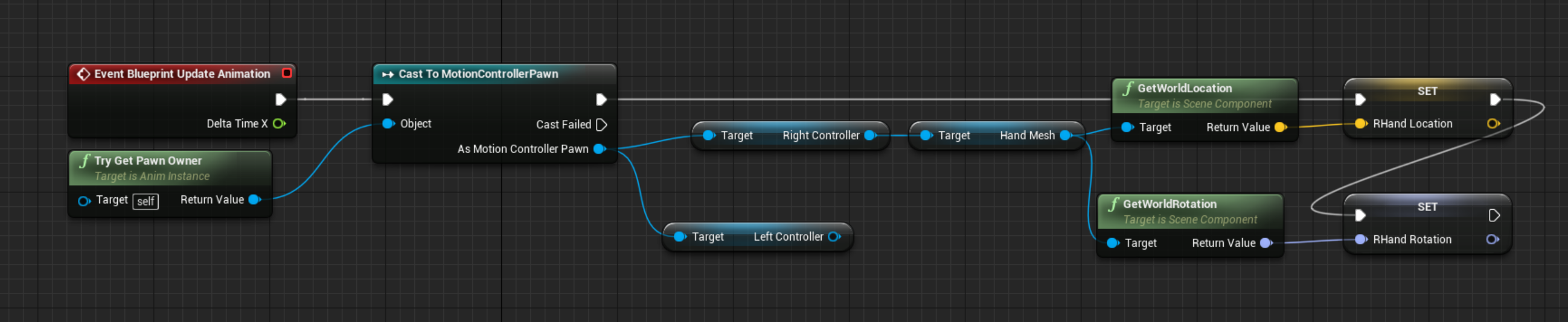 normal bramble
ok, I tested it with a UE-skeleton based asset, all the same transform problems.
I am quite confused, but meh, I'll keep trying
no wait I'm confusing myself
it worked with the new skeleton
but the IK isn't tracking the wrist to the hand
the hand mapped to the vive
but the wrist was in the wrong space somehow
normal bramble
got it. it was much simpler than I realised.
 radiant cradle
hi
quick question, did anybody manage to successfully fix the root animation problem with mixamo characters?
they have no root and i've read that the root bone needs to be added
but i only have blender available and i don't really know how to use it (as i'm not an animator or a 3d artist)
rocky brook
I wish that I could have a different slot per section in an animation montage
anyone know if that is possible somehow?
sharp cedar
Can I somehow download Animation Starter Pack for the old UE4 manquin?
 cedar bloom
@sharp cedar https://www.youtube.com/watch?v=xy9aLbZLdeA

should be more simple than that tho
I bet they have nearly the same skeleton and will retarget fine
you talking about the 4.1 manikin? the og one? (i wasn't here back then)
winter bronze
Hello guys, can somebody explain how anims in game work? I mean how for example, first person animations work? Reloading the weapon for example? How does the mag moves synched to the hand? Another anim that moves the mag on itself? Or the mag is attached to the hand of the FPS rig?
 balmy needle
Hello,
We are trying to use the animations on the Unreal default character on a custom character we made which uses the same rig as the default character. However, the bones have been adjusted in size to fit the character and we have managed to skin the mesh and import it in Unreal. But the animations are not playing on the custom character.
Any idea what might be going wrong?
 clever shore
 pale sentinel
Does anyone know why my custom notifications dont even fire?
I'll show the setup


Thats my setup, animnotify_endofattack never fires
waxen maple
It's never being reached by the animation system @pale sentinel
You're asking the animation engine to call an event on the back half of the 24th frame or the start of thr 25th.
Set the notify on the 24th frame or slightly before so it has time to get sampled.
Assuming you need the flag set at the extreme end of the animation. And the animation has some kind of transisiton out into another state you can set a notify in the transition start (coming from the attack to idle for example) that calls EndOfAttack
Or, set the looping state of your attack to false, then set your transition up to be true + (automatic rule based on sequence player in state = true) and then set duration to transition duration to 0. This means the transition will be instant once the animation reaches the absolute end, and your notify will be called 100% of the time because the playhead always reaches and samples the very end 100% of the animation.
pale sentinel
@waxen maple Thanks matey, the only dam annimation causing an issue is the dam attack so hopefully this advice fixes it
pale sentinel
@waxen maple Is how I'm going about this good or bad? when the player does a melee attack a flag is set, they can't attack again until the animator access its member variable and sets it back
This flag on the character also acts as the transition for the attack
to attack animation when its set to true (when player attacks), back to idle or jump when the animation is finished (notify flag)
waxen maple
@pale sentinel Yeah that's fine. I do something similar. I set a DoAttack flag, that opens the transition to the attack state. Once the attack state completes and it begins the transition out of the attack state, I use End Transition Event to call a FLUSH event that clears attack related variables. This allows the player to attack again once the attack completes.
But you can also call a notify from the animation, just as long as your implimentation stays consistant.
pale sentinel
I did as you stated but the same crap is occuring, slowly left click = fine, fast left click locks into animation, i hate when something works apart from one single aspect and kicks you when you're down
waxen maple
Try setting your flag from End Transition Event
pale sentinel
Where is that event located if i may ask, It's not on the event graph
waxen maple
Select your transition out of your Attack State and look at the very bottom of the Details
under a section called Notifications
pale sentinel
thank you
waxen maple
Yup, this should insure that the flag is not set until the transition out finishes and your out of that state. Should help avoid locking you.
Also unless you have some condition to exit the attack your transition out of the Attack State should be set perm TRUE, to insure you always exit after an attack completes.
pale sentinel
Still manages to get itself stuck even with binding to those events, it has to be something in my code
it has to be a case scenario where my code side has the flag still set where as the animation side doesnt
waxen maple
That would be my bet at this point.
pale sentinel
wasted so much time of my first jam on this one attack animation, Q_Q 😛
waxen maple
Jams are just as much about learning!
pale sentinel
checking it out it does seem to get stuck
so somehow the flag on the code side sets before the code on the animation side is set
I think I see where

Animation tick in the top right will get teh variable from the code
at the end of animation the end attack animation will set the code side flag to false then set the local flag to false
but if the player clicks to attack fast
the attack flag on code side gets set and the animation side tick must pick it up
waxen maple
That sounds about right. lol
pale sentinel
Now, how the hell to fix this bugger lmao
hmm might try using a second bool to check if a reset is being made
waxen maple
Just be careful with too many bools.
pale sentinel
What would you do in my situation if i may ask
waxen maple
Hmmmm
Yeah I guess you need two bools in this case as I see it in my head
bAttackIntent would store if the player has pressed the attack button. This can have a small buffer timer, that after 0.5f seconds the bAttackIntent returns to false. So players don't buffer attacks to far ahead.
bDoAttack would then hold if the attack should be happening.
So logically something like. If bDoAttack is false, and bAttackIntent is true, set bDoAttack true.
now you transition into your attack state, and then back out. On the exit event from the transition back to your idle, you call EndOfAttack which sets bDoAttack to false
now the cycle begins again. If bAttackIntent is true during the next tick, your bDoAttack will be set to true again and you'll enter the attack state. Rinse Repeat.
This is also sudo code from my head mind you so. Give something like that a shot. That would be my first attempt.
Heading home, will be around later this evening. Happy to help ya more if you still need it.
pale sentinel
thank you for your time
pale sentinel
@waxen maple I'm literally going to kill myself, rip
waxen maple
I don't advise that
winter bronze
anyone retargeted AnimStartPack anims to FirstPersonArms template?
rocky brook
has anyone else had issues with Anim Notifies being triggered multiple times when changing the play rate of the animation in a montage?
I changed the play rate to .4 for the last animation of my montage. And the anim notify is now getting hit twice
 past zealot
Hey guys, is there a way to get the UE4 Mannequin into Maya with the full rig? or am I meant to use the maya tools to create the bare skeleton? I've been seeing a lot of conflicting things about this
oh, maya tools apparently comes with the mannequin
 rancid wyvern
quick question how to exit root motion animation early and not brake capsule rotation?
glossy flicker
When I import the unreal engine skeleton into blender I get wrongly rotated bones. Anybody knows how to fix this?
http://imgur.com/a/vqk00

Imgur: The most awesome images on the Internet.
 late apex
i think i read somewhere that despite easy transferrence, they actually use different axis values
glossy flicker
hm
I got the problem somewhat fixed by using "auto orient bones" on the importer or something
but when I Import an animation from unreal engine into blender the arms are moved down, so they aren't at the end of the shoulders

Imgur: The most awesome images on the Internet.
late apex
for some axes the values are reversed from what i understood from a blender to unreal tutorial.
 frail basin
there's import setting that works
for blender
@glossy flicker
when you import fbx
I think you needed to check all those three checkboxes under "Armature"
before you hit import
oh wow
you figured it already 😄
should have read the later messages
pretty sure you need to use specifc export setup too
but I've never exported any skeletons to unreal myself
so no idea
 ocean marsh
Does anyone know if it's possible to use meshes with morph target animations in the foliage tool and use blueprints to adjust the morph targets, or will I have to manually place those?
 mossy lichen
Hm. Is this a good channel for morph target discussion?
Apparently so!
I am trying to do a stupid stupid thing.
Mostly, so I have a morph target on my body mesh. Let's say it's a bicep. I have a bracelet on the bicep. I'm wondering if I have to transfer the morph targets to it, or if I can cheat by using some method to resize the ring to match the diameter of the mesh.
misty dagger
Hi everyone does anyone know how to use conduit state in the animation blueprint?
mossy lichen
I wish I did!
normal bramble
Google it. A demonstration is better than an explanation
mossy lichen
Anyone know how to mass move morph targets from one mesh to another, like, a character to a shit?
... shirt.
sighs.
I would typo that word.
normal bramble
Hahahahahahahahahh
normal bramble
I haven't tried them yet sorry
misty dagger
I tried googling it even took a look at their documentation but it seems I don't find anything interesting in using conduits.. it's just like branching out things.
I don't know if it's pretty much similar to unity's sub state machines
normal bramble
now I'm not on mobile I can try explaining
basically it's a simplified graph for selecting which animation graph to use
each conduit can have a qualifier on it going in either direction
so the default state might be idle. when moving you go to the moving graph, but if running you go somewhere else
the jump state can't return until the player is on the ground again, for example
they're state machines
state machine does stuff, conduit qualifies how to get there and under what criteria
you can get rid of walk/run conduits by using a 1d or 2d blend space, but for things like jumping you run out of blend space dimensions so you need to switch to a new blend space. that's where conduits come in
misty dagger
@normal bramble thanks for the explanation.. Now I understand.. it's been bugging me out ever since 4.9 haha
normal bramble
hehe all good
sharp cedar
I wanted to play around with animations a little bit, and I have a noob question: I wanted to have something like a chest or a door with a fancy opening animation (multiple locks, etc).
I can do that with blueprint timelines, or with sequencer, but that is a) complicated b)not easy to put in an instanc and multiply.
so I played around with blender, to have, for a start a simple animation of an object moving around.
not a skeletal mesh. no skeleton
just a cube flying around.
is there a way to use that in UE4?
sharp cedar
ok, I think I figured it out.
sharp cedar
but I do have another question... If I have few objects in blender i can group them and export them. And if I import them to ue as a static mesh I get a nice single static mesh. But if I try to import it as skeletal, they all get seperated. Plus I get a lot of animation files that are just single frames.
but I imported a single object with animation and it worked.
so what am I doing wrong?
also.. I'm not sure if thats a blender exporting problem or ue importing one.
mossy lichen
If you EVER need to move/copy multiple morph targets to non-identical meshes, Cinema 4D is AMAZING AND SIMPLE
 junior basin
Hi. I have no idea what can or cant be done with UE4 when it comes to animation, so I hope you can point me in the right direction.
Is it possible to have a 3D mesh animate with deformation?
For example, I would like to have an animation of a beating heart. The valves and the heart walls will move and deform the shape of the heart.
Something aling the lines of this: https://www.youtube.com/watch?v=0NmWOHuy-o8

 tranquil grove
Absolutely. UE4 can take bake animations directly from an FBX that you make in blender, or maya, max, c4d whatever. And you can do animation within the engine animation system as well.
I think the only thing that really does'nt work with that stuff is destruction meshes.
 slate axle
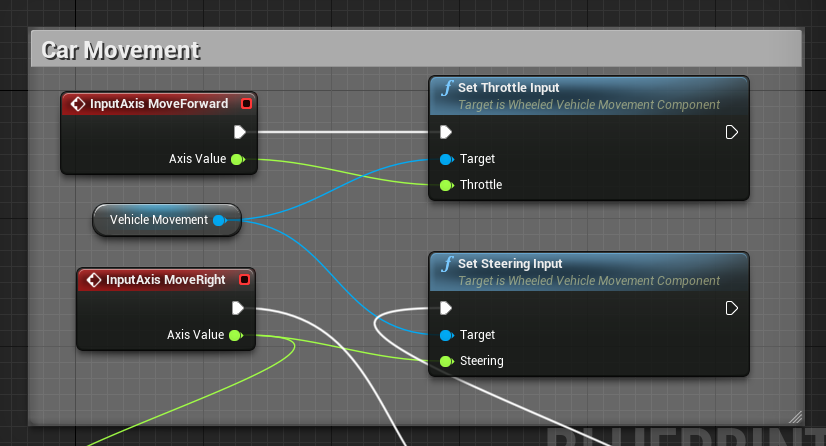
Hey, I have an error Rending my sequencer movie. I have no problem in the editor but when trying to export it as video I got this error with a vehicle BP in the scene
"PIE:Warning: Warning Attempting to move a fully simulated skeletal mesh VehicleMesh. Please use the Teleport flag" and the vehicle don´t move.
Anyone knows where to enable this flag or sholve it?
normal bramble
@junior basin you can use alembic to do direct vertex animations, or fbx to do a rigged animation, or any mesh with a morph target to do more complicated animations. you need the latter to make a beating heart.
@slate axle find your blueprint node that's moving the vehicle and check the "teleport" button on it
slate axle
Where in the BP @normal bramble? , I already tried to find it but couldn´t. Tried in the class settings, vehicle movement component, the root....
normal bramble
how does your vehicle move?
slate axle
Is a Wheeled Vehicle children blueprint in the game, and in the sequencer is recorded
moves with key inputs and set trottle input
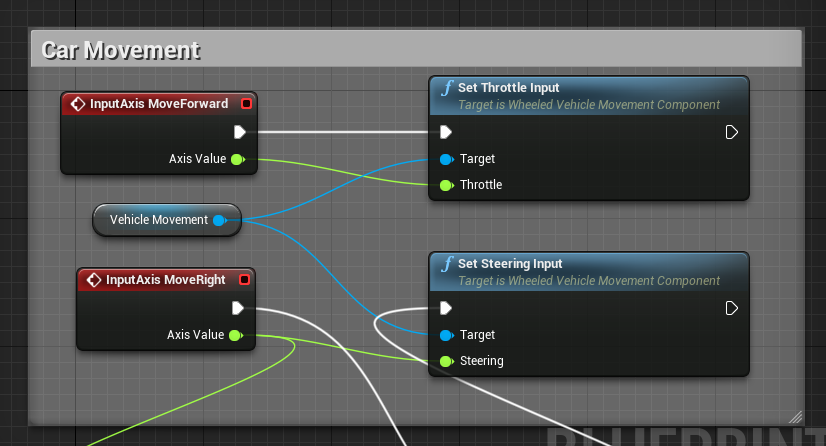 junior basin
@normal bramble Yes, I am trying to learn how to use morph targets, but it is not easy understanding all of it in one go. I have to learn animations, morph tagets and some other things.
junior basin
Yupp
 nova kestrel
Anyone know if animations can generate hit events?
 latent vigil
hello everyone anyone know how to interact with object like INSIDE the game , like push object or anything like that
dense bough
well animations can trigger events, not sure about hit events though
latent vigil
no tutorial or documentation about this ..
past zealot
Hey guys, has anyone worked with exporting assets from UE4? I bought some stuff off the marketplace but they don't supply the source files, when I export from inside UE4 it gives me like the skeleton, animation, or mesh, but I'd rather not spend time merging them all together. Is it not possible to just get all of them at once?
slate axle
@latent vigil thats depends of what you need to do, there are some tutorials about physics interaction outthere like this one https://www.youtube.com/watch?v=E1xspC8UtZs
 mossy lichen
Guys!

Giveaway of the Day
iClone5 is real-time 3D animator for digital actors, environments and visual effects with drag&drop editing, powerful physics and Microsoft Kinect-ready motion capture,...
FREEEEEEEeeeEeeEeE
normal bramble
Neat
mossy lichen
Welp, free is worth what you pay for.
Anyone tried Allright Rig?
It looks really good.
 pearl blaze
@mossy lichen - It is really good and free
mossy lichen
I was trying to buy it literally the day before it went free.
mossy lichen
"Man this looks good. Post in thread. "Wow, this looks good. I'll buy it when I get home."
Drive home.
"Wait what the hell where did the beta buy link go?"
pearl blaze
Yep he got a dev grant
mossy lichen
Yep.
Deserved every penny of it.
Him and Ali Ackbar.
I love Dungeon Architect so much.
mossy lichen
He's got a discord!
pearl blaze
😮
latent vigil
@slate axle hey bro i know that but i was talking about somthing like how to attach the ik to an object like i want to push a box or other things when im near to it it will call animation or function to attache ik to object to make me feel the character is in position of pushing
frail basin
have people made anything usable with allright rig yet?
just curious how it works in practise
 compact lake
noob question in regards to animation BP. I have setup like this made in BP out of multiple static mesh components:
http://www.dropbox.com/s/xyb75eax98a4sk9/T-26_Proto_bogie_suspension.JPG

- each pair of wheels is connected to bogie (grey part)
- each bogie is connected to "handle" (arched brown mesh)
- each handle is connected to the "base" of suspension
- and base is just weilded to the chassis
right now I'm calculating where wheels should be and from their position I need to figure out position/rotation of bogie and handle
"animation" of bogie and handle already works more or less as I want but it's implemented in BP and performance sucks.
I was adviced to use Animation BP for this type of animation. Most likely I'll animate handle by using LookAt node and just point it to the position of the bogie. The question is how can I animate bogie properly just by using existing nodes in Animation BP and avoiding using math in BP?
in BP it's easy, I find vector between pairs of wheels, rotate bogie to allign it along this vector using FindLookAtRotation and place it in the middle of the vector between wheels
compact lake
perhaps this illustrates it better
compact lake
so there is no GetBoneLocation in the AnimationBP? I found a post on forum where someone had to code it himself in c++
 quartz cove
Is there a way to "come back" from ragdoll?
compact lake
found solution:
I copy transform onto a Bogie bone two times, first moves it into poition of first wheel as alpha is 1, second copy places it right between both wheels as only 50% of second transform is applied
unfortunately I don't know if LookAt is a "Fast path" node or not, no icon is shown, hope it doesn't invalidates others which are Fast Path
 long stone
@quartz cove something like this? https://www.youtube.com/watch?v=um3tafQKWuA or more simple?
 quartz cove
Hmm, well I didn't even think it was possible
long stone
its definitely not a neat solution
quartz cove
Ah, I'm sure it some crazy workaround
 wild hollow
how can i use aimoffset blendspaces only when attacking?
 full herald
I shamefully cannot find a 4.12 download for Allright Rig beta. Does it exist?
it got the most votes so i figure it exists somewhere
full herald
dont want to upgrade engine just to test beta plugin
long stone
is it possible to get the length of an anim notify state or how complete it is as a percentage?
quartz cove
Anyone done stop-motion animations in ue4?
 solar temple

 pearl swift

Aleksandr Shatalov talked about the release of Allright Rig and gave some advice on how you can build awesome animation with Unreal Engine 4 and Maya.
Thoughts?
 dim cedar
misty dagger
dim cedar
misty dagger
No idea what you do with it tho
Certainly has not full functionality a proper maya rig would have.
 stiff thunder
yeah its not a proper alternative to a well made rig in maya (or whatever package)
cedar bloom
@pearl swift I need to try that too.
is it just a poser or can you make keyframe ik anims with it?
pearl swift
No idea. Just saw it in an article
cedar bloom
i'll figure it out on monday, Ren fest this weekend!!
frail basin
Hi, my name is Alexander Shatalov and I am 3D developer and I am excited to introduce you to my rigging system for Unreal Engine.
Allright Rig is an expandable nodes and macros library for automatic creation of character rigs and working with character animation in Unreal Engine 4. The main goal is to create a possibility of creation and editing character animation, which will help to make games, previsualization, cinematics and animation movies in Unreal Engine 4.
Rig page:
there's run cycle tutorial linked there too
 hushed agate
I'm going bonkers trying to do IK setup for my hands placement on guns..... I have a COMPONENT attached to each gun - i want to lock the left hand to this component location (i'm returning vector for it from cast to character->gun->CompLoc) but i cant get TwoBoneIK setup at all....
What am I doign wrong?

if i switch end effector to World Space (which ultimately i want to do) the arm goes wonky - doestn even look natural
pearl blaze
 hushed agate
Is this a preferred way to do gun animations like this - IK hand placement for the forehand (left typically) or should i make poses & blend them?
 visual blade
Anyone able to help me with something?
 bitter torrent
So can I just play a animation without making something like a blend space when one of my variables is true, I can get the variable but the play animation doesn't have a opening except the one to connect to final animation.
 golden verge
Hi all, does anyone know what a good approach would be to animate dozens of long hair strands as seen in games such as Bloodborne (Vicar Laurence)? I'm thinking anim dynamics?
 narrow knoll
Do they actually need to be dynamic?
This morning I'm wondering how to get animated joint scale from Maya into UE4. I don't see any evidence that this wouldn't work, but the result in persona is all wrong. It's like the anim is playing through entirely within the 1st frame, instead of over 12 frames (persona still shows 12 frames). Rotation/translation keys import fine on the same rig.
narrow knoll
Seem to have it working now, mysterious!
misty dagger
I found that joint scale anims bugged out if your bones didnt have the proper parentScale connection and segmentSacaleCompensation set up
maya takes care of that when builidng a skeleton normally, but there are cases where it doesnt do it.
 unreal cosmos

any help with IK for a VR game?
i cant use plugins
well, closed source plugins with external libraries or similar
normal bramble
you don't need a plugin to do IK
UE can do it in the anim blueprint
for VR just let the controller back vector be the elbow IK target
it'll be right 99% of the time
and will never look wrong to other players
unreal cosmos
thanks for the tip antidamage
 ember crescent
Does anyone have a convenient way to restart an AnimInstance state from code?
 sage elk
Hey all. When trying to transition via "time remaining ratio"from an animation with a play rate of -1 , the time remaining ratio float never returns a value. Any idea why this occurs?
Basically, Time Remaining ratio isn't working for me when I set the play rate of the animation to -1. I can't find a work around :/
misty dagger
Maybe just reverse the anim in your 3d software then?
 fallen plank
hey all, I have an Animation Blueprint that I'm updating with values from my motioncontrollers (SteamVR) in my character, for IK purposes. No matter what I do, there is always a 1-frame lag behind as the animation blueprint catches up with the character setting its variables. Anyone got any clues on this?
 severe raptor
I did this time ago and had no issue, how do you retrieve their position and set it @fallen plank
compact lake
@fallen plank move bones in local space only or set your character to tick before physics
Or after physics 😄
Right now I set bones after physics and they work fine even in world space
 gleaming yoke
Does anyone know about a way to model damage/collision models?
 robust dragon
yeah
you just need to go to the static mesh editor and then add collisions. there are tutorials about Destructable collisions
 autumn lava
Collisions can be also added as part of the FBX itself using prefixes for primitives representing collisions.
Setting up, exporting, and importing Static Meshes using the FBX content pipeline.
fallen plank
@severe raptor @compact lake I've got IK transform calculation in C++ of character class, then I copy the values of location and rotation to variables in the character blueprint, and then I have a skeletalmeshcomponent in that character blueprint that represents my body
I do Super::Tick(dS) at the end of my character C++ Tick, so that I calculate the values, THEN run the BP tick. I also have called in BeginPlay of C++ character: BodyMesh->AddTickPrerequisiteActor(this); so that the bodymesh ticks after the character has ticked
compact lake
try local space coordinates then
I'm still not sure when skeletal mesh gets updated
for me it works without lag in world space, but I run some calculation on Pre-Physics, some during the physics and then pass variables to skeletal mesh After-Physics
and skeletal mesh is not root in my case
this makes a difference too
fallen plank
oh, I'm running Character in post-physics
my skeletal mesh is not rootComponent either
how are you sending the variables post-physics from the same class?
compact lake
I get cast reference to custom AnimBP on BeginPlay, then set variable of AnimBP directly
fallen plank
but you tick your character in pre-physics, and then you somehow tick it again in post-physics?
compact lake
yes, I have two tick components
fallen plank
AoE II Aaaaaaahhhhhh noise
compact lake
largerly because I have some stuff running on physics sub-steps and delegate can be registered only on pre-physics
but I do things like GetWorldSpaceLocation / SetRelativeLocation in post-physics, what ever happens in pre-physics is not relevant to AnimationBP
what can be relevant is that components from which position is taken and used in AnimationBP are moved in local space, not in world space
fallen plank
oh, that's pretty much what I'm doing, but all in post-physics
wait what
is there a delay in that update?
between local and world
compact lake
yeap
fallen plank
sheeeeeeeeit man
compact lake
it's weird but that's how it is
fallen plank
so the motioncontrollercomponent is updating its relative location every tick, but that doesn't resolve until next physics update or something?
for getworldlocation
compact lake
something like that, the whole thing with skeletal meshes is not too intuitive
fallen plank
so having the two-phase tick is what is making your thing work
I'm guessing primary tick is before physics, then after physics is auxiliary computation and send-off
compact lake
in one of the UE4 version we had a bug where camera attachded to skeletal mesh would shake like crazy, apparently it's transform was sometimes updated before the parent transform
fallen plank
jeez
well, thank you profusely, I'll attempt this when I get back to the office and let you know
compact lake
you can try code if you want:

part of it is in MMTPawn + extra tick component is in it's own class
fallen plank
thanks! looking at it now
compact lake
update of animation is not there, its in BPs of another project
but it's called from MMTAfterPhysicsTick "event"
are you setting bones as relative position too?
fallen plank
just world
because it's easier for me with world interaction
saves an extra step on my code
fallen plank
I can do local though
compact lake
before I had secondary tick I was using local and it was fine
fallen plank
hmmmm
compact lake
just a bit performance loss
fallen plank
great, code is concise and makes sense
I mean, the transform between local and world would have to happen somewhere
fallen plank
it can't be that big of a performance hit to run a transform on something before sending it off to the animBP
you got it @severe raptor I'll be back to office before 12:00 EST I think so I'll be working on it after then
compact lake
depends on hierachy, you bones can be one level bellow the root but components from which location is taken are two levels and under different components
then you have to transform them twice
anyway, in my case it's just because of the prorotype
fallen plank
roight
severe raptor
how'd you notice there's a tick delay tho
fallen plank
I don't mind so much losing 1 us of performance doing something because my target is really high-end computers only for VR
compact lake
@fallen plank 8 wheels on each side of tank x 2 x 2 transformations x 10 tanks and so on
fallen plank
nice, and yeah that makes sense
@severe raptor I scoped the shit out of it all in VS with breakpoints and learned about how to make it so that animUpdate happens after
I did this because I attached an object directly to my motioncontroller component in my character, and since it's attached it would move out of phase with the update of the hands
my animBP hands move slower relative to the object they're holding
then I recorded some footage of me waving my hands around with object in them, and overlayed them on top of each other, and found that each frame showed them overlapping temporally if I overlayed two consecutive frames
at first it was 2 frames late
because my tick ordering was wrong, and the component was ticking before the actor somehow
so then I fixed that and it's noticeably snappier, but still 1 frame off
hopefully @compact lake's solution will work
downloading the debug symbols is pretty much necessary with the engine
fallen plank
so I've separated out my character into two ticks
pre-physics which is regular tick where I do the calcs for where the hand IK points should be, and then post-physics where I send off that data to all the variables
in post-physics tick I've got a blueprint implementable event that fires into my variable copy thing in BP
no dice for that last frame of lag
next I'm gonna try calculating local-space stuff to feed into it
Convert Transform to Relative
time saver there
😦 @compact lake so I converted my code to local space
no dice, this is super frustrating
 potent current
Hi all, need some pointers on creating animation to be used as an additive. How does an animator create these without knowing what it'll be added to?
let's say we have 3 layers, upper body, lower body, and secondary additive animations, what should an animator use as a base pose to create the secondary animations?
fallen plank
@compact lake I've submitted a bug fix request: https://answers.unrealengine.com/questions/515893/animation-blueprint-with-ik-has-latency-of-1-frame.html
mossy lichen
Hm. Anyone here know IK enough to tell me if I'm being stupid?
I got a character. I want to put high heeled shoes on it. Without using IK, what I get is a character perched on the heel of the shoes.
Now, my theory is proper use of IK would make the feet bend to hit the ground, but hey, what do I know.
I figure it's the same as the feet moving to match uneven terrain, but maybe I'm wrong.
compact lake
@fallen plank sad to hear that, I don't know what else you could try, maybe this is specific to contollers
maybe something like prediction/extrapoletion of position from velocity over one frame could help
 waxen agate
Hmm, I have a question. I have a train bogey - that thing which holds wheels. It's got springs on it, it's got mechanical systems which press brake pads to the wheels, it's got tons of dampers and other small moving things, including bendy metal pieces
I need to animate this all. What would be the most performance-satisfactory way of doing it?
The whole animated part of the bogey can very well reach into 400-600k polygons at highest LOD, so it's not exactly a kinda thing I'd like to entirely stuff into a skeletal mesh
Also the bogey involves a lot of independant animations (e.g. the springs depend on suspension action, but braking mechanics depend on their own animation + external forces that jitter them around a bit)
Right now I'm considering breaking it down into multiple models and animating them independantly, tying models together by attaching them to sockets (so based model is the primary suspension, which holds static mesh of everything else, to which skeletal mesh of secondary suspension is connected, to which skeletal meshes of brake mechanics are connected)
compact lake
@waxen agate animation BP is rather fast if you don't use math nodes, there is a bit of multi threading too. If you don't use skinning with multiple weight and just rig everything to individual bones then it shouldn't make a difference with driving it from c++
As you would be manipulating transforms anyway
C++ would be faster if you can multi thread it
you can build custom Anim nodes too
waxen agate
Mmm
I'm just worried that doing transforms and such for a 600k poly mesh is an unneccessary overhead
If I split off several skeletal meshes from static ones, it'll be just no more than... 50k? animated polygons
@compact lake is it tricky to set up an animation BP kinda thing from C++?
compact lake
not at all, you just move transforms around
compact lake
Animation BP does the same, I don't think there is any overhead in using skeletal mesh wtih high poly as long as you don't blend mutliple bones
waxen agate
Well
All of my animations are hierarchical anyway
As in
One bone affects a small group within a larger group
compact lake
you would do the same from code
waxen agate
Hmm
compact lake
there is example of custom ANimation Node
waxen agate
I will still split off the brake mechanics into the separate skeletal mesh
waxen agate
Cause there's four copies of same braking system and I don't wanna put bones in each of four
compact lake
waxen agate
Hmm
Now another question
How can I disable this when player isn't seeing the stuff
And when his camera is too far away to notice the animations
compact lake
Dont know, would like to know this too
waxen agate
I guess I can just query visibility of mesh somehow
This part of the train is absolutely the toughest
An absolute madness of moving parts and bits
Hmmm
@compact lake I might still go with just having skeletal mesh with static mesh attached to it, with more skeletal meshes attached to it
It seems reasonable on many levels to do that because of the mechanics of the bogey
What I'm thinking is, when you're doing a static mesh, a single transform is enough for rendering
But with skeletal mesh, there's whole bone hierarchy and so on
So for very large poly counts, probably better idea to just have smaller skeletal meshes
(because I only need to animate a low amount of polygons, most of the bogey is moving but non-deforming metal)
I actually already animated the entire bogey with animation BP - it ended up eating all of the performance
And I just realized why now (too many polygons)
compact lake
you can parent your static mesh components
without multiple bones blend it's exactly the same thing under the hood
compact lake
@waxen agate animation BP is fast if you build it as read only
Meaning there is nothing used there except animation nodes
So no math nodes, no setting of variables and erc
fallen plank
@compact lake I'd rather not extrapolate for it, because the motion is nonlinear and not as predictable as I'd like. But please do vote up my question so it might be answered sooner
waxen agate
Hmm
@compact lake can I read variables?
E.g. can I do "Cast<ABlah>(anim_bp_variable)->GetActorLocation()" (except with BP nodes)
compact lake
@waxen agate variables of Animation BP?
waxen agate
Yes
I need animBP to copy world transform from chassis with an offset
Cause some part of the bogey is hard-connected to the train
compact lake
@waxen agate you can add transform variable to AnimationBP and then do like this from BP or c++
Suspension SK is a skeletal mesh with Animation BP
or you can do reverse - In AnimationBP event graph, GetOwner()->[FindComponent]->GetComponentTransform
I don't know if it is better
with first approach I had to add a second tick component, so I can pass variable to AnimBP after physics tick
waxen agate
Shouldn't be active but passive
The animbp should fetch position rather than position being set actively each tick hmm
But yeah
compact lake
Then you can do reverse - cast from event graph of animation BP to get reference and access Transform
I don't know if this approach will remove feature of "fast path"
You can replace this with a custom animation node, as wheel handler node is done for example
waxen agate
I think I might do a custom node yes @compact lake
That might be the best way to do it
Do custom nodes break fast path? What is fast path anyway and where can I read about it
compact lake
I've seen only brief description in documentation about them
Fast path was added in one of the recent versions of the engine, maybe there are some notes that describe it in detail
Or maybe there was a stream
waxen agate
Hmm
Well, in any case I've solidly decided to go with a bunch of models
Instead of a single model
compact lake
You can see in the interface if node is fast path or not, not sure how verbose that notice is
waxen agate
So I don't care as much about performance
Since animations won't be too complex in the end
compact lake
I got 2-3 times performance boost from doing the same animation in animbp vs blueprint code
C++ would be faster but less flexible
waxen agate
I will have to hide the suspension when player is inside the wagon
Cause I don't think it will properly cull
Hmm
Makes me wonder if they fixed spawning while overlapping glitch yet
In last version I checked two objects spawning already overlapped wouldn't ever fire "overlap" event
Hmm
@compact lake so I need to overlay two animations - one animation of the mechanics (it comes from actual animation, I'm just going to scroll through paused animation by doing settime directly), second animation of rattling of the mechanics
What would be the best way to do it?
Just blend them both in anim blueprint?
Rattling is a procedural animation, I will likely add a special node for that
compact lake
so far I did only simple animation - move bone, look at rotation and etc.
waxen agate
Heh
I see
Train bogey has way too many nested and complex animations and other things
There's a multitude of soft cables too
I'm not gonna animate them though, just gonna do them other way
So the bogey has 6-DOF freedom of movement, restricted by dampers and springs all of which must animate
compact lake
Cape of Batman in Arkham Asylum had like several hundred different animations 😄
I'm not an animator and animation BP was a bit confusing
Like there is no GetBoneTransform function
So to place a bogie in between two wheels I've copied bone position from first and second wheel using CopyBone and blended them as 1.0 and 0.5 this sets bogie right in between
Would be easier to do it from c++ code but then I would still have a 100 components as before and loose flexibility for user of plugin to make their animations in easy way
Btw @waxen agate are you disabling tick on all components that don't need it?
compact lake
On static mesh components too?
waxen agate
They don't tick
compact lake
Ohh ok, good to know 😃
mossy lichen
Vico's looking good. Seen the latest, speaking of capes.
they're showing off cloth. Technically, it's physics.
pearl blaze
pearl blaze
@mossy lichen - I mainly use blender which handles IK for me
Well blender and a series of plugins
 next comet
Does anyone know by chance if there is a max rig with controllers and all avalible for the default unreal skeleton?
 late kiln
Anyone know how I can force t-pose (ref-pose) via blueprint?
late kiln
Nevermind
compact lake
@late kiln found it?
so far I was able to set it to t-pose only by disabling AnimBP temporarrely, so that model looks proper in editor
with AnimBP enabled, model doesn't look correct in editor as I use world space coordinates for the bones, which are simply not there before actual start of the "game"
late kiln
@compact lake Yeah I actually just set the animation instance to "None" and then set it back accordingly after the fact haha
 gritty bison
Hi! Does anyone know if it is possible to use both full body and additive animations and can point me towards a solution? In essence, I have a standard full body animation controlled through a montage. I also have a running animation that uses a blend space based on the character's speed. Now what I need is the running animation to have priority of the lower part of the body, while not influencing the full-body animation when the speed is 0 and the character is standing still.
Hopefully my question/problem is clear 😃
To make it easier, the setup really similar to the doc's here: https://docs.unrealengine.com/latest/INT/Engine/Animation/AnimHowTo/AdditiveAnimations/, the main difference is that the animation in the montage is animating all the bones. I want that animation to still play completely should the character be standing still, and the running animation on the LowerBody when moving.
gritty bison
I've managed to get it to work (somewhat). I'm using my montage as a base pose and the running pose as a blend pose. Now I just need to adjust weights/depths to get it to look nice 😃 This isn't perfect right now, but it works for me!
gritty bison
(So if anyone has a better / more consistent solution, let me know. Something like a branching feature where I could choose when to do additive and when not would be great)
 warm nebula
Does anyone know of a way to toggle root motion translation at runtime?
long stone
@warm nebula don't think thats possible, easiest way is to have double of the same animation
waxen agate
Right, forgot to show off animation stuff I did here
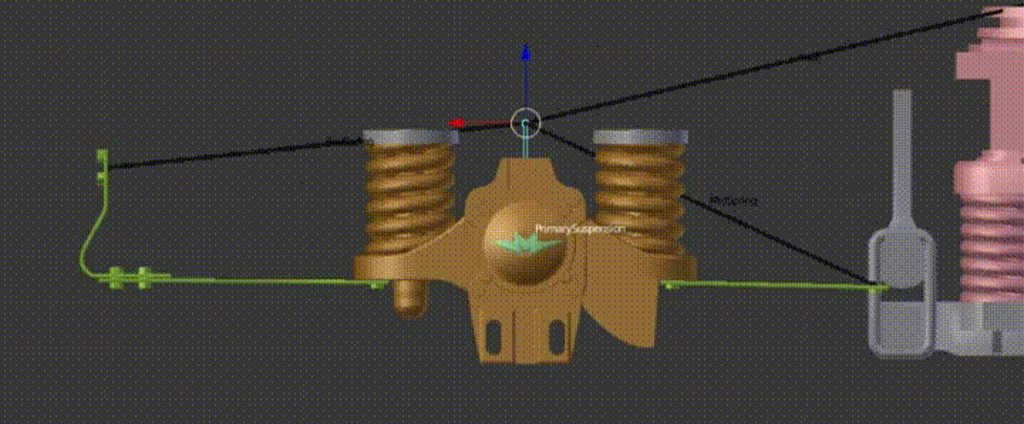
It's done through vertex weights only. But now I have a certain question
I need to animate a piston. Green is a moving part (tied to a moving bone), red is stationary/tied to root. How would I make it have the piston action and resolve itself automatically based on position of the main bone?
E.g. I want to move main bone and have the bone between red and green point stretch (but only apply translational/rotational transformations!)
compact lake
@waxen agate so green thing is attached to the wheels with offset, right?
if yes, then you just need to apply LookAt to both red and green bone, so they look at each other and you are done
waxen agate
Red is attached to bogey frame, green is attached to primary suspensions base... 😄
Yeah, lookat sounds good
full herald
So if i want to attach my gun to both hands of the player, and move it with the animations of the player, 2 bone IK is the only solution? In BP I can use construction script to attach my gun to one hand so it plays with the skeletal animations but if i attach at a second socket it unbinds the first attach.

 hushed meadow
-snip-
Managed to find out a workaround,
pearl swift
haha thats great
 sonic fulcrum
Hye, I"m using UE4 to animate a rig. The bones show up int he skeletal mesh but the animation tracks don't show althe bones...
How do I add another bone to the "additive layer tracks"?
 quick geode
is blending between montages possible? Or am I better off with blendspaces?
 slim sun
@fair crater Ohh dear god why?
 fair crater
Everyone, Thank you for your comment.
 bronze osprey
is there any way to have a capsule or something counter a post process effect?
so stuff inside the box is not effected?
 tiny monolith
Hi, I'm using modular pawn for armor. Can I hide master mesh component?
compact lake
@bronze osprey you need to make a mask using depth stencil and then in your post-process ignored masked pixels
So your capsule will render that mask first
There is tutorial on YouTube about this
I think it's one from @vapid socket
 high ruin
hello does anyone know how to play montage in multi player, for play the animation and other players do not see play anything?
 copper dawn
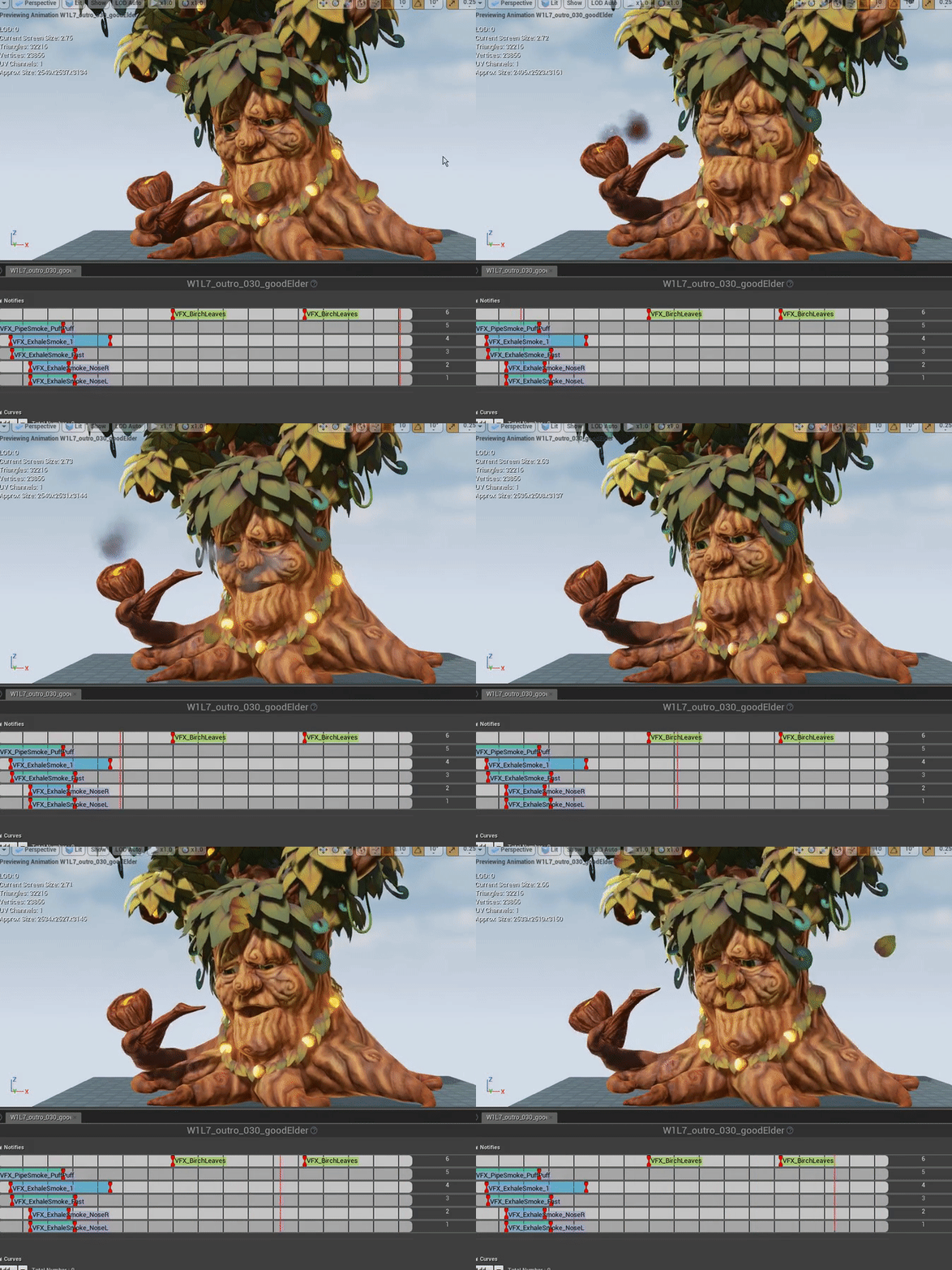
hey sweethearts and other awesome people. why arent my particles playing when activating them in persona?
one-shots work fine
but the timed ones just dont fire during play
they do show up in persona and matine preview
bounds are fine, no weird lods, nothing in shader
they dont appear, not even in wireframe
 nimble frigate
@copper dawn Are you setting event trigger in the animation?
Is it activated based upon specific animation frames?




 nimble frigate
@copper dawn It's only one shotting you say?
copper dawn
anything thats not the leaves are not playing during play, works in persona/matinee preview
no, the one shotting ones ARE working
but not the timed ones
nimble frigate
I had this issue in the past, it turned out to be in relevance to me missing a loop option
double check your options first
copper dawn
i did
and we have quite a skilled team
nobody so far has been able to figure it out
google not helping either
nimble frigate
Could it possibly be relevant to your PIE visual settings?
copper dawn
no
nimble frigate
have you tried running in standalone and testing? same issue?
copper dawn
yup
nimble frigate
engine version?
copper dawn
4.12
nimble frigate
this is a strange issue, I'm going to boot up a project and investigate, no one should be stuck on shitty issues
and now i know its not something simple
copper dawn
especially a few hours before potential public beta release :p
nimble frigate
ok shit, i best hope i can help
faint flicker
@copper dawn sorry, never had that issue
copper dawn
me neither
ive done this before for other projects
always worked
so im at a loss
double checked everything, as did three colleagues
even remade the materials, mat instances, particles
just to be sure it wasnt some weird bug
they just do not appear
so not visible in wireframe either
not sure if being called even, should check that
nimble frigate
can you try changing the max collision distance to a further value in the collisions section for a test?
copper dawn
already did
nimble frigate
detail mode in LOD set to low? render in main pass is checked?
copper dawn
its all as it should be
nimble frigate
this has to be an engine bug, has to be
copper dawn
i think so too, but we wont be moving to 4.14 till way later down the line, if we even do that
double checking on other skel animation
nimble frigate
I hope i can help you find a fix for this
nimble frigate
so it has to be something global, have you tried it on another machine?
copper dawn
yea, colleages checked it out as well
nimble frigate
100% has to be an engine bug
copper dawn
and they are world wide, so its all around the globe with different setups hehe
works fine on my 4.11 version
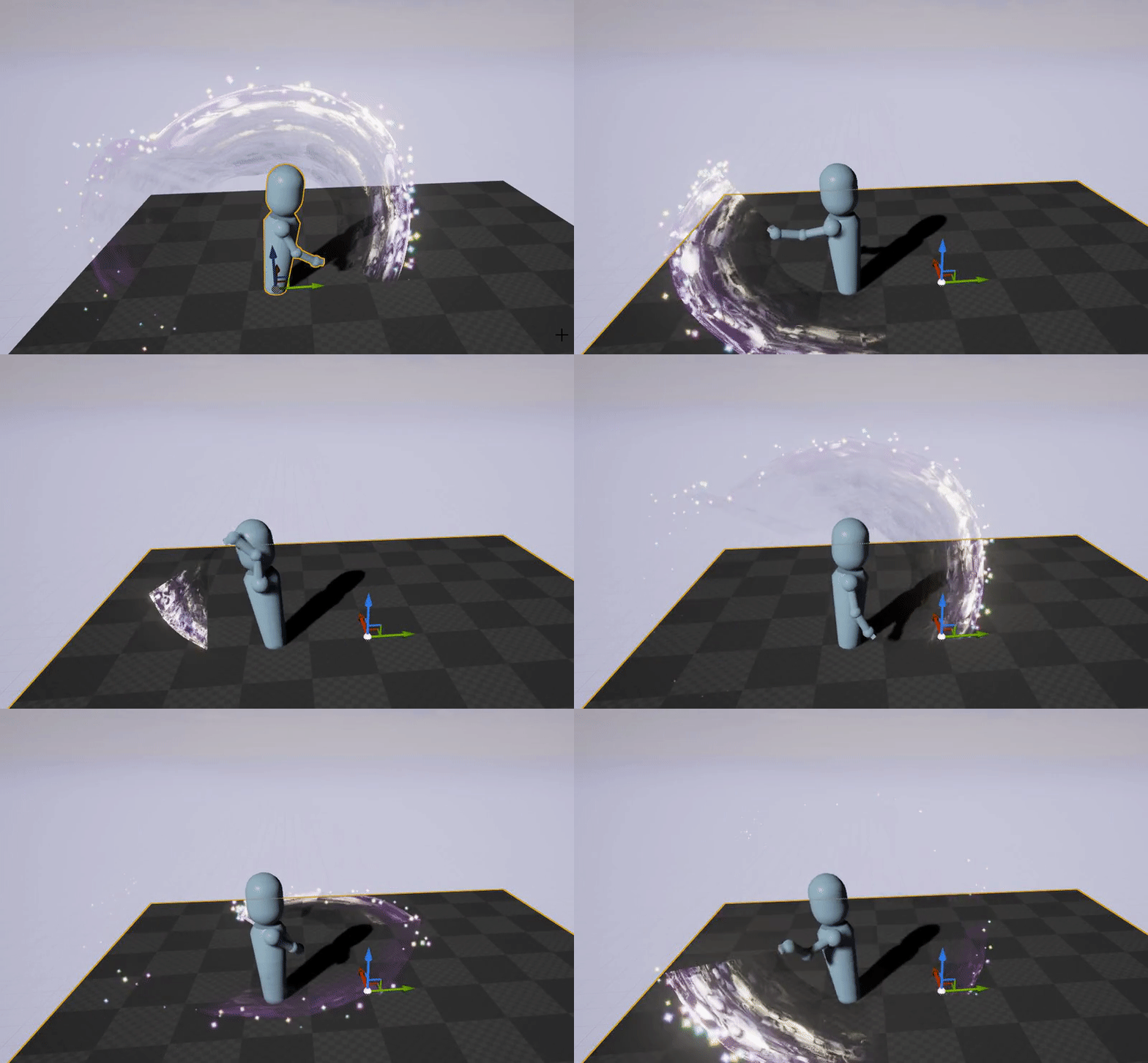
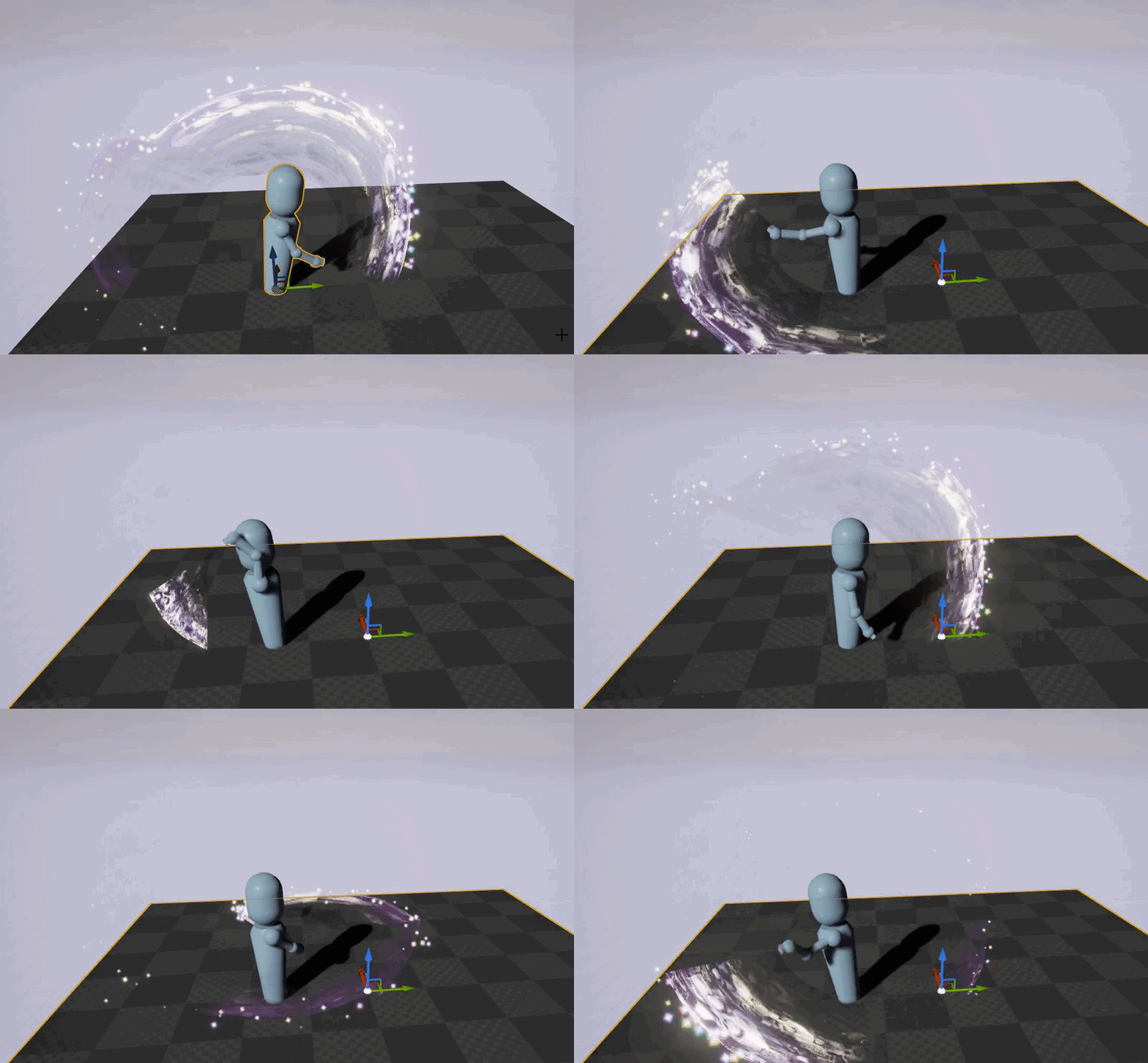 faint flicker
could it be that it only shows a single one?
if you remove the leaves, what happens?
faint flicker
hm
copper dawn
one shots work fine, its the timed ones causing issues
faint flicker
as a workaround, do regular event notifies and trigger the particles in the event in the animBP?
copper dawn
fuck that hehe, only if there is nothing else i can do about it
chance is, i might have to go that way
but please fuck no
lol
copper dawn
also work fine in 4.12, so its something potentially related to the rad rodgers project
also works fine when importing a skelmesh anim with timed particles
thats so fkkin odd
throws a keyboard at another keyboard
 ashen gorge
Hey guys, I am fairly new to the area of animations and setting up skeletal meshes with animations and meshes in unreal
im seeing some store mesh/anim assets with the technical specificaiton of "scaled to epic skeleton"
Does that mean the mesh has the same skeleton as the epic mannequin?
Looking at the female movement animset
waxen agate
Stupid question, how do I specify an animation blueprint parameter in editor
E.g. I have a parameter "derp", and I want to set it to 1.0 for this specific skeletal mesh. The parameter is set as "visible" in animation blueprint
I just dunno where to actually see it
compact lake
you need to cast AnimInstance into your custom AnimBP class
let me show you
@waxen agate do you mean like default value or you want to dynamically change value?
waxen agate
Well hmm
There are two things I wanna do, either or:
- Have two/three animations and specify three parameters X Y and Z which define which frame/time of animation is shown
E.g. if I'm giving it X = 0.5, Y = 1.5, Z = 2.5 then it blends frames from 0.5 second mark of animation 1, 1.5 second mark of animation 2 and so on
- Specify currently displayed animation time (without animation actually playing) & blend extra bits onto it
Oh
I actually answered my question above
This is a new question, how do I blend several stopped animations
@compact lake I've solved question above by adding an interface which has "get blah" which works at ANY time (editor time + runtime)
This function replaces the need to set defaults (it provides defaults)
waxen agate
Lemme rephrase it
I've got brake lever suspension
I've got animation which moves levers and presses brakes against the wheels (animation "move")
And I've got an animation which moves levers side to side under the influence of external forces (e.g. it's just an animation that scrolls from 'fully forced left' to 'fully forced right')
I need to display animation at frame time1 for 'move' and animation at frame time2 for 'externalmove', but also blend animations together based on value of an external variable (computed from move & externalmove)
I'm trying to figure out how to play two animations at once with a different starting point
 haughty lily
have somebody successfully exported mannequin animation to fbx (with the mesh, as persona promts to export it as well) and then imported in blender?
i get this on every single animation. the mesh itself in ref pose is okay
http://i.imgur.com/oMPVpo1.png

 waxen agate
Okay, I figured out how to make my own custom blending node I think
Which will blend two frames of two animations
compact lake
@waxen agate there is animation blending by I have zero clue how to use it
waxen agate
Yes, but no node that would return animation frame at time T
Only node that plays animation
Actually!
Maybe what I want exists!
It does in fact exist, why am I not seeing it in animgraph
HMM
This is super suspicious
Because the node I want does exist
Except it's not available for use in blueprint animgraph
Okay, get this
This feature is there
Apparently I need to place a "play animation" node
Then right click it and in one of the context menus select "convert to a single frame"
👌
 devout dagger
has anyone tried Allright Rig for UE4 ?
how does it compare to Blender animation tools/workflow ?
stiff thunder
not used it. But i think Allright Rig isnt really comparable to a proper rig made in Maya (or whatever Package)
bronze osprey
havent used it, i seen the BPs it gets a lil crazy 😛
no idea in what ammount u gunna have to deal with those bps tho
i can see where it can be really usefull to make small animations inside ue tho 😃
copper dawn
sigh.. still nothing on the Timed particles in persona not playing in playmode.
copper dawn
waxen agate
I wonder, how do I fix this
I... cannot delete "SetWheelIndex" xD
It's just not a thing that can be deleted from the UI
 gilded hearth
a single animbp is repeatedly crashing unreal on open. anybody have experience with this/troubleshooting this?
waxen agate
@gilded hearth I've had this issue. I modified the UE4 engine to avoid calling animation blueprints and re-saved the blueprints
 mortal kindle
Hey everyone! Does anyone know how to force a skeletal mesh into a position given from an animation straight away instead of loading in with A pose and then going into the given montage. Is there a way to force such an update?
 lofty marlin
(Blender) Short question, currently rigging a hand (something toonish, doesn't have to be perfect) and it's been a while since I did this so:
How should the bones the orientated? Current i have X to the right. Y to the front and Z upwards. Do I need X to be front or is that not important? (for UE4)
haughty lily
can i have Z-axis movement in root motion?
haughty lily
for interested, the answer is yes, but character movement mode should be 'flying'
copper dawn
reposting for great justice: https://answers.unrealengine.com/questions/520864/timed-particles-persona-not-working-during-play.html
gritty bison
Hey guys, I'm using an animation-based combat system (think your typical "MMO" combat system: button is pressed, animation enters loop until cast time over, there's also standard attacks, state-based animations such as knocked-down or stun etc; all currently done with a combination of statemachine/blendshapes/animation montages).
I'm running into annoying problems and I'm planning to do an overhaul of this system to make it more maintainable and reliable.
Anyone know any good learning resources, resources for best practices regarding this? Maybe even (free, if possible) example projects to draw from?
And before anyone asks: I'm not making an MMO - it's just the easiest way to describe the system 😛
late kiln
@Zerus#8478 What sorts of problems are you running into?
gritty bison
@frail basin Nope, like I said, no MMO. Just the combat system uses similar mechanics
@late kiln Mainly problems like the anim montages overwriting the state machine when I don't want to, and having to make sure I cancel out all the anim montages everytime I do something new. I.e. character gets into knocked-down state, then dies, then some states get stuck in a loop since the anim montage couldn't fire off the notifies on time.
So I end up having both notifies on the animations to time things righ, as well as counter-checking whether or not the states are actually correct resulting in redudant code.
I mean it works. In the end the code does what I want, it's just not a very maintainable way to do it. So I was hoping there'd be resources for best-practices for these sort of systems.
I've got video footage of an older build if that helps anyone: http://kevinheese.de/downloads/OtherSkills.html
You can see the animation montage for a skill at like 5 seconds in. The system currently works fine as you can see, it's just that I'm confident it can be implemented way better than I currently have.
(Don't mind the actual animation, it's a placeholder animation from Mixamo; actually everything in there is a placholder except for the environment substances)
long stone
@gritty bison Are you binding events onto Mesh->AnimInstance->OnMontageFinished? This fixes all sorta state bugs with anim montage getting interrupted.
full herald
also if you need to interrupt a montage, theres a stop montage with blend that is awesome
gritty bison
Currently I interrupt montages without blending to ensure that high priority animations actually get through, i.e. player gets interrupted during cast. Don't want him to continue casting :P.
I will look into OnMontageFinished; looks like it could help my system a lot. Thanks for the tip!
sacred estuary
Hellow
I got a question


What is "ThirdPersonJumpAsset" in transition between JumpEnd and Idle
quartz cove
@sacred estuary that seems to me, to be the time frame of a jump
So, once the jump is complete, it goes to idle state
I don't know that one specificially, but look for the _jump anim asset itself
sacred estuary
the problem with that is that when I want to change jump end sequence to blendspace it doesn't compile
full herald
My bones are not staying bound to my mesh past a certain LOD. The mesh goes into A pose at last LOD but if i click on bones I can see them moving in the right place and motions. Any idea how this happens? This is with UE4 Mannequin and MP animations. I don't recall changing any skeletal or animations settings since I last tested this.
so weird, all the other LOD were working and the setting were the same, except the screen size/LODhysteresis, yet deleting it and generating new LOD fixed it 🤔
haughty lily
Can someone help me out with anim montages?
gritty bison
@haughty lily meta questions! Just ask 😉
 wicked belfry
Anyone have exp working with 3ds Max and UE4 together?
gritty bison
Another meta question! You guys would probably already have answers by now if you'd just ask
full herald
dont ask to ask, just ask
haughty lily
@gritty bison I used to ask right away, in this channel as well, it ends up being unanswered for a few days, sadly. So far only been getting answers to meta questions :D
Anyway, I've fixed the problem on my own by now
gritty bison
@BiggestSmile good to hear! I think it depends on the timing on your question - the right people need to be online :)
misty dagger
Keywords notification would also rock as a feature.. 🤔
waxen agate
Hum
@compact lake my animation is running with a 1-frame delay
Is there any way to change that?
E.g. I'm trying to set world transform of my suspension bone to world transform of my actor that is suspended
But there is a 1 frame delay between the two
compact lake
@waxen agate
I've switched to setting position only in local space and on PostPhysics to solve this
setting world space position of bones seam to have helped too, but again, it has to be done in PostPhysics
waxen agate
I can't make animbp run in postphysics, can I
do I have to directly work with bones from C++?
compact lake
no, I've only added a secondary tick component from which I set array of wheel position stored in AnimBP
not even sure when anim BP is running and when rendering of it is done
waxen agate
So I've got a test like that
It just sets world position of the bone
But the position is super-jittery and fps-dependant
E.g. it hovers around (0,0,100), but jitters like mad
compact lake
yeah, world space is glitchy
there where similar bug with camera boom attached to skeletal mesh, they where racing on who updates camera boom transform
I can show later how my setup is made
basically I have a set of bones which are moved and then rest of suspension is calculated from their position
waxen agate
I just need to move one bone to a specific location on another actor D:
wicked belfry
I've created a new 'Animation' using a reference pose, how do I set a keyframe? I've created keyframes but they are all blank and I am able to move the skeleton but I'm not sure how to set a frame.
waxen agate
@compact lake well, no idea how to do this. I've set up the animation correctly (using transforms and not rotators, hurr), but there is a one frame lag
compact lake
can you place root of your skeletal mesh on 0,0,0 of the object?
it might be not necessary
waxen agate
It is at 0,0,0
waxen agate
I'm operating in component space atm
compact lake
waxen agate
 compact lake
I'm asking cause I'm using Parent Bone Space, which is the same as local space of BP if root is at 0,0,0
waxen agate
I will try parent bone space
That wheel is supposed to touch the thing above without wiggling
But due to one frame delay it wiggles
compact lake
yeah, got it
even in local space it will lag if you set it on Tick
have you made custom anim node to pass bone position or you set it from outside in c++ or bp?
waxen agate
Parent bone space is completely different
I'm not setting it on tick
I'm fetching transforms from the animation graph
compact lake
is it connected directly to root of the skeletal mesh or there is something in between?
thi sis just prototype so ignore inefficiency:
waxen agate
The "SecondarySuspension" is a second bone after root, it's connected to an immobile bone
It's a bit dumb cause of how I specify things in blender
compact lake
Component Space then?