#gameplay-ai
1 messages · Page 129 of 1
 patent hornet
 ivory violet
I cannot get it in either AIC or BT Task, thats why Im asking. Maybe Im missing something, I saw that part 😦
Found it  taking directly from blackboard, not alone by itself
patent hornet
yeah, thats what the Target part is for
 static crater
Hi, so anyone knows how to disable regeneration of navmesh on begin play? my navmesh is pretty large so it takes like a minute
patent hornet
seems like navigation in project settings
static crater
it only happens when i set 'runtime generation' to dynamic modifiers only
on 'dynamic' the game just starts instantly
ivory violet
Any ideas how to make my Ai better know what other ones are doing? For example, if one enemy wants to attack me, I want other enemies to know that, and not consider attacking. But sometimes it happens that more than 2 decide at the same time and just come at me. I know its big part of Ai, but any big or small directions would help me out!
Atm Im setting the variable about OngoingAttack in some global enemy manager, but it doesnt seem like the best approach so far.
 misty wharf
I was debating implementing something similar in my game, and one method I thought of would be to use a sort of a "director" actor
Basically the director would keep track of what the individual NPC's are doing, and tell them to do something different if there's a conflict
Alternatively you would probably have to have each AI controller query any other controllers about what they're doing before deciding what to do
ivory violet
Wouldnt it be too performance heavy if I had to do for each for all enemies whenever I try to make a decision?
misty wharf
there's probably a number of ways you could implement it, like having some way of keeping a simpler list of who's doing what for example by using gameplay tags
you could then query that to see if any other controller is doing something based on the tags or such
ivory violet
Ill have to try something with that actor to help them out. And I guess Ill think about optimization after Ive made it work 😄 Thx!
 craggy bloom
When my player characer (ghost) is out of sight from a human (AI) and makes a noise, the AI can hear and see the player at the same time. I'm wondering why this is because the player is clearly out of trace sight in the AI debug view? Vision angle is set to 45 degrees.
 thorny jay
Hi everyone. Is there a good way I can ensure that 5000 actors remain on the floor while moving around without doing a trace each tick to find the floor and align them? I had an idea on using the navmesh and just having them move along the navmesh, since the navmesh should already (for the most part) hug the floor pretty closely
Just wondering if anyone else has tried simulating huge crowds like this before. I know UDK had a crowd system, but I can't seem to find any info on it for UE4
patent hornet
NavMeshWalking does the trace as well
 pine steeple
its not a line trace tho, its a nav projection trace
(which is a little cheaper)
but 5000 actors is a lot
thorny jay
Yeah I'm doing some experiments, I can get around 4000 running reasonably, but I need an efficient way to reduce tick rate on actors that are further away
Ticking once every 0.1s is manageable, but then movement is jittery. That won't matter though if the unit is far away
So some sort of "tick LOD" might work
 soft sleet
This is for an ai to restart level when he touches me, but it doesn’t work. I have another blueprint for the ai to follow me which works but it doesn’t restart level when it touches me. I have his collision set to ignore everything but pawn, and this is a blender imported model. Any help??? Thanks!!!
 tame knot
there is a crowd manager in UE4 but I've never used it, it was released with the open-world tools, UCrowdManager and the CrowdFollowingComponent
thorny jay
@tame knot Interesting. I cannot find any useful guides on how to use it, or what its capabilities are. The only tutorial I could find seems to have a broken link. How strange
tame knot
if I remember correctly it was used for the deer and stuff in the kite demo so there might be something in the open world videos
or you might just have to read the source
thorny jay
@tame knot Ugh, who does reading in this day and age?! Thanks, I'll take a look :-)
patent hornet
@thorny jay it does fairly decent crowd avoidance as long as you have only one nav agent and don't dynamically generate nav meshes
 honest plume
Is there a way to fix server lag when spawning 200 - 250 AI Mobile units?
 north vapor
@patent hornet are you there?
 plush pasture
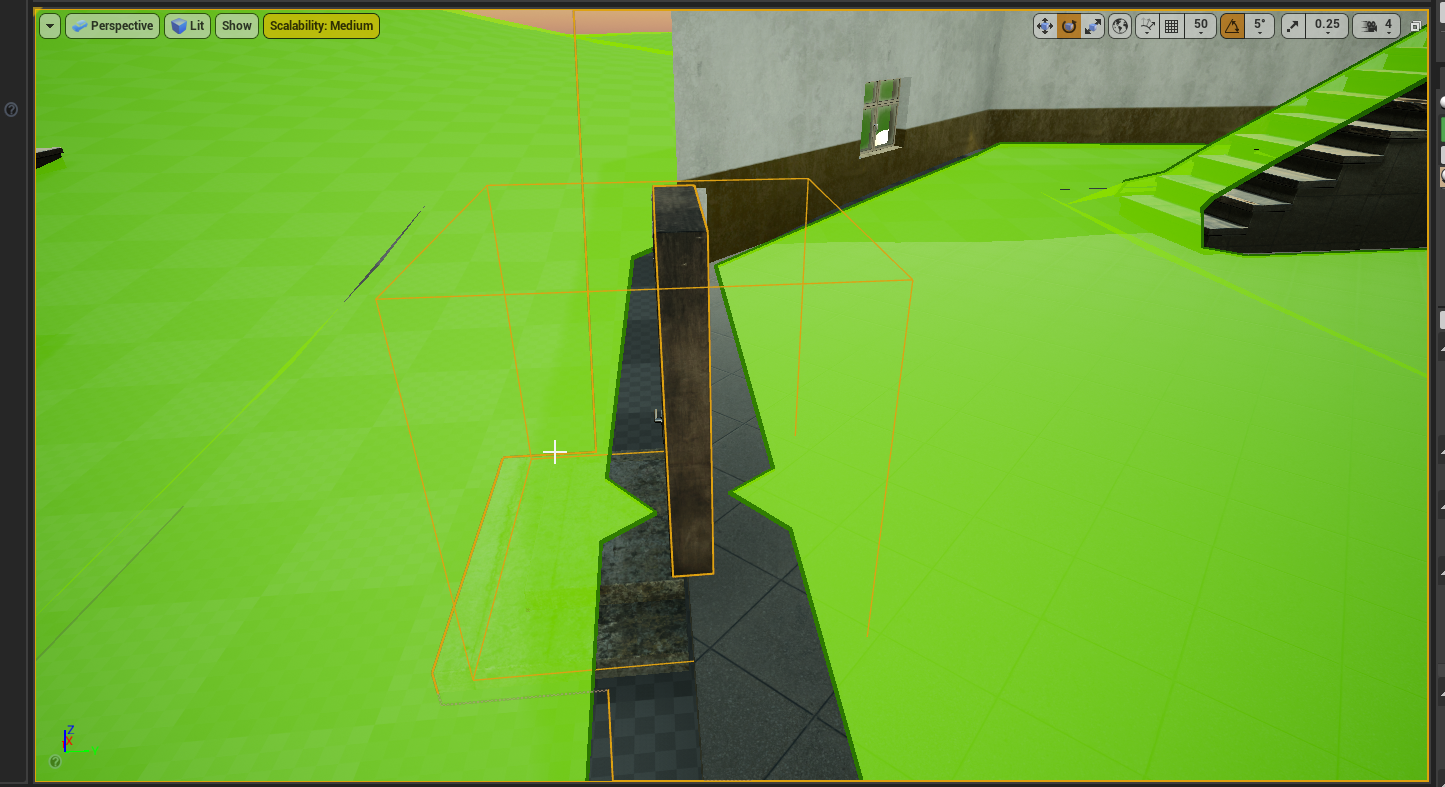
anyone know how to make my navmesh go through doors?
ive already tried messing with the project settings values of navigation section
 fierce zealot
you can set your navmesh to update at runtime and then, when the door openes, the navmesh adjusts. Otherwise you will need to updated your door to not have impact to navigation
plush pasture
nav mesh links huh?
thanks
the door isnt actually affecting the navigation
forgot to mention that
i solved issue with making cell size lower
longer compile times but now theres a connection
@tame knot https://i.imgur.com/WI38P6k.png
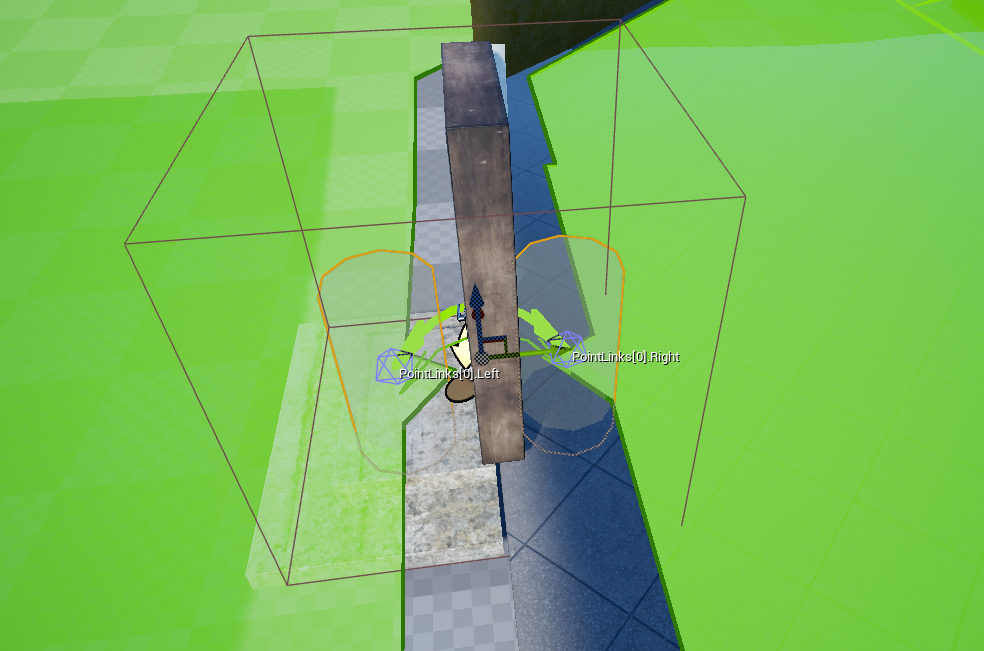
do i just add it and thats it?
tame knot
yeah
it exactly for this purpose, linking two otherwise unconnected sections of navmesh
thorny jay
@plush pasture note that with simple links, they will be always active unless blocked by a nav modifier
If the bot has to manually open a door, you need a smart link
Otherwise they will just run into the door endlessly :-P
In the smart link you can override a function called "on smart link reached" or something, and just open the door for them in that event
plush pasture
@thorny jay thanks for the info man
does this work with jumping in some way?
i mean, if i wanted bot to jump over bump, i would do that using smart link right?
thorny jay
@plush pasture yes, in my case I use launch character with a configurable force parameter to determine how high the jump should be
If using smart links for jumping, remember to remove the simple links and make the smart link relevant
tame knot
oh yeah, my doors are opened by an explicit player action so I just instantiate the link when that happens
north vapor
im starting to get used to behavior learning blackboards and tasks but this task isn't firing anyone know why
the task im referring to is the last seen location in the pngs above
the first one is the task
the rest works but when i added this task the behavior tree stop working
 cerulean tendon
Who can do me AI plz ? I can pay
 fallow hound
north vapor
fallow hound
north vapor
how do you do a last seen location task
 lyric flint
@north vapor did you do a on fail print string?
lyric flint
o sorry didn't look at the time
north vapor
@lyric flint how do you do a last seen location?
lemme show my behavior tree
@lyric flint
lyric flint
well i never done a last seen location but i can think about it
could have maybe in the controller on perception update check if the perception was Sight then update a vector to have your actors location at that time
north vapor
ok
lyric flint
lyric flint
Whats the Tag used for on AIStimulus break?
 inland umbra
Tag is used for whatever you want 🙂 You set it when you report some sense event.
north vapor
@inland umbra my ai isnt hearing the pawn
north vapor
inland umbra
@north vapor I don't use default hearing and I don't have your code, so I have no idea what is wrong 🙂
lyric flint
actor has tag works if you do it this way
pretty sure aistimulus tags are only for reports like nicolas said
north vapor
@lyric flint so just use actor has tag? @inland umbra
inland umbra
Yeah, stimulus & senses tags have nothing to do with actor & component tags
lyric flint
id try the report noise event function
north vapor
@lyric flint @inland umbra like this
north vapor
ok
north vapor
@lyric flint my player makes noise whenever he moves and reports it but im not sure what to do
lyric flint
did you give it a tag
north vapor
yes
lyric flint
Noise?
lyric flint
use the debug tool that shows the perceptions
should draw a sphere i thinkk
for noise
i'll have to try this myself inorder to be any help
north vapor
@lyric flint so my blueprint does work just have to debug to see if it works
lyric flint
always got to print strings and debug to understand this stuff lel
@north vapor i think you need an instigator
which would be your player controller
north vapor
@lyric flint it is set to self in my player blueprint
north vapor
self being a ref to the player or ai
lyric flint
instigator is for who caused the noise
north vapor
which i want to be the player
lyric flint
yah so it needs a reference to that players controller
 stiff gale
How the AI spawning system works in games like Witcher 3 and GTA5? I'm trying to understand the high level concept. Would it be possible in UE4?
lyric flint
@north vapor character needs a pawnnoiseemitter component if you don't already have 1 (doesn't actually there are 2 methods for doing this)
@stiff gale i believe they spawn in areas which are underpopulated, in GTA V. if the region contains less than a certain number of entities they spawn into the world above the landscape.
stiff gale
Do they spawn NPC based on triggers? Let's say I enter an area then all the npc in that area get spawned. When I leave that area the de-spawn.
 fiery palm
hey yall! Im new to this server and to unreal but i'll try and make my problem quick. I have a Ai using nav mesh and it works in the editor and in final package on "LEVEL-1" but when I try to use "LEVEL-0" in conjunction the Ai seems to break and not move. not sure if its a level issue with the nav mesh or if its how the nodes are setup. From all the reserch ive done ive only found one thing about Ai and level problems. Im also using the base of the mannequin blueprints for input controls so it may look a bit funky
lyric flint
Good time of day! Characters are not blocking navigation mesh for AI. I need to achieve this effect
fallow hound
I haven't done that, but maybe with dynamic nav mesh and player capsule being a dynamic obstacle?
dynamic navmesh is in project settings
obstacle would be in capsule settings? or actor settings.
I'm just guessing
fallow hound
what about dynamic obstacle on player capsule?
also theres some bool like bcaneveraffectnav
tame knot
You really don’t want to be updating navmesh like that as characters move around
That’s why there rvo
tame knot
If they’re static or mostly static or you have some other reason using can ever affect nav should do it
fallow hound
I dunno if it does nav stuff
lyric flint
The component for this calls
tame knot
Right it doesn’t factor into path generation, it happens locally
fallow hound
yeah
I dont think you can have moving nav modifiers
ukaos once said don't do it
and he knows a thing or two
I dunno what this is
tame knot
Making navmesh isn’t free, not even cheap
fallow hound
but its in my char capsule
tame knot
That’s why it’s an offline operation by default
pine steeple
RVO can be tweaked to be less aggressive, but updating the navmesh with a moving modifier is pretty taxing, Really wish there was some avoidance component you can place on chars which could be used with Crowd Avoidance, and register that char as an obstacle
 stark zealot
So for my simple roaming state for my AI I just use the get reachable point in nav radius. But sometimes the AI pick locations really close together with makes them twitch around a bit and look unrealistic. How can I only get points on the outer radius of the circle?
I know I could check the distance between the random point and the AI and if it's too short, then pick another point, but that seems like it could run into issues of looping forever trying to find a point.
lyric flint
@stark zealot You might want to just get two random numbers, in example one from 75 to 100, and another from 150-359 (maybe first have a check to see if the upper range is within a navigable reach).
Then use those values to determine the right place relative to the spawner origin.
you can then place the origin point of the get reachable point in nav radius as this point, and if the origin point is far away enough from the origin of the AI pawn, it should usually cause them to move fairly far away and not move in short amounts.
stark zealot
Thanks that seems to work perfect. 🙂
 dense halo
hey could someone help me with this behaviour tree?
basically I try to get the nearest target, in the simple parallel node I do Move To the actor and then do the attack task if the targets within melee range
in the right hand side of the tree, the top level sequence has a service which basically checks the distance every 0.5 sec to see if the character is in melee ranage
but the issue is that when it is in melee range, the whole thing glitches out
the whole markers keeps flashing because the Move To task keeps ending and then starting again
is there a way to make the Move To indefinite? since I want my ai to always follow the player around non-stop and keep attacking
lyric flint
@dense halo you figure this out?
dense halo
@lyric flint for now I'm just putting an infinite loop decorator on the Move To
lyric flint
well from what i see that your aborting your 2nd branch from root with your first branch
dense halo
that's set to abort if there is no target actor, the target actor doesn't get removed once it's assigned
the Move To just ends after it gets within the radius and it starts all over again
lyric flint
did you try abort self instead of lower priority?
dense halo
yes
lyric flint
oo i see
so it gets that actor
but u sure u can do it that way
im pretty sure after it sets the actor
next time it trys to run that branch its always going to abort that lower priority
dense halo
it has no reason to run that branch next time
it runs the first time, set the actor and move on to the right branch
the target never gets removed
 simple crest
parallel finish mode set to immediate or delayed?
dense halo
delayed
simple crest
I don't know how MoveTo works internally or if there's a way to fix it, but if you made a custom task node you might be able to set it to run Move to Actor without "finishing"
I would've thought MoveTo would do the same thing if acceptance radius is -1 and you set an Actor to it somehow though
dense halo
yeah I tried setting it to -1 but the minimum is 0 and I disabled the collisions between characters so they will get there anyway
simple crest
doh
dense halo
I'll just use the loop decorator for now and create my own move to later if needed
ivory violet
@dense halo why not just put Attack after MoveTo, and not in simple parallel? That way, once MoveTo is done and character is in range, it will run Attack without moving. Or you want for some reason character to keep moving while attacking?
dense halo
@ivory violet most of my mob ai can move while attacking, I have some ai that do heavy attack where they stop moving but for those ones I want to stop their movement in their ability
does anyone know if the EQS can be used to basically get an actor instead of a point on the generated grids?
I just started using EQS, I want to basically do a distance and dot test on my a list of selected player characters and get the best matching character
 wise iris
Looking into crowd management and I'm tearing my hair out
RVO is a no go as it doesn't play nice with multiplayer apparently and agents can get stuck in non-navigable areas. I then tried the Detour Crowd AIController, but characters twitch/jitter
How are you guys solving these issues?
This seemingly has come up a bunch of times in the Discord, with little to no answers 😦
dense halo
I saw a video the unreal engine youtube channel, or might have been one of their community training stream things but they create a large number of AI
not sure if it will work with multiplayer though
not sure if I have the video bookmarked
 valid tree
I was just looking at the crowd management too. I believe this is the video unreal made that you are talking about. They basically have a service to see if the AI is ‘jammed’ and then they recalculate the targetposition. https://m.youtube.com/watch?v=cFYk1tEgyGI

Announce Post:https://forums.unrealengine.com/showthread.php?86086
Ian Shadden shows you how to setup interactions between Behavior Trees and AnimBlueprints to perform complex moves such as mantling over objects in the world. He also covers general optimization techniques you...
dense halo
yeah, and there was another one but I think they were showing off physics based animations or something
wise iris
I'll take a look at that ❤️
valid tree
Although I haven’t actually done their method yet, I’ve been working on it today and I’m having issues as usual so that’s fun
dense halo
anyone know why receive execution start does not run on the decorator?
is it meant to be like that?
dense halo
I need to cast my pawn to something but I don't want to do it on Check since that seems to fire every tick, is there anywhere else I can do this or should I use a service?
lyric flint
@dense halo not really explaining yourself clearly.
dense halo
basically I want to make a decorator, and inside the decorator where you have the Check execution I want to do a cast but since I have a lot of ai, I want to basically cast it and store it as a variable which I can reuse when it runs the check again
lyric flint
but this decorator fires often
dense halo
yeah
that's why I want to use the Execution start event which doesn't fire on the decorator for some reason
it works fine on the services, where I did the cast and stored it to a variable and in the tick I would just use that variable
lyric flint
a cast to do what
dense halo
controlled pawn to my blueprint class
dense halo
anyway, it doesn't matter
i just want to know why execution start event doesn't fire on the decorator
lyric flint
basically its probably easier to find solutions if you state what you're trying to do.
like the reason because there might be a better approach
i think you have to override
a function to
do that for the decorator
dense halo
done it already
lyric flint
i just tried it seems to work for me
seems like the Start AI overrides the Execution start 1
Sometimes things can get really glitched and stop working
i've experienced it were all my code changes just weren't doing anything and had to restart my computer
not sure if thats the case here
dense halo
tried the search start ai as well, that one doesn't work for me either
might try restarting
 light kindle
What does the Gameplay Tag Condition decorator do? Trying to get it working with gameplay tags but I'm headbanging the wall here. Or does this only work with the actor tags Fname array but not Gameplay Tag Containers?
lyric flint
i have a question cause i know nothing about ai, but how would one ai lets say move to another ai if they are the same actor
lyric flint
@lyric flint AI MoveTo https://docs.unrealengine.com/en-US/BlueprintAPI/AI/AIMoveTo/index.html
AI MoveTo
i mean
i know how to move a ai
but
i dont know how can one ai find another ai of the same class xd
cause i would want them to "talk" but i first have to make them move to each other
@lyric flint you have to trigger the move somehow in your logic, when the AI movement is triggered, you can get all actors of class https://docs.unrealengine.com/en-US/BlueprintAPI/Utilities/GetAllActorsOfClass/index.html or Get All Actors with Tag. if you want to have the AI move to the closest one of the same class, you have to have a distance check.
Get All Actors Of Class
yep still dont know but gonna act like i do xd
might take some testing
lyric flint
ok i figured it out was pretty easy xd
and another question i have a selector and two sequences and why it only chooses the left one and after its finished it doesnt go to the next one but just takes the first one agane
nvm just dumb
light kindle
What does the Gameplay Tag Condition decorator do? Trying to get it working with gameplay tags but I'm headbanging the wall here. Or does this only work with the actor tags Fname array but not Gameplay Tag Containers?
No idea? So a custom decorator it is then... still easier then looking up in the source code how this thing works 🤷♂️
light kindle
And now it works like a charm. Still I feel stupid as a dev since I feel like I just reimplemented something UE seems to have as a feature. Anyways, if I can implement it in 5min but don't understand the UE feature in hours something is odd and documentation lacking big time.
 verbal violet
Hi folks. Is there some Task in BehaviorTree similar to MoveTo but not to rotate actor in direction of movement? I try to fin some checkbox on MoveTo or other task (MoveToward) but unsuccessfully.
dense halo
Does anyone know why receieve execution start / ai doesn't seem to fire on the decorator?
tried restarting, creating a new decorator
still doesn't seem to work
fallow hound
@verbal violet I think that logic in in the character class, something like "face controller yaw" or something
verbal violet
@fallow hound i found tnx
honest plume
How to cast to AI character?
pine steeple
or neither cause they are both wrong?
pine steeple
i created a spawn manager, that holds pointers to all spawned AI. If i need to iterate through them, i do so. But if you set up proper references, then you never need to use GetAllActorsOfClass.
and GetPlayerPawn returns a player, not an AI character.
i use GetAllActorsOfClass ONLY at beginplay and i store the stuff in arrays. So i never use it again
but as @honest plume always asks vague simple questions, with no context. I never bother to reply.
lyric flint
waytoosmart
i used perception to get ai references and reset an array variable every update in the controller
 cerulean plover
Hello, i'm trying to create an AI Controller and in BeginPlay i use MoveToActor but the character doesnt move, any suggestion or things im missing? The NavMesh it's already in there since my playercharacter moves with it
MoveToActor(GetWorld()->GetFirstPlayerController()->GetPawn()); thats the only code literally
lyric flint
@cerulean plover did you use spawn actor ai node?
because spawn actor node doesn't run controller logic
cerulean plover
nope i have already my character on the scene with ai controller set as a controller
everything is in the scene
but it doesnt move
something is missing
lyric flint
show the movetofunction with a picture
cerulean plover
really its just that
but neither movetolocation works
doesnt seem code related but something in params or envirnoment
that is missing
but my player that i move its working :\
pine steeple
never call stuff like that in begin play
cerulean plover
its a test
pine steeple
how is it going to move without a possessed pawn?
beginplay is called BEFORE it has a pawn
cerulean plover
but the controller is created after the character
pine steeple
no it is not
misty wharf
Anyone got tips for using the EQS testing pawn with queries that have more complex EQ contexts? I have a context that returns the location from a blackboard value for example
pine steeple
even if it is, possession doesn't happen before begin play
so controller has NO pawn
cerulean plover
alright i will try move it somewhere else
cerulean plover
it was intuitive to me that it was possessed since i dont create it but the character itself since i set it there
pine steeple
your assumptions were wrong
cerulean plover
alright
cerulean plover
You mean OnPossess?
cerulean plover
I made my tests and onpossess is done before beginplay
and there i cant find player pawn
since its not already spawned
oof
 reef birch
i have a very weird issue with my ai. i have a small development map with terrain. all works fine. when i load another map (spring landscape free for the month asset)
my AI jitters between idle/walk state while moving
why does this occur on a different map and not on my development map
i just load another map and this issue starts

video of the issue
i even removed the idle state inside the animbp
and it still jitters like crazy, im loosing my mind here
reef birch
seems i was stupid, ignore the question.
allthough its very strange it only comes up by loading a different map
reef birch
i thought i figured it out.. but the issue still persist so a bump
i dont even know where to start debugging.
 slow turret
anyone know how to make a simple ai that moves to an actor/bp in the level scene?
pine steeple
MoveToActor node?
 glossy spire
@reef birch maybe their behavior tree is switching between targets very quickly
or something like that
 gaunt kite
I'm trying to make a crowd movement on a spline patrol, how do you get suggest me do that ? I've already set the AI spline patrol
now all I need is to make them all walk on those spline waypoints but in a specific distance between each other
 urban wadi
When shooting a projectile does it have to be from a socket or mesh, or can it be from any arbitrary defined transform?
 heavy plank
Hi guys I have my BTTask in C++, ```EBTNodeResult::Type UMinionBTTask_MoveDirectlyToward::ExecuteTask(UBehaviorTreeComponent& OwnerComp, uint8* NodeMemory)
{
const auto MinionCharacter = Cast<AMinionCharacter>(OwnerComp.GetAIOwner()->GetCharacter());
if (MinionCharacter)
{
auto Blackboard = UAIBlueprintHelperLibrary::GetBlackboard(MinionCharacter);
const FVector NextLocation = MinionCharacter->MinionWayPointModel->GetNextSplineLocationToMove();
UE_LOG(LogTemp, Warning, TEXT("MOVE TO LOCATION - %s"), *NextLocation.ToString());
Blackboard->SetValueAsVector(FName("NextSplineMoveToLocation"), NextLocation);
MinionCharacter->StartJogging();
}
const auto SuperResult = Super::ExecuteTask(OwnerComp, NodeMemory);
if (SuperResult == EBTNodeResult::Succeeded)
{
}
else
{
    //Failed to MoveTo Location, so rolling back action.
    MinionCharacter->MinionWayPointModel->RollbackCurrentAction();
}
return SuperResult;
}```
The weird thing is its logging in loops
so is it expected behavior???
is this expected behavior??
 supple stump
Hi guys, I'm new to AI stuff and I want to use "Rotate to face BB Entry" node, but only "Self Actor" is selectable as the "blackboard key" value ... how can I select another value from my blackboard ?
 real spire
Did you associate the blackboard with the behavior tree and create the key you want to reference in the blackboard?
supple stump
Yes, I'm using some key for other nodes
Oh ... indeed wrong blackboard assigned in the tree ... I forgot i made a copy of the origninal and I didn't updated the value. Thanks 😉
dense halo
hey, does anyone know where I can find the c++ source for the MoveTo BTTask?
tame knot
@dense halo Engine\Source\Runtime\AIModule\Private\BehaviorTree\Tasks
dense halo
thank you
also, do you know how to make it so that the ai doesn't stop following the target once they reach them?
tame knot
do it in the BT itself
dense halo
i have this right now
in the simple parallel, my move to task ends while the ai is attacking and it waits until the attack is finished
I just put a wait node for now but it should take a few seconds to finish the attack (also has a decorator that checks if the enemy is in range for the attack)
I want it to keep chasing while attacking at the same time
dense halo
anyone know why this isn't working?
I tried stopping the BTTask_MoveTo calling FinishLatentTask(OwnerComp, NodeResult); but it still freezes until the timer is finished
heavy plank
@dense halo just a small suggestion, even I m going to work on same problem of yours in few days, and I have strategised on how to do it.
Let you AI do moveto task, and you control the attack stuff in AnimBP.
I believe you should be able to play attack montage.
dense halo
hey is it possible to register observer from BP? in my blueprint BTTask, I want to watch for changes in my blackboard value. I know you can do it in c++ with BlackboardComp->RegisterObserver but I'd like to know if it's possible to do it in blueprint
urban wadi
Anyone know why my nav mesh around my elevator does not work for AI?
dense halo
hey,
I created a BP BTTask which calls "Move To Location or Actor" since that doesn't seem to stop when you reach the goal (here is the task https://blueprintue.com/blueprint/cu3nkazp/)
but the issue now is that the background node in my Simple Parallel composite doesn't seem to run
it will only run when I call FinishExecute on my main task
dense halo
so it seems like you can't use the MoveToLocationOrActor node, since that seems to be causing the issue, swap it with the basic move to actor node and that works fine for some reason
anyone know if there is a reason for this or is it a bug?
lyric flint
what if your still moving the task wont finish execute
dense halo
what?
dense halo
if anyone else wants it, I created a task in blueprint which follows the target non-stop
BlueprintUE
BlueprintUE
pine steeple
but that is already built in?
honest plume
I am getting insane server lag when I am spawning 200 - 250 AI enemies on the Map?
is there a way to fix it?
stark zealot
How can I make my 4 legged animal ai not be able to rotate in place. I want them to instead do a u turn, meaning they have to move forward in order to turn. Ideas?
pine steeple
don't spawn 200-250 AI based on ACharacter..
that would use around 20ms game time
in a non optimized state.
dense halo
@pine steeple the built in one just stops once it reaches the target
pine steeple
not if you do your behaviour tree properly..
why do you need to keep moving when you reach your goal?
where is there to move to?
once your goal starts moving, you start moving
all done using decorators
dense halo
Because i want it to follow and attack, I did a parallel task for that and I tried it with a decorator, I either had to wait for the attack to finish then start moving or cancel the attack and start moving
pine steeple
don't even need parallel tasks 😄
then again we force stop our ai before attacking, but that is by design
originally it was them moving and attacking but we didn't like it
dense halo
Yeah I need my ai to move while attacking
My non-mob characters will stop to attack but that's cause they do more damage compare to small enemies
pine steeple
https://www.thegames.dev/snaps/L7dcv7bMHj.mp4 this is a while ago, (ignore the attacking whilst too far, that was fixed) lol
stark zealot
How can I make my AI not rotate in place like a Sherman Tank and instead do a U-turn in order to rotate? Here's what I have and what I'm trying to accomplish:
https://i.gyazo.com/a33550d7de323f3327346520f9c9c49f.gif
https://i.gyazo.com/5a81d8ec73725a5044551e4787d13a3c.png


I've lowered the rotation rate which makes it look better but I'd still like to know how to force the AI to move in order to rotate. Pretty much all 4 legged animals would benefit from moving like this. It would look more realistic.
lyric flint
@stark zealot I am not sure if this is the complete answer to your question because it will likely involve a combination of lerp with movement nodes, but this is how i did it - keep in mind you will need to replace forward impulse (i used this on a 6dof space ship enemy ai) with forward movement which involves forward movement code along your X axis mostly likely or whatever the forward vector of the enemy ai pawn is.
a combination of lerp(rotator) and forward movement will get the job done
do not ever have the rotator directly transition to dest point
always have it lerp instead, by either using a timer or timeline . this way the transition is gradual
stark zealot
So you're rotating the mesh of the character to slowly rotate towards the target location. Then you're moving the character by adding the impulse to the direction your facing. Why impulse and not movement input?
lyric flint
@stark zealot i am using impulse because it is enemy controlled and not player controlled, and does not take movement input since it's AI. also impulse works on floating pawns it is a specific use case only for flying pawns
stark zealot
Mine's an enemy and I use add movement input and it works. I do it when the enemy is swimming which is basically flying right?
Either way that way you showed me makes total sense. Thanks. 🙂 I'll work on adding it in.
misty wharf
I'm noticing if you use "Run EQS query" with a behavior tree, I can use "Get All Matching" as the run mode. How exactly is this supposed to work, when I can't have a blackboard key as an array?
lyric flint
Swimming is similar to flying if there is no buoyancy or heavy gravity involved in the water. if you add those additional components to the blueprint to get the physics working right it might add a bit more realism if actually submerged @stark zealot .
And by the way UE4 - Tutorial - Cartoon Water Shader! by Dean Ashford on youtube has a great water material (affected by depth, looks relatively good on surface) if you're interested in colorizing the water.
stark zealot
Awesome! Thanks. I do need that lol. I'm hoping this will make my animals look so much better and less "snappy" and robotic lol
misty wharf
omg 🤦
I must have spent an hour debugging this behavior tree task
and the problem was that one of the member variables in the BTT was not being reset... because I thought UE would make a new instance of the task, I was never resetting the variable value
rip.
:D
lyric flint
@misty wharf at least now you're a bit more familiar with the BTT flow, right?
happens to me a little bit when i a simple bool or flag or var was just not set right. but not often. when it does though i do gain better understandings of various pipelines.
misty wharf
lol
yeah it's just one of those things that happens when you don't know these systems inside out yet
lyric flint
i must have many dead leaves in my BTT for my ai movement
all the results of experimentation non-compliant
misty wharf
I just kept going again and again through the breakpoints and thinking to myself "none of this makes any sense"
lyric flint
so a bt_task holds on to its varible?
urban wadi
@pine steeple hey bro do you guys always wait on animations to finish on your AI or do you cancel animations mid attack sometimes? Because I notice that although its a bit more realistic, it also offers quite an advantage for the player to get away if you lure the AI into an attack and run?
stark zealot
@lyric flint I just wanted to thank you again for helping me with my AI rotation. I got it working and it looks nice. 🙂 I used a timeline to control the alpha for the lerp, then add input to the forward vector like you did and I can easily control the turn radius of my animals now. 🥳
lyric flint
@stark zealot that's good. glad it worked! 🙂
urban wadi
@stark zealot did you do that just for when the animals targeted something?
B/C I might be having a similar issue
My AI just rotates in place and then goes to attack them
stark zealot
It's basically a U-turn I'm forcing them to do before I let them chase the player. Once they finish the U-turn, I let them chase the player. I'm still playing with it now but it seems to work good.
urban wadi
what is it your own task?
lyric flint
@urban wadi it can be a custom event that calls data, a BTT, or any executor node.
The guidance I gave above was how Whippy was able to implement it so if you are curious how it works my blueprint examples above are the way I was able to accomplish it in my game for my AI - to have the AI gradually turn towards the possessed player pawn and attack the player.
urban wadi
yeah right now mine turns in place and then runs after the player
lyric flint
so you should:
lerpyour AI using atimelineortimertowards your player,add forward movement
to get it to gradually track your player.
urban wadi
@lyric flint what do you use for rotation while the AI is following the player?
lyric flint
@urban wadi did you see my blueprint code i pasted above?
lyric flint
so
here is the most I can give you @urban wadi
you would have to use SetWorldrotation
along with a combination of rinterp to
i hope that helps. please try to implement my code in the next hour or two and get back to me if you have any further needs. thanks.
urban wadi
Ok can you just tell me why you dont use the built in MoveTo?
lyric flint
you know about the set focus function right
urban wadi
@lyric flint yeah thats what I use
lyric flint
I used rinterpto and setworld rotation insetad of setfocus.
its funny cause i didn't know about it after i made a task lol
urban wadi
The only thing I want to create is a rotation towards character while chasing because it just looks a bit jerky so....
lyric flint
i use this task when they are patrolling
urban wadi
@lyric flint I hope you replaced it lol
lyric flint
yah i know a better way for this code just didn't get around to it
just wanted to show u guys for w/e reason
it works for like transitions
cause i can choose to focus after
so say your ai finds someone then it interps rotation and sets focus
urban wadi
So do you use setfocus and moveTo after you interp rotate towards the player?
lyric flint
only finishes when interp is complete
you can choose to set focus or not
so i can use this for patroling points
actors
only thing thats not good about it is
the rotation check
can be waiting to interp sometimes
so some other way of checking at the end there for an acceptible rotation
better*
o shit maybe because its checking for 0's lol
should be checking a float z haha
anyway to compare to floats with an error tolerance?
nvm found out
patent hornet
IsNearlyEqual
lyric flint
this?
actually not working my other way was
probably because dealing with negative values
not sure
@lyric flint he was referring to NearlyEqual
IsNearlyZero2D is a different node..
ah ill try this
works saves some math
shouldn't i be using actors relative rotation?
i always use set world rotation.
ok well
did you see the code i pasted above..?
i have 0 in row and yaw is that bad?
watch the value in the blueprint and see what the value is.
like it works fine but was thinking it might be bad
alot better
basically want to make it so that based on the rotation distance change the interp speed to be a little more realistic.
 little pendant
Hey guys, I'm trying to figure out what to do with a problem I have. I have some pawns being controlled by AI but I have times when there's a sequence running or I want the player to give a command to one of the pawns to do something
How should I stop the BT from doing stuff?
Add a playerTurn state of some sort or pause state
or stop the BT completely
 grand atlas
How do you avoid the small stop that the MoveTo causes if the ai is moving to waypoints? I guess I would have to catch that the AI has reached the waypoint before the MoveTo task does, so that it does not have a chance to Finish Execute?
But if the movement is on a 2D grid, I'd really like it to move to the center of the tile. Any tips?
 ashen solar
Hey guys, I'm trying to figure out what to do with a problem I have. I have some pawns being controlled by AI but I have times when there's a sequence running or I want the player to give a command to one of the pawns to do something
@little pendant you can run separate behaviour tree and then when it's finished you can run again the original one maybe 🙂
hello, just one question. Did "AI MoveTo" node by default always used "bUsePathfinding" or is that new change? P)
lyric flint
@lyric flint hey
hey
you can do navmesh. you had the nav bounds volume with the green field before.
do this project settings -> engine -> nagivation mesh
what does it show for you? paste a screen shot by typing alt printscreen after focusing the unreal window please
and then ctrl v in discord
I found the setting... Notice to me: i cant search for these setting....
all right try changing the Agent Radius value there and then deleting and recreating the nav mesh bounds volume
i set it to 35 like it was sayed before
what was it before you made it 35?
34
Oh ma gosh... it works!! thank you for helping me.. it now moves to me.. 😄
ah great!
cool
lyric flint
how do i do actions if the player collides with the monster? I dont want to add damage or anything,.. just like on collide
i only want that something happends if the Player collides with it. not if the monster collides with walls or anything
set up capsule components for the overlap and trigger it accordingly. Unreal Engine 4 Documentation > Unreal Engine API Reference > Runtime > Engine > Components > UCapsuleComponent
you can set the events there
ok
the problem: how do i define that it should only trigger if the player hits the monster.. it should not trigger when it hits the ground or the wall.
you might want to read up on overlap events a bit
just use actor tags or you can check if it's the player pawn class
on overlap, check the tag or class
ok thx
real spire
@little pendant Get the Brain Component from within the AI Controller and use it to Stop Logic or Restart Logic depending on what you need. That should stop/restart the BT.
little pendant
I see, I suppose any BT tasks I wanted to run afterwards I would have to recreate them in the blueprints/cpp class instead. @real spire
real spire
I expect that will depend on your use case. A long, complex sequence of actions might be easier to implement as a separate BT. Or a subtree but I have not digged into those. A simple command from the player might be easier to do Stop Logic -> Run the command through Blueprints/CPP -> Restart Logic
Also note I see references to a Pause Logic function in the Ubraincomponent but I’m using Blueprints and that option does not seem exposed, at least not from within a AI Controller event graph
dense halo
I'm trying to use the PathExist check in EQS, but it still returns an item for some reason, does anyone know if this is setup properly?
 north willow
why is the move to not getting called here
it just sets the move to location but the enemy doesnt move
 static crystal
when I add a nav modifier to a static mesh actor and enable collision it stops the nav modifier working
but if i set collision disabled it works
which is weird because NavModifierVolume can have collision enabled and still affects navigation
I've tried turning on and off "can ever effect navigation" on the mesh which didn't help. I just want to be able to have a mesh block player pawns but have a weight for ai's
Is that possible without having two separate colliders attached to an actor?
real spire
@north willow you’re using a selector, if the eqs query is successful then I’m guessing that causes the logic to exit your node?
Try using a sequence. Or move the other stuff like the EQS inside the composite
 junior quest
Hey all!
(My apologies if the question is very plain)
Rookie over here. Any idea how to implement flying AI following the player? Is it possible to use nav mesh for that?
fallow hound
Navmesh can't do 3d. You could just have the pawn point towards player and move, of course it wouldn't be able to navigate obstacles
There are a couple 3d nav plugins out there but that's kind of heavy for a rookie
junior quest
Thanks! I was able to find few videos here and there and found similar information.
pine steeple
we did it using navmesh but we don't actually use full navigation
we use pathfinding to create a path
and just move it manually
junior quest
Thanks for the tip. Will look into it 🙂
 narrow pier
My behaviour tree looks like this currently, I want to run the FindClosestPointOnSpline once and have the MoveTo and GetNextLocation Running in a loop, but atm all of them run in a loop. How would I fix this?
pine steeple
use a decorator
if you found a point, don't run the FindClosest point on spline
and that should be a selector
Root -> Selector -> FindCclosestPointOnSpline put a decorator on it, so when it has the closest point, dont run it again, then have a sequence
 dense halo
does anyone know why the move to task fails if you jump from a high height?
I have enabled partial-path, so if I go on top of a box that is quite height, the ai will move next to the box but if I jump off the box before the ai get's near the MoveTo fails
supple stump
Hi guys, What is needed to make the AI use strafe movement ? Is there any built in stuff for that ?
 wide mirage
No i don't believe so
But there is a way to do it
One way could be getting the right vector of an actor
and having them move to that location
I would use a line trace
And it could be any kind of foward and backwards strafing
supple stump
well I'm trying to get right vector of my AI pawn but ... it doesn't "stick" to the actor rotation. So if my AI rotate, his right vector remain at the same position...
wide mirage
I see what you mean
You want him not to rotate when strafing
Or you could just have the AI rotate towards the actor while strafing
But i haven't used it in a while
so i'm not sure
supple stump
Do you know the vector operator to use to add the actor rotation to the right vector ? I suck so much at math :p
wide mirage
No im not much of a math person myself too
supple stump
héhé 🙂
 midnight scroll
@supple stump AIControllers and some movement types have strafe booleans.
supple stump
Yeah I managed to do strafing by manipulating "Orient Rotation To Movement" and "Use Controller Desired Rotation" nodes
 bronze shuttle
Hello. I have a general architecture question. I have an idea of what I need to do, I just don't know the right place to put the logic for what I'm doing.
I have a fleet of ships, each with their own behavior. They can move in formation with each other, or break formation based on nearby enemies. When they fly, they can't just go directly toward the target. They have to steer toward a target. When in formation, they are controlled via forces (much like the boids algorithm) so there isn't a target.
That being said, what should "own" the actual movement logic? The base AIController has a MoveTo, but that is only via NavMesh or directly flying toward a location. I could do it in tasks, but when attacking I also want to continue flying. Or should the movement be handled in a component in the ShipPawn? I've attached a diagram of my objects with their roles.
patent hornet
You should have a Custom MovementComponent on the Pawn
I would not move the ship from BT, just decide where it should go and pass it on
Probably by having a MoveTargetActor for the ship
bronze shuttle
Ok gotcha. And I'm guessing if it is following an actor, just give it the actor reference and let it update the position on tick?
patent hornet
And just teleporting it around
If you want to follow another ship
You attach it to it
If you want formation, you just teleport it to formation goal with ships formation offset
You can put additional logic onto it, to show goal particle, or to have acceptable range in it
Your movement component can also handle avoiding collisions and such
bronze shuttle
Gotcha, that makes sense. I'll try that out. Thank you!
 gray willow
is it possible to use arrays in blackboard
like my eqs should return an array of objects
but i dont see an array option in blackboard variables
pine steeple
no
gray willow
lol
 eager blaze
yo does AIPerception suck or have I just been using it wrong the entire time
"Team A" AI and "Team B" AI fail to see each other half the time, and when they do see each other it's usually after they've already ran past each other then they turn around and run back towards each other to attack which looks dumb as hell
the sight radius is 1,500 and the peripheral vision is 180°, they follow identical paths but from different directions, so they bump into each other 100% of the time but AIPerception only kicks in less than half the time
lyric flint
i'd like to see that 🙂
simple crest
If you have enough AI the perception system will behave like that. You might not be crazy
 floral mango
yeah it's timesliced, so if you have lots of agents you can end up with a long day between individual agents getting updated
north willow
I may have changed a weird setting but my AI no longer moves to target even though it is getting called
and the target location is not invalided
supple stump
Hey guys, How can I retrieve the result of a BTTask from an attached BTService ? I just want to know if my task was successfully executed without storing this in the Blackboard if possible.
 robust valve
Hello guys, I'm trying to have my AI to automatically start running when the game begins, i want the AI to be able to dodge obstacles on its own ie to jump or slide when it detects an obstacle in its path. What is the best way to go about this? Any recommendations would be highly appreciated. Thanks
lyric flint
hm, with the less than basic knowledge I have, you need to make the Behaviour tree with running state for the AI and connect it to the idle or detection state so it turns to run to the player after it sees him/her
or the obstacle
you need to determine the height of the obstacle and the position of the AI relative to the obstacle
that is in theory
robust valve
hey thanks for the reply. the A.I is running from the player in an endless level
do you have any tutorial recommendation i may look at?
lyric flint
did you check Virtus Hub?
they recently changed their channel name, but they make good tutorials
also Ryan Laley makes good tutorials too
robust valve
checked em out already, anyway thanks for your help, have a good day!
lyric flint
no problem, you have a good day too
eager blaze
If you have enough AI the perception system will behave like that. You might not be crazy
@simple crest
yeah it's timesliced, so if you have lots of agents you can end up with a long day between individual agents getting updated
@floral mango
thanks, i feel this might be the issue since it only seems to occur after more AI are spawned over time. am i going to have to make my own AI perception system? or is there a way to work around this with the built in AIPerception?
 worldly mural
How could I add a turning curve for an AI?
Currently my AI just "teleports" to face its walking direction
But I want it to walk around in a circle to face its walking direction
Here's a terrible paint drawing showing what I want:
The brown is what the AI does currently, when facing in the direction of the gray arrow
While the black line is what I want the AI to follow to reach its direction
Red dot is the AI, blue dot is the target location
eager blaze
@worldly mural have you tried enabling use controller desired rotation, and disabling use controller rotation yaw
worldly mural
Yeah
@eager blaze That just rotates the mesh slowly
But the traveling direction will still be that brown line
eager blaze
oh so you want it to actually circle around, not just turn around
worldly mural
I've spent days trying to figure this out
The current look just doesn't look good at all
It looks so bad
Another example is if you've played ARK, the dinosaurs in the game have a turning radius
lyric flint
@robust valve https://www.youtube.com/watch?v=M4WVRdbh_VM
be sure to subscribe to my boy
eager blaze
@worldly mural try to set a maximum angle they can turn at once, per x metres of walking
it'll involve some maths im unaware of
verbal violet
Hi people, i just added new collision layer "player" and set it on player capsule, but he always drop through floor. default value for new channel is Block. How to add channel to replace Pawn layer with Player, without this? I need that to separate collision with enemy weapons
patent hornet
i found CMC reacts... badly when the Characters collision type is not Pawn
so unless you feel like going through its 13000 lines of code and fixing stuff that prevents you from changing the capsule's ObjectType, i suggest finding another approach
simple crest
Starting to learn EQS. Trying it out to generate cover points. Just wondering has anyone come up with a clever way to check if points are "fully" obscured? Like if EQS picks a point near a corner, the player can still shoot the character's arms sticking out
I guess right now I'm just thinking of running a couple extra casts to the left/right of the point, not sure how else it could be done
fallow hound
that seems like an allright way
 tough helm
hey what's the go to way of implementing optional steps in a sequence?
for example I want a sequence that does voiceline, unholster gun, moveto
but the unholster is optional
should I just use force success? I would like the sequence to continue even tho decorator failed, since the task itself didn't fail
fallow hound
yeah you could have the task return success if it wasn't needed @tough helm
if you named the task like "Ensure Armed" it even makes sense
or "Unholster if possible"
real spire
Yeah. As long as the Finish Execute has Success ticked then it doesn't matter what happens inside the Task.
Do make sure all branches in the flow are connected to the Finish Execute, regardless of their meaning in terms of the gameplay
tough helm
oh so instead of a decorator do the branching inside the task itself?
real spire
Yeah
Decorators are more for keeping the logic from hitting the branch or throwing the logic out of the branch
 vale bramble
is it possible to set the location of either the left or right point in a nav link through blueprints?
nevermind i got it
you can
worldly mural
Whats the best way to add steering behaviors to my AI?
This is the one I'm looking at: https://gamedevelopment.tutsplus.com/tutorials/understanding-steering-behaviors-seek--gamedev-849

Game Development Envato Tuts+
Steering behaviors aim to help autonomous characters move in a realistic manner, by using simple forces that are combined to produce life-like, improvisational navigation around the characters'...
Its a seek steering behavior
It shows you the math on implementing it
But I have no idea where I would do this math in UE4
vale bramble
How can I call the "Copy End Points from Simple Link to Smart Link" event in a nav link proxy through blueprints?
or just set the location of the smart link points through blueprints
 hexed palm
Hey guys, what is the limit of AI simulation that can take place at once, and what would be the best way to handle alot of AI at same time, like 2000 AI at once ?
inland umbra
What kind of AI are you talking about?
pine steeple
why would you have 2000 ai on screen at the same time?
you would need to do a ton of optimizations
patent hornet
like not using pathfinding, crowd avoidance, characters, or CMC
floral mango
you won't manage 2000 at once with the out of the box AI systems, you'll need to at least heavily modify them or more likely write your own.
tough helm
hey, tag cooldowns are scoped to single AI controller or shared between all?
pine steeple
why would they be for all?
tough helm
that's why i'm asking ¯_(ツ)_/¯
so i guess they're not
trying out run dynamic subtree
but even if I put breakpoint into SetDynamicSubtree, it changes the asset, but default is still played, then on next change of the subtree it's default again
does it reset on restartlogic or something?
ah it does, so I need to inject it AFTER it becomes relevant
 crisp delta
Anyone have any suggestions on optimizing AI MoveTo nodes or something similar? I have 12 AI characters on screen, walking towards me, and when they do, there is a fps decrease of roughly 20-30 fps
fallow hound
I would start by figuring out the source of the performance drain
you can use unreal insights or stat startfile
because it could be pathing, or it could be the character component, or it could be the anims, or it could be other things
for a new person stat startfile is probably easier
Unreal Engine
Is the frame rate in your game low? Do you know why? Could it be because you have too many enemies spawned at once or is it because one specific enemy is expensive? Could it be because you have a ton of visual effects or because of that sweet skill system you wrote? Read on to...
fallow hound
thats not much
fallow hound
yeah so like 1.2 ms, which is a chunk but thats about right for char movement comp
I'm no pro at optimizing cmc, maybe post that in #cpp for insight?
crisp delta
Roger. Appreciate it
pine steeple
we run around 120 AI
and cmc/pawn/ai controller is around 4ms
but that is the budget
 prisma lake
Have you guys had good results with DetourController and RVOAvoidance? It's buggy for me and doesn't scale past 40~. I'm trying to make a multiplayer strategy game with up to 100 units, but the engine doesn't seem to be able to handle it out of the box.
I setup floatingpawn system with custom net-smoothing, it all works well enough with 100's. Problem is, units are moving through each other and standing on each other. I hate to switch to the CharacterMovementC since my game doesn't need it....Would appreciate some guidance, and can pay for some consultation. 30-50 an hour.
prisma lake
Yeah same
So what do you do for crowd pathing
My only thought is flexing the game design to allow but punish movement through other pawns, but this presents lots of little problems
it's kind of frustrating that Epic seems so apathetic about supporting the RTS genre, the engine features are so weak at accomplishing RTS movement that was mainstream 20 years ago, and I'm not even talking about the bandwidth problem
midnight scroll
I don't find RTS stuff that hard to program. I'd really rather Epic remain apathetic towards creating tools that users can easily make themselves and continue to refine the amazing engine they've created. I don't think that they're apathetic to RTS so much as apathetic towards the idea of creating too many native classes that not every project needs/wants. Epic has done a lot to simplify programming and make it extremely easy to rapidly develop things safely for even non experienced programmers so creating your own movement avoidance shouldn't be too hard.
patent hornet
what are your Pawns @prisma lake ?
@midnight scroll Epic made it easy to develop a fast prototype, but writing code that holds up to production standards isn't easy or rapid
prisma lake
@patent hornet it's a fantasy RTS like AoE2 but with smaller unit counts, they're pawns using floating pawn movement and the navigation system with a normal AIController
@midnight scroll They already made Avoidance and a Navigation system and put them in the engine. They just don't work. AFAIK, nobody uses these systems in production ready games, even Epic doesn't use them without significant modification. They're buggy and jumpy and unreliable.
patent hornet
and if navmesh is dynamically generated
crowd avoidance isn't just bad, its downright broken
 visual tendon
hello, i have problem with drag and drop. i use it with my inventory and it works fine, but only after clicking on inventory panel. I open inventory, click on panel and drag and drop works. I want to make working drag and drop exactly after opening inventory panel
i tried setFocus on inventory panel, but nothing changes
Set Input Mode Game and UI solved problem
light kindle
Is there any way to switch the type of/between a selector/sequence nodes in BTs? Sucks to always create the other type and drag&drop all decorators one by one to the new node and reconnecting everything.
Feels like this should be a simple context menu feature.
 low oak
hi all my AI is keep shaking went moving and turning in multiplayer mode
is that shake because of the client position not sync with server
I just use simple behavior tree and use move to node, it still shaking when move
urban wadi
@pine steeple is there a way to have an AI work on a dynamically moving platform? ie) elevator
I have the elevator inside a nav mesh but it does not work
 formal wing
Hey everyone!
I'm familiar with UE, but only recently started diving into behavior trees and AI. I could do stuff with blueprints, but I know that, for reasons, it's better to use a behavior tree for AI for any kind of complex behavior. My issue is that, while I'm starting to get the hang of doing things in a BT, the way things are executed make sit seem like there are very rigid edges between tasks. I'm simply trying to get a character to move between waypoints without stopping. Instead what happens is the character will reach his destination, complete the move, the behavior tree will go back up to the root, and then fire back down to the move task, starting movement again after a brief pause.
I've tried numerous things so far to no avail. I've tried updating the location early and firing the Move To ahead of time to try to make it seemless, but it seems like the issue is the behavior tree stopping, going up to the root, and then heading down the chain again, which is making me think I'm missing something fundamental about behavior trees.
I have the decorators on there for abort purposes. Other than that, I feel like I've tried everything except the right way, even making my own Move To task that will automatically increment waypoints for me as they're reached. At a loss of what to try next.
midnight scroll
@formal wing If I'm understanding right, you seem to have a bunch of different points you want this AI to move to in sequence assuming that the AttackTaget isn't set? If that's the case, the easiest method would be to update your one MoveToLocation based on their distance to it and tell the MoveTo node to watch that variable. Make a service that'll take your many points and ask if the character is close enough to the current target? Then remove that from the desired locations and select the next one and change MoveToLocation to that target. Your moveto node should automatically change it.
low oak
when I try to use move To Node , It will keep shaking on client when the player keep strafing to left or right, as the AI keep rotating and face the player, it will keep shaking on client . I just wondering the AI rotation is not sync with server cause the shaking behavior when rotate face to player
I already untick Orient Rotation to movement and use controller desired rotation
 lament linden
@formal wing You can use the Loop decorator on your MoveTo or the Sequence so the execution won't go up the root.
lament linden
Hello people,
I'm trying to organize my Behavior Tree's a bit, and I want to use the "Run Behavior" task that allows me to run other behavior trees from my main behavior tree. I tried to use it, but the problem is I cannot access the Blackboard of the Subtree that I'm running inside my main Behavior Tree.
Before I was able to access the Blackboard through the AI Controller, but this subtree only seems to exist inside the main behavior tree.
How can I access and update the blackboard of this subtree?
 hoary peak
I'm probably dumb, what do you mean?
lament linden
Through the AI Controller, I can access and update the blackboard of this behavior tree in the picture. But I cannot access the blackboard of the behavior tree that I run using "Run Behavior" because that behavior tree is not bound to my AI Controller (using Run Behavior Tree).
hoary peak
You should maybe consider using Blackboard inheritance in that case, if it does make sense to that is
Or store those specific values inside the AI controller instead
lament linden
But how would I pass them to the BT_AIEnemyCombat Behavior Tree?
hoary peak
I don't understand, what type of value do you need to pass?
lament linden
Let me explain the logic I'm trying to go for and maybe you can suggest a better workflow
I have a main behavior tree that uses the main blackboard. It should store general variables about the AI, like its state (Attacking, Patrolling etc.)
Other behaviors, such as Combat, should be handled under another behavior tree, because those are complex. That's why I want to call Run Behavior and use a behavior tree specifically made for combat. But to do that, I need this **combat behavior tree **to have its own blackboard, lets call it combat blackboard. This blackboard will store data about the combat, like the focused actor, or the location of that actor, the equipped weapon, etc and it will decide on which behavior to run based on these values.
The problem is, I cannot use a separate blackboard for the combat behavior tree because I couldn't figure out how to access it. I can access the main blackboard through the AI Controller, because I set that as follows:
I can't do the same thing for the combat behavior tree and therefore I have no way to access its blackboard.
 strong plover
I'm not super familiar with AI specifically in unreal, unfortunately, @lament linden. I know you summoned, and while I wish I could offer more... all I have is "I believe in you! You got this!" and all the enthusiasm I can muster 😄
lament linden
Definitely won't hire me then 😄 😄
strong plover
It's all just a matter of digging in and poking until it works. AI, I feel, is upward failure lol
grand atlas
The only way I have gotten a subtree to work, is by it using the same BB as the main tree.
What I tested now was to use the Run Behavior Tree (the BP node in AI Controller, like you do on begin play), with a BT with a different BB. And that works.
lament linden
If I use the same BB as the main tree, I think the BB values are shared, right?
grand atlas
Yes
lament linden
Even if i didn't check instance synced
It was shared
But I really don't want to lay out all of the variables inside one giant blackboard 😄
grand atlas
yeah, well I agree with that part.
But then you have to run a completely different BT, so you lose out on the decision making of your main tree. Then again, that might be a good thing. If you combine BTs with state machine, let your state machine make the decisions and the BTs do the behavior.
https://youtu.be/Qq_xX1JCreI?t=1772

In this 2017 GDC talk, Bobby Anguelov, Mika Vehkala, and Ben Weber outline core principles to get the most out of your behavior trees while avoiding common issues.
Register for GDC: https://ubm.io/2yWXW38
Join the GDC mailing list: http://www.gdconf.com/subscribe
Follow GDC...
lament linden
Let me watch this 😄
@grand atlas I watched this thinking this was an UE4 talk
But it wasnt ahahah
grand atlas
Ah, no but in principle.
Well, that's all I can contribute really. Still learning AI myself.
lament linden
Wish the engine had better documentation on these things
crisp delta
@analog mural what is that Is valid node attached to on input
Well your issue is with casting to the playercontroller
Why are you casting to it anyways
pine steeple
if you are doing a topdown game moving an AI controlled pawn, you need to do a bit of setup
only one controller can possess a pawn (and this would be your AI controller)
so you would need to have a property holding your PlayerController seperately
real spire
If you want the AI to turn towards a specific target, try Set Focus. If you want to use a specific location, try Set Focal Point.
Bear in mind these two nodes require a AI Controller as a target. If you use them from inside the controlled AI Pawn, you must Get AI Controller and connect that. If you call them from within the AI Controller, you can leave the target input as Self
Inversely, if you need to get a reference to the Controlled Pawn from within the AI Controller, you can use Get Controlled Pawn from inside the "Pawn" section of the Actions list. Despite the tooltip saying this is to get the pawn controlled by a Player Controller, the input accepts the Controller class - a class that is parent to both Player Controller and AI Controller
 swift bolt
Not sure if AR question or AI question but Generate Nav Mesh For Mesh Data doesn't seem to work but honestly I'm not sure if ti does what I think it should do, which is generate nav mesh for mesh data calculated on an AR device.
real spire
Yes, in the case of the specific nodes I mentioned you need to plug in a AI Controller because what drives the logic of the Set Focus node connects to a AI Controller. It cannot interact with a Player Controller or interact directly with a Pawn. So it goes like this: Set Focus -> AI Controller -> Pawn
That is the case for a lot of "AI" stuff like the Behavior Trees
What the Set Focus does is tell the AI Controller it's controlled Pawn should face the direction of the Focus
 cinder ridge
Anybody figured out an efficient way to spawn/move NavMeshBoundsVolume on a large procedural world? Everything I find online is either for an old version and doesn't work anymore, or is buggy.
prisma lake
pretty sure you can't ever move a navmesh volume
you might need nav invokers
or level streaming
cinder ridge
I can move it and then re-invoke the navigation system, but it doesn’t update the full volume, only a single quad. I just realized I’m moving it on Tick for testing though... so maybe it just doesn’t have enough time to mesh more than the first square
cinder ridge
Doh, that fixed it. If you keep calling NavSystem->OnNavigationBoundsUpdated(NMBV); it will never finish
cinder ridge
In case anyone is looking for how to in the future:
misty wharf
I wish you could save BT state
one of the nice things about using BTs at least to me is that I can easily set up sequenced tasks... but if I have to be able to load/save state that's not really gonna work
urban wadi
@pine steeple when your Ai is not facing the target, do you just rotate your AI in place and then chase or do you rotate your AI over a specific distance to make it more fluid looking as opposed to robotic?
misty wharf
Is there some way to find out why an AI MoveTo is aborted? I'm working on some game load stuff, and if I try to immediately move an actor as they get loaded in and possessed by a controller, it seems to get aborted
Adding a delay fixes it... but it feels very dirty to add those kinds of workarounds lol
lyric flint
@zomg "save BT state" - are you talking about typical properties? Pausing execution?
I'm sure that's possible
 flint trail
folks, does UE 4.25 have nav system v2 already enabled?
swift bolt
Learning about Navigation Invoker from here https://www.youtube.com/watch?v=QNHInJJ1vUk

An original video I've put together for internal use to describe Navigation Invokers feature, dated Jun 18th 2015 but recorded months before that because, as you might notice, I refer to the feature as "Active tiles" was my own temp-name while working on the feature, pre UE4 v...
The system is on but navigation is still building regardless of if there is an invoker there or not
Based on that video I shouldn't see any green unless there is an AI with a NavigationInvoker component to invoke the generation
 hollow prism
This may be slightly impossible, but does anyone know how to create AI navigation that can also go around loops and up walls? I know there is a 6DOF plugin for UE4 that works for flying, but I'm not sure if it's easier to modify it to stick to surfaces or to make a new navmesh generator somehow.
 inland bronze
@hollow prism the way we do that is by not relying on navmesh for that type of movement but rather movement lerp transforms; the controller simply chooses whether to continue requesting transform lerps or "detach" from surface
hollow prism
I see... it would behave similarly to a "roomba" and only check what is close. That could work for our fan game since we're making enemies that can follow the character as they run through loops, up 90+ degree slopes, and possibly across jumps too. It wouldn't have to work at large distances.
urban wadi
Is there anyone in here that can show me how to set up my turning animations in unreal engine? I have added my idle, run, and attack animations but I don't know how to set up my turning ones.
Or a tutorial. I have a turn left animation, turn right animation, a run_turnLeft animation, and a run_turnRight animation'
 random jay
Just started working on an AI for my game.
Does anyone have any experience with the best practives/pitfalls of behavior trees?
fallow hound
best practice for a beginner is to warch every epic video with mieszko
also the AI State of Mind video is good
random jay
Thanks I'll check him out
random jay
@urban wadi checkout ALS (free on marketplace) they have an implementation turning anims (+ you can use those anims)
verbal violet
Is i t possible playing montage with enabled root motion fuck up other root animations ? I have two melee attacks, regular and rush (from run) and both works ok until happend stagger which is also root motion animation BUT I am play it as montage, after that melee attacks beahve like root motion is disabled (slide/move legs in place)?!
all animation sequneces has EnableRootMotion enabled
AnimtionBlueprint has RootMotionMode - Root Motion from eveything
urban wadi
Is there a way to make an AI bit spin in place like this?
I want this to look more natural
ivory violet
Is there a way to make an AI bit spin in place like this?
@urban wadi do you have turn animation for the character?
urban wadi
yes i do. Maybe I have implemented it incorrectly on the blendspace
I am using a behavior tree that rotates to face player when in sight
ivory violet
yes i do. Maybe I have implemented it incorrectly on the blendspace
@urban wadi did you try playing it in Animation Blueprint as TURN state when the character is not moving but rotating?
Or you can play animation in custom task that rotates character towards player
urban wadi
@ivory violet I have thought about that approach. Working on it now. Which do you think would be a better solution?
real spire
The Set Focus node will make the AI attempt to look towards a given actor.
Then you can Clear Focus when you don't need the behavior anymore
Both use the AI Controller
Not a fix for animation issues but an easy to get that behavior when needed
 supple creek
no matter how small I put these settings, I can't get it to path through a 25uu space
ivory violet
@ivory violet I have thought about that approach. Working on it now. Which do you think would be a better solution?
@urban wadi I think using animation blueprint would be better. I tried once playing over custom task and animation montage, but sometimes it caused issues as montage can interrupt other stuff that is not so easy to pinpoint.
urban wadi
@ivory violet sounds good. Do you do your attack animations through Anim BP too?
ivory violet
@urban wadi nop, those I do from character blueprint with animation montages. So far its working good and I never had any problems with it
urban wadi
good thats what I do. I am still having issues with my turning animations, but I am going to work on some more BT stuff I guess I will go back to it
ivory violet
@urban wadi thats causing me a lot of problems too, its gonna take some tweaking and good turn animations to do it right
urban wadi
yeah problem is I dont think my turn animation is even working in my blend space. I will just have to figure it out
its weird because my idle and run are working
 high summit
what is difference between pawn sensing and ai perception
pine steeple
ai perception is newer
pawn sensing is older, and has less features
@high summit do you actually care for rules? you posted the same question in multiple channels again.
 wild plover
Hello. I'm using a simple behaviour tree. When i play a montage (with [play animation] node) it work well. but if i check the parameter "non blocking", my character goes to Tpose instead of the idle. i dont understande the logic behind this
 paper sparrow
Which is the correct 'Move To' command to use in BT Tasks?
thorny jay
Hi everyone. I want to create a service in my behaviour tree to determine if the AI should try and melee the enemy. The basic logic is to go into melee if the enemy is close enough, but my AI also needs to defend walls, so I don't want the AI to start jumping down from the wall once the enemy reach the base of it
I thought about using FindPathToActorSynchronously to basically say that they should only go into melee if there is a short path to the enemy
But the problem is that it absolutely kills performance when I have 20 defenders
Even on my 7700k, I get awful 100ms hitches every time it runs
Is there a better way I could test to see if the enemy is directly reachable?
real spire
Since the SI is on a wall, higher than the enemy. Maybe calculate the difference between their Z locations and only let the AI go into melee with the enemy if the difference in Z is within a certain bound
*AI, not SI
thorny jay
@real spire interesting idea, ill give that a try. Thanks!
urban wadi
I have a quick question. Does anyone here use multiple colliders on certain AI characters? For example if you have a dog do you have multiple colliders like a capsule collider for face, feet, and body in order to make sure that it doesn't clip through objects in the game.
 woven sleet
not sure if this is the right sub, but I am having issues with my navmesh constantly being rebuild, even if I just add a new custom event to an actor. Any ideas how to resolve this?
ivory violet
I have a quick question. Does anyone here use multiple colliders on certain AI characters? For example if you have a dog do you have multiple colliders like a capsule collider for face, feet, and body in order to make sure that it doesn't clip through objects in the game.
@urban wadi the less collision the better for me. Make one approximate, I cant think of situation where you would do more, even some big games have some clipping, its just too hard to make it perfect. But if you want to use different collision for etc. to be able to shoot character in the head or foot, take a look at Physical Asset, there are capsules there for each bone if you need that kind of detection. I would not suggest using it for moving around cause high chance of it getting stuck somewhere cause some object got in between 2 legs etc.
@lyric flint pathfinding is made so its always shortest route, if you want units to consider some other elements you need to implement your own (someone correct me if Im wrong, Im also in part stuck at this 😄 ) Not sure I understand this part tho "However, when the player gives a unit a move command they do that and go off and do other things, trusting the pawn to figure it out (mostly).", character not moving correctly or taking good commands?
@woven sleet can you check if any dynamic objects have enabled CanEverAffectNavigation? That could be causing the issues. Unless I really need to, I keep this option OFF for all nonstatic objects
paper sparrow
@woven sleet can you check if any dynamic objects have enabled CanEverAffectNavigation? That could be causing the issues. Unless I really need to, I keep this option OFF for all nonstatic objects
@ivory violet I've been searching for a similar answer.... I will go look as well! What do you mean by a 'dynamic object' though?
ivory violet
@paper sparrow for example, you place a bag on your character as a separate actor/object and if it has CanEverAffectNavigation enabled, its going to constantly rebuild navmesh while you are moving. Maybe I used wrong word here. I once had some floating stones that were animated to move and they accidentally had that option enabled thus messing with the navigation around their area.
paper sparrow
Cool. I'm using world composition but every time one of my levels loads it constantly rebuilds the navmesh. I thought it was an issue with the recast actor but the other levels under persistent dont do this, so I guess its some sort of actor in the level that might have this option on somewhere. I'll have a look
When would you ever enable this option? E.g. doors thay open / close?
ivory violet
Yep. Or if some rubble falls down the road and blocks the path. But I didnt do this in gameplay yet so I only know it in theory, I only know issues it causes me when it was left unintentionally enabled 😄
midnight scroll
So. I just started to work on some AI. Very simple at the moment. But I'm having an odd hitch. Logically it all works perfectly fine for an undetermined amount of time and eventually this execution line just stays. It doesn't actually turn, the AI is frozen.
real spire
@woven sleet Try ticking off "Update Navigation Automatically" in Editor Preferences
 rough goblet
I have an issue with nav link proxies. If I disable one while an AI is on its way to it, it doesn't tell the AI to update its path. It just walks towards it and gets stuck.
rough goblet
When I disable the smart link the arrow stays green for a few seconds and while it's still green the AIs do update their paths but when it turns black AIs just run into it.
rough goblet
I just need to call move to again and they'll recaculate their path. Is the broadcast in the nav link proxy supposed to take care of that?
fallow hound
there is a broadcast for when the proxy is used, I'm not sure about activated/deactivated
 minor compass
Probably a simple question, I'm trying to do a simple move to vector using blackboard, currently it only executes on the first move order and doesn't seem to update the keys continuously
I'm grabbing a move order vector from the pawn, and it works fine if I just use move to in player pawn but I'm hoping to do something a little more extendable with the behavior tree.
ivory violet
@minor compass Does it work when the character reaches the end of first location and then resents with new one?
If I understood correctly, you want the character to change move to destination each time BTS selects new one?
minor compass
@ivory violet yes it should do a new location on each trigger. (when the move vector changes in the pawn).
Right now it moves once, and then doesn't reset.
That's where I'm triggering the behavior tree as when I put it on begin play in the controller itself the tree doesn't trigger
Got it to issue a new move on completion, but being able to have it move to the new vector if that changes mid move is the intended behavior
Observe blackboard value is on though
ivory violet
I didnt know how to do it with builtin MoveTo so I created custom one that checks on timer or tick if the destination currently in use equals one set in the BlackBoard, if not, I make it call movement inside the task again
If live tracking vector is possible, someone correct me how to do it that way 😄
minor compass
It's tied to a formation system so kinda stuck with trying to live track a vector 😕
ivory violet
Implement your custom solution then 😄 That way you can also upgrade it with all sort of stuff you might need in the future
 olive delta
can anyone nodge me to a sword ai behavior combat tutorial?
if anyone knows a good ai behavior tutorial pls let me know
minor compass
Same service, but it has to set the variables initially and then after the move
Removing one of them breaks being able to issue orders
Although if I remove the check I can remove that first service
 coarse obsidian
ok so after about 2 hours of ticket a box, compiling playing... rinsing and repeating.... does anyone know common reason that "orient rotation to movement" does not rotate your character to the direction of movement?
my brain is moosh
fallow hound
is that in controller?
you might also need to have the pawn share rotation with controller
controller is turning in movement direction, but not the pawn
thats a checkbox in pawn somewhere
or in char motion
ivory violet
@coarse obsidian toggle in function defaults Use Pawn Control rotation and Use Controller Desired Rotation. Toggling those 3 might give you desired result
coarse obsidian
thank you both, I will try these tomorrow, I'm done for the day 🙂
low oak
how to solve the gap btn collision and nav mesh, it make my AI stop when close to wall
midnight scroll
Is RotateToFaceBBEntry bugged somehow? I have a detection component that updates the closest actor to the AI and sets it in the blackboard. But every so often the AI gets stuck on RotateToFaceBBEntry. Just stands there not rotating, but it's like it never finishes it's execute.
 limber tiger
There is a buffer by design, sinper. If the navmesh went right up to the wall then the AI would be able to physically collide with it, which is intended to be avoided.
low oak
thanks
There is a buffer by design, sinper. If the navmesh went right up to the wall then the AI would be able to physically collide with it, which is intended to be avoided.
@limber tiger thanks
thorny jay
@low oak the buffer between navmesh edge and wall is usually the radius of the character. The reason is that if the player capsule is 100 units wide and the character's location is as the centre (as it always is for characters) then it cannot get any closer than 50 units or it would start clipping through the wall
So you don't want navigation trying to take the character on routes that would result in it clipping into the wall
 zenith kernel
Anyone know why AI perception can't detect actor (with stimulus source component) that attached to player character or other object?
 quick portal
Hey guys. I have a slime npc which in one state just jumps around randomly. As I want it to stay in the navigable area, I want to get a random point on radius (only on the radius circle, not closer) and check if it's in the navigable radius, else find another direction. Any Idea how I could do this?
real spire
This maybe takes care of all that? https://youtu.be/rSuCvggfItE

What is the Get Random Reachable Point In Radius Node in Unreal Engine 4
Source Files: https://github.com/MWadstein/UnrealEngineProjects/tree/WTF-Examples
Note: You will need to be logged into your Epic approved GitHub account to access these examples files. https://github.co...
paper sparrow
Yep. Or if some rubble falls down the road and blocks the path. But I didnt do this in gameplay yet so I only know it in theory, I only know issues it causes me when it was left unintentionally enabled 😄
@ivory violet No luck 😦 Every time I open or save the level, it still 'rebuilds navigation'. I've checked every movable actor and made sure it doesn't 'can affect navigation'
But I suppose it's a good optimisation anyway!
Seen this 'dynamic obstacle' on my NPC actors though... Does that do anything?>
cerulean plover
Hi I'm having a really weird and stressing issue, I have some characters walking around, I have navmesh, landscape and some houses around as well. When the character needs to go around the house (or objects in general) it tries to do it but fails and gets stuck in the object he is trying to avoid
I tried on a new project and it seems to work but even the navmesh generates a different navmesh area around the house
My project seems kinda broken but i cant transfer everything on the new project since its getting bigger
 summer axle
Has anyone used this much? https://github.com/SkaveRat/DonAINavigation
GitHub
This plugin provides a 3D dynamic pathfinding system for use with Unreal Engine 4. It's primarly designed for Flying AI creatures based in dynamic or procedural worlds that need to solve co...
 dusk igloo
@summer axle I haven't but sounds kind of promising! That's my biggest let down in the game I'm building now. the AI isn't "GREAT" They seem kinda like too perfect.
cerulean plover
Oof if anyone would like to help me with my AI stuck in walls while pathing I'm always available, cant really find anything ç.ç
lyric flint
@cerulean plover set the agent radius settings, press P to view the active navmesh so the pathing is always working
there must always be green for any path you want available
that's all i have on that. i hope that helps. thanks
(example of the green pathing being available even on small stairways and platforms)
 woven bobcat


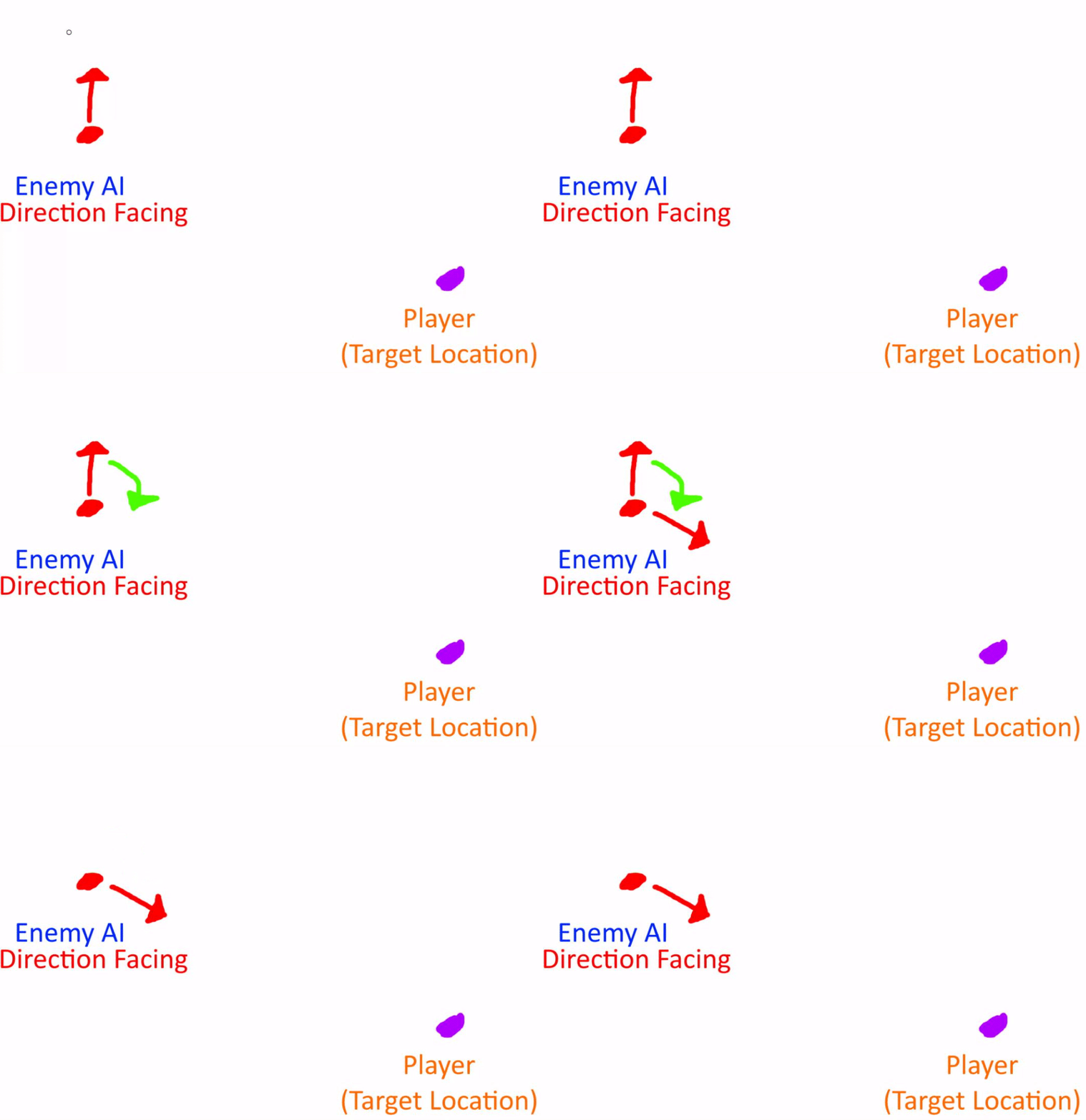
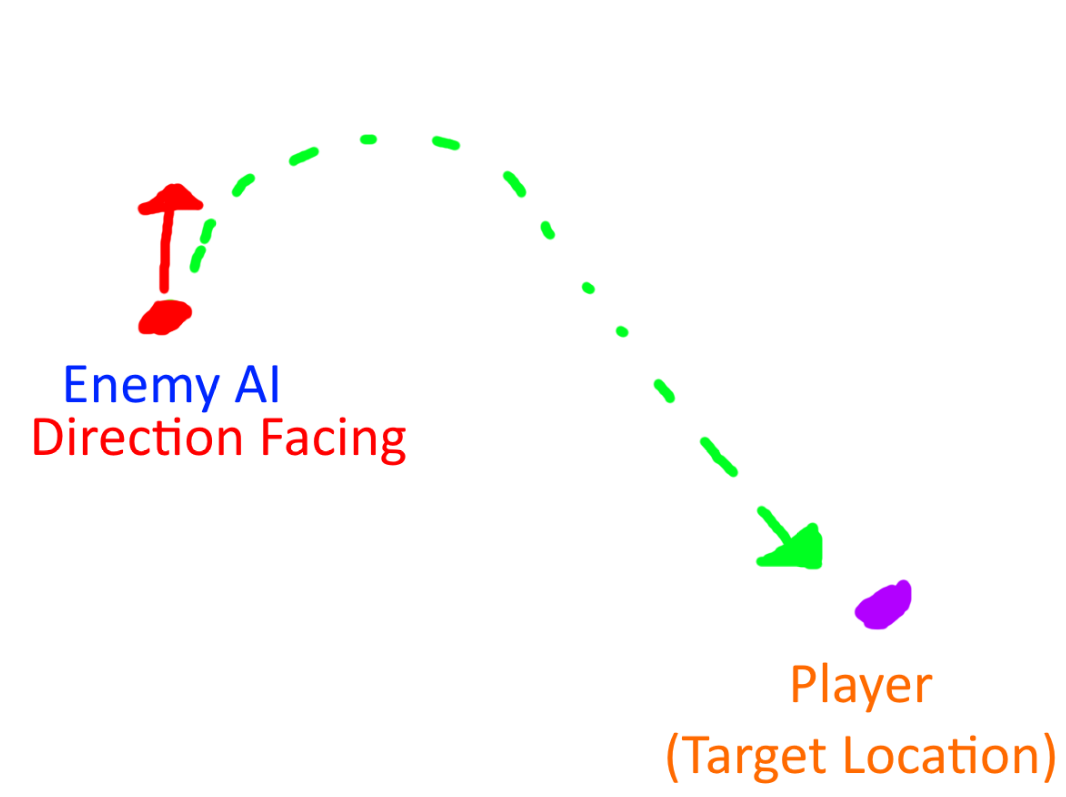
 cerulean plover
@cerulean plover set the agent radius settings, press P to view the active navmesh so the pathing is always working
@lyric flint i definitly did that but the AI still its acting like that
even if i set the radius very high the AI doesnt care
and go against the wall ignoring the wall radius
lyric flint
check the collision settings of each static mesh then
cerulean plover
the collision is the basic one i saw, i tried to tweak it a little bit but its something to do with the navmesh itself
i tried with differents models
cerulean plover
thats why im confused
im trying to compare the projects
i tried the top down one
and it works just fine
lyric flint
send a pic of the navmesh please
windows key -> shift -> s to take a snip of the unreal area in question from the application
cerulean plover
i compared every single digits and they are equals :\ im using it on the landscape not on plane if it does matter idk
lyric flint
right press P to enable the navmesh visibility and send an image.
cerulean plover
when i come back to my pc i will send you a pic :\
lyric flint
k
cerulean plover
thats the area
basically what my character does is attaching itself to the wall
and glitch
lyric flint
if it paths to the right side there are holes in there
cerulean plover
left
lyric flint
your character doesnt need to do pathing htough
your character is input controlled
you mean the AI?
make sure the navmesh bounds volume Z lower bound is below the landscape.
cerulean plover
you mean the AI?
@lyric flint ye the ai is actually controlled by the player, the game is an rts and they eventually will do other things while im not selecting them
so i made them ai
btw nothing is doing the trick, i think im going further with the development and figure it out later
lyric flint
if you execute MoveTo on the correct location for moveto, it should work. make sure your RTS click selection point for the destination of the MoveTo is a correct vector point in 3d space, and make sure the navmesh is visible for all areas you wish to MoveTO. you might want to disable movement to areas that cannot be traversed, by disabling the clicker from clicking on those regions, similar to how starcraft / warcraft disable clicking movement commands outside of navigable bounds.
random jay
Anyone know any good resources for example AIs? Specifically melee combat AIs would be interesting but any good examples would be great
real spire
Ryan Laley has a solid tutorial series on AI, especially if you're starting from scratch. It's not focused on combat however - if you already know about Behavior Trees/Blackboards and basic stuff like getting AIs to chase players, patrol etc it won't be of much use.
It's here if you want to take a look @random jay : https://www.youtube.com/playlist?list=PL4G2bSPE_8ukuajpXPlAE47Yez7EAyKMu

YouTube
north willow
hey goys im pretty nooby at making AI but when I have one enemy everything works fine but when i have multiple it seems like they are taking the inputs from the same exact tree and some go to one of the enemies and some of the executes go to the other
is there a simple way to fix this
north vapor
how do you alert other ai that all use the same controller and behavior tree
if one ai sees the player alert others
anyone know a way of doing this
patent hornet
AIManager with a delegate seems like the simplest way to go about it
north vapor
zlo how do i create a ai manager i dont see any tutorials on youtube?
patent hornet
you make an Actor, put it on the level, call it AIManager
have the AI register with it and subscribe to its event dispatchers
 untold nebula
How would you go about making a driving AI which recognizes traffic?
 wary ivy
by thinking a lot and researching
 compact comet
Hi, I'm trying to setup an AI for an horror game, and everything is going fine, but i can't find a way to change walking speed of the AI when it sees the player or not, can someone give a tutorial on how to create that? I've been looking for that for for hours and i only find how to setup sprint for my character and not for AI
patent hornet
same difference you just change its MaxWalkingSpeed in the CMC
north vapor
@patent hornet do you know any event dispatcher tutorials idk how to alert ai that have the same controller and tree
north vapor
@patent hornet can you show me example when you have the time i cant seem to find anything related to what im trying to achieve with my ai
real spire

How do I use Event Dispatchers in Unreal Engine 4?
Source Files: https://github.com/MWadstein/wtf-hdi-files
 ionic geode
Hey,
Anyone knows if it possible to increase an agents max step height in a specific area of the nav mesh?
Imagine if I have a global step height of 50, but in certain areas I want it to be 100.
The ideal scenario would be if I could place a volume around an area and then build a new nav mesh.
wary ivy
maybe add a volume into the game world and then on overlap change the step height in the movement component (or whichever handles it)?
ionic geode
Thanks @wary ivy But I need the nav mesh to be updated at build - not change stuff at runtime.
floral mango
@ionic geode look at Nav Modifier Volume
 hearty anvil
I have a problem, my AI is not registering to the weapon bullet. Because of this, no damage is done. But it reacts to PainCausingVolume!
 left hull
Hi,
I am trying crowd ai controller, but...
AIs seem to be not avoid idle characters.
Is crowd AI not support idle character?
I want to make AI keep a certain distance between others during not moving
 south palm
guys why is my ai not working?
im using behaviour tree
and its not going to specific point in a bp actor
 solar bronze
we cant help you if you dont give us more information
whats in your behavior tree?
are you running your behavior tree?
south palm
Yes
Wait I used this tutorial

In the last episode I showed you how to have an AI follow a patrol route. In this episode we will add to this and give the ability to our NPC to loop their patrol route, walk back on their selves, and pause along the path.
Support me on Patreon and get access to videos early,...
Sorry not this one
The fourth one
In this episode I show you how to make a NPC patrol a route; travelling from point to point.
Support me on Patreon and get access to videos early, join our developer community on Discord, get exclusive behind the scenes videos on my projects and much more over at https://www....
It didn't work ):