#gameplay-ai
1 messages · Page 127 of 1
 static fable
 autumn pecan
right, so Im doing my own A* with blueprint that supports spider AI types(wall and ceiling navigation) but I'm having trouble detecting possible walkable surfaces using traces
linetrace has a bad habit of slipping through small collision cracks, shape traces produce initial overlaps too easy
any ideas on how to map 3x3x3 cube?
static fable
Any idea how to force the nevmesh to refresh once an object has been sestroyed to that the area can be travelled through ?
 final holly
You can put your NavMesh generation to Dynamic
but I'd advise playing around with the generation to Dynamic Modifiers Only as it's a lot less performance heavy
static fable
I am trying to block off the player from going past an area until the tutorial is complete,
I couldn't figure out how to do it with a modifier so I tried just using a mesh that I can use a destroy all actors on.
But it appear that the navmesh doesnt update when they are destroyed ...
It only needs to refresh that one time XD
@final holly
final holly
Yeah as I said, you need to change the generation settings of the NavMesh under Project Settings
static fable
thank you for the info, I will try it!
that works perfectly, thank you @final holly that was a massive help, I can even use it with the modifier like you said !
final holly
Glad I could help
 raw estuary
I have a small problem...
My AI enemy moves from the first point to the second but than stops, but i set it to wait 1-4 seconds and than go back... But it doesen't work. I think that the problem is in the behaviour tree, but i'm not sure. Can someone help me?
final holly
Do you ever set the new value in the blackboard of the behavior tree?
Because I only see you do that on beginplay
final holly
It's okay, we're here to learn
static fable
@final holly Do you bknow if nav modifiers have problems when overlapped ?
raw estuary
now it works, thanks
static fable
I made a BP with one as a component but its doesn't work properly when I made 4 (using a destroy all actors to kill them off when needed)
final holly
4 components?
static fable
And here I though making a contained area for the player would be easy XD
no, 1 BP with a navmodifier component.
I placed it in the level, 4 of them
since its a bp I could just drag them into the viewport
final holly
What doesn't work then? The NavMesh doesn't update correctly?
static fable
yeah, it doesnt update correctly I would imagine
well, it does but in a mannor you would expect if only a couple of the actors were being destroyed (like a box which you can escape from only 2 sides)
final holly
I'm not sure what you mean. When describing a problem try to include: The Expected Behavior (What you want to happen), The behavior that actually happens and things you've already tried to solve it
static fable
ok...
Surrounding the player I have 4 large instances of this BP containing a navmodifier component...
A widget button is pressed, this widget has a destroy all actors set to the name of the mentioned bp...
the player shouldnt be able to travel outside of this area until the button is pressed (signaling the completion of the tutorial..
when the player hits the button I expect the Nav modifiers to be updated as the BP are destroyed, allowing the player to then travel outside of the box it was initially trapped in.
hows that @final holly ? I can be pretty bad at explaining things sometimes...
final holly
If you look at the Navmesh with P after destroying the actors, do the area's still show up?
static fable
I am in VR when that happens so I dont know XD
final holly
You can't play in viewport?
static fable
no, controller wont activate the widget that way, also I cant seem to get the navmesh to show in that mode
final holly
You need to eject
You could make some temporary BP's that automatically remove the actors after a small delay
For that you could also use simulate
static fable
ok cool ill try that
oh now I can see it live @final holly
theres large sections not being rebuilt
might be worth trying fully dynamic ?
final holly
If you look in the details of your Recast Navmesh in the World Outliner - does it have the correct generation settings?
static fable
final holly
Try dynamic
final holly
If you do it in the project settings it will change it project wide - if you do it in the recast it will only change it for that navmesh
static fable
ok cool, Ill do it in that navmesh for now as I am not overly worried about performance in this one room.
dynamic worked great, for now that will have to do, though I will have to figure out how to improve performance in that room eventurally
I really appriciate your help @final holly thank you
final holly
Anytime
 grand atlas
Is it possible to execute multiple BTs at the same time? Not a subtree, but another BT all together.
The use case being that I have NPCs that should be using items like spells, pots, attacks. And how they decide on when or which item to use could be determined by a separate BT.
Or, is an AI controller required for a BT to run? At least I can't get one to work with an actor.
 pine steeple
it must use AI Controller
but you can inject behaviour trees using Gameplay Tags
i do this for my monsters, i inject different behaviour trees depending on what they are doing, only downside is they must use the same blackboard
 fallow hound
I think you can have a brain component run a BT
And brain component doesn't need to attach to controller
But brain comp can't do it out of box, you need to have a child class so it can run itself
But default I brain comp needs an aicontroller to start it up
@grand atlas
 hearty flume
how do I make this work without errors?
there isn't a Set Behavior Tree only a Run behavior Tree
So this is a chicken and the egg scenario for me
screwed either way (setting variables before setting behavior tree or setting behavior tree with null variables)
any ideas for fix?
hearty flume
I got a fix
I set the eqs to first find the nearest player
the blueprint ends looking like that where I set the target location and reference itself
that way in my AI controller, I was able to ...
disconnect setting the object reference manually, also, this new way is better because it will work in multiplayer because the old way only got player-controller 1
solved1
!
 thorny jay
Hi all, I'm having some problems getting a simple service to work. My understanding was that a service would tick at the specified rate for as as long as the node it is attached to is active. However, I have a simple behaviour tree where the AI picks a random point to move to and moves there (using the default "move to" task). While the AI is moving to the destination, I want them to look around randomly for potential enemies. I have created a service to create a random point to look at, but I can't find where the attach that service
If I attach it to MoveTo, then it only gets called once when the node is activated, so it will not fire until the AI has finished the move
I tried attaching it to the parent sequence, I also created a parallel node to run Move To and attached the service to the parallel node, same problem
I then added a task in the parallel node to make it look at a target while performing move to, and if I attach the service to that then it goes mental and fires every tick no matter what I set the interval to
I just want the service to update the "Look At Point" key every few seconds for as long as the bot is moving to a destination
 nimble perch
potential reasons ai would move in editor but not in build?
 storm zephyr
hello, is there a built-in way to find out how long we've been perceiving an actor with the perception component? it's kind of the opposite of age
thorny jay
@nimble perch Maybe a plugin isn't enabled for the build? Can't think of another reason why AI would move in PIE but not a packaged build
 high summit
@runic zinc you need to do like this:
@runic zinc https://www.youtube.com/watch?v=M2uCNqMa4FA

What is the Get Random Point In Navigable Radius Node in Unreal Engine 4
Source Files: https://github.com/MWadstein/UnrealEngineProjects/tree/WTF-Examples
Note: You will need to be logged into your Epic approved GitHub account to access these examples files. https://github.co...
 runic zinc
@high summit Thank you!!
 glossy spire
@hearty flume could be that there aren't any valid options down that path
hearty flume
Thx, I didn't know that would be a reason, appears I think you are right.
I figured it would just keep attempting the same blueprint
does the "red" around the block mean it is broken?
I tested with a different blueprint and it works with no red outline so I am pretty sure that is what it means
just got back to the computer, the red around it means it selected, but if there is a red bar (not shown in picture) then that means it fails. The red bar only flashes momentarily
 mortal remnant
could anyone point me in the direction of some resources/tutorials on basic bird/flying creature AI? My aim is to create a VERY basic bird ai that would basically circle around, land, takeoff and circle again.
 winged stag
I think they do that sometimes by putting 1+ navmeshes in the sky and adding smart links between the ground and the sky
mortal remnant
@winged stag What do you mean by "1+" navmeshes?
winged stag
imagine the old xcom where you could fly at multiple heights. each possibly flight height could be its own mesh. Probably better to just use a height offset from a single sky mesh
winged stag
my AI characters are using the detour ai controller and they keep twitching like they are having seizures when they try to slide past narrow things or go around some corners.
I turned off my animation blueprint in case it was animations, but I think its either the navigation or else the local avoidance being indecisive. Does that sound reasonable? What would prevent it?
 jaunty coral
I see a lot of tutorials for things where the player is the only actor enemies care about, but are there any good guides for setting up efficient large scale actors that battle each other?
large scale as in number of enemies, not their size 🙂
 half vessel
Just ran into a problem, I spawn AI and the last few AIs have their Nav Data Following Path Simulation Not active on them. I recon i hit some performence ceiling and it just shuts down nav simulation on the newest AIs I spawn. Is there something i can do to remove that limit/change it ? Or could something else be the problem?
autumn pecan
I am doing A* from tutorial, but I fail to understand what does the heap-sorting do in the context?
like, does it make sure you are only checking the most outer layer of the search?
grand atlas
From what I understand, the heap makes sure the best scored node is used to perform the next search.
autumn pecan
right, so any form of sorting will have the same effect
winged stag
@half vessel by default, the crowd manager expects you to have 50 or fewer agents
you can modify this in the project settings iirc
@autumn pecan A*, iirc, is similar to breadth first search except that you pull from your adjacent-nodes in a picky way and don't usually end up going breadth-first - usually, you always visit the node that is closest to the destination. The heap sorting could also be a priority queue for example, any performant techinque to find an appealing next node to visit
half vessel
@winged stag iirc?
autumn pecan
ok thanks, I was gonna run into nasty wall with heap implementation since all my grid data is virtual
(as in the node data doesn't exist -> cant save heap parent anywhere)
winged stag
has anyone else seem their detour crowd avoidance ais twitch a lot, or try (and fail) to squeeze into areas that are too small for them due to another ai standing nearby? Its like the algorithm is just really indecisive or something
pine steeple
yup thats why i stopped using it
pine steeple
Working on a custom system at the moment
jaunty coral
lol
jaunty coral
I don't remember, just the ai fritzing out
storm zephyr
hello, how would you go about making the sight in the ai perception component not be immediate? kinda like dishonored where he is suspicious and based of how far you are a bar of awareness increases over time?
do i have to do that manually, or does the component have anything for that?
 hoary vortex
I need the AI to follow a car mesh instead of the actor, because the player car is physics based. How do I change actor location to world location and have the mesh component be my mesh?
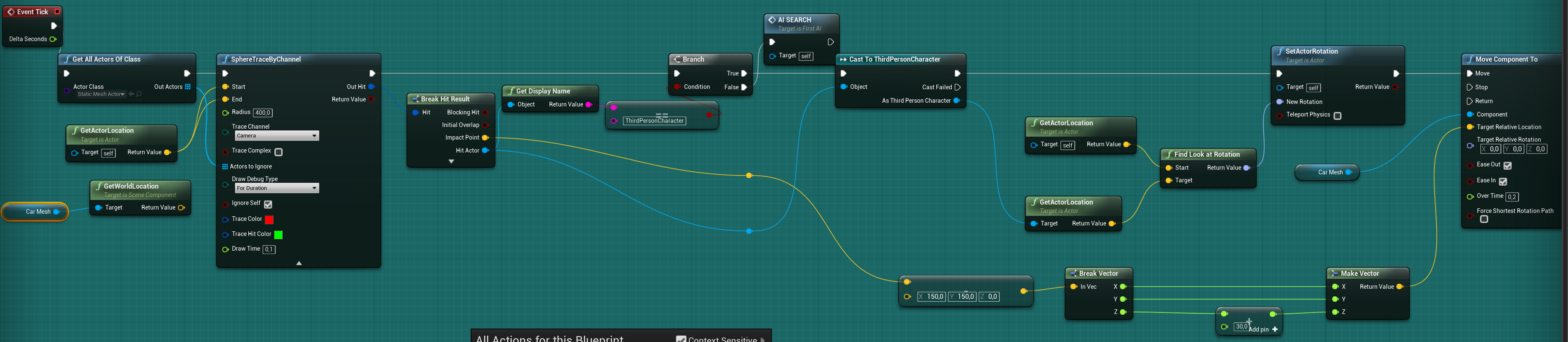
I think I need to make the car mesh node get the model file or something?
I'm new and know nothing, help will be greatly appreciated
 half aurora
Hey all, this may not be an AI question, but I notice that my AI characters cant turn in place when they are colliding with another character (or if the player character is pushing up against the AI character) I was wondering if there is a collision setting I have to set to ensure my AI can freely turn in place.
 prime iron
@tidal goblet I feel like you could leave it as is and it'd be great in a horror game lol.
 tidal goblet
prime iron
tidal goblet
prime iron
My bad, wrong person. I meant @jaunty coral
 pseudo yew
Can anybody help me with the proper method to remove points from AI move to depending on if another AI is already at that same point?
with EQS
 misty wharf
I wonder what this is 🤔
Forum post from many years ago suggesting it's... something... this is getting to be such a regular thing :P
 verbal violet
Hi people, do you anybody know how to set some parameter in decorator in BehaviorTree, via BehaviorTreeComponent in for example BTService ?
I've made new task for reusing in bt to set some bool, i want to avoid something similar that in this case
is it bad approach?
jaunty coral
hmm, should I use ai perception or EQS? 🤔
jaunty coral
I don't really understand how the values in "on perception updated" event work
misty wharf
perception and eqs are for different purposes
there's a bunch of videos on how they work on youtube :)
 rough haven
Is there an easy way to get the length of the path an AI would take if I used AI Move To?
Without actually moving it?
 sullen escarp
@rough haven One of these, probably the bottom one because you can pass in the AI for context
 lyric flint
I've got a move to node on my behavior tree. It's supposed to fill time by having the AI wander aimlessly until a boolean is set. But the AI keeps moving even when the boolean becomes set. It's not until the movement node finishes that the AI does what it's supposed to. How do I set this up so that the AI interrupts its movement node when the value of the boolean changes in the behavior tree? I thought "Notify observer on value change" would interrupt it but it seems that that doesn't work
 static crater
Hi, as for EPathFindingMode whats the difference between Regular and Hierarchical ?
jaunty coral
hmm, for some reason my actors aren't facing towards the direction they're moving
🤔
 quick portal
Hey guys, so I have a problem. I have an actor which has a static mesh in it. I want the ai to visually perceive the static mesh. How can I achieve this? I can't make the static mesh the root component as it's a child actor, which inherits from a parent class (which can have children that don't have static meshes)
The reason I can't just use the actor to be perceived is because the static mesh is simulating physics and therefore will be at a different location than the acto
 lean cliff
Hi all, any idea why my BTT isn't ticking?
Or rather, the Event Receive Tick AI is only running once
Tick interval is on -1 (aka tick every frame) but only ever receive 1 tick event despite the task being run
winged stag
@jaunty coral the local avoidance systems in unreal are a bit tricky to use... but you want to look into either RVO avoidance (checkbox on character movement), or detour crowd avoidance (use DetourAIController instead of AIController)
to get the rotations, you will end up using orientToMovementDirection
...RVO isn't very good, but detour leads to twitching characters who can't decide which way to go. Both can still lead to characters getting stuck. I was wondering if it was just me, so I looked up AI in other unreal games and found things like this: https://www.youtube.com/watch?v=dp1lgl_rcYI
and some gears of war stuff too
ie, characters getting stuck on each other and twitching because they can't decide where to go
sullen escarp
That Mordhau clip looks like they're sending all the AI to the same location (player) and hoping for the best as they mob the player at once? Could have guys side-stepping and queueing up to attack with non-engaged AI oscillating around like on a carousel, might help alleviate the bunching up and also make the combat feel a bit more rhythmic
winged stag
I'm having trouble in narrow areas with my ai also and they all have random individual destinations. They sometimes get stuck (never that bad), but whenever they even slow down a little they start to twitch left and right like the guys at the bottom of that drop. I think the crowd avoidance is oscillating and can't make up its mind
I don't completely mind writing my own local avoidance systems, but it would sure be nice if there was a setting I was using wrong that would just fix it so I didn't have to haha
sullen escarp
Part of the problem could be the behaviors as opposed to a single magic button on the movement comp / controller. In that Mordhau clip they're all the same movement speed -- I would set 2-3 closest guys on sprint to get into combat quickly, the next 4 on a run speed and the rest on a jog.
winged stag
you speed up or slow down to make room
what does the code look like though - do you have a group manager that distributes temporary movement speed modifiers?
and for the carousel, how do you move the characters out of one another's way while also making sure they stay on the navmesh - eg, in case they were on a bridge or cliff?
is there something like unity's NavMeshAgent.Move(vector) that will constrain them?
sullen escarp
Group manager could be one way or tie speeds to behaviors. Every AI probably has a BB key of a target to attack, have a service that ticks every X seconds checking other AI who have the same target and then determine a behavior (e.g., if part of the 3 closest AI and none are already engaged, then fire off Approach Target Fast behavior).
 crisp delta
Anyone got any input on why my Event Abort code is never ran?
It does in fact abort, and exits the "Shoot" branch, but the Abort code itself is never ran, so "ABORT" is never printed, and Stop Shooting is never ran...
crisp delta
Yes. Execute continues to print until the node is aborted
winged stag
I wonder if its because its self aborting
oh. I think you are not getting a chance to abort. I might be wrong, but it looks like you are just running through the tree very quickly
after shoot succeeds, it looks like it might just exit successfully
then the whole tree probably re-executes
crisp delta
Hmm... This is the tutorial I was following Unreal Engine 4 Tutorial - Shooter AI Pt.2 - Shooting on Sight
Oops... One sec

In this series we will be creating AI for a shooter game, including behaviour such as shooting, seeking cover, flanking, and random personalities (courageous, skilled etc.).
If you want the starting project file with the animation and shooting code already prepared for you ra...
winged stag
delete the connection to finish execute and you might get what you expect
crisp delta
Tried that too... Same thing
crisp delta
Thanks for the help though man. Going to try doing this in a fresh project... Going to see if I get the same behavior there too
 elfin socket
If I'm a remote client, I don't have any knowledge of the NavMesh data. So, if I want to know whether I'm able to issue an order to an AI Character to move to a location... it seems like the only way is to ask the server to perform that check and get back to me.
Obviously, that doesn't scale at all because for every remote client on the server you'll have frame-by-frame queries going back and forth as people move their mouse around the world. So, surely there must be an alternative... right?
I hope there's something I'm just not aware of yet to help deal with that use case. At the moment, it seems like I would have to fake the navigation query for the remote client by just allowing the player to "think" that they can order the AI Character if they're just looking at any Static mesh in the World, so that the navigation check only happens when an order is actually issued, at which point we can tell the remote client that it's not doable.
winged stag
ai runs serverside
elfin socket
Yes, it does run serverside, thank you. How can the remote client know that a certain location FVector is navigable, though? Without asking the server to know.
pine steeple
@elfin socket we actually have client side navmesh
and full client side AI movement (for players)

you just need to have the AI controller the clients used set to replicated and replicate to owner
elfin socket
Wow, really? Maybe the method I'm using is just the wrong one --- Ah! I wasn't aware of that setting. Thank you so much! This will probably save me so much time!
pine steeple
then you can run pathfind requests client side
we do full client movement for 8 players
on navmesh, with no server calls to move except the normal CMC calls
path is all done and decided locally on the client
@elfin socket https://www.thegames.dev/snaps/2QLYKmiF9N.mp4 this is 500ms lag, on a client with navmesh pathfinding
 fresh remnant
I'm trying to program weapons firing with cooldowns and reloads and I'm pretty new to Behavior trees, what's an optimal way to do this without continually checking if the weapon can fire again before the AI fires? I'd also like firing cooldown values come from the weapon itself not the player or AI. Not quite sure how to do this without a continual check on the behavior tree side which is costing too much performance.
misty wharf
@fresh remnant in my case I just track animation state.. I have a custom BT task which calls the attack function on the pawn, and binds an event to the pawn's "on attack complete" event dispatcher, so the bt task will only finish after the attack is done
just make sure to have a separate handler in the BT task for possible abort events which unbinds the handler and finishes abort correctly
(you could use a similar approach even if you don't want it to be based on animations)
 echo lark
@pine steeple what is the point of doing AI path finding on client ?
if pathfinding is on server
everybody get the same world state regardless
 rocky bison
do any of you know which key this is? or if i can change it?
i legit can't find anything about it
oh. dont worry, found it
i'm an absolute idiot
 patent hornet
@echo lark we have RTS controls, and no leg is perceivable on clients when reacting to movement
also lets us give immediate feedback if the move to order you just gave is reachable or not
without predictive movement from CMC, you would click and then start moving only after a round trip to server is done, makes the game feel non responsive
rocky bison
alright, different question from my previous one, what do these values from the EQS debugger mean?
autumn pecan
I assume if I want to get rid of the wall-hugging in A* I gotta reverse the path from end by checking nearby nodes for lowest fCost?
autumn pecan
ah, there's a Funnel Algorithm for that
 fluid quest
How come my AI don't look in the direction they're running? I've tried both Orient Rotation to Movement and Use Controller Desired Rotation but same result. If I enable Use Controller Rotation Yaw they turn too snappy around corners.
echo lark
@patent hornet I see as issue generator, when you do it on client. Been there with other client predicted systems and in the end.. the lest you predict the better you are of in long run. I'd rather focus how to fake cover it, on clients (and besides you can run path finding on client to see if the order have sense) and at the same time send it to server.
fluid quest
Sometimes he even looks the other way.
crisp delta
@winged stag you were right all along... I thought you said to remove finish abort, but you said to remove finish execute... That's what I get for trying to figure it out whilst at work lol. Thanks man
pine steeple
@echo lark we just generate the path on client, create the input and send it through the CMC, so it acts like a WASD input
this means we get full CMC usage, but with navmesh client side movement for click and move
 quartz finch
do you think we could do something similar to this project in unreal? https://www.youtube.com/watch?v=uFJvRYtjQ4c

We present a novel method for real-time quadruped motion synthesis called Mode-Adaptive Neural Networks. Our system is trained in an end-to-end fashion from unstructured motion capture data, without requiring labels for the phase or locomotion gaits. The system can be used for...
misty wharf
really gotta wonder what's the purpose of ai tasks, pawn actions and gameplay tasks... all of those as far as I can tell are years old systems by now which are "complete" based on what little information I've been able to glean from the forums
but really pawn actions seems to be the only one which actually looks sort of fleshed out and looks like something where you could push a task on an ai controller to execute so it could for example override a behavior tree... but I could be completely mistaken about its purpose :P
pine steeple
ai tasks and gameplay tasks are newer
than the old ones
the ability system uses Gameplay Tasks
misty wharf
Yeah it's a bit of a mess especially with zero documentation and zero comments on how they're supposed to be used :D
But yeah the AI/Gameplay tasks seem to be connected to some degree, at least the AI MoveTo for example includes a header suggesting this
On the other hand, a character actor comes by default with a pawn actions component which you can't even add to anything manually because it doesn't show up in the list... and then there's a gameplay tasks component, which is like.. I think the equivalent of the pawn actions component, but for gameplay tasks?
the AI MoveTo loads the header for the component, but calling AI MoveTo works just fine without a gameplay tasks component in the pawn...
anyway thanks for the tip KaosSpectrum at least I know which of these is more relevant to look at now :P
 warm ibex
HI guys,
I've written out a framework for updating components in my game.
AI in UE4 is different
You can do some updating in the AI Controller tick or set up a decision tree.
With the decision tree I'm trying to understand the frequency of these update calls. Is there a way I can globally control the frequency of update?
Like lets say I just wanted all my AI to do its decision tree every 12 seconds.
I know we have the "wait" node but I wasn't sure if there were other options just still doing research.
winged stag
There should be a setting where you can define the behaviour tree tick frequency
 shadow tusk
Probably a dumb question. I thought I heard in some video there is a way to allow AI to move around the map without a Navmesh but maybe I am wrong. If so can anyone let me know
shadow tusk
Question kinda solved. still needs nav mesh but followed this to increase performance. https://www.youtube.com/watch?v=DMe536X4IT0

Project Files : https://www.patreon.com/CodeLikeMe/posts?tag=source code
Support my work on Patreon : https://www.patreon.com/CodeLikeMe
In Unreal engine 4, we can easily put a navmesh bounds volume into the world and allow NPC AIs navigate within the defined navigation volu...
 blazing carbon
Hi, I am attempting to create a game where the level is infinitely procedurally generated. Because it uses runtime meshes to make the world, i need a dynamic nav mesh. When i change it to dynamic nav mesh, it generates just fine, but the issue is that my formerly working ai is now super jittery and broken. Everything in the actor cannot affect navigation, so i dont think its that. If anyone knows a solution to this, it would be greatly appreciated.
shadow tusk
Do you have the nav mesh invoker on your AI?
blazing carbon
yes
shadow tusk
Then aside from that I am not sure, I am sorry I am learning about AI right now and not an expert. I would check your settings in nav options and on the invoker. That is my only other though
thought*
blazing carbon
Unfortunately i did find a couple threads on this in reddit and such, but there was only one response, which was wrong.
shadow tusk
Have you tried testing on a blank map?
blazing carbon
the enemy is on a flat platform, not the actual map.
 hasty shadow
do your AI have any components that are affecting the nav mesh in any way?
hasty shadow
from my experience that happens when something is causing the nav mesh around the AI to constantly try to regenerate
blazing carbon
like the nav invoker?
shadow tusk
did you place a new navmesh after changing it to dynamic?
hasty shadow
the invoker shouldn’t be causing it to behave like that as far as I know
shadow tusk
I noticed I needed to place a new navmesh after changing to dynamic
blazing carbon
i placed a new one and nothing changed
hasty shadow
Have you previewed the navmesh at runtime? Is it constantly turning red?
hasty shadow
something on the AI must be impacting it then
blazing carbon
everything has "can never affect nav" on it
shadow tusk
when its not dynamic do you get the same error?
shadow tusk
What about with Dynamic modifiers only?
blazing carbon
it works but doesnt update
shadow tusk
I would duplicate the AI and delete components from it one by one till you find the one causing the issue
That may help narrow it down
If you figure it out let me know
blazing carbon
ok
got it fixed, apparently the skeletal mesh inherited i forgot to uncheck the affecting navigation.
hasty shadow
ok great, yeah that stuff can be sneaky
blazing carbon
i kinda assumed that becuase the mesh is nothing it wouldnt affect it
hasty shadow
had it happen to me when my AI would pick up guns, the guns were affecting the navmesh lol
blazing carbon
yeah
now the next challenge is to procedurally generate nav link proxies, imma save that one for tomorrow tho
misty wharf
I wonder why the AI perception system doesn't expose the sense configuration to BP's...
I need to adjust the vision angle based on some rules, looks like you could probably do it via C++ but I'm getting a feeling that it would be easier to just manually check the angle to the stimulus source to decide whether it was within the currently acceptable view cone :P
 frozen prairie
Hello! I've run into a bit of trouble on my ai and I'm wondering if I could get some help. I decided to program an enemy with a behavior tree and it finds the player's location and sets it in a vector variable to chase the player. Same thing with a patrol path, only difference is that it utilizes a separate vector variable for that also. My ai can't seem to find neither the player nor the patrol path and I've checked almost a dozen times, it's not nav mesh issue. When it sees the player, it runs in the opposite direction, still looking at him, so it can kinda move, but not the way I it to.
There's a video to show what I'm going on about.
 sudden lodge
hi there , I tried make basic ai command to follow me. I just used default vehicle template of unreal
I make basic AI and set te Move to Task
but the AI Vehicle doesn t follow me
any idea?
blazing carbon
Hi, In my project I need to use ai on infinitely procedurally generated terrain. I got the movement working with dynamic nav meshes, but now I want to move the volume to always be at the character. I set it up within the level blueprint, but the problem is that the origin of the navmesh is on the character but the navigable area stays in the same location as it started in. If i unpossess I can move it with the mouse and then the area updates, but I was wondering if anybody knew how to make the navigable area update to the player's location. Thanks!
 lusty kite
Hi, In my project I need to use ai on infinitely procedurally generated terrain. I got the movement working with dynamic nav meshes, but now I want to move the volume to always be at the character. I set it up within the level blueprint, but the problem is that the origin of the navmesh is on the character but the navigable area stays in the same location as it started in. If i unpossess I can move it with the mouse and then the area updates, but I was wondering if anybody knew how to make the navigable area update to the player's location. Thanks!
@blazing carbon maintain a 3x3 stationary nav volumes and discard/add new one if player moves out of the center grid?
 civic quarry
does it make more sense to use goal oriented planning for more complex ai?
blazing carbon
@lusty kite do i just spawn them using spawn actor from class directly, or do i have to make an actor of that class?
lusty kite
@lusty kite do i just spawn them using spawn actor from class directly, or do i have to make an actor of that class?
@blazing carbon I guess you need a tiny system for tracking player location and update the 3x3 grid every few seconds
warm ibex
hey guys
are you making your c++ custom tasks from
BTTaskNode or BTTask_BlackboardBase ?
winged stag
@civic quarry with GOAP, I think its better for simpler AI. Its very hard to balance the costs of the actions to get intended behavior
civic quarry
hmm
pine steeple
@warm ibex BTTask
BlackboardBase has a default key with a bad name

make sure you resolve your keys
you can also filter the keys
very useful
warm ibex
👍
 stark zealot
Has anyone ever used something besides behavior trees in UE4? I was looking for something easier to use and came across Tom Looman's wiki discussing Utility AI. Anyone ever used it?
winged stag
I think the easiest to use ai is behavior trees
and utility is often used in conjunction with behavior trees
fsms are pretty friendly for simple ai. Need the state pattern and then need to nest them for more complicated ai
goap is potentially easy if the ai is easy, but if there are more than 10 actions they can choose its maddening to choose weights
and there are performance issues with goap
 carmine hatch
Hey all, can't get perception hearing to work. Sight works great, but the hearing distance doesn't show up in the debug mode and reporting a noise does nothing. any ideas?
ok, well didn't really do anything (recreated the configs and put them back exactly as they were?) and now the debug is visible, but reporting a sound still doesn't work
apparently you have to use On Perception Updated for hearing instead of On Target Perception Updated for sight which is not at all clear in the documentation, as usual 😔
winged stag
what is the difference between those functions in general @carmine hatch ?
is target only for currently tracked targets?
stark zealot
@winged stag Thanks. I've been working on a few AI and I seem to always lose track of what is in what file because so many files have to be created. Then when I take a break and come back I forget what went where. Not to mention how to replicate it for multiplayer. I was just curious. I want to make a simple ai like one of the common enemies from Dark Souls. Basic stuff like, Attack state, Strafing/Defense state.
winged stag
iirc, all ai logic will run on the server, and you will just be replicating movement etc
most games have utterly simple and disappointing ai - just a navmesh with 'attack if in range' and 'move if not in range'
stark zealot
Yea I'm disappointed with most games AI as well. I really like how the AI on Dark Souls move. I'm not trying to make the crazy boss AI, I'm shooting for the more simple ones like the enemies in the first level. 2 maybe 3 states. Or to simplify it even more and go way back in time, The Stalfos from Zelda OOT. They strafe around you in a circle real fast, then jump attack at you randomly. Classic but effective AI. https://www.youtube.com/watch?v=tWZs0bV685A

Stalfos' are cool.
 knotty minnow
I like the way Sekiro and Dark Soul's handle AI and facing a computer in Melee combat. Ue4's behavior tree system leaves a lot to be desired. I did write my own implementation of Utility AI. Something that I'd have to revisit, and refactor how I did Utility tasks. Though its nice to be able to input everything into a table, (like selecting the function, and what resources it uses, if the task is interruptible, etc) and be done. Behavior tree just scale poorly with complex AI.
 livid beacon
I want an AI to move near, but not onto, a trigger box's collision box. In the Behavior Tree, is there a BT node that will take the character within an acceptable radius of a component like a collision box? Or do I need to make a custom one?
knotty minnow
Move to node should work. Note that there are two nodes related to moving; one uses a nav mesh and one doesn't. You probably would want a dynamic nav mesh. There should be an option to select a blackboard variable as a radius parameter.
livid beacon
Thanks, @knotty minnow . I'm using a "MoveTo" node now, which uses a nav mesh. However, the MoveTo node directs the character to move within an acceptable radius of the center of the trigger box, rather than within a radius of the outer edge of the collision box component (which has extents that are away from the center). Maybe I'm doing it wrong?
knotty minnow
@livid beacon The moveTo node is working as intended. Whenever you call a move command that involves an actor over a vector in world space, it will get the world location of the actor in question. The world location of an actor is the location of the root component, which is the center of the trigger box in your case
livid beacon
Got it. Thanks!
knotty minnow
np
livid beacon
@knotty minnow , are you aware of any AI movement node that would bring the character within range of the outer edge of a component (like a mesh or a collision component) rather than within range of the world location of the root component?
knotty minnow
no. Your best bet is to do math to determine how far your outer edge is from the root/center, and plug that into radius. (only if your location is complicated) Box components should have box extent variables somewhere, and meshes should show you size when you open them up. You could also do a line trace to get a hit location, plug that in to the desired point and throw in a reasonable radius.
livid beacon
Makes sense. Thanks!
Is there a way to set the acceptable radius of the MoveTo node from c++ or blueprint?
knotty minnow
Use behavior trees and black board. You want to use behavior trees for most of your AI stuff, unless you want to get really complicated in blueprint, or write your own C++ AI system.
livid beacon
Will do. Thanks!
 cerulean girder
quick question, can any one point me to a guide or anwser, I have a character that has a companion you can switch to and possess that uses root motion animations. i have it set up with 8 way movement using -1/1 : -1/1 input from axis...works perfectly fine for the player controlled pawn...but ai doesnt use input axis, is there a way to convert movement into input axis entries or am i stuck redoing the whole animbp?
knotty minnow
No, you have it set up correctly @cerulean girder You can use the calculate direction node. Or math with the that I will show you
Calculation of walk forward and walk right based on direction and mesh
My blend space. It goes to 2 for speed scaling.
Note that my method was learned from somewhere on the answerhub forums, and would have to be implemented in C++ for max efficiently. In theory, the native calculate direction should do the job; I've had trouble getting it work right.
cerulean girder
@knotty minnow what an absolute relief to hear...i spent 3 days getting it perfect for when a player controls it, i wasnt thinking about ai until now
hoary vortex
hello, my AI only tracks the actor and not the pawn, I need to set the actor as getworldlocation so the ai follows the static mesh instead
but idk how to set my car mesh to be the static mesh node?
 woven bobcat
hey guys i wanna know has anyone here use GOAP and has experiemnt with it?how well is it and compatible with in engine ai system
from the paper the showcase its seems really useful but idk how well and useful it is with the current ue4 ai system
debating wheter i should use it
jaunty coral
Is there a way to make a navmesh actor turn in place instead of doing a moving turn?
cerulean girder
I want to take a min to share an outstanding article i just read about the use of behavior trees with actual examples...its not a "how to" article...it instead throughly explains the use of behavior logic
https://www.gamasutra.com/blogs/ChrisSimpson/20140717/221339/Behavior_trees_for_AI_How_they_work.php

An introduction to Behavior Trees, with examples and in-depth descriptions, as well as some tips on creating powerful expressive trees.
I felt the information was so good that it had to be shared for anyone having issues grasping how to properly create a behavior tree
autumn pecan
Im doing optimization on my own A* but I got no idea what kind of query times should I expect
stopwatch says 740ms for that path @ 35 uu node size
jaunty coral
very neat
autumn pecan
so uh yea, about 50m/sec search rate
patent hornet
standard pathfinding query is about 6-8 microseconds iirc
autumn pecan
lets see if I up the rate
55m is 350ms at 10000 queries per sec
but it does a hiccup
so, not usable at that rate
patent hornet
unreal flat out refuses to do full paths over 40m
autumn pecan
at 50uu node size Im getting 450ms for 52m path
I could work with that
oddly the time goes down if I let the pathfinding climb walls
🙃
rocky bison
hey all, would it be possible to get the ai to go through here using a navlink?
nvm, got it to work a different way
 flint trail
@rocky bison how did you get it to work ?
fresh remnant
Is this right, I have a behavior tree waiting on 5 types of orders using blackboard base condition, looking for an order change. When there are no orders, 300 characters takes about 6ms frame time just waiting for an order. I thought behavior trees were event based, but this seems to be taking as much time as if I continously check the conditions every tick for each character.
1/3rd of my whole frame time is just waiting on these behaviors doing nothing
 stiff gale
Is it possible to create an AI spawner that can do things such as the following?
You have a 4k map. You placed Ai all over the map. They spawn and stay spawned all the times, but only their location, rotation, and tasks not their meshes and animations. Every AI will have a sphere radius that will use player's distanceTo running on EventTimer every few seconds. Whenever the player goes nearby that's when the AI gets their mesh and animations start running.
 near jetty
@autumn pecan ive done things like that
at sub 0.1 ms
so if you take 750 ms, there is something really, really wrong there
unreal engine has its own A* implementation. Its much faster than that
i was doing 2000 queries in 1 milisecond on a relatively small map with it
autumn pecan
well, it is done in blueprint so that makes it bit slower
and it has no static navigation data
all the available nodes are checked during the query
Im fairly certain most of the bottlenecks are the built-in macros
and most of the fault is in my priority sorting
when when it goes in straight line it shows that it checked the next-to nodes for no reason
patent hornet
not sure why you'd do pathfinding manually in BP
its the prime example of where c++ excels over BP
near jetty
ah blueprint lmao
of course its ridiculously slow
a pathfinding algorithm is about worst case scenario you can get to program in blueprint
in algorithms like that, we arent talking about the normal 10x or so slowdown vs C++
but about a 1000x or even more
blueprint has a perf overhead per-node
on highly loop-y algorithms, like a pathfinder, the overhead is enormous
dont even attempt to optimize it on blueprint. Port it ASAP. There is absolutely no point on optimizing a blueprint algorithm where 99.9% of the time is spent on blueprint overheads
autumn pecan
well first I want to make sure its working flawlessly
as I mentioned, its making unnecessary queries
🤔 technically I could port the loops itself already, as they can't be optimized anyway
near jetty
i recomend you just put t he entire thing in cpp
because this sort of loopy things get spaguetty too quickly
optimizing an A* for speed in Cpp is just so different than doing it in blueprint that by continuing in BP you are basically harming yourself
commenting from my implementation:
All nodes are stored in an array. A simple TArray<Node>, which contains only 3 things. Position, Links, and Flags
links are all done as integer indexes into the array
no pointers
(saves tons of memory)
Links implemented as a TArray with inline allocator
so that everything is nicely flattened. Alternatively, you can put the links into a second array, to do SoA which makes it faster
autumn pecan
I was thinking about single array approach, but since its a local-space box mapping the memory imprint might get quite large
near jetty
dont worry about memory usage. You need the memory anway
if its flattened in an array, with links being indices, you are saving a huge amount of memory
my recomendation is that you dont have it in 1 array, but 3
1 array is exclusively Position + flags
other array is Links
and other array is "extras", like name, or color, or conencting to gameobject, that sort of "not used much" data
because nodes point to each others through indices, the 3 arrays work the same
node 0 is index 0 on the 3 arrays
this stuff is basically guaranteed to be as fast as it gets
autumn pecan
tho one thing bothered me, how optimized is TArray.contains?
autumn pecan
though so
autumn pecan
its to make sure it doesn't load duplicates into open set while searching for neighbors
near jetty
dont use that
just set a boolean in the node itself
in my impl, i have it under those Flags i commented
so basically its just Nodes[index].bIsInOpenSet
you do still have a priority queue or whatever for the open set. But you dont need to ever search
when you add a node to the open set, you set the bool
that can be a single bit
autumn pecan
 ill make notes on that
near jetty
the core algo loop is just the classic one. With this implementation i was hitting something around 3000 queries per milisecond
on a map that was about 300 nodes
not that many tho
one of the most fun things you can do with such an implementation, is that you can use int16 for indices. This lets you cut memory even further. plus less memory = faster
if you have less than 65.000 nodes
autumn pecan
bool array = -100ms
improvement
yea Im currently checking 1000 open nodes per sec
which is also a contributing to the search times
near jetty
yeah i can see the problems
that GetNeighbours thing is definitely reallocating the array every time
autumn pecan
the function just returns the coordinates for neighbors, then followed by boxtrace to see if its blocked, if not -> evaluate its priority on open set based on fCost
and currently its only checking against 25 best nodes
so that's maxium of 8*25 iterations per node
but GetNeighbors only returns the ones that aren't closed or already checked
so most of the time it only returns ~3-5
near jetty
oh so its also doing boxtraces? rip
traces are very expensive
what exactly will block it?
you can keep track of the objects, and put "is blocked" as a flag
so lets say you have 3 blocker objects
when those objects move
you set the pathnodes they are standing on top of as blocked
and then the loop doesnt need to do any traces
autumn pecan
its simple initial overlap test
basically says "there's collision here, change direction"
near jetty
overlaps are stupidly expensive in unreal
if you have a low amount of blockers, you can do a "overlap" by doing a simple bruteforced distance check
 golden sage
Hi all. Imagine having an object in level like a big cube and around 20 Npc. How do i position these NPC evenly around that Object? Do i need to use EQS for this or is there a much simpler approach how this could be done?
autumn pecan
switched to linetraces, no difference
but then again I didn't expect that to be a problem, engine can handle quite large amounts of traces without issue
near jetty
your entire pathfinding algorithm should be faster than a single trace
autumn pecan
I dont expect it to be microseconds, because static map data doesn't exist for it
but consistent sub 100ms for 100% dynamic pathfinding is pretty good target
LogBlueprintUserMessages: [C_AStarStandalone] Stopwatch: 81ms Start-End Distance: 55,23m LogBlueprintUserMessages: [C_AStarStandalone] Stopwatch: 97ms Start-End Distance: 56,61m LogBlueprintUserMessages: [C_AStarStandalone] Stopwatch: 76ms Start-End Distance: 50,22m LogBlueprintUserMessages: [C_AStarStandalone] Stopwatch: 75ms Start-End Distance: 50,25m
it's probably not gonna get much faster than that
can this be improved?
autumn pecan
this sorting is biggest performance violator
near jetty
unreal has an actual priority queue
in cpp
its designed specifically for pathfinding and the likes, it has efficient sorting
have a look at the AStar class in ue4
it implements the algo in a generic way
near jetty
with the AStar class, you can use it on top of the multiple-arrays thing i talked about
its basically a template with the core search algorithm. It doesnt care abouth how do you store the nodes
you basically need to implement some sort of NodeReference (int) and a "get neighbours" function
and couple other minor things
autumn pecan
riigh, so what do you recommend for checking collisions
I would prefer doing it dynamically, since this system is suppose to support spider AI as well
near jetty
you do it at once, per frame
not while querying
instead of having the nodes trace for objects
have the objects trace for nodes
Actors have a callback that is "on moved"
you can use it to flag what objects moved beetween frames
and then you use that to unset or set the Blocked flag on the nodes below those actors
that is basuaclly guaranteed best perf
if you feel cheeky, you even only have to set/unset the flags when you do a query that frame
that way the frames that you arent doing traces, the cost is 0
another possibility is to not do traces/overlaps
how many dynamic blockers will you have @autumn pecan ?
rough amount
autumn pecan
I wasn't going for screen filling amount
near jetty
so on the few counts? or going into dozens
everything that is like.... below 20 or so, is trivially bruteforceble
autumn pecan
probably dozen
near jetty
then bruteforce the fk out of it
when you start a query
you grab the blockers
and store their position in an array
and then, when you check if a node is blocked
you just iterate this positions array, and check distances
autumn pecan
original plan was to do the collision check during path time, and keep checking is the path valid until perception actually notices the path being blocked -> get new path
near jetty
counts of that scale are trivially bruteforceable. In fact, attempting anything smarter than bruteforce would make it slower
just make a array of vec3 positions and check distances
 warm ibex
Hi peeps,
Is there a way in a behavior tree task to have a task run another task?
Example if i didnt care to do a set of actions on the behavior tree like
'move to'
'attack target'
'come back'
But instead I wanted to do something like
Task_Attack and this task is a task just would use other tasks?
Is there a way in UE to run my tasks like that?
Or is it more structured in the way of i'll have to just keep the tasks simple and branch them from the behavior tree?
Task move to, task use attack, task run away
warm ibex
hmm okkie
i was trying to avoid using the behavior trees at all and making my own tasking system.
I keep hearing on forums or videos that you can just use the AI controller without the behavior tree.
But i havent come across any examples of making AI without the behavior tree
patent hornet
if you are that unfamiliar with BTs, you should probably try to use them
before going to invent hot water
warm ibex
i mean i know about BTs i'm an AI dev XD I just was seeing the extents of the UE BT system.
if anyone comes across some examples of AI creation in UE without behavior trees let me know!
Just looking to study up on possible directions before just deciding BT it is lol
patent hornet
it is fairly serviceable
you can modify it or find a plugin to do utility AI with same editor interface
warm ibex
yeah i did like the debugging abilities from the BTs
i've been trying to stick within not alienating myself from using UE prebuilt systems since their support is great for difference interactions with them in the development cycle.
patent hornet
EQS is marked as experimental, but for most part it works
it does occasionally crash the editor, but i don't think i've seen a runtime crash that was EQS and not human error
this one has solid flow control and is easy to debug
which puts it in above average for prebuilt AI systems imo
lyric flint
Is it possible to change sight radius of AI perception at night
warm ibex
@lyric flint what?
lyric flint
I have a float that indicates where the sun is, so is there a way to set the sight radius?
lyric flint
my idea here; create the day sensor and the night sensor, enable day sensor at daytime, enable night sensor at nighttime
 fallow gull
Hi, if you'd make a traffic system, quite dense, would you make individual Pawns, or would you create a "Master" that control multiple Car meshes?
 floral mango
@warm ibex there is a HTN planner lurking in the engine, it's not documented though
 plush pasture
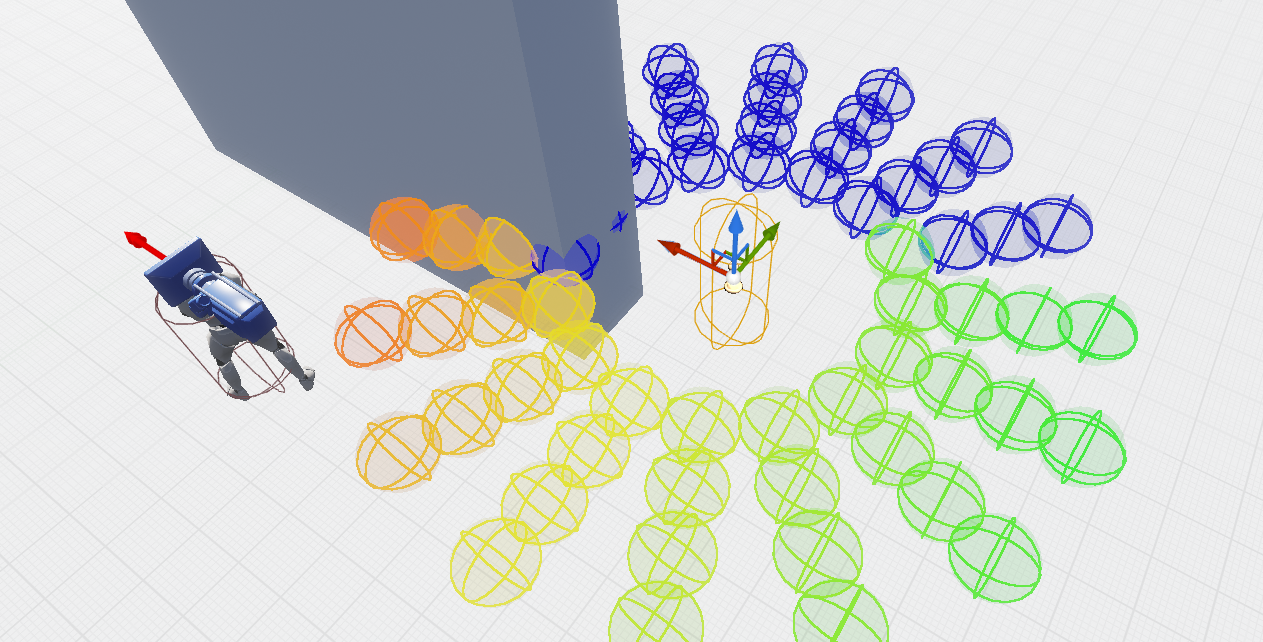
how do i select random circle but not blue?
this is eqs, im doing trace test and distance score rn
i want to score random green circle
cerulean girder
@warm ibex the hardest thing youll come across not using BT in your ai is that BT can run parallels...a ai built off tick in blueprint can not...parallels meaning "chew gum and walk"...in bp only its chew gum or walk....also BT can run "services" which is almost like a tick conditional or action that it does continuously while in a certain branch of your AI tree
If youre doing something where ai only walks up to player, attacks, runs away, or dies...then BT is overkill...
But if you want ai to appear as smart as a player look for cover, duck while shooting, preform actions the player could, smartly...youll have to use BT or a finite statemachine
warm ibex
correct for smarter AI BT or finite state machine is the way to go.. running parallel tasking without BT is usually not too hard.
I'm still studying UE4 further so the parallel tasker is another thing I'll be looking into to see how they're sending a parallel behavior.
Just curious to see if calling task 1 stops when calling task 2 or if you can just call as many tasks as you want and just need to remember to control the finish executions.
I'll be doing more research into it but its looking like making your own AIBrain Tasking state machine won't be all that bad.
rocky bison
is there a way to make certain objects invisible to the AI? For instance, if I hold this object in front of the player's origin (which is where the stimuli source is) it stops detecting the player
actually nevermind, i think this solves the issue
yup, solved
cerulean girder
@warm ibex if you successfully found a way to run a parallel on an AI That's coded in pure blueprint off tick function i would love to read up on that...with current in engine systems, not talking about custom classes
autumn pecan
looping timers are technically parallel
static crater
Hi, so when i switch 'Runtime Generation' to 'Dynamic Modifier only' instead of just 'Dynamic' the map loading time is like around 2 minutes instead of like 10 seconds.. anyone knows why? Is the navmesh just rebuilding maybe?
static crater
warm ibex
Hi peeps
Anyone know anything about this guy?
class AIMODULE_API UAISystem : public UAISystemBase
I'm looking at em right now.
Its got all the managers like the behaviortree manager perception ext.
Wondering if i were to make my own manager would it need to be stuck inside of this class but that doesnt add up since this class is already in use across many places overriding inside of it sounds bad and inheriting from it to make my own sounds not so useful.
seems like it would be sort of where I would stick something like my own AI System Manager but idk just still studying more layers in the unreal frameworks heh
pine steeple
what do you want to do with it?
you don't need to use any engine stuff to make your own AIManager
mine is my own based class
warm ibex
yeah i tracked it further and realized AISystem is just a container more or less and other managers are just living in there reference into the game world
I was going to store custom AI stuff else where was just making sure I wasn't supposed to shove it in there.
pseudo yew
yo anybody know how to prevent AI from going to the same EQS point!?
 novel vine
Hey there, has anybody come across any resources or tools for ai navigation on a spherical world?
 reef birch
how do people handle turn in place animation with rotate to face bb?
pine steeple
use control rotation
then counter rotate the root bone of the ai
untill threshold is met, then play TIP animation whilst rotating to control roation
pseudo yew
ANYBODY know how to prevent AI from going to the same EQS point?!
lyric flint
@pseudo yew maybe https://docs.unrealengine.com/en-US/Engine/ArtificialIntelligence/EQS/EQSQuickStart/index.html
3. In BTT_RandomLocation, recreate the Blueprint Graph below:
https://docs.unrealengine.com/Images/Engine/ArtificialIntelligence/EQS/EQSQuickStart/EQS_UpdatedTask.png

The Environment Query System Quick Start aims to get you up to speed on some of the systems and tools for working with EQS and AI.

Typically randomizing anything helps creating the illusion of choice 😄
pseudo yew
@lyric flint haha ye athanks, the problem is its not for patrolling I need them to be in a sort of formation like in cover around a certain point but they all pick the same spot
lyric flint
Is there anything like a 3d nav mesh? Any pointers to learn that
jaunty coral
what do you mean
fallow hound
there's dons flying navigation
 ripe geode
Hi someone know how to bind into AiMovementStarted?
Something like OnAiMoveCompleted but opposite
Because i want set here boolean bIsWalking = true and use it in Animation
fallow hound
I've typically seen that done by getting actor velocity
 still grove
hello there. anyone knows why my AI after 1-2 min disappears after trying to hit me. I am running like 1 min, AI is following me and then bam, disappears. while i am Shure that i haven't wrote smth like this/ where can i check? P.S ( paragon character. may be he has somewhere )
Hi someone know how to bind into AiMovementStarted?
@ripe geode you want to play animation when your ai is running near or what?
still grove
@ripe geode if you need to find speed of your AI and then use animation. then in your blueprint use function - get velocity - and then add animation when velocity is more then 100 or smth like this/ hope it helped
but best way is to make - animation blueprint - and add it to your - AI controller - google a bit or better find on youtube, there are many good videos about this. i personally did same. if you need smth else write again what you need) gl
 true gazelle
Hey all, if I have a nav mesh volume and some simple static meshes to block out areas on the nav mesh and then those static meshes move at run-time does the nav mesh update at run-time accordingly?
(Or is the nav mesh set in stone on construction)?
fallow hound
i think you need to turn on dynamic nav mesh in project settings
 gilded tree
Hey, I've got a 8x8km map. I wanna have wildlife AI roaming about, and also AI civilians within my towns. However, generating a nav mesh across the whole level made the level cough not load when trying to play. 160k navigation was built. So I went the invoker method instead, but I plan to have a lot of AI roaming my towns and in the wild, so not exactly sure how badly that will perform. Any tips around this? 🙂
 supple sigil
I have a pawn that I want to move similar to a large ship in water when turning like shown in the picture.
Is there a way I can get it to turn gradually? (like the right side of the picture)
hasty shadow
@gilded tree for the most part you only want AI pathfinding around where the player actually is
gilded tree
@gilded tree for the most part you only want AI pathfinding around where the player actually is
@hasty shadow Hmmm okay. I guess I would use EQS then as a task in the AIs BT that would check if a player is nearby and just stand still unless? That would need to run per tick or on a timer though, maybe not so sufficient... hmm. Or I cull them out? One guy said that using World Composition to split up the AI nav meshes should be a good solution
hasty shadow
@gilded tree a lot of AI wouldn’t necessarily need to exist at all until the player is near where they would be
others yeah you could have be totally disabled until the player is in range
and that could be handled from the player
or in game mode
gilded tree
Hmmm, by a float distance or something? Maybe theres some setups online that I can learn from - thanks a lot 🙂
 ocean wren
ITG: The way I handled it, is to generate cover points and on the cover point it had a flag that said if it was reserved or not. Then when the AI decides where to go, it sets the flag and that flag is used to filter out nodes in the EQS query for finding nearby nodes. Another option is to spawn a blocking object at the EQS node position (it doesn't do anything and has no collision) and then check in the EQS query that there are no blocking objects nearby to the EQS position.
pseudo yew
@ocean wren Thanks so much for the response I will definitely give those a try.
jaunty coral
I should probably figure out how to do this stuff in EQS. Right now, I have a system where units in my game toggle on/off "can affect navigation generation" to solve common pathfinding issues. Their movements begin and end in a grid, and it's turn-based, but you can move you own units at the same time. Problem I'm having right now is how, once I've told one unit to move somewhere, how to tell other units to stay away from that point until the one who is supposed to move there gets there 🤔
I suppose I can just have units add where they're going to a list and check it before confirming movement
I was trying a really hacky method with spawning an invisible actor at that location and when the unit moving there touched it to delete it 😆
 loud zenith
does anyone have any suggestions on how to do order issuing for player controlled characters? I'm trying to create turn based tactics where AI will execute orders given by players
I have a setup where player controller issues order to the pawn it controls, pawn delegates the order to AIController class which in turn is dispatching the order to behaviour tree where the actual movement and such will happen
now the problem is when I try to issue order for a Pawn that is controlled by Player the Controller class is no longer the AIController which could handle the orders but it's now the PlayerController class which is not capable of handling orders (at the moment atleast)
I guess what I'm asking is that can a Pawn have AIController class and PlayerController classes simultaneously?
jaunty coral
any other class can send events to the aicontroller, right?
your player controller might just control a camera pawn
loud zenith
yeah that works but then I need to keep track of who controls which character
jaunty coral
and then set variables on your ai's blackboard
loud zenith
but I'm guessing AIController and PlayerController on single Pawn cannot exist simultaneously
jaunty coral
they can but I'm not sure they can both possess it at the same time
loud zenith
Yeah that's what it comes down to essentially
well I'll check it out and if it's not possible then I guess I'll go down the observer pawn as player controlled pawn and all Characters are controlled by AI (but some receive orders from the players and others do it in classic AI way)
thanks for the help
gilded tree
Hmm - anyone know why this is happening with my AI using ALS v3? I applied Detour Crowd Controller and RVO to allow them to rotate around eachother when passing, but singularly the variables made them stop moving their feet as they detoured.
ocean wren
Detour doesn't use RVO. Disable RVO on those agents. Detour is a completely different system, RVO is a different algorithm. Having said that, I think the Detour implementation in UE is a bit broken if I'm honest.
Nice characters btw 🙂
 inner rapids
I'm trying to figure out how to modify this behavior. Right now, the sequence is, set attack target, rotate to target, attack, etc... the problem I'm having is that after RotateToTarget, it then takes about a full second for the AI Character to cast a fireball. By that time, I've already moved a big distance so they keep shooting at where I was a second ago. How do I get a more or less "constant" rotate to target?
ocean wren
My guess is that you're using a location in the RotateToTarget and you should be using an actor reference, that way the rotate can keep track of the position of the moving object
inner rapids
Well, yes, but I don't see how it'd work differently with an actor reference, the step ends, and then the new step starts, I need the step to be "continue to rotate to target" while performing the next step? I'm new to AI so I might be coming at this from the wrong direction.
I suppose I could in the "rotate to target" action, give my pawn the target, and let him continue to rotate to target while the BT logic moves to the next steps?
So... rotate to target isn't really accurate any more... it's more like... "tell pawn to keep rotating to this target"
ocean wren
if you use an actor reference, it rotates to the target position but also tracks the object as it moves, otherwise your location becomes outdated
You could also use a parallel that has the rotateto and another node for doing the firing if you are rotated enough to fire
There's also a predicted position in the senses if you want to get tricky
inner rapids
yeah, I figured I'd need to eventually look at predicted... was hoping to just get "not horrible" status first.
warm ibex
Hi peeps!
Does anyone have a good video or tutorial about custom making an AITask. I've been creating some parts for my own just paranoia want to reconfirm i'm creating them correct.
One of my biggest questions is what determines a task to be viewed as complete. I see an OnFinished( but
I figure if I viewed how people are custom c++ making AITasks I will have more questions to look into as well.
Also I'm talking about AITasks not BTTs
 sick badger
I'm using "AIBehaviorToolkit" in the marketplace, and I tried to update my Behavior Component to a newer version. I've been able to successfully do that, at least it seems. The one problem I am having now, is that whenever an AI wants to move in any way, whether to go to a random location or to follow another character, they can't move at all.... It seems to be something to do with EQS or "EQS Query" But I don't know what to do to fix this problem. When viewing the behavior tree, the "RandomLocation" IdleType gets stuck on the EQS Query, causing the character to not move at all. Does anybody know what I could do to fix this?
The navmesh seems to be built as well, it shows up green and updates with no issue.
thorny jay
@sick badger It seems like the EQS query is either not updating the blackboard value correctly, or it's failing to find a suitable location and so it just keeps trying forever. EQS stands for "Environment Query System" and it is basically a system that can sample points in an area to determine things like whether they have line of sight to an enemy (if you want your AI to find some cover to reload, for example)
I've not used the AI Behaviour Toolkit myself, so I can't say what the issue is, but one thing you can do is find out which EQS query it's executing, and then you can create blueprint of type EQSQueryPawn. Place that in the map and set the EQS query to the one that's failing so you can see what points are being generated and why they're being rejected
Basically, an EQSQueryPawn is a special actor that runs an EQS query and draws all the information for you in the map so you see which points the query generated, what their score was and why they were rejected if they were
sick badger
oh okay, I'll try that! Thanks!
thorny jay
You're welcome!
sick badger
Also, what if it turns out to not be updating a blackboard value?
Will the Query pawn find that out?
thorny jay
No, not in that situation. To troubleshoot that, you will need to play in editor and open the blackboard used by the AI. From the drop-down menu at the top, select an AI to monitor and you'll see the blackboard values in real time
In the behaviour tree, you can see the EQS query being run, it will also have a blackboard value set
sick badger
Thank you for the help! I really appreciate it! 😃
thorny jay
If you click on the task node, somewhere it will have a "blackboard key value" setting or something, that's the one you're looking for
No problem 🙂
I'm having a bit of an issue with nav agent types. I want to create a second nav agent type for horses, since they are a lot bigger than players of course. The issue I have is that my human players have a capsule radius of 24 and a half height of 77. If I configure the nav agent to have a radius of 24 and height of 154 and put the same settings in the bot's character movement component, then the bots suddenly are unable to move. They're just rooted to the spot
How do I actually get nav agent types to work? My understanding is you can't assign them, the engine determines which one to use. But for some reason it seems like it's determining my human players can't use any of the nav profiles, even though they're set to be exactly the same values as the profile

On the left is from my project settings, from the right is the character's movement component settings
patent hornet
pretty sure it has to be less then nav agent props
so you have higher numbers on recast then in CMC
and all agents below that size fit into that recast
not entirely sure that tossing horses on separate namvesh is a good idea by any stretch
as crowd avoidance doesn't work across multiople recasts
as in, doesn't work at all
thorny jay
Ok I'll give that a try. Things are made more complicated by the fact that horses can tow a cannon behind them, so I need to make sure that if navigating while riding a horse, it accounts for that and they don't try to navigate through doorways and so on
What would you recommend for ensuring horses respect their larger size?
It's weird, my capsule component half height for the character is 154. If I set the nav agent's height property to 160 it doesn't work, if I set it to 144 then it DOES work
Shouldn't it be the other way around?
Sorry, the half height is 77
Total height in 154
patent hornet
you can put nav modifiers, make query filters that include/exclude some of them
and use that as default nav query filters
thorny jay
Hmm that would mean a lot of manual work, part of the problem is the horses get stuck trying to turn around corners too tightly
patent hornet
that usually comes with their collision being larger then their nav radius
pathfinding only cares about the capsule
if there is a physical collision that capsule doesn't cover, it can collide with a corner and then you get stuck
thorny jay
Hmm, I am using a custom character component which can perform collision detection against multiple shapes. I guess the easiest thing would be to open the movement component and set the movement capability's radius to higher than the cylinder actually is
To account for the additional shapes
I'm still confused about the height thing though, my character has to be TALLER than the agent properties in order to use that profile
patent hornet
yeah, but pathfinding doesn't care about anything but the root capsule
thorny jay
Right ok
Can I not override that in the movement component's capabilities section? There is a setting to allow me to override the agent's radius there
patent hornet
there is a GetNAvAgentProps functions somewhere
Pawn i think
might be able to override that
as well
thorny jay
Ok I'll keep playing with it, thanks for the advice 🙂
high summit
@supple sigil you mean pawn or Ai character/pawn? you can create some patrol points array and move to each point one by one : https://www.youtube.com/watch?v=0gU5StGSq_o

In this video we look at creating an improved AI patrol that can patrol endlessly to any number of points, using a programming technique called recursive functions.
If you have any questions or comments please let us know. If you like the video and want to see more, go ahead ...
supple sigil
@high summit I'm trying to make a pawn move similar to how a large ship in in water does and how it needs to move forward to turn
plus the pawn moving is like a RTS type movement where you tell it to move to a spot
 bleak plume
Hi! is this ok, if navmesh generating like that with dynamic obstacle on static mesh? This thing happen only with landsacpe spline tool
jaunty coral
Is there a way to define a path for movement, create some kind of object along the spline or w/e, and tell other units that are approaching the spline to wait on their own movement until the first movement is finished
🤔
Trying to solve this problem at the moment
 tough helm
hey, just found out that I get character begin play and posses before AI controller begin play and posses
this makes it so that in character begin play i dont have BB/BT initialized yet (since that is initialized in controller begin play -> run behaviour)
is there a clean solution for this? to have BB/BT initialized before begin play
patent hornet
with c++ yes, with BP, no
you spawn actor deferred, and possess it before you finish spawning
tough helm
so the in engine auto possess is not enough?
i'll probably put the needed components on controller and run behav from c++ on posses, so that everything is ready on begin play
patent hornet
that won't work
Pawn is spawned, Pawn calls BeginPlay, then you have a chance to possess it
unless you do deferred spawn in c++
tough helm
yeah just found out myself, possess on controller calls BB init, so it removes my data from pawn begin play
damn
so basically I need to spawn both controller and pawn myself, pawn deffered and controller normal (so it gets begin play), then possess and then finish spawning pawn?
fallow hound
I see that nav filters can be used to get AI to avoid pathing through an area
but can I do the inverse, only allow AI to path through a given area? And never path outside of it?
Obviously I can limit the navmesh, but I'd like to limit AI movement within a level-wide navmesh
Maybe I'll make the default cost prohibitive, and use modifiers to lessen the cost
bleak plume
i guess u can use custom navarea with custom navfilter
 clever egret
Is having multiple(in this case only 2) behavior trees per AI and switching between them a good idea in UE4? I have set game states where when it's combat it's combat(think Ookami, Yakuza, etc.) until a participating side wins, so you only need the ability to switch to the other tree when combat starts or ends.
fallow hound
there's nothing wrong with that, there is even a node that lets you dynamically add or remove trees from another tree
clever egret
Hmm, I'll see if I can do that outside of the tree, then
static crater
Hey guys, so i asked inhere before, but no one really seen it at all. ive created a forums post about the issue:
https://forums.unrealengine.com/development-discussion/content-creation/1786178-navmesh-dynamic-modifiers-loading-issue
Unreal Engine Forums
Hi,
So when i switch the 'Runtime Generation" setting on my navmesh from 'Dynamic' to 'Dynamic Modifiers Only', the map loading time on play increased dramatically. (in editor from 3 seconds to like 1 minute) aswell as ingame. I suspect that the navigation mesh is being regen...
 cyan kernel
heya folks, I have a really weird problem... to do with the skeletal mesh of an ant character I got from the free assets a while back. Basically it won't do any movement unless I swap out the mesh with another one to test. The other animals work fine... Other AI works fine (all using the same controller). When I set the mesh to hidden in game, or if I put the ant out of view and track it with the AI debug, or get VERY CLOSE to the ant with the camera (like within 100 units, with the camera, not the player character) it will move around... but if I don't do one of those things, the AI debugger fills up with Paused events and it prints out Path Blocked from the AIMoveTo node immediately. The animation still plays... I've tried all sorts of collision/scale/speed changes, to no avail... altho sometimes it does move along very very very slowly. ...
cyan kernel
oh man it's the weirdest thing... on the client, they move around fine... until the server shows up and renders them 😂
cyan kernel
well I had to turn off Update Rate Opitmizations on the ant mesh... if anyone knows what's up with that, let me know, but I got it for now
 urban wadi
I have a question about AI attacking states. When using BT task, wouldn't it be better not to use the wait task node and instead use notifies to restrict movement through animations?
 oak pendant
howdy. quick question. getting a linker error when i extend ADetourCrowdAIController. i have included the AIModule in our build file already so im a bit stumped. any help would be great!
1>Module.blueberry.gen.1_of_6.cpp.obj : error LNK2001: unresolved external symbol "public: __cdecl ADetourCrowdAIController::ADetourCrowdAIController(class FObjectInitializer const &)" (??0ADetourCrowdAIController@@QEAA@AEBVFObjectInitializer@@@Z)
1>Module.blueberry.gen.1_of_6.cpp.obj : error LNK2019: unresolved external symbol "private: static class UClass * __cdecl ADetourCrowdAIController::GetPrivateStaticClass(void)" (?GetPrivateStaticClass@ADetourCrowdAIController@@CAPEAVUClass@@XZ) referenced in function "public: static class UClass * __cdecl ADetourCrowdAIController::StaticClass(void)" (?StaticClass@ADetourCrowdAIController@@SAPEAVUClass@@XZ)
1>M
odule.blueberry.gen.1_of_6.cpp.obj : error LNK2019: unresolved external symbol "public: __cdecl ADetourCrowdAIController::ADetourCrowdAIController(class FVTableHelper &)" (??0ADetourCrowdAIController@@QEAA@AEAVFVTableHelper@@@Z) referenced in function "public: __cdecl ABaseAIController::ABaseAIController(class FVTableHelper &)" (??0ABaseAIController@@QEAA@AEAVFVTableHelper@@@Z)
Did anyone get my question above?
glossy spire
@urban wadi I use custom tasks to play montages for character attacks / actions
the task just waits until the montage is finished before continuing
and i use wait tasks for adding a pause between things
urban wadi
So in your custom tasks plays a montage and you add a delay in that custom task?
@glossy spire
glossy spire
yes, I bind a timer to the montage length and finish when the montage finishes
urban wadi
that is exactly what I was trying to do, however you cannot use timelines in tasks???
glossy spire
sure sometimes
generally I like functions more because you can have local variables
but its whatev
urban wadi
So then how do you bind the timer to a montage?
 ivory violet
Hello! Is there some 3rd way of setting blackboard variables?
In first one Im casting to get AIC and its blackboard, which I dont like very much. And 2nd one I have to manually set which variable I wanna set on the BT Task. Maybe some way where I set using literal name, but without casting 😄
flint trail
what's new with/for AI in 4.25 ?
 simple crest
new? for AI? 
 frigid chasm
anyone delt with AI Perseption in C++?
 timid sinew
AI global takeover speedrun TAS (any%)
patent hornet
well, it does have some navigation fixes
 warm kelp
Can I move a navmesh volume at runtime and have it update on the fly? I have a dungeon generator I am trying to move a navmesh around to each room it makes and doesnt seem to update it when I move it.
high summit
@warm kelp yes you can. here are steps:
1 : go to project settings -> go to navmesh settings -> and check force rebuild on reload -> also change runtime generation from static to dynamic.
2: get reference to your navmesh, and do that below image attached:
warm kelp
Thanks for the response, I figured out what I had to do.
Also when I tried that command, UE said it wasnt a valid command
I ended up using Get Navigation System and calling On Navigation Bounds Updated
high summit
also don't forget to run this execute command when game starts "show Navigation" it helps you to view navmesh is moving at runtime
warm kelp
I did, I even manually typed it in the console. Said it wasnt a command.
high summit
when game start you need to press ` console button, then you need to type "show Navigation" (not in blueprint)
warm kelp
yeah I dont have a problem seeing the navigation, it just says that the command RebuildNavigation isnt a command
Okay I guess this is my bad. Apparently before it says Command not recognized, it actually does the thing. lol
warm kelp
I gotcha.
I got confused was all, sorry about that.
It threw me off when it told me "command not recognized"
it both executes the command and says that apparently.
 modern vale
Yo! Guys, is it possible to create a C++ class that inherits a BP?
urban wadi
what is better a wait task or a cooldown decorator? Don't they essentially do the same thing in respect to attacking?
pine steeple
@modern vale don't ask the same question in multiple channels, also how is this relevant to AI?
high summit
@modern vale yes it is possible, you first need to change parent class of blueprint actor to your custom c++ class and then you can assign that class to any c++ class
patent hornet
that would not be inheriting c++ class from a BP class
 novel crane
how do i give a AI its own navmesh bounds volume?
lyric flint
Can AI be multithreaded?
pine steeple
yes and no
you can multithread your logic
but you have to do ai movement on the game thread
and stuff like that
lyric flint
Like the behavior trees? Ot typical bp nodes
pine steeple
@iron fern don't post same question in multiple channels, #old-rules 7
 iron fern
Sorry, I wasn't expecting a quick answer. I'll scrub it here.
 mint token
What is the best way to make a nav area prohibited to certain type of nav agents?
patent hornet
NavFilter class
static crater
Hey guys, srry for asking again, anyone knows about dynamic modifiers?
https://forums.unrealengine.com/development-discussion/content-creation/1786178-navmesh-dynamic-modifiers-loading-issue
Unreal Engine Forums
Hi,
So when i switch the 'Runtime Generation" setting on my navmesh from 'Dynamic' to 'Dynamic Modifiers Only', the map loading time on play increased dramatically. (in editor from 3 seconds to like 1 minute) aswell as ingame. I suspect that the navigation mesh is being regen...
tough helm
hey guys, big troubles with sigh perception
with multiple AI in map (like 20-30) sight perception updates increase from every tick to every 10-12 seconds
I don't have traces in CanBeSeenFrom, just vanilla perception.
How can it be so slow? Is there any way to increase it? Maybe there's some limite on updates per second?
 glossy cargo
Was looking at this,
https://github.com/rdeioris/UnrealUtilityAI
And thought of trying it out. But is there a reason that the Utility decision system should be an ActorComponent rather than simply implemented into the AIController?
Since I am building from a clean controller, I thought of just putting the logic inside of the controller.

GitHub
Simple Utility AI implementation for Unreal Engine 4 - rdeioris/UnrealUtilityAI
fallow hound
hey, has anyone here messed with dynamically finding ways to jump between navmesh islands?
navlinks let a game designer do it, I was wondering if its crazy to let npcs solve that at runtime
pine steeple
well UT4 kinda makes its own navlinks
without designer input
but be warned its old
sick badger
@thorny jay So it turns out that the AI toolkit's blueprints weren't the issue at all.....
It was the navmesh lol.
And UE4 being a buggy lil sh*t.
I noticed the navmesh generates in the editor, but in PIE it's not there at all.... searched something like "navmesh volume missing" and found the solution:
delete the old navmesh, and the RecastNavMesh object, then create a new navmesh. (Or in this case, I just copied my old one, deleted the one in-level, deleted the other thing then pasted my volume back in. Worked INSTANTLY haha)
Thank you so much for your help though, btw! It helped me get to the bottom of this lol
winged stag
dumb question: what is the simplest way to implement death? The trick part seems to be remembering to disable every single thing that is running for the character, eg, movement, collision, animations, state machines, foot ik, behavior trees, gameplay abilities, etc.
What's the easy way - just disable tick or something? Replace it with a static dead character in the same pose?
(death for ai whose bodies will lay there persistently)
 plucky storm
looks like its triggering the wrong animation, or not triggering the right one. hard for me to say from just a video clip.
sometimes tho its the smallest of things (I spent 5 hours debugging today because I had a misplaced return node lol)
thorny jay
@sick badger No problem! Glad you solved your issue :-)
@winged stag The simplest way is to have the AI controller unpossess the character on death, make sure the setting in the AI controller "stop logic on unpossess" or something like that is checked, and then you can destroy the AI controller if you don't plan to have AI characters respawn and continue playing
thorny jay
I have several cannon in my map that the bots can use. What would be a good way for one AI to "broadcast" that "this is my cannon" to prevent bots queuing up by one cannon waiting to use it? The way cannon work in this game is that you don't attach the pawn to the cannon to load it, you just stand by it and use it. I'm trying to do it by checking sphere overlaps to see if anyone is next to a cannon, but this seems inelegant and prone to false positives/negatives
The cannon object itself also doesn't care about ownership, in reality multiple players could operate a cannon to load it (one to place the charge, one to ram it and so on), so it doesn't make sense in that context for the cannon itself to track which player "owns" it
So any ownership would need to be communicated within the AI somehow
pine steeple
just have a cannon manager
or just have the cannon hold an array of users
if a bot wants to use it, but another bot is in that array, tell them to go away
patent hornet
or cannon is aware which bot is using it
and if there is a bot using it, its CanUse function returns false for everyone else
thorny jay
Thanks both 🙂
Sorry, got a separate question now. I have a door blueprint which can be opened and closed. I'd like to have a built-in smart nav link, where the bot will open the door when it reaches the link and walk through so I don't have to manually place them in the map for every single door
I have tried adding a nav link component to the blueprint, but I noticed that a nav link component doesn't have a smart link component, nor is there any way within blueprints to enable/disable the link
It seems like all I can do is define one or more simple links
with no ability to control when they are relevant/enabled or not
It needs to be a smart link, otherwise the bot will just rub their face against the door and not try to open it
Is there a way to add a smart link to a blueprint and configure it, or am I doomed to add them manually to every map?
Actually, I suspect I could do it in C++ couldn't I?
final holly
Yeah, Unreal has a lot more exposed in C++ regarding smart links
Another way to achieve this though is to not let a door affect the navigation, and place a collider box around the door that detects if an agent is overlapping with it. In case they are, open the door. And when they aren't anymore, close it
thorny jay
Thanks, that may work for doors, though I do have other dynamic obstacles (such as breakable walls). Another idea that occurred to me actually is just using a child actor
thorny jay
Ok this is confusing. I am changing my smart link to be relevant at runtime, I have confirmed that it is being set, but the AI won't use it ever. Do I need to do something special to get bots to recognise that a smart link that wasn't relevant before now is? The link is always enabled
If I set the link to be relevant by default then the AI will use it, but I only want them to use that link if something else happens during the game
 wise iris
Does anyone know if there's a way for the character NOT to stop for a moment when you call AI MoveTo while the task is already running or when it has finished with success?
That is to say, I basically want the character to move to a bunch of waypoints smoothly, in sequence, but each time it reaches a waypoint, it stops for a moment.
thorny jay
@wise iris could that be due to the AI taking a second to calculate a new path to the next way point? Might be worth researching to see if there is a way to add a detour so it can precalculate the paths
cerulean girder
Services can do that, with observe bb value on a moveto
fallow hound
does the perception system use the visibility channel for sight traces?
urban wadi
Ok i have a question
i have an issue with a slide during an animation
sorry here is the one with the slide
is there a way to play the montage without using root motion to avoid the slide?
urban wadi
anyone have any ideas why the slide occurs when playing the animation montage above when root motion is not enabled?
sullen escarp
Is his behavior tree still running and having him move?
Could get the Brain component and pause it during the roar montage then enable it afterwards
urban wadi
yes the behavior tree, it is actually executed in the behavior tree @sullen escarp
pine steeple
or have the BT switch to a branch that just does nothing
till the roar is over
i do that with skills on monsters, if the skill does something, i just hold them in the task till the skill is over
urban wadi
how would you do that @pine steeple ? Would you execute a separate BT or what?
pine steeple
not a seperate bt no
urban wadi
Would you just use a selector node and have it first?
pine steeple
entirely down your BT setup
urban wadi
huh?
@pine steeple I am sorry to bother you but do you use a timer that triggers a bool in your BT after the animation is finished which is a condition for the other trees?
so until the timer finishes the other trees cannot execute because the condition is not met (true/false)?
pine steeple
nope
i have special functions that fire when the animation has finished
or blended out w/e
urban wadi
and those functions then communicate to the BT to let the other trees execute?
@pine steeple nvm bro thanks for the tips
I will figure it out sooner or later
Im still learning AI as it is and working on animations to coincide with damage etc..... It is a learning process but thank you for your suggestions. @pine steeple by the way, where did you learn all these tactics
?
wise iris
Is anyone aware if you can store the result of this node somewhere?
Like you would have the "MovementResult" from this thing
pine steeple
no you cant
that BT node will return success if at goal or reached goal
failed if the move request failed
just like that node
 cold trout
is there any way to interrupt an AI's behavior tree and make it go back to its root node? on some kind of trigger event?
wise iris
@pine steeple Thanks! You say it will return success or failed, can I somehow capture that boolean?
So I can use it in other nodes
Maybe put it in the blackboard or something
fallow hound
dean, I wonder if the characters pathfinding component would hold helpful information?
to determine success, you could gave that moveto node in a sequence, and a task after it that reports move success
then maybe that task also reads chars path following components? maybe there is left over data there from the last move?
this is all guess work though haha @wise iris
wise iris
That's an interesting idea
fallow hound
lemme know how it goes, I've never actually worked w/ the pathfinding component
wise iris
I'm not sure I have "pathfinding component" though
fallow hound
I think its build into the character class
wise iris
You mean charactermovement?
fallow hound
hmmm
lemme check
oh maybe its on controller
yeah it is
pathfollowingcomponent
hmm looks like it has a move complete delegate
and fpathfollowing result is a param
that might be what you want
you could have a task before the moveto that binds a function to that delegate
fallow hound
here's what I see in c++ DECLARE_DELEGATE_TwoParams(FPostProcessMoveSignature, UPathFollowingComponent* /*comp*/, FVector& /*velocity*/); DECLARE_DELEGATE_OneParam(FRequestCompletedSignature, EPathFollowingResult::Type /*Result*/); DECLARE_MULTICAST_DELEGATE_TwoParams(FMoveCompletedSignature, FAIRequestID /*RequestID*/, EPathFollowingResult::Type /*Result*/); DECLARE_MULTICAST_DELEGATE_TwoParams(FMoveComplete, FAIRequestID /*RequestID*/, const FPathFollowingResult& /*Result*/);
and
wise iris
Oh balls, it's not exposed maybe?
fallow hound
    /** delegate for move completion notify */
FMoveComplete OnRequestFinished;```oooohhh
yeah theres no uproperty markr
😦
wise iris
(╯°□°)╯︵ ┻━┻
fallow hound
haha
pine steeple
@wise iris you can write a BBtask that will set the bool
and run the task in a sequence
if the sequence fails, it will jump to the next selector, that will set it false
if sequence succeeds it will set it to true
wise iris
@pine steeple
"if the sequence fails, it will jump to the next selector"
But what if it succeedes?
It will also jump to the next, no?
I'm a bit new to BTs, trying to grasp this
Something like that?
fallow hound
yeah thats what he means I believe
pine steeple
sorry was busy
urban wadi
@pine steeple are you around bro?
urban wadi
anyone know how to use the return value on montage play with a timeline?
urban wadi
@pine steeple hey bro in regards to what we were talking about yesterday about how you have funcions fire after a particular animation is done. Do you have delay nodes inside the function, in order to make the task sit and wait?
patent hornet
he doesn't like delays 😄
there are delegates on UAnimInstance, that get broadcast when animations are done
urban wadi
thanks for letting me know @patent hornet . I always try to avoid delays as they are inconsistent, but right now I am implementing them and I am trying to avoid doing so.
patent hornet
we use montages heavily, im not sure what the limits are for animations
montages have a delegate (BP exposed) that fires when it ends or is interrupted
urban wadi
I am sorry to bother both of you as I am relatively new to unreal engine(a year or so) and I just want advice from people who have developed in the engine for awhile.
@patent hornet the biggest pain in the ass with animation seems to be the ik stuff which I have no idea how to work with, if not my characters foot/body will be overlapping the environment, can't wait for that challenge
patent hornet
it is fairly simple, IK, but i never worked with it
urban wadi
quick question right now I have one of my montages to change a bool when the animation is over which kicks you out of a branch of the behavior tree and lets the enemy start chasing and attacking the player. How do you guys jump from tree to tree?
i mean other than a sequence? Yesterday he mentioned you don't use bools just functions.
patent hornet
its often a decorator checking a gameplay tag
and montages often have one of those associated
or whatever the montages are a part of
like skills with attack montage, BT is generally only interested in if the mob is using the skill at the time, not if its mid montage
BT should never tells Pawns how to use skills/abilities/do actions
fallow hound
for the EQS trace node, does it have any logic about whether or not the trace hit the context?
I'm doing the obvious task of tracing to see if I can hit player
if the trace gets blocked by wall, fail test
if the trace gets blocked by player, pass test
patent hornet
best do LOS checks in negative @fallow hound
if (!bBlockingHit || Hit.GetActor() == Context) { return true; }
meaning you didn't hit anything blocking before you hit the Context
or you didn't hit anything at all, meaning your trace probably fell just shy of the Context
urban wadi
@patent hornet thanks for the clarification but how do you guys handle pursuit of the character by the enemies(chasing)
patent hornet
we attach the monster's MoveTargetActor to the Hero
and monster is always chasing after its MoveTargetActor
patent hornet
not really, monster really needs a single move command
MoveTo (MoveTargetActor) with GoalTracking
if we want it to stop, we can teleport the move target to the monster
urban wadi
as of now i have this going on
basically my behavior tree executes a roar montage the first time it sees a character then it executes a sub behavior tree that has a moveTo->Attack task(with a within range decorator), then a wait time that is based on a blackboard float that is passed on from the attack montage length
i am just trying to make this more efficient so I can do as little bug fixing as possible when it comes time to AI refinement stages
@patent hornet I really appreciate you taking the time to comment and answer any questions I have had.
patent hornet
don't think that will work really smooth
for one it can never change targets
for two it will stop after each attack
and twiddle its thumbs
urban wadi
I also have this for
if the target goes out of sight it defaults to running to last know location then if not seen again goes back to patrolling
will that address the first issue?
as far as the attacks, anything you can suggest? I mean i need it to stop until the attack animation finishes no?
urban wadi
are you answering the first or second question? @patent hornet
patent hornet
first
urban wadi
well i clear the focused actor(character) when he goes out of range. Doesn't that address the change target issue?
one sec
patent hornet
only if you have a decorator that can actually abort move
otherwise it will go after the target until it catches up with it, no matter anything else
urban wadi
Is that a standardized practice in AI (using a decorator to stop movement)? I mean I have watched a few tutorials on AI and pieces of a Unreal Udemy course and I did not see this approach. And the methods you guys use (chasing player and changing target to monster) seems like a good approach.
@patent hornet I am asking a lot from you right now. I am just going to refine/refactor my approach.
fallow hound
Are moving nav areas expensive?
Such as a nav area attached to the player to encourage ai to avoid the player
fallow hound
Well that's good to know
Any thoughts on paths avoiding moving areas then?
The first idea that jumps out to me is use eqs to find intermediate move tos
urban wadi
@pine steeple do you use abort move decorators?
pine steeple
i have my own custom decorators
@fallow hound not really eqs can be expensive
depends how many you have
patent hornet
MoveTo, once started will execute and continue executing until its Finished or Aborted
and your BT is stuck doing it if it didn't Finish or Abort
 opal oyster
Does anyone know how to make plhysics based enermy like TABS because all i can find is physics based animation and thats not what im looking for because you cant make the enemy go back if you hit him with something and i heard that you need to use inverkinematics but all i can can on that is foot IK and i dont really know how to apply it to the whole enemy, so is there any tutorials of documantation on how to do it? i would really appreciate it. thanks
cerulean girder
@opal oyster please dont ask the same question in multiple channels... especially in completely unrelated channels...tabs is indeed physical animation, combined with ragdoll activated on collision, look up ragdoll and you will find a lot more info that applies to it...you can also just ragdoll the enemy on collision without physical and apply impulses or "launch character"...eitherway im nicer than most cause asking im multiple channels just gets you yelled at and ignored normally.....
fallow hound
if I run EQS w/ all matching, how is that result returned?
oh, it seems to say "All = Only first matching"
fallow hound
so I'll prob need to run EQS outside of a behavior tree if I want a list of results
opal oyster
@cerulean girder Sorry but thanks for the info. You said that ragdoll activate s on collision, but wouldn't that break like the pathfinding? Because when I tried to enble simulate physics on a physical animation it said that it can't psthfind, and also I was watching devlog on karlson, I'm not sure if you heard about it but in his video he said he used inverse kinematics to make the enemy move and the enemy reacts to it's surroundings but he is using unity enigne, and I can't find anything related to how to apply IK to the whole enemy. I will try to enable ragdoll on collision and and disabling it? For pathfinding?
echo lark

In this 2017 GDC talk, Bobby Anguelov, Mika Vehkala, and Ben Weber outline core principles to get the most out of your behavior trees while avoiding common issues.
Register for GDC: https://ubm.io/2yWXW38
Join the GDC mailing list: http://www.gdconf.com/subscribe
Follow GDC...
an true eye opener.
fallow hound
hi all, my navlink proxy appears set up properly in editor, but when I play it dissapears. Video attached showing issue:


 fallow hound
hm, if I set draw failed navlinks to true, I can see the links
so they are failed
time to dig thorugh the code I suppose
ok got it
just had to lower them lol
 glass moss
Working on some AI that can move and shoot at a player, however once the player comes in view the AI violently SNAPS on the rotation to face the player. Is there any way to make this less violent and sudden?
cerulean girder
@opal oyster why would it break pathfinding? that would most likely be handled with ai behavior tree and eqs...physics driven hit reactions like those in tabs are completely unrelated to pathfinding...
and ik is just basic systems to keep the characters hands, feet, or pelvis where they should be during animations...not sure why you think any of the 3 things you are asking about are directly tied to each other...theyre 3 different systems entirely...
aside from you will probably need all 3 to reproduce that effect
i said you would ragdoll on collision, meaning you have to code that interaction yourself, there is no in engine system (unless you buy something on the market for it) that will handle that for you
all the logic will have to be pieced together by you
opal oyster
ok
cerulean girder
the reason tabs looks so shitty is becuase they put all thier focus on physics and gameplay
just so you understand its not something that they instantly made in a day\
opal oyster
Uhh i still dont fully understand what you mean by ragdoll, like enable physics simulation for a sec and then disabling it to make it like react?