#gameplay-ai
1 messages · Page 126 of 1
 pallid atlas
 sullen escarp
A task that does a 8 directional trace to a fixed length and make rules to rotate towards the best (furthest) available trace
pallid atlas
Hmmm
If I did it toward the furthest, wouldn't the kitty always walk toward the center of the room, though?
I like the idea though
sullen escarp
That's why you write rules, use some fuzzy logic
Best 5% or 25% random or something
pallid atlas
Oh oh... to a fixed length
That'll be perfect. Thanks @sullen escarp, I wouldn't have thought of that
 grand atlas
Any guides or some tips for handling player input in a BT? For example, say I can order a character to Move, or Attack. If the Move Task is left of the Attack Task, wouldn't that mean that if I gave a Move order and then Attack order, the character wouldn't start attacking until the Move was done?
The Attack Task couldn't cancel the Move Task. And doing the other way around would just invert the problem.
pallid atlas
@grand atlas It sounds to me like you'll want to use a SimpleParallel node in your BT, set to FinishMode=delayed, with the move task as the main task, and attack as the background task
With a decorator on the attack task, checking for... whatever it is you need to check for in order to allow the attack
grand atlas
I don't know.. what if I wanted to introduce another kind of input? Not that I can think of any right now but it doesn't feel very expandable.
 misty wharf
I guess that would somewhat depend on if your character is doing the actions simultaneously or no
ie. is the character attacking and moving, or if the move and attack actions are separate altogether
grand atlas
How does RTS units deal with player input? I guess that's what it comes down to.
 patent hornet
service runs for finding valid targets
move decorator aborts if one is found
and the attack takes over
grand atlas
I feel like I need something like the image below, so that tasks can be cancelled no matter what their position is. And some service on the input would clear previous data.. or something. This along having the AI autonomy on another branch.
Input would mean first setting the playerinput boolean to false, and have a service reset the data, followed by setting new data and finally b=true.
Am I completely off track?
sullen escarp
One way could be to have a BB key "NewOrderRecieved" boolean used as a Decorator on a branch from the Selector checking if it's TRUE, if so set it to FALSE. Mark the decorator to abort lower priority when it's changed. Then whenever you assign a new order set the "NewOrderRecieved" key to true and it'll interrupt any behaviors running that were lower priority / to the right of the decorator
@grand atlas
 urban wadi
Anyone know how to utilize the enemy, neutral, friendly in the AI Dectection by affiliation in AI Percention?
urban wadi
right now I have my AI set up to find my player through the BB behavior tree without the use of EQS. Should I be using EQS for location the player?
misty wharf
afaik the affiliation thing has no BP api for some reason and you need to set it up on the C++ side of things
pallid atlas
Wow, I just switched from using OnTargetPerceptionUpdated to OnPerceptionUpdated and boom, so many bugs resolved...
 unique jacinth
Wow, I just switched from using OnTargetPerceptionUpdated to OnPerceptionUpdated and boom, so many bugs resolved...
@pallid atlas What sorts of bugs? Your comment makes me slightly concerned because I just went the opposite direction
For example, with OnPerception I don't get any updates when leaving an enemy's sight radius
pallid atlas
I just checked the SensedActors.length == 0 to act as my "lost sight of everything" logic. For some reason, I couldn't get the boolean value from OnTargetPerceptionUpdated's stimulus result to ever be false. I had the opposite problem you had
@unique jacinth
I probably had the AIPerception's settings too loose. I dunno. I think it also has to do with the particulars of my game. In my game, all the things I'm sensing are the same type of object so it makes sense to deal with them in an array
now that i think about it, maybe I never get SensedActors.length == 0, I'll have to double check that. but I just know that the sensing logic works way better now. Before, I was having trouble getting them to see stuff right in front of their face. Now they see 20/20
unique jacinth
I just set the sight loss radius slightly higher than the sight gained, and I visualise perception so I see those radii, and when I move in and out of them I get the event, and if I've moved out the stimulus result is false and when I move in it's true
ah well, since it's working for both of us we don't need to dwell on it I guess 😉
 past stone
Anyone know why Run EQS Query would be hanging? It runs fine until I switch possession to a different pawn then if I run it again it never completes.
Also, the Run EQS doesn't seem to work on the client in a deployed version, although it's fine when PIE (using geometry, not navigation).
 civic flare
Hi. QQ. In order for an AI controller to move a pawn, does the pawn need to have a player input component or anything? I have a pawn i built in c++, blueprinted and then followed this write up to get random movement, but on play.. no movement happens at all. https://www.raywenderlich.com/238-unreal-engine-4-tutorial-artificial-intelligence

raywenderlich.com
In this Unreal Engine 4 tutorial, you will learn how to use behavior trees and AI Perception to create a simple AI character that roams and attacks enemies.
 gritty relic
Does somebody know how to change the hotkey to open the standard Unreal A.I. Debugger?
It is normally the ' (apostrophe) key, but I use a QWERTZ keyboard, which doesn't have that key.
 smoky summit
@gritty relic Project Settings -> Engine -> Gameplay Debugger -> Input -> Activation Key
gritty relic
That worked like a charm!
Thank you so much!!
smoky summit
no problem
past stone
After deploying it seems that all my EQS queries are now non editable. Is this because they've been cooked?
They're now "Data Assets". Can't view them or edit them.
Nevermind, EQS had been disabled in the options for some reason when it built. No idea how that happened :/
smoky summit
You built from editor?
past stone
@smoky summit No, I think I deleted the saved folder at some point since it was getting huge. Guessing it was that.
Still not sure why Run EQS Query node is not working on the client though. Only seems to be in the deployed version. The OnQueryFinished event is never triggered
 narrow monolith
ok here
 solar bronze
ok, have you done anything yet with the ai?
solar bronze
start with that, i'd recommend you searching for tutorials or other things to learn some ai basics first
narrow monolith
alright
civic flare
Does anyone have experience using random move to ai and the actual character / pawn not actually moving?
 static fable
How can I apply a nav mesh volume to a mesh so that when I press P it has a highlighted area on top of it ?
I would be greatful for any advice!
civic flare
I have a character which has my animation bp, my aicontroller ( which has run behavior tree in begin play with my bt ) and my bt has moveto, set random location and wait.. but he never moves....
hmm do you have to assign a nav mesh volume to a actor bp?
nm found it
the magic p button to make the nav mesh show as green 😐
@static fable not sure if it is the same thing.. but I had to move the mesh volume up then snap back down for it to be in the right spot. I guess I was like 1 off or something or they were overlapping.
static fable
I think my issue might be to do with collision, thank you though @civic flare
civic flare
Cool. I'm pretty new but trying to help. 🙂
static fable
I cant get this Navmesh to work so aaaany advice would be welcom XD
civic flare
I don't know I can help.. but.. What are you trying to accomplish with it? Expanding on that might help.
 mild saddle
I have an AI enemy that tries to get into cover when it's "exposed" to the player (i.e. successful line trace between enemy and player's collision capsule centers). However, when the enemy loses sight of the player, it enters a "searching" mode and goes to the player's last known location. This can sometimes lead to behavior tree toggling back and forth rapidly between the Combat state and the Searching state, especially around corners. Does anyone have advice for fixing this issue? I imagine it's a relatively common problem with shooter AI.
This "Lock AILogic" seems promising, does anyone know what exactly it does?
sullen escarp
When in cover do the line of sight check from the position they would be when they're fighting from cover.
If they can't see the player from cover maybe do the trace to the last known position of player that's valid for a couple seconds
mild saddle
Thanks for the advice. I think you're right - the enemy isn't able to see the player once in cover for some reason, even though my EQS query is supposed to generate points where the enemy should be able to see the player. I noticed that even with the Acceptance Radius set to -1, the enemy doesn't quite reach the location before finishing the execute, which could be part of the problem. I can look more into this.
smoky summit
I'm running into an issue sometimes where GetFocalPoint is returning the same location forever even after reaching the location, switching paths, etc. Once a bot gets in this state it just forever uses this focal point
Has anyone seen this?
 jaunty peak
@mild saddle there is an auto detect variable, can't recall it's proper name off the top of my head, in the AI Perception component of your AI. It allows your NPC to keep track of targets if they move out of view and are with the range you set. Note, it only works if the AI has perceived the target already and not forgotten about them.
sullen escarp
A good analysis of AI and perception concepts from Splinter Cell https://www.youtube.com/watch?v=1zh4CzzpGDM&t=349s

Support AI and Games and help the show grow by joining my Patreon:
http://www.patreon.com/ai_and_games
--
Stealth games are one of the most challenging genres to get right. You either run the risk of making it too easy and predictable, or impenetrable for only the most ard...
 glossy spire
how would i REMOVE a dynamic subtree
calling Set Dynamic Subtree with the same inject tag but with a null behavior asset doesnt work
does it?
 simple crest
amazing (and depressing) how ~20 years later people are still referencing the great things they did in games like Thief/Thief II/Splinter Cell...
 clever tendon
What could be causing nav mesh not to be visile and navigation not working while in game?
Nav mesh generated and is visible in editor like it should. But AI stopped moving and typin show navigation doesn't show the navigation mesh anymore while in game
And enable drawing is enabled on on RecastNavMesh
clever tendon
Got it working by fully reverting defaultengine.ini to a previous version
civic flare
good morning discord peeps. Would someone explain to me how the nav mesh volume, a plane and my character / pawn with ai works together? It seems if the nav mesh is a little in the wrong spot with the ground and pawn my ai doesn't work. I literally got it working once, then it stopped and I'm pretty sure its the position of things and can't get my pawn walking again.
 tawdry adder
https://www.youtube.com/watch?v=-KDazrBx6IY
Well Normaly it should just work if you have the navmesh properly setup and then call MoveToLocation...

In this tutorial we will setup some basic AI that can navigate in our map. We will do this by using Navmesh volumes and also simple move to nodes within blueprint.
I am having a different problem though....
Basically i worked all day on my AI and it worked really well. But as soon as I placed two enemies in the scene they behave very wierd. It seems that only one enemy acts at a time and if one ememy sees me the other one comes. Somehow the variables are synced but i turned off sync in the blackboard...
Pleasseee some one help me👏
No variables are set to static aswell
civic flare
thanks @tawdry adder
I'll look at the video
I think i finally got the stars aligned
now to figure out why my pig moonwalks and warps instead of moves to location smoothely
 hollow gull
Hi, can someone tell me in which config file I can set the auto register all pawns to false?
DefaultGame.ini
[/Script/AIModule.AISense_Sight]
bAutoRegisterAllPawnsAsSources=false
unique jacinth
amazing (and depressing) how ~20 years later people are still referencing the great things they did in games like Thief/Thief II/Splinter Cell...
@simple crest Blacklist is from 2013, although I get what you mean 😉
 final holly
Back in the days they didn't have all these other fancy features to hide the poor gameplay, so gameplay had to be good. Which helps us analyze these type of games very easily and integrate their logic into our own games
smoky summit
Anyone have their own custom pathfollowing logic to get around the fact that GetFocalPoint appears to be bugged and sometimes gets into a state where it stops updating the focus location?
 noble minnow
Back in the days they didn't have all these other fancy features to hide the poor gameplay, so gameplay had to be good
feel like this describes like 99% of modern technology lol
can anyone comment on whether they've found there to be an upper limit for nav mesh bounds volume size even with nav invokers? all the tutorial's / forum posts I've seen seem to indicate you can scale very big worlds with nav invokers but I'm working with 300000 UU x 300000 UU x 50000 UU and when I scale my nav mes bounds volume up too large it stops displaying any generated nav data unless I bump cell height up an order of magnitude which ruins the accuracy with respect to matching my level geometry.
 static crater
My terrain is 6x6 km, i actually devided it into multiple navmeshes, as some parts are like ocean,water. I disabled auto update navmesh in editor so it wont regenerate all the time. I dont even use nav invokers
Also i switch to 'dynamic' when in editor to prevent loading time when i press play (dynamic modifiers takes more time, but seems a little faster in performance)
 brazen pewter
Hello, I'm encountering some terrible hitches on my characters from time to time and I can't really wrap my head around why it's happening, any direction what can I check for potential issues?
brazen pewter
for anyone interested ^, I've asked two other people to profile the game for me and they had fine results so it seems my hardware is failing
noble minnow
@brazen pewter might also be related to some layer of software between your game engine and hardware like OS, drivers, etc
@static crater yeah unfortunately I only see these problems when I scale up past 200k x 200k x 10k, and the only way to get nav to generate is to use ridiculously big cell size to the point it's unusable
brazen pewter
I've actually had some performance spikes when playing some games since some time, but didn't really bat an eye to that, I'' be googling around to check if I there is some explanation for that, or if it's an actual hardware failure
pallid atlas
As soon as I added a physics asset to my skeletal mesh, it seems to break the navigation AI. It still moves the actors around, but it doesn't seem to transition between BT tasks correctly anymore.
Anyone else ever have a similar problem?
 brave shuttle
Would anyone know how i am meant to be able to tell the pathfinding AI that it needs x amount of space to fit though a gap. I noticed some agent size value before but it appeared to not do anything. Currently i have one set of AI that need to try and navigate around the second set. but they will just try to phase through the visuals of the second set as its only seen to be a small capsule
patent hornet
there is crowd avodance as long as they are on the same navmesh
it is fairly problematic to configure
smoky summit
Be aware that the crowd component completely changes the path following method
glossy spire
is a composite decorator really the best way to do an OR check
for several other decorators
 stiff gale
How do you increase this dynamic nav mesh range?
https://gyazo.com/8f188f70bc3bc8063afb948a67548ee2
 static crater
Hi, anyone knows how to create a pathfinding query with a custom filter?
Like:
FNavigationQueryFilter Filter; Filter.SetMaxSearchNodes(102400);
however Query struct takes FSharedConstNavQueryFilter , not FNavigationQueryFilter (see image)
 steel bramble
Hey guys. I'm a newbie in terms of AI programming, and I was wondering what's the best approach to deal with AI for non-visible entities.
Imagine having a woodcutter Actor, who (guess what) chops wood when the player is near. The game keeps track of chopped wood so "it knows" that when the tree is gone, it's gone. Now imagine going far away from the woodcutter. As an optimization, I wouldn't want all actors to be still present, but I would like for the woodcutter to still chop down "imaginary" trees, in such a way that when the player does come back and the actors are actually physically present, there would be more missing trees.
So my question is, how would you approach this kind of situation?
Also, imagine that the woodcutter uses perception components to "see" nearby trees. How would he be able to find more if no "tree actor" is spawned, when the player is far away?
Any ideas or hint to articles or whatever that talk about these kind of issues are welcome 🙂
 livid token
is anyone familiarized with this error log ? LogCrowdFollowing: Error: Unable to find RecastNavMesh instance while trying to create UCrowdManager instance
Every change i make to the crowdmanager logs it, and even though i have my controllers set to use UCrowdFollowingComponent it's not being applied as well
brave shuttle
@smoky summit @patent hornet Im using the default navigation, i just want to change how big the actors think they are
so instead of thinking they are a tiny little capsule they actually think they are an acceptable size
patent hornet
it does adjust where they think they can path
you can make a simple test by overriding nav agent radius to be less then capsule, they'll get stuck on every corner
but they do not avoid one another by default
brave shuttle
dont need to avoid
but push against
and as a swarm, eventally spread around the blocking actor
would it happen to be these "radius" values that you mean Zlo?
pallid atlas
I have a BP with just a skeletal mesh and box collider components and a floating pawn movement. Until I added a physics asset to the mesh, everything was fine: they moved around (using AI), they animated properly, etc. After adding the physics asset, they still animate properly, as if they're moving (animation blendspace uses actor velocity), but they're just running in place.
Anyone have any insight into what is going wrong here?
How it is possible to have a non-zero velocity when the actor isn't moving?
Maybe I should post this in #legacy-physics, but it seems to be affecting the AI's movement, so I dunno, I just thought I'd post it here.
pallid atlas
I'm gonna repost this in #legacy-physics
 torn ermine
@pallid atlas
velocity in the movement component is not the actual speed of the object
this is the force that should cause movement
it is used to calculate the movement, after which the blocking of movement due to the collider.
pallid atlas
The box collider?
torn ermine
probably yes
pallid atlas
Hmmmm.... I didn't think of that. Thanks
torn ermine
why this is happening is difficult to say without studying the code
pallid atlas
One question snake, just your personal experience
I feel like I should create a new object collision channel. Do you find yourself having to create custom channels a lot or is that a sign that you're not using what is available properly?
torn ermine
if I need a new collision channel I create it without any doubt.
there is a fairly extensive supply for custom channels.
moreover, it may be easier for the physical engine to process fewer objects each on its channel than if all objects will be in one
pallid atlas
oh okay, I see. Thanks
Still can't get it to work, though that was still a great help. If you care to enlighten me further, here are my collision settings:
Here is the BP (a kitty cat), there is the box collider, I'm using it to determine when the kitty steps in poop 🙂
The settings for the skeletal mesh
The settings for the box collider
torn ermine
oh...
the movementcomponent must work with the root object of the actor...
as it is presented on the screenshot , it should not work
similar to the character when the capsule is installed in his root component
and everything is attached to it
pallid atlas
I have the mesh's visibility channel set to ignore so that multiple kitties can't "see" each other when doing line traces (I use them when moving the kitty so that they don't end up facing the wall all the time)
Oh... okay, huh. Yeah, when I was doing all this, I changed it from DefaultRootComponent > SK_Kitty > Collider | Movement
to make SK_Kitty the root component
Someone said that it had to be the root component, so I tried it
How can I reattach the Movement to the root?
Trying to drag it onto SK_Kitty, not working. No options in the right-click menu
@torn ermine side note: what is "Can Ever Affect Navigation"? I am competely at a loss as to what the setting should be for this. It seems to be available everywhere, I have no idea what it means. I Googled for it, everyone seems to already know what it does except me.
I duplicated the Movement component, now it's below the mesh and collider like it used to be. Still not working. Did I not do this right?
torn ermine
Can Ever Affect Navigation
means exactly how it sounds - Does the component (the collision of the component in particular) have an effect on navigation (in particular the navigation mesh).
pallid atlas
Okay, so does that mean that if it's not checked on something important then the AI can't move the actor?
I think you were on to something with the Movement component not being set up correctly... but now I can't seem to figure out how to fix it
torn ermine
if the box blocks the navigation mesh
and the dynamic navigation mesh obviously AI cannot move since it does not appear on the navigation mesh
pallid atlas
My nav mesh seems to be okay...
So, I should only have "Can Ever Affect Navigation" checked when this component should be something that blocks movement on the nav mesh?
torn ermine
you still have the wrong actor
https://i.imgur.com/EN6tnUY.png
I don’t think it’s a good idea to use the box for movement.
there are several fundamental problems for realizing the movement with the box at the base.
only figures symmetrical to the axis of rotation handle the trajectories well when they collide with obstacles and obtain a point of contact.
that is, to make the main movement primitive a box must be a very important reason.
that is why we have a capsule character.
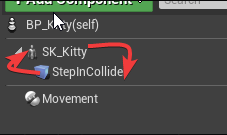 pallid atlas
I should make the Collider the root component?
torn ermine
right
pallid atlas
okay
Okay, well it's moving now 🙂
As soon as I made the collider the root component, though, this happened lol
livid token
is anyone familiarized with this error log ?
LogCrowdFollowing: Error: Unable to find RecastNavMesh instance while trying to create UCrowdManager instance
Every change i make to the crowdmanager logs it, and even though i have my controllers set to useUCrowdFollowingComponentit's not being applied as well
@livid token
torn ermine
@pallid atlas
align scale
scale is passed to components attached to them
pallid atlas
oh okay, thx @torn ermine
I should use this to change the shape of the box collider?
Changing that doesn't seem to change the size of my kitty
torn ermine
@livid token
does not find the navigation mesh, why this is happening you should find in your project.
not enough information to even make any assumptions
livid token
@torn ermine thanks for the feedback. Right now it's happing on a factory project where i just add the nav bounds volume as well
it kinda threw me off the loop since i already had it working and dindt do any major change regarding ai
pallid atlas
@torn ermine Thanks again, that got me going in the right direction at least. You were a big help.
livid token
what are the crowdmanager configs setup that brought you better results?
pallid atlas
Am I doing this line trace correctly? I am trying to check if something is in front of this actor, but it is always returning true no matter what.
Oh, the end needs to be the actor location plus the computed forward vector, huh?
No, that didn't fix it.
 woven pilot
@pallid atlas If I'm not mistaken, everything with the visibility channel set will return true here. You're not using a custom specific channel, and you're also not checking the hit actor for anything specific, and you also don't have an ignore actors array set. So basically everything in the level would return true.
static crater
Hi, anyone knows how to create a pathfinding query with a custom filter?
Like:
FNavigationQueryFilter Filter;
Filter.SetMaxSearchNodes(102400);
 magic peak
hi can someone help me. i set up a mixamo zombie character and applied an animation for when its follow me the player. but its still moving in a t pose. any suggestions? the animation is as follows
 slow bobcat
Hi! I have a question, maybe someone knows here.
When you do a build (cook + compile) and your levels use a static navmesh, is the navmesh generated during cooking time and saved in the Recast object or is it generated when you load the level?
I'm trying to figure out if it's possible to modify the navMesh during cooking time and save changes to it (flood filling cleaning) to save time.
I haven't got far with it but I can see how there are calls to DestNavMesh->OnNavMeshGenerationFinished(); when loading the levels in the build (running it in DebugGame from VS), which can mean that the navMesh is actually generated and not cooked.
Does anyone know?
Cheers!
 mossy bay
So I've been following the official AI tutorial but when setting the Simple Move to Location using GetRadnomReachablePointInRadius, it doesn't work. Anyone know's what the problem with this tutorial is? Navmesh is build and I triple checked the blueprint suggested but still nothing.
The breakpoint reveals that the incoming goal vector is 0,0,0...
I've manually set the Nav Data component with a variable and now I'm getting a valid Vector. But the agent is still not moving :/
RESOLVED: Somehow the nav mesh got broken (dissapeared in editor). After restarting Unreal I was able to see it again and the controller magically started working 😂
 wind briar
How would I go about making a blueprint where the ai chases me for a couple of seconds then walks off and ignores me
pallid atlas
@wind briar check out this video series, it covers stuff exactly like that
Welcome to the start of a brand new series. This time we are diving into AI for games. This episode introduces the concepts being used in AI design and in particular, the behaviour tree. In this episode we add an NPC that can randomly roam around the level.
Support me on Patr...
wind briar
Thank you ! 😃
pallid atlas
yw. That video series is how I learned to use AI
(not that I'm expert or anything... but)
wind briar
Basically the basics of ai then
pallid atlas
@woven pilot What do you mean "custom specific channel"? You mean as opposed to Visibility or Camera?
To give you a better idea of what I'm trying to do here:
I've got a cat in a box, and it wanders around aimlessly unless it sees a lure
woven pilot
Yes, as opposed to visibility or camera
pallid atlas
While it wanders around aimlessly, it often would get stuck facing a wall
I needed it to be able to turn around if a line trace, emitted from its face, hits anything. As of now, the only things that it can hit are walls and other cats, but for the sake of this, it really just means other walls, since I only have one cat in there atm
But after putting in a debug print statement, I learned that the line trace hits every time it is checked
even if the cat is nowhere near a wall
Now, this used to work fine, up until I added a physics asset to my cat (in order to allow collision with other cats).
But, after adding the physics asset, a shitload of things broke
woven pilot
Have you tried enabling Draw Debug and see what your trace is actually hitting?
pallid atlas
No I have not. I wasn't aware of that option
woven pilot
What you just said sounds like the trace might be hitting this "physics asset" you just mentioned
pallid atlas
I'll check it out. Under the V down arrow of the line trace node I presume
woven pilot
Yes
pallid atlas
cool. Thanks @woven pilot
Yeah, well, the physics asset does allow collision to work, but it broke the AI movement
The animations work fine (blendspace based on velocity), but the cat isn't going anywhere
I learned that the velocity of an actor has to do with the forces applied to it, not the actual velocity as it's commonly thought of i.e. "speed"
So, it can have a non-zero velocity and still be standing still (wouldn't it have to have infinite mass for that to be true?... I digress)
So, according to this:
https://docs.unrealengine.com/en-US/Engine/Physics/Tracing/Overview/index.html
Overview of the Unreal Engine 4 tracing system.
traces use physics to do their job. It therefore makes sense that adding my physics asset broke the trace
I just don't know where to tell it to ignore itself (Ignore Self being checked on the trace node apparently is referring to something else)
@woven pilot I turned on the trace debug:
The xyz coordinates being printed are from the PrintString task
GetRandomLocation is where I perform the line trace
woven pilot
What kind of physics asset are you mentioning? A collision component?
pallid atlas
Here is GetRandomLocation
Um. I don't know much at all about physics assets. Here it is:
It is just two capsules
Both of them have almost the exact same settings:
woven pilot
I think the ignore self isn't working because you've put this line trace inside a Blueprint Task, which I think is a bit unusual
pallid atlas
That is an AI Task Blueprint
Why is that unusual
I don't know where else I would put it
woven pilot
For a quick test you can try to make an array with just the cat actor as item
pallid atlas
While it wanders around, I need it to check if it's facing a wall
woven pilot
Then pass that into "actors to ignore" of the line trace
woven pilot
Should be
pallid atlas
Same result. No movement
Is that 100.0 a good value? Too large?
I figured that just meant it would trace about 100 units in front of itself
which isn't very far
woven pilot
That depends on your level but it's not far at all
woven pilot
My guess is that the line trace is hitting the PB capsules
To see what's being hit
You can break the hit result
pallid atlas
Yeah, that would make the most sense. But do you know where to tell it to ignore these?
ok
woven pilot
And check what it's actually hitting
pallid atlas
Should I try and cast the Hit Actor to... a physics body?
You can't just call PrintString on an object 😦
woven pilot
You don't have to cast anything right now, just debug print the hit actor or hit component
pallid atlas
I wish you could
woven pilot
Yes you can
pallid atlas
Oh really?
I've tried before, or so I thought, and it appeared to not work
lemme try again
aahhhh.... it's printing "Floor"
woven pilot
Maybe your directions got messed up at some point then
woven pilot
You're welcome
pallid atlas
I guess I was lucky you happened to be on
Oops
Do you see anything wrong with the way I am doing this?
woven pilot
I don't see the reason for that vector addition
woven pilot
Seems more correct
pallid atlas
Same result
I was confused by the description of GetForwardVector
It sounded like it produced a unit vector starting at 0,0,0, so I thought maybe I needed to add it to the current actor location in order to get my trace endpoint
woven pilot
Unreal considers the X direction to be "forward", so that node gives you a vector pointing in the direction the actor is rotated towards in X
pallid atlas
X?!
oh, well, okay, yeah that makes sense hehe
The XY plane is the floor
But wouldn't I have to add that vector to its current location? In order to get a point 100 units in front of wherever the cat happens to be?
Or does it already automatically take that into account
Why would the line trace be hitting the floor
woven pilot
No, the forward vector is basically pointing in the direction the actor is facing already
pallid atlas
oh okay
woven pilot
It's length is 1, so you multiplying it by 100 gives you a line trace 100 units in the X direction of the actor
That part is correct I would say
simple crest
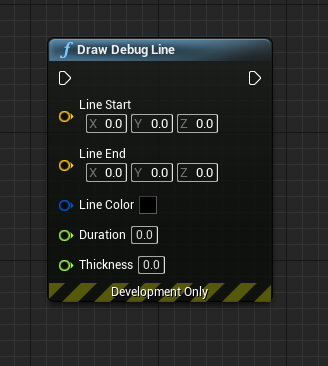
use Draw Debug Line
simple crest
also use Get Actor Forward Vector
pallid atlas
It's only up to the cat's knees about, though
woven pilot
That might be it if the actor position is inside this collider
Then it will hit the floor right away since the start of the line trace is the actor position
pallid atlas
I'll check to see the settings on the Visibility trace channel of the floor collider
simple crest
now add the position (you were right about that before, you're tracing to some point in a 100 unit circle around the world origin right now)
pallid atlas
No, that's set to ignore Visibility
and it's called FloorTrigger
The debug printed out "Floor"
simple crest
(you can see all of this easily if you learn to use Draw Debug Line)
pallid atlas
@simple crest care to enlighten me?
simple crest
and it is normal to "lift" traces like these a few units above the floor so you don't get floor hits from z fighting
simple crest
it's pretty simple, same as setting up a trace - you don't seem dumb I have faith in you 😄 https://i.gyazo.com/410244695b613bc2b8e53953151eadc1.png

just replace your trace with this while you figure out the vector maffs
pallid atlas
That worked!
🥳
Thanks for the Draw Debug Line, that would've helped a lot, that didn't go to waste on me 🙂
But just adding 50 to the z-axis value for the start and end points of the trace worked
I guess, cuz the cat's z position is 0, it was hitting the floor?
woven pilot
Prolly
pallid atlas
Thank you both, I really appreciated your help and time on this
woven pilot
Meow!
pallid atlas
lol
simple crest
yep. Z fighting affects anything that uses floating point math, not just graphics
pallid atlas
Wow that draw debug line is awesome. I wish I knew about that for the past two months
(That's how noob I am to this)
woven pilot
Welcome to game development lol
pallid atlas
😄
 midnight scroll
There are a lot of those that are incredibly useful for gameplay design.
 vast relic
Anyone here hooked up AI to GAS? I'm trying to figure out what's the best way to build a character that can be agnostic as to whether it's driven by a PlayerController or AIController. I heard there's a way to call input events from the AI?
patent hornet
it doesn't matter if its GAS or not
you have a set of functions to handle Pawn's actions
Attack(), ActivateAbility(), Interact() etc...
your function handing input that activates ability lives in the PC, and calls ActivateAbility function on the Pawn/Pawn's Component
your BT that drives AI calls ActivateAbility when it decides its time to do so
to handle targeting agnostically, you spawn a TargetActor, iirc GAS does that already
PC moves the TargetActor to follow the mouse, BT teleports it to wherever it decides the target is
and your Target is TargetActor->GetActorLocation()
all other stuff follows the same pattern
do not put any logic about how to execute an action in either controller, keep them on the Pawn - recommending components here to encapsulate the logic
@vast relic
simulating input for the AIController just introduces another layer of code you need to debug and maintain
misty wharf
Ugh, this is annoying :\ My EQS query randomly seems to decide to return points that cannot be navigated to according to the query's own rules...
Using the EQS Testing Pawn it of course never does that
 viscid oasis
I tried for ages to get EQS to work. I couldn't and ended up going another route. Then today I checked and it seemed like the engine reverted to it being disabled.
I've got an issue where I'm targeting a MoveTo against a largish actor. The AI does two things. 1) They head to the exact same point (I'm assuming the WorldLocation) 2) They run into each other due to them heading to the exact same point.
Is there something I should look into that can help fix these issues? I was thinking I could go down the route of running a EQ to check the closest boundary for my actor but that seems heavy-handed. Same with doing a simple line trace.
vast relic
@patent hornet That was my planned approach. The problem is that there's no analog to "Wait input release" that could be called by AI unless I started triggering all abilities by GameplayEvents which are tags and adds a whole another layer. GAS is weird and I'm starting to think about just ditching it for now.
 vestal apex
I have a problem with my Ai car, I implemented a behavior tree for ue4's vehicle(sedan) and i tried to connect the BT to this car's AIController. i am setting a simple task in my BT(choose a target point in the scene) and then move to node. when i observe my BT it works correctly and move to node gets executed, but car does not move at all. why is this happening? i tried this with a character and it works right, but with the car it does not.
i also tried AI Move To node in it's BeginPlay also dose not work
static crater
so the max searchnodes set in recastNavMesh.h #define RECAST_MAX_SEARCH_NODES 2048 anyone knows its possible to make that bigger? ive tried it by using Filter Filter->SetMaxSearchNodes(10240); but nothing really changes?
smoky summit
Is there any way to search all behavior trees for the usage of a task?
misty wharf
Any idea how to make an EQS trace test ignore the pawn that's doing the test?
It seems the trace test is always hitting the pawn doing the trace because it blocks on the same channel as the trace...
I would have expected it to ignore itself by default but when I turned off the channel from itself, the query started working as I thought it should 🤔
    {
        TraceParams.AddIgnoredActors(IgnoredActors);
    }
I can see it does this in the C++ side but it definitely does not seem to behave in this way...
This feels like it has something to do with the way my characters are set up because it works without any fuss in every single guide I can find on this topic, but I have no freaking idea what the problem is :P
misty wharf
hmm I think I managed to make it work by using a different channel neither of the characters actually block on... it certainly seems to behave a bit counterintuitively
of course now the next issue is how do I use results from one generator in another generator :) basically trying to get a set of points where the player is visible, but score them based on how far they are from actors of a certain class...
I guess I could run the queries separately and then manually go through the results to choose but that seems to defeat the purpose of having the scoring systems in EQS 🤔
pallid atlas
Can anyone please clarify what this tooltip is trying to say?
pffft it didn't capture
It says "
If set, all decorators in branch below will be removed when execution flow leaves (decorators on this node are not affected)
"
So, what does that mean in this context, for the Is By Lure decorator, if this box is checked?
Also, a more specific question... what hell is going on here? :
The pink line is a line trace, ignore that. But the yellow line is drawn in here
GetRandomLocation
You can see the yellow line gets drawn in the lower right there. It is what BB_MoveLocation is being set to.
Yet my kitty always seems to be moving in some other random direction that has nothing to do with the yellow line.
What is going on?
pallid atlas
Okay, this may shed some light on it. Now I'm even more confused. The white point is being drawn here:
In GetRandomLocation
The kitty is moving toward the white point (which is BB_MoveLocation)
So WHY is the value of BB_MoveLocation different than what it appears it's being set to?
It's moving through the lower execution pin, as you can see... there is no orange arrow being drawn. The orange arrow gets drawn when the line trace (the pink arrow, supposedly) hits something.
This illuminates the issue a bit more clearly.
How the hell... is it possible... that the end of the yellow arrow and the white dot are in different positions?
And I double checked... it has nothing to do with, maybe it's the next iteration through the loop (cuz this part of the BT is in a conditional loop)... the end of the yellow arrow and the next white dot don't match up, either.
pallid atlas
So, at least part of it was, my line trace was being computed as:
GetActorLocation -> (GetActorForwardVector * 100)
which was wrong (the pink line's endpoint was always around the same area). I needed to change it to:
GetActorLocation -> GetActorLocation + (GetActorForwardVector * 100)
and 100 was a little low
Also, the line trace was hitting itself (even though "Ignore Self" was checked). Just had to plug itself into the Ignored Actors array.
The yellow line still remains a mystery, though, but I've gotten some help from a friend who said that it probably has to do with local/world coordinates mismatching
pallid atlas
So, I got it resolved.
I don't really understand it, but when I get the value from the blackboard, it works. When I use the value I set into the blackboard, it gives incorrect results.
They should be the same... 🤔
BROKEN:
WORKS:
Why that even produces different results is beyond me. I'd think they'd be identical
OH!!!! Eureka!! I bet I know why
I was assuming it was calling GetRandomPointInNavigableRadius once! It was calling it twice!
That's gotta be it
I figured it out 🥳
I reposted this discovery in #blueprint, I was so amazed by its deception.
pallid atlas
What is going on here?
When I go into GetLureLocation, I see this:
Ignore Restart Self?
Oh... I get it. The one inside the task is the default value.
When I checked it inside the task, the yellow arrow switched places (cuz the checked value at the BT level was now equal to the default)
grand atlas
I'm a bit amused by the Getrandompointinnavradius" because it's called once when you query the return value and then again to get the vector, at which point its return value -could- be false.. So you got to make a struct that can hold on to those two values, so it is only called once.
clever tendon
My character movement rotation rate is set to be 5 on the z, ortien rotation to movement is true and Use controller rotation yaw is false, but still my npc rotates instantly while changing direction. Any ideas?
Nvm found the problem. Was still setting the use yaw to true in one place
 thorny jay
Hi everyone, is there an up to date (for 4.24) tutorial for using Environment Queries? Every tutorial I see seems to be old and I can't follow the steps. They require you to right click and create a new "Environment Query" which apparently sits under the AI category, but I don't have that entry in the context menu. I've tried creating a new blueprint class, but I can only see an EQS context and generator classes available to extend. When I then go to the behaviour tree and want to run an EQSQuery, I don't have any templates available to assign
final holly
Did you go into your editor settings and enable the environmental querying system under experimental options?
thorny jay
There isn't an experimental option listed there. I even went to "all settings" and then searched for it
I don't even have an "experimental" category
final holly
Editor Preferences, not projects settings
thorny jay
D'oh! I'm a dumbass. Thanks xD
Must have misread the tutorials, I assumed the reason I didn't have the experimental option was that they were using an older version of UE4 or something
final holly
Understandable. No unfortunately the EQS has been in experimental for a long while and I don't think it will get out of it anytime soon either
thorny jay
Thanks again, time to start playing around with it 🙂
wind briar
How easy would it be to make it so certain music plays when ONLY the ai spots you and chases after you. Then when you lose the AI the music stops?
Like what Outlast does.
 hidden comet
Hey, I'm trying to give my AI abilities that require specific movement, like dodging or jump attacks. However, I can't figure out how to ensure they don't leave the navmesh and get stuck.
For example, how could I make an AI character do a side step without risking moving it out of the navmesh? I tried using raycasts to check if the target point is reachable, but that seems pretty messy and potentially expensive. Ideally, I'd like to use root motion for these abilities, which makes it even harder to check if the target point is inside the navmesh.
 glossy coral
@hidden comet Sounds like you need the ProjectPointToNavigation which will sample the closest point on the navmesh
Anyone know why unreal sometimes ignores my Move To node for pathfinding if I have a lot of them?
Is there a maximum amount of navmesh queries and can that number be changed?
hidden comet
@glossy coral Thanks, that sounds pretty useful indeed! Will look into it
 warm ibex
Hi peeps.
Looking a lot into AI making in unreal.
youtube videos seem very focused on using behavior trees and blackboard.
I was thinking of doing my tasking on code side but was wondering if focusing it on behavior trees was a better route?
Some forums mentioned building the code tasks and then just referencing them in the behavior trees.
But then it just seems like the only reason to really make the AI with the behavior trees and editor is for more visual designing if wanted.
Any experience with either route? or what have you guys found useful when AI building
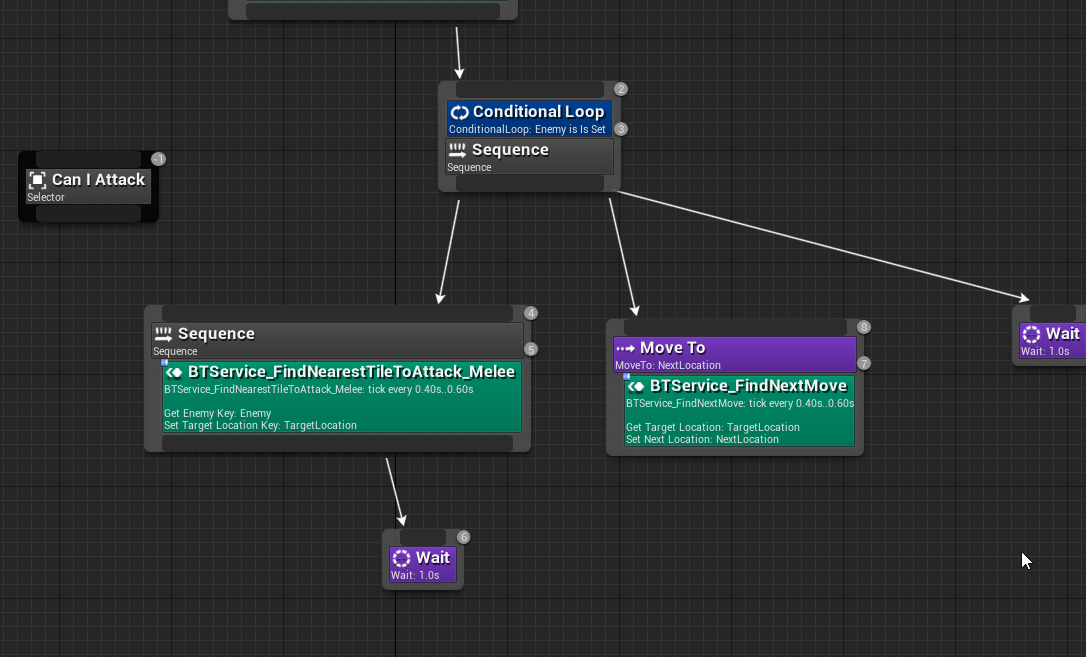
 split ravine
for some reason if i remove the lower most wait block my application stops responding
https://i.imgur.com/CmnALJp.png
does a sequence always need a task node?
 glossy spire
@split ravine I mean, it wouldn't make sense to have a sequence that doesnt have any tasks
but i dont think it should make ur program freeze or anything
if thats actually whats happening then that seems like a bug
split ravine
hmm
im suspecting
im not understanding tasks vs services and using them poorly honestly
tasks are like
I want the unit to do an action
and services are like
sending information right?
glossy spire
I think its somewhat up to your personal style, but IMO tasks are things that take an amount of time, while services are things that are always happening in the background
Personally I set targets using a task
glossy spire
Honestly for me, I use very few services
but again that might be a style choice, who knows
I guess another way to think about it is that Tasks can fail
but it wouldnt make sense for a service to fail
split ravine
oh also
is there a way to get the units to desynchronize?
because basically I'm operating on a grid system
and at the moment if they are one tile apart they will move into the same tile simultaneously, which is not quite what i desire
liek theyre both on the same BT
glossy spire
one easy way is to add wait times to your behavior tree
with a small random deviation
split ravine
isn't there still an unlikely but still present chance the same thing happens?
glossy spire
yeah
In my case I've made my enemies pick skills to use somewhat randomly
as long as they meet the reqs
split ravine
o hmm
i guess i could
have it wait on bb key
and the bb key be related to the unit id
that way they should all have different wait times?
split ravine
im gonna have two teams
and not more than 10 units i think
so i could just take their array position, divide by 10
so first unit at t0, second at 0.1, etc
and then the waits would add up to 2 seconds total
i wonder if i could divide smaller, b/c 2 seconds is a bit too much i think
thorny jay
Hi all, got a really weird issue. I have an AI pawn set up with an AI controller, which is running a behaviour tree in BeginPlay. I have assigned blackboard to the behaviour tree, and the tree itself is just a very simple "hello world" example (all it does is run a selector which then waits for 5 seconds). When I spawn the AI in game however, it's not running the tree. If I open the tree while PIE is running, no running instances are detected
It was working before, then I did some messing around with EQS queries and suddenly the behaviour tree won't execute any more even when I stripped it back to the most simple tree possible
The behaviour tree seems to start execution, which I confirmed by printing the boolean output of Run Behaviour Tree (came out as "true")
But it seems to just instantly stop execution after that
My AI controller and behaviour trees are so simple, that I cannot understand what might be interfering with it
thorny jay
Ok never mind. My issue is that players spawn after a few seconds, so the AI controller doesn't have a pawn when it's first instantiated. Setting a delay until the pawn has been created for the controller fixed the issue
I'll just update the code so it only runs the behaviour tree once the pawn is created and possessed, rather than immediately in the controller's BeginPlay function
vestal apex
when i load my new level, i get this massage Navmesh needs to rebulit,
how can i fix this issue?
i also searched project setting to see if there are anything about rebuilding but i did not find anything helpful
misty wharf
@vestal apex under the Build button there is build paths
just pressing Build should do it as well
vestal apex
@misty wharf after some search i found some stuff about static and dynamic NavMesh under project setting, do i need to tweak them too?
misty wharf
no, if it says needs a rebuild it just means you need to press the build button
at least that's what fixed it for me every time
vestal apex
aha thanks
thorny jay
Hi everyone, does anyone know how I can ensure an EQS query always succeeds? I have an EQS query which keeps the AI's current target up to date, allowing it to switch targets if necessary. I run it in a sequence, the idea being that the AI always updates its target, and then runs the rest of its behaviour. However, if the EQS query fails to update the blackboard key, then the sequence aborts. I want it to always continue. How can I achieve this?
final holly
you want the EQS querry to always return a result or you want to keep the sequence alive regardless?
thorny jay
Keep the sequence alive regardless
final holly
The EQS, it forces the node to always return a succession. It's used for optional branches in sequences. Like the tooltip says lol
thorny jay
Ok thanks 🙂 Didn't know about the force succeed decorator. Thank you 🙂
final holly
No problem
 storm zephyr
hello, when my AI is moving its MoveStatus variable (of type EPathFollowingStatus) is mostly EPathFollowingStatus::Moving, but when it gets to an intermediate point he briefly goes into EPathFollowingStatus::Idle. Is there a way to distinguish a temporary idle of a move to from an idle when there is no move to command at all?
i tried to check the GetPath() on the path following component, but it's nullptr when it's idle
so it seems to be a full idle for a few frames during that time
 cyan sigil
Hello, Slackers. I am doing some debug for AI and want to set up a simple test case. I'd like to have a command I can call to order the AI to pursue an actor. High level, what steps should I take?
 simple musk
I am confused on my character it doesnt have an ai stimuli source yet my ai still chases it when I do not want it to
I was under the belief that you need to have the component in order for the perception to work. Is that wrong?
urban wadi
is EQS a good system to implement?
torn ermine
Most systems in UE4 are pretty good, including EQS. The main thing is to determine the scope of these systems.
Difficulties arise only when we use the system for other purposes, or when the requirements for the operation of the system contradict the original design.
When choosing particular systems, you must determine whether it solves your problems.
on EQS we can say that it performs the tasks for which it is designed.
EQS is mainly useful when AI needs an understanding of a marked or unmarked environment in order to decide what to do next. And it is not designed as something that should be called on a regular basis (every tick), it should be event-oriented in the architecture of your AI
https://docs.unrealengine.com/en-US/Engine/ArtificialIntelligence/EQS/index.html
@urban wadi

Documents the Environment Query System (EQS) and how it can be used to query the environment for data. That data can then be used to provide the AI with data used in the decision making process on how to proceed.
static crater
So anyone knows how to properly use Partial Paths to get the expected path (right now a partial path is returned shown as green in the image)
final holly
- Make sure there is a valid NavMesh from Start to Target.
- If I remember correctly you tried to calculate paths over a great distance that caused this issue. Don't call paths that are too long
static crater
the navmesh is valid, and indeed the path is to long
so i would have to split up the path in different locations ? but how to know the right direction?
final holly
I'd advise making a Node Network then which uses a pahtfinding algoritm to know which nodes the AI needs to go through in order to reach it's goal
static crater
yeah i was thinking something like that
any idea where to look for any info about how to make such a algorithm?
final holly
There's a bunch of different pathfinding algorithms with A* being the most common usually
static crater
its kinda odd though as the navsystem v1 is A* to right?
i could then aswell use the custom algorithm for the whole pathfinding part 🙃
final holly
Ehm.. No
Your custom algoritm will be a looot simpler than the NavMesh's. As yours will only consist of waypoints in order to divide up the world, as agents traversing big distances will eventually follow the same path between these nodes. The NavMesh is there to make the AI be able to navigate anywhere in the world
torn ermine
the path is considered partial
if after the search the result does not match the final goal
if (lastBestNode-> id! = endRef) status | = DT_PARTIAL_RESULT;
perhaps heuristic is guilty together with limited(64) search nodes
Engine\Source\Runtime\Navmesh\Private\Detour\DetourNavMeshQuery.cpp
dtStatus dtNavMeshQuery::findPath(...
if I found the execution code correctly
static crater
i actually found out how to use Filters to alter the limit:
FNavigationQueryFilter* Filter = new FNavigationQueryFilter(); Filter->SetFilterImplementation(NavigationData->GetDefaultQueryFilterImpl()); Filter->SetMaxSearchNodes(MaxSearchNodes); NavFilter = MakeShareable(Filter);
MaxSearchNodes is 2048 by default
however it seems to heavy to calculate a path over 4km, so i'd have to make that custom node system anyhow
@final holly would the custom algorithm not do somehow the same ? (like checking obstacles)
final holly
Kind of. You'd split up the world with these nodes. But still calculate a path between these nodes with the navmesh to get the distance from on point to another (for the A* algoritm). So yes, between the nodes there will be pathfinding and obstacle checking.
final holly
No problem, good luck
civic flare
How does one make the rotate to face bb entry smooth?
final holly
In the MovementComponent of the AI there are settings for specifiying the maximum rate of rotation which is also used by the face bb entry
civic flare
Does that make it less choppy?
final holly
What do you mean by choppy?
civic flare
I'm trying to make a pig randomly roam around an area
Right now.. it picks a location, then snaps to look at it
no ease
it also walks backwards or doesn't stop sometimes.. but that feels like a different issue
final holly
Right, yes playing around with those settings will make it not snap anymore.
final holly
These settings are also used for matching the rotation of the agents during pathfollowing
final holly
That's why it snaps, there is no limit to the rotation as 360 is a full spin
Try lowering it and see how the Rotate to BB entry changes
civic flare
ah k
so that is the max rotation setting basically
and the precision works within that
final holly
More like the Rotation rate per second
civic flare
hmm.
final holly
Precision is basically allowing the face BB entry node to exit once the rotation is within that threshold different than the desired rotation.
final holly
Go do that, good luck
civic flare
thx
civic flare
k i set rotation z to like 5 and precision 10 and it still is jumping
I checked the character bp to make sure all the meshes etc were centered.. where does it rotate from.. center right?
final holly
Yep should be the center. And that's odd, for me it slows down the rotation speed if I lower that value
final holly
I'm not sure if you should put that service on the rotate node, as services will only start once the node is activated. And I don't know if the Rotate updates if you update the location while it is running
Might be better to make it a task to make sure it happens in order
civic flare
K I put it back to this.. still jumpy
This is where I started with the tutorial I found
Service
final holly
Could you make a video of the actual "jumpy" behavior
 ruby plover
Im trying to make my ai "powerup" just once in behaviour tree but i cant seem to work it out
i managed to get the ai into the "powerup" decorator node but it doesnt get out
final holly
@civic flare Try making the SetRandomLocation into a Task, this is very weird behavior
final holly
Yeah I've been there too
civic flare
Set random location from service to task?
final holly
@ruby plover I'm not sure what you mean, maybe show us your behavior tree
In that way you at least know that your targetlocation is set before you call a MoveTo on it
final holly
What doesn't work about it, where are you calling this DoOnce?
ruby plover
ok i figured it out
i guess the problem was it was always going into true from that branch
civic flare
Okay set it to a task.. now he goes nowwhere LOL
task has the same nodes as the service did
Does it require something else to fire it?
The service had intervals...
 faint lark
Hello, so i've been trying to create an AI in c++ that goes through all the vectors I put in an array
The two first tasks seem to be working fine, the target location (which is a vector) is getting updated to the proper values
But for some reason "Move To" seems to be failing
The navigation mesh was the last thing I added, but this shouldn't be a problem
Any ideas why this fails ?
civic flare
@final holly Okay I think I see the problem.. but unsure of how to fix it
final holly
Whats the problem
civic flare
Do you see how I have the pig selected
And the NPC_Pig_BP selected
and notice the xyz placer
its way off from the mesh
so I think its using that as the pivot point
But in the BP.. its not there...
final holly
What if you place a new pig into the world?
final holly
ehm, that's even completely somewhere else. I'd ask this in another channel if I were you.
civic flare
k, probably my problem though
fixed LOL
now to see if the ai works now
yup
fixed.. still a little fast on the turn, but its not jumping
had an extra root component in my cpp file
*dough
thanks for the help
final holly
No worries
urban wadi
@torn ermine Ok for my particular use of EQS, it would involve finding a player location in game and using that location to arrive at a location that is in a particular distance from the character to utilize a Ranged attack. Is this something I should implement or just use different tasks in the BT to get there?
storm zephyr
hello, how do i force the perception system to reset the sensed actors and force a full update ? I tried RequestStimuliListenerUpdate but it didn't seem to do anything? The reason for this is that i have a character that can be disabled, and when that happens i stop the behavior tree and i call SetSenseEnabled to false. when the character is enabled again, i start the behavior tree and i call SetSenseEnabled to true. The problem is that when i do that he seems to keep the sensed actors, so if he was sensing the player when he was disabled, when he gets enabled again he's still thinking he's seeing the player, when he's not.
thorny jay
Hi all. I have a strange problem with adding AI sense sonfigurations to my AI perception component. I am initializing the perception component in C++ and adding a sight sense config and a damage sense config in the constructor. However, when I open the blueprint, only the sight config is added to the perception component. If I try to add a second sense config to the perception component, it won't let me. I click the drop-down menu and choose the config class, but it just immediately flicks back to "none". Weridly, if I remove the sight config from the list and then try to re-add it, it does the same thing. Basically, I cannot add ANY sense configs in blueprint, and I can only add sight config in C++
I tried creating a new blueprint and run into the same issue
    if (PerceptionComponent) {

        sightConfig = CreateDefaultSubobject<UAISenseConfig_Sight>(TEXT("Sight Config"));

        if (sightConfig) {
            sightConfig->DetectionByAffiliation.bDetectEnemies = true;
            sightConfig->DetectionByAffiliation.bDetectNeutrals = true;
            sightConfig->DetectionByAffiliation.bDetectFriendlies = true;
            sightConfig->PeripheralVisionAngleDegrees = 60.0f;
            sightConfig->SightRadius = 30000.0f;
            sightConfig->LoseSightRadius = 30000.0f;
            PerceptionComponent->ConfigureSense(*sightConfig);
        }

        damageConfig = CreateDefaultSubobject<UAISenseConfig_Damage>(TEXT("Damage Config"));

        if (damageConfig) {
            PerceptionComponent->ConfigureSense(*damageConfig);
        }
}``` grand atlas
How does the ai sense determine Detection by Affiliation? I am calling Report Noise Event and have "detect enemies" and "detect neutrals" checked and characters of the same class does not pick up the noise. Checking "Detect Friendlies" does make the other characters pick up the noise. So how is affiliation determined?
misty wharf
TIL ai perception component senses still trigger "On Target Perception Updated" even if the AI Perception component has been set inactive 🤔
thorny jay
@grand atlas From what I understand, you can only achieve this in C++. You need to create a child class of the AIController, and override the ETeamAttitude::Type GetTeamAttitudeTowards(const AActor& Other) const function
That function takes in an actor, and from there you can run any logic you like to return ETeamAttitude::Neutral, ETeamAttitude::Friendly or ETeamAttitude::Hostile depending on your custom logic
grand atlas
I see, thanks. Seems like there's some default logic happening though, like a query of the same class results in a friendly attitude.
thorny jay
There is yes, it uses something called a Generic Team Agent Interface. I have no idea how it works but it looks complicated and annoying. In my case I track the player (and AI's) team in the player state (my AI has a player state since it's meant to simulate human behaviour), so I just obtain the player state in the GetTeamAttitudeTowards function and do a comparison. If the actor has no player state then they're automatically neutral
Basically, the default logic is to look and see if the perceived actor implements a generic team agent interface and then tries to obtain the team from it and do a comparison, if there is no interface then it returns neutral
Which is why all perceived characters by default are neutral
grand atlas
Thanks for the information, very useful when trying to figure out this perception system.
thorny jay
Sorry I can't give more specifics on the default implementation, as mentioned it seems a lot less complicated in my case to just get the player state of the perceived actor, get the player state of the perceiving bot, and then compare right there and then
faint lark
Any ideas why my AI character isn't moving ?
the "move to" node uses a vector right ?
(I used C++ for the character and AI Controller)
torn ermine
Point.Z = 250
Is it reachable by navigation?
torn ermine
hmm...
I quickly checked and does not require high accuracy of coincidence with navigation
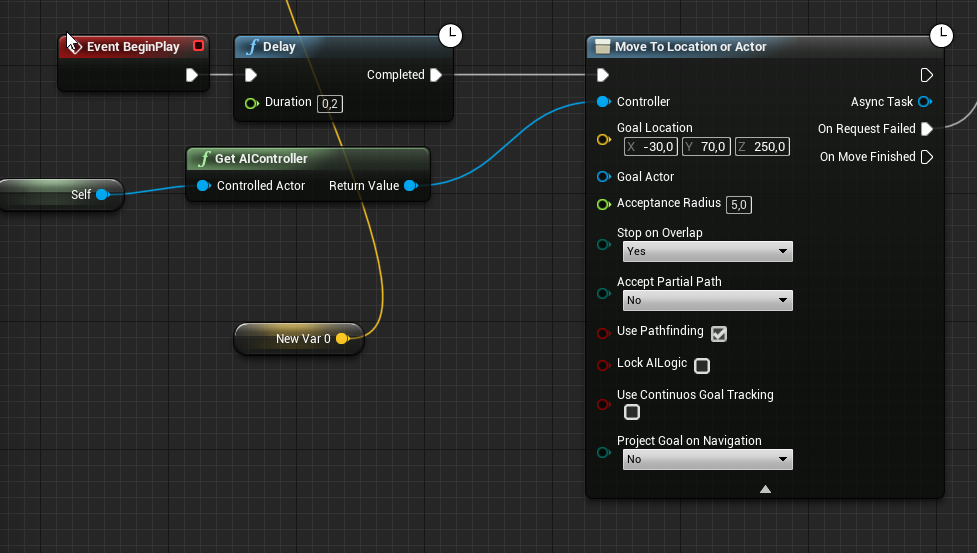
what is your variable value acceptable radius ?
torn ermine
faint lark
tell me, what happens if you double click your "move to" task ?
torn ermine
 faint lark
This is essentially what i'm doing in C++ when the game starts
torn ermine
tell me, what happens if you double click your "move to" task ?```
nothinghttps://i.imgur.com/vCRQHrt.png
@torn ermine Where did you put this ?
torn ermine
Where did you put this ?
it was just a check without BTTask
in character
@faint lark
check you filter class settings in MoveTo BT Node
faint lark
its set to none
I gotta go for now, I will try a couple things when I get back : using the "move to location or actor" BP node instead of the default task
debug the code for the default go to task in c++
Thank you for the help
torn ermine
need to select a filter
torn ermine
async nodes - this is a custom blueprint node, in the editor module, transitions when clicking on them never led to its source code
but they can be found by search by solution.
civic flare
Good morning
Is there a tutorial for AI roaming for birds
I'm hoping for flight.. but also something maybe a tad more complicated where a bird lands on branches or chooses branches
is the best option to use a bunch of target points in the mesh nav area
?
and maybe use a basic roam but add some Y to it
though it would be weird to have a bird stop mid air LOL




 smoky summit
np
misty wharf
hmm the gameplay tag cooldown decorator doesn't seem to actually work correctly if several actors try to perform the action simultaneously 🤔 I was hoping to use that as a sort of global cooldown but I guess not...
oh wait it's not even a global thing is it, it probably just saves the tag in the controller's tag container or something 🤦
faint lark
need to select a filter
@torn ermine What filter ?
i've got these ones and none of them make a difference :/
 autumn pecan
🤔 PathFollowingComponent exists on AI controllers, correct?
autumn pecan
hm, this becomes very problematic then
trying to integrate my custom movement component(which is actorcomponent baseclass, not a movementcomponent) but Im trying to figure out at what point of the chain do I start implementing my own stuff
so I probably have to replace PathfollowingComponent with a custom code too, since it seems to rely on registering movement component
faint lark
Can't help you there, i'm stuck on making a freaking basic AI move...
This is driving me nuts, I did the hardest part and now I can't get it to just move
 lyric flint
@faint lark If your point is at z -250, check the navmesh projection height. Should be somewhere in project settings/navigation. It's possible the point can't be projected to navmesh because 250 is higher than the max allowed projection.
aka query extents
ruby plover
Can i change a variable in an ai service bp from another bp?
sullen escarp
Make it a BB key that you can change
ruby plover
Thanks for the advice, it worked 🙂
urban wadi
Ok for my particular use of EQS, it would involve finding a player location in game and using that location to arrive at a location that is in a particular distance from the character to utilize a Ranged attack. Is this something I should implement or just use different BB tasks in the BT to get there?
urban wadi
When using the perception component on an AI, does the character need to have the AI Perception Stimuli Source on it to be able to interact with the character (chasing, Attacking, etc....)?
Anyone?
 fresh copper
What can I do to fix my behavior tree. The whole tree is flashing rapidly between the steps, and none of them are running
None of these are actually happening, The npc is just standing still
sullen escarp
TargetActor key probably isn't defined? And on the second branch the EQS is probably not returning any valid points.
Can use Visual Logger to see what's going on under the hood
sullen escarp
VisLog captures what's going on in the game, you can check there why the behavior tree steps are failing https://docs.unrealengine.com/en-US/Gameplay/Tools/VisualLogger/index.html
Tool that captures state from actors and then displays it visually in game or editor.
 pine steeple
your EQS is returning no valid items
fresh copper
How can I fix that?
pallid atlas
How do I abort (with failure, causing the BT to reevaluate back up the tree) from a task using a node within the task?
Actually, nevermind. I know how to do that in a task. I'm actually in a service, which is the wrong place to do this anyway.
Okay, better question:
Can anyone explain to me what exactly is the difference between these two nodes?:
I tried Googling for it, but not much out there.
I've used both in the past to accomplish the same thing (got better results from OnPerceptionUpdated), but in both cases (especially OnPerceptionUpdated), I wasn't 100% sure why it worked the way it did.
I am using sight in my examples.
For example, for OnPerceptionUpdated:
- What changes in the actors trigger it being called? Any change to its location? rotation? Anything at all???
- Does losing sight of everything trigger it (with UpdatedActors.length == 0)?
For OnTargetPerceptionUpdated:
- How does this get triggered if more than one stimulus is in range?
- When it loses sight of everything?
Thanks. The documentation is... non-existent.
misty wharf
As far as I can tell the difference is the target variant is called only when that specific perception component updates.
And yeah sight sense updates when losing LOS - at least in the target variant, the stimulus will have "successfully sensed" as false in that scenario.
vast relic
Anyone here tied together AI and GAS? Specifically I'm trying to figure out how to make a character completely agnostic as to whether it's being driven by AI or player controller. The sticking point is that GAS works best when directly bound to input. Is there a way to have an AI controller call input actions?
urban wadi
When trying to create a ranged AI is the best implementation EQS for finding and attacking at range? Or should i use a mixture of BB tasks and services? Please anyone give me an answer, because I don't want to use EQS if it is indeed experimental and or causes slower execution in game.
patent hornet
its technically experimental, stable since 4.15 or so, and unchanged
and it doesn't "cause slower execution"
urban wadi
Okay i guess worst case scenario i can use the EQS for ranged AI, and in the event it does not work i can use BTT, services and decoratros
decorators
ruby plover
Im having this exact problem: https://answers.unrealengine.com/questions/102662/my-navmesh-needs-to-get-rebuild-after-i-reload-a-m.html
My navmesh is dynamic and i force rebuild at load
This effects packaging too, ai doesnt move in a packaged game
The tickbox named "can be main nav data" in project settings -> navigation mesh and in the recastnavmesh actor in the world outliner keeps getting turned off too
This is starting to drive me mad, i dont have any clue why this is happening and its been a problem for like a month
ruby plover
Well, ive put a navmeshbounds volume to the first map i start at just to try what would happen, the "navigation needs to be rebuilt" error is gone now and it looks fine in editor but when i play a build version of the game ai still doesnt move
pallid atlas
@misty wharf what about when multiple stimulus are visible? How does the target variant respond? In what order would it process them? I'm having a difficult time trying to debug it/figure that one out.
misty wharf
Hard to say tbh, they'll all come in but I wouldn't have any idea what the order will be :) Would you know what order they are in the array? Probably not
pallid atlas
True
Since I have your attention, would you mind offering your knowledge on another perception-related question?
misty wharf
I'll try but no promises because I'm not super experienced on that :D
pallid atlas
I need to be able to have different visual stimuli have a strength modifier, so that either:
A) The stronger stimuli will be noticed first, or at least will I'll be able to filter them by strength or something like that.
or
B) A weaker stimuli won't have a 100% chance of being noticed.
Do you know how to accomplish this?
Either one would work for my scenario
misty wharf
I can think of two possible ways... You could compare distance to actor, or have two separate sight senses, one with a lower distance, the other with a higher distance
pallid atlas
I suppose I could just add a variable Strength in the BP containing the stimuli, then run a random bool on it
misty wharf
although the two senses method probably wouldn't work if you need to define "weak sight" by some other factor besides distance
pallid atlas
when it does get noticed.
That is a good idea. Two sight stimuli
Interesting idea, at least
I wouldn't have thought of that
thx
misty wharf
Distance to actor is probably better tbh, less complicated to handle since you'd just get one set of sight stimulus events, and more flexible if you want to make it say based on if you're crouched or something
pallid atlas
cool. thx @misty wharf
One last question, @misty wharf:
Just in your personal experience, when is it preferable to choose the target variant over the generic one, or vice-versa?
It seems to me that both could accomplish the same tasks for just about anything... there must be a gotcha that I'm not thinking of; a case where it is plainly better to use one over the other.
I suppose the stimulus result on the target variant gives you more information
misty wharf
The target is probably better if you need to react to individual stimulus events, while the other one could be better if you need to react to groups of stimulus
You can use get latest stimulus or whatever it was called on the AI Perception to get the stimulus data for any actor
pallid atlas
Yeah. So, in my case, I need to be doingone of two things based on either ZERO or MORE THAN ZERO stimuli are sensed. In my case, the generic would be better, no? Because with the target variant, a result of false tells me that some particular stimulus went out of sight, but I'd have no way of knowing if it no longer sees any stimuli, right? For that, I'd be better off checking SensedActors.length in the generic version, no?
misty wharf
There is a method on the ai perception that you can use to get all sensed actors or something like this iirc
pallid atlas
You know the name of that node? For getting the latest stimulus?
Nothing is coming up in the context menu as far as I can find
misty wharf
uhh I wonder what was it called..
pallid atlas
oh, nice. you are being very helpful, thank you. all kinds of new info
They really need to make the docs better
pallid atlas
cool, thx
ruby plover
OK. I guess i fixed it. Im not 100% exactly certain what specifically fixed it but im positive that it got fixed after i changed these :
Idk why that fixed it for sure but its fixed for NOW. I hope im right and it doesnt brake again since this is really important.
Well, now i see that when i close the editor and open it up again, those settings reset to default. Idk why. At least they carry over to the build of the game but its still stupid.
 glass falcon
I'm getting an error while packaging because of my custom decorators

Pastebin
By custom I just mean I made bp decorators
sullen escarp
@glass falcon Originally posted by mieszko This means you have a BP-implemented BT decorator, that uses BB keys, its instance is set to abort lower priority or self or both, but the BB key is not set. Go through your BT decorators and validate the setup.
 neat condor
Does anyone here have any idea about NLP in general? To give more context.
I started working on my thesis, for now I am in the documentation period where I just read a lot of things to come to a decent idea.
My plan is the following:
- Let there be a chat (the most basic stuff ever).
- Let there be a BOT that is the player's "assistant" (or moving wiki 🙂 )
- The player will query, using the chat, the bot. For example
- Where can I heal myself?
- Where can I get drop X?
- Guide me to Healing Fountain.
etc. - The bot will take the use input, process it, and take the desired action.
Now, how I thought it would look like:
- User Input goes to BOT
- Bot does a http call to a local server (yes, won't bother implementing NLP things in UE, will use, most likely, python for this because it already has a lot of useful libraries)
- The text is being processed (i don't know yet how, documenting on this)
- The server sends the response back to the bot.
- The response will then go through a "service manager" which I think would be cool to be a Decision Tree.
- The bot will take the desired action (either chat answer or "follow me" action etc.)
Why NLP? => Want to reduce the decision tree complexity
Now, there are unknowns to me in terms of NLP.
The question for anyone: Do you know of any place where I can read more in depth things about NLP that may be useful for what I need to do? Or, any idea of what I can try? That would be really helpful.
Thanks a lot.
lyric flint
Does someone know how i can make it so the ai only plays the anim the first time it sees you?Since right now it starts chasing you and it keeps playing the anim over and over again.
@neat condor You didn't find anything on Udemy related to natural language processing? I vaguely recall I've seen something. I usually browse Udemy for all my intellectual needs, so to speak 😄
from your list of steps, step 3. Is the one you need to worry about. "The text is being processed" Is as generic as "let's go to Mars" 😄 Here is where you need to train your AI, throw enough quantity of data so that an accurate model emerges
your thesis supervisor may be a better partner for brainstorming though...
I feel everything I said is too fuzzy to even be relevant, So I guess I'm gonna shut up now 😄
neat condor
Yes, mainly the problem is that step, the "unknown" let's say.
The problem is not that I can't find papers / courses etc. related to NLP (or to be more exact, NLU), but that i need to lower the search radius a bit, as there is a ton of stuff on the internet, deep diving in all of them will just lead to nothing, I think 🤔 I may be wrong tho
nah it makes sense 😄
lyric flint
Your criteria is to find relevant sample of data, the keyword is relevant
glass falcon
@sullen escarp I've seen that but I don't understand. How am I supposed to validate the setup
In the by decoratior I already have an is valid node to check if the bb key is valid
lyric flint
It hurts my brain every time I use fuzzy notions, such as relevant or enough 😄
neat condor
To be fair, from the readings I did until now, I think that what I actually need to do is simply take the relevant information out of a text, not really predict an "action".
Also, i know what you are talking about, I need to read things about NLP here 😄 all is hard to understand, especially when it gets to math 🙂
lyric flint
I mean, hopefully Bell and Markov stuff would be taken care of by your Python libraries already
The fact that I heard of Bell and Markov, does not mean I understand them 😄
neat condor
Basic stuff should be fine 😄 I am ok even with implementing.
The problem here is directions. Consider me at a crossroad with 100 possible directions. Which ones should I consider taking? 🙂
lyric flint
This is where you need accurate Emergent behavior, that comes exclusively out of training your AI
I mean I can also close my eyes and play darts blindfolded, but my accuracy would suffer 😄
see, the AI's problem is that it doesn't understand blow some snow
It can mean do cocaine or clean your driveway
unless you guide explicitly your AI with contextual relevance that you manually tag and veto, your poor AI would not know who is who and why 🙂
I feel out of my depth but with this conversation, so I would rather quietly bow out, as I don't intend to confuse you 😄
it was nice to pretend I'm smart for five minutes though....
neat condor
yeah, you see, the AI should "understand" what the player meant. Take, for example, Alexa / Siri / Cortana / Google Assistan. So, there is a text that it gets from you (in their case, more complicated, speech, but let's say it's text). Now, they try to break that text into relevant information. Let's say you ask "How will the weather be tomorrow in Berlin".
Information it extracts is:
- what -> weather
- where -> Berlin
- when -> tomorrow
My AI should be somewhere in the same place right?
But yeah, many unknowns for now
To be fair, i feel like discussions are useful, as they tend to lead to something, compared to blindlessly trying to find something 🙂
lyric flint
I was working with some guys in San Francisco many years ago, they were doing exactly this
their business model was targeted for litigation
so they used a server farm for AI, the use of actual linguists for contextual relevance and they use lawyers for vetoing
these three ingredients together made their system highly accurate
Especially at that time this was 15 years ago
with 30% of their workforce was actually linguists, highly trained with a lot of degrees
neat condor
It's complicated, not gonna lie. Second thesis I do, I chose, AGAIN, something that I don't know that well 🙂 Fun times
sullen escarp
@glass falcon Sounds like there might be a BT node that has an exposed BB key selector but it's null for whatever reason, maybe go through and re-select the keys from the dropdown list.
 cerulean girder
the 2 hardest things i experienced learning the ai in ue4 was when you should be aborting a branch, and remembering that a branch aborted in a sequence either on purpose or from a failed condition aborts the entire sequence, it doesnt go on to the next step in sequence it cancels the entire thing out.
other than that its pretty straight forward
 true gazelle
Evening all. Is there any way to use the AI Perception debugging without numpad keys?
i have tenkeyless keyboard arggg
 delicate pivot
Hello, i am making RPG game and i can't solve one problem. I have created unit-bear(Character), that just goes to Player and attacks him and I have made spell blueprint that i called Ice Aery. It cycles around player and when it sees Bear it should fly to him and explodes. It is character because I used PawnSensing, but its not working. Event On See Pawn isn't functioning. Anyone help ?
I have reacreated IceAery as pawn and still not working
 tidal void
@delicate pivot Do you have your "Detection by Affiliation" set up properly?
 digital cairn
I am trying to modify a navmesh a bit... I need the default cost to be higher than 1. I created a custom recastnavmesh and am trying to set the default area to a custom created NavArea with higher default cost. Sadly this does not seem to work, anyone tried to do this?
(What I am trying to do as a end result is a road system where the AI would prefer to walk on the road due to the lower path cost, trying to avoid having to manually navigate the AI to reach to road and travel along a spline or such)
lyric flint
@humble apex Absolutely, for example have a flag that sets NPC as of party member. Then have a method that checks to see if party member and the game mode is not combat ( but instead explore mode, metaphorically ) if the distance between the NPC and the player is bigger than xxx, start a quick AImoveto Toward the player and abort when the distance is acceptable
When the distance is acceptable, set the NPC to idle state, Which should take care of the animation and such 🙂
glass falcon
@sullen escarp it didn't work
smoky summit
Has anyone seen an issue where EQS queries get stuck and never return a result when they definitely should be?
delicate pivot
@tidal void i dont know what it is, so probably no
hidden comet
Hey, I'm using the Navigation Invoker system for an open world AI, but am getting the error message that my navmesh bounds volume is too large.
"Error: Navmesh bounds are too large! Limiting requested tiles count (1225224) to: (1048576)"
Wasn't this system implemented specifically for large worlds? Is there anything I can do to raise the tile count limit or work around the limitation?
pallid atlas
I have a question about nav meshes:
I have different types of flooring that must react differently to certain collisions, and so I thought I'd turn my static floor mesh into an abstract BP class, and subclass it for the different type of flooring.
I went to add the nav mesh to the abstract base class (figuring it would sum up the pieces of the nav meshes?), and discovered that was not an option.
So, if I want to procedurally generate a floor map, I would first generate the floor, compute the total bounds size, and then add a nav mesh to its entirety? There is no way to just "have the nav mesh be part of the flooring"?
 rocky bison
hey all, is there a way to extend an EQS SimpleGrid in a specific direction so I can get something like in the image?
 inland umbra
you could add custom EQS generator https://www.orfeasel.com/creating-custom-eqs-generators-in-c/

In this post we're going to create our own EQS Generator in Unreal Engine 4. This post assumes you're familiar with the Environment Query System that resides in UE4. In case you don't q
sullen escarp
You can make generators in BP too. Though they intermittently crashed for me when compiling / using EQS testing pawn to preview but that was also back on 4.23 so might have been fixed
rocky bison
ah
okay
also, whenever i try to get the forward vector of my ai character to do a line trace it just goes back to the world origin?
is there another node I'm missing or something? this setup usually works, though ive never tried with AI before
rocky bison
Well, I'd like it 10 units in front of the ai character
rocky bison
I'm feeling stupid right now
pine steeple
Add the ActorLocation to it
rocky bison
Well shit
That makes more sense
Yeah I'm stupid
This will probably work, but I just got off my pc, so I'll have to test it out later
Thanks mate!
 magic jasper
Just putting feelers out - I don't suppose anybody has any ideas how Deep Rock Galactic does it's 3D surface pathfinding do they?
I've looked at the SVON plugin which is pretty nice, but that's more about avoiding surfaces than moving across them..
urban wadi
Just some advice
pine steeple
so i have a weird bug, Launcher Engine Shipping build - Navmesh works fines, Source engine Shipping Build - Navmesh doesnt generate
urban wadi
Is it better to use on tick focus actor for a Ranged AI to update and attack my character, or is it better to Utilized EQS to do so?
pine steeple
anyone else experienced this?
true gazelle
Hey All, I'm used to sending a add movement input a vector to move a character without a physical controller, but i noticed that doesn't work at all if you have an aicontroller on the character
is there any node i can use to add movement input with an ai controller?
 dusk kelp
Hey, guys, cant find EQS in 4.25 version. Where to enable it now?
dusk kelp
:/
Seems like its not experimental. I can run EQS in my Decorators. But! I cant find where to create Query Template
true gazelle
damn can't you just use an ai controller with a character bp to move in a world direction?
not to a specific location, just to keep moving!?
i dunno why i can't find anything : /
 high summit
@true gazelle https://www.youtube.com/watch?v=Il7WMwPd-qw use this to move your ai character dynamically without movement input
Check out my Patreon: http://bit.ly/TechnoNerd_Patreon
DON'T CLICK THIS: bit.ly/2vBhU2s
PLEASE LIKE AND SUBSCRIBE
And feel free to request Tutorials.
#UnrealEngineTutorials
#AiMoveTo
How to use AI MOVE TO node in UE4
 olive garnet
Is any one else having issue with nav in shipping builds on 4.25 for tiled landscapes? these no issues with AI working in the editor and in dev builds but just doesn't work for shipping?
true gazelle
@high summit thanks but that node is still a Move TO node which seems to require a destination. I'm just trying to move my character in a circular fashion
and just loop in a pure circle
so there's no end destination
glass falcon
@pine steeple am I allowed to dm you with a problem
It's on ai and packaging and I can't find a solution anywhere
thorny jay
Hi everyone, does anyone know how, when running an EQS query, I can extract and store the score of the chosen result?
I have created a Behaviour Tree which runs a custom EQS query to determine a good cover point when engaging an enemy. I want the AI to continually re-evaluate it and if it finds a better one then it should go to the new one instead
The EQS query works great, but I have no idea how to save the score of the "winning" cover point so that I can compare it when it runs the query again
I only want it to switch cover if the new point is significantly better than the previous one, otherwise it will keep shifting up and down a piece of cover for no actual reason
 thorny jay
@torn ermine That's brilliant, thanks! 🙂
slow bobcat
Quick question: when you retrieve a call for the event Receive Abort AI in a task, do you need to call Finish Execute there too?
I'm having a nasty bug and, after a lot of debugging, adding this (green circle) fixed it. That doesn't make sense to me and, before I jump into the rabbit hole of code again, I thought it might be worth to ask here.
BTW, the bug is that the Tree seems to be stuck running nothing. Debugging code throws hints of the current task being a inactive one. I only have seen something similar when forgetting to add Finish Execute to a task, so I tried and... bam
Looks like you have to always call one of this 2?
 paper sparrow
@slow bobcat Use the Gameplay debugger and see what the AI is actually doing. If its stuck on that task, then yes. I would also do a print string check to make sure it is receiving its abort properly
SphereTrace vs. AI Perception / What's the performance like? Does anyone know any summaries from any talks from Epic?
slow bobcat
@paper sparrow yeah that's what I did. Took a while to understand what was really going on. Thanks!
I'm still unclear about calling finish abort, but that seems to fix it.
About perception system: depends.
Are you doing a massive sphere and checking overlaps within it against many things? -> Perception will be probably cheaper
Are you doinc a lot of time-sliced checks using small speheres-> that would probably be cheaper that the perception system (depends a lot on your implementation of it and how many actors are in consideraton)
There's a thread in this channel talking about this.
The perception system time-slices its checks so it's always equally expensive.
Pros:
- it's already in the engine
- It's easy to override
- Usually Sight and Damage are more than enough for everything
- It's performance friendly in terms of how much costs to cpu every frame
- Nice debug tools
Cons:
- it can be very limiting when you base your logic in things like "I can see target vs I don't see the target"
- If you override CanBeSeenFrom (the function that checks visibility for Sight) and you make something more or less expensive + you have a lot of perception stimuli to check against, it can take a lot to process all of them. We had a problem where 40 enemies checked against 1 player. The 1st ones will react immediately but, the longer the list (40) the longer it will take for the last ones because of the time-slicing
- CanBeSeenFrom (and I guess any other detection function for the other senses) do not support Async Tasks. The system would be better if you could use EQS IMHO.
- The whole "perceived target" + "lost target" thing is too limited in terms of information provided back to code.
As I mentioned about cost: depends on what do you compare against
paper sparrow
Thanks @slow bobcat ! I did my prototype using sphere trace, but I now understand how to use the AI. I wanted to use sight as well as sound, but really keen to keep performance in a good shape
slow bobcat
something that fixed many problems for me was to implement logic to optimize AI based on how far from the closest player it is.
We have 2 timers that run an EQS.
- Timer1 runs a EQS that loops all the enemies (we have them in an array in an enemy manager) and checks distances against the closes player. If they are closer than X units, we set them as "CloseRange" and we enable everything in them
- Timer2 runs the same EQS (less often) and does the same process but checking if they are further than X units from the closest player. If they are, we mark them as FarRange and we disable as many things as we can.
One of the things we enable/disable is the Perception System. That way, only enemies in CloseRange to a player check for visibility. The rest are just shut down.
In this process there's also what we do with enemies that are > Close && < Far, but you get the idea.
There's the Significance Manager to do this things. At the time of implementing this system, I didn't know about it. I recommend you to use it (we do know for other similar optimizations) since it's more generic and multi threaded. You have to be careful locking down object due multithread, but it's a nice system
paper sparrow
Yeah not a bad idea, unfortunately I'm running a multiplayer game x) Makes everything 100x harder. Have to do everything to reasonable efficiency or it all goes to shit
slow bobcat
We are running a multiplayer game too. It's actually not a problem since AI is server only.
paper sparrow
with 40 players per server?
slow bobcat
On top of that: we don't use dedicated server, it's host/client
no no, up to 4 players, but a lot of enemies. The ones doing the visibility check is the AI.
40 enemies checking if they can see the player
so yeah, it can be done and designing things using the Significance Manager you can keep performance. Biggest problem we see is the Character Movement Component. That shit is expensive as fuck, so we disable tick as soon as we can
anyway, whether you have few enemies checking against many players or the other way around, you will have to do optimizations
paper sparrow
Yeah CMC is hard 😂
Makes sense if you only have 4 players, then you will always have more enemies so that's a good optimisation
 raw estuary
hi guys, I made a Move To node in the behavior Tree but I can't select the Blackboard Key in the details panel. In the Blackboard I created an Object Key. Any Ideas?
raw estuary
got it, thank you my saviour
cerulean girder
@slow bobcat you ALWAYS have to finishexecute...yes...other wise it never ever completes
slow bobcat
Yeah, but I wasn't expecting to actually need that for abort too. In my head I was assuming that, since the engine is the one aborting the task, it will know about it finishing. I added FinishAbort to couple Tasks. I guess we have been lucky until now
 past dragon
Hi guys
Suddenly my Perception isn't giving me the false Sensed. I get true when sensing enemy but no false update when leaving the range!
What did I break?
cerulean girder
@slow bobcat it is strange since its always needed why doesnt the engine just automatically handle it...theres no case where i can think that it isnt used
slow bobcat
I think we were just very lucky with interruptions and dynamic bt injections
Hi guys
Suddenly my Perception isn't giving me the false Sensed. I get true when sensing enemy but no false update when leaving the range!
What did I break?
@past dragon
check that your ranges make sense in the sense. For sight there a close and far ranges (sense/green and loose/pink). make sure the pink is bigger than the green. Silly common mistake
past dragon
@slow bobcat Yeah, that's all good. I'm doing this on the controller.
 faint tendon
hey can someone help me understand the basics of editing pawns?
 fresh remnant
Anyone work on customizing Unreal's crowd manager to work with multiple nav meshes? I'm wondering if that's something I should try to do or is that a lost cause depending on how rigidly it is coded for a single nav mesh. I haven't dived too deep yet, but I need multiple nav meshes because of my agent sizes but I also need all agents to follow the same crowd manager.
glossy spire
Is there any way to have something like a selector or a sequence as the primary execution on a Simple Parallel?
maybe that is what a Service is for?
 steel dragon
Heyo, I'm relatively new to working with UE4 (worked with Unity/etc for several years), so maybe I'm missing something obvious, but...
Has anyone here worked much with the HTNPlanner plugin yet? Since it's experimental and undocumented, I'll mostly just be experimenting in C++ before I try to make it actually do anything in a game.
I know https://github.com/bullyleo/UnrealHTNGraphEditor exists, but it's been a while since it last got changed, and it seems closer to a behavior tree than HTN/GOAP.... it'll be a nice reference but that's about it.
 tulip shale
is there a semi-effective AI pathfinding method to prevent AI clumping up that works for networking? wondering if i should try to make my own setup that will probably be just awful
patent hornet
there are 2 of them
crowd avoidance - AI will use the corridors instead of paths, does not work for agents of different navmeshes, it has pretty bad glitches with dynamic navmesh gneeration
and RVO - a force is added to push the AI out of each other's way - this one can push them into nav area nulls
off the map, if you have any holes, etc...
some of that might had been fixed on 4.25
static fable
I got a message saying my navmesh needs to be rebuilt.
can that be built in the same way lighting does
please @ me
 sinful steeple
Ok cool. So I'm not at home right now, but here's my issue I'm having.. so in my game setup, I have an AI charger character, set up with the on see pawn blueprint. It was working before, now it's not, and I've looked through everything and can't figure out what changed in order for it to stop working.
 quasi trench
Did somebody know a good tutorial for creating a IA for a action oriented third person game?
sinful steeple
What kind of AI are you trying to implement?
 runic zinc
Hi im trying to get my ai to keep a distance but it only runs to me and i don't know what to do so it ceeps the distance. anyone know what i need to do
quasi trench
An IA for normal enemy, that follows and attack, with smooth transition between
runic zinc
something like that yes im just starting with keeping a distance, rn he runs to me but not away if i get to close, its supose to be an ranged unit
solar bronze
Hi im trying to get my ai to keep a distance but it only runs to me and i don't know what to do so it ceeps the distance. anyone know what i need to do
@runic zinc the 'run from player' and 'follow player' events are the same thing
it only really changes the radius but thats not gonna help you much
runic zinc
@solar bronze ok do you have a video or something that can show me how i should do it?
solar bronze
a video to that specific case, i don't know any
solar bronze
np
 buoyant geyser
is there a difference between navmesh settings in Test/Shipping and Development? both are cooked builds
I'm not getting the complete navmesh generated in Test mode and looking at the logs it seems like it's just generating a smaller amount of nav tiles
 sudden drum
Hey guys, I'm facing a horrible issue. Every time I build the game, I can't rely on the navmesh getting lost. If I then open the map in editor the navmesh isn't there anymore and I have to rebuild paths manually so it regenerates it.
pine steeple
there is a pull request
eek delayed
@buoyant geyser what engine version?
i was having the exact same issue in 4.24.3 source engine
works fine in Launcher engine!
pine steeple
PR link for?
buoyant geyser
didn't you say there was a pull request
pine steeple
no that was for a old post, i was delayed in discord
i only realised on monday that 4.24.3 source build doesn't generate navmeshs in shipping
but the launcher build does it just fine
buoyant geyser
can't use launcher build and can't upgrade either
pine steeple
so i want to find out what is different
buoyant geyser
it might be an issue with the RMC
pine steeple
both same versions tho
just one in source and one is launcher
that is what i want to actually find out
is there something missing to do in source engine to allow it?
compared to launcher build?
going to put a UDN post to find out
 worldly flame
anyone tried nativizing their AI?
i got it to compile fine but in the actual game... the AIs seem rubber-band and glitch all over the place
lyric flint
What do you mean by nativizing their AI? I want to make sure that what I think it means matches your definition 🙂
worldly flame
@lyric flint nativize bp and exclusively adding their AI classes to be nativized
urban wadi
As far as AI I am using a weapon class for my melee attacks against my character. Should i create a separate class for projectiles instead of using a weapon class? Any suggestions
 winged stag
Is there a way to automatically generate nav links during navmesh generation like in Unity?
crowd avoidance - AI will use the corridors instead of paths, does not work for agents of different navmeshes, it has pretty bad glitches with dynamic navmesh gneeration
@patent hornet you mean that the crowd/detour avoidance system doesn't work if you have to do a rebuild at runtime?
patent hornet
it works, just glitches
winged stag
glitches how?
thorny jay
Hi everyone, is there a way that I can manually add walkable areas to a navmesh? I have a sloped ladder which players can run up like a regular ramp, but the navmesh thinks it's inaccessible I think because of the gaps between the rungs. Is there a way I can add a volume which doesn't have any collision at all, but the navmesh generation treats it like geometry?
patent hornet
mostly AI get stuck, worst are slopes and stuff like lampposts
also they sometimes change their idea where to go each frame, and that results in horrible jitter
slow bobcat
@patent hornet we use crowd avoidance and I'm right now dealing with a bug where, sometimes, for some unknown reason, they will not move returning a "Blocked" from the AIMoveTo. It's driving me nuts
slow bobcat
turns out we were not restoring the NavWalking physics on the AI agent after exiting a custom movement mode. They were getting stuck because they were colliding against static and dynamic
 robust frost
Hello, I have a question, on an AI character I have set bUseControllerDesiredRotation to true and bOrientRotationToMovement to false, then I set the control rotation by code but the AI ignores it while it moves from place to place with MoveToLocation.
In the end I made it work by using SetFocus but is this correct? Shouldnt it just look to the control rotation when the bUseControllerDesiredRotation is set to true?
Thanks in advance!
paper sparrow
@robust frost Same thing happened to me recently, I wanted to make the AI rotate smoothly to a direction without invoking any tick just using the CMCs rotation speed. If you find out the answer please share 🙂
Stupid question - How do I change the Blackboard associated with a Behaviour Tree.... I want to use a different set of variables
sullen escarp
When you open a Behavior Tree there is a dropdown in the details pane for what Blackboard is associated
paper sparrow
@sullen escarp thanks 🙂 Knew it was somewhere
winged stag
I have... useControlDesiredRotation = true, and orientrotationtomovement = false, usecontrollerrotationYaw = false and my ai is rotating semi-smoothly using the crowd ai controller
@robust frost
glass falcon
Does the nave link proxy have a distance limit
Because every time I go above a certain distance or try to put it in a specific place the green navigation line disappears
true gazelle
Is it totally fine to have multiple nav mesh bounds volumes partially overlapping?
in order to create pathways for examples
glass falcon
How do I go about making my ai look up and down at the player in multiplayer
If it was single player I could just use some look at stuff
Also I'm using an aim offset
I just don't know how to drive the pitch and yaw values
 paper hazel
@glass falcon I assume all of your AI run on the server and as such you should really not need to do anything different from how you would in a single player game. If the look ats are not critical and can be different on each client I would move the functionality to be per client like small glances and such so that you do not need to send that through the network.
thorny jay
Ok, I have a really bizarre problem I'm struggling to explain. All of a sudden my AI can only see an enemy if the enemy is facing away from them (i.e. the dot product of their forward vectors is > 0)
I have not touched ANYTHING to do with sight for about a week. Then I boot up the editor today and bam, my AI can't see anyone unless they're facing away from them
I have gone through the controller blueprint and the sight config, nothing in there that could do this. I checked the code I'd overridden in CanBeSeenFrom:
{
    static const FName NAME_AILineOfSight = FName(TEXT("TestPawnLineOfSight"));

    FHitResult HitResult;

    const bool bHeadHit = GetWorld()->LineTraceTestByChannel(ObserverLocation, GetPawnViewLocation(), ECollisionChannel::ECC_Visibility, FCollisionQueryParams(NAME_AILineOfSight, true, IgnoreActor));

    NumberOfLoSChecksPerformed++;

    if (!bHeadHit) {
        OutSeenLocation = GetPawnViewLocation();
        OutSightStrength = 1;
        return true;
    }

    const bool bBodyHit = GetWorld()->LineTraceTestByChannel(ObserverLocation, GetActorLocation(), ECollisionChannel::ECC_Visibility, FCollisionQueryParams(NAME_AILineOfSight, true, IgnoreActor));

    NumberOfLoSChecksPerformed++;

    if (!bBodyHit) {
        OutSeenLocation = GetActorLocation();
        OutSightStrength = 1;
        return true;
    }

    OutSightStrength = 0;
    return false;
}```Nothing in there to check for the rotation of the actor
I have deleted my binaries, intermediate and everything and rebuilt. Problem persists
Can someone explain what could have possibly caused this before I lose my mind? It seems impossible
thorny jay
Ok never mind, I figured it out. My trace is to the pawn's view location but doesn't ignore the actor, so presumably it was hitting the pawn itself and failing to complete the trace. That doesn't explain why the issue didn't start occuring the moment I overrode the CanBeSeenFrom function though.... One of life's mysteries
glass falcon
@paper hazel the ai camera needs to face the player in order for the ai to correctly shoot at the player
 frail kindle
hello i have a quick question, im using a nav mesh but I cant seem to make it go under certain objects. For example I have a desk I would like my AI to go under. Any suggestions?
paper hazel
@glass falcon you should still be able to use the "look at stuff" as the player still has a representation on the server.
glass falcon
@@paper hazel so it there no way to replicate the pitch of the player camera
Because to spectate players I use set view target
Is there a better way to do it ?
 hoary vortex
hello, I have an AI who follows the flying player and when I put in a 3rd person player from the start template, it works with that too, but when I put in a car player I have, it only follows the spawn point instead of the car and the AI just gathers around the spawn point even if my car isnt there
glass falcon
Is there a better way to do it ?
 alpine path
Is there a way to increase pathfind cost based on slope step?
 unborn jungle
If using a dynamic navmesh, does the game use the previously built navmesh in editor in packaged builds unless something new forces it to update?
I don't want players to have to rebuild it every time but there are some situations in my game where I need the navmesh to update, so it would be great if it functioned similarly to static other than in situations where it detects a newly spawned obstacle and needs to update
lyric flint
can someone help me make my ai aim worse?Because its really op that each shot goes straight for you
 warm dagger
@lyric flint Check out the response about bullet spread. https://www.reddit.com/r/unrealengine/comments/9dsyit/how_to_make_ai_less_accurate/
cerulean girder
@lyric flint i do it by having an offset on projectiles spawn rotation...random in range -1.5 to 1.5 added to the x y z rot of the spawned bullet...it keeps it pretty accurate up close but further away that 3* variation means the difference between hit or miss...
You can go even more like -2.5 to 2.5...but then at about 800 units they might seem like they cant aim for shit...
 soft zealot
Question about Behaviour Tree Tasks:
Calling "Set Blackboard Value as Bool" won't actually change the blackboards value. With "Set Value as Bool" and hooking up the blackboard as the target ,that is used in the Behaviour tree, then it works.
Do I need to set the tasks blackboard value to my blackboard to get "Set Blackboard Value as Bool" working? If yes, how can I set it?