#gameplay-ai
1 messages · Page 118 of 1
 fallow hound
 tropic lark
Is there any way to change the curve of a nav mesh proxy to have them vault over objects?
 patent hornet
look at navigation links
tropic lark
That's the dark green arrow
patent hornet
navigation smartlinks will fire a delegate when someone tries to use it
but this is probably dipping into c++ territory
then you can animate the pawn however you want really
in the handler
 barren crypt
@olive pond rvo avoidance did the trick man 👍
tropic lark
I have it launch the actor when it triggers the smart link but because of the barrier the smart link isn't firing.
or at least that's what I think the issue is
patent hornet
it doesn't care about the barrier, the smartlink
this is nav smartlinks, the red is impassable for any pawns that can vault over the barrier
used to be null area, and it works just fine
altho with that arc you have there, SuggestLaunchVelocity might not be able to find a solve for it
tropic lark
works fine with a null area? My AI jumps up and down a cube with no barrier without a problem which made me think the barrier is the issue
Tried a demo map of jumping between two platforms and Event Receive Smart Link Reached is not triggering a breakpoint and the AI just runs off the edge
patent hornet
we have some pawns vaulting through windows as well, as long as both the navlink ends are on navmesh
tropic lark
so it vaults up/down this with no issue. Triggers the breakpoint etc
but here it just falls down instead of jumping (When I remove the barrier) and doesn't trigger any breakpoint on the event and doesn't jump up either
Tried this setup and it doesn't vault over it
tropic lark
no, in blueprints
 modern vale
Hello I’m having trouble using the default AIController and moving 2 Ai’s, one AIMoveTo after the other. It works with the first AI and moves to the first point and after to the second one, but the second AI only moves to the first point and ot stops there, guys, any clue why this os happening? Thanks in advance
 strange jackal
Can someone tell me whats wrong here ? Its not allowing me to drag and drop it there
strange jackal
and second question, im trying to make that when dude was selected -> he light up changed material
and when gound was clicked -> previous dude should got deselected
Everything is fine, but when i click on one dude and then other -> previous dude did not get deselected and its return me an error
Is there a way to somehow understand to what npc controller inctance im telling what to do got selected and deselected ?
 olive pond
@modern vale not sure. maybe it has something to do with both locations being based on the aicontroller's own location, and the second one is in a different location? Maybe that 2nd location ends up being outside the nav mesh or in an unreachable location
@strange jackal make sure to store which one you selected as a variable that lives in a permanent object or actor such as gameinstance or GameMode. Then later anything that needs to know what is already selected can act on it including deselecting it
strange jackal
@olive pond
ok this is works much better, but i still has to select dude and then click on the ground to deselect him.. i want inctant diselect when i click on the other dude
 hollow vapor
So I made this Ai from my base character but when I send him to do stuff like a target or just roam he glides to his locations...what am I missing here?
tropic lark
Have you set up his anim graph to walk?
modern vale
@olive pond but the first AI moves to the second lication, if what u suggest were true (point unreachable) the first AI wouldnt reach it either dont u think?
This is part of the event graph of the actor that spawns the AI, so its based on the AI spawner location when i use GetActorLocation in that event graph
olive pond
@modern vale okay then it must not have anything to do with that. I thought the BP was on the pawn or AI controller
 buoyant geyser
anyone ever implement starcraft 2-like pathfinding? triangulated navmesh etc https://www.gdcvault.com/play/1014514/AI-Navigation-It-s-Not
(first speaker)
also dubbed "Triangulation A*" or TA*
 grand rune
Hey guys! Got seriously stuck with something. I have some characters controlled by CrowdAIController. I want them to do specific actions, when they want to pass specific territory. For example : there is a door. I want a character to come to it, open it and go through, if the destination it tries to reach is behind it. I can't just use hitboxes to check if there is character near the door, because they can actually walk near without passing it and so on. I tried to implement NavLinkProxy and, mostly, NavLinkCustomComponent, but it's really hard to understand, because all the stuff it gives from the box doesn't explained by epics and doesn't work as intended. Also all youtube videos just show how to make super simple ones, but i want to make an actor, which have all this navigation stuff inside (for example ship). If anybody had worked with it, have some code or just any information to share, pls write here or PM. I will write the solution on UE Hub and post it here when it will be done.
 lost tiger
Someone knows how to make my AI feel when he is attacked and he hides and then attacks
 echo lark
does sub behavior tree aborts when the main tree is aborted and reevaluated ?
 pine steeple
yes
 tough helm
is hierarchical (meta) AI controller in base UE possible, or should I spawn a dummy pawn?
what I mean by this:
you have 4 pawns each with a controller and BT and then 1 meta controller with it's own BT that handles logic for all 4 pawns (where should all pawns go)
the pawns then handle the rest (move to)
pine steeple
ai controller doesn't need a pawn
but if you want to use BT's
then it needs a pawn
so yeah just create a dummy
olive pond
@lost tiger Maybe add AI Perception component and set it to Damage type?
I never tried that but that's the first place I'd look
 clever skiff
hello, i am trying to get ai chase player to work anything i try it doesn't see me, and i read documentation and watch videos on eveything i can but it seem to not see me. it doesn't even print string just to test if it found me.
it usually just states that value is false constantly and that something is the same node.
findplayerlocation
 half vessel
anyone got a few minutes to talk about simple AI stuff in the support voice chat ?
mainly navigation
 flint trail
Has anyone done AI using ALS for anims ?
 solar merlin
does anyone know if EQS just doesn't work in shipped builds? 🤔 Given it's still (after what, 2-3 years...?) in experimental and they dont recommend shipping with it, we thought it was fine to use it for a small project like a jam game. But now the AI doesn't work in the packaged version only, still works in the editor
patent hornet
it works in packaged versions
flint trail
Has anyone done AI using ALS for anims ?
flint trail
lol
 timber flax
Hey guys, any idea why my AI perception system will only detect on type of pawn at a time?
The perception clearly sees all 3 pawns
But OnPerceptionUpdated only spits out one type of pawn
timber flax
Or rather, it's only able to output one controller
patent hornet
playercontroller?
timber flax
playercontroller or ai controller
flint trail
Has anyone done AI using ALS for anims ?
timber flax
Nope, sorry :(
flint trail
:(
 mystic dock
ALS used to have an ai example on map. Very limited ai usage tho, which is important to note. ALS is complex blueprint code, not quite suitable for ai, but it depends on use case obviously.
fallow hound
here's 50 ALS npcs

they're just characters, there wasnt anything special to get them working
flint trail
@mystic dock I am mostly interested in IK, aim offset and semi-procedural animation (tracking target with head/torso)
@fallow hound I am guessing it's nothing special if you know ALS inside and out? 😅
fallow hound
i dont think so, I made that vid when I was pretty new to UE4
fallow hound
i didnt do much besides making them run around, so not sur
maybe there was stuff with inheriting control rotation from pawn, I can't remember
mystic dock
@flint trail you can either customize or just try copy-paste parts of ALS if you don't need everything. ALS has IK that is separate from the animbp, may be easy to reuse in different context (with a bit of modding, get rid of references etc). (tracking target with head/torso) That is possible to implement with ALS since it currently listen to control rotation which you can control similar from ai code i suppose.
ALS has a silly net code, if you plan on MP games you better reauthor some parts of it anyways (eg get rid of RPCs do it differently).
flint trail
I see
 dawn skiff
hi guys
im trying to make an SCP 173 thing
so when you blink he quickly moves towards you
but everytime he just teleports into the ground
 midnight scroll
@dawn skiff How do you mean into the ground? Knee deep?, shoulder deep? Buried entirely? Do you have prints of their previous and moved to locations? Also, don't use GetAllActorsOfClass on tick. You're getting the same actor, get it in begin play, or somewhere else and store that reference and use that on tick.
dawn skiff
buried entirely

 rancid lagoon
You could try using simple move to and it will walk along the floor, then just bump up the speed, and on true for recently rendered just have it stop. Set transform I don’t think cares if it puts the actor inside another actor.
It should also rotate him in the direction he moves last before being seen.
patent hornet
@dawn skiff stay upright is pretty much having Pitch and Roll 0
stay on the ground = ProjectPointToNavigation + UpVector * CapsuleHalfHeight
 wary ivy
why not just use a character for that?
 lyric flint
My ai line Trace to shoot is always going to the left pls help what should I do
olive pond
What is ALS?
pine steeple
its a marketplace content, Advanced Locomotion System
fallow hound
Very popular character blueprint, and to be fair it looks excellent.
pine steeple
slow tho
.5ms game time per character
i re-wrote it in c++ to .089ms
same functionality
bp's are just slow :/
 granite robin
A very simple basic AI question - My character AI comes back none, even though I haver it set on the character blueprint -
Why would that GetAIController come back as None?
Actor is coming back correct
olive pond
@granite robin maybe it is possessed by a playercontroller instead?
granite robin
No, the problem, as far as I can tell, was that it wasn't spawning the AI controller because it was a child actor on another actor's BP
for whatever reason, when I removed the child actor and just used SpawnActor from the same BP, it worked
But yeah, that return value on the bottom image was None;
olive pond
Ah controllers must belong to the owning actor
The owning actor will be the top most one in the hierarchy I bet (not counting the World)
I dont know how it determimes owner but I heard in c++ that it climbs up the hierarchy until it reaches the highest one reasonable for the purpose.
 odd glen
If Im using a "On Target Perception Updated", I know that "successfully sensed" will be true when an object enters its range, but will it be false when it fires again when that object exits its range?
Nevermind it does return false when the object exits it
odd glen
Ok I've been working on this guided rocket project for a while and am having no luck. I have an AI Controller possessing a spawned projectile. That AI Controller has an AI_Sight component, when a specific target Im passing through a Cast_To node gets seen, it sets that as the "Target Seen". That Target seen then gets passed over to a Tracking Blueprint that gets ran by a behavior tree which uses that target seen to rotate the controller via a "Find look at rotation" and then a "set controller rotate".
But nothing is happening, Should I be using a different node to rotate the controller which would therefor turn the rocket?
If anyone is willing to check it out I can provide the project files
...Okay I just got it to work for the first time in a week.
I guess moral of the story is ask for help and out of spite the universe will allow you to solve your own problem to embarrass you 😂
odd glen
still, If anyone knows why set controller rotation wasn't working for my AI controller please let me know since I switched to using Focus 😬
midnight scroll
@odd glen I'm not sure if I understand correctly, but are you trying to set the AIController's rotation?
odd glen
Yes, and I have the actor’s rotation axis set to recieve the controller rotation
midnight scroll
Why not just affect the actor directly?
fallow hound
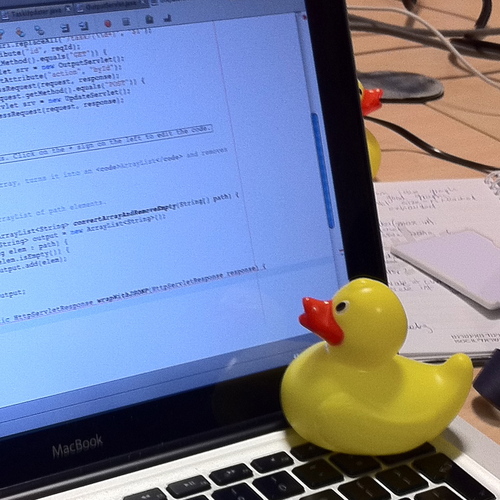
In software engineering, rubber duck debugging is a method of debugging code. The name is a reference to a story in the book The Pragmatic Programmer in which a programmer would carry around a rubber duck and debug their code by forcing themselves to explain it, line-by-line,...
granite robin
...
I'm looking for more information on how to solve navigation proxy links across navigation bounds. There is plenty of space for my character mesh navigate through but there is a gap in the navigation mesh, I also don't know how to get him to go up a ladder for example moving up heights.
Can anyone recommend a good learning source? I've tried the live streams, but so far I can only find basic information nothing for my specific use case
pine steeple
i ended up using smart navlinks
they have a function when navlink has been entered
great for going up ladders/jumping over walls
odd glen
@fallow hound thats what I do except without the duck, I try to explain it to myself
@midnight scroll would I still be able to use AI Perception to determine if the target is within the rocket’s field of view?
granite robin
@pine steeple thanks I'll look at that, can you advise what the function actually entails in terms of moving the character? Is there some type of tick type movement event, which an animation covers? There's something fundamental about bridging nav meshes that I don't understand. I'll look at smart links though, thank you
 simple crest
The proper way is definitely to use controller rotation and let a movement component rotate the actor
(Or controller focus)
Setting the AI actor's rotation directly is what you would do if you were teleporting the AI
granite robin
So I access the character movement component and then use what function to move it up vertically a thousand units, for example?
granite robin
@simple crest
simple crest
sorry I was talking about Varial's character rotation, don't know about ladders haven't got there yet in my project 😦
odd glen
@simple crest thanks
granite robin
Why isn't my character's AI controller spawning, I am spawning the character normally and the BP is a child of the character class
patent hornet
how are you spawning it?
patent hornet
try the SpawnAIFromClass
not sure how much of that controller spawning is done automagically
but i think you need to SpawnDefaultController for that to work
granite robin
So, here is what is weird
When I get the AI controller reference directly after spawning the actor, it works -
But not when I use the Character reference set there, and try to pull from it
maybe I'm pulling the wrong node
patent hornet
SpawnAIFromClass is made to spawn pawn, controller and possess iirc
 analog crown
Hi, I have an AI running this service with an "AI MoveTo" in it, which executes. All of the inputs are correct, but "OnFail" always returns. The "MovementResult" outputs "Aborted". Visual Logger shows no problems, but only some AI move, others do not. Navmesh is set up correctly and fully green.
How can I debug this further?
It was working fine a few days ago and I've not really done anything that could impact this, I'm worried it might be corruption.
granite robin
Did you change acceptance radius?
@patent hornet Where would I find a good explanation on these settings, beyond the Unreal docs?
Because I still don't understand why the Z component of the target location can be so far away from the acceptance radius and yet it reports success
patent hornet
i really have no idea where to find the Raycast settings docs
as for the height difference and acceptance radius, i would assume both points are projected to navmesh before the acceptance radius is checked
granite robin
So what should I put for most flexibility, because my AI is getting stuck very easily @patent hornet
patent hornet
all AI gets stuck very easily unfortunately
takes a lot of tweaking to get it just right
do have their capsule radius couple of units less then nav agent radius
that will help with corners and such
granite robin
oh crap I didn't know about that @patent hornet, that's what I am talking about, there's some of the fundamentals I don't know about, can you recommend a good learning resource? The live streams are okay but they are a bit disjointed and don't always touch on the conceptual/logic or at least if they do, it seems to come up haphazardly
granite robin
are you aware any courses on udemy or skillshare that do a good job? @pine steeple even if it is a course on something I don't need but might have a few lectures on that as part of a section
pine steeple
not really tbh
only the basic BT/BB stuff
which i dislike cause most do bad practices
like setting bbkeys from inside the controller, not using services/decorators/tasks properly
navmesh setting up is a pain
you will find yourself constantly tweaking settings whilst your map/maps change
granite robin
I just want a "here's what this nav mesh settings do" video
pine steeple
there isn't as far as i know
but i can show you my navmesh settings
see if they help 
granite robin
what do I have to lose, sure go ahead
pine steeple
 analog crown
@granite robin Acceptance radius makes no difference, I tried with default of 5 and the same occurs ;/
granite robin
that's what I thought
analog crown
Wouldn't "Aborted" only happen if I abort it manually? Assuming the input variables are correct and the AI is not close to my player + has a valid navmesh
granite robin
I might just make an event on the movement of the character stopping and check to see if they are colliding with their goal
dunno but I just got aborted for the first time
Is there a list of the reasons why something is aborted?
Where do I assign the level's navigation mesh to ensure the Character actually uses it @analog crown
hmmm
not sure why its reporting aborted
that's coords are the location of the character's capsule component
 sullen escarp
@granite robin Does your level have nav mesh (press P in editor to preview)? Are the AI and the destination point both on nav mesh?
granite robin
@sullen escarp when you say "on" the nav mesh, how close does it need to be
sullen escarp
X / Y needs to be in the mesh, Z height just needs to be near the mesh
granite robin
define "near"
because my problem is, much of the time, it just gets underneath it
Here is a 3 story house, the actor will stop on the 2nd/1st floor, but he'll be underneath it
sullen escarp
I don't see nav mesh or links on the stairs from that screenshot, he probably cant go up.
You can bring up the gameplay debugger too, point towards your AI and press apostrophe (')
granite robin
the blueprint debugger?
sullen escarp
No, that's specifically for blueprint vars / callstacks
Gameplay Debugger is real-time debugging for AI, top half of this page gives a good quick intro: https://docs.unrealengine.com/en-US/Gameplay/Tools/GameplayDebugger/index.html
Tool that enables analyzing realtime gameplay data at runtime.
granite robin
I want to give you a screenshot but I can't disable this stupid message on one of my actors - I've tried turning over shadow casting on it but can't seem to suprress it
simple crest
seconding sparky's comment. is there any way defined for your AI to actually get to the top floor in that screenshot?
granite robin
I have nav links standby
sullen escarp
Easier fix might be to change the Agent Max Step Height in your nav mesh settings. Default is 35, bump it up to 50
granite robin
well i cant even get through the door
simple crest
yeah; do you need your AI to do something special when it walks up the stairs (comparable to a ladder?) or is regular walking motion OK?
granite robin
for now, I just need him to get there
i'll worry about changing animations once it actually works
I know so little, @sullen escarp can you recommend a learning resource?
sullen escarp
Don't know if its required but when I've used the links, I needed to have those cylinders penetrate through the nav mesh / floor. When I had them on top of nav mesh like in your screenshot it wasn't reliable
granite robin
can I do this too?
and does clikcing smark link relevant do anything if you havefn't done anything with the smart links?
I wish I could just see if it is failing on the nav proxy
sullen escarp
Smart Link is if you want to dynamically disconnect and connect them during runtime
granite robin
ah
like if you moved up a bridge or something
and didn't want the AI to matrix leap across it
success, more so than I have had ever in the past, he actually went up stairs ...if I can get these corner stairs that will be more than I've had in some time
simple crest
dynamic changes, or just if you want to "override" the generated navmesh and give the AI new points to move from/to. like jumping off of a balcony.
granite robin
I feel like this isn't ever going to work
I would need to get more of a straight shot but I have no "zone" to work in
and I can't use a nav mesh modifier in that zone, because it's missing a navmesh to modify, right?
simple crest
are you aware of how capsule radius settings work both for the character's movement and the navmesh generation? do you need to have such a massive deadzone around walls (railings) ?
granite robin
This is a procedurally built house, more or less, using assets like these - could this be the problem?
Hojo, I am lacking all information regarding how that works, or where I can gain the Awareness of it ; beyond a 16 minute navmesh general theory video I found on Youtube
none of the livestreams I have seen seem to deal with the deadzone
I DON'T want that deadzone, please tell me how to remove it!
simple crest
oh hm in your earlier screenshot you have it set to 1.1 units (which is absolutely tiny but shouldn't result in what we're seeing)
sullen escarp
He might have to hit Build Paths if he changed the value recently
simple crest
well. if your character capsule radius is like 30 cm, your navmesh agent radius should normally be set to something like 40 or 50 cm. so that the navmesh tries to keep them a few cm away from walls and they don't hang up anywhere. in your screenshot it looks like it's generating it at more like 100cm
(assuming it is up to date, it auto-regens when you change settings right, or do you have that disabled?)
granite robin
I thought I had it on auto, the nav mesh keeps redrawing itself
from my capsule component on my character (inherited)
I'll shrink it down to 30 on the capsule
not sure about agent height
those didn't seem to make a change
yeah I have no idea why the nav mesh is drawing so big
simple crest
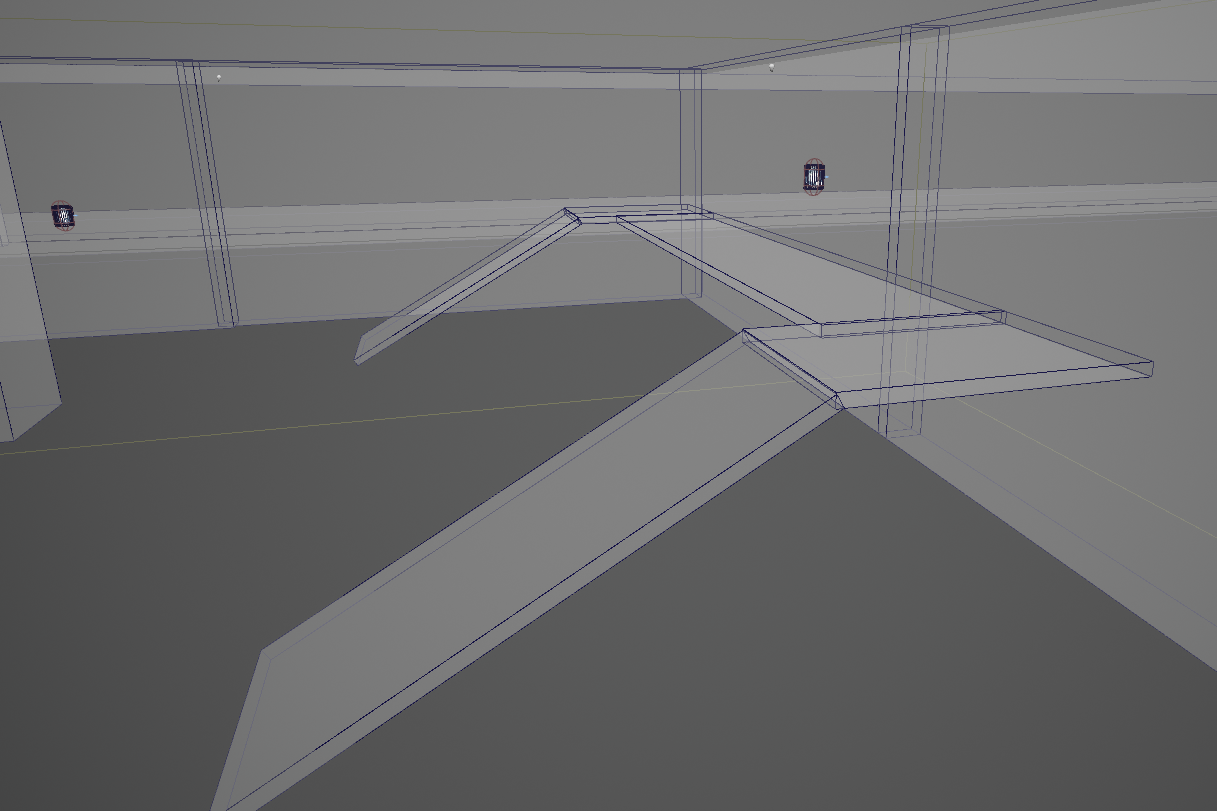
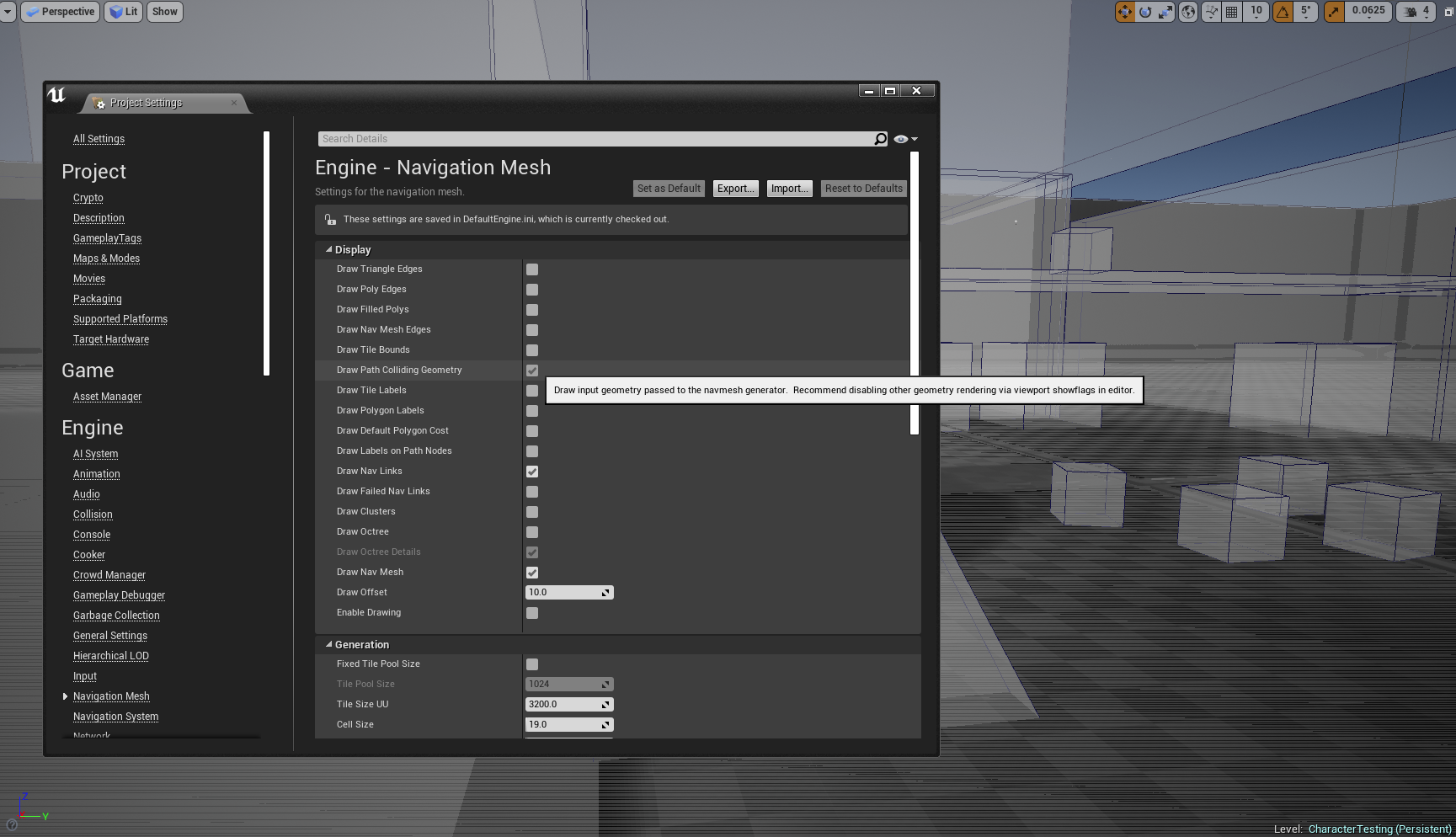
can play with this to see if you can see what the generator is seeing. if you throw down some basic BSP geometry (floor and cubes) and build a navmesh on it, does it generate nicer? https://i.gyazo.com/820c1836a46d192f86989e1a7a204e6d.png
 sullen escarp
Under Build there's a drop-down for Build Paths if you don't want to rebuild the whole map
granite robin
not sure what I am looking at here
simple crest
read the tooltip in my screenshot
with just "collision", "translucent", and "navmesh" turned on in the viewpoint and with that project setting checked I get this view https://gyazo.com/115f25319340044a92870543b7ecd348.png
 simple crest
so what's your current Agent Radius in this navmesh object?
simple crest
does changing it change the edges of the path at all? if not, force path rebuild, does it change then?
simple crest
and when you change it, the navmesh vanishes, it says "building navigation... " for a few seconds?
simple crest
are you sure you're even editing the right navmesh object in your level?
granite robin
I'm changing it in project settings
simple crest
well then. we found the problem 
simple crest
yeah, edit it on the object in your actual level. actually I'm not really experienced with this stuff, I don't know what the project settings for navmesh gen even do yet
granite robin
edit on the navmeshboundsvolume?
simple crest
think it might just be the defaults
at least check the value on the actual navmesh object in the level
e.g. is it still set to 50 radius when project is 500
granite robin
oh shit
I haven't mess with this at all...I never saw it appear
totally different settings
see, that's a REAL basic fundamental that I would have really loved to have seen that
in some livestream
simple crest
the fuck does the project settings for this even do... it doesn't set the defaults of a newly placed navmesh volume... is it just there to confuse people?

granite robin
because "fuck you" for not being a professional developer, sucks to be you amateurs!
he still has trouble with doors
listen - my application is entirely single player, non-traditional gaming....can't I just make a much smaller capsule component?
simple crest
yeah i'm pretty sure the whole project settings entry for navmesh is just unused garbage.
granite robin
because doorways seem to baffle my AI
simple crest
yes, of course you can set things to whatever works for you. capsule size is merely a tradeoff between character mesh clipping through walls and convenience
anyway, doors should not be a problem as long as he fits, what's your navmesh doing?
granite robin
he goes AROUND
he still goes around, and I deleted that modifier just in case it was a cost thing
simple crest
ok so, do you want the doorway to always be traversable the same way open ground is? or do you want to be able to shut it off sometimes or make it only one-way traversable sometimes?
granite robin
analog crown
any ideas on how to debug potential reasons for an AI MoveTo abort?
granite robin
yes, the same way Hojo, I'll control with events when I need to
we just found out that my dumbass was using the project settings nav mesh options. which apparently do jack shit @analog crown
simple crest
but like you want to be able to block off a doorway e.g. if there's a fire in that room I'm guessing? so you don't want your navmesh to freely sprawl across doorways, you want to explicitly connect rooms with links
granite robin
first I want to get comfortable moving them around and stuff
then I'll learn how to block things off
I believe I saw there is a settging to update the navmesh during runtime, so if I were to spawn a door or toggle it's collision, that should update the nav mesh accordingly
but really, most of my stuff will be event based, so I shouldn't need to rely on too much navigation or behavior trees
simple crest
that's cool. so your first goal should be to play around extensively with your charactermovementcomponent settings and the navmesh generation settings to get the navmesh generating as cleanly as you can and the character able to traverse around on the area covered by it. maybe you need to reduce tile size and simplification error settings to force it to build cleaner boundaries around these thin walls or somethin
granite robin
it's a small map, so if I make tile pool size bigger and how would I make it more detailed, even if it is expensive
and where are you getting your information from, I could really use a reference
it's drawing off too high for some reason look at those legs
simple crest
also it might be helpful to ensure you understand that the navmesh is only used for the AI to calculate logic like "I am allowed to attempt to move in this direction" ... the AI doesn't actually move on the navmesh. imagine if you were in your house wearing a VR headset, and all the headset displayed was the navmesh - that's what the AI is doing. your physical body is still moving around the room and if the navmesh isn't conservative enough you'll bump into things
granite robin
change cell size down from 24 to 12 made a HUGE difference
simple crest
i have no idea where i'm getting my knowledge from, occasionally i spew total BS, I've just been hobbying this stuff for 10+ years ¯_(ツ)_/¯
played with other navmesh things like unity plugins in the past and got familiar with how it all works
granite robin
you see him go all over the place
okay what's wrong with this picture
meanwhile his target point is right through that door but on the 3rd story
simple crest
ok well what's your whole house navmesh look like so far? your goal should be to get something that looks like this first http://masagroup.github.io/recastdetour/recast_intro.png

which, unless your house meshes are FUBAR, should be doable just by altering the generation settings
granite robin
except on stairs
simple crest
you want specialized behavior on stairs?
simple crest
ok, well that'll be above my current paygrade in any case but why not just get it working the simple way first
granite robin
simple crest
try restarting the editor if it's being weird, I found mine bugged out once or twice... ergh
granite robin
just reopened that level
still be gaps by walls
no idea why, the meshes I check on those walls have collision only on the wall itself
same with floor
granite robin
oh shit, right
i changed the capsule but not the raycast
better
wow, he did the same thing
it was like that navmesh made no difference
I did shrink my character down by 10 percent and I reduced the capsule height of the character by 10 percent too
WHY DOES he run AROUND????
and I apparantly don't understand smartlinks
@simple crest Does the actual arc of the nav link matter?
simple crest
Shouldn't no. I would get rid of all links and focus on your mesh generation first
granite robin
the mesh is pretty good now
simple crest
Shouldn't clip through the doorway edge like that though
granite robin
well, I just made the size 2 on the cell size and now it looks like this :
but he turns RIGHT
instead of going up those stairs
and you can see, he can totally reach them
the stairs in question -
I guess what is happening is he can't transfer that nav link so he goes to the point directly under neath the target point
bottom of stairs....is this position okay? i can't get a chance to occur even if I move it over
annnnd i'm an idiot, that's the problem
collision was somehow off on that mesh
wtf he still does it
@simple crest why does he turn right?
simple crest
 where's he supposed to go? up stairs to the left?
granite robin
that's where the target point is, yes
you can see he just SNAPS to the right too
where he makes that turn seems fine navmesh wise
how do I make him go to the position but go up more, he stops when he is underneath it no matter if he can actually reach it
now he gives up outside, right at the beginning
because I moved the target point here
is that stupid crack my problem?
simple crest
Probably not... It doesn't look like it's an edge...
granite robin
I'm making some crazy settings
what should I put for maximum detail?
not sure what is causing those
sullen escarp
Go back to defaults, wouldn't mess with the settings unless you know what you're doing for some advanced or detail polish stuff.
Delete the RecastNavMesh and rebuild paths, get your AI moving to the point you intend before you worry about how close they are to a wall and whatnot
granite robin
Sparky, he can't even move up goddamn stairs
sullen escarp
For your stairs make the collision so its like a ramp
it'll help with nav mesh and also look smoother for your AI running up it instead of bouncing on each step
Then you wont need nav links
 graceful saffron
does this not work? It keeps sensing even though I have this set
i also tried disable component but it keeps firing
sullen escarp
@graceful saffron Made a fresh character, added a sensing component and on the sight sense print a line. Was able to enable and disable it using the node you posted.
My guess is your Pawn Sensing variable isn't valid or is someone else's, maybe you're accidentally calling it on the client?
granite robin
@sullen escarp Can I use the in-editor to make that ramp?
I keep remaking this but I see no changes in the nav mesh, at all?
even though it is rebuilding
I added a box collision and rotated it
not sure why he can't get there -
sullen escarp
@granite robin Is there nav mesh going from the start position to the end? Can also check via BP using this snippet, the Is Valid function from navigation path will be true if AI can path to the goal
granite robin
I'm assuming it's going to return false but I will put it in, that's what
patent hornet
@granite robin we use an approach where the AI follows its MoveToActor
instead of going for a specific location
with goal tracking turned on
it has several advantages over a Vector location, not least of which being able to attach move to actor to something resulting AI following that something automatically
granite robin
That's what I needed to know as well, Thank you @patent hornet
Here's the way I'm checking Sparky
patent hornet
it also won't break default animations
for a frame
when your speed drops to zero for that frame because new MoveToTask called StopMovementImmediately
granite robin
So it returned false, so even checking if the pain to location
Here's what I"m trying to do
entrance
Well, @sullen escarp this keeps evaluating false, even if I put it next to my AI? what did do wrong?
there is something extremely basic I am missing here because I haven't been told it by a livestream
because I'm literally next to the item
sullen escarp
is Target Point Loc actually where you expect it to be? Do a debug draw at that location
Maybe it's failing and returning 0,0,0 or some huge offset
patent hornet
but don't expect to have nav system solved inside a week or so
granite robin
Would filter matter?
patent hornet
you'll be tweaking that for months
granite robin
I bought a book on AI for Unreal
patent hornet
not full time, but you will be catching edge conditions as the development goes on
granite robin
patent hornet
it might be good, but i doubt it will be exactly what you're looking for
every AI system is specific
and you can't really find a tutorial telling you what you need to do to improve yours
granite robin
honestly my use case, I really don't need much in the way of AI besides basic pathfinding
patent hornet
i did see some screens up there that let me think its multiple floors
granite robin
i'm building an incident command simulator where you order firefighters to do things, and the main challenge is coordinating them and keeping track of their location and assignments, I can essentially put AI inside the house on timers
yes and the assets are, some of them, 3 tiered, but they do have collision, I experimented with doublesided collision and that didn't seem to make a difference
patent hornet
you can put nav modifiers on each floor
letting you filter your queries
it won't scale well, but as long as you don't do any skyscrapers it will be managable
problem with multiple floors is you give the AI general coordinate to go to
there is a prop or a wall on the upper floor, so the nav trave ends up going right through it
hits navmesh on floor below
and happily returns success
granite robin
see, I don't even know thats how the navigation travels
that's what I mean when I talk about needing conceptual videos
I just thought it did some form of linetraces along the navmesh until it got to the location
patent hornet
basically, each NavModifier has an area class
it will be debug drawn in different color as well
that you can set
granite robin
I didn't think I needed them unless I was trying to change states/costs, like making them crouch or something
patent hornet
NavFilters combine NavArea classes, as in they can set which Areas are included/excluded
and all your queries - both pathfinding and project to navigation
take a NavFilter class as input
so if you had a Floor2 NavFilter, being the only thing that allows pathing through NavModifier over 2nd floor
you could do a specific floor 2 query
sullen escarp
@granite robin Maybe the target loc is too high, you can run it through ProjectPointToNavigation and give the extent a big enough Z buffer
granite robin
So my target point could have a floor enum and that populates the area class
patent hornet
would need some translation function to get nav filter out of it
but point is, you can limit/filter queries by placing nav modifiers, building nav filter classes out of thier area classes
something i suspect you'll need
as soon as you can have navmesh on 2 different heights on same x,y coordinates
you're way past "simple" pathfinding
sullen escarp
That seems like a lot of work compared to just using EQS
patent hornet
EQS also needs the filters if its going to query some nav location on 3rd floor
well, it doesn't, but that can get error prone real fast
specifically because if you hit a null area, nav trace will not return false, it will fall through onto the 2nd floor
and return a valid nav point
sullen escarp
Run a generator around target actor / location, filter path cost if AI has valid navigation to them, then score them. If there is no valid path for any points then your AI needs a fallback behavior like running to a door to open it or random search behavior. More systemic than managing several filters
patent hornet
i don't like filter approach because it scales like shit
but for a fixed, manually built firefighting simulation, its manageable
granite robin
Yeah, and the IC (incident commander ) really doesn't go anywhere near it, so I could literally despawn these character until they are remotely 'visible'
patent hornet
you need filters for other stuff as well
example
a hallways, doors left and right, all closed
granite robin
the only reason why I am messing with them internally is because it might make it useful in terms of realism if their assignments, like fighting a fire inside, was based on physical movement
granite robin
otherwise my plan was to use timers
since no one will see the movement
once they get inside the building, the smoke obscures them
sullen escarp
EQS still handles that easily with queries, you can make a generator to grab doors on the way to the goal and put a path point at the door.
patent hornet
thats just it
same door left and right
left door with path point on it will be in the corridor, reachable
right one will be inside the room, on other side of null area, unreachable
granite robin
best practices in terms of commanding a fire scene involves not getting tunnel vision by looking, but instead focus on the overall scene and manage a crew with something like this -
patent hornet
you basically need to use a filter that can path through the doors in order to make a query, but one that pawns can't treat as passable in terms of navigation
granite robin
I might forgo AI entirely
other than basic pathfinding, that's really all I need
since there isn't any player interaction, like shooting/cover system, there is no real need for nuances
each change I can control can be a very clear, event-based item
patent hornet
well, most of gamemaking is smoke and mirrors
granite robin
and there will be a lot of talking back and forth, so I'd be overriding the AI anyway
patent hornet
nod
granite robin
it's basically a sound board like those prank callers use
graceful saffron
@sullen escarp yeah no clue, it keeps firing even with one AI. The AI works perfectly fine otherwise, sensing the player and whatnot, but it would be nice to be able to pause it but guess I can't for whatever reason.
using a simple isvalid check as a workaround
granite robin
@patent hornet trying that nav filter thing out, why doesn't my color show? here is a regular one, that shows coloration, then when I change it
patent hornet
areas show colors
patent hornet
i don't know the answer off the top of my head for this
patent hornet
btw, navmeshes are temperamental and need rebuilding often
granite robin
reloaded level fixed it
mine is set to autorebuild
Should I used fixed tile pool size? what navmesh settings should I use on a small level that will have no multiplayer
granite robin
so how do I set this filter up exactly?
patent hornet
you crate a nav filter
*create
nav filter class
then setup what areas are available/excluded...
granite robin
perfect, then if It doesn't work, I'll know it's a problem with nav mesh itself and nav links
that false success shit was driving me insane
patent hornet
use minimum area setting to make navmesh not generate in small isolated unreachable islands
use visual logger (google it, has pretty good docs) for debugging AI
granite robin
now, will this exclude the other areas by default
on the nav filter?
SO, acceptance radius does nothing then @patent hornet?
because that failed
patent hornet
works for me
granite robin
or is it only relevant on success then
patent hornet
visual logger 🙂
granite robin
Message received, thanks again for your help 🙂
analog crown
@patent hornet I tried that as well, nothing useful there. Been stuck on this for a couple days, one sec let me pull up the vislog again
When it shows this, for example, the AI is actually standing still completely.
The crazy thing is, half of my AI (identical in every way) move fine (but stop walking frequently for no reason), the other half do not move at all to begin with.
"AI MoveTo" puts out "Fail" with an "Aborted" message
Reason unknown
patent hornet
are you using acceptance radius and moving to something you're overlapping with?
analog crown
Stop on overlap is False and acceptance radius is default 5 currently. I was using acceptance radius of 50 before and the AI worked fine
granite robin
LogAINavigation (Warning) Unable to find NavigationData instance while calling AAIController::BuildPathfindingQuery
LogPathFollowing (Log) OnPathFinished: Invalid[]```So, the navigation data instance is bad?
patent hornet
seems to be
granite robin
Does that mean the Navmesh is somehow broken?
analog crown
Don't see an issue there either though, do you?
granite robin
purple is lower cost in this modifier than default green
and that path looks pretty good
analog crown
"PartialPath" might be a clue ...
granite robin
@patent hornet is htis accurate?
This is what I did in the end. I can now use just the one Move To node. Does the job for me!``` tender light
So I'm trying to make my AI enemy play a sound when it spots me, but when it spots me it plays the sound every fraction of a second so it just plays it over and over until it loses sight of me and the sounds start to slowly die down. What am I doing wrong?!
granite robin
@tender light You can bind an event at begin play that Fires OnAudioEnd, then use a boolean when that AI tries to play a sound and only let it play when that bool is true, then when that on audio end fires, that event sets the bool true
analog crown
^ or DoOnce that resets when player is no longer seen
that event will fire off many times while the player is in sight that's why your sounds are repeating
tender light
Thanks for the help, but seeing as I’m EXTREMELY new to UE, I’m having trouble understanding what you’re saying. Is there any way someone can take a screenshot so that I can see visually what to do?
analog crown
Sec
@tender light This should work. If the cast fails then the AI is not seeing your player, so it resets the DoOnce node, allowing it to re-fire next time the cast is successful.
"Cast to Actor" would be casting to your specific player character
In your case, the DoOnce is reset after 1 second regardless of whether the AI has been able to see you the entire time. You want to only reset it when you know for sure he cannot see you anymore.
granite robin
So, where is the NavigationData instance???
analog crown
 lucid sable
hi im trying to make a function to check my ai's location relative to my player character, im using the getActorLocation node plugged into a setting node for a vector variable to get my ai location, with the target being the owner controller from the event receive execute ai node. but the location never changes from x0,y0,z0 even though the ai unit is no where near that on the map. i could really use some help figuring out why it can't get the actor location
pine steeple
well if your getting the AI Controllers location
that will indeed be 0,0,0
show me the logic
tender light
Ok, so now it only plays the sound once, but, the problem is when I run out of and then back into the AI’s FOV, the sound doesn’t play anymore.
pine steeple
you need to reset it
btw don't use pawn sensing
its obsolete, and pretty much dead
lucid sable
pine steeple
been replaced by the Perception system
so thats your issue
like i said, you are using the controllers location
use the controlled pawns location
lucid sable
i switched it over still getting 0,0,0
pine steeple
where are you printing the 0,0,0?
tender light
So could you show me what the BP should look like in respect to what I was originally trying to do with AI playing a random sound?
lucid sable
i have the behaviour tree open when im playing and watching the values there
tender light
Was I not already resetting it?
lucid sable
oh im just dumb my bad, im still new to programming ai, when i added a print its showing the proper values
pine steeple
only if the cast failed
which would not happen
unless it spots a different pawn
with the wrong class.
oh
was looking at the wrong one 😄
so not sure how pawnsensing works
but maybe it never clears it has already sighted you
tender light
So is there a better way to do the same thing using perception system?
pine steeple
perception system handles sight, sound, damage, etc
much better allround
also senses can expire
meaning if a player leaves the sight of an ai, it will forget that player, and then retrigger when it spots the player
tender light
So is there a way I can see a visual BP of how to make AI play random sound on sight using that perception system?
And is there a way to get AI to chase player as well?
Sorry, I’m more of a visual person
lucid sable
ok so now that i got the distance checker working and changed the BT from checking for sight to checking for if the distance is far enough he just doesn't move at all, heres my BT
i added a print string if hes under 600 units away so i would know when its true, but it never seems to even get into the other 2 options instead just infitiy checking if hes to close
pine steeple
you were checking for ==
meaning it has to be equal to 600 unit
you want <=
also
you want a sequence
not a selector
well technically you want a sequence and a selector
lucid sable
ya i regiged it so that its a sequence into a selector and it stimulating right other than when it gets into the move state it doesn't move past running the eqs query
odd glen
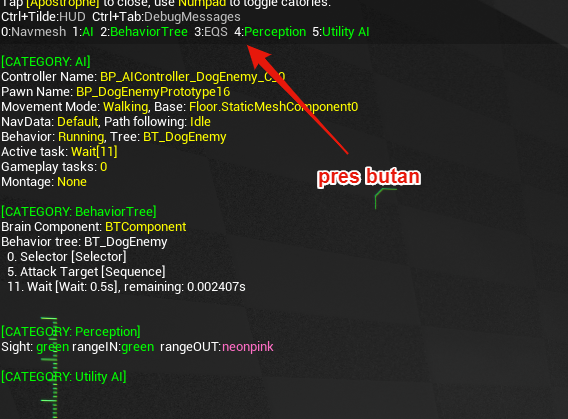
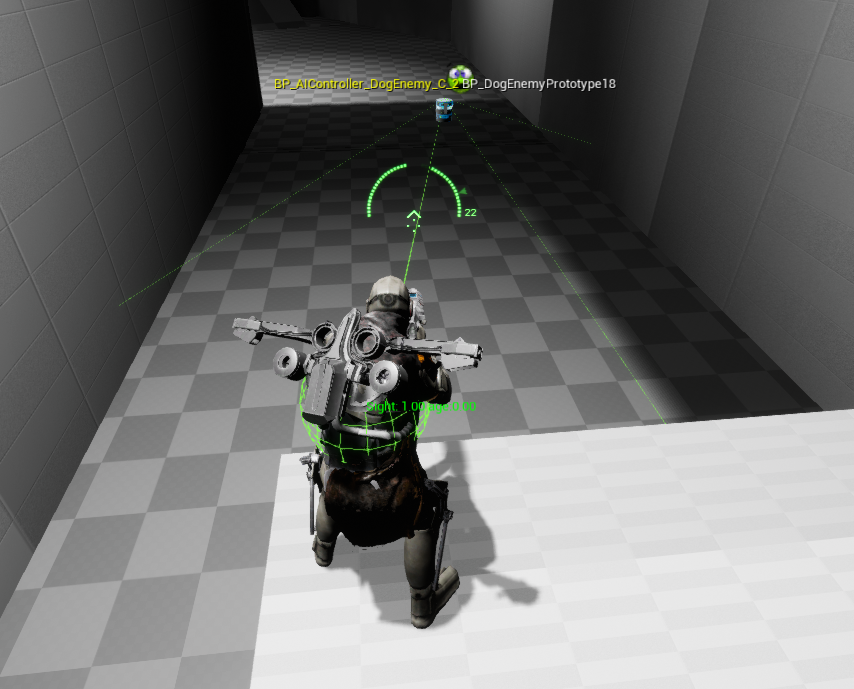
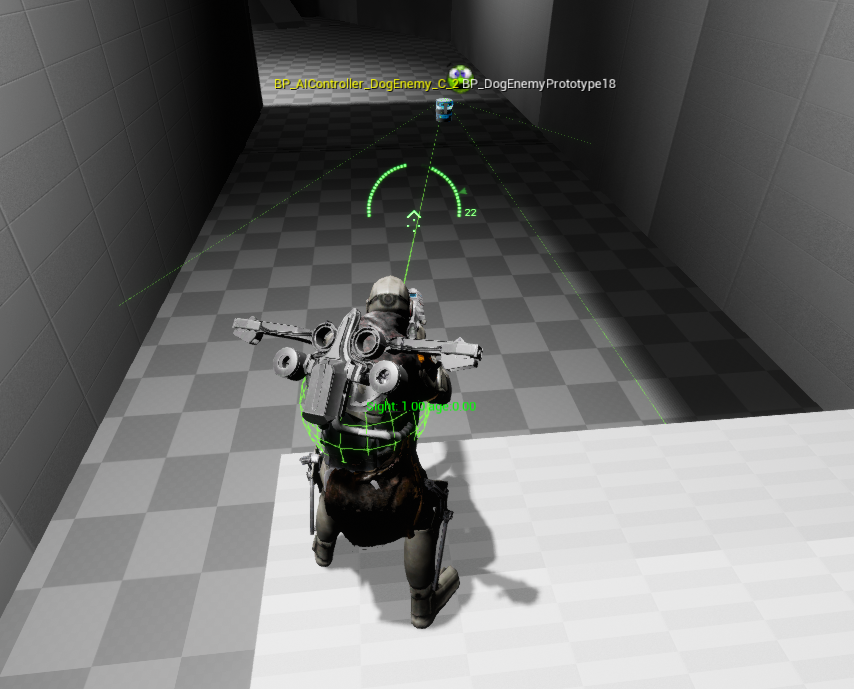
Does anyone know how to make AIPerception sight show up in the debug view like how pawn sensing will draw a cone according to the pawns vision?



 odd glen
For me that only works for pawn sensing nodes
Maybe I’m thinking of ai perception wrong
simple crest
you should see like... a sphere on the sensed actor and a line connecting them with a couple other minor tidbits of info
not sure what else pawn sensing had, I never tried it
the AI's sight FOV should be visible too I thought, just as lines for the edges
yeah it gives you that much. https://i.gyazo.com/da1d542aaac41e7ab0cef1bcb17e0dc5.png
 wheat tree
Can anyone advice some decent tutorials or materials about making AI for multiplayer? (ideally need to place about 1k ai moba-like troops on a map)
wheat tree
Mb some hacks can come in mind?
 winter comet
Since we're talking about AI perception debugging.
I'm trying to visualize the sight of some very simple actors.
But I'm getting debug actor: None, in the top right corner when opening the aidebugger.
These actors are simple pawns without any AI controller since I'm moving them around by changing the position after calculating a velocity.
Anyone have an idea what's going wrong?
simple crest
Are you aiming at the AI when you open it
Oh wait no controller
I think all of the built in debugger info is coded in the aicontroller, so you might be up shite creek
winter comet
In that case I'll try to add an aicontroller to the pawn.
Not a big deal if there is nothing else added to it (yet)
simple crest
You might be able to hook it in manually if you really need to avoid having an AI controller (needs some work in cpp)
winter comet
It's just a 3 day prototype for a project. No need to avoid it.
But thanks for the confirmation, I had made the guess while waiting for the 10min join timer to run out.
olive pond
I have a weird problem. When I seamless travel to a new level, the AI Controllers all stop seeing each other (I have a print string on the AI perception triggered event to confirm that)
But this only happens when running on Android, not on Windows desktop, even though both builds are from the same project.
Do I need to reset the perception compinent or something? How do I debug this to find out what is wrong if it only happens on android?
 rich marsh
Anyone have any suggestions on how to handle making the AI aim at where a player is heading versus where the player is at that very moment? Even an idea of where that is best handled would be helpful
 fiery sorrel
Get the Targets location + velocity * time to determine where the Target will be
rich marsh
Sorry I should've been more clear. I meant more of, are you making the character rotate to that desired location first, and then spawning the projectile to go in a straight line there, are you setting it in the anim BP and translating that into the aim offsets and keeping the current AI pawn's rotation as-is? etc
fallow hound
Isn't there some ai prediction stuff in the engine already?
rich marsh
@fallow hound I don't know. If there is, then I have yet to see it.
simple crest
it's not quantum-mechanics-difficult, but also not a completely trivial thing to solve... I don't think it exists by default because there's too many different possible cases. there is a "predict projectile path" only I think. this guy has a great page on it but it might be more complex of a discussion than you need if you have non-gravity projectiles
Detailed explanation of 3d math needed to solve video game ballistic trajectories.
(actually might work for you because later on he discusses "constant lateral speed projectiles", he just gives them an arbitrary arc for visuals)
winter comet
Anyone that has experience with the AI team perception?
The documentation page says the following about the range "radius is sent by the gameplay code"
What gameplay code/function are we talking about here?
olive pond
Sometimes all of my AiControllers, after seamless travel, stop firing OnPerception and OnTargetPerception events at all. I don't know why. Sometimes it does and sometimes it doesn't, after doing the same actions in game. Is there a workaround for this bug that I can usr to make it turn the events back on? I know the AiControllers are still there because they are doing all their BehaviorTree tasks except the ones that rely on perception
Perception setting the blackboard values that is
I have a print string node as the first thing after both the OnPerception event and the OnTargetPerception event (no idea what the diffrrence is except one has an array), and it does the printstring for both, all the time, until after seamless level travel. Then they dont printstring anymore. Sometimes this problem doesnt happen but eventually one of the seamless travels will somehow remove perception events. Once that happens then they are stopped on every level seamlessly traveled to from then on.
Even going back and forth between levels
The same 3 levels over and over
@winter comet sorry dont know anything about team perception. I am juat learning about sight perception so far. To do teams I check non AI stuff
Like pawn color. Or tags etc
olive pond
Actually I just saw the On(Target)PerceptionUpdated events come back after another seamless travel after the first one broke it.
I wish I knew what was going on....
Is there a way to do AI debugging on a mobile build?
And if so would that even help?
olive pond
I tried destroying all AI controllers before seamless travel but the problem still occurs
odd glen
Do ue4 rotations suffer from gimbal lock?
Im getting some really weird results when trying to rotate my ai
fiery sorrel
For some reason I remember team perception not working and that you need to filter yourself. But, honestly never used it most of the time I make my ai cheat when selecting targets instead of the heavier perception system
And last I heard was 4.14-18 so might be really out of date
olive pond
Darn. I was hoping someone here would have had some experience with AI perception stopping working.
I'll keeping looking. There's a way to fix it, I just have to find it somehow
Worst case scenario I can stop using AIPerception and make my own Sight system using line trace and FOV or dot product or something like that
patent hornet
c++ or BP?
olive pond
BP
Only seems to happen after seamless travel, and it's random. Sometimes it does, sometimes not
much more often on Android than PC
I mean the problem happens more frequently on Android
Even if pawns are destroyed and respawn. It is only using the Sight type of perception on the AI controller's perception component and only the sight type of stimulus on the pawns. Very basic stuff.
Navigation works just fine. It's just a perception events never fire, after seamless level travel, but only sometimes. Other times, perception events fire and it works just fine
@patent hornet
Sorry were you responding to @fiery sorrel or @odd glen ?
patent hornet
any in editor set references required for perception to work/init?
olive pond
Not that I know of. Both the stimulus component on the pawn and the perception component om the aicontroller have their automatic register or similar checkboxes checked
And it works perfectly most of the time
patent hornet
any aistimulus components persisting during travel?
olive pond
Hmm that sounds worth checking on. If they persist then is that good or bad?
patent hornet
its possible something might fail, objects that persist aren't constructed on a new level
so they don't call BeginPlay, PostInitializeComponents and such
olive pond
I assume bad because problem doesnt occur on non seamless.travel
I tried killing AI controllers between levels but it didnt seem to make a difference and they somehow kept their playerstates despite being destroyed and recreated
I tried calling request update on the perception component on Possess event in the pawn
patent hornet
you have very little control over seamless travel with BP only
patent hornet
you can control what persists and what doesn't
also, AIPerception was never... finished, so its BP API sucks
olive pond
Ahhh
Well maybe all i need to do is reset it after travel somehow
But I can't find any BP nodes to reset it
Unless I just dont know what to use. Maybe an override? Or maybe start the aicontroller without a perception componemt amd add one during runtime?
Remove all thatnit already has first
Just not sure how to find out what is going wrong when it mostly happens in android build. Is there a way to debug AI there?
I couldnstart by checkinf whether it still has perception component after travel though
Justnrun a timer and a printstring outputting object namemof the component reference
olive pond
Oh cool so maybeI just need to expose the function to BP
Like I did with split screen on/off
Do you know what the function is named and what the effect of calling it is?
pine steeple
not without digging through the perception system code
if you havent found it when i get a chance ill take a look
olive pond
I will try and find it today. Thanks in advance if you find it first.
Do you think it would be simpler to just use line traces in BP?
My AI logic is super simple
pine steeple
depends what your tracing for
and if its every tick
if you are just doing sight
i would do a sphere trace for pawn
to first detect if player is in radius
then do a line trace from AI eyes to the hit player
and make sure they are visible (in sight) in the range
if you just need simple sight
@olive pond
olive pond
Good idea
pine steeple
might get a tad expensive in BP
on tick
might be better in c++ tick
but depends on A: How many ai you gonna have, B: the range
but in a nutshell
that is all ai perception sight does, what i described above ^
in c++ i wouldnt even do a sphere trace
i would do an ActorIterator
for Players
then store the results in an array (if there location - mylocation.size <= Sight Range)
then do a line trace
to save doing two traces
what is cheaper? 
that would need to be profiled
4 players, might be ok, 100 players, i wouldn't want to iterate over 100 every tick
so i would do a sphere trace
simple crest
Sizesquared <= range*range 
simple crest
👌 should actually be quite fast though lol
Though I've never profiled it in unreal. I recall sqrts ate up a significant amount of time in unity once you were doing hundreds of them...
olive pond
Only other thing is that linetrace goes toward a specific spot on the potential target pawn
Pawns can be partially hidden but still visible. Trace to center might report that they are hidden when the edge is poking out from behind a wall
so have to find a way to get the edges
patent hornet
cheaper to register all perception targets
do a simple cone/distance check - thats a simple dot product for those
then do a LOS trace if you want to check for obstacles
olive pond
OK baby is finally taking a nap and I can dig in
Here's API docs. I see ForgetAll, CleanUp, OnOwnerEndPlay, RefreshStimulus, RemoveDeadData, RequestStimulusUpdate (tried that in BP, didn't help), UpdatePerceptionWhitelist, OnRegister, OnUnregister, and a few others sound from the names and descriptions like they MIGHT help....
AIPerceptionComponent is used to register as stimuli listener in AIPerceptionSystem and gathers registered stimuli.
But first I'm going to add a check to see if the perception component is persisting.
I hope an IsValid node will do the trick
olive pond
OK I confirm that AIPerception component still exists on tanks that can no longer "see" after seamless travel.
patent hornet
so its probably not initalized properly on the new level
unfinished probably includes some issues that were never solved
bool ULocationLibrary::IsInCone(FVector ConeOrigin, FVector ConeDirection, float ConeHalfAngle, FVector Point, bool bIgnoreZ /*= false*/)
{
    if (bIgnoreZ)
    {
        ConeOrigin.Z = 0.f;
        ConeDirection.Z = 0.f;
        Point.Z = 0.f;
    }

    float dot = FVector::DotProduct(ConeDirection, Point - ConeOrigin);
    float cosineSquared = FMath::Pow(dot, 2) / (FVector::DistSquared(ConeOrigin, Point) * ConeDirection.SizeSquared());

    float consineAngleSquared = FMath::Pow(FMath::Cos(ConeHalfAngle / 180.0f * UKismetMathLibrary::GetPI()), 2);

    return dot > 0 && cosineSquared >= consineAngleSquared;
}
if you read c++, this is the cheapest way to make a cone check
olive pond
Thanks. I might use that if I can't get perception to work reliably between seamless travels
LOL, so it turns out that destroying the AIPerceptionComponent and then recreating it in order to force a reset, CRASHES the game.
But if I only destroy it and don't recreate it then the game runs, and all the AI tanks act like they do after seamless travel, even if I haven't seamless traveled yet.
Strangely, if I call DestroyActor on all AIControllers, then they still exist when next level is traveled to
(or maybe new ones are made?)
I checked the GetAllActorsOfClass on the AIControllers after destroying them all, and they all turn up as Valid. So does DestroyActor not actually Destroy Actors?
or do I have to call a special function to get rid of AI Controllers?
patent hornet
im not entirely sure your AI can persist without c++ use
if they are just placed in the level, or spawned at start of the match, they'll be there, but not by travelling with you from previous level
olive pond
They are totally traveling with me
They're still there after travel, even if It tell it to destroy them all, they won't die
 latent field
Can someone explain to me what's so powerful about behavior trees vs just having similar logic in the controller?? seems the services / black boards and everything else just adds a lot of complexity.
olive pond
They can't be killed. Maybe I need silver bullets?
@latent field Yes you can totally do without behavior trees and blackboards if that fits your needs better
@patent hornet Right now I am trying to figure out how to kill the AIControllers but they seem indestructible
latent field
@olive pond Im working on learning more about BT's but all the examples are so simple, i wonder why not just use some loops and branch logic... can you give any advise on when it seems like a good idea to use a BT over more traditional logic?
olive pond
@latent field I'm new to AI in Unreal too. Most AI for games relies on state machines. Behavior Trees are a kind of state machine. I think it can get really scattered and hard to read, when you want to for example have a pawn be moving toward a goal while simultaneously aiming and shooting at enemies and dodging incoming fire. But really you can still do all that without BTs and BBs, I think they might keep things tidier and easier to read though, and easier to keep from losing track of the logic flow.
patent hornet
the flow control is simple with BTs
latent field
thanks for the quick answers, I think ill continue to give it a go
patent hornet
you do have the option to break them apart, inject a BT
olive pond
@patent hornet You mean you can have different BTs and switch between them depending on the situation as needed?
patent hornet
have an item in the world with a BT asset that is basically instructions on how to use it
olive pond
That makes sense, I know there's a RunBehaviorTree node
patent hornet
and have AIController just run it when you interact with it
depends a lot on what kind of AI are you using
latent field
knowledge is power, I guess ill have to learn them to decide if i need them 😄
olive pond
Yeah try both ways and then see which one makes the most sense
@patent hornet I am now Unpossessing all AIControllers, Destroying them, and setting their lifespan to 0.1 before calling seamless travel console command.
patent hornet
only the PlayerStates, GameMode, GameState, GameSession, PlayerControllers + whatever is in PC and GM seamlesstravelactor list persists
olive pond
Finally that killed em. They no longer survive the seamless travel
@patent hornet Not sure why but in my case the AIControllers survive unless I kill them two different ways before traveling
Well now I can see if making them fresh AFTER the level travel will fix the problem
simple crest
anyone know some common reasons why an AIPerception would sense another actor without a StimuliSource, as well as the opposite (why it wouldn't sense one with a StimuliSource)?
I thought it was a pretty rigid relationship that a source was needed for anything to be sensed
simple crest
I went full retard and forgot to tick off the enemy/friendly/all teams affiliations. Is there any way I can de-age my brain by about 10 years, becoming a boomer sux
olive pond
Wait so is that what you were talking about at 1:52 PM MST ("common reasons")?
simple crest
I guess. Although it's still sensing actors that don't even have any stimuli source
olive pond
@patent hornet Well, I got it to destroy the AIControllers so they wouldn't persist across seamless travel as they used to, added a call to create new ones once I knew for sure they were being removed, so now I have all new fresh AIControllers each time a level is traveled to
BUT they still have the same problem of turning completely blind.
So now I'm not sure it's the seamless travel doing it anymore
patent hornet
that all sounds completely wrong
olive pond
I know but it's the behavior I see when I make those changes
Maybe wherever I'm wrong is what's causing the trouble though
patent hornet
takes 30 minutes to implement basic sight that detects players only
olive pond
Yeah I think I better just do that. This perception system is a mess
Plus I can make it see through my force fields where perception sight does not
patent hornet
you should have a statically accessible AIManager, a component on GameState or GameMode works just fine
or a standalone Actor, doesn't matter, it does need to gather all player references at the start of the match
each sight update, you check distance squared to each player vs. sight range squared first
then cone
then linetrace
if all pass, its visible
olive pond
Gamestate has PlayerArray but that's playerstates not controllers so I guess I need a controller array
in my game players can drop in and out and so can AIs, during the match
Maybe I will just call a function to remove pawn from array whenever pawn is destroyed and add to array whenever it is spawned
when scanning for visible pawns just skip self
so maybe pawn array
olive pond
that could work yeah
baby's wake
awake* Thank you for the code snippet. I will try it as a replacement for aiperception:sight
simple crest
so I guess you don't need a stimuli source on actors for it to be sensed with AIPerception? what is the point of stimuli source? or is this just because AIPerception is woefully incomplete?
just tested it in a barebones 3rd person project
patent hornet
there is one live training video Advanced AI something
from over 3 years ago
the Perception and EQS systems are in exact same condition now as when they streamed it
simple crest
ai enemies are like. soooo 2015 you guyz
shakes fist at sky Mieszkoooooooooooooo!!!
patent hornet
he did outline quite abit of work that needs to be done on those systems in the video
none of it was done since
fallow hound
he is supposedly coming on again soon (tm)
simple crest

patent hornet
we're extending AI systems when we have to, EQS is mostly ok tho
the perception system in particular is pretty hard to get into
as it has several layers of typedefs
simple crest
yeah I have a fairly decent start on a perception system lying around for an old unity project 5 years back, I might just port it over instead
patent hornet
they did start integrating this one into the editor
but yeah, its unworkable from BP, and not all that pleasant from c++ either
olive pond
@patent hornet. Thank you so much! that fixed my problem 🙂 Did 6 or 7 level switches, no problems using homebrew sight system.
Well there was one guy sitting there like a stick in the mud but he got better after respawn. That's likely caused by something else.
 outer haven
is there any good tutorials on how to make an ai that follows you and kills you? im trying to make a horror game and have been stuck on this for days
 high summit
@outer haven https://www.youtube.com/watch?v=vB8-djXa9qA

AI for Unreal Engine 4 in less than an hour without using any behavioral trees!! SUBSCRIBE: https://goo.gl/uCm3Kg Support us: http://www.patreon.com/biomatic...
lyric flint
let's say i have a crowd of npcs converging at the single point
this crowd making a circular shape
and one of them from the outside of the circle wants to reach one of them from the inside of the circle
but can't because it's too crowded
how do i determine that this npc is unreachable, i.e. it's too crowded to reach it?
 nimble perch
how can i make an object have collision so it wouldnt allow ais to move through it but still not affect nav mesh?
olive pond
@lyric flint not sure but I think I have an idea. Could use a Blackboard variable and make it Instance Shared so that it is the samenfor all blackboard of that type, call it CircleSlots, and make it be an array of Objects (if that is allowed for Bb vars). have another instance shared BB var called CircleCenter, a single vector. When CircleCenter gets set, clear the CircleSlots so everyone has to find a spot around it again. When you clear it, also set the array size to be the circle radius times 2 times pi (I think that is the formula for circumference) divided by the number of pawns that are going to be in the circle (I guess make that an instance shared BB integer var so it can be set for all whenever circle center changes).
Have an integer bb var (NOT instance shared) for each pawn, to determine which array slot it belongs to in CircleSlots. Have something loop through all the pawns and assign each one an array index number via this BB var.
Now when each pawn's Behavir Tree is trying to move it to the right spot, you can calculate where that is by taking circle center and then the circle radius (I guess you will want that to also be an instance shared BB var) can be added to that on the X coordinate into a separate vector to place it that many uu to the right of the circle center. This other vector is where the pawn is trying to go, its spot in the circle. Pawn with circleslots index 0 that is
Circleslots pawns will want to go to the spot on the circle's arc that is at an angle 2pi / num of slots * CircleSlots index from the circlecenter. I think.
I guesd you dont really need an array of objects actually, just a shared number of pawns and a unique number between 0 and numberofpawns-1 for each pawn.
And I bet something is wrong with my math and it needs some trig like sin for the y coord of the destination and cos for the X of the destination.
But that's the basic idea I can think of at the moment
So there doesnt need to be an array, just can keep recalculating the destination spots based on where the circlecenter is.
This will habe problems if any of the the destinations is inside and obstacle or is obstructed enough to make the path very long or convoluted so you will have to deal.with that as well somehow.
olive pond
Basically there is a formula for determining the cartesian coordinates of evenly spaced points on a circle's circumference. You could use polar coordinates and convert to cartesian, dividing 360 degrees by the number of pawns in the circle and using the quotient times the Circle Index var I mentioned earlier.
olive pond
@nimble perch so you want AIs to think they can move through the obstacle (does not affect navmesh), but when they try, they just keep bumping into the obstacle? Or make them think they cannot move through it even though the navmesh says they can?
So they don't try?
pine steeple
@nimble perch nav modifier is the only way
 dire latch
is this the right channel for behavior tree troubleshooting?
patent hornet
among other things
dire latch
nevermind, i forgot to make a variable accessible 😅
tropic lark
So I'm definitely doing something wrong here in my task, but I can't work out what. The task runs through the whole selector instead of just waiting for the 1st to complete.
patent hornet
@tropic lark the UAnimInstance has some DynamicMulticastDelegates in it
/**
* Delegate for when Montage is started
*/
DECLARE_DYNAMIC_MULTICAST_DELEGATE_OneParam(FOnMontageStartedMCDelegate, UAnimMontage*, Montage);

/**
* Delegate for when Montage is completed, whether interrupted or finished
* Weight of this montage is 0.f, so it stops contributing to output pose
*
* bInterrupted = true if it was not property finished
*/
DECLARE_DYNAMIC_MULTICAST_DELEGATE_TwoParams(FOnMontageEndedMCDelegate, UAnimMontage*, Montage, bool, bInterrupted);
2 most relevant ones for your situation
which you can bind events to from Character->GetMesh->GetAnimInstance pointer
half vessel
I'm working with version 4.18 and just started doing some EQS with my AI and the editor keeps crashing (Not doing anything advanced), seems rather unstable. Does EQS seem stable too all of you with your editor versions? (4.19, 4.20, 4.21, 4.22 etc)
patent hornet
fairly stable, and it hasn't changed since 4.14 or so
half vessel
just tried same code on 4.23, no crashes at all so for, i guess i'm writing this just as FYI if someone else having similur issues
 urban wadi
Ok i am trying to create a turret that only rotates and I have found that there is no task that only lets the cannon rotate, only a move to. So do I have to create a task and implement it myself or should i just not utilize a behavior tree for something so simplistic and just create a basic functionality for a cannon class?
patent hornet
SetFocus + UseControllerRotation 8s enough for simple tracking
urban wadi
Ok next question. Should i even create a Blackboard for a rotating cannon that only triggers when it senses the player by a sight radius before shooting?
@patent hornet \
i mean i guess i could
because i could have 2 branches if it sees the character it shoots if it does not it resumes its initial rotation
@patent hornet
tropic lark
@patent hornet Just got in and looking at what your posted and I'm a little confused. Are you saying the delegate is firing off in the animation? I thought the fault was somewhere within my BT task
patent hornet
i am saying its usually more reliable then trying to delay action by montage length
it also gives you a way to handle montage interrupted
depends largely on workflow preference @urban wadi
urban wadi
I mean I want it to be as performance friendly as possible and I guess if I were to utilize a BH & BB then it would be more flexible if I decided to add additional behavior to the turret AI class. I am new to AI so i am basically watching tutorials on how to do this now lol. I don't want to start with a bad foundation.
I know that creating a class that is bound to behavior specifically inside the class BP that is very limiting
but then again at this point i don't know if i would add additional behavior, other than: (see character shoot, don't see character go back to starting rotating)
these are very basic AI introductory enemy types
I am also noticing that most of the tutorials available are just BH & BB based.
@patent hornet sorry for the long explanation
tropic lark
I think what I'm trying to do with the BT task is just wrong, actually.
tropic lark
So what I want to do is have the task run once, then be a different combo count for the 2nd run. However, even when I use a delay or a wait node, it still returns all combos on my print string and just plays the animation at combo count 0. Rather than a different animation each time. I'm convinced I'm doing something wrong now
tropic lark
BP
urban wadi
Ok
I have my character class in C++ and I am trying to decide if I should do my AI in c++ but no tutorials on C++ Ai implementation
online
.
urban wadi
is there a RotateTo in BTs?
 shell dock
hey, any ideas why the detour crowd aI controller dont work in standalone game?, its works fine in editor...
i already created a new one and test some things out... looks like every move to / task get ignored, or the path following is always not active, but only in standalone
a default aicontroller works fine with editor/standalone/shipped
and yes the ai BT is running and the ai response to the player... attacking etc... the only what looks broke is the movement part
(unreal engine version 4.22.3)
yea... every movement results are aborting
shell dock
ok lol... if i place a random character and spawn a default controller in runtime... every detour crowd Ai starts to working
urban wadi
@pine steeple i used setFocus. I noticed it eliminates the need to get the rotation of the character or whatever you want your AI to rotate towards. Is this the best way?
 deep pecan
Somehow it seems like ai avoid eachother even without detour crowd controller. It even affects the player and I don't know why.
pine steeple
maybe you have RVO turned on
make sure RVO is turned off in the CMC
you cant have both RVO and crowd avoidance
deep pecan
@pine steeple RVO is off yet it still affects the player and AI
Wait hold on
@pine steeple something is turning it on at the start of a game and I can't find it.
pine steeple
ah i had that issue
i just did it on begin paly
play*
to disable it
its just a bool
i did find out what was causing it but idr
rvo might not be BP exposed
i did mine inc++
deep pecan
Yeah wtf can't access it in BP
@pine steeple ok easy workaround I just changed RVO consideration radius to 1. Thanks for the help.
pine steeple
np
lyric flint
Can someone help me? My BT works as should but it doesnt flow through the sequence, it just blops in and out
lyric flint
Do you guys know what alternative to On AI Perception updated I can use for my sounds? I have a prison convict model that thinks he's a pirate and he says "thar ye be" everytime i go into his sight, but it overlaps before it gets done playing
Is there a way around this?
analog crown
My cooldowns seem to get stuck or something
It works most of the time and then sometimes the AI gets caught in a loop here
Is it obvious what I've done wrong? 🤔
pine steeple
you are locking the executions for the same time
why not lock a selector
with just one cooldown
 blazing vine
out of curiosity: Did anyone had some luck implementing "Utility AI"? I would like to avoid behavior tree crap..
blazing vine
well, just sole thing of not being able to store array of results... like... why
it's like making ai that have only enough brain to think and store single tree in forest
while navigating forest
simple crest
I've been working on a utility AI system for a few months. Pretty happy with how it's turning out. No idea if it will have been a very good investment over just using BTs 
It's not so much if one is better than the other, rather they are different tools
graceful saffron
I used to use BT’s but I find it much easier and fluid to just do all the AI events in the character or AIcontroller. Gets annoying having to keep track of all the different Task blueprints and such
 pale night
TargetActor is clearly set but the tree is going passing over it. What am i not understanting
pine steeple
@graceful saffron thing is you are bloating the character classes, can't swap stuff at runtime. I swap trees at runtime based on what my ai is doing. i can share certain trees among other AI
they really are powerful
@pale night no clue, does it never enter?
pine steeple
not sure then, it seems like you are setting it outside of the behaviour tree which i never do
i use services/tasks to get the target
but either way your issue is odd, it should go through, but that decorator is def blocking it
simple crest
Just doing it in the controller is easier until you have any sort of complexity
 slow shuttle
HI All, I'm facing a weird bug that you might help me.
My Navmesh is moving away from its original position at each rebuild / redraw.
On the top you have my mesh after Build Paths.
If I click on EnableDrawing twice on my recast asset, I got the bottom image.
if I redo the same action, the nav mesh will move more to the left.
I'm on 4.22 just in case. I look for Issue, forums but didn't find anything near to this behavior.
I hope you can help me.
fallow hound
Is it possible to run a behavior tree on an actor, with no controller or pawn?
Looking to use BT logic for something that isn't a pawn
fallow hound
Yep, makes sense, thanks
graceful saffron
Yeah if you swap BT and stuff thats really cool. But for the type of AI im doing I dont need trees. I just have typical follow player, patrol, attack, run away, strafe, etc nothing really complex
Had too much trouble with the BTs and all the different tasks so i rebuilt it all in its character
And I love timers so they work really well too
 fossil charm
anyone know how to set up two different navmesh areas? I created two different nav agents in the project settings, and I added two nav mesh bounds to the level.
then i selected the one agent in the first bounds volume, and the second agent in the other bounds volume
however, it only generates the area for the first nav bounds volume, but not for the second
fallow hound
hey all, a coule of questions about injecting dynamic Behavior Trees
- Is the injection tag to identify which dynamic BT node I want to inject the new tree into?
- Does the injected tree share the parent tree's blackboard?
thanks!
 slow bobcat
@fallow hound
- yes. The tag identifies the node
- you can only inject BT's that use the same BB as the "host" tree.
I tried to inject a BT that was using a child of the "host" tree BB and that didn't work either. AFAIK, they need to use exactly the same BB
Probably asked many times here but I cant find it.
Visual Logger: I rely on it a lot for AI but now I have a bug that only happens in cooked builds.
Question: is there a way to use visual logger without the editor? just record a session and then, in editor, take a look into it?