#gameplay-ai
1 messages · Page 115 of 1
 patent hornet
you'll never have a massive BT so nice and clean that you can just take it in at a glance shrug
 ocean wren
Well, having used lots of systems, I don't think the BP node-graph stuff is really much of a help
patent hornet
i usually use the BTTasks to configure and encapsulate a c++ Task
ocean wren
I guess being a C++ programmer puts me off some of it
yeah, me too.. although there's a number of features lacking IMHO
patent hornet
which can be as complex as an entire BT
ocean wren
it depends a lot on how atomic you get with each BT node
you could have a huge black box node that does tons of stuff 😉
patent hornet
yeah, i made a mission system with BTs
basically wrote c++ objective tasks
then used BTTasks to configure+encapsulate
and now my designers can just assemble missions from available objectives
without having an indepth knowledge of AI or BTs
but i don't think i'd enjoy debugging the flow control for a BT in c++ much
ocean wren
yeah, those kinds of systems should really be a part of the engine at this stage.. if AI got the same love as any other part of the engine
at least as generic systems
patent hornet
there is one AdvancedAi live stream from... 2016 or so
they were talking upgrades there, what they planned
ocean wren
but then it'd be just another undocumented half-assed implementation, so probably best not
patent hornet
the system hasn't changed one bit since
ocean wren
nope.. because Epic couldn't care less
they're not exactly AI focussed
which is kinda sad, because there's some great AI guys working there
patent hornet
worse yet, the AISystem is overflowing with typedefs
makes reading it somewhat... annoying
ocean wren
just been thinking to myself that I could do alright doing AI consulting for Unreal.. after re-doing some of the basic setup
basically get some crowd agent with AI LOD and whatnot in there
patent hornet
for AI Characters its generally recommended to have ActorComponents do the heavy lifting
ocean wren
You'd have to ditch most of the existing systems to do it right I think
AI Characters too slow
besides, most of the crowd agent stuff could use a rework
patent hornet
the Perception system is half broken - works fine in c++, from BP its quite awkward to use
ocean wren
add stuff like shared pathing etc
patent hornet
- there be CMC, the bloated 10k lines monstrosity that takes part in avoidance
ocean wren
yeah, I don't really play with BP for most of that stuff 😉
basically, there's a good few years worth of AI dev that could go into making UE4 a "good" ai platform
my biggest bugbear is still that you can't share blackboards 🙂
ocean wren
it doesnt work
patent hornet
i think its everyone or noone scenario tho
 azure cliff
multiple blackboards for a behavior tree?
ocean wren
yeah
for instance, coordinating actions for multiple characters
Zlo: yeah, thats the issue.. its basically a "global" share, which isn't useful at all
the other main issue, is that BB's can't have arrays in them
patent hornet
technically they can have objects
ocean wren
BB's imho, should look exactly like blueprint variables
objects yeah, but not TArray etc.
its just a holdover from when they were implemented
before the BP system was finished etc
patent hornet
hasn't seen any love since ~2016 or so
ocean wren
yeah
patent hornet
would be different if fortnite had bots
ocean wren
hence my feeling that it'd be better to start over and implement a usability-based setup
Fortnite DID have bots 🙂
just not Fortnite BR
patent hornet
if they added a few engine Tasks
that doesn't really count as improving the infrastructure of the whole @spiral shuttle
 spiral shuttle
aren't they still working on STW?
ocean wren
just.. not great for devs making stuff with the engine
spiral shuttle
at least in some capacity?
ocean wren
STW?
spiral shuttle
fortnite: save the world
ocean wren
oh.. no idea 🙂 fortnite doesn't interest me
spiral shuttle
it's the coop sp/mp pve version of fortnite
ocean wren
oh.. okay? 🙂 sounds weird
spiral shuttle
with hordes of zombies
ocean wren
But hell, I'm sure epic can find another decent game to copy 😉
spiral shuttle
l4d 😉
ocean wren
I guess whoever took the idea to copy PubG made their wage back 🙂
hmm, L4D wasn't that popular, but I guess zombies are still "in"
ocean wren
millions? for L4D? erm.. doubtful
spiral shuttle

GamesIndustry.biz
Valve credits success of zombie shooter series to "letting people play the game"
ocean wren
oh no, you're right
spiral shuttle
yep
ocean wren
console versions
spiral shuttle
i'd consider that a success 😛
ocean wren
hmm, I'm still doubtful, but yeah ok 🙂
I guess across a bunch of platforms with Valve's marketing it'd do those numbers
Kinda surprised that Valve didn't get in on the BR thing
spiral shuttle
they did in a way
ocean wren
how so?
spiral shuttle
danger zone
 fallow hound
BTs have really grown on me. I like the power of aborting trees on black board value change, and services help a lot with letting NPCs focus on multiple tasks like aiming, moving, shooting, and monitoring cover at the same time.
ocean wren
They are a pain in the arse to author for really complex behaviors though
fallow hound
I have not done much beyond basic shooter ai, so you may have a point
ocean wren
although its mostly from a design standpoint
the main issue is just that partitioning behaviors is kind of hard sometimes, knowing what specific conditions partitions one behavior into another etc
finding all the corner cases for complex logic is time-consuming and I'm not sure BT's are the ideal, even though I've used them a lot
fallow hound
Ahhh, what would be better then?
ocean wren
Well, thats a good question
I'm starting to think some machine learning by example might work
essentially the same as they do with robots
by observing human players
patent hornet
that could get downright weird to implement
patent hornet
you can't really let it learn from players directly, as that would get awkward
which means its your QA thats responsibe for teaching that AI
you can't really merge it well either
 fiery sorrel
I think Machine Learning is really good in game for when trying to place out level metadata. But at runtime. its very heavy =/
I think Warframe just used "bigdata"(tracked where played wall climbed most often) to place level meta data markers in the level to teach AI where to wallclimb
If anything, you can use player data to do a lot of fun things to make AI a little more dynamic.
Example is to use heatmap data from online matches to weight navigation to help place AI in the right areas that simulate online games with players.
 simple crest
I've been building a Utility AI setup for a month or so now myself and I think it's going to work great for a common shooter. Was trying GOAP before but it just wasn't working out. I find BTs rigid and annoying to make more dynamic feeling behavior with
 slow bobcat
Anybody here with experience in c++ based decorators?
I have several and, for reasons I don't know, one of them spams my log with this
2019.08.26-15.11.48:339][660]LogScript: Error: P:\Perforce\Engine\UE-MyGame\Engine\Source\Runtime\AIModule\Private\BehaviorTree\BTFunctionLibrary.cpp(46): Runtime Error: "ensureAsRuntimeWarning condition failed: (NodeOwner != nullptr) && (NodeOwner->GetClass()->HasAnyClassFlags(CLASS_CompiledFromBlueprint) || Cast<UDynamicClass>(NodeOwner->GetClass()))"
The piece of code that is triggering this GetBlackboardValueAsActor()
bool UTADecoratorTagRequirements::CalculateRawConditionValue(UBehaviorTreeComponent& OwnerComp, uint8* NodeMemory) const
{
    if (!OwnerComp.IsValidLowLevel())
    {
        return false;
    }

    UBTNode* nodeInstance = GetNodeInstance(OwnerComp, NodeMemory);
    if (nodeInstance == nullptr)
    {
        return false;
    }

    AActor* actorToCheck = UBTFunctionLibrary::GetBlackboardValueAsActor(nodeInstance, Actor);
    if (actorToCheck == nullptr)
    {
        return false;
    }
.....
}
Funny enough, it's actually returning the right actor, but the log is a mess.
Does anyone know what exactly is this thing warning me about? I don't fully understand it
spiral shuttle
you could set a breakpoint and step into it
patent hornet
its probably shared between all BTs
the decorator
also, IsValidLowLevel() smells like Rama tutorial too many
spiral shuttle
iirc bIsInstanced defaults to false?
patent hornet
yeah, that would make it shared
patent hornet
and the NodeOwner is a CDO
slow bobcat
so I modified the code to be sure which conditions fails in the ensure
hasFlags and canCast are false.
About the IsValidLowLevel() it's just me checking that reference is actually something we can use and not memory trash. Not so sure about it myself either
    bool notNull = NodeOwner != nullptr;
    bool hasFlags = NodeOwner->GetClass()->HasAnyClassFlags(CLASS_CompiledFromBlueprint);
    bool canCast = Cast<UDynamicClass>(NodeOwner->GetClass()) ? true : false;

    ensureAsRuntimeWarning((NodeOwner != nullptr) && (NodeOwner->GetClass()->HasAnyClassFlags(CLASS_CompiledFromBlueprint) || Cast<UDynamicClass>(NodeOwner->GetClass())));

    UBehaviorTreeComponent* OwnerComp = NodeOwner ? Cast<UBehaviorTreeComponent>(NodeOwner->GetOuter()) : nullptr;
    ensureAsRuntimeWarning(OwnerComp != nullptr);

    return OwnerComp;
umm
patent hornet
why don't you just toss in a breakpoint
expand NodeOwner all the way down to UObjectBase in Locals
spiral shuttle
isn't it the case that you shouldn't inherit from the blueprint tasks?
patent hornet
and see what flags it has
slow bobcat
@patent hornet
expand NodeOwner all the way down to UObjectBase in Locals
Did that, that flag is not there. Modified the code to spare me all the clicks to check that.
Flags are
ObjectFlags = RF_Transactional | RF_WasLoaded | RF_LoadCompleted (2621448)
The DynamicClass part is the one that rises more questions.
This is a Decorator made in c++. There's no BP version of it (@spiral shuttle is that what you mean maybe?), so I understand why that flag doesn't exist.
What is the dynamic class in this case?
slow bobcat
for what? the decorator itself?
spiral shuttle
ah i thought that was a quote rather than a regular reply
my guess is that refers to c++ code created from the BP/BT
slow bobcat
yeah... I guess? it's weird because this is the 1st time I see a decorator throwing this warning
btw iirc bIsInstanced defaults to false?
This is an instanced decorator. Forgot to mention that
so... nobody? any clues?
slow bobcat
pure cpp? you don't use the BT editor at all?
spiral shuttle
no
slow bobcat
any reason why?
fiery sorrel
How much have you edited the default BT? I cant think of a reason not to use it? Performance at runtime is exactly the same(since it's just a graph object). Unless your talking about BTNodes instead of the BT (Behavioral Tree) Or your running a custom system
spiral shuttle
it's not about speed, just flexibility
it's an experiment
(if you were talking to me)
fiery sorrel
Experiments are fun.
spiral shuttle
yep 😄
it also helped me understand the BT impl better
experiment/prototype to be precise
slow bobcat
ok, fixed it.
Pro: it's fixed. No more errors.
Con: still don't understand why the previous approach failed.
I changed the above code for the one below
void UDecoratorTagRequirements::OnInstanceCreated(UBehaviorTreeComponent& OwnerComp)
{
    Super::OnInstanceCreated(OwnerComp);

    BlackboardComp = OwnerComp.GetBlackboardComponent();
    if (BlackboardComp != nullptr)
    {
        ActorToCheck = Cast<AActor>(BlackboardComp->GetValueAsObject(BlackBoardKey.SelectedKeyName));
    }
}
So, basically, I grab the things I need from the BB instance directly.
spiral shuttle
nice
yeah it also bugs me when i sometimes need to go a different route when the first one should've worked
slow bobcat
that's the problem for me. I don't even know if that should have worked or not. buuut it's working. I'm mild-happy
spiral shuttle
though the behaviour in your impl changed
in the first version you checked the actor value in CalculateRawConditionValue
now you set it in OnInstanceCreated
slow bobcat
I changed 2 things:
- the way I was getting the value from the BB.
- The place where I got it.
The reason for #2 is that, since this is an instanced Decorator, the BB is not going to change and the ActorToCheck (this is selected in the decorator using a FBlackBoardKeySelector) is not going to change either, so no need to get that every frame (potentially, it's always less than that). Also, because of that Cast<>. The place didn't matter really since CalculateRawConditionValue executes always after OnInstanceCreated
spiral shuttle
ah ok
slow bobcat
yeah, me neither. Must be that specific code to process ¨self¨ + the way I was getting the BB value
 pine steeple
AActor* actorToCheck = UBTFunctionLibrary::GetBlackboardValueAsActor(nodeInstance, Actor); < i dislike that 😄
BlackboardKeySelectors are the only way
beauty is
you can filter them
slow bobcat
Yeah, I´m using a BBSelector, as always, but I stumbled across that line and I was like... sure... why not...
but... nope!
Yeah, filters are beautiful
 slow bobcat
That Actor variable I'm passing to the line you dislike, it's a BlackBoardSelector. they use that syntax in many places within the engine. I would love to know what was failing
pine steeple
i have never use UBTFunctionLibrary
unless i suppose in bp 🤷
never used it in c++
slow bobcat
yeah, I guess we're in the same page now XD
pine steeple
i made a decorator
that aborts flow based on GameplayTag changing
but it sometimes doesnt work
and i am kinda lost why 😄
slow bobcat
yeah, my decorator is related to that. I never have that kind of logic within a decorator. For they they are just conditions. You meet them? run the Task logic (or next branch or whatever). I have something similar to yours with this decorator. It checks the selected actor has the needed G.Tags (it reads them from the Gameplay Ability system component) or if it has any blocking g.tag (blocking in this context means "if you have this, the decorator will return false"). I have a boolean for each g.tag container to "match all" or not (in the code it just runs any matching or all matching).
pine steeple
yeah i want mine to flow abort
but it its not working so hot
it works for "checking" the tag
we don't use GAS, just GameplayTags indepentaly
independently
slow bobcat
shouldn't matter. yeah, I don't know about that way you abort the flow. I always use a more classic approach (decorators are there to check conditions, to stop the flow I mark them as abort Self/Lower/... if needed in the BT editor)
isn't it wrong that you're removing the delegates on both handling functions?
HandleTagRemoved and HandleTagAdded are basically doing the same (except for the binding check in the if).
Is that right?
pine steeple
not sure what you mean
{
    if (AreAnyReplicatedFlagsSet(MRF_DEAD) || OldFlagsNotEqualNewFlags(OldFlags, MRF_DEAD))
    {
        MonsterDead(AreAnyReplicatedFlagsSet(MRF_DEAD));
    }

    if (AreAnyReplicatedFlagsSet(MRF_COLLISIONS_DISABLED) || OldFlagsNotEqualNewFlags(OldFlags, MRF_COLLISIONS_DISABLED))
    {
        MonsterCollisionsDisabled(AreAnyReplicatedFlagsSet(MRF_COLLISIONS_DISABLED));
    }

    if (AreAnyReplicatedFlagsSet(MRF_IDLE_OPTIMIZED) || OldFlagsNotEqualNewFlags(OldFlags, MRF_IDLE_OPTIMIZED))
    {
        MonsterIdleOptimized(AreAnyReplicatedFlagsSet(MRF_IDLE_OPTIMIZED));
}```just moved all my OnReps to a single Replicated Property
slow bobcat
void UBTDecorator_HasTag::HandleTagRemoved(FGameplayTag RemovedTag)
{
    if (RemovedTag.MatchesTag(ObserveredGameplayTag) && BTComponent.IsValid())
    {
        AAIController* const MyController = BTComponent.Get()->GetAIOwner();
        if (MyController)
        {
            if (NodeMonster.IsValid() && NodeMonster.Get()->OnTagRemoved.Contains(this, "HandleTagRemoved"))
            {
                NodeMonster.Get()->OnTagRemoved.RemoveDynamic(this, &UBTDecorator_HasTag::HandleTagRemoved);
                NodeMonster.Get()->OnTagAdded.RemoveDynamic(this, &UBTDecorator_HasTag::HandleTagAdded);
            }
        }
        AIBT_VLOG(BTComponent.Get()->GetAIOwner(), "%s: Aborting Flow due to tag: %s being removed", *GetNameSafe(this), *RemovedTag.ToString());
        ConditionalFlowAbort(*BTComponent.Get(), EBTDecoratorAbortRequest::ConditionPassing);
    }
}

void UBTDecorator_HasTag::HandleTagAdded(FGameplayTag AddedTag)
{
    if (IsInversed() && AddedTag.MatchesTag(ObserveredGameplayTag) && BTComponent.IsValid())
    {
        AAIController* const MyController = BTComponent.Get()->GetAIOwner();
        if (MyController)
        {
            if (NodeMonster.IsValid() && NodeMonster.Get()->OnTagAdded.Contains(this, "HandleTagAdded"))
            {
                NodeMonster.Get()->OnTagRemoved.RemoveDynamic(this, &UBTDecorator_HasTag::HandleTagRemoved);
                NodeMonster.Get()->OnTagAdded.RemoveDynamic(this, &UBTDecorator_HasTag::HandleTagAdded);
            }
        }
        AIBT_VLOG(BTComponent.Get()->GetAIOwner(), "%s: Aborting Flow due to tag: %s being added", *GetNameSafe(this), *AddedTag.ToString());
        ConditionalFlowAbort(*BTComponent.Get(), EBTDecoratorAbortRequest::ConditionPassing);
    }
}
I'm just curious about the functionality of this.
When a tag is added to your monster, you remove both delegates, the add and remove.
Same thing when you remove a tag.
Obviously I can only guess but, aren't you running into a problem where, if you add a tag, you can't know when is it removed since you're removing the delegate?
I mean, this looks weird to me.
NodeMonster.Get()->OnTagRemoved.RemoveDynamic(this, &UBTDecorator_HasTag::HandleTagRemoved);
NodeMonster.Get()->OnTagAdded.RemoveDynamic(this, &UBTDecorator_HasTag::HandleTagAdded);
You remove both, add and remove, in both handling functions. But that might be me barking at the wrong tree
pine steeple
im removing when the decorator aborts
but shrug ill need to do more testing with it
this was written last year
slow bobcat
just run UEProblemSolverBP::AutoFixAI() and UEProblemSolver::MakeGame(metacriticScoreToAchieve)
spiral shuttle
mining games on the blockchain
fiery sorrel
UEProblemSolverBP::AutoFixAI()
Throws a compiler error.
error C1014: Need more blood sacrifice: amt != 2000
nothing few interns can't fix
 torpid axle
posted this awhile ago... reposting to see if it catches any new eyes. Just looking for some anecdotes or ideas to consider that I haven't already.
new to AI... just thinking this through... I have a basic unit (not the player) and enemy mob. If I want the unit to attack the mob, I'm torn between two options. 1) Use a behavior tree task to get details from the unit, and then damage the mob. All implentation done in the BTTask... OR 2) Use a BTTask to trigger a custom event on the unit itself, and the unit does the damage and any other implementation.
patent hornet
- wins with no contest there
 gusty prawn
Anyone here using current 4.23p7 having the AI seem to loop through the BT none stop in the packaged game, can't reproduce it in PIE or standalone
azure cliff
Hey guys, how do i add widgets to AI? I can't seem to construct widget for an actor component.
slow bobcat
@torpid axle I'm 100% with @patent hornet
As a rule of thumb I like to let the BT decide how to behave (chase, attack, flee...) and let the AI pawn decide how.
General question:
Is there a magical way to combine Decorators as OR instead of the default AND?
I tend to do my own but I'm running in a way too specific case
patent hornet
Composites?
slow bobcat
@azure cliff if it's a 3D widget, just add the component to your ai actor. If you mean 2D, it needs to be added to the player viewport
azure cliff
@slow bobcat Yeah i wanted it to be 3D widget. But i would like construct 3D widget on an actor if he has the controller/component i created.
I'm trying to have status effect icons on AI.
slow bobcat
@patent hornet hehe yeah, I guess I can do my own that runs the delegates using and OR instead of AND. But I was trying to avoid it.
azure cliff
There's composite decorator for OR and AND
patent hornet
I never saw the need to composite them
slow bobcat
@azure cliff not sure I follow. Are you implying that you have the same base class for everything but only some actors are AI possessed? Maybe override PossessedBy() and check if its possessed by your ai controller. If it does, create and add the widget controller?
azure cliff
@slow bobcat I'm using blueprint only. I have a EffectController as actor component on my AI. I want to construct 3D widget in EffectController for my AI.
slow bobcat
There's composite decorator for OR and AND
What? I know about Sequence, Selectors and Paralell.
Sequence and Selector are not OR/AND operations.
I never saw the need to composite them
I have a task that I want to execute if DecoratorA returns true || DecoratorB returns true.
The default implementation threat them as AND. If DecoratorA == false, DecoratorB is never considered
@azure cliff ah I see. What you need to do is to add a WidgetComponent to your actor and position it. That's all. Doesn't matter where do you want to run that logic
azure cliff
So i just need to access the WidgetComponent to construct Widget?
slow bobcat
PM
azure cliff
Hey guys, my AI has anticipation/parry window, damage window(Actually apply damage), attack recovery window. Should i implement this in behavior tree??
My AI would have status such as stun and slow as well.
slow bobcat
I'm having a headache with moving the characters and interrupting it.
I have an investigation point. The ai moves there unless something else comes in the way. Easy right? Well... it's not in this case, not sure why.
I'm using a parallel node and it's not running for some f**** reason.
Do you guys have a better way to do this?
Inside that MoveToInvestigationPoint_BTT there's a AIMoveTo async task.
Any better way to cancel this without hating your life?
spiral shuttle
so your problem is that the ai won't stop moving?
slow bobcat
nope. It doesn't even look like it actually running the parallel task while moving. It just gets into that Move node and nothing works until it's finished.
And I'm sure there must be an easier way to do this that I haven't considered
spiral shuttle
if the only thing that you're doing in the secondary task is checking a BB flag, i'd rather check that flag in the movement task
as it seems a custom one anyway?
slow bobcat
that would work, if it weren't for that AIMoveTo async task. Once you hit that, you're trapped.
that custom move node just prepares some information to pass it to the Async Task.
spiral shuttle
are you sure there's no way to get at the TickTask event?
slow bobcat
ummm yeah you can use ReceiveTick. Then maybe check on tick that BB value and stop the movement? I hate the idea that the movement stop is run within the movement task, but might work
spiral shuttle
you can also create your own movement task that's less rigid or check if the AIMoveTo task gives you some option to cancel movement
2nd to last comment with the imgur links
slow bobcat
umm will check. Thanks!
patent hornet
parallels are tricky that way
moving the decorator up and aborting the thing would work
there is also a method to AI movement where you have a MoveTargetActor and you have AI chase it at all times, and just teleport it around
i find it to be much less of a headache then moving to location
for one it doesn't need to call StopMovement to initialize a new MoveToTask
so it doesn't just break all your animations for a frame out of the box
and if you want the thing to stop you just teleport the MoveTargetActor to the AI's location
slow bobcat
yeah, that's what they say (more or less) in the reddit. Will try tomorrow whith that approach
 delicate cliff
hi all, I have some non-player characters I want to make invisible and turn off while the player is in combat
I unpossess the pawn, set the actor hidden, and disable the collision for them--it seems to work perfectly
but I was just wondering if anyone ever ran into memory problems with having too many characters in a scene, even if unpossessed and invisible?
I was debating between programming it this way vs actively destroying them when combat starts and then recreating when combat ends
pine steeple
destroying and recreating is expensive
just hide them and either move them to a location away from the players
or just make sure they don't interfere
 dark sequoia
I'm having a bit of trouble wrapping my head around a BT flow thing. I kick off an ability in a task, then the next task in sequence sits around waiting for the ability to end. But, I want to know if the assigned task has changed and if so, cancel the ability and calculate everything again. In my sequence I have a BB key of the current task and if I set it to NotifyObserver:OnValueChanged and ObserverAborts:Both, it will properly abort. But how do I make sure my CancelAbility task gets called?
 tawdry tusk
Hello everyone, i currently have an AI that roams the map and chases the player when it spots the player. But i would like there to be some type of a jumpscare death animation. Similar to Five Night's At Freddy's. I have not seen a single tutorial or a forum thread that talks about how to do this. I assume it may have something with creating a cutscene i was just seeing if anyone on here by chance knew anything about this. Thanks.
azure cliff
@dark sequoia this is one of the issues i encountered. I went to use blueprint to handle those..
dark sequoia
I think I decided that I just need to use one task to start and stop my ability instead of multiple tasks since the whole thing should be atomic. We'll see if it works tomorrow.
slow bobcat
@patent hornet @spiral shuttle
Solved my problem.
Turns out that I had all the elements in place to make this work. I removed the parallel test and added the missing piece, this:
Thanks everyone for your help. As always, much appreciated.
slow bobcat
I detected a problem with the Ai Perception system. it works like this:
- you set up who should your ai detect (friendlies, enemies and/or neutrals). Right now our AI detects enemies and friendlies
- The system relies on a timer that, on every update, process all the detected actors.
- When the system perceives a new actor matching the attitude flags, it process it and calls a OnTargetPerceptionUpdated callback delegate.
- If there are too many perceived targets, the code splits them in chunks so every timer update takes the same time. In the next timer update, it will process the remaining chunks.
#4 is out problem. The more chunks, the later certain AI actors will retrieve the call and process the target.
I tested this with 31 enemies. When an enemy is investigating, if it sees the player on its way, it will take a random time to react, generally way too long. What you see is the enemy passing by the player and, after couple "meters" it turns around and attacks the player.
But, if I change the configuration to detect only enemies (that would be "detect only the players"), they react much faster, because there's only up to N player actors to process (usually N is a low number unless you're doing a strategy game or a battle royale PvEvP or something like that with many players.)
does anyone know if there's a way to tweak either the frequency of the timer or the chunk size without modifying the engine?
 muted dagger
Guys how can i change Dynamically the Subtree that i want to use for that specific Controller\Character?
i found this kind of BTTask_RunBehaviorDynamic
But i can't find it in the engine, i just saw people doing that in sep 2018
Is there any possibilities that this BTTask is deprecated?
spiral shuttle
@muted dagger it's still there (checked on 4.22.3)
muted dagger
@spiral shuttle Where exactly? xD
I'm working with the same version
Is that a task that i need to create?
spiral shuttle
in the AIModule
muted dagger
Neither i, but i need to do this "When you add a BTTask_RunBehaviorDynamic to your tree you get to specify a 'tag' that will identify given place in the BT as potential sub-BT injection location. Then at runtime you can use BTComponent->SetDynamicSubtree to inject given BT into that spot. This is done per AI so you can have on big BT that defines overall behavior structure and use dynamic BTs to differentiate between different AI types."
spiral shuttle
your best bet is read the source and work from there
the way i understand it is that you can assign a behaviour tree on a property of the run behaviour dynamic node
the assigned behaviour tree must not have decorators on the root node
that should be it
slow bobcat
yeah, I use that for the engage behaviours. That way you can write different BT's for different attack behaviours (chase and attack, look for cover and attack....). It's quite convenient.
muted dagger
So wait
Can i actually get
A reference of the BT that i'm using inside my Custom Ai_Controller?
spiral shuttle
of the main one, yes
muted dagger
How exactly? And thanks for the help
spiral shuttle
UBehaviorTreeComponent* BehaviorTreeComp = Cast<UBehaviorTreeComponent>(Controller->GetBrainComponent());
BehaviorTreeComp->GetRootTree();
BlueprintsP talking
spiral shuttle
it should be easy to translate the above lines to BP
there should also be no need to get the BT this way
if you want to change the whole BT, just call RunBehavior on the AI controller with the new tree
if you want to use dynamic BT's, just use the task we've been talking about
muted dagger
Wait
what i want to do is
I have a BT that is the main one, and inside i have a selector with 2 RunBehaviorDynamic that have 2 different BTs inside
Everytime i touch a box for example the BT changes
spiral shuttle
yeah go with the RunBehaviorDynamic task node
muted dagger
And then i need to let the controller change the BT right?
spiral shuttle
yes
slow bobcat
is it possible to inject decorators dynamically to the RunBehaviourDynamic?
pine steeple
no
muted dagger
Simple question
How can i tell to the behavior tree, if the variable on the blackboard is true than do that?
 shy coral
add a blackboard decorator @muted dagger
muted dagger
@shy coral Thanks, but still i can't set if the boolean variable is by default true or false right?
shy coral
ah, I don't think you can use bools per se. The is set and is not set query on the BB decorator is looking for a set value or nullptr. The only things I know of that can be used with that is an object and a class, pretty sure everything else has a default value
shy coral
huh, actually I lied, it does work with a bool...I set it up a slightly different way and got it to work
muted dagger
How exactly?
i need to tell trought the controller WHEN this boolean will become true
But i can only GET the value and SET the value to another type and not SET IT TO TRUE
shy coral
I don't know if this is the recommended way, but you can set a BB value on the AI Controller
patent hornet
its better to use BlackboardKeySelectors if doing it from BT nodes
and if you have a BBKey decorator, and you set it to react OnValueChange
it will do so
 devout plume
Hey guys
I'm using AISightPerception and I'd like my enemy to move towards the player when in sight. Everything works fine except when the player gets out of sight, the Move To doesn't interrupt and the ennemy keeps chasing the player
Here's my blueprint setup
The enemy balckboard key is set to None as expected (saw it with the debugger) when the ennemy gets out of sight. However the move to still continues. Is there a way to perform a check while move to is executing ?
The BT is super simple
Ok just adding a stop movement node after set value as object in the false branch did the trick
edit : did a thing which I think is better. I use a decorator to abort instead of using stop movement, I was a bit worried it could give me weird things.
devout plume
Btw I'm using the TeamID right now but is it good recommended or could I just replace it with tags ?
 misty holly
try using a wait node
ocean wren
Dimy: Watch out for the TeamID thing (if you mean the one that was provided), the trouble is that human characters won't have it (its on the AIController), also, its not initialized properly until later in the setup, so your AI character might not be correctly identified initially if you are spawning them in.
devout plume
@ocean wren thanks ! The way I use it rn is by assigning the Enemy team ID in the begin play fonction of the AI controller and my character implements the GenericTeam interface (I assign the ID in the constructor)
ocean wren
Not a fan of the generic team interface.. for one thing, it should be on the Character and not the controller (so that the player can have one too), for another thing, it should have non-binary relationships (i.e. how much do I hate this character). Personally, I'm going the component route with a FactionComponent so I can actually edit it easily etc.
 polar furnace
can i communicate with character and AIcontroller if this possible how can i?
 rancid lagoon
@polar furnace communicate how so? Reading info off of a spotted player? Ect?
rancid lagoon
Ok. From the sounds of it my best tip would be to try to use a cast node and use the object output for communication between 2 actors. You can then using the object output execute custom events on demand or read values such as faction or health.
polar furnace
1 question @rancid lagoon
rancid lagoon
Shoot
patent hornet
either nothing is overlapping the sphere, or the overlapping object is fully contained within the sphere
rancid lagoon
Begin overlap is often done incorrectly i find
For one. You are not defining anything to overlap anything. So I’d object 201864 overlaps object 1 or if object 17 overlaps object 1 it still triggers.
Add an if and then either cast if you are looking to check for an object type. Or hard set an actor or set up a public object variable. Then check == and a branch.
2 make sure that both objects you intent to have overlap have “generate overlap events” [X]’d. If not nothing will happen.
@patent hornet I believe it will still trigger begin overlap regardless. If it’s able to do so
patent hornet
the shell detects overlaps
polar furnace
W8 im recording my issue
patent hornet
trace starting and ending inside a volume won't hit it
there are also issues with objects already overlapping when you start the game
1 is not his immediate problem, though, as there are no overlaps to filter 🙂
instead of recording your issue paste a screenshot of colliision settings of the sphere, and whatever object it was supposed to be overlapping
@polar furnace
polar furnace
i don't want overlap i want learn communicate between them
w8 i finish my gif record
communicate between character and ai controller for character
you know ?
patent hornet
between character and ai controller possessing that character?
polar furnace
yes
patent hornet
Cast<AMyAIController>(GetController())
polar furnace
in bp😃
patent hornet
Cast<AMyAIPawn>(GetPawn())
its the same
both Cast and GetController/GetPawn are exposed
possessed pawn can always get a controller possessing it with GetController
and controller possessing a pawn can always get the pawn with GetPawn
polar furnace
patent hornet
its best if you don't tightly couple the controller to the pawn though
polar furnace
do you mean this?
patent hornet
but Object pin has to be connected
and guessing that's controller
so needs GetPawn output plugged into it
polar furnace
patent hornet
so it inherits from AIController?
polar furnace
y my character inherits from ai
rancid lagoon
Are you just trying to see if a value is true or false while staying in editor?
patent hornet
you need to set your terminology straight
patent hornet
and what is NPC_BP?
rancid lagoon
@polar furnace are you just trying to see if the variable is true or false? There’s an easier way to do that while in editor.
patent hornet
so if you are trying to access controller from pawn
patent hornet
you do GetController->CastToNPC_AI
if you are trying to access pawn from controller
you do GetPawn->CastToNPC_BP
rancid lagoon
Press shift+f1. That unlocks your mouse from input. Then click on an actor in the top right list of all actors in the world.
Also be sure to set the variable to public or you won’t be able to see it when you select that specific character.
rancid lagoon
This lets you inspect and edit values while in play. I use it quite often to test new weapons for my characters.
rancid lagoon
If you are trying to have the ai send information to the players character you need to first get the player character in the ai or ai in the player character.
polar furnace
i want access from ai controller to my npc character var
patent hornet
you also shouldn't interpret what you want to do in your own words at this point @polar furnace
rancid lagoon
Ok let me get this. @polar furnace when the character overlaps the area you want it to set a bool to true on the character that overlaps the area, and when it ends overlapping set the book on the character to false. Is this correct?
polar furnace
yes and i want access this bool via my ai controller
polar furnace
polar furnace
bool is in left side i want access it from right side
patent hornet
not anything else other then GetPawn
rancid lagoon
Do this. Get owner > cast to ai controller > drag object out > set var
rancid lagoon
Well. Yes. Cast to npc_ai
patent hornet
i have no idea
patent hornet
entire screen
polar furnace
rancid lagoon
Whichever has the stuff your doing
polar furnace
@patent hornet im in ai controller
patent hornet
do not pick and choose
polar furnace
can you see use blackboard node?
rancid lagoon
Don’t cast to in that.
Save the variable there. Less casting.
Use the other to cast to set bool. Just a minor thing I like to do. You don’t have to but I find it easier to debug myself.
Go to the npc_bp and screenshot the event graph and left hand side component list
rancid lagoon
Wait
polar furnace
rancid lagoon
Is this in the npc_bp now? (Before component list image)
rancid lagoon
But there’s a new set var node.
rancid lagoon
Send a picture of both blueprints. I need at least the variable list, event graph, and component list.
polar furnace
and other is on my npc_ai
rancid lagoon
I think I see the issue
polar furnace
rancid lagoon
Pretty sure there is a cast failing. I need to see the above to figure out where though.
rancid lagoon
Remove the set node in the ai. Don’t need that
polar furnace
i have some other code so i need this
rancid lagoon
You need to create a get controller node. Preferable get ai controller if that exists.
Wait
patent hornet
shit, the function is called GetControlledPawn in blueprints
rancid lagoon
^^^
patent hornet
i do 90% of my work in c++ shrug
rancid lagoon
Get ai controller would be the other direction for info.
rancid lagoon
So in ai replace the get owner with getcontrolledpawn and remove the set var0 node. You don’t need that.
polar furnace
rancid lagoon
It fails cause it is the ai controller, ai can’t have an ai to control it, as far as I know at least. It would work on the bp but that’s not what your working in. Follow above message ^^^^^
patent hornet
still not sure why the fuck did they do a separate function for BP
as neither is virtual
polar furnace
ty @patent hornet @rancid lagoon
patent hornet
and the BP one just returns GetPawn
polar furnace
😂
rancid lagoon
Kinda just want to slap my ai event graph in here cause of crazy it’s starting to get even without any actual intelligence.
polar furnace
😂
patent hornet
best use components for heavy lifting
rancid lagoon
child actor components, they do a lot of my heavy lifting when it comes to breaking down what would be immense slabs of nodes
patent hornet
i don't like those
i mean you can just spawn and/or attach an actor if you have to
and they do cause weird problems every now and then
rancid lagoon
blerp
polar furnace
have you any idea for my case
i want ai chase my player with some distance from it and right behind of my player
patent hornet
that is in your AI controller? shivers
because at a glance, none of that functionality belongs inside of it
rancid lagoon
then boy oh boy do i have the node for you
polar furnace
ooo my goodness 😂
patent hornet
you're making a godclass there
polar furnace
what the meaning of goodness btw XD
rancid lagoon
i dont typically do ai. this is my first attempt at it and i just jam packed the control and actions into one giant pile
patent hornet
and you're already having trouble maintaining it
skin/weaponskin.... that should go into weapon actor itself
shooting/reload... split between a WeaponComponent on Pawn (heavy lifting) and weapon (Particles, Sounds...)
rancid lagoon
the top section is just wip ai control. it follows the player, tracks their expected position, updates the frequency at which it updates itself, attacks the player, reloads, listens for the player, and determines which player to attack given options
i likely will end up setting up shooting to be run on a child actor, but right now the ai has a handful of unique nodes for shooting as compared to what is being used for the player
patent hornet
basically your Pawn should always know how to implement its actions
the AIController should just determine what action to implement and call a function on the Pawn
anything else is suicide on the long run
polar furnace
no this node is useless for me
i want some nodes
to npc
chase me
but in 200 point behind me
patent hornet
and doesn't allow for any flexibility (as in, what use is your pawn now if you put a different controller on it)
patent hornet
there are no nodes for specialized behavior
polar furnace
oh yes
patent hornet
if you don't match speeds when you are at target distance, it will look weird
polar furnace
i got it
rancid lagoon
Actually I kinda am addressing interchangeability. Going to have activetasks and a “difficulty” value for the ai. This way it’s very fine-tunable and can be randomized between specific values
patent hornet
best approach for it is to write your Pawn as if you are supposed to be able to control it with both AIController and PC
my AI and Player Pawns share 100% of their code
the controllers are different, but even those share a large portion
rancid lagoon
Yes. This sounds like something to definitely do. As both do perform the same actions.
patent hornet
i also suggest ditching child actors, and just attaching your WeaponActor on a hand socket on the skeleton
rancid lagoon
There are specific actors with their own implementations for non bullet projectile weapons
patent hornet
your weapon actors should also share a base
there is very little difference (if any) between firing a hitscan and projectile weapon logic
the difference comes after the shot is fired
but aiming, reload, weapon swaps, etc...
its the same
rancid lagoon
Grenade, drone, c4, flag. Each needs specific implementations.
patent hornet
ah, those
they do have a lot of stuff in common too
how are they selected, displayed on UI, activated, cooldown, resources...
most of the difference comes displaying targeting
which you should compose
and what happens after they are activated
for me, those are ActorComponents spawned at runtime on the Pawn
(as you can select your skills)
im off to bed, gn
rancid lagoon
Gn
 livid beacon
What is an efficient way to tell whether an adverse character has come within range? Right now, I have given each AI Controller a PerceptionComponent, and when OnPerceptionUpdate is triggered, it calls a function that checks what actors are in range and whether they are adverse characters. But that is running every tick, and so it is refreshing the set of characters every tick. Is there a more efficient way?
rancid lagoon
Not that I’ve found. @livid beacon though what I did is make ai perception trigger less often by default. But that also decreases the rate at which it triggers events, so to compensate for that my ai perception increases its refresh rate depending on their circumstances with a few other neat tools I’ve set up to ensure it doesn’t lose tracking on just about anything I throw at it.
livid beacon
@rancid lagoon Thank you. If this is the way to do it, sounds like that's the way I should do it.
rancid lagoon
The best way to filter is to cast to whatever class all adverse characters use.
I don’t know if it’s the best way to do it. But I know it’s worked for me so far.
livid beacon
Thanks, that's how I'm doing it to. I just hate having to do it every tick!
 tall mulch
I have a question about behaviour trees:
If I have an instance of and object which holds some data that the AI would need to access to implement some behaviour, would I need to unpack this data before putting it on the blackboard or can I put just the object there and access its data directly from the tree?
patent hornet
you'd have to fetch an object pointer
from the BB
then cast it
then access the data
and if its one object inside the BB, you also lose the ability to map the object's nested values via BBKeySelectors
tall mulch
So it would be better to pass directly the data rather than the wrapping object?
patent hornet
depends, if the data is atomic, object is fine
you can also put it on your AIController
as its as easy to access from BT as BB is
it would be a preferable solution in case Controller modifies the data frequently
if on the other hand you're thinking about using a service to update the data inside the object
you should probably split it
and add to BB
tall mulch
I ended up making getter functions and using a service to call them and save the return values on the BB
Seems to work
livid beacon
When a behavior tree finishes, does it broadcast a delegate that I can subscribe to in C++ so I can call another function once the tree has finished?
Or is that something I need to set up in a Task?
 true prawn
Hello, not sure if this is the place to ask, But I'm experimenting a bit with the "Find path to..." nodes, but I'm having some trouble. I want to test the path recalculation/rebuild when the original path is blocked. However in my test the path seems to only rebuild when new physics objects block the path during the first couple of seconds, after that the path stays the same, even when there are objects that are blocking the path. I also tested with removing actors that were blocking the path after they blocked the path for a couple of seconds, but the path stays the same (looks like it goes around invisible obstacles )
slow bobcat
Hi!
I'm experimenting with SetSynamicSubtree()and it's not working because it seems there's not instanced trees? am I understanding this right?
The InstanceStack is empty (red square in the picture). Does anyone know if I need to set anything special in the BT to make this work?
The BT is definitely running.
ok, never mind. Just saw what was going on. I was stopping the BT before injecting the new BT in the Dynamic Subtree node. Silly me...
What I don't understand now is that, if the InstanceStack is the stack of instanced nodes of the BT which, in the end, is the nodes that the BT is currently running, how does this work? do I need to be running the branch with the Dynamic Tree Node in order to have it in that list and be able to find it? My idea for this was "select a tree out of a list based on certain conditions, inject it in the main BT and tell the BT that can run that branch"
 stark zealot
Does anyone know of an AI tutorial for enemies that rotate around players and strafe such as a professional boxer would do? All I can find is the typical chase player and patrol tutorials
patent hornet
can point you in the direction on how to do it, but not a tutorial
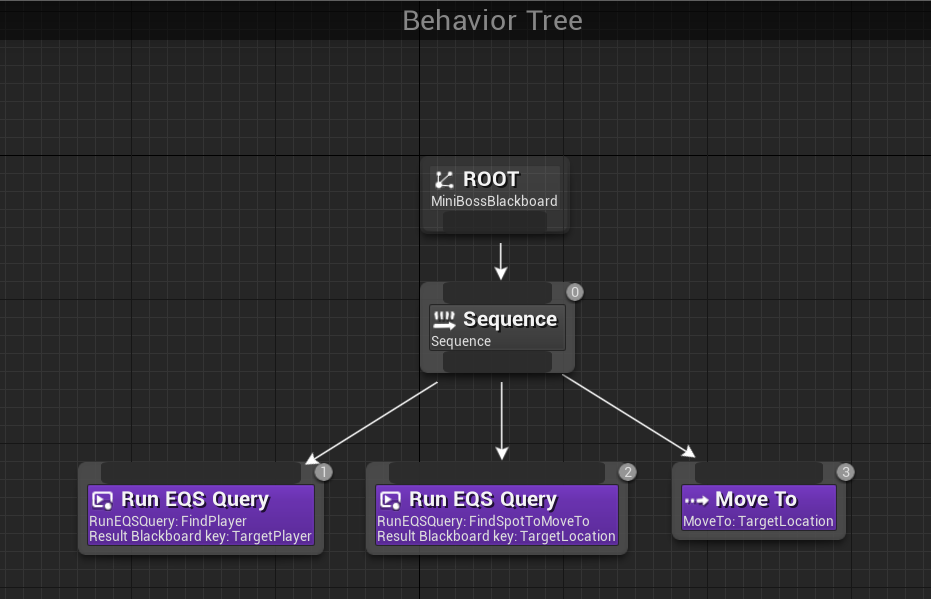
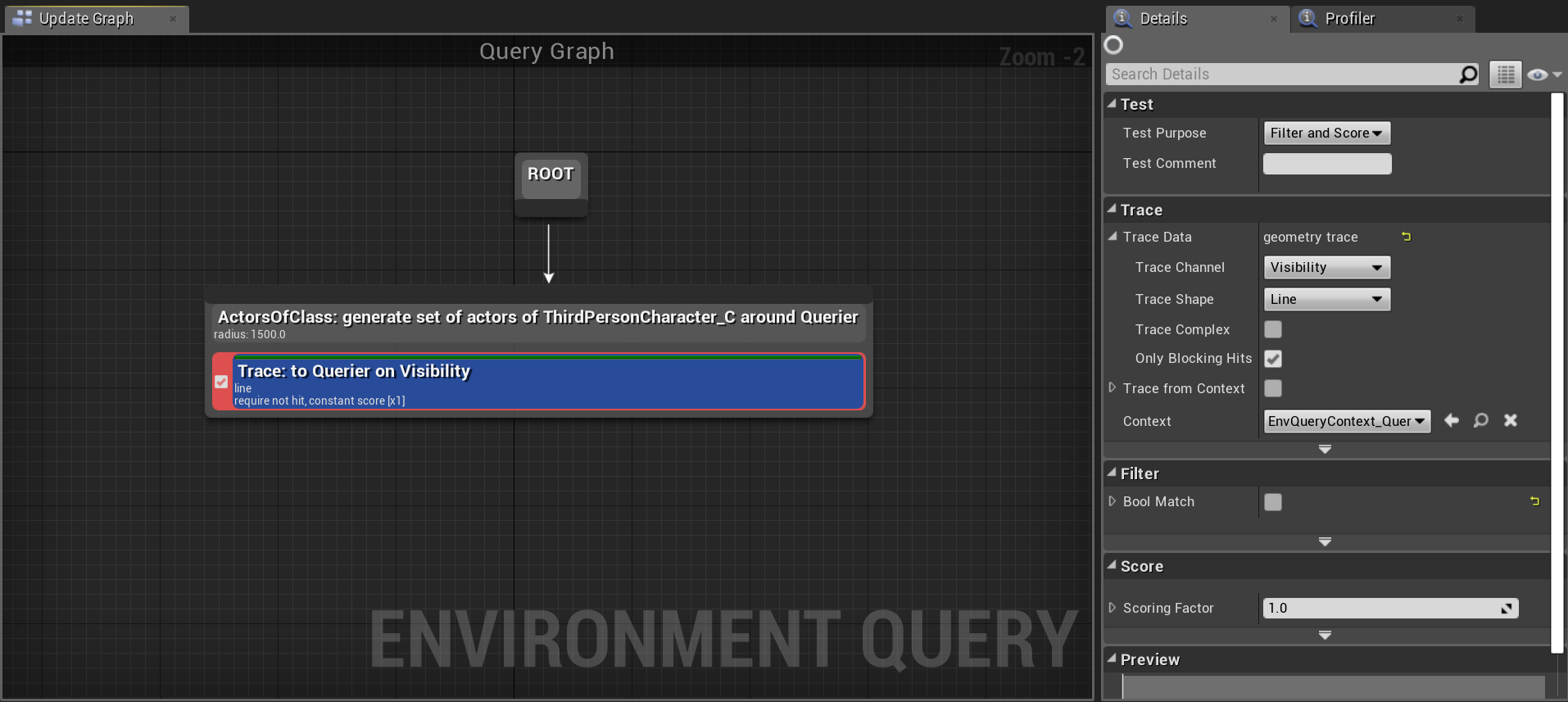
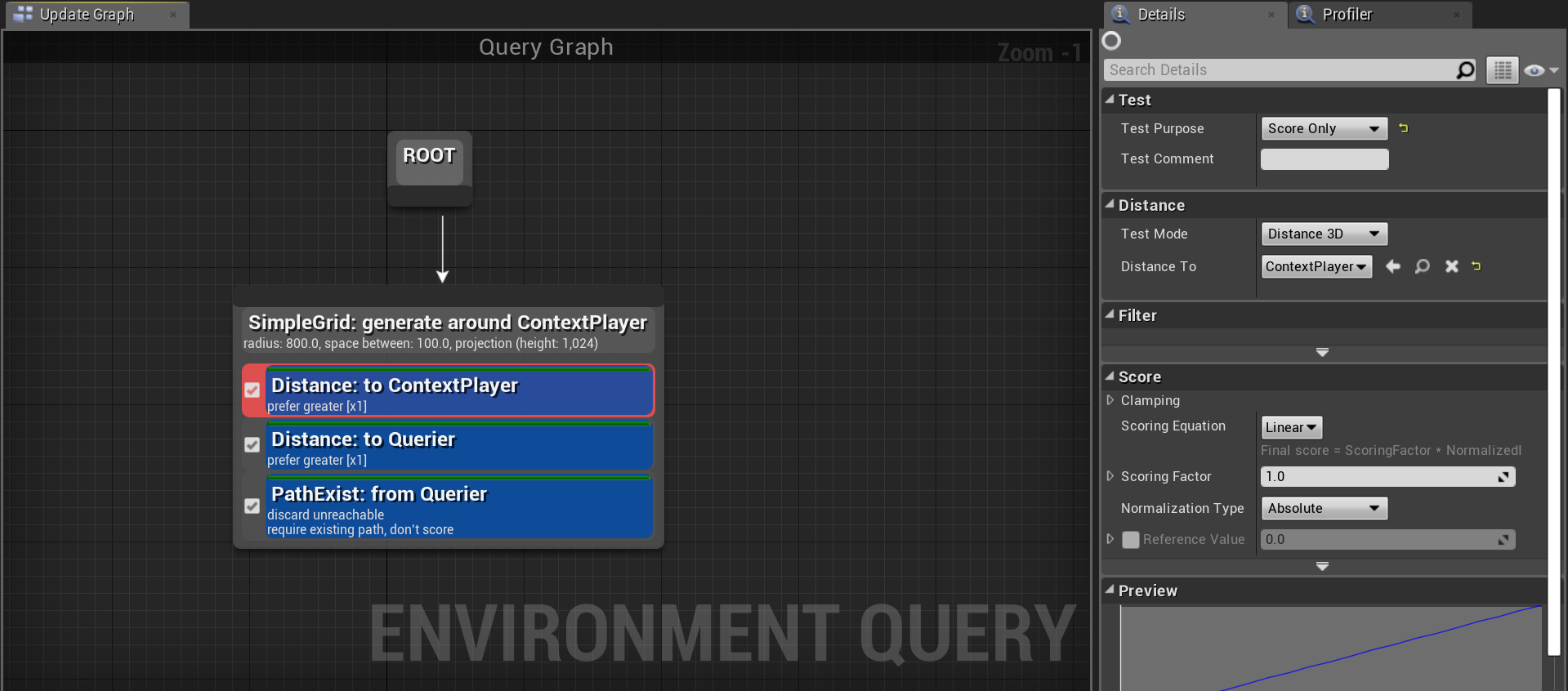
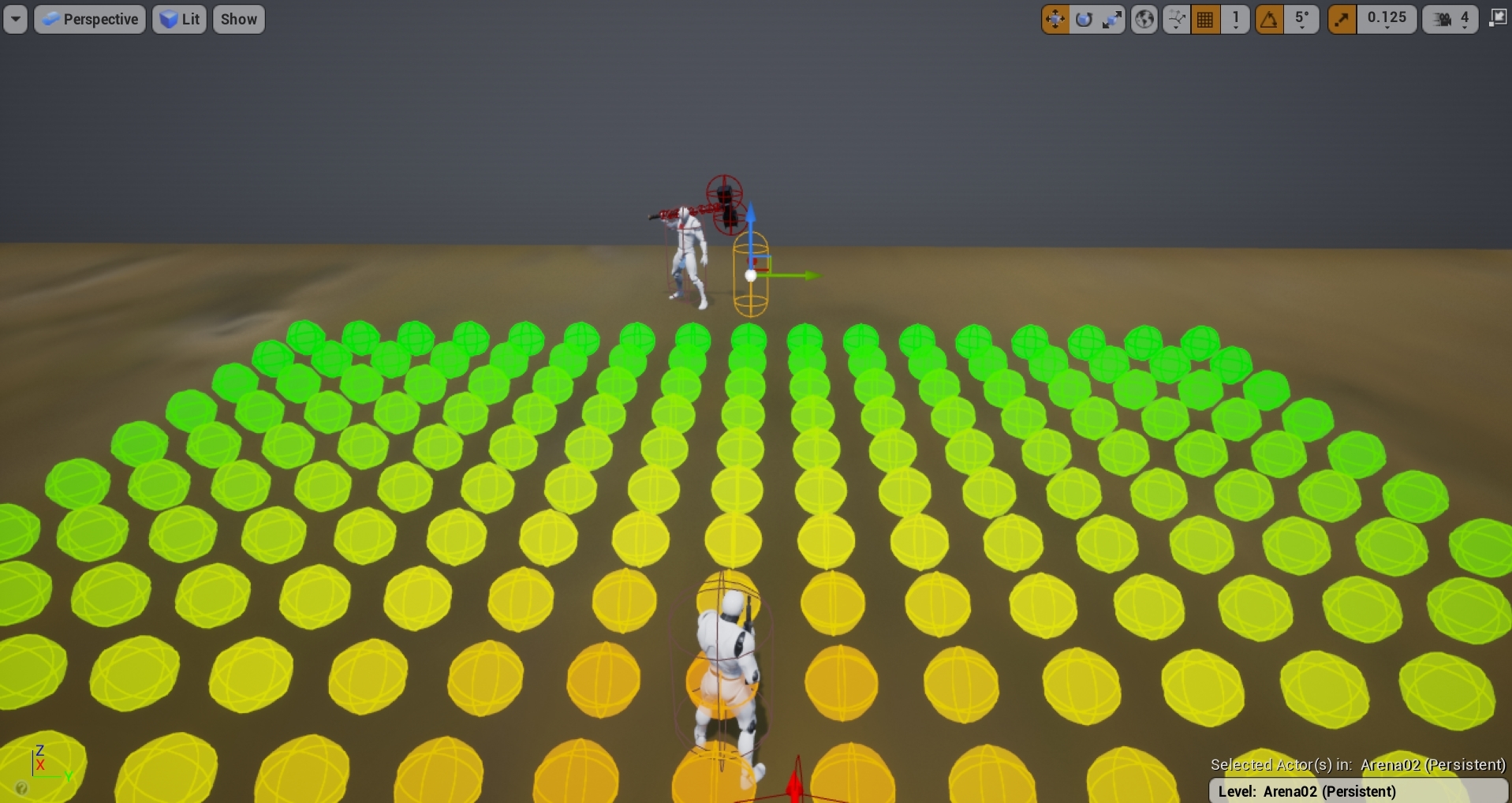
basically, generate an EQS grid around the player
filter anything too close or too far to be considered circling
filter anything that is over X distance away from the enemy (that will prevent it from going through the player to the opposite side)
filter anything unreacahble
if you want them to be able to change the circling direction occasionally, also score locations in front of the enemy higher then those behind it
and score say, locations infront of a player lower
then pick a random point from best 25%
scoring is what eventually gets it to feel right
stark zealot
Thanks. That makes sense theoretically but I struggle with the little finicky things in ue4 behavior trees that make it work. I basically wrote out what you just said on paper but I struggle getting that into a behavior tree correctly. I always wind up with a derpy AI that shakes and twitches all over the place.
patent hornet
you hardly had time to write an EQS generator and filter since i wrote it
EQS testing pawns are great way to visualize the scenario btw
stark zealot
No I was talking in general. lol I'm reading about what you suggested right now.
 stark zealot
@patent hornet I'm stuck. I don't know what to do now. It looks right to me but my AI doesn't move all the time unless I'm close to him. Here's what I did. https://i.gyazo.com/1a4179fd65c2223b433a98aca2af557d.png https://i.gyazo.com/c5262a0617020383d93d89cff81b0ea2.png https://i.gyazo.com/7ab6780b8588be62f0002f1be791800b.png Here I just scored the furthest points from "me" or the "ContextPlayer" and also scored the closest points to the AI. That way the AI would stay on the edge of the grid. https://i.gyazo.com/bbd2917989d18760acb938ed437ffa60.jpg

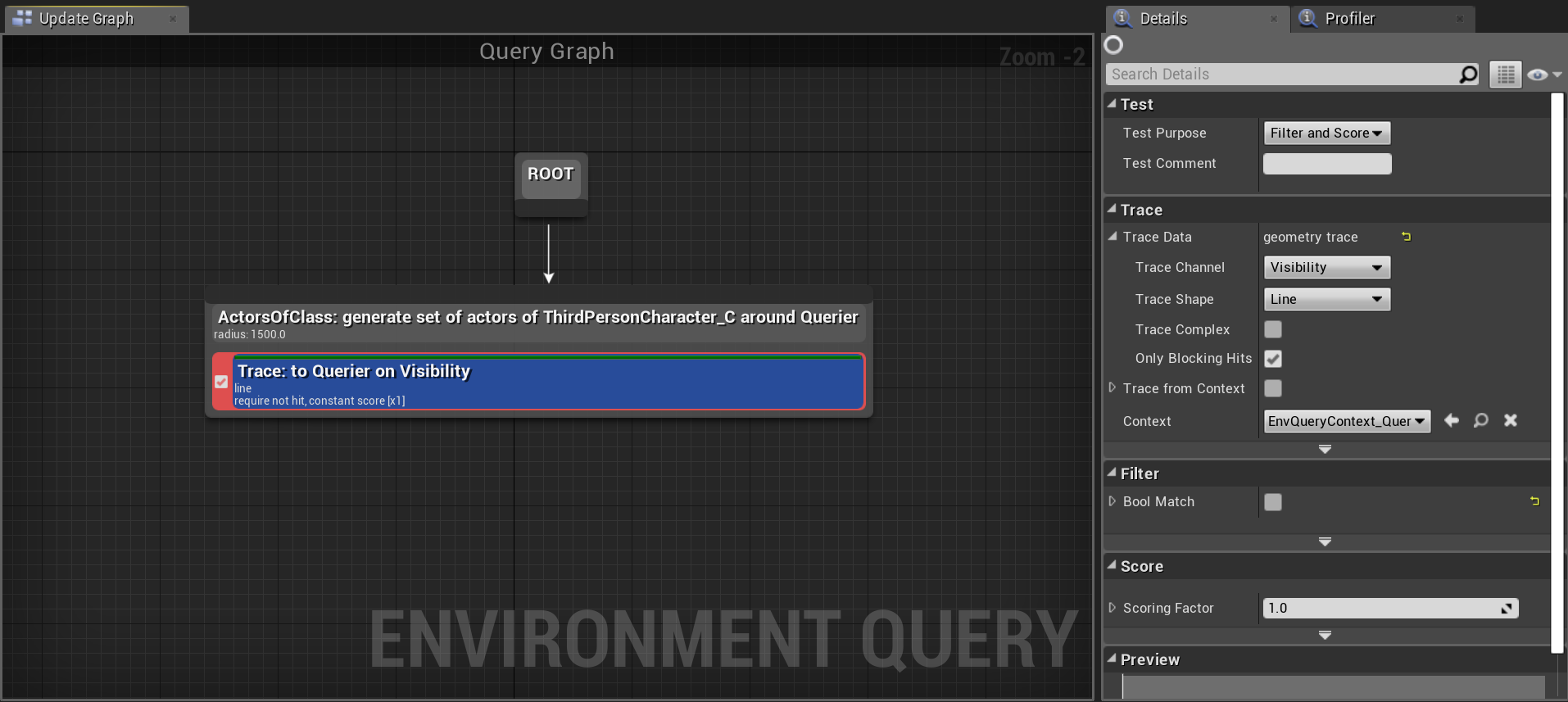


Well I guess I don't really need the first EQS branch. I can just use the second. IDK I got a lot of learning with this stuff lol
How do you turn on this debug option where the spheres show up in-game? I accidentally turned it on and can't turn it back on. It helps me see what's going on. https://i.gyazo.com/444e1901d629ba2c1da822e29af3fcb7.gif
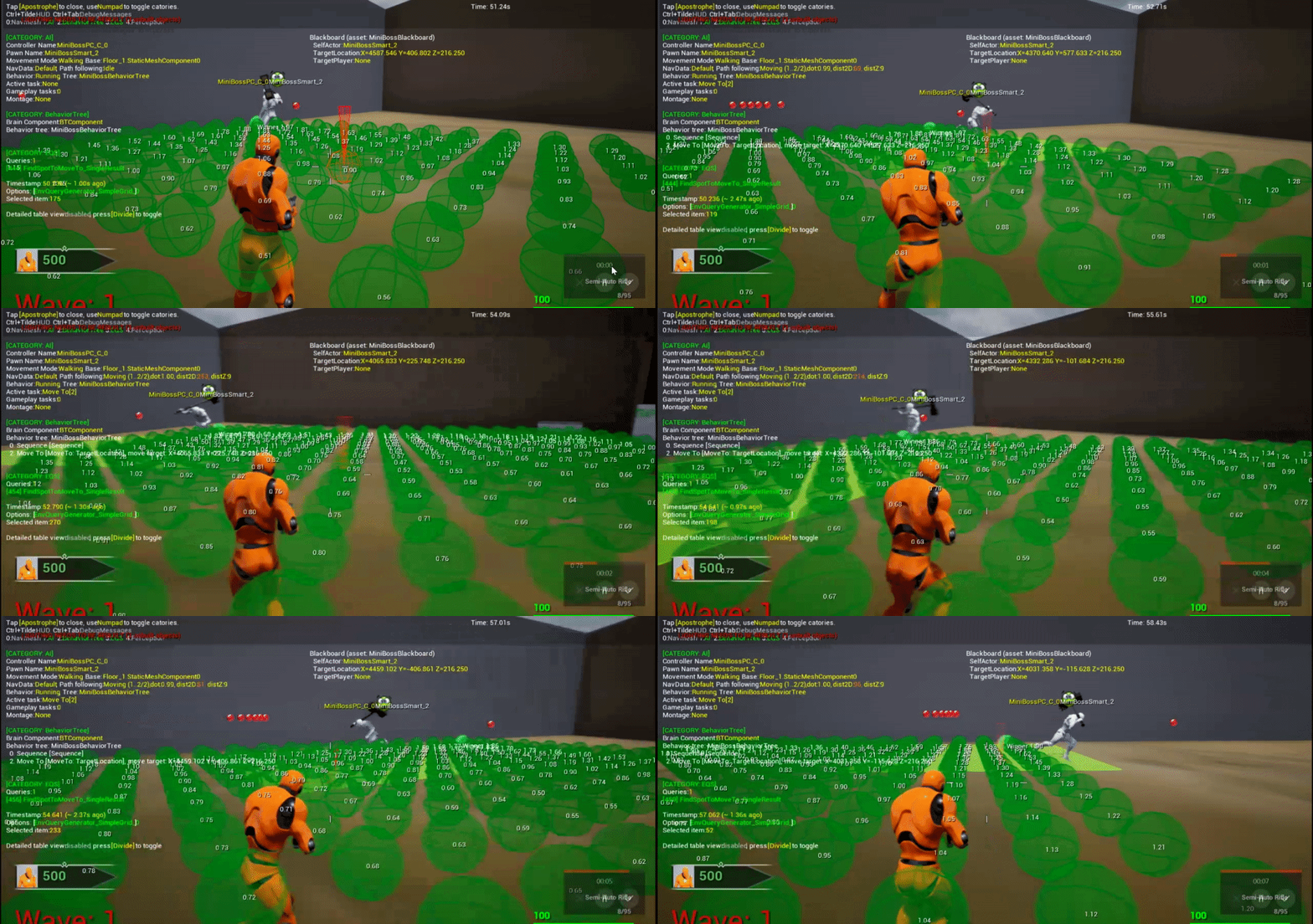 stark zealot
I just want a boss that can move around me and perform different attacks. Kinda like Dark Souls or Legend of Zelda.
patent hornet
also, you enter circling behavior if you're close enough to circle, if not follow
that doesn't use that EQS query @stark zealot
 tawny steppe
Hey guys, can anyone say me how to attach pawn sensing component to head?
 upbeat hearth
Ey guys I am trying to use a EQS that gets the EQS Template from a blackboard key, so I can change it in runtime instead of hard setting it on the behavior tree. What type of BBKey should I use ?
stark zealot
My behavior tree is only running the left branch once then switching over to the right branch.
https://i.gyazo.com/a38de4c8bcd3ef1701ee971fbd60e6fa.png https://i.gyazo.com/f4c0987fffecf61937ff2ca3691cd911.png
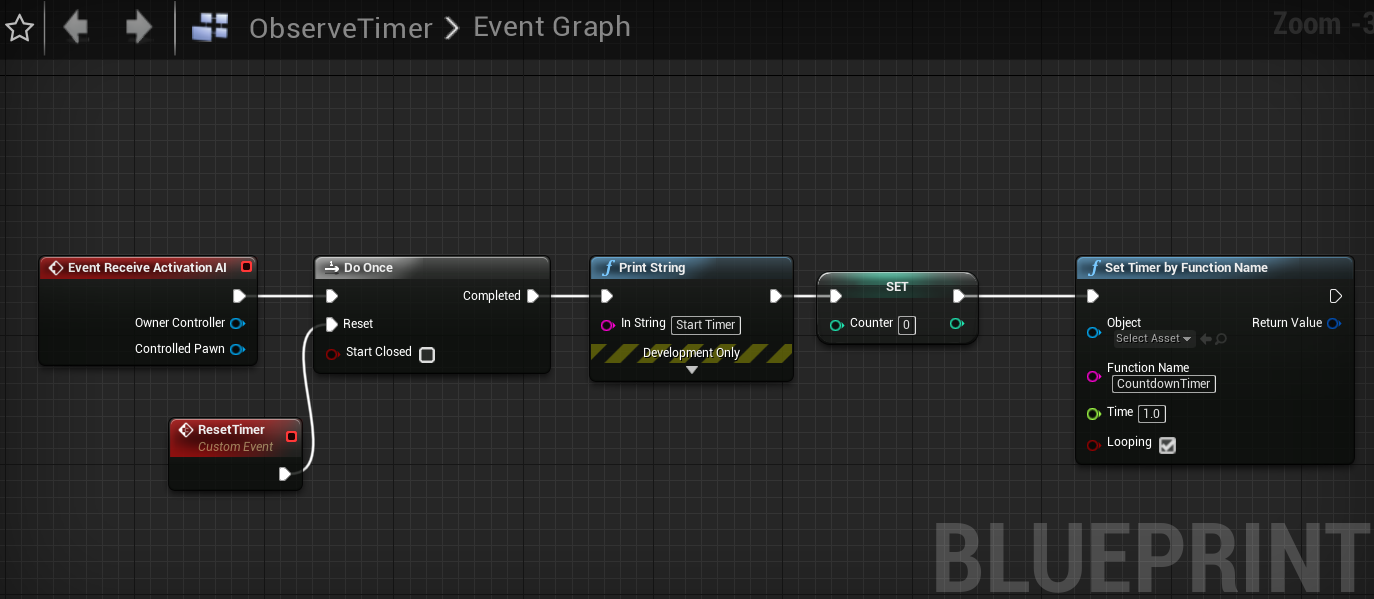


 somber star
There's a difference between true/false and set/not set. implicitly nothing is set on a blackboard until you call SetBlackboardValue on it. After you set it, it stays set forever unless you call clear blackboard value. If you want to use a bool then you should make your own condition that actually checks the value instead of using set/not set.
pine steeple
Is Set will be if the bool is true
Is not set will be if the bool is false
i have wrote complex behaviour trees and fully understand how they work
stark zealot
Ok. I'm still confused as to what I should do. Should I not use a bool?
 neat parrot
Anyone know where there are good tutorials for masterkng ai in ue4
Should I follow the unreal live streams? Anyone have experience with following those?
somber star
@stark zealot you never set the ObserveMode? to false again so it can never get back into that node.
slow bobcat
@pine steeple I just saw your answer, I was out of reach yesterday.
i just inject the bt in
How? Using a decorator or a service? Can't see how you do it in the picture you posted
slow bobcat
oooooh... nothing like having a good rest to solve your problems...
Turns out that dynamic injecting from c++ works perfectly fine at any given time. There's a recursive function that iterates through the whole tree. The InstanceStack shows the root nodes from the branches and then the code iterates through all the children until it finds the injection node. Mine was failing because I was trying to inject a BT that is the same as the default tree in the injection node...
 static crater
Hi, quoting someone from unreal answers
'Consider moving your AI from Blueprints to a Behaviour Tree based solution, even if it's just using Move To. iirc, the behaviour tree Move To node is capable of running the nav query over multiple ticks so the performance impact won't be as drastic.'
is this true?
static crater
@pine steeple ?
pine steeple
if you use AI move to but the task version it runs async
behaviour tree doesnt automagically improve performance of the Move To command
 ember river
Quick question: For air based AI, do you need a nav mesh? I know I have to manually make a pathfinding system, but do I still need the standard nav mesh for the AI to work? It's a space game so the nav volume would have to be huge
pine steeple
you don't need a navmesh, you can handle moving just by shifting the actor locaiton
location
navmesh is if you want to use pathfinding
ember river
Cool. How hardcore is the process, do you know of any solid documentation for making flying AI? I looked around and it seems pretty dry for video tutorials reguarding this
@pine steeple thanks for answering btw
Also, should I make the AI a character or pawn OR Default Pawn (has some of the same movement components as character)
tawny steppe
@pine steeple do you know any sort of node which disables the perception when my ai is sleeping?
slow bobcat
Does anyone know how to make the RunBehaviourDynamic reset to it's default BT?
slow bobcat
yeah, I was reading the code and the DefaultBtAsset is used once, when initializing the node. And that's it. Too bad. I'm tempted to write an extension of the BTComponent class to add that function.
you would have to store it
I guess we're not talking about a magical way to get it from the node directly right? more a "you define it in your Enemy/EnemyAI class" right?
I would have expected that, if you pass a nullptr, it would have fall back to the default behavior
fiery sorrel
@upbeat hearth UEnvQuery is the Object type
spiral shuttle
i guess there's no (easy) way to get at the filter metadata of EQS?
like the center context of e.g. a circle point generator
fallow hound
@ember river have you seen the free flying ai plug in? It is well commented if you want to check it out
 lyric flint
Is there a way to draw the NAV mesh? Im working on a level creator for my project and being able to see the NAV mesh would be helpful
patent hornet
press P
patent hornet
maybe some debug draw setting in navigation system or recast_navmesh
lyric flint
Hm alright
patent hornet
why do you have to test it packaged?
lyric flint
Its going to be an in-game level creator, and having the nav mesh visible would be helpful to whoever is making the level
patent hornet
you can dig through source code to whatever draws it
it might not be the editor module
(which you can't ship)
lyric flint
I found a quick solution, running the console command "show Navigation" shows the nav mesh, it seems to work okay so I'll stick to it for now
 bleak raven
is there any way to set sense config (sight, hearing etc) on the fly in AI perception component? For example, changing sight range with time. I cannot find anythng in blueprints that gives access to this array.
 obsidian pawn
hello guys,
i am testing multiplayer game project and i need to know when my game server will make lag .. what is maximum players that the server can handle.
so i created AI system to move NPC as a simulation for players and i spawn 1000 npc on the map to test performance.
i did a profiler test and i found that Movement component needs optimization it takes 24 ms in the gameThread.
my question is does my real player simulation correct ?
and how can i optimize the characterMovement component ?
pine steeple
1000 is a lot
patent hornet
1000 CMCs with 25ms sounds about right
pine steeple
even fortnite struggled with 100
and they did TONS of optimizations
so to get anywhere close to 100 players, a normal solo person would struggle to do in a reasonable frame time.
cmc runs around .2ms give or take
.02*
patent hornet
NavmeshWalking saves a little, but its not for every game
pine steeple
but with advanced movement, that could easily hit around .1ms per player
plus then you have to factor in all other stuff for the game
so to get 16.67ms (60fps) with a lot of characters is quite tricky
 near jetty
24 ms for 1000 CMCs is on the fast side
if they have a skeletal mesh, you reach about 15-20 ms for 100
test with shootergame bots to see how bad it is
spiral shuttle
@near jetty how's your rewrite of CMC as CMC light going?
obsidian pawn
@patent hornet yes we can use NavmeshWalking for monsters
 flint trail
let's say I want to make AI character to be an octopus (or a shark or whale). I can't really use BP Character for it, since it doesn't fit standard character's capsule (and standard character movement component might not work for it either). How can I go about making such an AI character without getting into C++ ?
 desert creek
How can I make a actor smoothly move to a coordinate ?
flint trail
let's say I want to make AI character to be an octopus (or a shark or whale). I can't really use BP Character for it, since it doesn't fit standard character's capsule (and standard character movement component might not work for it either). How can I go about making such an AI character without getting into C++ ?
fiery sorrel
Blueprints i guess
It will be very difficult to add any custom AI that you would need
flint trail
how so @fiery sorrel ?
fiery sorrel
Custom CMC can be done in BP's but you might save a few days/weeks doing it in c++
Same with getting Pawn to a good level to use with all three character classes you mentioned.
You can cheat a lot with AI to get to the same level needed. But if you need to do 3d pathfinding assuming these are swimming, it can be done in blueprints, but you might want more than 20-30fps on high end pcs
flint trail
I'd probably have a hidden floors with nav mesh for "flying" creatures. This way they walk on nav mesh, but visually look like they are flying. I know, it's sounds like nasty hack 😛
and I don't C++, unfortunately 😦
static crater
so ai using navmesh, is it possible they are checking navmesh all the time, can i set them to not update the path?
like for optimizing?
patent hornet
they are checking it periodically
not every tick
its how they know to go around if you slam the door in their face
static crater
@patent hornet is there any variable i could optimize, like i would have 500 agents ?
fiery sorrel
There is not one thing that can just "make it work" YOu might need to write quite a bit of code to make it work the way you want.
Then you even have to ask your self is 500 AI what my game needs?
With pooling and DummyActor tricks you can make 50 ai seam like 100 or more
patent hornet
if its a full RTS, you might want to try to treat an entire unit as one actor
for pathfinding
if not
you could just pause the AI that players can't see or hear
static crater
@lapis cosmos lo to me?
patent hornet
Yes, and nice @ 😂
 waxen junco
so what am I supposed to do if I have large maps but navigation just completely messes up if its too big
as in the navmeshbounds thingey
if its too big then ai just gives up
fallow hound
look into nav mesh invokers and turning on dynamic nav mesh
just google open world nav mesh ue4
flint trail
does anyone know of half-decent vehicles AI tutorial ?
waxen junco
yeah I looked at that stuff but I'm using dynamic nav mesh and it's usually buggy, and nav mesh invokers seem even buggier. though that being said, my main problems seem to be with one enemy that uses AI Move To and it gets the players location for destination, but it keeps just running in tight circles at light speed and going crazy
my other enemies use random reachable point and they work just fine
patent hornet
@waxen junco look into NavInvoker components
its basically an ActorComponent generating a navmesh around the actor in runtime
you don't have to have the entire world covered in navmesh
waxen junco
I just said theyre buggy...
it could always maybe be a problem with the ai move to node
patent hornet
pathfinding issue won't make the character move at "light speed" tho
waxen junco
no its spinning on the spot
like imagine you just spammed A and D thats how theyre moving
 trail saffron
hiho!
what class / movement component would I use if I wanted to move a possessed ACharacter on a navmesh over the network? thanks in advance
i did it once with an AIController, but the ACharacter in that case is possessed by a player
trail saffron
what function would I use to move a character on a navmesh target vector?
 trail saffron
problem is that, if I want to use the function, the ACharacter needs to be possessed by an AIController
but it's possessed by an APlayerController
pine steeple
use both
thats what we do
our pawn is possessed by the ai controller
but linked to the player controller
thats how we get 8 player co-op using ai movement for the pawn
trail saffron
okay what I do now is:
1.: Spawn Character
2.: Spawn AIController
3.: Character is being possessed by AIController
4.: Save Reference of Character in PlayerController
when the player wants to move a character, he calls a function in the gamestate, requesting the server to move the character via AIController
but what I get now when I request the move isthis:
"No owning connection for actor LanesGameState_0. Function SERVER_RequestMoveHero will not be processed."
pine steeple
yes cause you need to set the owner
player controller doesnt know who its owning
and GameState neeeds a owning connection
waxen junco
right so why dont nav invokers seem to do anything at all
are they somehow disabled by default
 wet valve
Anyone here how to make ai strafe on melee attack?
patent hornet
@waxen junco what does visual logger say for the glitchy pawns?
waxen junco
what
pine steeple
the visual logger
there are lots of tools for debugging AI
the Gameplay Debugger and Visual Logger
waxen junco
can you tell me how to view these
pine steeple
google is your friend, but the gameplay debugger can be accessed by pressing the ' key
visual logger is under developer tools
waxen junco
thanks
somber star
I made a pawn called overlord so I could have the player controlling something and still direct AIs it selects and also let it have abilities not tied to a character
waxen junco
ok so I have no idea what Im looking for in this visual logger thing
or if I even have the right thing up
livid beacon
From C++, my AI controller selects a behavior tree and runs it. When the behavior tree ends, I would like to trigger a C++ function in my AIController called OnBehaviorTreeEnds, which takes an EBTNodeResult parameter. Is there a more appropriate way to do this than creating a custom task in the BT that calls the OnBehaviorEnds function?
patent hornet
@waxen junco each controller logs every action that has VA_LOG in it in the visual logger
so you filter the controllers for glitchy pawns
and each block represents something being logged
waxen junco
which window actually is this
patent hornet
Developer>Tools>VisualLogger
you open it, you set it to record and run your game
when you have some data, you stop/pause and examine the logs
waxen junco
ah found it
patent hornet
its basically the first thing i go to for misbehaving AI debug
as it would take me quite abit of time to figure out something like, its not moving because bottom of its capsule is inside the floor any other way
waxen junco
so does this look bad
patent hornet
that looks normal, now you click on the blocks
and you get the logs at that time
you can also see all the BB values at the time
Pathfinding, BT, everything it was doing
waxen junco
I see how it makes some blue shapes on the ground
waxen junco
yeah I think thats the blue shapes right?
but I still dont know how to use this to see why my enemy is just rapidly running left and right on the spot
patent hornet
it will probably take you an hour or two to absorb everything in there
waxen junco
right Im gonna be brave and show a gif of my crappy game
dont ask about the monster design but this is what happens when its literally using ai move to with players location as destination https://gyazo.com/ea9ef12212442914d2fd51f88b7db472

thats actually moving more than normal too
normally it stays mostly in one place just spinning like that
@patent hornet sorry for the ping but idk if this is something youve seen before by any chance
waxen junco
bt?
patent hornet
behavior tree
waxen junco
no, its all in the bp
waxen junco
its just this
wait
do I need the self...
HANG ON
dumb question time - its not trying to run to its own location and the player at the same time is it?
patent hornet
get actor location of what? how are you getting the player
it can't have 2 targets
waxen junco
its on see pawn
patent hornet
i generally find MoveToActor easier to work with
as in AI has its own MoveToTargetActor
that its following at all times
and i just teleport that around
waxen junco
this is really frustrating, it seems everything I try just gives that same stupid result
none of my other enemies have this problem, but they use random reachable point
the thing is I had it working for this enemy a long time ago too
waxen junco
well I think Ive been wasting my time, Im pretty sure its a bug with the size of the navmesh
if its a tiny navmesh it works just fine
yeah it literally has to be tiny
so what the hell do I do about that
well Im lost, nothing is bloody working
THIS IS SO SIMPLE, WHY WONT IT FUCKING WORK
waxen junco
hrmm
 nimble perch
I have a weird problem where I set the state to run but when printing it again it prints as Idle
what could cause that?
waxen junco

trail saffron
hi guys, I have a problem with AI-Navigation on a NavMesh:
I essentially want RTS like unit movement behaviour.
I also want a unit to walk around other units when they're blocking a path.
Right now, everythings seems buggy. Units either walk infinitely into other units and block each other, or they cant find a path at all and just jitter around.
Does anyone have any resources for this? thanks in advance
trail saffron
is there a way to watch the navmesh during runtime in PIE? i'd like to see dynamic changes
flint trail
@tawny steppe not easily
fallow hound
@trail saffron yeah look up ai debugger, you press like ' or something
trail saffron
okay thanks 🙂 will do
trail saffron
if I dynamically set
SetCanEverAffectNavigation(true)
do I have to do this on server AND client, like with movement speed? it somehow doesn't seem to work for me
pine steeple
yes
no
navigation is server only
your navmesh needs to be dynamic
else it would never update
trail saffron
okay I think I got it now.
unfortunately there's another problem:
characters seem attracted to each other when walking past one another, lol.


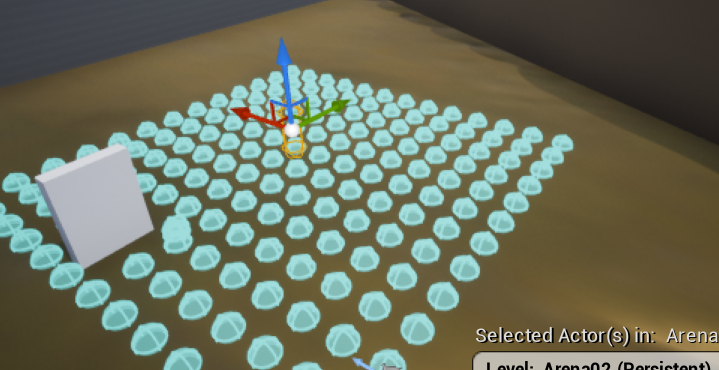
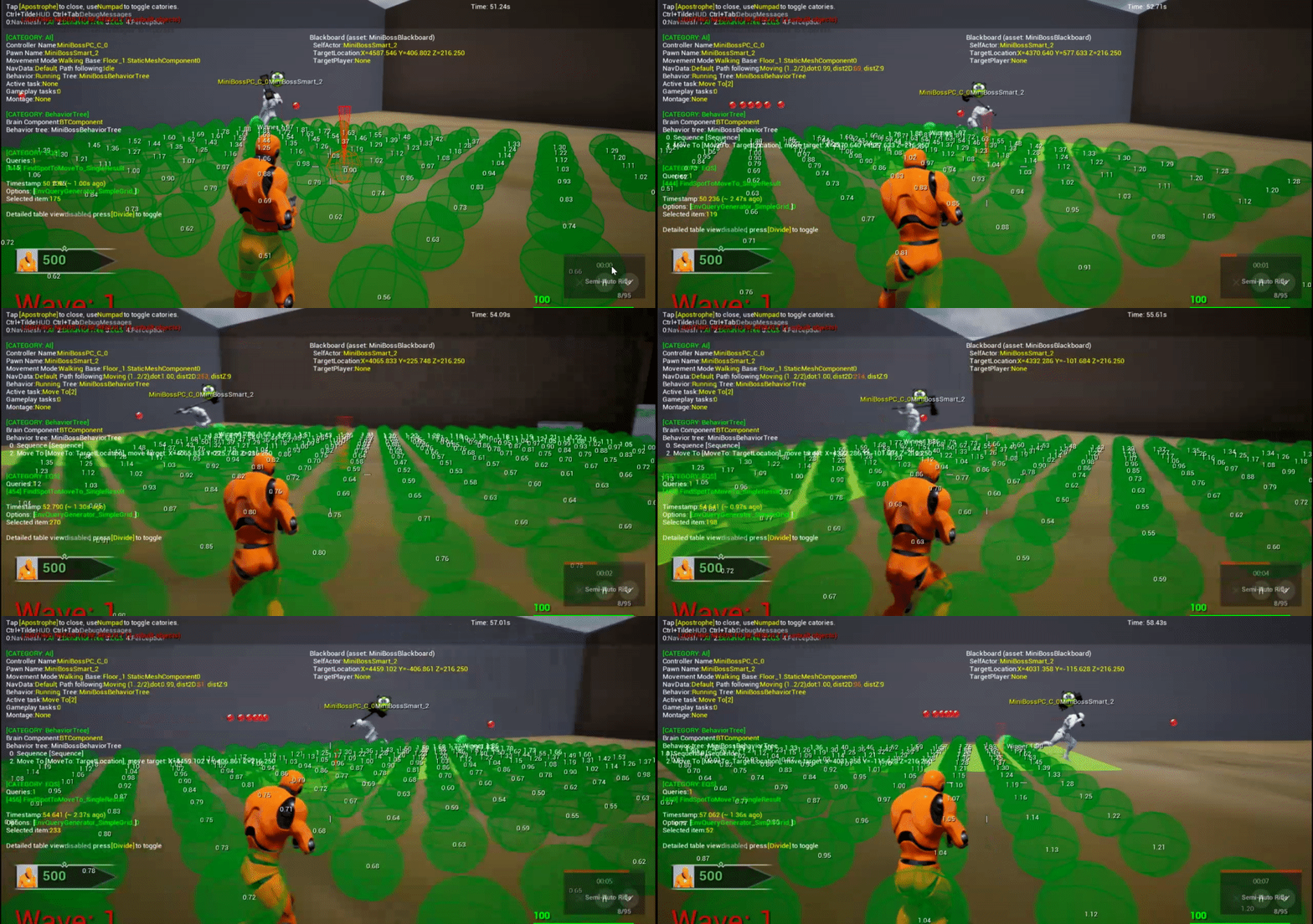

avoidance is turned on
does anyone know why my walking character rotates towards the stationary one?
in some cases it gets extreme, e.g. the character gets almost stuck
okay, it's exactly the same as here:
https://answers.unrealengine.com/questions/284988/ai-is-attracted-by-wall.html
 hybrid cipher
hye not sure this is the best place to write this, but is there a way to compute player path using detour avoidance? pretty much want player to avoid AI without needing to change navmesh and preferably to get player new velocity when avoiding, so what would be a good (and cheap) way to go about it?
hope it makes sense
tawny steppe
my ai cant see me through transparent windows tho
anyone knows how to fix that
hybrid cipher
what are you using for AI to see you?
tawny steppe
PawnSensing rn i had the same problem with ai perception
hybrid cipher
so I've never tried it myself, but afaik ai perception uses AI Sense that allows you to use Sight sense, you can create your own and let AI know what objects are transparent and which not
might need to play with collision profiles too
tawny steppe
Can you recommend me any videos or docs to create my own AI Sight?
hybrid cipher
uh, I can try and google, but you'll probably get the same results as me
hybrid cipher
this is something tad different but might help https://answers.unrealengine.com/questions/854091/ai-perception-custom-sight-strength-in-c.html
tawny steppe
I'm kind a new to ue4 but i heard theres a way we can make our own custom sight in ue4 with c++ like own inherited component
lke a custom ai module
hybrid cipher
from what I'm seeing UAISenseConfig_Sight inherits from UAISenseConfig so you can create a c++ class that inherits from either and just extend it to what you need
you can find UAISense_Sight under Source->Runtime->AIModule->Classes->Pereception if you want to take a look on what sight config offers now
tawny steppe
Also i'm rn on a project if i create a c++ class of chracter it doesnt compile and fails to generate project files
hybrid cipher
not sure if you can create BP version somehow, I don't really work with BPs
tawny steppe
Nah i'm 100% sure it wont work with BP
hybrid cipher
would think so :)
but yea you know, just spend some time just looking at what UE sight config offers now and how it's implemented
pine steeple
there is a interface your pawn can implement
to provide the sight location
{
    GENERATED_IINTERFACE_BODY()

    /**    Implementation should check whether from given ObserverLocation
     *    implementer can be seen. If so OutSeenLocation should contain
     *    first visible location
     *  Return sight strength for how well the target is seen.
     */
    virtual bool CanBeSeenFrom(const FVector& ObserverLocation, FVector& OutSeenLocation, int32& NumberOfLoSChecksPerformed, float& OutSightStrength, const AActor* IgnoreActor = NULL) const
    {
        NumberOfLoSChecksPerformed = 0;
        OutSightStrength = 0;
        return false;
    }
};```Does anyone know about a website specializing in game AI? I recall such a site existing, with interviews with industry members, but I forget the website.
spiral shuttle
@lyric flint probably http://www.gameai.com/
lyric flint
ty
spiral shuttle
np
though i remember this one with the articles and interviews: http://aigamedev.com
but it's offline 😭
stark zealot
Does anyone else struggle with Behavior Trees? I'm trying to make a "boss" enemy and it just seems like I'm going out of my way to make something I could easily do all in one blueprint. Then all you find on the web related to behavior trees is your default "patrolling" and "hiding" ai so they are as basic as they come.
pine steeple
what are you struggling with
Behaviour trees are simple "execute one thing at a time"


i mean selectors and sequences are pretty easy to understand
stark zealot
I struggle with grasping the blackboard keys and the "setting a value as" stuff. I understand you use for decorators and their conditions but say I have a variable in one Task and then later in another task I want to use that variable. How do I get that variable? It confuses me. I need a better understanding of how to work with the blackboard.
fallow hound
@stark zealot the blackboard let's you share that variable.
Have you seen zoombapups tutorials?
stark zealot
@fallow hound I don't think I've seen those. I'm watching them now. 🙂
patent hornet
@stark zealot just watch the WTF is? videos for those
nice and detailed explanation inside of 10 minutes
stark zealot
Ok I got it loaded up too. 🙂 About to sponge all this info up.
stark zealot
Ok I watched alot of the videos and I still am not certain how exatly you "set" and "get" the blackboard values. Do the Decorators Set them? And how do you get a blackboard value? For example I have a blackboard varaible called "TargetPlayer" and in one of my services I want to get that value if valid, and get the look at rotation. Then set the AI rotation to that.
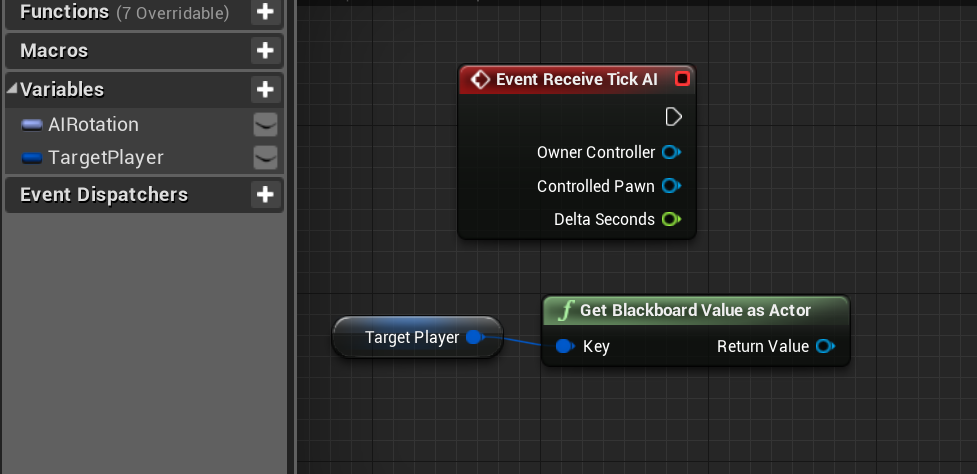

How in the wold would this know to get the blackboard value of the same name. Doesn't make sense to me
I'm missing something. Probably a brain 😉
fallow hound
So it looks up a value
Which one?
Whatever key you choose
You are storing the key name in a variable
Note, "target player" is the variable name
NOT the key, the key is in that variable
You set that on the black board
@stark zealot
So it is tricky. Because you have the blackboard, which holds keys and values. And you have variables which can hold key names
But it is useful to be able to store key names in variables. Like imagine a go to task. Go to what? We'll go to "key name", which let's you look up keys to go to
So maybe on the blackboard you have home key, enemy key, friend key
This you can tell any ai "go to enemy" and it will just work, assuming you have an enemy key set
And maybe you have a decorator somewgere updating the key values, so the enemy value is always the closest enemy
stark zealot
I'm not 100% sure I'm following. So the variable of type blackboardKey that I create in a service, task, etc. holds the value? And the Blackboard variable references that?
fallow hound
yeah sort of
the blackboardKey variable doesn't hold the value though
it just holds the name of the key
the blackboard is a big list of keys, and values
stark zealot
So it has to be the same name as the blackboard variable?
fallow hound
the key inside of the variable, yeah
but the name of the variable can be whatever
kind of like
name = "bob"
in this case, bob is the key name
and name is just the blackboardkey variable name
so if I did something like GetBlackboardKeyAsActor(name)
what key is that function going to look for?
stark zealot
bob?
fallow hound
yeah
exactly
which would be a horrible key name ahha
but a better example would be
KeyToGoTo = "Enemy"
GetBlackBoardKeyAsLocation(KeyToGoTo)
which key would that find?
stark zealot
Enemy
fallow hound
yeah
and I could do something like KeyToGoTo = "Home"
KeyToGoTo = "Cover"
KeyToGoTo = "Weapon"
 carmine hatch
hey all, i currently cast to the base object class of the controlled pawn in a lot of the BT tasks to pass movement variables to it, i thought maybe a reference to it should be cached when the BT starts up, but putting it on the blackboard means i still have to cast to it anyway (since it will just be an object). Is there any obvious way to get this to work, or should i just not worry about casting on execute (which will happen quite a bit for movement nodes)
fallow hound
dont worry about casting
stark zealot
I'm following but I'm not understanding how it works between say two different tasks. So for example: KeyToGoTo has not been set at all. It is merely a blackboard variable. Then in a task I want to get that blackboard variable KeyToGoTo and check if it's valid then MoveTo it.
fallow hound
ahhh so here is an example
so, you can have services, which are kind of like tasks which are running all the time
so I have a service, which is always searching for the nearest cover
it isnt sending the AI to that cover
it is just finding cover, and stashing that location in the blackboard, under the key "Cover"
I have another service which checks if the AI is in firing range of player, if that happens I set a blackboard value to true, under the key "IsInDanger"
now somewhere in the tree, if the AI is in danger, I do a GoToCover task
which doesnt need to find cover
because it just knows to check the value udner the key "Cover"
which I set in a that service beforehand
carmine hatch
ahh i think i'm a bit of a goomba. execute is like a beginplay isn't it? my test tasks have just been finishing execute then running again
or am i misunderstanding the relationship between execute and tick in a task
stark zealot
@fallow hound And that value is retrieved from the blackboard by exposing the key and then selecting the blackboard variable in the drop down like this? https://i.gyazo.com/30b8113003dd911a2d618cca17732323.png
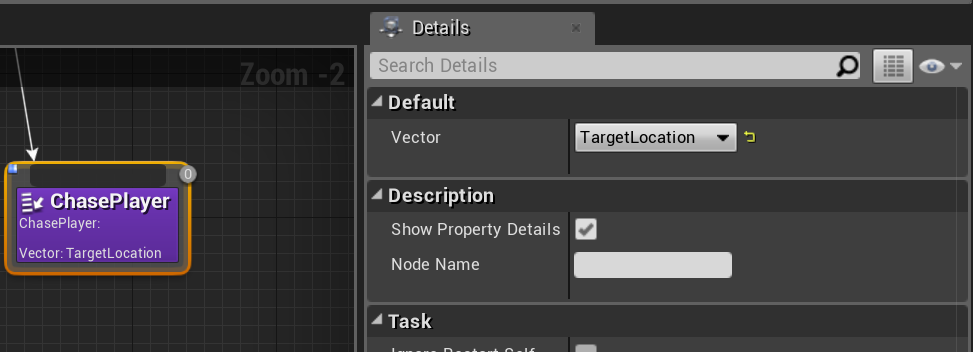
 fallow hound
yeah so there you have a blackboardKey variable
called Vector
and the drop down lets you choose a key
stark zealot
I think I'm getting a little grasp on it but It's going to take a while to learn how to structure a behavior tree. Meaning what order and what variables will decide things. It seems like I'm doing things backwards or something. I put services where tasks should be and vice -versa.
fallow hound
ahhh
so I think of task like a "do the thing"
and service like a "keep checking this"
but I think right now I have shooting as a sevice
so I have a go to task
and I put a shoot service on it
so the AI shoots and moves
services, tasks, decorators
they are just different tools
in the end you just gotta use them to learn them
I had no idea how BTs worked until after I built a few
I didn't go through the tutorials and come out with this knowledge
I was exactly where you were
stark zealot
Yea I'm trying to make a melee "Boss" type of ai that will switch between "attack mode" and "observe mode" I got it working with a timer service that will switch back and forth but that's as far as I got. https://i.gyazo.com/0eff2c54dcd88c88386ccd69c3a18f78.png
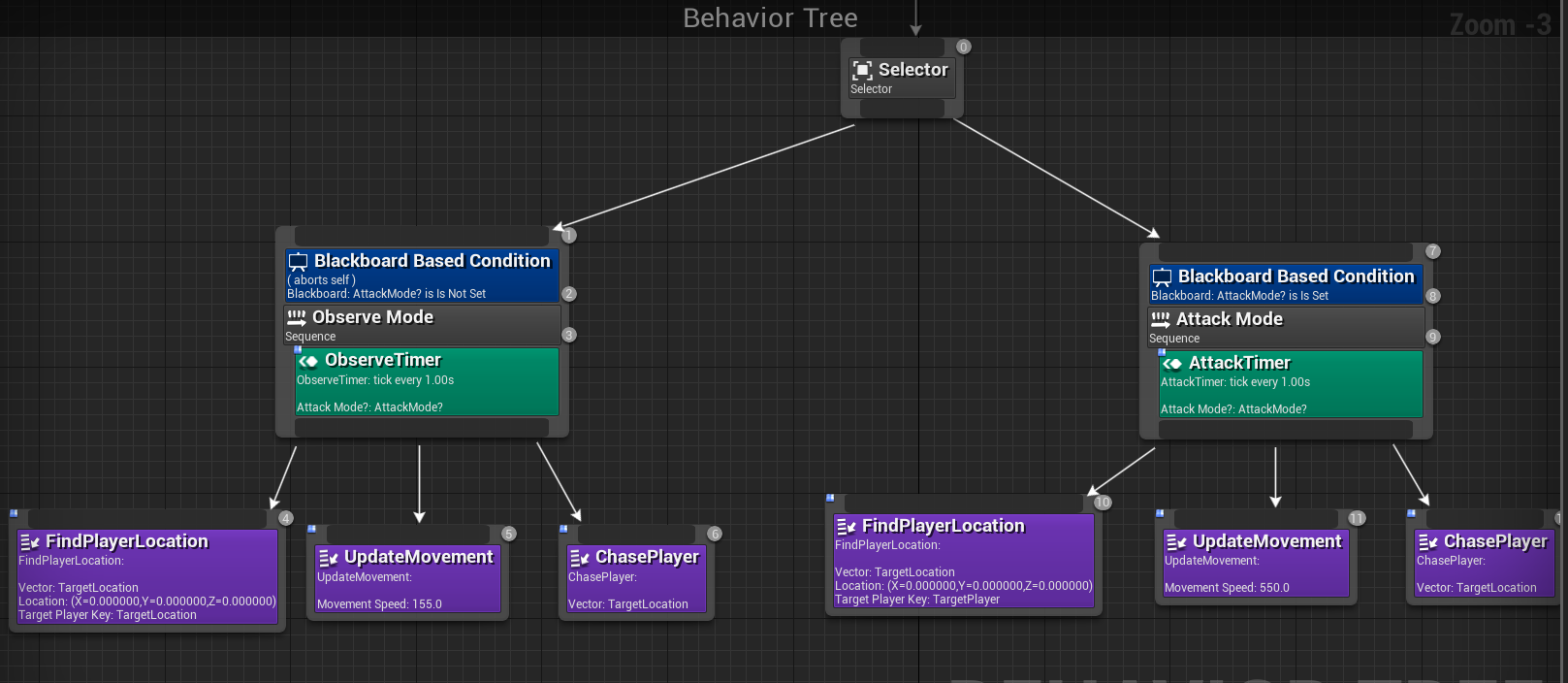
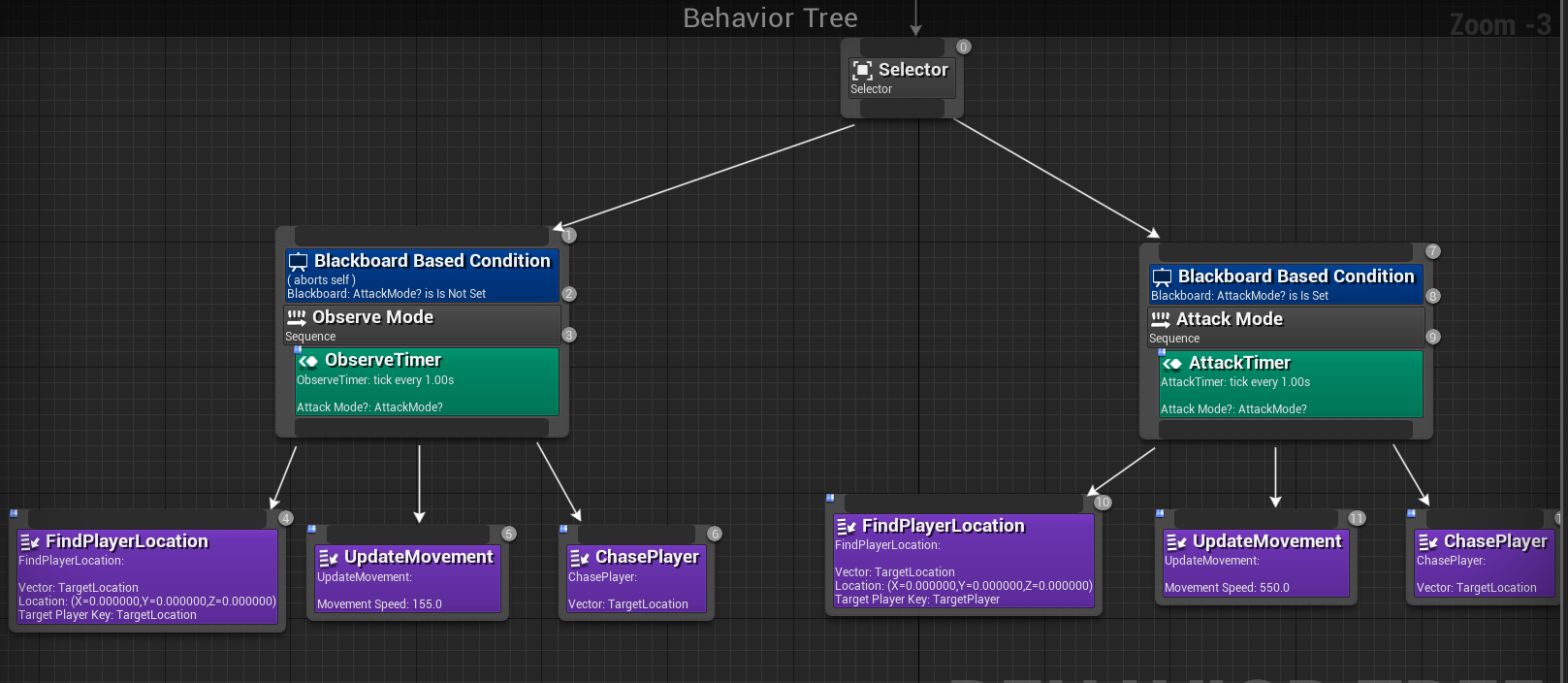 fallow hound
yeah thats a good start
stark zealot
I still haven't got to attacking and attack distance etc
You don't happen to know any tutorials on multidirectional movement for an AI and making it where he faces the player and walks backwards, sideways etc?
fallow hound
so you can use the set focus function
its on the ai controller I think
youll need to do some other stuff with the controller though
like, turn off "orient look in movement direction"
or maybe you turn on get rotation from controller yaw
so, setting the focus makes the AI controller look at the focus object
but to make the ai then turn its character mesh you gotta configure some stuff
id just google "set focus"
stark zealot
Ok thanks that'll get me on the right path. It's funny to me how I can't find anything on that type of enemy ai. The Dark Souls, Zelda type of enemy that circles you and attacks.
Must be hard to make.
Or everyone's making shooters lol
fallow hound
haha
its hard to find ai tuts beyond the absolute basic
which makes sense, ai is so tied into the uniqueness of your game
its hard to make ai tuts for anything but generic stuff
 tropic ether
Are Decorators, services and Tasks traditionally done in blueprint? How hard is it to make them in C++?
pine steeple
@tropic ether obvs being c++ its a bit more convulated
i have all my "common" services/decorators/task in c++ (ones that are also shared a lot between monsters)
unique ones are just done in blueprint
tropic ether
Oh, I see. Thanks!
livid beacon
Has anyone dug into this?
https://www.youtube.com/watch?v=1Dm1G6fUuFs
I have a hopefully simple question. In their code, they have an BehaviorTreeEnded function that gets called when a behavior tree ends. That function sets a BehaviorTreeResult variable to an EBTNodeResult::Type that comes from the behavior tree. Then, in the tick, the AIController checks the value of the BehaviorTreeResult variable and if it's anything other than InProgress, it broadcasts a callback that gets a new order and ultimately a new behavior tree. My question is this: Why do they stick the BehaviorTreeResult in the tick rather than simply broadcasting the callback in the BehaviorTreeEnded function? Seems like putting it in the tick creates an unnecessary step each tick, but maybe I'm missing something. Thanks!

The Gameplay Ability System in Unreal Engine allows developers to build powerful abilities for arbitrary games. In this Unreal Fest Europe 2019 talk, Daedali...
stark zealot
How do I apply a movement input to the left or right of an AI current control rotation so it will make my AI circle-strafe (move left/right around my player). Would I add something into the "Chase Player" task or would I need a new task in my behavior tree? https://i.gyazo.com/f22e3b61dfa88f552779a004fd86696e.png
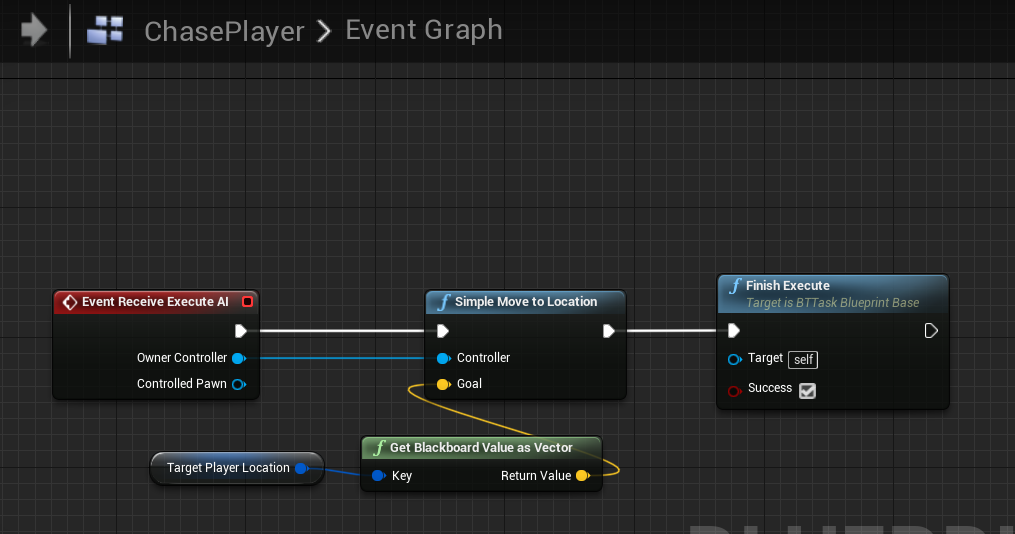
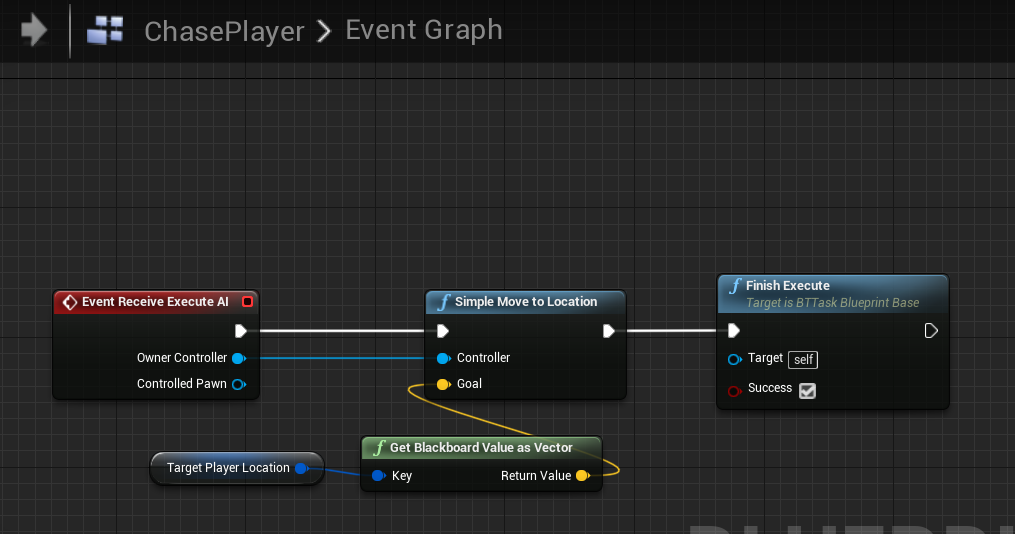
 barren crypt
You would have an on tick that activates when the node is called, that does some math and adds a side input plus a move input every tick which will make the ai strafe around. I can dig my strafe code out and screenshot it later if you are still stuck. @stark zealot
stark zealot
Yea that's the part I wasn't sure about how to do.
barren crypt
Ok I'll screenshot it in a little bit - can't boot up just yet
barren crypt