#gameplay-ai
1 messages · Page 113 of 1
 lyric flint
lyric flint
lyric flint
Well is there a way to make your model detect you instead of seeing you?
 pine steeple
{
    const AActor* OwnerActor = Cast<AActor>(GetOuter());
    if (OwnerActor != nullptr)
    {
        FRotator ViewRotation(ForceInitToZero);
        OwnerActor->GetActorEyesViewPoint(Location, ViewRotation);
        Direction = ViewRotation.Vector();
    }
}```that is how it gets the location and direction the pawn is looking
lyric flint
I don't use c++
pine steeple
and
void AActor::GetActorEyesViewPoint( FVector& OutLocation, FRotator& OutRotation ) const
{
OutLocation = GetActorLocation();
OutRotation = GetActorRotation();
}
so basically, on a basic actor
it returns location/rotation
lyric flint
How would I do on a BP?
lyric flint
Yes
pine steeple
so
{
    return GetActorLocation() + FVector(0.f,0.f,BaseEyeHeight);
}```this gets called
from a deep chain of stuff
pine steeple
meaning you need to adjust the BaseEyeHeight
pine steeple
which is an exposed variable
    UPROPERTY(EditAnywhere, BlueprintReadWrite, Category=Camera)
float BaseEyeHeight;```so in your Pawn class
lyric flint
Ok I'm done
pine steeple
you need to adjust BaseEyeHeight
lyric flint
You wont listen goodbye
 shrewd swan
He's telling you why it works
pine steeple
so adjust BaseEyeHeight;#
lyric flint
Continue
pine steeple
on you pawn
that is the Z location of your pawns "eyes"

it defaults to 64

this is the default eye height of 64

you can debug using this
on your pawn
 cursive vector
anyone know keywords i could google or tutorials or examples for techniques for having lots of pedestrians/crowds walking around in a world efficiently?
pine steeple
crowd following and animation sharing
cursive vector
thanks @pine steeple
 stark zealot
Is there a simple way to make an enemy zombie climb a wall? Nothing fancy I just need them to slowly accend to the roof then keep chasing player
 azure cliff
Hey guys, can anyone explain whats search start in service?
 slow bobcat
Question about Perception System:
I'm having trouble understanding when does the "Aging" of the perceived actor triggers.
I see there's a timer that runs the aging process, but I can't see the exact moment that aging is actually valid.
This is what happens:
- Enemy chases the player
- The player goes around a corner
- Enemy can see the player, aging of the stimulus starts
- After N seconds (depends on the Max Age in the sight sense config) of not seeing the player, sense marks it as Expired.
All I'm trying to do is to get the exact moment where 3 happens. Maybe a callback, maybe a check I can do somewhere.
Any suggestions?
This is where the Timer is set in void UAIPerceptionSystem::StartPlay()
UWorld* World = GetWorld();
if (World)
{
    World->GetTimerManager().SetTimer(AgeStimuliTimerHandle, this, &UAIPerceptionSystem::AgeStimuli, PerceptionAgingRate, /*inbLoop=*/true);
}
And the function itself, which runs constantly
void UAIPerceptionSystem::AgeStimuli()
{
    // age all stimuli in all listeners by PerceptionAgingRate
    const float ConstPerceptionAgingRate = PerceptionAgingRate;

    for (AIPerception::FListenerMap::TIterator ListenerIt(ListenerContainer); ListenerIt; ++ListenerIt)
    {
        FPerceptionListener& Listener = ListenerIt->Value;
        if (Listener.Listener.IsValid())
        {
            // AgeStimuli will return true if this listener requires an update after stimuli aging
            if (Listener.Listener->AgeStimuli(ConstPerceptionAgingRate))
            {
                Listener.MarkForStimulusProcessing();
                bSomeListenersNeedUpdateDueToStimuliAging = true;
            }
        }
    }
}
How can I change the eye height for ai perception? Can I change eye width? Like how apart they are?
slow bobcat
@lyric flint you have different ways but, the easiest, is to attach the Perception Component to the Head bone (or any other bone you might have at eyes height in your skeletal mesh)
lyric flint
I dont really have eye meshes but an eye texture @slow bobcat
slow bobcat

This tutorial shows you the necessary steps to attach an AI perception component to the head socket/bone of a character (rather than conventionally attaching...
is this in a character? do you have an skeletal mesh in the character?
lyric flint
No do I need one?
slow bobcat
if you don't have an skeleton mesh in your actor, you can always have a Scene Component and attach the Perception Component to it
No do I need one?
Well, unless it's an actor with animations etc, no, you don't
slow bobcat
No, you're right. The Perception Component is an Actor component. Sorry, my mistake.
slow bobcat
ok, there's a much easier way
https://answers.unrealengine.com/questions/780021/how-to-set-the-ai-perception-eyes-location.html?sort=oldest
you just need to override GetActorEyesViewPoint
Option A) Attach it to a socket (requires skeletal mesh)
Option B) Override GetActorEyesViewPoint
Any of those will work
slow bobcat
That's a question for a different forum I'm afraid.
You can start here: https://www.youtube.com/watch?v=EIBWsvSNRQs
This is an Unreal engine 4 (UE4) beginner tutorial for programming with C++ with UE4 and Visual Studio 2015. I show the basic concepts by example and I creat...
ok... I just found the answer to my question... turns out that ProcessStimuli() runs on tick and overrides the age when refreshing the stimulus. When the stimulus WasSuccessfullySensed() == false, the refresh doesn't trigger so the aging actually accumulates.
I wasn't expecting this to be "detect - refresh/override - age" on tick.
void UAIPerceptionComponent::RefreshStimulus(FAIStimulus& StimulusStore, const FAIStimulus& NewStimulus)
{
    // if new stimulus is younger or stronger
    // note that stimulus Age depends on PerceptionSystem::PerceptionAgingRate. It's possible that
    // both already stored and the new stimulus have Age of 0, but stored stimulus' acctual age is in [0, PerceptionSystem::PerceptionAgingRate)
    if (NewStimulus.GetAge() <= StimulusStore.GetAge() || StimulusStore.Strength < NewStimulus.Strength)
    {
        StimulusStore = NewStimulus;
        // update stimulus
    }
}
@lyric flint i already told you how to change the eye height
you need to change the BaseEyeHeight on your pawn!
if you actually read what i wrote the other day instead of being ignorant and not listen to me
eyes is just a single point
its not 2 eyes
its just a point to do a line trace from
which is normally middle of you pawn at the eye level
slow bobcat
pine steeple
and you can't attach the perception component to any bone
its not a scene component
slow bobcat
yep. I didn't know that was exposed. Barely use BP's if I can avoid
pine steeple
and it should be on the AI controller
so how can you attach it to a bone?
honestly i think sometimes i talk to myself 😄
the perception system is a bit hmm garbage tbh
i mean it works
slow bobcat
You can't and you're right about it.
What I meant is to "grab a bone location socket and use it in GetActorEyerViewPoint", which is what the video does. I misused the word Attach in this case
https://www.youtube.com/watch?v=MBEnZfErPcw
This tutorial shows you the necessary steps to attach an AI perception component to the head socket/bone of a character (rather than conventionally attaching...
slow bobcat
I should have clarify. Also: morning tea before jumping here would be a followed up rule for me from now on XD
pine steeple
but the baseeyeheight does that for you
slow bobcat
yeah, I can SEE that now (pun intended)
pine steeple
only reason you would adjust that is if you had some really odd shaped pawn
i mean override the GetActorEyes
slow bobcat
yeah, in my experience is more about how do you detect the thing you want to detect rather than from where
lyric flint
sorry @pine steeple didnt mean to ignore you
 tulip shale
anyone else have a problem with the Stat --> Advanced list for debug stuff? mine goes off screen i cant scroll to the top to enable the ai stuff
slow bobcat
do you mean the stat AI, stat AIBehaviorTree commands?
tulip shale
not sure, cant see them but the docs say there are options there. i wanted to see the ai perception
also, can anyone give me an idea about the best way to have information on the pawn set a value on the behavior tree blackboard? i feel like a service constantly checking the values would be a bit rough and some people said dont set blackboard values outside of the behavior tree, so im not sure =/
lyric flint
Will open up the engine
 ocean sleet
Is there a comma missing or is the spelling wrong on that message?
lyric flint
First of all, do you have a character derived from Character class?
If yes, does it have a movement component?
One such as this
The compnent highlighted with my mouse
ocean sleet
I have a pawn. Do I need a character?
lyric flint
Change parent class to character, will make life easier
ocean sleet
Where do I do that?
lyric flint
WIll show;
Click class Settings, and on the default menu to the right, cahnge parent class to Character
ocean sleet
Aight
lyric flint
Now if you click on character here and write ai in the detail tab's search window youll get this
Set to auto possess to make sure it always possesses the cahracter, and you should now make a custom AI-controller class derived from Ai-controller
character*
So make another BP derived from that, after you've done that go back to the character and in the details panel under AI controller you set the one you just made
lyric flint
That is correct, you will initialize the BT like that, now open the BT and its blackboard
Do you haev any variables in teh Blackboard?
ocean sleet
no
lyric flint
Ok make one variable for now, of Object type and set it to actor like this
Now we get to teh part where you actually make it follow you, in the behavour tree toolbar you should see some buttons
New Task, New Service, New Decorator,
Press New service, A service will run while it's doing the steps below it ar running, and will therefor be able to update any variables and can change teh outcome of tasks or abort tasks when needed,
so we are going to make a service to find all actors of the class and set the closest actor to ActorObject, I will show how
I will add comments to the graph in the image I post, so its easily understandable
wait 2 minutes
lyric flint
In your service; @ocean sleet
THis is the heavy lifting so to speak, now there is only minor stuff to do in teh BT and you should be done for getting him to follow you
Hope my comments are explaining it well enough
If you have ay question btw jsut shoot @ocean sleet
lyric flint
Okok
THen after you've made your service I suggest you go into the content browser and rename it to something clear, it's autogenerated name is awful
after that;
ocean sleet
distance (vector)?
lyric flint
Yes,Distance( vector)
ocean sleet
Cant find that one
lyric flint
After your sevice is done and saved; In your BT, draw a sequence (or selector) from the root node and add your sevice to it like this
Not finding it like this?
ocean sleet
Nope
lyric flint
gettig any distance nodes?
can you prntscreen what you are getting? Easier then to explain maybe
ocean sleet
lyric flint
Ok lets make our own distance function then, open a new function
Add two inputs, both vectors, name them whatever you find fitting
ocean sleet
Where do I do function?
lyric flint
Were gonna do some simple vectorm ath here I'll do the same as before with an images with a comments to explain what is goig on;
On teh left sidebar you see Event graph Tab, and just below that a function tab* , press the + button on the function tab
Not teh Ovveride button, the + button just next to it
ocean sleet
Aight
lyric flint
Distance function with comments
AFter this function is created in its Details Tab* check the Pure checkbox, you can see the checkbos in teh image, just above teh inputs/outputs in teh settings tab
ocean sleet
How do I get that squaring thing?
lyric flint
right click on the graph and type sqrt
ocean sleet
details that would probably be necessary
I don't know how to get any of the math stuff. It's difficult when there's about 100 functions named "multiply"
lyric flint
So using the pythagorean theorom we know the distance of a line will be its components squared, summed then squarerooted
Just type * and choose the ' Float * Float '
asme with + , choose ' Float + FLoat '
and ' Vector - Vector ' for the vector subtraction at the beginning of the function
ocean sleet
lyric flint
I would say remove the two bytes, the non used inputs, and tehn check teh "Pure" box here
lyric flint
after the function is saved you can right click in the BP's event graph, and serach for your specific function name nad add it to teh graph, because you have set it to pure it should look like this;
You can now use that because the othe functions were missing, but hey you learned some vector math by it so its still good I say
ocean sleet
distance array?
lyric flint
Make a new variable, make it a Float, in its Detail Tab click here and choose this to make the variable an array
Yousee the litte drop down of symbols by "Float" in the right side, the details tab?
ocean sleet
Got it
lyric flint
the one looking ike a grid is to make it into an Array
ocean sleet
Alright,
lyric flint
Ok one small but important thing before you head bac kto the Behaviour Tree, click in teh Variable Enemykey
click on teh eye next to it, it should become Yellow and open, instead of gray and closed
this indicates it is accessible from other places
ocean sleet
That's more disturbing than an actual cryengine game
lyric flint
haha 😂
If you scroll up you'll see an image where I show you how to add your newly created service to a selector or sequence in the BT
after you've added it you set it to read your enemy key like this;
THen add a move <to task, they are native tasks so you don't have to build one your self, and set it to read target as your enemy key, because you have set tie Blackboard to read your enemy key from teh service it will use that balckboard value in the task and move teh character towads you
ocean sleet
I only see SelfActor
lyric flint
Can you show teh variables of teh service, if you open the service again
lyric flint
Ok, so click the BlockBoard tab on the right panel
You have no keys set up there I think, make one of Object type and name it something with enemy, the click it and in its details tab set it up like this;

Now after this is saved you should see this variable in the drop down under SelfActor
ocean sleet
Aight
lyric flint
Ok after you've placed the builtin "Move To" Task by right clicking the BT graph and typing Move To, you set it to read your Actor like I showed a few images back
lyric flint
No it is already made
ocean sleet
Where?
lyric flint
In the BT, right click on the graph area and click Tasks
lyric flint
Now its almost done
Now in teh Level, place a Navemsh Bounds Volume and make it such a size it encompasses the walkable areas you want the AI to traverse
Save ofc
ocean sleet
Already did the navmesh thing
lyric flint
Ok then it's done, before you play though, make sure in the Service that it is looking for the Class you are going to play as, so if you play as pawn search for pawn actors instead of characters
ocean sleet
Does this also cover movement?
lyric flint
Yes, it should autmove, but this reminds me, you need to 'Allow Strafe' in the 'move to' detail panel
lyric flint
Are you playing as a Clawrich BP class? I thought it was teh AI that used that bp
lyric flint
ok then no, don't set it to clawrich there, then it will only look for itself and not you
Are you playing as a Pawn? when in play
ocean sleet
You mean the blueprint that I put in to play as?
lyric flint
Yes
ocean sleet
it's a character named player_bp
lyric flint
Ok, then search for that class
lyric flint
Ok so the probelm is you set it to wrong actor when setting it up, so all the nodes want another class
ocean sleet
I don't remember any other place I'd have to change
unless You're about to ask me to break the connections and remake them to refresh it
Which would be BS
lyric flint
Yes, you didn't set it to the correct actor in teh beginning, unreal engine does not update some changes like nodes from spefific arrays
ocean sleet
I'm honestly surprised I got that right
What do I put down for the "GET" node connected to get all?
lyric flint
The get node gets a spefic item in the array, to get all would be to juse use the array
I might have isunderstood your question though
ocean sleet
Probably, since I didn't ask what the get all node does
The "GET" thing that's missing here, not sure which one to grab for it
lyric flint
Aha, grab the 'Out actors' from the first node
ocean sleet
Can i get it from right clicking the grid?
lyric flint
So here I first right clicked the graph and search * Get a copy ' then I connect the blue grid from the first node to the gray grid in the get node, the get node will become of the same type as the one you connected with
And you need to to teh same with the nodes I highlighted, replace them that is;
Wait, you might be able to to this; disconnect the pins, if they turn gray then they have become wildcard and you can Re-connect and it should be fixed
ocean sleet
Something not compiled right
The error isn't happening anymore, so I can't get the exact details
lyric flint
Can you show an iamge of teh graph, teh Loop part
lyric flint
For Loop is not connected
MEaning it passes Null value to teh task, causing the task to error
ocean sleet
ForEachLoop?
lyric flint
Yes
ocean sleet
Where does it connect?
lyric flint
To the same as Array as teh Get node uses
ocean sleet
Is Valid Index is the only thing I can connect to without screwing up another connection
lyric flint
You need to conenct teh Get to the Set Value As Object like this as well, so the blackboard can read it
ocean sleet
That was just something I forgot while connecting everything again
The only place I can put ForEachLoop is IsValidIndex
lyric flint
Place a new for each loop like this, because you need to replace the one you already have if you can not connect to it without errors
lyric flint
Ok press apostrophe button while in play window
you should get a AI degub soverlay on teh screen
On the left top corner of the screen
lyric flint
press 0 3 adn 4 and move back and take an image of teh groudn below you and below the Ai, if teh navmesh is working proeprly it will light the ground green where it has calculated a path
ocean sleet
lyric flint
does it follow you if you move further back?, and does the green area change when you mve out f it like some meters beyond it
Shit I forgot one thing which will cause issues, but it is minor and can be fixed in ten seconds
lyric flint
neat, that is working, it knows where you are at, teh nwe need to find out why it ins't moving, but its good it changes, it means it has targeted your character correctly
ocean sleet
lyric flint
still do this change in teh service before continuing
stop teh play and add this; it will make sure teh array is cleard each tiem it runs teh service so it doesn't stack up each tick when it shouldn't
Add that and the service is finsihed, but finding out why it doesn't move even after finding you
hmm , did you check the 'Allow Strafe* box in the BT, teh detial panel of the Move To task
ocean sleet
lyric flint
I know that causes the ai to lag, if strafe is not allowed it doens't move in every direction
ocean sleet
Already got that down, it's working
lyric flint
But did you check that it hadn't reverted to Self actor after remaking the connections that broke?
The BT has a learning curve, but you've encountered most of it by now and soon you'l get used to things reverting back and you needing to do quick edits,
ocean sleet
Sounds like the game would be unstable when launched
lyric flint
When you make small edits in the services the BT reverst back to self actor often, won't be an issue when it's finsihed and comiled to a game, only isseud whe nin active development, but you are almost finsihed with everything
ocean sleet
Would it be possible to change a value when it starts moving so I can play a running animation?
lyric flint
So why I have made it so it targets the players actor is becasue it will change direction and follow the players changing direction, if we had used location it would not change its target location continuously
lyric flint
I mistyped a bit aswell making it harder to understand, I'll edit and fix the typos
ocean sleet
If there's a value that is up when it's moving, I can make it switch animation
lyric flint
YEs, you will need to set up comms to teh animBP tehn, I would use interface events to fire some logic set up in teh animBP
But I gotta go, you've got an almost finished basic AI going, whatever issues there are are minor, if it won't move I think some setting in the Clawmans BP might have been left unchecked, everything with finding you seemed to work well as it was confirmed by the navmesh recalculating to your position
I will see if someone in general can hel you though, maybe mathew is still up
ocean sleet
Aight
 thorny gyro
so the issue is it won't move to the player still?
ocean sleet
It moves fine, I was just wondering how difficult it would be to make the movement of Clawrich activate an animation, maybe through a variable
thorny gyro
ah. well normally you would just set up a normal animation blueprint and have it handle it just like a player
ocean sleet
If there's an issue, I'd say that it's maybe the short range that Clawrich can see the player at
thorny gyro
get the speed and any other variables -> set the correct animation in the anim bp -> let it play.
ocean sleet
Aight
thorny gyro
the third person anim BP would be exactly what you would use for it. get some stuff from the thing it's on, determine what animations should be playing, adjust the animations as needed, repeat
and what is the problem with the short range that it can see the player at?
ocean sleet
You gotta be like, distance where he would instantly collide with You in order to make him start following
thorny gyro
what does your blueprint look like in the behaviour tree?
ocean sleet
I'm not sure I understand the question
If You mean Clawrich or the Player, they are referenced
thorny gyro
your service where you find the player to set him as the target
thorny gyro
ok so your for each loop seems like it has nothing plugged into it, the one before your get actor locations
it should have the results of the get all actors of class node
you arent actually doing anything with the actors you find (your player)
ocean sleet
The ForEachLoop in the first picture is extra from when he said I needed one, we didn't really end up needing it to make the follow work
thorny gyro
the for each loop in the second picture
what is hooked into it?
the one right before your get actor location nodes
ocean sleet
Branch and IsValidIndex
thorny gyro
... I think you are missing the question
ocean sleet
I took it as what is in the recieving end of the node
thorny gyro
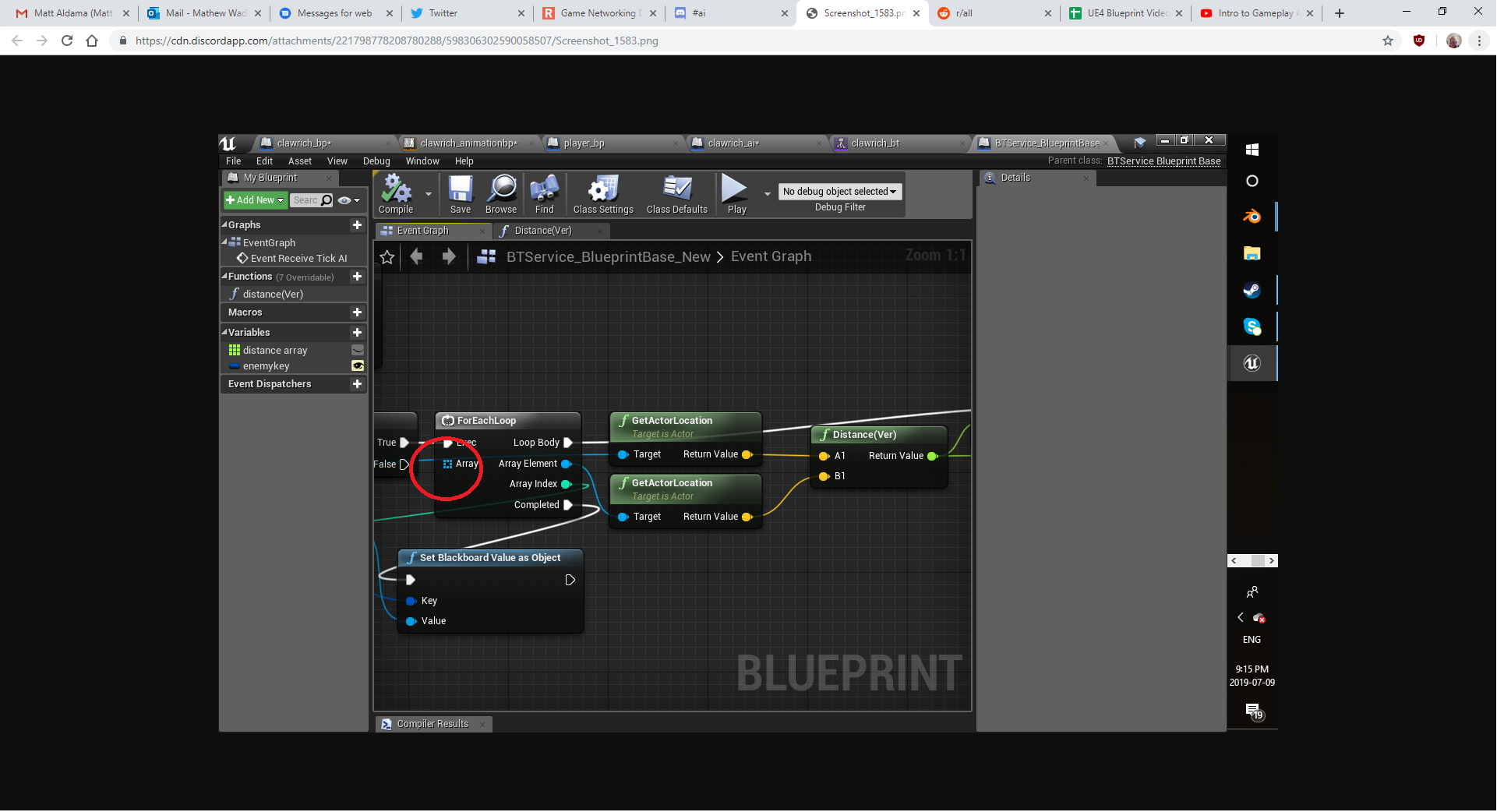 ocean sleet
Like I said, Is Valid Index
thorny gyro
I don't see anything plugged into that
you have the is valid plugged into the OUTPUT of the Get All Actors of Class node
you have nothing plugged into this For Each Loop
do you have more than 1 player? and will there ever be more than 1 player?
ocean sleet
No. Definitely not in 3D instances
thorny gyro
unhook the bottom input (the integer) on the Is Valid Index so it just shows 0
in the first picture unhook the bottom input of the GET node so it shows 0 as well
ocean sleet
Still works without error
thorny gyro
this is not the best way of doing this but this will basically get all actors of your character (should be 1 or index 0), check to see if it found anything (is valid index 0), and if so when the look completes with nothing in it it should set your blackboard value to the only thing in your get all actors array (index 0) which is your player
this should let it find the player anywhere it is in the world when this code is ran
the only downside to this is you have no distance check for the player at all
but this code should let it work right when you play assuming your blackboard is running correctly and has no other checks, it should set up the target wherever it is as the player when it starts
ocean sleet
So this is a sort of... Zombie level of intelligence
I never realised how uh... Offputting this character is
thorny gyro
this BTW is a bit more efficient basic way to do what you want https://i.imgur.com/K2ryYpv.png , it atleast does not check for all actors once you have one every tick but it only does it once.
I still would not do it this way tho as there is no reason to check for the player every tick (using a service) but it works
lyric flint
Ok I'm aboutto crahs but I popped in before ,I saw this needed to be fixed adn I'll try to explain as short as possible; The FOrEachLoop needs to be replaced because the one currently connected is a for reach loop of a different type, becasue he had set wrong base class when first building the service;
YEs but if there are other players around or other NPC's lter check for each, if only one player it does not need distance check that is true, but the idea was to show how to distance check and use it in rpractice to show it works
thorny gyro
I know you had to leave in the middle so not all gone done. I think it's all goodish now lol. I think it was a bit much to try and get him to do it "better" from the start and he got lost 😦
lyric flint
But, I gotta ask him did he learn more from this then the tutorials, if yes It is good atleast I think, but yes maybe it was a bit too much to start with sorting distances
@ocean sleet
ocean sleet
The tutorials said to do something much more simple, but it just didn't work in any circumstance
It asked me to use some premade movement script that was never stated
"Use the blueprint we made last video-" "Last video" in the series is them explaining maths
Every single tutorial I tried did exactly that
thorny gyro
well I know for a fact that is not true because mine don't do that 😛
ocean sleet
I said the ones I tried
thorny gyro
oh wait you said every one you tried so yeah i guess that could be a possibility lol
weird more than one would say that tho
ocean sleet
I mean, not exactly a video on maths, but never had anything to do with movement
lyric flint
mathews tutorials are great, check his channel out, he shows how to do things from the ground up,
Many others don't show how to do it from the ground up and don't explain well
pine steeple
i never use get all actors of class lol
its way to expensive
i use it on functions that is only ever called once
ocean sleet
That's why I avoid tutorials that say "Lets use the third person blueprint"
pine steeple
but thats it
ocean sleet
It doesn't tell me how to do it myself, it just tells me how to build upon what is only meant as an example
pine steeple
create a blank project and build it all 😃
ocean sleet
If I do that, the tutorial doesn't work because I don't know what I need to make it move toward the player in BP
Because, there is a much simpler way to do it that the tutorials show, that is based on sense rather than proximity and such, but it just doesn't tell me how to make what I need in order for it to work
pine steeple
single player game?
ocean sleet
Yeah
ocean sleet
It's the movement part that is difficult to figure out
pine steeple
then have the ai move to that player
using goal tracking
if you want to use senses, then use Perception Component
but for very basic
goal tracking your player will make him chase the place
as a kinda brainless zombie
ocean sleet
This is what every video tutorial asks me to make
ocean sleet
Good to know
The environment I'm using for the game is a house. So Clawrich would probably get stuck very often as a zombie
lyric flint
So the idea was to show how to do something more then just picking the first player but nothing complex just sorting ditances based on all players aroudn and piccking the closest,
ideally you want to find the player using perception and not use Find All,
but that would have made it all even longer and more convoluted for his first basic AI,
costs don't matter as much as starting to understand how things work was my approach
pine steeple
 lyric flint
So goaltacking plus a distance sorting
pine steeple
that is all you would need
for very basic
hunt the player
if you want sight, hearing, etc
then AI Perception
ocean sleet
Already sounds better than pawn sensing
pine steeple

that is all find player does
thing is
he will chase you regardless of where you are
doesn't need sight or anything
if you want sight and all that stuff, use perception system, but out of the box its kinda garbage
i ended up ripping it all about
and generating aggro values based on percieved senses
                    float Aggro = ActorAggro.Find(Actor)->GetAggro();
                    EPerceptionSense Sense = UAggroComponent::GetEnumBySense(StimulusInfo.Type);
                    FAIPerceptionAggro* PerceptionAggroResponse = ActorAggroPtr->PerceptionAggro.FindByKey(Sense);

                    float CalculatedSenseAggro = 0.f;

                    if (!PerceptionAggroResponse)
                    {
                        AGGRO_VLOG(GetOwner(), "Tried to update perception aggro for: %s but found no Perception Aggro response for sense: %s.", *GetNameSafe(Actor), *UAggroComponent::GetSenseNameBySenseID(StimulusInfo.Type));
                        continue;
                    }

                    switch (Sense)
                    {
                    case EPerceptionSense::EPS_SIGHT:
                    {
                        const float Range = Cast<UAISenseConfig_Sight>(MyController->GetPerceptionComponent()->GetSenseConfig(StimulusInfo.Type))->SightRadius;
                        const float Distance = (StimulusInfo.StimulusLocation - StimulusInfo.ReceiverLocation).Size();
                        const float DistMulti = 1.0f - FMath::Clamp((Distance / Range), 0.f, 1.f);
                        CalculatedSenseAggro = (BasePerceptionAggro * PerceptionAggroResponse->GetMultiplier()) * DistMulti;

                        if (FMath::IsNearlyZero(Actor->GetVelocity().Size()))
                        {
                            CalculatedSenseAggro += StationaryMarineMultiplier;
}````this kinda stuff 😄
pine steeple
thats nothing
that just produces the aggro
sends it off to the ai controller
who then decides if a new target has more aggro than the previous target and if he should change his target 😄
and each player has a set of tokens
that ai need to take
if they cant get a token, they don't pursue that player
so one player doesnt end up with 50 monsters attacking it
8 player co-op game
so would be bad if the monsters just targeted one player 😄
ocean sleet
I'm still disappointed of how rare 4 player split screen is these days
ocean sleet
BO2 had three player split screen
maybe 4, idk
It almost crashes the console, but it's worth it
It's like... The option for split screen needs to be there for people who can take the heat
lyric flint
const, haven't you tried having an effect whihc basically mutiplies a players token for a period of time, so lets say the most effective players kills a big mosnter, he get 3 times more toeksn for a short period and he gets a hard time, if the rest of the team wises up they might be able to save him otherwise they loose their best player for teh game
pine steeple
yeah
lyric flint
And good gaemplay idea acocrding to me, jsut waiting to be tested out
pine steeple
another thing we have is, if a player is being targeted by a boss
he gets his tokens reduced
so he doesnt get too many little monsters attacking him the same itme
lyric flint
That is good
ocean sleet
I still wish Zombie games were more brutal
Dead Rising 1 level, I have never seen matched
lyric flint
have you played dying light?
ocean sleet
Not the kind of brutal I want
In Dead Rising 1, You get death animations where people get torn to pieces or have their tongue ripped out
lyric flint
Aha you mean like that, absrud brutality, true not many gaems like that anymore, was more common before
ocean sleet
I played 30 hours of Dying Light so I could get some enemies into a zombie filled situation
Death animation not very satisfying
And before You say something about edginess, consider how much of a pain armed soldiers are early on
lyric flint
Well you haven' used teh stom or teh kick enough I would say
Stomp
and kick
best attacks in dying light

ocean sleet
I mean more zombie stuff
I still play Dying Light a lot, I just wish that one thing was present
lyric flint
yeah I can see what you mean, maybe you'll make the next dead rising type of brutal game, if it something you really like to make then it's a worthwile goal
ocean sleet
I'm not much for modelling humans
lyric flint
Start with smaller projects and build to a goal project, starting wiht the goal project can make it overwhelming, don't care about the modeling yet, work on the mechanics and build to wahtever part you need, modeling humasn should be a concern for much later
ocean sleet
In a game with a compact house, it would probably be necessary to have some sort of stealth (well, ability to lose him)
lyric flint
THat is true,having to steathl around adds a bit of uncertainty and works great in small spaces for adding stress and also some confusion at times when playing
ocean sleet
I think the confusion for my game will be why the monster is friendly until halfway through
I had a PT, kind of Granny type idea for it
Go through the house and find keys on the way to the end of the house while the monster is docile, do it again but the monster is angry, third time, things go wrong, all detail I'll give
plus, if the monster is running right at the player, it'll probably get stuck
tulip shale
so if i have this in my blackboard...
should this work in a task?
for things like MoveTo, ThreatActor works in the BT. it also says in simulation/pie that it sets a ThreatActor, but whenever i try to get its value like this its empty
tulip shale
apparently an editor restart fixed it? no idea...
azure cliff
Hey guys, how do i get service to run once in BB?
lyric flint
Maybe set it up as a task instead @azure cliff Or set up a a check in teh service so it only runs the logic once and next time it ticks it won't get past a DoOnce or an If Branch (examples on ways to stop it)
Have tou connected tehm in the details panel of the service/task/decorator ? @tulip shale
azure cliff
@lyric flint ah i see, thanks! I will try that
 odd hazel
My AI dont work after build
only this one with have BH
statick/dynamic same story
on standalone works fine
 sleek holly
I came back to my projexct, first time from few months and my nav mesh doesnt work
I have navMesh bounds volume but AI can't move
I already tried replacing navMesh bounds volume
tulip shale
@lyric flint what do you mean connect them? it does work now, i just had to restart the editor for some reason. maybe im missing something though? O.o
lyric flint
Well if it works then you had it already set up, adn my question wasn't necessary, maybe just a bug with the editor @tulip shale
tulip shale
not the first time a restart has fixed a problem eh
ocean sleet
This is why I don't like it when people say to read the documentation
This is the only thing that I found
All other links redirect me to the beginning of the documentation, so this is the only one that even works
Well... The link works, I'm not sure what I'm doing wrong for the actual instructions
pine steeple
Documentation not tutorials 😄
ocean sleet
The documentation has nothing on behavior trees
it gives links that just redirect to the main page
well... The links don't really exist
but if You use them from google, it shows the url correctly, but still redirects to the main page (Beginning of documentation)
That "tutorial" is the only thing I have found so far on the UE4 site that remotely teaches behavior trees
ocean sleet
four years old
and it's already concerning enough what a six month old tutorial showed me
And I'm starting to think they aren't actually in English
You can see they're not actually speaking the words that are heard
ocean sleet
Can someone try that tutorial to verify to me that I'm not insane?
Cause I've looked it over the past 8 hours and could not find what I did wrong
 flint trail
@tardy scarab do you happen to know if there are some AI goodies in 4.23 ? It feels like AI is the most stagnant part of UE4 :/
tulip shale
u have a navmesh?
tulip shale
it may be case sensitive
ocean sleet
what, exactly?
tulip shale
nvm that was dumb of me, keys screw me up sometimes. hmm
does it work without your blackboard condition?
ocean sleet
blackboard as vector?
tulip shale
no the canseeplayer
ocean sleet
I checked and it doesn't change anything
But my question is: Why would that be the issue if it's already going down that path as it is?
tulip shale
happened to me before, even when my blackboard says a value is set, ive had conditions fail stuff below it. not sure why
ocean sleet
And that's the thing that confused me. It would be moving to the chaseplayer one if it was failing, but it's not
And I'm confused as to what is keeping the blueprint from moving, since that seems to be the issue
It doesn't have any trouble getting the vector, and I've made sure the vectors are within the navmesh
tulip shale
maybe try setting it as a variable before setting blackboard value
tulip shale
well u have to make a vector variable on the left, drag it out and Set
my variable is called RandomVector, if thats what u mean
ocean sleet
"makeset"?
tulip shale
no?
ocean sleet
Vector set?
tulip shale
hang on... when u hit simulate is the random vector actually different each time?
ocean sleet
It's different every time MoveTo finishes
also, I can't do that thing where You drag out a line and get valid nodes
I literally had to look up how to build certain functions because they are missing from my list
tulip shale
not sure why that would be
ocean sleet
Maybe You don't know which one I mean...
tulip shale
did you make a variable though? u can call it whatever u want... its just the little + button
tulip shale
on the left... u have to make a variable
set it to vector
call it whatever u want
ocean sleet
Okay, You could've said "Drag the variable out and click set"
tulip shale
this probably isnt the problem though
ocean sleet
I feel like "Click" was the big missing word there
ocean sleet
I've powered through ones that had much worse spelling
tulip shale
either way, probably not the problem. did you build the MoveTo node or is it the default?
tulip shale
also, im assuming your AI has a movement component?
ocean sleet
That depends on what You mean
tulip shale
that part cant really depend on much it either does or doesnt
ocean sleet
The AI? The Blueprint? the Tree?
tulip shale
ur ai is a blueprint
ocean sleet
But it doesn't contain the skeletal mesh, or the collision
tulip shale
then what does?
ocean sleet
the BP does
ocean sleet
Let's just clarify that there's a Character BP with a CharacterMovement, mesh, and a collision. Who's self has a setting that makes it use the AI Controller, which has three nodes that make it use the Tree and BlackBoard
Like literally every tutorial I've used has said to do
tulip shale
yes the tutorial ur following probably explained that part fine
ocean sleet
I was just looking for the proper terminology so I can be 100% sure on what I'm reading
tulip shale
only 1 of those things exists in the world, the rest have no location and cant move, but thats entirely beside the point
ocean sleet
And so, the answer is, if You mean the BP; yes. AI? No. Tree? No
And that's dependant on if a CharacterMovement is what You even mean
tulip shale
there are other types of movement components
and of those things its the only thing that could even have one
ocean sleet
That's where I got confused, because the itself AI, if I'm correct, is the controller. The BP is just it's body
So "AI BP" is really hard to tell if You mean the BP, or the Node Editor in the AI Controller
And I still haven't heard if CharacterMovement is what You're looking for
tulip shale
ya sure
ocean sleet
"Not 100%"
tulip shale
and ur sure the navmesh is fine, press P it shows up normally?
ocean sleet
Yes
It's like saying "Put the knife in the jar" instead of "Lower the knife into the jar with a grip". You're increasing the risk of Me unknowingly not doing what You want me to
tulip shale
ur not an ai, it shouldnt have to be literal. humans should be able to interpret things or at least come close. ur not always going to have things typed out for you to follow. as for your problem, dunno. looks like a pretty simple function. if its in that stage of the BT i would guess it is being told to move. u say the vector changes so its getting a vector. only guess would be it cant get to that vector because its underground or in the sky or something navmesh related.
u could probably put a Wait in there after you tell it to move
ocean sleet
I have also tried wait
I have also tried wait
It's like... People have been saying for the past two days "use documentation" when the links are broken on Behavior Tree documentation
And the UE4 Live Training session I keep getting linked is already what I'm having the issues with
I'll even try a wait right now
tulip shale
Welcome to the start of a brand new series. This time we are diving into AI for games. This episode introduces the concepts being used in AI design and in pa...
this one seemed helpful, has a few parts to it
ocean sleet
That was the one I used for this
tulip shale
i followed that a while ago and it worked. since your BT is showing the vector and MoveTo is selected, something is stopping it from moving but im not sure
ocean sleet
I remember someone saying that it's never going to work if I don't go in from the beginning. Well... I'm pretty damn sure this is as basic as it gets
tulip shale
are you spawning these with a bp or do you place them in the world?
ocean sleet
I drag the BP into the world and it acts on what the Controller gets from the tree
tulip shale
so in your character bp, on the right under Pawn, AI Controller Class it has your custom class in it?
ocean sleet
Yes
tulip shale
and in your controller you have it RunBehaviorTree on Event BeginPlay?
ocean sleet
yes
tulip shale
ya i figured... cuz it prolly wouldnt show it doing anything if it didnt exist/run
ocean sleet
Well, let's test that
tulip shale
well... have you tried MoveDirectlyToward instead of MoveTo?
ocean sleet
that would create more issues
tulip shale
but does it move?
ocean sleet
because even if it worked, my NPC wouldn't be capable of walking around a pillar, let alone a chair
tulip shale
im aware
ocean sleet
Doesn't do a thing
if I'm correct, both my task and my moveto would use the targetlocation key, yes?
tulip shale
findlocation looks like it sets a vector, MoveTo uses that vector. as far as i can tell
tulip shale
weird because your chase player is set to SelfActor
ocean sleet
but this is a little bit fucking overkill for a beginner to work with
tulip shale
i cant see it, screenshot is huge and barely shows that but................. why is there so much stuff
ocean sleet
Every single node was necessary for it to work
ocean sleet
Well, You've seen by now how well it works when I try the simple way
tulip shale
but im lazy and havent fixed it
ok ya but if ur doing something super messy somewhere it can make the simple way not know what to do. however, end of the day... u get a vector and its not moving to it. can you try the GetRandomPointInNavigableRadius again and use a smaller radius value like 200?
ocean sleet
Why would it need to be smaller?
tulip shale
because maybe its trying to go somewhere it cant
also its testing, change stuff see what does something
ocean sleet
I feel like when I hear the word testing, that it's strange that no one has been able to find the issue yet
tulip shale
well, without knowing everything youve done everywhere else before you even thought about working on ai...
a simple checkbox somewhere can screw things up
ocean sleet
I'd think that someone would know where things can go wrong
tulip shale
well ya assuming nothing else is changed
ocean sleet
Taking "It's all relative" into account, I would think that anything I did in animation, or importing skeletal meshes, or movement scripts won't affect this tree
tulip shale
you have custom movement?
ocean sleet
for a player blueprint, not for Clawrichs blueprint
Unless You're just astonished that someone in my situation figured out how to open notepad
ocean sleet
Well, we haven't really gotten that far yet, seeing as my problems are on the first 7 minutes of every tutorial
I could tell You what BFFLTDDUP means, but I haven't got a damn clue what EQS is
... Maybe I am not entirely human
tulip shale
no i think most ppl know what that means
uhm... EQS is in Edit (top left) Editor Preferences --> Experimental --> AI its a checkbox
ocean sleet
"X to doubt"
That is a long fucking acronym, I guarentee You'll mess up at least one word
tulip shale
environment query system. shouldnt effect anything really im just trying to get the same stuff set to rule it out
ocean sleet
Alright, You misread what I said than
The acronym I sent
That might explain why You said it was that obvious
tulip shale
well then theres more than 1 meaning but really unimportant no matter what it is
tulip shale
knowledge isnt power thats a dumb saying
i dont care about some acronym, im trying to help figure out what ur ai problem is
ocean sleet
Knowledge makes me better than the guy with a Justin Bieber haircut who moons girls
tulip shale
matter of opinion i suppose
ocean sleet
And I would assume that I'm able to fill in the awkward silence while I'm trying to find EQS (which is now enabled)
Just because You don't know me doesn't mean there isn't an extremely high chance I'm not as much as a dick as that guy
jesus the fuckin double negative there...
tulip shale
its not awkward silence in text, its not like were sitting at a table here. im going through from the beginning and i made an ai that can move randomly again
ocean sleet
I can't even tell what I actually said
ocean sleet
blank project
tulip shale
i started with the 3rd person template so i dont know if theres something missing from the blank one
ocean sleet
I don't use templates for learning because I wouldn't use a template to make and sell a game
And that adds to a state of principle that if I can't do in a blank what I can do in a template meant for learning, it doesn't really teach You that much
tulip shale
well ya but by that logic neither does a tutorial
or using an engine at all
why not just code it urself in C++
ocean sleet
Because even if I had a full manual with comprehensible explanations, and I made 0 errors, it would take months
tulip shale
and to expect a tutorial to work when ur not using the same template
months? decades prolly
ocean sleet
Nah, I've seen people do it solo in 3 months out of collage
but the hours are considerable there, they probably had no life
tulip shale
and it probably sucks
tulip shale
u picked ue4 for a reason. theres nothing wrong with learning how something works in its usual state before going back and starting from a lower point
have u seen this?
Unreal Engine Forums
Build powerful visual scripts without code.
ocean sleet
Weird. when I made it completely blank, the lighting went blue
that entire project is really... The best word is fuccy. I had to make a new one
And the problem with learning that way is that I don't know what settings need to be changed to make it work. I am never told that
tulip shale
with a blank project u still dont know
ocean sleet
And with a template the default settings might not allow me to do everything I want to accomplish without, again, knowing the settings
tulip shale
well ya but its a lot easier to ask and find out about settings than it is to reinvent them
after that point nobody can help you because nobody else knows it
step #1 isnt rebuild everything from scratch. step 1 is figure out how it works to begin with. get a prototype. then maybe make a blank project and try to recreate what you have already made
im not 100% sure ur problem is the blank thing but it does seem like a lot of people have issues with ai/movement in general. dunno. since ue4 came out ive used the 3rd person template
ocean sleet
I've always been confused that it seems like when an engine goes free, it's almost like "Let's all figure this out together" and it comes in that fashion that it seems like the developers are even losing track at this point
Unity, for example, hasn't updated some pieces of its documentation in years
tulip shale
things are constantly changing and to have a programmer go out of their way to update the docs every time they change something would slow development. its difficult to expect anyone else to even know whats changed
a majority of things still work like they did since they were made though, even if behind the scenes theyre different
ocean sleet
The first things You see on learning Unity are video tutorials from 2010
tulip shale
probably because the concept is the same
ocean sleet
some of the core principles they teach You aren't even there anymore
tulip shale
ok well thats their problem i guess?
u also cant assume everyone is using the newest version of the engine
ocean sleet
I wouldn't expect people to use a version that has been outdated since before anyone could have even ran next gen games
ocean sleet
Well, next gen and 2010 come together to tell which generation is in question
tulip shale
also, look how long it takes titles to be developed. there are games that started their development in 2010 that are still going today
ocean sleet
7D2D isn't exactly an alpha
ocean sleet
the point is exactly what I said
tulip shale
ya thx for clarification there
point is... ue4 is not a game. not everything is fed to you so you can complete your task
it is constantly being developed so the docs are sometimes outdated but thats also relative
you can almost always google exactly what your problem is and find results. if not, people here can be helpful
ocean sleet
Alright, while You were going on about FF7, I remade everything in the third person example, and it's still not working
I bet You're surprised I was even doing anything
tulip shale
well i didnt go on i said it literally once but ok
why do you assume so much about what im thinking?
as if im some adversary. im trying to help you
ocean sleet
Because all but one person I've spoken to so far has defaulted to "use documentation" or sent me a link to a video I've already tried
tulip shale
because 99% of the time its the correct answer
ocean sleet
And a few people have come down hard on me for daring to try learning AI in the first place
Don't know why
tulip shale
well, ya its the culmination of everything else... you should know everything else ai uses before using it
but im not saying that. i dont care what you spend your time on
you have a problem and im trying to help fix it. ur time is ur time
did you copy paste or did you rebuild the BT from scratch
ocean sleet
rebuilt from the tutorial
tulip shale
using default mannequin as your character for the ai?
ocean sleet
yes
tulip shale
show me the top left of your ai controller class, im assuming its parent is AIController
simple like this? without perception probably
ocean sleet
yes
I feel like there's something fucking wrong if we both get different results when we make a brand new controller, so that's a pretty thankful way for things to go
tulip shale
show me the BT
ocean sleet
just the tree, or do You want an introductory catalog of tree town?
tulip shale
just the BT will be fine
ocean sleet
tulip shale
get rid of allow strafe
ocean sleet
good choice anyway, they just call it a catalog so they can charge you more
doesn't really change the AI
ocean sleet
Weird when allow strafe is necessary for the one I got to work
The only way I got that mess to work was because I'm usually the marquis of bullshitting my way through things
tulip shale
technically im not sure strafe would be touched in the MoveTo anyway, that seems more like an AnimBP thing. MoveTo just wants your actor to move to a location
does it move when Allow Strafe is unchecked?
ocean sleet
no
tulip shale
your bp has CharacterMovement, it is set to use your AIController, your AI Controller runs the BT on BeginPlay. You have a navmesh (P shows the walkable surface green)... all that right?
ocean sleet
yes
ocean sleet
my only difference is I set a range myself
ocean sleet
motherfucker, it's working...
You know... I've spent 16 hour days, since sunday, trying to get this to work
tulip shale
whatd u change?
ocean sleet
That's the thing, I'm not sure
tulip shale
whats weird is i tested like 20 times.... allow strafe stopped my ai from moving. but now it doesnt
ok but if u had a clean project right now...
u should be able to DESTROY all ur clutter in ur other project, replace with the working stuff
its pretty easy to scroll and look for the yellow <-- arrows to see what uve changed, but its been pretty well documented here in the channel
ocean sleet
Reading that is like hearing the collage guy say "Beer-ROIDS" in Mr. Pickles
tulip shale
i had a problem the other day, i had to restart the editor then it worked. not sure why
ocean sleet
example of what I mean when I say "marquis of bullshit"
If I sent You the blend file for my PFP, You would wonder how the fuck I got it to look good at all
if You zoom in... It gets hellish quick
You might crash if You're using anything weaker than a 1060
Which is why I keep saying: Grease pencil isn't ready for untrained use yet
tulip shale
ive never used it
ocean sleet
And that shit has no tutorials
tulip shale
i dont see the purpose of it really. i dont need to draw what i want something to look like i just make it look like it
but we are getting off topic in the ai channel. still no idea what isnt broken?
ocean sleet
I'm not sure
It's 3AM, so I don't have long to figure it out
I'm gonna listen to 4AM at 3AM
tulip shale
well at least it does work. tomorrow or whatever im guessing ur goal is to figure out if the problem is in your AI, or the project itself
ocean sleet
I'm gonna figure that out right now
And in my opinion: Anyone who has a blatantly negative opinion on all of A7X (Avenged Sevenfold) can 👉 🚪
I can only see it as a issue on the project
tulip shale
ok then the link i pasted earlier was about rebuilding some stuff that is missing from the blank project. it might have what u need
ocean sleet
Just... Fuck it. You already got me to break principle. And I still believe that I will have to go very far out of my own way to find the proper settings
I have been here for almost an entire week of 16 hour days. And half of that time has been spent on this single Tree
tulip shale
its good practice to test in different ways to see if its something ur doing wrong or something is just different
ocean sleet
Although, I guarentee You that it will take more time than necessary to find the proper project settings
tulip shale
well there was a whole tutorial series on it in that link i pasted
but i dont think its bad to at least make a learning project from a template
ocean sleet
I cannot tell You the last time I have made a project that wasn't made to produce a product
It's possibly never
I learn by producing. If I can't I take the time necessary to figure out how
tulip shale
well ur learning project probably shouldnt be ur production project
especially if 3 nodes can make an AI chase the player, and you gave someone that spaghetti dinner task
ocean sleet
I don't even delete the tutorials that fail. I just store them to fix later
tulip shale
i tend to start a new project to build a feature without the distraction of other stuff. i have 1 just for foliage, 1 for ai, 1 for inventory/equipment
ocean sleet
Can I? I do not know, but I usually get a result when I'm more persistent than a normal human would be willing to
tulip shale
not saying its a good thing, just what i do
well, persistence is a good thing but... well itd take most of the people in this channel like 5 minutes to make a randomly roaming ai from scratch. at some point, experience and memory is better than being stubborn
ocean sleet
It has not failed me in three years
tulip shale
practice makes perfect is a very inaccurate thing people say. you can practice wrong
ocean sleet
Persistence got me this PFP
Which again, Your PC could crash if You tried to open the blend file.
tulip shale
the gas mask?
ocean sleet
yes
tulip shale
no pc should crash trying to open something that looks so simple
that means its poorly designed
tulip shale
why would u make it entirely in grease pencil then
ocean sleet
because in grease pencil, You can animate it
tulip shale
geometry is much easier, plus theres tons of other programs to make 2d stuff with
ocean sleet
easily, I might add
tulip shale
well u can animate geometry too its kind of the basis of every game engine
or morph targets if u dont like to rig
shape keys whatever ppl call em
ocean sleet
I usually just rig
It's not the best, but it works for Source engine
I feel like I defeat the personal goal of minimalism with my persistence and workflow
tulip shale
for a render it doesnt matter much but for real time gameplay, u want it to look complicated but be as simple as possible, so it runs well
ocean sleet
I could use this PFP as a logo, and no one would ever know the absolute shit show that ran behind it
It's kinda like Treyarch
"It works, so it's fine"
I can't tell if You've even snickered at a thing I've said in the past three hours
Cause, I've said a lot of shit that was meant to be funny to some degree
tulip shale
well ive been more focused on trying to fix problems
and the, it works so its fine... sometimes its ok but other times.... i feel like shortcuts can ruin entire games for what would be 10 minutes to fix
ocean sleet
Again; sounds like Treyarch
tulip shale
well, theyve made more money and put more products in stores than i ever will so theres something to it
ocean sleet
They took a 180 turn in the past six years
They can eat shit for making the past two Black Ops games
tulip shale
i think the last one i played was world at war. CoD1 was good though back in the day
ocean sleet
BO2 was the last good one, but only the zombies
tulip shale
ive lost interest in shooters anyway though. its always weird to me how ur arms are coming out of ur head... or ur 3 feet taller than everyone else and the camera is in ur chest. dunno
i mean, i dunno about u but... my bullets come out of my helmet
anywho, it is getting late and its 91 degrees in my room here so... im gonna go before i die
ocean sleet
Idk, I always thought multiplayer sucked
I only really play zombie shooters for shooters
Yeah, its 4AM almost here, I dont have much time left
tulip shale
i still got a lot of stuff to do around the house. would like to get it done before the sun comes up
either way, at least ur ai thing works... somewhere. maybe not in ur original project but its at least progress, u know where the gap is
just remember, simple tasks can go a long way. if it ends up being a huge tangled thing, someone here might be able to cut it down and work better
good luck with stuff, prolly see me say some stupid stuff in here sooner than later~
 glad jewel
Hey guys, can someone help me with the "Does path exist" BehaviourTree decorator? It always returns false, even for a path that definately exists.
I know the path exists because a "Move to" Node will work, and the actor will walk there. But if I add a 'Does path exist' decorator, it will return false.
 static crater
hi, tried this tutorial by rama to make custom path finding, but setting cost to 0.5 wont let my ai preffer to use the path?
flint trail
@timid island @supple tree @tardy scarab So I am wondering if there are any new AI goodies coming with 4.23 😊
flint trail
🤔
pine steeple
nope
flint trail
AI seems to be the most stagnant part of UE4 :/
(also goes for training materials/streams about UE4's AI)
ocean sleet
So when it sees the player it's supposed to move toward them, but it instead of moving toward the player, just finishes and it defaults back to a picking a random location to move to
pine steeple
if player location is invalid
then where can it move to?
if player location is invalid
then where can it move to?
ocean sleet
Actually, it does begin to change course, but it changes before it reaches
ocean sleet
Alright, fuckin tutorial said to getactorlocation and connect the vector to getrandompointinnavigableradius. deleted getrandompoint and it works fine
 tardy scarab
@flint trail Sorry I forgot to respond last time you mentioned me. I'll get back to you once I get a chance to read the full release notes.
@flint trail I'll be having Wes Bunn on the stream in two weeks with AI!
flint trail
@tardy scarab thanks.. Any chance we can submit suggestions for AI stream ? 😊
ocean sleet
blueprint runtime error: "accessed none trying to read property CallFunc_GetPlayerCharacter_ReturnValue"
thorny gyro
you should make sure the return from get player character is valid otherwise return failed on the finish execute. The task might be running before the player is spawned or if they are dead for example.
ocean sleet
I think it's that auto possessing the player doesn't work anymore. the settings aren't doing it on start since I changed graphics settings (for some reason)
But that doesn't really make sense, since it begins chasing the player right away
Before I even posses it
lyric flint
gameplay debugger broken ? EnableGDT doesnt work
or why does VisLog only show one instance of any BTTask, despite numerous ai running around ?
lyric flint
im convinced theres something wrong with behavior trees
have more then 1 ai and nothing works the same way
 analog crown
Anyone doing AI in 4.22.3?
lyric flint
yea.. at least attempting to
lyric flint
really wish there was more documentation. i learned that VisLog in BehaviorTree nodes need a RedirectVisLog called for their playercontroller owner or only one instance will show up in vislog window (multiple ai's) and that Abort event needs FinishAbort called or else...
 patent hornet
analog crown
patent hornet
analog crown
for some reason my behavior tree is stuck on the "Root" indefinitely
got a job posting up for the issue if anyone's interested in taking a crack at it
pine steeple
@analog crown pm me
tulip shale
so is there a way to use the ai perception more... in the BT itself? or is it typically handled in the ai controller?
lyric flint
you can use it in bt aswell but sometimes it's best to set some bb vlues from events outside the BT if you want to have instamnt updates wihtout having to tick it on a service; ok but anyway to the question; by dragging a node from the owner controller then getting component by class and then you have access to the ai perception inside a service or task @tulip shale
lyric flint
how do i make it so when my AI here hears a noise, he does a function (i already have it setup)
 reef birch
im not sure
but there was somethinng with ai perception stimulans
u can assign on a actor
and enable hearing
maybe check some tutorials
 vagrant summit
I am convinced the AI Move To (blackboard not BP) just doesn't work
Spent several 8 hour days double checking my shit
and the BP Version works fine.


the only time Moving the pawn works more than once, is when i do it with a BP MoveTo (in a custom task)
The default Move To task is just bugged
 cinder rock
can someone exaplain to me, why DrawDebugSphere in BehaviourTask doesnt work? duration is set to 10 seconds
thnx
pine steeple
BT's dont have a world context
you need to supply one
so drag from owning actor to the world context pin
tulip shale
so if i wanted an ai to attack when its in range... (stab or something) i have some tasks and it seems to work, but i was thinking about it and theres like a billion ways to do it. i could have it play a montage in a task, from the controller, from the character, from the weapon itself... wheres the best place to handle it so that it knows when the animation is playing so it doesnt keep restarting it? i mean the animation could set a bool on start and end of anim as a blackboard condition but that doesnt matter where it is really
flint trail
@tardy scarab by chance, were you able to finding anything interesting about AI in 4.23 ?
tardy scarab
@flint trail As of yet, unfortunately not
 fiery sorrel
Is there a way to modifiy a nav area cost at runtime?
Looking to extend nav links based on the number of moving agents on it.
lyric flint
anyone else had isses with Aicontroller>Blackboard>SetValueAsVector?
can'tgetit to update it's value from outside the blackboard
lyric flint
solved it, by some reason unreal won't pass the default value of a name variable through the Send Noise Report node
you have to set it in teh graph, weird. Anyways it's solved
tulip shale
is there some sort of sorcery required to make an ai play an animation?
 vital pond
Would anyone know why my large AI actors cant navigate?
When I set them to a scale larger than 1 they lose the ability to navigate
or at least seem to stop trying to wander
When I set them to a scale of 1 they can navigate again
 night relic
About Behavior trees, if you update the destination vector of a MoveTo node while it's running, isn't the AI supposed to move to the updated value?
 jaunty peak
Off the top of my head, you'd have to abort that part of the tree.
night relic
it seems so
vital pond
How are giant characters normally done, is it normal that they can't navigate when simply scaled large?
vital pond
I've got this giant chicken creature i'm working on but for some reason its unable to do any MoveTo actions at a past a certain size
 vast jacinth
@vital pond That has to do with Nav Agent Radius. You set the maximum for navmesh in project settings. For various sizes you'd set several supported agents. Breakpoints of sorts. You want to keep the number of agents low, as each supported agent will add a new recast navmesh into the level.
if it's not clear: your character stops responding to MoveTo at certain scale, because its radius is larger than the maximum set for the nav mesh volume in your level.
flint trail
I am using 4.22.2, streaming levels (each has it's own Nav bounds) and ProjectPointToNavigation. ProjectPointToNavigation for the most part returns correct coordinates (and True bool), however, sometimes in some spots it returns 0,0,0 and False bool. I can see that trace hits those spots on static meshes (floor), nav mesh is drawn over those spots, but somehow ProjectPointToNavigation fails. Any idea why it could happen ?
flint trail
no one? :/
 wary ivy
what kind of extents are you using for projection?
wary ivy
are you sure that's enough for from where you are projecting?
wary ivy
well, the extents you wrote is 100 units on Z axis, right?
so on some XY coordinate, if you project a point at 0,0,200 and the navmesh below is further than 100 units then the project fails
because the max extent is 100
like if the navmesh below is at 0 Z
vital pond
@vast jacinth So basically I just need a new agent set to a larger scale than the character in project settings right?
vast jacinth
@vital pond You need a new supported type of an agent. Look for Navigation system in project settings. You will have 2 supported agent types in the project settings. One for the default size, one for your big sized pawns/characters/agents. Unreal will automatically create 2 recasts once you play/refresh the editor (move navmesh bounds volume for example).
flint trail
@wary ivy well, the way it looks in the Editor is navmesh is at the same distance from the floor in the point where ProjectPointToNavigation fails as the nearest point where ProjectPointToNavigation succeeds. I assume that bounds are max bounds where nav mesh should be between 0 (floor mesh) and 100 ?
wary ivy
I think it's the max distance to navmesh on the given axis, so with 100 Z extent it would look up and down 100 units from the projection point
flint trail
I see
I guess I can play with Z and see if it makes any difference.
I have a feeling it won't make any difference though
(it's a flat area in parts of which ProjectPointToNavigation fails and in other parts it succeeds, so I don't see how nav mesh can be above/below 100 units from the trace hit point)
flint trail
how did you work around it @wary ivy ?
 noble vault
One question, i am a newbei in UE4, i am making my final degree project.
I need to setup a city with and automatic traffic flow, but i dont know the best way to create this AI, can someone give me some extra info?
I googled but did not worked....
BTW this is the right channel for this question?
lyric flint
Firstly, have you put thought into how you would achieve this, like building a mind map over what is needed
that is the first step to any ai I say, but at basic ai these mind maps might not be so large it works, and for your project it would greatly help wiht having a rough plan thought out
I do mind maps with pseudo code before a project, it is a great help
@noble vault
wary ivy
why are you making a final degree work about something that you're not familiar with?
sounds needlessly difficult
noble vault
i am not familiar with ue4, i am with programming, i am making it in ue to make it more visible and beauty
noble vault
@lyric flint what is a mind map?
My ideal is to make a small/medium and big city, with traffic (cars) and traffic lights, then if they are working properly i am able to work with my project
i googled mind map but nothing came (i am spanish, and i dont know if i missunderstood what you mean)
vital pond
@vast jacinth Sorry for the tag, just want to make sure i'm doing this right
woops
here
Made this second nav mesh agent with a height that's double the capsule half-height and a radius that is the same as the character's capsule
anything else I'd need to do?
vast jacinth
@vital pond Try and see 😃 Don't forget you can see the navmesh inside the editor by hitting 'P' or going to the top-left corner of the viewport and toggling navigation from the Show submenu. When you make the colour in your 'Giant" agent other than the default you'll be able to differentiate between the two.
vital pond
Thanks
vast jacinth
As for 'doing it right'. This was a recommended approach by the programmer behind the AI, but it really really depends on your project whether it's the way it works for you. Personally don't have as much experience to be able to tell you this will work 100% 😃
vital pond
ah right
I just set "giant" to yellow but I can't see it in the viewport
made a nav mesh that only recognizes giant
so I guess there's one more step
vast jacinth
not sure on that. Last thing on AI in unreal from what I've seen is that it seems buggy half the time and only sometimes it is, the other it's a hidden setting somewhere
try even restarting the engine (dont forget to save all 😃
vital pond
its just odd since my other project in .19 has no issue with scaling actors up
i guess if i run out of options I could just make all the actors small
Still not working otherwise
I'll ask in blueprints just in case
vital pond
@vast jacinth i got it working