#gameplay-ai
1 messages · Page 111 of 1
 lyric flint
And use a timer to check if the actor you are interested in is in the OutActors array
if yes, accumulate the threat
by timer, I mean it can be on Tick, Or on behavior tree, Or whatever
 jaunty peak
Does sight stimuli have age? Or rather could that be used?
 bold sapphire
What is the best way to move 100 ai's in view of camera at the same time without fps issues? I am using blackboard with character movement component.
 wary ivy
character movement component is slow, it'll bog down the game thread
bold sapphire
I turned off the tick for my ai's just to see what would happen. it seems like there is no issue with 100 moving around. It is more the tick of 100 actors that cause the frame drop. I did notice that they still move around and attack each other with tick disabled so that is a good thing. Maybe I can disable the tick and turn it on if the ai is close to the character.
wary ivy
can't you also change the tickrate?
 misty osprey
Hey guys, there is a tick in the character options that will rotate the AI smoothly whenever its rotating instead of teleporting to the new rotation. Does someone know where it is and how it is called?
misty osprey
hey man, nah thats not working. its not using interpolating to begin with. I try to turn this on.
 quick lance
Anyone ever tried attaching a NavModiferComponent to a character?
Such that the nav modifier could be moving around with the character?
(need to have a distance in front of players be given higher path cost to try and avoid pathfinding right in front of them)
 patent hornet
that won't work, pathfinding calculations don't update every frame
look into crowd avoidance
 gaunt forge
AI detection question
this works
But
this doesn't (different level, same blueprints)
The onSeePawn never fires on the second one there
I verified it's set to the same autopossess AI, controller (I even tried re-pasting from the working level)
lyric flint
AI Perception has a RequestStimuliListenerUpdate, maybe try that?@gaunt forge
gaunt forge
Oh, I will check that
lyric flint
all perceived can be get with GetCurrentlyPerceivedActors
e.g. GetCurrentlyPerceivedActors(UAISenseConfig_Sight::StaticClass(), OutActors);
see if your target is already in the OutActors in the second level @gaunt forge
gaunt forge
Nope, no actors
Let me compare to the other level
right, the first level it sees the actor
tried re-doing both actors from the working level, nada
let me try an empty level out of curiosity, maybe something else is wrong
lyric flint
In my project I'm using OnTargetPerceptionUpdated instead of onSeePawn
So the question is, are you using AI perception component?
It's possible that pawn sensing Is deprecated maybe?
lyric flint
gaunt forge
Yeah, was just reading that
so no, looks like it's not going away, as the docs don't show it
neither method sees the actor in the second level though
so there's something else wrong.
it's not line of sight, I confirmed that one
lyric flint
Can you try as a test to use exclusively OnTargetPerceptionUpdated
try it in the first level, in and out of sight, just to confirm it works
This method can be used with an if/else
gaunt forge
On Target Perception Updated
lyric flint
Stimulus.IsActive() Means it sees the target, and else it's out of sight
void AYourAIController::OnTargetPerceptionUpdated(AActor * Actor, FAIStimulus Stimulus)
lyric flint
if (Stimulus.IsActive()) { //I see it } else { //it's gone }
lyric flint
hmm, something is fishy 😃
gaunt forge
I have a stimuli source on the player
(sight) and the same on the ai now (also sight)
confirmed sight lines up
well, the total lack of docs on the "new" version lead me to think it's not ready yet
but that doesn't help me either way 😄
lyric flint
can you try a breakpoint on OnTargetPerceptionUpdated?
lyric flint
@gaunt forge In your AI controller class, in the constructor, did you add the dynamic binding for OnTargetPerceptionUpdated?
gaunt forge
I suspect there's something else I need to configure, but the docs are a bit shy
of course not, because I wasn't using it 😄
lyric flint
I've been using AI perception for a while now, no major problems, honestly I don't remember anything from my pawn sensing days
gaunt forge
it's the default, so it uses:
void AAIController::PostRegisterAllComponents()
{
Super::PostRegisterAllComponents();
// cache PerceptionComponent if not already set
// note that it's possible for an AI to not have a perception component at all
if (PerceptionComponent == NULL || PerceptionComponent->IsPendingKill() == true)
{
    PerceptionComponent = FindComponentByClass<UAIPerceptionComponent>();
}
}
lyric flint
I apologize for not being able to be of much help specific to pawn sensing
gaunt forge
let's see, let me check the header
/** Component responsible for behaviors. /
UPROPERTY(BlueprintReadWrite, Category = AI)
UBrainComponent BrainComponent;
UPROPERTY(VisibleDefaultsOnly, Category = AI)
UAIPerceptionComponent* PerceptionComponent;
that's all there is for perception
Pretty sure that isn't ready for prime time
I assume you're using your own ai controller
which would make sense, this is just for a simple follower
lyric flint
Yes, UPROPERTY() UAIPerceptionComponent* AIPerceptionComp it's in my .h
and UFUNCTION() void OnTargetPerceptionUpdated(AActor* Actor, FAIStimulus Stimulus);
And that's pretty much all
then, in cpp
AIPerceptionComp->OnTargetPerceptionUpdated.AddDynamic(this, &AMyAIController::OnTargetPerceptionUpdated);
Which has the Stimulus.IsActive() If/else
ah, and the AIPerceptionComp has
`AIPerceptionComp = CreateDefaultSubobject<UAIPerceptionComponent>(TEXT("AIPerceptionComp"));
UAISenseConfig_Sight* sight = NewObject<UAISenseConfig_Sight>();
AIPerceptionComp->ConfigureSense(*sight);
`
That's it, to quote It just works
gaunt forge
let me try registering
nope, not even if I register the player as a sight source
sight stimuli source, I should say
However, if I register my player, that fixes the other issue with the follower, so that'll do 😃
lyric flint
👌
 flint trail
has anyone tried this AI from Marketplace https://www.unrealengine.com/marketplace/en-US/slug/visai-an-advanced-modular-ai-system ?

This system is dedicated to making AI in Unreal easier, more efficient, and modular. This will save you time in creating any AI system, and decrease repeat code!
 near jetty
Number of Blueprints: 53
@flint trail its shit
a plugin like that being BP only essentially means its shit
and very likely unusably level of slow
flint trail
hehe, I see
near jetty
@flint trail as a rule of thumb, any "system" or complex code framework that is all blueprints is shit
all of them
no exceptions that i know of
 polar hamlet
Pawn Sensing component says in its description "does nothing on network clients" but my networked clients using dedicated server option enabled can detect each other using PawnSensing.... https://gyazo.com/92db665af9fc9b6cfbe31765a9c07f2b


 jaunty peak
Pawn Sensing is depreciated. AI Perception is the current one.
polar hamlet
ahh... ill update my code then thanks !!
 pine steeple
also Percepetion runs on the server
and the server can see all clients
so the ai can see all clients
polar hamlet
Ye I did not even pay attention to the print saying SERVER... I guess I misunderstood, So the clients did not detect anything and it was the actor on the server that did ?
 west jewel
Any one familiar with what exactly that value of MoveInput is in a call to RequestPathMove? I was trying to interpret it as a controller input but it seems that's... wrong.
 wraith eagle
Just want to double check in case I've missed it... Is there functionality in the engine for storing off NavMesh data, and then reapplying it to the NavMesh? Like, if you know you have two different NavMesh states, then you can store them, and swap between them rather than rebuilding the nav mesh dynamically?
 hoary peak
Pretty sure I haven't changed anything in my project but my AI just returns "blocked" on AI Move To, I do have a navmesh and I've checked with Show Navigation
hoary peak
@near jetty Would you mind trying to help me?
bold sapphire
did you press p to show the nav mesh ?
hoary peak
I create my world during runtime but I have used the console command "Show Navigation" and it's there
If there's no navmesh it returns aborted as well
wraith eagle
Can you step back through the code and see why it's hitting Abort?
hoary peak
Me? It's returning blocked not abort
And there's clearly nothing blocking it(plain terrain)
wraith eagle
Then step through and see what it thinks is blocking you?
wraith eagle
But for the code to return Blocked, the Navigation System must think that something is
hoary peak
Yeah that's the entire problem
I don't think I've changed anything but either the navmesh or the AI isn't working correctly
I have no idea what the problem could be
wraith eagle
Are you doing it all in Blueprints? Or C++?
hoary peak
Blueprints
There has be a setting which i've fucked up because I just noticed this today
I am not sure when it last worked but it has been working before
wraith eagle
Guessing no source control to go back and see?
hoary peak
I have a project backup from 4th of May, i'll check
It works as it should in the version from 4th of May
Since I haven't touched the navmesh since that version what could cause this error?
hoary peak
Project settings, navmesh settings and world settings are exactly the same
wraith eagle
Well, the path following doesn't just return blocked for no reason. Will need some debugging to figure out what the Path Following Component thinks is blocking the agent
hoary peak
Damn, that shit could take days
Especially since it isn't an actor blocking the way, the problem is for the entire map
Wow it was such a dumb problem actually
I had moved code from the game state to another class and a self reference followed the spawning of the npc so that gamestate ref was 0 and thus it had 0 movementspeed resulting in it returning blocked
wraith eagle
lol. Amazing. At least it wasn't something really awkward
bold sapphire
is this due to the character movement component?
pine steeple
yes
CMC is heavy
how many ai you have?
1ms is spent on find floor
which is a lot
bold sapphire
@pine steeple yea it is 100 ai's and I don't have room to disable their ai so I guess I will just have to do less than 100.
pine steeple
its not the ai
its the cmc
different things
try enabling navwalking for ai
and adjust some settings in the cmc
we got it down to around 4ms for 150ai
bold sapphire
I did that and it made it to where I could not attack them the line traces stopped working.
bold sapphire
for my attacks
the over laps stopped working and it took me a whole day just to figure it out that I changed it to nav mesh walking
ok Ill take a look at the cmc settings thank you =). My aim is 100 ai's hope I can do it.
 fallow hound
what is navwalking btw? I assume it disables some collision stuff and just hard wires the NPC to the navmesh
bold sapphire
looking better
pine steeple
we are going to make a lighter weight version of CMC
for ai pawns
its too heavy
but thats a big job
bold sapphire
Everything is running much better. I am going to test on android then run another profile to see other areas I can improve.
 keen spade
Hi, I am looking to setup a basic health and stat system. Health, Mana, Exp gained, Damage resistances, drops ect. Essentially I then want to create instances for mobs that use this system and I can just go into the instance and set the variables, a master Mob blueprint for the majority of my ai.
The standard blueprint character class with 'character movement (inherited)' already has stuff like max velocity. I am trying to think long term.
If I want to create a stable system what the best way to go about creating the backbone of the system is. If its best to create the parent as a C++ system or use the character class blueprint, setup a system using blueprints and widgets/structures/arrays . For an RPG style game.
bold sapphire
C++ is the way to go for performance. I found blueprint to be easier for me but I lose the C++ benefit. As for the master mob blueprint that is good anything you want all your mobs to have like hp damg. On the child blueprints you make from that you can set drop list for items and stuff related to that mob.
keen spade
Thanks, If I prototyped in Blueprint, how hard would it be later to swap to out the master with a C++ version?
pine steeple
try to make structs and enums in c++
will save a lot of headache later down the road
i dislike bp structs/enums
but sure prototype in bp, but try to put things in c++ as it will save a lot of hassle
 loud tundra
Hello all. If I wanted to create an AI that could run around and fight other AI characters, could I adapt the behaviours the AI uses when it detects the player? Are there any free training methods to create something comparable to the bots in UT2004?
pine steeple
you could check out the UT4 source project
 silk fulcrum
Hi everyone, I am trying to get Simple Move to Location to work but I am getting an error that NavSys is none; in blueprint where do I go about making sure there is a nav system?
loud tundra
@silk fulcrum Check your navmesh, if you're testing in a default map it might not have one
 white crown
Then build paths
loud tundra
Is there a way to rebuild a navmesh without editing its properties?
white crown
Under the build tab?
silk fulcrum
Had a nav mwah, problem was I was running in dedicated server
Not super sure why that means there’s no nav system
 quick aurora
Any good resources that can get me acquainted with the aspects of UE4 AI? I need to make a zombie for my first project :p
lyric flint
@quick aurora https://www.tomlooman.com/survival-sample-game-for-ue4/

C++ Survival game covering common gameplay concepts packed in an open-source project. Series includes C++, AI and Networking.
patent hornet
@quick aurora always good to check pinned messages on the channels for resources
quick aurora
Ah, thank you! I hadn't even thought of the pinned messages!
 vernal thunder
Hey, guys, I have a small query: I'm using version 4.22. I have 4 instanced ai bots and controllers. However, there's only one instance of the task ChooseAbility. Does anyone know why 4 controllers are sharing one task instance?
pine steeple
is it a C++ task?
vernal thunder
No, It's a regular BP one.
pine steeple
no clue then cause BP tasks should be per instance
and not shared
c++ tasks can be shared
unless they are sharing the same brain
vernal thunder
Alright. I'll give that a check. Thanks
Nope. Didn't do the trick. Still the same
 scenic fox
Hey guys! don't know if this is the right place to ask but
Anybody knows what's the difference between PawnActions and GameplayTasks?
I reckon that gameplayTask are the updated version right?
I'm basically working on AI and wanted to call Actions on my pawn and have a weight to each of them... etc and i came along to PawnActions, but it seems they aren't used anymore
Thanks!
pine steeple
pawn actions was supposed to be the new stuff
but it was never finished
then gameplaytasks became the new one
 hybrid cipher
What's gameplay task?
 foggy sluice
Hello maybe someone knows when I set the variable in the blackboard why I cannot get the reference, like on the print string?
pretty easy but i cannot understand why it's null)
foggy sluice
@pine steeple Yea you right!
i add keys in the Behavior tree and i see now. Thanks!
coz I'm new in the AI 😃
 night hazel
@buoyant geyser regarding your cover system... is there a reason you didn't make it a plugin?
I'm thinking about using it for my game, and I'm curious about that regarding integration
 buoyant geyser
only reason is I have no affinity to learning plugin development :)
night hazel
right on
buoyant geyser
btw it's all up on github, I've put it up there right before ECGC
night hazel
this is a cool project btw
buoyant geyser
thanks!
night hazel
it's like, almost exactly what I look for when evaluating stuff to integrate... well documented, well written, considers a lot of "you can do this..." kind of things
buoyant geyser
sweet
 slow bobcat
Hi!
I have a question about the Perception Component and the damage.
Can you manually report a damage in c++? Using UAISense_Damage::ReportDamageEvent?
 austere kindle
so I'm making a 2d, top-down ARPG, but the "top-down" part is kind of faked because the camera is setup like a sidescroller, would this be reason for nav meshes to just not work at all?
pine steeple
no?
austere kindle
hmm
austere kindle
I'm having an issue where my nav mesh seems to intermittently decide to work
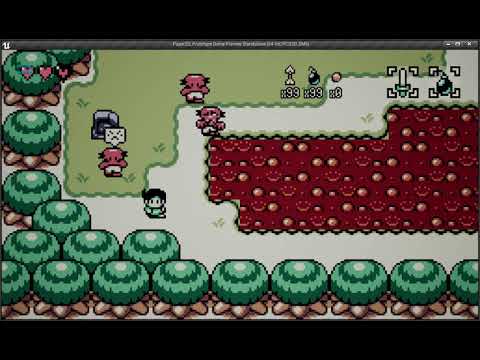
the nav mesh is bigger than the map, and they're all the same object, configured in the same way
however the 3 on the left work, the 1 on the right does not
but if I move the 1 on the right that didnt move above, to the left, in the editor, and then back?

then it works
 torpid trout
hey guys. How is there a console command to visually see each pawn's pawn sensing in the level?
patent hornet
apostrophe, and its a keyboard shortcut
don't know about sensing, its obsolete, but it does work for perception
torpid trout
I shouldn't use pawn sensing?
pine steeple
perception system you should be using
slow bobcat
Yep, Perception is the way. To debug press 5 and then use the NumPad to enable/disable options
 ocean wren
hey all
For whoever was asking about gameplaytags etc.. https://www.unrealengine.com/en-US/events/unreal-fest-europe-2019/using-the-gameplay-ability-system

Unreal Engine
In this Unreal Fest Europe 2019 presentation, Matt Edmonds of Splash Damage Games takes a qualitative look at the Gameplay Abilities System (GAS) to help decide if it’s right for your team or project. Then, he switches gears to deliver some quantitative examples to help dri...
Explains what it is at least..
PawnActions are really old and unloved.. GameplayAbilities are used in Fortnite. So you know which one gets some support at least if bugs are found
 warm salmon
can anyone recommend some recourses for learning to program AI in c++ ? cheers bois
 maiden plume
Hey guys. I've been following a Tutorial and I've done everything right but, my AI will not go forwards. Could anyone lend a hand?
Here's the code and the behaviour tree
and it was from this tutorial https://www.youtube.com/watch?v=fTx-LYkrREU&list=PLbRBWFaQHaW__LcCtV-KnqqgIFOyyFhr5&index=3

In this tutorial we will modify our AI to add a patrol behaviour, and look into how creating parameterised nodes can help us create building blocks that we c...
foggy sluice
@maiden plume I think you need to add radius value in the "Get random point"
maiden plume
Tried that does nothing
foggy sluice
please try to play and watch the BTree and how its works in the left side.
or mb it's with Vision check, set enum trouble..
maiden plume
Oh no its ok I got it working now you were correct
You gotta change the value in that Radius to 360 to get it to move
😛
foggy sluice
oh great 😃
pine steeple
@fervent horizon did you not ask this in another channel?
and how is this related to AI?
 mystic dock
stands for animation implementation
pine steeple
:/
 fervent horizon
someone told me to post here
 worldly shard
navmeshes generate on up facing surfaces, so it would affect you
buoyant geyser
in case anyone's interested in steering behaviors and how to implement them and haven't come across this: https://gamedevelopment.tutsplus.com/series/understanding-steering-behaviors--gamedev-12732

Game Development Envato Tuts+
 misty holly
is there an easy way to have an ai follow a spline?
 nimble atlas
hi all ive been thinking about implementing some sort of flocking/formation movement in my behaviour tree, does anyone have any examples or guidelines as to how to do this?
 fallow stone
good tutorials to set up ai movement and animations with behavior trree?
wary ivy
@misty holly there's a marketplace asset you can buy
@nimble atlas for formations you want to calculate the desired position for each member of the formation and have them follow that point
the hard part is figuring out what to do when the route to the desired position is blocked
@fallow stone you do animations with anim blueprints, not behaviour trees
wary ivy
what sort of AI?
fallow stone
nevermind i got it
fallow hound
lets say I wanted a class to control multiple characters at once, would each char pawn need their own controller?
wraith eagle
@misty holly How easy is 'easy'? Writing some spline following logic for a character isn't too difficult
nimble atlas
@wary ivy so in a sense i would need to hardcode the desired shape i want the agent to move in?
wary ivy
well, yes sort of
a formation usually has a leader, right?
and formation has N members
so you need a way to calculate the position of the Nth member relative to the leader
sooo if you had a line with 5 meter spacing you could calculate the relative position like this (pseudo code)
fn(int memberNumber) //assuming leader is 0
    spacing = FVector (0, -500, 0)
    relativePos = memberNumber * spacing
     //todo transform into world space
ah ok that makes sense
btw ive also been reading on on flocking, which is based off steering behaviours and things like alignment - cohesion - separation
does flocking and formation movement have anything in common in that sense?
 quiet zephyr
What would be a good approach for creating an Object, like a sphere, that would pull other objects towards it if they got close?
Like a Gravitational effect...
To be more Specific, If I have an AI that is moving close to the Object of Gravity to have it's destination recalculated to be effect by the Gravity pulling on it, changing it's course and destination point
 floral mango
@nimble atlas well kinda...the rules you use for flocking (boids) are pretty general, they're just steering behaviours specific to groups
hoary peak
If I have a blackboard with it's own BT where I set a key shouldn't an inherited blackboard's value of that key also change even if it has a different BT?
 quiet dove
As someone who hasn't really dug deep into the BT in Unreal, has anyone noticed any specific drawbacks to the BT model Unreal gives?
jaunty peak
@hoary peak a BB doesn't transfer values between BTs as far as I'm aware. I believe they are treated as separate.
hoary peak
@jaunty peak I thought that was what instance synced was for but it seems not, I moved the variable into the class using the BT instead
jaunty peak
I think you can have multiple BTs using the same BB but from the same AIC.
slow bobcat
Question about the main character and FSM/HSM: I always create by hand and c++ a FSM for the main character (the player) to control its states (running, crouching, walking, falling....). Doesn't matter the game or the engine, it's my way to go. But I want to ask you, how do you handle this? Does anyone here use a BT for the player (tasks only change states and state changes are controlled by the input + some other conditions)? Do you know if there's any plugin that gives you something like the Animation State Machine?
patent hornet
its part of the engine? UAnimInstance
BTs are handy, they give you ability to do some fast prototyping, give a visual debugger, and you can always write the Tasks/Services/Decorators in c++
but i wouldn't use a BT just to change states, no
 sharp thunder
Hi, this question has been asked before by @latent crane but I couldn't find a satisfactory answer to it: Is it possible to pass parameters/BB keys to a 'Run Behavior' task?
Eg. in my use case, I have a BT defined for an NPC to pick up an object X and bring it to location Y. I want to use this in another task where the NPC first calculates X and Y and then executes this pick-and-put task. It's supposed to do it twice (take X to Y1, then wait, then take X to Y2), which is why i was creating a separate BT for the pick-and-put task
hoary peak
From my personal experience i just have the NPC itself hold the values if they need to transfer from one BT to another because I can't find a way to get values to transfer from one blackboard to another even if it's inherited
sharp thunder
right. is this a deliberate feature or just a limitation?
hoary peak
No idea tbh, I can see why inherited blackboard wouldn't change values just because their parent did but at the same time I would like an option that syncs it to the parent value
sharp thunder
Kind of like local blackboards for each behavior, is that possible?
hoary peak
Tried to make it work for a couple hours yesterday but I just got more confused as to what instanced synced actually means
sharp thunder
ok cool thanks!
sounds like a very obvious thing but i couldn't find this kind of discussion on any forum...
hoary peak
In your case I would add a variable "pickupObject" and "TargetLocation" to your NPC
sharp thunder
The problem with that is that if I have to use pick-and-put on another 2nd BT, i'll have to uses the same BB for that
when that shouldn't matter
hoary peak
What do you mean?
sharp thunder
so pick-and-put is kind of 'bound' to whatever parent tree uses it
eg. BT2 has a different kind of blackboard structure; in that case I cant directly use my pick-and-put BT because it uses keys from BT1's bb
hoary peak
I don't think I fully understand but you can use Blackboard inheritance
sharp thunder
i'm doing a poor job, hold on..
If you consider the above subtree, it can only be used when the parents share a blackboard/have some kind of blackboard inheritance. I would like it to be more general: just pass in the two params X and Y, doesn't matter the shape of the blackboard.
This is because I actually want to use pick-and-put in like 10 different BTs which have completely different blackboards
hoary peak
Okay so without being annoying, why not have the NPC store those params and then you can simply fire it from wherever? And since the NPC has the variables they don't need to be passed
hoary peak
Yeah I have variables in my NPC class that's only used in BT's
sharp thunder
see in my mind i was kind of imagining an MVC architecture like in ReactJS, where you can pass down props and maintain local state etc. but this might work in my case, i'll have to think
hoary peak
Because I couldn't get BB inheritance to work the way I needed it to I stored it in the class instead
Because I have bools that I set in one BT that needs to be checked in another BT
And the value would be set per BB even though it was an inherited key so I was out of luck I guess
To make it a bit cleaner you could even create a struct called something with BB I guess
slow bobcat
@patent hornet hi! But the AIAnimInstance is exclusively to control the animation states. Do you "mix" both, player state and animation state?
jaunty peak
@hoary peak you could do that in a function, just call it when you want the values passed over.
 night robin
Hello everyone,
I am having a very very annoying issue with pathfinding and my navigation setup. My game has objects that can be placed, and I have a Human AI that often requires to move to these objects.
So, because I have had problems with regular collisions of objects I had to use NavArea_Null area class which should mean that the AI should never be able to get a valid path if the TargetLocation is obstructed by one of the objects, but no, all pathfinding queries and functions return a true or a partial path when the TargetLocation is inside a NavArea_Null.
My question is, is there any possible way to either make sure no valid path exists if the TargetLocation is inside a NavArea_Null?
hoary peak
I actually don't know but isn't that what obstacle is for?
And then there's a node for if the TargetLocation is a valid AI Location
night robin
It is yes, that is how I define my objects with the NavArea_Null.
Hmm, I'll check
I'm gonna see if instead of using pathfinding, I'll just get the navarea of the TargetLocation and handle it on my own. As I never want partial paths
The thing is, when using NavArea_Null instead of the object's collision, it is like is automatically accepts partial parts which isn't the case when only the object's collision affects navigation
hoary peak
Just so I understand your problem you are generating random locations that the NPC walks too and sometimes the final destination isn't a valid location?
@night robin
night robin
I have objects that can be placed in the world. Imagine blocks.
I have a code for AI to find a reachable spot for one of these blocks
So the AI can interact with them
hoary peak
Okay I am with you so far
night robin
Now, because the world is dynamic, there is a possibility that 2 object for example are adjacent to each other
So, the code that finds reachable spots for a block, could test a point that is inside another object.
hoary peak
Okay so does thee Objects have a collision box and the AI has to walk inside it to interact?
night robin
No, they don't walk inside, just to one of their sides/faces (the code tests walk points at each side)
hoary peak
Wait
So the problem is that the objects don't affect the navigation of the AI?
Your problem is purely visual?(It doesn't look good that the AI clips the objects)
night robin
So, the pathfinding functions return that a path exists when the TargetLocation is inside one of these objects. Even if it isn't accessible.
This is when using NavArea_Null
hoary peak
I would try using NavArea_Obstacle
hoary peak
Try using that node as well, it should return false if the location isn't accessable
night robin
Alright, I will try using it
hoary peak
I haven't used it because I haven't run into that problem yet but it should work
night robin
I'll have a go and get back to you.
But if you want to know why I'm using navareas, it's is because if I just use the object's collision I get navmeshes generated on top of them and that screws with pathfinding even more when the AI is close to the main nav area and the ones on top (which aren't accessible, as they are separated from the main one)
hoary peak
There's an option for "can step up on" or something on static meshes and boxes but don't know if that would help you
night robin
It did not unfortunately
But I'll try with the function you suggested in a bit, as well as my other custom solution and will see if I can solve this.
Thanks for the help 👍
hoary peak
You're welcome I hope it works
 sly nest
how can i make 2 ai on different teams attack each other ? im using the perception system but cant seem to figure it out and all the tutorials only make them attack the player and not each other?
patent hornet
attack or perceive, or is it the same thing in this scenario?
jaunty peak
@sly nest try using actor tags. if actor has 'tag' then attack, run away whatever.
 gilded peak
can I use one behavior tree and one blackboard for multiple AIs? Something is wrong with mine and they start to block out each other.
doing stuff with C++ event broadcasts, maybe it is also that
does it get weird, If both Ais are using the same behavior node that subscribes to an event? Or is that no problem?
patent hornet
that made literally no sense 😦
patent hornet
none of it
im guessing you said you have one AI controller with one BT broadcasting events to all the AI
but i can't be sure
gilded peak
{
    GlobalOwner = &OwnerComp;
    EBTNodeResult::Type NodeResult = EBTNodeResult::Failed;
    ACustomAIController* AIController = Cast<ACustomAIController>(OwnerComp.GetAIOwner());
    AAICharacter* AICharacter = Cast<AAICharacter>(AIController->GetPawn());
    EEnemyType AIEnemyType = AICharacter->GetEnemyType();

    AICharacter->StartFire();
    if (AIEnemyType == EEnemyType::Assault)
    {
        NodeResult = EBTNodeResult::Succeeded;
    }
    else if (AIEnemyType == EEnemyType::Covertaker)
    {
        if (!AICharacter->FireEnd.IsBoundToObject(this))
        {

            AICharacter->FireEnd.AddUObject(this, &UAttackBehavior::FinishTask);
        }
        NodeResult =  EBTNodeResult::InProgress;
    }
    return NodeResult;
}

void UAttackBehavior::FinishTask()
{
    FinishLatentTask(*GlobalOwner, EBTNodeResult::Succeeded);
}
sorry, trying for too long^^ this is my problem
I think my delegate starts blocking other trees as soon as I have two or more AIs of the same type
My question is essentially how I can ship around that problem
patent hornet
there is an option to instance all task nodes somewhere
gilded peak
is it recommended to instance it by default then?
pine steeple
that depends what they are used for
gilded peak
it helped btw, thanks for that 😃
I guess if they need unique data for each object?
I now instantiated my cover location evaluation and my attack behavior, which solved quite a bunch of problems
torpid trout
Hey guys. I have AIPerception set up for my NPC. It is able to see my pawn and currently moves towards to it. But it is very easy to get out of the sight of the NPC.
how can I solve this?
 limber tiger
This is usually solved with a "Last Known Location" setup, where the players position is stored upon perception loss and the AI continues to that location. From there the AI can then either go into some sort of patrol, or hopefully, catches sight of the player again.
torpid trout
Wouldn't that make it really difficult to loose sight?
pine steeple
you would have it time out
it would only know the last known position you were and go to that location
once its there and doesnt spot anyone, it will go back to patrol
torpid trout
got it. thank you
sly nest
how can i make my ai spread out when they reach there target destination currently they just stop all in a line, i want the first ones that meet to start fighting then the other two at the back would reposition to attack each other
limber tiger
There is a node, its something like "Get Random Reachable Point In Navigable Radius". It can be used to randomize the AI's destination within a definable range.
 weary galleon
@sly nest Have a bool variable in the player controller (or character) called "bIsFighting" and when the first enemy that reaches the player (detect this using a box/capsule collision component maybe?) set that variable to true. Have the variable change only if either the enemy dies or moves out of the aforementioned collision area. Then create a condition in the AI Controller that tells the AI that if "bIsFighting" is true then they cannot come closer than a certain radius.
You could set this radius as a variable and plug it into the acceptable distance for AI MoveTo
Then the ones that are not fighting with the player could just fight themselves
sly nest
think ive found my problem. the sight perception trace is blocked by the first minion as you can see it detects me at the side and the first minion in front but not the one behind therefore it always selects the first minion as target
@weary galleon
weary galleon
Yeah so play with conditions relating to the location vector of the returned actors from your sight perception trace; should help them reposition.
sly nest
your not understanding the sight isnt detecting all the minions
weary galleon
Ah so you want the second gold one to detect the second blue one instead of the first?
sly nest
the debug is looking at the first gold player sight perception
he should see me plus the two teal characters
but the trace is blocked by the first teal character
so only the first teal is added to the percieved array
weary galleon
And you're using the AIPerception for this?
sly nest
yeah
it sees in a 90 degree arch but anything on the direct line gets blocked by first hit
like if minion two was slightly to the side it would detect it
weary galleon
Create a custom MultiSphereTraceForObjects or override the AIPerception's trace function; that should help you detect multiple objects along a line.
sly nest
yeah but then im doing it manually and may as well not use the perception
weary galleon
Depends; if you're using a behaviour tree you'll need the perception for other things
If you're using C++ you should be able to override the AIPerception's trace
weary galleon
@sly nest Yeah that would work
@pine steeple is right though, you should use EQS
It can take a little time to get the hang of though - personally
sly nest
ok i will check them out cheers
 graceful saffron
Is there a way to slow down the perception or make it not run unless a player is nearby? Instead of despawning altogether
I ran some tests on my little 1gb dedicated server, it can handle about 30 ai but after that the cpu maxes out haha
Im guessing its all the tick perception stuff
 fallen otter
Is there a better way to get an AI (in behavior tree) to check if its able to execute task A, execute it, then check task B, execute it, ect other than cascaded simple parallels?
slow bobcat
I think you just described a Sequence. You can have one and add a decorator to each task under it. The Sequence will stop once one child returns Failure/False, either because of your decorator or because of your task
Something like this, but with a Sequence (sorry, I don't have unreal opened now)
https://answers.unrealengine.com/storage/temp/39488-btex2.png
 fallen otter
@slow bobcat I would like for it to continue in the branch it is in if the current node returns false, however, I do not want it to stop if the first node it runs into succeeds. I want Task C to execute. A Selector would return after the first node, a Sequence would return after the second.
I guess whether I use Parallels or Sequences doesn't matter here though(with my current configuration).
slow bobcat
umm I see.
Selector: will stop at first Success
Sequence: will stop at first Failure
You want some sort of mixed node right? something that doesn't stop, it just executes everything.
There're different solutions. A common one is to create an Inverter Node, something that changes the "answer" of your task. You can have 2 decorators: one to check the condition and another that fakes the answer maybe?
Option 2 is to create your own composite node.
If it were up to me, I would review how I'm designing my AI. That kind of situation should be avoidable in most of the cases
fallen otter
@slow bobcat I have a support character for an arena combat game and she wants to use her most powerful to least powerful support abilities, assuming they're not on cooldown. Due to those abilities having different cooldown durations and different reasons why they may have fired earlier, this situation has arisen.
Ex: The most powerful ability is used, but the second most powerful ability might still be on cooldown, so she would want to execute her third most powerful ability instead.
How would you handle that?
slow bobcat
That sounds like a perfect case for an Utility Theory approach. There's tons of articles and videos on it (I think there are good ones from Dave Mark). Basically you create a system based on weights
i.e: 0% cooldown gives 1 point, 50% of cooldown gives 0.5 and 100% of cooldown gives 0 (you calculate other cooldown % points same way). Then you give a weight (points) to your abilities.
then you can add other weights to consider (power of attack, distance, mana consumption).
At the end, you will have a list of abilities that you can arrange from higher to lower points. Then your logic can say "Execute the 3 with more points".
Your BT will look something like a sequence with 2 tasks, one that calculates weights and another that executes the abilities.
The tricky part is how and how many points you apply to each thing.
fallen otter
So the second Task would just be the bulk of logic? Executing multiple Tasks inside of itself?
Or I guess the first one would be, since the second would just find the top 3 and run them.
slow bobcat
Yeah, for the sake of simplicity, the second task could just call a function (maybe in your AI Controller or in your Attack component or whatever fits your design) that executes the abilities. You don't really need a separated task for each thing.
For me a BT should try to limit itself as much as possible to "Just take a decision" . For the "action", I prefer to have that logic somewhere else. I like to keep my BT's as decision making.
I.E: conditions are meet (Decorator/Service), Attack (Node). But the node attack will not have all the attack logic. It will limit itself to call a function somewhere else.
But that's my approach. I know some people prefer the other one, where the BT even plays animations etc. It's really up to you
fallen otter
Right, mine is like yours. Utility Theory will be a great help as I prepare for my next game, thanks.
slow bobcat
There's a very good talk about this. I think it was during GDC few years ago and Dave Mark and other guy talked about utility theory in a strategy game (guild wars 2? ). Can't remember now. Try to find it, it's a good one.
graceful saffron
with lots of AI on a map, world tick time shoots up. Which part of the AI execution is on world tick time?
nvm i think its part of the movement component
okay yeah its mainly all the anim blueprints, character movement component, and AI controller
pine steeple
the CMC is heavy
anim blueprints aint to bad if you optimize them
ai controller is light unless you do a ton of stuff in Tick
graceful saffron
yeah I managed to get my fps back to 120 with 100+ AI on screen by basically just disabling a bunch of stuff when the player is out of range
well i guess technically not on screen since the player isnt in view of them
but still on the map
wouldnt work if my game was an rts though. i could do a spawner/despawner thing but meh this works
 livid beacon
I have a top-down style game. My native player character class uses SimpleMoveToLocation to take the character to a spot where the mouse clicked. I would like it so that, when the character arrives at that location, the character automatically moves on to another task. But to make that happen, I need it to figure out when the character has arrived at the location. One obvious way to do that would be in the Tick, in which I could check the character's location against the target location every tick. But I hate having stuff in the tick if there's a better way. Is there a non-tick way to trigger an event when the character arrives at the location using SimpleMoveToLocation?
Another idea, I suppose, would be this: When the SimpleMoveToLocation is called, I could spawn a temporary actor with a collision sphere at the target location, and use it's OnOverlapBegin event to tell the character to begin the next task, and then destroy the temporary actor. But would spawning and destroying spheres be more expensive than simply checking every tick to see whether the character has reached the target location?
 simple minnow
looking at the code, SimpleMoveToLocation adds a UPathFollowingComponent to your Character if it's player-controlled
and there's a FMoveComplete OnRequestFinished; multicast delegate you can add a callback to, that should work @livid beacon
livid beacon
Thank you! That sounds perfect.
slow bobcat
Question about EQS:
I know they don't run in the game thread, which means we can run many queries with complicated logic and not affect our performance. But then, all I see is examples of people getting points in the level (cover points, run away routes etc).
What about other things , like "give me allies within X distance that meet conditions A, B and C".
Do you guys use it for that? Thoughts?
torpid trout
I have a NPC which moves to the last location the player once the player goes out of sight. It works most of the time but sometimes the player decides to move to a location beyond the given location. Why is that and how can I rectify this?
the blue sphere is the given location but it goes boyond it as you can see
slow bobcat
you mean the NPC moves beyond right? Sounds like you are refreshing the destination point
graceful saffron
does lose sight radius not even work? I set it to 100 and still getting chased when im really far
torpid trout
it does work. Maybe its because of your code
graceful saffron
all im doing to test is a simple moveto behavior tree
it never stops moving towards me even when i run really far and set lose sight radius to 100
torpid trout
are you able to see visually whether you are out of the loose sight radius?
graceful saffron
is there a debug setting for that or something
i set it to 5 and still getting chased forever never losing sight even if i run behind rocks and whatnot
graceful saffron
okay yeah I activated the debugger, clearly out of the lose sight radius but still coming after me
pine steeple
loose sight doesnt auto stop the ai from chasing you
you need to handle what happens when the sight is lost
 vast jacinth

MP4 File
I'm trying to regenearte the navmesh once I drop a carried item. The item has navmesh modifier, is set to dynamic, so is the setting in the project. When it's carried the modifier area class is set to default when dropped back to null.
For some reason it doesn't regenerate the navmesh after dropping, but when I eject and move the item manually it does it immediately?
mystic dock
Maybe your actor is actually snap back to the previous location when you drop the box, that's why it shows up on the navmesh once again. But anyways, are you using dynamic navmesh generation? Static might not going to work for your use case.
vast jacinth
Just got it working. I was setting the same nav modifier, which for some reason does not re-generate the navmesh. When I delete at pickup and then add new one at drop it regenerates more or less as expected 😃
mystic dock
I also have found that instanced meshes wont trigger updates in navmesh (in a cooked server). So i guess there are multiple issues with navmesh after all.
vast jacinth
yeah, not the best of experience with navmesh. But can't write anything better myself so will have to go with the flow 😃
patent hornet
@slow bobcat EQS is made of a generator, filters and scorers
so sure, your generator can be something that gets allies within 30000 UU
off GameThread or no, i'd still avoid using a sphere overlap to populate the list
after that come the filters, which you should arrange in order from cheapest/most effective ones first
example: if you're searching for an attack target, checking for a simple boolean (isDead) would go before say (IsPathPassable)
and then you take whats left and score it however you feel is right
slow bobcat
hi! Thanks for the answer. I ended up reading the source for it and writing some custom generator. What you described is what I understood and ended up doing. The only part i'm not clear enough is the use of this
/**
 * AIDataProvider is an object that can provide collection of properties
 * associated with bound pawn owner or request Id.
 *
 * Editable properties are used to set up provider instance,
 * creating additional filters or ways of accessing data (e.g. gameplay tag of ability)
 *
 * Non editable properties are holding data
 */

USTRUCT()
struct AIMODULE_API FAIDataProviderValue
this is an example of use in the generator for actors of a class
/** If true, this will only returns actors of the specified class within the SearchRadius of the SearchCenter context.  If false, it will return ALL actors of the specified class in the world. */
    UPROPERTY(EditDefaultsOnly, Category=Generator)
    FAIDataProviderBoolValue GenerateOnlyActorsInRadius;
don't fully understand the comment or why isn't that just a regular bool
patent hornet
looks like a system that uses reflection to get around needing to have an interface
if you have disparate set of 20 different actor classes with no common interface and all of them having a UPROPERTY() float Health;
that could actually access it by Name
slow bobcat
umm that makes sense...
 rigid hawk
Can someone help me? What should i connect to work?
i want the deer to move to a location.
and how can i import animation to that bp?
patent hornet
did you really just reference the controller to get its pawn?
GetController() doesn't work from ASkeletalMeshActor
it works only from APawn derived classes
and if this was a Pawn you could just had put "Self" into that pin
also, if it was a Pawn, you could not do GetController() from BeginPlay, as it doesn't have one yet
mystic dock
That actually is not neccessary, the target pin is assigned to self autoamtically (if not connected)
patent hornet
you'd have to use OnPossessed
its not a Target pin
its a Pawn one
so, in short @rigid hawk SkeletalMeshActors aren't going anywhere, except if you do SetActorLocation
they have no MovementComponent, no Pawn interface, they can't be possessed by a Controller, which also means they have no PathfollowingComponent either
misty osprey
hey guys, I use the old pawn sensing and BP code, as soon as the ai sees me and runs the code the frames drop to 30, would redoing it to the new AI perception and BTs make a better performance result?
patent hornet
possibly, but given that description, its not the old sensing system, its your code that performs badly
misty osprey
okay hmm, yeah if its one or two enemies thats no problem but if 5 or more its drops badly.
but there is also a lot of stuff on the map so
patent hornet
that is what the profilers are for
there are also a few caveats if you're testing in editor
like if you have a blueprint debugger open, it will eat a shitton of resources
output log is also horrible for performance
misty osprey
I will look into the profiler, the thing is it could be also something else. I made a adjustment to the code and now its way better when it comes to the AI, there was an expensive casting.
patent hornet
casting can't do that
checking 50 different points for being reachable by navmesh in convoluted for loop on tick
thats the kind of code that causes such a massive FPS drop
misty osprey
yeah I´m not doing massive code stuff, its probably something else.
livid beacon
I had a problem yesterday that @simple minnow helped me resolve. It took me a couple hours of detective work to solve it even once he pointed me in the right direction (I'm slow), so I thought I would report on my solution in case anyone has a similar problem and searches here. Basically, when I use the player controller (not AI controller) to run SimpleMoveToLocation, I want to get notified when the player character arrives at the location so that I can start them on their next task. Comparing the player character's location to the destination location every tick would have worked but would have been unnecessarily cumbersome. So here is the solution that @simple minnow helped me come up with. When you run SimpleMoveToLocatoin, it adds a UPathFollowingComponent to your player controller. So I created a UPathFollowingComponent pointer variable (let's say it's called PFC) in the player controller header. In the player controller .cpp, right after I call SimpleMoveToLocation, I then check to see whether PFC is nullptr. If it is nullptr, I set it to the PathFollowingComponent that was just created by SimpleMoveToLocation, with this code:
PFC = this->FindComponentByClass<UPathFollowingComponent>();
Right after that, I bind the component to the "OnRequestFinished" delegate that exists within the UPathFollowingComponent as follows:
PFC->OnRequestFinished.AddUObject(this, &MyClass::OnMoveCompleted);
Next, I declare and define a function for OnMoveCompleted that tells the player controller to start the next task when the delegate is received.
There are a few #includes that go along with all of this, but this should get someone going if they have the same problem I did.
simple minnow
@livid beacon I think if you add the path following component at construction, it’ll use that one rather than creating a new one
Since it does check if the PC already has one before making it
livid beacon
Great suggestion. That will simplify it. Thanks!
misty osprey
okay guys just for the record, cull distance of foilage is 0 by default. that was destroying my fps. the AI is no problem at all.
mystic dock
Mentatz by using the procedural grass system you can have much better control over the grass which is a usual issue with foliage
graceful saffron
if you want high fps, dont use too much foliage in your scenes especially if youre doing open world
overdraw will kill your fps
misty osprey
yeah I could fix it with some more optimization so far but the disabled culling was a huge problem, what I could figure out is that the AI will cause a tick event when placed in the level which drains a lot fps. so I think I will spawn most of them by a trigger volume or I try if I can maybe enable/disable them by volume.
maiden plume
Can someone help me plz?
My combat state never triggers even though its supposed to.
and just keeps going to the root
 jaunty peak
You'll need to check in game with the debugger showing, that way you'll know what values are getting altered. If the middle isn't firing it's because the variables are telling it not to.
 midnight quartz
Does anyone know why UNavigationSystemV1::FindPathToLocationSynchronously would fail (returned UNavigationPath::IsValid() returns false) if the starting point is on a ramp? The ramp is fine without checking the validity of the path when the AI has to path over the ramp, has to path to a location on the ramp and pathing to a location off of the ramp. The problem is checking the validity of the path using UNavigationSystemV1::FindPathToLocationSynchronously when pathing from a location on the ramp to a location off the ramp. Hopefully I am missing something that someone else has solved. Thanks!
 thorny crest
i have absolutely no idea why, but none of my nav meshs will generate navigation in this project no matter the set up
it works fine in other projects, but this one just doesnt generate navigation
i even copied a nav mesh from the other project just to see if my settings for it was wrong but it still did nothing
midnight quartz
@thorny crest that happens to me every once in a while. The order that I try to solve it is: 1) Build paths (this rarely works but it's the easiest), 2) Move the Nav Mesh Volume slightly. This sometimes works. 3) delete and re-add the nav mesh volumes. #2 is what works the most. Hope that helps.
thorny crest
ive already done all that
 robust bridge
Is anyone here really good at recast?
I'm struggling with a problem right now where I want my generated navmesh paths to be furhther from the navmesh edges
I can make this happen by increasing agent size, but then my agents will not plan paths via corridors where they actually fit, but won't plan because of the increased size
I've been crawling the code of detour and recast the last day or so looking for some setting or place where I can implement this, but so far, no dice 😃
Would love some insight if anyone has already solved this problem before!
robust bridge

robust bridge
Oh, it was really simple, our friends at Epic have already implemented it, and exposed it on the dtCrowd class. Noice
 deep iris
As I asked, how would you make a monster passive to the player and hostile to another monster @trim sleet
 trim sleet
@deep iris There's lots of ways that you could do that depending on how your AI is set up. For example you could have a reference to the player and in your AI behavior tree tell it to ignore the player when choosing a target.
deep iris
How?
deep iris
@trim sleet How do I tell it to ignore the player?
And also be able to damage other monsters
 white oasis
Hello I need some help with my AI my AI is done but it does not chase me and I get a tone of errors if can pls help me in DM's
jaunty peak
@deep iris use actor tags. give your player a unique tag, give your npcs/monsters a unique tag. Then just check if the percieved actor has whatever tag.
jaunty peak
ahh. Good to know. Whats the logic behind that? performance?
pine steeple
Maintainability, can be replicated/changed
jaunty peak
Cheers, good to know. I've not messed with replication so didn't even consider it.
 uncut viper
hi this might be stupid question but why some have a green face and other a red devil face when i inspect the AI ?
can't find a proper answer online
gilded peak
I found a very weird problem.....
So I set my player as an object in a blackboard key, then I let my AI turn towards that set object. If my camera is closer to my AI than my actual player model, the AI will turn towards the camera, instead of the model. this results in my ai missing all it's shots. As soon as I eject in the editor, the problem is solved....
anyone ever encountered this or has a clue how to prevent it?
gilded peak
okay, the issue is actually a problem that if rotating to an object key in a behavior tree the AI seems to rotate to the closest point which can be the camera. I reproted this as an issue since it doesn't feel right. I suppose it should be the actor root instead
pine steeple
did you look at the code to see how it works?
gilded peak
I did and couldn't completely nail down the problem since it seems to be lying deeper. The node referes to the actor location and the actor location referes to the root component. After trying it out for over a day and tracking down locations, I found out however that there must be a problem with either determinating the root component or determinating the root component specifically for the character class, since it always refered to the camera location if that one was closer to the object requesting that information, which is very very annoying
it took me however quite long in the first place to find out that the rotation location is wrong, since I was suspecting that my camera however blocked the bullets from my AI enemies (which was why I found the problem in the first place)
hacked my way around it, rotate towards the mesh location and not the object ... still not cool
also, when ejecting from the character the issue was gone, what made me suspicious
uncut viper
how would one, describe the logic for an AI player, to decide when to spend points to spawn units or to wait for some time to gather enough of said points to buy a spawning point?
code wise or behavior tree wise, what is the key factor here? trying to figure this logic out
lyric flint
what would be the condition under which he rather buys a (new?) spawning point than buy new units?
uncut viper
should i just RNG into waiting for said amount of points to buy a spawning point ?
that's what i'm trying to figure out as pure logical reasoning, 1st time doing AI
he has a pool of points (gets more by killing creeps, player and capturing turrets)
then how would i decide if he should wait to gather 30 points for a spawning point or waste 1 point per spawned creep
lyric flint
would have plenty factors i suppose
uncut viper
plus spawning creeps at the new spawning point costs twice as much so 2 points per creep
what comes to your mind ?
lyric flint
mostly enemy states
uncut viper
cuz this is not an agro move for me to say only if it's on hard difficulty he should try and gather the points
lyric flint
such as how many enemy units, how many enemy/own towers, spawn points
uncut viper
ah, good one, so if i have quite a few creeps, then gather the points until they fall below a certain threshold
lyric flint
and it would need complex algorithms to figure out how many creeps are needed to keep it even so that a new spawn point can be placed
like i dont know if there are even different creep types
uncut viper
there can be only 4 spawn points, buy once for the entire match kind of system, 1st come 1st served
lyric flint
also there should be something like goals, like try to get a new spawn point at each x time phases to ensure growth
uncut viper
i could give you a video of the original game im trying to do in UE4 to teach myself the engine if you have a few minutes and are interested
good point
so i need a time plotted chart of some sort, but would be tricky to code that as the match can evolve in either direction (favor 1 player over the other) but very good point non the less
lyric flint
So primarily there are the "goals" or the "rigged" system: Build spawn points at certain times, spawn so and so many minions in certain time ranges.
Then there should be factors that define when the AI differs from this rigged behaviour
Like rather buy more minions at critical phases than buy a spawn point that would usually have been bought
Or buy a spawn point sooner if it does well
uncut viper
ok this will get me started, thanks @lyric flint
lyric flint
@uncut viper Sure thing you can send me the video link per pm but i got pretty slow internet stick internet rn
 pine steeple
you are not getting any help by just saying help please and a video
describe what you are doing and show some blueprints/code.
 regal willow
sorry i have him to follow me using a very basic ai move to and he does this when pawn sensing goes off
 lyric flint
Hi, just a small explaining, my friend and i are making a game, we use github to use the same file (OriginalFile), where the map is, and all the other stuff. Im making the AI and his making the map, so we decided that i should make the AI in another copy of the map, and then only transfer the file where the AI is, through GitHub. So i made an Ai, and i dont get any error when i exit the play mode, on the my NPCFactory (where i make the NPCs, i got all the files, that the OriginalFile has, the only thing that i erased was the map, and added a surface nothing more). But when i exit the play mode on the OriginalFile, i get multiple errors (image below), and i dont know why. I carefully looked through all my NPC files on the OriginalFile, and nothing is wrong, but i still get this errors. Pls Help.
 midnight quartz
@regal willow have you tried not using both 'Destination' and 'Target Actor'? Try just the 'Target Actor'.

 pine steeple
@regal willow Tip1: Don't use PawnSensing
@lyric flint anyreason why you are using them nodes?
they way i wrote my ai system, is have a service, which pulls the values it needs from the controller/ai
and have the behaviour tree update
i have around 25 AI monsters (all different) and never ever used Set Value as Float etc using a string
lyric flint
i was following a tutorial, and it worked on the other file
@pine steeple

In the last episode I showed you how to have an AI follow a patrol route. In this episode we will add to this and give the ability to our NPC to loop their p...
this one
pine steeple
yeah just saying i dont trust tutorials like that
your behaviour tree can handle waiting
after reaching a waypoint
your behaviour tree can get a waypoint, move to it, wait
without needing to do what your doing
just seems a bit convulated what is happening
so explain to me what you are trying to do
make a ai move to a set of waypoints?
and just keep looping through those way points
or is it just two waypoints and he patrols them two waypoints?
lyric flint
yes, then stops when sees the player and then throws a arrow
and keeps throwing when until he doesnt see the player anymore
pine steeple
seems simple enough
lyric flint
does he do: 0 1 2 1 0 in a loop? if yes then yep 😄
pine steeple
well you can modify the way points
and the calculations
ill send you this over
so have a little look
see if you can get any inspiration
pine steeple
ai is awesome
i wrote custom perception senses, complete aggro system based on recieved perception
😄

1 file sent via WeTransfer, the simplest way to send your files around the world
here take a look
 next plover
Thanks a lot, I'm the one working with Trode, I will look into your project, so far the AI was working as intended even though I did not understand the need behind converting to Bools / float, but he did show me the AI working fine on his offline project
I was wondering if it was due to copy pasting instead of migrating
pine steeple
i mean you should be using Services to handle fetching stuff from the controller
not the controller sending stuff to the blackboard
plus you can use blackboardkey selectors
in BTTasks/Services/Decorators that link to the proper value
just have a look at what i did, maybe it can help you understand a bit more
lyric flint
thank you
next plover
so in your get next waypont function you are basically asking what's the nearest waypoint and moving there?
next plover
yea nvm
lyric flint
how do i make the AI which uses simple move to actor try to follow the player it can't reach? Right now it just stops if it can't find a path to the actor it is supposed to follow.
next plover
Is there any way to build a navmesh with custom geometry? or point by point? It's a super hard to control where AI can walk with only using cubes (even with subtractive cubes) would I have to code my own system for this?
basically I want to be able to draw my navigation volume like this
pine steeple
not without putting a modifier over terrain you dont want accessible
next plover
but does the modifier need to be a cube?can't I use a triangle/cilinder shape for example
maybe it could be easier by defining walkable surface and non walkable depending on what mesh it is
 stark zealot
I have a simple zombie ai that gets the closest player to him and chases after him using the AiMoveTo node. My problem is that when a player is falling or gets in a non-navigatable spot the zombies just stop moving. I was wondering if I should move my logic to a behavior tree or if I should just add in a constant check that gets the last navigatable location of the player and just move there on fail to move to?
mystic dock
You can move the ai without projecting destination to nav, it will throw you an Abort (i think) when loosing the target
stark zealot
I'm not sure what that means
mystic dock
When the AI stops moving it will throw you an event, which has this ENUM that tells what happened. Your movement implementation can deal with these different circumstances and try to figure ways around to continue chasing your character.
It's not a "put two nodes and youre done", i have spent weeks on trial and errors - and it still is not good enough but i went dealing with other things in game
stark zealot
Ah ok, that's interesting. I wouldn't think my case would be that difficult since it's just a dumb zombie ai like the ones in Call of duty zombies. But there I go "thinking" again lol
mystic dock
For now you can try a move node that has the checkmark "project destination on navmesh" and uncheck that. It should continue walking towards the character i believe.
stark zealot
IDK if this is right but here's what I got for the chasing part. https://i.gyazo.com/f7a4544a539d394ab55f054809711757.png
 mystic dock
This node has no checkmark to disable the projecting of destination on the navmesh, find another one
Also this logic doesnt really makes sense to me :)
Delay on tickdelta, and then what. It will stop moving anyways.
stark zealot
 stark zealot
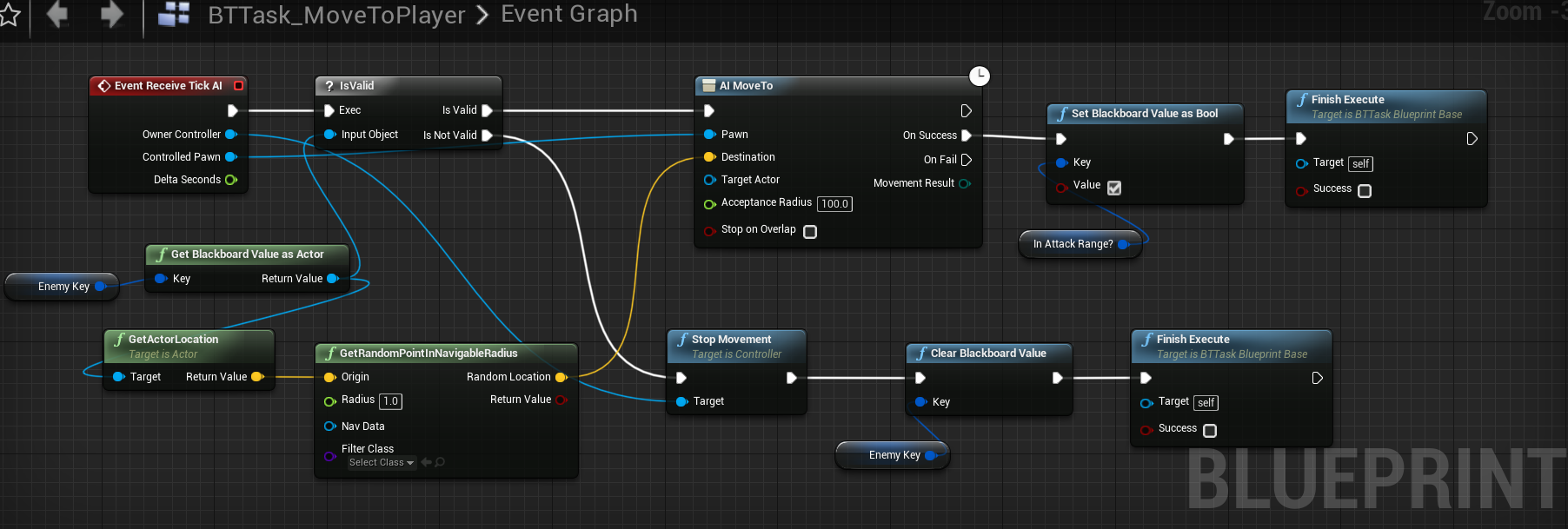
@mystic dock So I got rid of that crappy logic and made a behavior tree and instead of moving to actor or location I just got a random navigable point and move the ai there. It seems to fix issues such as the AI standing still when a player is falling, or if a player is on a floating platform above where ai can't get. The Ai will still move towards the player even though they can't reach him, it looks and feels more realistic whereas before the ai would just stop and stand there lol. IDK if this is the correct way to do it but it works for now. https://i.gyazo.com/0eef073de6fcd8b6ad55f1139f6fec02.png
 digital cairn
I might have a strange question... Is there a way to set a default navmesh cost to something else than 0? I want to have a low cost nav areas(roads) but the navmodifier value cannot go below 0...
digital cairn
Well that is what I know 😃 my question is if the default value can be changed...so I can use the modifier to set it to 0 in desired places 😃
 vagrant summit
is it possible to force an AIPerception sense to forget something? Even if the Max Age has yet to elapse?
patent hornet
@digital cairn the important bit is the cost of modifiers relative to each other
so not quite sure why you're set on forcing them to <= 0
digital cairn
I am not set on forcing them to 0 I am set on having a path of relatively low cost area compared to the entire map. And as far as I tested combining modifiers does not pick one or the other. I can obviously forcefuly by hand create modifier volumes that are outside of the "low cost" zones, but it would just be plain easier to set the default cost of unmodified navmesh to 1 and the low cost area to 0 using the modifiers :). But I might just be thinking about this wrong
And the numbers are just random values. obviously I could set the default to 3531 and the low cost to 1536
misty holly
Animations not working for walking in my ai but the walking animations work fine when I use them for a playable character any suggestions?
 red tapir
Ping me too if there's a solution
red tapir
Since I'm doing progress on it myself, it seems like the AI is simply having 0 acceleration at all times
@misty holly in the CharacterMovement component, set the "Use Acceleration for Paths" to true
It makes my AI run now, but there's some tweaks to be done about movement
misty holly
yeah i did that already 😦
red tapir
Oofers
misty holly
thx tho @red tapir
pine steeple
@misty holly @red tapir show me how your getting the speed
sorry meant to ping @misty holly only :/
misty holly
@pine steeple is this want you were reffering to?
misty holly
not sure what you mean 😦
red tapir
IsAccelerating is fed into Idle-to-Jog transition
The actual transition
"Actual Velocity" is a value to help me do slope animations, you can replace it with a simple Character->Velocity
pine steeple
did you put print
to see what values you are getting from your variables?
@red tapir don't use casts and stuff inside a transition node
its very very bad
store the value locally on the animbp inside UpdateAnimation
store actual velocity locally on the animbp via the above mentioned function, and then access it
 harsh nova
My character is not playing animations after making him move about in the map, help please
lyric flint
hi, im trying to make a tile, that if its in the ground goes up and then goes to the main charater location. I tried a simple move to location but i doesnt work. probably is wrong.
Here is the simple to location part
before that i have a spline and aiperception and works fine, i've tried with ai perception and simple move to location too
and it didnt work
the spline is so is goes up, like Zelda tiles
im using an actor
 deft sedge
using ai perception system, hearing stimuli is always returning false for successfully sensed but can see in debugger that it is receiving the noise event.
if i don't check successfully sensed and print the strength of the stimuli it shows a -1?
this works correctly in another project too
pine steeple
i am really thinking of re-writing the perception system, but not sure what epic has up their sleeve for Navigation V2
it can be re-written so much better
fallow hound
I didn't know epic was still working on ai
simple minnow
hmm if i want to write a Behavior Tree Service in C++, am I supposed to inherit from UBTService_BlackboardBase or UBTService
simple minnow
it seems like only difference is it has a BlackboardKey selector
which I dunno what that's for anyway
patent hornet
that is for mapping to blackboard data
any exposed BBKeySelectors are going to show on the nodes details panel
simple minnow
ah, okay
patent hornet
and you can map them to blackboard entries via a dropdown
then you can do Get/SetBlackboardValueAs<Type> from them inside the task/decorator/service
basically lets you reuse a task/decorator or service in different BTs with different BBs
with just a simple config
simple minnow
right, so definitely will want that in most use cases
patent hornet
yeah
if you write a c++ base use EditAnywhere for stuff you want to edit
as task nodes inside a BT are instances
anything you do expose like that will be editable in node's details panel
allows you to configure tasks/services
WFT is? videos are pretty thorough, i do recommend if you didn't do unreal BTs before
simple minnow
alright cool, I'll look at those if I get lost
 unborn jungle
The AI code for UT is super complicated, so much stuff running on tick!
Do you think they started from scratch or ported over the older UT game AI code to start with as a base?
unborn jungle
Ah ok thanks
Interesting that they don't use behavior trees or have a general state defined
It's quite technical but very interesting to see
near jetty
behavior trees suck for those kind of ais
like.. really suck
BTs are at its absolute best for "simple" enemies with direct combat patterns
in there they absolutely excel
for example, you could make every single AI in the entire world of warcraft, in small BTs. Super easy to do and iterate with
unborn jungle
@near jetty So as soon as they are worrying about multiple things at once (navigating to pickups, WHILE targeting AND dodging etc)
It's better off done in code without BTs?
Just seeing how bloated ShooterGames's AI is because of all the blackboard checks / setters etc.
I don't feel it's even worth doing it in a BT
I feel as long as each component (vision, movement, pickup needs) are nicely separated and easy to debug, it's probably much cleaner to do it in code
near jetty
yes
shootergame AI is terrible
but thats kind of the issue. You have several multiple decision processes at once
this stuff can be done in BTs, but it sucks
unborn jungle
@near jetty Many thanks for clarifying, I was really hesitant to use BTs for more complicated shooter AI but of course every example / tutorial uses them
Will stick with code in this case
Will try having a separate enum for each of the necessary states (vision / movement / loot needs etc.) and have each segment running separate logic that intertwines when it needs to (like finding a health pickup when low overriding any movement logic set from combat until healthy again)
near jetty
indeed
i have my Aggro component, Melee combat component, ranged combat component, etc
and those have different properties and callbacks
lyric flint
is there a way to see the radius of the ai perception on the map?
unborn jungle
Anyone notice AI using the navmesh only sometimes in the last few engine versions?
Forcing a navmesh rebuild (build paths) always gets it to work again but it's very strange
I can play the same map without closing the editor 3 times, and on the 4th time (not moving the navmesh or anything at all in the map since the first play), the AI will just not move
Hoping this doesn't affect builds and is only in editor
uncut viper
hi, can you have an array in the Blackboard ? can't find a way to do it
a solution would be to use a BP proxy that holds the array but that's just hard to read / follow and not as clean
i want to cache a list of outposts from which the AI would know to iterate thru and spawn units from them
uncut viper
yeah but the underlining behavior tree nodes don't allow me to set blackboard value as array there are only a small predefined primitive types like bool, string, int etc
should i just use object even tho i pass array ? let me check
patent hornet
you can make an object that has the array
patent hornet
adding custom support for array would be more then a little complicated
the 2nd one, yes, you make an object class that holds the BB data not directly supported by the BB
note: that data doesn't have to be in a blackboard
i'll give a trivial example
say you add an OutpustManager component to your GameState
say all your outposts on BeginPlay, GetGameState()->GetComponentByClass<UOutpostManger>()->Register()
your OutpostManager has Register and Unregister functions that Outposts can call to add or remove themselves from the Manager
and an array of Outposts
result: you now have a statically accessible OutpostManager that has the array of Outposts
all that is left to do is add a static function (BPFunctionLibrary) that does return GetGameState->GetOutpostManager->OutpostArray;
call it GetOutposts
and you can then use it to pull the array of outposts, without requiring any references, from any BP that has a World
uncut viper
i see, thanks will follow what you have described as i'm still trying to clean the project up to be more inline with the UE4 guidelines of GameMode, GameState, PlayerState etc
yep sounds good, thanks @patent hornet
patent hornet
it doesn't have to be GameState, it just has to have a unique instance for that World
we have a LevelManager actor, just the one on a level, which has those components
the GS example is simpler tho
uncut viper
yeah like in Unity i know the concept of managers, but still trying to push myself to those guidelines if we already have a format unique to UE4 might as well use it 😛
patent hornet
note: if outposts cannot be created or destroyed
your OutpostManager can, for sake of simplicity, just do a single GetAllActorsOfClass, once
and cache the result
instead of going thru registration
uncut viper
that's what i have currently in the BT Service that runs on the AI, i cache the result of the GetAllActorsWithTags or OfClass
uncut viper
for outposts, every 15 +/-5 seconds so 10 to 20 seconds
and if it has enough points, it will purchase the outpost, then spawn creeps from it if it has points for them (this is on a 1 second Service)
but there is caching of the outposts so not always doing HasTags or OfClass queries
patent hornet
the BB not supporting array is a problem tho, as any access of UObject also requires a Cast
just a little too inelegant for my taste, but it works
uncut viper
yeah i can imagine, but im dumping that approach in favor of what you said for future needs
thanks again @patent hornet i really do appreciate this insight
patent hornet
not sure how i feel about executing world affecting logic from inside a service
tho
uncut viper
mmm well it's the AI's job to spawn creeps if the Enemy Player has enough points based on agro and other variables maybe like player health and such
i dont see it moved in GM or a Manager
patent hornet
not that
but generally Service grabs the data for the BT, Tasks execute stuff
any flow control is obfuscated when you do it like this
in a month you'll forget about where that is, and next thing you know, you'll spend 2 hours searching for the code you spawn the creeps from
its just a maintainability issue
uncut viper
hmm
i kinda get what you say
i have a mix and match of that currently
the only services that also act as tasks are the top right ones from "Purchase Units"
patent hornet
generally not everything an AI does has to be in a BT
and if its not a decision, it shouldn't be
just clutters the thing
those services will Tick even if the AI is on low HP and is looking for medpack, right?
uncut viper
so a better place would be on the char BP itself ?
patent hornet
or its AIController
uncut viper
aha
patent hornet
or an ActorComponent on either
uncut viper
i see
patent hornet
this is still readable, because its small, but doesn't scale well
most common approach is to encapsulate the related logic in a component
like StrategicActions component, that runs all the stuff AI does with its owned "assets" on the map
uncut viper
aha
patent hornet
you still don't need it, but unless you add a code where AI needs to decide what to do with those assets based on the environment, you don't need to run it in a BT
infact, BTs do quite poorly juggling two unrelated sets of logic at the same time
uncut viper
understood, will keep the already made svc files but moved them in the AiCtrler for now and will test to make sure nothing broke but they were pretty self contained not using anything from the BT or BB
lyric flint
Pls can someone give me a good tutorial for npc attacking player and taking damage to player Pls
?
pine steeple
that seems really simple, do you really need a tutorial? your AI hits the player, sends a takedamage event to the hit actor, hit actor reduces his health?


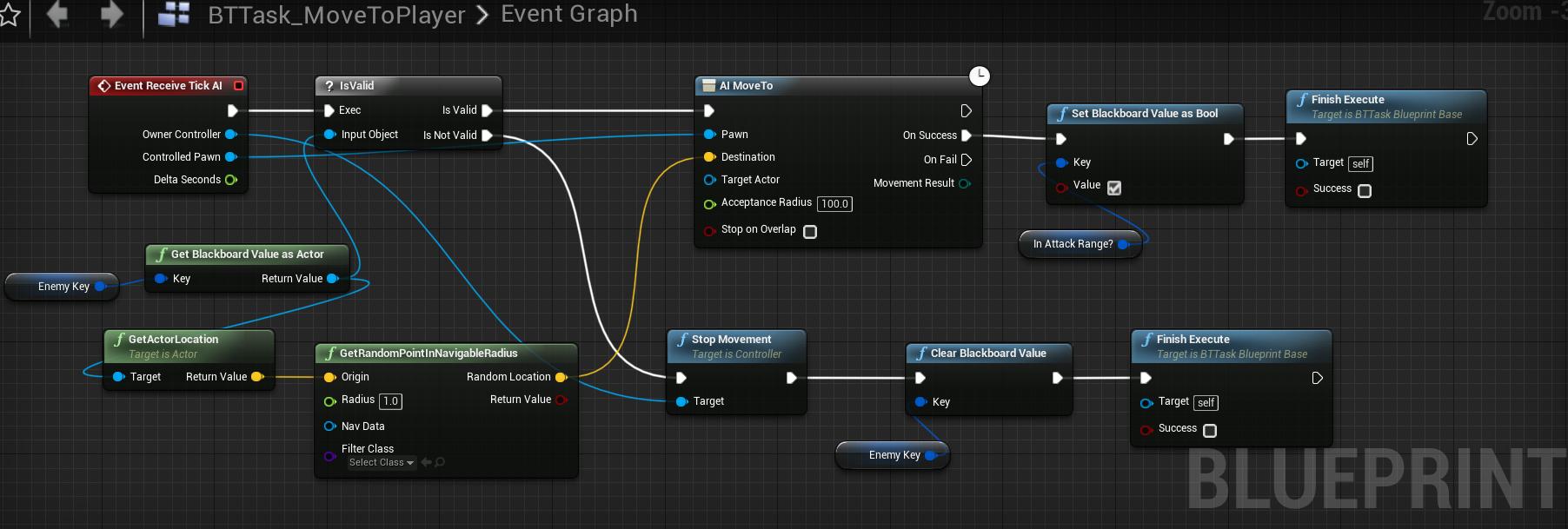 lyric flint
the ai doesnt hit the player, it did taht before but not anymore... and my head is starting to hurt
i got a behaviour tree, when the player is in range, he does the attack. The task is really simple "Event execute ai + cast to Brain_ai + get custom event attack+ a delay for the movement attack+ finish execute"
the custom event goes to the npc (and i know that is more simple to just, instead of casting to brain_ai and then get the custom event, just make a cast to npc and then get the custom event) then he executes the animation
but he doesnt
pine steeple
and you checked Gameplay Debugger?
checked the state of the BT when he is supposed to attack?
put a breakpoint to see if said code actually executes?
lyric flint
ye, i found the error. Thank you for the help. I had event execute, instead of event execute ai. oof 🙃
pine steeple
yeah debugging is the best thing to do
and its one of the most useful things you can do when you have a problem
lyric flint
Hi, Im trying to make a tile floor that when his collision gets overlaped he jumps and stops in air, and goes in the direction of the player. Whats the best way to do it? Fly?
 pine yew
Hey everyone. Any chance someone would be kind and teach me some AI Basics. I have had a read, and watched some tutorials, but I can't get stuff done. Like, for example, getting diferent actors from the same parent class to act diferently if they are all using the same AI
lyric flint
Hi, so im making a boss. This boss as 5 parts, and when one part dies another gets agro. It only misses on thing on the blueprint but i dont know what to put.
what should i put as object?
its an npc
wary ivy
what are you trying to do?
do you know what "cast to" means?
but to answer your question: you plug in an instance of Desert Boss Left Leg there
patent hornet
@pine yew the simplest way to achieve that is to use a RunBehaviorTree task for custom logic
and just have your derived classes define their own asset
so they share the same common logic, but can run entirely different BT when they need to attack or move/run/crawl/fly to something...
pine yew
Well, my problem is like this: Imagine a SIM City game, where you have a bunch of people. There are tasks that need to be done, and the player can either assign a NPC to a task, or the NPC will do that task by himself, based on some parameters.
Now, if I was to create a AI controller for each NPC, it would be a lot of AI controllers. ANd this might be the way I will have to do it, but I hope not.
At the moment, I have only 1 AI controller, but the problem is, when I call that AI and change the BT, it actually changes the BT For all the other AI, or, for some reason, just for one of them, the first one to have been spawned * this might be a mistake of mine somewhere, I need to investigate more)
lyric flint
@wary ivy sorry for the reply time. Im trying to make, that when the Desert Boss Left Leg, health goes to 0, these part can start using the behaviour tree. But i found an alternative, im just going to use a custom event, instead of event begin play
pine steeple
@pine yew the only way you could possibly use one ai controller for multiple npc's is to create an array of BrainComponents
and assign each new NPC a new BrainComponent
that it can use
pine yew
Cool, thanks!
patent hornet
you might look into a solution where instead of your subclasses of pawns encapsulating behavior
the object that needs the task performed on it holding the logic for how it should be done
you have a bed? bed has a BT in it that defines how to use it. when your pawn interacts with it, it runs that beds BT
approach has a lot of advantages, like being able to significantly extend AI behaviour without ever touching the binaries
fallow hound
Yeah the Sims uses that method
fallow hound
Do Gameplay tasks replace pawnactions?
wary ivy
yes as far as I know
lyric flint
how do i make that when i throw a ball, when that ball hits something it disapears?
like a wall, floor, enemies, etc
 sudden ledge
hello there. i'm trying to make a tower defence game. i am using default ai components (navmesh etc) of unreal engine. is there a way to predict where the agent will be in the next 1 second so that an enemy arrow can hit it from above?
fallow hound
@sudden ledge https://api.unrealengine.com/INT/BlueprintAPI/AI/Perception/RequestPawnPredictionEvent/index.html
Request Pawn Prediction Event
I've never used, so I can't help much beyond this link
sudden ledge
hmm, i guess this won't work for curved roads, right? thanks though, i'll look into it 😃
wraith eagle
Finally taking a look at Behaviour Tree stuffs and doing a BTService in C++. Is TickNode the correct tick function to use? Cause it doesn't seem to be calling. I'm assuming I'm missing something dumb...
Oh, got it. Was deriving from BlueprintBase, not BlackboardBase
 tropic lily
I know this sounds vague, but does anyone have any idea how to make an AI walk circles around a player?
patent hornet
make an EQS point grid around the player
filter anything too close or too far for a single query
filter unreachable
filter too close and too far from the player
score the rest, move to winner point
so you want points on grid around the player that are not too close or too far from the player (donut), that are not too close or too far from the AI (otherwise it might just decide to walk thru the player to get on opposite end of the circle)
you filter out anything not on navmesh, and otherwise illegal as well
and it will, depending on the frequency on the query and your definition of "not too close and not too far from AI" do fine or rough circles
@tropic lily
tropic lily
Wait how do I make sure it’s always around the player? (It’s been a while since I worked with EQS)
patent hornet
i'd know if i looked, but it has to do with EQS context cursor
 bronze carbon
Hi, Is there good way to change the parameter of task in behavior tree? e.g. "Acceptable Radius" on "MoveTo" task. This radius may vary according to setting/buff.
One way I know is use Blackboard to store the radius key, and implement a task similar "MoveTo", the only difference is float radius property replaced with BlackboardKeySelector. But it's tooooo heavy😫
Is there any other easier way? Thanks!
 woeful parcel
hello AI enthusiasts. I am looking into making my own little AI in UE4 but I see that the learning resources pinned by @elfin socket are all for blueprints. do you happen to have a learning resource for building a C++ AI that you could recommend? thanks!
pine steeple
@bronze carbon short of making your own service and checking
no
how is BlackBoardKeySelector too heavy?
that statement makes no sense
bronze carbon
@pine steeple emm... I think it's too heavy because I have to copy paste the "MoveTo" task, and then change type type of AcceptableRadius from float to KeyboardSelector. If there is many dynamic task parameter (in my game almost all parameters are affected dynamically), all of them must be stored in Blackboard🤔
pine steeple
set radius to 1
and create a service
which monitors how close the ai is to the goal
using dynamic variable
its how i did it
bronze carbon
@pine steeple Thanks! You saves me!!
lyric flint
Blueprint
I'm trying to get my AI to move around random points in a certain area. I want the area to be square/rectangular, essentially want AI move around the extent of the box.
I can only find a GetRandomReachablePointInRadius node in my Task bp, but this deals with a sphere. Is there a way to achieve this but with a square? Moving around the extent of my navmesh bounds isn't an option unless there's a way to have separate nav meshes overlapping (still new to AI so not sure how I would go about that), cause there's a certain area I want the AI to be able to go to after the behaviors are done.
lyric flint
Nevermind I was overthinking it. I set up a box trigger and then made a reference to it. Then got its bounds and used the Random Point in Bounding Box node for the location
woeful parcel
anybody has problems seeing blackboard keys in their behaviour tree?
although I do have them on my bottom right
woeful parcel
if anybody has this issue: I had to change the base class of the blackboard key to Actor
woeful parcel
trying to hook a vehiclecomponent's movement component to the AI is a pain!
pine steeple
its not really possible
pine steeple
with default implementation 😄
woeful parcel
I've built my own UPathFollowingComponent
and it seems to be working
my problem is that the target location determined by the pathing system is not taking into consideration the width of the vehicle 😦
anybody has any idea?
jaunty peak
You could use EQS to find valid points?
woeful parcel
hm yeah good point
first of all I think I should learn about the AI system in UE
for example I've no idea what a nav data is, what filter class is
jaunty peak
If you haven't already seen Ryans tutorials, they are worth looking at, https://www.youtube.com/channel/UCsS5i15vvUbwfr_1JdRKCAA/playlists

YouTube
Welcome to my channel where I talk about games, games design, and give tutorials on games development. I am a game developer and teacher of games development...
jaunty peak
😃 you're welcome
woeful parcel
any other learning resource would be welcomed
jaunty peak
Matthews wtf and htf vids are brilliant, underscore and titanic games come to mind as well. Dean Ashford has several as well, it really depends on what you're after. I tend use a couple to get the basics of what I'm looking for and try to seek out more detailed info elsewhere. This discord is great, but can be busy and comments can vanish quickly sometimes. Join the various youtubers discords if they have one, often other users can help out. 😃
The UE answerhub can be a good aid too, as are the forums.