#gameplay-ai
1 messages · Page 110 of 1
 sweet acorn
 fallow gull
Hi guys, I need help on my Racing car AI.
I can't figure out a way of telling the Ai to slow down before tough turns.
I'm using a spline for the track, And I project the location of the car on the spline, a few meters ahead, and I steer towards that location. When the turns are too narrow, I'd like to tell the car to slow down, do you have any Idea?
 tawdry spruce
Hey guys, I have an AI that patrols between 2 path points and crosses a pressure plate every so often. the AI has an item inside of him, a key of sorts, and when I pick the key I want the AI to stop moving and be idle. If you then implement the key again the AI should start moving again. My question would be, what would I be looking for to get the AI to stop moving when you pick this item. (I'm really quite novice to AI and blueprinting so would anyone know how difficult it would be to create this interaction?
fallow gull
I think you can simply have a boolean bHaveItem on the AI that you set to true when It has the key, and to false when it doesn't (when the player takes it). And then you can say if this boolean is true you can move, otherwise, do nothing
 upbeat bronze
Hi all!
Is it normal that an ai controller can not be destroyed?
fallow gull
I think it's normal since the ai controller is linked to a pawn. I'm not sure a pawn can be on the map without any controller
 worldly mural
How could I get an AI to follow a spline?
 slow breach
@worldly mural you get the points on the spline, ai move to those points check location of ai to the location of the spline points, if they match move to the next one.
@upbeat bronze to my knowledge you cant destroy an ai controller since its not in realspace.
@fallow gull similar to my response of SeanOMik i would check distance to the turn, if x distance away slow to this speed. Then you can add a random float or something in it which could act as like AI awareness. So if its low they are possibly worse on most turns... Etc
You may beable to attach a pseudo speed limit to the spline points or corners
worldly mural
Okay, thanks @slow breach
slow breach
Np!
worldly mural
@slow breach I'm trying to move the AI to a point, but it doesn't move with the reason of "Aborted"
worldly mural
I know, its a little messy @slow breach
fallow gull
@slow breach Hi, thanks for responding. The thing is that i can't really know when the turn is. I can't place like waypoints on the map manually because it's a large world and it would take me ages. Also there might be procedural circuits, so it's unpredictable. I'd like the Ai to know when there's a turn, and how fast it should arrive in that turn to not go off the track. The distance check is the way to go to make it slow down before turning, the real thing that I'm stuck on is how to make it understand that there's a turn ahead
slow breach
i think the pseudo speed limit signs is the way to go, if you can some how get the curve of a turn and check how sharp it is to set a pseudo speed limit sign
i would investigate that
but that is advance level specific stuff :/
@worldly mural No thats a lot of messy.
You said the reason is aborted. You have to give me more information than that. I havent seen your code, I havent seen the error mesasge, i havent seen how the game plays. So the more information and specifics is your best best. You have a lot cut off in that pic. Do you have a picture of the error message?
worldly mural
@slow breach I mean the error it gives is "Aborted"
The vectors are where its trying to move to
And the code I sent above
slow breach
have you tried increasing the acceptance radius?
can i see the spline the ai is trying to follow in action
worldly mural
The outer white dotted line @slow breach
And yes I've tried increasing acceptance radius
slow breach
what are the volumes beside the spline and do the ai spawn correctly?
worldly mural
Those volumes are collision boxes that I would use later, currently the collision for them is completely disabled, so it shouldn't be causing an issue. And the AI does spawn correctly. @slow breach
slow breach
whats your nav mesh look like
worldly mural
It was working earlier before I made code changes, but now only small squares in the corners are built
The nav mesh wont update either
slow breach
picture
worldly mural
slow breach
have you reversed those code changes to see if it works then?
have you built the game recently?
to see if that fixes it
the reason its aborting is the nav mesh theres ur answer
worldly mural
Yeah
slow breach
lol...
worldly mural
I know that now
lmao
How do I build the game though?
I haven't had to build it. I've packaged it, but not built it.
@slow breach
Oh wait
Nvm, I just found the build button at the top
slow breach
yeah that one
and the arrow beside it lets you build specific thigns
im pretty sure nav mesh gets rebuilt in that but i could be wrong
slow breach
nice
np
yeah i didnt know about connecting the ai move to enum into a print string to get aborted
that is useful, that would have helped me
but the only reason i could come up with for it aborting is if something is blocking it from moving
 pliant mesa
@floral mango So I found the utility plugin https://wiki.unrealengine.com/Behavior_Tree_Utility_Plugin Is there any good tutorials for it?
 floral mango
the wiki page explains the basics. you use decorators to calculate the utility of each branch, the utility selector selects the highest one (or uses weighted random)
floral mango
yeah, utility is just using a scalar value to rank the relative 'utility' of different actions....it's that simple
pliant mesa
Yeah thanks for this
 tiny bridge
Hi, I am trying to build AI controlled character which can navigate and jump on area of constantly moving platforms. I have problem with dynamic nav mesh generation on runtime. Nav generates and updates on runtime, but most of my generated nav mesh shows as red aka dirty areas instead of those good green ones. That apparently affects to my AI target and path finding. AI move target is random navigable point in specific radius of AI bot itself. I have implemented AI jumping trough line trace which checks if there is platform in front of AI bot and if there is not it will jump. Also tried to put some nav links on moving platforms to help AI to navigate trough those platforms. Any tips how to solve that nav mesh problem? Or this kind of AI even possible to do?
 patent hornet
Try slapping a NavInvoker (might be NavigationInvoker) component to it
 tawny copper
This image is what happens in @AnaZuida platformer currently with NavMeshes. Any ideas?
 wary ivy
what happens?
 acoustic fossil
Does anyone know how to test if a point is in a navigation area?
I am trying to test the point in a custom EQS test
 pine steeple
EQS can test that
@acoustic fossil

set that to filter
and it will remove any points that are not navigable
acoustic fossil
I tried that, but it looked like it removed the path as well. The path can go through the marked areas (and practically has to), but I dont watn the actual point to be in it
acoustic fossil
its not a non-navigable area, there is just a certain area that I do not want the eqs to return
The enemie is moving to cover from the player, and the simplest solution to prevent their legs from sticking out over the wall is to mark the places that can still be seen
It is for a small enviroment
pine steeple
then put a modifier over it
and set a filter
and have the PathExist use that filter
and filter areas your dont want
acoustic fossil
I've tried that, and I'm pretty sure it filters the path as well
 glacial kiln
Is there an upper bound on the number of navigation path nodes that can be used at one time with a default navmesh?
 fluid sparrow
does this look like an area where an AI can get stuck?

My AI often gets "stuck" and stops moving to an area
 hybrid cipher
@fluid sparrow well yea it does look that way, although even if the representation of navmesh doesn't need to be 100% accurate, it can still become a bottleneck that will make navigation more difficult
 crystal grotto
How should i mark positions on the map for a AI ?
crystal grotto
Or how can i refer an object in the world in my service ?
crystal grotto
Not sure if you should do that in the AI. I'd do it within the blueprints.
 quartz urchin
Hey Everyone. Need some help with AI. What is the best way to tell NPC change state if he can not reach target location ( move to) For instance Just blocked by static mesh? I've tried to use time limits for tasks but this seems to be not the best solution.
just to explain problem
hybrid cipher
BT has Path Exist decorator, maybe look into it, but it also depends on your particular case
sweet acorn
Nothing anywhere on this. Anyone know how to set affiliation for senses? I can click detect enemies, friendly and neutral. However, where do I set those up at?
hybrid cipher
@sweet acorn I tried this, unsuccesfully I gotta say, but here's something that might help https://answers.unrealengine.com/questions/535293/aiperception-affiliation-implementation-in-c.html currently C++ only I think
 lyric flint
@quartz urchin if there is literally no path the air will stop. You can expand your navmesh. You should use 'AI move to'. This will give s true/false if so reaches location or gets blocked.
Ai will stop*
quartz urchin
Thanks @lyric flint
sweet acorn
@hybrid cipher Thanks! C++ is just fine. Weird they have almost no information about it around.
hybrid cipher
Oh yeah it is a bit of a forgotten part I think, I heard ppl just make due with tags anyway
fluid sparrow
question for you AI gurus
I have a navmesh my AI uses, and i use a "AI MoveTo" blueprint node with an acceptance radius of 100 to chase the player
however, in my multi-story level, there is a position where the AI will chase the player in the correct x-y coordinates, but it will chase the player in the exact position, but on a higher floor
how do i ensure that the AI is chasing the player on the same floor that they are on?
crystal grotto
@fluid sparrow Maybe this helps you.
I'm using this as some kind of random vector. There you could select the height.
sweet acorn
Anyway to activate the pawn from a stimulus when it is spotted by a sight perception?
hybrid cipher
Hey, is it possible to play animation on my AI character from BT? I'm trying to model non-combat state, but just using Play Animation Task doesn't seem to do anything. Or do I have to work it into animation state machine?
patent hornet
You can use a montage to effectively override the anim state machine for its duration (on the whole body or just a part of the skeleton), and you can play it from BTTask
lyric flint
Hello, I've been following a tutorial for AI in c++
And I'm stuck as unreal won't compile anymore because of :
" ABrunrealCharacter *Enemy = Cast<ABrunrealCharacter>(GetWorld()->GetFirstPlayerController->GetPawn());"
Unreal says :
"BTService_CheckForPlayer.cpp(26) : error C2227: left of '->GetPawn' must point to class/struct/union/generic type"
"ABrunrealCharacter" is the default character from the top down template
The tutorial is using the third person tutorial, but I did the exact same steps with top down.
Any idea what happens there please ?
 magic jasper
GetWorld()->GetFirstPlayerController->GetPawn()
needs to be:
GetWorld()->GetFirstPlayerController()->GetPawn()
lyric flint
hm thanks but then GetWorld() throw an error "pointer to incomplete clas type is not allowed"
ah nvm it was missing an include, thank you very much !
hybrid cipher
@patent hornet so simple play animation won't do?
@lyric flint you need to import world.h
patent hornet
actually he needs () after GetFirstPlayerController
anim graphs should be used to cover general cases, adding special animations to them makes the graph ever more complex, and it scales poorly
when you play a montage it just play it for its duration and switch back to animgraph
you can pull any of the paragon characters (i think they all come with anim BP by now) from the epic store and see how epic did it with Paragon
lyric flint
I needed both () and world.h, it's all working fine now, thanks :)
hybrid cipher
Nah I meant playAnimation method from skeletal mesh component, trying to understand why it wouldn't work
patent hornet
it probably would
montages are better tho, simple to make and give you far better control
hybrid cipher
Kk thx i will check it out
 wraith eagle
Hey, so (hopefully) a quick question:
Is there a "nice" way to change the cost of a navmodifier component without the dynamic nav mesh rebuild kicking in? I don't really need to change the NavArea, I just want to increase or decrease the cost slightly, but I can't seem to find a way
 arctic crag
So I'm working on animal AI and the animals have a state, "INTERACTING". How can i make the BT stop whatever it's doing when this state is entered?
lyric flint
"Error LNK2001 unresolved external symbol "public: virtual enum EBTNodeResult::Type "
But why ? : (
Google says missing "GameplayTasks", but I already have it :
"PublicDependencyModuleNames.AddRange(new string[] {"Core", "CoreUObject", "Engine", "GameplayTasks", "AIModule", "InputCore", "NavigationSystem"});"
Any idea again please ? (last time with noob question, sorry)
patent hornet
@arctic crag check out WTF is? Decorators video on youtube, pay attention to the part with ObserverAborts
arctic crag
@patent hornet I figured so. I must not have setup my custom decorators correctly. Thanks
 wide tartan
why if I change the role of an ai controlled pawn to autonomous_proxy, movetolocation doesn't work anymore?
 buoyant vault
Hey! 😃 does anyone know if its possible to generate navmesh using static mesh components? I have a large map with roads, and i want the sidewalks to generate navmesh. is the only way for me to do it to add alot of navmesh bounds volumes? i see that the static mesh editor has navigation options, but they dont seem to work in editor straight away?
 pallid mica
Your Meshes needs to have Collision
That's basically all it needs to genereate the NavMesh
One Volume should be enough
buoyant vault
The sidewalks are instanced static mesh components though :/ im getting the normal generation on it, but im using a navarea class and thats not being applied.
The Sidewalks are generated from a blueprint, using the same mesh (spline mesh component)
the other one with the correct navigation (blue) is just the static mesh dragged into the world
 compact hull
So, I've got some interesting behavior..
https://puu.sh/D7TXm/7026441efe.gif
(RED = Forward Vector, BLUE = MoveVelocity, RED SPHERE = Target)
- It's often giving a (Completely) different
MoveVelocitywhenRequestDirectMoveis called..? - It's triggering
OnMoveComplete(failure) way too early..
MoveToLocation( target, 5.0f);
https://puu.sh/D7U3C/7f736e3b06.png
Any thoughts? :s


I'm guessing it's incorrectly detecting that it's stuck and is therefor trying alternate routes..
eventually giving up..
Am I missing a KeepAlive call or something? :s
wary ivy
@compact hull there's a function in C++ world that allows you to query the vector to the closest navmesh wall
you could maybe use that for detecting when something is stuck
compact hull
@wary ivy I'm not trying to detect if something's stuck
I mentioned that as a plausible cause for its wild changes in direction/prematureFailure
wary ivy
ah
compact hull
Yeah, really weird, I'm guessing something keeps reporting the pawn as stuck which causes things to fuck up :s
 echo ether
@floral mango , Hey it's me again. I've been trying to use the SVON plugin to another map. But in the output log, this is the only message i'm getting "finding path from node A and node B". therefore pawn gets stuck at the same point. Any idea what's wrong?
magic jasper
@compact hull what VS extension is that which shows function param names?
magic jasper
Ahhh kk. I'm a VAX user 😃
compact hull
Yeah, that's on ma to-check list :p
echo ether
@floral mango , nvm, I think i fixed it.
 remote dawn
Hello, everybody.
I am currently working on an RTS game and have problems with the NavMeshBoundsVolume. The problem is, I'm setting houses and the AI is trying to walk through the house instead of around it. Can I update the NavMeshBoundsVolume somehow?
or do I still have to set something at my house Actors so that they are recognized?
 fallow hound
@remote dawn a couple things, run time generation of navmeshes might have to be activated in project settings
and another thing, make sure the house mesh is set to block navmesh
remote dawn
@fallow hound thx for the answer. i found it under projectsetting -> NavigationMesh -> runtime -> runtimegeneration (it was static)
but when is choose dynamic the ai dont walk anymore.. what i do false?`
maybe you know a little tutorial that shows you how to do it?
fallow hound
nav invokers are pretty cool though
remote dawn
hmm. i switch back to static but the ai also don't walk anymore.. i have the navmesh and recast deleted and replaced..
 reef glen
Does someone knows how can i play an anim montage using blackbord when the ai health is 0?
reef glen
https://www.youtube.com/watch?v=9jeWaJEVoZM&feature=youtu.be please can someone help me with this

I want the animation to only be player once
patent hornet
put in a decorator that doesn't allow it to be played more then once/if they are dead/downed
reef glen
How
patent hornet
pretty sure there is one in engine that allows only for N executions
failing that, bool IsDead, get it into blackboard and check for it
remote dawn
@fallow hound @pine steeple i have found the problem. i have on testing unchecked the Can be Main Nav Data. with checked all work fine 😃
fallow hound
Nice!
echo ether
@floral mango , Hey, Basically the plugin displays 2 information when it is unable to find path to the target location. 1- failed to find start nav link. 2- Failed to find target nav link. Is it possible to use those messages and perform actions based on that? Like for example for 1, it starts moving upwards or when 2 happens, it starts emitting particles etc?
 visual berry
I have an AI that I've disabled use controller yaw on so it doesn't snap turn, but now if the player intentionally runs into the AI's collision it stops it from turning, any idea how I can fix that?
 viscid oasis
EQS isn't deprecated, is it?
remote dawn
Hello together
What's the best practice if I want two AI's to move an object to another location?
hybrid cipher
@viscid oasis EQS is still experimental (marked so), which from what I heard is mostly due to fact UE still doesn't have editor support they want
hybrid cipher
hey, anyone ever encountered issue where play montage called from BT only starts when previous animation finishes? stop montage called from BT doesn't seem to do much either. MP game
 mystic dock
Your animations perhaps addressing different slots, so the previous montage won't stop maybe. Just a thought.
hybrid cipher
only using default slot (I think?), been doing some more digging and when StopAllMontages is called, MontagesInstances is Empty (so there's nothing to stop)
so on second thought you might be right :)
 subtle axle
Hello
 stark zealot
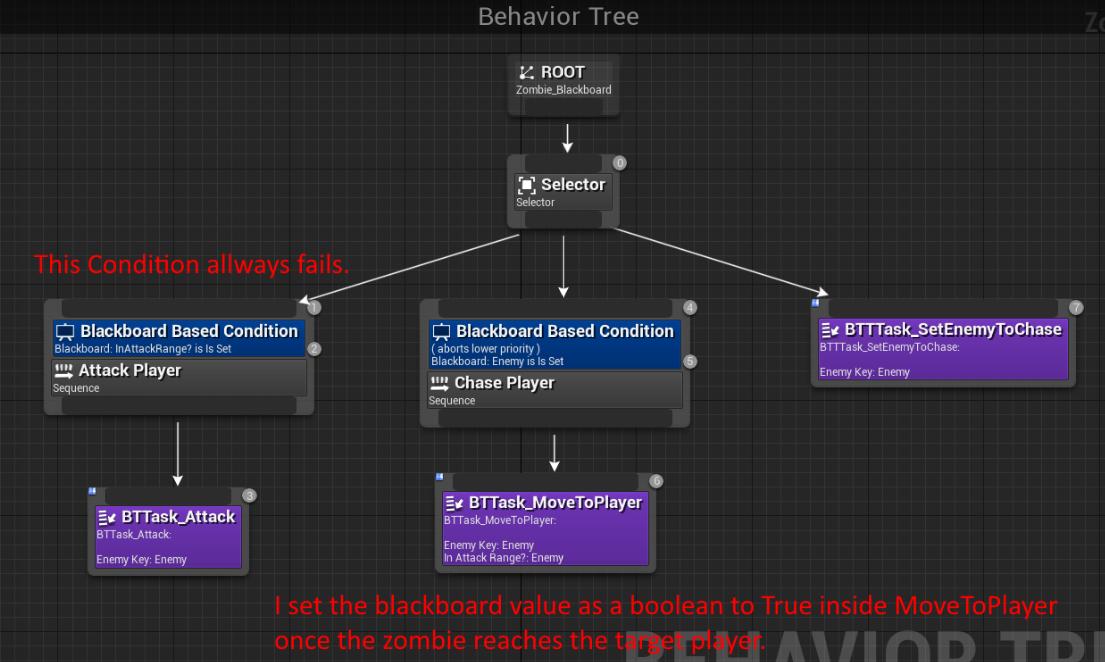
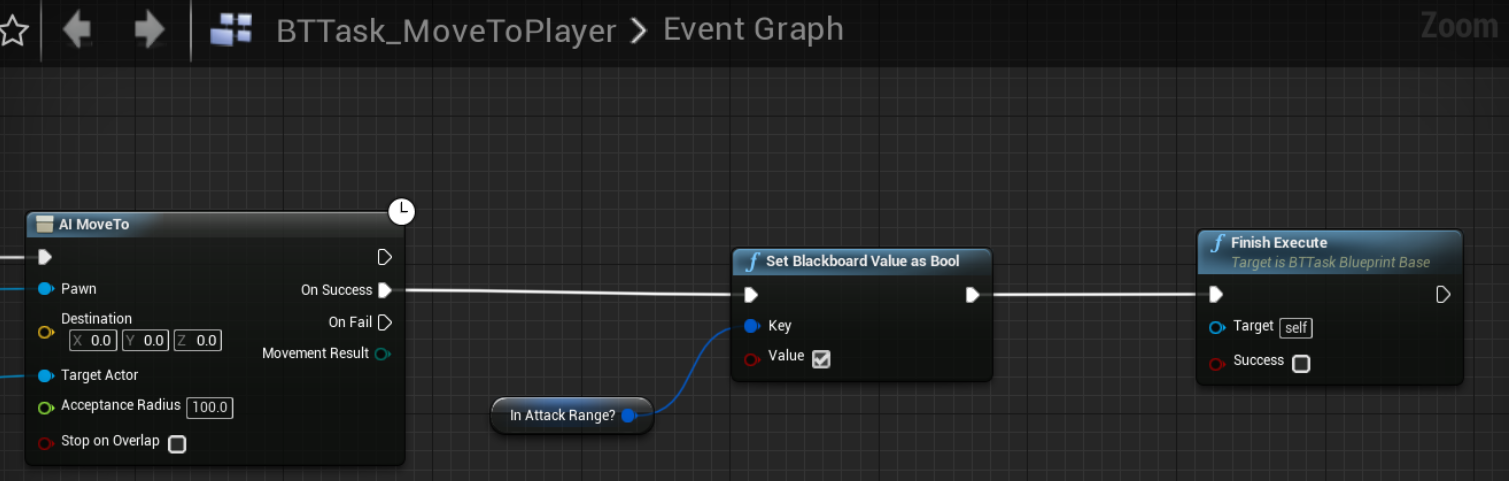
I need help. I'm making a simple zombie Behavior Tree and for some reason I can't get a Decorator to pass. It fails everytime even though I think I'm setting the variable. https://i.gyazo.com/85b0b6e5107cbb4c285062df3f93de6d.png
 low oak
hi all, is that a way to change blackboard value through animnotify?
 jaunty peak
@stark zealot Shouldn't your Finish Execute be ticked as successful?
stark zealot
@jaunty peak Well I thought the same thing but it didn't leave the middle branch if I left it checked. So by leaving it unchecked it left the branch and went back to root
viscid oasis
Do you still have to create custom EQS queries via CPP first?
I used them a lot about 6 months ago but I can't remember how they work
jaunty peak
@stark zealot I don't know much, but I'm guessing that the NPC can't ever be at the players location because the player is there. Maybe remove the set node from the task, and use an overlap event for when the NPC gets close enough ?
hybrid cipher
@viscid oasis if you want custom generators or tests then I think you will have to use CPP, query itself can be done in editor, you just pick the generator and attach tests to it, the built-in ones are good for many general scenarios
viscid oasis
Yeah I figured as much - that's not an issue, I just plum forgot how to do them.
patent hornet
you can do custom generator in BP just fine
hybrid cipher
well if you want c++ tutorial I've got a bunch that helped me
viscid oasis
I'm not too fussed with the moment; I've come across a few.
 trail saffron
hi guys.
in an RTS game, how would I go about controlling multiple units? I did some research and this seems to be the way:
every unit has an AI controller.
the playercontroller does not possess any unit directly.
when a unit is selected, the playerController issues commands to the corresponding AIController of the unit, and the command is then executed.
is this a good way?
 dusky lodge
Pretty much
trail saffron
okay thanks
patent hornet
@trail saffron do not keep any relevant data as variables in the PC, keep them in AIController, and have Get functions for them in the PC
or keep them in the Pawn itself
trail saffron
👍 thanks for the info @patent hornet
patent hornet
depends on if the game is single player or not, AIControllers don't normally replicate
trail saffron
oh, it's multiplayer
would I simply replicate the AIControllers then or use a different approach all together?
patent hornet
i replicate mine, but i have 1 pawn per player
if i had more, i'd use the Pawn to store data
trail saffron
does this even make sense?
 near jetty
is it for a strategy game?
trail saffron
yes, online rts
near jetty
pro tip. Do not use Character/controller on your units
use Actor
in general you want to have a good bunch of units. And they are all dumb. Its best to forget the whole Pawn/Controller thing
it is super expensive, designed for player characters, where you only have a handful
main issue is the pathfinding, only Characters can pathfind... So go with Character/controller for now, but do not have ANY AI on the unit
just use the MoveTo stuff
eventually you will want to have your own path-follow logic and just Actors for units
if you want to do multiplaer... i recomend you desist. Unreal multiplayer doesnt work for RTS games
you would need to create your own systems
having like a hundred replicated characters for each player will nuke performance on every machine + use absurd amounts of bandwidth
trail saffron
nah it will definitely be under 10 units for each player
near jetty
how many players
trail saffron
6
near jetty
60 replicated characters is quite a lot
for reference, both PUBG and Fortnite have 100 replicated characters, and it requires super powerful servers + grinds every machine to a halt even with their insane optimization
becouse its not just 60 characters, is their animation events, shooting, dying, etc
near jetty
make sure to test your game with 6 players and all characters on real internet every few weeks
to avoid it going to absolute shit and you not realizing
trail saffron
yeah, if it ever reaches that point I'll definitely do that
you said I should use actors instead of characters. is having simple "MoveTo()" and "Attack()" really less expensive than having an AIController? what about AttackMoveTo()? I'd have to check if there's an enemy in range every tick
near jetty
a lot cheaper
Character class does very complicated movement code
if you use Actors (or at least a custom character movement component) you can make things MUCH simpler
just do 1 trace down and snap to floor
Character does quite a lot of checks when you move
trail saffron
that's very good to know, thank you!
can I still use a navmesh with simple AActors?
oh I just read that navmesh and multiplayer don't mix well
at least I have to enable it manually. the question about navmesh and AActors still stand tho
near jetty
oh, no issue
the problem is the path follow
there is a function that is "give me the path beetween A and B"
and then you can use your own code to move on that path
you essentially get an array of FVectors for the path points
trail saffron
is there any data on networking cost in regards to actor vs character, aicontroller etc. ? I'd rather use the simpler solution (in terms of programming) if hosting a server doesnt require triple A budgets.
like benchmarks or something
maybe I should ask in the multiplayer channel
Unreal Engine Forums
Build powerful visual scripts without code.
 bold sapphire
Any way to exclude an actor class from being detected by AIPerception?
patent hornet
don't have an AIPerceptionStimuli component on it?
bold sapphire
Players team needs to detect only enemy team and enemy team need to detect player team.
Right now every character detects every character. So it has to run through all of them till it hits one that is a valid target. I would like it exclude class types and set that on each characters begin play.
patent hornet
i think they never got the team interface to work
for AIPerception
it looks very unfinished
bold sapphire
well its working. I just think it is working harder than it should. Looking into detection by affiliation.
ah I see it can't be set via blueprint...
patent hornet
there is a live stream with perception from 3 years ago
the entire module is still in exactly the same state as when that stream was made
bold sapphire
yea so the only option I see is that I am going to have to turn on and off perception when they have or don't have a target.
bold sapphire
lol mod told me games make their own perception system and tailor it to the games needs. I guess I have to get on it and make that happen.
 graceful saffron
do nav mesh volumes not rotate?
green area stays the same no matter how i rotate the volume and rebuild, etc.
 karmic vessel
Hey, the ProjectPointToNavigation method in NavigationSystem.h is marked as deprecated. It is stated to use the new version. But I can not find it. Where would I find the new version? Thanks in advance
patent hornet
    UFUNCTION(BlueprintPure, Category = "AI|Navigation", meta = (WorldContext = "WorldContextObject", DisplayName = "ProjectPointToNavigation_DEPRECATED", DeprecatedFunction, DeprecationMessage = "This version of ProjectPointToNavigation is deprecated. Please use the new version"))
    static FVector ProjectPointToNavigation(UObject* WorldContextObject, const FVector& Point, ANavigationData* NavData = NULL, TSubclassOf<UNavigationQueryFilter> FilterClass = NULL, const FVector QueryExtent = FVector::ZeroVector);
there are 2 overloads with different signature in the same header
    // @todo document
    bool ProjectPointToNavigation(const FVector& Point, FNavLocation& OutLocation, const FVector& Extent = INVALID_NAVEXTENT, const FNavAgentProperties* AgentProperties = NULL, FSharedConstNavQueryFilter QueryFilter = NULL)
    {
        return ProjectPointToNavigation(Point, OutLocation, Extent, AgentProperties != NULL ? GetNavDataForProps(*AgentProperties) : GetMainNavData(FNavigationSystem::DontCreate), QueryFilter);
    }

    // @todo document
    bool ProjectPointToNavigation(const FVector& Point, FNavLocation& OutLocation, const FVector& Extent = INVALID_NAVEXTENT, const ANavigationData* NavData = NULL, FSharedConstNavQueryFilter QueryFilter = NULL) const;
@karmic vessel
and a K2_ version exposed to blueprints
karmic vessel
@patent hornet thanks a lot
slow breach
@graceful saffron you need to rebuild navigation sometimes
graceful saffron
@slow breach nothing happens when I do that, it just stays the same unless I'm building it wrong
slow breach
sometimes it gets stuck or shows the wrong navigation, sometimes it just needs time to refresh the visualization of it i think
maybe restart the engine will refresh it

thats how you build it tho
graceful saffron
yeah doesnt fix it
i dont think you can rotate the nav mesh because I loaded up 3 different engine versions and its the same thing in all 3
 deep shoal
The navmesh on my test level is baking above the ground and it's not continous. Any idea what could be the problem?
 hearty delta
Does anyone know why my AI might be getting caught in a Move To node? I'm trying to implement AI in a networked multiplayer game and once the AI starts its move to node, it initially starts moving to the point only to stop well short and be trapped in the node forever. I checked and the nav mesh encompasses the entire area and I've tried adjusting the acceptable radius but nothing works
pine steeple
normally caused by the pawn cmc not having walkspeed set
or being in MOVE_None mode
slow breach
@deep shoal i believe it's because of the collision of your models
Nav mesh generates ontop of collision i think
 viscid tiger
hay all, how do I get a pawn sensing actor to shoot up from the ground?
hearty delta
@pine steeple That doesn't seem to be the issue. I managed to sort of get it to work by adding a time out on the move to and setting the wander to only find a new location once it reaches its current one. The problem with this implementation is that the AI's movement is jittery and stops momentarily when the timeout executes
pine steeple
i dont use move to location
its terrible
i teleport an actor around
and have the ai goal track it
makes smoother movement
hearty delta
What do you mean by goal track?
pine steeple
if you supply an actor to the move to
and tick goal tracking
you simply move the actor around and the ai will follow that
the actor will just be an invisible actor
so you set location on the actor and you move that around
and ai just folllows it
allows for smoother movement without the stop start jitter
 eager idol
Hey ya'll. what's the ideal way to approach a simple vehicle movement (controlled by AI)? No need for animation or wheels, it's just a forklift model moving around the scene picking stuff up and dropping it.
 quaint bramble
hi there, anybody have any idea why the debug shows AI Perception when placed on a third person player controller but not when its placed on an AI controller?
pine steeple
no clue, AI perception component should be on the controller
i never have issues with it
quaint bramble
🤔 Supposed to be on the AI Controller right?
pine steeple
yh
quaint bramble
Ok, so this is really dumb, but I somehow had two AI Controllers that had the exact name and I was using the wrong one that didn't have AI perception. 😅 Ignore me lol. And also maybe someone who has more AI knowledge can answer that guy above me
 lean cliff
Has anyone here got any experience in creating Baked Timetables for AI? Looking to create a baked AI schedule (non-dynamic) over a set amount of time and it would be great to have some advice from someone who's worked on a similar system
 drowsy canopy
Hey, does anyone know how to make flying AI? I can't seem to figure it out and it's been bugging me for a while
lyric flint
https://www.youtube.com/watch?v=G5bJP5Nr88o try this @drowsy canopy

Hello, I have an issue, I was following Asher Einhorn’s AI series and I ran into a problem, I’m trying to add a memory marker every time the trace by channel hots the character, but its doing it every few times it hits the character, the memory marker in the AI is meant to have it to where once he sees you, he’ll follow you, but once you go and find cover or when you hide, he will stop.
Heres the tutorial followed:

Here we cover adding memory to the AI, so they don't instantly forget you when you walk behind a wall. It's a pretty simple process so don't be put off by th...
 foggy sluice
Hello, maybe someone know why I cannot see "Environment Query System" when I enabled EQS in project settings on the 4.22 version ?
i cannot create :/ it
oh, ye it's not Project settings it's in the Editor Preferences. Yea 😃
jaunty peak
Anyone know why the sound that plays when my NPC responds to it hearing a noise (the player whistling), also gets played as it searches for me? The noise report happens only once.
jaunty peak
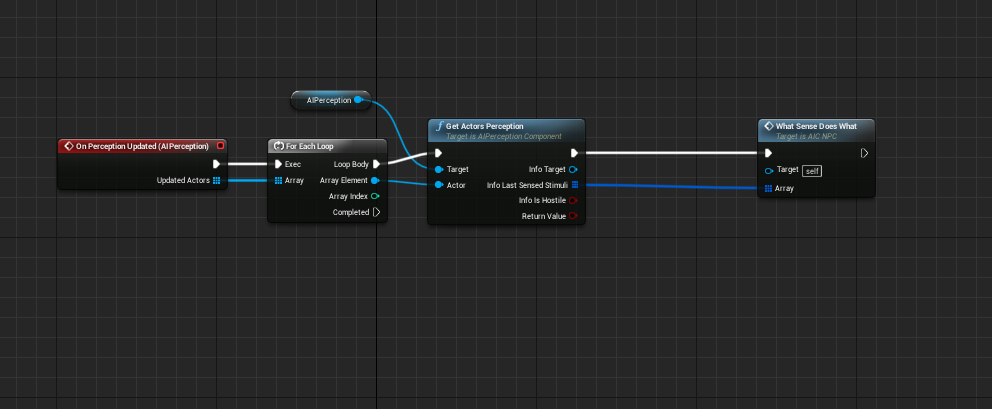
Scratch that. Can anyone tell me what the output pin "Info Last Sensed Stimuli" from a Get Actors Perception actually contains? Documentation on it seems to be scarce. I know it's an array of the AIPerception component, it's just the naming of it suggests only the last sense that was updated would be contained? Sounds dumb maybe, but.. my mind works in mysterious ways lol
 jaunty peak
While we're at it, any reason the game would "remember" the noise report from previous plays? Only now it's responding to a noise report that's not been reported.
 rough inlet
Does anyone have any recommendations for any good paid open world pathfinding AI? Needing it for zombies, and we are expecting to extend onto it our own custom behaviours
 teal skiff
My hair isnt attaching to my characters head socket when i spawn it ingame, any fix
?
My bad wrong channel
 signal kindle
Hi folks,
Does anyone know of any documentation or run down on the overridable functions of Blueprint Services?
Tick is self explanatory, but I can't find explanation as to what search start, deactivation or activation are for.
or when I would use them, I should say.
Will a blueprint graph run from "receive activation AI" actually execute regularly after the branch has started?
patent hornet
@signal kindle there are WTF is? videos that explain each AI node quite well on youtube
signal kindle
ah! good shout
signal kindle
Okay Decorators and Services are really confusing me 😟
I want a decorator that only executes a sequence node if a blackboard key Bool is true
I expected key == true to be a built in decorator so I'm hesitant to make a custom one
does one of the built in decorators do this?
This feels like a silly way to check a key - do I really have to make the name?
jaunty peak
on the node you want a check on, right click - add decorator - blackboard. make sure this new decorator is selected and on the right you can pick which BB key you want to use, and what it has to be set, not set, == et cetera to. You don't need to use get in this case.
Decorators are best thought as things with conditions to check. Services are just another kind of task really.
signal kindle
fantastic - I think I was confused because in my mind a bool with a value of 0/False is "set" to false
in regards to naming keys, I've found blackboard key selector variables but I can't find any explaination of them
jaunty peak
@signal kindle Check this guys tutorials out, especially the AI one. The snacksize one is good for basics if you need them, or want a refresher. https://www.youtube.com/channel/UCsS5i15vvUbwfr_1JdRKCAA/playlists
Also this the famoose Mathew https://www.youtube.com/channel/UCOVfF7PfLbRdVEm0hONTrNQ/videos

YouTube
Welcome to my channel where I talk about games, games design, and give tutorials on games development. I am a game developer and teacher of games development...

YouTube
This channel is dedicated to exploring Unreal Engine 4 and the Blueprint programming language that it uses. You can think of it as a companion to the API doc...
Think of the Blackboard keys as just a list of variables. This list can be accessed by other BPs which is really handy when you want one BP or task or whatever to store something, Say you have a task that sets a variable to true. once you've made a decorator with a blackboard type, you can tell it to use the one you just set. so you can check to see if it's set or not set. you can also pass the value of the key to a variable in another BP and do stuff with it. Passing info between BPs or Tasks or whatever is done via the Blackboard.
signal kindle
Thanks for the links! The Ryan Laley videos look great for some practical examples
I am familiar with the absolute basics of Blackboard Keys
but it's Key Selectors I can't find anything about
Confusion between these two
I guess practically I'll just stick with making names! It's working
signal kindle
Wait!
after compiling a hundred times and doing other things, it has randomly started showing up
So Blackboard Key Selector variable types can be set in the task blueprint - and then linked to a blackboard key in the details rollout of the behaviour tree!
totally simple :V ha... ha...
potentially it wasn't showing up because I didn't have a Finish Execute node
 bright rune
Is "Get Known Perceived Actors" supposed to return actors that should have been "forgotten" already? Max age setting doesnt seem to do anything? Does Ai perception component work properly?
jaunty peak
I'm kinda surprised at the lack of information about the AI stuff, it seems not very well thought out really.
@signal kindle glad you got there. Make sure you compile the tasks before looking at the BT. If you don't compile then the key bit won't show up in the BT for you select. You can use BB keys for tons of things.
 cobalt granite
I'm pretty new to the AI schebang, but surely I'm doing something wrong. It either, depending on the tree - rotates and stares directly at me and doesn't shoot, or just shoots without moving
Anyone got any ideas? Or am I just a moron
jaunty peak
try using a sequence not a selector on the set enemy chek node. also use aborts on the decorators for any changes to the key.
 loud haven
Anyone know what could be causing only one of my bots to listen to a command?
Feel like I've missed something obvious
 cloud pulsar
Does anyone know what could be causing this stuttering? https://streamable.com/ibrmy

They're pawns, simulating physics
Trying to do multiplayer
jaunty peak
@loud haven only thing I can think of is that you're only checking one boys listen update, not all of them?
eg running an array through a loop for each one?
loud haven
@jaunty peak - is there a way I can change that? Sorry I'm really bad with ai
 toxic garden
I'm trying to create a component that tells whatever Actor it's attached to to chase a nearby player. This isn't working. The Print never happens. Can anyone see what i'm doing wrong? I don't know for sure how to access the Sensing module on the Actor from the component.
toxic garden
Lol actually this works perfectly! I just forgot to attach the component to the actor...
jaunty peak
Can I ask if there is a reason to using Pawn Sense over AI Perception Component? Am genuinely interested to know 😃
 cinder spruce
if I spawn 1-2 of these everything is fine
but as soon as you spawn a couple, it lags out the game entirely
not ideal, as game is designed to have lotsof these
patent hornet
pace it
you don't have to spawn all of them in a single frame
and SpawnActor is pricey
pine steeple
yoiu need spawn actor
but delay them
every .1 second
or something
@jaunty peak pawn sensing is obsolete, use perception
jaunty peak
Yarp, I know that that's why I was asking the other person. 😃
toxic garden
@jaunty peak I was using Pawn Sensing because I'm a UE4 newb, and didn't realize it was different than AI Perception until I saw this very conversation. 😃
fallow hound
I think pawn sensing is kept around for legacy projects
Perception is the latest and greatest
jaunty peak
^ yeah, it should be... lol
 modest wharf
Anyone know how to rotate a Ai without snapping?
 loud tundra
snapping? Do you mean when the AI character turns?
hybrid cipher
@modest wharf depends, you can set up rotation rates in character movement component, that's one way
 quick eagle
hey peeps, I'm working on turn based thingy and am wondering what is a good approach for AI. I have array IUpdatable objects(including ai), where I wanted to trigger update every turn, that would trigger the execution of BT path. But it looks like BT is heavily timer-oriented. Am I missing something? What is a good way to run BT execution path only when I need to? Thank you.
lyric flint
@quick eagle how about if(!bMyTurn) return;
quick eagle
@lyric flint that's what I'm going for rn. It doesn't seem really clean to me though...thought, maybe there are better ways.
 gloomy vector
Hey Guys How would I add some variation to the "AI Move to" paths? Every enemy runs the across the wide nav mesh path in exactly the same route to the target. I don't want them just running around randomly I've seen a bunch of tutorials on that.. they should try to get to the target but make it harder to predict their path.
 hoary peak
@gloomy vector Maybe not a great solution but couldn't you have them walk to the target location but with a bit of random variance and then when they are close enough they instead walk to the correct target location?
gloomy vector
@hoary peak yes that is what I'm trying to do, how do I get the random variance working? I'm new to the AI nodes and have been watching a bunch of videos about the different Move To nodes and starting on behaviour trees. I can't find anything about adding random variation with a goal, only lots of tutorials using GetRandomReachablePointInRadius to run around aimlessly.
hoary peak
I would get target location, split it and take X and Y and plug into random float in range and use as min values and add 0-200 or something and then use those values to create the vector again and use AI move To with that vector
I am about to go to sleep so I don't have time to boot up the engine at the moment but I think you might get what I mean, and then you get distance to actor and if it's < 200 or w/e you don't use the random floats in range but just the target location
@gloomy vector
 deft sedge
love playing with my little zombie ant farm
AI plugin is going super well, I hope everyone likes it
gloomy vector
@hoary peak the problem is that it's not a straight path, there are some corners, like a tower defence game. I tried projecting the GetRandomReachablePointInRadius out in front of the enemy so it would run in a forward direction with some randomness but then it doesn't try to get to the target.. I guess I could add a PointInRadius to place a waypoint target at each corner.
slow breach
@hoary peak hey thanks, i randomly read your concept on how to handle that. Very noice thank you i needed a start for that as well 😛
hoary peak
Glad I could help, I imagine it doesn't work great but maybe it's good enough 😛
slow breach
better than a straight line 😛
location target > randomreachablepoint> with random float in range
boom
gloomy vector
@slow breach could I see how you got it to work? please 🙂
slow breach

all i added was random float in range and get random naviable point, as i said above
@gloomy vector
gloomy vector
@slow breach thank you! am I reading this correctly? it randomly picks a point and then moves there and then loops.. I was hoping to figure out how to add a bit of variation on the way to a target.
slow breach
"how to add a bit of variation on the way to a target."
thats what it does
looping is up to u
but the target feeds into get random point
random float in range determines the range of how far around the target they can get a random point
then that feeds into the part telling them to move there
gloomy vector
@slow breach I'll try so I can see it working..
slow breach
good luck
 fallow owl
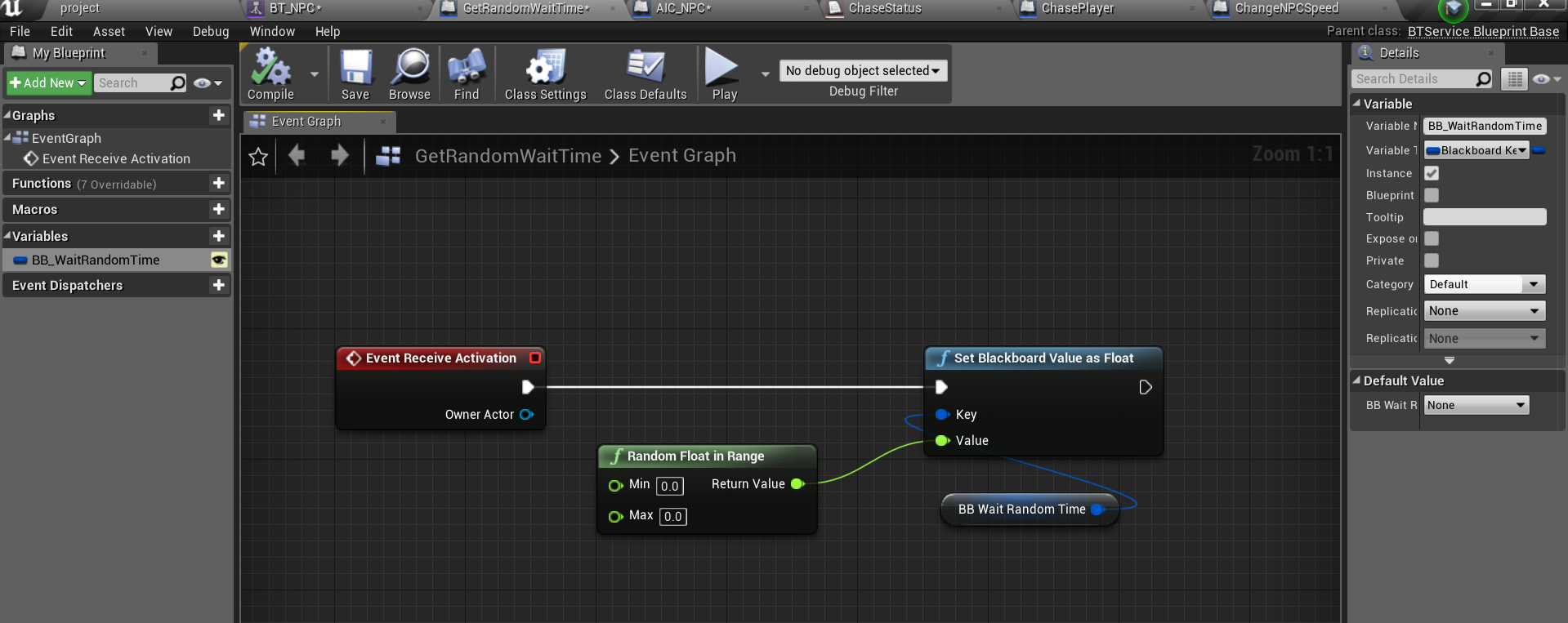
Simple question but is there a way to set the value of a cooldown decorator other than in the details panel in the editor, such as it being linked to a variable? I need a cooldown that randomly changes its length between uses
jaunty peak
you could create a Task or Service to do that. Using BB keys or anything you like. Use a Random Float In Range node, and set your min and max values as you need to. Use that result as the time to wait.
That way you can set up the min max to be editable values , you could also add them as variable to the NPC letting you vary the amount easily between NPCs.
fallow owl
Yes, you've explained how to get a random number but not how to actually set the cooldown's new value
Delays don't seem to work in tasks either
😔
jaunty peak
use a Wait Blackboard Time task, and use the created wait time as the key value
so all you need is to run the 'create a random wait time' service on the selector or sequence the wait task comes from ( the loop start) then every time it will wait a different amount of time.
if you didn't want to do that a standard wait task allows you to set a variation on the wait. Thats simpler, but slightly less control.
A cooldown decorator should be used to fail a branch if it doesn't do something within a given time. So if all you're needing is to wait till something loops, is to use one of the wait tasks.
fallow owl
@jaunty peak this looks like it might work, I'll test it when I get back, thanks 🙂
jaunty peak
Hope it does, good luck!
Something like this for the random bit. https://imgur.com/xL4AyDC
 pure crest
 tribal monolith
@pure crest , there is a Animal Behavior asset by Coqui games. Even if not getting asset, take look at his very comprehensive youtube tutorials about it. You will get some ideas for sure.
tribal monolith

 dreamy surge
is it possible to do the game debugger while your in the actual game and not in simulation? so far it only works in simulation, pressing ' does not bring it up while in game
 minor wolf
hey y'all, has anyone tried making a turn-based AI? I wonder how to approach one for a card game
 upper zealot
hey @minor wolf , I worked as architect in one game some years ago. Not Unreal but I think it doesn't matter. We made a server in Java that managed the logic and the clients were just visual interfaces (as expected).
The AI was tons of utility and some level of goal based, and all the cards were composed from granular skills that could be combined to create a full card logic
viscid oasis
Any help with this - I can't seem to get the second child firing. Is it because the EQS returns a false no matter what?
viscid oasis
I had this working fine before, not sure wtf happened.
viscid oasis
Ah, it's working - it just wasn't lighting up the nodes cause they were returning false I guess.
lyric flint
anyone know how to show the AI path that it's going to take?
 simple ivy
You guys ever run into the issue when your NavMesh stopped showing green / red and working?
It seems to be a common problem according to Google. I have tried to rebuild and hit P, but nothing is working
lyric flint
Hi guys is it normal for the visual preview of the pawn sensing to be a lot bigger than it actually is? As you can see my character should trigger the enemy by standing in the green as soon as he jumps the gap but I can only get it to work by deliberately jumping really close to the enemy.
 livid beacon
Newb question: I created a game using the top-down template and made an enemy character blueprint. When I place an enemy in the level, and play, and I click for the player to move to the other side of the enemy, the player tries to run through the enemy rather than going around. It tends to get stuck when it runs into the enemy, an keeps trying to run through until the player bounces around the edge of the enemy. The player movement seems to have no problem choosing a path to go around the cubes in the default level, but it can't seem to choose a path around the enemy pawn without just bashing into it until it bumps its way around. I have compared the collision settings in the enemy character mesh to the collision settings in the Cube mesh, and making those settings identical doesn't seem to fix the problem. What am i missing? Thanks!
 unborn jungle
Any reason why the AI controller that auto possesses characters when spawned is also able to possess and run on the character that I'm controlling as the player?
I have the AI controller running logic that makes them talk to the player character that they possess, and jump
It's working nicely but I also jump too
Even though I've possessed my character with a player controller
Do they both exist and both control the character, and should I just manually spawn AI controllers for non human characters?
jaunty peak
there is part of me giggling at the thought of the AI making the player jump.
@livid beacon in your NPC BP look at the details panel, scroll down to Pawn. There should be an option for 'Can Affect Navigation Generation' select that if not already and see if that helps.
or any character that uses the nav mesh.
livid beacon
Nagual, that did it! Thank you! It's a bit confusing because there are may navigation-related settings under the Mesh component, so I was focused on those. It hadn't occurred to me to look at the Pawn settings in the class itself. Thank you again!
jaunty peak
You're welcome. Although to be honest neither did I, but I poked around n stuff. Glad to be of help. 😃
lyric flint
@simple ivy unknown if your question was ever answered but hitting build actually remakes the navmesh, oddly it doesn't update unless you rebuild sometimes
 supple trout
Ok, so I am probably being a dumb dumb, but I am having problems getting my character to be controlled by the ai controller. I made a blackboard and a behaviour tree that has three nodes: Custom find and set target location, moveTo and wait. Inside the set target location custom task node I added print statements, but nothing is happening.
I also set the ai controller class to my custom controller that on BeginPlay executes the behaviour tree.
I have set down a nav mesh that is visible when I press P.
Am I missing anything?
lyric flint
Hi, im really new to UE4. Got 1 problem with the npc and need help to do a side of the npc. The problem is that the npc can see the player across the map, and i have the radius to only 20 ( http://prntscr.com/nfu3yl ) and what i want is that the npc when he doesnt see the player when chasing returns to the place that it was, but that stays turned to the way that it was before.

im sorry that the last part is a bit confusing, i hope you understand
jaunty peak
@lyric flint Check these out. https://www.youtube.com/playlist?list=PL4G2bSPE_8ukuajpXPlAE47Yez7EAyKMu

YouTube
btw 20 is not really useful unless your actors are tiny. 😄
@supple trout ^ they might be helpful.
lyric flint
well, the type of enemies taht im making only chase the player, when the player is really close to him
@jaunty peak im actually watching that tutorials already 😄 , but thank you
jaunty peak
If you need to 'remember' which way you were facing, you could get the rotation and save it as a variable. If you mean turn to face where the NPC has come from - like still keeping an eye out for the player - then you can get the look at rotation from the last player location (if you're using the above - TargetLocation) .
lyric flint
oh thank you, can multiple npcs share the same Behaviour Tree?
jaunty peak
yes 😃
lyric flint
@lyric flint i've got a system like the one you're trying to make
@lyric flint im trying to make enemy statues taht guard the entrance of huge mansion
of a *
stark zealot
So I need some general advice. I made some zombie enemies for a horde based game. My issue is that you can run past a horde and all of them hit you at once and you die instantly. What is a good way to keep the zombies attacks strong but not just instakill you when you get next to a few zombie? How do other games like Call of Duty Zombies, Left 4 dead, Killing Floor, etc. do it? Do they have a small cooldown where the player can't take a ton of damage while being damaged or something? My zombies deal 45 damage and players have 100 health so it should take 2 to 3 hits to kill a player based on his health. But I'm taking 400 damage when I run past a horde all in one blow.
jaunty peak
use less zombies... 😉 lol
stark zealot
hahahaha no its not that. 2 zombies can take you out in one blow instantly. Maybe I should change their movement and attacking. Make make a delay between running and attacking. I think I remember Cod zombies stop running, then swing at you. Mine just straight sprint and swing like a madman
also has anyone had the issue where the NavMeshVolume messes up when you open your project? Mine was messed up when I opened my project today. I had to move it just a tad then it showed green again and started working.
signal kindle
so the zombies could attack with a random variance...
so they don't all hit at once
but really you've answered your own question. You have many zombies that all instantly do a 3rd of the players health as damage
if its normal for many zombies to attack the player, then they should probably deal less damage
or you could have two different attacks for if the zombie is alone, where the zombie AI checks if any other zombies are within a radius to it before attacking
or a token system, zombies run at the player, but only 2 are allowed to attack. each zombie ups a counter before it attacks, if the counter is at 2, they can't attack
if a zombie attacks, they wait, then lower the counter
and wait again before trying to attack
like the zombies are taking a limited number of tokens, and can't attack without a token
jaunty peak
or possibly make the collision for the attacks be very precise. So you'll get hit less.. Or use a small random time to delay each attack.
simple ivy
Hey @lyric flint - thanks for responding! No, no one answered my question and I still have the issue. I see on AnswerHub there are a lot of people with the issue but they all resolve it by rebuilding - which isn't working for me.
I did find another guy who has the same issue that can't solve it either.... I'm thinking it must be the Engine's issue and there's nothing I can do on my side, but I hope I am wrong!
lyric flint
@simple ivy is there any options you've tried turning on / off?
simple ivy
@lyric flint I have tried turning view navigation on and off, I have tried rebuilding, I have tried deleting the navmesh and recast navmesh and putting in new ones, I have tried creating a new level and putting it in, I have tried moving the mesh around (where the editor will notify that it is rebuilding the mesh), I have changed the navigation mesh in project settings to dynamic instead of static and I have tried changing the numbers within project settings concerning navigation - nothing worked thus far.
I have also made a brand new project and dragged the nav mesh bounds in, and that worked. But I really don't want to have to start from scratch just for the damn nav mesh haha
lyric flint
heyo people, is there any way to stop the navmesh hitting a wall? buffering it off it?
supple trout
How the fuck do blackboard key selectors work?! How do I tell it to access the Actor reference?
Target Actor is the name of the blackboard entry
supple trout
The values are set using Literal variables, but when I need the reference in a custom task the thing fails.
jaunty peak
You'd need to take screenshots of your graphs etc. Hard to know what's going on without them
I like these vids on AI, if you've not saw them before maybe give them a shot. Covers all the stuff for that sort of thing. https://www.youtube.com/playlist?list=PL4G2bSPE_8ukuajpXPlAE47Yez7EAyKMu
YouTube
supple trout
Installing a imgpush service now. Give me a sec
jaunty peak
np
supple trout

The node that is blocked is the custom task that tries to access the actor.

Here I set the character at Begin Play

The custom task
jaunty peak
Hmm, in the middle pic. You're not using Set Blackboard Value as Object. I think that may be the issue or not lol
Get Blackboard Value as and Set Blackboard Value as, are the ones you need to use to interact with BB keys
supple trout
Oh....
It was muuuuch easier. I just had to expose the key variable to be able to set it in the tree itself....
Silly me.
Thanks!
jaunty peak
you're welcome 😃
loud haven
Anyone know why my AI only move to the characters location and no where else? I even put in the exact coordinates of where the player is standing and they don't budge. Have I missed something? This was all working fine this morning :/
jaunty peak
pics?
loud haven
If that makes sense?
It feels like I clicked a button that said "Break AI" - I haven't changed any blueprint stuff really. Even changing it back does nothing
jaunty peak
I can only guess that Flag Location is not set correctly?
loud haven
I put a print to it and it comes out correctly
I set the location manually and it doesn't do anything either
jaunty peak
So if the Flag Location is valid then when the Graph is completes the TargetLocation BB Key is correctly set. Then something must be changing the value of it.
loud haven
Maybe? Although when I watch this whilst the game is running it never changes.
jaunty peak
Where do you set the Flag Location?
The first pic you showed is the MoveToPoint task, yeah?
jaunty peak
Could you show me how you've done that, please?
loud haven
This is where things get weird, the sound comes from the flag but also the player because that's the only way the AI will hear it?
jaunty peak
You know Pawn Sensing is depreciated now?
loud haven
Oh really?
loud haven
Okay, what would you suggest I do? The pawn sensing was working fine this morning, I'm not sure switching would change anything.
jaunty peak
hmm.. lol give me a minute, am just following logic paths just now.
So if I'm reading this right this is what is happening:
The NPC hears a noise. It sets the BB Key Sound Location to the vector given by the Exec node, the same vector is given to the variable Flag Location. Your MoveToPoint task sets the TargetLocation to the vector in Flag Location. The NPC then tries to move there.
loud haven
Yes, I think so yeah
jaunty peak
The first thing that comes to mind is that you might consider getting a random nav point from the location first, as that guarantees(ish) that the NPC can get to it.
So if all that is right, the Flag Location will set to the players location. as it's getting that data from the noise event.
loud haven
Okay, where should I put that random nav node? In the MoveToPoint?
jaunty peak
Sure, just at before you set the BB key. Take the Flag Location that you have and use a Get Random Nav thingy in radius node. use the result of that as your key value.
If that doesn't do anything, I'm not sure I can help, I don't have any experience with Pawn Sensing. 😦
loud haven
They're moving!!!!
loud haven
They're moving, which is a start
It takes some time but they eventually kind of get to where I want them to go. I'm still not sure what's stopping them from just walking straight to the location.
jaunty peak
They are meant to go to the place where the noise was made?
loud haven
Yeah
jaunty peak
Going by the BT, if the NPC does not hear anything (and Enemy is not set) then it will not have a Flag Location vector to use, unless it gets set somewhere else as well?
loud haven
I've made it so that they all ways hear where it is, so in theory it should always be set?
jaunty peak
So the player is making a noise all the time?
loud haven
Essentially yeah
This is why I'm confused, they should always be able to move to the point
jaunty peak
2 tics
If the goal of it is just to always get the NPCs to run at the player, why not use a Simple Move to Location and use your Target Location as it's goal? That way they will always follow the player around until Enemy is set.
Anyway, afraid I can't be much more help I don't think.
loud haven
Oh yeah, I'll have a look at that! Thank you so much for all your help, it's been really useful!
minor wolf
hey y'all, is there a way to stop executing a behavior tree once it finishes?
or should I make a custom task for it
jaunty peak
Why do you want to stop it?
 warm cedar
@minor wolf I think you'll need a task with: controller > Brain Component > Stop Logic
Question...
There's probably no easy way to "Move To" vertically, without programming the vertical movement yourself? ...in cases where AI is capable of flying when needed.

 hidden beacon
i love the ue4 Built-In AI.
https://youtu.be/ykM944aqmf0

Poprsotu ktrótki test pokazujący czy SI może sie przemieszczać po świecie.
 haughty apex
Hello, I have a problem when trying to rotate the AI towards the player as it flees towards another location
The rotation simply doesn't work, the AI rotates in the direction of its movement
I have checked every instruction from this thread's answer :
https://answers.unrealengine.com/questions/533200/behavior-trees-rotate-to-face-bb-entry-and-moveto.html
It's a programming test, and the conditions were all met beforehand by the test's maker
in the AI's character
What am I missing ?
jaunty peak
Thats a good question, I've had issues with Rotate to face BB entry as well. It simply doesn't seem to do it, or sometimes it does, or sometimes it hangs.
jaunty peak
Anyone know what would cause the Root node in a BT to pause? The BT paths fire, but there is always a pause at the root. This results in the NPC standing idle for a couple of seconds then doing the correct Behaviour.
patent hornet
You can just use contriller rotation and set focus
 supple sigil
@haughty apex You have the rotate task before the move.
It wont execute the nodes after the move until it has reached its destination.
with the way you have it there it will execute the rotate after ir reaches its destination
jaunty peak
if you do it that way, doesn't it end up facing the player then moves to a new location where it will be rotated in orientation to the direction it was last moving?
supple sigil
if he is using focus then it wont stop facing the focus target.
but from what I can tell the rotate node needs to be before the move node. because it will just move then attempt to rotate
supple sigil
I myself have a question.
I have a custom door BP that uses an interface to open/close it. I have an AI that I would also like to be able to use the door. I added the interface to the AI and I don't know how to approach setting up how to make the AI use the door whilst trying to get to the other side. I tried a opening when the AI enters a zone but with that then the AI will open doors as it walks by them and I don't want that. I don't know how to approach this and I'd really appreciate some help with this!
Please @ me if you could help
~Thank you in advance! < 3
supple sigil
Update: I used a nav link proxy and linked it to each side of the door. Each time the ai activates it. It opens a assigned door but the ai will just sit there not doing anything else after activating the nav link proxy.
haughty apex
Okay I didn't know about the existence of Set Focus
Dammit
It works, thanks a lot
lyric flint
@supple sigil you can turn off the door disturbing the navmesh, currently it probably is but it's worth either doing that or making it create navmesh on the go
jaunty peak
Anyone know what might be cause is the root node to 'pause' like this: https://youtu.be/0UWc9CTr-Z8
 jaunty peak
 jaunty peak
Solved. I'm an idiot.
supple sigil
@lyric flint I got the nav link proxy to open the door and the ai is capable of walking through the door. It's just when the ai activates the smart link it won't move anymore.
 pseudo oasis
How can you set GenericTeam in Blueprint?
lyric flint
@supple sigil
Guessing you've broken the ai loop
slow breach
@supple sigil if your door opens on a timeline, off the finished part(door is open) tell ai to move
Pic would help tho
pseudo oasis
I am currently using the AIPerception sense but enemies, friendlies,... is not working. Even though I change the TeamID in the AIcontrollers, they all stay neutral to eachother 😕
pine steeple
that system is odd
the TeamID stuff
we disabled it and rolled our own system
and just ticked all the boxes
so perception system just didnt use that
supple sigil
@slow breach https://www.youtube.com/watch?v=Xdw66Vx5QQs

I made a nav link so my AI can open doors but the AI wont move after activating it.
slow breach
add a check if at nav proxy and if door is open, then move through the door
it looks like the issue is the navy proxy is just telling him to continuously go to that even after the door is open @supple sigil
 odd inlet
have there been any changes to how navmesh works in recent engine versions? I no longer get any RecastNavMesh in my level
should that no longer exist?
supple sigil
@slow breach I added a check in the nav link proxy to see if the door is open and if its not it will open it. but the same thing happens. he just sits there.
slow breach
does it print that it's opened?
supple sigil
I had when the smart link if activated it checks if the door is open and if it is it dosnt do anything but if it isnt open then it opens the door but still wont move through it.
 sharp mist
@sleek anvil Yeah I have one it's normal jump animation, i Like want to make the ai jump through window when its like the shortest path , lemme show if i find screenshot
sharp mist
i will for sure
pine steeple
once my editor loads lol
sharp mist
lol
pine steeple
my pc is no slouch
sharp mist
Same here
pine steeple
this project is huge
sharp mist
You know game called hello neighbor?
sharp mist
Im like doing a remake of it but with old artstyle, and well...better ai.
I already have like, 4 slot inventory and other things, i only want to get some help with ai
pine steeple
oh its like a cartoony horror game
sharp mist
yeye but its the new artstyle
 sharp mist
this is old artstyle https://www.youtube.com/watch?v=TKLx5rhpS2k
Download the Pre-Alpha - http://HelloNeighborGame.com Wishlist on Steam - http://store.steampowered.com/app/521890 Hello Neighbor is a Stealth Horror game wh...
lyric flint
hi, im watching a tutorial to put a npc to attack the player. Im using the "infinity blade adversaries", the greater spider attack animation A, and the spider. But the problem is that it doesnt appear the "Anim Slot Manager" http://prntscr.com/nhywu4 , in the Greater spider animation A in the "Animation Sequence" and in the "Animation Montage". Doesnt anyone know what the problem could be, because i cant find it.

 fallow stone
can anyone suggest good ai tutorials?
patent hornet
check pinned messages on this channel
sharp mist
ok guys so uhh i actually have little problem with my ai hopping through window when he approaches the smarlink nothing is happening
fallow stone

this is cool
watch out, its quite fast to track so be sure to check it again if something doesnt work
lyric flint
so i figured out a way to make the AI move away from the wall when pathfinding
get forward vector of next point, get larger angle and div 2 then add point out in new direction instead X distance from the smaller angle
 spice island
how to prevent AI stacking themselves in corner? Basic character BP with RVOAvoidance enabled.
spice island
well what I have figured out Acceptance Radius should be at least x2 size of a collision capsule radius and tweaked Avoidance Weight to 0.8 (not sure if it does anything)
 sterile escarp
Hey quick question about blackboards
I have a blackboard based value on a sequence
Can See Player is not set (Aborts both)
Does it abort if "CanSeePlayer" is set or is not set?
jaunty peak
yarp
lyric flint
@sterile escarp if you have 2 sequence with "CanSeePlayer", it aborts on the one that is not set, and goes immeaditelly to the other
lyric flint
can someone pls help me. Im trying to make a npc with health and when the player attacks him, he looses health. Ive seen many tutorials but im simply not getting what i want...
i*
i got a meele weapon with collision on the blade
 molten tusk
I have a question i cant figure out. i just completed my first AI patrolling NPCs and they work, i checked blackboard while the game is running and the nodes are firing. But i do not see them moving at a distance until i get close to them. After i get close, they update and i can see them moving around. Only at a close distance though. I cannot find the correct variable or information online to increase the distance to see other actors at a distance moving. Any ideas?
molten tusk
nevermind fixed it. The net cul distance squared on the AI Controller was shorter than the net cul distance on the character. I matched them up to be the same so the AI engages at the same distances of viewing them.
 fleet meteor
How does UAIPerceptionComponent compare to just doing (sphere) traces and parsing the results? In my case, I just need distance based stuff.
simple ivy
Anyone ever had the common issue of AI mesh not flowing through doors? So that the AI can't walk through open doors? I think I'm missing something basic...
pine steeple
closed doors should have some sort of modifier
when door is closed, set nav area to null
 stiff gale
Is there any tutorials on how to create AI that can either ride a horse or car or bike or plane? For example, it can walk to a car then take the car to its destination then get off.
patent hornet
im most cases, especially for AI its easier to separate that
in your example, your AICharacter walks to a car, which is a Pawn with its own controller and BT
calls a function on the Car, which amongst other things, sets the destination in Car's BB, plays the animation of getting into a car...
as soon as that (in this case Animation Montage) finishes, the Car's BT runs, and AICharacter is basically inactive until the time to get out
you really don't want to write a single AIController that can handle walking around, flying a plane or riding a goat
stiff gale
lol riding a goat
Yea I thought about what you just told me. I was wondering if there're any articles or video tutorials that shows you. My current AI systems are something that bought from the marketplace. So I might create a new AI system only for that specific task.
 limber tiger
Does anyone know of any good tutorials that goes into setting up multiple AI perception stimulus in Blueprint?
At the moment I've got both sight and sound stimulus on my AI but I ran into the issue where it weights both stimulus evenly. Meaning, if my AI is focused on playerA and then playerB shoots, it updates playerB as the new target and leaves playerA and runs to playerB... this causes a ping-pong effect.
I'm sure there's a million different ways it could be solved, I'm kinda looking for the most recommended approach in weighting different AI senses. I did notice there's a "Dominant Sense" function but I can't find any info on this.
patent hornet
@limber tiger there was a live training stream that had "Advanced" in the name that was okay
limber tiger
Cool thanks, will have a look
 keen hinge
is it possible to restrict navigation based on materials on level?
 wise ridge
How can I make my AI fly towards the player?
limber tiger
Zlo just watched the 2 hour stream O_O haha, was good information, but its using EQS which I'm not entirely sure on, and they only used it for sight, not multiple senses.
Its still marked as "experimental" after several years which makes me kinda want to avoid investing in it. It seemed buggy and the params for it were changed around since and I couldn't get the same result as what they were getting so I kinda just had to stop following along and just watch.
Will keep searching though 😃 If you think of any others lemme know!
patent hornet
EQS works just fine
 thorny crest
im trying to make a character swapping mechanic and make it so that the rest of the party follow whoever is possessed but when i switch from one character to the other, the previous character stops moving
 runic token
are you possessing that character with an AI Controller?
runic token
that has the other three perform move to, not the first one
thorny crest
nevermind you meant the actual possession
nah its 4 of the same script but with the 'move to' different depending on whose possesed
 wintry compass
I don't think that you are possessing the character when you switch
runic token
you have the player posses the character, but do you have the old character get possessed by an AI controller?
thorny crest
ah no i dont
pine steeple
also DRY!
you are repeating a lot of stuff
encapsulate into a function
would make your blueprint nice to read
 raven leaf
Are there any good behaviour tree examples from epic games that I should look at to try and improve my behaviour tree knowledge?
Done some tutorials but I'd now like to look at some examples
jaunty peak
I guess that really depends on what type of things you are needing for your AI @raven leaf
raven leaf
Ideally I'm looking for a behaviour tree that has all kinds of aggressive/defensive/utility behaviour so I can see the standard for how each node works
Right now I'm using decorators/services/tasks etc but I'm not sure if what I'm doing is 100% the correct way, so I'd like to have some examples to keep me on the right track
This is what I'm using so far to build an object in-game. I'm not sure if using a conditional loop is correct as I cant change the looping rate time
jaunty peak
For controlling how fastyou loop, you could use a wait or a wait BB time node?
so instead of the increase progress coming from the Build node, add a sequence instead and you'd be able to refine how your loop works
raven leaf
Right, so a sequence with an increase + wait
jaunty peak
thats one way to do it. the wait just pause the AI, so may not be what you want.
raven leaf
What about using a service to increase the timer? that way I can control the rate
jaunty peak
the Wait BB time node ( sorry can't remember the exact name) get's it's wait time from a BB key, which you can set to whatever you like or even make it variable.
Can I clarify, the increase progress node. what is it exactly you are wanting it to do?
raven leaf
Okay so a little backstory may explain things better for what I'm trying to do here-
I'm making an RTS game, and in this part of the BT, when the player clicks make sandbags here, the AI receives the emplacement object, finds the location, moves to it, does a building animation whilst waiting for the progress to go up, then the sandbags appear as the built object
jaunty peak
and the loop bit is just to repeat the animation and increment the progress?
jaunty peak
okay. So your NPC starts to build and it progress increases by x amount. You want it to continue progressing until it's complete?
jaunty peak
give me a mo, just trying to sort out the logic in my head
raven leaf
This is increasing the progress
jaunty peak
2 secs just opening UE to check something
Something like this, the build will continue to happen until it's complete, I've used a Wait BB time, as you can set this anywhere you like.
It gives much more control than a basic wait.
Inside your increase node, when the progress >= set the IsComplete to true.
or something similar.
By using the BB decorator you can control when it leaves any lower paths.
Unless I've misunderstood your goal. Which I admit could be the case, if so sorry 😃
raven leaf
ah thanks man, I will try it out!
jaunty peak
@raven leaf If you're still stuck later on, send me a message and I'll try to help if you like.
raven leaf
Thanks man, I'm putting it in now but I'm not sure exactly how to set the decorator perameters up
thats the decorator for increase progress loop
jaunty peak
Change the Increase Progress Loop node to a selector. (And remove the decorator from that) .Then if you copy the layout from my example above, you'd have a sequence node. On that new node your BB decorator will be < [build complete amount]. That will then loop everything under it until progress is not less than [X] if you need anything specific to happen after it's built have another sequence from the same Selector node (with a BB decorator checking progress => [X] and add the stuff for that, there.
That should then result in your build nodes looping until progress is complete, and then do something once it is.
raven leaf
Thanks for the help @jaunty peak, I gotta head out now but will try and finish this up tomorrow.
jaunty peak
NP, take it easy.
raven leaf
Looks like this works, thanks for all your help. 😃
jaunty peak
😃 😃
lean cliff
Hey all, I'm currently working on a mechanic where you press a button and most the game world stops. As part of this, I've got several in world AI who have an interface with functions that react to this mechanic.
As part of this mechanic, they all set their custom time dilation to 0.0f until the mechanic ends and it goes back to whatever they were on prior to it starting.
However, their behaviour tree's are still running (I can tell because they are frozen midwalk for example, but they continue to run through and "rotate to" so they end up just swivelling on the spot.
I've set their actor class and their controller class to CustomTimeDilation = 0.0f
How can I ensure the behaviour tree is also slowed down?
Oh, I might need toget the behavior tree component and set it's time dilation too... forgot it runs as a component
Hmm no that doesn't seem to be it
lean cliff
I'm looking at UBrainComponent::PauseLogic() right now - sort of works, but not fully.
For some reason, if I leave it like a second before resuming, it's fine, it resume. However, if I leave it for 10 seconds or so, it seems to restart the behaviour tree (or at least appears to, as it chooses a new target location from the task prior to the MoveTo it paused on
And for this mechanic, one specific AI is supposed to pause their logic (or path) and then resume afterwards, but pause logic doesn't seem to work as expected
 heady raft
Hey ! I'm having a basic issue, but I can't find anything on this subject online :
I'm trying to have two different navigation system : one for the player, and one for the other AI roaming the level. for that, I made two different supported agent( "player" and "AI"). yet, I can't find a way to make the AI agent work.
-It does not show when I display navigation
- I can't assign it to my IA pawn, they keep using the "player" one
- when I completely disable the player navmesh, the IA stop moving completely...
What am I doing wrong ? Is there any ressource online explaining how to correctly setup the behavior I'm looking for ?
hoary peak
How would I make something be a catalyst for a sequence to fire and something else be what keeps it going?(Preferably not requiring BB keys)
 finite tundra
Hey, I'm trying to drive a blend space using the movement speed of my AI character however I've run in to a problem with the input vector on the character movement component. It seems that even though I am making the AI move via the MoveTo task it does not add input to the character movement component. How can I get the input vector that the AI controller is applying to the movement component? This is the approach in my player blueprint where I get the input values (I update these in the input axis events) which I want to use on my AI: https://i.imgur.com/KI0W7GH.png
 hoary peak
I ended up just using a blackboard key to use the built in loop
finite tundra
@jaunty peak Which blueprint? The image I shared is a section of the Event Blueprint Update Animation event on my player animation blueprint and I want to implement the same sort of behaviour in my AI animation blueprint. The player class has additional variables for storing the movement input on the X and Y directions but I don't know if I can make an AI character use the input vector on the character movement component.
If there's a way to force the AI controller to use the character movement component instead of whatever it's doing right now when using "MoveTo" that would likely fix my issue as then I can get the movement input vector.
jaunty peak
Am I right in thinking you're implementing Root Motion animations?
finite tundra
I am not using root motion animations for my movement, no.
This is the blend space I'm trying to feed the AI movement speed in to. https://i.imgur.com/J86UhKo.png
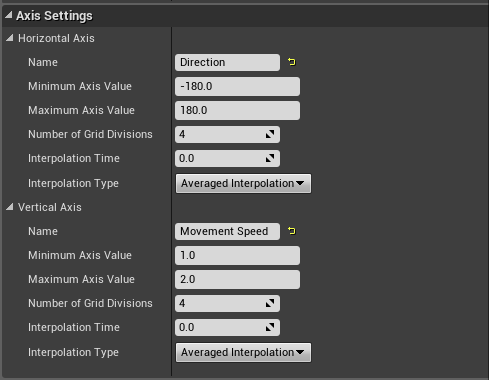 finite tundra
No, I just want to capture the movement input. Like how when the player uses an axis input the value you get is -1 to 1.
But it doesn't look like AI uses the movement component
As the input vector is always 0,0,0 for me
jaunty peak
why do you want to capture it?
finite tundra
To plug the value in to my blend space
To switch between walking/running
This is my player code for storing the input values
jaunty peak
Sorry, I'm obviously ,missing something. Your NPC has all the movement variables in the character movement component.
Sorry I'm a BP only person. You can set the animations at whatever value you want, and the npc max walk speed to be what you need. I'm not sure what you mean by plugging it into the BS.
hybrid cipher
hey a question, I have a large number of AI in the scene that are patrolling and then stop, if the amount of AI gets too high AI seems to be pushed back a little before it stops and starts idling. This is multiplayer game. Any idea what could be causing this or what I should look into?
finite tundra
Is the Detour Crowd AI controller what I should be looking at using if I want my AI to follow the player but keep a specific distance? I would need to be able to toggle it so that it cab get close to the player to attack at times but I'm unsure if the detour AI controller supports that.
lyric flint
@finite tundra In your normal AI controller class, use a simple logic based on distance that you can check on tick, no need for Detour Crowd
pseudocode if(GetDistanceToPlayer(oFollower) > FOLLOWER_DISTANCE MoveToActor(oPlayer)
And refine this logic as needed
for example applied only in Explore mode Not in combat mode, etc.
pseudocode if (GetGameMode()==COMBAT) return , Or something like that
You may need to write your own functions to implement the above pseudocode
lean cliff
Hey all, does anyone have any recommendations for optimizing large numbers of crowd ai
I notice at the moment one of the largest performance hits is on the character movement components of them all - any way to easily optimize that?
lean cliff
Haha that's fair, I'm also up for not easy ways, was just looking for quick wins in the short term and then investigating longer/harder methods in the coming weeks
I'm very familiar with most the engine by now (full time programming 5 years on ue4) but haven't really touched AI until recently!
Thanks for the NavMeshWalking tip - totally forgot that existed, should hopefully see some improvement.
I've already coded up some basic "culling" methods for the AI, so once you're out of range for example, the AI will pause their brain components, and pause any movement, and resume both when you return within range.
In the coming weeks I'll likely look into swapping out meshes for sprites over long distance
patent hornet
disable the CMC tick for inactive AI as well
 errant wave
Hey guys, I have an issue getting ProjectPointToNavigation and my Navigation in general. It can't find the navmesh right under it on one of my levels, but can find it no problem on the other. Both levels have the same NavMeshBoundsVolume/RecastNavMesh, with the same settings. Any idea what setting might cause this?
Nvm I fixed it. The navmesh was set to not spawn if it was colliding with anything in the actor settings. Wonderful
 mystic wind
Hey guys, I have got a blueprint that uses AI MoveTo to start my spawned characters to move from spawn to the goal, Ive not used any behaviour trees for this or pawns, just a single character BP. I call the AI MoveTo and it works, thats fine. My issue is then when I then use AI MoveTo to tell it to go to a different target. It just stops, the path returns Success then immediately Aborts. Has anyone encountered this before?
simple ivy
Hey guys, quick question - is there any major reason why you'd use blackboard and behaviour tree rather than just using the event graph in blueprints on the AI class?
jaunty peak
You mean do everything on the AI controller?
lyric flint
@simple ivy I guess modularity may be a reason
@mystic wind Make sure your actor destination/target is being updated on the key. Also you are outside the acceptance radius, that is if you are too close to your new target relative to the acceptance radius
mystic wind
@lyric flint on the key? Im not using the blackboard for any of this its purely in the characters event graph lol, sorry should have said - Do I need to move to using blackboards? the AI does not need to be no more complex than if there is a new target in range, go to new target.
lyric flint
@mystic wind Sorry, my bad, if you don't use backboards then there is no reason to worry about keys 😃
mystic wind
lol, No worries! Its just confusing because whenever the character enters the new space it just stops... its so frustrating! 😄
lyric flint
@mystic wind MoveToActor Works as long as there is a goal and a nav mesh
lyric flint
And of course outside the acceptance radius
mystic wind
You just made me think of the nav mesh - the Navmesh isnt on the spots the actor is located
Therefore it wont find a valid path.
lyric flint
correct
lyric flint
think DnD, the nav mesh tells the AI: here is safe, no Lava 😄
I've been in your shoes a while back too 😃
mystic wind
Haha xD Yeah thats a good analogy :P. Literally want to headbutt my desk so hard right now lol.
fallow hound
Is ai perception about as performant as using line traces? Or is it doing some sort of more efficient method?
simple ivy
@jaunty peak - well I have a blueprint class for the AI that uses the controller, but the class has its own "orders" within the event graph for the class. I was wondering if I should continue down this path or start using blackboard and behaviour tree. I'm currently watching a tutorial on it to see
jaunty peak
@simple ivy Think of it like this. The controller is the brain, the behaviour tree is a list of things to do with the blackboard for remembering certain things. A npc needs a brain, and a list of things to do in given situations. Multiple NPCs can use the same controller, and same BT or could use the same controller and different BTs. This allows the brain bit to deal with things like perception and 'base' behavior rules (what happens when it sees or hears a particular thing, the BT tells the NPC what to do when these things happen. It allows to to easily and quickly modify behaviour for different NPCs without having to rewrite a lot of code or BP.
you could have it all on the controller but the BT has a easier system to control the behaviour given anything the controller tells it
floral mango
@fallow hound I haven't actually looked into the out of the box perception code, but it should be much more performant than a dumb line trace, there's lot of opportunity to early out before getting to expensive tests
simple ivy
@jaunty peak Thanks man I appreciate the explanation, that makes a lot of sense 😃
jaunty peak
np, you can have a single AI controller and different BTs for each NPC or if you wanted have different BTs for the same NPC, but for different situations like maybe the NPC is in a cave at first then later after rescuing him he's a guard patrolling the city. you can have it all in one BT, but it can get complicated.
simple ivy
I guess it's a tool that has better scalability for big projects. I am literally trying to get zombies to break down doors and climb through windows haha 😛
Thanks for the explanation. It sounds like it's good practice to get into.
fallow hound
Okay, I should peek into the source when I have a chance
I'm toying with having one controller for multiple npcs, but as perception is made to be attached to controller I might need to make my own perception
 pale night
My current project Nav Mesh Volume is acting very strange. It was working yesterday fine. I created a new actor put it in the worldspace and now I cant get any of my Networked pawns to move via "Move to Anything(location or actor)." It just says aborted. Ive checked collision, settings after settings. I noticed the bar was all buggy looking too.
patent hornet
press P in editor @pale night
pale night
Im looking to solve why its not working in multiplayer
patent hornet
AIControllers can't actually move a Pawn locally on clients
pale night
Ya my AIController is on the server
patent hornet
so multiplayer shouldn't be an issue here
pale night
It is which is why i think my nav mesh is bugged
patent hornet
thats why i told you to hit P
then you can see it
it has a few quirks, deleting recast from outliner then moving the navmeshbounds slightly usually fixes it
usually don't need deleting recast step
it is not the only possible explanation
pale night
Can you explain why the nav mesh volume looks so different from one project to the other?
patent hornet
i don't know what you mean by that
pale night
in the picture i posted
patent hornet
that might just be the camera, probably is
patent hornet
well, i don't really have any point of reference to judge on your pic
 misty holly
ik how to see a player for ai like get play character 0 get world location to see one player but how would I go about being able to see more than one ai/character at a time I was wanting to be able to have the ai choose between differnet player/other ai to attack instead of just seeing one
pale night
Add the reference to an array? and you could randomly pick from the array or set up some type of "agro" table for lack of a better term
misty holly
okay thx @pale night
lyric flint
@misty holly UAIPerceptionComponent has a GetCurrentlyPerceivedActors
e.g. GetCurrentlyPerceivedActors(UAISenseConfig_Sight::StaticClass(), OutActors)
misty holly
oh wow I didnt know that existed itll be very useful to me thx fam @lyric flint
raven leaf
I need some vector math help please!
I'm trying to create a behaviour tree task which finds the closest location the pawn needs to be to throw an item at a target location. So far I've created a decorator that finds out if we need to move or can throw, next I just need to create this task which finds a point to move to so they can throw.
aka: How do I get the closest point in a radius around an actor from another actor's position?
runic token
Normalize(PawnLoc - TargetLoc) * Radius
Add that to TargetLoc
You also might want to ignore the Z axis
runic token
You just need to add the vector from the multiply node to the TargetLocation vector
raven leaf
Target Location is the target where the AI needs to throw to. Movement location is the blue location (above diagram) where the AI needs to move to to throw
runic token
yeah, right now it's only calculating an offset.
That offset needs to be applied to the origin of the circle (this being TargetLocation) to get the Move location in World Space
runic token
yeah
raven leaf
Great, thank you very much for your help - I am terrible at vector math 😛 Have a good day
runic token
np
simple ivy
Hey guys, I need a little bit of help and I can't really find what I'm looking for online.
I am trying to get my AI character to jump in and out of a window blueprint. The player character can do this as well, but I accomplish this by teleporting them from one triggerbox to the other when they press a button on said triggerbox.
If I do this for the AI, they'll just teleport everytime they hit the triggerbox (they're chasing the player). So what I need is for the AI to go into a house if the player is in there, and only go out of the house if there are no players in the house...
Any ideas on a top level on how I can accomplish this? I don't really need technical specifics right now, just something to work towards.
jaunty peak
have a variable that is set or unset when the player enters or leaves. make the AI do what you need based on that?
patent hornet
navigation smartlinks
simple ivy
You mean like a boolean? The problem I see t here is that there are multiple houses in the map and there are a few players as well. I was thinking a nav link proxy would work - but then I need to enable or disable it based on whether the window is fortified or not (which I do have a boolean for to prevent the player from hopping through)
jaunty peak
multiple houses would work, it would just be an array rather than a single value.
simple ivy
Hmm thanks (again!) @jaunty peak - that sounds a lil complicated for me, but I'll try it! Thanks!
jaunty peak
A simpler method would be for each house to have a variable that keeps track of how many players are in it. use beginoverlap and endoverlaps to either add or subtract a player. Add some more logic to your nav link, allowing it to work only if it's 0. Something like that maybe? @simple ivy
patent hornet
that is pretty bad for performance down the line
navigation links tell the path following component on ai controller that 2 points are connected
and ai is able to traverse them, on its own, using regular pathfinding
simple ivy
However, you can't use nav links on blueprints right? When I looked it up, that's what people were saying to my knowledge - (at least in terms of nav link proxies)
patent hornet
the boolean or overlap method also introduce additional code complexity, and it is more then a little bit inelegant
i seem to remember seeing some video that demonstrated them in BP few years back
you basically want to avoid external object keeping AI relevant flags at all costs
solid AI is complicated as is, if you break encapsulation, it will never work right
and don't get me started on how difficult that would be to extend or maintain
simple ivy
So you'd recommend just using a "Nav Link" component in the blueprint? @patent hornet
patent hornet
you put navlinks on the map
i don't know if your specific use case will require alterations that can't be done in BP or not
simple ivy
@jaunty peak thanks for your feedback! I was in the process of doing something like that and it seems very "messy" haha. I think it's mostly my inexperience.
@patent hornet , well I think it'd just save me time at the moment if every window I already put in the map had the link. I know there's a component called Nav Link in the blueprint that I can add, but I also know that everything on Google points to Nav Link Proxy
patent hornet
it would
simple ivy
and on answer hub someone had my question in 2017 and they came to the conclusion that it can't be done dynamically in each blueprint
patent hornet
we have a pretty complicated setup, and only some monsters are allowed to hop through windows
simple ivy
oh so you're working on similar functionality? Awesome! Thanks for the help guys. I'm going to try the nav link proxy and let you know!
pine steeple
@simple ivy following from what Zlo said
i made a custom Smart Link Actor component in c++
which handles it
but if your BP only, use a Nav Link, but use the smart link version of it
it fires an event called "Smart linked reached"
and has the pawn that triggered that smart link
you can simply call a function on your pawn to do what they need to do when they reach that smart link
so in our case, when they reach they window, they play a root motion which moves them through the window, but also disables collisions with the window so the capsule can go through without getting stuck
you could use Launch Character and Suggest Projectile arc to kinda force them over the window
in an arc
and play a standard animation whilst they are airborne
simple ivy
@pine steeple - Hey man, thank you so much that helps a lot!
pine steeple
@simple ivy if you dont have any luck i can possibly show you a crude example
simple ivy
@pine steeple haha... hi... yea I would appreciate that.
Right now I have the links setup and they're triggering the smart link - but trying to get them through the window is a problem. I need a command to force them to move forwrad
pine steeple
there are a few ways to do it
simplest is LaunchCharacter
second is RootMotion animation
third is a Timeline
which moves them over the window
simple ivy
I attempted your method above - but couldn't get the projectile part...
pine steeple
i helped someone here recently
simple ivy
OK so I should search through the messages here and there'll be an explanation?
simple ivy
I couldn't find it. I can't believe there's no tutorial for this. I suspect that this is easier than what I've been attempting.
pine steeple
sorry been busy
simple ivy
No Kaos no problem at all, any advice anyone gives here is freely given out of good faith. I appreciate it all 😃
bold sapphire
any tips on improving performance of behavior trees ai move to. I want 150 ai on the map moving around.
hybrid cipher
@bold sapphire what are you doing so far? tracking actor should help, but a lot can be done by optimizing character movement component, if you use it
bold sapphire
yea i use character movement. The issue is that its a war type battle that is going on. So i need 100 ai's moving and attacking all over the map to take over locations. In what ways could I improve the movement component without compromising the battle that is taking place.
hybrid cipher
hm profile your scene see where the bottleneck is, might not be issue of AI logic at all
bold sapphire
From the testing I have done, I see that my blackboard was keeping all 150 ai in either moving or attacking state. What I have read everywhere is that 100+ is pushing it for a mobile device like Android. In my case even more so when I have 150 moving at the same time. I was thinking of implementing a que system using an array. That way I can make sure only small number are using the ai move to node at one given time.
I have tested the blackboard by having a random move to location function. Just by adding a delay after the success pin of the ai move to node it kept the game above 30 fps with 150 ai on screen.
 lyric topaz
Good morning guys, I've started messing around with AI and started using the PawnSensingComponent, The blueprint event gets called just fine, but for some reason my delegate that I bound C++ side isn't being fired for whatever reason. I'm not too sure as to why this is happening. I can see the Delegate being bound in the debugger, but it just refuses to fire in C++ for whatever reason.
{
    const auto ScavengersCharacter = Cast<AScavengersCharacter>(InPawn);
    if (!ScavengersCharacter)
    {
        return;
    }

    Super::OnPossess(InPawn);

    const auto Sensing = ScavengersCharacter->GetPawnSensing();
    if (Sensing)
    {
        Sensing->Activate();
        Sensing->SetSensingUpdatesEnabled(true);
        Sensing->OnSeePawn.AddDynamic(this, &AScavengersAIController::OnSeePawnTemp);
        Sensing->OnHearNoise.AddDynamic(this, &AScavengersAIController::OnHearNoise);
    }
}```

Any ideas?sidenote: switched it over to AI Perception and now those components don't show up in editor.
pine steeple
what components?
lyric topaz
both the AIPerception and AIPerceptionStimuliSource components, doesn't show up if I were to launch the project, but does when I run it in the debugger, and even then I can't set the senses as it always goes back to none.
bold sapphire
I don't know why anyone would recommend a broken system like the PerceptionSystem. Write your own perception system. Reason why? PerceptionSystem was never finished like everything ue4 creates. Example: 100+ ai with perception close to each other detect every pawn and there is no way in blueprint to filter enemy vs non enemy. It is a total waste of cpu.
dreamy surge
I see that my AI skeaton meshes are ticking, do they need to tick can I remove them>
jaunty peak
@bold sapphire Can you not use actor tags? and just look for actors with appropriate tag(s)?
 timber hawk
can someone help me?


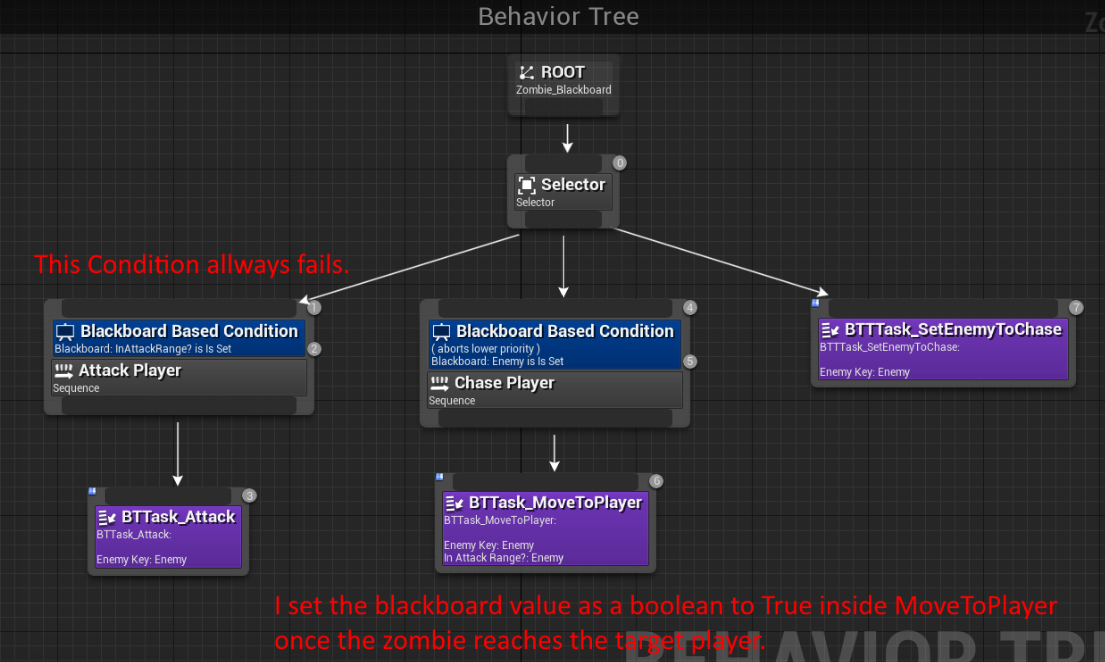
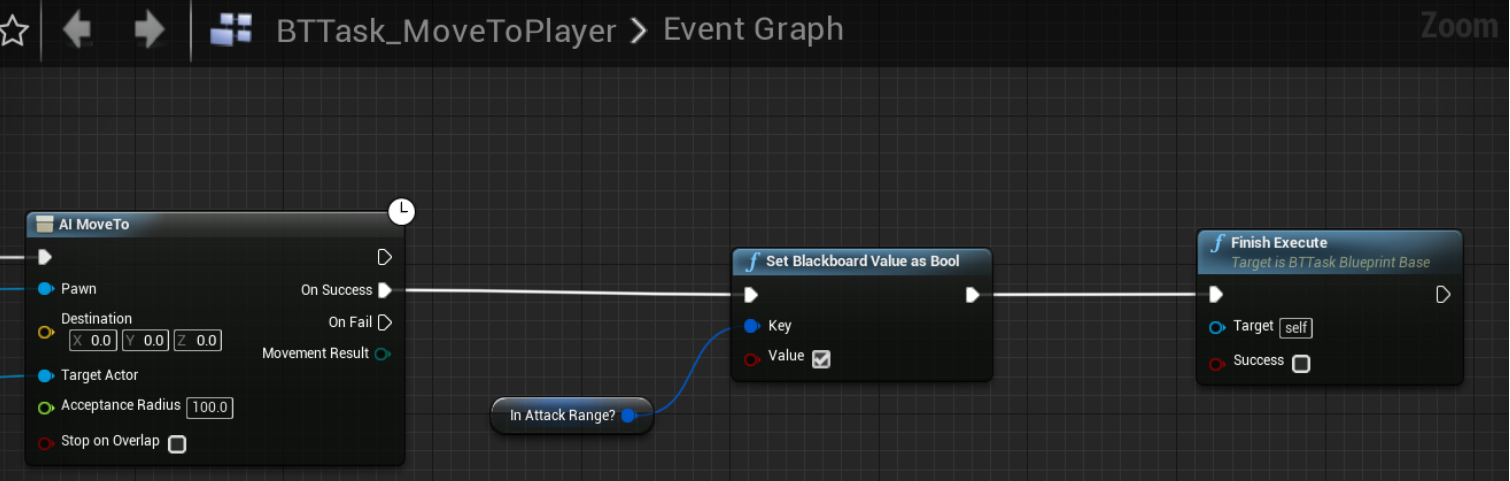


i don't know how to get the ai to keep going
it just stops right outside the players hitbox
it's supposed to run into you then when it gets there the level will reset
hybrid cipher
@timber hawk make sure that player collision doesn't block AI, should be able to set it in capsule collider component
if you want to detect ai running into player, it should be turned into overlap and generate events on overlap
timber hawk
the bottom one is what i have now
when i change it to overlap it doesn't do anything
i'm also new to unreal engine btw
@hybrid cipher
hybrid cipher
Eh sry I'm on phone atm
timber hawk
it's alright
hybrid cipher
There's a bit about collision preset at the end
And just skim through this quickly to see how generate overlap events https://docs.unrealengine.com/en-us/Engine/Physics/Collision/Overview
hybrid cipher
Ah cool, np
 dire moss
hello, i have player character and ai enemies loaded into a sub level, when streaming in to another sub level and going back to the previous level, it seems that the ai sight perception can no longer see the player, but after they hear me, they can then see me again.
Has anyone run into this issue before?
 torpid trout
Hi guys. I have a pawn which is made for a multiplayer game. It has weapons and health. I want the same pawn to be used as AI and use it to battle the human players by using the weapons and racing/tracking other players
Where should I start?
and can someone give a rough roadmap of how this would be achievable
some resources which might be helpful for the implementation will be a bonus
wary ivy
character class is really, really heavy
having 100s of characters running about will tank your performance :\
...oh
I was looking at saturday's messages
 tough helm
how can I use AI Sight Stimuli so that I keep receiving events if the AI still sees the target?
I want to implement waiting while seeing for a bit, not aggro immediately
hybrid cipher
@tough helm you can probably just use timer when AI first sees the player and execute logic after a while
tough helm
well I need to "increase threat" while player is seen and decrease while it's not seen
so at least I would need a target lost sight event or something
currently I'm playing around with NotifyType in UAISense_Sight
ok figured it out
for future reference, UAISense and derived UAISense_Sight have NotifyType which is cofigurable from config
so I just pust
[/Script/AIModule.AISense_Sight]
NotifyType=OnEveryPerception
into DefaultGame.ini
lyric flint
@tough helm thanks for sharing! 😃
jaunty peak
@tough helm I'm fairly sure you don't need to do that. I know I didn't and AI Perception gets updated on sight or loss of sight (I've used print$ to check).
But then I may be using different exe nodes than you.
tough helm
i needed to continuously report that AI still sees the target so I can accumulate a "threat meter"