#gameplay-ai
1 messages · Page 108 of 1
 faint fox
the ones which need to turn stay on navmesh
but others just walk straight there in the air
 unborn jungle
Is there any reason that the UT bots don't use behavior trees or any pre built UE4 AI systems?
It seems to do everything in the AI controller and character
 floral mango
May well be based on code that came from ye olde unreal, and has never seen a behaviour tree, would be my guess. Pretty niche and specialized too, lotsa maths if you look at it, quicker in code
behaviour trees are only really a way of structuring code, an enabler for production workflows. If you just need one AI and have a coder that can write it....code may be easiest. If you've got X diferent AIs with different behaviours to create and a team of designers who want to rapidly prototype things....
unborn jungle
@floral mango thanks for explaining
I had read that BTs are threaded but not sure if there are any performance gains or just more gains for visual clarity instead
floral mango
not sure if the BTs in UE can run off the game thread, possibly.
BTs are mainly for visual clarity though, not performance reasons
 pine steeple
bt's run on gamethread iirc
floral mango
BTs are great for rapid prototyping, and easy to debug. Means vaguely technical non-programmers can build AI
floral mango
almost certainly do by default
unborn jungle
Does that mean they don’t offer any gain at all and it’s equally viable to just do logic in the controller rather than many separate tasks, services and a blackboard?
Seems almost cleaner to do it just in the controller and be careful about your logic flow
I guess a BT is just a visual extension of an AI Controller right? Tasks just being functions and decorators just being bool checks
Then services just being an event called at a certain interval from a timer
@floral mango
floral mango
Well, it's a behaviour tree, it's a very good visual way of representing behaviour. It's very easy to maintain, re-organise, and edit the flow of the behaviour in a BT
unborn jungle
True but it’s also a bit obtuse needing all the different separate asset types
Have you read Tom Loomans post on Utility AI? Seems like a nice clean option
floral mango
There is an overhead to it, over just pure code
unborn jungle
I’ll probably use blueprints so there’ll always be an overhead
But would a BT have even more overhead than just a BP controller?
floral mango
Utility and Behaviour trees aren't mutually exclusive...I use utility in behaviour trees in all the time
floral mango
The actual overhead of behaviour tree over a straight controller, blueprint or code, is typically absolutely trivial compared to your main AI costs like navigation, perception, etc...so not really a factor
If you start writing anything complex in plain controller code or blueprint, you'll very quickly end up moving towards some kind of formal method like FSM/BT/planners etc.
unborn jungle
Got it thanks!
So in the case of UT
That seems quite complex
Did they maybe just feel it wasn’t worth setting up with BTs?
They have all kinds of considerations like pickups and prediction
floral mango
There is a HTN planner lurking in the UE code at the moment btw, it's just not documented, and has no blueprint interface
unborn jungle
Ohhh so finally new AI stuff coming to UE4? It was doing so well years ago and tapered off
EQS is even still considered experimental
floral mango
I suspect the UT bot code was a lot of copy pasta from old UT
unborn jungle
I see! Yeah that’s most likely the case
floral mango
Don't think the HTN planner is a supported feature. I just saw a tweet from one of the devs about it ages ago, and noticed it in the codebase a while back
Don't think it was mentioned in any release notes
 near jetty
behavior trees are quite slow
due to their horrible pointering aroudn
but they are super useful, and in general you are probably not going to have issues with the tasks
unless you have behavior trees that are just badly made pingpoinging tasks everywhere
HTN is something more for strategy games, it seems
good old task planner
i never liked that techniques for a fps
unborn jungle
@near jetty Quite slow meaning you’d consider just doing it in the controller similar to UT? Specifically making the logic for many shooter AI here (potentially 30+ on screen)
near jetty
only if your BTs are weird
i use BTs in DWVR, and DWVR runs at 120 fps on PS4
wich has a TRASH CPU
but i did need to chill and simplify the BTs
and make sure their blueprints gets nativized
@unborn jungle
UT doesnt use BTs becouse BTs are too rigid
BTs work best for NPC AIs, like "enemy" AIs
where they are dumbasses but have clear patterns
if you want a humanlike AI, you dont do behavior trees
unborn jungle
@near jetty thank you for explaining!
In my case I do want humanlike AI that uses the exact same player character
As the human players
And as little “cheating” as possible on their part
near jetty
a task/goal system works great for that
imagine a behavior tree
but instead of being so rigid
you ponderate nodes by a weight
unborn jungle
Like Utility AI?
near jetty
yes
instead of a secuence node, you have an utility node that looks wich of the N subnodes has more priority
unborn jungle
And that would be determined by a simple function that weighs the current needs right?
Like distance to enemy, health, aggression etc.
If I can start thinking of all the stuff that would go into a BT as simply being logic in the AI Controller, I’ll definitely be able to do something with this info
Before I had them in my head as separate things but it seems really the BT is just organizing the logic that has to run on the AI controller right?
near jetty
yes
the fun part is that you can also RNG roll it
or change its multipliers for different npcs
so they work slightly different
for example one npc starts trying to flee sooner, or another npc is much more agresive
the BT is mostly just an editable way of develop AI
it works best when working with blueprints
becouse that way you dont get a huge fucking mess in the ai controller blueprint
unborn jungle
Yeah exactly I love the rng stuff you get results you didn’t even anticipate
near jetty
my recomendation is that you encapsulate functionality in components
like shooting logic
or melee logic
etc
and the behavior tree just calls into that
unborn jungle
So if in attacking state, in the BT determine if should shoot or melee and then let the component do the specifics?
Not sure how I can get the BT to call anything other than a task
But I will look into it thank you 🙂
I was thinking of doing new graphs in the AI controller for each major state like shooting, finding pickups and objective play
near jetty
there is also another thing
using multiple BTs at the same time
but that increases complexity
this is mostly to separate movement from shooting
so you have one BT that deals EXCLUSIVELY with movement
and roams around the map, finds pickups, tries to dodge, etc
and another BT who deals with shooting
unborn jungle
That is very cool but at the same time it can sometimes feel to the player that the AI is being sucked away down a corridor yet is engaging
I probably just have to implement it better
All on one BT has worked well for me usually
With the parallel attack and move
near jetty
BTs are REALLY bad at dealing with complex movement and combat at the same time
unborn jungle
But yes it is a bit limited
I’m going to give a shot at the AI controller only implementation and see how it goes
Just with some super basic states and decisions
I think I’ll be able to write better BTs after too with trying this as I’ll have a better sense of when and how to execute things
The UT AI was the first one that gave me a real challenge
near jetty
good old state machine
unborn jungle
Was surprised at the predicting and anticipating it does
Is it a state machine but just in code? I have to read through it properly
near jetty
last time i looked, it was a dual state machine
combat/movement
and it was based on the older UT3 AIs
unborn jungle
Cool so doing exactly what you suggested but without BTs! Will definitely have to look in to how it’s all set up and how often things are called
Does seem a little bit cleaner to have it all in the controller instead of jumping around to different service, task, blackboard and bt assets
And should be fairly ok to debug with strong state enums
near jetty
one recomendation
its common to have a state machine work through inheritance and virtuals
dont bother
state enum
and just switch
unborn jungle
Ok thanks! I’ll stick with the nice simple enum and switch in that case
Definitely seems like it’s all I need for my relatively straightforward AI states
 echo ether
@floral mango , I got to installed the plugin to my project. But i can't find SVO moveto node. Anything wrong i'm doing?
floral mango
You on the main 4.21 branch?
 flint trail
someone on the forums stated that BTs are a way more optimized for performance than pure Blueprint AI code.. Especially if you want more than 10 AIs active at the same time
near jetty
@flint trail fully depends on wtf you doin
the tasks get ticked if they are being executed
if the blueprint AI code is terrible.. well of course its worse
flint trail
how does one make AI strafe / circle around player (move around maintaining distance and aim at player) using Behavior Tree ?
oh, I forgot it's #gameplay-ai chat
echo ether
@floral mango , nope. 4.20.3 version
floral mango
Just make an AI controller that inherits from SVONAIController, it overrides the MoveTo
does the master branch not work on 4.20? I don't think there was anything new that isn't backwardsly compatible
echo ether
that i did. I installed the 4.20 version of the plugin. I'll look in into it.
floral mango
If your AI controller is inheriting from SVONAIController, just use the regular move to BT node
Or call the AIcontroller MoveTo from code
I reworked the 4.21 to use a custom AI task and bt task
echo ether
okay. it is inheriting from SVONAIController. i used move to location node . I'll create BT and check if it's work with moveto task node.
 foggy moth
The following is a valid actor in the level - and alive at runtime.... i can print string its Displayname, locations etc... but i cant set it as a blackboard object of type: Actor..... it is an ACharacter child - which top of the charts is AActor..... what gives?

i can use an EQS and select the ssame actor int he level.... is it the GetActorsOfClass node?
 fallow hound
Where you made the key and set it to type Object, be sure to open the extended menu and choose actor. @foggy moth
foggy moth
@fallow hound 10 steps ahead of you :)

event if it were left as OBJECT - it would still work theoretically - inheritence
pine steeple
that get all actors seems disconnected
foggy moth
it is for now - i assure you it was connected in trying/attempting
pine steeple
so you put a breakpoint
foggy moth
i have it hooked up to the EQS query right now (as shown in this pic)
pine steeple
to see what value the array is returning
foggy moth
i've print stringed the entire thing - 0 is valid and returns the actor i expect it to
however....
TargetActor (The blackboard key) doesnt work
pine steeple
then its setting it to the wrong blackboard
foggy moth
no its not
pine steeple
have you told the Controller what blackboard you want to use?>
pine steeple
where? in the PC blueprint?
foggy moth
what you see works fine when hooked up to an EQS
pine steeple
oh
foggy moth
when hooked up to GetAllActorsOfClass.... it doesnt set it as an object
pine steeple
then i have no idea, is this during runtime?
foggy moth
even though i can cast it to Actor (even though its inherited from AActor)
and yes - runtime
pine steeple
you put a breakpoint on the Setblackboard object node
and hovered over the pins
to see the values going in to it?
foggy moth
no - but even 1 better i've play tested - and look directly at the blackboard - and see hte values in the bottom right of the window
pine steeple
very odd then
foggy moth
i want to say its the return type of the GetAllActorsOfClass() array for each loop return.... vs. the EQS array return
its the only thing that makes sense
pine steeple
i dislike using the Name based blackboard stuff
mines all handled within the BT even in C++ i dont use the name
foggy moth
how do you mean?
foggy moth
inside pawn class (AI pawn bot)
foggy moth
OnPossess(override)
pine steeple
tried putting a delay
of say .5
before setting the value?
just for testing
cause maybe your setting it to quick
foggy moth
i'll say theres no need - as any print string etc.. will spit out the valid actor displayname
pine steeple
right im not on about that
foggy moth
if i do the same with EQS - it works fine
pine steeple
im on about the BT/BB might not be ready
foggy moth
so i dont think the timing is an issue
pine steeple
EQS is delayed return though of .1 second
foggy moth
this is VERY true to be honest
i'll give this a try!
i never even thought of the latent response of EQS
very good point
floral mango
My guess is that you actually have two different bkackboards
Have you tried a breakpoint on the set value node?
echo ether
@floral mango , I'm still not able to make the pawn move to the desired location. I created the BT and using Move To task. I'm setting the location in AI Controller's begin play event. Also AI Controller is inherited from SVON Class. Is there anything i'm not setting in the pawn? When i try to add the movement component to the pawn and play , engine crashes. I'm using the master version in 4.20.3.
floral mango
You've added an SVONVolume to the scene?
I've got some time today so I'll backport the 4.21 version to 4.20 so you can just use the new task nodes
echo ether
Ya, i added the volume to the scene. Thank you.
floral mango
@echo ether I've backported the 4.21 updates into the 4.20 branch now
 jovial remnant
Would this be a good place to ask a question involving the NavMeshBoundsVolume?
 woven bobcat
yep
jovial remnant
I have a basic Landscape in my level right now and went to place the NavMesh on top of it. However I can't get the navigation to show up when I push P. So it doesn't change to green or red. I have tried different sizes for the NavMesh and different Collisions but nothing has worked. Any ideas on how to fix this?
 quiet basin
@jovial remnant have you built the nav mesh?
jovial remnant
Yes. I went and built everything, or at least I think I did
I just clicked the Build button at the top of the screen
quiet basin
is it there?
jovial remnant
Yeah I have that
quiet basin
@jovial remnant single?
jovial remnant
If you mean thats the only one than yeah
quiet basin
select it an make sure filled polys are checked
jovial remnant
That is checked as well as Nav Mesh Edges, Nav Links, Nav Mesh, and Enable Drawing
quiet basin
@jovial remnant ok, try to delete it and build again (build/navigation)
jovial remnant
just delete the recast
quiet basin
@jovial remnant yep, recast
also, if you are using sublevels make sure it's on persistent one
jovial remnant
where is build navigation? all i see is build paths. and no I'm not using sublevels
quiet basin
@jovial remnant build paths (it's only child of navigation)
@jovial remnant if it won't be there it may be an issue with properties, like cell size, slope, agent radius etc
this may be tested by placing some large block in nav mesh
so it could build the walking surface on it
jovial remnant
Hmm okay. I did do build paths but the recast isn't there any more I'll try placing some blocks and see what that does
Okay tried both a cube and box and neither one of them worked
quiet basin
@jovial remnant does it work on new map?
jovial remnant
Not sure let me give it a try. I know I had it working in a different project and that one all I had to do was readjust the size to make it work
it works on a new map
Just got it work. Had to replace my Landscape and it made it work
 torn tapir
hey everyone. brand new to unreal; I'd like to start implementing some simple roaming/patrolling in groups AI in my game. Is there a defacto toolkit that people use or should I stick to what's provided with the base unreal engine?
echo ether
@floral mango , I'll check and let you know.
echo ether
@floral mango , Do i need to set anything in the SVON volume or just drag and drop to the scene?
unborn jungle
@torn tapir what is provided is perfect for that
floral mango
@echo ether you need to try different settings, collision channel, clearances etc. 3d navigation isn't simple, can't just click a button 😃
echo ether
I know. I'll try out and let you know. This whole voxel thing is kinda new to me.
floral mango
working on the wiki page now
floral mango
@echo ether https://github.com/midgen/uesvon/wiki

 onyx turtle
Hey guys!
I need an AI for my game and I want to create one like Metal Gear Solid style
Any ideas on how to do it?
fallow hound
Well, for the mgs vision cone you got perception components
And for the patrolling you got behavior trees and the move to node. I'd Google ue4 patrol ai for that.
And vision perception component for sight. There are dozens of tutorials to make basic mgs ai.
onyx turtle
Thanks! I’ll search then
 elder wolf
Would someone be willing to help a total noob? (I'm actually just a 3d artist trying to make my first game)
I follwed "UE4 With Casey - Tower Defense Tutorial - Part 1 - AI Setup"
Yet I do not fully grasp what is happening
At the same time, I checked repeatedly, but my code seems to be the same, yet my AI isn't walking in the path I made.
I am positive the fault is not within the navmesh.
If you are so kind, point me at some tutorials to get a basic understanding.
Or DM me so we can figure out the error together. I wouldn't want to spam this place with 7+ screenshots unless necessary.
Much thanks in advance
-Raoul
if I should have asked in #blueprint do tell me so too, new to the server as well
I humbly ask for help
 hybrid cipher
Hey where's the tutorial at?
Feel free to DM me, I'll try to help out, this seems it can take longer
echo ether
@floral mango ,Thanks a lot. I've read about the basic setup. I'll check the detailed information section.
 outer cape
If I were to use Behaviour Trees, and had to make custom Tasks, is it recommended that those Tasks get variables from the controller that runs the behaviour tree, or the pawn that controller controls?
 timber sun
There are blackboards for variable storage
 swift bolt
Did 4.21 break dynamic nav mesh generation for anyone? Packaged games and my ai can't navigate anymore. Editor sometimes.
swift bolt
Yup in editor 32 tries in and this happens, https://gyazo.com/d6bffc0665b8f41da6ca101d05b07a38 AI Can't move because the nav mesh around it never generates.
 timber sun
echo ether
timber sun
echo ether
@floral mango , I changed certain settings but still no luck. My pawn won't move to the desired location. I don't know what am i doing wrong.
floral mango
@echo ether have you looked at any of the debug visualization? What is the log saying?
echo ether
@floral mango , Which debug visualization you are referring to?
floral mango
enable debug voxel or debug leaf voxels when and click the generate button
what does the log output say?
echo ether
This is the one you referring correct?
floral mango
ok, so where is your pawn? it's definitely not in a blocked area?
echo ether
@floral mango , cube is the pawn. how do you know it's not in the blocked area? It's currently in the red cube section. Pardon me for my knowledge.
floral mango
the red cubes are the blocked voxels. If the pawn is inside it, then it won't be able to move
echo ether
okay, i moved it from that section. Then when i generated the volume again, red cube is generated around the pawn. is that how is supposed to be?
floral mango
you need to make sure that nothing on your pawn is blocking the collision channel you're using to generate the svo
echo ether
So if i'm setting the collision channel in SVO to pawn, then if i'm overlapping the same in my cube, it should work right?
floral mango
just make sure that whatever channel you use for the SVO generation, isn't blocked by anything on the pawn itself. If you see red boxes around the pawn, then something is blocking it
try a different collision channel, worlddynamic or something
echo ether
yeah i did that, now there is no red boxes around the pawn. But still pawn is not moving. I set the collision of the cube to no collision and the sphere around it to world dynamic. So the AI pawn overlaps theobject type pawn.
floral mango
what does the log say
echo ether
floral mango
i mean when you run it
echo ether
@floral mango , nothing special i guess. only shows the move location
floral mango
where is it trying to move to? Is your behaviour tree executing?
check the visual logger as well
floral mango
just submitted some enhancements to logging setup.
 silent nexus
how to fix this 😦 the AI will stop in the stairs -.-
swift bolt
@timber sun that's a relief, I'll just move into other things for now
echo ether
@floral mango ,I'll check out and let you know.
floral mango
@echo ether no probs, it's useful to get these questions so I know where to clear up the logging and documentation and stuff
pine steeple
@silent nexus your navmesh wont allow them patht here cause its broken
so they will get stuck
will need to adjust the navmesh settings until it blends on the step, or maybe there is a collision n the steps breaking the navmesh
echo ether
@floral mango , Its trying to go to the Move location which is vector. I'm setting this when begin play of the controller executed. It shows SVON Move to is executing in AI debug.
echo ether
@floral mango , I looked up in the forum. It shows sample path in green line. How to enable that?
floral mango
the visual logger will display it. The path follower renders a green line, and the SVON code renders black wireframe boxes
you should be seeing some SVON related messages in the log...it doesn't look like your behaviour tree is executing
you definitely have the bt and blackboard setup correctly?
echo ether
@floral mango , I think so. Because the move location which is a blackboard key is setting correctly. I'm setting the same key to the SVON MoveTo node. What exactly you mean by visual logger? I have set everything in SVONNavigation Component.
floral mango
you should be seeing SVON related output in the message log
put a breakpoint in UAITask_SVONMoveTo::PerformMove(), make sure it's being hit and step through to see what it's doing
echo ether
@floral mango ,I'll check that. SVONMove To Task is failing. I just created one more task to verify whether its executing successfully or not.
floral mango
the output log, and the visual logger should be telling why it's failing
echo ether
@floral mango , Path is set to none which means it's not recognising the SVON volume right?
floral mango
did you step through the task?
echo ether
@floral mango , I don't know how to do it if you meant to run it from the source file.
 patent hornet
@echo ether your Pawn isn't Possessed on Controller's BeginPlay
nor does the Pawn have a Controller in its BeginPlay... yet
use OnPossess(ed) instead
echo ether
@patent hornet , okay i'll try that
floral mango
@echo ether also just occurred to me....in your Project Settings, make sure you have Gameplay Tasks enabled
can't remember exactly what the settings is called, I'm not in front of UE at the moment.
Might be AI Tasks. Just search for 'task' in project settings
ugh yep I didn't clean up the BT task properly, so when you don't have Gameplay Tasks enabled, it'll fall back to your default AIController 2D MoveTo, and fail
makes github issue
echo ether
@patent hornet , I tried. but didn't make any difference
@floral mango , yeah, i searched. Finally it says missing movement component
@floral mango ,its BT_AI Task
@floral mango ,its showing green path to the location now
floral mango
cool. Well the pathfollower needs some kind of movement component to navigate with
again, I'm not in front of UE at the moment, there's a default flying movement implementation
forget what it's called
echo ether
@floral mango ,its fine. I'll search and let you know if i find it
floral mango
look at the spectatorpawn, see what movement component it uses
thanks for the feedback again, sorry it's taken a trial and error to get it working, but at least I've filled all the documentation gaps now 😃
echo ether
I added floating pawn movement. now its moving to the desired location. That's what you were referring?
floral mango
yup
 eternal stag
So I very recently started dipping my toes into AI stuff, and I currently wanna just do some basic navigation. I set up a basic BT that makes my AI characters follow a prop that I can move around. That all works nicely, but now I want to make my AI be able to open any doors that might be in their way. What's the best practise to go here? I was thinking of maybe attaching a trigger volume to the door, that would force the AI to interact with it when overlapping, but that sounds like it might be introducing issues and ambiguity.
floral mango
it's not a trivial problem 😃
need to think about when and how they decide to open doors. Do they just pathfind through the door, and when the path follower enters a doors trigger volume, it interrupts the path follow, performs a door opening action, then gets it back onto the path and resumes?
or does it not know where it wants to go outside the room, it just chooses to navigate to the door's interaction point, open it, and then reevalute
AI interaction systems can be pretty complex on their own, I'm not sure UE has anything out of the box
eternal stag
I found something with navlinks on a google search
gonna try and see if I can do something with that
echo ether
@floral mango , thanks a lot. i'll be asking questions regarding the same though.
unborn jungle
Is what the AI perception system is essentially doing under the hood for vision simply doing sphere traces (or somehow cone traces) at a fixed interval and then populating an array of found actors there?
I’m thinking of forgoing the perception system in favor of my simple system like this
 misty osprey
I want to rotate the AI. when I put the the finish execute at the end it does not do any of the code before. when I dont put the finish execute on it he rotates but the tree gets stuck at this task. how do I fix this?
unborn jungle
@misty osprey because it does one ticks worth of rotation then finishes
You should check on each tick if the current rot = target rot and if so then finish execute
misty osprey
@unborn jungle dude its actually working now. thank you so much.
misty osprey
yeah thats true, I just rotate him, that it gets off the rails so hard is frustrating.
this is from the ascher einhorn tutorial. I do not know whats causing it. its correct and it works but when I close the editor this gets spammed in the output log. its a build in function. any chance you or someone else now how to resolve it?
misty osprey
nevermind, I found a solution
 floral vigil
@unborn jungle For each actor, it's just a dot product to check if the angle is within vision FOV, and then a line trace to see if there's line of sight.
unborn jungle
@floral vigil thanks!!
Would you say it’s viable to do your own checks instead of using the AI Perception component?
floral vigil
@unborn jungle Totally viable. What's your main reason for not wanting to use it though?
swift bolt
Anyone know why my Get Actors Perception's Info's LastSensedStimuli Array has Sight as 1 and Hearing as 0 when in the AIPerception Sight is 0 and hearing is 1?
 unborn jungle
@floral vigil just so I can write and extend the system exactly as I want
And understand how it works
Also perception hasn’t had updates in a long time and docs are minimal
 low oak
Hi anyone know how to make a random task to behavior tree?
misty osprey
I want to set the default state to either a random point or waypoint in the AI_BP. but it kinda wont work. both branches work but it picks the first one. does someone know how do I set this up?
the lower BP is the BTS on the selector.
unborn jungle
Does anyone know the difference between GetRandomReachablePointInRadius and GetRandomPointInNavigableRadius ?
misty osprey
navigableradius is a point on the navmesh. the other is a point in space.
the first one will probably take obstacles into account.
unborn jungle
Thanks!
unborn jungle
How can I make the move to function call a new event on completed?
I see the enum that is available as a return but not sure how to bind that to an event
Unless I call the move to function at a fixed rate with a fixed distance and check if the enum == completed each time?
unborn jungle
@pine steeple thanks!
I've got it working by running the function at a fixed rate and querying the enum
Not sure if this is similar to how the behavior tree does a move
Or if they just doe the delegate
pine steeple
yeah but there is a callback for it, and no
behaviour trees hook into a delegate which gets checked
unborn jungle
So how does the delegate know it's done? Is there some fixed rate check happening under the hood in the move to function?
pine steeple
so when you call MoveTo
it begins a latent action which moves the AI
when the ai reaches his goal, he fires the completed delegate
theres two type of MoveTo tho
theres Tasks and normal
i would recommend the Task version

over this version: https://gyazo.com/25a0acaaf312c9ef09db146a61ff72e0
 unborn jungle
Thanks for explaining! I don't have the first node even with context off?
I'm using the second one currently
and querying the enum
unborn jungle
Is it experimental or something?
pine steeple
but the second one, there is a delegate you can bind too
well kinda, but we use it our game and it was used in Epic internal games
only one downside to it, it doesnt use Filters
but i made a custom version to take in a filter
unborn jungle
I think the normal node I'm using will work fine, nothing crazy fancy going on that I need
So for a noob like me- how do I go about enabling the delegate
pine steeple
then bind to the delegate
pine steeple
 unborn jungle
And in a function is this possible too?
I have several move functions
To enemy, to waypoint etc.
Each do different things when completed
pine steeple
ermm no, cause it has to call and event but you can call the event to bind from a function
unborn jungle
Ok thanks a lot
This has explained delegates really well for me
they are basically like event dispatchers right?

 unborn jungle
Ahh I see
thanks!
In the case of doing it at a fixed rate, is there anything terribly bad about it?
pine steeple
not sure, never done fix rate stuff (not even sure what you mean by fixed rate)
unborn jungle
Just calling the move to at the same location 10 times a second and checking if done each time
pine steeple
oh thats bad for performance
you should call it once, only and wait for it to finish
but we handle our ai movement using a different method, to ensure smooth movement without stopping everytime the move to complete
it basically follows a constantly moving target, which gets moved, so it "tracks" the moving target (which is invisible)
unborn jungle
So in your case you would be calling it multiple times a second?
unborn jungle
If the target is constantly moving, wouldn't you need to call it fairly often?
pine steeple
and the function gets called once, and it tracks it in tick on that move to task
unborn jungle
Oh so it never completes
pine steeple
and that task wont finish untill it reaches the goal
unborn jungle
It's always in progress
Ok so it's the calling of the move to function that is the expensive part, even if not specifying a new location?
pine steeple
yes
unborn jungle
For example I have traces and other stuff firing off much more frequently
For sight and stuff
But this would be more expensive than all that?
pine steeple
traces aint too bad if there filtered properly and not all complex
but yeah, everytime you call MoveTo, it has to reallocate, recreate a new path etc
unborn jungle
Ah I see
Thanks a lot for helping
I'm going to rewrite the functions with the delegate now
Thanks
unborn jungle
@pine steeple Yeah honestly I'm enjoying creating the AI in a different way
And honestly with having to create tasks and keys and stuff it feels more obtuse to do it in the BT
I only recently realized you can do it in the controller if you have the correct flow control, BT is just a visual representation
But yes I'll probably end up using it in the end if things get more complicated
unborn jungle
@pine steeple if I for example move to on my roam state and set the on completed delegate bind there but then the ai sees an enemy before it completes and moves to enemy and sets the on completed delegate bind again, will this cleanly override the previous bind and drop the previous movement?
It seems to work as expected so far...
Or do I only need to bind once as the ReceiveMoveCompleted is a global delegate and it will always call regardless of where you call the move to?
Maybe I can set the bind once on begin play in that case....
misty osprey
I thought the AI-Perception thing handles sight, why can they see me through walls so I need an additional linetrace?
patent hornet
it does a cone check iirc
misty osprey
whats iirc?
fallow hound
If I recall correctly
Also I do believe ai perception doesn't handle things blocking view, but I could be wrong.
This article might be a start https://blog.gamedev.tv/ai-sight-perception-to-custom-points/

GameDev.tv
In this post, Unreal Engine Developer course student Carlos shares his awesome detective work (and code) on getting AI sight perception to custom points… On the way to creating a metal gear solid clone game, I was following the testing grounds videos. I already had guards w...
Actually looks like they shouldn't see thru wall https://answers.unrealengine.com/questions/240212/ai-perception-can-see-through-walls.html
misty osprey
thanks dude! I´m using at the moment, only geometry boxes. there is no collision to set up.
there is only spawn collision method. but I dont think thats importent for that.
 worldly mural
I have a VERY simple ai (currently). All it does currently is walk around occasionally. But anyway, I was wondering how I would make it avoid other actors. Not run away, but just not go inside of it. I have an actor class that I need the player to not collide with, but AI to collide with.
misty osprey
get all actors of class, put your AI-characters in it. and than I dont know. lol
worldly mural
Does anybody know how I could do this?
misty osprey
probably, just wait
misty osprey
I was searching for something else and came across this. maybe it helps with your problem. https://forums.unrealengine.com/development-discussion/blueprint-visual-scripting/1531345-ai-gets-stuck-in-other-ai
Unreal Engine Forums
I have a very simple ai system set up in which ai pick a random point from a set of predefined positions, move to it, and then repeat. I have a lot of AI in
 fleet meteor
@worldly mural I use RVO avoidance. But there is something called DetourCrowd that I don't know much about.
https://wiki.unrealengine.com/Unreal_Engine_AI_Tutorial_-_2_-_Avoidance
hybrid cipher
@worldly mural depends on what you want, there are two built-in ways for pawn avoidance in UE as Floss mentioned. I was trying both and they can have a huge impact on your FPS if there is a lot of agents in the scene. If this was the case, then you might consider just creating your own simple avoidance.
RVO is the simpler one, but it will make your pawn slide to side by default so you will need to leverage that. DetourCrowd is more sophisticated but also has larger impact on FPS. Be sure to check Crowd Manager in Project settings (I think?) that will give you parameters to play with to improve the behavior of the AI
echo ether
@floral mango , I think the plugin is not working as intended. I created patrol points so that the pawn can go back and forth between those 2 points. the issue it is going to the specific point and the path for the next location is calculated from the original point of the pawn and not from the current location. There by it takes more time to reach the next location also it sometimes get stuck trying to reach the original location instead of going to the next location. How can this be fixed? I tried adjusting clearance setting, but didn't change anything. https://drive.google.com/open?id=1BEIXofB6ewy7pGddXpOLqFfVKHVWR8UD
@floral mango , I just made a video of it. The link is above.
floral mango
@karti the AIcontroller isn't moving. There's a property you can enable in the controller that makes it move with the pawn
echo ether
@floral mango , that was the fault. But when i used navmesh i don't remember setting that property. Now it moves accordingly. But if the placement is slightly above then it gets stuck. Suppose if i wanna implement something similar, where i need to start?
floral mango
Not sure what you mean? Just boarding a flight so won't be online for a whike
echo ether
@floral mango , that's okay. I meant the approach to the solution. Suppose if this plugin was not available, then i would have to implement on my own. In that case, where to start from? like researching about it? or to google the heck out of it? i wanted to know how you end up finding a solution , in this case writing the own plugin. If i wanna make my own plugin about something then how i go about it?
eternal stag
Is there any event that triggers on an AI controller using a navlink?
I want to place a navlink component on my door
and have the AI open it first when it uses that navlink
 wet iris
So how far has eqs come since 4.8
I finally had the patience and watched the advanced ai live traininh
From back then
And im building my ai (was already) using my own line traces to check for navegable locations and visibility to player (so they can find a spot to fire at player) with bp's, but im wondering since eqs is coded in c++ if it will be more efficient
pine steeple
i use EQAS alot
EQS*
and its been good so far
i have around 3 eqs per AI and about 60- 80 AI at a time on map, EQS is about .5ms
which is not bad
and some are pretty heavy
floral mango
@echo ether writing your own 3d navigation system? Well you need to design it on paper first...what technique are you going to use, what data structures do you need, what pathfinding algorithms are you going to use. Then you get coding. It's pretty much all up to you, the engine just tells you where the geometry is
the method I used was from a GDC talk. It's pretty engine-agnostic though, didn't take me much effort to port it from unreal to another engine
hybrid cipher
hey everyone just a quick question, is there a way to check which way is my AI moving? GetVelocity just returns 0 vector
fallow hound
might it be something in charactermotion? assuming it is character?
hybrid cipher
yea well basically I just wanna align AI so it doesn't slide when using RVO
fallow hound
ah, I haven't messed with RVO, wish I could be of more help
hybrid cipher
ah no worries, I think I won't be using in the end anyway, but seems like a good thing to know :)
fallow hound
yeah it was discussed here recently, sad to hear its a performance hit
I wonder if its a hit in the near 100 count of npcs, or as low as 20-30
hybrid cipher
I tried with around 60 npcs and it went to upper 40s for me in more or less empty scene
fallow hound
oof
hybrid cipher
well detour was even worse :D
hybrid cipher
ah I'm not sure, I was merely checking difference between rvo and detour
I figured you need character motion for rvo anyway, it's where it's set up
fallow hound
yeah, i wonder what the fps for that project would have been with only char motion and no rvo
ive heard with high npc counts you gotta lod char motion somehow
hybrid cipher
it's about making compromises for sure
you wouldn't happen to know how AI perception component detects things? seemed to me it was running in a different thread
fallow hound
I do not know sorry, I've heard it is pretty efficient
in general, if you want to learn about perception component, search answer hub for "mieszko"
such as this thread
@hybrid cipher
hybrid cipher
haha thanks :) yea I was trying it out and it seemed it wasn't dropping fps so hey why not :)
ah yea I read that one
wet iris
@pine steeple thanks!
echo ether
@floral mango , okay. I'm not currently implementing anything on my own. But in future i really want to. That's why i asked. Thank you.
echo ether
@floral mango , I just found other issues. This time i wanted the AI to follow the player. But it's not consistent. It follows the player if position is constant and not changing at the last moment , otherwise it gets stuck after reaching the player location. I just recorded it and you can have a look if that helps. https://youtu.be/BmVJf7Z5rFw
 floral mango
Look at the acceptance radius settings you have
echo ether
@floral mango , you mean the in task node setting? i changed it to 50 from 20 as it was not working. But still the same result.
floral mango
You'll have to investigate I'm afraid
echo ether
@floral mango , It'd be easier if i knew how exactly the navigation system works. I just know the very basic stuff like the red sections block the path and uses octree data structure for navigation data . Can you please let me know why the pawn gets stuck? I mean it's failing to find the path to the location but the task still not aborting. What would be the circumstances that results in failing to find the path?
floral mango
What does the log say?
Most common failure cases will be that either the start or end position are blocked
Or the clearance isn't sufficient, and the pawn is getting stuck on the level
You won't see anything in the log if the pawn is getting stuck...it'll just get stuck and the task won't complete
echo ether
@floral mango , after the execution of my custom task it won't display anything.
floral mango
Is the pawn getting stuck? Is it getting within the acceptance radius? Have you checked the logs?
echo ether
@floral mango , yes. It's getting within the radius. I also checked the position of the pawn at that point. I think it's slightly above the red section.
@floral mango , Suppose if the positions are blocked then how to prevent it from entering those section?
floral mango
You need to think about how you select positions. There's no built in position selecting system
echo ether
@floral mango , I think it's entering the red section when it tries to reach the location. But after that it's unable to find the path. Is it possible to make it so the pawn anticipates the red section and prevent going to that block?
floral mango
It shouldn't be able to move inside the red sections.
Unless you're using one of the tasks that updates the last leg of the path to move to the target actor position
unborn jungle
Would an AI behavior tree be completely equal to a series of bool check that happens on begin play of an AI controller with the selectors being like branch nodes and sequence nodes like sequences?
It’s just a completely visual way to represent it?
I am finding it hard to justify making an entire new blueprint essentially for single functions (tasks) or different polling functions (services) and having to set up the blackboard variables
And it seems much more straightforward to just do it all in the controller
eternal stag
is there a way to resume a BT branch after it's been aborted?
I have been working on getting my AI to open doors
what I do is, I set a blackboard key pointing to the door once a nav link has been reached
which then aborts the current move action and executes a custom task to open a door
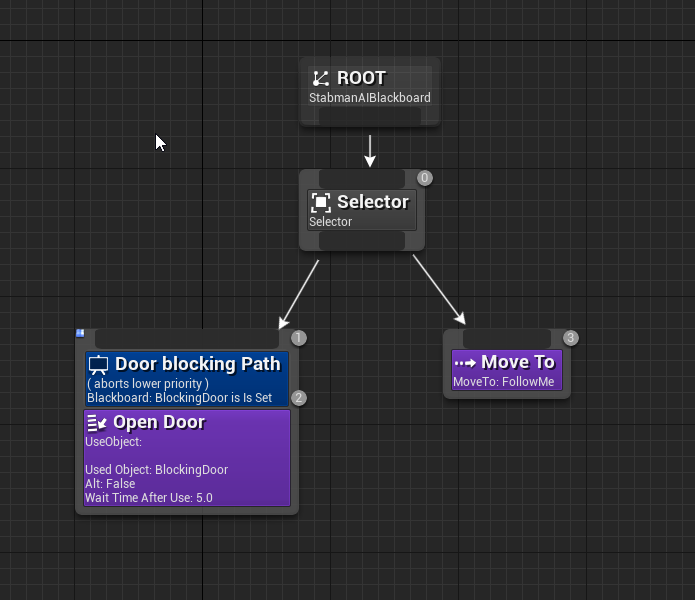
the tree is fairly simple for now, but I kinda want the door task to trigger on any move action if possible
echo ether
@floral mango , "you're using one of the tasks that updates the last leg of the path to move to the target actor position" means? I'm using only 2 tasks one to set the player position and SVON MOVE To.
floral mango
it says failed to find start nav link, so most likely the pawn is in a blocked area
echo ether
@floral mango , yeah i know. how to prevent it from entering that section?
@floral mango , and still come close to player
echo ether
@floral mango , is there a way to abort the task if its in the block section by itself?
floral mango
You'll need to look at the code
echo ether
@floral mango , i'd very happily do that if i can understand that.
pine steeple
@eternal stag A task can wait till a Finish Execute is called
so why not have an event bound in the task, that when the door is open, you call Finish Execute on the task
@echo ether i would just do a check every so often to see if its in that section and call abort task
why not use nav modifier volumes to restrict where it can go
it wont choose a path if its not allowed to go there
eternal stag
I found a different way to deal with it
I just made my own movetask that uses "Move To Actor or Location"
and ends it when an obstacle is reached, creating it again once it has been surpassed
 glossy abyss
I need my AI to make wide turns, like a car or boat (or in this case a dinosaur), they can't turn on the spot, does anyone have any idea how to accomplish this?
echo ether
@pine steeple , it uses SVON Volume for navigation. So i don't think nav modifier is helpful in that case. I don't know if there is a task called abort in BT. Please correct me if i'm wrong.
pine steeple
isnt a task
but a BT Task wont finish till you call finish
so why not just hold a task till your finished?
it will stop the BT from advancing
echo ether
@pine steeple , I'm not getting last two lines. What i wanted was to abort itself if the task fails to find the path. Can please elaborate the last two?
pine steeple
So you have a callback in whatever navigation you have to abort the task you can bind to it and call abort. Or have a service checking for a call back with sets a bool and you abort the current tree with an observer
I do it for my ai. When path fails hits a threshold it fires an event which sets a blackboard bool called Pathfailed and it aborts current tree and runs a recovery to get it back on navmesh or kill it if is too far or under map etc
echo ether
@pine steeple , okay. I'll try and let you know. Thank you.
echo ether
@pine steeple , I got it working now. It aborts the task if gets stuck in the blocking section and recalculates the path. Now i can get it follow the player pretty much correctly. Thanks for the help.
floral mango
@echo ether fixed nav component using controller instead of pawn location https://github.com/midgen/uesvon/issues/8
hybrid cipher
guys, do any of you know of a neat and quick solution to break AI creating "trains" when following player?
glossy abyss
@hybrid cipher either RVO or crowd detour controllers
pine steeple
@hybrid cipher use EQS
generate "chase" positions offset from the target
and have the ai follow that location not the actor
hybrid cipher
Thanks! Sounds like it could resolve my other problem too :)
echo ether
@floral mango , Thank you. Does that work in 4.20 version?
eternal stag
Howdy again, I am writing my own movement task, in which I want to deal with my controller overcoming obstacles and whatnot. Within this task I wait for them to reach a smart nav link before interrupting regular navigation and trying to make them pass an obstacle. I now want to dynamically spawn the appropiate task in my event graph, how would I go about doing this? I found a bunch two different nodes, but im not certain which one is suitable for me.
the wiki entries I found didnt go into terribly much detail into what these seem to do
hybrid cipher
@eternal stag hey if you can read c++ implementation of the nodes can be found in engine files to be 100% sure
eternal stag
yea, unfortunately blueprint wont let me automatically jump to those for some reason
so I didnt quite bother with that yet
might manually search em up if it becomes necessary
hybrid cipher
Aaah crap I knew where that one node you pointed out was
Ai controller I think, it seems like a hybrid between move to location method and move to actor
eternal stag
yea I see abunch of stuff here
hybrid cipher
Lol yeaaa... Takes a time to get used to it :)
eternal stag
but isnt a task basically just an actor with a bunch of specialized ticks?
Could I just spawn one and initialize a bunch of stuff?
or is there more to it that I gotta look out for?
mhmm no, not an actor
ahhh, it's an AITask, not a BTT task
 rare violet
Anyone implemented advanced cuda programming in their program?
I'd love to see examples
rare violet
was talking to a PhD student whose thesis was on fuzzy logic
anyone done anything in regarding to fuzzy logic?
floral mango
@echo ether master branch should be fine in 4.20
 silent tiger
@rare violet worked with fuzzy control systems a while ago, but haven't seen the need for it in game dev yet.
rare violet
@silent tiger Fair enough, because I am studying computer science with AI and this is one of the options I have to study as I was told
 quiet dove
https://twitter.com/Volvary/status/1084250146433630209
Here's a little something I did yesterday


Here it is! Three storage workers, trying to fill their storage with specific ingredients. But there's one Red cube too little for their happiness. All built in Unreal Engine using the Behavior Trees. #gamedev https://t.co/N0rNNY6wY9
 Twitter
unborn jungle
Twitter
unborn jungle
Does anyone know what difference in movement the "AllowStrafe" boolean on the ai controller makes?
I can't see a difference but it must be doing something
flint trail
@magic perch just saw your comment on Tom's Utility AI post. How does one work with FSM AI in UE4? (using BP preferably) Are there any tutorials about the subject ?
hybrid cipher
FSM is not that difficult to code, you only need logic of what happens in the state and condition where to go from there, should be good enough if you just look in general way to code FSM
flint trail
right, but UE4 has no state machines in BP
so coding FSM-like Ai in BP won't be the same as having native support for true FSM
 magic perch
you can implement a state machine in BP though, it's fairly trivial
I don't know of any UE4 specific tutorials, but any C based language would easily port across
flint trail
aye, cool
outer cape
You know how DetourAIController will make Characters walk around other Characters with that AI Controller?
How do you make the Controller also do that for a Pawn controlled by the player?
Do you need to make a new AI Controller blueprint to achieve that?
 trim laurel
How can one check if default Behavior Tree tasks are failing? My moveto command isn't working, but I can't figure out if it's failing or if there's a physics issue.
trim laurel
Gracias
What's the difference between "On Perception Updated" and "On Target Perception Updated"?
is it just that one generates an array and one generates a single target?
 pulsar cosmos
Is there anyway to have 30 enemies on screen at the same time without FPS dropping to 30?
patent hornet
yes
pulsar cosmos
Any idea how I can do that?
At one of my rooms in the level, there are 30+ enemies but FPS drops down to 30 which severely ruins the experience
patent hornet
that is not a simple qquestion
maybe its fixing a single call that is too expensive
maybe its fixing 50 small things
run a profiler, figure out whats using most resources
and try optimize it, then repeat
pulsar cosmos
It worked! Thanks dude
The issue was the multiple point lights casting dynamic shadow
 magic jasper
Anybody have experience with making AI use input to drive objects?
Example would be, AI giving input to a vehicle to change steering input for a vehicle
PID controller or a spring damper seems like the way to go
Just want to know if there are more refined methods
Or to keep it simple, turret has a fixed acceleration and max speed for rotation . AI has a target direction it needs to line up with, how much input to apply to land on the target etc.
magic jasper
Awh yis

Experimenting with PID / PD controllers. PD seems to be much more predictable. New weapon framework is coming together nicely! Currently it's just zeroing on...
 gilded tree
How do I make the behavior tree fire the Animation and the sound fit for the animation at the same time instead of having them fire in sequence? Is there a way or would I need to write up a task for it?
 hybrid cipher
hey, you can try to make your own task that does both in the same node @gilded tree alternatively you can probably set Anim notif or some such that will attach the sound to the animation if it's meant to be played every time the animation is played, this might help https://docs.unrealengine.com/en-us/Engine/Animation/Sequences/Notifies
@magic jasper I think what you talk about is prediction? you can aim at the last known position, but that won't give you a great result, and you most likely never hit what you want, so it's more interesting to try to predict where the target will be in the moment your projectile is supposed to hit it. Takes some math...is this what you wonder about?
magic jasper
Not quite. The AI needs to rotate the turret by applying inputs, same way a player would
Same deal for the tank - so it's a case of working out how much to apply so it doesn't overshoot the target and doesn't oscillate. PID / PD turned out to be a great way to do it
pine steeple
have the sound play in the animation itself?
patent hornet
@magic jasper s = t^2 * a / 2, s being the distance, t time in seconds and a acceleration here
if neither your start or end velocity is zero, then it becomes s = t^2 * a / 2 + v*t v being the lower of the 2 velocities
a being difference from start to end velocity divided by t here
 pseudo yew
yo how do I get my behavior tree to Not revert back to the IDLE move to random point when state is combat firing at player? Basically stop and fire, instead of continue moving and firing?
magic jasper
That's a ballistics calculation, it doesn't solve the problem of AI deciding how much key input to apply
Bu it's solved now anyways
 arctic crag
So I'm writing custom Decorator, Service, and Task classes for my project but I can't seem to figure out why SetOwner is not being called. Has anyone ran into that issue before?
 green narwhal
Not sure whether to ask this in the multiplayer or the AI channel, but guess it's more AI focused - I'm looking at making an RTS which will need fairly simple AI logics (move, attack etc.). What would be a realistic number of AI before performance starts to hit the pan?
I know that's a VERY broad question, but I'm wondering if the 800 AI mark is even achievable
Have not messed with AI much in unreal just yet, but was thinking of putting logic together for something like one designated leader and then have followers, to try to take the strain off
gilded tree
@hybrid cipher Thanks for the assistance, making a new task for the function worked perfectly.
patent hornet
@green narwhal if you don't plan on writing your own movement component, 200ish is as far as you can go
CMC eats resources like a hog
AI logic itself is insignificant by comparison
green narwhal
@patent hornet Ah right, for some reason I was always under the impression that the AI systems were what ate the CPU up, I'm confident I can write my own server replicated movement component - thank you!
patent hornet
its 4ms worth of overlap detection with 150 AI running around
with CMC
you can make the AI cost more, but you really don't need to 😄
 lone abyss
A custom CMC may ends up costing even more performance ^^
green narwhal
Hmm I haven't taken a good look at the OOTB movement component so not sure if I could optimise it well or not
Only way to find out is by trying, probably failing, crying in a corner for a while then repeating, right 😃
hybrid cipher
speaking of optimizations, just checking out my AI and I noticed couple of things that I can't quiet understand, figured I could ask ~~
MoveTo task seems to be taking unreasonably long time with 50npcs in the scene (more than 3ms), any thoughts why this could be so or how to go about fixing it?
what is BT search time from profiler data?
is BT tick function execution of services or is it one run of BT?
pine steeple
to have that much usage with 50npcs, you must be calling MoveTo way too much
i have 150 AI, and my moveto barely goes past .8ms
hybrid cipher
thought move to doesn't get called again until you reach the destination? I don't really limit it in any way
that's probably not good ~~
so do I get this right? if MoveTo is called it will keep running until you get to designated destination? so you should drop a decorator on it so it doesn't get called over and over again?
pine steeple
no it should only be called once and remain active till it gets to destination
have you verified thats the case?>
pine steeple
is the task ending all the time and restarting ?
hybrid cipher
although I was trying out just having simple BT with getting target and then only moveTo node and the result was the same
pine steeple
cause you shouldnt end that task until the Move is complete
hybrid cipher
kinda late here, can't check right now ~~
hybrid cipher
ah, I see, I will definitely have a look
you should share your AI setup btw, lol, would be so cool to see :)
I'm too new to this
pine steeple
mine is complicated
i have 15 different types of AI
and i use custom made C++ services, decorators and tasks
😄
 timber flax
Hey guys, anyone know how i can change the height of this?
idk what it's called, but the AI perception isn't detecting my player/other AI when standing behind a low wall
so i'd like to either raise it or add another point in the head
pine steeple
yup
pine steeple
perception system is kinda garbage with BP stuff
i had to make lots of custom stuff to make it work nicely
timber flax
i wish i knew cpp
but my entire project is in BP
so i can't recode it
and i don't have the time required to learn C++
pine steeple
sop
so
if (Target.SightTargetInterface->CanBeSeenFrom(Listener.CachedLocation, OutSeenLocation, NumberOfLoSChecksPerformed, StimulusStrength, Listener.Listener->GetBodyActor()) == true)
it basically calls a SightTargetInterface
which gets the location it can be seen from
timber flax
makes sense
pine steeple
but if you dont override that interface
it does
FHitResult HitResult; const bool bHit = World->LineTraceSingleByChannel(HitResult, Listener.CachedLocation, TargetLocation , DefaultSightCollisionChannel , FCollisionQueryParams(SCENE_QUERY_STAT(AILineOfSight), true, Listener.Listener->GetBodyActor()));
timber flax
so it just gets the center of the actor?
pine steeple
yep
timber flax
well then i can place an invisible cube above the actor
.-.
😅
that's such a messy solution
but ah well
timber flax
yeah
i'd rather do that too
but i don't think there's a way to do that
at least in a BP only project
pine steeple
no has to be C++
timber flax
is there any way to get a singe c++ class for just that?
pine steeple
cause you need to implement the interface into the actor class
timber flax
i know i can create a c++ class
pine steeple
yeah create a C++ class based on Character, and reparent your character bp to it
it should "work" just like normal
timber flax
hmm... ok
pine steeple
but no guarantees 😄
timber flax
c++ be like that :p
pine steeple
so the trace should go over the top right?
timber flax
yeah
it goes over the top of the wall
and the detection point is just below the wall
but i can't have the wall be just low enough for the detection point to be over it
because then crouching does nothing
pine steeple
so you want it to be from the pawn eyes
timber flax
yeah,
pine steeple
rather than the center
timber flax
ideally there'd be 2 detection points
one where it is now and one at the eyes
but i have no idea if that's possible
pine steeple
not possible really but eyes would work for all cases
timber flax
yeah, eyes would be fine
timber flax
yeah, exactly
pine steeple
not much more i can suggest really
like i said the perception system is kinda broken
with BP intergration
timber flax
yeah
pine steeple
all my perception stuff is handled in c++
 pine steeple
yup
timber flax
which makes me sad, i'm using a workaround that uses tags
which is so annoying to work with
timber flax
well even then
pine steeple
and AI skip any perception if the listener is another AI
timber flax
welp, looks like it's time to get tom looman's tutorial out again
yeah, i want to have both friendly and enemy AI
so i need a team system
pine steeple
yeah i think teams are in PlayerState
not to sure tbh, but i think it checks Team == Team for Friendly, Team != Team for enemy, no check for neutral iirc
timber flax
i know a bit of python, so that helps sometimes
but i've never really gotten anywhere with c++
i guess there's no time like the present .-.
pine steeple
PerceptualInfo->bIsHostile = AIOwner != NULL && FGenericTeamId::GetAttitude(AIOwner, SourcedStimulus->Source) == ETeamAttitude::Hostile;
{
    const IGenericTeamAgentInterface* TeamAgentA = Cast<const IGenericTeamAgentInterface>(A);

    return TeamAgentA == NULL || B == NULL ? ETeamAttitude::Neutral : TeamAgentA->GetTeamAttitudeTowards(*B);
}
so it calls a IGenericTeamAgentInterface
to get the team
its on
timber flax
makes sense
timber flax
thanks, i appreciate that :)
i bought a tutorial series from tom looman on c++ a while ago
never finished it as i got what i needed from it
time to go do it all the way through i guess
 grand isle
Hi guys. Does anyone has any sort of clue on how to create flyer AI pathfinding?
I'm thinking copying EnvQueryTest_Pathfinding but cut the path validating part
unborn jungle
Should you be using the tickbox "Project Destination to Navigation" on the Move to location node for AI?
It seems sometimes my AI get stuck and don't move when they should, but having this checked seems to fix it
Is it greatly more expensive or something?
eternal stag
just a minor annoyance of mine, for some reason I have to manually rebuild paths in my level every time I fire up the editor, is there something configured wrong on my end?
fresh restart just has my AI try to dash directly towards the goal instead of navigating the level properly
fallow hound
@grand isle there is a free flying pathfinding plug in on the marketplace, probably a good code base to learn from or use.
 brittle flare
What settings do I require in order to use basic AI? I current have a black board and behavior tree that is exact to the "https://www.youtube.com/watch?v=nshHCycft4A&t=1431s" tutorial at 45 minutes
Announce Post: https://forums.unrealengine.com/showthread.php?135116 Mieszko Zilenski is back in action with Alexander to talk about how to get set up in UE4...
I also currently have a NavMeshBoundsVolume, however my character class I made a BoxComponent the rootcomponent but all collision has been toggled so i am uncertain
Is there something obvious I am missing
brittle flare
So I ended up using the Player that comes with the template and got some functionality
Now I am wondering what components are necessary in order to use a customized character
 ripe whale
Does anybody know if there is a method to query the AIController or movement compoenent or something for the last requested move to location? I want to create an animation transition where my character transitions to a new state once they are close to the destination
I just tried using GetImmediateMoveDestination() but it seems that the move destination changes multiple times for each call to simple move to in blueprints
ripe whale
nm I figured it out
 umbral raven
Howdy dudes I've started learning UE4 and I have a game in mind that I want to start working on once I feel I have enough knowledge to do so. One thing I'm wondering is: how difficult would it be to code an AI (Using Blueprints as normal scripting languages just blow my mind.) that will follow a player until ordered to do things like attack, hold position, etc.
hybrid cipher
hey @umbral raven it depends, there are some starter tutorials to show you how AI can follow a target, so it can be copy paste, but it all depends on how complex you want your stuff to be. If you will be using behavior trees to drive your AI, you can combine that with blueprint tasks and services and such for your convienience. I think with AI design is a tad more difficult to come up with than to code it all in, but it's all about practice
 wanton oriole
Hey guys! So I'm working on some AI that has to move to different locations using a navmesh. I want it to look as realistic as possible, so I'm facing some problems.
First, do any of you know of a good way to smoothen out the path that the ai is walking on? In this article they are talking about exactly that, but I don't really get how they solved the problem: https://www.unrealengine.com/en-US/tech-blog/a-layered-approach-to-ai-locomotion-in-the-occupation

Unreal Engine
White Paper Games Technical Artist James Burton shows the process used to create the locomotion system of the AI characters in the upcoming game ‘The Occupation’.
Also here is a picture. The red path is the one he is walking now. But it should look more like the blue one
I drew the blue path a bit wrong, but you get the point xD
umbral raven
@hybrid cipher Thanks for that!
hybrid cipher
no problem
 stable void
@wanton oriole thank you for the link, very informative, please let me know if you figure it out !
Does anyone know why a behavioural tree would work on itself but do nothing when called using "run behaviour" ?
stable void
for the future generation searching for this: behaviour trees parent and child have to share the same blackboard to function properly
pine steeple
@stable void yeah i had that issue when i first used inherited BT
you cant split the blackboard, BUT you can set the BB root to the derived BB
and use that
but you cant use a different BB
if that makes sense
silent tiger
@wanton oriole you could simply go through the red path, calculate the angles between segments and add new points to smooth the hard angles. Just be careful that the new points are on the navmesh.
patent hornet
add new points to what? path that gets recalculated regularly? each time its recalculated?
that would be a serious pita to code in
gilded tree
You could make a new task that would clamp the angle of the moveto using the actors rotation + an extra value to get the degrees he should rotate to the new point. One issue would be that the ai could circle off to the wrong side, I'm not sure if we can reference a future moveto node? ;)
stable void
@pine steeple no, I don't think I get you , could you go on more detail please ?
gilded tree
How do I stop a playing animation when a new task is being run in behavior trees? For example, my AI is searching for me. It pauses to run an animation where it looks around itself. Mid-animation it spots me and it should stop the searching animation and just go straight into chasing me down, resuming its normal anim BP, but in my case it moves the AI towards me, but the animation is still being run. I.e feet standing still etc.
 lyric flint
you might need to force the animation change in your animation blueprint
you should make a "cancel current animation" node in your behavior tree
pine steeple
@gilded tree you need to look into montages, montages can be canceled and allow the normal anim bp to take over
gilded tree
Well, I have a custom task for running both my animation and a sound at the same time. This is what it looks like.

The false pin works fine after the animation cancels and the task is done it returns to the anim BP, but if the AI is in combat (spots me during the animation) it doesn't stop the animation
@pine steeple @lyric flint
pine steeple
toggling animation mode isnt the approach you want
why not play a montage and cancel it when spotted?
also why are you changing animation mode with a montage
you simply play montage, when spotted cancel montage, no need to do anything else
gilded tree
Yeah, I've tried that already, but the animation keeps playing if the AI spots the actor during the animation. Beats me tbh 😅
pine steeple
tried what?
the montage will end as soon as you call Stop Montage
you also changing the Animation mode, why?
gilded tree
I changed the animation mode in an attempt to force the AI back into its correct animation mode and leave the montage, but the montage is played "on top" so it's obsolete
gilded tree
If AI is in combat returns true it should stop the montage immediately and return to chasing the actor.
If AI is in combat returns false it should run the montage
That's my logic, although I'm not getting that to work. Isn't that the correct method? Nevermind the animation modes and all that, that was just me testing around.
pine steeple

i mean that will replay the montage


or like that
not reallyt
sure what you are doing or after
so im just guestimating
gilded tree
Alright, I'll give that logic a shot
Well let me break it down
AI patrols an area. The AI spots and chases the player. If the AI loses sight of the player, it will run a "Looking around" animation. Once the animation completes the AI returns to patrolling the area. However, if the AI spots the player during the animation it should cancel the animation and start chasing again. I've had an issue with this before where AI got stuck in an animation while moving around, so I really gotta nail this one down haha 😉
Thanks for your time 🙂
pine steeple
well how is your BT setup
also how do you tell that task that a player has been spotted?
does it just "abort" the task when player is spotted?
if so why not cancel the montage in the Abort event?
pine steeple
does the Stop Montage get called?
gilded tree
Okay, so there's the issue.
The true of the branch never executes
Even if it spots the actor, so the boolean Im using is probably set wrong somewhere... hmm
pine steeple
ofc
its checked as soon as the montage is playing
and false is called straight away
gilded tree
Alright, so it beats me how to make the true react, I think I've just been staring at this issue for too long and begun getting mindbamboozled hehe.
gilded tree
okay I fixed it, I had the attacking task cancel all anim montages. gosh, finally 😃 thanks for the help, @pine steeple
gilded tree
No I don't, but the Attack task is what cancels out the Searching task, so like you said I stopped all montages in the aborting task.
Which worked perfectly. 🙂
hybrid cipher
hey guys, a question about checking if path exists in UE navigation, know there are couple of methods to do this, but based on what does the system decides if it's true or not? is it only for static objects, or moveable objects too? if so, do moveable objects need to have something check liked "affect navigation" etc.
 robust bridge
Has anyone here looked into making detour agents actually affect nav corridor planning?
@hybrid cipher What do you mean? You can poll the navigation corridor from detour if you want to. That corridor is calculated from the navmesh itself
If you activate Affect navigation on a primitive, you can make that primitive change the navmeshes either by introducing difficult terrain, or punching a hole in it completely, and this will of course affect any navigation corridors you try to generate
Beware though, as any time you modify the navmesh (for example by introducing a new primitive with affect navigation, or toggling it on / off you will force a local rebuild of the navmesh and this will invalidate previous paths, possibly causing hitches in agents' movement
This kind of ties into what I'm playing with right now.
hybrid cipher
well I have ai using detour and there's a lot of them so I kinda wanna check if the destination of that AI is reachable (it's FVector at this point), for some reason decorator PathExist always return false (weirdly enough when I inverse the condition, it's still false)
tried using custom decorator with TestPathSync and it's the same, so I'm kinda...buffled, just trying to understand how the engine checks whether the destination is reachable or not
I don't really want to recompute navmesh, nor should AI actually collide among one another (they will use detour tho)
echo ether
@floral mango , hey. Is it possible to make the AI to move to random points using SVON Volume? I mean, if you are using Navmesh then you can use random point in navigable radius. Can we do something similar in SVON volume?
floral mango
@echo ether there's no function to select a random navigable point right now. I do have some simple code sat locally to flood fill for a navigable position but have been mega busy and not had time to finish it
echo ether
@floral mango , it's okay. Please let me know when you put that in the plugin. I'll keep try keep working around then.
echo ether
Hey guys, can anyone please tell me how decorators work properly? I put a blackboard decorator on the task and set to abort self. But the task is not aborting. but if i put the same blackboard decorator on the left most of the task then it shows that the current task will be aborted of result change. Anyone knows why? By the way , these nodes are branching from sequence nodes.
 south prism
Why is the "CanSeeEnemy" not working on my AI Behaviortree as Blackboard Condition? The AI should check every other AI and if its a different team, it should make the boolean "CanSeeEnemy" in my Blackboard to true.
stable void
@pine steeple
here is the setup, it's really simple
basically the npcs move with that filter and the playable character is setting the position of the filter with the sphere
it works but everything is affected
pine steeple
so what is your desired outcome
pine steeple
right so that sphere is attached to PC?
and that navfilter is on the NPC?
@stable void
stable void
@pine steeple yes
stable void
yes
stable void
ok I just tried that and UE4 jcrashed .. haha. i'll try again
no, the filter is still effecting everything sadly :/ @pine steeple do you know what all the flags ticks are all about ? Or where I can find some documentation ? I can't seem to find anything helpful
pine steeple
flags are strange, let me see if i can find a doc on it
south prism
@pine steeple can you help me there?
robust bridge
sigh..
hm
If you change the nav mesh area class you cannot avoid recalculation, which breaks smooth pathfinding. But doing agent aware corridor prediction seems to not really be a good solution either
Stuck!
Any insight from AI gurus? 😄

Maybe the solution is to disable automatic recalculation, set some frequency and just go nuts with the filters?
Maybe only allow recalculation when agents are a certain distance from a path corner
 copper nebula
@stable void why not use the booleans as isFlagIncluded, then you only need half of all those booleans?
pine steeple
@copper nebula that is engine defaults
 crystal grotto
Each time i start UE4 i have to build Pathsagain, before the NavMeshBoundsVolume works correctly again. Is this always like this or am i doing something wrong ?
pine steeple
@crystal grotto it happens in our project
we eliminated some issues by ensuring the bounds is on the Peristent level
crystal grotto
@pine steeple I still can't fix the problem :(
Do you have any advice for me ? :/
pine steeple
@crystal grotto no not really, i just get used to having to build paths
crystal grotto
Yee, that would be also not a real problem for me.
The big problem is that even when i try to build a release version it's still acting like it isn't builded 
Did you tried it ?
Maybe you have the same big problem as me
crystal grotto
Alright
pine steeple
maybe your generation settings are set wrong
or something
you using nav invokers?
crystal grotto
I don't really know what nav invokers is 😅
crystal grotto
crystal grotto
Worth a try 😄
Still the same problem with the build paths while in editor.
Making the release version to try it would take some time
pine steeple
oh, just do a cooked debug build
and launch standalone
its quicker and will have the same effect as release (regarding navmesh)
crystal grotto
Uhm, where can i select again the standalone version ?
I was there already once, but i forgot where it was
pine steeple
just cook build i think
i compile the binary via Visual studio
and just cook content
crystal grotto
Well, i tried it. Still the same 😭
If i can't fix this problem it's for my game
At least for the public version 😐
south prism
Someone can help me? If my AI see one enemy, it set it to CanSeeEnemy and if the enemy die it should set it to false for the AI behave tree. And another issue is, that if 2 enemys are in his range and he kill one, then it dont attack the other one and just stand still. Hope someone can help me
 lofty remnant
Anyone got info on the DetourCrowdAIController? I can't seem to create a custom C++ child of it. Is this an established feature? I found these :
Unreal Engine Forums
For gameplay programmers writing C++ code.
hybrid cipher
@lofty remnant hey I think deourCrowdAIController doesn't really do that much, right? Are you just trying to use detour avoidance or is there more you need from it?
lofty remnant
@hybrid cipher For now I just need avoidance of a large mob of actors. Just walk to keep them from walking over each other.
I've replace my AIController's PathFollowingComponent with a UCrowdFollowingComponent, but I can't seem to figure out how to configure it.
SetCrowdAvoidanceQuality() and other methods appear to be inaccessible.
hybrid cipher
you can set up the avoidance parameters via Project Settings->Crowd Manager
lofty remnant
@hybrid cipher I've seen those, but not sure what to make of them, even after looking at : https://answers.unrealengine.com/questions/212408/crowd-manager-avoidance-config.html
hybrid cipher
it's a bit of a magic lol
lofty remnant
NVM... uggh I hate intellisense. I needed to disable it forever ago. It was telling me the config methods were private.
But It builds now.
crystal grotto
@pine steeple I found a solution to not always build the paths when starting UE4.
If you press at the RecastNavMesh-Default (thing which gets automatically generatet when you create a NavMeshBoundsVolume ) you can check the option (under Runtime) Force Rebuild on Load.
But i still can't get it working when i wanna release my game 😦
south prism
pls someone know the answer for my question? I didnt figured it out since 3 days
lofty remnant
@hybrid cipher even though I've configured my CrowdFollowingComponent my AI still aren't avoiding each other. Any thoughts as to why that may be?