#gameplay-ai
1 messages · Page 107 of 1
 glossy abyss
 cursive vector
i would have thought those are just the parameters for the agents, while the NPCs themselves are the agents.
glossy abyss
to my understanding the agents are used for generation
AI controllers are what make use of the navmesh
Although I could be totally wrong
¯_(ツ)_/¯
never know with this engine could dig more into the engine and figure it out but ain't got time for that
cursive vector
in unity, the things moving around on the navmesh are called NavMeshAgents. and it also uses recast & detour for navigation. but yeah, i dunno 😄
 lyric flint
my ai shadow has prieview on it
 pine steeple
NavAgents are just the type of agents using a navmesh, you can have different navmesh generations (bigger chunks etc) and bigger capsule sizes, so things like a Large Dinosaur wont try to path down a gap only a small rabbit could fit through.
thing with using Crowd Avoidance is it only support one singular navmesh, fine if most of your AI are one sort of size
 grim citrus
Hello
Is there any way to control Smart Links within BP? Like its Start and End location?
 quiet basin
Greetings. Is there a way to debug AI navigation except vislog ?
for some reason AI logs status as IDLE all the time
i'm worried that ai controller reports that Pawn is - none all the time
however i'm getting controller from this pawn
quiet basin
removed the nav mesh and added back - now it works -_-
lyric flint
i need help. when i jump on a cube and the ai touches the cube the game quits, even though that should only happen if the ai touches me.
 drifting hazel
sound like you have and on overlap event in yout cube
and the on overlap does not check if the overlaping actor is a player controlled character
lyric flint
ok ill try
 blazing solar
Okay so I an AI set up to follow enemy AI but when I play they just from to the center of the map, or what looks like it. Any idea why they aren't follow the enemy (I used the same set up for enemy to follow player and that works fine.
 nova echo
Hey all.
anyone seen this before?
Blueprint Runtime Error: "Accessed None trying to read property BaseAI_Controller". Blueprint: Civilian_AB Function: Execute Ubergraph Civilian AB Graph: EventGraph Node: Set IsAlive
Civialian_AB - https://i.imgur.com/LDuK64y.png
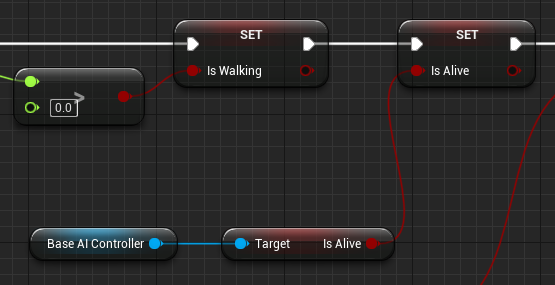
The 'Set Is Alive' is erroring for some reason in game but no errors appear when compile
 misty gale
Accessed nne means that the variable Base AI Controller is empty
being a variable of a specific type does not make it an actual reference, so it needs to be set somewhere to be valid
It's also invalidated when you change a level, so it would need to be re-set. Might be something to keep in mind
 timber flax
Hey folks
i'm wondering how to split the AI into 'teams', so that i can have some on the players side, that move with the player
and of course shoot at the opponents
lyric flint
i still have the same problem. can you tell me exactly what to do?
lyric flint
no
timber flax
because i'm here precisely because i don't know what to do
lyric flint
scroll up
timber flax
alright, sorry for the ping 😅
pine steeple
@timber flax i did team ai using playerstates
assign a Team to each AI playerstate, and query the playerstate to find out what team the AI are
i mean its quite a bit of work, like all damage coming in, have to check the source of the damage from the instigator's playerstate, and if it matches the hit player we dont do damage, else we do
same thing for ai tbh
 ripe whale
Does anybody know what the Agent Height / Agent Radius / Agent Max Height values do in the project settings under nav mesh?
And how they relate to the Supported Agents array in the navigation system settings?
lyric flint
i need help. when i jump on a cube and the ai touches the cube the game quits, even though that should only happen if the ai touches me.
Repost i dont have an overlap event
 wraith eagle
How are you handling the AI Touching you/the cube?
wraith eagle
Can't really tell much about what could be causing the Touch to happen if I don't know how your Touch is supposed to happen? You're not doing an overlap, so how are you doing it?
 ionic geode
Can someone provide me with some first-steps of debugging this:
My AI is moving on the nav mesh when playing in editor, but when I package the project AI is not moving.
It´s a C++ project. Thanks.
 stray juniper
Anyone know how to correctly use FindPathToLocation?
pine steeple
@ionic geode use the gameplay debugger with ` key, and make sure your nav mesh is on the persistant level and loaded
wraith eagle
Smart Links seem to be very much written specifically for the PathFollowingComponent? But they also seem to have a lot of their function calls commented out in the NavLinkCustomComponent class that calls anything on the PathFollowingComponent? Looking at the code in 4.19. I assume they still work as intended? Just wondering because I don't use the PathFollowingComponent so I'm probably gonna end up writing my own version of them
 lofty remnant
So I have a Tilemap that has bCanStepUpOn = true and has appropriate collision settings for pawns to "walk" on. A navmesh was generated on this tilemap, but it doesn't seem to dynamically update properly) when moving things around in the level (an obstacle, for instance, will remove existing navmesh, but navmesh that was in the obstacle's previous location does not regenerate despite the obstacle being gone. Any thought what might cause this or what I can do about it?
wraith eagle
So it's not updating the tile where the object used to be?
 bold urchin
Guys, is there any preferred order for sorting test in EQS? Like whether the filter tests should come first or the score tests should come first?
Same case for traces, distance test and overlaps tests?
 patent hornet
you always filter first
no need to score items that do not even qualify
just wastes resources
same principles apply for distance/trace/overlap
cheapest goes first (distance, and do compare squares of distances rather then distances to avoid calculating square root a billion times)
but that only saves you performance if a distance check can eliminate the need for a trace or overlap test
bold urchin
Thanks
 hybrid cipher
hey all, does anyone have a link to a good starter tutorial for AI coding in c++? it's been a while since I've done any in UE and could use a quick refresher
lyric flint
@hybrid cipher HDD:\Program Files\Epic Games\UE_4.xx\Engine\Source\Developer\AITestSuite\
the engine source code
hybrid cipher
Worth a shot
wraith eagle
Does the bLinkEnabled variable on Smart Links actually do anything? Looking through, the SetEnabled function on the CustomNavLinkComponent only seems to be getting called from NavLinkProxy::SetSmartLinkEnabled(bool bEnabled);, but doing a search for that function, it doesn't look as though that gets called anywhere? The PostEditChangeProperty is only looking for changes to the bSmartLinkIsRelevant value on the NavLinkProxy, so are you supposed to just use the relevancy to turn the Smart Link on and off?
Using UE4.19.2 in case that matters at all
 ember river
Hey there! How do I get my AI character turret to shoot at a Enemy Character (not pawn). I am using pawn sensing but is there a dif way. Im a noob so be gental
gentile*
 hybrid grove
@ember river Lots of different ways, you could set the turret to fire when its within a certain angle of an enemy target via function on the vehicle blueprint.
Question, I have a vehicle called 'AI_Car". It uses a custom AI Controller that calls a Behavior Tree. Inside this behavior tree is a Task that calls waypoints and the "AI_Car" via casting. Car automatically drives to waypoints and executes functions inside the "AI_Car". Works great.
The problem is, when I duplicate the "AI_Car" blueprint to create another vehicle, it breaks the Behavior Tree Task because of the casting to "AI_Car". I can't use Cast to Wheeled Vehicle because then I can't access functions inside the "AI_Car" or future copies of this blueprint.
Any recommendations to access other versions of the AI_Car?
 unreal jetty
You can create a parent version of the blueprint and have the different cars be children of it. That gives you access to all the functionality of the parent and allows you to setup each car as you want.
hybrid grove
@unreal jetty That sounds like a brilliant solution. I will try this. Thank you buddy!
unreal jetty
Np. Let me know how it works out.
 misty quest
hey gents trying to get a simple formation system working. currently i have 3 separate capsule components that are each on spring arms. they are attached at different angles on the player character and the capsule components serve as the formation destination points. im trying to get 3 friendly AI to select 1 point each and move to and follow. is there anybody that could lend a hand? wanting to do it with a behavior tree so i can expand on this later.
 vernal thunder
Hey, what's up? I'd be glad if someone could assist me with my issue:
I've created a custom BT Task in which I'm clipping a vector by normalizing it and multiplying it by a float value of some length.
That part is working correctly, and is returning me the correct vector.
I'm then using that vector as the target for my AI bot to move to.
The problem is, my AI bot moves but it's always off from the target.
The image is at the end of the move to operation: The red sphere is the point the AI should move to, but it doesn't.
The second is the setup.
If I remove the 'random float in range', the AI moves correctly towards the sphere. However, I need to randomise the length of the vector, so I need it.
Could anyone please tell me where I'm going wrong, or what could be changed to ensure the ai always lands on the correct point? Thanks
patent hornet
@vernal thunder the blueprint pure nodes are re-evaluated every time execution line hits any node they are connected to
so, after your DrawDebugSphere does its thing, the SetBlackboard value node re-rolls your random 😄
if you connected 5 PrintStrings in between those 2 nodes, all printing out your vector, you'd get 5 different printouts
vernal thunder
@patent hornet really noobish mistake. 😖 Thanks for helping out. 😁
ember river
Simple question: My turret rotates and shoots at enemy, but the RInterp is not really doing much, it still looks bad. Any tips?
timber flax
Hey guys, how can i get my AI to look at my player when they see him?
and i mean up/down aswell as left/right
vernal thunder
@ember river your RInterp node should be in a tick or timeline to work correctly. Pawn sensing fires once, so it won't be able to interp correctly.
 desert kelp
I'm moving my pawn with a behaviour tree, using the MoveTo. If I give it a new Movetolocation, it still goes to the old one....
how do I get it to change in the middle of a moveto?
Nvm, I added a stop movement immediately node before I set the blackboard values
pine steeple
@desert kelp i tend to use a "move to actor" and enable goal tracking
and just move the move to actor
allows for fluid movement without start/stopping
desert kelp
I notice there is a little jerk movement when I change the target, but I'm just feeding a location gotten from hitresultunder cursor
 foggy moth
Hey all - trying to filter on an EQS - GamePlayTags... but its not working.
I've added the public dependancy "GamePlayTags" to the build.cs and it compiles fine...
Heres a look at my EQS - I have it set to "No Tags Match" with the below settings:
https://puu.sh/C48Xa/6edbd3b7a8.png
I"m adding the tag on a BPInterface call - but it isnt adding this tag the way the following post says it should....
https://puu.sh/C490K/c89acc5fd3.png
Anyone doing this successfully?


OnTick in this actor - i'm printing off GamePlayTags->GetName() (Blueprint functionality) but its not adding this tag when this event is firing (i've stringed that it IS firing too....)
pine steeple
have you set a container in C++ with the IGameplayTagAssetInterface pointing to that container?
and tags should be like a tree
Character.Dead
etc
foggy moth
no Kaos - i read in that same post that some people were doing it in BP's but i can try that implementation now....
that post says theres 4 functions to implement - i havent looked much into it at this point....
pine steeple
the eqs query will never find a tag container unless you explicitly tell it where the container is
 pine steeple
the eqs query calls:
FGameplayTagContainer OwnedGameplayTags;
ItemGameplayTagAssetInterface->GetOwnedGameplayTags(OwnedGameplayTags);
foggy moth
you setup GamePlayTags in ProjectSettings
which has a tool to add it to the DefaultEngine.ini file
pine steeple
right, i use gameplay tags all the time
foggy moth
ok
pine steeple
my whole AI system is ran by gameplay tags 😄
foggy moth
so i set that portion up
in the characte rfiles affected now....
i need to implement the IGameplayTagAssetInterface
pine steeple
so whatever item your querying, needs to have a IGameplayTagAssetInterface
with the override GetOwnedGameplayTags
you use c++ at all?
pine steeple
cool
so GetOwnedGameplayTags override should return your tag container
and everything should work 😃
foggy moth
should i call this function @ begin play in the character class that impelments this?
or will EQS do this natively?
pine steeple
call what function?
foggy moth
ok
is there a BP Exposed function to add the gameplay tag?
like the pic above?
is that correct?
or should i do this in C++ function?
pine steeple
thats just for the tag to match to your container
FGameplayTagContainer MyTagContainer;
virtual void GetOwnedGameplayTags(FGameplayTagContainer& TagContainer) const override { return MyTagContainer; }```any tags added to MyTagContainer will be checked against the EQS query

see i use gameplay tags extensively 😄
yes they are custom decorators for tags
foggy moth
ok is SETTING the tags though done like this?
pine steeple
which handles observer notifies
foggy moth
 pine steeple
yes
pine steeple
notifies any actor that a tag has been added, so i can run stuff in BP
 bold urchin
Hey Guys!
I have this node, that should run when the AI Bot is not close to target location.
It gets executed but does not stops when the Bot is in the acceptable distance of IsAtLocation Decorator
So am i using the decorator wrong, or is there any other problem?
bold urchin
and the Bots stutter while moving
pine steeple
for one, that is a lot of decorators, and simple parallel should not be used, that looks quite messy tbh
i would be splitting the tree up to make it more readable and more flowable
 sleek holly
Anyone know how to make AI like that? https://www.youtube.com/watch?v=36cKiPPrGHo

READ BELOW: This was my undergraduate dissertation project. I have had a lot of requests from people telling me to send them this project. I'm not really wil...
foggy moth
hey all - how do i break out of a node in BehaviorTree - on a decorator value change? I thought setting ABort:Self was the way to do it - but it will continue to run its current node its on in the tree - and when that task is done it will abort.... i need this to happen immediately not after the current task is completed.....


i'm print stringing this enum - and i see it change - but it continues to execute its current task its on under this tree - and when its done THATS when it will move to the next tree over
perhaps ishould move this enum logic to a service - and binded delegates to the pawn whenever i'm switching the pawns variabels - update this service..... sounds more appropriate
pine steeple
On Value CHange
 velvet copper
set on value changed to opposites on each branch?
ie is set on 1st node and is not set on 2nd node
 split ingot
Hey all, I've had some weird issue with navigation ever since we upgraded from UE 4.19 to UE 4.21.
About 9/10 times the AI works perfectly as with 4.19, but every now and then something goes wrong and my AI is unable to move to the TargetActor. I am currently using a Bhavior Tree where I call a Move To function. This seems to work as intended most of the times. But sometimes the BTree just freaks out runs over the Move To command crazy fast over and over again. (I assume because it is failing and then retrying).
Has anyone had this problem with moving from version 4.19 to 4.21 ?
I removed the nav mesh and re-added it , with the new settings in my config as well. 😔
split ingot
Okay cool I managed to figure it out. If someone else has the same issue, this was the steps I took to get it working
Delete NavMesh from level,
Delete ReCastNavMesh from level
Save all maps and rebuild all
Add NavMesh and ReCastNavMesh to levels
Save all maps
lyric flint
@sleek holly I'm not sure exactly how Kaylee did it in her approach, but to me it looks like she used Dijkstra algorithm.
I may be wrong, of course, but in case I'm correct, here is some code that may help you https://github.com/dhk-room101/DragonAgeJourneys2UE4/blob/master/DragonAgeJourneys/Private/battle/Battlefield.cpp

GitHub
Contribute to dhk-room101/DragonAgeJourneys2UE4 development by creating an account on GitHub.
movementMap = BuildAdjacencyMap(); dSearch = NewObject<UDijkstra>(); dSearch->InitializeDijkstra(movementMap, GetCurrentHex()->index); dSearch->FindShortestPath();
Basically there is a grid of nodes, set the goal triggered by conditions and move there and update the map while moving
hth
@sleek holly This code was reverse engineered from a flash-based game Dragon age journeys https://www.youtube.com/watch?v=zk9ZUSWbrpU

Dragon Age Journeys is a free online flash game by EA2D. It connects to your EA account and unlocks items in, for some reason, Dragon Age: Origins. So far it...
see the combat section
to see how the grid map is being updated
I ported to the code from action script to C++ and unreal as a thought experiment
sleek holly
@lyric flint Thank you so much 
 silk drum
just wanted to get your advice on ai if any of you have any familiarity with it. Currently my entire ai is blueprint. Pawn sensing component driven along with timers for patrolling if not chasing based on pawn see event, volume overlaps and make noise nodes on players. The logic is really cheap and I haven’t had to rely on tick at all (actor tick is actually disabled) I’ve noticed as I’ve added more and more logic to my ai it’s becoming rather complicated and difficult to work in additional logic and becoming a bottleneck as I’m having to script out every possible action (behavior) around what can already be happening and doing this all with events is leaning me towards behavior trees and perception. Should I continue to do everything I can in blueprints to keep cost low or is the behavior tree/blackboard execution and organization for ai enough of a benefit to justify any additional performance cost.
Honestly i haven’t ran into a situation I couldn’t handle using blueprint events but I have to be honest in saying that getting the ai to sense a pawn (perform a scream event play animation, apply stomp effects then move to the pawn) detect overlap attack/beat on doors/get stuck on spikes run a retrigger delay to make sure on success or fail of movement it doesn’t drop off the player have patrol timers pause and restart etc etc ... has my event graph getting pretty nasty
I guess a little context is helpful. I’m working on a VR multiplayer listen server or dedicated and trying to leave enough processing for 50 ai around players (reason I’ve been super conservative with logic and resources)
Day to Night - VR Survival Hier mal ein kleiner Teaser zu Day to Night. Gameplay folgt noch... Day to Night Discord: https://discord.gg/s2X4RU8 ▌Spenden / Do...
@vernal thunder actually on see fires similar to a tick as long as the pawn is sensed. This is pawn sensing component not perception @ember river
The only thing is that your pawn sensing is using a delta value set by tick which can be out of sync with the pawn see
Handle the value in chain of on see with a function
Otherwise moving the entire lerp logic to tick will help but it will rotate regardless of pawn being seen unless you drive it with bools
bold urchin
Guys, can't figure out the bug here. The bot jumps when collides with another while moving. What's happening?
silk drum
Check your collision using show collisions flag while running
@bold urchin
Looks like the ai is allowed to “step up on” a mesh it is collided with
bold urchin
Disabled step up and physics. Still happens. Enabling physics makes even more weird things to happen
silk drum
Is the gun mesh causing it?
Maybe the widget or spinner
Also make sure the pawns affect navigation so they don’t try to step on each other
And your navigation is set to dynamic
bold urchin
The weapon has no collision enabled
Same with widget and spinner
Pawns can affect navigation
And isn't dynamic navigation going to make the game lag?
And setting dynamic makes them take weird paths to reach a point
 latent bolt
@silk drum you should definitely try out behavior tree instead of pawn blueprint
silk drum
@bold urchin dynamic navigation doesn’t cause lag it allows the navigation to be updated by dynamic objects but still builds out like normal.
It allows for things like ai to understand their path is blocked by a physics simulation or a door that gets closed
It also allows the ai to know where the other ai is so they don’t try to walk on top of each other
If the ai is jumping randomly it’s either because your applying a force or your colliding
velvet copper
i have a probelm with some of my ai characters not moving on the nav mesh
it shows fine
but it just idles
i know its not the ai bp because another instance of it in a different part of the level works fine
any suggestions?
i have tried recreating the nav mesh bounds volume
changing the agent radius settings
but no go
in the behaviour tree it gets stuck on "move to"
velvet copper
ohh auto placing the AI seems to have put them a little above the ground like tiny unoticeable amount , moving them down seems to fix it
velvet copper
uggh this is getting annoying, some move some dont
velvet copper
so it seems i needed to add a delay on begin play to let the ai spawn the controller and THEN run the behavior tree, got it sorted o/
lyric flint
How can I set the AI to where it has physics (which means it can be kinda knocked back with a projectile) but still be able to roam about
The AI won't move at all.
The projectile works just fine though, the ai is knocked back when it gets hit by one
 scenic trellis
Does anyone have a solution to this issue? https://answers.unrealengine.com/questions/412073/navmesh-breaking-in-terrain-hole.html
lyric flint
NVM, got it
 iron horizon
I encountered the fact that AI can only sense pawn (by default)... I want my AI Character to interact with an "machine" wich i implemented into an actor but now i wonder if it should be a pawn instead .... I want to avoid running into more problems later, so should i switch to pawn or what am i missing ?
 torpid sphinx
hello, i would like to include inertia in the pathfinding. I have great difficulties to subclass ARecastNavMesh (because of all those private members). Should i reimplement a ARecastNavMesh clone subclassing ANavigationData or is there a simpler solution ?
pine steeple
@iron horizon why not do eqs searches
for the machine
fire eqs every so often checking for machine in range of AI
silk drum
@lyric flint look at the physical animation component
only thing is that this can be a pain in the rear to work with regarding other aspects
and can sometimes cause unwanted behavior if you are looking at dismemberment or child animated components
 flint trail
What's "Odin" in UE4 AI framework ? I see recent commits to UE4 repo mentioning "Odin"
@near jetty ^^
 near jetty
Odin is the codename for robo recall
so most likely AI stuff for robo recall Quest edition?
flint trail
who knows
I thought maybe it's a new AI extension from RR for general usage in UE4 projects
bold urchin
Guys! I have a networked game with AI in it. The problem is that the AI rotation does not replicates to client. Is there a better way to replicate the rotation except to update it on the server on every tick?
And is it a better to use BT's on a network than using Blueprints? Because the BT's seem to be a little slow regarding BP's.
bold urchin
And why is this happenning? the bot stopped moving on server but is still trying to update on the client?
bold urchin
It sometimes wanders off also
on the client but is in the right position on the server
 opal folio
i'm having an issue with my AI. when its placed in the world it will work perfectly fine. but when i spawn in the ai with BP it just rotates to look at me an doesnt shoot me like it should. i've looked online an people have said to change auto possess AI to "placed in world or spawned" which i have but it still doesnt work
thats the error messages in the message log
if anyone knows of a fix please @ me or dm me so i can see it
bold urchin
HAve you assigned the blackboard in AIController
bold urchin
and you need to assign a target to GetBlackboard controller
attach a Self Reference to it
pine steeple
and that blueprint is just "yuck"
glossy abyss
I've never come across this problem before where I use the Move To Location or Actor node but the AI gives up half way to the location but reports successful
not sure what's going on
StartTask moving to X=-3960.000 Y=-370.000 Z=26.000
OnMoveCompleted success X=-2394.440 Y=1990.325 Z=100.486
 violet notch
hi guys, coming back to this project after a few months and still having the same issue I had when I left https://answers.unrealengine.com/questions/825140/set-value-as-object-shows-value-as-invalid-in-beha.html
iron horizon
why can a context return a set of actors but my blackboard cant safe them ?
Is there anywhere a good tutorial how these different parts of ai work together (prefered in text form, the ue stuff didnt really help)?
iron horizon
okay new question ... What is the go to system of those AI systems offered by UE, is any of them deprecated ? What should i use ? AI perception, EQS, Pawn sensing ....
pine steeple
Pawn sensing is old
i use Behaviour Trees, with Perception and EQS, with Recast navmesh
Most of my ai movement is determined via EQS
i use perception to generate an aggro value per player, depending on sight, damage dealt, distance, scent, tremor(ground vibrations), and noise
iron horizon
thx very helpful
 desert cipher
is there a way to get the shoot sequence to run over and over until the main task succeeds? It seems like when this becomes active, it runs the shoot sequence once (which is fairly quick, 3 shots) but then while moving towards the player, it won't fire again until it gets into range to change to another branch which just has it firing and strafing when in range
desert cipher
simply adding an infinite loop doesn't seem to work.
 elfin socket
@desert cipher You have to add a Wait node as well -- just doing infinite loop on a single task won't work as intended
Also you should probably add a condition check Decorator so that it will auto-abort
desert cipher
Thanks, yeah I figured out it was the tag cooldown
tag cooldown returns a fail
which seems to mess it up
even with a wait it wasn't working
once i removed the tag cooldown and simply added a regular wait for the length of the cooldown it started working
sleek holly
How I can make something like realtime pathfinding? I mean if AI come to door to catch player and doors are locked it will look for another way around
lyric flint
Does anyone know how to make moba minions which will attack towers before moving further down the path? I watched this https://www.youtube.com/watch?v=XYSXb6rq26s but it doesn't too helpful.
pine steeple
@sleek holly ai wont navigate into a NULLL areas, so when door is closed, it breaks the navmesh, when door is open, set the area to default, and the ai will path right through
i have 100+ doors and 200+ windows, and some of my ai leap through windows if the doors are shut and the windows are open
if the windows and doors are closed, the ai just patrols outside 😄
@lyric flint you want a priority system, eqs query to find closest alive tower, move towards and attacksd
attack*
you could also test for what priority that tower is
or dont attack tower b till tower a is destroyed
and find a nearby tower a, if you want them to attack as a group on a single tower, have a AI director, tell the minions what tower to attack
and let all minions in range of the tower or on the map, have there target as that tower
sleek holly
@pine steeple I checked can affect navigation on door to false because when there wasn't navmesh AI doesn't wanted to go trough door. I want AI that can open door and go.
pine steeple
the AI can open the door aswell?
so the ai walk to door, a trigger opens the door, the ai continues pathing through
dont need to cut the navmesh
sleek holly
But what if i have corridor with lots of doors, AI have to follow player but sudenly is going to other rooms? I can make variable IsFolling and when it's set to true than AI won't open doors but if player will enter the room than... Also idk how to make AI searching for player, If player entered the room AI should want to enter too and when it's in look for player than go back to patrol after a while.
pine steeple
all of what you are saying is doable but will require a decent behaviour tree implementaion
either experiment or watch some UE tutorials on AI and behaviour trees
lyric flint
@pine steeple That sounds expensive!
pine steeple
Not really
All my ai use eqs and behavior trees and eqs is quite cheap if done properly
lyric flint
I've been researching this for days, anyone know how to allow for AI Perception's Sight to use a custom value for Strength rather than just "1" using C++? Any help would be appreciated Mieszko! @vagrant pasture
lyric flint
The closest I've gotten to finding a solution is this code:
In AISense_Sight.cpp:
if (bHit == false || (HitResult.Actor.IsValid() && HitResult.Actor->IsOwnedBy(this)))
{
OutSeenLocation = GetActorLocation();
OutSightStrength = 1;
return true;
}
 abstract owl
Do you know if it possible to assign a task to my AI character ?
I would like my AI character find automatically the nearest bloc (it will be a resource later)
I don't know how to think about that and I don't know how to start
sleek holly
@abstract owl Maybe get all actor from a class than just check distance to all of them
abstract owl
🤔
Interesting way, I wll try
 glacial peak
hey guys, has anyone ever tried to inherit from environment query test? Getting some weird linking errors
actually trying to extend UEnvQueryTest_Trace
glacial peak
ok found it. If anyone ever wonders the EnvQueryTest classes like EnvQueryTest_Trace are MinimalAPI. I removed Minimal API and made it a part of the AIModule API and now I can inherit from it
lyric flint
I've been researching this for days, anyone know how to allow for AI Perception's Sight to use a custom value for Strength rather than just "1" using C++? Any help would be appreciated Mieszko! @vagrant pasture
https://cdn.discordapp.com/attachments/221798778208780288/518956791409803287/unknown.png

 static crater
hi, is it possible to move ai to a location outside the nav mesh ?
abstract owl
@sleek holly mmmh, can you explain ? Finally, I don't understans your idea
abstract owl
What is it ? Never see that before
pine steeple
google EQS UE4, its basically and enviroment query
you can get all object of say "Blah" and score them by distance
and have your AI choose either the closest or a random top 5 or 25percent item
thats in the simplest form, it can do checks via rotation, dot, pathfinding etc
and return a score
abstract owl
Interesting ! My map is infinite
It don't will be a problem I guess ?
 vagrant pasture
@lyric flint i dont think Mieszko is on this discord and does my name look really that similar?
pine steeple
@lyric flint i overrode the target perception data coming in and adjusted strength based on distance
lyric flint
@vagrant pasture haha sorry thought u were Mieszko, @pine steeple How did you do that? Thanks a lot for looking into it 😃
did you use AISightInterface?
lyric flint
if you could copy that code to me and tell me where to put it you'll be a god to me, dm it when u can, ill check tomorrow and ill do it then 😃
iron horizon
Is there anywhere an tutorial to creating env query tests ? cant find anything about it besides the ue4 doc that says "its possible" 😄
static crater
Hi, anyone knows the AI system takes care of other AI's? Right now they dont seem to take care of other ai and now get a path around...
pine steeple
@iron horizon tests have to be made in C++
@static crater what you mean takes care of other AI?
like avoidance
?
 flat vigil
Hello everyone I have an AI question and I'm sure it's a super easy but it isn't working for me atm.
I'm trying to build a simple AI that tracks other AI and moves to them. I have a Custom event that's tied to AI Moveto. The Pawn is set to Get Controlled Pawn But I can figure out my T
target Actor
I have all my minions on Team one set to an array and the same for Team two
I thought using Get All Actors of Class and setting the Actor Class to the opposite class would work but I cant set it too Target Actor yet threw conversions
pine steeple
your best to use Behaviour Tree over manual events. and also Get all actors of class is slow and is not recommended
when the AI spawn, you should add them to a central Array, and loop through that
its faster and more sane
flat vigil
Thank you! I will look into how too make a central Array for my minions
static crater
@pine steeple perhaps like avoidance yeah
flat vigil
So I now have AI just spawns in spawning location, and after they are all spawned they run at each other. Unfortunately for some reason when they are spawning their AI controller isn't going off until after everything spawns. At least I'm heading in the right direction lol
I think my next problem I have is going to figure out how the AI sensors work and how to activate them when a Minion is spawned not after the full cycle of spawning occurs
lyric flint
Maybe this is AI?
I want to convert the drawings by a player into some kind of readable format, whereupon the computer would examine it and interpret which of a couple symbols the player was trying to draw
patent hornet
It is AI, but UE AI won't be of any help there
closest you can get is use EQS and try to score the "right" answer
but even that would be beyond clumsy
 robust bridge
hmm
I'm curious
does anyone actually use the brain/ behaviortree components in here?
or do you just stick your behaviortree into your AIController?
I'm doing a deep dive into the brain part of the AIModule, to try and figure out why one might be motivated to use these, but so far, I am unconvinced...
patent hornet
you do use them by sticking a BT into the controller and running it
its just the engine does all the work for you there
robust bridge
you mean by using RunBehaviorTree?
yeah
but I was thinking what is the advantage of actually setting up these components yourself?
and not running them using RunBehaviorTree
implicitly I'm hearing you say there is none (except for the added possibility for configuration)
which is fine
lyric flint
@patent hornet why wont UE AI be helpful here?
How is this achievable while using UE4...?
flat vigil
I unforunately don't know to much about the behaviortree but i feel like it would be exactly what I need here.
flat vigil
Would anyone happen to know of a few good video tutorials to help me learn more about behavior trees?
 viscid oasis
I really liked these ones https://www.youtube.com/watch?v=NZZtMNdJk5o

Training Content Creator Ian Shadden is joined by Lead AI Programmer Mieszko Zielinksi as they build on the Basics of AI stream and delve into more advanced ...

Training Content Creator Ian Shadden walks us through getting up and running with AI in Unreal Engine! He shows how to do simple patrol AI including path fin...
 deft aspen
Hey guys. Anyone knows if AI pathfinding update rate can be tweaked in editor? I'm using MoveTo in BehaviorTree, and my AI pawns seem to reconsider their paths midway a bit too much. Even only with static environment. Also, what are good ways to debug this kind of issues?
 bronze grail
do AIs need any controls like jump key pick up key ETC and also can i keep the receive damage on the AI?
lyric flint
How do I use the UCrowdFollowingComponent?
It does not seem to work by just setting it on my AIController.
Also, how do I do avoidance? So for things like an RTS project
iron horizon
Why is "It.SetScore(TestPurpose, FilterType, true, true);" returning me false on my eqs querys? Ive created an EnvQueryTest and all it does it to iterate over the actors and set the score for everyone ... atm for testing all to true ... but the testing pawn shows blue spheres!
 shell mason
Good day Unreal Slackers! 😃
I have a question. We are working AIPerception because we need the AI to detect other than Pawns, and we wonder if we can make physic bodies to block view of what the AI is perceiving in sight. Any clue ? Thanks! 😄
 keen furnace
perception runs on a trace channel set in project settings, change that to what you need it to be (if needed) and make the bodies block the channel
shell mason
Oh, thanks @keen furnace will check that. Cheers!
wraith eagle
Has anybody here managed to get Nav Links to operate over more than 1 tile?
Looking through the DetourNavMesh source now, but it's not the easiest or most fun thing to understand haha
lyric flint
How would I make my ai do this:
On see pawn
Play chase music
Repeat until touching player
- Ai move to player
Also how would I make an ai check if he can still see a player
 fallow hound
hi all, is EQS usable enough to use in a game that would one day be shipped? Or is it too unstable?
 fallow void
Anyone good with behavior trees/blackboards?
I followed Epic's beginner tutorial and for some reason my tree never leaves root?
Not sure why
 subtle shoal
have you considered trying to have a branch that doesn't depend on a decorator passing?
fallow void
I'll do that rn
fallow void
So, I do believe there is a bug somewhere in my functions
Tomorrow I'll just look through the tutorial again to make sure it's setup right.
iron horizon
Is anyone here good with the env query system? need some help!
regarding the EnvQueryTest to be precise
ANYONE PLS!!!
fallow hound
just go ahead and ask
iron horizon
... "just go ahead and anser" 😄
has anyone here managed to implement a custom eqs test ?
glacial peak
I did
but actually I've just extended the trace one
not a complete new one
Ill take a look sec
did you try to debug it?
On a first glance your eqs should always be true and not false
the value should be set from here: It.SetScore(TestPurpose, FilterType, true,true)
try to debug it and check if it enters there
 snow canyon
Hi everyone. I seem to be having trouble reading the AreaFlags off a UNavArea. Anyone else experience something similar?
I made a child class off of UNavArea and set its AreaFlags in the constructor, but my PathFollowingComponent keeps returning 1 when reading the flags.
wraith eagle
Got a code sample @snow canyon ?
I've been using NavAreas in a current project and they've been working okay. I'm not using the PathFollowingComponent, but that shouldn't really matter too much
 old blaze
Hey all, I've asked this in the dev community chat on facebook but I was wondering if anyone here knows whether it's possible to find the volume of local navigation mesh?
so say for instance i have a radius that i want to check, i could use that to find how much navigable space there is around a pawn
I'm using a line trace which fires out in 5 directions at the moment but it's pretty intensive as it fires every couple of seconds with multiple pawns doing it at once
pine steeple
@old blaze you can get the poly the AI is in, but not the actual navigable radius around the pawn
not without getting the actual poly the ai is in and then getting all attached polys
and getting the poly size and adding them together
or something
old blaze
ah right
pine steeple
you using recast?
old blaze
i think so yeah
i've not done too much with looking at the nav mesh volumes themselves
pine steeple
so you want to get the space inside a navmesh bounds or navmodifier volume?>
old blaze
think of in terms of a sphere around the pawn and checking how much space there is and then the more enclosed the area is, the more likely the pawn is in a room or a corridor so i can scale attack ranges based on that
i've tried using sphere collisions in the past to try and derive something but it's not worked and currently i have 5 line traces firing in different directions to try and look for obstacles
pine steeple
yeah that would be tricky
i would personally do something a tad hacky to save on trace performance, but depends
i would have a nav modifier volume in restricted areas, that when the AI walk into that nav modifier, they have a bool set saying in corridor or something
old blaze
I have an example of the AI in the open where it works well
https://www.youtube.com/watch?v=tJHVUMhjAwo&feature=youtu.be
vs when it's in a corridor
https://www.youtube.com/watch?v=Pgab77ECwDU

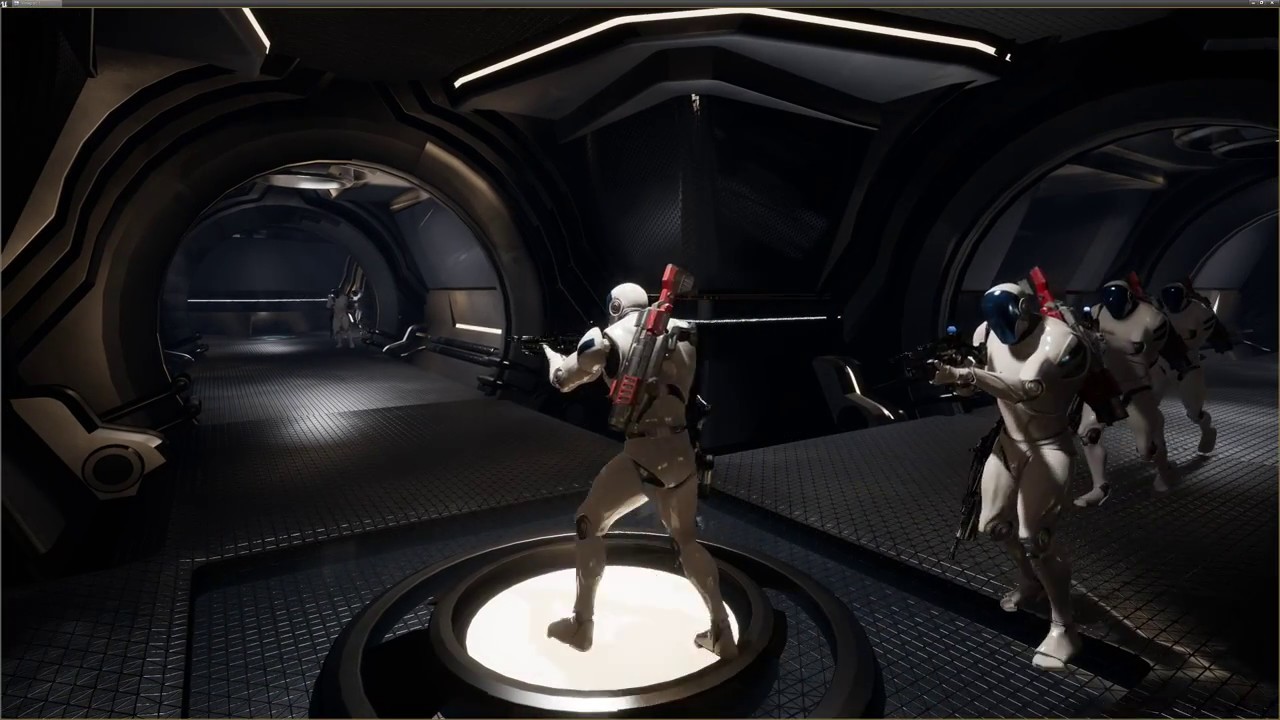
the problem i have is when the pawns are in a closed area like this, they'll run to their attack range but sometimes end up in another room out of view
and then forget
pine steeple
you also want to enable crowd following probably
to stop them colliding
and to me it seems like they are also getting stuck on corners
which means the navmesh is not optimal
old blaze
i believe they have crowd control it's just if i set the cell size too large for RVO then they won't pass each other at all
old blaze
ah right
pine steeple
you fully blueprint or c++?
old blaze
fully blueprint
pine steeple
then my method of navmodifier volumes and stuff wont hep
help*
as need to do that in c++
not sure why they enter another room and try to shoot you, seems like the navmesh is being broken properly
on your walls
and they pass way to close to the walls and get stuck on corners
old blaze
this is how the nav mesh looks at the moment
the bits at the corner explain it a bit
 acoustic nacelle
I am trying to make AI that simulated the behavior of the ghosts from the original Pac Man. Any advice on where to start? I am figuring random movement and if Pac man is within a certain visual range they chase. If he eats the power pellet they run away.
 floral mango
sounds reasonable, although IIRC ghosts start chasing once they see you, rather than just when you get in a certain distance
 fast cosmos
I'm having trouble with level streaming and navigation. It seems like navmeshes in levels I stream into PersistentLevel simply don't work...
pine steeple
navmesh should never be on streaming levels
they must persist only on the Persitant level
fast cosmos
So one huge navmesh in the persistent level with some dynamic generation turned on?
Won't that be hella expensive?
pine steeple
thats how we do it
there might be options
for dynamic levels
maybe set runtime generation to dynamic
fast cosmos
Guess I'll try some stuff out
acoustic nacelle
Anyone have and good links for AI implementation for movement and line of sight chase?
glossy abyss
anyone ever come across this?
gaps in the nav mesh? looks like its split into grids or something
glossy abyss
it appears to be related to the Tile Size UU value in the project's Navigation Mesh settings
wraith eagle
Speaking of TileSizeUU, if I wanted different TileSizeUU per Supported Agent, are my two options basically changing it on the NavMesh itself post generation, or writing a RecastNavMesh modification or subclass to set it for me?
 stable void
I am starting to play with AI and am flabbergasted by how it works .... what is the best tutorial series to follow along ?
sleek holly
I need my AI to open doors but only if it's needed(so i can't just use simple trigger boxes/volumes) and some kind of thinking where player could be for a while when player has been seen but now isn't in sight
robust bridge
hmmm
Is anyone here good with navmeshes?
Apparently dynamic navmesh rebuilding in runtime doesn't work unless you run the exec RebuildNavmesh command at least once
Seems a bit strange
hybrid cipher
hey sorry don't wanna jump in front of Temaran, and this might be a silly question, but is there a way for AI to only detect player (and ignore every other actor that is not player). Mostly asking cause I have a lot of AIs in the level and I can't afford them to check if other actors they detect are player or not
pine steeple
perception component will only detect actors with a stimuli
seems like thats what you want
hybrid cipher
Well I created ai character from third person template and it keeps detecting ai characters too. No ai stimuli component added to them
Or is that just something super specific to 3rd person char template?
pine steeple
you using perception system?
i use perception system and never had that issue, i have over 100 ai at a time and 8 players
hybrid cipher
Yup, kk I'll try using it on blank characters will see what happens
snow canyon
Anyone experienced with making custom NavAreas in C++? I can't seem to write the flags properly. Any new NavArea class I make seems to return unwalkable AreaFlags (AI avoids it/goes around) regardless of what I put in the variable.
glacial peak
hey ralegan I don't know if I can help you
I made custom nav areas but without modifying the flags. I use it to modify the navmesh at runtime and decrease pathfinding cost for some areas, works pretty well for me
I just inherit from UNavArea and override the constructor by setting the cost to SMALL_NUMBER
snow canyon
I see. I'll try fiddling with the cost. It' strange though - I tried making a child of UNavArea_Default too, and I would have thought that would work off the bat, but the AI runs around the area of it too.
glacial peak
no idea. let me know how it goes. Also try to inherit from UNavArea it's more correct (not sure if it makes any difference tho)
hybrid cipher
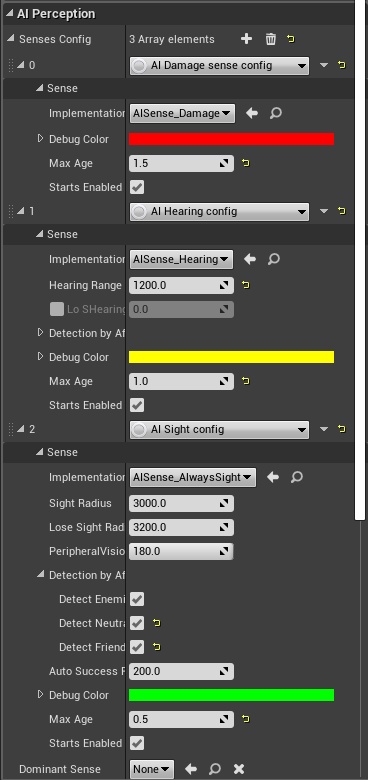
@pine steeple hm dunno, even when created from scratch the AI keeps detecting itself, any chance you could show me your setup? is there anything specific I need to (un)check in AIPerception?
 glacial peak
what about the teams guys?
Enemy, neutral, friends
that can be set in C++ and might help
hybrid cipher
yeah trying to sort out the team right now, though I'm thinking some parts of the detection will still run
@pine steeple do you do any checks on perception update? the setup seems similar to mine (safe for more senses used)
pine steeple
i just do if (OnPerceptionDetectedTarget.IsBound()) { if (IsValid(Actor) && !Actor->IsA(AMonsterCharacterBase::StaticClass())) { OnPerceptionDetectedTarget.Broadcast(Actor, Stimulus); } } to make sure it doesnt hit any monsters, thats all
hybrid cipher
ah I see, I'll take a look at this, thanks
lyric flint
I've managed to get AISightTargetInterface to allow for a blueprint implemented variable to be passed through, when the variable thats passed through blueprints gets to zero, sight sphere stops tracking and "Strength" reaches 0, which is good. but the issue occurs when this happens:
OnPerceptionUpdate (the player is no longer seen Line of sight)
OnPerceptionUpdate (the player is in line of sight)
But it does like an infinite loop of returning false and doesnt track the player again UNLESS the float variable passed in through blueprints becomes NOT EQUAL to 0.
It seems that AI Sight can only track if Sight Strength isn't 0, causing a false loop every tick for "CanBeSeenFrom" function.
The variable passed through blueprints is the player's visibility (float).
https://gyazo.com/3d79793d660b920e3ac00fceb2070f2e
It shouldn't do a perception update every tick, means its failing right?
 echo ether
Can anyone tell me how to make a pawn to move towards the player?
Pawn in the sense the object derived from the Pawn class.
hybrid cipher
Just get pawns location into blackboard, then use that blackboard in behavior tree and location as key for move to node
 ebon ore
Hello world!
Anyone here worked on a complex AI systems? Not just related to games, also not about behavior AI, rather about something more generic.
Specifically, currently I'm working on an AI with memory, and looking for some generic advices...
hybrid cipher
Work is strong word but I've mingled(more a theory) , guess it depends on what you need
ebon ore
@hybrid cipher well... The thing is, I'm not yet sure. Just maybe some generic advice where to start and what approaches are known for it. I mean, for adding memory to an AI.
My goal is to allow AI to detect and remember some events around it, with further aggregation and processing the collected data
hybrid cipher
Hey drop me pm and we can discuss :)
ebon ore
currently I'm doing it in a straight forward way – just collecting all the events into an array, then will filter the events and process them according to different events types...
fallow hound
The perception component has a form of memory built in
@ebon ore I'm brainstorming an ai memory system now too. I m curious to hear your thoughts. So far I'm leaning towards using the perception systems events to drive it.
ebon ore
@fallow hound how can I google something about it? I mean, I can't find the "memory" word in the component's docs 😃
@fallow hound well currently I'm doing a very basic prototype which is not UE4-related (but I'm still doing it in UE4), already made some basic memory
@fallow hound here is the first results – the AI agent is remembering some random encounters while staying on a crossroad
fallow hound
So, by memory, it stores the last time it saw something
and how long ago it was seen
fallow hound
hi all, does anyone here mess with perceptioncomponent in C++?
I try to do most my work in c++, but the documentation of perceptioncomponent in general is weak, the c++ style of working with it even weaker
wondering if it is worth the struggle to figure it out in c++
hybrid cipher
I found couple of articles on it since I was trying to get into it, i can share them with you if you want to
Just basic information tho, mostly about how to set it up
pine steeple
@fallow hound all my perception stuff is handled in C++
fallow hound
Ah interesting. How do you go about using it? Read the API and read the source?
 fallow hound
I'm glad to know you've had success, I'll stick to it then
That's cool
Whats tremor the earth shaking?
pine steeple
yeah
its caused by underground monsters
i mean its detected by underground monsters
caused by footsteps/exlposions on the surface
pine steeple
not my project im a freelancer, but contracted atm
fallow hound
I see
pine steeple
yeah
and
            for (auto& StimulusInfo : Info.LastSensedStimuli)
            {
                if (StimulusInfo.IsActive() && !StimulusInfo.IsExpired())
                {
are good start points
for reading senses
fallow hound
Okay thanks will keep this in mind.
pine steeple
also have 2 handy hacky functions
for getting what sense it is
{
    if (SenseID.IsValid()) {
        FString SenseName = SenseID.Name.ToString();
        SenseName.RemoveFromEnd(TEXT("_C"));
        int32 SeparatorIdx = INDEX_NONE;
        const bool bHasSeparator = SenseName.FindLastChar(TEXT('_'), SeparatorIdx);
        if (bHasSeparator)
        {
            SenseName = SenseName.Mid(SeparatorIdx + 1);
        }

        return SenseName;
    }
    return FString(TEXT("None"));
}```I'm surprised it has to be hacky, you'd think determining which sense something is would be straight forward
pine steeple
pass in the sense id, hacks the name out of it
fallow hound
👍
pine steeple
and you can make it return a enum which is even easier to work with
            return EPerceptionSense::EPS_SIGHT;
        else if (SenseName == TEXT("AlwaysSight"))
            return EPerceptionSense::EPS_ALWAYSSIGHT;
        else if (SenseName == TEXT("Hearing"))
            return EPerceptionSense::EPS_HEARING;
        else if (SenseName == TEXT("Damage"))
            return EPerceptionSense::EPS_DAMAGE;
        else if (SenseName == TEXT("Scent"))
            return EPerceptionSense::EPS_SCENT;
        else if (SenseName == TEXT("Tremor"))
            return EPerceptionSense::EPS_TREMOR;
        else if (SenseName == TEXT("Proximity"))
            return EPerceptionSense::EPS_PROXIMITY;
        else
            return EPerceptionSense::EPS_NONE;
    }
return EPerceptionSense::EPS_NONE;```so i dont have to know what id the sense is, and makes it all more readable
and i get the enum by doing EPerceptionSense Sense = GetEnumBySense(StimulusInfo.Type);
really makes my life easier
😄
example of handling a sense
                            CalculatedSenseAggro = (BasePerceptionAggro * PerceptionAggroResponse->GetMultiplier()) * StimulusInfo.Strength;
                            AGGRO_VLOG(GetOwner(), "Updated aggro for %s cause he caused Tremor, aggro added: %f, Tremor Strength: %f", *GetNameSafe(Actor), CalculatedSenseAggro, StimulusInfo.Strength)
break;```This is all great!!! Thank you!!
fallow hound
@pine steeple out of curiosity do you build btservices in c++ too?
I don't need help with it, just curous
pine steeple
I do
Not all but the ones that are shared between ai
Decorators tasks and services that are common or intensive
pine steeple
@fallow hound like these are common BT stuff

Inside and Outside melee range can be merged tbh, never got round to doing it
elfin socket
@fallow hound In the "AI Optimization" Live Training stream a long time ago, the guy said that you want to make all of your Behavior Tree nodes in general written in C++ before you ship it... but it's okay to assemble all of the pieces into a Behavior Tree Blueprint.
fallow hound
Oooh didn't know there was an aioptimization live stream. Will have to try it after I finish the giant like 15 part one with shadden and 
Kaos, I see you have btservices and bts. What is difference?
@pine steeple
pine steeple
just diff names, BTS were the original classes, all new ones i named BTService
there all services
fallow hound
Okay got it. Was wondering if i was missing something.
These pics are really helpful thanks. Shame miezko doesn't work for epic anymore.
pine steeple
in the new year ill probably re-write the Perception System
pine steeple
complete custom Perception System, easy to manage
and easier to add new senses, etc
with some nice Blueprint stuff exposed
fallow hound
Think you'll try to make it an official PR?
pine steeple
probably not, but who knows, if it works better than the one implemented and is cheaper or same costs to run, possibly
😄
fallow hound
Cool! Will keep an eye out!
fallow hound
hi all, I'm wondering if I'm making a mistake here, I am trying to save the actor found from a hit result into a blackboard key
OwnerComp.GetBlackboardComponent()->SetValueAsObject(BlackboardKeyNameEnemy, Hit.Actor.Get());
Hit.Actor gets me a weakpointer, which the compiler wasn't happy with, so I did the .Get() which satisfied it
but...... I have a feeling that is bad
any feedback?
floral mango
nothing wrong with .Get
fallow hound
Okay thanks!
 timber sun
@pine steeple do you know any efficient ways to make behaviour trees themselves using code? not services, tasks etc but trees themselves
pine steeple
i never made a C++ behaviour tree
not needed too, and the performance benefit will be neglible
timber sun
its not about performance, its about using text instead of binary asset => ability to look at diffs easily
aand another question
how do you mix different stimulis?
actor sees enemy, is damaged by another enemy and hear the third enemy. what happens?:)
pine steeple
i handle it by aggro
So it generates a aggro score based on each perception, highest aggro wins his attention
timber sun
looks robust
pine steeple
and the sight perception for example, generates aggro, multiplied by some value then multiplies by distance, where distance is between 0 and 1, meaning further away generates less ssight aggro than someone closer
timber sun
some EQS stuff i suppose
pine steeple
not really its all handled in my aggro component on the ai controller
i do use a lot of EQS though for other things
timber sun
do you solve performance issues somehow? like "oh no, we have 50 enemies on the map and using EQS / traces for all of them lowers fps, create spikes, optimize it somehow"
pine steeple
eqs is quite cheap
i have 100 ai at one time, and the biggest performance hit atm is CharacterMovementComponent
EQS is about .5ms, AggroComponent and perception about .2ms, Behaviour Tree about 1ms
so there not super intensive and i don't do alot of traces
i do periodic overlap checks etc for certain things
total ai usage for 100 ai, is about 2ms but cmc for 100 ai is about 8-10ms
so CMC optimization is a thing for next year for the AI only
timber sun
interesting numbers
pine steeple
honestly the biggest performance killer for AI is the CMC
timber sun
are there any known types of tweaking it to achieve better performance?
pine steeple
not really, i did try navmeshwalking and it reduced it by about 1ms
but i want to reduce it by alot more than that
the biggest hitter is the FloorCheck
timber sun
is there any kind of precalculation that makes you able to skip FloorCheck?
pine steeple
thats what i will be doing next year
when i optimize the AI
but i still got 5 more monsters to finish up
before i start on that
already have 10monsters done 😄
timber sun
i did pretty simple AIs but it still one of the most time-consuming stuff in Unreal engine for me:)
animation & AI are the pain
pine steeple
it is time consuming
monster i am working on atm, hangs from a ceiling, you turn the light on, it will drop down and run off to another building which is dark
but its vulnerable on the floor and dont attack making it easy pray, but getting to the light switch is deadly 😄
timber sun
feels like ~week of work using all these stuff that you already have:)
// if you havee all animations ready and don't have to sync with artists
pine steeple
i use EQS to find a dark building, and using that result another EQS to find a random point to hang from, bit i am upto now is the building is locked and has no valid path so the monster needs to somehow get in the building without opening the doors and the windows could be closed on the building meaning it cant go through a window so i am trying to think of a good way to handle it, possibly only make him go to a dark building with a open window 😄
thats the hardest part of AI, is the logic
and making them behave properly and not look "weird"
timber sun
does this creature jump / fly or crawl the walls?
pine steeple
no not this one, but i have 4 monsters which burrow underground, my last monster i will work on does Fly and Jump
we have no wall crawlers tho
timber sun
i had couple underground monsters in my game. it was fun to turn on their collision and see how there corpses sometimes jump from the ground because they were underground at the moment i killed them
pine steeple
ah well mine are teleported to another plane underground with navmesh
with blockers to block certain areas
but allows them to walk through buildings without messing with collisions
timber sun
i didn't get enough expertise with navmeshes:(
is it possible to change them at runtime and block/create pathes?
i remember that it is possible to set ability to block pathes for actors but didn't do research about how it work and whether it is useful or not for my cases
oh, probably you know some good articles about navmeshes?
fallow hound
@timber sun see Rama's answer here https://answers.unrealengine.com/questions/91843/how-to-change-navigation-cost-in-realtime.html
You will probably need to include some ainav stuff in your build.cs
fallow hound
So, it seems that building BTs in C++ is not advised, do people here build their Blackboards in c++ or in the UI?
pine steeple
nope but its stable to used i mentioned the other day, they use it in Fortnite
and i am currently using it
hybrid cipher
More curious if they don't just decide to stop supporting it, it works nicely and seems pretty useful
pine steeple
Experimental means its not been tested much outside of Epic games, Gameplay abilities is used by Fortnite yet that is Experimentral
patent hornet
or it just means removing the experimental flag got backlogged shrug
elfin socket
I need more practice with EQS. I still don't have the intuition needed for it, sadly. I get tripped up often on how to assign PlayerContext and whatnot.
static crater
Hey, anyone knows why ai might stop moving/reach goal after changing the time dilation?
fallow hound
Hi all. Anyone have tips on tieing behaviors to animations. Like, say, attaching an object to an npcs hand at a certain keyframe of a use action called from the BT? And the BT responding to that animations successfully reaching that frame?
pine steeple
@fallow hound the way i did mine was have the Anim notify excute an event on the AI which then in turns either calls a dispatcher/delegate
which a BTTask can bind to and listen for
fallow hound
Ahhh interesting. So it is just one delegate that all tasks listen to?
pine steeple
yeah the delegate takes in the Animnotify, which forwards off
you could just send in an enum with the specified action
or have multiple delegates for different things
up to you how you handle it
lik my AI melee, when his hand gets to the point i want damage to be applied i send a delegate which turns on the damage collisions for the melee
fallow hound
Yeah that's exactly the kind of stuff I want to do
So anim fires event, which the controller recieves, and blasta off to a delegate which the task assigned before it requested the anim?
Is that a good summary?
pine steeple
yeah
fallow hound
Super thanks! So you use some sort of time out in case the event never gets sent?
fallow hound
Appreciate all the help, if you've got a patreon or something please lemme know!
timber sun
@pine steeple https://gyazo.com/27d465822c38c2b47d8c6a17d31a8ecf how this is organized in code? I want ability to add structures/components with different sets of variables. I expect some layout customization but used data structure is interesting as well
It looks like tarray<tsubclassof<usenseconfig>> plus something extra
Tarray<usenseconfig*> probably
Plus custom layout of some kind
pine steeple
its instanced
UPROPERTY(EditDefaultsOnly, Instanced) TArray<UAISenseConfig*> SenseConfig; iirc
something like that
timber sun
Nice, i ll check it or give to the guys who check:)
pine steeple

i do something similar for my Dog attacks
allow me to define the attacks, and the dog just does it
no specific attack is reliant on a specific dog, so i have 5 diff dogs, and they can all do the same attack or they can just do 1 or maybe 3 attacks out of the 8 different attacks
just by inserting the attack into the DogAttacks array
timber sun
Yeah this instanced keyword is powerful. I was looking for it for years:)

 warm charm
Does anyone have any tips on figuring out if a given AI-controlled pawn is finding a given nav mesh? I had movement working but I swapped out the ground/floor mesh with a new mesh and now AI movement suddenly stopped. The MoveTo node is being called in the decision tree but the character is simply not moving to position (where they were before) leading me to think it's not "connecting" to the nav mesh correctly after adding a new floor mesh. Are there any debug settings I can use during gameplay to diagnose further?
pine steeple
use the gameplay debugger
with the ' key
and select an ai in the world outline to debug
echo ether
Hey ,any ideas on how to implement a flying AI? how to make it move from one point to another when its in space as it does not uses navaigation mesh?
 echo ether
@floral mango Thank you. I'll try out
echo ether
@floral mango , I tried installing the plugin to the project folder. It says modules couldn't be compiled, try compiling them manually. Does it work with v4.20?
I'm currently using v4.20
floral mango
use the 4.20 branch
echo ether
okay
floral mango
trunk is on 4.21
I'l see if I can backport the nav baking feature onto the 4.20 branch if anyone requests it
echo ether
I'll try out 4.20 version and let you know. Thank you
@floral mango , I tried with the version 4.20. But still i'm getting the same error. 4.20 version must be compatible with 4.20.3 right?
floral mango
should be. What's the error when you compile?
fallow hound
hi all, I'm trying to register an actor to be seen by the perception system
Here is my code
StimuliSourceComponent = CreateDefaultSubobject<UAIPerceptionStimuliSourceComponent>(TEXT("StimuliSourceComponent"));
StimuliSourceComponent->RegisterForSense(UAISenseConfig_Sight::StaticClass());
I get no errors on compilation, but the item does not get registere
any hints?
fallow hound
Changed it a bit but still nothing:
StimuliSourceComponent->RegisterForSense(UAISense_Sight::StaticClass());
pine steeple
odd
fallow hound
That usually works for you? What im seeing is that in the objects blueprint there is nothing in the details panel under registered senses for stimulisourcecomponent.
pine steeple
two seconds i think there is a bit more to it
just busy and not had time, i was going to take a look a little while back
fallow hound
Thank you!
pine steeple
sorry still not had time, i will do just @ me in a bit so i remembner
fallow hound
sure thing, thanks
whats crazy is I'm hitting this when I step through a debug build
but there is nothing shown in this menu
fallow hound
@pine steeple hey just checking if you have a moment to check this out
looks like my NPC can see the actors if I put the registerforsense function in my beginplay
also works if I put them in post initialize components
I still can't see the sense in the details panel though.... but I suppose that isn't important
 lone abyss
I would like to add a BehaviorTree in my Base Class, but it should only show up in Child Classes which are AIs and not for normal Classes (How would I do that/Is that possible?)
pine steeple
not possible
why not create a base from your main based called AIBase?
and put it in there
lone abyss
cause there are many classes and if I put it in the base class also normal characters have the option to put a behavior tree ... and I would have liked that it does not show up for characters which aint AI
floral mango
is there a reason why you're not just doing what everyone else does and put the BT on the AIController?#
glacial peak
@lone abyss you are doing something wrong with your classes inheritance. You should have a main base class for all your pawns, let's say MainPawn. Then you can inherit from this class and have AI base one and let's say Player base one. So for example AIPawn and PlayerPawn
then you can inherit your player classes from player pawn and ai classes from aipawn
and have the behavior tree in your ai pawn
floral mango
if you used composition, like an AI controller, you're more flexible. You can freely switch between the AI and player controlled at runtime
hybrid cipher
hey guys anyone have experience with detourCrowdAiController? basically I wanna create my own AIController that allows for detour behavior, but having a tough time finding much info about it (for c++), mostly what needs to be set...I need to add UCrowdFollowingComponent, register AI to UCrowdManager and that should be it?
lone abyss
@floral mango I put it in the character so the ai can have different behavior trees and I wouldnt need to create new controllers, but the Controller will still get the bt.
@glacial peak yes but its not possible, because there are many child classes of the base class and some can be ai thats why I try to put all the functions in the lowest class that all ais are inherited from, but also normal character inherite from that class
floral mango
@lone abyss well it's pretty simple, if you don't want BT in non-AI characters, don't put BTs into classes that non-AI characters inherit from? What's the problem
And remember that inheritance is not the only tool you have
pine steeple
@hybrid cipher just changing the the pathfollowingcomponent to crowdfollowing is all you need to do
to enable it
: Super(ObjectInitizlizer.SetDefaultSubobjectClass<UCrowdFollowingComponent>(TEXT("PathFollowingComponent")))````like that
hybrid cipher
I tried to add the component as new subobject with the same name but that kinda crashed
lone abyss
@floral mango I mean I wanted to avoid to rewrite the same code and I do not know the proper solution for that, but yes for bt that would work (just not sure if that is the way to go, but thank you for your answer 😃 )
floral mango
try creating components to build your pawns, instead of relying on inheritance. As you've discovered, inheritance alone only works on very simple hierarchies
pine steeple
yes
hybrid cipher
ah awesome, thank you kind sir
lone abyss
@floral mango yes I think that is the way to go thank you!
 bold sapphire
anyone here good with ai crowd control? when spawning my actors at same location they move slow while separating then the ai crowd control works fine from there. Any way to make it so they can move at normal speed while separating?
bold sapphire
ah it was one of these settings https://forums.unrealengine.com/development-discussion/animation/43336-crowd-manager-avoidance-config-any-docs-about-this
Unreal Engine Forums
Animation discussion, including Animation Blueprint, Persona, Skeletal Meshes, and more.
glacial peak
I want to decorate bt nodes to return InProgress when they fail and true otherwise
was any of you guys able to achieve this?
A decorator doesn't work because, as far as I know, the subtree is evaluated after the decorator
what I'm looking for is something like a conditional wait (not wait 5.0s but more like wait until condition happens). Like wait until movement target is reached for example
fallow hound
I thought decorators could do that... But if not you could maybe make a new task based on the task you want and modify return logic.
pine steeple
@glacial peak use aService
which sets a blackboard bool
if condition met, set blackboard bool
glacial peak
thanks @pine steeple I though about it but I find this solution a bit hacky 😄
pine steeple
its hacky but works
pine steeple
there is a plugin
called BTUtility Nodes
which might be interesting to look at
i personally don't use it
but it handles states afaik
warm charm
what does "Can Ever Effect Navigation" actually mean? If it's checked, it means it will be treated as on obstacle by AI? Or something else?
patent hornet
it means it will affect navigation mesh
by default making area null around its bounds
 safe kiln
I don't have time to troubleshoot it tonight... but I can't get the UE4 BT Quick Start Guide (at docs.unrealengine.com) to work. AFAIK, I did everything the way it said. I must have missed something... there was one part where it said to create an Array of type EObjectTypeQuery...There is no EObjectTypeQuery Array... there is only EObjectTypeQuery Enum and dropping that variable into the event graph and connecting it to anything adds a MakeArray box in between the variable and the thing it is linked too.
Is the Documentation outdated? Edit: Just saw the pinned link to an AI video. Will check that out next.
timber sun
Is ObjectTypeQuery part of environmental query system?
You had to enable plugin for it in ~4.14. you probably gave to do it now either
AISupport module could change something for EQS
safe kiln
https://docs.unrealengine.com/en-us/Engine/AI/BehaviorTrees/QuickStart Doesn't say anything about using any plugins and specifically states that Starter Content is optional. I will have to go through it step by step again today to see if I missed anything... as when I got to assigning the services, tasks, and decorators to the BT- I found that I had failed to make some of the variables Instance Editable. But this BT doesn't even look like it is activating. Enough so, that I doublechecked to make sure I had assigned the Class Defaults button and assign the new AI Controller (Follower_AI_CON) to the AIController Class property in the Pawn category. I did. So now I have to doublecheck everything step by step cause I can't even tell where it is getting broken.
safe kiln
Well, it seems that the EObjectTypeQuery is indeed where it is getting broken, as we are unable to identify an object to follow. I can't seem to find any other mistakes and I have no idea how to fix this. Once again, a tutorial that is supposed to be up to date has failed me and provides me with no avenue of reporting the issue.
safe kiln
Right now, I am just trying to finish that tutorial, and I cannot. When I try making the variable: Array of EObjectTypeQuery... it doesn't exist as an array... it only exists as an ENum and it isn't working when I do it that way. I've posted the question on the answers board for UE4, but it is waiting moderation.
 safe kiln
please, because it does not show up for me when I search for it under arrays in the variable type.
pine steeple
right because it wont
safe kiln
frustrating. lol.
 safe kiln
yes.. that is the only option I get.
pine steeple
right
safe kiln
or seems to be.
safe kiln
are you kidding me? Why don't they explain that in the tut?
I haven't seen that explained anywhere
pine steeple
yeah i think they expected you to know that
safe kiln
Ok. Well, then there is something else wrong cause the AI still isn't chasing after me. I think I will have to scrap this and use another tutorial... I was certain that this was the problem... and the debugging makes it look like the AI still doesn't "see" me, even though I can see that the locator is recording where I am (I have it turned on so I can see the location pings on the playscreen or whatever its called when I enter the AI range.
pine steeple
right does the AI have a navmesh?
is the navmesh properly on the level? what does gameplay debugger say the AI is doing? is the BT running the correct node?
safe kiln
More than likely, my ADD caused me to miss something... even though I have rechecked this sooo many times. Tearing my hear out.
I have this issue with nearly every tutorial I try to follow... something breaks and I can never find the issue.
Yes. navmesh should be good. hitting P showed the floor green.
pine steeple
does the AI have the controller?
safe kiln
AI_Character Class Defaults shows the AI Controller Class to be the Follower_AI_CON. with Auto Possess AI set to Placed in World.
pine steeple
yeah so see the red bars
means that decorator failed
so its not getting Target to follow from your aggrocheck
safe kiln
Ok. That is what I was thinking, but didn't know that about the red bars on the side. ty for that.
pine steeple
show me agrocheck blueprint
safe kiln
uh... is there an easy way to do that??? its pretty big.
safe kiln
wait... I have multiple monitors... let me try something.
During playback:
BTW, I greatly appreciate that you are trying to help.
safe kiln
That was outside of the detection range... lemme grab one more. I am sorry.
pine steeple
whok
also i will teach you a nice feture with btservices etc
oh nvm
i looked at it wrong its fine
safe kiln
Ok this is while inside of the detection radius and in front of the AI
safe kiln
but its returning no actor/pawn.
pine steeple
but its not hitting the same object you previously overlapped for
so your clearing the target
so the line trace is failing more than likely
i think you may have the nodes backwards
safe kiln
And my original thought was due to the array not being an array, but an enum.
 safe kiln
You're right in that regard.... but still not following.
I'm going to link the image they provided (that I had followed correctly) and I will also be compairing... that is how I first found that I forgot to change the radius to 1500... lol.
 safe kiln
I just found the one before it was missing z15 as well...
safe kiln
safe kiln
No.
pine steeple
we need some data
on what is failing

drag off the exectuion pin from line trace to branch
and type print string
and add a printstring node
want me to make that graph for you
with some nice debugs
so you can copy it
safe kiln
I'd like to reference it, yes. For the print string, do I need to change the defaults?
pine steeple
no
but we need to assign something
ill just make the relevant section
with debugs we want
 safe kiln
LineTraceByChannel's Trace Channel was set wrong I had visible instead of camera... trying again. Edit: still no joy.
Checking your debug BP now.
safe kiln
Get Display Name is a path off of Hit Actor... right? Looks like the link is behind the second Break Hit Result.
pine steeple
yes
just drag that pin
from break result actor
to the in string on print node
and it will automajically do Get Display Name

just like that
safe kiln
is that right?
pine steeple
yes
safe kiln
Here goes:
Ok, entering the bubble provides topdowncharacter. Nothing beyond that.
im not sure how you are getting that gif recording... lol. Which I find funny... cause I am a streamer. If I may ask, how are you doing it?
And to confirm, I didn't have return value linked to the branch from MultiSphereTraceForObjects... so the AI not overlapping never showed up. It does now.
Same with LineTraceByChannel... fixed that... trying again.
Alright... so I now have the trace making it all of the way to Set BlackBoard Value as Vector but no following.
new red bars
hmm.... for some reason SelfActor variable is showing up as AI_Character_2 instead of AI_Character...?
pine steeple
yeah the _2 means its instance number
so your acceptable distance
is failing
show me that decorator
safe kiln
might be wrong one... lol. sorry.
This is the one that had the red bar on it.
sheesh... im missing things all over the place... forgot a 0 on the acceptance radius.
and it's working.
well almost. i might need to make that larger... he only follows when I am super close. Like... I bumped into him close.
safe kiln
Ok.... so the Acceptable Distance was set to 100 (like the tutorial shows) in the BT for CloseEnough, but that wasn't working... i had to be touching the AI to trigger the follow. Changing that to 300, the AI starts following is better. I will probably increase it more... but it's working there.
Where it is broken now, is if it loses sight of me, it becomes blind until it reaches the HomeLocation.
safe kiln
Also unsure how that is done... lol.
pine steeple
there is 2 decorators, one for Target to follow
is set and not set right?

like that right?
bear in mind i cant see the tutorial so guessing
safe kiln
pine steeple
right
so you see the color when you click the decorator
the aqua blue color means its going to abort that tree
safe kiln
difference being priority?
pine steeple
so you have Abort Both set
which is good, means that when TargetToFollow is set, it should abort the move to its home location
safe kiln
but it's not. it keeps heading home when it shouldn't.
pine steeple
have you actually seen the graph in action
when your ai is returning home and you walk into his field of view
click on the Blackboard decorator for TargetToFollow is Not Set
does that abort self?
safe kiln
In regards to seeing it in action, it continues down BB Based condition to Move-to home and never changes until it is home.
pine steeple
so its not aborting
and is TargetToFollow actually sert
set*
whilst its returning home
safe kiln
it does not look like it... no.
safe kiln
well I got it to detect me again when it starts heading home, but now sometimes it doesn't start heading home... lol. I forgot to reinstall TV. can we do a screenshare in discord instead?
pine steeple
sure
 left stream
Hello all. Some one know why nav mesh bounds volume dont work? My NPC dont want make AI move to.
fallow hound
press p to see your mesh bounds, also make sure you can still see them in simulation mode
sometimes you need to reset editor and move the mesh a couple UUs
also make sure it is on persistent level
left stream
Mesh bounds and NPCs in persistent level and i see green zone in simulation.
pine steeple
does your npc have a controller?
fallow hound
maybe watch the BT while running game? See where it is getting jammed?
also, kaos, I just noticed AIController.h has UseBlackboard and InitializeBlackboard functions... do you ever use those? I haven;t had to and im wondering if im missing something
left stream
i use breakpoint and print string in BP logic where i have AI move to node, and its look like all fine. but NPS not move
pine steeple
@fallow hound yeah cause i inject different behaviour trees
so i need to update which blackboard its using
fallow hound
ahh, I thought those were associated with the BT
because in BT editor you choose a blackboard, right?
it doens't automatically swap BBs when you start a new BT?
fallow hound
whoa
uh, so do you have 2 blackboards? One for the top of the tree and another for the bottom?
fallow hound
But if you inject bts, do you need to swap Blackboards depending on where you are in tree? Or can you hold multiple blackboarda at once?
wraith eagle
LogChrisAI: Perception Updated: Stimulus Actor: SoundStimuliActor_C_0: Is Active?: Active: Was Successfully Sensed?: Yes: Location: X=-84.732 Y=183.771 Z=167.449
LogChrisAI: Perception Updated: Stimulus Actor: SightStimuliActor_C_0: Is Active?: Active: Was Successfully Sensed?: Yes: Location: X=112.920 Y=59.443 Z=167.455
LogChrisAI: Perception Updated: Stimulus Actor: SightStimuliActor_C_0: Is Active?: Inactive: Was Successfully Sensed?: No: Location: X=340282346638528859811704183484516925440.000 Y=340282346638528859811704183484516925440.000 Z=340282346638528859811704183484516925440.000```
This might be a dumb question, but I'm just looking into AI Perception/Stimulus stuff with BT/BB as something to do on my Christmas break (Sad, I know haha). Why does my Sound Stimulus have Inactive then Active, but the Sight Stimulus has Active followed by Inactive? 🤔 faint fox


