#gameplay-ai
1 messages · Page 105 of 1
 keen furnace
 sudden drum
what confuses me... is that it does reach the moveto task...
keen furnace
it just kills the aitree
(it stays there, but is waiting for an event to unlock ti that cant happen)
sudden drum
I probably misinterpret what the yellow highlighting means then
keen furnace
ohhhhhhh
sudden drum
and focusing on a dead actor
keen furnace
also check your "blackboard keys" in the tree at runtime
check the references are right
if not, thats why
sudden drum
checked those are all fine
keen furnace
but yeah, click the troublesome ai in sim with AIDebug on, see if hes even pathing
 shell dock
@sudden drum did you checked that every task has a finish execute? maybe forgot a abort node?
sudden drum
Im just using moveto task
what confuses me... is that... there is the yellow highlighting on the Service S_GetTargetActor.... but I have some print strings in there and I can tell it is not ticking
shell dock
hm like your whole tree/ai dont get fired anymore?
sudden drum
this is probably the same issue? https://answers.unrealengine.com/questions/69557/event-tick-in-behaviour-tree-service-doesnt-get-ca.html
what you see in the pics is the runtime freeze state of the AI
it looks as if it is executing
shell dock
hm
the moveto task from epic.. continous go on the point... you should put in another task behind it
the move to is good if you want to change the position value while he is moving
you could add a custom task after that... what only walks to the same position
do you have any events thats maybe deactivate the tree?
sudden drum
yeah
hold on
I stop logic on death
and star logic on possess
what I don't understand
...is
shouldn't a service at the root of the BT
always tick?
shell dock
the bt should always tick
sudden drum
but the answer here says it differently
the guy says that it doesnt return to the root to tick the service
shell dock
well, i dont use a service at the start/root
aiperception tells your ai if you see something or not
sudden drum
I'm probably doing this wrong then
Yeah wasnt using the perception thing due to the type of game
it is a fighting game
like nidhogg
well... This tells me i could actually
move that logic in the AIController class directly
sudden drum
move towards the current opponent, fight, and if it kills him run towards the goal
new enemies will spawn
what happens
is
after it kills an acto
actor
it sometimes remains focused on that one
while the service should refresh that
...but... that doesnt happen
cause it doesnt tick that service
although it is highlighted
shell dock
well for that you dont need a service... one selector and some sequence are enough
sudden drum
but it might change focus
because there can be 2 enemies
and the closest one gets focus
so i want that to tick
shell dock
hm.. i would do that in the aicontroller or the charackter bp
sudden drum
yeah I'll do that
sudden drum
yeah I have a hard time understanding what should and what shouldnt go in the BT
shell dock
well the charackter is like the body... what could tell the ai controller if it killed/attacked someone succesfull... the aicontroller are the eye and the communication plattform... the b tree are the logic....
go to goal (this is the last variable that can be true) to the left/ first thing to check
sudden drum
yeah but for example... I coded combat logic all on the Ai controller... cause it was way to messy doing it in BT
I feel as if this wouldnt be the correct thing to do
but i just limited the bt to handle Generic MoveTo logic
so it knows if it has to move towards the goal or not
cause a lot of the combat is handled by responding to dispatched events from the target actor
shell dock
lets keep it simple... the selector have to choice: go out to goal > kill/attack > go to target > idle/patrol
no enemies? > goal
sudden drum
yeah
shell dock
or death what ever
sudden drum
that's what it is doing
thank you so much for your help Aldi!
if you want to check the game out, it is this: https://www.youtube.com/watch?v=8zlnpvASf9c

Been watching a lot of Skallagrim while working on all the animations. Thank you so much for your videos! :) Although realism isn't the scope of this game, h...
shell dock
looks cool
sudden drum
Thanks!! 😃 I'll give you a free key for your help! I'll take a note
shell dock
a not accurate example (dont copy that xD) but to get the logic
greatly simplified, but i think you get the idea
(i just pack move and attack as onces.. not totally correct.. but how someone handle animations and death are diffrent)
sudden drum
Yeah I get the idea!
I moved the focus actor thing
on the AIController
and...
It is now working
but
these bots get stuck badly...
so there has to be a problem with a MoveTo task or something
shell dock
yeah as i said, the move to task from epic alone can be couse troubles
sudden drum
shell dock
because it go to move to task.... and then go agian into move to task
and it never stops
you have to add a task that change the blackboard value after the move to task
sudden drum
so im guessing it is stuck on that task
shell dock
that it can enter the next stage
because the selector basicaly select from left to right
means > move to > go back to selector > goes back to move to
sudden drum
ok
so i need something that makes him break out of that system
in case it fails
Is there something that can tell me if it is failing_
?
some idk debugger
shell dock
ah the move to task dont fails
its works like it should
but after that it "choice" the same task agian

What is the Sequence Node in the Behavior Tree in Unreal Engine 4 Source Files: https://github.com/MWadstein/wtf-hdi-files

What is the Selector Node in the Behavior Tree in Unreal Engine 4 Source Files: https://github.com/MWadstein/wtf-hdi-files
you can watch that fast... its short and helpful
sudden drum
yeah seen them already
shell dock
than you know your problem
sudden drum
but
I might have missed something
exactly
the selector stops
as soon as it finds one that succeeds
it succeeds
shell dock
yeah you need to use a sequence
the selector goes to > move to > finish > move to agian
sudden drum
yeah
but i dont want a sequnce
cause
that means
that after each time the player moves it needs to do something after
My players never stop moving
they have to constantly move while fighting
I just cant understand why it just stays there
shell dock
do you change the blackboard value somewhere?
sudden drum
yeah
shell dock
if found jump is not set its stay in that selector> the selector only execute move to > successful > dont care about the wait node > goes back
if you need the move to task "always"
then put it on every sequence
sudden drum
ok i can now see it switch between the two
shell dock
or the move to has to fail for the selector
or the value changes and he decorator aborts thats
and if you should want to go back to found jump the condition should aborts both
if you have more selectors and sequence
sudden drum
it is going in the moveTo
with different locations
There is something seriously wrong here
shell dock
to you change the location?
if you change the location while move to is running > move to goes to the changed values
you need to make your own move to task if you want to "grab" a location and move to there and then go to a new location
sudden drum
i think that my main problem
is that i dont really understand services
I thought that they ticked if a child task was being executed
 calm plank
Hey, how would i implement a 3 stage radius sound emitter for my AI, as like a terror radius, like how dead by daylight did it
shell dock
@calm plank you player charackter need a pawn noise emitter component
then you can use "make Noise" node
your aicontroller needs pawnsensing or aiperception
there is a event in the aicontroller "On Hear Noise
sudden drum
I cant figure it out
it is killing me
everything is working.... it just becomes stupid and it doesnt know how to path anymore
 violet notch
ok im lost
I've done this before multiple times but for some reason this value is not getting set
EnemyAI says its not set
but I can 100% confirm it is being set
what am I missing?
 patent hornet
@violet notch can't tell from this, but there is a better way to set blackboard values

What are the Service Nodes in the Behavior Tree in Unreal Engine 4 Source Files: https://github.com/MWadstein/wtf-hdi-files
violet notch
I'm sure there is a better way, but I've done this so many times before I just don't know what i've missed
 keen hinge
Make sure that the key name matches to one in the bb
 pseudo onyx
keen furnace
pseudo onyx
keen furnace
no idea - you didnt post a) your start/end logic for the trace, or b) the collision settings of the thing it is intended to hit @pseudo onyx
violet notch
still no clue
it prints properly with that test print string there
but the behavior tree still beliuves the value is invalid
violet notch
and whats worse is that I have the exact same setup that IS working litteraly right next to it
violet notch
I made a answer hub post if anyone cares to take a look https://answers.unrealengine.com/questions/825140/set-value-as-object-shows-value-as-invalid-in-beha.html
keen hinge
try to set the draw debug type to duration, expand node and set time to 10 and see what happens
@pseudo onyx
 coarse lantern
Hey guys, quick question
I've made a simple character(based on the ThirdPersonTemplate) that uses the "stock" AIController. I want to click and move. I've made raycasting and everything work fine, but when I try to make the character walk by using the AI MoveTo node(no BehaviorTrees) it just dont do anything. the Movement Result says "Sucess"
and the scene has navmesh
patent hornet
and MoveToActor is at target location?
coarse lantern
Yes, it passes one of the "TargetPoints" actors you see on the navmesh
I've also tried just giving it a static location
nothing works
huh
okay
so
I gave it a "Self" reference to the pawn and now it works... Funny thing is I did this earlier without luck
so I must have changed something else
 crisp spindle
can someone shed some light on EPathFindingMode::Hierarchical ? hard to find anything about this finding mode
patent hornet
can probably find the code if you start from EQS pathfinding queries
as it offers a choice between standard, hierarchical and raycast
patent hornet
yeah, not exactly light read
crisp spindle
FindPathImplementation = FindPath;
FindHierarchicalPathImplementation = FindPath;

TestPathImplementation = TestPath;
TestHierarchicalPathImplementation = TestHierarchicalPath;
looks like it only matters for tests 
violet notch
still stuck on this issue 😦 https://answers.unrealengine.com/questions/825140/set-value-as-object-shows-value-as-invalid-in-beha.html
 scenic fox
Hey guys!... i don't know if any of you can point me in the right direction, but i'm trying to use NavMesh links to do a jump (from lower to higher point).. do any of you know of some literature that i can read to understand how i could get to do that?
 pine steeple
@violet notch is it actually updating the key in the behaviour tree blackboard
cause my thought is, you are setting the wrong blackboard
violet notch
I dont think its updating the key in the blackboard or it would in the behavior tree as well
@pine steeple
pine steeple
have you checked the blackboard you are setting is the same as in the BT?
 shadow sierra
anyone ever implemented street traffic?
 gilded tree
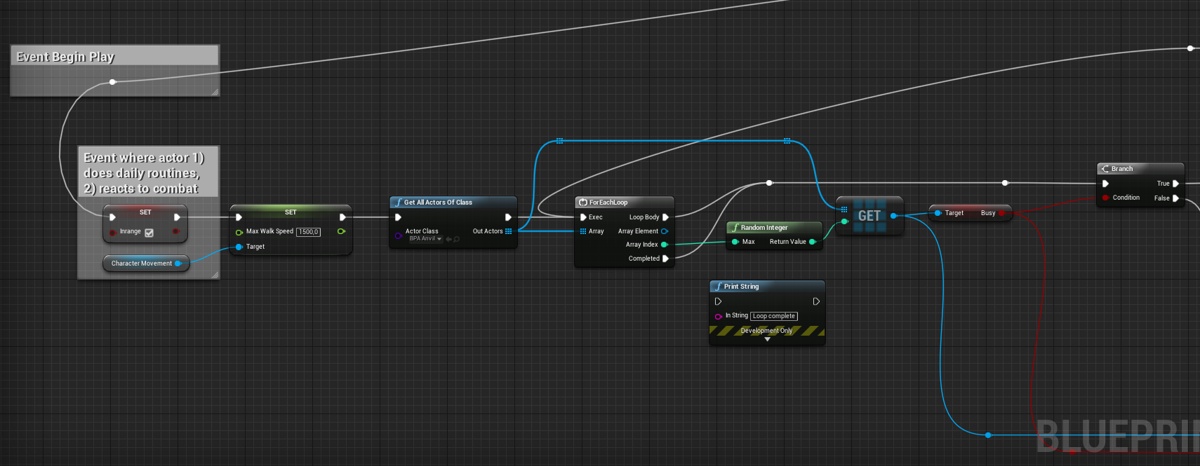
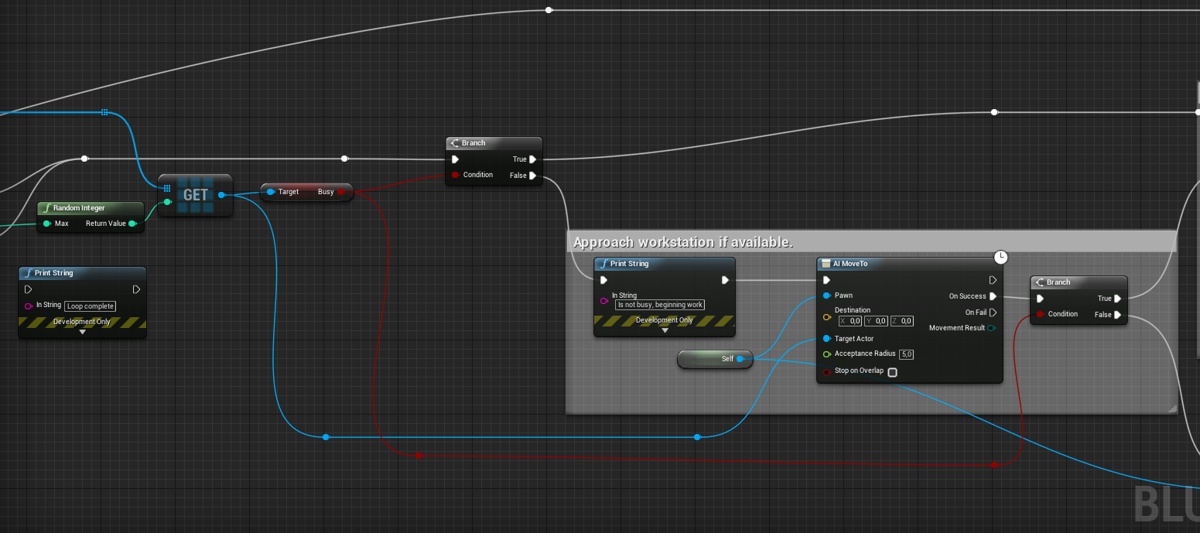
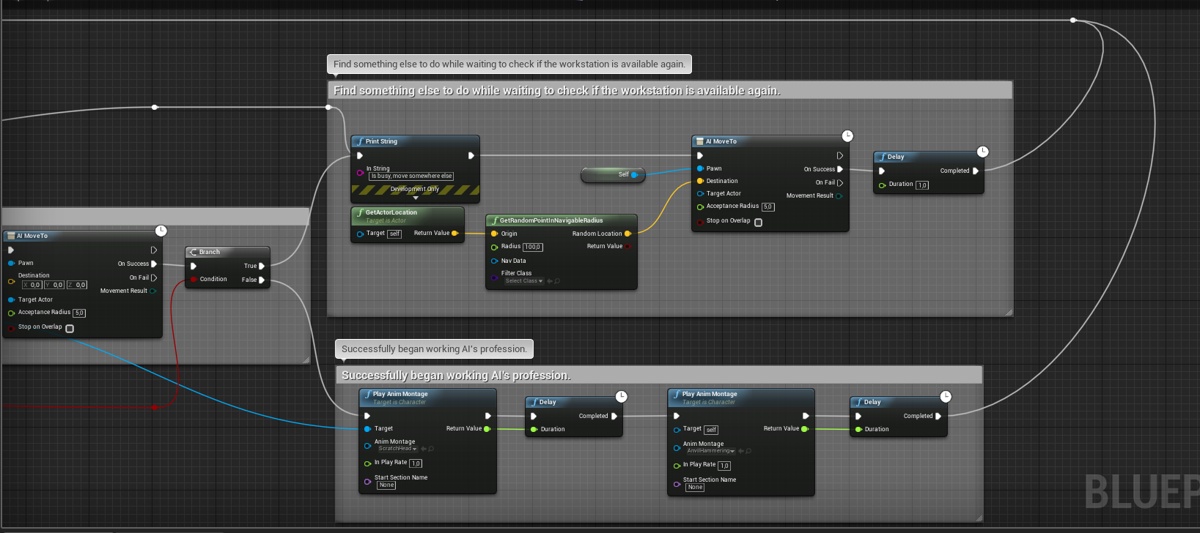
Hey guys, I've been stuck on this issue for a while now. I have multiple AI of the same actor class (blacksmiths) which I want to find another actor (in this case an anvil). If they interact with the actor all other actors of the same class that's trying to interact with that object should disregard it and do another task like MoveTo a random point. Once the AI is done interacting with the actor, then other AI can take its place.
https://gyazo.com/7da4186638c25060133eecbe197810a0 - you can see that it's messy haha. I would love any tips & tricks to achieve this.

Here's the actor (anvil) which has a collision box for overlap events:

And the AI itself. I'm pretty sure I'm doing something stupid here haha. 🙂


 tropic lily
I know this sound retarded but how do you rename a new service node?
 woven mural
I would have aquick question what is the easyest way to make the ai first look at the location before moveing instead of haveing that instant turn something more smooth.
Instead of the instead turning a more turn in place style turning
shadow sierra
do you want it to move and turn or turn THEN move?
woven mural
I want it done preatty much in one move but the solution i have right now is wierd. Possibly doing some things wrong. https://blueprintue.com/blueprint/jgdhtyy3/
@shadow sierra I would prefer to do it first turn then move.
shadow sierra
okay, easy
so you in your tick, you need to do something like the following:
if( DistanceBetweenCurrentRotAndTargetRot < StartMoveRotDistance )
    CurrentMoveSpeed = MoveSpeed
else
    CurrentMoveSpeed  = 0
Welp only if i would use c++. xD
Welll the thing is how you explain it i already have.
shadow sierra
oh i see, one sec
woven mural
hmmm how could i work around that one ?
shadow sierra
there is a way of measuring the distance between two rotators
also what is the purpose of this task?
woven mural
its to rotate the Tank Vehicle to the new rotation
It gets the new move to logation from the blackboard normalizes it gets x rotation from vector and uses that as the interp to location
shadow sierra
i would prefer to do this in the tick, constantly rotating and moving towards its target if it has one
woven mural
wait where in the tick ?
shadow sierra
anywhere in the tick of the tank
woven mural
You mean like event recive tick ai
shadow sierra
possibly
shadow sierra
nice, well done
gilded tree
Anyone that can help me out with my question a few scrolls up?
 wild mortar
Is there a way to recompile all Task BP at once?
In my Task BP, I cast to a base BP character, and call a function from this class
however, after a very minor change inside the function (adjusting node position, no signature changed)
All of my BTT that was referencing this function got a yellow warning
and I had to go through all my BTT to recompile them :\
 ebon ore
Hey guys!
Is there any way to make character's movement with steering (not sure if it's the right word)? I mean when changing a moving target, rotate movement direction smoothly, instead of instant direction change.
It's not about the pawn rotation, it's exactly about movement direction.
top one is the default movement path
the bottom is what I'm trying to do
sorry for Paint picture xD
 magic jasper
Not by default. Character Movement follows whatever 'RequestedVelocity' is, which by default is just the next pathpoint
ebon ore
well, the top path is the default movement if just use MoveTo to a new target
though thanks for the RequestedVelocity, now I think I know how to make it
magic jasper
Characters just rotate towards whichever direction they're moving. There's a checkbox in the character for making it slowly rotate towards the direction, but it will always move directly towards the next pathpoint
E.g. you can't really "round off" the corners along the path
Might not be a checkbox actually... RotationRate maybe
ebon ore
@magic jasper as I said, my question is not about the pawn rotation, rather about movement direction rotation. Anyway, I'm going just to add a lerp to the RequestedVelocity, I think it should work.
magic jasper
Yeah, that's the bit you can't change without modifying the character movement component a fair bit.
pine steeple
anyone here used EQS?
pine steeple
no
tropic lily
Hey is it possible to make custom events fire off in Service nodes which are activated from outside objects/actors?
patent hornet
it is, but getting the reference to the Service from outside is complicated
you should bind its events to event dispatchers in other objects instead
tropic lily
Just so we’re on the same page, event dispatchers are these things, right?
patent hornet
no, those are events
tropic lily
Oh no I mean the blue node
patent hornet
as BP calls it
no
you add them below where you add variables
they can have inputs for any payload they are supposed to transfer when called
tropic lily
Found it
patent hornet
from the Service, you find a reference to an object that has a dispatcher and BindEventTo<your dispatcher name>
from the object, you Call<dispatchername>
result is the dispatcher will, when called, execute all events bound to it
without having to have a reference to the object those events belong to
(in c++ event dispatchers are called delegates, if that helps any)
tropic lily
Sorry if I sound stupid, but the dispatchers is service node I’m trying to contact, right?
patent hornet
that made literally no sense 😛
example
you have a Character with float Health
you want your Service to execute some code whenever that Health changes
your Character has EventDispatcher, say named HealthChanged
and a SetHealth function that takes in a float input (dispatcher also takes a float input)
SetHealth sets the Health variable to its input value, and calls the HealthChanged dispatcher, passing it its input value as well
your Service has a reference to your character, and on ReceiveActivationAI, for example, it takes a Pawn reference, Casts it to your custom Character class, and from that pin you do BindEventToHealthChanged
that node will have a small red rectangle bottom left, from which you can draw a line and add "custom event"
that event will automatically match the dispatcher's signature
and it will execute whenever the SetHealth function on the Character is called
it will also have a float value, which is the new value of Health variable in the Character
 south prism
Can someone answer me why my ai is sometimes not using his AnimationBP, when I start in preview? Then the AI is just moving with his normal position
patent hornet
that is exceptionally vague @south prism
south prism
dont know how I could explain it better
 mighty cedar
how do decorators work, i put a decorator in a selector, and it ignores its value it executes first tree off of it
basically i have a selector where it checks blackboard value if AI is dead or not.
but it ignorest its value
 ripe whale
Does anybody know how to have a decorator in the behaviour tree test a value in a blackboard key? Specifically I want a decorator to check to see if a bool value in my blackboard is false and if it is false I don't want to run any of the child nodes in that branch
@mighty cedar I think I have basically the same question as you
It seems to me that decorators can only check for the existence of keys in the blackboard, i.e. != nil
mighty cedar
its really weird. so they basically are used for actor type variables to see its its valid or not
i suppose
ripe whale
Yeah it looks to me like the the "Blackboard Based Condition" decorator can only check if a key has an associated value in the blackboard
it looks like it can't actually check what the value is
 flint trail
you can make custom decorator
mighty cedar
so how i actually check bool, any idea?
ripe whale
not really, trying to figure that out myself
@flint trail how do you make a custom one?
mighty cedar
i am fairly new to behavior trees
flint trail
there are literally a ton of videos on YouTube about such basics like decorators, services and tasks
mighty cedar
yes they make a decorator unrelated to any of my questions
ripe whale
can you briefly explain how you would check the value of a bool in the blackboard with a decorator? or should we not be using decorators for this?
mighty cedar
they just start video saying whats a decorator
flint trail

What are the Decorator Nodes in the Behavior Tree in Unreal Engine 4 Source Files: https://github.com/MWadstein/wtf-hdi-files
mighty cedar
and then print string it
flint trail

How do I use the Behavior Tree to create simple basic AI in Unreal Engine 4. We cover from a blank scene creating everything we need to have an AI chase down...
ripe whale
I haven't watched those videos specifically but I read through the quick start guide and watched live training vids and nobody ever checked the value of a bool in the blackboard unless I missed something
gilded tree
How do I make sure that if ten AI overlaps a box, all of them should be Destroyed (they will do something else in my use case) except for the first AI to reach the overlap box?
mighty cedar
yeah, ive seen some tuts about ai and didnt see it either, i check those vids none the less.
gilded tree
I've got the code covered, but the AI don't behave as supposed.
mighty cedar
welcome to the club buddy
ripe whale
@mighty cedar The solution to our problem is to create a custom decorator
that reads the value from the blackboard
ripe whale
yeah it is easy
minute 12 in https://www.youtube.com/watch?v=kEI4Ez-WnJQ
What are the Decorator Nodes in the Behavior Tree in Unreal Engine 4 Source Files: https://github.com/MWadstein/wtf-hdi-files
mighty cedar
thanks buddy
flint trail
I strongly recommend finding good Ai videos and watching them first
mighty cedar
i get how behavior tree works
i just lack some basics
i managed to make decent ai
but that decoirator thingy
was tough to find
flint trail
I hardly see how can one make decent AI using BT and not using decorators 😃
ripe whale
ctor?
flint trail
actor
mighty cedar
actor
well starting 4.20
in blackboard there is no actor
object
apperars
but you can set it as actor
anyway
pine steeple
there has never been an Actor in blackboard
its always been Object with Actor set as the type
mighty cedar
i remeber seen older videos there was actor
ripe whale
Does anybody know what the difference is between "Event Receive Tick" and "Event Receive Execute"?
And which one should I be using for custom define BT Tasks?
It looks like Tick is getting called more often from the prints I am doing
mighty cedar
you should use AI events
and tick is tick event, execute events executes when your task is called
you have to finish it
or it will get stuck
ripe whale
AI Events and non-AI events are the same AFAIK
Not sure why the AI Events are offered at all TBH, maybe somebody could tell me about that too
mighty cedar
i use AI events cause it gives you controller and pawn, not sure if other eventss return same thing
mighty cedar
yes, but i am not sure if not AI events return you pawn
i think its only controller
ripe whale
You do seem to get Pawn with the AI Tick and AI Execute events
ripe whale
yep for sure
I am pretty sure that you should never use Event Receive Tick / Tick AI in Behaviour Tree Tasks
because ticks seem to happen faster than the blackboard executes (maybe per frame rather than per execution of the behaviour tree root node?)
mighty cedar
i never use it anyway
flint trail
why is that @ripe whale ?
I use AI Tick in a few spots in my BT and it works fine
now, overusing tick or doing something heavy on tick in several places is a bad idea
but tick on its own is harmless and no one should advise not to use tick at all
mighty cedar
i used to use it on services
ripe whale
On services it makes sense I think
@flint trail So for example I had a Behaviour Tree task and I was using the tick event but I was noticing that it was executed twice for each run of the sequence node
I put a print out right after execute tick event and each time the sequence node was called the task was called twice or three times (it changed a bit)
and then I switched it to event execute and it only ran once as expected
This is not how services run though, services seem to be controlled by the specified tick rate and event tick gets called at that rate
flint trail
@ripe whale There are specific AI tick events. They are not the same as Event Tick in BP.
ripe whale
I am talking about these nodes
and in a Behaviour Tree Task they get called at different frequencies
They are not the same
is that is the same as your understanding?
flint trail
Tick AI isn't the same as Even Tick
So, I use Tick AI in my some of my BT's Services
didn't have any issues with it
ripe whale
Service tick isn't the same as task tick from what I am seeing
flint trail
Event Receive Tick AI is what I am talking about to be absolutely clear 😛
perhaps.. What I do (in Decorator, in Task and in Service) is I go into Override Function in the Functions tab and pick Tick event from there
this way I make sure it's the correct tick
ripe whale
Do you use Event Receive Tick in your Tasks?
flint trail
I don't recall right now, at work
ripe whale
If you are using tick in your tasks I suspect that your tasks are not doing exactly what you think they are doing
they may be executing more often than you think
flint trail
I mean, my AI does exactly what I need it to do
ripe whale
Yeah mine was working before as well but it is wasted resources and CPU time to be executing tasks more frequently than they need to be executed
pine steeple
anyone here wrote a custom test for EQS?
 static dew
Curious if anyone knows how to ok knock back and away ai. Seems they have super powers of they're moving forward at a location and you attempt to launch h them away they just go pffft and basically ignore it
 viscid oasis
what?
 lime orchid
Hey, adding a floating pawn moving component to a pawn makes it move as programmed but the pawn does not rotate to the direction of the movement... it will move backwards instead of rotating the pawn and move forward
patent hornet
OrientRotationToMovement, UseControllerRotationYaw ?
first is probably on MovementComponent itself
lime orchid
thanks
lime orchid
@patent hornet can't find those values, should they be in the FloatingPawnMovement properties?
patent hornet
second should be on Pawn
first is part of CMC, but i don't remember what FloatingPawnMovement has
lime orchid
found it, works funny... sets the pawn rotated half way
 main saffron
Maybe not the right place for this, but I'm trying to spawn an extremely basic AI. My actor is a pawn with a static mesh (sphere) with CanEffectNavigation false, yet when placed in the level there is a hole in the navmesh around the actor just like other static meshes in the level. I cannot figure out how to resolve this!
mighty cedar
@ripe whale decorators have overridable function Prform condition check
thats what i used
also you have to abort things if it fails
main saffron
Sphere on left is a pawn containing a Static Mesh Component - nav mesh hole around it.
 icy night
@main saffron Do you have a collision component as well? Might have to set CanEffectNavigation to false on that as well
main saffron
@icy night there is no collision component on the pawn, the SM has a collision and has Has Navigation Data selected
icy night
Did you move or refresh the navmesh after you set CanEffectNavigation to false? Might not be updated... otherwise I don't know
main saffron
@icy night Thanks for the help, I've done both, and restarting the editor, as well as adding a collision to the pawn, as well as setting the value in C++
also deleted and rebuilt the navmesh
wow... but what I didn't try doing was deleting the pawn in the level and replacing it...that worked
icy night
Heh, yeah forgot about that one 😃
pine steeple
anyone alive?
viscid oasis
yo
pine steeple
channel is dead

dynamically injected BT's
aim is to have one master bt, running default behaviours, but different enemies can inject a BT to change behaviour
 ocean crystal
Neat
viscid oasis
can tags be set dynamically?
 elfin socket
@pine steeple That looks really good, but shouldn't that node at the top be a Selector instead of a Sequence?
ocean crystal
My implementation of that allows the behaviors to dynamically take priority tho
eg attack might supersede evade on some enemies
pine steeple
Oh
 low frigate
Hello. Noob here. Is EQS being discarded? I remember activating it in experimental settings a while ago ago but now I can't find it at all. And it doesn't seems to be active by default either since there's no option to create a blueprint environment query and other EQS specific related assets. Any ideas? Thanks.
elfin socket
@low frigate it hasnt changed iirc. Maybe you need to check your project settings again?
scenic fox
a question though.. why is it still experimental?
i try not to use experimental modules if i can avoid that
south prism
Someone an idea how to get my AI look at me, when I'm at his range? I tried this but they are just looking at my last position. I heard that the OnSeePawn is wrong but what can I pick for that?
 thick edge
@south prism You can save the Pawn reference in OnSeePawn then in tick if the pawn reference is valid run that chunk of code
south prism
ok thanks
 lyric flint
I do something similar to that but I dont use tags, I used bitflags
with bitflags im limited to the amount of flags though
south prism
Someone know why my "play Animation" dont work?
pine steeple
the montage slot is set to default but the animgraph only plays Upperbody slots?
 rare bramble
I just created an AI that follows you if you’re in its field of vision, but I also want to to follow the player if you get too close. Can this be done with a collision volume?
pine steeple
you can do it with a collision volume, but it would do a timer with a periodic box overlap
so its not checking every frame
@rare bramble
rare bramble
So it would work, but wouldn’t be very consistent?
south prism
@pine steeple what montage slot?
pine steeple
your trying to play an animation, when you should be playing a montage, and the montage needs to play on a slot defined in the AnimBP
PlayAnim will only work if there is not an animation blueprint set
south prism
Ah. So i set the play animation to a play montage?
thick edge
@south prism Yes, you want to play a montage. Then in your anim bp you need to blend the slot which the montage runs on into the final pose. For example, if the montage runs on slot DefaultSlot, open your anim bp type in DefaultSlot, and set the input of the new node to be what you previously had connected to your final pose. Connect the output of the slot node into the final pose
 dreamy surge
how can I make my AI walk on walls and ceilings
the AI still needs to use the nav mesh
and the nav mesh is just like a floor
I need the AI to be able to jump and cling to ceilings
rare bramble
@dreamy surge simple. Demonic possession
dreamy surge
this is heartbreaking
pine steeple
you could do it in a really hacky way
have the capsule stay on the floor and the ai rotated upside down and use the navmesh
but for walls, well thats a different story
 cursive smelt
I'm encountering some problems with inheriting Blackboard values. I want to have a base class with common keys (IsDead and so forth) but If I inherit keys from a base bb, all of the keys show no value when running the behavior tree and the tree doesn't run correctly. I can create a bb with all the individual keys and everything works fine, but that means always creating common keys for each bb. What am I missing here? (In 4.20.2)
dreamy surge
how do I tell my AI to use another custom nav mesh???
the AI always uses the unreal nav mesh
south prism
Hey guys, I have a Turret AnimBP with including a "Aiming" variable and now I want to make a character BP for my turret. But now I dont know how to setup the Turret_BP, that he aim to the player and other AI's. Can someone help me?
 timber olive
i have a nav proxy link and it's always enabled. how do i make it not always enabled?
the only solution is when the nav proxy link doesn't exist at all
i want to selectively turn it on and off
violet notch
can someone please help me. im desperate still no clue as to how to fix this https://answers.unrealengine.com/questions/825140/view.html
patent hornet
switch to using BTService
 pure fern
Hello
Did anyone use gameplay task system? I encountered a problem with simulated tasks. It doesn't tick on client. I use task inherited from UAITask with bIsSimulatedTask and bIsTickingTask set to true. It is used with GameplayTasksComponent. I found that GameplayTasksComponent bIsActive is false on client but true on server. For testing purposes actor creates task with construct object on begin play and calls RunGameplayTask on GameplayTasksComponent with created task. It successfully replicates to client but doesn't tick. Maybe someone knows how to fix this problem, or maybe I just use this system incorrectly)
 glossy salmon
Is anyone here dealing with large numbers of AI and optimisation?
 broken hearth
Hey guys,
I'm trying to constrait the movement area of my player character to navmesh (We use it for AI so it seems like a good idea to use same area for player controller character)
I have found that character movement component can be set to navmesh walking mode, where it uses the navmesh to calculate movement. However, I want to forbid player leaving the generated area, and if I have an blank space in navmesh, walking into it will cause the movement component to go back to default physics walking mode.
So what I'm trying to achieve is to block player from leaving navmesh like the blank space is colliding with player.
Is there a way of doing this already supported by the engine?
glossy salmon
@pine steeple
Over 100
I can get 60 or so on currently at 40 FPS
But it drops steeply after say 70-80
 desert cipher
What blocks perception hearing? Sight I understand but I've got some AI in another area that hear noise generated by a bullet impact. I want them to ignore that since there is a wall in between
Googled all morning and tons of resources on sight but not much on hearing
pine steeple
use strength of the noise
and do a check to see where the noise was played and how far the ai is away
if its out of its hearing range, ignore
but there is no "block" for hearing
 wicked dome
so when I'm pressing P in blueprint I can see the green navmesh
but when I'm playing it and pressing apostrophe and num0 it's doesn't show my navmesh
so my ai doesn't move
hmmm this only happen when I added a new map and loaded it as 'always loaded'
pine steeple
weird, is it dynamic navmesh
desert cipher
@pine steeple Thanks. I think in my case, it's best just to try and return the area the noise came from and if it's outside their "area" then try to ignore it.
wicked dome
@pine steeple wait, should it be dynamic?
pine steeple
dont think so but can't say i have ever seen issue of navmesh being displayed in viewport but not working in game
 amber sparrow
what do you think would be the most elaborate resource available online regarding behaviour trees? be it a big tutorial, video, or project to download?
patent hornet
check the pinned messages first i think
broken hearth
Guys, bumping previous question, do you know a good way to constrain player character movement to the area generated by navmesh? (Player pawn using character movement component, being moved by adding input to this comp)
I've been looking to find a way to do this outside of the box in engine, but it seems like I will need to write own character movement component, and change velocity when player gets close to navmesh border.
 desert cipher
are nav links (inside BP) the same thing as a nav link proxy that you can spawn in world? I've got a surface inside a blueprint that AI needs a nav link for. The Blueprint is randomly spawned though so I can't just place it and use a world nav link proxy. I notice the proxy has these nice nodes you can drag with the regular nav link doesn't..
basically I need to get the AI to realize these stairs are fine to walk up
desert cipher
woohoo.I got it, but only manually. I'm having issues spawning my nav links.
I'm trying to attach them to arrows, but they're behaving oddly
desert cipher
hmmm.. I have one last little bit of issue. I've got all 4 points spawning correctly and assigned to 2 nav links. The problem is when the game starts, it doesn't seem to initialize the points. They're there, but there is no green arrow connecting them. While the game is running if I deposses and do anything to the navmesh then it will draw the green lines between the two points, at which point the AI starts to use the bridge.
When my tiles are spawned I actually rebuild the navmesh, but that happens after begin play. So the points should be spawned and available when the navmesh is built.
game start
move navlink node 0.05 distance (moving before play doesn't make it generate)
I even tried putting the navlink point generate in construct to make sure it was absolutely done before the cpp made the call to generate the navmesh.
desert cipher
As a point of interest, a different item that I spawn which also has a navlink on it, seems to work fine from the beginning of play. The bridge itself is included on the tile, but the other item is spawned in randomly in the begin play of the tile.
flint trail
maybe make a collision hull that is solid ramp basically connects upper and lower level when staircase is in place ?
desert cipher
I might try that. There was a collision mesh on it, but I think it was too steep for them to walk up. I calculated a new one in unreal, which works perfectly fine, it's just the navlin won't spawn properly. I did try removing the bridge and the navmesh and spawning them the same was the second item I have, but it didn't seem to make a difference. The other item when it spawns the navlinks work fine, but this one is being finicky.
I just don't understand why it suddenly works after a very tiny adjustment while the game is running, but won't start in a working state.
 forest drum
hellos, could it be that to complicated nav mesh area crashes the map?
i'm getting editor crashes on my map, as soon as AI calcutaes path to goal, no crash on simple map
 ivory willow
Hi!
you don't need Nav Links to do so
please check my video: https://www.youtube.com/watch?v=M4WVRdbh_VM&t=1s&frags=pl%2Cwn
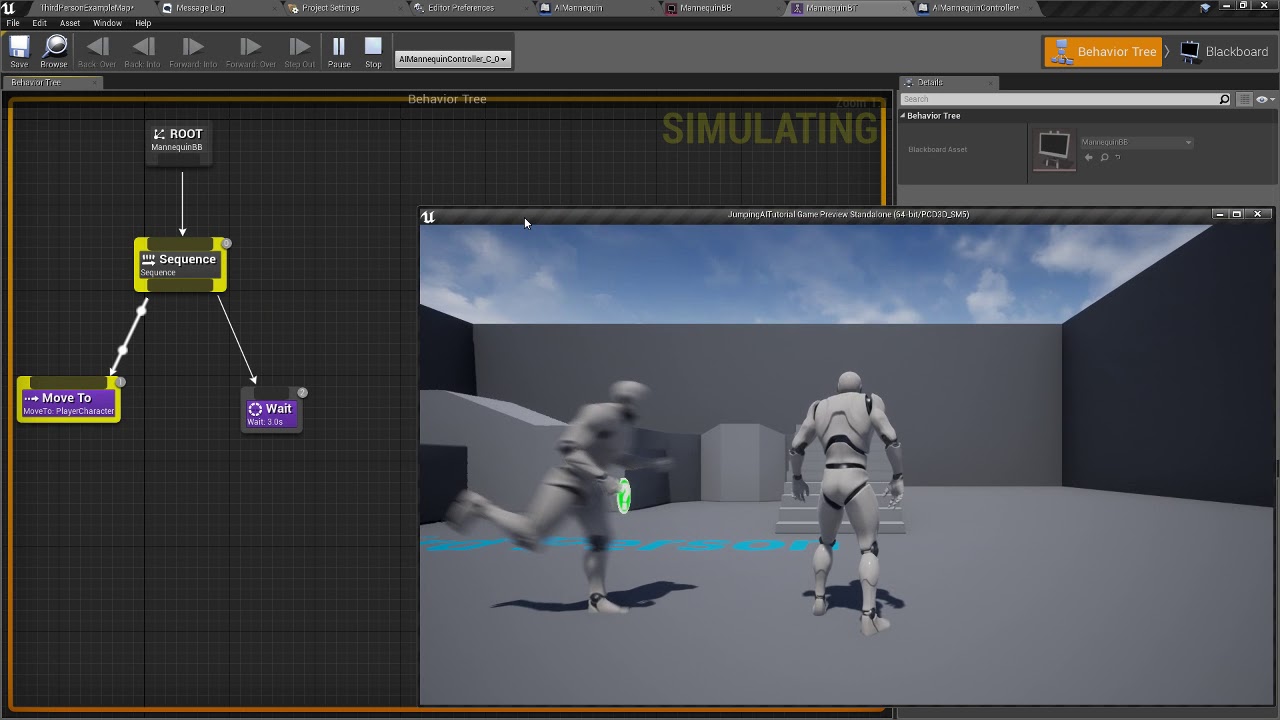
Simple tutorial for Jumping AI. No AI helpers (not even Nav Link proxys), and no C++ at all. Just some naive code in the AI Controller class and a very simpl...
although, its about jumping, you can skip the jumping part 😃
desert cipher
@ivory willow thanks I'll check that out
desert cipher
@ivory willow By changing the step height I was able to convince the navmesh that those stairs were okay. that worked great, Thanks! I'd prefer to get the nav links working, but that's a good fix for now
 slow lake
Something from #blueprint but it's technically AI so maybe it'll apply here as well.
I'm working on a flying AI (jet style. A constantly moving object). Trying to figure out how to get it to move and turn so it can navigate from point to point. My idea was to have it rotate left or right and then tilt up or down until it's facing towards the target point. Problem is I'm having trouble figuring out how much I would need to rotate the ship left or right in the first place depending on where the target is
ivory willow
@desert cipher I'm glad it helped. 😃
 crisp bone
Man, I can get an AI to follow the player, but I cannot for the life of me get the AI to move to a vector 200 units towards the player 😢
tropic lily
Hey does anyone know how to make a behavior tree service node thing respond to sound?
flint trail
I upgraded my project from 4.19.2 to 4.20.3 and my navmesh is gone :/ How do I fix it ?
crisp spindle
have you tried rebuilding it ?
flint trail
yep
crisp spindle
maybe add new nav mesh volume or move old one
have you tried creating navmesh on a new map? i'm on 4.20.3 and it works for me
crisp spindle
what is irrelevant?
flint trail
creating nav mesh in a new map
crisp spindle
just to see if it is working properly, some settings are project wide, it was just a sanity check
if it works with new maps, one more thing i can suggest is to delete default recast nav mesh and build paths after that
 grim citrus
I am trying to set up a simple move to location for a "click selected" Ai character. But it always fails. Anyone who can help? (Will post screens in a sec.)
My Controller
https://puu.sh/BzHiv/aa31c875b6.png

The AI character
https://puu.sh/BzHiT/4482301021.png

The nav mesh looks fine, at least to me.
crisp spindle
hm, have you tried drawing target destination you are passing to Go ?
grim citrus
As in Project Destination on Move to Location node?
crisp spindle
just DrawDebugSphere with To as location, just to see if you have valid location
i don't use bps that much and you are using location from a separate execution path, is that valid ?
grim citrus
Uhm. I don't know. I thought that Move to Location would try to move the character to closest point to it. All tutorials I have seen doesn't do any offset from ground or otherwise. They just click the ground and send it to the Move to Location
crisp spindle
it would be easy to check with c++
but it looks like it uses UE_VLOG to log issues
- Start the game
- Open visual log
- Start recording
- Select target and right click to move
- Look at visual log so see if anything useful was collected
grim citrus
Hm. Maybe.
LogNavigation (Warning) FPImplRecastNavMesh::InitPathfinding start point not on navmesh
crisp spindle
sounds useful
grim citrus
But... It is standing on the ground, which have NavMesh...
crisp spindle
maybe on edge or something
grim citrus
like 3 meter to closest edge.
crisp spindle
hm, i'm out of ideas
patent hornet
one common issue is your Pawns collider being inside the ground
grim citrus
I tried to have it spawn in the air so it have to fall down, still same thing,
patent hornet
well, your movement is somewhat unusual
so make sure its the navigation and not your input handling
have it move to your location + some arbitrary vector whenever you press M
if it moves, your input is the problem, if it doesn't solve the simpler scenario, then plug your inputs back in
flint trail
so, I can't get navmesh to build at all in 4.20.3... What the Hell ?!?!?!
wild mortar
@flint trail when you rebuild it it's not build?
flint trail
nah, Showing Navigation was off
(I don't know why, since it was on in 4.19)
so, all works out of the box 😆
wild mortar
Cool beans
Also, for some reason my acceleration is always 0, even though my speed is fluctuating between 0-600
This is on an AI, and I'm grabbing accel and velocity from Character Movement
flint trail
fingers crossed, AI seems to be working fine
tropic lily
When he reaches the spot he doesn’t go back to wondering aimlessly
I know by the looks of this screenshot it should be pretty obvious as to why but I still haven’t found a way to make him go back to wandering aimlessly after seeing there’s nothing there
Anyone know how to make him go back to wandering aimlessly?
 floral mango
Start menu -> type 'snip', press enter
broken hearth
Hey, bumping my question from before. Is there a built-in way to constrain player controlled character to make him unable to walk outside of the navmesh?
I can use NavmeshWalking mode in CharacterMovementComponent, however as soon as I walk outside of navmesh, the component detects it and switches MovementMode to Walking (which is calculated by physics).
 stable void
I'm guessing this is a common issue but I can't make the pathfinding work properly. I've already added custom agents in the project setting but my characters keep getting stuck at corners ..... Can someone that has done this before help please ?
keen furnace
@stable void tried increasing the nav agent radius so the navmesh doesnt generate so close to the corner? if there are individual trouble spots though you can nav modify them to obstacle or similar though
@broken hearth dont believe so, may have to use a modified CMC
@tropic lily use a sequence for the moveto, after the moveto do the wandering. also download Gyazo or similar
broken hearth
Hey @keen furnace, do you have any recomendations where to start with modifying CMC?
I have tried few approaches:
- Using the velocity vector from CMC, predict when the player moves out of the navmesh in CMC tick. If he does so, clamp the speed vector. This however wont give me the effect of "sliding" on the edge of playable area. (When player gets to the corner he justs stops).
- "Carrot on a stick" movement. Move player with AI pathfinding agent, and use a small offset vector rotated by the input direction. This however behaves wildly on some thin obstacles. Player also stops on the corners instead of "sliding"
I also had an idea that I could hook up to the build paths event in UE and maybe spawn some thin colliders around the navmesh edges? This could solve the issue but solution is rather complicated.
keen furnace
honestly i havent had to do this before, my delving into CMC has mostly been to extend and use the savedflags... my initial thought is maybe keep saving location of player last tick, and checking if the player is on the navmesh this tick, if not then tp back to last valid navmesh position, if yes then save current valid pos. may be expensive and/or jittery though, and still wouldnt slide - but at least wouldnt have the side effect of getting the player stuck if they are knocked off the navmesh @broken hearth
if you are able to mod recast to create physical blocks around its edges that would be a legit solution, as you say complicated/timeconsuming though
stable void
@keen furnace I fixed it in the end... by restarting the editor ... I have spent so long trying to figure out what was going wrong. Thank you though ! Now the nav-mesh is giving me other problems. Is like whack a mole here! If someone take a look at this wink-wink and know what's going on then please say so !
navmesh documentation is awful
keen furnace
ah yeah the agents often dont update without an editor restart 😦 can you verify your character is actually using that yellow navmesh? it sounds like they are using the green one
try a navfilter to stop it from using that other navmesh maybe
stable void
how do I see that ? I'm trying to find console commands or blueprint nodes to affect the character but I can't seem to find anything relevant online .... I'd prefer to read something rather then waste peoples time. Thank you for helping me though. It's very much appreciated.
keen furnace
no worries mate. AFAIK in blueprint there is nothing to force navmesh, it just tries to "find the most appropriate based on radius and height" in BP-only projects i generally have to just use filters for all.
https://wiki.unrealengine.com/AI_Custom_Pathing,_How_To_Use_Nav_Modifiers_Query_Filters
basically creating custom nav areas and using filters on each character type to set what it can and cannot use
pine steeple
navagents dont work for me for some reason
 frigid knoll
Is there a "is navigable?" or Can navigate to? or Location within nav mesh? type nodes?
 olive garnet
I'm getting this message in the log what does it mean? LogEQS: Warning: Finished query EQS_FindRandomLocation_RandomBest25Pct over execution time warning. Total Execution Time: 67.47 ms
generator[0]: 5.14 ms (items:14637) (EnvQueryGenerator_PathingGrid_0)
a cookie to anyone that can tell me why its doing it
stable void
Does anyone know why my character if fine when using a custom AI controller but not fine with the same AI controller but parented to it's detour version ?
olive garnet
💩
patent hornet
looks like it took it way too long to finish the query
might want to try to make it cheaper
15k items in a pathing grid, that doesn't come free
stable void
So by reparenting my AI controller to a detour AI Controller the "Move To" command in the behavior tree is not doing anytrhing anymore
*anything anymore ? but move directly towards works
olive garnet
@patent hornet you the amount of props on the map?
desert cipher
So odd behaviour here. I have my AI set to shoot at a player in range. With some intervals and what not to give a slightly fair shooting thing. One thing that happens is that they hit a cooldown and for a second don't on the player. if the player moves, they won't track the player because set focus is called as part of shooting. So I decided to duplicate the shooting behaviour, and run it without pulling the trigger alongside it. So that while the shooting part is under cool down, the AI could still focus on the player to track in range. Problem is... instead of tracking.. the ai points at the player shoots and then points to the right and down a little bit. Definitely not in the direction of the player.
That's the relevant part of the tree
That's the aim code
which definitely 100% works.. since that's duplicated from the shooting code
What's happening is that when the shooting is on cool down, he's doing this instead of pointing at the players head like he should.
 cursive vector
the ai perception has affiliation (enemies, neutrals, friendlies). is that something one should actually use? cant find much on that. some say just always perceive everyone and sort them out yourself later. would you recommend using that built in team system? seems to be built on GenericTeamAgentInterface
grim citrus
Ugh. I cannot get Show Navigation to work in PIE...
cursive vector
how are you trying to do it? it doesnt show while playing, you need to unposses
wild mortar
Is it acceptable to use the Blackboard decorator for a boolean BB Key? I.e, it's saying "unset" or "is set", it seems to me it is more appropriate for Object class where it can be set to none, versus boolean where the value is true/false but not necessary none?
pine steeple
yes
 digital solstice
Does anybody know how to make car AI with collision avoidance?
tropic lily
Please help, for some reason the AI won’t move towards the target
Or if I should just stick with the Movs To node, can someone help me find a way to make the AI give up chasing the player after a while?
pine steeple
could you use a screenshot tool or something, really hard to read them
tropic lily
I’ll take a better picture later. My computer’s interest is ass where I am. Otherwise I would do screenshot
Also try zooming in
pine steeple
why are you not using MoveTo Nodes?
ChasePlayerTest2 would probably be a service, which checks to see if the player is visible, whilst player is visible, move towards him, if for some reason he is not visible, stop the moveto
something like that?
tropic lily
See, I’m having trouble making him give up chasing the player after a while
So I thought I should try making a custom node that would make him give up after not being able to see the player for a few seconds
tropic lily
Wait what’s cooldowns?
pine steeple
a decorator for a BT node
tropic lily
I know it’s a decorator but what does this decorator do?
More importantly can it help?
 floral vector
super newbie here.
So after a Selector, the actions are executed from left to right (from lower to higher number)?
just found the unreal behaviour trees playlist inthe pinned messages but that wil take a long time to watch ... so I would be grateful is someone could answer that anyway
pine steeple
selector and sequence execute left to right
difference is, if a selector suceeds it doesnt execute the next one on the left, but if a sequence succeeds it executes the next on the left, if a selector fails it runs the next one on the left, if a sequence fails, it doesnt execute the next on the left
floral vector
@pine steeple Thanks 😃
hmm, what happens if I have a MoveTo node as child of a Selector? When does a MoveTo return success or fail?
pine steeple
returns if it has reached the goal
fails if the path is invalid
succeeds if it has reached the goal
floral vector
@pine steeple Thanks again
 brittle egret
Hey I used the NavSystemV1 to find a path between two points, the green line is how it finds it right now, but I want to change it so it uses a path more like the red line
Going straight as long as possible and then diagonal
Does anyone know how I could achieve that?
ocean crystal
one might be to move directly toward, but have a service which checks for how close the agent is to a wall - if its too close, it uses regular pathing. @brittle egret
ocean crystal
if the pawnsensing thing suffices for your purposes, then what is exposed to BP of perception should do as well.
to fully use perception you do have to dip into C++ tho
I actually checked whether pawnsensing had been deprecated - it was my first thought when you said it broke
pine steeple
its not depreciated but it is legacy iirc, but Perception system is easy, all pawns who can be detected by the perception system has a stimuli source component attached to them, and all pawns who react to stimuli has a perception system component
ocean crystal
actually I don't even think you need the stimuli source comp
probs easier if you do though
ocean crystal
yeah its meant to be on the controller
ocean crystal
its tucked away into the gameplay debugger
pine steeple
using the ' key
ocean crystal
which, btw, is super op
pine steeple
its an AI must
i have a lot of eqs queries and perception system with behaviour trees, seeing everything on screen with the nav system is 
ocean crystal
Seriously though, an AI kit on the MP without perception is kinda.... eh?
Bet the only thing on the MP using perception for its AI is art of combat.
And that doesn't even use BT
I mean that you'd gain an edge if you used the newer system, at least I'd think so.
Then again, I'm not the normal customer base for BP packs... so /shrug
whereas with pawnsensing its more Oh another AI thing that technically works
it may not be worth it if it'd be that involved.
perhaps build another AI pack around perception
then you'd have two
 desert kelp
Am following a tutorial on the navlink proxy to get my NPC to jump on/off platforms. I'm using an AIMoveto node in BP, while he is using the moveto node in behaviour trees
Could that be the reason my AI starts a jump off, then turns in midair... failing the jump most of the time?
yeah... it keeps going out on OnFail, which has a delay then repeats..
durnit, ok, dont mind me.
 serene pelican
This is a meta question regarding AI in UE:
How do Behaviour Trees execute "AI Move To" ?
Or to rephrase it: How do Behaviour Trees know how the Pawn moves?
pine steeple
asks the movemement component if a path exists, if the path it exists it runs the moveto, if its at the goal it returns success, if it fails to path it returns failure
lyric flint
My navigation mesh isn't showing up. Has anyone had this issue?
 wanton oriole
Sometimes it does that for me. Try moving the navmesh a little 🤔
lyric flint
Is there a way to allow the "move to" node to be interupted
so we can quickly update movement
lyric flint
This method won't update until after it reached thre path
im just wondering if anyone knows how to fix this
i want more of a "MOBA" style movement
i want players to be able to cnacel movement
by clicking a new location
The movement seems way to slow
to be usable for any moba / rts style games
it doesn't respond quick enough
pine steeple
you probably dont want to use BT for that
but control it thru an AI controller
but you can always abort the current tree/node by using a decorator
lyric flint
@pine steeple it won't stop the "MOve to " node
until it is near "acceptable radius"
is there a way to just
instantly update this
pine steeple
use an actor and teleport it around and have the moveto track that ?
 slow shuttle
Hi all, do you know why the GameplayTag condition for behavior tree can't abort tree? I read in the C++ code that it was not ready for this... but I don't know why. Is it because the container is not multithreaded? Do you have any other way to drive the BT with GameplayTag? because as long as we can't abort it, I can change my bot behavior depanding on those tags.
pine steeple
why not?
its how i do it with my AI
they have a TargetActor, which the MoveTo uses to navigate to
and i simply move that actor to the new vector location
if i want the AI to stop, i move the target actor ontop of the AI
 cunning relic
Hello
Would anyone be willing to look at where I am going wrong with the Behavior tree tutorial?
lyric flint
@pine steeple But why can't we just change the vector location and have it move there?
pine steeple
you want it to be fluid right?
as in if he clicks a new location he just turns and goes
pine steeple
right
if you abort the moveto, the character will stop, then execute again
and will look crap
pine steeple
now if you have a empty actor which you move about the map
lyric flint
and then moving it?
pine steeple
no the actor is spawned in the player control at begin play
want me to mock up an example project?
and send it?
its basically, you right click, you set the Move Target actor to that location, and in your move to you navigate to that move target with Goal Tracking ticked
lyric flint
sure
pine steeple
what ue version you got
lyric flint
4.20
cunning relic
In the behavior tree tutorial where does target to follow get set?
pine steeple
@lyric flint https://gyazo.com/625a07da9c5bef7aada747cfd126abd6

is that what you are after?
pine steeple
that is ai
pine steeple
what doesnt?
lyric flint
ok
pine steeple

1 file sent via WeTransfer, the simplest way to send your files around the world
lyric flint
ty
pine steeple
thats just for a character you can move, but i am sure you can grasp what i did, if its just pure ai your moving (not a playable character) i can do it even simpler
what tutorial you on about>?

 tidal egret
Hey, does anyone here have any good resources on fish AI? The flocking I'm currently using works, but doesn't take meshes into account, so the fish end up swimming through objects/terrain and just stay inside the defined cube area
 sterile mirage
Does anyone know (off the top of their head before I measure it myself) how much more expensive FindPathSync is compared to TestPathSync?
ripe whale
Has anybody created custom Behavior Tree Services? How do you get a set BB values from the UBTService subclass you have created? I am using stuff like: UBTFunctionLibrary::GetBlackboardValueAsFloat(this, [FBlackboardKeySelector property]) but it is always returning nothing
I should I be accessing the UBlackboardComponent directly and use the methods that is has to get and set values?
I just find that odd because I didn't have to do that when I implemented custom services in blueprints rather than cpp
sterile mirage
Where are you trying to set the blackboard values? Yes it should be set directly on the blackboard component.
In the overridden service functions you should be passed the UBehaviorTreeComponent (OwnerComp below) which you can then use to get the right blackboard component:
OwnerComp.GetBlackboardComponent();
And then, as you've correctly assumed, you use the SetValue/GetValue calls on the blackboard:
MyBlackboard->SetValueAsVector(LocationStorage.SelectedKeyName, RandomLocation);
example for getting:
MyBlackboard->GetValue<UBlackboardKeyType_Vector>(BlackboardKey.GetSelectedKeyID());
Although it looks like the function library you're using is just a helper function that does the above (getting the owner's blackboard component) for you, so if you're still having trouble feel free to DM me directly and I'd be happy to help troubleshoot. I've written a lot of BT services, tasks etc. and use blackboard keys extensively.
ripe whale
Awesome thanks! I’ll try that soon
ripe whale
@sterile mirage thanks that worked!
sterile mirage
👍
patent hornet
using blackboard key selectors is a better way to go
What are the Service Nodes in the Behavior Tree in Unreal Engine 4 Source Files: https://github.com/MWadstein/wtf-hdi-files
 solar elbow
guys, what this error is about? trying to build production, but still have this:
\AIModule\Private\BehaviorTree\Decorators\BTDecorator_BlueprintBase.cpp] [Line: 67]```
found the question at the answerhub <https://answers.unrealengine.com/questions/801681/btdecorator-related-cooking-failure-ensure-observe.html> but the solution is kinda confusing fallow gull
Hi guys, for big open world (made with world composition) What's the best practice?
a. place a navmesh volume in the persistent level that envelope the whole world
b. place a navmesh volume on each sublevel
(and why one solution is better than the other?)
sterile mirage
You'll want to look into NavMesh Invokers
sterile mirage
I think I've found a bug in Recast Nav Meshes ProjectPoint or DoesNodeContainLocation implementations. If you project a point on to the navmesh and get back a (presumably valid) point that's on the edge of an exterior poly, that retuned point fails the DoesNodeContainLocation forthe very same node that ProjectPoint said it was on.
Simple Example
There's a comment in the code that suggests it might be a rounding error due to imprecision:
// one last step required due to recast's BVTree imprecision
sterile mirage
Yah that's got to be it. I can work around the issue simply by nudging the result of ProjectPoint by an incredibly small amount towards the center of the poly. Hopefully I've saved someone else some time if they ever encounter the above bug. 🤷
 jovial valve
Does everyone here exclusively use behavior trees, or do you guys use other approaches to AI as well?
sterile mirage
My new game is pretty much just Behavior Trees with the AI Perception system. I like that it allows me to write a language of simple blocks (usings tasks, decorators, services and composites) that my designer can then piece together. I've basically been able to offload all AI development to someone who understands what "feels" good without having to know how to code.
pine steeple
i use Behaviour trees for my AI, but i use Dynamic Trees, so i have one master behaviour tree for all ai, but each ai can inject a different tree for personalized behavior for some parts of the tree
ripe whale
@sterile mirage have you ever used AAIController::MoveToLocation? I'm trying to use it inside a BTTask subclass but how do we know when the move is complete so that we can return the appropriate EBTNodeResult?
Is there some callback or something I am missing?
I would have expected to pass a lamda or something to this method that gets called on completion
sterile mirage
So what's your use case? Is there a reason you aren't using the UBTTask_MoveTo?
ripe whale
Inside my BTTask subclass I am setting a bunch of BB key-values as well as doing the move to
I could put the setting of the BB values in a different task
but I would like them to be all in the same task if possible
sterile mirage
I think you'll want to avoid creating a monolithic task that does a bunch of different tasks.
You can take a look at UBTTask_MoveTo.cpp to see how much work is involved with handling pathing correctly in a BT task.
The more you break down the work into individual tasks the more you'll be able to recycle each one as well for undiscovered use cases.
ripe whale
Ugh yeah this looks more complicated than I thought it was going to be
sterile mirage
luckily MoveTo uses any Vector or Actor blackboard key selector, so it will be pretty easy to create a couple of tasks that push the data where it needs to be before running MoveTo with whatever blackboard key you've used as storage
ripe whale
Yeah it will be easy
sterile mirage
Good luck!
ripe whale
Thanks!
floral vector
It seems that trying to use "draw debug ..." functions in a BBService doesn't work (well, it doesn't complain but it is not showing the stuff). Also spawning particle systems is not doing anything.
Is that by design? I'm seeing a video were the guy is creating a debug sphere and it works for him, but maybe is an older version. Anyhelp?
floral vector
ah, my game has multiplayer. Could that affect the behaviortree service? If so where do BTServices execute?
pine steeple
BTService should not be for doing things like that
it should be for checking states, etc
floral vector
ah ok, I just saw the video tutorial is from 2015 so I assume they removed that functionality
pine steeple
well i would not be doing anything like spawning particles from a BTService
floral vector
it's just for debugging of course
I'm using a "memory actor" and I want to see where the AI think the memory actor is.
pine steeple
maybe set a bool which makes the tree abort and run a different task which sends of a command to the owning ai, to spawn the particles
and if its multiplayer they would need to be replicated
ie multicast if all players need to see it
floral vector
@pine steeple Can try that. Thanks!
pine steeple
even tho i prefer to send a client rpc to each player, and have them handle the VFX
floral vector
ah, solved! It was because I was using dedicated server. Now I can see all that stuff 😃
pine steeple
yeah but like i said, Services shouldn't be for things like that
floral vector
@pine steeple only for debugging the vision service, I'll remove it later. Thanks!
 sterile escarp
Does anyone have a clue why this event does not fire?
sterile escarp
Do I need to enable it manually somehow? Shouldn't it run by itself when the actor has an "AI Perception" component?
pine steeple
you enabled the affiliation to all types
and there is at least a stimuli on a character in the game?
 uneven bison
Hi,
When I called MoveToLocation in AIController.
Not triggered RequestDirectMove function that in UNavMovementComponent.
But good working for MoveToActor.
What can I do for this problem?
sterile escarp
@pine steeple No characters have a stimuli source, no. My AI is using sight only. Is stimuli needed for that?
pine steeple
characters that get detected by the perception system need a stimuli
so AI will have perception component, Player will have a Stimuli
sterile escarp
@pine steeple Its AI that are supposed to detect AI. Team deathmatch style.
pine steeple
then the AI will need a stimuli aswell
sterile escarp
On its controller or the character?
pine steeple
character
sterile escarp
Still does not work tho. 😦 Must be something else as well.
sterile escarp
where do I find them?
pine steeple
in the perception component when you enabled the sight sense config
in your AI controller
sterile escarp
Yes! That worked! Thanks ❤
pine steeple
np
 tropic ether
Can I ask C++ questions related to AI in here?
ripe whale
Yes
 wary ivy
groan
how do I do a raycast on the navmesh?
I basically have a pawn and I want to do sort of walkability raycast along the mesh
some units forward
do I have to project the actor location to the navmesh first or not?
UNavigationSystemV1* navSys = UNavigationSystemV1::GetCurrent(GetWorld());
if (navSys == nullptr)
{
    GEngine->AddOnScreenDebugMessage(-1, 0.f, FColor::Red, TEXT("Navsys is null"));
    return;
}
auto* NavData = navSys->GetMainNavData();
if (NavData == nullptr)
{
    GEngine->AddOnScreenDebugMessage(-1, 0.f, FColor::Red, TEXT("Navdata is null"));
    return;
}
const ARecastNavMesh* navmesh = Cast<ARecastNavMesh>(NavData);
if (navmesh == nullptr)
{
    GEngine->AddOnScreenDebugMessage(-1, 0.f, FColor::Red, TEXT("Navmesh is null"));
    return;
}
FVector hitLoc;
const FSharedConstNavQueryFilter filter = navSys->CreateDefaultQueryFilterCopy();
bool hit = ARecastNavMesh::NavMeshRaycast(navmesh, GetActorLocation(), CurrentDirection * 200.f, hitLoc, filter, this);
that's what I tried but I'm not sure if it's actually working
the hit does return true eventually but then the hit location is the position of the actor
and not the end of the trace
shieeet
thanks rubber ducks, I forgot to add the actor location to trace end
😄
dreamy surge
Is there anyway to have the ai randomly jump to different ledges say 10 feet to another nevmesh area not connected to the floor or do we need to use predetermined paths and jumps?
pine steeple
use Navlinks
a smart nav link will give you the end position
so you can jump the AI to the end position either via lerp or launch or something similar
i made a custom nav link component to allow AI to vault over obstacles and windows
 void cloak
When calling simple behaviour trees like this, are they called in a "One and done" style, or do they run until you specify for them to stop?
pine steeple
why can't you use blackboard ant BT in multiplayer game?
pine steeple
it would not cause ping and fps drops
i use it for 150 ai, multiplayer with EQS pathing and it runs around 3ms game thread time
which is good
the bottleneck is the Character movement component
movement and lags is probably caused by netupdate or bad BT design/animation
stable void
How do I send back the signal when the pawn has reached the move to destination ?
pine steeple
where do you want to send the signal to?
stable void
back to my character
pine steeple
cause AIController has an override (in c++ for sure not sure in blueprint) for when movement finishes.
stable void
or the AIcomponent
pine steeple
so Moveto will return true if it succeds
so in that sequence after move to you can have pathing succeded task to send the info back
i would wrap that in a selector node which executes if MoveTo fails (failed to reach goal/unable to path) which sends saying it failed pathing
stable void
but there is no pathing succeeded node ?
pine steeple
make one
stable void
I didn't know you could do that ha
pine steeple
What are the Service Nodes in the Behavior Tree in Unreal Engine 4 Source Files: https://github.com/MWadstein/wtf-hdi-files

What are the Task Nodes in the Behavior Tree in Unreal Engine 4 Source Files: https://github.com/MWadstein/wtf-hdi-files
What are the Decorator Nodes in the Behavior Tree in Unreal Engine 4 Source Files: https://github.com/MWadstein/wtf-hdi-files
those are good videos
stable void
Perfect, thank you 😃
pine steeple
also https://www.youtube.com/watch?v=ISH5_cT_l14 if you need a brushup on selector/sequence

What are the Composite Nodes in the Behavior Tree in Unreal Engine 4 Source Files: https://github.com/MWadstein/wtf-hdi-files
tropic lily
Are there any tutorials that easily explain EQS that walk you through it and doesn’t show what they’ve already done? Or a tutorial that helps you easily understand EQS?
pine steeple
EQS is simple really
its just a generator (to generate actors or points (vectors) and tests to perfom on them, returning a score
and filtering
tropic lily
Someone told me that I can use it to make the AI go down twisty corridors
pine steeple
you can use it for whatever you like
it only tests things and returns the best item or random best 25 percent or all items with a score
tropic lily
I feel like I’m supposed to manually set certain markers to tell the AI that it means something
pine steeple
eqs will only test to see if points are valid
why wont your ai go down twisty corridors with normal navmesh?
tropic lily
It will. It’s just that when it’s chasing the player, it gives up partway through when it doesn’t detect sound or see them. Logically it doesn’t make sense
desert cipher
How do I get my AI to go up these stairs? I have a navlink showing that those two areas can be joined. The stairs are perfectly navigable. The player character can go up these stairs without any kind of issue or hitch. The stairs themselves aren't large enough to generate any kind of navmesh themselves. Do I need to somehow set a series of points from stair to stair? Do I set an array for each step like A->B, B->C, C-D all the way up?
 latent wasp
What is the best way to make a simple AI for my paper2d game with blueprints?
desert cipher
Well, I tried the A->B->C->D thing..and it laid out all the points properly, but.. since none of the stairs are green, it didn't actually connect anything. I hoped it would have made a kind of chain to link them all together.
tropic lily
Can someone please help me? I want to use EQS to tell the AI to go all the way down the hallway. But it sometimes turns abruptly. This mostly happens when he reaches a sound point but I want him to keep going forward into the hall regardless. Can you help me?
pine steeple
@desert cipher hacky way would be to put a bound on each stair
all of your points have a score of 1
you should really have the point have a score different to each other
desert cipher
@pine steeple Can I put bounds on those while they are in a blueprint?
pine steeple
you can drop the bounds in the level
desert cipher
I have navmesh bounds in the level, that's all the green stuff
pine steeple
yeah but its not on the stairs
desert cipher
the problem is the stairs aren't large enough to count for that.
it does cover them though.
desert cipher
cell size and cell height?
I might have to make it really small. Looks like default is 19, I might need to make it 1. I'm assuming that might have a performance impact?
Oh definitely.. I set it to 1 and massive freeze trying to start the game.
It's dead.. I'll have to force it closed. So don't make it 1.
Lowest I can set it is 4, which isn't low enough. Anything lower and the game jams up, unable to start. 4 is just starting to draw a little green on the stairs, but not enough. 2 or 3 would probably do it. So bounds is out, any other thoughts?
patent hornet
got just one set of stairs? got any animations on the pawn (walking...) ?
stable void
@pine steeple thank you for yesterday by the way I was rushing
tropic lily
Do you hear that bump in the night?
Cuz it’s me!
Can someone please help me? I want to use EQS to tell the AI to go all the way down the hallway. But it sometimes turns abruptly. This mostly happens when he reaches a sound point but I want him to keep going forward into the hall regardless. Can you help me?
fallow gull
@tropic lily because you abort the lower priority task whem hearfuck is set so it abort the MoveTo task.
tropic lily
But once it clears hearfuck is that not the end of it?
It’s not like there’s a series of sounds set. To my knowledge when it hears a new sound it updates the vector to that location
Even when hearfuck isn’t set he stills turns abruptly in the hall
pine steeple
so your sequence seems weird aswell
if move to fails, it wont execute the second Clear Memory
unless thats intended
but i think you need to rethink your approach
break down exactly what is supposed to happen
tropic lily
Brb I’m away from my computer atm but I will when I get there
tropic lily
Fuck it I don’t need a computer to tell you what needs to be done
Basically, it’s supposed to go all the way down certain areas that Is presumed to be where the player is
If it’s going down the hallway, and it doesn’t detect the player through sight or sound anymore, I want it to keep going down the hall because that’s the only way to go
The AI I’m using is a test ai before I transfer it to the real one
fallow gull
And what location does the eqs return?
tropic lily
You mean where the test pawn is?
(I’ve only started using it yesterday so I dunno jack(
I can show you the root thing when I get back to my PC if it helps
pine steeple
@fallow gull the screenshot i saw earlier all points are green with a score of 1
@tropic lily you need to test for points in front of the ai
and keep him updated so he moves following them points in a forward direction
ocean crystal
I'm not convinced EQS is a good use here
pine steeple
uding some sort of DOT test
ocean crystal
I'd just do whisker tracing
tropic lily
Someone recommended it to me when I told them what I wanted to do
ocean crystal
You COULD do EQS
pine steeple
i use eqs but mine are to fine points and quite complicated
ocean crystal
its pretty close to what it sounds like if you know what whiskers are
tropic lily
I assume when they touch something they detect it?
pine steeple
i mean you could just do a forward cone from the AI, and pick points?
tropic lily
Brb 10 minutes
ocean crystal
could also have something like breadcrumbs but on path branches - if you pass one while the AI knows where you are, it at least goes to it. It'd work in a more limited way.