#gameplay-ai
1 messages · Page 102 of 1
 deft sedge
 patent hornet
for me seeing more then... 4 composites under a single composite node is a red flag
deft sedge
i tried to make this work as dynamically as possible for multiplayer and I didn't take the time to make things sorted very specifically
I'm seeing conditions for the same variable all over the place where it could be on just one selector
patent hornet
yeah, but you do lose flow control like this
deft sedge
I could have a node for has target and one for doesn't have target
all the chase stuff goes under has target and the wander and window can go under doesn't have target
for example
now that I have done this, the find closest window looks better as a service
and I can have a selector for is window valid
and then just have an window invalidator on a timer, which should abort the move to right?
patent hornet
what is the intended purpose of the window as target?
deft sedge
so the ai can know what windows to break to get to the player
I only want them attacking windows in the room the player is in
and they can't see the player if there is no path to him via nav mesh so they need somewhere to look
so the window manager will tell the behavior tree what windows a player is near
patent hornet
what is the task priority here?
deft sedge
move to player and attack till dead
if dont see player move to and attack and climb through window that sees him
if none of those wander based on conditions
if recently saw player move to where he was then wander in case he is hiding
if don't see him move to closest way point near the building
then wander in radius or move to way point
other wise all else is overridden by having information of the players whereabouts
it's a wave survival on an open world map
patent hornet
that means your first node is Selector
that gets them into... CombatState
if they see a player, or have a good window to bash
only if that fails they do consider option #2 from the selector
which is Searching (saw player recently, lets go see if its still around)
and then it falls into Wandering
deft sedge
yup, thats what I have just done
which is what I meant by my tree didn't have enough leaves. I wasn't using selectors to their full potential
now the question is do I run the timer that nulls out the window on a simple parallel or not
patent hornet
when would you want to null the window and why?
deft sedge
right right because the service should be updating the window already
but If I am in the move to function what causes the move to exit or revaluate
btw I am using my own built move to functions not the one included in behavior tree.
i have a bit of redundancy in there because sometimes the zombies would be sent to 0,0,0 instead of the window actor
yeah still not working
the service may update the key for windowTarget, but the move to task won't stop till it reaches it's goal. even then they don't go to a different window even if set the window to be not valid
This is frustrating
deft sedge
I GOT IT TO WORK HELL YES
so a couple things
instead of invalidating on timer what I did was on tick for findClosestWindow I added a check to see if the current window was still marked with desired tags. It was I just exited the loop. If it was no longer valid I cleared the black board key AND i had to clear of my temp variable holders for comparisons, which I wasn't doing before. At the end of my for each loop on completed I was setting my comparison target to the assigned window actor and even if it wasn't valid it was still holding a ref to it. DUR simple mistake. So now it works beautifully and all behaviors are going as expected thus far. It is time to implement all the additional player related checks like last known location and making a line of sight or using pawn sensing for if the player can actually be seen and not just discovered in navigation query. OOOOHH this is gunna get interesting really fast
 viscid oasis
lol nice work
Do you guys know if you can do a EQS_Context Line trace with a defined pawn
 fluid sequoia
Finally got raycasting working for validating paths with custom pathfinding implementation
not sure how awful the perf is
patent hornet
do 1k vanilla and 1k custom pathfinding requests and profile it
fluid sequoia
Yeah I need to setup a practice project so I can get a feel for it but it seems very performant in a vacuum at least
viscid oasis
hey how do you guys test visibility on a non-context EQS test?
viscid oasis
as in my Context is like.. a character pawn, not the querier.
 lyric flint
whats the best way to check if the point is outside a navmesh
*outside navmesh bounds volume
to be more precise
because i need to have a different logic when the point is inside the navmesh volume but unreachable and when the point is outside the navmesh volume
 low loom
Kaboooom


40,000 agent! in @UnrealEngine
#UnrealEngine #UE4 #gamedev #Nvidia #physics #AI #gamedev #gamedevelopment #Nvidia @NVIDIAGameDev @NVIDIAAIDev https://t.co/at7oD5uszz
 Twitter
fluid sequoia
Twitter
fluid sequoia
@lyric flint It's possible but technically tricky. You'll need to extend RecastNavMesh and implement the FindPath method (copy implementation from base class). You'll then unwrap the FindPath implementation in ImplRecastNavMesh (RecastNavMeshImpl->FindPath) and find where you should break out when it fails getting a nav poly, then start constructing your nav path with a different method.
lyric flint
err
fluid sequoia
There's also some hacky ways to get around it depending on your desired result, you can handle failed navpathing in the movement component and then do quasi navigation there: https://wiki.unrealengine.com/AI_Navigation_in_C%2B%2B,_Customize_Path_Following_Every_Tick
lyric flint
i decided i'll just get the dimensions and position of the volume, and then calculate if the point is inside. maybe we didn't understand each other?
fluid sequoia
Oh I see
lyric flint
i was jut wondering if there was a more elegant way to do it
fluid sequoia
Uh, you can just do an overlapping actors check for some arbitrary point if you want to know whether it's in navigations bounds volume
What's the actual use case?
lyric flint
have you ever played eve online?
fluid sequoia
sadly not lol
lyric flint
there's a keep range functionality which tries to keep range between two actors
i need this to handle border cases
fluid sequoia
This is for navigation on a surface and not in 3d space, right
lyric flint
yes
fluid sequoia
Well I think the navigation call to follow another actor will fail if it's trying to path out of bounds
So I guess if you want specific behavior when navpathing fails while following another actor then do something like
lyric flint
it's not actually the follow
it's the keep range, so there's some custom code involved
fluid sequoia
Oh ok
lyric flint
you can set the range to like 20m, or 50m
fluid sequoia
Uh, quick solution I can think of is getWorld->getNavigationSystem->ProjectPointToNavigation and if that call fails then handle it however
just do that check every second or so, it's not very expensive
lyric flint
will it fail as well if the point is inside bounds volume, but can't be reached?
fluid sequoia
Yes
fluid sequoia
Oh actually no
It will succeed if the point is above the navmesh surface
irregardless of reachability
if you're just checking if the point lies within navigation bounds volume then you can just calculate the location of the actor you're following and if within bounds xmin/xmax etc etc
lyric flint
you sure? that could be an elegant solution to my problem
fluid sequoia
yeah I'm sure
because I was trying to validate my own navigation system and ran into an issue with ProjectPointToNavigation being true even if the navmesh it was finding wasn't connected to any other navmesh polys
i.e. was unreachable but had navmesh under it
fluid sequoia
hopefully it works
fluid sequoia
Uhh, normally that's wrapped in a Query struct in FindPath arguments for RecastNavMesh
You can roll your own outside the context of the navigation system I think, lemme see
@lyric flint Try using MainNavData member of the NavigationSystem, dunno if it will work
lyric flint
hmm, i don't see it exposed via BP
fluid sequoia
I can access it in CPP, fug
There's a getter method for abstract nav data but docs say don't use it
lyric flint
i might just go the good ol way of calculating it from the bounds volume position/dimensions
fluid sequoia
I'll look more into getting the nav data for the time being 🤔
 wild mortar
Hi all, I'm trying to spawn AI character onto the map using Spawn AIFrom Class
However, I'm getting this error
: Error: Blueprint Runtime Error: Accessed None trying to read property CallFunc_GetBlackboard_ReturnValue from function: 'SetStamina' from node: Set Value as Float in graph: SetStamina in object: BP_Monster with description: Accessed None trying to read property CallFunc_GetBlackboard_ReturnValue
Here's my Level BP used to spawn the AI character:
Thanks in advance 😃
patent hornet
you are trying to access the BB from monster pawn's BeginPlay i assume and SetStamina
that is probably a tad too early, as the pawn might not had been possessed yet
its not safe to access Pawn from the Controller on BeginPlay, or vice versa
use OnPossess/OnPossessed instead
 chilly mirage
could anyone help me debug why my pawn sensing on hear event isnt firing? it was a few days ago haha
 pine steeple
show use code/blueprint
 uneven tide
Hi there, is there a way to make the ai avoiding the player like they avoiding each other?
chilly mirage


First BP is the player parent pawn. inside is a method to create a sound. and upon running around in PIE with a print string. i know the code reaches the make noise node
Second BP is the AI parent. Which has an on see event and an on hear event. the on see event works just fine. the on hear event does not fire
this was working not long ago. i added in EQS the other day, and changed some collision types for both the player and ai.. but i wouldnt think this would cause issue
any help would be great!
 chilly mirage
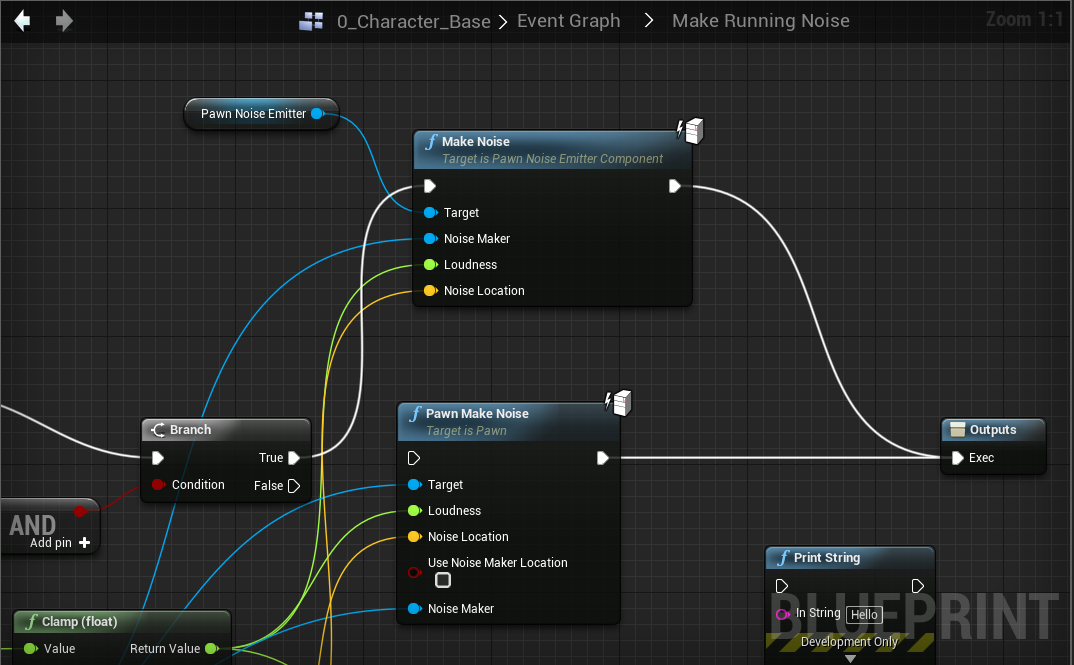
Found the issue... Should be using Make Noise from pawn noise emitter. Pawn Make Noise is not the correct node for pawn sensing
 weary holly
Anyone online here to share some ideas and helping me a bit out?
pine steeple
depends what ideas lol
weary holly
xd @pine steeple i want to recreate the ai sight system from assasins creed origins
pine steeple
link me cause been years since i played any assasins creed let alone the new ones
 real helm
Hi, I am having problems with a turret I am making. I've tried several things but the turret refuses to face towards the player.
Why doesn't this work?
weary holly
@real helm maybe your turret mesh is rotate to the x axis then you would have to modify the rotator
patent hornet
maybe you are overriding it by using controller's desired rotation
 bronze latch
Hello. I am working on creating a multiplayer First Person Shooter game in Unreal Engine. I have a rough implementation of enemies which I can kill, and everything works fine. When I try to create AI trees for the enemies, I run into one major issue: I can't seem to find a way to reference the player. I want my AI to attack the closest player, but I can't find a way of getting a reference to all the players. What would be the best way to make the Enemies detect all multiplayer players in the level?
pine steeple
@bronze latch i done something similar for my zombie horde game
are these zombie type enemies or shooting type enemies?
patent hornet
@bronze latch i assume its blueprints?
i think simplest way to iterate all players in BP is GetGameMode->GetNumPlayers->ForLoop (0 to NumPlayers - 1)->GetPlayerCharacter (Index)
AI controllers are server only, so you can do it safely
(cast to custom GameMode is not required for this)
bronze latch
I got it working. I ended up just using find all actors of class (I know it's lazy, but it works!) These enemies are more zombie like, though I do intend to use similar systems for true shooter enemies, I just need something to prototype with.
Thanks for the answers
viscid oasis
I've asked this question a few times but I think most people have been away; so forgive me if I'm repeating myself.
Is there a way to use EQS Test Pawn to determine a context_query on a different character i.e. one that isn't the querier?
In more specific terms; my querier is my enemy player, but I want the enemy player to act when it has a successful line trace on a character player.
I've got a feeling you can't test that, but just thought I'd check.
 hot basalt
anybody got an idea how to make a task queue for ai?
 livid hawk
Hello, any idea why move to location doesn't works and my character isn't moving ? I have a navmesh volume and the character is inside it
It works with simple move to , but the character will stop moving when colliding with the player ....
anyone knowledgeable with these issues would be greatly appreciated
 static dew
Move to location is a fire and forget believe it’s one time non readjusting path
Re-adjusting
You using a behavior tree?
 elfin cosmos
is unreal with behavior trees and ai controllers capable of doing thousands of agents
or should i consider rolling my own infrastructure to handle that
i mean thats after i've optimized via staggering over frames, LOD computation, etc
fluid sequoia
@elfin cosmos I can say I've read one answerhub question where a developer had claimed to have managed a "large" number of AI in an RTS style game (at least above 100 by recollection) by adjusting their query trees and nav to only run every few seconds, and also perhaps they used batched queries? 🤔 Suffice to say unless there's a tutorial floating around on handling huge numbers of AI, I would test a simple situation like spawning 500 actors and instructing them all to path to random locations, and then seeing if you can't get acceptable performance with the usual behavior tree implementation with modification where necessary.
 keen furnace
@elfin cosmos depends what you want them do do! you can streamline the crap out of behavior but then you get bogged down by movement component and animations over 100 usually. I got to 600 with stable fps by not using character movement and instead of animbp just manually setting the animation of the pawn. that was single player mind you - replicating that much would be a whole different adventure
deft sedge
does anybody else have issue with ai ignoring Z values when pathing? This is a valid path so I don't see why my zombies would be going under it. I even have a check in place for partial pathing.
also my ai will continue to move to a player even if they don't have a valid path. I've gone to the extent of even clearing black board value when the path isn't valid, but the path keeps coming back valid
Move to Window In Behavior Tree
Move to player in behavior tree
Does anything stand out to you? I'm not seeing anything immediately
deft sedge
once again somehow it was me making an infinite loop. I literally always do this sigh
 noble thistle
anyone here ever used a custom recastnavmesh?
fluid sequoia
@noble thistle yes, I'll be posting a writeup on doing it TODAY (finally!)
noble thistle
@fluid sequoia oh brilliant, just started and finished the initial setup (getting unreal to use my custom navmesh)
fluid sequoia
Nice, I'd be glad if you could read my article and find all of my mistakes lol
just waiting on the example project to upload to github and a final readover
noble thistle
yeah sure, that writeup might help me in the end, so it's only fair to help you by reading over it ^^
fluid sequoia
@noble thistle Just published it, take a look here https://unrealingens.wordpress.com/2018/05/02/overriding-default-ue4-pathfinding-behavior-through-recastnavmesh/

When creating my own topdown tile-based game, I found a wonderful tutorial by crussel which provides all of the essential implementation for creating your own pathfinding method: Neatly replacing N…
noble thistle
@fluid sequoia thanks for that, I'll read it now 🙂
noble thistle
ok good read, but another use case than what I had in mind ^^
fluid sequoia
Haha, fair enough. What are you trying to do with navigation @noble thistle ?
noble thistle
generating jump links, so i dont have to place thousands of nav links manually
fluid sequoia
Interesting, that's probably possible with editing engine source. 🤔 What kind of game is it for? first person, third person, etc
noble thistle
one player class is first, the other third person by default... it's a hide and seek game and I want to implement a seeker AI
fluid sequoia
Regarding jump links, do you mean something like, letting an AI know where it can jump to a higher ledge?
I do know you could work that into an extended RecastNavMesh actually without doing anything crazy like modifying engine source
noble thistle
unreal tournament does that with the recastnavmesh for their AI, but that's a lot of code to sift through
fluid sequoia
To be fair I don't think there's a quick work around for the desired result except for doing smart navlinks that define where the AI can jump by hand
noble thistle
well it does not have to be quick
it does have to be good for eventually user generated maps
so i think working with an extended recastnavmesh is the way to go
there are already 10 maps, so manually adding navlinks would be quite a lot of work already ^^
fluid sequoia
Yes, I think you would take your extended RecastNavMesh and define FindPath, copy in the usual FindPath definition, take the FindPath definition from ImplRecastNavMesh and pop that in there, and then somewhere you should be able to react to a dtNavMeshQuery fail result and do a quick simulation to see if the AI can jump to a higher ledge...
there's a lot of edge cases 😵
noble thistle
UT generates those links when building the nav data... well, closing time ^^ going to an indie meetup now
I could keep you updated about the process if you want
fluid sequoia
please do
noble thistle
ok, adding you, so it's easier for me to remember your name 😉
thanks for the talk and bye
deft sedge
whats the best way to keep track of an ai seeing a player and losing sight of a player? I've been trying to use get actors perception , breaking it, getting last sensed stimuli, breaking that and getting the successfully sensed bool and running a branch from that. It can trigger a successful sense, but it never seems to lose sight of the player.
target is a ref to the closest player
hope I don't get ignored again....
deft sedge
hope this helps
BlueprintUE
BlueprintUE.com is a tool for sharing, rendering and rating blueprints for Unreal Engine 4. UE4 is a game engine which use visual scripting called blueprint.
 glass pilot
Just struggled to get my AI to work for 4 hours. Just now realized I forgot to add in a critical AnimNotifyState to it's animations 😩
wild mortar
Is there any events from the PlayerStart object that I can listen to in order to grab the player's actor reference for my AI?
I'm trying to create an event dispatcher from my Player BP, but also have trouble making my AI BP to listen to that event because I can't grab its instance to bind properly :\ ...
(I'm using player start to spawn my player)
wild mortar
Hmm... to summarize. I'm trying to detect when the Network Player Start component spawn a player actor
What would be the best way to listen to this event?
Oh derp
that was stupid of me...
I binded to a wrong blackboard variable. I can grab the player actor just fine via On Begin Play
wild mortar
Is there anything I need to do for my AI to trigger the Receive Smart Link Reached event of a SmartLink component? I've looked through a bunch of guide and still couldn't figure out what I missed. What I have done:
- Have a
Characterand aDetour Crowd AIControllerfor my AI - Have a BT with a MoveTo that tracks my player
- A SmartLink component with aligned left-right from Point Link to End and Start of Smart Link
- SmartLink is Relevant is Enabled
- NavMesh that covers the height of the box I wanted to jump onto
For some reason, even after the AI walked pass the SmartLink, the event wouldn't trigger. I have a feeling that maybe the AI also need some kind of collision setting to trigger the SmartLink event, but I don't know how to do so. If anyone could help that'd be awesome.
Thanks in advance 😄
hot basalt
does an ai abort a sequence from a selector if the state given to the selector changes?
keen furnace
@wild mortar ai will prioritise simple link, make sure thats not being used instead of smartlink
 supple hare
LAAAAAAAAAADS

Can someone explain the error in my ways here
AI Should detect and follow me but it fails
then when it works it goes through 8 more tries to get it to work again
fluid sequoia
Playing around with Nav Agents and I can't seem to get it to step over large height differences irregardless of how much I increase agent height or agent step height. https://gyazo.com/2c7923370e782c07b8d45bf4a9db0a6c

I assume this should be possible for a theoretically giant AI character but the navmesh won't go over the blocks, although it does climb the wall
Briefly looking around on navmesh tutorials it seems possible, I think the issue is the character movement component also defines a step up height which needs to be in agreement 🤔
So, cranking the movement component step height doesn't change the way the navmesh appears to generate, however, having increased the agent step height actually makes the navmesh generate smoothly under the blocks, and a big character will move over them
However I need it so that nav islands generate on these blocks
wild mortar
@keen furnace that was it! Thank you. After I removed simple link the AI used the smartlink. Is there anyway I can keep the simple link and toggle it on/off somehow? At the moment, it's kinda hard to work with just smartlink as there seems to be no drag/drop support for it :/
keen furnace
@wild mortar download unreal source. edit the navmeshproxy class and expose the smartnav points to bp. you can then set it as a vector variabled exposed as 3d widget in BP
but yeah, if you wanna use both check directions. if there is two proxies leading to one place with same area class then itll usually go for the simple. you could also set different weighted nav area classes to the links to get the ai to prio themn
i tend to use simple for "drop down" and smart for "jump up"
not ideal though have to agree, Epic dont give much love to navlinks in bp
wild mortar
How do I make it use simple for drop down and smart for jump up like you described?
Do I set the weight or do I create 2 nav links, 1 smart and 1 simple?
 cosmic trellis
Hello guys!
I need some help with navmeshes / move to actor
Depending on actor sizes, my MoveToActor is not working anymore. For small actors its no problem. I btw also cant modify the nav mesh agent radius that much. When I, for example, set it to a low value (30 instead of 35), my character isnt walking anymore at all. But the navmesh looks pretty fine though
Hope someone can give me a hint 😩 🔫
fluid sequoia
@cosmic trellis There's a few ways that navmesh can break in your circumstance. If navmesh is too small then it starts to break irregardless of other settings (just due to how the space partitioning works), so you may or may not have to scale up everything twice as big. Your Nav Agents need to define the biggest actor that will use them, so if you have a tiny mouse character with a collision diameter of 30 units and a collision half height of 20 then your compatible Nav Agent must at least have a radius of 30 and height of 40.
That's just generally speaking however, some screenshots may help diagnose the issue
cosmic trellis
Thanks @fluid sequoia for your response!
When talking of a too small navmesh, you mean the actual NavMeshBounds Volume, right? (just making sure)
My NavAgent radius and height are matching my pawn collision size almost 100% perfect. The interesting thing is also that my pawn isnt moving anymore when increasing the nav agent radius from 35 to 45 for example. For smaller a radius it makes sence somehow, but not for a bigger one. (there is still more than enough space to walk btw even with radius 45 :D)
here some setup where I'm unable to approach the tree
I'm using MoveToLocationOrActor
For other smaller actors (same tree with scale .5) its working without problems. But those trees in that size are not working at all.
When I want my pawn to move to such an actor, he is just failing over and over again
fluid sequoia
@cosmic trellis Regarding "too small navmesh" I mean that if your nav agent is too small it simply won't work at all (although it has to get pretty tiny, I don't know the specific cutoff). You can try debugging your navigation and see what the actual cause of the MoveTo failure is, I'd open the Visual Logger (under Developer Tools in Window tab) and inspect the player controller logging
cosmic trellis
Alright @fluid sequoia , gave it a try and got following log msg:
LogAINavigation (Log) MoveTo: Actor(BP_Resource_Wood4) Mode(complete path) Filter(None) AcceptanceRadius(80.0 + overlap)
LogAINavigation (Error) Trying to find path to BP_Resource_Wood4 resulted in Error
LogPathFollowing (Log) OnPathFinished: Invalid[]
Seems like its only telling me that its not finding a path to the target actor.
Another thing to mention is that it works also with bigger actors in most cases as long as they are standing free. But when I place trees as on the posted screenshot, it stops to work somehow and returns the above error
fluid sequoia
@cosmic trellis If you're trying to get your Character/Pawn to move under the trees then it is impossible as AI navigation can only go where there is navmesh.
cosmic trellis
I'm just using the tree actor as goal actor for my moveTo node
Think this shouldnt make the pawn try to move under the tree, or am I wrong? 🤔
fluid sequoia
@cosmic trellis To reiterate, AI will not move off of the nice green navmesh while doing a PathTo. If you ask AI to move to a location off of the NavMesh then either 1: nothing will happen or 2: partial paths are allowed and the pathfinder finds a close enough navpoly which it then pathfinds to
If you need to character to sidle up closer to the tree then you'll need to make a smaller nav agent or adjust the collision of the tree so that it leaves more space for a character
You can have multiple nav agents as well, so if you need separate navigation behavior for tiny characters you can define an additional nav agent with a smaller radius and height. The pathfinder chooses an appropriate nav agent by itself
Also I should say I didn't really read what you posted 😬
It's probably failing because it can't find a close enough nav poly to partial path to
cosmic trellis
A smaller nav agent radius makes my character unable to walk. Thats super strange. Because as far as I understood it, it should only affect things like a specific space between two walls and decide if there is a walkable area or not. Based on the agent radius, right?
So the question would be why my character is not walking at all, not even on a open flat area, as soon as I reduce my agent radius below its collision radius
When talking about walking off the navmesh you think of the area around the tree being not green, right? But this shouldnt affect it basically, or am I wrong? Because for other (smaller) actors this isnt a problem either. Even though there is also no walkable navmesh below them.
I already played around with the tree collision and the CanAffectNavigation
When disabling canAffect.. for the tree mesh and just using a simple collision shape that affects navigation, then its working. Not very smooth, buts its working at least :D
But then I'm having the problem that the AI thinks he can walk through the "forest" since the navmesh is build in a way with "paths" between the trees. So this is also no good solution
fluid sequoia
@cosmic trellis judging by the error message in the Visual Logger you should try enabling partial pathing for your MoveTo function call
There's other debug methods that might help. When in PIE you can press " by default to enable the Gameplay Debugger. You can then select your Pawn/Character in the World Outliner in the top right which will have the Gameplay Debugger show you info on the AI pathing state, navigation stuff, nav agent, etc
cosmic trellis
partial path is already enabled 😩
I'll give the gameplay debugger a try 👌
I honestly am not that much into AI debugging tools, so forgive me for not knowing them by my own yet 😅
fluid sequoia
don't worry about it, the best way to learn is to use it
Oh I completely misread the error message on your earlier pathfinding attempt
I think it's an issue with not having an available nav agent. The return state of the Query is Invalid in your case, which is different than Failed, it means something is broken vs. unable to find a path
cosmic trellis
I'll do my best 👌 😁
I currently am restoring the project from a backup because I somehow messed something up so my pawn wasnt moving at all anymore 😂
As soon as the backup is restored I'll have a look at your nav agent idea/hint
fluid sequoia
No clue what's causing an Invalid return, glossing over recastnavmesh all I see is a failure to get the navmesh itself which I don't think is the cause
oh it's path following component 🤦
Well reviewing the pathfinding query error, it's about as good as a "something happened" message in windows, so just need to fiddle with the bits from here
also please don't tell me you're trying to instruct a playercontroller to PathTo something because it doesn't work like that
cosmic trellis
think I got something 👌
I increased the default qeuery extent X and Y and now its working.
Not sure if this is just a workaround somehow or if its an actual fix
But its working now perfectly
Hope this is not temporary 😂
Another quick thing:
In maybe 80% of the cases where I use MoveToActor, the AI is walking towards the actor, then around it and stops and its back side. Is this a common thing to happen?
No no, no worries, I'm not instructing the PC to do it 😁
The whole blueprint-side logic works perfectly. Its just the navmesh that causes/caused problems with actors bigger than a certain size. So in general I was always able to walk around, approach (smaller) actors and so on
fluid sequoia
I never got around to telling you to try it, but yeah increasing query extent might fix it because the pathfinder can search a bigger distance for an available nav poly near the endpoint
In regards to AI walking around and behind something it's just the arbitrary nearby point the pathfinder chooses
it literally tests a random point in a circle around the desired end location to see if there's any nearby valid spots
cosmic trellis
okay so is there also a common way to choose the endpoint in a way that its the shortest path from the pawns perspective?
Like approaching a simple cube, for example, in a straight line. Then the pawn should approach the cube face, facing towards him, and not its backside.
fluid sequoia
If the acceptance radius is big enough it will path to a point "close enough" which is also usually the shortest path
if the acceptance radius is too small to get close then it will try to find a space within query extent that's on the navmesh
getting kinda technical, you don't really want to rely on partial pathing to get close to something since it's just polling a random location in a circle
but I'd have to sit down and reread the source to really understand how that particular situation is handled, I think you might want to increase your acceptance radius
cosmic trellis
thanks for all that information!
I now increased the acceptance radius by a little and disabled partial path and now its working pretty fine 👌
I really thank you for all your help. Figuring this out on my own would probably had cost me days.
In case you need help in the future with some networking/coding related stuff, just contact me and I will be happy to help 🙂
fluid sequoia
glad I could help
I read the source and finding the nearest poly (when any pathfinding query is given) relies on the default query extent, worth keeping in mind
cosmic trellis
Alright, thanks for that 👌 🙂
 fallow gull
Hi guys, How can I possess a pawn with an AiController after unpossessing it by the player controller?
keen furnace
@fallow gull spawn AI from class -> get return ref -> possess pawn
fallow gull
it's actually the inverse that I want to operate.
I'm possessing a pawn with the player controller. -> Unpossess it -> let the Ai controller possess it
keen furnace
thats what i said
you need an aicontroller to possess it though
so spawn ai from class
then use that aicontroller ref to possess the pawn
if you already have an aicontroller spare though - use that ref instead
if it spawns with one for example - then save that ref on the onpossess event
then when player depossess then use that to repossess the aic
fallow gull
Okay I think I get it.
Let me explain the way I possess the pawn :
I send a line trace towards my player pawn, when it hits another pawn, I possess it.
So in theory, this should work fine ? (This runs on the player controller) @keen furnace
Another question, What spawns first, the pawn placed in world or the player controller?
livid hawk
@static dew indeed yes, i'm using behavior trees , fixed it by reducing the size of the character collider, it fixed the bug
static dew
👍
 timber olive
this is prob a stupid question, but i have an ai and i want it to fire off a delegate once it has reached its destination
but i can't seem to figure out how to set this up properly in the behavior tree
there's a Move To node, a decorator that I added that checks to see if the AI should fire off the event, and the actual event firing node itself
how would i set that up? is it a matter of having a parallel action? a sequence? a selector?
wild mortar
@timber olive What I would do is to setup an acceptable distance from the destination
timber olive
wouldn't that be handled already as part of the Move To?
wild mortar
then you can either have a parallel task that calculate the distance and check using a delegate on top of the move to node to see if the distance is good to stop
or make a custom delegate that calculate the distance and check as well
timber olive
i seem to have got it, at any rate. the solution was to make a sequence, with a Move To on the left, and a new task on the right whose sole purpose was to fire off that delegate if it didn't fire off already
wild mortar
How do I make my AI jump in a curve fashion?
I've been using launch character to make my AI jump, however it jump in a parabolic curve and I cannot control when it's on air
I would like to have a jumping mechanic for my AI where I can control its speed and acceleration while it's on air
So that when the player see it on the air, the acceleration would increase so that the AI would dramatically rush down toward the ground
viscid oasis
if someone is around -
The variables update fine, it's that the AI tree seems to get stuck on the first selector. It doesn't defer to the other branches.
I thought selector's run through, then if they fail they go back to their root and it goes to the next selector?
viscid oasis
Ah - I have to specify the abort node on my Task
 near jetty
@viscid oasis you got it wrong
its the node up
you need a selector as the top node, the one with the green decorator
node only affects the stuff below it, not up or to the sides
hot basalt
quick question, what benefit do i get from using blackboards? lets assume i want to track the players location? would i even need to use a blackboard for that?
i mean blackboard keys are generic, so ill have to do even more casting with blackboards than without
lyric flint
Real Basic Question:
If I've replaced an Actor's Default Root Component with a light, what do I do to undo that and set Root back to a Default Scene Component?
 bleak raven
one question about navmeshes. I've noticed they are configured for human-sized objects. Is there way to configure these navmeshes for smaller objects?
 stray juniper
What method would you use for playing things like a "Turnaround" transition if moving in a direction >135 degrees?
keen furnace
@hot basalt it allows you to create tasks as generic code blocks and share memory values
@lyric flint drag component onto root to replcae it
@stray juniper when writing your turn round task, check needed degrees of turn and send that to ABP. in abp play root motion turn
@bleak raven project settings. change the default nav agent config
stray juniper
damn, you're killing it
Is that the standard way to do it? This would be for NPC's btw
@keen furnace
keen furnace
@stray juniper I only tend to work with npcs, not sure what the standard way is but its how I do it hehe
stray juniper
I've been trying to just cache the last move direction on the ABP tick
stray juniper
then i turn off the movement component if it's past a certain threshold
Oh, i was just using velocity
Not desired rotation
keen furnace
shouldnt have to turn off cmc, if you enabled root motion extraction and play RM animation itll lock it for you
ahhh
stray juniper
You get the desired rotation somehow?
keen furnace
actor loc, target loc -> find look at rot
compare to current rot
play RM anim with nearest amount
then let it turn the lil bit left to correct it
(unless you playing a tiled game)
stray juniper
This doesn't seem like it'd work only in the ABP
stray juniper
Oh i mean only in the ABP
stray juniper
I started with that method, but was thinking i might be able to confine it to the abp
keen furnace
you could run it all in the ABP, its just a funny place to have that running
stray juniper
I mean, otherwise it'd have to be called before every MoveTo()
stray juniper
It would just be a preparatory thing, rather than based off when it's needed it seems
keen furnace
thats it aye
you only tend to need that kind of turning for standing still npc too, so i tend to do it as the rotate to player task
otherwise if theyre moving already just use the calculate direction node in ABP to work out the "leaning while turning while running"
stray juniper
It's all walking around a house, but that makes sense
I started off today with a custom RotateToFace BTTask just like you seem to be doing
Then an interface in my character to set a move direction enum on the abp
Just didn't seem very "clean"
Do you play the trans anims like this?
keen furnace
aye using a state and a BS for it
just have to be careful with blends lol
RM dont always blend well
stray juniper
@keen furnace You force root lock too?
keen furnace
thats it, i have rules for entering and leaving the RM turn state to enable that
stray juniper
Wait, you toggle the root motion runtime?
keen furnace
mixed it up, sorry i toggle the root motion extraction at runtime
stray juniper
Hmm, not sure what you mean by that
keen furnace
in the animbp there's an option you can switch
stray juniper
This?
Guessing you use "Root Motion from Everything"?
Having trouble wrapping my head around what these do
keen furnace
aye thats it. I switch between montages only and everything
that could be not the best way though - my strong point is ai rather than animation
stray juniper
lol...end up doing everything if you do ai
keen furnace
basically - montages only is just that, it only applies RM when you play a montage
depends - at work theres an animation guy
but we work together a load to sort stuff
stray juniper
same
So, since you're not using montages for the transitions...that's why you have to set it to everything?
Otherwise there's no RM?
keen furnace
ahh
stray juniper
Still trying to do everything in the ABP if possible
Why don't you leave it on everything?
keen furnace
not sure if its better now, i remember there were issues with replication
so i used it only as much as needed
keen furnace
they arent, but RM extracting is passed back to charactermovementcomponent
for movement replication
stray juniper
Oh, so you were
keen furnace
yeah
stray juniper
Sweet! I'll try it out
keen furnace
no worries bud
patent hornet
you should really dig into project settings/navigation and choose another color for your navmesh with that terrain 😄
you checked your CanEvenAffectNavigation settings on each part of that tree?
 signal kindle
oh my god this is driving me crazy
I trace for pawns
find the player controller
store it as a blackboard value
read the value and get nothing
the default value for the Variable "Target" is the name "Target"
I must be missing something obvious
pine steeple
does player controller and the hit equal the same thing?
signal kindle
same result
glass pilot
Check if your branch is firing correctly
it shouldnt now when i look at it.
You can't compare a controller with an HitActor. You don't hit Controllers with lineTraces. You most likely want a Character of sort, maybe a reference?
pine steeple
thats what i said 😄
fallow gull
hi guys, how do I use this node to make my Ai moving along the generated path?
 grand isle
Pawn Sensing vs AI Perception, which is better atm? I used AI Perception a year ago and it wasn't very polished
fluid sequoia
One or the other had deprecated tags since the latest engine version but looking through 4.19 patch notes I can't find a reference
grand isle
There still aren't any docs of it. But I guess there's no reason to work with deprecated class.
 heady whale
Hi guys i tried but never found a tutorial or something to make a car AI that would follow the player and shoot it in a specific range.. im not sure how to really do it as for car movment..
fluid sequoia
@heady whale There isn't a navigation system for Vehicle AI in the engine so you would have to roll your own. I'm sure people have created their own Vehicle AI before but it's a somewhat advanced topic.
heady whale
Yeah i know.. i managed to find some nodes that move an ai to location.. but the thing is im not sure how it will work against obstacles such as houses and fences.. :/ ill have to test it out.. im not looking to make it super complex just to follow the player and start shooting at it if it has vision.. there are lots of tut on normal solder ais but nothing for vehicles..
fluid sequoia
@heady whale The way a vehicle moves is grossly different compared to how a generic two legged character moves which is why it's a difficult problem to solve
glass pilot
@heady whale http://ue4resources.com/ai-examples There ya go. Enjoy!
heady whale
@fluid sequoia Yeah ik thats why i cant really help with normal 2legged ai tutorials..
@glass pilot Nice this will do something.. i can see its moving twards the mouse location so i could somehow change that to get actor location
glass pilot
@heady whale There is a VehicleAI example project in the link, if you go to the Projects tab on his website there is a KartPhysics project with Vehicle AIs driving all over the place. 😃
Should be a good starting point
fluid sequoia
I need to look into that, I read a short article on steering behavior and I'd like to see it in action 👍
heady whale
nice i see it.. im downloading it atm.. ill see what i can do..
fluid sequoia
I think I would attack the problem by first getting working steering and throttle response for cars moving in entirely free space
glass pilot
If all else fail I recommend taking a look at the VehicleAI from Blueman on Marketplace. Bought it when I worked on my first project, very nice and easily expandable AI system.
fluid sequoia
Then (assuming your vehicles only move on roads) you could define a NavAgent only for cars and then use NavAreaModifiers to partition off everything that isn't a road... 🤔
heady whale
yeah just opened it and yeah the ai is following a spline path.. ill have to think how to implement the actor location instead of the spline 🤔
bleak raven
for now I use AI MoveTo, are there better nodes? I have few probelms with this node. for example it sets direction that model faces instantly and that's very jarring
fluid sequoia
@bleak raven You can adjust whether your Character faces their movement direction by setting OrientRotationToMovement in their movement component
Although I think there's some other values that play into it, something to do with whether to use control rotation input
can't immediately find an article with it
bleak raven
so in theory model could always face same direction regardless of where it moves?
fluid sequoia
Yes I believe that's possible
bleak raven
thanks, I will look closer into CharacterMovement, zilion options there
fluid sequoia
Yeah, I think you can get away with merely setting OrientRotationToMovement to false, otherwise look into UseControllerDesiredRotation
This topic explains it in more detail https://forums.unrealengine.com/development-discussion/blueprint-visual-scripting/95595-difference-between-orient-rotation-to-movement-and-use-controller-desired-rotation
Unreal Engine Forums
Build powerful visual scripts without code.
supple hare
does fortnite use behavior trees?
im really questionning life after working on ai right not
 floral mango
a looooot of games use behaviour trees
and UE's behaviour tree implementation is pretty nice to work with
grand isle
Does anyone know how to get the EQS items to 'stick' to collisions? I've been digging into EnvQueryTest_Trace but couldn't find any related codes.
I've created a EQS Test successfully but it looks like SetScore is all I can do.
grand isle
Oh okay it's the generator who did that, duh
 charred glade
Anyone successfully done dynamic nav links?
ive setup the BP node to update the link, but it doesnt update the mesh when the game is running
fluid sequoia
@charred glade Could you post a screenshot of it?
charred glade
{
    this->Links[0].Left = Left;
    this->Links[0].Right = Right;
    this->Links[0].Direction = Direction;

    for (FNavigationLink &Link : Links)
    {
        Link.InitializeAreaClass(/*bForceRefresh=*/true);
    }

    CreateSceneProxy();
}```This is called at runtime
On construct it works and creates the link
But when in PIE it doesn't create the link
 sonic cape
well OnConstruct is resetting the actor everytime, so that's not Runtime
sonic cape
did you log to make sure PIE is calling it? Just a PrintScreen
charred glade
Yes it gets called
Like it works in pie on construct
But I want it to create the link on beginplay
dynamically
There must be something I need to trigger, to generate the links on the mesh
I use realtime generation already, so i just need it to register it
sonic cape
did you try the console command Rebuild Navigation to see if things update?
sonic cape
Should be a space I think, I haven't used it in a long itme
time*
but you said you have Runtime Generation checked in the project settings?
fluid sequoia
The thing with navlinks is that they are just a wrapper for Detour offmeshlinks which are not editable runtime
as far as I know
charred glade
yes i know irish, it autocompleted without the space though
@fluid sequoia hmm
that sucks
fluid sequoia
or excuse me offmeshconnections
Someone not long ago had discussed wrapping navlink generation into the navmesh generation step
charred glade
i wanted to create AI which watch the player and create links to jump over walls etc
fluid sequoia
Yes someone else had this issue and I've yet to get back to them about a solution
I've partially solved this same issue in theory
With a custom movementcomponent you can defined jumping behavior to get to nav polys at high elevations
I haven't found a clean way to generate navpaths that go up or down significant heights however without editing the source
Althoughhhh in retrospect it's probably doable by extending recastnavmesh
but certainly not an arbitrary fix
fluid sequoia
As I understand smartlinks are just a wrapper to navlinks that allow custom behavior when they're reached
charred glade
ah ok
fluid sequoia
e.g. you navlink a door that normally blocks a path from building through it, and by setting that navlink as a smartlink you can cause an AI to run a door opening animation and get through
charred glade
true
my door opening is cheap, it's just an obstacle and the door detects AI and opens it 😄
fluid sequoia
well whatever works lol
charred glade
haha it's faked, but works
shame about the links 😦
I wanted my AI to be able to climb onto cars and stuff
Because right now they're dumb af
Any suggestions?
fluid sequoia
offmeshconnections, and by association navlinks are fairly limited, they are associated with navmesh data when it's built and can only connect to navtiles they exist in or are adjacent too
my suggestion is that the navigation behavior you want is fairly complex and can't be easily achieved
although it's certainly possible
Rama did this article on extending PathFollowingComponent to get jumping behavior, this would probably work for a simple use case https://wiki.unrealengine.com/AI_Navigation_in_C%2B%2B,_Customize_Path_Following_Every_Tick
I've written a tutorial on extending RecastNavMesh, you can do that to generate paths that include jumping up to higher elevations with a bit of ingenuity https://unrealingens.wordpress.com/2018/05/02/overriding-default-ue4-pathfinding-behavior-through-recastnavmesh/
When creating my own topdown tile-based game, I found a wonderful tutorial by crussel which provides all of the essential implementation for creating your own pathfinding method: Neatly replacing N…
sonic cape
I'd imagine you could also disable navigation blocking for cars, and then trace infront of the AI, if it hits a car, they climb
then continue to follow the nav path once on top
I'm not sure how fast the query system is, but generating a query to see if there are climbable actors around the AI as they run also would probably work and then using that to determine if they need to climb over an object during their path
charred glade
yeah that's true
sonic cape
it's suppose to be fast
sonic cape
Yeah. Honestly you could setup fake nav links inside your car actor even. So everytime you place a car, it already has the links. Then you just trace for the car, if detected, find the pre-made NavLinks as your bridge to play an animation and all that
charred glade
oh true didnt think of that
sonic cape
Faking things is usually the best route sometimes
charred glade
yeah
sonic cape
as for that Rebuild Navigation thing, that might actually be an Editor command. Like how you can rebuild geometry, lighting, navigation in the UI menu Rebuild
sonic cape
you can set the lighting mode VIA console command. That might be all that is
I used it once, I forget what it does even
charred glade
it autocompletes
so i assume they removed the command without removing the autocomplete
sonic cape
yeah I noticed some autocompletes that don't work
deft sedge
ok sick got it all working using some magic from timers and invalidations
the way I have it set up now is that if you are in a building zombies know which room to go to break windows. If you leave the building they wander around in a radius near the building. If they see you they chase you till they lose sight of you and then they will go to the last place they saw you and look around a bit. If they still don't see you they will go back to wandering near the building.
had to do quite a bit of smoke and mirrors to get this to work correctly.
the cool thing is even though they know what room you are in the zombies are never given you're exact location so you could still hide
and thats the point, when it gets too tough you can run away and try to hide
next thing I need to add in is a hearing perception which will give the silencers a purpose finally
lastly the zombies need to know if they take damage to turn and look in that direction
 strange pumice
Okay new here but im working on a health setup for my AI but everytime I damage them it takes the damage away from health but then on the next attack they are at full health again... Any suggestion lol
strange pumice
LOL figured it out had health float connected to wrong location 😂
deft sedge
lol been there
so I noticed that in behavior trees the default move to node is more responsive than if I were to make my own move to task. I was told that it is due to the default node being data driven. What conditions would I have to set up for my own move to node to be as responsive or what kind of other nodes would I need to have it place to work similarly?
perhaps a service?
 granite hazel
do you mean by blueprint?
 barren yacht
can you use ML and AI for videogame AI?
fallow gull
Hi guys, I dont really get when each other of these perception events are fired? Especially on target perception updated.
fallow gull
I wonder if using the Perception system is more expensive than making a custom one with two sphere overlap and dot product for sight detection and timers for age?
 buoyant geyser
I'm trying to get a BTDecorator to set some keys on the blackboard whenever the underlying tree of nodes is aborted, fails or succeeds, i.e. when execution moves out of the decorator's branch
so far I've tried OnNodeProcessed(), OnNodeDeactivation() and OnCeaseRelevant(), but neither seem to be invoked at all
I can also see that variables like uint32 bNotifyDeactivation : 1 are set to true by default in BTDecorator.h, so I'm guessing I shouldn't need to set those up individually
my bad - I did have to set those notify variables to true explicitly in the constructor
lyric flint
Hello
does anyone know how can i get the navmesh transfrom on client?
*transform
i just need the scale and position of the navmesh box
buoyant geyser
@lyric flint virtual FBox GetBounds() const override { return GetNavMeshBounds(); } --> this is public on RecastNavMesh.h
 static stratus
@fallow gull You'd want to walk through the source code to grasp AIPerception. Overall it is a nice, performant and extensible implementation, not without its problems though. These events you showed are actually called in the same frame and basically the same thing, only difference is that Target perception is called per-actor with additional info.
fallow gull
@static stratus Hi thanks for your precisions!
About the AiPerception component I went for an overlap solution for the moment as I'm still designing the core gameplay of my game. The Ai I'm making is quite simple, it detects an enemy by overlap, run to it and start attacking. If it overlaps a new one it just compare the two locations and keep only the nearest as best enemy. So I don't think I need all the AiPerception features for the moment. But it's good to know that it's a performant tool. I could end up using it at some point when I'll get to some real stuff.
static stratus
@fallow gull The system tries to bail out on cheap checks most of the time, but as far as I remember it does not utilize spatial partitioning, so it checks every actor with every other actor (only those that have perception component/source are considered) which might be an ass if you plan a lot of NPCs around the big level. For it to work you'd want to add some algorithm on top of that to make it performant for that particular situation.
fallow gull
Yes I'm actually planning a lot of Ais in the level. By a lot I mean between 30 and 60. In this case, basic overlap check could be cheaper ?
static stratus
yeah since PhysX engine is already handling the spatial partitioning
now that I think about it, the AI Perception system uses linetracers through PhysX so it benefits from it too
still it should be more expensive than overlap (might be wrong)
in any case I wouldn't worry until you hit the wall, there is a slight difference that will only show with bigger numbers
fallow gull
Okay, that's good news then. I'll continue with overlap for now, and if I encounter some bad lag I'll try with the Perception system. I didn't make a crash test yet with more pawns, I'll give it a try.
in anyway, do you think 30 to 60 Ai pawn is a lot?,.
fallow gull
they are together, like a flock
static stratus
in my experience overlaps that bunched up can eat a great amount of time in frame, I didn't look into it at the time, maybe its possible to bypass with ignoring actors
good thing about AI perception is that it tries to spread calculations over several frames, so it won't overtax frame
atleast thats how sight works, they do max number of rays, and wait to check others in next frames
but why you'd want to have 60 characters with AI perception?
maybe there is a better solution, like making them into a group and having a group with perception
fallow gull
hmm that's very interesting though. I was thinking about making a similar custom system, but if percepion does it by default that's good to know.
I already filter the overlaps with only one channel that reacts to it.
Ah yes, you point something out that is really interesting! I could group them in small group and make some bunch having the same enemy target. That would cost a lot less and the player won't even notice due to the number of pawn on the map ... I'll dig through that!
static stratus
Yeah as far as AI goes people just make what feels right, complexity rarely works
fallow gull
Right! Many thanks for your help, it opened my mind 😄
 wild citrus
Hey guys, bit new to AI but I have a design question
I am making a combat AI that I want to have a reflex value, that is variable (difficulty of enemy etc)
would it make sense to have a service that ticks very fast (my highest/fastest reflex) and then throttle it so to speak based on the AI enemy's reflex speed?
it sounds kinda "ugly" which is why I'm asking
fluid sequoia
@wild citrus I think you'd want to have a delay equivalent to reflex speed, e.g. it takes 2 seconds for a low level enemy to respond and 1 second for a high level
wild citrus
so my service would tick at 1 second
and for the 2 second guy I just delay
that seems fine, performance wise?
fluid sequoia
It depends on how heavy the service logic is
wild citrus
the AI in general will be fairly performance heavy
which is why I'm checkin g
checking*
I couldn't find a way to dynamically set the service tick rate or anything so I dont know what else I could do
besides make many different behaviour trees just for different tick-rates/reflex speeds
 visual wave
Anyone know any good videos or tutorials to get started with Unreal AI?
glass pilot
@lyric flint have you tried adding Stimuli Source to the Actor you want to sense?
Yeah I was mostly guessing, I haven't used it once myself. I haven't found myself in a case similar to yours yet either so can't really point you in a direction
I do know that i've seen AI systems do it though. Just not how
I would take a look at the source code for AIPerceptionComponent & the AISense_Configs, see what determines what gets detected as Enemies/Neutrals/Friendlies. Since the events push out Actor Variable I would assume they had stuff like that in mind when shaping the AI system.
Only one way to find out! Your welcome : -)
 cunning vault
do someone have or know a solution for a lower cost movementcomponent in order to have a bigger number of AI pawns ?
 sudden drum
anyone here?
 hoary glen
hi there, need some help here with AI. Not using behaviour trees, just "Simple Move To" and "AI Move To" blueprint nodes, Navmesh is in place and it's working with most actors except with one specific enemy, path is being built but the actor doesn't move at all and "AI Move To" is returning me an "Abort". Anyone? :/
fluid sequoia
@hoary glen If you post more information about the enemy which navigation doesn't work correctly with, I should be able to help
hoary glen
the weirdest part is that I'm using the same code of another enemy that works
difference is that one of them has an extra mesh and only start moving when that mesh is "destroyed" (he has a shield and if the player breaks the shield, the shield mesh is set to not visible and I turn off the mesh colision)
fluid sequoia
Enable the visual logger and see what the fail state of the navigation query is https://docs.unrealengine.com/en-us/Gameplay/Tools/VisualLogger
should help pin down the cause of the issue
hoary glen
nice, I tried searching for debugging tools for that but couldn't find anything
thanks, gonna try it
fluid sequoia
Can also use Gameplay Debugger and select the offending AI pawn/character/controller but Visual Logger is probably the right choice
sudden drum
hey guys! There is this issue where the AI only sees a navlink when it encounters it
but if it starts pathfinding from a location near the navlink
it will ignore it
...and in my case.. it wont jump
how can i tell it to check that there is in fact a navlink right where it is standing
fluid sequoia
@sudden drum This thread looks into the issue https://www.reddit.com/r/unrealengine/comments/7g0syq/help_pathfinding_ignores_navlink_if_start_point/

reddit
I'm experimenting with Smart Links in Nav Link Proxies and am running into a brick wall with one odd issue. If my Character stands exactly on...
I'm guessing it's the same problem
err same cause
sudden drum
wow thanks for the help i'll try reading through it
i can't get around the fact that this should be an issue everyone encounters
how do people create reliable AI that can jump if there is an issue like this?
fluid sequoia
I'm trying to find the bug report to see whether this is actual engine issue or user error
sudden drum
I'm going to search as well!
 glossy abyss
trying to figure out how to have an AI move around with a low rotation rate, similar to a large truck... anyone have any hints on accomplishing that?
hoary glen
Using the Visual Logger I'm getting "LogPathFollowing (Log) OnPathFinished: Aborted[UserAbort MovementStop ForcedScript]"
which I'm guessing there's a script in the actor telling him to stop but I can't find that
Is there an event I can call to check where is that happening?
fluid sequoia
@hoary glen There's a function called CancelMovement or something like that which seems to be causing it
If you haven't used that in C++ or BP then I can't say what the root cause of the issue is
visual wave
When I do Event on Possess in my AIController do I need to cast to anything first or can I just Run Behavior Tree?
hoary glen
Ok, after using visual logger, debugging the code and spending the whole day trying to figure it out... I just noticed the CharacterMovement Component Auto Activate box was not checked...
I checked it and it's working now
well, at least I learned a lot about Navmesh and AI today
static stratus
@lyric flint You can use perception source in actor, I did the same for my weapons in game, I marked them neutral and checked so that my characters query sight on neutrals too.
I did end up setting it up, but it works without it
yeah its all in C++
do you register source within weapon?
it wont work if you query sight on friendly targets and since neutral is default he won't trigger any events
or was it hostile
I think neutral is default
neutral is default unless it is pawn, if pawn it queries hostility
I'd set it neutral and by default it should be neutral
you just need to register it as source and let the character check neutral actors too
its in the flags of sight
registering with source and flags are exposed
sure, tell me if it will work out
yeah here it is, if you didn't derive IGenericTeamAgentInterface in your pickup/weapon it will amount to Neutral
@lyric flint
no, that thing can be done through this interface
wait
no, unless you want to make it hostile or friendly instead of neutral
all you need to do is regsiter source and set flag in AI perception to spot neutrals
did you set the flag I showed in screen above
its in the AI's sight
here is my setup
no probs, glad I helped 😃
hot basalt
is there a way to make an ai char move less hacky to a target? like make the turning more smooth?
hot basalt
yes
well... i guess its a movement setting or something
the char is just turning within one frame
pine steeple
well i made this void ASPECBaseAI::FacePlayer(ASPECBaseCharacter* InPlayer) const { if (InPlayer && MyController.IsValid()) { const auto PlayerVec = InPlayer->GetActorLocation(); const auto MyVec = GetActorLocation(); const auto NewRotation = UKismetMathLibrary::FindLookAtRotation(MyVec, PlayerVec); MyController->SetControlRotation(NewRotation); } }
 austere cloud
Does anybody know how to make a dynamic acceptance radius for the MoveTo task? (I'm using one behavior tree for enemies with different ranges)
 ebon ore
Hey everyone!
Can someone help me with understanding of Acceptance Radius from AI Move To node?
When I set the radius to a relatively small value (e.g. 100), then AI Move To triggers On Success exit pin even when the distance to the target actor is still more than 100 (Acceptance Radius). In my case, the distance is about 119.
And when I set the radius to a large values (1000), then everything works ok. Even with 200 it's ok, but I need less – to move the character into a melee range
fallow gull
maybe it's because of the capsule component of the character that starts to overlap the trigger actor?
ebon ore
@fallow gull but there is the checkbox "Stop on overlap" and it's unchecked. Also it happens not every time, sometimes it's working good, randomly
fallow gull
Hmm maybe it's the move to that has a sot of a threshold on it. I've never used it for small range as you do. If it's for a melee range, I suggest you to try with an add movement input node. You substract the player character location from the target actor location and plug this new vector into an AddMovementInput node. then you can check manually the distance with a getDistanceTo and make the scale value of the add movement input to 0 when the distance is lower than your wished value.
But it is weird that it doesn't respect your acceptance radius precisely
ebon ore
@fallow gull thanks, it's not for the player character, it's for enemies (AI)
I mean, I can do the manual movement, of course...
But it looks weird 😃
fallow gull
Yeah it sounds better to use the built in nodes that UE4 provides you. But I'd do it like this if there wasn't such a node. And I think that's the way of doing it in other game engines without any prebuilt move to functions.
It's just that I don't know if you'll finally end up with what you want if it's a problem that comes from the fonction itself. Or try using another move to node, like the MoveToActorOrLocation ?
charred glade
So uhh
I kind of resolved my dynamic links by using maths

So they can cross jump off / on objects that have a nav mesh
without using links at all
lyric flint
Hey guys I am playing around with the AI in UE4 and I am wondering where the gameplay debugger settings are in UE4.19
there are not where they suppost to be
 hexed seal
do you possibly mean the one under Engine/AI System?
lyric flint
In older versions there was this. So you say its under engine and then AI
viscid oasis
Any idea of how I can detect if an AI has stopped moving (cpp)
I was thinking something off the path following component.
pine steeple
@viscid oasis there is an override for it
you can also check if path was sucessful or invalid etc
viscid oasis
Thanks @pine steeple
pine steeple
{
Super::OnMoveCompleted(RequestID, Result);```nav link is there... he detects it sometimes...but if he starts a moveTo and he's already in the navlink.. then navlink isnt detected... What can I do?
Fails with Blocked enum
 quick wing
I'm trying to create an ai character that 'hops' when it walks. coming to a complete stop, "charging up", taking a single hop in one direction, and then repeating. I'm having a hard time figuring out how to get the single-step logic working. right now he just moves towards a target at a fixed rate, while playing a jumping animation that looks pretty bad without the appropriate stopping/velocity adjustments timed with the animation.
is there any sort of built in functionality or common technique used for 'jerky' movement, or synchronizing movement speed to parts of a walk animation?
fluid sequoia
@quick wing I think the solution would be to implement a "custom" movement mode in the CharacterMovementComponent and limit your Character to only using that. Implementing that behavior would probably require extending the class in C++ 🤔
@quick wing This thread has some info on implementing a custom movement mode, even in BP surprisingly https://answers.unrealengine.com/questions/185076/custom-movement-mode-creation.html
On top of extending CharacterMovementComponent, you might also look into extending PathFollowingComponent to get desired MoveSegments but I'm personally not familiar with this interaction.
And at the deepest level you can even extend RecastNavMesh to get custom pathfinding behavior: https://unrealingens.wordpress.com/2018/05/02/overriding-default-ue4-pathfinding-behavior-through-recastnavmesh/
When creating my own topdown tile-based game, I found a wonderful tutorial by crussel which provides all of the essential implementation for creating your own pathfinding method: Neatly replacing N…
quick wing
@fluid sequoia Thanks! that looks like a lot of info to digest! I'll start reading 😃
static stratus
I think you need to use noise maker function which should be global
but personally I'd go with AIPerceptionComponent instead
@hot basalt
hot basalt
yeah i figured out how to make that as well, but cant seem to make it work if i add the component through c++
the hearing config deosnt offer enemy/netural/friendly options if the component has been added through c++
static stratus
yeah its a known problem, you can either expose configs as properties and then feed them into perception component or just roll with adding it in bps
I chose to roll with bp for my prototypes
probably an issue in editor's property details exposure
Anyone had a problem with Blueprint decorators, mine gets stuck in an infinite loop for some reason, even though check is basic?
Struggling with this one
[2018.05.21-20.33.34:161][207]LogScript: Warning: Runaway loop detected (over 1,000,000 iterations) - see log for stack trace
BTD_ProximityCheck_C /Game/Maps/CombatCrashCourse_1.CombatCrashCourse_1:PersistentLevel.BP_HumanAIController_C_3.BTComponent.BTD_ProximityCheck_C_8
glass pilot
You edit the DetectionByAffiliation in the Constructor if you do it in c++
    AISightSense->DetectionByAffiliation.bDetectEnemies = true;
    AISightSense->DetectionByAffiliation.bDetectNeutrals = true;
AISightSense->DetectionByAffiliation.bDetectFriendlies = true;``` that would do the trick.Once the highlighted condition fails, it never stops failing
the idea is that if the enemy (FocusedActor) gets spotted again, it should re-run the EQS query and head to a different location based off the new location
glass pilot
Are you sure you want NotifyObserver OnValueChange and not OnResultChange?
*Value change should send restart requests each time the value in blackboard changes. Best suited for reevaluating tree when key type supports only basic operator (set / not set), for example: object key with current enemy. It's supposed to either restart current branch, or leave it when new value doesn't satisfy decorator's condition.
Result change sends restart request only when result of decorator's condition is changing. For example: range check will restart when leaving melee range, but ignore any further ranges because it doesn't matter for the condition's result (still out of melee).*
glossy abyss
yeah because FocusedLocation is changed based of the enemy location
if I set it to Result Change then it'll never retrigger as long as the value is set
I need it to restart whenever the value is changed
glass pilot
Well, other than that I can only randomly guess what could be wrong. Have you checked with debugger/ The Task/Service and so forth? Unless the problem is pinned down it might as well be the EQS for all I know
glossy abyss
to answer my own question, AIController->StopMovement will clear the queued gameplay tasks and the current one
Aborts the move the controller is currently performing
 flint trail
I finally started working with AI in UE4. Followed Mathew Wadstein's HTF BT tutorials last night. So my question is how do I need to organize my AI in order for me to have a main base "class" per AI type (let's say base for all bipedal humanoids) and then derivative "classes" (zombie, soldier, friendly NPC, etc.) ? With BP it's simple - make base class BP, put in core functionality in there, right-click - make child BP.
Since AI has a bunch of assets just for basic AI functionality, I am not sure how to go about it
hot basalt
does anybody know how to set up an ai perception component through c++? whenever i add it as a defaultsubobject i cant setup the affiliation settings for a hearing config (which i need), it just doesnt have any options for it, but when i add it through BP its there...
glass pilot
@hot basalt you need to add the specific senses as well in C++ to access those affiliations
They don't belong to AIPerceptionComponent anyhow
hot basalt
aight, ive found a guide for the code
hot basalt
so ive managed to create a hearing config for my perception ai which works fine, the ai registeres noise through OnTargetPerceptionUpdated
and i can read the tag that ive set properly
but that only works in BPs, somehow using this
AIPerceptionComp->OnTargetPerceptionUpdated.AddDynamic(this, &AGMP_AIC_Base::OnAiHearingStimulus);
does not result in my function being triggered, even tough it has following declaration
UFUNCTION()
void OnAiHearingStimulus(AActor* actor, FAIStimulus stimulus);
andbody an idea? @glass pilot maybe you?
glass pilot
It will work if you set it through BeginPlay like this UAIPerceptionComponent* PerceptionComp = GetAIPerceptionComponent(); if (PerceptionComp) { PerceptionComp->OnTargetPerceptionUpdated.AddDynamic(this, &AAIMasterController::OnTargetPerceptionUpdate); } @hot basalt
This is only to bind the Delegate, not to setup the AIPerceptionComponent.
Test it and reply the result : )
 dapper kayak
Hey is there a way to update a navmesh after you have destroyed a mesh in the world?
hot basalt
@glass pilot so Ive managed to add my function to the delegate now, but i cant bind it from within a service, any ideas? (i just wanted to redirect the stimulus to my hearing ai service, to keep things consistent)
glass pilot
I don't handle my AI Sense Configurations through BTD/BTT or BTS so I can't assist you on that one, all my Sense functionality is handled in the one function bound to the Delegate
 cinder relic
You have to add the specific senses to c++itself
viscid oasis
man. Learn the difference between Notfiy Observer value / result
 west cove
anyone else run into crashes related to BTD derived nodes and behavior tree's in 4.19.2 ?
this area in particular https://i.imgur.com/T3fsvq5.png

 nimble perch
Why is it always giving a new randon position without first going to the first one? shouldnt it work fine with this setup?
nimble perch
it does follow the player when seeing him but when in idling it gives him many random points at once so its destination is changing really quick
static stratus
@hot basalt I would advise not to handle senses through Service nodes, since tree gets reevaluated a lot of times. I did the same until it became a major problem. Best way in my opinion is to move such functionality into AIController which in turn will change blackboard values that will affect Behavior Tree execution.
@west cove why do you cast UObjects with static_cast? Also as far as I can see GetNodeInstance can return nullptr as well, you probably need to handle for that, your check() fails on it I guess.
UE4 devs cast them with C-style instead of Cast<> for UObjects too , wonder why, save perfromance?
 cyan yoke
perhaps its because all objects in Unreal are UObjects? I mean it has to cast down to it at some point right?
static stratus
@cyan yoke how does that answer the question
cyan yoke
I dont know, I just talk a lot and sometimes I dont know why
cyan yoke
I guess.
hot basalt
@static stratus
@DNomad I would advise not to handle senses through Service nodes, since tree gets reevaluated a lot of times. I did the same until it became a major problem. Best way in my opinion is to move such functionality into AIController which in turn will change blackboard values that will affect Behavior Tree execution.
i got it working now, so my actual sense that determines behaviour is in the BT as a Service
the sounds get registered on the ai sense on the ai controller with the AIPerceptionComponent
all i had to do to assign a custom event to the "sound heard" event on activation inside my hearing service and it worked out fine
west cove
@static stratus That is Epic Games code not mine
static stratus
oh wow
didnt notice that
@west cove do you derive in C++ or BP?
if you derive from C++ I'd check if you are calling Super::* implementations
common issue that breaks internal initializations
Other than that it's hard to tell what it might be, unless you have something custom on top, or modified source. I'm using UE 4.19.2 myself with both BP and C++ derived decorator/service/task nodes, everything fine so far
One more idea is that problem might lie with custom InstanceMemory block, do you use one? GetInstanceMemorySize, InitializeMemory, CleanupMemory?
west cove
it's a blueprint behavior tree component, the actual crash is deeper into that NodeOb line and looks like a threading access violation issue to me, https://i.imgur.com/fdhyIaq.png

the BT stuff is all normal, nothing fancy going on and no custom engine code anywhere near AI stuff
static stratus
can it be a corrupted blueprint? Maybe it's worth a try recreating it
west cove
very well could be, that seemed to be an issue we had with another AI related class, blackboard corruption
static stratus
I've had several projects having this kind of corruption and I bet it's something to do with source control or crashes mid-work
not in my personal project tho, not even once yet
hopefully it will stay that way 😄
west cove
first time were tackling AI, surprised to see it so unstable with 4.19.2 doing basic things
static stratus
still not sure what you are doing with it tbh, I've done a lot of things with it lately, including implementing custom selector, seems fine so far
so its prob some corruption going on, since you mentioned blackboard too
west cove
right now just some basic layout with blackboard, behavior tree and BDT tasks for things like walking around, hearing things, etc
static stratus
ah I see
yeah, shouldn't be a problem
did you delete SelfActor in blackboard?
just curious
west cove
unsure, but it looks like it's related to a specific behavior tree task, looking into it now
static stratus
just remember having problem when I tried to do so, then I've seen source code uses it somehow to make things work, can't check it out atm unfoturnetly
 floral vector
Newbie with AI. My enemies (minions) are following the player but they don't avoid each other so they block each other and the whole thing looks bad. How can AIs avoid each other while keep going towards their objective?
ok, reparenting it to detourcrowaicontroller seems to help
 frail sedge
@floral vector some sort of flocking algorithm would do the trick
floral vector
@frail sedge for now I think I'll just keep using the detour thingy but Thank you!
Thanks for the reference, the video that I can see in the website looks good (not the most feminist game in the world 😃 but looks very good)
Found gameplay videos, really good for being mobile. Well I'll let you work now. Bye!
and those last 2 phrases are not for this channel 😃 Sorry
 grand atlas
Maybe AI isn't the proper board, but - I'm trying to learn about NPCs having personal relationships/opinions of each other or other objects/events. Is there any specific design pattern I should look into?
floral vector
@grand atlas Like the Sims?
grand atlas
Yeah, pretty much I suppose-
viscid oasis

GameDev.net
A collection of design documentation from the development of The Sims from Electronic Arts and Maxis, dating back to 1997.
pine steeple
@grand atlas i know its late, but for that kinda system, you would need structs to hold the current AI Data, which you can query to get there personailty, mood, etc. and when they interact with another npc, check there stats, if there stats are such and such, do such and such. its quite a technical system tbh and to be of a good level would involve a lot of leg work
grand atlas
Hey, thanks for the info and links.
weary holly
Hi guys so i am experiencing some strange bugs if anyone could help me here that would be awesome! The images show you that go to location will be set and how the search for talk task works sadly my ai doesnt move to the desired location. I checked all things and the move to node gets executed correctly.
fluid sequoia
@weary holly Is it because the blackboard key is GoToObjective but the BB key from the BP Base AIController is GotoObjective?
Also if you haven't already, you can use Gameplay Debugger and check the AI movement state of the actor to see how its responding to the MoveTo call
weary holly
nope @fluid sequoia
do you mean with gameplay debugger breakpoints or what?@fluid sequoia
fluid sequoia
You can open up Gameplay Debugger in PIE by pressing ' and then selecting a pawn/character/controller
it displays info on AI states including navigation
There's also Visual Logger for checking AI navigation states
weary holly
sorry im a newbie in behavior trees but a red line means it has failed right?@fluid sequoia
fluid sequoia
@weary holly Sorry, I haven't used Blackboard before so I'm not much help. But I'd guess the answer is yes 🤓
lyric flint
Hellow, did someone used NavigationRaycast ?
I'm having trouble to use it, sometimes, it tells me that there is something blocking but there is nothing, maybe someone can explain how it works
What I want to do is to keep my path cached and then update my cache when I can navigate toward a further node of my path
so I think that NavigationRaycast should be the thing I'm looking for but I might misunderstand
fluid sequoia
@lyric flint What is the exact function you are using? There are certain quirks to querying the Navigation data with raycast.
lyric flint
I'm using it like this
bool success = !UNavigationSystem::NavigationRaycast(GetWorld(), startVector, endVector, hitLocation);
from one frame to another it return false, then true, then false again , etc
fluid sequoia
@lyric flint This function gets indirected 3 times (!) Here's the wall of text preceeding the dtnavmeshquery::raycast function: /// @par /// /// This method is meant to be used for quick, short distance checks. /// /// If the path array is too small to hold the result, it will be filled as /// far as possible from the start postion toward the end position. /// /// <b>Using the Hit Parameter (t)</b> /// /// If the hit parameter is a very high value (FLT_MAX), then the ray has hit /// the end position. In this case the path represents a valid corridor to the /// end position and the value of @p hitNormal is undefined. /// /// If the hit parameter is zero, then the start position is on the wall that /// was hit and the value of @p hitNormal is undefined. /// /// If 0 < t < 1.0 then the following applies: /// /// @code /// distanceToHitBorder = distanceToEndPosition * t /// hitPoint = startPos + (endPos - startPos) * t /// @endcode /// /// <b>Use Case Restriction</b> /// /// The raycast ignores the y-value of the end position. (2D check.) This /// places significant limits on how it can be used. For example: /// /// Consider a scene where there is a main floor with a second floor balcony /// that hangs over the main floor. So the first floor mesh extends below the /// balcony mesh. The start position is somewhere on the first floor. The end /// position is on the balcony. /// /// The raycast will search toward the end position along the first floor mesh. /// If it reaches the end position's xz-coordinates it will indicate FLT_MAX /// (no wall hit), meaning it reached the end position. This is one example of why /// this method is meant for short distance checks. ///
TL;DR: It doesn't do any checks on the y-axis and is essentially meant only for short distance checks. So you may find some unexpected behavior depending on use case.
lyric flint
oh did not see this one
do you know another solution that I can use to check if I can navigate on a straight line to a point ?
fluid sequoia
Yeah, The NavigationSystem uses a function pointer to call the Querier's raycast function, which is always of type RecastNavMesh. The RecastNavMesh itself calls PimplRecastNavMesh through another function pointer to do the raycast, which handles calling raycast on DtNavMeshQuery
ANYWAY
Someone else had handled an issue with navmeshraycast not working for their use case, trying to find the post in here...
lyric flint
it does not check Y-value, which is the Z world right ?
it does a wierd conversion from world point to navpoint at a certain point
fluid sequoia
Yeah it doesn't do a height check
there's another function that works better for it
lemme see if I can find it
lyric flint
and this should not affect me as I only move on the same height
This method is meant to be used for quick, short distance checks. maybe my check is too far away
but this is wierd as it worked on bigger distance
but as I'm next to a wall, maybe it finds that it's not a right corridor to go through
but it does tell me that it's ok then the next frame, it says no
<
fluid sequoia
I think if it's too close to a blocking edge it might think there's not any available polys
anyway probably best not to do navmesh calls per frame
lyric flint
I just do NavigationRaycast every frame,
I use cache on path to avoid query a path every frame
fluid sequoia
Why not just use normal pathfinding behavior? What's the use case that requires manually searching per frame?
lyric flint
This is too heavy as I can have a lot of AI
fluid sequoia
@lyric flint Optimizing navigation for a ton of AI is a pretty tricky problem.
Depending on how many you want you may need to tinker with other systems like movement component to get reasonable perf
Anyway, there's a function in dtnavmeshquery MoveAlongSurface that may help handling the per frame logic
But pathfinding is already optimized to choose the right function for whatever check it needs so I'm not sure how much performance savings you would make
I've written an article on extending RecastNavMesh which allows having your own navigation behavior entirely. This can save a lot of frames depending on what movement behavior you need https://unrealingens.wordpress.com/2018/05/02/overriding-default-ue4-pathfinding-behavior-through-recastnavmesh/
When creating my own topdown tile-based game, I found a wonderful tutorial by crussel which provides all of the essential implementation for creating your own pathfinding method: Neatly replacing N…
lyric flint
ok for now as It's only a prototype, I'll just use a line trace which should do the trick for now
anyway thanks for the talk
I'll keep your article
fluid sequoia
NP, best of luck to you
viscid oasis
At what point should someone look to refine the navigation?
keen furnace
when that person has optimised/done all they can, still needs more AI in the game, and navigation is being a bottleneck
viscid oasis
I suppose that's more related to performance profiling
 vagrant bison
I've run into a weird issue. "Move To" in a Behavior Tree works under different sequences but not a new sequence I've created.
glossy abyss
is it possible to force a perception to re-evaluate an actor?
patent hornet
what do you mean?
glossy abyss
for example, if the sight perception didn't see the actor as an enemy, but then its flagged as an enemy and I want it to see the actor as a enemy
lyric flint
Hi
I'm trying to complete this tutorial https://docs.unrealengine.com/en-US/Engine/AI/BehaviorTrees/QuickStart
But AI always pursuits me.
It never get to the right branch
When it doesn't see me left branch looses its highlight, but AI still pursuits
lyric flint
did you correctly set the aborts ?
Yes
I think It just can't change behavior because of conditions in the right
sorry, I'm noob in AI programming
Ok, it works properly when I removed last condition
from the right
Ou, my bad
Last condition should check TargetLocation, not TargetToFollow
viscid oasis
how can I debug an EGS in real time?
static stratus
@viscid oasis you mean EQS?
if so use apostrophe ' in game or derive your pawn from EQSTestingPawn and place it within level
 vestal remnant
Is there a caveat I don't know about for making a navmesh in a streaming world? I set current level to the level I want to edit. Dropped a navmesh. Then click play type show Navigation in the console and nothing shows up. All my ai fails to find points to move to as well.
In the editor when I press p the area is green in the navmesh
vestal remnant
Found the caveat here: https://forums.unrealengine.com/development-discussion/content-creation/96325-static-navmeshes-and-level-streaming. You must have a single navmesh no matter what size in the "peristant" level in order for any static navmesh to work inside your streaming levels.
Unreal Engine Forums
Talk about Level Design, Static Meshes, Physics, and more.
 grizzled birch
Hey there, is it possible to use, pawn sensing to detect a pawn, that isnt possed by a player??
or what should i do if id like to create some aimovement towards a physics actor?
viscid oasis
Regarding EQS - how can I ensure a cone is able to detect a pawn via a context? Or do I have to do that myself with some kind of 'Get All Actors' and do a linetrace?
 slow shuttle
Hi, do you know how to setup this AI so the move to actor node is taking into account the rotation rate so it doesn't focus but slowly rotate to the target position? Thanks
viscid oasis
Not sure about yours, but in mine I've got the AI moving and rotating based on tick.
Though I'm planning to move that to a lerp function to make it a bit smoother to rotate.
glass pilot
Should be enough to set bUseControllerDesiredRotation in the CMC to true, as far as I'm aware
With quite a few different AI classes I haven't once done any rotation calculations, other than in AnimationGraph & for Montages
viscid oasis
@glass pilot does your AI rotate instantly or is it a gentle movement?
Cause I couldn't figure out how to get them to move properly; then again I'm using the default skeleton + animation.
glass pilot
I tried following some AIs with slomo on, I'd say it's fully based on rotation speed, kinda hard to tell tbh since I have rotate in place with a look around behavior on the ones moving around
and I guess good Spline point placing adds into it too
viscid oasis
I couldn't get mine to work out of the box
these are floating pawn movements for your AI, yes?
glass pilot
Nope, mostly Characters Classes, some Skeletons & some UE4 mannequins
glass pilot
Ah, last I worked with AI Pawns I had to do basically all movement calculations myself. Custom MoveToTask was required as well
quite a drag but once the basics is done I guess it's alright
glass pilot
Nah, only in the beginning when nothing works out of the box, after that the difference is quite minimal I'd say
 daring sage
I have a non-playable character that's every tick checks if it's supposed to fire a projectile based off whether or not it has reached a target location, then destroy itself. Instead of using tick, would it be more performant to use behavior trees?
viscid oasis
Not sure; they're basically doing the same thing though the AI I think would be calculating more.
@daring sage you could use a collision overlap event I suppose. If it's within a certain range and it's a certain actor, fire at actor location etc.
sounds messy though.
glass pilot
If you have no plans on expanding on the behavior or you are having 500+ of those characters I'd say you have no issues regarding performance. You are only checking if a branch is correct and firing an event once if true? That alone wouldn't be noticable
viscid oasis
Yeah, on tick for a line trace isn't going to be overly expensive if it's just one guy, right?
or.. you know. 5 guys.
@glass pilot how the heck do I use EQS to detect an actor? I can't for the life of me figure it out.
glass pilot
EQS doesn't detect an Actor, it is given an Actor 😄
You make a class from EnvQueryContextBlueprintBase and override ProvideSingleActor` class
Check blackboard TargetKey in there and cast value to actor and return it
viscid oasis
Is the only way to do that to do some kind of check - i.e. sphere trace / line trace / get allactors.
Should the actor be provided via the Pathing thing or as part of a test? I'm guessing
glass pilot
The PathingGrid Querier pretty much means Owner
The EQS class I described above is where you get Target Actors & FVectors, that sort of thing
Ofcourse GetAllActors thingy can be used for some situations. But should only really be used if you know what you are doing
Most of that EQS seems to clash with itself tbh :p
viscid oasis
heh
glass pilot
I guess EQS_Context_character is the AI?
viscid oasis
It's actually suppose to be the OTHER actor.
viscid oasis
heh, well for the moment it's me doing a sphere trace and iterating through the first actor I find that matches the correct class.
glass pilot
Ah. Do you have a BB key that represents the OtherActor?
viscid oasis
Yeah, but i'm setting that actor, not getting them (unless they're already set)
I thought EQS was in charge of finding and setting the actor via some pre-defined test.
Which.. I guess it IS doing that, but I've got to do it via the custom method.
glass pilot
Otherwise you should have one, and do that type of calculations else where & not in EQS. That is more of a Stimulus thing or a Decorator of sort :p
viscid oasis
But is that correct?
Well that's what I had before. I thought EQS would be a better way to do it.
So EQS is about testing what we already have?
glass pilot
Well, there is always more than one way to do something
But yeah, overall my opinion is that EQS is mostly useful for doing advanced calculations based on information we already have
for example finding good hiding spot, where to teleport or stuff like that
 weak swallow
hi, sorry to butt in--I've been trying to figure out what I'm doing wrong in an EQS setup for a few hours now and I'm a bit at the end of my rope, haha
I have an EQS testing pawn that works great with my environment query, but when i use it in my character's behavior tree it always returns the character's current location, which should be impossible
do I have some settings wrong maybe?
glass pilot
In the EQS there is a debug log kinda thing if you press the root node
I can't really help more than that since i dont use the Task EQS nodes, thus im not sure how they behave
weak swallow
hmm, there's some debug messages but I'm not sure what they mean :S
it seems like leftovers from some previous versions, maybe?
 ocean crystal
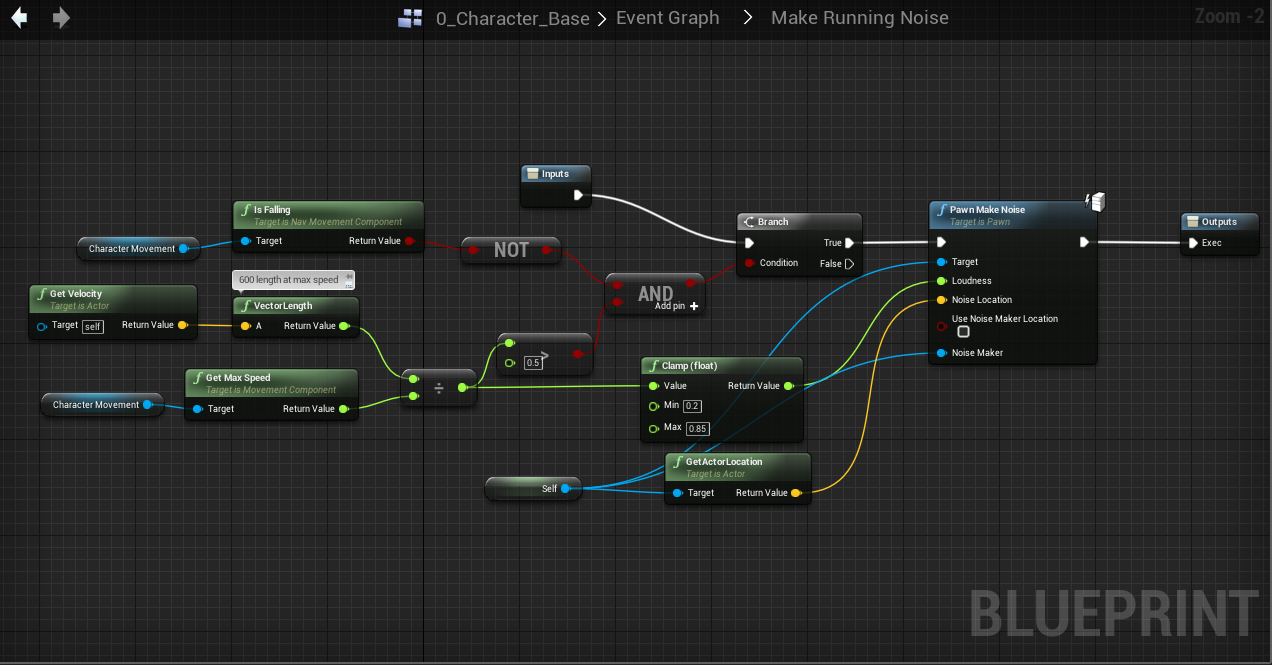
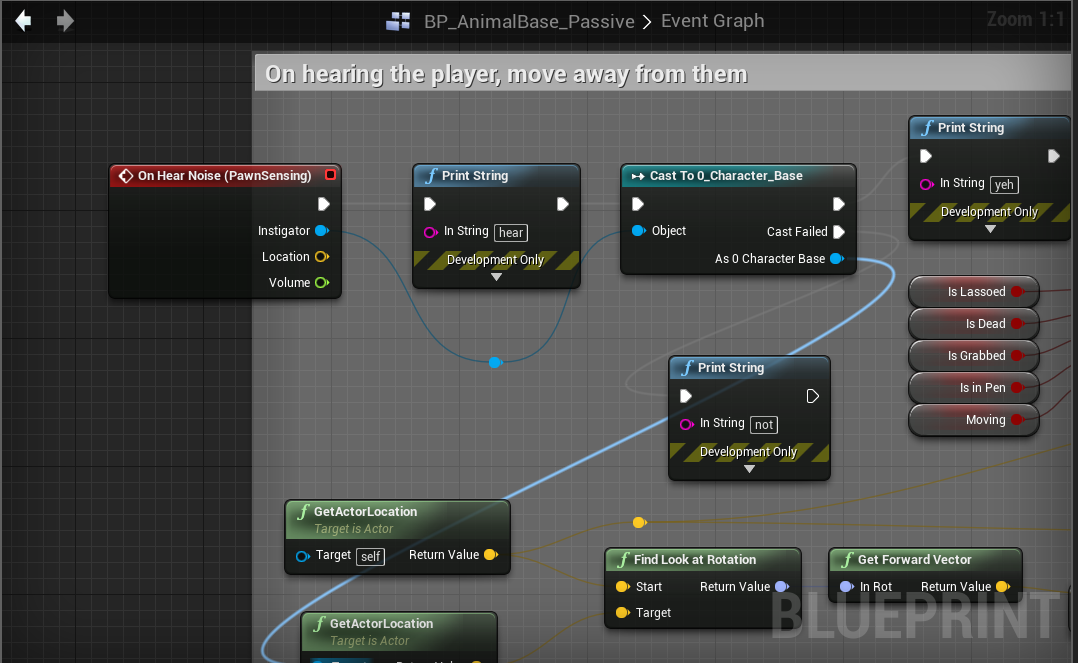
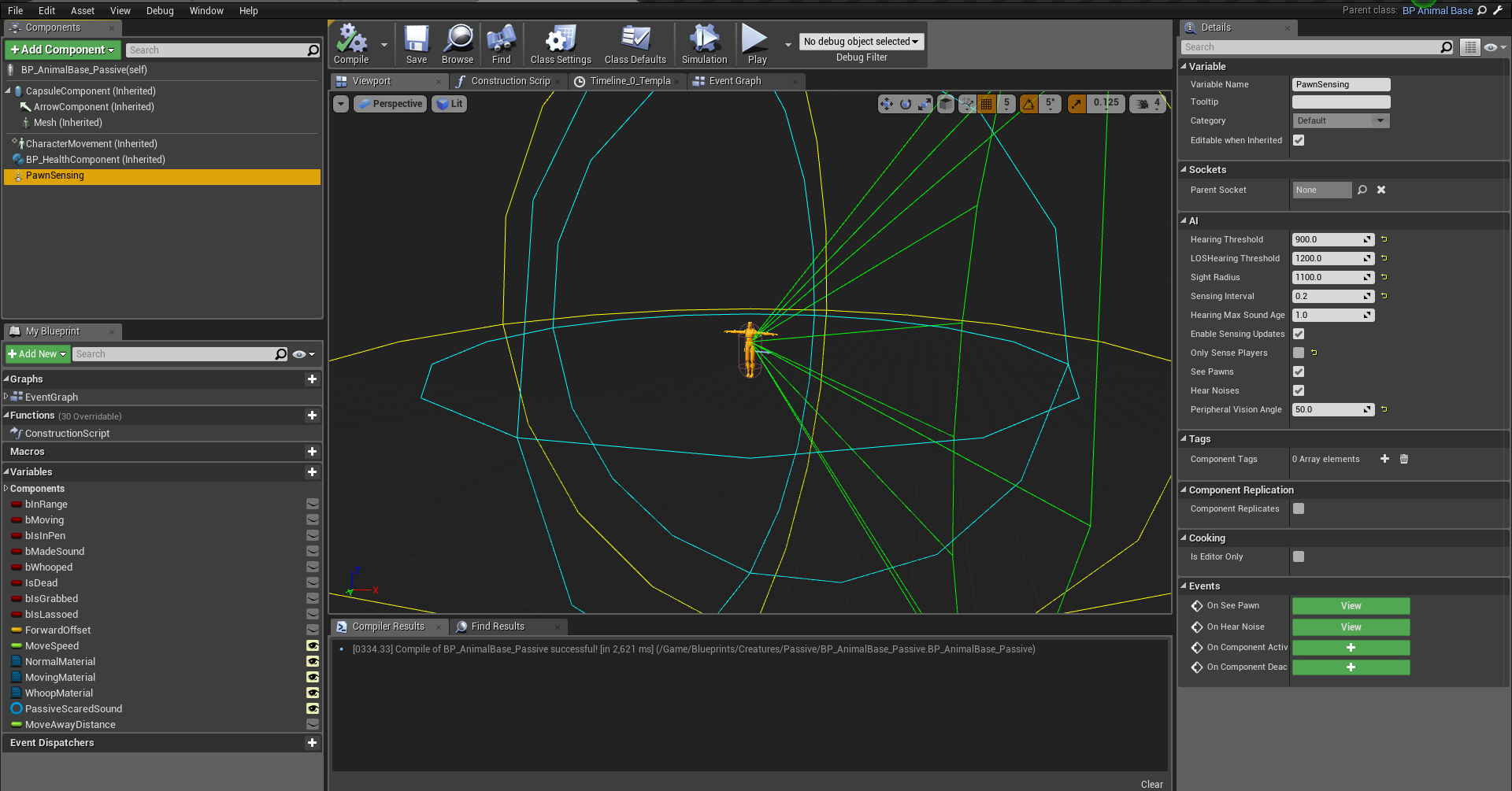
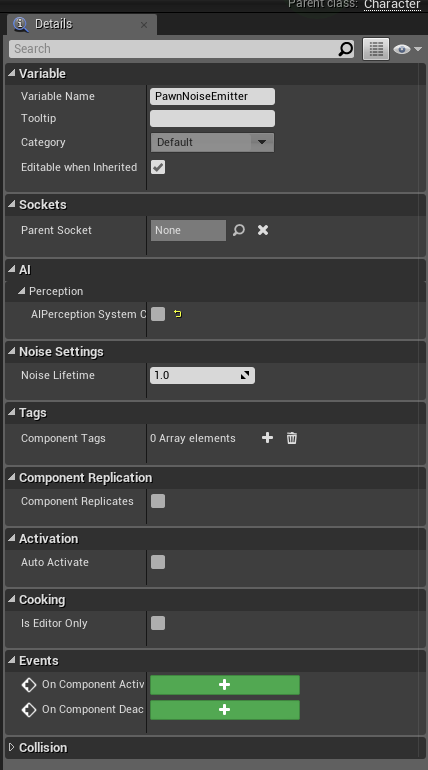
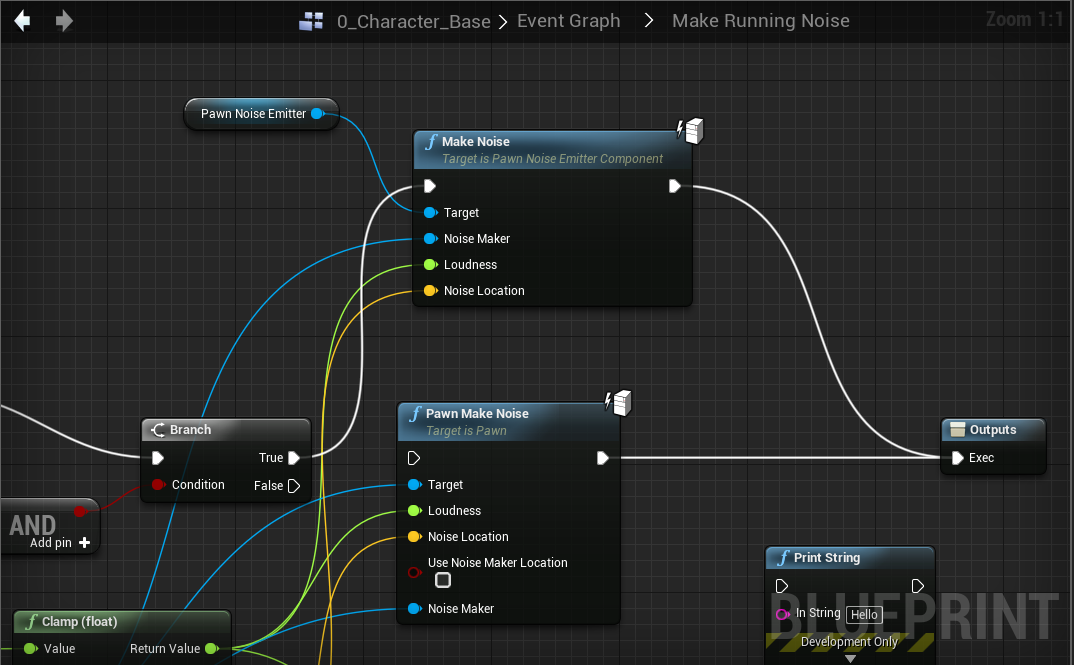

 glass pilot
My best guess would be to check every place you update the GoodMoveToPosit Key, the EQS testing pawn is using itself as querier and does often not take into consideration any functionality your AI has
which means it's working, but you are setting it up in a way that doesn't work (obvious but still)
weak swallow
haha, gotcha
I was able to confirm that if I don't use the EQ, the GoodMoveToPosition never gets set at all
so it's definitely that node that's doing it
it's just...setting it wrong, haha
glass pilot
Unfortunately I'm not currently at my computer and won't be for the remaining of the evening, if your question goes unanswered until tomorrow I will see if I got any ideas once my own project is opened :p
weak swallow
haha, thanks! I'll keep seeing what I can try 😃
viscid oasis
@glass pilot thanks for your help, btw. Wish I spoke to you before I wasted 2 days on the weekend.
glass pilot
@viscid oasis No problems, I'm happy to help 😃
 acoustic tulip
Can I ask if there is a way to get a point on navmesh? Currently my character is off navmesh and I've tried GetRandomReachablePointInRadius and GetRandomPointInNavigableRadius doesn't seem to give me a point on navmesh.
acoustic tulip
I've done more tests about GetRandomReachablePointInRadius and GetRandomPointInNavigableRadius, as far as I can tell, these two functions will not give a point on navmesh but I can use ProjectPointToNavigation to project their out locations to navmesh. But the projection can still fail sometimes.
https://answers.unrealengine.com/questions/137125/find-the-point-on-navmesh-closest-to-some-fvector.html
Any ideas regarding this question? Thanks in advance : )
viscid oasis
anyone have any luck doing a trace in an EQS via the cone generator?
ebon ore
Hey guys!
Can someone explain one weird thing about Behavior Tree flow?
(1 sec, I'll post 2 screenshots)
Here, the Decorator is not executed ever, Services are working good
And here the Decorator is executed normally, but then Services are not executed at all, with no relation to Decorator result
Any ideas? 😦
ebon ore
Hmm, solved by moving the decorator into all ending nodes, but don't really like this solution...
fluid sequoia
@acoustic tulip You can check if there is NavMesh at a given X,Y coord using ProjectPointToNavigation, however if you are trying to find the nearest NavMesh at an arbitrary location then there's not a programmatic solution. I think your best approach would to recursively call ProjectPointToNavigation with an increasingly large Extent value.
You could possibly query the NavMesh data directly and make a more optimal algorithm to find the nearest nav poly, I believe this Rama tutorial provides implementation for getting the nav polys at runtime https://wiki.unrealengine.com/AI_Navigation_in_C%2B%2B,_Customize_Path_Following_Every_Tick
And altogether depending on your use case there might be a solution that doesn't involve trying to find nearest navmesh, you could possibly have a secondary navmesh covering the out of bounds areas, but it is of course dependent on how the game is set up.
 terse pilot
Posted this in Blueprint but I think this channel might be more appropriate:
Hey gang wanted to scratch your head about some stuff. I'm sort of new to nav meshes / behavior trees in UE. If I, in Behavior Tree, say "Move To [TargetLoc:Vector3]", I have three scenarios. Two work fine, and one doesn't.
TargetLoc = Hardcoded location like (100,100,0) it works fine.
TargetLoc = Player 0 location (essentially following player's position) it works fine.
TargetLoc = Get Random Reachable Point In Radius (500 unit radius), it behaviors really strangely.
How strangely? I get a valid-looking point from the Behavior Tree Task ("Get Random Reachable Point in Radius") that I can visualize using the Debug Draw Sphere. But then the AI controller, on the MoveTo command in BT, fails to properly move to it. It instead moves to another location. Sometimes it looks almost like it's moving the inverse vector it needs to.
Another strange tidbit is during the "MoveTo", in any scenario, the mannequin is rotated 90 degrees offset on Z (so if he's moving forward, his animation will be facing left). I have a feeling that's just an import issue though, so I just rotated the mesh inside of the movement controller. But in case it's related, I felt I should include it.
The green check method makes the character move in an expected way. The red X method returns a value that looks correct based on the Debug Draw Sphere, but the AI MoveTo goes wacky.
And just to clarify: I do have a nav mesh bounds volume and I see Green navigable space with it. I can't really post the environment side of things due to company assets and whatnot, my apologies in that regard since I'm sure it would help resolve stuff
terse pilot
okay so this is very weird to me. as I continue investigating, these to values aren't the same:
I use Select Random Reachable Point In Radius, it outputs a Vector3. I feed that Vector3 into the key for Target Location
Then, I draw a debug sphere of the Vector3 point selected by "Select Random Reachable..."
Then, I grab that BB value's vector3 immediately after, and draw a debug sphere of that as well