#gameplay-ai
1 messages · Page 101 of 1
 tribal lagoon
Ok, turns out, Pawn Sensing just doesn't work on 4.19
 heavy isle
Hey how can spawn AIs ingame while making it avoid certain places to spawn(eg:not spawning on roads or inside building)?
 knotty lynx
heavy isle
knotty lynx
heavy isle
But thats only points
tribal lagoon
Ok so I am enabling collision on this block ingame with that trigger box, but I cant get the nav mesh to update when i do that
I have enabled runtime nav mesh in project settings and still nothing
heavy isle
Also how can i get the ai to keep spawn from a certian distance away from the player and in the spawn area?
 crystal star
@heavy isle I achieved something like this by having a few different spawning areas and checking the distance to the player from each one, if the distance is too small (e.g. the player is very close to a spawn area) then the ai would not spawn.
 pine steeple
li am so confused with my AI, basically i wan't it to always find the closest player, but it doesn't seem to work like that, it alway's follows me
 dense harness
I will paypal $10 to anyone who can get Navmesh Walking mode to work and post a video of it working
I'm starting to think it doesn't actually exist
pine steeple
Anyone about?
 median spindle
@pine steeple set a float as 99999999. get all players, for each loop get player location, AI location, subtract, get vector length, if less than your float var, save the result. keep going through all players. the one you are left with that is saved is the closes
pine steeple
i kinda got it working with some c++ and behaviour tree's, just it's a bit iffy, i think its to do with the waits in the behaviour tree. he turns to look at the other player and ends up going backwards, then he turns and faces me
median spindle
alternately, use that same idea but with perception
hmm
disable the aicontroller setting rotation at that point, and set control rotation to the find look at rot of the ai to the target
median spindle
instead of just moveto, use a simpleparalell that is checking?
pine steeple
never looked into simple parallels, i will read up on it
 median spindle
the default rotate to face is like a snap
thats a task i knocked up to smoothly do it
pine steeple
@lyric flint Have to show us
pine steeple
moveto requires a navmesh
i would treat the sprite as a basic actor, and interpolate using a timeline to the new position maybe. Though i might be wrong as i have never used sprites
pine steeple
Did you change it from APawn to ACharacter?
pine steeple
anyone alive?
{
    Super::Possess(InPawn);

    GetWorldTimerManager().SetTimer(TimerHandle_HuntPlayer, this, &ASAIController::HuntPlayer, 0.5f,true,0.f);
}

void ASAIController::HuntPlayer()
{
    ASPlayer* Player = FindClosestPlayer();
    if (Player)
    {
        if (GEngine) GEngine->AddOnScreenDebugMessage(-1, 15.0f, FColor::Yellow, TEXT("Hunting!"));
        MoveToActor(Player, 10.f);

    }
}```Using this to hunt my player, but when the AI get's close to the player he turns his body
 elfin socket
This raises a good point: how do you make an AI character turn to face a player, instead of just instantly teleporting to face them? The intuitive solution, to use Lerp and SetActorRotation, seems really hacky and there must be a nicer way of doing it.
pine steeple
@elfin socket in my situation he faces the player untill he reaches his goal, then he just turns and faces whatever way he likes
 buoyant sphinx
@lyric flint - this post might help you get your basic move to working: https://www.vikram.codes/blog/ai/01-basic-navigation

Vikram Codes
Building a Game of Tag in the Unreal Engine using Artificial Intelligence, one step at a time. We begin by taking a small step first - making our AI Characters walk around using the UE4 Navigation System!
I've not experimented with it myself, but I have seen people using it
Sorry I can't do more than that without looking over your shoulder :/
Can you start a blank 2d template project and follow the steps. Make sure you can get it working there and it might show you what you're missing.
Also, admittedly, I may have seen navmesh working in 2.5d only (3d, but camera locked). I don't make 2d in unreal very often
 glossy spire
@elfin socket imo, its usually better to give your AI character a turn rate, and rotate X degrees per tick toward your target
rather than a lerp
 woeful wind
Can anyone tell me what's up with networking + AI? I've got an AI character that inherits from my player character and uses the same animation blueprints. In testing, the state of the anim bp only runs once...until I look at the animation state machine in debug mode, in which case it runs exactly like it's supposed to. This only happens with the AI character and not player characters.
https://answers.unrealengine.com/questions/771449/code-only-triggers-when-im-watching-it-debug.html
glossy spire
maybe it has something to do with your AI controller not using replication the same way?
 sturdy yoke
Anybody know a good starting point for AI using C++? Or should I just give up and learn blueprints for AI in my C++ project?
woeful wind
@glossy spire Is there anything I have to do with the AI controller specifically to enable replication? The test I'm running right now is already showing this behavior on a single player (which should be the listen server).
woeful wind
Damn...this is an oddball question, and I've only ever found one other person on answerhub who had it. They didn't really have a solution; really just a workaround.
 patent hornet
AI controllers don't exist on clients
woeful wind
@patent hornet That makes plenty of sense. I wish there was some way to apply that to figure out my issue though.
pine steeple
Why is my Maxwalkspeed ending as 0, if i trmove the set walk speed the ai moves fine, but the curve should set the max walk speed, i think i am completely screwing this logic up.
elfin socket
@glossy spire What about, instead of tick, making an event that sets a looping timer. Each loop, the timer adjusts the rotation a little bit based on a Character turn rate variable. When the rotation is equal to what we want, then it stops looping the timer. Maybe that'd be better?
patent hornet
@woeful wind object that doesn't exist on both server and the client can't be replicated
and doing something like Multicast from inside it will disconnect all your clients
 jovial fossil
Hi all, a general AI question. I have done some AI in UE3 a couple of years ago. And a while ago I looked into AI in UE4. For my current project I want to keep most of my project in C++. I noticed AI in blueprint and blackboard seems a bit more documented and easy to manage than AI through C++. Am I right? Would you guys suggest to do most of AI in BP/Blackboard or could I eventually get more control over it if I do it in C++? I would like to learn it in C++ if it has an advantage but if it doesnt and if blackboard/blueprints is easier it might be better to do it that way :)
 silent nexus
why does my AI stop when it get's ontop of a block?
when the AI get's on that grey box it stops following the player and can't jump down why?
woeful wind
@patent hornet So making my AICharacter class inherit from my player character class (which has all of that replication logic) is likely what's causing the issue? In that case, what's the best way to get code re-use out of a class like that when you want players and AI to play by the same rules?
silent nexus
anyone here know how to make an AI instantly find a player and follow him untill either the player dies or the AI does? all the tutorials online are limited by "Peripheral Vission Angel"
i want the AI as soon as it spawns in the world find the player and just run towards him and always follow him no matter what
anyone?
patent hornet
AiCharacter can inherit from PlayerCharacter, np
its just that you can't replicate anything inside the AI controller @woeful wind
 frozen kraken
@silent nexus I'm going to guess once it's gets on the cube it no longer has a navmesh it can connect to to follow the player.
median spindle
@silent nexus make a task called "get player actor", in that get actors of class (player character) -> get(0), then set that as your blackboard key for target actor. move towards that
pine steeple
What would be the best way to get an AI to always face the character, not using behaviourtrees
median spindle
exactly like how I did it in the "smooth look at player" i sent you 😛
just do it on actor tick, not on BTTask tick
Ai location, player location, -> find look at rot -> set control rot
pine steeple
i lost that 😄
median spindle
xD
pine steeple
nvm found it in my history
median spindle
basically that method can be used for anyhting that needs to face something else
tank gun? gun turret? ai? missile?
dont matter
pine steeple
going to give it a try
@median spindle FVector PlayerVec = Player->GetActorLocation(); FVector MyVec = MyPawn->GetActorLocation(); FRotator NewRotation = UKismetMathLibrary::FindLookAtRotation(MyVec, PlayerVec); SetControlRotation(NewRotation);
think i got it :/
median spindle
thatll be it
you may have to also disable tick or disable rotation setting in the aicontroller
sometimes they fight
pine steeple
okay
 pine steeple
yeah it works, but have a slight issue
he walks around obstacles whilst facing me, so he technically is moving backwards
think i need to do a line of sight check before rotating to face character
median spindle
either do that, or just make the walking blendspace work with all directions so your AI doesnt moonwalk

MJ forgot his blendspaces too
pine steeple
@median spindle you there?
median spindle
sup
pine steeple
need help with my zombie animation and its weird behaviour, maybe you can shed some light on it, but it might be easier to show you over teamviewer or something
median spindle
paste a gif
pine steeple
using?
median spindle
i use gyazo, there are a load of them, just need to get the idea of the issue
ctrl+shift+g with gyaz
 proper sparrow
After a bit of assistance. I am using DetourCrowdAIController however my AI pawns are getting confused on really simple pathing around other Ai pawns. (Using AI move to location on the other side of the stationary AI pawns) Any suggestions on how I could improve my results?
https://gyazo.com/7fab6f7f1974aac5ea579fd88f2554c1

Another example
https://gyazo.com/5541b6f9a626c626701dc91b4342c1e6

 ancient sonnet
I recently noticed a new Path AI class, AGridPathAIController. Anyone got any deets?
 dull plinth
Hey, i am new to AI programming. Are there any good resources that you recommend for a basic follower pet AI?
 wraith eagle
@ancient sonnet What type of details? Taking a look at the code, it's just an empty constructor for now in 4.19.0. Github also doesn't seem to have anything else in it. If I had to guess just from the name, it's just going to be a controller for use in navigating a grid based system? It's marked as Experimental right now though
ancient sonnet
Yeah I was looking at it and got excited lol. Saw it was empty and was like "hmm, I wonder knows what's coming."
dull plinth
@little ridge 😛
 delicate sparrow
Is there any reason AI Perception or On Pawn See wouldn't add a player pawn into a player array? I've tried both and neither have added the player pawn that is pretty much in front of them. This is for VR though so Im not sure if that is also causing possible issue.
elfin socket
@delicate sparrow My first impression is that somehow the Pawn is not registered as a "Source" for the AI Perception to consider it a thing worth paying attention to.
I know that for when you want to work with AI Perception's Sound Senses, you need to manually specify "Hey, I'm making a sound now and I want this to be picked up by AI Perceptions' Sound Senses (by adding a "NoiseEmitter" to the thing)"
delicate sparrow
Ah I'll check that. I'm working with Sight, rather than sound, but your point stands
 delicate holly
Hello, as I was looking the navigation system and mesh setting, I seen something named path nodes, what is it ?
it was draw path nodes label
elfin socket
@delicate holly Path nodes is how the old UE3 stuff used to work with AI. My understanding is that when they made UE4, they left that in for old UE3 developers but that it was otherwise replaced by the Nav Mesh thing.
delicate holly
@elfin socket ok I thought it was a way to show the best path for an ai. By example walking on the road, instead of the grass, or cutting throught it.
Thanks
 lost tiger
Someone knows how to make that when the enemy dies the main character stops hurting him and he knows that he died so you keep giving him swords and he does not repeat his damage animation I have that problem
elfin socket
@lost tiger Three ways to do it off the top of my head:
- Check in the AIC periodically whether their target is dead and then change whatever relevant Blackboard keys so that the BehaviorTree aborts and switches to doing other stuff
- Check in a BTService node whether the target is dead and then change whatever relevant Blackboard key(s) so that the BehaviorTree aborts and swithes to doing other stuff
- Check in a BTDecorator whether the target is dead and then self-abort when that's the case so that the "attacking" sequence doesn't run anymore
pine steeple
am i doing something wrong here?, the animation won't play
  if (MagicAnim)
  {
      if (MyMesh && MyMesh->AnimScriptInstance)
      MyMesh->AnimScriptInstance->Montage_Play(MagicAnim);
}```I already solve it thank you very much
median spindle
Having a wierd issue - some of my AI are unable to move, and when I click on them in AIDebug, it says simulation: NOT VALID in red letters.. not seen this before, any chance any of you have dealt with it in the past? Cheers 👍

 fluid sequoia
@median spindle Have you tried raising the MaxAgents of CrowdManager? https://answers.unrealengine.com/questions/665550/ai-bot-limit.html
I would guess that might be the cause as that's the 51st character but I'm just guessing
median spindle
unfortunately its happening even with 30 zombies, and the crowd manager is at 50 😦
ill try upping it anyway though
appreciate the tip mate
fluid sequoia
I'd give it a try as it seems to be the only relevant result for AI Not Active, although I couldn't say why it would be the case if you're not going over the limit
fluid sequoia
np
median spindle
worked a treat, just upped it a load
 little ridge
like create a behavior tree in cpp
pine steeple
there are plenty of guides on behaviour trees, but you would not create the tree in C++, you can create behaviours and activate the tree etc
 tawdry heron
I'm having a bit of trouble getting a pawn moving using the Behavior tree's "Move To" Task, The Task if definitly being called and the target is without doubt being set so I was wondering, What components are required for a pawn to be able to make use of the task? Would it be better to switch over to a Character instead?
tawdry heron
I have one of those as well
 amber geyser
im really not sure it works with the pawn
since the pawn doesnt have a characterMovement component
tawdry heron
Ahh.. Thought that might be the case, Switching references is gonna be fun
amber geyser
good luck xD
tawdry heron
I'm gonna need it lmao, first time using C++ with UE4 too Orz
amber geyser
xD my first unreal game was 100% in c++ besides the ui
i was kinda afraid of the blueprint
 ashen ingot
where would i start trying to set up a randomised ai
median spindle
@ashen ingot what is a randomised AI? that is such an open question you may as well ask "how do I use a computer"
to start with make a list of the things your AI actually needs to do
pine steeple
with behaviour tree's, my ai always looks at my player when using MoveTo, even when he is behind an obstacle
how would i handle that?
pine steeple
https://gyazo.com/79ea491b3b6584abbc301a5cfbc972d4 this works fine, it finds the player, and moves to them, but it has a werid behaviour

 sharp fable
Hey guys, just a quick question, is there a tutorial anywhere online for setting up an AI that does not move when you can see it. I want to create a Slender man type of game where they can teleport behind you and when you see them, they cant move?
 viscid oasis
Can an area contain additional values, like.. type of area? "oil, fire,water " etc
Or do I use just an invisible trigger for that stuff?
median spindle
@viscid oasis you could use a trigger, you could use a physical material and trace down
 neat pendant
Guys i found a weird site that i think i might post it here so someone can explain it to me
 supple creek
i'll call bull, if you refresh it repeats the exact same thing
however, the timer does keep counting down

 queen anchor
Nav mesh questions go in this channel?
 swift bolt
IS AI using Unreal's FSM as tedious of process all the time or does it get easier?
 haughty tusk
I get some performance drops with only 3-5 enemy AIs in my level
Character parent class, basic move-to (tick event) logic that just moves to the player
Basic animation playing on loop
This is the only logic that repeats, basically
How can I optimize this?
 weak pumice
probably you should not fire up again another seeking
you should handle that on success or on failure
this is my bet
considering your code @haughty tusk
haughty tusk
@weak pumice Are those seeking nodes stacking? ;o
weak pumice
that clock means that it's an async function
it doesn't wait for execution to finish
i'm not sure if that's gonna fix but you should try it
haughty tusk
Okay thank you
btw
If I fire that node off once
Will it rotate to always be facing my target so as to reach it
Or is it taking the target's location
And moving to that location?
That's why I kept firing it off, I guess at the time I assumed it would need to re-check the target destination loc (being the player)
weak pumice
you should try it, without seeking continuosly
see if that's the reason for performance drop
if that is the reason, then you can easily think about another way to do it
pine steeple
is there a way for eqs to find a player without LOS?
patent hornet
gets a PlayerCharacter(0) if its a SP
bit more work with several players, but you can use the GetPlayerControllerIterator() and grab pawns from there
does anyone know if AISense_Touch even works? the code implementation looks extremely bare bones, nothing references its RegisterEvent() function and nothing is exposed to BP
delicate sparrow
Is there a way to make an AI move directly backwards? I have "Orient Rotation to Movement" off, and use "Controller Desired Rotation" on, but when I try to move it to what I believe is a vector/destination behind it, it attempts to turn.
I also have the issue with trying to make it only move backwards 2 seconds, but it seems to not have that distance with respect to the Max Walk Speed, unless Im calculating the location wrong.
patent hornet
most movement components do have some acceleration
and (i assume) CMC is responsible for your AI Character turning as well
same as a character would if directly controlled to move backwards
delicate sparrow
I am using a Character Movement Component on this, yes
How could I prevent it from shifting towards the direction its moving if I want it to backpedal?
patent hornet
off the top of my head, i don't know - reading thru the CMC code and finding the promising function to override is how i'd go about it
i do not believe if it matters if its an AI or not for this
delicate sparrow
I was told if I wanted to move an AI Controlled pawn over time I should use AI Move To, which I think would be a cause of this?
Otherwise, since I have "Orient Rotation to Movement" off, it shouldn't turn to face the direction its moving
patent hornet
bUseControllerDesiredRotattion ?
delicate sparrow
Yeah I just figured it out. For only the duration of the backpedalling, I need to turn that off, then turn it on again for any other turnings related with the AI ( using Rotate to BB Entry)
Thanks for your help!
pine steeple
@patent hornet the issue is with the behaviour tree layout, i have a way to find players but not sure on behaviour tree logic/flow
 inner crane
 thin prawn
hey guys im still looking for a mentor to help me learn AI
 dusky lodge
Post using the JobBot in #looking-for-talent
 plucky chasm
what's the simplest way to make my bots follow a spline during navigation instead of a straight line? they only have a forward (sprinting) animation so the sharp turns look terrible
plucky chasm
ie; like a car. ideally my guy would always move forward but rotate as needed to navigate
patent hornet
limiting their max rotation rate in CMC?
plucky chasm
dunno what CMC means but I figured it out. just overrode PathFollowingComponent and forced all inputs to be in the pawn's forward direction instead of towards the target. Then with Use Controller Desired Rotation enabled and a reasonable rotation rate it works as intended
patent hornet
CharacterMovementComponent
little ridge
I'm getting problems in this ai... it's to be a thing do when it's dead but it's never set 😕 can you help me?
 restive cradle
@little ridge I'm not internally sure what you are after... Can you describe more? Are missing it to die?
little ridge
yes
little ridge
that is my problem, I do know now how to sets the IsDead
I do not* know how to sets the IsDead
little ridge
ok... i already did it but it was with another way.. thanks anyway
pine steeple
Anyone about?

how do i make my AI not always face me when he can't see me, i.e has no LOS
i am new to behaviour trees
patent hornet
as long as your player is on the NavMesh
FindPointNearPlayer and MoveTo will always execute
which will turn the AI towards you as a part of MoveTo
pine steeple
the AI should always be following the player, but behind an obstacle, he looks at me, when i don't want him to, he should be facing the way he is walking, make sense?
nvm fixed that issue, but another issue i am having, is there are 4 players in the game, but the enemy will always follow the same player even if another player comes close, anyway i could achieve that with behavior trees?
 livid flame
Does anyone happen to know why an AI character might attack the environment? And where I might look to fix this (ergo Blendtree, character BP, etc.)?
 errant wave
If I want a pawn to move around like a tracked or wheeled vehicle, but I don't want to physics simulate tracks/wheels, what is my best option?
I'm making vehicles for an RTS and I'd like the most efficient movement possible.
elfin socket
@KaosSpectrum#0889 What I do is, in the service, do a line trace to check for visibility about once per second.
 lyric flint
Hello, im trying to build a simple AI, that follows me when the AI sees me. I got the problem that sometimes the sensing isnt acurate. Like the AI sees me, but sometime loses sight and in the next second he sees me again and loses sight again. Anyone got that Problem as well?
pine steeple
@patent hornet i am still confused by this behavior tree, i can get it working how i want in C++ with AI MoveTo but can't seem to replicate it in behavior trees, it is a simple find closest player, with or without LOS, but prioritise LOS player
lyric flint
@patent hornet sry if i didnt mention, but yes with the AI Perception
 inner bridge
hey there. So to start I'm very new to coding and blueprints. Right now I'm trying to create a delay on my AIs pawn sensing so it doesn't start right when the game loads. I've looked around online but haven't come across anything on this. would prefer not using AI trees.
pine steeple
why does my AI when he comes near me, rotates sideways, not constantly looking at me?
https://gyazo.com/ed9b8531d6c3f51d99b466f4b3f22574 this is all i am using atm, but here is what happens

 glossy spire
@pine steeple you probably want to do your AI stuff in a behavior tree
pine steeple
i tried using behaviour tree's, i gave up with them, could never get it to work how i wanted
@glossy spire
glossy spire
i can't tell exactly whats going on in your video, but it looks like you need to set the characters rotation to face your player
at least once hes arrived
pine steeple
i tried doing that, but it's like he is arriving at the player, then turning, maybe it's a collision thing
patent hornet
iirc setting focus actor
and setting the pawn to use controller rotation
should do the trick
pine steeple


i even tried this, every tick, https://gyazo.com/1b1247bc284880125d52cf5560a8764e
 patent hornet
/** Set the position that controller should be looking at. */
    UFUNCTION(BlueprintCallable, Category = "AI", meta = (DisplayName = "SetFocalPoint", Keywords = "focus"))
    void K2_SetFocalPoint(FVector FP);
    /* Set Focus actor for given priority, will set FocalPoint as a result. */
    virtual void SetFocus(AActor* NewFocus, EAIFocusPriority::Type InPriority = EAIFocusPriority::Gameplay);

    /** Clears Focus for given priority, will also clear FocalPoint as a result
     *    @param InPriority focus priority to clear. If you don't know what to use you probably mean EAIFocusPriority::Gameplay*/
    virtual void ClearFocus(EAIFocusPriority::Type InPriority);
from AAIController
pine steeple
ok
patent hornet
there should also be a boolean in pawn or morement component
to use controller rotation
pine steeple
i set that and it rotates properly, just when it stops at the player it does a weird turn
it might even just be an animation issue would that cause it? due to collisions?
glossy spire
it might not be creating a useful direction on the final tick
because its arrived
just set its rotation manually on arrival
patent hornet
when AI reaches you
hit the ' button (one sharing key with ")
if you enabled the AI debugging, you should be able to see if any of its variables are off
pine steeple
so within void ASAIController::OnMoveCompleted(FAIRequestID RequestID, const FPathFollowingResult& Result)
rotate to face player?
pine steeple
solved that issue, now i need to solve the issue of the enemies looking at the player even behind a wall, not looking the way they need to go
glossy spire
i believe you can get their current path
as an array of locations
set him to face the next node
pine steeple
i solved it, i hade Strafe set to true in the movetoactor.
 sudden drum
has anyone ever put their hands on nav areas and all that?
 raven sorrel
here's a simple question; I've got a simple pawn moving between two points using the UNavigationSystem::SimpleMoveToActor(Controller, AActor) method. I've noticed that the actor stops before actually being on the TargetPoint(s) that I've put in its list. What determines the "end" point for SimpleMoveToActor?
pine steeple
SimpleMoveToActor is a bit bugged afaict, you can't change the acceptance radius
and i am sure its 10.f from the target
might just be easier to use MoveToActor in a controller ? or is that not an option?
raven sorrel
@pine steeple I'm trying to leverage the Nav Mesh but I suppose it's good to know that it's bugged. How did you come across that fact (that it's bugged)?
fluid sequoia
@raven sorrel An excerpt from SimpeMoveToActor: c if (Result.IsSuccessful()) { Result.Path->SetGoalActorObservation(*Goal, 100.0f); PFollowComp->RequestMove(FAIMoveRequest(Goal), Result.Path); }
There's a hardcoded acceptance radius of 100 units in the function so if the BP node has an exposed property for selecting acceptance radius, it doesn't do anything
raven sorrel
Woah... that's a strange thing to hard-code into the method. I would think a default parameter would be a better approach but perhaps there are bugs involved with that. 😕
fluid sequoia
It's called simple for a reason 
raven sorrel
I would call a hammer simple too, doesn't mean it doesn't work as expected
fluid sequoia
You can use MoveToActorOrLocation which exposes a parameter for acceptance radius
fluid sequoia
TBH they should wrap acceptance radius into the function since it's trivial and a useful parameter a lot of the time.
raven sorrel
@fluid sequoia agreed. perhaps it's just a matter of doing a PR?
seems like a simple enough change to offer (and non-breaking at that)
lyric flint
Can someone give me a introduction in Hit Reaction? Where do i put them in the Behaviour Tree if i do or is it just a Statemachine inside of the Animation Blueprint?
 livid hawk
Hello, I have a behavior tree with a custom task containing a " move to location " node
when the behavior tree moves from this task to the next, the pawn keeps moving in the exact same direction and doesn't stop
the move to location status has replied " already at goal "
but it still keeps moving
 wheat scaffold
Could somebody help me with my ai
pine steeple
is there a way to force a behaviour tree to search for a new target after a set time?
even if the old target is still valid, i.e a new player moves closer to him
patent hornet
make a task attached to the first composite node
sorry, service
that re-evaluates the target and sets the BB entry
pine steeple
ok
 scarlet ermine
i am trying to make an AI, which worked at first but now its following my character for like 5 seconds and then doesnt move anymore. how might i fix this?
Oh and here is the blueprint i made:
patent hornet
epic showed signs of deprecating PawnSensing
there is AI Perception as a newer alternative
its just a guess, but your AI will follow the player again if it loses and regains sight?
 deft sedge
I have multithreading enabled in my Blueprints. I have a VR zombie survival where 20 or more ai is very taxing to the system and I use black boards and behavior trees. If I were to multithread something to increase performance what would I want to thread? The calls to the black board or maybe the tasks within the behavior trees themselves? The zombies work pretty much the same as call of duty nazi zombies
patent hornet
it doesn't really matter how your AI appears to behave
its what you put into your tasks/services mostly
some querries are expensive
deft sedge
I'm not opposed to a total rewrite of the ai, I just can't seem to find any good tuts out there for having a ton of ai
patent hornet
your aggro check, try to adjust its Tick frequency to around 5 seconds and compare the performance
it will show you if that is the culprit, and it most likely is
deft sedge
well theres that and all ai update at the same time so even if I spread it out at one point I will get a dip in fps just because they are all doing the check. thats why I was thinking of multithreading or like having a few clusters update and then move to the next
maybe incorporate a shuffle based on which zombies are closer
deft sedge
but doesn't that mean all the ai still think at the same time
patent hornet
they don't
its what random interval takes care of
but if your 20 zombies were to compare their distance to 50 other actors each, using vector length instead of vector length squared for example
you would be calculating 2000 square roots a second, without needing to
pathfinding querries are also pricey
done frequently
deft sedge
ok and I want to get like 100 ai, do you think this will squeeze out that much more performance out or should I still go ahead and thread?
patent hornet
you'd have to go into code for that
deft sedge
to thread?
patent hornet
and threading has its own caveats (haven't done much of that in UE)
deft sedge
well i have this handy blueprint package called bpthreads that lets me do it in BP
was like $5
patent hornet
ok
you still have to take care that 2 threads don't access the same information at the same time
deft sedge
the guys youtube has a tut for ai that does wandering and he doesn't use blackboards or behavior trees and just threads it all. has a ton of characters just wandering at 120 fps
patent hornet
that your monster doesn't get killed with a task on worker thread not getting cleaned up
deft sedge
true
patent hornet
my advice is try to optimize your AI as is, even if you go multithreading down the line, it will be a worthy effort
deft sedge
i had another thought too
if i have an ai controller that controls maybe 5 at a time instead of 1 ai controller for each zombie
thats a lot of resources there too
hell if you told me I could do it all on one controller that would be enough right there
patent hornet
there is an option to Sync BB keys
it will do it for every BB of the same type tho
deft sedge
what do you mean
patent hornet
its like a static variable, shared across all instances of a BB
not quite sure how that would help you if all your combies use the same BB
deft sedge
I have a few in mind that should be shared but it's not static
patent hornet
but you could introduce the concept of a "leader" and "follower"
deft sedge
that I know would work because call of duty does that
deft sedge
but i'd have to change who is the leader based on what is closer
deft sedge
well its sort of open world
so things spawn and despawn if you get far away enough
like
patent hornet
you could probably manage that with streaming levels
deft sedge
yes but also procedurally generated lol
i've made quite the task for myself with my first game XD
and promises were made and it's already on the market place so now I gotta follow through
patent hornet
well, would a leader know when its about to become unsuitable?
deft sedge
I'm assuming each ai knows it's distance to the player at all times so they would be able to do something like whoever is closer is the leader
patent hornet
fire an event in its controller that followers subscribed to, letting them know they need a new one
some ianccuracy there isn't a bad thing
3rd closest zombie being the leader won't break your AI
deft sedge
nope
and having clusters of 5 works fine too because I could have ai controllers or an empty actor holding the cluster be the leader
now we're really talking numbers
patent hornet
there is a SetPawn function in the AController
not exposed to BP
but basically it will set Controller's Pawn, Character variables (if pawn is ACharacter for second) and also physically attach the controller to the Pawn
deft sedge
i can attach the controller to a pawn in BP
patent hornet
if it is possessing the Pawn sure
deft sedge
plus 4.19 exposed a lot of things
patent hornet
i'm talking the scenario where its not
patent hornet
if you get it working, then your leader controller's location would be the correct one to querry distances
you could also attach the dummy actor to the "leader" zombie
with the LeaderController
still, that doesn't let you off the hook for having to optimize AI querries ^^
deft sedge
I currently have this issue of when zombies spawn on the other side of the map or and zombies dies directly in front of them they don't see the player until they "in range" again. Even though they know my location at all times
patent hornet
how do they see?
deft sedge
and thats fine with me. I want to figure out on paper the best route to approach this before diving into the code. This is my first big ai project and I really want to get into it
sight perception
don't even think they need that though since they have a rotate to face you in the behavior tree
assuming they are close enough anyway
and they all know your location because of the blackboard
i feel like one dies in a narrow path it becomes a nav blocker so I should set that to be changed, but still across the map I don't see why they wouldn't be able to get to me when it's open fields essentially
though I did just consider another performance thing. I destroy zombies when they die when I should probably recycle them
deft sedge
mmk
patent hornet
they did touch quite a few subjects, including visually debugging AI Perception
deft sedge
perception will be needed now that I think about it. I want zombies to wander if they don't see you, but if they do then they will scream and inform other zombies left 4 dead style. This makes more sense for the size of the map and the way the game plays out
it's supposed to be a mash up cod zombies, dead rising, and left 4 dead
patent hornet
the stream is about using EQS and AI Perception to find a best hiding spot from the player
deft sedge
good, since I have silencers
scarlet ermine
its just a guess, but your AI will follow the player again if it loses and regains sight?
no just standing still and not moving, not even when i am in sight @patent hornet
patent hornet
never tried working with PawnSensing, but i do recommend that same link i posted above
 shadow isle
Can someone tell me why RotateToFaceBBEntry never ends in a sequence? Like execution never ends, nothing happens.
deft sedge
very interesting stream, but it didn't really tell me anything I didn't already know and then went way into eqs which I'm not even using
@patent hornet
so I'm sure I will use behavior trees for tasks
I'm just trying to figure out a way to properly stagger the thinking for each zombie or cluster of zombies so that I can get more on the map at once. My game is currently super lightweight on visuals. Zombies look like minecraft and it's forward rendering with static light and no shadows etc. My biggest performance suckers are my VR weapons and the zombie ai
Though you are right about figuring out my behavior for them first in the trees and getting that optimized before threading and stuff
 haughty rose
hey friends, was wondering if anyone here has some experience using the experimental NavGrid?
specifically, NavLocalGridManager
I've been playing around with it and found a few hurdles that I was wanting to see if anyone else had encountered
currently I have a valid NavGrid (with a small hack to get working) that I can do path finding on and mark cells as obstacles
however
- it all requires there to be a NavMeshBounds present somewhere in the world (otherwise the MainNavData gets cleaned up)
- there doesn't seem to be a native blueprint way of setting up a grid area, only marking areas as obstacles
- the navmeshbounds doesn't generate accurate information for obstacles cells
anyway, I know it is very specific and experimental, just curious if anyone else has used it
scarlet ermine
@patent hornet I fixed it by redoing the same code and deleting and redoing that nav thing (forgot the name) which confused me
viscid oasis
hey I'm just getting into AI and it seems like Black Board et al is kinda a system that leans on a lot of the normal sort of stuff.
For example, if I wanted to see if a player can see my pawn, I'd do a multiline check, do a line trace and if it's a clear view - bam.
I'm guessing AI gets way more complex and there's additional, in-built tools that helps me manage some of the more advanced stuff?
 floral mango
there's a perception system and other more complex tools yes
 keen furnace
@viscid oasis you can do AI without using BB/BT, but it ends up as spaghetti hell. BB/BT helps keep it all understandable, flexible etc
fluid sequoia
Dirt simple question but how do I tell what nav agent an arbitrary pawn/character will use?
nevermind, spent 10s web searching it 🤦
fluid sequoia
I've implemented my own RecastNavMesh and can't seem to get default navigation system to work for SimpleMoveToLocation. I'm not getting any of the log errors but the character's not moving. GameplayDebugger says that the character navigation state is stuck in "walking" and not going to "idling" which may or may not be the cause of the problem.
patent hornet
use visual logger
window>developer tools>visual logger
its purpose is to help debug AI and pathfinding
sudden drum
Guys,...my AI controllers don't remain in the scenario after the controlled pawn dies... what could be causing this?
patent hornet
dies or is explicitly destroyed?
pine steeple
so you mean the root node of the BT, check in there?
oh you can't so it will have to be a sequencer or simple parallel.. let me read up on them.
patent hornet
root is the first composite node, really
not the one labled Root that is there by default
(and it can't have a decorator that aborts if target is set)
pine steeple
https://gyazo.com/4ae49ad6b55d4a1f39adbe53fcb1d719 is wrong then?
 patent hornet
well, it will chnge the BB key
it won't abort the old MoveTo i think, unless you have that decorator watch for changes in the key instead of key being set
sudden drum
pawn is destryed yes
pine steeple
ah, good point,
pine steeple
https://gyazo.com/8e8d4620cc199abe7eb8789cf00266f6 this is giving the behaviour i want, but is it sane to do that?

 desert kelp
k, I've made a behaviour tree service that checks for visible pawns. I then need to get the AI to react to the different pawns depending on their team. should I send the pawn array to the controller? or handle that in the service?
aw, blackboard cant hold arrays?
patent hornet
@pine steeple you should be able to abort when the key is changed
pine steeple
but if i don't put a time limit there, move to is called continuously, it never runs findplayer again
desert kelp
change the sequence to a selector
the service should run every .5s or so, as selected
patent hornet
i'd go for an interface on the Pawns @desert kelp
probably, don't know your setup
but you can define an interface with a set of functions returning values that are relevant to the AI
then you can just Pawn->InterfaceMessageFuction
desert kelp
I can access the info easy enough, more wondering if its a good idea to put the logic in the service, or elsewhere
started it in the service so far
patent hornet
service is designed to run queries and update the BB
so, seems like a good place for it
desert kelp
so far this sevice checks for pawns within a visibility cone, then sees if it hates this pawn, and now I'll check if it hates the team the pawn is on, or if its scared of the team
yeah

 deep leaf
so no matter what i do i cannot get the ai move to
pine steeple
whats your behaviour tree/code/blueprint?
 oblique girder
@haughty rose you dont need a visual grid to set one up, its just drawing spoints and defining space, u could easily set it up in bp, and even make A* path finder algo in bp as iv done it my self, but not recommend doing it in bp too much
haughty rose
@oblique girder what do you mean a visual grid? I'm not trying to set up a visual one
oblique girder
Well you can make grid's in bp rather easy, its just storing points and math
haughty rose
of course, but I was interested in using the experimental ones
oblique girder
ahh i thought u where after a grid path finder
haughty rose
there already is one in the engine
GridPathFollowComponent
(works with the AIController)
problem is it is quite unsafe at this stage still (from what I've seen)
thanks for the suggestion though
fluid sequoia
I'm doing a writeup on a grid path finder override through recastnavmesh
it's usable right now for simple grid setups (uniform size)
haughty rose
that was the approach I was looking into
making an implementation of a recastnavgrid and a NavGridBoundsVolume
fluid sequoia
I'll link you this article as soon as I get it up then, it doesn't generate nav mesh any different but the path finding algorithm is overridden
haughty rose
you should checkout the NavGridLocalData
fluid sequoia
What's it do lol
haughty rose
because the experimental stuff already has a path finder and is able to generate non-uniform grids
fluid sequoia
Ah, yeah, I think the experimental grid based stuff had gotten some work put into it with the recent updates
fluid sequoia
Which is awkward for me writing a tut on overriding recastnavmesh behavior for tilebased pathfinding when there's an almost working inbuilt option
I'll try it out and see about that then
haughty rose
it suffers because it requires a NavMeshBoundsVolume to be present in the level
and they didn't expose adding GridData via blueprint
which makes it annoying to test
but let me know when you do your write up, would very much like to read what you did
fluid sequoia
Will do, it's an adaption of somebody else's writeup that's for an older engine version that goes more in depth to the implementation and provides an example project with A* pathfinding
thankfully there's still some use to this method because it works for any generic pathfinding algo so theoretically you could do some super efficient jump-point search or other stuff
haughty rose
yeah I did a jump point search implementation in Unity
would very much like to port it over
crazy how efficient it can be
fluid sequoia
Ah, I'd probably like to try that myself so maybe we could collab
haughty rose
the hardest part is breaking down the paper into the algorithm
and of course having proper debug tools
fluid sequoia
how'd you manage debugging with the unity implementation?
haughty rose
I think I just rendered a shitty grid
and coloured the tiles based on what was happening
then just hook it up to a simple step every time you press a key
fluid sequoia
seems good
haughty rose
thankfully it is independent of the actual A*
so you can do a lot of it in isolation
fluid sequoia
Nice. I need to read up on jump point first of all so I actually understand why it's efficient lol
ANYWAY I'm stymied currently because I need to check whether tiles lie on the navmesh
fluid sequoia
Pretty sure the right way to go is projectpointtonavmesh
haughty rose
this is the original paper
fluid sequoia
many thanks for that
haughty rose
yet another ruby / javascript / tech / whatever blog
this one has a good breakdown though
fluid sequoia
bookmarked both 👌
and by projectpointtonavmesh I mean 'ProjectPointToNavigation' since the comments section has a big fat TODO and there's an FNavLocation argument which I can't suss the use of
 exotic dragon
Hey all. Unreal newbie here 😉 Is there any way to interrupt an AI MoveTo in a behaviour tree task? I've got a service which scans for interesting targets, and I want my NPC to change it's destination if a more attractive target pops up...
fluid sequoia
pretty sure there's a generic CancelMovement function for controllers that will do that
It's actually called StopMovement in blueprint. I haven't used behaviour tree myself so I'm not sure on the implementation there.
Turns out I was just incredibly smart and needed to flip the bool because it's negated in the navmesh check 🤦
New problem though, not sure how default navigation behavior handles checking whether there's a ledge too tall to step over inbetween nodes
 exotic dragon
Thanks, both! I shall experiment
Sorted it out - thanks!
It seems that the CompareBBEntries compares blackboard keys from the previous and current frames, so you can compare a key against itself to detect if it changes to a new value! This is astoundingly useful, but doesn't seem to be documented at all...
On a related note, what's the 'correct' way to introduce a little random jitter into an AI_MoveTo-driven movement? Currently I've a bunch of zombies who form a nice orderly queue to eat the player's brains. It's rather disconcerting ;- )
pine steeple
that is what i am trying to do with my zombies 😄

i am thinking of doing a jitter in the animation so it looks like they are jittering
exotic dragon
that's a lovely shambling attack 😃
pine steeple
not implemented the attack yet 😄
lol, best to stop the attack once they are dead.. 😄
thinking of ragdolling them instead of a death anim, not sure :/
viscid oasis
@keen furnace thanks, yeah I thought so
delicate sparrow
Hello guys, I have a messy issue with my Behavior tree where I tried to set up Health related phasing in the AI Behavior Tree, based on a task that checks the HP and does the comparisons with Decorators. My issue is I don't know how to redirect to parts of the tree where the phasing happens at certain Health %'s, interrupting the part of the tree where it has the attacks.
Can anyone give me an example that deals with health related phasing and Decorator Aborts?
 nimble perch
wheat scaffold
nimble perch
wheat scaffold
Collisions? can affect navigation?
pine steeple
tried scaling the navmesh? check to see if the foliage causes is affecting navigation?
fluid sequoia
Is anyone familiar with implementing ProjectPointToNavigation in pathfinding?
patent hornet
it finds a point on the navmesh with same x,y iirc
fluid sequoia
I mean to say has anyone used it in their own project lol, 'cause I can't seem to get it to return true for locations over the navmesh.
viscid oasis
Wild question, but has anyone implemented AI that seeks cover?
Or even have read any documentation on that?
 latent bolt
@viscid oasis check EQS for such stuff
patent hornet
@viscid oasis one guy did a full project with that and made it public

Create a robust cover system in Unreal Engine 4 (UE4) that updates itself at real-time, responds to dynamic changes in the environment, uses multi-threading to parallelize computation and octrees to store data. Works with any kind of game.
GlassBeaver i think is his discord handle
pine steeple
what would be the best way to handle a dynamic window, ie a breakable window the ai can break and use to access the map?

the white box is the window
 icy night
Actually probably better to do it with a nav link as smart link (See: https://www.vikram.codes/blog/ai/02-nav-modifiers-links for examples) @pine steeple
pine steeple
ah that's what i needed
fluid sequoia
So ARecastNavMesh has a function FindPath that implements a pathfinding algo, I've extended ARecastNavMesh and have working A* pathfinding for regular square tiles, however I need to implement a check whether tiles lie on the navmesh. I'm working on getting the ProjectPoint function to work for me and in debugging values I've discovered that one of the arguments for FindPath, a member of the Query of type FNavAgentProperties doesn't seem to be getting filled with proper values, or at least the FVector extent of the agent is all zeroed, which is an issue because I need the agent extent to ProjectPoint. Any ideas?
OK after reading my own drivel I've realized there's an argument for FindPath that is FNavAgentProperties and also a member of the other argument, the Query, which is FNavAgentProperties. Although I'm getting a zero vector for the first argument as well :(
patent hornet
FNavLocation does include a node reference tho
the struct most Navigation functions return instead of just FVector for location
fluid sequoia
Yeah, ProjectPoint fills an FNavLocation argument with the closest point it can project to if it succeeds but the return type is a bool whether it succeeds which is what I'm interested in
By the way thanks for advising on using visual logger in debugging the navigation behavior, that helped get this far
patent hornet
as for NavAgentProperties
i think there are only NavAgents defined in ProjectSettings
and when you define more then 1, then adding a NavMeshBounds volume will create more then one RecastNavMeshe
and NavSystem will just sort w/e you have in Pawn's/CMCs NavAgentProperties in best match defined there
fluid sequoia
Yes, theoretically the FNavAgentProperties argument named AgentProperties should retain the AgentHeight, AgentRadius etc. from my defined navagent in project settings but all of the values are zeroed in my testing
it's a nuisance because I can't easily debug the engine source bits
Right now I'm stepping back through UNavigationSystem to see if I can't find where the FNavAgentProperties are getting passed through and failing to be initialized
patent hornet
UNavigationSystem mostly forwards the calls to RecastNavMesh
fluid sequoia
yeah I'm looking down the hierarchy to see why agent properties defined in the project settings aren't getting pushed all the way to recastnavmesh
fluid sequoia
AIController goes through the MoveTo function which calls the overloaded function FindPathSync of NavigationSystem that has an FPathFindingQuery argument
FPathFindingQuery contains FNavAgentProperties so there's where the extent value should be
patent hornet
did you set it manually? or use collision bounds?
fluid sequoia
The actual FPathFindingQuery is initialized in a helper function of AIController called BuildPathFindingQuery which is probably the culprit
I've set it manually
just the default agent height and radius when a new agent is created
patent hornet
does it fit inside the NavAgent height and radius in the NavMesh?
fluid sequoia
it's the default character so I'd hope, lol lemme check
the radius of the nav agent is actually smaller than that of the character
well that looks promising
patent hornet
i think NavMesh will "take" the NavAgent only if its smaller then the values set in it
half guessing here, its on my list of things to study closely soon
fluid sequoia
The NavAgent is definitely valid because it's successfully building the paths
patent hornet
yes, but there are at least 2-3 places in code where it will create a default NavAgent
if nothing else fits
fluid sequoia
tried adjusting agent radius to be bigger than that of my character and see if it doesn't resolve the issue, didn't immediately resolve after resizing and rebuilding navpaths, gonna try rebuilding now
Ah I see
patent hornet
deleting the RecastNavMesh and then moving NavMeshBoundsVolume slightly is the most reliable way to update it from my experience
if just moving the Bounds fails
fluid sequoia
Yeah I wrote a note to check if the rebuild process actually looks for the navagent properties having changed
OK so to reiterate navmesh has min radius 34 and max height 160, my agent has radius 34 and height 144, my character has radius 42 and HALF HEIGHT 96 REEE
wow that's tricky
I've adjusted the values, navmesh now has min radius 34 and max height 225, agent default(?) height 200 (no comments on that), my agent has radius 34 and height 200, character radius 42 and half height 96 (e.g. height 192)
woops mistyped that one
patent hornet
and did you get a FNavAgentProperties value that makes sense?
fluid sequoia
no luck
patent hornet
did you alter the nav mesh or supported agents in ProjectSettings?
fluid sequoia
gimme a sec to test something
wait am I insane?
Uhhh...
OK so my navagent radius is now 45 although I don't remember changing that value
So when you build a navmesh it creates navmeshes that conform to your agents assuming the agents fit within the min/max values of the navmesh settings
patent hornet
it creates 1 NavMesh for every supported agent
fluid sequoia
e.g. my navmesh has max height 225 and min radius 34, my agent has height 200 and radius 45, it builds a navmesh with height 200 and radius 45 which makes sense.
Yeah I'm kinda dense.
A little tricky though is you want your agent radius to be smaller than that of your character that's pathing with it
Making progress at least, lol
OK, to reiterate once again for navmesh I have min agent radius of 34 and max height 225, my agent has radius 40 and height 200, my character has radius 42 and height 192. All of these values should be in agreement now
Still not getting valid extent values from FNavAgentProperties though
patent hornet
i think agent should be over 42
fluid sequoia
It says "Radius of smallest agent to traverse this navmesh" but you might be right.
Unless I'm just terribly misreading that
Alright, I tried an agent radius of 50 and no dice
I don't think it makes sense for the navmesh radius to be greater than that of the agent but I can give that a try too
OK, I was logging values for AgentProperties.GetExtent(), I'll try Query.GetNavAgentProperties.GetExtent() and see if those are right
Both extent values are still zeroed
Looking through navagent values that can be configured there's still a handful that aren't lining up with character such as max step size
Something that looks like complete nonsense to me is Nav Agent Step Height property of NavAgent. It's defaulted to -1 and the tooltip says: "Step height to use, or -1 for default value from navdata's config"
Awkwardly the default value appears to be 45 which is greater than navmesh's default max step height of 34
Movement component's default step height values is coincidentally 45 so perhaps it actually inherits that? gotta look at the source to make sense of this
fluid sequoia
OK I finally found the issue
I've been building this extended recastnavmesh implementation over the default 3rd person topdown project to use as a tutorial
this project gets around the issue of needing an AIController to issue commands to the player character by using the navigation system's function SimpleMoveToLocation
As it is turns out this function calls FindPathSync which needs an FPathFindingQuery argument that itself contains an FNavAgentProperties which is the point of contention
The FPathFindingQuery constructor that SimpleMoveToLocation uses initializes FNavAgentProperties as defaults
patent hornet
so you were never pulling the character's FNavAgentProperties?
fluid sequoia
essentially I was running in circles yes
now looking whether it's theoretically possible to change this behavior
Not entirely sure how engine resolves NavAgentInterface when it's needed
OK, controller inherits from navagentinterface and there's a function to resolve the nav agent properties so there's nothing stopping the engine from having to use default values for properties 😡
this short tutorial is quickly expanding in size
fluid sequoia
After further rumination I looked into how default navigation behavior deals with not having access to actor bounds in this situation
Queries to the default navigation system use detour functions, namely findNearestContainingPoly in PimplRecastNavMesh returns a detour status that indicates whether it finds navmesh to move over
actually scratch that
fluid sequoia
After puzzling over it a little more I don't think the FNavAgentProperties argument of RecastNavMesh does ANYTHING, so there's some optimization to be done there.
Although compiler probably sorts that anyway
In any case actual extents which dtnavmesh query looks to are drawn from the navigation data's default query extent
Which altogether means that the use of NavAgent extents is not for determining whether they lie on navmesh but for choosing appropriate navmesh for pawns/characters
Specific functions are NavMeshOwner->GetModifiedQueryExtent(NavMeshOwner->GetDefaultQueryExtent());
Disregarding this wall of text I'm really close to getting this working but my navigation is generating little islands under blocks that are otherwise preventing navmesh generation

Oh, and bumping up the minimum region area doesn't seem to be removing them
After looking at it further it seems to be due to the blocks intersecting the floor geometry, WHOOPS
that being said I still can't really fix it without having the blocks float off the ground
awk
median spindle
have the mesh as no collision and have a box collision "floating off the ground"
 native berry
I'm looking into Environment Queries right now and following this tutorial: https://docs.unrealengine.com/en-us/Engine/AI/EnvironmentQuerySystem/QuickStart/9
However when I go look at the actual EQ node itself
It has decrepcated written all over it
Is there a newer better method that isn't mentioned in the presumbly older tutorial?
There is this further down in the mod's settings so I'll try that for now and see if it works the same as the one mentioned in the tutorial
 torpid pilot
Anyone knows why my ai is shaking around when using AI MoveTo node?
But he follows normally with Move Directly Toward
pine steeple
what was the problem cause mine does that
 acoustic tulip
Has anyone seen the error log GenerateNavigationData: Failed to generate poly mesh. before? It seems to make the stutter.
 tender field
having issues with ai just stopping on path, also have issues with minions turning around but still attacking behind them
fluid sequoia
So playing around with getting custom RecastNavMesh working, I can put a blocking volume over anything that the character should entirely collide with to avoid having any navmesh "bubbles" inside things that shouldn't be pathable. This allows me to use ProjectPointToNavigation to verify whether locations I'm testing are pathable. However it's kind of a hack solution because normally the navigation system checks if nav tiles are adjacent. I've tried NavData->Raycast and GetRandomReachablePointInRadius but neither are giving satisfactory results. Any ideas?
fluid sequoia
Alright, so checking whether nav mesh poly tiles are adjacent is handled through dtNavMeshQuery macguffins which is an entire level of abstraction beyond mucking with anything in RecastNavMesh class. I'm close to biting the bullet and just advising people to block off anything that could generate navmesh pools that aren't connected to the "main" navmesh but close enough to be considered when looking for adjacent tiles.
If anyone's familiar with dtNavMeshQuery functions, help would be much appreciated, although I'm thinking this stuff is getting pretty obscure.
I've yet to figure out how dtNavMeshQuery actually resolves whether navpolys are touching
 errant maple
What's the best way to make a fish AI in Blueprints? Trying to make one that mindlessly swims around and one that chases you
Can't figure out how to do the swimming/flying part though
 quick jungle
@errant maple look into this https://m.youtube.com/watch?v=6Tr_K551zvI
errant maple
Awesome thanks
lyric flint
hello, can i run into problems if i set navmesh tile size to 2000 instead of 1000?
what would be the difference?
quick jungle
I'm going off of memory here. The smaller the tile size, the more precise the nav cal will be
lyric flint
and if i don't really want it to be precise, but i'm only for exmaple interested in performance
would it be a good idea to make it larger
like even 10000?
fluid sequoia
Tile size is relative to fixed size tile chunks which the level's collision is broken down into. The tiles themselves are broken down into cells which is what the navigation system actually queries when finding a path. I'm not particularly sure what the point of adjusting tile size is.
Perhaps there's an optimization concern with the size of tiles because the navmesh system selectively loads and unloads the tiles with cells that it needs to query. Therefore bigger tiles are more expensive in memory but you have to load and unload less often. As well there's other concerns such as navlinks only working within the tile they're generated
lyric flint
i have a very large map, just trying to figure out what would be the most optimal way to set it up
patent hornet
there is the concept of NavigationInvokers
you still need the NavMeshBounds, but NavMesh is generated only around the Actors/Pawns with NavigationInvoker component
pine steeple
if i have a enemy spawn behind a baricade, the enemy can break, would i use Link Nodes and toggle them to active?
patent hornet
i am planning to do destructible barricades as NavModifiers that have a relatively high entry cost
and if AI's path still prefers to go through the barricade, then it will attack it until its gone
lyric flint
@patent hornet I am acutally using nav invokers as well
each character is a nav invoker, and it's fairly easy to set up. with that said, does anyone know if it's possible to draw navmesh when you play your game outside the PIE?
 ocean crystal
outside of the editor entirely is very unlikely
lyric flint
well, that kinda sux 😦
keen furnace
easiest way to do barricades is smart link IMO
make the mesh block nav, and have the break code on the smart link override function
 mental warren
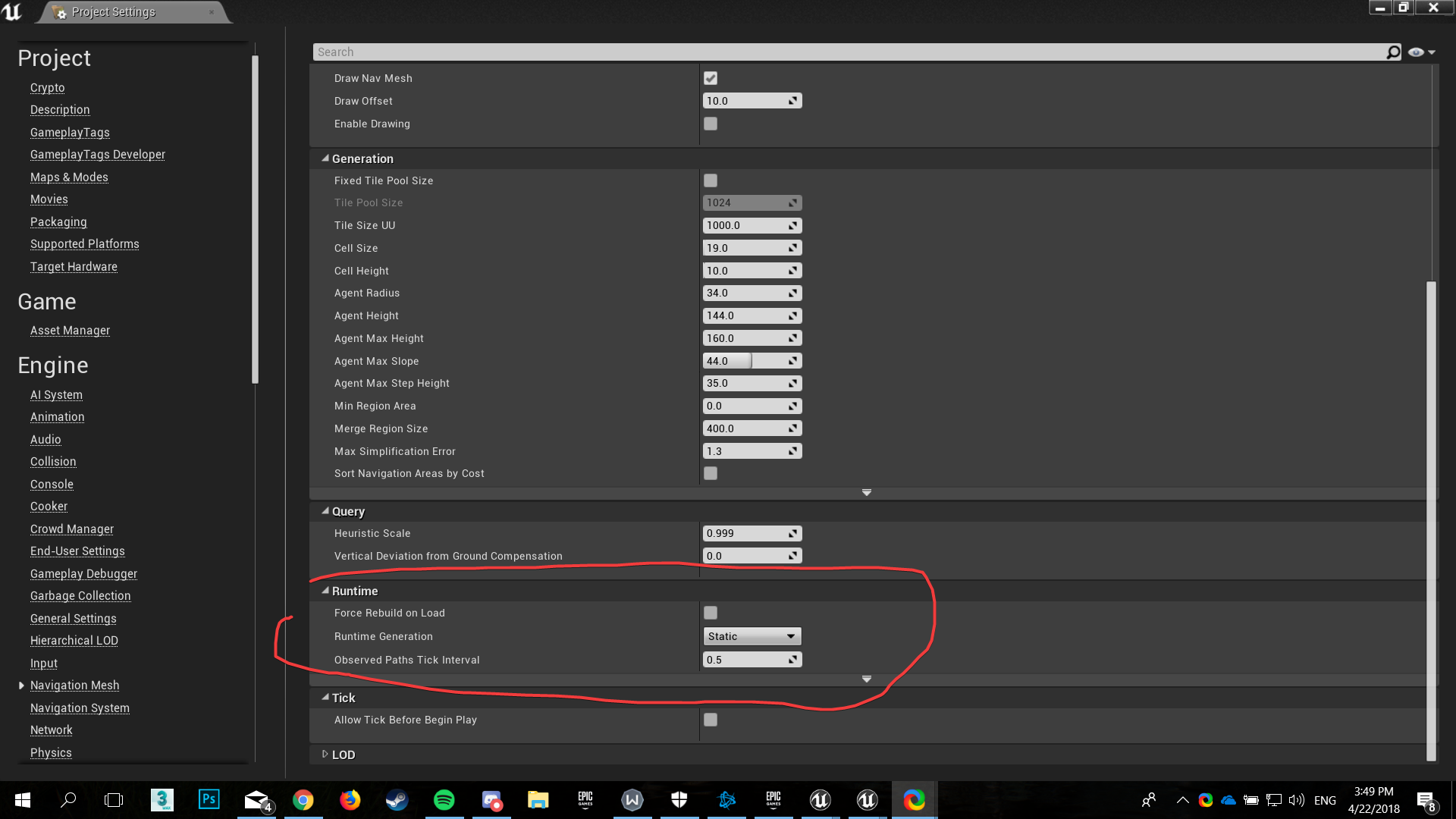
I'm making this small tycoon-like game and got started on AI today (this is my first actual unreal engine game) and I have the functionality to place down objects, but anything placed in game isn't build in the nav mesh bound volume obviously. is there a way to rebuild it every few seconds? is there an alternative for this kind of use?
sorry if this should go somewhere else
my best bet is I'd have to change something here https://i.imgur.com/cHOx9dl.png
 pine steeple
@mental warren generate at runtime and maybe set the object to be dynamic
mental warren
@pine steeple where exactly do I find the generate at runtime setting? it's not in the project settings or the detail panel
pine steeple
 mental warren
oh that makes sense, I was looking for a checkbox
 wild mortar
I'm looking to implement AI with "stamina"
My current thinking right now is to have a blackboard float that get updated (decremented) with a task after every stamina depleting task
And a parallel sequence that check if the stamina is lower than 0, then have a rest state
Is it a good practice to constantly mutate blackboard state? I know that they are observable, so I wonder if the perf for this would be bad, and how can it be improved after I have it that way.
I'm also wondering about sharing this float between blackboard and blueprint. I'm thinking that at the beginning of the AI life cycle, the blueprint will set this float to 1.0
What is the recommended practice that is tailored toward future optimization/polishing? (I.e, I'm rapid prototyping feature right now so I don't want to worry about perf. But I do want to have a clear path in the future for optimize and improve perf)
Thanks in advance 😄
patent hornet
if you are sharing the float between BB and BP (and you probably should) you should have a common Set function that keeps them in sync
or alternatively, whenever you set stamina in BP, you could set a bool bNeedsRest or some such, if your stamina is below a certain threshhold
wild mortar
Ooh, @patent hornet do you have resource in hand in term of implementing the common Set function you mentioned? Would this be a blueprint function or a task node? And why would that be necessary?
Thanks in advance 😃
patent hornet
controlling your stamina solely from the BB would be clumsy
so you need to do it in BP
so instead of just using a Set node for Stamina
you make a function that takes a float input
and inside it you SetStamina variable and the BB value
so that every time you set your BP stamina variable, the BB key also gets updated
wild mortar
Hmm, since the stamina is being designed to be depleted upon certain task,
how would I go about invoking this function? Is there a way to import function from BP to Task?
patent hornet
you have a reference to both the Pawn and the Controller in Task ReceiveTickAI
wild mortar
Oooh, I see what you mean now!
patent hornet
and ReceiveExecute
wild mortar
So in each of the ReceiveExecute, on task that would deplete the Stamina
I can call the SetStamina fucntion from within the controller
patent hornet
if the Stamina variable is in the controller yes
but you can also cast the Pawn reference and call SetStamine if its inside the Pawn
wild mortar
I see. I think the naming of my BP is a bit confusing so I might not referencing the right thing.
I have two BPs, one is the MonsterAIController which listen to OnPossesses and run the behavior tree.
The other is MonsterAICharacter which handles custom events like OnCloseEnough etc...
In Unreal, which one is the Pawn and which one is the Controller? Or am I totally messing up the concepts?
Thanks in advance 😃
patent hornet
Controller is the one inheriting from AIController, Pawn is the one inheriting from Pawn or Character
wild mortar
Got it. So in my case, MonsterAIController is the Controller and the MonsterAICharacter is the Pawn.
You recommended to put the set function in the Pawn. Is this the preferred way, or it's an option?
patent hornet
it kidna feels more... natural that stamina is the part of the Pawn, at least to me
you need to count that 6 months from now, you will remember little of what you did today
so you need to write the code future you will easily understand
wild mortar
@patent hornet Awesome. Thank you very much for the advice 😄
pine steeple
how can i get AI to transverse stairs?
i put a navmodifier over the stairs but it still dont allow them to walk up it
patent hornet
nav link?
pine steeple
oh is that the best way then?
patent hornet
i have no idea, thats why the question mark 😃
it might be, or it might not work at all


 patent hornet
deleting the recast, then moving navmeshbounds slightly might generate navmesh over those gaps on the stairs
also, their angle might be more then navagent's max slope
wild mortar
Is it bad practice to combine nav link and nav mesh?
patent hornet
nav links purpose is to tell AI that 2 points are connected "you can jump off this ledge here and land there"
so no, they are meant to work together
wild mortar
Can I use 2 nav mesh connected by a nav link?
My thinking is that, for an environment with floors for example, I would have a nav mesh for each floor, then a nav link connecting them via the stair or something
wild mortar
How do I extend a BT's given task like MoveTo?
Is it good practice to extend MoveTo by using it in a custom Task?
wild mortar
Hmm, I think I've found my answer to the above. Use a service to wrap around the original MoveTo would be my best bet.
 manic shadow
Is it bad to have a sub behavior tree that I call from another behavior tree? Im trying to make a companion AI and I was thinking of having 2 sub behavior trees for him to make his decisions, 1 for when he's in combat and another for when he's not
patent hornet
there is a RunBT Task in the engine, made for exactly that
you don't gain much by using it, unless you are going to use one of those trees on another AI tho
manic shadow
I see. Was wondering about it because I planned to give my companion AI a bunch of different behavior patterns and was thinking of using sub trees via the RunBT task, though idk if that's good practice or optimal, since only the companion AI would use it and there's only ever 1 of him at any time
patent hornet
it does help to shrink the BT to managable size, if its too large tho
manic shadow
But there will be issues with the blackboard values if I use the runBT task right?
patent hornet
each tree chooses its own BB
manic shadow
I guess I can work around it by storing the values in the AI controller and retrieving it from there
patent hornet
you can also sync them if its the same asset
if you enabled AI debugging in your project settings you can hit an apostrophe key while looking at the AI while playing in editor to see its data, including the BB values
there is also VisualLogger, shouldn't be too hard to figure what's going on
manic shadow
Alright. Thanks for the help 😃
acoustic tulip
Hi everyone, can I ask if anyone has come across this log before LogNavigation:Error: Recast: GenerateNavigationData: Failed to generate poly mesh.?
When this happens, the game stutters so I am wondering if there is a way to fix this. Thank you very much. Any help or resources about generating navmesh would be helpful.
 ocean wren
Yuchen: What is happening in the game when you get the error? I assume you have dynamic navmesh generation switched on? Do you have the navigation bounds volume setup correctly? Is there a moving object that is setup as a nav obstacle? The error sounds like recast couldn't generate some poly's for the navmesh, so it would help in understanding what its generating. Nominally it works by generating tiles, so have you played with the recast tile size in the Recast actor in the level?
acoustic tulip
My player was running in the game world when this error happened. It's a really big world which uses level streaming.
Yes, I have dynamic navmesh generation enabled and I have the navigation bounds volume setup correctly.
I don't think there is a moving object set as a nav obstacle. I only set some trees and rocks as nav obstacles which are not moving.
This error doesn't seem to happen all the time though. It only happens occasionally.
fluid sequoia
@acoustic tulip Are you using a single navmesh bounds volume or do you have a navmesh bounds volume for each sublevel?
acoustic tulip
@fluid sequoia I am using a single navmesh bounds volume for the whole world.
So I don't have a navmesh bounds volume for each sublevel.
fluid sequoia
OK, just making sure you have done that
acoustic tulip
This navmesh bounds volume is really huge.
fluid sequoia
Are there any other log results related to failing to build navmesh?
acoustic tulip
Hmm..no other related logs but every time the generating poly mesh fails, I can see the GenerationContext.PolyMesh has some bad pointers.
fluid sequoia
Seems that vast majority of failure states is running out of memory
sadly the logging for that function doesn't actually return the dtstatus which is a nuisance
acoustic tulip
The detour/recast navmesh generation stuff is really beyond my knowledge and there's not much useful docs online about it.
fluid sequoia
well detour and recast bits are open source but it's a complex system so making sense of it is a pain
I'm not sure how to address issues with lack of memory, perhaps try decreasing your navmesh tile size?
acoustic tulip
Oh sorry I didn't mean the PloyMesh equals NULL, some variables in the PolyMesh are invalid.
But not sure if the GenerateNavigationData: Failed to generate poly mesh. could also be related to lack of memory.
fluid sequoia
the function that throws that error has all but one failure caused by lack of memory
acoustic tulip
So I didn't see the GenerateNavigationData: Out of memory 'PolyMesh' log.
fluid sequoia
Look into the detour logging (dtlog)
should probably reveal the issue, which I'm guessing is lack of memory
might have to go to DefaultEngine.ini and declare a field [Core.Log] and under that put dtlog=All
acoustic tulip
right, thanks, I'll have a look at dtlog.
also I have had a quick look at dtBuildTileCachePolyMesh and there are many memory allocations in it so could be related to lack of memory
fluid sequoia
I'm not really sure how to enable dtlog TBH so hopefully that method works
Oh ok it's not dtlog that is the category name
I had to look into it, dtlog is the internal log function for detour stuff (for some reason?) it has a virtual function which is implemented to log through the LogNavigation category
So in DefaultEngine.ini you write a new category as [Core.Log] LogNavigation=All
And all of the log results for the Detour stuff will be prefaced with Recast:
acoustic tulip
ah, thank you very much. I assume by doing that I may be able to get more information about the navmesh generation failure.
I am expecting more related logs
fluid sequoia
Hopefully some of detour logging provides insight into the cause of the error, yes, although I'm expecting it to be a generic out of memory exception
acoustic tulip
Right, will try that and see if I can get something useful. Thanks a lot : )
desert kelp
So I've got AI. and I've got doors, which currently block the navmesh (and stop blocking when open)
how do I get the AI to open the door when it wants to get to the other side?
fluid sequoia
@desert kelp I believe the solution is to use a navigation smart link, and assign some behavior to the smart link such as having the door swing open and playing an animation on the character
desert kelp
nah-vigation smart link? Ok I will look into that. I see theres a nav link proxy, the documentation makes it seem like its just for jumping off ledges and such
fluid sequoia
yes it's a subtype of nav link proxy I believe
I've never implemented one myself though so I'd look to documentation
desert kelp
its pretty bare bones. Shows a ledge jump and thats it
fluid sequoia
Sometimes the documentation is really verbose and sometimes it's like "hey look the ai knows to fall :) "
Supposedly once you place a nav link in the world there's some options related to smart link behavior
desert kelp
yeah hmm
the nav link proxy I can place in teh world has the smart link info
the one I can put in my door actor doesnt have that
fluid sequoia
I assume you'd have to rig it up to work with a proxy
desert kelp
Well putting the link in the door actor, my AI tries to go thru the door
hah, even if I put the area class as Null
 solar sundial
Any reason why a service in a behavior tree would keep running after the branch is aborted?
My services "BotSearchEnemy" and "BotShootEnemy" are running after it's all the way into the other branch
he's still firing at my character
but it's executing the rightmost branch
desert kelp
@fluid sequoia So I dropped the NavLink in the door, didnt adjust anything other than the position of the "links", and once I put the door open/close trigger on the door, it works!
solar sundial
FYI, my issue earlier wasn't a behavior tree issue, i called "StartFire" on my enemy, and never called "StopFire"
deft sedge
what kind of stuff should and shouldn't be in a behavior tree and black board?
like what are good rules of thumb?
 serene pelican
How would I go implement my own Flying AI?
Is there something like a 3D Navmesh?
fluid sequoia
@serene pelican The essential theory is to generate a volume of cubes that define whether space is navigable or occupied and then apply a pathfinding algorithm like A* or variant of to get the shortest route through cubes from beginning to end. Rolling your own is a pretty big task so perhaps look for something on marketplace, I think DoN's 3D Pathfinding gets used a lot but I cannot vouch for it: https://www.unrealengine.com/marketplace/don-s-3d-pathfinding-flying-ai. The issue of 3D Navmeshing and pathfinding is at least complex enough to warrant commercial solutions that cost thousands of dollars like Mercuna: https://mercuna.com
Mercuna is an advanced middleware for 3D navigation of AI in the Unreal Engine 4. It is ideal for space games, flying creatures and swimming characters.
serene pelican
I see. Thank you. I'll look into the Marketplace item you linked
wild mortar
What's the best practice to play animation from AI? Should I create a service to play the animation, or should I emit some kind of event to the Pawn and let the pawn do the animation?
 vale rock
I'm having a little bit of a problem with my AI.. When the bot looses line of sight of the player a MemoryMarker is created to store the last seen location of the player. So before destroying the bots "memory", I want the bot to move towards the players location for a couple of seconds to give the impression he's searching for a while before going back to patrolling. This works.. he walks towards the players location for 2 seconds, but after that I get stuck in the "patrolling" state.. the bot chooses random points to walk to every 0.01 seconds it seems.. Should I first destroy the memory and then make the bot walk towards the players location?
I just switched order of the Reset Memory part and making the bot walking towards the player... didn't work.. 😦
patent hornet
pursuit aborts if player is not in sight, the selector its under falls into sequence that runs 2 second move towards the MemoryMarker, then enters the patrolling state
decorator for pursuit aborts lower priority if player is in sight, and another one aborts self if its not
@vale rock that should work, i think
vale rock
I got it to work with a Simple Move instead.. after the delay I just called Stop Movement and it worked like a charm 😃 I ALWAYS answer my own questions just about 5 minutes after I have posted a question. I need to learn how to shut up, ask the question in notepad and wait for a couple of minutes 😂
patent hornet
patrolling state should also have a small service that invalidates the MemoryMarker there
happens to me every time i ask for a meaning of an abbreviation the second i hit enter 😄
lyric flint
does anyone know the meaning of "project destination to navigation" in move to location node?
fluid sequoia
There's functionality in RecastNavMesh to do a collision check with a box with boundaries equal to default query boundaries (option in navigation settings, default [50,50,250] that gets a point on the navmesh if it intersects. I'm guessing the use of that option is ensuring your move to location will be to a valid end location?
patent hornet
task? isn't EQS supposed to be a service?
 real helm
Hi, I am having an issue with my AI.
Essentially, I want the AI to check if it can find a path to player, I used "Has partial path" which always returns false even if there is no way the AI can reach the player.
Any idea how to fix this?
patent hornet
behaviour tree?
real helm
yes, I am using a behavior tree
viscid oasis
er yeah service.
real helm
I made it in a service which sets an boolean in the blackboard and is then checked in an decorator
viscid oasis
I'm pretty new to AI, so still learning the taxonomy.
patent hornet
does path exist
i think there is a static nagvigation function, keyword "Reachable" should find it
for doing the same from BP graph
real helm
I am in the nav mesh, but there is no way for the Ai to reach me
patent hornet
you can also test your paths in editor
by dropping 2 navigation testing actors into the world
and having them reference each other
if a path exist, they will debug draw it
real helm
There is no way the AI can reach me, yet Has Partial Path returns false
The Ai being the box
patent hornet
are you interested in partial or the full path?
real helm
there is two ways of checking if the AI can reach me?
patent hornet
i mean, if you are interested in full path only
you can just use DoesPathExist decorator or Reachable function
@viscid oasis haven't seen deprecation messages in EQS
haven't used it with 4.19 tho
viscid oasis
Might be a 4.19 thing
real helm
I had no idea, this might help a lot!
viscid oasis
man EQS is hurting my head
patent hornet
there is an "Advanced AI" video on live streams
that is actually not bad at all
deals with AI Perception, EQS and debugging AI
@real helm there is a series of videos on youtube "WTF is?" that explains each AI node separately
real helm
neat, I will take a look
patent hornet

What are the Simple Move Nodes in Unreal Engine 4 Source Files: https://github.com/MWadstein/wtf-hdi-files
had a BM
viscid oasis
man that Advanced AI vid is really helpful
elfin socket
@viscid oasis Which one?
viscid oasis

Training Content Creator Ian Shadden is joined by Lead AI Programmer Mieszko Zielinksi as they build on the Basics of AI stream and delve into more advanced ...
General q - do EQS return values? I can't get it to set my BB value when it returns.
hmm it returns a vector not an object
elfin socket
Ah yeah that one -- I had to watch that thing like 2 or 3 times over the years to get it properly. I feel like they were too casual about everything and didn't take much time to explain what they were doing, which made me sad.
 deep pecan
Is it good that my AI is all BP?
How do I get the ai to work with an aim offset?
Can I get the ai to look at me using it’s first person camera?
Right now my ai can aim up or down
ocean crystal
when you say all BP do you mean its all done in-editor as opposed to C++ ?
Or do you mean its all done in BP without any of the ai stuff?
If its not using any of the AI stuff you're kind of doing it the hard way.
viscid oasis
If I shift all my decorators, services etc to C++, that should be 90% of the performance savings with regards to AI, right? How much of EQS should be in C++ (I'm not using custom tests at this time.)
Sorry for the newb questions;
dusky lodge
If you can, do everything in C++ 😃 Its much better for performance.
viscid oasis
Even the AI trees?
deft sedge
speaking of ai trees. I have an issue I'm not sure how to tackle
I have two nodes in my behavior tree that are reliant on a black board value called windowTarget
basically one node finds a suitable window and the other executes a move to the window
the windows can become not a suitable target as soon as the player moves away from them
I need to be able to rerun the process again without the behavior tree defaulting to the branch of code that happens after the window stuff. I was hoping that the black board getting updated would also update where the ai is moving to, but it doesn't stop moving to the original window even if it is no longer valid
is there a way to loop these nodes till my other variables cancel the whole thing out?
simple parallel doesn't seem to do the trick even if I am running the window search continuously.
Should I run the move to on a tick? that sounds bad for performance
 rancid rampart
If you have a service or other system writing to youre blackboard, you can set the interrupt to abort on the node, the moveto should stop and move to the newly written point.


Holler if that doesn't work for you
viscid oasis
Can you explain what the observer abort does? Like does it abort the entire branch and restarts everything to root?
rancid rampart
Everything beneath if im not mistaken
A more detailed answer for you rather than me typing a lot
Unreal Engine Forums
This is the place to show, share, and link to your stuff!
deft sedge
but the service runs on a tick right. isn't calling move to every tick really performance hungry?
rancid rampart
I would maybe move the find closest to a service, then your moveto will just react accordingly
There are probably multiple ways to handle this, this is just my approach, others my have other ideas
deft sedge
would my move to still be going to the original location?
or is it that my black board value isn't updating
maybe I can just do an event notify to call a custom event?
patent hornet
@viscid oasis https://www.youtube.com/watch?v=kEI4Ez-WnJQ&list=PLSlkDq2rO1t47gMJ0GdO5aSTfOKy_TTln&index=8

What are the Decorator Nodes in the Behavior Tree in Unreal Engine 4 Source Files: https://github.com/MWadstein/wtf-hdi-files
deft sedge
watched all his vids already
patent hornet
that one has clear explanation for aborting, and brentwallac asked about it a little while ago
deft sedge
from what I'm seeing here a service does have the option for flow control only decorators
and he said service
patent hornet
putting a service job into a task does feel... wrong to me
wild mortar
I have a question regarding the very end of this tutorial: https://youtu.be/nshHCycft4A?t=1h16m44s
Announce Post: https://forums.unrealengine.com/showthread.php?135116 Mieszko Zilenski is back in action with Alexander to talk about how to get set up in UE4...
deft sedge
nope jk I still don't see it
only observer abort not notify observer
where is the flow control panel????
AHA
wild mortar
^^ in the video above, Mieszko was talking about having the affected object call the function. How do I tell a character that it was "attacked" without invoking its attack callback? Is there to signal an object? or like is there a way to trigger event based on observing blackboard?
deft sedge
it's on the blackboard value
thats not really helpful though. Does putting a black board based condition on the simple parallel and not have it about anything do me any good if all i'm doing is changing the flow control option? Does that mean the branch pays attention to it? I don't understand why I'm being suggested this
viscid oasis
@patent hornet thanks dude
patent hornet
@wild mortar just took a quick glance
what they were talking about at 77 min in is having a UsableObject define its Use logic
and AI just forwarding the call
generally accepted practice for that is having something like UsableObject define 2 functions - UseObject and CanUseObject with boolean return
and leave the UseObject functionality encapsulated within UsableObject class
deft sedge
i just tried this and it didn't change anything.
deft sedge
when zombies don't have a player target and the windows do they go to the closest window that has a player near it. When I hit lost player in the corner there I need the zombies to know not to go to the window
when i hit lost window it updates the windows gameplay tags to something different than required check I have in place in the behavior tree
I know this system works because if I hit lost player before the zombies spawn then they go to the other windows
patent hornet
you mentioned a simple parallel?
deft sedge
i need this system to work in a way where it will always have the updated value and cancels the current move to or updates the current move to
I've tried sequences, simple parallels, and selectors
nothing has worked
I've tried services, decorators, blackboard based conditions, tasks
nothing is updating this the way I want it to
ideally I could just call a custom event if I could cast to the node
the only way I know I will get this to work is to have the move to and the find window as a service on tick
that doesn't seem right
viscid oasis
do you guys tend to do a lot of custom eqs tests?
viscid oasis
I'd imagine they'd be very game dependent?
deft sedge
I have one to find player already
patent hornet
they both set a BB key
patent hornet
and then use a composite decorator if (bHasPlayerTarget || bHasWindowTarget)
which would abort if you don't have either
deft sedge
i need them to keep track of both separately for the conditions I have set up
it's not safe to reuse like that
basically if you have played call of duty zombies I am doing that on an open world randomly generated tile map
seeing the player or having knowledge of where he is cancels the window logic
if theres no known location for the player and the windows don't see him then the zombies go through a list of wandering behaviors based on way points and the players last know location
whats happening is that the window logic either doesn't update till it's interrupted by something like seeing the player and then not seeing the player
what I have works, I just can't loop it the way I want without exiting that branch
If I gave all the other branches a variable to look for that blocks them and goes back to the window branch that can work, but theres a lot of potential pit falls with trying to set that variable in the tree
like I could just have a bool for winLogicRestarted that gets called on a timer, but that is super hacky
like when I cancel the move to function it shouldn't exit the entire branch. I just want it to shoot back up one selector
patent hornet
so, a selector:
if it has a PlayerTarget, go after player, PlayerTarget is updated by one service
if it has a Windowtarget, go after that window, updated from second service, Window implements HasPlayerTarget with bool return function that second service calls to see if the Window is a valid target
both with BB decorator, aborts self
and third is the wandering behaviour branch
deft sedge
patent hornet
the wandering bit probably with a TimeLimit decorator
so it can return fail and entire tree gets rerun after a set period of time
that SimpleParallel is dangerous
patent hornet
because MoveToWindow can't abort until FindWindow returns success
deft sedge
thought I could just restart the sequence
patent hornet
if you locked say Attack into SimpleParallel with MoveTo (and i have seen this done in the past)
MoveTo can't abort unless Attack succeeds
which means monster can't change target unless someone physically stands in front of it and lets himself get hit
even if its BB Target key does change
it still runs after the original one
deft sedge
i think I can see the real problem here. My tree does doesn't have enough leaves