#gameplay-ai
1 messages · Page 100 of 1
 latent bolt
I'm just looking for a way to make one system to handle movement for characters, not to split it between several plugins..eh..
 patent marten
No idea how it works
 acoustic tulip
Hi everyone, I've noticed that the AI nav walking sometimes fails because the character is out of the range of valid navigation . FindNavFloor returns false in PhysNavWalking in CharacterMovementComponent, in this situaiton the engine switches the movement mode of AI back to MOVE_Walking (physical walking which doesn't rely on navmesh) but it doesn't seem to swtich it back to nav walking at some point.
So I wonder if there is a system can switch the movement mode of an AI controllered character between walking and nav walking depending on whether it's on valid navmesh?
Any ideas about why the nav walking fails would be helpful too, thanks in advance 🙂
 wary ivy
@charred glade yeah, a lightweight movement component for navmesh walking AI would be great
like what Epic did for paragon iirc
 charred glade
hmm yeah
 static dew
heres a question, i want a respawn delay time on bots and am running into a logic problem. say i have 3 bots. and when they are destroyed it passes a respawn bot request to gamemode. and destroys itself. however because of thedelay, when two requests are sent, since its the same command one gets ignored because the delay. i need some kinda way to have separate requests made
this is prob more a blueprint prob, i need an asynch task i guess
wary ivy
inside the gamemode you could store the time the request came through
keep a list of times that represent the request arrival times
static dew
oh god i just got a crazy idea
wary ivy
then each tick check whether the difference between current time and arrival time is greater than the delay you wish
if so, spawn
 lyric flint
Heyo
I've seen all of Epic's AI tutorials
yet they don't feel like im able to get realistic AI
like i want certain AI to just do a full fucking beeline
when u run up to them lol
and also some other things
static dew
better save all for sure right now ;P
this is going to hurt to look at @wary ivy
not sure if the macro's will "instance" per each but guess thats my test
wary ivy
why not store the queues in a map and get/set them with the team id
no need to do a massive switch
or instead of a map you could have an array of arrays
static dew
well the bots are to balance vs real players which can change
this is working so far actually
the respawn time varies as well
if a ball exists or not
if it doesnt the condition is likely a round reset meaning spawn .5 delay
if it exists its durring a around so 7 seconds
the macro
maybenot 😄
 vagrant pasture
@static dew why not keep the ai controller and have the respawn logic inside it?
static dew
guess i'm not 100% how to spawn the ai controller and then its pawn it will posess, i can spawn a ai character and just have it give itself a controller.. when i destroy the character dont i lose the ai controler?
though your absolutely right, i'm trying something.
so far so good 😃
yes deffinately working
i wasn't seening the controllers on my outliner
so i replaced the call to game mode with a call to the controller to unposess and run the routine on the controller to then request game mode respawn it
 vast wharf
Hello, I have a question about open world AI... I have a 5km x 5km map and want to use NPC's but baking a navmesh takes a very long time... now, a player pawn actor (me) can walk on this map without a nav-mesh... can I have bots/AI's that don't need a navmesh either, or is a navmesh required for anything but human players?
 glossy abyss
what prevents AI from dropping off ledges to chase the player?
vast wharf
the player would have to drop off the ledge first 😉
glossy abyss
thats exactly what I'm doing
vast wharf
the map can be boxed in np.
I've also briefly tried nav invokers https://answers.unrealengine.com/questions/425015/what-is-the-lightest-way-to-use-navmesh-in-an-open.html but did not get too deep into them, was trying them on the bots that ship with Shooter Game sample, didn't really work. Most of the game logic is in C++
 rancid rampart
@vast wharf that's a big "it depends" question. Short answer is very likely Yes. But it depends on the design intent of the ai
lyric flint

some reason EQS testing pawn isnt working for me
just like this guy
anyone else had this and found a solution?
it doesnt exist on a empty build
a fresh build
static dew
I can find the eqs pawn but. No templates and it says depreciated.
This is an engine build 😦 18.2
 sturdy yoke
anybody know a good place to start learning how to do ai with c++?
lyric flint
There is some one who implement blackboard and behavior three in c++
But thats a pain, you have to give a look at ai controller c++, there shoulda be some tutorial atthis point
sturdy yoke
can you not reference the behavior tree in c++?
rancid rampart
You can if you exposure it. The controller should also be holding a ref to it
acoustic tulip
Hi, everyone. I have an AI controlled NPC which is using MOVE_NavWalking on the server but MOVE_Walking on the client. Does this sound correct (because the navmesh only exists on the server side IIRC)? Thanks.
 polar copper
Are you not able to add comments in the behavior tree?
 vernal thunder
Hey, so I finally finished with one part of my UE4 AI with C++/Blueprints basics tutorials. I really wanted to get some community feedback on how I could make my content better, or just overall how people found it, if they've seen it? Link: https://www.youtube.com/playlist?list=PLRiAzpaeIpPSivZPVLqkr5OfoL8wxy_Xc
Thanks!

 timid arrow
Hi, I am experiencing a very weird situation. When I load up my project in editor and hit play, my AI does not respond at all. I have tried this many times without success. Then I only open the Behaviour Tree asset that is used by my AI pawns (no change was made at any time!), hit play and AI responds as expected. Also does not work in Packaged build. Any ideas what might be the cause of this? Running on 4.18.3
static dew
Dynamic nav mesh, hitting play before t rebuilds?
timid arrow
No navmesh used
static dew
Raises another question. How do they path find?
timid arrow
My AI just moves through air and follows a target. The thing is I can't debug what's going on in the Behaviour Tree because as soon as I open the asset, it works again.
vagrant pasture
check brain component in aicontroller, where are you setting the BT?
vagrant pasture
check if its set it holds the BT
 vagrant pasture
try windows->devtools-> visual logger: start recording before start, maybe there you can see something
timid arrow
Gonna try that, thanks
 outer bane
Does anyone know how change the value of a blackboard boolean key from a different actor? I'm really new to all this so assume I know basically nothing. I have ai that travel to the nearest fishing spot. Trying to work out how to make only 1 ai go to each spot.
here's my ai task for determining closest fishing spot
and the fishing spot itself
red line indicates how i tried to set the key
vagrant pasture
the fishing spot has a ai controller?
outer bane
no fishing spot is just an actor
this is the sort of set up i have
and the tree
sorry for image spam, not sure how much info you need
vagrant pasture
than self get aicontroller wont get anything, i would set a bool on the fishing spot and check when finding a spot if its used
outer bane
should i loop through all ai_bp instead?
vagrant pasture
no in the function from your first image, before checking distance, check if the spot is inUse(you need to add that bool), if not in use do your old test and when you are done and have found one set InUse true
timid arrow
Isn't your task for finding closest spot wrong?
vagrant pasture
yeah
outer bane
it seems to be working
vagrant pasture
it takes the first that is closer than 9999999
outer bane
yeah and then loops through all of them and then constantly updates with any that are even closer
timid arrow
you run the loop but finish executing the task on your first element
You want to move the part with Set blackboard value into the Completed execution branch
outer bane
ohh okay thanks, fixed that now
I have a boolean for IsSpotTaken
how do i set that boolean?
wont that have to be set from the ai task?
is this how you were suggesting it to be set? @vagrant pasture
timid arrow
That FishingSpot_BP screenshot looks odd too
so you have an AI actor that finds the closest fishing spot and moves to it, right?
timid arrow
and the FishingSpot_BP does not have AI?
outer bane
no
timid arrow
Ok, then why are you calling Get AI Controller for that actor?
vagrant pasture
outer bane
alright give me a few minutes to digest and undertsand this
vagrant pasture
the hidden and set actor hidden, is the bool InUse you would add to the fishing spot
outer bane
sorry if this is a really dumb question but I cant work out what the target/hidden node is.
it has an actor/object input and an bool output?
timid arrow
input should be your FishingSpot_BP type
First set the Actor class to FishingSpot_BP, then create for each node, it will output FishingSpot_BP object
and then you should drag out your IsSpotTaken bool variable, he was lazy and used Hidden instead
outer bane
where should I be going from here?
vagrant pasture
i forgot to attach the index to the get node at the bottom
and inside your fishingspot bp add a new boolean variable IsSpotTaken
and replace hidden with get isSpotTaken and setActorHiddenInGame replace with set isSpotTaken
outer bane
alright will do, thanks
vagrant pasture
and you want to add finish execute to the false path of the if index >=0, but with success false
timid arrow
@vagrant pasture I have sort of tracked down my issue from yesterday. I found out that no service I attach to a Task gets ticked, however basic. Once I open the BT asset again, it receives tick events (Search / Activation events do this too).
Any ideas what can I do now?
I wanted to try a clean project, but I am having trouble exporting both my C++ base classes and BP subclasses.
vagrant pasture
no idea there should be no relations between opening the asset and using them
do you have c++ code that does anything with the BT?
timid arrow
My c++ is just a custom movement component and a pawn that uses it, then I subclass those in blueprints. Doesn't do anything with AI
vagrant pasture
would try to copy BT,Task.. to new project and try using it with a new pawn
outer bane
thanks for the continued help, is this what you had in mind (i added prints to help me understand what's going on)
adding the IsSpotTaken branch into the fishingspot_bp
vagrant pasture
IsSpotTaken probably doesnt need replicated but doesnt matter
directly above the get node is NearestIndex, no need to run a connection directly from where you set it
vagrant pasture
and most importantly you want to set IsSpotTaken to true when the branch is true and dont change it when it is false that only means you didnt find any fishing spots, so you tell the AI to do something else by finishing excute with no success
and i noticed now, IsSpotTaken needs to be part of the fishing spot BP
outer bane
So in the fishing spot bp do i need to set IsSpotTaken to true if an actor is overlapping?
vagrant pasture
you set that to true when ai selects a spot to go to and set it back to false when ai stops using it
if the player can block a spot, you could set it to used when player starts fishing and either not allow the player to fish when ai is on its way there or abort the AI and let it search for somewhere else
outer bane
that makes sense yeah, i was thinking about travel time causing an issue with what i had in mind
the ai still all go to the same spot i'm probably missing something stuff in the FishingSpot_bp
vagrant pasture
that code will likely do nothing. only if in the first 12-14 somebody is in the overlap it will spawn fish
outer bane
it's working fine from what i can see
i set the timer for ai before then go off to their task to 15-25 seconds and they all ran to the nearest spot and fish spawned with random intervals
or do you mean if there's more than 14 AI's?
vagrant pasture
ah wait that runs endless, yeah
outer bane
oh alright cool
still cant work out how to stop them going to same spot though
also yes, i'm using lamps instead of fish
vagrant pasture
can you show current version of you task again?
outer bane
timid arrow
Maybe you don't want the variable IsSpotTaken to be local for that function, you want to create it on FishingSpot
vagrant pasture
yeah, drag of the Array element pin in the for loop and type getIsSpotTaken and use that for the branch and than drag of the Get node and type setisspottaken and replace the other set IsSpotTaken
outer bane
like this?
timid arrow
Yeah but you forgot to plug the execution from Branch to that Set node
vagrant pasture
you dont set it to true
outer bane
sorry?
oh wait i think i got you
omg i think it works
Thanks man, I appreciate it. It's such a headache wrapping my mind around all this but i'm making progress in my understanding. I'll go over the hraphs some more to glean as much understanding as i can
 buoyant geyser
hey does anyone know if hierarchical task network (HTN) are coming to the engine anytime soon? I think I've read somewhere that they are but can't find anymore...
*it
 dusky lodge
I think Miesko (cant spell his name) was working on an experimental HTN plugin
vagrant pasture
MieszkoZ
dusky lodge
Ty 😃
buoyant geyser
if I have multiple SimpleParallel nodes running at the same time, do they execute on the same (extra) thread, or do each get their own thread execution context?
 vocal sinew
Hey guys, is it possible to make noise from ActorComponent?
 half vessel
Anyone here that has been messing around with Clientside navigation ? Any lessons learnd ? My project is a peer to peer multiplayer with some AI features. It runs right now with replicated movement on the Tank ai that i have. Do i save myself alot of network load by doing Clientside navigation and setting replicated movement to false ?
static dew
Anyone got thoughts on ways to navigate bots around moving objects. Updating the navmesh dynamically with obstacle doesn’t seem to work well.
This clip shows points around a ball the colored bot is trying to get to in order to be in a better defensive or shooting position. Sometimes they don’t avoid the call as you’ll see in the end 😃

 errant phoenix
asked in the wrong chat earlier, but hey! Is there anyone that has an experience with traffic simulator?
Got a car moving on splines, randomly choosing which are allowed, but how do i define for example if a car wants to get from start to end through splines? Tried to search how i can define pathfinding
dusky lodge
@errant phoenix You could try defining the path as if it was part of an “Graph Traversal”
Google it and see how it might apply to what you need.
errant phoenix
alot of non-related stuff to ue4 to read, but it depends on "Point" based navigation finding the shortest path trough the points as i understood?
not non-related but yeha
dusky lodge
Basically i was getting at that your Spline points could be represented as part of an graph. Then finding an path on an graph in 2d space is much easier and thus you should be able to translate that directly to an path of spline points which may not be necessarily be apart of the same spline.
errant phoenix
Got any links? tried to search this up, finding mostly unanswered answerhub threads haha
 burnt wolf
Anyone ever had issues with AI not wanting to follow nav links?
I followed this and have interactable doors set up with nav links but AI ignores them

Vikram Codes
Learn how to use advanced features of the UE4 Navigation system, including how to make an AI jump off cliffs, and also make use Launchpads to make your AI jump back up!
If I manually place nav link proxies by hand it works
buoyant geyser
when an observer aborts the underlying node tree, does it abort tasks in the middle of execution, i.e. in the middle of a function, or does it wait for the running ExecuteTask() to complete?
 worn crescent
So I am having trouble with dynamic navmeshes and using world composition.
specifically when I call moveto it fails because it can't find the nearest navigatable point
I checked the "full rebuild on first load" checkbox as well
hmm it would appear this has something to do with the size of the world I believe...
worn crescent
@night hazel have you dealt with world composition and dynamic navmeshes?
 night hazel
nope
worn crescent
sadface
 pale current
following this tutorial series (https://www.youtube.com/watch?v=eND5XlHvX0o) but getting errors like this
Announce Post: https://forums.unrealengine.com/showthread.php?109449 In this Live Training Stream, Ian and Alexander talk about what we'll need to create MOB...
which links back to this
no idea what exactly is going wrong, but my minions will spawn, but will not move to any waypoint (given the error that makes sense) but cant tell whats wrong in the blueprint, getting some sleep- thanks anyone!
vagrant pasture
@pale current you clear your waypoint count and than resize it to 2, but you try to access lane 3(index2) also when you use increment you dont need to set it again
static dew
anyone know how to make sure when an ai spawns it doenst immediately start using any cached up movement information? i have rounds in my game and some reason after each round when the bots respawn and posess a new pawn they take a few steps in directions when they shouldnt
vagrant pasture
you reuse ai controller?
static dew
yeah
they unpossess and a new pawn is spawns and they get pushed into it
tried stop movement in pawn when it unpossesses no change
vagrant pasture
you can stop ai logic
static dew
hmm wonder if its the blackboard/behavior tree still running the move routine
vagrant pasture
and make sure that you reset the blackboard keys
static dew
giving this a whirl
vagrant pasture
getbrain component-> stop/restart logic
static dew
yup
since movetolocation was still set it was valid and it continue with the logic on spawn
thanks 😄
buoyant geyser
service nodes in behavior trees may have random deviation specified for their tick interval. is it per BT instance of per BT? say I have 5 AI controllers all using the same BT: do each of the units get their own, randomized intervals or does it just randomize once and apply that number to each?
I'd guess that the goal of random deviation is so that service execution is staggered, i.e. my 5 units won't all be executing the same service at a similar point in time, correct?
outer bane
Hey guys. I'm running into an ai issue where if i spawn an ai it changes the variable for multiple actors. Basically I have fishing spots that the ai are supposed to travel to and this works really nicely when i manually place ai before pressing play. but when i spawn by standing on a button, the ai behave differently
basically the way the ai works is that it finds the nearest available fishing spot, checks if it is already taken, if not it will mark the spot as taken and move to it. Issue is, that when the ai sets the spot as taken, it also changes the variable for all other fishing spots
vagrant pasture
how are you setting it?
outer bane
the way you showed me last week 😛
Thanks for that, really appreciate the help
i'll get a screenshot now
vagrant pasture
check if that task runs more than once for one ai and make sure that the ai resets the spot if it takes a different
outer bane
hmm i added a wait node before the find fishingspot task and i think it solved the issue
very strange. will make 100% it's solved now
seems like it...
literally spent an hour trying to fix aha
pale current
I've gotten my actor to recognize its waypoint assignment, but it stops at the first waypoint despite having more in the list...is this a behavior tree problem most likely?
considering if its maybe nav mesh...? maybe ill just sleep on it and try again tomorrow lol
acoustic tulip
Hi everyone, I need to pick a random point in radius (2000) but I don't want the point in radius (500).
So is it possible that I pick a point between radius 500-2000?
outer bane
do a random range between 0-1500 then add 500? 😛
acoustic tulip
Hmm..that might work. I can pick a random direction and multiply it by a random range between 0-1500 then add 500 🙂 . I'll give it a go. Thanks.
outer bane
just get the actor location, break vector, add a random float range to each axis, then add 500, set that as the target location
you just make a blackboard vector variable, set that in the task we just created, then use a walk to in the tree and walk to the target we set
Let me know if you get that working and i'll post my question. (having trouble with spawned objects not behaving the same as when i place then manually)
@acoustic tulip oh wait i got it wrong, give me a sec
acoustic tulip
Thanks a lot @outer bane since all my logic is in C++ so I will probably try to implement it in C++. I think the idea should be good and I just need to make it fit my situation. You can post your question though. 🙂
outer bane
@acoustic tulip i think this should be it
(i know you said not to worry but I wanted something like this too)
basically checking if the direction they are moving is positive or negative and then either adding or subtracting 500 accordingly
Alright to onto my issue. I have fish that spawn when ai stand on a fishing spot. I've made it so that the player can pick up these fish when they walk over them.
then ion the player i have this
everything works perfectly when i manually place the fish, but when i spawn the fish using the fishing spot, the fish dont work
this is the fishing spot
 proven elm
are you using BT?
outer bane
I'm using behavior trees for the ai movement only
the actual spawning happens in the flishingspot_BP
outer bane
i dont think it's an issue with bt
the fish spawn using a blueprint
and the player is supposed to pick up fish
proven elm
"the fish dont work" isnt very precise
outer bane
i have BP showing the entire BP for the fish
if you scroll back a bit i included all BP screenshots
outer bane
basically the fish are set up to be destroyed when player overlaps
this works great when i place them manually before hitting play
but when i spawn the fish (actor/object?) using the fishing spot BP they stop being able to detect the actoroverlapevent
from what i can see
outer bane
hmm it's printing a bunch of times
proven elm
means what
outer bane
sorry?
vagrant pasture
do you want the player or ai to pick them up?
outer bane
player
proven elm
if your branch fails
then your cast has failed
the player pawn is not the one overlapping
i ask myself why you even did that math
equal player pawn
unusual
just cast to the player
outer bane
wait did you want me to add the print here?
proven elm
yee
outer bane
and these are incorrect?
I'm really new to programming so i just tackle it as i go and do my best to learn and work things out
proven elm
woa that is creepy
youre doing overlaps inside the player
dont do that
dont
that entire code there could be in one actor
and that one has a collision sphere
from wich you get on component overlap
outer bane
where should i keep track of many fish the player has picked up then?
proven elm
in the player ofc
but youre not doing overlaps inside the player
the fish has the entire code
not the player
at least this case demands it
you want to overlap fish
not check if player has overlapped
the difference is the perspective
the player is constently overlapping lots of stuff
its to global
the fish can detect alone, is enough
outer bane
So inside the player I should check if fish overlaps, then destroy fish, and add to the counter?
proven elm
no
youre already checking inside the player
thats bad
the fish checks
give the fish a collision sphere
then get oncomponent overlap
other actor > cast to player BP
if that all works, add 1 fish. Destroy fish(self)
vagrant pasture
@outer bane
outer bane
Ahh okay. I just read up on casting some more and understand it a little better I believe. So when it adds to the Red Rishcounter that is happening in the RedFish_BP, how do you tie that variable to the player?
vagrant pasture
that variable is from the player, you could also write a function on the player that handles adding fish since it would give you more control to add other side effects
outer bane
Also when i place the red fish now i can destroy actor by walking over to it, but when it's spawned using the fishing spot i can no longer destroy it
proven elm
that ++ node actually works?
vagrant pasture
it uses reference to increment
proven elm
i always have a bad feeling using it
vagrant pasture
well i would normally have a function on player that does the actual logic, but use increment there too, its only a macro adding 1 and setting the var
outer bane
alright awesome, I have that set up. Still an issue with spawned actor not being able to be destroyed when player overlaps trigger
vagrant pasture
did you change collision settings in anyway in the placed actor?
outer bane
I dont think so, just dragged and dropped it into viewport
actual BP actor looks like this
the table is a red fish aha
vagrant pasture
are you standing inside the overlap when it spawns?
outer bane
@vagrant pasture no, i stepped way back
vagrant pasture
try comparing the collision settings of both to make sure that nothing is changed
outer bane
in the details panel in the main window?
this is the one i placed
this is one spawned
i cant see any changes other than the listing order of the items inside the fish BP
vagrant pasture
click on the sphere component and look for collision
static dew
Making logic for an ai to intercept a moving ball is quite interesting
It’s like... I think I need to dot the actors to get a vague idea of coming or going. Then get its predicted location. And add or subtract the base movement speed of the bot hmm
vagrant pasture
@outer bane i see your problem look at the blue collision of your "fish" its larger than the overlap so you cant touch it, you need to make the colision sphere larger
outer bane
but the blue collision isn't what we're using for the overlap detection? @vagrant pasture
oh wait if i scale it up to 1000 it works
vagrant pasture
its a blocking collision you run against it and never got to the sphere
outer bane
so the fish is being spawned with incorrect sphere size?
or either that the sphere doesn't move with the fish?
and stays up in the air
vagrant pasture
yeah make sure to always have overlaps larger than the object
outer bane
i just let liek 10 spawn and then were positioned apart from each other, when i got within a certain range then all vanished in one go
i think the sphere collision isn't in the right place
vagrant pasture
didnt you scale it by 1k?
outer bane
yeah
vagrant pasture
fix the setup first, set the scale to 1 and set the radius until its 10% larger than the object
outer bane
oh sorry have scale set 1 and the radius at 1000
vagrant pasture
than make sure that radius is only 10% larger
outer bane
should it be working? It doesnt :/
weirdly things look different between spawned and manually placed versions
vagrant pasture
where does the blue box come from? and when you take the spawned object now and place it does it work?
outer bane
i just enabled bounds which lets me see the sphere collision
no moving the spawned objects does nothing. when i say manually i mean by dragging from the content browser
vagrant pasture
meant adding a new one, in viewport switch from lit to player collision(near the bottom)
outer bane
i was right!
the collision sphere is floating up there
it doesnt fall with the fish
vagrant pasture
is your sphere attached to the fish?
outer bane
it is now
which just solved the issue
before it was attached to the scene root
thanks man for the help, really appreciate it
 ruby ravine
How to make one AI chase another AI (On seen) ?
I suppose we need mesh reference of the other AI , but how to get it in first AI's blueprint graph?
 kind wigeon
When are BT decorators evaluated? For instance, if a decorator's condition becomes true, it evaluates the subtree. What happens if the condition becomes false? What triggers the decorator to check?
acoustic tulip
Reference for the Behavior Tree Decorator nodes.
@kind wigeon Maybe this helpful?
kind wigeon
@acoustic tulip Thanks, but I've read that page several times already and it doesn't seem to have the answer.
static dew
It goes in order of the numbers on the tree working it’s way down left to right when it fails it moves to the next. And it’s failure type is determined by a drop down on the decorator
Fail self etc
vagrant pasture
i think he wants to know if the decorator gets notify on change of the variable it observes or if it checks in some interval
static dew
Ah
pale current
So I've gotten team0 to recognize their proper assigned waypoints and they progress in the proper order using a waypoint array. I thought doing a 'reverse' loop would allow me to use the same array, and just run it in reverse for team1. It's still assigning the waypoints in the same order as team0. Suggestions on how to have the order run in reverse for team1? thanks 😃
I debated just making seperate waypoints entirely and repeating this process, but I feel thats a lot of extra tasks unnecessarily being done
vagrant pasture
you get the waypoint number from the waypoint which will be the same even if you reverse the loop, you could add them reverse by subtracting it from last index and than setting it with the result, but why not use 1 array for each lane and have team 1 pick the waypoints in reverse when they pick them
pale current
hmm yaeh i tried subtracting but that kept going wrong somewhere as well
 fallow gull
Hi guys, who is created first when I launch the game, the pawn or the controller?
 neat summit
@fallow gull If you are spawning everything from the GameMode (as in "not placing the pawn directly into the map"), the Controller is created and then the Pawn.
fallow gull
@neat summit okay. and the inverse if I place the pawn directly into the map right?
neat summit
yes
fallow gull
Okay cool, thanks
neat summit
np! 😃
fallow gull
I have a question about EQS, how could I trace from an actor set? In other words, from multiple actors?
I have some hiding spots that are actors in the world, and I want to trace from every enemies to check if they see any of the hiding spot actors or not. If they do, the score is null, or filtered.
I can only get one enemy tracing
neat summit
@fallow gull you have to create an EQS Context (either using C++ or Blueprint). It has a method called "ProvideActorsSet" where you can return all the actors you want. The trace test will use this and score/filter accordingly
fallow gull
I forgot to say thanks, It worked. Let me explain what I did, because I'm not sure I get everything :
The main query was supposed to search for all the hidding spots in the maps. Although I was using a single actor method as the context on the main qurey (that was my error).
Then I had a visibility trace test that was supposed to trace from each enemies and check if they see the hiding spots or not. I used a context that provides an actor set on this test.
The wierd thing (And I still don't understand why) is that I would find all my hidding spots even though the context on the query was set to provide a single actor. And the trace test would trace from only one enemy even though the context was set to provide actor set. Normally, shouldn't it be the inverse?
 serene pelican
How does AI Controller actually move the pawn?It looks like it uses "Add Movement Input".
Is there a possibility to incercept/customize the behaviour?
static dew
What would you modify in it?
fallow gull
Hello guys, How that is supposed to work?
Do the trace fires from my enemy to my actors of class ''BP_HidingSpot''
Or do the trace fires from my enemy to my querier?
Or even something else? My results are quite strange...
this is what I get :
My enemies are circled in red
serene pelican
@static dew Well, AI Characters always move in straight lines. A more organic movement would be neat.
static dew
Like strafe dodging?
I am too interested in ai that goes a to b but. It so straight. If it was a texture I’d be let’s allow a noise texture to be fed in to randomly provide left and right deviations but still go straight 😉
 patent hornet
you can chop it in smaller querries
 quick anchor
Hi peeps! I barely did any AI in UE4 at all, and after a huge break, I need to set up some really basic AI logic, however it's not working as I would expect it to do so. I got a basic Tree/BlackBoard, that fires a sequence, like: Start -> Sequence -> Find Random Point -> Move To.
However, it's always giving me 0,0,0 for the point, and the AI is not moving. Tried Random Navigable and Random Reachable, and I just can't get it to work.
patent hornet
got a navmesh?
quick anchor
Tried hooking up the NavData pin in both, and without them, same issue persists.
Ofc
Checked a tutorial by Tesla, same code, not working here (4.18.2
 desert kelp
MoveTo in behaviour trees not work with FloatingPawnMovement ?
or maybe my BB value isnt being set...
quick anchor
Here's my incredibly complicated code. Char location printed properly, random point prints 0-0-0 and no movement happens.
patent hornet
i think you need that NavData pin connected
static dew
Event received ai input
Will give you controller pawn
Oh duh I see it
You have an actor casting to a player controller
That cast is probably failing @quick anchor
And a player controller doesn’t exist in the world so it’d prob return 0 if it was working
quick anchor
The prints are working, it wouldn't even print if the cast failed
fallow gull
can I make a character not being affected by Nav Area Costs?
Or by a specific Nav Area?
 ruby sinew
Hey guys, I have this problem where MoveTo starts failing and it won't take any MoveTo inputs. AI just stands still and refuses to move anywhere. Any idea of a workaround? Engine version is 4.15.3.
 paper onyx
@ruby sinew are you sure you've created navmesh for your level?
MoveTo wont work without it
ruby sinew
There is a navmesh, and it works fine for a couple of minutes. Until one of the actors starts failing its MoveTo.
 valid spruce
Hello! I am facing an issue with the function MoveTo. I wrote a detailed post (project included) on the answerhub in December but didn't get any answer yet 😅 . Could someone give me some help? 😊 https://answers.unrealengine.com/questions/734472/move-to-bug-when-toogle-collision.html
vast wharf
Hello, anyone here have experience with Quixel Megascans?
valid spruce
Hello again! Could you please give me upvotes on my answerhub post 🤗 ? (see my yesterday message)
 pastel nimbus
Hello people. I am facing this issue when using EQS and moveTo : https://answers.unrealengine.com/questions/759917/move-to-not-working-when-passes-through-dead-playe.html
outer bane
any idea why the blackboard key isn;t being set? https://i.gyazo.com/7058346c3a8a8e085b2e67d5009ab120.mp4

nvm, was using wrong set value node :l
buoyant geyser
is there a way to block a task from executing with a blackboard based condition, but at the same time return success as a result?
I know about the force success node, but I think it only forces success if the underlying task has failed (not another observer)
patent hornet
you can put it in a Selector with a decorator that prevents exec and ForceSuccess after it
 foggy moth
Question - i got a AI problem with some physics i'm doing in a project ..... I have a "fan" that applies a force from it - pushing whatever objects come into its "BLOW" path away from it. I have AI Bots that when theyre on a pathfinding goal, and cross into this fan.... become "Confused" and when blown.... try to get back to the spot they were blown from before progressing forward with their goal.
I can easily pickup when the bots enter into this "FAN" area.... but i'm not finding a way to RECALCULATE their goal... or what i would expect to see is a Nagivation/Pathing ForceUpdate function. Does such functionality exist?
outer bane
Hey I'm running into some issues with 'the move to' task. I have a tree i want them to move to and have a vector key storing the location but the location is at the center of the tree. I think this causes the task to fail as the ai cant get to the center of the tree due to collisions. I've tried adjusting the acceptable radius but this doesnt solve the issue unfortunately
outer bane
oh that worked like a charm! Thanks!
 stray juniper
I'm in the stream lol
It's in your profile
1 sec
@outer bane Debug points
I have a custom Environmental Query built for my AI to determine illumination, how could i use the same query system data to determine the illumination of my Player?
kind wigeon
Is it possible to have non-conditional decorators? For instance, I want to trigger an event when a BT node deactivates.
vagrant pasture
@kind wigeon whats about receive execute finish?
kind wigeon
@vagrant pasture What does that do?
vagrant pasture
gets called when the decorator finish's with a reason
kind wigeon
Great, thanks.
 pallid ledge
Anyone got some spare time and want to help? I am really getting desperate now... AI doen't want to do what it should
pallid ledge
From the left into the branch comes the result of the linetrace, true = player in sight, false = no direct LOS. Somehow the AI always instantly falls back to idle, despite there being a memory marker
patent hornet
do you ever clear your MemoryMarker?
because if you do not, all those MemoryMarker == NULL checks will always return false
lyric flint
How can I make my AI
walk around dynamically placed structures
and foliage
they just get stuck...
and cant path around it
patent hornet
if its walking around, you can probably use a NavModifier or Blocking Volume
make that part of NavMesh not exist for them
 tardy wolf
Hey guys, I'm working on Blackboards/Behaviour Trees for the first time... can someone tell me how I can trigger a task only once when a key is changed?
 gray barn
Hi! I need some nice AI tutorials. Please DM me them if you know some.
 sinful zealot
hi guys is there a reason why i cant use the "LocationToGo" key to my Blackboard key??
tardy wolf
Judging from the colour, it looks like its type Object. How are you using the key in the task? Normally "go to" functions are down with vectors.
 wild elk
Hi guys I have a problem with the AI not playing its walking animation, it is playing the Idle animation so the Anim BP is working. Maybe it is not reading its speed as to why it's not moving? Can someone tell me where to check? Here is my Anim BP graph setup:
static dew
Anyone got some thoughts why my bots don't want to move when i travel from one level to the next?
like the behavior tree is running but they don't do there thing
patent hornet
open VisualLogger
record the incident, and check what are your bots actually doing
 inner crane
@sinful zealot i have the same exact issue
hi so im having an issue exactly the same as kemp that i cant figure out to solve and that is my MoveTo isnt accepting my LocationToGoKey
patent hornet
@inner crane do you know what is the exact reason for failure?
inner crane
exact reason no because i have no errors but it seems to me that its not pointing to it all but i dont quite understand it. Im kinda new to ai and programming with it.
patent hornet
go to windows>developertools>visuallogger
start recording, and then play the scanerio where it fails to move
visual logger will present you in detail what each AIController is doing
patent hornet
that can fail for alot of reasons
SelectControlPoint fails, you didn't add a navmesh, location isn't reachable to name a few
that is why visual logger, so you know what you need to fix instead of stabbing at it in the dark
patent hornet
your SelectControlPoint should fill a blackboard key
and your moveto should access it, it should not be None
inner crane
im pretty sure i did set it too. would you like to see the code for any issues?
i mean knowing me
i probably messed up one line
patent hornet
Tool that captures state from actors and then displays it visually in game or editor.
patent hornet
you start recording
it will list all the AIControllers that are active
and it will draw boxes in the graph whenever they try to do something
when you select one of those, you can see its state, its pawn's state and any feedback from its actions
at the time of execution
inner crane
LogVisual (Log) Redirected 'PathFollowingComponent' to 'AIController_0'
LogVisual (Log) Redirected 'ActionsComp' to 'AIController_0'
LogVisual (Log) Redirected 'BP_aiPatrol_2' to 'AIController_0'
LogVisual (Log) Redirected 'GameplayTasksComponent' to 'AIController_0'
``` this is all i gotthat happens at the very start i take it?
what happens when you give it a MoveTo command?
inner crane
how do i do that
patent hornet
when tree executes as the game goes on
it should draw more boxes in the graph
you select one further in and see what happens when your BTree runs
inner crane
it didnt draw anything
patent hornet
in that case i'd wager your BTree doesn't even run
patent hornet
im going to sleep in a couple of minutes
 viscid oasis
Do people do AI with CPP or just via the editor ?
dusky lodge
Yes AI can be done in C++
dusky lodge
Blackboard is just like BP
viscid oasis
I'm guessing CPP AI is more performant too?
 earnest stratus
ai perception
viscid oasis
ai perception?
 ocean crystal
Some mixture of C++ and BP/Editor, as always, is the best
But yeah you can make/use most everything in C++
viscid oasis
Not to be a prick, but that's an incredibly non-answer answer.
But that's probably because my question was overly broad.
ocean crystal
¯_(ツ)_/¯
 willow arch
ive a map with a blocking gate in it, which i enable/disable based on certain conditions
the ai is refusing to move through it when its disabled
am i gonna have to manually recalculate the nav volume when i enable/disable it? or could there be something else im missing?
its a bit odd, because they do move all the way up to the gate, then kind of hit an invisible wall
 snow night
So, I can see it has been asked 1000 times in here, but I find no answer
How do I make my AI jump up to another Navlink?
I can make him drop down just fine, but... not jumping up
 keen furnace
@snow night because not many people worked out how, or are willing to share! I'm busy now but message me later I'll explain how
snow night
@keen furnace Thanks!
keen furnace
np
valid spruce
Hello! I am facing an issue with the function MoveTo. I wrote a detailed post (project included) on the answerhub in December but didn't get any answer yet 😅 . Could someone give me some help? 😊 https://answers.unrealengine.com/questions/734472/move-to-bug-when-toogle-collision.html
(at least upvotes ^^)
patent hornet
you could put a decrator around the MoveTo function that checks if the destination is reachable and aborts if its not
acoustic tulip
Hi everyone, can I ask if anyone has experience using FindPathToLocationSynchronously to decide whether a location is reachable for an AI taking the NavQueryFilter into consideration also?
inner crane
how would i set my ai to go back to path if lost actor
acoustic tulip
Set a homelocation and tell the AI to return to it if the actor is not valid
inner crane
in the code or behavior tree
inner crane
what is the best way to have the ai to check if it can still see player and if it is close enough to attack without a homelocation and just continue on its path. also keep in mind im in c++
 hot basalt
is there a way to limit the angular speed of an AI character? ive done basic movement and it turns instantly around corners
patent hornet
i think that is the movement component's job
snow night
Hi. I have this behavior tree setup
It's causing me some problems
The first two on the left work fine. But once angerlevel goes over 600, they stop standing up and just follow the player
eventhough they are supposed to stand up before they can start moving
Any ideas what I've done wrong?
viscid oasis
Tall order here but anyone have the logic handy to make a pawn, that's using the character animation that comes with third person, rotate when moving?
dusky lodge
AI is Artificial Intelligence. Discussion about anything that can be described as non player
dusky lodge

In video games, artificial intelligence is used to generate responsive, adaptive or intelligent behaviors primarily in non-player characters (NPCs), similar to human-like intelligence. The techniques used typically draw upon existing methods from...
 potent minnow
Is there a tutorial, or an online class or a book or an instructor, that can teach me BTs and EQS?
lyric flint
what is ai from?
valid spruce
@DCorvinos#1829 you can take a look at this one, it's an official unreal live training
 bright sand
Noticing an inability to let my AIcontroller control my BOTcharacters yaw inputs.
However letting my AI drive my Add Movement Input on the Movement Component works just fine.
 peak ibex
is there a way to make a decorator with 'observer aborts' update immediately? I notice sometimes the behavior tree will execute another task before the decorator further up is re-evaluated
so sometimes an extra task happens that shouldn't, after the conditions for aborting happen
peak ibex
I see blackboard values cause immediate update, so I guess the answer is to push all data through the blackboard
so much boilerplate setting/getting though, and having duplicate data around is error prone
it's a shame you can't tag properties in the actor to automatically be in the blackboard or something
valid spruce
@potent minnow https://youtu.be/NZZtMNdJk5o

Training Content Creator Ian Shadden is joined by Lead AI Programmer Mieszko Zielinksi as they build on the Basics of AI stream and delve into more advanced ...
buoyant geyser
is there a way to have a MoveTo BT task run in the background, i.e. return immediately?
I'm guessing I could make do with a SimpleParallel node w/ the left branch being the moveto, right branch everything else, but doesn't MoveTo somehow support this by default?
 exotic dove
Is there any lovely person that can help me? Is there any way a can fix the navmesh build, to fit better? Or are my world scaling off?
patent hornet
you have anything invisible protruding from those walls?
 fluid sequoia
Anyone familiar with AAIController->FindPathForMoveRequest ? I'm not sure how to format a MoveRequest or Query member
exotic dove
@patent hornet No nothing. The yellow lines is the navmesh tile bounds. There are only static meshes in the level, and the collision sems correct. . . Any idea?
fluid sequoia
@exotic dove regarding small navmesh bounds you can adjust your navmesh agent size to fit up closer to the sides of walls. It can also be a result of the entire world itself not being large enough, you can try scaling literally everything by some factor
Also I was really lazy and didn't even inspect the agent radius lol
Yes I would try scaling the world by a factor of 8 and see if it doesn't improve
exotic dove
@fluid sequoia That was my fear. 😦 Theres a lot to change in my characters in that case. ha ... damn. A appreciate the help tho. Thanks a ton.
fluid sequoia
@exotic dove tell me if scaling everything actually fixes it whenever you give it a try
exotic dove
@fluid sequoia I will try. My fear is that to mutch must be rebuilt. Already started thinking on ways to go around it. .. **** me.
fluid sequoia
I faintly remember there may be a way to adjust the world scale amount as an engine variable but I'd need to look into it
exotic dove
@fluid sequoia I tryed loking in the documentation for quik bit, but i didet find anything obvious. Sounds like a awsome feature tho.
You are controlling a Mouse in the game. So i started building everything way to smal... foolish of me. haha
lyric flint
i'm using tensorflow to make a chat bot ai
i have a code with these lines
import numpy as np
import tensorflow as tf
import re
import time
tf.__version__
lines = open('movie_lines.txt', encoding='utf-8', errors='ignore').read().split('\n')
conv_lines = open('movie_conversations.txt', encoding='utf-8', errors='ignore').read().split('\n')```
but when i try to debug it via vscode (code runner) it says that it can't import numpy and tensorflow..
and when i try to run it via live code runner (https://cloud.backend.ai/) it says that it can't find 'movie_lines.txt' and 'movie_conversation.txt'please help
fluid sequoia
@lyric flint I would assume the errors you get trying to run it through (https://cloud.backend.ai/) is because that remote site doesn't have access to the local files 'movie_lines.txt' and 'movie_conversation.txt'. In regards to failure to import, make sure the files you want to include are arranged in the folder hierarchy correctly
Also including that web link puts a switch button under my message in discord which I can't interact with... which is cool
lyric flint
oh i'm sorry
as far as i know i can't seem to upload my local files to the cloud
so i guess the only solution is to make vs code able to import tensorflow
i'm installing Anaconda right now
 dire anchor
@viscid oasis It is done in Template project. They just rotate the Pawn to the Controller's Yaw rotation every frame.
viscid oasis
hmm?
serene pelican
Can I extend AI to use more MovementModes than Walk,Swim and Falling/Flying?
like Climbing Ladders, Climbing Ledges (implemented via different Movement Mode. NOT flying)
potent minnow
hey anyone knows how can I see the vision cone when using AI Perception?
fluid sequoia
Hey all, I'm having a problem with getting back the NavPath from pathfinding request. I prototyped a function here that my character uses to tell the AI controller to move it. I have a working implementation using MoveToLocation but now I'm using FindPathForMoveRequest to get the NavPath separately.
Here is the current implementaiton
void ADungeonCrawlerCharacter::NavigateToLocation(FVector TargetLocation)
{
    CharacterAIMoveRequest.SetGoalLocation(TargetLocation);

    ((AAIController*)GetController())->BuildPathfindingQuery(CharacterAIMoveRequest, CharacterPathFindingQuery);

    ((AAIController*)GetController())->FindPathForMoveRequest(
        CharacterAIMoveRequest,
        CharacterPathFindingQuery,
        CharacterNavPathSharedPtr);

    ((AAIController*)GetController())->GetPathFollowingComponent()->RequestMove(FAIMoveRequest(), CharacterNavPathSharedPtr);
    //CharacterPath.Get()->GetPathPoints() Will operate on path points here to draw visual of path

}```Also yes a proper implementation should just get the controller when my character is created but I was roughing it out
ANYWAY the pressing issue is that this code works but only once, anyone have any clue why?
fluid sequoia
Addendum, checking path points that I receive on the second attempt to call pathfinding, I only get the start and end location which are the character's current location
OK, solved the problem.
As it turns out, you should modify the FAIMoveRequest goal location by using UpdateGoalLocation function rather than SetGoalLocation. I assume this is because updating the goal location is setting some metadata in FAIMoveRequest to repath so when the query is made through BuildPathFindingQuery it knows to use the new value... or something like that lol
In any case if anyone is interested in getting NavPath node locations from their pathfinding request then this is a good way to handle it, it seems.
fluid sequoia
OK new question, anyone familiar with rapidly modifying a path target location rarely causing the character that's following the path to get stuck stuttering on a node? Not entirely sure what the cause is
fluid sequoia
Another question, is there any helper function for making navpaths?
 elfin socket
I wish I could find more implementations of AI in games to look at as examples. There have been a few AI example livestreams but they seem to me to be too rambling and verbose to be useful.
I know of one video in particular where a guy throws a ball and has his dog return it to you then go back to running and hiding, but that's the only kind of thing I've found like that.
fluid sequoia
Anyone familiar with efficient function for checking whether navigation node is valid, recast nav mesh has GetRandompointInNavigableRadius which returns a bool whether it can find a point but I can't seem to find a function that merely checks whether a point lies on navmesh
neat summit
@fluid sequoia UNavigationSystem has something like that. Namely "ProjectPointToNavigation", which checks if a specific point can be project to the NavMesh
fluid sequoia
Thanks @neat summit , I have an implementation using GetRandomPointInNavigableRadius that seems performant but was looking for a better solution, I will see whether this is better suited
potent minnow
anyone knows of a reason why a simple "move to" fails?
it goes to the target, the problem is not that it can't find its target
it just goes there, waits a few seconds and then fails
last night it was working perfectly, I don't know what happened
and now, I changed the target variable into another type, didn't change the code at all (except for when i reference the old variable) and it works
Is Unreal AI bugged or something?
should i stop using BTs?
 midnight jackal
Hi all. Does anyone know if you can feed in the PlayerController to an AI Blackboard and use that with AI sensing to track the player? Im having an issue now where the AI lose sight of the player character when they enter a vehicle. Or perhaps any other suggestions on getting the AI to keep sight of the player character when they enter a vehicle. Thanks!
desert kelp
How far away from the player can I spawn an AI and it still make its way to the player?
how far before the engine says its too far and stops running its BT?
 soft atlas
how would you go about creating enemy boat ai for a pirate game? shis should chose to broadside, ram, mortar or flee and attack ships or idle
wary ivy
that's a really broad question
desert kelp
@wary ivy *that's a real broadside of a question
More specific question: I know how to make a behaviour tree, and get it working with one AI character, and one AI controller. What about multiple enemy types?
Do I create a seperate AI controller, character, behaviour tree and blackboard for each enemy type?
or is it better to re-use the same assets and just have variables to define if an enemy can do a thing?
Like with my weapon class, I use a data table to define different weapons, and I can use it to have anything from a single shot pistol, to a full-auto rifle, to a pump shotgun on the same weapon BP
wary ivy
I'd have same kind of AI try to use the same controller class
but with different behaviour tree
like all humans would use the same controller class
desert kelp
ok, so far my AI controllers are just this: https://docs.unrealengine.com/portals/0/images/Engine/AI/BehaviorTrees/QuickStart/6/fullEG.png\
a simple use blackboard, set a variable and run behaviour tree.
so would I get the blackboard and behaviour tree to use off the character?
afaik, I spawn the enemy character class (the actor), which would then create an instance of the AI controller for it
Just found some tutorials on spawning waves of enemies that might help me
elfin socket
Dumb question: Am implementing AI behaviors for a dumb FPS game. Currently struggling with how to design my BehaviorTrees.
- Should I re-evaluate blackboard values in one single ServiceNode at the Root?
- Should I instead break up behavior into many different ServiceNodes further down the tree?
- Should I not even bother with ServiceNodes because they run on every tick and might lag up the game as my AI behaviors scale due to re-evaluating the logic?
- Should I instead just assign Blackboard values from the Character's AIController and trust the BehaviorTree's may Decorators to sort everything out?
- Should I use an ENUM to determine the behavior state of the current AI? Or should I just use Condition decorators on Blackboard values to determine it dynamically within the BehaviorTree itself?
Not sure what the best practices are and I've never seen any tutorial video that shows recommendations. I've seen official UE4 Training Livestreams that take one approach, but then I've seen others that take another approach.
For example, in the Advanced AI Official Training Livestream, they take the "Use the AIController exclusively to assign/edit Blackboard values and then use a single ServiceNode at the Root Selector in the BehaviorTree to determine which behavior nodes to run"... but in the Game Ready AI Official Training Livestreams, they took the ENUM approach, if I remember right.
In the "Throw a ball and the dog will retrieve it for you" AI EQS demonstration video, the guy in his example took the "Use Service Nodes everywhere to re-evaluate Blackboard keys" approach.
... So is this one of those "all of the above are valid and good regardless of scale" situations like so many others in programming? Or is it one of those "do X in Y situation, and Z in W situation" things?
buoyant geyser
is there an in-depth tutorial on the web explaining the mechanics of how Decorators work?
I am checking the source code but sometimes I see comments like // highly inefficient, but hopefully people will use it only for prototyping. in the engine source that I'm very glad to stumble upon but ultimately freak me out a little - UE4 AI veterans must know these by heart
 woeful wren
Is there anyone one that could point me in the direction to setting up a good flocking ai controller. I need all the characters in the flock to have collision. Essentially I want free roaming ai that will run from player characters, but they need to stay grouped and not scatter..... : /
buoyant geyser
@woeful wren check this out: https://youtu.be/lFpXqggbUP4?list=LLR4A_B5-BjWRpwN_pggvqVg&t=4412
Announce Post: https://forums.unrealengine.com/showthread.php?124316 CORRECTION: Alex and Ian said this is the "Strategy Game" but it is "Turn Based Strategy...
flocking behavior that also follows the player, great for hoards of zombies
w/ some minor tweaks you can probably make them run away from the player vs. running towards it
woeful wren
yes @buoyant geyser you the man
buoyant geyser
artificial intelligence
buoyant geyser
with a name like crusher? a troll? how I not see a connection!... :)
@patent hornet since you're here, I might as well ask: are you aware of any in-depth tutorials covering Decorator nodes in particular?
latent bolt
@elfin socket it's hard to find any best practices for ue4 AI. Do not forget that you can setup tick rate for the service nodes, which will reduce cpu load
@elfin socket also, as I think it's best to avoid stacking service nodes at root node.
patent hornet
@buoyant geyser was just going home from work, but no, i don't know of any
latent bolt
and enum for state machines is the best option. You can make general enum and some optional enums for more details (to use them down in tree).
 delicate sparrow
Question: Attempt to make an AI attack where the character moves at a fast speed ( using char movement property) and applies damage and force to any players hit. How do I go about this?
elfin socket
@delicate sparrow imo You need to break that down into a bunch of smaller tasks and smaller questions because in order to answer that we'd have to write an entire essay
delicate sparrow
Okay. Umm How would I do collision check during an AI Move to so I can do damage?
elfin socket
By replacing AI Move with your own function that involves AI Move, and then adding in the collision check stuff (i.e. sphere trace)
delicate sparrow
Ah. I kinda get it.
 civic oriole
Hey animation and AI people, I have a problem where the root motion of an enemy AI Pawn istn't playing, or at least it appears so. It's an anim montage with root motion where a drone moves back and upwards., but its capsule just stays in place. I already tried an other animation with a simple backward root motion, but it won't move either. The Drone is controlled by a behavior tree. Any ideas why the actor just stays in place?
delicate sparrow
Question, can I play an Animation graph from AI Behavior Tree?
 raw flame
Good night folks, i've been stuck in a issue here for a while, would really appreciate some help :)
So, my AI was working fine using the nav invoker to move around, then i decided to migrate from my "dev_level" to a persistant world, i put all my weather and time controllers on the persistant level and made an island, but when i tryind to run the game, the AI wouldn't move at all, i've double checked every setting for the invoker navigation system am it's all fine, the only way i got them to work is by having a "spawner" and create them at runtime, and even so, the first spawned AI won't move ...
Any ideas?
Pics:
Editor:
https://i.gyazo.com/cb78d09b727ea3840a3f4c046007048d.png
Runtime:
https://i.gyazo.com/56ea6bdd1825ad28b176621e88949654.png
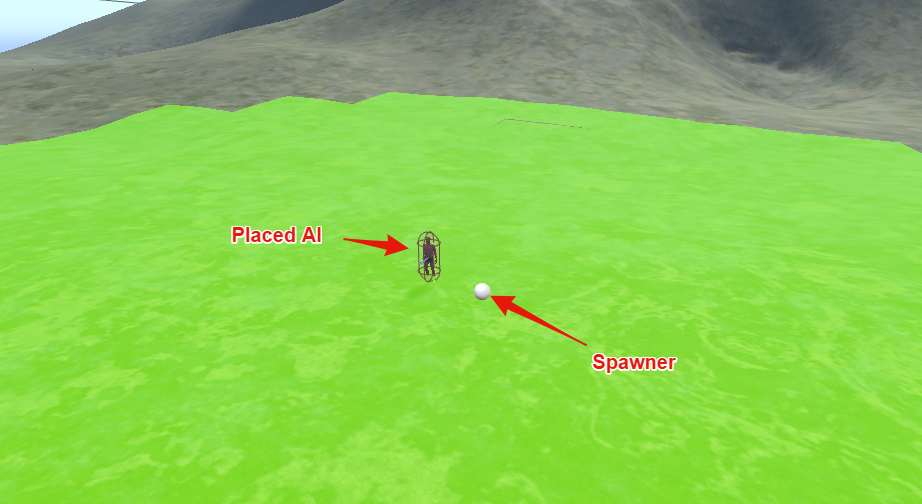
 elfin socket
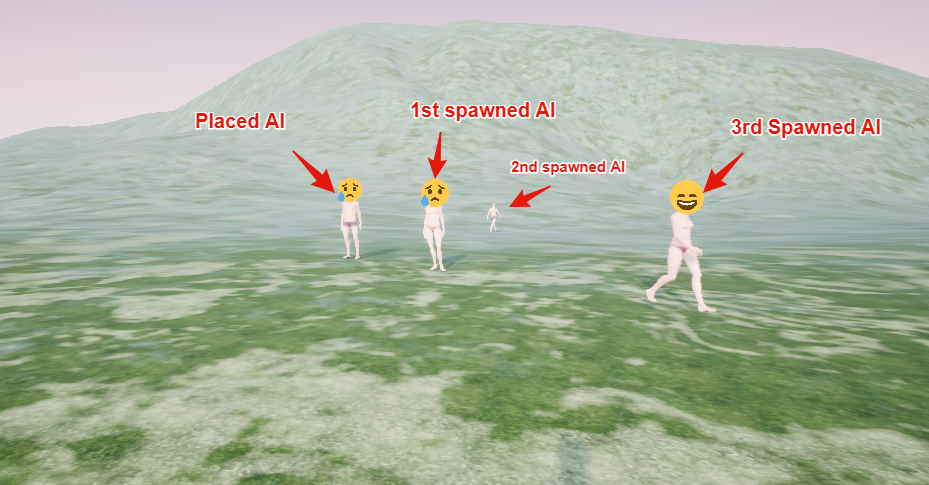
.. are... are you using Emojis to convey the AI's current behavior state?
That... that's... that's fucking genius. Why didn't I think of that?
patent hornet
@raw flame singleplayer or multiplayer?
raw flame
Singleplayer
patent hornet
streaming levels involved?
raw flame
Yes
patent hornet
and if you pre-place AI directly on the persistent level, does it still happen?
raw flame
yes, the placed AI on the screenshot is on the persistant level
patent hornet
they have the controller spawned?
raw flame
Yes
patent hornet
have you gone thru VisualLogger?
 patent hornet
no
under windows > developer tools
you have visual logger
it will record what AI controllers and Navigation are doing when its active
raw flame
ok, will check it, thank you 😃 hope it shows me what is wrong
patent hornet
then you can examine result of every command, pathfinding query + status of controller/blackboard and pawn
raw flame
Now not even the spawned ones work, and all the log lines seem normal, the only discrepancy is that all black board tasks are failing since the AI cannot move to them.
patent hornet
you can examine the blackboard at any "block" with visual logger
see if its values were set
raw flame
They were, the AI got initialized normally, filled the BB and executed the behaviour tree, the perception system is nominal as well, it just won't move
no clue why
patent hornet
you should see any move to results there as well
raw flame
No moves, it gets the instruction to move, but the next log line is just the task timing out
patent hornet
but below it will log what happened when it was given the order
is the starting point not on navmesh, can it find a path...
is the move blocked
like you spawned them with their feet in the ground and then its just [Blocked}
it will point you in the right direction
good luck with this, i'm off to bed
raw flame
This is all the nav info i got

yeah i think i'll try to fix this tomorrow, thanks for the help ♥
patent hornet
select one of the controllers in the top left
then click on a teal block in its row
and you will get detailed info for that controller
at that point in time
raw flame
Ah, thanks, i'll try to fix this tomorrow morning, wasted 2 days on it already, might as well waste 3 hahaah, thank you a lot for the help, really.
patent hornet
np & gn
 static stratus
Is there a way to show additional info of the running nodes in behavior tree, like remaining time for "wait node"? I know you can hover over it and it will show you the value (through DescribeRuntimeValues), but I could've sworn it was shown along with description before. Kind of hard to debug when you have several things running 😦 .
 dense latch
Working on some really basic AI for a tank.
https://i.imgur.com/kM9xJFN.png
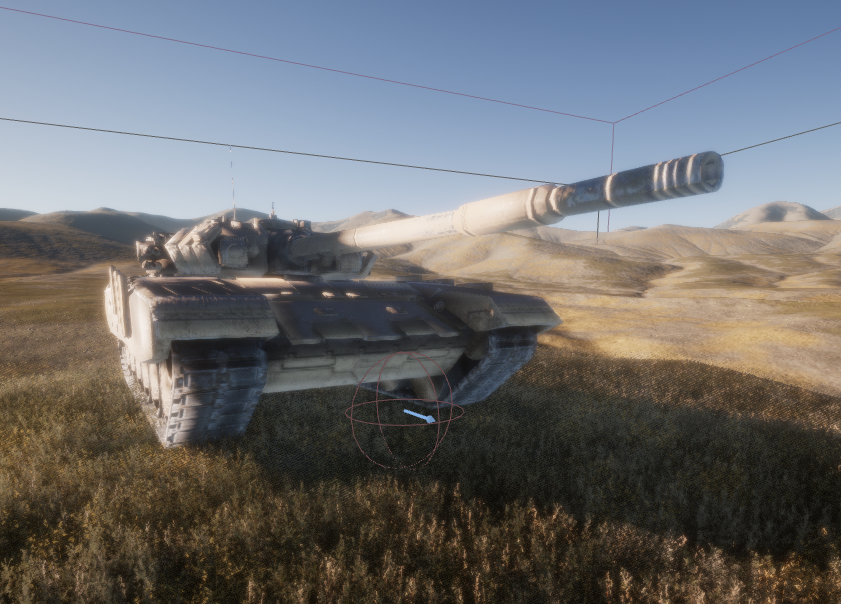
If i set this capsule at this location, it'll do what it's supposed to. If i put the capsule inside the tank, it fails to move.
patent hornet
what does Visual Logger say?
dense latch
How do I bring that up? Forgive my ignorance aha, this is my first time doing something along these lines.
My thought is that the mesh is blocking its vision
patent hornet
window > developer tools > visual logger
start recording, play and select the tank's AI controller
it will log any AI command or pathfinding request there, including the reasons for why they failed
it will also draw you the current controller's path
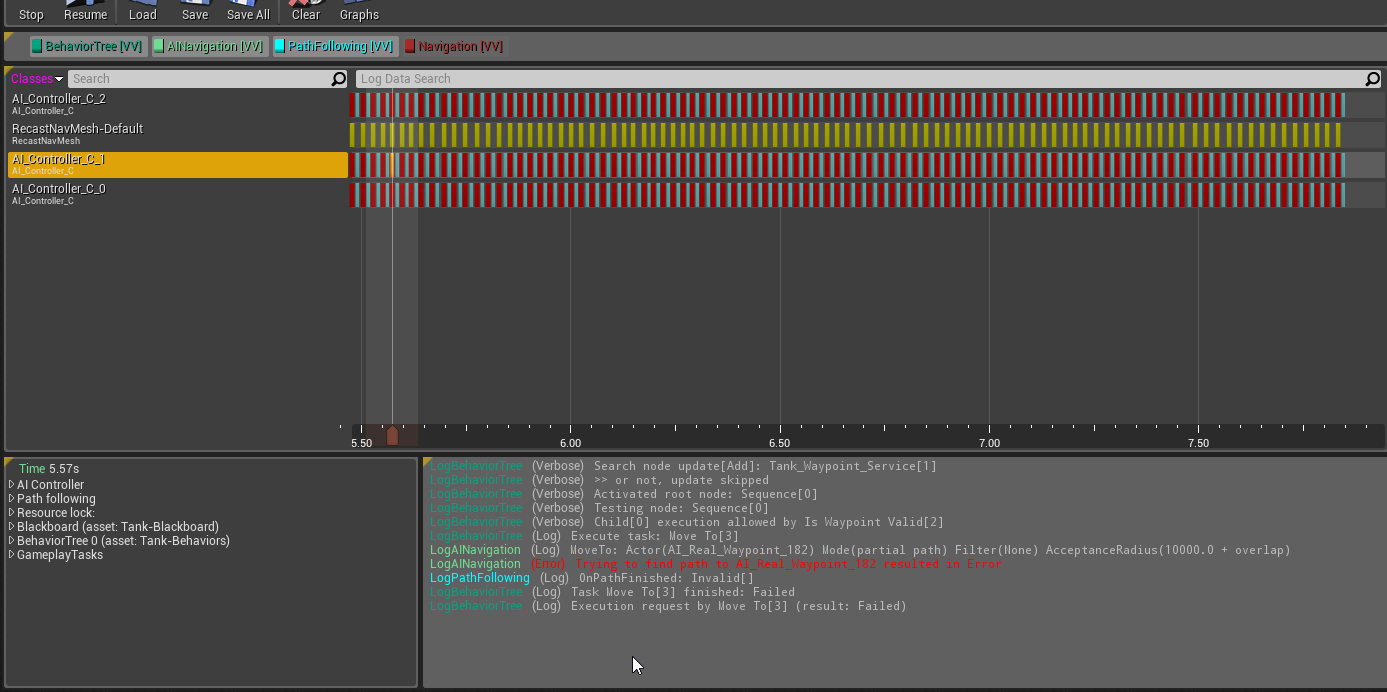 patent hornet
i'd imagine that your tank is affecting navigation
effectively removing part of navmesh below it
dense latch
Ah yes that is happening
the nav mesh turns red
well
scratch that
its just blank under the tank
and the nav mesh is ontop of it
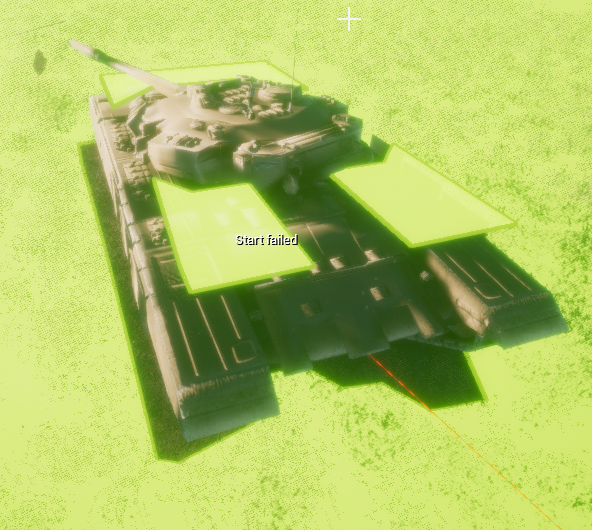 patent hornet
i don't have the editor up, so best i can suggest off the top of my head is uncheck CanAffectNavigation
dense latch
I disabled can ever affect navigation on the mesh
patent hornet
or
patent hornet
set its NavFilterClass
this way one tank will happily path thru another tank
collide and get stuck
dense latch
Yeah I have another issue where when the tanks get to the waypoint, they all get stuck
patent hornet
i think turning off CanCharacterStepUpTo in collision settings will remove the navmesh from top of the tank, if you care about that
visual logger will tell you why they get stuck 😃
dense latch
Right now they just drive on top of each other instead of getting stuck haha
I'll have to disable nav mesh on top of them, but they do go inside of each other, I guess i can fix that with box collision or something
For the tanks blocking
it says onpathfinished: blocked[blocked]
patent hornet
that capsule is what your NavAgent for the tank takes as its... bounds
dense latch
Any reason i can't make the capsule bigger than 88?
patent hornet
haven't worked on that tho, so can't recommend a good fix
dense latch
I see
Well thanks anyway, you helped me solve my biggest issue 😄
I've read for Ai on Ai avoidance you have to add steering or something
 radiant zodiac
guys I used a moba spawning wave bp to spawn my ai characters
but once spawn their behavior tree isn't running
I'm using event on posses to set the blackboard tree
static stratus
you sure right controller is set and that it posses pawn on spawn?
@radiant zodiac
static stratus
ah I see
 idle ibex
@here I hope this is the right place, I am working on an AI turret that is attached to a ship (so it has to be able to account for different up angles. Right now I have it working with the Look At function but that always aligns it to world Z not to the ship or parent object I needed it to align with. Anyone have any materials resources I can have a peek at to help me understand what I need to do?
raw flame
Hey folks, i could use some help on level composition and AI navmeshing, i've been stuck on it for some days now.
I posted my issue here https://answers.unrealengine.com/questions/769535/ai-and-light-issue-with-level-composition.html , i't a bit more in depth.
TL DR : Made a level with 2 sub-levels 1 for the day cycle and 1 for all the landscapes, but when i play the game, the AI doesn't move at all, @patent hornet helped me use the visual debuger but the behaviour tree is running perfect, just the move to task is failing, i think it has something to do with the nav mesh but im not sure, i'm using invokers to generate navmeshes at runtime.
fluid sequoia
@raw flame Have you made sure to set navmesh generation to Dynamic and set Force Rebuild on Runtime?
raw flame
@fluid sequoia yes for both 😛
The only way i can get the AI to move is if i put the terrain in the persistant level.
fluid sequoia
@raw flame Do your invokers generate navmesh around them when you run the game?
fluid sequoia
Yes at runtime
fluid sequoia
Could you screenshot the odd navmesh at runtime lol
raw flame
yeah 1 sec, my editor crashed 😛
might have broken my project, keeps crashing at initialization, i'll post the ss as soon as i fix this, sorry for the delay 😛
fluid sequoia
No problem 👍
raw flame
got it
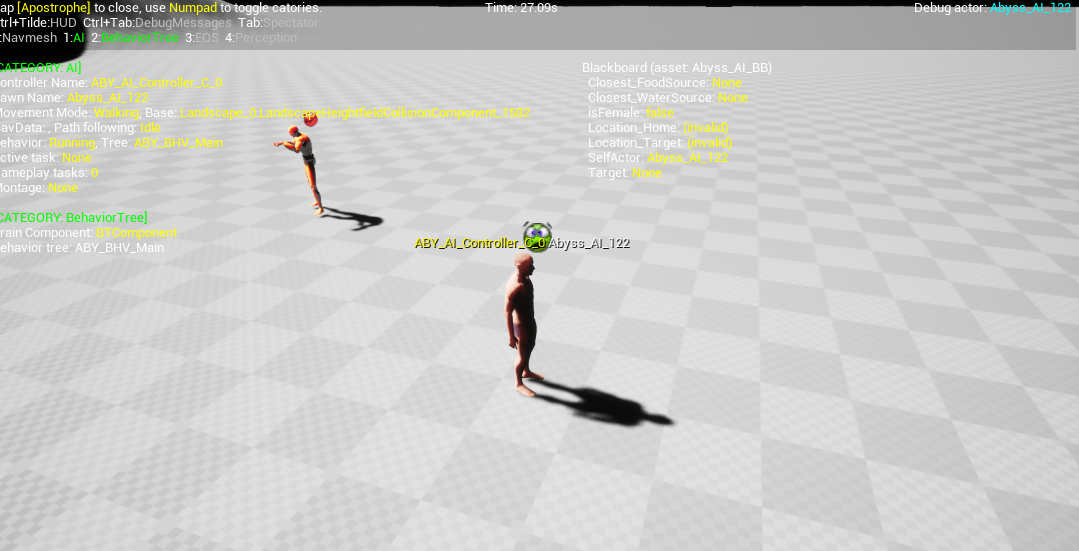
im testing 2 AI controllers at the same time just to be safe
mine and the engine default
Yeah, the lights stoped working agin after the crash https://gyazo.com/39c6c5765b83a80ea502bb6ccfdda940

still no vaigation data
fluid sequoia
weird
raw flame
Yep, im going mad with this, if i put the terrain on the persistant level it works fine, if i put it in a sub level , it breaks
I don't get it, why bother with level composition then?
fluid sequoia
Uhhh, so for your streaming level, you have set your RecastNavmesh actor to dynamic right
raw flame
Yes
fluid sequoia
If you press P when running the game is navmesh being generated?
raw flame
nope, its just like i showed you in the ss
the light stops affecting the terrain and no navmesh is generated
fluid sequoia
Riiight
 fluid sequoia
lol that naming scheme


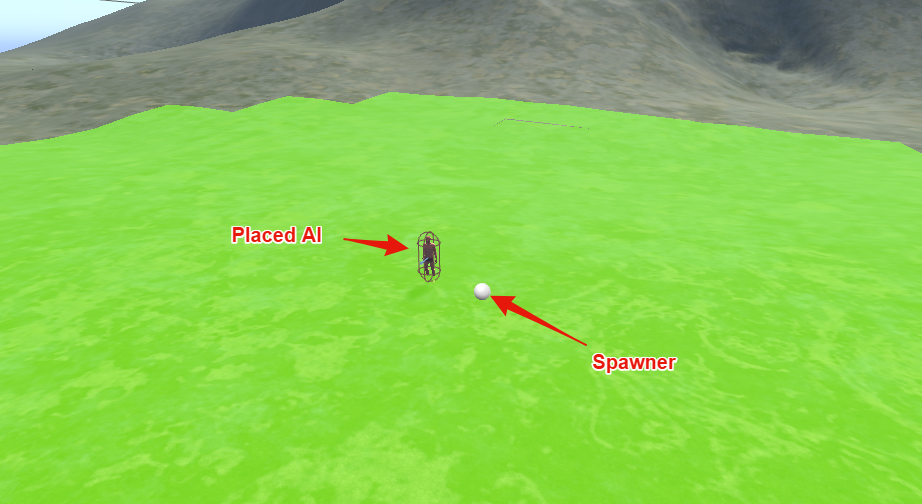


 fluid sequoia
Internet says that you should have a navmesh bound only in your persistent level, which is large enough to encompass the sublevels you stream, so if you haven't tried that, go for it
fluid sequoia
uh...
raw flame
I was using a method miezko talked about in one of the streams of puting a nav mesh bounds volume in each chunk to be streamed
raw flame
Yeah i think i suck at googling, i spend 3 days looking articles and tutorials up hahaha
thank you so much
If you want to post the link as a answer to my ticket i'll gladly karma you up 😃
fluid sequoia
Sure I'll post an answer
posted an answer and realized my account name is different for Epic, need to update it
raw flame
hahaha thank you, i'll give you some karma, you deserve it 😃
 lost tiger
Hello everyone .. someone knows how to make a melee system
 dense harness
Hey guys. I've been searching this for a good while 👺 I'm hoping someone here can help me out
Recently added AI walking to my game and found the cost was pretty high
Came across a post on Answerhub about Paragon using a cheaper mode called "navmeshwalking"
So I set my characters to use this mode, and yet in AI debug mode they always show to be using the default "walking" mode. I tried forcing "navmeshwalking" by setting it in various ways, like at runtime, and still it never seems to work
 dapper kayak
Okay so im working on an Ai that patrols and has postions that it goes to, and i have it to where if it see the player than its moves towards the character, but when it reacts the character it stops and doesnt move. Any idea on why this is doing this, and how to fix?
Like a drone lol
ocean crystal
Alright but like
What are you using to issue the move command?
What else are you doing?
You question is kinda like
dapper kayak
xD
ocean crystal
"I have a game that I want to respond to the spacebar, but it doesn't"
"Like a jump"
dapper kayak
lol
well then you see that i dont really know to much on what im doing lol
But anyways when i go into the pawnsense area, the Ai it follows me, then is just stops and doesnt move again lol
Idk tbh
lol
ocean crystal
I was about to be sarcastic but you posted an image
dapper kayak
xD
ocean crystal
Try going out of the area, far enough away that it can't see you
then try coming back so it can see you
dapper kayak
lol
ocean crystal
your problem could be that its only running its chase logic once
dapper kayak
Thats what i was thinking, but in my following Ai, its only set up like this, and it follows you no matter what
ocean crystal
Those are practically the same though.
dapper kayak
Thats what im saying, so idk why it would be pausing and stoping in the other
ocean crystal
So either your settings on the component are different or SetActorRotation does something weird.
Anyway, its been a while since I've done PawnSensing work, but does OnSeePawn fire every frame?
I'd have thought it was once-per-start overlap
dapper kayak
Sorta lol
it keeps going off until the casted character or object is out of the sensing area
Okay so now its just pausing every so offen
Could it just be the squence?
Mmmm idk lol
ocean crystal
Alright, well, you can figure out what's happening if you print out the result enum on either success or fail
I doubt it
SetActorRotation MAYBE_
Look into behavior trees though
Its a little more complex but they're much more suited for AI
dapper kayak
Yeah understandable. I've never used one before
 buoyant sphinx
@dapper kayak you might like this:
A lot of you seemed to enjoy the last post - so come and learn a bit about Navigation Filtering and Avoidance whilst making a game of tag!
It took a bit of time - but I think that this new UE4 AI tutorial has come out looking quite spiffy!
https://www.vikram.codes/blog/ai/03-navigation-filtering-and-avoidance

Vikram Codes
Using Unreal Engine 4's Navigation systems to the fullest, we build a fully realised AI vs AI "game of tag". Learn about writing AI, using Unreal Engine, and best practices in your choice of Blueprints or C++.
dapper kayak
Thnks mate
 hybrid grove
New to AI, have a question - I'm trying to setup a point-click system where I point at the ground and my AI Character moves to that location. My Pawn(with camera), AI Character, AI Controller, Behavior Tree, Blackboard, and BTTask is created and ready to go.
My Pawn is setup and works with a line trace to get the ground location where I click. This is stored in a "ClickLocation" float inside my pawn.
How can I pass this information to my Behavior Tree so my AI Character will move to the click location? I have a variable on my Blackboard called "MoveLocation" but I have no idea how to update ClickLocation to MoveLocation. Assuming this is what I need to do?
patent hornet
make an input action in project settings > input
then pull the input node inside your controller (it will have the input action's name)
and update blackboard there
dense harness
Just gonna post my issue again for the day-time crowd 😬 Would really appreciate anyone weighing in on this issue
lost tiger
Hello friends. someone available to help me in my video game (payment in between) if you have enough knowledge in programming
hybrid grove
@patent hornet was that response for me?
elfin socket
Is there any rhyme or reason to put the AIPerception components on the Character rather than on the AIController? In the UE4 Livestream, they put it on the AIC, but in the Tom Looman Udemy course they put the AIPerception on the Character.
 tribal lagoon
How can I use AI move to on my player character, the node doest fail, but it doesnt move the character either, nav mesh is built
elfin socket
@tribal lagoon Pawns without an AIController don't know how to do AI Move To
Player Pawns don't have AIControllers
tribal lagoon
yeah, thats what I thought, can I add an AI controller to one
elfin socket
Instead of telling the pawn to do it, tell the pawn's AIC to tell the pawn to do it
tribal lagoon
I am not going to use any keyboard or mouse imput, its only move to, for the movement of my pawn, so it would make sense to switch to AI controller only
elfin socket
The PC needs to possess something, so have it possess something else and tell the pawn to have an AIC
tribal lagoon
how can I do that
elfin socket

YouTube
A list of the videos I found useful learning AI for UE4.
tribal lagoon
thanks, unfortunately I don't have time to learn all of this now
I am prototyping for a touch game on mobile, and it doesnt need to be that complicated, my AI is just moving where I click with the mouse, but I cant get the player pawn to swap to an AI controller
tribal lagoon
Maybe I am not understanding the hierarchy of UE4 right
I cant send commands to something I dont posess right
So if I want to control something using AI Move to, i need it to be possesed by an AI controller, and for me to control it, i need to posses a player that casts to that AI and issues comands?
fluid sequoia
@tribal lagoon I ran into this issue developing my own mobile game and settled on having the visible Character controlled by an AIController. Then, I have a separate pawn which is invisible called PlayerAgentPawn that is attached to the Character. PlayerAgentPawn has the PlayerController.
tribal lagoon
I am trying to get that exact thing working as you wrote this lol
how do you attach the camera to the AI, by simply parenting it in the level?
fluid sequoia
    DungeonCrawlerPlayerCameraBoom = ObjectInitializer.CreateDefaultSubobject<USpringArmComponent>(this, TEXT("CameraBoom"));
    DungeonCrawlerPlayerCameraBoom->SetupAttachment(DungeonCrawlerPlayerCameraScene);
    DungeonCrawlerPlayerCameraBoom->bAbsoluteRotation = false; // Player rotation will not affect boom rotation
    DungeonCrawlerPlayerCameraBoom->TargetArmLength = 1200.f;
    DungeonCrawlerPlayerCameraBoom->bDoCollisionTest = false;
    DungeonCrawlerPlayerCameraBoom->bEnableCameraLag = true;
    DungeonCrawlerPlayerCameraBoom->bEnableCameraRotationLag = true;
    DungeonCrawlerPlayerCameraBoom->bInheritPitch = true;
    DungeonCrawlerPlayerCameraBoom->bInheritRoll = true;
    DungeonCrawlerPlayerCameraBoom->bInheritYaw = true;

    // Instantiate player camera
    DungeonCrawlerPlayerCamera = ObjectInitializer.CreateDefaultSubobject<UCameraComponent>(this, TEXT("PlayerCamera"));
DungeonCrawlerPlayerCamera->SetupAttachment(DungeonCrawlerPlayerCameraBoom);```You can handle it in CPP or BP, I attach the camera to the AgentPawn since the PlayerController will automatically go to the camera attached to the same pawn/character
This is a setup for a top down game by the way, so your implementation may vary
tribal lagoon
Alright, I will try it once I sort out the jumping
for some reason the AI doesnt jump to reach its destination
even with nav links
fluid sequoia
nav links are kinda buggy
I don't think jumping behavior is actually present in nav link implementation
@tribal lagoon As I understand the way nav links work is that they merely state that two points on paths are connected
tribal lagoon
yeah, so how do I tell my AI that it can jump
I am using the paper 2D template
maybe thats the issue, as I remeber an AI I made was jumping on with a third person character template
fluid sequoia
" It's currently not supported out of the box and would require some C++ coding. You can however implement a kind of jumping behavior with navlinks and triggers. Navigation links tells AI "you can traverse this segment", so if you place a link between two platforms AI will find a path as expected. You just need to take care of the jumping part, and you can "fake" it by placing a trigger on the link start that will make AI move to the other end.
Making "AI move" could be done in couple of ways: you can simply teleport your AI, matinee-animate him, or set his physics to Flying and just let him continue (should work, but I haven't tried it ). If using the flying option don't forget to turn Walking back on once "jump" is done"
https://forums.unrealengine.com/showthread.php?3512-NavLink-and-making-AI-jump
For gameplay programmers writing C++ code.
This is from an ancient answerhub post https://answers.unrealengine.com/questions/84659/navmesh-jump-points.html
OK so ancient I suspect things may have changed since then
@tribal lagoon You can implement jumping while navigating by having a trigger box which causes a certain behavior and the beginning of a navlink, for example a "launcher" that throws the character up. It is also possible to write an advanced implementation of the navigation to have the character calculate jumps in real time, I believe Rama did a quasi-tutorial on it
The Rama tutorial is here https://wiki.unrealengine.com/AI_Navigation_in_C%2B%2B,_Customize_Path_Following_Every_Tick
tribal lagoon
Well, at this points it would be easier if i added slopes
fluid sequoia
Sometimes the simple solution is the best one
If you have your characters jumping only at specific location then launchers can be a good solution
tribal lagoon
I need it for playtesting
I thought UE had jumping, so the AI can go on the floor above
guess i will have to fake stairs with slopes
tribal lagoon
that was about as complicated as the jump thing but anyway
@fluid sequoia thanks
fluid sequoia
Anybody familiar with UNavigationSystem::ProjectPointToNavigation , I don't quite grasp the arguments
Specifically why do I pass in an FNavLocation and an FVector point?
vocal sinew
Hey guys! how to character disable rotation when I do AI MoveTo?
I want to move my character, but controller should be always forward to some target
 glossy spire
@vocal sinew Uncheck "Use Controller Rotation" on the pawn
then you'll have to rotate him yourself
vocal sinew
@glossy spire But I need to rotate controller, not character. Character Must use controller rotation
I just don't want "MoveTo" to change controller's rotation.
Orient To Movement checkbox is also disabled
glossy spire
i guess you could change the rotate speed to zero
on the character movement component
 woeful wind
Hey guys, I've got an AI character class that inherits from my normal character class. I'm trying to re-use as much logic from there as possible; things like drawing and firing a weapon, taking cover, etc. The problem is that I handle all of my aiming code using the player Control Rotation, which doesn't seem to be a thing in AI. If I could just "SetControlRotation" on my AI character (which appears to be deprecated functionality long before 4.18), I'm pretty sure my problems would be solved. Is there any way that I can set control rotation? If not, I pretty much can't inherit from my other character, because so much of the logic is bound to that attribute.
patent hornet
you can pull the common functionality in common base class and have both your AI and normal character class inherit from it
woeful wind
@patent hornet Hmm...still a lot of rework, but I guess if there's no other way...
buoyant sphinx
@tribal lagoon I blog about how to make launchpads here: https://www.vikram.codes/blog/ai/02-nav-modifiers-links

Vikram Codes
Learn how to use advanced features of the UE4 Navigation system, including how to make an AI jump off cliffs, and also make use Launchpads to make your AI jump back up!
@fluid sequoia for your future reference as well ^^^
fluid sequoia
@buoyant sphinx thanks, will have a read
buoyant sphinx
As of 4.19 it's possible to do everything in blueprint, I'll be updating the guide this weekend to show how
(I had a pull request accepted, you should be able to figure out how, because I show what I was trying to do in the #Issues section at the bottom)
 lethal helm
When spawning Ai char's from class do you have to spawn an ai controller as well?
tribal lagoon
@buoyant sphinx thanks
delicate sparrow
How do I create a function that does AI Move and collision checks at teh same time?
elfin socket
@delicate sparrow I think the Nav Mesh does that automatically for you, doesn't it?
delicate sparrow
Well I tried to make a function like you suggested within a pawn to do AI move and collision checks but it wouldn't let me use AI Move there
But would I use something like "Event On Hit" for Collision w/ collider?
elfin socket
Overlap is what you use for collision, the OnHit thing is for dealing damage to actors.
delicate sparrow
What about just "Event Hit"
elfin socket
I think you might need to do some more tutorials dude
delicate sparrow
I mean, that's not wrong, but googling this hasn't really gotten me anywhere
elfin socket
When all else fails, I go straight to answers.unrealengine.com and search there
But I really think you should just do some more of those official UE4 livestream tutorials from the engine developers. They have some stuff about AI and it's really good quality stuff that will help you fix your problems along the way.
woeful wind
Hey guys, I'm a bit stumped. I posted this on reddit, but so far, no response. Long story short, I can't make my character rotate via AI functionality, but he does other actions just fine.

reddit
Hiya, folks. I've been diligently working on my third person shooter prototype in my free time for over a year now, and I finally got to the...
Any help would be appreciated.
fluid sequoia
For the life of me I can't get AI debugger to work, I enable show ai debug and click on the controller but nothing happens. Any clues?
nvm, had to look in engine settings and realize I rebound gdt
 heady arrow
@woeful wind have you tried setting the focus of the AI controller to be the player? Also there is a specific edgecase where focus only works in the yaw for something but I can remember what, but that function is virtual and can be overridden
tribal lagoon
Hello, can I use Pawn Sensing to detect a character being possesed by an AI controller
patent hornet
i don't think its meant for that
you should have OnPossessed event tho, inside the character
tribal lagoon
what do you mean, how would that enable another actor to sense it?
patent hornet
you could attach something to it that another actor can sense with PawnSensing
woeful wind
Thanks @heady arrow , I'll give it a shot later today. It seems weird that I'd have to set focus on the player to turn toward him, but I don't have to do that to MoveTo him.
tribal lagoon
@patent hornet i wasnt aware that would work, what actor should I attach to my AI so its detected
woeful wind
Thank you so much, @heady arrow ! Setting the focus worked! I stand by what I said earlier in that it's odd that some things work without focus and some things require it.
heady arrow
@woeful wind yeah in the source code of the AI controller for focus, it sets the pitch to zero for a specific reason that I can't remember
tribal lagoon
So I created a pawn actor, and attached it to AI, but pawn sensing still wont work
woeful wind
Hmm...okay, well, good to know. Does that mean it always needs a focus to turn...ever? Even if it did its own thing agnostic of the player's actions?
So I'm still pretty new to AI in Unreal, but I'm failing to see why Decision Trees and Blackboards exist at all. Normal blueprints seem perfectly capable of doing all of this stuff. What's the benefit here?
glossy spire
@woeful wind Blackboards are pretty pointless, but decision trees are very important
woeful wind
Is it a performance thing? Is there something Decision Trees can do that blueprints can't?
glossy spire
decision trees are just a way to run blueprint tasks
so the code is done in tasks and decorators
hmm its hard to describe
basically, when you start getting more advanced AI, having lots of if statements or whatever becomes really messy
woeful wind
so it's just an organizational thing? Easier to rapidly make changes than messing with blueprints?
glossy spire
well, decision trees run blueprint files
so its still working in blueprints
you make tasks
which are a kind of blueprints
woeful wind
no, I get that, but I also don't see why I couldn't code the entirety of the decision tree in my AI controller
woeful wind
ok, so it COULD be done, but it would be messy?
glossy spire
sure
woeful wind
I'm all for best practices; I'm just trying to understand why this is the best practice.
glossy spire
another way of doing AI is with a state machine
but basically a decision tree is the more modern way
but yeah, its a glorified organization method
woeful wind
gotcha, thanks for the explanation
glossy spire
but I have no idea why people use blackboards
woeful wind
To store data that your decision tree uses.
glossy spire
yeah but why
woeful wind
heh, same thing: organization
glossy spire
yeah