#gameplay-ai
1 messages · Page 99 of 1
 floral mango
 lyric flint
Why OnPerceptionUpdated works only when my bot sees a new enemy? How can I get center of this green sphere which I see during the dubugging (with enable Perception's option).
I try to save a last position of the enemy which was seen by my bot. But when i try to save it in OnPerceptionUpdated, it doesn't work properly, position is outdated...
I don't want to get this position from the variable (enemy) because it always be a currnet position, not last seen position.
 umbral perch
@Arhed#8371 why not break stimulus, cast to perceived actor and get location? That way you’d get the most up to date location.
lyric flint
It's my blueprint. The variable Last Enemy Location is outdated.
lyric flint
"AI Perception runs on Tick. The sight sense works when the actor who is a stimuli source for visive perception enter or leave the perception area around the AI, you can view it by enabling the debug. The area is pretty large when first created." https://answers.unrealengine.com/questions/419917/how-often-does-and-what-causes-onperceptionupdated.html
So what should I do? II think that I can only save the enemy to the variable and use this variable.
 cunning river
Can someone help me make an ai that shoots the player?
lyric flint
@umbral perch Ok, my problem is solbed. Thx for help, I use functions Get Currently Perceived Actors 😃
@cunning river I can try to help you. But I'm the beginner on UE4 😃
cunning river
ok thank you
lyric flint

This is the first in a series of practical tutorials where we'll explain the fundamentals of how you actually create your own AI in UE4, and go through it st...
I recommend you to watch this series 😃
cunning river
ok
lyric flint
But what's your problem? Do you want to make an AI on behaviour tree?
Or something simple?
Later, you can watch https://docs.unrealengine.com/latest/INT/Videos/PLZlv_N0_O1ga0aV9jVqJgog0VWz1cLL5f/NZZtMNdJk5o/

Training Content Creator Ian Shadden is joined by Lead AI Programmer Mieszko Zielinksi as they build on the Basics of AI stream and delve into more advanced AI! They show you how to create complex AI behavior using Behavior Trees and the Environment Query System (EQS).
Here, they made a more advanced sight. They used AIPerception and also EQS.
 bleak reef
Hello guys, I have a question about AI Perception: I need to specify if an Actor is Enemy, Neutral and Friend. But i'm not able to do it. I'm working on a C++ and Blueprint project in UE 4.18
lyric flint
For those of you who are wondering what AI Perception is – this is a really nice system in UE4 that provides an easy way for the enemy AI in your game to track hostile/friendly/neutral charac…
@bleak reef Here is a tutorial
bleak reef
apparently doesn't work 😦
already tried
or better: I tried it with a modify: i need to expose to blueprint a funcion to set the team
lyric flint
I heared that it's impossible to do it with a blueprint
but I never do it, and maybe ask other
bleak reef
only with blueprint is impossible
lyric flint
okey
bleak reef
i'm using C++ to expose the functionality
bleak reef
yes
I found no documentation about that. But I noticed a strange behaviour: without touching nothing, i put in scene some actors: the player pawn and some characters with AIController. With the AI debug ON, i see pawns as friends and character as enemy...
that's not what I was expecting. I read that by default should be all neutral
lyric flint
so maybe don't use built this system, and add tags for all characters
and you can easly check if it's friend, neutral, or enemy
bleak reef
but base AI perception system can filter by enemy, neutral and friend tag. so I'm trying to use this flag for performance
lyric flint
okey, I don't know about it 😃
floral mango
by default the AI and player controllers IIRC correctly are perceived
lyric flint
Task Move To fails. Is it a bug?
But Move To Directly works, why?
I have a NavMeshBoundsVolueme
 elfin socket
Hey @lyric flint are you the Asher Einhorn guy who made those AI tutorial videos that you posted a bit ago in this channel? I ask because if you are then I had a question about one of the things in one of those videos.
 pale night
Can I use AITask MoveTo instead of AIControllers MoveTo? for Player Character Movement?
lyric flint
@jfaw No, i'm not this guy
 native oracle
any quick and easy to follow tutorials for making the manaquin chase and shoot at the player? I was following a tutorial but didnt relise it was a unfinished series
lyric flint
@native oracle Check out this, it's quick and very easy. But AI bot is not based on Behaviour Tree (or other AI technique), so it's not very good for complex AI. https://www.youtube.com/watch?v=DywBqQtTHMo&list=PLL0cLF8gjBprG6487lxqSq-aEo6ZXLDLg

If you've ever wanted to create a first person shooter game but weren't sure where to start, this is the tutorial series for you. You'll learn everything you...
BTW. You can only watch chosen episodes 😃
native oracle
I have an animation for the charecter was just going to use the same thing for the ai just need to learn the blueprint for a basic hunting the player and shooting. Thanks for that link I'll have a look when I get time 😃
native oracle
oh no thats the tutorial I have been following. its a very good tutorial but it isnt finished. it only got to the point of the player being able to kill the npc and the npc would chase the player around the map if spotted
lyric flint
@native oracle Creating of simple shooting bot is quite easy. If you have a problem try to check out this https://www.youtube.com/watch?v=2duFLmkGc0Y

Here we look at creating the first phase in our combat logic. In the video I mention a bug with latent nodes like 'delays' in inactive tasks. it is indeed a ...
@native oracle Do you have a shooting player character? If you have that you can use the same code for AI in BT task.
native oracle
I've never made a shooting ai before. That's why I want something that's simple to create so I can start to learn the logic. Going on computer in a minute to check out that tutorial
lyric flint
@native oracle Ok, but you made a shooting player 😃 It's very similar if the AI isn't complex
But this tutorial is quite good. I thinkg you can do it 😃
 latent bolt
how I can add special logic in to BT to check for pawn overlap with something?
I dont want to use service for this..but I also dont know how to inform BT about overlaps from pawn..
lyric flint
@latent bolt I think that you can check overlapping in your bot blueprint. Next, you save this information to variable and later you can read this in BT task (you should use casting to your character class).
latent bolt
yeah, looks like there is no alternative
native oracle
@lyric flint had a quick look but think I'll start from scratch on the ai using it. Should learn abit more
lyric flint
@native oracle OK, you can watch all movies from this playlist. It's not very long , I watched it one, or two months ago 😃
native oracle
It's a shame the one I was following isn't finished. Hate when people make tutorials and don't finish them. He started making a rpg tutorial I think it is before he finished the first person shootef
Shooter
lyric flint
@native oracle What tutorial did you watch? You can watch the part of the last episode before you start with watching the playlisty.
native oracle
its ok i need to learn more about blueprints. im a designer doing my masters in games development so need to up my game 😃
native oracle
I have done the player animations and im just about to go through the tutorial you posted. im hoping I can simply add the mesh and animations from the player to the ai. but ill ask for help on that when i get to it lol
native oracle
hopfully a silly question. on the left is my work and on the right is the tutorial im following. it says to drag off the out actors and "get" but i dont have that opton
 vagrant pasture
get(a copy)
native oracle
thanks. I didnt want to keep going through the tutorial if i had messed up somewhere 😃
now i cant get access to this "get random point" i can only "get random point in navigable radius" but that requires a vector
think i have solved it
lyric flint
Are only 2 senses (sight and hearing) implemented in AIPerception component? Or now all other senses are also fully-implemented?
native oracle
that was the 2nd/3rd vid i think. ive just got it so it wonders about (buggy) and follows the player on sight
this isnt using the senses componant, its all blueprinted without that node. it might pop up later but i noticed this tutorial is over a year old so that will be why im struggling to find nodes
oh man its all broken lol ill have to search for a upto date verson lol
lyric flint
@native oracle - Yeah in this video he didn't use AIPerception, but you learn bluprints so I think that creating of own implementation of sight is good for you 😃
It's very easy to modify your blueprints and use components crated by Epic Games
elfin socket
How does the AI determine whether the Pawns it sees are Neutral, Allies, or Enemies? Because the AIPerception has those options and I've never seen them covered in the official tutorials.
 minor wolf
Heyo guys, I'm making a rabbit that runs to its hole and hides when it sees the player, but as soon as it turns away it starts roaming again. What am I doing wrong here:
I've set the observer aborts to none on the second decorator
 winged steeple
hello. I need a small tip from you experts
on my prototype I'm gonna put a few animals and humanoids. humanoids will have higher functions and stuff like that. should I make 1 parent BP for humanoids and 1 parent BP for non-humanoids and then make specific types of enemies as a children BPs?
thanks :)
native oracle
@lyric flint its easy when you have a basic knoledge of the blueprint your making lol only just got my head around how to use the branch node lol
lyric flint
@native oracle Branch it's simply if in c++ or java. If you have a basics in not visual programming language than you have no problem with blueprints 😃
@winged steeple It's really hard to say without details. But if you can you should make a base class for humanoids and animals. Than make other classes and use inharitance to implement special functions :).
winged steeple
I think it's better this way, yes. I want humanoids to do complex stuff like labor while animals will mostly have basic AI functions
but with those 2 parent blueprints, I can just use them for child ones, right? like, the parent has a BIG script with everything on it and the childs basically just set variables to modify it
lyric flint
@winged steeple Other way is creating a interface for all creatures 😃
But I don't know what functions do you want to implmenet for this classes
But one child can have only one parent blueprint class 😃
winged steeple
well... I wanna make a more or less immersive behavior for them. most will be average animals so they will be hunting each other, wandering around, going back to their nests and stuff like that. and also pack behavior. a lot of complex stuff altogether
lyric flint
It's not C++
winged steeple
yup
that's why I was going to separate animals and humanoids
humanoids will have a complete different behavior and functions (they will have some basic similarities tho)
lyric flint
ok, if all behaviours are diffrent than you should create two base blueprints 😃
winged steeple
I still don't get what a BP interface can do, so no idea if it's a good idea
yup :)
lyric flint
But in my game, I have AI soldiers and player. So, I'm using one base class for them
winged steeple
you use the same BP class for AI soldiers and player characters?
lyric flint
@winged steeple Hmm, do you know Java or other programming language with interfaces?
no, I have one base class, and two childrens
winged steeple
not really. lul I only have real experience with matlab and html/css
lyric flint
ok, this languages hava no interfaces, but you can read UE4 documentation
winged steeple
yeah, I guess so. thank you :P I'll take a look at it!
native oracle
@Arhed i dont have any programing knoledge only the basics i have picked up from youtube vids
lyric flint
@native oracle Ok, so you watch many on yt and read ue4 doc ;)
 trim wraith
how do you have the editor show the return value of a condition decorator? If I add a generic blackboard decorator it shows true/false when I hover. When I make a decorator with a condition check in it, I get no true/false when I hover 😦
Also, merry Christmas yall!
 dire warren
Has anyone noticed that, since 4.18, Behavior Tree tasks will randomly break and when you look at them in the editor they'll have REINST_ appended on the front?
 burnt wolf
Anyone tried to make AI automatically jump over obstacles? I tried following this tutorial using Nav Link Proxy but can't get it to work.
https://wiki.unrealengine.com/Unreal_Engine_AI_Tutorial_-_1_-_Making_AI_Jump_as_a_Part_of_Path_Following
Looks like my AI character is not even using my custom UPathFollowingComponent as I tried to put breakpoins in constructor and it did not stop there
I have waist high obstacles that my AI characters should jump over
lyric flint
why wont my character move to the next node? https://i.imgur.com/x0WOalQ.png https://i.imgur.com/F9BRnkG.png
It's at the location so it should move on to "SetSohuldNotRunFromPlayer"
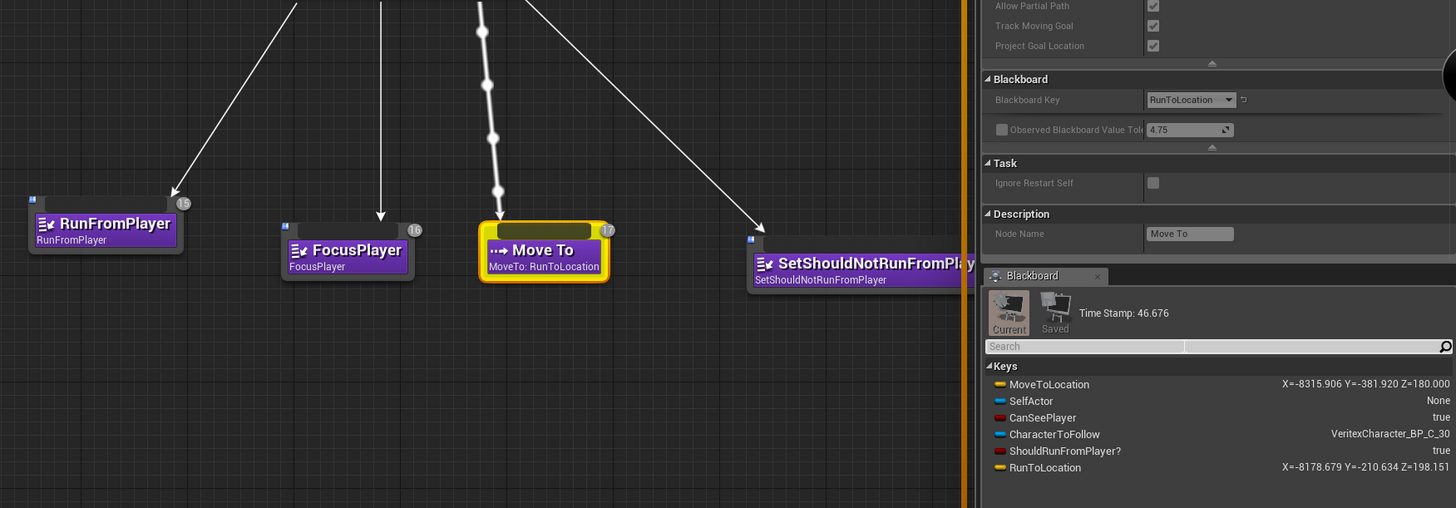
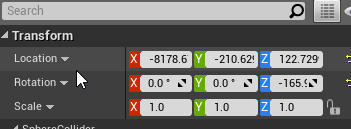
anyone understand why it wont move on? it just sits on the move to node
its weird coz once it gets out of range of player i wanted to use that last task to set the blackboard value
o.o
 tidal flame
@lyric flint Perhabs because the z value isn't the same?
 dry pollen
can someone help me with something
Let say i have a flashlight and a npc how can i make the flashlight stun the npc and in a few seconds the npc will disappear how can i make this happen in blueprints.
tidal flame
@dry pollen When you press a button you can make a sphere trace from your character and than you can send over an interface like "Stunable NPC" an message "Stun" (just example names). In the npc i would when it recive that "stun" message set the animation and move speed to 0 and then have an delay after which you will call destroy actor.
Hey guys i need some advice: i am currently working on a card game. (The basic system is similar to magic: the gathering.)
How would you go about setting up the ai?
I have thought about machine learning, but i have no idea how hard that would be or even if that is a good idea.
Would the behavior tree be a good option?
lyric flint
man we dont have a single dude on here who is like god mode at AI
tidal flame
@lyric flint I think i now why it dont works: It ends when it comes into the acceptable Radius.
You have to turn it up or move the target z location.
Have you Allow Partial Path and Project Goal Location on?
tidal flame
@lyric flint strange...
lyric flint
@tidal flame https://i.imgur.com/7jwp47B.png
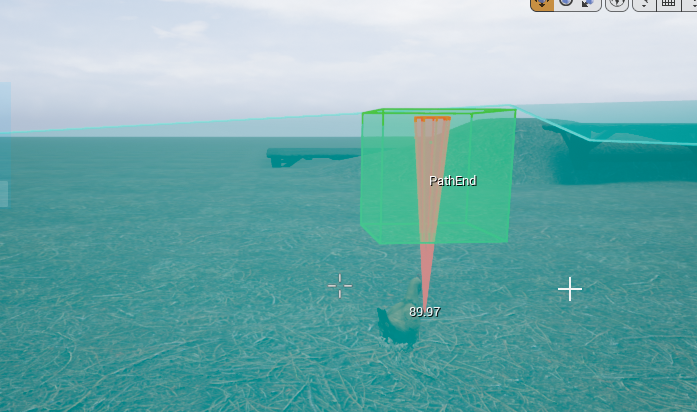
if i open the visual logger...
lol..
anyone know how to make it accept this point?
its not possible to have it fly up to that box
looks like it might have to do
with the agent radius
or something
i check visual logger...
literally stuck on "InProgress"
So I'm pretty sure it has to do with nav agent height
https://answers.unrealengine.com/questions/444231/setting-character-to-use-specific-nav-agent.html?sort=oldest
https://forums.unrealengine.com/development-discussion/content-creation/87894-setting-character-to-use-specific-nav-agent
https://answers.unrealengine.com/questions/104881/how-do-i-associate-my-character-with-a-navigation.html
this has been asked so many times lol
and Mieszko said the system checks automatically and assigned to the correct nav agent type
but i think this is poor design to not allow a user to set it on their own
 polar linden
@lyric flint Set what? The height?
lyric flint
@polar linden yea
of the nav agent
the Z is going up
like +70 or 80
which makes it not get to the target
polar linden
you can change that by modifying supported agents array in project settingsd
I'm trying to learn about this stuff now and came across it, maybe it helps...
lyric flint
@polar linden ya but u cant set a specific actor to use a specific agent type
polar linden
I don't get why there's even an array for this
I'm finding advanced AI documentation to be a bit lacking....
I would have assumed that maybe you change the name, then that should be possible
having to resort to digging through the source is far from ideal
polar linden
I'd still like to know what this array is meant for, but that looks like it'll do the same job 👍🏽
first thing I found out today the hard way is that perception component has restrictions on working in multiplayer and is being deprecated, last time I looked into AI I used that for sensing...
vagrant pasture
maybe that does some nav mesh optimizations, that all nav path that dont fit any agent get removed
polar linden
just going to have to go to school on all this with shovel in hand before I can make progress with my NPC AI it seems
vagrant pasture
but that is the bad part of unreal 15% nicely documented and the rest hasnt even a comment in code
polar linden
I keep wondering if UDN is like some magical place where all these questions get answers.....
most indie projects are probably content with that 15% it would seem ¯_(ツ)_/¯
I hope my bluntness is excused, it's holidays and I'm drinking... 😄
I'm still happy, I've made some progress today, just really feel it could have been easier
 sand lodge
hi 😃 , i have a map generated to infinity, and i do not know what to do for my navmeshbounds .. i tried to attach it to my character in my lvl blueprint, but it does not seem to work in game.. any idea how i could do this?
sand lodge
omg.. Ty
sand lodge
mmmh.. I am already in dynamic generation, but nav mesh is generated only in the navmeshbounds, not outside the box
polar linden
the extent is determined by bounds
you can increase the tile size
but it's not going to go further than bounds
sand lodge
I can not edit Bounds or their positions?
polar linden
dynamically?
sand lodge
yes? in game
polar linden
I've not got that far
why not just make it fit the extents of the level if dynamic?
and be done with it?
vagrant pasture
i dont know where i saw it but you can have dynamic nav that only generates near ai
polar linden
I got that working today...
sand lodge
@vagrant pasture i have this but it does not work outside the navmeshbounds
polar linden
bounds are still the extent of the area
sand lodge
@polar linden "why not just make it fit the extents of the level if dynamic?" that's what I'm trying to do
polar linden
well scale it to silly size
sand lodge
I mean in game
polar linden
are you using world composition?
sand lodge
the lvl is generated to infinity
sand lodge
when i attach the navmeshbounds to my player the event fire
the navmeshbounds seems attached at the launch of the game but does not move after
vagrant pasture
what happens when you spawn a new one next to one you are in at run time ?
polar linden
I don't know if you can dynamically alter bounds of a navmesh
vagrant pasture
seems you need to change some code for dynamic changes of the nav mesh or try streaming them
sand lodge
ok.. how am I exposing something? and what does it mean xD
polar linden
you can have one big volume encompassing the whole possible generated level space. This should not have a big impact on navmesh generation time.
if it's procedural... up to you 😉
sand lodge
infinity is pritty big :p
polar linden
lol 😄
vagrant pasture
you use origin rebasing?
sand lodge
origin rebasing? fot what?
vagrant pasture
System for managing large worlds including origin shifting technology.
it changes the world around you from time to time, to keep you in the center
polar linden
you would need that if you want to go beyond bouds of type precisison
vagrant pasture
but you can set actors to ignore that shift, so you could try what happens when you set the nav mesh to ignore the shift
polar linden

Out now » https://RAM.lnk.to/DCBInfinityBm Support NeurofunkGrid by becoming one of our Patreons » https://goo.gl/rHXDmh Buy NeurofunkGrid Merchandise » http...
all I could find, top tune, I play on Spotify
😄
elfin socket
Why am I so dumb?
elfin socket
@lyric flint The Advanced AI livestream training on the official Youtube channel uses EQS
Also there are some video demonstrations on Youtube if you google it
polar linden
@lyric flint qs seems to be covered in a udemy course by Tom Looman
from the demo video it seems like it covers using a donut generator for weighting positions based on obstacles
 polar linden
section 9
 thorny cloud
Are behavior trees still a thing in UE4?
I'm trying to set up some basic enemy AI, and some of the tutorials I'm seeing are saying I need to use Behavior Trees, and Blackboard.
Neither of which I'm able to find.
thorny cloud
In the tutorials, it says I should find it by going to the Mischilanious tab, or in the Editor Preferences.
thorny cloud
Ahhh.
minor wolf
Merry Christmas guys! Is there a way to make an AI character jump instead of walk?
I'm trying to make a rabbit
polar linden
you'd probably want to make a custom AITask and maybe setup your anim blueprint for it
if you don't have the ABP done, there's doubtless other ways that might work well enough
minor wolf
I've never actually used them but I presume they would have something like a keyframe that can call the task?
polar linden
I was suggesting a task that runs in a behavior tree
there's already moveto to work from
you might want to consider something simpler though
you could always do it in BP and just call jump with some forward movement
minor wolf
Behavior trees look quite flexible so I might just put it there
polar linden
@minor wolf I think what you can do in that case is use moveto and make another task from BTTask Blueprint Base or a service, then cast the actor so you can call jump, might be enough to get you started
 torpid pilot
Anyone knows how to share a blackboard data among couple different AI pawns?
 cerulean stirrup
anyone have experience with AI navmesh pathing on a non-flat surface such as a 6 sided or circular wheel space station?
lyric flint
Would anyone know if there is a way to generate a PathingGrid or SimpleGrid similar to how Environment Queries does it, but in regular blueprints? I'm trying to make a single actor that generates valid cover points based on surroundings that can then be used as a generator for the actual Environment Queries. It seems less expensive than generating the Pathing/Simple grid for each and every AI individually.
 patent marten
Thrre is a free cover plugin on github
It generates on beginplay, and my fork uses async update
@lyric flint ^
@cerulean stirrup I think I saw a spherical navmesh at a voxel terrain related page, you could ask these voxel guys...
But maybe I'm wrong
lyric flint
@patent marten I wanted to remain as plugin free as possible, it's for school 😃
 dim vault
Yo guys im really tryna figure out how to best optimize my damn crowd. Anyone here have crowd experience?
 charred valve
I'm looking to build an AI for a game with unusual constraints:
- Each Pawn must occupy one Cell, which is a platform like a space in a board game. However, these Cells do not snap to a grid, and can exist anywhere.
- The (VR) Pawn can teleport to any Cell theyy can hit with a throw of a rock. (We'll assume some max distance.)
Should I ignore navmesh altogether? Is there something I can extend or implement to make my life easier?
elfin socket
AI Perception will show you actors that represent where they "think" an Actor currently is, even if they cannot see/hear/etc that actor anymore. How can I tell, via OnPerceptionActorsUpdated, whether the Actor I'm looking at in this TArray is an real one or a fake one?
elfin socket
Also, why in 4.16 does there not exist an EQS Query option for creating a new blueprint class? Apparently in 4.16 it's not listed as experimental but you still need to turn it on... and it's not in the same place where all of the tutorials tell you to look.
 vague robin
Hai, I'm working on shooting AI it works fine it just flips without delay when he sees me and shoots. Anyway to make him turn slowly
like a real person?
cerulean stirrup
if this was processed once a frame then the actual rotation would eventually become the target rotation --> AI Actual Rotation = AI Actual Rotation / AI Target Rotation
vague robin
Yeah, I'm a noob could you explain like I'm soneone with 0 experience
Yeah I recorded it but the file is too big..
@cerulean stirrup
Rotate face to enemy has to go in like a slow transition
 worldly berry
I would use a timeline
That lerps between the current rotation and the target rotation
@vague robin
vague robin
how
latent bolt
@vague robin you can create custom task, put inside Rinterp with small speed value. And just set actor rotation with new values each tick.
vague robin
@latent bolt meepmeep Could you send me an example?
I'm really bad at AI, this was my fist AI ever..
vague robin
Yes
vague robin
That's the actual blueprint?
latent bolt
yep, behavior tree task
it runs every tick until you npc will rotate towards player (with threshold == 5 degrees)
this is continious task, so you dont need to use any wait nodes inside behavior tree. If you want to get some random rotation speed or simulate some reaction, you can randomize Interp speed value or add wait node before runing this task
latent bolt
target is blackboard key, where you store you reference to target, or some point where you want to rotate npc
vague robin
How do I get a reference to enemy?
latent bolt
thats you enemy
from picture above
In my setup target is equal to you enemy in you setup
vague robin
How do I get a reference to that blackboard thingy
latent bolt
declare a variable inside you task and make it public
then, you will be able to select proper key, like in "rotate to face" node
dont forget to make it Blackboard Key selector type
vague robin
My enemy variable in the blackboard is an object not an actor
latent bolt
you can get it as object and then cast to actor, or just get its position
vague robin
im arealnoob
I'll just create it and get to the point of the actor location and then ask you again
latent bolt
I'm going to sleep)) sorry. Just try to experiment.
latent bolt
question?
latent bolt
tttthats a very generic question. Try to follow ue4 behavior tree tutors, there is small one on official site..
at least there is part where npc get reference to the player
 rancid ginkgo
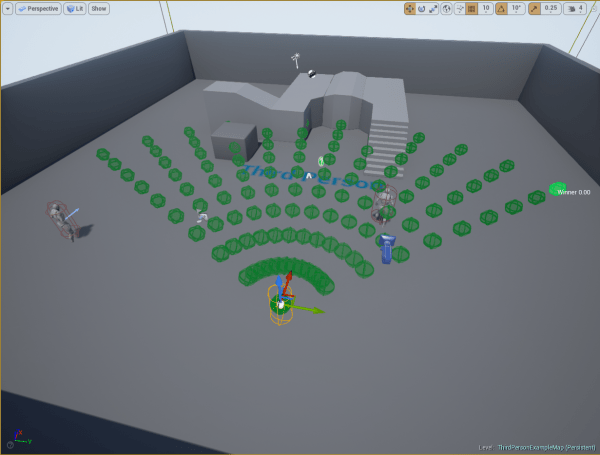
Hello, I have a question concerning the EQS system, i'm trying to make melee AI surround my player. I try to use the Points : Circle thing in a Composite with Actor Of Class, but i'm a bit lost, i'm not sure it's intended to work like. Do you know the best way to lets say have 4 slots around my character and my enemy AI go in each one and the other AI will not be able to come near the player ? Thanks
polar linden
maybe donut would work better @rancid ginkgo If not, http://orfeasel.com/creating-custom-eqs-generators-in-c/
I've still not quite got to using eqs yet
 eager basin
Anyone knw of any tutorials/documents/sites showing Behavior trees for "Third person" type melee games?
 strange sun
Im trying to use selectors to switch between two states in a behaviour tree.
Even though the value of the Enum in my blackboard changes as expected, the behavior tree will not switch states. It goes back to root and marks my blackboard condition as red.
I'm guessing that there's some basic step that I've missed. Anyone know anything about it?
vagrant pasture
did you set abort on change?
strange sun
Do you mean "observer aborts"?
Blackboard condition
I'm changing my blackboard Enum in my AI controller, via keypress. Maybe that's the problem?
Solved, thanks for the help 😃
 rugged island
There is a nav mesh proxy so he should be able to jump down. Even if that isnt working he should at least go back down the stairs without getting confused
I have to get right up next to him which makes him attack me to restore his normal AI
https://streamable.com/xvvew
 lyric flint
Why character with AIPerceptionComponent sight my RTSCamera? I don't want to set camera to friend of my bot because camera isn't a character.
It's my pawn (FreeCam).
He's not derived from Character class so I don't know why other bots perceive this pawn.
lyric flint
AI Perception auto detects pawns
You can set it up so that your camera is on a different team: https://denisrizov.com/2017/05/08/ai-perception-in-unreal-engine-4-how-to-setup/
For those of you who are wondering what AI Perception is – this is a really nice system in UE4 that provides an easy way for the enemy AI in your game to track hostile/friendly/neutral charac…
@Arhed#8371
@lyric flint Thx for an answer. I want to avoid setting cam as a friend of my bot, but if it's the only solution, I'll do like on this blog.
But maybe my FreeCam class can derived from an actor class (not pawn). Is it possible?
I add that i need control FreeCam.
player need*
@lyric flint Actually I think AI Perception uses the Visibility channel to detect pawns
So try setting Visibility to Ignore on your camera pawn
lyric flint
Hmm, I set Visible to false and it doesn't work. I dont'n know how to set Visibility to ignore on camera pawn.
@lyric flint Maybe I should change other properties?
vagrant pasture
collision
lyric flint
ok, ignoreOnlyPawn?
vagrant pasture
set it to custom and there is a list below, if you set the right one to ignore it should work
but i dont know to which the ai reacts so you have to try
lyric flint
I'll try to diffrent options but bot still see camera as the enemy 😦
lyric flint
Still, I don't know how to fix it, but I have a simple question. If AIPerception perceive all pawns, why should we use AIPerceptionStimuliSource for characters which should be perceived?
lyric flint
I think that AI Perception uses something else than the visibility channel to detect pawns, bacause if I create a pawn only with DefaultSceneRoot (so without collision properties), my bot still see sthis pawn...
rugged island
@rugged island I fixed my issue. The problem was that in my movement task I only completed the task when AIMoveTo was successful. But when I was in a place where the AI didnt think they could get to it was not sucessful so he got stuck.
 arctic goblet
Hi, guys. I'm trying to implement Quake-like jump pads with the help of LaunchCharacter function. The problem is I can't get the AI to use it properly.
The most obvious solution was to use NavLinkProxy, but it does not give disirable effect: the AI approaches a jump pad from different sides and therefore are being launched earlier than it can reach the start point of a link, which leads to strange behaviour, when character cyclically tries to return to the first point of a link but ends up launched again. Analogous problem occures when the AI misses the end point of the link.
So the question is can I somehow reset the pathfinding component of a character, so it won't try to reach the first point of a link, but try to find a new path from the landing point?
lyric flint
@lyric flint I tested it and the visibility method works. The setting is in the collision setting
 thorny cloud
Is there a way to adjust an AI character's movement speed depending on which state they're in?
lyric flint
Yes, you can adjust the MaxWalkSpeed of your character movement component during runtime
lyric flint
I don't know why my bot still sees and shoots to camera...
@lyric flint Bot try to kill an invisible object with camera...
eager basin
Is there a way to get the direction for an AI character? I want to make the character to move left and right and forward and backwards by locking on to the player
like in most typical 3d person melee games
or any methods to make that sort of movement to the AI character
 arctic crag
@eager basin GetActorForward
arctic crag
What do you mean modify the distance?
arctic crag
add movement input
eager basin
but thats for player character isnt it?
arctic crag
It works on all pawns I believe
vagrant pasture

Here we go over creating custom decorators, creating strafing behaviour which will serve as a nice template for combat movement, and talk about focus logic -...
eager basin
I did tht tutorial but it was more for shooter
the strafe was weird as well
@arctic crag for the movement input can Give specific default value for the "scale"?
arctic crag
it's on a scale from -1.0 to 1.0
then it uses the movement component settings for speed, acceleration, etc
eager basin
oh I see thanks
lyric flint
@lyric flint Try making all components of your camera Pawn ignore Visibility
eager basin
So Im making a test for my AI character to make a movement on start
I dont see him move
am I missing something?
the character movement has walk speed and all set
vagrant pasture
thats only one input
 wet aurora
It probably doesn't have enough time to accelerate.
lyric flint
You're doing it on Event BeginPlay
vagrant pasture
try it in tick
eager basin
still doesnt move
lyric flint
You're using Character right?
eager basin
yes
oops sorry
he moves
I didnt have any aI controller attached
Thank you all
Another problem I encountered
I attached the Event ticks "delta seconds" to the "scale" value of the add movement input
It doesnt make him move
but setting the scale value like 200 or higher value makes him move
arctic crag
that's because your delta seconds is a pretty small number
eager basin
Is there any workaround for him to move in ticks
arctic crag
they are separate
eager basin
Im just trying to figure out something like in this video

敵人在攻擊出手前都會有閃紅的提示。 代表若玩家可以在攻擊前先制攻擊敵人,可以強制反彈對方並進入失衡狀態,在對抗高霸體的敵人十分有用。
lyric flint
@lyric flint Only in pawn i can set ignore Visibility, SpringArm and Camera hasn't that properties
arctic crag
you'll want to do that in a behavior tree
eager basin
is there a way to make the AI character move in a circular manner
as in the video
I did Asher Einhorns video
but it was more of line strafing
arctic crag
yes, face towards your target and move in your actor's right or negative right direction
arctic crag
does it work for your AI too?
eager basin
no
lyric flint
@lyric flint Not too sure then. Visibility method works for me 🤔
eager basin
I tried using focus
arctic crag
then that seems like your first task then
arctic crag
no problem
eager basin
and Thanks all
thorny cloud
https://gyazo.com/d57966a777f087b6e1e7d199fe7ae87b
So I get that enemies need to be close enough to you to do damage, but like.... XD

Is there a way to like...adjust this? 😛
arctic crag
how are you moving your ai?
thorny cloud
Blueprints.
arctic crag
i mean specifically
 arctic crag
Ok so just change your acceptable radius
thorny cloud
Derp.... XD
thorny cloud
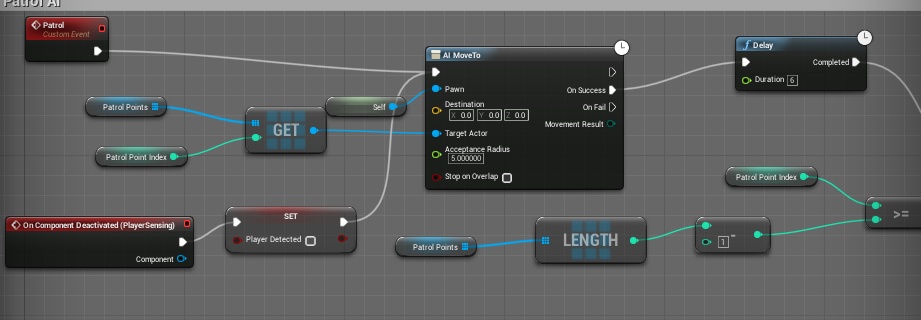
Another thing, related to Player Sensing.
"OnComponent Deactivated" is what happens when the AI loses sight of the player, correct?
https://gyazo.com/5e87de6ad8336148c44413769b2aee63
Because my enemy doesn't revert back to it's Patrol AI upon losing sight of the player. (Which is also kinda wonky, but one issue at a time. 😛 )
 arctic crag
I haven't used the pawn sensing component but I don't think that's correct
there should be an event like "On target lost" or something
strange sun
I'm using the AI perception vision and getting the location for last stimulus (vision). The location i get is the Location where the actor was spotted. Do anyone of you know if there's a way to get current location for the vision?
It's visible in debug mode ofc. Just can't seem to get the updated location
vague robin
Any good tutorials for AI?
lyric flint
A neural Network AI car learning to complete the course. For a first individual its doing pretty good until a tight turn :P
Made for AI class :)
https://puu.sh/yVBqu/b8a5e2df32.mp4
lyric flint
@strange sun I had the same problem, but I think that I solved it. I created a variable for the enemy in my AI bot blueprint. When my bot see the enemy, I assign reference for him to the variable. So now I check if my bot see the enemy and if it's true then i get the current enemy location from the variable. Maybe it's better way to do it, but my idea also works.
strange sun
@lyric flint Thanks! I eventually did the same.
 agile widget
Good Morning/afternoon guys
IU'm trying to create a Scout AI to map out the level for the enemies, and I wanted to know if you guys can help me see for an idea on how to map the zones the AI has already been at?
arctic crag
@WolfAlvein#0311 what do you mean "map the zones"?
latent bolt
you can break you map into the square zones and create sort of grid system to check if AI was in that grid cell or not
 opal folio
https://gyazo.com/d31da63d06d377e6e95862d84d6c74f5 i've put this together from watching a tutorial and in the tutorial his works fine whereas mine doesnt and i dont understand why. i'm just trying to make a simple random AI free roam

 strange jay
how can i star learning to make ai opponents with different skill sets
arctic goblet
If smo for some reason interested in the solution to the Quake-like jump pads problem I've stated some time ago , you can check the solution / result here:
https://answers.unrealengine.com/questions/743186/how-to-reset-pathfinding.html
lyric flint
@Noreh#6469 Do you have navmesh created?
rancid ginkgo
@polar linden ok thanks , i will check it out ! Thanks again
 acoustic tulip
Hello, has anyone come across an issue which NPCs shakes on turning complete?
patent marten
@acoustic tulip : I had similar issues because of SetFocus
patent marten
if focus actor is reset to null it wants to turn to yaw angle 0
or if focalpoint cleared, the same
acoustic tulip
Hmm.. I seem to know what you mean. I can see the SetFocalPoint is called and it clears the focus actor.
set it to nullptr.
Do you have a fix for this issue? I already set the bUseControllerRotationYaw to false which doesn't seem to work.
The shake is more noticeable especially for big animals .
 heavy plover
Hi anyone can send me a link of tutorial on how to create a Animation / bones of my AI .. she looks like this and i set her to fly mode because when i set her in to walk she repeat the same animation (zombie)
please understand my english im so bad
patent marten
@acoustic tulip : I made BP exposed focus handling C++ functions using movement priority instead of game priority, and never clear it, on arrival set it to target location or to a point in front of the character, and using focus always to location, never to another actor that can be killed i.e. destroyed, what can result in nullptr focus again....
acoustic tulip
@patent marten Thank you very much. So can I ask if you mean in the function K2_SetFocalPoint, change the EAIFocusPriority::Gameplay to EAIFocusPriority::Move?
If I understand your idea correctly, it seems to be an engine problem becasue of clearing the focus on arrival.
Looks like the shakes on turnning complete only happens to some of my NPCs so I am not sure if it's my own problem or it's a general issue which is just not obvious on some NPCs.
patent marten
the reason might be different... I had issues because of it and solved in this way, imo the BP functions defining priority are really missing...
the only situation when you need gameplay priority is when approaching the enemy and you want to have the character facing towards the enemy instead of the path direction
I mean aiming with a gun
acoustic tulip
Ah, I see. Thanks a lot. I think my issue might be related to the AIController setting yaw angle. I'll have a look at this.
So my issue is some of my NPCs (animals) shake on their turning complete. Looks like that they are struggling to set the yaw angle.
Any ideas are appreciated. Thanks in advance. 🙂
I will update this issue if I can figure it out.
@patent marten Thanks, I'll keep an eye on the priority and see if I can figure out something.
acoustic tulip
Mine is just in a standalone mode. But in my multiplayer mode, it happens too. I think I'll try to solve the standalone one first and see if the multiplayer one is fixed too.
 desert kelp
I'm doing a turn based game, so instead of using behaviour trees that run every tick, I'm doing my AI in blueprints
and I'm putting the task/service type functions into a blueprint function library so my different AI tasks can access them.
but the behaviour itself is on the AI pawn. Does this sound like a proper way to do it?
 ornate knoll
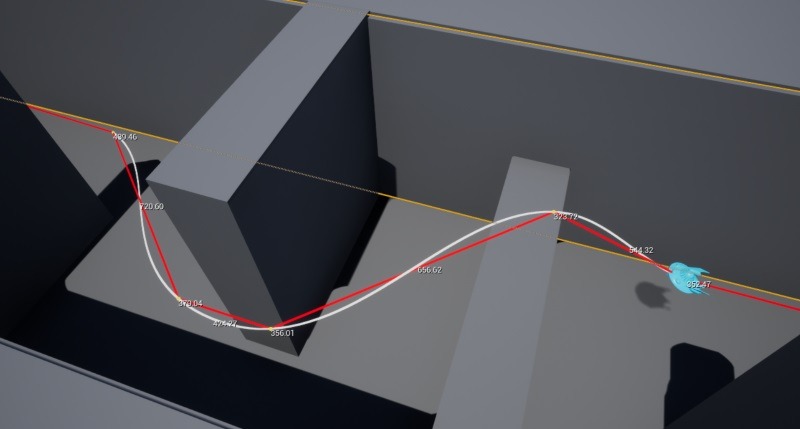
Hey is anyone interested in getting AI to steer better around 3D corners? Check out how we do it https://mercuna.com/spline-based-steering/
 eager basin
Whats the best way in the BT, to make an AI choose between multiple tasks according to random intervals
Eg - The enemy gets task 1 for 2 seconds, task 3 for 5 seconds, then task 2 for 8 seconds. Basically to execute tasks on random time intervals (or switch btw tasks)
 alpine wren
Hey all, this may be a stupid question, but does the Character class take delta time into account when the character is moved using Ai Move To?
lyric flint
Ok, a few days ago I have a problem with AI bot which try to fight with my RTSCamera. Today, I found this https://answers.unrealengine.com/questions/437869/ai-perception-bautoregisterallpawnsassources.html but I have another problem. Where should I add this two lines o config code? Is the end of DefaultEngine.ini file a good place? Unfortunetly, my bot still fight with camera...
This is the end of my DefaultEngine.ini.
latent bolt
@lyric flint reading comments at the answerhub it should be in DefaultGame.in
and you can add it anywhere inside, it just should be placed under [/Scipt/AIModule.AISence_Sight]
lyric flint
@latent bolt Oh, I'm blind xd. Thx, later I'll try and add this to DefaultGame.ini ;)
latent bolt
dont forget to check maybe you game.ini already have this section )
lyric flint
Ok ;)
 fallow gull
Hi guys, I have a spider that I want to walk onto a table, I placed a nav mesh bounds volume into my scene but when I press P I see that the surface of my table is not taken in consideration by the nav mesh. Any Idea why that?
 willow arch
maybe its too small?
if you try, as an experiment, to set table scale to x5, y5, does it work?
fallow gull
it works on a cube at the same height yes, how could I modify the nav mesh so it fits on small area?
willow arch
if you go to project settings->engine->navigationmesh, you'll find the generation settings for the nav mesh
havent messed around with it myself, so im not sure what exactly you'll have to change
probably TileSize or CellSize
maybe AgentRadius
fallow gull
thank you, I'm currently messing with it, I could make it better understand that a high surface is not a slope, that's already good ^^
But I'm still struggling with the border of the nav mesh so it fits small surfaces it should be cell size I think
willow arch
yeah i cant really get it to change the minimum size either... none of the settings ive messed with has made it path the narrower areas on my map
setting low cell size and low agent radius should give it the most accuracy
ah there
you should have an object called RecastNavMesh-Default in your editor world... in that one, set e.g. CellSize 5 and AgentRadius 5
that successfully maps very narrow areas here... seems project nav mesh settings doesnt update existing ones properly
fallow gull
yep changing the recast nav mesh did work. but it's very buggy! I sometimes have to delete it to create a new nav mesh or it doesn;t update. Also if I rebuild all paths it adds me a deleted object into my outliner. And moreover, when I try to make a simple move to logic for my AI, it shows me a warning : ''' SimpleMove failed for AIController_0: movement not allowed '''
willow arch
hmm youre certain your pawn has an aicontroller?
and that it has a movement component?
that message seems to be produced if the following is not true: MovementComp && MovementComp->CanStartPathFollowing();
CanStartPathFollowing will fail if pawn has animrootmotion, ismatineecontrolled or is simulating physics
fallow gull
@willow arch hmm, I'm using the basic AIcontroller for my pawn, so I guess it's already set well.
Otherwise, if I create a brand new ai controller, what should I do to make it functionnal? I'm not so used to AI but I guess just make a simple pawn moving toward a target is the very basics.
And I'm using BP by the way, it is the same process to check if the movement component can start path following?
willow arch
yeah it should be the same... youre certain that the pawn has a movement component and that its not simulating physics?
fallow gull
ah my bad, I didn't have the movement component, now I don't have any warnings, although I don't know which one to choose, is floating pawn movement the one for a walking pawn? (I have a spider).
I should watch all the tutorial series for Ai though
lyric flint
anyone know how to make an AI repath when it gets stuck?
like i have objects which are dynamically placed into my world by players
but they arent affecting pathing
so the ai just get stuck
and constantly walk into it lol
fallow gull
Do you think modifying the nav mesh into the RecastNavMesh can break the navigation? Even though the area I want my AI to walk on is green when I show the navigation? Normally if it's green it means it should work right? If my Ai doesn't move it's probably because of the pawn or the controller itself?
willow arch
yeah no its probably in the pawn, controller or movementcomp
bdoom objects have this 'can ever affect navigation' setting ye, does it help if you turn that on? alternatively you might need to force a recalculation of navmesh when spawning them, which could be expensive... too little experience wtih nav mesh to say for sure how to handle that
lyric flint
@willow arch thats on by default
fallow gull
Is it better to use a Pawn or a Character for AI? In almost every tutorial I've watched they use a character, I noticed that characters have a CharacterMovement component, but I can't implement that on a pawn, what would be the correct setup for a pawn to move as a character does?
fallow gull
Just made a discovery, and wanted to share it : I've changed the Agent Radius into the project settings, I had to change it as well into the RecastNavMesh object to make the Nav Mesh bounds reacting correctly. Although that's not enough, I also had togo into the Navigation system into the project settings, add a supported agent and change its radius to be the same than it is into the Recast and the Navigation Mesh settings. For example if it's set to 5 in the RecastNavMesh object, it should also be set to 5 into the Navigation Mesh settings (I didn't try a lower value, but I guess it should work as well)
lyric flint
@fallow gull In my project all my bots are Characters and I think most of people doing the same
But all my bots are soldiers 😃
fallow gull
@lyric flint Oh okay 😉 , mostly because of the CharacterMovement component isn't it?
lyric flint
@fallow gull Probably it's one of the most important reason 😃
fallow gull
@lyric flint and is there a way to add such a component on a pawn ?
vague robin
Add component when in the AIcontroller.
fallow gull
@vague robin which component?
fallow gull
Guys, I have a problem with the behavior tree that I think y'all have already had the same :
My Ai will follow the TargetActor even outside of the bounds of the navmesh, and when he reaches it, It won't move anymore because he's now outside of the navmesh. --'
I've search for solutions on the forum and I've found this : "So I decided to do all the solutions here, set target as vector, set to NavMesh Walking for movement, and set the Observed Paths to 0.1"
here : https://answers.unrealengine.com/questions/413063/ai-walks-outside-navmesh.html
but it doesn't work for me, at least the Ai doesn't go out of the bounds but it also doesn't follow the TargetActor as it's supposed to do. It just tries to reach the last location of the actor, and if my actor moves, it won't follow it, it will stick with the old actor location and won't change its trajectory until it has reached it.
How do you guys usually deal with that?
fallow gull
 vague robin
I don't know that my guy
 potent minnow
Hey gals, guys, I just started playing with BTs, after watching tutorials. I'm trying to get a camera to move left and right as the default action, but I can't seem to find a way to do it through the Behavior tree.
lyric flint
@potent minnow Do you want to create BT tasks for camera? So, attach a camera to the (invisible) pawn. Create AI controller for the pawn. Run BT in AI controller. Create tasks for your BT. In tasks try implement your movement logic ;)
@fallow gull I never do it, but later i can check if is it possible to add a movement component to the pawn or it's possible only for characters.
fallow gull
@lyric flint okay cool thanks. And did you see my navigation problem above? did you already encounter that?
lyric flint
@fallow gull No, i never encounter that problem.
fallow gull
In every example I've saw, people usually set the nav mesh to fit the whole map, as it's not my case, I can't see a solution for that
lyric flint
But maybe try to remove this nav mesh bounds volueme and create new which is higher.
fallow gull
I've already try with several sizes of mesh bounds volumes, and I also tried on a new map (in the gif it's the actual new map) And it's still reacting the same way. I've changed the nav mesh settings in the project settings though, so it fits small area. But I doubt it's because of that?
lyric flint
@fallow gull Can you show me a blueprint with a movement logic of your spider?
fallow gull
sure, just a sec
lyric flint
Ok ;)
fallow gull
here is the custom Ai Controller
here is the Behavior Tree :
I've made a paste bin of my Service here : https://blueprintue.com/blueprint/dden8g1b/
and that's what I've changed into the character movement component of my Ai Pawn :
lyric flint
Try use function Get Blackboard Value as Actor and the Get Actor Location
fallow gull
oops sorry, I forgot to hook up the TargetActor to the SetBlackBoardValue for the pasteBin, but it is hooked up on my side.
Okay, then you cant me to print it on screen?
fallow gull
Okay sure, thanks
potent minnow
@lyric flint That's what I've been trying to do, but for some reason, it isn't possible to add rotators to my task or have a timeline.
I could try rotate to face bb entry, but rotate to face is choppy
lyric flint
@fallow gull Ok, so I have similiar problem, when my player is out of the nav mesh bounds volume then AI sometimes stops. I think you cound try to use a AI Move to function instead of task Move To.
Hmm, but now AI stil stops when player go out of the nav mesh bounds vouleme...
@fallow gull I think that your problem is similar to this https://answers.unrealengine.com/questions/541678/enemy-character-stops-following-when-player-charac.html
@@fallow gull Yeah, I write it 😃
one sec and I send this blueprint for you
I used function ProjectPointToNaviagtion to check if player is on the NavMesh
Here, it's removed "vision system", bot always follows player. You can add to if you want.
fallow gull
@lyric flint Ah super! 😄 And it works fine that way? I'll try that now, I knew there was a way to check if the player's still in the nav mesh bounds but I didnt know what it was. Thank you!
lyric flint
This blueprint saves the last player position on nav mesh and than bot can move there in task Move To.
@potent minnow Try use function Set Focus in your BT task.
potent minnow
Set focus works too well... It turns instantly to face the point of focus, without moving
lyric flint
Yeah, but you can designate new positions for set focus every e.g. 0.01s and you get a smooth movement
I'm not pro in UE4, it's only my idea 😛
potent minnow
ok i managed to make it smooth... aaaaaaaaaand it turned out just like focus, it turns too quickly!
damn, i didn't think that making a camera would be so hard :p
fallow gull
@lyric flint hmm it works but the thing with using a MoveTo with a vector value doesn't give a trully following Ai. It goes to the previous location and doesn;t change trajectory until it reaches the given location
lyric flint
@fallow gull Hmm, I don't check it 😦
fallow gull
chasing the player is a real problem , and I'm not enough used to making Ai to solve this. I'll probably have to place some invisible wall so it doesn't go off bounds :/
lyric flint
Try this, maybe it works 😃
This service doesn't need Move To task, but you can mofidy it if you want 😃
If player is on the nav mesh bound than AI goes to the player
If player is beyond the nav mesh than AI goes to the last player location on nav mesh
@fallow gull Ok, I go to make my own project
My main service in BT is broken, I need fix it today XD
fallow gull
Haha okay thank you for your help again! I thought the service couldn't contain a move to, but if it can replace the task itself, that's all good! I'll work on it! Courage with your Ai 😄
 proud sphinx
this might be a stupid question but how can i get an AI to chase me only if i inflict damage to the AI
im not talking about sensing pawn but when i do damage to the AI to chase me
#gameplay-ai hey is someone in this chat to answer my question (im using blueprints)
lyric flint
@proud sphinx AIPerception Component has a Damage Sense. But I don't know if Epic Games implements all functionallity or it's only "mock". But you can use functions: Apply Damage and Any Damage and create own damage system.
 keen furnace
@proud sphinx you asked this in two channels and got the same answer from two people, one in each channel. best to stick to one channel if you dont want to antagonise helpful people
 charred glade
Trying to get the AI to move close to the player - if it's on an object
Ended up just making him roam around a small radius of the detected player 😄
fallow gull
Hi guys, how do you use a boolean condition on a blackboard condition?
proud sphinx
i dont know
fallow gull
hi guys, how would you go to make an Ai jump onto the player like in this short video? https://www.youtube.com/watch?v=35Dtpbl2cls

The video demonstrates the AI of the giant beast , having various locomotion sequences + attacks based on player direction and distance relative to the monst...
lyric flint
@fallow gull You should animation.
Or you can use jump and unjump, but it won't be very beutyfull.
fallow gull
@lyric flint animation but it should be procedural right? because I'd have to know where the player is exactly at.
lyric flint
Hmm, on the beggining of this video moster rotate and then jump forward.
So, I think it's only 2 animations
fallow gull
yeah it's true, that's not the perfect example then. I would like it to jump and reach a given location, and stay in the air until it reaches the location
lyric flint
Hmm, i'm not expert in animations. Today, I ask questions on animation discord chat. Maybe you should ask there.
fallow gull
yeah you right, I'll ask there. Thanks though 😉
 static dew
anyone know off hand settign controller rotation to not make the ai pawn flip around lol
oh dur
nevermind
 fast cosmos
I want to add a simple ball to my 3D sidescroller, that'd fly to the player when he gets in range. I'm having a bit of an issue, though.
My structure is:
Pawn master -> pawn child, with an AI controller set in the child
Master has FloatingPawnMovement in it, and no other AI-related code, just some HP and damage stuff
The child has this:
AI Controller is empty.
And my pawn doesn't move to the player when in range
fast cosmos
Just a homing ball of energy that should urt the player. Thought that if I want to learn making AI, I should start from the basics.
fast cosmos
Okay, I disabled StopOnOverlap. Since I was using a sphere collider to detect the player, the AI was stopping moving as soon as it touched the player.
fast cosmos
My navigation generates properly on landscape and actors, but not on static meshes. What am I doing wrong?
lyric flint

 dusky lodge
Awesome, ive recently started an RTS side project and im about to start on my own AI solution.
lyric flint
Thats what im making it for 😃
dusky lodge
Looking at being able to support 1000 Units
lyric flint
I think it can go more
dusky lodge
If i can get 1000 with decent fps ill be happy
lyric flint
its only limited by UE4 rendering
and other stuff like animation which i havnt tested yet
dusky lodge
Yeah well i figured skeletal meshes can be ommitted completely.
lyric flint
yes
lyric flint
Ye true. I could only fit 786 on that terrain I didnt want to make it larger but ive tested with 12km x 12km terrain
but not with 1000 ai and the pathfinder still works fast
dusky lodge
Your obviously not calculating collisions though either
dusky lodge
Yeah
lyric flint
What sort of pathfinding were you going to use, that is flow/vector fields in the video
dusky lodge
I havent gotten to an point to think about it yet, i literally only started recently and have just managed to get the Camera movement and Level bounds setup lol
lyric flint
I see. I have no level bounds or anything I just wanted to see how many ai I could get on screen
The camera is 90% done, but thats the easy part 😄
dusky lodge
Im confident i can get 1000 to work and not eat up to much performance
dusky lodge
Ah right
Yeah well mines an side project so ill have limited time to work on it haha, it will progress slowly.
dusky lodge
Gotta start somewhere lol
lyric flint
True
static dew
Trying to figure out if eos is right for me. Max 5 or 9 bots that need to querey location of one object to find best position which will update often as it’s a fast moving object. As I am working on a sport type game which would deep down need to think like a top down hockey game
If my teammates are such n such I should prob go here etc
dusky lodge
EQS? you mean? lol
dusky lodge
EQS is good for dynamic cover systems etc etc, i wouldnt use it for an sports game.
static dew
Behavior trees are tough guess I’ll need to figure out a lot more math examples
Like bots need to go where the ball is going to be based on its velocity. But now you need to take into consideration if it’s going to hit something and bounce so least one bounce accounting for
static dew
So the bot basically needs to trace based on its velocity of it impacts I guess trace off the. Normal again to get its location and decide how to get to a target location
Intercept I guess
dusky lodge
No, id let the Ball do its own tracing, then the Players can query the ball for its possible new location
static dew
I was thinking that too and use max base speed of the bots to draw the. Neutral point
Might need some dots in there.. what if it’s coming at the bot and location is behind it. Don’t want to walk backwards lol
This is going to be tough 😃
You gave me an idea actually
Can’t even explain it but the ball is gonna looks like a spider if you turn on per frame for trace
dusky lodge
Oh your using an actual Projectile for the ball?
Traces are pretty inexpensive
You can perform an few hundred each frame and it wont be noticable
If you get the Ball to calculate its own trajectory and even account for just 1 possible bounce, you can give the AI players an location to move towards.
static dew
Yeah my thing is I need to account for each ai location won’t ever be more then 9 to draw possible location in a different algorithm based on are they at this moment keeper defender support or chaser
The bots themselves just need to know a location to move toward abdbhave there only logic what to do once there in range to actually do something
fallow gull
Hello guys, Is it safe to share the same Blackboard with several Behavior Tree? I mean, Are they instanced so several BPs can set values in each Instance without interferring with each other?
I don't If I'm really clear now 🤔
lyric flint
@fallow gull I think it's safe. I have main behaviour tree for my bot and many subtrees
fallow gull
@lyric flint Oh so I have to have the same parent Behavior tree though?
lyric flint
No, I think this tree doesn't have to be a subtree.
And it will be work perfect.
In my project bots have BT which have always the same structure, but I'm running diffrent subtrees for diffrent bots. I'm chaning Behaviour Asset in Run Behaviour Tasks.
fallow gull
Oh okay, I didn't know there was a task that can load a Behavior tree 😃 . So it works a bit like Sub trees in Anim BP.
So I just need the same Blackboard for all those trees?
lyric flint
Yeah, you can have one Blackboard if you don't need more
But, if you have bots wchich need diffrent keys, then you should create diffrent Blackboards
fallow gull
okay I see, and if I share the same there's no chance that the keys are overriding each other?
lyric flint
No, it's no chance that keys are overriding each other 😃
You should think that Blackboards is kind of class, and you can create many objects of this class
fallow gull
Okay I see, I have a better understanding now, thank you 👍
vagrant pasture
@fallow gull in the settings of each blackboard var you can set it as instance synced
than all AI would share that value, but otherwise each has its own
lyric flint
Expose? In service, or in the task you can use functions: "set blackboard value as" and "get blackboard value as". Later, in BT you can click on service or tak and you can bind Blackbord Key Selector form Service/Task with Key from Blackboard.
Overviews and examples AI
Here, is quite good explanation of basics.
fallow gull
I mean, I have a BT "BT_01" that I get access to in another BT "BT_02" by the Task "Run Behavior". Inside of this RunBehavior Task I would like to have access to the values that were exposed into the BT_01. Is that possible?
lyric flint
You should use set blackboard key and get blackboard key
fallow gull
Okay okay, I'll work on it. Thanks
fallow gull
Hi, do you know why when I call my BT from the controller it makes the ControlledPawn pin of the EventReceiveActivation node invalid? When I run the BT from the pawn everything works fine though. It's really strange.
I have this bug when I spawn the actor, not when I place it in the world
 stray juniper
Been a while since i hooked up my custom C++ UEnvQueryTest
What else is necessary to use it?
stray juniper
Ah, expiremental option was reset in the config
lyric flint
I overrided this C++ function because I want to have a sight from the head (rotatation of AIPerception with the head). Unfortunately if my bot rotates then function BreakAIStimulus returns false despite that my bot sees the player. What should I modify?
lyric flint
Guys, I don't know why it still returns false. It destroys my behaviour tree and all AI...
It's so weird. I removed this C++ function and perception still works bad. I don't know why BreakAIStimuls returns false despite bot sees the player...
It's part of my AI BP.
lyric flint
Ok, I think that this problem is solved 😃
lyric flint
Hmm do you know where you're setting CurrentLocation?
T_MoveToLocation only clears it
That doesn't set it either
Perhaps you're not setting it at all which is why it's always not valid
Check around your AI Controller and NPCBP just in case
Yeah but CurrentLocation is the key that gets checked in T_ReportToShift
And it'll always be not valid unless you set it somewhere
You can try but I don't think it'll work
I think you've done the T_MoveToLocation incorrectly
You're setting the Destination key to the value of itself
I think you might need to set CurrentLocation to the value of Destination
Yup you've done it incorrectly
Actually this timestamp is better: https://youtu.be/axhmntKdtII?t=7m30s

In this episode, we continue working on our Behavior Tree and set up our move tasks so the AI will move to a construction building when available. Dip into s...
No problem
😎
Not sure what you mean
Do you have some visual indicator for mouse clicks or something?
👍
Um I'm not sure about that one
 dapper crest
hi guys, I have a peculiar problem where some characters' behaviour tree's stop running. When I look at their tree the root node is greyed out. What does this mean?
dapper crest
fixed it, had a task that didnt finish executing in a specific case
lyric flint
Why, if I add the loop decorator to the main task in the simple parallel node, after each loop, the main task waits until the secondary subtree is done?
The finish mode is set to immediate.
lyric flint
Hmm, i removed loop decorator and I used for loop and event timers in task. It works good but if someone can answer on my question I would be grateful.
Is there a way to make the trace in EQS not only to the centers of spheres generated in the grid? I'm making a cover system for bots, but ther're trying to hide on a thin tree 😃
acoustic tulip
Hi, everyone, I am working on making the rotation of NPCs controlled by AIControllers more smooth.
The problem is I use SetFocalPoint to make the NPC face the target but every time the target moves the NPC has a little jittery turning towards the target.
Any ideas? Thanks in advance! 🙂
bleak reef
i' m working on the same thing
i'm trying lerping the position of a palceholder to smooth the rotation speed
and i'm exposing the difference between actor rotation to the animation blueprint for managing the animation
acoustic tulip
My issue only happens in a standalone mode. In a network mode, because of the client side smooth (Linear), the rotation is smooth as well.
bleak reef
try not using the focus to managing rotation, not using the controller rotation but controlling it by hand. tell me if this resolve your issue, only for debug pourpose
acoustic tulip
Thanks. but I've read a reply from an Epic staff said we should try using SetFocalPoint and SetFocus.
 leaden mist
hey does anyone know why the pawn I created isn't colliding with anything? It has a capsule component on it but just passes through everything. I read somewhere that you have to have a pawnmovementcomp on it but it still is able to move through everything
static dew
So I’m trying to find a good way to make ai work as a team. And this means it has to account for human players on its team. Would it make more sense for me to create a subclass if character to parent my ai and player characters to that has the team enum and other important variables ?
On a slower tick I need to have the character and ai determine its location compared to the other 4 team members. Closest to furthest to give them a enum of mode. Such as closest is attacker, second closest support, second furthest defender, furthest protector.
 wanton root
Hi guys, I am trying to plan ahead and iron out AI structure for our next game. I would like to know what are your best practices, and how's Unreal's AI Perception system? I found very little docs about AI online.
 thick girder
https://www.youtube.com/watch?v=KFwxqN_nASM&t=741s
what do you guys think of this and did someone already try implementing this in unreal?
 lyric flint
What is "all matching mode" in EQS? It chooses randomly one of them all, isn't it?
Hmm, I don't know how I can save in blackboard all items...
it's weird 😃
latent bolt
anyone had any success with wall climbing for AI? Like if I want to give my AI opportunity to use walls in their pathfinding. Still trying to figure out where I should even start
looking throught navmesh code and character movement code I wondering if it even possible or I should start from scratch
Like in l4d, wh40k deathwing or vermintide
 floral vigil
@latent bolt The only thing that's supported out of the box is using nav links, so set places that AI can transition from one point to another.
Anything more general is going to require major work.
latent bolt
yeah, but you need to place then manually
floral vigil
Yep, very limited.
I experimented a while back with auto-generating them along ledges, but it's still a very limited approach.
I haven't yet tried to do something more generic, because when I looked into it, it seemed like it would require an enormous amount of effort...
latent bolt
yep, I have the same feeling
strange sun
@latent bolt In Vermintide we fake it using animations. Or use an equivelent of Nav links in Unreal.
and unfortunately the LD team used to handplace them. Now we use a spline based solution, wich is easily scripted in blueprints.
latent bolt
did you participate in vermintide development? 😃 @strange sun Spline solution? For wall climbing? I dont really understand how it can help. Placing nav links all over the place is going to be nightmare 😦
strange sun
@latent bolt I worked on the DLC's for V1. But been working on v2 for the last 2 years. I only do concept art however.
@latent bolt We use a spline based tool to aid in the placement of navlinks
latent bolt
ah
well, I'm glad that I'm not the only one who struggling with that. Thanks for the nice game, btw 😃
strange sun
Thanks, ill pass it on to the team 😃
vagrant pasture
@keen slate you can change the tick rate of the services or get the brain and stop logic until you need it again
your building progress needs to reactivate the ai when its done
 ivory willow
These Mannequins were evolved to reach the black spot above their heads.
Each Character has a Neural Network to control the virtual muscles of his right arm. All the calulations are done in real time.
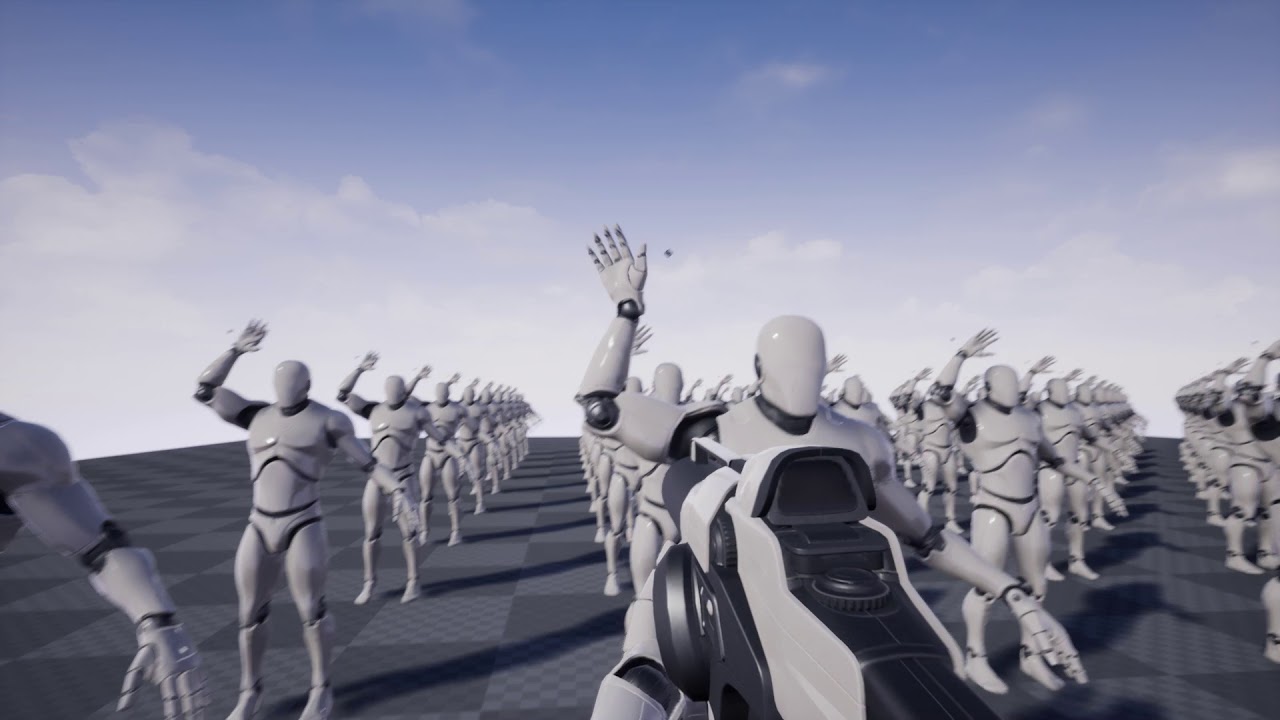
These Mannequins were evolved to reach the black spot above their heads. Each Character has a Neural Network to control the virtual muscles of his right arm....
latent bolt
maybe someone know how dead space AI pathfinding was made?
in one game they have creatures moving on the ceiling, walls, floors, flying ones and even zero-gravity levels
 viscid oasis
@ivory willow fuck that's interesting.
ivory willow
 viscid oasis
@ivory willow I saw that video yesterday - how'd you do it?
patent marten
@thick girder : I have just read about JPS , looks interesting, maybe I will try it in my grid based pathfinder... Do you work on it?
thick girder
no i did not
but i have a grid based game so i was looking into ai
but my game is a TD game so paths cant be precalculated
well i guess maby if you have all the numbers you can automaticly remove / add the extra info (if you can back track in all directions
patent marten
I know it is used in 0.AD., an open source Rts. In my case could be useful, but the async astar works fine.
In theory it works in dynamic environments fine
thick girder
ye a* is probably the one i go for
i need to make mine custom because i need it to go up walls and cielings etc
as you can see it still needs a ton of work but its a different concept then all other games
patent marten
yeah it is really special. btw looks a bit chaotic.
burnt wolf
Just a quick question: What's the best way to implement AI interacting with environment (opening doors, windows, vaulting obstacles...)? I'm currently doing line trace on tick in my AI character but that'll probably hinder performance with multiple AIs in level
 worthy arch
Help! I've been stuck with AI Perception for a week. I have an AI character which uses the AI Perception Component. Everything works perfectly in the editor. But when I build the game and try, the AI Perception comp doesn't sense sight or hearing (I have debug messages when the perception is updated).
When i turn on AI debug, I can see that the senses' settings have all been reset to the default values and the Behaviour tree is stuck
this only happens in a development or shipping build
thick girder
@sivan#5428
this is with most elements on
in this case i randomly asigned a tower to all first few elements but normaly the player makes a maze with the towers themselfs
and a bit like a rubix cube you can rotate rows around
worthy arch
I just removed the AI Perception Component and tried a build, and it seems like the Behaviour Tree doesn't seem to initialise. It works in PIE, just not build
lyric flint
Anyone know how to make an AI run away from the player
worthy arch
@lyric flint There was a livestream on Advanced AI where the AI ran away and hid from the player
https://docs.unrealengine.com/latest/INT/Videos/PLZlv_N0_O1ga0aV9jVqJgog0VWz1cLL5f/NZZtMNdJk5o/
Training Content Creator Ian Shadden is joined by Lead AI Programmer Mieszko Zielinksi as they build on the Basics of AI stream and delve into more advanced AI! They show you how to create complex AI behavior using Behavior Trees and the Environment Query System (EQS).
burnt wolf
Why wouldn't that help you? That's exactly how you should do it @lyric flint
Also you can check out this simpler and quicker tutorial by Orfeas http://orfeasel.com/creating-eqs-contexts-in-c/
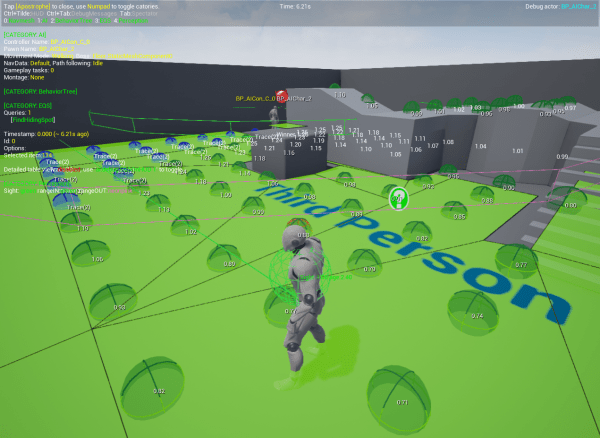 worthy arch
Anyone know how to set "Detection by Affiliation" on the Add AI Perception Component blueprint node?
If I set up the senses and AI perception the usual way, in the built game, the senses configs just reset to default values and don't work.
But if i use the blueprint node to set up the AI perception, i can see the senses configs retain the settings i set in the node. But I cannot set the Detection by affiliation options in the node
no available options here
 exotic briar
What would cause an AI to not work in a packaged build?
exotic briar
@worthy arch are you building your own AI or using a market item? I am seeing the same issue.
I think.
 ocean crystal
That might be the age old problem with properties losing their value moreso than something specific with ai
worthy arch
@exotic briar I’ve built my own AI. it works perfectly in editor.
 patent hornet
My EQS query doesn't return a valid EQS query instance reference on clients in standalone mode
it works in single process PIE, and in multiprocess PIE if editor is the listen server
each client has its local actor that runs the query, and it doesn't replicate
 hybrid blade
Someone help - how to set values of default BhT Tasks? F.e. Wait (I need set different wait time for different MOBs)
lyric flint
@hybrid blade Create separately BT for all different mobs.
vagrant pasture
and there is a waitblackboardtime, but for more control you will have to write your own
hybrid blade
So it's my concern... I'm not understatd why basic Tasks has no such simpe thing as Set for their own variables...
vagrant pasture
when you write your own task, you can call functions on the pawn, but blackboard gives a good place to manage most variables
hybrid blade
I see, thanks
vagrant pasture
what do you want from simple task? they have no knowledge about your needs
hybrid blade
Simple tasks, as I think about them, must be configurable from outside, otherwise they are unusable for most of solutions
So be it - make my own custom tasks 😃
vagrant pasture
@keen slate you mean something like this?
vagrant pasture
well i check there if the speed is above a certain point, if you want the npcbp to decide than write a function that returns bool and call it in this function inside the decorator
fast cosmos
I've a simple ball actor and a navmesh
That actor, or rather Pawn, should go towards the player when the player enters the red sphere
As you could probably guess, it's not happening.
Any ideas as to why?
This prints out "failed"
Anybody?
 cunning vault
@fast cosmos Only the character pawns can use that functions from what I know
The pawns fon't have movement component
That I think is need
you have to make your own logic system begin the AI there
fast cosmos
It works when I disable "use pathfinding"
cunning vault
that is rare
fast cosmos
Did an experiment with MoveToActorOrLocation
It fails
When used with actor ref instead of location, though, it works only when "use pathfinding" is disabled.
patent hornet
there are 3 places where you can set the NavMesh class
inside the actor defaults, inside the playercontroller and i think inside MoveToActor node itself
pathfinding tends to fail if some of those remain unset
you are basically telling it to pathfind, but not which NavMesh to use to do it @fast cosmos
fast cosmos
There isn;t anywhere in the pawn to set the navmesh, none that I can see at least
Nor is there any in MoveTo node
And I don;t have PlayerController for the pawn, only AIController. And it doesn't have anywhere to set the navmesh either
 glossy spire
@fast cosmos i forget the specifics, but you may want to look into navmesh agents
patent hornet
its filter class in MoveTo
@fast cosmos first is from the AIController, second from MoveTo node, and third from Pawn's Movement Component
i don't think you have to set all 3, but i am not 100% there
fast cosmos
Changed 2 and 3, can;t find the 1st one
fast cosmos
Well, it's not working with just 2 and 3 filled, so...
patent hornet
class defaults of your AIController?
patent hornet
next step: visual logger
window -> developer tools -> visual logger
start recodring with it and it will report everything happening with any active AIs
as you play
and when you select AI you want to focus on it will also debug draw a path it found (if any)
fast cosmos
patent hornet
one common debug attempt is to slightly move your navmesh in any direction
just so it recreates the actor
fast cosmos
Moving it didn't help
patent hornet
failing that, i noticed that you do have slopes there
fast cosmos
AI doesn;t like slopes?
patent hornet
try configuring the RecastNavMesh_Default and your Nav Movement in Pawn's Movement component
it has max slope field in navmesh
fast cosmos
All I've been trying is a pretty flat area, though:
Ah, that's right, I'm using FloatingPawnMovementComponent
Culd this matter?
patent hornet
in project i pasted this from i only moved some static meshes, but it was FloatingPawnMovement
patent hornet
it should be in your outliner
fast cosmos
Unless you just mean this
patent hornet
and your visual logger did say that it can't find the navmesh instance
fast cosmos
It's there, though
fast cosmos
Increased the slope and the step
Pawn still doesn;t follow me, since neither the slope nor the step were the problem
patent hornet
if you add a pair of navigation testing actors to the level
and under pathfinding set eachother as the Other Actor
what happens?
after you select one, it should draw a pathfinding path in your editor
you will need to set their filter class too
fast cosmos
Okay, slowly. What navigation testing actors?
patent hornet
just type nav in your modes panel
and drag them into the level from there
they are useful for debugging this kinda stuff
patent hornet
so navmesh is working
UNavigationSystem* NavSys = UNavigationSystem::GetCurrent(GetWorld());
const ANavigationData* NavData = (NavSys == nullptr) ? nullptr :
MoveRequest.IsUsingPathfinding() ? NavSys->GetNavDataForProps(GetNavAgentPropertiesRef()) :
NavSys->GetAbstractNavData();
if (NavData) { ... }
else
{
UE_VLOG(this, LogAINavigation, Warning, TEXT("Unable to find NavigationData instance while calling AAIController::BuildPathfindingQuery"));
}
so the only way you can get that error in Visual Logger is if this line:
UNavigationSystem* NavSys = UNavigationSystem::GetCurrent(GetWorld());
doesn't find a navigation system
patent hornet
sorry, if this one fails as well:
NavSys->GetNavDataForProps(GetNavAgentPropertiesRef())
fast cosmos
There's no C++ in my project, so I wouldn;t even know what to do with this line
patent hornet
this is engine code, just took a peek hoping for some clarity
can you show me what visual logger says when you move it to very first bar horizontally?
fast cosmos
fast cosmos
That's what I did
patent hornet
this is 13 seconds in
this is how it looks when it works
but thre should be some fails if it doesn't too
patent hornet
ok, can you do the first yellow mark with the AiController and Path Following tabs expanded to the left of the logs?
fast cosmos
patent hornet
Focus location shouldn't be invalid, and Path should be "navmesh"
fast cosmos
What can I do to fix them?
 polar copper
Any good resources on getting AI to go to the nearest player?
Or rather any AI resources at all?
I'm needing to actually add AI in my game.
I'm just looking for some good resources on it.
Ah
I suppose I'm going to go read the docs.
vagrant pasture
add a decorator to each branch that waits until a variable becomes true, than the ai wont do anything until it can go into a branch
exotic briar
@worthy arch I doubt it will help you, but I've noticed that execution of begin play events is quite a bit different on my packaged build. My issue was an initialization to set some pointers in my AI (making them aware of instigators) were pointing to objects that didn't exist yet. In my case, it was a player pawn
This only appeared in a packaged build.
I am guessing because the editor already had a pawn object in memory so spawning it from my controller was trivial, whereas in the packaged build it was not trivial
worthy arch
@exotic briar I got mine working. I had to change my AI characters to spawn in the world, and set Auto Possess AI to "Spawned". And I didn't end up using the Add AI Perception Comp BP node... The issue with the normal component not working in the build was cuz I had BP Nativization enabled. I might have left it on from when I wanted to test something else earlier.
The Auto Possess rule didn't seem to work for "Placed in World" for the packaged game for some strange reason. Might be a bug? And the Affiliation detection options on the Bluepring node is also likely a bug
exotic briar
Yeah, BP Nativization probably should still be experimental...I don't think I've ever had a project where that feature didn't break something
worthy arch
Ah yeah, I was just curious to see how much it would actually help... it’s off now haha
 white wren
Any way to make actors invisible ingame and still perceivable by sight in perception components?
 vast mortar
How do I make a really simple dummy AI that does just a few things, and be able to spawn literally thousands of them (Similar in nature to the Crowd system in UE3)
white wren
lol im pretty sure i didnt changed anything in my blueprint and since last time i started the editor my eqs query just stopped working 😂
is this system broken or am I just being stupid?
acoustic tulip
Has anyone come across an issue that AI controlled characters are playing movement anim but don't move? Thanks.
bleak reef
there is a valid navmesh for the correct nav agent under the character?
I have a question too: i'm unable to make a spawned actor affect the navigation. Any hints?
 little shell
Is "Can affect navigation" enabled on the meshes?
Set Can Affect Navigation Generation
bleak reef
yes yes, if I drop the actor into the scene it works
but resolved: dirt navmesh area was updated every 60 seconds
white wren
hey guys, will animations i play from the behaviour tree override the ones being played from the animation blueprint or will this mess things up?
bleak reef
how are you going to play them?
i mean: from the behaviour tree you are using a task I suppose. What is the blueprint node used inside your task for changing the animation?
burnt wolf
How could I implement AI interacting with objects in level - opening doors?
I currently can interact with doors as a player - when I approach doors I'll just select action in my interaction menu
vagrant pasture
you can use nav link proxy, when you use the smart link option you get a event that gets called when the ai starts on that link, you could than open the door, but you can also with overlap events alone
burnt wolf
I already tried that buy had issues with it
It wasn't even called when I tried to debug it (I use C++)
 toxic lark
Anyone knows how to make the ai jump without nav links and without C++?
 rancid rampart
teams probably not setup is my first guess
@toxic lark sure but its a ton of math and polling
toxic lark
@[gbx]Infinite#5474 could you point me in the right direction ?
 buoyant geyser
hey does anyone know if EQS is going to stop being Experimental anytime soon?
rancid rampart
@toxic lark here is a super rough high level outline
If placing or generating jump locations offline is possible. Do that, if not youre going to have to build a custom Pathfinder that understands constraints like jump distance.
Personally I've gone the offline generation route on maps as large as 6km/sq without taking more than a few seconds computation
There really is no easy answer unless youre prepared to hand layout all your nodes. From there it's basic trig


 latent bolt
maybe anyone knows how the AI pathfinding for spiders were made in Metro game series?