#gameplay-ai
1 messages · Page 98 of 1
 woven sage
 azure comet
beginner, i just start learning game engine at the university. roughly one month.
i don't need overly complex one. i just need it to run on one arena only.
thinking of using spline follow or something. but as i previously said. i didn't manage to find good tutorial until now.
 elder heart
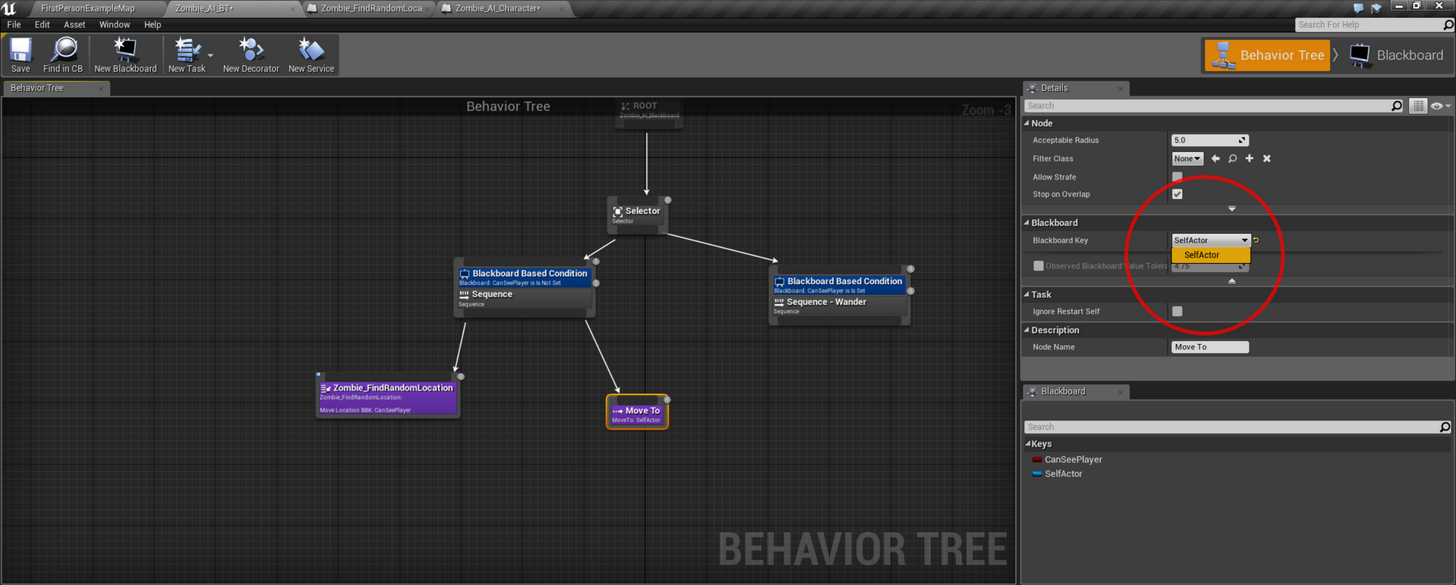
Hey everyone, just joined because I have a (hopefully amazingly simple) problem with blackboard keys/values.
I'm working on a (zombie) AI that just looks for a random location on the NavMesh and then wanders to it, and repeats that infinitely. I easily got this set up in the past but lost the project and I'm getting stuck on the first steps now.
This is the tutorial I've followed in the past and the one I'm following right now: https://www.youtube.com/watch?v=h0Kb42oCoYg
The issue is that I can never get a Blackboard Key Selector to show up for the behaviour trees "MoveTo" to use. The drop down menu always stays empty.
I've scavenged the UE4 forums to no avail,
(Heres a post that seems to mention the exact same problem I'm having)
https://answers.unrealengine.com/questions/209538/trouble-setting-move-to-to-blackboard-key.html
Exactly the same problem but I can't find the "Key Type" list mentioned in the post so this got me nowhere
Thanks in advance, hope any of you have an idea what I'm doing wrong as I'm very eager to move on 😃

Private Tutoring & Work for hire: www.Tesla-Dev.com
 crisp lantern
Any good place I can learn AI from in ue4
 patent marten
Unreal twitch streams, also on youtube as archive, Tom Looman's Survival Game, Epic's Shooter Game @crisp lantern
crisp lantern
Thnx
 sacred sigil
Hello. I have problems with basic settings for Crowd Controll, opps manager 😃 My agend/ai capsule radius is 34. In RecastNavMesh I have Agent Radius 34 - should fit. Same (34) on Nav Mesh project settings and Crowd Manager Agent Radius 34 - I post all, to be sure. But in game I see crowd agent have radius like a 100 or something like this, and they can't use path with 34 radius. This screen (below):
My project is blueprint only - how I can change crowd agent radius and distance between agents and other flock settings?
 night harbor
when yall are setting up AI how do you go about it? What parts do you do in blueprints vs code?
logic and functionality in code, then like the flow of the AI in blueprint?
I want to have a really basic overview for how to design the AI so its "easy" to modify and extend on. Everything in code seems like it would be unnecessary and make things a little more complicated
 umbral perch
@night harbor I use blueprints for everything but it’s completely viable to do tasks and other logic in cpp and then just run them in the behavior tree visually. You can find plenty of tutorials on YouTube but probably not many using C++
 buoyant sphinx
My second post about UE4 AI is up! This time I'm talking about how to use Nav Modifiers and Links to do cool things like Launchpads that the AI will use to get to difficult-to-reach locations!
https://www.vikram.codes/blog/ai/02-nav-modifiers-links
(looks like this might help a few people, including @timber moon, @crisp lantern, @night harbor from recent questions)

Vikram Codes
Learn how to use advanced features of the UE4 Navigation system, including
how to make an AI jump off cliffs, and also make use Launchpads to make
your AI jump back up!
crisp lantern
wow thnx a lot man
patent marten
@buoyant sphinx really good article, do not stop the series! I like it much more than video tutorials.
buoyant sphinx
Thanks sivan, appreciate it! please like and share it - every time I see my analytics go up it makes me want to write hahaha
crisp lantern
You should run a YouTube channel as well
People can do with the information you have
patent marten
No, don't make another youtube stuff, there are only a few articles like this, and it's easier to read through it to find the answers for certain problems than watching endless videos
sacred sigil
I agree - tons of youtube "tutorials" many outdated, not good explained or just very long with short interesting content inside. More tutorials like this need, btw I just working on same things - navlinks 😃
umbral perch
@vikhik#1686 really nice article! I hadn’t seen Nav Areas before- will be using them now for sure!
 lyric flint
when i play/simulate, the darker spots dissapear and ai cant move there can anyone help pls
oh thats because subtractive bsp
but can anyone pls help...
night harbor
just curious, is it bad practice to use blackboard/BT for things other than enemies? For example, if i have some kind of spawn manager and i wanted it to spawn intelligently
is that a bad practice? To me it kinda makes sense to use for other things potentially but I wanted to hear yalls opinion on that
 glossy spire
@night harbor Personally I basically don't use blackboards for anything at all, but using a behavior tree for smart spawners / managers seems perfectly reasonable to me
IMO it just depends on if you think there are enough actions and decisions to warrant it
glossy spire
I'm sure there is a valid reason to use blackboards, or people wouldn't use them
but I haven't come across any
night harbor
it seems like a reasonably good way to organize data for AI
but i can see the benefits of making your own
glossy spire
yeah
buoyant sphinx
Heh, thanks all for the feedback, really appreciate it. I much prefer written tutorials to videos, so I'm going to keep making them! It does take a LONG time (~10+ hours work per tute), but I think it's worth it.
@indigo kettle I'm just using a Squarespace template with a few minor tweaks and additions 😃
 indigo kettle
@buoyant sphinx nice and easy, keep up the good work!!
lyric flint
I have a big problem in ai for game jam game, it thinks subtractive brushes are solid walls and doesn't go through them 😱
Pls help with 🚪 and 👤
glossy spire
@lyric flint turn off "can ever affect navigation" maybe
azure comet
how to set timer before a.i start?
my racing game, the game start after counting from 3 to 0
but the opponent start without waiting lol
lyric flint
You can disable, enable character movement
Oh no, it's racing...
Then from begin play function 3 seconds delay and then start it
lyric flint
Hi there, anybody know why I'm declaring a UPROPERTY(EditAnywhere, BlueprintReadOnly, Category = "BlackboardKeys")
struct FBlackboardKeySelector TargetTo; in a BTTaskNode and it's not showing in the BehaviourTree editor to select? Thanks in advance
It's troubling me a lot giving me memory problems closing the editor
UE4Editor_AIModule!FBlackboardKeySelector::~FBlackboardKeySelector()
UE4Editor_PAway_4596!UBTTask_GetNextPatrolLocation::`vector deleting destructor'()
lyric flint
Welp, I have no idea about c++
 static dew
Anyone ever attemp t to make a soccer like ai system in behavior tree? I got some ideas for an overall team manager as in based on location ball ai has ideal locations to goto based on the distance to the ball and there distances from the goal and the balls distance from their net. I've made it in a single blueprint but doesn't allow for some things since is pretty basic in its implementation.
Curious of any vids on group ai that might benefit me
 coral brook
hey guys, total noob question but is there a good AI tutorial for vehicles using the vehicle blueprint? I managed to get the checkpoint/waypoint system to function but I am unable to get the vehicle to run at all...
lyric flint
@lyric flint no problem, thank you anyway!
patent marten
Yeah vehicle ai tutorials would be coool
static dew
veh would just be setting a other to steer at. Like setting a line of way points and having it rotate to turn at that
static dew
Think of this you can see I have a actor in the world that tracks the ball from various points deciding a ideal location. Bots themselves decided based on thier location which point they should move to. https://youtu.be/JGOxrsC9M5E

Player (Ai) view of them in action -- Watch live at https://www.twitch.tv/inph1del
 errant maple
How can I start learning AI with behavior trees? I watched the basic tutorials and from what I've seen they're all the same: Connect these nodes and you have an AI that chases the player or hides. But I still don't know what those nodes do or how to make my own AI that does something other than chase and hide. When I want to make an original AI with behaviours that I have imagined, something original that a tutorial won't show me and I don't know how to do on my own, I'm just clueless.
Ultimately I just want to learn everything about AI in UE4 so that I can have a comprehensive understanding of it and be able to make working, polished AIs of my own at some point
static dew
Ditto
errant maple
but no tutorials I've seen seem to go in depth enough :/
static dew
Still have to look at ai as a series of light switches
You can make ai that runs as if just reactions Ina tick but yeah I'd like to get behavior trees down but most ppl want examples you mentioned :/
errant maple
Yeah :/
It's not even that I want a tutorial on how to make a specific AI, but just how behaviour trees work so I can figure out everything myself
Most of what I've seen just tells you what to do but now how or why it works, so it's hard to apply the knowledge to anything else
buoyant sphinx
@errant maple and @static dew I'm actually building up to all of that with my AI tutorial series! Next few posts should help you, I think ;)
https://vikram.codes/blog
Vikram Codes
indigo kettle
oh
the least used section
I had AI working on a landscape before
but now I don't
Has navmesh, it's all green
Let me try to google a bi tmore
dynamic nacmeshing...
 dire warren
Hey, does anyone have any experience in writing custom EQS tests?
 latent bolt
can anyone explain to me how to work with blackboards keys from c++ ? Like, what the point of blackboard_Base class ?
errant maple
I'll take a look at that @buoyant sphinx, thanks!
patent marten
@latent bolt : in Tom Looman's Survival Game you can find an example how to assign and handle them from C++, just check the AIController files
latent bolt
oh, okay, @patent marten thanks!
I'm just trying to understand what of all this stuff with blackboard thingy does in c++
why the eqs system still experimental since 4.7
it's like 10 versions ago and still in experimental (
patent marten
Probably they want to mean that no version compatibility ensured
umbral perch
@meepmeep#4613 I believe the implementation is solid, just the UI that is experimental, and they only have around 2 AI programmers- between their various game projects, I don’t think there’s much time to refine at the moment.
Hopefully it’ll get finished up in the future
static dew
Anyone ever get creative with ai they uses line traces in 8 axises to move around and avoid junk
Example is say you set a location in front of the ai that's attached to t like a spring arm. The carrot on the stick
And just have him move tent and if you want them to turn rotated it around. Only problem is when the location say went off a ledge and touched the ground below they would pathfinder around trying to walk to it without falling off
 sudden lodge
hello. I tried rotate my AI characters . but its just turning. My animations which is setting by blendspace, doesnt work
this is my rotate event
 flint trail
 sudden lodge
Can someone help me about ai rotation with blendspace animation?
latent bolt
is there any way to display c++ task variables on task icon in behavior tree like if it was made in blueprints?
currently, blueprint based task displays public data on her icon, but task that was made in c++ do not display anything.. 😦
latent bolt
anyone know what the point of FBlackboardKeySelector::ResolveSelectedKey(const UBlackboardData& BlackboardAsset)
 sleek gazelle
Its is used instead of CacheSelectedKey... so prabably is setting memory vai that key...
Just a guess of course
Guys, can someone help me out here?
I'm trying to run a behaviourtree in c++... the RunBehaviourTree returns success and its all god
good*
however the BehaviourTree won't execute and stays in Steps Back = -1
What the hell is going on? ˆˆ
latent bolt
@mental lake what's the point of CacheSelectedKey than? lol
I actually find a way to display information on node icon if node was made in c++. You need to ovveride FString GetStaticDescription() method
just return string with params and they will display on the icon, as if it was made in blueprints
just need to understand what the hell doing initializefromasset and resolveselectedkey
 mental lake
i think you mean @sleek gazelle @latent bolt
latent bolt
ohh, sorry
mental lake
np mate 😄
night harbor
do services not tick? Im confused why my blackboard value isnt getting updated while the move task is running
it only updates after its done moving
oh i know
maybe the move task isnt using the updated value?
that seems a bit odd though
I thought the point of the service was to update stuff so i dont have to update in my task
okay i got it i think, I need to put it in the sequence rather than on my task
wroooong. man I dont understand service. I guess its just an order of execution thing. it only updates after the task is complete
if its in the same "node"
night harbor
can anyone help me with this, its frustrating
umbral perch
@night harbor you have to look into “abort self” and “abort lower priority”. This means that a tree can stop executing as soon as a condition changes, otherwise it has to complete before checking again.
night harbor
I dont even have a condition for this node
its just a service attached to the moveTo
all the service does is update the location key which is used in MoveTo
its super super basic
Im legit about to just do everything myself in code
@umbral perch also I dont understand the purpose of tick if you have to stop the tree and execute everything again just to update a value
umbral perch
If you have no condition then it can’t fail AFAIK
I’m no expert but I usually have my services above a bunch of nodes, so for example I have a service that checks the AI state and if enemy is set for example. I then have the logic sorted from low to high priority, each branch / subtree guarded by a state condition. So for example, if status = roaming then run the movement logic, however if during the move, the AI sees an enemy, then it’ll change the status, abort the move and begin running the combat status logic
night harbor
yeah i fixed it, thanks @umbral perch
night harbor
why is it that you have to dereference the behaviorTree pointer in the StartTree function?
seems so different from normal ue4 functions
usually its passing a pointer, not an object by reference
latent bolt
how do you guys combine animation with behavior tree and general ai code? Like, if I have some action that AI should do and some animation that should be played while AI is doing that action. Currently I'm adding wait node to the behavior state to wait until animations is played or something like that and I'm not sure if this is good approach
glossy spire
@latent bolt probably the best thing is to create some kind of action system
then you can have a task that waits until the action is finished or interrupted
unreal might have some stuff built in, or you can make your own
you can have things like your own priority types for overrides
generally I like actions to be bound to montages
 hybrid grove
I have a body of water that is too large to support a navigation mesh. But I have ships that will operate via AI. Is it possible to have the AI ships move on the water geometry without needing a navigation mesh to move them around? If so, what is the best way to approach this?
 stone oak
Yo, I'm trying to make a simple ai that follows a path up a wall, onto the roof, down the other wall, onto the floor, repeat, etc. Like so: https://gfycat.com/ZanyIllIberianbarbel
Right now its just following a spline but I'm having a really hard to making it align itself to the closest surface and still look forward. It never has to deviate from this path, its a super simple beginner enemy.
Anyone have any ideas?
Edit: nvm have a thing figured out, required two splines with a -1 Z up vector
buoyant sphinx
@hybrid grove you might want to right your own implementation of the NavMesh - you can drop it in and use it instead of the default Recast Nav Mesh
Specifically look at the NavigationData class
hybrid grove
I tired. It's been a problem since my water geometry is over 20k wide. Nothing was working as intended. So I'm searching for an alternative to the nav mesh.
buoyant sphinx
If you make your own nav mesh, you should be able to make it sufficiently sparse to support that
hybrid grove
I'll look into it again. Im on 4.18 now and maybe it has better support. Started the scene with 4.14.
buoyant sphinx
I mean create your own nav mesh class that does what you need, not using the in-built UE4 Nav which is clearly not intended for large naval stuff :P
You could have multiple meshes (one mesh that is 5k by 5k) and create your own nav mesh class which unites them, but that seems like more work than necessary
latent bolt
@hybrid grove did you try to increace navmesh cell settings?
like, this is still far from a good solution but can save time for prototype
patent marten
Another solution for naval pathfinding is to create a hierarchical grid: large area, area, tile. Fortunately for open sea you do not need too much information to storee
hybrid grove
@latent bolt Yes I did . I tried various settings but nothing seemed to work well. Even had support with Epic's staff. But I'll try again.
flint trail
You need to use NavMesh Invokers in the large scenes @hybrid grove
Check Kite project. Deer AI use it.
hybrid grove
@flint trail Interesting poing. I'll look back into using a NavMesh. It appears it may be the best solution. It's rough because my background is more 3D Arist than programming. I may have to look into hired help.
flint trail
It's just a component you drop into your actor and some project settings on the NavMesh
patent marten
Lol I wrote nav invokers too on the forum but found not a good idea
sudden lodge
Does somebody can help me about AI turn in place animation?
sudden lodge
Hello, Is there anywa to understand if ai character turning left or right?
patent marten
In anim bp you can measure speed and direction, thus direction change too, so if no move only turn you need inplace anim
 ivory willow
Unreal Engine 4: AI using MiniMax and Alpha-Beta prunning
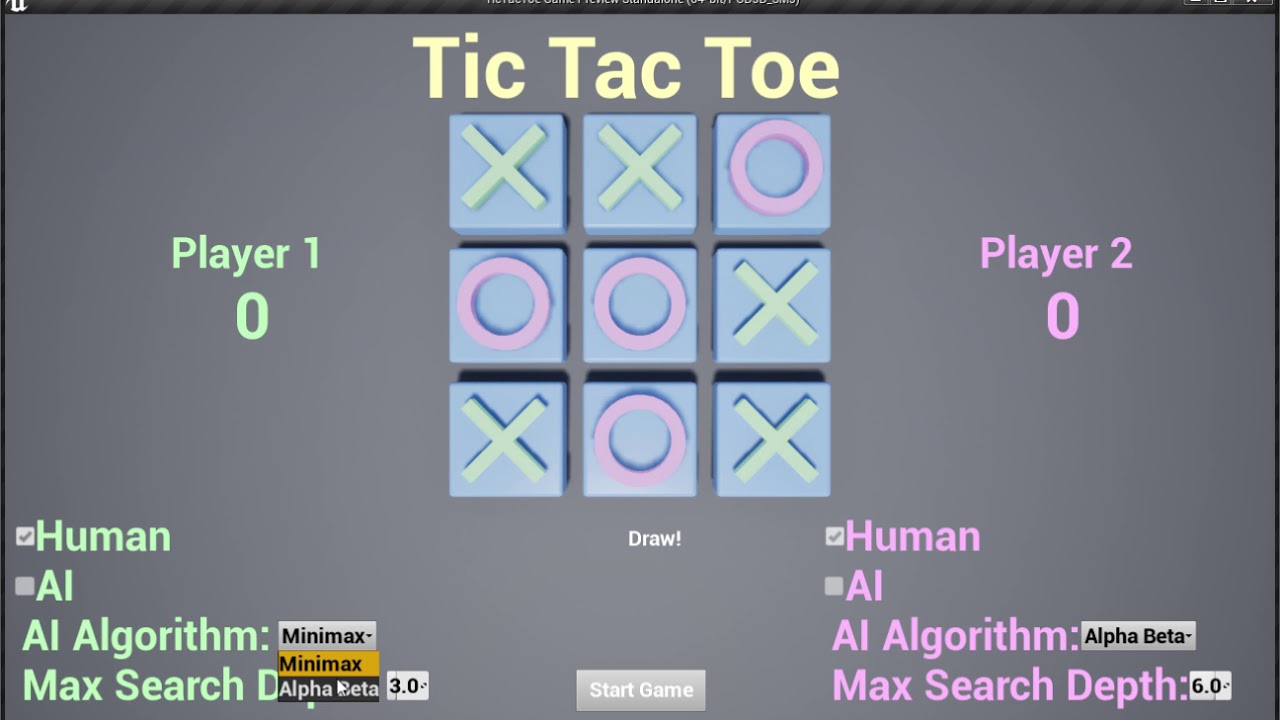
AI using MiniMax and Alpha-Beta prunning for playing Tic Tac Toe on Unreal Engine 4.
lyric flint
I want my character to use AI move to bp object... how do i achieve that?
patent marten
@lyric flint : use an AIController on your character/pawn
lyric flint
yes, the bad thing is i have to rereference all my pawn controllers with ai controllers throughout the game 😭
but i figured that'd be the way to go
I use [get controller] -> [simple move to actor]
i need something to tell me when the movement stops
to build logic ontop of that
an event
When u want to stop him then [simple move to location] with getactorlocation of self
that's not the same
Oh you want to know when movement stops
aye
In event tick [get velocity] if == 0, 0, 0
Then from that build your logic
i think i'll go with the AI controller approach, seems more robust 😄
I used that for smartass ai who killed me when I 1v1 him
He has good aim and brains lol
And he dodges bullets
lyric flint
You can create a custom event or function, in that - just [disable movement] of character movement, and [simple move to location] with [get controller] as a controller
[] are nodes btw
@lyric flint ☝
sudden lodge
@patent marten I tried exactly what u tell me
but the animation do loop
I set No loop in state machine but still same
Is anybody has AI turn in place example. I ve been working 2 week. but still couldnt get result
latent bolt
can someone give me advice on how I should organise specific AI data for specific level
Like, if I have several levels in game and AI should have different stats at each level. Should I add some init task into controller or behavior tree? Currently I'm using my spawner to setup AI params and it's lead me to the situation where I need to setup every spawner on the level with proper values
 fleet coral
Anyone has any tips on 2.5D navmesh movement?
Main issue is the AI rotates from side to side when I want it to set rotation to the other side, but I'm looking for some general good workflows for 2.5D AI which I'm struggling to find.
buoyant sphinx
@lyric flint I have a blog on this exact topic, check out the first post: https://vikram.codes/blog
Vikram Codes
 wary ivy
what's a 2.5D navmesh?
 silk vapor
Anyone got this to work? For me it keeps crashing my UE4: https://forums.unrealengine.com/community/work-in-progress/85549-goal-oriented-action-planning-ai-framework
 vital sonnet
Hello
Can anyone illuminate, what is the difference between finishing a BTTask and aborting it?
patent marten
returns true or false respectively, and false can abort a sequence while in case of true the next node is processed
vital sonnet
@patent marten I understand that
And that comes for finish task with success or failure
But abort is a third operation
 polar copper
Does anyone have any resources for networked AI? I have no knowledge in it so anything would be useful.
umbral perch
@polar copper What are you having trouble with? Networking AI is pretty much the same as networking a normal character.
They only exist on the server though which simplifies things
polar copper
I haven't started AI, but I was just wanting some information regarding it. @umbral perch
woven sage
Any reason my networked AI movement wouldn't appear smooth on clients?
It doesn't use CMC, it uses the default actor class, so I probably need to put something in myself to get it smoothed
But I don't have a clue how to do so (BP)
umbral perch
@polar copper if you are familiar with regular networking you should have no problem with AI specifically.
@Mr4Goosey#8437 I just use a regular character with CMC (the same actor that the human player uses), not sure how to do it otherwise!
polar copper
@umbral perch Thanks for the info.
umbral perch
Ah yeah it gets really heavy for more than a few players!
I believe Paragon used it for the minions but using the simple navmesh mode
There’s a few forum threads around discussing it, I remember reading it a while back
woven sage
I tried using it in simple navmesh mode, too, still not good enough
I ended up doing my own thing in Blueprint with normal navmesh pathfinding, and custom pathfollowing forcing AI to always walk forward, slowly turning, instead of constantly turning while walking backwards and sideways >.>
 vast carbon
Any ideas why my AI is causing FPS drops when around me / in sight, etc.?
umbral perch
@vast carbon you have perception logic firing when visible?
vast carbon
@umbral perch Not really,
I have an 'AI MoveTo' on loop
So no matter where he is upon spawn, he just goes to the player (wave-based shooter)
umbral perch
This is something perfectly suited for behavior trees
Unless you don't want to use them
But it still doesn't seem expensive- no other perception logic going on?
vast carbon
Rather not, there's too much logic already built into the BPs and our deadline is overdue. We're just porting the game to PS4
But every enemy that gets near me drops me like 4-5 frames
umbral perch
Ah gotcha
vast carbon
I enable 'stat unit' on beginplay
And the bottleneck is under 'Game'
Here's what I see in the editor on PC:
So that 2nd one jumps up to about 15ms
Or higher
And if I don't kill the enemies, I can drop up to 20-30 frames
umbral perch
Have you been profiling?

Unreal Engine
Is the frame rate in your game low? Do you know why? Could it be because you have too many enemies spawned at once or is it because one specific enemy is expensive? Could it be because you have a ton of visual effects or because of that sweet skill system you wrote? Read on to find out.
umbral perch
This is CPU so you'd have to profile that
umbral perch
Why wouldn't it?
You'd find the bottleneck regardless of where you profile, unless it doesn't happen on pc?
vast carbon
It doesn't happen on PC, I have a good PC so the analytics are unreliable and I always get great performance
The PS4 GPU benchmarked half of what the GTX 970 benchmarked and I have a 1080
The game runs at 90 FPS on a GTX 970, 60 FPS on a PS4 (VR) when optimized
But drops down to 40-45 when enemies are near (it has to remain at 60)
umbral perch
It still looks being limited by the game thread (CPU) in this case, so GPU is likely not the culprit (you can quickly confirm that by setting graphics down to lowest possible and see if you are still bound by the game thread)
So I'd still run a cpu profile on your pc and see what is taking up a lot of time, even on that pc
 lavish lotus
How should I go about setting up factions?
I already have a thing set up where an AI is either an enemy, an ally, or a neutral
vast carbon
Hmm, many different ways.
- Create parent classes per faction and assign characters to the correct one, then run logic during conflict checking whether character X is a child of X.
- Use Booleans to create groups where when a character / player joins a faction, set one to true. Then, when logic that requires that faction to be active takes place, check against said Boolean.
I haven't experimented too much with behavioral trees, etc. so I can only offer BP solutions
If using the Boolean method, here are examples where it would work:
- Enemy faction nearby. Enemies cast to player and check if in Faction X or not. If yes, attack or don't attack. Split the logic based on True or False.
- When a player leaves one faction and joins another, each set of logic that sets the Bool to true or false would simultaneously set the one he chose to True and all others to False (to cover all possibilities)
lavish lotus
I already have this
but its not really factions?
the red ones just want to go attack stuff
the blue ones want to follow other hands
and the black one is a strong independent one neutral one
@vast carbon that gives me a bunch of ideas tho
I can probably just do it by checking my targets tags
and a switch on string
lavish lotus
 vast carbon
@umbral perch This doesn't look good. I've not used the profiler a lot so I'm not really sure how to debug this as I don't understand what it's trying to say
While running 'stat startfile' it dropped me down to 45 FPS at neutral as well
umbral perch
@vast carbon Did you read that link I posted earlier? Should get you started
And yeah when you are profiling, the cpu takes a hit
Went crazy figuring that out one day haha
vast carbon
@umbral perch Is there any reference for what certain things mean anywhere? Google searches aren't helpful here. There's no way to know what some of these mean as they aren't obvious on their own
umbral perch
@vast carbon there’s a lot of editor specific stuff that is irrelevant in the profile, you have to find the game thread and look inside. The article goes through it
I agree that it’s a bit confusing
The gpu profiler is a lot more straightforward
vast carbon
Ahh, I see
Looks like too many actors ticking
I do use quite a few event tick loops during attacks to control various looping elements
I'll have to make it more sustainable and less draining per frame
Thanks a lot!
It may actually be the Character Movement Component in each enemy AI
I read that using Pawn movement is better on performance
umbral perch
Nice yeah stuff ticking on AI can be really expensive. That definitely sounds like a prime example of something that’d work great in a behavior tree. If you have the time it would make a big difference as the tree will handle state instead of lots of tick based BP loops.
lavish lotus
@vast carbon
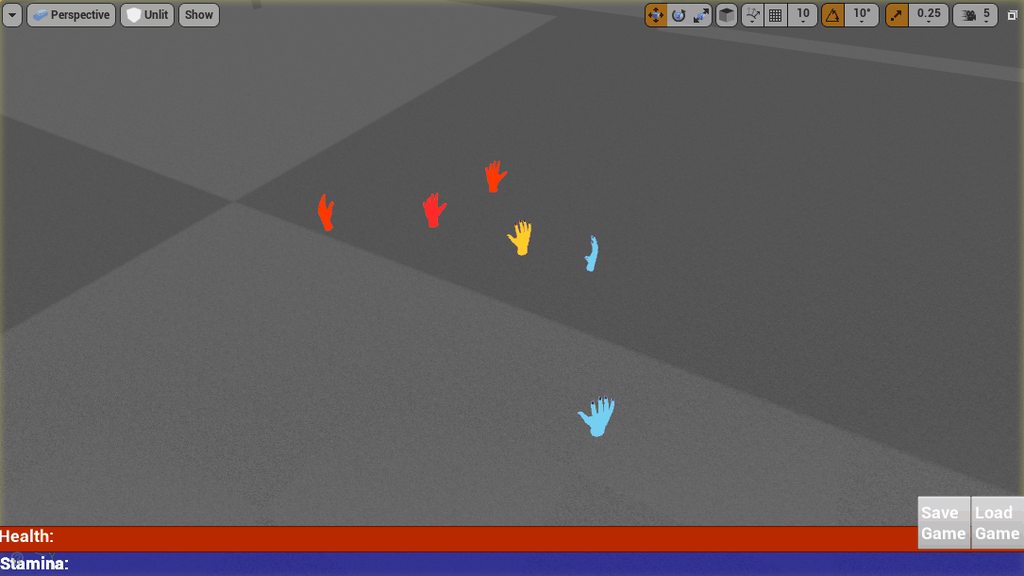
I got it working!
3 red dudes, 2 of them are Red Team Minions, one is a boss dude
3 Blue dudes, the boss is the gold hand
Minions follow bosses, bosses ignore minions
I ended up just using enums and a bit of logic in my search service
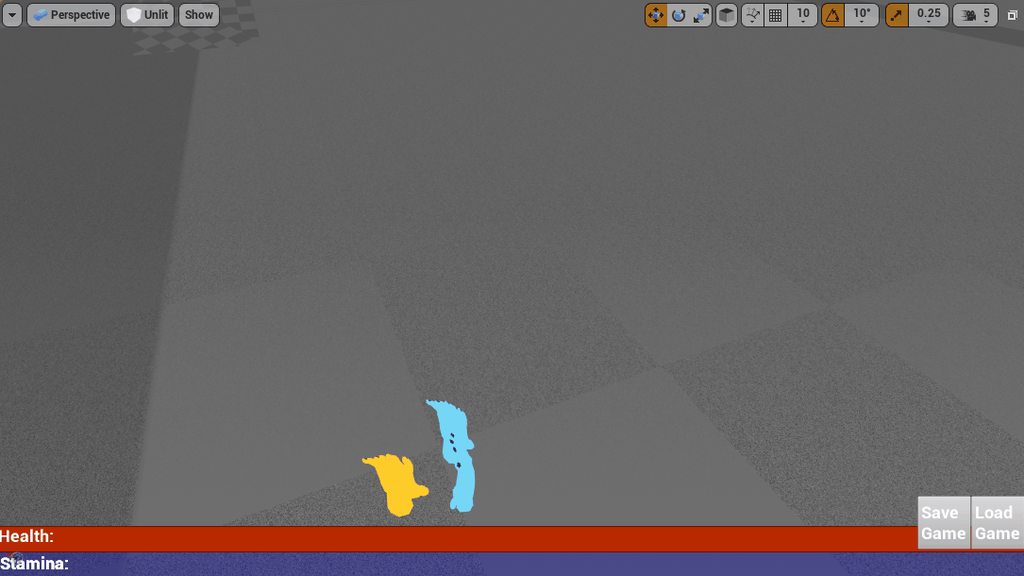
now imagine that but like goblins or something
lyric flint
very good 😃
lavish lotus
I think this'll come in HANDY
lyric flint
fack'
 acoustic tulip
Can I ask if there is a way to avoid AI getting stuck in a mesh geomerty? So if I close a door while a npc is passing through the doorway, the npc can be stuck in the door geometory.
glossy spire
@acoustic tulip you could just turn off collision between the two. If you update the nav mesh when you close the door, the AI shouldn't ever navigate into it.
unless you're moving the character with physics or something
acoustic tulip
Thank you for the answer. I guess if I turn off collision between the door and the npc, there could be a short moment the door may overlap with the NPC when it is passing through. Yes, I update the nav mesh at run time so the NPC wouldn't try to navigate into the door when it is closed. @glossy spire
I mean when a npc is passing through an open door and I close it. The npc may overlap with the door for a short period. Then it shouldn't get into the door anymore because it is closed.
glossy spire
what I do in those situations is make the door unable to close if there is a character inside it
then cut off the nav mesh for the entire door region right before it starts closing
and wait until it is all the way open before opening up the nav mesh again
acoustic tulip
Ah I see. Thanks. I've noticed that my player won't get stuck in the door geometory in the same situation. So when I close the door, it will automatically push my player to a valid place instead of overlaping with my player. I am thinking if I could make the door just push the AI out of it.
glossy spire
you might need to be careful not to push the character off the nav mesh
or his pathing might get broken
acoustic tulip
True. Can I ask if there is way to detect whether a NPC is stuck with a mesh geometry?
glossy spire
hmm
you can do collision checks
with the characters capsule, if its a pawn
but generally I would avoid that kind of thing unless you specifically know thats what you want
but if you're going ahead with it, probably the first thing I would watch for is navigation warnings
all physics objects have various events, such as On Component Hit, Begin Overlap, etc
so that would be another way
acoustic tulip
Ah, thank you so much. I agree it would be better to avoid this situation rather than handle it. I'll have a look at those. : )
glossy spire
gl
 timber moon
Hello, I've tried all the available auto-pathing BP nodes but it seems like my actor cannot go around objects. Where should I look into first to try and fix it?
example
Then it just oscilates left-right on the obstacle trying to reach the target
I've tried Simple Move To Location and AIController->MoveToLocation with Use Pathfinding checked and I get the same behaviour.
Messing with the Agent Radius seems to help, but my character's capsule is 30uu and whenever I use more than 14uu as the Agent Radius it will stop finding any path 🤔
 lilac abyss
@timber moon Do you have a nav mesh generated on your level (with a NavBoundingMeshVolume for example ?)
 dim vault
hey anyone here specialize in creating crowd systems?
timber moon
@lilac abyss yep, navmesh is always there. Visualized in editor and PIE
lilac abyss
@timber moon you can use the visual logger in Windows/Developer Tools to see if it uses a correct path or not.
timber moon
Yeah that was going to be my next step but it looks like it's working fine for now, I'll return to it another time 😃
Still not very fluid with the visual logger but I'll hopefully get there after working that bug out
lilac abyss
I love the visual logger because you can record your ai state and replay it to really understand what happened 😄
lavish lotus
Where did EQS go? haha i was looking in project settings not editor
 viscid oasis
Should an AI character be Character or Pawn? There's no plans to possess
oh, I'm guessing character
 pallid mica
@viscid oasis Pawn vs Character isn't directly AI question.
Is your AI a Character (humanoid) or something else?
A flying drone would be a pawn for example
 wind fulcrum
@viscid oasis "no plans to possess" you mean by a player controller?
 elfin nymph
Hmm, is there any way to check if a EQS failed? can't seem to find much. It's been too long since I touched that
vital sonnet
@elfin nymph does it actually have the concept of failure? AFAIK it can simply return empty sets
elfin nymph
well if it can't find a location to go to it seems to return self location
so I suppose I could use that
vital sonnet
Self? You mean querier?
elfin nymph
yeah
 stiff vapor

How far could this technology reach?
 spare sinew
Why would you use multiple waypoints for your AI instead of 1 waypoint (at the end) and block the pathing with blocking volumes.
 worn sandal
How is pawnsensing driven? as i just saved a master blueprint and now my pawns sensing is bonkers
woven sage
Because you want your AI to go to X, but through Y. You also do want the area between X and Y to be enterable for other moments, but now you want this specific route @spare sinew
spare sinew
in Tower defense or moba it is always specific
that's why
as your ai can still access other things like Attack while going toward that one single waypoint correct?
worn sandal
i don't understand my ai navigation is still working fine but sensing dosen't work anymore
spare sinew
show me what you got
wind fulcrum
Mmh didn't "MoveTo" simply failed if the target was reached in earlier versions?
wind fulcrum
Ok ... waypoints where to high in the air ... so .. yeah
 swift bolt
Should my AI Character have an AIController ?
Is it needed? What does it depend on?
Examples I have seen will sometimes do it from within the character or sometimes use an AIController
umbral perch
@swift bolt yes it should. Otherwise your AI has no “brain” and won’t be able to drive the character.
I typically put perception logic in the controller and then the AI can use the same character as the other players. Depends on what you want to do though.
swift bolt
@umbral perch Can't you put the brain inside the character? I've seen some intro tutorials do that, but I guess for more complicated its better to use an AI Controller?
swift bolt
Why does the Behavior Tree quick start not use Pawn Sensing for their example but instead line traces... https://docs.unrealengine.com/latest/INT/Engine/AI/BehaviorTrees/QuickStart/15/index.html
Step 15. Next Steps
 floral mango
@swift bolt you can put your AI logic in the character if you want....but it's a horrible way to structure your code
it means your AI implementation is tied to the Character. If you put your AI in an AIController, then it can be used to possess different Characters
wind fulcrum
Shouldn't positions from Actors / Vectors be projected onto the navmesh when using MoveTo ? (like if the position is floating above the ground)
Ok .. Query extent was at defaulted 250 ... i just placed it slighty high enough to be out of that 250 ... at 260 ..
well done
wind fulcrum
Mmh and interestingly - "Track Moving Goal" actually does not let a MoveTo succeed if target was reached 😮 (and acceptable radius seems to do nothing in that case)
lyric flint
how can i make sure that my nav mesh is not rebuilding during the gameplay?
umbral perch
@Zrmanja Obrovac#9707 you can set the generation to static or dynamic in project settings!
swift bolt
Is the best way to patrol an area through way points?
swift bolt
Also does the Sight Perception work as a line of sight?
lyric flint
i'm spawning a character in event onpostlogin
which will be used instead of a default pawn as a player character
what would be the best way to store reference to this character
something that would be used instead of GetPlayerCharacter (player index 0)
lyric flint
i forgot to mention that this character is now possesed by a ai controller
how do i reference it from now on?
umbral perch
@swift bolt Waypoints are generally a good way of doing it as you can plan out realistic routes. Sight perception does work as line of sight and can return if an actor is currently visible or not.
@lyric flint depends where you want the reference to be- the controller?
lyric flint
hwow do i fix this RPC failing for the following reason
[2017.11.25-07.49.31:724][234]LogNet: Warning: UIpNetDriver::ProcesRemoteFunction: No owning connection for actor MyMixamoChar1_C_0. Function ServerShowCharacterSelection will not be processed.
i did some custom player character spawning and possession with ai controller prior to this
please mention me if you have an answer, i gotta go
swift bolt
@umbral perch right now I'm doing a random navigable point for it to seek out and destroy the player with perception of the player and player events moving the ai to certain places. You think that sounds ok?
umbral perch
@swift bolt The problem with random navigable points is that the AI might choose a completely illogical position such as facing directly into a wall- waypoints can allow you to place a bunch of logical points such as in the center of corridors or rooms, and then you can choose one of them randomly.
However sometimes I use the random navigable point node based on the last seen position of the sensed actor. This can work fine but with waiting, they could be in a position that makes no sense.
lyric flint
can anyone tell me what am i doing wrong in this BP
basically i'm trying to get my player the opportunity to be controlled by an ai controller
the problem is next time i want to RPC from client to server i'm getting this message:
[2017.11.25-07.49.31:724][234]LogNet: Warning: UIpNetDriver::ProcesRemoteFunction: No owning connection for actor MyMixamoChar1_C_0. Function ServerShowCharacterSelection will not be processed.
lyric flint
Anyone here anygood with path finding stuff?
swift bolt
@umbral perch point taken, I guess Once I have my map laid out I'll set up way poitns for my AI to traverse
@lyric flint what is your problem?
I'm personally trying to figure out how to attack once the player is near https://gyazo.com/62ae433e606d8d5b916a909b36884b5b

but it seems like it just sticks on the AttacKPlayer Node when I have it plugged in.
lyric flint
Im trying to do 2d path finding on a grid and this is what happens
Instead of jumping to the nearest neighbour it goes vertical
the yellow is the path
blue is the goal
purple is obstacle
I think its something to do with the way im calculating the neighbours
modified slightly now I get this
Im just flood filling a 2d grid
swift bolt
Man I need some help understanding task fighting
Its so difficult to prevent my tasks from fighting with eachother, I think it has to do with when I call Finish Execute (success/fail)
patent marten
@lyric flint : crazy result, never seen similar. Sell it on marketplace as snake path ;) Do a step by step debugging, process only a few nodes per sec, it is important to see how your loop works.
lilac abyss
@lyric flint you can use the FGraphAStar templated struct, you just have to implement some functions in your graph and your queryfilter and it should work. I'm using this with a custom nav graph and I have no problems.
lyric flint
@patent marten Thanks. I figured it out, I totally messed up my BFS algorithm. Haha
@lilac abyss I don't want to run A star. It will be too much cpu time for an RTS. I also need to change the graph at runtime, i.e. Buildings placed
lilac abyss
@lyric flint I modify my navgraph in real time too and I don't have any problems for now... Just need to take care of already calculated paths. I don't know performance wise but I don't know better alternative to AStar... Maybe if I encounter performance problems I will use hierarchical paths.
@lyric flint I'm interested if you have any link with performance comparison of different algorithms ?
lyric flint
@lilac abyss Thats interesting, I will deffinetly have to take a look at that. Once I get this BFS working correctly I will do my own comparison. My Graph has unweighted edges. Will A* still work?
lilac abyss
@lyric flint You just have to have an heuristic estimated cost (fast computation time) and a real calculated cost, in your case you can use the manhatan distance between your cells for estimated cost and real cost if you don't use weight for now
lyric flint
@lilac abyss Ok thank you. I will try it out for sure.
lilac abyss
@lyric flint but for a grid maybe there are better alternative, personnally I use a Triangle Mesh for my navigation
lyric flint
@lilac abyss My reasoning for wanting to use BFS is to find the path once from all locations. Otherwise I have have to run a* for each agent?
each time the agent moves
a* seems ok if you have a low number of agents
Maybe I'm wrong
lilac abyss
I don't know why would you want to repath every time the agent moves ?
I mean when the agent follow his path, you don't have to repath, except if the path is invalidated by adding collisions or another reason
woven sage
^
lyric flint
@lilac abyss I will make a comparison and show you what I mean. Don't hold your breath though :P. Might take a while
There are certain other techniques that dont work with A*
lilac abyss
@lyric flint okay thanks 😄
 lavish vault
any ideas on how to make AI move away from player, but also take collision into account? right now I have a simple move to location with find look at rotation+get forward vector*-float to the input. Problem is there sometimes a wall at this location
there is a "find random point in radius", but can't see any option for avoiding location
glossy spire
@lavish vault you'll want to look into the EQS system
thats pretty much exactly what its for
lyric flint
Breadth First Search -Finally got it working, half the battle is fighting unreal. Its in C++ btw
@lavish vault you need to ray trace to find obstacles and or use Nav Grid
Oh is that EQS something new it wasnt there last time I looked
That Blackboard system was horrible last time I used it
lavish vault
thanks will check out
blackboard system has been working fine for me so far, but i'm not creating anything complex
glossy spire
EQS has been around for a while but in experimental
not sure if its officially experimental still
lyric flint
does ansyone know what move to location project destiantion to navigation is used for?
and just FYI
i finally managed to get my player character owned by player controller and possesed by ai controller simultaneously and it works
but i had to rewrite my whole game
dire warren
Did anyone have the pleasure of running into a nasty behavior tree crash where it fails to dereference a pointer somewhere in DescribeSelfToDebugger?
patent marten
@lyric flint : looks fine. My first pathfinding implementation was also breadh first, I just did not know it exists and found out myself 😄 then I used Best First in my RTS because it is lightning fast, but finally found A* perform better in very complex situations. Best First resulted in some really wierd paths in rare situations, but A* is found to be more stable, thus requiring less error resolving (units going far from their group). I also tested Dijktsra but it is the slowest.
@lilac abyss : thanks for the FGraphAStar hint, could be useful to check to improve my own A* implementation, which is based on this : https://www.gamasutra.com/view/feature/131505/toward_more_realistic_pathfinding.php?page=7

Few things will jar players out of their immersion in a game faster than sloppy-looking AI. While sufficient CPU cycles are increasingly available to help craft better AI/player interaction, relatively few advancements have been made in recent years in game pathfinding. Pinter walks you through some modifications to the A* algorithm that can refine the movements of your game's units.
the main drawback of breadth first is that you cannot play with tile costs, by which you can make path more realistic. e.g. units will always move very close to obstacles, building walls instead of keeping a small distance
lilac abyss
@patent marten Nice link ! What is your use case for this improved pathfinding algorithm ?
lyric flint
@wary ivy what does that mean? that i don't have to cast a ray to find out the elevation?
wary ivy
I guess
lyric flint
@lilac abyss my example above also uses directional flow so the path is not solely based on cost
@patent marten
Each edge as a direction as well as a cost
wary ivy
flow based navigation would be nice
flow path, vector based, whatever you wanna call it
one that works with UE 4 navmeshes that is
patent marten
I have made a vector field pathfinding (has some issues) but cannot get it work fine with group formations... and found no good sources/articles about it...
@lilac abyss : this : https://www.youtube.com/watch?v=aya-mDc37ts&list=PLUo-IXw7fQdrdoY3mmCs9rGfDExh62RWJ
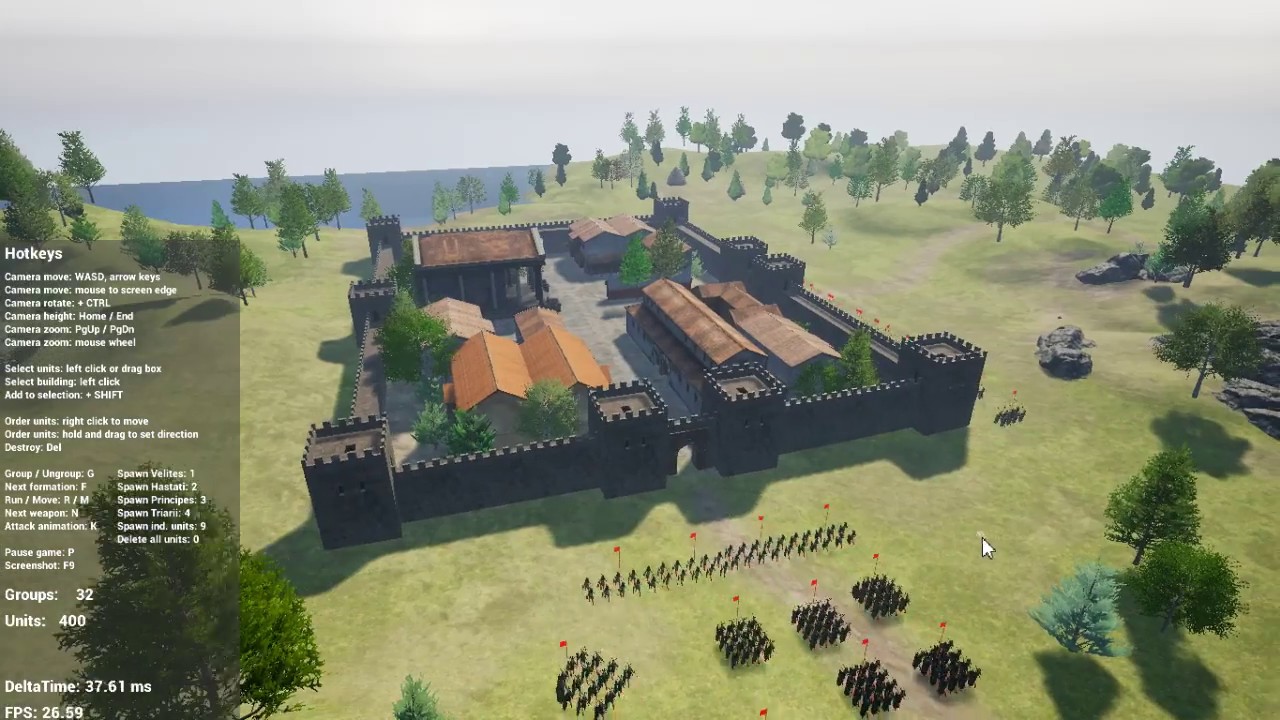
Actual features: - RTS camera - spawning groups of units in default formation, - selection and movement orders (left click select or box selection, right cli...
in the above I rather use hierarchical A*
units use A* tile pathfinder can be replaced with vector field pf, which is generated for each group, probably I should add some modifiers to keep the units in the formation, but it could be tricky at town gates or at tiny towers doors.... any idea welcome 😃
lilac abyss
Cool, do you use some kind of LOD rendering, LOD AI for your units ?
wary ivy
@patent marten is that UE 4?
patent marten
earleir I had LODded AI for units, e.g. not using collision check, but it resulted in errors...
wary ivy
so it calculates a separate vector field for each unit when you issue a move order for it?
unit being a formation I guess?
patent marten
rendering of course use LOD, e.g. far trees are billboards, buildings are low poly, units too, but far units are skeletal meshes not billboards
at the moment I use a high level A* for group pathfinding on areas, and a low level A* pathfinding on tiles for units
I just wanted to replace the latter with a vector field
made an implementation
it works but a bit sutpid 😃
the A* is much better, fast enough, but vector field could be faster for larger groups
but was unable to recreate the formation system for vec field
lilac abyss
Cool, and do you use instancing animation or other instancing techniques ?
patent marten
no, just actors with skeletal mesh comp
animating from C++
and using no ticking for unit update also saves a few ms
but a friend has an instanced skeletal mesh solution I should convert to actual engine version. but then my current pathfinder would not be fast enough, so thinking on a vector field solution....
lilac abyss
I don't know how you could use vector fields for positioning in a formation ? Do you put vectors force towards the positions of formation and hoping for the best ?
wary ivy
you'd use steering behaviour for the formation
you'd keep track of the desired position in the formation steer towards that
and also steer based on the vector field
patent marten
that steering behavior is quite a performance expensive stuff as I remember and works badly with obstacles
lilac abyss
okay so you need a global vector field taking collision into account, and then steering with the global vector field and adding local steering force towards position ?
patent marten
something like that. I need a vec field towards middle tile of next area, avoiding obstacles. it is ready.
then I should somehow modify unit movement to keep relative positions where possible
then I should take into account other units who can move around, and try to avoid collision. if no success collision is resolved afetrwards by a push-bounce system
e.g. at gates there could be crowded areas...
lilac abyss
Yes, how do you do for the gates where there are multiple units wanting to go through ?
lyric flint
use clearence paths

Name: Supreme Commander 2 Release date: March 2, 2010 Platform(s): PC and Xbox 360 Publisher: Square Enix Developer: Gas Powered Games
For A to B pathfinding algorithms like A*, one pathfinder for each unit. With a flow field pathfinding algorithm, only one pathfinder is required, allowing for thousands of units to exist on the screen with little calculation time in between deciding where they will be directed to.
Unless you use squads and dont have individual unit control, in my case I want individual unit control
patent marten
actually I use a A* clearance pathfinder similarly to Company of Heroes
I saw the supreme commander video a couple of times
but still don't know how to keep formations...
lyric flint
Steering Behaviours
patent marten
maybe adding a secondary heat map to the vector field heat map...
lyric flint
Steering Behaviours shouldnt be that costly
Since you dont need to run a*
Starcraft uses Flocking
SC2
Watch the blizzard gdc about SC2 ai
patent marten
the vector field is also a costy thing, but only one needed. I don't know how to add to my system flocking. I know its basic rules...
lilac abyss
Yeah the video is pretty but its not a real case scenario, like there are no collisions, and the units are all from the same player... I don't know if it's happens a lot in a typical game
patent marten
but in my game formations are quite important, group width, depth, unit distance...
1st it looks a simple problem, but indeed it is a huge task 😄
patent marten
:D:D
what I don't know how it is handled in Total War games. that is quite an effective stuff
probably vector field or heat maps
but there the formations are kept fine
lyric flint
Ye I was looking for how they do it . They have a GDC talk about AI but its pretty rubbish and high level
patent marten
on low level TW is crap, units avoidance is solved by collision , at least in older games like Rome I
and they use large areas no narrow passages
walls are also overscaled
lyric flint
Ye thats true
patent marten
but that collision is also very effective....
from the point of view of performance
lyric flint
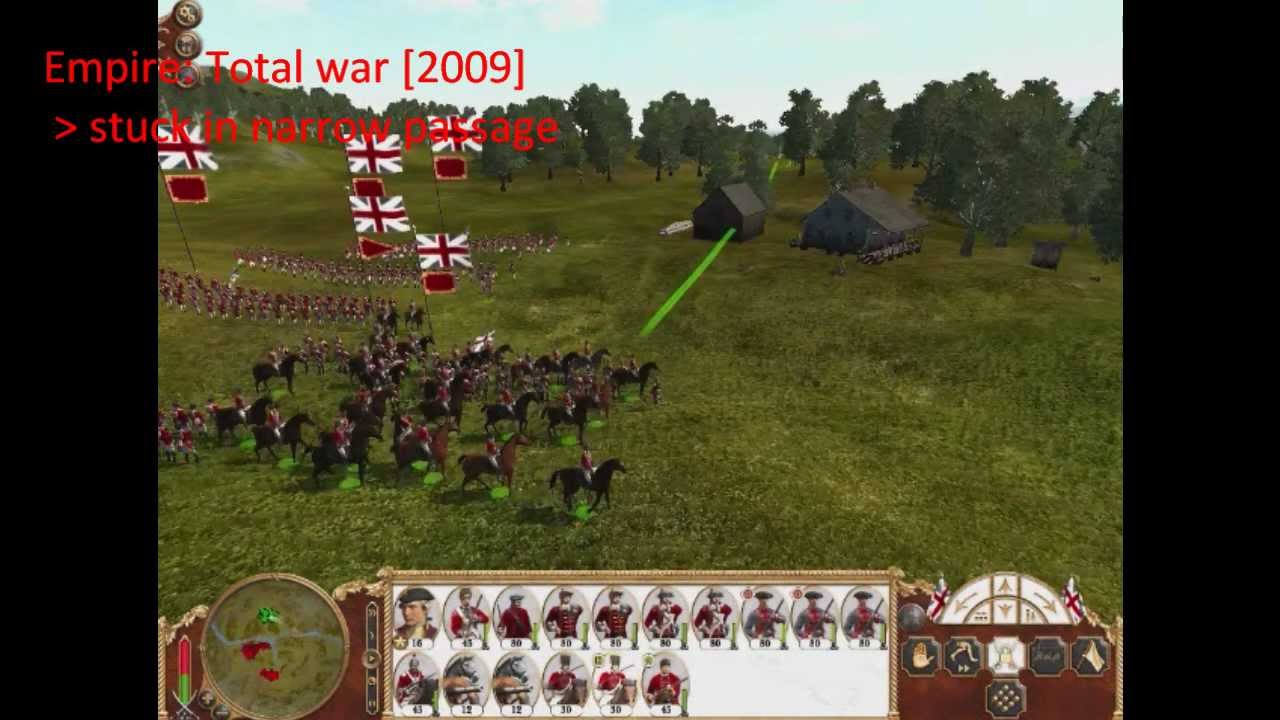
In computer games, in particular in real-time strategy games, one or more groups of units need to move from one location to another as quickly as possible. T...
Starcraft 2 pathfinding is almost entirely perfect, better looking than all the other games in this video and the one problem you showed is minor. SC2 units stick together in groups, all start moving instantaneously, maintain the same position relative to each other in the group until they hit an obstacle, and the whole group stops instantly upon reaching the destination. Units in the same group don't get in each other's way
I know that doenst help with formations
lilac abyss
hehe and sometimes you know getting your units where you want to and micro managing them is also a skill that players can develop and thus in a competitive game it's making the difference (like in Warcraft 3 where there are a lot of micro management)
lyric flint
Every RTS game has one or more problems with AI
I guess you have to decide where you make compromises
patent marten
Isn't SC2 open source? As I remember became available , at least parts of it...
lyric flint
I dont think so, just the API for AI research as in Machine learning/Deep learning


GitHub
s2client-proto - StarCraft II Client - protocol definitions used to communicate with StarCraft II.
lavish vault
Enable the Environment Query System as it is currently experimental.
where is this now?
can't find it
enabled it from .ini. Strange that it seemed to be removed?
lavish vault
god damn system that was confusing at first, but got it working
glossy spire
@lavish vault yeah, EQS is pretty cool once you get it working, but at first its confusing and has a terrible UI
i think the terrible UI is why its still in experemental
swift bolt
So my AI is getting stuck on nothing it seems
it'll move through an area just fine, then all of sudden stop moving
The Behavior Tree is firing for it to move
but it doesn't move at all
I can't see anywhere it could be stuck
 glossy spire
looks like a hole in the nav mesh?
you probably have a trigger or something that is affecting it
static dew
A version or 2 ago I had dynamic updates on nav mesh make the game crawl to a halt if left simulating for hours was werid
And I only used it because I had a physics object that's bounce around and I wanted bots to avoid it so run around it if slowly moving etc
lavish vault
How do you update a blackboard value inside a task that is being run by a behavior tree?
I have a "CheckDistance" task that should set IsChasing depending on distance, but I'm not able to access it
For some reason I can set it from character blueprint without issues
latent bolt
@lavish vault how do you trying to acess it?
you should be fine with set blackboard value and get blackboard value
just declare a variable of FSelectorKey type and make it public
inside you task
lavish lotus
its been a good day after cyber monday
lyric flint
how would i be able to make a "keep range" functionality.... is there a simple way?
 limpid osprey
@lyric flint what do you mean by "keep range"?
As in stay within 500 units of a target or something?
limpid osprey
Never played that, but you could probs just use the move to task and set the 'acceptable distance' as required
lyric flint
which block is that?
lilac abyss
Get the distance, if in range do nothing, if > max range move toward , if < move outward ?
lyric flint
@lilac abyss ok, so i'd setup some kind of a timer that'd check the range?
periodically?
lilac abyss
Yeah like you want if you need a specific precision like 2s or more or less
I dont know what you want to achieve
 uneven tide
Hey there, I'm trying to implement an flying ai for a student project. I know that there are different ways to achive this behaviour (volume navigation, autonomus navigation, projection based navigation) The last method is fitting the requirements best for the ai behavoiur in our game. So, I know that i have to project the location of the ai pawn to the navigation mesh and check with a boxcast if any obstacles getting hit on the z axis. But i really don't know where to start implementing this kind of behaviour. Did anyone achive this way of implemention for an flying ai? This is kind of what i want to achive:

Medium
Three metods used in pathfinding on 3 axis in games.
lyric flint
Ofc people have done it, i haven’t personally but It seems straight forward
uneven tide
It doesn't seem straight forward for me. Would you be so kind to give me some advice? E.g. how do i project the pawn location on the navmesh?
glossy spire
@cosmic parcel#9948 actual 3d navigation might not be possible through unreal's nav mesh system. Seems likely you'd have to write your own pathfinding system
if there aren't any "caves" then you can probably do it
also, you can manually navigate in unreal like so:
 lilac bone
anyone know of a way to make an AI take a non-optimal path?
if theres 3 ways for an AI to navigate to a destination, I would like to randomize their choice, any ideas?
lyric flint

Google Drive
Got the pathfinding working much better, clips through block right now but thats no problem
swift bolt
Anyone reason why the nav mesh would skip certain parts?
lyric flint
in what?
swift bolt
@lyric flint Like this for example https://gyazo.com/cb7fc9a97a86ed5d91a696128386909c
 glossy spire
@swift bolt most likely it has "Can Ever Affect Navigation" checked
swift bolt
@glossy spire What exactly would have that checked?
glossy spire
im guessing you want the nav mesh to go though the door?
swift bolt
yea
glossy spire
if thats the case, then you probably want to make sure the door doesn't have that flag enabled
but keep in mind the character will still bump into it.. he'll just try to walk through it
swift bolt
@glossy spire That was insightful as I did not know about that
However after disabling that check box
it has not changed the nav mesh
glossy spire
maybe wiggle it around or something to refresh it
swift bolt
Yea I'm doing a full scene rebuild as I had to rebuild my lights anyways


It looks like its creeped in a bit more
Unticked the door frame too but that did nothing even after a rebuild of the path
Can't think of anything else that would be in the way, I did the door, the door frame the valve wheel
glossy spire
best i can recommend is to double check for triggers and that kind of thing
swift bolt
There must be like a setting to tell it to build the path all the way up to the wall?
That cube is a Post Process Volume
I tried to see if that was blocking but it isn't
glossy spire
yeah the nav mesh has some settings you can play with
swift bolt
Its like it refuses to build a path a few inches near an object
glossy spire
right yeah
that is an intentional feature
the idea is that your characters path from their center
so if the nav mesh went all the way to the wall, they would always be bumping into walls
swift bolt
that makes sense
ok so height seems to be another issue
is there a way I can tell it to build paths lower?
glossy spire
there is probably a setting in the nav mesh or in project settings -> navigation
i don't recall it off hand
swift bolt
ok figured it out it was so simple
well not really
for some reason the door frame wasn't good enough for it to create a path over it
but if I copied a plane over it it draws a path over it
so I just put a plane and make it hidden
glossy spire
cool, makes sense
swift bolt
Is there a way to not have the AI NOT take narrow paths?

My AI trys to go through that path but the capsule is too big
so it gets stuck
this happens in quite a few places and I'd think Unreal would have a way to handle that?
Or do I have to just design my map such that there are never any narrow paths?
glossy spire
i think there is a setting somewhere defining the width of your nav characters
but you could also make a invisible box that blocks the nav mesh
swift bolt
True was just checking if there was a more automatic way
I tried setting the radius
My capsules radius is at 55 so I went in settings and set the agent radius to 55
glossy spire
swift bolt
still tries to take it though
glossy spire
think thats it
swift bolt
I'll try pumping it up lol
My guess right now is it thinks it can go in before its too narrow and then it gets there and its like fuuuu
maybe its moving to fast or something IDK
glossy spire
ya
swift bolt
like Walk Speed of 700 though, not really super fast...
uneven tide
@glossy spire Thanks that was excatly what i needed. But several things are still unclear for me: How do i move the ai pawn on the generated path? Should i use "AI Move To" or the "Add Movement Input" node of the pawn class? And I know that i have to adjust the height via linetracing to the floor but i have no idea how to tell the ai to "move over an obstacle" or to "move underneath an obstacle". In my point of view i need to adjust the navmesh height so that the AI can navigate on obstacles which heights are above the floor. But how do i get that data? Do i have to implement a "fake" jump or something like that?
 hushed sigil
Hi, I would like to learn about the "Engine - Crowd Management" and "Detour Crowds" features in UE4 but I can't seem to find much information on them. Anyone have any suggestions?
lilac bone
Anyone know how to randomize the pathfinding an AI uses? I need multiple AI to take different paths.
lyric flint

Google Drive
I updated my pathfinding
it clips through the blocks
need to find a fix for that
but there is no unreal movement comp. and no unreal physics
no unreal nav mesh
 worn orchid
Hey Everyone, I was wondering how can I define a custom eqs query to detect pawns with same team ID. I don't wanna use Get All Actors Of Class.
?
worn orchid
any ideas?
patent marten
you don't really need EQS, you can use pawn iterator, must be faster.
 narrow geode
You need to use a query with a context. The context needs to return an array of actors which have that correct TeamID, but if you just want to get a list of all the pawns on a certain team you don't need EQS, you mainly EQS to query the environment, just do as sivan says. Any particular reason you don't want to use Get All Actors of Class? Yes its not the most performant operation but thats fine as long as you aren't running it regularlly
worn orchid
basically I created a custom EQS generator and works great for me
 keen furnace
hold an array of your pawns somewhere. when they are created have them "check in" and add their reference to the array. when they die, remove the ref. then you just need to loop the array each time youre doing the eqs @worn orchid
uneven tide
Hi everyone! I'm trying to implement my own "MoveTo" Task in a behaviour-tree. The tree is executing the task, but my agent isn't moving. I've double checked if the target location is set correctly but the "Move To Location Or Actor" node always fails (Same issue appears when i'm using the "AI Move To" node). My AI is behaving correctly with the already existing "MoveTo" Task. I've read that this was a bug in older versions (I'm using 4.16) . Is it still not fixed or is it just my fault? 😉
glossy spire
Hey @uneven tide , is the task finishing / failing ?
uneven tide
Hey @glossy spire i' didn't know that i have to wire a Finish Execute node (set to false) to the On Request Failed exec pin . Now it works fine;)
glossy spire
cool
glossy spire
Anyone know if there is a graceful way to "reset" a behavior tree? I need to have my characters stop whatever they are doing and re-evalulate their tree when the game is loaded from a save.
glossy spire
seems like the only way is to run a totally different BT, then re-run the original
 sonic apex
hello anyone on?
need help on making my enemy AI able to move
I got a nav mesh and an onsee pawn event where the AI moves but it's not moving
the gravity is disabled on my AI so it can fly around
the AI detects the player and faces towards their direction but doesn't move
can someone help please? thanks in advance : )
umbral perch
Is it fine to just spawn an AI controller as an actor using the "spawn actor from class" node and from there possess a pawn? I had been using the spawn AI from class node but that creates a pawn with it which I don't want as I'd like respawning to happen in a generic way for both players and AI
Spawning the controller as mentioned seems to work fine so far
sonic apex
can anyone help me make a flying AI?
swift bolt
@sonic apex is this related to your post in general?
sonic apex
@swift bolt actually I solved it already
but now I'm having trouble to set collisions for my attack beam to collide to the AI and apply damage
swift bolt
@sonic apex #legacy-physics should be able to help you there 😃
errant maple
How can I start learning AI with behavior trees? I watched the basic tutorials and from what I've seen they're all the same: Connect these nodes and you have an AI that chases the player or hides. But I still don't know what those nodes do or how to make my own AI that does something other than chase and hide. When I want to make an original AI with behaviours that I have imagined, something original that a tutorial won't show me and I don't know how to do on my own, I'm just clueless.
Ultimately I just want to learn everything about AI in UE4 so that I can have a comprehensive understanding of it and be able to make working, polished AIs of my own at some point
glossy spire
@errant maple there are tons of youtube vids out there.. If that doesn't work for you, try joining a project and learning stuff first hand.
acoustic tulip
Hello, has anyone come across an issue that NPCs shakes a little when working on slopes on a dedicated server?
patent marten
shake on high slope can be caused by collision, you can adjust navmesh settings to not to allow movement there, or decrease capsule size
acoustic tulip
@patent marten Thanks for the reply. I think it might be not related to collision because I am using navmesh walking for npcs which don't really have collisions with the slope. Also this issue looks much more obvious when running on a dedicated server so I assume it might be something related to network?
patent marten
in PIE it should be smooth if a network problem
acoustic tulip
Yeah, it looks smooth in PIE. I almost can't tell it shakes.
patent marten
hmm sounds like something to check, maybe client sided movement prediction is not good on slopes? I work also on multiplayer, ask the team mates to check it...
acoustic tulip
yeah, I am thinking there might be something not very good related to client sdie movement prediction when working on slopes.
acoustic tulip
It might also because I am trying to rotate the Pitch and Roll of the npc according to the degree of the slope.
lilac abyss
Are you modifying the pitch and roll of the actor or of the skeletal mesh component ?
acoustic tulip
Yes, I am modifying the pitch and roll of the mesh component. @lilac abyss Will this cause a trouble?
umbral perch
@acoustic tulip if you are modifying the pitch and roll then you might not be getting the nice interpolation from the CharacterMovementComponent as with regular movement. Try disabling it and see if the shaking still happens on slopes
It could be updated on tick when not on a server but when on a server, since it controls the AI, you might be seeing the shakiness depending on the update rate of that actor from the server.
acoustic tulip
Thank you very much. I'll try to disable the modification and see what happens.
lilac abyss
@acoustic tulip yeah maybe it cause some miscalculation, I don't think I ever tried to modify pitch and roll of my characters /D
patent marten
imo controller controls rootcomponent (capsule component) Transform, so changing the mesh relative rotation should not be the reason of the issue...
but has to be tested....
acoustic tulip
I think I've commented all the changing mesh relative rotation code, and this issue still happens. @patent marten I agree, because even without the mesh, I can still see the capsule component shakes when the npc working on slopes.
Let me talk more about the situation so hopefully we can locate the main problem. So the shaky movement issue on slopes only happens when I run my editor as a dedicated server. (Ticking the Run Dedicated Server option), and the movement on a flat ground looks fine.
My guess would be some code only executes when running as a dedicated server... Anyway, thank you very much for everybody's help. I'll update it if I figure out what's the real problem. 🙂
umbral perch
Is it possible to use the "AI Sight Target Interface" in BP?
I added it to my target character but I can't seem to call any functions from it
Trying to get the AI to be able to perceive characters if their head or upper body is visible- currently it only works if the middle of the body is showing
lyric flint
So I tried to enable Project NavWalking Movement and my AI cant move?
Is there any other way to stop this jerky movement?
lyric flint
Or... Is there a way to pause the behavior tree
Instead of StopTree() and Starttree()
uneven tide
Hey @sonic apex how did you implement your flying AI ? Could you share your code? I'm curious about it!
 opal fog
I have a pathfinding question, I'm making a bot that is hidding from the player, issue is that after I select a hidding spot, most of the times he's passing in front of the player, since that's the shortest path to the target. How would I filter the path so that he avoids going in to the player's line of sight?
so right now for example he's taking the red path, where he should've taken the green one avoiding the player's view
sonic apex
@uneven tide Hi sorry for late reply, it's actually not "flying" but generating 3 random locations to move to while also having gravity at 0
I'll link the tutorial, gimme a min

Hey everyone! In this video we're going to create beginner AI in Unreal Engine 4 using blueprints. We'll be creating three types of beginner AI. The charger ...
narrow geode
@opal fog Nav modifiers probably is what you're looking for. You can use them to make the areas visible for the other player a much higher cost for the AI to travel through. This example by Rama is a similar use case to yourself (sort of) but it is a bit old so I imagine most blueprint nodes now exist in the engine by default instead of in his plugin - https://wiki.unrealengine.com/AI_Custom_Pathing,_How_To_Use_Nav_Modifiers_Query_Filters
opal fog
@narrow geode thank you for the answer razer! I saw that wiki entry but I thought that was for volumes, so that they would influence beyond line of sight (so the player would affect pathfinding even through walls)
dim vault
Hey guys - have questions about navigation mesh
and just navigation in genera
l
firstly, I have a massive nav mesh for a very very large level
what's the best way to deal with this. dynamic or static?
secondly, I have a few sublevels, so my navmesh if I understand correctly should be in my persistent level?
when I load my sublevel via Sequencer - will it need to rebuild the navmesh? or if it's dynamic does it rebuild at all?
narrow geode
Dynamic, use a navigation invoker component I think its called, ive never done it but its one of the issues they ran into during the KiteDemo in 2015. You only want to generate navmesh dynamically around those characters otherwise your memory usage will go through the roof and it will take forever to generate, this was the livestream that covered that stuff - https://www.youtube.com/watch?v=hNgcQ0BeGCs
The second in a two part series, this livestream covers aspects of the creation of "A Boy and His Kite", the cinematic showcasing the new large world feature...
@opal fog I did some more digging around, and if you're familiar with EQS you could probably implement a similar solution to this if this isn't something you've already come across - https://answers.unrealengine.com/questions/410026/get-navigable-point-in-radius-with-line-of-sight-t.html
dim vault
Thanks Razer
opal fog
@narrow geode Interesting find, but the EQS if I run it in a behaviour tree will still only return me a location, not the path to it, or am I misinterpreting the "pathinggrid" in EQS?
narrow geode
You should just be able to add it using the add component part on the top left of the blueprint screen
dim vault
ohhh iseee
narrow geode
just add the component directly to the character, like any other actor/scene component
dim vault
ah ok
narrow geode
@opal fog From what I understand a pathing grid just finds areas on a nav mesh, but I believe what they are using those EQS queries for is to navigate to each of those points manually, they just get the closest point which is out of sight of the other character on the nav mesh and then they set that as the new goal
Ifs worth noting if you use a blackboard key for a MoveTo on the BT then it automatically updates the goal if the key is updated so you could just run a service every second or so to find a new target point
Ive not tried that before so im just completely guessing here, if I find some time I might be able to prototype something and let you know
opal fog
ok I understand your point, going to prototype little bit see if I can come up with something too 😃
thank you
opal fog
@narrow geode from what I understood the pathing grid is just a variation of the grid that projects to the navmesh, but it's not really solving the "avoid paths where the player has LOS" problem
narrow geode
Yes, you'd be using the EQS to create a grid of points, but then you'd perform tests to trace between the context which would be the enemy character and filter those results out or negatively score them
dim vault
Hey Razer & other specialists I have a general feasibility question
So I have this quite massive landscape
and me and my colleague are trying to figure some stuff out
Im trying to have a massive crowd of approx 100+ skeletal meshes
walk through the landscape
So since this is in a sublevel being loaded 'seamlessly' through sequencer
Im starting to think it needs to be a Dynamic nav mesh
with invoker stuff going on
but having a crowd in UE of 100, with invokers, going across a landscape this size
is that feasible?
with dynamic runtime generation of navmesh for 100 in a crowd be insane?
narrow geode
Yes, probably, but im not sure if they share generation. As far as I know the kitedemo thing created a flock of deer where the leader was the only thing with a nav invoker component, but you'll have to check that livestream, I haven't heard much recently about that component
The concern with that many skeletal meshes will probably be animation, so you'd want to use skeleton LODs, generally the AI stuff (apart from in your situation the nav mesh generation) won't be a bottleneck
dim vault
And would you agree that the nav mesh generation should be dynamic?
It's a strong 50K nav build.
Which wouldnt be a problem normally, but it seems to rebuild everytime I show the map in Sequencer
narrow geode
yes, it would have to be dynamic as building a static one would increase runtime memory usage massively
dim vault
so am I to assume it would rebuild everytime I run the experience?
ah ok
so it HAS to be dynamic
narrow geode
Possibly, I don't know about sequencer
but for large levels the rule of thumb is use dynamic with nav invokers only
dim vault
Alright - that points me in a direction!
In that case - having all the character AI "move to a target point"
the target point itself would need a nav invoker as well im assuming?
if it's generating the navmesh dynamically, and the targetpoint is far away (ie outside the bounds of the dynamically generated navigation)
my characters don't seem to move toward the targetpoint is what im saying.
after ive switched to Dynamic and added invoker component
narrow geode
I don't know entirely, but its something they possibly discussed in that stream I linked
dim vault
ok thanks ill watch it
dim vault
Watched it- interseting watch and some good material
thanks
I managed to get it somewhat working
at least now they are going toward the targetpoint - but I had to untick Use Pathfinding
I guess it cant calculate a path that it can't see!
dim vault
lol just realized removing pathfinding pretty much means it's not using the Navmesh data at all
hence no need for navmesh
narrow geode
You could use NavMesh using that system still, you'd just find the closest point to the goal on the navmesh and update that like once a second or something, and then as you move closer to the goal it will generate the navmesh
acoustic tulip
Question about shaky movement on slopes, I figure out that dues to different movement modes on the server side and the client side. Because navmesh only exists on the server so NPCs on the server are using nav_walking but NPCs on client are using walking (physics walking) to predict the next position. Then it gets corrected by the server which causes jerky movement. Any ideas we can simulate navmesh walking on the client side?
Thanks in advance!
timber moon
What could cause a MoveToLocation return Invalid? 🤔
patent marten
@YuChen check client rotation, I had issues so made an RPC called from server Tick and its okay now
lilac abyss
@acoustic tulip I think there is an option to have the nav mesh on the client somewhere
@acoustic tulip Allow Client Side Navigation in Project SEttings/Navigation System
lyric flint
@lilac abyss why would u want that though?
lilac abyss
@lyric flint Me ? I don't know, for @acoustic tulip it seems that he's using the movement mode navwalking instead of walking so he probably needs it on client too ?
lyric flint
@lilac abyss it shouldnt matter
lilac abyss
@lyric flint cool 😄
 modest tapir
Hey guys! I'm working on group movement for an AI with a flocking behavior. I'm running into some problems with A* though, as they all want to go to the same spot, creating an artificial choke point. Is there a way for me to put a margin on those A* points, or how would you recommend I go about this issue?
acoustic tulip
@lilac abyss Thank you for the reply. I think if the client can use navwalking which means the movement modes on the client side and server side are the same, it should fix my problem. But I 've tried that setting and it doesn't work for me. I guess because I am using dynamic navmesh generation?
lilac abyss
@acoustic tulip Yeah maybe, maybe you could try on a test map with a static navmesh and see if it's working
acoustic tulip
Yeah, I am on it.
 earnest swift
I'm just starting to add AI to my game. The game is 2D, but I have managed to get a navmesh working. It's far from ideal, but it's there. I made a paper character blueprint and added pawn sensing. It also comes with a charactermovement component.
I added a simple AI move to node, and executed it. It works, but only on flat ground. Here are my problems:
-
Navmesh is wonky around slopes (cuts off, misaligns with ground, bends)
-
The AI gets stuck on slopes. This is probably due to the first problem
-
The AI will not jump to clear small, simple obstacles like ledges
-
The navmesh freaks out when there's two or more valid surfaces on the same Z axis (like a tunnel that goes underneath a valid surface)
I'm a complete newbie to AI, please be nice :P
Some things I think I need to know about are blackboards and behavior trees, please explain.
So to recap: (+some extra info)
- 2D side scroller, managed to get 3D navmesh working
- using Unreal's premade character movement components
- I'm a noob at AI
- This is in blueprints, don't know any C++
- I'm going to bed now, will check back tomorrow morning, and bring pictures (in about 9 hours)
Thanks in advance to anyone who helps me!
keen furnace
@earnest swift never done 2d, but have done extensive 2.5d ai including jumping up/across/down, and flying. happy to share some pointers if you like
 calm creek
Hi guys, I've got all my animations for my wildlife. I'm wondering if there any tutorials on how to make the animals roam / be aware of surroundings with sound etc
keen furnace
do you want to create ai, or just do a simple easy way?
calm creek
Easy way for now unless i might as well just go straight for advanced
keen furnace
easy way is just loop a bit of BP in the animal class that sets a random place as a waypoint and moves there. have a large collision sphere around it and if a player gets too close then increase speed and set a waypoint in a direction away from the player
calm creek
Is there any documentation of animal ai
keen furnace
theres documentation of ai, you could use it for any class
keen furnace
as long as your wildlife is wandering around on the ground or hovering a bit above it, then the normal AI stuff will work well
calm creek
okay
keen furnace
its a bit out of date but i learnt with these

http://peterlnewton.com/ Event Received Conditioned Check changed to Perform Condition Check in 4.8 look http://i.imgur.com/v1FiDy4.png [PROJECT] https://for...
calm creek
Thanks
calm creek
Well ima be here for a while
earnest swift
@keen furnace yeah my game can be treated as 2.5D, as it does technically have depth. But gameplay exists on the one plane. Your methods should still work though
teaching my AI how to jump over obstacles is essential to my game
I'll upload screenshots
so this is some typical terrain that the AI should be able to navigate:
the terrain is either flat ground, a 45 degree slope, a ledge, or a pitfall
navmesh builds well around flat ground and ledges
but it struggles on the slopes
and gets completely destroyed by places where there's 2 valid surfaces on the same Z axis
like the tunnel you see here ^
another example:
actually, I dont think the Z axis thing is a problem with the navemsh, but rather a problem with the background
yeah because it pathed around this quite well
the AI also refuses to walk off ledges
oh ok, it just walked off a ledge when I told it to follow me
interesting...
it still doesnt want to do that when I tell it to go down there though...
it also doesnt turn around and follow me when I jump over it
I think its because it looses sight of me
earnest swift
ok, so I taught it to jump by telling the movementcomponenet to jump when its X velocity is 0
the problem is, when it jumps, it seems to derail from the navmesh, so it stops moving. Which causes it to jump some more
 torpid pilot
Hey bros ,wanna talk about AI with you
I want to know how you guys construct your AI system
Normally,use behaviour tree right?
Within the tree ,I want to know how you make a combat ai
As to me,I create couple states,then random selector to choose one to execute
Maybe with some child states
Like this
As to switching the state,I put the logic in some services or tasks
If you have better and stronger solution,I'd like to know
What I wanna build is a system with high maintainability and scalability
Services and tasks are blueprints ,we can make some base ones,this is all I know so far
Glad to hear your opinion
keen furnace
@earnest swift It acts that way because you have detached your actor from the navmesh. for jumping, you need to use either a custom navarea, or navlink proxy
navlink proxy is underdeveloped too, you need to edit it in the engine source to make it less hellish to set up
earnest swift
Damn
keen furnace
as for the 'being cut off' at certain areas, your navmesh settings dictate where valid mesh is. for jumps, link the navmesh with proxies. for areas it's being painful, you need to adjust the nav agent height and diameter settings
earnest swift
Where can I find the settings? I did a bit of digging to no avail
keen furnace
project settings -> Engine -> navigation mesh
earnest swift
Ok thanks
keen furnace
np
earnest swift
Could it be easier to make AI inside of blueprints, rather than using Unreal's AI system?
keen furnace
i think you underestimate how much of an undertaking that might be
lyric flint
@earnest swift Well it depends on what
keen furnace
for simple stuff, sure. but at the moment you're having issues with navmesh. without that, how are you planning to nav in your blueprint code?
then you are looking at a*
lyric flint
if it's like Terraria I'd use both
keen furnace
with my 2.5d game i used a mixture of normal nav and voxel nav
taught ai to failover between the two
lyric flint
in my case I use AI tree to determine the approach and C++ (in your case blueprint) to determine how to act once in range
might not be the most optimal but worked for me
earnest swift
Hmm ok
keen furnace

Getting there one step at a time ;) Steamgroup: http://steamcommunity.com/groups/SN2CP Music credits: Logistics - Icarus (feat. Hugh Hardie) https://www.yout...
thats a mix of normal nav for ground, and voxel for air
lyric flint
@keen furnace your game looks really nice, good job
keen furnace
cheers mate 👍
earnest swift
O shit is that your game?! Looks great, the level of polish here is unreal
I hope my game will one day be at that level
That'll take a while 😂
keen furnace
appreciate it ^^ aye thats one of the games im doing, the trick is to keep working at it, keep learning, itll get there 😃
torpid pilot
If a blackboard is used by many different behaviortrees,would it generate many blackbaord instances or only share one?
 cinder carbon
Hello,
I am working on a simple multiplayer game which has AI that moves to a location. This AI works fine when kept in level. But doesn't work when spawned. What might be wrong?
keen furnace
are you using aidebug? click on the actor while simulating and screenie the stuff onscreen @cinder carbon
sudden lodge
Hello, Is there anyway add movement component to Pawn BP?
torpid pilot
Heybros,how to let the ai move to a specific point?And I can only locate the horizontal position(x and y)
@sudden lodge You can add movement to pawn but it wont move because pawn doesnt have a charactermovement component
You can use addActorLocalOffset to move a pawn
sudden lodge
@torpid pilot yeah I realized it. you can use target point maybe? for your question
torpid pilot
But I dont have the z value for the point
The terrian could be not flat
Will the aicontroller automatically calculate the correct z?
 graceful bone
@keen furnace Reminds me of Mini Militia, it's amazing
keen furnace
@graceful bone Thanks, appreciate it 👍
lyric flint
Hi, I have a problem with creating a task (for behaviour tree) for my bot. I created a blueprint, but it doesn't work properly. My bot never goes to the point where it's the end of the line trace. In the picture it's the situation where bot should go to the south-west box. Why does he go to the other place? I want to expand this scirpt in the future, so my bot should always go to the right place. Nobody answered on https://answers.unrealengine.com/questions/734927/ai-random-patrolling.html. I uploaded photos of this problem there.
lilac abyss
@lyric flint seems to me that your character goes to the hit of your line trace, which is the north east so it's normal
lyric flint
Why the north-east is normal? I think he should go to the south-west. Maybe I'm wrong, but I don't understant it.
How can i get the goal of bot's travel? I want to save this vector to the variable and use this to other tasks.
Maybe it's better photo
@lilac abyss Do you know what I'm doing wrong?
lilac abyss
Are you sure your blackboard value is set ? Can you draw debug with the value of you blackboard value RandomLocationBKS instead ?
after setting it
lyric flint
It's my patrolling BT.
With debug sphere
And my blueprint
Maybe I should again attach ProjectPointToNavigation or other function?
 glad hull
Can i use NavMeshBoundVolume with 2d sprite ?
even if i press P i don't get any green floor 😦
i set collision thickness of my sprite at 100
i just build the level and it's working fine 😃
uneven tide
Hi there. I'm using the PawnSensing-Component to let my AI sense the player. When "Only Sense Players" is set to true, the AI pawn is ignoring the player character. If its false and "See Pawns" set to true, everything works fine. What do I miss to make the AI only sense my player character ?
glossy spire
is your player collision object type "player"?
lyric flint
Maybe now someone know where I made a mistake? What should I change in my FIndRandomLocation blueprint? Still I can't fix it...
glossy spire
why are you using line trace?
lilac abyss
@lyric flint beware of blueprintpure nodes, when you link two times the GetRandomPositionOnNavMesh it will use two positions different. You have to link the result only one time (in a variable) and then use this value.
BlueprintPure nodes are call n times if you have n links on it.
So in your case it's normal that the show debug display another location than the line trace and than the value stored in you blackboard key
lyric flint
@lilac abyss Thanks, I'm new in blueprint programming and I have so many problems, but this was very simple :).
@lilac abyss Works great. Now, I'll try to expand this script :).
lilac abyss
😄
 jagged plover
Here's a dumb question: is there a flag I need to set on AI controllers so that they'll rotate to face their focal point?
I set the focus via the behavior tree and then try to use RotateToFaceBBEntry but despite the focus actor being valid, my AI never rotates to face them.
jagged plover
Nevermind I figured it out, I had OrientRotationToMovement set.
glad hull
Why my character dont move to location ? 😦
this is the function, it well called by a BT
my navmesh
i want a flying character so i set the Character movement mod to flying
any idea ?
my character just dont move, he do nothing 😦
earnest swift
@glad hull I was just here a couple of days ago trying to figure out how to get Unreal's Navmesh based AI to work in a 2D space. I came across a few problems, such as the navmesh not building correctly on slopes, and the AI gets "derailed" from the navmesh when jumping. Basically, my AI could only move across flat ground.
So, I scrapped the idea altogether and came up with my own solution: AI Pathfinding Nodes! These nodes get placed in the world, and when the AI walks over them, they do stuff
using these nodes, my AI can navigate complex terrain. My AI can move from A to B with ease
this happens when they walk over something
here's the logic behind the jump node
these enable a few controls to be used, such as directional jumps. i.e. only jump when moving left
if both are checked, the AI will jump regardless
I've also set up a channel system, where the AI only jump if the channel number matches their's. But if the channel is -1 on any of the actors, it'll ignore channels altogether and jump
I've also taught the AI to handle simple obstacles by itself. This small section tells you if the AI is standing still
well, only on the X axis.
jumping doesn't count
because, I've got some more blueprints that make the AI jump when they're standing still when they're supposed to be moving
there's a small delay to prevent the AI from jumping when turning around
if the AI fails to climb the obstacle, it'll turn around
to make the textures appear on the AI Redirector Nodes, I just quickly made these in paint.net and imported them
I've just got a soimple contraption set up here that changes the image
they don't appear in game, the images are just there to help me understand what I did when designing levels
combining all of this, I my AI can navigate simple terrain
and complex terrain
and death traps
to even the most complex terrain
and it can get around trolly players trying to block them
that's just a quick overview of the blueprints behind, and the results. if you want more info, just DM me. I'll explain what this does
I should clean it up actually
earnest swift
nah thats too complex
glad hull
ok i see
thanks for the reply Maldonacho
pretty good work from you
but if you want the character to follow the player and if both are flying character it will be more conplexe 😦
but i will probably use your systme for walking character
earnest swift
hmm yeah flying will be harder
unreal's navmesh doesn't support air control at all (to my knowledge)
lyric flint
I'm having some trouble using Observer Aborts. It seems like the Attack Enemy sequence should abort once Enemy is no longer set however, it always waits out the full 5 seconds

I can confirm that Enemy is set to null after 2 seconds, which is when Attack Enemy should abort
Any ideas on what I'm doing wrong?
Doesn't work with Observer Aborts set to Lower Priority and Both


 sudden drum
HELLOO!!!
help me pleaseeee 😦
set control rotation doesnt make my pawn pitch.... Why???
sudden drum
Why did Epic choose to have this 😄 :
// Don't pitch view unless looking at another pawn
if (NewControlRotation.Pitch != 0 && Cast<APawn>(GetFocusActor()) == nullptr)
{
NewControlRotation.Pitch = 0.f;
}
a bit too constraining for a base class
lyric flint
Hi, I want to change AI Sight Perception to custom points. I read this tutorial (https://blog.gamedev.tv/ai-sight-perception-to-custom-points/), but it's not working.
What did I do?
- I created a class MyCharacter. This class derives from ACharacter and IAISightTargetInterface.
- I overided function CanBeSeenFrom (just like the tutorial, I'll try to modify it in the future).
- I created CharacterSight blueprint class based on MyCharacter class. PlayerCharacter has BaseCharacter as a parent class, and BaseCharacter has CharacterSight as a parent class.
- I added sockets to UE4_Mannequin_Skeleton.
Why is it not working?
uneven tide
@woeful cedarL#9095 Yes i created a new object type "Player" and set my character to it. Anyways i've figured out that i have to set "Only Sense Players" and "See Pawns" both to true to sense my character...
torpid pilot
Bros,I found a wierd thing for movetolocation
Everytime I use a random node to set the destination,it wont go to that point
It goes to another random point
OK I knew it
Anyone knows how to reduce the rotate speed of ai when it turns to another direction?
torpid pilot
OK I figured it out
lyric flint
Maybe now someone know where I made a mistake?
anyone know a simple way to display eqs hit points, i cant remember how to visualize them
nvm found it
lyric flint
OK, my previous problem is solved. But I have a other question. I created covers for my bot. All covers have a tag "Cover". I want to remove this tag from all of this objects. But is there any way to my bot know which object is quite big and have no holes? This object can be a cover for him. How is it solved in AAA games? Do covers be tagged? Do level designers create a "cover positions/spots"? Is it a way to avoid it? I want to create a bot which can be patrolling and fighting on any map (created on UE4).
keen furnace
hints or tags are definately the simplest way, but you could do an EQS query to check cover
maybe do three traces from each point to check low, med and high coverage
lyric flint
OK, I'll try to implement it with EQS. Thanks.