#gameplay-ai
1 messages · Page 93 of 1
 solid osprey
anyway isn't that 600 people for the whole of unrealslackers
this channel isn't super active
 flint trail
don't be fooled, it is dead
today at least
tomorrow is Thanksgiving, so maybe that's why
solid osprey
gyazo.com/f2fea45265b0a18290c53bfc8e4ded83 … Tree will not move to wait, but the bool switches from Not Set to Set when character is atTarget?

 violet patio
Can anyone help? My Enemy AI characters just run on the spot, they don't move at all. They SHOULD be running towards the big purple circle (And look at it too) But for some reason they all face the wrong way (Red Lines).
They used to work, but I changed my level and changed my spawn points, nav meshes etc. Now they just dont work anymore
 indigo thicket
Did you factor in the changes with the AI As well? (Make sure they read the new mesh, etc. )
 vital jetty
is it possible to have two services run parallel to each other? I want my AI to both check for next point (distance check) AND raycast for any obstacles all the time. and I want to keep those two things as separate services instead of having to lump them in a big 'DoStuffEvery0.5secs' service...
 opal spade
Is it normal to lose ~50% of your FPS if you were to spawn 100 AIs and tell them to move to the player?
Just in the default third person template
 near jetty
mate, you are doing 100 pathfinding requests at once
plus 100 pawns, all having overhead
plus 100 skeletal meshes with tons of bones and an animation tree each
plus all the physics overhead of the Character Movement
 viscid oasis
So... yes?
 worn yarrow
Hi. does anyone know if Behavior tree can be run via a queue style
rather than all at a tick
speicfically.. can i get the AI to run certain task based on queue ( only 1 guy gets processed per tick )
flint trail
good question @worn yarrow , I'd like to know that too
worn yarrow
hi . has anyone worked on Behavior tree on C++ yet?
i'm extending the MoveTo node and i'm trying to get the function that runs when the whoel task ends
it seems that OnTaskFinished runs even before the task is finished. i think it runs on path update
any idea which function is it when the task totally ends
 rustic nova
@worn yarrow as soon as you call FinishExecute(True) it will end
worn yarrow
No. I want to get the function that runs when it runs finish execute
Apparent the non bp version never call finish execute @rustic nova
rustic nova
@worn yarrow Hmm, maybe you can use Receive Abort? Its called when a decorator stops a task so sort of when it finish executing. I usually call a function there as well as when I call finish execute to reset a task.
rustic nova
Ohhh I see, cause you don't have access to when MoveTo calls finish execute right?
worn yarrow
if it finishes correctly it won't run... i would swear that OnFinishTask is the one.. but it seems to keep running all thoughout the task . perhaps at the end of every segment
yeah
i ended up having to do it inside BP and use the Task Move To functionality
which isn't ideal
rustic nova
Yea, I'd say it would be easier to make your own MoveTo Task then
Though it would be nice if you could get OnFinishTask to work
worn yarrow
MoveTo is a quite a complex class
i mean the C++ version
hence I just extended it. imaginging it would be more efficient
I have a feeling there's a functionality that runs after the task finish somehwere up in the BTNode parent
 lyric flint
Hey new to UE4 coming from Unity. I've placed a Pawn Sensing component onto what will become an AI in a game. But the problem is it's at a 90degree angle of where the character is facing and I can't rotate it. Any ideas?
 ocean wren
- dont use pawn sensing component which is out of date, use AIPerceptionComponent
- you can rotate the static mesh if you need to
- Your AI should run via the AIController class, which you could rorate if you absolutely needed to
rotate even
erm.. 2 should say skeletal mesh 😃
lyric flint
@ocean wren Thank you for the useful info <3
ocean wren
you're welcome
 vital flare
im new to AI, Im setting a boolean Key in black board and want to activate a specific part of my tree if it is true and wait if it is false. I think I should use a decorator mt dont know whitch one?
basicaly I want my Ai to do stuff only when the bool is true, any hellp would be apreciated.
vital jetty
click the node in the tree, from the list pick decorator, pick blackboard, choose your bool in the dropdown, equal to false/true (whichever you want)
vital flare
tnx
solid osprey
anyone know how to have a character move to while jumping?
atm character gets to location, jumps vertically, then moves to next vector
i want character to move to while in air
i suspect i'll also nee tou se sphere trace for this sort of thing at some point
but for now just want jumptask which calls jumpfunction from character ai to run while moveto ir runing
lyric flint
Looking for info about making the AI character walk backwards on a switch?
seems just setting the anim bp still forces it forward
 odd inlet

wondering if theres anything to improve that?
34ms is a lot and since this is VR it totally doesn't work like this, performance needs to be way better
odd inlet
async nav generation seems to mostly fix it 😄
 low copper
I'm trying to get a pawn to execute a list of animations, and then move somewhere else. Does anyone know when the Complete output pin in an array loop executes, in an AI task? I always though it was after it had looped through the array, and each item (an animation) had executed. It doesn't though. It executed the animations while moving off while still animating, even when there are several animations still to execute. I've solved iy by checking the index of the array instead, and if it is one less than the array length (i.e. this is the last one to be executed), going directly to a Finish Execute node. That works, even though I can't see how that would be different from Complete. Any ideas?
flint trail
@odd inlet it seems that all AI tasks are on backburner, thanks to Paragon 😦
worn yarrow
hey guys
does anyone know anyway for dyanmic obstacle to affect ONLY a particular agent?
 fierce lance
Anybody here knowledgeable in the ways of AIPerception (particulary in C++?)
 silent nexus
lyric flint
silent nexus
lyric flint
@silent nexus Whos this for?
low copper
@worn yarrow Can't you customise the collision type to only afect a certain type of actor?
worn yarrow
@low copper I can
but im talking about navmesh here
AI wouldn't move to places without navmesh anyway ...
Dynamic Obstacle refers to an object that will cutout a hole in the mesh dynamically without reconstruction of the mesh
 quiet basin
Could someone recommend a resource about common AI gamedev? (non ue4 related)
low copper
@frozenfire I think Ian Schadden talked about something similar in the Basic AI tutorial. Creating no-go areas in the Nav Mesh, but only affecting certain classes. It was in response to a question asked in the Live feed.
quiet basin
@low copper use full name (with #) otherwise users won't receive notification
quiet basin
hope not...
there's a step by step guide https://docs.unrealengine.com/latest/INT/Engine/AI/EnvironmentQuerySystem/QuickStart/index.html
This Quick Start Guide covers creating a Behavior Tree that uses multiple Run EQS Query nodes to find a place to hide from the player character.
 edgy aspen
I've been through this one S-ed. At least at a glance. I was looking more for a basic C++ setup to run my own custom traces with. I am not using bipeds or navmesh.
So currently I just run trace queries as a behavior tree service.
 hybrid sorrel
I feel like I'm missing something simple. I have a Actor that will be ai controlled, I have it using charactor as the base class with the movement type set to flying, I have a behavior tree picking a target location and then using the moveTo task, however my charactor does not move.
my ai controller and behavior trees are firing when playing in the editor
are there functions that need to be implemented on the actor to apply movement inputs from the BT?
low copper
@hybrid sorrel The usual reason is you forgot the Nav Mesh volume. :)
solid osprey
how do i get character ai to rotate 90 degrees on task
if i cast to charcter, get actor rotation, then 'set rotation'
doesn't work
hmm
maybe setactorrotation node
vital jetty
set actor rotation node is the one 👍
solid osprey
hrm
still not rotating my char
when task runs
i'm inheriting from a global gameai maybe thats it?...
doesn't feel like thats it though


to test
this combination doesn't rotate char
vital jetty
check if set actor rotation gets the correct value
the node itself definitely works, I have used it an hour ago to ensure the minimap camera always points down no matter what weird rotation my car might go into 😛
solid osprey
hm
the only thing i'm wondering is
am i setting the rotation for the characterai
with this
or am i just setting some random rotation var called rotation
i mean, the setactorrotation node shoudl do it
but doesn't seem to
vital jetty
stick a print string before Set Actor Rotation node and connect the rotation var to it, quickest way to debug
because as far as I can see your setup is correct
solid osprey

hrm
dunno that this will work
ok
ignore that one ]
this is as simple as i can make it
task is called setrotation

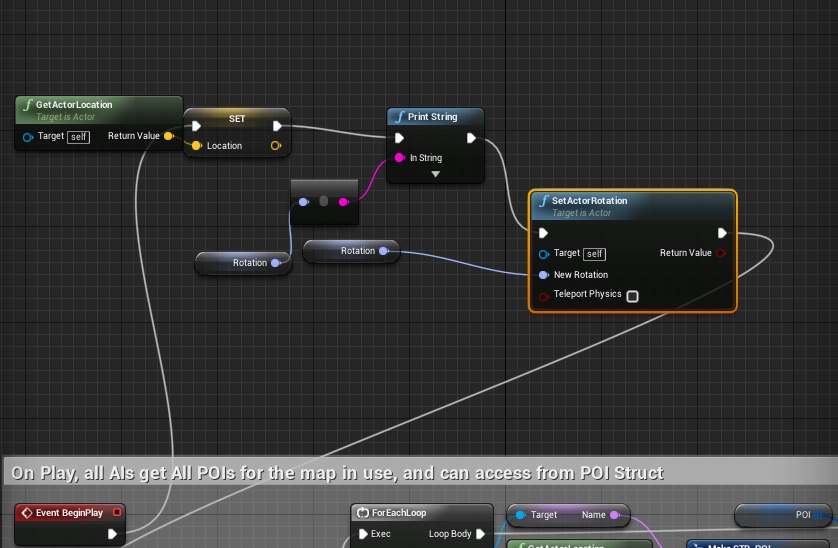
i don't think i'm tying the two teogether proeprly but my brain isn't workign toady
like
gameai says character rotation is 'rotation'
i cast to gameai, and set rotation variable in task
nothingh appens
and i don't get a print string for that rotation
i get a vector read out on play
or rather, a rotator readout i imagine
the rotation task fires
but character doesn't move
and dont get read out
eg gameai not setting rotation on this char
only thing i can think of is that it isn't working because gameai is parent of this characterai
character needs its own local rotation or something
or that the whole thing needs to loop
vital jetty
you probably need to cast to your exact character ai
solid osprey
mm
just put the setactorrotation in the task
don't kmnow why i didn't just do that to begin
works now
when i'm using instances of a gameai
and changing multiple rotations
do u know if it changes all instance when i do that?
if u change a var on parent at runtime i don't imagine it changes vars on all children right
but maybe it does
 sullen escarp
Anyone know how to have a character move with root motion, but temporarily disable collision detection on the motion so the animation doesn't bump into things? I need the character to play out the animation with the root moving for a certain scene, but ignore collision
I was thinking disable root motion for that anim, and at the end of the animation get the mesh offset from the root and change the actor location to that, but there might be a pop?
EDIT: I ended up making the anim non- root motion and at the end of the anim on a single frame use TransformLocation to the relative location of the character mesh and then setting the character mesh back to 0,0,0 relative. No visible pop
quiet basin
OpenAI released Universe!
vital jetty
*bookmarks whatever it is to see 2morrow bc too late and need to sleep 😛 *

 stuck oar
What exactly are the AI doing?
odd inlet
nothing
they are being spawned with gravity off and floating in the air
all at the same location
its a pool so that I can later use actors from that pool and don't have to spawn them since spawning is so slow
odd inlet
its probably because they are all inside each other, so its fine that its slow
stuck oar
It is calling a lot of Sweep commands. Have you tried disabling gravity and collision?
odd inlet
gavity is disabled, collision I should probably do, yeah
I basically fixed it with this now: http://puu.sh/sFNer/8eabb92be8.png

since they are invisible
odd inlet
well its 0 time now spent on char movement stuff, so theres just nothing to see now on the profiler related to those AIs 😄
they are all invisible, so none of them is updated any more
stuck oar
perfect haha
odd inlet
yeah 😄
odd inlet
yeah thanks 😄
odd inlet
navmesh generation is slooow
even with this ticked: http://puu.sh/sFQxO/29d3acaa2c.png

80 ms frame time because the GT stalls while waiting for navmesh generation
odd inlet
ok, not really, was probably something else that was was
flint trail
so, nav mesh is generated when level is loaded ?
solid osprey
hmm
so i'm still having some trouble with setting values in objects using tasks
i want to have a task on BT that sets a bool on an object

this doesn't work
but not really sure how to access objects with tasks
solid osprey
ah need the reference
used get all actors for now, but prob need a specific one generated on overlap or something
 lyric topaz
Hello, I am having an issue with behavior trees. My enemies patrol the area until they sense the player with a sphere trace. The issue I am having is when one enemy senses the player, they all do and start moving towards the player. Any idea what is causing this bug?
 empty glade
Are you using blueprints or code? Can you post a sample of your sense blueprint/code?
Has anyone ever used two senses and detected which one triggers the perception update?
vital jetty
@lyric topaz you probably are syncing the blackboard across all instances
solid osprey
i've got a q on that
might be related
if all the enemies were subclass of a parent class 'gameai'
would they all respond at same time
or does each instance have its own stuff
more specifically, say u have a parent class for all enemies, then a characterai for each enemy that inherits. in one enemies character ai, you change the parent classes 'speed' variable
at run time if you do this, does it change speed for all gameai to taht amount
or does your enemies each have their own local version of that parent variable
 tidal kraken
Anyone familiar with setting AI like tasks to the player controller?
I currently have it setup how it normally would be (Player Character/Player Controller) but I want to do some RTS type stuff, and allow the user to tell their character to do some tasks. But have the ability to cancel them and regain control.
My issue being... Simple Move to Location/Actor doesn't report back when it's finished moving, like the AI movement controller does.
 hoary sequoia
every time i rebuild the lightning, my navmeshvolumes navigation areas are gone until I move everything for a 1cm.. Am I the only one with that problem?
 carmine thunder
does anyone here know how to make a AI?
 pure surge
@RainbowWarrior I could be wrong, but I think usually you'd use an AI Controller that gets its orders from player commands. (Player clicks a move-to command, AI is told to move to that point) - If the player retakes control you'd switch out the AIController for the PlayerController.
carmine thunder
im looking for someone to make me one for $
pure surge
What kind of AI
carmine thunder
like a advanced AI
that can like hear were u go sometimes and when he finds you he kicks you out of his house
and like he learns your moves etc
 tardy sierra
If i handle collision in a custom way, is it important that i manually instruct "movement mode" in character movement component in order for AI to handle instructions properly?
I'm experimenting with soft collision so no state is really absolute, just thresholds
flint trail
so, looking at the Roadmap for UE4, I still see there nothing for AI in the nearest future.. What's up with that 😦
odd inlet
@flint trail well, focused on other stuff I guess
 static stratus
anyone knows why some agents are not handling AIMoveTo? it seems like there is limit to how much character can move on navmesh at the same time
so far I only was able to set max agents for crowd manager, but does not help
ah, nvm my bad, nav mesh is out of reach
 untold grotto
@solid osprey it would only change the speed variable for each individual actor instance you change it on, you'd have to loop thorugh all of them to change it at runtime as they are all their own instances of the class
solid osprey
can i get a service to stop itself for a certain period of time once its been activated once
 foggy girder
I 'play cheat' by setting a bool var and restarting the tree
Then again, all my nodes are 100% c++ so my trick may not be applicable to your situation.
 warm marten
If there is a way to stop a service you can create a timer for it very easily
lyric flint
Hey guys, I have a problem.
The execution will not kick out of the leftmost parallel, even though it no longer satisfies its decorator. Execution should go to "Attack" selector, but it doesn't do so unless BTT_SetPatrolSpeed (or any other task) is connected to said selector.
I sort of understand that selector will not be triggered unless it has a task and thus I am forced to create empty or redundant tasks just so I can hit the selector and its service.
What i don't understand is why does the parallel keep getting executed even though it no longer should, regardless of the fact if the execution is able to move to another observer (Taunt, Attack, or Stun).
Any help is greatly appreciated.
vital jetty
I can't see a thing in the gif :/
what is the leftmost branch's decorator's observer abort set to?
lyric flint
And parallel's finish mode is set to immediate.
If you cannot open the original image, I can try uploading it somewhere.
lyric flint
I tried both Finish Abort and Finish Execute on the leftmost node and the parallel still keeps getting executed without hitting the clauses
vital jetty
@lyric flint: change observer abort to "Both"
and make sure all the others are set to abort "Self"
vital jetty
does your task even call finish execute?
because if it doesn't, it will never finish, obviously
and nothing else will happen if it never finishes
lyric flint
Yes it does. Right side of the parallel has a "Move To" task that stops executing once monster reaches me. Left side has a task that does have finish execute on every tick.
Thing is that it kicks out of the whole parallel if another selector has a task.
vital jetty
aha, there's your problem
the parallel only ends executing if both things under it finish execute
lyric flint
They do.
vital jetty
and the way you said it, the right side only stops if a monster reaches you
so if a monster doesn't reach you, the parallel never stops
lyric flint
It doesn't stop even if monster reaches me.
vital jetty
can you repost the tree, just more zoomed in so that it's actually readable?
lyric flint
As you can see in the first picture, "Move To" is no longer being executed.
Sure
Simple Parallel's decorator is returning false as you can see and the parallel is still being executed. "Attack" selector's decorator is returning true, but it is not branching there unless i connect it to a task, BTT_SetPatrolSpeed in this case.
vital jetty
if a decorator isn't connected to anything, it won't branch there
so connect the task
and I think I know what your problem is
the parallel node is for doing x simple thing (e.g. animation) while doing something else (e.g. running the rest of the tree)
try a sequence instead
https://docs.unrealengine.com/latest/INT/Engine/AI/BehaviorTrees/NodeReference/Composites/index.html
Reference for the Behavior Tree Composite nodes.
I've never done parallels so I don't even know if it's possible to abort them
lyric flint
It is because it aborts if I connect the task to "Attack" selector.
It makes no sense for it to abort only if it can branch somewhere else, instead of aborting when decorator tells it to abort and reevaluate.
vital jetty
@lyric flint: I guess that's the way the tree works in ue4
I agree that it doesn't make much sense, though
lyric flint
Oh well, I can bypass the design flaw then.
Thanks a bunch for helping out, really appreciate it 😃
 simple gust
What is the best way to approach traffic pathfinding ? Moving a car from one point in the city to another while going on the correct lane
 low loom
if they don't have to think, and just move based on lights, then waypoints.
actually waypoints usually used to be used with racing games too
simple gust
Aren't waypoints just for moving to specific places though ? I am aiming to build a system where the 2 points can be anywhere in the city
vital jetty
@simple gust: you might want to try a navmesh, here's two attempts to make navmesh work with vehicles: https://github.com/runeabrahams1/Unreal-Engine-4-Bicycle-Simulator-with-AI https://github.com/jgcoded/VehicleAIProject

GitHub
Unreal-Engine-4-Bicycle-Simulator-with-AI - A bicycle simulator made in Unreal Engine 4. It includes AI for cars, cyclists and pedestrians.

GitHub
VehicleAIProject - Custom path following and AI for vehicles in Unreal Engine
be warned, while I got the code from the bicycle thing (it's a bit newer, made for 4.11) to work after a couple of changes due to API changes, I didn't get the navmesh to actually pathfind to the target
I happen to be working on something similar, so my trick is splines that are built in blueprints from an array of vectors. Then I can just get the item at index x from said array of vectors and the AI knows where to drive 😃
actually moving to the correct spot is the easiest part
the problems start when you have to account for obstacle avoidance and reversing
ooh, one more tip: the repos contain a thing called PIDController, the thing does wonders for making the AI drive sensibly
simple gust
Thank you very much, I will check those resources. What I am trying to do exactly is this: I have a semi-random way of generating roads with tiles. http://puu.sh/t2JMR/c11bc998da.jpg I am planning to build buildings next to roads and have a system for delivery trucks to go from one to another
 vital jetty
@simple gust: you're generating roads with tiles, I am generating roads with splines but otherwise it seems we're doing very similar stuff
I am doing a procedural free roam racer, so I'm building buildings next to roads and have the AI that drive around
latest gif: https://gfycat.com/SpitefulGrandChuckwalla

Gfycat
GFYCAT
Watch testing AI performance GIF on Gfycat. Discover more GIFS online at Gfycat.
I think the only non procedural thing in the screen is the initial positioning of the player and AI
be warned, it took me nearly 2 months of reading a tutorial after a tutorial to get there 😛
simple gust
Hehe to be fair I expected something much simpler when I looked for a solution for such a simple thing but it seems unreal doesn't have the easy tools for ai vehicles
I wonder if I could come up with an algorithm that will find out which tiles will take you to the target tile. Take that tile order and go from one to another while following the traffic rules
vital jetty
if you lay out the tiles in a grid, like 0 1 2 3 4
5 6 7 8 etc. you could probably figure it out
edgy aspen
rnn's are fun to play with
 last fjord
@simple gust IMO you'd want to always know where the lane actually is in case you get bumped off from it
since you generate the roads, you actually know that and can give AI that info
 cobalt dagger
is there any advantage to using a behavior tree compared to an event based AI?
vital jetty
much much more readable
plus you can cancel stuff quickly (abort lower priority or abort both)
lyric flint
i think behaviour trees are also much more dynamic, which means you can change and modify behaviour relatively quickly. I also assume it is more performant, but I have no data to support that 😃
lyric flint
How can I setup the ai, so that it doesn't get stuck on the player character like this?
vital jetty
you probably need a bigger tolerance value in your move to
lyric flint
Im using BT move to. Do you mean the tolerance value?
Tolerance Radius I mean
Damn, I mean Acceptance Radius
vital jetty
yeah, that
lyric flint
This value only effects whether the "is at location"-condition in the behaviour tree is met. In other words it is the radius in which the target location will be reached and the ai status will switch to idle.
 magic jasper
anybody done much C++ with Navmesh / Pathfinding?
I've got vehicles that need to navigate and pathfind via navmesh, but when they hover too high above it - they can't be pathed 'too', I'm guessing the pathfinding system does some form of culling based on height. Any idea how to prevent it?
Changing the nav agent height had no effect
vital jetty
have you tried ticking project to navmesh before pathfinding on ai move to?
also, are your vehicles cars or what? I have a side project with navmesh and the code works but they don't path...
magic jasper
hovering vehicles, and yeh navmesh etc is all there. I can see the pathfinding working when theyr're on the ground with the debugger, but when i hover too high, it stops pathing to it.
vital jetty
my cars don't path at all
@magic jasper I meant, ai move to node has a checkbox that says 'project to navmesh before moving' or something like that
last fjord
@magic jasper could you use some dummy pathfinding object that's always at ground level?
never used ue4 pathfinding, just throwing random ideas around
magic jasper
could do just makes it a bit of a pain then, another layer to go through. getting loads of malloc errors as well since creating a custom BT task... not sure if you have to override virtual uint16 GetInstanceMemorySize() const override { return sizeof(FBTFocusMemory); }
Doesn't feel like that falls in line with the rest of C++ in UE4 though... but I guess AI system is always in development
 floral vigil
@magic jasper Been a while since I was doing any of that, but there's something called AgentExtents/NavEntents or some such. It's a vector that defines the maximum distance a point can be projected when looking for nearby navmesh.
How do you invoke the navigation?
magic jasper
That sounds interesting,... at the moment I call the 'Move To' node, same one that most people would use for characters
magic jasper
@floral vigil That was what I was looking for... thanks. Looks like I'll need to make a few of my own classes for Recasts and different agents though 😦
vital jetty
@floral vigil: where does one find it? because I'm having similar issues as @magic jasper
floral vigil
I don't remember well, it's ages since I did AI stuff. Perhaps in the navigation agent settings in project settings? But you can also pass it to some nav functions in C++. Maybe BP too. It's used in a number of ways as I recall.
ocean wren
guys...
and by guys I mean kamrann 😃
help!!! 😃
erm.. any idea what the best way to serialize a bunch of data is in UE? Ideally using exising TArray serialization, but to ascii rather than binary files
I've done a Json version but that is hellish slow
binary is fast enough, but I kind of need it in human readable form if possible
I'd thought just overriding FArchive could maybe do it.. you'd think there'd be some automated system for it though
magic jasper
Project Settings.. sorry @ocean wren
floral vigil
@ocean wren As far as I know UE4 doesn't have any built in support for text serialization.
floral vigil
Yeah, but I'd imagine any text serialization would be comparable. Unless the Json implementation you're using is particularly inefficient. You using the UE4 Json classes?
ocean wren
I really do want something like a more concise json though.. its mainly slow because of all the pretty printing shit
yeah, using the UE4 ones
a lot of the slowdown comes from printing newlines etc.. so I'm probably going to write my own formatter for the json utils I think
Just seems strange to me that they don't have an ascii serializaer
floral vigil
I'm using this in one of my projects: https://github.com/nlohmann/json

The UE4 Json stuff just looked too nasty.
But performance wasn't relevant for me, so I can't say how it compares.
ocean wren
problem is that I'm lazy and want to use the property system to serialize some stuff 😃
does this lib compile for UE4?
floral vigil
Hmm yeah I was thinking that, you could probably save yourself some work by using the ExportText method, if you're familiar with using UProperty objects.
Yeah I didn't have any issues getting it working.
ocean wren
I think the existing json UE4 classes use the .ToString on UProperties by default.. which is a bit lame
floral vigil
It's just a single header file.
ocean wren
uses std libs though right?
floral vigil
Yes. I don't personally have a problem with using stl in UE4, though I guess could be am issue if you need to support all platforms.
I didn't realise UE4 had built in support for converting uobjects to Json actually.
But looking at the code, I can see why it would be slow. Lots of dynamic casting and memory allocations.
If you need to serialize arbitrary uobjects then you don't really have a choice though.
 mental quarry
Hiya, for some reason my AI character's OnPerceptionUpdated only gets triggered, when he sees the player, but not when he sees other Actor of custom blueprint class. Where should I configure this?
I guess it's related to affiliation. Basically I want my AI character to wander around until he sees an item on the floor, which he should then pick up. The item has no affiliation set and I am not sure how to do that in blueprint.
 uneven cloud
@mental quarry if the items are not pawns (which I'm guessing is the case), you need to register them with the AI perception. All pawns are by default auto registered. There's a component that you can add called AI Perception Stimuli Source to easily register them
Handling affiliation is not exposed to blueprint. At the very least you'll have to write some wrappers in C++. Here's a how to: https://answers.unrealengine.com/questions/406063/ai-perception-mark-player-as-enemy.html
mental quarry
Thanks @Luthage, stimuli source works for my use case.
mental quarry
Multiple 'Blackboard Based Conditions' on one node are combined with AND?
 shadow falcon
struggling to understand behaviour trees... is there a good tutorial out there?
vital jetty
a couple tutorials on YT... https://www.youtube.com/user/asherseinhorn/videos @shadow falcon
shadow falcon
neat thanks
shadow falcon
pretty good series... i'm getting there
 astral trout
Yeah thanks for that @vital jetty! Super helpful.
vital jetty
np guys, I have a ton of tutorials bookmarked since I've only been using ue4 for 2 months...
 hardy musk
Did someone here worked with nav mesh polys in c++?
tidal kraken
Can someone please cure my insanity... I could have sworn it was possible to use AI MoveTo with pawns... is this true? false?
 final tree
has anyone used FMetaNavMeshPath?
mental quarry
yes, @tidal kraken
tidal kraken
@mental quarry so true or false?
mental quarry
yes
ok ok, it is possible afaik
there's a blueprint function for that, that takes pawn, unless it doesn't work?
@tidal kraken
tidal kraken
@mental quarry It doesn't... From everything I've read, it needs a movement component... And only Characters have movement components.
I'm just wondering if I'm missing something here
mental quarry
hm, Characters are pawns, so that shouldn't be a problem
what I mean you still in the end need a character, so you're right, but I don't see why that's a problem
https://docs.unrealengine.com/latest/INT/Gameplay/Framework/Pawn/
seems there is some kind of 'DefaultPawnMovementComponent'
The Pawn is the physical representation of a player within the world.
 sweet apex
AI move To need nav mesh
tidal kraken
Yes. I undertand that. Trust me, I have all of the basics covered.
sweet apex
Do you have Floating Pawn Movement Componenet on your Pawn ?
Then Under NaV Movement Tab
Tick What your pawn can do
here

This is how looks my Settings from one Ai

 lavish lotus
I'm using an Event Tick on another actor to spawn in my AI.
The problem is he's not moving.
Still animating but not moving
any help?
nvm found the check box
viscid oasis
If I attach an object to a socket, then take that same component and attach it to another socket, does the first socket detatch automatically?
Or does it kinda think the object is still attached?
 worldly berry
@lavish lotus one reason could be that you havent set the ai to use the controler which plays the behavior tree or the other reason would be that you havent got a properly workinh nav mesh
but to give you more advice some photos would be helpful what tasks you set the ai to do in the behaviour tree
 eternal halo
When I call Jump on my AI pawn it seems to call it endlessly
Stop Jumping doesn't want to work
solid osprey
i haven't set up the logic before but it hink you need some kind of doOnce logic for jumping
remember seeing something like that in a tutorial
doOnce or a Gate or something like that
i need some way of interrupting a sequence then returnign to the part of it i left from
in behaviour tree
edgy aspen
When I put a Blackboard Based condition of MyBool is Set, does that mean exectuion will trigger of the bool is true?
Why is this node executing when IsTargeting is true? http://i.imgur.com/f2823fA.jpg

setting condition to "aborths both" seems to yield desired behavior
still not sure how it workls
vital jetty
the only reason I can think of is that your blink blue is not ending, therefore preventing the condition from being evaluated
eternal halo
My AIMoveToActorOrLocation doesn't seem to move at the AI pawn's movement speed on character movement component. Is this normal?
edgy aspen
@vital jetty thank you, that makes sense.
eternal halo
turns out i was tweaking the wrong setting
eternal halo
I've got kind of an odd question for AI
My project is a 2D smash clone
If the AI is in the air mid jump
How would I aim his jump or move him without overriding his movement mode like the pathing does
For example
If he is over the edge and at risk of falling out of bounds
How would I call Jump and provide movement input
Right now I target a point at the center of the stage and call moveto but it just makes him fly there
 loud thunder
Sorry for the newbie question but should AIPerceptionComponent go on Character or AIController?
 floral mango
it's a member of AIController
loud thunder
So it automagically uses the location/rotation etc of the controlled pawn?
That makes a lot more sense than having it on the Pawn/Character and signaling the controller "hey I see something, what now".
floral mango
yeah, controller makes sense too :>
sposed to use GetPerceptionComponetn and SetPerceptionComponent in 4.14 too
or deprecation nag nag nag
loud thunder
Okay, thanks. So I guess I have to create one and SetPerceptionComponent.
floral mango
yip I just create and set it in constructor
loud thunder
Thanks 😃
 versed grotto
Can someone help me with the "Get random point in navigable radius" node? Can't get it to work... It always outputs at 0,0,0 location
 dim hamlet
@versed grotto Try using a Navigation Data reference variable and it your navmesh. Also make sure the location you're calling from is in the nav mesh
 versed grotto
hmm, thats how i did it. Wait a sec i will take a screenshot
@dim hamlet i guess the problem is the navmesh data? How exactly do you get it.
Use imgbox to upload, host and share all your images. It's simple, free and blazing fast!
and the actor is placed on the navmesh
dim hamlet
Try calling it in your actor's details like this: https://gyazo.com/359baf7d6199f5426cb24d317309fdfd
 versed grotto
ahh, not it works 😄 Thanks a lot. I wasn't sure what exactly they needed as Nav Data input
now*
dim hamlet
No problem!
 glacial harbor
how do you get the final destination of an AI? I see I can get the immediate one but what about the goal location?
oh nvm
lavish lotus
Why is my floating pawn movement for my character not rotating towards me?
The head moves toward me but doesnt look at me
 tepid basin
no idea if it's a bug because I don't know much about AI but I think you can rotate it towards the target using LookAtRotation to calculate the rotation you need
lavish lotus
I had to check boxes call follow control rotation and then it worked!
Floating movement's not working. They don't move unless theres a nav mesh and I want them to move in air
 mortal hornet
hi, in the air with now ground under ?
they can still use the navmesh even if floating if you want to
and yup the follow control rotation is the thing to do ^^
lavish lotus
It only works if its a certain distance above the nav mesh
200 above the nav mesh- fine
300 above the nav mesh- nope
mortal hornet
why don't you just offset the model leaving the capsule on the ground ?
or just resize the navmesh bounds volume to be tall enough
mortal hornet
got some compile time sorry
mortal hornet
(man that's frightening)
lavish lotus
Thanks! It's scarier in VR
mortal hornet
how do you make htem fly ? are they characters ?
lavish lotus
They are pawns
with a floating pawn movement component
and pawn sensing
Pawn Sensing > AI Move To>
It just doesn't make sense that they have to be within a certain z of the nav
mortal hornet
floating : flying ?
lavish lotus
Movement Capabilities: (AgentRadius=-1.000000,AgentHeight=-1.000000,AgentStepHeight=-1.000000,NavWalkingSearchHeightScale=0.500000,PreferredNavData=None,bCanCrouch=False,bCanJump=False,bCanWalk=False,bCanSwim=False,bCanFly=True)
I think floating is flying at least?
mortal hornet
yeah ^^
the easiest way would me to keep the capsule on the ground and offset the model
lavish lotus
weird
Well I'll keep looking at different stuff
The problem is stuff like bridges. I want them to come from almost nowhere, even on different planes
mortal hornet
you may have to work on a 3D pathfinding of your own
or have a specifig navmesh for these guys
lavish lotus
Is there any way I can have it ignore a nav mesh?
mortal hornet
but without a real 3D navmesh that you will have to develop you'll only rely on hacky techniques
yeah don't use AI move to
but interpolate movement yourself
lavish lotus
I wish I could understand BlackBoard stuff
I try but it just all starts going over my head
mortal hornet
yeah it took some time for me too
floral mango
q: how are you supposed to handle losing sight of something with AI perception
OnPerceptionUpdated just gives you a list of actors that have either been seen, or have lost sight
how do you tell between the two events?
or does it assume you're setting FocusActor on sight, and checking if the actor is your current focus to see if it's the lose sight event?
or check against GetPerceivedActors...
tepid basin
@floral mango I think in a prev update they seperated between the ones you lose sight of and the ones you just saw, made it into diffrent functions or something, in a major update before 4.14, can't remember correctly so I can be wrong
floral mango
ah I'm slowly figuring my round this component
dunno why sometimes GetCurrentlyPerceivedActors sometimes returns the Controller it's a member of
ugh I give up for today
 cyan sigil
I am making an elevator in my game and I'm trying to use AI instead of just scripts on the blueprint.
Should I create an AI service that moves the blueprint each frame or should I use a Floating character Movement component and give it a "Move To" command?
 acoustic apex
Sup, everyone!
I have a problem using navmesh bound volume.
- I can use only box shape, other shapes are interpreted as boxes
- If I rotate navmesh volume, navigation projection is not affected by rotation. Volume is rotated, but projection is not. It's area becomes bigger to consume volume vertexes projections and that's all.
Is there anything I can do, to solve that problem?
Box volume rotation
 sly ibex
Anyone have experience using this? http://kythera.ai

Kythera
Introducing Kythera, the cutting-edge artificial intelligence solution for the next generation of games. Built for dynamic environments, high performance and fast iteration.
flint trail
no licensing options listed and Star Citizen is one of the use cases 🙄
probably expensive
mortal hornet
@acoustic apex Navmesh bound volumes are AABB so I doubt theres a solution for this.
acoustic apex
@mortal hornet That makes me sad. Also, navmesh bound modifiers are ok, they can be rotated and their shapes (not entirely) can be midified
mortal hornet
@acoustic apex yeah you can use modifiers to shape the navmesh inside the volume by marking excluded regions
using NavArea_Null as a class in the volume
Or NavArea_Obstacle
vital jetty
guys, is it better to store stuff in blackboard or just directly on my AI Controller class or AI class?
like I need to store a variable which is used, for now at least, by exactly one decorator
the stuff that's used in multiple places went into blackboard, but I'm having doubts about the 'used in one place only' stuff
any ideas?
eternal halo
So I can't rotate a nav mesh for AI that jumps
It can't move while it's in the air because it jumps off the nav mesh
 haughty quail
Hi guys, I am planning to implement companion to my playercharacter in my game but I don't know where to start that. I have few ideas like using targetpoints to navigate the companion or bundling the companion and the player character in the same blueprint so that companion follow the player but I don't know how to animate it or using the AI. Need a better solution to figure this out ?
 glass pilot
Making Characters respawn upon being killed is really a pain. Atleast in BP
floral mango
@haughty quail would make an AIController for the companion and implement whatever behaviours you want in there
glass pilot
Someone followed asher einhorns AI respawn youtube guide? part 9 with respawns is giving me a lot of problems. IF anyone know a fix i would love you forever.
 livid hawk
guys hello, any idea how to display pawn's perception widget in the editor when playing/simulating ? i need to click on a pawn to see it's perception widget
going to project settings/gameplay debugger , assign a key to it and press that key during simulation doesn't display anything
(show/developer/AI debug is ticked on )
glass pilot
@jade sparrow all i did to activate the percetion was enable it and crossing the override slot idx
perception*
livid hawk
what do you mean crossing the override slot tho ? 😄
 ocean wren
vonpillows: you need to be in a in-game camera view like an fps view, then press the ' key while looking at an AI to see the perception in AI debugger.. press tab ones you have the right one highlighted
livid hawk
ok, also the perception component is added to the AI controller right ? not the pawn
ocean wren
and you can then fly cam
press the ' key again to stop viewing its perception.. press ' while looking at another one etc.. its kind of clunky
livid hawk
@ocean wren " vonpillows: you need to be in a in-game camera view like an fps view, then press the ' key " would you know where to rebind that key ? is it the "activation key" in the gameplay debugger ?
ocean wren
its in editor settings somewhere yes I think it might be the activation key
livid hawk
(btw , AI debug and Gameplay debug should both be checked when AI debugging)
btw² thanks for helping guys
 keen hedge
Guys I'm having a rough time getting started with a simple enemie AI, It's just sliding toward (it should be walking) Any Idea why is this happening, I was pretty sure It's in the animation blueprint but no I checked many times! I'd apperciate the help guys 😃
livid hawk
it sounds like the vars of the anim blueprint aren't updated correctly @rancid flume
how's the event graph of your animBP ? does it gets the pawn ower correctly ? does it feeds the correct variables into the state machine ?
if you print the variables of the state machine, what are the results etc
livid hawk
but i'm not sure the issue comes from this either so 😃
keen hedge
yes*
livid hawk
sorry i'm eating atm, dibbicult to tybe
keen hedge
I'll provide you a screenshot and I hope It'll be easily identifiable, the beginning always sucks :p
livid hawk
sure
keen hedge
xD no problem bro
Event graph: https://gyazo.com/5113943c9bf434c85c68518ace8509a1
Simple 1d blendspace: https://gyazo.com/c2eae2d4a78b2a30828d950c9353fd89

 livid hawk
Zack ok looking at it
keen hedge
Thanks for your time 😃
livid hawk
can you place a print on the cast failed ?
also, can you print all the speed vars ? 😄
also, why make several tryGetPawn owners ? maybe getting it once and then caching it could help
keen hedge
I'm just getting started with blueprint :p I wish I could, I'll try but I'm not sure do I drag a branch or directly print ?
livid hawk
place a print node and then plug the var to the string, it will be casted automatically
keen hedge
By the way the animBP was a copy of the main character just edited cast to and few simple things and I didn't understand the tutorial good but got the main character working
livid hawk
also, maybe your anims aren't correctly placed in the blendspace, like you placed 3 anims ( 2 idle and a run anim very close to the 2nd idle or something like this )
aah also
if your speed output is from 0 to 10 or 15 and the anim requires 0 to 375 you need to multiply
keen hedge
oh no I'm sure I didn't
livid hawk
ye that's me brainstorming issues
keen hedge
That's me realizing how "I don't know shit about ue4" :p
livid hawk
heh it's fine wer're all learning oh um
keen hedge
Check pm 😃
 supple nacelle
navmesh question...how to close navmesh gaps between objects? have reduced agent radius, but still getting strange gaps in navmesh
making progress on this. i have multiple nav data. one for ai, and one for player (different capsule sizes). the player nav data is not showing up when 'enable drawing' is enabled in recast. enemy nav data does show up, and doesn't draw as intended when disabling 'enable drawing'
so i guess the question is really just how to display a debug RecastNavMesh which is of a second agent type?
supple nacelle
yup. good ol' fashion editor restart ftw 😃
glass pilot
Question: I have a error message I'm trying to solve, it's about my player controller respawn

It wont read my Combatant Died Function that i created in a my CharacterManager BP, its suposed to manipulate multiple behaviors and tasks.
If anyone may know how to solve it i'd love to provide Screen shots in pm
glass pilot
I solved it.
livid hawk
can't display perception component infos tho
i can see them if i click on the pawn in simulate mode, but not in "normal" play-mode or when possessing the player
hitting * while targeting a pawn having a perception component in it's AI component doesn't work
same for displaying EQS Data, can't seem todo that yet
i can see the EQS data ( all the sphere with their captions ) when selecting the EQS pawn in edit mode, but can't see that in play-mode
livid hawk
Hi!
While trying to debug my EQS problem, I've stumbled upon GameplayDebugger module. It seems to be a very powerful tool, but I have no idea how to use it.
Can you give me some tips?
The easiest way to do it is to run the game, aim at the AI (or just have it more or less at the center of the screen), and press ' key (quote).
can't seem to be able to do that ^
i do see the perception widget of a pawn if i click on it in simulation, but even there, can't see the EQS Pawn widget if i click on it
livid hawk
( reading the doc and finding un-official youtube channels ATM , already feeling there's more "up-to-date" info )
( it's kind of a bummer, i understand a lot of ppls have it working etc )
also hopping the world outside unrealengine isn't going to world war 3 or anything crazy
looks like that tutorial website is down and had valuable info ... http://www.unreal-ai-tutorial.info/ it's quoted everywhere
unreal-ai-tutorial.info is your first and best source for all of the information you’re looking for. From general topics to more of what you would expect to find here, unreal-ai-tutorial.info has it all. We hope you find what you are searching for!
livid hawk
you can see lots of users are linking to that website like
BTW, to learn more about EQS, take a look at: http://unreal-ai-tutorial.info/ . That's the resources site of Mieszka Zielinski, the guy from Epic responsible for it.
It can actually do a lot. One of the recent Epic Twitch streams were about it.
unreal-ai-tutorial.info is your first and best source for all of the information you’re looking for. From general topics to more of what you would expect to find here, unreal-ai-tutorial.info has it all. We hope you find what you are searching for!
from
livid hawk
i'm answering the question, can you read ?
...? ok one sec, checking the link
can you read that it's the website from the guy who designed EQS sytem at epic and that many users are talking about it on the forums ?
aw f___ it's redirecting to many crap websites now
livid hawk
look, it's mentioned here too https://answers.unrealengine.com/questions/93192/how-to-work-with-eqs-environmentquery-documentatio.html
glass pilot
The mentionen website opens from that last link
but the previous one you linked is opening all kinds of random stuff.
livid hawk
it was " http://ww1.unreal-ai-tutorial.info/ " so i replaced it with " http://wwW.unreal-ai-tutorial.info/ "
unreal-ai-tutorial.info is your first and best source for all of the information you’re looking for. From general topics to more of what you would expect to find here, unreal-ai-tutorial.info has it all. We hope you find what you are searching for!
unreal-ai-tutorial.info is your first and best source for all of the information you’re looking for. From general topics to more of what you would expect to find here, unreal-ai-tutorial.info has it all. We hope you find what you are searching for!
thinking ww1 couldn't be the right name ( as it's always www , not ww1 )
anyway, Mieszka Zielinski's intel seems to be gone, sadly
 pallid mica
They are both not working for me
livid hawk
can't seem to have EQS data to display properly while testing the game
livid hawk
hm hm : )
pallid mica
They are all empty
livid hawk
gosh next time i refer to external ressources i will make it clear that they're legit
i didn't mean to be confusing
pallid mica
That's all fine, I'm just saying that non of these sites work
Probably taking offline by Mieszko
Even if you go over the links from his tweets it's offline
so hm
livid hawk
yes indeed so hum gotta find some other infos
basically, all the tutorials to display AI debugger info are refering to an older version of UE4
where you could enable these infos from EditorPreferences/General/GameplayDebugger
pallid mica
http://miechu.nazwa.pl/aitutorial_joomla/index.php/9-blueprint-ai/13-t06-environment-querying-system
MieszkoZ
Making Unreal Engine 4 AI do what you want it to do!
Maybe that?
livid hawk
!!!!! omg it'd be amazing
pallid mica
That's the only EQS Mieszko stuff i found
livid hawk
well congrats Cedric, nice find
sorry btw @glass pilot didn't wanted to post 'spammy-like' stuff , i'll do things differently next time
half-found the solution, the EQS pawn has a checkbox " should be visible in game "
still need to select it in simulate mode, not sure how to have the whole " aim at an object and press tilde to show gameplayDebugger info " thing working
worn yarrow
hey is anyone doing vehicle pathfinding in 4.14?
i can't seems to get pahtfinding to work after 4.14... any pathfinding would result in failure for vehicles
also notice the Can Wawlk Can Fly booleans are gone on vehicle
crap just found out the cause... it's no longer extending from PawnMovementComponent but from MovementComponent
worn yarrow
anyone knows any workaround that still allow me to use vehicle's pathfinding functionality post 4.14?
last fjord
ue 4.14 has new physx and bunch of vehicle changes related to that + other related work, it's possible they changed it or just outright broke it 😃
worn yarrow
@last fjord i foudn the cause to be the fact that WheeledMovementComponent no longer inherit from pawnMovementComponent thus losing all navigational capability
they used to be inherited from PawnMovementComponent ( which in turn inherit from NavMovement ) .
so now they can't use navmesh , they can't use pathfollowingcomponent... sigh.. all gone... i've to roll out custom functionalitieis now
last fjord
ah, they don't do that anymore?
last fjord
ah
yeah, it would
I save the inheritance tree just a while ago so that makes perfect sense to me
although no idea why they did that 😄
worn yarrow
i'm fine with no NavMovementCOmponent but pathfollowing depends on it. so there's another issue
last fjord
did the vehicle pathfinding work properly for vehicles?
last fjord
I have no idea how useful that would have been
worn yarrow
e.g you can use MoveTo
the vehicle don't move per se... but you see where it's trying to input
so u can just overrid the direction with a steering behavior
it will also autodetect when it's at the immediate destination and then updates the immediate destination
all pathing data , immediate destination , move status and all the useful stuff works
suffice to say , the only thing it doesn't do is push the vehicle , everything else works
vital jetty
@worn yarrow: I once attempted to get navmesh working for vehicles and it would always fail, glad that you found the reason
last fjord
@vital jetty on 4.14?
vital jetty
yeah
lavish lotus
How do i use Blackboards/BehaviorTrees with state machines:
Oh why is my Behavior tree not working? it doesnt seem to be firing agro check
Figured out that my character is returning false getting the line visibility trace from camera in the AgroCheck:
https://docs.unrealengine.com/latest/images/Engine/AI/BehaviorTrees/QuickStart/11/fullGraph.png
 worn yarrow
behaviors tree have nothing to do with state machiens. as those are animation ( state machiens )
not Finite State machiens
as for animation , you only transition using any data of your liking
lavish lotus
Sorry for the late reply.
So we have a bunch of Booleans set up to transition in between state machines. I would cast and change them in the tasks?
Also my behavior tree wasn't running cause it failed valued none on "is at location" and the selectors "blackboard based condition"
 sly sequoia
Yes, you could in theory get your animation blueprint from your character and query the boolean members to make transitions in your behavior tree.
 lyric flint
@solid osprey make sure to get the ai controller then set the blackboard to it
solid osprey
@lyric flint that is the aicontroller?
previously i just got the behaviour tree and all worked good but i want to set some defaults in the blackboard
vital jetty
@solid osprey I'm using make literal name for the set xxx as yyy nodes in ai controller. works as a charm
solid osprey
i got it working
vital jetty
drag from key name and type make li... and you'll get the node
solid osprey
was putting int as default variablename like a moron
lyric flint
Hahaha it's ok man we all make mistakes haha
solid osprey
i need to make navmesh go over an empty gap
not to jump, use navlink, etc
using an invisible mesh taht hasn't go collisions but still 'affects pawn'
thus allowing the navmesh to be generated
glass pilot
Anyone got tips on where to find information about vehicle AI setups? I know how it usually works, but can't get it to even move.. Using Wheeled vehicle AI
 half vessel
Hi all, Got this slight problem with my AI, When my character runs into the ai tank it pushes it way and stops it from moving towards the waypoint it was heading for 1 sec. Then tries to get there again. How ever if the tanks just runs into my stationary character the on component hit won't fire and the tanks repetitaly hits my character. Any clues to way it doesn't work when the tanks hit my stationary/(not moving him) character
?
Perhaps worth noting is that my Tank core which hits the character is a static mesh set to moveable and not a skeletal mesh
glass pilot
@vital jetty yeah me too, but he is doing some weird things to his AI
He only makes it follow nodes in order of 1-2-3-4 and so forth, he is using "Prev" and "Next" node. Im trying to get a more random location. The way he sets the vehicle direction calc and speed calc is also really odd and not really necessary imo
glass pilot
If you can do c++ go for it
vital jetty
@glass pilot: plugging randomness in into his code is fairly easy. as for vehicle direction and speed, I used the c++ code from this: https://github.com/runeabrahams1/Unreal-Engine-4-Bicycle-Simulator-with-AI/blob/master/Source/BikeV3/VehiclePathFollowingComponent.cpp
GitHub
Unreal-Engine-4-Bicycle-Simulator-with-AI - A bicycle simulator made in Unreal Engine 4. It includes AI for cars, cyclists and pedestrians.
(mostly because I agree, his direction and speed calculations are weird)
glass pilot
Yeah, I'll have to take a look at that one. I actually deleted all stuff i used from him. Figured i'd make something easier myself
Have yet to succeed though lol
vital jetty
Peter Newton's stuff is a good starting point
I think I still have his nodes shuffled somewhere to the side of my actual blueprints
glass pilot
Yeah i tried work with some of the ideas he used as well
im trying to give you a SS but gyazo has internal erro
lovly
😛

off to a good idea start atleast
vital jetty
find path to location synchronously? is it an engine node?
glass pilot
Im really not sure
@vital jetty Found it on ZomBPir8ninjas blog guide
He seemed to get it working with it
vital jetty
zombpirninja ... I wish he wrote more than just the barebones guides
his approach looked great
glass pilot
Yeah I know, was very little information, but that makes whoever use it more knowledgeble
If it was just copy paste no one would understand what they did to make it work :p
 hard ledge
anyone know why my ai wouldnt move? it has a character movement component, it has the pawn sensing. It finds a random spot and never makes it cause it wont move and if i trip its sensor it will look at me but not chase. I have the walk speed set as well
http://prntscr.com/e0bmw1
 lyric flint
did you setup the nav mesh?
hard ledge
yes
it appears even though walk speed is set it goes to 0 on run for some reason...
i will figure it out, thanks, likely a 0 set somewhere im not seeing
 steady frost
Can someone join our call and help us
glass pilot
So frustrating that MoveTo and reachedMoveGoal and such task in behavior tree is locked to character movement component only. Like do UE4 even care about cars? :C
steady frost
Please "D
 supple pasture
does anyone have time for answering simple question on the behavior tree xD
 warm arrow
What's your question?
half vessel
If on perception updated isn't firing perhaps you set the perheral vision to great. It can max be 180 degrees. Higher then that and it won't fire @lyric flint
lyric flint
So what should i do if i need them to see 360?@half vessel
half vessel
2 sec
it measures from the center and out towards one side. Meaning if you set it to a 45 degree peripheral vision then enemy sight will be 90 degrees. So for a 360 degree vision you need to set it at 180 degree peripheral vision. This took me hours to debug yesterday and it seems to be a shity way to set it up. Useally when you talk vision radius you talk about the whole spectrum, not from the center and outwards.
@lyric flint
@hard ledge well i think you are just telling it to go to it's own position, I'm guessing the "get random points in navigble radius" doesn't find one.
glass pilot
Anyone here gotten a Vehicle AI to work? I'm only looking for a way to make it move, if possible not along target points 1-2-3-4 and so on, more random would be great.
glass pilot
Would also like to know if it is better to approach vehicle AI movement with CPP instead of BP.
vital jetty
@glass pilot: I got a working vehicle AI and I have zipped the project source this morning for someone else who wanted a look - do you want it?
glass pilot
@vital jetty That would be really kind of you, at this point I really do feel stuck. Send it here or PM, whichever you want. I really appreciate you taking the effort for something like this!
😄
flint trail
@vital jetty a tutorial about vehicle AI in BP would be nice 😉
vital jetty
@flint trail: that tutorial wouldn't be purely bp, because the movement is driven by cpp
and I'd be VERY hard pressed to translate the cpp to bp because it's a bunch of maths that's not even mine, but found on github
flint trail
😦
 humble socket
this is a really basic question, but Im having a hard time finding an answer, but how do I make an AI move to a random position within bounds?
 stable imp
Does this work ? You could keep retrying until it was inside a shape if the shape was not a circle https://docs.unrealengine.com/latest/INT/API/Runtime/Engine/AI/Navigation/UNavigationSystem/GetRandomPointIn-/2/index.html
Finds random, point in navigable space restricted to Radius around Origin.
humble socket
My issue is actually moving the AI
stable imp
something can execute MoveToLocation with that as the destination
stable imp
I think moveto can fail for many reasons, unable to make a path, already at the path, etc. can you get the return value and read it?
you will need a navmesh bounds for the path follower to figure out where to navigate
humble socket
Hmm, yeah I dont know why this isnt working
Does MoveToLocation need to be constantly executed?
stable imp
no
check the return value though
i guess if the return value failed, you may want to try again later, depending on the reason
humble socket
Uh, how do I do that with blueprints
stable imp
can you drag a node from RETURN and make a switch?
i dont know myself, but i know there is a node for return value, it should be an enum
try print string debugging, or you can right click a node and add a breakpoint
humble socket
Oh I was using SimpleMoveToLocation
Its saying success
But its not moving what so ever
 stable dew
@humble socket do you have a navmesh in the map?
half vessel
anyone got a min to talk about the BP function "Find Path to location Synchronously"? Need some minor help
can't get it to return path points array, just says variable isnot in scope.
humble socket
@stable dew yes I do
 thin prawn
Hello everyone, you may call me standing
i am looking to learn AI BPs. i am quite new so if anyone is interested in trying to make a tutorial series on making AI i would like to tag along for the ride and ask my questions as you go. this way you can better understand how a new person will end up looking at things in your videos. i have been watching some tutorials on pluralsightand they are not only not working for me and others but they have no way for me to interact with the instructor. if anyone thinks this is a project the waht to take up please let me know.
Thx
Standing
vital jetty
@thin prawn: have you seen Asher's tutorials on youtube?
flint trail
@thin prawn You are in luck - Epic will be streaming AI with BP training tomorrow
thin prawn
i know about it
supple pasture
guys any idea how to set a vector as invalid location in the Behavior Tree ?
supple pasture
nvm i figure it out
flint trail
can AI navigate platforms / lifts ? (without C++ or engine modifications)
flint trail
??
stable dew
@flint trail if you teach it how and when to jump etc then yes
flint trail
lol, ok
but nav mesh doesn't work with dynamic actors (platforms, lifts, runtime generated levels, etc.) as far as I know..
stable dew
There's other ways at doing it
flint trail
so, AI in UE4 doesn't really need nav mesh ?
(and yes, I am aware navigation system can be written in BP/C++, but I am not looking to re-invent the wheel)
stable dew
They're doing a stream on AI atm. You should check it out
flint trail
at work
stable dew
But I can't remember how it was done but theres been ways of doing intuitive AI in editor. Let me find out
flint trail
thanks
 placid kernel
lol.. that AI stream was hiliarious
two opposite personalities trying to demonstrate making something advanced = hilarity
flint trail
Not quite UE4 related, but AI related - Jan Paul van Waveren passed away 😦
(Mr. Elusive)
 charred glade
Im wanting to use AI for an open world project. Possibly 100's of AI, is this possible out of the box?

 shrewd depot
they are running in circles
supple pasture
Update on my Cover System Now The AI Can take Cover !!!
 cyan sigil
Hello, UEAI. I am getting started with making AI characters. I am calling "AI Move To" on one of my characters but they are not moving. The navmesh is built properly.
I created a new Character actor class and gave it a skeletal mesh, otherwise it's untouched.
This is an NPC and not possessed by a player.
Is there something else I need to do?
Nevermind figured it out. I had "target actor" set to the pawn itself.
 woven leaf
I strongly recommend debugging the full path of move requests into recast and back. Makes it way easier to assess issues.
 barren dome
Is there a way to make ai(Using behavoir trees) Stop and wait to be told to in a sense trun on and track the player
woven leaf
yes
 jovial valve
I think I'm going to create my own artificial neural network for my game.
jovial valve
Okay, I just realized that I don't know anything about back propagation
barren dome
can anyone point in the direction of a guid of how to do room to room ai
so when i enter room enable the ai
vital jetty
use trigger volumes @barren dome or just check for distanceto player
depending on how your rooms are laid out a distance to check might not be enough, that's why I suggested trigger volumes
simplest trigger volume is a blueprint with a box collider on it, and then you use actorbeginoverlap event
barren dome
ok
 foggy moth
Question -0 i have this task that is never being reached (highlighed yellow) - the MoveTo node is set to StopOnOverlap(True) ....

cant quite figure out why its not goign to this task - it should because its going to the location - then stopping.
foggy moth
dfault move to function - but i'm going to delete it and recreate it just for S&G's
I have a service that is running on tick for SIGHT detection
its spamming the print string i have here:
http://puu.sh/tMaSJ/740980a411.jpg

which i know its putting it into the SearchingForPLayer SELECTOR because its moving to the appropriate place
but when it reaches its goal - it stands there.....
it never goes to the next task
 arctic crag
Are you changing the enum from "SearchingToPlayer"?
foggy moth
inside the 3rd task yes - but its never reaching to this point....
stays inside of the VISION CHECK service that controls it all
arctic crag
interesting
foggy moth

that MemoryMarker branch logic -
if its NOT NULL - it will go to SearchingForPlayer state
so it goes to this state - moves tot eh memory marker , but NEVER goes to the next task
arctic crag
just so you know, where you're checking to see if the actor exists, there is an "is valid" node you can use. Two different ones, one with execution pins and one that returns a boolean
foggy moth
probably because its stuck in this cycle
either way - the memory marker is still valid
arctic crag
have you tried setting a breakpoint inside this and walking throught it?
foggy moth
my entire purpose is to delete it upon arrival
i think its the service tick to be honest... i'm watching a tutorial on some AI
this guys project works..... mines the exact same - it doesnt lol
maybe i should put this in its own selector
arctic crag
On your tick, is there any variance or does it happen at a set interval? I know that has messed up stuff in my AI
foggy moth
as it IS moving to the memory location
well there is some branch logic to it
but due to the PStrings i have in there - its goign direclty to this above branch you seee
ugh - its definitely this tick here
arctic crag
xD
 wanton raft
Are there any good AI tutorials for simple RPG game?
foggy moth
@wanton raft - i came across this yesterday - go to part1 and start there... greate tutorial feed with an understanding of the different classes that makeup the AI in wh ole..... with this dudes explenative tutorials - i was able to come up with some more-than-basic AI for my game 😃 as well have an understanding of the classes & their functionality!@

Question guys - when i'm doing my AI - and homing in on the players - is there anyway to make a wave of mobs not come at you in a direct line? it just seems to easy - fire in one direction and take out 10+ mobs easily.... can I add any kind of dither into their pathing?
wanton raft
cool! will check it out
 compact rover
@foggy moth thx for the youtube links, will check it for sure
flint trail
has anyone watched The Edge of Tomorrow ?
(a movie)
would it be possible to make AI similar to Mimics ? (without touching C++)
 burnt zodiac
https://gyazo.com/10b614ab1a17e5fc71f5df28ea562690 My AI is moving slowly, unless i alt tab, wtf. Im new to unreal and im just trying to figure it out, been reading a book,b ut i figured i could ask here. Heres my task blueprint for the BT. https://gyazo.com/25e70c887e2fb6e087c9608df363decc https://gyazo.com/224ff6eef65f67513e1d4b058199d7e7


 foggy moth
@burnt zodiac - check to make sure that your ACCEPTABLE RADIUS is set to something lower - like 20.... also instead of the MOVE ACTOR TO node... try the following:
 foggy moth
also make sure to do FINISH EXECUTE on the success AND failure - checking the box appropriately
flint trail
@foggy moth do you know AI quite well ?
foggy moth
i'll be honest no - but i'm learning as I go
its a bit new to me
@flint trail - did you have some questions? i really suggest going through that tutorial i linked up earlier... its PHENOMINAL
guy did a really good job!
flint trail
@foggy moth I do, but not about precise implementation
@foggy moth have you watched The Edge of Tomorrow with Tom Cruise ?
burnt zodiac
brb
foggy moth
yes you could develop AI like this - though you'd REALLY have to know your stuff when it comes to both Animation pipeline as well Blueprint coding AS WELL the AI Framework classes
 flint trail
@foggy moth and it would be possible without C++ ?
foggy moth
@flint trail - to my existing knowledge and what i've been messing around with... i wouldnt see why you'd need to dive into C++ for anything related to AI unless you had some VERY heavy math calculations or TICK events - so you could use the C++ compiler to speed things up....
Short answer Yes it would be possible without C++
if things start slowing down - look for heavy math or casting/calculations/tick nodes useage and move those to a C++ class for the class type.... probably BTTask or BTService
@burnt zodiac - this is what i use for a CUSTOM MOVE TO task - which coul dbe replaced with the GetPlayerCharacter(0)->GetActorLocation() node driving the location for AIMoveTo()

and sorry - this was a task
you want this in a SERVICE - setting the location of the player as the TARGETLOCATION blackboard key
and your MOVE TO (you could probably get away with the Engine Default node) would select the TARGETLOCATION vector key as your input
flint trail
got it @foggy moth, thanks. So, my next logical question would be where can I learn about AI Framework ? (aside from that tutorial you just linked not too long ago)
burnt zodiac
Books
foggy moth
honestly
watch that video
dont ask questions till watching it
i cant stress enough - its GREAT information!
teaches ALOT of BASE methods to use for AI - and if you're quick on your feet - you can expand on that pretty easily
flint trail
🤔 👍
 wanton raft
@walldiv#5379 what did u do when it came to using the 'get random point'? as it has been removed in the latests version?
 pallid palm
 unborn vapor
hello everyone
does anyone have any suggestions for getting started with AI?
behavior trees are really intimidating
and I would like to make a boss battle for my game, but unsure whats a good resourse for learning this in detail
thanks in advance
edgy aspen
why would simple parallel secondary node not execute in this scenario? http://i.imgur.com/4HVb1lC.png
 edgy aspen
i guess things dont execute when there is nothing to exectute
when placing wait node in first condition, it executes
foggy moth
@edgy steeple this is the AI channel - and Behavior Trees are AI related -thus he asked int eh right channel in my opinion.....
@unborn vapor check this link out - it'll be just what you need to not only get started - but also a very in depth & easy to understand system explenation!
foggy moth
you bet - great tutorial series!
 edgy steeple
@foggy moth 
supple pasture
guys what you think https://www.youtube.com/watch?v=nCLnuIGVF3Q
barren dome
Looks auesome
supple pasture
@barren dome thanks 😃
barren dome
What are you going to do whith it ? marketplace? Free?
supple pasture
foggy moth
looks great @supple pasture
 vernal thunder
Hey what's up? I had a small design consideration issue: If I use my Behavior Tree as a kind of state machine: Each branch represents actions to be executed when my controller is in a particular state, what's the best place to implement the state transitions?
I currently perform a check within a task as the last node under a particular state. If certain conditions match, a new state is entered.
Is there a better way to do it?
arctic crag
that sounds pretty logical
 latent bolt
anyone knows any article about l4d horde mechanic? Like how they handle collision in such tense space? Or something like that?
@vernal thunder This is ok. Behavior Tree is a state machine, internally.
foggy moth
@latent bolt - i watched a video on this... i dont see any overlapping zombies so they must have collision on towards eachother.... but heres a few things i could probably suggest:
1: Turn the capsule radius on the enemy base class to be less than the actual body mesh by a bit... play with this till you feel comfortable with a realistic or semi-realistic distancing when the enemies are so close.
2: Ensure that the MESH itself has 0 collision
3: Make sure that however you're doing your enemy attack - it CHECKS TO SEE if it is against a player... so that enemy attacks will fail against enemy.
this way - the capsule is what seperates all the enemies together.... and any enemy swings/attacks dont hit other enemies - not even for HP damage, but also for physics - you wont fling your enemies halfway across the map.
vernal thunder
@latent bolt aah. Thank you!
 worthy trench
I made some ai for a project I'm working on. I'm having a issue where the ai that chases the player shake from side to side a little when there chasing the player. I did use some set focus nodes so when they get in range of the player they don't attack in a strange direction. I also used clear focus after after the ai attacks.
foggy moth
@worthy trench - have a look at this tutorial - came across it the other day and it does some PHENOMINAL exlenation of the AI Framework - as well very extensive above & beyond AI attacks... how to's and a various assortment of other things.
GREAT SERIES! (this is part 10 - go to the guys page and go to part 1)
https://www.youtube.com/watch?v=lthnBCyTHiA
 worthy trench
Thanks I'll check it out for sure
foggy moth
i too had some quirky things happening in my AI until i came across this tutorial..... the biggest thing is how to use the SELECTOR in combination with PARALLEL - and a DECORATOR to rule them all (LOTR PUN INTENDED)
latent bolt
@foggy moth sad that there is so little information about L4D Horde AI. I also suppose there is some interesting stuff with zombies, that cant get to player (when player is surrounded by crowd)
foggy moth
if you want them to collide with eachother (not stack on eachother) then yes you are right. @latent bolt
 grave nimbus
I'm making a toy tank game were the camera is locked looking down at the map. I can't seem to get to a pawn class aitank to move or turn on it own. Is possible? Has anyone done this or know of any tutorial I can watch?
on its own**----- Is It possible?****
 green vapor
Have you checked @low loom 's series? https://forums.unrealengine.com/showthread.php?132489-From-Unity-to-Unreal-Engine-free-project-and-series-of-lessons
foggy moth
@grave nimbus GREAT SERIES! (this is part 10 - go to the guys page and go to part 1)
https://www.youtube.com/watch?v=lthnBCyTHiA
grave nimbus
I have already tried to do his Tutorial but It doesn't work for pawns with custom movements
 glacial fog
ok so AI is combat right?
 slim karma
When using AI move to location with multiple AI it seems that they always get their logic borked out because another AI is blocking the path. Of course you could always up the acceptable radius for the action but this solution does not work well if you are trying to achieve close quarters melee like a zombie horde. Any good tutorials or vids by anyone who has solved this issue of multiple AI trying to reach a point and moving to the closest available spot to the player. I'm guess some EQS would be involved
charred glade
That could be fixed with using a dynamic navigation mesh I believe
And have the pawn as an obstacle
slim karma
Hi Josh thanks for the reply. So each Ai would be an obstacle of eachother?
charred glade
Yes
It will generate the nav mesh in real time
Of the surrounding area
Im not sure how intense it is
But that would be a way to solve your issue
That should do it 😃
Instructions are in that answer
It should do pathing around the player
Im not sure how well the pathing will be with dynamic moving obstacles but give it a go
slim karma
Thanks alot Josh ill start the R and D
foggy moth
@slim karma - a HORDE of zombies - well if you want it realistic - the zombies will never be on top of eachother, but tightly stacked..... so my suggesting is to play with the capsule radius so its slightly smaller than the enemy mesh - and turn the mesh collision off......
But if you dont want it realistic, and want the enemy horde coming at you and being able to all hit you.... either turn down the capsule size or completely turn it off for collision towards the enemy class (Custom Object Channel?)
Thats my 2 cents
cyan sigil
I am working with AI trees and I had a question.
Is it possible to have a selector node with more than one branch?
Decorators only evaluate True or False. Do I just need to chain several selectors to do something like a switch statement?
 elfin socket
@foggy moth here's the link to the guy's full playlist for that series: https://www.youtube.com/playlist?list=PLbRBWFaQHaW__LcCtV-KnqqgIFOyyFhr5

@lyric flint The above message is a good one to pin
foggy moth
Question all - for EQS Trace Test - in order to use the CONTEXT - do i have to check "TRACE FROM CONTEXT" ?

reason i ask - is the choice of words... this is supposed to trace TO the context... not FROM it
lyric flint
elfin socket
Does anyone know where (or have recommended posts/blogs/videos) I can learn more information about these different types of AI architecture? (found this while watching the official unreal engine youtube channel for japan)
foggy moth
have you tried google searching them @elfin socket
I know UE4 native AI (at a very base level) is the Behavior Tree
but theres sooooo many more components
Finite State Machine - https://wiki.unrealengine.com/FSM

this maybe my next purchase 😃
elfin socket
Well of course I tried googling them, but the results are almost always in some unrelated context or whatever. That's why I mentioned recommended posts/blogs/videos or whatever.
last fjord
ADHOC = whatever works
for neural networks, you will not find much if any UE4 specific things but any game neural network example will apply really
cyan sigil
That book is for Unreal 4.7, so it's pretty out of date.
And the formatting is awful.
So is there a reason why I can't alter the MoveTo node to point at a different blackboard key?
Only "SelfActor" shows up in the dropdown, even though I have other Object values.
Okay fixed it, you have to define the base class of the object as Actor
Even though it's a hidden value for some reason
 ocean crystal


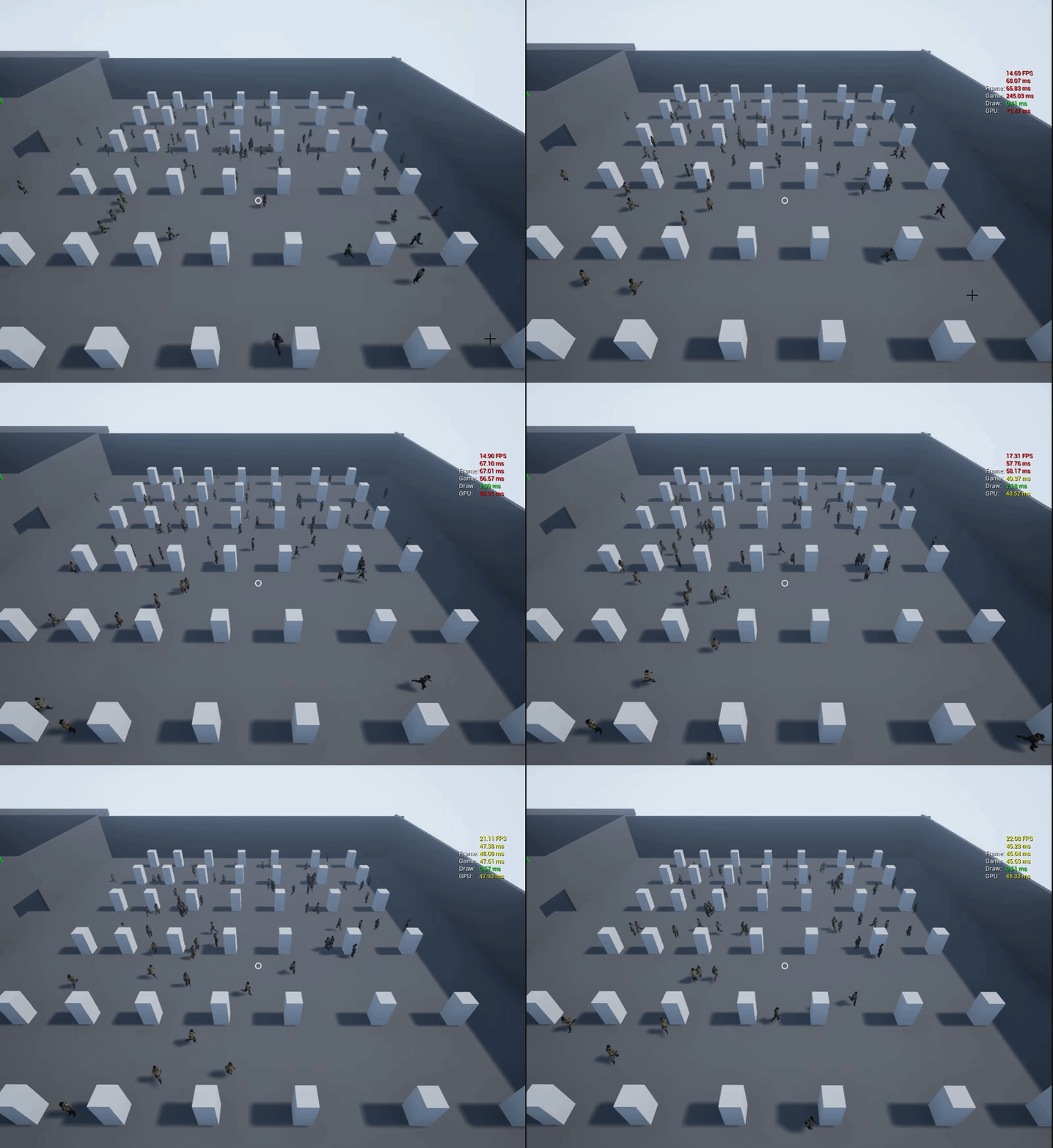


 cyan sigil
Right, which is why I had to open the "advanced" section of the blackboard value and set the Base Class.
 hasty harness
hey guys,
any ideas why my AI can't move when I enable physic simulation?
and how to solve it?
foggy moth
@hasty harness what kind of input are you giving it? AI->MoveTo location?