#Danger Zone Macro
1 messages · Page 1 of 1 (latest)
 desert galleon
 neat wadi
All I'm getting is "Your controlled token does not have an item named 'Test AOE'
I assume it's 'cause I just made an ability on a test actor and dragged the ability into my hotbar, copied the code in it and made a macro from it.
I'm guessing that's probably not how to do it.
Does Danger Zone come with a compendium with example macros?
desert galleon
ah, that sounds like you may be correct.
I have a few examples on the wiki, but nothing in the module. Sec and I'' grab that info
neat wadi
There a wiki? 
desert galleon
These are the args that will pass through into your macro provided that you have the advanced macros module installed. Do you have that?
neat wadi
Aye, I do
desert galleon
Great, so these give you information about things like - the size of your zone, the area targeted, all of the tokens in the zone, the tokens in the area, the tokens targeted, etc. It isn't required to even use the args in your macro, they are just there for additional points of data. You can just run any macro also.
What are you trying to do with the macro?
neat wadi
It's my first time exploring Danger Zone. I'm attempting to test out a crumbling effect. Basically, a 10ft by 10ft square AoE that randomly occurs between turns and forces a token in the AoE to make a dex save or take a certain amount of bludgeoning damage.
I figured the macro was the thing that handled the save and damage.
desert galleon
Cool! You are correct!
neat wadi
Since I didn't see anywhere else to input those in the inter- Aye
And I need Kandashi's fluid canvas to make the screen shake, right?
desert galleon
So for knowing what may come through, it's always easy just to have at the start of the macro console.log(args) for troubleshooting. This will push to your console the args coming from MidiQol.
However, the data I think you want in this case will be on args.targets
that's all the tokens, if any, that are targeted in your 10x10 zone.
From there, it's a matter of writing the macro to make each of those tokens make the saving throw in the macro, but that gets you the list of tokens.
FluidCanvas will shake the screen if installed and configured on the Danger Zone. See https://github.com/napolitanod/Danger-Zone/wiki/Example:-Crumbling-Tomb
However, last I tested the fluidCanvas API wasn't actually shaking the players screens :(. I don't know if Kandashi updated this yet.
neat wadi
//this example uses midi-Qols damage workflow api for dnd5e let tokens = args[0].targets; let damageRoll = new Roll(2d10).roll(); new MidiQOL.DamageOnlyWorkflow(null, null, damageRoll.total, "bludgeoning", tokens, damageRoll, {flavor: "Hit by falling rubble!"})
Whereabouts would I put these args into this macro in order for it to force saves or take half damage in this 10/10ft square?
(I'll be honest, I'm about as inept at coding as granny is trying to navigate instagram)
desert galleon
Here's an example: //this example uses midi-Qols damage workflow api for dnd5e ```js
let tokens = args[0].targets; let damageRoll = new Roll(4d8).roll(); new MidiQOL.DamageOnlyWorkflow(null, null, damageRoll.total, "radiant", tokens, damageRoll, {flavor: "Struck by Lightning!"})
Aye, I saw that. It's what I'm basing the macro above on.
desert galleon
You can ignore most of that, but the key is tokens = args[0].targets
that is what passes to your macro the tokens to target from Danger Zone. From there, it is writing a macro. Danger Zone is system agnostic so it doesn't have knowledge of things like saves/damage due to those being system specific data. What does your macro look like right now and do you use midiQol?
 desert galleon
Ah, yes I see. Let me thnk for a sec
I'm seeing if I have a macro written, but I don't want to hold you up as somebody in the macro-polo may have something already and then it's just swapping in the tokens = args[0].targets. Okay if I start a question for you out there? Also, do you use midiQol?
desert galleon
I posted out there and am looking also, just didn't want to slow it up as I don't write actual macros often.
neat wadi
Aye, no worries
Oh, I noticed there's an "import dangers" button.
I wonder if there's any exported examples out there I can learn from
desert galleon
possibly, though some ids local to the user for things like macros may not come through. I have some examples in the wiki and will be adding more once I push out the next updates. I'm still building out the full thing.
neat wadi
Would it be possible to code in some easy-to-use interface much akin to how one makes an ability or weapon or feature in foundry?
Something that could help spawn in AOE templates 'n such.
For a future update I mean.
desert galleon
It's possible, but that is so system specific that it would best be in a diff module. For example, doing a save and applying damage in dnd5e does not work if done the same way in pf2e or l5r etc. What danger zone gets you are the location components and the tokens inside, as those are not specific to a system
neat wadi
Ah
desert galleon
For your case here, the part I don't have on hand is making the saving throw. However
Try this in your macro let tokens = args[0].targets; let damageRoll = new Roll(4d8).roll(); new MidiQOL.DamageOnlyWorkflow(null, null, damageRoll.total, "bludgeoning", tokens, damageRoll, {flavor: "Struck by Falling .....!"})
just to see if it works to apply damage. You can see the roll is 4d8. You can edit there. It won't force a save but will apply the damage. That's a start in at least seeing it work
The zone has a setting 'always Hits a Token' which helps with testing out macros that look for a token.
neat wadi
 desert galleon
lol, let me see if I wrote the macro wrong.
desert galleon
let tokens = args[0].targets;
let damageRoll = new Roll(`2d4`).roll();
new MidiQOL.DamageOnlyWorkflow(null, null, damageRoll.total, "bludgeoning", tokens, damageRoll, {flavor: `Struck for ` + damageRoll.result +` damage`})
I edited the dice roll incorrectly on the other one 😦
This works in my world.
neat wadi
Seems to rolldamage everytime whenever the effect activates, regardless of when it's over a target or not.
And even then, no damage is applied to the tokens
Nor any saves
desert galleon
The macro isn't complete, just wanted to get you something that fires so you can see the targeting.
let tokens = args[0].targets;
if(!tokens?.length) {return}
let damageRoll = new Roll(`2d4`).roll();
new MidiQOL.DamageOnlyWorkflow(null, null, damageRoll.total, "bludgeoning", tokens, damageRoll, {flavor: `Struck for ` + damageRoll.result +` damage`})
for example, adding the line if(!tokens?.length) {return} will exit the macro if no tokens are targeted.
The saving throw component I didn't locate on my search yet. I am at work now so may be slow in getting that part of the macro if nobody responds to my post in macro-polo
desert galleon
Is it not applying the damage? To show an actual die roll, for example with dice so nice, that is another line in the macro
neat wadi
Okay, so I tweaked some things. It appears to be applying the damage now when I set the width and height of the effect to 1, but not when I set them to 3.
And only when targetting the top left portion of any creatures larger than Medium.
https://i.gyazo.com/05ac209e8f7ffaaa8bac560c8d18edb0.png
https://i.gyazo.com/348e2f795c32507983a9eae34f55f98c.png
https://i.gyazo.com/b36a89db40c854c15daf620cdcdaf9fa.png
https://i.gyazo.com/6ae86457c7a67ad3e4c9014311341431.png
https://i.gyazo.com/bedf7165b8568cda3c9cc967ebfcd1e6.png
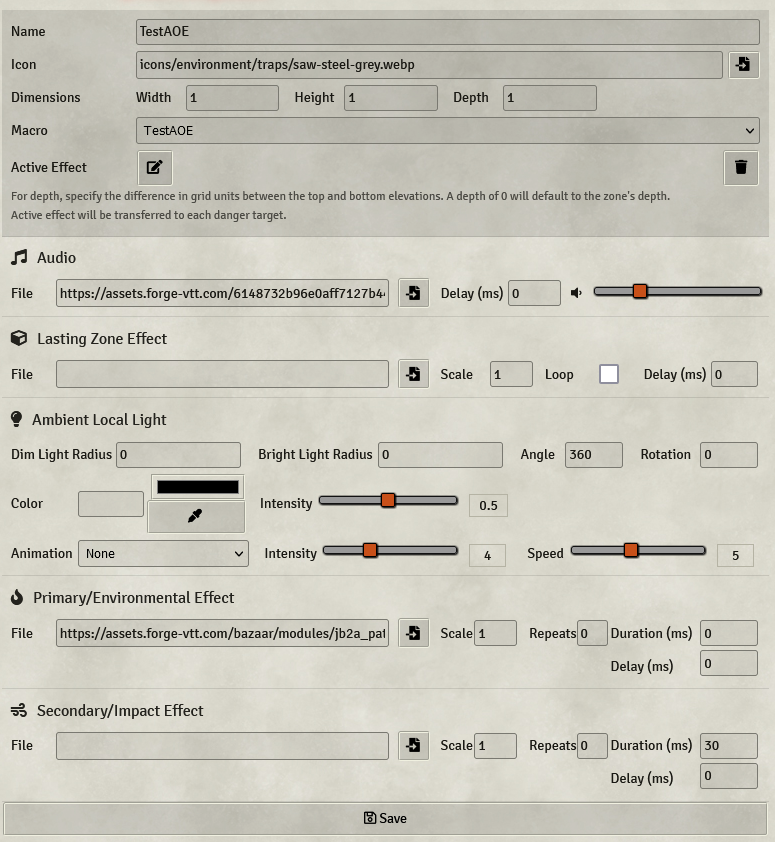
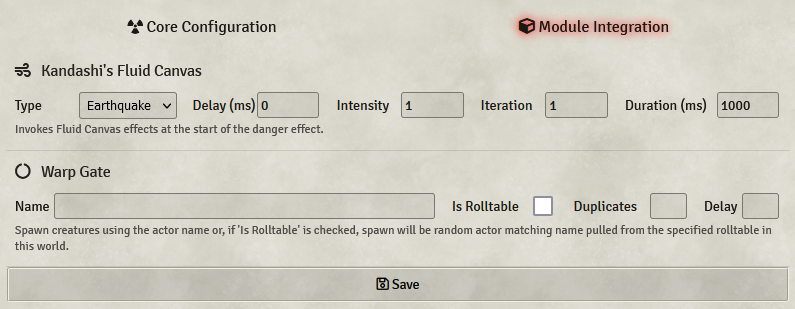
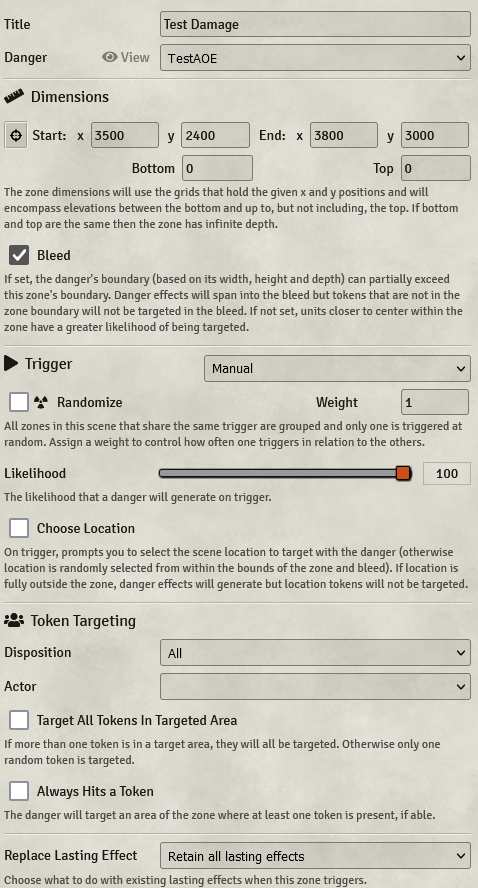
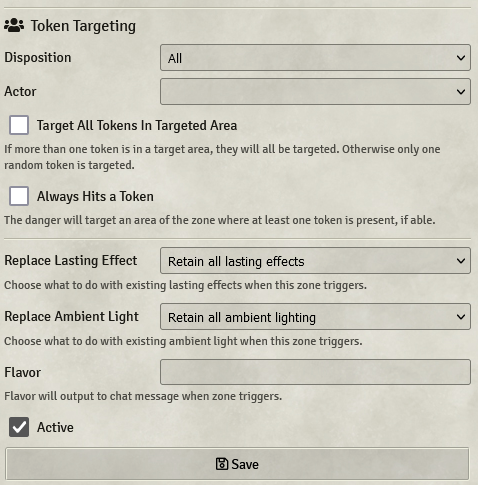
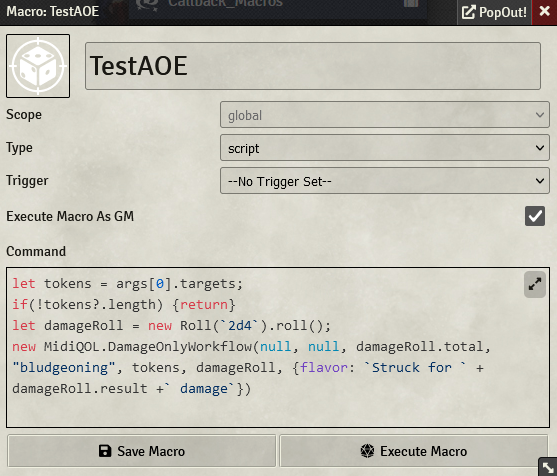
Current settings and macros.
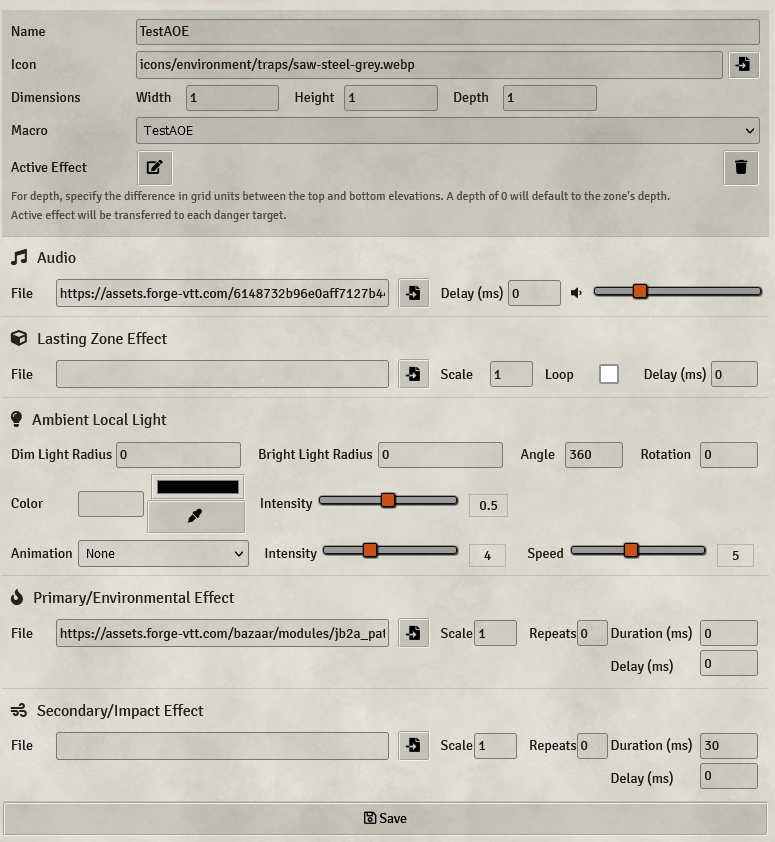
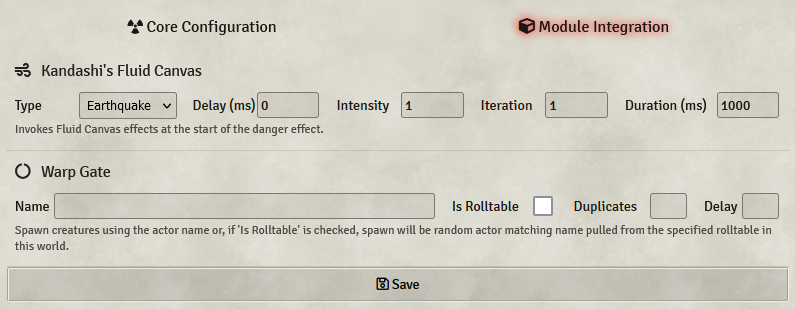
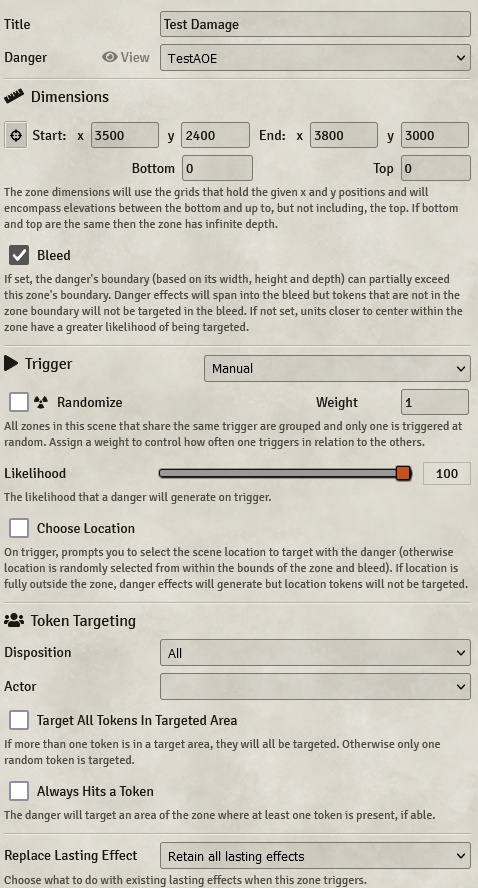


Only when taking up a single square does the effect apply any damage.
desert galleon
Hmmm, I'll take a look at this. The issue with the token size > medium I see and will have a fix for it with the new update I am working through now, which uses a different approach for defining boundaries. Let me see about the other thing too as I thought the targeting if tokens were in the area was performing correctly. Thank you for the screenshots, this will help.
neat wadi
Ayy, no worries. Also, if possible, it'd be very helpful to actually see the area being affected with each impact of the effect. Like an AOE template or something.
desert galleon
You can get a private message in chat already via the options, but I'll explore a visual highlight for an x period of time also
neat wadi
Ah! Right, that showed me I had some settings wrong.
Though strangely enough it doesn't seem to target Large/huge/gargantuan creatures.
neat wadi
An update on the save mechanic.
let tokens = args[0].targets;
if(!tokens?.length) {return}
let damageRoll = new Roll(`2d4`).evaluate({async:false})
let save = await token.actor.rollAbilitySave("dex")
let saved = save > 18
if(saved) {
damageRoll = new Roll(`${damageRoll}/2`).evaluate({async:false})
}
new MidiQOL.DamageOnlyWorkflow(null, null, damageRoll.total, "bludgeoning", tokens, damageRoll, {flavor: `Struck for ` + damageRoll.result +` damage`})```